All posts by Channy Yun

AWS IoT FleetWise Now Generally Available – Easily Collect Vehicle Data and Send to the Cloud

Post Syndicated from Channy Yun original https://aws.amazon.com/blogs/aws/aws-iot-fleetwise-now-generally-available-easily-collect-vehicle-data-and-send-to-the-cloud/

Today we announce the general availability of AWS IoT FleetWise, a fully managed AWS service that makes it easier to collect, transform, and transfer vehicle data to the cloud. Last AWS re:Invent 2021, we previewed AWS IoT FleetWise, heard customer feedback, and improved features for various use cases of near-real-time vehicle data processing.

With AWS IoT FleetWise, automakers, fleet operators, and automotive suppliers can take the complex variability out of collecting data from vehicle fleets at scale. You can access standardized fleet-wide vehicle data and avoid developing custom data collection systems, or you can integrate AWS IoT FleetWise to enhance your existing systems. AWS IoT FleetWise enables intelligent data collection that sends the exact data you need from the vehicle to the cloud. You can use the data to analyze vehicle fleet health to more quickly identify potential maintenance issues or make in-vehicle infotainment systems smarter. Furthermore, you can use it to train machine learning (ML) models that improve autonomous driving and advanced driver assistance systems (ADAS).

For example, electric vehicle (EV) battery temperature is a critical metric that should be continuously analyzed for the entire vehicle fleet. In order to avoid costly continuous data ingestion, you may want to optimize the data collection by setting a threshold on EV battery temperature. The results of this analysis would be provided to the automaker’s quality engineering department, enabling fast assessment of the criticality and possible root causes of any issues identified at certain temperatures. Based on the root cause analysis, the automaker can then take short-term actions to support the driver affected by the issue, as well as midterm actions to improve vehicle quality.

How AWS IoT FleetWise Works
AWS IoT FleetWise provides a vehicle modeling framework that you can use to model your vehicle and its sensors and actuators in the cloud. To enable secure communication between your vehicle and the cloud, AWS IoT FleetWise also provides the AWS IoT FleetWise Edge Agent application that you can use to download and install in-vehicle electronic control units (ECUs) such as the gateway, in-vehicle infotainment controller, etc. You define data collection schemes in the cloud and deploy them to your vehicle.
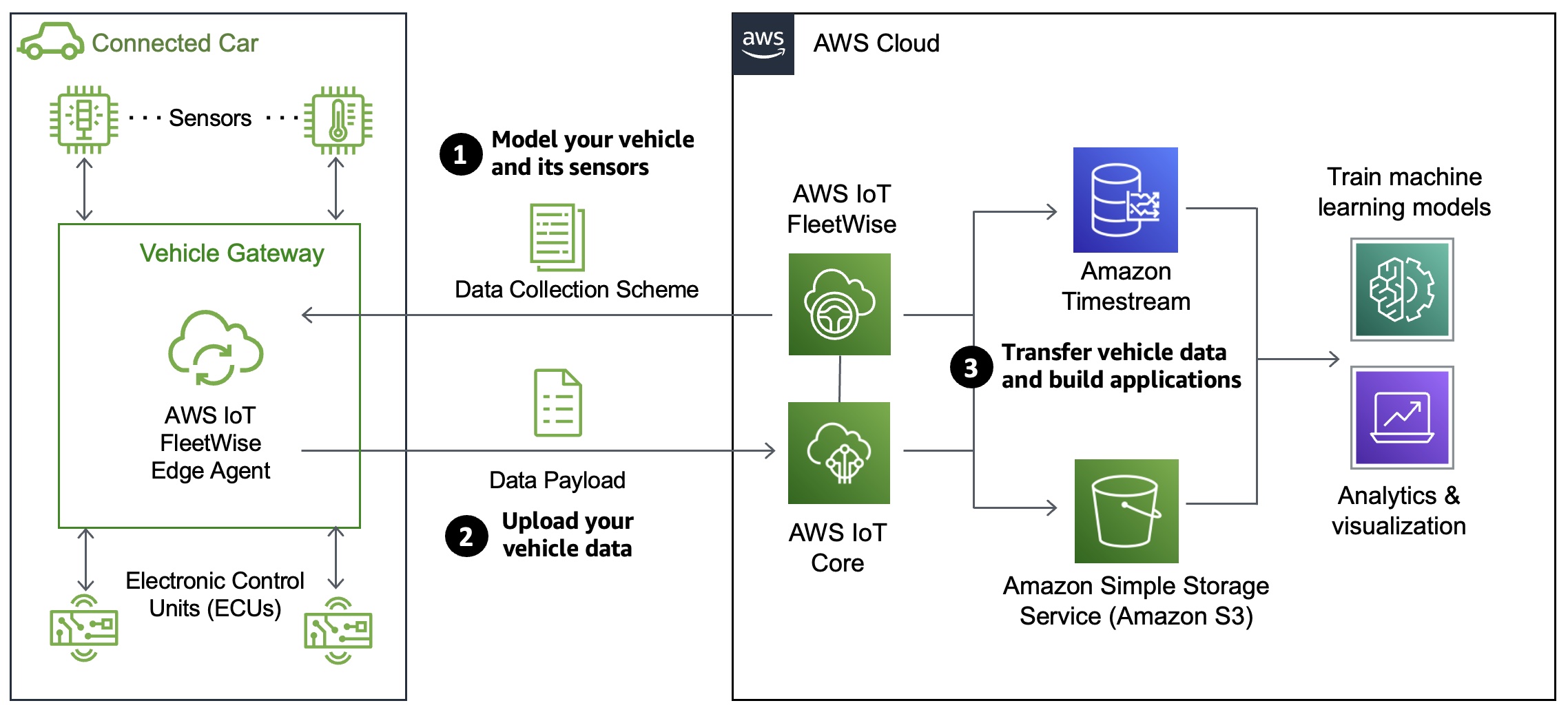
The AWS IoT FleetWise Edge Agent running in your vehicle uses data collection schemes to control what data to collect and when to transfer it to the cloud. Data collected and ingested through AWS IoT FleetWise Edge Agent software goes directly into your Amazon Timestream table or Amazon Simple Storage Service (Amazon S3) repositories via AWS IoT Core.

AWS IoT FleetWise Features
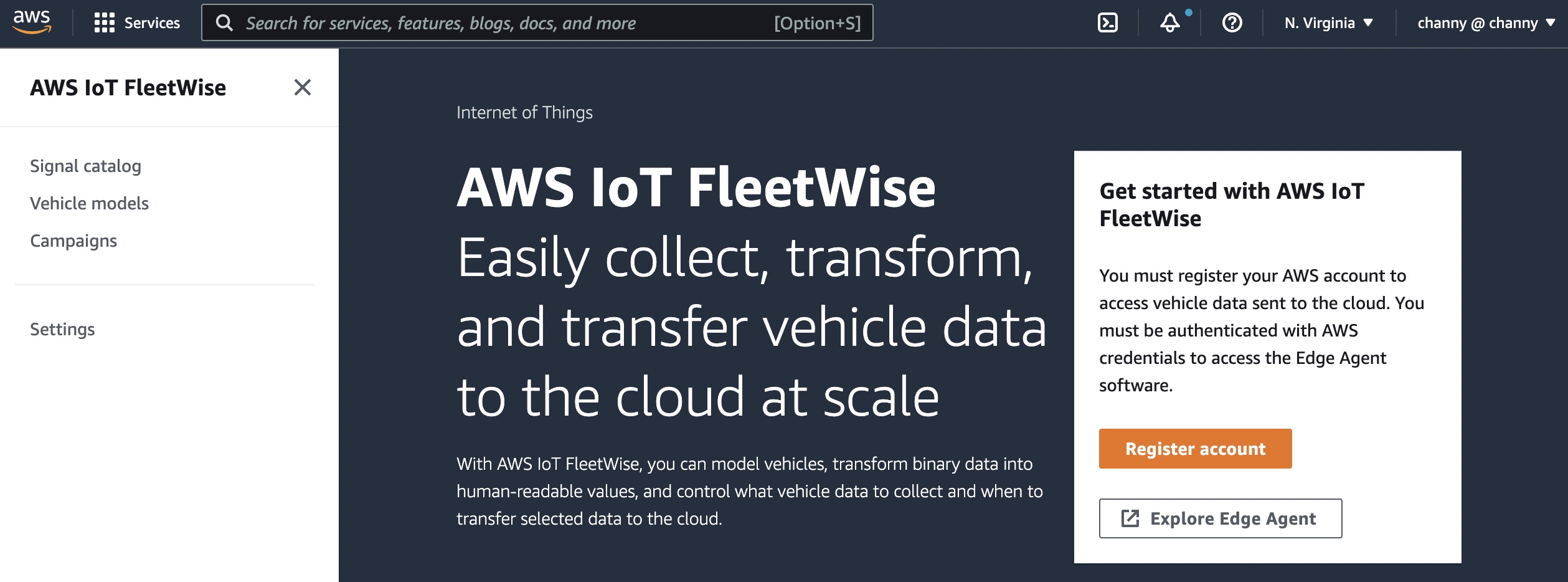
To get started with AWS IoT FleetWise, you can register your account and configure the settings via the AWS console. AWS IoT FleetWise automatically registers your AWS account, IAM role, and Amazon Timestream resources.

The Edge Agent software is a C++ application distributed as source code and is available on GitHub to collect, decode, normalize, cache, and ingest vehicle data to AWS. It supports multiple deployment options, such as vehicle gateways, infotainment systems, telematics control units (TCUs), or aftermarket devices. When vehicles are connected to the cloud, the Edge Agent continually receives data collection schemes and collects, decodes, normalizes and ingests the transformed vehicle data to AWS.
Let’s see the benefits and features of AWS IoT FleetWise:

Signal catalog
A signal catalog contains a collection of vehicle signals. Signals are fundamental structures that you define to contain vehicle data and its metadata. A signal can be a sensor and its status, an attribute as static information of the manufacturer, a branch to represent a nested structure such as Vehicle.Powertrain.combustionEngine expression, or an actuator such as the state of a vehicle device. For example, you can create a sensor to receive in-vehicle temperature values and store its metadata, including a sensor name, a data type, and a unit.
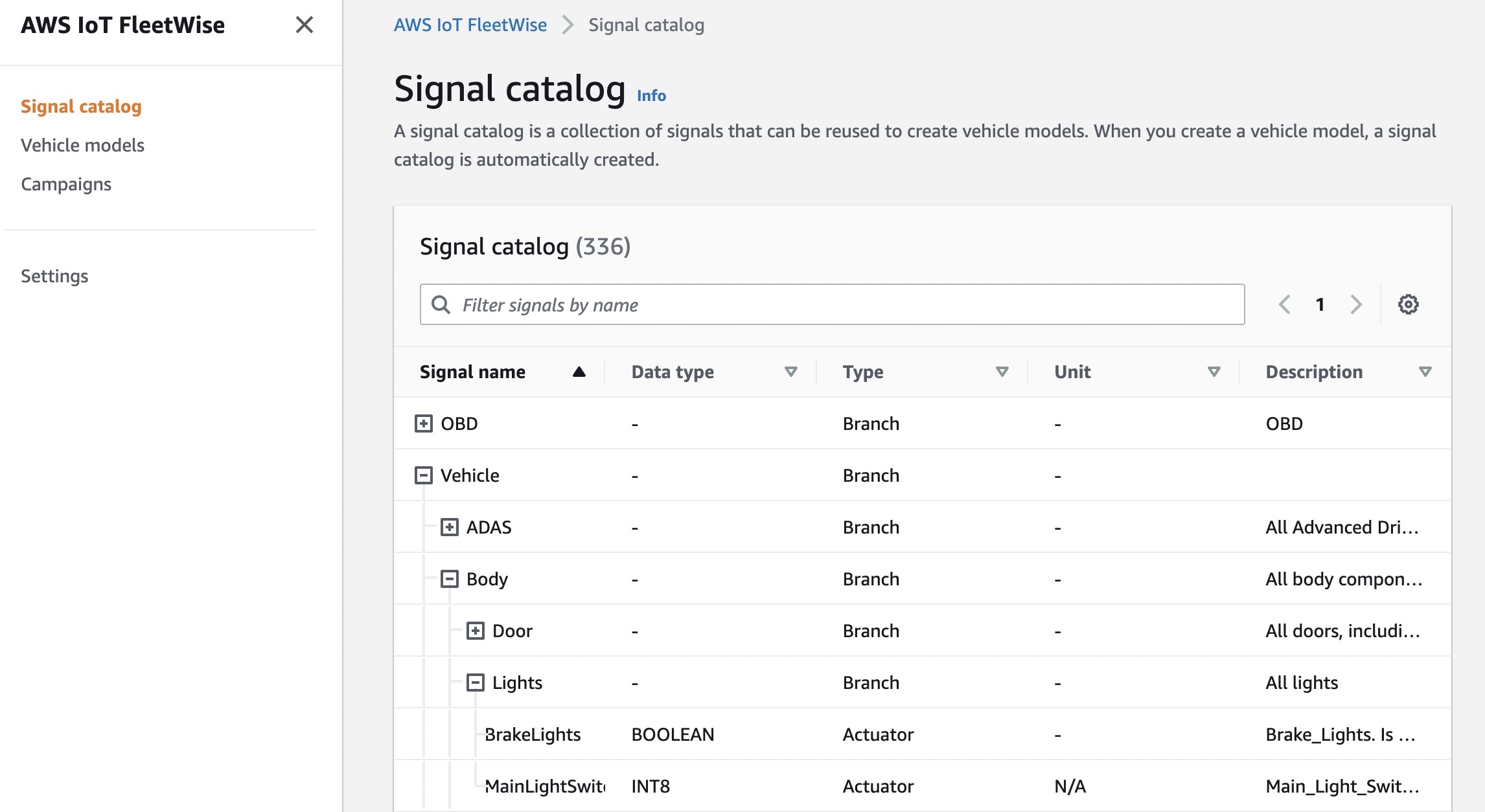
Signals in a signal catalog can be used to model vehicles that use different protocols and data formats. For example, there are two cars made by different automakers: one uses the Controller Area Network (CAN) to transmit the in-vehicle temperature data and the other uses On-board Diagnostic (OBD) protocol.

You can define a sensor in the signal catalog to receive in-vehicle temperature values. This sensor can be used to represent the thermocouples in both cars, irrespective of how this temperature data is available within the vehicle networks. For more information, see Create and manage signal catalogs in the AWS documentation.

Vehicle models
Vehicle models are virtual declarative representations that standardize the format of your vehicles and define relationships between signals in the vehicles. Vehicle models enforce consistent information across multiple vehicles of the same type so that you can quickly configure and create a vehicle fleet. In each vehicle model, you can add signals, including attributes, branches (signal hierarchies), sensors, and actuators.

You can define condition-based schemes to control what data to collect, such as data in-vehicle temperature values that are greater than 40 degrees. You can also define time-based schemes to control how often to collect data. For more information, see Create and manage vehicle models in the AWS documentation.
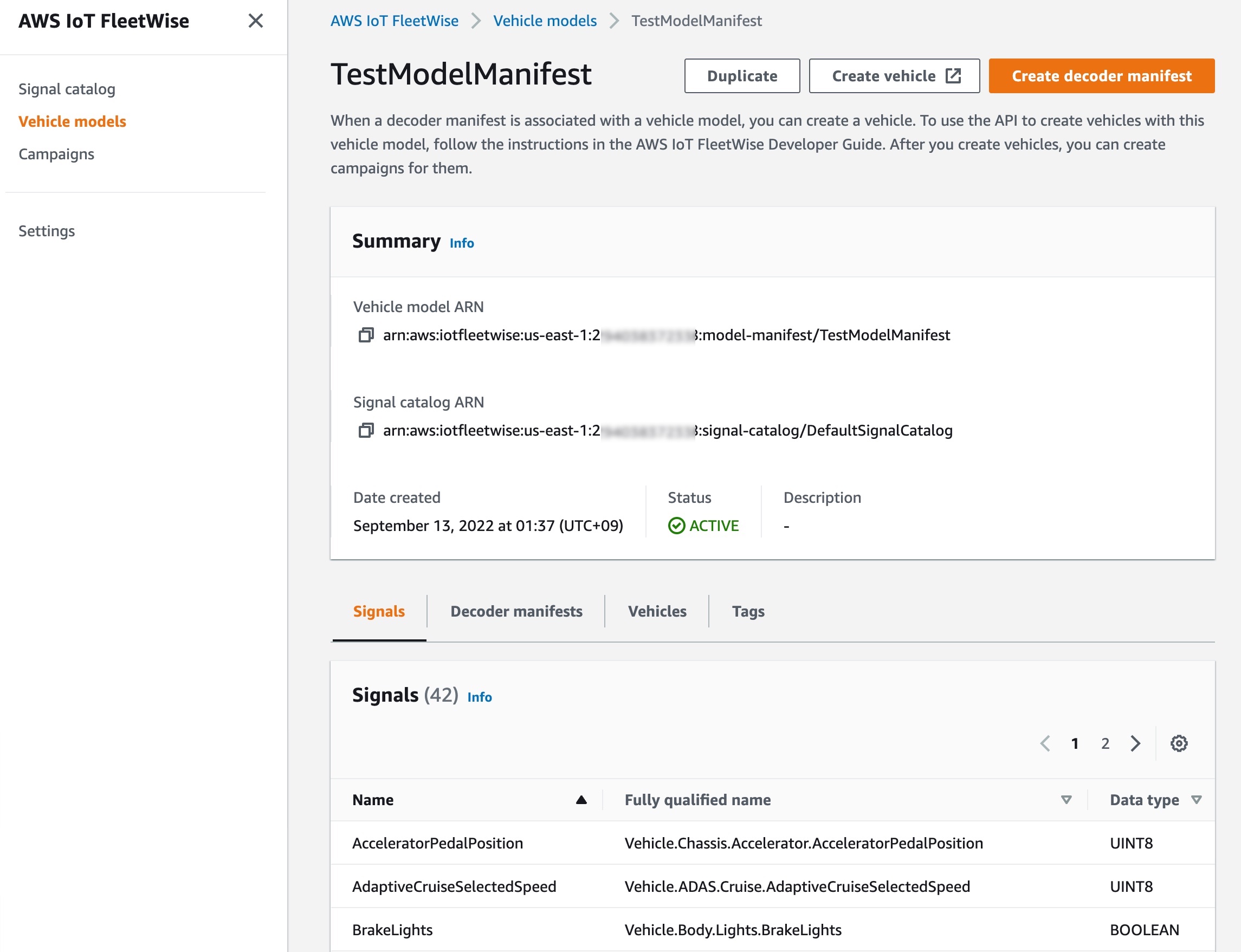
When a decoder manifest is associated with a vehicle model, you can create a vehicle. Each vehicle corresponds to an AWS IoT thing. You can use an existing AWS IoT thing to create a vehicle or set AWS IoT FleetWise to automatically create an AWS IoT thing for your vehicle. For more information, see Provision vehicles in the AWS documentation. After you create vehicles, you can create campaigns for them.

Campaigns
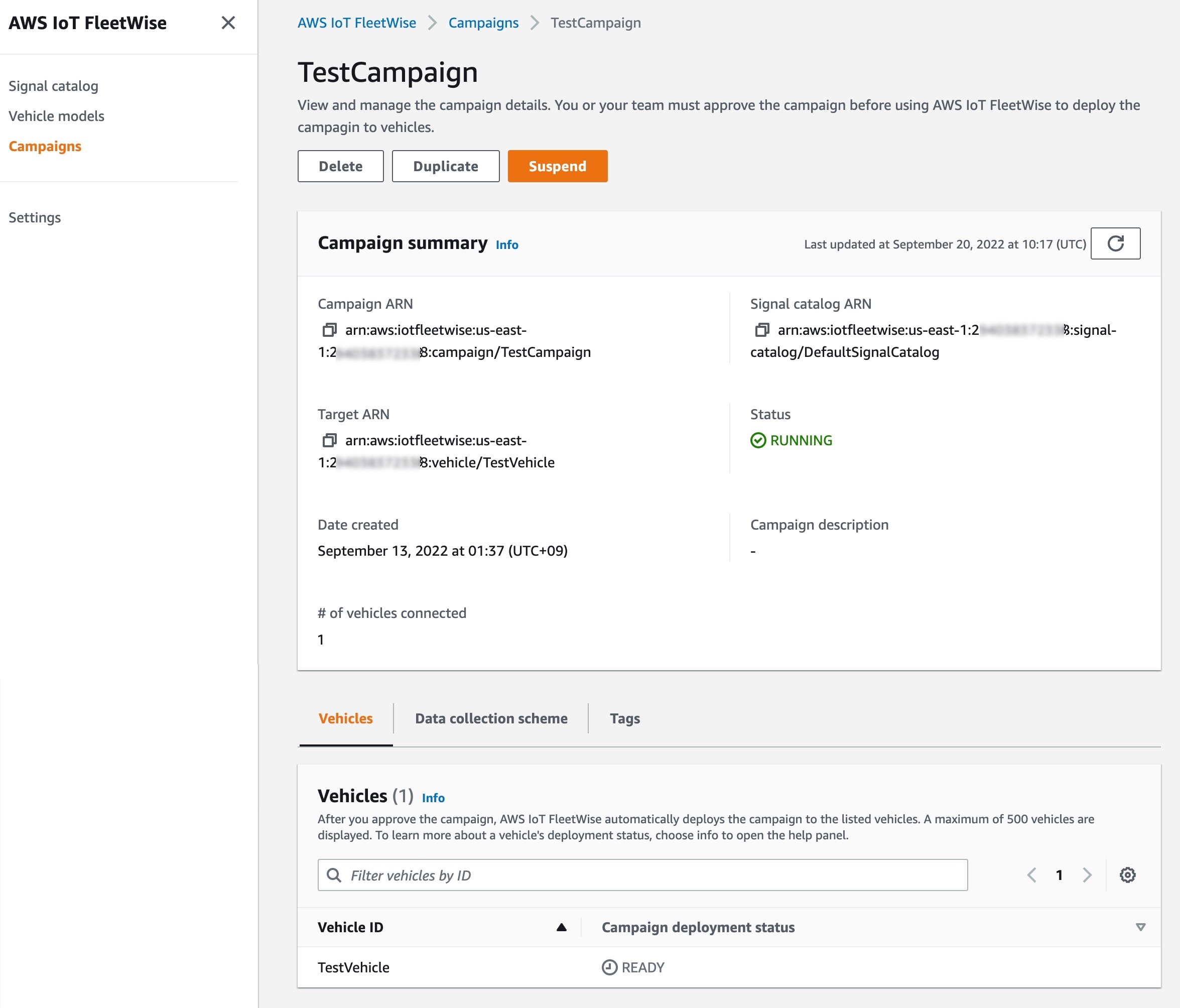
A campaign gives the AWS IoT FleetWise Edge Agent instructions on how to select, collect, and transfer data to the cloud. You can make a campaign with vehicle attributes that you added when creating vehicles, and a data collection scheme. You can manually define the data collection scheme either condition-based logical expressions such as $variable.myVehicle.InVehicleTemperature > 40.0, or time-based data collection in milliseconds such as from 10000 – 60000 milliseconds. To learn more, see Create a campaign in the AWS documentation.

After you create and approve the campaign, AWS IoT FleetWise automatically deploys the campaign to the listed vehicles. The AWS IoT FleetWise Edge Agent software doesn’t start collecting data until a running campaign is deployed to the vehicle. If you want to pause collecting data from vehicles connected to the campaign, on the Campaign summary page, choose Suspend. To resume collecting data from vehicles connected to the campaign, choose Resume.
Demo – Visualizing Vehicle Data
Here is a demo that aims to show how AWS IoT FleetWise can make it easy to collect vehicle data and use it to build visualizing applications. In this demo, you can simulate two kinds of vehicles, an NXP GoldBox powered by an Automotive Grade Linux distribution that runs the AWS IoT FleetWise agent as an AWS IoT Greengrass component or a completely virtual vehicle implemented as an AWS Graviton ARM-based Amazon EC2 instance. To learn more, see the getting started guide and source code in the GitHub repository.

The vehicle in CARLA Simulator can self-drive or be driven with a game steering wheel connected to your desktop. You can watch a live demo video.
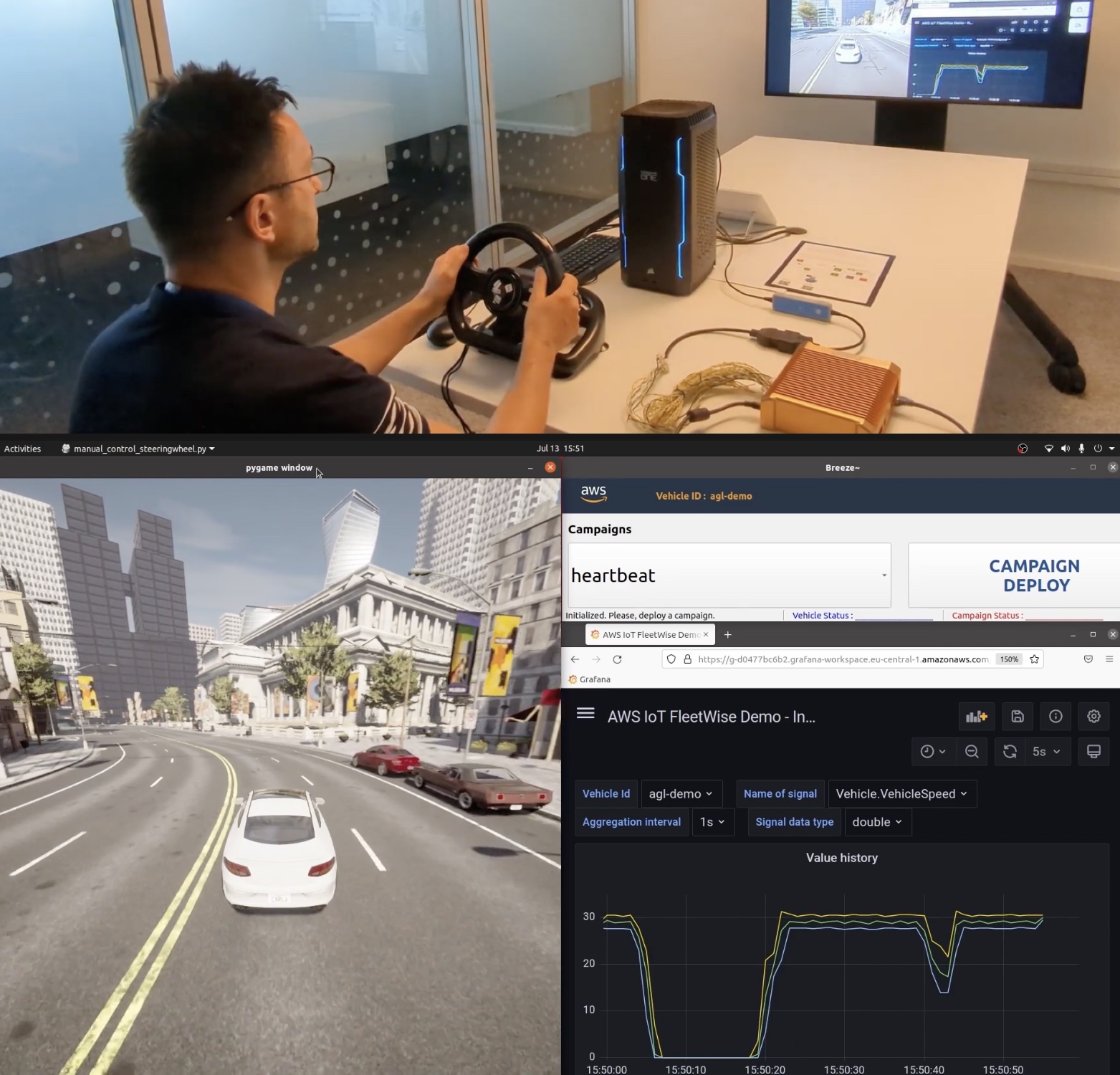
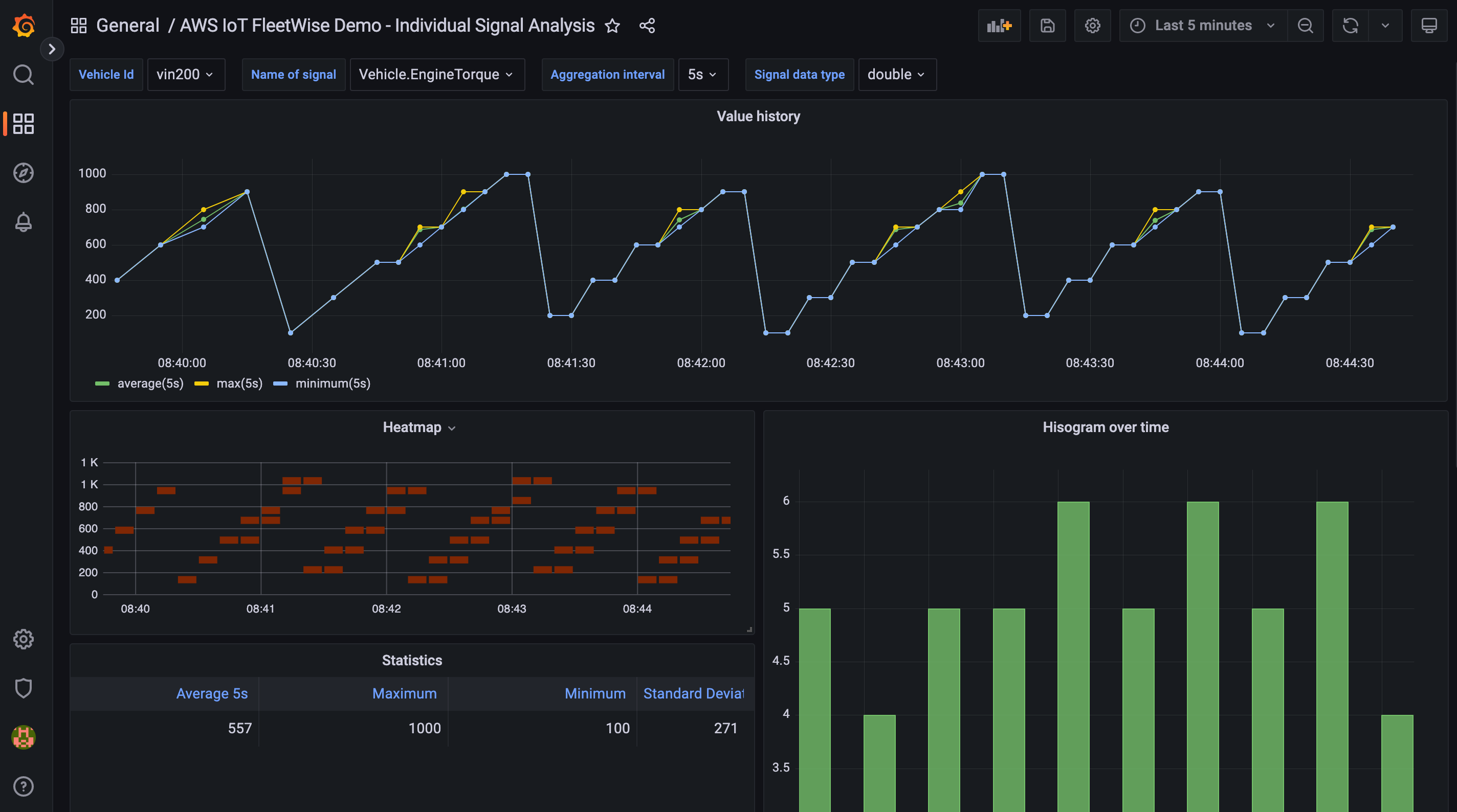
Data is collected by AWS IoT FleetWise and stored in the Amazon Timestream table, and visualized on a Grafana Dashboard.
Customer and Partner Voices
During the preview period, we heard lots of feedback from our customers and partners in automotive industry such as automakers, fleet operators, and automotive suppliers.

For example, Hyundai Motor Group (HMG) is a global vehicle manufacturer that offers consumers a technology-rich lineup of cars, sport utility vehicles, and electrified vehicles. HMG has used AWS services, such as using Amazon SageMaker, to reduce its ML model training time for autonomous driving models.

Hae Young Kwon, vice president and head of the infotainment development group at HMG, said:

“As a leading global vehicle manufacturer, we have come to appreciate the breadth and depth of AWS services to help create new connected vehicle capabilities. With more data available from our expanding global fleet of connected cars, we look forward to leveraging AWS IoT FleetWise to discover how we can build more personalized ownership experiences for our customers.”

LG CNS is a global IT service provider and AWS Premier Consulting Partner that is transforming smart transportation services by building an advanced transportation system that is convenient and safe by maximizing the operational efficiency of multiple modes of transport, including buses, subways, taxis, railways, and airplanes.

Jae Seung Lee, vice president at LG CNS, said:

“At LG CNS, we are committed to advancing the technology that is powering the future of transportation. By using AWS IoT FleetWise, we are creating a new data platform that allows us to ingest, analyze, and simulate vehicle conditions in real-time. With these advanced insights, our customers can gain a better understanding of their vehicles and, as a result, improve decision-making about their fleets.”

Bridgestone is a global leader in tires and rubber building on its expertise to provide solutions for safe and sustainable mobility. Bridgestone has worked with AWS for several years to develop a system that delivers insights derived from the interaction between a tire and a vehicle using advanced machine learning capabilities on Amazon SageMaker.

Brian Goldstine, president of mobility solutions and fleet management at Bridgestone Americas Inc. said:

“Bridgestone has been working with AWS to transform the digital services we provide to our automotive manufacturer, fleet, and retail customers. We look forward to exploring how AWS IoT FleetWise will make it easier for our customers to collect detailed tire data, which can provide new insights for their products and applications.”

Renesas Electronics Corporation is a global leader in microcontrollers, analog, power, and system on chips (SoC) products. Renesas launched cellular-to-cloud IoT development platforms and its cloud development kits to run on AWS IoT Core and FreeRTOS.

Yusuke Kawasaki, director at Renesas Electronics Corporation, said:

“The volume of connected vehicle data is forecast to increase dramatically over the next few years, driven by new and evolving customer expectations. As a result, Renesas is focused on addressing the needs of automotive engineers facing increasing system complexity. Incorporating AWS IoT FleetWise into our vehicle gateway solution will enable our customers to enjoy our market-ready approach for large-scale data collection and accelerate their cloud development strategy. We look forward to further collaborating with AWS to provide a better and simpler development environment for our customers.”

By working with AWS IoT FleetWise Partners, you can take advantage of solutions to streamline your IoT projects, reduce the risk of your efforts, and accelerate time to value. To learn more how AWS accelerates the automotive industry’s digital transformation, see AWS for Automotive.

Now Available
AWS IoT FleetWise is now generally available in the US East (N. Virginia) and Europe (Frankfurt) Regions. You pay for the vehicles you have created and messages per vehicle per month. Additional services used alongside AWS IoT FleetWise, such as AWS IoT Core and Amazon Timestream, are billed separately. For more detail, see the AWS IoT FleetWise pricing page.

To learn more, see the AWS IoT FleetWise resources page including documentations, videos, and blog posts. Please send feedback to AWS re:Post for AWS IoT FleetWise or through your usual AWS support contacts.

Channy

New – AWS Support App in Slack to Manage Support Cases

Post Syndicated from Channy Yun original https://aws.amazon.com/blogs/aws/new-aws-support-app-in-slack-to-manage-support-cases/

ChatOps speeds up software development and operations by enabling DevOps teams to use chat clients and chatbots to communicate and run tasks. DevOps engineers have increasingly moved their monitoring, system management, continuous integration (CI), and continuous delivery (CD) workflows to chat applications in order to streamline activities in a single place and enable better collaboration within organizations.

For example, AWS Chatbot enables ChatOps for AWS to monitor and respond to operational events. AWS Chatbot processes AWS service notifications from Amazon Simple Notification Service (Amazon SNS) and forwards them to your Slack channel or Amazon Chime chat rooms so teams can analyze and act on them immediately, regardless of location. However, AWS Support customers had to switch applications from Slack to the AWS Support Center console to access and engage with AWS Support, moving them away from critical operation channels where essential group communications take place.

Today we are announcing the new AWS Support App, which enables you to directly manage your technical, billing, and account support cases, increase service quotas in Slack, and initiate a live chat with AWS Support engineers in Slack channels. You can then search for, respond to, and participate in group chats with AWS Support engineers to resolve support cases from your Slack channels.

With the AWS Support App in Slack, you can integrate AWS Support into your team workflows to improve collaboration. When creating, updating, or monitoring a support case status, your team members keep up to date in real time. They can also easily search previous cases to find recommendations and solutions and instantly share those details with all team members without having to switch applications.

Configuring the AWS Support App in Slack
The AWS Support App in Slack is now available to all customers with Business, Enterprise On-ramp, or Enterprise Support at no additional charge. If you have a Basic or Developer plan, you can upgrade your support plan.

For connecting your Slack workspace and channel for your organization, you should have access to add apps to your Slack workspace and an AWS Identity and Access Management (IAM) user or role with the required permissions. To learn more, see examples of IAM policies to manage access.

To get started with the AWS Support App in Slack, visit the AWS Support Center console and choose Authorize workspace.

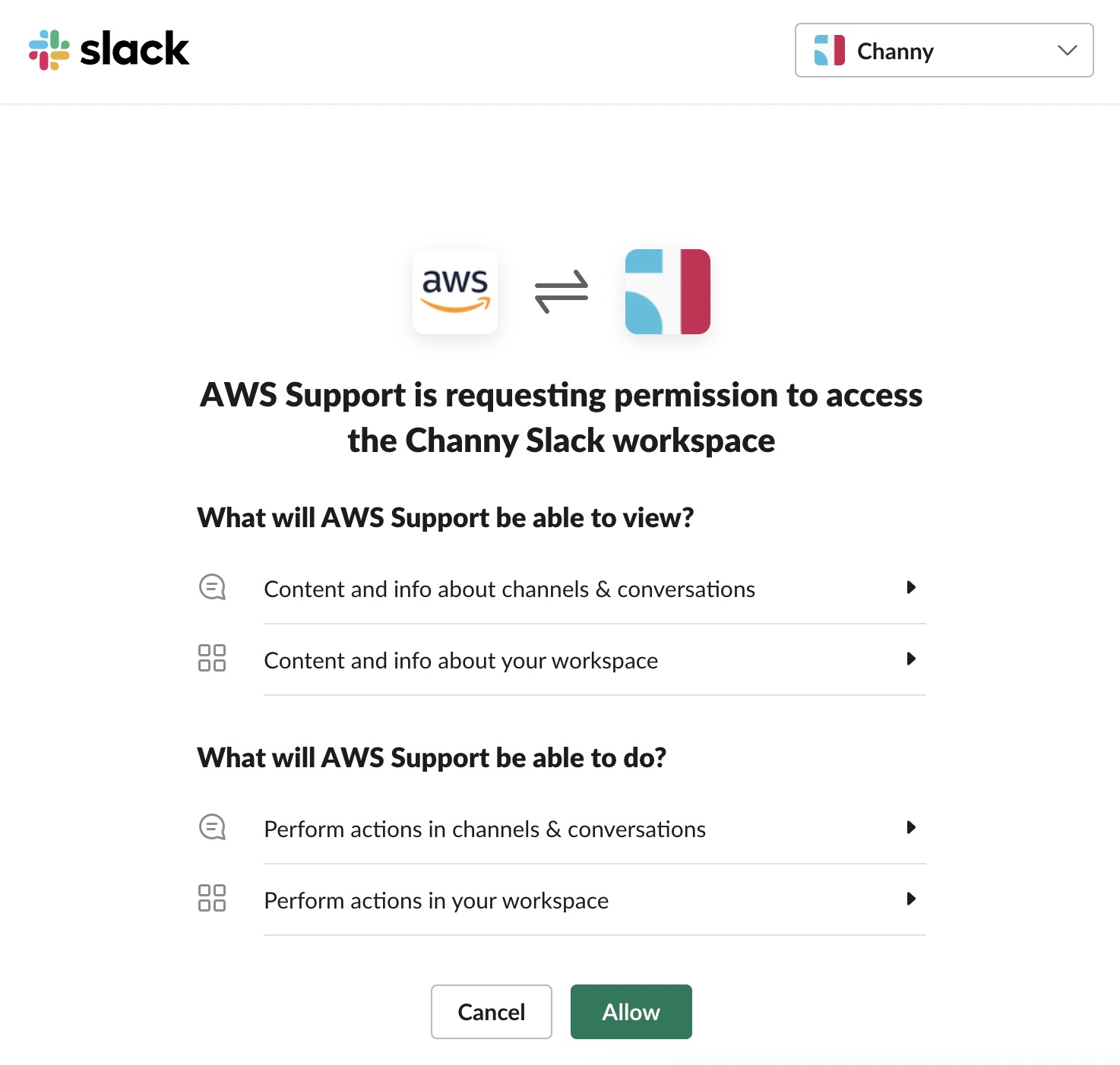
When prompted to give permissions to access your Slack workspace, you can select your workspace to connect and choose Allow.

Now you can see your workspace on the Slack configuration page. To add more workspaces, choose Add workspace and repeat this step. You can add up to five workspaces to your account.

After you authorize your Slack workspace, you can add your Slack channels by choosing Add channel. You can add up to 20 channels for a single account. A single Slack channel can have up to 100 AWS accounts.

Choose the workspace name that you previously authorized, the Slack channel ID included in the channel link and the value that looks like C01234A5BCD where you invited the AWS Support App by /invite @awssupport command, the IAM role that you created for the AWS Support App.

You can also set notifications for how to get notified about cases and choose at least one of the options in New and reopened cases, Case correspondences, or Resolved cases for notification types. If you select High-severity cases, you can get notified for only cases that affect a production system or higher by the severity levels.

After adding a new channel, you can now open the Slack channel and manage support cases and live chats with AWS Support engineers.

Managing Support Cases in the Slack Channel
After you add your Slack workspace and channel, you can create, search, resolve, and reopen your support case in your Slack channel.

In your Slack channel, when you enter /awssupport create-case command, you can create a support case to specify the subject, description, issue type, service, category, severity, and contact method — either email and Slack notifications or live chat in Slack.

If you choose Live chat in Slack, you can enter the names of other members. AWS Support App will create a new chat channel for the created support case and will automatically add you, the members that you specified, and AWS Support engineers.

After reviewing the information you provided, you can create a support case. You can also choose Share to channel to share the search results with the channel.

In your Slack channel, when you enter the /awssupport search-case command, you can search support cases for a specific AWS account, data range, and case status, such as open or resolved.

You can choose See details to see more information about a case. When you see details for a support case, you can resolve or reopen specific support cases directly.

Initiating Live Chat Sessions with AWS Support Engineers
If you chose the live chat option when you created your case, the AWS Support App creates a chat channel for you and an AWS Support engineer. You can use this chat channel to communicate with a support engineer and any others that you invited to the live chat.

To join a live chat session with AWS Support, navigate to the channel name that the AWS Support App created for you. The live channel name contains your support case ID, such as awscase-1234567890. Anyone who joins your live chat channel can view details about this specific support case. We strongly recommend that you only add users that require access to your support cases.

When a support engineer joins the channel, you can chat with a support engineer about your support case and upload any file attachments to the channel. The AWS Support App automatically saves your files and chat log to your case correspondence.

To stop chatting with the support agent, choose End chat or enter the /awssupport endchat command. The support agent will leave the channel and the AWS Support App will stop recording the live chat. You can find the chat history attached to the case correspondence for this support case. If the issue has been resolved, you can choose Resolve case from the pinned message to show the case details in the chat channel or enter the /awssupport resolve command.

When you manage support cases or join live chats for your account in the Slack channel, you can view the case correspondences to determine whether the case has been updated in the Slack channel. You can also audit the Support API calls the application made on behalf of users via logs in AWS CloudTrail. To learn more, see Logging AWS Support API calls using AWS CloudTrail.

Requesting Service Quota Increases
In your Slack channel, when you enter the /awssupport service-quota-increase command, you can request to increase the service quota for a specific AWS account, AWS Region, service name, quota name, and requested value for the quota increase.

Now Available
The AWS Support App in Slack is now available to all customers with Business, Enterprise On-ramp, or Enterprise Support at no additional charge. If you have a Basic or Developer plan, you can upgrade your support plan. To learn more, see Manage support cases with the AWS Support App or contact your usual AWS Support contacts.

Channy

Happy 10th Anniversary, Amazon S3 Glacier – A Decade of Cold Storage in the Cloud

Post Syndicated from Channy Yun original https://aws.amazon.com/blogs/aws/happy-10th-anniversary-amazon-s3-glacier-a-decade-of-cold-storage-in-the-cloud/

Ten years ago, on August 20, 2012, AWS announced the general availability of Amazon Glacier, secure, reliable, and extremely low-cost storage designed for data archiving and backup. At the time, I was working as an AWS customer and it felt like an April Fools’ joke, offering long-term, secure, and durable cloud storage that allowed me to archive large amounts of data at a very low cost.

In Jeff’s original blog post for this launch, he noted that:

Glacier provides, at a cost as low as $0.01 (one US penny, one one-hundredth of a dollar) per Gigabyte per month, extremely low-cost archive storage. You can store a little bit, or you can store a lot (terabytes, petabytes, and beyond). There’s no upfront fee, and you pay only for the storage that you use. You don’t have to worry about capacity planning, and you will never run out of storage space.

Ten years later, Amazon S3 Glacier has evolved to be the best place in the world for you to store your archive data. The Amazon S3 Glacier storage classes are purpose-built for data archiving, providing you with the highest performance, most retrieval flexibility, and the lowest cost archive storage in the cloud.

You can now choose from three archive storage classes optimized for different access patterns and storage duration – Amazon S3 Glacier Instant Retrieval, Amazon S3 Glacier Flexible Retrieval (formerly Amazon S3 Glacier), and Amazon S3 Glacier Deep Archive. We’ll dive into each of these storage classes in a bit.

A Decade of Innovation in Amazon S3 Glacier
To understand how we got here, we’ll walk through through the last decade and revisit some of the most significant Amazon S3 Glacier launches that fundamentally changed archive storage forever:

August 2012 – Amazon Glacier: Archival Storage for One Penny per GB per Month
We launched Amazon Glacier to store any amount of data with high durability at a cost that allows you to get rid of your tape libraries and all the operational complexity and overhead that have been part of data archiving for decades. Amazon Glacier was modeled on S3’s durability and dependability but designed and built from the ground up to offer an archival storage to you at an extremely low cost. At that time, Glacier introduced the concept of a “vault” for storing archival data. You could then easily retrieve your archival data by initiating a request and then the data was made available to you for download in 3–5 hours.

November 2012 – Archiving Amazon S3 Data to Glacier
While Glacier was purpose-built from the ground up for archival data, many customers had object data that originated in S3 warmer storage that they would eventually want to move to colder storage. To make that easy for customers, Amazon S3’s Lifecycle Management (aka Lifecycle Rule) integrated S3 and Glacier and made the details visible via the storage class of each object. Lifecycle Management allows you to define time-based rules that can start Transition (changing S3 storage class to Glacier) and Expiration (deletion of objects). In 2014, we combined the flexibility of S3 versioned objects with Glacier, helping you to further reduce your overall storage costs.

November 2016 – Glacier Price Reductions and Additional Retrieval Options for Glacier
As part of AWS’s long-term focus on reducing costs and passing along those savings to customers, we reduced the price of Glacier storage to $0.004 (less than half a cent) in the case of 1 GB for 1 month in the US East (N. Virginia) Region, from $0.007 in 2015 and $0.010 in 2012. With storing data at a very low cost but having flexibility in how quickly they can retrieve the data, we introduced two more options for data retrieval that were based on the amount of data that you stored in Glacier and the rate at which you retrieved it. You could select expedited retrieval (typically taking 1–5 minutes), bulk retrieval (5–12 hours), or the existing standard retrieval method (3–5 hours).

November 2018 – Amazon S3 Glacier Storage Class to Integrate S3 Experiences
Glacier customers appreciated the way they could easily move data from S3 to Glacier via S3 lifecycle management, and wanted us to expand on that capability to use the most common S3 APIs to operate directly on S3 Glacier objects. So, we added S3 PUT API to S3 Glacier, which enables you to use the standard S3 PUT API and select any storage class, including S3 Glacier, to store the data. Data can be stored directly in S3 Glacier, eliminating the need to upload to S3 Standard and immediately transition to S3 Glacier with a zero-day lifecycle policy. So, you could PUT to S3 Glacier like any other S3 storage class.

March 2019 – Amazon S3 Glacier Deep Archive – the Lowest Cost Storage in the Cloud
While the original Glacier service offered an extremely low price for archival storage, we challenged ourselves to see if we could find a way to invent an even lower priced storage offering for very cold data. The Amazon S3 Glacier Deep Archive storage class delivers the lowest cost storage, up to 75 percent lower cost (than S3 Glacier Flexible Retrieval), for long-lived archive data that is accessed less than once per year and is retrieved asynchronously. At just $0.00099 per GB-month (or $1 per TB-month), S3 Glacier Deep Archive offers the lowest cost storage in the cloud at prices significantly lower than storing and maintaining data in on-premises tape or archiving data off-site.

November 2020 – Amazon S3 Intelligent-Tiering adds Archive Access and Deep Archive Access tiers
In November 2018, we launched Amazon S3 Intelligent-Tiering, the only cloud storage class that delivers automatic storage cost savings, up to 95 percent when data access patterns change, without performance impact or operational overhead. In order to offer customers the simplicity and flexibility of S3 Intelligent-Tiering and the low storage cost of archival data, we added the Archive Access tier providing the same performance and pricing as the S3 Glacier storage class as well as the Deep Archive Access tier which offers the same performance and pricing as the S3 Glacier Deep Archive storage class.

November 2021 – Amazon S3 Glacier Flexible Retrieval and S3 Glacier Instant Retrieval
The Amazon S3 Glacier storage class was renamed to Amazon S3 Glacier Flexible Retrieval and now includes free bulk retrievals along with an additional 10 percent price reduction across all Regions, making it optimized for use cases such as backup and disaster recovery.

Additionally, customers asked us for a storage solution that had the low costs of Glacier but allowed for fast access when data was needed very quickly. So, we introduced Amazon S3 Glacier Instant Retrieval, a new archive storage class that delivers the lowest cost storage for long-lived data that is rarely accessed and requires milliseconds retrieval. You can save up to 68 percent on storage costs compared to using the S3 Standard-Infrequent Access (S3 Standard-IA) storage class when your data is accessed once per quarter.

The Amazon S3 Intelligent-Tiering storage class also recently added a new Archive Instant Access tier, providing the same performance and pricing as the S3 Glacier Instant Retrieval storage class which delivers automatic 68% cost savings for customers using S3 Intelligent-Tiering with long-lived data.

Then and Now
Customers across all industries and verticals use the S3 Glacier storage classes for every imaginable archival workload. Accessing and using the S3 Glacier storage classes through the S3 APIs and S3 console provides enhanced functionality for data management and cost optimization.

As we discussed above, you can now choose from three archive storage classes optimized for different access patterns and storage duration:

  • S3 Glacier Instant Retrieval – For archive data that needs immediate access, such as medical images, news media assets, or genomics data, choose the S3 Glacier Instant Retrieval storage class, an archive storage class that delivers the lowest cost storage with milliseconds retrieval.
  • S3 Glacier Flexible Retrieval – For archive data that does not require immediate access but needs to have the flexibility to retrieve large sets of data at no cost, such as backup or disaster recovery use cases, choose the S3 Glacier Flexible Retrieval storage class, with retrieval in minutes or free bulk retrievals in 12 hours.
  • S3 Glacier Deep Archive – For retaining data for 7–10 years or longer to meet customer needs and regulatory compliance requirements, such as financial services, healthcare, media and entertainment, and public sector, choose the S3 Glacier Deep Archive storage class, the lowest cost storage in the cloud with data retrieval within 12–48 hours.

Watch a brief introduction video for an overview of the S3 Glacier storage classes.

All S3 Glacier storage classes are designed for 99.999999999% (11 9s) of durability for objects. Data is redundantly stored across three or more Availability Zones that are physically separated within an AWS Region. Here are some comparisons across the S3 Glacier storage classes at a glance:

Performances S3 Glacier
Instant Retrieval
S3 Glacier
Flexible Retrieval
S3 Glacier
Deep Archive
Availability 99.9% 99.99% 99.99%
Availability SLA 99% 99.9% 99.9%
Minimum capacity charge per object 128 KB 40 KB 40 KB
Minimum storage duration charge 90 days 90 days 180 days
Retrieval charge per GB per GB per GB
Retrieval time milliseconds Expedited (1–5 minutes),
Standard (3–5 hours),
Bulk (5–12 hours) free
Standard (within 12 hours),
Bulk (within 48 hours)

For data with changing access patterns that you want to automatically archive based on the last access of that data, choose the S3 Intelligent-Tiering storage class. Doing so will optimize storage costs by automatically moving data to the most cost-effective access tier when access patterns change. Its Archive Instant Access, Archive Access, and Deep Archive Access tiers have the same performance as S3 Glacier Instant Retrieval, S3 Glacier Flexible Retrieval, and S3 Glacier Deep Archive respectively. To learn more, see the blog post Automatically archive and restore data with Amazon S3 Intelligent-Tiering.

To get started with S3 Glacier, see the blog post Best practices for archiving large datasets with AWS for key considerations and actions when planning your cold data storage patterns. You can also use a hands-on lab tutorial that will help you get started with the S3 Glacier storage classes in just 20 minutes, and start archiving your data in the S3 Glacier storage classes in the S3 console.

Happy Birthday, Amazon S3 Glacier!
During the last AWS Storage Day 2022, Kevin Miller, VP & GM of Amazon S3, mentioned the 10th anniversary of S3 Glacier and its pace of innovation for many customer use cases throughout his interview with theCUBE.

In this expanding world of data growth, you have to have an archiving strategy. Everyone has archival data — every company, every vertical, and every industry. There is an archiving need not only for companies that have been around for a while but also for digital native businesses.

Lots of AWS customers such as Nasdaq, Electronic Arts, and NASCAR have used S3 Glacier storage classes for their backup and archiving workloads. The following are some additional recent customer-authored blogs focusing on AWS archiving best practices from customers in the financial, media, gaming, and software industries.

A big thank you to all of our S3 Glacier customers from around the world! Over 90 percent of S3’s roadmap has come directly from feedback from customers like you. We will never stop listening to you, as your feedback and ideas are essential to how we improve the service. Thank you for trusting us and for constantly raising the bar and pushing us to improve to lower costs, simplify your storage, increase your agility, and allow you to innovate faster.

In accordance with Customer Obsession, one of the Amazon Leadership Principles, your feedback is always welcome! If you want to see new S3 Glacier features and capabilities, please send any feedback to AWS re:Post for S3 Glacier or through your usual AWS Support contacts.

– Channy

New – HTTP/3 Support for Amazon CloudFront

Post Syndicated from Channy Yun original https://aws.amazon.com/blogs/aws/new-http-3-support-for-amazon-cloudfront/

Amazon CloudFront is a content delivery network (CDN) service, a network of interconnected servers that is geographically closer to the users and reaches their computers much faster. Amazon CloudFront reduces latency by delivering data through 410+ globally dispersed Points of Presence (PoPs) with automated network mapping and intelligent routing.

With Amazon CloudFront, content, API requests and responses or applications can be delivered over Hypertext Transfer Protocol (HTTP) version 1.1, and 2.0 over the latest version of Transport Layer Security (TLS) to encrypt and secure communication between the user client and CloudFront.

Today we are adding HTTP version 3.0 (HTTP/3) support for Amazon CloudFront. HTTP/3 uses QUIC, a user datagram protocol-based, stream-multiplexed, and secure transport protocol that combines and improves upon the capabilities of existing transmission control protocol (TCP), TLS, and HTTP/2. Now, you can enable HTTP/3 for end user connections in all new and existing CloudFront distributions on all edge locations worldwide, and there is no additional charge for using this feature.

What is HTTP/3?
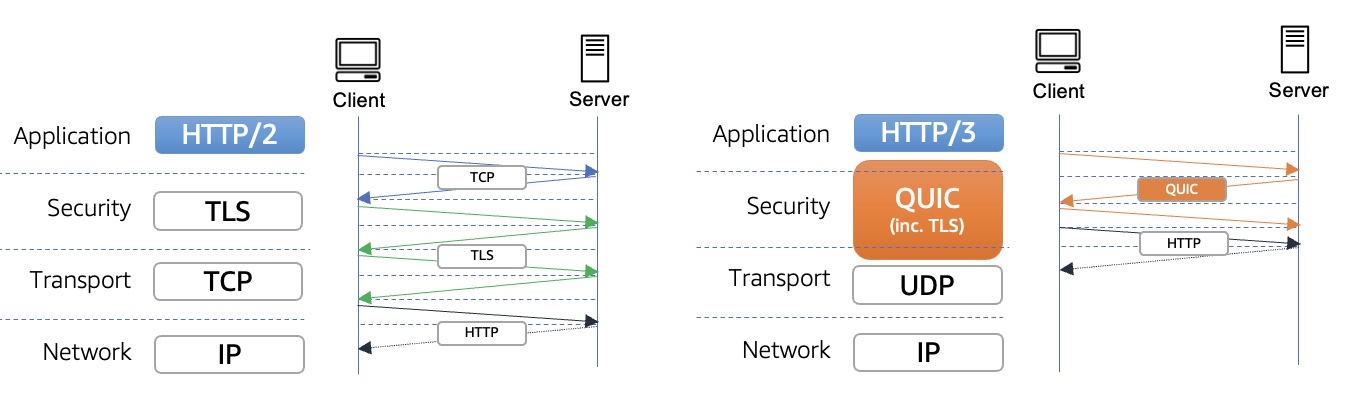
HTTP/3 uses QUIC and overcomes many of TCP’s limitations and bring those benefits to HTTP. When using existing HTTP/2 over TCP and TLS, TCP needs a handshake to establish a session between a client and server, and TLS also needs its own handshake to ensure that the session is secured. Each handshake has to make the full round trip between client and server, which can take a long time when client and server and far apart, network-wise. But, QUIC only needs a single handshake to establish a secure session.

Also, TCP is understood and manipulated by a myriad of different middleboxes, such as firewalls and network address translation (NAT) devices. QUIC uses UDP as its basis to allow packet flows in an enterprise or public network and is fully encrypted, including the metadata, which makes middleboxes unable to inspect or manipulate its details.

HTTP/3 streams are multiplexed independently to eliminate head-of-line blocking between requests and responses. This is possible because stream multiplexing occurs in the transport layer as opposed to the application layer like HTTP/2 over TCP. This enables web applications to perform faster, especially over slow networks and latency-sensitive connections.

Benefits of HTTP/3 on CloudFront
Our customers always want to provide faster, more responsive and secure experience on the web for end users. HTTP/3 provides benefits to all CloudFront customers in the form of faster connection times, stream multiplexing, client-side connection migration, and fewer round trips in the handshake process to reduce error rates.

QUIC connections over UDP support connection reuse with a connection ID independent from IP address/port tuples so users have no interruption or impact. Customers operating in countries with low network connectivity will see improved performance from their applications.

CloudFront’s HTTP/3 support provides enhanced security built on top of s2n-quic, an open-source Rust implementation of the QUIC protocol added to our set of AWS encryption open-source libraries, both with a strong emphasis on efficiency and performance.

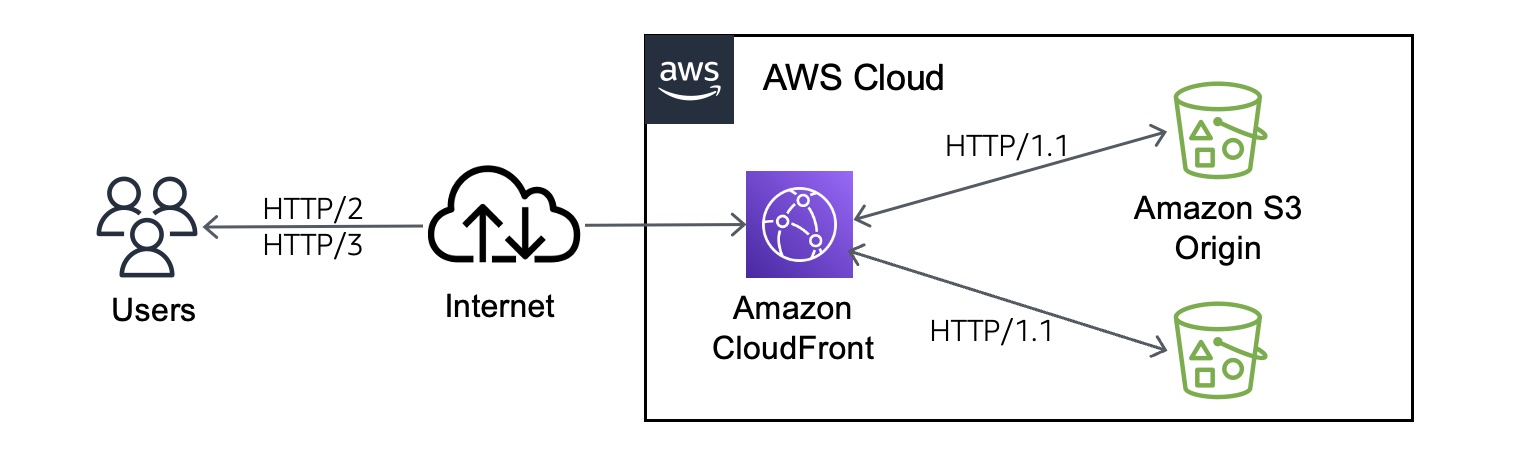
If you enable HTTP/3 in CloudFront distributions, the users can make HTTP/3 viewer request to CloudFront edge locations. Past the edge location, we have highly reliable networks within AWS Cloud and CloudFront will continue to use HTTP/1.1 for origin fetches. So, you don’t need to make any server-side changes in order to make your content accessible via HTTP/3.

For some types of applications, like those requiring an HTTP client library to make HTTP requests, customers may need to update their HTTP client library to a version that supports HTTP/3. But if for some operational reason clients cannot establish a QUIC connection, they can fall back to another supported protocol such as HTTP/1.1 or HTTP/2.

How to Enable HTTP/3
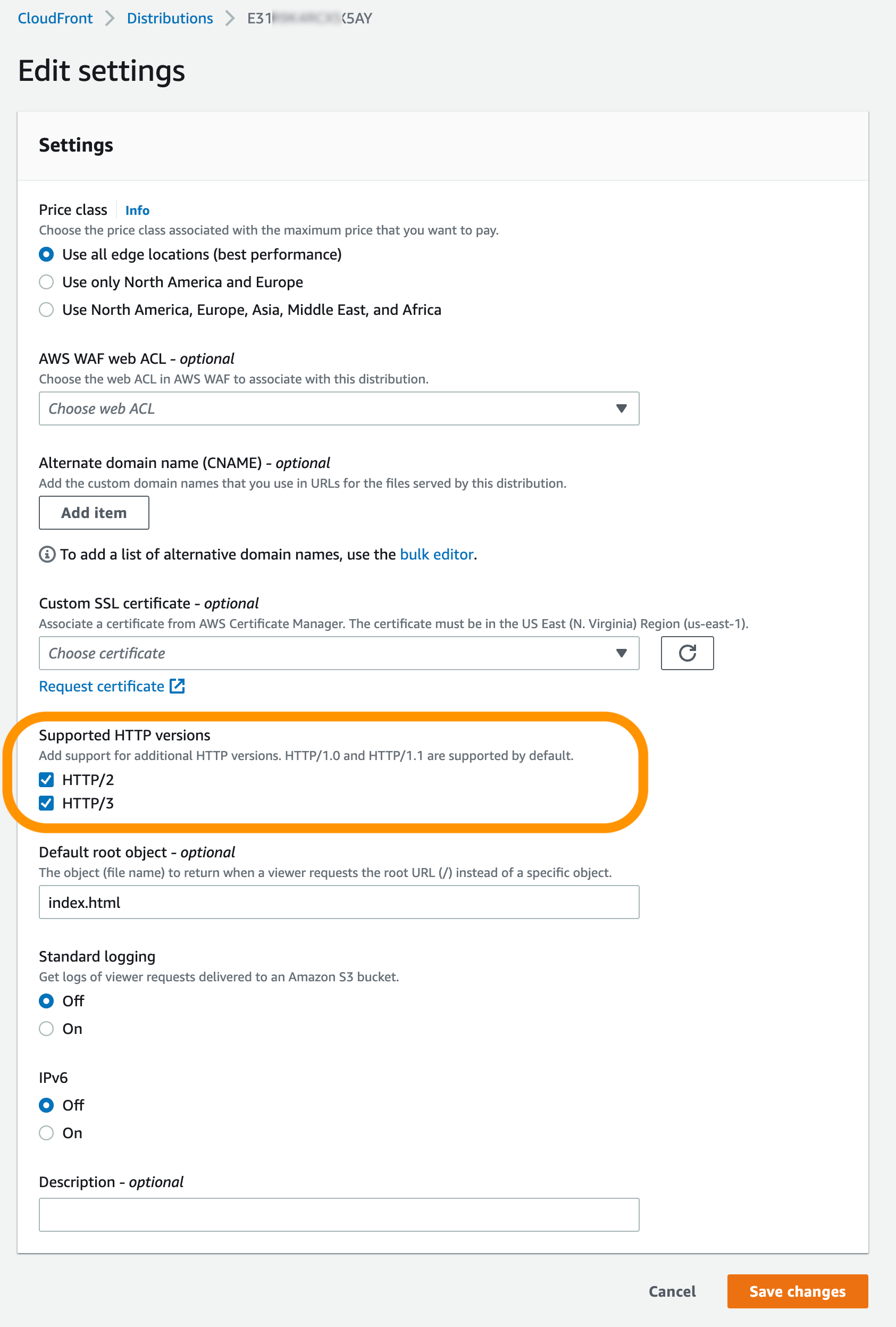
To enable HTTP/3 connection, you can edit the distribution configuration through the CloudFront console. You can select HTTP/3 in Supported HTTP versions on an existing distribution or create a new distribution without any changes to origin. You can use the UpdateDistribution API or use the CloudFormation template.

After deploying your distribution, you can connect with a browser that supports HTTP/3, such as the latest version of Google Chrome, Mozilla Firefox, and Microsoft Edge, and Apple Safari after turning it on manually. To learn more about web browser support, see the Can I Use – HTTP/3 Support page.

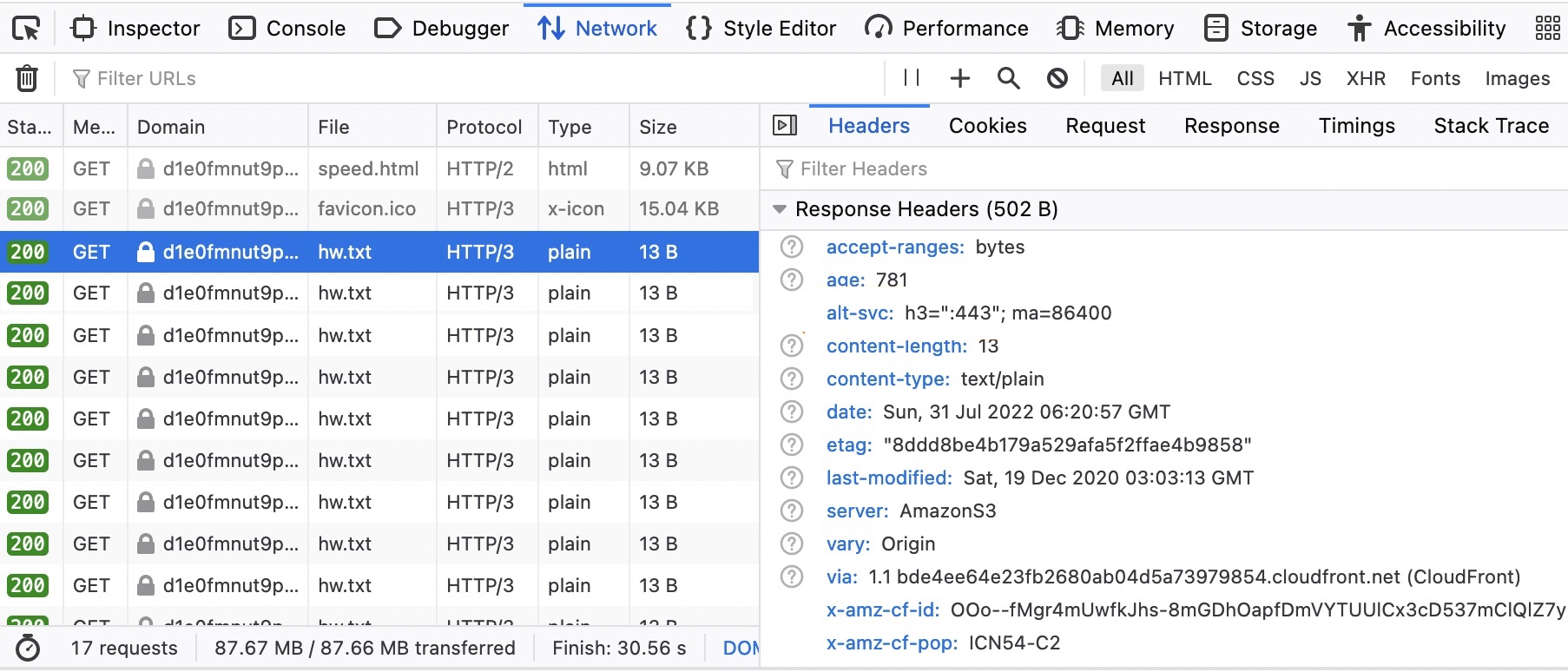
From web developer tools in your browser, you can see the HTTP/3 requests made when a page is loaded from the CloudFront. The image below is an example of Mozilla Firefox.

You can also add HTTP/3 support to Curl and test from the command line:

$ curl --http3 -i https://d1e0fmnut9xxxxx.cloudfront.net/speed.html
HTTP/3 200
content-type: text/html
content-length: 9286
date: Fri, 05 Aug 2022 15:49:52 GMT
last-modified: Thu, 28 Jul 2022 00:50:38 GMT
etag: "d928997023f6479537940324aeddabb3"
x-amz-version-id: mdUmFuUfVaSHPseoVPRoOKGuUkzWeUhK
accept-ranges: bytes
server: AmazonS3
vary: Origin
x-cache: Miss from cloudfront
via: 1.1 6e4f43c5af08f740d02d21f990dfbe80.cloudfront.net (CloudFront)
x-amz-cf-pop: ICN54-C2
alt-svc: h3=":443"; ma=86400
x-amz-cf-id: 6fy8rrUrtqDMrgoc7iJ73kzzXzHz7LQDg73R0lez7_nEXa3h9uAlCQ==

Customer Stories
Several AWS customers including Snap, Zillow, AC3/Movember, Audible, Skyscanner have already enabled HTTP/3 on their CloudFront distributions. Here are some of their voices:

Snap Inc is a social media company that offers Snapchat, an app that offers a fast and fun way to connect with close friends to its community around the world. On AWS, Snap now supports more than 306 million Snapchat users sending over 5.4 billion Snaps daily with 20 percent less latency than its prior architecture.

Mahmoud Ragab, Software Engineering Manager at Snapchat said:

“Snapchat helps millions of people around the world to share moments with friends. At Snapchat, we strive to be the fastest way to communicate. This is why we have been partnering with Amazon Cloudfront for fast, high-performance, low latency content delivery, leveraging QUIC on Cloudfront.

It offers significant advantages while sending and receiving content, especially in networks with lossy signals and intermittent connectivity. Improvements offered by QUIC, like zero round-trip time (0-RTT) connection setup and improved congestion control enables an average of 10% reduction in time to first byte (TTFB) while lowering overall error rates. Lower network latencies and errors make Snapchat better for people all over the world.

With early access to QUIC, we’ve been able to experiment and quickly iterate and improve server-side implementation and optimize integration between the client and the server. Both companies will continue to collaborate together as QUIC is made more widely available.”

Zillow is a real estate tech company that offer its customers an on-demand experience for selling, buying, renting and financing with transparency and nearly seamless end-to-end service. Since 2015, Zillow has increased the availability of its imaging system by using Amazon S3 and Amazon CloudFront.

Craig Link, Chief Cloud Architect at Zillow said:

“We are excited about the launch of HTTP/3 support for Amazon CloudFront. Enabling HTTP/3 on CloudFront was a seamless transition and our synthetic test and ad-hoc usage continued working without issue.”

AC3 is an Australia-based AWS Managed Services partner and has supported our customer, Movember Foundation, one of the leading charities for men’s health. Running an international charity that handles donations, data, events, and localized websites in 21 countries can pose some technical challenges. Born in the cloud, Movember has leveraged AWS technology in adopting new working models, ensuring a flexible IT platform, and innovating faster.

Greg Cockburn, Head of Hyperscale Cloud at AC3 said:

“AC3 is excited to work with their longtime partner Movember enabling HTTP3 on their CloudFront distributions serving web and API frontends and is encouraged by the performance improvements seen in the initial results.”

Now Available
The HTTP/3 support for Amazon CloudFront is now available in all 410+ CloudFront edge locations worldwide with no additional charge for using this feature. To learn more, see the FAQ and Developer Guide of Amazon CloudFront. Please send feedback to AWS re:Post for Amazon CloudFront or through your usual AWS support contacts.

Channy

AWS Week in Review – August 15, 2022

Post Syndicated from Channy Yun original https://aws.amazon.com/blogs/aws/aws-week-in-review-august-15-2022/

I love the AWS Twitch channel for watching interesting online live shows such as AWS On Air, Containers from the Couch, and Serverless Office Hours.

Last week, AWS Storage Day 2022 was hosted virtually on the AWS Twitch channel and covered recent announcements and insights that address customers’ needs to reduce and optimize storage costs and build data resiliency into their organization. For example, we pre-announced Amazon File Cache, an upcoming new service on AWS that accelerates and simplifies hybrid cloud workloads. To learn more, watch the on-demand recording.

Two weeks ago, AWS Silicon Innovation Day 2022 was also hosted on the AWS Twitch channel. This event covered an overview of our history of silicon development and provided useful sessions on specific AWS chip innovations such as AWS NitroAWS GravitonAWS Inferencia, and AWS Trainium. To learn more, watch the on-demand recording. If you don’t miss such useful live events or online shows, check out the upcoming live schedule!

Last Week’s Launches
Here are some launches that caught my eye last week:

AWS Private 5G – With the general availability of AWS Private 5G, you can easily make your own private mobile networks with a powerful box of hardware and software for 4G/LTE mobile networks. This cool new service lets you easily install, operate, and scale high reliability and low latency of a private cellular network in a matter of days and does not require any specialized expertise. You pay only for the network coverage and capacity that you need.

AWS DeepRacer Student Community Races – Educators and event organizers can now create their own private virtual autonomous racing league for students by powering a 1/18th scale race car driven by reinforcement learning. They can select their own track, race date, and time and invite students to participate through a unique link for their event. To learn more, see the AWS DeepRacer Developer Guide.

Amazon SageMaker Updates – Amazon SageMaker Automatic Model Tuning now supports specifying multiple alternate SageMaker training instance types to make tuning jobs more robust when the preferred instance type is not available due to insufficient capacity. SageMaker Model Pipelines supports securely sharing pipeline entities across AWS accounts and access to shared pipelines through direct API calls. SageMaker Canvas expands capabilities to better prepare and analyze data, including replacing missing values and outliers and the flexibility to choose different sample sizes for your datasets.

Amazon Personalize Updates – Amazon Personalize supports incremental bulk dataset imports, a new option for updating your data and improving the quality of your recommendations. Also, Amazon Personalize allows you to promote specific items in all users’ recommendations based on rules that align with your business goals.

AWS Partner Program Updates – We announce the new AWS Transfer Family Delivery Program for AWS Partners that helps customers build sophisticated Managed File Transfer (MFT) and business-to-business (B2B) file exchange solutions with AWS Transfer Family. Also, we introduce the new AWS Supply Chain Competency, featuring top AWS Partners who provide professional services and cloud-native supply chain solutions on AWS.

For a full list of AWS announcements, be sure to keep an eye on the What’s New at AWS page.

Other AWS News
Here are some other news items that you may find interesting:

AWS CDK for Terraform – Two years ago, AWS began collaborating with HashiCorp to develop Cloud Development Kit for Terraform (CDKTF), an open-source tool that provides a developer-friendly workflow for deploying cloud infrastructure with Terraform in their preferred programming language. The CDKTF is now generally available, so try CDK for Terraform and AWS CDK.

Smithy Interface Definition Language (IDL) 2.0 – Smithy is Amazon’s next-generation API modeling language, based on our experience building tens of thousands of services and generating SDKs. This release focuses on improving the developer experience of authoring Smithy models and using code generated from Smithy models.

Serverless Snippets Collection – The AWS Serverless Developer Advocate team introduces the snippets collection to enable reusable, tested, and recommended snippets driven and maintained by the community. Builders can use serverless snippets to find and integrate tools and code examples to help with their development workflow. I recommend searching other useful resources such as Serverless patterns and workflows collection to get started on your serverless application.

Upcoming AWS Events
Check your calendars and sign up for these AWS events:

AWS Summit

AWS Summit – Registration is open for upcoming in-person AWS Summits that might be close to you in August and September: Anaheim (August 18), Chicago (August 28), Canberra (August 31), Ottawa (September 8), New Delhi (September 9), and Mexico City (September 21–22).

AWS Innovate – Data Edition – On August 23, learn how a modern data strategy can support your present and future use cases, including steps to build an end-to-end data solution to store and access, analyze and visualize, and even predict.

AWS Innovate – For Every Application Edition – On August 25, learn about a wide selection of AWS solutions across compute, storage, networking, hybrid, and edge infrastructure to help you scale application resources seamlessly and optimally.

Although these two Innovate events will be held in the Asia Pacific and Japan time zones, you can view on-demand videos for two months following your registration.

Also, we are preparing 16 upcoming online tech talks on August 15–26  to cover a range of topics and expertise levels and feature technical deep dives, demonstrations, customer examples, and live Q&A with AWS experts.

That’s all for this week. Check back next Monday for another Week in Review!

— Channy

This post is part of our Week in Review series. Check back each week for a quick roundup of interesting news and announcements from AWS!

New – Run Visual Studio Software on Amazon EC2 with User-Based License Model

Post Syndicated from Channy Yun original https://aws.amazon.com/blogs/aws/new-run-visual-studio-software-on-amazon-ec2-with-user-based-license-model/

We announce the general availability of license-included Visual Studio software on Amazon Elastic Cloud Compute (Amazon EC2) instances. You can now purchase fully compliant AWS-provided licenses of Visual Studio with a per-user subscription fee. Amazon EC2 provides preconfigured Amazon Machine Images (AMIs) of Visual Studio Enterprise 2022 and Visual Studio Professional 2022. You can launch on-demand Windows instances including Visual Studio and Windows Server licenses without long-term licensing commitments.

Amazon EC2 provides a broad choice of instances, and customers not only have the flexibility of paying for what their end users use but can also provide the capacity and right hardware to their end users. You can simply launch EC2 instances using license-included AMIs, and multiple authorized users can connect to these EC2 instances by using Remote Desktop software. Your administrator can authorize users centrally using AWS License Manager and AWS Managed Microsoft Active Directory (AD).

Configure Visual Studio License with AWS License Manager
As a prerequisite, your administrator needs to create an instance of AWS Managed Microsoft AD and allow AWS License Manager to onboard to it by accepting permission. To set up authorized users, see AWS Managed Microsoft AD documentation.

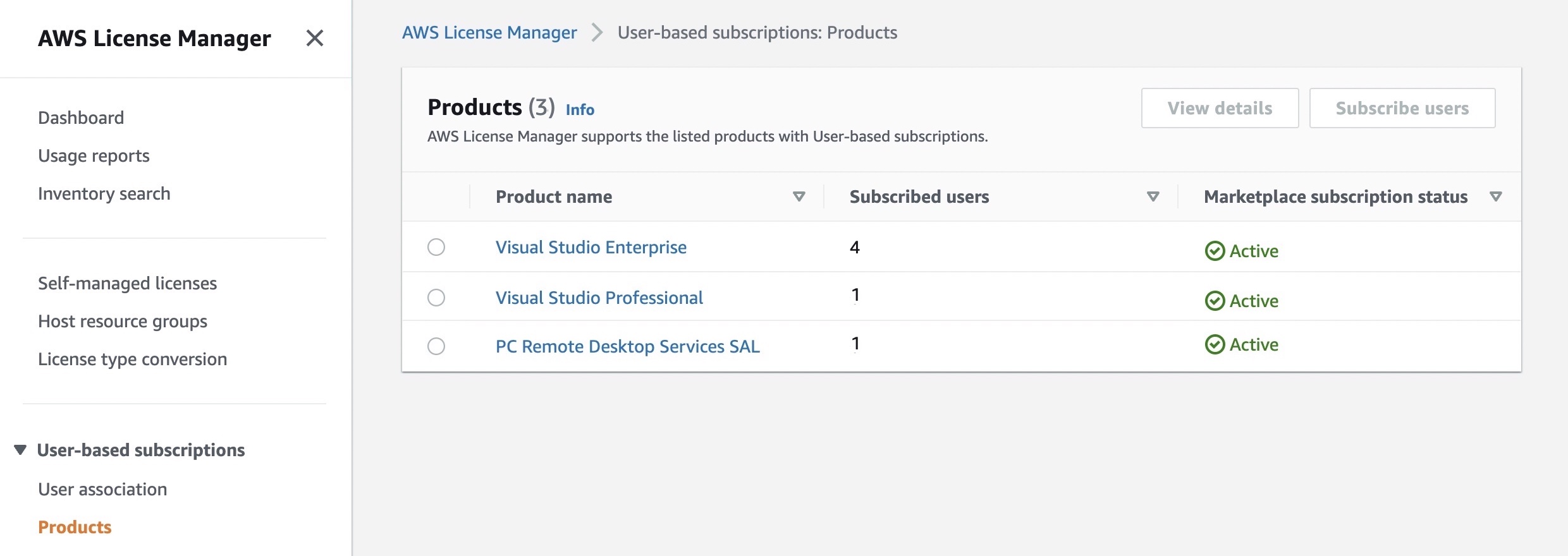
AWS License Manager makes it easier to manage your software licenses from vendors such as Microsoft, SAP, Oracle, and IBM across AWS and on-premises environments. To display a list of available Visual Studio software licenses, select User-based subscriptions in the AWS Licence Manager console.

You can see listed products to support user-based subscriptions. Each product has a descriptive name, a count of the subscribed users to utilize the product, and whether the subscription has been activated for use with a directory. Also, you are required to purchase Remote Desktop Services SAL licenses in the same way as Visual Studio by authorizing users for those licenses.

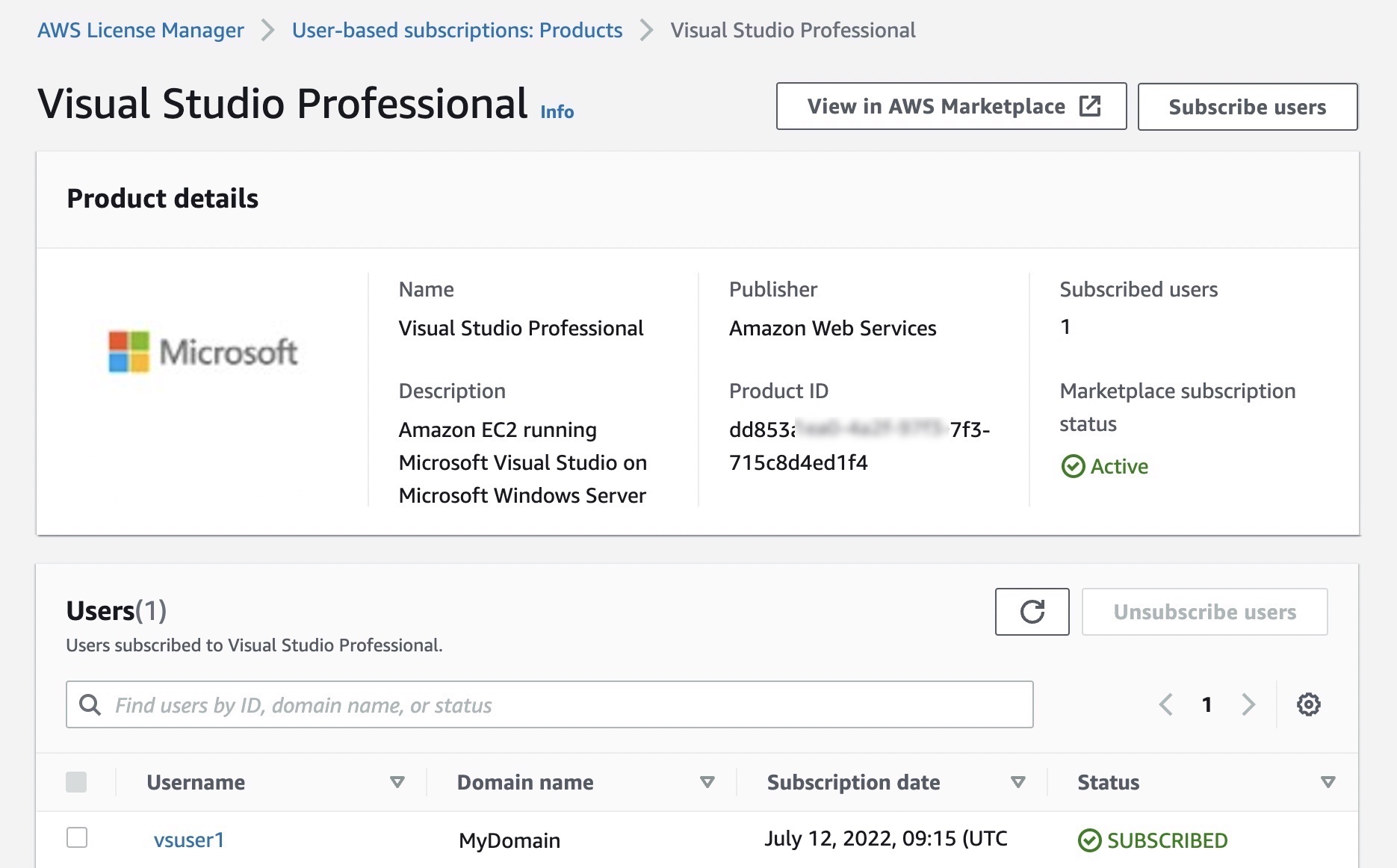
When you select Visual Studio Professional, you can see product details and subscribed users. By selecting Subscribe users, you can add authorized users to the license of Visual Studio Professional software.

You can perform the administrative tasks using the AWS Command Line Interface (CLI) tools via AWS License Manager APIs. For example, you can subscribe a user to the product in your Active Directory.

$ aws license-manager-user-subscriptions start-product-subscription \
         --username vscode2 \
         --product VISUAL_STUDIO_PROFESSIONAL \
         --identity-provider " \
                "ActiveDirectoryIdentityProvider" = \
                {"DirectoryId" = "d-9067b110b5"}" 
         --endpoint-url https://license-manager-user-subscriptions.us-east-1.amazonaws.com

To launch a Windows instance with preconfigured Visual Studio software, go to the EC2 console and select Launch instances. In the Application and OS Images (Amazon Machine Image), search for “Visual Studio on EC2,” and you can find AMIs under the Quickstart AMIs and AWS Marketplace AMIs tabs.

After launching your Windows instance, your administrator associates a user to the product in the Instances screen of the License Manager console. You can see the listed instances were launched using an AMI to provide the specified product to users who can then be associated.

These steps will be performed by the administrators who are responsible for managing users, instances, and costs across the organization. To learn more about administrative tasks, see User-based subscriptions in AWS License Manager.

Run Visual Studio Software on EC2 Instances
Once administrators authorize end users and launch the instances, you can remotely connect to Visual Studio instances using your AD account information shared by your administrator via Remote Desktop software. That’s all!

The instances deployed for user-based subscriptions must remain as managed nodes with AWS Systems Manager. For more information, see Troubleshooting managed node availability and Troubleshooting SSM Agent in the AWS Systems Manager User Guide.

Now Available
License-included Visual Studio on Amazon EC2 is now available in all AWS commercial and public Regions. You are billed per user for licenses of Visual Studio through a monthly subscription and per vCPU for license-included Windows Server instances on EC2.  You can use On-Demand InstancesReserved Instances, and Savings Plan pricing models like you do today for EC2 instances.

To learn more, visit our License Manager User Based Subscriptions documentation, and please send any feedback to AWS re:Post for EC2 or through your usual AWS Support contacts.

Channy

Amazon Detective Supports Kubernetes Workloads on Amazon EKS for Security Investigations

Post Syndicated from Channy Yun original https://aws.amazon.com/blogs/aws/amazon-detective-supports-kubernetes-workloads-on-amazon-eks-for-security-investigations/

In March 2020, we introduced Amazon Detective, a fully managed service that makes it easy to analyze, investigate, and quickly identify the root cause of potential security issues or suspicious activities.

Amazon Detective continuously extracts temporal events such as login attempts, API calls, and network traffic from Amazon GuardDutyAWS CloudTrail, and Amazon Virtual Private Cloud (Amazon VPC) Flow Logs into a graph model that summarizes the resource behaviors and interactions observed across your entire AWS environment. We have added new features such as AWS IAM Role session analysis, enhanced IP address analytics, Splunk integration, Amazon S3 and DNS finding types, and the support of AWS Organizations.

Customers are rapidly moving to containers to deploy Kubernetes workloads with Amazon Elastic Kubernetes Service (Amazon EKS). Its highly programmatic nature allows thousands of individual container deployments and millions of configuration changes to occur in seconds. To effectively secure EKS workloads, it is important to monitor container deployments and configurations that are captured in the form of EKS audit logs and to correlate activities to user activity and network traffic happening across AWS accounts.

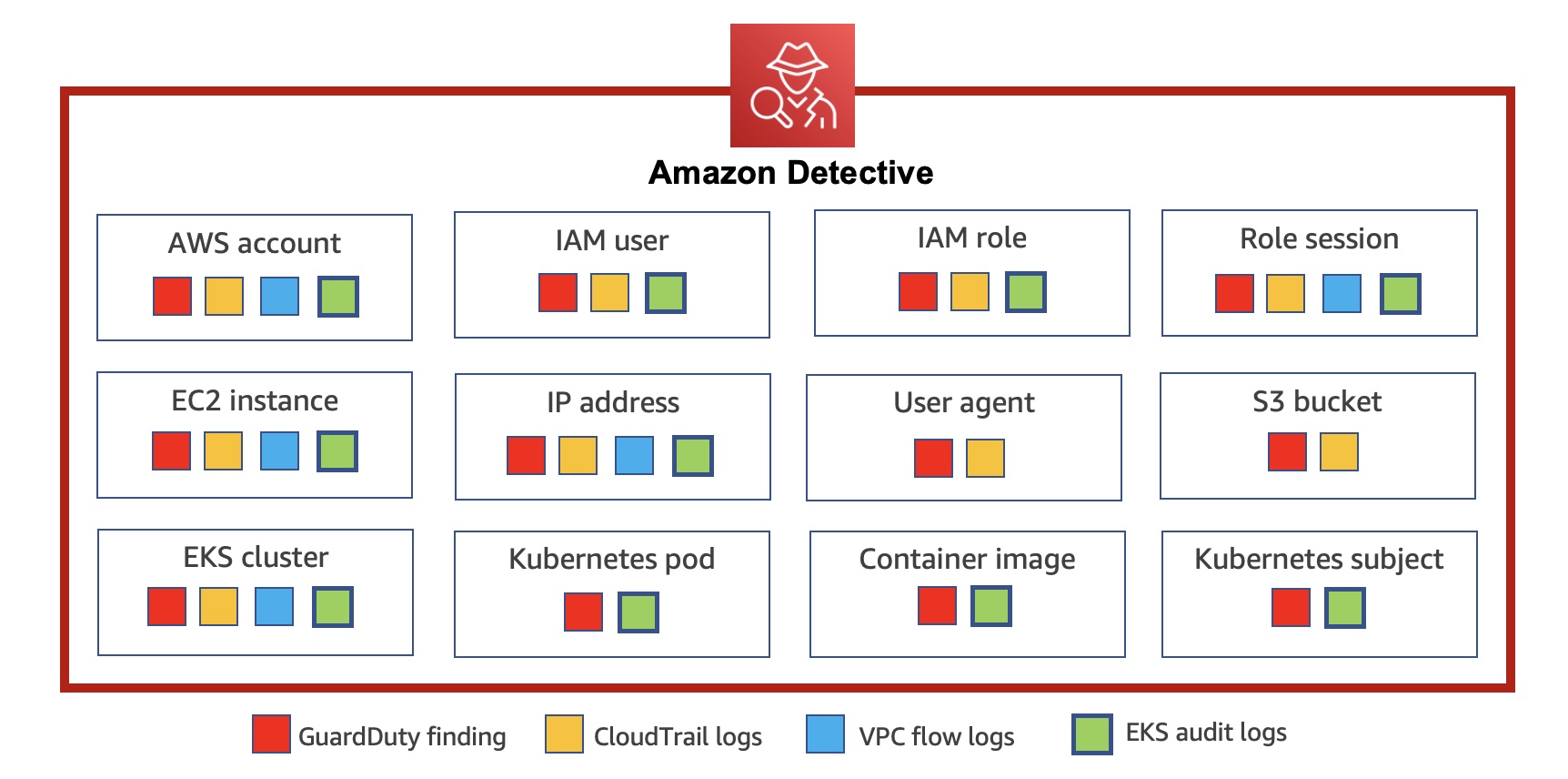
Today we announce new capabilities in Amazon Detective to expand security investigation coverage for Kubernetes workloads running on Amazon EKS. When you enable this new feature, Amazon Detective automatically starts ingesting EKS audit logs to capture chronological API activity from users, applications, and the control plane in Amazon EKS for clusters, pods, container images, and Kubernetes subjects (Kubernetes users and service accounts).

Detective automatically correlates user activity using CloudTrail, and network activity using Amazon VPC Flow logs, without the need for you to enable, store, or retain logs manually. The service gleans key security information from these logs and retains them in a security behavioral graph database that enables fast cross-referenced access to twelve months of activity. Detective provides a data analysis and visualization layer purpose-built to answer common security questions backed by a behavioral graph database that allows you to quickly investigate potential malicious behavior associated with your EKS workloads.

You can rapidly respond to security issues rather than focusing on log management, operational systems, or ongoing security tooling maintenance. Detective’s EKS capabilities come with a free 30-day trial for all customers that allows you to ensure that the capabilities meet your needs and to fully understand the cost for the service on an ongoing basis.

Getting Started with Security Investigations for EKS Audit Logs
To get started, enable Amazon Detective with just a few clicks in the AWS Management Console. GuardDuty is a prerequisite of Amazon Detective. When you try to enable Detective, Detective checks whether GuardDuty has been enabled for your account. You must either enable GuardDuty or wait for 48 hours. This allows GuardDuty to assess the data volume that your account produces.

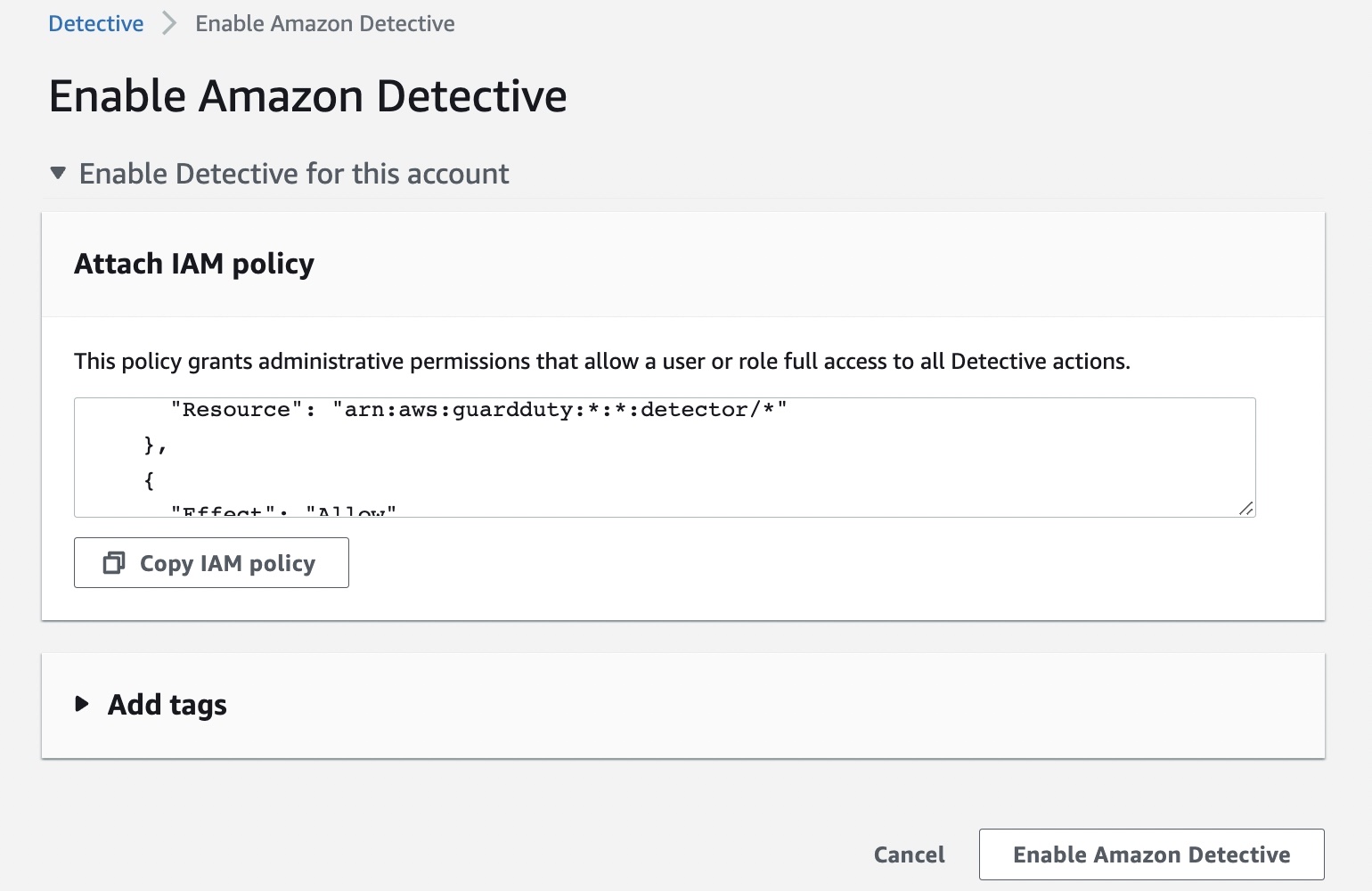
You can enable your account by attaching the AWS IAM policy or delegate it to an administrator of your organization. To learn more, refer to Setting up Detective in the AWS documentation.

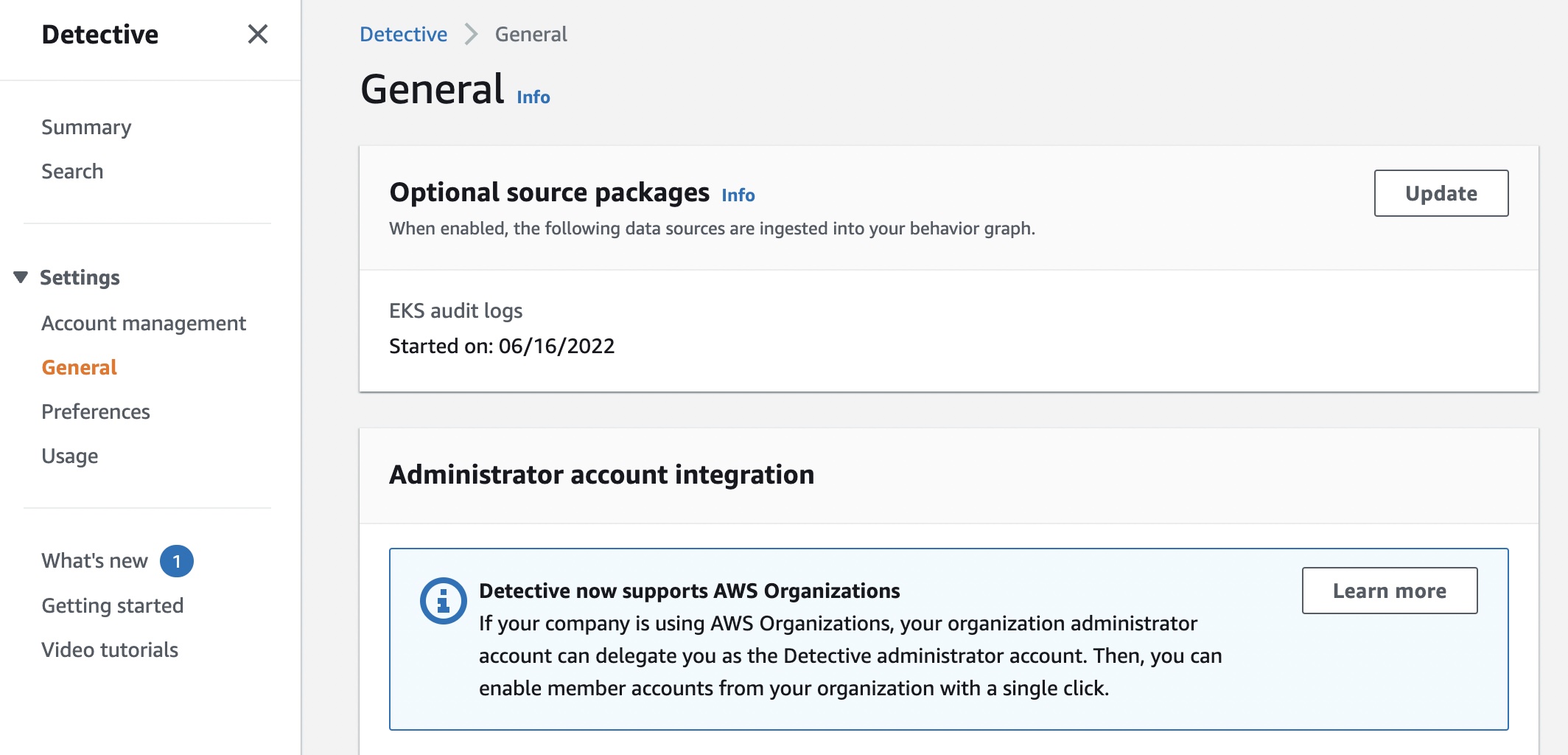
To enable EKS support in Detective as an existing customer, navigate to the Settings menu in the left panel and select General. Under Optional source packages, enable EKS audit logs.

If you are a new customer of Detective, the EKS protection feature will be enabled by default. If you do not want to trial EKS audit logs right away, you can disable this feature within the first week of enabling Detective and preserve the full 30-day free trial period to use in the future.

Once enabled, Detective will begin monitoring the Kubernetes audit logs that are generated by Amazon EKS, extracting and correlating information for security usage. You do not need to enable any log sources or make any configuration changes to your existing EKS clusters or future deployments.

You can see recent monitoring results of your EKS clusters on the Summary page.

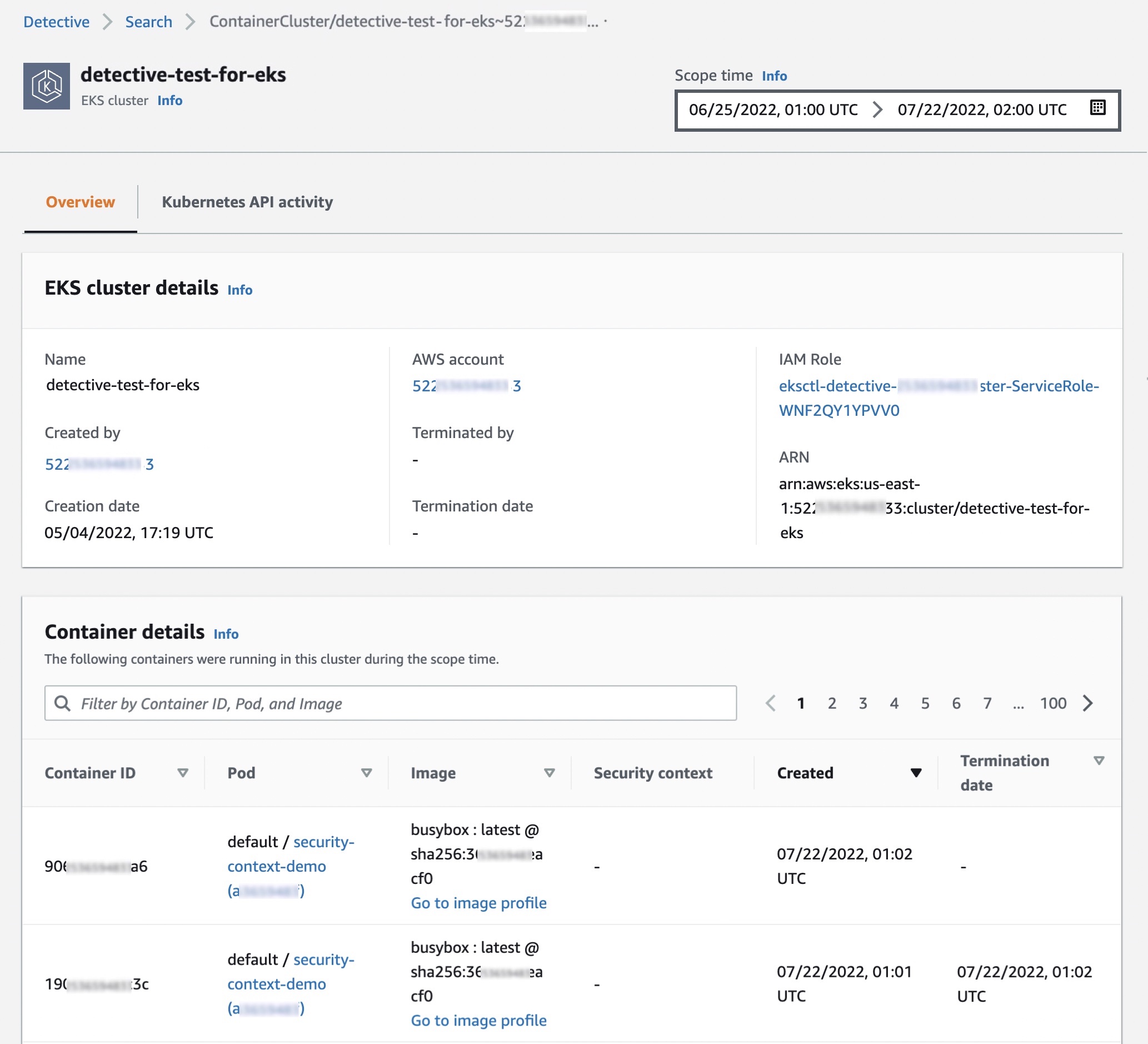
When you choose one of the EKS clusters, you will see the details of containers running in the cluster, Kubernetes API activities, and network activities that occurred on this resource around the scope time.

In the Overview tab, you also see details about all containers running in the cluster, including their pod, image and security context.

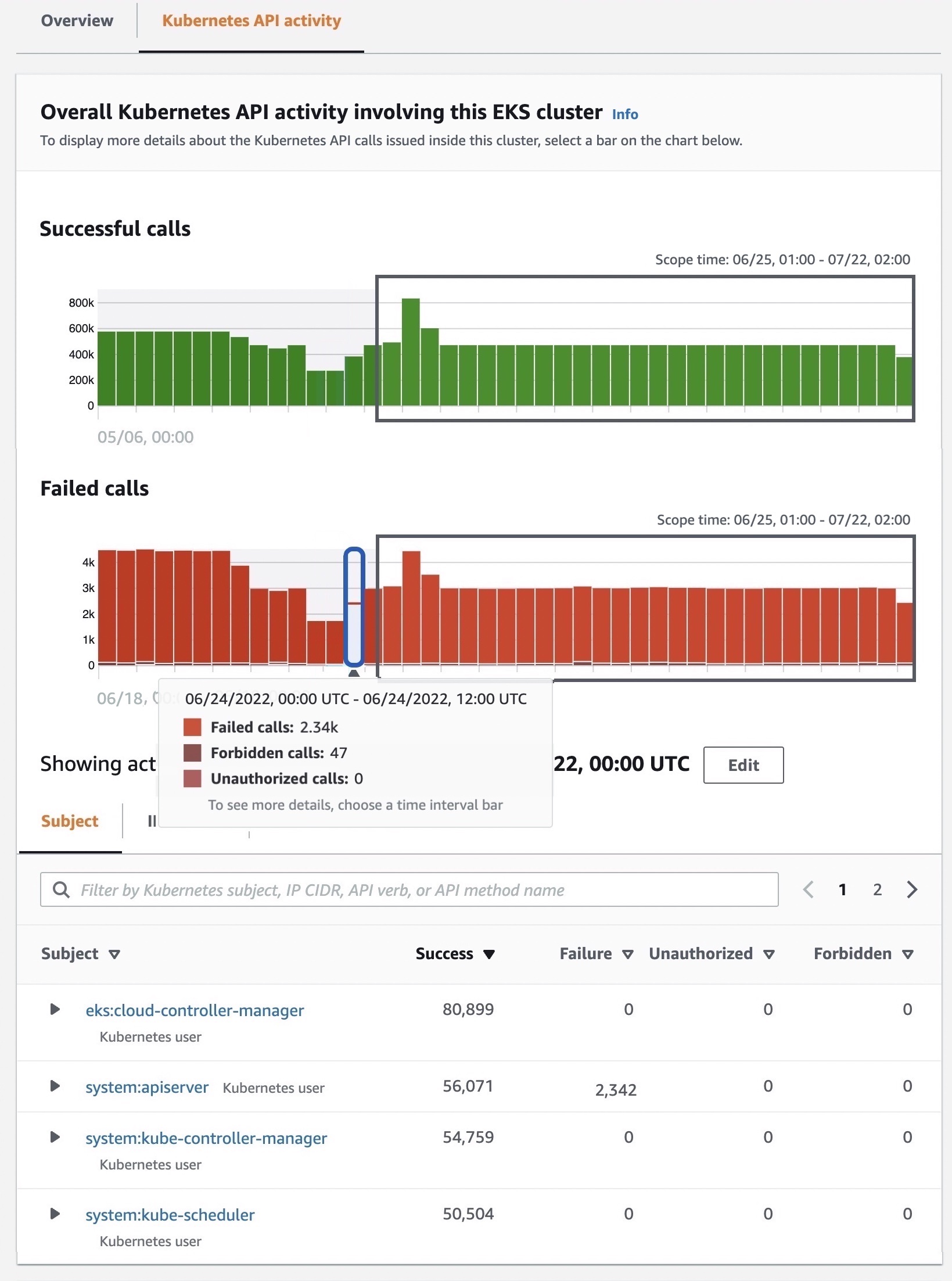
In the Kubernetes API activity tab, you can get an overview of the full API activities involving the EKS cluster. You can choose a time range to drill down based on specific API methods within the EKS cluster. When you select a specific time, you can see API subjects, IP addresses, and the number of API calls by the success, failure, unauthorized, or forbidden state.

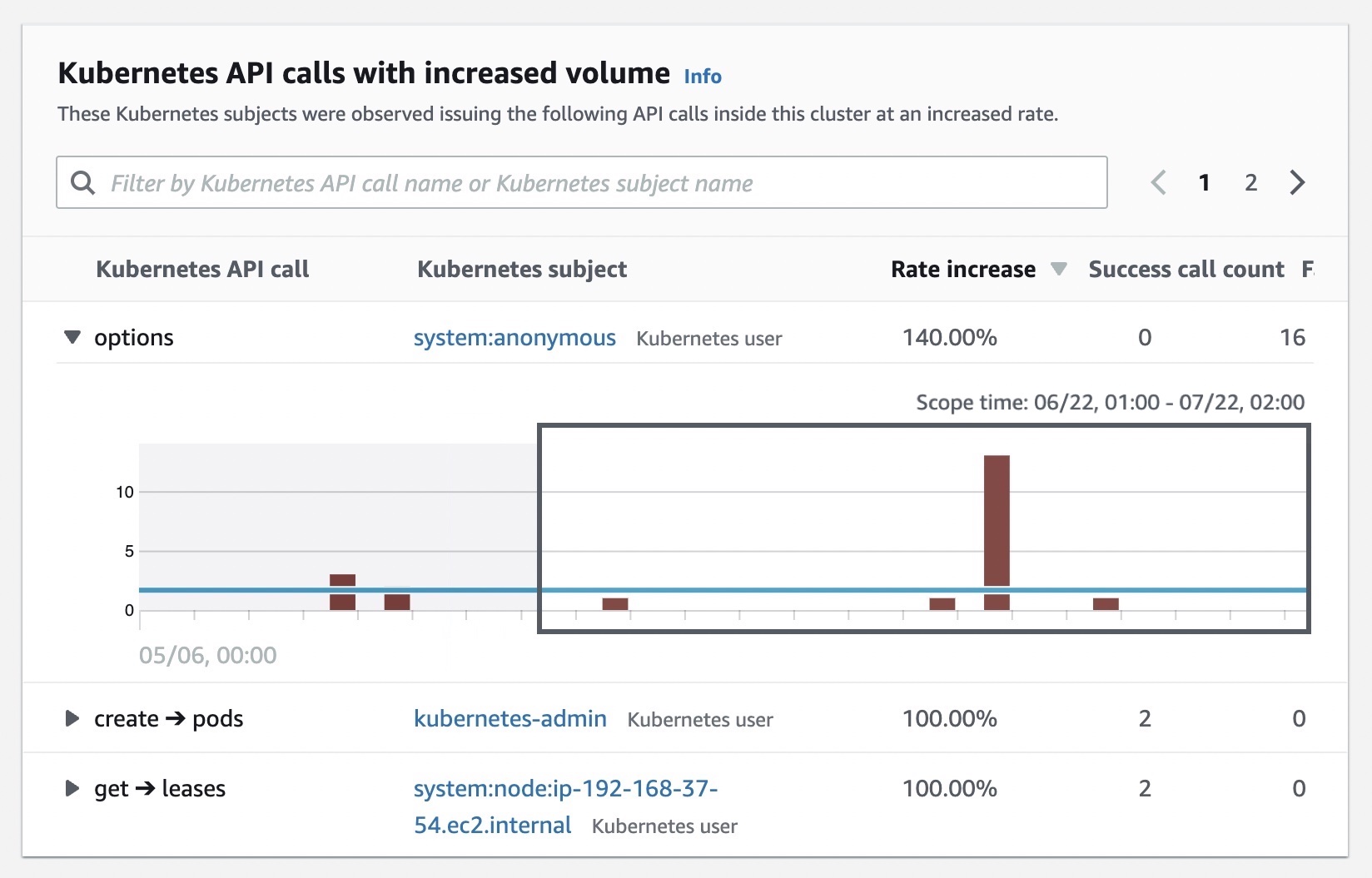
You can also see details of newly observed Kubernetes API calls  inside this cluster for the first time and subjects with increased volume that happened inside the cluster.

Enabling GuardDuty EKS Protection
In January 2022, Amazon GuardDuty expanded coverage to EKS cluster activity to identify malicious or suspicious behavior that represents potential threats to container workloads.

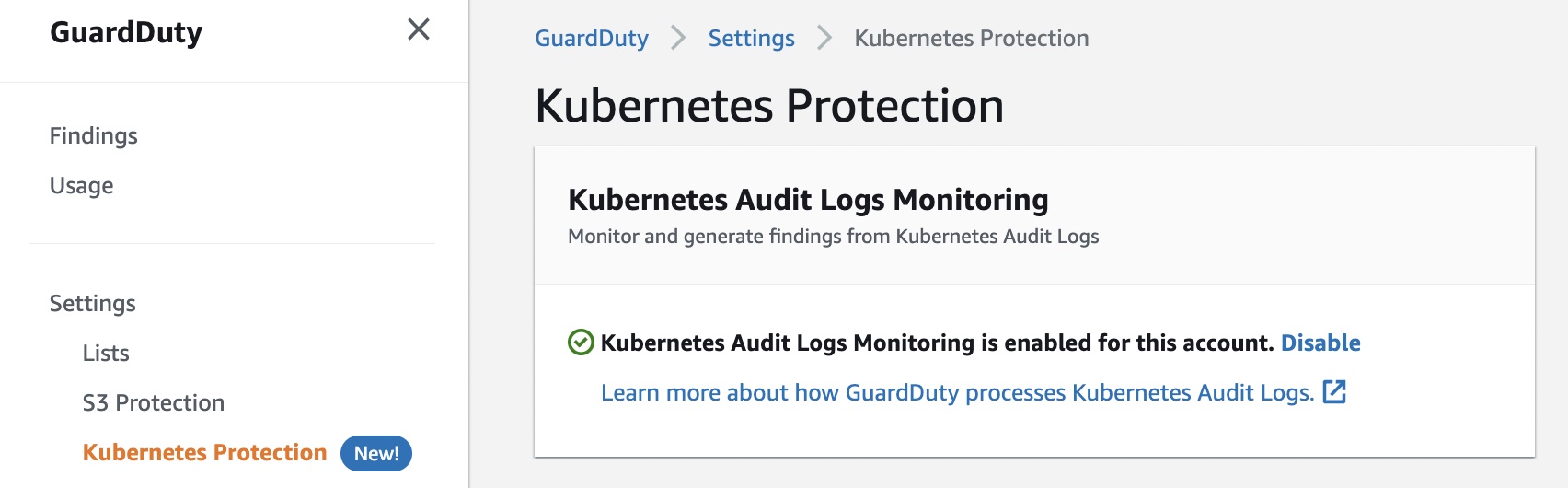
When the optional GuardDuty EKS Protection is enabled, GuardDuty will continuously monitor your EKS deployments and alert you to threats detected in your workloads. You can view and investigate these security findings in Detective.

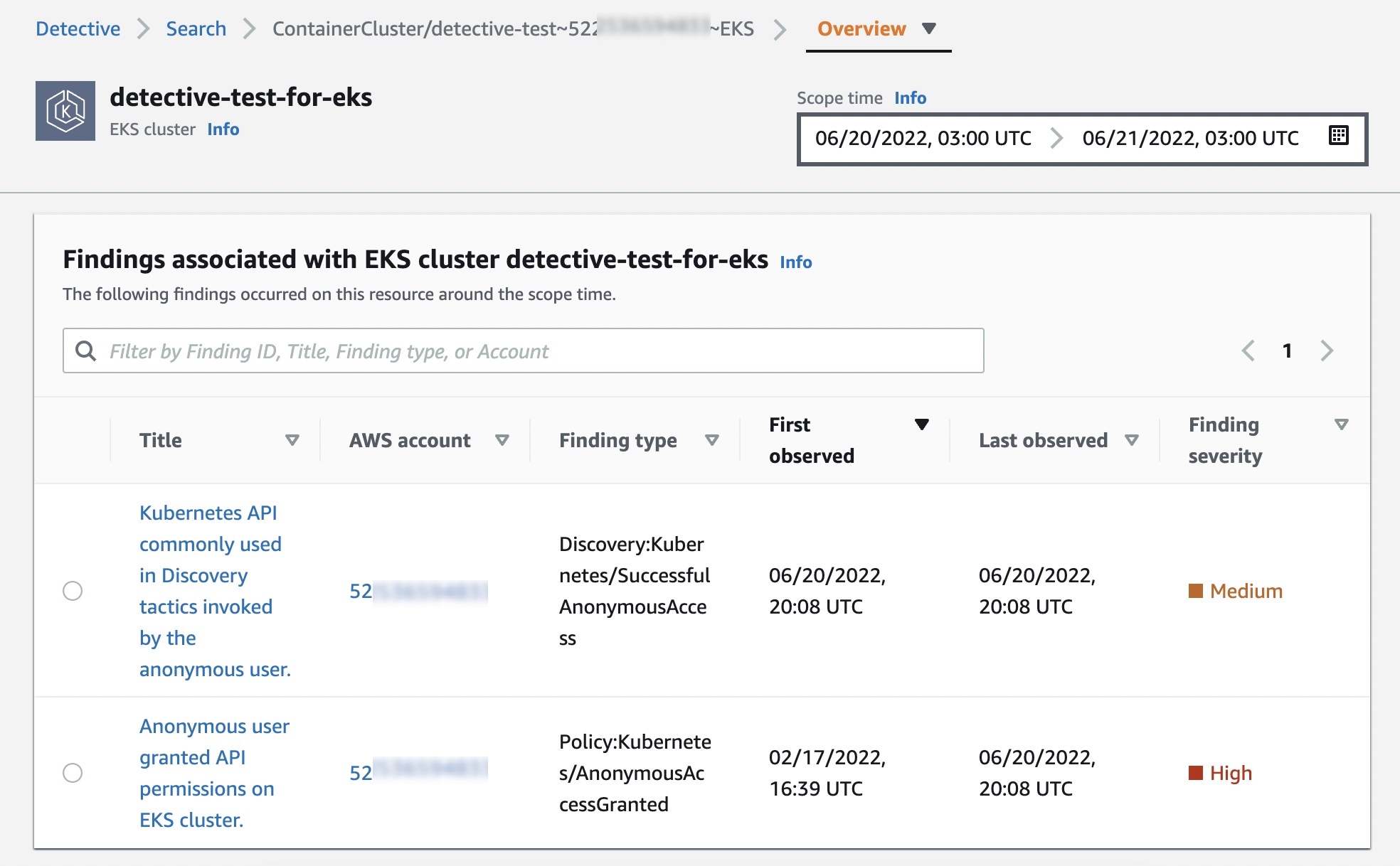
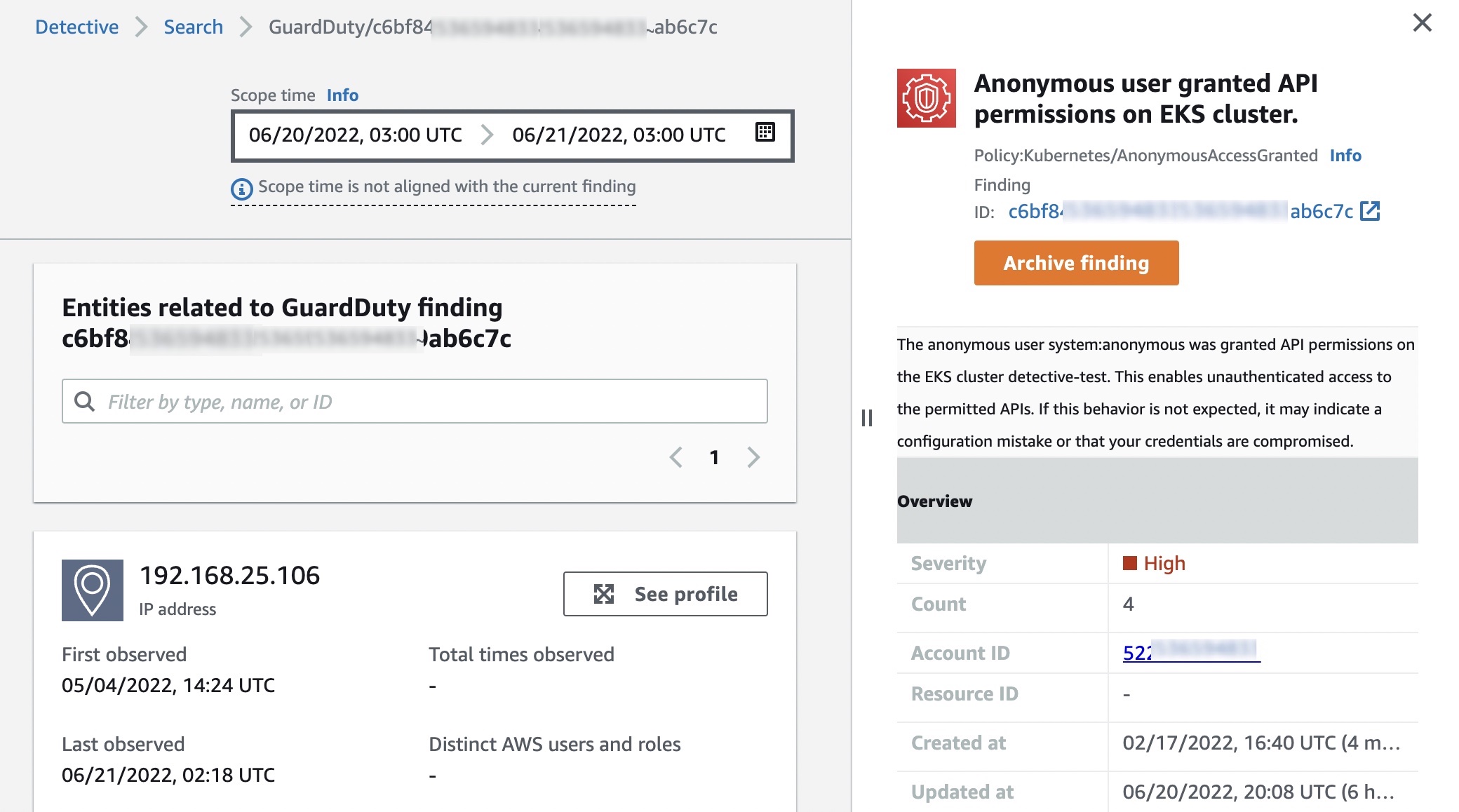
With Detective for EKS enabled, you can quickly access information about the resources involved in the finding, such as their CloudTrail and Kubernetes API activity, and netflow information. This can aid in investigation and help you determine root cause, impact, and other related resources that may also be compromised.

To learn more, see How to use new Amazon GuardDuty EKS Protection findings in the AWS Security Blog.

Now Available
You can now use Amazon Detective for EKS protection in all Regions where Amazon Detective is available. This feature is priced based on the volume of audit logs processed and analyzed by Detective.

Detective provides a free 30-day trial to all customers that enable EKS coverage, allowing customers to ensure that Detective’s capabilities meet security needs and to get an estimate of the service’s monthly cost before committing to paid usage. To learn more, see the Detective pricing page.

For technical documentation, visit the Amazon Detective User Guide. Please send feedback to AWS re:Post for Amazon Detective or through your usual AWS support contacts.

Learn all the details about Amazon Detective for EKS protection and get started today.

Channy

New – Amazon EC2 R6a Instances Powered by 3rd Gen AMD EPYC Processors for Memory-Intensive Workloads

Post Syndicated from Channy Yun original https://aws.amazon.com/blogs/aws/new-amazon-ec2-r6a-instances-powered-by-3rd-gen-amd-epyc-processors-for-memory-intensive-workloads/

We launched the general-purpose Amazon EC2 M6a instances at AWS re:Invent 2021 and compute-intensive C6a instances in February of this year. These instances are powered by the 3rd Gen AMD EPYC processors running at frequencies up to 3.6 GHz to offer up to 35 percent better price performance versus the previous generation instances.

Today, we are expanding our portfolio to include memory-optimized Amazon EC2 R6a instances featuring AMD EPYC (Milan) processors 10 percent less expensive than comparable x86 instances.

R6a instances, powered by 3rd Gen AMD EPYC processors are well suited for memory-intensive applications such as high-performance databases (relational databases, noSQL databases), distributed web scale in-memory caches (such as memcached, Redis), in-memory databases such as real-time big data analytics (such as Hadoop, Spark clusters), and other enterprise applications.

R6a instances are built on the AWS Nitro System and support Elastic Fabric Adapter (EFA) for workloads that benefit from lower network latency and highly scalable inter-node communication, such as high-performance computing and video processing.

Here’s a quick recap of the advantages of the new R6a instances compared to R5a instances:

  • Up to 35 percent higher price performance per vCPU versus comparable R5a instances
  • Up to 10 percent less expensive than comparable x86 instances
  • Up to 1536 GiB of memory, 2 times more than the previous generation, giving you the benefit of scaling up databases and running larger in-memory workloads.
  • Up to 192 vCPUs, 50 Gbps enhanced networking, and 40 Gbps EBS bandwidth, enabling you to process data faster, consolidate workloads, and lower the cost of ownership.
  • SAP-certified instances require memory-intensive applications such as high-performance enterprise databases like SAP Business Suite.
  • Support always-on memory encryption with AMD transparent sngle key memory encryption (TSME), and support new AVX2 instructions for accelerating encryption and decryption algorithms.

Here are the specs of R6a instances in detail:

Name vCPUs Memory (GiB) Network Bandwidth (Gbps) EBS Throughput (Gbps)
r6a.large 2 16 Up to 12.5 Up to 6.6
r6a.xlarge 4 32 Up to 12.5 Up to 6.6
r6a.2xlarge 8 64 Up to 12.5 Up to 6.6
r6a.4xlarge 16 128 Up to 12.5 Up to 6.6
r6a.8xlarge 32 256 12.5 6.6
r6a.12xlarge 48 384 18.75 10
r6a.16xlarge 64 512 25 13.3
r6a.24xlarge 96 768 37.5 20
r6a.32xlarge 128 1024 50 26.6
r6a.48xlarge 192 1536 50 40
r6a.metal 192 1536 50 40

Now Available
You can launch R6a instances today in the AWS US East (N. Virginia, Ohio), US West (Oregon), Asia Pacific (Mumbai) and Europe (Frankfurt, Ireland) as On-DemandSpot, and Reserved Instances or as part of a Savings Plan.

To learn more, visit the R6a instances page. Please send feedback to [email protected]AWS re:Post for EC2, or through your usual AWS Support contacts.

— Channy

AWS Week In Review – July 18, 2022

Post Syndicated from Channy Yun original https://aws.amazon.com/blogs/aws/aws-week-in-review-july-18-2022/

Last week, AWS Summit New York was held in person at the Javits Center with thousands of attendees and over 100 sponsors and partners. During the keynote, Martin Beeby, AWS Principal Developer Advocate, talked about how innovations in cloud infrastructure enable customers to adapt to challenges and seize new opportunities. It included Liz Fong-Jones‘s great migration story of AWS Graviton in Honeycomb and Elliott Cordo‘s story of improving pharmacy experiences using AWS analytics and machine learning services in Capsule.

Watch the full keynote video!

A Recap of AWS Summit NY Announcements
During the keynote, we announced the general availability of some new services:

Amazon Redshift Serverless – This serverless option lets you analyze data at any scale without having to manage data warehouse infrastructure. You can now create multiple serverless endpoints per AWS account and Region using namespaces and workgroups and enjoy reducing serverless compute costs compared to the preview. To learn more, check out Danilio’s blog post, this demo video, and the latest episode of The Official AWS Podcast. We also introduced new features of row-level security (RLS), which implement fine-grained access to the rows in tables, and automated materialized view to lower query latency for repeatable workloads.

AWS Cloud WAN – This new network service makes it easy to build and operate wide area networks (WAN) that connect your data centers and branch offices, as well as multiple VPCs in multiple AWS Regions. To learn more, read Seb’s blog post.

Amazon DevOps Guru’s Log Anomaly Detection and Recommendations – This new feature identifies anomalies such as increased latency, error rates, and resource constraints within your app and then sends alerts with a description and actionable recommendations for remediation. To learn more, see Donnie’s blog post as a new News Blog writer.

Last Week’s Launches
Here are some other launches that caught my attention last week:

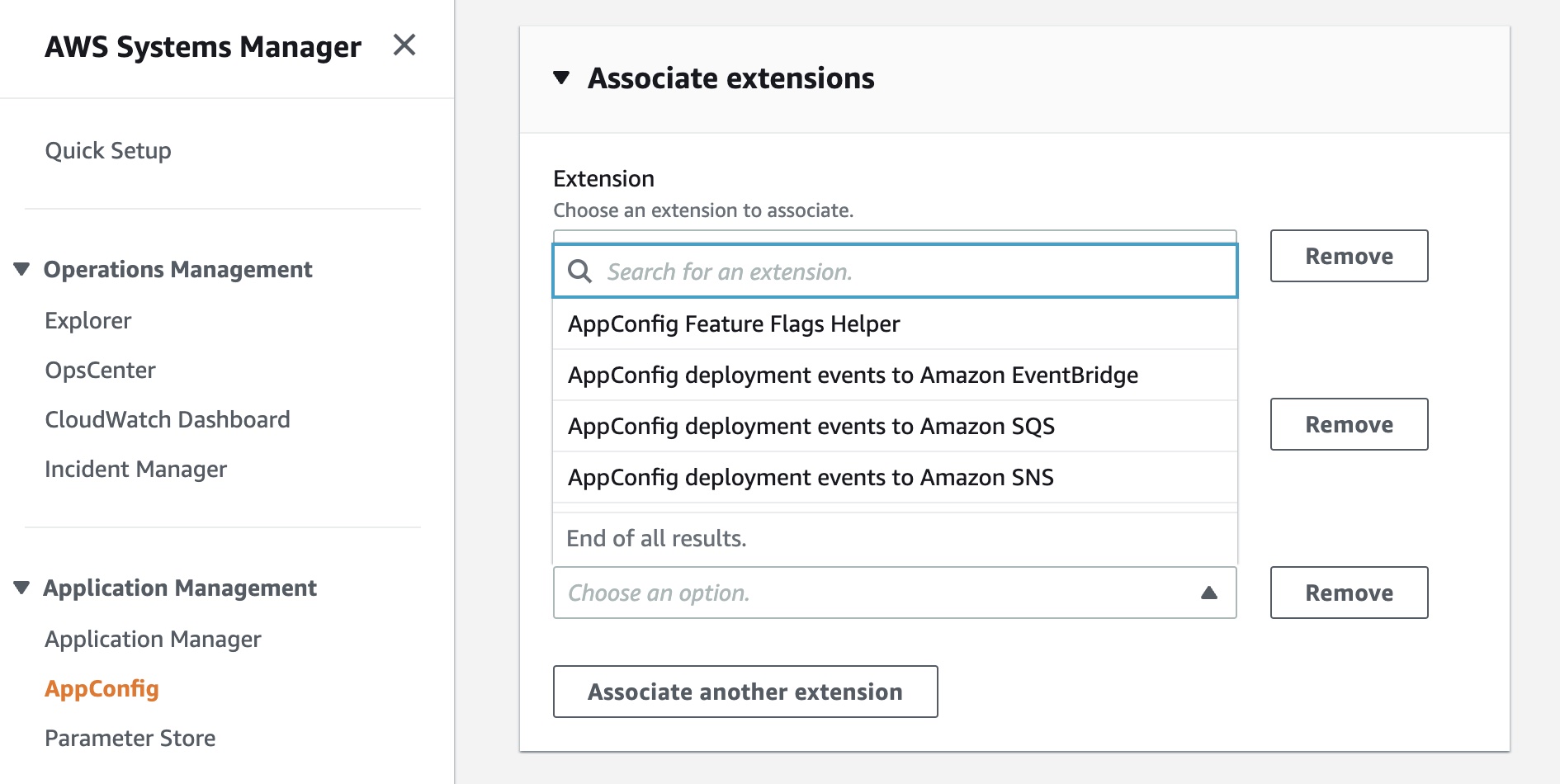
AWS AppConfig, a feature of AWS Systems Manager, makes it easy for customers to quickly and safely configure, validate, and deploy feature flags and application configuration. Now, we have announced AWS AppConfig Extensions, a new capability that allows customers to enhance and extend the capabilities of feature flags and dynamic runtime configuration data.

Available extensions at launch include AppConfig Notification extensions that push messages about configuration updates to Amazon EventBridge, Amazon SNS, Amazon SQS, or a Jira extension to track Feature Flag changes in AppConfig as Atlassian’s Jira issues. To get started, read Announcing AWS AppConfig Extensions and AppConfig Extensions.

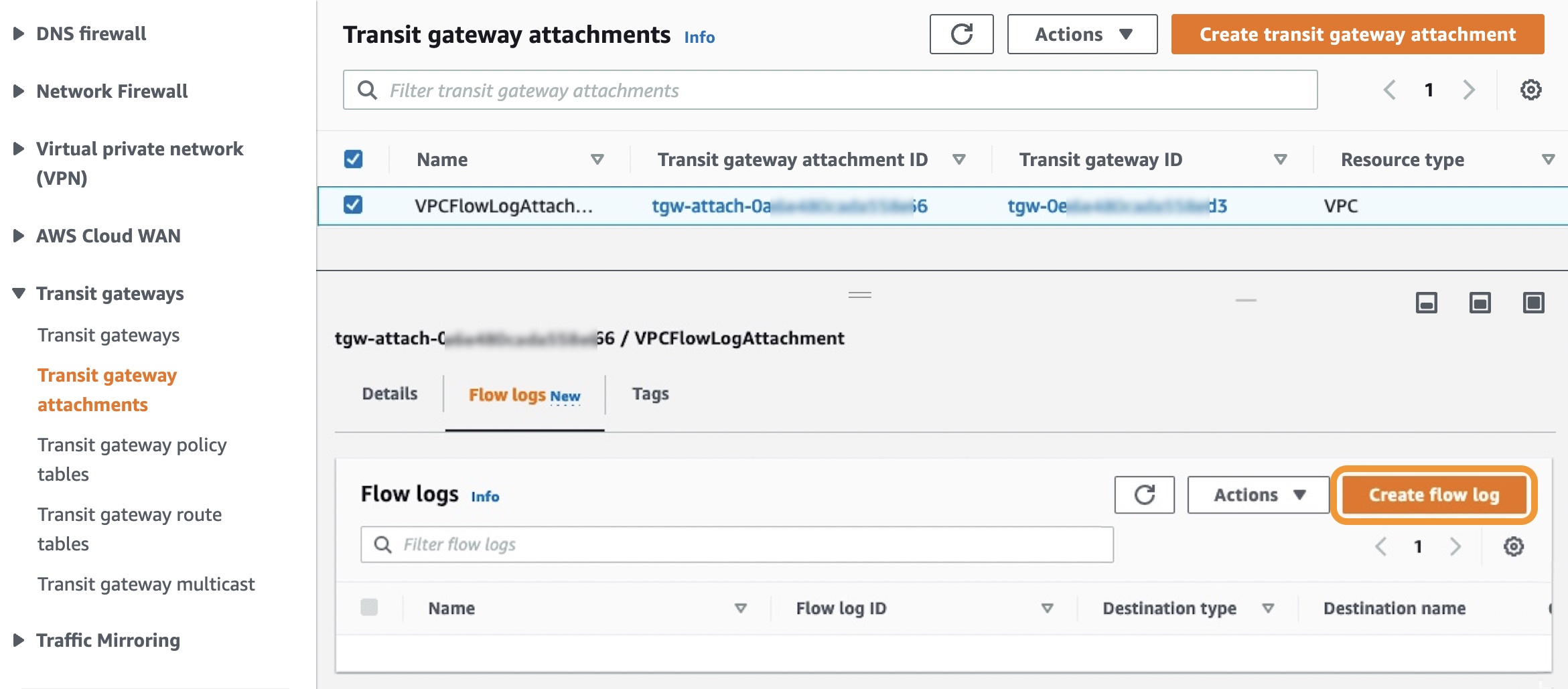
Amazon VPC Flow Logs for Transit Gateway is a new capability that allows customers to gain deeper visibility and insights into network traffic on AWS Transit Gateway. With this feature, Transit Gateway can export detailed information, such as source/destination IPs, ports, protocols, traffic counters, timestamps, and various metadata for all of the network flow traversing through the Transit Gateway. To learn more, read Introducing VPC Flow Logs for AWS Transit Gateway and Logging network traffic using Transit Gateway Flow Logs.

AWS Lambda Powertools for TypeScript is an open-source developer library that can help you incorporate Well-Architected Serverless best practices focusing on three observability features: distributed tracing (Tracer), structured logging (Logger), and asynchronous business and application metrics (Metrics). Powertools is also available in the Python and Java programming languages. To learn more, see the blog post Simplifying serverless best practices with AWS Lambda Powertools for TypeScript. You can submit feedback, ideas, and issues directly on our GitHub project.

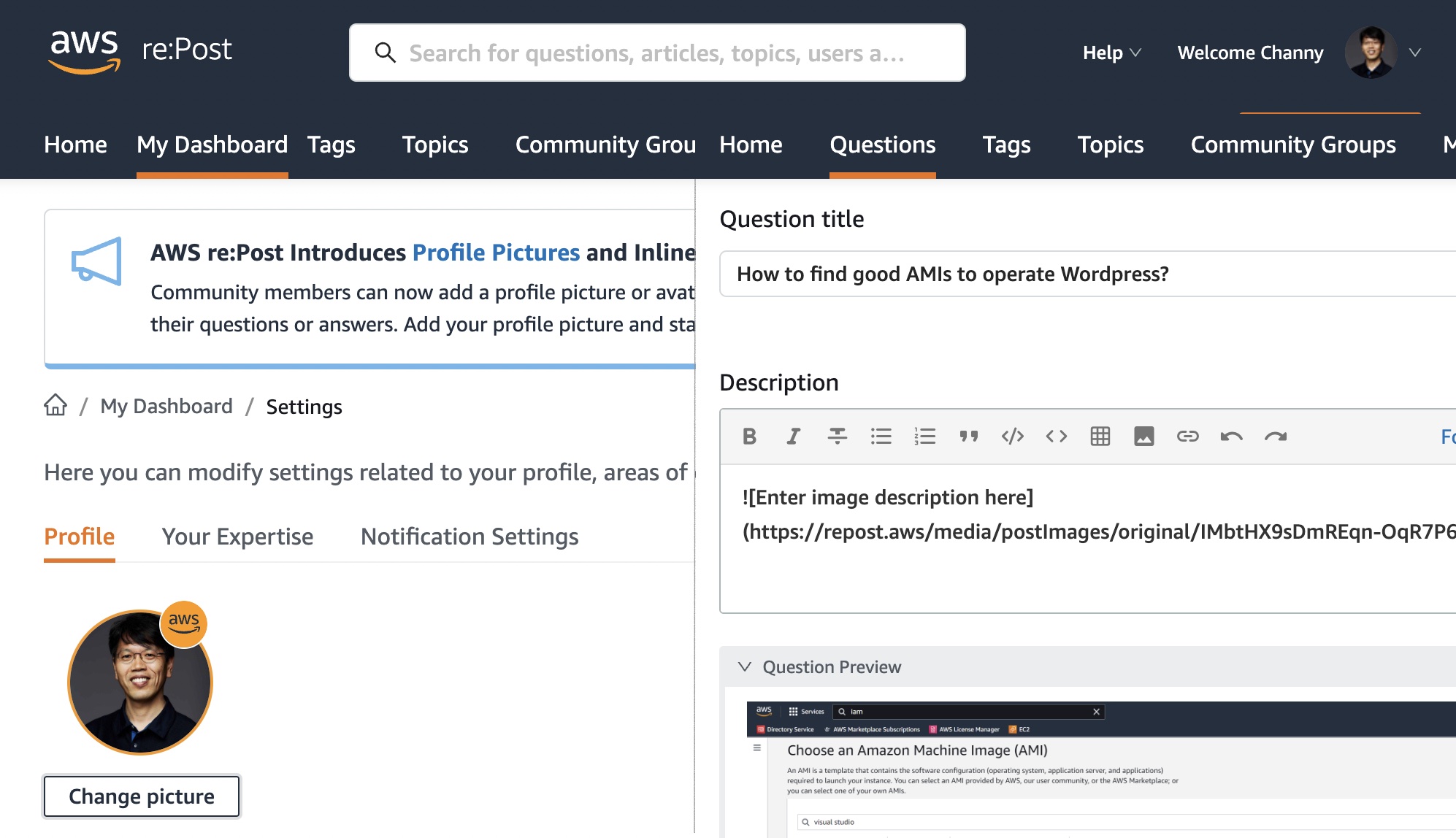
AWS re:Post is a vibrant Q&A community that helps you become even more successful on AWS. You can now add a profile picture or avatar to your account and add inline images such as diagrams or screenshots to support your questions or answers. Add your profile picture and start using inline images today!

For a full list of AWS announcements, be sure to keep an eye on the What’s New at AWS page.

Other AWS News
Here are some news, blog posts, and video series for you to know:

In July 2021, we notified users about the end of support for Internet Explorer 11, which is now approaching on July 31, 2022. The browser will no longer be supported in the AWS Management Console, web-based services such as Amazon QuickSight, Amazon Chime, Amazon Honeycode, and some other AWS websites. After that date, we can no longer guarantee that the features and webpages will function properly on IE 11. For more information, please visit AWS Supported Browsers.

In fall 2021, we began offering a free multi-factor authentication (MFA) security key to AWS account owners in the United States. Now eligible customers can order the free MFA security key through the ordering portal in the AWS Management Console. At this time, only U.S.-based AWS account root users who have spent more than $100 each month over the past 3 months are eligible to place an order. For more information, see our Free MFA Security Key page.

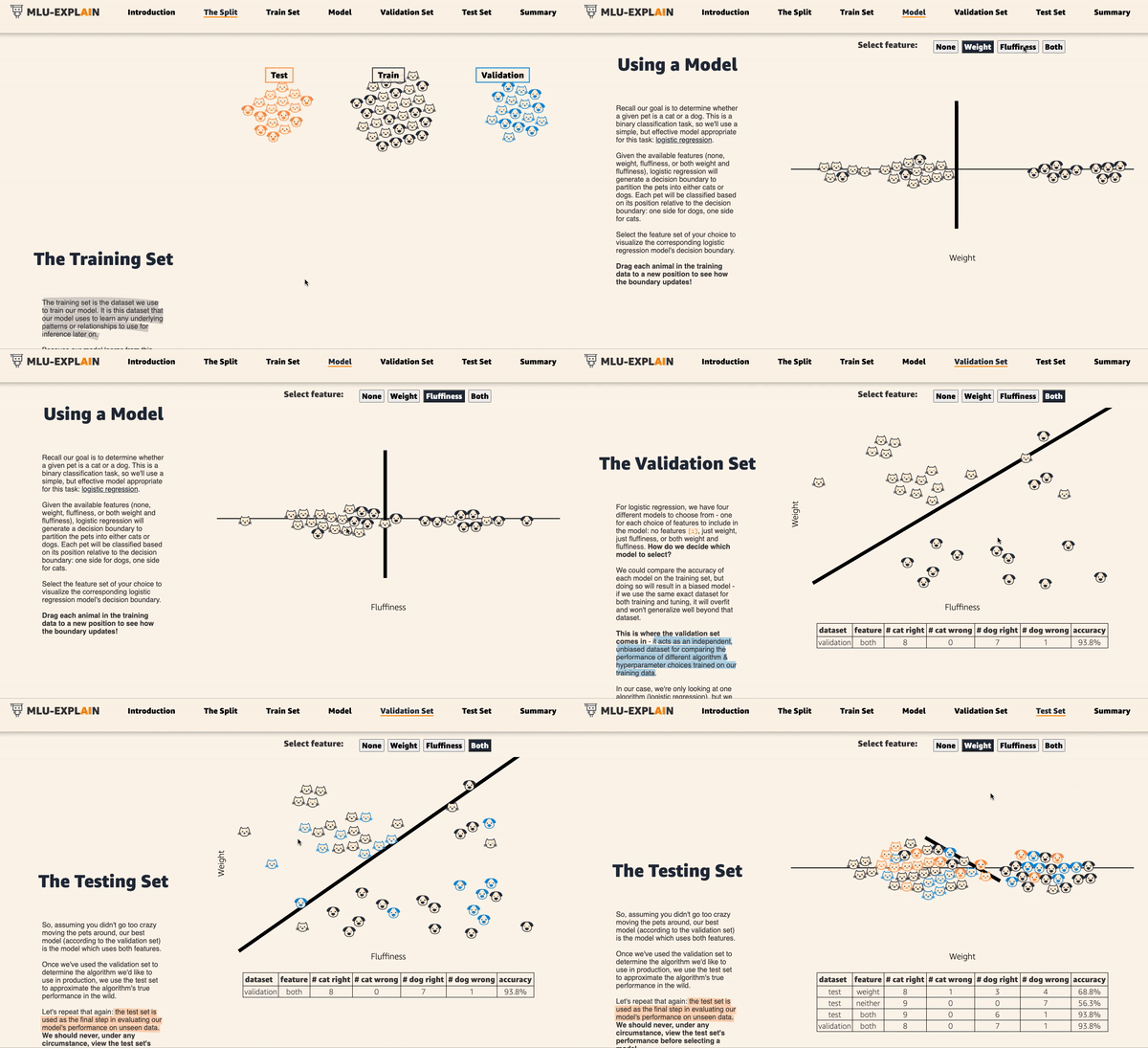
Amazon’s Machine Learning University expands with MLU Explains, a public website containing visual essays that incorporate fun animations and scrollytelling to explain machine learning concepts in an accessible manner. The following animation teaches the concepts of data splitting in machine learning using an example model that attempts to determine whether animals are cats or dogs. To learn more, read the Amazon Science blog post.

This is My Architecture is a video series that showcases innovative architectural solutions on the AWS Cloud by customers and partners. In June and July, over 15 episodes were updated, including GoDaddy, Riot Games, and Hudl. Each episode examines the most interesting and technically creative elements of each cloud architecture.

Upcoming AWS Events in August
Check your calendars and sign up for these AWS events:

AWS SummitRegistration is open for upcoming in-person AWS Summits that might be close to you in August: Sao Paulo (August 3–4), Anaheim (August 18), Taiwan (August 10–11), Chicago (August 28), and Canberra (August 31).

AWS Innovate – Data Edition – On August 23, learn how a modern data strategy can support your present and future use cases, including steps to build an end-to-end data solution to store and access, analyze and visualize, and even predict.

AWS Innovate – For Every Application Edition – On August 25, learn about a wide selection of AWS solutions across compute, storage, networking, hybrid, and edge infrastructure to help you scale application resources seamlessly and optimally.

Although these two Innovate events will be held in Asia Pacific and Japan time zones, you can view on-demand videos for two months following your registration.

If you’re interested in learning modern development practices live in New York City, I recommend joining AWS Solutions Day on August 10. I love advanced topics to focus on building new web apps with Java, JavaScript, TypeScript, and GraphQL.

If you’re interested in learning AWS fundamentals and preparing for AWS Certifications, there are several virtual events in August, such as AWS Cloud Practitioner Essentials Day, AWS Technical Essentials Day, and Exam Readiness for AWS Certificates.

That’s all for this week. Check back next Monday for another Week in Review!

— Channy

This post is part of our Week in Review series. Check back each week for a quick roundup of interesting news and announcements from AWS!

AWS IoT ExpressLink Now Generally Available – Quickly Develop Devices That Connect Securely to AWS Cloud

Post Syndicated from Channy Yun original https://aws.amazon.com/blogs/aws/aws-iot-expresslink-now-generally-available-quickly-develop-devices-that-connect-securely-to-aws-cloud/

At AWS re:Invent 2021, we introduced AWS IoT ExpressLink, software for partner-manufactured connectivity modules that makes it easier and faster for original equipment manufacturers to connect any type of product to the cloud, such as industrial sensors, small and large home appliances, irrigation systems, and medical devices.

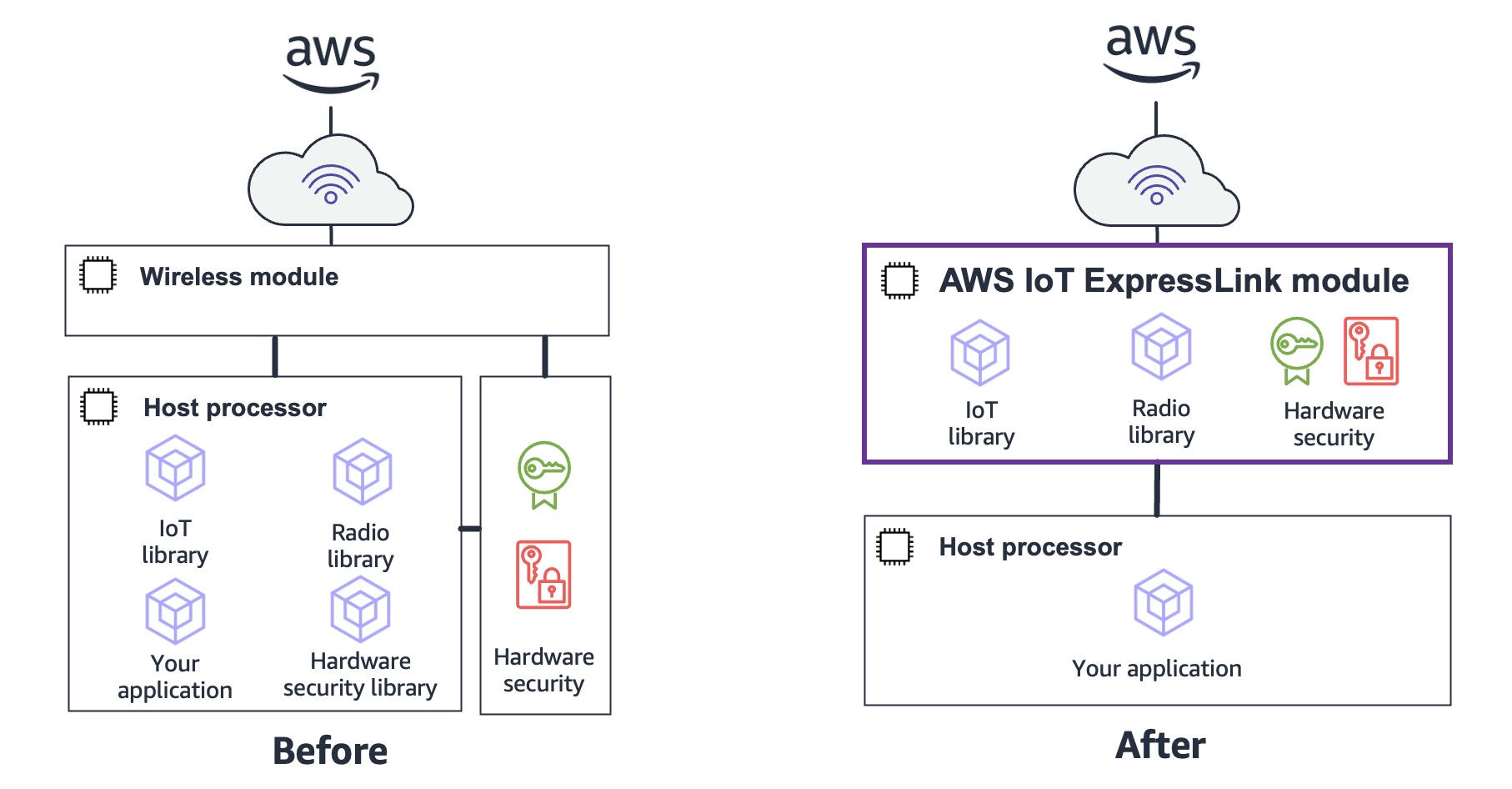
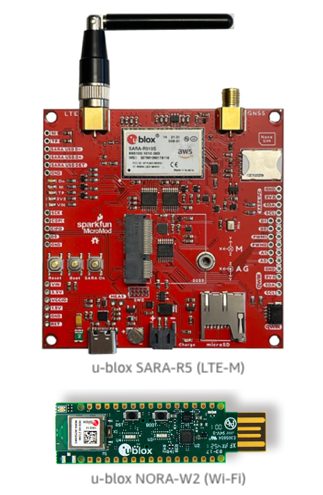
Today we announce the general availability of AWS IoT ExpressLink and the related connectivity modules offered by AWS Partners, such as EspressifInfineon, and u-blox. The modules contain built-in cloud-connectivity software implementing AWS-mandated security requirements. Integrating these wireless modules into the hardware design of your device makes it faster and easier to securely connect Internet of Things (IoT) devices to the AWS Cloud and integrate with a range of AWS services.

Connecting devices to the AWS cloud requires developers to add tens of thousands of lines of new code to their processor of devices, which demands specialized skills. Merging this new code with their application code also requires a deep understanding of networking and cryptography to ensure the device is both functional and implementing AWS managed security requirements.

Some devices are too resource-constrained to support cloud connectivity, meaning their processors are too small or slow to handle the additional code. For example, a small piece of equipment, like a pool pump, may contain a tiny processor that is optimized to drive a particular type of motor but does not have the memory space or the performance necessary to handle both the motor and a cloud connection.

Modules with AWS IoT ExpressLink include simple codes required to connect the device to the cloud, thereby reducing the development cycle and accelerating time to market. To take the pool pump from the previous example, you can keep the tiny processor in the equipment, and delegate the heavy lifting of connecting to the cloud to AWS IoT ExpressLink, allowing the manufacturer to make the simple application software, and avoid costly redesign.

Modules with AWS IoT ExpressLink feature best practices for device-to-cloud connectivity and security as manufacturing partners incorporate AWS-mandated security requirements designed to help protect devices from remote attacks and to help achieve a secure connection to the AWS Cloud. These include the following provisioning and security procedures:

  • Cryptographically signed certificate with unique device ID.
  • Cryptographically secured boot based in a hardware root of trust.
  • Transport Layer Security (TLS v1.2 or higher) encryption of wireless network connections.
  • Encryption of all sensitive data stored on the module, both in transit and at rest.
  • Hardware root of trust for secrets storage and application code segregation.
  • Compliance with security regression test suite.
  • Verification of communication interfaces (Command Line Interface, Wi-Fi, BLE, or Cellular) against memory corruption attacks.
  • Support for cryptographically secured AWS IoT over-the-air (OTA) firmware updates to keep the devices up to date with new features and security patches.

AWS IoT ExpressLink natively integrates with AWS IoT services, such as AWS IoT Device Management, to help customers easily monitor and update their device fleets at scale.

How AWS IoT ExpressLink Works
I’ll explain how AWS IoT ExpressLink communicates with AWS partner modules and allows you to simply connect to the cloud.

For example, Infineon’s IFW56810 is a single-band Wi-Fi 4 connectivity module that provides a simple, secure solution for connecting products to AWS IoT cloud services. The IFW56810 module is preprogrammed with a tested secured firmware of AWS IoT ExpressLink implementation and supports an easy-to-use AWS IoT ExpressLink AT command interface for configuration.

To get started, connect the IFW956810 evaluation kit to the PC using either the Type-C connector or Type-A male to Type-C female cable. Run a serial terminal to communicate with the kit over USB by choosing the higher of the two enumerated COM ports on Windows with the following configuration. Once you open the serial terminal after configuring your setting, such as baudrate, type AT in the serial terminal. You should see a response OK.

You can also send AWS IoT ExpressLink commands as simple as CONNECT, SEND, and SUBSCRIBE to start communicating with the cloud. The device will translate these commands, make an MQTT connection, and send messages to AWS IoT Core.

Whether you are using a Wi-Fi or a cellular LTE-M module, you can make the most basic telemetry application that can be expressed in 10 lines of pseudo-code as follows.

int main()
{
    print("AT+CONNECT\n");
    while(1){
        print("AT+SEND data {\"A\"=%d}", getSensorA());
        delays(1);
    }
}

To learn more, visit the AWS IoT ExpressLink programmer’s guide.

Customer Stories
Many of our customers use AWS IoT ExpressLink to offload the complex but undifferentiated work required to securely connect devices to the AWS Cloud, which improves the developer experience by reducing the design effort, and helping them deliver product faster.

Cardinal Peak is a Colorado-based product engineering services company that reduces the risk of outsourcing an engineering project. Cardinal Peak specializes in developing connected products in multiple markets, including audio, video, security, health care and others. With design skills in hardware, electronics, embedded, cloud and end-user software, Cardinal Peak provides end-to-end design services for its clients.

Keegan Landreth, Embedded Software Engineer at Cardinal Peak said:

“AWS IoT ExpressLink allowed me to put together a WiFi-connected product demo sending sensor data to the cloud in a single afternoon! Secure networking for embedded systems has never been this easy. It’s an almost completely transparent interface between my application and AWS, as simple as printing data to a serial port. Being able to do OTA firmware updates through it is a huge value add-on. The best part is that I can reuse the same code to make a cellular version, which is unheard of!”

ēdn makes SmallGarden, cloud-powered indoor smart gardening products to let you easily grow plants providing light, water, nutrients, and heat as necessary at home.

Ryan Woltz, CEO of ēdn, said:

“We were looking for a quick and easy way to enable robust cloud capabilities for our indoor gardening product lines. However, from past experience, we knew that doing so adds significant risk in terms of time, money, and overall go-to-market execution. IoT device connectivity is complex, forcing our team to either outsource the development to a costly third party or allocate internal engineering resources, significantly delaying innovative features that differentiate our offerings in the market. Even a small misstep in the implementation of provisioning, security, or over-the-air functionality can set a product back months.

Now, thanks to u-blox’s hardware module with AWS IoT ExpressLink, we can enable secure and reliable cloud connectivity for our devices within days. This not only allows us to accelerate product development, but it ensures our engineering team remains focused on shipping leading-edge technologies that make nature accessible indoors.”

u-blox is an AWS Partner with a broad portfolio of chips, modules, and services. Harald Kroell, Product Manager at u-blox, said:

“At u-blox, with AWS IoT ExpressLink, we strengthen our Wi-Fi and LTE-M portfolio and bring silicon-to-cloud connectivity to the next level. By bridging our hardware and services with the AWS cloud, we progress on our mission to make businesses wirelessly connected and build solutions to last an IoT lifetime.

With the SARA-R5 and NORA-W2 modules with AWS IoT ExpressLink, customers can connect products with two different wireless technologies to AWS with a single homogeneous interface, which significantly reduces development effort. It also enables new business opportunities by lowering the barrier of connecting devices, which previously would have been too expensive to connect.”

To get started, order SARA-R5 Starter Kit and USB-NORA-W256AWS with its development kit user guide, including modules powered by AWS IoT ExpressLink.

AWS IoT ExpressLink Partners
As in the case of u-blox, two other AWS Partners, Infineon Technologies AG and Espressif Systems, have developed wireless modules that support a range of connectivity options, including Wi-Fi and cellular, and are powered by AWS IoT ExpressLink. All qualified devices in the AWS Partner Device Catalog are available for purchase from AWS Partners.

Infineon Technologies AG specializes in semiconductor solutions the goal of which is to make life easier, safer, and greener. Sivaram Trikutam, Vice President, Wi-Fi Product Line at Infineon Technologies, said:

“We’re excited to be working with AWS on the AIROC™ IFW56810 Cloud Connectivity Manager (CCM) solution supporting AWS IoT ExpressLink. With this plug-and-play solution, developers and engineers no longer need to create complex code or possess a wide range of technical competencies in Wi-Fi, embedded systems, antenna design, and cloud configuration.

Now, they can easily, quickly, and securely connect devices at scale to AWS, so they can focus on creating new revenue streams and getting to market faster. We are excited to work with our partner AWS on new business opportunities that help our customers meet their needs.”

Espressif Systems is a multinational, fabless semiconductor company with a strong focus on providing connectivity solutions to internet-connected devices. Amey Inamdar, Director of Technical Marketing, Espressif Systems, said:

“At Espressif, we continuously strive to provide secure, green, versatile, and cost-effective AIoT solutions with a focus on ease of use for our customers. The AWS IoT ExpressLink program fits well into that philosophy, providing a convenient AWS IoT connectivity.

It enables customers to seamlessly transform their offline product into a cloud-connected product by offloading the complexity to the module with AWS IoT ExpressLink, with reduced development costs and a faster time to market and hence lowering the barrier to entry to build secure connected devices. Espressif is proud to participate in this program with Espressif’s module with AWS IoT ExpressLink to provide secure and affordable AWS IoT connectivity.”

Order and Get Started Now
You can discover a range of Partner-provided modules with AWS IoT ExpressLink in the AWS Partner Device Catalog. Order your evaluation kits with AWS IoT ExpressLink today. The kit will include an application processor or will connect to compatible development platforms such as Arduino.

You can then immediately start sending telemetry data to the cloud through the simple AWS IoT ExpressLink serial interface. You can use sample codes for integrating an AWS IoT ExpressLink module into an application. These examples are intended to demonstrate how to perform the common operations for an IoT device.

To learn more, visit the product page. Please send feedback to AWS re:Post for AWS IoT ExpressLink or through your usual AWS support contacts.

Channy

Amazon EMR Serverless Now Generally Available – Run Big Data Applications without Managing Servers

Post Syndicated from Channy Yun original https://aws.amazon.com/blogs/aws/amazon-emr-serverless-now-generally-available-run-big-data-applications-without-managing-servers/

At AWS re:Invent 2021, we introduced three new serverless options for our data analytics services – Amazon EMR Serverless, Amazon Redshift Serverless, and Amazon MSK Serverless – that make it easier to analyze data at any scale without having to configure, scale, or manage the underlying infrastructure.

Today we announce the general availability of Amazon EMR Serverless, a serverless deployment option for customers to run big data analytics applications using open-source frameworks like Apache Spark and Hive without configuring, managing, and scaling clusters or servers.

With EMR Serverless, you can run analytics workloads at any scale with automatic scaling that resizes resources in seconds to meet changing data volumes and processing requirements. EMR Serverless automatically scales resources up and down to provide just the right amount of capacity for your application, and you only pay for what you use.

During the preview, we heard from customers that EMR Serverless is cost-effective because they do not incur cost from having to overprovision resources to deal with demand spikes. They do not have to worry about right-sizing instances or applying OS updates, and can focus on getting products to market faster.

Amazon EMR provides various deployment options to run applications to fit varied needs such as EMR clusters on Amazon Elastic Compute Cloud (Amazon EC2), Amazon Elastic Kubernetes Service (Amazon EKS) clusters, AWS Outposts, or EMR Serverless.

  • EMR on Amazon EC2 clusters is suitable for customers that need maximum control and flexibility over how to run their application. With EMR clusters, customers can choose the EC2 instance type to enhance the performance of certain applications, customize the Amazon Machine Image (AMI), choose EC2 instance configuration, customize, and extend open-source frameworks and install additional custom software on cluster instances.
  • EMR on Amazon EKS is suitable for customers that want to standardize on EKS to manage clusters across applications or use different versions of an open-source framework on the same cluster.
  • EMR on AWS Outposts is for customers who want to run EMR closer to their data center within an Outpost.
  • EMR Serverless is suitable for customers that want to avoid managing and operating clusters, and simply want to run applications using open-source frameworks.

Also, when you build an application using an EMR release (for example, a Spark job using EMR release 6.4), you can choose to run it on an EMR cluster, EMR on EKS, or EMR Serverless without having to rewrite the application. This allows you to build applications for a given framework version and retain the flexibility to change the deployment model based on future operational needs.

Getting Started with Amazon EMR Serverless
To get started with EMR Serverless, you can use Amazon EMR Studio, a free EMR feature which provides an end to end development and debugging experience. With EMR Studio, you can create EMR Serverless applications (Spark or Hive), choose the version of open-source software for your application, submit jobs, check the status of running jobs, and invoke Spark UI or Tez UI for job diagnostics.

When you select the Get started button in the EMR Serverless Console, you can create and set up EMR Studio with preconfigured EMR Serverless applications.

In EMR Studio, when you choose Applications in the Serverless menu, you can create one or more EMR Serverless applications and choose the open source framework and version for your use case. If you want separate logical environments for test and production or for different line-of-business use cases, you can create separate applications for each logical environment.

An EMR Serverless application is a combination of (a) the EMR release version for the open-source framework version you want to use and (b) the specific runtime that you want your application to use, such as Apache Spark or Apache Hive.

When you choose Create application, you can set your application NameType of either Spark or Hive, and supported Release version. You can also select the option of default or custom settings for pre-initialized capacity, application limits, and Amazon Virtual Private Cloud (Amazon VPC) connectivity options. Each EMR Serverless application is isolated from other applications and runs within a secure VPC.

Use the default option if you want jobs to start immediately. But charges apply for each worker when the application is started. To learn more about pre-initialized capacity, see Configuring and managing pre-initialized capacity.

When you select Start application, your application is setup to start with pre-initialized capacity of 1 Spark driver and 1 Spark executor. Your application is by default configured to start when jobs are submitted and stop when the application is idle for more than 15 minutes.

You can customize these settings and setup different application limits by selecting Choose custom settings.

In the Job runs menu, you can see a list of run jobs for your application.

Choose Submit job and set up job details such as the name, AWS Identity and Access Management (IAM) role used by the job, script location, and arguments of the JAR or Python script in the Amazon Simple Storage Service (Amazon S3) bucket that you want to run.

If you want logs for your Spark or Hive jobs to be submitted to your S3 bucket, you will need to setup the S3 bucket in the same Region where you are running EMR Serverless jobs.

Optionally, you can set additional configuration properties that you can specify for each job, such as Spark properties, job configurations to override the default configurations for applications (such as using the AWS Glue Data Catalog as its metastore), storing logs to Amazon S3, and retaining logs for 30 days.

The following is an example of running a Python script using the StartJobRun API.

$ aws emr-serverless start-job-run \
    --application-id <application_id> \
    --execution-role-arn <iam_role_arn> \
    --job-driver '{
        "sparkSubmit": {
            "entryPoint": "s3://spark-scripts/scripts/spark-etl.py",
            "entryPointArguments": "s3://spark-scripts/output",
            "sparkSubmitParameters": "--conf spark.executor.cores=1 --conf spark.executor.memory=4g --conf spark.driver.cores=1 --conf spark.driver.memory=4g --conf spark.executor.instances=1"
        }
    }' \
    --configuration-overrides '{
        "monitoringConfiguration": {
           "s3MonitoringConfiguration": {
             "logUri": "s3://spark-scripts/logs/"
           }
        }
    }'

You can check on job results in your S3 bucket. For details, you can use Spark UI for Spark Application, and Hive/Tez UI in the Job runs menu to understand how the job ran or to debug it if it failed.

For more debugging, EMR Serverless will push event logs to the sparklogs folder in your S3 log destination for Spark applications. In the case of Hive applications, EMR Serverless will continuously upload the Hive driver and Tez tasks logs to the HIVE_DRIVER or TEZ_TASK folders of your S3 log destination. To learn more, see Logging in the AWS documentation.

Things to Know
With EMR Serverless, you can get all the benefits of running Amazon EMR. I want to quote some things to know about EMR Serverless from an AWS Big Data Blog post of preview announcements:

  • Automatic and fine-grained scaling – EMR Serverless automatically scales up workers at each stage of processing your job and scales them down when they’re not required. You’re charged for aggregate vCPU, memory, and storage resources used from the time a worker starts running until it stops, rounded up to the nearest second with a 1-minute minimum. For example, your job may require 10 workers for the first 10 minutes of processing the job and 50 workers for the next 5 minutes. With fine-grained automatic scaling, you only incur cost for 10 workers for 10 minutes and 50 workers for 5 minutes. As a result, you don’t have to pay for underutilized resources.
  • Resilience to Availability Zone failures – EMR Serverless is a Regional service. When you submit jobs to an EMR Serverless application, it can run in any Availability Zone in the Region. In case an Availability Zone is impaired, a job submitted to your EMR Serverless application is automatically run in a different (healthy) Availability Zone. When using resources in a private VPC, EMR Serverless recommends that you specify the private VPC configuration for multiple Availability Zones so that EMR Serverless can automatically select a healthy Availability Zone.
  • Enable shared applications – When you submit jobs to an EMR Serverless application, you can specify the IAM role that must be used by the job to access AWS resources such as S3 objects. As a result, different IAM principals can run jobs on a single EMR Serverless application, and each job can only access the AWS resources that the IAM principal is allowed to access. This enables you to set up scenarios where a single application with a pre-initialized pool of workers is made available to multiple tenants wherein each tenant can submit jobs using a different IAM role but use the common pool of pre-initialized workers to immediately process requests.

Now Available
Amazon EMR Serverless is available in US East (N. Virginia), US West (Oregon), Europe (Ireland), and Asia Pacific (Tokyo) Regions. With EMR Serverless, there are no upfront costs, and you pay only for the resources you use. You pay for the amount of vCPU, memory, and storage resources consumed by your applications. For pricing details, see the EMR Serverless pricing page.

To learn more, visit the Amazon EMR Serverless User Guide. Please send feedback to AWS re:Post for Amazon EMR Serverless or through your usual AWS support contacts.

Learn all the details about Amazon EMR Serverless and get started today.

Channy

AWS Week In Review – May 30, 2022

Post Syndicated from Channy Yun original https://aws.amazon.com/blogs/aws/aws-week-in-review-may-30-2022/

Today, the US observes Memorial Day. South Korea also has a national Memorial Day, celebrated next week on June 6. In both countries, the day is set aside to remember those who sacrificed in service to their country. This time provides an opportunity to recognize and show our appreciation for the armed services and the important role they play in protecting and preserving national security.

AWS also has supported our veterans, active-duty military personnel, and military spouses with our training and hiring programs in the US. We’ve developed a number of programs focused on engaging the military community, helping them develop valuable AWS technical skills, and aiding in transitioning them to begin their journey to the cloud. To learn more, see AWS’s military commitment.

Last Week’s Launches
The launches that caught my attention last week are the following:

Three New AWS Wavelength Zones in the US and South Korea  – We announced the availability of three new AWS Wavelength Zones on Verizon’s 5G Ultra Wideband network in Nashville, Tennessee, and Tampa, Florida in the US, and Seoul in South Korea on SK Telecom’s 5G network.

AWS Wavelength Zones embed AWS compute and storage services at the edge of communications service providers’ 5G networks while providing seamless access to cloud services running in an AWS Region. We have a total of 28 Wavelength Zones in Canada, Germany, Japan, South Korea, the UK, and the US globally. Learn more about AWS Wavelength and get started today.

New Amazon EC2 C7g, M6id, C6id, and P4de Instance Types – Last week, we announced four new EC2 instance types. C7g instances are the first instances powered by the latest AWS Graviton3 processors and deliver up to 25 percent better performance over Graviton2-based C6g instances for a broad spectrum of applications, even high-performance computing (HPC) and CPU-based machine learning (ML) inference.

M6id and C6id instances are powered by the Intel Xeon Scalable processors (Ice Lake) with an all-core turbo frequency of 3.5 GHz, equipped with up to 7.6 TB of local NVMe-based SSD block-level storage, and deliver up to 15 percent better price performance compared to the previous generation instances.

P4de instances are a preview of our latest GPU-based instances that provide the highest performance for ML training and HPC applications. It is powered by 8 NVIDIA A100 GPUs with 80 GB high-performance HBM2e GPU memory, 2X higher than the GPUs in our current P4d instances. The new P4de instances provide a total of 640GB of GPU memory, providing up to 60 percent better ML training performance along with 20 percent lower cost to train when compared to P4d instances.

Amazon EC2 Stop Protection Feature to Protect Instances From Unintentional Stop Actions – Now you don’t have to worry about stopping or terminating your instances from accidental actions. With Stop Protection, you can safeguard data in instance store volume(s) from unintentional stop actions. Previously, you could protect your instances from unintentional termination actions by enabling Termination Protection too.

When enabled, the Stop or Termination Protection feature blocks attempts to stop or terminate the instance via the EC2 console, API call, or CLI command. This feature provides an extra measure of protection for stateful workloads since instances can be stopped or terminated only by deactivating the Stop Protection feature.

AWS DataSync Supports Google Cloud Storage and Azure Files Storage Locations – We announced the general availability of two additional storage locations for AWS DataSync, an online data movement service that makes it easy to sync your data both into and out of the AWS Cloud. With this release, DataSync now supports Google Cloud Storage and Azure Files storage locations in addition to Network File System (NFS) shares, Server Message Block (SMB) shares, Hadoop Distributed File Systems (HDFS), self-managed object storage, AWS Snowcone, Amazon Simple Storage Service (Amazon S3), Amazon Elastic File System (Amazon EFS), Amazon FSx for Windows File Server, Amazon FSx for Lustre, and Amazon FSx for OpenZFS.

For a full list of AWS announcements, be sure to keep an eye on the What’s New at AWS page.

Other AWS News
Last week, there were lots of announcements of public sectors at AWS Summit Washington, DC.

To learn more, watch the keynote of Max Peterson, Vice President of AWS Worldwide Public Sector.

Upcoming AWS Events
If you have a developer background or similar and are looking to develop ML skills you can use to solve real-world problems, Let’s Ship It – with AWS! ML Edition is the perfect place to start. Over eight episodes of Twitch training scheduled from June 2 to July 21, you can learn hands-on how to build ML models, such as predicting demand and personalizing your offerings, and more.

The AWS Summit season is mostly over in Asia Pacific and Europe, but there are some upcoming virtual and in-person Summits that might be close to you in June:

More to come in August and September.

Please join Amazon re:MARS 2022 (June 21 – 24) to hear from recognized thought leaders and technical experts who are building the future of machine learning, automation, robotics, and space. You can preview Robotics at Amazon to discuss the recent real-world challenges of building robotic systems, published by Amazon Science.

You can now register for AWS re:Inforce 2022 (July 26 – 27). Join us in Boston to learn how AWS is innovating in the world of cloud security, and hone your technical skills in expert-led interactive sessions.

You can now register for AWS re:Invent 2022 (November 28 – December 2). Join us in Las Vegas to experience our most vibrant event that brings together the global cloud community. You can virtually attend live keynotes and leadership sessions and access our on-demand breakout sessions even after re:Invent closes.

That’s all for this week. Check back next Monday for another Week in Review!

Channy

This post is part of our Week in Review series. Check back each week for a quick roundup of interesting news and announcements from AWS!

New – Amazon EC2 M6id and C6id Instances with Up to 7.6 TB Local NVMe Storage

Post Syndicated from Channy Yun original https://aws.amazon.com/blogs/aws/new-amazon-ec2-m6id-and-c6id-instances-with-up-to-7-6-tb-local-nvme-storage/

Last year, we launched the Amazon EC2 M6i instances and C6i instances, our sixth-generation offerings that include 3rd generation Intel Xeon Scalable processors.

Today we are expanding Amazon EC2 M6id and C6id instances, backed by NVMe-based SSD block-level instance storage physically connected to the host server. These instances are powered by the Intel Xeon Scalable processors (Ice Lake) with an all-core turbo frequency of 3.5 GHz, equipped with up to 7.6 TB of local NVMe-based SSD block-level storage, and deliver up to 15 percent better price performance compared to previous generation instances.

M6id instances are ideal for workloads that require a balance of compute and memory resources along with high-speed, low-latency local block storage, including data logging and media processing. C6id is ideal for compute-intensive workloads, including those that need access to high-speed, low-latency local storage like video encoding, image manipulation, and other forms of media processing. Both M6id and C6id will also benefit applications that need temporary storage of data, such as batch and log processing and applications that need caches and scratch files.

Compared to previous generation instances, new instance types provide:

  • Up to 58 percent higher storage per vCPU and 34 percent lower cost per TB compared to M5d instances, and up to 138 percent higher storage per vCPU and 56 percent lower cost per TB compared with C5d instances.
  • Larger instance sizes (32xlarge) with up to 128 vCPUs and 512 GiB (M6id) or 256 GiB (C6id) of memory that make it easier and more cost-efficient to consolidate workloads and scale up applications.
  • Up to 15 percent improvement in compute price performance and 20 percent higher memory bandwidth.
  • 2 times increased bandwidth up to 40 Gbps for Amazon EBS and 50 Gbps for networking.

Here are the specs of M6id instances in detail:

Instance Name vCPUs RAM (GiB) Local NVMe SSD Storage (GB) EBS Throughput (Gbps) Network Bandwidth (Gbps)
m6id.large 2 8 1 x 118 Up to 10 Up to 12.5
m6id.xlarge 4 16 1 x 237 Up to 10 Up to 12.5
m6id.2xlarge 8 32 1 x 474 Up to 10 Up to 12.5
m6id.4xlarge 16 64 1 x 950 Up to 10 Up to 12.5
m6id.8xlarge 32 128 1 x 1900 10 12.5
m6id.12xlarge 48 192 2 x 1425 15 18.75
m6id.16xlarge 64 156 2 x 1900 20 25
m6id.24xlarge 96 384 4 x 1425 30 37.5
m6id.32xlarge 128 512 4 x 1900 40 50
m6id.metal 128 512 4 x 1900 40 50

Here are also the specs of C6id instances in detail:

Instance Name vCPUs RAM (GiB) Local NVMe SSD Storage (GB) EBS Throughput (Gbps) Network Bandwidth (Gbps)
c6id.large 2 4 1 x 118 Up to 10 Up to 12.5
c6id.xlarge 4 8 1 x 237 Up to 10 Up to 12.5
c6id.2xlarge 8 16 1 x 474 Up to 10 Up to 12.5
c6id.4xlarge 16 32 1 x 950 Up to 10 Up to 12.5
c6id.8xlarge 32 64 1 x 1900 10 12.5
c6id.12xlarge 48 96 2 x 1425 15 18.75
c6id.16xlarge 64 128 2 x 1900 20 25
c6id.24xlarge 96 192 4 x 1425 30 37.5
c6id.32xlarge 128 256 4 x 1900 40 50
c6id.metal 128 256 4 x 1900 40 50

You can use any Amazon Machine Images (AMIs) that include drivers for the Elastic Network Adapter (ENA) and NVMe. For optimal networking performance on these new instances, ENA driver update may be required. For more information on optimal ENA driver for M6id and C6id instances, see this article on migrating instances.

Here are a couple of things to remind you about the local NVMe storage on these instances:

  • You don’t have to specify a block device mapping in your AMI or during the instance launch; the local storage will show up as one or more devices (/dev/nvme*1 on Linux) after the guest operating system has booted.
  • Each local NVMe device is hardware encrypted using the XTS-AES-256 block cipher and a unique key. Each key is destroyed when the instance is stopped or terminated.
  • Local NVMe devices have the same lifetime as the instance they are attached to and do not stick around after the instance has been stopped or terminated.

Now Available
You can launch M6id and C6id instances today in the AWS US East (Ohio), US East (N. Virginia), US West (Oregon), and Europe (Ireland) Regions as On-Demand, Spot, and Reserved Instances or as part of a Savings Plan. As usual with EC2, you pay for what you use. For more information, see the EC2 pricing page.

To learn more, visit our Amazon EC2 M6i instances or C6i instances page, and please send feedback to AWS re:Post for EC2 or through your usual AWS Support contacts.

– Channy

AWS IoT TwinMaker Is Now Generally Available

Post Syndicated from Channy Yun original https://aws.amazon.com/blogs/aws/aws-iot-twinmaker-is-now-generally-available/

Last year at AWS re:Invent 2021, we introduced the preview of AWS IoT TwinMaker, a new AWS IoT service that makes it faster and easier to create digital twins of real-world systems and use them to monitor and optimize industrial operations.

A digital twin is a living digital representation of an individual physical system that is dynamically updated with data to mimic the true structure, state, and behavior of the physical system in order to drive business outcomes. Digital twins can be applied to a wide variety of use cases spanning the entire lifecycle of a system or asset, such as buildings, factories, industrial equipment, and production lines.

Many of our customers are still early in their digital twins journey. They are working hard to connect their data across disparate sources and be able to contextually visualize that data in a dashboard or an immersive environment in order to unlock their business value and outcomes.

Today at AWS Summit San Francisco, we announce the general availability of AWS IoT TwinMaker with new features, improvements, and the availability in additional AWS Regions. AWS IoT TwinMaker provides the tools to build digital twins using existing data from multiple sources, create virtual representations of any physical environment, and combine existing 3D models with real-world data. With AWS IoT TwinMaker, you can now harness digital twins to create a holistic view of your operations faster and with less effort.

AWS IoT TwinMaker has capabilities for each stage of the digital twin building process: collecting data from diverse data sources using connectors (components), connecting to data where it lives to represent your digital twins, and combining existing 3D visual models with real-world data using a scene composition tool, and building web-based applications using a plug-in for Grafana and Amazon Managed Grafana that you can use to create dashboards.

For example, Cognizant’s 1Facility solution uses AWS IoT TwinMaker to help improve the building monitoring experience by reducing the time to troubleshoot a building issue via 3D visualization and aggregating data from multiple sources in a connected building. To learn about more use cases, visit AWS IoT TwinMaker Customers.

To get started with AWS IoT TwinMaker, refer to the step-by-step process for building your digital twin in Introducing AWS IoT TwinMaker. Also, you can test a fully built-out sample digital twin of a cookie factory complete with simulated data connectors from the GitHub repository. This sample code will guide you through the process of building a digital twin application and let you explore many of the features of AWS IoT TwinMaker.

New Features at the General Availability Launch
At this launch, we added some new features in AWS IoT TwinMaker:

Motion indicator – In preview, developers choose from two ways to represent data in a 3D scene: 1) tag, which can be used to bind an entity with a property and use simple rules to drive behavior like changing colors in near real time when certain conditions are met, and 2) model shader, used to change the color of the entire entity based on simple rules. Now there is a third option, motion indicator, to depict speed of motion in addition to tags (alerts) and color overlay (changing a model’s color).

There are three kinds of motion indicators for different use cases with different visuals, for example, LinearPlane (for conveyor belt), LinearCylinder (for tube), and CircularCylinder (for mixer). You can configure the motion speed and the background or foreground color of the indicator widget with either static values or with rules that will change according to different data input.

Scene templatization – With this new feature, all the data bindings such as for tags and model shaders are templatized. You can choose a template for the data binding in the console. For example, a tag can bind to each ${entityId}/${componentName}/AlarmStatus. When the operator selects the alarm for Mixer 1, the Mixer 3D Scene shows the information for Mixer 1; if the operator chooses Mixer 2, then the Mixer 3D Scene will show the information for Mixer 2.

More API improvements – We are making continuous improvements to user experience across the service based on usability feedback, including in AWS IoT TwinMaker APIs. Here are some API changes:

  • ExternalId filter – Added a new filter to ListEntities API to allow filtering by a property that is marked as isExternalId.
  • Timestamp precision – Added a new type to capture time in ISO 8601 format to support arbitrary timestamp precision like nanoseconds in data plane APIs.
  • New CREATE update type – Added new property update type CREATE to let users explicitly state the intent of the update in an entity. Previously, there were only UPDATE and DELETE.

More code samples – You can refer to more developer samples to get started with AWS IoT TwinMaker. These code packages, including new data connectors such as Snowflake, are distributed through our GitHub repository for the most common scenarios, with a goal to support and build a community of developers building digital twins with AWS IoT TwinMaker.

Now Available
AWS IoT TwinMaker is available in US East (N. Virginia), US West (Oregon), Europe (Ireland), and Asia Pacific (Singapore) Regions. Now, it is also available in Europe (Frankfurt) and Asia Pacific (Sydney) Regions.

As part of the AWS Free Tier, you can use up to 50 million data access API calls for free each month for your first 12 months using AWS. When your free usage expires, or if your application use exceeds the free tier, you simply pay the rates listed on the pricing page. To learn more about AWS IoT TwinMaker, refer to the product page and the documentation.

If you are looking for an AWS IoT TwinMaker partner to support your digital twin journey, visit the AWS IoT TwinMaker Partners page. Please send feedback to AWS re:Post for AWS IoT TwinMaker or through your usual AWS support contacts.

Channy

AWS Migration Hub Orchestrator – New Migration Orchestration Capability with Customizable Workflow Templates

Post Syndicated from Channy Yun original https://aws.amazon.com/blogs/aws/aws-migration-hub-orchestrator-new-migration-orchestration-capability-with-customizable-workflow-templates/

You can migrate any workload from an on-premises environment to AWS. The key to a successful migration to AWS is a well-thought-out plan, informative tools, prior migration experience, and a quality implementation. Every step along the way, you can use AWS’s years of experience to build your organizational, operational, and technical capabilities so that you can gain business benefits faster.

In 2017, we introduced AWS Migration Hub, a single location for cloud migration and modernization, giving you the tools you need to accelerate and simplify your journey with AWS. With Migration Hub, you can discover or import your on-premises server details, build a migration strategy with right-sizing recommendations, track migrations across multiple tools in a simple dashboard, and refactor your applications incrementally in any AWS Region.

Today we announce the general availability of AWS Migration Hub Orchestrator, providing predefined and customizable workflow templates that offer a prescribed set of migration tasks, migration tools, automation opportunities, and tracking your progress in one place.

With Migration Hub Orchestrator, you can reduce the migration costs and time by removing many of the manual tasks involved in migrating large-scale enterprise applications, managing dependencies between different tools, and providing visibility into the migration progress. Also, Migration Hub Orchestrator enables customers to customize the templates and add additional steps to suit their workflow needs. At this launch, Migration Hub Orchestrator supports the migrations of SAP NetWeaver-based applications with HANA databases and the rehosting of any applications using AWS Application Migration Service (AWS MGN).

AWS Migration Hub Orchestrator – Getting Started
To get started with AWS Migration Hub Orchestrator, choose Get started to create a new migration workflow in the Migration Hub console.

To create a new workflow, you need to add data sources from your on-premises servers and applications using the AWS discovery tools, group your servers as applications, and download and configure the plugin in your environment. This plugin requires a one-time agentless setup in your source environment.

You can install this plugin as a virtual machine in your VMware vCenter Server environment using the AWS-provided Open Virtualization Archive (OVA) file. Migration Hub Orchestrator uses the plug-in to automatically run migration tasks on the source systems while executing the workflow, such as installing AWS MGN agents on source systems. You can see registered plugins in the Plugins menu.

After completing the prerequisites for Migration Hub Orchestrator setup, you can begin configuring a workflow with your chosen template by clicking the Create workflow button in the Workflows menu.

Choose a workflow template, either Rehost applications on Amazon EC2 or Migrate SAP NetWeaver applications to AWS. This workflow template is a playbook of migration workflow specifications: 1) the step-by-step migration workflow and dependencies, 2) migration services, solutions, or scripts required to automate the migration step, and 3) the required input parameters, such as source virtual machine and application settings, target system settings, replication settings, and cutover requirements for the migration.

To configure your workflow to rehost applications on Amazon EC2 in the next step, enter a name for your workflow, select your application to migrate, configure the source environment, and, optionally, add a description and tags.

When you choose a workflow template for migrating an SAP application, provide source SAP application information. As part of the workflow execution, the service will guide you to deploy the target SAP environment using AWS Launch Wizard, extract application info from the newly deployed stack and migrates the application using an SAP and HANA database-specific replication mechanism like HANA System Replication (HSR).

Select  Review and submit in the Step 3 Configure your workflow, it takes several minutes to create your workflow. You can confirm the list of migration workflows.

Choose one of the migration workflows not started yet and select the Run button to migrate your application with each step in the general rehosting process. It takes several minutes to finish the migration. AWS Migration Hub Orchestrator also allows you to pause, resume, or delete your workflows.

After the completion of migration, you can verify the status of each migration step, from validating the source environment to completing the cutover to AWS.

When you select one of the steps, you can check the details of each step transparently.

Also, you can customize your workflow by adding your own steps, dependencies, and automations to address the needs of your specific use cases. Use the Add option to add steps and specify the custom script that you want to run on the source or destination server as part of that step.

For example, you can perform additional migration readiness checks, change configurations of the target environment, and perform post-migration tests using your own automation scripts. You can also add manual steps as part of the workflow as required.

In the case of the SAP application migration, it includes each migration step in several categories, from validating connectivity to the source server to the cutover to AWS.

As you now know, AWS Migration Orchestrator simplifies the complex migration process that often involves multiple teams and tools by automating the manual tasks involved in migrating large-scale enterprise applications managing dependencies between different tools and providing visibility of migration progress in one place.

We plan to add support for more migration and modernization workflows to reduce the migration costs and time to complete the migration.

Troubleshooting Migration Orchestration
AWS Migration Hub Orchestrator stores the output and logs of steps in S3 bucket under your account. These logs can be used to troubleshoot issues or examine the output of a step. For the tasks that are blocked in the dependent migration service, you can also access the consoles of those services for additional troubleshooting.

Migration Hub Orchestrator is integrated with AWS CloudTrail, a service that provides a record of actions taken by a user, role, or an AWS service to capture all API calls for Migration Hub Orchestrator as events.

If you have more than one AWS account, you can use AWS Organizations in Migration Hub Orchestrator from any member account or organizational unit in your company.

Now Available
AWS Migration Hub Orchestrator is now generally available, and you can use it in all AWS Regions where AWS Migration Hub is available. There is no additional cost for using Migration Hub Orchestrator, and you only pay for the AWS resources that you provision for the migration. To learn more, see the product page.

If you are looking for a Migration Partner to support your cloud adoption, visit the AWS Migration Hub Partners page. Please send feedback to AWS re:Post for Migration Hub or through your usual AWS support contacts.

– Channy

AWS Week in Review – April 11, 2022

Post Syndicated from Channy Yun original https://aws.amazon.com/blogs/aws/aws-week-in-review-april-11-2022/

This post is part of our Week in Review series. Check back each week for a quick round up of interesting news and announcements from AWS!

As spring arrives in the Northern Hemisphere, tulips, sunshine, and cherry blossoms finally appear to be in bloom—surely signs of warmer days to come in North America, Asia, and Europe. I hope you enjoy the spring and, in the Southern Hemisphere, fall season with your family.

Let’s look the second edition of the AWS Week in Review for the month of April!

Last Week’s Launches
Here are some launches that caught my attention last week:

New Amazon EC2 Single Page Instance Launching Console – As Jeff introduced, the Amazon EC2 console introduces the new and improved launch experience—a quicker and easier way to launch an instance. The new design provides a single page layout, allowing you to view all your settings in one location. You no longer need to navigate back and forth between steps to ensure your configuration is correct. The new design also introduces a summary panel that provides an overview and helps navigate the page. Quickly get started by following the simple steps and see the EC2 documentation to learn more.

Unified Settings in the AWS Management Console – New Unified Settings will persist across devices, browsers, and services. It supports settings called default language, Region, visual theme such as either light or dark mode, and favorites bar with either the service icon and full name or only the service icon. You can access Unified Settings by signing in to the AWS Management Console, navigating to the account menu, and selecting Settings in all AWS Regions.

AWS Lambda Function URLs – This is really big news! AWS Lambda Function URLs is a new feature that makes it easier to invoke functions through an HTTPS endpoint as a built-in capability of the AWS Lambda service. You can add Function URLs to new and existing functions easily from the Lambda console. Function URLs are ideal for getting started with building web services on Lambda or for common tasks like building webhooks. To get started quickly and learn more, see Alex’s blog post.

Amazon CloudWatch Metrics Insights is Now Generally Available – As a fast, flexible, SQL-based query engine, Amazon CloudWatch Metrics Insights enables you to identify trends and patterns across millions of operational metrics in real time and helps you use these insights to reduce time to resolution. With Metrics Insights, you can gain better visibility on your infrastructure and large-scale application performance with flexible querying and on-the-fly metric aggregations. To get started, select the All metrics link under Metrics on the left navigation panel of the CloudWatch console and browse to the Query tab. To learn more, see the Metrics Insights documentation.

AWS Amplify Studio’s New File Storage and File Management – This new feature makes it easy to store and serve user-generated content (such as photos and videos) from web or mobile apps. With Amplify Studio, you can easily create an Amazon Simple Storage Service (Amazon S3) bucket, configure file access levels, integrate storage client libraries into your web or mobile app, and manage files in Studio’s drag-and-drop file explorer. Get started by reading Nikhil’s blog post on how to provision Storage directly from your Amplify Studio.

You can either select Upload files or drag and drop files onto your browser

For a full list of AWS announcements, be sure to keep an eye on the What’s New at AWS page.

Other AWS News
Here are some featured news items about open-source and community support at AWS in the last week:

Amazon Athena ACID Transactions Powered by Apache Iceberg – We announced the general availability of Amazon Athena ACID transactions, a new capability that adds insert, update, delete, and time travel operations to Athena’s SQL data manipulation language (DML). Built on the Apache Iceberg table format, Athena ACID transactions are optimized for Amazon S3 storage, support seamless schema evolution, and ensure atomic operations across other services and engines that support the Iceberg table format. To learn more, see Using Amazon Athena Transactions and Using Iceberg Tables in the Athena User Guide.

Amazon OpenSearch Service Now Supports OpenSearch 1.2 – We launched support for OpenSearch 1.0 on Amazon OpenSearch Service in September 2021 and for OpenSearch 1.1 in January 2022. The support included features of OpenSearch 1.2 such as transforms, data streams, notebooks, cross-cluster replication, and improvements to anomaly detection and alerting.

Amazon EKS Now Supports Kubernetes 1.22 – Customers can start taking advantage of the numerous enhancements and new generally available APIs in Kubernetes 1.22. In line with the Kubernetes community support for Kubernetes versions, Amazon EKS is committed to supporting at least four production-ready versions of Kubernetes at any given time. You can learn about how to upgrade your EKS version in our blog posts Amazon EKS now supports Kubernetes 1.22 and Planning Kubernetes Upgrades with Amazon EKS.

The New AWS Community Builders Directory – You can find over 800 AWS Community Builders in the global directory. Community Builders are technical enthusiasts and emerging thought leaders who are passionate about sharing knowledge and connecting with the technical community. You can contact all Community Builders in the directory to engage the AWS Community in your Region. To see created and shared content by them, check them out on dev.to.

Upcoming AWS Events
Check your calendars and sign up for these AWS events:

AWS Summits in the Asia-Pacific Are Back – I am happy to announce newly scheduled AWS Summits Online in the Asia-Pacific Regions such as Korea (on May 10–11), ASEAN (on May 18), and Australia & New Zealand (on May 18–19). More in-person summits in May are coming in Madrid (on May 4), Stockholm (on May 11), Berlin (on May 11–12), Tel Aviv (on May 18), and Atlanta (on May 18–19). Find an AWS Summit near you!

AWS Online Tech Talks for April – These talks cover a range of topics and expertise levels and features technical deep dives, demonstrations, customer examples, and live Q&A with AWS experts. Over 20 virtual or on-demand seminars have been scheduled from April 18–29. You can also find archived on-demand videos from previous AWS Online Tech Talks.

AWS Solutions-Focused Immersion Days – This is a series of events that are designed to educate you about AWS products and services and help you develop the skills needed to build, deploy, and operate your infrastructure and applications in the cloud. Hands on labs provide you with an immersive experience in the AWS console. Join us to learn how to build on AWS.

To find more about AWS events and webinars, explore the all AWS Events page.

That’s all for this week. Check back next Monday for another Week in Review!

Channy

AWS Lambda Now Supports Up to 10 GB Ephemeral Storage

Post Syndicated from Channy Yun original https://aws.amazon.com/blogs/aws/aws-lambda-now-supports-up-to-10-gb-ephemeral-storage/

Serverless applications are event-driven, using ephemeral compute functions ranging from web APIs, mobile backends, and streaming analytics to data processing stages in machine learning (ML) and high-performance applications. While AWS Lambda includes a 512 MB temporary file system (/tmp) for your code, this is an ephemeral scratch resource not intended for durable storage such as Amazon Elastic File System (Amazon EFS).

However, extract, transform, and load (ETL) jobs and content generation workflows such as creating PDF files or media transcoding require fast, scalable local storage to process large amounts of data quickly. Data-intensive applications require large amounts of temporary data specific to the invocation or cached data that can be reused for all invocation in the same execution environment in a highly performant manner. With the previous limit of 512 MB, customers had to selectively load data from Amazon Simple Storage Service (Amazon S3) and Amazon EFS, or increase the allocated function memory and thus increase their cost, just to handle large objects downloaded from Amazon S3. Since customers could not cache larger data locally in the Lambda execution environment, every function invoke had to read data in parallel, which made scaling out harder for customers.

Today, we are announcing that AWS Lambda now allows you to configure ephemeral storage (/tmp) between 512 MB and 10,240 MB. You can now control the amount of ephemeral storage a function gets for reading or writing data, allowing you to use AWS Lambda for ETL jobs, ML inference, or other data-intensive workloads.

With increased AWS Lambda ephemeral storage, you get access to a secure, low-latency ephemeral file system up to 10 GB. You can continue to use up to 512 MB for free and are charged for the amount of storage you configure over the free limit for the duration of invokes.

Setting Larger Ephemeral Storage for Your Lambda Function
To configure your Lambda function with larger ephemeral storage, choose the Configuration tab under the General Configuration section in the AWS Lambda Console. You will see a new configuration for Ephemeral storage setting at 512MB by default.

When you click the Edit button, you can configure the ephemeral storage from 512 MB to 10,240 MB in 1 MB increments for your Lambda functions.

With AWS Command Line Interface (AWS CLI), you can update your desired size of ephemeral storage using theupdate-function-configuration command.

$ aws lambda update-function-configuration --function-name PDFGenerator \
              --ephemeral-storage '{"Size": 10240}'

You can configure ephemeral storage using Lambda API via AWS SDK and AWS CloudFormation. To learn more, see Configuring function options in the AWS Documentation.

As a review, AWS Lambda provides a comprehensive range of storage options. To learn more, see a great blog post, Choosing between AWS Lambda data storage options in web apps, written by my colleague James Beswick. I want to quote the table to show the differences between these options and common use-cases to help you choose the right one for your own applications.

Features Ephemeral Storage (/tmp) Lambda Layers Amazon EFS Amazon S3
Maximum size 10,240 MB 50 MB (direct upload) Elastic Elastic
Persistence Ephemeral Durable Durable Durable
Content Dynamic Static Dynamic Dynamic
Storage type File system Archive File system Object
Lambda event source integration N/A N/A N/A Native
Operations supported Any file system operation Immutable Any file system operation Atomic with versioning
Object tagging and metadata
N N N Y
Pricing model Included in Lambda
(Charged over 512MB)
Included in Lambda Storage + data transfer + throughput Storage + requests + data transfer
Shared across all invocations N Y Y Y
Sharing/permissions model Function-only IAM IAM + NFS IAM
Source for AWS Glue and Amazon Quicksight
N N N Y
Relative data access speed from Lambda Fastest Fastest Very fast Fast

Available Now
You can now configure up to 10 GB of ephemeral storage per Lambda function instance in all Regions where AWS Lambda is available. With 10 GB container image support, 10 GB function memory, and now 10 GB of ephemeral function storage, you can support workloads such as using large temporal files, data and media processing, machine learning inference, and financial analysis.

Support is also available through many AWS Lambda Partners such as HashiCorp (Terraform), Pulumi, Datadog, Splunk (SignalFx), Lumigo, Thundra, Dynatrace, Slalom, Cloudwiry, and Contino.

For this feature, you are charged for the storage you configure over the 512 MB free limit for the duration of your function invokes. To learn more, visit AWS Lambda product and pricing page and send feedback through the AWS re:Post for AWS Lambda or your usual AWS Support contacts.

Channy

New and Updated AWS Well-Architected Lenses

Post Syndicated from Channy Yun original https://aws.amazon.com/blogs/aws/new-and-updated-aws-well-architected-lenses/

Since 2015, the AWS Well-Architected Framework has been helping AWS customers and partners improve their cloud architectures. The framework consists of design principles, questions, and best practices across multiple pillars: Operational ExcellenceSecurityReliabilityPerformance Efficiency, and Cost Optimization. At AWS re:Invent 2021, we introduced a new Sustainability Pillar to help organizations learn, measure, and improve their workloads using environmental best practices for cloud computing.

In 2017, we introduced AWS Well-Architected Lenses and extended the best practice guidance to specific industry and technology domains, such as serverless, high performance computing (HPC), internet of things (IoT), software as a service (SaaS), foundational technical review (FTR), and financial services. Use the applicable Lenses together with the pillars of the AWS Well-Architected Framework to fully evaluate your workloads.

In 2021, we added four new lenses for various technologies and industries at the request of our customers. If you are planning a new workload for the new year, check out the new and updated Lenses to help guide you through the implementation of AWS best practices.

New AWS Well-Architected Lenses

Streaming Media Lens (September 29, 2021)
The Streaming Media Lens helps customers apply best practices in the design, delivery, and maintenance of their cloud-based streaming media workloads. Whether you’ve just started designing a greenfield video application on AWS or are looking to migrate an existing workload, this Lens provides perspective on best practices and can spark new ideas. To learn more about best practices for architecting and improving your streaming media workloads on AWS, see the Streaming Media Lens documentation.

SAP Lens (October 29, 2021)
The SAP Lens is a collection of customer-proven design principles and best practices for ensuring SAP workloads on AWS are well-architected. The SAP Lens is based on insights that AWS has gathered from customers, AWS Partners, and the SAP Specialist Architect community. The Lens is designed to help you adopt a cloud-native approach to running SAP. To learn more, see the SAP Lens documentation.

Games Industry Lens (November 19, 2021)
The Games Industry Lens helps customers review and improve cloud-based architecture for game development, deployment, operations of gaming platforms, and to support massive player scale. The Lens presents common games deployment scenarios and identifies key elements to ensure your platforms are in accordance with the best practices of AWS Well-Architected Framework. Learn the best practices for designing, architecting, and deploying your games workloads on AWS in the Games Industry Lens documentation.

Hybrid Networking Lens (November 22, 2021)
The Hybrid Networking Lens provides best practices and strategies to use when designing hybrid networking architectures. This Lens supports a broad spectrum of use cases and helps set you up for success in building hybrid networking architectures and integrating your on-premises data center with AWS operations. It outlines three areas to consider when designing hybrid network connectivity for your workload: data layer, monitoring and configuration management, and security. To learn more, see the Hybrid Networking Lens documentation.

Updated AWS Well-Architected Lens

Machine Learning Lens (October 13, 2021)
The Machine Learning (ML) Lens introduces a set of established and repeatable best practices across the ML lifecycle phases. You can apply this guidance and architectural principles when designing your ML workloads or after your workloads have entered production as part of continuous improvement. The Lens includes guidance and resources on implementing the best practices on AWS. To learn more, see the ML Lens documentation.

Data Analytics Lens (October 29, 2021)
The Data Analytics Lens is a collection of customer-proven best practices for designing well-architected analytics workloads. It contains insights that AWS has gathered from real-world case studies and helps you learn the key design elements of well-architected analytics workloads, along with recommendations for improvement. For more information about building your own data analytics workload, see the Data Analytics Lens whitepaper.

Management and Governance Lens (December 17, 2021)
The Management and Governance Lens (M&G Lens) provides clear guidance to help you prepare your environment, regardless of your stage of cloud adoption, with a focus on eight different functions. Those functions are controls and guardrails, network connectivity, identity management, security management, monitoring and observability, cloud financial management, service management, and sourcing and distribution. To learn more, see the M&G Lens documentation.

To get started with your favorite lenses, visit the AWS Well-Architected page. You can learn, measure, and build using architectural best practices and tools.

To review your workloads using the AWS Well-Architected Framework, we recommend using the AWS Well-Architected Tool, a self-service tool designed to help you review AWS workloads at any time, without the need for an AWS Solutions Architect.

It provides a mechanism for regularly evaluating your workloads, identifying high-risk issues, and recording your improvements applying your favorite Lenses. You can also leverage Custom Lenses to record and track progress towards your organization’s internal best practices.

If you want to train these best practices, AWS Well-Architected Labs provides codes and documentation in the format of hands-on labs to help you learn, measure, and build using architectural best practices categorized into levels. Also, you can access an ecosystem of hundreds of members in the AWS Well-Architected Partner Program in your area to help analyze and review your applications.

You can refer to the AWS Architecture Center, a collection of reference architecture patterns, vetted architecture solutions, and best practices. If you’re new to AWS, use the Architect Learning Plan to learn how to design applications and systems on AWS. Build technical skills as you progress along the path toward AWS Certification.

This is My Architecture is a video series that showcases innovative architectural solutions on AWS by customers and partners. We would love to hear more from you, especially about your success stories in building your applications on AWS Well-Architected Framework. Please share with your account team to introduce your stories.

Channy

New – Amazon EC2 X2idn and X2iedn Instances for Memory-Intensive Workloads with Higher Network Bandwidth

Post Syndicated from Channy Yun original https://aws.amazon.com/blogs/aws/new-amazon-ec2-x2idn-and-x2iedn-instances-for-memory-intensive-workloads-with-higher-network-bandwidth/

In 2016, we launched Amazon EC2 X1 instances designed for large-scale and in-memory applications in the cloud. The price per GiB of RAM for X1 instances is among the lowest. X1 instances are ideal for high performance computing (HPC) applications and running in-memory databases like SAP HANA and big data processing engines such as Apache Spark or Presto.

The following year, we launched X1e instances with up to 4 TiB of memory designed to run SAP HANA and other memory-intensive, in-memory applications. These instances are certified by SAP to run production environments of the next-generation Business Suite S/4HANA, Business Suite on HANA (SoH), Business Warehouse on HANA (BW), and Data Mart Solutions on HANA on the AWS Cloud.

Today, I am happy to announce the general availability of Amazon EC2 X2idn/X2iedn instances, built on the AWS Nitro system and featuring the third-generation Intel Xeon Scalable (Ice Lake) processors with up to 50 percent higher compute price performance than comparable X1 instances. These improvements result in up to 45 percent higher SAP Application Performance Standard (SAPS) performance than comparable X1 instances.

You might have noticed that we’re now using the “i” suffix in the instance type to specify that the instances are using an Intel processor, “e” in the memory-optimized instance family to indicate extended memory, “d” with local NVMe-based SSDs that are physically connected to the host server, and “n” to support higher network bandwidth up to 100 Gbps.

X2idn instances enable up to 2 TiB of memory, while X2iedn instances enable up to 4 TiB of memory. X2idn and X2iedn instances also support 100 Gbps of network performance with hardware-enabled VPC encryption and support 80 Gbps of Amazon EBS bandwidth and 260k IOPs with EBS-encrypted volumes.

Instance Name vCPUs RAM (GiB) Local NVMe SSD Storage (GB) Network Bandwidth (Gbps) EBS-Optimized Bandwidth (Gbps)
x2idn.16xlarge 64 1024 1 x 1900 Up to 50 Up to 40
x2idn.24xlarge 96 1536 1 x 1425 75 60
x2idn.32xlarge 128 2048 2 x 1900 100 80
x2iedn.xlarge 4 128 1 x 118 Up to 25 Up to 20
x2iedn.2xlarge 8 256 1 x 237 Up to 25 Up to 20
x2iedn.4xlarge 16 512 1 x 475 Up to 25 Up to 20
x2iedn.8xlarge 32 1024 1 x 950 25 20
x2iedn.16xlarge 64 2048 1 x 1900 50 40
x2iedn.24xlarge 96 3072 2 x 1425 75 60
x2iedn.32xlarge 128 4096 2 x 1900 100 80

X2idn instances are ideal for running large in-memory databases such as SAP HANA. All of the X2idn instance sizes are certified by SAP for production HANA and S/4HANA workloads. In addition, X2idn instances are ideal for memory-intensive and latency-sensitive workloads such as Apache Spark and Presto, and for generating real-time analytics, processing giant graphs using Neo4j or Titan, or creating enormous caches.

X2iedn instances are optimized for applications that seek high memory to vCPU ratio and deliver the highest memory capacity per vCPU among all virtualized EC2 instance types. X2iedn is suited to run high-performance databases (such as Oracle DB, SQL server) and in-memory workloads (such as SAP HANA, Redis). Workloads that are sensitized to per-core licensing, such as Oracle DB, greatly benefit from the higher memory per vCPU (32GB:1vCPU) offered by X2iedn. X2iedn allows you to optimize licensing costs because it provides customers the same memory at half the number of vCPU compared to X2idn.

These instances offer the same amount of local storage as in X1/X1e, up to 3.8 TB, but the local storage in X2idn/X2iedn is NVMe-based, which will offer an order of magnitude lower latency compared to SATA SSDs in X1/X1e.

Things to Know
Here are some fun facts about the X2idn and X2iedn instances:

Optimizing CPU—You can disable Intel Hyper-Threading Technology for workloads that perform well with single-threaded CPUs, like some HPC applications.

NUMA—You can make use of non-uniform memory access (NUMA) on X2idn and X2iedn instances. This advanced feature is worth exploring if you have a deep understanding of your application’s memory access patterns.

Available Now
X2idn instances are now available in the US East (N. Virginia), Asia Pacific (Mumbai, Singapore, Tokyo), Europe (Frankfurt, Ireland) Regions.

X2iedn instances are now available in the US East (Ohio, N. Virginia), US West (Oregon), Asia Pacific (Singapore, Tokyo), Europe (Frankfurt, Ireland) Regions.

You can use On-Demand Instances, Reserved Instances, Savings Plan, and Spot Instances. Dedicated Instances and Dedicated Hosts are also available.

To learn more, visit our EC2 X2i Instances page, and please send feedback to AWS re:Post for EC2 or through your usual AWS Support contacts.

Channy

New – Amazon EC2 C6a Instances Powered By 3rd Gen AMD EPYC Processors for Compute-Intensive Workloads

Post Syndicated from Channy Yun original https://aws.amazon.com/blogs/aws/new-amazon-ec2-c6a-instances-powered-by-3rd-gen-amd-epyc-processors-for-compute-intensive-workloads/

At AWS re:Invent 2021, we launched Amazon EC2 M6a instances powered by the 3rd Gen AMD EPYC processors, running at frequencies up to 3.6 GHz, which offer customers up to 35 percent improvement in price-performance compared to M5a instances.

Many customers are looking for ways to optimize their cloud utilization, and they are taking advantage of the compute choice that Amazon EC2 offers. Customers such as Dropbox, Capital One, and Sprinklr have been able to realize the cost benefits of AWS using EC2 instances powered by AMD EPYC processors.

Today, I am happy to announce the availability of the new compute-optimized Amazon EC2 C6a instances, which offer up to up to 15 percent improvement in price-performance versus C5a instances, and 10 percent lower cost than comparable x86-based EC2 instances.

These instances are ideal for running compute-intensive workloads such as high-performance web servers, batch processing, ad serving, machine learning, multi-player gaming, video encoding, high performance computing (HPC) such as scientific modeling, and machine learning.

Compared to C5a instances, this new instance type provides:

To increase instance security, C6a instances have always-on memory encryption with AMD Transparent Single Key Memory Encryption (TSME), and support new AVX2 instructions for accelerating encryption and decryption algorithms.

Like M6a, C6a instances are also available in 10 sizes:

Name vCPUs Memory
(GiB)
Network Bandwidth
(Gbps)
EBS Throughput
(Gbps)
c6a.large 2 4 Up to 12.5 Up to 6.6
c6a.xlarge 4 8 Up to 12.5 Up to 6.6
c6a.2xlarge 8 16 Up to 12.5 Up to 6.6
c6a.4xlarge 16 32 Up to 12.5 Up to 6.6
c6a.8xlarge 32 64 12.5 6.6
c6a.12xlarge 48 96 18.75 10
c6a.16xlarge 64 128 25 13.3
c6a.24xlarge 96 192 37.5 20
c6a.32xlarge 128 256 50 26.6
c6a.48xlarge 192 384 50 40

The new instances are built on the AWS Nitro System, a collection of building blocks that offloads many of the traditional virtualization functions to dedicated hardware for high performance, high availability, and highly secure cloud instances.

Available Now
C6a instances are available today in three AWS Regions: US East (N. Virginia), US West (Oregon), and EU (Ireland). As usual with EC2, you pay for what you use. For more information, see the EC2 pricing page.

To learn more, visit the EC2 C6a instance and AWS/AMD partner page. You can send feedback to  [email protected]AWS re:Post for EC2, or through your usual AWS Support contacts.

Channy