Hyperdrive : donner aux bases de données l'impression d'être mondiales

Post Syndicated from Matt Silverlock original http://blog.cloudflare.com/fr-fr/hyperdrive-making-regional-databases-feel-distributed-fr-fr/


Hyperdrive: making databases feel like they’re global

Hyperdrive vous permet d’accéder très rapidement à vos bases de données existantes à partir de Cloudflare Workers, quel que soit leur lieu d’exécution. Il vous suffit de connecter Hyperdrive à votre base de données, de modifier une ligne de code pour vous connecter via Hyperdrive, et voilà : les connexions et les requêtes sont accélérées (et spoiler : vous pouvez l’utiliser dès aujourd’hui).

En un mot, Hyperdrive s’appuie sur notre réseau mondial pour accélérer les requêtes vers vos bases de données existantes, qu’elles se situent chez un fournisseur de cloud traditionnel ou chez votre fournisseur de base de données serverless préféré. La solution réduit considérablement la latence induite par l’établissement répété de nouvelles connexions avec la base de données. En outre, elle met en cache les requêtes de lecture les plus populaires adressées à votre base de données, une opération qui évite souvent d’avoir à s’adresser à nouveau à votre base de données.

Sans Hyperdrive, l’accès à votre base de données principale (celle qui contient les profils de vos utilisateurs, votre stock de produits ou qui exécute votre application web essentielle) hébergée dans la région us-east1 d’un fournisseur de cloud traditionnel se révèlera très lent pour les utilisateurs situés à Paris, Singapour et Dubaï, et plus lent qu’il ne devrait l’être pour les utilisateurs de Los Angeles ou de Vancouver. Chaque aller-retour pouvant prendre jusqu’à 200 ms, il est facile de perdre jusqu’à une seconde (ou plus !) lors des nombreux allers-retours nécessaires à l’établissement d’une connexion, avant même d’avoir envoyé la requête visant à récupérer vos données. Le service Hyperdrive est conçu pour remédier à cette situation.

Pour démontrer les performances d’Hyperdrive, nous avons développé une application de démonstration qui envoie des requêtes consécutives à la même base de données : à la fois avec Hyperdrive et sans Hyperdrive (directement donc). L’application commence par sélectionner une base de données située dans un continent voisin : elle sélectionne ainsi une base de données hébergée aux États-Unis si vous vous trouvez en Europe, par exemple (une expérience bien trop courante pour de nombreux internautes européens). De même, si vous vous trouvez en Afrique, elle sélectionnera une base de données située en Europe (et ainsi de suite). Elle renvoie ensuite les résultats bruts d’une requête « SELECT » simple, sans moyennes ni indicateurs choisis avec soin.
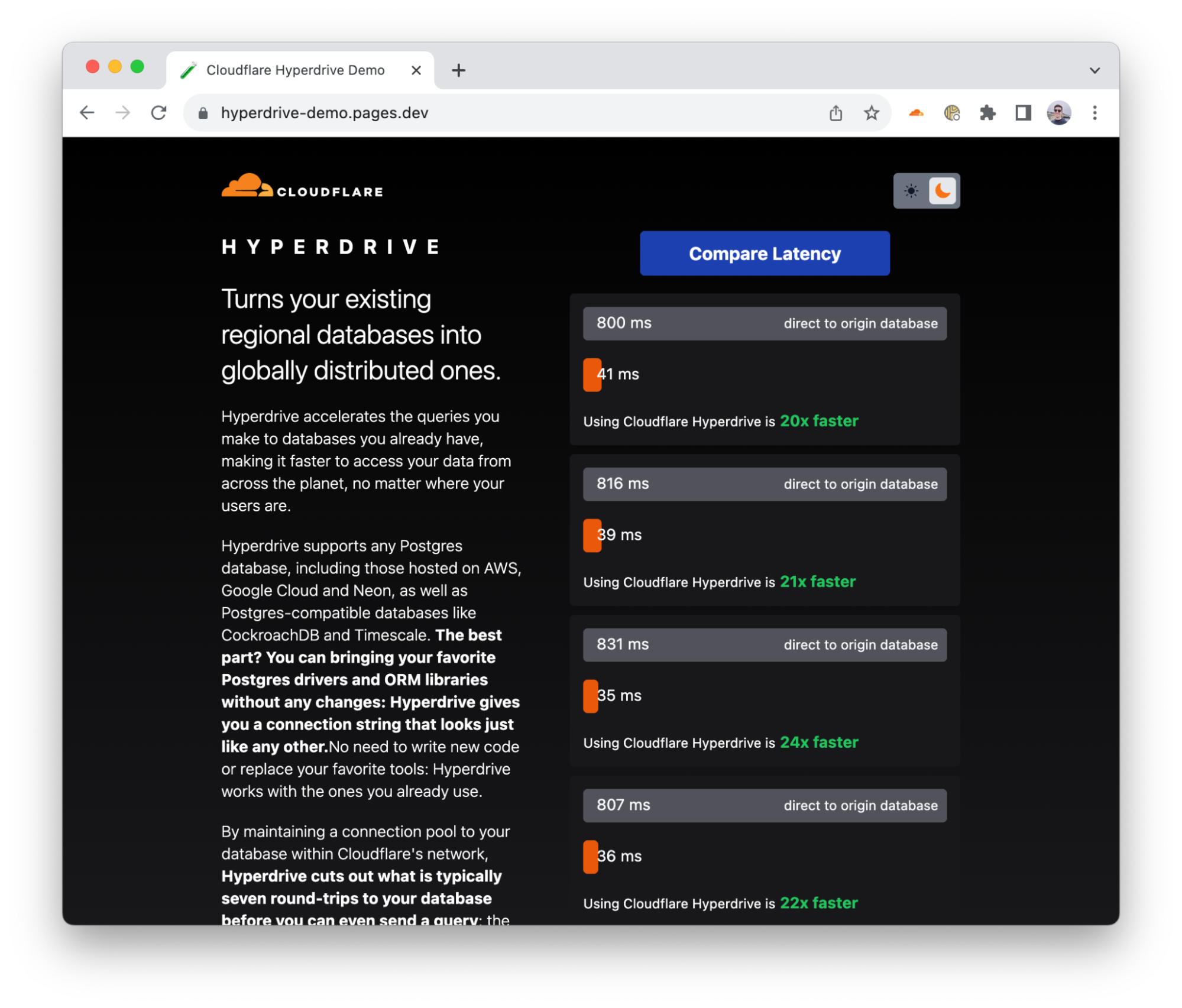
Nous avons développé une application de démonstration qui adresse de véritables requêtes à une base de données PostgreSQL, avec et sans Hyperdrive.

Tout au long de la phase de tests internes, les premiers rapports d’utilisateurs et les multiples tests d’évaluation réalisés révèlent qu’Hyperdrive améliore les performances de 17 à 25 fois par rapport à l’accès direct à la base de données pour les requêtes en cache, et de 6 à 8 fois pour les requêtes et les opérations d’écriture non mises en cache. La latence de la mise en cache ne vous surprendra peut-être pas, mais nous pensons que le fait d’accélérer 6 à 8 fois les requêtes non mises en cache vous fera changer d’idée, en passant de « Je ne peux pas interroger une base de données centralisée à partir de Cloudflare Workers » à « Mais où te cachais-tu, fonctionnalité de mes rêves ?! ». Nous continuons également à travailler sur l’amélioration des performances. Nous avons déjà identifié des économies supplémentaires en termes de latence et les mettrons en œuvre dans les semaines à venir.

Le plus beau dans tout ça ? Les développeurs titulaires d’une offre Workers payante peuvent commencer à utiliser immédiatement la bêta ouverte d’Hyperdrive : pas besoin de s’inscrire sur une liste d’attente ni de parcourir de formulaires d’inscription spéciaux.

Hyperdrive ? Vous n’en avez jamais entendu parler ?

Nous travaillons sur Hyperdrive en secret depuis quelque temps, mais le fait de permettre aux développeurs de se connecter aux bases de données dont ils disposent déjà (avec leurs données, leurs requêtes et leurs outils existants) nous trotte dans la tête depuis un bon moment.

Dans un environnement cloud distribué moderne comme Workers, au sein duquel les calculs sont distribués à l’échelle mondiale (ils sont donc effectués à proximité des utilisateurs) et les fonctions de courte durée (afin de ne pas être facturé plus que nécessaire), la connexion aux bases de données traditionnelles se montre à la fois lente et non évolutive. Lente, parce qu’il faut plus de sept allers-retours (négociation TCP, négociation TLS, authentification) pour établir la connexion et non évolutive, car les bases de données telles que PostgreSQL présentent un coût en ressources par connexion plutôt élevé. Même quelques centaines de connexions à une base de données peuvent consommer une quantité importante de mémoire, indépendamment de la mémoire nécessaire pour les requêtes.

Nos amis chez Neon (un fournisseur populaire de bases de données Postgres serverless) ont d’ailleurs écrit à ce sujet. Ils ont même lancé un proxy et un pilote WebSocket permettant de réduire la surcharge de connexion, mais ils ont toujours du mal à se sortir de l’ornière. Même avec un pilote personnalisé, nous en sommes à 4 allers-retours, chacun demandant potentiellement 50 à 200 millisecondes, voire plus. Ce délai ne pose aucun problème lorsque les connexions sont de longue durée (il surviendra une fois toutes les quelques heures au mieux), mais lorsque ces connexions se limitent à une invocation de fonction individuelle et qu’elles ne restent donc utiles que pendant quelques millisecondes ou quelques minutes, votre code passe plus de temps à attendre. Il s’agit en fait d’une autre sorte de démarrage à froid. Le fait d’avoir à établir une nouvelle connexion avec votre base de données avant d’envoyer une requête implique que l’utilisation d’une base de données traditionnelle au sein d’un environnement distribué ou serverless sera vraiment lente (pour le dire gentiment).

Pour remédier à ce problème, la solution Hyperdrive accomplit deux tâches.

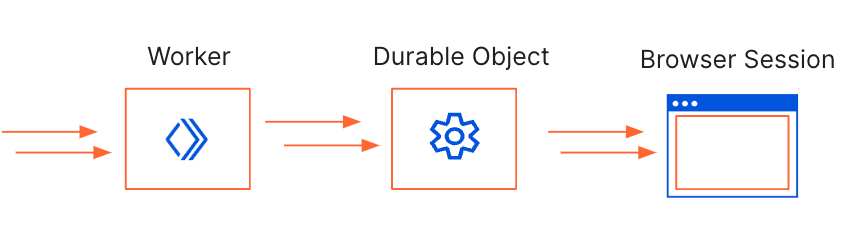
Tout d’abord, elle entretient un ensemble de pools de connexions avec des bases de données régionales via le réseau Cloudflare, de sorte qu’un Worker Cloudflare puisse éviter d’établir une nouvelle connexion à une base de données pour chaque requête. À la place, le Worker peut établir une connexion à Hyperdrive (une opération des plus rapides !), car Hyperdrive dispose d’un pool de connexions prêtes à l’emploi vers la base de données. Comme une base de données peut être distante de 30 ms à (bien souvent) 300 ms lors d’un unique aller-retour (sans parler des sept ou plus dont vous avez besoin pour établir une nouvelle connexion), le fait de disposer d’un pool de connexions disponibles réduit considérablement le problème de latence dont souffriraient autrement les connexions de courte durée.

Ensuite, la solution comprend la différence entre les requêtes et les transactions de lecture (non mutantes) et d’écriture (mutantes). Elle peut ainsi mettre automatiquement en cache vos requêtes de lecture les plus populaires, qui représentent plus de 80 % de l’ensemble des requêtes adressées aux bases de données au sein des applications web typiques. Il peut, par exemple, s’agir de cette liste de produits que des dizaines de milliers d’utilisateurs visitent chaque heure, des annonces publiées sur un grand site d’offres d’emploi, voire de requêtes visant des données de configuration qui changent de temps en temps. Une grande partie des ressources visées par les requêtes des utilisateurs ne changent pas souvent et le fait de les mettre en cache à proximité de l’endroit d’où l’utilisateur envoie sa requête peut accélérer considérablement l’accès à ces données pour les dix mille utilisateurs suivants. Les requêtes d’écriture, qui ne peuvent pas être réellement mises en cache de manière sûre, bénéficient toujours des pools de connexions entretenus par Hyperdrive et du réseau mondial de Cloudflare. La possibilité d’emprunter les itinéraires les plus rapides sur Internet via notre infrastructure permet là aussi de réduire la latence.
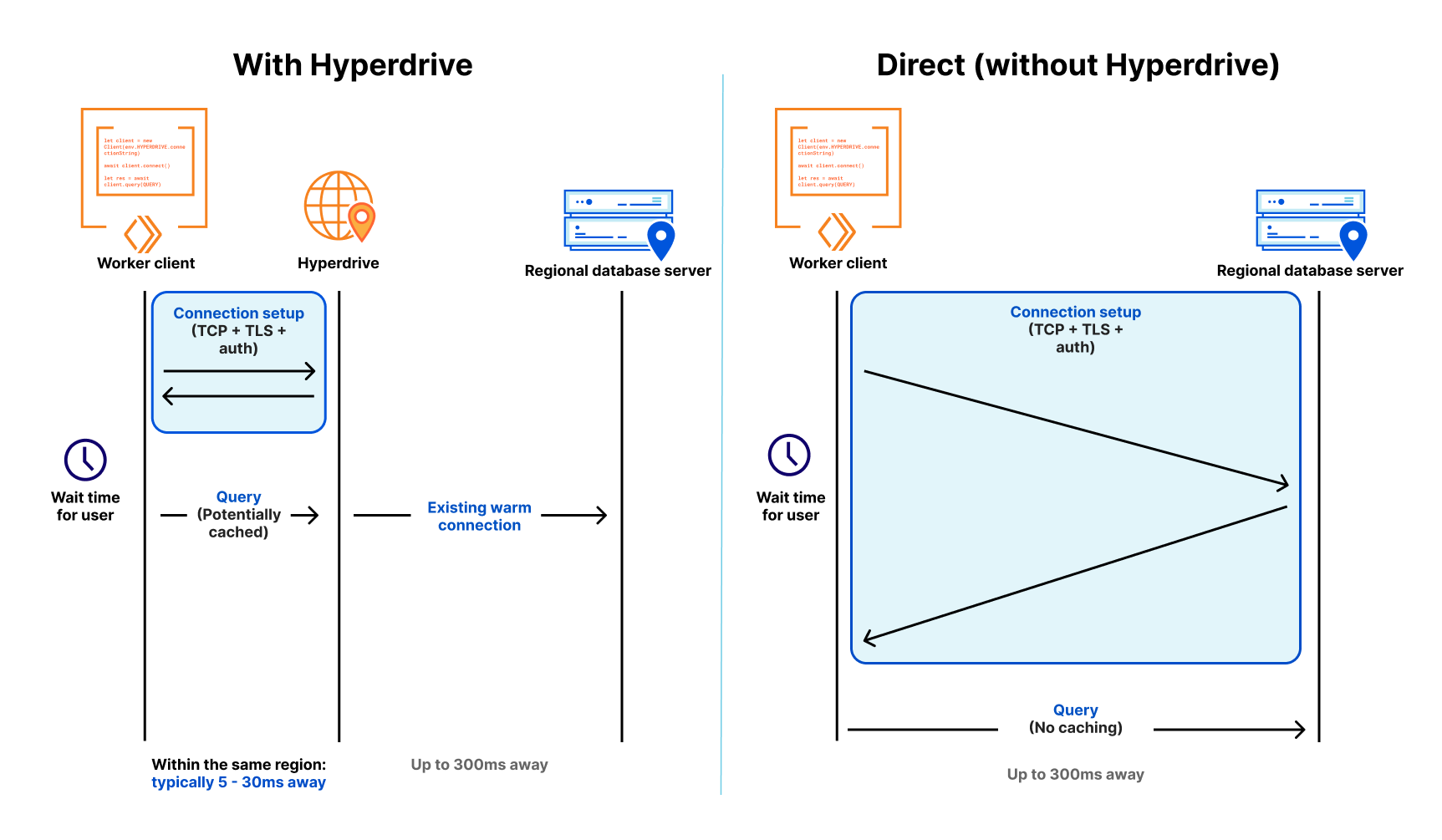
Même si votre base de données se situe à l’autre bout du pays, 70 ms × 6 allers-retours, c’est beaucoup de temps pour un utilisateur qui attend une réponse à une requête.

Hyperdrive fonctionne non seulement avec les bases de données PostgreSQL (dont celles de Neon, de Google Cloud SQL, d’AWS RDS, et de Timescale), mais aussi avec les bases de données compatibles PostgreSQL, comme Materialize (une puissante base de données de traitement de flux), CockroachDB (une des principales bases de données distribuées), AlloyDB de Google Cloud, et Aurora Postgres d’AWS.

Nous travaillons également à la prise en charge de MySQL, notamment avec des fournisseurs comme PlanetScale, d’ici la fin de l’année. D’autres moteurs de base de données sont prévus par la suite.

La chaîne de connexion magique

L’un des principaux objectifs à l’origine de la conception d’Hyperdrive était de permettre aux développeurs de continuer à utiliser leurs outils existants, comme leurs pilotes, leurs générateurs de requêtes et leurs bibliothèques ORM (Object-Relational Mapper, mappeur objet-relationnel). La rapidité d’Hyperdrive n’aurait pas d’importance si nous vous avions demandé d’abandonner votre bibliothèque ORM préférée et/ou de réécrire des centaines (ou plus) de lignes de code et de tests pour bénéficier des performances de notre solution.

Pour ce faire, nous avons travaillé avec des éditeurs de pilotes open-source bien connus (notamment node-postgres et Postgres.js) afin d’aider leurs bibliothèques à prendre en charge la nouvelle API Socket TCP de Workers, qui est en cours de normalisation, et que nous espérons voir arriver dans Node.js, Deno et Bun également.

Langage partagé par les pilotes de base de données, la simple chaîne de connexion à la base de données se présente généralement ainsi :

postgres://user:[email protected]:5432/postgres

La magie d’Hyperdrive réside dans le fait que vous pouvez commencer à l’utiliser dans vos applications Workers existantes, avec vos requêtes existantes, en remplaçant simplement votre chaîne de connexion par celle générée par Hyperdrive.

Création d’un Hyperdrive

Avec une base de données existante prête à l’emploi (dans cet exemple, nous utiliserons une base de données Postgres de Neon), il suffit de moins d’une minute pour faire fonctionner Hyperdrive (oui, nous avons chronométré le temps nécessaire).

Si vous ne disposez pas d’un projet Cloudflare Workers existant, vous pouvez rapidement en créer un :

$ npm create cloudflare@latest
# Call the application "hyperdrive-demo"
# Choose "Hello World Worker" as your template

À partir de là, nous avons juste besoin de la chaîne de connexion à notre base de données et d’une invocation rapide de la ligne de commande wrangler pour qu’Hyperdrive s’y connecte.

# Using wrangler v3.10.0 or above
wrangler hyperdrive create a-faster-database --connection-string="postgres://user:[email protected]:5432/neondb"

# This will return an ID: we'll use this in the next step

Ajoutez notre Hyperdrive au fichier de configuration wrangler.toml de notre Worker :

[[hyperdrive]]
name = "HYPERDRIVE"
id = "cdb28782-0dfc-4aca-a445-a2c318fb26fd"

Nous pouvons maintenant écrire un Worker (ou employer un script Worker existant) et utiliser Hyperdrive pour accélérer les connexions et les requêtes à notre base de données existante. Nous utilisons ici node-postgres, mais nous pourrions tout aussi bien utiliser Drizzle ORM.

import { Client } from 'pg';

export interface Env {
	HYPERDRIVE: Hyperdrive;
}

export default {
	async fetch(request: Request, env: Env, ctx: ExecutionContext) {
		console.log(JSON.stringify(env));
		// Create a database client that connects to our database via Hyperdrive
		//
		// Hyperdrive generates a unique connection string you can pass to
		// supported drivers, including node-postgres, Postgres.js, and the many
		// ORMs and query builders that use these drivers.
		const client = new Client({ connectionString: env.HYPERDRIVE.connectionString });

		try {
			// Connect to our database
			await client.connect();

			// A very simple test query
			let result = await client.query({ text: 'SELECT * FROM pg_tables' });

			// Return our result rows as JSON
			return Response.json({ result: result });
		} catch (e) {
			console.log(e);
			return Response.json({ error: JSON.stringify(e) }, { status: 500 });
		}
	},
};

Le code ci-dessus est intentionnellement simple, mais j’espère que vous pouvez en voir la magie : notre pilote de base de données reçoit ainsi une chaîne de connexion d’Hyperdrive et reste indifférent. Il n’a pas besoin de connaître Hyperdrive, nous n’avons pas besoin de nous débarrasser de notre bibliothèque de génération de requêtes préférée et nous pouvons immédiatement réaliser les avantages en termes de rapidité lorsque nous envoyons des requêtes.

Les connexions sont automatiquement mises en commun et conservées, nos requêtes les plus populaires sont mises en cache et l’ensemble de notre application s’en trouve accélérée.

Nous avons également rédigé des guides pour tous les principaux fournisseurs de bases de données afin de faciliter l’intégration de ce dont vous avez besoin (une chaîne de connexion) dans Hyperdrive.

Mais la rapidité a un prix, n’est-ce pas ?

Nous considérons Hyperdrive comme un outil essentiel pour accéder à vos bases de données existantes lorsque vous développez sur Cloudflare Workers. Les bases de données traditionnelles n’ont tout simplement pas été conçues pour un monde dans lequel les clients sont distribués à l’échelle mondiale.

La mise en commun des connexions par Hyperdrive sous forme de pools sera toujours gratuite, à la fois pour les protocoles de base de données que nous prenons en charge aujourd’hui et pour les nouveaux protocoles que nous ajouterons à l’avenir. Tout comme pour notre service de protection contre les attaques DDoS et notre réseau CDN mondial, nous pensons que l’accès aux fonctionnalités principales d’Hyperdrive est trop utile pour être limité.

L’utilisation d’Hyperdrive ne sera pas facturée pendant la bêta ouverte, quelle que soit la manière dont vous vous en servez. Nous vous donnerons plus de détails sur la tarification d’Hyperdrive à l’approche de son lancement (début 2024), et ce bien à l’avance.

Le moment des questions

Quel est l’avenir pour Hyperdrive ?

Nous prévoyons de mettre Hyperdrive en disponibilité générale au début de l’année 2024 et nous concentrons actuellement sur la mise en place de davantage de mesures de contrôle sur la manière dont nous mettons en cache et invalidons automatiquement les ressources en nous appuyant sur les analyses des opérations d’écriture, des requêtes détaillées et des performances (bientôt !). Nous prévoyons aussi de prendre en charge davantage de moteurs de base de données (dont MySQL), tout en poursuivant nos travaux visant à rendre la solution encore plus rapide.

Nous travaillons également à la mise en place d’une connectivité réseau privée via Magic WAN et Cloudflare Tunnel, afin de vous permettre de vous connecter à des bases de données non exposées à l’Internet public (ou qui ne peuvent pas l’être).
Pour connecter Hyperdrive à votre base de données existante, rendez-vous dans nos documents pour les développeurs. Il suffit de moins d’une minute pour créer un Hyperdrive et mettre à jour le code existant afin de pouvoir utiliser la solution. Rejoignez le canal #hyperdrive-beta de notre Discord pour développeurs si vous souhaitez poser des questions, signaler des bugs et discuter directement avec notre équipe produits et notre équipe technique.


Hyperdrive: Damit Datenbanken global wirken

Post Syndicated from Matt Silverlock original http://blog.cloudflare.com/de-de/hyperdrive-making-regional-databases-feel-distributed-de-de/


Hyperdrive: making databases feel like they’re global

Hyperdrive macht den Zugriff auf Ihre bestehenden Datenbanken von Cloudflare Workers aus hyperschnell, egal wo sie laufen. Sie verbinden Hyperdrive mit Ihrer Datenbank, ändern eine Codezeile, um eine Verbindung über Hyperdrive herzustellen, und voilà: Verbindungen und Abfragen werden schneller (und Spoiler: Sie können es schon heute nutzen).

Kurz gesagt: Hyperdrive nutzt unser globales Netzwerk, um Abfragen an Ihre bestehenden Datenbanken zu beschleunigen, unabhängig davon, ob sich diese bei einem alten Cloud-Provider oder bei Ihrem bevorzugten Provider für Serverless-Datenbanken befinden. Die Latenz, die durch das wiederholte Einrichten neuer Datenbankverbindungen entsteht, wird drastisch reduziert, und die beliebtesten Leseabfragen an Ihre Datenbank werden zwischengespeichert, sodass Sie oft gar nicht mehr zu Ihrer Datenbank zurückkehren müssen.

Wenn Ihre Kerndatenbank – mit Ihren Nutzerprofilen, Ihrem Produktbestand oder Ihrer wichtigen Web-App – in der us-east1-Region eines veralteten Cloud-Anbieters angesiedelt ist, wird der Zugriff für Nutzende in Paris, Singapur und Dubai ohne Hyperdrive sehr langsam sein und selbst für Nutzende in Los Angeles oder Vancouver langsamer, als er sein sollte. Da jeder Roundtrip bis zu 200 ms dauert, können die mehrfachen Roundtrips, die allein für den Verbindungsaufbau erforderlich sind, leicht bis zu einer Sekunde (oder mehr!) in Anspruch nehmen; und das, bevor Sie überhaupt eine Abfrage für Ihre Daten gemacht haben. Hyperdrive soll dieses Problem lösen.

Um die Performance von Hyperdrive zu demonstrieren, haben wir eine Demo-Anwendung erstellt, die Abfragen gegen dieselbe Datenbank durchführt: sowohl mit Hyperdrive als auch ohne Hyperdrive (direkt). Die App wählt eine Datenbank in einem Nachbarkontinent aus: Wenn Sie sich in Europa befinden, wählt sie eine Datenbank in den USA – etwas, das europäische Nutzende allzu häufig erleben – und wenn Sie sich in Afrika befinden, wählt sie eine Datenbank in Europa (und so weiter). Sie erhalten die Rohdaten einer einfachen SELECT-Abfrage, ohne sorgfältig ausgewählte Durchschnittswerte oder herausgepickte Metriken.

Wir haben eine Demo-App entwickelt, die echte Abfragen an eine PostgreSQL-Datenbank stellt, mit und ohne Hyperdrive.

Bei internen Tests, ersten Berichten von Nutzenden und mehreren Durchläufen in unserem Benchmark erzielte Hyperdrive bei gecachten Abfragen eine 17- bis 25-fache Performance-Verbesserung im Vergleich zur direkten Abfrage der Datenbank und eine sechs- bis achtfache Verbesserung bei ungecachten Abfragen und Schreibvorgängen. Die gecachte Latenz wird Sie vielleicht nicht überraschen, aber wir sind der Meinung, dass die sechs- bis achtfache Verbesserung bei nicht gecachten Abfragen aus „Ich kann keine zentralisierte Datenbank von Cloudflare Workers aus abfragen“ in „Wie bin ich nur solange ohne diese Möglichkeit ausgekommen?!“ verwandelt. Wir arbeiten auch weiterhin an der Verbesserung der Performance: Wir haben bereits weitere Einsparungen bei der Latenz festgestellt und werden diese in den kommenden Wochen veröffentlichen.

Und das Beste daran? Entwickler und Entwicklerinnen mit einem kostenpflichtigen Tarif können sofort die offene Betaversion von Hyperdrive ausprobieren: Es gibt keine Wartelisten oder spezielle Anmeldeformulare.

Hyperdrive? Noch nie davon gehört?

Wir arbeiten seit einiger Zeit im Verborgenen an Hyperdrive. Aber die Möglichkeit für Entwicklungsteams, sich mit bereits vorhandenen Datenbanken zu verbinden – mit ihren bestehenden Daten, Abfragen und Werkzeugen – beschäftigt uns schon seit geraumer Zeit.

In einer modernen verteilten Cloud-Umgebung wie der von Workers, in der die Rechenleistung global verteilt ist (also in der Nähe der Nutzenden) und die Funktionen kurzlebig sind (sodass nicht mehr als nötig in Rechnung gestellt wird), war die Verbindung zu herkömmlichen Datenbanken sowohl langsam als auch nicht skalierbar. Langsam, weil es für den Verbindungsaufbau mehr als sieben Runden braucht (TCP-Handshake, TLS-Verhandlung und Autorisierung). Und nicht skalierbar, weil Datenbanken wie PostgreSQL hohe Ressourcenkosten pro Verbindung verursachen. Schon einige hundert Verbindungen zu einer Datenbank können einen nicht zu unterschätzenden Arbeitsspeicher verbrauchen – den für die Abfragen benötigten Arbeitsspeicher nicht mitgerechnet.

Unsere Freunde bei Neon (einem beliebten Serverless Postgres-Provider) haben darüber geschrieben und sogar einen WebSocket-Proxy und -Treiber veröffentlicht, um den Verbindungsaufwand zu reduzieren. Aber sie haben trotzdem zu kämpfen: Selbst mit einem benutzerdefinierten Treiber sind wir bei vier Roundtrips, die jeweils 50–200 Millisekunden oder mehr dauern können. Wenn diese Verbindungen langlebig sind, ist das in Ordnung – es kann bestenfalls einmal alle paar Stunden passieren. Aber wenn sie auf einen einzelnen Funktionsaufruf beschränkt sind und nur wenige Millisekunden bis bestenfalls Minuten von Nutzen sind, verbringt Ihr Code mehr Zeit mit Warten. Das ist praktisch eine andere Art von Kaltstart: Da Sie vor einer Abfrage eine neue Verbindung zu Ihrer Datenbank herstellen müssen, ist die Verwendung einer herkömmlichen Datenbank in einer verteilten oder serverlosen Umgebung (vorsichtig ausgedrückt) sehr langsam.

Um dies zu verhindern, macht Hyperdrive zweierlei.

Erstens unterhält es eine Reihe regionaler Datenbankverbindungspools im gesamten Cloudflare-Netzwerk, sodass ein Cloudflare Worker nicht bei jeder Anfrage eine neue Verbindung zu einer Datenbank herstellen muss. Stattdessen kann der Worker eine Verbindung zu Hyperdrive herstellen (schnell!), wobei Hyperdrive einen Pool von einsatzbereiten Verbindungen zurück zur Datenbank unterhält. Da eine Datenbank bei einem einzigen Roundtrip zwischen 30 ms und (oft) 300 ms entfernt sein kann (ganz zu schweigen von den sieben Roundtrips oder mehr, die Sie für eine neue Verbindung benötigen), reduziert ein Pool verfügbarer Verbindungen das Latenzproblem, das bei kurzlebigen Verbindungen sonst auftreten würde, drastisch.

Zweitens versteht es den Unterschied zwischen lesenden (nicht verändernden) und schreibenden (verändernden) Abfragen und Transaktionen und kann Ihre beliebtesten lesenden Abfragen automatisch zwischenspeichern: Diese machen über 80 % der meisten Abfragen aus, die in typischen Webanwendungen an Datenbanken gestellt werden. Die Seite mit den Produktangeboten, die stündlich von Zehntausenden besucht wird, offene Stellen auf einer renommierten Karriereseite oder auch Abfragen von Konfigurationsdaten, die sich gelegentlich ändern. Ein Großteil der abgefragten Daten ändert sich nicht oft, und das Cachen dieser Daten in der Nähe des Ortes, von dem ein Nutzender sie abfragt, kann den Zugriff auf diese Daten für die nächsten zehntausend Nutzenden dramatisch beschleunigen. Schreibabfragen, die nicht sicher zwischengespeichert werden können, profitieren dennoch sowohl vom Verbindungspooling von Hyperdrive als auch vom globalen Netzwerk von Cloudflare: Da wir über unser Backbone die schnellsten Routen durch das Internet nehmen können, wird auch hier die Latenz reduziert.

Selbst wenn sich Ihre Datenbank auf der anderen Seite des Landes befindet, sind 70 ms x 6 Roundtrips eine Menge Zeit für Nutzende, die auf eine Antwort auf ihre Abfrage warten.

Hyperdrive funktioniert nicht nur mit PostgreSQL-Datenbanken – einschließlich Neon, Google Cloud SQL, AWS RDS und Timescale – sondern auch mit PostgreSQL-kompatiblen Datenbanken wie Materialize (einer leistungsstarken Stream-Processing-Datenbank), CockroachDB (einer großen verteilten Datenbank), AlloyDB von Google Cloud und AWS Aurora Postgres.

Wir arbeiten außerdem daran, bis zum Ende des Jahres Unterstützung für MySQL, einschließlich Providern wie PlanetScale, zu bieten, und planen für die Zukunft die Unterstützung weiterer Datenbank-Engines.

Der magische Verbindungsstring

Eines der wichtigsten Ziele bei der Entwicklung von Hyperdrive war, dass die Entwicklungsteams ihre bestehenden Treiber, Abfrage-Builder und ORM-Bibliotheken (Object-Relational Mapper) weiter verwenden können. Es wäre egal gewesen, wie schnell Hyperdrive ist, wenn wir von Ihnen verlangt hätten, von Ihrem bevorzugten ORM zu migrieren und/oder Hunderte (oder mehr) von Codezeilen und Tests neu zu schreiben, um von der Performance von Hyperdrive zu profitieren.

Um dies zu erreichen, haben wir mit den Betreuenden beliebter Open-Source-Treiber – einschließlich node-postgres und Postgres.js – zusammengearbeitet, damit ihre Bibliotheken die neue TCP-Socket-API von Workers unterstützen, die derzeit den Standardisierungsprozess durchläuft, und wir erwarten, dass sie auch in Node.js, Deno und Bun Einzug halten wird.

Der einfache Datenbankverbindungsstring ist die gemeinsame Sprache der Datenbanktreiber und hat normalerweise dieses Format:

postgres://user:[email protected]:5432/postgres

Der Zauber von Hyperdrive besteht darin, dass Sie es in Ihren bestehenden Workers-Anwendungen mit Ihren bestehenden Abfragen einsetzen können, indem Sie einfach Ihren Verbindungsstring gegen den von Hyperdrive generierten austauschen.

Hyperdrive erstellen

Mit einer vorhandenen Datenbank – in diesem Beispiel verwenden wir eine Postgres-Datenbank von Neon – dauert es weniger als eine Minute, um Hyperdrive zum Laufen zu bringen (ja, wir haben die Zeit gemessen).

Wenn Sie kein bestehendes Cloudflare Workers-Projekt haben, können Sie schnell eines erstellen:

$ npm create cloudflare@latest
# Call the application "hyperdrive-demo"
# Choose "Hello World Worker" as your template

Von hier aus brauchen wir nur noch den Datenbankverbindungsstring für unsere Datenbank und einen kurzen Wrangler-Befehlszeilenaufruf, damit Hyperdrive sich mit ihr verbindet.

# Using wrangler v3.10.0 or above
wrangler hyperdrive create a-faster-database --connection-string="postgres://user:[email protected]:5432/neondb"

# This will return an ID: we'll use this in the next step

Fügen Sie unseren Hyperdrive in die Konfigurationsdatei wrangler.toml für unseren Worker ein:

[[hyperdrive]]
name = "HYPERDRIVE"
id = "cdb28782-0dfc-4aca-a445-a2c318fb26fd"

Wir können nun einen Worker schreiben – oder ein bestehendes Worker-Skript nehmen – und Hyperdrive verwenden, um Verbindungen und Abfragen zu unserer bestehenden Datenbank zu beschleunigen. Wir verwenden hier node-postgres, aber wir könnten genauso gut Drizzle ORM nutzen.

import { Client } from 'pg';

export interface Env {
	HYPERDRIVE: Hyperdrive;
}

export default {
	async fetch(request: Request, env: Env, ctx: ExecutionContext) {
		console.log(JSON.stringify(env));
		// Create a database client that connects to our database via Hyperdrive
		//
		// Hyperdrive generates a unique connection string you can pass to
		// supported drivers, including node-postgres, Postgres.js, and the many
		// ORMs and query builders that use these drivers.
		const client = new Client({ connectionString: env.HYPERDRIVE.connectionString });

		try {
			// Connect to our database
			await client.connect();

			// A very simple test query
			let result = await client.query({ text: 'SELECT * FROM pg_tables' });

			// Return our result rows as JSON
			return Response.json({ result: result });
		} catch (e) {
			console.log(e);
			return Response.json({ error: JSON.stringify(e) }, { status: 500 });
		}
	},
};

Der obige Code ist absichtlich einfach gehalten, aber die Magie ist hoffentlich nachvollziehbar: Unser Datenbanktreiber erhält einen Verbindungsstring von Hyperdrive und ist dabei völlig ahnungslos. Er muss nichts über Hyperdrive wissen, wir müssen unsere Lieblingsbibliothek für Abfrageerstellung nicht über Bord werfen und wir profitieren sofort von den Geschwindigkeitsvorteilen bei Abfragen.

Verbindungen werden automatisch gepoolt und warmgehalten, unsere beliebtesten Abfragen werden gecacht, und unsere gesamte Anwendung wird schneller.

Wir haben auch Leitfäden für alle wichtigen Datenbank-Provider erstellt, damit Sie das, was Sie von diesen Providern benötigen (einen Verbindungsstring), ganz einfach in Hyperdrive übertragen können.

Schnelles Tempo kann nicht günstig sein, oder?

Wir sind der Meinung, dass Hyperdrive für den Zugriff auf Ihre bestehenden Datenbanken entscheidend ist, wenn Sie auf Cloudflare Workers entwickeln: Herkömmliche Datenbanken wurden einfach nie für eine Welt entwickelt, in der Clients global verteilt sind.

Das Verbindungspooling von Hyperdrive wird immer kostenlos sein, sowohl für Datenbankprotokolle, die wir heute unterstützen, als auch für neue Datenbankprotokolle, die wir in Zukunft hinzufügen werden. Genau wie der DDoS-Schutz und unser globales CDN sind wir der Meinung, dass der Zugang zum Kernfeature von Hyperdrive zu nützlich ist, um ihn zurückzuhalten.

Während der offenen Beta-Phase wird Hyperdrive selbst keine Gebühren für die Nutzung erheben, unabhängig davon, wie Sie es verwenden. Weitere Details zur Preisgestaltung von Hyperdrive werden wir rechtzeitig vor der allgemeinen Freigabe (Anfang 2024) bekannt geben.

Zeit für eine Abfrage

Wie geht es nun mit Hyperdrive weiter?

Wir planen, Hyperdrive Anfang 2024 auf den Markt zu bringen – und arbeiten an mehr Kontrolle über das Caching und die automatische Invalidierung auf der Grundlage von Schreibvorgängen, detaillierten Abfrage- und Performance-Analytics (bald!), Unterstützung für weitere Datenbank-Engines (einschließlich MySQL) und möchten die Geschwindigkeit weiter ankurbeln.

Wir arbeiten auch daran, die Verbindung zu privaten Netzwerken über Magic WAN und Cloudflare Tunneling zu ermöglichen, sodass Sie auf Datenbanken zugreifen können, die nicht im öffentlichen Internet zugänglich sind (oder sein können).

Um Hyperdrive mit Ihrer bestehenden Datenbank zu verbinden, besuchen Sie unsere Dokumentation für die Entwicklung. Es dauert weniger als eine Minute, um einen Hyperdrive zu erstellen und bestehenden Code zu aktualisieren, um ihn zu verwenden. Treten Sie dem Kanal #hyperdrive-beta in unserem Entwicklungs-Discord bei, um Fragen zu stellen, Fehler zu melden und direkt mit unseren Produkt- und Entwicklungsteams zu sprechen.

Hyperdrive: cómo hacer que las bases de datos parezcan globales

Post Syndicated from Matt Silverlock original http://blog.cloudflare.com/es-es/hyperdrive-making-regional-databases-feel-distributed-es-es/


Hyperdrive: making databases feel like they’re global

Hyperdrive te permite un acceso ultrarrápido a tus bases de datos existentes desde Cloudflare Workers, dondequiera que se ejecuten. Conectas Hyperdrive a tu base de datos, modificas una línea de código para conectarte a través de Hyperdrive, y listo: las conexiones y las consultas son más rápidas (spoiler: puedes utilizarlo hoy mismo).

En pocas palabras, Hyperdrive utiliza nuestra red global para acelerar las consultas a tus bases de datos existentes, tanto si se encuentran en un proveedor de nube heredado como en tu proveedor favorito de bases de datos sin servidor; reduce drásticamente la latencia que implica configurar repetidamente nuevas conexiones a la base de datos; y almacena en caché las consultas de lectura a tu base de datos más populares, lo que a menudo evita incluso la necesidad de volver a tu base de datos.

Sin Hyperdrive, esa base de datos principal (la que contiene tus perfiles de usuario, tu inventario de productos o que ejecuta tus aplicaciones web críticas), ubicada en la región us-east1 de tu proveedor de nube heredado, ofrecerá un acceso muy lento a los usuarios en París, Singapur y Dubái, y más lento de lo que debería ser para los usuarios en Los Ángeles o Vancouver. Cada viaje de ida y vuelta puede representar hasta 200 ms, por lo que es fácil perder hasta un segundo (¡o más!) en varios viajes de día y vuelta necesarios solo para establecer una conexión, antes incluso de que hayas realizado la consulta de tus datos. Hyperdrive se ha diseñado para resolver esta situación.

Para demostrar el rendimiento de Hyperdrive, hemos creado una aplicación de demostración que realiza consultas consecutivas a la misma base de datos: con Hyperdrive y sin Hyperdrive (directamente). La aplicación selecciona una base de datos ubicada en un continente vecino: si estás en Europa, selecciona una base de datos de EE. UU. (una experiencia con la que están demasiado familiarizados muchos usuarios de Internet en Europa) y, si estás en África, selecciona una base de datos en Europa (y así sucesivamente). Devuelve los resultados sin procesar de una consulta `SELECT` sencilla, sin promedios seleccionados o métricas elegidas cuidadosamente.

Hemos creado una aplicación de demostración que realiza consultas reales a una base de datos PostgreSQL, con y sin Hyperdrive. 

Las pruebas internas, los primeros informes de los usuarios y las múltiples ejecuciones en nuestro banco de pruebas muestran que Hyperdrive mejora el rendimiento entre 17 y 25 veces en comparación con el acceso directo a la base de datos para las solicitudes almacenadas en cache, y entre 6 y 8 veces para las solicitudes y las escrituras no almacenadas en caché. La latencia del almacenamiento en caché podría no extrañarte, pero creemos que el hecho de ser entre 6 y 8 veces más rápido para las consultas no almacenadas en caché hace que cambie la cuestión de “No puedo consultar una base de datos centralizada desde Cloudflare Workers” a “¿por qué no estaba esto disponible antes?”. Asimismo, continuamos trabajando para mejorar aún más el rendimiento: ya hemos identificado nuevos métodos de reducir la latencia, y los aplicaremos en las próximas semanas.

¿Lo mejor? Los desarrolladores con un plan de pago de Workers pueden empezar a utilizar la versión beta abierta de Hyperdrive ya mismo: no hay listas de espera ni formularios de registro especiales que rellenar.

¿Hyperdrive? ¿No has oído hablar de él?

Hace relativamente poco que empezamos a trabajar en secreto con Hyperdrive: pero permitir a los desarrolladores conectarse a las bases de datos que ya tienen (con sus datos, sus consultas y sus herramientas existentes) es algo a lo que llevamos bastante tiempo dándole vueltas.

En un entorno moderno de nube distribuida, como Workers, donde los recursos informáticos están distribuidos a nivel global (por lo tanto, cerca de los usuarios) y donde las funciones son de corta duración (para que no pagues más de lo necesario), la conexión a las bases de datos tradicionales ha sido lenta y sin escalabilidad. Lenta porque requiere como mínimo siete viajes de ida y vuelta (protocolo de enlace TCP, negociación TLS y autenticación) para establecer la conexión. Sin escalabilidad porque las bases de datos como PostgreSQL tienen un coste elevado de recursos por conexión. Incluso unos centenares de conexiones a una base de datos pueden consumir una cantidad importante de memoria, aparte de la memoria necesaria para las consultas.

Nuestros amigos de Neon (un conocido proveedor de Postgres sin servidor) han escrito sobre este tema, e incluso han lanzado un proxy y un controlador WebSocket para reducir la carga de conexión, pero aún tienen dificultades a resolver: incluso con un controlador personalizado, nos quedan 4 viajes de ida y vuelta, y cada uno de ellos puede representar entre 50 y 200 milisegundos o más. Cuando estas conexiones son de larga duración, no hay problema (en el mejor de los casos, podría suceder una vez cada cierto número de horas). Sin embargo, cuando se limitan a una invocación de función individual y solo son útiles durante unos milisegundos o minutos en el mejor de los casos, tu código pasa más tiempo a la espera. De hecho, se trata de otro tipo de arranque en frío: el hecho de tener que iniciar una conexión nueva a tu base de datos antes de realizar una consulta significa que la utilización de una base de datos tradicional en un entorno distribuido o sin servidor es (por decirlo suavemente) realmente lenta.

Para hacer frente a este problema, Hyperdrive hace dos cosas.

En primer lugar, mantiene una serie de agrupaciones de conexiones de bases de datos regionales en la red de Cloudflare, por lo que Cloudflare Worker evita crear una nueva conexión a una base de datos con cada solicitud. En su lugar, Worker puede establecer una conexión a Hyperdrive (¡rápidamente!), e Hyperdrive mantiene una agrupación de conexiones listas para usar a la base de datos. Puesto que una base de datos puede estar a entre 30 ms y (a menudo) 300 ms en un único viaje de ida y vuelta (sin contar los siete o más que necesitas para una nueva conexión), el hecho de tener una agrupación de conexiones disponibles reduce considerablemente el problema de latencia que en caso contrario sufrirían las conexiones de corta duración.

En segundo lugar, comprende la diferencia entre las consultas de lectura (no mutantes) y las consultas de escritura (mutantes), y puede almacenar automáticamente en caché tus consultas de lectura más habituales, lo que representa más del 80 % de la mayoría de las consultas realizadas a bases de datos en aplicaciones web típicas. Esa página de listado de productos que visitan a diario decenas de miles de usuarios; las ofertas de empleo en un popular sitio de búsqueda de empleo; o incluso las consultas de datos de configuración que cambian ocasionalmente; una gran parte de lo que consultamos no cambia con frecuencia, y el hecho de almacenarlo en caché más cerca de la ubicación donde el usuario realiza la consulta puede acelerar considerablemente el acceso a esos datos para los siguientes diez mil usuarios. Las consultas de escritura, que no se pueden almacenar de forma segura en la caché, se siguen beneficiando tanto de la agrupación de conexiones de Hyperdrive como de la red global de Cloudflare: el hecho de poder tomar las rutas más rápidas de Internet a través de nuestra red troncal reduce la latencia también en ese caso.

Incluso si tu base de datos se encuentra en el otro extremo del país, 70 ms x 6 viajes de ida y vuelta es mucho tiempo para un usuario que está a la espera de una respuesta a su consulta.

Hyperdrive funciona no solo con las bases de datos PostgreSQL Neon, Google Cloud SQL, AWS RDS y Timescale, sino también con bases de datos compatibles con PostgreSQL como Materialize (una potente base de datos de proceso en streaming), CockroachDB (una de las principales bases de datos distribuidas), AlloyDB de Google Cloud y AWS Aurora Postgres.

Estamos trabajando para añadir compatibilidad con MySQL, incluidos proveedores como PlanetScale, antes de finales de año, así como otros motores de bases de datos más adelante.

La cadena de conexión mágica

Uno de los principales objetivos del diseño de Hyperdrive era permitir a los desarrolladores mantener sus controladores, su creador de consultas y sus bibliotecas ORM (Object-Relational Mapper) existentes. Poca importancia hubiera tenido la velocidad que pudiera ofrecer Hyperdrive si hubieras tenido que abandonar tu ORM favorito o reescribir centenares (o más) de líneas de código y pruebas para beneficiarte de su rendimiento.

Con este fin, hemos trabajado con aquellos que mantienen conocidos controladores de código abierto, como node-postgres y Postgres.js, para ayudar a que sus bibliotecas admitan la nueva API de socket TCP de Worker, que está en curso de normalización y que esperamos que llegue también a Node.js, Deno y Bun.

La cadena de conexión a la base de datos es el lenguaje compartido de los controladores de bases de datos, y suele tener este formato:

postgres://user:[email protected]:5432/postgres

La magia que hace posible Hyperdrive es que puedes empezar a utilizarlo en tus aplicaciones Workers existentes, con tus consultas existentes, simplemente reemplazando tu cadena de conexión por la que genera Hyperdrive.

Creación de un Hyperdrive

Con una base de datos existente lista para su uso (en este ejemplo, utilizaremos una base de datos Postgres de Neon) en menos de un minuto Hyperdrive ya está en funcionamiento (sí, lo hemos cronometrado).

Si no tienes un proyecto Cloudflare Workers existente, puedes crear uno rápidamente:

$ npm create cloudflare@latest
# Call the application "hyperdrive-demo"
# Choose "Hello World Worker" as your template

A partir de aquí, solo necesitamos la cadena de conexión a nuestra base de datos y una invocación rápida en la línea de comandos wrangler para que Hyperdrive se conecte a ella.

# Using wrangler v3.10.0 or above
wrangler hyperdrive create a-faster-database --connection-string="postgres://user:[email protected]:5432/neondb"

# This will return an ID: we'll use this in the next step

Añade nuestro Hyperdrive al archivo de configuración wrangler.toml para nuestro Worker:

[[hyperdrive]]
name = "HYPERDRIVE"
id = "cdb28782-0dfc-4aca-a445-a2c318fb26fd"

Ahora podemos escribir un Worker (o utilizar un script de Worker existente) y utilizar Hyperdrive para acelerar las conexiones y consultas a nuestra base de datos existente. Aquí utilizamos node-postgres, pero sería igual de fácil utilizar Drizzle ORM.

import { Client } from 'pg';

export interface Env {
	HYPERDRIVE: Hyperdrive;
}

export default {
	async fetch(request: Request, env: Env, ctx: ExecutionContext) {
		console.log(JSON.stringify(env));
		// Create a database client that connects to our database via Hyperdrive
		//
		// Hyperdrive generates a unique connection string you can pass to
		// supported drivers, including node-postgres, Postgres.js, and the many
		// ORMs and query builders that use these drivers.
		const client = new Client({ connectionString: env.HYPERDRIVE.connectionString });

		try {
			// Connect to our database
			await client.connect();

			// A very simple test query
			let result = await client.query({ text: 'SELECT * FROM pg_tables' });

			// Return our result rows as JSON
			return Response.json({ result: result });
		} catch (e) {
			console.log(e);
			return Response.json({ error: JSON.stringify(e) }, { status: 500 });
		}
	},
};

El código anterior es intencionadamente sencillo, pero esperamos que puedas ver la magia: nuestro controlador de base de datos obtiene una cadena de conexión de Hyperdrive, sin ninguna dificultad. No es necesario conocer Hyperdrive, no tenemos que deshacernos de nuestra biblioteca favorita de creación de consultas, y podemos beneficiarnos inmediatamente de las ventajas de velocidad al hacer consultas.

Las conexiones se agrupan automáticamente y se mantienen listas para usar, nuestras consultas más habituales se almacenan en caché, y toda nuestra aplicación es más rápida.

También hemos elaborado guías para cada uno de los principales proveedores de bases de datos a fin de facilitar la integración en Hyperdrive que necesitas.

La rapidez no puede ser barata, ¿no?

Creemos que Hyperdrive es esencial para acceder a tus bases de datos existentes cuando desarrolles en Cloudflare Workers: las bases de datos tradicionales simplemente nunca estuvieron adecuadamente diseñadas para un mundo donde los clientes están distribuidos a nivel global.

La agrupación de conexiones de Hyperdrive siempre será gratuita, para los dos protocolos de base de datos que admitimos actualmente y para los nuevos protocolos de base de datos que admitiremos más adelante. Al igual que con la protección contra DDoS y nuestra CDN global, creemos que el acceso a la función principal de Hyperdrive es demasiado útil para que esté limitado.

Durante la versión beta abierta, la utilización de Hyperdrive será gratuita, independientemente de cómo lo utilices. Proporcionaremos más detalles acerca de las tarifas de Hyperdrive cuando la fecha de disponibilidad general esté próxima (a principios de 2024), y lo haremos con la antelación suficiente.

Es la hora de las consultas

¿Qué será lo siguiente con Hyperdrive?

Tenemos previsto lanzar la disponibilidad general de Hyperdrive a principios de 2024. Estamos centramos en la implementación de controles adicionales sobre el almacenamiento en caché y la invalidación automática en función de las escrituras, las consultas detalladas y los análisis del rendimiento (¡en breve!) y en la compatibilidad con más motores de bases de datos (incluido MySQL), así como en seguir trabajando para que sea aún más rápido.

También estamos trabajando para ofrecer conectividad de red privada mediante Magic WAN y Cloudflare Tunnel, para que puedas conectarte a las bases de datos que no están (o no pueden estar) expuestas a la red pública.

Para conectar Hyperdrive a tu base de datos existente, visita nuestra documentación para desarrolladores (en menos de un minuto puedes crear un Hyperdrive y actualizar el código existente para utilizarlo). Únete al canal #hyperdrive-beta en Developer Discord para plantear preguntas, indicar errores y hablar directamente con nuestros equipos de productos e ingeniería.

Hyperdrive:データベースをあたかもグローバルであるかのように感じさせる

Post Syndicated from Matt Silverlock original http://blog.cloudflare.com/ja-jp/hyperdrive-making-regional-databases-feel-distributed-ja-jp/


Hyperdrive: making databases feel like they’re global

Hyperdriveは、実行されている場所を問わず、Cloudflare Workersから既存のデータベースへのアクセスを超高速にします。Hyperdriveをデータベースに接続し、Hyperdriveを経由して接続するようにコードを1行変更するだけで、接続とクエリーが高速化されます(秘密:本日から 使えます ) 。

一言で言えば、Hyperdriveは当社のグローバルネットワークを使用して、レガシーなクラウドプロバイダーであろうとお気に入りのサーバーレスデータベースプロバイダーであろうと、既存のデータベースへのクエリーを高速化し、新しいデータベース接続を繰り返し設定することで発生する遅延を劇的に短縮し、データベースに対して最も一般的な読取りクエリーをキャッシュします。これにより、データベースに戻る必要がなくなります。

Hyperdriveがなければ、レガシークラウドプロバイダーのus-east1リージョンにあるコアデータベース(ユーザープロファイル、製品在庫、または重要なWebアプリを実行しているデータベース)へのアクセスは、パリ、シンガポール、ドバイのユーザーにとっては非常に遅くなり、ロサンゼルスやバンクーバーのユーザーにとっては必要以上に遅くなります。各ラウンドトリップに最大200msかかるため、データのクエリーを行う前に、接続をセットアップするためだけに何度もラウンドトリップすることになり、1秒(またはそれ以上)も費やしてしまうことになります。Hyperdrive はこれを解決するために設計されています。

Hyperdriveのパフォーマンスを実証するため、 Hyperdriveを使用した場合とHyperdriveを使用しない場合(直接)の両方で、同じデータベースに対して連続してクエリーを実行するデモアプリケーションを作成しました。このアプリケーションは、近隣の大陸のデータベースを選択します。ヨーロッパにいる場合は米国のデータベースを選択します。これは、多くのヨーロッパのインターネットユーザーにとって非常に一般的です。アフリカにいる場合はヨーロッパのデータベースを選択します(以下同様)。このクエリーは、厳選された平均値や厳選された指標を使用せず、単純な`SELECT`クエリーから生の結果を返します。

Cloudflareでは、Hyperdriveを使用した場合と使用しない場合で、PostgreSQLデータベースに実際のクエリーを実行するデモアプリを作成しました。

社内テスト、初期ユーザーレポート、およびベンチマークでの複数回の実行を通じて、Hyperdriveは、キャッシュされたクエリーではデータベースに直接アクセスする場合と比較して17~25倍、キャッシュされていないクエリーおよび書き込みでは6~8倍のパフォーマンス向上を実現しています。キャッシュされた遅延は驚くことではないかもしれませんが、キャッシュされていないクエリーで6~8倍速くなることは、お客様のご意見を「Cloudflare Workersから集中管理されたデータベースにクエリーできない」を「非常に有用な機能だ!」に変えると私たちは考えています。また、パフォーマンスの改善にも引き続き取り組んでいます。すでに、さらなる遅延の低減を確認しており、今後数週間のうちに、その低減分を推進していく予定です。

一番の魅力は?Workersの有料プランにお申込みいただいている開発者は、すぐにHyperdriveオープンベータを使い始めることができます。待機リストや専用の登録フォームへの登録は不要です。

Hyperdriveを聞いたことがありませんか?

私たちはしばらくの間、Hyperdriveに秘密裏に取り組んできました。ですが、開発者がすでに持っているデータベース(既存のデータ、クエリー、ツール)に接続できるようにすることは、かなり以前から考えていたことでした。

Workersのような最新の分散型クラウド環境では、コンピューティングはグローバルに分散され(そのためユーザーの近くにある)、関数は短時間で終了する(そのため必要以上の課金はされない)ため、従来のデータベースへの接続は遅くて拡張性がありませんでした。遅いというのは、接続を確立するのに7往復(TCPハンドシェイク、TLSネゴシエーション、認証)以上かかるためであり、拡張性がないというのは、PostgreSQLのようなデータベースは接続あたりのリソースコストが高いためです。データベースへの数百の接続でさえ、クエリーに必要なメモリとは別に、無視できないメモリを消費します。

Neon(人気のあるサーバーレスPostgresプロバイダー)の友人たちはこのことについて書いており、接続のオーバーヘッドを減らすためのWebSocketプロキシとドライバまでリリースしていますが、それでもまだ力戦奮闘しています。カスタムドライバを使うと4往復まで減らすことができますが、それでもそれぞれに50~200ミリ秒以上かかる可能性があります。これらの接続が長寿命であれば、それは問題ありません。しかし、接続が個々の関数呼び出しにスコープ化され、せいぜい数ミリ秒から数分しか役に立たない場合、コードはより多くの待ち時間を費やすことになります。これは事実上、別の種類のコールドスタートです。クエリーを実行する前にデータベースへの新しい接続を開始する必要があるため、分散環境やサーバーレス環境で従来のデータベースを使用するのは(控えめに言っても)本当に遅いのです。

これに対抗するため、Hyperdriveは2つのことを行います。

第一に、Cloudflare WorkerはCloudflareのネットワーク全体にわたる地域データベース接続プールのセットを維持するので、リクエストごとにデータベースへの新規接続を行う必要がありません。その代わりに、WorkerはHyperdriveへの接続を(高速で)確立し、Hyperdriveはデータベースへの接続プールを維持します。データベースは1回のラウンドトリップで30msから300msとなることがあるため (新しい接続に必要な7回以上の接続は別として)、利用可能な接続のプールを持つことで、短時間の接続が被る遅延の問題を劇的に減らすことができます。

第二に、読み取り(non-mutating)クエリーと書き込み(mutating)クエリーとトランザクションの違いを理解し、最もよく使われる読み取りクエリーを自動的にキャッシュすることができます。このクエリーは、一般的なWebアプリのデータベースに対して行われるクエリーの80%以上を占めます。何万人ものユーザーが毎時間訪れる商品一覧ページ、大手求人サイトの求人情報、あるいは時折変更される設定データに対するクエリーなど、クエリーされる内容の膨大な部分は頻繁に変更されるものではないため、ユーザーがクエリーを実行する場所の近くにキャッシュすることで、次の1万人のユーザーのデータへのアクセスを劇的に高速化することができます。安全にキャッシュすることができない書き込みクエリーは、Hyperdriveの接続プールCloudflareのグローバルネットワークの両方から恩恵を受けることができます。つまり、バックボーンを介してインターネット上で最も早い経路をとることができれば、そこでの待ち時間も短縮できるのです。

たとえデータベースが国の反対側にあったとしても、70ms×6ラウンドトリップというのは、ユーザーがクエリーの応答を待つにはかなりの時間です。

Hyperdriveは、Neon、GoogleクラウドSQL、AWS RDS、 TimescaleなどのPostgreSQLデータベースだけでなく、 Materialize(強力なストリーム処理データベース)、CockroachDB(主要な分散データベース)、GoogleクラウドのAlloyDB、AWS Aurora PostgresなどのPostgreSQL互換データベースでも動作します。

また、PlanetScaleのようなプロバイダーも含め、MySQLのサポートを年内に実現するよう取り組んでおり、将来的にはさらに多くのデータベースエンジンをサポートする予定です。

接続用のマジック文字列

Hyperdriveの主要な設計目標の1つは、開発者が既存のドライバ、クエリービルダー、ORM(Object-Relational Mapper)ライブラリを使い続ける必要性でした。Hyperdriveのパフォーマンスの恩恵を受けるために、お気に入りのORMからの移行や、数百行(またはそれ以上)のコードの書き換えが必要であれば、Hyperdriveがどれほど高速であるかは重要ではなかったでしょう。

これを達成するために、私たちはnode-postgresPostgres.jsを含む人気のあるオープンソースドライバのメンテナーと協力し、標準化プロセスを経ているWorkerの新しいTCPソケットAPIをライブラリがサポートできるように支援しました。そして、Node.js、Deno、Bunに対するサポートも拡充予定です。

地味なデータベース接続文字列は、データベースドライバの共有言語であり、通常、次の形式をとります。

postgres://user:[email protected]:5432/postgres

Hyperdriveの魔法は、接続文字列をHyperdriveが生成するものに置き換えるだけで、既存のWorkersアプリで、既存のクエリーで、Hyperdriveを使い始めることができるということです。

Hyperdriveの作成

既存のデータベース(この例では、NeonのPostgresデータベースを使用)が準備できていれば、Hyperdriveを起動させるのに1分もかかりません(実際、時間を計測しました)。

既存のCloudflare Workersプロジェクトがない場合は、すぐに作成できます。

$ npm create cloudflare@latest
# Call the application "hyperdrive-demo"
# Choose "Hello World Worker" as your template

ここからは、データベースの接続文字列と、 Hyperdriveに接続させるための簡単な Wrangler コマンドライン 呼び出しが必要です。

# Using wrangler v3.10.0 or above
wrangler hyperdrive create a-faster-database --connection-string="postgres://user:[email protected]:5432/neondb"

# This will return an ID: we'll use this in the next step

Workerのwrangler.toml構成ファイルにHyperdriveを追加:

[[hyperdrive]]
name = "HYPERDRIVE"
id = "cdb28782-0dfc-4aca-a445-a2c318fb26fd"

これで、Workerを書く、あるいは既存のWorkerスクリプトを利用し、Hyperdriveを使って既存のデータベースへの接続とクエリーを高速化することができます。ここで、node-postgresを使用していますが、単純にDrizzle ORMを使うこともできます。

import { Client } from 'pg';

export interface Env {
	HYPERDRIVE: Hyperdrive;
}

export default {
	async fetch(request: Request, env: Env, ctx: ExecutionContext) {
		console.log(JSON.stringify(env));
		// Create a database client that connects to our database via Hyperdrive
		//
		// Hyperdrive generates a unique connection string you can pass to
		// supported drivers, including node-postgres, Postgres.js, and the many
		// ORMs and query builders that use these drivers.
		const client = new Client({ connectionString: env.HYPERDRIVE.connectionString });

		try {
			// Connect to our database
			await client.connect();

			// A very simple test query
			let result = await client.query({ text: 'SELECT * FROM pg_tables' });

			// Return our result rows as JSON
			return Response.json({ result: result });
		} catch (e) {
			console.log(e);
			return Response.json({ error: JSON.stringify(e) }, { status: 500 });
		}
	},
};

上のコードは意図的にシンプルにしていますが、うまくいけば魔法が見えるでしょう。データベースドライバはHyperdriveから接続文字列を取得しており、何も複雑なことは行っていません。Hyperdriveについて何も知らなくてもいいですし、お気に入りのクエリービルダーライブラリを捨てる必要もありません。クエリーを作成するときにすぐに速度の利点に気付くことができます。

接続は自動的にプールされ、使用できる状態に維持され、最もよく使われるクエリーはキャッシュされ、アプリケーション全体が高速化されます。

また、 Hyperdriveに必要なもの(接続文字列)を簡単に取得できるよう、主要なデータベースプロバイダごとにガイドを作成しました。

高速であるということは高コストであるということですか?

私たちは、Cloudflare Workers上で構築する際、既存のデータベースにアクセスするためにHyperdriveが不可欠であると考えています。従来のデータベースは、クライアントがグローバルに分散している世界を想定して設計されていなかったのです。

Hyperdriveの接続プールは、現在サポートしているデータベースプロトコルと将来追加する新しいデータベースプロトコルの両方に対して、常に無料です 。DDoS攻撃対策やグローバルCDNと同様に、Hyperdriveのコア機能へのアクセスは、必要不可欠な機能であると考えています。

オープンベータ期間中、どのように使ってもHyperdrive自体に利用料は発生しません。GA間近(2024年初頭)にHyperdriveの価格についての詳細を発表する予定です。

クエリーの時間

では、Hyperdriveはここからどこにいくのか?

Cloudflareでは、Hyperdriveを2024年初頭にGAに導入する予定です。そして、書き込みに基づいてキャッシュし、自動的に無効化する方法に対するより多くの制御やパフォーマンス分析(まもなくです!)の導入、より多くのデータベースエンジンのサポート(MySQLを含む)、ならびにさらなる高速化に向けた取り組みを続けています。

また、パブリックインターネットに公開されていない(または公開できない)データベースへの接続のため、Magic WANやCloudflare Tunnelを介したプライベートネットワーク接続の有効化にも取り組んでいます。

Hyperdriveを既存のデータベースに接続するには、開発者向けドキュメントをご覧ください。Hyperdriveを作成し、それを使用するために既存のコードを更新するのに1分もかかりません。Cloudflareの開発者向けDiscord#hyperdrive-betaチャンネルに参加して、質問したり、バグを報告したり、私たちの製品& エンジニアリングチームと直接話したりしましょう。

Hyperdrive: 데이터베이스를 글로벌하다고 느껴지게 만들기

Post Syndicated from Matt Silverlock original http://blog.cloudflare.com/ko-kr/hyperdrive-making-regional-databases-feel-distributed-ko-kr/


Hyperdrive: making databases feel like they’re global

Hyperdrive는 어디에서 실행되는 Cloudflare Workers에서 기존 데이터베이스에 액세스하는 것을 매우 빠르게 만듭니다. Hyperdrive를 데이터베이스와 연결하고 Hyperdrive로 연결하기 위해 단 한 줄의 코드를 바꾸면 연결과 쿼리가 마법처럼 빨라집니다(오늘 바로 사용할 수 있습니다).

요약하자면, Hyperdrive는 Cloudflare의 전역 네트워크를 사용하므로 기존 데이터베이스에 대한 쿼리 속도가 단축됩니다. 데이터베이스가 레거시 클라우드 공급자에 있든, 여러분이 좋아하는 서버리스 데이터베이스 공급자에 있든 구애받지 않습니다. Hyperdrive를 사용하면 반복적으로 새로운 데이터베이스 연결을 설정할 때 발생하는 대기 시간이 대폭 단축되고, 데이터베이스에 대한 가장 인기 있는 읽기 쿼리가 캐시되어 데이터베이스에 돌아갈 필요가 없어지는 경우가 많습니다.

Hyperdrive가 없으면 기존 클라우드 공급자의 미국 동부1 지역에 있는 핵심 데이터베이스(사용자 프로필, 제품 인벤토리, 중요한 웹 앱을 실행하는 데이터베이스)는 파리, 싱가포르, 두바이에 있는 사용자가 액세스하는 속도가 매우 느려질 수 있습니다. 로스앤젤레스나 밴쿠버에 있는 사용자에게도 예상보다 느려질 것입니다. 각 왕복 시간이 최대 200ms이므로 연결을 설정하는 데 필요한 몇 번의 왕복 자체만으로도 최대 1초(또는 그 이상!)가 걸리기 쉽습니다. 데이터를 위해 쿼리를 작성하기도 전에도 말입니다. Hyperdrive는 이러한 현상을 해결하기 위해 설계되었습니다.

Hyperdrive의 성능을 선보이기 위해 Cloudflare에서는 데모 애플리케이션을 구축했습니다. 이는 Hyperdrive를 사용한 채로 그리고 사용하지 않은 채로 (바로) 동일한 데이터베이스에 대해 연속되는 쿼리를 작성합니다. 이 앱은 주변 대륙에 있는 데이터베이스를 선택합니다. 여러분이 유럽에 있다면 이는 미국에 있는 데이터베이스를 선택합니다. 많은 유럽 인터넷 사용자가 흔히 겪는 상황입니다. 여러분이 아프리카에 있다면 이는 유럽에 있는 데이터베이스를 선택합니다(다른 경우에도 비슷합니다). 이는 원시 결과를 간단한 `SELECT` 쿼리에서 반환합니다. 세심하게 선정한 평균이나 고르고 고른 메트릭은 없습니다.

Cloudflare에서는 Hyperdrive를 사용한 채로 그리고 사용하지 않은 채로 PostgreSQL 데이터베이스에 대한 진짜 쿼리를 작성하는 데모 앱을 구축했습니다

내부 테스트, 초기 사용자 보고서, 벤치마크에서 수행한 여러 번의 실행에 따르면 Hyperdrive는 캐시된 쿼리를 위해 데이터베이스에 직접 접근하는 것에 비해 17~25배 개선된 성능을 제공합니다. 또한, 캐시되지 않은 쿼리 및 쓰기는 6~8배 개선됩니다. 여러분에게 캐시된 대기 시간이 놀랍지 않을 수 있지만, 6~8배 더 빨라진 캐시되지 않은 쿼리가 “Cloudflare Workers에서는 중앙 집중식 데이터베이스를 쿼리할 수 없어”라는 생각을 “이걸 이제야 사용하다니?!”로 바꿀 수 있을 것으로 생각합니다. Cloudflare에서는 성능을 개선하려고 지속해서 노력하고 있습니다. 이미 대기 시간이 추가적으로 단축되었으며 몇 주 후에 이를 선보일 예정입니다.

가장 큰 이점은 무엇일까요? 유료 Workers 요금제를 이용하고 있는 개발자는 지금 바로 Hyperdrive의 오픈 베타 사용을 시작할 수 있습니다. 사용해 보려고 대기 명단에 등록하거나 특별 등록 양식을 작성할 필요가 없습니다.

Hyperdrive를 들어본 적이 없으신가요?

Cloudflare는 한동안 비밀리에 Hyperdrive를 구축했습니다. 하지만 우리는 한동안 개발자가 이미 보유하고 있는 기존 데이터, 쿼리, 툴링과 데이터베이스를 연결할 수 있도록 하는 것에 초점을 두었습니다.

컴퓨팅이 (사용자에 가깝도록) 전 세계에 걸쳐 분산되어 있고 기능의 수명이 짧은 (따라서 더 이상 한 필요하지 않은 기능에 요금을 지불해야 하게 되는) Workers와 같은 최신 분산 클라우드 환경에서는 기존 데이터베이스와의 연결이 느리고 확장할 수 없는 작업이었습니다. 느린 이유는 연결을 설정하려면 7번 이상의 왕복(TCP 핸드셰이크, TLS 협상, 인증)이 필요하기 때문입니다. 확장할 수 없는 이유는 PostgreSQL 등의 데이터베이스에 연결당 높은 리소스 비용이 들기 때문입니다. 쿼리에 필요한 메모리는 제외하더라도, 데이터베이스와 수백 번 연결하는 것만 해도 무시할 수 없는 양의 메모리가 사용될 수 있습니다.

Neon(인기 있는 서버리스 Postgres 공급자)에서 근무하고 있는 지인이 이에 대한 글을 작성하고 WebSocket 프록시 및 드라이버를 출시하여 연결 오버헤드를 줄이고자 했지만, 여전히 힘든 노력을 하고 있습니다. 사용자 지정 드라이버를 사용하면 왕복 횟수가 4번으로 줄지만, 왕복할 때마다 잠재적으로 여전히 50~200ms 이상이 소요됩니다. 이러한 연결이 오래 유지된다면 괜찮습니다. 최대 몇 시간에 한 번씩 연결되곤 하니까요. 하지만 개별 기능 호출 측면에서 살펴보면 최대 몇 밀리초~몇 분 동안만 유용합니다. 코드는 대기하는 데 더 많은 시간을 씁니다. 사실상 이는 다른 유형의 콜드 스타트입니다. 쿼리를 작성하기 전에 데이터베이스를 대상으로 새로운 연결을 시작해야 한다는 것은 분산 또는 서버리스 환경에서 기존 데이터베이스를 사용하는 것이 (가볍게 표현한다고 해도) 정말 느려진다는 것을 의미합니다.

이 현상을 해결하기 위해 Hyperdrive는 2가지 조치를 취합니다.

첫째, Hyperdrive는 Cloudflare 네트워크에 걸쳐 지역 데이터베이스 연결 풀 세트를 유지하여 Cloudflare Worker가 모든 요청을 대상으로 데이터베이스에 새롭게 연결하지 않도록 합니다. 대신, Worker는 빠르게 Hyperdrive와의 연결을 설정할 수 있습니다. Hyperdrive가 바로 사용할 수 있는 데이터베이스와의 연결 풀을 유지하고 있기 때문입니다. 데이터베이스가 한 번 왕복(새로운 연결의 경우, 7번 이상일 수 있음)하는 데 걸리는 시간은 30~300ms(보통 300ms)이므로, 사용할 수 있는 연결 풀을 확보하고 있으면 단기간 유지되는 연결로 인한 대기 시간 문제가 대폭 줄어듭니다.

둘째, Hyperdrive는 읽기(미변형)와 쓰기(변형) 쿼리 및 트랜잭션의 차이를 이해합니다. 또한, 가장 인기 있는 읽기 쿼리를 자동으로 캐시할 수 있습니다. 읽기 쿼리는 일반적인 웹 애플리케이션에서 데이터베이스가 작성하는 대부분의 쿼리에서 80% 이상을 차지합니다. 매시간 수만 명의 사용자가 방문하는 제품 목록 페이지, 대규모 채용 사이트의 일자리, 가끔 바뀌는 구성 데이터에 대한 쿼리 등 많은 쿼리 대상은 자주 바뀌지 않습니다. 그러므로 사용자가 쿼리하는 위치에 더 가깝게 이를 캐시하면 수만 명의 향후 사용자가 이러한 데이터에 액세스하는 데 걸리는 시간을 크게 단축할 수 있습니다. 안전하게 캐시할 수 없는 쓰기 쿼리도 Hyperdrive의 연결 풀링 Cloudflare 전역 네트워크의 이점을 누릴 수 있습니다. 또한, Cloudflare 백본을 지나 인터넷을 거치는 가장 빠른 경로를 사용하면 대기 시간을 단축할 수 있습니다.

데이터베이스가 해당 국가의 반대편에 있더라도 70ms의 속도로 6번 왕복하는 데 걸리는 시간은 사용자가 쿼리 응답을 기다리기에는 너무 깁니다.

Hyperdrive는 Neon, Google Cloud SQL, AWS RDS, Timescale 등 PostgreSQL 데이터베이스와 작동하지만, Materialize(강력한 스트리밍 처리 데이터베이스), CockroachDB(주요 분산 데이터베이스), Google Cloud의 AlloyDB, AWS Aurora Postgres 등의 PostgreSQL 호환 가능 데이터베이스와도 작동합니다.

Cloudflare에서는 올해 말까지 PlanetScale 같은 공급자를 포함한 MySQL을 지원하기 위해 노력하고 있습니다. 앞으로 더 많은 데이터베이스 엔진을 지원할 예정입니다.

마법 같은 연결 문자열

Hyperdrive의 주요 설계 목적 중 하나는 기존 드라이버, 쿼리 빌더, ORM(객체-관계 매퍼) 라이브러리를 계속해서 사용하고자 하는 개발자의 필요를 충족하는 것이었습니다. Hyperdrive의 성능이 선사하는 이점을 누리기 위해 여러분이 좋아하는 ORM에서 마이그레이션하거나 수백 줄의 코드를 다시 작성하고 테스트해야 한다면 Hyperdrive가 얼마나 빠르든 사용하기 어려울 것입니다.

이를 실현하기 위해 Cloudflare는 node-postgresPostgres.js와 같은 인기 있는 오픈 소스 드라이버를 유지하는 회사와 협업하여 이들이 보유한 라이브러리가 Worker의 새로운 TCP 소켓 API( 표준 프로세스 통과)를 지원하는 것을 도왔습니다. Cloudflare에서는 Node.js, Deno, Bun도 지원할 예정입니다.

이 간소한 데이터베이스 연결 문자열은 데이터베이스 드라이버의 공통 언어이며 일반적으로 다음과 같은 형식을 가집니다.

postgres://user:[email protected]:5432/postgres

Hyperdrive에 숨겨진 마법은 기존 Workers 애플리케이션에서 기존 쿼리로 사용을 시작할 수 있다는 것입니다. 기존 연결 문자열을 Hyperdrive에서 생성하는 문자열로 바꾸기만 하면 됩니다.

Hyperdrive 생성

이 예시에서는 기존 데이터베이스가 준비되어 있으니 Neon의 Postgres 데이터베이스를 사용하겠습니다. Hyperdrive를 실행하는 데 1분도 걸리지 않습니다(예, 시간을 직접 측정해 봤습니다).

기존 Cloudflare Workers 프로젝트가 없더라도, 빠르게 프로젝트를 생성할 수 있습니다.

$ npm create cloudflare@latest
# Call the application "hyperdrive-demo"
# Choose "Hello World Worker" as your template

이 단계에서는 데이터베이스를 위한 데이터베이스 연결 문자열과 Hyperdrive와 연결하기 위한 빠른 wrangler command-line 호출이 필요합니다.

# Using wrangler v3.10.0 or above
wrangler hyperdrive create a-faster-database --connection-string="postgres://user:[email protected]:5432/neondb"

# This will return an ID: we'll use this in the next step

Cludflare의 Worker를 위해 wrangler.toml configuration 파일에 Hyperdrive를 추가합니다.

[[hyperdrive]]
name = "HYPERDRIVE"
id = "cdb28782-0dfc-4aca-a445-a2c318fb26fd"

이제 Worker를 작성하거나 기존 Worker 스크립트를 사용할 수 있습니다. 그리고 Hyperdrive를 사용하여 기존 데이터베이스에 대한 연결과 쿼리 속도를 단축할 수 있습니다. 여기에서는 node-postgres를 사용하지만, Drizzle ORM을 사용하여 똑같이 쉽게 속도를 단축할 수 있습니다.

import { Client } from 'pg';

export interface Env {
	HYPERDRIVE: Hyperdrive;
}

export default {
	async fetch(request: Request, env: Env, ctx: ExecutionContext) {
		console.log(JSON.stringify(env));
		// Create a database client that connects to our database via Hyperdrive
		//
		// Hyperdrive generates a unique connection string you can pass to
		// supported drivers, including node-postgres, Postgres.js, and the many
		// ORMs and query builders that use these drivers.
		const client = new Client({ connectionString: env.HYPERDRIVE.connectionString });

		try {
			// Connect to our database
			await client.connect();

			// A very simple test query
			let result = await client.query({ text: 'SELECT * FROM pg_tables' });

			// Return our result rows as JSON
			return Response.json({ result: result });
		} catch (e) {
			console.log(e);
			return Response.json({ error: JSON.stringify(e) }, { status: 500 });
		}
	},
};

위에 있는 코드는 의도적으로 단순하게 작성되었지만, 이를 통해 Hyperdrive에 숨겨진 마법을 확인할 수 있으셨기를 바랍니다. Cloudflare 데이터베이스 드라이버는 Hyperdrive에서 연결 문자열을 가져오며 이를 이해하지 못합니다. 데이터베이스 드라이버는 Hyperdrive에 대한 모든 것을 알 필요가 없고, 사용자는 좋아하는 쿼리 빌더 라이브러리의 사용을 중단할 필요가 없습니다. 그리고 쿼리를 작성할 때 속도가 선사하는 이점을 즉각적으로 느낄 수 있습니다.

연결은 자동으로 풀링되고 언제든지 사용할 수 있도록 유지됩니다. 이렇게 하면 가장 인기 있는 쿼리가 캐시되고 전체 애플리케이션이 빨라집니다.

Cloudflare에서는 모든 대규모 데이터베이스 공급자에 대한 가이드를 작성하여 이러한 데이터베이스에 필요한 것(연결 문자열)을 쉽게 Hyperdrive로 가져올 수 있게 했습니다.

저비용으로 속도를 빠르게 할 수는 없죠?

Cloudflare에서는 Cloudflare Workers에서 구축할 때 Hyperdrive가 기존 데이터베이스에 액세스하는 데 중요하다고 생각합니다. 기존 데이터베이스는 클라이언트가 전 세계적으로 분산된 환경을 위해 설계되지는 않았습니다.

Hyperdrive의 연결 풀링은 항상 무료일 것입니다. 현재 지원하는 데이터베이스 프로토콜과 앞으로 Cloudflare에서 추가할 새로운 데이터베이스 프로토콜 모두를 대상으로 말입니다. Cloudflare에서는 DDoS 방어 및 글로벌 CDN과 마찬가지로 Hyperdrive의 핵심 기능에 대한 액세스가 너무 유용하므로 제한해서는 안 된다고 생각합니다.

오픈 베타 기간에는 Hyperdrive를 어떻게 사용하든 요금이 부과되지 않습니다. 충분한 여유 기간을 두고 GA(2024년 초) 시점이 가까워지면 Hyperdrive 이용 가격에 대한 자세한 내용을 발표할 예정입니다.

쿼리할 시간

Hyperdrive의 향후 계획은 어떨까요?

2024년 초에 Hyperdrive를 대중적으로 제공할 예정입니다. Cloudflare는 쓰기, 상세한 쿼리 및 성능 분석(곧 제공!), 더 많은 데이터베이스 엔진(MySQL 포함) 지원, 추가적인 시간 단축 등을 위한 지속적인 노력을 기반으로 캐시하고 자동으로 무효화하는 방식에 대한 더 많은 제어 기능을 제공하는 데 집중하고 있습니다.

Cloudflare에서는 Magic WAN 및 Cloudflare Tunnel을 통해 비공개 네트워크 연결을 가능하게 만들기 위해 노력하고 있습니다. 이를 통해 공개 인터넷에 노출되지 않거나 노출할 수 없는 데이터베이스에 연결할 수 있습니다.

기존 데이터베이스에 Hyperdrive를 연결하려면 Cloudflare 개발자 문서를 읽어보세요. Hyperdrive를 생성하고 이를 사용하기 위해 기존 코드를 업데이트하는 데는 1분도 걸리지 않습니다. Cloudflare Developer Discord에서 #hyperdrive-beta 채널에 참여하여 질문하고, 버그를 신고하며, Cloudflare 제품 및 엔지니어링 팀과 직접 대화를 나눠보세요.

Hyperdrive:让数据库拥有全球分布式性能

Post Syndicated from Matt Silverlock original http://blog.cloudflare.com/zh-cn/hyperdrive-making-regional-databases-feel-distributed-zh-cn/


Hyperdrive: making databases feel like they’re global

Hyperdrive 让 Cloudflare Workers 快速访问您的现有数据库,无论它们位于何处,都能获得优越性能。您只需将 Hyperdrive 连接到您的数据库,更改一行代码以通过 Hyperdrive 连接, 然后就能加快连接和查询速度(剧透一下:今天就可以使用了)。

简而言之,Hyperdrive 利用我们的全球网络加速对您现有数据库的查询,无论它们是在传统的云提供商还是您喜爱的无服务器数据库提供商中;显著减少重复建立新数据库连接所产生的延迟;并缓存对数据库的最常用的读取查询,这往往避免了再次访问数据库的需要。

假设核心数据库——包含用户配置文件、产品库存或运行关键网络应用的数据库——位于某个传统云提供商的 us-east1 区域,如果没有 Hyperdrive,对于巴黎、新加坡和迪拜的用户来说,访问速度将非常慢,而对于洛杉矶或温哥华的用户来说,速度也比应有的慢。每次往返所需的时间长达 200 毫秒,仅建立连接所需的多次往返,可能就要耗时 1 秒(或更多!),而您甚至还没有开始进行查询数据。Hyperdrive 旨在解决这个问题。

为了展示 Hyperdrive 的性能,我们构建了一个 演示应用,该应用对同一个数据库进行连续查询:分别使用 Hyperdrive 和不使用 Hyperdrive (直接)。该应用选择一个位于相邻大陆的数据库:如果您在欧洲,它会选择一个位于美国的数据库——这对许多欧洲互联网用户来说是司空见惯的经历——如果您在非洲,它选择一个位于欧洲的数据库(以此类推)。它返回一个简单的 SELECT 查询的原始结果,没有精心选择的平均值或仔细挑选的指标。

我们构建了一个演示应用,在分别使用和不使用 Hyperdrive 的情况下,对一个 PostgreSQL 数据库发出真实的查询。

在内部测试、初步用户报告和我们的多次基准测试中,相对于直接访问数据库的缓存查询,Hyperdrive 提供了 17-25 倍的性能提升;对于未缓存的查询和写入操作,提供 6-8 倍的性能提升。缓存查询的延迟可能不会让您感到惊讶,但是我们认为,对于未缓存的查询,速度提高了 6-8 倍,使“我无法从 Cloudflare Workers 查询集中式数据库”变成“为什么以前不能这样!?”。我们还在继续努力提升性能:我们已经确定了额外的延迟削减,并将在接下来的几周内推出这些改进。

最妙之处是什么呢?拥有 Workers 付费计划的开发人员可以立即开始使用 Hyperdrive 公开测试版:无需等待,也不用注册。

Hyperdrive?从未听说过?

我们秘密研发 Hyperdrive 已有一段时间:但允许开发人员连接到现有的数据库,并使用原有的数据、查询和工具,这是我们已经思考了相当长时间的一件事。

在像 Workers 这样的现代分布式云环境中,连接传统数据库一直存在速度慢和不可扩展的问题。连接速度慢是因为需要进行多次往返(TCP 握手、TLS 协商、认证)才能建立连接。而不可扩展的问题在于像 PostgreSQL 这样的数据库,每个连接的资源成本较高。即使只有数百个到数据库的连接,也会消耗可观的内存,另外查询也需要额外的内存。

我们在 Neon(一家流行的无服务器 Postgres 提供商)的朋友曾经写过有关这方面的文章,甚至发布了一个 WebSocket 代理和驱动程序来减少连接开销,但依然面临艰巨的挑战:尽管使用了自定义驱动程序,我们的往返次数减少到 4 次,每次依然可能需要 50-200 毫秒甚至更多。对于长时间的连接,这是可以接受的,可能最多每几个小时发生一次。但是,如果仅用于几毫秒到最多几分钟的个别函数调用时,您的代码会花费更多时间等待。这实际上相当于另一种冷启动:在查询之前必须建立与数据库的新连接,意味着在分布式或无服务器环境中使用传统数据库非常缓慢

为了应对这个问题,Hyperdrive 做了两件事。

首先,它在 Cloudflare 的网络中维护一组区域数据库连接池,以便 Cloudflare Worker 避免为每个请求对数据库建立新连接。相反,Worker 可以与 Hyperdrive 建立连接(快速!),由 Hyperdrive 维护一个准备就绪的连接池返回给数据库。由于到数据库的单次往返需时 30 毫秒到(通常)300 毫秒不等(更不用说建立新连接所需的 7 次或更多往返),拥有一个可用连接池显著减少了短时间连接可能遇到的延迟问题。

其次,它能够理解读取(非变异)和写入(变异)查询以及事务之间的区别,并且可以自动缓存您最常用的读取查询:这些查询通常占典型 Web 应用程序中对数据库进行的查询的 80% 以上。每小时有数万用户访问的产品列表页面;主要求职网站上的职位空缺;甚至是对偶尔更改的配置数据的查询;大量被查询的内容并不经常变化,将其缓存到用户查询的位置附近可以显著加快下一批用户访问该数据的速度。无法安全缓存的写入查询仍然可以受益于 Hyperdrive 的连接池 Cloudflare 的全球网络: 能够通过我们的骨干网络在互联网上通过最快的路径传输,同样减少了延迟。

即使您的数据库位于国家的另一边,70 毫秒 x 6 次往返对于用户等待查询响应而言也是相当长的时间。

Hyperdrive 不仅适用于 PostgreSQL 数据库,包括 Neon、Google Cloud SQL、AWS RDS 和 Timescale,也适用于 PostgreSQL 兼容数据库,例如 Materialize (强大的流处理数据库),CockroachDB (主流分布式数据库),Google Cloud 的 AlloyDB,以及 AWS Aurora Postgres。

我们还计划在今年年底前提供对 MySQL 的支持,包括 PlanetScale 等提供商,并计划在未来支持更多数据库引擎。

神奇的连接字符串

Hyperdrive 的主要设计目标之一是开发人员需要继续使用他们现有的驱动程序、查询构建器和 ORM(对象关系映射)库。如果我们要求您迁移到其他 ORM 或重写数百行(或更多)的代码和测试来获得 Hyperdrive 的性能优势,那么 Hyperdrive 有多快就无关紧要了。

为了实现这一目标,我们与流行开源驱动程序的维护者合作,包括 node-postgresPostgres.js ,以帮助它们的库支持 Worker 的新 TCP 套接字 API,后者正在通过标准化过程,而且我们预计它也将在 Node.js、Deno 和 Bun  中得到支持。

平凡无奇的数据库连接字符串是数据库驱动程序的共同语言,通常采用以下格式:

postgres://user:[email protected]:5432/postgres

Hyperdrive 的神奇之处在于您可以在现有的 Workers 应用中使用它来处理现有的查询,只需将连接字符串替换为 Hyperdrive 生成的连接字符串即可。

创建一个 Hyperdrive

对于一个准备就绪的现有数据库, 在这个例子中,我们将使用来自 Neon 的一个 Postgres 数据库,启动 Hyperdrive 需时不到一分钟(没错,我们进行了计时)。

如果您还没有 Cloudflare Workers 项目,可以快速创建一个:

$ npm create cloudflare@latest
# Call the application "hyperdrive-demo"
# Choose "Hello World Worker" as your template

从这里开始,我们只需要数据库的连接字符串和一个快速的 wrangler 命令行调用,让 Hyperdrive 连接到数据库。

# Using wrangler v3.10.0 or above
wrangler hyperdrive create a-faster-database --connection-string="postgres://user:[email protected]:5432/neondb"

# This will return an ID: we'll use this in the next step

将我们的 Hyperdrive 加入到 Worker 的 wrangler.toml 配置文件:

[[hyperdrive]]
name = "HYPERDRIVE"
id = "cdb28782-0dfc-4aca-a445-a2c318fb26fd"

我们现在可以编写一个 Worker — 或使用现有的 Worker 脚本 — 并使用 Hyperdrive 来加速到现有数据库的连接和查询。我们在这里使用 node-postgres,但我们可同样轻松地使用 Drizzle ORM

import { Client } from 'pg';

export interface Env {
	HYPERDRIVE: Hyperdrive;
}

export default {
	async fetch(request: Request, env: Env, ctx: ExecutionContext) {
		console.log(JSON.stringify(env));
		// Create a database client that connects to our database via Hyperdrive
		//
		// Hyperdrive generates a unique connection string you can pass to
		// supported drivers, including node-postgres, Postgres.js, and the many
		// ORMs and query builders that use these drivers.
		const client = new Client({ connectionString: env.HYPERDRIVE.connectionString });

		try {
			// Connect to our database
			await client.connect();

			// A very simple test query
			let result = await client.query({ text: 'SELECT * FROM pg_tables' });

			// Return our result rows as JSON
			return Response.json({ result: result });
		} catch (e) {
			console.log(e);
			return Response.json({ error: JSON.stringify(e) }, { status: 500 });
		}
	},
};

上面的代码故意保持简单,但希望您能看到其中的神奇之处:我们的数据库驱动程序从 Hyperdrive 获取连接字符串,并且对此一无所知。它不需要了解 Hyperdrive 的任何信息,我们也不需要放弃我们喜欢的查询构建器库,当进行查询时,我们可以立即体验到速度的好处。

连接被自动池化和保持可用状态,我们最常用的查询会被缓存,整个应用变得更快。

我们还编写了针对每个主流数据库提供商的指南, 让您轻松获得从这些数据库连接到 Hyperdrive 所需的信息(连接字符串)。

快速肯定不会便宜,对吗?

我们认为,在使用 Cloudflare Workers 构建时,Hyperdrive 对于访问现有数据库至关重要:传统数据库从来都不是为客户端全球分布的世界而设计的。

Hyperdrive 的连接池化将始终是免费的, 无论是我们目前支持的数据库协议还是将来添加的新数据库协议。正如 DDoS 保护和我们的全球 CDN, 我们认为 Hyperdrive 的核心功能太有用了,不应该限制。

在公测期间,无论你如何使用,Hyperdrive 本身不会产生任何使用费用。我们将在正式发布(2024 年初)前公布有关 Hyperdrive 定价的更多详情,并将充分提前通知。

是时候开始查询了

那么,接下来 Hyperdrive 将如何发展?

我们计划在 2024 年初推出 Hyperdrive 的正式版本,并专注于增加对缓存的控制,根据写入操作自动使缓存失效,提供详细的查询和性能分析(即将推出!),支持更多的数据库引擎(包括 MySQL),并继续努力进一步提升速度。

我们还在努力通过 Magic WAN 和 Cloudflare Tunnel 实现专用网络连接,以便您就连接到没有或不能公开暴露在互联网上的数据库。

要将 Hyperdrive 连接到您现有的数据库,请访问我们的开发人员文档 — 只需不到一分钟就可以创建一个 Hyperdrive 并更新现有的代码以使用它。欢迎加入我们的  Developer Discord#hyperdrive-beta 频道, 提出问题、报告错误、并直接与我们的产品和工程团队交流。

Race ahead with Cloudflare Pages build caching

Post Syndicated from Anni Wang original http://blog.cloudflare.com/race-ahead-with-build-caching/

Race ahead with Cloudflare Pages build caching

Race ahead with Cloudflare Pages build caching

Today, we are thrilled to release a beta of Cloudflare Pages support for build caching! With build caching, we are offering a supercharged Pages experience by helping you cache parts of your project to save time on subsequent builds.

For developers, time is not just money – it’s innovation and progress. When every second counts in crunch time before a new launch, the “need for speed” becomes critical. With Cloudflare Pages’ built-in continuous integration and continuous deployment (CI/CD), developers count on us to drive fast. We’ve already taken great strides in making sure we’re enabling quick development iterations for our users by making solid improvements on the stability and efficiency of our build infrastructure. But we always knew there was more to our build story.

Quick pit stops

Build times can feel like a developer's equivalent of a time-out, a forced pause in the creative process—the inevitable pit stop in a high-speed formula race.

Long build times not only breaks the flow of individual developers, but it can also create a ripple effect across the team. It can slow down iterations and push back deployments. In the fast-paced world of CI/CD, these delays can drastically impact productivity and the delivery of products.

We want to empower developers to win the race, miles ahead of competition.

Mechanics of build caching

At its core, build caching is a mechanism that stores artifacts of a build, allowing subsequent builds to reuse these artifacts rather than recomputing them from scratch. By leveraging the cached results, build times can be significantly reduced, leading to a more efficient build process.

Previously, when you initiated a build, the Pages CI system would generate every step of the build process, even if most parts of the codebase remain unchanged between builds. This is the equivalent to changing out every single part of the car during a pit stop, irrespective of if anything needs replacing.

Build caching refines this process. Now, the Pages build system will detect if cached artifacts can be leveraged, restore the artifacts, then focus on only computing the modified sections of the code. In essence, build caching acts like an experienced pit crew, smartly skipping unnecessary steps and focusing only on what's essential to get you back in the race faster.

What are we caching?

It boils down to two components: dependencies and build output.

The Pages build system supports dependency caching for select package managers and build output caching for select frameworks. Check out our documentation for more information on what’s currently supported and what’s coming up.

Let’s take a closer look at what exactly we are caching.

Dependencies: upon initiating a build, the Pages CI system checks for cached artifacts from previous builds. If it identifies a cache hit for dependencies, it restores from cache to speed up dependency installation.

Build output: if a cache hit for build output is identified, Pages will only build the changed assets. This approach enables the long awaited incremental builds for supported JavaScript frameworks.

Race ahead with Cloudflare Pages build caching

Ready, set … go!

Build caching is now in beta, and ready for you to test drive!

In this release, the feature will support the node-based package managers npm, yarn, pnpm, as well as Bun. We’ve also ensured compatibility with the most popular frameworks that provide native incremental building support: Gatsby.js, Next.js and Astro – and more to come!

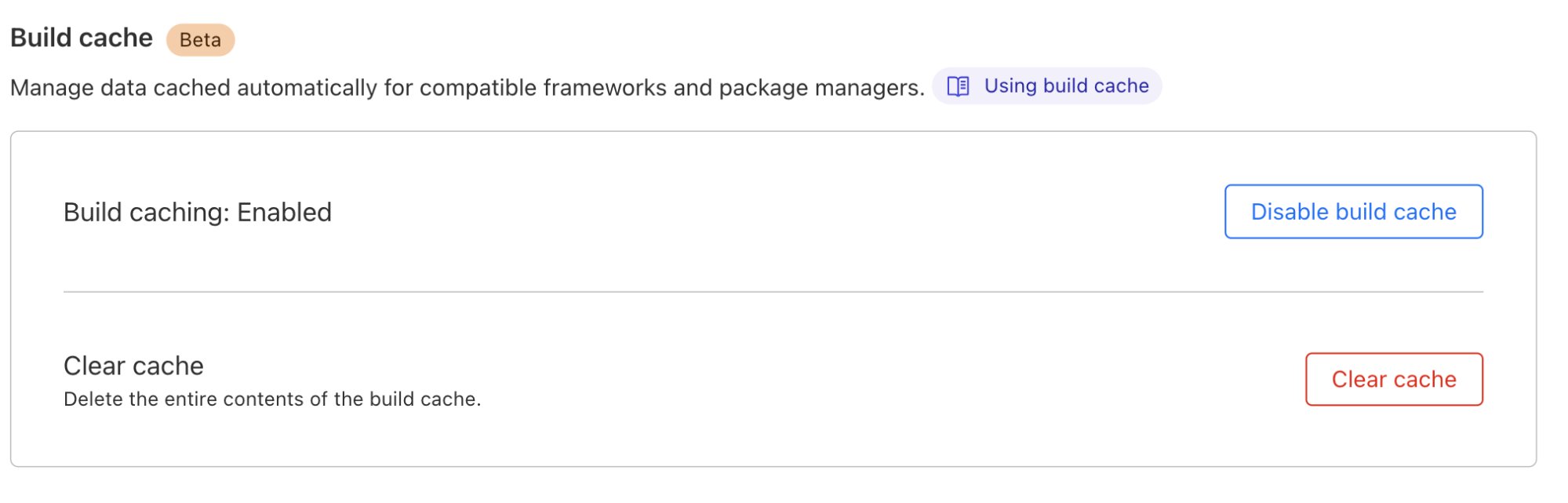
For you as a Pages user, interacting with build caching will be seamless. If you are working with an existing project, simply navigate to your project’s settings to toggle on Build Cache.

When you push a code change and initiate a build using Pages CI, build caching will kick-start and do its magic in the background.

Race ahead with Cloudflare Pages build caching

“Cache” us on Discord

Have questions? Join us on our Discord Server [link]. We will be hosting an “Ask Us Anything” session on October 2nd where you can chat live with members of our team! Your feedback on this beta is invaluable to us, so after testing out build caching, don't hesitate to share your experiences! Happy building!

Race ahead with Cloudflare Pages build caching

Re-introducing the Cloudflare Workers Playground

Post Syndicated from Adam Murray original http://blog.cloudflare.com/workers-playground/

Re-introducing the Cloudflare Workers Playground

Re-introducing the Cloudflare Workers Playground

Since the very initial announcement of Cloudflare Workers, we’ve provided a playground. The motivation behind that being a belief that users should have a convenient, low-commitment way to play around with and learn more about Workers.

Over the last few years, while Cloudflare Workers and our Developer Platform have changed and grown, the original playground has not. Today, we’re proud to announce a revamp of the playground that demonstrates the power of Workers, along with new development tooling, and the ability to share your playground code and deploy instantly to Cloudflare’s global network.

A focus on origin Workers

When Workers was first introduced, many of the examples and use-cases centered around middleware, where a Worker intercepts a request to an origin and does something before returning a response. This includes things like: modifying headers, redirecting traffic, helping with A/B testing, or caching. Ultimately the Worker isn’t acting as an origin in these cases, it sits between the user and the destination.

While Workers are still great for these types of tasks, for the updated playground, we decided to focus on the Worker-as-origin use-case. This is where the Worker receives a request and is responsible for returning the full response. In this case, the Worker is the destination, not middle-ware. This is a great way for you to develop more complex use-cases like user interfaces or APIs.

A new editor experience

During Developer Week in May, we announced a new, authenticated dashboard editor experience powered by VSCode. Now, this same experience is available to users in the playground.

Users now have a more robust IDE experience that supports: multi-module Workers, type-checking via JSDoc comments and the `workers-types` package, pretty error pages, and real previews that update as you edit code. The new editor only supports Module syntax, which is the preferred way for users to develop new Workers.

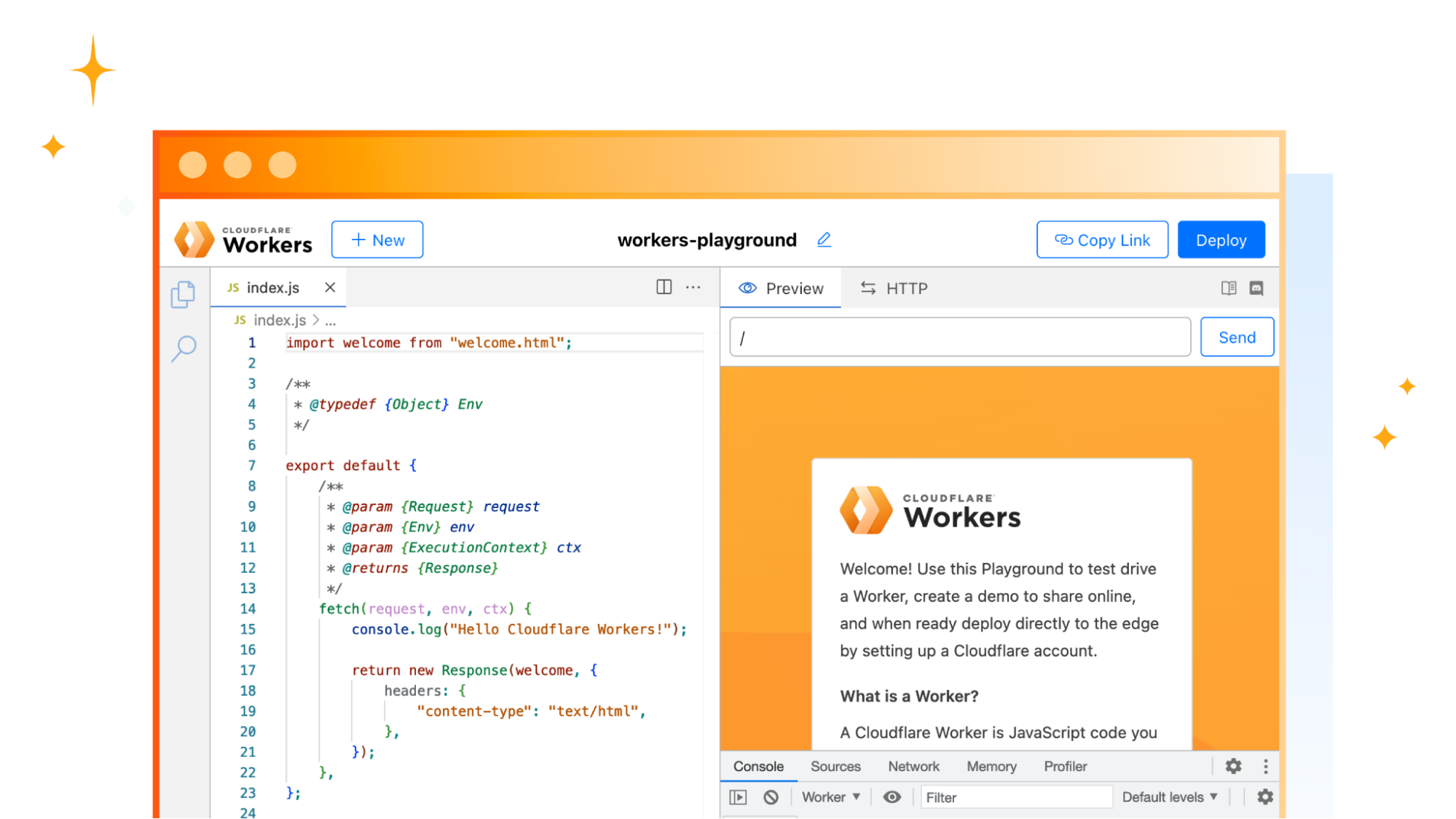
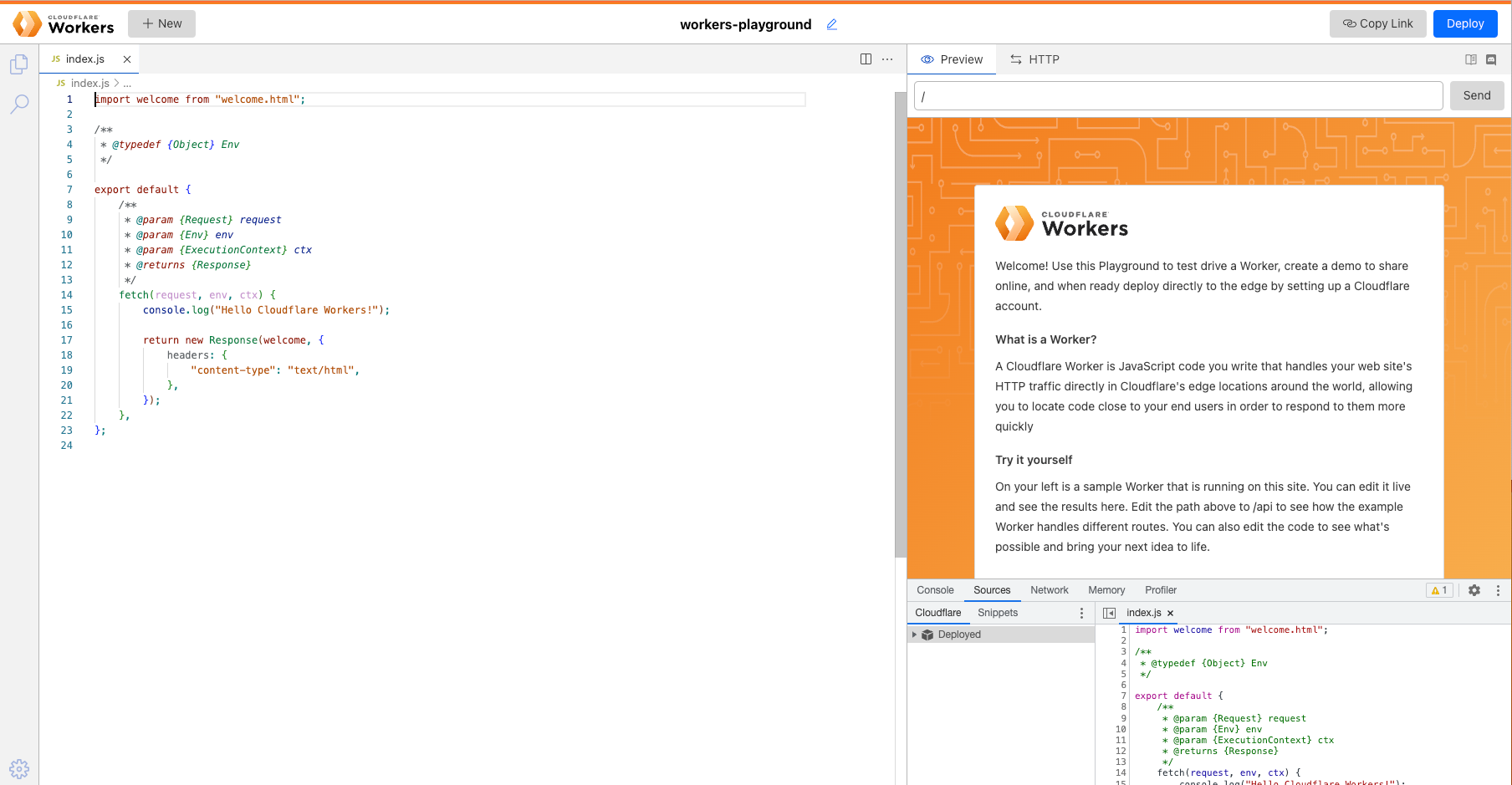
When the playground first loads, it looks like this:

Re-introducing the Cloudflare Workers Playground

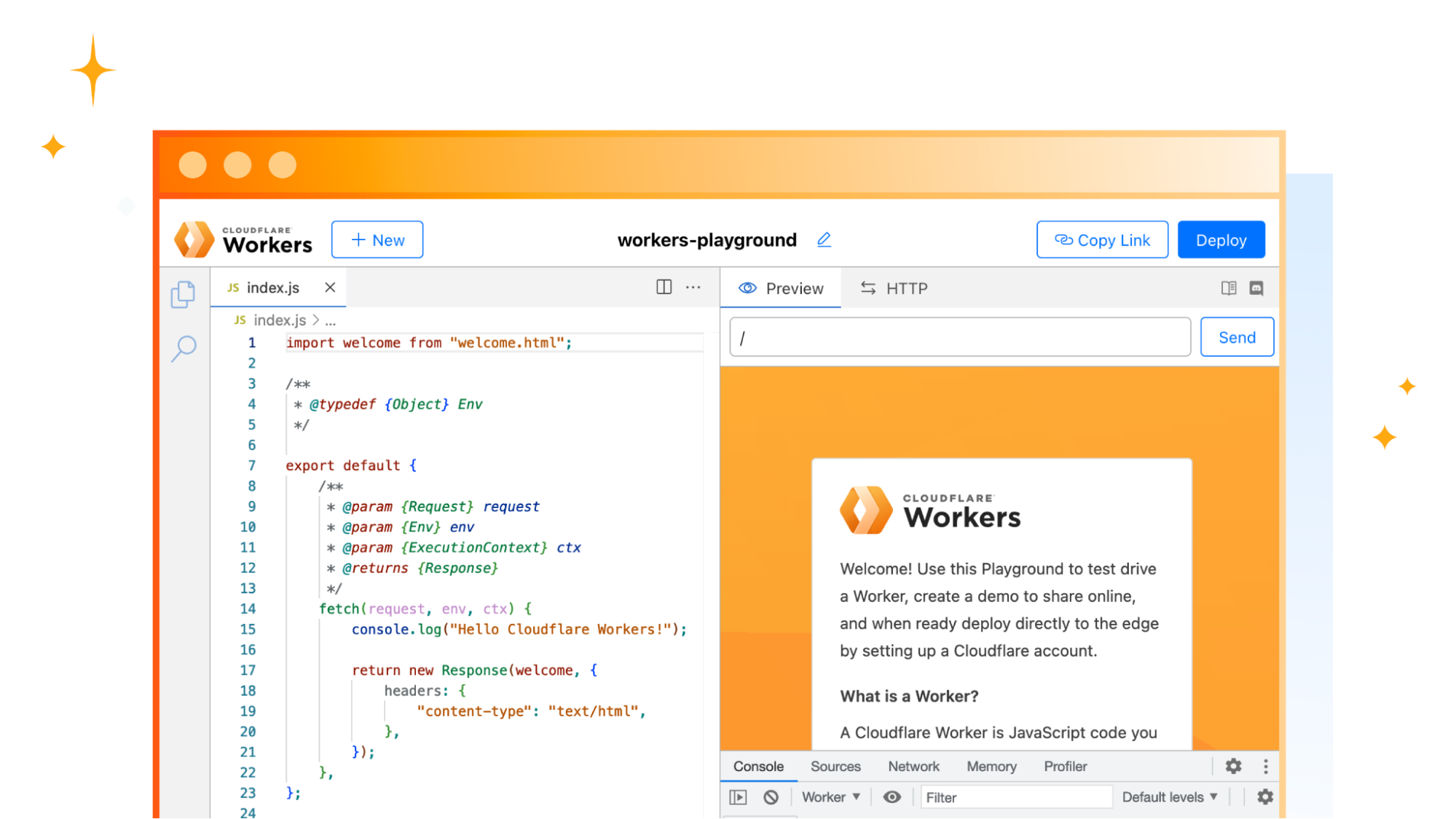
The content you see on the right is coming from the code on the left. You can modify this just as you would in a code editor. Once you make an edit, it will be updated shortly on the right as demonstrated below:

You’re not limited to the starter demo. Feel free to edit and remove those files to create APIs, user interfaces, or any other application that you come up with.

Updated developer tooling

Along with the updated editor, the new playground also contains numerous developer tools to help give you visibility into the Worker.

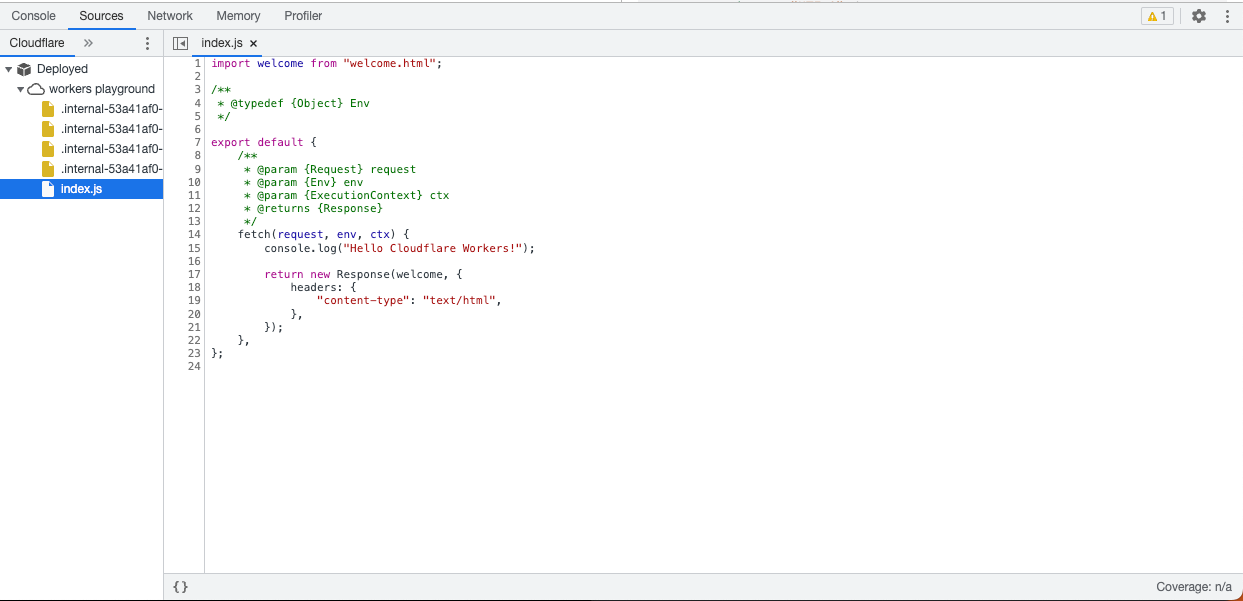
Playground users have access to the same Chrome DevTools technology that we use in the Wrangler CLI and the Dashboard. Within this view, you can: view logs, view network requests, and profile your Worker among other things.

Re-introducing the Cloudflare Workers Playground

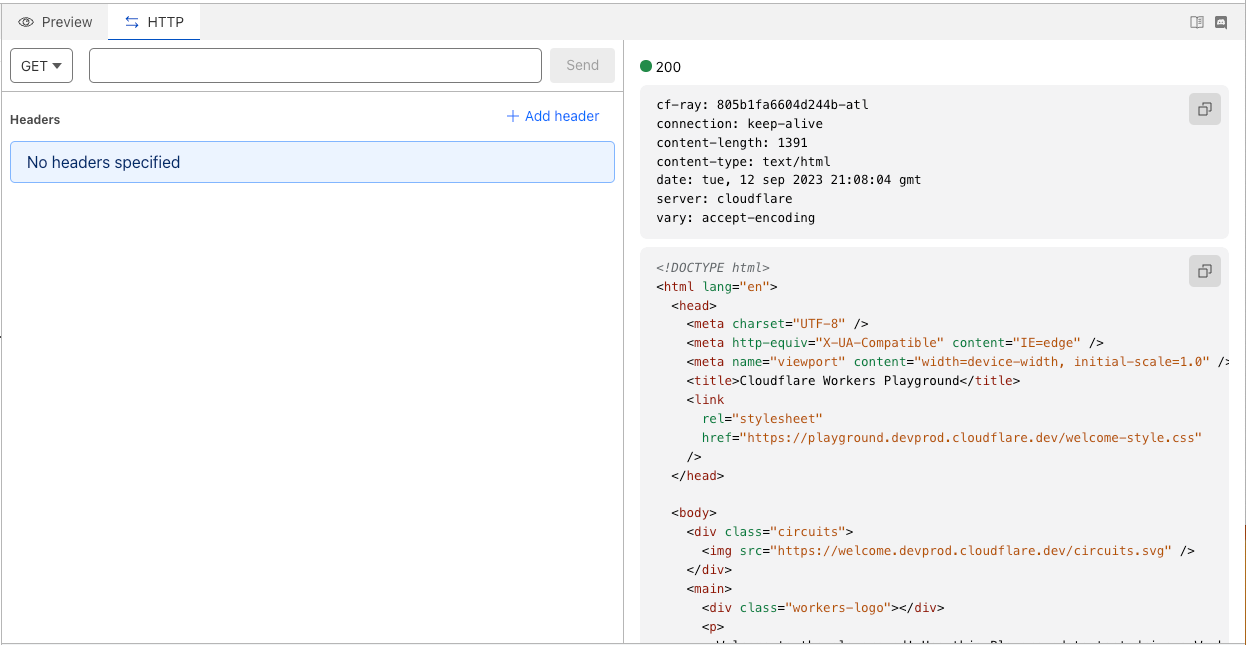
At the top of the playground, you’ll also see an “HTTP” tab which you can use to test your Worker against various HTTP methods.

Re-introducing the Cloudflare Workers Playground

Share what you create

With all these improvements, we haven’t forgotten the core use of a playground—to share Workers with other people! Whatever your use-case; whether you’re building a demo to showcase the power of Workers or sending someone an example of how to fix a specific issue, all you need to do is click “Copy Link” in the top right of the Playground then paste the URL in any URL bar.

Re-introducing the Cloudflare Workers Playground

The unique URL will be shareable and deployable as long as you have it. This means that you could create quick demos by creating various Workers in the Playground, and bookmark them to share later. They won’t expire.

Deploying to the Supercloud

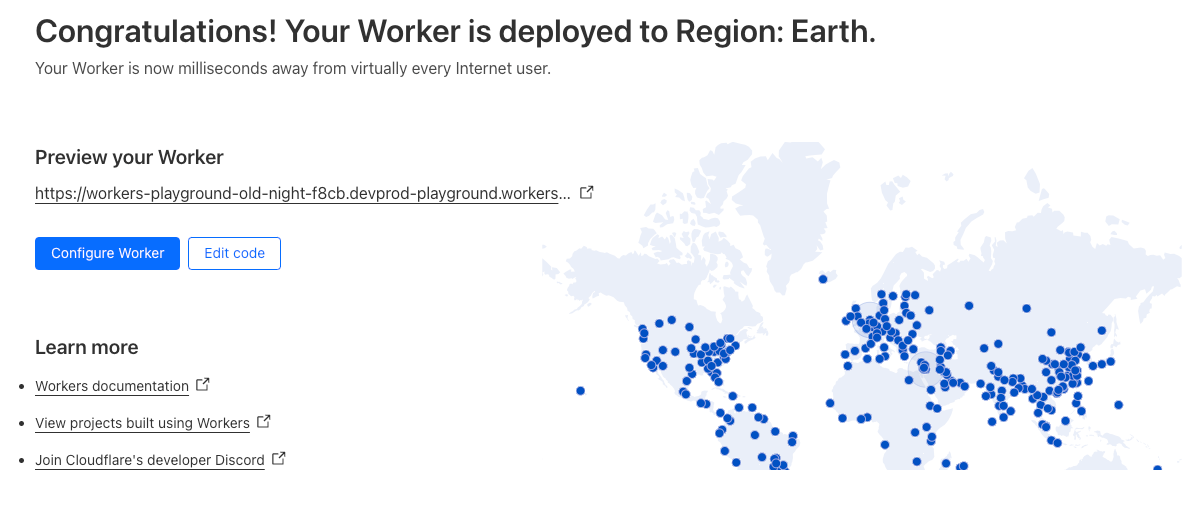
We also wanted to make it easier to go from writing a Worker in the Playground to deploying that Worker to Cloudflare’s global network. We’ve included a “Deploy” button that will help you quickly deploy the Worker you’ve just created.

Re-introducing the Cloudflare Workers Playground

If you don’t already have a Cloudflare account, you will also be guided through the onboarding process.

Try it out

This is now available to all users in Region:Earth. Go to https://workers.cloudflare.com/playground and give it a go!

Hyperdrive: making databases feel like they’re global

Post Syndicated from Matt Silverlock original http://blog.cloudflare.com/hyperdrive-making-regional-databases-feel-distributed/

Hyperdrive: making databases feel like they’re global

Hyperdrive: making databases feel like they’re global

Hyperdrive makes accessing your existing databases from Cloudflare Workers, wherever they are running, hyper fast. You connect Hyperdrive to your database, change one line of code to connect through Hyperdrive, and voilà: connections and queries get faster (and spoiler: you can use it today).

In a nutshell, Hyperdrive uses our global network to speed up queries to your existing databases, whether they’re in a legacy cloud provider or with your favorite serverless database provider; dramatically reduces the latency incurred from repeatedly setting up new database connections; and caches the most popular read queries against your database, often avoiding the need to go back to your database at all.

Without Hyperdrive, that core database — the one with your user profiles, product inventory, or running your critical web app — sitting in the us-east1 region of a legacy cloud provider is going to be really slow to access for users in Paris, Singapore and Dubai and slower than it should be for users in Los Angeles or Vancouver. With each round trip taking up to 200ms, it’s easy to burn up to a second (or more!) on the multiple round-trips needed just to set up a connection, before you’ve even made the query for your data. Hyperdrive is designed to fix this.

To demonstrate Hyperdrive’s performance, we built a demo application that makes back-to-back queries against the same database: both with Hyperdrive and without Hyperdrive (directly). The app selects a database in a neighboring continent: if you’re in Europe, it selects a database in the US — an all-too-common experience for many European Internet users — and if you’re in Africa, it selects a database in Europe (and so on). It returns raw results from a straightforward SELECT query, with no carefully selected averages or cherry-picked metrics.

Hyperdrive: making databases feel like they’re global
We built a demo app that makes real queries to a PostgreSQL database, with and without Hyperdrive

Throughout internal testing, initial user reports and the multiple runs in our benchmark, Hyperdrive delivers a 17 – 25x performance improvement vs. going direct to the database for cached queries, and a 6 – 8x improvement for uncached queries and writes. The cached latency might not surprise you, but we think that being 6 – 8x faster on uncached queries changes “I can’t query a centralized database from Cloudflare Workers” to “where has this been all my life?!”. We’re also continuing to work on performance improvements: we’ve already identified additional latency savings, and we’ll be pushing those out in the coming weeks.

The best part? Developers with a Workers paid plan can start using the Hyperdrive open beta immediately: there are no waiting lists or special sign-up forms to navigate.

Hyperdrive? Never heard of it?

We’ve been working on Hyperdrive in secret for a short while: but allowing developers to connect to databases they already have — with their existing data, queries and tooling — has been something on our minds for quite some time.

In a modern distributed cloud environment like Workers, where compute is globally distributed (so it’s close to users) and functions are short-lived (so you’re billed no more than is needed), connecting to traditional databases has been both slow and unscalable. Slow because it takes upwards of seven round-trips (TCP handshake; TLS negotiation; then auth) to establish the connection, and unscalable because databases like PostgreSQL have a high resource cost per connection. Even just a couple of hundred connections to a database can consume non-negligible memory, separate from any memory needed for queries.

Our friends over at Neon (a popular serverless Postgres provider) wrote about this, and even released a WebSocket proxy and driver to reduce the connection overhead, but are still fighting uphill in the snow: even with a custom driver, we’re down to 4 round-trips, each still potentially taking 50-200 milliseconds or more. When those connections are long-lived, that’s OK — it might happen once every few hours at best. But when they’re scoped to an individual function invocation, and are only useful for a few milliseconds to minutes at best — your code spends more time waiting. It’s effectively another kind of cold start: having to initiate a fresh connection to your database before making a query means that using a traditional database in a distributed or serverless environment is (to put it lightly) really slow.

To combat this, Hyperdrive does two things.

First, it maintains a set of regional database connection pools across Cloudflare’s network, so a Cloudflare Worker avoids making a fresh connection to a database on every request. Instead, the Worker can establish a connection to Hyperdrive (fast!), with Hyperdrive maintaining a pool of ready-to-go connections back to the database. Since a database can be anywhere from 30ms to (often) 300ms away over a single round-trip (let alone the seven or more you need for a new connection), having a pool of available connections dramatically reduces the latency issue that short-lived connections would otherwise suffer.

Second, it understands the difference between read (non-mutating) and write (mutating) queries and transactions, and can automatically cache your most popular read queries: which represent over 80% of most queries made to databases in typical web applications. That product listing page that tens of thousands of users visit every hour; open jobs on a major careers site; or even queries for config data that changes occasionally; a tremendous amount of what is queried does not change often, and caching it closer to where the user is querying it from can dramatically speed up access to that data for the next ten thousand users. Write queries, which can’t be safely cached, still get to benefit from both Hyperdrive’s connection pooling and Cloudflare’s global network: being able to take the fastest routes across the Internet across our backbone cuts down latency there, too.

Hyperdrive: making databases feel like they’re global
Even if your database is on the other side of the country, 70ms x 6 round-trips is a lot of time for a user to be waiting for a query response.

Hyperdrive works not only with PostgreSQL databases — including Neon, Google Cloud SQL, AWS RDS, and Timescale, but also PostgreSQL-compatible databases like Materialize (a powerful stream-processing database), CockroachDB (a major distributed database), Google Cloud’s AlloyDB, and AWS Aurora Postgres.

We’re also working on bringing support for MySQL, including providers like PlanetScale, by the end of the year, with more database engines planned in the future.

The magic connection string

One of the major design goals for Hyperdrive was the need for developers to keep using their existing drivers, query builder and ORM (Object-Relational Mapper) libraries. It wouldn’t have mattered how fast Hyperdrive was if we required you to migrate away from your favorite ORM and/or rewrite hundreds (or more) lines of code & tests to benefit from Hyperdrive’s performance.

To achieve this, we worked with the maintainers of popular open-source drivers — including node-postgres and Postgres.js — to help their libraries support Worker’s new TCP socket API, which is going through the standardization process, and we expect to see land in Node.js, Deno and Bun as well.

The humble database connection string is the shared language of database drivers, and typically takes on this format:

postgres://user:[email protected]:5432/postgres

The magic behind Hyperdrive is that you can start using it in your existing Workers applications, with your existing queries, just by swapping out your connection string for the one Hyperdrive generates instead.

Creating a Hyperdrive

With an existing database ready to go — in this example, we’ll use a Postgres database from Neon — it takes less than a minute to get Hyperdrive running (yes, we timed it).

If you don’t have an existing Cloudflare Workers project, you can quickly create one:

$ npm create cloudflare@latest
# Call the application "hyperdrive-demo"
# Choose "Hello World Worker" as your template

From here, we just need the database connection string for our database and a quick wrangler command-line invocation to have Hyperdrive connect to it.

# Using wrangler v3.8.0 or above
wrangler hyperdrive databases create a-faster-database --connection-string="postgres://user:[email protected]/neondb"

# This will return an ID: we'll use this in the next step

Add our Hyperdrive to the wrangler.toml configuration file for our Worker:

[[hyperdrive]]
name = "HYPERDRIVE"
database_id = "cdb28782-0dfc-4aca-a445-a2c318fb26fd"

We can now write a Worker — or take an existing Worker script — and use Hyperdrive to speed up connections and queries to our existing database. We use node-postgres here, but we could just as easily use Drizzle ORM.

import { Client } from 'pg';

export interface Env {
	HYPERDRIVE: Hyperdrive;
}

export default {
	async fetch(request: Request, env: Env, ctx: ExecutionContext) {
		console.log(JSON.stringify(env));
		// Create a database client that connects to our database via Hyperdrive
		//
		// Hyperdrive generates a unique connection string you can pass to
		// supported drivers, including node-postgres, Postgres.js, and the many
		// ORMs and query builders that use these drivers.
		const client = new Client({ connectionString: env.HYPERDRIVE.connectionString });

		try {
			// Connect to our database
			await client.connect();

			// A very simple test query
			let result = await client.query({ text: 'SELECT * FROM pg_tables' });

			// Return our result rows as JSON
			return Response.json({ result: result });
		} catch (e) {
			console.log(e);
			return Response.json({ error: JSON.stringify(e) }, { status: 500 });
		}
	},
};

The code above is intentionally simple, but hopefully you can see the magic: our database driver gets a connection string from Hyperdrive, and is none-the-wiser. It doesn’t need to know anything about Hyperdrive, we don’t have to toss out our favorite query builder library, and we can immediately realize the speed benefits when making queries.

Connections are automatically pooled and kept warm, our most popular queries are cached, and our entire application gets faster.

We’ve also built out guides for every major database provider to make it easy to get what you need from them (a connection string) into Hyperdrive.

Going fast can’t be cheap, right?

We think Hyperdrive is critical to accessing your existing databases when building on Cloudflare Workers: traditional databases were just never designed for a world where clients are globally distributed.

Hyperdrive’s connection pooling will always be free, for both database protocols we support today and new database protocols we add in the future. Just like DDoS protection and our global CDN, we think access to Hyperdrive’s core feature is too useful to hold back.

During the open beta, Hyperdrive itself will not incur any charges for usage, regardless of how you use it. We’ll be announcing more details on how Hyperdrive will be priced closer to GA (early in 2024), with plenty of notice.

Time to query

So where to from here for Hyperdrive?

We’re planning on bringing Hyperdrive to GA in early 2024 — and we’re focused on landing more controls over how we cache & automatically invalidate based on writes, detailed query and performance analytics (soon!), support for more database engines (including MySQL) as well as continuing to work on making it even faster.

We’re also working to enable private network connectivity via Magic WAN and Cloudflare Tunnel, so that you can connect to databases that aren’t (or can’t be) exposed to the public Internet.

To connect Hyperdrive to your existing database, visit our developer docs — it takes less than a minute to create a Hyperdrive and update existing code to use it. Join the #hyperdrive-beta channel in our Developer Discord to ask questions, surface bugs, and talk to our Product & Engineering teams directly.

Hyperdrive: making databases feel like they’re global

Running Serverless Puppeteer with Workers and Durable Objects

Post Syndicated from Tanushree Sharma original http://blog.cloudflare.com/running-serverless-puppeteer-workers-durable-objects/

Running Serverless Puppeteer with Workers and Durable Objects

Running Serverless Puppeteer with Workers and Durable Objects

Last year, we announced the Browser Rendering API – letting users running Puppeteer, a browser automation library, directly in Workers. Puppeteer is one of the most popular libraries used to interact with a headless browser instance to accomplish tasks like taking screenshots, generating PDFs, crawling web pages, and testing web applications. We’ve heard from developers that configuring and maintaining their own serverless browser automation systems can be quite painful.

The Workers Browser Rendering API solves this. It makes the Puppeteer library available directly in your Worker, connected to a real web browser, without the need to configure and manage infrastructure or keep browser sessions warm yourself. You can use @cloudflare/puppeteer to run the full Puppeteer API directly on Workers!

We’ve seen so much interest from the developer community since launching last year. While the Browser Rendering API is still in beta (sign up to our waitlist to get access), we wanted to share a way to get more out of our current limits by using the Browser Rendering API with Durable Objects. We’ll also be sharing pricing for the Rendering API, so you can build knowing exactly what you’ll pay for.

Building a responsive web design testing tool with the Browser Rendering API

As a designer or frontend developer, you want to make sure that content is well-designed for visitors browsing on different screen sizes. With the number of possible devices that users are browsing on are growing, it becomes difficult to test all the possibilities manually. While there are many testing tools on the market, we want to show how easy it is to create your own Chromium based tool with the Workers Browser Rendering API and Durable Objects.

Running Serverless Puppeteer with Workers and Durable Objects

We’ll be using the Worker to handle any incoming requests, pass them to the Durable Object to take screenshots and store them in an R2 bucket. The Durable Object is used to create a browser session that’s persistent. By using Durable Object Alarms we can keep browsers open for longer and reuse browser sessions across requests.

Let’s dive into how we can build this application:

  1. Create a Worker with a Durable Object, Browser Rendering API binding and R2 bucket. This is the resulting wrangler.toml:
name = "rendering-api-demo"
main = "src/index.js"
compatibility_date = "2023-09-04"
compatibility_flags = [ "nodejs_compat"]
account_id = "c05e6a39aa4ccdd53ad17032f8a4dc10"


# Browser Rendering API binding
browser = { binding = "MYBROWSER" }

# Bind an R2 Bucket
[[r2_buckets]]
binding = "BUCKET"
bucket_name = "screenshots"

# Binding to a Durable Object
[[durable_objects.bindings]]
name = "BROWSER"
class_name = "Browser"

[[migrations]]
tag = "v1" # Should be unique for each entry
new_classes = ["Browser"] # Array of new classes

2. Define the Worker

This Worker simply passes the request onto the Durable Object.

export default {
	async fetch(request, env) {

		let id = env.BROWSER.idFromName("browser");
		let obj = env.BROWSER.get(id);
	  
		// Send a request to the Durable Object, then await its response.
		let resp = await obj.fetch(request.url);
		let count = await resp.text();
	  
		return new Response("success");
	}
};

3. Define the Durable Object class

const KEEP_BROWSER_ALIVE_IN_SECONDS = 60;

export class Browser {
	constructor(state, env) {
		this.state = state;
		this.env = env;
		this.keptAliveInSeconds = 0;
		this.storage = this.state.storage;
	}
  
	async fetch(request) {
		// screen resolutions to test out
		const width = [1920, 1366, 1536, 360, 414]
		const height = [1080, 768, 864, 640, 896]

		// use the current date and time to create a folder structure for R2
		const nowDate = new Date()
		var coeff = 1000 * 60 * 5
		var roundedDate = (new Date(Math.round(nowDate.getTime() / coeff) * coeff)).toString();
		var folder = roundedDate.split(" GMT")[0]

		//if there's a browser session open, re-use it
		if (!this.browser) {
			console.log(`Browser DO: Starting new instance`);
			try {
			  this.browser = await puppeteer.launch(this.env.MYBROWSER);
			} catch (e) {
			  console.log(`Browser DO: Could not start browser instance. Error: ${e}`);
			}
		  }
		
		// Reset keptAlive after each call to the DO
		this.keptAliveInSeconds = 0;
		
		const page = await this.browser.newPage();

		// take screenshots of each screen size 
		for (let i = 0; i < width.length; i++) {
			await page.setViewport({ width: width[i], height: height[i] });
			await page.goto("https://workers.cloudflare.com/");
			const fileName = "screenshot_" + width[i] + "x" + height[i]
			const sc = await page.screenshot({
				path: fileName + ".jpg"
			}
			);

			this.env.BUCKET.put(folder + "/"+ fileName + ".jpg", sc);
		  }
		
		// Reset keptAlive after performing tasks to the DO.
		this.keptAliveInSeconds = 0;

		// set the first alarm to keep DO alive
		let currentAlarm = await this.storage.getAlarm();
		if (currentAlarm == null) {
		console.log(`Browser DO: setting alarm`);
		const TEN_SECONDS = 10 * 1000;
		this.storage.setAlarm(Date.now() + TEN_SECONDS);
		}
		
		await this.browser.close();
		return new Response("success");
	}

	async alarm() {
		this.keptAliveInSeconds += 10;
	
		// Extend browser DO life
		if (this.keptAliveInSeconds < KEEP_BROWSER_ALIVE_IN_SECONDS) {
		  console.log(`Browser DO: has been kept alive for ${this.keptAliveInSeconds} seconds. Extending lifespan.`);
		  this.storage.setAlarm(Date.now() + 10 * 1000);
		} else console.log(`Browser DO: cxceeded life of ${KEEP_BROWSER_ALIVE_IN_SECONDS}. Browser DO will be shut down in 10 seconds.`);
	  }

  }

That’s it! With less than a hundred lines of code, you can fully customize a powerful tool to automate responsive web design testing. You can even incorporate it into your CI pipeline to automatically test different window sizes with each build and verify the result is as expected by using an automated library like pixelmatch.

How much will this cost?

We’ve spoken to many customers deploying a Puppeteer service on their own infrastructure, on public cloud containers or functions or using managed services. The common theme that we’ve heard is that these services are costly – costly to maintain and expensive to run.

While you won’t be billed for the Browser Rendering API yet, we want to be transparent with you about costs you start building. We know it’s important to understand the pricing structure so that you don’t get a surprise bill and so that you can design your application efficiently.

Running Serverless Puppeteer with Workers and Durable Objects

You pay based on two usage metrics:

  1. Number of sessions: A Browser Session is a new instance of a browser being launched
  2. Number of concurrent sessions: Concurrent Sessions is the number of browser instances open at once

Using Durable Objects to persist browser sessions improves performance by eliminating the time that it takes to spin up a new browser session. Since it re-uses sessions, it cuts down on the number of concurrent sessions needed. We highly encourage this model of session re-use if you expect to see consistent traffic for applications that you build on the Browser Rendering API.

If you have feedback about this pricing, we’re all ears. Feel free to reach out through Discord (channel name: browser-rendering-api-beta) and share your thoughts.

Get Started

Sign up to our waitlist to get access to the Workers Browser Rendering API. We’re so excited to see what you build! Share your creations with us on Twitter/X @CloudflareDev or on our Discord community.

A Socket API that works across JavaScript runtimes — announcing a WinterCG spec and Node.js implementation of connect()

Post Syndicated from Dominik Picheta original http://blog.cloudflare.com/socket-api-works-javascript-runtimes-wintercg-polyfill-connect/

A Socket API that works across JavaScript runtimes — announcing a WinterCG spec and Node.js implementation of connect()

A Socket API that works across JavaScript runtimes — announcing a WinterCG spec and Node.js implementation of connect()

Earlier this year, we announced a new API for creating outbound TCP socketsconnect(). From day one, we’ve been working with the Web-interoperable Runtimes Community Group (WinterCG) community to chart a course toward making this API a standard, available across all runtimes and platforms — including Node.js.

Today, we’re sharing that we’ve reached a new milestone in the path to making this API available across runtimes — engineers from Cloudflare and Vercel have published a draft specification of the connect() sockets API for review by the community, along with a Node.js compatible implementation of the connect() API that developers can start using today.

This implementation helps both application developers and maintainers of libraries and frameworks:

  1. Maintainers of existing libraries that use the node:net and node:tls APIs can use it to more easily add support for runtimes where node:net and node:tls are not available.
  2. JavaScript frameworks can use it to make connect() available in local development, making it easier for application developers to target runtimes that provide connect().

Why create a new standard? Why connect()?

As we described when we first announced connect(), to-date there has not been a standard API across JavaScript runtimes for creating and working with TCP or UDP sockets. This makes it harder for maintainers of open-source libraries to ensure compatibility across runtimes, and ultimately creates friction for application developers who have to navigate which libraries work on which platforms.

While Node.js provides the node:net and node:tls APIs, these APIs were designed over 10 years ago in the very early days of the Node.js project and remain callback-based. As a result, they can be hard to work with, and expose configuration in ways that don’t fit serverless platforms or web browsers.

The connect() API fills this gap by incorporating the best parts of existing socket APIs and prior proposed standards, based on feedback from the JavaScript community — including contributors to Node.js. Libraries like pg (node-postgres on Github) are already using the connect() API.

The connect() specification

At time of writing, the draft specification of the Sockets API defines the following API:

dictionary SocketAddress {
  DOMString hostname;
  unsigned short port;
};

typedef (DOMString or SocketAddress) AnySocketAddress;

enum SecureTransportKind { "off", "on", "starttls" };

[Exposed=*]
dictionary SocketOptions {
  SecureTransportKind secureTransport = "off";
  boolean allowHalfOpen = false;
};

[Exposed=*]
interface Connect {
  Socket connect(AnySocketAddress address, optional SocketOptions opts);
};

interface Socket {
  readonly attribute ReadableStream readable;
  readonly attribute WritableStream writable;

  readonly attribute Promise<undefined> closed;
  Promise<undefined> close();

  Socket startTls();
};

The proposed API is Promise-based and reuses existing standards whenever possible. For example, ReadableStream and WritableStream are used for the read and write ends of the socket. This makes it easy to pipe data from a TCP socket to any other library or existing code that accepts a ReadableStream as input, or to write to a TCP socket via a WritableStream.

The entrypoint of the API is the connect() function, which takes a string containing both the hostname and port separated by a colon, or an object with discrete hostname and port fields. It returns a Socket object which represents a socket connection. An instance of this object exposes attributes and methods for working with the connection.

A connection can be established in plain-text or TLS mode, as well as a special “starttls” mode which allows the socket to be easily upgraded to TLS after some period of plain-text data transfer, by calling the startTls() method on the Socket object. No need to create a new socket or switch to using a separate set of APIs once the socket is upgraded to use TLS.

For example, to upgrade a socket using the startTLS pattern, you might do something like this:

import { connect } from "@arrowood.dev/socket"

const options = { secureTransport: "starttls" };
const socket = connect("address:port", options);
const secureSocket = socket.startTls();
// The socket is immediately writable
// Relies on web standard WritableStream
const writer = secureSocket.writable.getWriter();
const encoder = new TextEncoder();
const encoded = encoder.encode("hello");
await writer.write(encoded);

Equivalent code using the node:net and node:tls APIs:

import net from 'node:net'
import tls from 'node:tls'

const socket = new net.Socket(HOST, PORT);
socket.once('connect', () => {
  const options = { socket };
  const secureSocket = tls.connect(options, () => {
    // The socket can only be written to once the
    // connection is established.
    // Polymorphic API, uses Node.js streams
    secureSocket.write('hello');
  }
})

Use the Node.js implementation of connect() in your library

To make it easier for open-source library maintainers to adopt the connect() API, we’ve published an implementation of connect() in Node.js that allows you to publish your library such that it works across JavaScript runtimes, without having to maintain any runtime-specific code.

To get started, install it as a dependency:

npm install --save @arrowood.dev/socket

And import it in your library or application:

import { connect } from "@arrowood.dev/socket"

What’s next for connect()?

The wintercg/proposal-sockets-api is published as a draft, and the next step is to solicit and incorporate feedback. We’d love your feedback, particularly if you maintain an open-source library or make direct use of the node:net or node:tls APIs.

Once feedback has been incorporated, engineers from Cloudflare, Vercel and beyond will be continuing to work towards contributing an implementation of the API directly to Node.js as a built-in API.

Cloudflare Integrations Marketplace introduces three new partners: Sentry, Momento and Turso

Post Syndicated from Tanushree Sharma original http://blog.cloudflare.com/cloudflare-integrations-marketplace-new-partners-sentry-momento-turso/

Cloudflare Integrations Marketplace introduces three new partners: Sentry, Momento and Turso

Cloudflare Integrations Marketplace introduces three new partners: Sentry, Momento and Turso

Building modern full-stack applications requires connecting to many hosted third party services, from observability platforms to databases and more. All too often, this means spending time doing busywork, managing credentials and writing glue code just to get started. This is why we’re building out the Cloudflare Integrations Marketplace to allow developers to easily discover, configure and deploy products to use with Workers.

Earlier this year, we introduced integrations with Supabase, PlanetScale, Neon and Upstash. Today, we are thrilled to introduce our newest additions to Cloudflare’s Integrations Marketplace – Sentry, Turso and Momento.

Let's take a closer look at some of the exciting integration providers that are now part of the Workers Integration Marketplace.

Improve performance and reliability by connecting Workers to Sentry

When your Worker encounters an error you want to know what happened and exactly what line of code triggered it. Sentry is an application monitoring platform that helps developers identify and resolve issues in real-time.

The Workers and Sentry integration automatically sends errors, exceptions and console.log() messages from your Worker to Sentry with no code changes required. Here’s how it works:

  1. You enable the integration from the Cloudflare Dashboard.
  2. The credentials from the Sentry project of your choice are automatically added to your Worker.
  3. You can configure sampling to control the volume of events you want sent to Sentry. This includes selecting the sample rate for different status codes and exceptions.
  4. Cloudflare deploys a Tail Worker behind the scenes that contains all the logic needed to capture and send data to Sentry.
  5. Like magic, errors, exceptions, and log messages are automatically sent to your Sentry project.

In the future, we’ll be improving this integration by adding support for uploading source maps and stack traces so that you can pinpoint exactly which line of your code caused the issue. We’ll also be tying in Workers deployments with Sentry releases to correlate new versions of your Worker with events in Sentry that help pinpoint problematic deployments. Check out our developer documentation for more information.
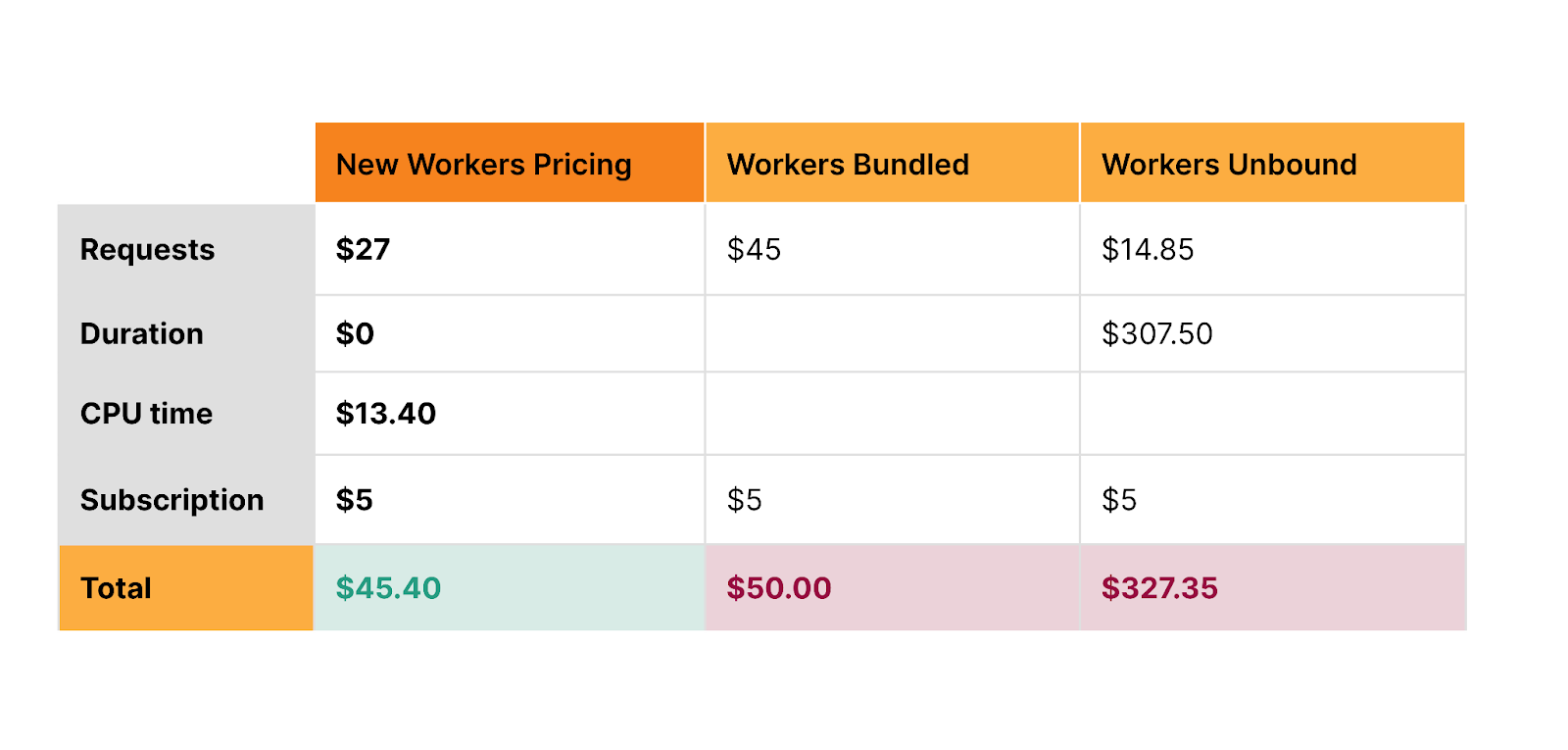
Develop at the Data Edge with Turso + Workers

Turso is an edge-hosted, distributed database based on libSQL, an open-source fork of SQLite. Turso focuses on providing a global service that minimizes query latency (and thus, application latency!). It’s perfect for use with Cloudflare Workers – both compute and data are served close to users.

Turso follows the model of having one primary database with replicas that are located globally, close to users. Turso automatically routes requests to a replica closest to where the Worker was invoked. This model works very efficiently for read heavy applications since read requests can be served globally. If you’re running an application that has heavy write workloads, or want to cut down on replication costs, you can run Turso with just the primary instance and use Smart Placement to speed up queries.

The Turso and Workers integration automatically pulls in Turso API credentials and adds them as secrets to your Worker, so that you can start using Turso by simply establishing a connection using the libsql SDK. Get started with the Turso and Workers Integration today by heading to our developer documentation.

Cache responses from data stores with Momento

Momento Cache is a low latency serverless caching solution that can be used on top of relational databases, key-value databases or object stores to get faster load times and better performance. Momento abstracts details like scaling, warming and replication so that users can deploy cache in a matter of minutes.

The Momento and Workers integration automatically pulls in your Momento API key using an OAuth2 flow. The Momento API key is added as a secret in Workers and, from there, you can start using the Momento SDK in Workers. Head to our developer documentation to learn more and use the Momento and Workers integration!

Try integrations out today

We want to give you back time, so that you can focus less on configuring and connecting third party tools to Workers and spend more time building. We’re excited to see what you build with integrations. Share your projects with us on Twitter (@CloudflareDev) and stay tuned for more exciting updates as we continue to grow our Integrations Marketplace!

If you would like to build an integration with Cloudflare Workers, fill out the integration request form and we’ll be in touch.

Cloudflare is now powering Microsoft Edge Secure Network

Post Syndicated from Mari Galicer original http://blog.cloudflare.com/cloudflare-now-powering-microsoft-edge-secure-network/

Cloudflare is now powering Microsoft Edge Secure Network

Cloudflare is now powering Microsoft Edge Secure Network

Between third-party cookies that track your activity across websites, to highly targeted advertising based on your IP address and browsing data, it's no secret that today’s Internet browsing experience isn’t as private as it should be. Here at Cloudflare, we believe everyone should be able to browse the Internet free of persistent tracking and prying eyes.

That’s why we’re excited to announce that we’ve partnered with Microsoft Edge to provide a fast and secure VPN, right in the browser. Users don’t have to install anything new or understand complex concepts to get the latest in network-level privacy: Edge Secure Network VPN is available on the latest consumer version of Microsoft Edge in most markets, and automatically comes with 5 GB of data. Just enable the feature by going to [Microsoft Edge Settings & more (…) > Browser essentials, and click Get VPN for free]. See Microsoft’s Edge Secure Network page for more details.

Cloudflare’s Privacy Proxy platform isn’t your typical VPN

To take a step back: a VPN is a way in which the Internet traffic leaving your device is tunneled through an intermediary server operated by a provider – in this case, Cloudflare! There are many important pieces that make this possible, but among them is the VPN protocol, which defines the way in which the tunnel is established and how traffic flows through it. You may have heard of some of these protocols: Wireguard, IPsec, and OpenVPN, for example. And while we’re no stranger to these, (Cloudflare’s WireGuard implementation is currently in use by millions of devices that use 1.1.1.1+WARP) – we see our Privacy Proxy Platform as a way to push forward the next frontier of Internet privacy and embrace one of Cloudflare’s core values: open Internet standards.

The Privacy Proxy Platform implements HTTP CONNECT, a method defined in the HTTP standard that proxies traffic by establishing a tunnel and then sending reliable and ordered byte streams through that tunnel. You can read more about this proxying method (and its history!) in our Primer on Proxies.

We also leverage other parts of Cloudflare’s privacy-oriented infrastructure that are already deployed at scale: requests first utilize 1.1.1.1 for DNS, a token proxy based on Privacy Pass for client authentication, and Geo-egress to choose an accurate egress IP address without exposing users’ precise location.

How it works

Let’s dive into the details of these components. For the purposes of this blog, we’ll call the devices people are using to browse the Internet (your phone, tablet or computer) clients, and the websites they’re trying to visit origin sites.

The Privacy Proxy Platform includes three main parts:

  1. Token Proxy: this is the service that checks if you’re an Edge Secure Network user with a legitimate Microsoft account.
  2. Privacy API: based on the above, Cloudflare’s Privacy API issues authentication tokens that clients use for authenticating to the proxy itself.
  3. Privacy Proxy: this is the HTTP CONNECT-based proxy service running on Cloudflare’s network. This service checks that the client presents a valid authentication token, and if so, proxies the encrypted HTTP request to the origin site. It is also responsible for selecting a valid egress IP address to be used.
Cloudflare is now powering Microsoft Edge Secure Network

When Edge Secure Network protections are on – say, when a user connects to an open Wi-Fi network at a coffee shop – our proxy will automatically prompt that client for a token to authenticate. If the client has a token, it will present one. If it doesn’t, it will utilize the token proxy to mint a new pool using the help of an attester and issuer: the attester checks the validity of the client and Microsoft account, and the issuer issues tokens for that client in return. This dance is based on the Privacy Pass protocol. Importantly, it allows Cloudflare to validate that clients are who they say they are without collecting or storing personal information from Microsoft users.

Once the client has presented the proxy server with a valid token, the Privacy Proxy then chooses a valid egress IP address based on a hash of the client’s geolocation. It then uses the DNS record (provided by Cloudflare’s DNS resolver, 1.1.1.1) to open up an encrypted session to the origin website. From there, it’s pretty straightforward: if the user continues to browse on that site, further requests will be sent through that connection, if they stop or close the browser, that connection will close as well.

Because Cloudflare proxies millions of requests per second, many of the operational aspects of the proxy are managed by Oxy, our proxying framework that handles everything from telemetry, graceful restarts, to stream multiplexing and IP fallbacks, and authentication hooks.

Low last-mile latency and geolocation parity thanks to Cloudflare’s Network

Cloudflare’s privacy proxy implementation maximizes user experience without sacrificing privacy. When Edge Secure Network is enabled, users will have search and browsing results relevant to where they’re geographically located. At Cloudflare, we call this the pizza test: people should be able to use any of our privacy proxy products and still be able to get results for “pizza places near me”. We accomplish this by always egressing through a Cloudflare data center that has an IP address that corresponds to the user’s location – we’ve written more about how we did this for 1.1.1.1+WARP.

Unlike your typical VPN operator that has dozens – sometimes hundreds – of servers, Cloudflare has a much larger footprint: data centers in over 300 cities. Because our network is an anycast “every service, everywhere” approach, each of our data centers can accept traffic from an Edge Secure network client. This means that Edge users will automatically detect and connect with a Cloudflare data center geographically very close to them, minimizing last-mile latency. Finally, because Cloudflare also operates a CDN, websites that are already on Cloudflare will be given a “hot-path,” and will load faster.

We at Cloudflare are always striving to bring more privacy options to the open Internet, and we are excited to provide more private and secure browsing to Edge users. To learn more, head to Microsoft’s Edge Secure Network page or Microsoft’s support page. If you’re a partner interested in using a privacy-preserving proxy like this one, fill out this form.

D1: open beta is here

Post Syndicated from Matt Silverlock original http://blog.cloudflare.com/d1-open-beta-is-here/

D1: open beta is here

D1: open beta is here

D1 is now in open beta, and the theme is “scale”: with higher per-database storage limits and the ability to create more databases, we’re unlocking the ability for developers to build production-scale applications on D1. Any developers with an existing paid Workers plan don’t need to lift a finger to benefit: we’ve retroactively applied this to all existing D1 databases.

If you missed the last D1 update back during Developer Week, the multitude of updates in the changelog, or are just new to D1 in general: read on.

Remind me: D1? Databases?

D1 our native serverless database, which we launched into alpha in November last year: the queryable database complement to Workers KV, Durable Objects and R2.

When we set out to build D1, we knew a few things for certain: it needed to be fast, it needed to be incredibly easy to create a database, and it needed to be SQL-based.

That last one was critical: so that developers could a) avoid learning another custom query language and b) make it easier for existing query buildings, ORM (object relational mapper) libraries and other tools to connect to D1 with minimal effort. From this, we’ve seen a huge number of projects build support in for D1: from support for D1 in the Drizzle ORM and Kysely, to the T4 App, a full-stack toolkit that uses D1 as its database.

We also knew that D1 couldn’t be the only way to query a database from Workers: for teams with existing databases and thousands of lines of SQL or existing ORM code, migrating across to D1 isn’t going to be an afternoon’s work. For those teams, we built Hyperdrive, allowing you to connect to your existing databases and make them feel global. We think this gives teams flexibility: combine D1 and Workers for globally distributed apps, and use Hyperdrive for querying the databases you have in legacy clouds and just can’t get rid of overnight.

Larger databases, and more of them

This has been the biggest ask from the thousands of D1 users throughout the alpha: not just more databases, but also bigger databases.

Developers on the Workers paid plan will now be able to grow each database up to 2GB and create 25 databases (up from 500MB and 10).

We’ll be continuing to work on unlocking even larger databases over the coming weeks and months: developers using the D1 beta will see automatic increases to these limits published on D1’s public changelog.

One of the biggest impediments to double-digit-gigabyte databases is performance: we want to ensure that a database can load in and be ready really quickly — cold starts of seconds (or more) just aren’t acceptable. A 10GB or 20GB database that takes 15 seconds before it can answer a query ends up being pretty frustrating to use.

Users on the Workers free plan will keep the ten 500MB databases (changelog) forever: we want to give more developers the room to experiment with D1 and Workers before jumping in.

Time Travel is here

Time Travel allows you to roll your database back to a specific point in time: specifically, any minute in the last 30 days. And it’s enabled by default for every D1 database, doesn’t cost any more, and doesn’t count against your storage limit.

For those who have been keeping tabs: we originally announced Time Travel earlier this year, and made it available to all D1 users in July. At its core, it’s deceptively simple: Time Travel introduces the concept of a “bookmark” to D1. A bookmark represents the state of a database at a specific point in time, and is effectively an append-only log. Time Travel can take a timestamp and turn it into a bookmark, or a bookmark directly: allowing you to restore back to that point. Even better: restoring doesn’t prevent you from going back further.

We think Time Travel works best with an example, so let’s make a change to a database: one with an Order table that stores every order made against our e-commerce store:

# To illustrate: we have 89,185 unique addresses in our order database.

# To illustrate: we have 89,185 unique addresses in our order database. 
➜  wrangler d1 execute northwind --command "SELECT count(distinct ShipAddress) FROM [Order]" 
┌──────────┐
│ count(*) │
├──────────┤
│ 89185    │
└──────────┘

OK, great. Now what if we wanted to make a change to a specific set of orders: an address change or freight company change?

# I think we might be forgetting something here...
➜  wrangler d1 execute northwind --command "UPDATE [Order] SET ShipAddress = 'Av. Veracruz 38, Roma Nte., Cuauhtémoc, 06700 Ciudad de México, CDMX, Mexico' 

Wait: we’ve made a mistake that many, many folks have before: we forgot the WHERE clause on our UPDATE query. Instead of updating a specific order Id, we’ve instead updated the ShipAddress for every order in our table.

# Every order is now going to a wine bar in Mexico City. 
➜  wrangler d1 execute northwind --command "SELECT count(distinct ShipAddress) FROM [Order]" 
┌──────────┐
│ count(*) │
├──────────┤
│ 1        │
└──────────┘

Panic sets in. Did we remember to make a backup before we did this? How long ago was it? Did we turn on point-in-time recovery? It seemed potentially expensive at the time…

It’s OK. We’re using D1. We can Time Travel. It’s on by default: let’s fix this and travel back a few minutes.

# Let's go back in time.
➜  wrangler d1 time-travel restore northwind --timestamp="2023-09-23T14:20:00Z"

🚧 Restoring database northwind from bookmark 0000000b-00000002-00004ca7-9f3dba64bda132e1c1706a4b9d44c3c9
✔ OK to proceed (y/N) … yes

⚡️ Time travel in progress...
✅ Database dash-db restored back to bookmark 00000000-00000004-00004ca7-97a8857d35583887de16219c766c0785
↩️ To undo this operation, you can restore to the previous bookmark: 00000013-ffffffff-00004ca7-90b029f26ab5bd88843c55c87b26f497

Let's check if it worked:

# Phew. We're good. 
➜  wrangler d1 execute northwind --command "SELECT count(distinct ShipAddress) FROM [Order]" 
┌──────────┐
│ count(*) │
├──────────┤
│ 89185    │
└──────────┘

We think that Time Travel becomes even more powerful when you have many smaller databases, too: the downsides of any restore operation is reduced further and scoped to a single user or tenant.

This is also just the beginning for Time Travel: we’re working to support not just only restoring a database, but also the ability to fork from and overwrite existing databases. If you can fork a database with a single command and/or test migrations and schema changes against real data, you can de-risk a lot of the traditional challenges that working with databases has historically implied.

Row-based pricing

Back in May we announced pricing for D1, to a lot of positive feedback around how much we’d included in our Free and Paid plans. In August, we published a new row-based model, replacing the prior byte-units, that makes it easier to predict and quantify your usage. Specifically, we moved to rows as it’s easier to reason about: if you’re writing a row, it doesn’t matter if it’s 1KB or 1MB. If your read query uses an indexed column to filter on, you’ll see not only performance benefits, but cost savings too.

Here’s D1’s pricing — almost everything has stayed the same, with the added benefit of charging based on rows:

D1: open beta is here
D1’s pricing — you can find more details in D1’s public documentation.

As before, D1 does not charge you for “database hours”, the number of databases, or point-in-time recovery (Time Travel) — just query D1 and pay for your reads, writes, and storage — that’s it.

We believe this makes D1 not only far more cost-efficient, but also makes it easier to manage multiple databases to isolate customer data or prod vs. staging: we don’t care which database you query. Manage your data how you like, separate your customer data, and avoid having to fall for the trap of “Billing Based Architecture”, where you build solely around how you’re charged, even if it’s not intuitive or what makes sense for your team.

To make it easier to both see how much a given query charges and when to optimize your queries with indexes, D1 also returns the number of rows a query read or wrote (or both) so that you can understand how it’s costing you in both cents and speed.

For example, the following query filters over orders based on date:

SELECT * FROM [Order] WHERE ShippedDate > '2016-01-22'" 

[
  {
    "results": [],
    "success": true,
    "meta": {
      "duration": 5.032,
      "size_after": 33067008,
      "rows_read": 16818,
      "rows_written": 0
    }
  }
]

The unindexed query above scans 16,800 rows. Even if we don’t optimize it, D1 includes 25 billion queries per month for free, meaning we could make this query 1.4 million times for a whole month before having to worry about extra costs.

But we can do better with an index:

CREATE INDEX IF NOT EXISTS idx_orders_date ON [Order](ShippedDate)

With the index created, let’s see how many rows our query needs to read now:

SELECT * FROM [Order] WHERE ShippedDate > '2016-01-22'" 

[
  {
    "results": [],
    "success": true,
    "meta": {
      "duration": 3.793,
             "size_after": 33067008,
      "rows_read": 417,
      "rows_written": 0
    }
  }
]

The same query with an index on the ShippedDate column reads just 417 rows: not only it is faster (duration is in milliseconds!), but it costs us less: we could run this query 59 million times per month before we’d have to pay any more than what the $5 Workers plan gives us.

D1 also exposes row counts via both the Cloudflare dashboard and our GraphQL analytics API: so not only can you look at this per-query when you’re tuning performance, but also break down query patterns across all of your databases.

D1 for Platforms

Throughout D1’s alpha period, we’ve both heard from and worked with teams who are excited about D1’s ability to scale out horizontally: the ability to deploy a database-per-customer (or user!) in order to keep data closer to where teams access it and more strongly isolate that data from their other users.

Teams building the next big thing on Workers for Platforms — think of it as “Functions as a Service, as a Service” — can use D1 to deploy a database per user — keeping customer data strongly separated from each other.

For example, and as one of the early adopters of D1, RONIN is building an edge-first content & data platform backed by a dedicated D1 database per customer, which allows customers to place data closer to users and provides each customer isolation from the queries of others.

Instead of spinning up and managing countless traditional database instances, RONIN uses D1 for Platforms to offer automatic infinite scalability at the edge. This allows RONIN to focus on providing a sleek, intuitive editing experience for your content & data.

When it comes to enabling “D1 for Platforms”, we’ve thought about this in a few ways from the very beginning:

  • Support for more than 100,000+ databases for Workers for Platforms users (there’s no limit, but if we said “unlimited” you might not believe us).
  • D1’s pricing – you don’t pay per-database or for “idle databases”. If you have a range of users, from thousands of QPS down to 1-2 every 10 minutes — you aren’t paying more for “database hours” on the less trafficked databases, or having to plan around spiky workloads across your user-base.
  • The ability to programmatically configure more databases via D1’s HTTP API and attach them to your Worker without re-deploying. There’s no “provisioning” delay, either: you create the database, and it’s immediately ready to query by you or your users.
  • Detailed per-database analytics, so you can understand which databases are being used and how they’re being queried via D1’s GraphQL analytics API.

If you’re building the next big platform on top of Workers & want to use D1 at scale — whether you’re part of the Workers Launchpad program or not — reach out.

What’s next for D1?

We’re setting a clear goal: we want to make D1 “generally available” (GA) for production use-cases by early next year (Q1 2024). Although you can already use D1 without a waitlist or approval process, we understand that the GA label is an important one for many when it comes to a database (and as do we).

Between now and GA, we’re working on some really key parts of the D1 vision, with a continued focus on reliability and performance.

One of the biggest remaining pieces of that vision is global read replication, which we wrote about earlier this year. Importantly, replication will be free, won’t multiply your storage consumption, and will still enable session consistency (read-your-writes). Part of D1’s mission is about getting data closer to where users are, and we’re excited to land it.

We’re also working to expand Time Travel, D1’s built-in point-in-time recovery capabilities, so that you can branch and/or clone a database from a specific point-in-time on the fly.

We’ll also be progressively opening up our limits around per-database storage, unlocking more storage per account, and the number of databases you can create over the rest of this year, so keep an eye on the D1 changelog (or your inbox).

In the meantime, if you haven’t yet used D1, you can get started right now, visit D1’s developer documentation to spark some ideas, or join the #d1-beta channel on our Developer Discord to talk to other D1 developers and our product-engineering team.

New Workers pricing — never pay to wait on I/O again

Post Syndicated from Rita Kozlov original http://blog.cloudflare.com/workers-pricing-scale-to-zero/

New Workers pricing — never pay to wait on I/O again

New Workers pricing — never pay to wait on I/O again

Today we are announcing new pricing for Cloudflare Workers and Pages Functions, where you are billed based on CPU time, and never for the idle time that your Worker spends waiting on network requests and other I/O. Unlike other platforms, when you build applications on Workers, you only pay for the compute resources you actually use.

Why is this exciting? To date, all large serverless compute platforms have billed based on how long your function runs — its duration or “wall time”. This is a reflection of a new paradigm built on a leaky abstraction — your code may be neatly packaged up into a “function”, but under the hood there’s a virtual machine (VM). A VM can’t be paused and resumed quickly enough to execute another piece of code while it waits on I/O. So while a typical function might take 100ms to run, it might typically spend only 10ms doing CPU work, like crunching numbers or parsing JSON, with the rest of time spent waiting on I/O.

This status quo has meant that you are billed for this idle time, while nothing is happening.

With this announcement, Cloudflare is the first and only global serverless platform to offer standard pricing based on CPU time, rather than duration. We think you should only pay for the compute time you actually use, and that’s how we’re going to bill you going forward.

Old pricing — two pricing models, each with tradeoffs

New Workers pricing — never pay to wait on I/O again

New pricing — one simple and predictable pricing model

New Workers pricing — never pay to wait on I/O again

With the same generous Free plan

New Workers pricing — never pay to wait on I/O again

Unlike wall time (duration, or GB-s), CPU time is more predictable and under your control. When you make a request to a third party API, you can’t control how long that API takes to return a response. This time can be quite long, and vary dramatically — particularly when building AI applications that make inference requests to LLMs. If a request takes twice as long to complete, duration-based billing means you pay double. By contrast, CPU time is consistent and unaffected by time spent waiting on I/O — purely a function of the logic and processing of inputs on outputs to your Worker. It is entirely under your control.

Starting October 31, 2023, you will have the option to opt in individual Workers and Pages Functions projects on your account to new pricing, and newly created projects will default to new pricing. You’ll be able to estimate how much new pricing will cost in the Cloudflare dashboard. For the majority of current applications, new pricing is the same or less expensive than the previous Bundled and Unbound pricing plans.

If you’re on our Workers Paid plan, you will have until March 1, 2024 to switch to the new pricing on your own, after which all of your projects will be automatically migrated to new pricing. If you’re an Enterprise customer, any contract renewals after March 1, 2024, will use the new pricing. You’ll receive plenty of advance notice via email and dashboard notifications before any changes go into effect. And since CPU time is fully in your control, the more you optimize your Worker’s compute time, the less you’ll pay. Your incentives are aligned with ours, to make efficient use of compute resources on Region: Earth.

The challenge of truly scaling to zero

The beauty of serverless is that it allows teams to focus on what matters most — delivering value to their customers, rather than managing infrastructure. It saves you money by effortlessly scaling up and down all over the world based on your traffic, whether you’re an early stage startup or Shopify during Black Friday.

One of the promises of serverless is the idea of scaling to zero — once those big days subside, you no longer have to pay for virtual machines to sit idle before your autoscaling kicks in, or be charged by the hour for instances that you barely ended up using. No compute = no bills for usage. Or so, at least, is the promise of serverless.

Yet, there’s one hidden cost, where even in the serverless world you will find yourself paying for idle resources — what happens when your function is sitting around waiting on I/O? With pricing based on the duration that a function runs, you’re still billed for time that your service is doing zero work, and just waiting on network requests.

New Workers pricing — never pay to wait on I/O again

Most applications spend far more time waiting on this I/O than they do using the CPU, often ten times more.

Imagine a similar scenario in your own life — you grab a cab to go to the airport. On the way, the driver decides to stop to refuel and grab a snack, but leaves the meter running. This is not time spent bringing you closer to your destination, but it’s time that you’re paying for. Now imagine for the time the driver was refueling the car, the meter was paused. That’s the difference between CPU time and duration, or wall clock time.

New Workers pricing — never pay to wait on I/O again

But rather than waiting on the driver to refuel or grab a Snickers bar, what is it that you’re actually paying for when it comes to serverless compute?

Time spent waiting on services you don’t control

Most applications depend on one or many external service providers. Providers of hosted large language models (LLMs) like GPT-4 or Stable Diffusion. Databases as a service. Payment processors. Or simply an API request to a system outside your control. This is where software development is headed — rather than reinventing the wheel and slowly building everything themselves, both fast-moving startups and the Fortune 500 increasingly build using other services to avoid undifferentiated heavy lifting.

Every time an application interacts with one of these external services, it has to send data over the network and wait until it receives a response. And while some services are lightning fast, others can take considerable time, like waiting for a payment processor or for a large media file to be uploaded or converted. Your own application sits idle for most of the request, waiting on services outside your control.

Until today, you’ve had to pay while your application waits. You’ve had to pay more when a service you depend on has an operational issue and slows down, or times out in responding to your request. This has been a disincentive to incrementally move parts of your application to serverless.

Cloudflare’s new pricing: the first serverless platform to truly scale down to zero

The idea of “scale to zero” is that you never have to keep instances of your application sitting idle, waiting for something to happen. Serverless is more than just not having to manage servers or virtual machines — you shouldn’t have to provision and manage the number of compute resources that are available or warm.

Our new pricing takes the “scale to zero” concept even further, and extends it to whether your application is actually performing work. If you’re still paying while nothing is happening, we don’t think that’s truly scale to zero. Your application is idle. The CPU can be used for other tasks. Whether your application is “running” is an old concept lifted from an era before multi-tenant cloud platforms. What matters is if you are actually using compute resources.

Pay less, deploy everywhere, without hidden costs

Let’s compare what you’d pay on new Workers pricing to AWS Lambda, for the following Worker:

  • One billion requests per month
  • Seven CPU milliseconds per request
  • 200ms duration per request
New Workers pricing — never pay to wait on I/O again

The above table is for informational purposes only. Prices are limited to the public fees as of September 20, 2023, and do not include taxes and any other fees. AWS Lambda and Lambda @ Edge prices are based on publicly available pricing in US-East (Ohio) region as published on https://aws.amazon.com/lambda/pricing/

Workers are the most cost-effective option, and are globally distributed, automatically optimized with Smart Placement, and integrated with Durable Objects, R2, KV, Cache, Queues, D1 and more. And with Workers, you never have to pay extra for provisioned concurrency, pay a penalty for streaming responses, or incur egregious egress fees.

New Workers pricing makes building AI applications dramatically cheaper

Yesterday we announced a new suite of products to let you build AI applications on Cloudflare — Workers AI, AI Gateway, and our new vector database, Vectorize.

Nearly everyone is building new products and features using AI models right now. Large language models and generative AI models are incredibly powerful. But they aren’t always fast — asking a model to create an image, transcribe a segment of audio, or write a story often takes multiple seconds — far longer than a typical API response or database query that we expect to return in tens of milliseconds. There is significant compute work going on behind the scenes, and that means longer duration per request to a Worker.

New Workers pricing makes this much less expensive than it was previously on the Unbound usage model.

Let’s take the same example as above, but instead assume the duration of the request is two seconds (2000ms), because the Worker makes an inference request to a large AI model. With new Workers pricing, you pay the exact same amount, no matter how long this request takes.

New Workers pricing — never pay to wait on I/O again

No surprise bills — set a maximum limit on CPU time for each Worker

Surprise bills from cloud providers are an unfortunately common horror story. In the old way of provisioning compute resources, forgetting to shut down an instance of a database or virtual machine can cost hundreds of dollars. And accidentally autoscaling up too high can be even worse.

We’re building new safeguards to prevent these kinds of scenarios on Workers. As part of new pricing, you will be able to cap CPU usage on a per-Worker basis.

For example, if you have a Worker with a p99 CPU time of 15ms, you might use this to set a max CPU limit of 40ms — enough headroom to ensure that your worker will run successfully, while ensuring that even if you ship a bug that causes a CPU time to ratchet up dramatically, or have an edge case that causes infinite recursion, you can’t suddenly rack up a giant unexpected bill, or be vulnerable to a denial of wallet attack. This can be particularly helpful if your worker handles variable or user-generated input, to guard against edge cases that you haven’t accounted for.

Alternatively, if you’re running a production service, but want to make sure you stay on top of your costs, we will also be adding the option to configure notifications that can automatically email you, page you, or send a webhook if your worker exceeds a particular amount of CPU time per request. You will be able to choose at what threshold you want to be notified, and how.

New ways to “hibernate” Durable Objects while keeping connections alive

While Workers are stateless functions, Durable Objects are stateful and long-lived, commonly used to coordinate and persist real-time state in chat, multiplayer games, or collaborative apps. And unlike Workers, duration-based pricing fits Durable Objects well. As long as one or more clients are connected to a Durable Object, it keeps state available in memory. Durable Objects pricing will remain duration-based, and is not changing as part of this announcement.

What about when a client is connected to a Durable Object, but no work has happened for a long time? Consider a collaborative whiteboard app built using Durable Objects. A user of the app opens the app in a browser tab, but then forgets about it, and leaves it running for days, with an open WebSocket connection. Just like with Workers, we don’t think you should have to pay for this idle time. But until recently, there hasn’t been an API to signal to us that a Durable Object can be safely “hibernated”.

The recently introduced Hibernation API, currently in beta, allows you to set an automatic response to be used while hibernated and serialize state such that it survives hibernation. This gives Cloudflare the inputs we need in order to maintain open WebSocket connections from clients, while “hibernating” the Durable Object such that it is not actively running, and you are not billed for idle time. The result is that your state is always available in-memory when actually need it, but isn’t unnecessarily kept around when it’s not. As long as your Durable Object is hibernating, even if there are active clients still connected over a WebSocket, you won’t be billed for duration.

Snippets make Cloudflare’s CDN programmable — for free

What if you just want to modify a header, do a country code redirect, or cache a custom query? Developers have relied on Workers to program Cloudflare’s CDN like this for many years. With the announcement of Cloudflare Snippets last year, now in alpha, we’re making it free.

If you use Workers today for these smaller use cases, to customize any of Cloudflare’s application services, Snippets will be the optimal, zero cost option.

A serverless platform without limits

Developers are building ever larger and more complex full-stack applications on Workers each month. Our promise to you is to help you scale in any direction, without worrying about paying for idle time or having to manage and provision compute resources across regions.

This also means not having to worry about limits. Workers already serves many millions of requests per second, and scales and performs so well that we are rebuilding our own CDN on top of Workers. Individual Workers can now be up to 10MB, with a max startup time of 400ms, and can be easily composed together using Service Bindings. Entire platforms are built on top of Workers, with a growing number of companies allowing their own customers to write and deploy custom code and applications via Workers for Platforms. Some of the biggest platforms in the world rely on Cloudflare and the Workers platform during the most critical moments.

New pricing removes limits on the types of applications that could be built cost effectively with duration-based pricing. It removes the ceiling on CPU time from our original request-based pricing. We’re excited to see what you build, and are committed to being the development platform where you’re not constrained by limits on scale, regions, instances, concurrency or whatever else you need to handle to grow and operate globally.

When will new pricing be available?

Starting October 31, 2023, you will have the option to opt in individual Workers and Pages Functions projects on your account to new pricing, and newly created projects will default to new pricing. You will have until March 1, 2024, or the end of your Enterprise contract, whichever comes later, to switch to new pricing on your own, after which all of your projects will be automatically migrated to new pricing. You’ll receive plenty of advance notice via email and dashboard notifications before any changes go into effect.

Between now and then, we want to hear from you. We’ve based new pricing off feedback we’ve heard from developers building serverless applications, and companies estimating and projecting their costs. Tell us what you think of new pricing by sharing your feedback in this survey. We read every response.

How AWS threat intelligence deters threat actors

Post Syndicated from Mark Ryland original https://aws.amazon.com/blogs/security/how-aws-threat-intelligence-deters-threat-actors/

Every day across the Amazon Web Services (AWS) cloud infrastructure, we detect and successfully thwart hundreds of cyberattacks that might otherwise be disruptive and costly. These important but mostly unseen victories are achieved with a global network of sensors and an associated set of disruption tools. Using these capabilities, we make it more difficult and expensive for cyberattacks to be carried out against our network, our infrastructure, and our customers. But we also help make the internet as a whole a safer place by working with other responsible providers to take action against threat actors operating within their infrastructure. Turning our global-scale threat intelligence into swift action is just one of the many steps that we take as part of our commitment to security as our top priority. Although this is a never-ending endeavor and our capabilities are constantly improving, we’ve reached a point where we believe customers and other stakeholders can benefit from learning more about what we’re doing today, and where we want to go in the future.

Global-scale threat intelligence using the AWS Cloud

With the largest public network footprint of any cloud provider, our scale at AWS gives us unparalleled insight into certain activities on the internet, in real time. Some years ago, leveraging that scale, AWS Principal Security Engineer Nima Sharifi Mehr started looking for novel approaches for gathering intelligence to counter threats. Our teams began building an internal suite of tools, given the moniker MadPot, and before long, Amazon security researchers were successfully finding, studying, and stopping thousands of digital threats that might have affected its customers.

MadPot was built to accomplish two things: first, discover and monitor threat activities and second, disrupt harmful activities whenever possible to protect AWS customers and others. MadPot has grown to become a sophisticated system of monitoring sensors and automated response capabilities. The sensors observe more than 100 million potential threat interactions and probes every day around the world, with approximately 500,000 of those observed activities advancing to the point where they can be classified as malicious. That enormous amount of threat intelligence data is ingested, correlated, and analyzed to deliver actionable insights about potentially harmful activity happening across the internet. The response capabilities automatically protect the AWS network from identified threats, and generate outbound communications to other companies whose infrastructure is being used for malicious activities.

Systems of this sort are known as honeypots—decoys set up to capture threat actor behavior—and have long served as valuable observation and threat intelligence tools. However, the approach we take through MadPot produces unique insights resulting from our scale at AWS and the automation behind the system. To attract threat actors whose behaviors we can then observe and act on, we designed the system so that it looks like it’s composed of a huge number of plausible innocent targets. Mimicking real systems in a controlled and safe environment provides observations and insights that we can often immediately use to help stop harmful activity and help protect customers.

Of course, threat actors know that systems like this are in place, so they frequently change their techniques—and so do we. We invest heavily in making sure that MadPot constantly changes and evolves its behavior, continuing to have visibility into activities that reveal the tactics, techniques, and procedures (TTPs) of threat actors. We put this intelligence to use quickly in AWS tools, such as AWS Shield and AWS WAF, so that many threats are mitigated early by initiating automated responses. When appropriate, we also provide the threat data to customers through Amazon GuardDuty so that their own tooling and automation can respond.

Three minutes to exploit attempt, no time to waste

Within approximately 90 seconds of launching a new sensor within our MadPot simulated workload, we can observe that the workload has been discovered by probes scanning the internet. From there, it takes only three minutes on average before attempts are made to penetrate and exploit it. This is an astonishingly short amount of time, considering that these workloads aren’t advertised or part of other visible systems that would be obvious to threat actors. This clearly demonstrates the voracity of scanning taking place and the high degree of automation that threat actors employ to find their next target.

As these attempts run their course, the MadPot system analyzes the telemetry, code, attempted network connections, and other key data points of the threat actor’s behavior. This information becomes even more valuable as we aggregate threat actor activities to generate a more complete picture of available intelligence.

Disrupting attacks to maintain business as usual

In-depth threat intelligence analysis also happens in MadPot. The system launches the malware it captures in a sandboxed environment, connects information from disparate techniques into threat patterns, and more. When the gathered signals provide high enough confidence in a finding, the system acts to disrupt threats whenever possible, such as disconnecting a threat actor’s resources from the AWS network. Or, it could entail preparing that information to be shared with the wider community, such as a computer emergency response team (CERT), internet service provider (ISP), a domain registrar, or government agency so that they can help disrupt the identified threat.

As a major internet presence, AWS takes on the responsibility to help and collaborate with the security community when possible. Information sharing within the security community is a long-standing tradition and an area where we’ve been an active participant for years.

In the first quarter of 2023:

  • We used 5.5B signals from our internet threat sensors and 1.5B signals from our active network probes in our anti-botnet security efforts.
  • We stopped over 1.3M outbound botnet-driven DDoS attacks.
  • We shared our security intelligence findings, including nearly a thousand botnet C2 hosts, with relevant hosting providers and domain registrars.
  • We traced back and worked with external parties to dismantle the sources of 230k L7/HTTP(S) DDoS attacks.

Three examples of MadPot’s effectiveness: Botnets, Sandworm, and Volt Typhoon

Recently, MadPot detected, collected, and analyzed suspicious signals that uncovered a distributed denial of service (DDoS) botnet that was using the domain free.bigbots.[tld] (the top-level domain is omitted) as a command and control (C2) domain. A botnet is made up of compromised systems that belong to innocent parties—such as computers, home routers, and Internet of Things (IoT) devices—that have been previously compromised, with malware installed that awaits commands to flood a target with network packets. Bots under this C2 domain were launching 15–20 DDoS attacks per hour at a rate of about 800 million packets per second.

As MadPot mapped out this threat, our intelligence revealed a list of IP addresses used by the C2 servers corresponding to an extremely high number of requests from the bots. Our systems blocked those IP addresses from access to AWS networks so that a compromised customer compute node on AWS couldn’t participate in the attacks. AWS automation then used the intelligence gathered to contact the company that was hosting the C2 systems and the registrar responsible for the DNS name. The company whose infrastructure was hosting the C2s took them offline in less than 48 hours, and the domain registrar decommissioned the DNS name in less than 72 hours. Without the ability to control DNS records, the threat actor could not easily resuscitate the network by moving the C2s to a different network location. In less than three days, this widely distributed malware and the C2 infrastructure required to operate it was rendered inoperable, and the DDoS attacks impacting systems throughout the internet ground to a halt.

MadPot is effective in detecting and understanding the threat actors that target many different kinds of infrastructure, not just cloud infrastructure, including the malware, ports, and techniques that they may be using. Thus, through MadPot we identified the threat group called Sandworm—the cluster associated with Cyclops Blink, a piece of malware used to manage a botnet of compromised routers. Sandworm was attempting to exploit a vulnerability affecting WatchGuard network security appliances. With close investigation of the payload, we identified not only IP addresses but also other unique attributes associated with the Sandworm threat that were involved in an attempted compromise of an AWS customer. MadPot’s unique ability to mimic a variety of services and engage in high levels of interaction helped us capture additional details about Sandworm campaigns, such as services that the actor was targeting and post-exploitation commands initiated by that actor. Using this intelligence, we notified the customer, who promptly acted to mitigate the vulnerability. Without this swift action, the actor might have been able to gain a foothold in the customer’s network and gain access to other organizations that the customer served.

For our final example, the MadPot system was used to help government cyber and law enforcement authorities identify and ultimately disrupt Volt Typhoon, the widely-reported state-sponsored threat actor that focused on stealthy and targeted cyber espionage campaigns against critical infrastructure organizations. Through our investigation inside MadPot, we identified a payload submitted by the threat actor that contained a unique signature, which allowed identification and attribution of activities by Volt Typhoon that would otherwise appear to be unrelated. By using the data lake that stores a complete history of MadPot interactions, we were able to search years of data very quickly and ultimately identify other examples of this unique signature, which was being sent in payloads to MadPot as far back as August 2021. The previous request was seemingly benign in nature, so we believed that it was associated with a reconnaissance tool. We were then able to identify other IP addresses that the threat actor was using in recent months. We shared our findings with government authorities, and those hard-to-make connections helped inform the research and conclusions of the Cybersecurity and Infrastructure Security Agency (CISA) of the U.S. government. Our work and the work of other cooperating parties resulted in their May 2023 Cybersecurity advisory. To this day, we continue to observe the actor probing U.S. network infrastructure, and we continue to share details with appropriate government cyber and law enforcement organizations.

Putting global-scale threat intelligence to work for AWS customers and beyond

At AWS, security is our top priority, and we work hard to help prevent security issues from causing disruption to your business. As we work to defend our infrastructure and your data, we use our global-scale insights to gather a high volume of security intelligence—at scale and in real time—to help protect you automatically. Whenever possible, AWS Security and its systems disrupt threats where that action will be most impactful; often, this work happens largely behind the scenes. As demonstrated in the botnet case described earlier, we neutralize threats by using our global-scale threat intelligence and by collaborating with entities that are directly impacted by malicious activities. We incorporate findings from MadPot into AWS security tools, including preventative services, such as AWS WAF, AWS Shield, AWS Network Firewall, and Amazon Route 53 Resolver DNS Firewall, and detective and reactive services, such as Amazon GuardDuty, AWS Security Hub, and Amazon Inspector, putting security intelligence when appropriate directly into the hands of our customers, so that they can build their own response procedures and automations.

But our work extends security protections and improvements far beyond the bounds of AWS itself. We work closely with the security community and collaborating businesses around the world to isolate and take down threat actors. In the first half of this year, we shared intelligence of nearly 2,000 botnet C2 hosts with relevant hosting providers and domain registrars to take down the botnets’ control infrastructure. We also traced back and worked with external parties to dismantle the sources of approximately 230,000 Layer 7 DDoS attacks. The effectiveness of our mitigation strategies relies heavily on our ability to quickly capture, analyze, and act on threat intelligence. By taking these steps, AWS is going beyond just typical DDoS defense, and moving our protection beyond our borders.

We’re glad to be able to share information about MadPot and some of the capabilities that we’re operating today. For more information, see this presentation from our most recent re:Inforce conference: How AWS threat intelligence becomes managed firewall rules, as well as an overview post published today, Meet MadPot, a threat intelligence tool Amazon uses to protect customers from cybercrime, which includes some good information about the AWS security engineer behind the original creation of MadPot. Going forward, you can expect to hear more from us as we develop and enhance our threat intelligence and response systems, making both AWS and the internet as a whole a safer place.

 
If you have feedback about this post, submit comments in the Comments section below. If you have questions about this post, contact AWS Support.

Want more AWS Security news? Follow us on Twitter.

Mark Ryland

Mark Ryland

Mark is the director of the Office of the CISO for AWS. He has over 30 years of experience in the technology industry, and has served in leadership roles in cybersecurity, software engineering, distributed systems, technology standardization, and public policy. Previously, he served as the Director of Solution Architecture and Professional Services for the AWS World Public Sector team.

Защо в Община Родопи съветници и администрация не желаят оналайн излъчвания на сесиите?

Post Syndicated from VassilKendov original http://kendov.com/%D0%B7%D0%B0%D1%89%D0%BE-%D0%B2-%D0%BE%D0%B1%D1%89%D0%B8%D0%BD%D0%B0-%D1%80%D0%BE%D0%B4%D0%BE%D0%BF%D0%B8-%D1%81%D1%8A%D0%B2%D0%B5%D1%82%D0%BD%D0%B8%D1%86%D0%B8-%D0%B8-%D0%B0%D0%B4%D0%BC%D0%B8%D0%BD/

Когато се преместих от София в с. Бойково през 2020г. реших, че ще се опитам да направя нещо за тази община. Председател съм на Фондация Възраждане на българските села и сме дарили компютърни зали на десетки селца (включително и в Украйна), та се замислих дали пък не е редно да направя нещо и за общината, в която ще живея.

Подходих наивно и поисках среща с кмета. Той ни определи среща в с. Първенец, но… не дойде. Нямаше какво повече да очаквам от него и започнах да се свързвам директно с читалищата – Крумово, Ситово, Лилково, Бойково, Белащица, Златитрап, Младежкия клуб в Марково. Така се получи. Много добър прием навсякъде, а и много добри резултати. Бойково си направиха лятна занималя, в Крумово осигуриха безплатен достъп до Уча.се… В Марково обаче се получи най-добре. Може и да се сърдят останалите, но тамошната кметица г-жа Терзиева е най-дейна и най-сърцата. По-скоро  ако трябва да бъда честен, това което я отличава от останалите дейни кметове е визията. Визията за бъдещето, която за съжаление липсва на ниво Община. Дори в Младежкия клуб в Марково направихме среща с доста изявени визионери от IT сектора в София и си поговорихме за професиите на бъдещето. Това без подкрепата на г-жа Терзиева не можеше да се случи и това е самата истина! Ако съм на марковци ще си я пазя и къткам, защото надали ще намерят по-добър кмет.

Окрилен от добрите резултати, реших да се загледам в бюджета на Община Родопи. Все пак това ми е работата – финансист съм и си мисля, че разбирам от тия работи. Понеже бях гледал заседания на общинския съвет в Пловдив си помислих, че мога да гледам и тук заседанията онлайн. „Да ама не”, както казваше Петко Бочаров. Общината нямала технологичната възможност да излъчва онлайн.

Tук по-младите ще възкликнат – wtf? Всяко 10 годишно хлапе знае как да стриймва в Youtube или FB. Освен това всички училища от времето на Ковид-а ползваха платформи за онлайн уроци. Няма как Община Родопи да не може да излъчва онлайн. Най-малкото е безплатно. Иска се само желание.

Оказа се че желание няма. От първото заседние, на което присъствах през 2020 и обърнах внимание на този проблем, до ден днешен Община Родопи не направи такива излъчвания.
В интерес на истината г-н Цанков (председателя на общинския съвет и сегашен кандидат кмет) пое ангажимент да „провери как стоят нещата” (имам го на запис), но в крайна сметка едно голямо НИЩО!
За съжаление и кмета г-н Михайлов явно беше ОК и не повдигаше този въпрос. Не мога да допусна, че е от неразбиране, защото както казахме най-лесно е да питаш всяко 10 годишно хлапе как се прави и то ще ти покаже.

Аз нямам друго разумно обяснение защо толкова се опъват на това онлайн излъчване на заседанията освен страха от това, заседанията да станат общодостъпни до всички граждани. Много би било лесно сега в предизборно време да извадиш запис и да се види кой какви ги е творил, но тази възможност е отнета от общинарите.

Понеже любимата „дъвка” в момента е – „дайте предложение за решение на „даден” проблем”, искам да ви кажа, че предложения е имало, но никой не ги е чул и видял. И това е релания проблем. За да се промени нещо, първо трябва да има прозрачност и информираност на населението. Всичко останало е следствие.

Та това е моето предложение за начало на промяна в Община Родопи – да се излъчват заседанията на общинския съвет онлайн. Безплатно е и се прави за 1 ден. Само желание да имат.

За въпроси от избиратели

[contact-form-7]

The post Защо в Община Родопи съветници и администрация не желаят оналайн излъчвания на сесиите? appeared first on Kendov.com.

Трудовата книжка отпада след две години

Post Syndicated from Bozho original https://blog.bozho.net/blog/4136

Тази седмица приехме на второ четене (т.е. финално) измененията Кодекса на труда, с които отпада трудовата книжка. Данните вместо в нея, ще се вписват в регистър на заетостта в НАП, който ще се появи след като бъде надграден регистъра на трудовите договори, който действа от две десетилетия и където се регистрира всеки трудов договор.

Нека да опитам да обясня какво прихме, защо го приехме и как го приехме.

По въпроса „как“ – през май внесохме законопроект, който предвиждаше създаване на такъв регистър, сканиране на всички настоящи трудови книжки и попълването му с данни от тях. Той мина на първо четене, но трябваше да се направят сериозни редакции, за да може да бъде изпълнен. Създадохме работна група към социалната комисия в парламента (с всички институции, синдикати, работодателски и професионални организации), като между нейните заседания всеки вторник, проведох редица срещи с НАП, НОИ и Министерството на труда и социалната политика, за да изчистим всеки детайл. След това работната група предложи редакции, които социалната комисия прие, а след това и пленарната зала на второ четене с пълен консенсус, за което вече благодарих на всички участващи в процеса.

Приетите изменения имат следните основни моменти:

  • Срок за бизнес анализ, подготовка на наредба и надграждане на регистъра на НАП – до юни 2025 г.
  • След влизане в сила, работниците и служителите спират да си носят трудовата книжка при всеки работодател
  • Трудовата книжка все пак се съхранява, в случай, че трябва да се доказва стаж преди да има регистри на НОИ или про спорове с работодател за правоотношения в последните 20 години
  • Еднократно, в 8-месечен период, работодателите „оформят“ трудовите книжки на служителите, т.е. вписват данни към 01.06.2025 г в тях, за да не се позволят злоупотреби (напр. служителите сам да си впише извънреден труд или преназначаване на друга категория труд при същия работодател). Периодът е достатъчно дълъг, за да не натовари работодателите с попълване
  • При постъпване на работа, изменение на договор и напускане на работа, работодателят вписва данни в регистъра на заетостта
  • Разговорно нареченият „Клас прослужено време“ (допълнително възнаграждение за трудов стаж и професионален опит) ще може да бъде изчислявано на база на данните в регистъра
  • Служебните книжки на държавните служители ще отпаднат година по късно, като ще се прилага сходен ред. Допълнителният период е предвид повечето специфики на държавната служба (има допълнителни атрибути, дипломатическата служба е подслучай на държавната и т.н.)
  • Работодателите ще имат достъп до данните за настоящите си работници и служители, но без данни за заплатата от предходни работодатели, което е в защита на интересите на служителите
  • Служителите ще имат достъп до пълните данни за себе си – за всичките си трудови и служебни правоотношения, т.е. цялата си трудова история, без значение в частния сектор или в държавната администрация

Има няколко важни въпроса, които трябва да получат отговори:

В: Защо остават трудовите книжки да се представят при пенсиониране от служители с трудов стаж преди 98-ма година, вместо да се сканират и историческите данни да се дигитализират?

О: В периода 89-98 г. има много случаи на фалшив трудов стаж, вкл. фалшива категория труд, с цел облагодетелстване на служители. НОИ изследват тези случаи един по един, вкл. с анализ на хартията, мастилото и други характеристики на документа. Няма как такова задължение да бъде вменено на текущия работодател. Още повече – текущите работодатели няма как да носят отговорност за достоверността на данните, въведени от предходни работодатели. Заради тези практически проблеми, старият стаж ще продължава да се доказва с трудова книжка при пенсиониране. Но в рамките на дискусията в работната група се избристри идеята НОИ да уредят процес, при който служителите да могат да предадат трудовта си книжка на НОИ за дигитализация преди да дойде времето за пенсия.

В: Каква е разликата на регистъра на заетостта с регистъра на трудовите договори, който действа в момента?

О: Регистърът на заетостта ще стъпи на регистъра на трудовите договори, като всичко, което се е подавало досега, ще продължи да се подава. В допълниение ще се подават и допълнителни данни, които в момента ги има само в трудовата книжка, ще се включват служебните правоотношения, запорите на заплатата. Ще се вписват и по-актуални данни при допълнителни споразумения към сключени трудови договори, защото в момента напр. заплатата в регистъра на трудовите договори не е актуална.

В: Защо регистърът да бъде в НАП, а не в НОИ или в МТСП?

О: Действително, НАП не е ползвател на тази информация. Но през 2001 г. на НАП е вменено да води регистъра на трудовите договори, а най-логичната следваща стъпка е неговото надграждане. Също така, в НАП има административен капацитет, чрез който да бъде осъществено това надграждане.

Смятам, че с институциите решихме всички висящи казуси, които могат да възникнат при отпадането на трудовата книжка, и че приетият закон е добър. Да, няма да си скъсаме трудовите книжки утре (една толкова вкоренена система не може да се изкорени безрисково за един ден), но ще имаме всички ползи от тяхната липса – и работодателите, и служителите.

Материалът Трудовата книжка отпада след две години е публикуван за пръв път на БЛОГодаря.

The collective thoughts of the interwebz