Правителство на конституционната реформа

Post Syndicated from Bozho original https://blog.bozho.net/blog/4095

Всички са съгласни, че трябва да излезем от политическата криза. Но трябва да решим причината за нея, а не да лекуваме симптомите – едно правителство, получило 121 гласа, няма да я реши само по себе си.

А причината е, че каквато и формула за правителство да приложим, хората няма да ни повярват, че разбирателството не е заради „порциите на властта“. А няма да ни повярват, защото институцията, която трябва да пази обществените ресурси от корупционно превземане, е мутренска структура, която активно подпомага това корупционно превземане.

Няма как да има широко доверие в никое управление, докато като общество нямаме поне базова увереност, че прокуратурата ще преследва корупционни престъпления без да звъни по телефона преди това, за да каже „падна ли ни в ръчичките, приятелю“ и без да използва всяка процесуална вратичка за политическо влияние.

Затова правителство на конституциинната реформа е тяснята пътечка, която да ни изведе от гората на политическата криза. И то може да е само с втория мандат, както заради дълготрайния ни ангажимент към избирателте за конституционна реформа, така и заради горчивия опит от 2015 г, когато дори минимално възможният консенсус беше саботиран с поправка в последния момент. Тогава министърът на правосъдието подаде оставка. Сега залогът е по-голям и трябва да сме убедени, че премиерът ще подаде оставка, ако реформата бъде подменена. Това нашата коалиция може да го гарантира като мандатоносител.

Едва след това можем да постигнем другите амбициозни задачи за страната. Иначе и те ще потъват в корупционната тиня – еврозоната ще я спира един задкулисен интерес, Шенген – друг, плана за възстановяване – трети. Ако пък не го направим, пропускаме исторически шансове.

Материалът Правителство на конституционната реформа е публикуван за пръв път на БЛОГодаря.

Седмицата (15–20 май)

Post Syndicated from Йовко Ламбрев original https://www.toest.bg/sedmitsata-15-20-mai-2023/

Седмицата (15–20 май)

Ех, че седмица…

В политически (и международен) контекст тя започна още в неделя с предварителните данни от изборите в съседна Турция. Опозицията на Ердоган не успя да го свали от управлението на страната, което е в ръцете му вече две десетилетия. Новият президент ще бъде определен след балотаж на 28 май, но преднината на Ердоган изглежда сериозна, а коалицията Народен алианс, съставена от неговата Партия на справедливостта и развитието с неколцина партньори, запази мнозинство в турския парламент.

Важен за отбелязване факт е, че на тези избори 121 от новите 600 депутати са жени, което е исторически рекорд.

Междувременно неотдавна Европейският парламент ратифицира Конвенцията за превенция и борба с насилието над жени и домашното насилие. У нас е известна повече като Истанбулска конвенция и със съпротивата срещу нейното приемане, след като общественият дебат беше отровен и превзет от неадекватен наратив. Светла Енчева разказва какво променя фактът, че Конвенцията вече е в сила на ниво Европейски съюз.

Ако от Турция отместим поглед още малко на югоизток, към Сирия, ще забележим, че в петък на срещата на лидерите на страните от Арабската лига за първи път от началото на войната в Сирия бе поканен отново и Башар Асад. Тече ли процес по реабилитиране на сирийския режим? На този въпрос отговаря Александър Нуцов в своя материал „Втори дубъл: Асад отново излиза на международната сцена“.

Много рядко публикуваме текстове, които не са създадени специално за „Тоест“, но през седмицата ви предложихме едно интервю, което смятаме за важно да излезе на български език. Благодарим на Здравка Петрова за спешния превод от руски и за позволението на „Свободна Европа“ (RFE/RL) да го публикуваме. Няма да крия, че докато четях, почувствах нотка претенция и дистанция, която ме подразни, но въпреки това руската поетеса Мария Степанова е сред онези гласове на разума, които трябва да бъдат чувани и четени в това време, което преживяваме заедно. Не пропускайте интервюто, озаглавено „Влакът на историята отново навлиза в тъмен тунел“. И си отделете достатъчно време за размисъл.

Но да се върнем в България, където от предходната седмица беше ясно, че има нещо да се случва, след всички симптоми, че омертата между прокуратурата и политическия ѝ гръб е пропукана, когато кандидат-премиерката Мария Габриел посочи за свой приоритет отстраняването на главния прокурор. Това, което последва, разбира се, бе шумно и театрално, но най-любопитно от всичко е, че самите участници във водевила директно потвърдиха зависимостите си и опитвайки се да се спасяват поединично, всъщност само доказаха нагледно необходимостта от спешни реформи в прокуратурата. Нещо, което реформаторските сили в обществото и политиката повтарят от години. Във връзка с това не пропускайте едно различно интервю на съпредседателя на „Демократична България“ Христо Иванов пред „Дневник“, което съдържа прагматични политически рационализации за развръзка на кризата. Трудни до невъзможност. Особено в този парламент.

Иначе и Емилия Милчева се опитва да направи невъзможното, а именно да обобщи най-важното от тази седмица в един политически обзор. Прочетете „Борисов vs. Гешев. Cui bono?“. А тя, развръзката… тепърва предстои. Дано сте си приготвили достатъчно пуканки за „шоуто“.

Макар да не е ясно дали ще се намери подкрепа за редовен кабинет, или ни очакват нови извънредни парламентарни избори, при всички случаи тази есен предстоят редовни избори за местна власт. Според Анета Василева именно те може да са ключът за трайно решение на политическата криза. Ако партиите ангажират гражданите без популизъм и кухи лозунги и започнат да адресират реалните проблеми на ежедневието. И ако гражданите се осъзнаят като съучастници в решенията, а не като апатични потребители. Защото проблемите на градската среда са проблеми на всички ни. И решенията им ни засягат пряко.

Вероятно ще забележите, че все по-често обръщаме внимание на микропластмасата, защото тя става част от живота ни по особено буквален начин – прониквайки в телата ни чрез дрехите, храната и козметиката. Молекулярната биоложка Анастасия Орманджиева разказва откъде се взе микропластмасата и защо спешно трябва да се отървем от нея, в новия си материал за „Тоест“, озаглавен „Пластмасов живот. Микропластмасата в нашите тела“.

Дойде време и за поредния текст в етимологичната ни рубрика „От дума на дума“. Този път в най-буквения и книжен месец Екатерина Петрова преследва корените на думата „книга“. И макар да не успява да стигне до категорични отговори, по пътя на търсенето ще научите много други интересни неща, обещаваме ви. Не пропускайте да прочетете „Между редовете, между листата в Лайпциг“!

Думите са виртуозният инструмент и на Зорница Христова, която отново сладкодумно разказва за три нови книги в редовната ни рубрика „По буквите“. Едната е „Крадецът на самота“ от Раймондо Варсано, чийто език Зорница определя като плашещ със силата на думите си. Втората е „Едно възможно начало“ от Тодора Радева, чийто стил пък е фин и внимателен, както е редно да се докосват… рани. А третата книга е новото издание на популярните истории на „Макс и Мориц“ в съвременен вариант на големия преводач на немска литература Любомир Илиев.

И накрая – нещо важно. Новината, че в тазгодишната класация на „Репортери без граници“ за медийна свобода България се изкачва с 21 места, изглежда добра… докато не прочетем уговорката, че методологията, по която се съставя класацията, е нова и сравненията с предходни години не са релевантни. Състоянието на свободата на медиите у нас е оценено като проблематично. А в доклада пише:

Няколко предприемачи притежават голяма част от медиите в България и определят редакционната линия в тясно сътрудничество с водещи политици. В много случаи посреднически дружества не позволяват да се изясни собствеността. Правителството купува лоялни репортажи чрез държавни субсидии, финансирани основно от фондовете на ЕС. Поради това разследванията по чувствителни въпроси като корупцията са рядкост. Независимите медии са подложени на съдебен тормоз, като например данъчни производства, искове за клевета или ужасяващи глоби; критично настроените служители в медиите са подложени на тормоз чрез клеветнически кампании и насилие. Журналистите, които пишат за медиите, живеят в особена опасност.

В същото време британският вестник „Гардиън“ разказва за фалита на Vice, за гибелта на BuzzFeed и съкращенията в големи световни медии; за бизнес моделите, базирани на реклама, които вече не работят, защото твърде нищожна част остава за самите медии; за принудата медийните проекти да се занимават с какво ли не извън журналистиката, за да оцелеят и да правят журналистика.

Цари глобално неразбиране защо една медия (дори голяма) не успява да живее от реклама. Всъщност е просто – рекламата (особено онлайн) е ужасно евтина, а са нужни сериозни разходи и усилия, за да се продава и управлява адекватно. Тези разходи изяждат съществен дял от приходите. За малка медия това е до степен да обезсмисли цялото упражнение.

„Тоест“ не публикува реклами не заради някакъв инат, а просто защото няма смисъл и полза от това. Затова разчитаме на подкрепата на читателите си. Оказва се, че и големите медии вече не могат без това. Ако искаме жизнена демокрация (а свободната преса е необходимо условие, за да имаме каквато и да е демокрация), ще се наложи да приемем, че се налага да подпомагаме финансово медиите, за да бъдем качествено информирани.

Благодарим на всичките си дарители за подкрепата! Без вас „Тоест“ нямаше да го има. Но бихме искали да призовем за още едно малко усилие. Вярваме, че най-новият облик и формат на toest.bg ви харесва – с разнообразието си от теми, с различните автори, с балансирания си стил и премерен изказ, с езиковата си стилистика.

Разкажете на още някого за нас – защо ни харесвате и защо за вас е важно да продължим.

Със свои думи и аргументи. Споделете, че ни подкрепяте, и го помолете да направи същото – чрез някой от нашите дарителски пакети, в които сме включили много сладки (и в буквалния смисъл) подаръци.

Ако всеки от вас, нашите настоящи дарители, убеди по още двама да ни подкрепят, бъдещето пред „Тоест“ ще бъде доста по-обнадеждаващо. Междувременно ние не спираме да търсим и други източници на финансиране – по програми на български и международни организации, чрез партньорства с бизнеса, чрез продажби на шоколад (за който допълнително ще пишем съвсем скоро). Защото, както се казва в цитираната статия на „Гардиън“:

Истината е, че няма едно-единствено решение – и това изобщо не е изненадващо в този ранен етап на дигиталната революция. „Разнообразни приходи“ е най-добрият отговор за един устойчив бизнес модел за бъдещето на журналистиката.

Благодарим ви! И приятно четене!

Friday Squid Blogging: Peruvian Squid-Fishing Regulation Drives Chinese Fleets Away

Post Syndicated from Bruce Schneier original https://www.schneier.com/blog/archives/2023/05/friday-squid-blogging-peruvian-squid-fishing-regulation-drives-chinese-fleets-away.html

A Peruvian oversight law has the opposite effect:

Peru in 2020 began requiring any foreign fishing boat entering its ports to use a vessel monitoring system allowing its activities to be tracked in real time 24 hours a day. The equipment, which tracks a vessel’s geographic position and fishing activity through a proprietary satellite communication system, sought to provide authorities with visibility into several hundred Chinese squid vessels that every year amass off the west coast of South America.

[…]

Instead of increasing oversight, the new Peruvian regulations appear to have driven Chinese ships away from the country’s ports—and kept crews made up of impoverished Filipinos and Indonesians at sea for longer periods, exposing them to abuse, according to new research published by Peruvian fishing consultancy Artisonal.

Two things to note here. One is that the Peruvian law was easy to hack, which China promptly did. The second is that no nation-state has the proper regulatory footprint to manage the world’s oceans. These are global issues, and need global solutions. Of course, our current society is terrible at global solutions—to anything.

As usual, you can also use this squid post to talk about the security stories in the news that I haven’t covered.

Read my blog posting guidelines here.

[$] Fighting the zombie-memcg invasion

Post Syndicated from original https://lwn.net/Articles/932070/

Memory control groups (or “memcgs”) allow an administrator to manage the
memory resources given to the processes running on a system. Often,
though, memcgs seem to have memory-use problems of their own, and that has
made them into a recurring Linux Storage, Filesystem, and Memory-Management
Summit topic since at least 2019. The topic returned at the 2023 event with a focus on the
handling of shared, anonymous memory. The quirks associated with this
memory type, it seems, can subject systems to an unpleasant sort of zombie
invasion; a session in the memory-management track led by T.J. Mercier,
Yosry Ahmed, and Chris Li discussed possible solutions.

Debugging a FUSE deadlock in the Linux kernel

Post Syndicated from Netflix Technology Blog original https://netflixtechblog.com/debugging-a-fuse-deadlock-in-the-linux-kernel-c75cd7989b6d

Tycho Andersen

The Compute team at Netflix is charged with managing all AWS and containerized workloads at Netflix, including autoscaling, deployment of containers, issue remediation, etc. As part of this team, I work on fixing strange things that users report.

This particular issue involved a custom internal FUSE filesystem: ndrive. It had been festering for some time, but needed someone to sit down and look at it in anger. This blog post describes how I poked at /procto get a sense of what was going on, before posting the issue to the kernel mailing list and getting schooled on how the kernel’s wait code actually works!

Symptom: Stuck Docker Kill & A Zombie Process

We had a stuck docker API call:

goroutine 146 [select, 8817 minutes]:
net/http.(*persistConn).roundTrip(0xc000658fc0, 0xc0003fc080, 0x0, 0x0, 0x0)
/usr/local/go/src/net/http/transport.go:2610 +0x765
net/http.(*Transport).roundTrip(0xc000420140, 0xc000966200, 0x30, 0x1366f20, 0x162)
/usr/local/go/src/net/http/transport.go:592 +0xacb
net/http.(*Transport).RoundTrip(0xc000420140, 0xc000966200, 0xc000420140, 0x0, 0x0)
/usr/local/go/src/net/http/roundtrip.go:17 +0x35
net/http.send(0xc000966200, 0x161eba0, 0xc000420140, 0x0, 0x0, 0x0, 0xc00000e050, 0x3, 0x1, 0x0)
/usr/local/go/src/net/http/client.go:251 +0x454
net/http.(*Client).send(0xc000438480, 0xc000966200, 0x0, 0x0, 0x0, 0xc00000e050, 0x0, 0x1, 0x10000168e)
/usr/local/go/src/net/http/client.go:175 +0xff
net/http.(*Client).do(0xc000438480, 0xc000966200, 0x0, 0x0, 0x0)
/usr/local/go/src/net/http/client.go:717 +0x45f
net/http.(*Client).Do(...)
/usr/local/go/src/net/http/client.go:585
golang.org/x/net/context/ctxhttp.Do(0x163bd48, 0xc000044090, 0xc000438480, 0xc000966100, 0x0, 0x0, 0x0)
/go/pkg/mod/golang.org/x/[email protected]/context/ctxhttp/ctxhttp.go:27 +0x10f
github.com/docker/docker/client.(*Client).doRequest(0xc0001a8200, 0x163bd48, 0xc000044090, 0xc000966100, 0x0, 0x0, 0x0, 0x0, 0x0, 0x0, ...)
/go/pkg/mod/github.com/moby/[email protected]/client/request.go:132 +0xbe
github.com/docker/docker/client.(*Client).sendRequest(0xc0001a8200, 0x163bd48, 0xc000044090, 0x13d8643, 0x3, 0xc00079a720, 0x51, 0x0, 0x0, 0x0, ...)
/go/pkg/mod/github.com/moby/[email protected]/client/request.go:122 +0x156
github.com/docker/docker/client.(*Client).get(...)
/go/pkg/mod/github.com/moby/[email protected]/client/request.go:37
github.com/docker/docker/client.(*Client).ContainerInspect(0xc0001a8200, 0x163bd48, 0xc000044090, 0xc0006a01c0, 0x40, 0x0, 0x0, 0x0, 0x0, 0x0, ...)
/go/pkg/mod/github.com/moby/[email protected]/client/container_inspect.go:18 +0x128
github.com/Netflix/titus-executor/executor/runtime/docker.(*DockerRuntime).Kill(0xc000215180, 0x163bdb8, 0xc000938600, 0x1, 0x0, 0x0)
/var/lib/buildkite-agent/builds/ip-192-168-1-90-1/netflix/titus-executor/executor/runtime/docker/docker.go:2835 +0x310
github.com/Netflix/titus-executor/executor/runner.(*Runner).doShutdown(0xc000432dc0, 0x163bd10, 0xc000938390, 0x1, 0xc000b821e0, 0x1d, 0xc0005e4710)
/var/lib/buildkite-agent/builds/ip-192-168-1-90-1/netflix/titus-executor/executor/runner/runner.go:326 +0x4f4
github.com/Netflix/titus-executor/executor/runner.(*Runner).startRunner(0xc000432dc0, 0x163bdb8, 0xc00071e0c0, 0xc0a502e28c08b488, 0x24572b8, 0x1df5980)
/var/lib/buildkite-agent/builds/ip-192-168-1-90-1/netflix/titus-executor/executor/runner/runner.go:122 +0x391
created by github.com/Netflix/titus-executor/executor/runner.StartTaskWithRuntime
/var/lib/buildkite-agent/builds/ip-192-168-1-90-1/netflix/titus-executor/executor/runner/runner.go:81 +0x411

Here, our management engine has made an HTTP call to the Docker API’s unix socket asking it to kill a container. Our containers are configured to be killed via SIGKILL. But this is strange. kill(SIGKILL) should be relatively fatal, so what is the container doing?

$ docker exec -it 6643cd073492 bash
OCI runtime exec failed: exec failed: container_linux.go:380: starting container process caused: process_linux.go:130: executing setns process caused: exit status 1: unknown

Hmm. Seems like it’s alive, but setns(2) fails. Why would that be? If we look at the process tree via ps awwfux, we see:

\_ containerd-shim -namespace moby -workdir /var/lib/containerd/io.containerd.runtime.v1.linux/moby/6643cd073492ba9166100ed30dbe389ff1caef0dc3d35
| \_ [docker-init]
| \_ [ndrive] <defunct>

Ok, so the container’s init process is still alive, but it has one zombie child. What could the container’s init process possibly be doing?

# cat /proc/1528591/stack
[<0>] do_wait+0x156/0x2f0
[<0>] kernel_wait4+0x8d/0x140
[<0>] zap_pid_ns_processes+0x104/0x180
[<0>] do_exit+0xa41/0xb80
[<0>] do_group_exit+0x3a/0xa0
[<0>] __x64_sys_exit_group+0x14/0x20
[<0>] do_syscall_64+0x37/0xb0
[<0>] entry_SYSCALL_64_after_hwframe+0x44/0xae

It is in the process of exiting, but it seems stuck. The only child is the ndrive process in Z (i.e. “zombie”) state, though. Zombies are processes that have successfully exited, and are waiting to be reaped by a corresponding wait() syscall from their parents. So how could the kernel be stuck waiting on a zombie?

# ls /proc/1544450/task
1544450 1544574

Ah ha, there are two threads in the thread group. One of them is a zombie, maybe the other one isn’t:

# cat /proc/1544574/stack
[<0>] request_wait_answer+0x12f/0x210
[<0>] fuse_simple_request+0x109/0x2c0
[<0>] fuse_flush+0x16f/0x1b0
[<0>] filp_close+0x27/0x70
[<0>] put_files_struct+0x6b/0xc0
[<0>] do_exit+0x360/0xb80
[<0>] do_group_exit+0x3a/0xa0
[<0>] get_signal+0x140/0x870
[<0>] arch_do_signal_or_restart+0xae/0x7c0
[<0>] exit_to_user_mode_prepare+0x10f/0x1c0
[<0>] syscall_exit_to_user_mode+0x26/0x40
[<0>] do_syscall_64+0x46/0xb0
[<0>] entry_SYSCALL_64_after_hwframe+0x44/0xae

Indeed it is not a zombie. It is trying to become one as hard as it can, but it’s blocking inside FUSE for some reason. To find out why, let’s look at some kernel code. If we look at zap_pid_ns_processes(), it does:

/*
* Reap the EXIT_ZOMBIE children we had before we ignored SIGCHLD.
* kernel_wait4() will also block until our children traced from the
* parent namespace are detached and become EXIT_DEAD.
*/
do {
clear_thread_flag(TIF_SIGPENDING);
rc = kernel_wait4(-1, NULL, __WALL, NULL);
} while (rc != -ECHILD);

which is where we are stuck, but before that, it has done:

/* Don't allow any more processes into the pid namespace */
disable_pid_allocation(pid_ns);

which is why docker can’t setns() — the namespace is a zombie. Ok, so we can’t setns(2), but why are we stuck in kernel_wait4()? To understand why, let’s look at what the other thread was doing in FUSE’s request_wait_answer():

/*
* Either request is already in userspace, or it was forced.
* Wait it out.
*/
wait_event(req->waitq, test_bit(FR_FINISHED, &req->flags));

Ok, so we’re waiting for an event (in this case, that userspace has replied to the FUSE flush request). But zap_pid_ns_processes()sent a SIGKILL! SIGKILL should be very fatal to a process. If we look at the process, we can indeed see that there’s a pending SIGKILL:

# grep Pnd /proc/1544574/status
SigPnd: 0000000000000000
ShdPnd: 0000000000000100

Viewing process status this way, you can see 0x100 (i.e. the 9th bit is set) under SigPnd, which is the signal number corresponding to SIGKILL. Pending signals are signals that have been generated by the kernel, but have not yet been delivered to userspace. Signals are only delivered at certain times, for example when entering or leaving a syscall, or when waiting on events. If the kernel is currently doing something on behalf of the task, the signal may be pending. Signals can also be blocked by a task, so that they are never delivered. Blocked signals will show up in their respective pending sets as well. However, man 7 signal says: “The signals SIGKILL and SIGSTOP cannot be caught, blocked, or ignored.” But here the kernel is telling us that we have a pending SIGKILL, aka that it is being ignored even while the task is waiting!

Red Herring: How do Signals Work?

Well that is weird. The wait code (i.e. include/linux/wait.h) is used everywhere in the kernel: semaphores, wait queues, completions, etc. Surely it knows to look for SIGKILLs. So what does wait_event() actually do? Digging through the macro expansions and wrappers, the meat of it is:

#define ___wait_event(wq_head, condition, state, exclusive, ret, cmd)           \
({ \
__label__ __out; \
struct wait_queue_entry __wq_entry; \
long __ret = ret; /* explicit shadow */ \
\
init_wait_entry(&__wq_entry, exclusive ? WQ_FLAG_EXCLUSIVE : 0); \
for (;;) { \
long __int = prepare_to_wait_event(&wq_head, &__wq_entry, state);\
\
if (condition) \
break; \
\
if (___wait_is_interruptible(state) && __int) { \
__ret = __int; \
goto __out; \
} \
\
cmd; \
} \
finish_wait(&wq_head, &__wq_entry); \
__out: __ret; \
})

So it loops forever, doing prepare_to_wait_event(), checking the condition, then checking to see if we need to interrupt. Then it does cmd, which in this case is schedule(), i.e. “do something else for a while”. prepare_to_wait_event() looks like:

long prepare_to_wait_event(struct wait_queue_head *wq_head, struct wait_queue_entry *wq_entry, int state)
{
unsigned long flags;
long ret = 0;

spin_lock_irqsave(&wq_head->lock, flags);
if (signal_pending_state(state, current)) {
/*
* Exclusive waiter must not fail if it was selected by wakeup,
* it should "consume" the condition we were waiting for.
*
* The caller will recheck the condition and return success if
* we were already woken up, we can not miss the event because
* wakeup locks/unlocks the same wq_head->lock.
*
* But we need to ensure that set-condition + wakeup after that
* can't see us, it should wake up another exclusive waiter if
* we fail.
*/
list_del_init(&wq_entry->entry);
ret = -ERESTARTSYS;
} else {
if (list_empty(&wq_entry->entry)) {
if (wq_entry->flags & WQ_FLAG_EXCLUSIVE)
__add_wait_queue_entry_tail(wq_head, wq_entry);
else
__add_wait_queue(wq_head, wq_entry);
}
set_current_state(state);
}
spin_unlock_irqrestore(&wq_head->lock, flags);

return ret;
}
EXPORT_SYMBOL(prepare_to_wait_event);

It looks like the only way we can break out of this with a non-zero exit code is if signal_pending_state() is true. Since our call site was just wait_event(), we know that state here is TASK_UNINTERRUPTIBLE; the definition of signal_pending_state() looks like:

static inline int signal_pending_state(unsigned int state, struct task_struct *p)
{
if (!(state & (TASK_INTERRUPTIBLE | TASK_WAKEKILL)))
return 0;
if (!signal_pending(p))
return 0;

return (state & TASK_INTERRUPTIBLE) || __fatal_signal_pending(p);
}

Our task is not interruptible, so the first if fails. Our task should have a signal pending, though, right?

static inline int signal_pending(struct task_struct *p)
{
/*
* TIF_NOTIFY_SIGNAL isn't really a signal, but it requires the same
* behavior in terms of ensuring that we break out of wait loops
* so that notify signal callbacks can be processed.
*/
if (unlikely(test_tsk_thread_flag(p, TIF_NOTIFY_SIGNAL)))
return 1;
return task_sigpending(p);
}

As the comment notes, TIF_NOTIFY_SIGNAL isn’t relevant here, in spite of its name, but let’s look at task_sigpending():

static inline int task_sigpending(struct task_struct *p)
{
return unlikely(test_tsk_thread_flag(p,TIF_SIGPENDING));
}

Hmm. Seems like we should have that flag set, right? To figure that out, let’s look at how signal delivery works. When we’re shutting down the pid namespace in zap_pid_ns_processes(), it does:

group_send_sig_info(SIGKILL, SEND_SIG_PRIV, task, PIDTYPE_MAX);

which eventually gets to __send_signal_locked(), which has:

pending = (type != PIDTYPE_PID) ? &t->signal->shared_pending : &t->pending;
...
sigaddset(&pending->signal, sig);
...
complete_signal(sig, t, type);

Using PIDTYPE_MAX here as the type is a little weird, but it roughly indicates “this is very privileged kernel stuff sending this signal, you should definitely deliver it”. There is a bit of unintended consequence here, though, in that __send_signal_locked() ends up sending the SIGKILL to the shared set, instead of the individual task’s set. If we look at the __fatal_signal_pending() code, we see:

static inline int __fatal_signal_pending(struct task_struct *p)
{
return unlikely(sigismember(&p->pending.signal, SIGKILL));
}

But it turns out this is a bit of a red herring (although it took a while for me to understand that).

How Signals Actually Get Delivered To a Process

To understand what’s really going on here, we need to look at complete_signal(), since it unconditionally adds a SIGKILL to the task’s pending set:

sigaddset(&t->pending.signal, SIGKILL);

but why doesn’t it work? At the top of the function we have:

/*
* Now find a thread we can wake up to take the signal off the queue.
*
* If the main thread wants the signal, it gets first crack.
* Probably the least surprising to the average bear.
*/
if (wants_signal(sig, p))
t = p;
else if ((type == PIDTYPE_PID) || thread_group_empty(p))
/*
* There is just one thread and it does not need to be woken.
* It will dequeue unblocked signals before it runs again.
*/
return;

but as Eric Biederman described, basically every thread can handle a SIGKILL at any time. Here’s wants_signal():

static inline bool wants_signal(int sig, struct task_struct *p)
{
if (sigismember(&p->blocked, sig))
return false;

if (p->flags & PF_EXITING)
return false;

if (sig == SIGKILL)
return true;

if (task_is_stopped_or_traced(p))
return false;

return task_curr(p) || !task_sigpending(p);
}

So… if a thread is already exiting (i.e. it has PF_EXITING), it doesn’t want a signal. Consider the following sequence of events:

1. a task opens a FUSE file, and doesn’t close it, then exits. During that exit, the kernel dutifully calls do_exit(), which does the following:

exit_signals(tsk); /* sets PF_EXITING */

2. do_exit() continues on to exit_files(tsk);, which flushes all files that are still open, resulting in the stack trace above.

3. the pid namespace exits, and enters zap_pid_ns_processes(), sends a SIGKILL to everyone (that it expects to be fatal), and then waits for everyone to exit.

4. this kills the FUSE daemon in the pid ns so it can never respond.

5. complete_signal() for the FUSE task that was already exiting ignores the signal, since it has PF_EXITING.

6. Deadlock. Without manually aborting the FUSE connection, things will hang forever.

Solution: don’t wait!

It doesn’t really make sense to wait for flushes in this case: the task is dying, so there’s nobody to tell the return code of flush() to. It also turns out that this bug can happen with several filesystems (anything that calls the kernel’s wait code in flush(), i.e. basically anything that talks to something outside the local kernel).

Individual filesystems will need to be patched in the meantime, for example the fix for FUSE is here, which was released on April 23 in Linux 6.3.

While this blog post addresses FUSE deadlocks, there are definitely issues in the nfs code and elsewhere, which we have not hit in production yet, but almost certainly will. You can also see it as a symptom of other filesystem bugs. Something to look out for if you have a pid namespace that won’t exit.

This is just a small taste of the variety of strange issues we encounter running containers at scale at Netflix. Our team is hiring, so please reach out if you also love red herrings and kernel deadlocks!


Debugging a FUSE deadlock in the Linux kernel was originally published in Netflix TechBlog on Medium, where people are continuing the conversation by highlighting and responding to this story.

Stronger together: Highlights from RSA Conference 2023

Post Syndicated from Anne Grahn original https://aws.amazon.com/blogs/security/stronger-together-highlights-from-rsa-conference-2023/

Golden Gate bridge

RSA Conference 2023 brought thousands of cybersecurity professionals to the Moscone Center in San Francisco, California from April 24 through 27.

The keynote lineup was eclectic, with more than 30 presentations across two stages featuring speakers ranging from renowned theoretical physicist and futurist Dr. Michio Kaku to Grammy-winning musician Chris Stapleton. Topics aligned with this year’s conference theme, “Stronger Together,” and focused on actions that can be taken by everyone, from the C-suite to those of us on the front lines of security, to strengthen collaboration, establish new best practices, and make our defenses more diverse and effective.

With over 400 sessions and 500 exhibitors discussing the latest trends and technologies, it’s impossible to recap every highlight. Now that the dust has settled and we’ve had time to reflect, here’s a glimpse of what caught our attention.

Noteworthy announcements

Hundreds of companies — including Amazon Web Services (AWS) — made new product and service announcements during the conference.

We announced three new capabilities for our Amazon GuardDuty threat detection service to help customers secure container, database, and serverless workloads. These include GuardDuty Elastic Kubernetes Service (EKS) Runtime Monitoring, GuardDuty RDS Protection for data stored in Amazon Aurora, and GuardDuty Lambda Protection for serverless applications. The new capabilities are designed to provide actionable, contextual, and timely security findings with resource-specific details.

Artificial intelligence

It was hard to find a single keynote, session, or conversation that didn’t touch on the impact of artificial intelligence (AI).

In “AI: Law, Policy and Common Sense Suggestions on How to Stay Out of Trouble,” privacy and gaming attorney Behnam Dayanim highlighted ambiguity around the definition of AI. Referencing a quote from University of Washington School of Law’s Ryan Calo, Dayanim pointed out that AI may be best described as “…a set of techniques aimed at approximating some aspect of cognition,” and should therefore be thought of differently than a discrete “thing” or industry sector.

Dayanim noted examples of skepticism around the benefits of AI. A recent Monmouth University poll, for example, found that 73% of Americans believe AI will make jobs less available and harm the economy, and a surprising 55% believe AI may one day threaten humanity’s existence.

Equally skeptical, he noted, is a joint statement made by the Federal Trade Commission (FTC) and three other federal agencies during the conference reminding the public that enforcement authority applies to AI. The statement takes a pessimistic view, saying that AI is “…often advertised as providing insights and breakthroughs, increasing efficiencies and cost-savings, and modernizing existing practices,” but has the potential to produce negative outcomes.

Dayanim covered existing and upcoming legal frameworks around the world that are aimed at addressing AI-related risks related to intellectual property (IP), misinformation, and bias, and how organizations can design AI governance mechanisms to promote fairness, competence, transparency, and accountability.

Many other discussions focused on the immense potential of AI to automate and improve security practices. RSA Security CEO Rohit Ghai explored the intersection of progress in AI with human identity in his keynote. “Access management and identity management are now table stakes features”, he said. In the AI era, we need an identity security solution that will secure the entire identity lifecycle—not just access. To be successful, he believes, the next generation of identity technology needs to be powered by AI, open and integrated at the data layer, and pursue a security-first approach. “Without good AI,” he said, “zero trust has zero chance.”

Mark Ryland, director at the Office of the CISO at AWS, spoke with Infosecurity about improving threat detection with generative AI.

“We’re very focused on meaningful data and minimizing false positives. And the only way to do that effectively is with machine learning (ML), so that’s been a core part of our security services,” he noted.

We recently announced several new innovations—including Amazon Bedrock, the Amazon Titan foundation model, the general availability of Amazon Elastic Compute Cloud (Amazon EC2) Trn1n instances powered by AWS Trainium, Amazon EC2 Inf2 instances powered by AWS Inferentia2, and the general availability of Amazon CodeWhisperer—that will make it practical for customers to use generative AI in their businesses.

“Machine learning and artificial intelligence will add a critical layer of automation to cloud security. AI/ML will help augment developers’ workstreams, helping them create more reliable code and drive continuous security improvement. — CJ Moses, CISO and VP of security engineering at AWS

The human element

Dozens of sessions focused on the human element of security, with topics ranging from the psychology of DevSecOps to the NIST Phish Scale. In “How to Create a Breach-Deterrent Culture of Cybersecurity, from Board Down,” Andrzej Cetnarski, founder, chairman, and CEO of Cyber Nation Central and Marcus Sachs, deputy director for research at Auburn University, made a data-driven case for CEOs, boards, and business leaders to set a tone of security in their organizations, so they can address “cyber insecure behaviors that lead to social engineering” and keep up with the pace of cybercrime.

Lisa Plaggemier, executive director of the National Cybersecurity Alliance, and Jenny Brinkley, director of Amazon Security, stressed the importance of compelling security awareness training in “Engagement Through Entertainment: How To Make Security Behaviors Stick.” Education is critical to building a strong security posture, but as Plaggemier and Brinkley pointed out, we’re “living through an epidemic of boringness” in cybersecurity training.

According to a recent report, just 28% of employees say security awareness training is engaging, and only 36% say they pay full attention during such training.

Citing a United Airlines preflight safety video and Amazon’s Protect and Connect public service announcement (PSA) as examples, they emphasized the need to make emotional connections with users through humor and unexpected elements in order to create memorable training that drives behavioral change.

Plaggemeier and Brinkley detailed five actionable steps for security teams to improve their awareness training:

  • Brainstorm with staff throughout the company (not just the security people)
  • Find ideas and inspiration from everywhere else (TV episodes, movies… anywhere but existing security training)
  • Be relatable, and include insights that are relevant to your company and teams
  • Start small; you don’t need a large budget to add interest to your training
  • Don’t let naysayers deter you — change often prompts resistance
“You’ve got to make people care. And so you’ve got to find out what their personal motivators are, and how to develop the type of content that can make them care to click through the training and…remember things as they’re walking through an office.” — Jenny Brinkley, director of Amazon Security

Cloud security

Cloud security was another popular topic. In “Architecting Security for Regulated Workloads in Hybrid Cloud,” Mark Buckwell, cloud security architect at IBM, discussed the architectural thinking practices—including zero trust—required to integrate security and compliance into regulated workloads in a hybrid cloud environment.

Mitiga co-founder and CTO Ofer Maor told real-world stories of SaaS attacks and incident response in “It’s Getting Real & Hitting the Fan 2023 Edition.”

Maor highlighted common tactics focused on identity theft, including MFA push fatigue, phishing, business email compromise, and adversary-in-the middle attacks. After detailing techniques that are used to establish persistence in SaaS environments and deliver ransomware, Maor emphasized the importance of forensic investigation and threat hunting to gaining the knowledge needed to reduce the impact of SaaS security incidents.

Sarah Currey, security practice manager, and Anna McAbee, senior solutions architect at AWS, provided complementary guidance in “Top 10 Ways to Evolve Cloud Native Incident Response Maturity.” Currey and McAbee highlighted best practices for addressing incident response (IR) challenges in the cloud — no matter who your provider is:

  1. Define roles and responsibilities in your IR plan
  2. Train staff on AWS (or your provider)
  3. Develop cloud incident response playbooks
  4. Develop account structure and tagging strategy
  5. Run simulations (red team, purple team, tabletop)
  6. Prepare access
  7. Select and set up logs
  8. Enable managed detection services in all available AWS Regions
  9. Determine containment strategy for resource types
  10. Develop cloud forensics capabilities

Speaking to BizTech, Clarke Rodgers, director of enterprise strategy at AWS, noted that tools and services such as Amazon GuardDuty and AWS Key Management Service (AWS KMS) are available to help advance security in the cloud. When organizations take advantage of these services and use partners to augment security programs, they can gain the confidence they need to take more risks, and accelerate digital transformation and product development.

Security takes a village

There are more highlights than we can mention on a variety of other topics, including post-quantum cryptography, data privacy, and diversity, equity, and inclusion. We’ve barely scratched the surface of RSA Conference 2023. If there is one key takeaway, it is that no single organization or individual can address cybersecurity challenges alone. By working together and sharing best practices as an industry, we can develop more effective security solutions and stay ahead of emerging threats.

 
If you have feedback about this post, submit comments in the Comments section below. If you have questions about this post, contact AWS Support.

Want more AWS Security news? Follow us on Twitter.

Anne Grahn

Anne Grahn

Anne is a Senior Worldwide Security GTM Specialist at AWS based in Chicago. She has more than a decade of experience in the security industry, and focuses on effectively communicating cybersecurity risk. She maintains a Certified Information Systems Security Professional (CISSP) certification.

Danielle Ruderman

Danielle Ruderman

Danielle is a Senior Manager for the AWS Worldwide Security Specialist Organization, where she leads a team that enables global CISOs and security leaders to better secure their cloud environments. Danielle is passionate about improving security by building company security culture that starts with employee engagement.

Metasploit Weekly Wrap-Up

Post Syndicated from Zachary Goldman original https://blog.rapid7.com/2023/05/19/metasploit-weekly-wrap-up-11/

Fetch Based Payloads: Making the Path from Command Injection to Metasploit Session Shorter

Metasploit Weekly Wrap-Up

This week we’re releasing Metasploit fetch payloads. Fetch payloads are command-based payloads that leverage network-enabled applications on remote hosts and different protocol servers to serve, download, and execute binary payloads. Over the last year, two thirds of the exploit modules landed to Metasploit Framework were command injection exploits. These exploits will be much easier to write with our new payloads.You can check out the documentation here, and we’ll have a longer blog post on the feature out soon.

New Exploit: Privilege Escalation for invscout RPM

AIX systems up to and including 7.2 were vulnerable to a command injection in the invscout utility. Tim Brown and bcoles created a new module to take advantage of this, giving privilege escalation to root in these systems. This addresses CVE-2023-28528. It’s available for Framework users now at use exploit/aix/local/invscout_rpm_priv_esc.

New module content (3)

invscout RPM Privilege Escalation

Authors: Tim Brown and bcoles
Type: Exploit
Pull request: #17993 contributed by bcoles
AttackerKB reference: CVE-2023-28528

Description: This module leverages a command injection vulnerability in the setuid invscout utility on AIX systems 7.2 and prior to achieve effective-uid root privileges.

Ivanti Avalanche FileStoreConfig File Upload

Authors: Piotr Bazydlo and Shelby Pace
Type: Exploit
Pull request: #17979 contributed by space-r7
CVE reference: ZDI-23-456

Description: An exploit has been added for CVE-2023-28128, an authenticated file upload vulnerability in versions below v6.4.0.186 of Ivanti Avalanche that allows authenticated administrators to change the default path to the web root of the applications, upload a JSP file, and achieve RCE as NT AUTHORITY\SYSTEM. This occurs due to Ivanti Avalanche not properly validating MS-DOS style short names in the configuration path.This occurs due to Ivanti Avalanche not properly validating MS-DOS style short names in the configuration path.

Fetch Based Payloads

Author: Brendan Watters
Type: Payload
Pull request: #17782 contributed by bwatters-r7

Description: This adds a set of command payloads that facilitate fetching and executing a payload file from Metasploit.

Enhancements and features (3)

  • #17985 from spmedia – Fixes a typo in the post/windows/manage/sticky_keys module.
  • #17990 from bcoles – Adds AutoCheck functionality and notes metadata to exploits/aix/local/ibstat_path.
  • #17991 from rad10 – A default configuration file has been added for Solargraph, a language server that can help VS Code users (and users of other code editors that might not have a language server built in) obtain IntelliSense, in-line documentation, and code completion functionality for Metasploit’s code. For VS Code users, it is recommended to install the Solargraph plugin here to take advantage of this change.

Bugs fixed (3)

  • #17967 from adfoster-r7 – Fixes Ruby 3.1 crashes and resource leaks when garbage collecting Meterpreter resources.
  • #18005 from adfoster-r7 – This fixes a crash when running a module through Socks4a proxy.
  • #18006 from adfoster-r7 – This fixes an error when msfconsole opens browser links without a display present.

Documentation

You can find the latest Metasploit documentation on our docsite at docs.metasploit.com.

Get it

As always, you can update to the latest Metasploit Framework with msfupdate
and you can get more details on the changes since the last blog post from
GitHub:

If you are a git user, you can clone the Metasploit Framework repo (master branch) for the latest.
To install fresh without using git, you can use the open-source-only Nightly Installers or the
binary installers (which also include the commercial edition).

Simplify AWS Glue job orchestration and monitoring with Amazon MWAA

Post Syndicated from Rushabh Lokhande original https://aws.amazon.com/blogs/big-data/simplify-aws-glue-job-orchestration-and-monitoring-with-amazon-mwaa/

Organizations across all industries have complex data processing requirements for their analytical use cases across different analytics systems, such as data lakes on AWS, data warehouses (Amazon Redshift), search (Amazon OpenSearch Service), NoSQL (Amazon DynamoDB), machine learning (Amazon SageMaker), and more. Analytics professionals are tasked with deriving value from data stored in these distributed systems to create better, secure, and cost-optimized experiences for their customers. For example, digital media companies seek to combine and process datasets in internal and external databases to build unified views of their customer profiles, spur ideas for innovative features, and increase platform engagement.

In these scenarios, customers looking for a serverless data integration offering use AWS Glue as a core component for processing and cataloging data. AWS Glue is well integrated with AWS services and partner products, and provides low-code/no-code extract, transform, and load (ETL) options to enable analytics, machine learning (ML), or application development workflows. AWS Glue ETL jobs may be one component in a more complex pipeline. Orchestrating the run of and managing dependencies between these components is a key capability in a data strategy. Amazon Managed Workflows for Apache Airflows (Amazon MWAA) orchestrates data pipelines using distributed technologies including on-premises resources, AWS services, and third-party components.

In this post, we show how to simplify monitoring an AWS Glue job orchestrated by Airflow using the latest features of Amazon MWAA.

Overview of solution

This post discusses the following:

  • How to upgrade an Amazon MWAA environment to version 2.4.3.
  • How to orchestrate an AWS Glue job from an Airflow Directed Acyclic Graph (DAG).
  • The Airflow Amazon provider package’s observability enhancements in Amazon MWAA. You can now consolidate run logs of AWS Glue jobs on the Airflow console to simplify troubleshooting data pipelines. The Amazon MWAA console becomes a single reference to monitor and analyze AWS Glue job runs. Previously, support teams needed to access the AWS Management Console and take manual steps for this visibility. This feature is available by default from Amazon MWAA version 2.4.3.

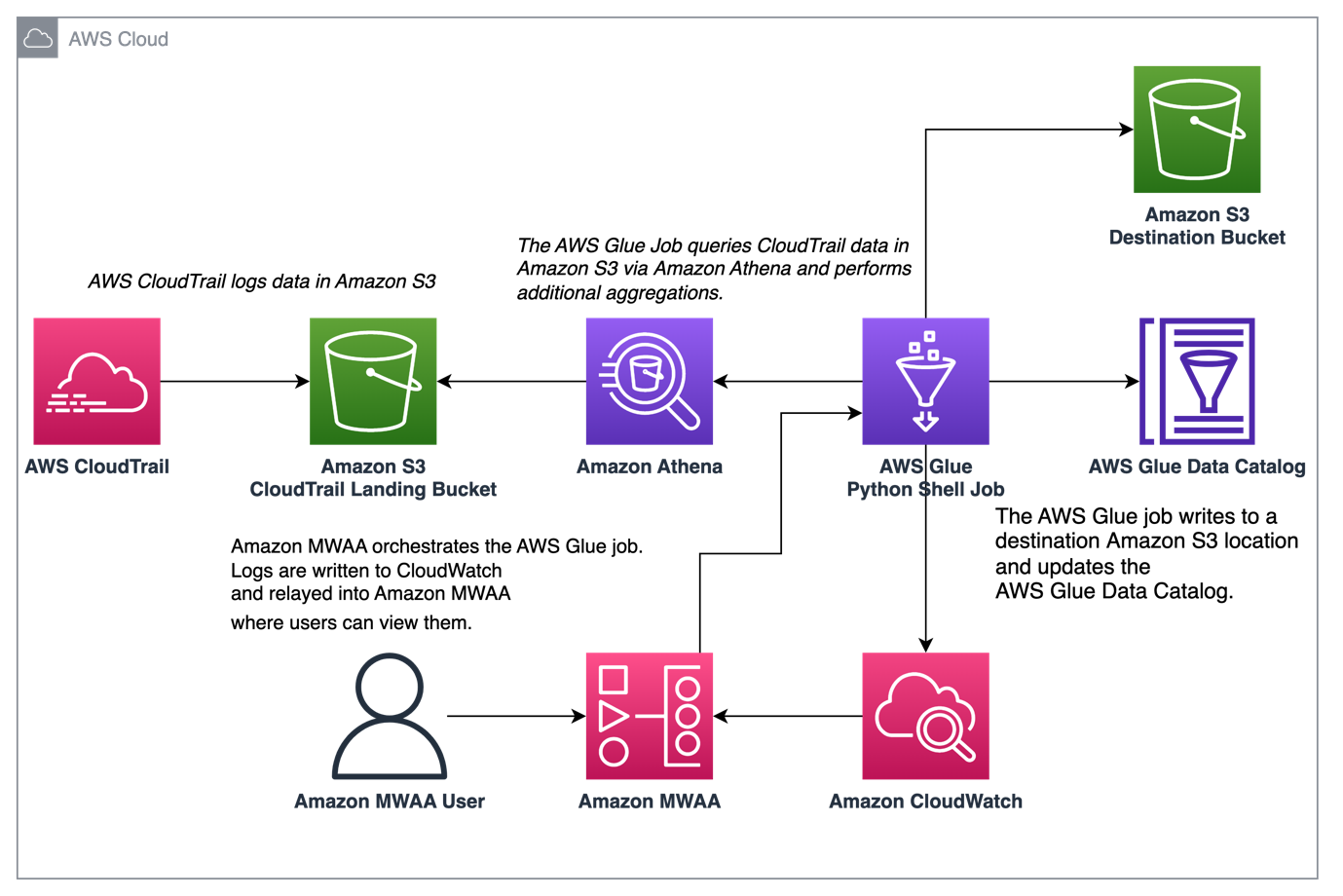
The following diagram illustrates our solution architecture.

Prerequisites

You need the following prerequisites:

Set up the Amazon MWAA environment

For instructions on creating your environment, refer to Create an Amazon MWAA environment. For existing users, we recommend upgrading to version 2.4.3 to take advantage of the observability enhancements featured in this post.

The steps to upgrade Amazon MWAA to version 2.4.3 differ depending on whether the current version is 1.10.12 or 2.2.2. We discuss both options in this post.

Prerequisites for setting up an Amazon MWAA environment

You must meet the following prerequisites:

Upgrade from version 1.10.12 to 2.4.3

If you’re using Amazon MWAA version 1.10.12, refer to Migrating to a new Amazon MWAA environment to upgrade to 2.4.3.

Upgrade from version 2.0.2 or 2.2.2 to 2.4.3

If you’re using Amazon MWAA environment version 2.2.2 or lower, complete the following steps:

  1. Create a requirements.txt for any custom dependencies with specific versions required for your DAGs.
  2. Upload the file to Amazon S3 in the appropriate location where the Amazon MWAA environment points to the requirements.txt for installing dependencies.
  3. Follow the steps in Migrating to a new Amazon MWAA environment and select version 2.4.3.

Update your DAGs

Customers who upgraded from an older Amazon MWAA environment may need to make updates to existing DAGs. In Airflow version 2.4.3, the Airflow environment will use the Amazon provider package version 6.0.0 by default. This package may include some potentially breaking changes, such as changes to operator names. For example, the AWSGlueJobOperator has been deprecated and replaced with the GlueJobOperator. To maintain compatibility, update your Airflow DAGs by replacing any deprecated or unsupported operators from previous versions with the new ones. Complete the following steps:

  1. Navigate to Amazon AWS Operators.
  2. Select the appropriate version installed in your Amazon MWAA instance (6.0.0. by default) to find a list of supported Airflow operators.
  3. Make the necessary changes in the existing DAG code and upload the modified files to the DAG location in Amazon S3.

Orchestrate the AWS Glue job from Airflow

This section covers the details of orchestrating an AWS Glue job within Airflow DAGs. Airflow eases the development of data pipelines with dependencies between heterogeneous systems such as on-premises processes, external dependencies, other AWS services, and more.

Orchestrate CloudTrail log aggregation with AWS Glue and Amazon MWAA

In this example, we go through a use case of using Amazon MWAA to orchestrate an AWS Glue Python Shell job that persists aggregated metrics based on CloudTrail logs.

CloudTrail enables visibility into AWS API calls that are being made in your AWS account. A common use case with this data would be to gather usage metrics on principals acting on your account’s resources for auditing and regulatory needs.

As CloudTrail events are being logged, they are delivered as JSON files in Amazon S3, which aren’t ideal for analytical queries. We want to aggregate this data and persist it as Parquet files to allow for optimal query performance. As an initial step, we can use Athena to do the initial querying of the data before doing additional aggregations in our AWS Glue job. For more information about creating an AWS Glue Data Catalog table, refer to Creating the table for CloudTrail logs in Athena using partition projection data. After we’ve explored the data via Athena and decided what metrics we want to retain in aggregate tables, we can create an AWS Glue job.

Create an CloudTrail table in Athena

First, we need to create a table in our Data Catalog that allows CloudTrail data to be queried via Athena. The following sample query creates a table with two partitions on the Region and date (called snapshot_date). Be sure to replace the placeholders for your CloudTrail bucket, AWS account ID, and CloudTrail table name:

create external table if not exists `<<<CLOUDTRAIL_TABLE_NAME>>>`(
  `eventversion` string comment 'from deserializer', 
  `useridentity` struct<type:string,principalid:string,arn:string,accountid:string,invokedby:string,accesskeyid:string,username:string,sessioncontext:struct<attributes:struct<mfaauthenticated:string,creationdate:string>,sessionissuer:struct<type:string,principalid:string,arn:string,accountid:string,username:string>>> comment 'from deserializer', 
  `eventtime` string comment 'from deserializer', 
  `eventsource` string comment 'from deserializer', 
  `eventname` string comment 'from deserializer', 
  `awsregion` string comment 'from deserializer', 
  `sourceipaddress` string comment 'from deserializer', 
  `useragent` string comment 'from deserializer', 
  `errorcode` string comment 'from deserializer', 
  `errormessage` string comment 'from deserializer', 
  `requestparameters` string comment 'from deserializer', 
  `responseelements` string comment 'from deserializer', 
  `additionaleventdata` string comment 'from deserializer', 
  `requestid` string comment 'from deserializer', 
  `eventid` string comment 'from deserializer', 
  `resources` array<struct<arn:string,accountid:string,type:string>> comment 'from deserializer', 
  `eventtype` string comment 'from deserializer', 
  `apiversion` string comment 'from deserializer', 
  `readonly` string comment 'from deserializer', 
  `recipientaccountid` string comment 'from deserializer', 
  `serviceeventdetails` string comment 'from deserializer', 
  `sharedeventid` string comment 'from deserializer', 
  `vpcendpointid` string comment 'from deserializer')
PARTITIONED BY ( 
  `region` string,
  `snapshot_date` string)
ROW FORMAT SERDE 
  'com.amazon.emr.hive.serde.CloudTrailSerde' 
STORED AS INPUTFORMAT 
  'com.amazon.emr.cloudtrail.CloudTrailInputFormat' 
OUTPUTFORMAT 
  'org.apache.hadoop.hive.ql.io.HiveIgnoreKeyTextOutputFormat'
LOCATION
  's3://<<<CLOUDTRAIL_BUCKET>>>/AWSLogs/<<<ACCOUNT_ID>>>/CloudTrail/'
TBLPROPERTIES (
  'projection.enabled'='true', 
  'projection.region.type'='enum',
  'projection.region.values'='us-east-2,us-east-1,us-west-1,us-west-2,af-south-1,ap-east-1,ap-south-1,ap-northeast-3,ap-northeast-2,ap-southeast-1,ap-southeast-2,ap-northeast-1,ca-central-1,eu-central-1,eu-west-1,eu-west-2,eu-south-1,eu-west-3,eu-north-1,me-south-1,sa-east-1',
  'projection.snapshot_date.format'='yyyy/mm/dd', 
  'projection.snapshot_date.interval'='1', 
  'projection.snapshot_date.interval.unit'='days', 
  'projection.snapshot_date.range'='2020/10/01,now', 
  'projection.snapshot_date.type'='date',
  'storage.location.template'='s3://<<<CLOUDTRAIL_BUCKET>>>/AWSLogs/<<<ACCOUNT_ID>>>/CloudTrail/${region}/${snapshot_date}')

Run the preceding query on the Athena console, and note the table name and AWS Glue Data Catalog database where it was created. We use these values later in the Airflow DAG code.

Sample AWS Glue job code

The following code is a sample AWS Glue Python Shell job that does the following:

  • Takes arguments (which we pass from our Amazon MWAA DAG) on what day’s data to process
  • Uses the AWS SDK for Pandas to run an Athena query to do the initial filtering of the CloudTrail JSON data outside AWS Glue
  • Uses Pandas to do simple aggregations on the filtered data
  • Outputs the aggregated data to the AWS Glue Data Catalog in a table
  • Uses logging during processing, which will be visible in Amazon MWAA
import awswrangler as wr
import pandas as pd
import sys
import logging
from awsglue.utils import getResolvedOptions
from datetime import datetime, timedelta

# Logging setup, redirects all logs to stdout
LOGGER = logging.getLogger()
formatter = logging.Formatter('%(asctime)s.%(msecs)03d %(levelname)s %(module)s - %(funcName)s: %(message)s')
streamHandler = logging.StreamHandler(sys.stdout)
streamHandler.setFormatter(formatter)
LOGGER.addHandler(streamHandler)
LOGGER.setLevel(logging.INFO)

LOGGER.info(f"Passed Args :: {sys.argv}")

sql_query_template = """
select
region,
useridentity.arn,
eventsource,
eventname,
useragent

from "{cloudtrail_glue_db}"."{cloudtrail_table}"
where snapshot_date='{process_date}'
and region in ('us-east-1','us-east-2')
"""

required_args = ['CLOUDTRAIL_GLUE_DB',
                'CLOUDTRAIL_TABLE',
                'TARGET_BUCKET',
                'TARGET_DB',
                'TARGET_TABLE',
                'ACCOUNT_ID']
arg_keys = [*required_args, 'PROCESS_DATE'] if '--PROCESS_DATE' in sys.argv else required_args
JOB_ARGS = getResolvedOptions ( sys.argv, arg_keys)

LOGGER.info(f"Parsed Args :: {JOB_ARGS}")

# if process date was not passed as an argument, process yesterday's data
process_date = (
    JOB_ARGS['PROCESS_DATE']
    if JOB_ARGS.get('PROCESS_DATE','NONE') != "NONE" 
    else (datetime.today() - timedelta(days=1)).strftime("%Y-%m-%d") 
)

LOGGER.info(f"Taking snapshot for :: {process_date}")

RAW_CLOUDTRAIL_DB = JOB_ARGS['CLOUDTRAIL_GLUE_DB']
RAW_CLOUDTRAIL_TABLE = JOB_ARGS['CLOUDTRAIL_TABLE']
TARGET_BUCKET = JOB_ARGS['TARGET_BUCKET']
TARGET_DB = JOB_ARGS['TARGET_DB']
TARGET_TABLE = JOB_ARGS['TARGET_TABLE']
ACCOUNT_ID = JOB_ARGS['ACCOUNT_ID']

final_query = sql_query_template.format(
    process_date=process_date.replace("-","/"),
    cloudtrail_glue_db=RAW_CLOUDTRAIL_DB,
    cloudtrail_table=RAW_CLOUDTRAIL_TABLE
)

LOGGER.info(f"Running Query :: {final_query}")

raw_cloudtrail_df = wr.athena.read_sql_query(
    sql=final_query,
    database=RAW_CLOUDTRAIL_DB,
    ctas_approach=False,
    s3_output=f"s3://{TARGET_BUCKET}/athena-results",
)

raw_cloudtrail_df['ct']=1

agg_df = raw_cloudtrail_df.groupby(['arn','region','eventsource','eventname','useragent'],as_index=False).agg({'ct':'sum'})
agg_df['snapshot_date']=process_date

LOGGER.info(agg_df.info(verbose=True))

upload_path = f"s3://{TARGET_BUCKET}/{TARGET_DB}/{TARGET_TABLE}"

if not agg_df.empty:
    LOGGER.info(f"Upload to {upload_path}")
    try:
        response = wr.s3.to_parquet(
            df=agg_df,
            path=upload_path,
            dataset=True,
            database=TARGET_DB,
            table=TARGET_TABLE,
            mode="overwrite_partitions",
            schema_evolution=True,
            partition_cols=["snapshot_date"],
            compression="snappy",
            index=False
        )
        LOGGER.info(response)
    except Exception as exc:
        LOGGER.error("Uploading to S3 failed")
        LOGGER.exception(exc)
        raise exc
else:
    LOGGER.info(f"Dataframe was empty, nothing to upload to {upload_path}")

The following are some key advantages in this AWS Glue job:

  • We use an Athena query to ensure initial filtering is done outside of our AWS Glue job. As such, a Python Shell job with minimal compute is still sufficient for aggregating a large CloudTrail dataset.
  • We ensure the analytics library-set option is turned on when creating our AWS Glue job to use the AWS SDK for Pandas library.

Create an AWS Glue job

Complete the following steps to create your AWS Glue job:

  1. Copy the script in the preceding section and save it in a local file. For this post, the file is called script.py.
  2. On the AWS Glue console, choose ETL jobs in the navigation pane.
  3. Create a new job and select Python Shell script editor.
  4. Select Upload and edit an existing script and upload the file you saved locally.
  5. Choose Create.

  1. On the Job details tab, enter a name for your AWS Glue job.
  2. For IAM role, choose an existing role or create a new role that has the required permissions for Amazon S3, AWS Glue, and Athena. The role needs to query the CloudTrail table you created earlier and write to an output location.

You can use the following sample policy code. Replace the placeholders with your CloudTrail logs bucket, output table name, output AWS Glue database, output S3 bucket, CloudTrail table name, AWS Glue database containing the CloudTrail table, and your AWS account ID.

{
    "Version": "2012-10-17",
    "Statement": [
        {
            "Action": [
                "s3:List*",
                "s3:Get*"
            ],
            "Resource": [
                "arn:aws:s3:::<<<CLOUDTRAIL_LOGS_BUCKET>>>/*",
                "arn:aws:s3:::<<<CLOUDTRAIL_LOGS_BUCKET>>>*"
            ],
            "Effect": "Allow",
            "Sid": "GetS3CloudtrailData"
        },
        {
            "Action": [
                "glue:Get*",
                "glue:BatchGet*"
            ],
            "Resource": [
                "arn:aws:glue:us-east-1:<<<YOUR_AWS_ACCT_ID>>>:catalog",
                "arn:aws:glue:us-east-1:<<<YOUR_AWS_ACCT_ID>>>:database/<<<GLUE_DB_WITH_CLOUDTRAIL_TABLE>>>",
                "arn:aws:glue:us-east-1:<<<YOUR_AWS_ACCT_ID>>>:table/<<<GLUE_DB_WITH_CLOUDTRAIL_TABLE>>>/<<<CLOUDTRAIL_TABLE>>>*"
            ],
            "Effect": "Allow",
            "Sid": "GetGlueCatalogCloudtrailData"
        },
        {
            "Action": [
                "s3:PutObject*",
                "s3:Abort*",
                "s3:DeleteObject*",
                "s3:GetObject*",
                "s3:GetBucket*",
                "s3:List*",
                "s3:Head*"
            ],
            "Resource": [
                "arn:aws:s3:::<<<OUTPUT_S3_BUCKET>>>",
                "arn:aws:s3:::<<<OUTPUT_S3_BUCKET>>>/<<<OUTPUT_GLUE_DB>>>/<<<OUTPUT_TABLE_NAME>>>/*"
            ],
            "Effect": "Allow",
            "Sid": "WriteOutputToS3"
        },
        {
            "Action": [
                "glue:CreateTable",
                "glue:CreatePartition",
                "glue:UpdatePartition",
                "glue:UpdateTable",
                "glue:DeleteTable",
                "glue:DeletePartition",
                "glue:BatchCreatePartition",
                "glue:BatchDeletePartition",
                "glue:Get*",
                "glue:BatchGet*"
            ],
            "Resource": [
                "arn:aws:glue:us-east-1:<<<YOUR_AWS_ACCT_ID>>>:catalog",
                "arn:aws:glue:us-east-1:<<<YOUR_AWS_ACCT_ID>>>:database/<<<OUTPUT_GLUE_DB>>>",
                "arn:aws:glue:us-east-1:<<<YOUR_AWS_ACCT_ID>>>:table/<<<OUTPUT_GLUE_DB>>>/<<<OUTPUT_TABLE_NAME>>>*"
            ],
            "Effect": "Allow",
            "Sid": "AllowOutputToGlue"
        },
        {
            "Action": [
                "logs:CreateLogGroup",
                "logs:CreateLogStream",
                "logs:PutLogEvents"
            ],
            "Resource": "arn:aws:logs:*:*:/aws-glue/*",
            "Effect": "Allow",
            "Sid": "LogsAccess"
        },
        {
            "Action": [
                "s3:GetObject*",
                "s3:GetBucket*",
                "s3:List*",
                "s3:DeleteObject*",
                "s3:PutObject",
                "s3:PutObjectLegalHold",
                "s3:PutObjectRetention",
                "s3:PutObjectTagging",
                "s3:PutObjectVersionTagging",
                "s3:Abort*"
            ],
            "Resource": [
                "arn:aws:s3:::<<<ATHENA_RESULTS_BUCKET>>>",
                "arn:aws:s3:::<<<ATHENA_RESULTS_BUCKET>>>/*"
            ],
            "Effect": "Allow",
            "Sid": "AccessToAthenaResults"
        },
        {
            "Action": [
                "athena:StartQueryExecution",
                "athena:StopQueryExecution",
                "athena:GetDataCatalog",
                "athena:GetQueryResults",
                "athena:GetQueryExecution"
            ],
            "Resource": [
                "arn:aws:glue:us-east-1:<<<YOUR_AWS_ACCT_ID>>>:catalog",
                "arn:aws:athena:us-east-1:<<<YOUR_AWS_ACCT_ID>>>:datacatalog/AwsDataCatalog",
                "arn:aws:athena:us-east-1:<<<YOUR_AWS_ACCT_ID>>>:workgroup/primary"
            ],
            "Effect": "Allow",
            "Sid": "AllowAthenaQuerying"
        }
    ]
}

For Python version, choose Python 3.9.

  1. Select Load common analytics libraries.
  2. For Data processing units, choose 1 DPU.
  3. Leave the other options as default or adjust as needed.

  1. Choose Save to save your job configuration.

Configure an Amazon MWAA DAG to orchestrate the AWS Glue job

The following code is for a DAG that can orchestrate the AWS Glue job that we created. We take advantage of the following key features in this DAG:

"""Sample DAG"""
import airflow.utils
from airflow.providers.amazon.aws.operators.glue import GlueJobOperator
from airflow import DAG
from datetime import timedelta
import airflow.utils

# allow backfills via DAG run parameters
process_date = '{{ dag_run.conf.get("process_date") if dag_run.conf.get("process_date") else "NONE" }}'

dag = DAG(
    dag_id = "CLOUDTRAIL_LOGS_PROCESSING",
    default_args = {
        'depends_on_past':False, 
        'start_date':airflow.utils.dates.days_ago(0),
        'retries':1,
        'retry_delay':timedelta(minutes=5),
        'catchup': False
    },
    schedule_interval = None, # None for unscheduled or a cron expression - E.G. "00 12 * * 2" - at 12noon Tuesday
    dagrun_timeout = timedelta(minutes=30),
    max_active_runs = 1,
    max_active_tasks = 1 # since there is only one task in our DAG
)

## Log ingest. Assumes Glue Job is already created
glue_ingestion_job = GlueJobOperator(
    task_id="<<<some-task-id>>>",
    job_name="<<<GLUE_JOB_NAME>>>",
    script_args={
        "--ACCOUNT_ID":"<<<YOUR_AWS_ACCT_ID>>>",
        "--CLOUDTRAIL_GLUE_DB":"<<<GLUE_DB_WITH_CLOUDTRAIL_TABLE>>>",
        "--CLOUDTRAIL_TABLE":"<<<CLOUDTRAIL_TABLE>>>",
        "--TARGET_BUCKET": "<<<OUTPUT_S3_BUCKET>>>",
        "--TARGET_DB": "<<<OUTPUT_GLUE_DB>>>", # should already exist
        "--TARGET_TABLE": "<<<OUTPUT_TABLE_NAME>>>",
        "--PROCESS_DATE": process_date
    },
    region_name="us-east-1",
    dag=dag,
    verbose=True
)

glue_ingestion_job

Increase observability of AWS Glue jobs in Amazon MWAA

The AWS Glue jobs write logs to Amazon CloudWatch. With the recent observability enhancements to Airflow’s Amazon provider package, these logs are now integrated with Airflow task logs. This consolidation provides Airflow users with end-to-end visibility directly in the Airflow UI, eliminating the need to search in CloudWatch or the AWS Glue console.

To use this feature, ensure the IAM role attached to the Amazon MWAA environment has the following permissions to retrieve and write the necessary logs:

{
  "Version": "2012-10-17",
  "Statement": [
    {
      "Effect": "Allow",
      "Action": [
        "logs:CreateLogGroup",
        "logs:CreateLogStream",
        "logs:PutLogEvents",
        "logs:GetLogEvents",
        "logs:GetLogRecord",
        "logs:DescribeLogStreams",
        "logs:FilterLogEvents",
        "logs:GetLogGroupFields",
        "logs:GetQueryResults",
        
      ],
      "Resource": [
        "arn:aws:logs:*:*:log-group:airflow-243-<<<Your environment name>>>-*"--Your Amazon MWAA Log Stream Name
      ]
    }
  ]
}

If verbose=true, the AWS Glue job run logs show in the Airflow task logs. The default is false. For more information, refer to Parameters.

When enabled, the DAGs read from the AWS Glue job’s CloudWatch log stream and relay them to the Airflow DAG AWS Glue job step logs. This provides detailed insights into an AWS Glue job’s run in real time via the DAG logs. Note that AWS Glue jobs generate an output and error CloudWatch log group based on the job’s STDOUT and STDERR, respectively. All logs in the output log group and exception or error logs from the error log group are relayed into Amazon MWAA.

AWS admins can now limit a support team’s access to only Airflow, making Amazon MWAA the single pane of glass on job orchestration and job health management. Previously, users needed to check AWS Glue job run status in the Airflow DAG steps and retrieve the job run identifier. They then needed to access the AWS Glue console to find the job run history, search for the job of interest using the identifier, and finally navigate to the job’s CloudWatch logs to troubleshoot.

Create the DAG

To create the DAG, complete the following steps:

  1. Save the preceding DAG code to a local .py file, replacing the indicated placeholders.

The values for your AWS account ID, AWS Glue job name, AWS Glue database with CloudTrail table, and CloudTrail table name should already be known. You can adjust the output S3 bucket, output AWS Glue database, and output table name as needed, but make sure the AWS Glue job’s IAM role that you used earlier is configured accordingly.

  1. On the Amazon MWAA console, navigate to your environment to see where the DAG code is stored.

The DAGs folder is the prefix within the S3 bucket where your DAG file should be placed.

  1. Upload your edited file there.

  1. Open the Amazon MWAA console to confirm that the DAG appears in the table.

Run the DAG

To run the DAG, complete the following steps:

  1. Choose from the following options:
    • Trigger DAG – This causes yesterday’s data to be used as the data to process
    • Trigger DAG w/ config – With this option, you can pass in a different date, potentially for backfills, which is retrieved using dag_run.conf in the DAG code and then passed into the AWS Glue job as a parameter

The following screenshot shows the additional configuration options if you choose Trigger DAG w/ config.

  1. Monitor the DAG as it runs.
  2. When the DAG is complete, open the run’s details.

On the right pane, you can view the logs, or choose Task Instance Details for a full view.

  1. View the AWS Glue job output logs in Amazon MWAA without using the AWS Glue console thanks to the GlueJobOperator verbose flag.

The AWS Glue job will have written results to the output table you specified.

  1. Query this table via Athena to confirm it was successful.

Summary

Amazon MWAA now provides a single place to track AWS Glue job status and enables you to use the Airflow console as the single pane of glass for job orchestration and health management. In this post, we walked through the steps to orchestrate AWS Glue jobs via Airflow using GlueJobOperator. With the new observability enhancements, you can seamlessly troubleshoot AWS Glue jobs in a unified experience. We also demonstrated how to upgrade your Amazon MWAA environment to a compatible version, update dependencies, and change the IAM role policy accordingly.

For more information about common troubleshooting steps, refer to Troubleshooting: Creating and updating an Amazon MWAA environment. For in-depth details of migrating to an Amazon MWAA environment, refer to Upgrading from 1.10 to 2. To learn about the open-source code changes for increased observability of AWS Glue jobs in the Airflow Amazon provider package, refer to the relay logs from AWS Glue jobs.

Finally, we recommend visiting the AWS Big Data Blog for other material on analytics, ML, and data governance on AWS.


About the Authors

Rushabh Lokhande is a Data & ML Engineer with the AWS Professional Services Analytics Practice. He helps customers implement big data, machine learning, and analytics solutions. Outside of work, he enjoys spending time with family, reading, running, and golf.

Ryan Gomes is a Data & ML Engineer with the AWS Professional Services Analytics Practice. He is passionate about helping customers achieve better outcomes through analytics and machine learning solutions in the cloud. Outside of work, he enjoys fitness, cooking, and spending quality time with friends and family.

Vishwa Gupta is a Senior Data Architect with the AWS Professional Services Analytics Practice. He helps customers implement big data and analytics solutions. Outside of work, he enjoys spending time with family, traveling, and trying new food.

Asustor Flashstor 12 Pro FS6712X Review 12x M.2 SSD and 10Gbase-T NAS

Post Syndicated from Eric Smith original https://www.servethehome.com/asustor-flashstor-12-pro-fs6712x-review-12x-m-2-ssd-and-10gbase-t-nas/

We review the Asustor Flashstor 12 Pro FS6712X getting into the topology, performance, power, and noise of this 12x M.2 SSD and 10Gbase-T NAS

The post Asustor Flashstor 12 Pro FS6712X Review 12x M.2 SSD and 10Gbase-T NAS appeared first on ServeTheHome.

Amazon SageMaker Geospatial Capabilities Now Generally Available with Security Updates and More Use Case Samples

Post Syndicated from Channy Yun original https://aws.amazon.com/blogs/aws/amazon-sagemaker-geospatial-capabilities-now-generally-available-with-security-updates-and-more-use-case-samples/

At AWS re:Invent 2022, we previewed Amazon SageMaker geospatial capabilities, allowing data scientists and machine learning (ML) engineers to build, train, and deploy ML models using geospatial data. Geospatial ML with Amazon SageMaker supports access to readily available geospatial data, purpose-built processing operations and open source libraries, pre-trained ML models, and built-in visualization tools with Amazon SageMaker’s geospatial capabilities.

During the preview, we had lots of interest and great feedback from customers. Today, Amazon SageMaker geospatial capabilities are generally available with new security updates and additional sample use cases.

Introducing Geospatial ML features with SageMaker Studio
To get started, use the quick setup to launch Amazon SageMaker Studio in the US West (Oregon) Region. Make sure to use the default Jupyter Lab 3 version when you create a new user in the Studio. Now you can navigate to the homepage in SageMaker Studio. Then select the Data menu and click on Geospatial.

Here is an overview of three key Amazon SageMaker geospatial capabilities:

  • Earth Observation jobs – Acquire, transform, and visualize satellite imagery data using purpose-built geospatial operations or pre-trained ML models to make predictions and get useful insights.
  • Vector Enrichment jobs – Enrich your data with operations, such as converting geographical coordinates to readable addresses.
  • Map Visualization – Visualize satellite images or map data uploaded from a CSV, JSON, or GeoJSON file.

You can create all Earth Observation Jobs (EOJ) in the SageMaker Studio notebook to process satellite data using purpose-built geospatial operations. Here is a list of purpose-built geospatial operations that are supported by the SageMaker Studio notebook:

  • Band Stacking – Combine multiple spectral properties to create a single image.
  • Cloud Masking – Identify cloud and cloud-free pixels to get improved and accurate satellite imagery.
  • Cloud Removal – Remove pixels containing parts of a cloud from satellite imagery.
  • Geomosaic – Combine multiple images for greater fidelity.
  • Land Cover Segmentation – Identify land cover types such as vegetation and water in satellite imagery.
  • Resampling – Scale images to different resolutions.
  • Spectral Index – Obtain a combination of spectral bands that indicate the abundance of features of interest.
  • Temporal Statistics – Calculate statistics through time for multiple GeoTIFFs in the same area.
  • Zonal Statistics – Calculate statistics on user-defined regions.

A Vector Enrichment Job (VEJ) enriches your location data through purpose-built operations for reverse geocoding and map matching. While you need to use a SageMaker Studio notebook to execute a VEJ, you can view all the jobs you create using the user interface. To use the visualization in the notebook, you first need to export your output to your Amazon S3 bucket.

  • Reverse Geocoding – Convert coordinates (latitude and longitude) to human-readable addresses.
  • Map Matching – Snap inaccurate GPS coordinates to road segments.

Using the Map Visualization, you can visualize geospatial data, the inputs to your EOJ or VEJ jobs as well as the outputs exported from your Amazon Simple Storage Service (Amazon S3) bucket.

Security Updates
At GA, we have two major security updates—AWS Key Management Service (AWS KMS) for customer managed AWS KMS key support and Amazon Virtual Private Cloud (Amazon VPC) for geospatial operations in the customer Amazon VPC environment.

AWS KMS customer managed keys offer increased flexibility and control by enabling customers to use their own keys to encrypt geospatial workloads.

You can use KmsKeyId to specify your own key in StartEarthObservationJob and StartVectorEnrichmentJob as an optional parameter. If the customer doesn’t provide KmsKeyId, a service owned key will be used to encrypt the customer content. To learn more, see SageMaker geospatial capabilities AWS KMS Support in the AWS documentation.

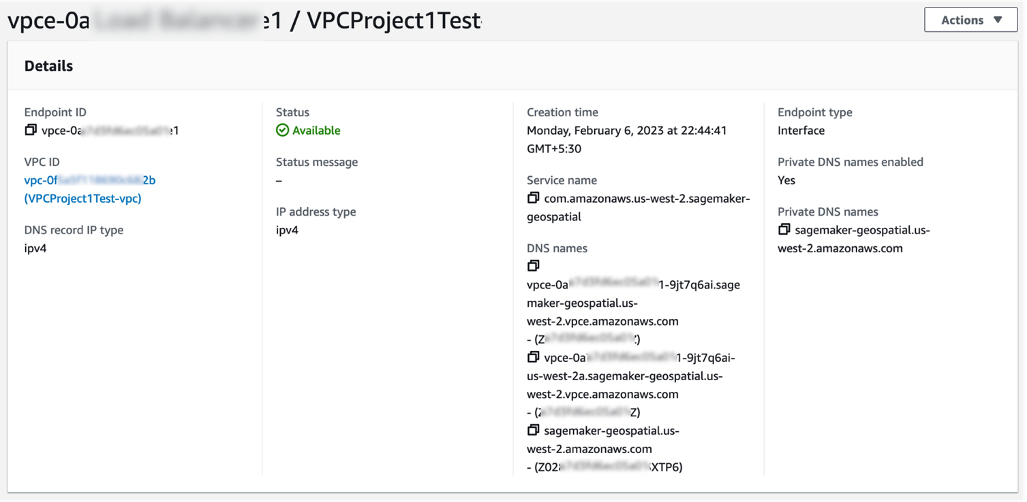
Using Amazon VPC, you have full control over your network environment and can more securely connect to your geospatial workloads on AWS. You can use SageMaker Studio or Notebook in your Amazon VPC environment for SageMaker geospatial operations and execute SageMaker geospatial API operations through an interface VPC endpoint in SageMaker geospatial operations.

To get started with Amazon VPC support, configure Amazon VPC on SageMaker Studio Domain and create a SageMaker geospatial VPC endpoint in your VPC in the Amazon VPC console. Choose the service name as com.amazonaws.us-west-2.sagemaker-geospatial and select the VPC in which to create the VPC endpoint.

All Amazon S3 resources that are used for input or output in EOJ and VEJ operations should have internet access enabled. If you have no direct access to those Amazon S3 resources via the internet, you can grant SageMaker geospatial VPC endpoint ID access to it by changing the corresponding S3 bucket policy. To learn more, see SageMaker geospatial capabilities Amazon VPC Support in the AWS documentation.

Example Use Case for Geospatial ML
Customers across various industries use Amazon SageMaker geospatial capabilities for real-world applications.

Maximize Harvest Yield and Food Security
Digital farming consists of applying digital solutions to help farmers optimize crop production in agriculture through the use of advanced analytics and machine learning. Digital farming applications require working with geospatial data, including satellite imagery of the areas where farmers have their fields located.

You can use SageMaker to identify farm field boundaries in satellite imagery through pre-trained models for land cover classification. Learn about How Xarvio accelerated pipelines of spatial data for digital farming with Amazon SageMaker Geospatial in the AWS Machine Learning Blog. You can find an end-to-end digital farming example notebook via the GitHub repository.

Damage Assessment
As the frequency and severity of natural disasters increase, it’s important that we equip decision-makers and first responders with fast and accurate damage assessment. You can use geospatial imagery to predict natural disaster damage and geospatial data in the immediate aftermath of a natural disaster to rapidly identify damage to buildings, roads, or other critical infrastructure.

From an example notebook, you can train, deploy, and predict natural disaster damage from the floods in Rochester, Australia, in mid-October 2022. We use images from before and after the disaster as input to its trained ML model. The results of the segmentation mask for the Rochester floods are shown in the following images. Here we can see that the model has identified locations within the flooded region as likely damaged.

You can train and deploy a geospatial segmentation model to assess wildfire damages using multi-temporal Sentinel-2 satellite data via GitHub repository. The area of interest for this example is located in Northern California, from a region that was affected by the Dixie Wildfire in 2021.

Monitor Climate Change
Earth’s climate change increases the risk of drought due to global warming. You can see how to acquire data, perform analysis, and visualize the changes with SageMaker geospatial capabilities to monitor shrinking shoreline caused by climate change in the Lake Mead example, the largest reservoir in the US.

Lake Mead surface area animation

You can find the notebook code for this example in the GitHub repository.

Predict Retail Demand
The new notebook example demonstrates how to use SageMaker geospatial capabilities to perform a vector-based map-matching operation and visualize the results. Map matching allows you to snap noisy GPS coordinates to road segments. With Amazon SageMaker geospatial capabilities, it is possible to perform a VEJ for map matching. This type of job takes a CSV file with route information (such as longitude, latitude, and timestamps of GPS measurements) as input and produces a GeoJSON file that contains the predicted route.

Support Sustainable Urban Development
Arup, one of our customers, uses digital technologies like machine learning to explore the impact of heat on urban areas and the factors that influence local temperatures to deliver better design and support sustainable outcomes. Urban Heat Islands and the associated risks and discomforts are one of the biggest challenges cities are facing today.

Using Amazon SageMaker geospatial capabilities, Arup identifies and measures urban heat factors with earth observation data, which significantly accelerated their ability to counsel clients. It enabled its engineering teams to carry out analytics that weren’t possible previously by providing access to increased volumes, types, and analysis of larger datasets. To learn more, see Facilitating Sustainable City Design Using Amazon SageMaker with Arup in AWS customer stories.

Now Available
Amazon SageMaker geospatial capabilities are now generally available in the US West (Oregon) Region. As part of the AWS Free Tier, you can get started with SageMaker geospatial capabilities for free. The Free Tier lasts 30 days and includes 10 free ml.geospatial.interactive compute hours, up to 10 GB of free storage, and no $150 monthly user fee.

After the 30-day free trial period is complete, or if you exceed the Free Tier limits defined above, you pay for the components outlined on the pricing page.

To learn more, see Amazon SageMaker geospatial capabilities and the Developer Guide. Give it a try and send feedback to AWS re:Post for Amazon SageMaker or through your usual AWS support contacts.

Channy

How Cirrusgo enabled rapid resolution with Amazon DevOps Guru

Post Syndicated from Harish Bannai original https://aws.amazon.com/blogs/devops/how-cirrusgo-enabled-rapid-resolution-with-devops-guru/

Image of the Cirrusgo company logo.

In this blog, we will walk through how Cirrusgo used Amazon DevOps Guru for RDS to quickly identify and resolve their operational issue related to database performance and reduce the impact on their business. This capability is offered by Amazon DevOps Guru for RDS which uses machine learning algorithms to help organizations identify and resolve operational issues in their applications and infrastructure.

Challenge:

Knowlegebeam, one of Cirrusgo’s managed service customers, has an e-learning web application that serves as a mission-critical tool for nearly 90,000 teachers. The application tracks daily activities, including teaching and evaluating homework and quizzes submitted by students. Any interruption of the availability of this application causes significant inconvenience to teachers and students, as well as damage to the company’s reputation. Ensuring the continuous and reliable performance of customer workloads is of utmost importance to Cirrusgo.

Identification of Operational issues with Amazon DevOps Guru:

To streamline the troubleshooting process and avoid time-consuming manual analysis of logs, Cirrusgo leveraged the power of Amazon DevOps Guru to monitor Knowledge Beam’s stack. With just a few clicks in the AWS console, Cirrusgo seamlessly enabled DevOps Guru that uses advanced machine learning techniques to analyze Amazon CloudWatch metrics, AWS CloudTrail, and Amazon Relational Database Service (Amazon RDS) Performance Insights. This enables it to quickly identify behaviors that deviate from standard operating patterns and pinpoint the root cause of operational issues.

When users reported difficulty submitting assignments via the e-learning portal, Cirrusgo’s team launched an investigation. The team discovered 4xx and 5xx Amazon Elastic Load Balancing errors in the CloudWatch metrics. There was no additional information available. While examining the load balancer and application logs, the engineers received Amazon DevOps Guru notifications regarding Amazon RDS) replica lag. The team promptly investigated and confirmed the existence of the Amazon RDS replica lag. The team ran commands to stop traffic to the replica instance and shift all traffic to the Amazon RDS primary node. Thanks to DevOps Guru’s insightful recommendations, the team identified and resolved the issue. The team was able to use the root cause of the issue and take additional steps to prevent its recurrence. This included creating an Amazon RDS Read Replica and upgrading the instance type based on the current workload.

Cirrusgo quickly identified and addressed critical operational issues in Knowledge Beam’s application. This enabled them to minimize the immediate impact and enhance their customer’s applications’ future reliability and performance.

Amazon DevOps Guru was very beneficial that helped us identify incidents in Amazon RDS. It provided useful insights we previously didn’t have, and it helped reduce our mitigation time. We implemented it to some accounts we are managing and are taking advantage”, says Mohammed Douglas Otaibi, Technical Co-Founder of Cirrusgo

Conclusion:

This post highlights how Cirrusgo leveraged Amazon DevOps Guru to identify and quickly address anomalous behavior.

Are you looking for a way to improve the monitoring of your Amazon RDS databases? Look no further than Amazon DevOps Guru. With DevOps Guru’s RDS monitoring capabilities, you can gain deep insights into the performance and health of your databases. This includes automatic anomaly detection, proactive recommendations, and alerts for issues that require your attention.

About the authors:

Harish Bannai

Harish Bannai is a Sr. Technical Account Manager at Amazon Web Services. He holds the AWS Solutions Architect Professional, Developer Associate, Analytics Specialty , AWS Database Specialty and Solutions Architect Professional certifications. He works with enterprise customers providing technical assistance on RDS, Database Migration services operational performance and sharing database best practices.

Adnan Bilwani

Adnan Bilwani is a Sr. Senior Specialist at Amazon Web Services. Lucy focuses on improving application qualification and availability by leveraging AWS DevOps services and tools.

Lucy Hartung

Lucy Hartung is a Senior Specialist at Amazon Web Services. Lucy focuses on improving application qualification and availability by leveraging AWS.

[$] Phyr: a potential scatterlist replacement

Post Syndicated from original https://lwn.net/Articles/931943/

The “scatterlist” is a core-kernel data structure used to describe DMA I/O
operations from the point of view of both the CPU and the peripheral
device. Over the years, the shortcomings of scatterlists have become more
apparent, but there has not been a viable replacement on the horizon.
During a memory-management session at the 2023 Linux Storage, Filesystem, Memory-Management
and BPF Summit
, Jason Gunthorpe described a possible alternative, known
alternatively as “phyr”, “physr”, or “rlist”, that might improve on
scatterlists for at least some use cases.

[$] Memory passthrough for virtual machines

Post Syndicated from original https://lwn.net/Articles/931933/

Memory management is tricky enough on it own, but virtualization adds
another twist: now there are two kernels (host and guest) managing the same
memory. This duplicated effort can be wasteful if not implemented
carefully, so it is not surprising that a lot of effort, from both hardware
and software developers, has gone into this problem. As Pasha Tatashin
pointed out during a memory-management-track session at the 2023 Linux Storage, Filesystem, Memory-Management
and BPF Summit
, though, there are still ways in which these systems run
less efficiently than they could. He has put some effort into improving
that situation.

Security updates for Friday

Post Syndicated from original https://lwn.net/Articles/932464/

Security updates have been issued by Fedora (cups-filters, kitty, mingw-LibRaw, nispor, rust-ybaas, and rust-yubibomb), Mageia (kernel-linus), Red Hat (jenkins and jenkins-2-plugins), SUSE (openvswitch and ucode-intel), and Ubuntu (linux-azure, linux-azure-4.15, linux-gcp, linux-gcp-5.15, linux-gke, linux-gke-5.15, linux-gkeop,
linux-oracle-5.15, linux-ibm, linux-oracle, and linux-oem-6.0).

More Node.js APIs in Cloudflare Workers — Streams, Path, StringDecoder

Post Syndicated from James M Snell original http://blog.cloudflare.com/workers-node-js-apis-stream-path/

More Node.js APIs in Cloudflare Workers — Streams, Path, StringDecoder

More Node.js APIs in Cloudflare Workers — Streams, Path, StringDecoder

Today we are announcing support for three additional APIs from Node.js in Cloudflare Workers. This increases compatibility with the existing ecosystem of open source npm packages, allowing you to use your preferred libraries in Workers, even if they depend on APIs from Node.js.

We recently added support for AsyncLocalStorage, EventEmitter, Buffer, assert and parts of util. Today, we are adding support for:

We are also sharing a preview of a new module type, available in the open-source Workers runtime, that mirrors a Node.js environment more closely by making some APIs available as globals, and allowing imports without the node: specifier prefix.

You can start using these APIs today, in the open-source runtime that powers Cloudflare Workers, in local development, and when you deploy your Worker. Get started by enabling the nodejs_compat compatibility flag for your Worker.

Stream

The Node.js streams API is the original API for working with streaming data in JavaScript that predates the WHATWG ReadableStream standard. Now, a full implementation of Node.js streams (based directly on the official implementation provided by the Node.js project) is available within the Workers runtime.

Let's start with a quick example:

import {
  Readable,
  Transform,
} from 'node:stream';

import {
  text,
} from 'node:stream/consumers';

import {
  pipeline,
} from 'node:stream/promises';

// A Node.js-style Transform that converts data to uppercase
// and appends a newline to the end of the output.
class MyTransform extends Transform {
  constructor() {
    super({ encoding: 'utf8' });
  }
  _transform(chunk, _, cb) {
    this.push(chunk.toString().toUpperCase());
    cb();
  }
  _flush(cb) {
    this.push('\n');
    cb();
  }
}

export default {
  async fetch() {
    const chunks = [
      "hello ",
      "from ",
      "the ",
      "wonderful ",
      "world ",
      "of ",
      "node.js ",
      "streams!"
    ];

    function nextChunk(readable) {
      readable.push(chunks.shift());
      if (chunks.length === 0) readable.push(null);
      else queueMicrotask(() => nextChunk(readable));
    }

    // A Node.js-style Readable that emits chunks from the
    // array...
    const readable = new Readable({
      encoding: 'utf8',
      read() { nextChunk(readable); }
    });

    const transform = new MyTransform();
    await pipeline(readable, transform);
    return new Response(await text(transform));
  }
};

In this example we create two Node.js stream objects: one stream.Readable and one stream.Transform. The stream.Readable simply emits a sequence of individual strings, piped through the stream.Transform which converts those to uppercase and appends a new-line as a final chunk.

The example is straightforward and illustrates the basic operation of the Node.js API. For anyone already familiar with using standard WHATWG streams in Workers the pattern here should be recognizable.

The Node.js streams API is used by countless numbers of modules published on npm. Now that the Node.js streams API is available in Workers, many packages that depend on it can be used in your Workers. For example, the split2 module is a simple utility that can break a stream of data up and reassemble it so that every line is a distinct chunk. While simple, the module is downloaded over 13 million times each week and has over a thousand direct dependents on npm (and many more indirect dependents). Previously it was not possible to use split2 within Workers without also pulling in a large and complicated polyfill implementation of streams along with it. Now split2 can be used directly within Workers with no modifications and no additional polyfills. This reduces the size and complexity of your Worker by thousands of lines.

import {
  PassThrough,
} from 'node:stream';

import { default as split2 } from 'split2';

const enc = new TextEncoder();

export default {
  async fetch() {
    const pt = new PassThrough();
    const readable = pt.pipe(split2());

    pt.end('hello\nfrom\nthe\nwonderful\nworld\nof\nnode.js\nstreams!');
    for await (const chunk of readable) {
      console.log(chunk);
    }

    return new Response("ok");
  }
};

Path

The Node.js Path API provides utilities for working with file and directory paths. For example:

import path from "node:path"
path.join('/foo', 'bar', 'baz/asdf', 'quux', '..');

// Returns: '/foo/bar/baz/asdf'

Note that in the Workers implementation of path, the path.win32 variants of the path API are not implemented, and will throw an exception.

StringDecoder

The Node.js StringDecoder API is a simple legacy utility that predates the WHATWG standard TextEncoder/TextDecoder API and serves roughly the same purpose. It is used by Node.js' stream API implementation as well as a number of popular npm modules for the purpose of decoding UTF-8, UTF-16, Latin1, Base64, and Hex encoded data.

import { StringDecoder } from 'node:string_decoder';
const decoder = new StringDecoder('utf8');

const cent = Buffer.from([0xC2, 0xA2]);
console.log(decoder.write(cent));

const euro = Buffer.from([0xE2, 0x82, 0xAC]);
console.log(decoder.write(euro)); 

In the vast majority of cases, your Worker should just keep on using the standard TextEncoder/TextDecoder APIs, but the StringDecoder is available directly for workers to use now without relying on polyfills.

Node.js Compat Modules

One Worker can already be a bundle of multiple assets. This allows a single Worker to be made up of multiple individual ESM modules, CommonJS modules, JSON, text, and binary data files.

Soon there will be a new type of module that can be included in a Worker bundles: the NodeJsCompatModule.

A NodeJsCompatModule is designed to emulate the Node.js environment as much as possible. Within these modules, common Node.js global variables such as process, Buffer, and even __filename will be available. More importantly, it is possible to require() our Node.js core API implementations without using the node: specifier prefix. This maximizes compatibility with existing NPM packages that depend on globals from Node.js being present, or don’t import Node.js APIs using the node: specifier prefix.

Support for this new module type has landed in the open source workerd runtime, with deeper integration with Wrangler coming soon.

What’s next

We’re adding support for more Node.js APIs each month, and as we introduce new APIs, they will be added under the nodejs_compat compatibility flag — no need to take any action or update your compatibility date.

Have an NPM package that you wish worked on Workers, or an API you’d like to be able to use? Join the Cloudflare Developers Discord and tell us what you’re building, and what you’d like to see next.

Cloudflare Queues: messages at your speed with consumer concurrency and explicit acknowledgement

Post Syndicated from Charles Burnett original http://blog.cloudflare.com/messages-at-your-speed-with-concurrency-and-explicit-acknowledgement/

Cloudflare Queues: messages at your speed with consumer concurrency and explicit acknowledgement

Cloudflare Queues: messages at your speed with consumer concurrency and explicit acknowledgement

Communicating between systems can be a balancing act that has a major impact on your business. APIs have limits, billing frequently depends on usage, and end-users are always looking for more speed in the services they use. With so many conflicting considerations, it can feel like a challenge to get it just right. Cloudflare Queues is a tool to make this balancing act simple. With our latest features like consumer concurrency and explicit acknowledgment, it’s easier than ever for developers to focus on writing great code, rather than worrying about the fees and rate limits of the systems they work with.

Queues is a messaging service, enabling developers to send and receive messages across systems asynchronously with guaranteed delivery. It integrates directly with Cloudflare Workers, making for easy message production and consumption working with the many products and services we offer.

What’s new in Queues?

Consumer concurrency

Oftentimes, the systems we pull data from can produce information faster than other systems can consume them. This can occur when consumption involves processing information, storing it, or sending and receiving information to a third party system. The result of which is that sometimes, a queue can fall behind where it should be. At Cloudflare, a queue shouldn't be a quagmire. That’s why we’ve introduced Consumer Concurrency.

With Concurrency, we automatically scale up the amount of consumers needed to match the speed of information coming into any given queue. In this way, customers no longer have to worry about an ever-growing backlog of information bogging down their system.

How it works

When setting up a queue, developers can set a Cloudflare Workers script as a target to send messages to. With concurrency enabled, Cloudflare will invoke multiple instances of the selected Worker script to keep the messages in the queue moving effectively. This feature is enabled by default for every queue and set to automatically scale.

Autoscaling considers the following factors when spinning up consumers:  the number of messages in a queue, the rate of new messages, and successful vs. unsuccessful consumption attempts.

If a queue has enough messages in it, concurrency will increase each time a message batch is successfully processed. Concurrency is decreased when message batches encounter errors. Customers can set a max_concurrency value in the Dashboard or via Wrangler, which caps out how many consumers can be automatically created to perform processing for a given queue.

Setting the max_concurrency value manually can be helpful in the following situations where producer data is provided in bursts, the datasource API is rate limited, and datasource API has higher costs with more usage.

Setting a max concurrency value manually allows customers to optimize their workflows for other factors beyond speed.

// in your wrangler.toml file


[[queues.consumers]]
  queue = "my-queue"

//max concurrency can be set to a number between 1 and 10
//this defines the total amount of consumers running simultaneously

max_concurrency = 7

To learn more about concurrency you can check out our developer documentation here.

Concurrency in practice

It’s baseball season in the US, and for many of us that means fantasy baseball is back! This year is the year we finally write a program that uses data and statistics to pick a winning team, as opposed to picking players based on “feelings” and “vibes”. We’re engineers after all, and baseball is a game of rules. If the Oakland A’s can do it, so can we!

So how do we put this together? We’ll need a few things:

  1. A list of potential players
  2. An API to pull historical game statistics from
  3. A queue to send this data to its consumer
  4. A Worker script to crunch the numbers and generate a score

A developer can pull from a baseball reference API into a Workers script, and from that worker pass this information to a queue. Historical data is… historical, so we can pull data into our queue as fast as the baseball API will allow us. For our list of potential players, we pull statistics for each game they’ve played. This includes everything from batting averages, to balls caught, to game day weather. Score!

//get data from a third party API and pass it along to a queue


const response = await fetch("http://example.com/baseball-stats.json");
const gamesPlayedJSON = await response.json();

for (game in gamesPlayedJSON){
//send JSON to your queue defined in your workers environment
env.baseballqueue.send(jsonData)
}

Our producer Workers script then passes these statistics onto the queue. As each game contains quite a bit of data, this results in hundreds of thousands of “game data” messages waiting to be processed in our queue. Without concurrency, we would have to wait for each batch of messages to be processed one at a time, taking minutes if not longer. But, with Consumer Concurrency enabled, we watch as multiple instances of our worker script invoked to process this information in no time!

Our Worker script would then take these statistics, apply a heuristic, and store the player name and a corresponding quality score into a database like a Workers KV store for easy access by your application presenting the data.

Explicit Acknowledgment

In Queues previously, a failure of a single message in a batch would result in the whole batch being resent to the consumer to be reprocessed. This resulted in extra cycles being spent on messages that were processed successfully, in addition to the failed message attempt. This hurts both customers and developers, slowing processing time, increasing complexity, and increasing costs.

With Explicit Acknowledgment, we give developers the precision and flexibility to handle each message individually in their consumer, negating the need to reprocess entire batches of messages. Developers can now tell their queue whether their consumer has properly processed each message, or alternatively if a specific message has failed and needs to be retried.

An acknowledgment of a message means that that message will not be retried if the batch fails. Only messages that were not acknowledged will be retried. Inversely, a message that is explicitly retried, will be sent again from the queue to be reprocessed without impacting the processing of the rest of the messages currently being processed.

How it works

In your consumer, there are 4 new methods you can call to explicitly acknowledge a given message: .ack(), .retry(), .ackAll(), .retryAll().

Both ack() and retry() can be called on individual messages. ack() tells a queue that the message has been processed successfully and that it can be deleted from the queue, whereas retry() tells the queue that this message should be put back on the queue and delivered in another batch.

async queue(batch, env, ctx) {
    for (const msg of batch.messages) {
	try {
//send our data to a 3rd party for processing
await fetch('https://thirdpartyAPI.example.com/stats', {
	method: 'POST',
	body: msg, 
	headers: {
		'Content-type': 'application/json'
}
});
//acknowledge if successful
msg.ack();
// We don't have to re-process this if subsequent messages fail!
}
catch (error) {
	//send message back to queue for a retry if there's an error
      msg.retry();
		console.log("Error processing", msg, error);
}
    }
  }

ackAll() and retryAll() work similarly, but act on the entire batch of messages instead of individual messages.

For more details check out our developer documentation here.

Explicit Acknowledgment in practice

In the course of making our Fantasy Baseball team picker, we notice that data isn’t always sent correctly from the baseball reference API. This results in data not being correctly parsed and rejected from our player heuristics.

Without Explicit Acknowledgment, the entire batch of baseball statistics would need to be retried. Thankfully, we can use Explicit Acknowledgment to avoid that, and tell our queue which messages were parsed successfully and which were not.

import heuristic from "baseball-heuristic";
export default {
  async queue(batch: MessageBatch, env: Env, ctx: ExecutionContext) {
    for (const msg of batch.messages) {
      try {
        // Calculate the score based on the game stats
        heuristic.generateScore(msg)
        // Explicitly acknowledge results 
        msg.ack()
      } catch (err) {
        console.log(err)
        // Retry just this message
        msg.retry()
      } 
    }
  },
};

Higher throughput

Under the hood, we’ve been working on improvements to further increase the amount of messages per second each queue can handle. In the last few months, that number has quadrupled, improving from 100 to over 400 messages per second.

Scalability can be an essential factor when deciding which services to use to power your application. You want a service that can grow with your business. We are always aiming to improve our message throughput and hope to see this number quadruple again over the next year. We want to grow with you.

What’s next?

As our service grows, we want to provide our customers with more ways to interact with our service beyond the traditional Cloudflare Workers workflow. We know our customers’ infrastructure is often complex, spanning across multiple services. With that in mind, our focus will be on enabling easy connection to services both within the Cloudflare ecosystem and beyond.

R2 as a consumer

Today, the only type of consumer you can configure for a queue is a Workers script. While Workers are incredibly powerful, we want to take it a step further and give customers a chance to write directly to other services, starting with R2. Coming soon, customers will be able to select an R2 bucket in the Cloudflare Dashboard for a Queue to write to directly, no code required. This will save valuable developer time by avoiding the initial setup in a Workers script, and any maintenance that is required as services evolve. With R2 as a first party consumer in Queues, customers can simply select their bucket, and let Cloudflare handle the rest.

HTTP pull

We're also working to allow you to consume messages from existing infrastructure you might have outside of Cloudflare. Cloudflare Queues will provide an HTTP API for each queue from which any consumer can pull batches of messages for processing. Customers simply make a request to the API endpoint for their queue, receive data they requested, then send an acknowledgment that they have received the data, so the queue can continue working on the next batch.

Always working to be faster

For the Queues team, speed is always our focus, as we understand our customers don't want bottlenecks in the performance of their applications. With this in mind the team will be continuing to look for ways to increase the velocity through which developers can build best in class applications on our developer platform. Whether it's reducing message processing time, the amount of code you need to manage, or giving developers control over their application pipeline, we will continue to implement solutions to allow you to focus on just the important things, while we handle the rest.

Cloudflare Queues is currently in Open Beta and ready to power your most complex applications.

Check out our getting started guide and build your service with us today!

The collective thoughts of the interwebz