Седмицата (20–25 март)

Post Syndicated from Надежда Радулова original https://www.toest.bg/sedmitsata-20-25-mart/

Седмицата (20–25 март)

Опасявам се, че както вървят нещата, седмичният ни бюлетин ще се превърне в многосезонен сериал с един основен претендент за престола на главния герой. И то какъв герой – истински херой в развитие и в полёте!

В началото зрителите на сериала го наричахме помежду си с безобидни, смешновати прозвища, навяващи далечни асоциации с капитан Дългия чорап, по случайност свише (морска буря) станал безгрижен крал на безгрижен остров. Както се досещате обаче, тези асоциации са твърде повърхностни, защото в нашия „чунга-чанга“ сериал нито хероят лётчик (пардон, капитан) застава случайно начело на държавния кораб, нито пък България е остров (нищо че хероят всячески се опитва да я откъсне от европейската суша), още по-малко пък безгрижен.

И така, напоследък хероят расте в чин всяка седмица и съвсем заслужено си печели нови прозвища, които вече свързваме с един друг тип герои. С ло-ши-те! Например с дон Домат – злодей и деребей, но всъщност просто раболепен управител и иконом на замъка. Или с троянския кон, който в нашия случай повече прилича на заинатено магаре (с фуражка) на мост.

Притесненията ни обаче са свързани с възможностите за развитие на този толкова ресурсен персонаж (до финалния сезон на сериала през 2027 г. има доста време). И с опасността да заприлича на Онзи-който-не-бива-да-се-назовава или Ти-знаеш-кой… И трайно да ни свърже и обвърже със „смъртножадните“ на изток. (Като споменах изток, ето един филм на „Свободна Европа“ за руската следа в „Неразкритите взривове в сянката на войната на Русия в Украйна“. Изгледайте го, струва си.)

Та на този етап нашият херой лётчик все още диша прахта на Волдемор, но затова пък все по-успешно конкурира Бойко Борисов (и други одиозни фигури в политическото ни настояще). Повече за тези любопитни сродства четете в чудесния анализ на Емилия Милчева „Радев е Борисов и половина“.

На фона на поредната порция президентски гафове (думата „гаф“ в случая е милостиво-мека за срама, който всинца берем) Александър Нуцов насочва вниманието ни към „Геополитиката на Северно море“ и ключовата му роля на един от основните маршрути за диверсификация на газовите доставки от Русия, следователно залог за енергийната стабилност в Европа.

Не само защото все още е март, продължаваме с осмомартенската тема в разказа на Светла Енчева за „Женското лице на бедността в България“. В материала звучат думите на 4 жени, чиито съдби доказват тъжната хипотеза, че бедността има свойството да се възпроизвежда.

В самия край на миналата седмица научихме за смъртта на голямата хърватска писателка с български корен и скиталческа душа Дубравка Угрешич. Загубата на светъл ум в мрачни времена е не просто скръбна, а дълбоко обезкуражаваща. Дано великолепните ѝ книги оцелеят в този свят, който непрестанно забравя уж научените уроци. Именно за оцеляването на високата култура, вярата и възможността за чудо в контекста на все по-ускорената комодификация четем в интервюто с друг един светъл ум, поляка Кшищов Зануси, с когото Стефан Гончаров разговаря по време на 27-мото издание на „София Филм Фест“ и по повод най-новия филм на режисьора „Идеалното число“.

В тазседмичната си литературна рубрика пък Зорница Христова ни запознава с романа на Людмил Тодоров „Смяна на оптиката“, с изследването на проф. Цочо Бояджиев „Зимата през Средновековието“ и с новата стихосбирка на Людмила Миндова „Чуден свят“. Три разнородови и разножанрови книги, които обаче изненадват с различната си тяга към реалността и автентиката на отношенията ни, на живота ни в настоящето, на миналото и историите, от които сме направени.

Без никаква връзка с височайшето посещение на Си Цзинпин при Путин, завършваме месеца и посрещаме пролетта със стихотворението „Устните бясно танцуват“ на съвременния китайски поет Ю Дзиен в превод на Веселин Карастойчев. Избрахме го заради снарядите страст и горест, избухнали в текста – знак, че и този път победата е на страната на пролетта.

Приятно четене!

Friday Squid Blogging: Creating Batteries Out of Squid Cells

Post Syndicated from Bruce Schneier original https://www.schneier.com/blog/archives/2023/03/friday-squid-blogging-creating-batteries-out-of-squid-cells.html

This is fascinating:

“When a squid ends up chipping what’s called its ring tooth, which is the nail underneath its tentacle, it needs to regrow that tooth very rapidly, otherwise it can’t claw its prey,” he explains.

This was intriguing news ­ and it sparked an idea in Hopkins lab where he’d been trying to figure out how to store and transmit heat.

“It diffuses in all directions. There’s no way to capture the heat and move it the way that you would electricity. It’s just not a fundamental law of physics.”

[…]

The tiny brown batteries he mentions are about the size of a chiclet, and Hopkins says it will take a decade or more to create larger batteries that could have commercial value.

As usual, you can also use this squid post to talk about the security stories in the news that I haven’t covered.

Read my blog posting guidelines here.

Garrett: We need better support for SSH host certificates

Post Syndicated from original https://lwn.net/Articles/927251/

Matthew Garrett looks at
the recent disclosure
of GitHub’s private host key, how it probably
came about, and what a better approach to key management might look like.

The main problem is that client tooling just doesn’t handle this
well. OpenSSH has no way to do TOFU for CAs, just the keys
themselves. This means there’s no way to do a git clone
ssh://[email protected]/whatever and get a prompt asking you
to trust Github’s CA. Instead, you need to add a @cert-authority
github.com (key)
line to your known_hosts file by hand, and since
approximately nobody’s going to do that there’s only marginal
benefit in going to the effort to implement this
infrastructure. The most important thing we can do to improve the
security of the SSH ecosystem is to make it easier to use
certificates, and that means improving the behaviour of the
clients.

По буквите: Тодоров, Бояджиев, Миндова

Post Syndicated from Зорница Христова original https://www.toest.bg/po-bukvite-todorov-boyadzhiev-mindova/

Смяна на оптиката“ от Людмил Тодоров

По буквите: Тодоров, Бояджиев, Миндова

София: изд. „Ентусиаст“, 2023

Къщата е обърната с гръб към улицата; отвън изглежда грозна и неугледна. Бащата е обърнат с гръб към света; оттеглил се е на село, не се връща в града, не приема покани, не иска да общува със сина си, с жена си и дъщеря си – да, но никога не се знае.

Вратата на кабинета му понякога се заключва. Възможно е бащата да го няма в къщата – без обяснения. Рисунките му не дават ключ – бащата е бил илюстратор на детски книги, но смята себе си за „само посредник“. Приятелствата му не дават ключ – с някогашния си приятел няма нищо общо, а сега общува само с неприятния за останалите съсед.

По буквите: Тодоров, Бояджиев, Миндова

Ние сме „дъщерята“. Тоест ние, читателите.

Дъщерята, която се опитва да разбере себе си, докато се опитва да разбере баща си; майката не е загадка; майката е толкова последователна в действията си, че ако по случайност не познавах прототипа, бих рекла, че е само скицирана, а не рисувана от натура.

Във всеки случай дъщерята не се затруднява да общува с нея; затруднява се да общува със себе си, затруднява се да разбере привидната ирационалност на действията си – защо понякога избягва приятеля си, понякога е рязка, после готова да се умилква, но само колкото е нужно, защо подозира приятелката си в нещо, но не говори с нея, защо е превърнала библиотеката, в която работи, в пушалня и на практика никой не я използва по предназначение. Дъщерята е наясно със себе си и не се харесва особено, но не се и съди. По-скоро се опитва да се самоанализира; не със систематичните средства на терапията, а с ежедневния монолог, който разкрива мотивите и механизмите един по един, инцидентно, между две неща за вършене, докато белиш картофи например. Или в отрязъците от общуване с другите.
Една дума от бащата, която пада на място.
Какво прави твоят германец?

Приятелят ѝ не е германец, просто е прекалено безропотен в отмятането на задачи. Дори когато дъщерята го кара да прекопае двора в калта.

Ето този вътрешен монолог, в който парчетата саморазбиране са нарядко и вплетени неразделно в тъканта на всички останали мисли, е силата на книгата. Той звучи изключително автентично, далеч от конвенциите на ХIХ век, според които героят се впуска във философски екскурси или инцидентни саморефлексии; далеч е и от потока на съзнанието, понеже нищо във формата на изказа не е забележимо само по себе си. Няма и формална рамка на сюжета – дъщерята отива в къщата, връща се, отива пак и пак. Общуването с близките се случва в една или друга степен или не се случва. Няма формален „аранжимент“ в смисъл на осезаеми литературни похвати, които да напомнят на читателя, че чете книга, а не стои с връзка ключове пред затворения кабинет на баща си. По-скоро усещането е за ясна мелодия, която минава от част в част с няколко променени тона, които внезапно променят целия ѝ смисъл. Препоръчвам.

Зимата през Средновековието“ от Цочо Бояджиев

София: изд. „Изток-Запад“, 2023

Тази книга е съставена от фрагменти. Всъщност самият автор го признава и се извинява в послеслова, че фрагментите са несвързани и незавършени. Това действително се забелязва веднага, особено при неизбежното сравнение с ключовия труд на Цочо Бояджиев „Нощта през Средновековието“ с неговата елегантна структура, състояща се от три части („Absentia lucis“, „Обитателите на нощта“ и „Човекът в нощта“), разделени от три екскурса („Loca Noctuna“, „Мълчанието и гласовете на нощта“ и „Иконография на нощта“). Видима е и разликата в обема – „Нощта“ е близо 600 страници, а „Зимата“ – малко над 100 страници, като книгата внезапно свършва, някак насред темата. Заскобяваме всичко това, защото е заявено открито: проф. Бояджиев пише в послеслова, че се е колебал дали да публикува тези бележки, но в крайна сметка е решил, че биха могли да бъдат полезни за бъдещи изследователи на темата.

И те са наистина извънредно интригуващи, разпалващи апетита; написани са на изящен език и водят въображението през пейзажи, в които ту чуваме гласа на автори като Дейвид Атънбъро в контекста на историята, ту гласа от катедрата, който навременно ни напомня да не забравяме, че историята е и литература – така че разказите за вкочанени до смърт ездачи и падащи от небето замръзнали птици може да са и стилистична конвенция.

Разказът ни доближава ту до Бахтин, ту до „Хилядната година“ на Робърт Лейси, ту до Джон Ланчестър (в предписанията за добра зимна кухня); проблясват сцени с къпещи се монаси или с премръзналите пръсти на скриптора; или пък с невинна игра на топка, при която обаче има жертви, защото играчите не свалят оръжията си; виждаме ледени блокове да събарят мостовете на Сена; виждаме кралицата на карнавала, понесена от множеството; виждаме нощната шапчица под дневната кожена шапка; виждаме ласките в ложето и замръзналото в люлката дете; виждаме войската, която зимува или пък тръгва по леда; виждаме препоръчваните от Вийон „дръвца, кюмюрец и сланина“ или висящите над камината осолени телешки езици; виждаме, най-сетне, зимните месеци като старци, които се топлят на огъня. Гледаме запленени. Това е прекрасна литература, и то именно в своето привидно оттегляне зад научното описание. Фактът, че се е случило наистина, само добавя една силна литературна подправка – достоверността, или дори идеята за достоверност, е отличен овкусител на най-невероятната история. Оттатък разделителната линия изкуство/литература тя придава вкус и на лимъриците (в които винаги нещо се случва на „една жена от Кент“), и на лъженаучните „източници“ в разказите на Борхес. Тук говорим за истинска наука, но за читателя лаик удоволствието е същото.

По буквите: Тодоров, Бояджиев, Миндова

Това, което ми се искаше да видя в тези искрящи фрагменти, е някакъв, макар и бегъл поглед към тукашното Средновековие, което е твърде малко познато именно в своята ежедневна, пълнокръвна същност. Не бих казала, че липсват изследвания в тази насока – например „Старобългарската медицина“ на проф. Минчо Георгиев или „Физиолог“ на проф. Ана Стойкова, – но като че ли никое от тях не е толкова живописно и насочено към широката публика. Има изследвания на житията като популярни четива, на космологичните представи, на игрите… но те сякаш не успяват да излязат извън академичните списания. А дали причината не е в задължителната героизация на тукашното Средновековие, която сякаш изключва познанието заради самото него, човешкия интерес към някогашните хора? Във всеки случай проф. Бояджиев, пишейки за Западното средновековие, дава нишан колко магнетична картина би могла да се получи.

„Чуден свят“ от Людмила Миндова

София: изд. „Ерго“, 2023

Не бих искала да започвам разказа за „Чуден свят“ на Людмила Миндова откъм хуманистичния етос в тези стихотворения, откъм позицията спрямо света – не за друго, а защото това е осезаемата част и нея читателят може да я усети сам.

По-трудно доловими са особеностите на самата поетика, начините на употреба на думите; не можеш да разпознаеш в тях типови литературни „хватки“; но ако смяташ, че това ги прави безизкусни, трябва да погледнеш по-добре. Да вземем заглавието – на пръв поглед твърде общо, твърде сладко, твърде равно. Едноименното стихотворение обаче ни праща пред едноименната детска градина и оттам към стихотворението на Превер – как се рисува птица, което би могло да бъде скрит манифест. Манифест, струва ми се, на една „изкусна автентика“ – автентика, достъпна единствено с внимание и търпение, но далеч невинаги, а само ако птицата хареса отворената врата на образа. А в тази стихосбирка има образи, чиято вратичка като че ли щраква на мига – запленява, заковава вниманието на читателя.

Поетът –
фантомният крайник
на обществото.
Ту го сърби,
ту го боли от него,
а той за това общество
е мъртъв отдавна.

Или влюбеният, който казва, че счупеното носи щастие, докато гледа сърцето си; или дъщерята, която е дадаистка, когато казва „мамо, ще ти дадам“. Тази афористичност обаче е по-скоро страничен продукт на вглеждане и размишление, отколкото търсена игра. Играта е в друго – в самоизличаването, което на пръв поглед изглежда като крайно смирение, като автомаргинализация, но всъщност разкрива позиция на свобода.

Показват ми стълби
и ме предупреждават:
нямаш право да се качваш,
позволено ти е само да слизаш.
Не се безпокойте, казвам.
Няма нито да се качвам,
нито да слизам.
Само ще ги измия.

Забележете кои предмети са антропоморфни в тези стихотворения – от изтривалката пред „входа“ на книгата (която обаче е летящо килимче и те кани да летиш с нея) до вратата, чието описание почва с изискване за невзрачност, за незабележимост (да е добре смазана, да не издава шум, да не показва чувства), и постепенно съдбовността ѝ нараства, докато накрая през нея не влиза животът.

По буквите: Тодоров, Бояджиев, Миндова

Същата привидна незначителност иска за себе си и поетическият глас; настоява, че безкрайността на живота само отстрани изглежда като изкуство, също като изваяното от глада абаносово дете във фотографията на Салгадо. Заслугата не е моя. Другаде обаче Людмила Миндова усложнява това твърдение. В клиширания израз за изкуството като отражение на действителността тя внася поправка, прави разлика между отражение и сянка. Изкуството е по-скоро невярната сянка (вкл. в психоаналитичния смисъл), отколкото еднозначното отражение. Защото „който иска да научи стилистичните фигури, да наблюдава сенките“. Сенките (или стилистичните фигури?) импровизират, играят си с пропорциите, увеличават, смаляват; моделират реалността. Но не я преправят изцяло – защото независимо от техните игри, това продължава да бъде поезия на етоса. Да си автентичен, да съвпадаш със себе си тук значи нещо различно от автентиката в романа на Людмил Тодоров. Неговата героиня се самоизследва, без да си поставя каквито и да било морални императиви, и тъкмо в това е идентична на себе си. Героинята на Людмила Миндова обаче поставя самата автентичност като императив, като задължение на поезията:

Затова разказвам.
За тях, за мен.
За да преговарям:
къде ми е надеждата,
да помня свободата,
да казвам истината,
да поливам цветята.

Ето тази автентичност, тази истина е птицата от цитираното стихотворение на Превер; тя не може да бъде просто „казана“, а трябва да бъде дочакана в нарисуваната клетка, може да бъде уловена само понякога и още по-рядко запява. Тук пее.


Активните дарители на „Тоест“ получават постоянна отстъпка в размер на 20% от коричната цена на всички заглавия от каталозите на „Ерго“, както и на няколко други български издателства в рамките на партньорската програма Читателски клуб „Тоест“. За повече информация прочетете на toest.bg/club.

В емблематичната си колонка, започната още през 2008 г. във в-к „Култура“, Марин Бодаков ни представяше нови литературни заглавия и питаше с какво точно тези книги ни променят. Вярваме, че е важно тази рубрика да продължи. От човек до човек, с нова книга в ръка.

A Hacker’s Mind News

Post Syndicated from Bruce Schneier original https://www.schneier.com/blog/archives/2023/03/a-hackers-mind-news-2.html

My latest book continues to sell well. Its ranking hovers between 1,500 and 2,000 on Amazon. It’s been spied in airports.

Reviews are consistently good. I have been enjoying giving podcast interviews. It all feels pretty good right now.

You can order a signed book from me here.

For those of you in New York, I’m giving at book talk at the Ford Foundation on Thursday, April 6. Admission is free, but you have to register.

Metasploit Weekly Wrap-Up

Post Syndicated from Jack Heysel original https://blog.rapid7.com/2023/03/24/metasploit-weekly-wrap-up-197/

Zxyel Routers Beware

Metasploit Weekly Wrap-Up

This week we’ve released a module written by first time community contributor shr70 that can exploit roughly 45 different Zyxel router and VPN models. The module exploits a buffer overflow vulnerability that results in unauthenticated remote code execution on affected devices. It’s rare we see a module affect this many devices once and are excited to see this ship in the framework. We hope pentesters and red-teamers alike can make good use of this module in their day to day operations.

Monitorr unauthenticated RCE

Community contributor h00die-gr3y strikes again this time with a module for an Unauthenticated RCE vulnerability in Monitorr. Monitorr is a simple web application that allows you to set up a dashboard to monitor various web sites / web applications up or down state. Vulnerable versions allow an attacker to upload a webshell tagged as a GIF image and execute malicious php code in the upload directory where the malicious file is stored.

More Metasploit Twitch Streaming

In case you missed it or were previously unaware, our very own Spencer McIntyre has been doing live exploit development on Twitch the second Friday of the month at 4pm EST. This past week Spencer (aka zerosteiner) shared in real time the trials and tribulations of reverse engineering an authenticated SolarWinds information service deserialization RCE. The pull request for this work can be found here: https://github.com/rapid7/metasploit-framework/pull/17785. In the live stream he explained how he takes a blog posted with limited technical details, decompiles and debugs the application to figure out what makes the vulnerability tick. Come watch the next on Friday April 14th, at: https://www.twitch.tv/zerosteiner, there’s a good chance you’ll learn something new and be sure to invite your family and friends!

New module content (4)

Zyxel Unauthenticated LAN Remote Code Execution

Authors: Gerhard Hechenberger, SEC Consult Vulnerability Lab, Stefan Viehboeck, Steffen Robertz, and Thomas Weber
Type: Exploit
Pull request: #17388 contributed by shr70

Description: This PR adds a new exploit module for a buffer overflow in roughly 45 different Zyxel router and VPN models.

Monitorr unauthenticated Remote Code Execution (RCE)

Authors: Lyhins Lab and h00die-gr3y
Type: Exploit
Pull request: #17771 contributed by h00die-gr3y
AttackerKB reference: CVE-2020-28871

Description: This adds a module that exploits an unauthenticated file upload vulnerability in various versions of Monitorr. RCE as the user under which the software runs can be achieved due to insufficient validation on GIF uploads.

Open Web Analytics 1.7.3 – Remote Code Execution (RCE)

Authors: Dennis Pfleger and Jacob Ebben
Type: Exploit
Pull request: #17754 contributed by Pflegusch
AttackerKB reference: CVE-2022-24637

Description: This adds an exploit module for CVE-2022-24637, a single/double quote confusion vulnerability in Open Web Analytics versions below 1.7.4. This leads to the disclosure of sensitive information in an automatically generated PHP cache file, which can be leveraged to gain admin privileges and remote code execution.

WhatsUp Gold Credentials Dump

Authors: npm and sshah
Type: Post
Pull request: #17462 contributed by npm-cesium137-io
AttackerKB reference: CVE-2022-29848

Description: This adds a post module that collects and decrypts credentials from WhatsUp Gold installs.

Enhancements and features (2)

  • #17401 from araout42 – This PR adds a new x86 XOR polymorphic encoder.
  • #17583 from cgranleese-r7 – Enhances msfconsole’s info -d command, which is used to generate browser Metasploit module documentation, to additionally include references to AttackerKB.

Bugs fixed (8)

  • #17735 from tekwizz123 – Fixes a few incorrect parameter names in the generated developer documentation found at https://docs.metasploit.com/api/.
  • #17747 from dwelch-r7 – Updates the wmap plugin to no longer crash when running `wmap_targets -t http://metasploit.com.
  • #17783 from adfoster-r7 – An update has been made to the reload_lib command so that it continues to reload files even if a single file fails to load.
  • #17784 from dwelch-r7 – Reduces the amount of files loaded when msfconsole start up. This was a performance regression introduced by a recent Rails upgrade.
  • #17792 from adfoster-r7 – Fixes external module crash for when running the auxiliary/scanner/wproxy/att_open_proxy module.
  • #17794 from adfoster-r7 – Update external modules to support python3.11.
  • #17798 from adfoster-r7 – The debug --datastore command was previously causing a stacktrace due to some incorrect operations. These have since been fixed so that users can now use debug --datastore to output debug information along with the datastore information.
  • #17802 from zeroSteiner – Updates Python pingback payloads such as payload/python/pingback_reverse_tcp to no longer crash when viewing info or generating.

Documentation added (1)

  • #17795 from adfoster-r7 – This PR adds documentation on debugging and running external python modules.

You can always find more documentation on our docsite at docs.metasploit.com.

Get it

As always, you can update to the latest Metasploit Framework with msfupdate
and you can get more details on the changes since the last blog post from
GitHub:

If you are a git user, you can clone the Metasploit Framework repo (master branch) for the latest.
To install fresh without using git, you can use the open-source-only Nightly Installers or the
binary installers (which also include the commercial edition).

We need better support for SSH host certificates

Post Syndicated from original https://mjg59.dreamwidth.org/65874.html

Github accidentally committed their SSH RSA private key to a repository, and now a bunch of people’s infrastructure is broken because it needs to be updated to trust the new key. This is obviously bad, but what’s frustrating is that there’s no inherent need for it to be – almost all the technological components needed to both reduce the initial risk and to make the transition seamless already exist.

But first, let’s talk about what actually happened here. You’re probably used to the idea of TLS certificates from using browsers. Every website that supports TLS has an asymmetric pair of keys divided into a public key and a private key. When you contact the website, it gives you a certificate that contains the public key, and your browser then performs a series of cryptographic operations against it to (a) verify that the remote site possesses the private key (which prevents someone just copying the certificate to another system and pretending to be the legitimate site), and (b) generate an ephemeral encryption key that’s used to actually encrypt the traffic between your browser and the site. But what stops an attacker from simply giving you a fake certificate that contains their public key? The certificate is itself signed by a certificate authority (CA), and your browser is configured to trust a preconfigured set of CAs. CAs will not give someone a signed certificate unless they prove they have legitimate ownership of the site in question, so (in theory) an attacker will never be able to obtain a fake certificate for a legitimate site.

This infrastructure is used for pretty much every protocol that can use TLS, including things like SMTP and IMAP. But SSH doesn’t use TLS, and doesn’t participate in any of this infrastructure. Instead, SSH tends to take a “Trust on First Use” (TOFU) model – the first time you ssh into a server, you receive a prompt asking you whether you trust its public key, and then you probably hit the “Yes” button and get on with your life. This works fine up until the point where the key changes, and SSH suddenly starts complaining that there’s a mismatch and something awful could be happening (like someone intercepting your traffic and directing it to their own server with their own keys). Users are then supposed to verify whether this change is legitimate, and if so remove the old keys and add the new ones. This is tedious and risks users just saying “Yes” again, and if it happens too often an attacker can simply redirect target users to their own server and through sheer fatigue at dealing with this crap the user will probably trust the malicious server.

Why not certificates? OpenSSH actually does support certificates, but not in the way you might expect. There’s a custom format that’s significantly less complicated than the X509 certificate format used in TLS. Basically, an SSH certificate just contains a public key, a list of hostnames it’s good for, and a signature from a CA. There’s no pre-existing set of trusted CAs, so anyone could generate a certificate that claims it’s valid for, say, github.com. This isn’t really a problem, though, because right now nothing pays attention to SSH host certificates unless there’s some manual configuration.

(It’s actually possible to glue the general PKI infrastructure into SSH certificates. Please do not do this)

So let’s look at what happened in the Github case. The first question is “How could the private key have been somewhere that could be committed to a repository in the first place?”. I have no unique insight into what happened at Github, so this is conjecture, but I’m reasonably confident in it. Github deals with a large number of transactions per second. Github.com is not a single computer – it’s a large number of machines. All of those need to have access to the same private key, because otherwise git would complain that the private key had changed whenever it connected to a machine with a different private key (the alternative would be to use a different IP address for every frontend server, but that would instead force users to repeatedly accept additional keys every time they connect to a new IP address). Something needs to be responsible for deploying that private key to new systems as they’re brought up, which means there’s ample opportunity for it to accidentally end up in the wrong place.

Now, best practices suggest that this should be avoided by simply placing the private key in a hardware module that performs the cryptographic operations, ensuring that nobody can ever get at the private key. The problem faced here is that HSMs typically aren’t going to be fast enough to handle the number of requests per second that Github deals with. This can be avoided by using something like a Nitro Enclave, but you’re still going to need a bunch of these in different geographic locales because otherwise your front ends are still going to be limited by the need to talk to an enclave on the other side of the planet, and now you’re still having to deal with distributing the private key to a bunch of systems.

What if we could have the best of both worlds – the performance of private keys that just happily live on the servers, and the security of private keys that live in HSMs? Unsurprisingly, we can! The SSH private key could be deployed to every front end server, but every minute it could call out to an HSM-backed service and request a new SSH host certificate signed by a private key in the HSM. If clients are configured to trust the key that’s signing the certificates, then it doesn’t matter what the private key on the servers is – the client will see that there’s a valid certificate and will trust the key, even if it changes. Restricting the validity of the certificate to a small window of time means that if a key is compromised an attacker can’t do much with it – the moment you become aware of that you stop signing new certificates, and once all the existing ones expire the old private key becomes useless. You roll out a new private key with new certificates signed by the same CA and clients just carry on trusting it without any manual involvement.

Why don’t we have this already? The main problem is that client tooling just doesn’t handle this well. OpenSSH has no way to do TOFU for CAs, just the keys themselves. This means there’s no way to do a git clone ssh://[email protected]/whatever and get a prompt asking you to trust Github’s CA. Instead, you need to add a @cert-authority github.com (key) line to your known_hosts file by hand, and since approximately nobody’s going to do that there’s only marginal benefit in going to the effort to implement this infrastructure. The most important thing we can do to improve the security of the SSH ecosystem is to make it easier to use certificates, and that means improving the behaviour of the clients.

It should be noted that certificates aren’t the only approach to handling key migration. OpenSSH supports a protocol for key rotation, basically by allowing the server to provide a set of multiple trusted keys that the client can cache, and then invalidating old ones. Unfortunately this still requires that the “new” private keys be deployed in the same way as the old ones, so any screwup that results in one private key being leaked may well also result in the additional keys being leaked. I prefer the certificate approach.

Finally, I’ve seen a couple of people imply that the blame here should be attached to whoever or whatever caused the private key to be committed to a repository in the first place. This is a terrible take. Humans will make mistakes, and your systems should be resilient against that. There’s no individual at fault here – there’s a series of design decisions that made it possible for a bad outcome to occur, and in a better universe they wouldn’t have been necessary. Let’s work on building that better universe.

comment count unavailable comments

Genomics workflows, Part 5: automated benchmarking

Post Syndicated from Rostislav Markov original https://aws.amazon.com/blogs/architecture/genomics-workflows-part-5-automated-benchmarking/

Launching and running genomics workflows can take hours and involves large pools of compute instances that process data at a petabyte scale. Benchmarking helps you evaluate workflow performance and discover faster and cheaper ways of running them.

In practice, performance evaluations happen irregularly because of the associated heavy lifting. In this blog post, we discuss how life-science research teams can automate evaluations.

Business Benefits

An automated benchmarking solution provides:

  • more accurate enterprise resource planning by performing historical analytics,
  • lower cost to the business by comparing performance on different resource types, and
  • cost transparency to the business by quantifying periodical chargeback.

We’ve used automated benchmarking to compare processing times on different services such as Amazon Elastic Compute Cloud (Amazon EC2), AWS Batch, AWS ParallelCluster, Amazon Elastic Kubernetes Service (Amazon EKS), and on-premises HPC clusters. Scientists, financiers, technical leaders, and other stakeholders can build reports and dashboards to compare consumption data by consumer, workflow type, and time period.

Design pattern

Our automated benchmarking solution measures performance on two dimensions:

  • Timing: measures the duration of a workflow launch on a specific dataset
  • Pricing: measures the associated cost

This solution can be extended to other performance metrics such as iterations per second or process/thread distribution across compute nodes.

Our requirements include the following:

  • Consistent measurement of timing based on workflow status (such as preparing, waiting, ready, running, failed, complete)
  • Extensible pricing models based on unit prices (the Amazon EC2 Spot price at a specific period of time compared to Amazon EC2 On-Demand pricing)
  • Scalable, cost-efficient, and flexible data store enabling historical benchmarking and estimations
  • Minimal infrastructure management overhead

We choose a serverless design pattern using AWS Step Functions orchestration, AWS Lambda for our application code, and Amazon DynamoDB to track workflow launch IDs and states (as described in Part 3). We assume that the genomics workflows run on AWS Batch with genomics data on Amazon FSx for Lustre (Part 1). AWS Step Functions allows us to break down processing into smaller steps and avoid monolithic application code. Our evaluation process runs in four steps:

  1. Monitor for completed workflow launches in the DynamoDB stream using an Amazon EventBridge pipe with a Step Functions workflow as target. This event-driven approach is more efficient than periodic polling and avoids custom code for parsing status and cost values in all records of the DynamoDB stream.
  2. Collect a list of all compute resources associated with the workflow launch. Design a Lambda function that queries the AWS Batch API (see Part 1) to describe compute environment parameters like the Amazon EC2 instance IDs and their details, such as processing times, instance family/size, and allocation strategy (for example, Spot Instances, Reserved Instances, On-Demand Instances).
  3. Calculate the cost of all consumed resources. We achieve this with another Lambda function, which calculates the total price based on unit prices from the AWS Price List Query API.
  4. Our state machine updates the total price in the DynamoDB table without the need for additional application code.

Figure 1 visualizes these steps.

Automated benchmarking of genomics workflows

Figure 1. Automated benchmarking of genomics workflows

Implementation considerations

AWS Step Functions orchestrates our benchmarking workflow reliably and makes our application code easy to maintain. Figure 2 summarizes the state machine transitions that we’ll describe.

AWS Step Functions state machine for automated benchmarking

Figure 2. AWS Step Functions state machine for automated benchmarking

Gather consumption details

Configure the DynamoDB stream view type to New image so that the entire item is passed through as it appears after it was changed. We set up an Amazon EventBridge pipe with event filtering and the DynamoDB stream as a source. Our event filter uses multiple matching on records with a status of COMPLETE, but no cost entry in order to avoid an infinite loop. Once our state machine has updated the DynamoDB item with the workflow price, the resulting record in the DynamoDB stream will not pass our event filter.

The syntax of our event filter is as follows:

{
  "dynamodb": {
    "NewImage": {
      "status": {
        "S": ["COMPLETE"]
      },
      "totalCost": {
        "S": [{
          "exists": false
        }]
      }
    }
  }
}

We use an input transformer to simplify follow-on parsing by removing unnecessary metadata from the event.

The consumed resources included in the stream record are the auto-scaling group ID for AWS Batch and the Amazon FSx for Lustre volume ID. We use the DescribeJobs API (describe_jobs in Boto3) to determine which compute resources were used. If the response is a list of EC2 instances, we then look up consumption information including start and end times using the ListJobs API (list_jobs in Boto3) for each compute node. We use describe_volumes with filters on the identified EC2 instances to obtain the size and type of Amazon Elastic Block Store (Amazon EBS) volumes.

Calculate prices

Another Lambda function obtains the associated unit prices of all consumed resources using the GetProducts request of AWS Price List Query API (get_products in Boto3) and then parsing the pricePerUnit value. For Spot Instances, we use describe_spot_price_history of the EC2 client in Boto3 and specify the time range and instance types for which we want to receive prices.

Calculate the price of workflow launches based on the following factors:

  • Number and size of EC2 instances in auto-scaling node groups
  • Size of EBS volumes and Amazon FSx for Lustre
  • Processing duration

Our Python-based Lambda function calculates the total, rounds it, and delivers the price breakdown in the following format:

total_cost: str, instance_cost: str, volume_cost: str, filesystem_cost: str

Lastly, we put the price breakdown to the DynamoDB table using UpdateItem directly from the Amazon States Language.

Note that AWS credits and enterprise discounts might not be reflected in the responses of the AWS Price List Query API unless applied to the particular AWS account. This is often considered best practice in light of least-privilege considerations.

In the past, we’ve also used AWS Cost Explorer instead of the AWS Price List API. AWS Cost Explorer data is updated at least once every 24 hours. You can denote the pending price status in the DynamoDB table item and use the Wait state to delay the calculation process.

The presented solution can be extended to other compute services such as Amazon Elastic Kubernetes Service (Amazon EKS). For Amazon EKS, events are enriched with the cluster ID from the DynamoDB table and the price calculation should also include control plane costs.

Conclusion

Life-science research teams use benchmarking to compare workflow performance and inform their architectural decisions. Such evaluations are effort-intensive and therefore done irregularly.

In this blog post, we showed how life-science research teams can automate benchmarking for their scientific workflows. The insights teams gain from automated benchmarking indicate continuous optimization opportunities, such as by adjusting compute node configuration. The evaluation data is also available on demand for other purposes including chargeback.

Stay tuned for our next post in which we show how to use historical benchmarking data for price estimations of future workflow launches.

Related information

Automate the deployment of an NGINX web service using Amazon ECS with TLS offload in CloudHSM

Post Syndicated from Nikolas Nikravesh original https://aws.amazon.com/blogs/security/automate-the-deployment-of-an-nginx-web-service-using-amazon-ecs-with-tls-offload-in-cloudhsm/

Customers who require private keys for their TLS certificates to be stored in FIPS 140-2 Level 3 certified hardware security modules (HSMs) can use AWS CloudHSM to store their keys for websites hosted in the cloud. In this blog post, we will show you how to automate the deployment of a web application using NGINX in AWS Fargate, with full integration with CloudHSM. You will also use AWS CodeDeploy to manage the deployment of changes to your Amazon Elastic Container Service (Amazon ECS) service.

CloudHSM offers FIPS 140-2 Level 3 HSMs that you can integrate with NGINX or Apache HTTP Server through the OpenSSL Dynamic Engine. The CloudHSM Client SDK 5 includes the OpenSSL Dynamic Engine to allow your web server to use a private key stored in the HSM with TLS versions 1.2 and 1.3 to support applications that are required to use FIPS 140-2 Level 3 validated HSMs.

CloudHSM uses the private key in the HSM as part of the server verification step of the TLS handshake that occurs every time that a new HTTPS connection is established between the client and server. Using the exchanged symmetric key, OpenSSL software performs the key exchange and bulk encryption. For more information about this process and how CloudHSM fits in, see How SSL/TLS offload with AWS CloudHSM works.

Solution overview

This blog post uses the AWS Cloud Development Kit (AWS CDK) to deploy the solution infrastructure. The AWS CDK allows you to define your cloud application resources using familiar programming languages.

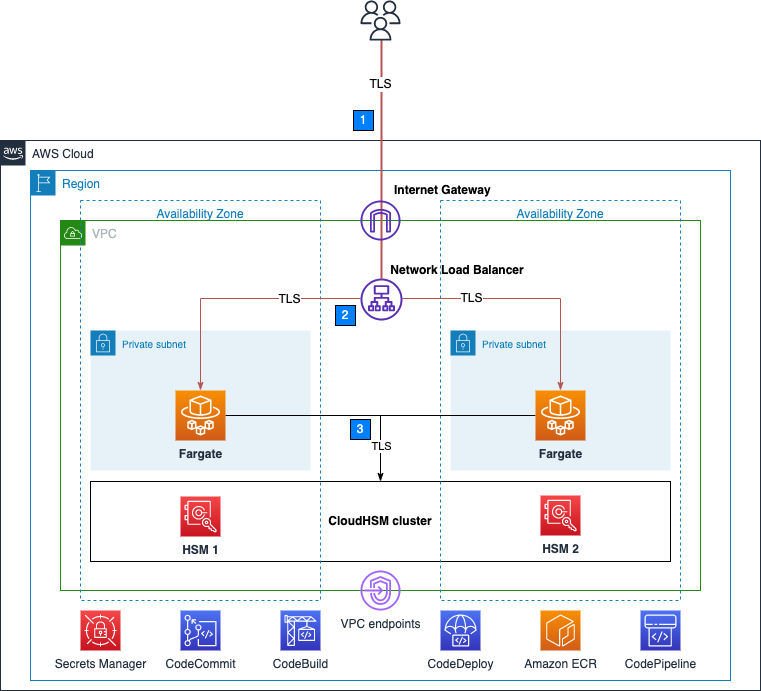
Figure 1 shows an overview of the overall architecture deployed in this blog. This solution contains three CDK stacks: The TlsOffloadContainerBuildStack CDK stack deploys the CodeCommit, CodeBuild, and AmazonECR resources. The TlsOffloadEcsServiceStack CDK stack deploys the ECS Fargate service along with the required VPC resources. The TlsOffloadPipelineStack CDK stack deploys the CodePipeline resources to automate deployments of changes to the service configuration.

Figure 1: Overall architecture

Figure 1: Overall architecture

At a high level, here’s how the solution in Figure 1 works:

  1. Clients make an HTTPS request to the public IP address exposed by Network Load Balancer to connect to the web server and establish a secure connection that uses TLS.
  2. Network Load Balancer routes the request to one of the ECS hosts running in private virtual private cloud (VPC) subnets, which are connected to the CloudHSM cluster.
  3. The NGINX web server that is running on ECS containers performs a TLS handshake by using the private key stored in the HSM to establish a secure connection with the requestor.

Note: Although we don’t focus on perimeter protection in this post, AWS has a number of services that help provide layered perimeter protection for your internet-facing applications, such as AWS Shield and AWS WAF.

Figure 2 shows an overview of the automation infrastructure that is deployed by the TlsOffloadContainerBuildStack and TlsOffloadPipelineStack CDK stacks.

Figure 2: Deployment pipeline

Figure 2: Deployment pipeline

At a high level, here’s how the solution in Figure 2 works:

  1. A developer makes changes to the service configuration and commits the changes to the AWS CodeCommit repository.
  2. AWS CodePipeline detects the changes and invokes AWS CodeBuild to build a new version of the Docker image that is used in Amazon ECS.
  3. CodeBuild builds a new Docker image and publishes it to the Amazon Elastic Container Registry (Amazon ECR) repository.
  4. AWS CodeDeploy creates a new revision of the ECS task definition for the Amazon ECS service and initiates a deployment of the new service.

Required services

To build this architecture in your account, you need to use a role within your account that can configure the following services and features:

Prerequisites

To follow this walkthrough, you need to have the following components in place:

Step 1: Store secrets in Secrets Manager

As with other container projects, you need to decide what to build statically into the container (for example, libraries, code, or packages) and what to set as runtime parameters, to be pulled from a parameter store. In this walkthrough, we use Secrets Manager to store sensitive parameters and use the integration of Amazon ECS with Secrets Manager to securely retrieve them when the container is launched.

Important: You need to store the following information in Secrets Manager as plaintext, not as key/value pairs.

To create a new secret

  1. Open the Secrets Manager console and choose Store a new secret.
  2. On the Choose secret type page, do the following:
    1. For Secret type, choose Other type of secret.
    2. In Key/value pairs, choose Plaintext and enter your secret just as you would need it in your application.

The following is a list of the required secrets for this solution and how they look in the Secrets Manager console.

  • Your cluster-issuing certificate – this is the certificate that corresponds to the private key that you used to sign the cluster’s certificate signing request. In this example, the name of the secret for the certificate is tls/clustercert.
    Figure 3: Store the cluster certificate

    Figure 3: Store the cluster certificate

  • The web server certificate – In this example, the name of the secret for the web server certificate is tls/servercert. It will look similar to the following:
    Figure 4: Store the web server certificate

    Figure 4: Store the web server certificate

  • The fake PEM file for the private key stored in the HSM that you generated in the Prerequisites section. In this example, the name of the secret for the fake PEM file is tls/fakepem.
    Figure 5: Store the fake PEM

    Figure 5: Store the fake PEM

  • The HSM pin used to authenticate with the HSMs in your cluster. In this example, the name of the secret for the HSM pin is tls/pin.
    Figure 6: Store the HSM pin

    Figure 6: Store the HSM pin

After you’ve stored your secrets, you should see output similar to the following:

Figure 7: List of required secrets

Figure 7: List of required secrets

Step 2: Download and configure the CDK app

This post uses the AWS CDK to deploy the solution infrastructure. In this section, you will download the CDK app and configure it.

To download and configure the CDK app

  1. In your CDK environment that you created in the Prerequisites section, check out the source code from the aws-cloudhsm-tls-offload-blog GitHub repository.
  2. Edit the app_config.json file and update the <placeholder values> with your target configuration:
    {
        "applicationAccount": "<AWS_ACCOUNT_ID>",
        "applicationRegion": "<REGION>",
        "networkConfig": {
            "vpcId": "<VPC_ID>",
            "publicSubnets": ["<PUBLIC_SUBNET_1>", "<PUBLIC_SUBNET_2>", ...],
            "privateSubnets": ["<PRIVATE_SUBNET_1>", "<PRIVATE_SUBNET_2>", ...]
        },
        "secrets": {
            "cloudHsmPin": "arn:aws:secretsmanager:<REGION>:<AWS_ACCOUNT_ID>:secret:<SECRET_ID>",
            "fakePem": "arn:aws:secretsmanager:<REGION>:<AWS_ACCOUNT_ID>:secret:<SECRET_ID>",
            "serverCert": "arn:aws:secretsmanager:<REGION>:<AWS_ACCOUNT_ID>:secret:<SECRET_ID>",
            "clusterCert": "arn:aws:secretsmanager:<REGION>:<AWS_ACCOUNT_ID>:secret:<SECRET_ID>"
        },
        "cloudhsm": {
            "clusterId": "<CLUSTER_ID>",
            "clusterSecurityGroup": "<CLUSTER_SECURITY_GROUP>"
        }
    }

  3. Run the following command to build the CDK stacks from the root of the project directory.
    npm run build

  4. To view the stacks that are available to deploy, run the following command from the root of the project directory.
    cdk ls

    You should see the following stacks available to deploy:

    • TlsOffloadContainerBuildStack — Deploys the CodeCommit, CodeBuild, and ECR repository that builds the ECS container image.
    • TlsOffloadEcsServiceStack — Deploys the ECS Fargate service along with the required VPC resources.
    • TlsOffloadPipelineStack — Deploys the CodePipeline that automates the deployment of updates to the service.

Step 3: Deploy the container build stack

In this step, you will deploy the container build stack, and then create a build and verify that the image was built successfully.

To deploy the container build stack

Deploy the TlsOffloadContainerBuildStack stack that we described in Figure 2 to your AWS account. In your CDK environment, run the following command:

cdk deploy TlsOffloadContainerBuildStack

The command line interface (CLI) will prompt you to approve the changes. After you approve them, you will see the following resources deployed to your newly created CodeCommit repository.

  • Dockerfile — This file provides a containerized environment for each of the Fargate containers to run. It downloads and installs necessary dependencies to run the NGINX web server with CloudHSM.
  • nginx.conf — This file provides NGINX with the configuration settings to run an HTTPS web server with CloudHSM configured as the SSL engine that performs the TLS handshake. The following nginx.conf values have already been configured in the file; if you want to make changes, update the file before deployment:
    • ssl_engine is set to cloudhsm
    • the environment variable is env CLOUDHSM_PIN
    • error_log is set to stderr so that the Fargate container can capture the logs in CloudWatch
    • the server section is set up to listen on port 443
    • ssl_ciphers are configured for a server with an RSA private key
  • run.sh — This script configures the CloudHSM OpenSSL Dynamic Engine on the Fargate task before the NGINX server is started.
  • nginx.service — This file specifies the configuration settings that systemd uses to run the NGINX service. Included in this file is a reference to the file that contains the environment variables for the NGINX service. This provides the HSM pin to the OpenSSL Engine.
  • index.html — This file is a sample HTML file that is displayed when you navigate to the HTTPS endpoint of the load balancer in your browser.
  • dhparam.pem — This file provides sample Diffie-Hellman parameters for demonstration purposes, but AWS recommends that you generate your own. You can generate your own Diffie-Hellman parameters by running the following command with the OpenSSL CLI. These parameters are not required for TLS but are recommended to provide perfect forward secrecy in your encrypted messages.
    openssl dhparam -out ./dhparam.pem 2048

Your repository should look like the following:

Figure 8: CodeCommit repository

Figure 8: CodeCommit repository

Before you deploy the Amazon ECS service, you need to build your first Docker image to populate the ECR repository. To successfully deploy the service, you need to have at least one image already present in the repository.

To create a build and verify the image was built successfully

  1. Open the AWS CodeBuild console.
  2. Find the CodeBuild project that was created by the CDK deployment and select it.
  3. Choose Start Build to initiate a new build.
  4. Wait for the build to complete successfully, and then open the Amazon ECR console.
  5. Select the repository that the CDK deployment created.

You should now see an image in your repository, similar to the following:

Figure 9: ECR repository

Figure 9: ECR repository

Step 4: Deploy the Amazon ECS service

Now that you have successfully built an ECR image, you can deploy the Amazon ECS service. This step deploys the following resources to your account:

  • VPC endpoints for the required AWS services that your ECS task needs to communicate with, including the following:
    • Amazon ECR
    • Secrets Manager
    • CloudWatch
    • CloudHSM
  • Network Load Balancer, which load balances HTTPS traffic to your ECS tasks.
  • A CloudWatch Logs log group to host the logs for the ECS tasks.
  • An ECS cluster with ECS tasks using your previously built Docker image that hosts the NGINX service.

To deploy the Amazon ECS service with the CDK

  • In your CDK environment, run the following command:
    cdk deploy TlsOffloadEcsServiceStack

The CLI will prompt you to approve the changes. After you approve them, you will see these resources deploy to your account.

Checkpoint

At this point, you should have a working service. To confirm that you do, in your browser, navigate using HTTPS to the public address associated with the Network Load Balancer. While not covered in this blog, you can additionally configure DNS routing using Amazon Route53 to setup a custom domain name for your web service. You should see a screen similar to the following.

Figure 10: The sample website

Figure 10: The sample website

Step 5: Use CodePipeline to automate the deployment of changes to the web server

Now that you have deployed a preliminary version of the application, you can take a few steps to automate further releases of the web server. As you maintain this application in production, you might need to update one or more of the following items:

  • Your website HTML source and other required libraries (for example, CSS or JavaScript)
  • Your Docker environment, such as the OpenSSL libraries, operating system and CloudHSM packages, and NGINX version.
  • Re-deploy the service after rotating your web server private key and certificate in Secrets Manager

Next, you will set up a CodePipeline project that orchestrates the end-to-end deployment of a change to the application—from an update to the code in our CodeCommit repo to the deployment of updated container images and the redirection of user traffic by the load balancer to the updated application.

This step deploys to your account a deployment pipeline that connects your CodeCommit, CodeBuild, and Amazon ECS services.

Deploy the CodePipeline stack with CDK

In your CDK environment, run the following command:

cdk deploy TlsOffloadPipelineStack

The CLI will prompt you to approve the changes. After you approve them, you will see the resources deploy to your account.

Start a deployment

To verify that your automation is working correctly, start a new deployment in your CodePipeline by making a change to your source repository. If everything works, the CodeBuild project will build the latest version of the Dockerfile located in your CodeCommit repository and push it to Amazon ECR. Then, the CodeDeploy application will create a new version of the ECS task definition and deploy new tasks while spinning down the existing tasks.

View your website

Now that the deployment is complete, you should again be able to view your website in your browser by navigating to the website for your application. If you made changes to the source code, such as changes to your index.html file, you should see these changes now.

Verify that the web server is properly configured by checking that the website’s certificate matches the one that you created in the Prerequisites section. Figure 11 shows an example of a certificate.

Figure 11: Certificate for the application

Figure 11: Certificate for the application

To verify that your NGINX service is using your CloudHSM cluster to offload the TLS handshake, you can view the CloudHSM client logs for this application in CloudWatch in the log group that you specified when you configured the ECS task definition.

To view your CloudHSM client logs in CloudWatch

  1. Open the CloudWatch console.
  2. In the navigation pane, select Log Groups.
  3. Select the log group that was created for you by the CDK deployment.
  4. Select a log stream entry. Each log stream corresponds to an ECS instance that is running the NGINX web server.
  5. You should see the client logs for this instance, which will look similar to the following:
    Figure 12: Fargate task logs

    Figure 12: Fargate task logs

You can also verify your HSM connectivity by viewing your HSM audit logs.

To view your HSM audit logs

  1. Open the CloudWatch console.
  2. In the navigation pane, select Log Groups.
  3. Select the log group corresponding to your CloudHSM cluster. The log group has the following format: /aws/cloudhsm/<cluster-id>.
  4. You can see entries similar to the following, which indicates that the NGINX application is connecting and logging in to the HSM to perform cryptographic operations.
    Time: 02/04/23 17:45:40.333033, usecs:1675532740333033
    Version No : 1.0
    Sequence No : 0x2
    Reboot counter : 0x8
    Opcode : CN_LOGIN (0xd)
    Command Type(hex) : CN_MGMT_CMD (0x0)
    User id : 3
    Session Handle : 0x15010002
    Response : 0x0:HSM Return: SUCCESS
    Log type : USER_AUTH_LOG (2)
    User Name : crypto_user
    User Type : CN_CRYPTO_USER (1) 

Conclusion

In this post, you learned how to set up a NGINX web server on Fargate in a secure, private subnet that offloads the TLS termination to a FIPS 140-2 Level 3 HSM environment that uses the CloudHSM OpenSSL Dynamic Engine. You also learned how to set up a deployment pipeline to automate the Fargate deployments when updates are made.

You can expand this solution to fit your individual use case. For example, you can use the NGINX web server as a reverse proxy for additional servers in your internal network, and set up mutual TLS between these internal servers.

Further reading

If you have feedback about this post, submit comments in the Comments section below. If you have questions about this post, start a new thread on the AWS CloudHSM re:Post or contact AWS Support.

Want more AWS Security news? Follow us on Twitter.

Alket Memushaj

Alket Memushaj

Alket Memushaj is a Principal Solutions Architect in the Market Development team for Capital Markets at AWS. In his role, Alket helps customers transform their business with the power of the AWS Cloud. His main focus is on helping customers deploy data and analytics, risk management, and electronic trading platforms in AWS. Alket previously led engineering teams at Morgan Stanley and consulted for global financial services at VMware.

Nikolas Nikravesh

Nikolas Nikravesh

Nikolas is a Software Development Engineer at AWS CloudHSM. He works with the SDK team to develop standards compliant SDKs and integrations to enable AWS customers to develop secure applications with CloudHSM.

Brad Woodward

Brad Woodward

Brad is a Senior Customer Delivery Architect with AWS Professional Services. Brad has presented at RSA and DefCon Skytalks, been an instructor at BlackHat and BlackHat Europe, presented tools at BlackHat Arsenal, and is the maintainer of several open source tools and platforms.

Building diversified and cost-optimized EC2 server groups in Spinnaker

Post Syndicated from Sheila Busser original https://aws.amazon.com/blogs/compute/building-diversified-and-cost-optimized-ec2-server-groups-in-spinnaker/

This blog post is written by Sandeep Palavalasa, Sr. Specialist Containers SA, and Prathibha Datta-Kumar, Software Development Engineer

Spinnaker is an open source continuous delivery platform created by Netflix for releasing software changes rapidly and reliably. It enables teams to automate deployments into pipelines that are run whenever a new version is released with proven deployment strategies that are faster and more dependable with zero downtime. For many AWS customers, Spinnaker is a critical piece of technology that allows developers to deploy their applications safely and reliably across different AWS managed services.

Listening to customer requests on the Spinnaker open source project and in the Amazon EC2 Spot Instances integrations roadmap, we have further enhanced Spinnaker’s ability to deploy on Amazon Elastic Compute Cloud (Amazon EC2). The enhancements make it easier to combine Spot Instances with On-Demand, Reserved, and Savings Plans Instances to optimize workload costs with performance. You can improve workload availability when using Spot Instances with features such as allocation strategies and proactive Spot capacity rebalancing, when you are flexible about Instance types and Availability Zones. Combinations of these features offer the best possible experience when using Amazon EC2 with Spinnaker.

In this post, we detail the recent enhancements, along with a walkthrough of how you can use them following the best practices.

Amazon EC2 Spot Instances

EC2 Spot Instances are spare compute capacity in the AWS Cloud available at steep discounts of up to 90% when compared to On-Demand Instance prices. The primary difference between an On-Demand Instance and a Spot Instance is that a Spot Instance can be interrupted by Amazon EC2 with a two-minute notification when Amazon EC2 needs the capacity back. Amazon EC2 now sends rebalance recommendation notifications when Spot Instances are at an elevated risk of interruption. This signal can arrive sooner than the two-minute interruption notice. This lets you proactively replace your Spot Instances before it’s interrupted.

The best way to adhere to Spot best practices and instance fleet management is by using an Amazon EC2 Auto Scaling group When using Spot Instances in Auto Scaling group, enabling Capacity Rebalancing helps you maintain workload availability by proactively augmenting your fleet with a new Spot Instance before a running instance is interrupted by Amazon EC2.

Spinnaker concepts

Spinnaker uses three key concepts to describe your services, including applications, clusters, and server groups, and how your services are exposed to users is expressed as Load balancers and firewalls.

An application is a collection of clusters, a cluster is a collection of server groups, and a server group identifies the deployable artifact and basic configuration settings such as the number of instances, autoscaling policies, metadata, etc. This corresponds to an Auto Scaling group in AWS. We use Auto Scaling groups and server groups interchangeably in this post.

Spinnaker and Amazon EC2 Integration

In mid-2020, we started looking into customer requests and gaps in the Amazon EC2 feature set supported in Spinnaker. Around the same time, Spinnaker OSS added support for Amazon EC2 Launch Templates. Thanks to their effort, we could follow-up and expand the Amazon EC2 feature set supported in Spinnaker. Now that we understand the new features, let’s look at how to use some of them in the following tutorial spinnaker.io.

Here are some highlights of the features contributed recently:

Feature Why use it? (Example use cases)
  Multiple Instance Types   Tap into multiple capacity pools to achieve and maintain the desired scale using Spot Instances.
  Combining On-Demand and Spot Instances

  – Control the proportion of On-Demand and Spot Instances launched in your sever group.

– Combine Spot Instances with Amazon EC2 Reserved Instances or Savings Plans.

  Amazon EC2 Auto Scaling allocation strategies   Reduce overall Spot interruptions by launching from Spot pools that are optimally chosen based on the available Spot capacity, using capacity-optimized Spot allocation strategy.
  Capacity rebalancing   Improve your workload availability by proactively shifting your Spot capacity to optimal pools by enabling capacity rebalancing along with capacity-optimized allocation strategy.
  Improved support for burstable performance instance types with custom credit specification   Reduce costs by preventing wastage of CPU cycles.

We recommend using Spinnaker stable release 1.28.x for API users and 1.29.x for UI users. Here is the Git issue for related PRs and feature releases.

Now that we understand the new features, let’s look at how to use some of them in the following tutorial.

Example tutorial: Deploy a demo web application on an Auto Scaling group with On-Demand and Spot Instances

In this example tutorial, we setup Spinnaker to deploy to Amazon EC2, create an Application Load Balancer, and deploy a demo application on a server group diversified across multiple instance types and purchase options – this case On-Demand and Spot Instances.

We leverage Spinnaker’s API throughout the tutorial to create new resources, along with a quick guide on how to deploy the same using Spinnaker UI (Deck) and leverage UI to view them.

Prerequisites

As a prerequisite to complete this tutorial, you must have an AWS Account with an AWS Identity and Access Management (IAM) User that has the AdministratorAccess configured to use with AWS Command Line Interface (AWS CLI).

1. Spinnaker setup

We will use the AWS CloudFormation template setup-spinnaker-with-deployment-vpc.yml to setup Spinnaker and the required resources.

1.1 Create an Secure Shell(SSH) keypair used to connect to Spinnaker and EC2 instances launched by Spinnaker.

AWS_REGION=us-west-2 # Change the region where you want Spinnaker deployed
EC2_KEYPAIR_NAME=spinnaker-blog-${AWS_REGION}
aws ec2 create-key-pair --key-name ${EC2_KEYPAIR_NAME} --region ${AWS_REGION} --query KeyMaterial --output text > ~/${EC2_KEYPAIR_NAME}.pem
chmod 600 ~/${EC2_KEYPAIR_NAME}.pem

1.2 Deploy the Cloudformation stack.

STACK_NAME=spinnaker-blog
SPINNAKER_VERSION=1.29.1 # Change the version if newer versions are available
NUMBER_OF_AZS=3
AVAILABILITY_ZONES=${AWS_REGION}a,${AWS_REGION}b,${AWS_REGION}c
ACCOUNT_ID=$(aws sts get-caller-identity --query "Account" --output text)
S3_BUCKET_NAME=spin-persitent-store-${ACCOUNT_ID}

# Download template
curl -o setup-spinnaker-with-deployment-vpc.yml https://raw.githubusercontent.com/awslabs/ec2-spot-labs/master/ec2-spot-spinnaker/setup-spinnaker-with-deployment-vpc.yml

# deploy stack
aws cloudformation deploy --template-file setup-spinnaker-with-deployment-vpc.yml \
    --stack-name ${STACK_NAME} \
    --parameter-overrides NumberOfAZs=${NUMBER_OF_AZS} \
    AvailabilityZones=${AVAILABILITY_ZONES} \
    EC2KeyPairName=${EC2_KEYPAIR_NAME} \
    SpinnakerVersion=${SPINNAKER_VERSION} \
    SpinnakerS3BucketName=${S3_BUCKET_NAME} \
    --capabilities CAPABILITY_NAMED_IAM --region ${AWS_REGION}

1.3 Connecting to Spinnaker

1.3.1 Get the SSH command to port forwarding for Deck – the browser-based UI (9000) and Gate – the API Gateway (8084) to access the Spinnaker UI and API.

SPINNAKER_INSTANCE_DNS_NAME=$(aws cloudformation describe-stacks --stack-name ${STACK_NAME} --region ${AWS_REGION} --query "Stacks[].Outputs[?OutputKey=='SpinnakerInstance'].OutputValue" --output text)
echo 'ssh -A -L 9000:localhost:9000 -L 8084:localhost:8084 -L 8087:localhost:8087 -i ~/'${EC2_KEYPAIR_NAME}' ubuntu@$'{SPINNAKER_INSTANCE_DNS_NAME}''

1.3.2 Open a new terminal and use the SSH command (output from the previous command) to connect to the Spinnaker instance. After you successfully connect to the Spinnaker instance via SSH, access the Spinnaker UI here and API here.

2. Deploy a demo web application

Let’s make sure that we have the environment variables required in the shell before proceeding. If you’re using the same terminal window as before, then you might already have these variables.

STACK_NAME=spinnaker-blog
AWS_REGION=us-west-2 # use the same region as before
EC2_KEYPAIR_NAME=spinnaker-blog-${AWS_REGION}
VPC_ID=$(aws cloudformation describe-stacks --stack-name ${STACK_NAME} --region ${AWS_REGION} --query "Stacks[].Outputs[?OutputKey=='VPCID'].OutputValue" --output text)

2.1 Create a Spinnaker Application

We start by creating an application in Spinnaker, a placeholder for the service that we deploy.

curl 'http://localhost:8084/tasks' \
-H 'Content-Type: application/json;charset=utf-8' \
--data-raw \
'{
   "job":[
      {
         "type":"createApplication",
         "application":{
            "cloudProviders":"aws",
            "instancePort":80,
            "name":"demoapp",
            "email":"[email protected]",
            "providerSettings":{
               "aws":{
                  "useAmiBlockDeviceMappings":true
               }
            }
         }
      }
   ],
   "application":"demoapp",
   "description":"Create Application: demoapp"
}'

Spin Create Server Group

2.2 Create an Application Load Balancer

Let’s create an Application Load Balanacer and a target group for port 80, spanning the three availability zones in our public subnet. We use the Demo-ALB-SecurityGroup for Firewalls to allow public access to the ALB on port 80.

As Spot Instances are interrupted with a two minute warning, you must adjust the Target Group’s deregistration delay to a slightly lower time. Recommended values are 90 seconds or less. This allows time for in-flight requests to complete and gracefully close existing connections before the instance is interrupted.

curl 'http://localhost:8084/tasks' \
-H 'Content-Type: application/json;charset=utf-8' \
--data-binary \
'{
   "application":"demoapp",
   "description":"Create Load Balancer: demoapp",
   "job":[
      {
         "type":"upsertLoadBalancer",
         "name":"demoapp-lb",
         "loadBalancerType":"application",
         "cloudProvider":"aws",
         "credentials":"my-aws-account",
         "region":"'"${AWS_REGION}"'",
         "vpcId":"'"${VPC_ID}"'",
         "subnetType":"public-subnet",
         "idleTimeout":60,
         "targetGroups":[
            {
               "name":"demoapp-targetgroup",
               "protocol":"HTTP",
               "port":80,
               "targetType":"instance",
               "healthCheckProtocol":"HTTP",
               "healthCheckPort":"traffic-port",
               "healthCheckPath":"/",
               "attributes":{
                  "deregistrationDelay":90
               }
            }
         ],
         "regionZones":[
            "'"${AWS_REGION}"'a",
            "'"${AWS_REGION}"'b",
            "'"${AWS_REGION}"'c"
         ],
         "securityGroups":[
            "Demo-ALB-SecurityGroup"
         ],
         "listeners":[
            {
               "protocol":"HTTP",
               "port":80,
               "defaultActions":[
                  {
                     "type":"forward",
                     "targetGroupName":"demoapp-targetgroup"
                 }
               ]
            }
         ]
      }
   ]
}'

Spin Create ALB

2.3 Create a server group

Before creating a server group (Auto Scaling group), here is a brief overview of the features used in the example:

      • onDemandBaseCapacity (default 0): The minimum amount of your ASG’s capacity that must be fulfilled by On-Demand instances (can also be applied toward Reserved Instances or Savings Plans). The example uses an onDemandBaseCapacity of three.
      • onDemandPercentageAboveBaseCapacity (default 100): The percentages of On-Demand and Spot Instances for additional capacity beyond OnDemandBaseCapacity. The example uses onDemandPercentageAboveBaseCapacity of 10% (i.e. 90% Spot).
      • spotAllocationStrategy: This indicates how you want to allocate instances across Spot Instance pools in each Availability Zone. The example uses the recommended Capacity Optimized strategy. Instances are launched from optimal Spot pools that are chosen based on the available Spot capacity for the number of instances that are launching.
      • launchTemplateOverridesForInstanceType: The list of instance types that are acceptable for your workload. Specifying multiple instance types enables tapping into multiple instance pools in multiple Availability Zones, designed to enhance your service’s availability. You can use the ec2-instance-selector, an open source AWS Command Line Interface(CLI) tool to narrow down the instance types based on resource criteria like vcpus and memory.
      • capacityRebalance: When enabled, this feature proactively manages the EC2 Spot Instance lifecycle leveraging the new EC2 Instance rebalance recommendation. This increases the emphasis on availability by automatically attempting to replace Spot Instances in an ASG before they are interrupted by Amazon EC2. We enable this feature in this example.

Learn more on spinnaker.io: feature descriptions and use cases and sample API requests.

Let’s create a server group with a desired capacity of 12 instances diversified across current and previous generation instance types, attach the previously created ALB, use Demo-EC2-SecurityGroup for the Firewalls which allows http traffic only from the ALB, use the following bash script for UserData to install httpd, and add instance metadata into the index.html.

2.3.1 Save the userdata bash script into a file user-date.sh.

Note that Spinnaker only support base64 encoded userdata. We use base64 bash command to encode the file contents in the next step.

cat << "EOF" > user-data.sh
#!/bin/bash
yum update -y
yum install httpd -y
echo "<html>
    <head>
        <title>Demo Application</title>
        <style>body {margin-top: 40px; background-color: #Gray;} </style>
    </head>
    <body>
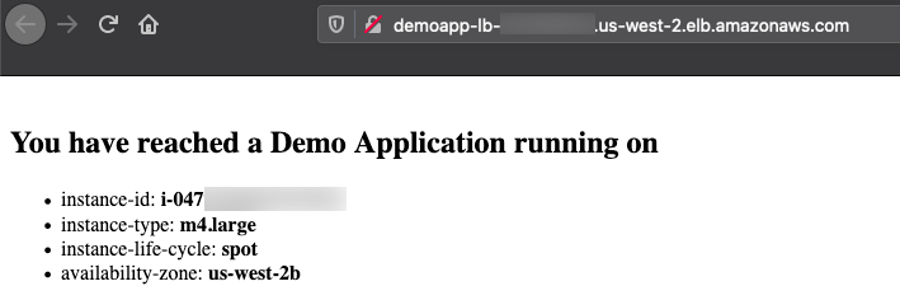
        <h2>You have reached a Demo Application running on</h2>
        <ul>
            <li>instance-id: <b> `curl http://169.254.169.254/latest/meta-data/instance-id` </b></li>
            <li>instance-type: <b> `curl http://169.254.169.254/latest/meta-data/instance-type` </b></li>
            <li>instance-life-cycle: <b> `curl http://169.254.169.254/latest/meta-data/instance-life-cycle` </b></li>
            <li>availability-zone: <b> `curl http://169.254.169.254/latest/meta-data/placement/availability-zone` </b></li>
        </ul>
    </body>
</html>" > /var/www/html/index.html
systemctl start httpd
systemctl enable httpd
EOF

2.3.2 Create the server group by running the following command. Note we use the KeyPairName that we created as part of the prerequisites.

curl 'http://localhost:8084/tasks' \
-H 'Content-Type: application/json;charset=utf-8' \
-d \
'{
   "job":[
      {
         "type":"createServerGroup",
         "cloudProvider":"aws",
         "account":"my-aws-account",
         "application":"demoapp",
         "stack":"",
         "credentials":"my-aws-account",
	"healthCheckType": "ELB",
	"healthCheckGracePeriod":600,
	"capacityRebalance": true,
         "onDemandBaseCapacity":3, 
         "onDemandPercentageAboveBaseCapacity":10,
         "spotAllocationStrategy":"capacity-optimized",
         "setLaunchTemplate":true,
         "launchTemplateOverridesForInstanceType":[
            {
               "instanceType":"m4.large"
            },
            {
               "instanceType":"m5.large"
            },
            {
               "instanceType":"m5a.large"
            },
            {
               "instanceType":"m5ad.large"
            },
            {
               "instanceType":"m5d.large"
            },
            {
               "instanceType":"m5dn.large"
            },
            {
               "instanceType":"m5n.large"
            }

         ],
         "capacity":{
            "min":6,
            "max":21,
            "desired":12
         },
         "subnetType":"private-subnet",
         "availabilityZones":{
            "'"${AWS_REGION}"'":[
               "'"${AWS_REGION}"'a",
               "'"${AWS_REGION}"'b",
               "'"${AWS_REGION}"'c"
            ]
         },
         "keyPair":"'"${EC2_KEYPAIR_NAME}"'",
         "securityGroups":[
            "Demo-EC2-SecurityGroup"
         ],
         "instanceType":"m5.large",
         "virtualizationType":"hvm",
         "amiName":"'"$(aws ec2 describe-images --owners amazon --filters "Name=name,Values=amzn2-ami-hvm-2*x86_64-gp2" --query 'reverse(sort_by(Images, &CreationDate))[0].Name' --region ${AWS_REGION} --output text)"'",
         "targetGroups":[
            "demoapp-targetgroup"
         ],
         "base64UserData":"'"$(base64 user-data.sh)"'",,
        "associatePublicIpAddress":false,
         "instanceMonitoring":false
      }
   ],
   "application":"demoapp",
   "description":"Create New server group in cluster demoapp"
}'

Spin Create ServerGroup

Spinnaker creates an Amazon EC2 Launch Template and an ASG with specified parameters and waits until the ALB health check passes before sending traffic to the EC2 Instances.

The server group and launch template that we just created will look like this in Spinnaker UI:

Spin View ServerGroup

The UI also displays capacity type, such as the purchase option for each instance type in the Instance Information section:

Spin View ServerGroup Purchase Options 1Spin View ServerGroup Purchase Options 2

3. Access the application

Copy the Application Load Balancer URL by selecting the tree icon in the right top corner of the server group, and access it in a browser. You can refresh multiple times to see that the requests are going to different instances every time.

Spin Access App

Congratulations! You successfully deployed the demo application on an Amazon EC2 server group diversified across multiple instance types and purchase options.

Moreover, you can clone, modify, disable, and destroy these server groups, as well as use them with Spinnaker pipelines to effectively release new versions of your application.

Cost savings

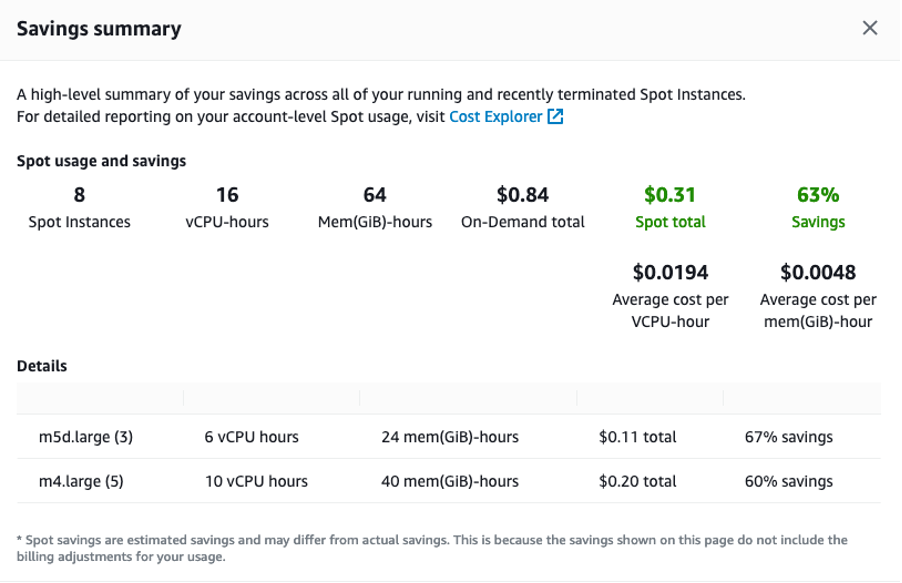
Check the savings you realized by deploying your demo application on EC2 Spot Instances by going to EC2 console > Spot Requests > Saving Summary.

Spin Spot Savings

Cleanup

To avoid incurring any additional charges, clean up the resources created in the tutorial.

Frist, delete the server group, application load balancer and application in Spinnaker.

curl 'http://localhost:8084/tasks' \
-H 'Content-Type: application/json;charset=utf-8' \
--data-raw \
'{
   "job":[
      {
         "reason":"Cleanup",
         "asgName":"demoapp-v000",
         "moniker":{
            "app":"demoapp",
            "cluster":"demoapp",
            "sequence":0
         },
         "serverGroupName":"demoapp-v000",
         "type":"destroyServerGroup",
         "region":"'"${AWS_REGION}"'",
         "credentials":"my-aws-account",
         "cloudProvider":"aws"
      },
      {
         "cloudProvider":"aws",
         "loadBalancerName":"demoapp-lb",
         "loadBalancerType":"application",
         "regions":[
            "'"${AWS_REGION}"'"
         ],
         "credentials":"my-aws-account",
         "vpcId":"'"${VPC_ID}"'",
         "type":"deleteLoadBalancer"
      },
      {
         "type":"deleteApplication",
         "application":{
            "name":"demoapp",
            "cloudProviders":"aws"
         }
      }
   ],
   "application":"demoapp",
   "description":"Deleting ServerGroup, ALB and Application: demoapp"
}'

Wait for Spinnaker to delete all of the resources before proceeding further. You can confirm this either on the Spinnaker UI or AWS Management Console.

Then delete the Spinnaker infrastructure by running the following command:

aws ec2 delete-key-pair --key-name ${EC2_KEYPAIR_NAME} --region ${AWS_REGION}
rm ~/${EC2_KEYPAIR_NAME}.pem
aws s3api delete-objects \
--bucket ${S3_BUCKET_NAME} \
--delete "$(aws s3api list-object-versions \
--bucket ${S3_BUCKET_NAME} \
--query='{Objects: Versions[].{Key:Key,VersionId:VersionId}}')" #If error occurs, there are no Versions and is OK
aws s3api delete-objects \
--bucket ${S3_BUCKET_NAME} \
--delete "$(aws s3api list-object-versions \
--bucket ${S3_BUCKET_NAME} \
--query='{Objects: DeleteMarkers[].{Key:Key,VersionId:VersionId}}')" #If error occurs, there are no DeleteMarkers and is OK
aws s3 rb s3://${S3_BUCKET_NAME} --force #Delete Bucket
aws cloudformation delete-stack --region ${AWS_REGION} --stack-name ${STACK_NAME}

Conclusion

In this post, we learned about the new Amazon EC2 features recently added to Spinnaker, and how to use them to build diversified and optimized Auto Scaling Groups. We also discussed recommended best practices for EC2 Spot and how they can improve your experience with it.

We would love to hear from you! Tell us about other Continuous Integration/Continuous Delivery (CI/CD) platforms that you want to use with EC2 Spot and/or Auto Scaling Groups by adding an issue on the Spot integrations roadmap.


What’s Up, Home? – Monitor your website visitor rate

Post Syndicated from Janne Pikkarainen original https://blog.zabbix.com/whats-up-home-monitor-your-website-visitor-rate/25660/

Can you monitor your website visitor rate with Zabbix? Of course, you can! By day, I am a lead site reliability engineer in a global cyber security company. By night, I monitor my home with Zabbix & Grafana and do some weird experiments with them.

I have this website hosted in a domain hotel, and among other features, the admin panel has some standard website access log analyzers (such as awstats) available for me to see the activity of this site. That’s cool, but also boringly easy, and requires me to log in to that admin panel instead of me using my trusted single pane of glass that is Zabbix.

Let’s connect to site logs

If I log in to my site over ssh/sftp, my home directory has a preconfigured access_logs directory. Like the name says, it contains the website access logs in the usual format you would expect it to be:

35.166.xxx.xxx – – [26/Jan/2023:04:24:37 +0200] “GET / HTTP/1.1” 200 10055 “http://whatsuphome.fi” “Mozilla/5.0 (X11; Linux x86_64) AppleWebKit/537.36 (KHTML, like Gecko) Chrome/83.0.4103.97 Safari/537.36”

That’s great, but how to monitor that in real time with Zabbix? Let’s use sshfs — it’s like NFS or CIFS, but allows you to mount stuff over ssh. On my dear Raspberry Pi 4, which runs my Zabbix, running

sudo mkdir /var/log/whatsuphome && sudo chown zabbix /var/log/whatsuphome

sudo sshfs -o allow_other mywhatsuphomeaccount@myhotelname:access_logs /var/log/whatsuphome

did mount my remote server access_logs directory perfectly fine.

Time for monitoring

Now that we have our log file, the rest is very straightforward and standard log file monitoring. First, let’s add a master item that reads the log.

Nothing too difficult yet.

Next, let’s add a dependent item that grabs the visitor IP address part from a log line.

… and some item preprocessing to grab only the IP

Items

Sorry about that ugly regular expression.

… after adding a few more items, here’s my template.

I’m currently not parsing the referrer, exact URL, or user-agent values, as for the most part those would just add unnecessary noise and load for my poor little home Zabbix.

Dashboard time!

So, finally, I created a dashboard showing the number of unique IP addresses & hits during the past 24 hours and some graphs. Now that I’ve not posted any posts in a while, welcome to Tumbleweedville!

It’s so silent in here that I can hear my own typing.

After publishing this post, I’ll wait for a while and then update the post with a new screenshot, so we’ll get to see the incredible visitor surge that will be counted in at least tens of new IP addresses.

Update #1 about 15 minutes after publishing the post

Clearly some movement in the access log needle!

Update #2 about 15 minutes after publishing the post

Almost 400 unique IP addresses already? Hello, dear readers and bots.

Update #3 about 15 minutes after publishing the post

Even though IP addresses are a bad way to measure the actual amount of visitors, roughly 400 unique new addresses after publishing my post are very good. Thanks, bots and readers!

This post was originally published on the author’s page.

Устните бясно танцуват

Post Syndicated from Тоест original https://www.toest.bg/ustnite-byasno-tantsuvat/

Устните бясно танцуват

устните бясно танцуват
червения танц на радостта
и жълтия танц на покрусата
танцуват танца на клоуна с бял нос
и синия танц на тракащата пишеща машина
единствено сърцето не танцува
този велик режисьор седи в мрака сред публиката
сякаш безучастен към всичко
мълчалив като хиената
която волно кръстосва безбрежната степ

(Август 1988 г.)
Ю Дзиен
Превод от китайски Веселин Карастойчев


Ю Дзиен (р. 1954) е китайски поет, роден „на юг от облаците“, в югозападната китайска провинция Юннан. Автор е на над 50 книги с поезия, проза, спомени и размишления. Носител е на множество национални и международни награди. Негова стихосбирка ще излезе до края на 2023 г. в Издателство за поезия „ДА“ в превод на Веселин Карастойчев.

Веселин Карастойчев (р. 1971) е китаист и „съмнителен бас китарист“, преподавател в СУ „Св. Климент Охридски“ и преводач. Автор на „Думи в полет“, изследване върху съвременната китайска поезия; съставител и преводач на антологията „Малък лексикон на най-новата китайска поезия“ (2008), книгата на Бей Дао „Пейзажи над нулата и други стихотворения“ (2021) и др.


Според Екатерина Йосифова „четящият стихотворение сутрин… добре понася другите часове“ от деня. Убедени, че поезията държи умовете ни будни, а сърцата – отворени, в края на всеки месец ви предлагаме по едно стихотворение. Защото и в най-смутни времена доброто стихотворение е добра новина.

The collective thoughts of the interwebz