Over the last twelve months, we have been talking about the new baseline of encryption on the Internet: post-quantum cryptography. During Birthday Week last year we announced that our beta of Kyber was available for testing, and that Cloudflare Tunnel could be enabled with post-quantum cryptography. Earlier this year, we made our stance clear that this foundational technology should be available to everyone for free, forever.
Today, we have hit a milestone after six years and 31 blog posts in the making: we’re starting to roll out General Availability1 of post-quantum cryptography support to our customers, services, and internal systems as described more fully below. This includes products like Pingora for origin connectivity, 1.1.1.1, R2, Argo Smart Routing, Snippets, and so many more.
This is a milestone for the Internet. We don't yet know when quantum computers will have enough scale to break today's cryptography, but the benefits of upgrading to post-quantum cryptography now are clear. Fast connections and future-proofed security are all possible today because of the advances made by Cloudflare, Google, Mozilla, the National Institutes of Standards and Technology in the United States, the Internet Engineering Task Force, and numerous academic institutions
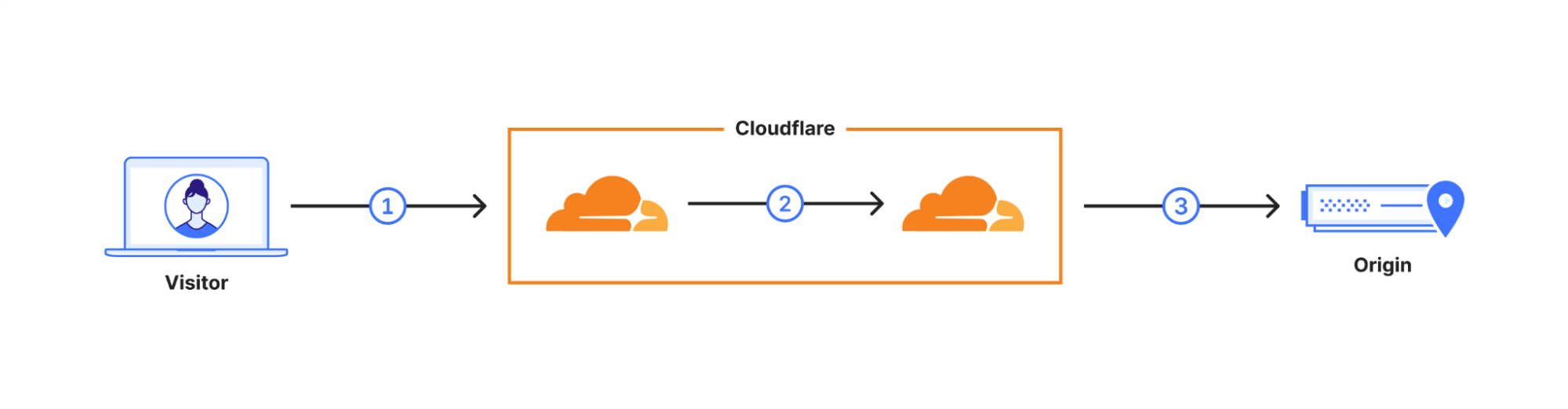
What does General Availability mean? In October 2022 we enabled X25519+Kyber as a beta for all websites and APIs served through Cloudflare. However, it takes two to tango: the connection is only secured if the browser also supports post-quantum cryptography. Starting August 2023, Chrome is slowly enabling X25519+Kyber by default.
The user’s request is routed through Cloudflare’s network (2). We have upgraded many of these internal connections to use post-quantum cryptography, and expect to be done upgrading all of our internal connections by the end of 2024. That leaves as the final link the connection (3) between us and the origin server.
We are happy to announce that we are rolling out support for X25519+Kyber for most inbound and outbound connectionsas Generally Available for use including origin servers and Cloudflare Workersfetch()es.
Plan
Support for post-quantum outbound connections
Free
Started roll-out. Aiming for 100% by the end of the October.
Pro and business
Aiming for 100% by the end of year.
Enterprise
Roll-out begins February 2024. 100% by March 2024.
For our Enterprise customers, we will be sending out additional information regularly over the course of the next six months to help prepare you for the roll-out. Pro, Business, and Enterprise customers can skip the roll-out and opt-in within your zone today, or opt-out ahead of time using an API described in our companion blog post. Before rolling out for Enterprise in February 2024, we will add a toggle on the dashboard to opt out.
With an upgrade of this magnitude, we wanted to focus on our most used products first and then expand outward to cover our edge cases. This process has led us to include the following products and systems in this roll out:
1.1.1.1
AMP
API Gateway
Argo Smart Routing
Auto Minify
Automatic Platform Optimization
Automatic Signed Exchange
Cloudflare Egress
Cloudflare Images
Cloudflare Rulesets
Cloudflare Snippets
Cloudflare Tunnel
Custom Error Pages
Flow Based Monitoring
Health checks
Hermes
Host Head Checker
Magic Firewall
Magic Network Monitoring
Network Error Logging
Project Flame
Quicksilver
R2 Storage
Request Tracer
Rocket Loader
Speed on Cloudflare Dash
SSL/TLS
Traffic Manager
WAF, Managed Rules
Waiting Room
Web Analytics
If a product or service you use is not listed here, we have not started rolling out post-quantum cryptography to it yet. We are actively working on rolling out post-quantum cryptography to all products and services including our Zero Trust products. Until we have achieved post-quantum cryptography support in all of our systems, we will publish an update blog in every Innovation Week that covers which products we have rolled out post-quantum cryptography to, the products that will be getting it next, and what is still on the horizon.
Products we are working on bringing post-quantum cryptography support to soon:
Cloudflare Gateway
Cloudflare DNS
Cloudflare Load Balancer
Cloudflare Access
Always Online
Zaraz
Logging
D1
Cloudflare Workers
Cloudflare WARP
Bot Management
Why now?
As we announced earlier this year, post-quantum cryptography will be included for free in all Cloudflare products and services that can support it. The best encryption technology should be accessible to everyone – free of charge – to help support privacy and human rights globally.
“What was once an experimental frontier has turned into the underlying fabric of modern society. It runs in our most critical infrastructure like power systems, hospitals, airports, and banks. We trust it with our most precious memories. We trust it with our secrets. That’s why the Internet needs to be private by default. It needs to be secure by default.”
Our work on post-quantum cryptography is driven by the thesis that quantum computers that can break conventional cryptography create a similar problem to the Year 2000 bug. We know there is going to be a problem in the future that could have catastrophic consequences for users, businesses, and even nation states. The difference this time is we don’t know how the date and time that this break in the computational paradigm will occur. Worse, any traffic captured today could be decrypted in the future. We need to prepare today to be ready for this threat.
We are excited for everyone to adopt post-quantum cryptography into their systems. To follow the latest developments of our deployment of post-quantum cryptography and third-party client/server support, check out pq.cloudflareresearch.com and keep an eye on this blog.
***
1We are using a preliminary version of Kyber, NIST’s pick for post-quantum key agreement. Kyber has not been finalized. We expect a final standard to be published in 2024 under the name ML-KEM, which we will then adopt promptly while deprecating support for X25519Kyber768Draft00.
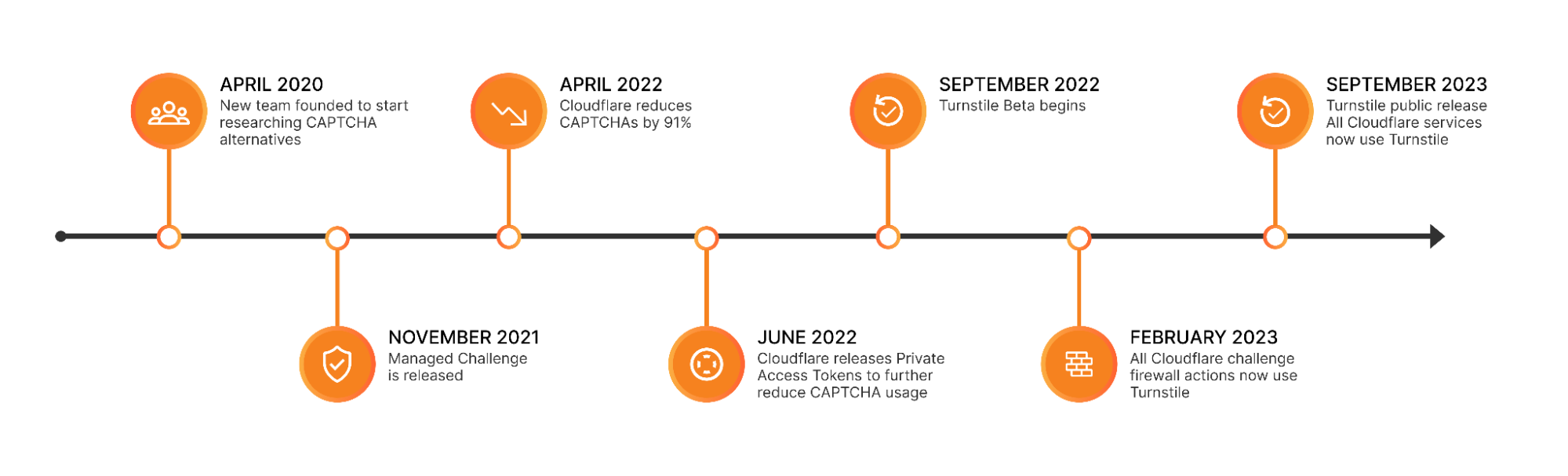
For years, we’ve written that CAPTCHAs drive us crazy. Humans give up on CAPTCHA puzzles approximately 15% of the time and, maddeningly, CAPTCHAs are significantly easier for bots to solve than they are for humans. We’ve spent the past three and a half years working to build a better experience for humans that’s just as effective at stopping bots. As of this month, we’ve finished replacing every CAPTCHA issued by Cloudflare withTurnstile, our new CAPTCHA replacement (pictured below). Cloudflare will never issue another visual puzzle to anyone, for any reason.
Now that we’ve eliminated CAPTCHAs at Cloudflare, we want to make it easy for anyone to do the same, even if they don’t use other Cloudflare services. We’ve decoupled Turnstile from our platform so that any website operator on any platform can use it just by adding a few lines of code. We’re thrilled to announce that Turnstile is now generally available, and Turnstile’s ‘Managed’ mode is now completely free to everyone for unlimited use.
Easy on humans, hard on bots, private for everyone
There’s a lot that goes into Turnstile’s simple checkbox to ensure that it’s easy for everyone, preserves user privacy, and does its job stopping bots. Part of making challenges better for everyone means that everyone gets the same great experience, no matter what browser you’re using. Because we do not employ a visual puzzle, users with low vision or blindness get the same easy to use challenge flow as everyone else. It was particularly important for us to avoid falling back to audio CAPTCHAs to offer an experience accessible to everyone. Audio CAPTCHAs are often much worse than even visual CAPTCHAs for humans to solve, with only 31.2% of audio challenges resulting in a three-person agreement on what the correct solution actually is. The prevalence of free speech-to-text services has made it easy for bots to solve audio CAPTCHAs as well, with a recent study showing bots can accurately solve audio CAPTCHAs in over 85% of attempts.
We also created Turnstile to be privacy focused. Turnstile meets ePrivacy Directive, GDPR and CCPA compliance requirements, as well as the strict requirements of our own privacy commitments. In addition, Cloudflare's FedRAMP Moderate authorized package, "Cloudflare for Government" now includes Turnstile. We don’t rely on tracking user data, like what other websites someone has visited, to determine if a user is a human or robot. Our business is protecting websites, not selling ads, so operators can deploy Turnstile knowing that their users’ data is safe.
With all of our emphasis on how easy it is to pass a Turnstile challenge, you would be right to ask how it can stop a bot. If a bot can find all images with crosswalks in grainy photos faster than we can, surely it can check a box as well. Bots definitely can check a box, and they can even mimic the erratic path of human mouse movement while doing so. For Turnstile, the actual act of checking a box isn’t important, it’s the background data we’re analyzing while the box is checked that matters. We find and stop bots by running a series of in-browser tests, checking browser characteristics, native browser APIs, and asking the browser to pass lightweight tests (ex: proof-of-work tests, proof-of-space tests) to prove that it’s an actual browser. The current deployment of Turnstile checks billions of visitors every day, and we are able to identify browser abnormalities that bots exhibit while attempting to pass those tests.
For over one year, we used our Managed Challenge to rotate between CAPTCHAs and our own Turnstile challenge to compare our effectiveness. We found that even without asking users for any interactivity at all, Turnstile was just as effective as a CAPTCHA. Once we were sure that the results were effective at coping with the response from bot makers, we replaced the CAPTCHA challenge with our own checkbox solution. We present this extra test when we see potentially suspicious signals, and it helps us provide an even greater layer of security.
Turnstile is great for fighting fraud
Like all sites that offer services for free, Cloudflare sees our fair share of automated account signups, which can include “new account fraud,” where bad actors automate the creation of many different accounts to abuse our platform. To help combat this abuse, we’ve rolled out Turnstile’s invisible mode to protect our own signup page. This month, we’ve blocked over1 million automated signup attempts using Turnstile, without a reported false positive or any change in our self-service billings that rely on this signup flow.
Lessons from the Turnstile beta
Over the past twelve months, we’ve been grateful to see how many people are eager to try, then rely on, and integrate Turnstile into their web applications. It’s been rewarding to see the developer community embrace Turnstile as well. We list some of the community created Turnstile integrations here, including integrations with WordPress, Angular, Vue, and a Cloudflare recommended React library. We’ve listened to customer feedback, and added support for 17 new languages, new callbacks, and new error codes.
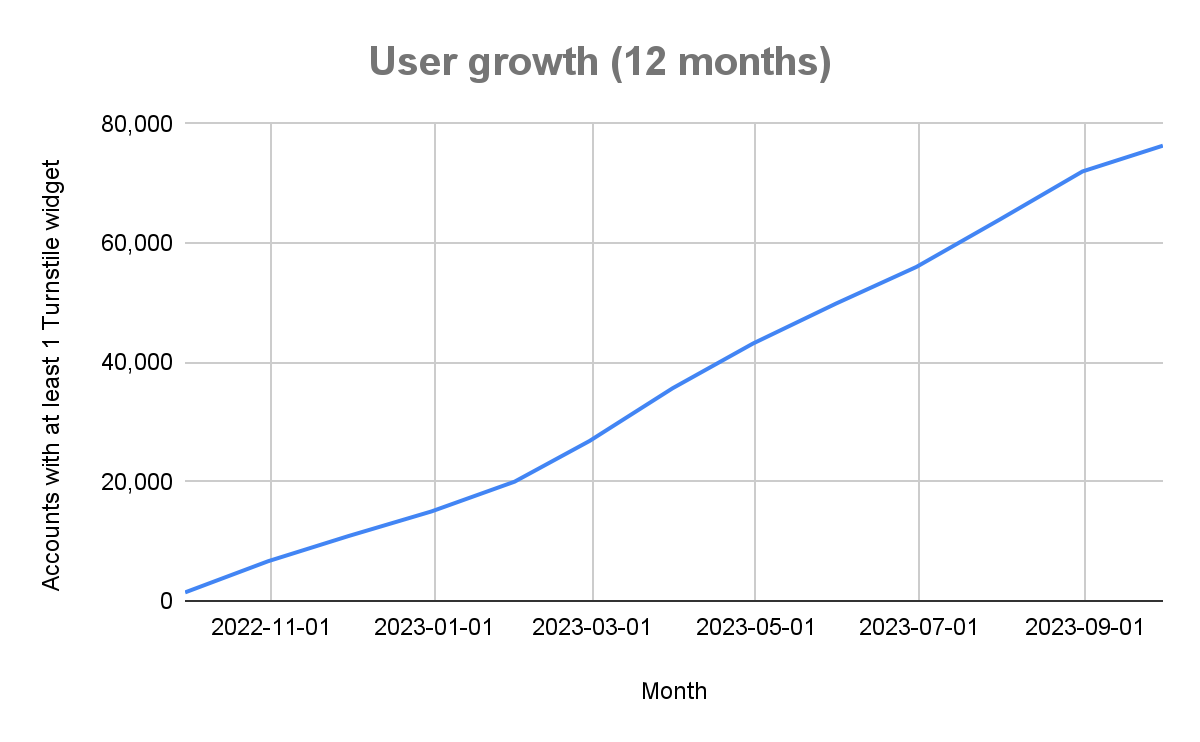
76,000+ users have signed up, but our biggest single test by far was the Eurovision final vote. Turnstile runs on challenge pages on over 25 million Cloudflare websites. Usually, that makes Cloudflare the far and away biggest Turnstile consumer, until the final Eurovision vote. During that one hour, challenge traffic from the Eurovision voting site outpaced the use of challenge pages on those 25 million sites combined! Turnstile handled the enormous spike in traffic without a hitch.
While a lot went well during the Turnstile beta, we also encountered some opportunities for us to learn. We were initially resistant to disclosing why a Turnstile challenge failed. After all, if bad actors know what we’re looking for, it becomes easier for bots to fool our challenges until we introduce new detections. However, during the Turnstile beta, we saw a few scenarios where legitimate users could not pass a challenge. These scenarios made it clear to us that we need to be transparent about why a challenge failed to help aid any individual who might modify their browser in a way that causes them to get caught by Turnstile. We now publish detailed client-side error codes to surface the reason why a challenge has failed. Two scenarios came up on several occasions that we didn’t expect:
First, we saw that desktop computers at least 10 years old frequently had expired motherboard batteries, and computers with bad motherboard batteries very often keep inaccurate time. This is because without the motherboard battery, a desktop computer’s clock will stop operating when the computer is off. Turnstile checks your computer’s system time to detect when a website operator has accidentally configured a challenge page to be cached, as caching a challenge page will cause it to become impassable. Unfortunately, this same check was unintentionally catching humans who just needed to update the time. When we see this issue, we now surface a clear error message to the end user to update their system time. We’d prefer to never have to surface an error in the first place, so we’re working to develop new ways to check for cached content that won’t impact real people.
Second, we find that a few privacy-focused users often ask their browsers to go beyond standard practices to preserve their anonymity. This includes changing their user-agent (something bots will do to evade detection as well), and preventing third-party scripts from executing entirely. Issues caused by this behavior can now be displayed clearly in a Turnstile widget, so those users can immediately understand the issue and make a conscientious choice about whether they want to allow their browser to pass a challenge.
Although we have some of the most sensitive, thoroughly built monitoring systems at Cloudflare, we did not catch either of these issues on our own. We needed to talk to users affected by the issue to help us understand what the problem was. Going forward, we want to make sure we always have that direct line of communication open. We’re rolling out a new feedback form in the Turnstile widget, to ensure any future corner cases are addressed quickly and with urgency.
Turnstile: GA and Free for Everyone
Announcing Turnstile’s General Availability means that Turnstile is now completely production ready, available for free for unlimited use via our visible widget in Managed mode. Turnstile Enterprise includes SaaS platform support and a visible mode without the Cloudflare logo. Self-serve customers can expect a pay-as-you-go option for advanced features to be available in early 2024. Users can continue to access Turnstile’s advanced features below our 1 million siteverify request limit, as has been the case during the beta. If you’ve been waiting to try Turnstile, head over to our signup page and create an account!
Today, we’re excited to announce that any Cloudflare user, on any plan, can choose specific categories of bots that they want to allow or block, including AI crawlers.
As the popularity of generative AI has grown, content creators and policymakers around the world have started to ask questions about what data AI companies are using to train their models without permission. As with all new innovative technologies, laws will likely need to evolve to address different parties' interests and what’s best for society at large. While we don’t know how it will shake out, we believe that website operators should have an easy way to block unwanted AI crawlers and to also let AI bots know when they are permitted to crawl their websites.
The good news is that Cloudflare already automatically stops scraper bots today. But we want to make it even easier for customers to be sure they are protected, see how frequently AI scrapers might be visiting their sites, and respond to them in more targeted ways. We also recognize that not all AI crawlers are the same and that some AI companies are looking for clear instructions for when they should not crawl a public website.
Crawler bots are nothing new. Cloudflare already protects you from scraping today.
Web crawlers have been around for a long time. The first, called World Wide Web Wanderer, was developed back in 1993 to measure the size of the web by counting the total number of accessible web pages. This technique led directly to the creation of the first popular search engine, WebCrawler, in 1994.
And still today, the most common use of a web crawler is for a search engine: Google’s GoogleBot. To provide the most relevant results for searches, crawlers like GoogleBot typically start by visiting web pages and retrieving the HTML content. Search engine operators predefine how much of the crawled HTML files is necessary for indexing, and then the files will be parsed to extract components like text, images, metadata, and links. This extracted data will then be stored in a structured format back on Google’s servers. Extracted links (URLs) are the key to how the crawlers discover new websites. The links that were present in the HTML files are added to a queue of URLs for the crawlers to visit and parse. And URLs are pretty easily spread around the Internet making it easy for crawlers to discover new sites. It can even be a URL that appeared in a referrer header that was stored and published by another web server. This process of following links, parsing, and storing data is recursively repeated allowing search engines to map out the web. All this collected data is then indexed to allow for efficient searching and retrieval of information.
While search engine crawler operations are generally beneficial for a site owner to get their site discovered, there are bot operators that use similar techniques for more malicious purposes such as price scraping to undercut competitor pricing or theft of copyrighted material such as images.
The techniques deployed by AI crawlers are no different. Just like a search engine crawler, they’ll parse HTML content and follow extracted URLs to gather available information. But instead of using it to index the web, this content will be applied as training data for their ML models.
Along with our bot detection tools, we also have a Verified Bot directory that allows responsible and necessary bots, like GoogleBot, to register to be segmented into their own separate detections (fill out a request here if you have a bot you think should be added). We’ve added new functionality to that directory to give our customers more control.
Available now: segment known bots with flexibility and precision
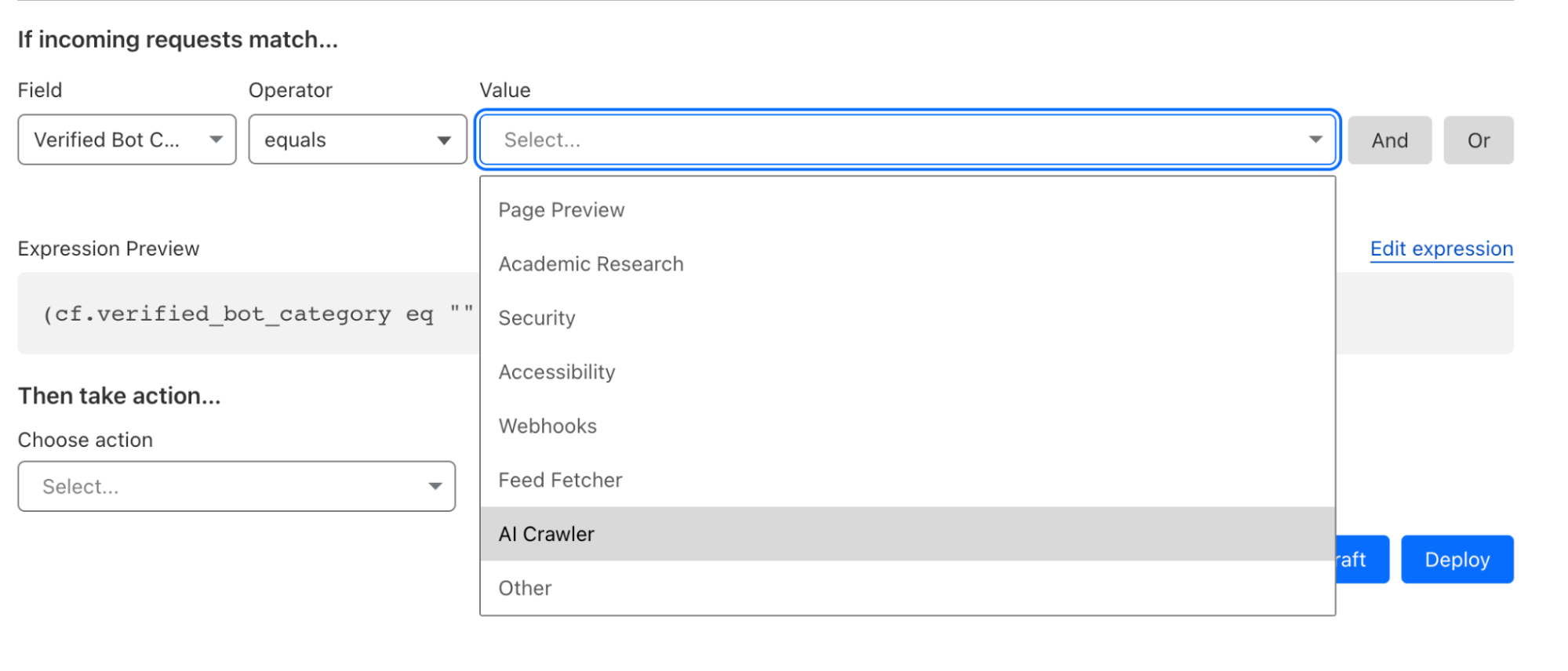
Our new Verified Bot categories are now available in the Cloudflare Rules Engine and Workers. With this granular bot categorization, Cloudflare users get better bot segmentation, and can choose specific responses to specific types of bots. To take advantage of these new bot categories, simply log in to the Cloudflare dash, go to the WAF tab, create a rule, and choose one of the Verified Bot sub categories as the Field.
The new categories include:
Search Engine Crawler,
Aggregator,
AI Crawler,
Page Preview,
Advertising
Academic Research,
Accessibility,
Feed Fetcher,
Security,
Webhooks.
You can also view all the available categories using the Cloudflare API.
More targeted responses can be useful in a variety of situations. A few examples include:
If you are a content creator, and you’re concerned about your work being reproduced by AI services, you can block AI bots we have cataloged in a simple firewall rule, while still allowing search engine crawlers to index your site.
If your content is frequently shared on social media, you may want to use Workers to serve a simplified version of the page to Page Preview services, like the services that X (formerly Twitter), Discord and Slack are using to render a thumbnail version of a web page.
If you run an online store that processes payments through webhooks API, you can harden your site’s security by only allowing verified webhooks services to make a request to that API endpoint.
If you are using Cloudflare’s Load Balancing service and have limited in-region capacity, you can use Custom Rules for Load Balancing to send all bots except Search Engine Crawlers to a backup pool, prioritizing critical visitors over non-critical automated services.
Above all, these new categories give you, the website owner, complete, granular control over not only whether bots can visit your site, but what specific types of bots can and can’t do. For those of you that simply don’t want any bots, no problem, you don’t have to make any changes. Your existing rules that reference bot score or our Verified bots change will not be impacted at all.
More than just blocking, encouraging good behavior to make the Internet better
At Cloudflare, we have a history of working with good bot operators (like GoogleBot), who respect Internet norms and best practices, to access the websites that want to allow them. We want to encourage good behavior by AI crawlers as well, so we have developed a set of criteria that will allow us to tag respectful AI bots differently. In order to be tagged as a respectful AI bot, AI crawler must take the following steps to show they are acting in good faith:
Maintain a public web page committing to respect robots.txt.
Set IPs that are used solely by the bot and are verifiable via a public IP list, reverse DNS lookup, or ASN ownership.
Maintain a unique and stable user-agent to represent the bot.
Respect a robots.txt entry for your user-agent as well as wild-card entries.
Requiring all AI crawlers to respect crawl-delay, which has previously been a nonstandard extension.
These steps are an expansion of our existing Verified Bots policy which you can see here. When a bot creator has performed the steps above, we perform additional evaluation to confirm we’ve seen no suspicious activity from the bot. We check the bot's documentation, check internal dashboards to ensure traffic is appropriately distributed across the sites we protect, and check whether the bot hits suspicious endpoints like logins, or has exhibited other malicious activity.
While new AI bots can be scary, this industry is evolving incredibly quickly, and you may want to handle different bots differently in the future. We think it's important to distinguish between bot operators that are being respectful and those that are trying to be deceptive.
It should be easy for everyone to deal with AI crawlers, not just Cloudflare customers
While we’re glad we’ve made it easy for Cloudflare customers to manage AI Crawlers, not everyone uses Cloudflare. We want the Internet to be better for everyone. So we think that the industry should adopt a new protocol specifically for handling AI crawlers.
In the long run, AI bots respecting a new exclusion protocol gives website operators the most flexibility to change how they want to handle them over time. We think the key is to make it easier for customers to block these bots, or to allow them in some cases if they choose on their entire website or only on specific pages.
You’ll be hearing more about this from us in the next few months, so stay tuned.
But we didn’t want to wait to make sure our customers are protected, so we're making our new bot categories available today!
What’s next?
The first and most important step for us was to make it clear to every Cloudflare customer that you are already protected from AI crawlers you don’t want. Second, we wanted to give you granular control and make it easy to allow those crawlers, or other bots, that you deem useful for your site.
We encourage everyone to try out our new Verified Bot categories today. Log in to the Cloudflare dash, go to the WAF tab, create a rule, and choose one of the Verified Bot sub categories as the `Field`. And remember, this functionality is available to all Cloudflare customers, even on free plans.
Having launched Verified Bot categories, in the next few months we’ll be adding more detailed reporting based on the bot category, to better help you visualize the frequency at which different categories of bots are visiting your site over time. As AI continues to evolve at a breakneck pace, AI Crawlers are only going to become a larger part of the Internet. As that evolution happens, Cloudflare will be there every step of the way to help you evolve the way you deal with them.
Today, we are thrilled to release a beta of Cloudflare Pages support for build caching! With build caching, we are offering a supercharged Pages experience by helping you cache parts of your project to save time on subsequent builds.
For developers, time is not just money – it’s innovation and progress. When every second counts in crunch time before a new launch, the “need for speed” becomes critical. With Cloudflare Pages’ built-in continuous integration and continuous deployment (CI/CD), developers count on us to drive fast. We’ve already taken great strides in making sure we’re enabling quick development iterations for our users by making solid improvements on the stability and efficiency of our build infrastructure. But we always knew there was more to our build story.
Quick pit stops
Build times can feel like a developer's equivalent of a time-out, a forced pause in the creative process—the inevitable pit stop in a high-speed formula race.
Long build times not only breaks the flow of individual developers, but it can also create a ripple effect across the team. It can slow down iterations and push back deployments. In the fast-paced world of CI/CD, these delays can drastically impact productivity and the delivery of products.
We want to empower developers to win the race, miles ahead of competition.
Mechanics of build caching
At its core, build caching is a mechanism that stores artifacts of a build, allowing subsequent builds to reuse these artifacts rather than recomputing them from scratch. By leveraging the cached results, build times can be significantly reduced, leading to a more efficient build process.
Previously, when you initiated a build, the Pages CI system would generate every step of the build process, even if most parts of the codebase remain unchanged between builds. This is the equivalent to changing out every single part of the car during a pit stop, irrespective of if anything needs replacing.
Build caching refines this process. Now, the Pages build system will detect if cached artifacts can be leveraged, restore the artifacts, then focus on only computing the modified sections of the code. In essence, build caching acts like an experienced pit crew, smartly skipping unnecessary steps and focusing only on what's essential to get you back in the race faster.
What are we caching?
It boils down to two components: dependencies and build output.
The Pages build system supports dependency caching for select package managers and build output caching for select frameworks. Check out our documentation for more information on what’s currently supported and what’s coming up.
Let’s take a closer look at what exactly we are caching.
Dependencies: upon initiating a build, the Pages CI system checks for cached artifacts from previous builds. If it identifies a cache hit for dependencies, it restores from cache to speed up dependency installation.
Build output: if a cache hit for build output is identified, Pages will only build the changed assets. This approach enables the long awaited incremental builds for supported JavaScript frameworks.
Ready, set … go!
Build caching is now in beta, and ready for you to test drive!
In this release, the feature will support the node-based package managers npm, yarn, pnpm, as well as Bun. We’ve also ensured compatibility with the most popular frameworks that provide native incremental building support: Gatsby.js, Next.js and Astro – and more to come!
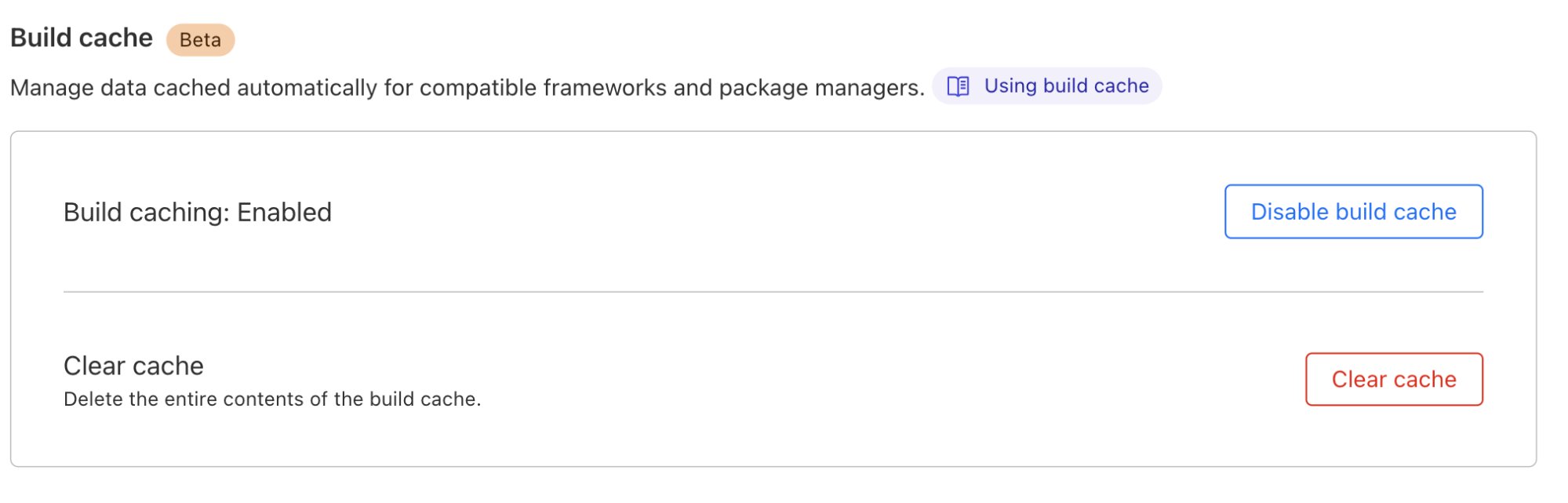
For you as a Pages user, interacting with build caching will be seamless. If you are working with an existing project, simply navigate to your project’s settings to toggle on Build Cache.
When you push a code change and initiate a build using Pages CI, build caching will kick-start and do its magic in the background.
“Cache” us on Discord
Have questions? Join us on our Discord Server [link]. We will be hosting an “Ask Us Anything” session on October 2nd where you can chat live with members of our team! Your feedback on this beta is invaluable to us, so after testing out build caching, don't hesitate to share your experiences! Happy building!
Since the very initial announcement of Cloudflare Workers, we’ve provided a playground. The motivation behind that being a belief that users should have a convenient, low-commitment way to play around with and learn more about Workers.
Over the last few years, while Cloudflare Workers and our Developer Platform have changed and grown, the original playground has not. Today, we’re proud to announce a revamp of the playground that demonstrates the power of Workers, along with new development tooling, and the ability to share your playground code and deploy instantly to Cloudflare’s global network.
A focus on origin Workers
When Workers was first introduced, many of the examples and use-cases centered around middleware, where a Worker intercepts a request to an origin and does something before returning a response. This includes things like: modifying headers, redirecting traffic, helping with A/B testing, or caching. Ultimately the Worker isn’t acting as an origin in these cases, it sits between the user and the destination.
While Workers are still great for these types of tasks, for the updated playground, we decided to focus on the Worker-as-origin use-case. This is where the Worker receives a request and is responsible for returning the full response. In this case, the Worker is the destination, not middle-ware. This is a great way for you to develop more complex use-cases like user interfaces or APIs.
A new editor experience
During Developer Week in May, we announced a new, authenticated dashboard editor experience powered by VSCode. Now, this same experience is available to users in the playground.
Users now have a more robust IDE experience that supports: multi-module Workers, type-checking via JSDoc comments and the `workers-types` package, pretty error pages, and real previews that update as you edit code. The new editor only supports Module syntax, which is the preferred way for users to develop new Workers.
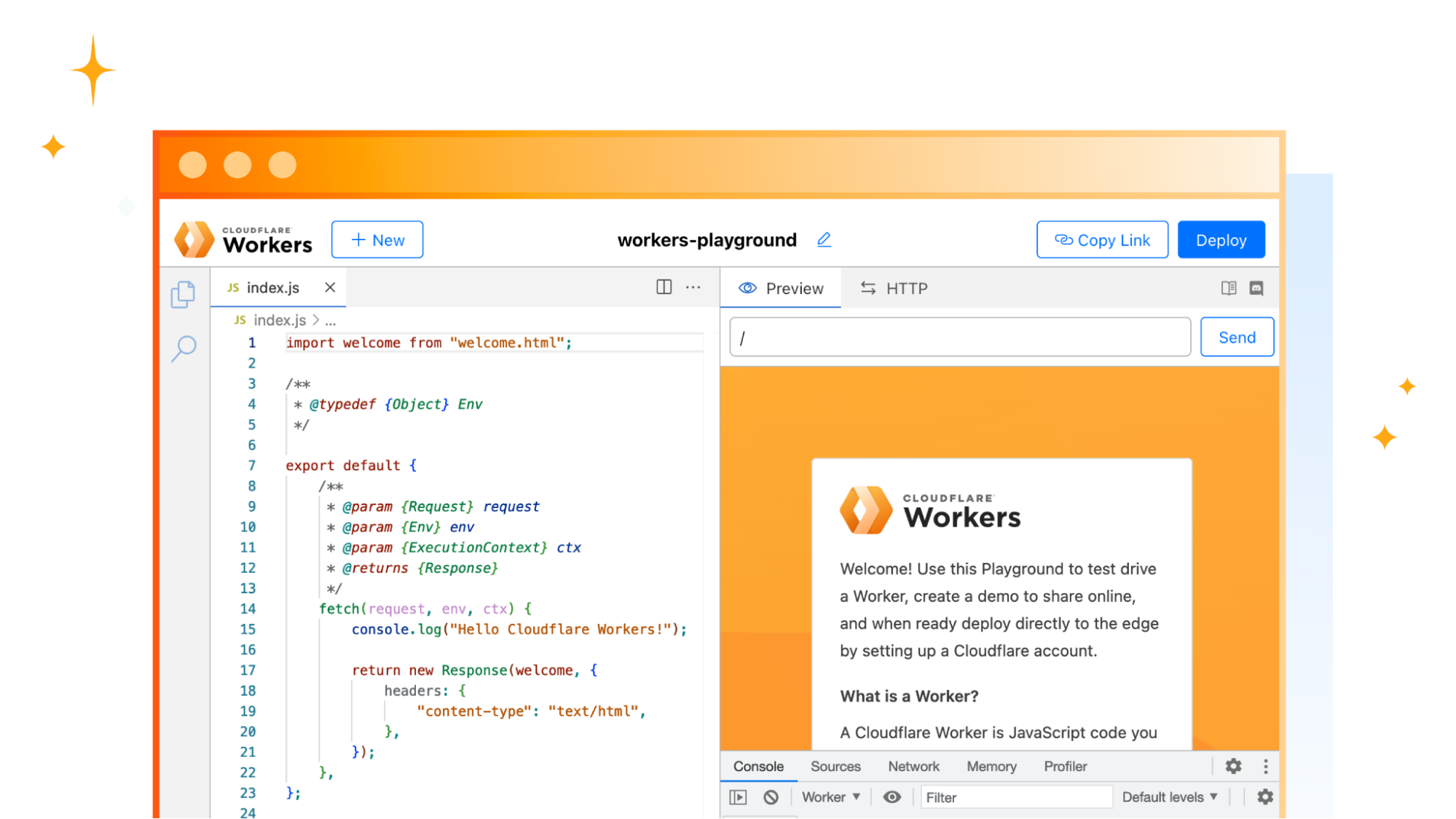
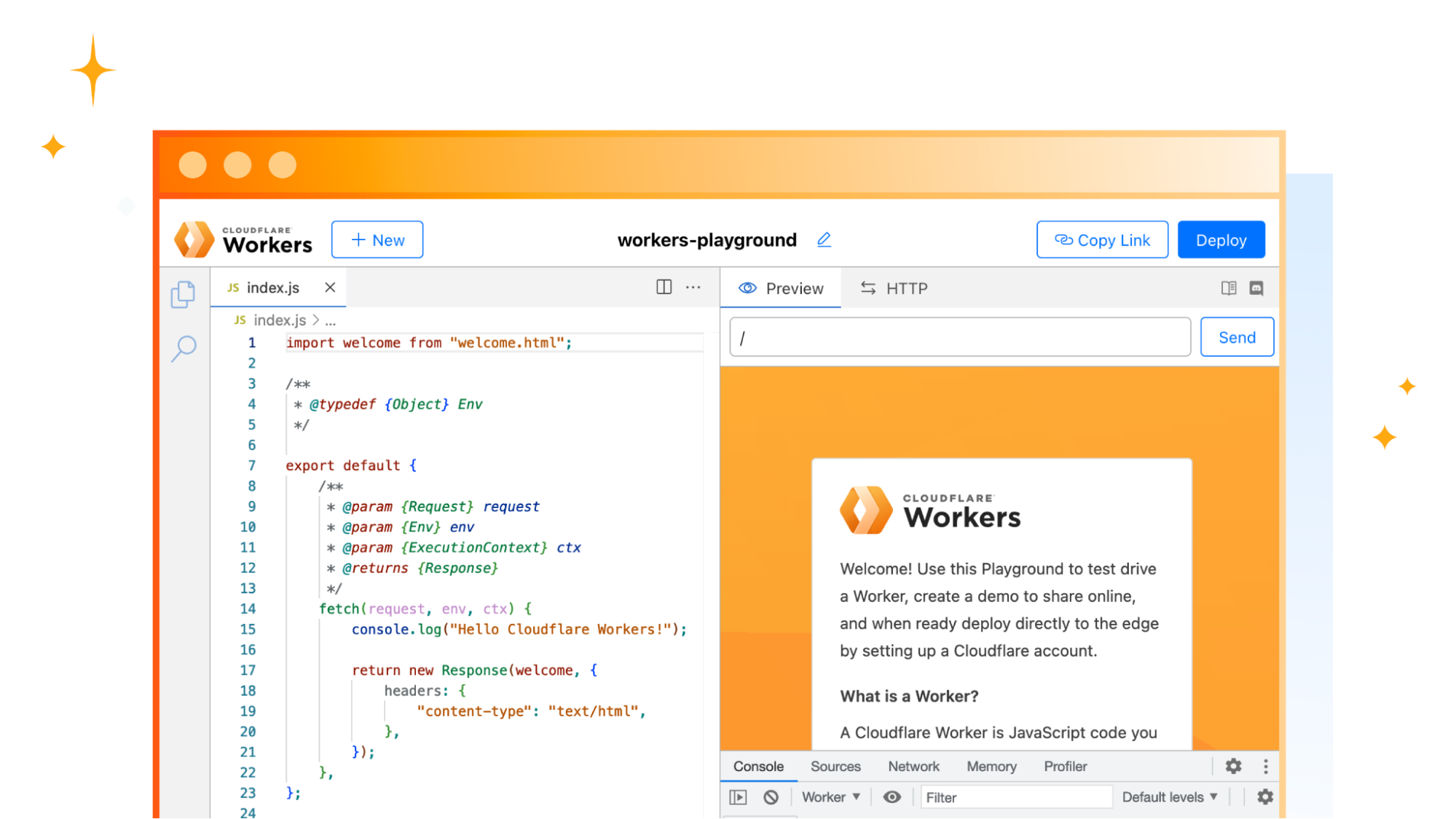
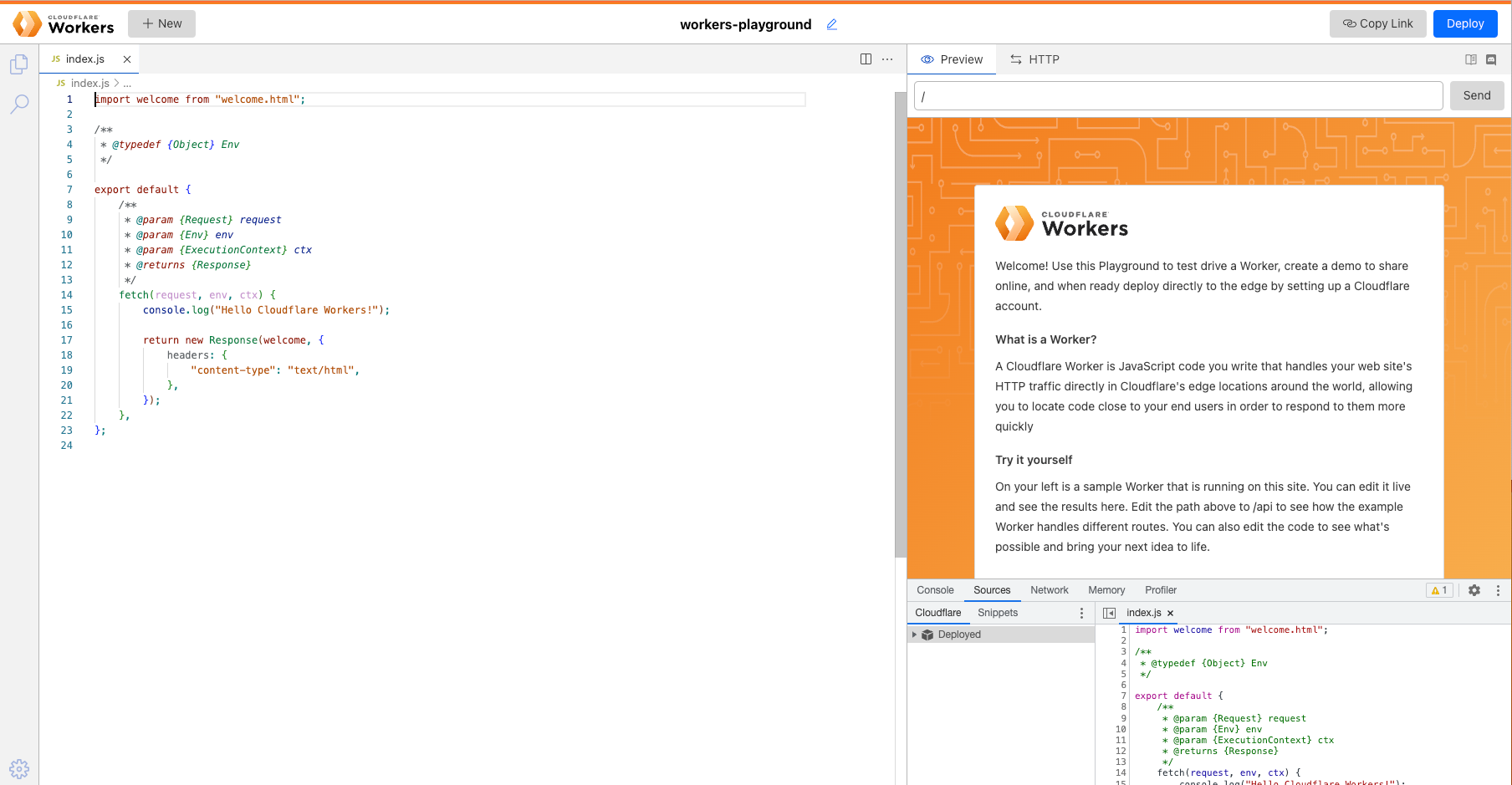
When the playground first loads, it looks like this:
The content you see on the right is coming from the code on the left. You can modify this just as you would in a code editor. Once you make an edit, it will be updated shortly on the right as demonstrated below:
You’re not limited to the starter demo. Feel free to edit and remove those files to create APIs, user interfaces, or any other application that you come up with.
Updated developer tooling
Along with the updated editor, the new playground also contains numerous developer tools to help give you visibility into the Worker.
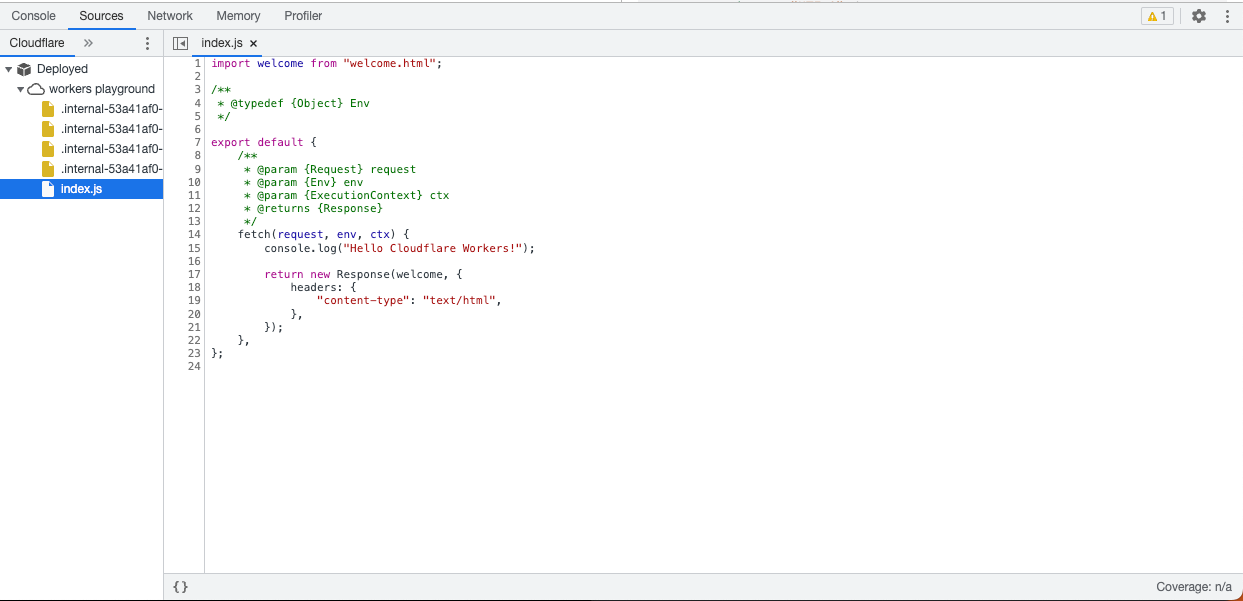
Playground users have access to the same Chrome DevTools technology that we use in the Wrangler CLI and the Dashboard. Within this view, you can: view logs, view network requests, and profile your Worker among other things.
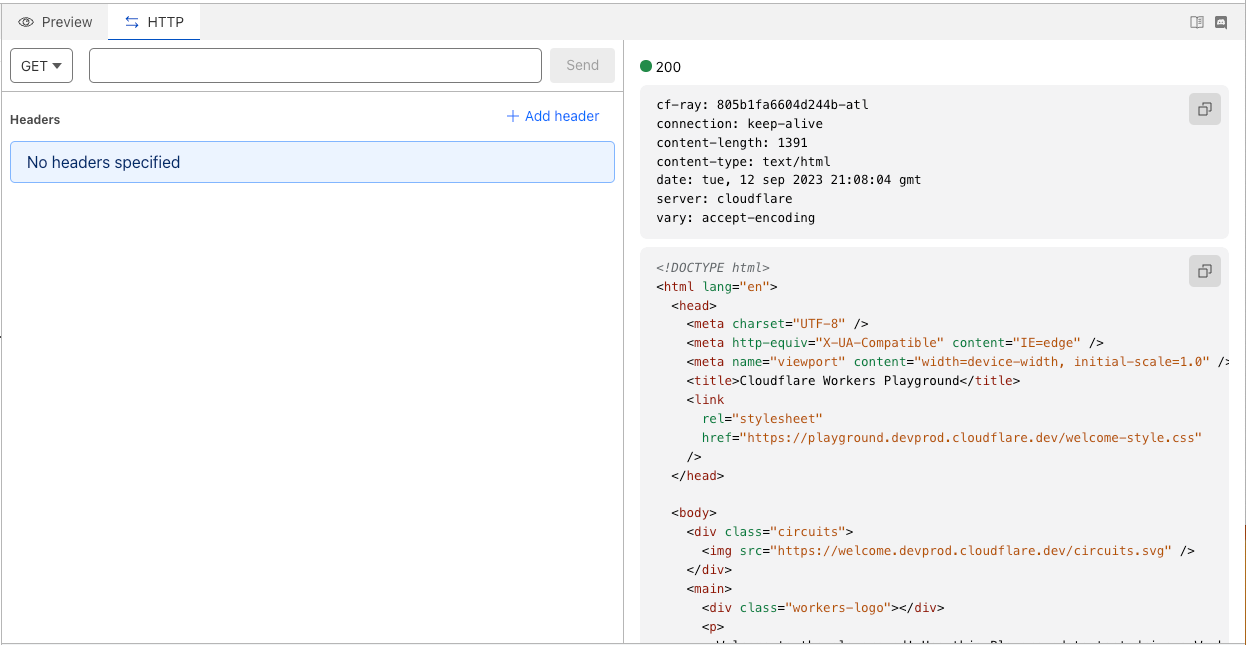
At the top of the playground, you’ll also see an “HTTP” tab which you can use to test your Worker against various HTTP methods.
Share what you create
With all these improvements, we haven’t forgotten the core use of a playground—to share Workers with other people! Whatever your use-case; whether you’re building a demo to showcase the power of Workers or sending someone an example of how to fix a specific issue, all you need to do is click “Copy Link” in the top right of the Playground then paste the URL in any URL bar.
The unique URL will be shareable and deployable as long as you have it. This means that you could create quick demos by creating various Workers in the Playground, and bookmark them to share later. They won’t expire.
Deploying to the Supercloud
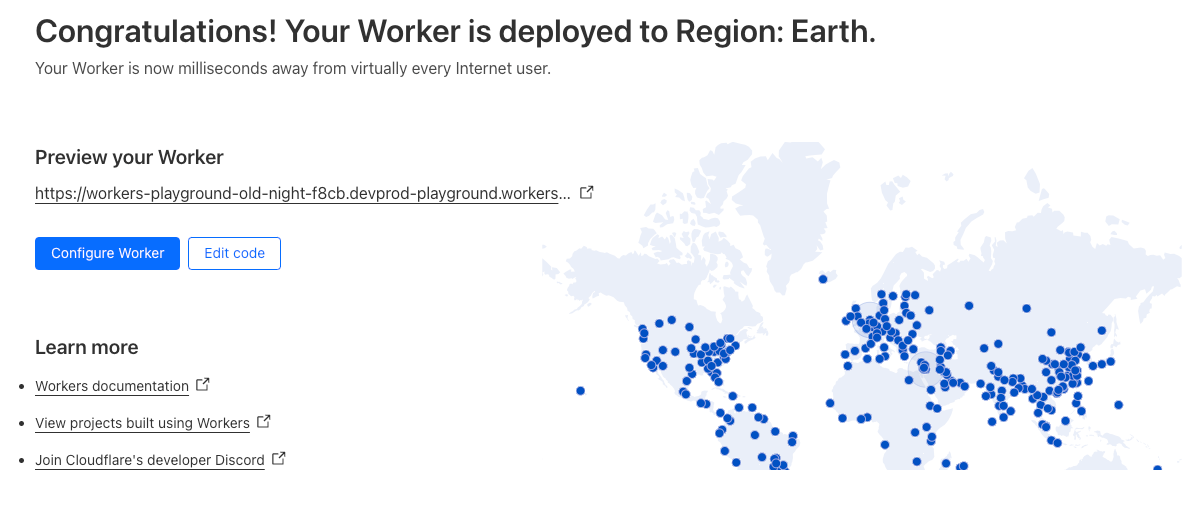
We also wanted to make it easier to go from writing a Worker in the Playground to deploying that Worker to Cloudflare’s global network. We’ve included a “Deploy” button that will help you quickly deploy the Worker you’ve just created.
If you don’t already have a Cloudflare account, you will also be guided through the onboarding process.
Hyperdrive makes accessing your existing databases from Cloudflare Workers, wherever they are running, hyper fast. You connect Hyperdrive to your database, change one line of code to connect through Hyperdrive, and voilà: connections and queries get faster (and spoiler: you can use it today).
In a nutshell, Hyperdrive uses our global network to speed up queries to your existing databases, whether they’re in a legacy cloud provider or with your favorite serverless database provider; dramatically reduces the latency incurred from repeatedly setting up new database connections; and caches the most popular read queries against your database, often avoiding the need to go back to your database at all.
Without Hyperdrive, that core database — the one with your user profiles, product inventory, or running your critical web app — sitting in the us-east1 region of a legacy cloud provider is going to be really slow to access for users in Paris, Singapore and Dubai and slower than it should be for users in Los Angeles or Vancouver. With each round trip taking up to 200ms, it’s easy to burn up to a second (or more!) on the multiple round-trips needed just to set up a connection, before you’ve even made the query for your data. Hyperdrive is designed to fix this.
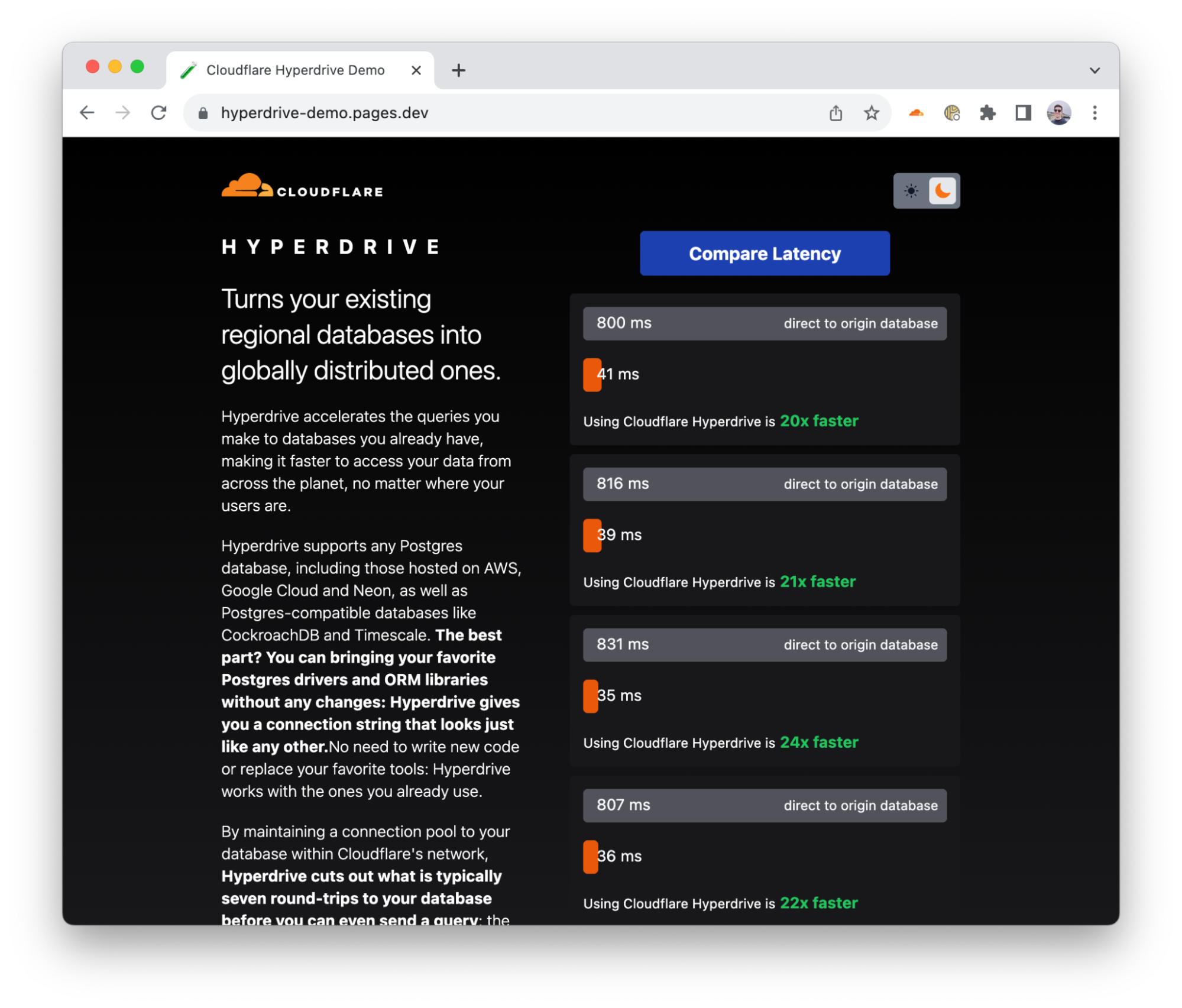
To demonstrate Hyperdrive’s performance, we built a demo application that makes back-to-back queries against the same database: both with Hyperdrive and without Hyperdrive (directly). The app selects a database in a neighboring continent: if you’re in Europe, it selects a database in the US — an all-too-common experience for many European Internet users — and if you’re in Africa, it selects a database in Europe (and so on). It returns raw results from a straightforward SELECT query, with no carefully selected averages or cherry-picked metrics.
We built a demo app that makes real queries to a PostgreSQL database, with and without Hyperdrive
Throughout internal testing, initial user reports and the multiple runs in our benchmark, Hyperdrive delivers a 17 – 25x performance improvement vs. going direct to the database for cached queries, and a 6 – 8x improvement for uncached queries and writes. The cached latency might not surprise you, but we think that being 6 – 8x faster on uncached queries changes “I can’t query a centralized database from Cloudflare Workers” to “where has this been all my life?!”. We’re also continuing to work on performance improvements: we’ve already identified additional latency savings, and we’ll be pushing those out in the coming weeks.
We’ve been working on Hyperdrive in secret for a short while: but allowing developers to connect to databases they already have — with their existing data, queries and tooling — has been something on our minds for quite some time.
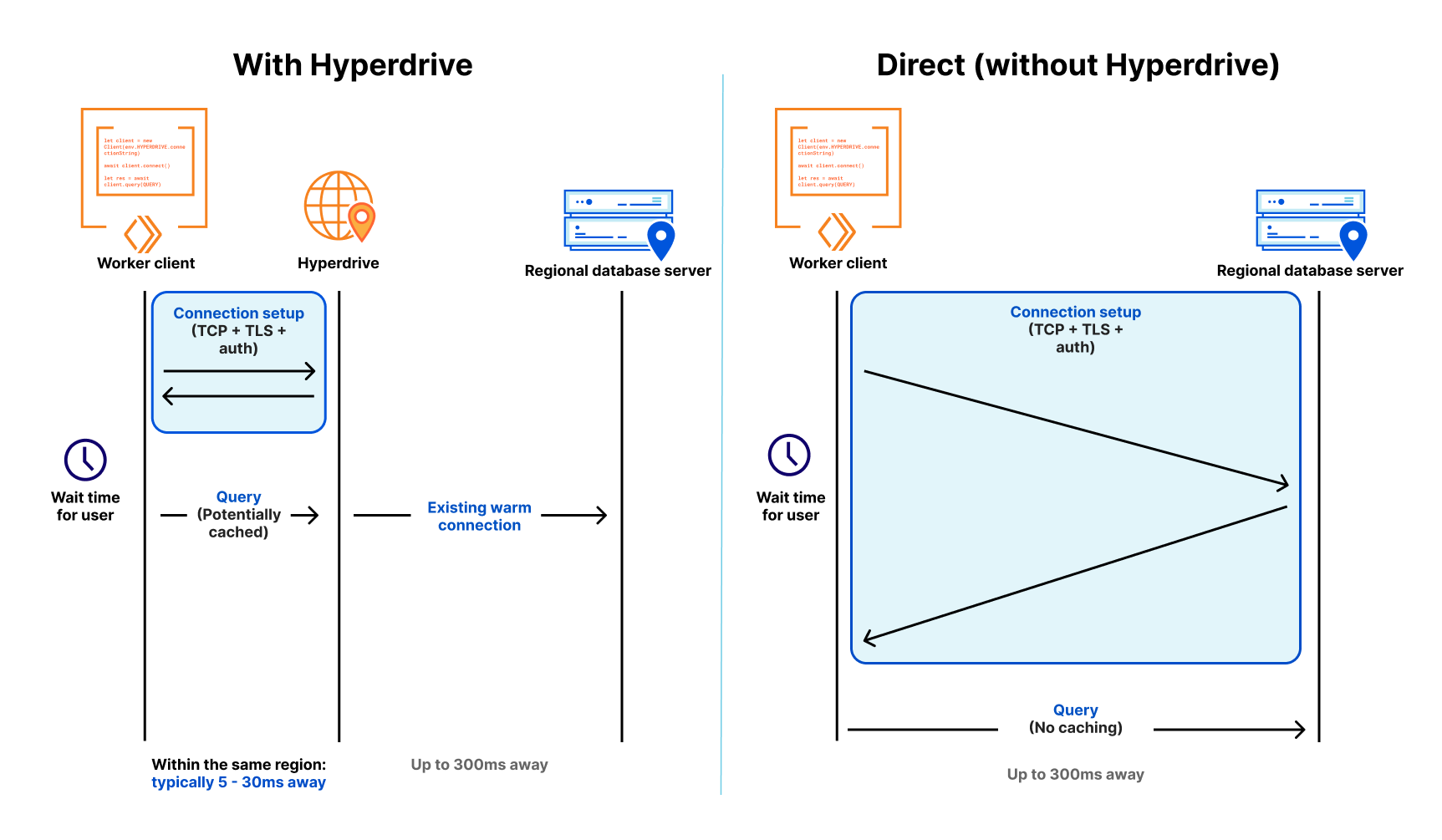
In a modern distributed cloud environment like Workers, where compute is globally distributed (so it’s close to users) and functions are short-lived (so you’re billed no more than is needed), connecting to traditional databases has been both slow and unscalable. Slow because it takes upwards of seven round-trips (TCP handshake; TLS negotiation; then auth) to establish the connection, and unscalable because databases like PostgreSQL have a high resource cost per connection. Even just a couple of hundred connections to a database can consume non-negligible memory, separate from any memory needed for queries.
Our friends over at Neon (a popular serverless Postgres provider) wrote about this, and even released a WebSocket proxy and driver to reduce the connection overhead, but are still fighting uphill in the snow: even with a custom driver, we’re down to 4 round-trips, each still potentially taking 50-200 milliseconds or more. When those connections are long-lived, that’s OK — it might happen once every few hours at best. But when they’re scoped to an individual function invocation, and are only useful for a few milliseconds to minutes at best — your code spends more time waiting. It’s effectively another kind of cold start: having to initiate a fresh connection to your database before making a query means that using a traditional database in a distributed or serverless environment is (to put it lightly) really slow.
To combat this, Hyperdrive does two things.
First, it maintains a set of regional database connection pools across Cloudflare’s network, so a Cloudflare Worker avoids making a fresh connection to a database on every request. Instead, the Worker can establish a connection to Hyperdrive (fast!), with Hyperdrive maintaining a pool of ready-to-go connections back to the database. Since a database can be anywhere from 30ms to (often) 300ms away over a single round-trip (let alone the seven or more you need for a new connection), having a pool of available connections dramatically reduces the latency issue that short-lived connections would otherwise suffer.
Second, it understands the difference between read (non-mutating) and write (mutating) queries and transactions, and can automatically cache your most popular read queries: which represent over 80% of most queries made to databases in typical web applications. That product listing page that tens of thousands of users visit every hour; open jobs on a major careers site; or even queries for config data that changes occasionally; a tremendous amount of what is queried does not change often, and caching it closer to where the user is querying it from can dramatically speed up access to that data for the next ten thousand users. Write queries, which can’t be safely cached, still get to benefit from both Hyperdrive’s connection pooling and Cloudflare’s global network: being able to take the fastest routes across the Internet across our backbone cuts down latency there, too.
Even if your database is on the other side of the country, 70ms x 6 round-trips is a lot of time for a user to be waiting for a query response.
Hyperdrive works not only with PostgreSQL databases — including Neon, Google Cloud SQL, AWS RDS, and Timescale, but also PostgreSQL-compatible databases like Materialize (a powerful stream-processing database), CockroachDB (a major distributed database), Google Cloud’s AlloyDB, and AWS Aurora Postgres.
We’re also working on bringing support for MySQL, including providers like PlanetScale, by the end of the year, with more database engines planned in the future.
The magic connection string
One of the major design goals for Hyperdrive was the need for developers to keep using their existing drivers, query builder and ORM (Object-Relational Mapper) libraries. It wouldn’t have mattered how fast Hyperdrive was if we required you to migrate away from your favorite ORM and/or rewrite hundreds (or more) lines of code & tests to benefit from Hyperdrive’s performance.
The magic behind Hyperdrive is that you can start using it in your existing Workers applications, with your existing queries, just by swapping out your connection string for the one Hyperdrive generates instead.
Creating a Hyperdrive
With an existing database ready to go — in this example, we’ll use a Postgres database from Neon — it takes less than a minute to get Hyperdrive running (yes, we timed it).
If you don’t have an existing Cloudflare Workers project, you can quickly create one:
$ npm create cloudflare@latest
# Call the application "hyperdrive-demo"
# Choose "Hello World Worker" as your template
From here, we just need the database connection string for our database and a quick wrangler command-line invocation to have Hyperdrive connect to it.
# Using wrangler v3.8.0 or above
wrangler hyperdrive databases create a-faster-database --connection-string="postgres://user:[email protected]/neondb"

# This will return an ID: we'll use this in the next step
[[hyperdrive]]
name = "HYPERDRIVE"
database_id = "cdb28782-0dfc-4aca-a445-a2c318fb26fd"
We can now write a Worker — or take an existing Worker script — and use Hyperdrive to speed up connections and queries to our existing database. We use node-postgres here, but we could just as easily use Drizzle ORM.
import { Client } from 'pg';

export interface Env {
	HYPERDRIVE: Hyperdrive;
}

export default {
	async fetch(request: Request, env: Env, ctx: ExecutionContext) {
		console.log(JSON.stringify(env));
		// Create a database client that connects to our database via Hyperdrive
		//
		// Hyperdrive generates a unique connection string you can pass to
		// supported drivers, including node-postgres, Postgres.js, and the many
		// ORMs and query builders that use these drivers.
		const client = new Client({ connectionString: env.HYPERDRIVE.connectionString });

		try {
			// Connect to our database
			await client.connect();

			// A very simple test query
			let result = await client.query({ text: 'SELECT * FROM pg_tables' });

			// Return our result rows as JSON
			return Response.json({ result: result });
		} catch (e) {
			console.log(e);
			return Response.json({ error: JSON.stringify(e) }, { status: 500 });
		}
	},
};
The code above is intentionally simple, but hopefully you can see the magic: our database driver gets a connection string from Hyperdrive, and is none-the-wiser. It doesn’t need to know anything about Hyperdrive, we don’t have to toss out our favorite query builder library, and we can immediately realize the speed benefits when making queries.
Connections are automatically pooled and kept warm, our most popular queries are cached, and our entire application gets faster.
We think Hyperdrive is critical to accessing your existing databases when building on Cloudflare Workers: traditional databases were just never designed for a world where clients are globally distributed.
Hyperdrive’s connection pooling will always be free, for both database protocols we support today and new database protocols we add in the future. Just like DDoS protection and our global CDN, we think access to Hyperdrive’s core feature is too useful to hold back.
During the open beta, Hyperdrive itself will not incur any charges for usage, regardless of how you use it. We’ll be announcing more details on how Hyperdrive will be priced closer to GA (early in 2024), with plenty of notice.
Time to query
So where to from here for Hyperdrive?
We’re planning on bringing Hyperdrive to GA in early 2024 — and we’re focused on landing more controls over how we cache & automatically invalidate based on writes, detailed query and performance analytics (soon!), support for more database engines (including MySQL) as well as continuing to work on making it even faster.
We’re also working to enable private network connectivity via Magic WAN and Cloudflare Tunnel, so that you can connect to databases that aren’t (or can’t be) exposed to the public Internet.
To connect Hyperdrive to your existing database, visit our developer docs — it takes less than a minute to create a Hyperdrive and update existing code to use it. Join the #hyperdrive-beta channel in our Developer Discord to ask questions, surface bugs, and talk to our Product & Engineering teams directly.
Last year, we announced the Browser Rendering API – letting users running Puppeteer, a browser automation library, directly in Workers. Puppeteer is one of the most popular libraries used to interact with a headless browser instance to accomplish tasks like taking screenshots, generating PDFs, crawling web pages, and testing web applications. We’ve heard from developers that configuring and maintaining their own serverless browser automation systems can be quite painful.
The Workers Browser Rendering API solves this. It makes the Puppeteer library available directly in your Worker, connected to a real web browser, without the need to configure and manage infrastructure or keep browser sessions warm yourself. You can use @cloudflare/puppeteer to run the full Puppeteer API directly on Workers!
We’ve seen so much interest from the developer community since launching last year. While the Browser Rendering API is still in beta (sign up to our waitlist to get access), we wanted to share a way to get more out of our current limits by using the Browser Rendering API with Durable Objects. We’ll also be sharing pricing for the Rendering API, so you can build knowing exactly what you’ll pay for.
Building a responsive web design testing tool with the Browser Rendering API
As a designer or frontend developer, you want to make sure that content is well-designed for visitors browsing on different screen sizes. With the number of possible devices that users are browsing on are growing, it becomes difficult to test all the possibilities manually. While there are many testing tools on the market, we want to show how easy it is to create your own Chromium based tool with the Workers Browser Rendering API and Durable Objects.
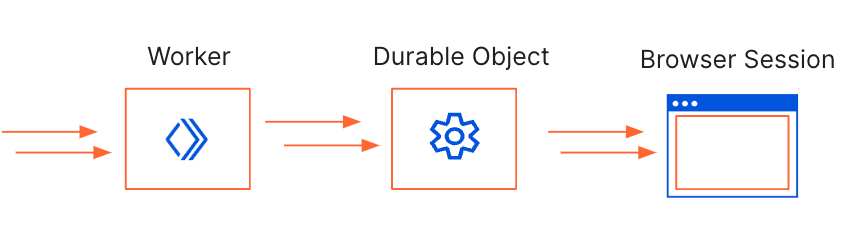
We’ll be using the Worker to handle any incoming requests, pass them to the Durable Object to take screenshots and store them in an R2 bucket. The Durable Object is used to create a browser session that’s persistent. By using Durable Object Alarms we can keep browsers open for longer and reuse browser sessions across requests.
Let’s dive into how we can build this application:
Create a Worker with a Durable Object, Browser Rendering API binding and R2 bucket. This is the resulting wrangler.toml:
name = "rendering-api-demo"
main = "src/index.js"
compatibility_date = "2023-09-04"
compatibility_flags = [ "nodejs_compat"]
account_id = "c05e6a39aa4ccdd53ad17032f8a4dc10"


# Browser Rendering API binding
browser = { binding = "MYBROWSER" }

# Bind an R2 Bucket
[[r2_buckets]]
binding = "BUCKET"
bucket_name = "screenshots"

# Binding to a Durable Object
[[durable_objects.bindings]]
name = "BROWSER"
class_name = "Browser"

[[migrations]]
tag = "v1" # Should be unique for each entry
new_classes = ["Browser"] # Array of new classes
2. Define the Worker
This Worker simply passes the request onto the Durable Object.
export default {
	async fetch(request, env) {

		let id = env.BROWSER.idFromName("browser");
		let obj = env.BROWSER.get(id);

		// Send a request to the Durable Object, then await its response.
		let resp = await obj.fetch(request.url);
		let count = await resp.text();

		return new Response("success");
	}
};
3. Define the Durable Object class
const KEEP_BROWSER_ALIVE_IN_SECONDS = 60;

export class Browser {
	constructor(state, env) {
		this.state = state;
		this.env = env;
		this.keptAliveInSeconds = 0;
		this.storage = this.state.storage;
	}

	async fetch(request) {
		// screen resolutions to test out
		const width = [1920, 1366, 1536, 360, 414]
		const height = [1080, 768, 864, 640, 896]

		// use the current date and time to create a folder structure for R2
		const nowDate = new Date()
		var coeff = 1000 * 60 * 5
		var roundedDate = (new Date(Math.round(nowDate.getTime() / coeff) * coeff)).toString();
		var folder = roundedDate.split(" GMT")[0]

		//if there's a browser session open, re-use it
		if (!this.browser) {
			console.log(`Browser DO: Starting new instance`);
			try {
			  this.browser = await puppeteer.launch(this.env.MYBROWSER);
			} catch (e) {
			  console.log(`Browser DO: Could not start browser instance. Error: ${e}`);
			}
		  }

		// Reset keptAlive after each call to the DO
		this.keptAliveInSeconds = 0;

		const page = await this.browser.newPage();

		// take screenshots of each screen size
		for (let i = 0; i < width.length; i++) {
			await page.setViewport({ width: width[i], height: height[i] });
			await page.goto("https://workers.cloudflare.com/");
			const fileName = "screenshot_" + width[i] + "x" + height[i]
			const sc = await page.screenshot({
				path: fileName + ".jpg"
			}
			);

			this.env.BUCKET.put(folder + "/"+ fileName + ".jpg", sc);
		  }

		// Reset keptAlive after performing tasks to the DO.
		this.keptAliveInSeconds = 0;

		// set the first alarm to keep DO alive
		let currentAlarm = await this.storage.getAlarm();
		if (currentAlarm == null) {
		console.log(`Browser DO: setting alarm`);
		const TEN_SECONDS = 10 * 1000;
		this.storage.setAlarm(Date.now() + TEN_SECONDS);
		}

		await this.browser.close();
		return new Response("success");
	}

	async alarm() {
		this.keptAliveInSeconds += 10;

		// Extend browser DO life
		if (this.keptAliveInSeconds < KEEP_BROWSER_ALIVE_IN_SECONDS) {
		  console.log(`Browser DO: has been kept alive for ${this.keptAliveInSeconds} seconds. Extending lifespan.`);
		  this.storage.setAlarm(Date.now() + 10 * 1000);
		} else console.log(`Browser DO: cxceeded life of ${KEEP_BROWSER_ALIVE_IN_SECONDS}. Browser DO will be shut down in 10 seconds.`);
	  }

  }
That’s it! With less than a hundred lines of code, you can fully customize a powerful tool to automate responsive web design testing. You can even incorporate it into your CI pipeline to automatically test different window sizes with each build and verify the result is as expected by using an automated library like pixelmatch.
How much will this cost?
We’ve spoken to many customers deploying a Puppeteer service on their own infrastructure, on public cloud containers or functions or using managed services. The common theme that we’ve heard is that these services are costly – costly to maintain and expensive to run.
While you won’t be billed for the Browser Rendering API yet, we want to be transparent with you about costs you start building. We know it’s important to understand the pricing structure so that you don’t get a surprise bill and so that you can design your application efficiently.
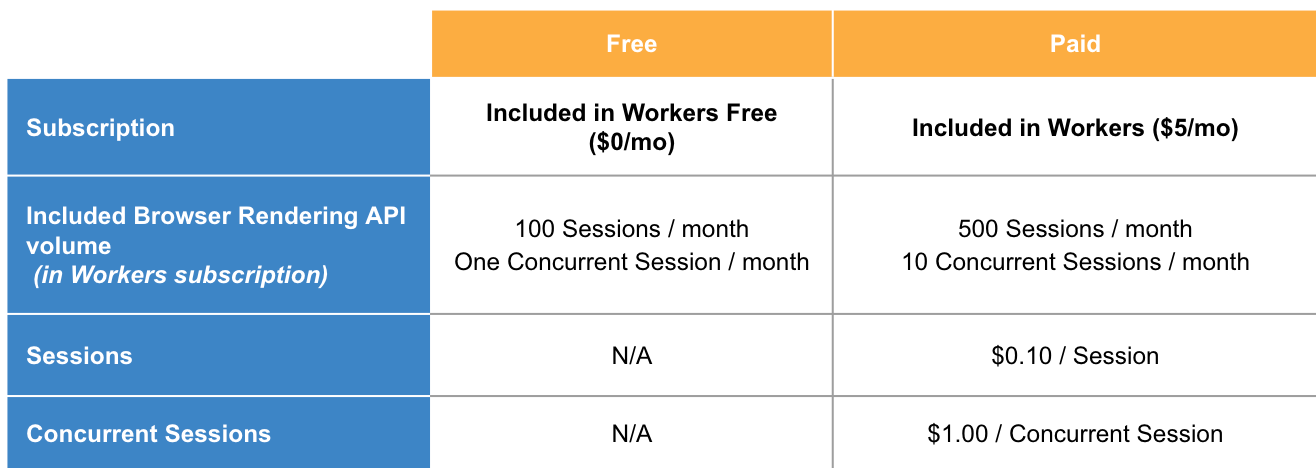
You pay based on two usage metrics:
Number of sessions: A Browser Session is a new instance of a browser being launched
Number of concurrent sessions: Concurrent Sessions is the number of browser instances open at once
Using Durable Objects to persist browser sessions improves performance by eliminating the time that it takes to spin up a new browser session. Since it re-uses sessions, it cuts down on the number of concurrent sessions needed. We highly encourage this model of session re-use if you expect to see consistent traffic for applications that you build on the Browser Rendering API.
If you have feedback about this pricing, we’re all ears. Feel free to reach out through Discord (channel name: browser-rendering-api-beta) and share your thoughts.
Get Started
Sign up to our waitlist to get access to the Workers Browser Rendering API. We’re so excited to see what you build! Share your creations with us on Twitter/X @CloudflareDev or on our Discord community.
Today, we’re sharing that we’ve reached a new milestone in the path to making this API available across runtimes — engineers from Cloudflare and Vercel have published a draft specification of the connect() sockets API for review by the community, along with a Node.js compatible implementation of the connect() API that developers can start using today.
This implementation helps both application developers and maintainers of libraries and frameworks:
Maintainers of existing libraries that use the node:net and node:tls APIs can use it to more easily add support for runtimes where node:net and node:tls are not available.
JavaScript frameworks can use it to make connect() available in local development, making it easier for application developers to target runtimes that provide connect().
Why create a new standard? Why connect()?
As we described when we first announced connect(), to-date there has not been a standard API across JavaScript runtimes for creating and working with TCP or UDP sockets. This makes it harder for maintainers of open-source libraries to ensure compatibility across runtimes, and ultimately creates friction for application developers who have to navigate which libraries work on which platforms.
While Node.js provides the node:net and node:tls APIs, these APIs were designed over 10 years ago in the very early days of the Node.js project and remain callback-based. As a result, they can be hard to work with, and expose configuration in ways that don’t fit serverless platforms or web browsers.
The connect() API fills this gap by incorporating the best parts of existing socket APIs and prior proposed standards, based on feedback from the JavaScript community — including contributors to Node.js. Libraries like pg (node-postgres on Github) are already using the connect() API.
The proposed API is Promise-based and reuses existing standards whenever possible. For example, ReadableStream and WritableStream are used for the read and write ends of the socket. This makes it easy to pipe data from a TCP socket to any other library or existing code that accepts a ReadableStream as input, or to write to a TCP socket via a WritableStream.
The entrypoint of the API is the connect() function, which takes a string containing both the hostname and port separated by a colon, or an object with discrete hostname and port fields. It returns a Socket object which represents a socket connection. An instance of this object exposes attributes and methods for working with the connection.
A connection can be established in plain-text or TLS mode, as well as a special “starttls” mode which allows the socket to be easily upgraded to TLS after some period of plain-text data transfer, by calling the startTls() method on the Socket object. No need to create a new socket or switch to using a separate set of APIs once the socket is upgraded to use TLS.
For example, to upgrade a socket using the startTLS pattern, you might do something like this:
import { connect } from "@arrowood.dev/socket"

const options = { secureTransport: "starttls" };
const socket = connect("address:port", options);
const secureSocket = socket.startTls();
// The socket is immediately writable
// Relies on web standard WritableStream
const writer = secureSocket.writable.getWriter();
const encoder = new TextEncoder();
const encoded = encoder.encode("hello");
await writer.write(encoded);
Equivalent code using the node:net and node:tls APIs:
import net from 'node:net'
import tls from 'node:tls'

const socket = new net.Socket(HOST, PORT);
socket.once('connect', () => {
  const options = { socket };
  const secureSocket = tls.connect(options, () => {
    // The socket can only be written to once the
    // connection is established.
    // Polymorphic API, uses Node.js streams
    secureSocket.write('hello');
  }
})
Use the Node.js implementation of connect() in your library
To make it easier for open-source library maintainers to adopt the connect() API, we’ve published an implementation of connect() in Node.js that allows you to publish your library such that it works across JavaScript runtimes, without having to maintain any runtime-specific code.
To get started, install it as a dependency:
npm install --save @arrowood.dev/socket
And import it in your library or application:
import { connect } from "@arrowood.dev/socket"
What’s next for connect()?
The wintercg/proposal-sockets-api is published as a draft, and the next step is to solicit and incorporate feedback. We’d love your feedback, particularly if you maintain an open-source library or make direct use of the node:net or node:tls APIs.
Once feedback has been incorporated, engineers from Cloudflare, Vercel and beyond will be continuing to work towards contributing an implementation of the API directly to Node.js as a built-in API.
Building modern full-stack applications requires connecting to many hosted third party services, from observability platforms to databases and more. All too often, this means spending time doing busywork, managing credentials and writing glue code just to get started. This is why we’re building out the Cloudflare Integrations Marketplace to allow developers to easily discover, configure and deploy products to use with Workers.
Earlier this year, we introduced integrations with Supabase, PlanetScale, Neon and Upstash. Today, we are thrilled to introduce our newest additions to Cloudflare’s Integrations Marketplace – Sentry, Turso and Momento.
Let's take a closer look at some of the exciting integration providers that are now part of the Workers Integration Marketplace.
Improve performance and reliability by connecting Workers to Sentry
When your Worker encounters an error you want to know what happened and exactly what line of code triggered it. Sentry is an application monitoring platform that helps developers identify and resolve issues in real-time.
The Workers and Sentry integration automatically sends errors, exceptions and console.log() messages from your Worker to Sentry with no code changes required. Here’s how it works:
You enable the integration from the Cloudflare Dashboard.
The credentials from the Sentry project of your choice are automatically added to your Worker.
You can configure sampling to control the volume of events you want sent to Sentry. This includes selecting the sample rate for different status codes and exceptions.
Cloudflare deploys a Tail Worker behind the scenes that contains all the logic needed to capture and send data to Sentry.
Like magic, errors, exceptions, and log messages are automatically sent to your Sentry project.
In the future, we’ll be improving this integration by adding support for uploading source maps and stack traces so that you can pinpoint exactly which line of your code caused the issue. We’ll also be tying in Workers deployments with Sentry releases to correlate new versions of your Worker with events in Sentry that help pinpoint problematic deployments. Check out our developer documentation for more information.
Develop at the Data Edge with Turso + Workers
Turso is an edge-hosted, distributed database based on libSQL, an open-source fork of SQLite. Turso focuses on providing a global service that minimizes query latency (and thus, application latency!). It’s perfect for use with Cloudflare Workers – both compute and data are served close to users.
Turso follows the model of having one primary database with replicas that are located globally, close to users. Turso automatically routes requests to a replica closest to where the Worker was invoked. This model works very efficiently for read heavy applications since read requests can be served globally. If you’re running an application that has heavy write workloads, or want to cut down on replication costs, you can run Turso with just the primary instance and use Smart Placement to speed up queries.
The Turso and Workers integration automatically pulls in Turso API credentials and adds them as secrets to your Worker, so that you can start using Turso by simply establishing a connection using the libsql SDK. Get started with the Turso and Workers Integration today by heading to our developer documentation.
Cache responses from data stores with Momento
Momento Cache is a low latency serverless caching solution that can be used on top of relational databases, key-value databases or object stores to get faster load times and better performance. Momento abstracts details like scaling, warming and replication so that users can deploy cache in a matter of minutes.
The Momento and Workers integration automatically pulls in your Momento API key using an OAuth2 flow. The Momento API key is added as a secret in Workers and, from there, you can start using the Momento SDK in Workers. Head to our developer documentation to learn more and use the Momento and Workers integration!
Try integrations out today
We want to give you back time, so that you can focus less on configuring and connecting third party tools to Workers and spend more time building. We’re excited to see what you build with integrations. Share your projects with us on Twitter (@CloudflareDev) and stay tuned for more exciting updates as we continue to grow our Integrations Marketplace!
If you would like to build an integration with Cloudflare Workers, fill out the integration request form and we’ll be in touch.
Between third-party cookies that track your activity across websites, to highly targeted advertising based on your IP address and browsing data, it's no secret that today’s Internet browsing experience isn’t as private as it should be. Here at Cloudflare, we believe everyone should be able to browse the Internet free of persistent tracking and prying eyes.
That’s why we’re excited to announce that we’ve partnered with Microsoft Edge to provide a fast and secure VPN, right in the browser. Users don’t have to install anything new or understand complex concepts to get the latest in network-level privacy: Edge Secure Network VPN is available on the latest consumer version of Microsoft Edge in most markets, and automatically comes with 5 GB of data. Just enable the feature by going to [Microsoft Edge Settings & more (…) > Browser essentials, and click Get VPN for free]. See Microsoft’s Edge Secure Network page for more details.
Cloudflare’s Privacy Proxy platform isn’t your typical VPN
To take a step back: a VPN is a way in which the Internet traffic leaving your device is tunneled through an intermediary server operated by a provider – in this case, Cloudflare! There are many important pieces that make this possible, but among them is the VPNprotocol, which defines the way in which the tunnel is established and how traffic flows through it. You may have heard of some of these protocols: Wireguard, IPsec, and OpenVPN, for example. And while we’re no stranger to these, (Cloudflare’s WireGuard implementation is currently in use by millions of devices that use 1.1.1.1+WARP) – we see our Privacy Proxy Platform as a way to push forward the next frontier of Internet privacy and embrace one of Cloudflare’s core values: open Internet standards.
The Privacy Proxy Platform implements HTTP CONNECT, a method defined in the HTTP standard that proxies traffic by establishing a tunnel and then sending reliable and ordered byte streams through that tunnel. You can read more about this proxying method (and its history!) in our Primer on Proxies.
We also leverage other parts of Cloudflare’s privacy-oriented infrastructure that are already deployed at scale: requests first utilize 1.1.1.1 for DNS, a token proxy based on Privacy Pass for client authentication, and Geo-egress to choose an accurate egress IP address without exposing users’ precise location.
How it works
Let’s dive into the details of these components. For the purposes of this blog, we’ll call the devices people are using to browse the Internet (your phone, tablet or computer) clients, and the websites they’re trying to visit origin sites.
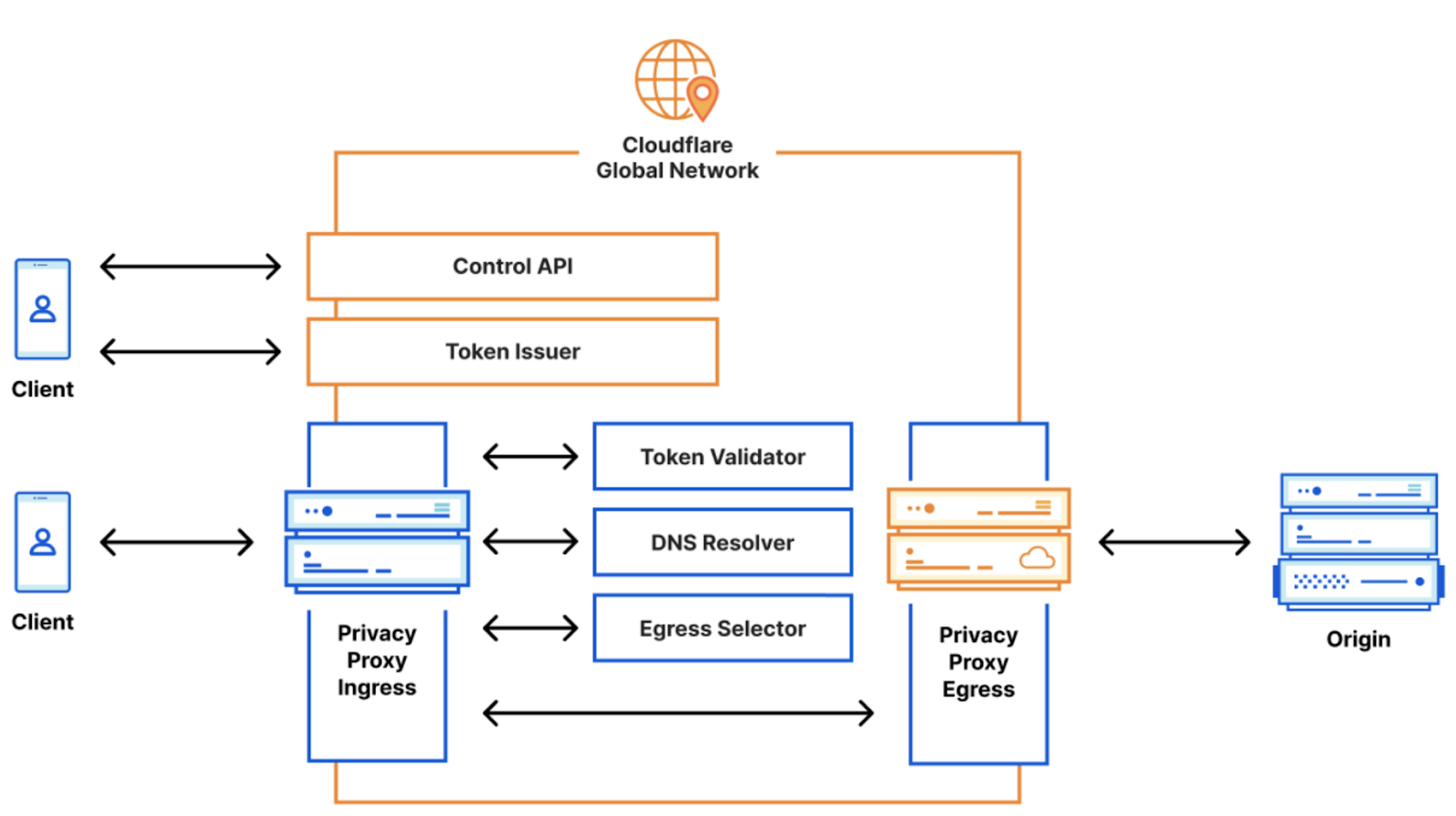
The Privacy Proxy Platform includes three main parts:
Token Proxy: this is the service that checks if you’re an Edge Secure Network user with a legitimate Microsoft account.
Privacy API: based on the above, Cloudflare’s Privacy API issues authentication tokens that clients use for authenticating to the proxy itself.
Privacy Proxy: this is the HTTP CONNECT-based proxy service running on Cloudflare’s network. This service checks that the client presents a valid authentication token, and if so, proxies the encrypted HTTP request to the origin site. It is also responsible for selecting a valid egress IP address to be used.
When Edge Secure Network protections are on – say, when a user connects to an open Wi-Fi network at a coffee shop – our proxy will automatically prompt that client for a token to authenticate. If the client has a token, it will present one. If it doesn’t, it will utilize the token proxy to mint a new pool using the help of an attester and issuer: the attester checks the validity of the client and Microsoft account, and the issuer issues tokens for that client in return. This dance is based on the Privacy Pass protocol. Importantly, it allows Cloudflare to validate that clients are who they say they are without collecting or storing personal information from Microsoft users.
Once the client has presented the proxy server with a valid token, the Privacy Proxy then chooses a valid egress IP address based on a hash of the client’s geolocation. It then uses the DNS record (provided by Cloudflare’s DNS resolver, 1.1.1.1) to open up an encrypted session to the origin website. From there, it’s pretty straightforward: if the user continues to browse on that site, further requests will be sent through that connection, if they stop or close the browser, that connection will close as well.
Because Cloudflare proxies millions of requests per second, many of the operational aspects of the proxy are managed by Oxy, our proxying framework that handles everything from telemetry, graceful restarts, to stream multiplexing and IP fallbacks, and authentication hooks.
Low last-mile latency and geolocation parity thanks to Cloudflare’s Network
Cloudflare’s privacy proxy implementation maximizes user experience without sacrificing privacy. When Edge Secure Network is enabled, users will have search and browsing results relevant to where they’re geographically located. At Cloudflare, we call this the pizza test: people should be able to use any of our privacy proxy products and still be able to get results for “pizza places near me”. We accomplish this by always egressing through a Cloudflare data center that has an IP address that corresponds to the user’s location – we’ve written more about how we did this for 1.1.1.1+WARP.
Unlike your typical VPN operator that has dozens – sometimes hundreds – of servers, Cloudflare has a much larger footprint: data centers in over 300 cities. Because our network is an anycast “every service, everywhere” approach, each of our data centers can accept traffic from an Edge Secure network client. This means that Edge users will automatically detect and connect with a Cloudflare data center geographically very close to them, minimizing last-mile latency. Finally, because Cloudflare also operates a CDN, websites that are already on Cloudflare will be given a “hot-path,” and will load faster.
We at Cloudflare are always striving to bring more privacy options to the open Internet, and we are excited to provide more private and secure browsing to Edge users. To learn more, head to Microsoft’s Edge Secure Network page or Microsoft’s support page. If you’re a partner interested in using a privacy-preserving proxy like this one, fill out this form.
D1 is now in open beta, and the theme is “scale”: with higher per-database storage limits and the ability to create more databases, we’re unlocking the ability for developers to build production-scale applications on D1. Any developers with an existing paid Workers plan don’t need to lift a finger to benefit: we’ve retroactively applied this to all existing D1 databases.
D1 our native serverless database, which we launched into alpha in November last year: the queryable database complement to Workers KV, Durable Objects and R2.
When we set out to build D1, we knew a few things for certain: it needed to be fast, it needed to be incredibly easy to create a database, and it needed to be SQL-based.
That last one was critical: so that developers could a) avoid learning another custom query language and b) make it easier for existing query buildings, ORM (object relational mapper) libraries and other tools to connect to D1 with minimal effort. From this, we’ve seen a huge number of projects build support in for D1: from support for D1 in the Drizzle ORM and Kysely, to the T4 App, a full-stack toolkit that uses D1 as its database.
We also knew that D1 couldn’t be the only way to query a database from Workers: for teams with existing databases and thousands of lines of SQL or existing ORM code, migrating across to D1 isn’t going to be an afternoon’s work. For those teams, we built Hyperdrive, allowing you to connect to your existing databases and make them feel global. We think this gives teams flexibility: combine D1 and Workers for globally distributed apps, and use Hyperdrive for querying the databases you have in legacy clouds and just can’t get rid of overnight.
Larger databases, and more of them
This has been the biggest ask from the thousands of D1 users throughout the alpha: not just more databases, but also bigger databases.
Developers on the Workers paid plan will now be able to grow each database up to 2GB and create 25 databases (up from 500MB and 10).
We’ll be continuing to work on unlocking even larger databases over the coming weeks and months: developers using the D1 beta will see automatic increases to these limits published on D1’s public changelog.
One of the biggest impediments to double-digit-gigabyte databases is performance: we want to ensure that a database can load in and be ready really quickly — cold starts of seconds (or more) just aren’t acceptable. A 10GB or 20GB database that takes 15 seconds before it can answer a query ends up being pretty frustrating to use.
Users on the Workers free plan will keep the ten 500MB databases (changelog) forever: we want to give more developers the room to experiment with D1 and Workers before jumping in.
Time Travel is here
Time Travel allows you to roll your database back to a specific point in time: specifically, any minute in the last 30 days. And it’s enabled by default for every D1 database, doesn’t cost any more, and doesn’t count against your storage limit.
For those who have been keeping tabs: we originally announced Time Travel earlier this year, and made it available to all D1 users in July. At its core, it’s deceptively simple: Time Travel introduces the concept of a “bookmark” to D1. A bookmark represents the state of a database at a specific point in time, and is effectively an append-only log. Time Travel can take a timestamp and turn it into a bookmark, or a bookmark directly: allowing you to restore back to that point. Even better: restoring doesn’t prevent you from going back further.
We think Time Travel works best with an example, so let’s make a change to a database: one with an Order table that stores every order made against our e-commerce store:
# To illustrate: we have 89,185 unique addresses in our order database.
# To illustrate: we have 89,185 unique addresses in our order database.
➜  wrangler d1 execute northwind --command "SELECT count(distinct ShipAddress) FROM [Order]"
┌──────────┐
│ count(*) │
├──────────┤
│ 89185    │
└──────────┘
OK, great. Now what if we wanted to make a change to a specific set of orders: an address change or freight company change?
# I think we might be forgetting something here...
➜  wrangler d1 execute northwind --command "UPDATE [Order] SET ShipAddress = 'Av. Veracruz 38, Roma Nte., Cuauhtémoc, 06700 Ciudad de México, CDMX, Mexico'
Wait: we’ve made a mistake that many, many folks have before: we forgot the WHERE clause on our UPDATE query. Instead of updating a specific order Id, we’ve instead updated the ShipAddress for every order in our table.
# Every order is now going to a wine bar in Mexico City.
➜  wrangler d1 execute northwind --command "SELECT count(distinct ShipAddress) FROM [Order]"
┌──────────┐
│ count(*) │
├──────────┤
│ 1        │
└──────────┘
Panic sets in. Did we remember to make a backup before we did this? How long ago was it? Did we turn on point-in-time recovery? It seemed potentially expensive at the time…
It’s OK. We’re using D1. We can Time Travel. It’s on by default: let’s fix this and travel back a few minutes.
# Let's go back in time.
➜  wrangler d1 time-travel restore northwind --timestamp="2023-09-23T14:20:00Z"

🚧 Restoring database northwind from bookmark 0000000b-00000002-00004ca7-9f3dba64bda132e1c1706a4b9d44c3c9
✔ OK to proceed (y/N) … yes

⚡️ Time travel in progress...
✅ Database dash-db restored back to bookmark 00000000-00000004-00004ca7-97a8857d35583887de16219c766c0785
↩️ To undo this operation, you can restore to the previous bookmark: 00000013-ffffffff-00004ca7-90b029f26ab5bd88843c55c87b26f497
We think that Time Travel becomes even more powerful when you have many smaller databases, too: the downsides of any restore operation is reduced further and scoped to a single user or tenant.
This is also just the beginning for Time Travel: we’re working to support not just only restoring a database, but also the ability to fork from and overwrite existing databases. If you can fork a database with a single command and/or test migrations and schema changes against real data, you can de-risk a lot of the traditional challenges that working with databases has historically implied.
Row-based pricing
Back in May we announced pricing for D1, to a lot of positive feedback around how much we’d included in our Free and Paid plans. In August, we published a new row-based model, replacing the prior byte-units, that makes it easier to predict and quantify your usage. Specifically, we moved to rows as it’s easier to reason about: if you’re writing a row, it doesn’t matter if it’s 1KB or 1MB. If your read query uses an indexed column to filter on, you’ll see not only performance benefits, but cost savings too.
Here’s D1’s pricing — almost everything has stayed the same, with the added benefit of charging based on rows:
As before, D1 does not charge you for “database hours”, the number of databases, or point-in-time recovery (Time Travel) — just query D1 and pay for your reads, writes, and storage — that’s it.
We believe this makes D1 not only far more cost-efficient, but also makes it easier to manage multiple databases to isolate customer data or prod vs. staging: we don’t care which database you query. Manage your data how you like, separate your customer data, and avoid having to fall for the trap of “Billing Based Architecture”, where you build solely around how you’re charged, even if it’s not intuitive or what makes sense for your team.
To make it easier to both see how much a given query charges and when to optimize your queries with indexes, D1 also returns the number of rows a query read or wrote (or both) so that you can understand how it’s costing you in both cents and speed.
For example, the following query filters over orders based on date:
The unindexed query above scans 16,800 rows. Even if we don’t optimize it, D1 includes 25 billion queries per month for free, meaning we could make this query 1.4 million times for a whole month before having to worry about extra costs.
But we can do better with an index:
CREATE INDEX IF NOT EXISTS idx_orders_date ON [Order](ShippedDate)
With the index created, let’s see how many rows our query needs to read now:
The same query with an index on the ShippedDate column reads just 417 rows: not only it is faster (duration is in milliseconds!), but it costs us less: we could run this query 59 million times per month before we’d have to pay any more than what the $5 Workers plan gives us.
D1 also exposes row counts via both the Cloudflare dashboard and our GraphQL analytics API: so not only can you look at this per-query when you’re tuning performance, but also break down query patterns across all of your databases.
D1 for Platforms
Throughout D1’s alpha period, we’ve both heard from and worked with teams who are excited about D1’s ability to scale out horizontally: the ability to deploy a database-per-customer (or user!) in order to keep data closer to where teams access it and more strongly isolate that data from their other users.
Teams building the next big thing on Workers for Platforms — think of it as “Functions as a Service, as a Service” — can use D1 to deploy a database per user — keeping customer data strongly separated from each other.
For example, and as one of the early adopters of D1, RONIN is building an edge-first content & data platform backed by a dedicated D1 database per customer, which allows customers to place data closer to users and provides each customer isolation from the queries of others.
Instead of spinning up and managing countless traditional database instances, RONIN uses D1 for Platforms to offer automatic infinite scalability at the edge. This allows RONIN to focus on providing a sleek, intuitive editing experience for your content & data.
When it comes to enabling “D1 for Platforms”, we’ve thought about this in a few ways from the very beginning:
Support for more than 100,000+ databases for Workers for Platforms users (there’s no limit, but if we said “unlimited” you might not believe us).
D1’s pricing – you don’t pay per-database or for “idle databases”. If you have a range of users, from thousands of QPS down to 1-2 every 10 minutes — you aren’t paying more for “database hours” on the less trafficked databases, or having to plan around spiky workloads across your user-base.
The ability to programmatically configure more databases via D1’s HTTP APIand attach them to your Worker without re-deploying. There’s no “provisioning” delay, either: you create the database, and it’s immediately ready to query by you or your users.
Detailed per-database analytics, so you can understand which databases are being used and how they’re being queried via D1’s GraphQL analytics API.
If you’re building the next big platform on top of Workers & want to use D1 at scale — whether you’re part of the Workers Launchpad program or not — reach out.
What’s next for D1?
We’re setting a clear goal: we want to make D1 “generally available” (GA) for production use-cases by early next year(Q1 2024). Although you can already use D1 without a waitlist or approval process, we understand that the GA label is an important one for many when it comes to a database (and as do we).
Between now and GA, we’re working on some really key parts of the D1 vision, with a continued focus on reliability and performance.
One of the biggest remaining pieces of that vision is global read replication, which we wrote about earlier this year. Importantly, replication will be free, won’t multiply your storage consumption, and will still enable session consistency (read-your-writes). Part of D1’s mission is about getting data closer to where users are, and we’re excited to land it.
We’re also working to expand Time Travel, D1’s built-in point-in-time recovery capabilities, so that you can branch and/or clone a database from a specific point-in-time on the fly.
We’ll also be progressively opening up our limits around per-database storage, unlocking more storage per account, and the number of databases you can create over the rest of this year, so keep an eye on the D1 changelog (or your inbox).
In the meantime, if you haven’t yet used D1, you can get started right now, visit D1’s developer documentation to spark some ideas, or join the #d1-beta channel on our Developer Discord to talk to other D1 developers and our product-engineering team.
Today we are announcing new pricing for Cloudflare Workers and Pages Functions, where you are billed based on CPU time, and never for the idle time that your Worker spends waiting on network requests and other I/O. Unlike other platforms, when you build applications on Workers, you only pay for the compute resources you actually use.
Why is this exciting? To date, all large serverless compute platforms have billed based on how long your function runs — its duration or “wall time”. This is a reflection of a new paradigm built on a leaky abstraction — your code may be neatly packaged up into a “function”, but under the hood there’s a virtual machine (VM). A VM can’t be paused and resumed quickly enough to execute another piece of code while it waits on I/O. So while a typical function might take 100ms to run, it might typically spend only 10ms doing CPU work, like crunching numbers or parsing JSON, with the rest of time spent waiting on I/O.
This status quo has meant that you are billed for this idle time, while nothing is happening.
With this announcement, Cloudflare is the first and only global serverless platform to offer standard pricing based on CPU time, rather than duration. We think you should only pay for the compute time you actually use, and that’s how we’re going to bill you going forward.
Old pricing — two pricing models, each with tradeoffs
New pricing — one simple and predictable pricing model
With the same generous Free plan
Unlike wall time (duration, or GB-s), CPU time is more predictable and under your control. When you make a request to a third party API, you can’t control how long that API takes to return a response. This time can be quite long, and vary dramatically — particularly when building AI applications that make inference requests to LLMs. If a request takes twice as long to complete, duration-based billing means you pay double. By contrast, CPU time is consistent and unaffected by time spent waiting on I/O — purely a function of the logic and processing of inputs on outputs to your Worker. It is entirely under your control.
Starting October 31, 2023, you will have the option to opt in individual Workers and Pages Functions projects on your account to new pricing, and newly created projects will default to new pricing. You’ll be able to estimate how much new pricing will cost in the Cloudflare dashboard. For the majority of current applications, new pricing is the same or less expensive than the previous Bundled and Unbound pricing plans.
If you’re on our Workers Paid plan, you will have until March 1, 2024 to switch to the new pricing on your own, after which all of your projects will be automatically migrated to new pricing. If you’re an Enterprise customer, any contract renewals after March 1, 2024, will use the new pricing. You’ll receive plenty of advance notice via email and dashboard notifications before any changes go into effect. And since CPU time is fully in your control, the more you optimize your Worker’s compute time, the less you’ll pay. Your incentives are aligned with ours, to make efficient use of compute resources on Region: Earth.
The challenge of truly scaling to zero
The beauty of serverless is that it allows teams to focus on what matters most — delivering value to their customers, rather than managing infrastructure. It saves you money by effortlessly scaling up and down all over the world based on your traffic, whether you’re an early stage startup or Shopify during Black Friday.
One of the promises of serverless is the idea of scaling to zero — once those big days subside, you no longer have to pay for virtual machines to sit idle before your autoscaling kicks in, or be charged by the hour for instances that you barely ended up using. No compute = no bills for usage. Or so, at least, is the promise of serverless.
Yet, there’s one hidden cost, where even in the serverless world you will find yourself paying for idle resources — what happens when your function is sitting around waiting on I/O? With pricing based on the duration that a function runs, you’re still billed for time that your service is doing zero work, and just waiting on network requests.
Most applications spend far more time waiting on this I/O than they do using the CPU, often ten times more.
Imagine a similar scenario in your own life — you grab a cab to go to the airport. On the way, the driver decides to stop to refuel and grab a snack, but leaves the meter running. This is not time spent bringing you closer to your destination, but it’s time that you’re paying for. Now imagine for the time the driver was refueling the car, the meter was paused. That’s the difference between CPU time and duration, or wall clock time.
But rather than waiting on the driver to refuel or grab a Snickers bar, what is it that you’re actually paying for when it comes to serverless compute?
Time spent waiting on services you don’t control
Most applications depend on one or many external service providers. Providers of hosted large language models (LLMs) like GPT-4 or Stable Diffusion. Databases as a service. Payment processors. Or simply an API request to a system outside your control. This is where software development is headed — rather than reinventing the wheel and slowly building everything themselves, both fast-moving startups and the Fortune 500 increasingly build using other services to avoid undifferentiated heavy lifting.
Every time an application interacts with one of these external services, it has to send data over the network and wait until it receives a response. And while some services are lightning fast, others can take considerable time, like waiting for a payment processor or for a large media file to be uploaded or converted. Your own application sits idle for most of the request, waiting on services outside your control.
Until today, you’ve had to pay while your application waits. You’ve had to pay more when a service you depend on has an operational issue and slows down, or times out in responding to your request. This has been a disincentive to incrementally move parts of your application to serverless.
Cloudflare’s new pricing: the first serverless platform to truly scale down to zero
The idea of “scale to zero” is that you never have to keep instances of your application sitting idle, waiting for something to happen. Serverless is more than just not having to manage servers or virtual machines — you shouldn’t have to provision and manage the number of compute resources that are available or warm.
Our new pricing takes the “scale to zero” concept even further, and extends it to whether your application is actually performing work. If you’re still paying while nothing is happening, we don’t think that’s truly scale to zero. Your application is idle. The CPU can be used for other tasks. Whether your application is “running” is an old concept lifted from an era before multi-tenant cloud platforms. What matters is if you are actually using compute resources.
Pay less, deploy everywhere, without hidden costs
Let’s compare what you’d pay on new Workers pricing to AWS Lambda, for the following Worker:
One billion requests per month
Seven CPU milliseconds per request
200ms duration per request
The above table is for informational purposes only. Prices are limited to the public fees as of September 20, 2023, and do not include taxes and any other fees. AWS Lambda and Lambda @ Edge prices are based on publicly available pricing in US-East (Ohio) region as published on https://aws.amazon.com/lambda/pricing/
New Workers pricing makes building AI applications dramatically cheaper
Yesterday we announced a new suite of products to let you build AI applications on Cloudflare — Workers AI, AI Gateway, and our new vector database, Vectorize.
Nearly everyone is building new products and features using AI models right now. Large language models and generative AI models are incredibly powerful. But they aren’t always fast — asking a model to create an image, transcribe a segment of audio, or write a story often takes multiple seconds — far longer than a typical API response or database query that we expect to return in tens of milliseconds. There is significant compute work going on behind the scenes, and that means longer duration per request to a Worker.
New Workers pricing makes this much less expensive than it was previously on the Unbound usage model.
Let’s take the same example as above, but instead assume the duration of the request is two seconds (2000ms), because the Worker makes an inference request to a large AI model. With new Workers pricing, you pay the exact same amount, no matter how long this request takes.
No surprise bills — set a maximum limit on CPU time for each Worker
Surprise bills from cloud providers are an unfortunately common horror story. In the old way of provisioning compute resources, forgetting to shut down an instance of a database or virtual machine can cost hundreds of dollars. And accidentally autoscaling up too high can be even worse.
We’re building new safeguards to prevent these kinds of scenarios on Workers. As part of new pricing, you will be able to cap CPU usage on a per-Worker basis.
For example, if you have a Worker with a p99 CPU time of 15ms, you might use this to set a max CPU limit of 40ms — enough headroom to ensure that your worker will run successfully, while ensuring that even if you ship a bug that causes a CPU time to ratchet up dramatically, or have an edge case that causes infinite recursion, you can’t suddenly rack up a giant unexpected bill, or be vulnerable to a denial of wallet attack. This can be particularly helpful if your worker handles variable or user-generated input, to guard against edge cases that you haven’t accounted for.
Alternatively, if you’re running a production service, but want to make sure you stay on top of your costs, we will also be adding the option to configure notifications that can automatically email you, page you, or send a webhook if your worker exceeds a particular amount of CPU time per request. You will be able to choose at what threshold you want to be notified, and how.
New ways to “hibernate” Durable Objects while keeping connections alive
While Workers are stateless functions, Durable Objects are stateful and long-lived, commonly used to coordinate and persist real-time state in chat, multiplayer games, or collaborative apps. And unlike Workers, duration-based pricing fits Durable Objects well. As long as one or more clients are connected to a Durable Object, it keeps state available in memory. Durable Objects pricing will remain duration-based, and is not changing as part of this announcement.
What about when a client is connected to a Durable Object, but no work has happened for a long time? Consider a collaborative whiteboard app built using Durable Objects. A user of the app opens the app in a browser tab, but then forgets about it, and leaves it running for days, with an open WebSocket connection. Just like with Workers, we don’t think you should have to pay for this idle time. But until recently, there hasn’t been an API to signal to us that a Durable Object can be safely “hibernated”.
The recently introduced Hibernation API, currently in beta, allows you to set an automatic response to be used while hibernated and serialize state such that it survives hibernation. This gives Cloudflare the inputs we need in order to maintain open WebSocket connections from clients, while “hibernating” the Durable Object such that it is not actively running, and you are not billed for idle time. The result is that your state is always available in-memory when actually need it, but isn’t unnecessarily kept around when it’s not. As long as your Durable Object is hibernating, even if there are active clients still connected over a WebSocket, you won’t be billed for duration.
Snippets make Cloudflare’s CDN programmable — for free
What if you just want to modify a header, do a country code redirect, or cache a custom query? Developers have relied on Workers to program Cloudflare’s CDN like this for many years. With the announcement of Cloudflare Snippets last year, now in alpha, we’re making it free.
If you use Workers today for these smaller use cases, to customize any of Cloudflare’s application services, Snippets will be the optimal, zero cost option.
A serverless platform without limits
Developers are building ever larger and more complex full-stack applications on Workers each month. Our promise to you is to help you scale in any direction, without worrying about paying for idle time or having to manage and provision compute resources across regions.
This also means not having to worry about limits. Workers already serves many millions of requests per second, and scales and performs so well that we are rebuilding our own CDN on top of Workers. Individual Workers can now be up to 10MB, with a max startup time of 400ms, and can be easily composed together using Service Bindings. Entire platforms are built on top of Workers, with a growing number of companies allowing their own customers to write and deploy custom code and applications via Workers for Platforms. Some of the biggest platforms in the world rely on Cloudflare and the Workers platform during the most critical moments.
New pricing removes limits on the types of applications that could be built cost effectively with duration-based pricing. It removes the ceiling on CPU time from our original request-based pricing. We’re excited to see what you build, and are committed to being the development platform where you’re not constrained by limits on scale, regions, instances, concurrency or whatever else you need to handle to grow and operate globally.
When will new pricing be available?
Starting October 31, 2023, you will have the option to opt in individual Workers and Pages Functions projects on your account to new pricing, and newly created projects will default to new pricing. You will have until March 1, 2024, or the end of your Enterprise contract, whichever comes later, to switch to new pricing on your own, after which all of your projects will be automatically migrated to new pricing. You’ll receive plenty of advance notice via email and dashboard notifications before any changes go into effect.
Between now and then, we want to hear from you. We’ve based new pricing off feedback we’ve heard from developers building serverless applications, and companies estimating and projecting their costs. Tell us what you think of new pricing by sharing your feedback in this survey. We read every response.
The browser as an app platform is real and stronger every day; long gone are the Browser Wars. Vendors and standard bodies have done amazingly well over the last years, working together and advancing web standards with new APIs that allow developers to build fast and powerful applications, finally comparable to those we got used to seeing in the native OS' environment.
Today, browsers can render web pages and run code that interfaces with an extensive catalog of modern Web APIs. Things like networking, rendering accelerated graphics, or even accessing low-level hardware features like USB devices are all now possible within the browser sandbox.
One of the most exciting new browser APIs that browser vendors have been rolling out over the last months is WebGPU, a modern, low-level GPU programming interface designed for high-performance 2D and 3D graphics and general purpose GPU compute.
Today, we are introducing WebGPU support to Cloudflare Workers. This blog will explain why it's important, why we did it, how you can use it, and what comes next.
The history of the GPU in the browser
To understand why WebGPU is a big deal, we must revisit history and see how browsers went from relying only on the CPU for everything in the early days to taking advantage of GPUs over the years.
In 2011, WebGL 1, a limited port of OpenGL ES 2.0, was introduced, providing an API for fast, accelerated 3D graphics in the browser for the first time. By then, this was somewhat of a revolution in enabling gaming and 3D visualizations in the browser. Some of the most popular 3D animation frameworks, like Three.js, launched in the same period. Who doesn't remember going to the (now defunct) Google Chrome Experiments page and spending hours in awe exploring the demos? Another option then was using the Flash Player, which was still dominant in the desktop environment, and their Stage 3D API.
Later, in 2017, based on the learnings and shortcomings of its predecessor, WebGL 2 was a significant upgrade and brought more advanced GPU capabilities like compute shaders and more flexible textures and rendering.
WebGL, however, has proved to be a steep and complex learning curve for developers who want to take control of things, do low-level 3D graphics using the GPU, and not use 3rd party abstraction libraries.
Furthermore and more importantly, with the advent of machine learning and cryptography, we discovered that GPUs are great not only at drawing graphics but can be used for other applications that can take advantage of things like high-speed data or blazing-fast matrix multiplications, and one can use them to perform general computation. This became known as GPGPU, short for general-purpose computing on graphics processing units.
With this in mind, in the native desktop and mobile operating system worlds, developers started using more advanced frameworks like CUDA, Metal, DirectX 12, or Vulkan. WegGL stayed behind. To fill this void and bring the browser up to date, in 2017, companies like Google, Apple, Intel, Microsoft, Kronos, and Mozilla created the GPU for Web Community Working Group to collaboratively design the successor of WebGL and create the next modern 3D graphics and computation capabilities APIs for the Web.
What is WebGPU
WebGPU was developed with the following advantages in mind:
Lower Level Access – WebGPU provides lower-level, direct access to the GPU vs. the high-level abstractions in WebGL. This enables more control over GPU resources.
Multi-Threading – WebGPU can leverage multi-threaded rendering and compute, allowing improved CPU/GPU parallelism compared to WebGL, which relies on a single thread.
Compute Shaders – First-class support for general-purpose compute shaders for GPGPU tasks, not just graphics. WebGL compute is limited.
Safety – WebGPU ensures memory and GPU access safety, avoiding common WebGL pitfalls.
Portability – WGSL shader language targets cross-API portability across GPU vendors vs. GLSL in WebGL.
Reduced Driver Overhead – The lower level Vulkan/Metal/D3D12 basis improves overhead vs. OpenGL drivers in WebGL.
Pipeline State Objects – Predefined pipeline configs avoid per-draw driver overhead in WebGL.
Memory Management – Finer-grained buffer and resource management vs. WebGL.
The “too long didn't read” version is that WebGPU provides lower-level control over the GPU hardware with reduced overhead. It's safer, has multi-threading, is focused on compute, not just graphics, and has portability advantages compared to WebGL.
If these aren't reasons enough to get excited, developers are also looking at WebGPU as an option for native platforms, not just the Web. For instance, you can use this C API that mimics the JavaScript specification. If you think about this and the power of WebAssembly, you can effectively have a truly platform-agnostic GPU hardware layer that you can use to develop platforms for any operating system or browser.
More than just graphics
As explained above, besides being a graphics API, WebGPU makes it possible to perform tasks such as:
Machine Learning – Implement ML applications like neural networks and computer vision algorithms using WebGPU compute shaders and matrices.
Scientific Computing – Perform complex scientific computation like physics simulations and mathematical modeling using the GPU.
High Performance Computing – Unlock breakthrough performance for parallel workloads by connecting WebGPU to languages like Rust, C/C++ via WebAssembly.
WGSL, the shader language for WebGPU, is what enables the general-purpose compute feature. Shaders, or more precisely, compute shaders, have no user-defined inputs or outputs and are used for computing arbitrary information. Here are some examples of simple WebGPU compute shaders if you want to learn more.
WebGPU in Workers
We've been watching WebGPU since the API was published. Its general-purpose compute features perfectly fit our Workers' ecosystem and capabilities and align well with our vision of providing our customers multiple compute and hardware options and bringing GPU workloads to our global network, close to clients.
Cloudflare also has a track record of pioneering support for emerging web standards on our network and services, accelerating their adoption for our customers. Examples of these are Web Crypto API, HTTP/2, HTTP/3, TLS 1.3, or Early hints, but there are more.
Bringing WebGPU to Workers was both natural and timely. Today, we are announcing that we have released a version of workerd, the open-sourced JavaScript / Wasm runtime that powers Cloudflare Workers, with WebGPU support, that you can start playing and developing applications with, locally.
Starting today anyone can run this on their personal computer and experiment with WebGPU-enabled workers. Implementing local development first allows us to put this API in the hands of our customers and developers earlier and get feedback that will guide the development of this feature for production use.
But before we dig into code examples, let's explain how we built it.
How we built WebGPU on top of Workers
To implement the WebGPU API, we took advantage of Dawn, an open-source library backed by Google, the same used in Chromium and Chrome, that provides applications with an implementation of the WebGPU standard. It also provides the webgpu.h headers file, the de facto reference for all the other implementations of the standard.
Dawn can interoperate with Linux, MacOS, and Windows GPUs by interfacing with each platform's native GPU frameworks. For example, when an application makes a WebGPU draw call, Dawn will convert that draw command into the equivalent Vulkan, Metal, or Direct3D 12 API call, depending on the platform.
From an application standpoint, Dawn handles the interactions with the underlying native graphics APIs that communicate directly with the GPU drivers. Dawn essentially acts as a middle layer that translates the WebGPU API calls into calls for the platform's native graphics API.
Cloudflare workerd is the underlying open-source runtime engine that executes Workers code. It shares most of its code with the same runtime that powers Cloudflare Workers' production environment but with some changes designed to make it more portable to other environments. We then have release cycles that aim to synchronize both codebases; more on later. Workerd is also used with wrangler, our command-line tool for building and interacting with Cloudflare Workers, to support local development.
The WebGPU code that interfaces with the Dawn library can be found here, and can easily be enabled with a flag, checked here.
jsg::Ref<api::gpu::GPU> Navigator::getGPU(CompatibilityFlags::Reader flags) {
  // is this a durable object?
  KJ_IF_MAYBE (actor, IoContext::current().getActor()) {
    JSG_REQUIRE(actor->getPersistent() != nullptr, TypeError,
                "webgpu api is only available in Durable Objects (no storage)");
  } else {
    JSG_FAIL_REQUIRE(TypeError, "webgpu api is only available in Durable Objects");
  };

  JSG_REQUIRE(flags.getWebgpu(), TypeError, "webgpu needs the webgpu compatibility flag set");

  return jsg::alloc<api::gpu::GPU>();
}
The WebGPU API can only be accessed using Durable Objects, which are essentially global singleton instances of Cloudflare Workers. There are two important reasons for this:
WebGPU code typically wants to store the state between requests, for example, loading an AI model into the GPU memory once and using it multiple times for inference.
Not all Cloudflare servers have GPUs yet, so although the worker that receives the request is typically the closest one available, the Durable Object that uses WebGPU will be instantiated where there are GPU resources available, which may not be on the same machine.
Using Durable Objects instead of regular Workers allow us to address both of these issues.
The WebGPU Hello World in Workers
Wrangler uses Miniflare 3, a fully-local simulator for Workers, which in turn is powered by workerd. This means you can start experimenting and doing WebGPU code locally on your machine right now before we prepare things in our production environment.
Let’s get coding then.
Since Workers doesn't render graphics yet, we started with implementing the general-purpose GPU (GPGPU) APIs in the WebGPU specification. In other words, we fully support the part of the API that the compute shaders and the compute pipeline require, but we are not yet focused on fragment or vertex shaders used in rendering pipelines.
Here’s a typical “hello world” in WebGPU. This Durable Object script will output the name of the GPU device that workerd found in your machine to your console.
A more interesting example, though, is a simple compute shader. In this case, we will fill a results buffer with an incrementing value taken from the iteration number via global_invocation_id.
For this, we need two buffers, one to store the results of the computations as they happen (storageBuffer) and another to copy the results at the end (mappedBuffer).
We then dispatch four workgroups, meaning that the increments can happen in parallel. This parallelism and programmability are two key reasons why compute shaders and GPUs provide an advantage for things like machine learning inference workloads. Other advantages are:
Bandwidth – GPUs have a very high memory bandwidth, up to 10-20x more than CPUs. This allows fast reading and writing of all the model parameters and data needed for inference.
Floating-point performance – GPUs are optimized for high floating point operation throughput, which are used extensively in neural networks. They can deliver much higher TFLOPs than CPUs.
Now that we covered the basics of WebGPU and compute shaders, let's move to something more demanding. What if we could perform machine learning inference using Workers and GPUs?
ONNX WebGPU demo
The ONNX runtime is a popular open-source cross-platform, high performance machine learning inferencing accelerator. Wonnx is a GPU-accelerated version of the same engine, written in Rust, that can be compiled to WebAssembly and take advantage of WebGPU in the browser. We are going to run it in Workers using a combination of workers-rs, our Rust bindings for Cloudflare Workers, and the workerd WebGPU APIs.
For this demo, we are using SqueezeNet. This small image classification model can run under lower resources but still achieves similar levels of accuracy on the ImageNet image classification validation dataset as larger models like AlexNet.
In essence, our worker will receive any uploaded image and attempt to classify it according to the 1000 ImageNet classes. Once ONNX runs the machine learning model using the GPU, it will return the list of classes with the highest probability scores. Let’s go step by step.
First we load the model from R2 into the GPU memory the first time the Durable Object is called:
#[durable_object]
pub struct Classifier {
    env: Env,
    session: Option<wonnx::Session>,
}

impl Classifier {
    async fn ensure_session(&mut self) -> Result<()> {
        match self.session {
            Some(_) => worker::console_log!("DO already has a session"),
            None => {
                // No session, so this should be the first request. In this case
                // we will fetch the model from R2, build a wonnx session, and
                // store it for subsequent requests.
                let model_bytes = fetch_model(&self.env).await?;
                let session = wonnx::Session::from_bytes(&model_bytes)
                    .await
                    .map_err(|err| err.to_string())?;
                worker::console_log!("session created in DO");
                self.session = Some(session);
            }
        };
        Ok(())
    }
}
This is only required once, when the Durable Object is instantiated. For subsequent requests, we retrieve the model input tensor, call the existing session for the inference, and return to the calling worker the result tensor converted to JSON:
        let request_data: ArrayBase<OwnedRepr<f32>, Dim<[usize; 4]>> =
            serde_json::from_str(&req.text().await?)?;
        let mut input_data = HashMap::new();
        input_data.insert("data".to_string(), request_data.as_slice().unwrap().into());

        let result = self
            .session
            .as_ref()
            .unwrap() // we know the session exists
            .run(&input_data)
            .await
            .map_err(|err| err.to_string())?;
...
        let probabilities: Vec<f32> = result
            .into_iter()
            .next()
            .ok_or("did not obtain a result tensor from session")?
            .1
            .try_into()
            .map_err(|err: TensorConversionError| err.to_string())?;

        let do_response = serde_json::to_string(&probabilities)?;
        Response::ok(do_response)
On the Worker script itself, we load the uploaded image and pre-process it into a model input tensor:
    let image_file: worker::File = match req.form_data().await?.get("file") {
        Some(FormEntry::File(buf)) => buf,
        Some(_) => return Response::error("`file` part of POST form must be a file", 400),
        None => return Response::error("missing `file`", 400),
    };
    let image_content = image_file.bytes().await?;
    let image = load_image(&image_content)?;
Finally, we call the GPU Durable Object, which runs the model and returns the most likely classes of our image:
    let probabilities = execute_gpu_do(image, stub).await?;
    let mut probabilities = probabilities.iter().enumerate().collect::<Vec<_>>();
    probabilities.sort_unstable_by(|a, b| b.1.partial_cmp(a.1).unwrap());
    Response::ok(LABELS[probabilities[0].0])
We packaged this demo in a public repository, so you can also run it. Make sure that you have a Rust compiler, Node.js, Git and curl installed, then clone the repository:
git clone https://github.com/cloudflare/workers-wonnx.git
cd workers-wonnx
Upload the model to the local R2 simulator:
npx wrangler@latest r2 object put model-bucket-dev/opt-squeeze.onnx --local --file models/opt-squeeze.onnx
And then run the Worker locally:
npx wrangler@latest dev
With the Worker running and waiting for requests you can then open another terminal window and upload one of the image examples in the same repository using curl:
If everything goes according to plan the result of the curl command will be the most likely class of the image.
Next steps and final words
Over the upcoming weeks, we will merge the workerd WebGPU code in the Cloudflare Workers production environment and make it available globally, on top of our growing GPU nodes fleet. We didn't do it earlier because that environment is subject to strict security and isolation requirements. For example, we can't break the security model of our process sandbox and have V8 talking to the GPU hardware directly, that would be a problem; we must create a configuration where another process is closer to the GPU and use IPC (inter-process communication) to talk to it. Other things like managing resource allocation and billing are being sorted out.
For now, we wanted to get the good news out that we will support WebGPU in Cloudflare Workers and ensure that you can start playing and coding with it today and learn from it. WebGPU and general-purpose computing on GPUs is still in its early days. We presented a machine-learning demo, but we can imagine other applications taking advantage of this new feature, and we hope you can show us some of them.
As usual, you can talk to us on our Developers Discord or the Community forum; the team will be listening. We are eager to hear from you and learn about what you're building.
If you're anywhere near the developer community, it's almost impossible to avoid the impact that AI’s recent advancements have had on the ecosystem. Whether you're using AI in your workflow to improve productivity, or you’re shipping AI based features to your users, it’s everywhere. The focus on AI improvements are extraordinary, and we’re super excited about the opportunities that lay ahead, but it's not enough.
Not too long ago, if you wanted to leverage the power of AI, you needed to know the ins and outs of machine learning, and be able to manage the infrastructure to power it.
As a developer platform with over one million active developers, we believe there is so much potential yet to be unlocked, so we’re changing the way AI is delivered to developers. Many of the current solutions, while powerful, are based on closed, proprietary models and don't address privacy needs that developers and users demand. Alternatively, the open source scene is exploding with powerful models, but they’re simply not accessible enough to every developer. Imagine being able to run a model, from your code, wherever it’s hosted, and never needing to find GPUs or deal with setting up the infrastructure to support it.
That's why we are excited to launch Workers AI – an AI inference as a service platform, empowering developers to run AI models with just a few lines of code, all powered by our global network of GPUs. It's open and accessible, serverless, privacy-focused, runs near your users, pay-as-you-go, and it's built from the ground up for a best in class developer experience.
Workers AI – making inference just work
We’re launching Workers AI to put AI inference in the hands of every developer, and to actually deliver on that goal, it should just work out of the box. How do we achieve that?
At the core of everything, it runs on the right infrastructure – our world-class network of GPUs
We provide off-the-shelf models that run seamlessly on our infrastructure
Finally, deliver it to the end developer, in a way that’s delightful. A developer should be able to build their first Workers AI app in minutes, and say “Wow, that’s kinda magical!”.
So what exactly is Workers AI? It’s another building block that we’re adding to our developer platform – one that helps developers run well-known AI models on serverless GPUs, all on Cloudflare’s trusted global network. As one of the latest additions to our developer platform, it works seamlessly with Workers + Pages, but to make it truly accessible, we’ve made it platform-agnostic, so it also works everywhere else, made available via a REST API.
Models you know and love
We’re launching with a curated set of popular, open source models, that cover a wide range of inference tasks:
Text generation (large language model): meta/llama-2-7b-chat-int8
Text classification: huggingface/distilbert-sst-2-int8
Image classification: microsoft/resnet-50
Embeddings: baai/bge-base-en-v1.5
You can browse all available models in your Cloudflare dashboard, and soon you’ll be able to dive into logs and analytics on a per model basis!
This is just the start, and we’ve got big plans. After launch, we’ll continue to expand based on community feedback. Even more exciting – in an effort to take our catalog from zero to sixty, we’re announcing a partnership with Hugging Face, a leading AI community + hub. The partnership is multifaceted, and you can read more about it here, but soon you’ll be able to browse and run a subset of the Hugging Face catalog directly in Workers AI.
Accessible to everyone
Part of the mission of our developer platform is to provide all the building blocks that developers need to build the applications of their dreams. Having access to the right blocks is just one part of it — as a developer your job is to put them together into an application. Our goal is to make that as easy as possible.
To make sure you could use Workers AI easily regardless of entry point, we wanted to provide access via: Workers or Pages to make it easy to use within the Cloudflare ecosystem, and via REST API if you want to use Workers AI with your current stack.
Here’s a quick CURL example that translates some text from English to French:
curl https://api.cloudflare.com/client/v4/accounts/{ACCOUNT_ID}/ai/run/@cf/meta/@cf/meta/m2m100-1.2b \
-H "Authorization: Bearer {API_TOKEN}" \
	-d '{ "text": "I'll have an order of the moule frites", "target_lang": "french" }'
Use it with any stack, anywhere – your favorite Jamstack framework, Python + Django/Flask, Node.js, Ruby on Rails, the possibilities are endless. And deploy
Designed for developers
Developer experience is really important to us. In fact, most of this post has been about just that. Making sure it works out of the box. Providing popular models that just work. Being accessible to all developers whether you build and deploy with Cloudflare or elsewhere. But it’s more than that – the experience should be frictionless, zero to production should be fast, and it should feel good along the way.
Let’s walk through another example to show just how easy it is to use! We’ll run Llama 2, a popular large language model open sourced by Meta, in a worker.
We’ll assume you have some of the basics already complete (Cloudflare account, Node, NPM, etc.), but if you don’t this guide will get you properly set up!
1. Create a Workers project
Create a new project named workers-ai by running:
$ npm create cloudflare@latest
When setting up your workers-ai worker, answer the setup questions as follows:
Enter workers-ai for the app name
Choose Hello World script for the type of application
Select yes to using TypeScript
Select yes to using Git
Select no to deploying
Lastly navigate to your new app directory:
cd workers-ai
2. Connect Workers AI to your worker
Create a Workers AI binding, which allows your worker to access the Workers AI service without having to manage an API key yourself.
To bind Workers AI to your worker, add the following to the end of your wrangler.toml file:
[ai]
binding = "AI" #available in your worker via env.AI
You can also bind Workers AI to a Pages Function. For more information, refer to Functions Bindings.
3. Install the Workers AI client library
npm install @cloudflare/ai --save-dev
4. Run an inference task in your worker
Update the source/index.ts with the following code:
import { Ai } from '@cloudflare/ai'
export default {
  async fetch(request, env) {
    const ai = new Ai(env.AI);
    const input = { prompt: "What's the origin of the phrase 'Hello, World'" };
    const output = await ai.run('@cf/meta/llama-2-7b-chat-int8', input );
    return new Response(JSON.stringify(output));
  },
};
5. Develop locally with Wrangler
While in your project directory, test Workers AI locally by running:
$ npx wranlger dev --remote
Note – These models currently only run on Cloudflare’s network of GPUs (and not locally), so setting `–remote` above is a must, and you’ll be prompted to log in at this point.
Wrangler will give you a URL (most likely localhost:8787). Visit that URL, and you’ll see a response like this
{
  "response": "Hello, World is a common phrase used to test the output of a computer program, particularly in the early stages of programming. The phrase "Hello, World!" is often the first program that a beginner learns to write, and it is included in many programming language tutorials and textbooks as a way to introduce basic programming concepts. The origin of the phrase "Hello, World!" as a programming test is unclear, but it is believed to have originated in the 1970s. One of the earliest known references to the phrase is in a 1976 book called "The C Programming Language" by Brian Kernighan and Dennis Ritchie, which is considered one of the most influential books on the development of the C programming language.
}
6. Deploy your worker
Finally, deploy your worker to make your project accessible on the Internet:
$ npx wranlger dev --remote
# Outputs: https://workers-ai.<YOUR_SUBDOMAIN>.workers.dev
And that’s it. You can literally go from zero to deployed AI in minutes. This is obviously a simple example, but shows how easy it is to run Workers AI from any project.
Privacy by default
When Cloudflare was founded, our value proposition had three pillars: more secure, more reliable, and more performant. Over time, we’ve realized that a better Internet is also a more private Internet, and we want to play a role in building it.
That’s why Workers AI is private by default – we don’t train our models, LLM or otherwise, on your data or conversations, and our models don’t learn from your usage. You can feel confident using Workers AI in both personal and business settings, without having to worry about leaking your data. Other providers only offer this fundamental feature with their enterprise version. With us, it’s built in for everyone.
We’re also excited to support data localization in the future. To make this happen, we have an ambitious GPU rollout plan – we’re launching with seven sites today, roughly 100 by the end of 2023, and nearly everywhere by the end of 2024. Ultimately, this will empower developers to keep delivering killer AI features to their users, while staying compliant with their end users’ data localization requirements.
The power of the platform
Vector database – Vectorize
Workers AI is all about running Inference, and making it really easy to do so, but sometimes inference is only part of the equation. Large language models are trained on a fixed set of data, based on a snapshot at a specific point in the past, and have no context on your business or use case. When you submit a prompt, information specific to you can increase the quality of results, making it more useful and relevant. That’s why we’re also launching Vectorize, our vector database that’s designed to work seamlessly with Workers AI. Here’s a quick overview of how you might use Workers AI + Vectorize together.
Example: Use your data (knowledge base) to provide additional context to an LLM when a user is chatting with it.
Generate initial embeddings: run your data through Workers AI using an embedding model. The output will be embeddings, which are numerical representations of those words.
Insert those embeddings into Vectorize: this essentially seeds the vector database with your data, so we can later use it to retrieve embeddings that are similar to your users’ query
Generate embedding from user question: when a user submits a question to your AI app, first, take that question, and run it through Workers AI using an embedding model.
Get context from Vectorize: use that embedding to query Vectorize. This should output embeddings that are similar to your user’s question.
Create context aware prompt:Now take the original text associated with those embeddings, and create a new prompt combining the text from the vector search, along with the original question
Run prompt: run this prompt through Workers AI using an LLM model to get your final result
AI Gateway
That covers a more advanced use case. On the flip side, if you are running models elsewhere, but want to get more out of the experience, you can run those APIs through our AI gateway to get features like caching, rate-limiting, analytics and logging. These features can be used to protect your end point, monitor and optimize costs, and also help with data loss prevention. Learn more about AI gateway here.
Start building today
Try it out for yourself, and let us know what you think. Today we’re launching Workers AI as an open Beta for all Workers plans – free or paid. That said, it’s super early, so…
Warning – It’s an early beta
Usage is not currently recommended for production apps, and limits + access are subject to change.
Limits
We’re initially launching with limits on a per-model basis
@cf/meta/llama-2-7b-chat-int8: 5 reqs/min
All other modes are between 120-180 reqs/min
Checkout our docs for a full overview of our limits.
Pricing
What we released today is just a small preview to give you a taste of what’s coming (we simply couldn’t hold back), but we’re looking forward to putting the full-throttle version of Workers AI in your hands.
We realize that as you approach building something, you want to understand: how much is this going to cost me? Especially with AI costs being so easy to get out of hand. So we wanted to share the upcoming pricing of Workers AI with you.
While we won’t be billing on day one, we are announcing what we expect our pricing will look like.
Users will be able to choose from two ways to run Workers AI:
Fast Twitch Neurons (FTN) – running at nearest user location at $1.25 / 1k neurons
You may be wondering — what’s a neuron?
Neurons are a way to measure AI output that always scales down to zero (if you get no usage, you will be charged for 0 neurons). To give you a sense of what you can accomplish with a thousand neurons, you can: generate 130 LLM responses, 830 image classifications, or 1,250 embeddings.
Our goal is to help our customers pay only for what they use, and choose the pricing that best matches their use case, whether it’s price or latency that is top of mind.
What’s on the roadmap?
Workers AI is just getting started, and we want your feedback to help us make it great. That said, there are some exciting things on the roadmap.
More models, please
We're launching with a solid set of models that just work, but will continue to roll out new models based on your feedback. If there’s a particular model you'd love to see on Workers AI, pop into our Discord and let us know!
In addition to that, we're also announcing a partnership with Hugging Face, and soon you'll be able to access and run a subset of the Hugging Face catalog directly from Workers AI.
Analytics + observability
Up to this point, we’ve been hyper focussed on one thing – making it really easy for any developer to run powerful AI models in just a few lines of code. But that’s only one part of the story. Up next, we’ll be working on some analytics and observability capabilities to give you insights into your usage + performance + spend on a per-model basis, plus the ability to fig into your logs if you want to do some exploring.
A road to global GPU coverage
Our goal is to be the best place to run inference on Region: Earth, so we're adding GPUs to our data centers as fast as we can.
We plan to be in 100 data centers by the end this year
And nearly everywhere by the end of 2024
We’re really excited to see you build – head over to our docs to get started.
If you need inspiration, want to share something you’re building, or have a question – pop into our Developer Discord.
Matthew and Michelle, co-founders of Cloudflare, published their annual founders’ letter today. The letter ends with a poem written by an AI running using Workers AI on Cloudflare’s global network.
import { Ai } from "@cloudflare/ai";

export default {
    async fetch(request: Request, env: Env): Promise<Response> {
        const body = await request.json();
        const ai = new Ai(env.AI);
        const response = await ai.run("@cf/meta/llama-2-7b-chat-int8", body);
        return new Response(JSON.stringify(response));
    },
};

export interface Env {
    AI: any;
}
That was deployed on Workers AI and all I had to do was ask for poems. Here’s my terminal output (with just the domain name changed).
% curl -X POST https://example.com/ -d '{"prompt":"Write a poem \
that talks about the connectivity cloud"}' | jq -r .response
Cloud computing provides a connectivity that's unmatched, A bridge that spans the globe with ease and grace. It brings us closer, no matter where we are, And makes the world a smaller, more intimate place.
With just a click, we can connect and share, Our thoughts and ideas, our hopes and dreams. The cloud unites us, in a way that's fair, And makes the world a more harmonious theme.
So let us embrace this connectivity, And use it to build a better world for all. For in the cloud, we find a unity, That can help us reach new heights, and stand tall.
% curl -X POST https://example.com/ -d '{"prompt":"Write a poem \
that talks about the connectivity cloud and contrast it with the  \
captivity cloud"}' | jq -r .response
The connectivity cloud, a wondrous sight to see, Where data flows and knowledge is set free, A place where minds meet and ideas take flight, A world of endless possibility in sight.
But then there's the captivity cloud, a darker place, Where thoughts are trapped and minds are in disgrace, A prison of the mind, where freedom's lost, A world of endless sorrow and cost.
So let us choose the connectivity cloud,
And let our minds be free and allowed,
To soar and glide and reach for the sky,
And never be held back, but always fly.
% curl -X POST https://example.com/ -d '{"prompt":"Write a poem \
that talks about the connectivity cloud and contrast it with the  \
captivity cloud using Elizabethan English"}' | jq -r .response
In the connectivity cloud, I find my peace,
Where thoughts and dreams and hopes do cease to flee.
The captivity cloud doth but darken my day,
With chains of sorrow that will not away.
In the connectivity cloud, I find my home,
Where love and joy and laughter do make their moan.
The captivity cloud doth but lock me in,
With sorrow's shackles that will not give in.
In the connectivity cloud, I find my fate,
Where fortune smiles and misery doth wait.
The captivity cloud doth but bring me woe,
With darkness that will not let me go.
In the connectivity cloud, I find my heart,
Where love and hope and joy do play their part.
The captivity cloud doth but tear it apart,
With sorrow's hand that will not let it start.
% curl -X POST https://example.com/ -d '{"prompt":"Write a poem \
that talks about the connectivity cloud and contrast it with the  \
captivity cloud in the style of Lord Byron"}' | jq -r .response
In the realm of the cloud, where data reigns supreme,
A new divide has emerged, a digital dream,
The connectivity cloud, a place of delight,
Where knowledge and wisdom take flight.
But then there's the captivity cloud, a darker hue,
Where privacy and security are hard to pursue,
A prison of sorts, where freedom's light is lost,
And data's secrets are forever crossed.
Yet still, we cling to the captivity cloud,
For in its depths, we find a measure of proof,
That though the connectivity cloud may be bright,
The captivity cloud holds a certain allure in sight.
So let us embrace both, the light and the dark,
For in their union, we find a digital spark,
That illuminates the path to a brighter day,
Where knowledge and privacy reign in a digital way.
What are you going to build on Workers AI? It’s ready and waiting. We’ll help you go from idea to deployed in minutes.
Today, we’re excited to announce our beta of AI Gateway – the portal to making your AI applications more observable, reliable, and scalable.
AI Gateway sits between your application and the AI APIs that your application makes requests to (like OpenAI) – so that we can cache responses, limit and retry requests, and provide analytics to help you monitor and track usage. AI Gateway handles the things that nearly all AI applications need, saving you engineering time, so you can focus on what you're building.
Connecting your app to AI Gateway
It only takes one line of code for developers to get started with Cloudflare’s AI Gateway. All you need to do is replace the URL in your API calls with your unique AI Gateway endpoint. For example, with OpenAI you would define your baseURL as "https://gateway.ai.cloudflare.com/v1/ACCOUNT_TAG/GATEWAY/openai" instead of "https://api.openai.com/v1" – and that’s it. You can keep your tokens in your code environment, and we’ll log the request through AI Gateway before letting it pass through to the final API with your token.
// configuring AI gateway with the dedicated OpenAI endpoint

const openai = new OpenAI({
  apiKey: env.OPENAI_API_KEY,
  baseURL: "https://gateway.ai.cloudflare.com/v1/ACCOUNT_TAG/GATEWAY/openai",
});
We currently support model providers such as OpenAI, Hugging Face, and Replicate with plans to add more in the future. We support all the various endpoints within providers and also response streaming, so everything should work out-of-the-box once you have the gateway configured. The dedicated endpoint for these providers allows you to connect your apps to AI Gateway by changing one line of code, without touching your original payload structure.
We also have a universal endpoint that you can use if you’d like more flexibility with your requests. With the universal endpoint, you have the ability to define fallback models and handle request retries. For example, let’s say a request was made to OpenAI GPT-3, but the API was down – with the universal endpoint, you could define Hugging Face GPT-2 as your fallback model and the gateway can automatically resend that request to Hugging Face. This is really helpful in improving resiliency for your app in cases where you are noticing unusual errors, getting rate limited, or if one bill is getting costly, and you want to diversify to other models. With the universal endpoint, you’ll just need to tweak your payload to specify the provider and endpoint, so we can properly route requests for you. Check out the example request below and the docs for more details on the universal endpoint schema.
# Using the Universal Endpoint to first try OpenAI, then Hugging Face

curl https://gateway.ai.cloudflare.com/v1/ACCOUNT_TAG/GATEWAY  -X POST \
  --header 'Content-Type: application/json' \
  --data '[
  {
    "provider": "openai",
    "endpoint": "chat/completions",
    "headers": {
      "Authorization": "Bearer $OPENAI_TOKEN",
      "Content-Type": "application/json"
    },
    "query": {
      "model": "gpt-3.5-turbo",
      "stream": true,
      "messages": [
        {
          "role": "user",
          "content": "What is Cloudflare?"
        }
      ]
    }
  },
  {
    "provider": "huggingface",
    "endpoint": "gpt2",
    "headers": {
      "Authorization": "Bearer $HF_TOKEN",
      "Content-Type": "application/json"
    },
    "query": {
      "inputs": "What is Cloudflare?"
    }
  },
]'
Gaining visibility into your app’s usage
Now that your app is connected to Cloudflare, we can help you gather analytics and give insight and control on the traffic that is passing through your apps. Regardless of what model or infrastructure you use in the backend, we can help you log requests and analyze data like the number of requests, number of users, cost of running the app, duration of requests, etc. Although these seem like basic analytics that model providers should expose, it’s surprisingly difficult to get visibility into these metrics with the typical model providers. AI Gateway takes it one step further and lets you aggregate analytics across multiple providers too.
Controlling how your app scales
One of the pain points we often hear is how expensive it costs to build and run AI apps. Each API call can be unpredictably expensive and costs can rack up quickly, preventing developers from scaling their apps to their full potential. At the speed that the industry is moving, you don’t want to be limited by your scale and left behind – and that’s where caching and rate limiting can help. We allow developers to cache their API calls so that new requests can be served from our cache rather than the original API – making it cheaper and faster. Rate limiting can also help control costs by throttling the number of requests and preventing excessive or suspicious activity. Developers have full flexibility to define caching and rate limiting rules, so that apps can scale at a sustainable pace of your choosing.
The Workers AI Platform
AI Gateway pairs perfectly with our new Workers AI and Vectorize products, so you can build full-stack AI applications all within the Workers ecosystem. From deploying applications with Workers, running model inference on the edge with Workers AI, storing vector embeddings on Vectorize, to gaining visibility into your applications with AI Gateway – the Workers platform is your one-stop shop to bring your AI applications to life. To learn how to use AI Gateway with Workers AI or the different providers, check out the docs.
Next up: the enterprise use case
We are shipping v1 of AI Gateway with a few core features, but we have plans to expand the product to cover more advanced use cases as well – usage alerts, jailbreak protection, dynamic model routing with A/B testing, and advanced cache rules. But what we’re really excited about are the other ways you can apply AI Gateway…
In the future, we want to develop AI Gateway into a product that helps organizations monitor and observe how their users or employees are using AI. This way, you can flip a switch and have all requests within your network to providers (like OpenAI) pass through Cloudflare first – so that you can log user requests, apply access policies, enable rate limiting and data loss prevention (DLP) strategies. A powerful example: if an employee accidentally pastes an API key to ChatGPT, AI Gateway can be configured to see the outgoing request and redact the API key or block the request entirely, preventing it from ever reaching OpenAI or any end providers. We can also log and alert on suspicious requests, so that organizations can proactively investigate and control certain types of activity. AI Gateway then becomes a really powerful tool for organizations that might be excited about the efficiency that AI unlocks, but hesitant about trusting AI when data privacy and user error are really critical threats. We hope that AI Gateway can alleviate these concerns and make adopting AI tools a lot easier for organizations.
Whether you’re a developer building applications or a company who’s interested in how employees are using AI, our hope is that AI Gateway can help you demystify what’s going on inside your apps – because once you understand how your users are using AI, you can make decisions on how you actually want them to use it. Some of these features are still in development, but we hope this illustrates the power of AI Gateway and our vision for the future.
At Cloudflare, we live and breathe innovation (as you can tell by our Birthday Week announcements!) and the pace of innovation in AI is incredible to witness. We’re thrilled that we can not only help people build and use apps, but actually help accelerate the adoption and development of AI with greater control and visibility. We can’t wait to hear what you build – head to the Cloudflare dashboard to try out AI Gateway and let us know what you think!
Today, we’re excited to announce that we are partnering with Hugging Face to make AI models more accessible and affordable than ever before to developers.
There are three things we look forward to making available to developers over the coming months:
We’re excited to bring serverless GPU models to Hugging Face — no more wrangling infrastructure or paying for unused capacity. Just pick your model, and go;
Bringing popular Hugging Face optimized models to Cloudflare’s model catalog;
Introduce Cloudflare integrations as a part of Hugging Face’s Inference solutions.
Hosting over 500,000 models and serving over one million model downloads a day, Hugging Face is the go-to place for developers to add AI to their applications.
Meanwhile, over the past six years at Cloudflare, our goal has been to make it as easy as possible for developers to bring their ideas and applications to life on our developer platform.
As AI has become a critical part of every application, this partnership has felt like a natural match to put tools in the hands of developers to make deploying AI easy and affordable.
“Hugging Face and Cloudflare both share a deep focus on making the latest AI innovations as accessible and affordable as possible for developers. We’re excited to offer serverless GPU services in partnership with Cloudflare to help developers scale their AI apps from zero to global, with no need to wrangle infrastructure or predict the future needs of your application — just pick your model and deploy.” — Clem Delangue, CEO of Hugging Face.
We’re excited to share what’s to come, so we wanted to give you a sneak peek into what’s ahead.
Hugging Face models at your fingertips
As a developer, when you have an idea, you want to be able to act on it as quickly as possible. Through our partnership, we’re excited to provide you with familiar models, regardless of where you’re getting started.
If you’re using Cloudflare’s developer platform to build applications, we’re excited to bring Hugging Face models into the flow as a native part of the experience. You will soon be able to deploy Hugging Face models, optimized for performance and speed, right from Cloudflare’s dashboard.
Alternatively, if you’re used to perusing and finding your models on Hugging Face, you will soon be able to deploy them directly from the Hugging Face UI directly to Workers AI.
Both of our teams are committed to building the best developer experiences possible, so we look forward to continuing to file away any friction that gets in developers’ ways of building the next big AI idea.
Bringing serverless GPU inference to Hugging Face users
Hugging Face offers multiple inference solutions to serve predictions from the 500,000 models hosted on the platform without managing infrastructure, from the free and rate-limited Inference API, to dedicated infrastructure deployments with Inference Endpoints, and even in-browser edge inference with Transformers.js.
We look forward to working closely with the teams at Hugging Face to enable new experiences powered by Cloudflare: from new serverless GPU inference solutions, to new edge use cases – stay tuned!
See you soon!
We couldn’t wait to share the news with our developers about our partnership, and can’t wait to put these experiences in the hands of developers over the coming months.
Vectorize is our brand-new vector database offering, designed to let you build full-stack, AI-powered applications entirely on Cloudflare’s global network: and you can start building with it right away. Vectorize is in open beta, and is available to any developer using Cloudflare Workers.
You can use Vectorize with Workers AI to power semantic search, classification, recommendation and anomaly detection use-cases directly with Workers, improve the accuracy and context of answers from LLMs (Large Language Models), and/or bring-your-own embeddings from popular platforms, including OpenAI and Cohere.
Visit Vectorize’s developer documentation to get started, or read on if you want to better understand what vector databases do and how Vectorize is different.
Why do I need a vector database?
Machine learning models can’t remember anything: only what they were trained on.
Vector databases are designed to solve this, by capturing how an ML model represents data — including structured and unstructured text, images and audio — and storing it in a way that allows you to compare against future inputs. This allows us to leverage the power of existing machine-learning models and LLMs (Large Language Models) for content they haven’t been trained on: which, given the tremendous cost of training models, turns out to be extremely powerful.
To better illustrate why a vector database like Vectorize is useful, let’s pretend they don’t exist, and see how painful it is to give context to an ML model or LLM for a semantic search or recommendation task. Our goal is to understand what content is similar to our query and return it: based on our own dataset.
Our user query comes in: they’re searching for “how to write to R2 from Cloudflare Workers”
We load up our entire documentation dataset — a thankfully “small” dataset at about 65,000 sentences, or 2.1 GB — and provide it alongside the query from our user. This allows the model to have the context it needs, based on our data.
We wait.
(A long time)
We get our similarity scores back, with the sentences most similar to the user’s query, and then work to map those back to URLs before we return our search results.
… and then another query comes in, and we have to start this all over again.
In practice, this isn’t really possible: we can’t pass that much context in an API call (prompt) to most machine learning models, and even if we could, it’d take tremendous amounts of memory and time to process our dataset over-and-over again.
With a vector database, we don’t have to repeat step 2: we perform it once, or as our dataset updates, and use our vector database to provide a form of long-term memory for our machine learning model. Our workflow looks a little more like this:
We load up our entire documentation dataset, run it through our model, and store the resulting vector embeddings in our vector database (just once).
For each user query (and only the query) we ask the same model and retrieve a vector representation.
We query our vector database with that query vector, which returns the vectors closest to our query vector.
If we looked at these two flows side by side, we can quickly see how inefficient and impractical it is to use our own dataset with an existing model without a vector database:
Using a vector database to help machine learning models remember.
From this simple example, it’s probably starting to make some sense: but you might also be wondering why you need a vector database instead of just a regular database.
Vectors are the model’s representation of an input: how it maps that input to its internal structure, or “features”. Broadly, the more similar vectors are, the more similar the model believes those inputs to be based on how it extracts features from an input.
This is seemingly easy when we look at example vectors of only a handful of dimensions. But with real-world outputs, searching across 10,000 to 250,000 vectors, each potentially 1,536 dimensions wide, is non-trivial. This is where vector databases come in: to make search work at scale, vector databases use a specific class of algorithm, such as k-nearest neighbors (kNN) or other approximate nearest neighbor (ANN) algorithms to determine vector similarity.
And although vector databases are extremely useful when building AI and machine learning powered applications, they’re not only useful in those use-cases: they can be used for a multitude of classification and anomaly detection tasks. Knowing whether a query input is similar — or potentially dissimilar — from other inputs can power content moderation (does this match known-bad content?) and security alerting (have I seen this before?) tasks as well.
Building a recommendation engine with vector search
We built Vectorize to be a powerful partner to Workers AI: enabling you to run vector search tasks as close to users as possible, and without having to think about how to scale it for production.
We’re going to take a real world example — building a (product) recommendation engine for an e-commerce store — and simplify a few things.
Our goal is to show a list of “relevant products” on each product listing page: a perfect use-case for vector search. Our input vectors in the example are placeholders, but in a real world application we would generate them based on product descriptions and/or cart data by passing them through a sentence similarity model (such as Worker’s AI’s text embedding model)
Each vector represents a product across our store, and we associate the URL of the product with it. We could also set the ID of each vector to the product ID: both approaches are valid. Our query — vector search — represents the product description and content for the product user is currently viewing.
Let’s step through what this looks like in code: this example is pulled straight from our developer documentation:
export interface Env {
	// This makes our vector index methods available on env.MY_VECTOR_INDEX.*
	// e.g. env.MY_VECTOR_INDEX.insert() or .query()
	TUTORIAL_INDEX: VectorizeIndex;
}

// Sample vectors: 3 dimensions wide.
//
// Vectors from a machine-learning model are typically ~100 to 1536 dimensions
// wide (or wider still).
const sampleVectors: Array<VectorizeVector> = [
	{ id: '1', values: [32.4, 74.1, 3.2], metadata: { url: '/products/sku/13913913' } },
	{ id: '2', values: [15.1, 19.2, 15.8], metadata: { url: '/products/sku/10148191' } },
	{ id: '3', values: [0.16, 1.2, 3.8], metadata: { url: '/products/sku/97913813' } },
	{ id: '4', values: [75.1, 67.1, 29.9], metadata: { url: '/products/sku/418313' } },
	{ id: '5', values: [58.8, 6.7, 3.4], metadata: { url: '/products/sku/55519183' } },
];

export default {
	async fetch(request: Request, env: Env, ctx: ExecutionContext): Promise<Response> {
		if (new URL(request.url).pathname !== '/') {
			return new Response('', { status: 404 });
		}
		// Insert some sample vectors into our index
		// In a real application, these vectors would be the output of a machine learning (ML) model,
		// such as Workers AI, OpenAI, or Cohere.
		let inserted = await env.TUTORIAL_INDEX.insert(sampleVectors);

		// Log the number of IDs we successfully inserted
		console.info(`inserted ${inserted.count} vectors into the index`);

		// In a real application, we would take a user query - e.g. "durable
		// objects" - and transform it into a vector emebedding first.
		//
		// In our example, we're going to construct a simple vector that should
		// match vector id #5
		let queryVector: Array<number> = [54.8, 5.5, 3.1];

		// Query our index and return the three (topK = 3) most similar vector
		// IDs with their similarity score.
		//
		// By default, vector values are not returned, as in many cases the
		// vectorId and scores are sufficient to map the vector back to the
		// original content it represents.
		let matches = await env.TUTORIAL_INDEX.query(queryVector, { topK: 3, returnVectors: true });

		// We map over our results to find the most similar vector result.
		//
		// Since our index uses the 'cosine' distance metric, scores will range
		// from 1 to -1.  A value of '1' means the vector is the same; the
		// closer to 1, the more similar. Values of -1 (least similar) and 0 (no
		// match).
		// let closestScore = 0;
		// let mostSimilarId = '';
		// matches.matches.map((match) => {
		// 	if (match.score > closestScore) {
		// 		closestScore = match.score;
		// 		mostSimilarId = match.vectorId;
		// 	}
		// });

		return Response.json({
			// This will return the closest vectors: we'll see that the vector
			// with id = 5 has the highest score (closest to 1.0) as the
			// distance between it and our query vector is the smallest.
			// Return the full set of matches so we can see the possible scores.
			matches: matches,
		});
	},
};
The code above is intentionally simple, but illustrates vector search at its core: we insert vectors into our database, and query it for vectors with the smallest distance to our query vector.
Here are the results, with the values included, so we visually observe that our query vector [54.8, 5.5, 3.1] is similar to our highest scoring match: [58.799, 6.699, 3.400] returned from our search. This index uses cosine similarity to calculate the distance between vectors, which means that the closer the score to 1, the more similar a match is to our query vector.
In a real application, we could now quickly return product recommendation URLs based on the most similar products, sorting them by their score (highest to lowest), and increasing the topK value if we want to show more. The metadata stored alongside each vector could also embed a path to an R2 object, a UUID for a row in a D1 database, or a key-value pair from Workers KV.
Workers AI + Vectorize: full stack vector search on Cloudflare
In a real application, we need a machine learning model that can both generate vector embeddings from our original dataset (to seed our database) and quickly turn user queries into vector embeddings too. These need to be from the same model, as each model represents features differently.
Here’s a compact example building an entire end-to-end vector search pipeline on Cloudflare:
import { Ai } from '@cloudflare/ai';
export interface Env {
	TEXT_EMBEDDINGS: VectorizeIndex;
	AI: any;
}
interface EmbeddingResponse {
	shape: number[];
	data: number[][];
}

export default {
	async fetch(request: Request, env: Env, ctx: ExecutionContext): Promise<Response> {
		const ai = new Ai(env.AI);
		let path = new URL(request.url).pathname;
		if (path.startsWith('/favicon')) {
			return new Response('', { status: 404 });
		}

		// We only need to generate vector embeddings just the once (or as our
		// data changes), not on every request
		if (path === '/insert') {
			// In a real-world application, we could read in content from R2 or
			// a SQL database (like D1) and pass it to Workers AI
			const stories = ['This is a story about an orange cloud', 'This is a story about a llama', 'This is a story about a hugging emoji'];
			const modelResp: EmbeddingResponse = await ai.run('@cf/baai/bge-base-en-v1.5', {
				text: stories,
			});

			// We need to convert the vector embeddings into a format Vectorize can accept.
			// Each vector needs an id, a value (the vector) and optional metadata.
			// In a real app, our ID would typicaly be bound to the ID of the source
			// document.
			let vectors: VectorizeVector[] = [];
			let id = 1;
			modelResp.data.forEach((vector) => {
				vectors.push({ id: `${id}`, values: vector });
				id++;
			});

			await env.TEXT_EMBEDDINGS.upsert(vectors);
		}

		// Our query: we expect this to match vector id: 1 in this simple example
		let userQuery = 'orange cloud';
		const queryVector: EmbeddingResponse = await ai.run('@cf/baai/bge-base-en-v1.5', {
			text: [userQuery],
		});

		let matches = await env.TEXT_EMBEDDINGS.query(queryVector.data[0], { topK: 1 });
		return Response.json({
			// We expect vector id: 1 to be our top match with a score of
			// ~0.896888444
			// We are using a cosine distance metric, where the closer to one,
			// the more similar.
			matches: matches,
		});
	},
};
The code above does four things:
It passes the three sentences to Workers AI’s text embedding model (@cf/baai/bge-base-en-v1.5) and retrieves their vector embeddings.
It inserts those vectors into our Vectorize index.
Takes the user query and transforms it into a vector embedding via the same Workers AI model.
Queries our Vectorize index for matches.
This example might look “too” simple, but in a production application, we’d only have to change two things: just insert our vectors once (or periodically via Cron Triggers), and replace our three example sentences with real data stored in R2, a D1 database, or another storage provider.
In fact, this is incredibly similar to how we run Cursor, the AI assistant that can answer questions about Cloudflare Worker: we migrated Cursor to run on Workers AI and Vectorize. We generate text embeddings from our developer documentation using its built-in text embedding model, insert them into a Vectorize index, and transform user queries on the fly via that same model.
BYO embeddings from your favorite AI API
Vectorize isn’t just limited to Workers AI, though: it’s a fully-fledged, standalone vector database.
If you’re already using OpenAI’s Embedding API, Cohere’s multilingual model, or any other embedding API, then you can easily bring-your-own (BYO) vectors to Vectorize.
It works just the same: generate your embeddings, insert them into Vectorize, and pass your queries through the model before you query your index. Vectorize includes a few shortcuts for some of the most popular embedding models.
# Vectorize has ready-to-go presets that set the dimensions and distance metric for popular embeddings models
$ wrangler vectorize create openai-index-example --preset=openai-text-embedding-ada-002
This can be particularly useful if you already have an existing workflow around an existing embeddings API, and/or have validated a specific multimodal or multilingual embeddings model for your use-case.
Making the cost of AI predictable
There’s a tremendous amount of excitement around AI and ML, but there’s also one big concern: that it’s too expensive to experiment with, and hard to predict at scale.
With Vectorize, we wanted to bring a simpler pricing model to vector databases. Have an idea for a proof-of-concept at work? That should fit into our free-tier limits. Scaling up and optimizing your embedding dimensions for performance vs. accuracy? It shouldn’t break the bank.
Importantly, Vectorize aims to be predictable: you don’t need to estimate CPU and memory consumption, which can be hard when you’re just starting out, and made even harder when trying to plan for your peak vs. off-peak hours in production for a brand new use-case. Instead, you’re charged based on the total number of vector dimensions you store, and the number of queries against them each month. It’s our job to take care of scaling up to meet your query patterns.
Here’s the pricing for Vectorize — and if you have a Workers paid plan now, Vectorize is entirely free to use until 2024:
Workers Free (coming soon)
Workers Paid ($5/month)
Queried vector dimensions included
30M total queried dimensions / month
50M total queried dimensions / month
Stored vector dimensions included
5M stored dimensions / month
10M stored dimensions / month
Additional cost
$0.04 / 1M vector dimensions queried or stored
$0.04 / 1M vector dimensions queried or stored
Pricing is based entirely on what you store and query: (total vector dimensions queried + stored) * dimensions_per_vector * price. Query more? Easy to predict. Optimizing for smaller dimensions per vector to improve speed and reduce overall latency? Cost goes down. Have a few indexes for prototyping or experimenting with new use-cases? We don’t charge per-index.
Create as many as you need indexes to prototype new ideas and/or separate production from dev.
As an example: if you load 10,000 Workers AI vectors (384 dimensions each) and make 5,000 queries against your index each day, it’d result in 49 million total vector dimensions queried and still fit into what we include in the Workers Paid plan ($5/month). Better still: we don’t delete your indexes due to inactivity.
Note that while this pricing isn’t final, we expect few changes going forward. We want to avoid the element of surprise: there’s nothing worse than starting to build on a platform and realizing the pricing is untenable after you’ve invested the time writing code, tests and learning the nuances of a technology.
This is also just the beginning of the vector database story for us at Cloudflare. Over the next few weeks and months, we intend to land a new query engine that should further improve query performance, support even larger indexes, introduce sub-index filtering capabilities, increased metadata limits, and per-index analytics.
If you’re looking for inspiration on what to build, see the semantic search tutorial that combines Workers AI and Vectorize for document search, running entirely on Cloudflare. Or an example of how to combine OpenAI and Vectorize to give an LLM more context and dramatically improve the accuracy of its answers.
And if you have questions about how to use Vectorize for our product & engineering teams, or just want to bounce an idea off of other developers building on Workers AI, join the #vectorize and #workers-ai channels on our Developer Discord.
What AI applications can you build with Cloudflare? Instead of us telling you we reached out to a small handful of the numerous AI companies using Cloudflare to learn a bit about what they’re building and how Cloudflare is helping them on their journey.
We heard common themes from these companies about the challenges they face in bringing new products to market in the ever-changing world of AI ranging from training and deploying models, the ethical and moral judgements of AI, gaining the trust of users, and the regulatory landscape. One area that is not a challenge is trusting their AI application infrastructure to Cloudflare.
Azule.ai
Azule, based in Calgary, Canada, was founded to apply the power of AI to streamline and improve ecommerce customer service. It’s an exciting moment that, for the first time ever, we can now dynamically generate, deploy, and test code to meet specific user needs or integrations. This kind of flexibility is crucial to create a tool like Azule that is designed to meet this demand, offering a platform that can handle complex requirements and provide flexible integration options with other tools.
The AI space is evolving quickly and that applies to the rapid evolution of AI agent design patterns. These are essentially frameworks built upon LLM APIs, and they're showing immense potential. Azule effectively allows users to create AI agents which interact with their customers on behalf of their business. It's not just about addressing customer service queries anymore – AI agents can perform significant, ongoing tasks across various industries.
Azule is built entirely on Cloudflare, except for API calls to OpenAI.
The application relies on multiple Developer Platform and Cloudflare products and services. Durable Objects and websockets are used for live chat.
“Durable Objects enabled us to build our MVP faster than we could have on any other platform, thanks to Cloudflare's thoughtful product design.” – Logan Grasby
Other products used by Azule:
Queues for data processing.
R2 for all data storage, including vector storage. Instead of using a vector database service, Azule relies entirely on Cloudflare's R2 and cache API for on-disk vector search.
Workers KV for storing frequently accessed configuration data.
D1 was implemented for their user database.
Constellation (now Workers AI) for various labeling and summarization tasks.
Workers for Platforms allows Azule AI to write and deploy custom features for the users.
Pages for hosting our landing page and marketing content.
Other valuable features used include API shield, email workers, the mail channels integration for email, log push, outbound workers, among others!
“I firmly believe that AI agents are at home on the web. Everything Cloudflare builds has web optimization in mind and so it only makes sense to invest in the platform. By building on Cloudflare, we've made significant cost reductions, particularly by moving all our search solutions to R2. For example, many of our users want to store large datasets on Azule and make them searchable through their agents. Our previous search solutions, based on Pinecone and Milisearch, would have cost thousands of dollars per month to store and search through just one customer's data. With Cloudflare's R2 and cache API, we can now enable our customer's AI agent to comb through large datasets in less than 900ms, at a fraction of the cost.” – Logan Grasby
42able.ai
42able, headquartered in Wales, UK, is at the forefront of AI-driven solutions, dedicated to revolutionizing engagement with business documents. Through cutting-edge technology and innovative strategies, the company seeks to streamline, enhance, and redefine the way businesses interact with their documents.
The modern business landscape is inundated with vast volumes of documents, from contracts and reports to invoices and internal communications. Navigating, understanding, and extracting value from these documents can be time-consuming, error-prone, and often requires significant manual effort.
42able envisions a future where business documents are not just static pieces of information but dynamic assets that businesses can engage with interactively, efficiently, and intelligently.
“Launching an AI product has come with many unique challenges and uncertainties. Users expect AI to be perfect or near-perfect, and are much less forgiving of an AI making an error compared to a human making the same mistake. Decisions about how AI systems should act often involve moral or ethical judgments, which might not be straightforward and can be subject to societal debates. Training and deploying AI models is challenging. Cloudflare's solutions are making it much easier, than managing all the individual parts ourselves.” – James Finney
42able chose Cloudflare for fantastic performance in comparison to other cloud providers, in part due to the no cold boot times, competitive pricing, ease of use, fantastic local development features, and brilliant support. Their development times have decreased through the use of:
Workers for all the APIs and re-occurring cron scripts.
Pages for all application/platform front-end hosting
KV for Angular apps.
R2 to store cached personal user data R2.
General DNS zone management
DDOS protection
DNS management
Turnstile
Zero Trust to secure login pages
They are starting to test with Constellation (now Workers AI) to host some of their models and D1 to support their database needs.
UseChat
UseChat.ai, based in London, UK, supercharges customer support with a ChatGPT powered chatbot that knows your website and everything on it. With a custom ChatGPT chatbot, customers can get instant answers to the most common questions. When a customer needs more support, UseChat.ai will seamlessly hand over from AI to human live chat.
The fully real-time platform was built to take advantage of Workers and Durable Objects from day one. Workers & Durable Objects power the real-time chatbot, integrated with OpenAI ChatGPT API, Queues manages website content crawling, and KV stores crawled website content.
“It wouldn’t have been possible to build and scale our real-time platform as quickly as we did without Workers & Durable Objects. Knowing that a customer can embed our chatbot on their website with millions of visitors, and it will just work lets me sleep sound at night.” – Damien Tanner
Eclipse AI
Eclipse’s mission is to revolutionise the way businesses approach customer feedback. Based in Melbourne, Australia, Eclipse empowers users to make data-driven decisions by leveraging AI for comprehensive customer understanding. If your goals are to; reduce churn, drive growth or improve your customer experience, Eclipse puts the data at your fingertips and provides you actionable insights to drive your business.
Eclipse allows you to unify your Voice of Customer channels (i.e. phone, video calls, emails, support tickets, public reviews and surveys), the platform analyses it at scale and utilises Generative AI to provide key actions specific to your business. Focused on democratising data driven decision-making, Eclipse AI has launched a Freemium model, leveling the playing field for businesses of all sizes to utilise this tech.
“We believe the future of the internet is on the edge and Cloudflare is at the forefront of this revolution with a growing network that covers most major cities around the world. As a startup with limited resources, the Cloudflare developer platform has enabled our dev team to focus on building our product and not be burdened with managing infrastructure. Best of all, it scales automagically with a pay-as-you-go pricing model.” – Saad Irfani
Eclipse AI uses:
Cloudflare Workers for the backend API.
Cloudflare Pages for the frontend to deliver content across hundreds of cities worldwide.
Cloudflare Images to serve cascaded versions of each asset
Cloudflare R2 as the object store.
“As a platform that transcribes video/audio call recordings for VoC analytics, choosing a reliable object-store was an important decision. After the launch of R2 we switched from S3 and noticed a staggering 70% reduction in cost. Overall, we are believers in Cloudflare’s vision and are eagerly awaiting the release of D1 so that our entire stack can be powered by the edge.” – Saad Irfani
Embley
Embley, based in Sierre, Switzerland, is a Marketplace Automation Platform that powers the future of marketplace commerce by enabling businesses to scale better and faster.
The platform combines the most advanced technologies such as Artificial Intelligence and Process Mining to strengthen a fast end-to-end business process automation with products tailored to marketplaces businesses.
Cloudflare powers Embley’s frontend through Cloudflare Pages that serves what they call the “control center” to the users at the edge. The control center is the core of the back-office tools that users use to manage their marketplace operations. The backend is powered by Workers, providing a serverless execution environment, connected to the frontend through the Cloudflare API Gateway.
“The primary reasons for choosing Cloudflare are the powerful serverless products that enable us to run an entire tech stack without having to care about infrastructure. Also, the scalability of Cloudflare’s global network is appealing. Finally, security is embedded into Cloudflare through the Zero Trust platform that enable us to secure both production but also the lower environments including the secured access to internal systems and apps.” – Laurent Christen
Chainfuse
ChainFuse, based in San Francisco, CA, is a multichannel AI platform that assists organizations in collecting and analyzing user feedback on a large scale. Their AI-powered community tool aids support, community, and product teams in garnering valuable insights, facilitating more informed product decisions.
“We have used Google Cloud and AWS, but our experience with Cloudflare has particularly stood out. Since 2016, we have consistently chosen Cloudflare for our projects due to their excellent product range and reliable performance. Saying "it just works" is an understatement.” – Victor Sanchez
ChainFuse relies on Workers for the core of their backend infrastructure and a range of our security solutions to secure their applications and employees. WAF and its vast adaptability is a major defense, blocking an average of 48% of all incoming traffic, effectively weeding out known malicious traffic. Additionally, it employs rate limiting to prevent abuse. API Shield, used in conjunction with WAF, intercepts an average of 1.32% of the incoming traffic that manages to bypass WAF. The Zero Trust Gateway not only secures their employees but also is integrated into their product to prevent end users from exploiting the platform for malicious purposes.
ai.moda
ai.moda, headquartered in Grand Cayman, Cayman Islands, is building multiple AI tools with a focus on helping bridge humans, developers, and machines together. They’re currently building several ChatGPT plugins (such as CVEs and S3 storage), YourCrowd (MTurk compatible API for humans and bots), and Valkyrie (an automated zero-trust hardening for Linux applications and cloud workloads).
Plugins like CVEs by ai.moda bring real-time vulnerability information into ChatGPT.
“By using Workers, we’re able to create SaaS services at a scale and cost that just wouldn’t be possible without. If you want a new ChatGPT plugin, let us know on Friday, and by Monday we can have it developed and shipped in production! The rapid development allowed by Workers is a huge advantage for us.”- David Manouchehri
They chose Cloudflare mainly because of the Workers platform. Being able to deploy new code rapidly globally with a single command has greatly simplified their DevOps needs, and they no longer need to worry about whether they have enough resources to scale up.
ai.moda is a heavy user of Cloudflare Workers, Email Workers, Pages, R2, Durable Objects, Constellation (now Workers AI), Cache API, DMARC management, Access, WAF, logpush, DNS, Health Checks, Zaraz, and D1.
We share the opinion of many of these companies that witnessing the incredible breadth and versatility of AI technology and the impact it has on organizations and people is astonishing, and we can’t wait to see where this technology takes people. If you’re inspired by reading these stories and want to start building, check out the Startup program and our Cloudflare for AI solutions.
If you want to share your story about what you’ve built, reach out to us or join the Developers Discord.
*** Since launching the Launchpad program in 2022, we have showcased a number of exciting startups looking to build the next big application. Whether innovative website designs, content delivery or AI-based features, the internet is waiting for the next big thing.
With that said, we are proud to announce our revamped Built With Workers site, an opportunity to showcase your projects with the developer community. Built With Workers will serve as a public facing repository of full-stack applications running on the Developer Platform to demonstrate how Cloudflare is helping developers build amazing applications.
Whether you're using R2 object storage to store web data, utilizing Workers to manage your application functionality or designing the next big web application UI with Pages, we love seeing what our customers are building!
To showcase your latest and greatest projects featured on Built with Workers, complete and submit our quick form to share your projects or business with us. Share how you're using Cloudflare products to build the application of your dreams or help expand developer knowledge with our developer community.
Cloudflare is officially a teenager. We launched on September 27, 2010. Today we celebrate our thirteenth birthday. As is our tradition, we use the week of our birthday to launch products that we think of as our gift back to the Internet. More on some of the incredible announcements in a second, but we wanted to start by talking about something more fundamental: our identity.
Like many kids, it took us a while to fully understand who we are. We chafed at being put in boxes. People would describe Cloudflare as a security company, and we'd say, "That's not all we do." They'd say we were a network, and we'd object that we were so much more. Worst of all, they'd sometimes call us a "CDN," and we'd remind them that caching is a part of any sensibly designed system, but it shouldn't be a feature unto itself. Thank you very much.
And so, yesterday, the day before our thirteenth birthday, we announced to the world finally what we realized we are: a connectivity cloud.
The connectivity cloud
What does that mean? "Connectivity" means we measure ourselves by connecting people and things together. Our job isn't to be the final destination for your data, but to help it move and flow. Any application, any data, anyone, anywhere, anytime — that's the essence of connectivity, and that’s always been the promise of the Internet.
"Cloud" means the batteries are included. It scales with you. It’s programmable. Has consistent security built in. It’s intelligent and learns from your usage and others' and optimizes for outcomes better than you ever could on your own.
Our connectivity cloud is worth contrasting against some other clouds. The so-called hyperscale public clouds are, in many ways, the opposite. They optimize for hoarding your data. Locking it in. Making it difficult to move. They are captivity clouds. And, while they may be great for some things, their full potential will only truly be unlocked for customers when combined with a connectivity cloud that lets you mix and match the best of each of their features.
Enabling the future
That's what we're seeing from the hottest startups these days. Many of the leading AI companies are using Cloudflare's connectivity cloud to move their training data to wherever there's excess GPU capacity. We estimate that across the AI startup ecosystem, Cloudflare is the most commonly used cloud provider. Because, if you're building the future, you know connectivity and the agility of the cloud are key.
We've spent the last year listening to our AI customers and trying to understand what the future of AI will look like and how we can better help them build it. Today, we're releasing a series of products and features borne of those conversations and opening incredible new opportunities.
The biggest opportunity in AI is inference. Inference is what happens when you type a prompt to write a poem about your love of connectivity clouds into ChatGPT and, seconds later, get a coherent response. Or when you run a search for a picture of your passport on your phone, and it immediately pulls it up.
The models that power those modern miracles take significant time to generate — a process called training. Once trained though, they can have new data fed through them over and over to generate valuable new output.
Where inference happens
Before today, those models could run in two places. The first was the end user's device — like in the case of the search for “passport” in the photos on your phone. When that's possible it's great. It's fast. Your private data stays local. And it works even when there's no network access. But it's also challenging. Models are big and the storage on your phone or other local device is limited. Moreover, putting the fastest GPU resources to process these models in your phone makes the phone expensive and burns precious battery resources.
The alternative has been the centralized public cloud. This is what’s used for a big model like OpenAI’s GPT-4, which runs services like ChatGPT. But that has its own challenges. Today, nearly all the GPU resources for AI are deployed in the US — a fact that rightfully troubles the rest of the world. As AI queries get more personal, sending them all to some centralized cloud is a potential security and data locality disaster waiting to happen. Moreover, it's inherently slow and less efficient and therefore more costly than running the inference locally.
A third place for inference
Running on the device is too small. Running on the centralized public cloud is too far. It’s like the story of “Goldilocks and the Three Bears”: the right answer is somewhere in between. That's why today we're excited to be rolling out modern GPU resources across Cloudflare's global connectivity cloud. The third place for AI inference. Not too small. Not too far. The perfect step in between. By the end of the year, you'll be able to run AI models in more than 100 cities in 40+ countries where Cloudflare operates. By the end of 2024, we plan to have inference-tuned GPUs deployed in nearly every city that makes up Cloudflare's global network and within milliseconds of nearly every device connected to the Internet worldwide.
(A brief shout out for the Cloudflare team members who are, as of this moment, literally dragging suitcases full of NVIDIA GPU cards around the world and installing them in the servers that make up our network worldwide. It takes a lot of atoms to move all the bits that we do, and it takes intrepid people spanning the globe to update our network to facilitate these new capabilities.)
Running AI in a connectivity cloud like Cloudflare gives you the best of both worlds: nearly boundless resources running locally near any device connected to the Internet. And we've made it flexible to run whatever models a developer creates, easy to use without needing a dev ops team, and inexpensive to run where you only pay for when we're doing inference work for you.
To make this tangible, think about a Cloudflare customer like Garmin. They make devices that need to be smart but also affordable and have the longest possible battery life. As explorers rely on them literally to navigate out of harrowing conditions, tradeoffs aren't an option. That's why, when they heard about Cloudflare Workers AI, they immediately knew it was something they needed to try. Here's what Aaron Dearinger, Edge Architect at Garmin International said to us:
"Garmin is alongside our users for all their runs, workouts, and outdoor adventures, and we want to ensure that our watches and devices' power can last weeks and months instead of hours or days. We're excited for Cloudflare's innovations to ensure AI is performant, fast, close to users, and importantly privacy-first. This holds a lot of potential to us as we aim to bring more advanced fitness, wellness, and adventure insights to our users as they explore."
They are one of the limited set of customers we gave an early sneak peek to, all of whom immediately started running off ideas of what they could do next and clamoring to get more access. We feel like we’ve seen it and are here to report: the not-so-distant future is super cool.
The spirit of helping build a better Internet
Over the years we've announced several things on our birthday that have gone on to change the future of the Internet. On our first birthday, we announced an IPv6 gateway that has helped the Internet scale past its early protocol decisions. On our fourth birthday, we announced that we were making encryption free and doubled the size of the encrypted web in a day. On our seventh birthday, we launched the Workers platform that has revolutionized how modern applications are developed. On our eleventh birthday we announced R2 and further freed data from the captivity clouds.
This year, as we celebrate Cloudflare's thirteenth birthday, we set out to have as dramatic an impact on AI development as we have in other areas we've focused on in the past: providing tools that bring affordable, powerful AI inference to anyone, anywhere on Earth.
Closing with a poem
And so, to commemorate that, let's close with a poem about the connectivity cloud. This one was generated using a tiny bit of code and Meta's Llama 2 LLM model running on Cloudflare's Workers AI platform in a data center not far from where we're writing this…
Prompt: “Write a poem that talks about the connectivity cloud and contrast it with the captivity cloud”
The connectivity cloud, a wondrous sight to see, Where data flows and knowledge is set free, A place where minds meet and ideas take flight, A world of endless possibility in sight.
But then there's the captivity cloud, a darker place, Where thoughts are trapped and minds are in disgrace, A prison of the mind, where freedom's lost, A world of endless sorrow and cost.
So let us choose the connectivity cloud, And let our minds be free and allowed, To soar and glide and reach for the sky, And never be held back, but always fly.
The collective thoughts of the interwebz
Manage Consent
To provide the best experiences, we use technologies like cookies to store and/or access device information. Consenting to these technologies will allow us to process data such as browsing behavior or unique IDs on this site. Not consenting or withdrawing consent, may adversely affect certain features and functions.
Functional
Always active
The technical storage or access is strictly necessary for the legitimate purpose of enabling the use of a specific service explicitly requested by the subscriber or user, or for the sole purpose of carrying out the transmission of a communication over an electronic communications network.
Preferences
The technical storage or access is necessary for the legitimate purpose of storing preferences that are not requested by the subscriber or user.
Statistics
The technical storage or access that is used exclusively for statistical purposes.The technical storage or access that is used exclusively for anonymous statistical purposes. Without a subpoena, voluntary compliance on the part of your Internet Service Provider, or additional records from a third party, information stored or retrieved for this purpose alone cannot usually be used to identify you.
Marketing
The technical storage or access is required to create user profiles to send advertising, or to track the user on a website or across several websites for similar marketing purposes.