Beginning December 1, 2022, if you have a Business or Pro subscription, you will receive a complimentary allocation of Cloudflare Stream. Here’s what this means:
All Cloudflare customers with a Biz or Pro domain will be able to store up to 100 minutes of video content and deliver up to 10,000 minutes of video content each month at no additional cost
If you need additional storage or delivery beyond the complimentary allocation, you will be able to upgrade to a paid Stream subscription from the Stream Dashboard.
Cloudflare Stream simplifies storage, encoding and playback of videos. You can use the free allocation of Cloudflare Stream for various use cases, such as background/hero videos, e-commerce product videos, how-to guides and customer testimonials.
Upload videos with no code
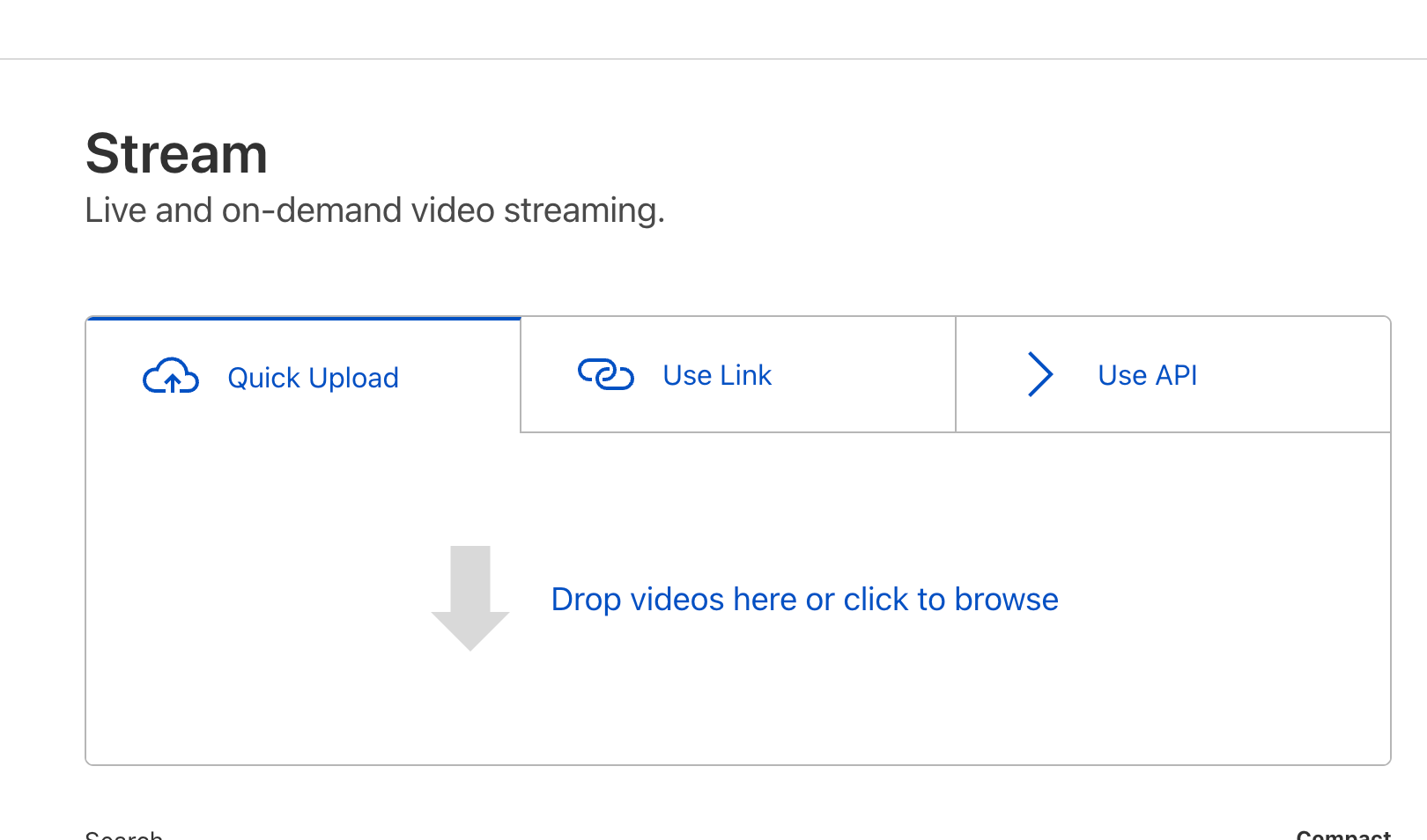
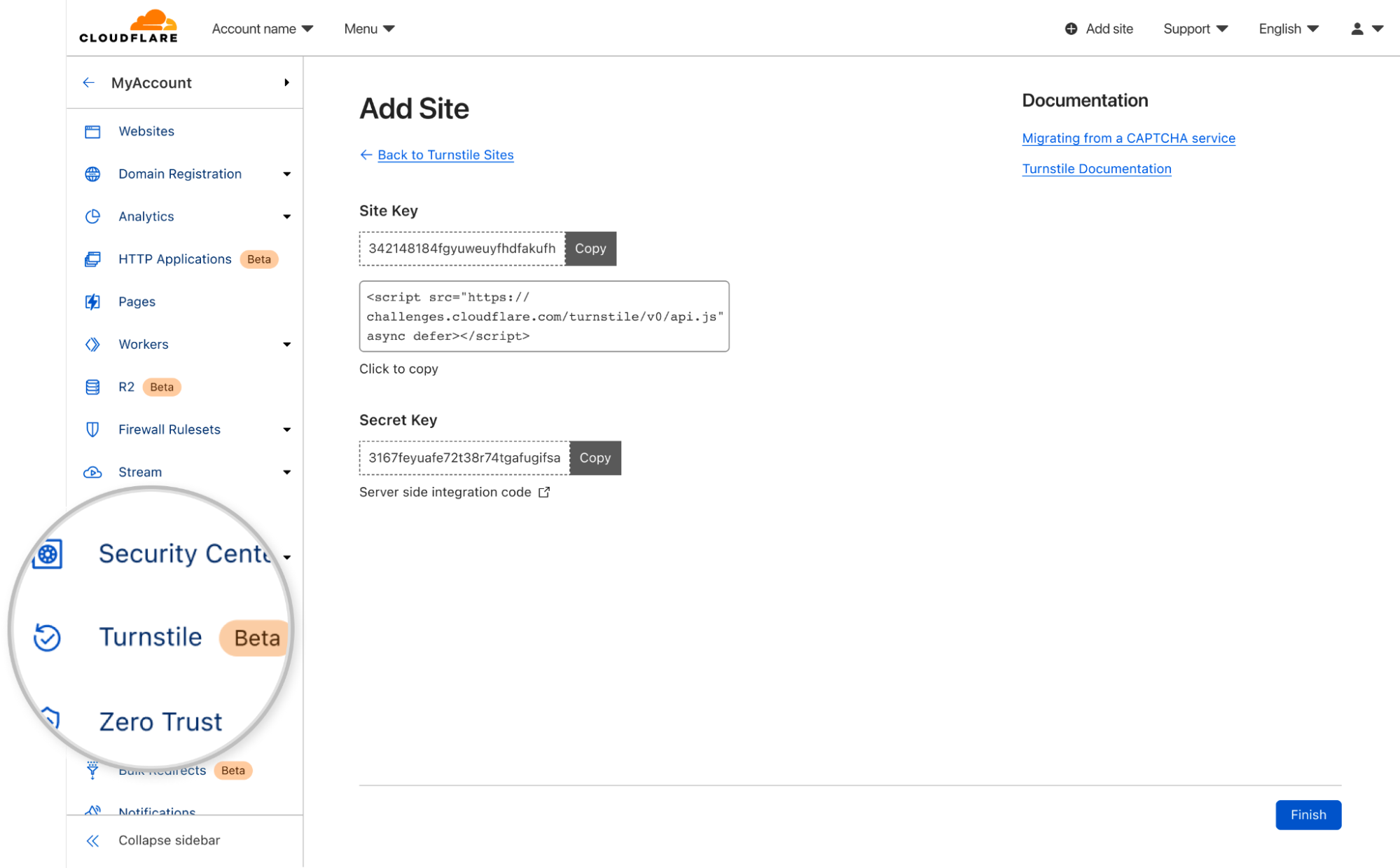
To upload your first video Stream, simply visit the Stream Dashboard and drag-and-drop the video file:
Once you upload a video, Stream will store and encode your video. Stream automatically optimizes your video uploads by creating multiple versions of it at different quality levels. This happens behind-the-scenes and requires no extra effort from your side. The Stream Player automatically selects the optimal quality level based on your website visitor’s Internet connection using a technology called adaptive-bit rate encoding.
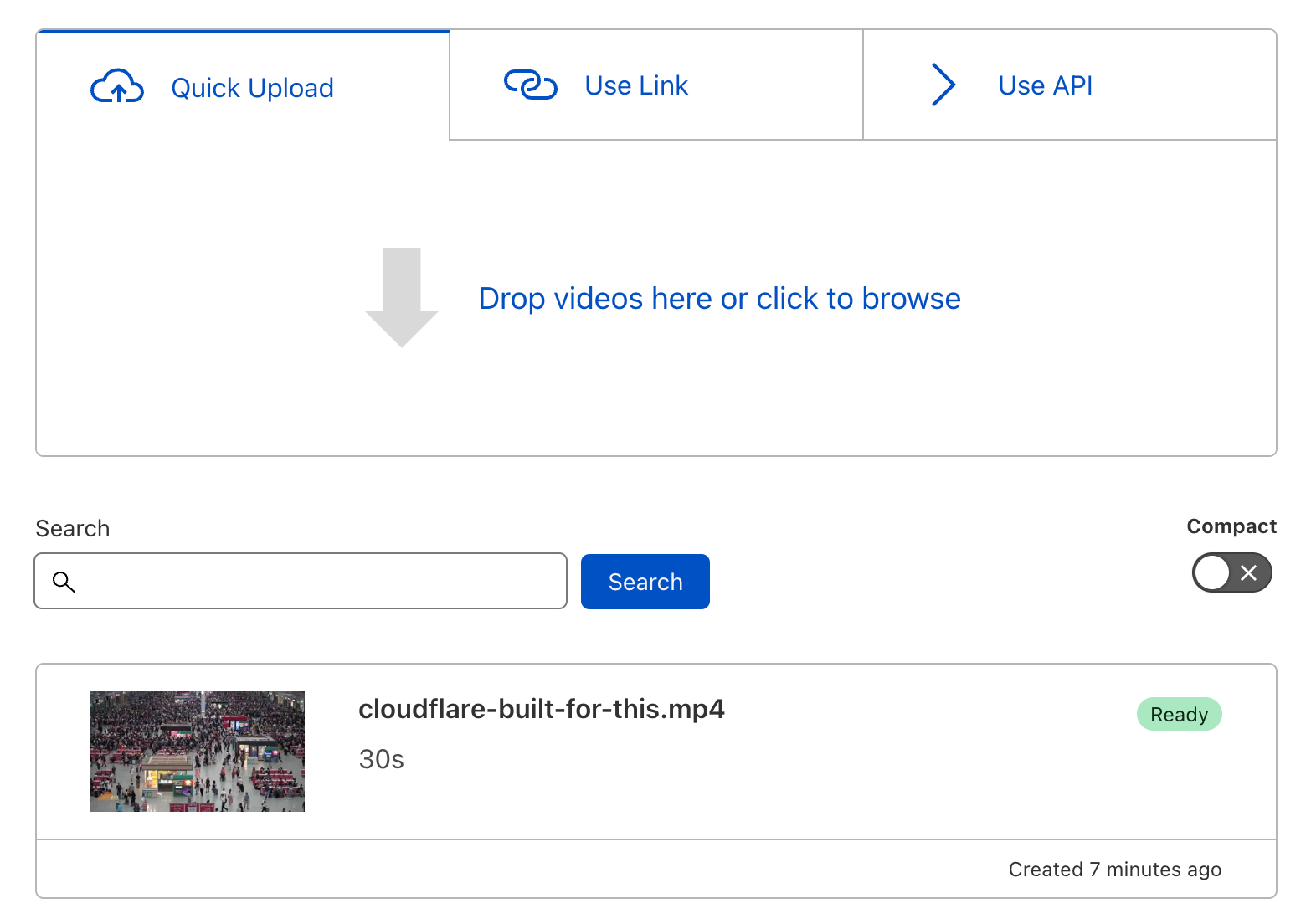
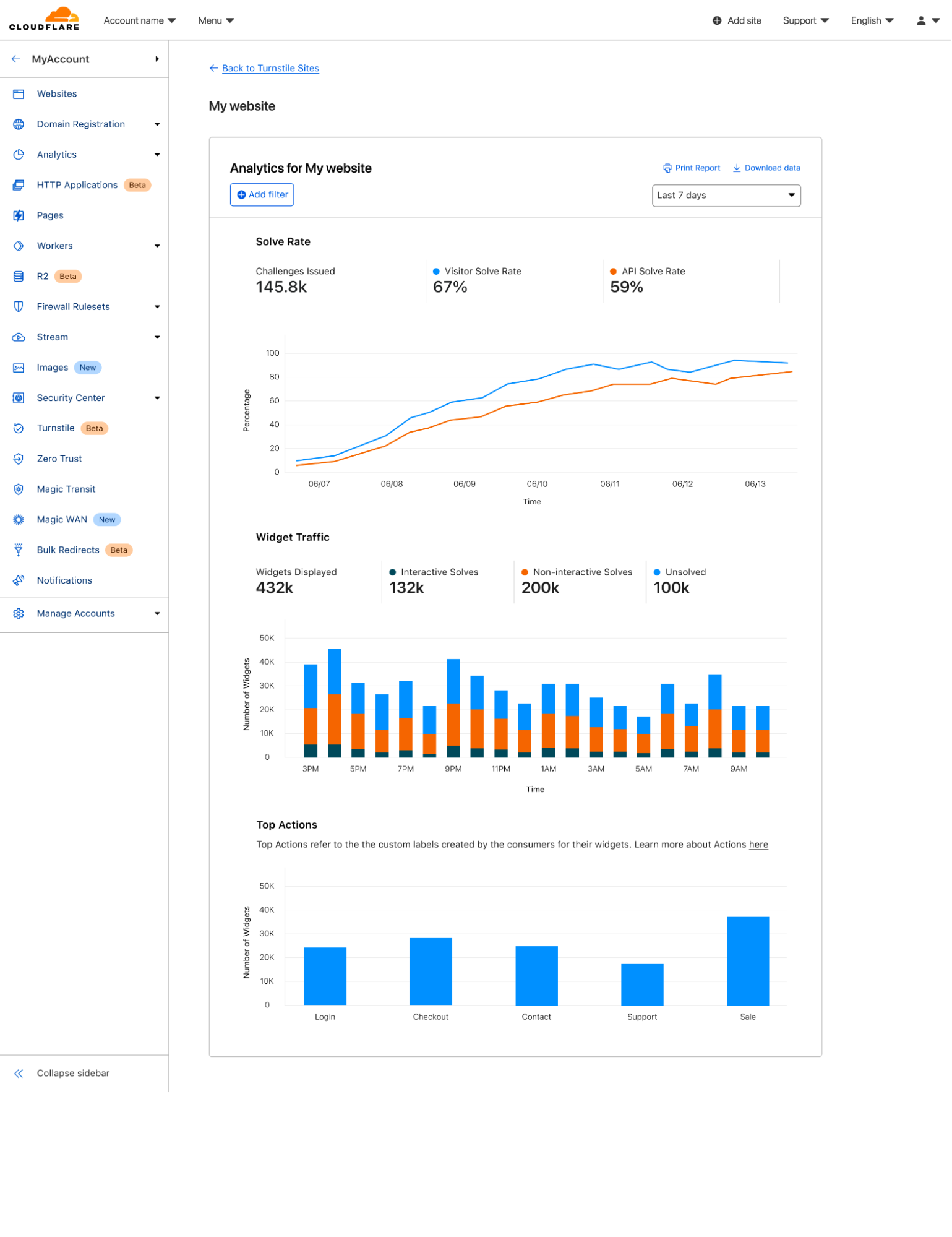
Your uploaded video will appear on the Dashboard:
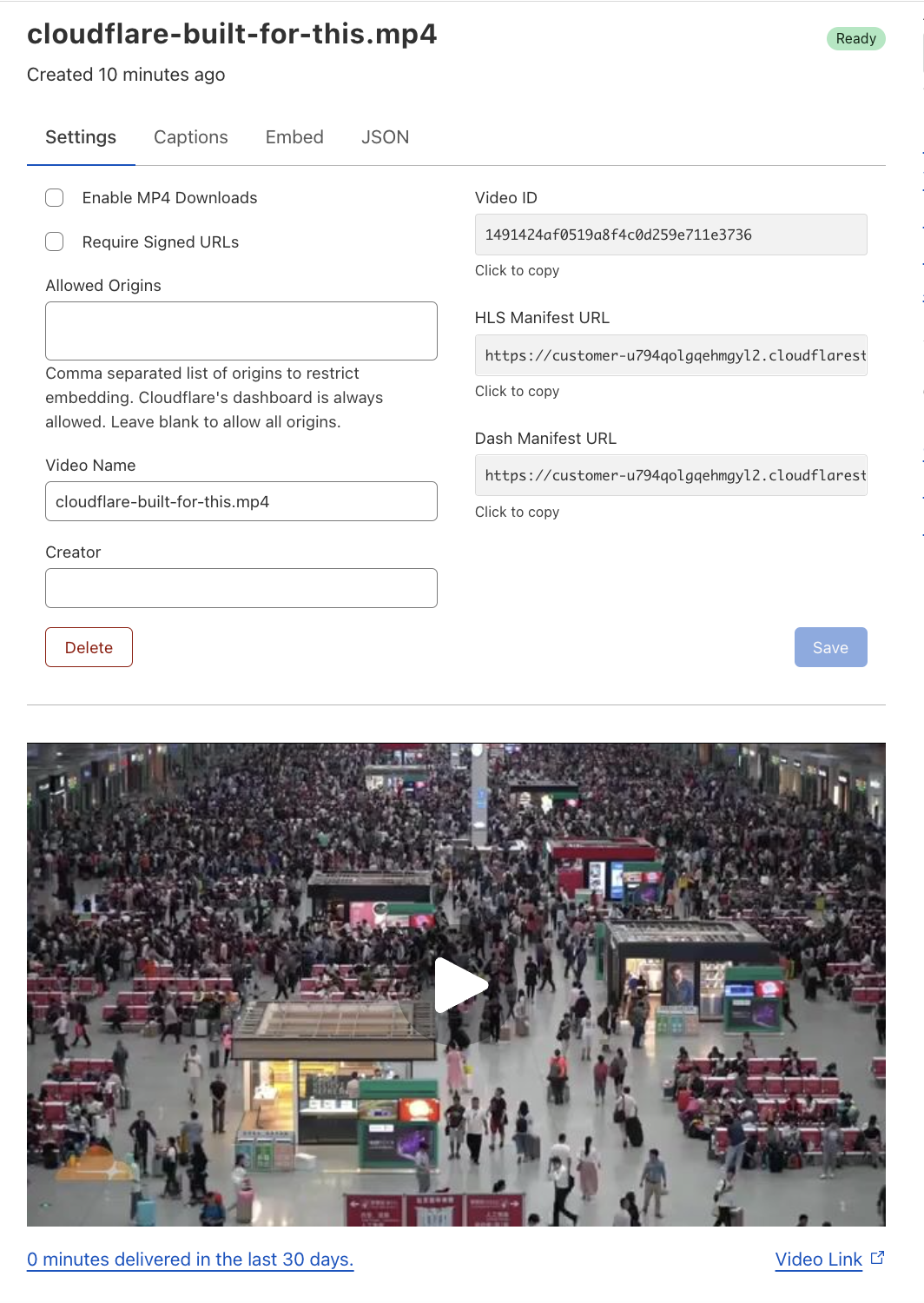
Click on the video in the list of videos to watch a preview, change settings or to grab the embed code:
Built-in Stream Player
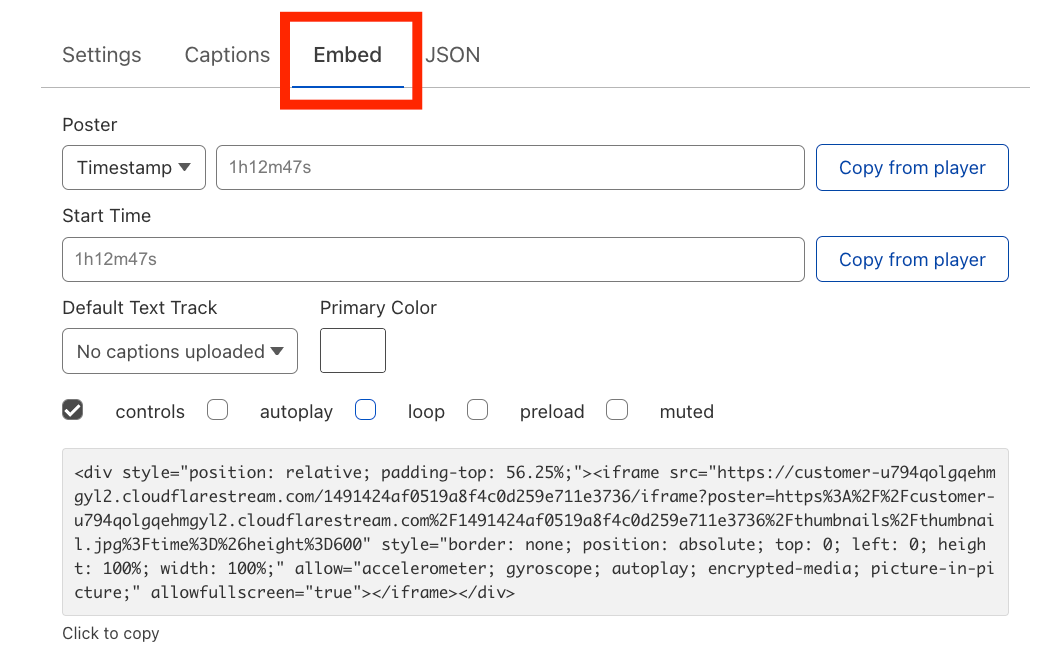
Stream provides an embed code that can be used to place your uploaded videos onto your website. The embed code can be found under the Embed tab:
To include the video on your website, simply copy-and-paste the embed code.
You’ll notice in the screenshot above that the Embed tab lets you customize the viewing experience. It supports the following optional properties:
Poster: The “poster image” is what appears on the video player before the user has started playing the video. By default, the poster image is set to the first frame in the video. However, you can change it by specifying another point in time or by specifying a URL to an image.
Start Time: Let’s say you have a 10-minute instructional video and your customer writes in with a question that is answered in that video at the 8-minute mark. You can use the Start Time property to have the video playback begin at the 8-minute mark, so your customer with a specific question does not need to watch 8 minutes of the video wondering “when will it answer my question?”. Instead, you can share a link with the customer that begins the video playback at the 8-minute mark.
Default Text Track: You can upload caption files for multiple languages for a given video. By default, captions are turned off. But if you want the captions to always render when the video plays, you can choose the default language from the Default Text Track dropdown.
Primary Color: You can choose your brand’s primary color and have it applied to various elements within the player, including the play button and the seek bar. Here is an example of the Stream Player with the Primary Color property configured to the Cloudflare orange:
Much, much more…
We live in a video-first world. Many Cloudflare customers already upload their videos to free video hosting services for marketing purposes. However, when you embed a video on your website that is hosted on a free video sharing service, your users often have to engage with unwelcomed ads and pixel trackers. Our hope is that by offering a free tier of Stream to Biz and Pro customers, you can use video to show off your products in a way that respects your users’ privacy and reflects your brand identity.
In addition to the features described in this announcement, Cloudflare Stream includes many more features including:
Dynamic Thumbnail Generation
Multi-language Captions
Live Streaming
Analytics
For a comprehensive list of features and how to use them, check out the Cloudflare Stream Docs.
At Cloudflare, we believe the Internet should be accessible to everyone. And today, we’re happy to announce a more inclusive Cloudflare dashboard experience for our users with disabilities. Recent improvements mean our dashboard now adheres to industry accessibility standards, including Web Content Accessibility Guidelines (WCAG) 2.1 AA and Section 508 of the Rehabilitation Act.
Over the past several months, the Cloudflare team and our partners have been hard at work to make the Cloudflare dashboard1 as accessible as possible for every single one of our current and potential customers. This means incorporating accessibility features that comply with the latest Web Content Accessibility Guidelines (WCAG) and Section 508 of the US’s federal Rehabilitation Act. We are invested in working to meet or exceed these standards; to demonstrate that commitment and share openly about the state of accessibility on the Cloudflare dashboard, we have completed the Voluntary Product Accessibility Template (VPAT), a document used to evaluate our level of conformance today.
Conformance with a technical and legal spec is a bit abstract–but for us, accessibility simply means that as many people as possible can be successful users of the Cloudflare dashboard. This is important because each day, more and more individuals and businesses rely upon Cloudflare to administer and protect their websites.
For individuals with disabilities who work on technology, we believe that an accessible Cloudflare dashboard could mean improved economic and technical opportunities, safer websites, and equal access to tools that are shaping how we work and build on the Internet.
For designers and developers at Cloudflare, our accessibility remediation project has resulted in an overhaul of our component library. Our newly WCAG-compliant components expedite and simplify our work building accessible products. They make it possible for us to deliver on our commitment to an accessible dashboard going forward.
Our Journey to an Accessible Cloudflare Dashboard
In 2021, we initiated an audit with third party experts to identify accessibility challenges in the Cloudflare dashboard. This audit came back with a daunting 213-page document—a very, very long list of compliance gaps.
We learned from the audit that there were many users we had unintentionally failed to design and build for in Cloudflare dashboard user interfaces. Most especially, we had not done well accommodating keyboard users and screen reader users, who often rely upon these technologies because of a physical impairment. Those impairments include low vision or blindness, motor disabilities (examples include tremors and repetitive strain injury), or cognitive disabilities (examples include dyslexia and dyscalculia).
As a product and engineering organization, we had spent more than a decade in cycles of rapid growth and product development. While we’re proud of what we have built, the audit made clear to us that there was a great need to address the design and technical debt we had accrued along the way.
One year, four hundred Jira tickets, and over 25 new, accessible web components later, we’re ready to celebrate our progress with you. Major categories of work included:
Forms: We re-wrote our internal form components with accessibility and developer experience top of mind. We improved form validation and error handling, labels, required field annotations, and made use of persistent input descriptions instead of placeholders. Then, we deployed those component upgrades across the dashboard.
Data visualizations: After conducting a rigorous re-evaluation of their design, we re-engineered charts and graphs to be accessible to keyboard and screen reader users. See below for a brief case study.
Heading tags: We corrected page structure throughout the dashboard by replacing all our heading tags (<h1>, <h2>, etc.) with a technique we borrowed from Heydon Pickering. This technique is an approach to heading level management that uses React Context and basic arithmetic.
SVGs: We reworked how we create SVGs (Scalable Vector Graphics), so that they are labeled properly and only exposed to assistive technology when useful.
Node modules: We jumped several major versions of old, inaccessible node modules that our UI components depend upon (and we broke many things along the way).
Color: We overhauled our use of color, and contributed a new volume of accessible sequential colors to our design system.
Bugs: We squashed a lot of bugs that had made their way into the dashboard over the years. The most common type of bug we encountered related to incorrect or unsemantic use of HTML elements—for example, using a <div> where we should have used a <td> (table data) or <tr> (table row) element within a table.
Case Study: Accessibility Work On Cloudflare Dashboard Data & Analytics
The Cloudflare dashboard is replete with analytics and data visualizations designed to offer deep insight into users’ websites’ performance, traffic, security, and more. Making those data visualizations accessible proved to be among the most complex and interdisciplinary issues we faced in the remediation work.
An example of a problem we needed to solve related to WCAG success criterion 1.4.1, which pertains to the use of color. 1.4.1 specifies that color cannot be the only means by which to convey information, such as the differentiation between two items compared in a chart or graph.
Our charts were clearly nonconforming with this standard, using color alone to represent different data being compared. For example, a typical graph might have used the color blue to show the number of requests to a website that were 200 OK, and the color orange to show 403 Forbidden, but failed to offer users another way to discern between the two status codes.
Our UI team went to work on the problem, and chose to focus our effort first on the Cloudflare dashboard time series graphs.
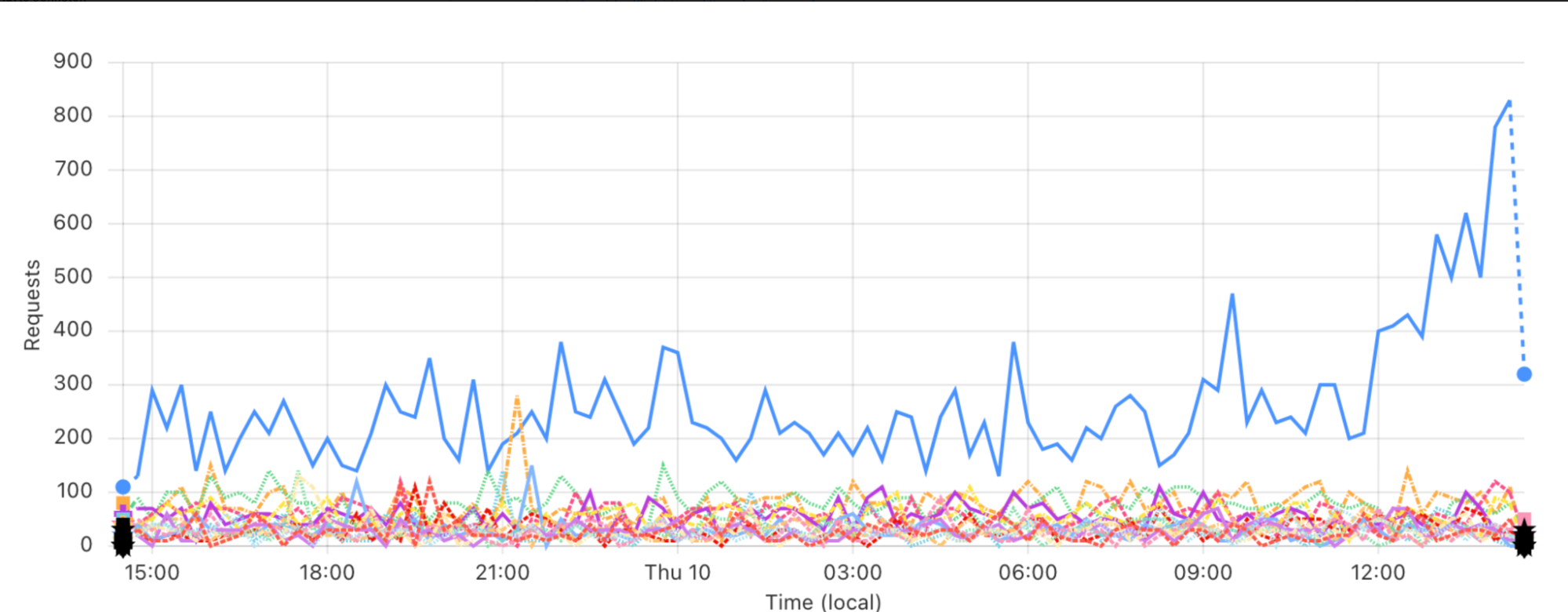
Interestingly, we found that design patterns recommended even by accessibility experts created wholly unusable visualizations when placed into the context of real world data. Examples of such recommended patterns include using different line weights, patterns (dashed, dotted or other line styles), and terminal glyphs (symbols set at the beginning and end of the lines) to differentiate items being compared.
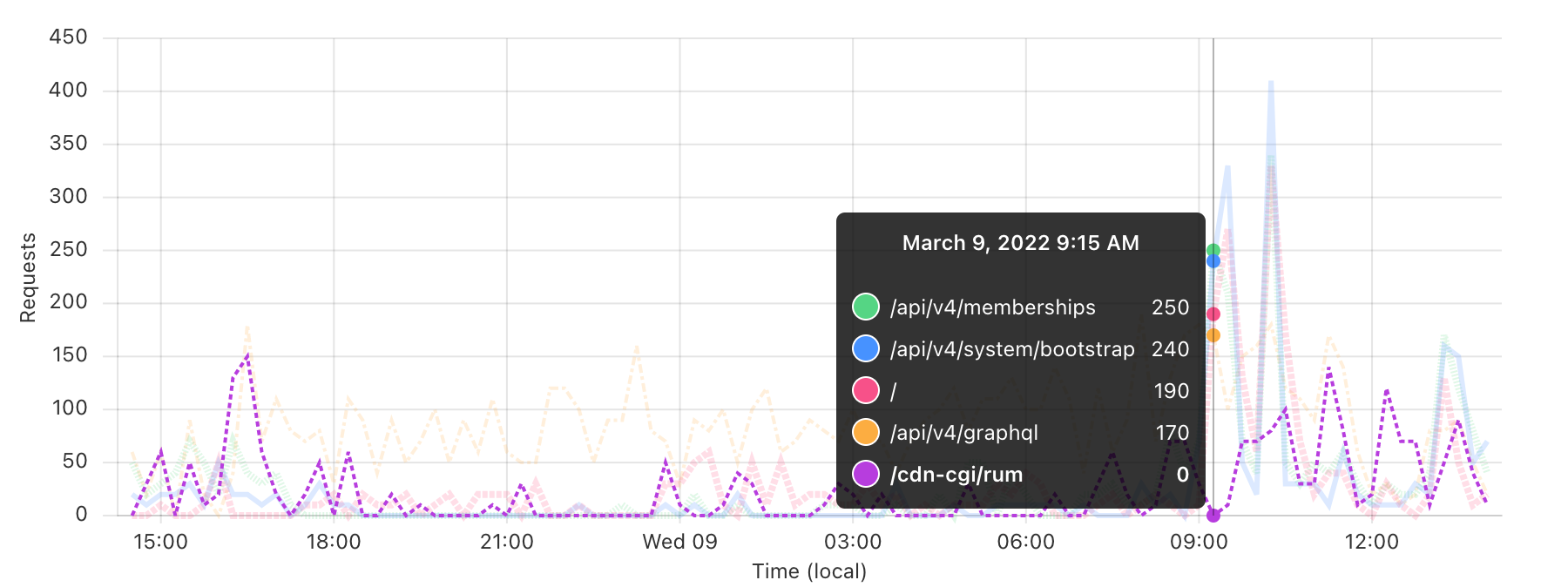
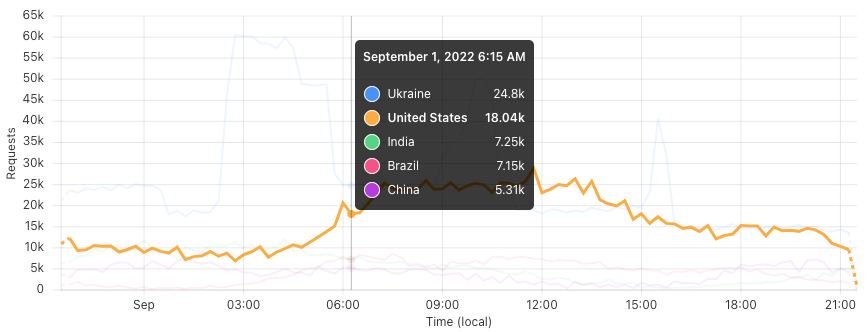
We tried, and failed, to apply a number of these patterns; you can see the evolution of this work on our time series graph component in the three different images below.
v.1
Here is an early attempt at using both terminal glyphs and patterns to differentiate data in a time series graph. You can see that the terminal glyphs pile up and become indistinguishable; the differences among the line patterns are very hard to discern. This code never made it into production.
v.2
In this version, we eliminated terminal glyphs but kept line patterns. Additionally, we faded the unfocused items in the graph to help bring highlighted data to the forefront. This latter technique made it into our final solution.
v.3
Here we eliminated patterns altogether, simplified the user interface to only use the fading technique on unfocused items, and put our new, sequentially accessible colors to use. Finally, a visual design solution approved by accessibility and data visualization experts, as well as our design and engineering teams.
After arriving at our design solution, we had some engineering work to do.
In order to meet WCAG success criterion 2.1.1, we rewrote our time series graphs to be fully keyboard accessible by adding focus handling to every data point, and enabling the traversal of data using arrow keys.
Navigating time series data points by keyboard on the Cloudflare dashboard.
We did some fine-tuning, specifically to support screen readers: we eliminated auditory “chartjunk” (unnecessary clutter or information in a chart or graph) and cleaned up decontextualized data (a scenario in which numbers are exposed to and read by a screen reader, but contextualizing information, like x- and y-axis labels, is not).
And lastly, to meet WCAG 1.1.1, we engineered new UI component wrappers to make chart and graph data downloadable in CSV format. We deployed this part of the solution across all charts and graphs, not just the time series charts like those shown above. No matter how you browse and interact with the web, we hope you’ll notice this functionality around the Cloudflare dashboard and find value in it.
Making all of this data available to low vision, keyboard, and assistive technology users was an interesting challenge for us, and a true team effort. It necessitated a separate data visualization report conducted by another, more specialized team of third party experts, deep collaboration between engineering and design, and many weeks of development.
Applying this thorough treatment to all data visualizations on the Cloudflare dashboard is our goal, but still work in progress. Please stay tuned for more accessible updates to our chart and graph components.
Conclusion
There’s a lot of nuance to accessibility work, and we were novices at the beginning: researching and learning as we were doing. We also broke a lot of things in the process, which (as any engineering team knows!) can be stressful.
Overall, our team’s biggest challenge was figuring out how to complete a high volume of cross-functional work in the shortest time possible, while also setting a foundation for these improvements to persist over time.
As a frontend engineering and design team, we are very grateful for having had the opportunity to focus on this problem space and to learn from truly world-class accessibility experts along the way.
Accessibility matters to us, and we know it does to you. We’re proud of our progress, and there’s always more to do to make Cloudflare more usable for all of our customers. This is a critical piece of our foundation at Cloudflare, where we are building the most secure, performant and reliable solutions for the Internet. Stay tuned for what’s next!
Not using Cloudflare yet? Get started today and join us on our mission to build a better Internet.
1All references to “dashboard” in this post are specific to the primary user authenticated Cloudflare web platform. This does not include Cloudflare’s product-specific dashboards, marketing, support, educational materials, or third party integrations.
Workers Analytics Engine (or for short, Analytics Engine) is a new way for developers to store and analyze time series analytics about anything using Cloudflare Workers, and it’s now in open beta! Analytics Engine is really good at gathering time-series data for really high cardinality and high-volume data sets from Cloudflare Workers. At Cloudflare, we use Analytics Engine to provide insight into how our customers use Cloudflare products.
Log, log, logging!
As an example, Analytics Engine is used to observe the backend that powers Instant Logs. Instant Logs allows Cloudflare customers to stream a live session of the HTTP logs for their domain to the Cloudflare dashboard. The backend for Instant Logs is built on Cloudflare Workers.
Briefly, the Instant Logs backend works by receiving requests from each Cloudflare server that processes a customer’s HTTP traffic. These requests contain the HTTP logs for the customer’s HTTP traffic. The Instant Logs backend then forwards these HTTP logs to the customer’s browser via a WebSocket.
In order to ensure that the HTTP logs are being delivered smoothly to a customer’s browser, we need to track the request rates across all active Instant Logs sessions. We also need to track the request rates across all Cloudflare data centers, since Instant Logs is built on Cloudflare Workers, and Cloudflare Workers is built on Cloudflare’s massive network. As a result, the data set for the Instant Logs backend has really massive cardinality!
“Traditional” metrics systems like Prometheus are poorly suited to serving high cardinality data. Fortunately, this is exactly the problem that Analytics Engine is designed to solve. So, we sent all the Instant Logs backend request logs to Analytics Engine. Log, log, logging!
Using the Analytics Engine API (which has a SQL interface), we can visualize the Instant Logs backend request rates for the top sessions and top data centers over the previous month. “Zooming in” to an interesting period is also really fast. We’ve designed Analytics Engine so that queries always respond within the window of interactivity (more on this later). This makes it well-suited for interactive debugging with a dashboard tool (in this case we’re using Grafana).
What we learned in closed beta
We received a lot of great feedback during the closed beta. Developers were excited about the SQL API, ease of integration with Workers, the ability to query data in Grafana (with more integrations in future), and our simple pricing model (free!). However, there were a number of things that we needed to fix before moving on to the open beta phase.
Developers were supportive of our choice to use SQL (the world’s language for data) as the interface for the Analytics Engine API. However, when developers used the Analytics Engine API, they found that the error messages were opaque and difficult to debug. For the open beta, we have rewritten the API from the ground-up to provide much improved error messaging.
Before: > SELECT column_that_does_not_exist FROM your_dataset FORMAT JSON Sorry, we were unable to evaluate your query
After: > SELECT column_that_does_not_exist FROM your_dataset FORMAT JSON cannot select unknown column: "column_that_does_not_exist"
In addition to understanding what went wrong, developers also wanted to understand what the API is capable of doing. For the open beta, we’ve written a comprehensive SQL reference for Analytics Engine. We also have a few “How To” guides, including information on how to hook up the API to Grafana.
ABR and Analytics Engine
Analytics Engine uses Cloudflare’s ABR technology to make queries fast. This means that every query is satisfied by a resolution of the data that matches the query. For example, if we are looking at data for the last month, we might use a lower resolution version of the Analytics Engine data than if we are looking at the last hour. The lower resolution data will provide the correct answer, but will respond within the window of interactivity. By using multiple, different resolutions of the same data, ABR provides consistent response times.
To account for the different resolutions of data, each event carries with it information about the resolution of data that the event comes from. This information is encoded in the _sample_interval column. For example, if an event comes from a resolution of the data which is 1% of the original data, its _sample_interval will be set to 100. To reconstruct the number of events in the original data, we can use the query:
SELECT sum(_sample_interval) AS count FROM dataset
For the open beta, we are exposing _sample_interval directly to developers. In the future, we’ll make it easier to work with this field by providing convenience functions which automatically take into account varying resolutions of the data. We also want to provide the ability to understand the confidence level of the estimates that these functions return.
Coming soon
This is just the beginning for Workers Analytics Engine. Internally, there has been high demand for the ability to define alerts based on the data captured by Analytics Engine. This is also something that we want developers to be able to do.
As in the closed beta, fields are accessed via names that have 1-based indexing (blob1, blob2, double1, double2, etc.). In the future, we will allow developers to attach names to fields, and these names will be available to use to retrieve data via the SQL API.
Something we want to provide is a rich UX in the Cloudflare dashboard (imagine something like Grafana in the Cloudflare dashboard). Ultimately, we don’t want developers to have to set up their own infrastructure for exploring data captured with Analytics Engine.
Conclusion
Try Workers Analytics Engine today! Please let us know if you have any ideas or more advanced use cases that aren’t supported. We’re discussing everything about the Analytics Engine in our discord channel too – join the conversation!
The Internet is a living organism. Technology changes, shifts in human behavior, social events, intentional disruptions, and other occurrences change the Internet in unpredictable ways, even to the trained eye.
Cloudflare Radar has long been the place to visit for accessing data and getting unique insights into how people and organizations are using the Internet across the globe, as well as those unpredictable changes to the Internet.
One of the most popular features on Radar has always been the “Most Popular Domains,” with both global and country-level perspectives. Domain usage signals provide a proxy for user behavior over time and are a good representation of what people are doing on the Internet.
Today, we’re going one step further and launching a new dataset called Radar Domain Rankings (Beta). Domain Rankings is based on aggregated 1.1.1.1 resolver data that is anonymized in accordance with our privacy commitments. The dataset aims to identify the top most popular domains based on how people use the Internet globally, without tracking individuals’ Internet use.
There are a few reasons why we’re doing this now. One is obviously to improve our Radar features with better data and incorporate new learnings. But also, ranking lists are used all over the Internet in all sorts of systems. One of the most used and trusted sources of domain rankings was Alexa, but that service was recently deprecated. We believe we are in a good position to provide a strong alternative.
Let’s see how we built it.
Differences in domain names
Before we dig into the data science behind Domain Rankings, it’s important to understand what a domain and DNS are. Internet domain names are human-readable dot-separated letters, digits and hyphens that correspond to a network resource, like a server or a website. However, your computer and applications don’t know what to do with a domain name; they need IP addresses to send and receive information over the network. DNS is the system that converts, or resolves, a domain name into an IP address. Think of it as an Internet phonebook for domain names.
Note: This is a simplification. A new standard called Internationalized Domain Names, or IDN, allows using Unicode strings in domain names.
Each dot defines a new hierarchy level, reading right to left. Domains can have multiple levels of depth. The highest level corresponds to country code top-level domains (ccTLDs) like .uk, .fr or .pt, or generic top-level domains (gTLDs) like .com, .org, or .net. These are normally assigned to and managed by either country-level entities or administrative organizations operating a registry.
Then there are the second-level domains like cloudflare.com or google.com. These are normally purchased and registered by individuals or organizations, which are then free to create and manage as many hostnames and hierarchy levels as they want.
Unfortunately, however, there are exceptions. For instance, many countries use second-level domain registration. One such example is the United Kingdom, where commercial domains can only be registered under the .co.uk hierarchy. That’s why Google in the UK isn’t google.uk, but rather google.co.uk.
But that’s not all. Some countries use 3rd level domain registrations. One example is Japan, which offers Regional Domain registration under cities like *.aisai.aichi.jp.
Projects like the Public Suffix List are a good starting point for understanding the variations involved, and how they affect validations and assumptions in other systems, such as cookies in web browsers.
Domain Rankings takes some of this nuance into account to inform the definition of our current ruleset:
We boil everything down to second-level domains, such as cloudflare.com or google.com.
However, if the second level is .edu, .com, .org, .gov, .net, .gov, .net, .co or .mil, then we use third-level domains.
We don’t distinguish between what we think is a website or an infrastructure system. A domain represents an Internet-available resource.
We will also semi-automate, curate and maintain a list of domains that map to popular platforms and services in the future. Example: fb.audio, fb.com, fb.watch, all map to a “facebook” platform.
Defining popularity
Definitions are important. We established what we consider a domain, but what does domain popularity mean exactly? Our research showed that the volume of traffic generated to a given domain doesn’t really work as a proxy for what we perceive as popular. Instead, Domain Rankings looks at the size of the population of users that look up a domain per unit of time. The more people who are interested in a domain, the more popular it is.
Sounds pretty straightforward, right? Well, it’s not. Our databases don’t have cookies, IPs, or other tracking artifacts, and we strip information that leads to identifying an individual from all of our data, by design.
The good news, however, is that we do a very good job at identifying automated traffic (for instance, you can read about Bot Management and how we use Machine Learning to detect bots in HTTP traffic in our blog) and we found we could develop a reasonable proxy for the unique users metric without sacrificing privacy (using other data points that we store for a limited period of time, like the ASN and high-level geolocation information of the request or the Cloudflare data center that served it).
Domain Rankings’ popularity metric is best described as the estimated relative size of the user population that accesses a domain over some period of time.
Our approach
We announced 1.1.1.1, our privacy-first consumer DNS resolver in 2018, and over the years it’s grown to become one of the top DNS services in the world. 1.1.1.1 is also part of a Research Agreement with APNIC in which we collaborate with them doing public research and DNS data insights.
The data we collect from it honors our privacy commitments, and is aggregated and stripped of any information that could lead to identifying or tracking users. We conducted a privacy examination by a Big Four accounting firm to determine whether the 1.1.1.1 resolver was effectively configured to meet our privacy commitments. You can read more about it in this blog, and the full report is publicly available on our compliance page.
Even without this personally identifying information, the resulting collection is vast and representative of Internet activity.
The 1.1.1.1 service is used in many ways. Regular (human) Internet users use it as their DNS resolver, either because they explicitly configured it in their devices, or their ISP did, or because they use WARP, or their browser uses 1.1.1.1 under the hood. However, servers and cloud infrastructure, IoT devices, home routers, and bots also use 1.1.1.1 extensively, which creates a lot of challenges for us when trying to identify human traffic.
We’ve been using DNS data to calculate the top and trending domains found on both the global and country pages on Cloudflare Radar. It’s been quite a learning experience trying to improve these lists. We have implemented aggregations, counts, filters, handling exceptions, and tried reducing noise, and yet they’re far from perfect. We felt that there had to be a better way.
We’ve spent the last six months building a variety of machine learning models to help us predict the rank of a domain.
Building the model was no easy feat. We experimented with multiple regression types first, to know exactly what the model was doing, and then more complex algorithms to get better performance. We played with different datasets, changed the population groups, variables (features), and combinations of variables, and used synthetic data.
After evaluation, one of our first conclusions was that building a model that could produce good results for the highest ranked domains and the long tail would be difficult.
The paper “A Long Way to the Top: Significance, Structure, and Stability of Internet Top Lists” describes this problem well. “The ranking of domains in the long tail should be based on significantly smaller and hence less reliable numbers.” Talking to our Research Team who submitted the collaboration paper “Toppling Top Lists: Evaluating the Accuracy of Popular Website Lists” to IMC 2022, got us to the same conclusion: the most popular domains (like google.com and facebook.com) have feature values disproportionally higher than the lower-ranked domains.
Therefore, we selected the two models that performed best. One model was trained on the population with the highest feature values, uses more features, and is used to generate the ordered top 100 domain list. A second model was trained on a more general group of domains, uses fewer features, and is used to get the top one million most popular domains, which we then divide into ranking buckets.
These buckets are ranked, but each bucket’s contents are intentionally unordered. For example, the second bucket of 10,000 most popular domains includes the set of domains that rank from 10,001 to 20,000, but give no further indication of the individual ranking of domains in that bucket. Given the size of some of these buckets and the window of time we use to populate them, they will inherently be exposed to more instability, too. We feel this is a good compromise between the described natural uncertainties of our long tail model and providing a reasonable idea of how close to the top a domain is.
Results
It’s important to mention there is no global view that can establish the perfect rank, and there’s no easy mechanism to confirm if a ranking is, ultimately, good. Data-driven results are always subject to some bias and skewing, related to the context of the organizations and systems that collect them. Sometimes all that can be done is to be transparent about potential sources of bias. The geographical distribution of customers and users, product characteristics, platform features, and behavioral diversity play an essential role in the final result. We are presenting the Cloudflare view, what we see.
Having said this, Cloudflare sits in a privileged position and handles a significant amount of Internet traffic. We have plenty of signals we can extract from our aggregated data, and believe that makes it possible to generate high quality domain rankings.
Domain Rankings are available today. You can head up to the Domains page and check it out:
Ordered list of the top 100 most popular domains globally and per country, based on our first model. Last 24 hours, updated daily.
Unordered global most popular domains datasets divided into buckets of the following sizes: 200, 500, 1,000, 2,000, 5,000, 10,000, 20,000, 50,000, 100,000, 200,000, 500,000, 1,000,000. Last 7 days, updated weekly.
Next steps
We will keep improving Domain Rankings and monitoring the results. Anyone can access them on Cloudflare Radar, read the results, and download the CSV files.
Feel free to explore our Domain Rankings and share feedback with us.
Back in June 2022, we announced an upcoming feature that would allow for Cloudflare Zero Trust users to easily create prefilled HTTP policies in Cloudflare Gateway (Cloudflare’s Secure Web Gateway solution) via issues identified by CASB, a new Cloudflare product that connects, scans, and monitors your SaaS apps – like Google Workspace and Microsoft 365 – for security issues.
With Cloudflare’s 12th Birthday Week nearing its end, we wanted to highlight, in true Cloudflare fashion, this new feature in action.
What is CASB? What is Gateway?
To quickly recap, Cloudflare’s API-driven CASB offers IT and security teams a fast, yet effective way to connect, scan, and monitor their SaaS apps for security issues, like file exposures, misconfigurations, and Shadow IT. In just a few clicks, users can see an exhaustive list of security issues that may be affecting the security of their SaaS apps, including Google Workspace, Microsoft 365, Slack, and GitHub.
Cloudflare Gateway, our Secure Web Gateway (SWG) offering, allows teams to monitor and control the outbound connections originating from endpoint devices. For example, don’t want your employees to access gambling and social media websites on company devices? Just block access to them in our easy-to-use Zero Trust dashboard.
The problems at hand
As we highlighted in our first post, Shadow IT – or unapproved third-party applications being used by employees – continues to be one of the biggest pain points for IT administrators in the cloud era. When employees grant access to external services without the consent of their IT or security department, they risk granting bad actors access to some of the company’s most sensitive data stored in these SaaS applications.
Another major issue affecting the security of data stored in the cloud is file exposure in the form of oversharing. When an employee shares a highly sensitive Google Doc to someone via a public link, would your IT or security team know about it? And even if they do, do they have a way to minimize the risk and block access to it?
With these two products now being used by customers around the world, we’re excited to share how visibility and basic awareness of SaaS security issues doesn’t have to be the end of it. What are admins supposed to do next?
Gateway + CASB: blocking identified threats in three (yes, three) clicks
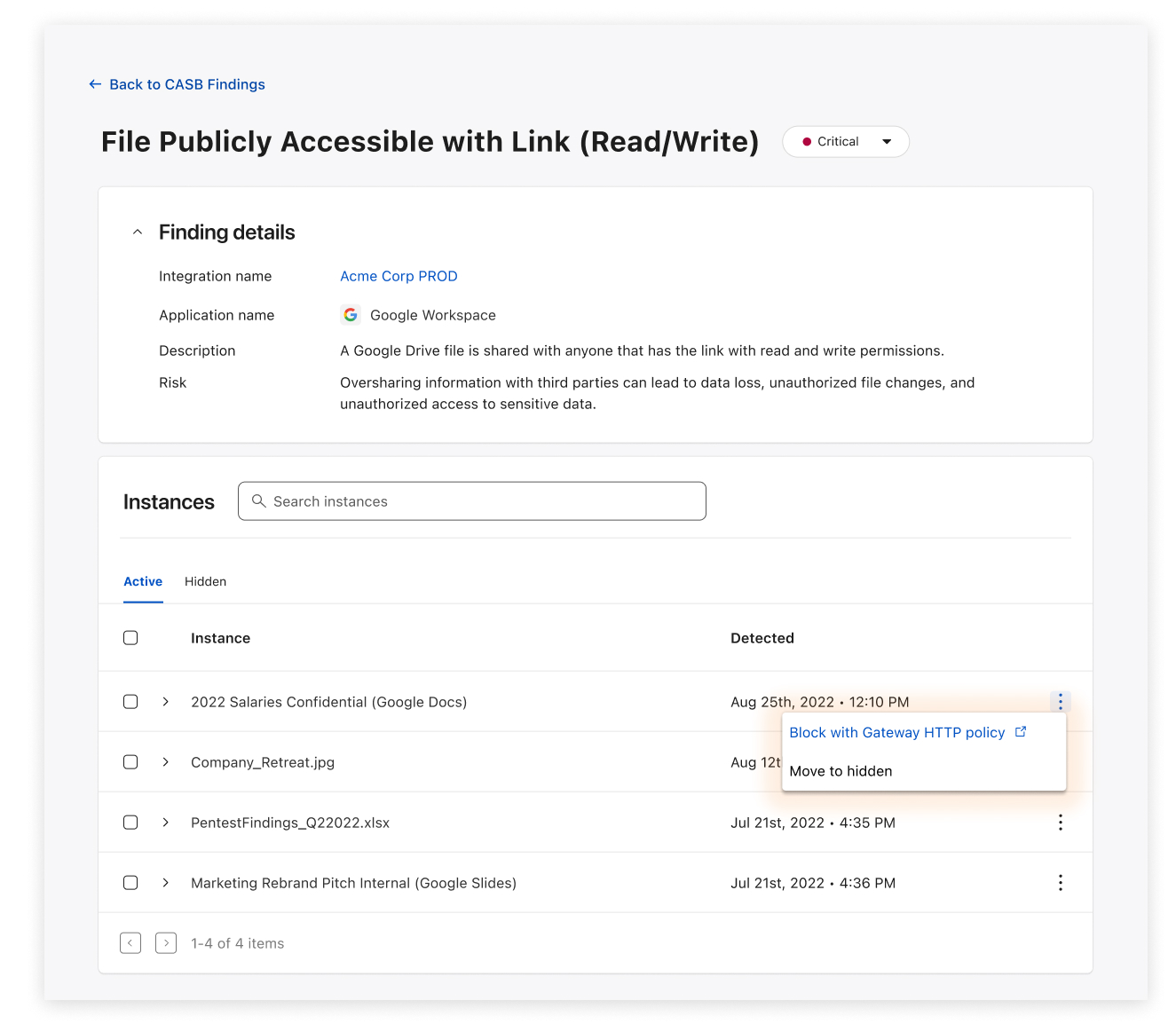
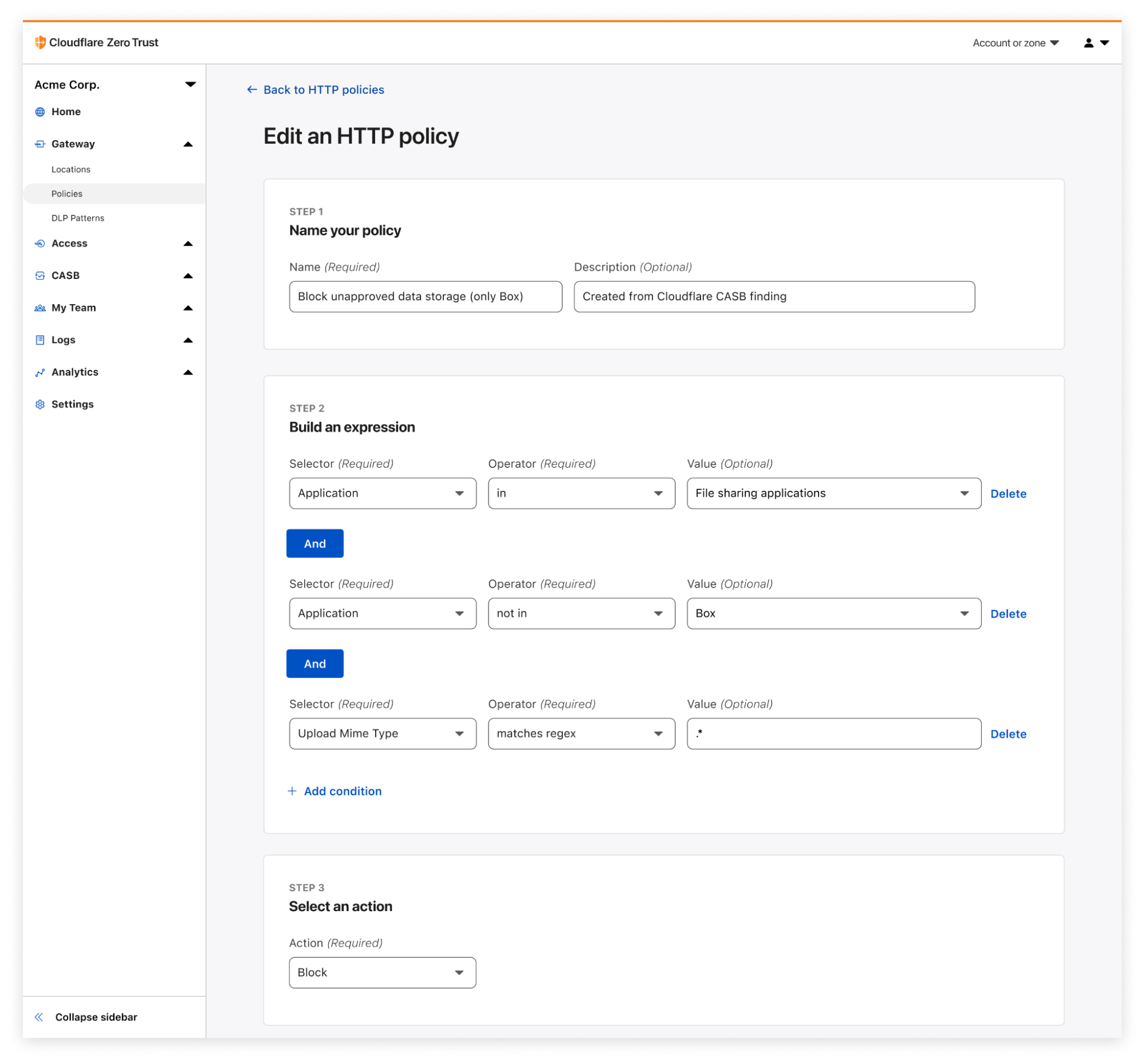
Now, when CASB discovers a problem (which we call a Finding), it’s now possible to easily create a corresponding Gateway policy in as few as three clicks.
This means users can now automatically generate fine-grained Gateway policies to prevent specific inappropriate behavior from continuing, while still allowing for expected access and usage that meets company policy.
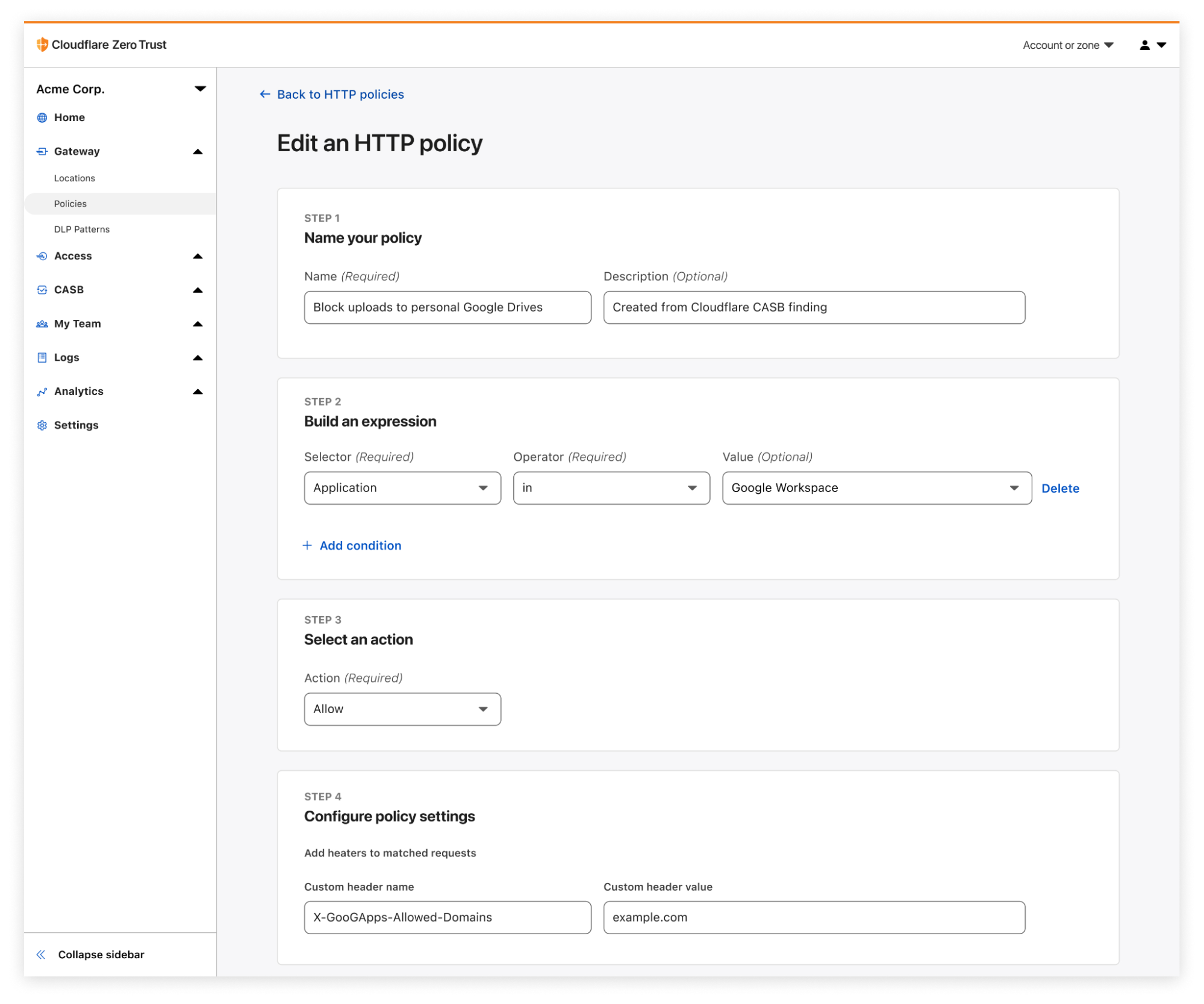
Example 1: Block employees from uploading to their personal Google Drive
A common use case we heard during CASB’s beta program was the tendency for employees to upload corporate data – documents, spreadsheets, files, folders, etc. – to their personal Google Drive (or similar) accounts, presenting the risk of intellectual property making its way out of a secure corporate environment. With Gateway and CASB working together, IT administrators can now directly block upload activity from anywhere other than their corporate tenant of Google Drive or Microsoft OneDrive.
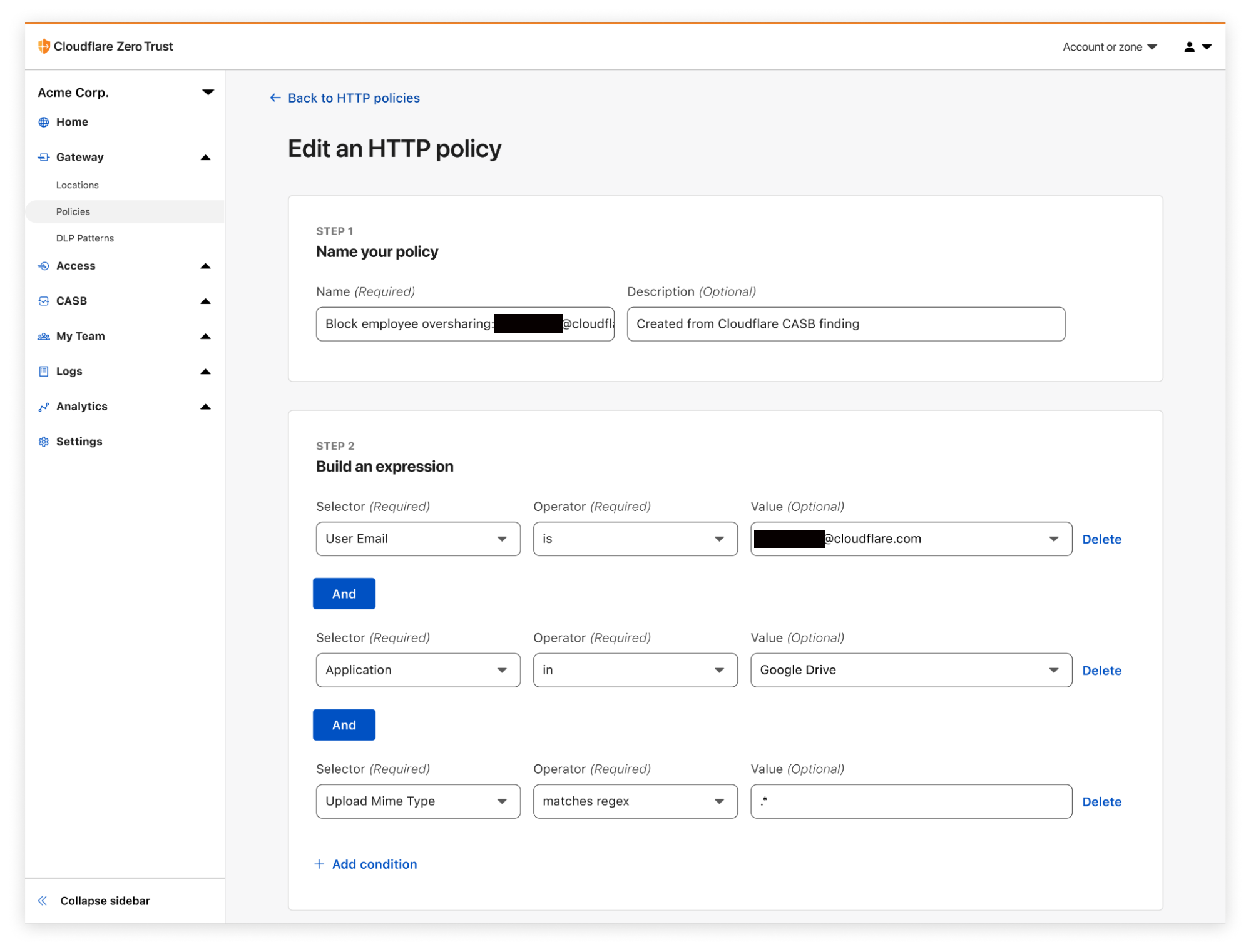
Example 2: Restrict repeat oversharers from uploading and downloading files
A great existing use case of Cloudflare CASB has been the ability to identify employees that are habitual oversharers of files in their corporate Google or Microsoft tenants – sharing files to anyone that has the link, sharing files with emails outside their company, etc.
Now when these employees are identified, CASB admins can create Gateway policies to block specific users from further upload and download activity until the behavior has been addressed.
Example 3: Prevent file uploads to unapproved, Shadow IT applications
To address the concern of Shadow IT, CASB-originating Gateway policies can be customized, including being able to restrict upload and download events to only the SaaS applications your organization uses. Let’s say your company uses Box as its file storage solution; in just a few clicks, you can use an identified CASB Finding to create a Gateway policy that blocks activity to any file sharing application other than Box. This gives IT and security admins the peace of mind that their files will only end up in the approved cloud application they use.
Get started today with the Cloudflare Zero Trust
Ultimately, the power of Cloudflare Zero Trust comes from its existence as a single, unified platform that draws strength from its combination of products and features. As we continue our work towards bringing these new and exciting offerings to market, we believe that it’s just as important to highlight their synergies and associated use cases, this time from Cloudflare Gateway and CASB.
For those not already using Cloudflare Zero Trust, don’t hesitate to get started today – see the platform yourself with 50 free seats by signing up here.
For those who already know and love Cloudflare Zero Trust, reach out to your Cloudflare sales contact to get started with CASB and Gateway. We can’t wait to hear what interesting and exciting use cases you discover from this new cross-product functionality.
Historically, Cloudflare has covered large-scale Internet outages with timely blog posts, such as those published for Iran, Sudan, Facebook, and Syria. While we still explore such outages on the Cloudflare blog, throughout 2022 we have ramped up our monitoring of Internet outages around the world, posting timely information about those outages to @CloudflareRadar on Twitter.
Furthermore, this initial release is also laying the groundwork for the CROC to become a first stop and key resource for civil society organizations, journalists/news media, and impacted parties to get information on, or corroboration of, reported or observed Internet outages.
What information does the CROC contain?
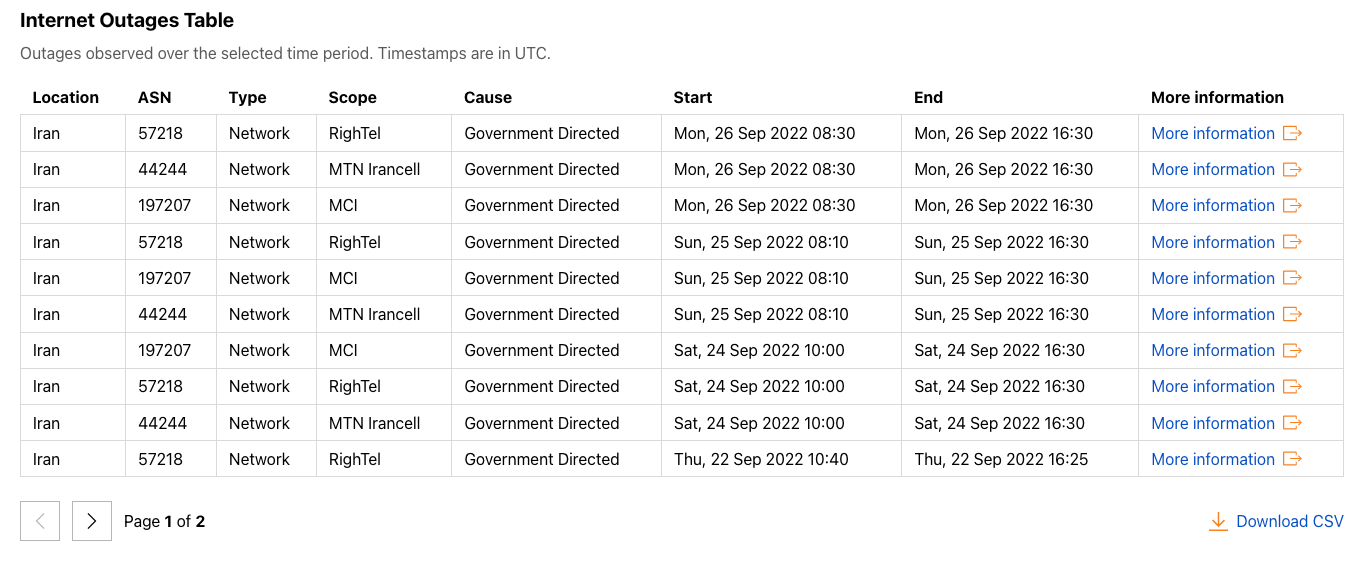
At launch, the CROC includes summary information about observed outage events. This information includes:
Location: Where was the outage?
ASN: What autonomous system experienced a disruption in connectivity?
Type: How broad was the outage? Did connectivity fail nationwide, or at a sub-national level? Did just a single network provider have an outage?
Scope: If it was a sub-national/regional outage, what state or city was impacted? If it was a network-level outage, which one?
Cause: Insight into the likely cause of the outage, based on publicly available information. Historically, some have been government directed shutdowns, while others are caused by severe weather or natural disasters, or by infrastructure issues such as cable cuts, power outages, or filtering/blocking.
Start time: When did the outage start?
End time: When did the outage end?
Using the CROC
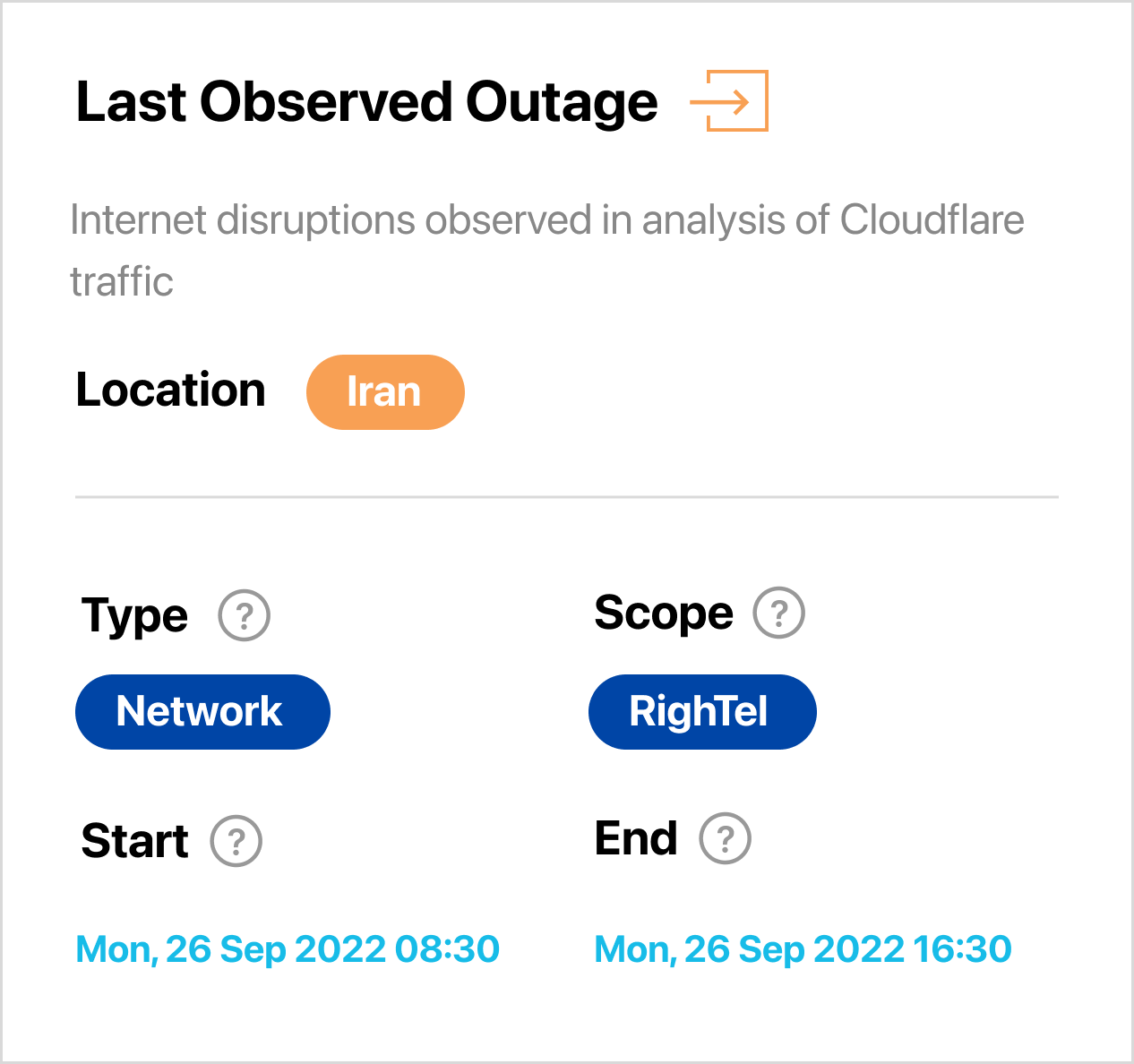
Radar pages, including the main landing page, include a card displaying information about the most recently observed outage, along with a link to the CROC. The CROC will also be linked from the left-side navigation bar
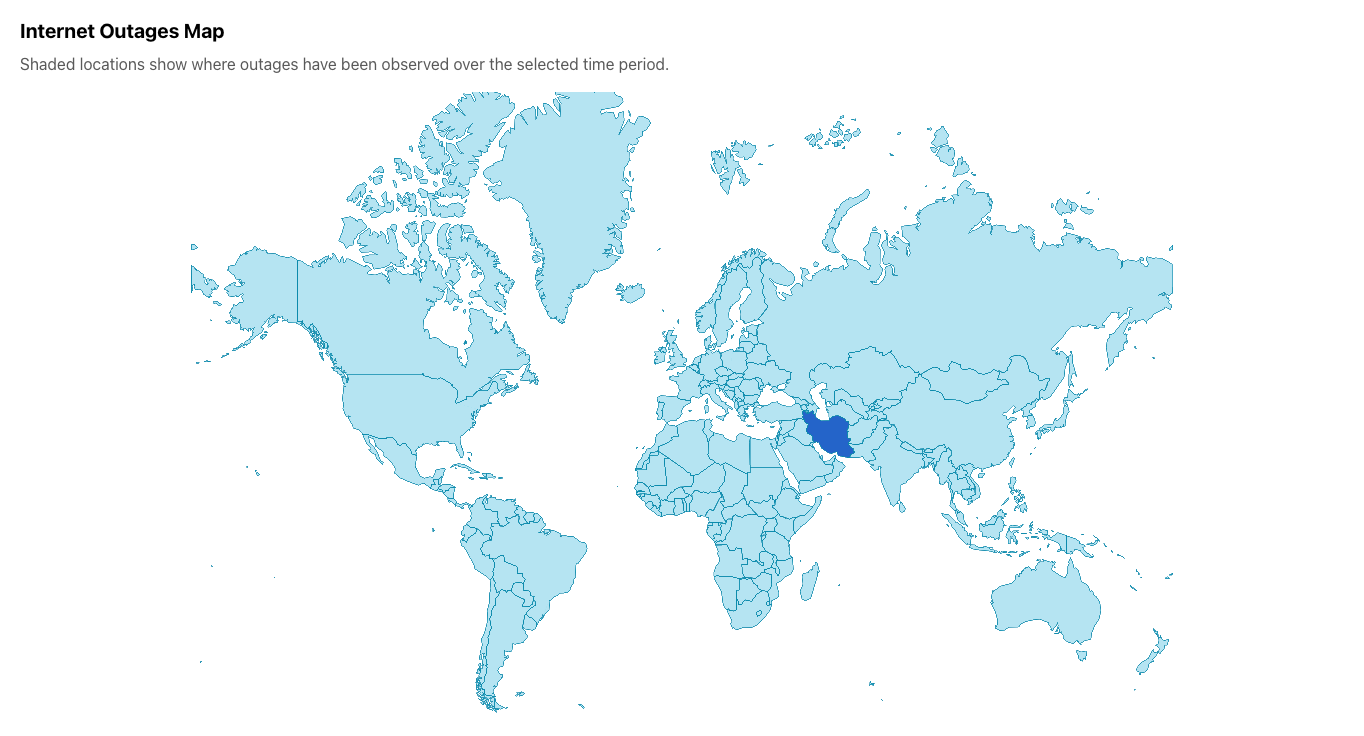
Within the CROC, we have tried to keep the interface simple and easily understandable. Based on the selected time period, the global map highlights locations where Internet outages have been observed, along with a tooltip showing the number of outages observed during that period. Similarly, the table includes information (as described above) about each observed outage, along with a link to more information. The linked information may be a Twitter post, a blog post, or a custom Radar graph.
As mentioned in the Radar 2.0 launch blog post, we launched an associated API alongside the new site. Outage information is available through this API as well — in fact, the CROC is built on top of this API. Interested parties, including civil society organizations, data journalists, or others, can use the API to integrate the available outage data with their own data sets, build their own related tools, or even develop a custom interface.
Information about the related API endpoint and how to access it can be found in the Cloudflare API documentation.
We recognize that some users may want to download the whole list of observed outages for local consumption and analysis. They can do so by clicking the “Download CSV” link below the table.
The status page the Internet needs (coming soon)
Today’s launch of the Cloudflare Radar Outage Center is just the beginning, as we plan to improve it over time. This includes increased automation of outage detection, enabling us to publish more timely information through both the API and the CROC tool, which is important for members of the community that track and respond to Internet outages. We are also exploring how we can use synthetic monitoring in combination with other network-level performance and availability information to detect outages of popular consumer and business applications/platforms.
And anyone who uses a cloud platform provider (such as AWS) will know that those companies’ status pages take a surprisingly long time to update when there’s an outage. It’s very common to experience difficulty accessing a service, see hundreds of messages on Twitter and message boards about a service being down, only to go to the cloud platform provider’s status page and see everything green and “All systems normal”.
For the last few months we’ve been monitoring the performance of cloud platform providers to see if we can detect when they go down and provide our own, real time status page for them. We believe we can and Cloudflare Radar Outage Center will be extended to include cloud service providers and give the Internet the status page it needs.
If you have questions about the CROC, or suggestions for features that you would like to see, please reach out to us on Twitter at @CloudflareRadar.
Cloudflare’s security architecture a few years ago was a classic “castle and moat” VPN architecture. Our employees would use our corporate VPN to connect to all the internal applications and servers to do their jobs. We enforced two-factor authentication with time-based one-time passcodes (TOTP), using an authenticator app like Google Authenticator or Authy when logging into the VPN but only a few internal applications had a second layer of auth. That architecture has a strong looking exterior, but the security model is weak. We recently detailed the mechanics of a phishing attack we prevented, which walks through how attackers can phish applications that are “secured” with second factor authentication methods like TOTP. Happily, we had long done away with TOTP and replaced it with hardware security keys and Cloudflare Access. This blog details how we did that.
The solution to the phishing problem is through a multi-factor authentication (MFA) protocol called FIDO2/WebAuthn. Today, all Cloudflare employees log in with FIDO2 as their secure multi-factor and authenticate to our systems using our own Zero Trust products. Our newer architecture is phish proof and allows us to more easily enforce the least privilege access control.
A little about the terminology of security keys and what we use
In 2018, we knew we wanted to migrate to phishing-resistant MFA. We had seen evilginx2 and the maturity around phishing push-based mobile authenticators, and TOTP. The only phishing-resistant MFA that withstood social engineering and credential stealing attacks were security keys that implement FIDO standards. FIDO-based MFA introduces new terminology, such as FIDO2, WebAuthn, hard(ware) keys, security keys, and specifically, the YubiKey (the name of a well-known manufacturer of hardware keys), which we will reference throughout this post.
CTAP1(U2F) and CTAP2 refers to the client to authenticator protocol which details how software or hardware devices interact with the platform performing the WebAuthn protocol.
FIDO2 is the collection of these two protocols being used for authentication. The distinctions aren’t important, but the nomenclature can be confusing.
The most important thing to know is all of these protocols and standards were developed to create open authentication protocols that are phishing-resistant and can be implemented with a hardware device. In software, they are implemented with Face ID, Touch ID, Windows Assistant, or similar. In hardware a YubiKey or other separate physical device is used for authentication with USB, Lightning, or NFC.
FIDO2 is phishing-resistant because it implements a challenge/response that is cryptographically secure, and the challenge protocol incorporates the specific website or domain the user is authenticating to. When logging in, the security key will produce a different response on example.net than when the user is legitimately trying to log in on example.com.
At Cloudflare, we’ve issued multiple types of security keys to our employees over the years, but we currently issue two different FIPS-validated security keys to all employees. The first key is a YubiKey 5 Nano or YubiKey 5C Nano that is intended to stay in a USB slot on our employee laptops at all times. The second is the YubiKey 5 NFC or YubiKey 5C NFC that works on desktops and on mobile either through NFC or USB-C.
In late 2018 we distributed security keys at a whole company event. We asked all employees to enroll their keys, authenticate with them, and ask questions about the devices during a short workshop. The program was a huge success, but there were still rough edges and applications that didn’t work with WebAuthn. We weren’t ready for full enforcement of security keys and needed some middle-ground solution while we worked through the issues.
The beginning: selective security key enforcement with Cloudflare Zero Trust
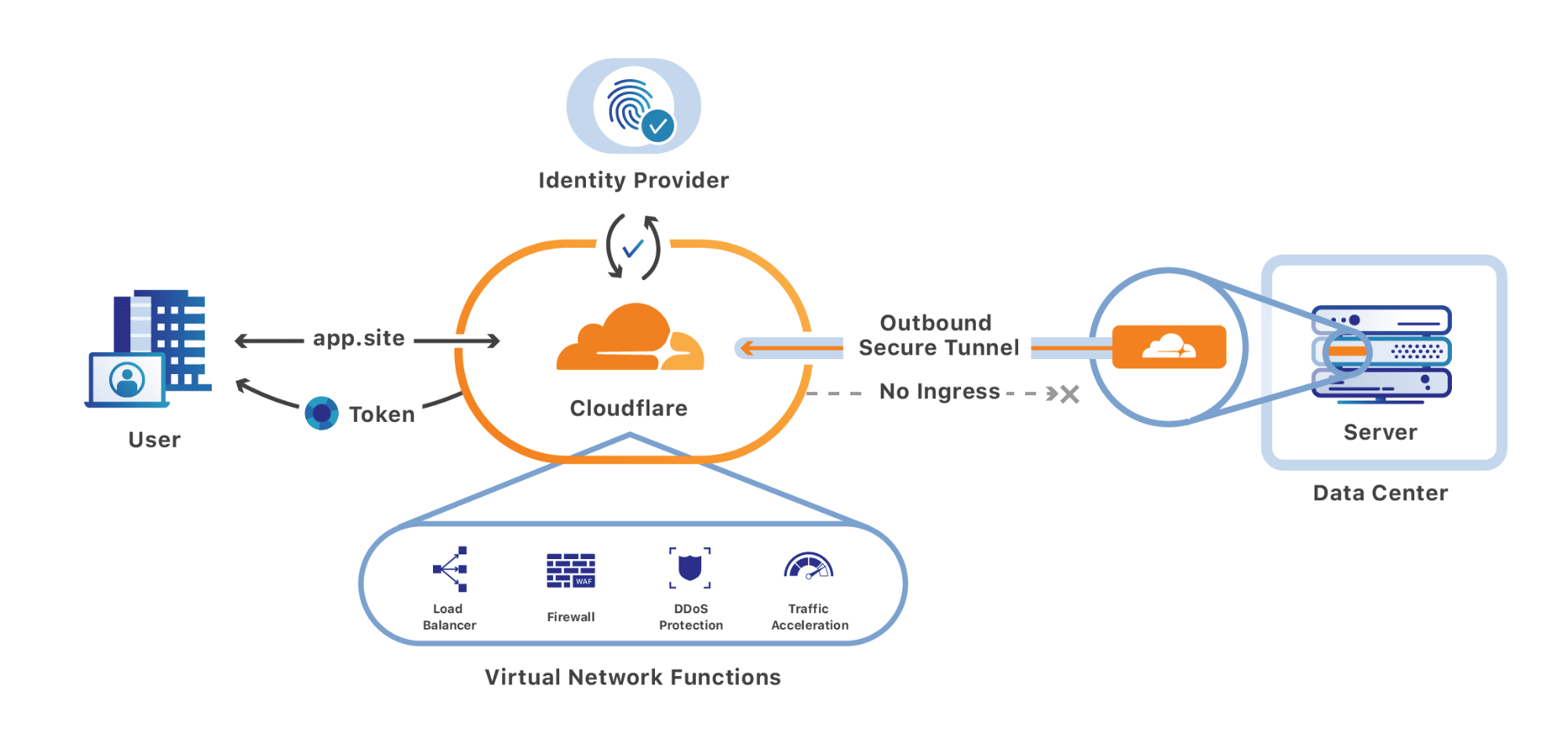
We have thousands of applications and servers we are responsible for maintaining, which were protected by our VPN. We started migrating all of these applications to our Zero Trust access proxy at the same time that we issued our employees their set of security keys.
Cloudflare Access allowed our employees to securely access sites that were once protected by the VPN. Each internal service would validate a signed credential to authenticate a user and ensure the user had signed in with our identity provider. Cloudflare Access was necessary for our rollout of security keys because it gave us a tool to selectively enforce the first few internal applications that would require authenticating with a security key.
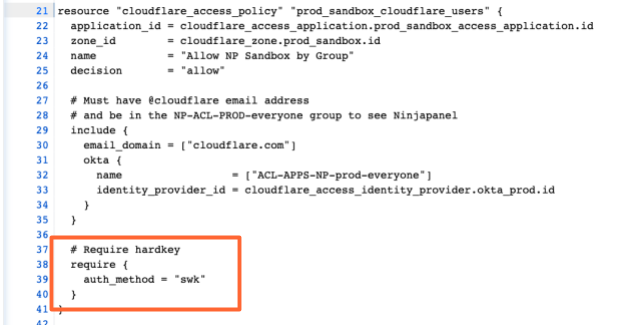
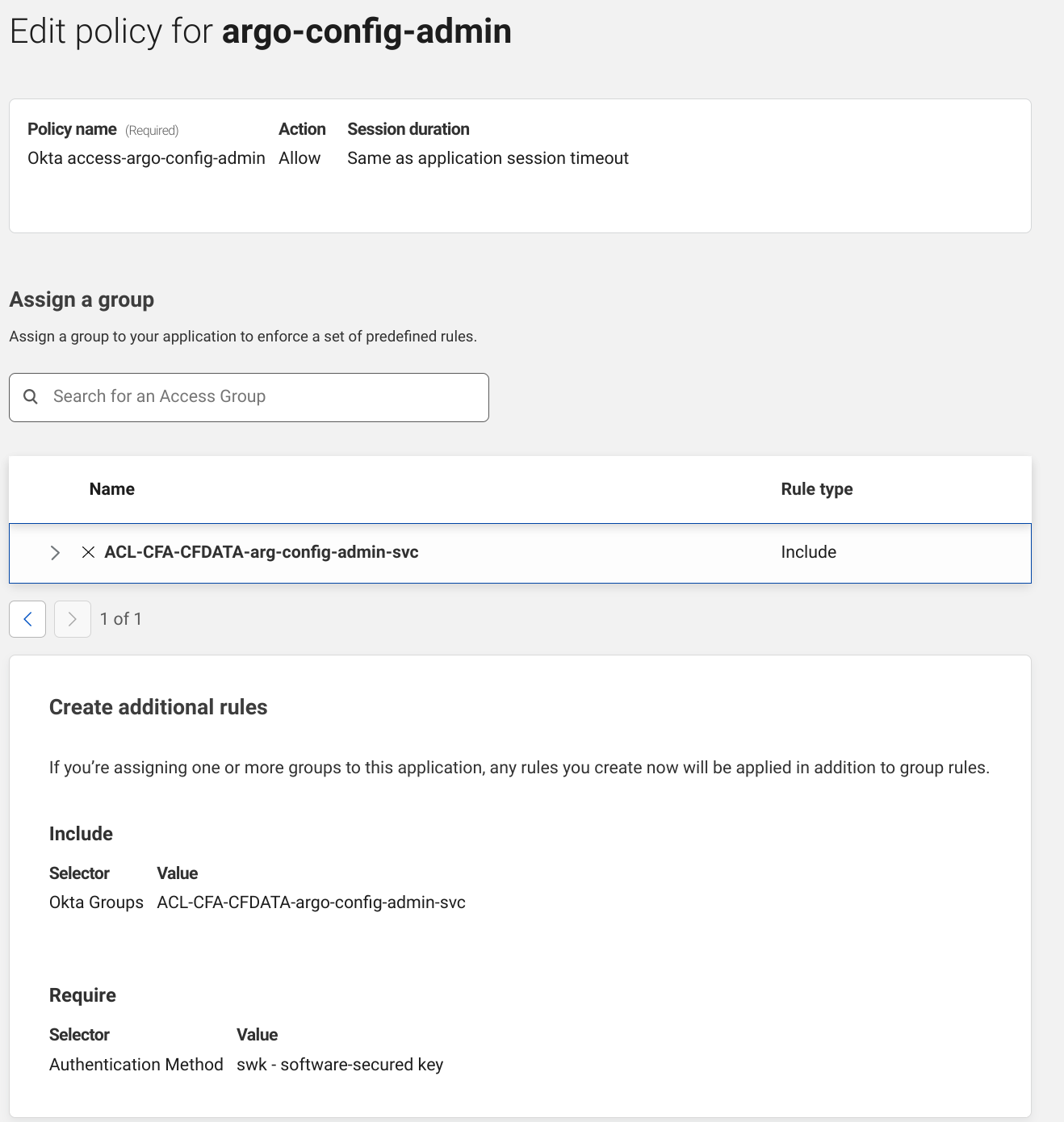
We used Terraform when onboarding our applications to our Zero Trust products and this is the Cloudflare Access policy where we first enforced security keys. We set up Cloudflare Access to use OAuth2 when integrating with our identity provider and the identity provider informs Access about which type of second factor was used as part of the OAuth flow.
In our case, swk is a proof of possession of a security key. If someone logged in and didn’t use their security key they would be shown a helpful error message instructing them to log in again and press on their security key when prompted.
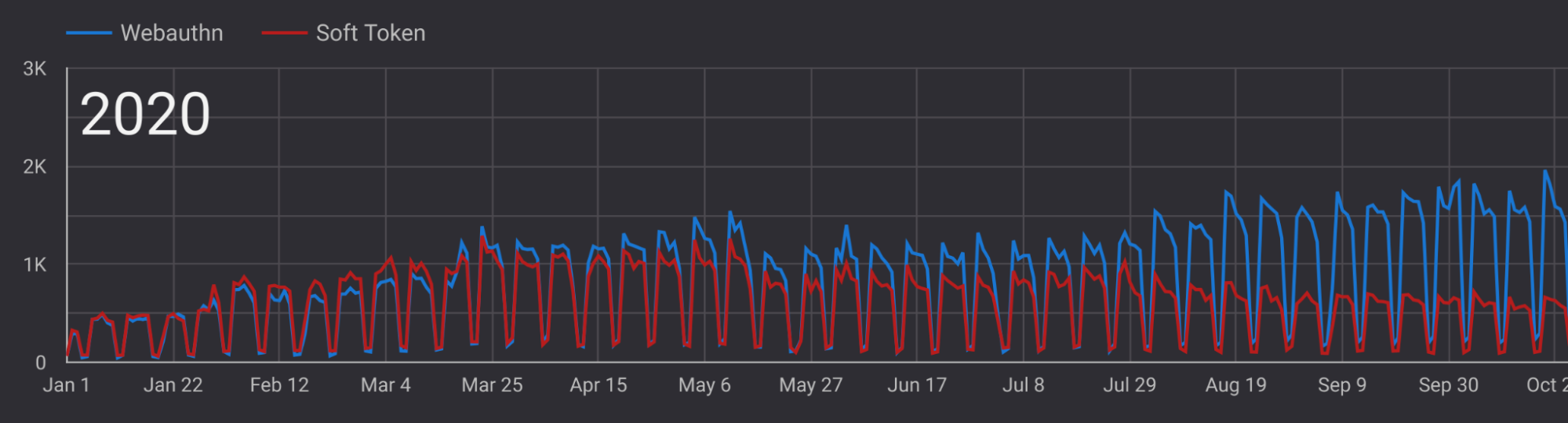
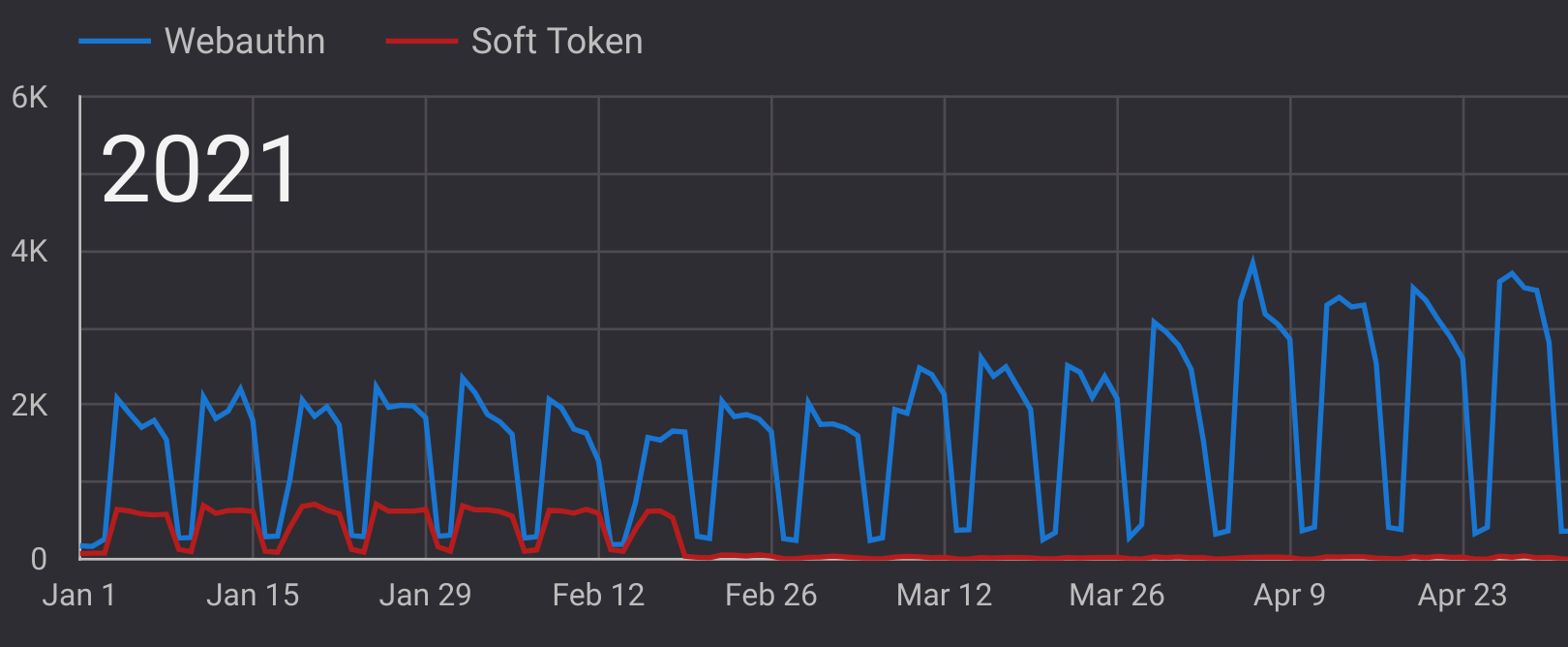
Selective enforcement instantly changed the trajectory of our security key rollout. We began enforcement on a single service on July 29, 2020, and authentication with security keys massively increased over the following two months. This step was critical to give our employees an opportunity to familiarize themselves with the new technology. A window of selective enforcement should be at least a month to account for people on vacation, but in hindsight it doesn’t need to be much longer than that.
What other security benefits did we get from moving our applications to use our Zero Trust products and off of our VPN? With legacy applications, or applications that don’t implement SAML, this migration was necessary for enforcement of role based access control and the principle of the least privilege. A VPN will authenticate your network traffic but all of your applications will have no idea who the network traffic belongs to. Our applications struggled to enforce multiple levels of permissions and each had to re-invent their own auth scheme.
When we onboarded to Cloudflare Access we created groups to enforce RBAC and tell our applications what permission level each person should have.
Here’s a site where only members of the ACL-CFA-CFDATA-argo-config-admin-svc group have access. It enforces that the employee used their security key when logging in, and no complicated OAuth or SAML integration was needed for this. We have over 600 internal sites using this same pattern and all of them enforce security keys.
The end of optional: the day Cloudflare dropped TOTP completely
In February 2021, our employees started to report social engineering attempts to our security team. They were receiving phone calls from someone claiming to be in our IT department, and we were alarmed. We decided to begin requiring security keys to be used for all authentication to prevent any employees from being victims of the social engineering attack.
After disabling all other forms of MFA (SMS, TOTP etc.), except for WebAuthn, we were officially FIDO2 only. “Soft token” (TOTP) isn’t perfectly at zero on this graph though. This is caused because those who lose their security keys or become locked out of their accounts need to go through a secure offline recovery process where logging in is facilitated through an alternate method. Best practice is to distribute multiple security keys for employees to allow for a back-up, in case this situation arises.
Now that all employees are using their YubiKeys for phishing-resistant MFA are we finished? Well, what about SSH and non-HTTP protocols? We wanted a single unified approach to identity and access management so bringing security keys to arbitrary other protocols was our next consideration.
Using security keys with SSH
To support bringing security keys to SSH connections we deployed Cloudflare Tunnel to all of our production infrastructure. Cloudflare Tunnel seamlessly integrates with Cloudflare Access regardless of the protocol transiting the tunnel, and running a tunnel requires the tunnel client cloudflared. This means that we could deploy the cloudflared binary to all of our infrastructure and create a tunnel to each machine, create Cloudflare Access policies where security keys are required, and ssh connections would start requiring security keys through Cloudflare Access.
In practice these steps are less intimidating than they sound and the Zero Trust developer docs have a fantastic tutorial on how to do this. Each of our servers have a configuration file required to start the tunnel. Systemd invokes cloudflared which uses this (or similar) configuration file when starting the tunnel.
When an operator needs to SSH into our infrastructure they use the ProxyCommand SSH directive to invoke cloudflared, authenticate using Cloudflare Access, and then forward the SSH connection through Cloudflare. Our employees’ SSH configurations have an entry that looks kind of like this, and can be generated with a helper command in cloudflared:
It’s worth noting that OpenSSH has supported FIDO2 since version 8.2, but we’ve found there are benefits to having a unified approach to access control where all access control lists are maintained in a single place.
What we’ve learned and how our experience can help you
There’s no question after the past few months that the future of authentication is FIDO2 and WebAuthn. In total this took us a few years, and we hope these learnings can prove helpful to other organizations who are looking to modernize with FIDO-based authentication.
If you’re interested in rolling out security keys at your organization, or you’re interested in Cloudflare’s Zero Trust products, reach out to [email protected]. Although we’re happy that our preventative efforts helped us resist the latest round of phishing and social engineering attacks, our security team is still growing to help prevent whatever comes next.
Cloudflare’s mission is to help build a better Internet. Pair that with our core belief that security is something that should be accessible to everyone and the outcome is a better and safer Internet for all. Previously, our FREE and PAYGO customers didn’t have the flexibility to give someone control of just part of their account, they had to give access to everything.
Starting today, role based access controls (RBAC), and all of our additional roles will be rolled out to users on every plan! Whether you are a small business or even a single user, you can ensure that you can add users only to parts of Cloudflare you deem appropriate.
Why should I limit access?
It is good practice with security in general to limit access to what a team member needs to do a job. Restricting access limits the overall threat surface if a given user was compromised, and ensures that you limit the surface that mistakes can be made.
If a malicious user was able to gain access to an account, but it only had read access, you’ll find yourself with less of a headache than someone who had administrative access, and could change how your site operates. Likewise, you can prevent users outside their role from accidentally making changes to critical features like firewall or DNS configuration.
What are roles?
Roles are a grouping of permissions that make sense together. At Cloudflare, this means grouping permissions together by access to a product suite.
Cloudflare is a critical piece of infrastructure for customers, and roles ensure that you can give your team the access they need, scoped to what they’ll do, and which products they interact with.
Once enabled for Role Based Access Controls, by going to “Manage Account” and “Members” in the left sidebar, you’ll have the following list of roles available, which each grant access to disparate subsets of the Cloudflare offering.
Role Name
Role Description
Administrator
Can access the full account, except for membership management and billing.
Administrator Read Only
Can access the full account in read-only mode.
Analytics
Can read Analytics.
Audit Logs Viewer
Can view Audit Logs.
Billing
Can edit the account’s billing profile and subscriptions.
Cache Purge
Can purge the edge cache.
Cloudflare Access
Can edit Cloudflare Access policies.
Cloudflare Gateway
Can edit Cloudflare Gateway and read Access.
Cloudflare Images
Can edit Cloudflare Images assets
Cloudflare Stream
Can edit Cloudflare Stream media.
Cloudflare Workers Admin
Can edit Cloudflare Workers.
Cloudflare Zero Trust
Can edit Cloudflare Zero Trust.
Cloudflare Zero Trust PII
Can access Cloudflare Zero Trust PII.
Cloudflare Zero Trust Read Only
Can access Cloudflare for Zero Trust read only mode.
Cloudflare Zero Trust Reporting
Can access Cloudflare for Zero Trust reporting data.
DNS
Can edit DNS records.
Firewall
Can edit WAF, IP Firewall, and Zone Lockdown settings.
HTTP Applications
Can view and edit HTTP Applications
HTTP Applications Read
Can view HTTP Applications
Load Balancer
Can edit Load Balancers, Pools, Origins, and Health Checks.
Log Share
Can edit Log Share configuration.
Log Share Reader
Can read Enterprise Log Share.
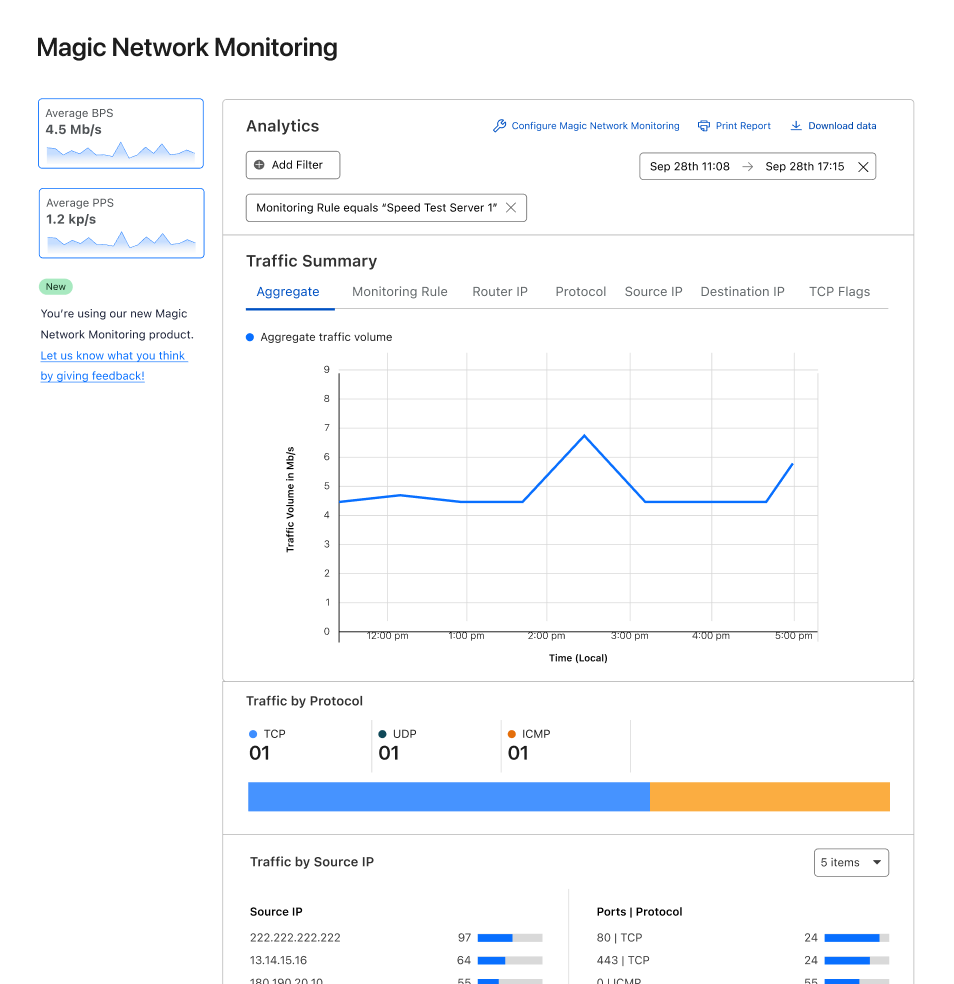
Magic Network Monitoring
Can view and edit MNM configuration
Magic Network Monitoring Admin
Can view, edit, create, and delete MNM configuration
Magic Network Monitoring Read-Only
Can view MNM configuration
Network Services Read (Magic)
Grants read access to network configurations for Magic services.
Network Services Write (Magic)
Grants write access to network configurations for Magic services.
SSL/TLS, Caching, Performance, Page Rules, and Customization
Can edit most Cloudflare settings except for DNS and Firewall.
Trust and Safety
Can view and request reviews for blocks
Zaraz Admin
Can edit Zaraz configuration.
Zaraz Readonly
Can read Zaraz configuration.
If you find yourself on a team that is growing, you may want to grant firewall and DNS access to a delegated network admin, billing access to your bookkeeper, and Workers access to your developer.
Each of these roles provides specific access to a portion of your Cloudflare account, scoping them to the appropriate set of products. Even Super Administrator is now available, allowing you to provide this access to somebody without handing over your password and 2FA.
How to use our roles
The first step to using RBAC is an analysis and review of the duties and tasks of your team. When a team member primarily interacts with a specific part of the Cloudflare offering, start off by giving them only access to that part(s). Our roles are built in a way that allows multiple to be assigned to a single user, such that when they require more access, you can grant them an additional role.
Rollout
At this point in time, we will be rolling out RBAC over the next few weeks. When the roles become available in your account, head over to our documentation to learn about each of the roles in detail.
In 2017, we made unmetered DDoS protection available to all our customers, regardless of their size or whether they were on a Free or paid plan. Today we are doing the same for Rate Limiting, one of the most successful products of the WAF family.
Rate Limiting is a very effective tool to manage targeted volumetric attacks, takeover attempts, bots scraping sensitive data, attempts to overload computationally expensive API endpoints and more. To manage these threats, customers deploy rules that limit the maximum rate of requests from individual visitors on specific paths or portions of their applications.
Until today, customers on a Free, Pro or Business plan were able to purchase Rate Limiting as an add-on with usage-based cost of $5 per million requests. However, we believe that an essential security tool like Rate Limiting should be available to all customers without restrictions.
Since we launched unmetered DDoS, we have mitigated huge attacks, like a 2 Tbps multi-vector attack or the most recent 26 million requests per second attack. We believe that releasing an unmetered version of Rate Limiting will increase the overall security posture of millions of applications protected by Cloudflare.
Today, we are announcing that Free, Pro and Business plans include Rate Limiting rules without extra charges.
…and we are not just dropping any Rate Limiting extra charges, we are also releasing an updated version of the product which is built on the powerful ruleset engine and allows building rules like in Custom Rules. This is the same engine which powers the enterprise-grade Advanced Rate Limiting. The new ‘Rate limiting rules’ will appear in your dashboard starting this week.
No more usage-based charges, just rate limiting when you need and how much you need it.
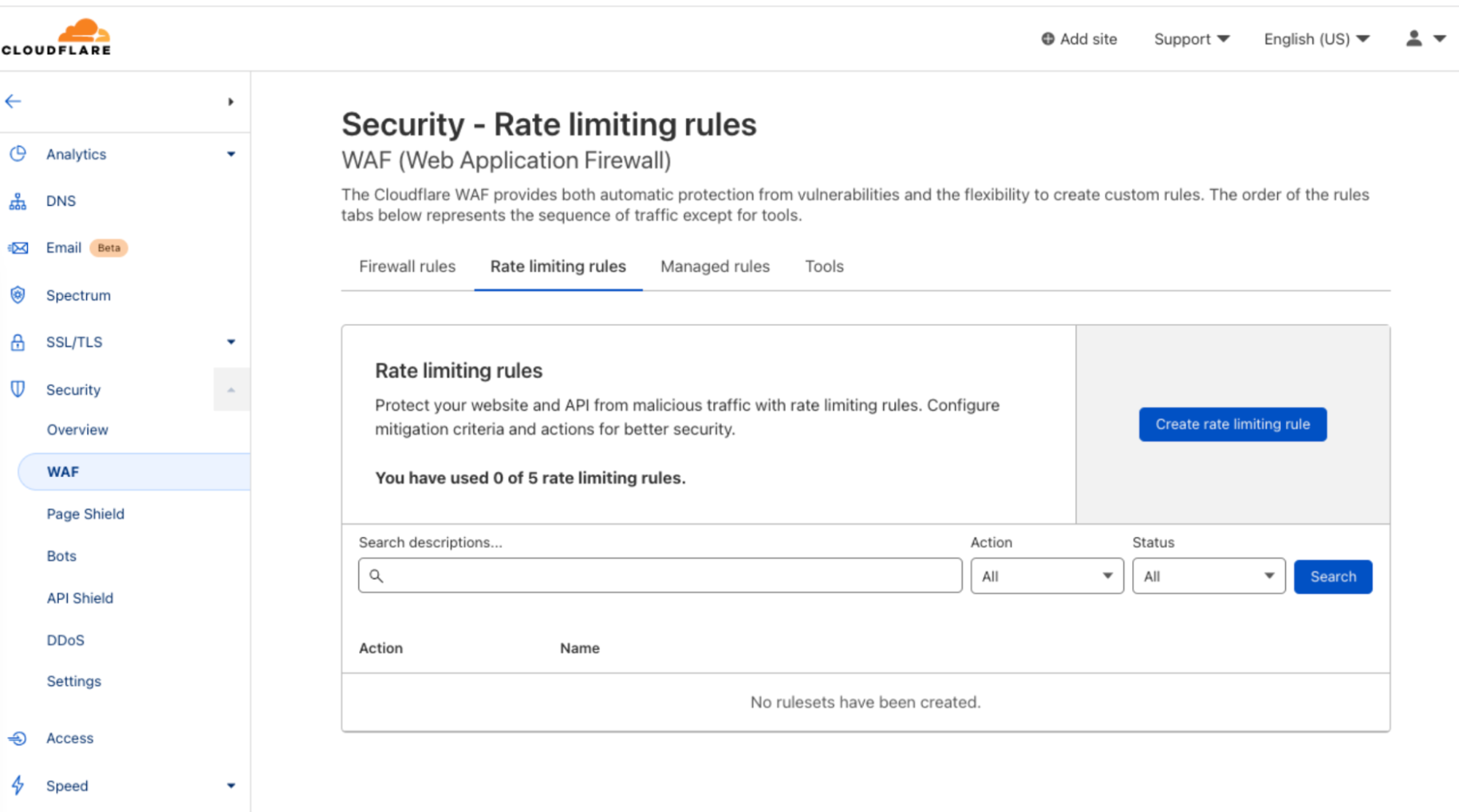
New Rate Limiting is in everyone’s dashboard under the WAF tab.
Note: starting today, September 29th, Pro and Business customers have the new product available in their dashboard. Free customers will get their rules enabled during the week starting on October 3rd 2022.
End of usage-based charges
New customers get new Rate Limiting by default while existing customers will be able to run both products in parallel: new and previous version.
For new customers, new Rate Limiting rules will be included in each plan according to the following table:
FREE
PRO
BUSINESS
Number of rules
1
2
5
When using these rules, no additional charges will be added to your account. No matter how much traffic these rules handle.
Existing customers will be granted the same amount of rules in the new, unmetered, system as the rules they’re currently using in the previous version (as of September 20, 2022). For example, if you are a Business customer with nine active rules in the previous version, you will get nine rules in the new system as well.
The previous version of Rate Limiting will still be subject to charges when in use. If you want to take advantage of the unmetered option, we recommend rewriting your rules in the new engine. As outlined below, new Rate Limiting offers all the capabilities of the previous version of Rate Limiting and more. In the future, the previous version of Rate Limiting will be deprecated, however we will give plenty of time to self-migrate rules.
New rate limiting engine for all
A couple of weeks ago, we announced that Cloudflare was named a Leader in the Gartner® Magic Quadrant™ for Web Application and API Protection (WAAP). One of the key services offered in our WAAP portfolio is Advanced Rate Limiting.
The recent Advanced Rate Limiting has shown great success among our Enterprise customers. Advanced Rate Limiting allows an unprecedented level of control on how to manage incoming traffic rate. We decided to give the same rule-building experience to all of our customers as well as some of its new features.
A summary of the feature set is outlined in the following table:
FREE
PRO
BUSINESS
ENT with WAF Essential
ENT with Advanced Rate Limiting
Fields available (request)
Path
Host URI Path Full URI Query
Host URI Path Full URI Query Method Source IP User Agent
Same WAF Essential. Request Bot score(1) and body fields(2)
Counting expression
Not available
Not available
Available with access to response headers and response status code
Available with access to response headers and response status code
Available with access to response headers and response status code
Counting characteristics
IP
IP
IP
IP IP with NAT awareness
IP IP with NAT awareness Query Host Headers Cookie ASN Country Path JA3(2) JSON field (New!)
Max Counting period
10 seconds
60 seconds
10 minutes
10 minutes
1 hour
Price
Free
Included in monthly subscription
Included in monthly subscription
Included in contracted plan
Included in contracted plan
(1): Requires Bots Management add-on (2): Requires specific plan
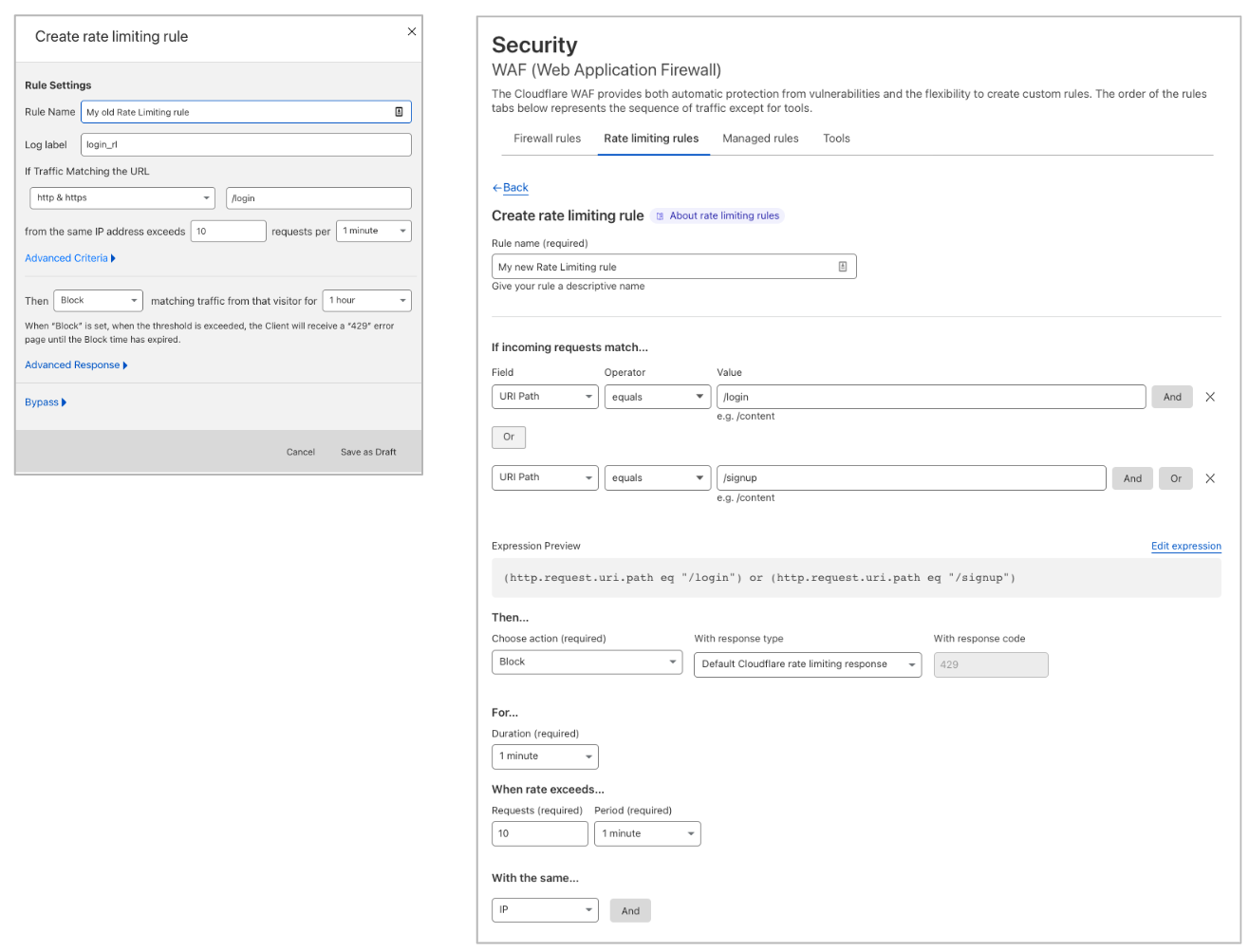
Leveraging the ruleset engine. Previous version of Rate Limiting allows customers to scope the rule based on a single path and method of the request. Thanks to the ruleset engine, customers can now write rules like they do in Custom Rules and combine multiple parameters of the HTTP request.
For example, Pro domains can combine multiple paths in the same rule using the OR or AND operators. Business domains can also write rules using Source IP or User Agent. This allows enforcing different rates for specific User Agents. Furthermore, Business customers can now scope Rate Limiting to specific IPs (using IP List, for example) or exclude IPs where no attack is expected.
Both Rate Limiting products can be found under WAF→ Rate Limiting rules. Previous version of Rate Limiting (left) allows filtering traffic for one URL. New Rate Limiting (right) allows you to combine fields like in Custom Rules.
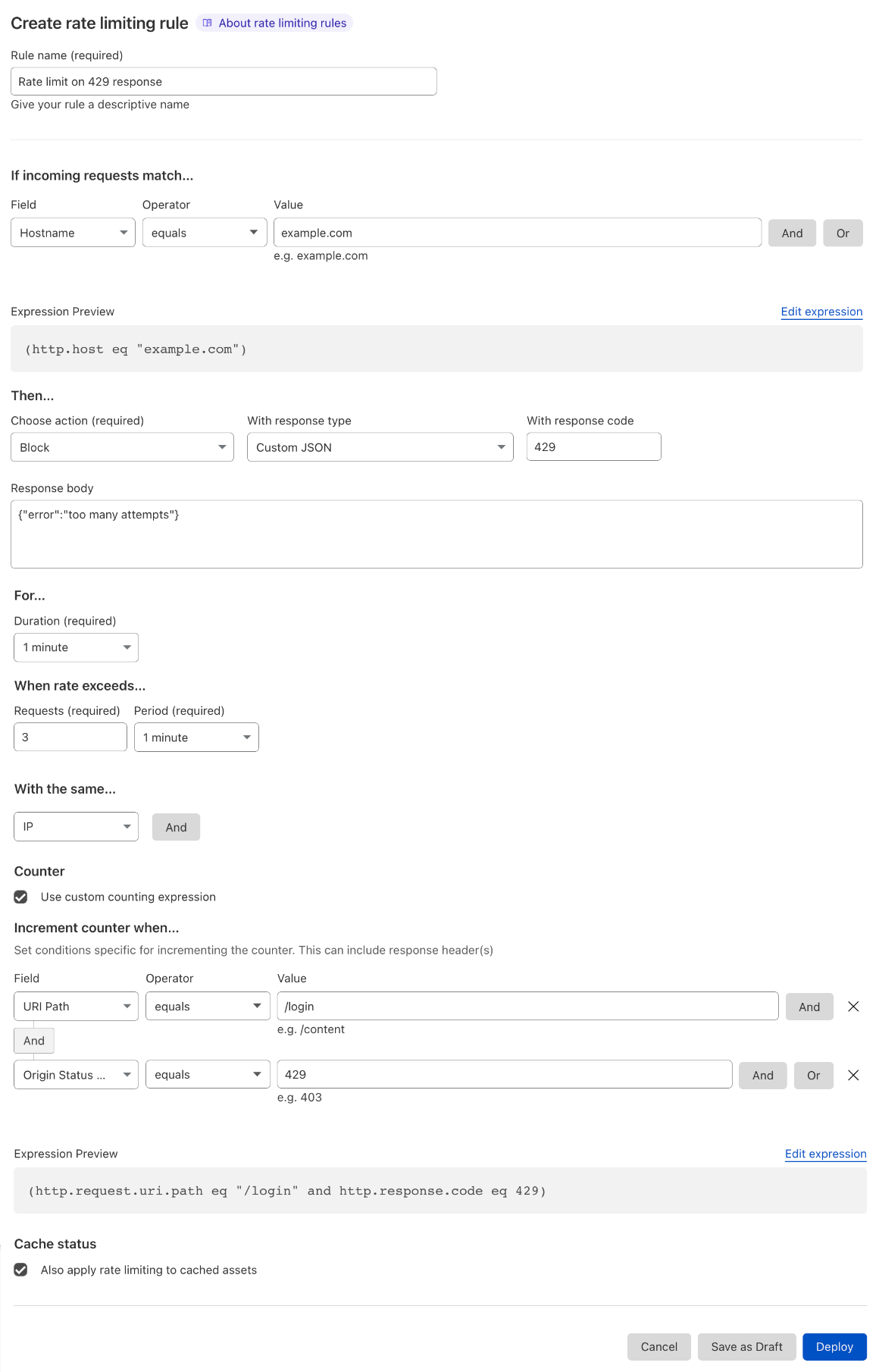
Counting and mitigation expressions are now separate. A feature request we often heard about was the ability to track the rate of requests on a specific path (such as ‘/login’) and, when an IP exceeds the threshold, block every request from the same IP hitting anywhere on your domain.Business and Enterprise customers can now achieve this by using the counting expression which is separate from the mitigation. The former defines what requests are used to compute the rate while the letter defines what requests are mitigated once the threshold has been reached.
Another use case for using the counting expression is when you need to use Origin Status Code or HTTP Response Headers. If you need to use these fields, we recommend creating a counting expression that includes response parameters and explicitly writing a filter that defines what the request parameters that will trigger a block action.
You can now separate the expression used to compute the rate from the expression used for blocking traffic once the rate is exceeded. In this example, all traffic to example.com will be blocked (see mitigation expression at the top) if more than 3 POST requests to ‘/login’ in 1 minute have returned 429 (defined by the counting expression at the bottom).
Counting dimensions. Similarly to the previous version, Free, Pro and Business customers will get the IP-based Rate Limiting. When we say IP-based we refer to the way we group (or count) requests. You can set a rule that enforces a maximum rate of request from the same IPs. If you set a rule to limit 10 requests over one minute, we will count requests from individual IPs until they reach the limit and then block for a period of time.
Advanced Rate Limiting users are able to group requests based on additional characteristics, such as API keys, cookies, session headers, ASN, query parameters, a JSON body field (e.g. the username value of a login request) and more.
What do Enterprise customers get? Enterprise customers can get Rate Limiting as part of their contract. When included in their contract, they get access to 100 rules, a more comprehensive list of fields available in the rule builder, and they get to upgrade to Advanced Rate Limiting. Please reach out to your account team to learn more.
More information on how to use new Rate Limiting can be found in the documentation.
Additional information for existing customers
If you are a Free, Pro or Business customer, you will automatically get the new product in the dashboard. We will entitle you with as many unmetered Rate Limiting rules as you are using in the previous version.
If you are an Enterprise customer using the previous version of Rate Limiting, please reach out to the account team to discuss the options to move to new Rate Limiting.
To take advantage of the unmetered functionality, you will need to migrate your rules to the new system. The previous version will keep working as usual, and you might be charged based on the traffic that its rules evaluate.
Long term, the previous version of Rate Limiting will be deprecated and when this happens all rules still running on the old system will cease to run.
What’s next?
The WAF team has plans to further expand our Rate Limiting capabilities. Features we are considering include better analytics to support the rule creation. Furthermore, new Rate Limiting can now benefit from new fields made available in the WAF as soon as they are released. For example, Enterprise customers can combine Bot Score or the new WAF Attack Score to create a more fine grain security posture.
We’re often told not to click on ‘odd’ links in email, but what choice do we really have? With the volume of emails and the myriad of SaaS products that companies use, it’s inevitable that employees find it almost impossible to distinguish a good link before clicking on it. And that’s before attackers go about making links harder to inspect and hiding their URLs behind tempting “Confirm” and “Unsubscribe” buttons.
We need to let end users click on links and have a safety net for when they unwittingly click on something malicious — let’s be honest, it’s bound to happen even if you do it by mistake. That safety net is Cloudflare’s Email Link Isolation.
Email Link Isolation
With Email Link Isolation, when a user clicks on a suspicious link — one that email security hasn’t identified as ‘bad’, but is still not 100% sure it’s ‘good’ — they won’t immediately be taken to that website. Instead, the user first sees an interstitial page recommending extra caution with the website they’ll visit, especially if asked for passwords or personal details.
From there, one may choose to not visit the webpage or to proceed and open it in a remote isolated browser that runs on Cloudflare’s global network and not on the user’s local machine. This helps protect the user and the company.
The user experience in our isolated browser is virtually indistinguishable from using one’s local browser (we’ll talk about why below), but untrusted and potentially malicious payloads will execute away from the user’s computer and your corporate network.
In summary, this solution:
Keeps users alert to prevent credential theft and account takeover
Automatically blocks dangerous downloads
Prevents malicious scripts from executing on the user’s device
Protects against zero-day exploits on the browser
How can I try it
Area 1 is Cloudflare’s email security solution. It protects organizations from the full range of email attack types (URLs, payloads, BEC), vectors (email, web, network), and attack channels (external, internal, trusted partners) by enforcing multiple layers of protection before, during, and after the email hits the inbox. Today it adds Email Link Isolation to the protections it offers.
If you are a Cloudflare Area 1 customer you can request access to the Email Link Isolation beta today. We have had Email Link Isolation deployed to all Cloudflare employees for the last four weeks and are ready to start onboarding customers.
During the beta it will be available for free on all plans. After the beta it will still be included at no extra cost with our PhishGuard plan.
Under the hood
To create Email Link Isolation we used a few ingredients that are quite special to Cloudflare. It may seem complicated and, in a sense, the protection is complex, but we designed this so that the user experience is fast, safe, and with clear options on how to proceed.
1. Find potentially unsafe domains
First, we have created a constantly updating list of domains that the Cloudflare’s DNS resolver recently saw for the first time, or that are somehow potentially unsafe (leveraging classifiers from the Cloudflare Gateway and other products). These are domains that would be too disruptive for the organization to block outright, but that should still be navigated with extra caution.
For example, people acquire domains and create new businesses every day. There’s nothing wrong with that – quite the opposite. However, attackers often set up or acquire websites serving legitimate content and, days or weeks later, send a link to intended targets. The emails flow through as benign and the attacker weaponizes the website when emails are already sitting on people’s inboxes. Blocking all emails with links to new websites would cause users to surely miss important communications, and delivering the emails while making links safe to click on is a much better suited approach.
There is also hosting infrastructure from large cloud providers, such as Microsoft or Google, that prevent crawling and scanning. These are used on our day-to-day business, but attackers may deploy malicious content there. You wouldn’t want to fully block emails with links to Microsoft SharePoint, for example, but it’s certainly safer to use Email Link Isolation on them if they link to outside your organization.
Attackers are constantly experimenting with new ways of looking legitimate to their targets, and that’s why relying on the early signals that Cloudflare sees makes such a big difference.
2. Rewrite links in emails
The second ingredient we want to highlight is that, as Cloudflare Area 1 processes and inspects emails for security concerns, it also checks the domain of every link against the suspicious list. If an email contains a link to a suspicious domain, Cloudflare Area 1 automatically changes it (rewrites) so that the interstitial page is shown, and the link opens with Cloudflare Browser Isolation by default.
Note: Rewriting email links is only possible when emails are processed inline, which is one of the options for deploying Area 1. One of the big disadvantages of any email security solution deployed as API-only is that closing this last mile gap through link rewriting isn’t a possibility.
3. Opens remotely but feels local
When a user clicks on one of these rewritten links, instead of directly accessing a potential threat, our systems will first check their current classification (benign, suspicious, malicious). Then, if it’s malicious, the user will be blocked from continuing to the website and see an interstitial page informing them why. No further action is required.
If the link is suspicious, the user is offered the option to open it in an isolated browser. What happens next? The link is opened with Cloudflare Browser Isolation in a nearby Cloudflare data center (globally within 50 milliseconds of 95% of the Internet-connect population). To ensure website compatibility and security, the target website is entirely executed in a sandboxed Chromium-based browser. Finally, the website is instantly streamed back to the user as vector instructions consumed by a lightweight HTML5-compatible remoting client in the user’s preferred web browser. These safety precautions happen with no perceivable latency to the end user.
Cloudflare Browser Isolation is an extremely secure remote browsing experience that feels just like local browsing. And delivering this is only possible by serving isolated browsers on a low latency, global network with our unique vector based streaming technology. This architecture is different from legacy remote browser isolation solutions that rely on fragile and insecure DOM-scrubbing, or are bandwidth intensive and high latency pixel pushing techniques hosted in a few high latency data centers.
4. Reassess (always learning)
Last but not least, another ingredient that makes Email Link Isolation particularly effective is that behind the scenes our services are constantly reevaluating domains and updating their reputation in Cloudflare’s systems.
When a domain on our suspicious list is confirmed to be benign, all links to it can automatically start opening with the user’s local browser instead of with Cloudflare Browser Isolation.
Similarly, if a domain on the suspicious list is identified as malign, all links to that domain can be immediately blocked from opening. So, our services are constantly learning and acting accordingly.
Email Link Isolation at Cloudflare
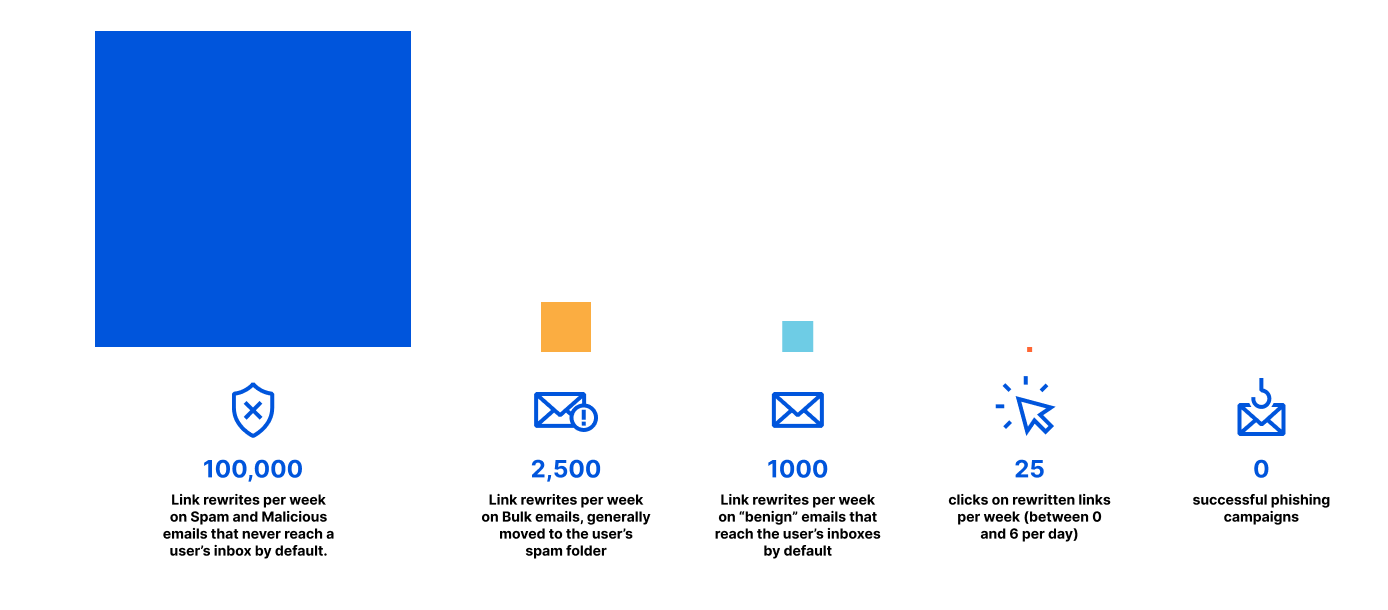
It’s been four weeks since we deployed Email Link Isolation to all our 3,000+ Cloudflare employees, here’s what we saw:
100,000 link rewrites per week on Spam and Malicious emails. Such emails were already blocked server side by Area 1 and users never see them. It’s still safer to rewrite these as they may be released from quarantine on user request.
2,500 link rewrites per week on Bulk emails. Mostly graymail, which are commercial/bulk communications the user opted into. They may end up in the users’ spam folder.
1,000 link rewrites per week on emails that do not fit any of the categories above — these are the ones that normally reach the user’s inboxes. These are almost certainly benign, but there’s still enough doubt to warrant a link rewrite.
25 clicks on rewritten links per week (up to six per day).
As a testament to the efficacy of Cloudflare Area 1, 25 suspicious link clicks per week for a universe of over 3,000 employees is a very low number. Thanks to Email Link Isolation, users were protected against exploits.
Better together with Cloudflare Zero Trust
In future iterations, administrators will be able to connect Cloudflare Area 1 to their Cloudflare Zero Trust account and apply isolation policies, DLP (Data Loss Protection) controls and in-line CASB (a cloud access security broker) to email link isolated traffic.
We are starting our beta today. If you’re interested in trying Email Link Isolation and start to feel safer with your email experience, you should sign up here.
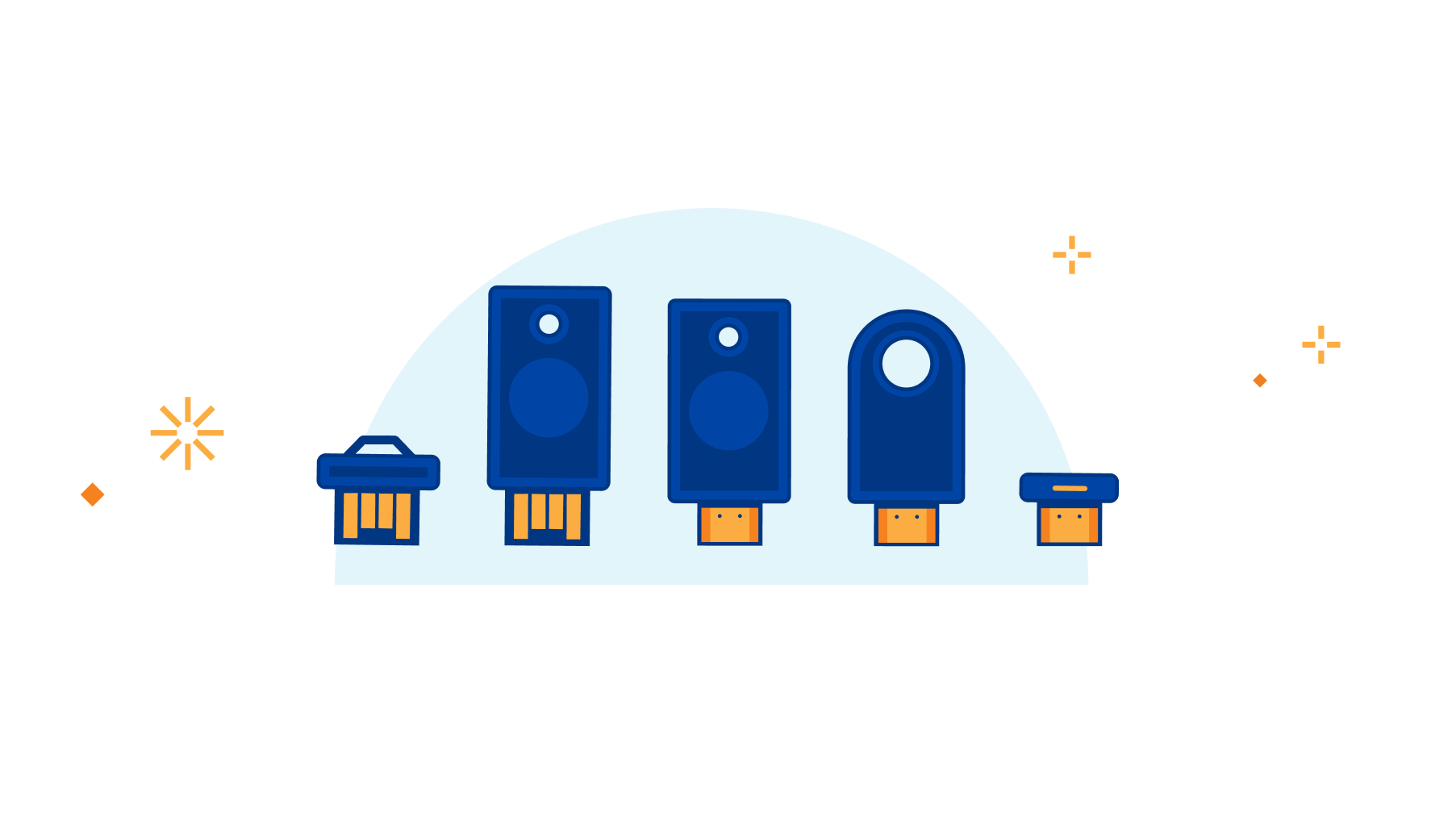
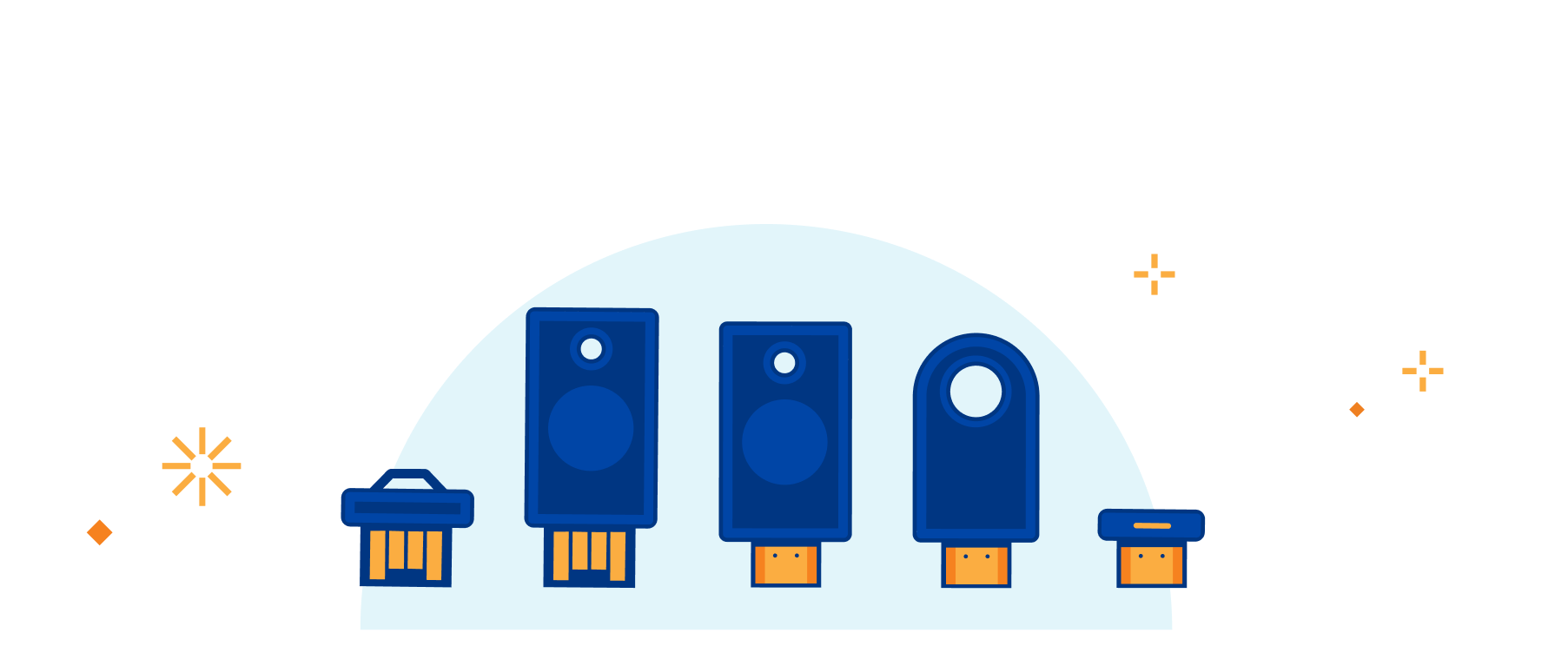
Hardware keys provide the best authentication security and are phish-proof. But customers ask us how to implement them and which security keys they should buy. Today we’re introducing an exclusive program for Cloudflare customers that makes hardware keys more accessible and economical than ever. This program is made possible through a new collaboration with Yubico, the industry’s leading hardware security key vendor and provides Cloudflare customers with exclusive “Good for the Internet” pricing.
Yubico Security Keys are available today for any Cloudflare customer, and they easily integrate with Cloudflare’s Zero Trust service. That service is open to organizations of any size from a family protecting a home network to the largest employers on the planet. Any Cloudflare customer can sign in to the Cloudflare dashboard today and order hardware security keys for as low as $10 per key.
In July 2022, Cloudflare prevented a breach by an SMS phishing attack that targeted more than 130 companies, due to the company’s use of Cloudflare Zero Trust paired with hardware security keys. Those keys were YubiKeys and this new collaboration with Yubico, the maker of YubiKeys, removes barriers for organizations of any size in deploying hardware keys.
Why hardware security keys?
Organizations need to ensure that only the right users are connecting to their sensitive resources – whether those destinations are self-hosted web applications, SaaS tools, or services that rely on arbitrary TCP connections and UDP streams. Users traditionally proved their identity with a username and password but phishing attacks can deceive users to steal both of those pieces of information.
In response, teams began deploying multifactor authentication (MFA) tools to add an additional layer of security. Users needed to input their username, password, and some additional value. For example, a user might have an application running on their device which generates random numbers, or they might enroll their phone number to receive a code via text message. While these MFA options do improve security, they are still vulnerable to phishing attacks. Phishing websites evolved and prompted the user to input MFA codes or attackers stole a user’s phone number in a SIM swap attack.
Hardware security keys provide organizations with an MFA option that cannot be phished. These keys use the WebAuthn standard to present a certificate to the authentication service to validate the key in a cryptographically secured exchange, something a phishing website cannot obtain and later spoof.
Users enroll one or more keys with their identity provider and, in addition to presenting their username and password, the provider prompts for an MFA option that can include the hardware key. Every member of the team enjoys less friction by tapping on the key when they log in instead of fumbling for a code in an app. Meanwhile, security teams sleep better at night knowing their services are protected from phishing attacks.
Extending hardware security keys with Cloudflare’s Zero Trust products
While most identity providers now allow users to enroll hardware keys as an MFA option, administrators still do not have control to require that hardware keys be used. Individual users can fallback to a less secure option, like an app-based code, if they fail to present the security key itself.
We ran into this when we first deployed security keys at Cloudflare. If users could fallback to a less secure and more easily phished option like an app-based code, then so could attackers. Along with more than 10,000 organizations, we use Cloudflare’s Zero Trust products internally to, in part, secure how users connect to the resources and tools they need.
When any user needs to reach an internal application or service, Cloudflare’s network evaluates every request or connection for several signals like identity, device posture, and country. Administrators can build granular rules that only apply to certain destinations, as well. An internal administrator tool with the ability to read customer data could require a healthy corporate device, connecting from a certain country, and belonging to a user in a particular identity provider group. Meanwhile, a new marketing splash page being shared for feedback could just require identity. If we could obtain the presence of a security key, as opposed to a different, less secure MFA option, from the user’s authentication then we could enforce that signal as well.
Several years ago, identity providers, hardware vendors, and security companies partnered to develop a new standard, the Authentication Method Reference (AMR), to share exactly that type of data. With AMR, identity providers can share several details about the login attempt, including the type of MFA option in use. Shortly after that announcement, we introduced the ability to build rules in Cloudflare’s Zero Trust platform to look for and enforce that signal. Now, teams of any size can build resource-based rules that can ensure that team members always use their hardware key.
What are the obstacles to deploying hardware security keys?
The security of requiring something that you physically control is also the same reason that deploying hardware keys adds a layer of complexity – you need to find a way to put that physical key in the hands of your users, at scale, and make it possible for every member of your team to enroll them.
In every case, that deployment starts with purchasing hardware security keys. Compared to app-based codes, which can be free, security keys have a real cost. For some organizations, that cost is a deterrent, and they stay less secure due to that hurdle, but it is important to note that not all MFA is created equal.
For other teams, especially the organizations that are now partially or fully remote, providing those keys to end users who will never step foot in a physical office can be a challenge for IT departments. When we first deployed hardware keys at Cloudflare, we did it at our company-wide retreat. Many organizations no longer have that opportunity to physically hand out keys in a single venue or even in global offices.
Collaborating with Yubico
Birthday Week at Cloudflare has always been about removing the barriers and hurdles that keep users and teams from being more secure or faster on the Internet. As part of that goal, we’ve partnered with Yubico to continue to remove the friction in adopting a hardware key security model.
The offer is open to any Cloudflare customer. Cloudflare customers can claim this offer for Yubico Security Keys directly in the Cloudflare dashboard.
Yubico is providing Security Keys at “Good for the Internet” pricing – as low as $10 per key. Yubico will ship the keys to customers directly. The specific security keys and prices for this offer are: Yubico Security Key NFC at \$10 USD and the Yubico Security Key C NFC at \$11.60 USD. Customers can purchase up to 10 keys. For larger organizations there is a second offer to purchase the YubiEnterprise Subscription for 50% off the first year of a 3+ year subscription. For the YubiEnterprise Subscription there are no limits on the number of security keys.
Both Cloudflare and Yubico developer docs and support organizations will guide customers in setting up keys and integrating them with their Identity Providers and with Cloudflare’s Zero Trust service.
How to get started
You can request your own hardware keys by navigating to the dashboard, and following the banner notification flow. Yubico will then email you directly using the administrator email that you have provided in your Cloudflare account. For larger organizations looking to deploy YubiKeys at scale, you can explore Yubico’s YubiEnterprise Subscription and receive a 50% discount off the first year of a 3+year subscription.
Already have hardware security keys? If you have physical hardware keys you can begin building rules in Cloudflare Access to enforce their usage by enrolling them into an identity provider that supports AMR, like Okta or Azure AD.
Finally, if you are interested in our own journey deploying Yubikeys alongside our Zero Trust product, check out this blog post from our Director of Security, Evan Johnson, that recaps Cloudflare’s experience and what we recommend from the lessons we learned.
As a network engineer or manager, answering questions about the traffic flowing across your infrastructure is a key part of your job. Cloudflare built Magic Network Monitoring (previously called Flow Based Monitoring) to give you better visibility into your network and to answer questions like, “What is my network’s peak traffic volume? What are the sources of that traffic? When does my network see that traffic?” Today, Cloudflare is excited to announce early access to a free version of Magic Network Monitoring that will be available to everyone. You can request early access by filling out this form.
Magic Network Monitoring now features a powerful analytics dashboard, self-serve configuration, and a step-by-step onboarding wizard. You’ll have access to a tool that helps you visualize your traffic and filter by packet characteristics including protocols, source IPs, destination IPs, ports, TCP flags, and router IP. Magic Network Monitoring also includes network traffic volume alerts for specific IP addresses or IP prefixes on your network.
Making Network Monitoring easy
Magic Networking Monitoring allows customers to collect network analytics without installing a physical device like a network TAP (Test Access Point) or setting up overly complex remote monitoring systems. Our product works with any hardware that exports network flow data, and customers can quickly configure any router to send flow data to Cloudflare’s network. From there, our network flow analyzer will aggregate your traffic data and display it in Magic Network Monitoring analytics.
Analytics dashboard
In Magic Network Monitoring analytics, customers can take a deep dive into their network traffic data. You can filter traffic data by protocol, source IP, destination IP, TCP flags, and router IP. Customers can combine these filters together to answer questions like, “How much ICMP data was requested from my speed test server over the past 24 hours?” Visibility into traffic analytics is a key part of understanding your network’s operations and proactively improving your security. Let’s walk through some cases where Magic Network Monitoring analytics can answer your network visibility and security questions.
Create network volume alert thresholds per IP address or IP prefix
Magic Network Monitoring is incredibly flexible, and it can be customized to meet the needs of any network hobbyist or business. You can monitor your traffic volume trends over time via the analytics dashboard and build an understanding of your network’s traffic profile. After gathering historical network data, you can set custom volumetric threshold alerts for one IP prefix or a group of IP prefixes. As your network traffic changes over time, or their network expands, they can easily update their Magic Network Monitoring configuration to receive data from new routers or destinations within their network.
Monitoring a speed test server in a home lab
Let’s run through an example where you’re running a network home lab. You decide to use Magic Network Monitoring to track the volume of requests a speed test server you’re hosting receives and check for potential bad actors. Your goal is to identify when your speed test server experiences peak traffic, and the volume of that traffic. You set up Magic Network Monitoring and create a rule that analyzes all traffic destined for your speed test server’s IP address. After collecting data for seven days, the analytics dashboard shows that peak traffic occurs on weekdays in the morning, and that during this time, your traffic volume ranges from 450 – 550 Mbps.
As you’re checking over the analytics data, you also notice strange traffic spikes of 300 – 350 Mbps in the middle of the night that occur at the same time. As you investigate further, the analytics dashboard shows the source of this traffic spike is from the same IP prefix. You research some source IPs, and find they’re associated with malicious activity. As a result, you update your firewall to block traffic from this problematic source.
Identifying a network layer DDoS attack
Magic Network Monitoring can also be leveraged to identify a variety of L3, L4, and L7 DDoS attacks. Let’s run through an example of how ACME Corp, a small business using Magic Network Monitoring, can identify a Ping (ICMP) Flood attack on their network. Ping Flood attacks aim to overwhelm the targeted network’s ability to respond to a high number of requests or overload the network connection with bogus traffic.
At the start of a Ping Flood attack, your server’s traffic volume will begin to ramp up. Magic Network Monitoring will analyze traffic across your network, and send an email, webhook, or PagerDuty alert once an unusual volume of traffic is identified. Your network and security team can respond to the volumetric alert by checking the data in Magic Network Monitoring analytics and identifying the attack type. In this case, they’ll notice the following traffic characteristics:
Network traffic volume above your historical traffic averages
An unusually large amount of ICMP traffic
ICMP traffic coming from a specific set of source IPs
Now, your network security team has confirmed the traffic is malicious by identifying the attack type, and can begin taking steps to mitigate the attack.
Magic Network Monitoring and Magic Transit
If your business is impacted by DDoS attacks, Magic Network Monitoring will identify attacks, and Magic Transit can be used to mitigate those DDoS attacks. Magic Transit protects customers’ entire network from DDoS attacks by placing our network in front of theirs. You can use Magic Transit Always On to reduce latency and mitigate attacks all the time, or Magic Transit On Demand to protect your network during active attacks. With Magic Transit, you get DDoS protection, traffic acceleration, and other network functions delivered as a service from every Cloudflare data center. Magic Transit works by allowing Cloudflare to advertise customers’ IP prefixes to the Internet with BGP to route the customer’s traffic through our network for DDoS protection. If you’re interested in protecting your network with Magic Transit, you can visit the Magic Transit product page and request a demo today.
Sign up for early access and what’s next
The free version of Magic Network Monitoring (MNM) will be released in the next few weeks. You can request early access by filling out this form.
This is just the beginning for Magic Network Monitoring. In the future, you can look forward to features like advanced DDoS attack identification, network incident history and trends, and volumetric alert threshold recommendations.
We’re pleased to introduce Cloudflare’s free Botnet Threat Feed for Service Providers. This includes all types of service providers, ranging from hosting providers to ISPs and cloud compute providers.
This feed will give service providers threat intelligence on their own IP addresses that have participated in HTTP DDoS attacks as observed from the Cloudflare network — allowing them to crack down on abusers, take down botnet nodes, reduce their abuse-driven costs, and ultimately reduce the amount and force of DDoS attacks across the Internet. We’re giving away this feed for free as part of our mission to help build a better Internet.
Service providers that operate their own IP space can now sign up to the early access waiting list.
Cloudflare’s unique vantage point on DDoS attacks
Cloudflare provides services to millions of customers ranging from small businesses and individual developers to large enterprises, including 29% of Fortune 1000 companies. Today, about 20% of websites rely directly on Cloudflare’s services. This gives us a unique vantage point on tremendous amounts of DDoS attacks that target our customers.
DDoS attacks, by definition, are distributed. They originate from botnets of many sources — in some cases, from hundreds of thousands to millions of unique IP addresses. In the case of HTTP DDoS attacks, where the victims are flooded with HTTP requests, we know that the source IP addresses that we see are the real ones — they’re not spoofed (altered). We know this because to initiate an HTTP request a connection must be established between the client and server. Therefore, we can reliably identify the sources of the attacks to understand the origins of the attacks.
As we’ve seen in previous attacks, such as the 26 million request per second DDoS attack that was launched by the Mantis botnet, a significant portion originated from service providers such as French-based OVH (Autonomous System Number 16276), the Indonesian Telkomnet (ASN 7713), the US-based iboss (ASN 137922), the Libyan Ajeel (ASN 37284), and others.
Source service providers of a Mantis botnet attack
The service providers are not to blame. Their networks and infrastructure are abused by attackers to launch attacks. But, it can be hard for service providers to identify the abusers. In some cases, we’ve seen as little as one single IP of a service provider participate in a DDoS attack consisting of thousands of bots — all scattered across many service providers. And so, the service providers usually only see a small fraction of the attack traffic leaving their network, and it can be hard to correlate it to malicious activity.
Even more so, in the case of HTTPS DDoS attacks, the service provider would only see encrypted gibberish leaving their network without any possibility to decrypt or understand if it is malicious or legitimate traffic. However, at Cloudflare, we see the entire attack and all of its sources, and can use that to help service providers stop the abusers and attacks.
Leveraging our unique vantage point, we go to great lengths to ensure that our threat intelligence includes actual attackers and not legitimate clients.
Partnering with service providers around the world to help build a better Internet
Since our previous experience mitigating Mantis botnet attacks, we’ve been working with providers around the world to help them crack down on abusers. We realized the potential and decided to double down on this effort. The result is that each service provider can subscribe to a feed of their own offending IPs, for free, so they can take action and take down the abused systems.
Our mission at Cloudflare is to help build a better Internet — one that is safer, more performant, and more reliable for everyone. We believe that providing this threat intelligence will help us all move in that direction — cracking down on DDoS attackers and taking down malicious botnets.
If you are a service provider and operate your own IP space, you can now sign up to the early access waiting list.
When Cloudflare was founded, our value proposition had three pillars: more secure, more reliable, and more performant. Over time, we’ve realized that a better Internet is also a more private Internet, and we want to play a role in building it.
User awareness and expectations of and for privacy are higher than ever, but we believe that application developers and platforms shouldn’t have to start from scratch. We’re excited to introduce Privacy Edge – Code Auditability, Privacy Gateway, Privacy Proxy, and Cooperative Analytics – a suite of products that make it easy for site owners and developers to build privacy into their products, by default.
Building network-level privacy into the foundations of app infrastructure
As you’re browsing the web every day, information from the networks and apps you use can expose more information than you intend. When accumulated over time, identifiers like your IP address, cookies, browser and device characteristics create a unique profile that can be used to track your browsing activity. We don’t think this status quo is right for the Internet, or that consumers should have to understand the complex ecosystem of third-party trackers to maintain privacy. Instead, we’ve been working on technologies that encourage and enable website operators and app developers to build privacy into their products at the protocol level.
Getting privacy right is hard. We figured we’d start in the area we know best: building privacy into our network infrastructure. Like other work we’ve done in this space – offering free SSL certificates to make encrypted HTTP requests the norm, and launching 1.1.1.1, a privacy-respecting DNS resolver, for example – the products we’re announcing today are built upon the foundations of open Internet standards, many of which are co-authored by members of our Research Team.
Privacy Edge – the collection of products we’re announcing today, includes:
Privacy Gateway: A lightweight proxy that encrypts request data and forwards it through an IP-blinding relay
Code Auditability: A solution to verifying that code delivered in your browser hasn’t been tampered with
Private Proxy: A proxy that offers the protection of a VPN, built natively into application architecture
Cooperative Analytics: A multi-party computation approach to measurement and analytics based on an emerging distributed aggregation protocol.
Today’s announcement of Privacy Edge isn’t exhaustive. We’re continuing to explore, research and develop new privacy-enabling technologies, and we’re excited about all of them.
Privacy Gateway: IP address privacy for your users
There are situations in which applications only need to receive certain HTTP requests for app functionality, but linking that data with who or where it came from creates a privacy concern.
We recently partnered with Flo Health, a period tracking app, to solve exactly that privacy concern: for users that have turned on “Anonymous mode,” Flo encrypts and forwards traffic through Privacy Gateway so that the network-level request information (most importantly, users’ IP addresses) are replaced by the Cloudflare network.
How data is encapsulated, forwarded, and decapsulated in the Privacy Gateway system.
So how does it work? Privacy Gateway is based on Oblivious HTTP, an emerging IETF standard, and at a high level describes the following data flow:
The client encapsulates an HTTP request using the public key of the customer’s gateway server, and sends it to the relay over a client<>relay HTTPS connection.
The relay forwards the request to the server over its own relay<>gateway HTTPS connection.
The gateway server decapsulates the request, forwarding it to the application server.
The gateway server returns an encapsulated response to the relay, which then forwards the result to the client.
The novel feature Privacy Gateway implements from the OHTTP specification is that messages sent through the relay are encrypted (via HPKE) to the application server, so that the relay learns nothing of the application data beyond the source and destination of each message.
The end result is that the relay will know where the data request is coming from (i.e. users’ IP addresses) but not what it contains (i.e. contents of the request), and the application can see what the data contains but won’t know where it comes from. A win for end-user privacy.
Delivering verifiable and authentic code for privacy-critical applications
How can you ensure that the code — the JavaScript, CSS or even HTML —delivered to a browser hasn’t been tampered with?
One way is to generate a hash (a consistent, unique, and shorter representation) of the code, and have two independent parties compare those hashes when delivered to the user’s browser.
Our Code Auditability service does exactly that, and our recent partnership with Meta deployed it at scale to WhatsApp Web. Installing their Code Verify browser extension ensures users can be sure that they are delivered the code they’re intended to run – free of tampering or corrupted files.
With WhatsApp Web:
WhatsApp publishes the latest version of their JavaScript libraries to their servers, and the corresponding hash for that version to Cloudflare’s audit endpoint.
A WhatsApp web client fetches the latest libraries from WhatsApp.
The Code Verify browser extension subsequently fetches the hash for that version from Cloudflare over a separate, secure connection.
Code Verify compares the “known good” hash from Cloudflare with the hash of the libraries it locally computed.
If the hashes match, as they should under almost any circumstance, the code is “verified” from the perspective of the extension. If the hashes don’t match, it indicates that the code running on the user’s browser is different from the code WhatsApp intended to run on all its user’s browsers.
How Cloudflare and WhatsApp Web verify code shipped to users isn’t tampered with.
Right now, we call this “Code Auditability” and we see a ton of other potential use cases including password managers, email applications, certificate issuance – all technologies that are potentially targets of tampering or security threats because of the sensitive data they handle.
In the near term, we’re working with other app developers to co-design solutions that meet their needs for privacy-critical products. In the long term, we’re working on standardizing the approach, including building on existing Content Security Policy standards, or the Isolated Web Apps proposal, and even an approach towards building Code Auditability natively into the browser so that a browser extension (existing or new) isn’t required.
Privacy-preserving proxying – built into applications
What if applications could build the protection of a VPN into their products, by default?
Privacy Proxy is our platform to proxy traffic through Cloudflare using a combination of privacy protocols that make it much more difficult to track users’ web browsing activity over time. At a high level, the Privacy Proxy Platform encrypts browsing traffic, replaces a device’s IP address with one from the Cloudflare network, and then forwards it onto its destination.
System architecture for Privacy Proxy.
The Privacy Proxy platform consists of several pieces and protocols to make it work:
Privacy API: a service that issues unique cryptographic tokens, later redeemed against the proxy service to ensure that only valid clients are able to connect to the service.
Geolocated IP assignment: a service that assigns each connection a new Cloudflare IP address based on the client’s approximate location.
Privacy Proxy: the HTTP CONNECT-based service running on Cloudflare’s network that handles the proxying of traffic. This service validates the privacy token passed by the client, enforces any double spend prevention necessary for the token.
We’re working on several partnerships to provide network-level protection for user’s browsing traffic, most recently with Apple for Private Relay. Private Relay’s design adds privacy to the traditional proxy design by adding an additional hop – an ingress proxy, operated by Apple – that separates handling users’ identities (i.e., whether they’re a valid iCloud+ user) from the proxying of traffic – the egress proxy, operated by Cloudflare.
Measurements and analytics without seeing individual inputs
What if you could calculate the results of a poll, without seeing individuals’ votes, or update inputs to a machine learning model that predicted COVID-19 exposure without seeing who was exposed?
It might seem like magic, but it’s actually just cryptography. Cooperative Analytics is a multi-party computation system for aggregating privacy-sensitive user measurements that doesn’t reveal individual inputs, based on the Distributed Aggregation Protocol (DAP).
How data flows through the Cooperative Analytics system.
At a high-level, DAP takes the core concept behind MapReduce — what became a fundamental way to aggregate large amounts of data — and rethinks how it would work with privacy-built in, so that each individual input cannot be (provably) mapped back to the original user.
Specifically:
Measurements are first “secret shared,” or split into multiple pieces. For example, if a user’s input is the number 5, her input could be split into two shares of [10,-5].
The input share pieces are then distributed between different, non-colluding servers for aggregation (in this example, simply summed up). Similar to Privacy Gateway or Private Proxy, no one party has all the information needed to reconstruct any user’s input.
Depending on the use case, the servers will then communicate with one another in order to verify that the input is “valid” – so that no one can insert an input that throws off the entire results. The magic of multi-party computation is that the servers can perform this computation without learning anything about the input beyond its validity.
Once enough input shares have been aggregated to ensure strong anonymity and a statistically significant sample size – each server sends its sum of the input shares to the overall consumer of this service to then compute the final result.
For simplicity, the above example talks about measurements as summed up numbers, but DAP describes algorithms for multiple different types of inputs: the most common string input, or a linear regression, for example.
Early iterations of this system have been implemented by Apple and Google for COVID-19 exposure notifications, but there are many other potential use cases for a system like this: think sensitive browser telemetry, geolocation data – any situation where one has a question about a population of users, but doesn’t want to have to measure them directly.
Because this system requires different parties to operate separate aggregation servers, Cloudflare is working with several partners to act as one of the aggregation servers for DAP. We’re calling our implementation Daphne, and it’s built on top of Cloudflare Workers.
Privacy still requires trust
Part of what’s cool about these systems is that they distribute information — whether user data, network traffic, or both — amongst multiple parties.
While we think that products included in Privacy Edge are moving the Internet in the right direction, we understand that trust only goes so far. To that end, we’re trying to be as transparent as possible.
We’ve open sourced the code for Privacy Gateway’s server and DAP’s aggregation server, and all the standards work we’re doing is in public with the IETF.
We’re also working on detailed and accessible privacy notices for each product that describe exactly what kind of network data Cloudflare sees, doesn’t see, and how long we retain it for.
And, most importantly, we’re continuing to develop new protocols (like Oblivious HTTP) and technologies that don’t just require trust, but that can provably minimize the data observed or logged.
We’d love to see more folks get involved in the standards space, and we welcome feedback from privacy experts and potential customers on how we can improve the integrity of these systems.
We’re looking for collaborators
Privacy Edge products are currently in early access.
We’re looking for application developers who want to build more private user-facing apps with Privacy Gateway; browser and existing VPN vendors looking to improve network-level security for their users via Privacy Proxy; and anyone shipping sensitive software on the Internet that is looking to iterate with us on code auditability and web app signing.
If you’re interested in working with us on furthering privacy on the Internet, then please reach out, and we’ll be in touch!
Today we’re proud to announce our first release of quick search for the Cloudflare dashboard, a beta version of our first ever cross-dashboard search tool to help you navigate our products and features. This first release is now available to a small percentage of our customers. Want to request early access? Let us know by filling out this form.
What we’re launching
We’re launching quick search to speed up common interactions with the Cloudflare dashboard. Our dashboard allows you to configure Cloudflare’s full suite of products and features, and quick search gives you a shortcut.
To get started, you can access the quick search tool from anywhere within the Cloudflare dashboard by clicking the magnifying glass button in the top navigation, or hitting Ctrl + K on Linux and Windows or ⌘ + K on Mac. (If you find yourself forgetting which key combination it is just remember that it’s ⌘ or Ctrl-K-wik.) From there, enter a search term and then select from the results shown below.
Access quick search from the top navigation bar, or use keyboard shortcuts Ctrl + K on Linux and Windows or ⌘ + K on Mac.
Current supported functionality
What functionality will you have access to? Below you’ll learn about the three core capabilities of quick search that are included in this release, as well as helpful tips for using the tool.
Search for a page in the dashboard
Start typing in the name of the product you’re looking for, and we’ll load matching terms after each key press. You will see results for any dashboard page that currently exists in your sidebar navigation. Then, just click the desired result to navigate directly there.
Search for “page” and you’ll see results categorized into “website-only products” and “account-wide products.”Search for “ddos” and you’ll see results categorized into “websites,” “website-only products” and “account-wide products.”
Search for website-only products
For our customers who manage a website or domain in Cloudflare, you have access to a multitude of Cloudflare products and features to enhance your website’s security, performance and reliability. Quick search can be used to easily find those products and features, regardless of where you currently are in the dashboard (even from within another website!).
You may easily search for your website by name to navigate to your website’s Overview page:
You may also navigate to the products and feature pages within your specific website(s). Note that you can perform a website-specific search from anywhere in your core dashboard using one of two different approaches, which are explained below.
First, you may search first for your website by name, then navigate search results from there:
Alternatively, you may search first for the product or feature you’re looking for, then filter down by your website:
Search for account-wide products
Many Cloudflare products and features are not tied directly to a website or domain that you have set up in Cloudflare, like Workers, R2, Magic Transit—not to mention their related sub-pages. Now, you may use quick search to more easily navigate to those sections of the dashboard.
What’s next for quick search
Here’s an overview of what’s next on our quick search roadmap (and not yet supported today):
Search results do not currently return results of product- and feature-specific names or configurations, such as Worker names, specific DNS records, IP addresses, Firewall Rules.
Search results do not currently return results from within the Zero Trust dashboard.
Search results do not currently return results for Cloudflare content living outside the dashboard, like Support or Developer documentation.
We’d love to hear what you think. What would you like to see added next? Let us know using the feedback link found at the bottom of the search window.
Our vision for the future of the dashboard
We’re excited to launch quick search and to continue improving our dashboard experience for all customers. Over time, we’ll mature our search functionality to index any and all content you might be looking for — including search results for all product content, Support and Developer docs, extending search across accounts, caching your recent searches, and more.
Quick search is one of many important user experience improvements we are planning to tackle over the coming weeks, months and years. The dashboard is central to your Cloudflare experience, and we’re fully committed to making your experience delightful, useful, and easy. Stay tuned for an upcoming blog post outlining the vision for the Cloudflare dashboard, from our in-app home experience to our global navigation and beyond.
For now, keep your eye out for the little search icon that will help you in your day-to-day responsibilities in Cloudflare, and if you don’t see it yet, don’t worry—we can’t wait to ship it to you soon.
If you don’t yet see quick search in your Cloudflare dashboard, you can request early access by filling out this form.
Today, we’re announcing the open beta of Turnstile, an invisible alternative to CAPTCHA. Anyone, anywhere on the Internet, who wants to replace CAPTCHA on their site will be able to call a simple API, without having to be a Cloudflare customer or sending traffic through the Cloudflare global network. Sign up here for free.
There is no point in rehashing the fact that CAPTCHA provides a terrible user experience. It’s been discussed in detail before on this blog, and countless times elsewhere. The creator of the CAPTCHA has even publicly lamented that he “unwittingly created a system that was frittering away, in ten-second increments, millions of hours of a most precious resource: human brain cycles.” We hate it, you hate it, everyone hates it. Today we’re giving everyone a better option.
Turnstile is our smart CAPTCHA alternative. It automatically chooses from a rotating suite of non-intrusive browser challenges based on telemetry and client behavior exhibited during a session. We talked in an earlier post about how we’ve used our Managed Challenge system to reduce our use of CAPTCHA by 91%. Now anyone can take advantage of this same technology to stop using CAPTCHA on their own site.
UX isn’t the only big problem with CAPTCHA — so is privacy
While having to solve a CAPTCHA is a frustrating user experience, there is also a potential hidden tradeoff a website must make when using CAPTCHA. If you are a small site using CAPTCHA today, you essentially have one option: an 800 pound gorilla with 98% of the CAPTCHA market share. This tool is free to use, but in fact it has a privacy cost: you have to give your data to an ad sales company.
According to security researchers, one of the signals that Google uses to decide if you are malicious is whether you have a Google cookie in your browser, and if you have this cookie, Google will give you a higher score. Google says they don’t use this information for ad targeting, but at the end of the day, Google is an ad sales company. Meanwhile, at Cloudflare, we make money when customers choose us to protect their websites and make their services run better. It’s a simple, direct relationship that perfectly aligns our incentives.
Less data collection, more privacy, same security
In June, we announced an effort with Apple to use Private Access Tokens. Visitors using operating systems that support these tokens, including the upcoming versions of macOS or iOS, can now prove they’re human without completing a CAPTCHA or giving up personal data.
By collaborating with third parties like device manufacturers, who already have the data that would help us validate a device, we are able to abstract portions of the validation process, and confirm data without actually collecting, touching, or storing that data ourselves. Rather than interrogating a device directly, we ask the device vendor to do it for us.
Private Access Tokens are built directly into Turnstile. While Turnstile has to look at some session data (like headers, user agent, and browser characteristics) to validate users without challenging them, Private Access Tokens allow us to minimize data collection by asking Apple to validate the device for us. In addition, Turnstile never looks for cookies (like a login cookie), or uses cookies to collect or store information of any kind. Cloudflare has a long track record of investing in user privacy, which we will continue with Turnstile.
We are opening our CAPTCHA replacement to everyone
To improve the Internet for everyone, we decided to open up the technology that powers our Managed Challenge to everyone in beta as a standalone product called Turnstile.
Rather than try to unilaterally deprecate and replace CAPTCHA with a single alternative, we built a platform to test many alternatives and rotate new challenges in and out as they become more or less effective. With Turnstile, we adapt the actual challenge outcome to the individual visitor/browser. First we run a series of small non-interactive JavaScript challenges gathering more signals about the visitor/browser environment. Those challenges include proof-of-work, proof-of-space, probing for web APIs, and various other challenges for detecting browser-quirks and human behavior. As a result, we can fine-tune the difficulty of the challenge to the specific request.
Turnstile also includes machine learning models that detect common features of end visitors who were able to pass a challenge before. The computational hardness of those initial challenges may vary by visitor, but is targeted to run fast.
Swap out your existing CAPTCHA in a few minutes
You can take advantage of Turnstile and stop bothering your visitors with a CAPTCHA even without being on the Cloudflare network. While we make it as easy as possible to use our network, we don’t want this to be a barrier to improving privacy and user experience.
To switch from a CAPTCHA service, all you need to do is:
Create a Cloudflare account, navigate to the `Turnstile` tab on the navigation bar, and get a sitekey and secret key.
Copy our JavaScript from the dashboard and paste over your old CAPTCHA JavaScript.
Update the server-side integration by replacing the old siteverify URL with ours.
There is more detail on the process below, including options you can configure, but that’s really it. We’re excited about the simplicity of making a change.
Deployment options and analytics
To use Turnstile, first create an account and get your site and secret keys.
Once a challenge has been solved, a token is injected in your form, with the name cf-turnstile-response. This token can be used with our siteverify endpoint to validate a challenge response. A token can only be validated once, and a token cannot be redeemed twice. The validation can be done on the server side or even in the cloud, for example using a simple Workers fetch (see a demo here):
async function handleRequest() {
    // ... Receive token
    let formData = new FormData();
    formData.append('secret', turnstileISecretKey);
    formData.append('response', receivedToken);

    await fetch('https://challenges.cloudflare.com/turnstile/v0/siteverify',
        {
            body: formData,
            method: 'POST'
        });
    // ...
}
For more complex use cases, the challenge can be invoked explicitly via JavaScript:
You can also create what we call ‘Actions’. Custom labels that allow you to distinguish between different pages where you’re using Turnstile, like a login, checkout, or account creation page.
Once you’ve deployed Turnstile, you can go back to the dashboard and see analytics on where you have widgets deployed, how users are solving them, and view any defined actions.
Why are we giving this away for free?
While this is sometimes hard for people outside to believe, helping build a better Internet truly is our mission. This isn’t the first time we’ve built free tools that we think will make the Internet better, and it won’t be the last. It’s really important to us.
So whether or not you’re a Cloudflare customer today, if you’re using a CAPTCHA, try Turnstile for free, instead. You’ll make your users happier, and minimize the data you send to third parties.
Visit this page to sign up for the best invisible, privacy-first, CAPTCHA replacement and to retrieve your Turnstile beta sitekey.
From our earliest days, Cloudflare has stood for helping build a better Internet that’s accessible to all. It’s core to our mission that anyone who wants to start building on the Internet should be able to do so easily, and without the barriers of prohibitively expensive or difficult to use infrastructure.
Nowhere is this philosophy more important – and more impactful to the Internet – than with our developer platform, Cloudflare Workers. Workers is, quite simply, where developers and entrepreneurs start on Day 1. It’s a full developer platform that includes cloud storage; website hosting; SQL databases; and of course, the industry’s leading serverless product. The platform’s ease-of-use and accessible pricing (all the way down to free) are critical in advancing our mission. For startups, this translates into fast, easy deployment and iteration, that scales seamlessly with predictable, transparent and cost-effective pricing. Building a great business from scratch is hard enough – we ought to know! – and so we’re aiming to take all the complexity out of your application infrastructure.
Announcing the Workers Launchpad funding program
Today, we’re taking things a step further and making it easier for startups to build the business of their dreams. We’re announcing a $1.25 billion Workers Launchpad funding program in partnership with some of the world’s leading venture capital firms. Any startup built on Workers can apply. As is the case with the Workers Platform itself, we’ve tried to make applying dead simple: it should take you less than five minutes to submit your application through the Workers Launchpad portal.
How does it work? The only requirement for being eligible for the funding program is that you’ve built your core infrastructure on Workers. If you’re new to Cloudflare and Cloudflare Workers, check out our Startup Plan to get started. We hope these resources will be helpful to all startups and help level the playing field, no matter where in the world you might be.
Once you submit your application, it will be reviewed by our Launchpad team, several of whom are former entrepreneurs and venture capital folks themselves. They’ll match promising applicants with our VC partners who have the most expertise in your space (more on them below). Every quarter, we’ll announce the winners of our Launchpad program. Winners, our “Workers Founders”, will be guaranteed the opportunity to pitch the VC partner(s) that we’ve determined would be a good match for your business. It’s a win-win all around. VCs get the opportunity to invest in businesses they know are being built on a forward-looking, world-class, development platform. Entrepreneurs get connected to world-class VCs. And for the first class of winners, we’ll have a few added perks that we describe in more detail below.
Who are the VCs that you might get a chance to pitch to?
When we approached our friends in the venture community with our vision for the Workers Launchpad, we received incredibly positive feedback and excitement. Many have seen firsthand the competitive advantages of building on Workers through their own portfolio companies. Moreover, Cloudflare is home to one of the largest developer communities on Earth with approximately 20% of the world’s websites on our network. As such, we can play a unique role in matching great entrepreneurs with great VCs to further not only the Workers platform, but also the Internet ecosystem, for everyone.
We’re honored to announce a world-class group of VC Launch Partners supporting this program and the ecosystem of Workers-based startups:
More on why we’re doing this
So why are we doing this? The simple answer is we’re proud of our Workers Developer Platform and think that everyone should be using it. Entrepreneurs who develop on Workers can ship faster; more easily and cost-effectively; and in a way that future proofs your infrastructure:
Speed. Development velocity isn’t just a convenience for an entrepreneur. It’s a massive competitive advantage. In fact, development velocity is one of Cloudflare’s competitive advantages – we’re able to develop quickly because we build on Workers. When you develop on Workers, you don’t need to spend time configuring DNS records, maintaining certificates, scaling up clusters, or building complex deployment pipelines. Focus on developing your application, and Cloudflare will handle the rest.
Ease of use. Startup teams and founders are some of the busiest people on earth. You shouldn’t have to think about – or make complicated decisions about – IT infrastructure. Questions like: “Which availability zone should I choose?”, or “Will I be able to scale up my infrastructure in time for our next viral marketing campaign?” shouldn’t have to cross your mind! And on the Workers Platform, they don’t. The code you and your team writes automatically deploys quickly and consistently across Cloudflare’s global network in 275+ cities in over 100 countries. Cloudflare securely and scalably connects your users to your applications, regardless of where those applications are hosted or how many users suddenly sign up for your product. Developers can easily manage globally distributed applications with a programmable network that easily connects to whatever services they need to talk to.
Future-proofing your infrastructure and your wallet. Cloudflare’s massive global network – that’s distributed across 275+ cities in over 100 countries – is able to scale with your business, no matter how large it grows to become. We also help you remain compliant with local laws and regulations as you expand around the world, with capabilities like Workers’ Jurisdictional Restrictions for Durable Objects. You can sleep soundly at night instead of worrying about how to level up your infrastructure in the midst of shifting regulations, and equally importantly, knowing that you will not wake up to any surprise bills. Many of us have had the experience of being charged unexpected and / or exorbitant fees from our cloud providers. For example, providers will often make it easy and free to onboard your application or data, but charge exorbitant rates when you want to move them out (i.e. egress fees). Cloudflare will never charge for egress. Our pricing is simple, and we constantly aim to be the low-cost provider, no matter how large your business grows to be.
Dogfooding our own product
We’re excited about Workers not only because we’ve built our own infrastructure on it, but also because we’re seeing the incredible things others have built on it. In fact, we acquired a company built entirely on Workers at the end of last year, an Isareli start-up named Zaraz, which secures and accelerates third party web tools. Workers allowed Zaraz to replace the multiple network requests of each tool running on a website with one single request, effectively streamlining a messy web of extensions into a single lightweight application. This acquisition opened our eyes to the power of the global community that’s built on our platform, and left us motivated to help startups built on Workers find the funding, mentorship, and support needed to grow.
But wait, there’s more!
To make it even easier for startups to take advantage of all the benefits that Workers has to offer, applicants to the Workers Launchpad program who have raised less than $3 million in total external funding will automatically have the option to receive Cloudflare’s Startup Plan. This plan includes all the elements of Cloudflare’s Pro and Business Plans ($2,400 annual value) plus higher tiers of our Stream video product, our Teams Zero Trust security suite and the Workers platform. To make sure the full range of our developer platform is accessible to startups, we recently more than tripled the number of products available in this plan, which now includes email security, R2, Pages, KV, and many others.
Furthermore, all startups that apply by October 31, 2022, will be eligible to be selected for the Winter 2022 class of Workers Founders, which will unlock additional support, mentorship, and marketing opportunities. Being selected as a Workers Founder will get you a chance to practice your pitch with investors, engage with leaders from Cloudflare, and get advice on how to build a successful business from topics like recruiting to marketing, sales, and beyond during a virtual Workers Founders Bootcamp Week. The program will culminate in a virtual Demo Day, so you can show the world what you’ve been building. We’re leaning in to help promising entrepreneurs join us in our mission to help build a better Internet.
Helping make the Internet better for all
Accessibility and ease of use are core to everything we do at Cloudflare. We will always make our products and platforms so easy to use that even the smallest business or hobbyist can easily use them. We hope the Workers Launchpad funding program encourages entrepreneurs from all around the world, and from all backgrounds, to start building on Workers, and makes it easier for you to find the funding you need to build the business of your dreams.
Cloudflare is not providing any funding or making any funding decisions, and there is no guarantee that any particular company will receive funding through the program. All funding decisions will be made by the venture capital firms that participate in the program. Cloudflare is not a registered broker-dealer, investment adviser, or other similar intermediary.
Today I’m proud to introduce the first beta release of workerd, the JavaScript/Wasm runtime based on the same code that powers Cloudflare Workers. workerd is Open Source under the Apache License version 2.0.
workerd shares most of its code with the runtime that powers Cloudflare Workers, but with some changes designed to make it more portable to other environments. The name “workerd” (pronounced “worker dee”) comes from the Unix tradition of naming servers with a “-d” suffix standing for “daemon”. The name is not capitalized because it is a program name, which are traditionally lower-case in Unix-like environments.
What it’s for
Self-hosting Workers
workerd can be used to self-host applications that you’d otherwise run on Cloudflare Workers. It is intended to be a production-ready web server for this purpose. workerd has been designed to be unopinionated about hosting environments, so that it should fit nicely into whatever server/VM/container hosting and orchestration system you prefer. It’s just a web server.
Workers has always been based on standardized APIs, so that code is not locked into Cloudflare, and we work closely with other runtimes to promote compatibility. workerd provides another option to ensure that applications built on Workers can run anywhere, by leveraging the same underlying code to get exact, “bug-for-bug” compatibility.
Local development and testing
workerd is also designed to facilitate realistic local testing of Workers. Up until now, this has been achieved using Miniflare, which simulated the Workers API within a Node.js environment. Miniflare has worked well, but in a number of cases its behavior did not exactly match Workers running on Cloudflare. With the release of workerd, Miniflare and the Wrangler CLI tool will now be able to provide a more accurate simulation by leveraging the same runtime code we use in production.
Programmable proxies
workerd can act as an application host, a proxy, or both. It supports both forward and reverse proxy modes. In all cases, JavaScript code can be used to intercept and process requests and responses before forwarding them on. Traditional web servers and proxies have used bespoke configuration languages with quirks that are hard to master. Programming proxies in JavaScript instead provides more power while making the configuration easier to write and understand.
What it is
workerd is not just another way to run JavaScript and Wasm. Our runtime is uniquely designed in a number of ways.
Server-first
Many non-browser JavaScript and Wasm runtimes are designed to be general-purpose: you can use them to build command-line apps, local GUI apps, servers, or anything in between. workerd is not. It specifically focuses on servers, in particular (for now, at least) HTTP servers.
This means in particular that workerd-based applications are event-driven at the top level. Applications do not open listen sockets and accept connections from them; instead, the runtime pushes events to the application. It may seem like a minor difference, but this basic change in perspective directly enables many of the features below.
Web standard APIs
Wherever possible, Workers (and workerd in particular) offers the same standard APIs found in web browsers, such as Fetch, URL, WebCrypto, and others. This means that code built on workerd is more likely to be portable to browsers as well as to other standards-based runtimes. When Workers launched five years ago, it was unusual for a non-browser to offer web APIs, but we are pleased to see that the broader JavaScript ecosystem is now converging on them.
Nanoservices
workerd is a nanoservice runtime. What does that mean?
Microservices have become popular over the last decade as a way to split monolithic servers into smaller components that could be maintained and deployed independently. For example, a company that offers several web applications with a common user authentication flow might have a separate team that maintains the authentication logic. In a monolithic model, the authentication logic might have been offered to the application teams as a library. However, this could be frustrating for the maintainers of that logic, as making any change might require waiting for every application team to deploy an update to their respective server. By splitting the authentication logic into a separate server that all the others talk to, the authentication team is able to deploy changes on their own schedule.
However, microservices have a cost. What was previously a fast library call instead now requires communicating over a network. In addition to added overhead, this communication requires configuration and administration to ensure security and reliability. These costs become greater as the codebase is split into more and more services. Eventually, the costs outweigh the benefits.
Nanoservices are a new model that achieve the benefits of independent deployment with overhead closer to that of library calls. With workerd, many Workers can be configured to run in the same process. Each Worker runs in a separate “isolate”, which gives the appearance of running independently of the others: each isolate loads separate code and has its own global scope. However, when one Worker explicitly sends a request to another Worker, the destination Worker actually runs in the same thread with zero latency. So, it performs more like a function call.
With nanoservices, teams can now break their code into many more independently-deployed pieces without worrying about the overhead.
(Some in the industry prefer to call nanoservices “functions”, implying that each individual function making up an application could be its own service. I feel, however, that this puts too much emphasis on syntax rather than logical functionality. That said, it is the same concept.)
To really make nanoservices work well, we had to minimize the baseline overhead of each service. This required designing workerd very differently from most other runtimes, so that common resources could be shared between services as much as possible. First, as mentioned, we run many nanoservices within a single process, to share basic process overhead and minimize context switching costs. A second big architectural difference between workerd and other runtimes is how it handles built-in APIs. Many runtimes implement significant portions of their built-in APIs in JavaScript, which must then be loaded separately into each isolate. workerd does not; all the APIs are implemented in native code, so that all isolates may share the same copy of that code. These design choices would be difficult to retrofit into another runtime, and indeed these needs are exactly why we chose to build a custom runtime for Workers from the start.
Homogeneous deployment
In a typical microservices model, you might deploy different microservices to containers running across a cluster of machines, connected over a local network. You might manually choose how many containers to dedicate to each service, or you might configure some form of auto-scaling based on resource usage.
workerd offers an alternative model: Every machine runs every service.
workerd’s nanoservices are much lighter-weight than typical containers. As a result, it’s entirely reasonable to run a very large number of them – hundreds, maybe thousands – on a single server. This in turn means that you can simply deploy every service to every machine in your fleet.
Homogeneous deployment means that you don’t have to worry about scaling individual services. Instead, you can simply load balance requests across the entire cluster, and scale the cluster as needed. Overall, this can greatly reduce the amount of administration work needed.
Cloudflare itself has used the homogeneous model on our network since the beginning. Every one of Cloudflare’s edge servers runs our entire software stack, so any server can answer any kind of request on its own. We’ve found it works incredibly well. This is why services on Cloudflare – including ones that use Workers – are able to go from no traffic at all to millions of requests per second instantly without trouble.
Capability bindings: cleaner configuration and SSRF safety
workerd takes a different approach to most runtimes – indeed, to most software development platforms – in how an application accesses external resources.
Most development platforms start from assuming that the application can talk to the whole world. It is up to the application to figure out exactly what it wants to talk to, and name it in some global namespace, such as using a URL. So, an application server that wants to talk to the authentication microservice might use code like this:
// Traditional approach without capability bindings.
fetch("https://auth-service.internal-network.example.com/api", {
  method: "POST",
  body: JSON.stringify(authRequest),
  headers: { "Authorization": env.AUTH_SERVICE_TOKEN }
});
In workerd, we do things differently. An application starts out with no ability to talk to the rest of the world, and must be configured with specific capability bindings that provide it access to specific external resources. So, an application which needs to be able to talk to the authentication service would be configured with a binding called authService, and the code would look something like this:
// Capability-based approach. Hostname doesn't matter; all
// requests to AUTH_SERVICE.fetch() go to the auth service.
env.AUTH_SERVICE.fetch("https://auth/api", {
 method: "POST",
 body: JSON.stringify(authRequest),
});
This may at first appear to be a trivial difference. In both cases, we have to use configuration to control access to external services. In the traditional approach, we’d provide access tokens (and probably the service’s hostname) as environment variables. In the new approach, the environment goes a bit further to provide a full-fledged object. Is this just syntax sugar?
It turns out, this slight change has huge advantages:
First, we can now restrict the global fetch() function to accept only publicly-routable URLs. This makes applications totally immune to SSRF attacks! You cannot trick an application into accessing an internal service unintentionally if the code to access internal services is explicitly different. (In fact, the global fetch() is itself backed by a binding, which can be configured. workerd defaults to connecting it to the public internet, but you can also override it to permit private addresses if you want, or to route to a specific proxy service, or to be blocked entirely.)
With that done, we now have an interesting property: All internal services which an application uses must be configurable. This means:
You can easily see a complete list of the internal services an application talks to, without reading all the code.
You can always replace these services with mocks for testing purposes.
You can always configure an application to authenticate itself differently (e.g. client certificates) or use a different back end, without changing code.
The receiving end of a binding benefits, too. Take the authentication service example, above. The auth service may be another Worker running in workerd as a nanoservice. In this case, the auth service does not need to be bound to any actual network address. Instead, it may be made available strictly to other Workers through their bindings. In this case, the authentication service doesn’t necessarily need to verify that a request received came from an allowed client – because only allowed clients are able to send requests to it in the first place.
Overall, capability bindings allow simpler code that is secure by default, more composable, easier to test, and easier to understand and maintain.
Always backwards compatible
Cloudflare Workers has a hard rule against ever breaking a live Worker running in production. This same dedication to backwards compatibility extends to workerd.
workerd shares Workers’ compatibility date system to manage breaking changes. Every Worker must be configured with a “compatibility date”. The runtime then ensures that the API behaves exactly as it did on that date. At your leisure, you may check the documentation to see if new breaking changes are introduced at a future date, and update your code for them. Most such changes are minor and most code won’t require any changes. However, you are never obliged to update. Old dates will continue to be supported by newer versions of workerd. It is always safe to update workerd itself without updating your code.
What it’s not
To avoid misleading or disappointing anyone, I need to take a moment to call out what workerd is not.
workerd is not a Secure Sandbox
It’s important to note that workerd is not, on its own, a secure way to run possibly-malicious code. If you wish to run code you don’t trust using workerd, you must enclose it in an additional sandboxing layer, such as a virtual machine configured for sandboxing.
workerd itself is designed such that a Worker should not be able to access any external resources to which it hasn’t been granted a capability. However, a complete sandbox solution not only must be designed to restrict access, but also must account for the possibility of bugs – both in software and in hardware. workerd on its own is not sufficient to protect against hardware bugs like Spectre, nor can it adequately defend against the possibility of vulnerabilities in V8 or in workerd’s own code.
The Cloudflare Workers service uses the same code found in workerd, but adds many additional layers of security on top to harden against such bugs. I described some of these in a past blog post. However, these measures are closely tied to our particular environment. For example, we rely on build automation to push V8 patches to production immediately upon becoming available; we separate customers according to risk profile; we rely on non-portable kernel features and assumptions about the host system to enforce security and resource limits. All of this is very specific to our environment, and cannot be packaged up in a reusable way.
workerd is not an independent project
workerd is the core of Cloudflare Workers, a fast-moving project developed by a dedicated team at Cloudflare. We are not throwing code over the wall to forget about, nor are we expecting volunteers to do our jobs for us. workerd’s GitHub repository will be the canonical source used by Cloudflare Workers and our team will be doing much of their work directly in this repository. Just like V8 is developed primarily by the Chrome team for use in Chrome, workerd will be developed primarily by the Cloudflare Workers team for use in Cloudflare Workers.
This means we cannot promise that external contributions will sit on a level playing field with internal ones. Code reviews take time, and work that is needed for Cloudflare Workers will take priority. We also cannot promise we will accept every feature contribution. Even if the code is already written, reviews and maintenance have a cost. Within Cloudflare, we have a product management team who carefully evaluates what features we should and shouldn’t offer, and plenty of ideas generated internally ultimately don’t make the cut.
If you want to contribute a big new feature to workerd, your best bet is to talk to us before you write code, by raising an issue on GitHub early to get input. That way, you can find out if we’re likely to accept a PR before you write it. We also might be able to give hints on how best to implement.
It’s also important to note that while workerd’s internal interfaces may sometimes appear clean and reusable, we cannot make any guarantee that those interfaces won’t completely change on a whim. If you are trying to build on top of workerd internals, you will need to be prepared either to accept a fair amount of churn, or pin to a specific version.
workerd is not an off-the-shelf edge compute platform
As hinted above, the full Cloudflare Workers service involves a lot of technology beyond workerd itself, including additional security, deployment mechanisms, orchestration, and so much more. workerd itself is a portion of our runtime codebase, which is itself a small (albeit critical) piece of the overall Cloudflare Workers service.
We are pleased, though, that this means it is possible for us to release this code under a permissive Open Source license.
Try the Beta
As of this blog post, workerd is in beta. If you want to try it out,
Starting a business is hard. And we know that the first few years of your business are crucial to your success.
Cloudflare’s Startup Plan is here to help.
Last year, we piloted a program to a select group of startups for free, with a selection of products that are very high leverage for young startups, early in their product development, like Workers, Stream, and Zero Trust.
Over the past year, startup founders repeatedly wrote into [email protected], and most of these emails followed one of 2 patterns:
A startup would like to request additional products that are not a part of the startup plan, often Workers KV, Pages, Cloudflare for SaaS, R2, Argo, etc.
A startup that is not a part of any accelerator program but would like to get on the startup plan.
Based on this feedback, we are thrilled to announce that today we will be increasing the scope of the program to also include popularly requested products! Beyond that, we’re also super excited to be broadening the eligibility criteria, so more startups can qualify for the plan.
What does the Cloudflare Startup Plan include?
There’s a lot of additional value that’s in the latest version of the plan. Here’s how things have evolved from v1.0:
Cloudflare’s CDN is a distributed network of servers that provides several advantages for a website. By caching website content, Cloudflare helps improve page load speeds, reduce bandwidth usage, and reduce CPU usage on the server.
Cloudflare WAF protects a customer’s Internet properties from common vulnerabilities like SQL injection attacks, cross-site scripting, and cross-site forgery requests, with no changes to its existing infrastructure.
Cloudflare DNS is an enterprise-grade authoritative DNS service that offers the fastest response time, unparalleled redundancy, and advanced security with built-in DDoS mitigation and DNSSEC.
Cloudflare DDoS protection secures websites, applications, and entire networks while ensuring the performance of legitimate traffic is not compromised.
Page Rules allows you to conditionally change zone settings such as security level or rocket loader settings. It is also how cache settings are configured for traffic passing through the zone.
Cloudflare Workers allows developers to augment existing applications or create entirely new ones through a lightweight execution environment without configuring or maintaining infrastructure.
Cloudflare Stream provides out-of-the-box video infrastructure that handles storage, encoding, and delivery. Using the Stream API, customers can build video functionality affordably and with minimal engineering effort.
Cloudflare R2 Storage allows developers to store large amounts of unstructured data without the costly egress bandwidth fees associated with typical cloud storage services.
Workers KV is a global, low-latency, key-value data store. It supports high read volumes with low-latency, making it possible to build highly dynamic APIs and websites which respond as quickly as a cached static file would.
Offers the benefits of Cloudflare’s SSL management to SaaS company’s customers. Allows SaaS customers to use their custom vanity domains while maintaining a branded customer experience, improved SEO rankings, and all the perks of dedicated certificates.
Advanced Certificate Manager is a flexible and customizable way to issue and manage certificates in Cloudflare. Customers use Advanced Certificate Manager when they want something more customizable than Universal SSL but still want the convenience of SSL certificate issuance and renewal.
Resize images for a variety of device types and connections from a single-source master image. Images can be manipulated by dimensions, compression ratios, and format (WebP conversion where supported). It is a feature of Speed→Optimization on the Dashboard.
Cloudflare Images lets you set up an image pipeline in minutes. Build a scalable image pipeline to store, resize, optimize and deliver images in a fast and secure manner.
Argo Smart Routing improves Internet performance by intelligently routing end users through less congested and more reliable paths over the Internet using our network.
Improve application performance and availability by steering traffic away from unhealthy origin servers and dynamically distributing it to the most available and responsive server pools.
Cloudflare Waiting Room allows organizations to route excess users to a custom-branded waiting room, helping preserve customer experience and protect origin servers from being overwhelmed with requests.
Comprehensive email security solution to eliminate the risk from phishing, which is the root cause of damage in 95% of all cybersecurity incidents. Configuration with Google and Microsoft in 5 minutes.
✓
*Product-specific usage limits apply
With the expanded product basket, the Startup Plan v2.0 provides four times the value of the original program. As an added bonus when new Cloudflare products are in beta, participants on the Startup Plan are welcome to share their use case and potentially receive early access.
How to join the Cloudflare Startup Program
Eligibility criteria for startups new to the program
To be eligible for the Startup Plan, your startup must be at an early stage (i.e. raised less than $3 million) and enrolled or recently graduated from a participating accelerator program.
If you are a founder in a participating accelerator program, navigate to the Cloudflare perk from your program’s vendor perk page and follow the instructions there. Those instructions will lead you to this plan page where you can select your program from the list.
If your accelerator program is not on the list, please email us at [email protected] and include the details of your perk manager. We’ll get in touch with them directly.
What if I’m already on the V1 Startup Plan? Can I get access to the products on the V2 plan?
Yes! Startups currently on the Startup Plan will automatically have the additional products added to your accounts in the coming weeks, no action required. This upgrade will apply for the remainder of the year that your company is on the Startup Plan.
If you have any questions about making the most of your plan, drop a line to [email protected] with any questions.
Special Eligibility: Referral Program, Alumni Program, Workers Launchpad
Over our years at Cloudflare, we have had the privilege of working with some remarkable technologists who have gone on to work on extraordinary projects after their time at Cloudflare. Moreover, there are startup founders who interface with teams at Cloudflare, whether through participation in the Cloudflare Community or because they were former coworkers elsewhere.
These startups are now also eligible:
Workers Launchpad funding program: If you are building on Cloudflare Workers, simultaneously apply for the Workers Launchpad funding program here, which will make you eligible for introductions to leading investors, additional mentorship opportunities, and other perks.
Referral Program: “Referred by (include details in comments)” is now an option in the Select Accelerator dropdown menu on the Startup Plan landing page. Please include the email address of your contact at Cloudflare in the comments field. Your account will be upgraded once your contact validates the referral.
Alumni Program: “Cloudflare Alumni” is now also an option in the Select Accelerator dropdown menu.
Questions about the program? Drop us a line at [email protected], and we’ll be in touch.
The Internet is a dynamic place. Websites are constantly changing as technologies and business practices evolve. What was front-page news is quickly moved into a sub-directory. To ensure website visitors continue to see the correct webpage even if it has been moved, administrators often implement URL redirects.
A URL redirect is a mapping from one location on the Internet to another, effectively telling the visitor’s browser that the location of the page has changed, and where they can now find it. This is achieved by providing a virtual ‘link’ between the content’s original and new location.
URL Redirects have typically been implemented as Page Rules within Cloudflare, however Page Rules only match on the URL, rather than other elements such as the visitor’s source country or preferred language. This limitation meant customers with a need for more dynamic URL redirects had to implement alternative solutions such Cloudflare Workers to achieve their goals.
To simplify the management of these more complex use cases we have created Dynamic Redirects. With Dynamic Redirects, users can redirect visitors to another webpage or website based upon hundreds of options such as the visitor’s country of origin or language, without having to write a single line of code.
More than a URL
For nine years users were limited to 125 URL redirects per zone. This limitation meant those with a need for more URL redirects had to implement alternative solutions such Cloudflare Workers to achieve their goals.
In December 2021, we launched Bulk Redirects, allowing up to 100,000 URL redirects per account at the time. In April 2022 we increased this maximum number to over six million URL redirects per account. However, there is still a gap in the ‘URL redirect’ product unfulfilled. Until now.
Bulk Redirects, much like the ‘Forwarding URL’ Page Rule, are prescriptive URL redirects. You tell us what URL to look for, and where to redirect the user to when they visit it. We can support this use case at a huge scale.
That’s a simple concept to understand, however user needs have evolved. What if a user wanted to redirect visitors to a localized version of the requested page based on their preferred language? What if a user wanted to redirect visitors to their local subsidiary on the website? Or direct them to an optimized site when they visit from a mobile device? Suddenly, this well understood concept doesn’t work – and they have to deploy code in Workers to solve what is actually a common problem. And common problems deserve to be productized.
This is where Dynamic Redirects can help. The new product provides the same consistent user interface as Transform Rules, Custom Rules, Bulk Redirects, etc. and provides a new action allowing for the target URL to be dynamically created, much like the dynamic rewrite action offered in Transform Rules.
This dynamic action frees the user from having to define explicitly what the target URL should look like, and instead provides them with a full gamut of fields and functions to custom generate the target URL based upon the parameters of the request. For example, rather than redirecting all traffic for www.example.com/shop to www.example.com/en/shop, users can conceptually redirect the traffic to www.example.com/{PREFERRED_LANGUAGE}/shop (not actual syntax!). With this, traffic from a browser with a preferred language of French will be redirected to www.example.com/fr/shop, likewise those with a preferred language of German will be redirected to www.example.com/de/shop.
The other big difference between Dynamic Redirects and Page Rules is in the filtering. Page Rules are limited to filtering on a URL, or a URL with asterisks as wildcards. Dynamic Redirects is built atop our lightning-fast Rulesets Engine, which also runs products such as Transform Rules, Custom Rules (WAF), Bulk Redirects and API Shield.
Due to this, Dynamic Redirects offers almost the entire suite of Ruleset Engine fields for use in filtering; from http.request.full_uri for the whole URL, to ip.geoip.country (where is the visitor located) and http.request.accepted_languages[] (the language preferred by the visitor). The possibilities are endless.
Users can also now use logical operators such as ‘OR’. Where previously, if a user wanted to redirect five distinct URLs to the same URL they would need to deploy five Page Rules. Today, they can simply use an ‘OR’ to consolidate this use case into just one Dynamic Redirect rule:
(http.request.full_uri eq “https:/www.cloudflare.com/partners/integrations/”) or (http.request.full_uri eq “https:/www.cloudflare.com/partners/become-a-partner/”) or (http.request.full_uri eq “https:/www.cloudflare.com/partners/digital-agency/”) or (http.request.full_uri eq “https:/www.cloudflare.com/partners/technology-integrator/”) or (http.request.full_uri eq “https:/www.cloudflare.com/partners/view-partners/”)
www.cloudflare.com/partners/
We can further simplify this use case in the future by adding hostname lists, allowing users to add URLs to a list and reference it from within the rule expression, similar to IP Lists. This allows an expression like (http.request.full_uri in $vanity_urls), for example.
A dedicated quota, just for U(RL)
Page Rules are used to set everything from configuration and caching behaviour to header modification and also URL redirection (Forwarding URL). This means that users tend to run out of available rules quickly.
To address this, we’re matching the Page Rule quota in each of the four new products that are being announced today. This means where in Page Rules an Enterprise customer would get 125 Page Rules to share amongst the aforementioned functions, in Dynamic Redirects they have 125 rules just for redirects. This number can be increased for Enterprise customers, also.
We’re also increasing the quota for free plans; where today free plans get three Page Rules, they will now get 10 rules for dynamic redirects, along with each of the other three products (cache, origin, config rules). That’s a net increase of 37 additional rules!
Plan
Page Rules
Dynamic Redirects
Enterprise
125
125+
Business
50
50
Pro
20
25
Free
3
10
Users can now get more out of their Cloudflare setup, being more specific about when traffic is redirected, optimizing cache and adjusting which settings are and aren’t applied – without having to trade off between these areas due to a limit in rules quota.
Localized redirects
One of the examples covered earlier is being able to redirect visitors to localized content depending on their preferred language.
This can be done by analyzing the ‘Accept-Language’ header sent by the browser, which is stored as an array in the field http.request.accepted_languages[]. This field is an array of the values received by Cloudflare within the Accept-Language HTTP request header, sorted in descending weight order. This header is calculated based on the preferences set by the visitor in the ‘Language’ section of their web browser.
For example, if the visitors browser sends an ‘Accept-Language’ header containing “Accept-Language: fr-CH, fr;q=0.8, en;q=0.9, de;q=0.7, *;q=0.5”, then the field http.request.accepted_languages[0] would contain “en”, with http.request.accepted_languages[1] containing “fr” and so forth.
With this information, we can create a dynamic redirect using the action:
With this rule in place, traffic from visitors with a preferred language of English (en) will be redirected to www.example.com/en/shop. The rule can be duplicated for other languages also, ensuring those with a preferred language of French (fr) will be redirected to www.example.com/fr/shop.
Mobile redirects, cookie redirects, …
There are so many use cases for Dynamic Redirects we couldn’t fit them all in this blog.
Other possible use cases include mobile redirects, redirects based on cookies, redirects to different endpoints based on request headers for live testing. The potential list is huge, and we can’t wait to hear what you come up with. Try it today!
The collective thoughts of the interwebz
Manage Consent
To provide the best experiences, we use technologies like cookies to store and/or access device information. Consenting to these technologies will allow us to process data such as browsing behavior or unique IDs on this site. Not consenting or withdrawing consent, may adversely affect certain features and functions.
Functional
Always active
The technical storage or access is strictly necessary for the legitimate purpose of enabling the use of a specific service explicitly requested by the subscriber or user, or for the sole purpose of carrying out the transmission of a communication over an electronic communications network.
Preferences
The technical storage or access is necessary for the legitimate purpose of storing preferences that are not requested by the subscriber or user.
Statistics
The technical storage or access that is used exclusively for statistical purposes.The technical storage or access that is used exclusively for anonymous statistical purposes. Without a subpoena, voluntary compliance on the part of your Internet Service Provider, or additional records from a third party, information stored or retrieved for this purpose alone cannot usually be used to identify you.
Marketing
The technical storage or access is required to create user profiles to send advertising, or to track the user on a website or across several websites for similar marketing purposes.