Applying Spot-to-Spot consolidation best practices with Karpenter

Post Syndicated from Chris Munns original https://aws.amazon.com/blogs/compute/applying-spot-to-spot-consolidation-best-practices-with-karpenter/

This post is written by Robert Northard – AWS Container Specialist Solutions Architect, and Carlos Manzanedo Rueda – AWS WW SA Leader for Efficient Compute

Karpenter is an open source node lifecycle management project built for Kubernetes. In this post, you will learn how to use the new Spot-to-Spot consolidation functionality released in Karpenter v0.34.0, which helps further optimize your cluster. Amazon Elastic Compute Cloud (Amazon EC2) Spot Instances are spare Amazon EC2 capacity available for up to 90% off compared to On-Demand prices. One difference between On-Demand and Spot is that Spot Instances can be interrupted by Amazon EC2 when the capacity is needed back. Karpenter’s built-in support for Spot Instances allows users to seamlessly implement Spot best practices and helps users optimize the cost of stateless, fault tolerant workloads. For example, when Karpenter observes a Spot interruption, it automatically starts a new node in response.

Karpenter provisions nodes in response to unschedulable pods based on aggregated CPU, memory, volume requests, and other scheduling constraints. Over time, Karpenter has added functionality to simplify instance lifecycle configuration, providing a termination controller, instance expiration, and drift detection. Karpenter also helps optimize Kubernetes clusters by selecting the optimal instances while still respecting Kubernetes pod-to-node placement nuances, such as nodeSelector, affinity and anti-affinity, taints and tolerations, and topology spread constraints.

The Kubernetes scheduler assigns pods to nodes based on their scheduling constraints. Over time, as workloads are scaled out and scaled in or as new instances join and leave, the cluster placement and instance load might end up not being optimal. In many cases, it results in unnecessary extra costs. Karpenter has a consolidation feature that improves cluster placement by identifying and taking action in situations such as:

  1. when a node is empty
  2. when a node can be removed as the pods that are running on it can be rescheduled into other existing nodes
  3. when the number of pods in a node has gone down and the node can now be replaced with a lower-priced and rightsized variant (which is shown in the following figure)
Karpenter consolidation, replacing one 2xlarge Amazon EC2 Instance with an xlarge Amazon EC2 Instance.

Karpenter consolidation, replacing one 2xlarge Amazon EC2 Instance with an xlarge Amazon EC2 Instance.

Karpenter versions prior to v0.34.0 only supported consolidation for Amazon EC2 On-Demand Instances. On-Demand consolidation allowed consolidating from On-Demand into Spot Instances and to lower-priced On-Demand Instances. However, once a pod was placed on a Spot Instance, Spot nodes were only removed when the nodes were empty. In v0.34.0, you can enable the feature gate to use Spot-to-Spot consolidation.

Solution overview

When launching Spot Instances, Karpenter uses the price-capacity-optimized allocation strategy when calling the Amazon EC2 instant Fleet API (shown in the following figure) and passes in a selection of compute instance types based on the Karpenter NodePool configuration. The Amazon EC2 Fleet API in instant mode is a synchronous API call that immediately returns a list of instances that launched and any instance that could not be launched. For any instances that could not be launched, Karpenter might request alternative capacity or remove any soft Kubernetes scheduling constraints for the workload.

Karpenter instance orchestration

Karpenter instance orchestration

Spot-to-Spot consolidation needed an approach that was different from On-Demand consolidation. For On-Demand consolidation, rightsizing and lowest price are the main metrics used. For Spot-to-Spot consolidation to take place, Karpenter requires a diversified instance configuration (see the example NodePool defined in the walkthrough) with at least 15 instances types. Without this constraint, there would be a risk of Karpenter selecting an instance that has lower availability and, therefore, higher frequency of interruption.

Prerequisites

The following prerequisites are required to complete the walkthrough:

  • Install an Amazon Elastic Kubernetes Service (Amazon EKS) cluster (version 1.29 or higher) with Karpenter (v0.34.0 or higher). The Karpenter Getting Started Guide provides steps for setting up an Amazon EKS cluster and adding Karpenter.
  • Enable replacement with Spot consolidation through the SpotToSpotConsolidation feature gate. This can be enabled during a helm install of the Karpenter chart by adding –-set settings.featureGates.spotToSpotConsolidation=true argument.
  • Install kubectl, the Kubernetes command line tool for communicating with the Kubernetes control plane API, and kubectl context configured with Cluster Operator and Cluster Developer permissions.

Walkthrough

The following walkthrough guides you through the steps for simulating Spot-to-Spot consolidation.

1. Create a Karpenter NodePool and EC2NodeClass

Create a Karpenter NodePool and EC2NodeClass. Replace the following with your own values. If you used the Karpenter Getting Started Guide to create your installation, then the value would be your cluster name.

  • Replace <karpenter-discovery-tag-value> with your subnet tag for Karpenter subnet and security group auto-discovery.
  • Replace <role-name> with the name of the AWS Identity and Access Management (IAM) role for node identity.
cat <<EOF > nodepool.yaml
apiVersion: karpenter.sh/v1beta1
kind: NodePool
metadata:
  name: default
spec:
  template:
    metadata:
      labels:
        intent: apps
    spec:
      nodeClassRef:
        name: default
      requirements:
        - key: karpenter.sh/capacity-type
          operator: In
          values: ["spot"]
        - key: karpenter.k8s.aws/instance-category
          operator: In
          values: ["c","m","r"]
        - key: karpenter.k8s.aws/instance-size
          operator: NotIn
          values: ["nano","micro","small","medium"]
        - key: karpenter.k8s.aws/instance-hypervisor
          operator: In
          values: ["nitro"]
  limits:
    cpu: 100
    memory: 100Gi
  disruption:
    consolidationPolicy: WhenUnderutilized
---
apiVersion: karpenter.k8s.aws/v1beta1
kind: EC2NodeClass
metadata:
  name: default
spec:
  amiFamily: Bottlerocket
  subnetSelectorTerms:          
    - tags:
        karpenter.sh/discovery: "<karpenter-discovery-tag-value>"
  securityGroupSelectorTerms:
    - tags:
        karpenter.sh/discovery: "<karpenter-discovery-tag-value>"
  role: "<role-name>"
  tags:
    Name: karpenter.sh/nodepool/default
    IntentLabel: "apps"
EOF

kubectl apply -f nodepool.yaml

The NodePool definition demonstrates a flexible configuration with instances from the C, M, or R EC2 instance families. The configuration is restricted to use smaller instance sizes but is still diversified as much as possible. For example, this might be needed in scenarios where you deploy observability DaemonSets. If your workload has specific requirements, then see the supported well-known labels in the Karpenter documentation.

2. Deploy a sample workload

Deploy a sample workload by running the following command. This command creates a Deployment with five pod replicas using the pause container image:

cat <<EOF > inflate.yaml
apiVersion: apps/v1
kind: Deployment
metadata:
  name: inflate
spec:
  replicas: 5
  selector:
    matchLabels:
      app: inflate
  template:
    metadata:
      labels:
        app: inflate
    spec:
      nodeSelector:
        intent: apps
      containers:
        - name: inflate
          image: public.ecr.aws/eks-distro/kubernetes/pause:3.2
          resources:
            requests:
              cpu: 1
              memory: 1.5Gi
EOF
kubectl apply -f inflate.yaml

Next, check the Kubernetes nodes by running a kubectl get nodes CLI command. The capacity pool (instance type and Availability Zone) selected depends on any Kubernetes scheduling constraints and spare capacity size. Therefore, it might differ from this example in the walkthrough. You can see Karpenter launched a new node of instance type c6g.2xlarge, an AWS Graviton2-based instance, in the eu-west-1c Region:

$ kubectl get nodes -L karpenter.sh/nodepool -L node.kubernetes.io/instance-type -L topology.kubernetes.io/zone -L karpenter.sh/capacity-type

NAME                                     STATUS   ROLES    AGE   VERSION               NODEPOOL   INSTANCE-TYPE   ZONE         CAPACITY-TYPE
ip-10-0-12-17.eu-west-1.compute.internal Ready    <none>   80s   v1.29.0-eks-a5ec690   default    c6g.2xlarge     eu-west-1c   spot

3. Scale in a sample workload to observe consolidation

To invoke a Karpenter consolidation event scale, inflate the deployment to 1. Run the following command:

kubectl scale --replicas=1 deployment/inflate 

Tail the Karpenter logs by running the following command. If you installed Karpenter in a different Kubernetes namespace, then replace the name for the -n argument in the command:

kubectl -n karpenter logs -l app.kubernetes.io/name=karpenter --all-containers=true -f --tail=20

After a few seconds, you should see the following disruption via consolidation message in the Karpenter logs. The message indicates the c6g.2xlarge Spot node has been targeted for replacement and Karpenter has passed the following 15 instance types—m6gd.xlarge, m5dn.large, c7a.xlarge, r6g.large, r6a.xlarge and 10 other(s)—to the Amazon EC2 Fleet API:

{"level":"INFO","time":"2024-02-19T12:09:50.299Z","logger":"controller.disruption","message":"disrupting via consolidation replace, terminating 1 candidates ip-10-0-12-181.eu-west-1.compute.internal/c6g.2xlarge/spot and replacing with spot node from types m6gd.xlarge, m5dn.large, c7a.xlarge, r6g.large, r6a.xlarge and 10 other(s)","commit":"17d6c05","command-id":"60f27cb5-98fa-40fb-8231-05b31fd41892"}

Check the Kubernetes nodes by running the following kubectl get nodes CLI command. You can see that Karpenter launched a new node of instance type c6g.large:

$ kubectl get nodes -L karpenter.sh/nodepool -L node.kubernetes.io/instance-type -L topology.kubernetes.io/zone -L karpenter.sh/capacity-type

NAME                                      STATUS   ROLES    AGE   VERSION               NODEPOOL   INSTANCE-TYPE ZONE       CAPACITY-TYPE
ip-10-0-12-156.eu-west-1.compute.internal           Ready    <none>   2m1s   v1.29.0-eks-a5ec690   default    c6g.large       eu-west-1c   spot

Use kubectl get nodeclaims to list all objects of type NodeClaim and then describe the NodeClaim Kubernetes resource using kubectl get nodeclaim/<claim-name> -o yaml. In the NodeClaim .spec.requirements, you can also see the 15 instance types passed to the Amazon EC2 Fleet API:

apiVersion: karpenter.sh/v1beta1
kind: NodeClaim
...
spec:
  nodeClassRef:
    name: default
  requirements:
  ...
  - key: node.kubernetes.io/instance-type
    operator: In
    values:
    - c5.large
    - c5ad.large
    - c6g.large
    - c6gn.large
    - c6i.large
    - c6id.large
    - c7a.large
    - c7g.large
    - c7gd.large
    - m6a.large
    - m6g.large
    - m6gd.large
    - m7g.large
    - m7i-flex.large
    - r6g.large
...

What would happen if a Spot node could not be consolidated?

If a Spot node cannot be consolidated because there are not 15 instance types in the compute selection, then the following message will appear in the events for the NodeClaim object. You might get this event if you overly constrained your instance type selection:

Normal  Unconsolidatable   31s   karpenter  SpotToSpotConsolidation requires 15 cheaper instance type options than the current candidate to consolidate, got 1

Spot best practices with Karpenter

The following are some best practices to consider when using Spot Instances with Karpenter.

  • Avoid overly constraining instance type selection: Karpenter selects Spot Instances using the price-capacity-optimized allocation strategy, which balances the price and availability of AWS spare capacity. Although a minimum of 15 instances are needed, you should avoid constraining instance types as much as possible. By not constraining instance types, there is a higher chance of acquiring Spot capacity at large scales with a lower frequency of Spot Instance interruptions at a lower cost.
  • Gracefully handle Spot interruptions and consolidation actions: Karpenter natively handles Spot interruption notifications by consuming events from an Amazon Simple Queue Service (Amazon SQS) queue, which is populated with Spot interruption notifications through Amazon EventBridge. As soon as Karpenter receives a Spot interruption notification, it gracefully drains the interrupted node of any running pods while also provisioning a new node for which those pods can schedule. With Spot Instances, this process needs to complete within 2 minutes. For a pod with a termination period longer than 2 minutes, the old node will be interrupted prior to those pods being rescheduled. To test a replacement node, AWS Fault Injection Service (FIS) can be used to simulate Spot interruptions.
  • Carefully configure resource requests and limits for workloads: Rightsizing and optimizing your cluster is a shared responsibility. Karpenter effectively optimizes and scales infrastructure, but the end result depends on how well you have rightsized your pod requests and any other Kubernetes scheduling constraints. Karpenter does not consider limits or resource utilization. For most workloads with non-compressible resources, such as memory, it is generally recommended to set requests==limits because if a workload tries to burst beyond the available memory of the host, an out-of-memory (OOM) error occurs. Karpenter consolidation can increase the probability of this as it proactively tries to reduce total allocatable resources for a Kubernetes cluster. For help with rightsizing your Kubernetes pods, consider exploring Kubecost, Vertical Pod Autoscaler configured in recommendation mode, or an open source tool such as Goldilocks.
  • Configure metrics for Karpenter: Karpenter emits metrics in the Prometheus format, so consider using Amazon Managed Service for Prometheus to track interruptions caused by Karpenter Drift, consolidation, Spot interruptions, or other Amazon EC2 maintenance events. These metrics can be used to confirm that interruptions are not having a significant impact on your service’s availability and monitor NodePool usage and pod lifecycles. The Karpenter Getting Started Guide contains an example Grafana dashboard configuration.

You can learn more about other application best practices in the Reliability section of the Amazon EKS Best Practices Guide.

Cleanup

To avoid incurring future charges, delete any resources you created as part of this walkthrough. If you followed the Karpenter Getting Started Guide to set up a cluster and add Karpenter, follow the clean-up instructions in the Karpenter documentation to delete the cluster. Alternatively, if you already had a cluster with Karpenter, delete the resources created as part of this walkthrough:

kubectl delete -f inflate.yaml
kubectl delete -f nodepool.yaml

Conclusion

In this post, you learned how Karpenter can actively replace a Spot node with another more cost-efficient Spot node. Karpenter can consolidate Spot nodes that have the right balance between lower price and low-frequency interruptions when there are at least 15 selectable instances to balance price and availability.

To get started, check out the Karpenter documentation as well as Karpenter Blueprints, which is a repository including common workload scenarios following the best practices.

You can share your feedback on this feature by a raising a GitHub Issue.

NIS2, DORA, CER and GDPR: A Comparative Overview of Crucial EU Compliance Directives and Regulations

Post Syndicated from Editor original https://nebosystems.eu/comparative-guide-dora-gdpr-nis2-cer/

In the evolving regulatory landscape, organizations operating within the EU must navigate through a complex web of regulations and directives, including NIS2 (Network & Information System) Directive, CER (Critical Entities Resilience) Directive, DORA (Digital Operational Resilience Act) and GDPR (General Data Protection Regulation). Each of these frameworks has a distinct focus, from enhancing cybersecurity and operational resilience to protecting personal data and ensuring the resilience of critical entities.

This guide outlines the essential aspects of DORA (EU) 2022/2554, GDPR (EU) 2016/679, NIS2 (EU) 2022/2555 directive and the CER/RCE (EU) 2022/2557 directive, including their scope, objectives, key requirements, sanctions for non-compliance, implementation deadlines, technical and organizational measures, key differences and compliance intersections.

Scope and Applicability

  • NIS2 (Network & Information System) Directive : Applies to essential and important entities across various sectors expanding the scope of its predecessor, the NIS Directive.
  • Essential entities include sectors such as energy (including electricity, oil, and gas), transport (air, rail, water and road), banking, financial market infrastructures, health care, drinking water, wastewater, and digital infrastructure. Essential entities are those whose disruption would cause significant impacts on public safety, security, or economic or societal activities.
  • Important Entities covers postal and courier services, waste management, manufacture, production and distribution of chemicals, food production, distribution and sale, manufacturing of medical devices, computers and electronics, machinery equipment, motor vehicles, digital providers such as online marketplaces, online search engines, and social networking services platforms, and certain entities within the public administration sector.
  • DORA (Digital Operational Resilience Act): Specifically focuses on the resilience of the financial sector to ICT risks, encompassing a wide range of entities that play pivotal roles in the financial ecosystem. This includes credit institutions, investment firms, insurance and reinsurance companies, payment institutions, electronic money institutions, crypto-asset service providers, central securities depositories, central counterparties, trading venues, managers of alternative investment funds and management companies of undertakings for collective investment in transferable securities (UCITS). Additionally, it covers ICT third-party service providers to these financial entities, emphasizing the importance of digital operational resilience not just within financial entities themselves but also within their extended digital supply chains.
  • GDPR (General Data Protection Regulation): Has a global reach, affecting any organization that processes personal data of EU citizens, focusing on data protection and privacy regardless of the sector.
  • CER (Critical Entities Resilience) Directive: Aims to enhance the resilience of critical entities operating in vital sectors such as energy, transport, banking, financial market infrastructure, health, drinking water, waste water, public administration, space, digital infrastructure, production, processing and distribution of food sector within the EU.

Objectives

  • NIS2 Directive: Seeks to significantly raise cybersecurity standards and improve incident response capabilities across the EU.
  • DORA: Ensures that the financial sector can withstand, respond to, and recover from ICT-related disruptions and threats.
  • GDPR: Protects EU citizens’ personal data, ensuring privacy and giving individuals control over their personal information.
  • CER Directive: Focuses on enhancing the overall resilience of entities that are critical to the maintenance of vital societal or economic activities against a range of non-cyber and cyber threats.

Key Requirements

  • NIS2 Directive: Mandates robust risk management measures, timely incident reporting, supply chain security and resilience testing among affected entities.
  • DORA: Requires financial entities to establish comprehensive ICT risk management frameworks, report significant ICT-related incidents, conduct resilience testing and manage risks related to third-party ICT service providers.
  • GDPR: Enforces principles such as lawful processing, data minimization and transparency; upholds data subjects’ rights; mandates data breach notifications; and requires data protection measures to be embedded in business processes.
  • CER Directive: Calls for national risk assessments, enhanced security measures, incident notification, and crisis management for critical entities, ensuring they can maintain essential services under adverse conditions.

Sanctions and Penalties

  • NIS2 Directive: The directive suggests Member States ensure that penalties for non-compliance are effective, proportionate, and dissuasive, but does not specify amounts, leaving it to individual Member States to set.
  • DORA: Specific sanctions and penalties are not detailed, implying that penalties would be defined at the Member State level or in subsequent regulatory guidance.
  • GDPR: Known for its strict penalties, organizations can face fines up to €20 million or 4% of their total global turnover, whichever is higher.
  • CER Directive: Similar to NIS2, the CER Directive leaves the specifics of sanctions and penalties to Member States, emphasizing the need for them to be effective, proportionate, and dissuasive.

Implementation Deadline Date

  • NIS2 Directive: Member States are required to transpose and apply the measures of the NIS2 Directive by 18 October 2024 .
  • DORA: The regulation will become applicable from 17 January 2025, marking the deadline for entities within the financial sector to comply with its requirements .
  • GDPR: This regulation has been in effect since 25 May 2018, requiring immediate compliance from the effective date.
  • CER Directive: Similar to NIS2, the CER Directive must be transposed and applied by Member States by 18 October 2024 .

Key Differences

While NIS2, DORA, GDPR and CER directives and regulations share common goals related to security and privacy, they differ significantly in their primary focus and applicability:

  • NIS2 Directive primarily enhances cybersecurity across various critical sectors, emphasizing sector-specific risk management and incident reporting.
  • DORA focuses on the financial sector’s digital operational resilience, detailing ICT risk management and third-party risk, specific to financial services.
  • GDPR is dedicated to personal data protection, granting extensive rights to individuals regarding their data, applicable across all sectors.
  • CER Directive aims to ensure the resilience of entities vital for societal and economic well-being, focusing on both cyber and physical resilience measures.

Overlapping Areas

Despite their differences, these frameworks overlap in several key areas, allowing for synergistic compliance efforts:

  • Risk Management: NIS2, DORA and the CER Directive all emphasize robust risk management, albeit with different focal points (cybersecurity, ICT and critical entity resilience, respectively).
  • Incident Reporting: NIS2 and DORA require incident reporting within their respective domains, which can streamline processes for entities covered by both.
  • Data Protection Measures: GDPR’s data protection principles can complement the cybersecurity measures under NIS2 and CER, enhancing overall data security.

Incident Response and Recovery

  • NIS2 Directive: Requires entities to have incident response capabilities in place, ensuring timely detection, analysis, and response to incidents. It emphasizes the need for recovery plans to restore services after an incident.
  • DORA: Mandates financial entities to establish and implement an incident management process capable of responding swiftly to ICT-related incidents, including recovery objectives, restoration of systems, and lessons learned activities.
  • GDPR: While not explicitly detailing incident response processes, GDPR mandates notification of personal data breaches to supervisory authorities and, in certain cases, to the affected individuals, highlighting the need for an effective response mechanism.
  • CER Directive: Stresses the importance of having incident response plans, ensuring critical entities can quickly respond to and recover from disruptive incidents, maintaining essential services.

Technical and Organizational Measures

  • NIS2 Directive: Entities should incorporate state-of-the-art cybersecurity solutions like advanced threat detection systems, comprehensive data encryption, secure network configurations and regular security assessments to safeguard sensitive information. Additional technical measures might include continuous monitoring and anomaly detection systems to identify suspicious activities in real time, and the implementation of Security Information and Event Management (SIEM) systems and next-generation firewalls (NGFWs). Organizational strategies involve establishing a robust cybersecurity governance framework, conducting frequent cybersecurity awareness training, and formulating clear policies for effective incident response and thorough business continuity planning.
  • DORA: For compliance with DORA, financial entities are advised to utilize secure communication protocols and robust encryption for protecting data during transmission and storage, supplemented by multi-factor authentication systems to enhance access security. Additional technical measures could involve the deployment of advanced cybersecurity tools like Security Information and Event Management (SIEM) systems for integrated threat analysis and response, and next-generation firewalls (NGFWs). On the organizational front, setting up a dedicated ICT risk management team, clearly defining cybersecurity roles, and embedding cybersecurity risk considerations into the overarching risk management framework are essential.
  • GDPR: In alignment with GDPR, technical safeguards such as strong data encryption, pseudonymization of personal data where feasible, and stringent access control mechanisms are pivotal. Expanding on these, additional technical measures may include the use of Data Loss Prevention (DLP) tools to prevent unauthorized data disclosure or loss and employing regular penetration testing to identify and rectify vulnerabilities. Organizational measures encompass the implementation of comprehensive data protection policies, conducting DPIAs for high-risk data processing activities, and appointing a Data Protection Officer in specific scenarios to oversee data protection strategies and compliance.
  • CER Directive: Adhering to the CER Directive involves applying network segmentation to isolate and protect critical systems, utilizing intrusion detection and prevention systems, and ensuring resilient data backup and recovery strategies. Enhancing these measures, technical strategies could also include the deployment of next-generation firewalls (NGFWs) and the use of automated patch management systems to ensure timely application of security updates. Organizational approaches include developing a detailed incident management plan, establishing a dedicated crisis management team, and conducting regular resilience testing and drills to validate and improve recovery processes.

Compliance Intersections and Synergies

While each framework has its unique focus, there are notable intersections, particularly in the areas of risk management, incident reporting, and the overarching emphasis on security and resilience. For instance, the risk management strategies advocated by NIS2 and the CER Directive can complement the ICT risk management framework of DORA. GDPR’s requirement for data protection by design and default can also support the cybersecurity measures outlined in NIS2 and CER, promoting a secure and privacy-focused operational environment. Furthermore, the incident reporting mechanisms mandated by both NIS2 and DORA underscore a shared commitment to transparency and accountability in the face of security incidents, which can drive improvements in organizational responses to breaches, including those involving personal data under GDPR. This alignment not only streamlines compliance processes but also fortifies the organization’s overall security framework, enhancing its ability to protect against and respond to cyber threats and operational disruptions. By recognizing and acting upon these synergies, organizations can more effectively allocate resources, avoid duplicative efforts, and foster a culture of continuous improvement in cybersecurity and data protection practices.

Conclusion

Understanding the nuances and requirements of NIS2, DORA, GDPR, and the CER Directive is crucial for organizations operating within the EU, especially those that fall under the scope of multiple frameworks. By recognizing the overlaps and leveraging synergies between these regulations and directives, organizations can streamline their compliance efforts, enhance their operational resilience and data protection measures, and contribute to a safer, more secure digital and physical environment within the EU. This integrated approach not only ensures regulatory compliance but also builds a strong foundation of trust with customers, stakeholders, and regulatory bodies.

For streamlined compliance with EU directives like NIS2, DORA and GDPR, Nebosystems offers expert services tailored to your needs. Learn more about our cybersecurity solutions or get in touch directly.


References:

NIS2 (Network & Information System) Directive (EU) 2022/2555. EUR-Lex.

General Data Protection Regulation (EU) 2016/679. EUR-Lex.

Digital Operational Resilience Act (EU) 2022/2554. EUR-Lex.

Critical Entities Resilience Directive (EU) 2022/2557. EUR-Lex.

From .com to .beauty: The evolving threat landscape of unwanted email

Post Syndicated from João Tomé original https://blog.cloudflare.com/top-level-domains-email-phishing-threats


You’re browsing your inbox and spot an email that looks like it’s from a brand you trust. Yet, something feels off. This might be a phishing attempt, a common tactic where cybercriminals impersonate reputable entities — we’ve written about the top 50 most impersonated brands used in phishing attacks. One factor that can be used to help evaluate the email’s legitimacy is its Top-Level Domain (TLD) — the part of the email address that comes after the dot.

In this analysis, we focus on the TLDs responsible for a significant share of malicious or spam emails since January 2023. For the purposes of this blog post, we are considering malicious email messages to be equivalent to phishing attempts. With an average of 9% of 2023’s emails processed by Cloudflare’s Cloud Email Security service marked as spam and 3% as malicious, rising to 4% by year-end, we aim to identify trends and signal which TLDs have become more dubious over time. Keep in mind that our measurements represent where we observe data across the email delivery flow. In some cases, we may be observing after initial filtering has taken place, at a point where missed classifications are likely to cause more damage. This information derived from this analysis could serve as a guide for Internet users, corporations, and geeks like us, searching for clues, as Internet detectives, in identifying potential threats. To make this data readily accessible, Cloudflare Radar, our tool for Internet insights, now includes a new section dedicated to email security trends.

Cyber attacks often leverage the guise of authenticity, a tactic Cloudflare thwarted following a phishing scheme similar to the one that compromised Twilio in 2022. The US Cybersecurity and Infrastructure Security Agency (CISA) notes that 90% of cyber attacks start with phishing, and fabricating trust is a key component of successful malicious attacks. We see there are two forms of authenticity that attackers can choose to leverage when crafting phishing messages, visual and organizational. Attacks that leverage visual authenticity rely on attackers using branding elements, like logos or images, to build credibility. Organizationally authentic campaigns rely on attackers using previously established relationships and business dynamics to establish trust and be successful.

Our findings from 2023 reveal that recently introduced generic TLDs (gTLDs), including several linked to the beauty industry, are predominantly used both for spam and malicious attacks. These TLDs, such as .uno, .sbs, and .beauty, all introduced since 2014, have seen over 95% of their emails flagged as spam or malicious. Also, it’s important to note that in terms of volume, “.com” accounts for 67% of all spam and malicious emails (more on that below).

TLDs

2023 Spam %

2023 Malicious %

2023 Spam + malicious %

TLD creation

.uno

62%

37%

99%

2014

.sbs

64%

35%

98%

2021

.best

68%

29%

97%

2014

.beauty

77%

20%

97%

2021

.top

74%

23%

97%

2014

.hair

78%

18%

97%

2021

.monster

80%

17%

96%

2019

.cyou

34%

62%

96%

2020

.wiki

69%

26%

95%

2014

.makeup

32%

63%

95%

2021

Email and Top-Level Domains history

In 1971, Ray Tomlinson sent the first networked email over ARPANET, using the @ character in the address. Five decades later, email remains relevant but also a key entry point for attackers.

Before the advent of the World Wide Web, email standardization and growth in the 1980s, especially within academia and military communities, led to interoperability. Fast forward 40 years, and this interoperability is once again a hot topic, with platforms like Threads, Mastodon, and other social media services aiming for the open communication that Jack Dorsey envisioned for Twitter. So, in 2024, it’s clear that social media, messaging apps like Slack, Teams, Google Chat, and others haven’t killed email, just as “video didn’t kill the radio star.”

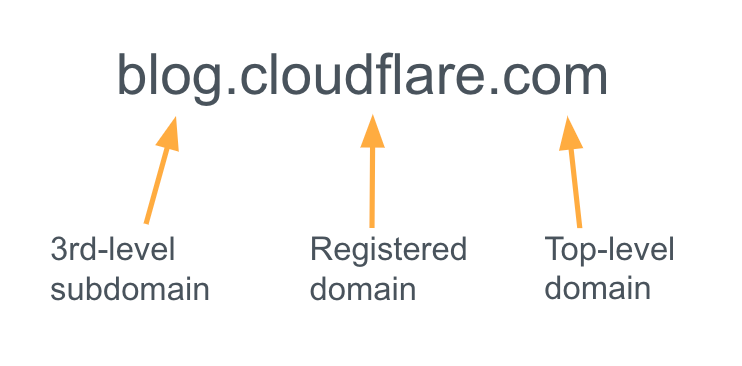
The structure of a domain name.

The domain name system, managed by ICANN, encompasses a variety of TLDs, from the classic “.com” (1985) to the newer generic options. There are also the country-specific (ccTLDs), where the Internet Assigned Numbers Authority (IANA) is responsible for determining an appropriate trustee for each ccTLD. An extensive 2014 expansion by ICANN was designed to “increase competition and choice in the domain name space,” introducing numerous new options for specific professional, business, and informational purposes, which in turn, also opened up new possibilities for phishing attempts.

3.4 billion unwanted emails

Cloudflare’s Cloud Email Security service is helping protect our customers, and that also comes with insights. In 2022, Cloudflare blocked 2.4 billion unwanted emails, and in 2023 that number rose to over 3.4 billion unwanted emails, 26% of all messages processed. This total includes spam, malicious, and “bulk” (practice of sending a single email message, unsolicited or solicited, to a large number of recipients simultaneously) emails. That means an average of 9.3 million per day, 6500 per minute, 108 per second.

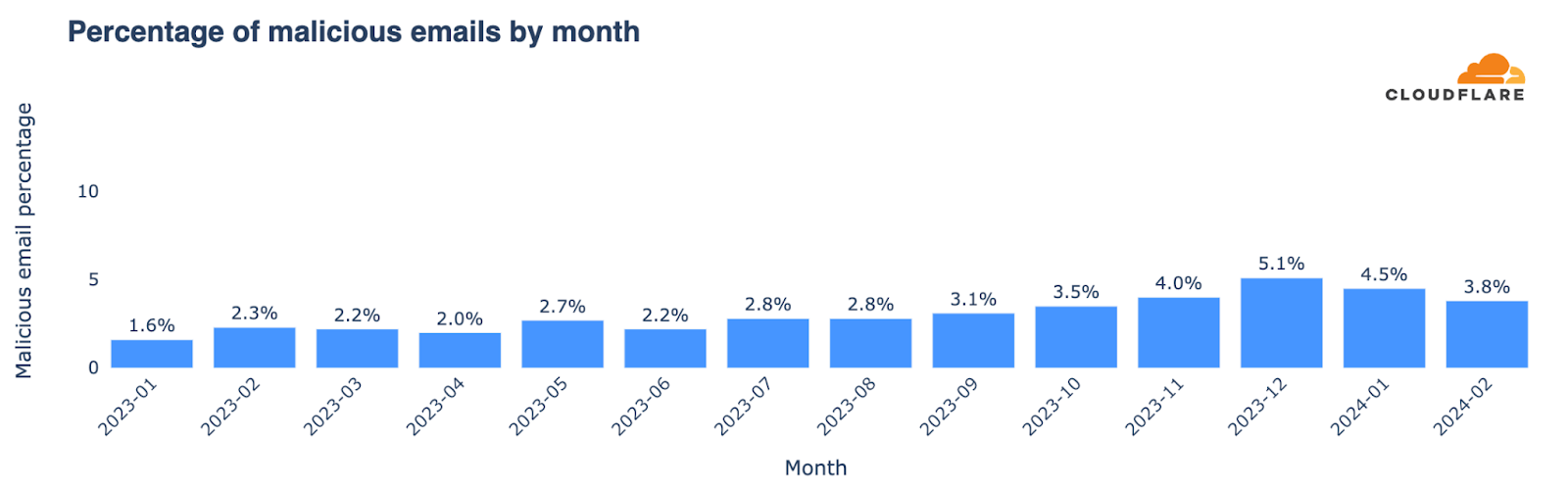
Bear in mind that new customers also make the numbers grow — in this case, driving a 42% increase in unwanted emails from 2022 to 2023. But this gives a sense of scale in this email area. Those unwanted emails can include malicious attacks that are difficult to detect, becoming more frequent, and can have devastating consequences for individuals and businesses that fall victim to them. Below, we’ll give more details on email threats, where malicious messages account for almost 3% of emails averaged across all of 2023 and it shows a growth tendency during the year, with higher percentages in the last months of the year. Let’s take a closer look.

Top phishing TLDs (and types of TLDs)

First, let’s start with an 2023 overview of top level domains with a high percentage of spam and malicious messages. Despite excluding TLDs with fewer than 20,000 emails, our analysis covers unwanted emails considered to be spam and malicious from more than 350 different TLDs (and yes, there are many more).

A quick overview highlights the TLDs with the highest rates of spam and malicious attacks as a proportion of their outbound email, those with the largest volume share of spam or malicious emails, and those with the highest rates of just-malicious and just-spam TLD senders. It reveals that newer TLDs, especially those associated with the beauty industry (generally available since 2021 and serving a booming industry), have the highest rates as a proportion of their emails. However, it’s relevant to recognize that “.com” accounts for 67% of all spam and malicious emails. Malicious emails often originate from recently created generic TLDs like “.bar”, “.makeup”, or “.cyou”, as well as certain country-code TLDs (ccTLDs) employed beyond their geographical implications.

Highest % of spam and malicious emails

Volume share
of spam + malicious 

Highest % of malicious 

Highest % of spam

TLD

Spam + mal %

TLD

Spam + mal %

TLD

Malicious %

TLD

Spam %

.uno

99%

.com

67%

.bar

70%

.autos

93%

.sbs

98%

.shop

5%

.makeup

63%

.today

92%

.best

97%

.net

4%

.cyou

62%

.directory

91%

.beauty

97%

.no

3%

.ml

56%

.boats

87%

.top

97%

.org

2%

.tattoo

54%

.center

85%

.hair

97%

.ru

1%

.om

47%

.monster

80%

.monster

96%

.jp

1%

.cfd

46%

.lol

79%

.cyou

96%

.click

1%

.skin

39%

.hair

78%

.wiki

95%

.beauty

1%

.uno

37%

.shop

78%

.makeup

95%

.cn

1%

.pw

37%

.beauty

77%

Focusing on volume share, “.com” dominates the spam + malicious list at 67%, and is joined in the top 3 by another “classic” gTLD, “.net”, at 4%. They also lead by volume when we look separately at the malicious (68% of all malicious emails are “.com” and “.net”) and spam (71%) categories, as shown below. All of the generic TLDs introduced since 2014 represent 13.4% of spam and malicious and over 14% of only malicious emails. These new TLDs (most of them are only available since 2016) are notable sources of both spam and malicious messages. Meanwhile, country-code TLDs contribute to more than 12% of both categories of unwanted emails.

This breakdown highlights the critical role of both established and new generic TLDs, which surpass older ccTLDs in terms of malicious emails, pointing to the changing dynamics of email-based threats.

Type of TLDs

Spam

Malicious 

Spam + malicious

ccTLDs

13%

12%

12%

.com and .net only

71%

68%

71%

new gTLDs 

13%

14%

13.4%

That said, “.shop” deserves a highlight of its own. The TLD, which has been available since 2016, is #2 by volume of spam and malicious emails, accounting for 5% of all of those emails. It also represents, when we separate those two categories, 5% of all malicious emails, and 5% of all spam emails. As we’re going to see below, its influence is growing.

Full 2023 top 50 spam & malicious TLDs list

For a more detailed perspective, below we present the top 50 TLDs with the highest percentages of spam and malicious emails during 2023. We also include a breakdown of those two categories.

It’s noticeable that even outside the top 10, other recent generic TLDs are also higher in the ranking, such as “.autos” (the #1 in the spam list), “.today”, “.bid” or “.cam”. TLDs that seem to promise entertainment or fun or are just leisure or recreational related (including “.fun” itself), occupy a position in our top 50 ranking.

2023 Top 50 spam & malicious TLDs (by highest %)

Rank

TLD

Spam %

Malicious %

Spam + malicious %

1

.uno

62%

37%

99%

2

.sbs

64%

35%

98%

3

.best

68%

29%

97%

4

.beauty

77%

20%

97%

5

.top

74%

23%

97%

6

.hair

78%

18%

97%

7

.monster

80%

17%

96%

8

.cyou

34%

62%

96%

9

.wiki

69%

26%

95%

10

.makeup

32%

63%

95%

11

.autos

93%

2%

95%

12

.today

92%

3%

94%

13

.shop

78%

16%

94%

14

.bid

74%

18%

92%

15

.cam

67%

25%

92%

16

.directory

91%

0%

91%

17

.icu

75%

15%

91%

18

.ml

33%

56%

89%

19

.lol

79%

10%

89%

20

.skin

49%

39%

88%

21

.boats

87%

1%

88%

22

.tattoo

34%

54%

87%

23

.click

61%

27%

87%

24

.ltd

70%

17%

86%

25

.rest

74%

11%

86%

26

.center

85%

0%

85%

27

.fun

64%

21%

85%

28

.cfd

39%

46%

84%

29

.bar

14%

70%

84%

30

.bio

72%

11%

84%

31

.tk

66%

17%

83%

32

.yachts

58%

23%

81%

33

.one

63%

17%

80%

34

.ink

68%

10%

78%

35

.wf

76%

1%

77%

36

.no

76%

0%

76%

37

.pw

39%

37%

75%

38

.site

42%

31%

73%

39

.life

56%

16%

72%

40

.homes

62%

10%

72%

41

.services

67%

2%

69%

42

.mom

63%

5%

68%

43

.ir

37%

29%

65%

44

.world

43%

21%

65%

45

.lat

40%

24%

64%

46

.xyz

46%

18%

63%

47

.ee

62%

1%

62%

48

.live

36%

26%

62%

49

.pics

44%

16%

60%

50

.mobi

41%

19%

60%

Change in spam & malicious TLD patterns

Let’s look at TLDs where spam + malicious emails comprised the largest share of total messages from that TLD, and how that list of TLDs changed from the first half of 2023 to the second half. This shows which TLDs were most problematic at different times during the year.

Highlighted in bold in the following table are those TLDs that climbed in the rankings for the percentage of spam and malicious emails from July to December 2023, compared with January to June. Generic TLDs “.uno”, “.makeup” and “.directory” appeared in the top list and in higher positions for the first time in the last six months of the year.

January – June 2023

July – Dec 2023

tld

Spam + malicious %

tld

Spam + malicious %

.click

99%

.uno

99%

.best

99%

.sbs

98%

.yachts

99%

.beauty

97%

.hair

99%

.best

97%

.autos

99%

.makeup

95%

.wiki

98%

.monster

95%

.today

98%

.directory

95%

.mom

98%

.bid

95%

.sbs

97%

.top

93%

.top

97%

.shop

92%

.monster

97%

.today

92%

.beauty

97%

.cam

92%

.bar

96%

.cyou

92%

.rest

95%

.icu

91%

.cam

95%

.boats

88%

.homes

94%

.wiki

88%

.pics

94%

.rest

88%

.lol

94%

.hair

87%

.quest

93%

.fun

87%

.cyou

93%

.cfd

86%

.ink

92%

.skin

85%

.shop

92%

.ltd

84%

.skin

91%

.one

83%

.ltd

91%

.center

83%

.tattoo

91%

.services

81%

.no

90%

.lol

78%

.ml

90%

.wf

78%

.center

90%

.pw

76%

.store

90%

.life

76%

.icu

89%

.click

75%

From the rankings, it’s clear that the recent generic TLDs have the highest spam and malicious percentage of all emails. The top 10 TLDs in both halves of 2023 are all recent and generic, with several introduced since 2021.

Reasons for the prominence of these gTLDs include the availability of domain names that can seem legitimate or mimic well-known brands, as we explain in this blog post. Cybercriminals often use popular or catchy words. Some gTLDs allow anonymous registration. Their low cost and the delay in updated security systems to recognize new gTLDs as spam and malicious sources also play a role — note that, as we’ve seen, cyber criminals also like to change TLDs and methods.

The impact of a lawsuit?

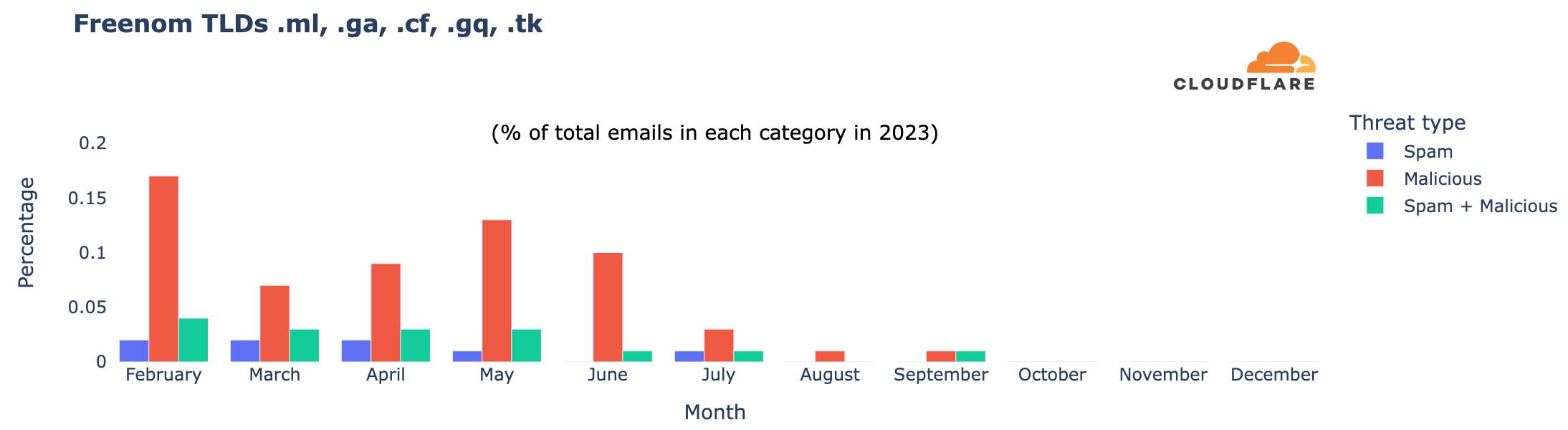
There’s also been a change in the types of domains with the highest malicious percentage in 2023, possibly due to Meta’s lawsuit against Freenom, filed in December 2022 and refiled in March 2023. Freenom provided domain name registry services for free in five ccTLDs, which wound up being used for purposes beyond local businesses or content: “.cf” (Central African Republic), “.ga” (Gabon), “.gq” (Equatorial Guinea), “.ml” (Mali), and “.tk” (Tokelau). However, Freenom stopped new registrations during 2023 following the lawsuit, and in February 2024, announced its decision to exit the domain name business.

Focusing on Freenom TLDs, which appeared in our top 50 ranking only in the first half of 2023, we see a clear shift. Since October, these TLDs have become less relevant in terms of all emails, including malicious and spam percentages. In February 2023, they accounted for 0.17% of all malicious emails we tracked, and 0.04% of all spam and malicious. Their presence has decreased since then, becoming almost non-existent in email volume in September and October, similar to other analyses.

TLDs ordered by volume of spam + malicious

In addition to looking at their share, another way to examine the data is to identify the TLDs that have a higher volume of spam and malicious emails — the next table is ordered that way. This means that we are able to show more familiar (and much older) TLDs, such as “.com”. We’ve included here the percentage of all emails in any given TLD that are classified as spam or malicious, and also spam + malicious to spotlight those that may require more caution. For instance, with high volume “.shop”, “.no”, “.click”, “.beauty”, “.top”, “.monster”, “.autos”, and “.today” stand out with a higher spam and malicious percentage (and also only malicious email percentage).

In the realm of country-code TLDs, Norway’s “.no” leads in spam, followed by China’s “.cn”, Russia’s “.ru”, Ukraine’s “.ua”, and Anguilla’s “.ai”, which recently has been used more for artificial intelligence-related domains than for the country itself.

In bold and red, we’ve highlighted the TLDs where spam + malicious represents more than 20% of all emails in that TLD — already what we consider a high number for domains with a lot of emails.

TLDs with more spam + malicious emails (in volume) in 2023

Rank

TLD

Spam %

Malicious %

Spam + mal %

1

.com

3.6%

0.8%

4.4%

2

.shop

77.8%

16.4%

94.2%

3

.net

2.8%

1.0%

3.9%

4

.no

76.0%

0.3%

76.3%

5

.org

3.3%

1.8%

5.2%

6

.ru

15.2%

7.7%

22.9%

7

.jp

3.4%

2.5%

5.9%

8

.click

60.6%

26.6%

87.2%

9

.beauty

77.0%

19.9%

96.9%

10

.cn

25.9%

3.3%

29.2%

11

.top

73.9%

22.8%

96.6%

12

.monster

79.7%

16.8%

96.5%

13

.de

13.0%

2.1%

15.2%

14

.best

68.1%

29.4%

97.4%

15

.gov

0.6%

2.0%

2.6%

16

.autos

92.6%

2.0%

94.6%

17

.ca

5.2%

0.5%

5.7%

18

.uk

3.2%

0.8%

3.9%

19

.today

91.7%

2.6%

94.3%

20

.io

3.6%

0.5%

4.0%

21

.us

5.7%

1.9%

7.6%

22

.co

6.3%

0.8%

7.1%

23

.biz

27.2%

14.0%

41.2%

24

.edu

0.9%

0.2%

1.1%

25

.info

20.4%

5.4%

25.8%

26

.ai

28.3%

0.1%

28.4%

27

.sbs

63.8%

34.5%

98.3%

28

.it

2.5%

0.3%

2.8%

29

.ua

37.4%

0.6%

38.0%

30

.fr

8.5%

1.0%

9.5%

The curious case of “.gov” email spoofing

When we concentrate our research on message volume to identify TLDs with more malicious emails blocked by our Cloud Email Security service, we discover a trend related to “.gov”.

TLDs ordered by malicious email volume

% of all malicious emails

.com

63%

.net

5%

.shop

5%

.org

3%

.gov

2%

.ru

2%

.jp

2%

.click

1%

.best

0.9%

.beauty

0.8%

The first three domains, “.com” (63%), “.net” (5%), and “.shop” (5%), were previously seen in our rankings and are not surprising. However, in fourth place is “.org”, known for being used by non-profit and other similar organizations, but it has an open registration policy. In fifth place is “.gov”, used only by the US government and administered by CISA. Our investigation suggests that it appears in the ranking because of typical attacks where cybercriminals pretend to be a legitimate address (email spoofing, creation of email messages with a forged sender address). In this case, they use “.gov” when launching attacks.

The spoofing behavior linked to “.gov” is similar to that of other TLDs. It includes fake senders failing SPF validation and other DNS-based authentication methods, along with various other types of attacks. An email failing SPF, DKIM, and DMARC checks typically indicates that a malicious sender is using an unauthorized IP, domain, or both. So, there are more straightforward ways to block spoofed emails without examining their content for malicious elements.

Ranking TLDs by proportions of malicious and spam email in 2023

In this section, we have included two lists: one ranks TLDs by the highest percentage of malicious emails — those you should exercise greater caution with; the second ranks TLDs by just their spam percentage. These contrast with the previous top 50 list ordered by combined spam and malicious percentages. In the case of malicious emails, the top 3 with the highest percentage are all generic TLDs. The #1 was “.bar”, with 70% of all emails being categorized as malicious, followed by “.makeup”, and “.cyou” — marketed as the phrase “see you”.

The malicious list also includes some country-code TLDs (ccTLDs) not primarily used for country-related topics, like .ml (Mali), .om (Oman), and .pw (Palau). The list also includes other ccTLDs such as .ir (Iran) and .kg (Kyrgyzstan), .lk (Sri Lanka).

In the spam realm, it’s “autos”, with 93%, and other generic TLDs such as “.today”, and “.directory” that take the first three spots, also seeing shares over 90%.

2023 ordered by malicious email %

2023 ordered by spam email %

tld

Malicious % 

tld

Spam %

.bar

70%

.autos

93%

.makeup

63%

.today

92%

.cyou

62%

.directory

91%

.ml

56%

.boats

87%

.tattoo

54%

.center

85%

.om

47%

.monster

80%

.cfd

46%

.lol

79%

.skin

39%

.hair

78%

.uno

37%

.shop

78%

.pw

37%

.beauty

77%

.sbs

35%

.no

76%

.site

31%

.wf

76%

.store

31%

.icu

75%

.best

29%

.bid

74%

.ir

29%

.rest

74%

.lk

27%

.top

74%

.work

27%

.bio

72%

.click

27%

.ltd

70%

.wiki

26%

.wiki

69%

.live

26%

.best

68%

.cam

25%

.ink

68%

.lat

24%

.cam

67%

.yachts

23%

.services

67%

.top

23%

.tk

66%

.world

21%

.sbs

64%

.fun

21%

.fun

64%

.beauty

20%

.one

63%

.mobi

19%

.mom

63%

.kg

19%

.uno

62%

.hair

18%

.homes

62%

How it stands in 2024: new higher-risk TLDs

2024 has seen new players enter the high-risk zone for unwanted emails. In this list we have only included the new TLDs that weren’t in the top 50 during 2023, and joined the list in January. New entrants include Samoa’s “.ws”, Indonesia’s “.id” (also used because of its “identification” meaning), and the Cocos Islands’ “.cc”. These ccTLDs, often used for more than just country-related purposes, have shown high percentages of malicious emails, ranging from 20% (.cc) to 95% (.ws) of all emails.

January 2024: Newer TLDs in the top 50 list

TLD

Spam %

Malicious %

Spam + mal %

.ws

3%

95%

98%

.company

96%

0%

96%

.digital

72%

2%

74%

.pro

66%

6%

73%

.tz

62%

4%

65%

.id

13%

39%

51%

.cc

25%

21%

46%

.space

32%

8%

40%

.enterprises

2%

37%

40%

.lv

30%

1%

30%

.cn

26%

3%

29%

.jo

27%

1%

28%

.info

21%

5%

26%

.su

20%

5%

25%

.ua

23%

1%

24%

.museum

0%

24%

24%

.biz

16%

7%

24%

.se

23%

0%

23%

.ai

21%

0%

21%

Overview of email threat trends since 2023

With Cloudflare’s Cloud Email Security, we gain insight into the broader email landscape over the past months. The spam percentage of all emails stood at 8.58% in 2023. As mentioned before, keep in mind with these percentages that our protection typically kicks in after other email providers’ filters have already removed some spam and malicious emails.

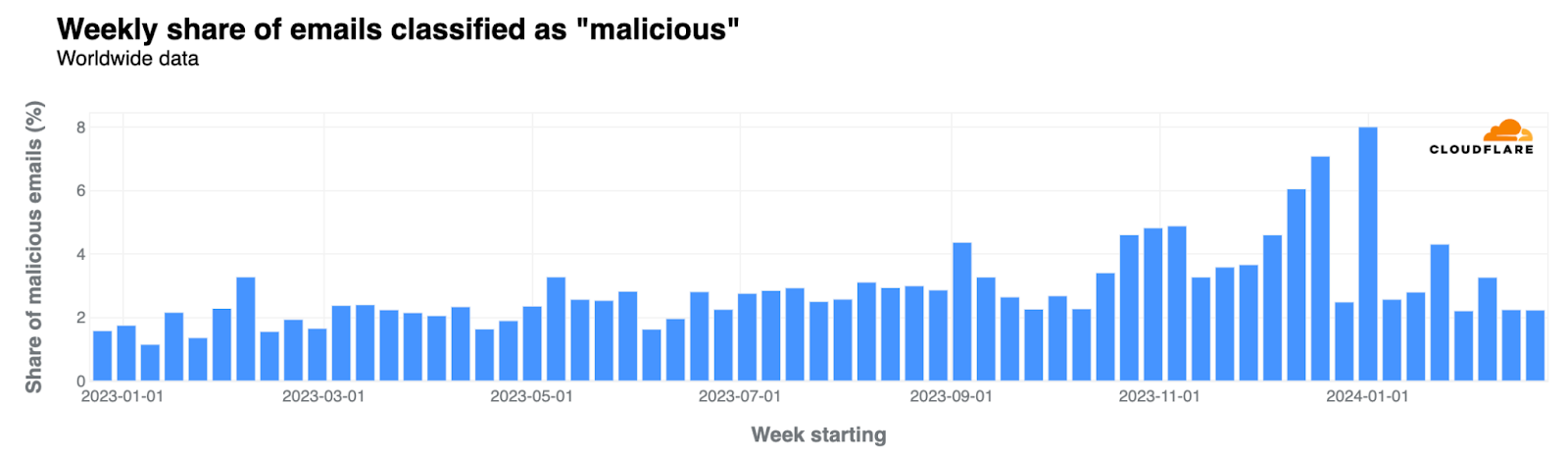
How about malicious emails? Almost 3% of all emails were flagged as malicious during 2023, with the highest percentages occurring in Q4. Here’s the “malicious” evolution, where we’re also including the January and February 2024 perspective:

The week before Christmas and the first week of 2024 experienced a significant spike in malicious emails, reaching an average of 7% and 8% across the weeks, respectively. Not surprisingly, there was a noticeable decrease during Christmas week, when it dropped to 3%. Other significant increases in the percentage of malicious emails were observed the week before Valentine’s Day, the first week of September (coinciding with returns to work and school in the Northern Hemisphere), and late October.

Threat categories in 2023

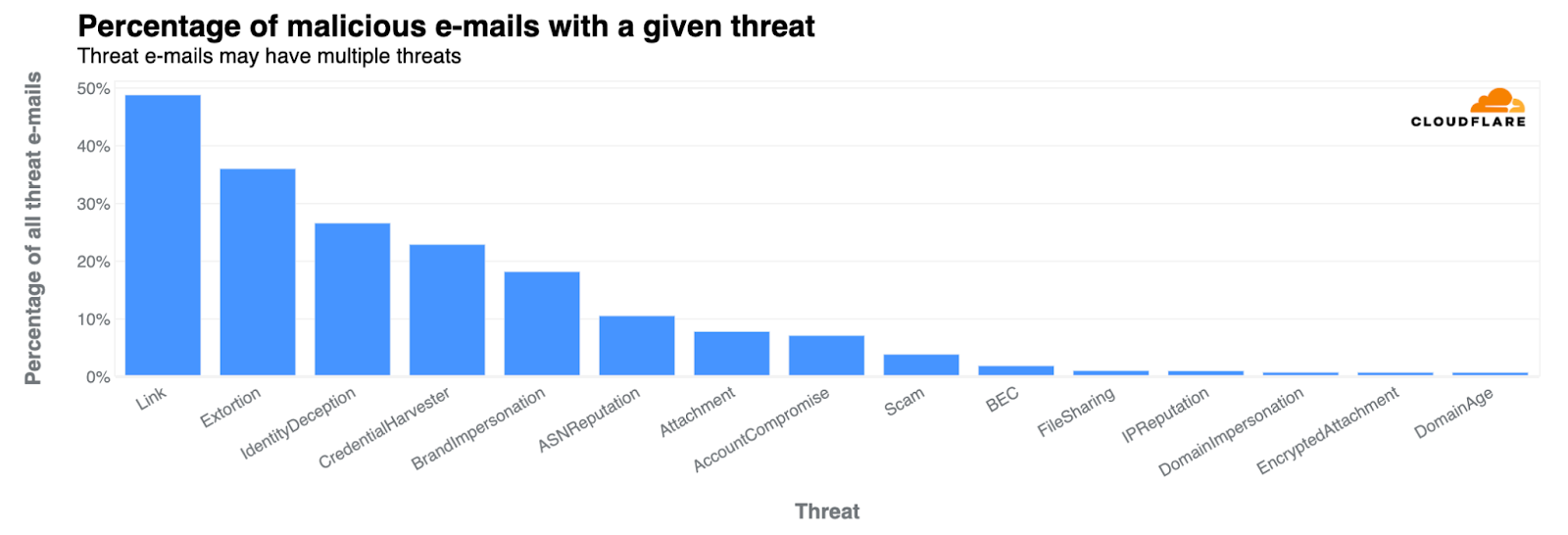
We can also look to different types of threats in 2023. Links were present in 49% of all threats. Other categories included extortion (36%), identity deception (27%), credential harvesting (23%), and brand impersonation (18%). These categories are defined and explored in detail in Cloudflare’s 2023 phishing threats report. Extortion saw the most growth in Q4, especially in November and December reaching 38% from 7% of all threats in Q1 2023.

Other trends: Attachments are still popular

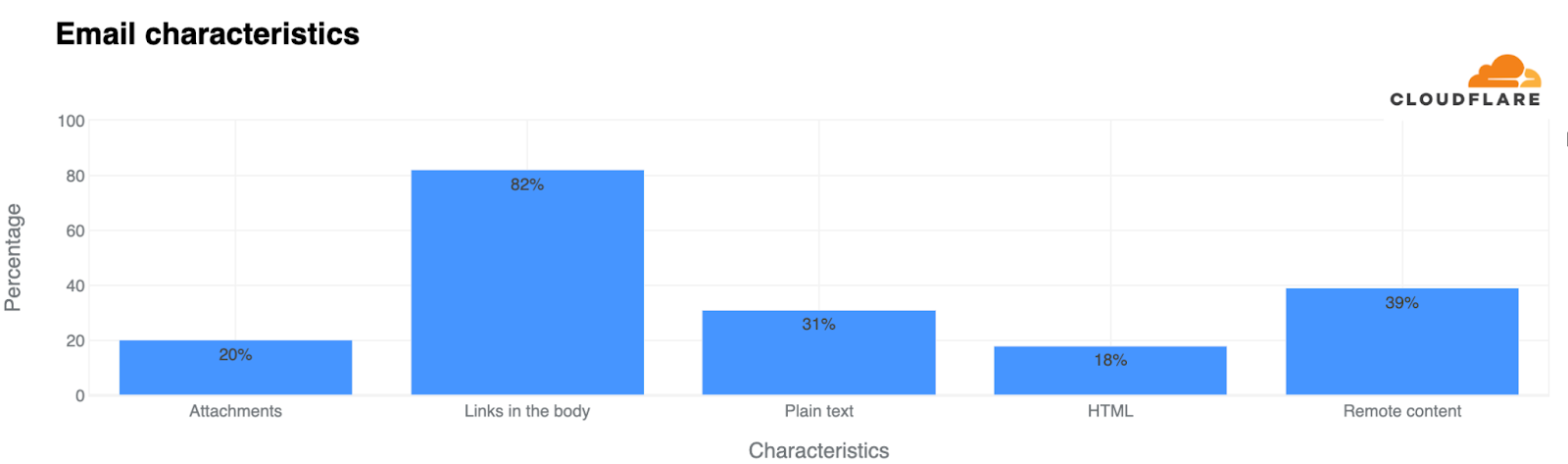
Other less “threatening” trends show that 20% of all emails included attachments (as the next chart shows), while 82% contained links in the body. Additionally, 31% were composed in plain text, and 18% featured HTML, which allows for enhanced formatting and visuals. 39% of all emails used remote content.

Conclusion: Be cautious, prepared, safe

The landscape of spam and malicious (or phishing) emails constantly evolves alongside technology, the Internet, user behaviors, use cases, and cybercriminals. As we’ve seen through Cloudflare’s Cloud Email Security insights, new generic TLDs have emerged as preferred channels for these malicious activities, highlighting the need for vigilance when dealing with emails from unfamiliar domains.

There’s no shortage of advice on staying safe from phishing. Email remains a ubiquitous yet highly exploited tool in daily business operations. Cybercriminals often bait users into clicking malicious links within emails, a tactic used by both sophisticated criminal organizations and novice attackers. So, always exercise caution online.

Cloudflare’s Cloud Email Security provides insights that underscore the importance of robust cybersecurity infrastructure in fighting the dynamic tactics of phishing attacks.

If you want to learn more about email security, you can check Cloudflare Radar’s new email section, visit our Learning Center or reach out for a complimentary phishing risk assessment for your organization.

(Contributors to this blog post include Jeremy Eckman, Phil Syme, and Oren Falkowitz.)

How we’re creating more impact with Ada Computer Science

Post Syndicated from Ben Durbin original https://www.raspberrypi.org/blog/how-were-creating-more-impact-with-ada-computer-science/

We offer Ada Computer Science as a platform to support educators and learners alike. But we don’t take its usefulness for granted: as part of our commitment to impact, we regularly gather user feedback and evaluate all of our products, and Ada is no exception. In this blog, we share some of the feedback we’ve gathered from surveys and interviews with the people using Ada.

A secondary school age learner in a computing classroom.

What’s new on Ada?

Ada Computer Science is our online learning platform designed for teachers, students, and anyone interested in learning about computer science. If you’re teaching or studying a computer science qualification at school, you can use Ada Computer Science for classwork, homework, and revision. 

Launched last year as a partnership between us and the University of Cambridge, Ada’s comprehensive resources cover topics like algorithms, data structures, computational thinking, and cybersecurity. It also includes 1,000 self-marking questions, which both teachers and students can use to assess their knowledge and understanding. 

Throughout 2023, we continued to develop the support Ada offers. For example, we: 

  • Added over 100 new questions
  • Expanded code specimens to cover Java and Visual Basic as well as Python and C#
  • Added an integrated way of learning about databases through writing and executing SQL
  • Incorporated a beta version of an embedded Python editor with the ability to run code and compare the output with correct solutions 

A few weeks ago we launched two all-new topics about artificial intelligence (AI) and machine learning.

So far, all the content on Ada Computer Science is mapped to GCSE and A level exam boards in England, and we’ve just released new resources for the Scottish Qualification Authority’s Computer Systems area of study to support students in Scotland with their National 5 and Higher qualifications.

Who is using Ada?

Ada is being used by a wide variety of users, from at least 127 countries all across the globe. Countries where Ada is most popular include the UK, US, Canada, Australia, Brazil, India, China, Nigeria, Ghana, Kenya, China, Myanmar, and Indonesia.

Children in a Code Club in India.

Just over half of students using Ada are completing work set by their teacher. However, there are also substantial numbers of young people benefitting from using Ada for their own independent learning. So far, over half a million question attempts have been made on the platform.

How are people using Ada?

Students use Ada for a wide variety of purposes. The most common response in our survey was for revision, but students also use it to complete work set by teachers, to learn new concepts, and to check their understanding of computer science concepts.

Teachers also use Ada for a combination of their own learning, in the classroom with their students, and for setting work outside of lessons. They told us that they value Ada as a source of pre-made questions.

“I like having a bank of questions as a teacher. It’s tiring to create more. I like that I can use the finder and create questions very quickly.” — Computer science teacher, A level

“I like the structure of how it [Ada] is put together. [Resources] are really easy to find and being able to sort by exam board makes it really useful because… at A level there is a huge difference between exam boards.” — GCSE and A level teacher

What feedback are people giving about Ada?

Students and teachers alike were very positive about the quality and usefulness of Ada Computer Science. Overall, 89% of students responding to our survey agreed that Ada is useful for helping them to learn about computer science, and 93% of teachers agreed that it is high quality.

“The impact for me was just having a resource that I felt I always could trust.” — Head of Computer Science

A graph showing that students and teachers consider Ada Computer Science to be useful and high quality.

Most teachers also reported that using Ada reduces their workload, saving an average of 3 hours per week.

“[Quizzes] are the most useful because it’s the biggest time saving…especially having them nicely self-marked as well.” — GCSE and A level computer science teacher

Even more encouragingly, Ada users report a positive impact on their knowledge, skills, and attitudes to computer science. Teachers report that, as a result of using Ada, their computer science subject knowledge and their confidence in teaching has increased, and report similar benefits for their students.

“They can easily…recap and see how they’ve been getting on with the different topic areas.” — GCSE and A level computer science teacher

“I see they’re answering the questions and learning things without really realising it, which is quite nice.” — GCSE and A level computer science teacher

How do we use people’s feedback to improve the platform?

Our content team is made up of experienced computer science teachers, and we’re always updating the site in response to feedback from the teachers and students who use our resources. We receive feedback through support tickets, and we have a monthly meeting where we comb through every wrong answer that students entered to help us identify new misconceptions. We then use all of this to improve the content, and the feedback we give students on the platform.

A computer science teacher sits with students at computers in a classroom.

We’d love to hear from you

We’ll be conducting another round of surveys later this year, so when you see the link, please fill in the form. In the meantime, if you have any feedback or suggestions for improvements, please get in touch.

And if you’ve not signed up to Ada yet as a teacher or student, you can take a look right now over at adacomputerscience.org

The post How we’re creating more impact with Ada Computer Science appeared first on Raspberry Pi Foundation.

On Secure Voting Systems

Post Syndicated from Bruce Schneier original https://www.schneier.com/blog/archives/2024/03/on-secure-voting-systems.html

Andrew Appel shepherded a public comment—signed by twenty election cybersecurity experts, including myself—on best practices for ballot marking devices and vote tabulation. It was written for the Pennsylvania legislature, but it’s general in nature.

From the executive summary:

We believe that no system is perfect, with each having trade-offs. Hand-marked and hand-counted ballots remove the uncertainty introduced by use of electronic machinery and the ability of bad actors to exploit electronic vulnerabilities to remotely alter the results. However, some portion of voters mistakenly mark paper ballots in a manner that will not be counted in the way the voter intended, or which even voids the ballot. Hand-counts delay timely reporting of results, and introduce the possibility for human error, bias, or misinterpretation.

Technology introduces the means of efficient tabulation, but also introduces a manifold increase in complexity and sophistication of the process. This places the understanding of the process beyond the average person’s understanding, which can foster distrust. It also opens the door to human or machine error, as well as exploitation by sophisticated and malicious actors.

Rather than assert that each component of the process can be made perfectly secure on its own, we believe the goal of each component of the elections process is to validate every other component.

Consequently, we believe that the hallmarks of a reliable and optimal election process are hand-marked paper ballots, which are optically scanned, separately and securely stored, and rigorously audited after the election but before certification. We recommend state legislators adopt policies consistent with these guiding principles, which are further developed below.

Run large-scale simulations with AWS Batch multi-container jobs

Post Syndicated from Danilo Poccia original https://aws.amazon.com/blogs/aws/run-large-scale-simulations-with-aws-batch-multi-container-jobs/

Industries like automotive, robotics, and finance are increasingly implementing computational workloads like simulations, machine learning (ML) model training, and big data analytics to improve their products. For example, automakers rely on simulations to test autonomous driving features, robotics companies train ML algorithms to enhance robot perception capabilities, and financial firms run in-depth analyses to better manage risk, process transactions, and detect fraud.

Some of these workloads, including simulations, are especially complicated to run due to their diversity of components and intensive computational requirements. A driving simulation, for instance, involves generating 3D virtual environments, vehicle sensor data, vehicle dynamics controlling car behavior, and more. A robotics simulation might test hundreds of autonomous delivery robots interacting with each other and other systems in a massive warehouse environment.

AWS Batch is a fully managed service that can help you run batch workloads across a range of AWS compute offerings, including Amazon Elastic Container Service (Amazon ECS), Amazon Elastic Kubernetes Service (Amazon EKS), AWS Fargate, and Amazon EC2 Spot or On-Demand Instances. Traditionally, AWS Batch only allowed single-container jobs and required extra steps to merge all components into a monolithic container. It also did not allow using separate “sidecar” containers, which are auxiliary containers that complement the main application by providing additional services like data logging. This additional effort required coordination across multiple teams, such as software development, IT operations, and quality assurance (QA), because any code change meant rebuilding the entire container.

Now, AWS Batch offers multi-container jobs, making it easier and faster to run large-scale simulations in areas like autonomous vehicles and robotics. These workloads are usually divided between the simulation itself and the system under test (also known as an agent) that interacts with the simulation. These two components are often developed and optimized by different teams. With the ability to run multiple containers per job, you get the advanced scaling, scheduling, and cost optimization offered by AWS Batch, and you can use modular containers representing different components like 3D environments, robot sensors, or monitoring sidecars. In fact, customers such as IPG Automotive, MORAI, and Robotec.ai are already using AWS Batch multi-container jobs to run their simulation software in the cloud.

Let’s see how this works in practice using a simplified example and have some fun trying to solve a maze.

Building a Simulation Running on Containers
In production, you will probably use existing simulation software. For this post, I built a simplified version of an agent/model simulation. If you’re not interested in code details, you can skip this section and go straight to how to configure AWS Batch.

For this simulation, the world to explore is a randomly generated 2D maze. The agent has the task to explore the maze to find a key and then reach the exit. In a way, it is a classic example of pathfinding problems with three locations.

Here’s a sample map of a maze where I highlighted the start (S), end (E), and key (K) locations.

Sample ASCII maze map.

The separation of agent and model into two separate containers allows different teams to work on each of them separately. Each team can focus on improving their own part, for example, to add details to the simulation or to find better strategies for how the agent explores the maze.

Here’s the code of the maze model (app.py). I used Python for both examples. The model exposes a REST API that the agent can use to move around the maze and know if it has found the key and reached the exit. The maze model uses Flask for the REST API.

import json
import random
from flask import Flask, request, Response

ready = False

# How map data is stored inside a maze
# with size (width x height) = (4 x 3)
#
#    012345678
# 0: +-+-+ +-+
# 1: | |   | |
# 2: +-+ +-+-+
# 3: | |   | |
# 4: +-+-+ +-+
# 5: | | | | |
# 6: +-+-+-+-+
# 7: Not used

class WrongDirection(Exception):
    pass

class Maze:
    UP, RIGHT, DOWN, LEFT = 0, 1, 2, 3
    OPEN, WALL = 0, 1
    

    @staticmethod
    def distance(p1, p2):
        (x1, y1) = p1
        (x2, y2) = p2
        return abs(y2-y1) + abs(x2-x1)


    @staticmethod
    def random_dir():
        return random.randrange(4)


    @staticmethod
    def go_dir(x, y, d):
        if d == Maze.UP:
            return (x, y - 1)
        elif d == Maze.RIGHT:
            return (x + 1, y)
        elif d == Maze.DOWN:
            return (x, y + 1)
        elif d == Maze.LEFT:
            return (x - 1, y)
        else:
            raise WrongDirection(f"Direction: {d}")


    def __init__(self, width, height):
        self.width = width
        self.height = height        
        self.generate()
        

    def area(self):
        return self.width * self.height
        

    def min_lenght(self):
        return self.area() / 5
    

    def min_distance(self):
        return (self.width + self.height) / 5
    

    def get_pos_dir(self, x, y, d):
        if d == Maze.UP:
            return self.maze[y][2 * x + 1]
        elif d == Maze.RIGHT:
            return self.maze[y][2 * x + 2]
        elif d == Maze.DOWN:
            return self.maze[y + 1][2 * x + 1]
        elif d ==  Maze.LEFT:
            return self.maze[y][2 * x]
        else:
            raise WrongDirection(f"Direction: {d}")


    def set_pos_dir(self, x, y, d, v):
        if d == Maze.UP:
            self.maze[y][2 * x + 1] = v
        elif d == Maze.RIGHT:
            self.maze[y][2 * x + 2] = v
        elif d == Maze.DOWN:
            self.maze[y + 1][2 * x + 1] = v
        elif d ==  Maze.LEFT:
            self.maze[y][2 * x] = v
        else:
            WrongDirection(f"Direction: {d}  Value: {v}")


    def is_inside(self, x, y):
        return 0 <= y < self.height and 0 <= x < self.width


    def generate(self):
        self.maze = []
        # Close all borders
        for y in range(0, self.height + 1):
            self.maze.append([Maze.WALL] * (2 * self.width + 1))
        # Get a random starting point on one of the borders
        if random.random() < 0.5:
            sx = random.randrange(self.width)
            if random.random() < 0.5:
                sy = 0
                self.set_pos_dir(sx, sy, Maze.UP, Maze.OPEN)
            else:
                sy = self.height - 1
                self.set_pos_dir(sx, sy, Maze.DOWN, Maze.OPEN)
        else:
            sy = random.randrange(self.height)
            if random.random() < 0.5:
                sx = 0
                self.set_pos_dir(sx, sy, Maze.LEFT, Maze.OPEN)
            else:
                sx = self.width - 1
                self.set_pos_dir(sx, sy, Maze.RIGHT, Maze.OPEN)
        self.start = (sx, sy)
        been = [self.start]
        pos = -1
        solved = False
        generate_status = 0
        old_generate_status = 0                    
        while len(been) < self.area():
            (x, y) = been[pos]
            sd = Maze.random_dir()
            for nd in range(4):
                d = (sd + nd) % 4
                if self.get_pos_dir(x, y, d) != Maze.WALL:
                    continue
                (nx, ny) = Maze.go_dir(x, y, d)
                if (nx, ny) in been:
                    continue
                if self.is_inside(nx, ny):
                    self.set_pos_dir(x, y, d, Maze.OPEN)
                    been.append((nx, ny))
                    pos = -1
                    generate_status = len(been) / self.area()
                    if generate_status - old_generate_status > 0.1:
                        old_generate_status = generate_status
                        print(f"{generate_status * 100:.2f}%")
                    break
                elif solved or len(been) < self.min_lenght():
                    continue
                else:
                    self.set_pos_dir(x, y, d, Maze.OPEN)
                    self.end = (x, y)
                    solved = True
                    pos = -1 - random.randrange(len(been))
                    break
            else:
                pos -= 1
                if pos < -len(been):
                    pos = -1
                    
        self.key = None
        while(self.key == None):
            kx = random.randrange(self.width)
            ky = random.randrange(self.height)
            if (Maze.distance(self.start, (kx,ky)) > self.min_distance()
                and Maze.distance(self.end, (kx,ky)) > self.min_distance()):
                self.key = (kx, ky)


    def get_label(self, x, y):
        if (x, y) == self.start:
            c = 'S'
        elif (x, y) == self.end:
            c = 'E'
        elif (x, y) == self.key:
            c = 'K'
        else:
            c = ' '
        return c

                    
    def map(self, moves=[]):
        map = ''
        for py in range(self.height * 2 + 1):
            row = ''
            for px in range(self.width * 2 + 1):
                x = int(px / 2)
                y = int(py / 2)
                if py % 2 == 0: #Even rows
                    if px % 2 == 0:
                        c = '+'
                    else:
                        v = self.get_pos_dir(x, y, self.UP)
                        if v == Maze.OPEN:
                            c = ' '
                        elif v == Maze.WALL:
                            c = '-'
                else: # Odd rows
                    if px % 2 == 0:
                        v = self.get_pos_dir(x, y, self.LEFT)
                        if v == Maze.OPEN:
                            c = ' '
                        elif v == Maze.WALL:
                            c = '|'
                    else:
                        c = self.get_label(x, y)
                        if c == ' ' and [x, y] in moves:
                            c = '*'
                row += c
            map += row + '\n'
        return map


app = Flask(__name__)

@app.route('/')
def hello_maze():
    return "<p>Hello, Maze!</p>"

@app.route('/maze/map', methods=['GET', 'POST'])
def maze_map():
    if not ready:
        return Response(status=503, retry_after=10)
    if request.method == 'GET':
        return '<pre>' + maze.map() + '</pre>'
    else:
        moves = request.get_json()
        return maze.map(moves)

@app.route('/maze/start')
def maze_start():
    if not ready:
        return Response(status=503, retry_after=10)
    start = { 'x': maze.start[0], 'y': maze.start[1] }
    return json.dumps(start)

@app.route('/maze/size')
def maze_size():
    if not ready:
        return Response(status=503, retry_after=10)
    size = { 'width': maze.width, 'height': maze.height }
    return json.dumps(size)

@app.route('/maze/pos/<int:y>/<int:x>')
def maze_pos(y, x):
    if not ready:
        return Response(status=503, retry_after=10)
    pos = {
        'here': maze.get_label(x, y),
        'up': maze.get_pos_dir(x, y, Maze.UP),
        'down': maze.get_pos_dir(x, y, Maze.DOWN),
        'left': maze.get_pos_dir(x, y, Maze.LEFT),
        'right': maze.get_pos_dir(x, y, Maze.RIGHT),

    }
    return json.dumps(pos)


WIDTH = 80
HEIGHT = 20
maze = Maze(WIDTH, HEIGHT)
ready = True

The only requirement for the maze model (in requirements.txt) is the Flask module.

To create a container image running the maze model, I use this Dockerfile.

FROM --platform=linux/amd64 public.ecr.aws/docker/library/python:3.12-alpine

WORKDIR /app

COPY requirements.txt requirements.txt
RUN pip3 install -r requirements.txt

COPY . .

CMD [ "python3", "-m" , "flask", "run", "--host=0.0.0.0", "--port=5555"]

Here’s the code for the agent (agent.py). First, the agent asks the model for the size of the maze and the starting position. Then, it applies its own strategy to explore and solve the maze. In this implementation, the agent chooses its route at random, trying to avoid following the same path more than once.

import random
import requests
from requests.adapters import HTTPAdapter, Retry

HOST = '127.0.0.1'
PORT = 5555

BASE_URL = f"http://{HOST}:{PORT}/maze"

UP, RIGHT, DOWN, LEFT = 0, 1, 2, 3
OPEN, WALL = 0, 1

s = requests.Session()

retries = Retry(total=10,
                backoff_factor=1)

s.mount('http://', HTTPAdapter(max_retries=retries))

r = s.get(f"{BASE_URL}/size")
size = r.json()
print('SIZE', size)

r = s.get(f"{BASE_URL}/start")
start = r.json()
print('START', start)

y = start['y']
x = start['x']

found_key = False
been = set((x, y))
moves = [(x, y)]
moves_stack = [(x, y)]

while True:
    r = s.get(f"{BASE_URL}/pos/{y}/{x}")
    pos = r.json()
    if pos['here'] == 'K' and not found_key:
        print(f"({x}, {y}) key found")
        found_key = True
        been = set((x, y))
        moves_stack = [(x, y)]
    if pos['here'] == 'E' and found_key:
        print(f"({x}, {y}) exit")
        break
    dirs = list(range(4))
    random.shuffle(dirs)
    for d in dirs:
        nx, ny = x, y
        if d == UP and pos['up'] == 0:
            ny -= 1
        if d == RIGHT and pos['right'] == 0:
            nx += 1
        if d == DOWN and pos['down'] == 0:
            ny += 1
        if d == LEFT and pos['left'] == 0:
            nx -= 1 

        if nx < 0 or nx >= size['width'] or ny < 0 or ny >= size['height']:
            continue

        if (nx, ny) in been:
            continue

        x, y = nx, ny
        been.add((x, y))
        moves.append((x, y))
        moves_stack.append((x, y))
        break
    else:
        if len(moves_stack) > 0:
            x, y = moves_stack.pop()
        else:
            print("No moves left")
            break

print(f"Solution length: {len(moves)}")
print(moves)

r = s.post(f'{BASE_URL}/map', json=moves)

print(r.text)

s.close()

The only dependency of the agent (in requirements.txt) is the requests module.

This is the Dockerfile I use to create a container image for the agent.

FROM --platform=linux/amd64 public.ecr.aws/docker/library/python:3.12-alpine

WORKDIR /app

COPY requirements.txt requirements.txt
RUN pip3 install -r requirements.txt

COPY . .

CMD [ "python3", "agent.py"]

You can easily run this simplified version of a simulation locally, but the cloud allows you to run it at larger scale (for example, with a much bigger and more detailed maze) and to test multiple agents to find the best strategy to use. In a real-world scenario, the improvements to the agent would then be implemented into a physical device such as a self-driving car or a robot vacuum cleaner.

Running a simulation using multi-container jobs
To run a job with AWS Batch, I need to configure three resources:

  • The compute environment in which to run the job
  • The job queue in which to submit the job
  • The job definition describing how to run the job, including the container images to use

In the AWS Batch console, I choose Compute environments from the navigation pane and then Create. Now, I have the choice of using Fargate, Amazon EC2, or Amazon EKS. Fargate allows me to closely match the resource requirements that I specify in the job definitions. However, simulations usually require access to a large but static amount of resources and use GPUs to accelerate computations. For this reason, I select Amazon EC2.

Console screenshot.

I select the Managed orchestration type so that AWS Batch can scale and configure the EC2 instances for me. Then, I enter a name for the compute environment and select the service-linked role (that AWS Batch created for me previously) and the instance role that is used by the ECS container agent (running on the EC2 instances) to make calls to the AWS API on my behalf. I choose Next.

Console screenshot.

In the Instance configuration settings, I choose the size and type of the EC2 instances. For example, I can select instance types that have GPUs or use the Graviton processor. I do not have specific requirements and leave all the settings to their default values. For Network configuration, the console already selected my default VPC and the default security group. In the final step, I review all configurations and complete the creation of the compute environment.

Now, I choose Job queues from the navigation pane and then Create. Then, I select the same orchestration type I used for the compute environment (Amazon EC2). In the Job queue configuration, I enter a name for the job queue. In the Connected compute environments dropdown, I select the compute environment I just created and complete the creation of the queue.

Console screenshot.

I choose Job definitions from the navigation pane and then Create. As before, I select Amazon EC2 for the orchestration type.

To use more than one container, I disable the Use legacy containerProperties structure option and move to the next step. By default, the console creates a legacy single-container job definition if there’s already a legacy job definition in the account. That’s my case. For accounts without legacy job definitions, the console has this option disabled.

Console screenshot.

I enter a name for the job definition. Then, I have to think about which permissions this job requires. The container images I want to use for this job are stored in Amazon ECR private repositories. To allow AWS Batch to download these images to the compute environment, in the Task properties section, I select an Execution role that gives read-only access to the ECR repositories. I don’t need to configure a Task role because the simulation code is not calling AWS APIs. For example, if my code was uploading results to an Amazon Simple Storage Service (Amazon S3) bucket, I could select here a role giving permissions to do so.

In the next step, I configure the two containers used by this job. The first one is the maze-model. I enter the name and the image location. Here, I can specify the resource requirements of the container in terms of vCPUs, memory, and GPUs. This is similar to configuring containers for an ECS task.

Console screenshot.

I add a second container for the agent and enter name, image location, and resource requirements as before. Because the agent needs to access the maze as soon as it starts, I use the Dependencies section to add a container dependency. I select maze-model for the container name and START as the condition. If I don’t add this dependency, the agent container can fail before the maze-model container is running and able to respond. Because both containers are flagged as essential in this job definition, the overall job would terminate with a failure.

Console screenshot.

I review all configurations and complete the job definition. Now, I can start a job.

In the Jobs section of the navigation pane, I submit a new job. I enter a name and select the job queue and the job definition I just created.

Console screenshot.

In the next steps, I don’t need to override any configuration and create the job. After a few minutes, the job has succeeded, and I have access to the logs of the two containers.

Console screenshot.

The agent solved the maze, and I can get all the details from the logs. Here’s the output of the job to see how the agent started, picked up the key, and then found the exit.

SIZE {'width': 80, 'height': 20}
START {'x': 0, 'y': 18}
(32, 2) key found
(79, 16) exit
Solution length: 437
[(0, 18), (1, 18), (0, 18), ..., (79, 14), (79, 15), (79, 16)]

In the map, the red asterisks (*) follow the path used by the agent between the start (S), key (K), and exit (E) locations.

ASCII-based map of the solved maze.

Increasing observability with a sidecar container
When running complex jobs using multiple components, it helps to have more visibility into what these components are doing. For example, if there is an error or a performance problem, this information can help you find where and what the issue is.

To instrument my application, I use AWS Distro for OpenTelemetry:

Using telemetry data collected in this way, I can set up dashboards (for example, using CloudWatch or Amazon Managed Grafana) and alarms (with CloudWatch or Prometheus) that help me better understand what is happening and reduce the time to solve an issue. More generally, a sidecar container can help integrate telemetry data from AWS Batch jobs with your monitoring and observability platforms.

Things to know
AWS Batch support for multi-container jobs is available today in the AWS Management Console, AWS Command Line Interface (AWS CLI), and AWS SDKs in all AWS Regions where Batch is offered. For more information, see the AWS Services by Region list.

There is no additional cost for using multi-container jobs with AWS Batch. In fact, there is no additional charge for using AWS Batch. You only pay for the AWS resources you create to store and run your application, such as EC2 instances and Fargate containers. To optimize your costs, you can use Reserved Instances, Savings Plan, EC2 Spot Instances, and Fargate in your compute environments.

Using multi-container jobs accelerates development times by reducing job preparation efforts and eliminates the need for custom tooling to merge the work of multiple teams into a single container. It also simplifies DevOps by defining clear component responsibilities so that teams can quickly identify and fix issues in their own areas of expertise without distraction.

To learn more, see how to set up multi-container jobs in the AWS Batch User Guide.

Danilo

[$] Nix at SCALE

Post Syndicated from daroc original https://lwn.net/Articles/965631/

The first-ever NixCon
in North America was co-located with
SCALE this year. The
event drew a mix of experienced
Nix users
and people new to the project.
I attended talks that covered using Nix to build Docker images, upcoming changes
to how NixOS performs early booting, and ideas for making the set of services
provided in nixpkgs
more useful for self hosting. (LWN covered the relationship between
Nix, NixOS, and nixpkgs in a
recent article.)
Near the end of the
conference, a collection of Nix contributors gave a “State of the Union”
about the growth of the project and highlighting areas of concern.

Exploring real-time streaming for generative AI Applications

Post Syndicated from Ali Alemi original https://aws.amazon.com/blogs/big-data/exploring-real-time-streaming-for-generative-ai-applications/

Foundation models (FMs) are large machine learning (ML) models trained on a broad spectrum of unlabeled and generalized datasets. FMs, as the name suggests, provide the foundation to build more specialized downstream applications, and are unique in their adaptability. They can perform a wide range of different tasks, such as natural language processing, classifying images, forecasting trends, analyzing sentiment, and answering questions. This scale and general-purpose adaptability are what makes FMs different from traditional ML models. FMs are multimodal; they work with different data types such as text, video, audio, and images. Large language models (LLMs) are a type of FM and are pre-trained on vast amounts of text data and typically have application uses such as text generation, intelligent chatbots, or summarization.

Streaming data facilitates the constant flow of diverse and up-to-date information, enhancing the models’ ability to adapt and generate more accurate, contextually relevant outputs. This dynamic integration of streaming data enables generative AI applications to respond promptly to changing conditions, improving their adaptability and overall performance in various tasks.

To better understand this, imagine a chatbot that helps travelers book their travel. In this scenario, the chatbot needs real-time access to airline inventory, flight status, hotel inventory, latest price changes, and more. This data usually comes from third parties, and developers need to find a way to ingest this data and process the data changes as they happen.

Batch processing is not the best fit in this scenario. When data changes rapidly, processing it in a batch may result in stale data being used by the chatbot, providing inaccurate information to the customer, which impacts the overall customer experience. Stream processing, however, can enable the chatbot to access real-time data and adapt to changes in availability and price, providing the best guidance to the customer and enhancing the customer experience.

Another example is an AI-driven observability and monitoring solution where FMs monitor real-time internal metrics of a system and produces alerts. When the model finds an anomaly or abnormal metric value, it should immediately produce an alert and notify the operator. However, the value of such important data diminishes significantly over time. These notifications should ideally be received within seconds or even while it’s happening. If operators receive these notifications minutes or hours after they happened, such an insight is not actionable and has potentially lost its value. You can find similar use cases in other industries such as retail, car manufacturing, energy, and the financial industry.

In this post, we discuss why data streaming is a crucial component of generative AI applications due to its real-time nature. We discuss the value of AWS data streaming services such as Amazon Managed Streaming for Apache Kafka (Amazon MSK), Amazon Kinesis Data Streams, Amazon Managed Service for Apache Flink, and Amazon Kinesis Data Firehose in building generative AI applications.

In-context learning

LLMs are trained with point-in-time data and have no inherent ability to access fresh data at inference time. As new data appears, you will have to continuously fine-tune or further train the model. This is not only an expensive operation, but also very limiting in practice because the rate of new data generation far supersedes the speed of fine-tuning. Additionally, LLMs lack contextual understanding and rely solely on their training data, and are therefore prone to hallucinations. This means they can generate a fluent, coherent, and syntactically sound but factually incorrect response. They are also devoid of relevance, personalization, and context.

LLMs, however, have the capacity to learn from the data they receive from the context to more accurately respond without modifying the model weights. This is called in-context learning, and can be used to produce personalized answers or provide an accurate response in the context of organization policies.

For example, in a chatbot, data events could pertain to an inventory of flights and hotels or price changes that are constantly ingested to a streaming storage engine. Furthermore, data events are filtered, enriched, and transformed to a consumable format using a stream processor. The result is made available to the application by querying the latest snapshot. The snapshot constantly updates through stream processing; therefore, the up-to-date data is provided in the context of a user prompt to the model. This allows the model to adapt to the latest changes in price and availability. The following diagram illustrates a basic in-context learning workflow.

A commonly used in-context learning approach is to use a technique called Retrieval Augmented Generation (RAG). In RAG, you provide the relevant information such as most relevant policy and customer records along with the user question to the prompt. This way, the LLM generates an answer to the user question using additional information provided as context. To learn more about RAG, refer to Question answering using Retrieval Augmented Generation with foundation models in Amazon SageMaker JumpStart.

A RAG-based generative AI application can only produce generic responses based on its training data and the relevant documents in the knowledge base. This solution falls short when a near-real-time personalized response is expected from the application. For example, a travel chatbot is expected to consider the user’s current bookings, available hotel and flight inventory, and more. Moreover, the relevant customer personal data (commonly known as the unified customer profile) is usually subject to change. If a batch process is employed to update the generative AI’s user profile database, the customer may receive dissatisfying responses based on old data.

In this post, we discuss the application of stream processing to enhance a RAG solution used for building question answering agents with context from real-time access to unified customer profiles and organizational knowledge base.

Near-real-time customer profile updates

Customer records are typically distributed across data stores within an organization. For your generative AI application to provide a relevant, accurate, and up-to-date customer profile, it is vital to build streaming data pipelines that can perform identity resolution and profile aggregation across the distributed data stores. Streaming jobs constantly ingest new data to synchronize across systems and can perform enrichment, transformations, joins, and aggregations across windows of time more efficiently. Change data capture (CDC) events contain information about the source record, updates, and metadata such as time, source, classification (insert, update, or delete), and the initiator of the change.

The following diagram illustrates an example workflow for CDC streaming ingestion and processing for unified customer profiles.

In this section, we discuss the main components of a CDC streaming pattern required to support RAG-based generative AI applications.

CDC streaming ingestion

A CDC replicator is a process that collects data changes from a source system (usually by reading transaction logs or binlogs) and writes CDC events with the exact same order they occurred in a streaming data stream or topic. This involves a log-based capture with tools such as AWS Database Migration Service (AWS DMS) or open source connectors such as Debezium for Apache Kafka connect. Apache Kafka Connect is part of the Apache Kafka environment, allowing data to be ingested from various sources and delivered to variety of destinations. You can run your Apache Kafka connector on Amazon MSK Connect within minutes without worrying about configuration, setup, and operating an Apache Kafka cluster. You only need to upload your connector’s compiled code to Amazon Simple Storage Service (Amazon S3) and set up your connector with your workload’s specific configuration.

There are also other methods for capturing data changes. For example, Amazon DynamoDB provides a feature for streaming CDC data to Amazon DynamoDB Streams or Kinesis Data Streams. Amazon S3 provides a trigger to invoke an AWS Lambda function when a new document is stored.

Streaming storage

Streaming storage functions as an intermediate buffer to store CDC events before they get processed. Streaming storage provides reliable storage for streaming data. By design, it is highly available and resilient to hardware or node failures and maintains the order of the events as they are written. Streaming storage can store data events either permanently or for a set period of time. This allows stream processors to read from part of the stream if there is a failure or a need for re-processing. Kinesis Data Streams is a serverless streaming data service that makes it straightforward to capture, process, and store data streams at scale. Amazon MSK is a fully managed, highly available, and secure service provided by AWS for running Apache Kafka.

Stream processing

Stream processing systems should be designed for parallelism to handle high data throughput. They should partition the input stream between multiple tasks running on multiple compute nodes. Tasks should be able to send the result of one operation to the next one over the network, making it possible for processing data in parallel while performing operations such as joins, filtering, enrichment, and aggregations. Stream processing applications should be able to process events with regards to the event time for use cases where events could arrive late or correct computation relies on the time events occur rather than the system time. For more information, refer to Notions of Time: Event Time and Processing Time.

Stream processes continuously produce results in the form of data events that need to be output to a target system. A target system could be any system that can integrate directly with the process or via streaming storage as in intermediary. Depending on the framework you choose for stream processing, you will have different options for target systems depending on available sink connectors. If you decide to write the results to an intermediary streaming storage, you can build a separate process that reads events and applies changes to the target system, such as running an Apache Kafka sink connector. Regardless of which option you choose, CDC data needs extra handling due to its nature. Because CDC events carry information about updates or deletes, it’s important that they merge in the target system in the right order. If changes are applied in the wrong order, the target system will be out of sync with its source.

Apache Flink is a powerful stream processing framework known for its low latency and high throughput capabilities. It supports event time processing, exactly-once processing semantics, and high fault tolerance. Additionally, it provides native support for CDC data via a special structure called dynamic tables. Dynamic tables mimic the source database tables and provide a columnar representation of the streaming data. The data in dynamic tables changes with every event that is processed. New records can be appended, updated, or deleted at any time. Dynamic tables abstract away the extra logic you need to implement for each record operation (insert, update, delete) separately. For more information, refer to Dynamic Tables.

With Amazon Managed Service for Apache Flink, you can run Apache Flink jobs and integrate with other AWS services. There are no servers and clusters to manage, and there is no compute and storage infrastructure to set up.

AWS Glue is a fully managed extract, transform, and load (ETL) service, which means AWS handles the infrastructure provisioning, scaling, and maintenance for you. Although it’s primarily known for its ETL capabilities, AWS Glue can also be used for Spark streaming applications. AWS Glue can interact with streaming data services such as Kinesis Data Streams and Amazon MSK for processing and transforming CDC data. AWS Glue can also seamlessly integrate with other AWS services such as Lambda, AWS Step Functions, and DynamoDB, providing you with a comprehensive ecosystem for building and managing data processing pipelines.

Unified customer profile

Overcoming the unification of the customer profile across a variety of source systems requires the development of robust data pipelines. You need data pipelines that can bring and synchronize all records into one data store. This data store provides your organization with the holistic customer records view that is needed for operational efficiency of RAG-based generative AI applications. For building such a data store, an unstructured data store would be best.

An identity graph is a useful structure for creating a unified customer profile because it consolidates and integrates customer data from various sources, ensures data accuracy and deduplication, offers real-time updates, connects cross-systems insights, enables personalization, enhances customer experience, and supports regulatory compliance. This unified customer profile empowers the generative AI application to understand and engage with customers effectively, and adhere to data privacy regulations, ultimately enhancing customer experiences and driving business growth. You can build your identity graph solution using Amazon Neptune, a fast, reliable, fully managed graph database service.

AWS provides a few other managed and serverless NoSQL storage service offerings for unstructured key-value objects. Amazon DocumentDB (with MongoDB compatibility) is a fast, scalable, highly available, and fully managed enterprise document database service that supports native JSON workloads. DynamoDB is a fully managed NoSQL database service that provides fast and predictable performance with seamless scalability.

Near-real-time organizational knowledge base updates

Similar to customer records, internal knowledge repositories such as company policies and organizational documents are siloed across storage systems. This is typically unstructured data and is updated in a non-incremental fashion. The use of unstructured data for AI applications is effective using vector embeddings, which is a technique of representing high dimensional data such as text files, images, and audio files as multi-dimensional numeric.

AWS provides several vector engine services, such as Amazon OpenSearch Serverless, Amazon Kendra, and Amazon Aurora PostgreSQL-Compatible Edition with the pgvector extension for storing vector embeddings. Generative AI applications can enhance the user experience by transforming the user prompt into a vector and use it to query the vector engine to retrieve contextually relevant information. Both the prompt and the vector data retrieved are then passed to the LLM to receive a more precise and personalized response.

The following diagram illustrates an example stream-processing workflow for vector embeddings.

Knowledge base contents need to be converted to vector embeddings before being written to the vector data store. Amazon Bedrock or Amazon SageMaker can help you access the model of your choice and expose a private endpoint for this conversion. Furthermore, you can use libraries such as LangChain to integrate with these endpoints. Building a batch process can help you convert your knowledge base content to vector data and store it in a vector database initially. However, you need to rely on an interval to reprocess the documents to synchronize your vector database with changes in your knowledge base content. With a large number of documents, this process can be inefficient. Between these intervals, your generative AI application users will receive answers according to the old content, or will receive an inaccurate answer because the new content is not vectorized yet.

Stream processing is an ideal solution for these challenges. It produces events as per existing documents initially and further monitors the source system and creates a document change event as soon as they occur. These events can be stored in streaming storage and wait to be processed by a streaming job. A streaming job reads these events, loads the content of the document, and transforms the contents to an array of related tokens of words. Each token further transforms into vector data via an API call to an embedding FM. Results are sent for storage to the vector storage via a sink operator.

If you’re using Amazon S3 for storing your documents, you can build an event-source architecture based on S3 object change triggers for Lambda. A Lambda function can create an event in the desired format and write that to your streaming storage.

You can also use Apache Flink to run as a streaming job. Apache Flink provides the native FileSystem source connector, which can discover existing files and read their contents initially. After that, it can continuously monitor your file system for new files and capture their content. The connector supports reading a set of files from distributed file systems such as Amazon S3 or HDFS with a format of plain text, Avro, CSV, Parquet, and more, and produces a streaming record. As a fully managed service, Managed Service for Apache Flink removes the operational overhead of deploying and maintaining Flink jobs, allowing you to focus on building and scaling your streaming applications. With seamless integration into the AWS streaming services such as Amazon MSK or Kinesis Data Streams, it provides features like automatic scaling, security, and resiliency, providing reliable and efficient Flink applications for handling real-time streaming data.

Based on your DevOps preference, you can choose between Kinesis Data Streams or Amazon MSK for storing the streaming records. Kinesis Data Streams simplifies the complexities of building and managing custom streaming data applications, allowing you to focus on deriving insights from your data rather than infrastructure maintenance. Customers using Apache Kafka often opt for Amazon MSK due to its straightforwardness, scalability, and dependability in overseeing Apache Kafka clusters within the AWS environment. As a fully managed service, Amazon MSK takes on the operational complexities associated with deploying and maintaining Apache Kafka clusters, enabling you to concentrate on constructing and expanding your streaming applications.

Because a RESTful API integration suits the nature of this process, you need a framework that supports a stateful enrichment pattern via RESTful API calls to track for failures and retry for the failed request. Apache Flink again is a framework that can do stateful operations in at-memory speed. To understand the best ways to make API calls via Apache Flink, refer to Common streaming data enrichment patterns in Amazon Kinesis Data Analytics for Apache Flink.

Apache Flink provides native sink connectors for writing data to vector datastores such as Amazon Aurora for PostgreSQL with pgvector or Amazon OpenSearch Service with VectorDB. Alternatively, you can stage the Flink job’s output (vectorized data) in an MSK topic or a Kinesis data stream. OpenSearch Service provides support for native ingestion from Kinesis data streams or MSK topics. For more information, refer to Introducing Amazon MSK as a source for Amazon OpenSearch Ingestion and Loading streaming data from Amazon Kinesis Data Streams.

Feedback analytics and fine-tuning

It’s important for data operation managers and AI/ML developers to get insight about the performance of the generative AI application and the FMs in use. To achieve that, you need to build data pipelines that calculate important key performance indicator (KPI) data based on the user feedback and variety of application logs and metrics. This information is useful for stakeholders to gain real-time insight about the performance of the FM, the application, and overall user satisfaction about the quality of support they receive from your application. You also need to collect and store the conversation history for further fine-tuning your FMs to improve their ability in performing domain-specific tasks.

This use case fits very well in the streaming analytics domain. Your application should store each conversation in streaming storage. Your application can prompt users about their rating of each answer’s accuracy and their overall satisfaction. This data can be in a format of a binary choice or a free form text. This data can be stored in a Kinesis data stream or MSK topic, and get processed to generate KPIs in real time. You can put FMs to work for users’ sentiment analysis. FMs can analyze each answer and assign a category of user satisfaction.

Apache Flink’s architecture allows for complex data aggregation over windows of time. It also provides support for SQL querying over stream of data events. Therefore, by using Apache Flink, you can quickly analyze raw user inputs and generate KPIs in real time by writing familiar SQL queries. For more information, refer to Table API & SQL.

With Amazon Managed Service for Apache Flink Studio, you can build and run Apache Flink stream processing applications using standard SQL, Python, and Scala in an interactive notebook. Studio notebooks are powered by Apache Zeppelin and use Apache Flink as the stream processing engine. Studio notebooks seamlessly combine these technologies to make advanced analytics on data streams accessible to developers of all skill sets. With support for user-defined functions (UDFs), Apache Flink allows for building custom operators to integrate with external resources such as FMs for performing complex tasks such as sentiment analysis. You can use UDFs to compute various metrics or enrich user feedback raw data with additional insights such as user sentiment. To learn more about this pattern, refer to Proactively addressing customer concern in real-time with GenAI, Flink, Apache Kafka, and Kinesis.

With Managed Service for Apache Flink Studio, you can deploy your Studio notebook as a streaming job with one click. You can use native sink connectors provided by Apache Flink to send the output to your storage of choice or stage it in a Kinesis data stream or MSK topic. Amazon Redshift and OpenSearch Service are both ideal for storing analytical data. Both engines provide native ingestion support from Kinesis Data Streams and Amazon MSK via a separate streaming pipeline to a data lake or data warehouse for analysis.

Amazon Redshift uses SQL to analyze structured and semi-structured data across data warehouses and data lakes, using AWS-designed hardware and machine learning to deliver the best price-performance at scale. OpenSearch Service offers visualization capabilities powered by OpenSearch Dashboards and Kibana (1.5 to 7.10 versions).

You can use the outcome of such analysis combined with user prompt data for fine-tuning the FM when is needed. SageMaker is the most straightforward way to fine-tune your FMs. Using Amazon S3 with SageMaker provides a powerful and seamless integration for fine-tuning your models. Amazon S3 serves as a scalable and durable object storage solution, enabling straightforward storage and retrieval of large datasets, training data, and model artifacts. SageMaker is a fully managed ML service that simplifies the entire ML lifecycle. By using Amazon S3 as the storage backend for SageMaker, you can benefit from the scalability, reliability, and cost-effectiveness of Amazon S3, while seamlessly integrating it with SageMaker training and deployment capabilities. This combination enables efficient data management, facilitates collaborative model development, and makes sure that ML workflows are streamlined and scalable, ultimately enhancing the overall agility and performance of the ML process. For more information, refer to Fine-tune Falcon 7B and other LLMs on Amazon SageMaker with @remote decorator.

With a file system sink connector, Apache Flink jobs can deliver data to Amazon S3 in open format (such as JSON, Avro, Parquet, and more) files as data objects. If you prefer to manage your data lake using a transactional data lake framework (such as Apache Hudi, Apache Iceberg, or Delta Lake), all of these frameworks provide a custom connector for Apache Flink. For more details, refer to Create a low-latency source-to-data lake pipeline using Amazon MSK Connect, Apache Flink, and Apache Hudi.

Summary

For a generative AI application based on a RAG model, you need to consider building two data storage systems, and you need to build data operations that keep them up to date with all the source systems. Traditional batch jobs are not sufficient to process the size and diversity of the data you need to integrate with your generative AI application. Delays in processing the changes in source systems result in an inaccurate response and reduce the efficiency of your generative AI application. Data streaming enables you to ingest data from a variety of databases across various systems. It also allows you to transform, enrich, join, and aggregate data across many sources efficiently in near-real time. Data streaming provides a simplified data architecture to collect and transform users’ real-time reactions or comments on the application responses, helping you deliver and store the results in a data lake for model fine-tuning. Data streaming also helps you optimize data pipelines by processing only the change events, allowing you to respond to data changes more quickly and efficiently.

Learn more about AWS data streaming services and get started building your own data streaming solution.


About the Authors

Ali Alemi is a Streaming Specialist Solutions Architect at AWS. Ali advises AWS customers with architectural best practices and helps them design real-time analytics data systems which are reliable, secure, efficient, and cost-effective. He works backward from customer’s use cases and designs data solutions to solve their business problems. Prior to joining AWS, Ali supported several public sector customers and AWS consulting partners in their application modernization journey and migration to the Cloud.

Imtiaz (Taz) Sayed is the World-Wide Tech Leader for Analytics at AWS. He enjoys engaging with the community on all things data and analytics. He can be reached via LinkedIn.

Introducing enhanced functionality for worker configuration management in Amazon MSK Connect

Post Syndicated from Chinmayi Narasimhadevara original https://aws.amazon.com/blogs/big-data/introducing-enhanced-functionality-for-worker-configuration-management-in-amazon-msk-connect/

Amazon MSK Connect is a fully managed service for Apache Kafka Connect. With a few clicks, MSK Connect allows you to deploy connectors that move data between Apache Kafka and external systems.

MSK Connect now supports the ability to delete MSK Connect worker configurations, tag resources, and manage worker configurations and custom plugins using AWS CloudFormation. Together, these new capabilities make it straightforward to manage your MSK Connect resources and automate deployments through CI/CD pipelines.

MSK Connect makes it effortless to stream data to and from Apache Kafka over a private connection without requiring infrastructure management expertise. With a few clicks, you can deploy connectors like an Amazon S3 sink connector for loading streaming data to Amazon Simple Storage Service (Amazon S3), deploy connectors developed by third parties like Debezium for streaming change logs from databases into Apache Kafka, or deploy your own connector customized for your use case.

MSK Connect integrates external systems or AWS services with Apache Kafka by continuously copying streaming data from a data source into your Apache Kafka cluster, or continuously copying data from your Apache Kafka cluster into a data sink. The connector can also perform lightweight tasks such as transformation, format conversion, or filtering data before delivering the data to a destination. You can use a plugin to create the connecter; these custom plugins are resources that contain the code that defines connector logic.

The primary components of MSK Connect are workers. Each worker is a Java virtual machine (JVM) process that runs the connector logic based on the worker configuration provided. Worker configurations are resources that contain your connector configuration properties that can be reused across multiple connectors. Each worker is comprised of a set of tasks that copy the data in parallel.

Today, we are announcing three new capabilities in MSK Connect:

  • The ability to delete worker configurations
  • Support for resource tags for enabling resource grouping, cost allocation and reporting, and access control with tag-based policies
  • Support in AWS CloudFormation to manage worker configurations and custom plugins

In the following sections, we look at the new functionalities in more detail.

Delete worker configurations

Connectors for integrating Amazon Managed Streaming for Apache Kafka (Amazon MSK) with other AWS and partner services are usually created using a worker configuration (default or custom). These configurations can grow with the creation and deletion of connectors, potentially creating configuration management issues.

You can now use the new delete worker configuration API to delete unused configurations. The service checks that the worker configuration is not in use by any connectors before deleting the configuration. Additionally, you can now use a prefix filter to list worker configurations and custom plugins using the ListWorkerConfigurations and ListCustomPlugins API calls. The prefix filter allows you to list the selective resources with names starting with the prefix so you can perform quick selective deletes.

To test the new delete API, complete the following steps:

  1. On the Amazon MSK console, create a new worker configuration.
  2. Provide a name and optional description.
  3. In the Worker configuration section, enter your configuration code.

MSK Connect Worker Configuration

After you create the configuration, a Delete option is available on the configuration detail page (see the following screenshot) if the configuration is not being used in any connector.

To support this new API, an additional workerConfigurationState has been added, so you can more easily track the state of the worker configuration. This new state will be returned in the API call responses for CreateWorkerConfiguration, DescribeWorkerConfiguration, and ListWorkerConfigurations.

MSK Connect Worker Configuration

  1. Choose Delete to delete the worker configuration.
  2. In the confirmation pop-up, enter the name of the worker configuration, then choose Delete.

Delete MSKC Worker Configuration

If the worker configuration is being used with any connector, the Delete option is disabled, as shown in the following screenshot.

Resource tags

MSK Connect now also has support for resource tags. Tags are key-value metadata that can be associated with AWS service resources. You can add tags to connectors, custom plugins, and worker configurations to organize and find resources used across AWS services. In the following screenshots, our example MSK Connect connector, plugin, and worker configuration have been tagged with the resource tag key project and value demo-tags.

You can now tag your Amazon Elastic Compute Cloud (Amazon EC2) and Amazon S3 resources with the same project name, for example. Then you can use the tag to search for all resources linked to this particular project for cost allocation, reporting, resource grouping, or access control. MSK Connect supports adding tags when creating resources, applying tags to an existing resource, removing tags from a resource, and querying tags associated with a resource.

AWS CloudFormation support

Previously, you were only able to provision an MSK Connect connector with AWS CloudFormation by using an existing worker configuration. With this new feature, you can now perform CREATE, READ, UPDATE, DELETE, and LIST operations on connectors, and create and add new worker configurations using AWS CloudFormation.

The following code is an example of creating a worker configuration:

{
"Type": "AWS::KafkaConnect::WorkerConfiguration"
"Properties":{
"Name": "WorkerConfigurationName",
"Description": "WorkerConfigurationDescription",
"PropertiesFileContent": String,
"Tags": [Tag,…],
}
}

The return values are as follows:

  • ARN of the newly created worker configuration
  • State of the new worker configuration
  • Creation time of new worker configuration
  • Latest revision of the new worker configuration

Conclusion

MSK Connect is a fully managed service that provisions the required resources, monitors the health and delivery state of connectors, maintains the underlying hardware, and auto scales connectors to balance the workloads. In this post, we discussed the new features that were added to MSK Connect, which streamline connector and worker management with the introduction of APIs for deleting worker configurations, tagging MSK Connect resources, and support in AWS CloudFormation to create non-default worker configurations.

These capabilities are available in all AWS Regions where Amazon MSK Connect is available. For a list of Region availability, refer to AWS Services by Region. To learn more about MSK Connect, visit the Amazon MSK Connect Developer Guide.


About the Authors

Chinmayi Narasimhadevara is a is a Solutions Architect focused on Big Data and Analytics at Amazon Web Services. Chinmayi has over 20 years of experience in information technology. She helps AWS customers build advanced, highly scalable and performant solutions.

Harita Pappu is Technical Account Manager based out California. She has over 18 years of experience working in software industry building and scaling applications. She is passionate about new technologies and focused on helping customers achieve cost optimization and operational excellence.

Using GitHub Copilot in your IDE: Tips, tricks, and best practices

Post Syndicated from Kedasha Kerr original https://github.blog/2024-03-25-how-to-use-github-copilot-in-your-ide-tips-tricks-and-best-practices/


AI has become an integral part of my workflow these days, and with the assistance of GitHub Copilot, I move a lot faster when I’m building a project. Having used AI tools to increase my productivity over the past year, I’ve realized that similar to learning how to use a new framework or library, we can enhance our efficiency with AI tools by learning how to best use them.

In this blog post, I’ll share some of the daily things I do to get the most out of GitHub Copilot. I hope these tips will help you become a more efficient and productive user of the AI assistant.

Need a refresher on how to use GitHub Copilot?Since GitHub Copilot continues to evolve in the IDE, CLI, and across GitHub.com, we put together a full guide on using GitHub Copilot with prompt tips and tricks. Get the guide >

Want to learn how best to leverage it in the IDE? Keep on reading. ⤵

Beyond code completion

To make full use of the power of GitHub Copilot, it’s important to understand its capabilities. GitHub Copilot is developing rapidly, and new features are being added all the time. It’s no longer just a code completion tool in your editor—it now includes a chat interface that you can use in your IDE, a command line tool via a GitHub CLI extension, a summary tool in your pull requests, a helper tool in your terminals, and much, much more.

In a recent blog post, I’ve listed some of the ways you didn’t know you could use GitHub Copilot. This will give you a great overview of how much the AI assistant can currently do.

But beyond interacting with GitHub Copilot, how do you help it give you better answers? Well, the answer to that needs a bit more context.

Context, context, context

If you understand Large Language Models ( LLMs), you will know that they are designed to make predictions based on the context provided. This means, the more contextually rich our input or prompt is, the better the prediction or output will be.

As such, learning to provide as much context as possible is key when interacting with GitHub Copilot, especially with the code completion feature. Unlike ChatGPT where you need to provide all the data to the model in the prompt window, by installing GitHub Copilot in your editor, the assistant is able to infer context from the code you’re working on. It then uses that context to provide code suggestions.

We already know this, but what else can we do to give it additional context?

I want to share a few essential tips with you to provide GitHub Copilot with more context in your editor to get the most relevant and useful code out of it:

1. Open your relevant files

Having your files open provides GitHub Copilot with context. When you have additional files open, it will help to inform the suggestion that is returned. Remember, if a file is closed, GitHub Copilot cannot see the file’s content in your editor, which means it cannot get the context from those closed files.

GitHub Copilot looks at the current open files in your editor to analyze the context, create a prompt that gets sent to the server, and return an appropriate suggestion.

Have a few files open in your editor to give GitHub Copilot a bigger picture of your project. You can also use #editor in the chat interface to provide GitHub Copilot with additional context on your currently opened files in Visual Studio Code (VS Code) and Visual Studio.

Remember to close unneeded files when context switching or moving on to the next task.

2. Provide a top-level comment

Just as you would give a brief, high-level introduction to a coworker, a top-level comment in the file you’re working in can help GitHub Copilot understand the overall context of the pieces you will be creating—especially if you want your AI assistant to generate the boilerplate code for you to get going.

Be sure to include details about what you need and provide a good description so it has as much information as possible. This will help to guide GitHub Copilot to give better suggestions, and give it a goal on what to work on. Having examples, especially when processing data or manipulation strings, helps quite a bit.

index.js file with a comment at the top asking Copilot to create a HomePage Component following detailed guidelines: a H1 text with label, a text area with a button, and a server response displaying facts returned

3. Set Includes and references

It’s best to manually set the includes/imports or module references you need for your work, particularly if you’re working with a specific version of a package.

GitHub Copilot will make suggestions, but you know what dependencies you want to use. This can also help to let GitHub Copilot know what frameworks, libraries, and their versions you’d like it to use when crafting suggestions.

This can be helpful to jump start GitHub Copilot to a newer library version when it defaults to providing older code suggestions.

4. Meaningful names matter

The name of your variables and functions matter. If you have a function named foo or bar, GitHub Copilot will not be able to give you the best completion because it isn’t able to infer intent from the names.

Just as the function name fetchData() won’t mean much to a coworker (or you after a few months), fetchData() won’t mean much to GitHub Copilot either.

Implementing good coding practices will help you get the most value from GitHub Copilot. While GitHub Copilot helps you code and iterate faster, remember the old rule of programming still applies: garbage in, garbage out.

function named "fetchAirports" that gets data from the /airport route and returns json output of airports to demonstrate meaningful names.

5. Provide specific and well- scoped function comments

Commenting your code helps you get very specific, targeted suggestions.

A function name can only be so descriptive without being overly long, so function comments can help fill in details that GitHub Copilot might need to know. One of the neat features about GitHub Copilot is that it can determine the correct comment syntax that is typically used in your programming language for function / method comments and will help create them for you based on what the code does. Adding more detail to these as the first change you do then helps GitHub Copilot determine what you would like to do in code and how to interact with that function.

Remember: Single, specific, short comments help GitHub Copilot provide better context.

6. Provide sample code

Providing sample code to GitHub Copilot will help it determine what you’re looking for. This helps to ground the model and provide it with even more context.

It also helps GitHub Copilot generate suggestions that match the language and tasks you want to achieve, and return suggestions based on your current coding standards and practices. Unit tests provide one level of sample code at the individual function/method level, but you can also provide code examples in your project showing how to do things end to end. The cool thing about using GitHub Copilot long-term is that it nudges us to do a lot of the good coding practices we should’ve been doing all along.

Learn more about providing context to GitHub Copilot by watching this Youtube video:

Inline Chat with GitHub Copilot

Inline chat

Outside of providing enough context, there are some built-in features of GitHub Copilot that you may not be taking advantage of. Inline chat, for example, gives you an opportunity to almost chat with GitHub Copilot between your lines of code. By pressing CMD + I (CTRL + I on Windows) you’ll have Copilot right there to ask questions. This is a bit more convenient for quick fixes instead of opening up GitHub Copilot Chat’s side panel.

This experience provides you with code diffs inline, which is awesome. There are also special slash commands available like creating documentation with just the slash of a button!

inline chat in the VS Code editor with the /doc command in focus

Tips and tricks with GitHub Copilot Chat

GitHub Copilot Chat provides an experience in your editor where you can have a conversation with the AI assistant. You can improve this experience by using built-in features to make the most out of it.

8. Remove irrelevant requests

For example, did you know that you can delete a previously asked question in the chat interface to remove it from the indexed conversation? Especially if it is no longer relevant?

Copilot Chat interface with a mouse click hovered over a conversation and the X button to delete it.

Doing this will improve the flow of conversation and give GitHub Copilot only the necessary information needed to provide you with the best output.

9. Navigate through your conversation

Another tip I found is to use the up and down arrows to navigate through your conversation with GitHub Copilot Chat. I found myself scrolling through the chat interface to find that last question I asked, then discovered I can just use my keyboard arrows just like in the terminal!

10. Use the @workspace agent

If you’re using VS Code or Visual Studio, remember that agents are available to help you go even further. The @workspace agent for example, is aware of your entire workspace and can answer questions related to it. As such, it can provide even more context when trying to get a good output from GitHub Copilot.

11. Highlight relevant code

Another great tip when using GitHub Copilot Chat is to highlight relevant code in your files before asking it questions. This will help to give targeted suggestions and just provides the assistant with more context into what you need help with.

12. Organize your conversations with threads

You can have multiple ongoing conversations with GitHub Copilot Chat on different topics by isolating your conversations with threads. We’ve provided a convenient way for you to start new conversations (thread) by clicking the + sign on the chat interface.

copilot chat interface with a mouse click on the plus button to start a new thread or conversation

13. Slash Commands for common tasks

Slash commands are awesome, and there are quite a few of them. We have commands to help you explain code, fix code, create a new notebook, write tests, and many more. They are just shortcuts to common prompts that we’ve found to be particularly helpful in day-to-day development from our own internal usage.

Command Description Usage
/explain Get code explanations Open file with code or highlight code you want explained and type:

/explain what is the fetchPrediction method?

/fix Receive a proposed fix for the problems in the selected code Highlight problematic code and type:

/fix propose a fix for the problems in fetchAirports route

/tests Generate unit tests for selected code Open file with code or highlight code you want tests for and type:

/tests

/help Get help on using Copilot Chat Type:

/help what can you do?

/clear Clear current conversation Type:

/clear

/doc Add a documentation comment Highlight code and type:

/doc

You can also press CMD+I in your editor and type /doc/ inline

/generate Generate code to answer your question Type:

/generate code that validates a phone number

/optimize Analyze and improve running time of the selected code Highlight code and type:

/optimize fetchPrediction method

/clear Clear current chat Type:

/clear

/new Scaffold code for a new workspace Type:

/new create a new django app

/simplify Simplify the selected code Highlight code and type:

/simplify

/feedback Provide feedback to the team Type:

/feedback

See the following image for commands available in VS Code:

 slash commands in VS Code terminal. commands shown are listed in the table above

14. Attach relevant files for reference

In Visual Studio and VS Code, you can attach relevant files for GitHub Copilot Chat to reference by using #file. This scopes GitHub Copilot to a particular context in your code base and provides you with a much better outcome.

To reference a file, type # in the comment box, choose #file and you will see a popup where you can choose your file. You can also type #file_name.py in the comment box. See below for an example:

15. Start with GitHub Copilot Chat for faster debugging

These days whenever I need to debug some code, I turn to GitHub Copilot Chat first. Most recently, I was implementing a decision tree and performed a k-fold cross-validation. I kept getting the incorrect accuracy scores and couldn’t figure out why. I turned to GitHub Copilot Chat for some assistance and it turns out I wasn’t using my training data set (X_train, y_train), even though I thought I was:

https://platform.twitter.com/widgets.js

I figured this out a lot faster than I would’ve with external resources. I want to encourage you to start with GitHub Copilot Chat in your editor to get debugging help faster instead of going to external resources first. Follow my example above by explaining the problem, pasting the problematic code, and asking for help. You can also highlight the problematic code in your editor and use the /fix command in the chat interface.

Be on the lookout for sparkles!

In VS Code, you can quickly get help from GitHub Copilot by looking out for “magic sparkles.” For example, in the commit comment section, clicking the magic sparkles will help you generate a commit message with the help of AI. You can also find magic sparkles inline in your editor as you’re working for a quick way to access GitHub Copilot inline chat.

Pressing them will use AI to help you fill out the data and more magic sparkles are being added where we find other places for GitHub Copilot to help in your day-to-day coding experience.

Know where your AI assistant shines

To get the best and most out of the tool, remember that context and prompt crafting is essential to keep in mind. Understanding where the tool shines best is also important. Some of the things GitHub Copilot is very good at include boilerplate code and scaffolding, writing unit tests, writing documentation, pattern matching, explaining uncommon or confusing syntax, cron jobs, and regex, and helping you remember things you’ve forgotten and debugging.

But never forget that you are in control, and GitHub Copilot is here as just that, your copilot. It is a tool that can help you write code faster, and it’s up to you to decide how to best use it.

It is not here to do your work for you or to write everything for you. It will guide you and nudge you in the right direction just as a coworker would if you asked them questions or for guidance on a particular issue.

I hope these tips and best practices were helpful. You can significantly improve your coding efficiency and output by properly leveraging GitHub Copilot. Learn more about how GitHub Copilot works by reading Inside GitHub: Working with the LLMs behind GitHub Copilot and Customizing and fine-tuning LLMs: What you need to know.

Harness the power of GitHub Copilot. Learn more or get started now.

The post Using GitHub Copilot in your IDE: Tips, tricks, and best practices appeared first on The GitHub Blog.

[$] The rest of the 6.9 merge window

Post Syndicated from corbet original https://lwn.net/Articles/965541/

The 6.9-rc1
kernel prepatch was released on March 24, closing the merge window for
this development cycle. By that time, 12,435 non-merge changesets had been
merged into the mainline, making for a less-busy merge window than the last
couple of kernel releases (but similar to the 12,492 seen for 6.5). Well
over 7,000 of those changes were merged after the first-half merge-window summary was
written, meaning that the latter part of the merge window brought many more
interesting changes.

AWS Weekly Roundup — Savings Plans, Amazon DynamoDB, AWS CodeArtifact, and more — March 25, 2024

Post Syndicated from Sébastien Stormacq original https://aws.amazon.com/blogs/aws/aws-weekly-roundup-savings-plans-amazon-dynamodb-aws-codeartifact-and-more-march-25-2024/

AWS Summit season is starting! I’m happy I will meet our customers, partners, and the press next week at the AWS Summit Paris and the week after at the AWS Summit Amsterdam. I’ll show you how mobile application developers can use generative artificial intelligence (AI) to boost their productivity. Be sure to stop by and say hi if you’re around.

Now that my talks for the Summit are ready, I took the time to look back at the AWS launches from last week and write this summary for you.

Last week’s launches
Here are some launches that got my attention:

AWS License Manager allows you to track IBM Db2 licenses on Amazon Relational Database Service (Amazon RDS) – I wrote about Amazon RDS when we launched IBM Db2 back in December 2023 and I told you that you must bring your own Db2 license. Starting today, you can track your Amazon RDS for Db2 usage with AWS License Manager. License Manager provides you with better control and visibility of your licenses to help you limit licensing overages and reduce the risk of non-compliance and misreporting.

AWS CodeBuild now supports custom images for AWS Lambda – You can now use compute container images stored in an Amazon Elastic Container Registry (Amazon ECR) repository for projects configured to run on Lambda compute. Previously, you had to use one of the managed container images provided by AWS CodeBuild. AWS managed container images include support for AWS Command Line Interface (AWS CLI), Serverless Application Model, and various programming language runtimes.

AWS CodeArtifact package group configuration – Administrators of package repositories can now manage the configuration of multiple packages in one single place. A package group allows you to define how packages are updated by internal developers or from upstream repositories. You can now allow or block internal developers to publish packages or allow or block upstream updates for a group of packages. Read my blog post for all the details.

Return your Savings Plans – We have announced the ability to return Savings Plans within 7 days of purchase. Savings Plans is a flexible pricing model that can help you reduce your bill by up to 72 percent compared to On-Demand prices, in exchange for a one- or three-year hourly spend commitment. If you realize that the Savings Plan you recently purchased isn’t optimal for your needs, you can return it and if needed, repurchase another Savings Plan that better matches your needs.

Amazon EC2 Mac Dedicated Hosts now provide visibility into supported macOS versions – You can now view the latest macOS versions supported on your EC2 Mac Dedicated Host, which enables you to proactively validate if your Dedicated Host can support instances with your preferred macOS versions.

Amazon Corretto 22 is now generally available – Corretto 22, an OpenJDK feature release, introduces a range of new capabilities and enhancements for developers. New features like stream gatherers and unnamed variables help you write code that’s clearer and easier to maintain. Additionally, optimizations in garbage collection algorithms boost performance. Existing libraries for concurrency, class files, and foreign functions have also been updated, giving you a more powerful toolkit to build robust and efficient Java applications.

Amazon DynamoDB now supports resource-based policies and AWS PrivateLink – With AWS PrivateLink, you can simplify private network connectivity between Amazon Virtual Private Cloud (Amazon VPC), Amazon DynamoDB, and your on-premises data centers using interface VPC endpoints and private IP addresses. On the other side, resource-based policies to help you simplify access control for your DynamoDB resources. With resource-based policies, you can specify the AWS Identity and Access Management (IAM) principals that have access to a resource and what actions they can perform on it. You can attach a resource-based policy to a DynamoDB table or a stream. Resource-based policies also simplify cross-account access control for sharing resources with IAM principals of different AWS accounts.

For a full list of AWS announcements, be sure to keep an eye on the What’s New at AWS page.

Other AWS news
Here are some additional news items, open source projects, and Twitch shows that you might find interesting:

British Broadcasting Corporation (BBC) migrated 25PB of archives to Amazon S3 Glacier – The BBC Archives Technology and Services team needed a modern solution to centralize, digitize, and migrate its 100-year-old flagship archives. It began using Amazon Simple Storage Service (Amazon S3) Glacier Instant Retrieval, which is an archive storage class that delivers the lowest-cost storage for long-lived data that is rarely accessed and requires retrieval in milliseconds. I did the math, you need 2,788,555 DVD discs to store 25PB of data. Imagine a pile of DVDs reaching 41.8 kilometers (or 25.9 miles) tall! Read the full story.

AWS Build On Generative AIBuild On Generative AI – Season 3 of your favorite weekly Twitch show about all things generative AI is in full swing! Streaming every Monday, 9:00 AM US PT, my colleagues Tiffany and Darko discuss different aspects of generative AI and invite guest speakers to demo their work.

AWS open source news and updates – My colleague Ricardo writes this weekly open source newsletter in which he highlights new open source projects, tools, and demos from the AWS Community.

Upcoming AWS events
Check your calendars and sign up for these AWS events:

AWS SummitsAWS Summits – As I wrote in the introduction, it’s AWS Summit season again! The first one happens next week in Paris (April 3), followed by Amsterdam (April 9), Sydney (April 10–11), London (April 24), Berlin (May 15–16), and Seoul (May 16–17). AWS Summits are a series of free online and in-person events that bring the cloud computing community together to connect, collaborate, and learn about AWS.

AWS re:InforceAWS re:Inforce – Join us for AWS re:Inforce (June 10–12) in Philadelphia, Pennsylvania. AWS re:Inforce is a learning conference focused on AWS security solutions, cloud security, compliance, and identity. Connect with the AWS teams that build the security tools and meet AWS customers to learn about their security journeys.

You can browse all upcoming in-person and virtual events.

That’s all for this week. Check back next Monday for another Weekly Roundup!

— seb

This post is part of our Weekly Roundup series. Check back each week for a quick roundup of interesting news and announcements from AWS!