New Research: Optimizing DAST Vulnerability Triage with Deep Learning

Post Syndicated from Tom Caiazza original https://blog.rapid7.com/2022/11/09/new-research-optimizing-dast-vulnerability-triage-with-deep-learning/

New Research: Optimizing DAST Vulnerability Triage with Deep Learning

On November 11th 2022, Rapid7 will for the first time publish and present state-of-the-art machine learning (ML) research at AISec, the leading venue for AI/ML cybersecurity innovations. Led by Dr. Stuart Millar, Senior Data Scientist, Rapid7’s multi-disciplinary ML group has designed a novel deep learning model to automatically prioritize application security vulnerabilities and reduce false positive friction. Partnering with The Centre for Secure Information Technologies (CSIT) at Queen’s University Belfast, this is the first deep learning system to optimize DAST vulnerability triage in application security. CSIT is the UK’s Innovation and Knowledge Centre for cybersecurity, recognised by GCHQ and EPSRC as a Centre of Excellence for cybersecurity research.

Security teams struggle tremendously with prioritizing risk and managing a high level of false positive alerts, while the rise of the cloud post-Covid means web application security is more crucial than ever. Web attacks continue to be the most common type of compromise; however, high levels of false positives generated by vulnerability scanners have become an industry-wide challenge. To combat this, Rapid7’s innovative ML architecture optimizes vulnerability triage by utilizing the structure of traffic exchanges between a DAST scanner and a given web application. Leveraging convolutional neural networks and natural language processing, we designed a deep learning system that encapsulates internal representations of request and response HTTP traffic before fusing them together to make a prediction of a verified vulnerability or a false positive. This system learns from historical triage carried out by our industry-leading SMEs in Rapid7’s Managed Services division.

Given the skillset, time, and cognitive effort required to review high volumes of DAST results by hand, the addition of this deep learning capability to a scanner creates a hybrid system that enables application security analysts to rank scan results, deprioritise false positives, and concentrate on likely real vulnerabilities. With the system able to make hundreds of predictions per second, productivity is improved and remediation time reduced, resulting in stronger customer security postures. A rigorous evaluation of this machine learning architecture across multiple customers shows that 96% of false positives on average can automatically be detected and filtered out.

Rapid7’s deep learning model uses convolutional neural networks and natural language processing to represent the structure of client-server web traffic. Neither the model nor the scanner require source code access — with this hybrid approach first finding potential vulnerabilities using a scan engine, followed by the model predicting those findings as real vulnerabilities or false positives. The resultant solution enables the augmentation of triage decisions by deprioritizing false positives. These time savings are essential to reduce exposure and harden security postures — considering the average time to detect a web breach can be several months, the sooner a vulnerability can be discovered, verified and remediated, the smaller the window of opportunity for an attacker.

Now recognized as state-of-the-art research after expert peer review, Rapid7 will introduce the work at AISec on Nov 11th 2022 at the Omni Los Angeles Hotel at California Plaza. Watch this space for further developments, and download a copy of the pre-print publication here.

New MITRE Engenuity ATT&CK® Evaluation: Rapid7 MDR Excels

Post Syndicated from Warwick Webb original https://blog.rapid7.com/2022/11/09/new-mitre-engenuity-att-ck-r-evaluation-rapid7-mdr-excels/

New MITRE Engenuity ATT&CK® Evaluation: Rapid7 MDR Excels

Every Managed Services organization claims they have the expertise and technology to effectively detect and respond to threats. But can they prove it?

Assessing these services and how they’d perform in a real-world scenario just got easier with results from the first ever MITRE ATT&CK Evaluations for Managed Services.

Rapid7 MDR was excited to participate in this inaugural evaluation, along with 16 other Managed Service providers. We battle adversaries on behalf of our customers every single day, but most of this work goes largely unseen. This evaluation was an opportunity to show a wider audience the early detection, accelerated action, and deep partnership engagement that Rapid7 MDR delivers to customers across the globe every day.

And the results speak for themselves.

Rapid7 reported malicious activity across all 10 ATT&CK Evaluation steps

Rapid7 MDR reported 63 of the 74 total attacker ‘techniques’ within these steps, accurately describing the full scope and impact of the breach while maintaining the strong signal-to-noise ratio that everyone expects of Rapid7.

This evaluation offers visibility into a real-world engagement with Rapid7. What our team delivered to MITRE Engenuity wasn’t ‘special’ treatment, but rather a demonstration of the resources, experience, and technology we bring to bear for all customers as part of the unlimited incident response service included with Rapid7 MDR.

Here are other highlights:

Reliable, early detection: we stopped OilRig (a.k.a. APT34) at the starting line

The attack began in a familiar way: a phishing email was used to drop a malicious payload and establish persistence on the workstation of an unsuspecting user. With a foothold in the environment, the attacker performed discovery actions and dumped user credentials, before moving laterally across the organization and eventually collecting and exfiltrating sensitive data.

Rapid7 MDR identified the very first step in the attack, notifying MITRE about the download and execution of the initial malicious payload and providing recommended actions to contain the threat. Had this been a ‘real world’ customer incident, the attack would have stopped here.

Comprehensive coverage across kill chain

As the attack was allowed to continue, our team went on to identify and report to MITRE Engenuity all major steps of the compromise – from discovery and credential dumping to Web shell installation, data staging, data exfiltration, and cleanup.

Robust, actionable reporting

The evaluation also highlights the comprehensive reporting, robust communications, detailed timelines, and deep forensic investigation that Rapid7 MDR customers receive. At the conclusion of the engagement, we delivered a comprehensive 40 page incident report describing in detail the full scope and impact of the breach and attributed the activity to APT group OilRig, an Iran-linked hacking group known to target critical infrastructure.

MDR left the environment better than we found it

While containment was out of scope for this evaluation, you’ll see that Rapid7 provided detailed response and mitigation recommendations along the way. While other Managed Services put work back on the customer to figure out how to resolve incidents and harden their security to prevent similar incidents in the future, Rapid7 provides this guidance and partners with customers to ensure these recommendations are implemented. We provide an end-to-end detection and response program.

Finally, what the MITRE ATT&CK Evaluation doesn’t show you

What’s reported out here is just a slice of what’s possible with Rapid7 MDR.

While this evaluation was largely endpoint-focused, our customers get complete coverage: endpoints, network, users, cloud, and more. As the attack surface grows in complexity, you need a real MDR partner, scaling with your business, driving the end-to-end results, staying ahead of the most advanced attacks, working as a seamless extension of your team.

Our many differences, including integrated DFIR, add up.

To learn more about our evaluation, join our webcast.

Security updates for Wednesday

Post Syndicated from original https://lwn.net/Articles/914221/

Security updates have been issued by Debian (vim, webkit2gtk, and wpewebkit), Fedora (mingw-python3, vim, webkit2gtk3, webkitgtk, and xen), Mageia (389-ds-base, bluez, ffmpeg, libtasn1, libtiff, libxml2, and mbedtls), Red Hat (kpatch-patch and linux-firmware), SUSE (conmon, containerized data importer, exim, expat, ganglia-web, gstreamer-0_10-plugins-base, gstreamer-0_10-plugins-good, gstreamer-plugins-base, gstreamer-plugins-good, kernel, kubevirt, protobuf, sendmail, and vsftpd), and Ubuntu (libzstd, openjdk-8, openjdk-lts, openjdk-17, openjdk-19, php7.2, php7.4, php8.1, and pixman).

Accelerating Well-Architected Framework reviews using integrated AWS Trusted Advisor insights

Post Syndicated from Stephen Salim original https://aws.amazon.com/blogs/architecture/accelerating-well-architected-framework-reviews-using-integrated-aws-trusted-advisor-insights/

In this blog, we will explain how the new AWS Well-Architected integration with AWS Trusted Advisor can give you insights that help you create a flywheel effect to accelerate your cloud optimization. Customers that have the most success in their cloud adoption recognize that optimizing their cloud architecture and operations is not a one-time effort. Optimization is a continuous improvement virtuous cycle based on learning architectural and operational best practices, measuring workloads against these best practices, and implementing improvements based on opportunities recognized from measurement.

Customers can use the AWS Well-Architected Framework to build a “learn, measure, and improve” continuous improvement virtuous cycle (Figure 1). With the AWS Well-Architected Tool, customers can measure their workloads against these AWS best practices to identify improvement opportunities or risks they should address. After customers complete Well-Architected Framework Reviews (WAFRs) they can generate improvement plans with prioritized guidance and resources for improvement. They can also track the improvements made over time using the milestones feature in the Well-Architected Tool.

Continuous optimization of workloads based on AWS best practices

Figure 1. Continuous optimization of workloads based on AWS best practices

Amazon uses the term flywheel to describe a virtuous cycle that has additional drivers to add momentum, which accelerates the cycle and the value it delivers. Figure 2 is the often-referenced Amazon retail flywheel, which shows how Amazon’s focus on customer experience drives growth. It is accelerated by creating a lower cost structure, which allows Amazon to pass lower prices to its customers, improving customer experience and driving faster growth.

Amazon Flywheel concept of scaling growth

Figure 2. The Amazon Flywheel concept of scaling growth

Customers can add momentum to an AWS Well-Architected “learn, measure, and improve” virtuous cycle using tools that give more insights while measuring workloads. Improved insights result in consistent measurements, that are more efficient and more accurate. This accelerates the optimization cycle by reducing the time required to measure workloads. Collecting information on AWS resources using Trusted Advisor checks allows customers to validate if a workload’s state is aligned with AWS best practices. The new AWS Well-Architected Tool integration with AWS Trusted Advisor makes it easier and faster to gain insights during WAFRs. The Trusted Advisor checks that are relevant to a specific set of best practices have been mapped to the corresponding questions in Well-Architected. The new feature now shows the mapped Trusted Advisor checks directly in the Well-Architected Tool. These insights help customers run WAFRs in less time, with more accuracy, creating a flywheel effect (Figure 3).

Insights from AWS Trusted Advisor create acceleration in achieving improved outcomes

Figure 3. Insights from AWS Trusted Advisor create acceleration in achieving improved outcomes

AWS Well-Architected Tool integration with AWS Trusted Advisor: feature example

In the following sections, we detail an example scenario on how to use the integration with Trusted Advisor to gain insights when measuring your workloads.

Enabling the AWS Well-Architected Tool integration with AWS Trusted Advisor

How to enable the new feature in your workload:

  1. Create a new workload in the AWS Well-Architected Console. Refer to the user guide for detailed instructions.

    Optional
    : When defining a workload, within the “Application” section of workload definition, you can now also specify the AWS Service Catalog AppRegistry AWS Resource Name (ARN). This field is to indicate a relationship between the AWS Well-Architected Tool workload and the AWS resources in an AppRegistry Application when performing a Well-Architected Framework Review (Figure 4).

    Application field to select AWS Service Catalog AppRegistry ARN

    Figure 4. Application field to select AWS Service Catalog AppRegistry ARN

    This is another new AWS Well-Architected Tool feature that launched along with the integration with Trusted Advisor feature. You can find out more details about the integration with AWS Service Catalog AppRegistry in the What’s New post and on the feature documentation page. For details on how to create an AWS Service Catalog AppRegistry Application refer to Creating applications.

  2. To enable the integration with Trusted Advisor, after the necessary workload information has been entered, within the “AWS Trusted Advisor” section, tick on “Activate Trusted Advisor” (Figure 5).
    Enabling the Trusted Advisor feature

    Figure 5. Enabling the AWS Trusted Advisor feature

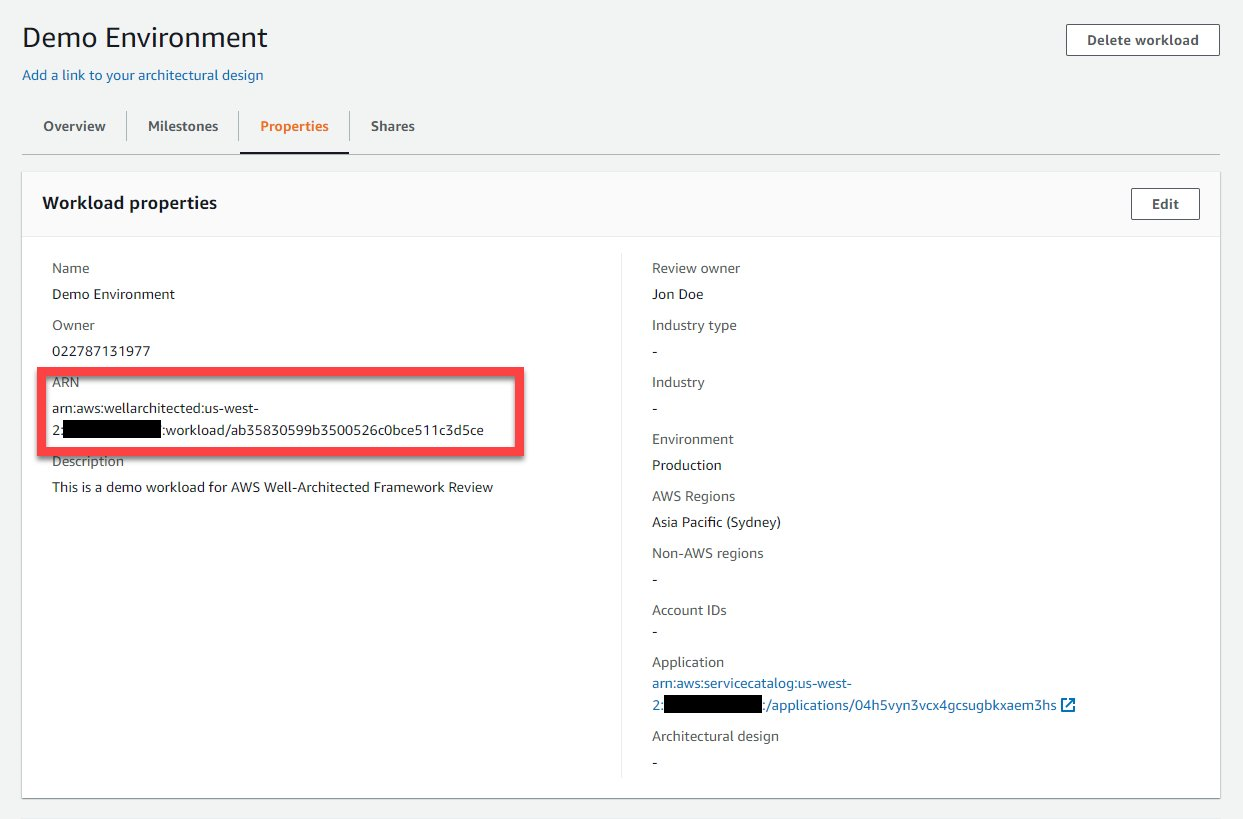
    Optional: Once the workload is created, note the workload ARN. You can find the workload ARN in the Properties section of the workload resource you created (Figure 6). For steps on how to identify your workload, refer to Well-Architected Tool User Guide on viewing a workload.

    AWS Well-Architected Tool showing workload ARN

    Figure 6. AWS Well-Architected Tool showing workload ARN

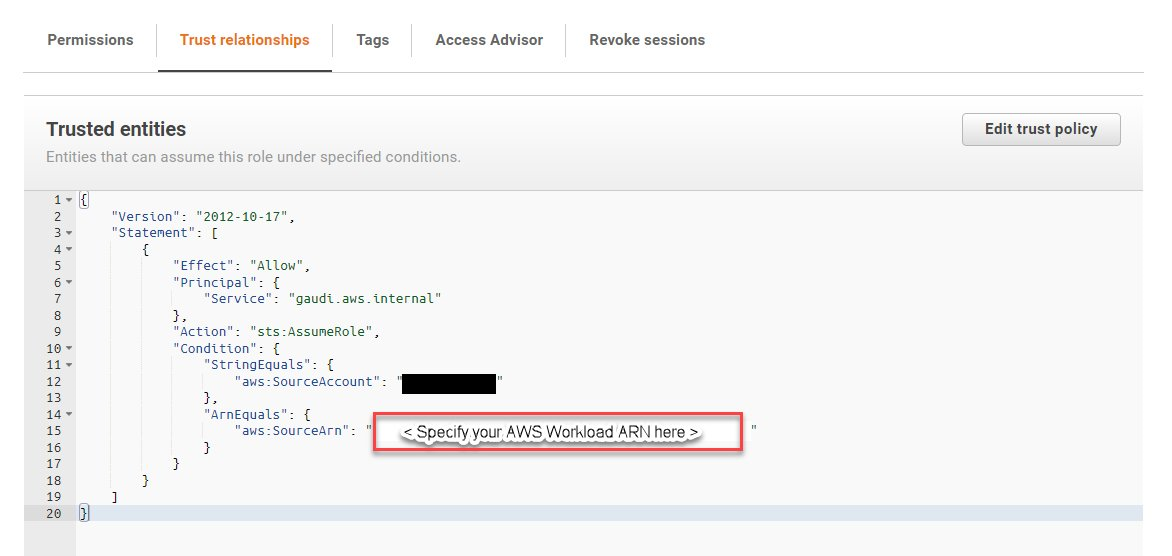
  3. To collect Trusted Advisor checks from accounts other than the account where the workload you are reviewing exists, you must perform two steps. You need to ensure the account IDs are listed in the workload properties for the workload you are reviewing. You must then create an IAM role in the account from which Trusted Advisor checks will be collected with the following permission and trust relationship (Figures 7 and 8). For more information on how to setup this permission, refer to the feature documentation.
    Permissions needed by AWS Well-Architected Tool to interrogate AWS Trusted Advisor

    Figure 7. Permissions needed by AWS Well-Architected Tool to interrogate AWS Trusted Advisor

    The trust relationship allowing AWS Well-Architected Tool to assume policy on behalf of the workload

    Figure 8. The trust relationship allowing AWS Well-Architected Tool to assume policy on behalf of the workload

Using integration with AWS Trusted Advisor for insights during reviews

Once the feature is enabled, additional insights will be noticeable about the resources in your workload using Trusted Advisor checks. Let’s explore an example question. In this case, we will use Question 9 from the Reliability Pillar, as there are Trusted Advisor checks related to the best practices in it: How do you back up data?

  1. AWS Well-Architected Reliability Question 9 includes best practices that are related to how workload backup is performed to support the ability for the workload to recover from failure. Current findings using Trusted Advisor checks indicates the workload may not be configured based on the “Perform data backup automatically” best practice in the Reliability Pillar (Figure 9).

    "Perform data backup automatically" best practices

    Figure 9. “Perform data backup automatically” best practices

  2. To access Trusted Advisor checks as insights, you can select a question in the Well-Architected Tool (Figure 10). If there are related Trusted Advisor checks available for a question, there will be a “View checks” button like the screenshot below. You can also select the “Trusted Advisor checks” tab.

    Trusted Advisor checks that map to best practices

    Figure 10. AWS Trusted Advisor checks that map to best practices

  3. Trusted Advisor checks are available, which provide insights related to the best practice in the question. You will also notice the state of resources recommendations and the count of resources. Trusted Advisor checks that relate to the best practice “Perform data backup automatically” are displayed. One of the Trusted Advisor checks identified with a x in a circle (denoting “Action recommended”) status is on the Amazon Elastic Block Storage (Amazon EBS) snapshots availability to recover your EBS volume from in the event of disaster (Figure 11).

    AWS Trusted Advisor check for Amazon EBS snapshots with "Action recommended"

    Figure 11. AWS Trusted Advisor check for Amazon EBS snapshots with “Action recommended”

  4. Exploring the Trusted Advisor Console, you can identify the EBS volume ID that has been detected with no snapshot in this us-west-2 region (Figure 12).

    An EBS volume that does not have snapshots

    Figure 12. An EBS volume that does not have snapshots

  5. With the insights from Trusted Advisor, we can quickly determine that the “Perform data backup automatically” best practice is not in place, as we do not have Amazon EBS snapshots enabled. Through the “helpful resources” section, instructions can be found to help automate the snapshot creation of Amazon EBS volume (Figure 13). One method to achieve this is to use AWS Backup.

    Resources with details about best practices, including links to learn more

    Figure 13. Resources with details about best practices, including links to learn more

  6. Using AWS Backup you can define a backup plan to automate snapshots creation of the EBS volume. Using this plan, you adjust the frequency of the backup to help achieve your recovery time objective and recovery point objective (Figure 14). For more information on how to configure EBS volume backup plan, refer to the Developer Guide on creating a backup plan.

    Setup automatic Amazon EBS volume snapshots

    Figure 14. Setup automatic Amazon EBS volume snapshots

  7. Once this improvement is implemented and the related EBS volume snapshot is taken, Trusted Advisor will reflect the changes to the resource (Figure 15).

    Amazon EBS volume with a snapshot

    Figure 15. Amazon EBS volume with a snapshot

  8. The next time we perform a Well-Architected Framework Review on this workload, the related AWS Trusted Advisor Check will show no action required with a check-mark status (Figure 16).
    AWS Trusted Advisor checks that represent improvements that have been implemented

    Figure 16. AWS Trusted Advisor checks that represent improvements that have been implemented

    Optional: For access to the list of Trusted Advisor checks in .csv format, you can click on the “Download check details” button on each question to download the resources that were checked in relation to the specified best practices (Figure 17).

    "Download check details" button

    Figure 17. “Download check details” button

  9. Once implemented, this improvement ensures a means to recover the EBS volume data in the event of disaster. This makes the resources in the workload better aligned to the AWS Reliability Pillar Design principle of “Automatically recover from failure”. To reflect this alignment in the Well-Architected Tool, you can tick on the best practice check items under the related questions (Figure 18).

    A milestone with updated best practices based on improvements that have been implemented

    Figure 18. A milestone with updated best practices based on improvements that have been implemented

  10. Finally, you can create a milestone to capture a point in time state of your workload WAFR. As you continuously optimize with more WAFRs and improvements, the number of high- and medium-risk items identified within each review will decrease. You will notice the continuous optimization of your workload over time, as in Figure 19.

    The history of improvements being made over time

    Figure 19. The history of improvements being made over time

Conclusion

Using the AWS Well-Architected integration with AWS Trusted Advisor, customers have a mechanism to accelerate the “learn, measure, and improve” Well-Architected virtuous cycle, creating an optimization flywheel. We have demonstrated the value of creating acceleration through the insights from Trusted Advisor checks. You now know how to enable the integration with Trusted Advisor and have seen an example of how the insights can accelerate your review cycle. You will notice the improvements you make over time will reflect in the Trusted Advisor checks as you review the milestones for your workloads. Enable this feature on your next Well-Architected Framework Review (WAFR) to measure the impact that data-driven insights from Trusted Advisor can have on reducing the time-to-value for your reviews. For more information consider these additional resources. You can contact your account team for support in running WAFRs or check out the AWS Well-Architected Partner Program to find a partner that can help you run a review. Additionally, running a WAFR with a partner assisting you in remediating risks may also provide funding credits to offset the costs required to make the improvements.

“Perform data backup automatically” is part of the Reliability Pillar of the AWS Well-Architected Framework. AWS Well-Architected is a set of guiding design principles developed by AWS to help organizations build secure, high-performing, resilient, and efficient infrastructure for a variety of applications and workloads. Use the AWS Well-Architected Tool to review your workloads periodically to address important design considerations and ensure that they follow the best practices and guidance of the AWS Well-Architected Framework. For follow up questions or comments, join our growing community on AWS re:Post.


Defeating Phishing-Resistant Multifactor Authentication

Post Syndicated from Bruce Schneier original https://www.schneier.com/blog/archives/2022/11/defeating-phishing-resistant-multifactor-authentication.html

CISA is now pushing phishing-resistant multifactor authentication.

Roger Grimes has an excellent post reminding everyone that “phishing-resistant” is not “phishing proof,” and that everyone needs to stop pretending otherwise. His list of different attacks is particularly useful.

Enriching operational events with AWS Serverless

Post Syndicated from James Beswick original https://aws.amazon.com/blogs/compute/enriching-operational-events-with-aws-serverless/

This post was written by Ben Moses, Senior Solutions Architect, Enterprise.

AWS Serverless is a fit for many IT automation and operations use cases, especially for reacting to events. Infrastructure events are a useful way to understand the health of your infrastructure that supports your applications and customers and this blog examines using serverless to help enrich these operational events.

The scenario used in this post shows how an infrastructure event can be intercepted in real-time, enriched with additional information from your AWS environment and workloads, and be sent to a downstream consumer with the added valuable information.

This example focuses on Amazon EC2 state change events. The concept applies to any type of event, for example those emitted by other AWS services to Amazon CloudWatch Events. These events could also include events produced by AWS Config, and some of AWS CloudTrail’s events, including CloudTrail Insights.

The purpose is to add more valuable information and context to events in real-time. Operators and downstream consumers can then identify emerging patterns in near real-time.

How does this happen today?

It is common for existing solutions to store infrastructure events in whatever format the source system generates, or in a standardized open or proprietary format. Operations staff and systems then analyze these logs to understand patterns and to support root cause analysis. This data must often be enriched by other sources to give it context and meaning. This is done either in a scheduled batch operation by using CSV data from other systems, or by integrating with other enterprise tooling.

The state of your cloud infrastructure changes frequently due to the elasticity and disposability of resources. This can cause an issue with your data quality when using the schedule batch method. When you come to enrich an infrastructure event, the state may have changed by the time your scheduled batch runs. This leads to gaps or inaccuracies in data, which makes it harder for operators to spot trends and anomalies.

A serverless approach

This example uses serverless services and concepts from event driven architecture (EDA). With this architecture, you only pay when events happen and are enriched. There’s no need for any third-party tooling, and your events are enriched in near real-time.

The EC2 “State Change Event” is enriched by obtaining the instance’s name tag, if it has one. The end-to-end journey look like this:

Overview

  1. An EC2 instance’s state changes (i.e., shutdown, restart).
  2. An Amazon EventBridge rule that matches the event pattern triggers a target action to run an AWS Step Functions state machine.
  3. The state machine transforms inputs, makes a native AWS API SDK call to the EC2 service to find a name tag, and emits a newly enriched event back to EventBridge.
  4. An EventBridge rule matching the enriched event triggers an action to send an email via Amazon SNS to simulate a downstream consumer.

EventBridge is a serverless event bus that can be used with event driven architectures on AWS. An EventBridge rule is defined with a pattern, and if an event matches that pattern, then the rule’s target action is triggered. In this example, the rule is:

{
  "detail-type": ["EC2 Instance State-change Notification"],
  "source": ["aws.ec2"]
}

An EC2 state change event looks like this:

{
  "version": "0",
  "id": "672123fe-53aa-3b22-3b37-1fae26df2aff",
  "detail-type": "EC2 Instance State-change Notification",
  "source": "aws.ec2",
  "account": "1234567890",
  "time": "2022-08-17T18:25:01Z",
  "region": "eu-west-1",
  "resources": [
    "arn:aws:ec2:eu-west-1:1234567890:instance/i-1234567890"
  ],
  "detail": {
    "instance-id": "i-0123456789",
    "state": "running"
  }
}

See the detail-type and source fields in the event. These match the rule and this entire event payload is passed on to the next component of the architecture: the Step Functions state machine.

Step Functions uses JSONPath to select, transform, and move data through the states within a state machine. This flexibility means that, in this example, no compute resources such as AWS Lambda are required. This can mean less custom code, lower cost, and less complexity.

Step Functions Workflow Studio lets you design workflows visually. These are the key actions that take place when the state machine runs using the EC2 state change event:

Step Functions state machine

1. Remove problem characters from input

Pass states allow us to transform inputs and outputs. In this architecture, a Pass state is used to remove any problem characters from the incoming event that are known to cause issues in future steps, such as API calls to services.

In this example, the parameters for the API call used in Step 2 requires the EC2 instance ID. This information is in the detail of the original event, but the API action can’t use anything with a hyphen in it.

To solve this, use a JSONPath Parameter to effectively rewrite this information without the hyphen. This creates a new field named instanceid, which is assigned the value from the original event’s detail.

{
  "instanceid.$": "$.detail.instance-id"
}

2. Get instance name from Tag

The “EC2: DescribeInstances” task in Step Functions is an example of a native SDK integration with an AWS service. This action expects a single parameter to the API, an array of EC2 instance IDs.

{
  "InstanceIds.$": "States.Array($.detail.refined.instanceid)"
}

The States.Array() intrinsic function is used to wrap the instance ID from the re-written field created in step 1. This single-member array is then passed to the EC2 Describe Instances API.

When a response is received from the EC2 Describe Instances API call, it is passed to a Result Selector. The purpose of this is to extract the value of a “Name” tag, if one was returned from the EC2 Describe Instances API.

Step Functions supports the use of JSONPath filter expressions.

{
  "instancename.$": "$..Reservations[0].Instances[0].Tags[?(@.Key==Name)].Value",
  "instanceid.$": "$.Reservations[0].Instances[0].InstanceId"
}

To understand the advanced JSONPath filter expression used in this example, read this blog post.

If an error occurs with the API call, or the filter expression is unable to find a “Name” tag on the EC2 instance, then Step Functions allows you to handle these errors within the workflow.

3. Convert instance name to a string

The output from the previous state returns an array, but an EC2 instance can only have one unique “Name” tag. A pass state is used again, with a parameter as seen in Step 1. This parameter expression takes the first element from the array and stores it in a new field named instancename.

{
  "instancename.$": "$.detail.refined.instancename[0]",
  "instanceid.$": "$.detail.refined.instanceid"
}

As with previous steps, the instanceid is re-written as part of the output, and both of these values are appended to the state’s output.

4. Get default name from Parameter Store

If the filter expression in the result selector in step 2 fails for any reason, then Step Functions error handling moves here.

Failures can happen for a variety of reasons, and with Step Functions, you can branch out error handling for each different error type. In this example, all errors are dealt with the same regardless of the cause being a missing “Name” tag, or a permissions issue. In this architecture, a default placeholder value is used in place of the name of the instance. In your context, a different approach may be more suitable.

The default placeholder name is stored as a static value in AWS Systems Manager Parameter Store. The native Systems Manager: GetParameter action within Step Functions can retrieve this value directly. An advantage of this approach is that the parameter can be updated externally without having to make any changes to the Step Functions state machine itself.

5. Add ID back to refined

A pass state is used to format the response from the Parameter Store API and parameter expression then appends the default instance name on to the output.

Whether the workflow execution followed the intended execution path, or encountered an error, there is now an enriched event payload with an instance name.

6. Emit enriched event

The EventBridge: PutEvents native SDK action within Step Functions is used to construct and emit the enriched event.

{
  "Entries": [
    {
      "Detail": {
        "Message.$": "$"
      },
      "DetailType": "EnrichedEC2Event",
      "EventBusName": "serverless-event-enrichment-ApplicationEventBus",
      "Source": "custom.enriched.ec2"
    }
  ]
}

The DetailType and Source of the enriched event are custom values, specified in the last step of the state machine. As you consider schemas for your events within your organization, note that the AWS prefix is reserved for AWS service events.

The enriched event payload looks like this:

{
  "version": "0",
  "id": "a80e378b-e9a7-8007-1f18-b947e6d72c4b",
  "detail-type": "EnrichedEC2Event",
  "source": "custom.enriched.ec2",
  "account": "123456789",
  "time": "2022-08-17T18:25:03Z",
  "region": "eu-west-1",
  "resources": [
    "arn:aws:states:eu-west-1:123456789:stateMachine:EventEnrichmentStateMachine-2T5jFlCPOha1",
    "arn:aws:states:eu-west-1:123456789:execution:EventEnrichmentStateMachine-2T5jFlCPOha1:672123fe-53aa-3b22-3b37-1fae26df2aff_90821b68-ba92-2374-5015-8804c8da5769"
  ],
  "detail": {
    "Message": {
      "version": "0",
      "id": "672123fe-53aa-3b22-3b37-1fae26df2aff",
      "detail-type": "EC2 Instance State-change Notification",
      "source": "aws.ec2",
      "account": "123456789",
      "time": "2022-08-17T18:25:01Z",
      "region": "eu-west-1",
      "resources": [
        "arn:aws:ec2:eu-west-1:123456789:instance/i-123456789"
      ],
      "detail": {
        "instance-id": "i-123456789",
        "state": "running",
        "refined": {
          "instancename": "ec2-enrichment-demo-instance",
          "instanceid": "i-123456789"
        }
      }
    }
  }
}

Consuming enriched events

When enriching event data in real-time, the events are only valuable if they’re consumed. To use these enriched events, a consuming service must create and own a new EventBridge rule on the custom application bus. In this architecture, an appropriate rule pattern is:

{
  "detail-type": ["EnrichedEC2Event"],
  "source": ["custom.enriched.ec2"]
}

The target of the rule depends on the use case. For operational events, then service management applications or log aggregation services may make the most sense. In this example, the rule has an SNS topic as the target. When SNS receives a message, it is sent to operator via email. With EventBridge, future consumers can add their own rules to match the enriched events, and add their specific target actions to suit their use case.

Conclusion

This post shows how you can create rules in EventBridge to react to operational events from AWS services. These events are routed to Step Functions, which runs a workflow consisting of steps to enrich the event, handle errors, and emit the enriched event. The example shows how to consume the enriched events, resulting in an operator receiving an email.

This example is available on GitHub as an AWS Serverless Application Model (AWS SAM) template. It contains instructions to deploy, test, and then remove all of the resources when you’ve finished.

For more serverless learning resources, visit Serverless Land.

Разследване на Валя Ахчиева: Горско правосъдие

Post Syndicated from Екип на Биволъ original https://bivol.bg/%D0%B3%D0%BE%D1%80%D1%81%D0%BA%D0%BE-%D0%BF%D1%80%D0%B0%D0%B2%D0%BE%D1%81%D1%8A%D0%B4%D0%B8%D0%B5.html

сряда 9 ноември 2022


И какво?  Какво като ходим по горите и показваме незаконна сеч или законна сеч в комплект с незаконни горски пътища? Какво като показваме на екрана  стотици кадри с отсечени стогодишни…

Ани Ерно, автофикцията и дългата сянка на #MeToo

Post Syndicated from Меглена Боденска original https://toest.bg/annie-ernaux-nobel-prize-me-too/

„Глас от небето“

На 6 октомври 2022 г. по обяд литературният свят е затаил дъх в очакване да бъде обявено името на нобелиста за литература. Телефонът на 82-годишната французойка Ани Ерно упорито звъни. Тя не отговаря, оставя го за по-късно, когато приключи работа. В този момент Арно е заета с присъщото на писателите занимание: писане.

В 13:00 часа шведско време Матс Малм, постоянният секретар на Шведската академия, съобщава, че високото отличие се присъжда на Ани Ерно за „куража и клиничната прецизност, с които разкрива корените, отчуждението и колективните ограничения на личната памет“. Пред телевизионния екран в апартамента си в Стокхолм Мария Бьоркман, шведската преводачка на писателката, се разплаква и прегръща кучето си – била е убедена, че няма да наградят Ерно, защото… е спрягана за фаворит!

Матс Малм добавя, че не са успели да се свържат с Ани Ерно, но се надяват тя скоро да научи новината. Думи стряскащи за онези, които си спомнят неловкото положение с Боб Дилън през 2016 г. – Шведската академия не получи никаква вест от него цели две седмици. През изминалите шест години августейшият блясък на институцията е помръкнал (повече за това – по-нататък) и тя няма кредит за повече „неловкости“.

Новината достига Ерно един час по-късно. Тя е сама, в кухнята на каменната си къща в парижкото предградие Сержи, където живее от 40 години. Слуша радио, за да разбере кой е нобелистът за литература. Когато чува своето име, чувството било „сякаш сте в пустинята и изведнъж някой ви заговаря от небесата“, споделя тя по-късно в телефонно интервю за Нобеловата фондация.

Съвсем скоро Ерно – сърдечна, одухотворена, по момичешки витална – се свързва с Шведската академия. Отговаря, че за нея отличието е „голяма отговорност и едновременно с това – чест“. Отговорност да продължи борбата срещу несправедливостите, извършвани не само спрямо жените, а и спрямо „доминираните“, ако използваме термина на френския социолог Пиер Бурдийо.

Нобеловото жури може да си отдъхне.

Критериите за литературния „Нобел“

Нека припомним, че според завещанието на дарителя Алфред Нобел наградите, носещи неговото име, се връчват „на онези, които през изминалата година са допринесли най-много за благото на човечеството“. Нобел е казвал, че иска да помогне на хора мечтатели, които трудно си пробиват път. Разпоредил е също така в областта на литературата да се награждава онзи, който „е създал най-забележителната творба с идеалистична насоченост“.

Разковничето тук е в тълкуванието на израза „идеалистична насоченост“. То се е менило през десетилетията, най-вече спрямо идейно-естетическите възгледи на водещите фигури във вътрешния Нобелов комитет на Шведската академия. Това е група от петима членове, които пресяват кандидатите до кратък списък от около пет имена. След това решението се обсъжда и гласува от всички 18 членове на Академията. Хуманизмът и идеализмът, които са предпоставка за награждаване, често остават неразбрани. Може да изглежда, че Шведската академия пренебрегва всепризнати майстори на изящната словесност, а отдава предпочитанията си на творци с изявена политическа позиция.

Предвид благородните критерии, заложени от Алфред Нобел, Ани Ерно е повече от добър избор. Освен това тя се вписва в силната традиция на работническата литература в Швеция, както и в коренно променения обществен климат след движението #MeToo.

Деликатното положение на Нобеловото жури

Изборът на Ерно обаче ще остане недоразбран, ако не се вземе предвид особеното положение на Шведската академия към момента.

През последните години институцията имаше повод добре да си припомни заветите на Нобел. Грандиозният скандал, подпален от движението #MeToo през 2017 г., разкри редица нередности. Скандалът избухна, когато 18 жени свидетелстваха, че са били жертви на сексуално насилие и тормоз от страна на съпруга на тогавашната членка на Шведската академия Катарина Фростенсон. По-късно две от жените повдигнаха обвинения за изнасилване срещу Жан-Клод Арно и той беше осъден на две години затвор. Паралелно с този скандал стана ясно и това, че Арно през годините е разпространил предварително имената на поне седем литературни лауреати. (Темата е изчерпателно представена в документалния роман „Клубът“ на Матилда Вос Густавсон, София: Гутенберг, 2022 г.)

След масовите оставки през 2018 г. се наложи крал Карл ХVI да промени Устава на Шведската академия, с което на членовете на институцията беше дадено право да напуснат по собствено желание (дотогава длъжността е била пожизнена, оставки не се приемали, а местата оставали незаети до смъртта на съответното лице) и беше въведено правилото членовете, които са били неактивни повече от 2 години, автоматично да бъдат отстранени.

По-късно към вътрешния Нобелов комитет на Академията бяха присъединени петима външни членове за период от 2 години, но някои от тях напуснаха с гръм и трясък след избора на Петер Хандке през 2019 г. Тогава бе направена още по-сериозна промяна: 3-годишни мандати за членовете на вътрешния комитет. През 2020 г. бяха поканени и 10 външни експерти (без право на глас) от различни езикови области. В бъдеще не са изключени и други реформи.

До 2021 г. грозната сянка на скандалите около литературните Нобелови награди не се беше разсеяла. След представянето на лауреата Абдулразак Гурна шведските медии обсипаха председателя на вътрешния Нобелов комитет Андерш Улсон с въпроси дали престижът на наградата не е уронен.

Писателският път на Ерно

Ани Ерно е родена на 1 септември 1940 г. в Лилбон, Нормандия, и израства в Ивто, градче в същата област. Там родителите на Ерно държат кафене и бакалия. За тях това е стъпало нагоре в обществото, защото произхождат от семейства на безимотни селяни. Майката на Ерно е решена да даде на дъщеря си онова, което самата тя не е имала: добро образование. Малката Ани е изпратена в частен католически пансион. Получава и висше образование, става учителка по литература. Вече се числи към буржоазията, а не към работническата класа и това отваря пропаст между нея и света, от който произхожда. Оттук нататък ще се чувства своя сред чужди и чужда сред свои. „Отчуждението“, назовано в обосновката на Шведската академия, е високата цена на социалния възход.

Ани Ерно осъзнава, че иска да стане писателка, на 22-годишна възраст, след като написва роман, който е отхвърлен. Мисълта да продължи да пише не ѝ дава мира, но се намесва животът – тя забременява, прави незаконен аборт, по-късно се омъжва и ражда двамата си сина. Най-накрая, когато е на 32, намира време да пише. „Сякаш не можех повече да живея, без да пиша. И все още е така“, споделя Ерно в интервю за литературното предаване Babel („Вавилон“) на Шведската телевизия.

Нейните първи три публикувани творби са художествени с автобиографични мотиви. Ерно обаче намира своя уникален разказвачески глас през 1983 г. с четвъртото си произведение – La Place („Мястото“). Повестта е литературният пробив на Ерно, с него печели наградата „Ренодо“ за 1984 г. и впоследствие е преведена на няколко езика.

В „Мястото“ (на френски думата има социална конотация, подразбира се като „мястото в обществото“) Ерно търси истината и нищо освен истината за покойния си баща. Слага на операционната маса, под безжалостната светлина на хирургическите лампи, спомените си за него и ги описва „с клинична прецизност“. Стилът на Ерно се отличава с безкомпромисна откровеност, простота и отсъствие на смекчаваща ирония и сантимент. Ето как го определя самата тя в „Мястото“ (прев. от фр. Светлана Даскалова, към сборника „С най-хубав спомен“, съст. Николай Стоянов, София: Народна култура, 1986):

Никаква поезия на спомена, нито ликуваща насмешливост. Равният стил ми се налага естествено, същият, който използвах някога в писмата до родителите си, за да им съобщя важни новини.

Откровеността на Ерно е повече от недискретност, тя граничи с предателство към средата, от която произлиза:

Говорехме си винаги сопнато. Учтивият тон беше запазен за чуждите хора. Навикът бе тъй силен, че макар да говореше правилно в присъствието на други, за да ми забрани да се катеря по купчина камъни, баща ми се връщаше към грубия тон, нормандския акцент, и заличаваше доброто впечатление. Не се беше научил да ми се кара изискано, пък и аз не бих повярвала в заплаха от плесница, изречена граматически правилно.

„Да пиша не означава за мен да протягам ръце към небето, а да дълбая, да се заровя в нещо“, обобщава Ерно. Темите ѝ са изключително автобиографични, от кориците на книгите ѝ често ни гледат нейни черно-бели фотографии. Авторката описва лица, събития и фрагменти като безстрастен страничен наблюдател. Но тази хладност е подвеждаща. „Чувствата нямат място в творбите ми – те не са описание на чувства“, казва Ерно, но с клиничната си дистанцираност текстовете ѝ по удивителен начин събуждат емоциите на читателя.

През дългия си творчески път Ани Ерно е написала над 20 романа. Тя не крие, че е повлияна от Марсел Пруст и неговия опус „По следите на изгубеното време“, но също и от Пиер Бурдийо – социолога, съставил диаграми на различните вкусове и привички на работническата и на средната класа.

Сред по-значимите произведения на Ерно е Une Femme („Eдна жена“) от 1987 г., роман за нейната майка, силна и волева жена, която към края на живота си страда от деменция. Обрисувайки детайлно материалната страна на реалността, Ерно изважда наяве красотата и в най-мъчителните сцени. За по-късната си книга на същата тема Je ne suis pas sortie de ma nuit („Не съм излязла от нощта си“) Ерно казва в интервю пред Деница Банчева за в. „Литературен форум“ през 1997 г.:

… когато описвам общуването между майка ми и една друга възрастна жена, която страда от болестта на Алцхаймер и лежи в същата стая, красотата се появява – макар че и двете са изгубили паметта си и не разбират какво си говорят, те се държат за ръце и преливат една в друга нещо топло, нежно… Струва ми се, че тази сцена е красива като картина на Джото, че изразява абсолютната красота на човешкото.

През 1997 г. е публикуван романът La honte („Срамът“), своего рода продължение на „Мястото“. Още от първото изречение на творбата става ясна темата му: 12-годишната Ани Ерно вижда как баща ѝ се опитва да убие с брадва майка ѝ в мазето. Срамът и чувството, че произлиза от простолюдна среда, породени от страшната сцена, никога не я напускат. Тя казва, че може би това травматично преживяване я е направило писателка.

Ерно не търси темите си, те я намират сами, а понякога узряват у нея с години. Но има общ знаменател между тях: „Пиша книги, за които после не мога да говоря, които правят чуждите погледи непоносими за мен.“

Като шедьовър в творчеството на Ерно Шведската академия откроява романа L’événement („Събитието“) от 2000 г. Той разказва за нелегалния ѝ аборт през 60-те години на ХХ век. Процедурата едва не я убива, а горчивината е още по-голяма заради презрението, което среща у околните. Романът е екранизиран през 2021 г. от Одре Диуан, писателка и режисьорка от френско-ливански произход. По-късно филмът печели „Златен лъв“ на 78-мия Международен филмов фестивал във Венеция.

Най-мащабният проект на Ерно, нейният magnum opus, e романът Les années („Годините“) от 2008 г., който попада в краткия списък на Международната награда „Букър“ през 2019 г. „Годините“ описват десетилетията след Втората световна война през призмата на живота на една жена. Разказът обаче е от първо лице множествено число и романът е наричан „първата колективна автобиография“. Очаква се „Годините“ да бъде публикуван на български до края на 2022 г. от издателство „Лист“ в превод на Валентина Бояджиева.

През 2016 г., в навечерието на движението #MeToo, Eрно публикува Mémoire de fille („Мемоарите на едно момиче“) – разказ за друга травма от младостта ѝ: как губи девствеността си в акт на границата между съгласието и принудата, докато е на летен лагер в Нормандия.

Сред творбите, върху които акцентира Шведската академия в представянето на Ерно, се откроява обаче липсата на едно ключово заглавие – Passion simple („Обикновена страст“) от 1992 г. Тъничката книжка разбунва страстите у френските читатели. Шведският превод излиза само година по-късно и придобива култов статус. Романът е публикуван и на български по същото време, но остава без отзвук у нас.

Краткият роман разказва за сексуалната връзка на разведената Ерно с по-млад женен мъж. Той е изпратен от източноевропейска държава на работа в Париж, харесва костюмите на „Ив Сен Лоран“, вратовръзките на „Черути“ и големите коли – и пие много, „нещо обичайно в източноевропейските страни“. Страстта пламва и угасва със заминаването на фаталния мъж през 1989–1990 г., времето на падането на Берлинската стена и ламбадата. Но епохата е само фонов шум, единствената реалност е вътрешната („Обикновена страст“, прев. от фр. Нона Стефанова, София: Прозорец, 1994):

От септември миналата година вече не правех нищо, само чаках, чаках един мъж да ми се обади и да дойде. Ходех в супермаркета, на кино, носех дрехи за гладене, четях, поправях писмени работи, вършех всичко точно както преди, но ако нямах старите навици, изпълнението на тези действия щеше да ми бъде невъзможно без някакво невероятно усилие. Особено когато говорех, имах чувството, че живея по инерция. Думите, изреченията, дори смехът се оформяха в устата ми без истинското участие на волята. Впрочем за тогавашните ми постъпки, за филмите, които съм гледала, за хората, с които съм се срещала, ми е останал само смътен спомен.

Френските читатели са развълнувани от моралния аспект на книгата, а някои я възприемат като унижение на жената, разказва Ерно пред Шведското радио през 1998 г. Любителките на любовни романи са разочаровани от отсъствието на поезия, романтика и сексуални подробности. Други смятат, че книгата описва нещата от живота такива, каквито са. Трети критикуват Ерно за пълната липса на свян, четвърти – че се държи недостойно за интелектуалка: слуша естрадни песни на Силви Вартан вместо класическа музика, купува си червило. Но читатели мъже се припознават в написаното от нея и са изненадани, че авторката е жена.

Списание „Мари Клер“ прави анкета дали книгата е феминистка, или не. Отговорът е „да“, защото мъжът е обект. „Обикновена страст“ е екранизирана през 2020 г. от френската режисьорка Даниел Арбид. Главните роли изпълняват Летисия Дош и руският балетист Сергей Полунин. Тези, които очакват сексуални подробности, този път няма да останат разочаровани.

Влиянието на Ерно върху по-младото поколение писатели

През последните десетилетия безстрастният автобиографичен стил на Ерно е намерил последователи. Шведската литературна критичка Улрика Милес нарича Ани Ерно „прамайка на автофиктивната вълна“:

Eрно има неколцина наследници в течението на автобиографичното писане, заляло през последното десетилетие особено Скандинавия, с автори като Рейчъл Куск, Вигдис Йорт, Карл Уве Кнаусгор. Това течение има свои представители и сред младите френски писатели, например Едуар Луи и Нина Бурауи, които имат набито око за ефекта на нисшия социален произход върху живота на индивида.

Реакциите в Швеция

Удостояването на Ерно с Нобелова награда бе прието радушно в Швеция, без да е голяма изненада. Във връзка с възродения интерес към книгите ѝ – в последните години бяха преиздадени ключовите творби на писателката, а през 2023 г. предстои да излезе шведският превод на най-новия ѝ роман Le jeune homme („Младият мъж“) – нейното име често се появява в медиите и беше на челните места в списъците на фаворитите за „Нобел“ на компаниите за залагания.

Автобиографичният есеистичен стил на Ерно улавя духа на времето, но всъщност доколко актуалните тенденции вълнуват Шведската академия, пита се литературната критичка Анина Рабе. Без съмнение Ани Ерно е достойна за „Нобел“, но все пак е интересно да се отчетат механизмите, издигнали я на литературния Олимп тъкмо сега, коментира критичката.

Други говорят без заобикалки. С избора на Ерно Шведската академия цели да остави годините на скандали зад себе си и да затвори главата, която бе принудена да отвори от движението #MeToo, смята Ханес Фосбу от културната редакция на Шведската телевизия.

Като „очакван, класически и популярен“ и „опит за прелъстяване на читателската публика“ определя избора Бьорн Виман от авторитетния шведски ежедневник „Дагенс Нюхетер“. За Виман изборът е дело на „новата“ Академия – половината от настоящите членове са избрани след 2018 г., като една трета са жени, най-голямото процентно съотношение в над 230-годишната история на институцията.

Улрика Милес смята, че от 2007 г. насам, когато „Нобел“ за литература получи Дорис Лесинг, „сенките на женското (нелегални аборти, сексуални посегателства, роли на любовница, разводи) са се нормализирали, женското се е приравнило с общочовешкото“.

Разбира се, има и не толкова възторжени гласове, които критикуват, че за пореден път е отличен писател, езикът на чиито творби е индоевропейски. А други намират разказа за борбата на една хетеросексуална жена да строши оковите на патриархата за… изтъркан и скучен.

Тази година Шведската академия насочи прожектора на славата към стойностна авторка, позната на ценителите на литературата в държавите с по-голям културен пазар, но почти анонимна у нас. Да, Ерно присъства с два превода на български и в задълбоченото интервю на Деница Банчева, но те са останали някак незабелязани. Да се надяваме, че Нобеловата награда ще ни помогне да я преоткрием.

Заглавна снимка: Стопкадър от интервю с Ани Ерно в предаването Pagina Dos по RTVE от май 2022 г. 

Източник

A New AWS Region Opens in Switzerland

Post Syndicated from Sébastien Stormacq original https://aws.amazon.com/blogs/aws/a-new-aws-region-opens-in-switzerland/

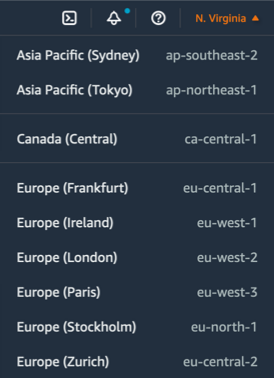
I am pleased to announce today the opening of our 28th AWS Region: Europe (Zurich), also known by its API name: eu-central-2.

An AWS Region allows you to deploy your most demanding workloads and replicate your applications and data across distinct groups of data centers called Availability Zones. This new Region has three fully redundant Availability Zones located in the vicinity of Zurich. It offers your customers low-latency access to your applications while meeting your data residency requirements.

Zurich

Regions and Availability Zones
AWS has the concept of a Region. Each Region is fully isolated from all other Regions. Within each Region, we have built Availability Zones. These Availability Zones are fully isolated partitions of our infrastructure that contain a cluster of data centers. Availability Zones are typically separated by multiple kilometers to mitigate the impact of disasters that could affect data centers. The distance between Availability Zones varies between Regions. The distance is large enough to avoid having data centers impacted by the same event at the same time but close enough to allow workloads with synchronous data replication. Availability Zones are linked by redundant, high-bandwidth, and low-latency network connections. Regions are linked by our custom-built, global, low-latency, private network with exabits per second of capacity in Europe.

Unlike other cloud providers, who often define a region as a single data center, the multiple Availability Zone design of every AWS Region offers advantages such as security, availability, performance, and scalability.

Instances and Services
The workloads deployed to this new Europe (Zurich) three-AZ Region can use C5, C5d, I3, I3en, M5, M5d, M6gd, R5, R5d, and T3 instances, and can use a long list of AWS services including Amazon API GatewayAWS AppConfigAWS Application Auto ScalingAmazon AuroraAmazon EC2 Auto ScalingAWS ConfigAWS Certificate ManagerAWS CloudFormationAWS CloudTrailAmazon CloudWatch, Amazon CloudWatch Events, Amazon CloudWatch LogsAWS CodeDeployAWS Database Migration Service (AWS DMS), AWS Direct ConnectAmazon DynamoDBAmazon Elastic Block Store (Amazon EBS),Amazon Elastic Compute Cloud (Amazon EC2)Amazon Elastic Container Registry (Amazon ECR)Amazon Elastic Container Service (Amazon ECS), AWS Fargate,  Amazon ElastiCacheAmazon EMRAmazon OpenSearch ServiceElastic Load Balancing, Elastic Load Balancing – Network (NLB), Amazon EventBridge, Amazon Simple Storage Service GlacierAWS Identity and Access Management (IAM)Amazon Kinesis Data StreamsAWS Key Management Service (AWS KMS)AWS Lambda, AWS MarketplaceAWS Health DashboardAmazon Relational Database Service (Amazon RDS)Aurora PostgreSQL, Amazon RedshiftAmazon Route 53Amazon Virtual Private Cloud (Amazon VPC)AWS Secrets ManagerAmazon Simple Storage Service (Amazon S3)Amazon Simple Notification Service (Amazon SNS)Amazon Simple Queue Service (Amazon SQS)AWS Step FunctionsAWS Support APIAmazon Simple Workflow Service (Amazon SWF), AWS Systems Manager, AWS Trusted AdvisorVM Import/ExportAWS VPN, and AWS X-Ray.

Continuous Investments in Switzerland
AWS has a long history of presence in Switzerland. We have worked with Swiss customers and partners since the launch of AWS 16 years ago. The first Swiss office was opened in Zurich in April 2016 to host the growing local team of technical and business professionals dedicated to supporting Swiss customers. In 2017, the AWS network was expanded into Switzerland with the launch of an Amazon CloudFront edge location and an AWS Direct Connect location. To support this growth, a second AWS office was opened in Geneva.

AWS plans to invest up to 5.9 billion Swiss francs (approximately $5.9 billion) in the Europe (Zurich) Region from 2022–2036 as we build, maintain, operate, and develop data centers to support the projected growth in demand for AWS technologies by our customers.

According to an AWS Economic Impact Study (EIS), this investment will contribute 16.3 billion Swiss francs (approximately $16.3 billion) to the GDP of Switzerland during the same period. This includes the value added by AWS services to the IT sector in Switzerland, as well as the direct, indirect, and induced effects of AWS purchases from the Swiss data center supply chain. The study estimates that this investment will support an average of 2,500 full-time jobs annually at external businesses in the Swiss data supply chain from 2022–2036.

Servicing our Swiss Customers
More than 10,000 Swiss customers use AWS services today. Organizations such as Fisch Asset Management, Helvetia, Eidgenössische Technische Hochschule Zürich (ETH Zürich), Richemont, Swiss Broadcasting Corporation (RSI), Swiss Post, Swisscom, and Swisstopo, just to name a few, use AWS. Private and public sector organizations in Switzerland use AWS to accelerate their time to market, reduce costs associated with IT operations, and scale their businesses globally.

Global luxury group Richemont, owners of prestigious brands like Cartier, Montblanc, IWC Schaffhausen, and Van Cleef & Arpels, moved its entire enterprise IT infrastructure, including 120 SAP instances, to AWS. AWS, with its depth and breadth of services, enables Richemont to provide their customers with new digital experiences faster, including personalized storefronts and styling services, video chat consultations featuring fashion shows customized to the shoppers’ tastes, and tailored offers for early access to new items before they hit stores.

Swisscom, Switzerland’s leading telecoms company and one of its leading IT companies, is using AWS’s proven and broad infrastructure and cloud capabilities to power its 5G network, increase operational efficiency, and fuel innovation. Swisscom is pursuing a cloud-first strategy and will use AWS to increase IT agility, drive operational efficiencies, and accelerate time to market for new information and communications technology (ICT) features and services.

With AWS infrastructure, Swiss startups have been able to quickly scale their businesses and compete globally. Ava, a digital women’s health startup (acquired by FemTec Health) with offices in Zurich, San Francisco, Makati, and Belgrade, is all in on AWS. They created the Ava Fertility Tracker as a daily companion for women, which provides women with real-time, personalized information about fertility, pregnancy, and general health. The Ava bracelet is now sold in 36 countries worldwide and has been running on AWS since the first sales day.

Extending Reach through AWS Partner Network
Switzerland-based AWS Partner Network (APN) Partners also welcomed the news of the launch of the Europe (Zurich) Region.

The APN includes tens of thousands of independent software vendors (ISVs) and systems integrators (SIs) around the world. AWS SIs, consulting partners, and ISVs help enterprise and public sector customers migrate to AWS, deploy mission-critical applications, and provide a full range of services for your cloud environments. We have more than 150 partners ready to help you in Switzerland, one third of them have their headquarters in the country.

Promoting a Diverse Community of Professionals
In December 2020, Amazon announced that it will help 29 million people around the world grow their technological skills with free cloud computing skills training by 2025. Switzerland is part of this global effort. Since 2019, AWS and our AWS training partner Digicomp have delivered training and certification programs to individual learners, customers, and AWS Partners to rapidly build cloud skills and close the skills gap.

Several universities in Switzerland have delivered AWS Academy courses as part of their curriculum, including FHNW (Fachhochschule Nordwestschweiz), Fachhochschule Luzern, and Technische Berufsschule Zürich. To date, 32 Swiss institutions participated in the AWS Academy program, and 16 of them offered classes in 2022.

In March 2022, AWS launched AWS re/Start in Switzerland in collaboration with Powerhouse Lausanne, a training provider that promotes digital equality and diversity in Switzerland. A second cohort of AWS re/Start began in October 2022 in collaboration with the non profit Powercoders, which is focused on teaching IT skills specifically to refugees and helping them transition into the Swiss labor market.

Available Today
With the launch of the Europe (Zurich) Region, AWS is further expanding its infrastructure offering, empowering you with the flexibility to run applications on the most secure and reliable cloud infrastructure while maintaining local data residency and providing the lowest possible latency for Swiss end-users. The new Region is available today on the AWS Management Console and for your API calls.
Europe (Zurich) Region

Go and deploy your workloads on eu-central-2 today!

— seb

Introducing AWS Resource Explorer – Quickly Find Resources in Your AWS Account

Post Syndicated from Danilo Poccia original https://aws.amazon.com/blogs/aws/introducing-aws-resource-explorer-quickly-find-resources-in-your-aws-account/

Looking for a specific Amazon Elastic Compute Cloud (Amazon EC2) instance, Amazon Elastic Container Service (Amazon ECS) task, or Amazon CloudWatch log group can take some time, especially if you have many resources and use multiple AWS Regions.

Today, we’re making that easier. Using the new AWS Resource Explorer, you can search through the AWS resources in your account across Regions using metadata such as names, tags, and IDs. When you find a resource in the AWS Management Console, you can quickly go from the search results to the corresponding service console and Region to start working on that resource. In a similar way, you can use the AWS Command Line Interface (CLI) or any of the AWS SDKs to find resources in your automation tools.

Let’s see how this works in practice.

Using AWS Resource Explorer
To start using Resource Explorer, I need to turn it on so that it creates and maintains the indexes that will provide fast responses to my search queries. Usually, the administrator of the account is the one taking these steps so that authorized users in that account can start searching.

To run a query, I need a view that gives access to an index. If the view is using an aggregator index, then the query can search across all indexed Regions.

Aggregator index diagram.

If the view is using a local index, then the query has access only to the resources in that Region.

Local index diagram.

I can control the visibility of resources in my account by creating views that define what resource information is available for search and discovery. These controls are not based only on resources but also on the information that resources bring. For example, I can give access to the Amazon Resource Names (ARNs) of all resources but not to their tags which might contain information that I want to keep confidential.

In the Resource Explorer console, I choose Enable Resource Explorer. Then, I select the Quick setup option to have visibility for all supported resources within my account. This option creates local indexes in all Regions and an aggregator index in the selected Region. A default view with a filter that includes all supported resources in the account is also created in the same Region as the aggregator index.

Console screenshot.

With the Advanced setup option, I have access to more granular controls that are useful when there are specific governance requirements. For example, I can select in which Regions to create indexes. I can choose not to replicate resource information to any other Region so that resources from each AWS Region are searchable only from within the same Region. I can also control what information is available in the default view or avoid the creation of the default view.

With the Quick setup option selected, I choose Go to Resource Explorer. A quick overview shows the progress of enabling Resource Explorer across Regions. After the indexes have been created, it can take up to 36 hours to index all supported resources, and search results might be incomplete until then. When resources are created or deleted, your indexes are automatically updated. These updates are asynchronous, so it can take some time (usually a few minutes) to see the changes.

Searching With AWS Resource Explorer
After resources have been indexed, I choose Proceed to resource search. In the Search criteria, I choose which View to use. Currently, I have the default view selected. Then, I start typing in the Query field to search through the resources in my AWS account across all Regions. For example, I have an application where I used the convention to start resource names with my-app. For the resources I created manually, I also added the Project tag with value MyApp.

To find the resource of this application, I start by searching for my-app.

Console screenshot.

The results include resources from multiple services and Regions and global resources from AWS Identity and Access Management (IAM). I have a service, tasks, and a task definition from Amazon ECS, roles and policies from AWS IAM, log groups from CloudWatch. Optionally, I can filter results by Region or resource type. If I choose any of the listed resources, the link will bring me to the corresponding service console and Region with the resource selected.

Console screenshot.

To look for something in a specific Region, such as Europe (Ireland), I can restrict the results by adding region:eu-west-1 to the query.

Console screenshot.

I can further restrict results to Amazon ECS resources by adding service:ecs to the query. Now I only see the ECS cluster, service, tasks, and task definition in Europe (Ireland). That’s the task definition I was looking for!

Console screenshot.

I can also search using tags. For example, I can see the resources where I added the MyApp tag by including tag.value:MyApp in a query. To specify the actual key-value pair of the tag, I can use tag:Project=MyApp.

Console screenshot.

Creating a Custom View
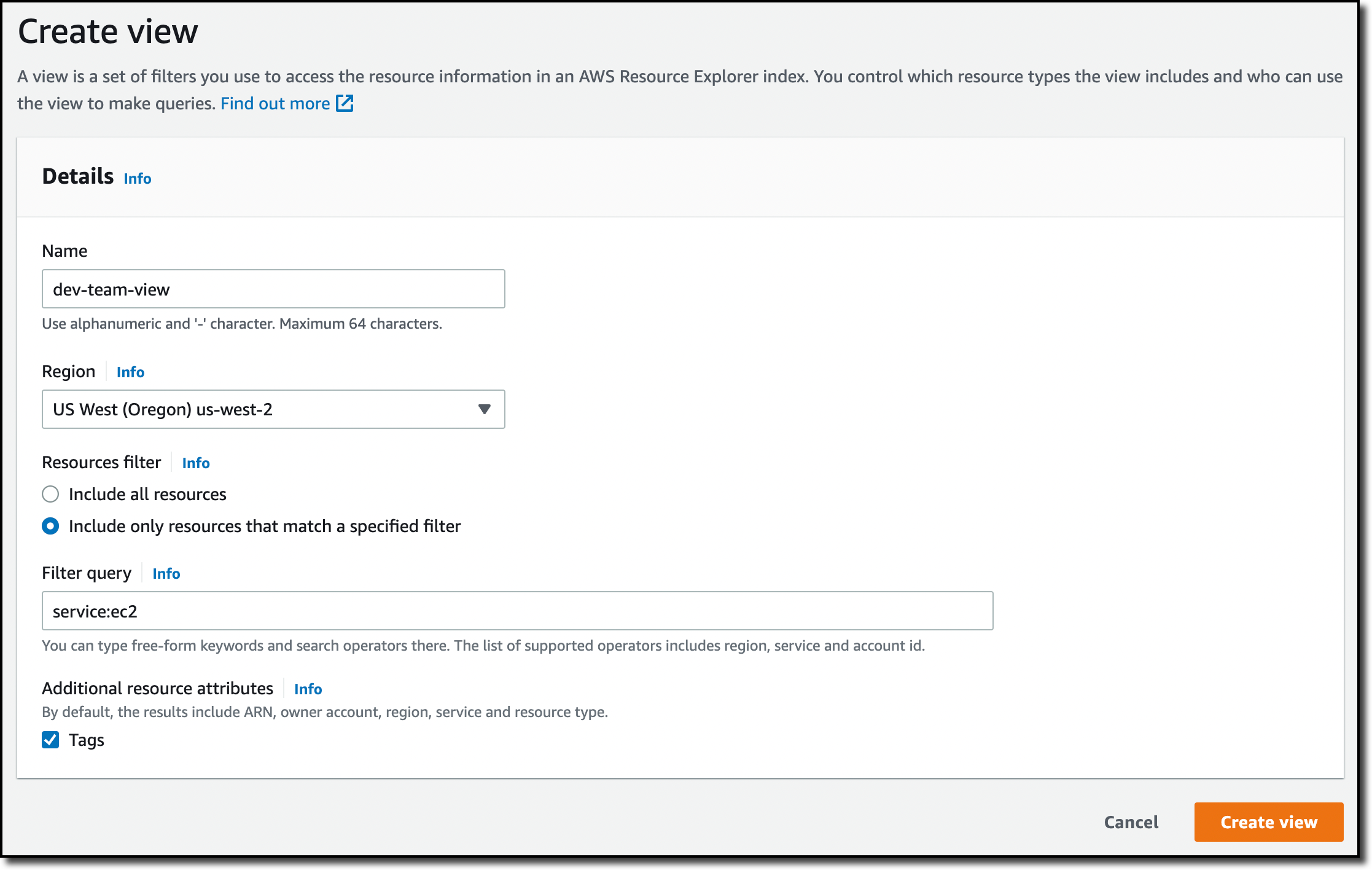
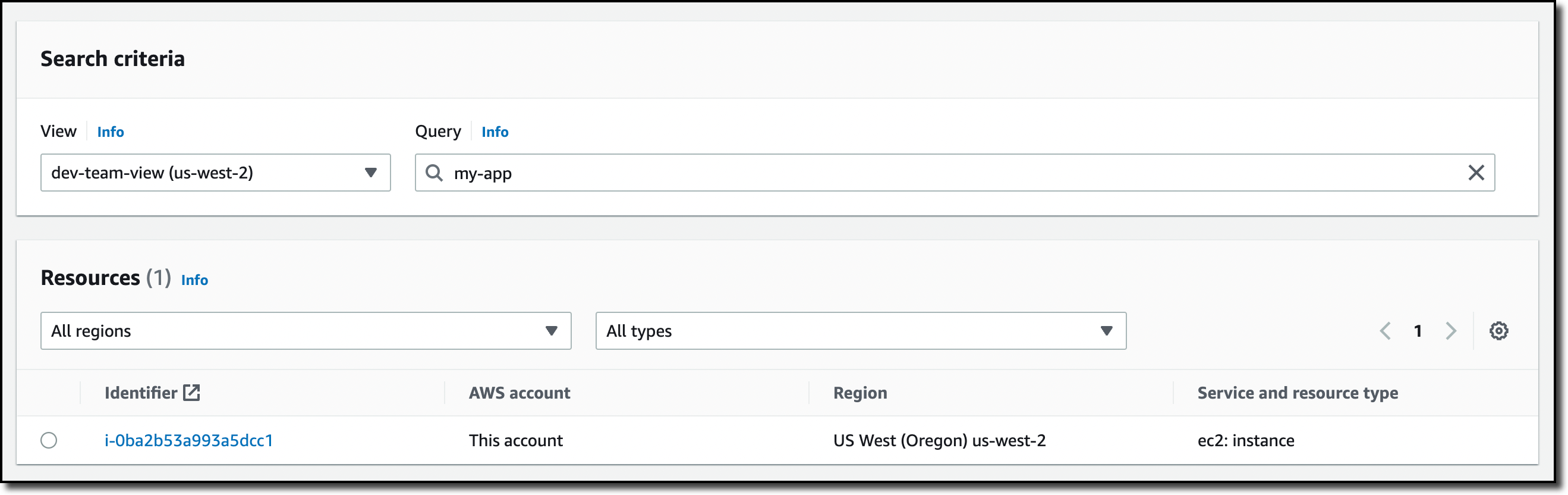
Sometimes you need to control the visibility of the resources in your account. For example, all the EC2 instances used for development in my account are in US West (Oregon). I create a view for the development team by choosing a specific Region (us-west-2) and filtering the results with service:ec2 in the query. Optionally, I could further filter results based on resource names or tags. For example, I could add tag:Environment=Dev to only see resources that have been tagged to be in a development environment.

Console screenshot.

Now I allow access to this view to users and roles used by the development team. To do so, I can attach an identity-based policy to the users and roles of the development team. In this way, they can only explore and search resources using this view.

Console screenshot.

Unified Search in the AWS Management Console
After I turn Resource Explorer on, I can also search through my AWS resources in the search bar at the top of the Management Console. We call this capability unified search as it gives results that include AWS services, features, blogs, documentation, tutorial, events, and more.

To focus my search on AWS resources, I add /Resources at the beginning of my search.

Console screenshot.

Note that unified search automatically inserts a wildcard character (*) at the end of the first keyword in the string. This means that unified search results include resources that match any string that starts with the specified keyword.

Console screenshot.

The search performed by the Query text box on the Resource search page in the Resource Explorer console does not automatically append a wildcard character but I can do it manually after any term in the search string to have similar results.

Unified search works when I have the default view in the same Region that contains the aggregator index. To check if unified search works for me, I look at the top of the Settings page.

Console screenshot.

Availability and Pricing
You can start using AWS Resource Explorer today with a global console and via the AWS Command Line Interface (CLI) and the AWS SDKs. AWS Resource Explorer is available at no additional charge. Using Resource Explorer makes it much faster to find the resources you need and use them in your automation processes and in their service console.

Discover and access your AWS resources across all the Regions you use with AWS Resource Explorer.

Danilo

AWS Security Profile: Param Sharma, Principal Software Engineer

Post Syndicated from Maddie Bacon original https://aws.amazon.com/blogs/security/aws-security-profile-param-sharma/

In the weeks leading up to AWS re:Invent 2022, I’m interviewing some of the humans who work in AWS Security, help keep our customers safe and secure, and also happen to be speaking at re:Invent. This interview is with Param Sharma, principal software engineer for AWS Private Certificate Authority (AWS Private CA). AWS Private CA enables you to create private certificate authority (CA) hierarchies, including root and subordinate CAs, without the investment and maintenance costs of operating an on-premises CA.

How long have you been at AWS and what do you do in your current role?

I’ve been here for more than eight years—I joined AWS in July 2014, working in AWS Security. These days, I work on public key infrastructure (PKI) and cryptography, focusing on products like AWS Certificate Manager (ACM) and AWS Private CA.

How did you get started in the world of security, specifically cryptography?

I had a very short stint with crypto during my university days—I presented a paper on steganography and cryptography back in 2002 or 2003. Security has been an integral part of developing and deploying large-scale web applications, which I’ve done throughout my career. But security took center stage in 2014 when I heard from an AWS recruiter about a new service being built that would make certificates easier. I had no clue what that service was, since it was confidential and hadn’t been launched yet, but it brought cryptography back into my life. I started working on this brand-new service, AWS Certificate Manager. I designed the operational security aspect of it and worked to make sure it could be used by millions of our customers and could be available and secure at the same time. I was the second person hired on the ACM team, and since then the team has grown significantly.

What was the most surprising or interesting thing you’ve worked on in your time at AWS?

It might not be surprising, but certainly interesting to me: I was the first engineer to be hired on the AWS Private CA team and I started studying the problem of how certificate authorities would work in the cloud. I had to think about how the customer experience would look, the service architecture design, the operational side of things like availability and security of customer data. Doing a 360-degree review of the service and writing the design document for a service that was eventually deployed in a multitude of AWS Regions was one of the most interesting things I have worked on at AWS. It continues to be an interesting challenge as we add new features—which tend to be like smaller AWS services in their own right even though they are features of AWS Private CA.

How do you explain to customers how to use AWS Private CA?

I start by explaining what a private certificate is. A private certificate provides a flexible way to identify almost anything in an organization without disclosing the name publicly. With AWS Private CA, AWS takes care of the undifferentiated heavy lifting involved in operating a private CA. We provide security configuration, management, and monitoring of highly available private CAs. The service also helps organizations avoid spending money on servers, hardware security modules (HSMs), operations, personnel, infrastructure, software training, and maintenance. Maintaining PKI administrators, for example, can cost hundreds or thousands of dollars per year. AWS Private CA simplifies the process of creating and managing these private CAs and certificates that are used to identify resources and provide a basis for trusted identity in communications.

In your opinion, what is the coolest feature of AWS Private CA?

That’s going to be really hard to pick! To me, the coolest feature is root CA, which gives customers the ability to create and manage root CAs in the cloud. Root CAs are used to create subordinate CAs for issuing identity certificates. And these private CAs can be used to identify resources in a private network within an organization. You can use these private certs on application services, devices, or even for identifying users for identity certificates.

AWS Private CA has evolved since its launch in 2018. What are some of the new ways you see customers using the service?

When AWS Private CA was launched in 2018, the primary feature was to create and manage subordinate CAs, which were signed offline outside of AWS Private CA. The secondary feature was to issue certificates for identifying endpoints for TLS/SSL communication. Over the last four or five years, I’ve seen use cases become more diversified, and the service has evolved as the customers’ needs have evolved. The biggest paradigm shift that I’ve seen is that customers are customizing certificates and using them to identify IoT devices or customer-managed Kubernetes clusters. The certificates can even be used on-premises for your Amazon Elastic Compute Cloud (Amazon EC2) instances or your on-premises servers, where you can use these services to encrypt the traffic in transit or at rest in certain cases. The other more recent use case I’ve started to see is customers using AWS Private CA with AWS Identity and Access Management Roles Anywhere, which launched in July 2022. Customers are using this combination to issue certificates for identity, which is tied to the credentials themselves.

I understand you’ll be speaking at re:Invent 2022. Can you tell us about your session there? What do you hope customers take away from your session?

I am doing two sessions at re:Invent this year. The first one, Understanding the evolution of cloud-based PKI use cases, is a chalk talk about how cloud-based PKI use cases have evolved over the last 5–10 years. This talk is mainly for PKI administrators, information security engineers, developers, managers, directors, and IoT security professionals who want to learn more about how X.509 digital certificates are used in the cloud. We will dive deep into how these certs are being used for normal TLS communication, device certificates, containers, or even certificates used for identity like in IAM Roles Anywhere. The second session is a breakout session called AWS data protection: Using locks, keys, signatures, and certificates. It puts a spotlight on what AWS offers in terms of cryptographic tools and PKI platforms that help our customers navigate their data protection and digital signing needs. This session will provide a ground-floor understanding of how to get this protection by default or when needed, and how can you build your own logs, keys, and signatures for you own cloud application.

What’s the thing you’re most proud of in your career?

I’m proud to work with some of the smartest people who, at the same time, are very humble and genuinely believe in making this world a better place for everyone.

Outside of your work in tech, what is something you’re interested in that might surprise people?

I have a five-year-old and a three-year-old, so whenever I get some time to myself between those two, I love to read and take long strolls. I’m a passionate advocate that every voice is unique and has value to share. I’m a diversity and inclusion ambassador at Amazon and as part of this program, I mentor underrepresented groups and help build a community with integrity and a willingness to listen to others, which provides a space for us to be ourselves without fear of judgement. I try to do volunteer work whenever possible, being involved in community service programs organized through my children’s school activities, or even participating in local community kitchens by cooking and serving food that is distributed through a local non-profit organization.

If you had to pick an industry outside of security, what would you want to do?

I would’ve been a teacher or worked with a non-profit organization mentoring and volunteering. I think volunteering gives me a sense of peace.

 
If you have feedback about this post, submit comments in the Comments section below. If you have questions about this post, contact AWS Support.

Want more AWS Security news? Follow us on Twitter.

Author

Maddie Bacon

Maddie (she/her) is a technical writer for Amazon Security with a passion for creating meaningful content that focuses on the human side of security and encourages a security-first mindset. She previously worked as a reporter and editor, and has a BA in Mathematics. In her spare time, she enjoys reading, traveling, and staunchly defending the Oxford comma.

Param Sharma

Param Sharma

Param is a Principal Software Engineer with AWS PKI. She is passionate about PKI, security, and privacy. She works with AWS customers to design, deploy, and manage their PKI infrastructures, helping customers improve their security, risk, and compliance in the cloud. In her spare time, she enjoys traveling, reading, and volunteering with local non-profit organizations.

Publish Amazon DevOps Guru Insights to Slack Channel

Post Syndicated from Chetan Makvana original https://aws.amazon.com/blogs/devops/publish-amazon-devops-guru-insights-to-slack-channel/

Customers using Amazon DevOps Guru often wants to publish operational insights to chat collaboration platforms, such as Slack and Amazon Chime. Amazon DevOps Guru offers a fully managed AIOps platform service that enables developers and operators to improve application availability and resolve operational issues faster. It minimizes manual effort by leveraging machine learning (ML) powered recommendations. DevOps Guru automatically detects operational insights, predicts impending resource exhaustion, details likely cause, and recommends remediation actions. For customers running critical applications, having access to these operational insights and real-time alerts are key aspects to improve their overall incident remediation processes and maintain operational excellence. Customers use chat collaboration platforms to monitor operational insights and respond to events, which reduces context switching between applications and provides opportunities to respond faster.

This post walks you through how to integrate DevOps Guru with Slack channel to receive notifications for new operational insights detected by DevOps Guru. It doesn’t talk about enabling Amazon DevOps Guru and generating operational insights. You can refer to Gaining operational insights with AIOps using Amazon DevOps Guru to know more about this.

Solution overview

Amazon DevOps Guru integrates with Amazon EventBridge to notify you of events relating to insights and corresponding insight updates. To receive operational insight notifications in Slack channels, you configure routing rules to determine where to send notifications and use pre-defined DevOps Guru patterns to only send notifications or trigger actions that match that pattern. You can select any of the following pre-defined patterns to filter events to trigger actions in a supported AWS resource. For this post, we will send events only for “New Insights Open”.

  • DevOps Guru New Insight Open
  • DevOps Guru New Anomaly Association
  • DevOps Guru Insight Severity Upgraded
  • DevOps Guru New Recommendation Created
  • DevOps Guru Insight Closed

When EventBridge receives an event from DevOps Guru, the event rule fires and the event notification is sent to Slack channel by using AWS Lambda or AWS Chatbot. Chatbot is easier to configure and deploy. However, if you want more customization, we have also written a Lambda function that allows additional formatting options.

Amazon EventBridge receives an event from Amazon DevOps Guru, and fires event rule. A rule matches incoming events and sends them to AWS Lambda or AWS Chatbot. With AWS Lambda, you write code to customize the message and send formatted message to the Slack channel. To receive event notifications in chat channels, you configure an SNS topic as a target in the Amazon EventBridge rule and then associate the topic with a chat channel in the AWS Chatbot console. AWS Chatbot then sends event to the configured Slack channel.

Figure 1: Amazon EventBridge Integration with Slack using AWS Lambda or AWS Chatbot

The goal of this tutorial is to show a technical walkthrough of integration of DevOps Guru with Slack using the following options:

  1. Publish using AWS Lambda
  2. Publish using AWS Chatbot

Prerequisites

For this walkthrough, you should have the following prerequisites:

Publish using AWS Lambda

In this tutorial, you will perform the following steps:

  • Create a Slack Webhook URL
  • Launch SAM template to deploy the solution
  • Test the solution

Create a Slack Webhook URL

This step configures Slack workflow and creates a Webhook URL used for API call. You will need to have access to add a new channel and app to your Slack Workspace.

  1. Create a new channel for events (i.e. devopsguru_events).
  2. Within Slack, click on your workspace name drop-down arrow in the upper left.
  3. Choose Tools > Workflow Builder.
  4. Click Create in the upper right-hand corner of the Workflow Builder and give your workflow a name.
  5. Click Next.
  6. Click Select next to Webhook.
  7. Click Add variable and add the following variables one at a time in the Key section. All data types will be text.
    • text
    • account
    • region
    • startTime
    • insightType
    • severity
    • description
    • insightUrl
    • numOfAnomalies
  1. When done, you should have 9 variables, double check them as they are case sensitive and will be referenced.
  2. Click Add Step.
  3. On the Add a workflow step window, click Add next to send a message.
  4. Under Send this message to select the channel you created in earlier step.
  5. In Message text, create the following.
Final message is with placeholder as corresponding variables created in Step #7

Figure 2: Message text configuration in Slack

  1. Click Save.
  2. Click Publish.
  3. For the deployment, we will need the Webhook URL. Copy it in the notepad.

Launch SAM template to deploy the solution

In this step, you will launch the SAM template. This template deploys an AWS Lambda function that is triggered by an Amazon EventBridge rule when Amazon DevOps Guru notifies event relating to “DevOps Guru New Insight Open”. It also deploys AWS Secret Manager, Amazon EventBridge Rule and required permission to invoke this specific function. The AWS Lambda function retrieves the Slack Webhook URL from AWS Secret Manager and posts a message to Slack using webhook API call.

  1. Create a new directory, navigate to that directory in a terminal and clone the GitHub repository using the below command.
  1. Change directory to the directory where you cloned the GitHub repository.
cd devops-guru-integration-with-slack
  1. From the command line, use AWS SAM to build the serverless application with its dependencies.
sam build
  1. From the command line, use AWS SAM to deploy the AWS resources for the pattern as specified in the template.yml file.
sam deploy --guided
  1. During the prompts.
    • enter a stack name.
    • enter the desired AWS Region.
    • enter the Secret name to store Slack Channel Webhook URL.
    • enter the Slack Channel Webhook URL that you copied in an earlier step.
    • allow SAM CLI to create IAM roles with the required permissions.

Once you have run sam deploy --guided mode once and saved arguments to a configuration file (samconfig.toml), you can use sam deploy in future to use these defaults.

Test the solution

  1. Follow this blog to enable DevOps Guru and generate operational insights.
  2. When DevOps Guru detects a new insight, it generates events in EventBridge. EventBridge then triggers Lambda that sends it to a Slack channel as below.
Slack channel shows message with details like Account, Region, Start Time, Insight Type, Severity, Description, Insight URL and Number of anomalies found.

Figure 3. Message published to Slack

Cleaning up

To avoid incurring future charges, delete the resources.

  1. Delete resources deployed from this blog.
  2. From the command line, use AWS SAM to delete the serverless application with its dependencies.
sam delete

Publish using AWS Chatbot

In this tutorial, you will perform the following steps:

  • Configure Amazon Simple Notification Service (SNS) and Amazon EventBridge using the AWS Command Line Interface (CLI)
  • Configure AWS Chatbot to a Slack workspace
  • Test the solution

Configure Amazon SNS and Amazon Eventbridge

We will now configure and deploy an SNS topic and an Eventbridge rule. This EventBridge rule will be triggered by DevOps Guru when “DevOps Guru New Insight Open” events are generated. The event will then be sent to the SNS topic which we will configure as a target for the Eventbridge rule.

  1. Using CLI, create an SNS topic running the following command in the CLI. Alternatively, you can configure and create an SNS topic in the AWS management console.
aws sns create-topic --name devops-guru-insights-chatbot-topic
  1. Save the SNS topic ARN that is generated in the CLI for a later step in this walkthrough.
  2. Now we will create the Eventbridge rule. Run the following command to create the Eventbridge rule. Alternatively, you can configure and create the rule in the AWS management console.
aws events put-rule --name "devops-guru-insights-chatbot-rule" -
-event-pattern "{\"source\":[\"aws.devops-guru\"],\"detail-type\":[\"DevOps
 Guru New Insight Open\"]}"
  1. We now want to add targets to the rule we just created. Use the ARN of the SNS topic we created in step one.
aws events put-targets --rule devops-guru-insights-chatbot-rule --targets "Id"="1","Arn"=""
  1. We now have created an SNS topic, and an Eventbridge rule to send “DevOps Guru New Insight Open” events to that SNS topic.

Create and Add AWS Chatbot to a Slack workspace

In this step, we will configure AWS Chatbot and our Slack channel to receive the SNS Notifications we configured in the previous step.

  1. Sign into the AWS management console and open AWS Chatbot at https://console.aws.amazon.com/Chatbot/.
  2. Under Configure a chat client, select Slack from the dropdown and click Configure Client.
  3. You will then need to give AWS Chatbot permission to access your workspace, click Allow.
AWS Chatbot is requesting permission to access the Slack workspace

Figure 4.  AWS Chatbot requesting permission

  1. Once configured, you’ll be redirected to the AWS management console. You’ll now want to click Configure new channel.
  2. Use the follow configurations for the setup of the Slack channel.
    • Configuration Name: aws-chatbot-devops-guru
    • Channel Type: Public or Private
      • If adding Chatbot to a private channel, you will need the Channel ID. One way you can get this is by going to your slack channel and copying the link, the last set of unique characters will be your Channel ID.
    • Channel Role: Create an IAM role using a template
    • Role name: awschatbot-devops-guru-role
    • Policy templates: Notification permissions
    • Guardrail Policies: AWS-Chatbot-NotificationsOnly-Policy-5f5dfd95-d198-49b0-8594-68d08aba8ba1
    • SNS Topics:
      • Region: us-east-1 (Select the region you created the SNS topic in)
      • Topics: devops-guru-insights-chatbot-topic
  1.  Click Configure.
  2.  You should now have your slack channel configured for AWS Chatbot.
  3. Finally, we just need to invite AWS Chatbot to our slack channel.
    • Type /invite in your slack channel and it will show different options.
    • Select Add apps to this channel and invite AWS Chatbot to the channel.
  1. Now your solution is fully integrated and ready for testing.

Test the solution

  1. Follow this blog to enable DevOps Guru and generate operational insights.
  2. When DevOps Guru detects a new insight, it generates events in EventBridge, it will send those events to SNS. AWS Chatbot receives the notification from SNS and publishes the notification to your slack channel.
Slack channel shows message with “DevOps Guru New Insight Open”

Figure 5. Message published to Slack

Cleaning up

To avoid incurring future charges, delete the resources.

  1. Delete resources deployed from this blog.
  2. When ready, delete the EventBridge rule, SNS topic, and channel configuration on Chatbot.

Conclusion

In this post, you learned how Amazon DevOps Guru integrates with Amazon EventBridge and publishes insights into Slack channel using AWS Lambda or AWS Chatbot. “Publish using AWS Lambda” option gives more flexibility to customize the message that you want to publish to Slack channel. Using “Publish using AWS Chabot”, you can add AWS Chatbot to your Slack channel in just a few clicks. However, the message is not customizable, unlike the first option. DevOps users can now monitor all reactive and proactive insights into Slack channels. This post talked about publishing new DevOps Guru insight to Slack. However, you can expand it to publish other events like new recommendations created, new anomaly associated, insight severity upgraded or insight closed.

About the authors:

Chetan Makvana

Chetan Makvana is a senior solutions architect working with global systems integrators at AWS. He works with AWS partners and customers to provide them with architectural guidance for building scalable architecture and execute strategies to drive adoption of AWS services. He is a technology enthusiast and a builder with a core area of interest on serverless and DevOps. Outside of work, he enjoys binge-watching, traveling and music.

Brendan Jenkins

Brendan Jenkins is a solutions architect working with new AWS customers coming to the cloud providing them with technical guidance and helping achieve their business goals. He has an area of interest around DevOps and Machine Learning technology. He enjoys building solutions for customers whenever he can in his spare time.

Patch Tuesday – November 2022

Post Syndicated from Greg Wiseman original https://blog.rapid7.com/2022/11/08/patch-tuesday-november-2022-2/

Patch Tuesday - November 2022

It’s a relatively light Patch Tuesday this month by the numbers – Microsoft has only published 67 new CVEs, most of which affect their flagship Windows operating system. However, four of these are zero-days, having been observed as exploited in the wild.

The big news is that two older zero-day CVEs affecting Exchange Server, made public at the end of September, have finally been fixed. CVE-2022-41040 is a “Critical” elevation of privilege vulnerability, and CVE-2022-41082 is considered Important, allowing Remote Code Execution (RCE) when PowerShell is accessible to the attacker. Both vulnerabilities have been exploited in the wild. Four other CVEs affecting Exchange Server have also been addressed this month. Three are rated as Important, and CVE-2022-41080 is another privilege escalation vulnerability considered Critical. Customers are advised to update their Exchange Server systems immediately, regardless of whether any previously recommended mitigation steps have been applied. The mitigation rules are no longer recommended once systems have been patched.

Three of the new zero-day vulnerabilities are:

  • CVE-2022-41128, a Critical RCE affecting the JScript9 scripting language (Microsoft’s legacy JavaScript dialect, used by their Internet Explorer browser).
  • CVE-2022-41073 is the latest in a storied history of vulnerabilities affecting the Windows Print Spooler, allowing privilege escalation and considered Important.
  • CVE-2022-41125 is also an Important privilege escalation vulnerability, affecting the Windows Next-generation Cryptography (CNG) Key Isolation service.

The fourth zero-day, CVE-2022-41091, was previously disclosed and widely reported on in October. It is a Security Feature Bypass of “Windows Mark of the Web” – a mechanism meant to flag files that have come from an untrusted source.

Exchange Server admins are not the only ones on the hook this month: SharePoint Server is affected by CVE-2022-41062, an Important RCE that could allow an attacker who has Site Member privileges to execute code remotely on the server. CVE-2022-41122, a Spoofing vulnerability that Microsoft rates as “Exploitation more likely” than not, was actually addressed in September’s SharePoint patches but not included in their Security Update Guide at the time.

This month also sees Microsoft’s third non-CVE security advisory of the year, ADV220003, which is a “defense-in-depth” update for older versions of Microsoft Office (2013 and 2016) that improves validation of documents protected via Microsoft’s Information Rights Management (IRM) technology – a feature of somewhat dubious value, meant to help prevent sensitive information from being printed, forwarded, or copied without authorization.

Summary charts

Patch Tuesday - November 2022

Patch Tuesday - November 2022

Patch Tuesday - November 2022

Patch Tuesday - November 2022

Summary tables

Azure vulnerabilities

CVE Title Exploited? Publicly disclosed? CVSSv3 base score
CVE-2022-41051 Azure RTOS GUIX Studio Remote Code Execution Vulnerability No No 7.8
CVE-2022-41085 Azure CycleCloud Elevation of Privilege Vulnerability No No 7.5
CVE-2022-39327 GitHub: CVE-2022-39327 Improper Control of Generation of Code (‘Code Injection’) in Azure CLI No No N/A

Developer Tools vulnerabilities

CVE Title Exploited? Publicly disclosed? CVSSv3 base score
CVE-2022-41119 Visual Studio Remote Code Execution Vulnerability No No 7.8
CVE-2022-41120 Microsoft Windows Sysmon Elevation of Privilege Vulnerability No No 7.8
CVE-2022-41064 .NET Framework Information Disclosure Vulnerability No No 5.8
CVE-2022-39253 GitHub: CVE-2022-39253 Local clone optimization dereferences symbolic links by default No No N/A

ESU vulnerabilities

CVE Title Exploited? Publicly disclosed? CVSSv3 base score
CVE-2022-41044 Windows Point-to-Point Tunneling Protocol Remote Code Execution Vulnerability No No 8.1
CVE-2022-41116 Windows Point-to-Point Tunneling Protocol Denial of Service Vulnerability No No 5.9

ESU Windows vulnerabilities

CVE Title Exploited? Publicly disclosed? CVSSv3 base score
CVE-2022-41128 Windows Scripting Languages Remote Code Execution Vulnerability Yes No 8.8
CVE-2022-41047 Microsoft ODBC Driver Remote Code Execution Vulnerability No No 8.8
CVE-2022-41048 Microsoft ODBC Driver Remote Code Execution Vulnerability No No 8.8
CVE-2022-41039 Windows Point-to-Point Tunneling Protocol Remote Code Execution Vulnerability No No 8.1
CVE-2022-37966 Windows Kerberos RC4-HMAC Elevation of Privilege Vulnerability No No 8.1
CVE-2022-38023 Netlogon RPC Elevation of Privilege Vulnerability No No 8.1
CVE-2022-41109 Windows Win32k Elevation of Privilege Vulnerability No No 7.8
CVE-2022-41073 Windows Print Spooler Elevation of Privilege Vulnerability Yes No 7.8
CVE-2022-41057 Windows HTTP.sys Elevation of Privilege Vulnerability No No 7.8
CVE-2022-37992 Windows Group Policy Elevation of Privilege Vulnerability No No 7.8
CVE-2022-41095 Windows Digital Media Receiver Elevation of Privilege Vulnerability No No 7.8
CVE-2022-41045 Windows Advanced Local Procedure Call (ALPC) Elevation of Privilege Vulnerability No No 7.8
CVE-2022-41118 Windows Scripting Languages Remote Code Execution Vulnerability No No 7.5
CVE-2022-41058 Windows Network Address Translation (NAT) Denial of Service Vulnerability No No 7.5
CVE-2022-41053 Windows Kerberos Denial of Service Vulnerability No No 7.5
CVE-2022-41056 Network Policy Server (NPS) RADIUS Protocol Denial of Service Vulnerability No No 7.5
CVE-2022-37967 Windows Kerberos Elevation of Privilege Vulnerability No No 7.2
CVE-2022-41097 Network Policy Server (NPS) RADIUS Protocol Information Disclosure Vulnerability No No 6.5
CVE-2022-41086 Windows Group Policy Elevation of Privilege Vulnerability No No 6.4
CVE-2022-41090 Windows Point-to-Point Tunneling Protocol Denial of Service Vulnerability No No 5.9
CVE-2022-41098 Windows GDI+ Information Disclosure Vulnerability No No 5.5
CVE-2022-23824 AMD: CVE-2022-23824 IBPB and Return Address Predictor Interactions No No N/A

Exchange Server vulnerabilities

CVE Title Exploited? Publicly disclosed? CVSSv3 base score
CVE-2022-41080 Microsoft Exchange Server Elevation of Privilege Vulnerability No No 8.8
CVE-2022-41078 Microsoft Exchange Server Spoofing Vulnerability No No 8
CVE-2022-41079 Microsoft Exchange Server Spoofing Vulnerability No No 8
CVE-2022-41123 Microsoft Exchange Server Elevation of Privilege Vulnerability No No 7.8

Microsoft Dynamics vulnerabilities

CVE Title Exploited? Publicly disclosed? CVSSv3 base score
CVE-2022-41066 Microsoft Business Central Information Disclosure Vulnerability No No 4.4

Microsoft Office vulnerabilities

CVE Title Exploited? Publicly disclosed? CVSSv3 base score
CVE-2022-41062 Microsoft SharePoint Server Remote Code Execution Vulnerability No No 8.8
CVE-2022-41061 Microsoft Word Remote Code Execution Vulnerability No No 7.8
CVE-2022-41107 Microsoft Office Graphics Remote Code Execution Vulnerability No No 7.8
CVE-2022-41106 Microsoft Excel Remote Code Execution Vulnerability No No 7.8
CVE-2022-41063 Microsoft Excel Remote Code Execution Vulnerability No No 7.8
CVE-2022-41122 Microsoft SharePoint Server Spoofing Vulnerability No No 6.5
CVE-2022-41060 Microsoft Word Information Disclosure Vulnerability No No 5.5
CVE-2022-41103 Microsoft Word Information Disclosure Vulnerability No No 5.5
CVE-2022-41104 Microsoft Excel Security Feature Bypass Vulnerability No No 5.5
CVE-2022-41105 Microsoft Excel Information Disclosure Vulnerability No No 5.5

Open Source Software Azure vulnerabilities

CVE Title Exploited? Publicly disclosed? CVSSv3 base score
CVE-2022-38014 Windows Subsystem for Linux (WSL2) Kernel Elevation of Privilege Vulnerability No No 7
CVE-2022-3786 OpenSSL: CVE-2022-3786 X.509 certificate verification buffer overrun No No N/A
CVE-2022-3602 OpenSSL: CVE-2022-3602 X.509 certificate verification buffer overrun No No N/A

Windows vulnerabilities

CVE Title Exploited? Publicly disclosed? CVSSv3 base score
CVE-2022-41088 Windows Point-to-Point Tunneling Protocol Remote Code Execution Vulnerability No No 8.1
CVE-2022-41092 Windows Win32k Elevation of Privilege Vulnerability No No 7.8
CVE-2022-41113 Windows Win32 Kernel Subsystem Elevation of Privilege Vulnerability No No 7.8
CVE-2022-41054 Windows Resilient File System (ReFS) Elevation of Privilege Vulnerability No No 7.8
CVE-2022-41101 Windows Overlay Filter Elevation of Privilege Vulnerability No No 7.8
CVE-2022-41102 Windows Overlay Filter Elevation of Privilege Vulnerability No No 7.8
CVE-2022-41052 Windows Graphics Component Remote Code Execution Vulnerability No No 7.8
CVE-2022-41050 Windows Extensible File Allocation Table Elevation of Privilege Vulnerability No No 7.8
CVE-2022-41125 Windows CNG Key Isolation Service Elevation of Privilege Vulnerability Yes No 7.8
CVE-2022-41100 Windows Advanced Local Procedure Call (ALPC) Elevation of Privilege Vulnerability No No 7.8
CVE-2022-41093 Windows Advanced Local Procedure Call (ALPC) Elevation of Privilege Vulnerability No No 7.8
CVE-2022-41096 Microsoft DWM Core Library Elevation of Privilege Vulnerability No No 7.8
CVE-2022-41114 Windows Bind Filter Driver Elevation of Privilege Vulnerability No No 7
CVE-2022-38015 Windows Hyper-V Denial of Service Vulnerability No No 6.5
CVE-2022-41055 Windows Human Interface Device Information Disclosure Vulnerability No No 5.5
CVE-2022-41091 Windows Mark of the Web Security Feature Bypass Vulnerability Yes Yes 5.4
CVE-2022-41049 Windows Mark of the Web Security Feature Bypass Vulnerability No No 5.4
CVE-2022-41099 BitLocker Security Feature Bypass Vulnerability No No 4.6

Hands-On IoT Hacking: Rapid7 at DEF CON 30 IoT Village, Pt. 4

Post Syndicated from Deral Heiland original https://blog.rapid7.com/2022/11/08/hands-on-iot-hacking-rapid7-at-def-con-30-iot-village-pt-4/

Hands-On IoT Hacking: Rapid7 at DEF CON 30 IoT Village, Pt. 4

Welcome back to our blog series on Rapid7’s IoT Village exercise from DEF CON 30. In our previous posts, we covered how to achieve access to flash memory, how to extract file system data from the device, and how to modify the data we’ve extracted. In this post, we’ll cover how to gain root access over the device’s secure shell protocol (SSH).

Gaining root access over SSH

Before we move on to establishing SSH connect as root, you may need to set the local IP address on your local host to allow you to access the cable modem at its default IP address of 192.168.100.1. In our example, we set the local IP address to 192.168.100.100 to allow this connection.

To set the local IP address on your host, the first thing is to identify the local ethernet interface. You can do this from the Linux CLE terminal by running the ifconfig command:

  • ifconfig
Hands-On IoT Hacking: Rapid7 at DEF CON 30 IoT Village, Pt. 4
Figure 10: IFCONFIG showing Local Ethernet Interfaces

In our example, the ethernet interface is enp0s25, as shown above. Using that interface name (enp0s25), we can set the local IP address to 192.168.100.100 using the following command

  • ifconfig enp0s25 192.168.100.100

To validate that you’ve set the correct IP address, you can rerun the ifconfig command and examine the results to confirm:

Hands-On IoT Hacking: Rapid7 at DEF CON 30 IoT Village, Pt. 4
Figure 11: Ethernet Interface Set To 192.168.100.100

It’s also possible to connect your host system directly to the cable modem’s ethernet port and have your host interface setup for DHCP – the cable modem should assign an IP address to your host device.

Once you have a valid IP address assigned and/or configured on your host system, power up the cable modem and see if your changes were made correctly and if you now have root access. Again, ensure the SD Card reader is disconnected before plugging 12v power supply into the cable modem.

Hands-On IoT Hacking: Rapid7 at DEF CON 30 IoT Village, Pt. 4

Once you’ve confirmed that the SD Card reader is disconnected, power up the cable modem and wait for the boot-up sequence to complete. Boot-up is complete when only the top LED is lit and the second LED is flashing:

Hands-On IoT Hacking: Rapid7 at DEF CON 30 IoT Village, Pt. 4

From the CLI terminal on your host, you can run the nmap command to show the open ports on the cable modem. This will also show if your changes to the cable modem firmware were made correctly.

  • nmap -sS 192.168.100.1 -p 22,80,443,1337
Hands-On IoT Hacking: Rapid7 at DEF CON 30 IoT Village, Pt. 4
Figure 12: NMAP Scan Results

At a minimum, you should see TCP port 1337 as open as shown above in Figure 12. If not, then most likely an error was made either when copying the dropbear_rsa_key file or making changes to the inittab file.

If the TCP port 1337 is open, the next step is to attempt to login to the cable modem with the following SSH command as root. When prompted for password, use “arris” in all lower case.

Note: Since the kernel on this device is believed to have created an environment restriction to prevent console access, we were only successful in getting around that restriction with the -T switch. This -T switch in SSH disables all pseudo-terminal allocation, and without using it, no functioning console can be established. Also, when connected, you will not receive a typical command line interface prompt, but the device should still accept and execute commands properly.

If you receive a “no matching key exchange method found” error (Figure 13), you will need to either define that Diffie-hellman-group-sha1 in the SSH command or create a config file to do this automatically.

Hands-On IoT Hacking: Rapid7 at DEF CON 30 IoT Village, Pt. 4
Figure 13: Key Exchange Error

Defining a config file is the easier method. We did this prior to the DEF CON IoT Village, so participants in the exercise would not need to. Since others may be using this writeup to recreate the exercise, I decided to add this to prevent any unnecessary confusion.

To create a config file to support SSH login to this cable modem, without error, you will need to create the following folder “.ssh” and file “config” within the home directory of the user you are logging as. In our example, we were logged in as root. To get to the home folder, the simplest method is to enter the “cd” command without any arguments. This will take you to the home directory of the logged in user.

  • cd

Once in your home directory, try to change directory “cd” to the “.ssh” folder to see if one exists:

  • cd .ssh

If it does, you won’t need to create one and can skip over the creation steps below. If not, then you will need to create that folder in your home directory with the following command:

  • mkdir .ssh

Once you have changed directory “cd” to the .ssh folder, you can use vi to create and edit a config file.

  • vi config

Once in vi, make the following entries in the config file shown below in Figure 14. These entries will enable support for access to cable modem at 192.168.100.1, for the user root, a Cipher of aes256-cbd, and the Diffie-hellman key exchange.

Hands-On IoT Hacking: Rapid7 at DEF CON 30 IoT Village, Pt. 4
Figure 14: Config File

Once the config is created and saved, you should be able to login over SSH to the cable modem and not receive any more errors.

When you connect and log in, the SSH console will not show you a typical command prompt. So, once you hit the return key after the above SSH command, run the command “ls -al” to show a directory and file listing on the cable modem as shown below in Figure 15. This should indicate whether you successfully logged in or not.

Hands-On IoT Hacking: Rapid7 at DEF CON 30 IoT Village, Pt. 4
Figure 15: Cable Modem Root Console

At this point, you should now have root-level access to the cable modem over SSH.

You may ask, “What do I gain from getting this level of root access to an IoT device?” This level of access allows us to do more advanced and detailed security testing on a device. This is not as easily done when sitting on the outside of the IoT device or attempting to emulate on some virtual machine, because often, the original hardware contains components and features that are difficult to emulate. With root-level access, we can interact more directly with running services and applications and better monitor the results of any testing we may be conducting.

Field-level security in Amazon OpenSearch Service

Post Syndicated from Satyanarayana Adimula original https://aws.amazon.com/blogs/big-data/field-level-security-in-amazon-opensearch-service/

Amazon OpenSearch Service is fully open-source search and analytics engine that securely unlocks real-time search, monitoring, and analysis of business and operational data for use cases like application monitoring, log analytics, observability, and website search.

But what if you have personal identifiable information (PII) data in your log data? How do you control and audit access to that data? For example, what if you need to exclude fields from log search results or anonymize them? Fine-grained access control can manage access to your data depending on the use case—to return results from only one index, hide certain fields in your documents, or exclude certain documents altogether.

Let’s say you have users that work on the logistics of online orders placed on Sunday. The users must not have the access to a customer’s PII data and must be restricted from seeing the customer’s email. Additionally, the customer’s full name and first name must be anonymized. The post demonstrates implementing this field-level security with OpenSearch Service security controls.

Solution overview

The solution has the following steps to provision OpenSearch Service with Amazon Cognito federation within Amazon Virtual Private Cloud (Amazon VPC), use a proxy server to sign in to OpenSearch Dashboards, and demonstrate the field-level security:

  1. Create an OpenSearch Service domain with VPC access and fine-grained access enabled.
  2. Access OpenSearch Service from outside the VPC and load the sample data.
  3. Create an OpenSearch Service role for field-level security and map it to a backend role.

OpenSearch Service security has three main layers:

  • Network – Determines whether a request can reach an OpenSearch Service domain. Placing an OpenSearch Service domain within a VPC enables secure communication between OpenSearch Service and other services within the VPC without the need for an internet gateway, NAT device, or VPN connection. The associated security groups must permit clients to reach the OpenSearch Service endpoint.
  • Domain access policy – After a request reaches a domain endpoint, the domain access policy allows or denies the request access to a given URI at the edge of the domain. The domain access policy specifies which actions a principal can perform on the domain’s sub-resources, which include OpenSearch Service indexes and APIs. If a domain access policy contains AWS Identity and Access Management (IAM) users or roles, clients must send signed requests using AWS Signature Version 4.
  • Fine-grained access control – After the domain access policy allows a request to reach a domain endpoint, fine-grained access control evaluates the user credentials and either authenticates the user or denies the request. If fine-grained access control authenticates the user, the request is handled based on the OpenSearch Service roles mapped to the user. Additional security levels include:
    • Cluster-level security – To make broad requests such as _mget, _msearch, and _bulk, monitor health, take snapshots, and more. For details, see Cluster permissions.
    • Index-level security – To create new indexes, search indexes, read and write documents, delete documents, manage aliases, and more. For details, see Index permissions.
    • Document-level security – To restrict the documents in an index that a user can see. For details, see Document-level security.
    • Field-level security – To control the document fields a user can see. When creating a role, add a list of fields to either include or exclude. If you include fields, any users you map to that role can see only those fields. If you exclude fields, they can see all fields except the excluded ones. Field-level security affects the number of fields included in hits when you search. For details, see Field-level security.
    • Field masking – To anonymize the data in a field. If you apply the standard masking to a field, OpenSearch Service uses a secure, random hash that can cause inaccurate aggregation results. To perform aggregations on masked fields, use pattern-based masking instead. For details, see Field masking.

The following figure illustrates these layers.

Prerequisites

For this walkthrough, you should have the following prerequisites:

  • An AWS account
  • An Amazon Cognito user pool and identity pool

Create an OpenSearch Service domain with VPC access

You first create an OpenSearch Service domain with VPC access, enabling fine-grained access control and choosing the IAM ARN as the master user.

When you use IAM for the master user, all requests to the cluster must be signed using AWS Signature Version 4. For sample code, see Signing HTTP requests to Amazon OpenSearch Service. IAM is recommended if you want to use the same users on multiple clusters, to use Amazon Cognito to access OpenSearch Dashboards, or if you have OpenSearch Service clients that support Signature Version 4 signing.

Fine-grained access control requires HTTPS, node-to-node encryption, and encryption at rest. Node-to-node encryption enables TLS 1.2 encryption for all communications within the VPC. If you send data to OpenSearch Service over HTTPS, node-to-node encryption helps ensure that your data remains encrypted as OpenSearch Service distributes (and redistributes) it throughout the cluster.

Add a domain access policy to allow the specified IAM ARNs to the URI at the edge of the domain.

Set up Amazon Cognito to federate into OpenSearch Service

You can authenticate and protect your OpenSearch Service default installation of OpenSearch Dashboards using Amazon Cognito. If you don’t configure Amazon Cognito authentication, you can still protect Dashboards using an IP-based access policy and a proxy server, HTTP basic authentication, or SAML. For more details, see Amazon Cognito authentication for OpenSearch Dashboards.

Create a user called masteruser in the Amazon Cognito user pool that was configured for the OpenSearch Service domain and associate the user with the IAM role Cognito_<Cognito User Pool>Auth_Role, which is a master user in OpenSearch Service. Create another user called ecomuser1 and associate it with a different IAM role, for example OpenSearchFineGrainedAccessRole. Note that ecomuser1 doesn’t have any access by default.

If you want to configure SAML authentication, see SAML authentication for OpenSearch Dashboards.

Access OpenSearch Service from outside the VPC

When you place your OpenSearch Service domain within a VPC, your computer must be able to connect to the VPC. This connection can be VPN, transit gateway, managed network, or proxy server.

Fine-grained access control has an OpenSearch Dashboards plugin that simplifies management tasks. You can use Dashboards to manage users, roles, mappings, action groups, and tenants. The Dashboards sign-in page and underlying authentication method differs depending on how you manage users and configured your domain.

Load sample data into OpenSearch

Sign in as masteruser to access OpenSearch Dashboards and load the sample data for ecommerce orders, flight data, and web logs.

Create an OpenSearch Service role and user mapping

OpenSearch Service roles are the core ways of controlling access to your cluster. Roles contain any combination of cluster-wide permissions, index-specific permissions, document-level and field-level security, and tenants.

You can create new roles for fine-grained access control and map roles to users using OpenSearch Dashboards or the _plugins/_security operation in the REST API. For more information, see Create roles and Map users to roles. Fine-grained access control also includes a number of predefined roles.

Backend roles offer another way of mapping OpenSearch Service roles to users. Rather than mapping the same role to dozens of different users, you can map the role to a single backend role, and then make sure that all users have that backend role. Note that the master user ARN is mapped to the all_access and security_manager roles by default to give the user full access to the data.

Create an OpenSearch Service role for field-level security

For our use case, an ecommerce company has requirements for certain users to see the online orders placed on Sunday. The users need to look at the order fulfilment logistics for only those orders. They don’t need to see customer’s email. They also don’t have to know the actual first name and last name of the customer; the customer’s first name and last name must be anonymized when displayed to the user.

Create a role in OpenSearch Service with the following steps:

  1. Log in to OpenSearch Dashboards as masteruser.
  2. Choose Security, Roles, and Create role.
  3. Name the role Orders-placed-on-Sunday.
  4. For Index permissions, specify opensearch_dashboards_sample_data_ecommerce.
  5. For the action group, choose read.
  6. For Document-level security, specify the following query:
    {
      "match": {
        "day_of_week" : "Sunday"
      }
    }

  7. For Field-level security, choose Exclude and specify email.
  8. For Anonymization, specify customer_first_name and customer_full_name.
  9. Choose Create.

You can see the following permissions to the role Orders-placed-on-Sunday.

Choose View expression to see the document-level security.

Map the OpenSearch Service role to the backend role of the Amazon Cognito group

To perform user mapping, complete the following steps:

  1. Go to the OpenSearch Service role Orders-placed-on-Sunday.
  2. Choose Mapped users, Manage mapping.
  3. For Backend roles, enter arn:aws:iam::<account-id>:role/OpenSearchFineGrainedAccessRole.
  4. Choose Map.
  5. Return to the list of roles and choose the predefined role opensearch_dashboards_user, which includes the permissions a user needs to work with index patterns, visualizations, dashboards, and tenants.
  6. Map the opensearch_dashboards_user role to arn:aws:iam::<account-id>:role/OpenSearchFineGrainedAccessRole.

Test the solution

To test your fine-grained access control, complete the following steps:

  1. Log in to the OpenSearch Dashboards URL as ecomuser1.
  2. Go to OpenSearch Plugins and choose Query Workbench.
  3. Run the following SQL queries in OpenSearch Workbench to verify the fine-grained access applied to ecomuser1 as compared to the same queries run by masteruser.
SQL Results when signed-in as masteruser
SHOW tables LIKE %sample%; opensearch_dashboards_sample_data_ecommerce
opensearch_dashboards_sample_data_flights
opensearch_dashboards_sample_data_logs
SELECT COUNT(*) FROM opensearch_dashboards_sample_data_flights ; 13059
SELECT day_of_week, count(*) AS total_records FROM opensearch_dashboards_sample_data_ecommerce GROUP BY day_of_week_i,day_of_week ORDER BY day_of_week_i;
day_of_week total_records
Monday 579
Tuesday 609
Wednesday 592
Thursday 775
Friday 770
Saturday 736
Sunday 614
SELECT customer_last_name AS last_name, customer_full_name AS full_name, email FROM opensearch_dashboards_sample_data_ecommerce WHERE day_of_week = ‘Sunday’ AND order_id = ‘582936’;
last_name full_name email
Miller Gwen Miller [email protected]

..

SQL Results when signed-in as ecomuser1 Observations
SHOW tables LIKE %sample%; no permissions for [indices:admin/get] and User [name=Cognito/<cognito pool-id>/ecomuser1, backend_roles=[arn:aws:iam::<account-id>:role/OpenSearchFineGrainedAccessRole] ecomuser1 can’t list tables.
SELECT COUNT(*) FROM opensearch_dashboards_sample_data_flights ; no permissions for [indices:data/read/search] and User [name=Cognito/<cognito pool-id>/ecomuser1, backend_roles=[arn:aws:iam::<account-id>:role/OpenSearchFineGrainedAccessRole] ecomuser1 can’t see flights data.
SELECT day_of_week, count(*) AS total_records  FROM opensearch_dashboards_sample_data_ecommerce GROUP BY day_of_week_i,day_of_week ORDER BY day_of_week_i;
day_of_week total_records
Sunday 614
ecomuser1 can see ecommerce orders placed on Sunday only.
SELECT customer_last_name AS last_name, customer_full_name AS full_name, email FROM opensearch_dashboards_sample_data_ecommerce WHERE day_of_week = ‘Sunday’ AND order_id = ‘582936’;
last_name full_name email
Miller f1493b0f9039531ed02c9b1b7855707116beca01c6c0d42cf7398b8d880d555f .
For ecomuser1, customer’s email is excluded and customer_full_name is anonymized.

From these results, you can see OpenSearch Service field-level access controls were applied to ecomuser1, restricting the user from seeing the customer’s email. Additionally, the customer’s full name and first name were anonymized when displayed to the user.

Conclusion

When OpenSearch Service fine-grained access control authenticates a user, the request is handled based on the OpenSearch Service roles mapped to the user. This post demonstrated fine-grained access control restricting a user from seeing a customer’s PII data, as per the business requirements.

Role-based fine-grained access control enables you to control access to your data on OpenSearch Service at the index level, document level, and field level. When your logs or applications data has sensitive data, the field-level security permissions can help you provision the right level of access for your users.


About the author

Satya Adimula is a Senior Data Architect at AWS based in Boston. With extensive experience in data and analytics, Satya helps organizations derive their business insights from the data at scale.

Reduce cost and improve query performance with Amazon Athena Query Result Reuse

Post Syndicated from Theo Tolv original https://aws.amazon.com/blogs/big-data/reduce-cost-and-improve-query-performance-with-amazon-athena-query-result-reuse/

Amazon Athena is an interactive query service that makes it easy to analyze data in Amazon Simple Storage Service (Amazon S3) using standard SQL. Athena is serverless, so there is no infrastructure to manage, and you pay only for the queries that you run on datasets at petabyte scale. You can use Athena to query your S3 data lake for use cases such as data exploration for machine learning (ML) and AI, business intelligence (BI) reporting, and ad hoc querying.

It’s not uncommon for datasets in data lakes to update only daily, or at most a few times per day, yet queries running on these datasets may be repeated more frequently. Previously, all queries resulted in a data scan, even if the same query was repeated again. When the source data hasn’t changed, repeat queries run needlessly, leading to the same results with higher data scan costs and query latency. Wouldn’t it be better if the results of a recent query could be reused instead?

Query Result Reuse is a new feature available in Athena engine version 3 that makes it possible to reuse the results of a previous query. This can improve performance and reduce cost for frequently run queries, by skipping scanning the source data and instead returning a previously calculated result directly. With Query Result Reuse, you can tell Athena that you want to reuse results of a previous query run, with a maximum age setting that controls how recent a previous result has to be.

Athena automatically reuses any previous results that match your query and maximum age setting, or transparently runs the query again if no match is found. If you know that a dataset changes a few times per day, you can, for example, tell Athena to reuse results that are up to an hour old to avoid rerunning most queries, but still get new results when you run a query soon after new data has become available.

In this post, we demonstrate how to reduce cost and improve query performance with the new Query Result Reuse feature.

When should you use Query Result Reuse?

We recommend using Query Result Reuse for every query where the source data doesn’t change frequently. You can configure the maximum age of results to reuse per query, or use the default, which is 60 minutes. In certain cases where queries include non-deterministic functions such as RAND(), the query fetches fresh data from the input source even if the Query Result Reuse feature is enabled.

Query Result Reuse allows results to be shared among users in a workgroup, as long as they have access to the tables and data. This means Query Result Reuse can benefit not only a single user, but also other users in the workgroup who might be running the same queries. One example where this may be especially beneficial is when you have dashboards that are viewed by many users. The dashboard widgets run the same queries for all users, and are therefore accelerated by Query Result Reuse, when enabled.

Another example is if you have a dataset that is updated daily, and many users who all query the most recent data to create reports. Different people might run the same queries as part of their work; with Query Result Reuse, they can collectively avoid running the same query more than once, making everyone more productive and lowering overall cost by avoiding repeated scans of the same data.

Finally, if you have a historical dataset that is frequently queried, but never or very rarely updated, you can configure queries to reuse results that are up to 7 days old to maximize the chances of reusing results and avoid unnecessary costs.

How does Query Result Reuse work?

Query Result Reuse takes advantage of the fact that Athena writes query results to Amazon S3 as a CSV file. Before the introduction of Query Result Reuse, it was possible to reuse query results by reading these files directly. You could also use the ClientRequestToken parameter of the StartQueryExecution API to ensure queries are run only once, and subsequent runs return the same results. With Query Result Reuse, the process of reusing query results is easier and more versatile.

When Athena receives a query with Query Result Reuse enabled, it looks for a result for a query with the same query string that was run in the same workgroup. The query string has to be identical in order to match.

Query Result Reuse is enabled on a per query basis. When you run a query, you specify how old a result can be for it to be reused, from 1 minute up to 7 days. If the query has been run before, and a result exists that matches the request, it’s returned, otherwise the query is run and a new result is calculated. This new result is then available to be reused by subsequent queries.

You can run the query multiple times with different settings for how old a result you can accept. Results can be reused within the same workgroup, even if a different user ran the query previously.

Before a query result is reused, Athena does a few checks to make sure that the user is still allowed to see the results. It checks that the user has access to the tables involved in the query and permission to read the result file on Amazon S3.

There are some situations where query results can’t be reused, for example if the query uses non-deterministic functions, or has AWS Lake Form ation fine-grained access controls enabled. These limitations are described in more detail later in this post.

Run queries with Query Result Reuse

In this section, we demonstrate how to run queries with the Query Result Reuse feature via the Athena API, the Athena console, and the JDBC and ODBC drivers.

Run queries using the Athena API

For applications that use the Athena API through the AWS Command Line Interface (AWS CLI) or the AWS SDKs, the StartQueryExecution API call now has the additional parameter ResultReuseConfiguration, where you can enable Query Result Reuse and specify the maximum age of results. For example, when using the AWS CLI, you can run a query with Query Result Reuse enabled as follows:

aws athena start-query-execution \
  --work-group "my_work_group" \
  --query-string "SELECT * FROM my_table LIMIT 10" \
  --result-reuse-configuration \
    "ResultReuseByAgeConfiguration={Enabled=true,MaxAgeInMinutes=60}"

The following code shows how to do this with the AWS SDK for Python:

import boto3

client = boto3.client('athena')
response = client.start_query_execution(
    WorkGroup='my_work_group',
    QueryString='SELECT * FROM my_table LIMIT 10',
    ResultReuseConfiguration={
        'ResultReuseByAgeConfiguration': {
   	    	'Enabled': True,
     		'MaxAgeInSeconds': 60
        }
    }
)

These examples assume that my_work_group uses Athena engine v3, that the workgroup has an output location configured, and that the AWS Region has been set in the AWS CLI configuration.

When a query result is reused, you can see in the statistics section of the response from the GetQueryExecution API call that no data was scanned and that results were reused:

{
    "QueryExecution": {
        …
        "Statistics": {
            "EngineExecutionTimeInMillis": 272,
            "DataScannedInBytes": 0,
            "TotalExecutionTimeInMillis": 445,
            "QueryQueueTimeInMillis": 143,
            "ServiceProcessingTimeInMillis": 30,
            "ResultReuseInformation": {
               	"ReusedPreviousResult": true
           	}
        }
    }
}

Run queries using the Athena console

When you run queries on the Athena console, Query Result Reuse is now enabled by default. You can enable and disable Query Result Reuse in the query editor. You can also choose the pen icon to change the maximum age of results. This setting applies to all queries run on the Athena console.

The following screenshot shows an example query run against AWS CloudTrail logs with Query Result Reuse enabled.

When we ran the query again, the results showed up immediately, and we could see the message “using reused query results” in the Query results pane as a confirmation that the results of our first query had been reused. The Data scanned statistic also showed “-” to indicate that no data was scanned.

Run queries using the JDBC and ODBC drivers

If you use the JDBC or ODBC driver to query Athena, you can now add enableResultReuse=1 to your connection parameters to enable Query Result Reuse, and use ageforResultReuse=60 to set the maximum age to 60 minutes. The drivers automatically apply the setting to all queries running in the context of the connection.

For more information on how to connect to Athena via JDBC and ODBC, refer to Connecting to Amazon Athena with ODBC and JDBC drivers.

Limitations and considerations

Query Result Reuse is supported for most Athena queries, but there are some limitations. We want to ensure that reusing results doesn’t create surprising situations, or expose results that a user shouldn’t have access to. For that reason, Athena always runs a fresh query in the following situations:

  • Non-deterministic functions – Some functions and expressions produce different results from query to query, such as CURRENT_TIME and RAND(). Results for queries that use temporal and non-deterministic expressions and functions aren’t reusable because that could create surprising and inconsistent results.
  • Fine-grained access controls – Row-level and column-level permissions are configured in Lake Formation, and Athena can’t know if these have changed since a previous query result was created. Users using the same workgroup can also have different permissions, and checking all permissions would undo many of the cost and performance savings you get from Query Result Reuse.
  • Federated queries, user-defined functions (UDFs), and external Hive metastores – Users using the same workgroup can have different permissions to invoke the AWS Lambda functions that these features rely on. Athena isn’t able to check that a user that wants to reuse a result has permission to invoke these Lambda functions without running the query, which would negate the cost and performance savings.

Athena detects these conditions automatically and runs the query as if Query Result Reuse wasn’t enabled. You won’t get errors, but you can determine that Query Result Reuse wasn’t in effect by inspecting the query status (see our earlier examples).

Query Result Reuse is available in Athena engine version 3 only.

Conclusion

Query Result Reuse is a new feature in Athena that aims to reduce cost and query response times for datasets that change less frequently than they are queried. For teams that often run the same query, or have dashboards that are used more often than the data changes, Query Result Reuse can result in lower costs and faster results. It’s easy to get started with Query Result Reuse via the Athena console, API, and JDBC/ODBC; all you have to do is set the maximum age of results, and run your queries as usual.

We hope that you will like this new feature, and that it will save cost and improve performance for you and your team!


About the authors

Theo Tolv is a Senior Big Data Architect in the Athena team. He’s worked with small and big data for most of his career and often hangs out on Stack Overflow answering questions about Athena.

Vijay Jain is a Senior Product Manager in Amazon Web Services (AWS) Athena team. He is passionate about building scalable analytics technologies and products working closely with enterprise customers. Outside of work, Vijay likes running and spending time with his family.

[$] Using certificates for SSH authentication

Post Syndicated from original https://lwn.net/Articles/913971/

SSH is a
well-known mechanism for accessing remote computers in a
secure way; thanks to its use of cryptography, nobody can alter or
eavesdrop on the
communication. Unfortunately, SSH is somewhat
cumbersome when
connecting to a host for the first time; it’s also tricky for a
server administrator to provide time-limited access to the server. SSH
certificates can solve these problems.

The collective thoughts of the interwebz