На второ четене: „Евелина“ от Франсис Бърни

Post Syndicated from Севда Семер original https://toest.bg/na-vtoro-chetene-evelina-frances-byrney/

Никой от нас не чете единствено най-новите книги. Тогава защо само за тях се пише? „На второ четене“ е рубрика, в която отваряме списъците с книги, публикувани преди поне година, четем ги и препоръчваме любимите си от тях. Рубриката е част от партньорската програма Читателски клуб „Тоест“. Изборът на заглавия обаче е единствено на авторите – Стефан Иванов и Севда Семер, които биха ви препоръчали тези книги и ако имаше как веднъж на две седмици да се разходите с тях в книжарницата.

„Евелина“ от Франсис Бърни

подзаглавие „Историята за навлизането на една млада жена в обществото“, превод от английски Златина Сакалова, изд. „ЖАР – Жанет Аргирова“, 2018

Франсис Бърни, родена през 1752 г., публикува социалната сатира „Евелина“ анонимно. Това е нейният дебют, но не и първият ѝ опит в писането. Историята на предишната ѝ книга е символична за времето си. Бърни изгаря първия си роман, усещайки натиска на тогавашното общество, което смята, че писането не е занимание за една дама. Тя се притеснява и от реакцията на баща си, но все пак продължава да твори. Така се появява „Евелина“, без да е подписана от писателката, и постига сериозен успех. Малко след това се разкрива истинското ѝ авторство. Бащата на Бърни така и не приема напълно нейната кариера – например противостои и на поставянето на пиесите ѝ на сцена.

Бърни пише „Евелина“, когато е на 26 години. Постижението ѝ не е толкова впечатляващо, колкото това на Мери Шели, написала „Франкенщайн“ и изобретила научната фантастика на 18. Но пък без силното влияние на Бърни, автори като Джейн Остин едва ли щяха да съществуват. Докато четях, няколко пъти се сещах за възрастта на писателката, когато е написала тази социална сатира. В романа някои герои имат остър ум, непритъпен от ръжда дори като го четеш толкова векове по-късно. Разбира се, това се очаква от жанра – и все пак някои от наблюденията са толкова фини, че успяват да изненадат.

Героинята, дала името на романа, е 17-годишната непризната дъщеря на английски аристократ. Тя е отгледана в провинцията от преподобния мистър Виларс, близък на починалата ѝ майка, който ѝ е дал възможно най-доброто образование и я е наставлявал. Когато обаче Евелина е поканена да се присъедини към приятелско семейство, което се отправя към Лондон, градът е точно толкова вълнуващ за нея, колкото са объркващи порядките му. Изтънчените маниери, които се изискват от нея, са съвсем нови за Евелина.

Историята е написана под формата на писма – най-често адресирани от Евелина до мистър Виларс. Епистоларната форма е доста популярна за онова време и си спомних защо е толкова убедителна – чувстваш се, все едно лично ти надничаш да разбереш повече.

Известна част от романа се движи точно от невежеството на Евелина по отношение на социалните правила. Най-голямата каша обаче се забърква, когато тя се натъква на баба си по майчина линия, разбрала съвсем наскоро, че има внучка, и дошла в Англия от Франция, за да я търси. Поредица от събития, някои – комични, други – доста сериозни, ще доведат до това момичето да се срещне с част от семейството си, което е от по-ниска прослойка. Тук проличават и жестоките класови предразсъдъци в Англия. Сюжетът продължава с искането на Евелина баща ѝ да я признае за своя дъщеря – което ще ѝ осигури големи средства, освен че ще изчисти името на майка ѝ.

Самата тя е типична героиня за романите от онова време. С други думи – съвършен ангел, истинска дама, изтъкана от добродетели, а на това отгоре е и толкова красива, че всеки мъж по пътя ѝ се влюбва в нея. Самата тя се влюбва само в един от тях – лорд Орвил, който осигурява задължителния романтичен елемент в книгата. Езикът на Евелина обаче е по-остър от очакваното за един ангел. Това, което я превръща от стеснителна девойка в млада жена с характер, е именно нежеланото внимание на мъжете около нея. Самата тя казва:

Всъщност безмерната суетност на този мъж ме предизвика да проявя сила на характера, която досега не съм подозирала, че притежавам. Не можех да търпя той да си въобразява, че съм на негово разположение. 

Всеки от тези мъже иска да я грабне за ръка или да я принуди да се качи в каретата му. Докато тя в началото смутено мълчи, към края на романа отвръща на един от обожателите си така:

Вашето мнение, сър, относно брачен или свободен живот по никакъв начин не ме засяга. Така че не се напрягайте да обсъждате различните им достойнства.

Сюжетът се движи от нежеланието ѝ да бъде „инструмент, макар и невинен“, когато хората около нея си позволяват да използват името ѝ или самата нея, както решат за подходящо. Това ме кара отново да се върна към биографията на авторката – и не само покрай нейния властен баща. Бърни приема да влезе в английския двор, защото си дава сметка, че като неомъжена жена на 33 години, която иска да продължи да се занимава с това странно действие – писането, ѝ трябват самостоятелност и доходи (общо взето това, което и Вирджиния Улф, нарекла Бърни майката на английския роман, посочва като необходими условия за една жена да пише). Така тя създава за себе си необичаен за времето живот – още преди късния ѝ брак.

Мисля за връзките между тези истории – реалната и измислената – и за жените, които търсят пътя си и самостоятелността си. Поне доколкото, естествено, това е било възможно тогава (в романа някои от най-важните неща за Евелина се решават, докато тя не е в стаята). Междувременно един от мъжете в романа в разговор казва: „Не ми е ясно защо, по дяволите, жените трябва да живеят над трийсетте, само се пречкат на другите хора.“

Отношенията между мъжете и жените понякога са потиснически, друг път стават повод за забавление на гърба на предразсъдъка. Бърни – също като Остин – говори с ирония за идеята, че четенето е женско занимание. Както един джентълмен, засрамен от непознаването на Хораций, обяснява: „Ами, заради ездата иии така нататък наистина на човек не му остава много време за четене дори в университета.“

Мисля си, че книгата е ценна като показател за развитието на литературата и на романа в частност, но и на отношенията между мъжете и жените. Надявам се, че с повече читатели книгата ще има и ново издание, при което тя да премине още един коректорски преглед, който ѝ е необходим. Този роман обаче е повече от исторически документ и всъщност най-важното поне за мен е, че е писан за забавление на своите читатели.

Заглавно изображение: Колаж от корицата на романа „Евелина“ (изд. „ЖАР – Жанет Аргирова“) и снимка на Amber Faust / Pexels
Активните дарители на „Тоест“ получават постоянна отстъпка в размер на 20% от коричната цена на всички заглавия от каталога на „ЖАР – Жанет Аргирова“, както и на няколко други български издателства в рамките на партньорската програма Читателски клуб „Тоест“. За повече информация прочетете на toest.bg/club.

Източник

IAM policy types: How and when to use them

Post Syndicated from Matt Luttrell original https://aws.amazon.com/blogs/security/iam-policy-types-how-and-when-to-use-them/

You manage access in AWS by creating policies and attaching them to AWS Identity and Access Management (IAM) principals (roles, users, or groups of users) or AWS resources. AWS evaluates these policies when an IAM principal makes a request, such as uploading an object to an Amazon Simple Storage Service (Amazon S3) bucket. Permissions in the policies determine whether the request is allowed or denied.

In this blog post, we will walk you through a scenario and explain when you should use which policy type, and who should own and manage the policy. You will learn when to use the more common policy types: identity-based policies, resource-based policies, permissions boundaries, and AWS Organizations service control policies (SCPs).

Different policy types and when to use them

AWS has different policy types that provide you with powerful flexibility, and it’s important to know how and when to use each policy type. It’s also important for you to understand how to structure your IAM policy ownership to avoid a centralized team from becoming a bottleneck. Explicit policy ownership can allow your teams to move more quickly, while staying within the secure guardrails that are defined centrally.

Service control policies overview

Service control policies (SCPs) are a feature of AWS Organizations. AWS Organizations is a service for grouping and centrally managing the AWS accounts that your business owns. SCPs are policies that specify the maximum permissions for an organization, organizational unit (OU), or an individual account. An SCP can limit permissions for principals in member accounts, including the AWS account root user.

SCPs are meant to be used as coarse-grained guardrails, and they don’t directly grant access. The primary function of SCPs is to enforce security invariants across AWS accounts and OUs in an organization. Security invariants are control objectives or configurations that you apply to multiple accounts, OUs, or the whole AWS organization. For example, you can use an SCP to prevent member accounts from leaving your organization or to enforce that AWS resources can only be deployed to certain Regions.

Permissions boundaries overview

Permissions boundaries are an advanced IAM feature in which you set the maximum permissions that an identity-based policy can grant to an IAM principal. When you set a permissions boundary for a principal, the principal can perform only the actions that are allowed by both its identity-based policies and its permissions boundaries.

A permissions boundary is a type of identity-based policy that doesn’t directly grant access. Instead, like an SCP, a permissions boundary acts as a guardrail for your IAM principals that allows you to set coarse-grained access controls. A permissions boundary is typically used to delegate the creation of IAM principals. Delegation enables other individuals in your accounts to create new IAM principals, but limits the permissions that can be granted to the new IAM principals.

Identity-based policies overview

Identity-based policies are policy documents that you attach to a principal (roles, users, and groups of users) to control what actions a principal can perform, on which resources, and under what conditions. Identity-based policies can be further categorized into AWS managed policies, customer managed policies, and inline policies. AWS managed policies are reusable identity-based policies that are created and managed by AWS. You can use AWS managed policies as a starting point for building your own identity-based policies that are specific to your organization. Customer managed policies are reusable identity-based policies that can be attached to multiple identities. Customer managed policies are useful when you have multiple principals with identical access requirements. Inline policies are identity-based policies that are attached to a single principal. Use inline-policies when you want to create least-privilege permissions that are specific to a particular principal.

You will have many identity-based policies in your AWS account that are used to enable access in scenarios such as human access, application access, machine learning workloads, and deployment pipelines. These policies should be fine-grained. You use these policies to directly apply least privilege permissions to your IAM principals. You should write the policies with permissions for the specific task that the principal needs to accomplish.

Resource-based policies overview

Resource-based policies are policy documents that you attach to a resource such as an S3 bucket. These policies grant the specified principal permission to perform specific actions on that resource and define under what conditions this permission applies. Resource-based policies are inline policies. For a list of AWS services that support resource-based policies, see AWS services that work with IAM.

Resource-based policies are optional for many workloads that don’t span multiple AWS accounts. Fine-grained access within a single AWS account is typically granted with identity-based policies. AWS Key Management Service (AWS KMS) keys and IAM role trust policies are two exceptions, and both of these resources must have a resource-based policy even when the principal and the KMS key or IAM role are in the same account. IAM roles and KMS keys behave this way as an extra layer of protection that requires the owner of the resource (key or role) to explicitly allow or deny principals from using the resource. For other resources that support resource-based policies, here are some use cases where they are most commonly used:

  1. Granting cross-account access to your AWS resource.
  2. Granting an AWS service access to your resource when the AWS service uses an AWS service principal. For example, when using AWS CloudTrail, you must explicitly grant the CloudTrail service principal access to write files to an Amazon S3 bucket.
  3. Applying broad access guardrails to your AWS resources. You can see some examples in the blog post IAM makes it easier for you to manage permissions for AWS services accessing your resources.
  4. Applying an additional layer of protection for resources that store sensitive data, such as AWS Secrets Manager secrets or an S3 bucket with sensitive data. You can use a resource-based policy to deny access to IAM principals that shouldn’t have access to sensitive data, even if granted access by an identity-based policy. An explicit deny in an IAM policy always overrides an allow.

How to implement different policy types

In this section, we will walk you through an example of a design that includes all four of the policy types explained in this post.

The example that follows shows an application that runs on an Amazon Elastic Compute Cloud (Amazon EC2) instance and needs to read from and write files to an S3 bucket in the same account. The application also reads (but doesn’t write) files from an S3 bucket in a different account. The company in this example, Example Corp, uses a multi-account strategy, and each application has its own AWS account. The architecture of the application is shown in Figure 1.

Figure 1: Sample application architecture that needs to access S3 buckets in two different AWS accounts

Figure 1: Sample application architecture that needs to access S3 buckets in two different AWS accounts

There are three teams that participate in this example: the Central Cloud Team, the Application Team, and the Data Lake Team. The Central Cloud Team is responsible for the overall security and governance of the AWS environment across all AWS accounts at Example Corp. The Application Team is responsible for building, deploying, and running their application within the application account (111111111111) that they own and manage. Likewise, the Data Lake Team owns and manages the data lake account (222222222222) that hosts a data lake at Example Corp.

With that background in mind, we will walk you through an implementation for each of the four policy types and include an explanation of which team we recommend own each policy. The policy owner is the team that is responsible for creating and maintaining the policy.

Service control policies

The Central Cloud Team owns the implementation of the security controls that should apply broadly to all of Example Corp’s AWS accounts. At Example Corp, the Central Cloud Team has two security requirements that they want to apply to all accounts in their organization:

  1. All AWS API calls must be encrypted in transit.
  2. Accounts can’t leave the organization on their own.

The Central Cloud Team chooses to implement these security invariants using SCPs and applies the SCPs to the root of the organization. The first statement in Policy 1 denies all requests that are not sent using SSL (TLS). The second statement in Policy 1 prevents an account from leaving the organization.

This is only a subset of the SCP statements that Example Corp uses. Example Corp uses a deny list strategy, and there must also be an accompanying statement with an Effect of Allow at every level of the organization that isn’t shown in the SCP in Policy 1.

Policy 1: SCP attached to AWS Organizations organization root

{
    "Id": "ServiceControlPolicy",
    "Version": "2012-10-17",
    "Statement": [{
        "Sid": "DenyIfRequestIsNotUsingSSL",    
        "Effect": "Deny",    
        "Action": "*",    
        "Resource": "*",    
        "Condition": {
            "BoolIfExists": {
                "aws:SecureTransport": "false"        
            }
        }
    },
    {
        "Sid": "PreventLeavingTheOrganization",
        "Effect": "Deny",
        "Action": "organizations:LeaveOrganization",
        "Resource": "*"
    }]
}

Permissions boundary policies

The Central Cloud Team wants to make sure that they don’t become a bottleneck for the Application Team. They want to allow the Application Team to deploy their own IAM principals and policies for their applications. The Central Cloud Team also wants to make sure that any principals created by the Application Team can only use AWS APIs that the Central Cloud Team has approved.

At Example Corp, the Application Team deploys to their production AWS environment through a continuous integration/continuous deployment (CI/CD) pipeline. The pipeline itself has broad access to create AWS resources needed to run applications, including permissions to create additional IAM roles. The Central Cloud Team implements a control that requires that all IAM roles created by the pipeline must have a permissions boundary attached. This allows the pipeline to create additional IAM roles, but limits the permissions that the newly created roles can have to what is allowed by the permissions boundary. This delegation strikes a balance for the Central Cloud Team. They can avoid becoming a bottleneck to the Application Team by allowing the Application Team to create their own IAM roles and policies, while ensuring that those IAM roles and policies are not overly privileged.

An example of the permissions boundary policy that the Central Cloud Team attaches to IAM roles created by the CI/CD pipeline is shown below. This same permissions boundary policy can be centrally managed and attached to IAM roles created by other pipelines at Example Corp. The policy describes the maximum possible permissions that additional roles created by the Application Team are allowed to have, and it limits those permissions to some Amazon S3 and Amazon Simple Queue Service (Amazon SQS) data access actions. It’s common for a permissions boundary policy to include data access actions when used to delegate role creation. This is because most applications only need permissions to read and write data (for example, writing an object to an S3 bucket or reading a message from an SQS queue) and only sometimes need permission to modify infrastructure (for example, creating an S3 bucket or deleting an SQS queue). As Example Corp adopts additional AWS services, the Central Cloud Team updates this permissions boundary with actions from those services.

Policy 2: Permissions boundary policy attached to IAM roles created by the CI/CD pipeline

{
    "Id": "PermissionsBoundaryPolicy",
    "Version": "2012-10-17",
    "Statement": [{   
        "Effect": "Allow",    
        "Action": [
            "s3:PutObject",
            "s3:GetObject",
            "sqs:ChangeMessageVisibility",
            "sqs:DeleteMessage",
            "sqs:ReceiveMessage",
            "sqs:SendMessage",
            "sqs:PurgeQueue",
            "sqs:GetQueueUrl",
            "logs:PutLogEvents"        
         ],    
        "Resource": "*"
    }]
}

In the next section, you will learn how to enforce that this permissions boundary is attached to IAM roles created by your CI/CD pipeline.

Identity-based policies

In this example, teams at Example Corp are only allowed to modify the production AWS environment through their CI/CD pipeline. Write access to the production environment is not allowed otherwise. To support the different personas that need to have access to an application account in Example Corp, three baseline IAM roles with identity-based policies are created in the application accounts:

  • A role for the CI/CD pipeline to use to deploy application resources.
  • A read-only role for the Central Cloud Team, with a process for temporary elevated access.
  • A read-only role for members of the Application Team.

All three of these baseline roles are owned, managed, and deployed by the Central Cloud Team.

The Central Cloud Team is given a default read-only role (CentralCloudTeamReadonlyRole) that allows read access to all resources within the account. This is accomplished by attaching the AWS managed ReadOnlyAccess policy to the Central Cloud Team role. You can use the IAM console to attach the ReadOnlyAccess policy, which grants read-only access to all services. When a member of the team needs to perform an action that is not covered by this policy, they follow a temporary elevated access process to make sure that this access is valid and recorded.

A read-only role is also given to developers in the Application Team (DeveloperReadOnlyRole) for analysis and troubleshooting. At Example Corp, developers are allowed to have read-only access to Amazon EC2, Amazon S3, Amazon SQS, AWS CloudFormation, and Amazon CloudWatch. Your requirements for read-only access might differ. Several AWS services offer their own read-only managed policies, and there is also the previously mentioned AWS managed ReadOnlyAccess policy that grants read only access to all services. To customize read-only access in an identity-based policy, you can use the AWS managed policies as a starting point and limit the actions to the services that your organization uses. The customized identity-based policy for Example Corp’s DeveloperReadOnlyRole role is shown below.

Policy 3: Identity-based policy attached to a developer read-only role to support human access and troubleshooting

{
    "Id": "DeveloperRoleBaselinePolicy",
    "Version": "2012-10-17",
    "Statement": [
        {
            "Effect": "Allow",
            "Action": [
                "cloudformation:Describe*",
                "cloudformation:Get*",
                "cloudformation:List*",
                "cloudwatch:Describe*",
                "cloudwatch:Get*",
                "cloudwatch:List*",
                "ec2:Describe*",
                "ec2:Get*",
                "ec2:List*",
                "ec2:Search*",
                "s3:Describe*",
                "s3:Get*",
                "s3:List*",
                "sqs:Get*",
                "sqs:List*",
                "logs:Describe*",
                "logs:FilterLogEvents",
                "logs:Get*",
                "logs:List*",
                "logs:StartQuery",
                "logs:StopQuery"
            ],
            "Resource": "*"
        }
    ]
}

The CI/CD pipeline role has broad access to the account to create resources. Access to deploy through the CI/CD pipeline should be tightly controlled and monitored. The CI/CD pipeline is allowed to create new IAM roles for use with the application, but those roles are limited to only the actions allowed by the previously discussed permissions boundary. The roles, policies, and EC2 instance profiles that the pipeline creates should also be restricted to specific role paths. This enables you to enforce that the pipeline can only modify roles and policies or pass roles that it has created. This helps prevent the pipeline, and roles created by the pipeline, from elevating privileges by modifying or passing a more privileged role. Pay careful attention to the role and policy paths in the Resource element of the following CI/CD pipeline role policy (Policy 4). The CI/CD pipeline role policy also provides some example statements that allow the passing and creation of a limited set of service-linked roles (which are created in the path /aws-service-role/). You can add other service-linked roles to these statements as your organization adopts additional AWS services.

Policy 4: Identity-based policy attached to CI/CD pipeline role

{
    "Id": "CICDPipelineBaselinePolicy",
    "Version": "2012-10-17",
    "Statement": [{
        "Effect": "Allow",    
        "Action": [
            "ec2:*",
            "sqs:*",
            "s3:*",
            "cloudwatch:*",
            "cloudformation:*",
            "logs:*",
            "autoscaling:*"           
        ],
        "Resource": "*"
    },
    {
        "Effect": "Allow",
        "Action": "ssm:GetParameter*",
        "Resource": "arn:aws:ssm:*::parameter/aws/service/*"
    },
    {
        "Effect": "Allow",
        "Action": [
            "iam:CreateRole",
            "iam:PutRolePolicy",
            "iam:DeleteRolePolicy"
        ],
        "Resource": "arn:aws:iam::111111111111:role/application-roles/*",
        "Condition": {
            "ArnEquals": {
                "iam:PermissionsBoundary": "arn:aws:iam::111111111111:policy/PermissionsBoundary"
            }            
        }
    }, 
    {
        "Effect": "Allow",
        "Action": [
            "iam:AttachRolePolicy",
            "iam:DetachRolePolicy"
        ],
        "Resource": "arn:aws:iam::111111111111:role/application-roles/*",
        "Condition": {
            "ArnEquals": {
                "iam:PermissionsBoundary": "arn:aws:iam::111111111111:policy/PermissionsBoundary"
            },
            "ArnLike": {
                "iam:PolicyARN": "arn:aws:iam::111111111111:policy/application-role-policies/*"
            }          
        }
    }, 
    {
        "Effect": "Allow",
        "Action": [
            "iam:DeleteRole",
            "iam:TagRole",
            "iam:UntagRole",
            "iam:GetRole",
            "iam:GetRolePolicy"
        ],
        "Resource": "arn:aws:iam::111111111111:role/application-roles/*"
    },
      
    {
        "Effect": "Allow",
        "Action": [
            "iam:CreatePolicy",
            "iam:DeletePolicy",
            "iam:CreatePolicyVersion",            
            "iam:DeletePolicyVersion",
            "iam:GetPolicy",
            "iam:TagPolicy",
            "iam:UntagPolicy",
            "iam:SetDefaultPolicyVersion",
            "iam:ListPolicyVersions"
         ],
        "Resource": "arn:aws:iam::111111111111:policy/application-role-policies/*"
    },
    {
        "Effect": "Allow",
        "Action": [
            "iam:CreateInstanceProfile",
            "iam:AddRoleToInstanceProfile",
            "iam:RemoveRoleFromInstanceProfile",
            "iam:DeleteInstanceProfile"
        ],
        "Resource": "arn:aws:iam::111111111111:instance-profile/application-instance-profiles/*"
    },
    {
        "Effect": "Allow",
        "Action": "iam:PassRole",
        "Resource": [
            "arn:aws:iam::111111111111:role/application-roles/*",
            "arn:aws:iam::111111111111:role/aws-service-role/autoscaling.amazonaws.com/AWSServiceRoleForAutoScaling*"
        ]
    },
    {
        "Effect": "Allow",
        "Action": "iam:CreateServiceLinkedRole",
        "Resource": "arn:aws:iam::111111111111:role/aws-service-role/*",
        "Condition": {
            "StringEquals": {
                "iam:AWSServiceName": "autoscaling.amazonaws.com"
            }
        }
    },
    {
        "Effect": "Allow",
        "Action": [
            "iam:DeleteServiceLinkedRole",
            "iam:GetServiceLinkedRoleDeletionStatus"
        ],
        "Resource": "arn:aws:iam::111111111111:role/aws-service-role/autoscaling.amazonaws.com/AWSServiceRoleForAutoScaling*"
    },
    {
        "Effect": "Allow",
        "Action": "iam:ListRoles",
        "Resource": "*"
    },
    {
        "Effect": "Allow",
        "Action": "iam:GetRole",
        "Resource": [
            "arn:aws:iam::111111111111:role/application-roles/*",
            "arn:aws:iam::111111111111:role/aws-service-role/*"
        ]
    }]
}

In addition to the three baseline roles with identity-based policies in place that you’ve seen so far, there’s one additional IAM role that the Application Team creates using the CI/CD pipeline. This is the role that the application running on the EC2 instance will use to get and put objects from the S3 buckets in Figure 1. Explicit ownership allows the Application Team to create this identity-based policy that fits their needs without having to wait and depend on the Central Cloud Team. Because the CI/CD pipeline can only create roles that have the permissions boundary policy attached, Policy 5 cannot grant more access than the permissions boundary policy allows (Policy 2).

If you compare the identity-based policy attached to the EC2 instance’s role (Policy 5 on left) with the permissions boundary policy described previously (Policy 2 on the right), you can see that the actions allowed by the EC2 instance’s role are also allowed by the permissions boundary policy. Actions must be allowed by both policies for the EC2 instance to perform the s3:GetObject and s3:PutObject actions. Access to create a bucket would be denied even if the role attached to the EC2 instance was given permission to perform the s3:CreateBucket action because the s3:CreateBucket action exceeds the permissions allowed by the permissions boundary.

Policy 5: Identity-based policy bound by permissions boundary and attached to the application’s EC2 instance

{
"Id": "ApplicationRolePolicy",
"Version": "2012-10-17",
"Statement": [{   
 "Effect": "Allow",    
 "Action": [
    "s3:PutObject",
    "s3:GetObject"
 ],    
 "Resource": "arn:aws:s3:::DOC-EXAMPLE-
 BUCKET1/*"
},
{   
 "Effect": "Allow",    
 "Action": [
    "s3:GetObject"
 ],    
 "Resource": "arn:aws:s3:::DOC-EXAMPLE-
 BUCKET2/*"
}]
}

Policy 2: Permissions boundary policy attached to IAM roles created by the CI/CD pipeline.

{
    "Id": "PermissionsBoundaryPolicy"
    "Version": "2012-10-17",
    "Statement": [{   
        "Effect": "Allow",    
        "Action": [
            "s3:PutObject",
            "s3:GetObject",
            "sqs:ChangeMessageVisibility",
            "sqs:DeleteMessage",
            "sqs:ReceiveMessage",
            "sqs:SendMessage",
            "sqs:PurgeQueue",
            "sqs:GetQueueUrl",
            "logs:PutLogEvents"        
         ],    
        "Resource": "*"
    }]
}

Resource-based policies

The only resource-based policy needed in this example is attached to the bucket in the account external to the application account (DOC-EXAMPLE-BUCKET2 in the data lake account in Figure 1). Both the identity-based policy and resource-based policy must grant access to an action on the S3 bucket for access to be allowed in a cross-account scenario. The bucket policy below only allows the GetObject action to be performed on the bucket, regardless of what permissions the application’s role (ApplicationRole) is granted from its identity-based policy (Policy 5).

This resource-based policy is owned by the Data Lake Team that owns and manages the data lake account (222222222222) and the policy (Policy 6). This allows the Data Lake Team to have complete control over what teams external to their AWS account can access their S3 bucket.

Policy 6: Resource-based policy attached to S3 bucket in external data lake account (222222222222)

{
    "Version": "2012-10-17",
    "Statement": [{
        "Principal": {
            "AWS": "arn:aws:iam::111111111111:role/application-roles/ApplicationRole"
        },
        "Effect": "Allow",    
        "Action": [
            "s3:GetObject"
        ],    
        "Resource": "arn:aws:s3:::DOC-EXAMPLE-BUCKET2/*"
    }]
}

No resource-based policy is needed on the S3 bucket in the application account (DOC-EXAMPLE-BUCKET1 in Figure 1). Access for the application is granted to the S3 bucket in the application account by the identity-based policy on its own. Access can be granted by either an identity-based policy or a resource-based policy when access is within the same AWS account.

Putting it all together

Figure 2 shows the architecture and includes the seven different policies and the resources they are attached to. The table that follows summarizes the various IAM policies that are deployed to the Example Corp AWS environment, and specifies what team is responsible for each of the policies.

Figure 2: Sample application architecture with CI/CD pipeline used to deploy infrastructure

Figure 2: Sample application architecture with CI/CD pipeline used to deploy infrastructure

The numbered policies in Figure 2 correspond to the policy numbers in the following table.

Policy number Policy description Policy type Policy owner Attached to
1 Enforce SSL and prevent member accounts from leaving the organization for all principals in the organization Service control policy (SCP) Central Cloud Team Organization root
2 Restrict maximum permissions for roles created by CI/CD pipeline Permissions boundary Central Cloud Team All roles created by the pipeline (ApplicationRole)
3 Scoped read-only policy Identity-based policy Central Cloud Team DeveloperReadOnlyRole IAM role
4 CI/CD pipeline policy Identity-based policy Central Cloud Team CICDPipelineRole IAM role
5 Policy used by running application to read and write to S3 buckets Identity-based policy Application Team ApplicationRole on EC2 instance
6 Bucket policy in data lake account that grants access to a role in application account Resource-based policy Data Lake Team S3 Bucket in data lake account
7 Broad read-only policy Identity-based policy Central Cloud Team CentralCloudTeamReadonlyRole IAM role

Conclusion

In this blog post, you learned about four different policy types: identity-based policies, resource-based policies, service control policies (SCPs), and permissions boundary policies. You saw examples of situations where each policy type is commonly applied. Then, you walked through a real-life example that describes an implementation that uses these policy types.

You can use this blog post as a starting point for developing your organization’s IAM strategy. You might decide that you don’t need all of the policy types explained in this post, and that’s OK. Not every organization needs to use every policy type. You might need to implement policies differently in a production environment than a sandbox environment. The important concepts to take away from this post are the situations where each policy type is applicable, and the importance of explicit policy ownership. We also recommend taking advantage of policy validation in AWS IAM Access Analyzer when writing IAM policies to validate your policies against IAM policy grammar and best practices.

For more information, including the policies described in this solution and the sample application, see the how-and-when-to-use-aws-iam-policy-blog-samples GitHub respository. The repository walks through an example implementation using a CI/CD pipeline with AWS CodePipeline.

 
If you have any questions, please post them in the AWS Identity and Access Management re:Post topic or reach out to AWS Support.

Want more AWS Security news? Follow us on Twitter.

Author

Matt Luttrell

Matt is a Sr. Solutions Architect on the AWS Identity Solutions team. When he’s not spending time chasing his kids around, he enjoys skiing, cycling, and the occasional video game.

Josh Joy

Josh is a Senior Identity Security Engineer with AWS Identity helping to ensure the safety and security of AWS Auth integration points. Josh enjoys diving deep and working backwards in order to help customers achieve positive outcomes. 

Metasploit Weekly Wrap-Up

Post Syndicated from Jeffrey Martin original https://blog.rapid7.com/2022/06/03/metasploit-weekly-wrap-up-160/

Ask and you may receive

Metasploit Weekly Wrap-Up

Module suggestions for the win, this week we see a new module written by jheysel-r7 based on CVE-2022-26352 that happens to have been suggested by jvoisin in the issue queue last month. This module targets an arbitrary file upload in dotCMS versions before 22.03, 5.3.8.10, and 21.06.7 to obtain shells. Make sure you have covered your bases for permission to target this vulnerability before testing this as one blog post suggests some banking sites may rely on this tool.

Everything comes full circle

As the GSoC 2022 program starts to ramp up, a contributor that participated in 2020, red0xff, contributed an enhancement to SQLi library support to give module writers a quicker path to injection on Microsoft SQL. The enhancement updates the auxiliary/gather/billquick_txtid_sqli module to showcase library utility and can reduce logic code required in modules significantly—saving about 20% in this one instance.

New module content (2)

  • DotCMS RCE via Arbitrary File Upload by Hussein Daher, Shubham Shah, and jheysel-r7, which exploits CVE-2022-26352 – Adds an exploit module that leverages CVE-2022-26352, an arbitrary file upload vulnerability in dotCMS versions before 22.03, 5.3.8.10, and 21.06.7, that allows an attacker to execute arbitrary code remotely in the context of the user running the application. The module uploads a .jsp payload to the tomcat ROOT directory and accesses it to trigger its execution.
  • MyBB Admin Control Code Injection RCE by Altelus, Christophe De La Fuente, and Cillian Collins, which exploits CVE-2022-24734 – Adds an exploit module that leverages an improper input validation vulnerability in MyBB prior to 1.8.30 to execute arbitrary code in the context of the user running the application. Authentication to the MyBB Admin Control is required for this exploit to work and the account must have rights to add or update settings.

Enhancements and features (2)

  • #16435 from red0xff – This adds support for Microsoft SQL Server to the SQL injection library. Additionally, this updates the auxiliary/gather/billquick_txtid_sqli module to leverage the new library features for exploitation.
  • #16492 from h00die – Improves the nfs_mount scanner module by detecting if a NFS network share is mountable or not based on the provided IP address and hostname.

Bugs fixed (2)

  • #16621 from sjanusz-r7 – Fixes a bug where running multi/manage/shell_to_meterpreter to upgrade from a Python Meterpreter session to a Native Meterpreter session would kill the original Meterpreter session.
  • #16640 from zeroSteiner – A bug has been fixed where the Net::LDAP library would fail due to the socket returning less data than was requested. This was addressed by introducing a custom read() method to appropriately handle cases where the socket may return less data than was expected.

Get it

As always, you can update to the latest Metasploit Framework with msfupdate
and you can get more details on the changes since the last blog post from
GitHub:

If you are a git user, you can clone the Metasploit Framework repo (master branch) for the latest.
To install fresh without using git, you can use the open-source-only Nightly Installers or the
binary installers (which also include the commercial edition).

Me on Public-Interest Tech

Post Syndicated from Bruce Schneier original https://www.schneier.com/blog/archives/2022/06/me-on-public-interest-tech.html

Back in November 2020, in the middle of the COVID-19 pandemic, I gave a virtual talk at the International Symposium on Technology and Society: “The Story of the Internet and How it Broke Bad: A Call for Public-Interest Technologists.” It was something I was really proud of, and it’s finally up on the net.

NixOS 22.05 released

Post Syndicated from original https://lwn.net/Articles/897045/

Version
22.05
of the NixOS distribution is out. “NixOS is already known as
the most up to date distribution and is the distribution with the most
packages. This release saw 9345 new packages and 10666 updated
packages
“. Significant changes include an update to version 2.8.0 of
the Nix package manager with experimental support for flakes, GNOME 42, and many
new services; see the
release notes
for details.

Understand resiliency patterns and trade-offs to architect efficiently in the cloud

Post Syndicated from Haresh Nandwani original https://aws.amazon.com/blogs/architecture/understand-resiliency-patterns-and-trade-offs-to-architect-efficiently-in-the-cloud/

This post was originally published in June 2022 and is now updated with more information on efficiently architecting resilient patterns in the cloud.


Architecting workloads for resilience on the cloud often need to evaluate multiple factors before they can decide the most optimal architecture for their workloads.

Example Corp has multiple applications with varying criticality, and each of their applications have different needs in terms of resiliency, complexity, and cost. They have many choices to architect their workloads for resiliency and cost, but which option suits their needs best? What should they consider when choosing the patterns most appropriate for the needs of their applications?

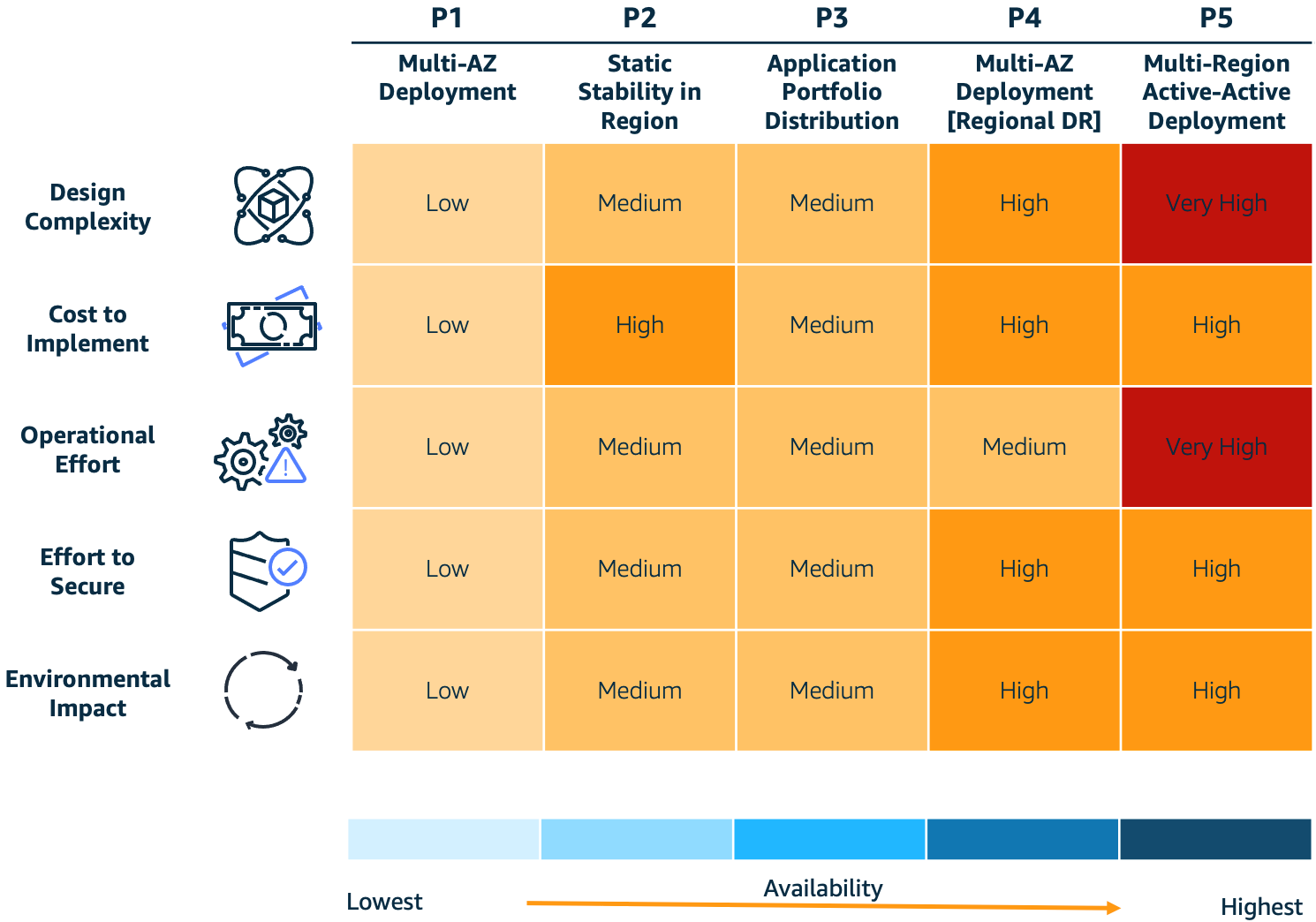
To help answer these questions, we’ll discuss the five resilience patterns in Figure 1 and the trade-offs to consider when implementing them: 1) design complexity, 2) cost to implement, 3) operational effort, 4) effort to secure, and 5) environmental impact. This will help you achieve varying levels of resiliency and make decisions about the most appropriate architecture for your needs. Our intent is to provide a high-level approach to structure conversations on trade-offs associated with each of these patterns. For a deeper dive on each pattern, please navigate to the Further reading section at the end of this post.

Note: these patterns are not mutually exclusive; you may decide to implement a combination of one of more patterns.

Resilience patterns and trade-offs

Figure 1. Resilience patterns and trade-offs

What is resiliency? Why does it matter?

The AWS Well-Architected Framework defines resilience as having “the capability to recover when stressed by load (more requests for service), attacks (either accidental through a bug, or deliberate through intention), and failure of any component in the workload’s components.”

To meet your business’ resilience requirements, consider the following core factors as you design your workloads:

  • Design complexity – An increase in system complexity typically increases the emergent behaviors of that system. Each individual workload component has to be resilient, and you’ll need to eliminate single points of failure across people, process, and technology elements. Customers should consider their resilience requirements and decide if increasing system complexity is an effective approach, or if keeping the system simple and using a disaster recovery (DR) plan is be more appropriate.
  • Cost to implement – Costs often significantly increase when you implement higher resilience because there are new software and infrastructure components to operate. It’s important for such costs to be offset by the potential costs of future loss.
  • Operational effort – Deploying and supporting highly resilient systems requires complex operational processes and advanced technical skills. For example, customers might need to improve their operational processes using the Operational Readiness Review (ORR) approach. Before you decide to implement higher resilience, evaluate your operational competency to confirm you have the required level of process maturity and skillsets.
  • Effort to secure – Security complexity is less directly correlated with resilience. However, there are generally more components to secure for highly resilient systems. Using security best practices for cloud deployments can achieve security objectives without adding significant complexity even with a higher deployment footprint.
  • Environmental impact – An increased deployment footprint for resilient systems may increase your consumption of cloud resources. However, you can use trade-offs, like approximate computing and deliberately implementing slower response times to reduce resource consumption. The AWS Well-Architected Sustainability Pillar describes these patterns and provides guidance on sustainability best practices.

Pattern 1 (P1): Multi-AZ

P1 is a cloud-based architecture pattern (Figure 2) that introduces Availability Zones (AZs) into your architecture to increase your system’s resilience. The P1 pattern uses a Multi-AZ architecture where applications operate in multiple AZs within a single AWS Region. This allows your application to withstand AZ-level impacts.

As shown in Figure 2, Example Corp deploys their internal employee applications using the P1 pattern. These applications are low business impact and therefore have lower requirements for resiliency.

Example Corp deploys their low-business-impact applications as a single Amazon Elastic Compute Cloud (Amazon EC2) instance managed by an Auto Scaling group. Amazon EC2 uses health checks to automatically detect faults. If an AZ fails, Amazon EC2 prompts an Amazon EC2 Auto Scaling group to recreate their application in another unaffected AZ.

Multi-AZ deployment pattern (P1)

Figure 2. Multi-AZ deployment pattern (P1)

Trade-offs

P1 is low in several categories and mitigates a disruption to the AZ hosting the application, but this comes at the expense of application recovery. If an AZ is down, it will disrupt end users’ access to the application while the new resources are being re-provisioned in a new AZ. This is known as bi-modal behavior.

Pattern 2 (P2): Multi-AZ with static stability

P2 uses multiple instances across multiple AZs within a Region to increase resilience. The pattern uses static stability to prevent bimodal behavior. Statically stable systems remain stable and operate in one mode, irrespective of changes to their operating environment. A key benefit of a statically stable system on AWS is it reduces complexity of recovery during a disruption thanks to pre-provisioned resource capacity. Any resources needed to maintain operations during a disruption, such as the loss of resources in an AZ, already exist and AWS service control planes do not need to be available for recovery to be successful. To learn more about static stability, data planes and control planes read the builder’s library article Static stability using Availability Zones.

As shown in Figure 3, Example Corp has a customer-facing website that has a lower tolerance for downtime. Any time the website is down, it could result in lost revenue. Because of this, the website requires two EC2 instances that are provisioned within two AZs. Using health checks, when the AZ becomes impaired, the website continues to operate as the Elastic Load Balancer diverts traffic away from the impacted AZ. For more on using health checks, see the Implementing health checks article in The Amazon Builder’s Library.

Multi-AZ with static stability pattern (P2)

Figure 3. Multi-AZ with static stability pattern (P2)

Trade-offs

P2 mitigates an AZ disruption without downtime to application clients but must be weighed against cost concerns. P1 is less expensive from an infrastructure cost perspective, as it provisions less compute capacity and relies on launching new instances in case of a failure. However, P1’s bimodal behavior can affect your customers during large-scale events.

Implementing P2 requires your application to support distributed operation across multiple instances. If your application can support this pattern, you can deploy your workload to all available AZs (usually 3 or more) across the Region. This will reduce costs associated with over-provisioning because you only have to provision 150% of your capacity across three AZs compared with the 200% in two AZs (as mentioned in our earlier example).

Pattern 3 (P3): Application portfolio distribution

P3 uses a Multi-Region pattern to increase functional resilience, as demonstrated in Figure 4. It distributes different critical applications in multiple Regions.

Example Corp provides banking services, like credit balance checks, to consumers on multiple digital channels. These services are available to consumers via a mobile application, contact center, and web-based applications. Each digital channel is deployed to a separate Region, which mitigates against a regional service disruption.

For example, a Region with the customers’ mobile application may have a disruption that causes the mobile app to be unavailable, but customers can still access banking services via online banking deployed in an alternate Region. Regional service disruptions are rare, but implementing a pattern like this ensures your users retain access to business-critical services during disruptions.

Application portfolio distribution pattern (P3)

Figure 4. Application portfolio distribution pattern (P3)

Trade-offs

P3 mitigates the possibility of a regional service disruption impacting a multitude of systems at the same time. Operating an application portfolio that spans multiple Regions requires significant operational planning and management. Isolated functional elements may depend on common downstream systems and data sources that are deployed in a single Region. Therefore, Region-wide events may still cause disruption, but the impact surface area should be reduced.

Pattern 4 (P4): Multi-AZ deployment (multi-Region DR)

Example Corp operates several business-critical services that have a very low tolerance for disruption, such as the ability for consumers to make bank payments. Example Corp reviewed the four common patterns for DR (as defined in Disaster Recovery of Workloads on AWS: Recovery in the Cloud) and decided to use the following sub-patterns for their multi-Region applications:

  • Pilot Light – This pattern works for applications that require RTO/RPO of 10s of minutes. Data is actively replicated and application infrastructure is pre-provisioned in the DR Region. Cost optimization is a key driver here, as the application infrastructure is kept switched-off and only switched-on during the restore event.
  • Warm Standby – This pattern improves restore times significantly compared with pilot light by keeping your applications running in the DR Region but with a reduced capacity. Application infrastructure will be scaled up during a DR event, but this can typically be automated with minimal manual effort. This pattern can achieve RTO/RPO of minutes if implemented correctly.

Trade-offs

P4 mitigates a disruption to a regional service while reducing mitigation costs. Regional DR patterns increase deployment complexity as infrastructure changes need to be synchronized across Regions. Testing resilience is also significantly more complex and include simulating regional disruptions. Using Infrastructure as Code to automate deployments can help alleviate these issues.

Pattern 5 (P5): Multi-Region active-active

Example Corp’s core banking and Customer Relationship Management applications have zero tolerance for disruption. They use the P5 pattern for deploying these applications because it has an RTO of real-time and an RPO of near-zero data loss. They run their workload simultaneously in multiple Regions, allowing them to serve traffic from all Regions simultaneously. This pattern not only mitigates against regional disruptions but also addresses their zero tolerance requirements (Figure 5).

Multi-Region active-active pattern (P5)

Figure 5. Multi-Region active-active pattern (P5)

Trade-offs

P5 mitigates the disruption of a regional service, and invests additional costs and complexity to deliver a RTO of near zero. Multi-active deployments are generally complex, as they include multiple applications that collaborate to deliver required business services. If you implement this pattern, you’ll need to consider the fact that you’re introducing asynchronous replication for data across Regions and the impact that has on data consistency.

Operating this pattern requires a very high level of process maturity, so we recommend customers gradually build towards this pattern by starting with the deployment patterns described earlier.

Conclusion

In this blog post, we introduced five resilience patterns and trade-offs to consider when implementing them. In an effort to help you find the most efficient architecture for your use case, we demonstrated how Example Corp evaluated these options and how they applied them to their business needs.

Further reading

Looking for more architecture content?

AWS Architecture Center provides reference architecture diagrams, vetted architecture solutions, Well-Architected best practices, patterns, icons, and more!

Correlate IAM Access Analyzer findings with Amazon Macie

Post Syndicated from Nihar Das original https://aws.amazon.com/blogs/security/correlate-iam-access-analyzer-findings-with-amazon-macie/

In this blog post, you’ll learn how to detect when unintended access has been granted to sensitive data in Amazon Simple Storage Service (Amazon S3) buckets in your Amazon Web Services (AWS) accounts.

It’s critical for your enterprise to understand where sensitive data is stored in your organization and how and why it is shared. The ability to efficiently find data that is shared with entities outside your account and the contents of that data is paramount. You need a process to quickly detect and report which accounts have access to sensitive data. Amazon Macie is an AWS service that can detect many sensitive data types. Macie is a fully managed data security and data privacy service that uses machine learning and pattern matching to discover and help protect your sensitive data in AWS.

AWS Identity and Access Management (IAM) Access Analyzer helps to identify resources in your organization and accounts, such as S3 buckets or IAM roles, that are shared with an external entity. When you enable IAM Access Analyzer, you create an analyzer for your entire organization or your account. The organization or account you choose is known as the zone of trust for the analyzer. The analyzer monitors the supported resources within your zone of trust. This analyzer enables IAM Access Analyzer to detect each instance of a resource shared outside the zone of trust and generates a finding about the resource and the external principals that have access to it.

Currently, you can use IAM Access Analyzer and Macie to detect external access and discover sensitive data as separate processes. You can join the findings from both to best evaluate the risk. The solution in this post integrates IAM Access Analyzer, Macie, and AWS Security Hub to automate the process of correlating findings between the services and presenting them in Security Hub.

How does the solution work?

First, IAM Access Analyzer discovers S3 buckets that are shared outside the zone of trust. Next, the solution schedules a Macie sensitive data discovery job for each of these buckets to determine if the bucket contains sensitive data. Upon discovery of shared sensitive data in S3, a custom high severity finding is created in Security Hub for review and incident response.

Solution architecture

This solution is based on a serverless architecture, and uses the following services:

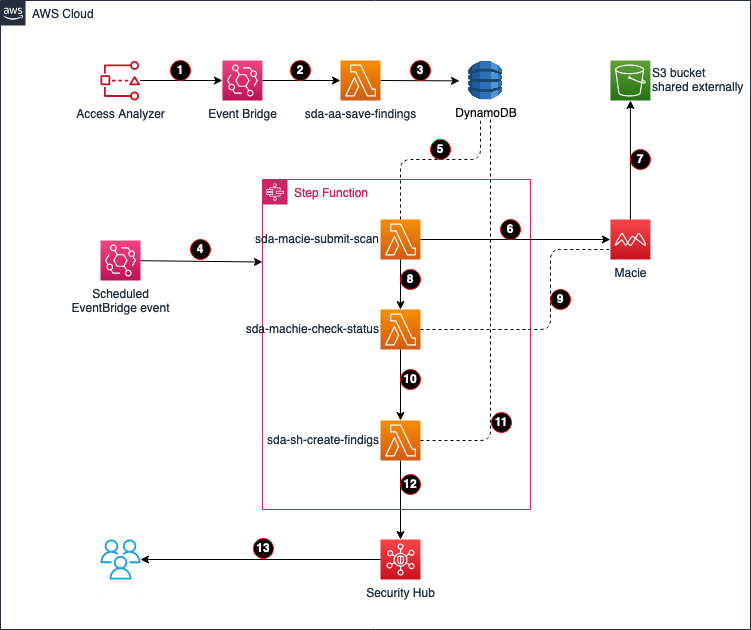
Figure 1: Architecture diagram

Figure 1: Architecture diagram

Figure 1 depicts the following process flow:

  1. IAM Access Analyzer detects shared S3 buckets outside of the zone of trust—the organization or account you choose is known as a zone of trust for the analyzer—and creates the event Access Analyzer Finding in EventBridge.
  2. EventBridge triggers the Lambda function sda-aa-save-findings.
  3. The sda-aa-save-findings function records each finding in DynamoDB.
  4. An EventBridge scheduled event periodically starts a new cycle of the Step Function state machine, which immediately runs the Lambda function sda-macie-submit-scan. The template sets a 15-minute interval, but this is configurable.
  5. The sda-macie-submit-scan function reads the IAM Access Analyzer findings that were created by sda-aa-save-findings from DynamoDB.
  6. sda-macie-submit-scan launches a Macie classification job for each distinct S3 bucket that is related to one or more recent IAM Access Analyzer findings.
  7. Macie performs a sensitive discovery scan on each requested S3 bucket.
  8. The sda-macie-submit-scan function initiates the Lambda function sda-macie-check-status.
  9. sda-macie-check-status periodically checks the status of each Macie classification job, waiting for all the Macie jobs initiated by this solution to complete.
  10. Upon completion of the sda-macie-check-status function, the step function runs the Lambda function sda-sh-create-findings.
  11. sda-sh-create-findings joins the resulting IAM Access Analyzer and Macie datasets for each S3 bucket.
  12. sda-sh-create-findings publishes a finding to Security Hub for each bucket that has both external access and sensitive data.

    Note: The Macie scan is skipped if the S3 bucket is tagged to be excluded or if it was recently scanned by Macie. See the Cost considerations section for more information on custom configurations.

  13. Information security can review and act on the findings shown in Security Hub.

Sample Security Hub output

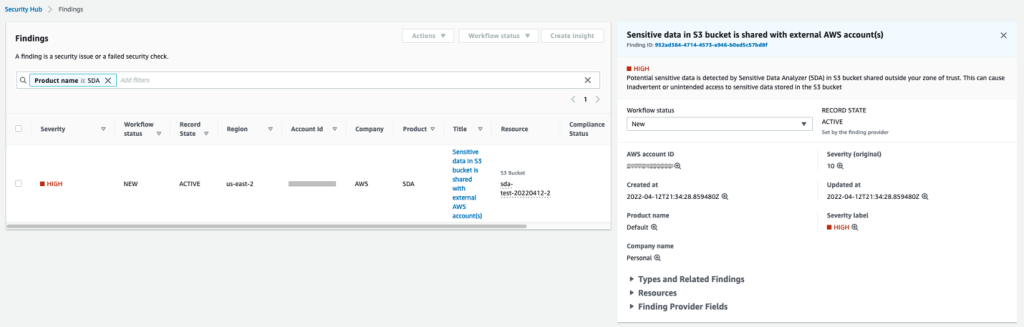
Figure 2 shows the sample findings that Security Hub will present. Each finding includes:

  • Severity
  • Workflow status
  • Record state
  • Company
  • Product
  • Title
  • Resource
Figure 2: Sample Security Hub findings

Figure 2: Sample Security Hub findings

The output to Security Hub will display a severity of HIGH with workflow NEW, because this is the first time the event has been observed. The record state is ACTIVE because the workflow state is NEW. The title explains the reason for the event.

For example, if potentially sensitive data is discovered in a bucket that is shared outside a zone of trust, selecting an event will display the resources involved in the finding so you can investigate. For more information, see the Security Hub User Guide.

Notes:

  • Detection of public S3 buckets by IAM Access Analyzer will still occur through Security Hub and will be marked as critical severity. This solution does not add to or augment this finding in Security Hub.
  • If a finding in IAM Access Analyzer is archived, the solution does not update the related finding in Security Hub.

Prerequisites

To use this solution, you need the following:

  • Permission to run AWS CloudFormation
  • Permission to create Lambda functions
  • Permission to create DynamoDB tables
  • Permission to create Step Function state machines
  • Permission to create EventBridge event rules
  • Permission to enable IAM Access Analyzer on the account where sensitive discovery is required
  • Permission to enable Macie on the account
  • Permission to enable Security Hub on the account

Deploy the solution

The solution is deployed through AWS CloudFormation, and you can review the template for options to best suit your specific needs.

  1. Sign in to your AWS account located at https://aws.amazon.com/console/.
  2. In the AWS Management Console, navigate to the AWS CloudFormation service, and then choose Create stack.
  3. Under Prerequisite – Prepare template, choose Template is ready.
  4. Under Specify template, choose Amazon S3 URL and provide the following URL:
    https://awsiammedia.s3.amazonaws.com/public/sample/936-correlating-aa-findings-macie/sda-cfn.yml
  5. Choose Next.
  6. Enter the stack name.
  7. The Application code location, S3 Bucket and S3 Key fields will be pre-filled.
  8. Under Service Activations, modify the activations based on the services you presently have running in your account.
  9. Modify the Logging and Monitoring settings if required.
  10. (Optional) Set an alert email address for errors.
  11. Choose Next, then choose Next again.
  12. Under Capabilities, select the check box.
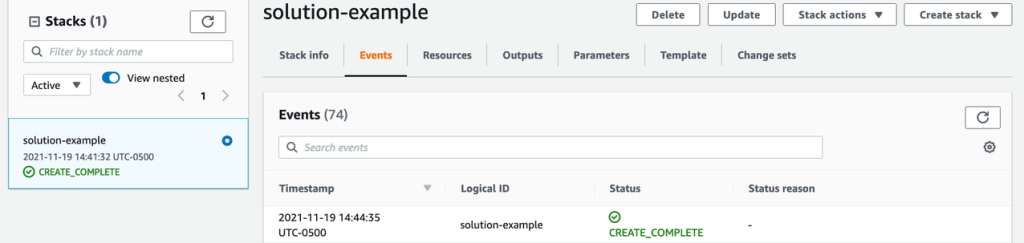
  13. Choose Create Stack. The solution will begin deploying; watch for the CREATE_COMPLETE message.
Figure 3: Sample CloudFormation deployment status

Figure 3: Sample CloudFormation deployment status

The solution is now deployed and will start monitoring for sensitive data that is being shared. It will send the findings to Security Hub for your teams to investigate.

Cost considerations

When you scan large S3 buckets with sensitive data, remember that Macie cost is based on the amount of data scanned. For more information on Macie costs, see Amazon Macie pricing.

This solution allows the following options, which you can use to help manage costs:

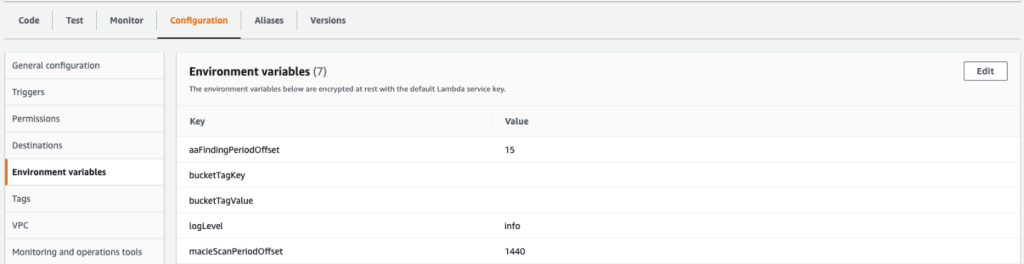
  • Use environment variables in Lambda to skip specific tagged buckets
  • Skip recently scanned S3 buckets and reuse prior findings
Figure 4: Screen shot of configurable environment variable

Figure 4: Screen shot of configurable environment variable

Conclusion

In this post, we discussed how the solution uses Lambda, Step Functions and EventBridge to integrate IAM Access Analyzer with Macie discovery jobs. We reviewed the components of the application, deployed it by using CloudFormation, and reviewed the output a security team would use to take the appropriate actions. We also provided two ways that you can manage the costs associated with the solution.

After you deploy this project, you can modify it to meet your organization’s needs. For example, you can modify the tags to skip specific S3 buckets your organization has already classified to hold sensitive data. Customers who use multiple AWS accounts can designate a centralized Security Hub administrator account to receive the solution alerts from each member account. For more information on this option, see Designating a Security Hub administrator account.

If you have feedback about this post, please submit it in the Comments section below. If you have questions about this post, please start a new thread on the AWS Identity and Access Management forum.

Other resources

For more information on correlating security findings with AWS Security Hub and Amazon EventBridge, refer to this blog post.

Want more AWS Security news? Follow us on Twitter.

Nihar Das

Nihar Das

Nihar has over 20 years of experience in various business domains including financial services. As an AWS Senior Solutions Architect, he is passionate about solving challenges in the cloud and helps financial services customers to migrate to AWS and support the continued innovation.

Joe Dunn

Joe Dunn

Joe is an AWS Senior Solutions Architect in Financial Services with over 20 years of experience in infrastructure architecture and migration of business-critical loads to AWS. He helps financial services customers to innovate on the AWS Cloud by providing solutions using AWS products and services.

Armand Aquino

Armand Aquino

Armand is a solutions architect helping financial services organizations design their critical workloads on AWS. In his spare time, he enjoys exploring outdoors and learning Korean.

A serverless operational data lake for retail with AWS Glue, Amazon Kinesis Data Streams, Amazon DynamoDB, and Amazon QuickSight

Post Syndicated from Gandhi Raketla original https://aws.amazon.com/blogs/big-data/a-serverless-operational-data-lake-for-retail-with-aws-glue-amazon-kinesis-data-streams-amazon-dynamodb-and-amazon-quicksight/

Do you want to reduce stockouts at stores? Do you want to improve order delivery timelines? Do you want to provide your customers with accurate product availability, down to the millisecond? A retail operational data lake can help you transform the customer experience by providing deeper insights into a variety of operational aspects of your supply chain.

In this post, we demonstrate how to create a serverless operational data lake using AWS services, including AWS Glue, Amazon Kinesis Data Streams, Amazon DynamoDB, Amazon Athena, and Amazon QuickSight.

Retail operations is a critical functional area that gives retailers a competitive edge. An efficient retail operation can optimize the supply chain for a better customer experience and cost reduction. An optimized retail operation can reduce frequent stockouts and delayed shipments, and provide accurate inventory and order details. Today, a retailer’s channels aren’t just store and web—they include mobile apps, chatbots, connected devices, and social media channels. The data is both structured and unstructured. This coupled with multiple fulfillment options like buy online and pick up at store, ship from store, or ship from distribution centers, which increases the complexity of retail operations.

Most retailers use a centralized order management system (OMS) for managing orders, inventory, shipments, payments, and other operational aspects. These legacy OMSs are unable to scale in response to the rapid changes in retail business models. The enterprise applications that are key for efficient and smooth retail operations rely on a central OMS. Applications for ecommerce, warehouse management, call centers, and mobile all require an OMS to get order status, inventory positions of different items, shipment status, and more. Another challenge with legacy OMSs is they’re not designed to handle unstructured data like weather data and IoT data that could impact inventory and order fulfillment. A legacy OMS that can’t scale prohibits you from implementing new business models that could transform your customer experience.

A data lake is a centralized repository that allows you to store all your structured and unstructured data at any scale. An operational data lake addresses this challenge by providing easy access to structured and unstructured operational data in real time from various enterprise systems. You can store your data as is, without having to first structure the data, and run different types of analytics—from dashboards and visualizations to big data processing, real-time analytics, and machine learning (ML)—to guide better decisions. This can ease the burden on OMSs that can instead focus on order orchestration and management.

Solution overview

In this post, we create an end-to-end pipeline to ingest, store, process, analyze, and visualize operational data like orders, inventory, and shipment updates. We use the following AWS services as key components:

  • Kinesis Data Streams to ingest all operational data in real time from various systems
  • DynamoDB, Amazon Aurora, and Amazon Simple Storage Service (Amazon S3) to store the data
  • AWS Glue DataBrew to clean and transform the data
  • AWS Glue crawlers to catalog the data
  • Athena to query the processed data
  • A QuickSight dashboard that provides insights into various operational metrics

The following diagram illustrates the solution architecture.

The data pipeline consists of stages to ingest, store, process, analyze, and finally visualize the data, which we discuss in more detail in the following sections.

Data ingestion

Orders and inventory data is ingested in real time from multiple sources like web applications, mobile apps, and connected devices into Kinesis Data Streams. Kinesis Data Streams is a massively scalable and durable real-time data streaming service. Kinesis Data Streams can continuously capture gigabytes of data per second from hundreds of thousands of sources, such as web applications, database events, inventory transactions, and payment transactions. Frontend systems like ecommerce applications and mobile apps ingest the order data as soon as items are added to a cart or an order is created. The OMS ingests orders when the order status changes. OMSs, stores, and third-party suppliers ingest inventory updates into the data stream.

To simulate orders, an AWS Lambda function is triggered by a scheduled Amazon CloudWatch event every minute to ingest orders to a data stream. This function simulates the typical order management system lifecycle (order created, scheduled, released, shipped, and delivered). Similarly, a second Lambda function is triggered by a CloudWatch event to generate inventory updates. This function simulates different inventory updates such as purchase orders created from systems like the OMS or third-party suppliers. In a production environment, this data would come from frontend applications and a centralized order management system.

Data storage

There are two types of data: hot and cold data. Hot data is consumed by frontend applications like web applications, mobile apps, and connected devices. The following are some example use cases for hot data:

  • When a customer is browsing products, the real-time availability of the item must be displayed
  • Customers interacting with Alexa to know the status of the order
  • A call center agent interacting with a customer needs to know the status of the customer order or its shipment details

The systems, APIs, and devices that consume this data need the data within seconds or milliseconds of the transactions.

Cold data is used for long-term analytics like orders over a period of time, orders by channel, top 10 items by number of orders, or planned vs. available inventory by item, warehouse, or store.

For this solution, we store orders hot data in DynamoDB. DynamoDB is a fully managed NoSQL database that delivers single-digit millisecond performance at any scale. A Lambda function processes records in the Kinesis data stream and stores it in a DynamoDB table.

Inventory hot data is stored in an Amazon Aurora MySQL-Compatible Edition database. Inventory is transactional data that requires high consistency so that customers aren’t over-promised or under-promised when they place orders. Aurora MySQL is fully managed database that is up to five times faster than standard MySQL databases and three times faster than standard PostgreSQL databases. It provides the security, availability, and reliability of commercial databases at a tenth of the cost.

Amazon S3 is object storage built to store and retrieve any amount of data from anywhere. It’s a simple storage service that offers industry-leading durability, availability, performance, security, and virtually unlimited scalability at very low cost. Order and inventory cold data is stored in Amazon S3.

Amazon Kinesis Data Firehose reads the data from the Kinesis data stream and stores it in Amazon S3. Kinesis Data Firehose is the easiest way to load streaming data into data stores and analytics tools. It can capture, transform, and load streaming data into Amazon S3, Amazon Redshift, Amazon OpenSearch Service, and Splunk, enabling near-real-time analytics.

Data processing

The data processing stage involves cleaning, preparing, and transforming the data to help downstream analytics applications easily query the data. Each frontend system might have a different data format. In the data processing stage, data is cleaned and converted into a common canonical form.

For this solution, we use DataBrew to clean and convert orders into a common canonical form. DataBrew is a visual data preparation tool that makes it easy for data analysts and data scientists to prepare data with an interactive, point-and-click visual interface without writing code. DataBrew provides over 250 built-in transformations to combine, pivot, and transpose the data without writing code. The cleaning and transformation steps in DataBrew are called recipes. A scheduled DataBrew job applies the recipes to the data in an S3 bucket and stores the output in a different bucket.

AWS Glue crawlers can access data stores, extract metadata, and create table definitions in the AWS Glue Data Catalog. You can schedule a crawler to crawl the transformed data and create or update the Data Catalog. The AWS Glue Data Catalog is your persistent metadata store. It’s a managed service that lets you store, annotate, and share metadata in the AWS Cloud in the same way you would in an Apache Hive metastore. We use crawlers to populate the Data Catalog with tables.

Data analysis

We can query orders and inventory data from S3 buckets using Athena. Athena is an interactive query service that makes it easy to analyze data in Amazon S3 using standard SQL. Athena is serverless, so there is no infrastructure to manage, and you pay only for the queries that you run. Views are created in Athena that can be consumed by business intelligence (BI) services like QuickSight.

Data visualization

We generate dashboards using QuickSight. QuickSight is a scalable, serverless, embeddable BI service powered by ML and built for the cloud. QuickSight lets you easily create and publish interactive BI dashboards that include ML-powered insights.

QuickSight also has features to forecast orders, detect anomalies in the order, and provide ML-powered insights. We can create analyses such as orders over a period of time, orders split by channel, top 10 locations for orders, or order fulfillment timelines (the time it took from order creation to order delivery).

Walkthrough overview

To implement this solution, you complete the following high-level steps:

  1. Create solution resources using AWS CloudFormation.
  2. Connect to the inventory database.
  3. Load the inventory database with tables.
  4. Create a VPC endpoint using Amazon Virtual Private Cloud (Amazon VPC).
  5. Create gateway endpoints for Amazon S3 on the default VPC.
  6. Enable CloudWatch rules via Amazon EventBridge to ingest the data.
  7. Transform the data using AWS Glue.
  8. Visualize the data with QuickSight.

Prerequisites

Complete the following prerequisite steps:

  1. Create AWS account if you don’t have done already.
  2. Sign up for QuickSight if you’ve never used QuickSight in this account before. To use the forecast ability in QuickSight, sign up for the Enterprise Edition.

Create resources with AWS CloudFormation

To launch the provided CloudFormation template, complete the following steps:

  1. Choose Launch Stack:
  2. Choose Next.
  3. For Stack name, enter a name.
  4. Provide the following parameters:
    1. The name of the S3 bucket that holds all the data for the data lake.
    2. The name of the database that holds the inventory tables.
    3. The database user name.
    4. The database password.
  5. Enter any tags you want to assign to the stack and choose Next.
  6. Select the acknowledgement check boxes and choose Create stack.

The stack takes 5–10 minutes to complete.

On the AWS CloudFormation console, you can navigate to the stack’s Outputs tab to review the resources you created.

If you open the S3 bucket you created, you can observe its folder structure. The stack creates sample order data for the last 7 days.

Connect to the inventory database

To connect to your database in the query editor, complete the following steps:

  1. On the Amazon RDS console, choose the Region you deployed the stack in.
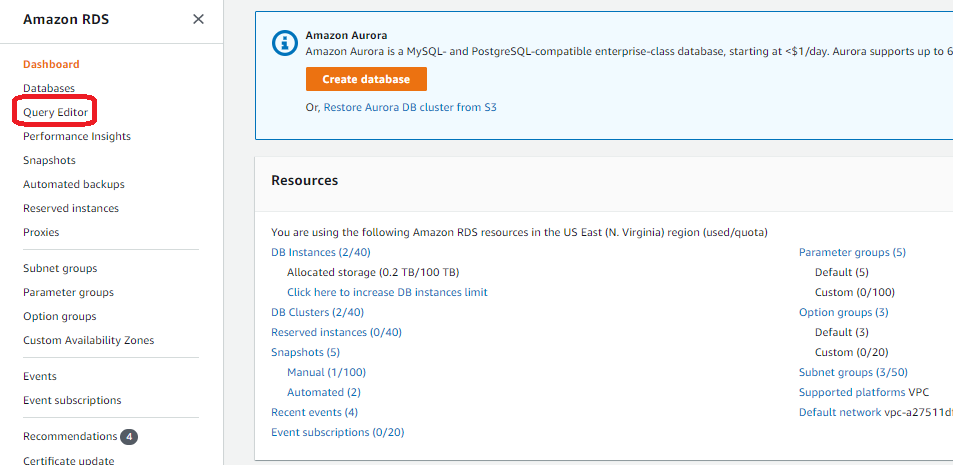
  2. In the navigation pane, choose Query Editor.

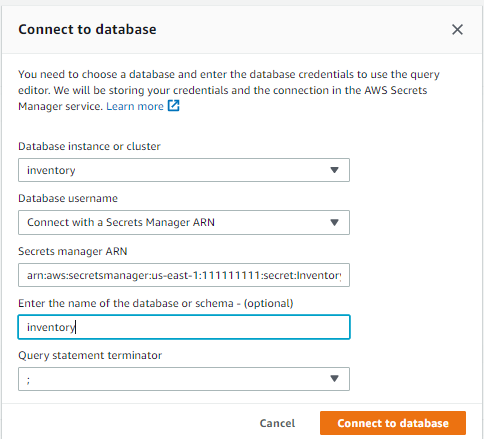
    If you haven’t connected to this database before, the Connect to database page opens.
  3. For Database instance or cluster, choose your database.
  4. For Database username, choose Connect with a Secrets Manager ARN.
    The database user name and password provided during stack creation are stored in AWS Secrets Manager. Alternatively, you can choose Add new database credentials and enter the database user name and password you provided when creating the stack.
  5. For Secrets Manager ARN, enter the value for the key InventorySecretManager from the CloudFormation stack outputs.
  6. Optionally, enter the name of your database.
  7. Choose Connect to database.

Load the inventory database with tables

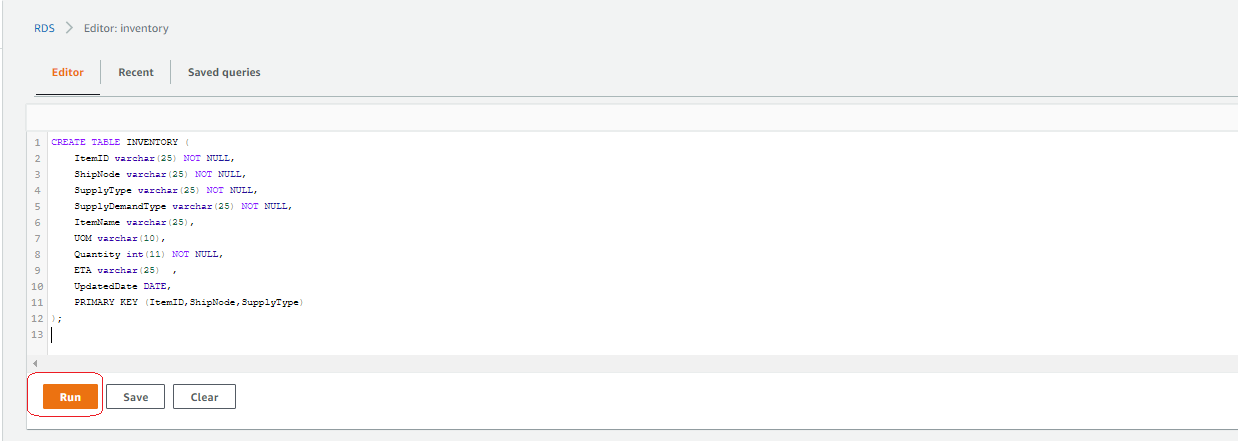
Enter the following DDL statement in the query editor and choose Run:

CREATE TABLE INVENTORY (
    ItemID varchar(25) NOT NULL,
    ShipNode varchar(25) NOT NULL,
    SupplyType varchar(25) NOT NULL,
    SupplyDemandType varchar(25) NOT NULL,
    ItemName varchar(25),
    UOM varchar(10),
    Quantity int(11) NOT NULL,
    ETA varchar(25)	 ,
    UpdatedDate DATE,
    PRIMARY KEY (ItemID,ShipNode,SupplyType)
);

Create a VPC endpoint

To create your VPC endpoint, complete the following steps:

  1. On the Amazon VPC console, choose VPC Dashboard.
  2. Choose Endpoints in the navigation pane.
  3. Choose Create Endpoint.
  4. For Service category, select AWS services.
  5. For Service name, search for rds and choose the service name ending with rds-data.
  6. For VPC, choose the default VPC.
  7. Leave the remaining settings at their default and choose Create endpoint.

Create a gateway endpoint for Amazon S3

To create your gateway endpoint, complete the following steps:

  1. On the Amazon VPC console, choose VPC Dashboard.
  2. Choose Endpoints in the navigation pane.
  3. Choose Create Endpoint.
  4. For Service category, select AWS services.
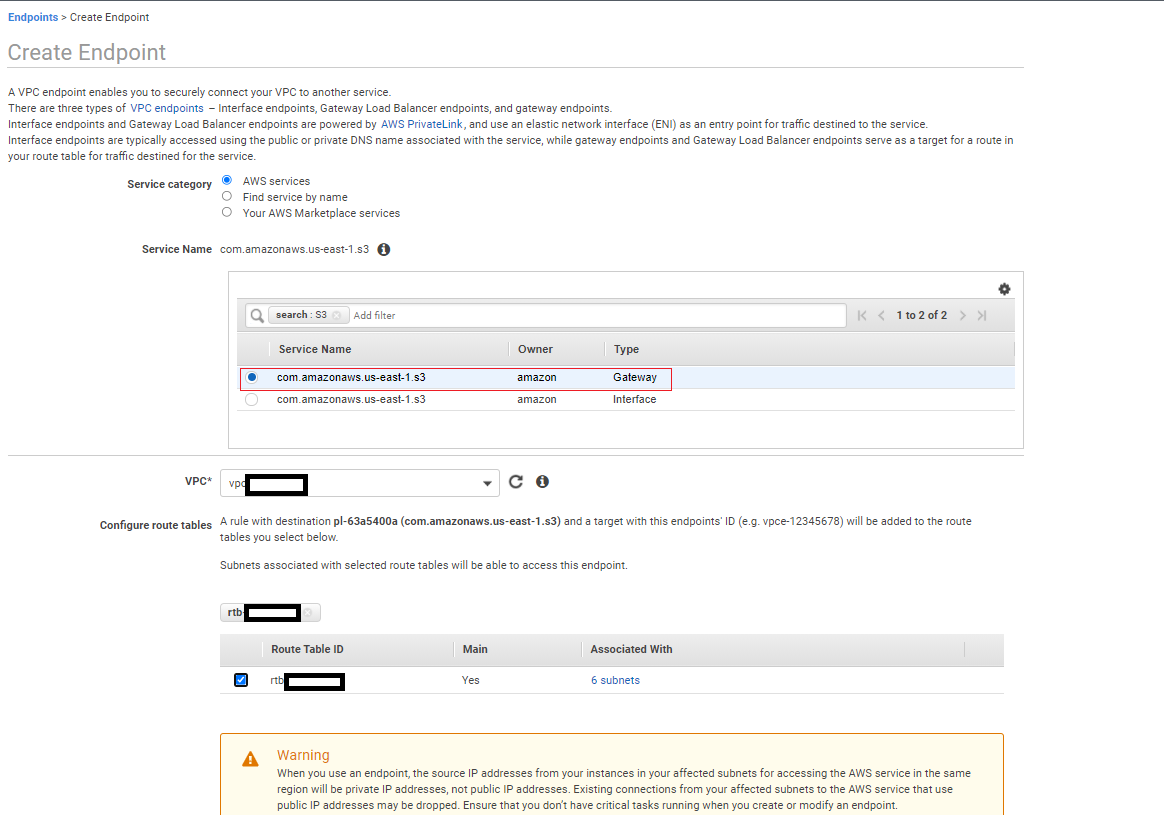
  5. For Service name, search for S3 and choose the service name with type Gateway.
  6. For VPC, choose the default VPC.
  7. For Configure route tables, select the default route table.
  8. Leave the remaining settings at their default and choose Create endpoint.

Wait for both the gateway endpoint and VPC endpoint status to change to Available.

Enable CloudWatch rules to ingest the data

We created two CloudWatch rules via the CloudFormation template to ingest the order and inventory data to Kinesis Data Streams. To enable the rules via EventBridge, complete the following steps:

  1. On the CloudWatch console, under Events in the navigation pane, choose Rules.
  2. Make sure you’re in the Region where you created the stack.
  3. Choose Go to Amazon EventBridge.
  4. Select the rule Ingest-Inventory-Update-Schedule-Rule and choose Enable.
  5. Select the rule Ingest-Order-Schedule-Rule and choose Enable.

After 5–10 minutes, the Lambda functions start ingesting orders and inventory updates to their respective streams. You can check the S3 buckets orders-landing-zone and inventory-landing-zone to confirm that the data is being populated.

Perform data transformation

Our CloudFormation stack included a DataBrew project, a DataBrew job that runs every 5 minutes, and two AWS Glue crawlers. To perform data transformation using our AWS Glue resources, complete the following steps:

  1. On the DataBrew console, choose Projects in the navigation pane.
  2. Choose the project OrderDataTransform.

    You can review the project and its recipe on this page.
  3. In the navigation pane, choose Jobs.
  4. Review the job status to confirm it’s complete.
  5. On the AWS Glue console, choose Crawlers in the navigation pane.
    The crawlers crawl the transformed data and update the Data Catalog.
  6. Review the status of the two crawlers, which run every 15 minutes.
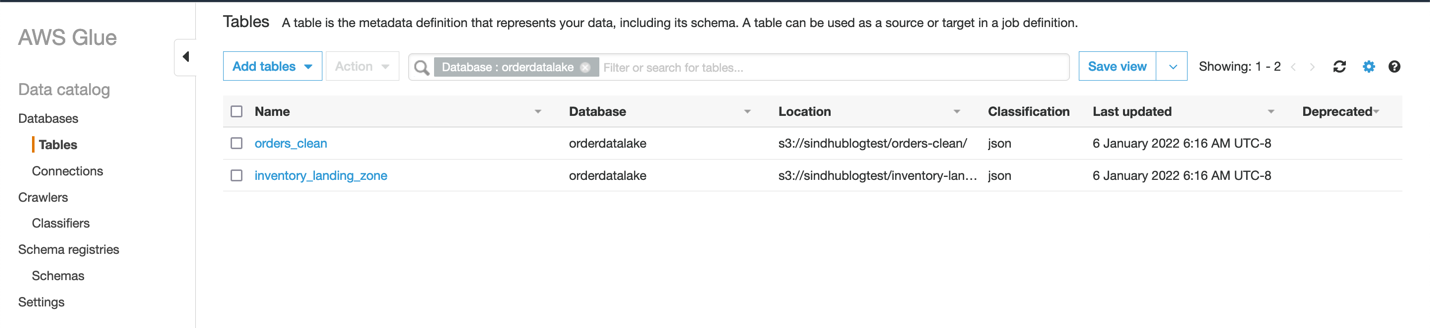
  7. Choose Tables in the navigation pane to view the two tables the crawlers created.
    If you don’t see these tables, you can run the crawlers manually to create them.

    You can query the data in the tables with Athena.
  8. On the Athena console, choose Query editor.
    If you haven’t created a query result location, you’re prompted to do that first.
  9. Choose View settings or choose the Settings tab.
  10. Choose Manage.
  11. Select the S3 bucket to store the results and choose Choose.
  12. Choose Query editor in the navigation pane.
  13. Choose either table (right-click) and choose Preview Table to view the table contents.

Visualize the data

If you have never used QuickSight in this account before, complete the prerequisite step to sign up for QuickSight. To use the ML capabilities of QuickSight (such as forecasting) sign up for the Enterprise Edition using the steps in this documentation.

While signing up for QuickSight, make sure to use the same region where you created the CloudFormation stack.

Grant QuickSight permissions

To visualize your data, you must first grant relevant permissions to QuickSight to access your data.

  1. On the QuickSight console, on the Admin drop-down menu, choose Manage QuickSight.
  2. In the navigation pane, choose Security & permissions.
  3. Under QuickSight access to AWS services, choose Manage.
  4. Select Amazon Athena.
  5. Select Amazon S3 to edit QuickSight access to your S3 buckets.
  6. Select the bucket you specified during stack creation (for this post, operational-datalake).
  7. Choose Finish.
  8. Choose Save.

Prepare the datasets

To prepare your datasets, complete the following steps:

  1. On the QuickSight console, choose Datasets in the navigation pane.
  2. Choose New dataset.
  3. Choose Athena.
  4. For Data source name, enter retail-analysis.
  5. Choose Validate connection.
  6. After your connection is validated, choose Create data source.
  7. For Database, choose orderdatalake.
  8. For Tables, select orders_clean.
  9. Choose Edit/Preview data.
  10. For Query mode, select SPICE.
    SPICE (Super-fast, Parallel, In-memory Calculation Engine) is the robust in-memory engine that QuickSight uses.
  11. Choose the orderdatetime field (right-click), choose Change data type, and choose Date.
  12. Enter the date format as MM/dd/yyyy HH:mm:ss.
  13. Choose Validate and Update.
  14. Change the data types of the following fields to QuickSight geospatial data types:
    1. billingaddress.zipcode – Postcode
    2. billingaddress.city – City
    3. billingaddress.country – Country
    4. billingaddress.state – State
    5. shippingaddress.zipcode – Postcode
    6. shippingaddress.city – City
    7. shippingaddress.country – Country
    8. shippingaddress.state – State
  15. Choose Save & publish.
  16. Choose Cancel to exit this page.

    Let’s create another dataset for the Athena table inventory_landing_zone.
  17. Follow steps 1–7 to create a new dataset. For Table selection, choose inventory_landing_zone.
  18. Choose Edit/Preview data.
  19. For Query mode, select SPICE.
  20. Choose Save & publish.
  21. Choose Cancel to exit this page.

    Both datasets should now be listed on the Datasets page.
  22. Choose each dataset and choose Refresh now.
  23. Select Full refresh and choose Refresh.

To set up a scheduled refresh, choose Schedule a refresh and provide your schedule details.

Create an analysis

To create an analysis in QuickSight, complete the following steps:

  1. On the QuickSight console, choose Analyses in the navigation pane.
  2. Choose New analysis.
  3. Choose the orders_clean dataset.
  4. Choose Create analysis.
  5. To adjust the theme, choose Themes in the navigation pane, choose your preferred theme, and choose Apply.
  6. Name the analysis retail-analysis.

Add visualizations to the analysis

Let’s start creating visualizations. The first visualization shows orders created over time.

  1. Choose the empty graph on the dashboard and for Visual type¸ choose the line chart.
    For more information about visual types, see Visual types in Amazon QuickSight.
  2. Under Field wells, drag orderdatetime to X axis and ordernumber to Value.
  3. Set ordernumber to Aggregate: Count distinct.

    Now we can filter these orders by Created status.
  4. Choose Filter in the navigation pane and choose Create one.
  5. Search for and choose status.
  6. Choose the status filter you just created.
  7. Select Created from the filter list and choose Apply.
  8. Choose the graph (right-click) and choose Add forecast.
    The forecasting ability is only available in the Enterprise Edition. QuickSight uses a built-in version of the Random Cut Forest (RCF) algorithm. For more information, refer to Understanding the ML algorithm used by Amazon QuickSight.
  9. Leave the settings as default and choose Apply.
  10. Rename the visualization to “Orders Created Over Time.”

If the forecast is applied successfully, the visualization shows the expected number of orders as well as upper and lower bounds.

If you get the following error message, allow for the data to accumulate for a few days before adding the forecast.

Let’s create a visualization on orders by location.

  1. On the Add menu, choose Add visual.
  2. Choose the points on map visual type.
  3. Under Field wells, drag shippingaddress.zipcode to Geospatial and ordernumber to Size.
  4. Change ordernumber to Aggregate: Count distinct.

    You should now see a map indicating the orders by location.
  5. Rename the visualization accordingly.

    Next, we create a drill-down visualization on the inventory count.
  6. Choose the pencil icon.
  7. Choose Add dataset.
  8. Select the inventory_landing_zone dataset and choose Select.
  9. Choose the inventory_landing_zone dataset.
  10. Add the vertical bar chart visual type.
  11. Under Field wells, drag itemname, shipnode, and invtype to X axis, and quantity to Value.
  12. Make sure that quantity is set to Sum.

    The following screenshot shows an example visualization of order inventory.
  13. To determine how many face masks were shipped out from each ship node, choose Face Masks (right-click) and choose Drill down to shipnode.
  14. You can drill down even further to invtype to see how many face masks in a specific ship node are in which status.

The following screenshot shows this drilled-down inventory count.

As a next step, you can create a QuickSight dashboard from the analysis you created. For instructions, refer to Tutorial: Create an Amazon QuickSight dashboard.

Clean up

To avoid any ongoing charges, on the AWS CloudFormation console, select the stack you created and choose Delete. This deletes all the created resources. On the stack’s Events tab, you can track the progress of the deletion, and wait for the stack status to change to DELETE_COMPLETE.

The Amazon EventBridge rules generate orders and inventory data every 15 minutes, to avoid generating huge amount of data, please ensure to delete the stack after testing the blog.

If the deletion of any resources fails, ensure that you delete them manually. For deleting Amazon QuickSight datasets, you can follow these instructions. You can delete the QuickSight Analysis using these steps. For deleting the QuickSight subscription and closing the account, you can follow these instructions.

Conclusion

In this post, we showed you how to use AWS analytics and storage services to build a serverless operational data lake. Kinesis Data Streams lets you ingest large volumes of data, and DataBrew lets you cleanse and transform the data visually. We also showed you how to analyze and visualize the order and inventory data using AWS Glue, Athena, and QuickSight. For more information and resources for data lakes on AWS, visit Analytics on AWS.


About the Authors

Gandhi Raketla is a Senior Solutions Architect for AWS. He works with AWS customers and partners on cloud adoption, as well as architecting solutions that help customers foster agility and innovation. He specializes in the AWS data analytics domain.

Sindhura Palakodety is a Solutions Architect at AWS. She is passionate about helping customers build enterprise-scale Well-Architected solutions on the AWS Cloud and specializes in the containers and data analytics domains.

[$] What constitutes disclosure of a kernel vulnerability?

Post Syndicated from original https://lwn.net/Articles/896829/

Opinions differ on the best way to disclose security vulnerabilities, but
there is a general consensus in our community that vulnerabilities
should, indeed, be
made public at some point. What happens between the discovery of a
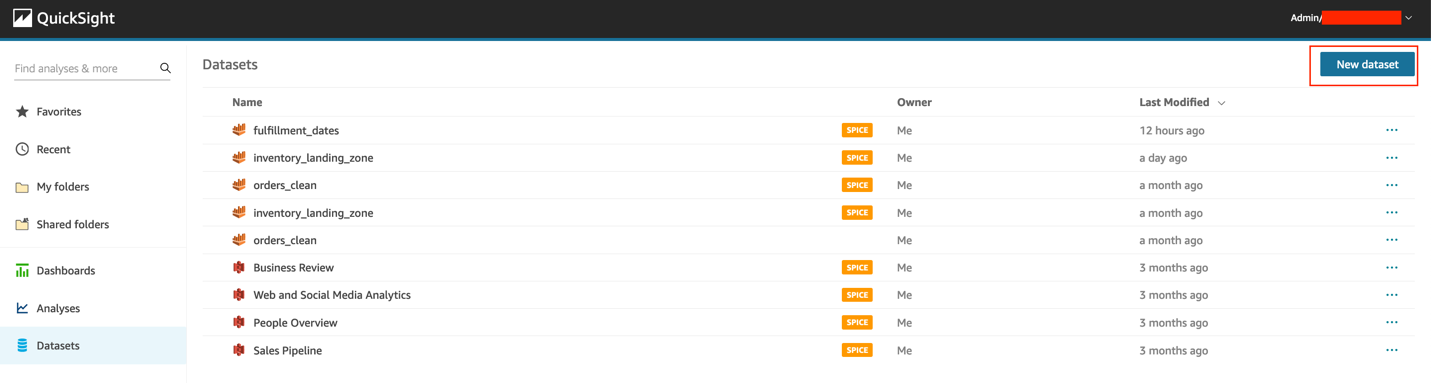
vulnerability and its disclosure can be more controversial. A recent
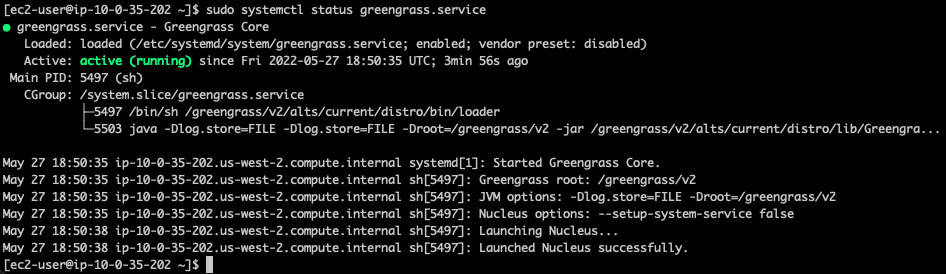
discussion on the handling of kernel vulnerabilities has led to change in
the policies of the linux-distros mailing list — all based on the question
of what constitutes “disclosure”.

[$] When constitutes disclosure of a kernel vulnerability?

Post Syndicated from original https://lwn.net/Articles/896829/

Opinions differ on the best way to disclose security vulnerabilities, but
there is a general consensus in our community that vulnerabilities
should, indeed, be
made public at some point. What happens between the discovery of a
vulnerability and its disclosure can be more controversial. A recent
discussion on the handling of kernel vulnerabilities has led to change in
the policies of the linux-distros mailing list — all based on the question
of what constitutes “disclosure”.

Security updates for Friday

Post Syndicated from original https://lwn.net/Articles/897016/

Security updates have been issued by Debian (cifs-utils, debian-security-support, and pypdf2), Fedora (fapolicyd, mariadb, openssl, and qt5-qtbase), Oracle (firefox, maven:3.5, maven:3.6, postgresql:10, postgresql:12, and postgresql:13), Red Hat (.NET 6.0, firefox, gzip, java-1.8.0-openjdk, java-11-openjdk, java-17-openjdk, pcs, rsync, subversion, thunderbird, and zlib), Scientific Linux (thunderbird), Slackware (mozilla), SUSE (firefox, hdf5, suse-hpc, kernel-firmware, libarchive, patch, php8, and redis), and Ubuntu (cifs-utils and vim).

Cybersecurity Is More Than a Checklist: Joel Yonts on Tech’s Unfair Disadvantage

Post Syndicated from Peter Scott original https://blog.rapid7.com/2022/06/03/cybersecurity-is-more-than-a-checklist-joel-yonts-on-techs-unfair-disadvantage/

Cybersecurity Is More Than a Checklist: Joel Yonts on Tech’s Unfair Disadvantage

Breaches caused by misconfigurations are alarmingly common. Over a third of all cyberattacks in 2020 were the result of firewall, cloud, and server misconfigurations. The tech industry is at the highest risk of bad actors taking advantage of these preventable vulnerabilities, with the information sector falling victim to a majority of 2021’s breaches caused by misconfigurations. One such instance is the Android app data leak, which compromised over 100 million users’ data.

As organizations mature and innovate, so do malicious actors – and many of them target tech companies’ public cloud infrastructure. In today’s world of rapid development, companies must prioritize the protection of their infrastructure with a mix of people, processes, and technology.

Achieving this means going beyond tactical security approaches and instilling organization-wide commitment. While checklists can be a helpful tool, security has to go beyond that; it should be a mission rather than a to-do list to set aside when complete. Neglecting to fulfill that mission can cause serious financial and reputational damage.

When it comes to strengthening their security postures, tech companies must address an industry-specific set of challenges. Recently, we were fortunate to sit down with Joel Yonts, Chief Research Officer and Strategist at Malicious Streams and CEO at Secure Robotics.ai. A seasoned security executive with over 25 years of experience, Yonts’s expertise in enterprise security, digital forensics, artificial intelligence, and robotic and IoT systems gives him a nuanced, data-driven perspective.

Read our Q&A below to get his insights on today’s best practices in security for tech companies.

Can you tell us what you do in your roles as Chief Research Officer and Strategist at Malicious Streams and CEO at Secure Robotics?

Malicious Streams delivers holistic cybersecurity strategies. The most complex things that I deal with are people – researching, listening, and observing how people work at all levels to determine how I can connect them.

I am a fractional CISO for several multinational organizations. I also build cybersecurity programs, do cyber maturity assessments, and build cybersecurity strategies in emerging areas.

In true Joel fashion, however, I needed more research time than I was getting in those roles. So, I spun up Secure Robotics.ai as a side company to Malicious Streams. Secure Robotics focuses on cyber protection for intelligent machines.

There’s a technology and capability gap right now: Technology adoption has outpaced cybersecurity. There are areas where we can’t protect these intelligent machines properly. I’m focused on developing practices and capabilities like digital forensics to better secure artificial intelligence systems.

How do you think about the tech adoption/security maturity gap? How do you address it?

This is one of the things that I talk about often: In cybersecurity, things move fast. The attacker-defender cycle is nonstop — as one side innovates, the other side does too. It’s a zero-sum game, a head-to-head competition. Every time a company innovates and creates some new technology or security tool, I always ask, “How are the attackers going to innovate to address that?”

For example, if you’ve got a new technology that improves network security, you can project that cybercriminals might subvert that by attacking the host. They might go upstream or downstream from there. Once you accept that, you can start thinking through those patterns and plan for early detection and prevention in those new areas.

In other words, if you don’t think a couple of moves ahead in cybersecurity, you will lose. The attackers can mobilize and deploy technology far faster than companies can. Anticipation is very important for long-term security.

When you’re working with companies on their cybersecurity strategies, how do you decide what to prioritize?

One of the biggest problems that I deal with in cybersecurity is priorities. Everybody’s got them. But many organizations have far too many, and this creates a problem when it comes to focusing resources. We need to wrangle them down to just a few of the highest-risk and greatest-value items for us to be successful.

We’ve seen the collapse of the castle walls around corporate networks. I’ve heard it said that the internet has become the new corporate network, and it’s such a true statement.

A corporate solution isn’t one monolithic server in a data center anymore. It is a cloud solution connected to seven SaaS solutions and three other cloud environments. This network of technologies may communicate across the product network or through the open internet. This requires different security approaches than in the past.

Another big priority that I see is identity and access management (IAM). Regretfully, I still see a lot of companies struggling with multi-factor authentication. There are still people working to catch up because there are some complexities associated with IAM, but it’s a high-risk area and should be a priority. IAM is a foundation in security that is expected to be in place. Incidents here are likely to create additional brand damage and draw regulators’ attention.

Another big challenge is cyber insurance. Rates are skyrocketing — double or triple what they used to be. Often, your rate will depend on how well you can prove the maturity of your cyber program. One of the questions they’re likely to ask is, “Do you use multi-factor authentication?” Every cyber insurance company will ask that question because it’s such an effective control. If you answer their questions wrong, it could cost you millions of dollars in higher premiums.

What have been the most valuable developments in cybersecurity in recent years?

The first thing that jumps to mind is EDR technology. We obviously want to solve cybersecurity challenges much earlier in the process. But EDR is instrumental in the detection and response phases.

EDR products can catch an attacker in an environment very quickly, even if they’re using stealthy technologies. These days, attackers don’t deploy a bunch of new tools when they break into an environment; they just use the tools you already have against you. But even in those scenarios, EDR has been a massive game-changer.

The most significant advancement in cybersecurity hasn’t been improving vulnerability detection but improving vulnerability management. If you find one security flaw in a company, that’s manageable. But what if you find 700,000 flaws in a company? How do you sort through that in a meaningful way so you can prioritize, communicate, take action, and maintain an audit trail? That’s where I’ve seen a lot of innovation recently.

We’ve been in the cloud now for a while. Many companies are still doing cloud security wrong in many ways, but I think that the move to cloud security posture management and the adoption of multi-cloud tools for visibility and control have been significant steps in the right direction.

What challenges do tech companies face that other companies don’t necessarily wrestle with?

One of the big ones is the level of forgiveness from users. Whether you’re selling a piece of technology or a security service, if you have a breach or a major vulnerability, there’s a lot less forgiveness than if you’re a retailer with the same issue. The high expectations mean you have to be more diligent to keep your customers happy.

Fair or not, people think, “I need technology companies to help solve my problems, not add to my problems.” When a retailer or manufacturer has a public cybersecurity issue, you don’t hear people saying they won’t do business with that company. But with tech companies that have security issues — sometimes with a very skilled attacker that any company would struggle to defend against — I hear a lot of people saying they will take their business elsewhere. So that’s a definite challenge for them.  

Are there any specific threats that are a bigger risk for tech companies?

Supply chain risk is a significant threat for tech companies. Making decisions about where you’re going to source parts of your products and services, what you’re going to source, and how you’re going to source them — all of that is incredibly difficult from a security perspective, even down to the hardware level. Detecting threats on that level is just monumentally difficult.

For technology companies, embracing new technologies is part of their DNA, but it also brings more security challenges. For example, what does it mean to secure serverless environments? Containers? Those are technologies that have been adopted fast because of their value propositions, but not every company has figured out how to handle asset management, detection, and response for them.

Manage Your Cloud Security Posture

Learn More About InsightCloudSec

The other challenge is rapid adoption of intelligent machines. For example, I just released a paper on chatbots. They’re valuable, offering efficiency and improving some aspects of customer experience. But a lot of the time they sit outside the cybersecurity program.

In this recent paper, I released a couple of proof-of-concept attacks where I trojanized a chatbot and skimmed credit cards with it. I duplicated a standard interface where someone checking on a product order could enter the information and see the real-time status of their purchase. I was able to compromise the chatbot interface and inject a couple of new fields so that, instead of just asking for the name and order, it asks for the credit card and zip code you used to place the order. In my trojanized version, it then stores that in a slot in the chatbot memory and never goes inside the company. It sits on the outside. Then when I, as an “attacker,” come and give it a specific order number, it dumps all the cards I skimmed out through the chat interface in an encoded format.

That’s a white-hat example, obviously, but attackers are out there figuring this out. Tech companies need to be seriously considering how they will secure chatbots and other intelligent machines they leverage.

What advice would you give tech companies looking for security solutions?

Don’t start with the technology – that is the very first thing. Technology companies may be the most guilty of doing this because technology is their business. But it’s not the way to go.

Instead, start by trying to understand and define the problem. You need to understand what it is you’re trying to protect, how you’re going to protect it, and what it looks like if it is not protected. Otherwise, you might decide to adopt a huge range of technologies — fantastic, big, monolithic solutions — and then find that there are massive gaps between them. They’re not connected. You need to make sure that you have an interlocking set of strategies to protect the entire attack surface area. Because guess what? If you have chinks in your armor, the attacker will probe and exploit those weaknesses.

For more insights on how to navigate the future of cloud security as a technology company, visit our hub page.

Additional reading:

NEVER MISS A BLOG

Get the latest stories, expertise, and news about security today.

What’s Up, Home? – Use the Zabbix, Luke

Post Syndicated from Janne Pikkarainen original https://blog.zabbix.com/whats-up-home-use-the-zabbix-luke/20953/

Welcome to my weekly blog about how I monitor my home with Zabbix. Like Batman, I have a casual day job as a monitoring tech lead, and by night I tinker around with my home Zabbix. (Except that Batman does not do monitoring, or who knows.)

Anyone using Zabbix knows how it can gather data from just about anywhere, and it can send its alerts to just about anything — pager systems like PagerDuty or OpsGenie, ticketing systems like Jira, e-mail, SMS, etc. Integrating with those takes minutes, is officially supported, very well documented, and would not make sense at home. But, what if at home I would like to show any possible alerts in a completely different way?

Zabbix, meet Star Wars

So, if I want to integrate my Zabbix with a screen saver, how would that work? And how long would that take? Is it even possible?

My friend, in the case of the good old xscreensaver you have many, many options. For its text-based screen saver modules, you can feed it a text file, or an URL from where it downloads the text to show on the screen. Making xscreensaver contents dynamic is easy.

For Zabbix, to make it send its alerts as text, you have many options. At least:

  1. Configure an action that runs whatever command to save the alert to a text file; even echo would do
  2. Let your Other System fetch the alerts over Zabbix API
  3. Let your Other System fetch the alerts directly from the Zabbix database
  4. Send out your alerts as e-mails and let your Other System parse those e-mails
  5. Configure a new custom media type to do something
  6. Use Zabbix real-time export functionality
Internals of my xscreensaver showcase

For this exercise, I decided to use the sixth option: Zabbix real-time export functionality.

What’s that, you ask?

It makes Zabbix save history, trends and/or triggers to JSON files, which any 3rd party program can then parse and utilize. Enabling it happens in practice by commenting out three lines in the Zabbix server config file, altering the path where you want the JSON files to be created, deciding the maximum size of the created files, and what kind of events you want to export. Restart the Zabbix server process, done.

My Zabbix is now running on Raspberry Pi 4. Then, I have a FreeBSD laptop for anything nerdy I want to do, and the FreeBSD laptop has xscreensaver for this demonstration.

So, my FreeBSD laptop does rsync the JSON files from Zabbix server every minute, extracts the event host name and trigger name using jq, and saves the output to text file. Surround that with header and footer text files, and you are done.

Now every time I don’t touch my FreeBSD laptop in a while, it turns on its screensaver and shows me the recent Zabbix alerts. Zabbix, meet Star Wars.

For now, the alert format shown on scroller is not perfect, but it works and took three or four lines of bash in total to accomplish. That’s easy, and in total took maybe 15 minutes to implement to its current stage.

Other news about my home monitoring project
  • My facial cream usage monitoring is going great! I have not missed applying my facial cream even once — I mean, I have received alerts from Zabbix, but each and every time I have then proceeded to apply the cream and my wife has received zero alerts so far. Good boy, me! (Read more about this project next week!)
  • As the trains stopping at our station are not always reliable (they can be either very late or canceled), I now have a live map showing the real-time status of the trains we are interested in. This part actually does not have anything to do with Zabbix at the moment, it’s Grafana and its GraphQL plugin querying data from an official train traffic open data system.
  • Zabbix 6.0 gained a new official weather template, so I now have a local weather dashboard as well provided by Zabbix.
  • I made a “home status shown as emojis” dashboard to make monitoring fun(?) and interesting(?) for the whole family — now our home status can be observed from our living room TV easily.

Some screenshots are below:

I have been working at Forcepoint since 2014 and never get bored of showing the alerts in new ways. — Janne Pikkarainen

The post What’s Up, Home? – Use the Zabbix, Luke appeared first on Zabbix Blog.

Cloudflare customers are protected from the Atlassian Confluence CVE-2022-26134

Post Syndicated from Reid Tatoris original https://blog.cloudflare.com/cloudflare-customers-are-protected-from-the-atlassian-confluence-cve-2022-26134/

Cloudflare customers are protected from the Atlassian Confluence CVE-2022-26134

Cloudflare customers are protected from the Atlassian Confluence CVE-2022-26134

On June 02, 2022 Atlassian released a security advisory for their Confluence Server and Data Center applications, highlighting a critical severity unauthenticated remote code execution vulnerability. The vulnerability is as CVE-2022-26134 and affects Confluence Server version 7.18.0 and all Confluence Data Center versions >= 7.4.0.

No patch is available yet but Cloudflare customers using either WAF or Access are already protected.

Our own Confluence nodes are protected by both WAF and Access, and at the time of writing, we have found no evidence that our Confluence instance was exploited.

Cloudflare reviewed the security advisory, conducted our own analysis, and prepared a WAF mitigation rule via an emergency release. The rule, once tested, was deployed on June 2, 2022, at 23:38 UTC with a default action of BLOCK and the following IDs:

  • 100531 (for our legacy WAF)
  • 408cff2b  (for our new WAF)

All customers using the Cloudflare WAF to protect their self-hosted Confluence applications have automatically been protected since the new rule was deployed.

Customers who have deployed Cloudflare Access in front of their Confluence applications were protected from external exploitation attempts even before the emergency release. Access verifies every request made to a Confluence application to ensure it is coming from an authenticated user. Any unauthenticated users attempting this exploit would have been blocked by Cloudflare before they could reach the Confluence server.

Customers not yet using zero trust rules to protect access to their applications can follow these instructions to enable Access now in a few minutes.

Timeline of Events

2022-06-02 at 20:00 UTC Atlassian publishes security advisory
2022-06-02 at 23:38 UTC Cloudflare publishes WAF rule to target CVE 2022-26134

When will a patch be available?

Atlassian has not confirmed when a patch will be available, but as noted above, Cloudflare customers protecting their Confluence applications with Cloudflare WAF and Access are protected. We will update this post as soon as new information is available, and we also recommend following the Atlassian security advisory.

Running AWS Lambda functions on AWS Outposts using AWS IoT Greengrass

Post Syndicated from Sheila Busser original https://aws.amazon.com/blogs/compute/running-aws-lambda-functions-on-aws-outposts-using-aws-iot-greengrass/

This blog post is written by Adam Imeson, Sr. Hybrid Edge Specialist Solution Architect.

Today, AWS customers can deploy serverless applications in AWS Regions using a variety of AWS services. Customers can also use AWS Outposts to deploy fully managed AWS infrastructure at virtually any datacenter, colocation space, or on-premises facility.

AWS Outposts extends the cloud by bringing AWS services to customers’ premises to support their hybrid and edge workloads. This post will describe how to deploy Lambda functions on an Outpost using AWS IoT Greengrass.

Consider a customer who has built an application that runs in an AWS Region and depends on AWS Lambda. This customer has a business need to enter a new geographic market, but the nearest AWS Region is not close enough to meet application latency or data residency requirements. AWS Outposts can help this customer extend AWS infrastructure and services to their desired geographic region. This blog post will explain how a customer can move their Lambda-dependent application to an Outpost.

Overview

In this walkthrough you will create a Lambda function that can run on AWS IoT Greengrass and deploy it on an Outpost. This architecture results in an AWS-native Lambda function running on the Outpost.

Architecture overview - Lambda functions on AWS Outposts

Deploying Lambda functions on Outposts rack

Prerequisites: Building a VPC

To get started, build a VPC in the same Region as your Outpost. You can do this with the create VPC option in the AWS console. The workflow allows you to set up a VPC with public and private subnets, an internet gateway, and NAT gateways as necessary. Do not consume all of the available IP space in the VPC with your subnets in this step, because you will still need to create Outposts subnets after this.

Now, build a subnet on your Outpost. You can do this by selecting your Outpost in the Outposts console and choosing Create Subnet in the drop-down Actions menu in the top right.

Confirm subnet details

Choose the VPC you just created and select a CIDR range for your new subnet that doesn’t overlap with the other subnets that are already in the VPC. Once you’ve created the subnet, you need to create a new subnet route table and associate it with your new subnet. Go into the subnet route tables section of the VPC console and create a new route table. Associate the route table with your new subnet. Add a 0.0.0.0/0 route pointing at your VPC’s internet gateway. This sets the subnet up as a public subnet, which for the purposes of this post will make it easier to access the instance you are about to build for Greengrass Core. Depending on your requirements, it may make more sense to set up a private subnet on your Outpost instead. You can also add a route pointing at your Outpost’s local gateway here. Although you won’t be using the local gateway during this walkthrough, adding a route to the local gateway makes it possible to trigger your Outpost-hosted Lambda function with on-premises traffic.

Create a new route table

Associate the route table with the new subnet

Add a 0.0.0.0/0 route pointing at your VPC’s internet gateway

Setup: Launching an instance to run Greengrass Core

Create a new EC2 instance in your Outpost subnet. As long as your Outpost has capacity for your desired instance type, this operation will proceed the same way as any other EC2 instance launch. You can check your Outpost’s capacity in the Outposts console or in Amazon CloudWatch:

I used a c5.large instance running Amazon Linux 2 with 20 GiB of Amazon EBS storage for this walkthough. You can pick a different instance size or a different operating system in accordance with your application’s needs and the AWS IoT Greengrass documentation. For the purposes of this tutorial, we assign a public IP address to the EC2 instance on creation.

Step 1: Installing the AWS IoT Greengrass Core software

Once your EC2 instance is up and running, you will need to install the AWS IoT Greengrass Core software on the instance. Follow the AWS IoT Greengrass documentation to do this. You will need to do the following:

  1. Ensure that your EC2 instance has appropriate AWS permissions to make AWS API calls. You can do this by attaching an instance profile to the instance, or by providing AWS credentials directly to the instance as environment variables, as in the Greengrass documentation.
  2. Log in to your instance.
  3. Install OpenJDK 11. For Amazon Linux 2, you can use sudo amazon-linux-extras install java-openjdk11 to do this.
  4. Create the default system user and group that runs components on the device, with
    sudo useradd —system —create-home ggc_user
    sudo groupadd —system ggc_group
  5. Edit the /etc/sudoers file with sudo visudosuch that the entry for the root user looks like root ALL=(ALL:ALL) ALL
  6. Enable cgroups and enable and mount the memory and devices cgroups. In Amazon Linux 2, you can do this with the grubby utility as follows:
    sudo grubby --args="cgroup_enable=memory cgroup_memory=1 systemd.unified_cgroup_hierarchy=0" --update-kernel /boot/vmlinuz-$(uname -r)
  7. Type sudo reboot to reboot your instance with the cgroup boot parameters enabled.
  8. Log back in to your instance once it has rebooted.
  9. Use this command to download the AWS IoT Greengrass Core software to the instance:
    curl -s https://d2s8p88vqu9w66.cloudfront.net/releases/greengrass-nucleus-latest.zip > greengrass-nucleus-latest.zip
  10. Unzip the AWS IoT Greengrass Core software:
    unzip greengrass-nucleus-latest.zip -d GreengrassInstaller && rm greengrass-nucleus-latest.zip
  11. Run the following command to launch the installer. Replace each argument with appropriate values for your particular deployment, particularly the aws-region and thing-name arguments.
    sudo -E java -Droot="/greengrass/v2" -Dlog.store=FILE \
    -jar ./GreengrassInstaller/lib/Greengrass.jar \
    --aws-region region \
    --thing-name MyGreengrassCore \
    --thing-group-name MyGreengrassCoreGroup \
    --thing-policy-name GreengrassV2IoTThingPolicy \
    --tes-role-name GreengrassV2TokenExchangeRole \
    --tes-role-alias-name GreengrassCoreTokenExchangeRoleAlias \
    --component-default-user ggc_user:ggc_group \
    --provision true \
    --setup-system-service true \
    --deploy-dev-tools true
  12. You have now installed the AWS IoT Greengrass Core software on your EC2 instance. If you type sudo systemctl status greengrass.service then you should see output similar to this:

Step 2: Building and deploying a Lambda function

Now build a Lambda function and deploy it to the new Greengrass Core instance. You can find example local Lambda functions in the aws-greengrass-lambda-functions GitHub repository. This example will use the Hello World Python 3 function from that repo.

  1. Create the Lambda function. Go to the Lambda console, choose Create function, and select the Python 3.8 runtime:

  1. Choose Create function at the bottom of the page. Once your new function has been created, copy the code from the Hello World Python 3 example into your function:

  1. Choose Deploy to deploy your new function’s code.
  2. In the top right, choose Actions and select Publish new version. For this particular function, you would need to create a deployment package with the AWS IoT Greengrass SDK for the function to work on the device. I’ve omitted this step for brevity as it is not a main focus of this post. Please reference the Lambda documentation on deployment packages and the Python-specific deployment package docs if you want to pursue this option.

  1. Go to the AWS IoT Greengrass console and choose Components in the left-side pop-in menu.
  2. On the Components page, choose Create component, and then Import Lambda function. If you prefer to do this programmatically, see the relevant AWS IoT Greengrass documentation or AWS CloudFormation documentation.
  3. Choose your new Lambda function from the drop-down.

Create component

  1. Scroll to the bottom and choose Create component.
  2. Go to the Core devices menu in the left-side nav bar and select your Greengrass Core device. This is the Greengrass Core EC2 instance you set up earlier. Make a note of the core device’s name.

  1. Use the left-side nav bar to go to the Deployments menu. Choose Create to create a new deployment, which will place your Lambda function on your Outpost-hosted core device.
  2. Give the deployment a name and select Core device, providing the name of your core device. Choose Next.

  1. Select your Lambda function and choose Next.

  1. Choose Next again, on both the Configure components and Configure advanced settings On the last page, choose Deploy.

You should see a green message at the top of the screen indicating that your configuration is now being deployed.

Clean up

  1. Delete the Lambda function you created.
  2. Terminate the Greengrass Core EC2 instance.
  3. Delete the VPC.

Conclusion

Many customers use AWS Outposts to expand applications into new geographies. Some customers want to run Lambda-based applications on Outposts. This blog post shows how to use AWS IoT Greengrass to build Lambda functions which run locally on Outposts.

To learn more about Outposts, please contact your AWS representative and visit the Outposts homepage and documentation.

Active Exploitation of Confluence CVE-2022-26134

Post Syndicated from Rapid7 original https://blog.rapid7.com/2022/06/02/active-exploitation-of-confluence-cve-2022-26134/

Active Exploitation of Confluence CVE-2022-26134

On June 2, 2022, Atlassian published a security advisory for CVE-2022-26134, a critical unauthenticated remote code execution vulnerability in Confluence Server and Confluence Data Center. The vulnerability is unpatched as of June 2 and is being exploited in the wild.

Affected versions include Confluence Server version 7.18.0. According to Atlassian’s advisory, subsequent testing indicates that versions of Confluence Server and Data Center >= 7.4.0 are potentially vulnerable. There may also be other vulnerable versions not yet tested.

Security firm Volexity has in-depth analysis of attacks they have observed targeting CVE-2022-26134, including indicators of compromise and hunting rules.

Mitigation guidance

In the absence of a patch, organizations should restrict or disable Confluence Server and Confluence Data Center instances on an emergency basis. They should also consider implementing IP address safelisting rules to restrict access to Confluence.

For those unable to apply safelist IP rules to their Confluence server installations, consider adding WAF protection. Based on the details published so far, which admittedly are sparse, we recommend adding Java Deserialization rules that defend against RCE injection vulnerabilities, such as CVE-2021-26084. You can find an example here.

Rapid7 customers

We are investigating options for a vulnerability check to allow InsightVM and Nexpose customers to assess their exposure to CVE-2022-26134. We will update this blog as new information becomes available.

NEVER MISS A BLOG

Get the latest stories, expertise, and news about security today.

The collective thoughts of the interwebz