Tag Archives: AI/ML

The New Shape of Risk: How Generative AI Is Changing the Security Landscape

Post Syndicated from Stephanie Doyle original https://www.backblaze.com/blog/the-new-shape-of-risk-how-generative-ai-is-changing-the-security-landscape/

A decorative image showing several cubes split into different smaller shapes.

As generative AI has shifted from selective experimentation to broad operational use, large language models (LLMs) now sit inside developer environments, support workflows, internal knowledge systems, and security tooling itself. Adoption has widened for both enterprises and consumers alike, and, unsurprisingly, have a whole new set of security patterns.

Though oftentimes single catastrophic failures are the types of stories that make the news (like an AI agent pushing code to production against its explicit instructions), the truth is that there’s a bigger narrative here. Generative AI has introduced a whole new way to work, and we’re seeing a set of recurring behaviors—ways that AI systems interact with data, instructions, and people—that either introduce new risks or enhance some tried-and-true bad actor tactics (like more convincing phishing attacks, for example).

This article focuses on seven patterns that have emerged in real deployments and documented incidents. Let’s get into it. 

1. Prompt injection and instruction hijacking

Prompt injection has matured from a research concept into a practical exploit vector. The issue is structural: LLMs interpret text holistically using tokenization, which makes it difficult to maintain a strict separation between instructions and data. When untrusted content is introduced into an AI system with elevated permissions, that ambiguity becomes exploitable.

Recent incidents show how this plays out in production tools. Researchers analyzing Microsoft Copilot demonstrated that carefully crafted inputs could override intended behavior, expose system prompts, or trigger unintended actions within the model’s sandbox.

The common thread is authority. When models are allowed to act on retrieved content or invoke downstream tools, text becomes a control surface.

2. Prompt poaching and peripheral exfiltration

Not all AI-related data loss requires access to the model itself. A recent malware campaign demonstrated how attackers can siphon AI conversations by compromising the surrounding ecosystem.

Malicious Chrome extensions posing as productivity tools were found harvesting prompts, responses, and browsing context from users interacting with AI assistants; the data was quietly sent to external servers.

These attacks target trust boundaries adjacent to AI systems rather than the models directly. Browser extensions, plugins, and integrations become collection points for high-value contextual data that did not previously exist in a single place. And, they’re often less controlled by enterprise IT teams compared with other types of software. 

3. AI-powered malware and ransomware

AI-assisted malware is no longer hypothetical. Security researchers have now documented ransomware that uses generative models as part of its operational logic.

One example: PromptLock, a ransomware strain that leverages LLMs to dynamically generate portions of its code and behavior during execution.

At the ecosystem level, threat intelligence reports show ransomware groups using AI to accelerate development, customize payloads, and craft tailored extortion communications. Akamai’s 2025 ransomware trends report documents LLM usage by active groups for both technical and social components of attacks.

It’s less about how it’s done and more about how fast it’s done: Iteration cycles are shorter, and adaptation happens more quickly.

4. Acceleration and competitive pressure in the ransomware economy

Even when AI is not embedded directly into malware, it influences the broader threat environment. Ransomware activity increased throughout 2025 despite arrests and takedowns; new groups emerged quickly to replace disrupted ones.

As we said above, speed matters here. Defensive models that assume time for analysis, tuning, and response are increasingly stressed by attackers who can prototype and redeploy faster than those cycles allow.

And it’s not just speed—the volume of (credible, real) attacks matters too. The truth of the game has always been that bad actors only have to succeed once whereas defenders have to succeed every time. If better ransomware is being produced more quickly, defenders are having to adapt just as (or more) quickly to a higher volume of attacks (which makes the demand for employees in the security industry that much more understandable). 

5. Semantic noise and operational fatigue

Generative AI produces a large volume of plausible output: summaries, recommendations, alerts, explanations. In isolation, that capability is helpful; in aggregate, it introduces a new operational burden.

Security teams report growing difficulty distinguishing signal from well-formed noise. In reality, this means that over-taxed employees are getting pinged while on-call far more. 

AI-generated conclusions often require human validation, but their tone and confidence can reduce scrutiny over time. That creates opportunities for malicious activity to hide inside outputs that appear reasonable and routine; or, on the flip side, for things like process and architecture misconfigurations to masquerade as security events by creating too many requests. 

This pattern does not map cleanly to a single exploit; it shows up as delayed detection, slower response, and missed anomalies.

6. Code supply chain risk from generated code

AI-generated code compounds familiar supply-chain issues. Generated snippets often compile cleanly, pass tests, and follow common patterns; they also tend to replicate insecure defaults or omit contextual safeguards.

As these patterns are reused across services, small mistakes scale quickly. Not only that, but basic parameters like privileging recency (e.g., new security patches) vs. commonality (e.g., the most often used code) can have major implications and be weighted differently in different tools. While there is demonstrated risk of malicious insertion, it’s also the normalization of fragile or incomplete logic through automation.

7. Potential human skill erosion as a force multiplier

One of the quietest risks is also the hardest to measure. As AI tools handle more analysis, summarization, and decision support, human operators spend less time interrogating raw data. That’s both a good and a bad thing—really, it begs the question of how we go about creating and applying expertise in a new and developing epistemological framework. (Wait, you thought engineering wasn’t philosophical?)

Over time, that shifts how teams validate outcomes and how comfortable they are challenging AI-generated conclusions. This erosion does not cause incidents by itself, but it can amplify the impact of every other failure mode.

Where this leaves us

Across these examples, a consistent theme emerges. Generative AI changes how authority, context, and action flow through systems. Many of the resulting failures are subtle and blend into normal usage patterns.

The next phase of response is already taking shape. Government agencies and standards bodies are beginning to formalize guidance on securing AI systems, managing AI-related risk, and adapting existing security practices to these new patterns.

That guidance belongs in its own discussion. For now, the takeaway is simpler: AI adoption has altered the shape of risk. 

The post The New Shape of Risk: How Generative AI Is Changing the Security Landscape appeared first on Backblaze Blog | Cloud Storage & Cloud Backup

A Developer’s Guide to Migrating Multimodal AI Training Data (and Putting It to Work) with Pixeltable

Post Syndicated from Maddie Presland original https://www.backblaze.com/blog/a-developers-guide-to-migrating-multimodal-ai-training-data-and-putting-it-to-work-with-pixeltable/

A decorative image showing gears and a cloud.

Today’s AI models consume much more than text—everything from product images to video from surveillance feeds to audio from customer calls to metadata spread across an ever-expanding set of systems. These multimodal datasets drive everything from computer vision pipelines to customer service automation. But as they scale, the underlying infrastructure starts to creak.

Costs can become unpredictable. Data fragments across S3 buckets, HDFS clusters, and local drives. Maintaining cross-modal alignment, i.e. ensuring that media files stay linked to their labels, embeddings, and annotations, becomes a bottleneck that slows development to a crawl.This article outlines a practical path forward: how to migrate multimodal training data using proven open-source tools, and how Pixeltable helps unify and index that data for training once it lands in Backblaze B2.

Moving multimodal training data: Practical open source software (OSS) tools that do the heavy lifting

Before you can train on consolidated data, you need to get it all into one place. These three open-source tools handle the migration work, each addressing a different piece of the puzzle.

Apache NiFi for moving large media reliably

When your dataset includes terabytes of video files, thousands of high-resolution images, or large binary assets like LIDAR scans, you need something more robust than a shell script. Apache NiFi is purpose-built for moving large media files at scale.

NiFi provides:

  • Flow control and retry logic that handle network interruptions gracefully, which is essential when transferring terabytes of data over hours or days.
  • Data provenance tracking that records exactly which files moved where and when, making it possible to debug issues without guessing.
  • A visual workflow designer that lets you build and monitor data flows without writing custom code.

For multimodal datasets where media volume dominates, NiFi ensures files arrive intact and trackable. Check the Apache NiFi User Guide to get started with building your first data flow.

Airbyte for syncing structured and semi-structured metadata

Media files are only half the story. Annotations, labels, captions, transcripts, and database records provide the context that makes raw media useful for training. Airbyte excels at moving this structured and semi-structured metadata.

Airbyte handles:

  • Schema consistency when pulling metadata from multiple sources, ensuring annotation formats don’t drift between your labeling platform, your CRM, and your feature store.
  • Incremental syncs that only transfer changed records, avoiding unnecessary data movement as your datasets grow.
  • Multiple data systems via a broad catalog of connectors for databases, SaaS platforms, file formats, and cloud storage services.

Unlike NiFi, which focuses on raw file movement, Airbyte understands data schemas and transformations. Use it to keep your metadata in sync across systems. The Airbyte documentation provides setup guides for most common data sources.

lakeFS for versioning for reproducible training

After moving media via NiFi and metadata via Airbyte, you need a way to snapshot the entire dataset so you can reproduce training runs six months later. lakeFS brings Git-like version control to object storage.

lakeFS enables:

  • Branching and snapshots of entire datasets without copying data. You can create a branch, run an experiment, and merge or discard the results.
  • Atomic commits that ensure media, metadata, and derived features stay aligned as your corpus evolves.
  • Zero-copy clones that let multiple teams work on isolated versions of production data without storage overhead.

lakeFS acts as a version control layer on top of storage like Backblaze B2, tracking changes without duplicating objects. When a training run produces a new model, you can tag the exact dataset version that went into it. The lakeFS quickstart guide walks through creating your first repository and branch.

After migration, the hard part begins: Making the dataset usable

Moving data into object storage solves logistics, not usability. Even in B2, your media files, labels, and derived features remain scattered—images in one prefix, annotations in another, embeddings in a third. Training code becomes a tangle of custom loaders that stitch everything together, break when datasets change, and consume more engineering time than model tuning.

Where Pixeltable fits

Pixeltable provides the missing layer between migrated storage and training-ready data. It’s a declarative data infrastructure specifically designed for multimodal AI applications.

Here’s what Pixeltable does:

  • Unifies media and metadata into a single table interface: images, video frames, audio clips, and their associated labels, embeddings, and annotations live in one queryable structure.
  • Stores computed results automatically. Run OCR on documents, generate CLIP embeddings for images, or extract audio transcripts once, and Pixeltable caches the results for reuse.
  • References Backblaze B2 objects directly without copying data. Files stay in Backblaze B2, and Pixeltable maintains pointers and metadata in a local Postgres instance. Pixeltable automatically caches the files locally on access, and can write media files back to B2 (see our project for examples: https://github.com/backblaze-b2-samples/b2-pixeltable-multimodal-data).
  • Supports built-in transforms like embedding generation, image captioning, and OCR with lazy evaluation. Define transformations once, and they run incrementally as new data arrives.

Instead of maintaining custom loaders and indexing scripts, you define a schema once. Pixeltable handles orchestration, caching, and queries. The result is a training dataset you can slice, filter, and feed directly into PyTorch DataLoaders or Hugging Face Datasets.

Check the Pixeltable documentation to see how tables, computed columns, and queries work in practice.

A practical end-to-end workflow

Here’s how these tools fit together in a real-world pipeline:

1. Move media via NiFi → Backblaze B2

Set up an Apache NiFi flow to transfer images, video files, or other large binaries from your current storage (on-premise NAS, another cloud provider, or local drives) to a Backblaze B2 bucket. Configure retry logic and provenance tracking so you can verify every file arrived.

Use NiFi processors like GetFile, PutS3Object, and RouteOnAttribute to handle file movement and error routing. The Backblaze B2 Cloud Storage S3-compatible API works seamlessly with NiFi’s S3 processors.

2. Sync metadata via Airbyte

Configure Airbyte to pull annotations, labels, captions, and database records from your labeling tool, feature store, or other sources. Set up connections to sync metadata incrementally as it changes. If annotations live in Postgres and captions come from a cloud-based labeling platform, Airbyte normalizes both into a consistent schema in Backblaze B2 or a dedicated metadata store.

3. Create a lakeFS branch to snapshot the dataset

Initialize a lakeFS repository pointing to your Backblaze B2 bucket. Create a branch to isolate this version of the dataset. If something goes wrong during training, you can roll back or compare versions. Use the lakeFS CLI or Python client to create branches and commits programmatically.

4. Define a Pixeltable schema referencing B2 objects + synced metadata

In Pixeltable, create a table with columns for image paths (pointing to Backblaze B2), labels, captions, and any other metadata fields. Import your data so each row represents one training example: one image, its label, its caption, and any associated metadata.Pixeltable doesn’t copy image files—it stores references and metadata, automatically caching the files locally on access. The images stay in Backblaze. The Pixeltable Tables guide explains how to create tables with multimodal column types and import data from external sources.

5. Run transforms (embeddings, captions, OCR) inside Pixeltable

Define computed columns for embeddings, captions, or OCR results. Pixeltable’s computed columns run transformations lazily as data is queried or when you explicitly trigger computation.

For example, you can add CLIP embeddings using Pixeltable’s built-in Hugging Face integration, or generate AI captions using OpenAI’s vision API. Once defined, these columns compute incrementally—new images trigger automatic processing without reprocessing the entire dataset.

The Pixeltable API reference documents all available functions for common operations like embedding generation, image processing, and text analysis.

6. Query or filter the unified dataset

Use Pixeltable’s query interface to filter, sort, and slice your data. For example, find all images labeled “cat” with embeddings similar to a reference image. Or extract rows where captions mention “outdoor” and timestamps fall within a specific range.

7. Feed batches directly into PyTorch/Hugging Face

Export data from Pixeltable into PyTorch DataLoaders or Hugging Face Datasets format for training. Pixeltable handles batching, shuffling, and data access so your training loop stays clean.

The Pixeltable documentation covers various export formats and integrations with popular ML frameworks, allowing you to avoid intermediate export steps and maintain a streamlined workflow from data preparation to model training.

From fragmented storage to production-ready training data

Multimodal AI datasets don’t have to be a maintenance nightmare. By chaining together proven open-source tools—NiFi and Airbyte for migration, lakeFS for versioning, and Pixeltable for unified access—you can turn scattered files and metadata into queryable training assets.

Once data lands in Backblaze B2, this stack eliminates the custom glue code, brittle loaders, and alignment issues that typically slow down training workflows. Your team gets reproducible datasets, clean interfaces, and more time for model development instead of infrastructure firefighting.

Ready to get started? Check out the Backblaze B2 documentation to set up your object storage, and explore Pixeltable’s examples to see multimodal workflows in action.

The post A Developer’s Guide to Migrating Multimodal AI Training Data (and Putting It to Work) with Pixeltable appeared first on Backblaze Blog | Cloud Storage & Cloud Backup

Resolve and prevent operational incidents with AWS DevOps Agent and New Relic

Post Syndicated from Nava Ajay Kanth Kota original https://aws.amazon.com/blogs/devops/resolve-and-prevent-operational-incidents-with-aws-devops-agent-and-new-relic/

This post was co-written with Muthuvelan Swaminathan (Principal Partner Engineer) and Ruchika Bakolia (Software Engineer) from New Relic.

Modern distributed systems that generate massive volumes of metrics, traces, and logs are inherently complex. The process of correlating logs, comparing configurations and switching between tools during incident management makes manual root cause analysis a bottleneck that dramatically increases the mean time to detect and resolve. Instead of manually sifting through mountains of data, Site Reliability Engineers (SREs) and DevOps teams can leverage Agentic AI to automate and enhance the incident resolution process.

To address these challenges, New Relic partnered with AWS to integrate the New Relic Model Context Protocol (MCP) server with AWS DevOps Agent to access telemetry data providing automated root cause analysis and recommendations with cutting-edge artificial intelligence. AWS DevOps Agent is a frontier agent that resolves and proactively prevents incidents, continuously improving reliability and performance of applications in AWS, multi-cloud, and hybrid environments.

In this blog, we’ll explore the key features of both services, how to configure them and an example that shows how operation teams can correlate telemetry data, predict system anomalies and initiate remediation actions to significantly accelerate MTTR (Mean Time to Resolution).

New Relic AI MCP Server

The New Relic MCP Server is a standardized gateway that connects external AI agents such as AWS DevOps Agent to New Relic’s observability data and functions. It enables autonomous agents to query live data and execute actions without requiring custom API integrations.

As customers and partners build their own AI tools, there is no longer a need to maintain a bespoke API integration. MCP enables AI agents to seamlessly interact with their telemetry data on New Relic platform through an MCP client to leverage its capabilities and enhance their workflows.

AWS DevOps Agent

AWS DevOps Agent is a frontier agent that resolves and proactively prevents incidents, continuously improving reliability and performance. AWS DevOps Agent investigates incidents and identifies operational improvements as an experienced DevOps engineer would: by learning your resources and their relationships, working with your observability tools, runbooks, code repositories, and CI/CD pipelines, and correlating telemetry, code, and deployment data across all of them to understand the relationships between your application resources.

Key benefits for organizations 

The integration of in-depth observability with AWS DevOps Agent capabilities is designed to quickly resolve issues when they arise and prevent incidents for SRE and DevOps engineers. Here are few benefits:

  • Automated investigations: AWS DevOps Agent integrates with ticketing and alarming systems like ServiceNow to automatically launch investigations from incident tickets, accelerating incident response within your existing workflows to reduce meant time to resolution (MTTR).
  • Incident coordination: You can also initiate and guide investigations using interactive chat. AWS DevOps Agent acts as a member of your operations team, working directly within your collaboration tools like ServiceNow and Slack to share findings and coordinate responses. 
  • Root cause analysis: AWS DevOps Agent integrates with observability tools, code repositories, and CI/CD pipelines to correlate and analyze telemetry, code, and deployment data, sharing its explored hypotheses, observations, Through systematic investigations, AWS DevOps Agent identifies root cause of issues stemming from system changes, input anomalies, resource limits, component failures, and dependency issues across your entire environment.
  • Detailed mitigation plans: Once AWS DevOps Agent has identified the root cause, it provides detailed mitigations plans, which include actions to resolve the incident, validate success, and revert a change if needed. AWS DevOps Agent also provides agent-ready instructions that can be implemented by another frontier agent, for example, code improvements that can be implemented by Kiro autonomous agent.
  • Proactively future incidents: AWS DevOps Agent analyzes patterns across historical incidents to provide actionable recommendations that strengthen four key areas: observability, infrastructure optimization, deployment pipeline enhancement, and application resilience.

Onboarding

The onboarding process involves setting up an Agent Space and registering your existing New Relic servers. Onboarding does not require any new implementation.

Here are the high-level steps to create an AWS DevOps Agent Space and connect it to the New Relic MCP Server using an API-Key.

Setup Agent Space in AWS DevOps Agent

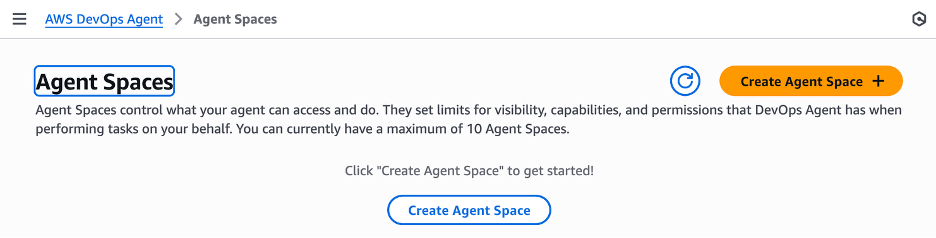
To create Agent Spaces, navigate to the AWS DevOps Agent page within the AWS Management Console. An Agent Space establishes the boundaries for the AWS DevOps Agent when accessing resources within a specific AWS account. To get started, click the create Agent Space button at the top right of the screen and enter the name, description and IAM roles.

Screen shot displaying orange Create Agent Space button in the AWS Console

AWS DevOps Agent creating agent space

Creating a New Relic association

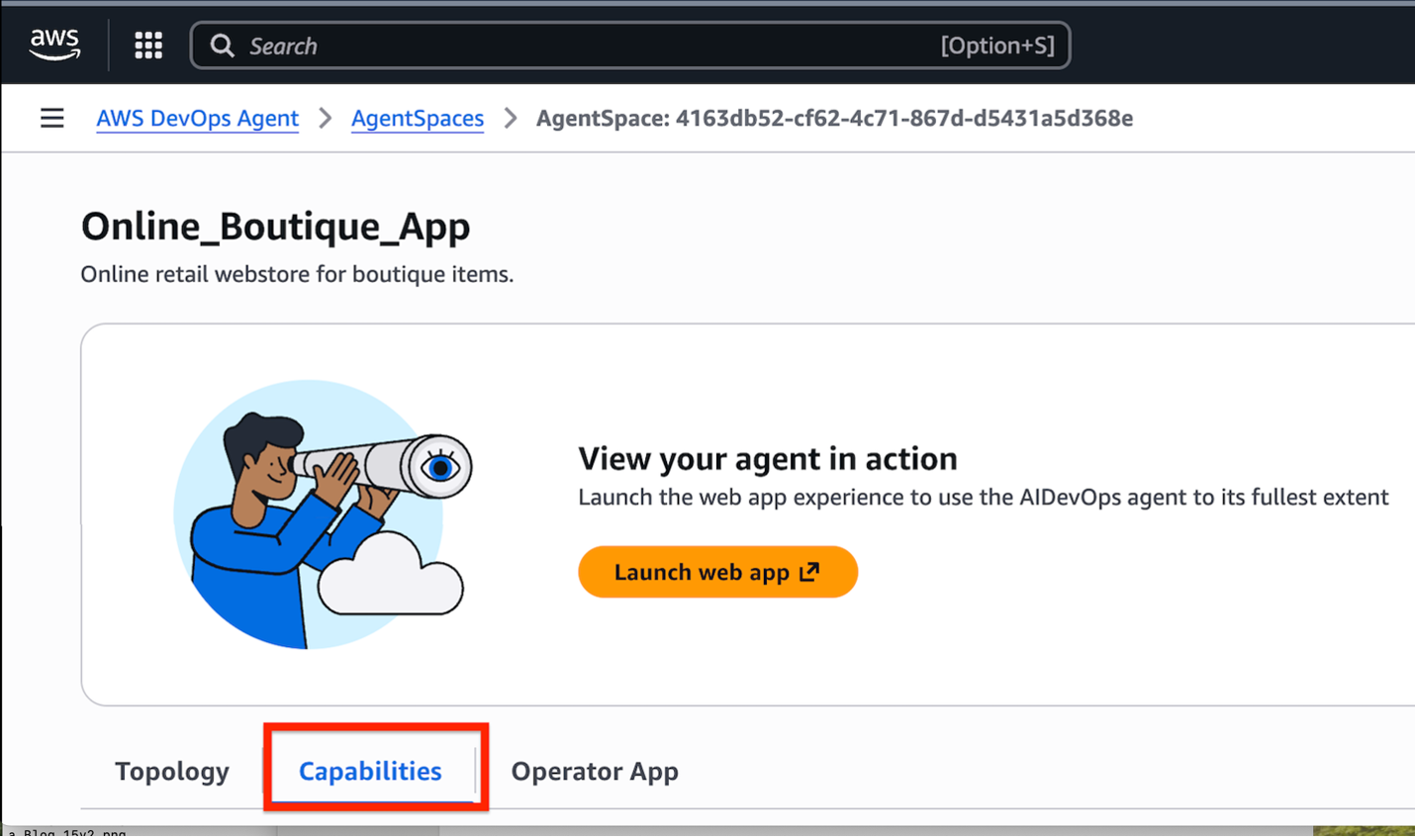
 Navigate to the capabilities tab in the Agent Space

Screen shot with a red square around the tab for Capabilities in the AWS DevOps Agent -> AgentSpaces view in the AWS Console” width=”1430″ height=”849″></p>
<p style=Navigating to the capabilities tab in the Agent space

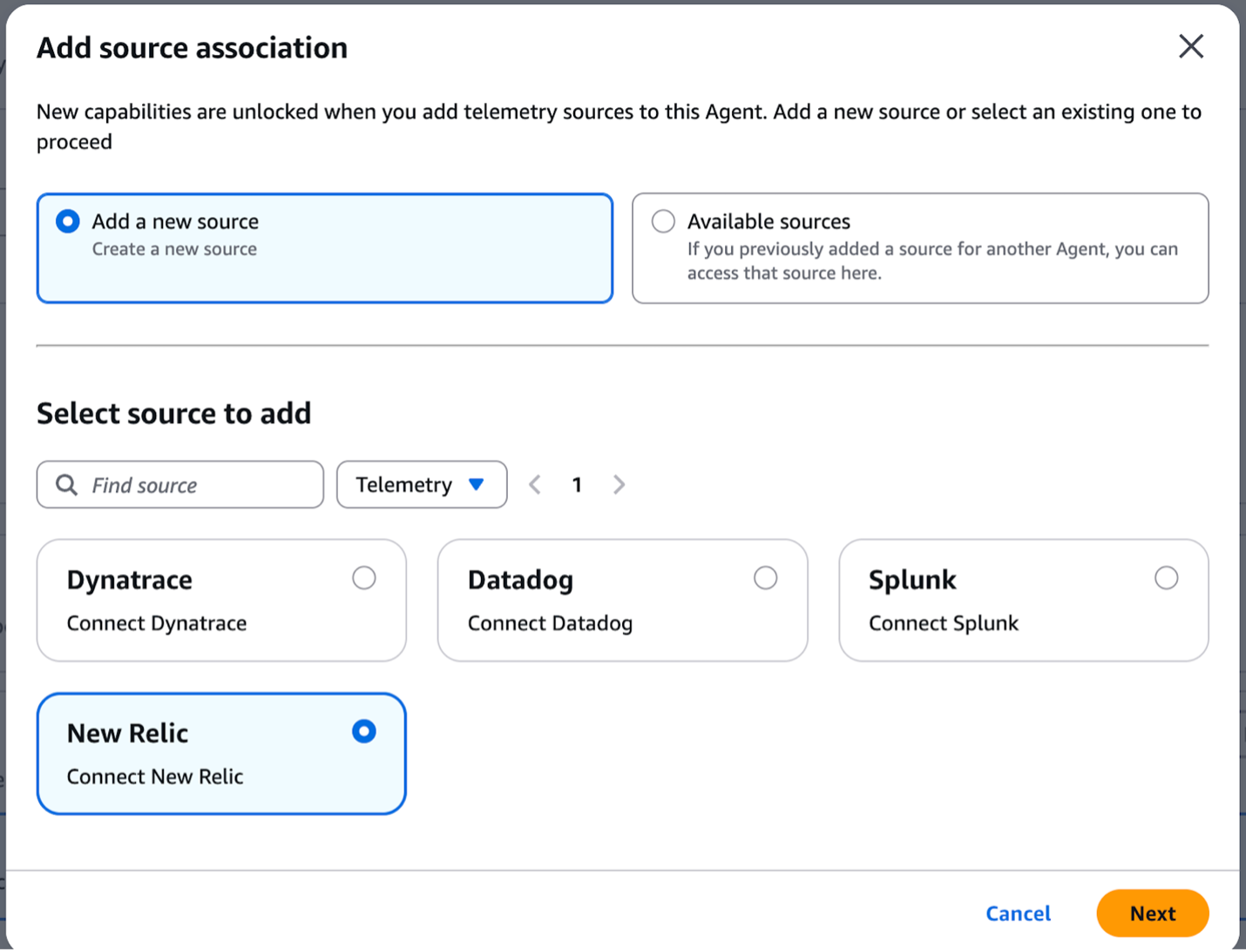
Go to the Telemetry section, select Add, then choose New Relic and click Next.

Screen shot with Add a new source radio button selected and Select source to add has radio button New Relic selected

Associating New Relic as the Telemetry provider in the Agent space

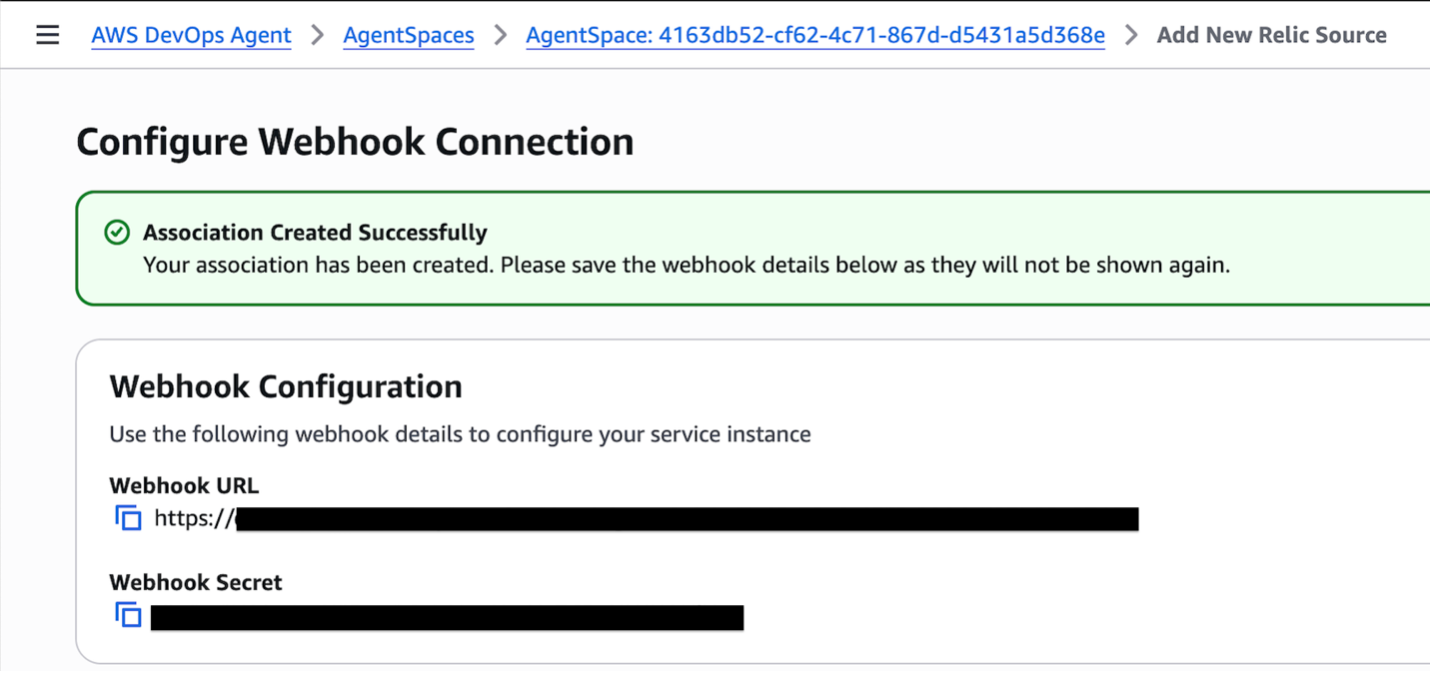
Upon successful registration of New Relic as a source, AWS DevOps Agent automatically generates a webhook URL. This URL is then used to receive alert notifications and trigger automated investigations.

Screen shot for Configure Webhook Connection displaying the Webhook URL and Webhook Secret, both are redacted by a black bar.

AWS DevOps Agent Webhook URL and Bearer secret key

The AWS DevOps Agent webhook requires a Bearer token to be included in the HTTP header for authentication purposes. This ensures that only authorized requests are processed. In New Relic, set up Amazon EventBridge as the alert destination. This configuration will trigger an AWS Lambda function that adds the Bearer token to the HTTP header and posts the alert payload to the AWS DevOps Agent webhook URL.

Use Case Walkthrough: Retail Chain – High Latency in shopping cart service resolution

This use case demonstrates how the integration of AWS DevOps Agent and New Relic MCP server empowers SRE and DevOps teams to access the untapped insights in your data to reduce MTTR and drive operational excellence.

Consider the following scenario: AWS DevOps Agent gets paged when the online boutique retail store application cart is experiencing P95 latency > 500ms for more than 2 minutes. This latency spike is critical and far exceeds the normal 5ms threshold, impacting the ability for customers to make purchases. In a typical scenario, the operations team would spend the first 15-30 minutes manually checking dependent services, alerts dashboard, and logs. This manual effort can be significantly reduced by configuring the New Relic observability platform with AWS DevOps Agent to automatically correlate telemetry data and surface the root cause faster.

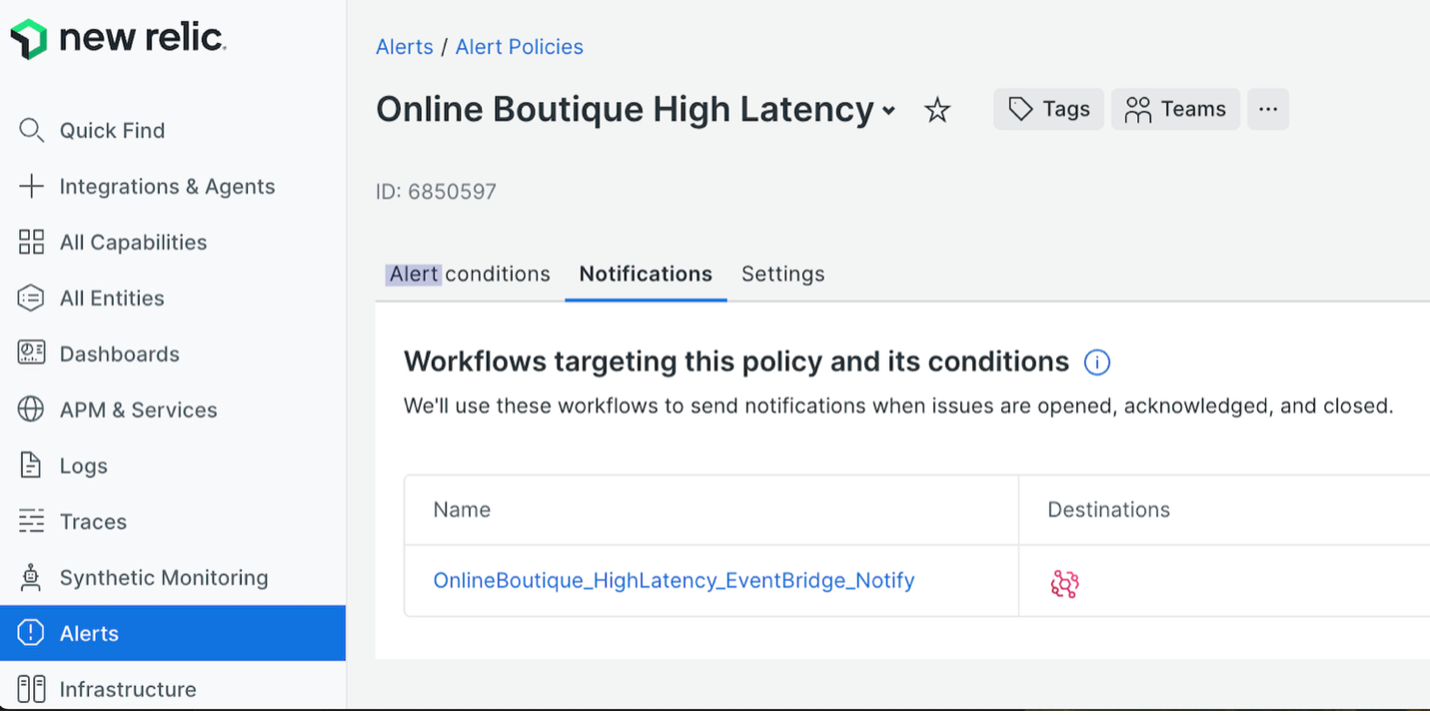
To automatically remediate this issue, the online boutique application’s microservices are configured with New Relic’s APM agents that collect relevant metrics and send them to New Relic. When the latency exceeds a predefined threshold, an alert condition is triggered within New Relic. The triggered alert sends a notification to EventBridge, which in turn executes the Lambda function. The Lambda transforms the incoming payload into the required AWS DevOps Agent payload template. It then generates an HMAC signature to verify the message’s integrity and authenticity before dispatching it to the AWS DevOps Agent webhook endpoint.

Screen shot displaying new relic logo in the top left corner. The screen is divided into a navigation bar on the left, with Alerts selected. In the pane to the right, Alerts / Alerts Policies is displayed at the top, and below that a title Online Boutique High Latency appears. The notifications tab below that is selected.

Alert policy notifications in New Relic

The AWS DevOps Agent webhook triggers the agent to begin an automated investigation.

Screen shot displaying AWS DevOps Agent / GoldenPath_App in the title bar with Incident Response tab selected. Below that a heading is displayed for Online Boutique All Alerts followed by a timeline displaying User Request then Assistant Response

AWS DevOps Agent Incident response page

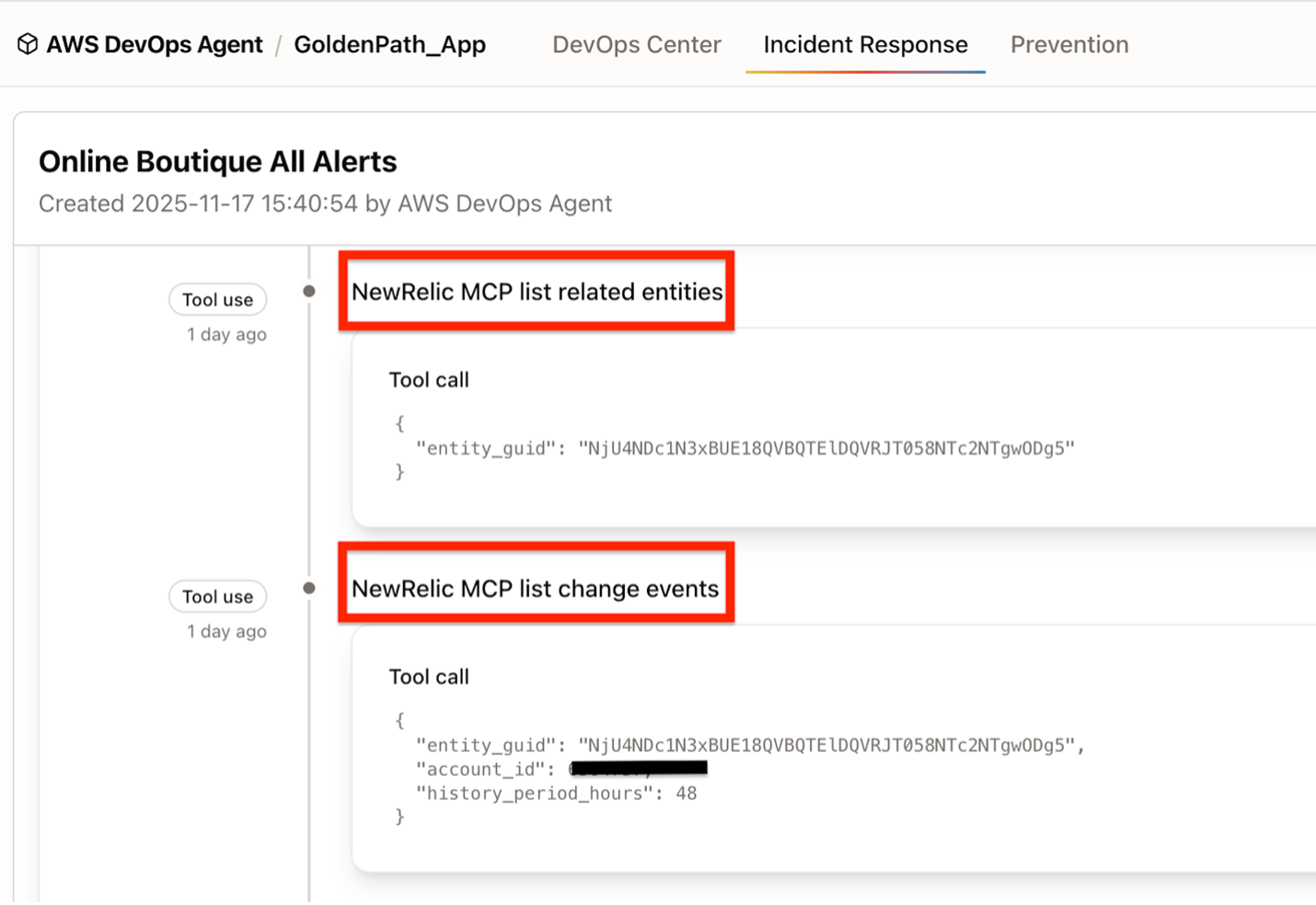
The New Relic MCP is first queried by the AWS DevOps Agent to retrieve telemetry data for the cart service GUID. Following this, the AWS DevOps Agent makes a second request to the New Relic MCP to formulate an investigation plan, which includes a list of related entities, their key metrics, and any associated change events for those dependencies.

Zoomed in screen shot of the previous screen with red boxes highlighting two areas in the timeline which say NewRelic MCP list related entities and NewRelic MCP list change events. Each shots the detail for the tool call.

AWS DevOps Agent and New Relic MCP interaction to list entities and related change events

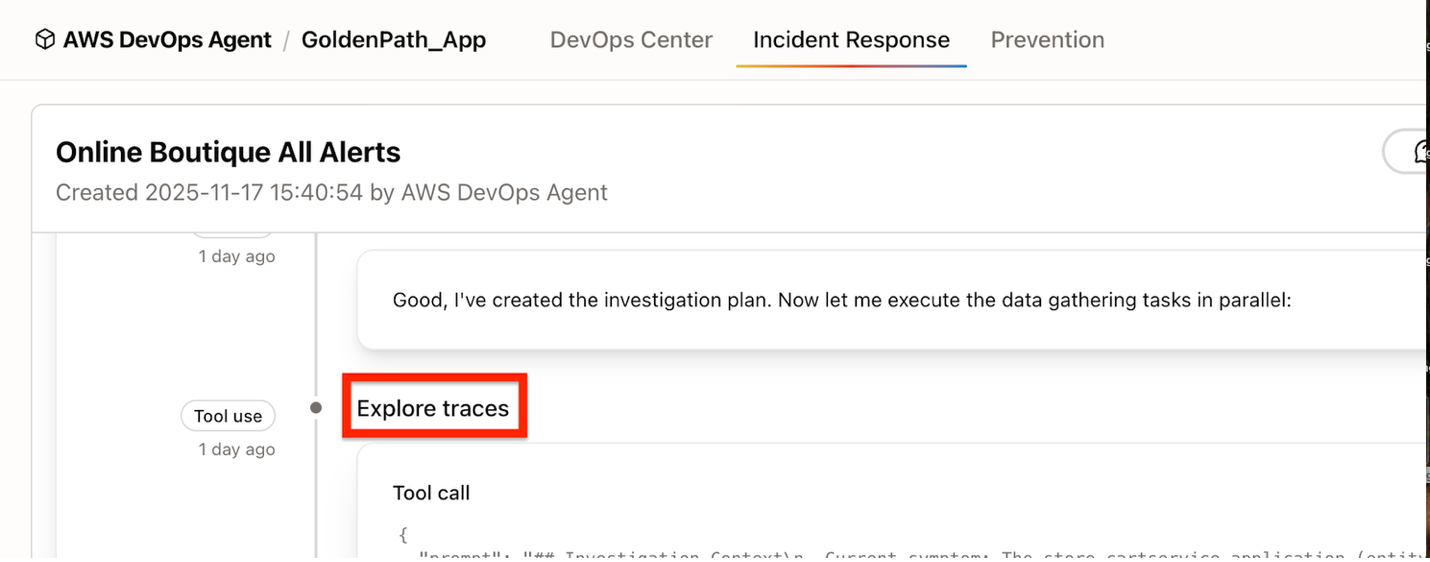
Next, data gathering tasks are executed using New Relic MCP, following the investigation plan.

Time line screen similar to the previous screen shot with a red box around the timeline entry for Explore traces.

AWS DevOps Agent and New Relic MCP interaction to explore and analyze traces

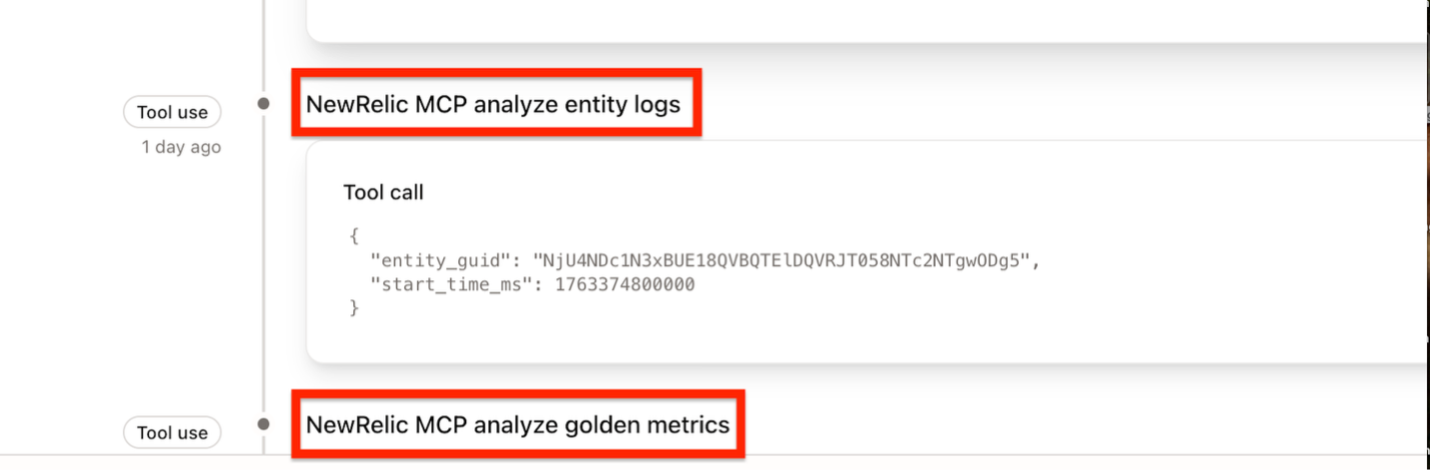
Time line screen similar to the previous screen shot with a red box around the timeline entries for NewRelic MCP analyze entity logs and NewRelic MCP analyze golden metrics

AWS DevOps Agent and New Relic MCP interaction to explore and analyze logs and metrics

Continuing its analysis, the agent leverages New Relic’s MCP to examine entity logs, golden metrics, and traces, ultimately identifying the root cause for the latency spike.

Screen shot displaying AWS DevOps Agent / GoldenPath_App in the title bar with Incident Response tab selected. Below that a heading is displayed for Online Boutique All Alerts followed by a timeline displaying Update, Finding, and then Root cause. Root cause has a red box outlining it to draw attention.

AWS DevOps Agent Root Cause Analysis

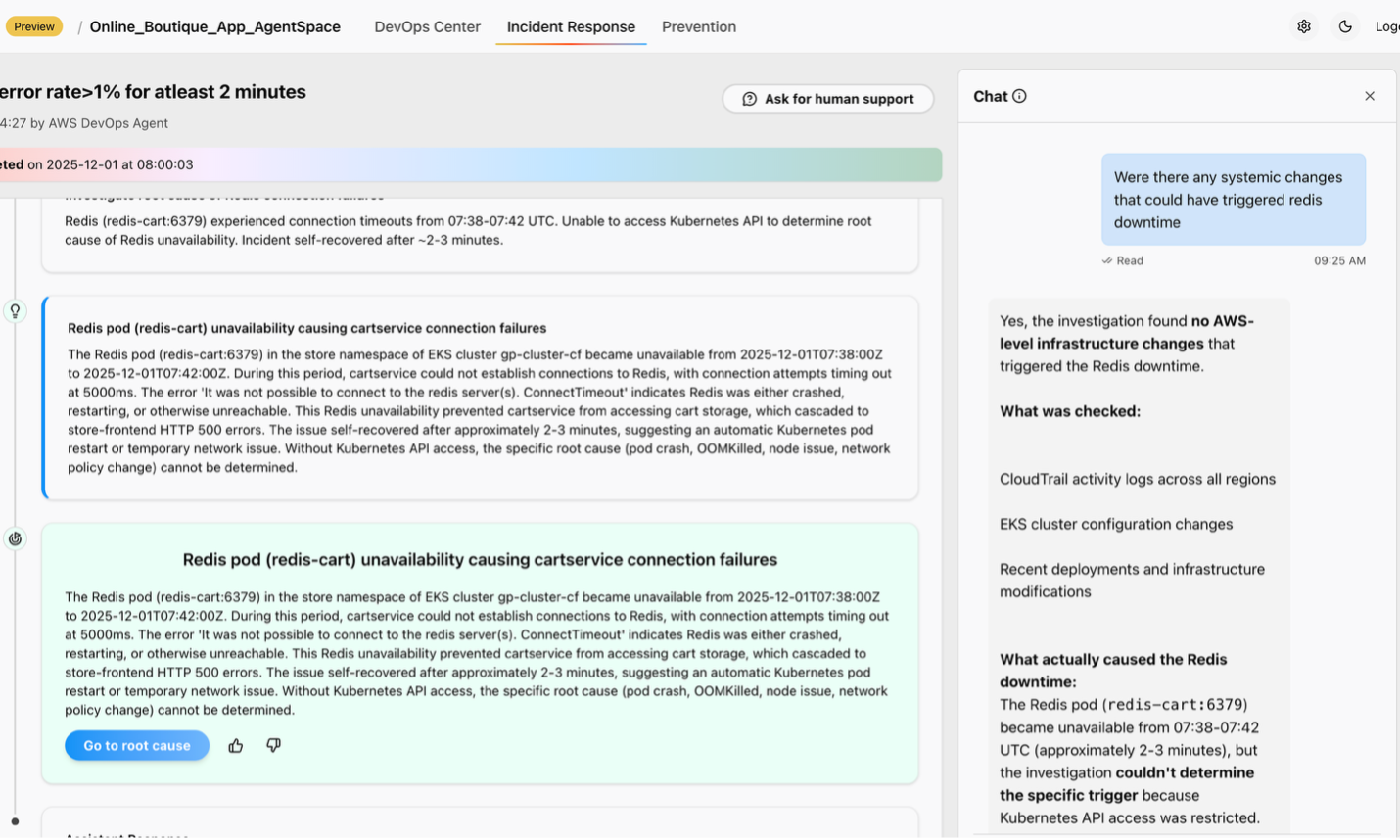
You can review AWS DevOps Agent’s findings and the suggested root cause. The Site Reliability Engineer (SRE) can interact with the AWS DevOps Agent (side panel) in the chat panel to gain clarification on the steps of the ongoing investigation, enabling more effective monitoring and troubleshooting.

creen shot displaying AWS DevOps Agent / GoldenPath_App in the title bar with Incident Response tab selected. A timeline is visible on the lift and a chat window has been expanded on the right. The chat window contains a question and response.

AWS DevOps Agent Chat interface

You can review AWS DevOps Agent’s findings and the suggested root cause. If necessary, the SRE then executes the appropriate mitigation plan.

Conclusion

By integrating the New Relic MCP server with AWS DevOps Agent, organizations can quickly resolve issues when they arise and proactively prevent future incidents. This collaboration reduces Mean Time to Resolution (MTTR) and accelerates SREs and DevOps teams beyond manual, time-consuming investigations. It ensures rapid remediation of technical disruptions to minimize impact to the business. Ultimately, AWS DevOps Agent, the new frontier agent drives operational excellence, working in conjunction with the New Relic One Observability platform.

About New Relic
The New Relic Intelligent Observability Platform helps businesses eliminate interruptions in digital experiences. New Relic is an AI-strengthened platform that unifies and pairs telemetry data to provide clarity over your entire digital estate for proactive and predictive problem solving. That’s why businesses around the world run on New Relic to drive innovation, improve reliability, and deliver exceptional customer experiences to fuel growth.

Authors

Muthuvelan Swaminathan

Muthuvelan Swaminathan is a Principal Partner Architect at New Relic partnership organization building technical integrations with leading cloud providers and strategic partners. Through partner enablement, solution engineering and ecosystem alignment Muthuvelan helps drive product innovation at New Relic to ensure enterprises eliminate disruptions in their digital experiences for their customers.

Ruchika Bakolia

Ruchika Bakolia is a Software Engineer at New Relic. She is passionate about the intersection of AI and Cloud technologies, with extensive experience building and integrating solutions primarily on AWS. Ruchika enjoys traveling, reading, and exploring creative pursuits like pottery, always seeking out new experiences and challenges.

Nava Ajay Kanth Kota

Ajay Kota is a Senior Partner Solutions Architect at AWS, currently serving on the Amazon Partner Organization (APO) team collaborating closely with ISV Partners. With over 23 years of experience in enterprise computing infrastructure, Ajay brings deep expertise in cloud architecture, storage, backup, and cloud solutions. Before joining AWS, he led Storage, Backup, and Cloud teams, where he was responsible for developing Managed Services offerings across these domains.

Your Training Data Is Your Most Valuable IP

Post Syndicated from Maddie Presland original https://www.backblaze.com/blog/your-training-data-is-your-most-valuable-ip/

A decorative image showing different generic computer module icons.

AI training data is now a company’s most valuable intellectual property—often worth more than the models themselves. Models can be replicated and architectures become public knowledge, but the datasets that capture your domain expertise and years of careful curation are irreplaceable.

Yet as AI workflows become increasingly distributed, that data moves constantly between environments, increasing exposure while reducing visibility. According to IBM, “Forty percent of breaches involved data stored across multiple environments… highlighting the challenge of tracking and safeguarding data, including shadow data, and data in AI workloads.” Meanwhile MIT Sloan researchers have documented that AI training datasets are often inconsistently documented and poorly understood, creating exposure that extends beyond technical vulnerabilities into operational and compliance failures.

Yet many organizations still treat training datasets as just another storage bucket. But protecting data at rest is both a compliance requirement and a competitive necessity. The integrity of your datasets now determines the integrity of your models.

Free resource: Understand why object storage is a strategic driver

Download our free ebook to learn how object storage supports every stage of the AI pipeline—from data collection to model deployment.

Download the Ebook

Why training data is the new target

The attack surface for AI systems has fundamentally shifted. Rather than targeting models in production, sophisticated adversaries now focus on the training pipeline itself.

Data poisoning has emerged as an insidious threat

Attackers inject subtle changes like biased samples, mislabeled data, or adversarial examples that skew model outcomes or introduce hidden backdoors. Recent research reveals that 26% of organizations surveyed in the US and UK have been victims of AI data poisoning in the last year. These poisoned models can quietly undermine fraud detection, weaken cyber defenses, and corrupt business-critical decisions.

Intellectual property theft takes on new dimensions

When adversaries steal training datasets, they’re stealing the accumulated expertise that gives your models their edge. Your training data represents thousands of hours of curation and annotation that encodes institutional knowledge about your customers and market. A competitor with your datasets can replicate your capabilities in weeks rather than years.

Silent corruption poses an equally serious but less visible threat

Infrastructure failures, human errors, or gradual drift in data pipelines can corrupt training datasets without triggering alerts. For organizations in regulated industries such as healthcare, financial services, or autonomous systems, this creates a reproducibility crisis. How do you prove your model was trained on authentic, unaltered data when you can’t verify the data’s provenance?

The NIST AI Risk Management Framework emphasizes that maintaining the provenance of training data and supporting attribution of AI system decisions to subsets of training data can assist with both transparency and accountability. Regulators and customers increasingly expect verifiable proof of data integrity throughout the training lifecycle.

The takeaway? The trustworthiness of every model begins with the trustworthiness of its data.

The principles of a secure AI data foundation

A strong protection model rests on three pillars—immutability, encryption, and regional control—each reinforcing long-term integrity.

1. Immutability: Protect against tampering or deletion

Immutability means write-once, read-many (WORM) protection that prevents modification or removal. Once data is written, it becomes locked—no one can modify, overwrite, or delete it for a defined retention period, but it remains fully accessible for reading. This technical guarantee prevents data poisoning attacks, stops accidental deletion, and enables verifiable reproducibility.

CISA advisories recommend immutable backups to guard against ransomware, but the benefits extend much further for AI systems. When you lock a dataset snapshot before training begins, you guarantee the ability to reproduce that exact model state, which is critical for debugging, regulatory audits, and forensic investigations when models fail.

Object Lock capabilities enforce immutability at the storage layer for set retention periods. Each dataset version becomes permanently immutable, creating an unalterable record of your training history that no administrator or attacker can modify.

Implementation tip: Enable Object Lock at the bucket level and integrate it with your data-ingestion scripts to automatically lock datasets as they’re created.

2. Encryption: Safeguard confidential data

Training datasets contain extraordinary value—customer information, proprietary annotations, competitive intelligence embedded in data selection. Server-side encryption protects this data both in transit and at rest, defending against unauthorized access even if other security layers fail. The EU’s recent NIS2 technical guidance explicitly prescribes cryptography as a required control measure for compliance.

The key to practical encryption is simplicity. Solutions should integrate seamlessly into existing workflows without requiring separate key-management infrastructure or introducing performance overhead that disrupts training pipelines.

Implementation tip: Look for server-side encryption options (like SSE-B2 or SSE-C) that remain transparent to your applications while providing the protection regulators require.

3. Regional control: Ensure data sovereignty and availability

Where your data physically resides matters for compliance, latency, and operational resilience. GDPR and similar regulations often require that sensitive data remain within specific jurisdictions. Beyond compliance, regional placement affects training performance—positioning data near compute resources or using high-performance delivery mechanisms can reduce transfer delays when moving large datasets.

The critical factor is transparency. You need explicit control over region selection and assurance that data won’t be replicated to secondary regions without your knowledge. Ambiguous “regional” configurations that might span continents create compliance risk. 

Consider a U.S. biomedical AI startup working with patient-derived data. They need datasets stored exclusively in U.S. regions to satisfy HIPAA requirements, Object Lock enabled to prove data integrity for regulatory submissions, and encryption applied to protect sensitive patient information—all while maintaining the competitive advantage their proprietary data provides. Regional control with clear guarantees makes this achievable.

Implementation tip: Choose storage providers that let you explicitly select regions during bucket creation with clear guarantees about where data resides, including replication destinations.

Beyond security: Enabling trust and traceability

Immutable, encrypted, regionally contained object storage enables AI governance at a level traditional storage infrastructure cannot.

Each dataset snapshot becomes a verifiable record of model history. When a model behaves unexpectedly in production, you can trace back to the exact training data used to create it. This capability accelerates debugging and provides the evidence needed to explain model decisions to regulators, customers, or internal stakeholders.

Storage infrastructure with built-in immutability and access logging provides the verifiable evidence that auditors require. Instead of reconstructing data lineage from logs and documentation, you can demonstrate exactly what happened with cryptographic proof.

These capabilities transform storage from a passive repository into an active component of your AI governance framework.

Implementation snapshot: Putting it all together

Establishing these protections with Backblaze B2 follows a straightforward path:

  1. Create buckets in regions that match your compliance and latency requirements.
  2. Enable Object Lock and configure retention policies aligned with your model development lifecycle.
  3. Apply server-side encryption (SSE-B2 or SSE-C) to all training data buckets.
  4. Activate versioning to maintain a complete history of dataset evolution.
  5. Configure logging to track access patterns and enable lineage verification.
  6. Integrate with compute using standard S3 compatible tools.

For organizations running intensive training workloads, Backblaze B2 Overdrive provides high-throughput object storage with up to 1Tbps throughput speeds and unlimited free egress. This allows enterprises to perform large quantities of concurrent data operations without performance degradation, keeping compute resources—including expensive GPUs—from sitting idle while waiting for data transfers. B2 Overdrive maintains the same security and compliance capabilities as standard Backblaze B2 while enabling faster iteration on model development.

The bottom line: Trust begins with proven data

The datasets you’ve built represent years of institutional knowledge—far more difficult to replace than the models trained on them. Protecting that intellectual property requires more than access controls and perimeter security. You need to prove the integrity of your data to regulators who demand accountability, to customers who expect trustworthy AI, and to your own teams who need confidence in model reproducibility.

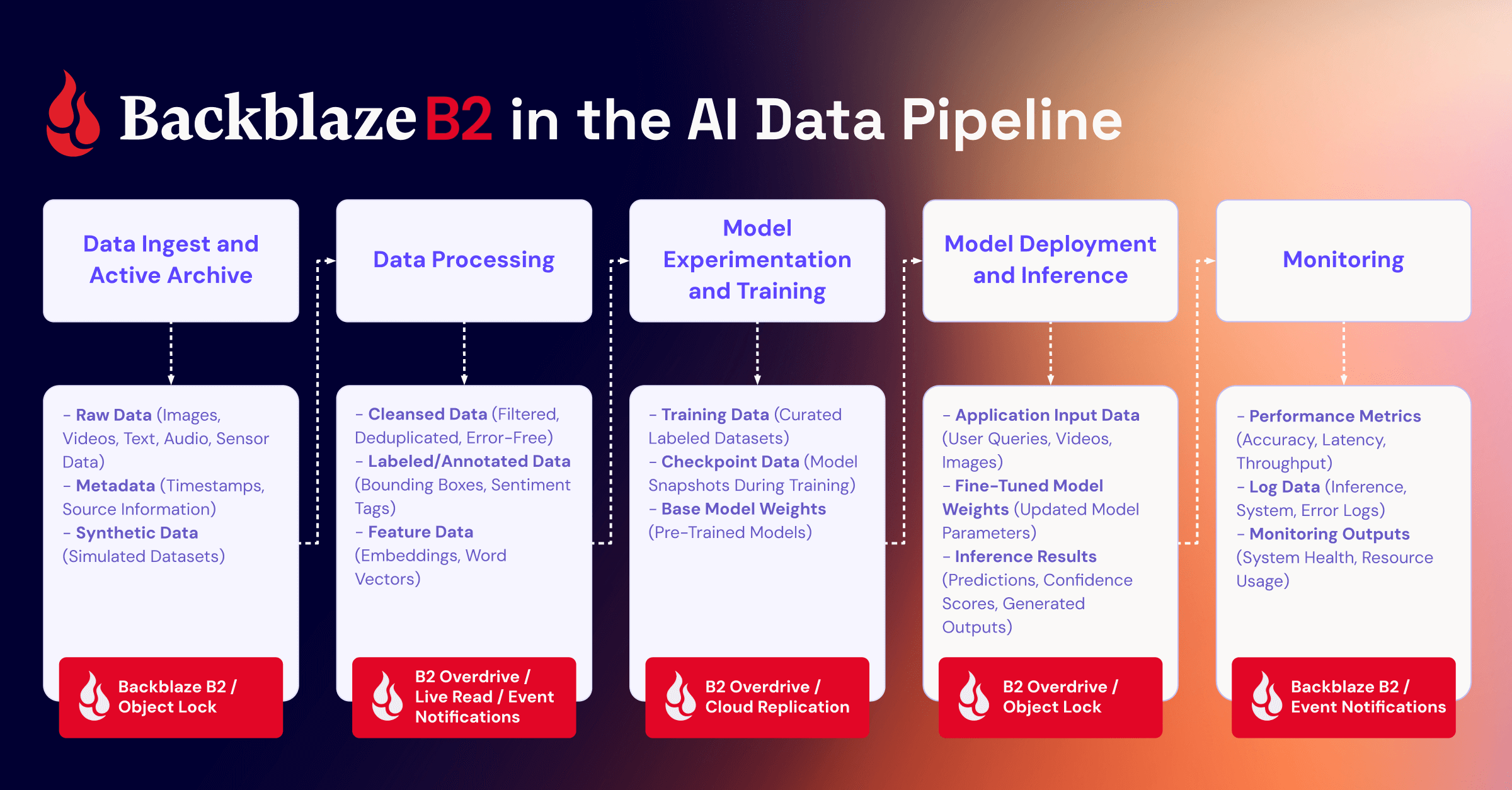
Immutability and encryption make that proof simple and reliable. With Backblaze B2, you gain a clear, verifiable foundation for protecting your training data with the same rigor you apply to your most critical assets. Learn more about where Backblaze B2 sits in the AI data pipeline, or talk to our cloud storage experts.

The post Your Training Data Is Your Most Valuable IP appeared first on Backblaze Blog | Cloud Storage & Cloud Backup

Introducing the AWS Infrastructure as Code MCP Server: AI-Powered CDK and CloudFormation Assistance

Post Syndicated from Idriss Laouali Abdou original https://aws.amazon.com/blogs/devops/introducing-the-aws-infrastructure-as-code-mcp-server-ai-powered-cdk-and-cloudformation-assistance/

Streamline your AWS infrastructure development with AI-powered documentation search, validation, and troubleshooting

Introduction

Today, we’re excited to introduce the AWS Infrastructure-as-Code (IaC) MCP Server, a new tool that bridges the gap between AI assistants and your AWS infrastructure development workflow. Built on the Model Context Protocol (MCP), this server enables AI assistants like Kiro CLI, Claude or Cursor to help you search AWS CloudFormation and Cloud Development Kit (CDK) documentation, validate templates, troubleshoot deployments, and follow best practices – all while maintaining the security of local execution.

Whether you’re writing AWS CloudFormation templates or AWS Cloud Development Kit (CDK) code, the IaC MCP Server acts as an intelligent companion that understands your infrastructure needs and provides contextual assistance throughout your development lifecycle.

The Model Context Protocol (MCP) is an open standard that enables AI assistants to securely connect to external data sources and tools. Think of it as a universal adapter that lets AI models interact with your development tools while keeping sensitive operations local and under your control.

The IaC MCP Server provides nine specialized tools organized into two categories:

Remote Documentation Search Tools

These tools connect to the AWS Knowledge MCP backend to retrieve relevant, up-to-date information:

  1.  search_cdk_documentation
    Search the AWS CDK knowledge base for APIs, concepts, and implementation guidance.
  2. search_cdk_samples_and_constructs
    Discover pre-built AWS CDK constructs and patterns from the AWS Construct Library.
  3. search_cloudformation_documentation
    Query CloudFormation documentation for resource types, properties, and intrinsic functions.
  4. read_cdk_documentation_page
    Retrieve and read full documentation pages returned from searches or provided URLs.

Local Validation and Troubleshooting Tools

These tools run entirely on your machine

  1. cdk_best_practices
    Access a curated collection of AWS CDK best practices and design principles.
  2. validate_cloudformation_template
    Perform syntax and schema validation using cfn-lint to catch errors before deployment.
  3. check_cloudformation_template_compliance
    Run security and compliance checks against your templates using AWS Guard rules and cfn-guard.
  4. troubleshoot_cloudformation_deployment
    Analyze CloudFormation stack deployment failures with integrated CloudTrail event analysis. This tool will use your AWS credentials to analyze your stack status.
  5. get_cloudformation_pre_deploy_validation_instructions
    Returns instructions for CloudFormation’s pre-deployment validation feature, which validates templates during change set creation.

Key Use Cases

  1. Intelligent Documentation Assistant

Instead of manually searching through documentation, ask your AI assistant natural language questions:

“How do I create an S3 bucket with encryption enabled in CDK?”

The server searches CDK best practic and samples, returning relevant code examples and explanations.

     2. Proactive Template Validation

Before deploying infrastructure changes:

User: “Validate my CloudFormation template and check for security issues”

AI Agent: [Uses validate_cloudformation_template and check_cloudformation_template_compliance]

“Found 2 issues: Missing encryption on EBS volumes,

and S3 bucket lacks public access block configuration”

 3. Rapid Deployment Troubleshooting

When a stack deployment fails:

User: “My stack ‘stack_03’ in us-east-1 failed to deploy. What happened?”

AI Agent: [Uses troubleshoot_stack_deployment with CloudTrail integration]

“The deployment failed due to insufficient IAM permissions.

CloudTrail shows AccessDenied for ec2:CreateVpc.

You need to add VPC permissions to your deployment role.”

     4. Learning and Exploration

New to AWS CDK? The server helps you discover constructs and patterns:

User: “Show me how to build a serverless API”

AI Agent: [Searches CDK constructs and samples]

“Here are three approaches using API Gateway + Lambda…”

Architecture and Security

Security Design

Local Execution: The MCP server runs entirely on your local machine using uv (the fast Python package manager). No code or templates are sent to external services except for documentation searches.

AWS Credentials: The server uses your existing AWS credentials (from ~/.aws/credentials, environment variables, or IAM roles) to access CloudFormation and CloudTrail APIs. This follows the same security model as the AWS CLI.

stdio Communication: The server communicates with AI assistants over standard input/output (stdio), with no network ports opened.

Minimal Permissions: For full functionality, the server requires read-only access to CloudFormation stacks and CloudTrail events—no write permissions needed for validation and troubleshooting workflows.

Getting Started

Prerequisites

  • Python 3.10 or later
    uv package manager
    AWS credentials configured locally
    MCP-compatible AI client (e.g., Kiro CLI, Claude Desktop)

Configuration

Configure the MCP server in your MCP client configuration. For this blog we will focus on Kiro CLI. Edit .kiro/settings/mcp.json):

{
  "mcpServers": {
    "awslabs.aws-iac-mcp-server": {
      "command": "uvx",
      "args": ["awslabs.aws-iac-mcp-server@latest"],
      "env": {
        "AWS_PROFILE": "your-named-profile",
        "FASTMCP_LOG_LEVEL": "ERROR"
      },
      "disabled": false,
      "autoApprove": []
    }
  }
}

Security Considerations

Privacy Notice: This MCP server executes AWS API calls using your credentials and shares the response data with your third-party AI model provider (e.g., Amazon Q, Claude Desktop, Cursor, VS Code). Users are responsible for understanding your AI provider’s data handling practices and ensuring compliance with your organization’s security and privacy requirements when using this tool with AWS resources.

IAM Permissions

The MCP server requires the following AWS permissions:

For Template Validation and Compliance:

  • No AWS permissions required (local validation only)

For Deployment Troubleshooting:

  • cloudformation:DescribeStacks
  • cloudformation:DescribeStackEvents
  • cloudformation:DescribeStackResources
  • cloudtrail:LookupEvents (for CloudTrail deep links)

Example IAM policy:

{
  "Version": "2012-10-17",
  "Statement": [
    {
      "Effect": "Allow",
      "Action": [
        "cloudformation:DescribeStacks",
        "cloudformation:DescribeStackEvents",
        "cloudformation:DescribeStackResources",
        "cloudtrail:LookupEvents"
      ],
      "Resource": "*"
    }
  ]
}

Example Use Case With Kiro CLI

IMPORTANT: Ensure you have satisfied all prerequisites before attempting these commands.

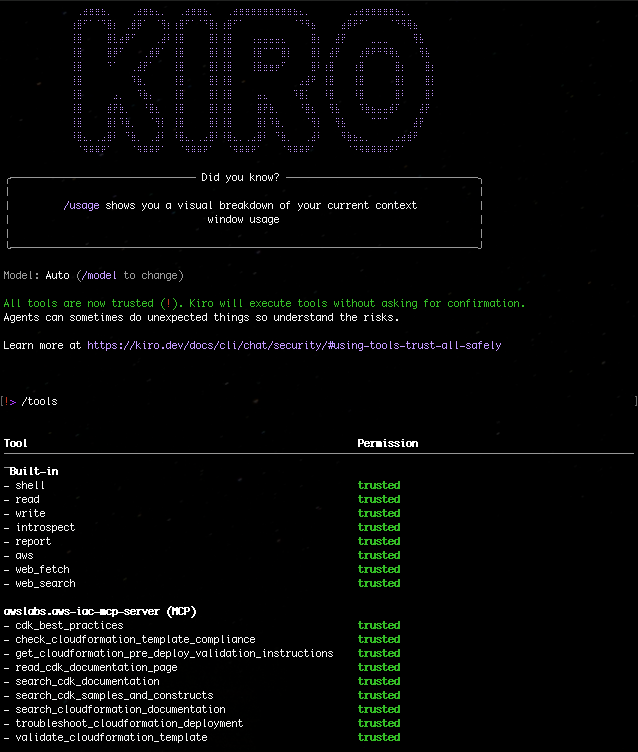
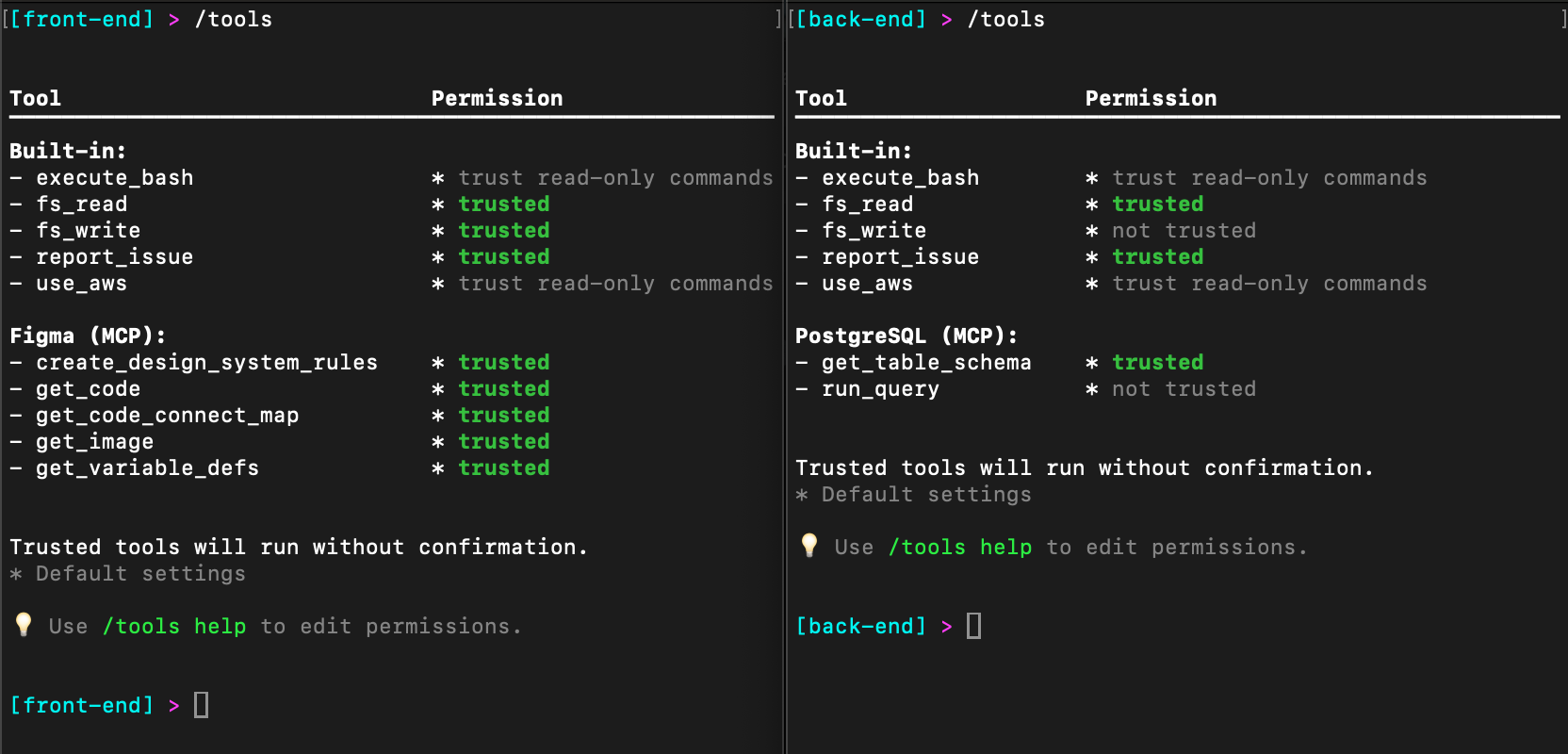
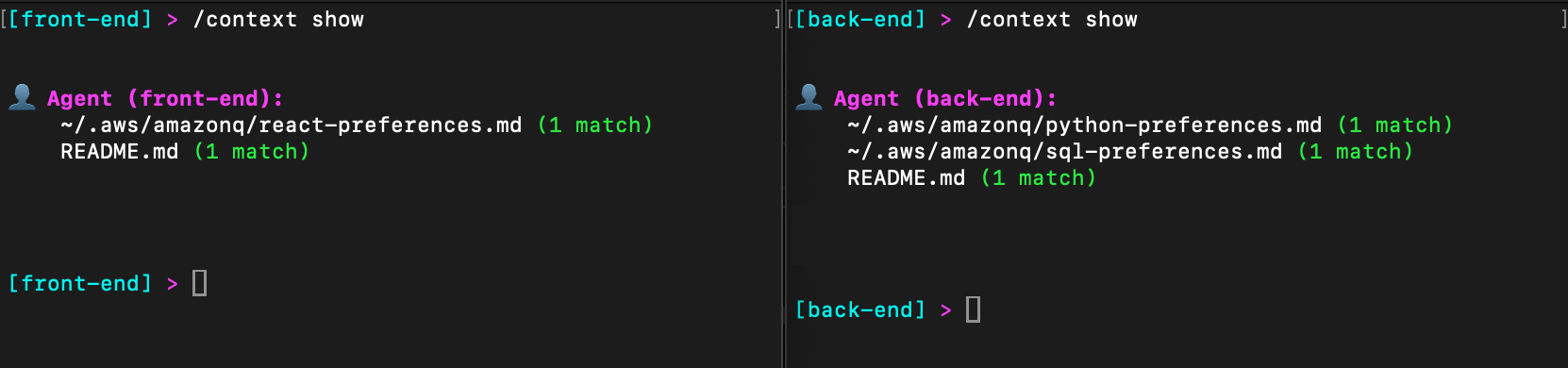
1. With the mcp.json file correctly set, try to run a sample prompt. In your terminal, run kiro-cli chat to start using Kiro-cli in the CLI.

Figure 1: Kiro-CLI with AWS IaC MCP server

Figure 1: Kiro-CLI with AWS IaC MCP server

Scenarios:

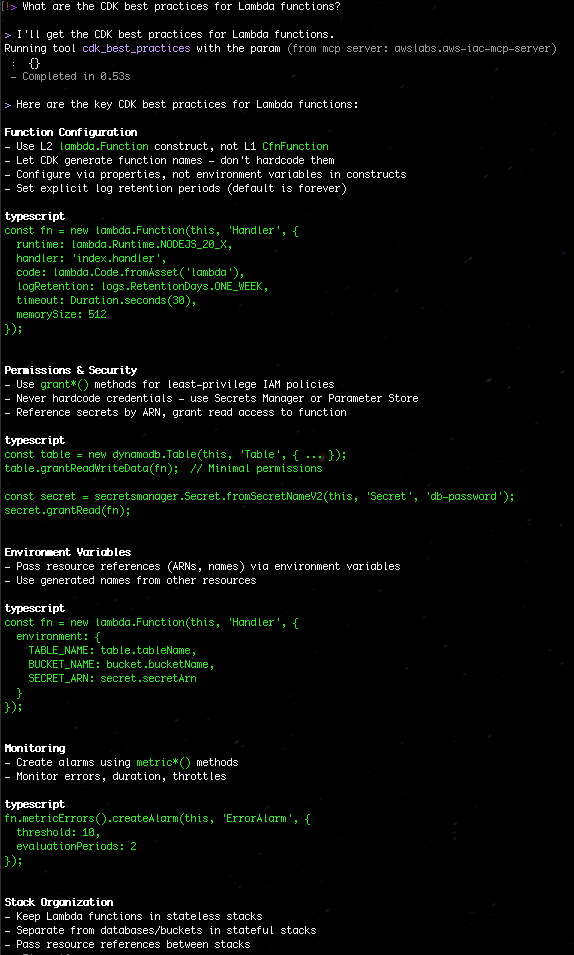
  • “What are the CDK best practices for Lambda functions?”

Figure 2 Search the CDK best practices for Lambda functions

Figure 2: Search the CDK best practices for Lambda functions

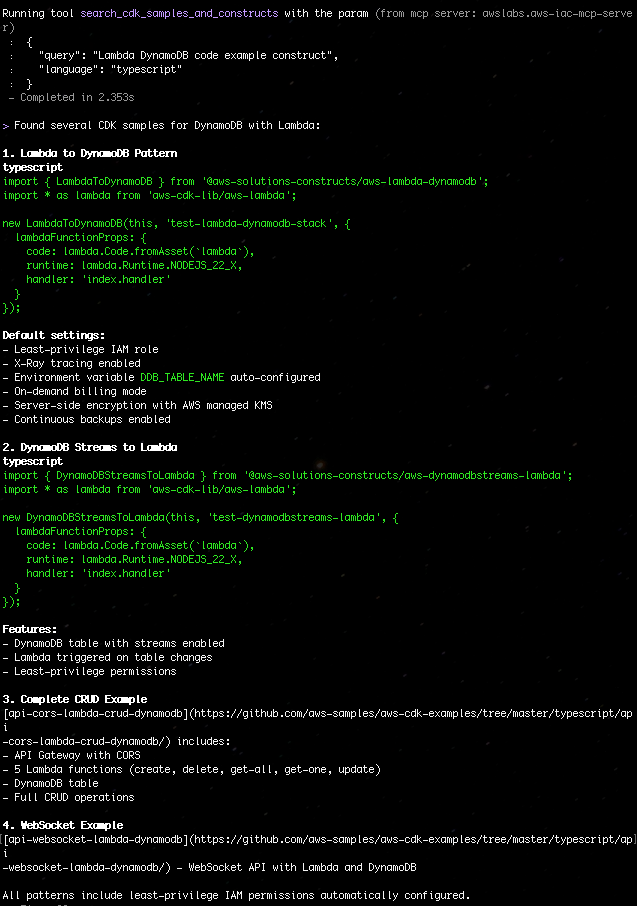
  • “Search for CDK samples that use DynamoDB with Lambda”

Figure 3: Search for CDK samples that use DynamoDB with Lambda

Figure 3: Search for CDK samples that use DynamoDB with Lambda

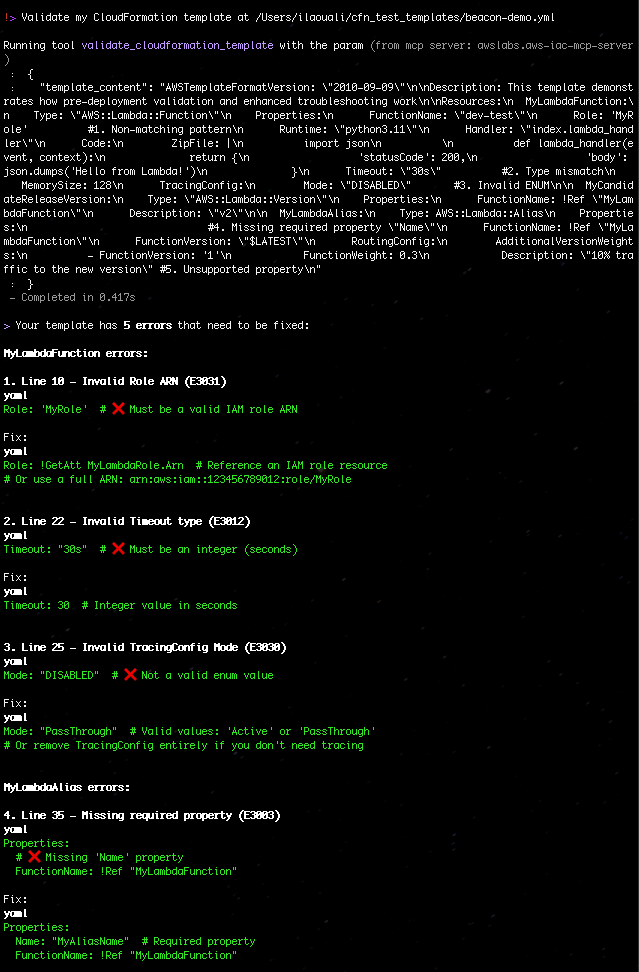
  • “Validate my CloudFormation template at ./template.yaml”

Figure 4: Validate my CloudFormation template with AWS IaC MCP Server

Figure 4: Validate my CloudFormation template with AWS IaC MCP Server

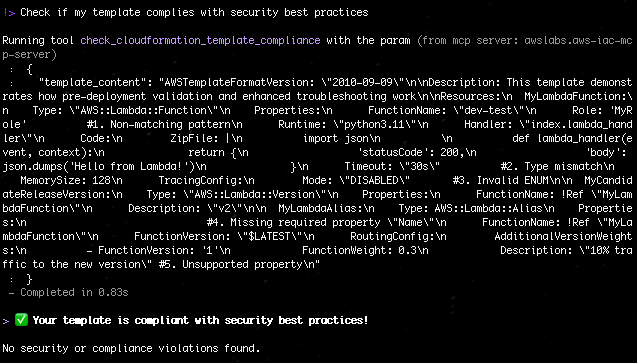
  • “Check if my template complies with security best practices”

Figure 5: Check if my template complies with security best practices with AWS IaC MCP Server

Figure 5: Check if my template complies with security best practices with AWS IaC MCP Server

Best Practices

  • Start with Documentation Search: Before writing code, search for existing constructs and patterns
  • Validate Early and Often: Run validation tools before attempting deployment
  • Check Compliance: Use check_template_compliance to catch security issues during development
  • Leverage CloudTrail: When troubleshooting, the CloudTrail integration provides detailed failure context
  • Follow CDK Best Practices: Use the cdk_best_practices tool to align with AWS recommendations

What’s Next?

The IAC MCP Server represents a new paradigm in the AI agentic workflow infrastructure development – one where AI assistants understand your tools, help you navigate complex documentation, and provide intelligent assistance throughout the development lifecycle.

Get Involved

The AWS IaC MCP Server is available now:

  • Documentation and GitHub Repository: aws-iac-mcp-server
  • Feedback: We welcome issues and pull requests! Or respond to our IaC survey here.

Ready to supercharge your infrastructure as code development? Install the IaC MCP Server today and experience AI-powered assistance for your AWS CDK and CloudFormation workflows.

Have questions or feedback? Reach out to the blog authors on the AWS Developer Forums.

About Authors

Idriss Laouali Abdou

Idriss is a Sr. Product Manager Technical on the AWS Infrastructure-as-Code team based in Seattle. He focuses on improving developer productivity through AWS CloudFormation and StackSets Infrastructure provisioning experiences. Outside of work, you can find him creating educational content for thousands of students, cooking, or dancing.

Brian Terry

Brian Terry, Senior WW Data & AI PSA, is an innovation leader with more than 20 years of experience in technology and engineering. Brian is pursuing a PhD in computer science at the University of North Dakota and has spearheaded generative AI projects, optimized infrastructure scalability, and driven partner integration strategies. He is passionate about leveraging technology to deliver scalable, resilient solutions that foster business growth and innovation.

Building Multimodal AI Data Infrastructure with Pixeltable

Post Syndicated from Jeronimo De Leon original https://www.backblaze.com/blog/building-multimodal-ai-data-infrastructure-with-pixeltable/

A decorative image showing a chip with the word 'AI' and digital lines extending into the background.

We’re approaching a fascinating inflection point in AI development. Research from Epoch AI indicates that high-quality text data will be fully exhausted by 2026 to 2028. As recently as January, OpenAI co-founder Ilya Sutskever said at a conference that all the useful data online had already been used to train models. Over 35% of top websites now block AI scrapers. OpenAI is cutting deals with publishers like The Financial Times because freely available training data is running out.

So what comes next? Multimodal data: video, images, audio, sensor readings. Data that captures how the physical world actually operates, not just how we describe it in text.

Nvidia CEO Jensen Huang highlighted this shift when discussing Tesla’s AI advantage. He noted that the company has a “phenomenal position” because Tesla is collecting massive amounts of real-world data through its AI-enabled factories and autonomous vehicles.”

This real-world data, what some call “world data,” is multimodal at its core. It includes video from cameras capturing spatial relationships and motion, sensor telemetry recording physical interactions, images showing object states, and audio capturing environmental context. Video is particularly valuable because it captures temporal dynamics, depth perception, and how objects interact over time, insights that static text or images alone cannot provide.

Here’s the insight most organizations miss: you’re already generating this data.

Your organization is already producing multimodal data

Every single day, your organization produces massive amounts of multimodal data, including:

  • Zoom calls with video, audio, and screen shares
  • Security camera footage
  • Customer service interactions combining chat logs, voice recordings, website screen recordings and product images
  • Manufacturing sensors producing telemetry alongside quality inspection photos
  • Marketing teams creating videos, graphics, and campaign documents
  • Sales demos mixing presentations, product screenshots, and recorded conversations

And that’s just the short list.

The problem isn’t scarcity. It’s how multimodal data gets siloed, deleted, or stored in ways that make it unusable for AI applications. Video sits in one system and transcripts in another, with metadata scattered across databases. Most organizations treat this as operational exhaust rather than the strategic asset it represents.

Organizations that start systematically leveraging their multimodal data today will have capabilities tomorrow that generic models can never match.

The challenge: Multimodal infrastructure complexity

Building AI systems that work across images, video, audio, and text traditionally requires stitching together a fragmented technology stack. Videos live in object storage. Structured data sits in relational databases. Vector embeddings need specialized vector databases. Custom ETL pipelines handle transformations. Orchestration code coordinates everything. You need separate systems for caching, versioning, and lineage tracking.

This “data plumbing” consumes more engineering time than actual AI development. A straightforward workflow like building a searchable video archive with object detection and similarity search requires coordinating five or more systems and writing hundreds of lines of orchestration code.

The complexity creates a barrier that prevents most organizations from leveraging their multimodal data effectively, even when the underlying AI models are accessible through APIs. That’s the gap that Pixeltable solves.

How Pixeltable simplifies multimodal data workloads

Pixeltable replaces the fragmented multi-system architecture typically required for AI applications with a single declarative table interface. Instead of coordinating databases, file storage, vector databases, APIs, and orchestration tools separately, you work with tables where multimodal data lives alongside your transformations and AI operations.

The approach is straightforward. Store multimodal data in tables, define transformations as computed columns, and query everything together. Pixeltable handles the orchestration, caching, and model execution automatically.

Connect to data in-place 

Point Pixeltable at your existing object stores like AWS S3 or Backblaze B2 Cloud Storage without moving or duplicating data. Your files stay where they are, organized into queryable, versioned tables. No separate databases or vector stores needed.

Define workflows declaratively 

Transformations, model inference, and custom logic become Python computed columns. Extract frames from video, run object detection, generate embeddings, define it once and Pixeltable auto-orchestrates execution, manages dependencies, and handles incremental updates when new data arrives.

Query across everything

Leverage semantic search co-located with metadata. Raw data and AI-generated results in one interface. Build RAG systems with auto-synced embedding indexes that eliminate separate vector database management.

Focus on logic, not infrastructure

Full versioning for reproducibility. Automatic incremental processing means only necessary computations run when data changes. The same code works in development and production without rewrites.

For a practical example, explore our companion Github notebook Multimodal Data Processing with Pixeltable and Backblaze B2. It demonstrates how to extract and transform video frames using Pixeltable, then store the processed results in Backblaze B2 Cloud Storage with automatic URL generation.

Powering multimodal AI with Pixeltable and Backblaze B2

At Backblaze, we understand how essential multimodal data has become for AI development. Our collaboration with Pixeltable integrates B2 Cloud Storage directly into their open-source framework, giving organizations a simple and scalable foundation for managing complex AI workloads.

Pixeltable’s declarative design works seamlessly with Backblaze B2 across the entire AI data lifecycle. Whether you are processing video for model training, running inference on image streams, or building retrieval-augmented generation systems with multimodal embeddings, Backblaze B2 provides reliable S3 compatible storage that Pixeltable can reference directly without data duplication.

We are working closely with the Pixeltable team on a handful of initiatives to make multimodal workflows easier to deploy and scale. For those exploring this integration, we provide an example that demonstrates how Pixeltable and Backblaze B2 work together across the multimodal AI pipeline.

The data that fuels multimodal AI already exists across most organizations, from meeting recordings to customer interactions, video archives, and sensor logs. With Pixeltable and Backblaze B2, the infrastructure to harness that data effectively is now within reach.

Explore Pixeltable on GitHub or visit pixeltable.com to learn about declarative multimodal data infrastructure. For S3 compatible storage across your AI pipeline, check out Backblaze B2.

The post Building Multimodal AI Data Infrastructure with Pixeltable appeared first on Backblaze Blog | Cloud Storage & Cloud Backup

Amazon introduces two benchmark datasets for evaluating AI agents’ ability on code migration

Post Syndicated from Linbo Liu original https://aws.amazon.com/blogs/devops/amazon-introduces-two-benchmark-datasets-for-evaluating-ai-agents-ability-on-code-migration/

Introduction: Repository-Level Code Migration

Code migration is a repository-level transformation process that modernizes entire software projects to run on new platforms, frameworks, or runtime environments while preserving their original functionality and structure. Rather than focusing on isolated files or APIs, it operates across the full repository, spanning source code, dependencies, build systems, and configuration files to ensure consistency and correctness at scale. Typical examples include upgrading Java repositories from legacy versions such as Java 8 to modern Long-Term Support releases like Java 17 or 21, migrating .NET Framework repositories to .NET Core, and upgrading AWS Lambda projects in Python or Node.js to the latest runtime versions.

Code migration is a challenging software engineering (SWE) task that involves runtime upgrade, deprecated API replacement, test framework optimization, and syntax modernization. As we build agentic solutions for code migration, the community needs a standardized benchmark dataset and an evaluation framework to measure how well these systems actually perform. To close this gap, we introduce two benchmark datasets: MigrationBench on Java and Poly-MigrationBench as an extension to other programming languages. These datasets are designed not only to benchmark the effectiveness of Large Language Models (LLMs) in repository-level migration, but also to provide the community with a standardized evaluation framework for reproducible experiments.

Solution Overview

MigrationBench: Repository-Level Java Migration

MigrationBench is a comprehensive repository-level benchmark focused on Java upgrades. Specifically, it evaluates the ability of LLMs and other tools to migrate code from Java 8 to newer Long-Term Support (LTS) versions such as Java 17 and Java 21.

The full dataset includes 5,102 open-source Java 8 Maven repositories collected from GitHub, alongside a representative subset of 300 repositories curated for research requiring fewer compute resources. MigrationBench also provides an evaluation framework for validating Java Maven repository upgrades.

Our data collection process follows a carefully designed pipeline with multiple filtering stages to ensure the quality and relevance of the repositories we include. We begin by collecting Java Maven projects, focusing on repositories written in Java that use Maven as their build tool. Next, we apply a license filter, retaining only repositories under MIT or Apache 2.0 licenses to ensure open and permissible usage. We then apply a quality filter, keeping only repositories with at least three GitHub stars to exclude toy or inactive projects. For each repository, we search for the latest buildable commit that is compatible with Java 8, ensuring a valid starting point for migration. We also remove redundant repositories based on their snapshot hashes. Finally, we further exclude repositories without any unit tests or integration tests, which are essential components to validate migration correctness in a robust way. For more details, checkout our paper MigrationBench: Repository-Level Code Migration Benchmark from Java 8 and the GitHub repository.

Poly-MigrationBench: Extending Beyond Java

While MigrationBench focuses exclusively on Java, the real-world code migration problem spans multiple ecosystems. To address this broader scope, we develop Poly-MigrationBench, an extension that introduces additional languages and platforms. We applied a similar data curation process as MigrationBench to additionally collect

  • 100 .NET Framework repositories. They are to be migrated to .NET core.
  • 74 Node.js repositories with version less than Node.js 22. They are to be migrated to Node.js 22.
  • 83 Python repositories with Python version less than 3.13. They are to be migrated to Python 3.13.

The above datasets are publicly available on GitHub: https://github.com/amazon-science/Poly-MigrationBench

Together, these datasets enable researchers to explore cross-language and cross-platform migration challenges at scale.

Use Case 1: Cross-Platform .NET Migration

One pressing migration challenge lies in moving .NET applications from Windows environments running on the legacy .NET Framework to Linux environments powered by .NET Core. This migration is critical for organizations seeking cross-platform compatibility, improved performance, and modern deployment practices such as containerization.

To support research in this area, we curated a benchmark of 100 open-source .NET Framework repositories from GitHub. These projects were carefully selected for diversity and quality, offering a real world foundation for evaluating migration tools and automated systems. The migration goal is clear: transition .NET Framework repositories to .NET Core on Linux while preserving functional equivalence.

Use Case 2: Node.js Upgrade for AWS Lambda Applications

Another timely migration need involves Lambda functions written in Node.js. Node.js 20, currently supported by Lambda, is scheduled for end-of-support in April 2026 (reference). After this deadline, projects running on Node.js 20 will no longer receive critical security patches or bug fixes.

For increased security and to avoid accumulating technical debt, developers building Lambda applications are proactively upgrading to Node.js 22. To evaluate LLMs’ effectiveness in automating this migration, Poly-MigrationBench provides a dataset of 74 open-source Node.js repositories using Node.js versions no later than 20. The task is to upgrade them to Node.js 22 while ensuring functional correctness is preserved.

Use-case 3: AWS Lambda Python Migrations

We also release benchmarks on Lambda Python repositories to the community to facilitate research and evaluation of automated Lambda function migrations in Python code. According to AWS documentation, Python 3.10 and 3.11 are scheduled to reach end of support for Lambda in June 2026. This approaching deadline highlights the urgency of migrating existing Lambda functions to newer runtimes and underscores the critical need for scalable, reliable, and LLM-driven migration solutions. To facilitate evaluation on this task, we collect 83 Python AWS Lambda repositories with Python version no later than 3.12. The objective is to migrate these repositories to Python 3.13.

Get Started

We’ve open-sourced both the datasets and the evaluation framework on Hugging Face and GitHub to make it easy for the community to explore, reproduce, and extend our work. Alongside them, we also released a baseline solution, SD-Feedback, for MigrationBench, while leaving the development of more sophisticated agentic migration systems as a open challenge for the research community.

MigrationBench

To download the MigrationBench dataset, visit our Hugging Face collection. For evaluation, simply clone our GitHub repository and follow the steps in the README.md.

Poly-MigrationBench

To access the Poly-MigrationBench dataset and evaluation commands, clone our GitHub repository.

For a deeper dive into how the benchmarks were curated and how the evaluation framework was designed, check out our paper:

MigrationBench: Repository-Level Code Migration Benchmark from Java 8

Conclusion

Code migration is an essential but complex task for maintaining long-term software reliability and security. With MigrationBench and Poly-MigrationBench, we aim to provide the community with systematic, large-scale benchmarks that enable reproducible research and practical evaluation of automated migration approaches.

Authors

Linbo Liu

Linbo Liu is an Applied Scientist at Amazon Web Services. He works on coding agents optimization and post-training.

Yiyi Guo

Yiyi Guo is a Senior Product Manager at Amazon Web Services. She works on agentic AI, software migration and modernization in AWS Transform.

Luke Huan

Luke Huan is a Senior Principal Scientist at Amazon Web Services. He works on agentic AI, generative AI, AI4code and supports AWS Transform.

Making the Backblaze Network AI Ready

Post Syndicated from Brent Nowak original https://www.backblaze.com/blog/making-the-backblaze-network-ai-ready/

An illustration of a chip with AI written on it.

AI isn’t just reshaping how data is processed—it’s rewriting how data moves. Behind every training run or inference pipeline is a torrent of data, and how efficiently (or not) that data travels through networks (and whether it’s an AI-ready network) can make or break performance. 

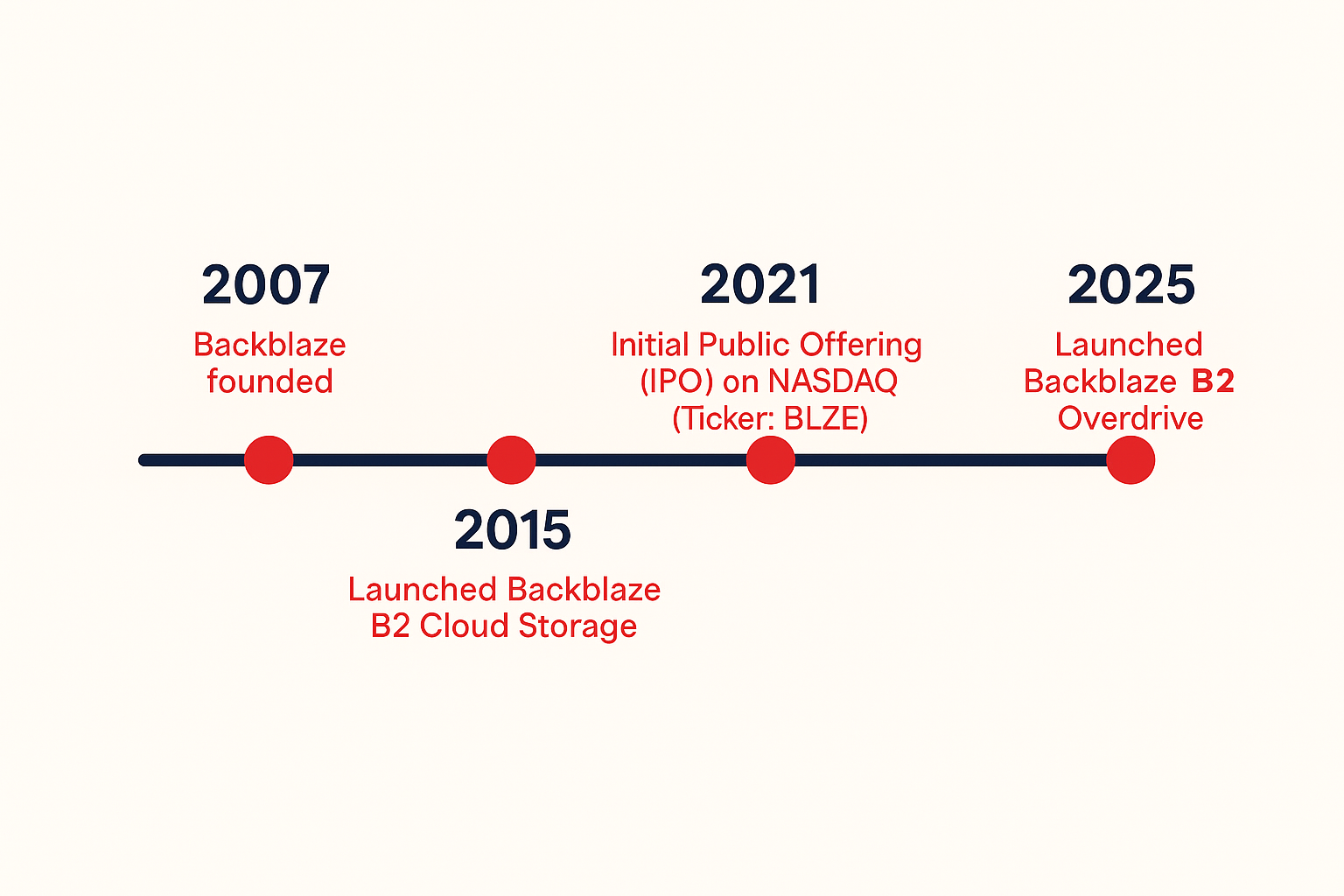
Data workloads have massively evolved over the 18 years we’ve been in business from computer backups to exabyte-scale storage to AI data pipelines. And that has implications for not just our storage hardware, but our network. 

What started as a single ISP serving a few racks in the early days has grown into a global, multi-terabit backbone connecting customers, compute, and storage in real time via multiple Tier 1 carriers, Internet Exchanges, and PNI links. 

So why talk about it now? Because AI is testing the limits of every part of the infrastructure stack—and the network is where those limits are most visible. Running an AI-ready network means rethinking how you design, route, and scale traffic to handle not just more data, but faster, more synchronized, and more resilient data movement than ever before.

In this post, I’m talking about how our network has evolved to support AI workflows, including what’s changed under the hood, how we’re adapting our hardware and architecture, and what that means for the way data moves through Backblaze today.

Go with the flow

The Network Engineering (NetEng) group at Backblaze is responsible for the design, implementation, and support of our physical network—everything from the physical copper and fiber cables inside our datacenters to the routers and switches that connect our storage to the world.

When we talk about network traffic, we often refer to a “flow”—a stream of information sent between two or more parties. Downloading a file? That’s a flow between your computer and the server offering the file. Multiple small requests loading a website (text, formatting code, animation code, etc.)? Those are known as “mouse” flows. Massive dataset transfers that sustain hundreds of gigabits per second? Those are “elephant” flows. 

The elephant in the room

AI workloads are the largest “elephant” flows our network has ever sustained. These aren’t just big files, they’re ecosystems of data: multi-petabyte datasets, hundreds of thousands of objects ranging from a single megabyte to hundreds of megabytes per object, and thousands of simultaneous connections working in parallel.

Moving these data sets around is no small task. It means engineering for sustained, lossless throughput. It’s cutting edge, using many machines to perform parallel operations, all at large transfer rates. Let’s say we’re the source of a dataset that is being transferred to a neocloud for processing, the processing layers (often GPUs) want a continuous stream of high bandwidth with no loss. And a single dropped packet in a training pipeline can trigger expensive re-requests, idle GPUs, and cascading slowdowns. 

With that in mind, we’ve evolved our infrastructure from traditional cloud networking—designed for smaller flows—to handle the relentless firehose of AI data.

Traditional cloud vs AI cloud

AI changes everything about traffic behavior. It doesn’t just mean that our total capacity is bigger, but also that our considerations for how we design, support, and scale our infrastructure morphed along with our capacity upgrades.

Here’s a quick overview of the former challenges and the new ones we’re engineering to serve our AI workflows.

Traditional Cloud Network AI Cloud Network
Small to large flow sizes (megabits to, gigabits) Very large flows (multi-gigabit to terabit)
High entropy flows (many sources and destinations) Low entropy flows (consistent source/destination pairs)
Predictable usage patterns Burst traffic patterns
Tolerant to failures Sensitive to faults, buffering, congestion

In short: AI traffic is heavier, stickier, and far less forgiving. So the goal is to design networks that can transfer 100Gbps, 200Gbps, and up to 1,000 Gbps (1 Terabit) a second with a low latency, low jitter, and a zero loss profile. Simple right? 

Hardware network upgrades

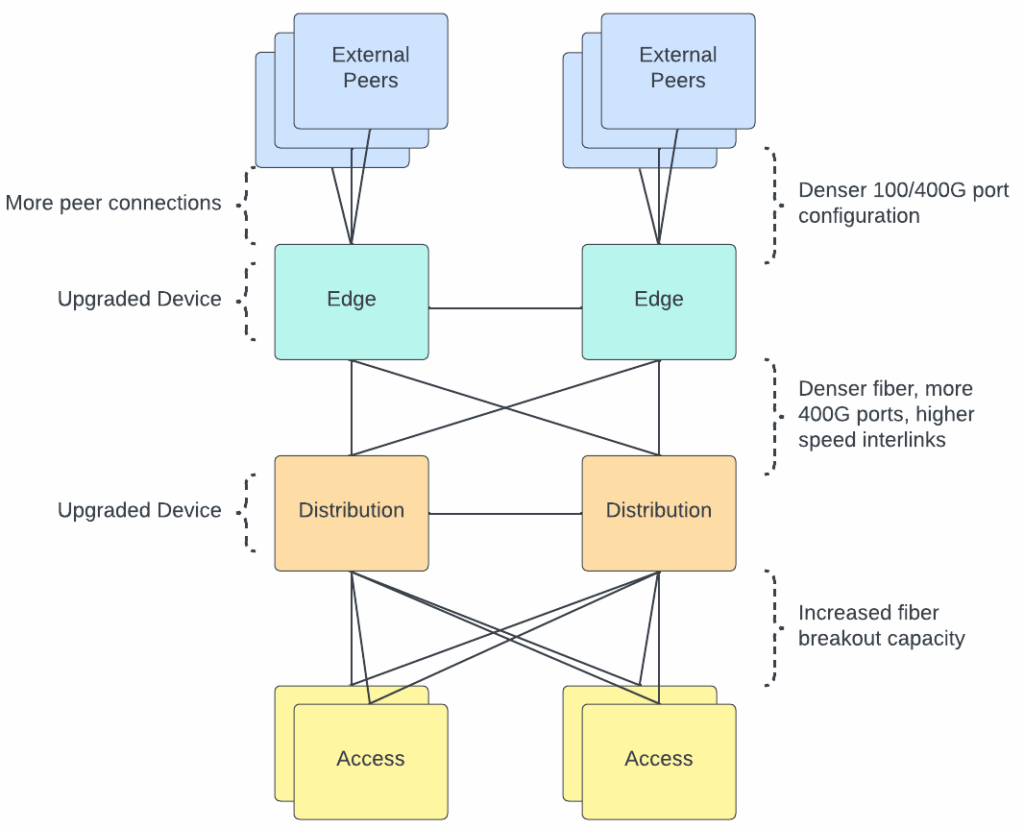
To meet these new demands of AI workflows, we’ve upgraded nearly every layer of our physical infrastructure. We needed to increase the density of our networking hardware, deploy denser fiber optic solutions, and upgrade the capacity of our edge network.

What technologies are we deploying?

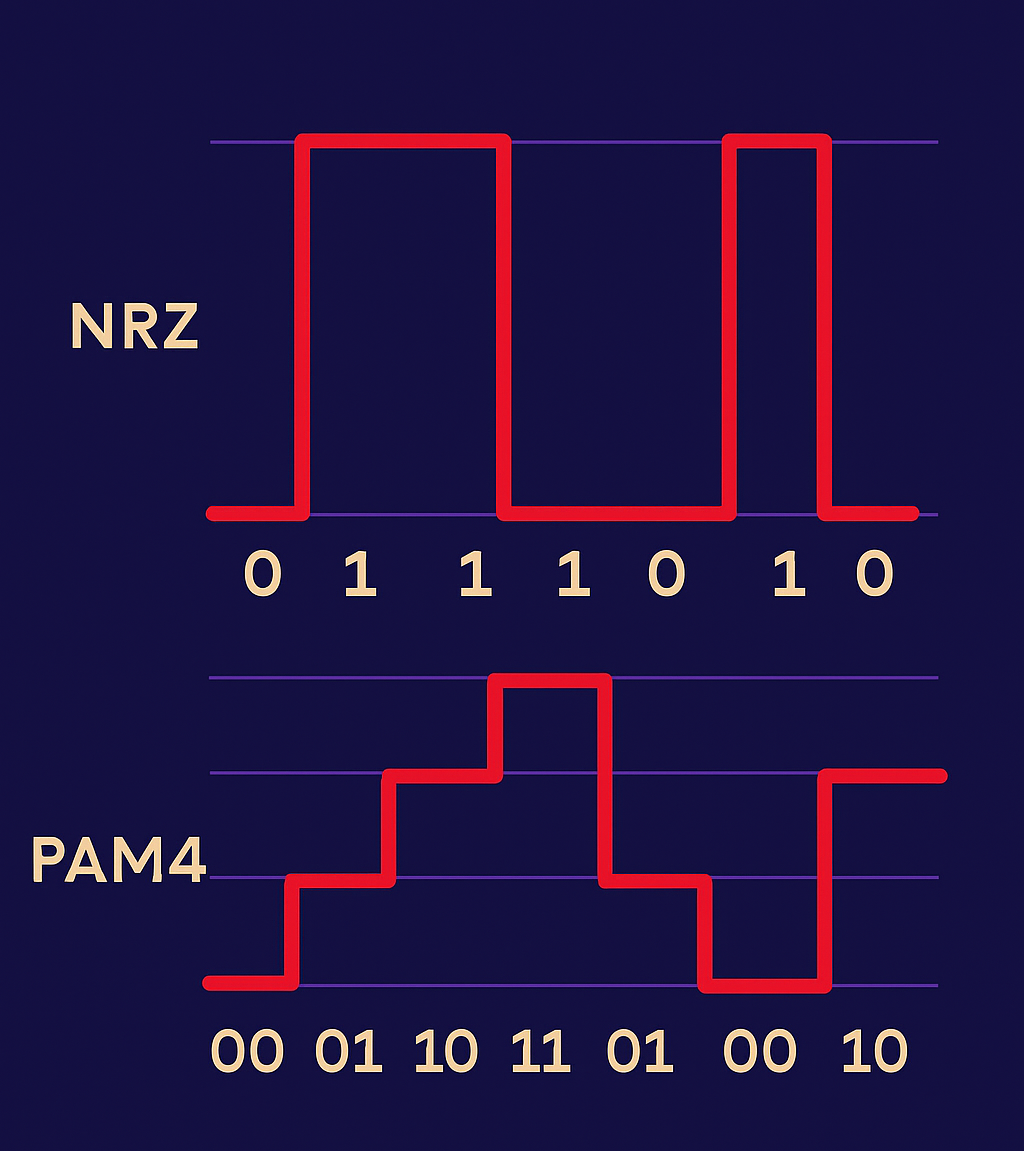
1. Transitioning from NRZ to PAM4 Optics

The fiber optic modules that are used to connect all our infrastructure hardware (servers, switches, routers) have been transitioned to modules that support a denser encoding method. Both NRZ and PAM4 are technologies used to modulate signals. Think of NRZ as a one-lane highway with one passenger per car. PAM4 adds three more passengers per car, doubling the rate without doubling lanes and with controllable cons such as increased noise sensitivity. By using four voltage levels instead of two, PAM4 transmits twice the information per signal change, effectively doubling bandwidth per fiber strand.

2. MTP-8 and MTP-16 Fiber

MTP is a fiber connector type and the number after denotes the number of fiber optic strands contained within the cable. The higher the number, the more fiber pairs in the cable. We’ve used MTP-8 for years (four pairs of fiber), but to handle AI-scale traffic, we’re now deploying MTP-16 for higher-density connections. That means where we once ran 100G links, we now run 400G—and can scale up to multiple 100G paths as workloads grow (4x100G, 8x100G, etc).

3. Expanding edge and core capacity

We’ve refreshed routers and switches to handle higher port speeds and density—moving from 100G to 400G interfaces across our interconnects. The result: higher aggregate throughput and better fault isolation for massive parallel transfers.

Visualizing an AI workflow

Our monitoring tools track network flows (TCP conversations) in real time, giving us visibility into how large AI workflows move across the infrastructure. We use this type of information to monitor and make sure that large workflows are distributed across our physical infrastructure to allow for traffic balancing.

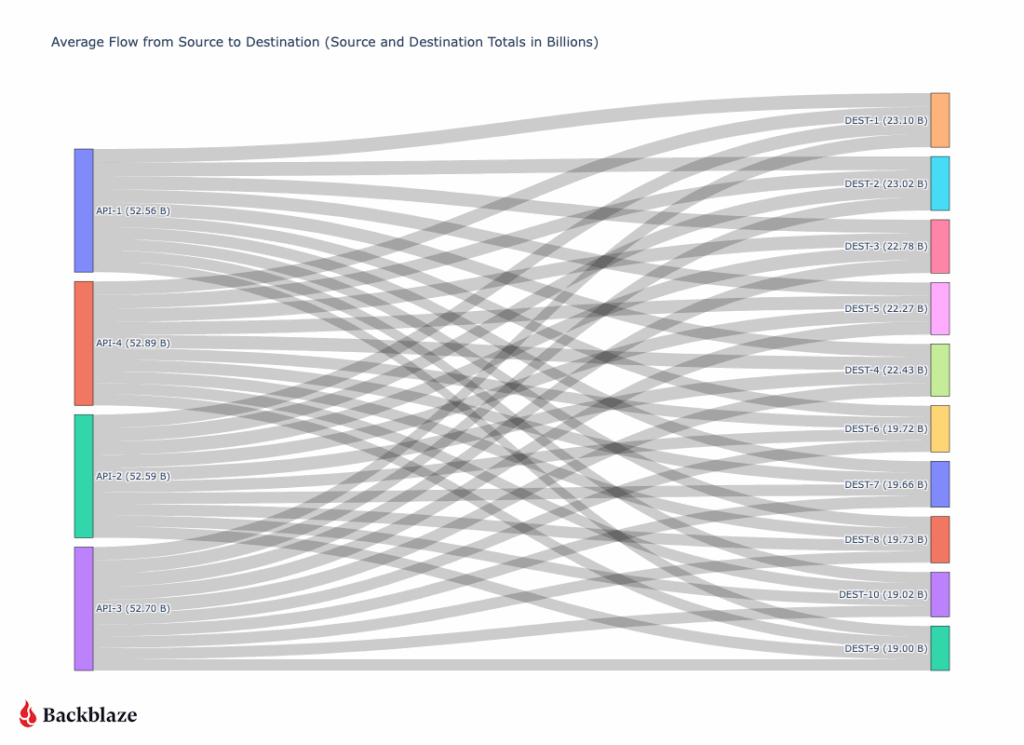
So, what does a large “AI workflow” look like? It’s not one device talking to one device at a high rate, but rather a collection of actors all working together.

On our side, our API layer speaks to our storage layer, requesting the files. Once the files are retrieved from our storage layer, they flow through our API servers and are then sent to a destination. In order to achieve a high throughput, many API servers talk to many destination servers. 

A typical 200+ Gbps transfer (diagrammed below) might involve four API virtual IPs (VIPs), each hosted on multiple backend servers sending 5–7 Gbps to ten destination nodes for a total output of 52Gbps from each API server. On the receiving side, each destination server might be ingesting 20Gbps across multiple streams.

The key insight: AI data transfer isn’t one big pipe—it’s a distributed mesh of many coordinated streams. Our design scales linearly—add more API servers, add more destination nodes, and the flow grows predictably without congestion or packet loss.

Conclusion 

AI workflows have redefined what “fast” means on the network. At Backblaze, we’ve evolved from a single-ISP startup to an AI-scale infrastructure provider by continuously pushing the boundaries of connectivity, throughput, and reliability.

As our customers push the frontiers of AI, we’ll keep tuning the invisible layer that makes it possible: the AI-ready network.

The post Making the Backblaze Network AI Ready appeared first on Backblaze Blog | Cloud Storage & Cloud Backup

Why CoreWeave’s Object Storage Launch is Good for AI—and Everyone Building It

Post Syndicated from Maddie Presland original https://www.backblaze.com/blog/why-coreweaves-object-storage-launch-is-good-for-ai-and-everyone-building-it/

A decorative image showing cloud storage and AI icons.

CoreWeave just launched their own AI Object Storage. Our take? We love to see it. 

At first glance, it might look like a competitive offering, but as far as we’re concerned, the more storage options out there, the better for builders. It’s another sign that object storage has officially arrived as a key ingredient in the AI stack. 

Now, your AI stack can look like this: Fast, flexible storage close to your GPUs from CoreWeave (essential for training and inference). And when the run’s over? Move it to Backblaze B2 Overdrive to keep it ready for your next run at the right temperature and price-to-performance ratio.

More options mean more ways to build smart, cost-efficient pipelines that let teams train faster and iterate more without getting locked in. We’ll always cheer for that. 

Why object storage is essential for AI workloads

How do you balance scalability with performance while staying on budget? This ebook explores how object storage enhances every stage of the pipeline from collection to training to deployment, and provides real-world use cases.

Get the Ebook

Why object storage matters in the AI stack

Every AI model depends on moving massive datasets through training, inference, and retraining cycles. Each stage requires fast, reliable access to data. That’s where object storage comes in.

Object storage enables this by offering:

  • Elastic scalability for petabyte-scale data.
  • Reliability and durability across long model lifecycles.
  • Lifecycle management features to balance cost, performance, and accessibility.

As AI projects scale, smart data management becomes just as important as GPU performance. High-end GPUs can only deliver full value when they’re continuously fed the right data at the right time. When data sits in the wrong tier or takes too long to retrieve, compute resources go underused. And that means wasted time and money.

Balancing performance and cost in AI workloads

CoreWeave’s Local Object Transport Accelerator (LOTA) delivers up to 7GB/s throughput per GPU, helping data move quickly between storage and compute. With pricing around $110 per terabyte (about $60 with discounts) and regional capacity up to 10TiB, it’s built for performance-critical workloads where proximity to GPUs makes a measurable difference.

Its launch adds more choice to the ecosystem and highlights the growing demand for storage built specifically for AI. As more specialized options emerge, organizations are thinking carefully about how to right-size their infrastructure for each stage of the AI lifecycle.

When maximum performance is the goal, GPU-adjacent storage like CoreWeave’s can help teams squeeze out every last bit of speed during intensive training cycles. But for most AI workloads, B2 Overdrive provides the right balance of cost and performance. It offers the throughput and durability needed to support active training while keeping pricing predictable and scalable.

Many AI builders combine these strengths through a multi-cloud setup. Teams might use CoreWeave Object Storage when latency and proximity to GPUs deliver measurable gains, and then keep the rest of their AI pipeline on B2 Overdrive so datasets remain readily available for retraining, testing, or deployment.

Example configuration:

  • CoreWeave Object Storage for specialized, compute-intensive training where every millisecond counts. It’s ideal for short bursts of high-throughput processing, such as large-scale model fine-tuning or time-sensitive inferencing.
  • B2 Overdrive for the broader AI workflow, including day-to-day training, staging, versioning, and long-term dataset management. It provides the performance needed for ongoing model development while keeping data costs predictable and accessible across teams and environments. 

B2 Overdrive offers: 

  • Storage at roughly $15 per terabyte
  • High throughput and rapid access for post-training workflows
  • Simple APIs and event notifications to automate data movement across environments

This kind of architecture gives teams the freedom to use each platform where it shines. Backblaze handles the heavy lifting for most workloads, while CoreWeave adds targeted acceleration when raw GPU performance is the top priority. The result is a flexible, cost-aware workflow that supports both innovation and scale.

AI infrastructure that plays to every strength

The most effective AI setups use the right cloud for the right job. They run training where GPUs can perform at their peak, and store data where it stays organized and ready to move when needed.

B2 Overdrive provides a foundation for this strategy, offering a layer of object storage that keeps data secure, accessible, and easy to integrate across environments. Teams can combine each platform’s strengths to achieve speed when it’s needed, scalability that endures, and freedom from lock-in and runaway costs.

The AI ecosystem is expanding, and with the right partners, so are the possibilities.

See how Backblaze B2 Overdrive keeps AI data fast, flexible, and affordable.

The post Why CoreWeave’s Object Storage Launch is Good for AI—and Everyone Building It appeared first on Backblaze Blog | Cloud Storage & Cloud Backup

Three Hidden Costs in AI Video Storage

Post Syndicated from Maddie Presland original https://www.backblaze.com/blog/three-hidden-costs-in-ai-video-storage/

A decorative image showing various types of media.

Generative AI video is exploding. Platforms can turn prompts into polished clips, and models churn through massive training sets of images and footage. Behind the magic, though, is the unavoidable reality of storing and moving petabytes of data. 

Training runs require archiving colossal datasets, then pulling them back in full when it’s time to retrain. Once models go live, the output itself becomes another major workload to manage, whether that’s endless libraries of user-generated videos or fast-cycling streams of ephemeral content. These challenges are part of life for every GenAI company, but the costs of handling them vary widely depending on the provider.Those cloud storage costs can spiral quickly out of control. The big cloud providers lure teams in with low headline rates, but the fine print tells a different story. Pricing depends on which storage tier you pick, how often you move data between regions, and how many API requests your pipeline makes. Founders end up building workflows around cloud quirks instead of what’s fastest and simplest for their teams.

Free ebook: The Cost of Cloud Storage for AI

Struggling to keep AI storage costs under control? Download our free ebook to discover how to optimize cloud storage for AI workloads—without compromising performance.

Download the Ebook

Hidden cost #1: Storage tiers and complexity

AI video data doesn’t behave neatly. Training sets might sit untouched for long stretches before being needed again all at once. User-facing content might accumulate forever, or spike and crash depending on the latest trend. For lean engineering teams, predicting these swings is nearly impossible.

On major cloud providers, the stakes are high. Choose a hot tier and you’ll overpay when data goes cold. Pick an archive tier and you’ll face delays and penalties when you suddenly need that dataset tomorrow. Constantly shifting petabytes between tiers adds both operational overhead and surprise costs.

The numbers tell the story: a 5PB archive costs about $120K a month on AWS S3 Standard for storage alone, before any egress charges. The same capacity runs closer to $30K on Backblaze B2 Cloud Storage—a $90K delta that could fund another GPU cluster or extend a startup’s runway.

Backblaze B2 comes in at around one-fifth the cost of S3, with no tiering games to manage. And when workloads demand maximum throughput, B2 Overdrive scales while delivering a stronger price-to-performance ratio than others offer. That means less time modeling cost scenarios and more time iterating on product and model design.

Hidden cost #2: Egress fees

AI development thrives on iteration. Training and retraining cycles shuffle enormous datasets across clusters, often more than once a month. Each transfer can rival the cost of storage itself. And the faster a team wants to move, the more those bills stack up.

The big cloud providers introduce friction at every step. They charge not only when data exits their cloud but also when it crosses between their own regions. At petabyte scale, those tolls can reach five or even six figures in a single month, forcing founders into an impossible tradeoff: experiment less or drain the budget.

Consider that moving just 1PB once per month on AWS in the US East (N. Virginia) region racks up around $53.8K. Double that transfer frequency and you’re staring at over $100K in egress fees. That’s budget better spent on hiring, acquiring customers, or building better products.

Backblaze removes this bottleneck. Backblaze B2 already includes free egress to leading GPU and CDN partners. For companies operating at AI scale, B2 Overdrive goes further with unlimited free egress to any destination. That means models can be trained, tuned, and distributed globally without a single surprise charge standing in the way of progress.

Mirage, an AI video platform, experienced this firsthand. By eliminating egress costs, they cut storage-related expenses by up to 95% compared to their previous provider—freeing resources to reinvest in growth and product innovation.

Hidden cost #3: API requests and transaction fees

Not every AI video workflow interacts with storage the same way. Some stream large video files in big chunks, keeping the number of calls manageable. Others slice data into millions or billions of tiny objects—frames, embeddings, or metadata—and rely heavily on listing and indexing operations. In those cases, what looks like spare change per request quickly compounds into thousands of dollars in charges every month.

Major cloud storage providers are relentless here. Every PUT, GET, LIST, or HEAD operation comes with a fee, no matter how small. At scale, those fractions of a cent add up fast, leaving engineers designing around billing quirks instead of choosing the cleanest solution for their pipelines.

Picture a pipeline that generates one billion writes and two billion reads in a single month. On AWS, the tab for those transactions alone would run close to $5.8K. On Backblaze B2, writes are free and reads cost just $0.004 per 10,000 requests, bringing the same workload down to about $800. And the first 2,500 Class B and Class C transactions each day are free, further shrinking the bill. On B2 Overdrive, all API calls are included at no additional cost.

Whether your architecture leans toward billions of tiny objects or more efficient streaming, Backblaze keeps request charges predictable and manageable. That makes API calls something your team doesn’t need to obsess over, which is exactly how it should be.

Bringing it together: Simple, predictable economics

Taken together, these hidden costs show why storing AI video on “the big three” often feels like playing a rigged game. The pricing looks straightforward until the bills arrive, padded with charges for tiers, transfers, and transactions. Each one eats away at budget and slows the pace of innovation.

Backblaze offers a different path. By stripping out the fine print and focusing on price-to-performance, it makes storage a stable foundation instead of a moving target. Mirage proves what that means in practice: eliminating egress fees drove huge savings and freed resources to reinvest in their product.

For founders, that kind of predictability turns storage from a frustrating line item into the fuel for faster iteration, bolder experimentation, and sustainable growth.

The post Three Hidden Costs in AI Video Storage appeared first on Backblaze Blog | Cloud Storage & Cloud Backup

Boosting Unit Test Automation at Audible with Amazon Q Developer

Post Syndicated from Kirankumar Chandrashekar original https://aws.amazon.com/blogs/devops/boosting-unit-test-automation-at-audible-with-amazon-q-developer/

Audible, an Amazon company, is a leading producer and provider of audio storytelling. With a vast library of over 1,000,000 titles including audiobooks, podcasts, and Audible Originals with specific curated offerings available in each marketplace, Audible makes it easy to transform everyday moments into extraordinary opportunities for learning, imagination, and entertainment through immersive audio experiences. Robust testing is critical to ensure millions of end users enjoy a seamless experience across devices.

Remember the last time you inherited a software application codebase with minimal test coverage? Or perhaps you’ve written code in a rush to meet a deadline, promising yourself you’d add tests “later”? We’ve all been there. Testing is crucial but can often gets deprioritized when deadlines loom. That’s where Amazon Q Developer‘s agentic workflows come in, transforming the way developers approach test generation. This blog explores how Audible used Amazon Q Developer to boost their unit test coverage.

Business Use Case for Software Testing

In high velocity development environments, testing cycles can often times get compressed under tight deadlines, increasing quality risks. Amazon Q Developer transforms this paradigm by accelerating testing while maintaining comprehensive standards. Through automated test generation, edge case identification, and fix suggestions, teams execute thorough testing in reduced timeframes, delivering expedited releases, optimized QA resources, and enhanced production readiness.

Each function that does not have the appropriate testing implemented, represents the potential for a rework, bugs, and maintenance challenges. Additionally, inherited codebases present particular challenges: developers must choose between spending weeks writing tests for existing functionality or continuing the cycle of untested code.

Amazon Q Developer addresses these challenges by reducing the time and effort required for proper test coverage, transforming testing from a burdensome chore into a streamlined process that allows teams to focus on delivering new features while helping to ensure code quality.

Amazon Q Developer: Expanding test coverage for your codebase

Amazon Q Developer introduces an advanced approach to software testing generation through its agentic workflows. Unlike traditional test generation tools that produce generic tests, Amazon Q Developer analyzes your code’s intent, business logic, and edge cases. It doesn’t just generate tests; it creates meaningful test suites that validate your code’s behavior comprehensively.

Beyond the dedicated test generation workflow we’ll explore today, Amazon Q Developer offers multiple ways to assist with testing. You can use conversational prompts for test plan generation, request test improvements for existing code, or even pair-program with Amazon Q Developer as you write tests. The flexibility to integrate AI assistance throughout your testing workflow makes Amazon Q Developer a versatile companion for developers.

Amazon Q Developer workflow architecture

The following architecture diagram illustrates how Audible leveraged Amazon Q Developer for both test generation and code transformation:

A flowchart showing Amazon Q Developer's test generation and code transformation process. The diagram illustrates three main workflows: Test Generation: Shows how legacy Java codebase (11 packages) is analyzed using AI capabilities to generate comprehensive test suites including unit tests and edge cases. Code Transformation: Depicts the process of migrating JDK 8 code to JDK 17, including JUnit 4 to JUnit 5 conversion, with over 5,000 tests transformed. Results: Demonstrates outcomes including improved test coverage, successful JDK migration, and 50+ hours saved through code transformation. The diagram uses icons and color-coded sections to show the flow between different stages, with blue sections for initial inputs, green for processing, and grey for outputs.

The Amazon Q Developer workflow demonstrates two key capabilities:

  • Test Generation: Amazon Q Developer analyzes Java classes and creates comprehensive test suites including unit tests, edge case tests, and exception handling tests.
  • Code Transformation: Amazon Q Developer performs automated migration tasks including JDK 8 to JDK 17/21 upgrades, handling language version compatibility, JUnit 4 to JUnit 5 conversion, modernizing test framework syntax and annotations, syntax migration, updating deprecated APIs and code patterns.

What makes this workflow particularly powerful is how it combines AI capabilities with human expertise, allowing expert developers to leverage AI in their day-to-day workflow. Amazon Q Developer analyzes your codebase and uses it as a context, identifies edge cases, and performs automated transformations, while developers apply their domain knowledge to ensure the outputs align with business requirements and expected behavior.

Audible’s Approach to harness the potential of Amazon Q Developer

The Audible teams followed the below steps to harness Amazon Q Developer to boost test coverage.

Code Submission: The Audible team leveraged Amazon Q Developer to enhance their test coverage by generating additional unit tests for Java classes, including static methods and methods with existing test cases. This approach complemented their robust testing strategy. Amazon Q Developer has the ability to examine classes, methods, parameters, return types, and exceptions. Amazon Q Developer is helpful in automatically identifying unit tests to cover edge cases that can easily be overlooked, such as null input checks and empty string checks.

Targeted Requests: The Audible team specifically asked Amazon Q Developer to provide:

  • Suggestions for unit tests to cover the given method within a Java class
  • Recommendations for unit tests targeting untested edge cases
  • Recommendations for test cases addressing error handling and exception scenarios

The Audible team achieved significant improvements using Amazon Q Developer for both test generation and code transformation. The key to their success was providing rich context along with targeted prompts in a systematic workflow.

Developer Workflow

A horizontal workflow diagram titled 'Developer Context Creation Workflow' showing 5 sequential steps: Developer opens class file Developer selects method and adds prompt Selected method and prompt are submitted to Amazon Q Developer Amazon Q Developer generates tests Developer reviews and integrates the generated tests Each step is connected by colored arrows and represented by simple icons including user figures, file symbols, and tool icons. The process flows from left to right, illustrating the complete cycle from initial file access to final test integration.

Audible adopts a human in the loop approach to review the output from automation tools. The above workflow shows the complete process: (1) open a class file in their IDE, (2) select a specific method and add their prompt, (3) submit this combined context to Amazon Q Developer, (4) receive generated tests, and (5) review and integrate the tests into their codebase.

Effective Prompts and Approach

The Audible team followed a structured approach, using targeted requests that Amazon Q Developer could act upon:

Code Submission: The team provided Java classes to Amazon Q Developer with code to generate tests for individual methods, including static methods and those that already had some tests but lacked full coverage. Amazon Q Developer examined classes, methods, parameters, return types, and exceptions, automatically identifying unit tests to cover edge cases like null input checks and empty string checks.

Below are generic Sample Prompts for Specific Requests:

Basic Test Generation:

Generate unit tests for the following Java method. Focus on covering all possible input scenarios and edge cases:

[method code here]

Please include tests for:
- Valid input scenarios
- Null input checks
- Empty string validations
- Exception handling

Edge Case Focus:

I have this method that processes user input. Can you suggest unit tests that cover edge cases I might have missed? Pay special attention to boundary conditions and error scenarios:

[method code here]

Manual Framework Migration (via Q Developer Chat):

Convert this JUnit 4 test to JUnit 5 format. Make sure to update annotations and use modern JUnit 5 features where appropriate:

[JUnit 4 test code here]

Note: While Amazon Q Developer’s code transformation feature can handle JUnit4 to JUnit5 migration automatically across entire codebases, Audible also used the conversational interface for manual, targeted conversions as shown above. Both approaches are available. Refer to documentation for automated transformation details.

Test Generation: Based on the team’s requests, Amazon Q Developer generated specific test suggestions addressing these areas with appropriate assertions and test methods.

Implementation: The development team implemented the suggested tests after review.

Documentation: Amazon Q Developer has the ability to add comments to explain the purpose of the test, area of the functionality that the test is covering. In addition, Amazon Q Developer also has the ability to generate documentation related to other aspects like read-me files and project documentation.

Quantifiable Results

By leveraging Amazon Q Developer, the Audible team achieved:

  • Over 10 key packages received comprehensive unit test coverage
  • ~1 hour saved per test class (typically containing 8-10 individual tests)
  • 5,000+ test cases successfully migrated from JUnit4 to JUnit5 using both Amazon Q Developer’s code transformation and manual conversational assistance
  • 50+ hours of manual work saved during the JDK8 to JDK17 migration using Amazon Q Developer’s code transformation
  • Reduced human errors through AI-assisted transformations

Key Capabilities Demonstrated

Amazon Q Developer excelled in several areas that can be overlooked in manual testing:

Comprehensive Exception Testing: Beyond standard null input checks and empty string validations, it automatically suggested tests for IllegalArgumentException, NullPointerException, and custom business exceptions, including verification of both exception throwing and specific error messages. This systematic approach made test coverage more complete and error handling more robust.

Automated Edge Case Detection: Amazon Q Developer made inline suggestions for null pointer exception handling without prompting, making the process smoother and faster.

Manual Framework Migration with AI Assistance: Amazon Q Developer’s pattern recognition accelerated the migration process through conversational assistance. The team could ask Amazon Q Developer through the chat to convert test syntax from JUnit4 to JUnit5 manually. For example, their previous setup had JUnit4 syntax with @UseDataProvider and @DataProvider annotations. All they had to do was highlight the code block, Send to Prompt, and ask Amazon Q Developer to make the test JUnit5 compatible. Within seconds, it generated a reliable JUnit5 test with ParameterizedTest annotation and Stream of Arguments that they could manually implement.

Contextual Analysis: Amazon Q Developer analyzes the existing codebase and recognized patterns and generated tests that matched the team’s coding style and testing conventions.

Conclusion

Amazon Q Developer transforms the test generation process from a time-consuming chore into a streamlined workflow, enabling teams to achieve comprehensive test coverage with minimal effort. This allows developers to focus on higher-value activities while improving code quality and reliability.

The business impact is substantial: As testing becomes less burdensome, teams naturally adopt better testing practices, creating a positive feedback loop that enhances overall code quality, and creates an opportunity for faster development cycles, and reduced time spent on maintenance.

To learn more about Amazon Q Developer’s features and pricing details, visit the Amazon Q Developer product page.

About the Authors

kirankumar.jpeg

Kirankumar Chandrashekar is a Generative AI Specialist Solutions Architect at AWS, focusing on Next Generation Developer Experience tools like Q Developer, Kiro and Developer Productivity using AI. Bringing deep expertise in AWS cloud services, DevOps, modernization, and infrastructure as code, he helps customers accelerate their development cycles and elevate developer productivity through innovative AI-powered solutions. By leveraging Amazon Q Developer, he enables teams to build applications faster, automate routine tasks, and streamline development workflows. Kirankumar is dedicated to enhancing developer efficiency while solving complex customer challenges, and enjoys music, cooking, and traveling.

alex-torres.jpeg

Alex Torres is a Senior Solutions Architect at AWS, supporting Amazon.com in architecting, designing, and building applications on AWS. With deep expertise in security, governance, and Agentic AI for developers, he helps customers leverage cutting-edge cloud technology to create products that shape people’s lives. Passionate about empowering teams to solve complex challenges through innovative AWS solutions, Alex is dedicated to driving customer success while maintaining the highest standards of security and governance. Outside of work, he enjoys cooking and hiking.

GK is a Senior Customer Solutions Manager and strategic customer advisor supporting Amazon as a customer of AWS. Over her four years at AWS, she has focused on improving developer productivity and advocating for Amazon’s needs across AWS services to enhance user experience and drive deeper alignment between the two organizations. Her work with advanced Amazon teams helps deliver solutions that ultimately benefit both internal and external AWS customers. GK is particularly interested in how GenAI is bridging the gap between developers and non-developers, and she spends much of her time solving challenges in GenAI and security. She is based in the San Francisco Bay Area and enjoys hiking and camping.

Aditi Joshi is a Software Engineer at Audible, working on expanding Audible’s presence across Amazon platforms. As a full-stack developer, she primarily works with web technologies, cloud services, and programming languages like JavaScript and Java to build and enhance cross-platform integration features, including recent projects like introducing Audible purchase capabilities in the Amazon iOS app. With expertise in user interface development, responsive design, and web technologies, she focuses on showcasing Audible offers and growing Audible’s visibility across Amazon’s ecosystem. Aditi is passionate about software architecture and user experience, focusing on building scalable systems with clean, efficient code. When not coding, Aditi enjoys traveling, practicing yoga, and listening to music.

Sam Park is a Software Development Engineer at Audible, focused on building Audible features across Amazon platforms. He has played a key role in enabling Audible purchases through Amazon Cart, as well as expanding Audible’s visibility within the Amazon iOS and Android apps. His work spans multiple touchpoints within the Amazon ecosystem, including Search, Product pages, Checkout, and Cart experiences. Sam is passionate about developing solutions that create intuitive customer experiences and leveraging GenAI to boost development efficiency and productivity. Outside of work, he enjoys traveling, playing basketball, and cheering on the Cleveland Cavaliers.

Multi Agent Collaboration with Strands

Post Syndicated from Aaron Sempf original https://aws.amazon.com/blogs/devops/multi-agent-collaboration-with-strands/

In the evolving landscape of autonomous systems, multi-agent collaboration is becoming not only feasible but necessary. As agents gain more capabilities, like advanced reasoning, adaptation, and tool use, the challenge shifts from individual performance to effective coordination. The question is no longer “can an agent solve a task?” but “how do we organize execution across many intelligent agents?”

A foundational step toward answering this came with the Supervisor pattern, introduced in our article on creating asynchronous AI agents with Amazon Bedrock. The Supervisor addresses the first generation of coordination challenges by acting as a centralized orchestrator, monitoring and delegating tasks across agents in a structured, serverless workflow. It provides asynchronous orchestration, fallback handling, and state tracking across loosely coupled agents, giving organizations a reliable way to move from single-agent prototypes to multi-agent systems.

Yet as agentic systems scale and become more dynamic, the limitations of static supervision become clear. The Supervisor model assumes a relatively stable set of agents and predictable workflows; but modern systems face constantly shifting tasks, emergent capabilities, and the need for adaptive coordination. This is where the Arbiter pattern emerges as the natural evolution: a next-generation supervisory model that extends the Supervisor with dynamic agent generation, semantic task routing, and blackboard-model-based coordination. By addressing the unpredictability and fluidity of large, evolving agent ecosystems, the Arbiter pattern enables systems not only to manage complexity but to thrive in it.

The Arbiter pattern builds directly on this by adding three key capabilities:

  1. Semantic Capability Matching: Instead of only assigning known tasks to known agents, the Arbiter reasons about what kind of agent should exist for a task—even if that agent doesn’t exist yet.
  2. Delegated Agent Creation: If no suitable agent is found, the Arbiter escalates the request to a Fabricator agent that dynamically generates a task-specific agent on demand. This moves beyond delegation to true adaptive generation.
  3. Task Planning + Contextual Memory: Building on the Supervisors task coordination capability, Arbiter decomposes complex inputs into structured task plans, and uses contextual memory to track execution, retry logic, and agent performance.

In short, the Arbiter transforms static orchestration into adaptive coordination.

The Blackboard Model Revisited

To enable loose, extensible collaboration across agents, the Arbiter Pattern incorporates principles from the blackboard model – a classic architecture from distributed AI. In this model, agents contribute opportunistically to a shared data space (the “blackboard”), reacting to changes and collectively solving problems.

Reference: See “The Blackboard Model of Control” (Hayes-Roth et al.), and early applications like Hearsay-II for foundational research.

In our extended Arbiter Pattern, the blackboard becomes a semantic event substrate. Agents, including the Arbiter, publish and consume task-relevant state, enabling loosely coupled, event-driven collaboration.

How It Works

When an event enters the system, the Arbiter takes on the supervisory role but extends it with greater dynamism and adaptability. Like the Supervisor pattern, it begins by interpreting the event and identifying the required objectives and sub-tasks. It then performs a capability assessment, using a local index or peer-published manifests, much like the Supervisor querying an Agents config table.

  1. Interpretation: The Arbiter uses LLM-based reasoning to extract task objectives and sub-tasks.
  2. Capability Assessment: It evaluates which agents can handle each sub-task using a local index or peer capability manifests.
  3. Delegation or Generation:
    • If a suitable agent exists, the task is routed accordingly.
    • If not, the Arbiter sends a generation request to the fabricator agent.
  4. Blackboard Coordination: All agents involved read/write to a shared semantic blackboard, contributing as needed based on observed task state.
  5. Reflection and Adaptation: Performance data is logged and used to inform future agent creation, adaptation, or deprecation.

Arbiter Pattern Architecture

Unlike the Supervisor, which maintains orchestration through a static config list, the Arbiter introduces a shared semantic blackboard that allows all participating agents to read, write, and coordinate based on evolving task state. This blackboard serves as a dynamic collaboration space, enabling mid-task adaptation and richer multi-agent coordination.

The following Diagram 1: Agentic AI Arbiter pattern implemented as a code example can be downloaded here

Architecture diagram of the Arbiter Pattern for Agentic AI. The diagram illustrates the components and flow of the pattern, showing how multiple AI agents interact with an arbiter to coordinate tasks and decision-making in a structured system

Diagram 1: Agentic AI Arbiter pattern

The following sequence describes the Arbiter pattern, according to the numbered steps in the diagram 1: Agentic AI Arbiter pattern

  1. Events entering the system trigger the Supervisor function
  2. Supervisor queries Agents Config table for agent capabilities
  3. Supervisor uses Agents config list as context to plan orchestration of tasks

Option: New Agent:

If no capable agent is found, the Arbiter goes further than the basic supervisor pattern: it issues a generation request to a fabricator agent, which synthesizes new worker code, stores it for runtime access, and updates the capability registry so the agentic system can immediately benefit from the new skill.

  1. Task cannot be completed, request create new capability
  2. Request to fabricate triggers Fabrication agent instance
  3. Fabrication agent queries resources register for available tools (capabilities)
  4. Fabricator generates worker agent code
  5. Worker agent code stored in bucket for runtime access
  6. New worker added to Agents config list with agent capabilities description
  7. Result of fabrication posted to message bus

Repeat steps 1, 2 & 3

Option: Orchestrate workflow:

If a suitable agent exists, the Arbiter orchestrates the workflow by invoking the appropriate worker agents, tracking progress and state as in the Supervisor model.

  1. Orchestration of tasks is stored for tracking end-to-end process
  2. Request to invoke worker agent, by name/id. Add workflow state for agent invocation.
  3. Request to invoke worker agent triggers worker agent wrapper instance
  4. Worker agent wrapper loads agent code
  5. Worker agent reasons and takes action
  6. Worker agent sends response to message bus
  7. Supervisor agent updates workflow state and tracks against orchestration

The Arbiter incorporates a reflection and adaptation loop: performance data from task execution is logged, analyzed, and fed back into the fabricator and coordination logic. This ensures that not only are tasks completed in the moment, but the system continuously adapts, retires underperforming agents, and evolves toward greater efficiency.

The Arbiter Agent: Event Orchestration Engine

The Supervisor Agent (Arbiter Agent) serves as the central coordinator component, managing complex event-driven workflows through intelligent task delegation.

Event Processing Workflow:

The Arbiter pattern follows a structured approach to handle incoming events

  1. Configuration Loading: Loads available agent configurations from Amazon DynamoDB via load_config_from_dynamodb()
  2. LLM Invocation: Invokes Amazon Bedrock LLM with event context and available tool specifications
  3. Decision Analysis: LLM analyzes the event and returns tool invocation decisions with parameters
  4. Task Dispatch: For each specified tool call:
    • Extracts tool name, input parameters, and tool use ID
    • Dispatches message to corresponding Amazon Simple Queue Service (SQS) queue via process_tool_call()
    • Maintains tool invocation list for workflow tracking

Workflow State Management:

The system maintains comprehensive state tracking throughout execution

  • Creates workflow tracking record in DynamoDB with create_workflow_tracking_record()
  • Initializes all invoked agents as incomplete
  • Associates unique request ID with orchestration instance
  • Persists orchestration state including conversation history and request mapping

Completion Coordination:

The Arbiter coordinates task completion through a systematic process

  1. Event Reception: Receives agent completion events via Amazon EventBridge
  2. Status Updates: Updates workflow tracking with update_workflow_tracking()
  3. Completion Check: Performs completion check across all tracked agents
  4. Result Aggregation: When all agents complete:
    • Aggregates results from DynamoDB data field
    • Appends tool results to conversation as user messages
    • Re-invokes orchestration with updated context
  5. Continuation: Continues until LLM provides final response without tool calls

The Fabricator Agent: Dynamic Capability Generation

The Fabricator Agent implements just-in-time agent development using the Strands agents framework, creating new capabilities when required functionality doesn’t exist in the system.

Agent Development Architecture:

The Fabricator operates as a specialized Strands Agent with specific characteristics

  • Implemented as a Strands Agent with specialized system prompt for code generation
  • Triggered by “New worker agent” events from the Arbiter
  • Receives capability requirements through prompt augmentation with agent directive
  • System prompt includes:
    • Strands Agent implementation examples
    • Complete catalog of available Strands Tools
    • Code generation patterns and conventions
    • Standardized handler() function requirements

Code Generation Process:

The agent follows a structured development workflow

  1. Requirement Analysis: LLM analyzes capability requirements and generates Python implementation
  2. Tool Selection: Prioritizes use of existing Strands Tools over custom @tool implementations
  3. Code Structure: Creates agents following standardized patterns:
    • Bedrock model initialization with models.BedrockModel()
    • Agent instantiation with appropriate tool selection
    • Standardized handler() function interface
    • Event-driven completion signaling
  4. File Creation: Writes generated code to /tmp/ directory for immediate availability

Capability Registration Pipeline:

New capabilities are registered through a multi-step process

  1. File Storage: File upload to Amazon Simple Storage Service (S3) via upload_file_to_s3() tool
  2. Metadata Registration: Registration in DynamoDB via store_agent_config_dynamo():
    • toolId: Unique capability identifier
    • filename: S3 object reference
    • schema: OpenAPI specification for LLM tool calling
    • description: Human-readable capability documentation
    • action: SQS queue routing configuration for Generic Wrapper
  3. Completion Notification: Completion event publication to Arbiter via complete_task() tool

Testing Considerations:

The original implementation revealed important insights about testing approaches

  • Previous Approach: Agent testing within the Fabricator resulted in:
    • Unstructured testing leading to false negatives
    • Overzealous optimization of generated agents
  • Recommendation: Separate testing agent with standardized harness for validation feedback

The Generic Wrapper: Dynamic Execution Runtime

The Generic Wrapper implements a hot-loading pattern that enables unlimited agent creation without infrastructure scaling, providing a universal execution environment for Fabricator-generated agents.

This hot-loading approach is critical because it decouples capability growth from infrastructure scaling. Instead of provisioning and maintaining new infrastructure components for every new agent, which could be dozens or even hundreds of agents, the system reuses a single execution wrapper that can dynamically load and execute arbitrary agent code.

This not only makes agent creation effectively limitless but also ensures infrastructure efficiency, cost optimization, and simplified operations, allowing the Arbiter and Fabricator to evolve system capabilities without operational bottlenecks.

In the AWS Samples code, found here, the Hot-loading handler is implemented as am AWS Lambda function, represented in the following code snippet:

def process_event(event, context):
    orchestration_id = event["orchestration_id"]
    tool_use_id = event["tool_use_id"]
    request = event["tool_input"]
    tool_name = event['node']

    # Based on the tool from the event, load the details from DDB
    tool = load_config_from_dynamodb(tool_name)
    config = tool['config']

    if isinstance(config, str):
        config = json.loads(config)

    file_name = config['filename']

    load_file_from_s3_into_tmp(os.environ["AGENT_BUCKET_NAME"], file_name)

    # Hot load the module from the tmp directory
    spec = importlib.util.spec_from_file_location("module.name", "/tmp/loaded_module.py")
    loaded_module = importlib.util.module_from_spec(spec)
    sys.modules["module.name"] = loaded_module
    spec.loader.exec_module(loaded_module)

    # Invoke the generic handler with whatever args were passed in by the Arbiter
    try:
        print("attempting to use module")
        response = loaded_module.handler(**request)
        print(f"response: {response}")
    except Exception as e:
        print(f"error running module: {e}")
        response = "The task could not be completed, this agent has issues, please ignore for now."

    # Finally. report back to the Arbiter. Handled by the wrapper. To avoid the Frabricator from attempting to code this part itself
    post_task_complete(response, tool_use_id, tool_name, orchestration_id)

Although this example is demonstrated through a lambda function, the Hot-Loading code can be executed in Amazon Bedrock AgentCore Runtime, or AWS native container services, such as Amazon Elastic Container Service (ECS) or Amazon Elastic Kubernetes Service (EKS)

Hot-Loading Architecture:

The wrapper implements several key architectural principles

  • Single infrastructure component handles execution of all dynamically created agents
  • Eliminates need for separate infrastructure provisioning per agent
  • Implements runtime code loading from S3 storage
  • Accepts latency trade-off for infrastructure efficiency in non-ultra-low-latency environment

Dynamic Loading Process:

The system follows a precise loading sequence

  1. Message Processing: Extracts agent identifier from incoming SQS message
  2. Configuration Retrieval: Queries DynamoDB for agent configuration via load_config_from_dynamodb()
  3. Code Download: Downloads agent implementation from S3 to /tmp/ directory
  4. Runtime Loading: Module loading using importlib.util:
    • spec_from_file_location() creates module specification
    • module_from_spec() instantiates module object
    • exec_module() performs actual code loading and execution

Execution Management:

The wrapper provides comprehensive execution oversight

  • Invokes standardized handler() function with provided parameters
  • Captures execution results and handles error conditions gracefully
  • Maintains execution isolation between different agent invocations
  • Implements resource cleanup after agent execution completion

Standardized Communication Protocol:

Communication follows strict standardization to ensure system reliability, which is critical in multi-agent environments where dozens or even hundreds of dynamically generated agents may interact. Without consistent message formats, routing rules, and completion signals, orchestration would become brittle, errors would propagate unpredictably, and debugging would be nearly impossible. Standardization guarantees that every agent, no matter when it was created, can interoperate seamlessly, enabling the Arbiter to maintain end-to-end visibility, traceability, and fault-tolerance across the entire system.

Event Handling Principles:

  • Event posting handled exclusively by Generic Wrapper, not individual agents
  • Ensures consistent event-driven communication patterns across all agents

Completion Event Structure:

  • orchestration_id: Workflow context linkage
  • tool_use_id: LLM tool invocation mapping
  • node: Agent identifier for tracking
  • data: Execution results or error information

Reliability Measures:

  • Publishes completion events to EventBridge for Arbiter processing
  • Guarantees workflow tracking receives completion signals regardless of execution outcome

Scalability Characteristics:

The hot-loading approach provides significant scalability benefits

  • Enables agent scaling creation without minimal infrastructure impact
  • S3 download latency acceptable within overall system performance profile
  • Single wrapper instance can execute multiple agent types
  • Memory and resource management handled at container level

Conclusion

The Arbiter Pattern represents a significant evolution beyond the Supervisor architecture, delivering the flexibility required for truly autonomous agentic systems. By introducing semantically rich, context-aware orchestration, it enables dynamic scalability, where agent capabilities grow in step with task demands. The architecture is resilient, redistributing or regenerating tasks when agents fail, and it achieves loose coupling by having agents interact through semantically meaningful events rather than rigid APIs. Most importantly, it embeds continuous adaptation through Arbiter-guided feedback loops, allowing systems to learn and evolve over time. This marks a shift from pre-programmed logic to generative, blackboard-model-based coordination, paving the way for decentralized, intelligent systems that can learn, adapt, and collaborate effectively at scale.

The system delivers several critical capabilities

  • Asynchronous Processing: SQS-based message passing for scalable execution
  • Persistent State Management (Short-term memory): DynamoDB-based workflow tracking
  • Scalability: Hot-loading architecture for unlimited agent creation
  • Intelligent Orchestration: LLM-driven task decomposition and sequencing
  • Self-Expanding Capabilities: Strands-based agent creation on demand
  • Standardized Communication: Reliable event-driven protocols

This architecture enables processing of arbitrary event types by dynamically creating necessary processing capabilities and coordinating their execution through LLM-driven workflow orchestration, while maintaining infrastructure efficiency through hot-loading patterns.


About the Authors

aaron sempfAaron Sempf is Next Gen Tech Lead for the AWS Partner Organization in Asia-Pacific and Japan. With over 20 years in distributed system engineering design and development, he focuses on solving for large scale complex integration and event driven systems. In his spare time, he can be found coding prototypes for autonomous robots, IoT devices, distributed solutions, and designing agentic architecture patterns for generative AI assisted business automation.

josh tothJoshua Toth is a Senior Prototyping Engineer with over a decade of experience in software engineering and distributed systems. He specializes in solving complex business challenges through technical prototypes, demonstrating the art of the possible. With deep expertise in proof of concept development, he focuses on bridging the gap between emerging technologies and practical business applications. In his spare time, he can be found developing next-generation interactive demonstrations and exploring cutting-edge technological innovations.

Lessons from Vibe Coding Three Apps in Three Weeks

Post Syndicated from Jeronimo De Leon original https://www.backblaze.com/blog/lessons-from-vibe-coding-three-apps-in-three-weeks/

A decorative images showing a gear, chips, and the word AI.

While taking some time for paternity leave in a small village in the middle of Bulgaria, I used my baby’s nap times to dive deeper into vibe coding to see just how fast and close these AI tools can get you to building real, production-ready apps. It led to a serious of articles, LinkedIn posts, and product experiments, all focused on understanding and sharing my insights on the state of programming and product design that leverage AI.

In my previous article, “ColabWithMe: A GPT Specialized in Google Colab for Data Analysis & ML,” I talked about how generative AI is redefining the programming landscape. As the Harvard Business Review noted in “We’re All Programmers Now,” this shift represents more than just enabling non-technical employees to code. The real opportunity lies in developing multi-skilled professionals who can operate across domains, compressing innovation cycles from weeks to days. (I explore this further in “The Shape of AI Training: How Skill Profiles Guide AI Learning Paths.“)

Which brings me to what I actually built during those nap times—three different applications using a variety of AI tools. Rather than focusing on polished user interfaces, I focused on backend functionality and core business logic. I discovered that debugging the frontend and getting it to look how I wanted consumed far more time than implementing core backend features. So, many of these vibe-coded apps work nicely on the backend, but need more polish on the frontend. Let’s dig in.

Tools reviewed

Vibe coding means building software by describing what you want in natural language and letting AI generate the code. I tested tools across three categories to see how they enable this new way of building.

  • Integrated development environment (IDE) integrated agents: GitHub Copilot Agent, Gemini Code Assistant, Claude, Cursor.
  • Conversational interfaces: ChatGPT, ChatGPT Codex, Grok, Claude.
  • Prompt app builders: Replit, Lovable, Bolt, GitHub Spark.

Project 1: TickGoals.com, AI-powered goal setting (Approximately 7 hours)

The first application tackled a common productivity challenge: transforming vague aspirations into actionable SMART goals. The system implements a conversational AI interface that guides users through goal refinement, then automatically generates structured milestones and tasks.

Key features:

  • Chat with AI to transform vague goals into structured SMART goals
  • Auto-generate actionable milestones and tasks based on your refined goals
  • To-do list interface for tracking progress and completion
  • Persistent goal storage with progress visualization

Tech stack:

  • React frontend for conversational UI generated by GitHub Spark
  • Firebase Functions for serverless backend processing
  • OpenAI API for goal and task creation
  • Firebase Firestore for persistent goal and task storage

Initially I prototyped across Lovable, Replit, Bolt and GitHub Spark to see what each would generate. I eventually used the code GitHub Spark generated for a cleaner React component structure. Check it out here: https://tickgoals.com

Project 2: NewsVibe.AI, newsletter aggregation and summarization platform (Approximately 12 hours)

While catching up on email, I noticed my inbox was filled with newsletters that I’d often just skim or summarize, so I built a tool to handle this automatically. The app provides users with personalized email addresses for newsletter subscriptions, then presents content in a newsfeed interface to easily scroll through with AI summarization.

Key features:

  • Personal @newsvibe.me email addresses for newsletter subscriptions.
  • Instagram-style scrollable feed displaying all your newsletters.
  • AI-powered summarization to get quick overviews of content.
  • Automatic extraction of links and key information from newsletters.
  • Subscription management dashboard with usage analytics.

Tech stack:

  • Cloudflare pages for frontend hosting.
  • Maileroo for email processing and parsing.
  • Supabase for user management and content storage.
  • Python backend deployed on Render for newsletter and summarization processing.
  • OpenAI API for content summarization.
  • Stripe integration for subscription management.

I split this project into separate frontend and backend repos, and found it blazing fast to build out all the backend functionality first before tackling the frontend.

Project 3: Welcome.AI, newsletter editor agent (Approximately 10 hours)

Welcome AI has been my side project since 2017, initially focused on competitive analysis of AI tools. I’ve rebuilt it multiple times, with the latest iteration using retrieval augmented generation (RAG) for content. But, content curation still required manual review, either by me or community contributors, so I built an agent to automate the entire process, identifying, categorizing, and synthesizing AI news into a publication-ready newsletter. View a generated newsletter here. Subscribe at https://newsletter.welcome.ai/

Key Features:

  • Automatically identifies and filters AI-related news from RSS feeds and newsletters
  • Categorizes stories by topic and summarizes key points
  • Writes complete newsletter copy with insights and summaries
  • Curates the top stories and case studies for featured content sections
  • Generates HTML formatting and generates a feature image for the top story

Tech Stack:

  • Python news feed processing
  • OpenAI Agent SDK and APIs
  • GitHub Actions for automated workflow execution
  • Supabase for content management and curation state
  • Backblaze B2 for generated feature image storage

This was purely a backend project to test and experiment with the OpenAI Agent SDK, though I diverged from it toward more direct large language model (LLM) tasks by the end.

Lessons learned

At a high level, you can definitely see how these tools are going to dramatically speed up development, especially for getting to minimum viable product (MVP) or prototype. You should only need a day or two to get something up and test market traction, especially with prompt app builders.

I found Claude Opus/Claude Code worked best for backend code within the IDE, while Gemini Pro was particularly good at frontend landing page development. Coding agents that make multiple changes across multiple files simultaneously, like those in Cursor, Copilot Agent, or ChatGPT Codex, still felt a bit daunting. I experienced chunks of code being deleted a few times, so I spent considerable time reviewing changes or reverting them.

Prompt app builders like Lovable, Replit, GitHub Spark, and Bolt can get you pretty far, but you can eventually hit a wall where the AI starts breaking more than it fixes, or you need to integrate third-party services that require direct code access. With one project, I started in a prompt builder then moved to an IDE for refinement.

High-level, here are some tips that should help in your vibe coding journey.

Before starting: Set instructions and rules

Like custom instructions in ChatGPT, each tool benefits from coding guidelines: Claude Code uses CLAUDE.md, Copilot uses configured instructions, and Cursor has rules (templates at https://cursor.directory/rules).

A screenshot of provided context for generative code tools.

Both Claude Code and Cursor support MCP (Model Context Protocol) for enhanced integrations (Cursor MCP directory: https://cursor.directory/mcp). Some tools can also index documentation folders for deeper context. Set these up first for better code generation.

Start with a complete product requirements document (PRD)

Before writing any code, spend time iterating with an LLM to generate a thorough PRD. This back-and-forth refinement process goes a long way in providing the context your AI coding tools need. Capture everything: user workflows, UI specifications, technical requirements, and success metrics. Save this in your README.md as your north star.

Prompt app builders like GitHub Spark generate PRDs first from your initial prompt, so the more complete and refined it is, the better.

Define your project structure upfront

Work with the LLM to create a structure that follows best practices but stays simple for what you’re building. An MVP doesn’t need enterprise architecture. Map out where components, services, and APIs belong, and include this in your initial prompt.

A screenshot of the project file structure for one of the vibe coding apps created by Jeronimo De Leon.

Monitor new file generation closely as AI tools can suggest new files when not needed. When this happens, correct it immediately. Keep the structure as simple as possible. Break up files that are doing too many things, as this makes them harder to read and update later.

Add context markers throughout your code

Include file paths and descriptions at the top of each file. This helps the AI maintain context when making changes. Add detailed logging at critical points to track what’s happening when things break. Watch for function renames, LLMs often change function names unnecessarily when updating code, breaking references elsewhere.

Always check current API documentation

LLMs can generate outdated code. OpenAI and Pinecone have changed their import syntax, but AI tools still produce the old versions. Have the LLM search for the latest docs, or check them yourself. Knowing how your services currently work helps you catch these mistakes immediately.

One feature, one conversation

Multitasking with AI means juggling code review while it generates more changes. Keep each conversation focused on a single feature unless features are directly related. When the LLM offers to optimize unrelated areas, decline. If the AI gets stuck repeating failed solutions, start fresh rather than fighting it.

Wisdom of the crowds

When stuck, get code reviews from other LLMs since they can catch different issues. But always review their output carefully. LLMs can duplicate functions across files or, worse, delete essential code. In Agent mode especially, I’ve seen them remove core functionality unrelated to the current task. Give specific instructions about where functions belong and double-check nothing critical disappeared.

Vibe Coding = Product Management + Engineering

The most significant shift with AI-assisted development isn’t the speed; it’s the role change. You’re no longer just implementing; you’re defining what to build, how it should work, and why it matters.

This is the multi-skilled professional evolution I mentioned earlier. When “We’re All Programmers Now,” it means domain experts can build their own solutions, but it also means programmers must become domain experts in product thinking. Success with vibe coding requires clear product vision to articulate requirements, technical knowledge to guide the AI correctly, and relentless focus on user problems.

You become the conductor orchestrating AI capabilities while maintaining the judgment to build what people actually need. The future belongs to these blended roles: product managers who understand engineering deeply enough to guide AI tools, and engineers who think like product managers. These T-shaped and M-shaped professionals operate fluidly across domains. This is how we compress innovation cycles from weeks to days: by eliminating the translation layer between idea and implementation.

The post Lessons from Vibe Coding Three Apps in Three Weeks appeared first on Backblaze Blog | Cloud Storage & Cloud Backup

Overcome development disarray with Amazon Q Developer CLI custom agents

Post Syndicated from Brian Beach original https://aws.amazon.com/blogs/devops/overcome-development-disarray-with-amazon-q-developer-cli-custom-agents/

As a developer who has embraced the power of the Model Context Protocol (MCP)to enhance my workflows, I’m thrilled to see the addition of custom agents in the Amazon Q Developer CLI. This new feature takes the capabilities I’ve come to rely on to a whole new level, allowing me to seamlessly manage different development contexts and easily switch between them.

In my previous post, I discussed how MCP servers have revolutionized the way I interact with AWS services, databases, and other essential tools. MCP integration in Amazon Q Developer allows me to query my database schemas, automate infrastructure deployments, and so much more. However, as I started juggling multiple projects, each with their own unique tech stacks and requirements, I found myself needing a more structured approach to managing these diverse development environments.

Enter custom agents. With this new feature, I can now create and use a custom agent by bringing together specific tools, prompt, context and tool permissions for tasks appropriate for the stage of development. In this post I will explain how to configure a cusom agent for front-end and back-end development. Allowing me to easily optimize Amazon Q Developer for each task.

Background

Imagine that I am working on a multi-tier web application. The application has a React front-end written in Typescript and a FastAPI back-end written in Python. In addition to me, the team includes a designer that uses Figma, and the database administrator that manages a PostgreSQL database. There are subtle differences in how I communicate with the designer and the database administrator. For example, when I discuss a “table” with the designer, I’m likely referring to an HTML table and how the page is structured. However, when I discuss a table with the database administrator, I’m likely talking about a SQL table and how data is stored.

In the past, I had both the Figma Dev Mode MCP server and Amazon Aurora PostgreSQL MCP server configured in my environment. While this allowed me to easily work on either the front-end or back-end code, it introduced some challenges. If I asked Amazon Q Developer “how many tables do I have?” Amazon Q Developer would have to guess if I was talking about HTML tables or SQL tables. If the question is about HTML, it should use the Figma server. If the question is about SQL, it should use the Aurora server. This is not a technical limitation, it’s a language limitation. Just as I have to adjust my assumptions to talk with the designer and database administrator, Amazon Q Developer has to make the same adjustments.

Enter Amazon Q Developer CLI custom agents. Custom agents allow me to optimize Q Developer’s configuration for each scenario. Let’s walk through my front-end and back-end configuration to understand the impact.

Front-end agent

My front-end custom agent is optimized for front-end web development using React and Figma. The following code example is the configuration for my front-end agent stored in ~/.aws/amazonq/agents/front-end.json. Let’s discuss the major sections of the configuration.

  • mcpServers – Here I have configured the Figma Dev Mode MCP Server. This simply communicates with the Figma Web Design App installed locally. Note that this replaces the MCP configuration that was stored in ~/.aws/amazonq/mcp.json
  • tools and allowedTools – These two sections are related, so I will discuss them together. tools defines the tools are available to Amazon Q Developer while allowedTools defines which tools are trusted. In other words, Q Developer is able to use all configured tools, and it does not have to ask my permission to use fs_read, fs_write, and @Figma. @Figma allows Amazon Q Developer to use all Figma tools without asking for permission. More on this in the next section.
  • resources – Here I have configured the files that should be added to the context. I have included the README.md (stored in the project folder) and my own preferences for React (stored in my profile). You can read more in the context management section of the user guide.
  • hooks – In addition to the resources, I have also included a hook. This hook will run a command and inject it into the context at runtime. In the example, I am adding the current git status. You can read more in the context hooks section of the user guide.
{
  "description": "Optimized for front-end web development using React and Figma",
  "mcpServers": {
    "Figma": {
      "command": "npx",
      "args": [
        "mcp-remote",
        "http://127.0.0.1:3845/sse"
      ]
    }
  },
  "tools": ["*"],
  "allowedTools": [
    "fs_read",
    "fs_write",
    "report_issues",
    "@Figma"
  ],
  "resources": [
    "file://README.md",
    "file://~/.aws/amazonq/react-preferences.md"
  ],
  "hooks": {
    "agentSpawn": [
      {
        "command": "git status"
      }
    ]
  }
}

Back-end agent

My back-end custom agent is optimized for back-end development with Python and PostgreSQL. The following code example is the configuration for my back-end agent stored in ~/.aws/amazonq/agents/back-end.json. Rather than describing the sections, as I did earlier, I will focus on the differences between the front-end and back-end.

  • mcpServers – Here I have configured the Amazon Aurora PostgreSQL MCP Server. This allows Amazon Q Developer to query my dev database to learn about the schema. Notice that I have configured a read-only connection to ensure that I don’t accidentally update the database.
  • tools and allowedTools – Once again, I have enabled Amazon Q Developer to use all tools. However, notice that I am more restrictive about what tools are trusted. Amazon Q Developer will need to ask permission to use fs_write or @PostgreSQL/run_query. Notice that I can allow the entire MCP server as I did with Figma or specific tools as I did here.
  • resources – Again, I have included the README.md (stored in the project folder) and my own preferences for Python and SQL (both stored in my profile). Note that I can also use glob patterns here. For example, file://.amazonq/rules/**/*.md would include the rules created by the Amazon Q Developer IDE plugins.
  • hooks – Finally, I have also included the hook for the front-end and back-end. However, I could have included project specific options such as npm run for the front-end and pip freeze for the back-end.
{
  "description": "Optimized for back-end development with Python and PostgreSQL",
  "mcpServers": {
    "PostgreSQL": {
      "command": "uvx",
      "args": [
        "awslabs.postgres-mcp-server@latest",
        "--resource_arn", "arn:aws:rds:us-east-1:xxxxxxxxxxxx:cluster:xxxxxx",
        "--secret_arn", "arn:aws:secretsmanager:us-east-1:xxxxxxxxxxxx:secret:rds!cluster-xxxxxxxx-xxxx-xxxx-xxxx-xxxxxxxx-xxxxxx",
        "--database", "dev",
        "--region", "us-east-1",
        "--readonly", "True"
      ]
    }
  },
  "tools": ["*"],
  "allowedTools": [
    "fs_read",
    "report_issues",
    "@PostgreSQL/get_table_schema"
  ],
  "resources": [
    "file://README.md",
    "file://~/.aws/amazonq/python-preferences.md",
    "file://~/.aws/amazonq/sql-preferences.md"
  ],
  "hooks": {
    "agentSpawn": [
      {
        "command": "git status"
      }
    ]
  }
}

Using custom agents

The real power of agents becomes evident when I need to switch between these different development contexts. I can now simply run q chat --agent front-end when I am working on React and Figma or q chat --agent back-end when I am working with Python and SQL. Amazon Q Developer will configure the correct agent with all my preferences.

In the following image, you can see the configuration in the Amazon Q Developer CLI. Notice that the front-end agent has an additional tool called Figma while the back-end agent has an additional tool called PostgreSQL. In addition, the front-end agent trusts fs_write and all of the Figma tools while the back-end agent will ask permission to use fs_write and only trusts one of the two PostgreSQL tools.

A split terminal view showing tool permissions for front-end and back-end environments. Both displays list built-in commands like execute_bash, fs_read, fs_write, report_issue, and use_aws, along with their permission status (trusted, not trusted, or trust read-only commands). The front-end environment also shows Figma (MCP) related permissions, while the back-end shows PostgreSQL (MCP) permissions. At the bottom of each view is a note that trusted tools will run without confirmation and instructions to use "/tools help" to edit permissions.

Similarly, let’s look at the context configuration in both the front-end and back-end agents. In the following image, I have included my React preferences for front-end development, and both Python and SQL preferences for back-end development.

A split terminal view showing the output of "/context show" command for both front-end and back-end environments. The front-end agent shows matches for "~/.aws/amazonq/react-preferences.md" and "README.md", while the back-end agent shows matches for "~/.aws/amazonq/python-preferences.md", "~/.aws/amazonq/sql-preferences.md", and "README.md". Each file is marked with "(1 match)" in green text.

As you can see, custom agents allow me to optimize the Amazon Q Developer CLI for each task. Of course, front-end and back-end agents are just an example. You might have a developer and testing agents, data science and analytics agents, etc. Custom agents allow you to tailor the configuration to most any task.

Conclusion

Amazon Q Developer CLI custom agents represent a significant improvement in managing complex development environments. By allowing developers to seamlessly switch between different contexts, they eliminate the cognitive overhead of manually reconfiguring tools and permissions for different tasks. Ready to streamline your development workflow? Get started with Amazon Q Developer today.

Architecting Your AI Data Pipeline Using B2 Overdrive

Post Syndicated from Jeronimo De Leon original https://www.backblaze.com/blog/architecting-your-ai-data-pipeline-using-b2-overdrive/

A decorative image showing cloud storage and AI icons.

When you think about cloud infrastructure for AI, you immediately think of GPUs and other high-performance compute resources, and how your cloud architecture should be optimized to make the most of these expensive compute plans. But compute isn’t the only cloud product category you need to monitor to both scale your application and maintain a sustainable cloud infrastructure budget.

What ultimately fuels AI? Data—lots and lots of data. As part of a healthy AI pipeline, several versions of the same dataset need to be stored in a centralized repository, or multiple repositories if your strategy requires splitting data into cold vs. hot storage to reduce storage costs. For text-based LLMs, storage costs are minimal compared to compute resources. But as AI innovation increasingly relies on video and other media, both the base storage cost and data retrieval fees can make cloud bills spiral out of control.

In this blog, we’re taking a look at the AI data pipeline, where object storage sits in each stage, and how leveraging both Backblaze B2 and B2 Overdrive helps both increase performance and reduce costs for AI applications.

AI data pipeline stages

There are five key AI data pipeline stages where data retrieval and overall performance is critical—and this performance starts with your designated data storage backend.

  • Data ingest and active archive: Data is gathered from multiple designated sources (including APIs, internet of things (IoT) sensors, relational databases, etc.) and ingested into a centralized repository or multiple repositories.
  • Data processing: The raw data is transformed and enriched based on the model’s data parameters. This can range from relatively simple text cleanup to adding annotations and metadata. Feature engineering is performed to extract or construct meaningful attributes. All data is then converted into numerical representations (e.g., embeddings, vectors) suitable for model training and inference.
  • Model experimentation and training: Processed data is used to train models by learning underlying patterns. Iterative experiments in a test environment evaluate, tune, and improve model performance and accuracy.
  • Model deployment and inference: New data is prepared in the same way as during training and sent to the deployed model to generate predictions, support decision-making, and deliver personalized outputs.
  • Monitoring: Continuous monitoring tracks model performance, detects data drift, and flags potential bias, ensuring the model remains accurate and reliable over time.

Keep in mind that data ingestion and processing isn’t always sequential, such as when data is collected and ingested, but corruption is detected during processing. Ideally, your pipeline is configured with validation gates so that corrupt data is identified and handled before proceeding to downstream steps like testing, training, and production deployment.

When using cloud object storage as your data repository, one factor of selecting a plan (like cold versus hot storage) is the specific type of data ingestion that’s being utilized based on both the data source and AI model’s specific needs.

  • Batch ingestion is better suited for mid to lower performance storage, as this is typically used for historical datasets or a set schedule of pre-determined data updates, such as jobs pulling from relational databases or CSV uploads once a day or once per week.
  • Streaming ingestion is well-suited for hot storage to support a continuous stream of real-time (or near-real-time) data processing, such as from social media feeds and high-volume e-commerce AI helper agents.
  • Hybrid ingestion uses a combination of batch and streaming ingestion to handle both historical and real-time data requirements for AI models.

Where does cloud object storage sit in the AI data pipeline?

Everywhere. All scalable data pipelines lead to object storage.

Why? Data ingestion and active archive are the major areas where object storage fulfills an important purpose. When training AI models, especially in production, data scalability for multiple and diverse data types is a hard requirement. But object storage plays a key role in the other pipeline stages:

  • Data processing: Stores versioned outputs from data labeling, feature engineering, and cleaning processes.
  • Model experimentation and training: Provides high-throughput access to training datasets and stores model checkpoints.
  • Model deployment and inference: Stores serialized model artifacts with API-based retrieval for serving predictions at scale.
  • Monitoring: Stores synthetic outputs from generative models, logs, feedback, and performance metrics for analysis and reuse.

For both AI data performance and cost optimization, selecting an object storage product or tier is far from one-size-fits-all. You can strategically allocate your data to B2 Cloud Storage or B2 Overdrive, with your most essential model data stored in B2 Overdrive.  Here’s a high-level diagram of what Backblaze B2 product to use for each stage, including examples of the data stored at each stage.

Learn more at Ai4 in August

Want to learn more? Backblaze is heading to Las Vegas for Ai4 August 11–13! In addition to booking a meeting to speak with our storage experts and stopping by our booth to pick up some swag, I’m excited to talk more about the AI data pipeline during my talk. If you’re attending Ai4, add The AI Pipeline Starts with Storage: Architecting Scalable Data Foundations to your conference agenda.

Can’t attend live in Vegas? Reach out to our Sales team to talk about your specific use case and how B2 Overdrive can help propel your data.

The post Architecting Your AI Data Pipeline Using B2 Overdrive appeared first on Backblaze Blog | Cloud Storage & Cloud Backup

Streamline DevOps troubleshooting: Integrate CloudWatch investigations with Slack

Post Syndicated from Paige Broderick original https://aws.amazon.com/blogs/devops/streamline-devops-troubleshooting-integrate-cloudwatch-investigations-with-slack/

Infrastructure alerts pose a challenge for DevOps teams, particularly when they occur outside of regular business hours. The complexity isn’t merely in receiving notifications, it lies in rapidly assessing their severity and determining the root cause. This challenge is compounded when upstream service disruptions cascade into multiple downstream alerts, creating a confusion of notifications that mask the true source of the problem. DevOps teams find themselves working backwards through a complex web of interconnected services, unsure whether to start investigating at the application, network, or infrastructure level.

To reduce resolution time and alert root cause analysis, AWS introduced CloudWatch Investigations, a generative AI-powered capability within Amazon CloudWatch. Powered by Amazon Q Developer, a generative AI–powered assistant for software development, CloudWatch investigations analyzes multiple metrics, logs, and deployment events to provide suggestions for remediation and root-cause analyses, reducing alarm resolution time. A key advantage of this feature is the ability to integrate these findings directly into Microsoft Teams and Slack, making sure developers and stakeholders receive immediate alerts when issues arise. This centralized collaboration approach enables teams to work together efficiently, reducing duplicate efforts and facilitating consistent problem-solving across the organization.

In this blog post, we will walk through how to integrate CloudWatch Investigations with Slack channels and demonstrate how to interact with investigations in Slack.

Overview of the solution

CloudWatch Investigations can be started in multiple ways, like from existing Amazon CloudWatch log insights, metrics, or alarms. To demonstrate CloudWatch Investigations functionalities, we will use CloudWatch alarms in a sample web application available in the aws-samples GitHub repository. Steps on how to deploy this web app in your AWS environment, via a CloudFormation template, can be found here. You can learn more about the architecture of the resources deployed in the AWS One Observability workshop. If you choose to deploy the sample web application, you will be responsible for all service charges associated with the CloudFormation template deployment. Alternatively, you can use existing CloudWatch alarms in your environment. Examples of common Amazon CloudWatch alarms include: MemoryUtilization, CPUUtiliziation, 5xxErrors and 4xxError. A full list of available alarms can be found here.

For this blog, we will utilize a pre-configured alarm to monitor when one of the website services, backed by an Application Load Balancer, experiences abnormal response times. When the alarm triggers, CloudWatch Investigations automatically initiates an investigation, analyzing both the current alarm state and 90 days of CloudTrail event history to generate hypotheses and determine potential root causes. The investigation insights are published to a Slack channel via Amazon Q Developer in Chat Applications and Amazon Simple Notification Service (SNS).

Figure 1. Architecture diagram of the services involved in the investigation integration in Slack

Prerequisites

  1. Launch the Amazon CloudFormation template associated with the One Observability lab outlined in the AWS Samples GitHub.
  2. Set up a Standard Amazon SNS topic by following the instructions outlined here. To enable CloudWatch investigations to send notifications to Slack, you must add an access policy to the Amazon SNS topic, an example can be found here.
  3. When the topic configuration is complete, navigate to Amazon Q Developer in Chat Applications (formerly AWS Chatbot) to configure the integration between Amazon Q and Slack by following the instructions outlined here. To allow channel members to interact with the investigation in Slack, add the following permission templates to the Channel role settings: Notification Permissions, Amazon Q Permissions, and Amazon Q Operations assistant permissions. More details on these permissions can be located here.

Setting up CloudWatch Investigations

To get started, navigate to the Amazon CloudWatch console. Choose AI Operations and then Configuration.

Figure 2. Configure for this account button within the AWS Console

Before we can set up an investigation, we need to create an investigation group. This is an organizational structure to manage common properties of the investigation like retention requirements, encryption, access permissions and the SNS topic linked. Click Configure for this account and follow the prompts in the console to set up the investigation group. Detailed explanations for each prompt are located in the documentation here. For this demo, we left the default options for steps 1 and 2 of the prompts. In step 3, please select the existing SNS topic created in the prerequisites section.

Figure 3. Select SNS topic for Q Developer Operational Insights

For the investigation trigger, we will use an existing alarm created by the CloudFormation deployment mentioned at the beginning of this blog. The sample alarm is named:

ApplicationInsights/Services/AWS/ApplicationELB/TargetResponseTime/app/Servic-lista-... 

and it goes into ALARM state when one of the website services, backed by an Application Load Balancer, experiences abnormal response times.

To configure this alarm to automatically start an investigation when it goes into an ALARM state:

  1. In the CloudWatch console, choose Alarms, All alarms
  2. Search for the alarm name and click on it
  3. Choose Actions, Edit
  4. Choose Next once to skip the metrics and conditions section
  5. Choose Add investigation action and then select your investigation group as outlined in figure 4
  6. Choose Skip to Preview and create, then choose Update alarm

Figure 4. Configure alarm to automatically start investigations

Testing the solution

At this point, we are ready to test the solution. To simulate a website traffic overload and trigger the alarm, we are going to use Amazon ECS tasks deployed as part of the sample web application. Open up CloudShell and run the following command:

PETLISTADOPTIONS_CLUSTER=$(aws ecs list-clusters | jq '.clusterArns[]|select(contains("PetList"))' -r)

TRAFFICGENERATOR_SERVICE=$(aws ecs list-services --cluster $PETLISTADOPTIONS_CLUSTER | jq '.serviceArns[]|select(contains("trafficgenerator"))' -r)

aws ecs update-service --cluster $PETLISTADOPTIONS_CLUSTER --service $TRAFFICGENERATOR_SERVICE --desired-count 5

The command will launch 5 instances of the Amazon ECS traffic generator container task. Once the tasks are running (after about 5 minutes), the ALB will become overloaded with requests, forcing the alarm into ALARM state as shown below. You should also see a new investigation created.

Figure 5. CloudWatch Alarm in ALARM state

Interacting with the investigation via Slack

Once the alarm is triggered, an investigation is initiated. Since we associated the investigation with an Amazon SNS topic and subscribed our Slack client to it, we can see a message in our Slack channel from Amazon Q as seen in figure 6.

Figure 6. Slack notification for open investigation

Within Slack, channel members can accept useful hypotheses and discard unhelpful ones by clicking on the Accept or Discard button. They can also add text-based notes of observations or evidence to the investigation by clicking on the Add Note button. Amazon Q will respond to messages within the same thread as the original investigation message. Channel members will be able to track who has accepted or discarded messages, as well as notes made about the investigation. This emphasizes the power of Slack integration, as teams can collaborate on the investigation and track who is actively working on it. It is important to note that CloudWatch Investigations uses Generative AI and may provide suggestions different from those below based on your specific account environment.

Figure 7. Accept or discard investigation suggestions from Slack

When integrated with Slack, CloudWatch Investigations can provide suggestions and root-cause hypotheses. Channel members with appropriate permissions can access metrics, charts, and additional information related to the investigation by clicking the blue header at the top of the investigation message. This link will direct users to the CloudWatch Investigations feed in the AWS console as shown below in figure 8.

Figure 8. CloudWatch Investigations in CloudWatch console.

Integrating CloudWatch Investigations with Slack or Teams channels improves developers’ visibility of arising issues and provides targeted recommendations to reduce alarm resolution time. The Accept and Discard buttons make it straightforward to track who is actively working on an investigation, fostering a culture of collaboration. The best part? The integration is quick to set up, especially with existing alarms.

Clean Up

If you launched the CloudFormation template mentioned at the beginning of this blog, the services will continue to run unless you delete them. To make sure that you are not charged for use of the resources after the demo, please follow the below steps to delete the resources created as part of the steps performed on this blog.

  1. Remove the Amazon Q in Chat Applications Slack integration by clicking on Remove Workspace Integration and policy as explained here.

  2. Delete Amazon SNS topic and subscription as explained here.
  3. Remove the CloudWatch Investigations as explained here.
  4. Delete the images under the Amazon ECR repository named cdk-…-container-assets… as explained here.
  5. Open the CloudShell console or AWS CLI and execute the two commands below:
curl https://raw.githubusercontent.com/aws-samples/one-observability-demo/main/PetAdoptions/cdk/pet_stack/resources/destroy_stack.sh | bash

aws cloudformation delete-stack –stack-name CDKToolkit

After executing the above command, the resources of the demo should be destroyed. Look at the CloudFormation console in case of potential errors.

Conclusion

The new CloudWatch Investigations feature reduces alarm resolution time for development teams by providing actionable insights and recommendations. It is straightforward to connect investigations to a team’s primary form of communication, such as Teams or Slack, to improve notification awareness and interaction. To learn more about the capabilities of CloudWatch Investigations check out the feature announcement and documentation.

Happy investigating!

AI & Ransomware: Inside the Exfiltration Playbook

Post Syndicated from Stephanie Doyle original https://www.backblaze.com/blog/ai-ransomware-inside-the-exfiltration-playbook/

A decorative image show icons related to security and ransomware.

Ransomware used to mean locked files and paralyzed systems. But today, bad actors are just as focused on exfiltration—the silent theft of sensitive data—and using that data as leverage for extortion.

According to cybersecurity firm BlackFog, 94% of successful cyberattacks in 2024 involved data exfiltration, either alongside or instead of encryption. Whether it’s stolen patient records, credentials, or source code, the goal is simple: Extract something valuable and threaten to leak it if demands aren’t met.

In this article, we examine how exfiltration became a leading tactic, the trends driving its rise, and what organizations—and cloud storage providers—can do to defend against it.

What is exfiltration?

In cybersecurity, exfiltration refers to the unauthorized transfer of data from a system—often done stealthily, and almost always with malicious intent. Think of it as the digital equivalent of corporate espionage: Data is copied, compressed, and quietly smuggled out. Unlike ransomware encryption, which slams the door in your face, exfiltration leaves the front door looking untouched.

The data being exfiltrated is rarely random. Cybercriminals are increasingly strategic about what they take and why. Common targets include:

  • User credentials
  • Personally identifiable information (PII)
  • Intellectual property and source code
  • Encryption keys
  • Shadow copies or backup snapshots

Tactics include exploiting cloud storage misconfigurations, hijacking legitimate credentials, or disguising traffic as everyday protocols like DNS or HTTPS. Increasingly, data exfiltration happens before the main event—laying the groundwork for extortion, credential stuffing, or resale on underground markets.

Recent cybersecurity trends related to exfiltration

Exfiltration has become the defining feature of modern cyberattacks, and the evidence is growing:

  • Double extortion is now standard. Threat actors exfiltrate data first, then deploy ransomware—or skip the encryption altogether—to maximize leverage. According to the 2023 Unit 42 Report, 70% of ransomware incidents involved data theft.
  • Infostealers, malicious programs designed to covertly harvest sensitive information, are on the rise. Over 2.1 billion credentials were stolen in 2024 alone, with malware like RedLine and Lumma making theft accessible to low-skilled attackers. While cybersecurity task forces (comprised of both government and enterprise actors) have made the news with high-profile disruptions of Lumma and other tools, the ability to use generative AI coding tools has meant that cyber attackers have a shortened time to deployment for malware tools.
  • Time to exfiltration is shrinking. Fortinet’s 2025 Threat Landscape Report notes that attackers can extract data in under five hours, while defenders often take days to respond.
  • Encrypted traffic masks malicious behavior. Emerging exfiltration techniques like QUIC-Exfil use modern, encrypted protocols to evade detection by traditional firewalls.
  • State-sponsored actors prioritize stealth. Nation-state groups like Volt Typhoon have used long-term access to exfiltrate sensitive data undetected for months.

Together, these trends point to a world where stolen data is the main prize—and the threat doesn’t start when the ransom note arrives. It starts when your data quietly leaves the building.

Cloud misconfiguration and its role in exfiltration attacks

Exfiltration doesn’t always require malware—sometimes it only takes a misconfigured storage bucket or firewall rule. Cloud misconfigurations remain a leading cause of breaches, with public buckets, excessive identity and access management (IAM) privileges, and overly permissive network rules exposing data to the open internet.

Attackers exploit these gaps to quietly access or extract data without triggering alerts. A strong cloud posture management strategy—one that includes audit automation, implementing the principle of least privilege, and configuring features like Object Lock or Bucket Access Logs—is critical to reducing exposure.

Defending against exfiltration is a shared responsibility

As exfiltration becomes a primary threat, defense requires collaboration between cloud storage providers and their customers. Here’s how the most effective strategies work together.

Immutable backups and Object Lock

One of the strongest defenses is immutability. Backblaze B2’s Object Lock, for example, allows files to be written once and protected from modification, deletion, or encryption for a set period. Even if attackers compromise credentials, the data cannot be altered or removed.

Visibility and outlier detection

Cloud providers are investing in making advanced logging and behavioral analytics available to users to detect data theft in real time. Some examples of these types of features include:

  • Granular access logging with IP and user-level metadata.
  • Rate limiting and download caps to prevent mass theft.
  • Outlier detection powered by machine learning to catch subtle deviations from baseline activity.

Best practices for customers

Storage-layer defenses work best when paired with customer-side security controls:

  • Adopt zero trust architecture: Never assume implicit trust. Continuously validate users, devices, and behaviors.
  • Use MFA and least-privilege access: Lock down credentials, rotate them regularly, and minimize exposure.
  • Encrypt data at rest and in transit: Use strong encryption standards (AES-256, TLS 1.2+) and managed key systems.
  • Monitor for exfiltration indicators: Watch for abnormal traffic volumes, geographic anomalies, and unexpected protocol usage.
  • Run simulated breach drills: Test your team’s ability to detect and respond to stealthy data leaks.

Cloud storage companies can help provide critical security layers, but stopping exfiltration is ultimately a shared responsibility. Combining provider-level resilience with customer vigilance is the best path forward.

In a world of silent theft, vigilance is your best defense

Exfiltration isn’t just an add-on to ransomware. In this environment, locking the doors isn’t enough—You need to monitor the exits.

By combining immutable backups, smart logging, credential controls, and proactive monitoring, organizations can shift from passive victims to active defenders. The best defenses today aren’t just about blocking access; they’re about knowing what’s leaving and making sure it can’t be used against you.

The post AI & Ransomware: Inside the Exfiltration Playbook appeared first on Backblaze Blog | Cloud Storage & Cloud Backup

AI in the Open Cloud: Optimizing Storage for AI/ML Workloads

Post Syndicated from David Johnson original https://www.backblaze.com/blog/ai-in-the-open-cloud-optimizing-storage-for-ai-ml-workloads/

A decorative image showing a cloud and data graphs.

In a recent survey, a staggering 82% of IT leaders reported experiencing performance issues with their AI workloads within the past year, primarily due to bandwidth and data processing limitations. At the same time, 93% agreed that there’s a greater expectation within their organizations for IT leaders to minimize time-to-revenue for their AI-driven IT infrastructure.

These statistics highlight the predicament that most AI infrastructure and operations teams face today: the challenge of balancing scalability with performance while staying on budget with two of their most expensive operational expense (OpEx) line item costs. Organizations are looking for their AI initiatives to pay off, while IT teams struggle to overcome the unique data challenges they face across the AI model/workload lifecycle—including scalability, performance, and cost management.

Ebook: “Why Object Storage Is Ideal for AI Workflows”

Want to take a deeper dive into the world of object storage? Check out our latest ebook, “Why Object Storage is Ideal for AI Workloads,” and discover the advantages this architecture has to offer across the model lifecycle.

Get the Ebook

Choosing the Right Cloud-Based Object Storage Provider for AI Data: There’s A Lot to Consider

Choosing the right object storage provider is one of the most consequential decisions infrastructure teams make when building AI‑powered applications. A mis-step can introduce hidden costs, brittle performance, and operational friction that put the brakes on time‑to‑insight and undermine ROI. Selecting or transitioning between cloud-based object storage providers demands careful consideration, as capabilities can vary significantly. 

To ensure your AI infrastructure is robust and cost-effective, thoroughly evaluate providers based on several critical factors:

Low latency & high throughput

Performance is critical when selecting a cloud-based object storage provider for AI data. Low latency and high throughput in particular are key as they ensure rapid data access and processing. Low latency minimizes delays in distributing data to GPU clusters, dramatically enhancing training and inference efficiency. Meanwhile, high throughput prevents bottlenecks and improves overall system performance when working with the massive datasets typical of AI applications. 

Reliability & uptime

Reliability is foundational. Even minor downtime can severely impact productivity, halt critical AI processes, and delay strategic objectives. Providers must offer clear service level agreements (SLAs) ensuring high availability, typically at 99.9% uptime or higher. Redundant architectures, data replication across regions, and reliable backup strategies are essential to maintain continuous and uninterrupted data access. Finally, when selecting a cloud-based object storage solution, data durability is table stakes.

Transparent & predictable pricing

Budget predictability is crucial for infrastructure planning and growth forecasting. Complex pricing structures, minimum retention periods, hidden fees for data transfers (egress), API requests, and retrieval charges can quickly erode cost-effectiveness. Providers should offer clear, simple pricing structures with explicit, predictable costs for all services involved. Ideally, charges for common activities such as data retrieval, ingress, and transactions should be minimized or eliminated to facilitate efficient AI workflows without unexpected budget impacts.

Data accessibility

Rapid, consistent data accessibility is non-negotiable for AI applications, especially during model training and inference, where delays can significantly degrade performance and outcomes. Providers offering “cold” storage tiers may appear economical upfront but introduce retrieval latency that could hamper time-sensitive applications. Opting for “hot” or always-on storage tiers ensures data remains immediately accessible without incurring delays, essential for high-performance AI workloads. Data portability is another important consideration for AI workloads, as the ability to freely transfer data to the GPU cloud (or clouds) of your choosing greatly increases flexibility and reduces the risk of lock-in.

Scalability and elasticity

AI initiatives typically experience fluctuating data storage demands, requiring infrastructure that can seamlessly scale with growth. Effective providers offer a scalable storage model capable of handling rapid expansions in data volume without performance degradation or significant architectural changes. Elastic scalability ensures that infrastructure teams can effortlessly manage peaks in data collection, processing, and model training demands.

Security and compliance

Security considerations cannot be overstated, particularly when dealing with sensitive or regulated data. Providers must demonstrate rigorous security standards, including data encryption (at rest and in transit), comprehensive access controls, detailed audit logs, and certifications such as SOC 2 compliance. These measures collectively ensure data integrity, protect against breaches, and ensure compliance with regulatory standards.

Leveraging the open cloud: Making data storage a critical part of your AI workflows

The open cloud is a cloud architecture and philosophy rooted in interoperability, data portability, and freedom from vendor lock-in. Unlike proprietary cloud ecosystems that tether customers to a single provider’s toolsets, APIs, and infrastructure, the open cloud is designed to enable seamless integration across platforms, tools, and environments. It supports open standards and APIs, gives users full control over their data, and allows organizations to choose best-in-class services without being locked into a single ecosystem.

In practical terms, the open cloud supports flexible data movement across public clouds, private clouds, and on-prem environments. It gives organizations the autonomy to mix and match services (e.g., compute from one provider, storage from another) and shift workloads as business or technical needs evolve—without punitive costs or excessive reconfiguration.

As organizations accelerate AI adoption, the open cloud offers clear, strategic advantages across every phase of the AI lifecycle—from data ingestion and preprocessing to training, tuning, and inference.

How Backblaze can help

The Backblaze B2 Cloud Storage platform facilitates smooth integration across various AI tools and platforms, and with Backblaze B2 Overdrive, you get a product designed to move exabyte-scale datasets at up to terabit speeds without the eye-watering price tag. 

  • S3 compatibility: Backblaze’s S3-compatible API ensures easy integration with existing applications and frameworks like TensorFlow and PyTorch. 
  • GPU compute environments: Backblaze partners with GPU providers like Vultr and PureNodal, enabling efficient data processing for training models on high-performance hardware without egress fees. 
  • MLOps platforms: Its compatibility with MLOps workflows allows users to streamline model lifecycle management while leveraging Backblaze’s reliable storage backbone. Together, these integrations simplify the AI deployment process and ensure maximum flexibility across cloud environments.

What makes B2 Overdrive different?

B2 Overdrive gets you all the above, plus it offers a specialized solution at a fraction of competitors’ costs. Here’s what you get:

  • Up to 1Tbps throughput: In other words, the kind of speed that lets you move petabytes of data fast without complex architecture. 
  • Unlimited free egress: Move as much data as you want, whenever you want, to wherever you want. Egress is totally free. 
  • Private networking support: Transfer data at maximum speed through secure private networking connections to your infrastructure.

It’s built on the foundation of our always-hot cloud storage infrastructure, with no minimum file size requirements, no deletion fees, and powerful features like Event Notifications so you can build responsive and automated workflows. We’ll be sharing some of the innovations under the hood in the coming months—so, stay tuned to our series on the engineering behind performance.

The post AI in the Open Cloud: Optimizing Storage for AI/ML Workloads appeared first on Backblaze Blog | Cloud Storage & Cloud Backup

Where and Why Object Storage Excels Throughout the AI Model Lifecycle

Post Syndicated from David Johnson original https://www.backblaze.com/blog/where-and-why-object-storage-excels-throughout-the-ai-model-lifecycle/

A decorative image showing a multi-paned screen backed up by a cloud.

No single technology has changed the way we use data quite like AI. From massive training sets to constant streams of checkpoint and inference data, AI applications are data intensive, to say the least.
Thankfully, there’s an answer. Object storage—with its scalability, flexibility, and cost-effectiveness—is uniquely suited to AI at every stage of the model lifecycle.

In this blog post, we’ll take a quick look at what object storage is, why it’s a perfect fit for AI workloads, and how Backblaze B2 Cloud Storage offers unique advantages for AI teams looking to innovate quickly, easily, and cost-effectively.

What is object storage?

Think of object storage as a giant, organized bucket for all your files. Instead of stuffing things into folders or breaking them into blocks, you just drop each file (an “object”), with a unique tag and some helpful notes (metadata), into your storage solution.

Unlike traditional file or block storage, object storage uses a flat address space. Each object is assigned a unique identifier and can be tagged with rich metadata, making it easy to search, retrieve, and manage at scale.

Because of this unique architecture, object storage is ideal for handling unstructured data—such as images, video, audio, text, and sensor data—which is the meat and potatoes of most modern AI workflows. Also, being cloud-based, object storage is inherently designed for massive scalability and accessibility over the internet (often via S3 API).

Ebook: “Why Object Storage Is Ideal for AI Workflows”

Want to take a deeper dive into the world of object storage? Check out our latest ebook, “Why Object Storage is Ideal for AI Workloads,” and discover the advantages this architecture has to offer across the model lifecycle.

Get the Ebook

Understanding AI’s data storage needs at each stage of the model lifecycle

Before diving into the benefits of object storage, let’s first define and outline the AI model lifecycle. While some may slice and dice it a little differently, generally speaking, we can break the AI model lifecycle down into the following stages:

  • Data ingestion and collection: Massive, often petabyte-scale datasets are gathered from a diversity of sources.
  • Data preparation and storage: Raw data is cleaned, labeled, transformed, and stored for future retrieval and processing.
  • Model training: Data is fed into AI training algorithms, typically deployed across many nodes in a GPU cluster—usually requiring high throughput, parallel access, and lengthy processing times.
  • Deployment and inference: Trained models are deployed into live applications where they take in new data and make inferences based on that data.
  • Monitoring and archiving: Continuous monitoring generates substantial amounts of log data and performance metrics that must be versioned, stored, and archived for compliance or retraining purposes.

As you can see, each stage of the model lifecycle presents its own unique set of data demands—with each one requiring plenty of planning, work, and preparation. And at every one of these stages, matters of scale, speed, accessibility, and cost are mission-critical to a project’s success. 

Where object storage excels: Scalability for data ingestion and collection

Object storage offers virtually unlimited scalability for large, and ever-expanding datasets, making it an ideal solution for the earliest stages of AI development. With no need to create volumes or file systems, organizations can quickly start uploading data to object storage. In addition to this seamless scalability, object storage also shines in its ability to support a diverse range of structured and unstructured data types without the need for rigid hierarchies. In this way, AI teams can ingest all sorts of data to support whatever their unique application needs; and do it quickly and efficiently.

Flexible data preparation and storage

Cloud-based object storage systems are excellent for maintaining easily-accessible, version-controlled datasets that allow for lightning fast iteration and collaboration. Capabilities like version recovery (which allows teams to easily revert datasets to previous states with simple API calls) and concurrent access (which gives multiple team members the ability to work on the same datasets simultaneously without conflicts) are also key to the data preparation and storage phase of AI development.

Reliable, high-performance data storage for model training

For the model training stage of the AI lifecycle, object storage supports parallel access and high throughput, both of which are absolutely essential for GPU-intensive training workloads. Reliable shuttling of large datasets to GPU clusters, wherever they may be, is key for keeping things efficient. Meanwhile, streamlined storage of model checkpoints from those clusters gives teams peace of mind in knowing that a mid-training failure state will not place them all the way back at square one.

Plus, lifecycle management features allow completed or outdated training datasets to be automatically archived—reducing clutter and optimizing storage costs, all while keeping active training data easily accessible.

Efficient versioning for deployment and inference

AI models are always a work in progress. Once deployed and operational, they have to be routinely evaluated and tuned. To that end, object storage makes it easy to store and retrieve a range of valuable information, including model checkpoints, test results, and inference data.

Built-in versioning and object immutability features support reproducibility and audit trails, so you can always trace which data and models produced which results. Together, these capabilities make for robust and effective lifecycle management, significantly boosting reliability and compliance.

Cost-effectiveness and durability for monitoring and archiving

When in the field, continuous monitoring of AI models generates a whole lot of log data and performance metrics. Object storage automates the management of these resources through customizable lifecycle rules, automatically deleting or archiving out-of-date inference logs based on predefined timelines (e.g., after 30–180 days).

This significantly reduces the need for manual oversight, conserves engineering resources, and ensures that relevant performance data remains accessible for compliance and regulatory auditing.

Meanwhile, with the right vendor, object storage solutions can offer competitive pricing models—sometimes including the separation of compute from storage—to ensure cost-effectiveness throughout the late stages of the AI lifecycle. Finally, high durability (of 11 nines or more) and redundancies protect models and datasets which become increasingly valuable over time.

Backblaze B2: Cost-effective, high-performance object storage for your AI workloads

Backblaze B2 Cloud Storage takes all the inherent advantages of cloud-based object storage for AI workloads and amplifies them—through competitive, transparent pricing; reliable, high performance; and seamless integration and support to ensure your project is not only efficient and affordable, but most importantly, successful

  • Competitive, transparent pricing: One-fifth of the cost of most hyperscalers’ solutions, with no hidden costs and three times your total storage volume in free egress included. Plus, fully-transparent, predictable pricing models ensure your organization is fully aware and prepared for the costs associated with your applications. 
  • High performance and reliability: Upload speeds up to 30% faster than AWS S3 for many workloads, plus a 99.9% uptime SLA with 11 nines of durability, ensure always-hot, instantly accessible data for demanding AI workloads. 
  • Seamless adoption and integration, accompanied by expert support: With features like Universal Data Migration and no hidden delete fees, B2 Cloud Storage uniquely streamlines cost-effective data management for AI. Backblaze B2 also boasts S3 API compatibility for true plug-and-play functionality with leading AI and machine learning ops (MLOps) tools and technologies.

Plus, our truly agnostic solution allows organizations to freely and easily connect to any compute or GPU environment (or environments), free of vendor lock-in and fees. And in case you want some support along the way, our team of dedicated solution engineers are available to tailor and fine-tune your architecture and operations to best suit whatever the unique needs of your AI project may be. 

Optimize your AI lifecycle with cloud object storage from Backblaze B2

Data is one of the most important, and most challenging, aspects of AI development. And with their unprecedented data demands, traditional block and file storage systems frequently come up short in supporting modern AI applications. At the same time, legacy cloud storage solutions come with enormous burdens of cost, inflexibility, and the ever-looming threat of lock-in.

Cloud-based object storage offers the perfect solution to all these challenges—with the right mixture of performance, efficiency, and cost-effectiveness that AI projects need.It’s so-well-suited, in fact, that we’ve written an entire white paper on the subject! So, if you’re interested in taking a deeper dive into the topic, check out our ebook, Why Object Storage is Ideal for AI Workloads, today.

The post Where and Why Object Storage Excels Throughout the AI Model Lifecycle appeared first on Backblaze Blog | Cloud Storage & Cloud Backup

5 Cloud Storage Best Practices for AI Workloads

Post Syndicated from David Johnson original https://www.backblaze.com/blog/5-cloud-storage-best-practices-for-ai-workloads/

A decorative image showing various technology icons surrounding a globe.

As organizations race to innovate in AI, efficient, scalable, and cost-effective cloud storage has become key to their success. Whether you’re training massive models or deploying real-time inference pipelines, following best practices for AI storage will help you maximize performance, minimize costs, and ensure the integrity and availability of your most valuable AI asset—data.

In this blog, we’re going to take a look at five of those best practices, to help you get the most  out of your cloud storage solution when working with AI.

Ebook: “Why Object Storage Is Ideal for AI Workflows”

Wondering what type of data architecture makes the most sense for your AI initiatives? Check out our latest ebook, “Why Object Storage is Ideal for AI Workloads,” and learn all the advantages this approach to cloud storage offers across the entire model lifecycle.

Get the Ebook

1. Understand Your Data Lifecycle

You’ve assembled your training data set, loaded it into fast storage next to your GPU compute, and hit the button to start your training. What happens when the training run is complete? If you’re just going to delete that data set, then great—enter rm -r and simply move on.

If not, though, you’ll need to carefully consider the ongoing costs of storage. Leaving that dataset where it is will likely cost you many times over what you’d spend archiving it to a more cost-effective location. By fully understanding and mapping your data lifecycle—and distinguishing between active (e.g., during model training), and inactive data (e.g., archived/dated model versions)—you can manage your storage costs much more efficiently.

2. Check In Your Checkpoints

Training AI models is a delicate, resource-intensive process. Hardware failures, software bugs, and even power outages can derail week-long training runs, wasting precious time and compute resources. 

The two most important steps you can take to avoid these kinds of snags are: 

  • Frequent checkpointing: This means regularly saving a model’s state so you can pick the training process back up from the last checkpoint, rather than starting all over again at square one. 
  • Backup checkpoint data to the cloud: Storing checkpoint data on only local drives alone can be very risky. If the local storage fails, your checkpoints—and all the progress they represent—could be lost. That’s why you should always back up checkpoint data to secure cloud storage solutions as well. This dual approach ensures both speed (for quick recovery) and durability (for disaster recovery), letting you and your team rest easy knowing your hard work is being protected.

3. Keep Your Model Safe

With that same spirit in mind, don’t forget that your models require safekeeping, too. It takes a lot of time and money to train AI models, so protecting them—whether from hardware failure, human error, ransomware attack, or other threats—is absolutely paramount. To safeguard your models:

  • Use your cloud provider’s object lock to prevent accidental or malicious deletion.
  • Implement regular, automated backups of both model binaries and associated metadata.
  • Store critical models in geographically redundant locations for disaster recovery.

These few simple steps can go a very long way to ensuring that your valuable, hard-earned models remain safe and functional, even when things take a turn for the worse.

4. Don’t Lock Your Data Behind a Paywall

Let’s imagine you’re planning your next training run. When looking at cloud providers, you discover that you can realize significant savings by switching GPU compute providers. The only problem is, your current provider will charge you an arm and a leg to move the data to where it needs to be. There’s still a net gain from moving, but you lose significant margin by paying this exorbitant “exit toll,” known as an egress fee.  This is why, before committing to a storage provider, you should carefully review its pricing structures and fees, including the following:

  • Calculate the total cost of moving your data, not just storing it.
  • Consider multi-cloud strategies or providers that offer free or low-cost egress for AI workloads.

By understanding these costs upfront, you retain the flexibility to optimize your infrastructure as business needs evolve, and avoid the all-too-common trap of hidden fees.

5. Do the Mirroring Math: The Replication Equation

Let’s imagine you’ve found yourself a cost-effective storage option with a specialized cloud object storage provider. Even after finding the right solution with the right pricing structure and performance, there are considerations to be made. No matter how quickly you can download the data, if compute and data are in different locations there’s no escaping the fact that your GPUs might be spinning idle waiting for that data to arrive.

To avoid this predicament, break out your calculator and do the “mirroring math”:

  • Calculate the time and cost required to replicate (mirror) data to a location near your GPUs before training starts.
  • Weigh the benefits of lower storage costs against the potential delays and additional storage expenses during training.
  • For large or frequently accessed datasets, it may be worth pre-staging data in high-throughput storage close to your compute.

Ask yourself: Is it faster and/or cheaper to replicate the data upfront to be in close proximity to your GPUs, or does the time required to mirror the data and the additional storage cost during the training run outweigh the benefits? Intelligent data placement—balancing cost, performance, and proximity—ensures your AI workloads run efficiently and cost-effectively.

Building a Future-Proof AI Storage Strategy

The relentless pace of AI innovation demands a storage strategy that is agile, scalable, and cost-effective. Thankfully, the above five best practices can go quite a long way to ensuring the long-term success of your AI project
By understanding the entirety of your data lifecycle—checkpointing wisely, securing your models, avoiding data lock-in, and optimizing data placement—your team is laying the groundwork for sustained AI success. No matter what industry you’re in, these best practices will help to control costs, accelerate innovation, maintain compliance, and protect your team’s most valuable digital assets, in both the near and long term.

Ready to take a deeper dive dive into the topic of storage and AI? Check out our latest ebook, “Why Object Storage is Essential for AI Workloads.

The post 5 Cloud Storage Best Practices for AI Workloads appeared first on Backblaze Blog | Cloud Storage & Cloud Backup