Post Syndicated from Julia Soscia original https://aws.amazon.com/blogs/big-data/securely-analyze-your-data-with-aws-lake-formation-and-amazon-quicksight/
Many useful business insights can arise from analyzing customer preferences, behavior, and usage patterns. With this information, businesses can innovate faster and improve the customer experience, leading to better engagement and accelerating product adoption. More and more businesses are looking for ways to securely store and restrict access to customer data, which may include personally identifiable information (PII) and other sensitive information. Accessing customer data for use cases such as analytics and Machine Learning requires careful management of access permissions and the ability to audit usage.
This post explores the ways in which you can securely store, analyze, and visualize sensitive customer data. We start by storing encrypted sample test data in our Amazon Simple Storage Service (Amazon S3) based data lake. We use AWS Lake Formation to configure fine-grained permissions to restrict user access, and finally analyze the data and visualize business insights using Amazon QuickSight.
Prerequisites
For this post, you should be familiar with the following:
- Managing an AWS account
- Amazon Athena
- AWS Glue
- AWS Identity and Access Management (IAM)
- Lake Formation
- QuickSight
- Amazon S3
The AWS CloudFormation template associated with this post automatically sets up the different architecture components. You then need to take additional steps to configure user permissions directly in Lake Formation. If you already manage access using AWS Glue resource permissions and IAM, launching this CloudFormation template in the same account could result in access being denied to existing users. We recommend launching this template in a new AWS account or one not running business-critical workloads.
Architecture overview
The following diagram illustrates our solution’s architecture.

The workflow includes the following steps:
- Use Lake Formation to create a data lake on Amazon S3 that is protected with IAM and encrypted with AWS Key Management Service (AWS KMS).
- AWS Glue crawlers scan your datasets and populate the Data Catalog.
- The Data Catalog serves as a central repository to store the metadata of the datasets.
- Athena accesses the data for ad hoc queries, using the Data Catalog.
- You can securely visualize your data with QuickSight.
Use case and business value
The following use case helps illustrate the challenge we’re trying to solve.
Assume you run an ecommerce company and to help improve the customer experience, you need to collect and store customers’ purchasing history. It’s common for the credit card holder to be different than the individual purchasing a product. If you can identify the relationship between the account holder and the cardholder, you may be able to create targeted recommendations.
For example, the account holder and cardholder share the same last name and home address but have a different first name, and the cardholder’s age is greater. You can use this information to deduce with high certainty that the account holder is using the credit card of a family member. You could analyze the account holder’s purchasing history and correlate it with third-party information collected on the cardholder to create a holistic view of the customer and their circle of close family influencers.
With this new information, you can now make personal product recommendations to improve the customer experience. In the following sections, we demonstrate how to accomplish this by setting up a secure data lake, encrypting data at rest, masking sensitive fields, and restricting access to data using fine-grained permissions.
For similar customer use cases related to security and data analytics on AWS, see AWS Cloud Security.
Set up the environment
After you sign in to your test AWS account, launch the CloudFormation template by choosing Launch Stack:

This template configures the following resources:
- An encrypted S3 bucket representing the data lake that is registered with Lake Formation
- Two IAM groups that represent the data lake admin and analyst
- Two IAM users (
[email protected]and[email protected]) - IAM roles and policies that go along with these services
- An AWS Glue crawler to populate the Data Catalog with tables
- An AWS Glue role for running within the data lake
- An AWS Glue extract, transform, and load (ETL) job to mask the credit card information
- A KMS customer master key (CMK) for the Amazon S3 server-side encryption (SSE)
When you launch the template, enter values for the following parameters:
- AdminPassword – An initial password for the [email protected] user
- AnalystPassword – An initial password for the [email protected] user
- BucketNameParam – A unique name to be used for the data lake bucket
- CFNExecRoleOrUserArnParam – An ARN of principal (user or role) executing CloudFormation stack. You can find ARN of logged in user from IAM
The passwords you provide must comply to your account’s password policy. When you later log in as those users, you’re asked to reset these passwords. Make note of the passwords you choose.
Configure your data lake’s security
This section doesn’t cover all the available security offerings in AWS, but rather focuses on restricting user access and protecting data at rest. You should always start by securing all access to your data and resources. It’s important to create policies that use least privilege from the start, even before any data lands in the data lake. You can do this with IAM and AWS KMS.
Set up IAM access policies for your users
First, consider the types of users that access the AWS account that hosts a data lake and use analytic services to access the data assets in the data lake. For this post, we discuss two types of AWS users:
- Data lake administrator – Responsible for configuring the data lake and managing Lake Formation permissions to the data lake users
- Data analyst – Responsible for data visualization
When you work in your production account (not the test account), you consider a third user type: the data engineer. The data engineer is responsible for data transformation, loading data into Amazon S3, and making the necessary changes to the data structures so the analysts don’t have access to sensitive data directly. For this post, the data lake administrator acts as the data engineer.
On the IAM console, on the Users page, you can see the following users created by the CloudFormation template.

The recommended best practice is to provide your users with the least access privileges.
For the central access control for data in data lake, we use the Lake Formation permission model. This requires us to create a data lake administrator who can grant any principal (including self) any permission on any Data Catalog resource and data location. The designated data lake administrator user can then grant more granular permissions of resources to other principals. The permission scope of the data lake administrator should be to only have the ability to manage the data lake within the Lake Formation and AWS Glue Data Catalog. The data lake administrator should have the ability to add existing IAM users and roles to data lake, but not actually create the IAM users. The permissions scope of the data engineer user should be limited to the IAM policies required for them to successfully do their job, following the principle of least privilege. Specifically, this means running ETL jobs to mask sensitive information from the data records prior to analysis. Also, because the aim of the use case is to maintain compliance, it’s imperative that no individual users have access to cardholder data either visually or programmatically.
It’s considered a best practice to use AWS managed policies whenever possible to reduce the operational overhead of maintaining your own policies. The data lake admin group role should be granted the AWSLakeFormationDataAdmin, AWSGlueConsoleFullAccess, and AmazonS3ReadOnlyAccess managed policies to administer data pipelines with AWS Glue, configure Lake Formation permissions, run AWS Glue crawlers, and store data on Amazon S3. For more information about IAM managed permissions, see Data Lake Administrator Permissions.

Encryption at rest within the data lake
In addition to using IAM to delegate permissions to your data lake, we recommend encrypting the data at rest. In this post, Amazon S3 acts as the basis for storage of our data lake. Amazon S3 offers several options for encryption based on your preference and compliance requirements. For more information, see Protecting data using encryption.
In this post, we use server-side encryption using CMK because it provides low operational overhead. AWS KMS (SSE-KMS) uses CMK stored in KMS to protect customer data. AWS KMS provides fine-grained audit and access control over requests for encryption keys. SSE-KMS and AWS Glue both use data keys protected by your CMK. You can view the default encryption details by navigating to the Amazon S3 console, choosing the bucket created as part of the CloudFormation template, and viewing its properties.

Encryption in transit within the data lake
After you secure the data at rest, let’s make sure that the S3 service endpoints are protected with SSL. By default, public S3 service endpoints can be accessed via HTTPS or HTTP. Therefore, to ensure that traffic is encrypted in transit, use the default HTTPS endpoint for the Amazon S3 API. To ensure that data in Amazon S3 is protected with SSL, you must force SSL on the bucket using a bucket policy. This policy is enforced on all of your buckets where encryption is required to meet your security needs. For details on encrypting your data in transit as you move your data into your data lake in the AWS Well-Architected Framework, see How do you anticipate, respond to, and recover from incidents?
Preprocess data to restrict access to sensitive data
Not all consumers of the data are allowed to see sensitive information, so we need to split the data in a way that gives us more control over how data is exposed to users. To do that, we transform it using PySpark running in AWS Glue. This allows us to aggregate the data for our analysts and mask the sensitive information before saving it back to Amazon S3 for analysis.
Configure Lake Formation
First, we use Lake Formation to create a central data lake repository on Amazon S3 to store and analyze your data.
- On the Lake Formation console, under Data Catalog, choose Settings.
- Deselect the two check boxes associated with the Data Catalog using only IAM permissions.
To maintain backward compatibility with AWS Glue, these settings are enabled by default for new Data Catalog resources. These settings effectively cause access to Data Catalog resources to be controlled solely by IAM policies. Deselect the permissions so that you can give individual permissions to Data Catalog resources from Lake Formation.
- Choose Save.

Next, we revoke generic IAM principal access to tables in our database. This makes sure that only permissions applied using Lake Formation will apply.
- On the Lake Formation console, choose Administrative roles and tasks.
- Under Database Creators¸ select IAMAllowedPrincipals.
- Choose Revoke.
- For Catalog permissions, select Create database.
- Leave all other settings at their default and choose Revoke.

We now need to revoke permissions for IAMAllowedPrincipals.
- On the Data permissions page, revoke all grants to the group
IAMAllowedPrincipals.

Lake Formation is now the single pane of glass for data governance within your data lake. To configure user permissions in Lake Formation, you must be a data lake admin. The CloudFormation template already created [email protected] as our data lake admin. When you’re logged in as the admin, you need to grant them the ability to manage permissions for users.
- On the IAM console, choose Users.
- Choose the
[email protected]user. - On the Security Credentials tab, copy the link for that user to log in.
- Open the link in a new browser or private browser window.
- Reset the password (on your first login).
- On the Lake Formation console, choose Data permissions.
- Choose Grant.
- Make sure the admin user has both database and grantable Super permissions on the
db1database.

- On the Databases page, select the
db1database. - On the Actions menu, choose Edit.
- Choose the S3 bucket created as part of the CloudFormation stack as the database location.

The naming convention of the S3 bucket is <account_number><region_name><bucket_name>. For example, it should appear as similar to 111122223333virginiamybucketname. Do not choose the bucket name ending with athenaoutput.
- Deselect Use only IAM access control for new tables in this database.
- Choose Save.
After this step, if you see IAMAllowedPrincpals under Data permissions, follow the steps as explained before to revoke the permissions.
The next permission we want to grant is the ability for our AWS Glue execution role to create new tables in our db1 database.
- On the Data permissions page, choose Grant.
- For IAM users and roles, choose the AWS Glue role created as part of the CloudFormation stack.
- For Database, choose the
db1database. - For Database permissions, select Create table.
- Make sure that no options are selected for Grantable permissions.
- Choose Grant.

Now that data lake admin is set up and Lake Formation is managing permissions, we can work on creating table definitions of cards, customers, and sales data into the Lake Formation Data Catalog. Let’s verify the files created by the CloudFormation template into S3 bucket folders.
- On the Amazon S3 console, choose the bucket that you chose for the
db1location.
The following CSV files are in their respective folders cards, customers, and sales:
- cards.csv
- customers.csv
- sales.csv
Now that we’ve verified the files, let’s catalog it in the Lake Formation Data Catalog using AWS Glue crawlers.
- On the AWS Glue console, choose Crawlers.
- Select the crawler
security-blog-crawlerand choose Run crawler.
This crawler was created by the CloudFormation template. It can crawl multiple data stores like cards, customers, and sales to populate the Data Catalog.
After you run the crawler, you should see the tables in the Data Catalog. To view the tables, switch to the Lake Formation console, choose Databases, select the db1 database, and choose View tables.

Configure data access controls
Now that our datasets are cataloged, it’s important to define access controls to ensure only authorized users are allowed to see sensitive information. We use Lake Formation to define these fine-grained controls for users who need access to data in the data lake.
Configure data encryption for AWS Glue
We use AWS Glue security configuration to secure data when being accessed by AWS Glue crawlers and ETL jobs. The data being written by the ETL jobs to Amazon S3 targets and logs to Amazon CloudWatch. The security settings were automatically configured by the CloudFormation template and can be viewed on the AWS Glue console.

Process the result set
Our dataset includes information about our customer demographics and references between customers that share credit cards when making purchases. We develop a simple job using PySpark to combine the purchasing user’s information with the cardholder. You can perform other transformations and enrichment such as masking sensitive fields or looking up additional details in external systems. When the job is complete, it outputs the data in columnar format to give us better performance and reduce cost when we later analyze it. For more information on how this process works and the tools required, see How to extract, transform, and load data for analytic processing using AWS Glue (Part 2).
To demonstrate this capability in action, you run the AWS Glue ETL jobs created by CloudFormation template. To run the script, you log in as an admin user, but ideally, you should have a data engineer managing the ETL at this point. For the sake of simplicity, we configured the data lake administrator to have these permissions.
Let’s run the ETL jobs to clean the cards and sales data. They create new files under the clean_cards and clean_sales S3 folders with the modifications. We start with cleaning the card data. The job replaces full card numbers with the last four digits of the card numbers and create a new file in the clean_cards folder.
- Make sure you’re signed in as the data lake admin with username
[email protected]. - On the AWS Glue console, choose Jobs.
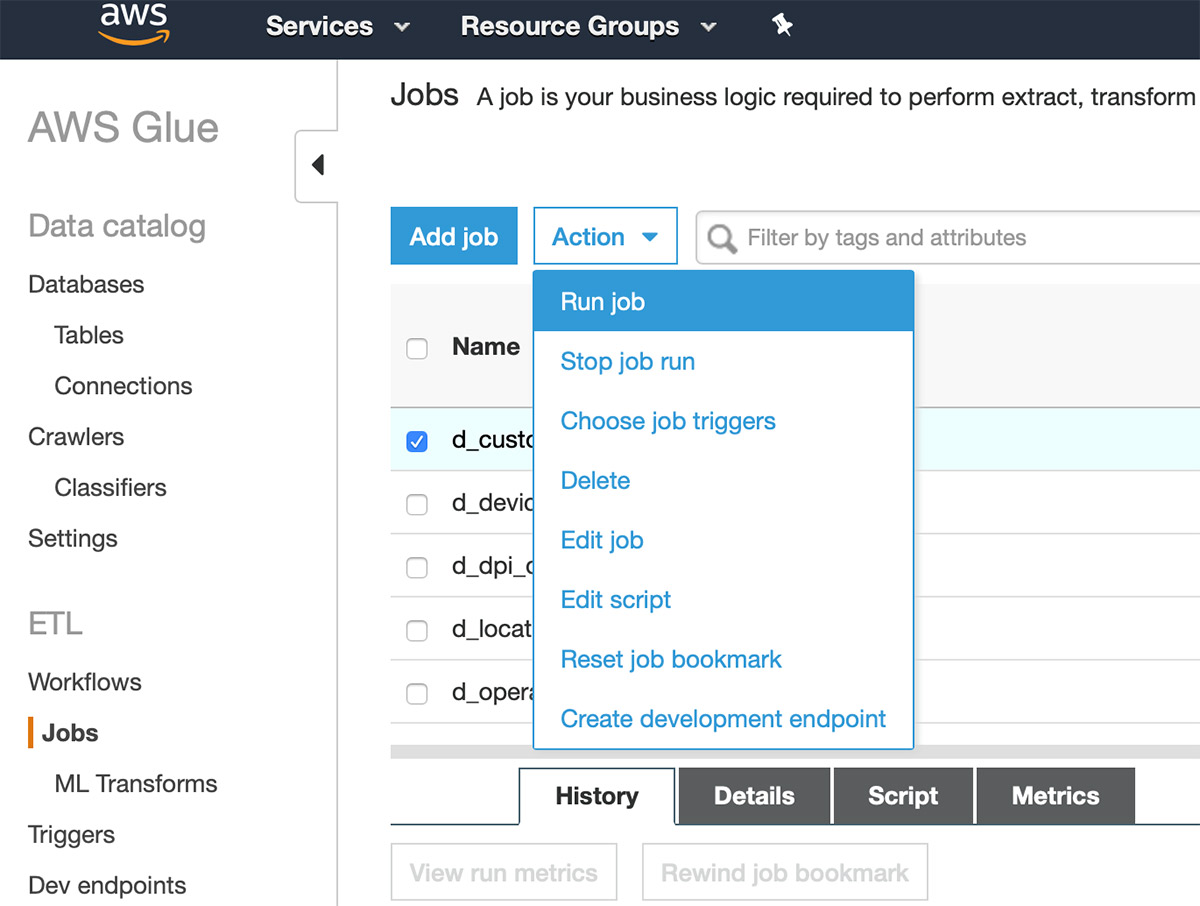
- Select the job
clean_cards_dataand on the Action menu, choose Run job. - Expand Security configuration, script libraries, and job parameters.
- Under Job parameters, add the key
--output_s3_bucket_nameand the value as the bucket name that contains the CSV files. - Choose Run job.
Next, we clean up our sales data. The dollar amounts for the purchase prices are casted as strings with a dollar sign ($) in them. To make analytics easier downstream, we want to have those casted as decimals without the dollar signs.
- Follow the same procedure to run the clean_sales_data
Now that we have generated our clean cards and clean sales data in the S3 bucket, we run security-blog-crawler to add the clean cards and clean sales tables to our Data Catalog.
- In the navigation pane, choose Crawlers.
- Select the crawler called
security-blog-crawlerand choose Run crawler.
Now that we have our new tables with masked card data and cleaned sales data, you grant the analyst user permission to access it in Lake Formation.
- On the Lake Formation console, grant the Select permission to the
clean_cardsandclean_salestables for the user[email protected].
This completes the permissions scope for the analyst user.
Query and visualize data with QuickSight
Now that our data is ready, we use QuickSight to visualize the data. We first add [email protected] to QuickSight as an author who can create different analysis for viewers. We use Lake Formation fine-grained permissions to grant secure access to the analyst user, who can prepare analysis in QuickSight.
You need to be logged in as your account administrator, not the analyst or data lake admin. Your account must be subscribed to QuickSight as an Enterprise user to enable integration with Lake Formation fine-grained access control.
Enable fine-grained permission for QuickSight users
Fine-grained permissions defined in Lake Formation are mapped to QuickSight authors or a group of viewers. To enable fine-grained permissions for viewers, you must first add them to a QuickSight group that can be configured in Lake Formation with fine-grained permissions. For this post, we create the QuickSight user [email protected].
- Sign in to your AWS account with the admin user (not the Lake Formation admin user).
- In a new tab, open the QuickSight console.
- Choose the logged-in user and choose Manage QuickSight.
- Add the user
[email protected]with the author role.

Now we create the QuickSight group Analyst and add the QuickSight user [email protected] to the group. We use the AWS Command Line Interface (AWS CLI) for this purpose.
- Run the following command to create the group (provide your account ID):
- Run the following command to add the user to the group:
- Run the following command to get the ARN of the QuickSight group:
- Make a note of this ARN.
We use this ARN to configure access permissions to this QuickSight group in Lake Formation.
Because we configured the data lake bucket and Athena output bucket with CMKs, we need to grant the following key operations to the QuickSight role.
- Enter the following AWS CLI command to create the QuickSight role when you subscribe to QuickSight (also provide the KMS key ID, created by the CloudFormation stack):
- Sign in with the [email protected]
- On the Lake Formation console, choose Data permissions.
- Choose Grant.
- For SAML and Amazon QuickSight users and groups, enter the Analyst group ARN you copied earlier.
- For Database, choose db1.
- For Tables, choose clean_cards and clean_sales.
- For Table permissions, select Select.
- Choose Grant.

Now let’s grant permissions to the customers table by excluding the address and email fields.
- On the Data permissions page, choose Grant.
- For SAML and Amazon QuickSight users and groups, enter the
Analystgroup ARN you copied earlier. - For Database, choose db1.
- For Tables, choose customers.
- For Columns, choose Exclude columns.
- For Exclude columns, choose address and email.
- For Table permissions, select Select.
- Choose Grant.

Now the Analyst group has the Lake Formation permission for the proper datasets.
Additional security measures
In addition to configuring permissions for QuickSight, you can implement security measures to ensure that you’re visualizing sensitive data properly.
- On the QuickSight console, choose Security & permissions.

Because we’re using Athena to connect to source data in data lake, we grant write permissions to the S3 bucket for the Athena query result output. The naming convention of the Athena S3 bucket is <account_number><region_name><bucket_name>. For example, it should appear similar to 111122223333virginiamybucketname.

Visualize the user data
This post would be incomplete without some data science that demonstrates how we can create correlations between users. We have secured our infrastructure, scrubbed our sensitive data in preprocessing, output the results to a columnar tables in our AWS Glue Data Catalog managed by Lake Formation, and configured security settings in QuickSight. The next step is to import the dataset into QuickSight to analyze the data. For more information, see Working with Datasets.
In our use case, we logically grouped our users and cardholders into a columnar format in preprocessing, which we can now use to sort through and derive value. In QuickSight, we use the heat map visualization to map the buyer to the number of times they used someone else’s credit card. This gives us a visual of which users used different credit cards the most.
- Sign in using
[email protected]. - On the QuickSight console, choose New analysis.
- Choose New datasets.
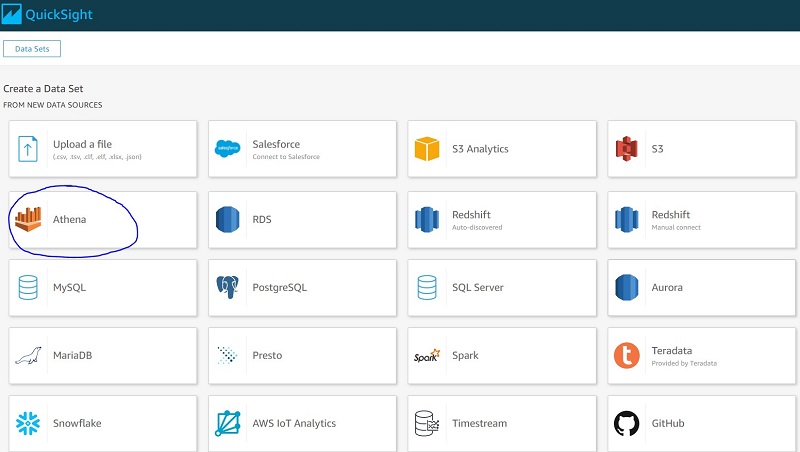
- For Create a Dataset, choose Athena.
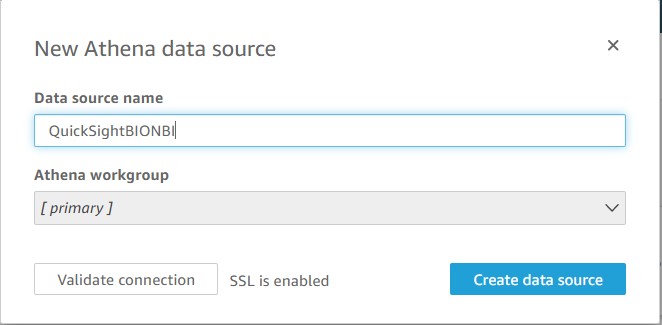
- Enter
ABCCompany Analysisas the data source. - Choose Create data source.
- Choose the database
db1.
As shown in the following screenshot, you’re only shown the table permissions granted to the QuickSight Analyst group.

- Choose Use custom SQL.
- Enter the query name as
Sales-Cards-Query.
We now run queries to verify that the analyst user doesn’t have access to the cards and sales tables.
- Enter the following query for the cards table:
The following screenshot shows that we get a permission error.

- Similarly, you can verify the permissions for sales table by running following query. You should see the same permission error as for the cards table.
- Enter the following query for the customers
The following screenshot shows that the analyst only has access to customer fields other than address and email.

The analyst only has access to the clean_sales, clean_cards, and customers tables (excluding the address and email fields).
- Enter the following SQL and choose Edit/Preview Data:

The following screenshot shows our query results.

- Choose Save & visualize to create a visualization.
- Choose + Add and choose Add visual.
- Choose the heat map visual type.
- Set Rows to
customer_id. - Set Columns and Values to
num_diff_card. - On the Values drop-down menu, choose Aggregate sum.
The following screenshot shows our QuickSight analysis. You can change the color by choosing Format visual.

From this visualization, we can see that several customers are making purchases with more than one card that they don’t own. We can also add further visualizations that add more context to our data like customer IDs and the total number of purchases made with cards that customers don’t own.
The following are some of the additional datasets and visualizations that you can add to your analysis.

This data may provide valuable insights into the relationships between users and also provide a starting point for forensic investigations into customers that may be making fraudulent purchases.
For instructions on creating a similar dataset, see Creating a Dataset Using Amazon Athena Data. For instructions on creating visualizations with your datasets, see Creating an Amazon QuickSight Visual.
Clean up
When you’re done with this exercise, complete the following steps to delete your resources and stop incurring costs:
- On the Amazon S3 console, delete the objects in the buckets created by the CloudFormation stack.
- On the CloudFormation console, select your stack and choose Delete.
This cleans up all the resources created by the stack.
Conclusion
In this post, we used an example of credit card purchases to discuss different ways to protect sensitive data, based on separation of responsibilities with least privileges, encryption, and fine-grained access control. With AWS, you gain the control and confidence you need to securely run your business with the most flexible and secure cloud computing environment available today. To show this in action, we created separate IAM users and granted permissions based on the principle of least privilege to allow users to perform their duties. We reviewed the required AWS KMS configuration to protect data at rest using server-side encryption. We used AWS Glue to prepare the data, remove sensitive information, and further protect data access using Lake Formation’s fine-grained access controls. After we applied the security controls, we showed you how the analyst user can safely create different analyses using QuickSight for visualization.
References
For more information about the steps in this solution, see the following:
- Creating a role to delegate permissions to an IAM user
- Granting and Revoking Data Catalog Permissions in Lake Formation
- Lake Formation Personas and IAM Permissions Reference
- AWS KMS Developer Guide
- Accessing Data Sources
- Managing User Access Inside Amazon QuickSight
- Using Row-Level Security (RLS) to Restrict Access to a Dataset
- Anonymize and manage data in your data lake with Amazon Athena and AWS Lake Formation
About the Authors
 Julia Soscia is a Solutions Architect Manager with Amazon Web Services on the Startup team, based out of New York City. Her main focus is to help startups create well-architected environments on the AWS cloud platform and build their business. She enjoys skiing on the weekends in Vermont and visiting the many art museums across New York City.
 Mitesh Patel is a Senior Solutions Architect at AWS. He works with customers in SMB to help them develop scalable, secure and cost effective solutions in AWS. He enjoys helping customers in modernizing applications using microservices and implementing serverless analytics platform.


 Dhiraj Thakur is a Solutions Architect with Amazon Web Services. He works with AWS customers and partners to guide enterprise cloud adoption, migration, and strategy. He is passionate about technology and enjoys building and experimenting in the analytics and AI/ML space.
 Saurabh Shrivastava is a solutions architect leader and analytics/ML specialist working with global systems integrators. He works with AWS Partners and customers to provide them with architectural guidance for building scalable architecture in hybrid and AWS environments. He enjoys spending time with his family outdoors and traveling to new destinations to discover new cultures.
 Dylan Qu is an AWS solutions architect responsible for providing architectural guidance across the full AWS stack with a focus on data analytics, AI/ML, and DevOps.
 Abhishek Sinha is a Principal Product Manager at Amazon Web Services.
 Al MS is a product manager for Amazon EMR at Amazon Web Services.
 BJ Haberkorn is principal product marketing manager for analytics at Amazon Web Services. BJ has worked previously on voice technology including Amazon Alexa, real time communications systems, and processor design. He holds BS and MS degrees in electrical engineering from the University of Virginia.


 Noritaka Sekiyama is a Senior Big Data Architect at AWS Glue & Lake Formation. His passion is for implementing software artifacts for building data lakes more effectively and easily. During his spare time, he loves to spend time with his family, especially hunting bugs—not software bugs, but bugs like butterflies, pill bugs, snails, and grasshoppers.










 Joan Aoanan is a ProServe Consultant at AWS. With her B.S. Mathematics-Computer Science degree from Gonzaga University, she is interested in integrating her interests in math and science with technology.
 Veronika Megler, PhD, is Principal Data Scientist for Amazon.com Consumer Packaging. Until recently she was the Principal Data Scientist for AWS Professional Services. She enjoys adapting innovative big data, AI, and ML technologies to help companies solve new problems, and to solve old problems more efficiently and effectively. Her work has lately been focused more heavily on economic impacts of ML models and exploring causality.
 Calvin Wang is a Data Scientist at AWS AI/ML. He holds a B.S. in Computer Science from UC Santa Barbara and loves using machine learning to build cool stuff.

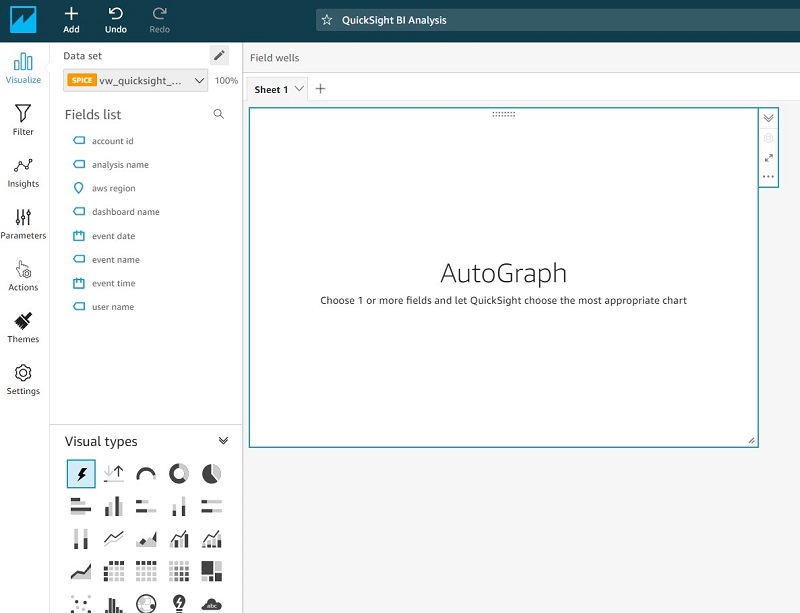
 QuickSight visualization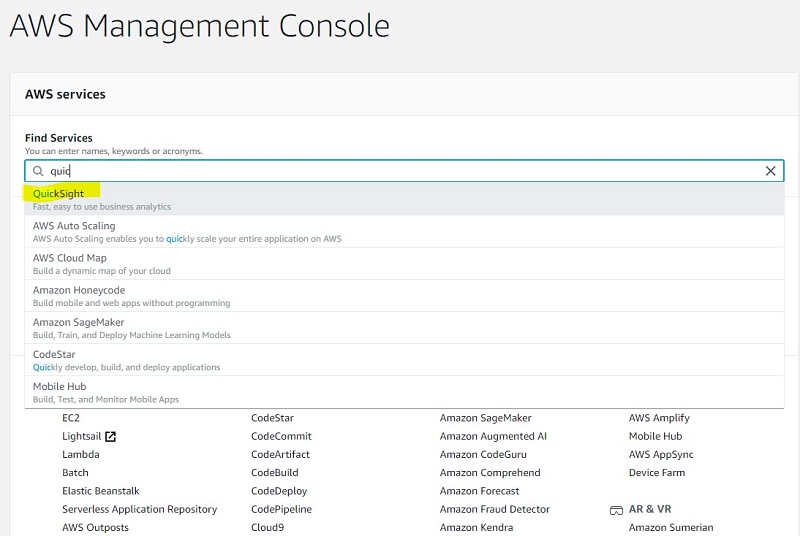
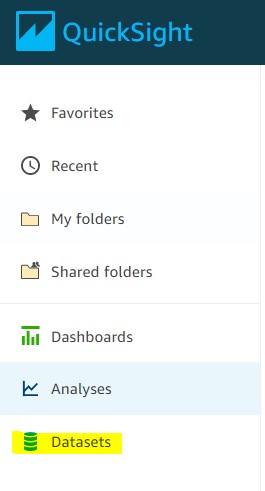


 Sunil Salunkhe is a Senior Solution Architect working with Strategic Accounts on their vision to leverage the cloud to drive aggressive growth strategies. He practices customer obsession by solving their complex challenges in all the aspects of the cloud journey including scale, security and reliability. While not working, he enjoys playing cricket and go cycling with his wife and a son.

 Nihar Sheth is a Senior Product Manager on the Amazon Kinesis Data Streams team at Amazon Web Services. He is passionate about developing intuitive product experiences that solve complex customer problems and enables customers to achieve their business goals. Outside of work, he is focusing on hiking 200 miles of beautiful PNW trails with his son in 2021.
 Karthi Thyagarajan is a Solutions Architect on the Amazon Kinesis Team focusing on all things streaming and he enjoys helping customers tackle distributed systems challenges.
 Sai Maddali is a Sr. Product Manager – Tech at Amazon Web Services where he works on Amazon Kinesis Data Streams . He is passionate about understanding customer needs, and using technology to deliver services that empowers customers to build innovative applications. Besides work, he enjoys traveling, cooking, and running.
 Larry Heathcote is a Senior Product Marketing Manager at Amazon Web Services for data streaming and analytics. Larry is passionate about seeing the results of data-driven insights on business outcomes. He enjoys walking his Samoyed Sasha in the mornings so she can look for squirrels to bark at.
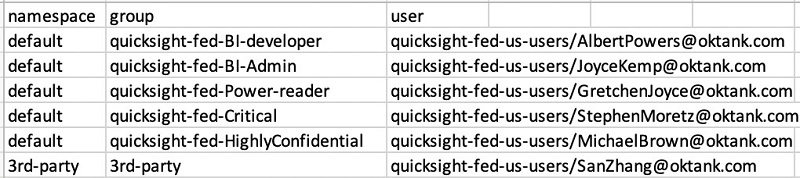


 Similarly, we can create other parameters such as


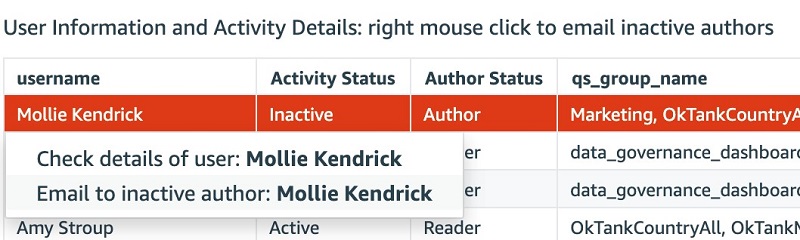
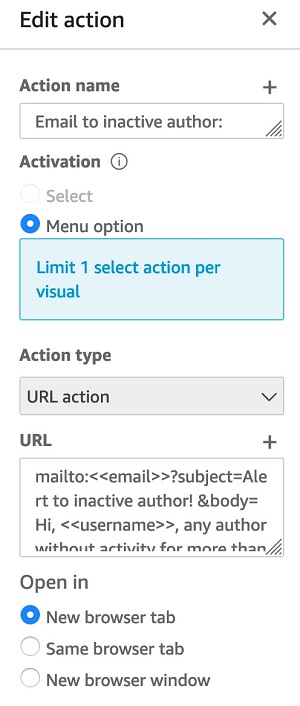
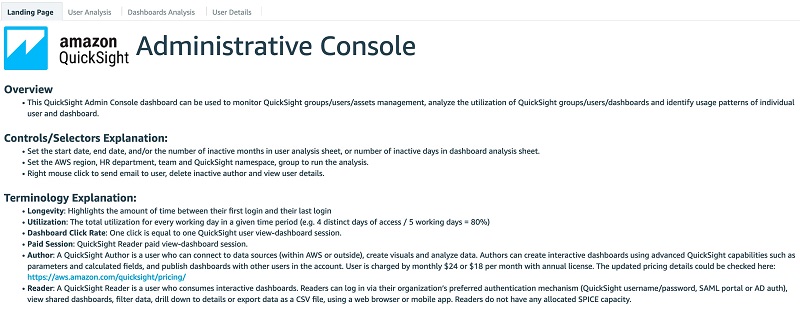
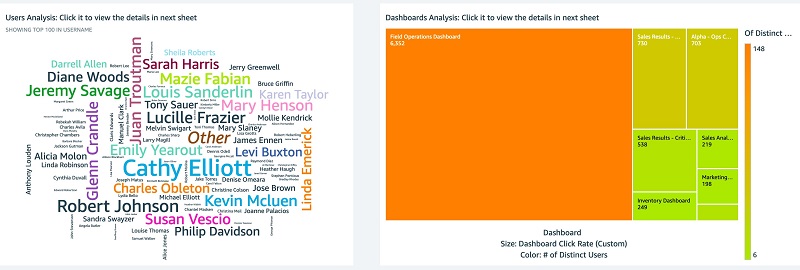

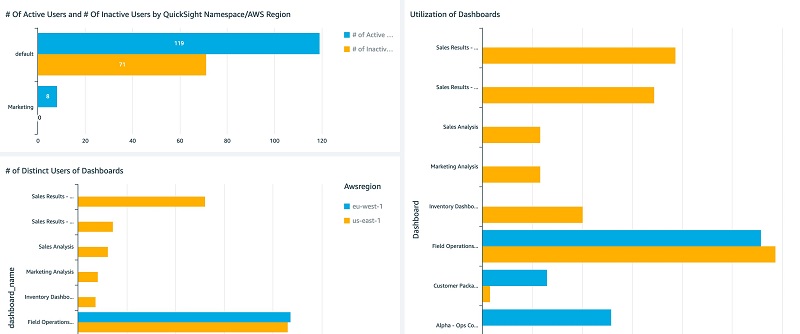
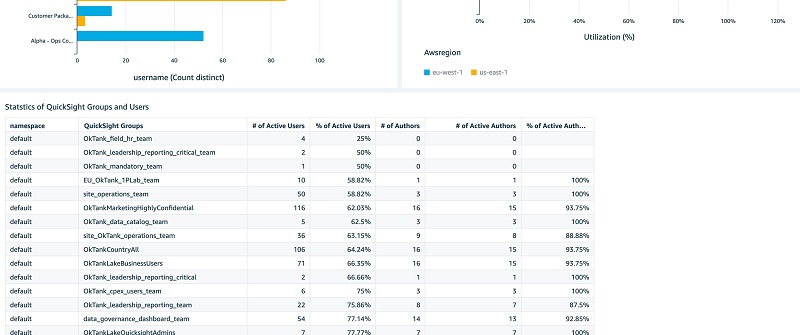
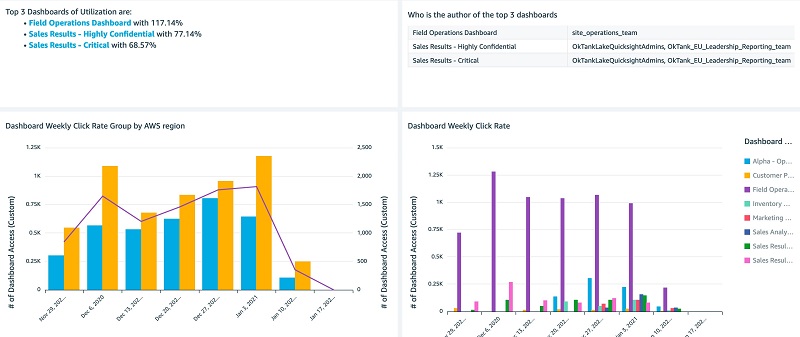
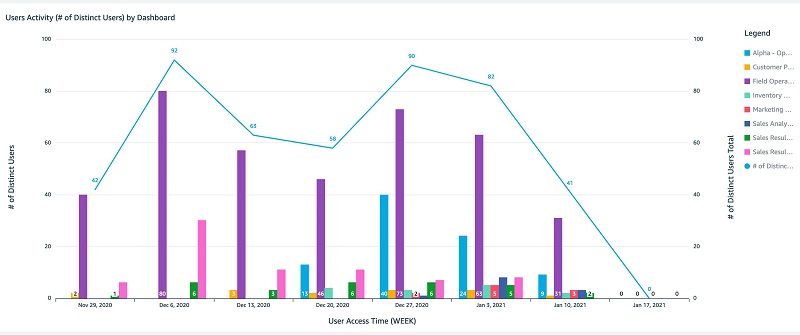
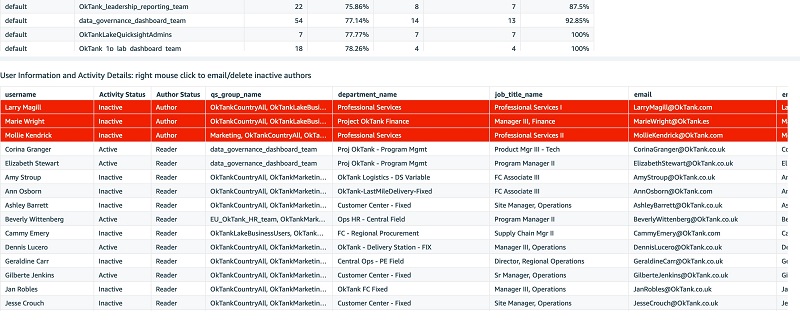 The following screenshots show the Dashboards Analysis tab.
 You can interactively play with the sample dashboard in the following
  Ying Wang is a Data Visualization Engineer with the Data & Analytics Global Specialty Practice in AWS Professional Services.
 Jill Florant manages Customer Success for the Amazon QuickSight Service team


 Rajesh Francis is a Sr. Analytics Specialist Solutions Architect at AWS. He specializes in Amazon Redshift and works with customers to build scalable Analytic solutions.
 Neeraja Rentachintala is a Principal Product Manager with Amazon Redshift. Neeraja is a seasoned Product Management and GTM leader, bringing over 20 years of experience in product vision, strategy and leadership roles in data products and platforms. Neeraja delivered products in analytics, databases, data Integration, application integration, AI/Machine Learning, large scale distributed systems across On-Premise and Cloud, serving Fortune 500 companies as part of ventures including MapR (acquired by HPE), Microsoft SQL Server, Oracle, Informatica and Expedia.com.
 Jeetesh Srivastva is a Sr. Analytics specialist solutions architect at AWS. He specializes in Amazon Redshift and works with customers to implement scalable solutions leveraging Redshift and other AWS Analytic services. He has worked to deliver on premises and cloud based analytic solutions for customers in banking & finance and hospitality industry verticals.


 Kelly Ragan is a Senior Data Architect, Strategic Accounts Team, AWS Professional Services. He helps customers solve big data problems and wrestle with large-scale data warehouses. In his spare time, he enjoys snow skiing, bicycling, and camping in the Pacific Northwest.
 Rohit Masur is an Associate Big Data Consultant, Data and Analytics Team, AWS Professional Services. He helps customers architect and implement solutions on AWS to get business value out of data. In his spare time, he enjoys reading books, going on long walks, and exploring new hiking trails in the Bay Area.


 Michael Hamilton is a Solutions Architect at Amazon Web Services and is based out of Charlotte, NC. He has a focus in analytics and enjoys helping customers solve their unique use cases. When he’s not working, he loves going hiking with his wife, kids, and a 2-year-old German shepherd.















 Vikas Omer is an analytics specialist solutions architect at Amazon Web Services. Vikas has a strong background in analytics, customer experience management (CEM), and data monetization, with over 11 years of experience in the telecommunications industry globally. With six AWS Certifications, including Analytics Specialty, he is a trusted analytics advocate to AWS customers and partners. He loves traveling, meeting customers, and helping them become successful in what they do.
 Brian Likosar is a Senior Streaming Specialist Solutions Architect at Amazon Web Services. Brian loves helping customers capture value from real-time streaming architectures, because he knows life doesn’t happen in batch. He’s a big fan of open-source collaboration, theme parks, and live music.
 Larry Heathcote is a Senior Product Marketing Manager at Amazon Web Services for data streaming and analytics. Larry is passionate about seeing the results of data-driven insights on business outcomes. He enjoys walking his Samoyed Sasha in the mornings so she can look for squirrels to bark at.

 Damian Grech is a Data Engineering Senior Manager at FanDuel. Damian has over 15 years of experience in software delivery and has worked with organizations ranging from large enterprises to start-ups at their infant stages. In his spare time, you can find him either experimenting in the kitchen or trailing the Scottish Highlands.
 Shiv Narayanan is Global Business Development Manager for Data Lakes and Analytics solutions at AWS. He works with AWS customers across the globe to strategize, build, develop and deploy modern data platforms. Shiv loves music, travel, food and trying out new tech.
 Sidhanth Muralidhar is a Senior Technical Account Manager at Amazon Web Services. He works with large enterprise customers who run their workloads on AWS. He is passionate about working with customers and helping them in their cloud journey. In his spare time, he loves to play and watch football.