Tag Archives: news

Reserve quantum computers, get guidance and cutting-edge capabilities with Amazon Braket Direct

Post Syndicated from Channy Yun original https://aws.amazon.com/blogs/aws/reserve-quantum-computers-get-expertise-and-cutting-edge-capabilities-with-amazon-braket-direct/

Today, we are announcing the availability of Braket Direct, a new Amazon Braket program that helps quantum researchers dive deeper into quantum computing. This program lets you get dedicated, private access to the full capacity of various quantum processing units (QPUs) without any queues or wait times, connect with quantum computing specialists to receive expert guidance for your workloads, and get early access to features and devices with limited availability to conduct cutting-edge research on today’s noisy quantum devices.

Since its launch in 2020, Amazon Braket has democratized access to quantum computing by offering on-demand access to various QPUs using shared, public availability windows, where you only pay for the duration of your reservation.

You can now use Braket Direct to reserve the entire dedicated machine for a period of time on IonQ Aria, QuEra Aquila, and Rigetti Aspen-M-3 devices for running your most complex, long-running, time-sensitive workloads, or conducting live events such as training workshops and hackathons, where you pay only for what you reserve.

To further your research, you can now engage directly with Braket’s experts through free office hours or one-on-one, hands-on reservation prep sessions. For deeper research collaborations, you can connect with specialists from quantum hardware providers such as IonQ, Oxford Quantum Circuits, QuEra, Rigetti, or Amazon Quantum Solutions Lab, our dedicated professional services team.

Finally, to truly push the boundaries, you can gain access to experimental capabilities that have limited or reduced availability starting with IonQ’s highest fidelity, 30-qubit Forte device.

Braket Direct expands on our commitment to accelerate research and innovation in quantum computing without requiring any upfront fees or long-term commitments.

Getting started with Braket Direct
To get started, go to the Amazon Braket console and choose Braket Direct in the left pane. You can see new features such as quantum hardware reservation, expert advice and get access to next-generation quantum hardware and features.

1. Request a quantum hardware reservation
To create a reservation, choose Reserve device and select the Device that you would like to reserve. Provide your contact information, including your name and email address, any details about the workload that you would like to execute using your reservation, such as desired reservation length, relevant constraints, and desired schedule.

Braket Direct assures that you have the full capacity of the QPU during your reservation and the predictability that your workloads will execute when your reservation begins.

If you are interested in connecting with a Braket expert for a one-on-one reservation prep session after your reservation is confirmed, you can select that option at no additional cost.

Choose Submit to complete your reservation request. A Braket team member will email you within 2–3 business days, pending request verification. To make the most of your reservation, you can choose to pre-create your tasks and jobs prior to a reservation to maximize use of the time.

To learn more about your quantum tasks and hybrid jobs to execute in a device reservation, see Get started with Braket Direct in the AWS documentation.

2. Get support from quantum computing experts
You can get in touch with quantum experts and get advice about your workload. With Braket office hours, Braket experts can help you go from ideation to execution faster at no additional cost. Explore your device to fit your use case, identify options to make best use of Braket for your algorithm, and get recommendations on how to use certain Braket features like Hybrid Jobs, Braket Pulse, or Analog Hamiltonian Simulation.

To book an upcoming Braket office hours slot, choose Sign up and fill out your contact information, workload details, and any desired discussion topics. You will receive a calendar invitation to the next available slot by email.

To take advantage of experts from quantum hardware providers, choose Connect and browse their professional services listings on AWS Marketplace.

The Amazon Quantum Solutions Lab is a collaborative research and professional services team staffed with quantum computing experts who can assist you in more effectively exploring quantum computing, engaging in quantum research, and assessing the current performance of this technology. To contact the Quantum Solutions Lab, select Connect and fill out contact information and use case details. The team will email you with next steps.

3. Access to cutting-edge capabilities
To move your research quicker, you can get early access to innovative new capabilities. With Braket Direct, you can easily request access to cutting-edge capabilities, such as new quantum devices with limited availability, directly in the Braket console. Today, you can get reservation-only access to IonQ’s highest-fidelity Forte QPU. Due to its limited availability, this device is currently only available through Braket Direct reservations.

Now available
Braket Direct is now generally available in all AWS Regions where Amazon Braket is available. To learn more, see the Braket Direct page and pricing page.

Give it a try and send feedback to AWS re:Post for Amazon Braket, Quantum Computing Stack Exchange, or through your usual AWS Support contacts.

— Channy

AWS Step Functions Workflow Studio is now available in AWS Application Composer

Post Syndicated from Donnie Prakoso original https://aws.amazon.com/blogs/aws/aws-step-functions-workflow-studio-is-now-available-in-aws-application-composer/

Today, we’re announcing that AWS Step Functions Workflow Studio is now available in AWS Application Composer. This new integration brings together the development of workflows and application resources into a unified visual infrastructure as code (IaC) builder.

Now, you can have a seamless transition between authoring workflows with AWS Step Functions Workflow Studio and defining resources with AWS Application Composer. This announcement allows you to create and manage all resources at any stage of your development journey. You can visualize the full application in AWS Application Composer, then zoom into the workflow details with AWS Step Functions Workflow Studio—all within a single interface.

Seamlessly build workflow and modern application
To help you design and build modern applications, we launched AWS Application Composer in March 2023. With AWS Application Composer, you can use a visual builder to compose and configure serverless applications from AWS services backed by deployment-ready IaC.

In various use cases of building modern applications, you may also need to orchestrate microservices, automate mission-critical business processes, create event-driven applications that respond to infrastructure changes, or build machine learning (ML) pipelines. To solve these challenges, you can use AWS Step Functions, a fully managed service that makes it easier to coordinate distributed application components using visual workflows. To simplify workflow development, in 2021 we introduced AWS Step Functions Workflow Studio, a low-code visual tool for rapid workflow prototyping and development across 12,000+ API actions from over 220 AWS services.

While AWS Step Functions Workflow Studio brings simplicity to building workflows, customers that want to deploy workflows using IaC had to manually define their state machine resource and migrate their workflow definitions to the IaC template.

Better together: AWS Step Functions Workflow Studio in AWS Application Composer
With this new integration, you can now design AWS Step Functions workflows in AWS Application Composer using a drag-and-drop interface. This accelerates the path from prototyping to production deployment and iterating on existing workflows.

You can start by composing your modern application with AWS Application Composer. Within the canvas, you can add a workflow by adding an AWS Step Functions state machine resource. This new capability provides you with the ability to visually design and build a workflow with an intuitive interface to connect workflow steps to resources.

How it works
Let me walk you through how you can use AWS Step Functions Workflow Studio in AWS Application Composer. For this demo, let’s say that I need to improve handling e-commerce transactions by building a workflow and integrating with my existing serverless APIs.

First, I navigate to AWS Application Composer. Because I already have an existing project that includes application code and IaC templates from AWS Application Composer, I don’t need to build anything from scratch.

I open the menu and select Project folder to open the files in my local development machine.

Then, I select the path of my local folder, and AWS Application Composer automatically detects the IaC template that I currently have.

Then, AWS Application Composer visualizes the diagram in the canvas. What I really like about using this approach is that AWS Application Composer activates Local sync mode, which automatically syncs and saves any changes in IaC templates into my local project.

Here, I have a simple serverless API running on Amazon API Gateway, which invokes an AWS Lambda function and integrates with Amazon DynamoDB.

Now, I’m ready to make some changes to my serverless API. I configure another route on Amazon API Gateway and add AWS Step Functions state machine to start building my workflow.

When I configure my Step Functions state machine, I can start editing my workflow by selecting Edit in Workflow Studio.

This opens Step Functions Workflow Studio within the AWS Application Composer canvas. I have the same experience as Workflow Studio in the AWS Step Functions console. I can use the canvas to add actions, flows , and patterns into my Step Functions state machine.

I start building my workflow, and here’s the result that I exported using Export PNG image in Workflow Studio.

But here’s where this new capability really helps me as a developer. In the workflow definition, I use various AWS resources, such as AWS Lambda functions and Amazon DynamoDB. If I need to reference the AWS resources I defined in AWS Application Composer, I can use an AWS CloudFormation substitution.

With AWS CloudFormation substitutions, I can add a substitution using an AWS CloudFormation convention, which is a dynamic reference to a value that is provided in the IaC template. I am using a placeholder substitution here so I can map it with an AWS resource in the AWS Application Composer canvas in a later step.

I can also define the AWS CloudFormation substitution for my Amazon DynamoDB table.

At this stage, I’m happy with my workflow. To review the Amazon States Language as my AWS Step Functions state machine definition, I can also open the Code tab. Now I don’t need to manually copy and paste this definition into IaC templates. I only need to save my work and choose Return to Application Composer.

Here, I can see that my AWS Step Functions state machine is updated both in the visual diagram and in the state machine definition section.

If I scroll down, I will find AWS Cloudformation Definition Substitutions for resources that I defined in Workflow Studio. I can manually replace the mapping here, or I can use the canvas.

To use the canvas, I simply drag and drop the respective resources in my Step Functions state machine and in the Application Composer canvas. Here, I connect the Inventory Process task state with a new AWS Lambda function. Also, my Step Functions state machine tasks can reference existing resources.

When I choose Template, the state machine definition is integrated with other AWS Application Composer resources. With this IaC template I can easily deploy using AWS Serverless Application Model Command Line Interface (AWS SAM CLI) or CloudFormation.

Things to know
Here is some additional information for you:

Pricing – The AWS Step Functions Workflow Studio in AWS Application Composer comes at no additional cost.

Availability – This feature is available in all AWS Regions where Application Composer is available.

AWS Step Functions Workflow Studio in AWS Application Composer provides you with an easy-to-use experience to integrate your workflow into modern applications. Get started and learn more about this feature on the AWS Application Composer page.

Happy building!
— Donnie

Amazon CodeCatalyst introduces custom blueprints and a new enterprise tier

Post Syndicated from Irshad Buchh original https://aws.amazon.com/blogs/aws/amazon-codecatalyst-introduces-custom-blueprints-and-a-new-enterprise-tier/

Today, I’m excited to introduce the new Amazon CodeCatalyst enterprise tier and custom blueprints.

Amazon CodeCatalyst enterprise tier is a new pricing tier that offers features like custom blueprints and project lifecycle management. The enterprise tier is $20/user per month, and each enterprise tier space gets 1,500 compute minutes, 160 Dev Environment hours, and 64GB of Dev Environment storage per paying user. You can use custom blueprints to define best practices for your application code, workflows, and infrastructure. You can publish these blueprints to your CodeCatalyst space, utilizing them for project creation or applying standards to existing projects.

Blueprints help you set up projects in minutes so you can get to work on code immediately. With just a few clicks, you can set up project files and configure built-in, fully integrated tools (for example, source repository, issue management, and continuous integration and delivery (CI/CD) pipeline) with best practices for your particular type of project. You can swap in popular tools like GitHub if needed, while maintaining the unified experience. You spend less time on building, integrating, or operating developer tools over the project’s lifetime.

With custom blueprints, you can define various elements of your CodeCatalyst project, like workflow definitions, infrastructure as code (IaC), and application code. When custom blueprints are updated, those changes are reflected in any project using the blueprint as a pull request update. This streamlined process reduces overhead in setting up your projects and ensures that best practices are consistently applied across your projects. As an admin, you can easily view details about which projects are using each blueprint in your CodeCatalyst space, giving you visibility into how standards are being applied across your projects.

Creating a custom blueprint in CodeCatalyst
I open the CodeCatalyst console and then I navigate to my space. On the Settings tab, I choose Blueprints on the left navigation pane, and then I select Create blueprint. At this point, I codify my best practices in this blueprint. When ready, I’ll publish it back to my space so my teams can use it to create projects.

create-blueprint

After I publish my blueprint, I can view and manage it in my CodeCatalyst space in the Settings tab. In the left panel, I choose Blueprints. Then I select Space blueprints.

manage-blueprint

I select Create project > Space blueprints to create a CodeCatalyst project from my custom blueprint.

create-project

Availability

The Amazon CodeCatalyst enterprise tier is available in US West (Oregon) and Europe (Ireland) Regions, but you can deploy to any commercial Region. To learn more, visit the Amazon CodeCatalyst webpage.

Go build!

— Irshad

Amazon ElastiCache Serverless for Redis and Memcached is now available

Post Syndicated from Channy Yun original https://aws.amazon.com/blogs/aws/amazon-elasticache-serverless-for-redis-and-memcached-now-generally-available/

Today, we are announcing the availability of Amazon ElastiCache Serverless, a new serverless option that allows customers to create a cache in under a minute and instantly scale capacity based on application traffic patterns. ElastiCache Serverless is compatible with two popular open-source caching solutions, Redis and Memcached.

You can use ElastiCache Serverless to operate a cache for even the most demanding workloads without spending time in capacity planning or requiring caching expertise. ElastiCache Serverless constantly monitors your application’s memory, CPU, and network resource utilization and scales instantly to accommodate changes to the access patterns of workloads it serves. You can create a highly available cache with data automatically replicated across multiple Availability Zones and up to 99.99 percent availability Service Level Agreement (SLA) for all workloads, which saves you time and money.

Customers wanted to get radical simplicity to deploy and operate a cache. ElastiCache Serverless offers a simple endpoint experience abstracting the underlying cluster topology and cache infrastructure. You can reduce application complexity and have more operational excellence without handling reconnects and rediscovering nodes.

With ElastiCache Serverless, there are no upfront costs, and you pay for only the resources you use. You pay for the amount of cache data storage and ElastiCache Processing Units (ECPUs) resources consumed by your applications.

Getting started with Amazon ElastiCache Serverless
To get started, go to the ElastiCache console and choose Redis caches or Memcached caches in the left navigation pane. ElastiCache Serverless supports engine versions of Redis 7.1 or higher and Memcached 1.6 or higher.

For example, in the case of Redis caches, choose Create Redis cache.

You see two deployment options: either Serverless or Design your own cache to create a node-based cache cluster. Choose the Serverless option, the New cache method, and provide a name.

Use the default settings to create a cache in your default VPC, Availability Zones, service-owned encryption key, and security groups. We will automatically set recommended best practices. You don’t have to enter any additional settings.

If you want to customize default settings, you can set your own security groups, or enable automatic backups. You can also set maximum limits for your compute and memory usage to ensure your cache doesn’t grow beyond a certain size. When your cache reaches the memory limit, keys with a time to live (TTL) are evicted according to the least recently used (LRU) logic. When your compute limit is reached, ElastiCache will throttle requests, which will lead to elevated request latencies.

When you create a new serverless cache, you can see the details of settings for connectivity and data protection, including an endpoint and network environment.

Now, you can configure the ElastiCache Serverless endpoint in your application and connect using any Redis client that supports Redis in cluster mode, such as redis-cli.

$ redis-cli -h channy-redis-serverless.elasticache.amazonaws.com --tls -c -p 6379
set x Hello
OK
get x
"Hello"

You can manage the cache using AWS Command Line Interface (AWS CLI) or AWS SDKs. For more information, see Getting started with Amazon ElastiCache for Redis in the AWS documentation.

If you have an existing Redis cluster, you can migrate your data to ElastiCache Serverless by specifying the ElastiCache backups or Amazon S3 location of a backup file in a standard Redis rdb file format when creating your ElastiCache Serverless cache.

For a Memcached cache, you can create and use a new serverless cache in the same way as Redis.

If you use ElastiCache Serverless for Memcached, there are significant benefits of high availability and instant scaling because they are not natively available in the Memcached engine. You no longer have to write custom business logic, manage multiple caches, or use a third-party proxy layer to replicate data to get high availability with Memcached. Now you can get up to 99.99 percent availability SLA and data replication across multiple Availability Zones.

To connect to the Memcached endpoint, run the openssl client and Memcached commands as shown in the following example output:

$ /usr/bin/openssl s_client -connect channy-memcached-serverless.cache.amazonaws.com:11211 -crlf 
set a 0 0 5
hello
STORED
get a
VALUE a 0 5
hello
END

For more information, see Getting started with Amazon ElastiCache Serverless for Memcached in the AWS documentation.

Scaling and performance
ElastiCache Serverless scales without downtime or performance degradation to the application by allowing the cache to scale up and initiating a scale-out in parallel to meet capacity needs just in time.

To show ElastiCache Serverless’ performance we conducted a simple scaling test. We started with a typical Redis workload with an 80/20 ratio between reads and writes with a key size of 512 bytes. Our Redis client was configured to Read From Replica (RFR) using the READONLY Redis command, for optimal read performance. Our goal is to show how fast workloads can scale on ElastiCache Serverless without any impact on latency.

As you can see in the graph above, we were able to double the requests per second (RPS) every 10 minutes up until the test’s target request rate of 1M RPS. During this test, we observed that p50 GET latency remained around 751 microseconds and at all times below 860 microseconds. Similarly, we observed p50 SET latency remained around 1,050 microseconds, not crossing the 1,200 microseconds even during the rapid increase in throughput.

Things to know

  • Upgrading engine version – ElastiCache Serverless transparently applies new features, bug fixes, and security updates, including new minor and patch engine versions on your cache. When a new major version is available, ElastiCache Serverless will send you a notification in the console and an event in Amazon EventBridge. ElastiCache Serverless major version upgrades are designed for no disruption to your application.
  • Performance and monitoring – ElastiCache Serverless publishes a suite of metrics to Amazon CloudWatch, including memory usage (BytesUsedForCache), CPU usage (ElastiCacheProcessingUnits), and cache metrics, including CacheMissRate, CacheHitRate, CacheHits, CacheMisses, and ThrottledRequests. ElastiCache Serverless also publishes Amazon EventBridge events for significant events, including cache creation, deletion, and limit updates. For a full list of available metrics and events, see the documentation.
  • Security and compliance – ElastiCache Serverless caches are accessible from within a VPC. You can access the data plane using AWS Identity and Access Management (IAM). By default, only the AWS account creating the ElastiCache Serverless cache can access it. ElastiCache Serverless encrypts all data at rest and in-transit by transport layer security (TLS) encrypting each connection to ElastiCache Serverless. You can optionally choose to limit access to the cache within your VPCs, subnets, IAM access, and AWS Key Management Service (AWS KMS) key for encryption. ElastiCache Serverless is compliant with PCI-DSS, SOC, and ISO and is HIPAA eligible.

Now available
Amazon ElastiCache Serverless is now available in all commercial AWS Regions, including China. With ElastiCache Serverless, there are no upfront costs, and you pay for only the resources you use. You pay for cached data in GB-hours, ECPUs consumed, and Snapshot storage in GB-months.

To learn more, see the ElastiCache Serverless page and the pricing page. Give it a try, and please send feedback to AWS re:Post for Amazon ElastiCache or through your usual AWS support contacts.

— Channy

Join the preview of Amazon Aurora Limitless Database

Post Syndicated from Channy Yun original https://aws.amazon.com/blogs/aws/join-the-preview-amazon-aurora-limitless-database/

Today, we are announcing the preview of Amazon Aurora Limitless Database, a new capability supporting automated horizontal scaling to process millions of write transactions per second and manage petabytes of data in a single Aurora database.

Amazon Aurora read replicas allow you to increase the read capacity of your Aurora cluster beyond the limits of what a single database instance can provide. Now, Aurora Limitless Database scales write throughput and storage capacity of your database beyond the limits of a single Aurora writer instance. The compute and storage capacity that is used for Limitless Database is in addition to and independent of the capacity of your writer and reader instances in the cluster.

With Limitless Database, you can focus on building high-scale applications without having to build and maintain complex solutions for scaling your data across multiple database instances to support your workloads. Aurora Limitless Database scales based on the workload to support write throughput and storage capacity that, until today, would require multiple Aurora writer instances.

The architecture of Amazon Aurora Limitless Database
Limitless Database has a two-layer architecture consisting of multiple database nodes, either transaction routers or shards.

Shards are Aurora PostgreSQL DB instances that each store a subset of the data for your database, allowing for parallel processing to achieve higher write throughput. Transaction routers manage the distributed nature of the database and present a single database image to database clients.

Transaction routers maintain metadata about where data is stored, parse incoming SQL commands and send those commands to shards, aggregate data from shards to return a single result to the client, and manage distributed transactions to maintain consistency across the entire distributed database. All the nodes that make up your Limitless Database architecture are contained in a DB shard group. The DB shard group has a separate endpoint where your access your Limitless Database resources.

Getting started with Aurora Limitless Database
To get started with a preview of Aurora Limitless Database, you can sign up today and will be invited soon. The preview runs in a new Aurora PostgreSQL cluster with version 15 in the AWS US East (Ohio), US East (N. Virginia), US West (Oregon), Asia Pacific (Tokyo), and Europe (Ireland) Regions.

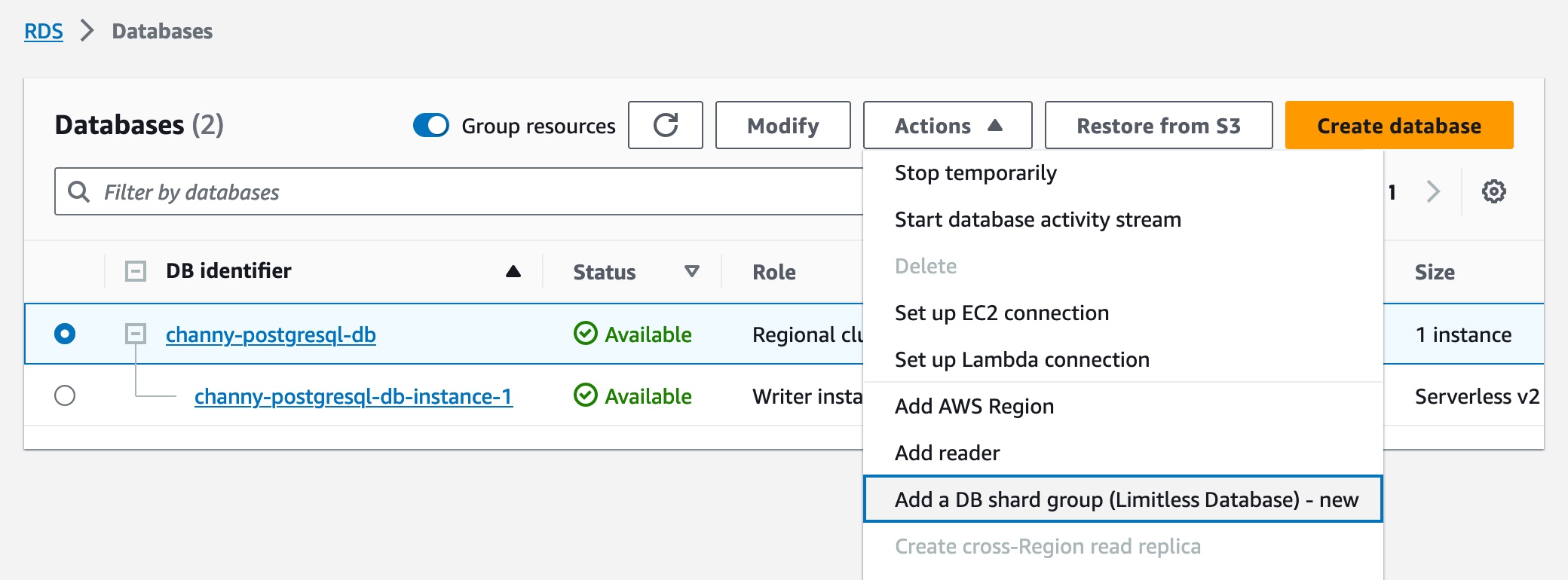
As part of the creation workflow for an Aurora cluster, choose the Limitless Database compatible version in the Amazon RDS console or the Amazon RDS API. Then you can add a DB shard group and create new Limitless Database tables. You can choose the maximum Aurora capacity units (ACUs).

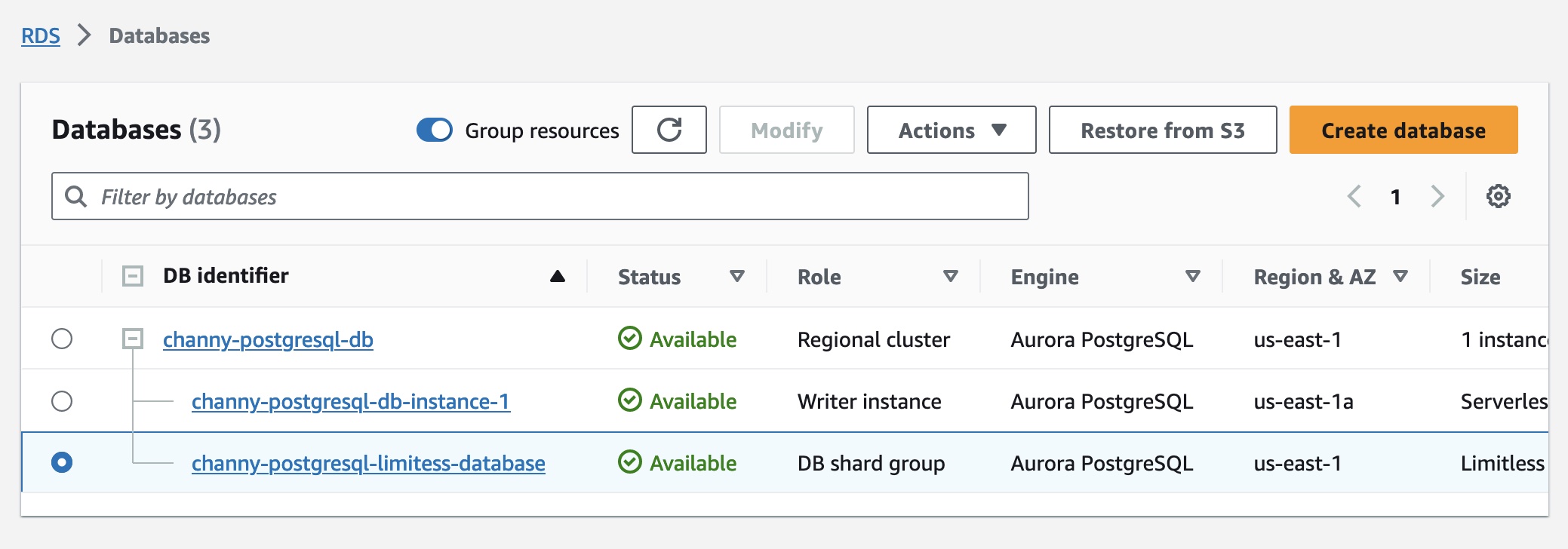
After the DB shard group is created, you can view its details on the Databases page, including its endpoint.

To use Aurora Limitless Database, you should connect to a DB shard group endpoint, also called the limitless endpoint, using psql or any other connection utility that works with PostgreSQL.

There will be two types of tables that contain your data in Aurora Limitless Database:

  • Sharded tables – These tables are distributed across multiple shards. Data is split among the shards based on the values of designated columns in the table, called shard keys.
  • Reference tables – These tables have all their data present on every shard so that join queries can work faster by eliminating unnecessary data movement. They are commonly used for infrequently modified reference data, such as product catalogs and zip codes.

Once you have created a sharded or reference table, you can load massive data into Aurora Limitless Database and manipulate data in those tables using the standard PostgreSQL queries.

Join the preview
You can join the preview of Amazon Aurora Limitless Database to be among the first to experience all of this power.

Sign up now, give it a try, and please send feedback to AWS re:Post for Amazon Aurora or through your usual AWS support contacts.

— Channy

Getting started with new Amazon RDS for Db2

Post Syndicated from Sébastien Stormacq original https://aws.amazon.com/blogs/aws/getting-started-with-new-amazon-rds-for-db2/

I am pleased to announce that IBM and AWS have come together to offer Amazon Relational Database Service (Amazon RDS) for Db2, a fully managed Db2 database engine running on AWS infrastructure.

IBM Db2 is an enterprise-grade relational database management system (RDBMS) developed by IBM. It offers a comprehensive set of features, including strong data processing capabilities, robust security mechanisms, scalability, and support for diverse data types. Db2 is a well-established choice among organizations for effectively managing data in various applications and handling data-intensive workloads due to its reliability and performance. Db2 has its roots in the pioneering work around data storage and structured query language (SQL) IBM has done since the 1970s. It has been commercially available since 1983, initially just for mainframes, and was later ported to Linux, Unix, and Windows platforms (LUW). Today, Db2 powers thousands of business-critical applications in all verticals.

With Amazon RDS for Db2, you can now create a Db2 database with just a few clicks in the AWS Management Console, one command to type with the AWS Command Line Interface (AWS CLI), or a few lines of code with the AWS SDKs. AWS takes care of the infrastructure heavy lifting, freeing your time for higher-level tasks such as schema and query optimizations for your applications.

If you are new to Amazon RDS or coming from an on-premises Db2 background, let me quickly recap the benefits of Amazon RDS.

  • Amazon RDS offers the same Db2 database as the one you use on-premises today. Your existing applications will reconnect to RDS for Db2 without changing their code.
  • The database runs on a fully managed infrastructure. You don’t have to provision servers, install the packages, install patches, or maintain the infrastructure in an operational state.
  • The database is also fully managed. We take care of the installation, minor version upgrades, daily backup, scaling, and high availability.
  • The infrastructure can scale up and down as required. You can simply stop and then restart the database to change the underlying hardware and meet changing performance requirements or benefit from last-generation hardware.
  • Amazon RDS offers a choice of storage types designed to deliver fast, predictable, and consistent I/O performance. For new or unpredictable workloads, you can configure the system to automatically scale your storage.
  • Amazon RDS automatically takes care of your backups, and you can restore them to a new database with just a few clicks.
  • Amazon RDS helps to deploy highly available architectures. Amazon RDS synchronously replicates data to a standby database in a different Availability Zone (an Availability Zone is a group of distinct data centers). When a failure is detected with a Multi-AZ deployment, Amazon RDS automatically fails over to the standby instance and routes requests without changing the database endpoint DNS name. This switch happens with minimal downtime and zero data loss.
  • Amazon RDS is built on the secure infrastructure of AWS. It encrypts data in transit using TLS and at rest using keys managed with AWS Key Management Service (AWS KMS). This helps you deploy workloads that are compliant with your company or industry regulations, such as FedRAMP, GDPR, HIPAA, PCI, and SOC.
  • Third-party auditors assess the security and compliance of Amazon RDS as part of multiple AWS compliance programs and you can verify the full list of Amazon RDS compliance validations.

You can migrate your existing on-premises Db2 database to Amazon RDS using native Db2 tools, such as restore and import, or AWS Database Migration Service (AWS DMS). AWS DMS allows you to migrate databases in a single operation or continuously, while your applications continue to update the data on the source database, until you decide on the cut off.

Amazon RDS supports multiple tools for monitoring your database instances, including Amazon RDS Enhanced Monitoring and Amazon CloudWatch, or you can continue to use the IBM Data Management Console or IBM DSMtop.

Let’s see how it works
I always like to get my hands on a new service to learn how it works. Let’s create a Db2 database and connect to it using the standard tool provided by IBM. I assume most of you reading this post come from an IBM Db2 background and don’t know much about Amazon RDS.

First, I create a Db2 database. To do this, I navigate to the Amazon RDS page of the AWS Management Console and select Create database. For this demo, I’ll accept most of the default values. I’ll show you, however, all the sections and will comment on the important configuration points you have to think about.

I select Db2 from among the multiple database engines Amazon RDS offers.

RDS for Db2 - create DB - step 1I scroll down the page and select IBM Db2 Standard and Engine Version 11.5.9. Amazon RDS patches the database instances automatically if you so desire. You can learn more about Amazon RDS database maintenance here.

I select Production. Amazon RDS will deploy a default configuration tuned for high availability and fast, consistent performance.

RDS for Db2 - create DB - step 2

RDS for Db2 - create DB - multi-AZ deployment

Under Settings, I give a name to my RDS instance (this is not the Db2 catalog name!), and I select the master username and password.

Under Instance configuration, I choose the type of node to run my database. This will define the hardware characteristics of the virtual server: the number of vCPUs, quantity of memory, and so on. Depending on the requirements of your application, you can allocate instances offering up to 32 vCPUs and 128 GiB of RAM for IBM Db2 Standard instances. When you select IBM Db2 Advanced instances, you can allocate instances offering up to 128 vCPUs and 1 TiB of RAM. This parameter has a direct impact on the price.

RDS for Db2 - create DB - settings

RDS for Db2 - create DB - instance configuration

Under Storage, I choose the type of Amazon Elastic Block Store (Amazon EBS) volumes, their size, and their IOPS and throughput. For this demo, I accept the values proposed by default. This is also a set of parameters that directly impact the price.

RDS for Db2 - create DB - step 4

Under Connectivity, I select the VPC (in AWS terms, a VPC is a private network) where the database will be deployed. Under Public access, I select No to make sure the database instance is only accessible from my private network. I can’t think of a (good) use case where you want to select Yes for this option.

This is also where you select the VPC security group. A security group is a network filter that defines what IP addresses or networks can access your database instance and on what TCP port. Be sure to select or create a security group with TCP 50000 open to allow applications to connect to your Db2 database.

RDS for Db2 - create DB - step 5

I leave all other options with their default value. It is important to open the Additional configuration section at the very bottom of the page. This is where you can give an Initial database name. If you don’t name your Db2 database here, your only option will be to restore an existing Db2 database backup on that instance.

This section also contains the parameters for the Amazon RDS automatic backup. You can choose a time window and how long we will retain the backups.

I accept all the defaults and select Create database.

RDS for Db2 - create DB - step 6

After a few minutes, you can see your database is available.

I select the DNS name of the database instance Endpoint, and I connect to a Linux machine running in the same network. After installing the Db2 client package that I downloaded from the IBM website, I type the following commands to connect to the database. There is nothing specific to Amazon RDS here.

db2 catalog TCPIP node blognode remote awsnewsblog-demo.abcdef.us-east-2.rds-preview.amazonaws.com server 50000
db2 catalog database NEWSBLOG as blogdb2 at node blognode authentication server_encrypt
db2 connect to blogdb2 user admin using MySuperPassword

Once connected, I download a sample dataset and script from the popular Db2Tutorial website. I run the scripts against the database I just created.

wget https://www.db2tutorial.com/wp-content/uploads/2019/06/books.zip
unzip books.zip 
db2 -stvf ./create.sql 
db2 -stvf ./data.sql 
db2 "select count(*) author_count from authors"

RDS for Db2 - result of query

As you can see, there is nothing specific to Amazon RDS when it comes to connecting and using the database. I use standard Db2 tools and scripts.

One more thing
Amazon RDS for Db2 requires you to bring your own Db2 license. You must enter your IBM customer ID and site number before starting a Db2 instance.

To do so, create a custom DB parameter group and attach it to your database instance at launch time. A DB parameter group acts as a container for engine configuration values that are applied to one or more DB instances. In a Db2 parameter group, there are two parameters specific to IBM Db2 licenses: your IBM Customer Number (rds.ibm_customer_id) and your IBM site number (rds.ibm_site_id).

RDS for IBM Db2 - Parameter Group

If you do not know your site number, reach out to your IBM sales organization for a copy of a recent Proof-of-Entitlement (PoE), invoice, or sales order. All these documents should include your site number.

Pricing and availability
Amazon RDS for Db2 is available in all AWS Regions except China and GovCloud.

Amazon RDS pricing is on demand, and there are no upfront costs or subscriptions. You only pay by the hour when the database is running, plus the GB per month of database storage provisioned and backup storage you use and the number of IOPS you provision. The Amazon RDS for Db2 pricing page has the details of pricing per Region. As I mentioned earlier, Amazon RDS for Db2 requires you to bring your own Db2 license.

If you already know Amazon RDS, you’ll be delighted to have a new database engine available for your application developers. If you’re coming from an on-premises world, you will love the simplicity and automation that Amazon RDS offers.

You can learn many more details on the Amazon RDS for Db2 documentation page. Now go and deploy your first database with Amazon RDS for Db2 today!

— seb

Announcing throughput increase and dead letter queue redrive support for Amazon SQS FIFO queues

Post Syndicated from Danilo Poccia original https://aws.amazon.com/blogs/aws/announcing-throughput-increase-and-dead-letter-queue-redrive-support-for-amazon-sqs-fifo-queues/

With Amazon Simple Queue Service (Amazon SQS), you can send, store, and receive messages between software components at any volume. Today, Amazon SQS has introduced two new capabilities for first-in, first-out (FIFO) queues:

  • Maximum throughput has been increased up to 70,000 transactions per second (TPS) per API action in selected AWS Regions, supporting sending or receiving up to 700,000 messages per second with batching.
  • Dead letter queue (DLQ) redrive support to handle messages that are not consumed after a specific number of retries in a way similar to what was already available for standard queues.

Let’s take a more in-depth look at how these work in practice.

FIFO queues throughput increase up to 70K TPS
FIFO queues are designed for applications that require messages to be processed exactly once and in the order in which they are sent. While standard queues have an unlimited throughput, FIFO queues have an upper quota in the number of TPS per API action.

Standard and FIFO queues support batch actions that can send and receive up to 10 messages with a single API call (up to a maximum total payload of 256 KB). This means that a FIFO queue can process up to 10 times more messages per second than its maximum throughput.

At launch in 2016, FIFO queues supported up to 300 TPS per API action (3,000 messages per second with batching). This was enough for many use cases, but some customers asked for more throughput.

With high throughput mode launched in 2021, FIFO queues introduced a tenfold increase of the maximum throughput and could process up to 3,000 TPS per API action, depending on the Region. One year later, that quota was doubled to up to 6,000 TPS per API action.

This year, Amazon SQS has already increased FIFO queue throughput quota two times, to up to 9,000 TPS per API action in August and up to 18,000 TPS per API action in October (depending on the Region).

Today, the Amazon SQS team has been able to increase the FIFO queue throughput quota again, allowing you to process up to 70,000 TPS per API action (up to 700,000 messages per second with batching) in the US East (N. Virginia), US West (Oregon), and Europe (Ireland) Regions. This is more than two hundred times the maximum throughput at launch.

DLQ redrive support for FIFO queues
With Amazon SQS, messages that are not consumed after a specific number of retries can automatically be moved to a DLQ. There, messages can be analyzed to understand the reason why they have not been processed correctly. Sometimes there is a bug or a misconfiguration in the consumer application. Other times the messages contain invalid data from the source applications that needs to be fixed to allow the messages to be processed again.

Either way, you can define a plan to reprocess these messages. For example, you can fix the consumer application and redrive all messages to the source queue. Or you can create a dedicated queue where a custom application receives the messages, fixes their content, and then sends them to the source queue.

To simplify moving the messages back to the source queue or to a different queue, Amazon SQS allows you to create a redrive task. Redrive tasks are already available for standard queues. Starting today, you can also start a redrive task for FIFO queues.

Using the Amazon SQS console, I create a first queue (my-dlq.fifo) to be used as a DLQ. To redrive messages back to the source FIFO queue, the queue type must match, so this is also a FIFO queue.

Then, I create a source FIFO queue (my-source-queue.fifo) to handle messages as usual. When I create the source queue, I configure the first queue (my-dlq.fifo) as the DLQ and specify 3 as the Maximum receives condition under which messages are moved from the source queue to the DLQ.

Console screenshot.

When a message has been received by a consumer for more than the number of times specified by this condition, Amazon SQS moves the message to the DLQ. The original message ID is retained and can be used to uniquely track the message.

To test this setup, I use the console to send a message to the source queue. Then, I use the AWS Command Line Interface (AWS CLI) to receive the message multiple times without deleting it.

aws sqs receive-message --queue-url https://sqs.eu-west-1.amazonaws.com/123412341234/my-source-queue.fifo
{
    "Messages": [
        {
            "MessageId": "ef2f1c72-4bfe-4093-a451-03fe2dbd4d0f",
            "ReceiptHandle": "...",
            "MD5OfBody": "0f445a578fbcb0c06ca8aeb90a36fcfb",
            "Body": "My important message."
        }
    ]
}

To receive the same message more than once, I wait for the time specified in the queue visibility timeout to pass (30 seconds by default).

After the third time, the message is not in the source queue because it has been moved to the DLQ. When I try to receive messages from the source queue, the list is empty.

aws sqs receive-message --queue-url https://sqs.eu-west-1.amazonaws.com/123412341234/my-source-queue.fifo
{
    "Messages": []
}

To confirm that the message has been moved, I poll the DLQ to see if the message is there.

aws sqs receive-message --queue-url https://sqs.eu-west-1.amazonaws.com/123412341234/my-dlq.fifo  
{
    "Messages": [
        {
            "MessageId": "ef2f1c72-4bfe-4093-a451-03fe2dbd4d0f",
            "ReceiptHandle": "...",
            "MD5OfBody": "0f445a578fbcb0c06ca8aeb90a36fcfb",
            "Body": "My important message."
        }
    ]
}

Now that the message is in the DLQ, I can investigate why the message has not been processed (well, I know the reason this time) and decide whether to redrive messages from the DLQ using the Amazon SQS console or the new redrive API that was introduced a few months ago. For this example, I use the console. Back on the Amazon SQS console, I select the DLQ queue and choose Start DLQ redrive.

In Redrive configuration, I choose to redrive the messages to the source queue. Optionally, I can specify another FIFO queue as a custom destination. I use System optimized in Velocity control settings to redrive messages with the maximum number of messages per second optimized by Amazon SQS. Optionally, if there is a large number of messages in the DLQ, I can configure a custom maximum rate of messages per second to avoid overloading consumers.

Console screenshot.

Before starting the redrive task, I can use the Inspect messages section to poll and check messages. I already decided what to do, so I choose DLQ redrive to start the task. I have only one message to process, so the redrive task completes very quickly.

Console screenshot.

As expected, the message is back in the source queue and is ready to be processed again.

Console screenshot.

Things to know
Dead letter queue (DLQ) support for FIFO queues is available today in all AWS Regions where Amazon SQS is offered with the exception of GovCloud Regions and those based in China.

In the DLQ configuration, the maximum number of receives should be between 1 and 1,000.

There is no additional cost for using high throughput mode or a DLQ. Every Amazon SQS action counts as a request. A single request can send or receive from 1 to 10 messages, up to a maximum total payload of 256 KB. You pay based on the number of requests, and requests are priced differently between standard and FIFO queues.

As part of the AWS Free Tier, there is no cost for the first million requests per month for standard queues and for the first million requests per month for FIFO queues. For more information, see Amazon SQS pricing.

With these updates and the increased throughput, you can cover the vast majority of use cases with FIFO queues.

Use Amazon SQS FIFO queues to have high throughput, exactly-once processing, and first-in-first-out delivery.

— Danilo

Replication failback and increased IOPS are new for Amazon EFS

Post Syndicated from Danilo Poccia original https://aws.amazon.com/blogs/aws/replication-failback-and-increased-iops-are-new-for-amazon-efs/

Today, Amazon Elastic File System (Amazon EFS) has introduced two new capabilities:

  • Replication failback – Failback support for EFS replication makes it easier and more cost-effective to synchronize changes between EFS file systems when performing disaster recovery (DR) workflows. You can now quickly replicate incremental changes from your secondary back to your primary file system after disaster events and other DR-related activities.
  • Increased IOPS – Amazon EFS now supports up to 250,000 read IOPS and up to 50,000 write IOPS per file system, making it easier to run more IOPS-heavy workloads at any scale for virtual servers, containers, and serverless functions that require shared storage.

Let’s see more in depth how these work in practice.

Introducing Amazon EFS replication failback
With Amazon EFS replication, you can create a replica of your file system in the same or in another AWS Region. When replication is enabled, Amazon EFS automatically keeps the primary (source) and secondary (destination) file systems synchronized. To help you meet your compliance and business continuity goals, EFS replication is designed to provide a recovery point objective (RPO) and a recovery time objective (RTO) measured in minutes.

Now, with failback support, you can respond to disaster recovery (DR) events, conduct planned business continuity tests, and manage other DR-related activities with greater speed and cost efficiency. Failback support allows you to switch the direction of replication between the primary and secondary file systems. EFS replication keeps the two file systems in sync by copying only incremental changes, eliminating the need to make full copies of your data or use a self-managed, custom solution to complete a recovery workflow.

Using Amazon EFS replication failback
I have a file system replicated to another Region. As part of a periodic DR test, I want to switch to using the secondary file system and then revert back to the primary file system, preserving all the changes made on the secondary file system. To do so, I can use EFS Replication failback in just a few steps.

First, I delete the replication from the primary (source) to the secondary (destination) file system. After this, the secondary file system becomes writable. To do so, in the Amazon EFS console, I check I am in the correct Region and select the secondary file system. In the Replication tab, I choose Delete replication and confirm deletion. I can also start from the primary file system. In that case, the Delete replication link in the Replication tab opens a new browser tab and asks to confirm deletion like before.

I can now use the secondary file system and change its data as needed.

To go back to using the primary file system, I create a “reverse replication” from the secondary to the primary file system. To do so, I check I am in the correct Region and select the secondary file system. In the Replication tab, I choose Create replication and the new option Replicate to existing file system. Then, I select the Region of the primary file system and use the console to browse the EFS file systems in that Region and choose the primary one.

Console screenshot.

The console warns me that Replication overwrite protection is enabled for the primary file system. I follow the Disable protection link to open a new browser tab and edit the primary file system to disable replication overwrite protection.

Console screenshot.

Now, I go back to the browser tab where I am creating the failback replication from the secondary to the primary file system. I refresh the protection check and choose to create the replication.

Console screenshot.

In the following dialog, I confirm that I want Amazon EFS to write to the primary file system.

Console screenshot.

To know when the primary file system is back in sync, I check the Last synced timestamp in the Replication tab, which indicates that all changes made to the source file system before that time are replicated to the destination. Optionally, I can look at the TimeSinceLastSync metric (expressed in minutes) in Amazon CloudWatch to understand how data is being replicated.

Console screenshot.

When the primary file system is back in sync, I delete the replication from the secondary to the primary file system. To complete the restore of the original configuration, I again create the replication from the primary to the secondary file system.

Increased IOPS per file system
The Amazon EFS team has been able to increase IOPS again! The last time they did it was just a few months back. Starting today, an EFS file system can handle up to 50,000 write IOPS (a 2x improvement) and up to 250,000 read IOPS (a 4.5x improvement) when working with frequently-accessed data from a high-performance cache managed by Amazon EFS.

You can monitor the percentage utilization of your file system’s available IOPS using the PercentIOLimit CloudWatch metric. This metric considers the maximum IOPS for writes and uncached reads, including combinations of the two. Reads from the cache are not included in the PercentIOLimit metric.

With these performance improvements, you can run even more IOPS-demanding workloads on Amazon EFS, such as machine learning (ML) training, fine-tuning, and inference. Other use cases that can benefit from the increased IOPS are data science user shares, SaaS applications, and media processing.

Things to know
EFS replication failback is available in all AWS Regions where EFS is available. There are no additional costs for using replication failback. You pay for the usual replication and file system changes as described in Amazon EFS pricing.

The increased IOPS limits are immediately available for all file systems using the Elastic Throughput mode in all Regions where EFS is available. You don’t need to do anything to benefit from these performance improvements. To achieve the maximum IOPS, your application needs sufficient parallelization. For example, using multiple clients and distributing the load across a large number of files. For more information, see the performance tips in the user guide.

Learn more
Amazon EFS product page

— Danilo

AWS Control Tower adds new controls to help customers meet digital sovereignty requirements

Post Syndicated from Sébastien Stormacq original https://aws.amazon.com/blogs/aws/aws-control-tower-helps-customers-meet-digital-sovereignty-requirements/

Today, we added to AWS Control Tower a set of 65 purpose-built controls to help you meet your digital sovereignty requirements.

Digital sovereignty is the control of your digital assets: where the data resides, where it flows, and who has control over it. Since the creation of the AWS Cloud 17 years ago, we have been committed to giving you control over your data.

In November last year, we launched the AWS Digital Sovereignty Pledge, our commitment to offering all AWS customers the most advanced set of sovereignty controls and features available in the cloud. Since then, we have announced several steps in that direction. The AWS Nitro System has been validated by an independent third party to confirm that it contains no mechanism that allows anyone at AWS to access your data on AWS hosts. We launched AWS Dedicated Local Zones, a piece of infrastructure that is fully managed by AWS and built for exclusive use by a customer or community and placed in a customer-specified location or data center. And more recently, we announced the construction of a new independent sovereign Region in Europe.

The introduction of AWS Control Tower controls that support digital sovereignty is an additional step in our roadmap of capabilities for data residency, granular access restriction, encryption, and resilience.

AWS Control Tower offers a simple and efficient way to set up and govern a secure, multi-account AWS environment. It establishes a landing zone that is based on best-practices blueprints, and it enables governance using controls you can choose from a prepackaged list. The landing zone is a well-architected, multi-account baseline that follows AWS best practices. Controls implement governance rules for security, compliance, and operations.

The level of control required for digital assets greatly varies across industries and countries. Customers operating in highly regulated sectors might have the obligation to keep their data in a specific country or region, such as the European Union. Others might have obligations related to data encryption and where the encryption keys are kept, and so on. Furthermore, digital sovereignty requirements evolve rapidly, making it challenging to define and implement all the required controls. Many customers have told us they are concerned that they will have to choose between the full power of AWS and a feature-limited sovereign cloud solution that could hamper their ability to innovate, transform, and grow. We firmly believe that you shouldn’t have to make this choice.

AWS Control Tower helps reduce the time it takes to define, implement, and manage controls required to govern where your data is stored, transferred, and processed at scale.

AWS Control Tower offers you a consolidated view of the controls enabled, your compliance status, and controls evidence across your multiple accounts. This information is available on the console and by calling our APIs. As requirements and AWS services evolve, AWS Control Tower provides you with updated controls to help you continually manage your digital sovereignty needs.

Here are a couple of examples of the controls we added:

  • Operator access – Require that an Amazon Elastic Compute Cloud (Amazon EC2) dedicated host uses an AWS Nitro instance type.
  • Controlling access to your data – Require that an Amazon Elastic Block Store (Amazon EBS) snapshot cannot be publicly restorable.
  • Encryption at rest and in transit, including advanced key management strategies – Require an EC2 instance to use an AWS Nitro instance type that supports encryption in-transit between instances when created using the AWS::EC2::Instance resource type. It also requires that an Amazon Relational Database Service (Amazon RDS) database instance has encryption at rest configured to use an AWS KMS key that you specify for supported engine types.

These are just four examples from three categories. We’ve added 65 new controls, with over 245+ controls available under the digital sovereignty category grouping. The full list is available in the AWS Control Tower documentation.

One of the technical mechanisms AWS Control Tower uses to prevent accidental data storage or flow in a Region is the Region deny control. This parameter allows system administrators to deny access to AWS services and operations in selected AWS Regions. Until today, Region deny control could only be applied for an entire landing zone and all its organizational units (OUs) and accounts. With this launch, you can configure a new Region deny control at the organizational unit level and select the services and IAM principals to allow based on your unique business needs.

Let’s see how to get started
For this demo, let’s imagine that I want to restrict access to AWS services in a set of Regions.

I open the AWS Management Console and navigate to the AWS Control Tower page. On the left navigation pane, under Control Library , I select Categories > Groups > Digital Sovereignty.

Control Tower - Digital Sovereignty - 01

I can review the list of controls available.

Control Tower - Digital Sovereignty - 02

I locate and select the control I want to enable: Deny access to AWS based on the requested AWS Region for an organizational unit. There is a description of the control and a list of frameworks it applies to (NIST 800 and PCI DSS). I select Enable control.

Control Tower - Digital Sovereignty - 03

On the next page, I select the Organizational units (OU) for which I want to enable this control.

Control Tower - Digital Sovereignty - 04

I select the AWS Regions where I will allow access. All Regions left unchecked will have their access denied once the control is enforced.

Control Tower - Digital Sovereignty - 05

Then, I review the service control policy (SCP). It contains a Deny statement to prevent access to the services or APIs listed. Optionally, I can add NotActions. This is a list of exceptions. The services or APIs listed under NotActions are authorized. In this example, I deny everything excepted three APIs: sqs:SendMessage, ec2:StartInstances, and s3:GetObject.

Control Tower - Digital Sovereignty - 06

On the last page, I add a list of IAM principals (users or roles) that will be exempted from the control. This is an exception list. I also tag my control as usual with AWS resources.

Control Tower - Digital Sovereignty - 07

On the last screen (not shown here), I review all my parameters and select Enable control.

I can verify the list of OU for which the control is enabled under the OUs enabled tab.

Control Tower - Digital Sovereignty - 08

The summary page shows all Regions, APIs, and IAM principals enabled for this OU. All the rest is denied. I can update the parameters at any time.

Control Tower - Digital Sovereignty - 09

Pricing and availability
AWS Control Tower is available in all commercial Regions and in US GovCloud.

There is no additional charge to use AWS Control Tower. However, when you set up AWS Control Tower, you will begin to incur costs for AWS services configured to set up your landing zone and mandatory controls.

Certain AWS services, such as Organizations and AWS IAM Identity Center, come at no additional charge. However, you will pay for services such as AWS Service Catalog, AWS CloudTrail, AWS Config, Amazon CloudWatch, Amazon Simple Notification Service (Amazon SNS), Amazon Simple Storage Service (Amazon S3), and Amazon Virtual Private Cloud (Amazon VPC) based on your usage of these services. You only pay for what you use, as you use it. The AWS Control Tower pricing page has the details.

The new AWS Control Tower controls alleviate the burden of identifying and deploying safeguards to meet your digital sovereignty requirements. This set of controls is fully managed, and we will update them as AWS services and digital sovereignty requirements evolve over time.

Go and configure the AWS Control Tower controls that help support your digital sovereignty requirements today.

— seb

Announcing new diagnostic tools for AWS Partner-Led Support (PLS) participants

Post Syndicated from Jeff Barr original https://aws.amazon.com/blogs/aws/announcing-new-diagnostic-tools-for-aws-partner-led-support-pls-participants/

We have added a set of diagnostic tools that will give participants in the AWS Partner-Led Support program access to diagnostic tools that will empower them to do an even better job of supporting their customers.

Intro to AWS Partner-Led Support
This AWS Partner Network (APN) program enables AWS Partners to act as the customer’s sole point of contact for technical support. Customers contact their support partner for technical assistance instead of directly contacting AWS. In many cases the partner can resolve the issue directly. If the partner cannot do this, they get guidance from AWS via their AWS Support plan.

Diagnostic tools
These are the same tools that AWS Support Engineers use to assist AWS customers.

When a customer contacts their partner for support, the partner will federate into the customer’s AWS account. Then they will use the new diagnostic tools to access the customer metadata that will help them to identify and diagnose the issue.

The tools are enabled by a set of IAM roles set up by the customer. The tools can access and organize metadata and CloudWatch metrics, but they cannot access customer data and they cannot make any changes to any of the customer’s AWS resources. Here is a small sample of the types of information that partners will be able to access:

  • EC2 Capacity Reservations
  • Lambda Functions List
  • GuardDuty Findings
  • Load Balancer Responses
  • RDS and Redshift Clusters

Each tool operates on a list of regions selected when the tool is run, all invocations of each tool are logged and are easily accessible for review, and the output from each invocation can be directed to one of several different regions.

The tools can be invoked from the AWS Management Console, with API access available in order to support in-house tools, automation, and integration.

Learn more

The service is available today for partners that have joined the Partner-Led Support program. For more information, see the AWS Partner Led Support page.

If you are a current AWS Partner and would like to learn more about this program with an eye toward qualifying and participating, please visit AWS Partner Central.

Learn more about AWS Diagnostic Tools here.

— Jeff;

Manage EDI at scale with new AWS B2B Data Interchange

Post Syndicated from Sébastien Stormacq original https://aws.amazon.com/blogs/aws/introducing-aws-b2b-data-interchange-simplified-connections-with-your-trading-partners/

Today we’re launching AWS B2B Data Interchange, a fully managed service allowing organizations to automate and monitor the transformation of EDI-based business-critical transactions at cloud scale. With this launch, AWS brings automation, monitoring, elasticity, and pay-as-you-go pricing to the world of B2B document exchange.

Electronic data interchange (EDI) is the electronic exchange of business documents in a standard electronic format between business partners. While email is also an electronic approach, the documents exchanged via email must still be handled by people rather than computer systems. Having people involved slows down the processing of the documents and also introduces errors. Instead, EDI documents can flow straight through to the appropriate application on the receiver’s system, and processing can begin immediately. Electronic documents exchanged between computer systems help businesses reduce cost, accelerate transactional workflows, reduce errors, and improve relationships with business partners.

Work on EDI started in the 1970s. I remember reading a thesis about EDIFACT, a set of standards defining the structure of business documents, back in 1994. But despite being a more than 50-year-old technology, traditional self-managed EDI solutions deployed to parse, validate, map, and translate data from business applications to EDI data formats are difficult to scale as the volume of business changes. They typically do not provide much operational visibility into communication and content errors. These challenges often oblige businesses to fall back to error-prone email document exchanges, leading to high manual work, increased difficulty controlling compliance, and ultimately constraining growth and agility.

AWS B2B Data Interchange is a fully managed, easy-to-use, and cost-effective service for accelerating your data transformations and integrations. It eliminates the heavy lifting of establishing connections with your business partners and mapping the documents to your system’s data-formats and gives visibility on documents that can’t be processed.

It provides a low-code interface for business partner onboarding and EDI data transformation to easily import the processed data to your business applications and analytics solutions. B2B Data Interchange gives you easy access to monitoring data, allowing you to build dashboards to monitor the volume of documents exchanged and the status of each document transformation. For example, it is easy to create alarms when incorrectly formatted documents can’t be transformed or imported into your business applications.

It is common for large enterprises to have thousands of business partners and hundreds of types of documents exchanged with each partner, leading to millions of combinations to manage. AWS B2B Data Interchange is not only available through the AWS Management Console, it is also accessible with the AWS Command Line Interface (AWS CLI) and AWS SDKs. This allows you to write applications or scripts to onboard new business partners and their specific data transformations and to programmatically add alarms and monitoring logic to new or existing dashboards.

B2B Data Interchange supports the X12 EDI data format. It makes it easier to validate and transform EDI documents to the formats expected by your business applications, such as JSON or XML. The raw documents and the transformed JSON or XML files are stored on Amazon Simple Storage Service (Amazon S3). This allows you to build event-driven applications for real-time business data processing or to integrate business documents with your existing analytics or AI/ML solutions.

For example, when you receive a new EDI business document, you can trigger additional routing, processing, and transformation logic using AWS Step Functions or Amazon EventBridge. When an error is detected in an incoming document, you can configure the sending of alarm messages by email or SMS or trigger an API call or additional processing logic using AWS Lambda.

Let’s see how it works
As usual on this blog, let me show you how it works. Let’s imagine I am in charge of the supply chain for a large retail company, and I have hundreds of business partners to exchange documents such as bills of lading, customs documents, advanced shipment notices, invoices, or receiving advice certificates.

In this demo, I use the AWS Management Console to onboard a new business partner. By onboarding, I mean defining the contact details of the business partner, the type of documents I will exchange with them, the technical data transformation to the JSON formats expected by my existing business apps, and where to receive the documents.

With this launch, the configuration of the transport mechanism for the EDI document is managed outside B2B Data Interchange. Typically, you will configure a transfer gateway and propose that your business partner transfer the document using SFTP or AS2.

There are no servers to manage or application packages to install and configure. I can get started in just four steps.

First, I create a profile for my business partner.

B2B Data Interchange - Create profile

Second, I create a transformer. A transformer defines the source document format and the mapping to my existing business application data format: JSON or XML. I can use the graphical editor to validate a sample document and see the result of the transformation directly from the console. We use the standard JSONATA query and transformation language to define the transformation logic to JSON documents and standard XSLT when transforming to XML documents.

B2B Data Interchange - Create transformer - input

B2B Data Interchange - Create transformer - transformation

I activate the transformer once created.

B2B Data Interchange - Create transformer - activate

Third, I create a trading capability. This defines which Amazon Simple Storage Service (Amazon S3) buckets will receive the documents from a specific business partner and where the transformed data will be stored.

There is a one-time additional configuration to make sure proper permissions are defined on the S3 bucket policy. I select Copy policy and navigate to the Amazon S3 page of the console to apply the policies to the S3 bucket. One policy allows B2B Data Interchange to read from the incoming bucket, and one policy allows it to write to your outgoing bucket.

B2B Data Interchange - Create capability

B2B Data Interchange - Create capability - configure directory

While I am configuring the S3 bucket, it is also important to turn on Amazon EventBridge on the S3 bucket. This is the mechanism we use to trigger the data transformation upon the arrival of a new business document.

B2B Data Interchange - Enbale EventBridge on S3 bucket

Finally, back at the B2B Data Interchange configuration, I create a partnership. Partnerships are dedicated resources that establish a relationship between you and your individual trading partners. Partnerships contain details about a specific trading partner, the types of EDI documents you receive from them, and how those documents should be transformed into custom JSON or XML formats. A partnership links the business profile I created in the first step with one or multiple document types and transformations I defined in step two.

B2B Data Interchange - Create partnership

This is also where I can monitor the status of the last set of documents I received and the status of their transformation. For more historical data, you can navigate to Amazon CloudWatch using the links provided in the console.

B2B Data Interchange - Log group

To test my setup, I upload an EDI 214 document to the incoming bucket and a few seconds later, I can see the transformed JSON document appearing in the destination bucket.

B2B Data Interchange - Transformed document on the bucket

I can observe the status of document processing and transformation using Invocations and TriggeredRules CloudWatch metrics from EventBridge. From there, together with the CloudWatch Logs, I can build dashboards and configure alarms as usual. I can also configure additional enrichment, routing, and processing of the incoming or transformed business documents by writing an AWS Lambda function or a workflow using AWS Step Functions.

Pricing and availability
AWS B2B Data Interchange is available today in three of the AWS Regions: US East (Ohio, N. Virginia) and US West (Oregon).

There is no one-time setup fee or recurring monthly subscription. AWS charges you on demand based on your real usage. There is a price per partnership per month and a price per document transformed. The B2B Data Interchange pricing page has the details.

AWS B2B Data Interchange makes it easy to manage your trading partner relationships so you can automatically exchange, transform, and monitor EDI workflows at cloud scale. It doesn’t require you to install or manage any infrastructure and makes it easy for you to integrate with your existing business applications and systems. You can use the AWS B2B Data Interchange API or the AWS SDK to automate the onboarding of your partners. Combined with a fully managed and scalable infrastructure, AWS B2B Data Interchange helps your business to be more agile and scale your operations.

Learn more:

Go build!

— seb

Automatic restore testing and validation now available in AWS Backup

Post Syndicated from Veliswa Boya original https://aws.amazon.com/blogs/aws/automatic-restore-testing-and-validation-is-now-available-in-aws-backup/

Performing automatic game day testing of all your critical resources is an important step in determining that you are prepared to respond to ransomware or any data loss event. This gives you the opportunity to take appropriate corrective actions based on the results and monitor results such as success or failure from these tests. Ultimately, you will be able to ascertain if the restore times meet your expected organization’s recovery time objective (RTO) goals, helping you develop improved recovery strategies.

Today, we’re announcing restore testing, a new capability in AWS Backup that allows you to perform restore testing of your AWS resources across storage, compute, and databases. With this feature, you can automate the entire restore testing process and avoid surprises later by determining now whether you can successfully recover using your backups in the event of a data loss such as ransomware. As an additional option, to demonstrate compliance with your organizational and regulatory data governance requirements, you can use the restore job results.

How it works
Restore testing in AWS Backup supports restore testing of resources for which the recovery points are created by AWS Backup, and the following services are supported: Amazon Elastic Block Store (Amazon EBS), Amazon Elastic Compute Cloud (Amazon EC2), Amazon Aurora, Amazon Relational Database Service (Amazon RDS), Amazon Elastic File Store (Amazon EFS), Amazon Simple Storage Service (Amazon S3), Amazon DynamoDB, Amazon FSx, Amazon DocumentDB, and Amazon Neptune. You can get started with restore testing from the AWS Backup console, AWS CLI, or AWS SDK.

Earlier, I created EC2 instances and a backup of these instances. Then, I created my restore testing plan in the AWS Backup console.

Create restore testing plan

In this General section, I enter the name of the plan, a test frequency, a Start time, and a Start within. Start time sets the time for the test to begin, for example, if you have a daily test frequency set, you specify what time the plan will run each day. Start within is the period of time in which the restore test is designated to begin. AWS Backup makes a best effort to commence all designated restore jobs during the Start within time window. You have a choice to keep this very minimal or very large based on your preference.

Figure 2: Section 1 Create restore testing plan

In the Recovery point selection section, I specify the vaults that the recovery points should come from, and a timeframe of eligible recovery points as part of this restore testing plan. I left the criteria for a recovery point at the default selection. I also didn’t opt to include recovery points generated by point-in-time recovery (PITR) in this restore testing plan.

section2_create

Tagging is optional so for the purposes of this test I didn’t add a tag. I was then finished with setup, and it was time for me to choose Create restore testing plan to proceed with creating this restore testing plan.

Figure 4: Finalize creation of restore testing plan

Once the restore testing plan has been created, it is time to assign resources. I start by specifying the IAM role that AWS Backup will assume when running the restore test. In terms of retention period before cleanup, I kept the default selection of deleting the restored resources immediately, to optimize costs. Alternatively, by specifying a retention period I could have also configured to integrate my own tests (for example, AWS Lambda) using Amazon EventBridge (CloudWatch Events) and send back validation status using the new PutRestoreValidationResult API so that it is reported in the restore job.

add_resource1

I have EC2 instances that I created and backed up earlier, and I specify that this plan is for Amazon EC2 resource types. I include all protected resources of this EC2 resource type in the selection scope. I have very few resources, so I didn’t add the optional tags.

add_resource2

I opted to use the default instance type for the restore. I also didn’t specify any additional parameters. It’s then time to choose Assign resources.

add_resource3

Once the resources have been assigned, all information related to the restore testing plan will be presented in a summarized form where you’ll be able to see when the restore testing jobs have executed.

Once I have enough restores performed over time, I can also view the Restore time history for every resource restored from the Protected resources tab.

Now available
Restore testing in AWS Backup is available in all AWS Regions where AWS Backup is available except AWS China Regions, AWS GovCloud (US), and Israel (Tel Aviv).
To learn more, visit the AWS Backup user guide. You can submit your questions to AWS re:Post for AWS Backup or through your usual AWS Support contacts.

— Veliswa

Amazon CodeWhisperer offers new AI-powered code remediation, IaC support, and integration with Visual Studio

Post Syndicated from Irshad Buchh original https://aws.amazon.com/blogs/aws/amazon-codewhisperer-offers-new-ai-powered-code-remediation-iac-support-and-integration-with-visual-studio/

Today, we’re announcing the general availability of artificial intelligence (AI)-powered code remediation and infrastructure as code (IaC) support for Amazon CodeWhisperer, an AI-powered productivity tool for the IDE and command line. Amazon CodeWhisperer is also now available in Visual Studio, in preview. These new enhancements to Amazon CodeWhisperer help to enable faster and more efficient software development by offloading undifferentiated work and delivering more automation, security, efficiency, and accelerated code delivery for customers, and provides this support in more places where developers love to work.

AI-powered code remediation – Since its launch, Amazon CodeWhisperer has identified hard-to-find security vulnerabilities with built-in security scans. It now provides generative AI-powered code suggestions to help remediate identified security and code quality issues. Built-in security scanning is designed to detect issues such as exposed credentials and log injection. Generative AI-powered code suggestions are designed to remediate the identified vulnerabilities, and are tailored to your application code so that you can quickly accept fixes with confidence. When a security scan is completed in CodeWhisperer, you are presented with code suggestions that you can simply accept to close the identified vulnerabilities quickly. Generative AI-powered code suggestions speed up the process of addressing security issues, so you can focus on higher-value work instead of manually reviewing code line by line to find the correct solution. You do not need to perform any additional setup in Amazon CodeWhisperer to start using this capability.

Security scanning is available for Java, Python, JavaScript, and now available for TypeScript, C#, AWS CloudFormation (YAML, JSON), AWS CDK (TypeScript, Python), and HashiCorp Terraform (HCL). Code suggestions to remediate vulnerabilities are currently available for code written in Java, Python, and JavaScript.

ACR- image

Infrastructure as code (IaC) – Amazon CodeWhisperer announces support for IaC, now encompassing AWS CloudFormation (YAML, JSON), AWS CDK (Typescript, Python), and HashiCorp Terraform (HCL). This update enhances the efficiency of IaC script development, allowing developers and DevOps teams to write infrastructure code seamlessly. With support for multiple IaC languages, CodeWhisperer promotes collaboration and consistency across diverse teams. This marks a significant advancement in cloud infrastructure development, offering a more streamlined and productive coding experience for users.

IaC

Visual Studio – Amazon CodeWhisperer is now available in Visual Studio 2022 (preview). Developers can build applications faster with real-time code suggestions for C#. Get started with the Individual Tier for free by installing the AWS Toolkit extension and signing in with an AWS Builder ID.

reference-tracker-vs

CodeWhisperer also helps developers code responsibly by flagging code suggestions that may resemble publicly available code. CodeWhisperer will provide the repository URL and license when code similar to public code.

code-suggestion-vs

Finally, Amazon CodeWhisperer recently previewed (11/20) a new time-saving capability for the command line interface. Now, Amazon CodeWhisperer adds typeahead code completions and inline documentation for hundreds of popular CLIs like Git, npm, AWS CLI, and Docker. It also adds the ability for you to translate natural language to shell code. For more details, read Introducing Amazon CodeWhisperer for command line.

Learn more
Amazon CodeWhisperer

Go build!

— Irshad

FlexGroup Volume Management for Amazon FSx for NetApp ONTAP is now available

Post Syndicated from Jeff Barr original https://aws.amazon.com/blogs/aws/flexgroup-volume-management-for-amazon-fsx-for-netapp-ontap-is-now-available/

You can now create, manage, and back up your Amazon FSx for NetApp ONTAP FlexGroup volumes using the AWS Management Console, the Amazon FSx CLI, and the AWS SDK. FlexGroups can be as large as 20 petabytes and offer greater performance for demanding workloads. Before this launch you could only create them using the ONTAP CLI and the ONTAP REST API (these options remain available). Also new to this launch is the ability to create Amazon FSx backups of your FlexGroup volumes.

FlexVol and FlexGroup
FSx for ONTAP supports two volume styles:

FlexVol – Support for up to 300 TiB of storage, making these volumes a good fit for general-purpose workloads.

FlexGroup – Support for up to 20 PiB of storage and billions of files per volume, making these volumes a good fit for more demanding electronic design automation (EDA), seismic analysis, and software build/test workloads.

Using FlexGroups
I will use the AWS Management Console to create a new file system. I select Amazon FSx for NetApp ONTAP, and click Next:

I select Standard create, enter a name for my file system (FS-Jeff-1), and select Single-AZ as the deployment type:

I can use the recommended throughput capacity, or I can specify it explicitly:

As you can surmise from the values above, the throughput is determined by the number of high availability (HA) pairs that will be used to host your file system. A single-AZ file system can be hosted on up to 6 such pairs; a multi-AZ file system must reside on a single pair. To learn more about these options visit New – Scale-out file systems for Amazon FSx for NetApp ONTAP.

After making my selections for Network & security, Encryption, and Default storage virtual machine configuration, I select the FlexGroup volume style, assign a name to the initial volume, and either accept the recommended number of constituents or specify it myself:

On the next page I review my choices and click Create file system:

The creation process is a good time for a lunch break. When I return the initial volume (Vol1) of my file system is ready to use. I can create additional FlexVol or FlexGroup volumes as needed:

Things to Know
Here are a couple of things to keep in mind about FlexGroup volumes:

Constituents – Although each FlexGroup volume can have as many as 200 constituents, we recommend 8 per HA pair. Given the 300 TiB per-constituent size limit, this allows you to create volumes with up to 2.4 PiB of storage per HA pair. ONTAP will balance your files across constituents automatically.

File Counts – If you are using NFSv3 and expect to store many billions of files on a FlexGroup volume, be sure to enable 64-bit identifiers on the storage virtual machine associated with the file system.

Backups – Starting today you can also create backups of FlexGroup volumes, giving you the same fully-managed built-in options that you already have for FlexVol volumes.

NetApp System Manager – You can use the ONTAP CLI and the browser-based NetApp System Manager to perform advanced operations on your ONTAP file systems, storage virtual machines, and volumes. The management endpoint and administrator credentials are available on the File system details page:

Regions – Both volume styles are available in all AWS Regions where Amazon FSx for NetApp ONTAP is supported.

Pricing – You pay for the SSD storage, SSD IOPS, and throughput capacity that you provision, with separate charges for capacity pool usage, backups, and SnapLock licensing; see the Amazon FSx for NetApp ONTAP Pricing page to learn more.

— Jeff;

New – Scale-out file systems for Amazon FSx for NetApp ONTAP

Post Syndicated from Jeff Barr original https://aws.amazon.com/blogs/aws/new-scale-out-file-systems-for-amazon-fsx-for-netapp-ontap/

You can now create Amazon FSx for NetApp ONTAP file systems that are up to 9x faster than even before. As is already the case with this service, the file systems are fully managed, with latency to primary storage at the sub-millisecond level and latency to the capacity pool in the tens of milliseconds. This new level of performance will allow you to bring even more of your most demanding electronic design automation (EDA), visual effects (VFX), and statistical computing workloads (to name just a few) to the cloud.

Existing FSx for ONTAP scale-up file systems are powered by a single pair of servers in an active/passive high availability (HA) configuration, and can support a maximum of 4 GBps of throughput and 192 TiB of SSD storage. The server pair can be deployed across distinct fault domains of a single Availability Zone, or in two separate Availability Zones to provide continuous availability even when an Availability Zone is unavailable.

With today’s launch you can now create scale-out FSx for ONTAP file systems that are powered by two to six HA pairs. Here are the specs for the scale-up and scale-out file systems (these are all listed as “up to” since you can specify your desired values for each one when you create your file system):

Deployment Type
Read
Throughput
Write
Throughput
SSD IOPS
SSD Storage
Availability Zones
Scale-up Up to 4 GBps Up to 1.8 GBps Up to 160K Up to 192 TiB Single or Multiple
Scale-out Up to 36 GBps Up to 6.6 GBps Up to 1.2M Up to 1 PiB Single

The amount of throughput that you specify for your file system will determine the actual server configuration as follows:

Specified Throughput
Deployment
Type
HA Pairs
Throughput
(Per Server)
SSD Storage
(Per Server)
SSD IOPS
(Per Server)
 4 GBps or less Scale-up Single Up to 4 GBps Read
Up to 1.1 GBps Write (Single-AZ)
Up to 1.8 GBps Write (Multi-AZ)
1-192 TiB Up to 160K
More than 4 GBps Scale-out Up to 6 Up to 6 GBps Read
Up to 1.1 GBps Write
1-512 TiB Up to 200K

To learn more about your choices, visit Amazon FSx for NetApp ONTAP performance.

Creating a Scale-Out File System
I can create a scale-out file system using the AWS Management Console, AWS Command Line Interface (AWS CLI), or by writing code that calls the Amazon FSx CreateFileSystem function. I will use the console, and start by choosing Amazon FSx for NetApp ONTAP:

I choose Standard create, enter a name, select a Single-AZ deployment, and enter my desired SSD storage capacity. I can accepted the recommended throughput capacity, choose a value from the dropdown, or enter a value and see my options (more on that in a sec):

The dropdown has a helpful magical feature. If I type my desired throughput capacity it will show me one or more options:

The console will sometimes show me several options for the same amount of desired throughput capacity. Here are some guidelines to help you make a choice that will be a good fit for your workload:

Low Throughput – If you choose an option that provides 4 GBps or less, you will be running on a single HA pair. This is the simplest option to choose if you don’t need a high degree of throughput.

High Throughput and/or High Storage – Maximum throughput scales with the number of HA pairs that you provision. Also, choosing an option with more pairs will maximize your headroom for future growth in provisioned storage.

I make selections and enter values for the remaining options as usual, and click Next to review my settings. I check to make sure that I have made good choices for any of the attributes that can’t be edited after creation, and click Create file system.

I take a break to see what’s happening upstairs, feed my dog, and when I return my new 2 TB file system is ready to go:

I can increase the storage capacity and I can change provisioned IOPS as frequently as every 6 hours:

At the moment, the provisioned throughput capacity cannot be changed after creation if the file system uses more than one HA pair.

Available Now
Scale-out file systems are available in the US East (Ohio, N. Virginia), US West (Oregon), Asia Pacific (Sydney), and Europe (Ireland) Regions and you can start to create and use them today.

Learn more

— Jeff;

Introducing shared VPC support for Amazon FSx for NetApp ONTAP

Post Syndicated from Jeff Barr original https://aws.amazon.com/blogs/aws/introducing-shared-vpc-support-for-amazon-fsx-for-netapp-ontap/

You can now create Multi-AZ FSx for ONTAP file systems in VPCs that have been shared with you by other accounts in the same AWS Organization. This highly requested feature enables a clean separation of duties between network administrators and storage administrators, and makes it possible to create storage that’s durable, highly available, and accessible from multiple VPCs.

Shared VPC support
Before today’s launch, you had the ability to create Single-AZ FSx for ONTAP file systems in subnets that were shared with you by another AWS account, as well as both Single – and Multi-AZ file systems in subnets that you own.

With today’s launch you can now do the same for file systems in multiple Availability Zones. Multi-AZ FSx for ONTAP file systems offer even higher availability than Single-AZ file systems, and are a great way to address and support large-scale enterprise storage needs. This new support for shared VPCs gives enterprises, many of which make use of multiple VPCs for technical and organizational reasons, to use FSx for ONTAP in Multi-AZ deployments, while allowing network administrators and storage administrators to work independently.

This is easy to set up, but you do need to make sure that there are no IP address conflicts between subnets that are not shared between VPCs. I don’t have an AWS Organization set up, so I will hand-wave through part of this process. As a network administrator (the owner account), I use the AWS Resource Access Manager (RAM) to share the appropriate subnets of my VPC with the desired participant accounts in my Organization:

Then I (or the administrators for those accounts) accept the resource shares.

Next, I use the new FSx for ONTAP Settings to enable route table updates from participant accounts, and click Submit (this gives the FSx ONTAP service permission to modify route table entries in shared subnets on behalf of participant accounts):

At this point, the storage administrators for the participant accounts can create Multi-AZ FSx for ONTAP file systems in the subnets that have been shared with them by the owner accounts.

There is no additional charge for this feature and it is available in all AWS Regions where FSx for ONTAP is supported.

— Jeff;

Announcing on-demand data replication for Amazon FSx for OpenZFS

Post Syndicated from Sébastien Stormacq original https://aws.amazon.com/blogs/aws/on-demand-data-replication-for-amazon-fsx-for-openzfs/

Today we’re adding to Amazon FSx for OpenZFS the capability to send a snapshot from a file system to another file system in your account.

You can trigger the copy with one single API call or CLI command, and we take care of the rest. You don’t need to use commands like rsync and monitor the state of the transfer. The service takes care of the copy on your behalf. It manages potential network interruptions and retries automatically until the transfer completes. It transfers data incrementally at block level using OpenZFS’s native send and receive capabilities.

This new capability helps you to maintain agility by, for example, allowing quicker and easier creation of testing and development environments, and performance improvements by simplifying the management of read replicas to provide scale-out performance.

Amazon FSx for OpenZFS is a fully managed file storage service that lets you launch, run, and scale fully managed file systems built on the open source OpenZFS file system. FSx for OpenZFS makes it easy to migrate your on-premises ZFS file servers without changing your applications or how you manage data and to build new high-performance, data-intensive applications on the cloud.

Snapshots are one of the most powerful features of ZFS file systems. A snapshot is a read-only copy of a file system or volume. Snapshots can be created almost instantly and initially consume no additional disk space within the storage pool. When a snapshot is created, its space is initially shared between the snapshot and the file system and possibly with previous snapshots. As the file system changes, space that was previously shared becomes unique to the snapshot. The snapshot consumes incremental disk space by continuing to reference the old data and so prevents the space from being freed. Snapshots can be rolled back on-demand and almost instantly, even on very large file systems. Snapshots can also be cloned to form new volumes.

Snapshots are block-level copies. They are more efficient to transfer than traditional file-level copies, where the system must sometimes traverse millions of files to detect the ones that changed. Transferring an incremental snapshot is also more efficient than transferring an incremental file-based copy because snapshots are incremental at block level. They only contain blocks modified since the last snapshot.

On-demand replication of ZFS snapshots allows the transfer of terabytes of data using the native send and receive capability of OpenZFS without having to worry about the underlying infrastructure. We detect and manage network interruptions and other types of errors for you, making it easier for you to replicate data across file systems.

There are two main use cases where you might want to use this new capability.

Developers and quality assurance (QA) engineers might send on-demand snapshots to development and testing environments. It allows them to work with production data, ensuring accurate testing and development outcomes. The use of recent snapshots as consistent starting points for testing enhances the efficiency of the development and testing processes.

Data engineers might use on-demand replication to run parallel experiments on a dataset. Imagine your application processes a large dataset. You want to run multiple versions of your data processing algorithm on the same base dataset to find the best tuning for your use case. With on-demand data replication, you can create multiple identical copies of your file system and run each experiment in parallel.

Let’s see how it works
To prepare this demo, I use the FSx for OpenZFS section of the AWS Management Console. First, I create two Amazon FSx for OpenZFS volumes. Then, I mount the two file systems on one Amazon Linux instance (/zfs-filesystem1 and /zfs-filesystem2). I prepare a file on the first volume, and I expect to find the same file on the second volume after an on-demand replication.

ZFS file

To synchronize data between my two volumes, I navigate to the snapshot section of the console. Then I select Copy snapshot and update volume. I also have the option to copy the snapshot to a new ZFS volume.

ZFS snapshot replication - 1

On the Copy snapshot and update volume page, I select the destination File system and Volume. I also confirm the source snapshot. I choose the Source snapshot copy strategy, either requesting a full copy or an incremental copy. When ready, I select Update.

ZFS snapshot replication - 2

After a while—how long depends on the amount of data to transfer—I observe a new snapshot listed on the destination volume. In my demo scenario, it just takes a few seconds.

ZFS snapshot replication - 3

I return to my Linux instance and list the content available in my second mount point /zfs-snapshot. I am happy to see my cow ASCII art on the second file system 🎉🐮.

ZFS the same file is available on teh volume restored from the snapshot

Alternatively, I can automate on-demand transfers using the new FSx APIs: CopySnapshotAndUpdateVolume and CopySnapshotAndCreateVolume.

To set up an ongoing periodic replication, I use the provided CloudFormation template to create an automated replication schedule. When deployed, the system periodically takes a snapshot of the volume on the source file system and performs an incremental replication to a volume on the destination file system. For example, I could schedule replication to a development file system to happen once every 15 minutes for testing purposes.

Pricing and availability
This new capability is available in all AWS Regions where FSx for OpenZFS is available.

It comes at no additional cost. AWS charges the usual fees for network data transfer between Availability Zones.

You pay standard FSx for OpenZFS charges for the amount of storage used by the remote file system.

The new on-demand replication for Amazon FSx for OpenZFS allows you to efficiently transfer incremental file system snapshots to a new volume on your account. It allows developers and QA engineers to work with copies of production data and data engineers to run parallel experiments on datases.

Now go build and configure your first on-demand replication today!

— seb

IAM Access Analyzer updates: Find unused access, check policies before deployment

Post Syndicated from Jeff Barr original https://aws.amazon.com/blogs/aws/iam-access-analyzer-updates-find-unused-access-check-policies-before-deployment/

We are launching two new features for AWS Identity and Access Management (IAM) Access Analyzer today:

Unused Access Analyzer – A new analyzer that continuously monitors roles and users looking for permissions that are granted but not actually used. Central security teams can take advantage of a dashboard view that will help them to find the accounts that can most benefit from a review of unused permissions, roles, and IAM users.

Custom Policy Checks – Validation that newly authored policies do not grant additional (and perhaps unintended) permissions. You can exercise tighter control over your IAM policies and accelerate the process of moving AWS applications from development to production by adding automated policy reviews to your CI/CD pipelines and custom policy tools.

Let’s take a look at today’s launches!

Unused Access Analyzer
You can already create an analyzer that monitors for external access. With today’s launch you can create one that looks for access permissions that are either overly generous or that have fallen into disuse. This includes unused IAM roles, unused access keys for IAM users, unused passwords for IAM users, and unused services and actions for active IAM roles and users.

After reviewing the findings generated by an organization-wide or account-specific analyzer, you can take action by removing permissions that you don’t need. You can create analyzers and analyze findings from the AWS Management Console, CLI, or API. Let’s start with the IAM Console. I click Analyzers and settings in the left-side navigation:

I can see my current analyzers (none, in this case). I click Create analyzer to proceed:

I specify Unused access analysis, leave the default tracking period of 90 days as-is, and opt to check my account rather than my Organization, then I click Create analyzer:

My analyzer is created, and I check back a little while later to see what it finds. My findings were available within a minute, but this will vary. Here are some of the findings:

As you can see, I have lots of unused IAM roles and permissions (clearly I am a bad Role model). I can click on a Finding to learn more:

If this is a role that I need, I can click Archive to remove it from the list of active findings. I can also create archive rules that will do the same for similar findings:

The external access analyzer works in a similar way, and is a perfect place to start when you are new to Access Analyzer and are ready to find and remove extra permissions:

The dashboard gives me an overview of all active findings:

If I create an analyzer and specify my Organization as the Zone of trust, I can also view a list that shows the accounts that have the largest number of active findings:

This feature is also available from the command line. I can create a new analyzer like this:

$ aws access-analyzer create-analyzer --type ACCOUNT_UNUSED_ACCESS \
  --analyzer-name OneWeek \
  --configuration '{"unusedAccess" : {"unusedAccessAge" : 90}}'
----------------------------------------------------------------------------
|                              CreateAnalyzer                              |
+-----+--------------------------------------------------------------------+
|  arn|  arn:aws:access-analyzer:us-east-1:348414629041:analyzer/OneWeek   |
+-----+--------------------------------------------------------------------+

I can list the findings, perhaps all I want is the actual resource Ids to start:

$  aws access-analyzer list-findings-v2 \
  --analyzer-arn  arn:aws:access-analyzer:us-east-1:123456789012:analyzer/OneWeek 
  --output json |
 jq -r '.findings[] | .resource'

arn:aws:iam::123456789012:role/MobileHub_Service_Role
arn:aws:iam::123456789012:role/EKSClusterRole
arn:aws:iam::123456789012:role/service-role/AWSDataSyncS3BucketAccess-jbarr-data
arn:aws:iam::123456789012:role/rds-monitoring-role
arn:aws:iam::123456789012:role/IsengardRoleForDependencyAssuranceIamAnalyzer
arn:aws:iam::123456789012:role/service-role/s3crr_role_for_rep-src_to_rep-dest
arn:aws:iam::123456789012:role/service-role/AWSDeepRacerServiceRole
...

I can archive findings by Id:

$ aws access-analyzer update-findings  \
  --analyzer-arn arn:aws:access-analyzer:us-east-1:123456789012:analyzer/OneWeek 
  --status ARCHIVED --ids "f0492061-8638-48ac-b91a-f0583cc839bf"

And I can perform the same operations using the IAM Access Analyzer API.

This feature is priced based on the number of IAM roles analyzed each month and is available in all AWS Regions where IAM is available.

Custom Policy Checks
You can now validate that IAM policies adhere to your security standards ahead of deployments and proactively detect non-conformant updates to policies. This will help you to innovate more quickly, move apps from development to production more efficiently, and to have confidence that any changes you make represent your intent.

Let’s start with my allow-all-ssm policy:

For illustrative purposes, I edit it to add S3 access:

Then I click Check for new access, confirm that I understand that a charge will be made, and click Check policy:

The automated reasoning verifies the policy and tells me that I did enable new access. If that was my intent I click Next to proceed, otherwise I rethink my changes to the policy:

This is a very simple and contrived example, but I am confident that you can see how useful and valuable this can be to your security efforts. You can also access this from the CLI (check-no-new-access) and API (CheckNoNewAccess).

There’s also another command and function that is designed to be used in your CI/CD pipelines, AWS CloudFormation hooks, and custom policy tools. check-access-not-granted and CheckAccessNotGranted accept a policy document and a permission such as s3:Get*, and check to make sure that the policy does not grant the permission. You could use this, for example, to make sure that a policy which specifies that Security Hub should be disabled cannot be deployed. This will help you to move from development to production with the confidence that your policies adhere to your organization’s security standards.

This feature is priced based on the number of checks that are performed each month and is available in all AWS commercial and AWS GovCloud Regions.

Learn more
AWS Identity and Access Management (IAM) Access Analyzer

— Jeff;

Amazon EKS Pod Identity simplifies IAM permissions for applications on Amazon EKS clusters

Post Syndicated from Donnie Prakoso original https://aws.amazon.com/blogs/aws/amazon-eks-pod-identity-simplifies-iam-permissions-for-applications-on-amazon-eks-clusters/

Starting today, you can use Amazon EKS Pod Identity to simplify your applications that access AWS services. This enhancement provides you with a seamless and easy to configure experience that lets you define required IAM permissions for your applications in Amazon Elastic Kubernetes Service (Amazon EKS) clusters so you can connect with AWS services outside the cluster.

Amazon EKS Pod Identity helps you solve growing challenges for managing permissions across many of your EKS clusters.

Simplifying experience with Amazon EKS Pod Identity
In 2019, we introduced IAM roles for service accounts (IRSA). IRSA lets you associate an IAM role with a Kubernetes service account. This helps you to implement the principle of least privilege by giving pods only the permissions they need. This approach prioritizes pods in IAM and helps developers configure applications with fine-grained permissions that enable the least privileged access to AWS services.

Now, with Amazon EKS Pod Identity, it’s even easier to configure and automate granting AWS permissions to Kubernetes identities. As the cluster administrator, you no longer need to switch between Amazon EKS and IAM services to authenticate your applications to all AWS resources.

The overall workflow to start using Amazon EKS Pod Identity can be summarized in a few simple steps:

  • Step 1: Create an IAM role with required permissions for your application and specify pods.eks.amazonaws.com as the service principal in its trust policy.
  • Step 2: Install Amazon EKS Pod Identity Agent add-on using the Amazon EKS console or AWS Command Line Interface (AWS CLI).
  • Step 3: Map the role to a service account directly in the Amazon EKS console, APIs, or AWS CLI.

Once it’s done, any new pods that use that service account will automatically be configured to receive IAM credentials.

Let’s get started
Let me show you how you can get started with EKS Pod Identity. For the demo in this post, I need to configure permission for a simple API running in my Amazon EKS cluster, which will return the list of files in my Amazon Simple Storage Service (Amazon S3) bucket.

First, I need to create an IAM role to provide the required permissions so my applications can run properly. In my case, I need to configure permissions to access my S3 bucket.

Next, on the same IAM role, I need to configure its trust policy and configure the principal to pods.eks.amazonaws.com. The following is the IAM template that I use:

{
    "Version": "2012-10-17",
    "Statement": [
        {
            "Effect": "Allow",
            "Principal": {
                "Service": "pods.eks.amazonaws.com"
            },
            "Action": [
                "sts:AssumeRole",
                "sts:TagSession"
            ]
        }
    ]
}

At this stage, my IAM role is ready, and now we need to configure the Amazon EKS Pod Identity Agent in my cluster. For this article, I’m using my existing EKS cluster. If you want to learn how to do that, visit Getting started with Amazon EKS.

Moving on, I navigate to the Amazon EKS dashboard and then select my EKS cluster.

In my EKS cluster page, I need to select the Add-ons tab and then choose Get more add-ons.

Then, I need to add the Amazon EKS Pod Identity Agent add-on.

On the next page, I can add additional configuration if needed. In this case, I leave the default configuration and choose Next.

Then, I just need to review my add-on configuration and choose Create.

After a few minutes, the Amazon EKS Pod Identity Agent add-on is active for my cluster.

Once I have Amazon EKS Pod Identity in my cluster, I need to associate the IAM role to my Kubernetes pods.

I need to navigate to the Access tab in my EKS cluster. On the Pod Identity associations section, I select Create Pod Identity association to map my IAM role to Kubernetes pods.

Here, I use the IAM role that I created in the beginning. I also need to define my Kubernetes namespace and service account. If they don’t exist yet, I can type in the name of the namespace and service account. If they already exist, I can select them from the dropdown. Then, I choose Create.

Those are all the steps I need to do to configure IAM permissions for my applications running on Amazon EKS with EKS Pod Identity. Now, I can see my IAM role is listed in Pod Identity associations.

When I test my API running on Amazon EKS, it runs as expected and returns the list of files in my S3 bucket.

curl -X https://<API-URL> -H "Accept: application/json" 

{
   "files": [
         "test-file-1.md",
         "test-file-2.md"
    ]        
}

I found that Amazon EKS Pod Identity simplifies the experience of managing IAM roles for my applications running on Amazon EKS. I can easily reuse IAM roles across multiple EKS clusters without needing to update the role trust policy each time a new cluster is created.

New AWS APIs to configure EKS Pod Identity
You also have the flexibility to configure Amazon EKS Pod Identity for your cluster using AWS CLI. Amazon EKS Pod Identity provides a new set of APIs that you can use.

For example, I can use aws eks create-addon to install the Amazon EKS Pod Identity Agent add-on into my cluster. Here’s the AWS CLI command:

$ aws eks create-addon \
--cluster-name <CLUSTER_NAME> \
--addon-name eks-pod-identity-agent \
--addon-version v1.0.0-eksbuild.1

{
    "addon": {
    "addonName": "eks-pod-identity-agent",
    "clusterName": "<CLUSTER_NAME>",
    "status": "CREATING",
    "addonVersion": "v1.0.0-eksbuild.1",
    "health": {
        "issues": []
        },
    "addonArn": "<ARN>",
    "createdAt": 1697734297.597,
    "modifiedAt": 1697734297.612,
    "tags": {}
    }
}

Another example of what you can do with AWS APIs is to map the IAM role into your Kubernetes pods.

$ aws eks create-pod-identity-association \
  --cluster-name <CLUSTER_NAME> \
  --namespace <NAMESPACE> \
  --service-account <SERVICE_ACCOUNT_NAME> \
  --role-arn <IAM_ROLE_ARN>

Things to know

Availability – Amazon EKS Pod Identity is available in all AWS Regions supported by Amazon EKS, except the AWS GovCloud (US-East), AWS GovCloud (US-West), China (Beijing, operated by Sinnet), and China (Ningxia, operated by NWCD).

Pricing – Amazon EKS Pod Identity is available at no charge.

Supported Amazon EKS cluster  – Amazon EKS Pod Identity supports Kubernetes running version 1.24 and above in Amazon EKS. You can see EKS Pod Identity cluster versions for more information.

Supported AWS SDK versions – You need to update your application to use the latest AWS SDK versions. Check out AWS developer tools to find out how to install and update your AWS SDK.

Get started today and visit EKS Pod Identities documentation page to learn more about how to simplify IAM management for your applications.

Happy building!
— Donnie

New Amazon WorkSpaces Thin Client provides cost-effective, secure access to virtual desktops

Post Syndicated from Jeff Barr original https://aws.amazon.com/blogs/aws/new-amazon-workspaces-thin-client/

The new Amazon WorkSpaces Thin Client improves end-user and IT staff productivity with cost-effective, secure, easy-to-manage access to virtual desktops. The devices are preconfigured and shipped directly to the end user, ready to deploy, connect, and use.

Here’s my testing setup:

The Thin Client is a small cube that connects directly to a monitor, keyboard, mouse, and other USB peripherals such as headsets, microphones, and cameras. With the optional hub it can also drive a second monitor. The administrator can create environments that give users access to Amazon WorkSpaces, Amazon WorkSpaces Web, or Amazon AppStream 2.0, with multiple options for managing user identities and credentials using Active Directory.

Thin Clients in action
As a very long-time user of Amazon WorkSpaces via a thin client, I am thrilled to be able to tell you about this device and the administrative service behind it. While my priority is the ease with which I can switch from client to client while maintaining my working context (running apps, browser tabs, and so forth), administrators will find it attractive for other reasons. For example:

Cost – The device itself is low cost ($195 in the United States), far less expensive than a laptop and the associated operating system. Because the working environments are centrally configured and administered, there’s less work to be done in the field, leading to further cost savings. Further, the devices are far simpler than laptops, with less parts to break, wear out, or replace.

Security – The devices are shipped with a secure “secret” that is used to establish a trust relationship with the administrative service. There’s no data storage on the device, and it cannot host rogue apps that could attempt to exfiltrate data. It also helps to reduce risk of data leakage should a worker leave their job without returning their employer-supplied laptop.

Ease of Management – Administrators can easily create new environments for users or groups of users, distribute activation codes to them, and manage the environment via the AWS Management Console. They can set schedules for software updates and patches, verify compliance, and manage users over time.

Ease of Use – Users can unpack and connect the devices in minutes, enter their activation codes, log in to their virtual desktop environment, and start to work right away. They don’t have to take responsibility for installing software patches or updates, and can focus on their jobs.

There are lots of great use cases for these devices! First, there are situations where there’s a long-term need for regular access: call centers, task workers, training centers, and so forth. Second, there are other situations, where there’s a transient or short-term need for access: registration systems at large events, call centers stood up on a temporary basis for a special event or an emergency, disaster response, and the like. Given that some employees do not return laptops to their employers when they leave their job, providing them with inexpensive devices that do not have local storage makes a lot of sense.

Let’s walk through the process of getting set up, first as an administrator and then as a user.

Getting started as an administrator
The first step is to order some devices and have them shipped to my users, along with any desired peripherals.

Next, in my position as administrator, I open the Amazon WorkSpaces Thin Client Console, and click Get started:

Each Amazon WorkSpaces Thin Client environment provides access to a specific virtual desktop service (WorkSpaces, WorkSpaces Web, or Amazon AppStream 2.0). I click Create environment to move ahead:

I give my environment a name, indicate that I want patches applied automatically, and select WorkSpaces Web:

Next, I click Create WorkSpaces Web portal and go through those steps (not shown, basically choosing a VPC and two or more subnets, a security group, and an optional Private Certificate Authority):

I refresh, and my new portal is visible. I select it, enter a tag for tracking, and click Create environment:

My environment is ready right away. I keep a copy of the activation code (aci3a5yj) at hand to use later in the post:

I am using AWS Identity Center as my identity provider. I already set up my first user, and assigned myself to the MyWebPortal app (the precise steps that you take to do this will vary depending on your choice of identity provider):

Finally, as my last step in this process in my role as administrator, I share the activation code with my users (that would be me, in this case).

Getting started as a user
In my role as a user I return to my testing setup, power-on, go through a couple of quick steps to select my keyboard and connect to my home Wi-Fi, and enter my activation code:

Then I sign in using my AWS Identity Center user name and password:

And my WorkSpace is ready to use:

Administrator tools
As an administrator, I can manage environments, devices, and device software updates from the Thin Client Console. For example, I can review the list of devices that I manage:

Things to know
Here are a couple of things that are important to know:

Regions – The Thin Client Console is available in the US East (N. Virginia), US West (Oregon), Asia Pacific (Mumbai), Canada (Central), and Europe (Frankfurt, Ireland, Ireland, London) Regions.

Device Sales – The Amazon WorkSpaces Thin Clients are available in the United States now, with availability in other countries in early 2024.

Pricing – Devices are priced at $195, or $280 with an optional hub that allows you to use a second monitor. There’s a $6 per month fee to manage, maintain, and monitor each device, and you also pay for the underlying virtual desktop service.

Learn more
Visit the WorkSpaces Thin Client web page and Amazon Business Marketplace to learn more.

— Jeff;