All posts by Donnie Prakoso

Collaborate and build faster with Amazon SageMaker Unified Studio, now generally available

Post Syndicated from Donnie Prakoso original https://aws.amazon.com/blogs/aws/collaborate-and-build-faster-with-amazon-sagemaker-unified-studio-now-generally-available/

Today, we’re announcing the general availability of Amazon SageMaker Unified Studio, a single data and AI development environment where you can find and access all of the data in your organization and act on it using the best tool for the job across virtually any use case. Introduced as preview during AWS re:Invent 2024, my colleague, Antje, summarized it as:

SageMaker Unified Studio (preview) is a single data and AI development environment. It brings together functionality and tools from the range of standalone “studios,” query editors, and visual tools that we have today in Amazon AthenaAmazon EMRAWS GlueAmazon RedshiftAmazon Managed Workflows for Apache Airflow (Amazon MWAA), and the existing SageMaker Studio.

Here’s a video to see Amazon SageMaker Unified Studio in action:

SageMaker Unified Studio breaks down silos in data and tools, giving data engineers, data scientists, data analysts, ML developers and other data practitioners a single development experience. This saves development time and simplifies access control management so data practitioners can focus on what really matters to them—building data products and AI applications.

This post focuses on several important announcements that we’re excited to share:

To get started, go to the Amazon SageMaker console and create a SageMaker Unified Studio domain. To learn more, visit Create an Amazon SageMaker Unified Studio domain in the AWS documentation.

New capabilities for Amazon Bedrock in SageMaker Unified Studio
The capabilities of Amazon Bedrock within Amazon SageMaker Unified Studio offer a governed collaborative environment for developers to rapidly create and customize generative AI applications. This intuitive interface caters to developers of all skill levels, providing seamless access to the high-performance FMs offered in Amazon Bedrock and advanced customization tools for collaborative development of tailored generative AI applications.

Since the preview launch, several new FMs have become available in Amazon Bedrock and are fully integrated with SageMaker Unified Studio, including Anthropic’s Claude 3.7 Sonnet and DeepSeek-R1. These models can be used for building generative AI apps and chatting in the playground in SageMaker Unified Studio.

Here’s how you can choose Anthropic’s Claude 3.7 Sonnet on the model selection in your project.

You can also source data or documents from S3 folders within your project and select specific FMs when creating knowledge bases. 

During preview, we introduced Amazon Bedrock Guardrails to help you implement safeguards for your Amazon Bedrock application based on your use cases and responsible AI policies. Now, Amazon Bedrock Guardrails is extended to Amazon Bedrock Flows with this general availability release.

Additionally, we have streamlined generative AI setup for associated accounts with a new user management interface in SageMaker Unified Studio, making it straightforward for domain administrators to grant associated account admins access to model governance projects. This enhancement eliminates the need for command line operations, streamlining the process of configuring generative AI capabilities across multiple AWS accounts.

These new features eliminate barriers between data, tools, and builders in the generative AI development process. You and your team will gain a unified development experience by incorporating the powerful generative AI capabilities of Amazon Bedrock — all within the same workspace.

Amazon Q Developer is now generally available in SageMaker Unified Studio
Amazon Q Developer is now generally available in Amazon SageMaker Unified Studio, providing data professionals with generative AI–powered assistance across the entire data and AI development lifecycle.

Amazon Q Developer integrates with the full suite of AWS analytics and AI/ML tools and services within SageMaker Unified Studio, including data processing, SQL analytics, machine learning model development, and generative AI application development, to accelerate collaboration and help teams build data and AI products faster. To get started, you can select Amazon Q Developer icon.

For new users of SageMaker Unified Studio, Amazon Q Developer serves as an invaluable onboarding assistant. It can explain core concepts such as domains and projects, provide guidance on setting up environments, and answer your questions.

Amazon Q Developer helps you discover and understand data using powerful natural language interactions with SageMaker Catalog. What makes this implementation particularly powerful is how Amazon Q Developer combines broad knowledge of AWS analytics and AI/ML services with the user’s context to provide personalized guidance.

You can chat about your data assets through a conversational interface, asking questions such as “Show all payment related datasets” without needing to navigate complex metadata structures.

Amazon Q Developer offers SQL query generation through its integration with the built-in query editor available in SageMaker Unified Studio. Data professionals of varying skill levels can now express their analytical needs in natural language, receiving properly formatted SQL queries in return.

For example, you can ask, “Analyze payment method preferences by age group and region” and Amazon Q Developer will generate the appropriate SQL with proper joins across multiple tables.

Additionally, Amazon Q Developer is also available to assist with troubleshooting and generating real-time code suggestions in SageMaker Unified Studio Jupyter notebooks, as well as building ETL jobs.

Now available

  • Availability — Amazon SageMaker Unified Studio is now available in the following AWS Regions: US East (N. Virginia, Ohio), US West (Oregon), Asia Pacific (Seoul, Singapore, Sydney, Tokyo), Canada (Central), Europe (Frankfurt, Ireland, London), South America (São Paulo). Learn more about the availability of these capabilities on supported Region documentation page.
  • Amazon Q Developer subscription — The free tier of Amazon Q Developer is available by default in SageMaker Unified Studio, requiring no additional setup or configuration. If you already have Amazon Q Developer Pro Tier subscriptions, you can use those enhanced capabilities within the SageMaker Unified Studio environment. For more information, visit the documentation page.
  • Amazon Bedrock capabilities — To learn more about the capabilities of Amazon Bedrock in Amazon SageMaker Unified Studio, refer to this documentation page

Start building with Amazon SageMaker Unified Studio today. For more information, visit the Amazon SageMaker Unified Studio page.

Happy building!

Donnie Prakoso

— How is the News Blog doing? Take this 1 minute survey! (This survey is hosted by an external company. AWS handles your information as described in the AWS Privacy Notice. AWS will own the data gathered via this survey and will not share the information collected with survey respondents.)
Scale and deliver game streaming experiences with Amazon GameLift Streams

Post Syndicated from Donnie Prakoso original https://aws.amazon.com/blogs/aws/scale-and-deliver-game-streaming-experiences-with-amazon-gamelift-streams/

Since 2016, game developers have been using Amazon GameLift to power games with dedicated, scalable server hosting capable of supporting 100M concurrent users (CCU) in a single game. Responding to customer requests for additional managed compute capabilities beyond game servers, we’re announcing Amazon GameLift Streams — a new capability in Amazon GameLift to help game publishers build and deliver global, direct-to-player game streaming experiences. As part of this announcement, existing capabilities in Amazon GameLift are now known as Amazon Gamelift Servers, continuing to serve hundreds of developers including industry leaders Ubisoft, Zynga, WB Games, and Meta.

Amazon GameLift Streams helps you deliver game streaming experiences at up to 1080p resolution and 60 frames per second across devices including iOS, Android, and PCs. In just a few clicks, you can deploy games built with a variety of 3D engines, without modifications, onto fully-managed cloud-based GPU instances and stream games through the AWS Network Backbone directly to any device with a web browser.

Amazon GameLift Streams helps you distribute your games direct-to-players, without having to invest millions of dollars in infrastructure and software development to build your own service. Players can start gaming in just a few seconds, without waiting for downloads or installs.

Here’s a quick look at Amazon GameLift Streams:

You can use the Amazon GameLift Streams SDK to integrate with your existing identity services, storefronts, game launchers, websites, or newly created experiences such as playable demos, and begin streaming to players. You can monitor active streams and usage from within the AWS console, and seamlessly scale your streaming infrastructure across multiple regions on the AWS global network to reach more players around the world with low-latency gameplay. Amazon GameLift Streams is the only solution that enables you to upload your game content onto fully-managed GPU instances in the cloud and start streaming in minutes, with little or no modification of your code.

Players can access AAA, AA, and indie games on PCs, phones, tablets, smart TVs, or any device with a WebRTC-enabled browser. Amazon GameLift Streams allows you to dynamically scale streaming capacity to match player demand, ensuring you only pay for what you need. You can choose from a selection of GPU instances that offer a range of price performance, and rely on the built-in security of AWS to protect your intellectual property.

Let’s get started
To begin using Amazon GameLift Streams, I need an existing Amazon GameLift Streams implementation. I prepare my game files by following the Amazon GameLift Streams documentation.

Then, I’ll upload my files to Amazon Simple Storage Service (Amazon S3). I can use the AWS Management Console or this AWS Command Line Interface (AWS CLI) command to upload my game files:

aws s3 sync my-game-folder s3://my-bucket/my-game-path

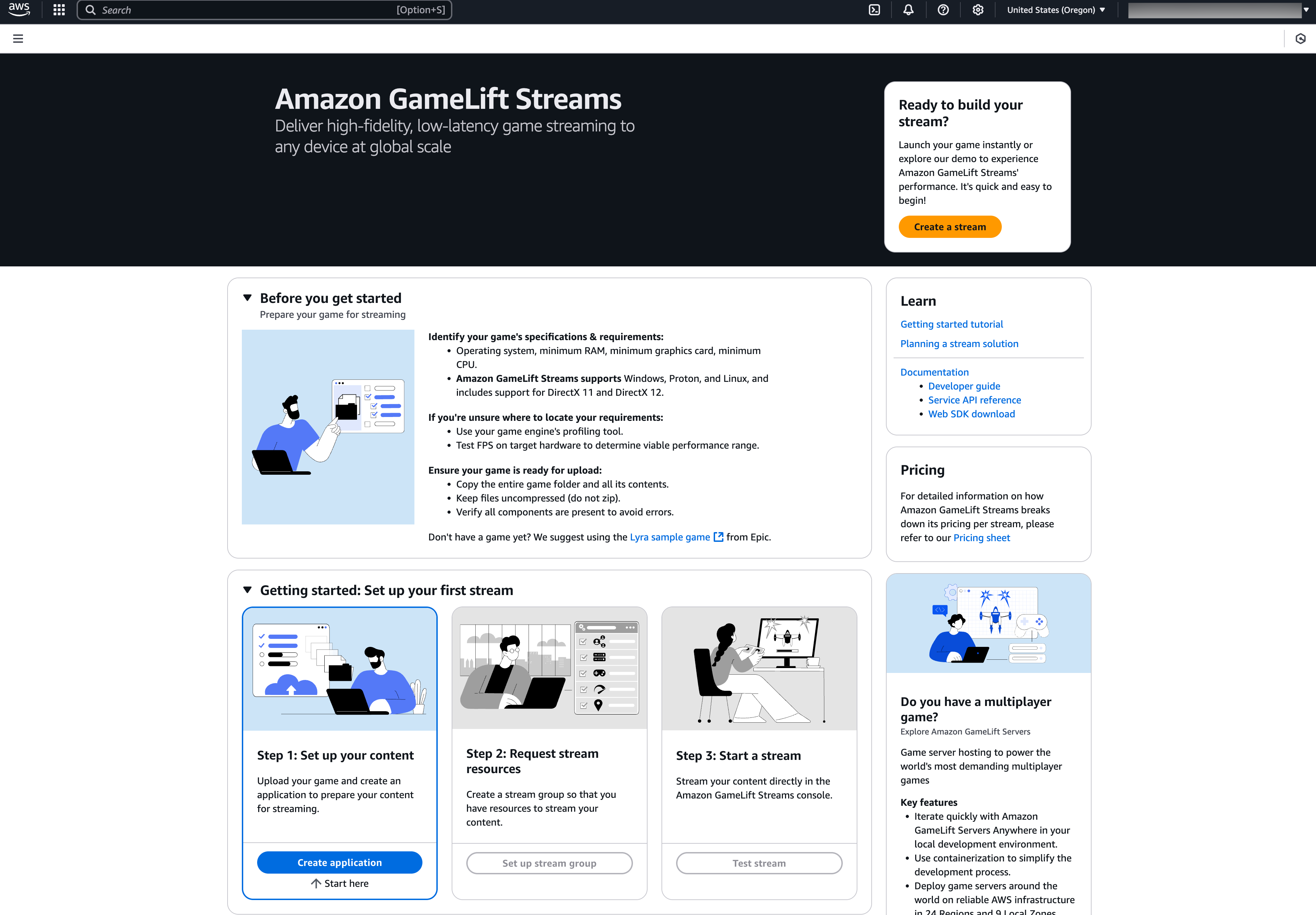
The next step is to create an Amazon GameLift Streams application. I navigate to the Amazon GameLift Streams console. This is how the new AWS GameLift Streams console looks:

On the Amazon GameLift Streams console, I choose Create application.

In the Runtime settings, I select the runtime environment for my game application.

Then, I need to select my S3 bucket and folder from the previous step, then set the path to my game’s main executable.

I also have the option to configure the automatic transfer of application-generated log files into a S3 bucket. After I’m done with this configuration, I choose Create application.

After my application setup is completed, I need to create a stream group, a collection of compute resources to run and stream the application. I navigate to Stream groups in the left navigation pane of the Amazon GameLift Streams console.

On this page, I define a description for my new stream group.

Here, I select the capabilities and pricing of my stream group. Since my application is using Microsoft Windows Server 2022 Base, I make sure to select one of the compatible stream classes.

Next, I need to link with the application I created in the previous step.

On the Configure stream settings page, I can configure additional locations for my stream group, bringing in additional capacity from other AWS Regions. There are two capacity options that I can choose, always-on capacity and on-demand capacity. The default capacity setting provides one streaming slot, which is sufficient for initial testing.

Then, I need to review my configuration and choose Create stream group.

With stream groups configured, I can test my game streaming. I navigate to the Test stream page on the console to launch my application as a stream. I select this stream group and select Choose.

On the next page, I can configure any command line arguments or environment variables to run my application. I don’t need any extra configurations and choose Test stream.

Then, I can see that my application is running as expected. I can also interact with my game. This test helps me verify that my game works properly in streaming mode and serves as an initial proof of concept.

After I’ve confirmed everything works, I can integrate the Web SDK into my own website. The Web SDK and AWS Software Development Kit (AWS SDK) with Amazon GameLift Streams APIs help me to embed game streams, similar to what I tested in the console, into any web page I manage.

Additional things to know

  • Availability – Amazon GameLift Streams is currently available in the following AWS Regions: US East (Ohio), US West (Oregon), Asia Pacific (Tokyo), Europe (Frankfurt). Additional streaming capacity can also be configured in US East (N. Virginia) and Europe (Ireland).
  • Supported operating systems – Amazon GameLift Streams supports games running on Windows, Linux, or Proton, offering easy onboarding and compatibility with game binaries. Learn more on Choosing a configuration in Amazon GameLift Streams documentation page.
  • Programmatic access – This new capability provides comprehensive tools including service APIs, client streaming SDKs, and AWS CLI for content packaging.

Now available
Explore how to streamline your game distribution using Amazon GameLift Streams. Learn more about getting started on the Amazon GameLift Streams page.

Happy streaming!

Donnie

How is the News Blog doing? Take this 1 minute survey!

(This survey is hosted by an external company. AWS handles your information as described in the AWS Privacy Notice. AWS will own the data gathered via this survey and will not share the information collected with survey respondents.)

AWS Weekly Roundup: DeepSeek-R1, S3 Metadata, Elastic Beanstalk updates, and more (February 3, 2024)

Post Syndicated from Donnie Prakoso original https://aws.amazon.com/blogs/aws/aws-weekly-roundup-deepseek-r1-s3-metadata-elastic-beanstalk-updates-and-more-february-3-2024/

Last week, I had an amazing time attending AWS Community Day Thailand in Bangkok. This event came at an exciting time, following the recent launch of the AWS Asia Pacific (Bangkok) Region. We had over 300 attendees and featured 15 speakers from the community, including an AWS Hero and 4 AWS Community Builders who shared their technical expertise and experiences.

The highlight was definitely Jeff Barr, AWS Vice President & Chief Evangelist, delivering an inspiring keynote titled “Next-Generation Software Development”, which set the perfect tone for the day. The day kicked off with welcoming remarks from Vatsun Thirapatarapong, AWS Country Manager for Thailand, and was made even more special thanks to the tremendous support from both the AWS User Group volunteers and the AWS Thailand team.

Here’s a photo capturing the excitement from the event: 

Last week’s AWS Launches
There are 30+ launches last week and here are some launches that caught my attention:

DeepSeek-R1 models now available on AWS — Channy wrote on how you can now deploy DeepSeek-R1 models in Amazon Bedrock and Amazon SageMaker AI. This helps you to build and scale generative AI applications with minimal infrastructure investment.

Amazon S3 Tables increases table limit to 10,000 per bucket — S3 Tables now supports creating up to 10,000 tables in each table bucket, allowing you to scale up to 100,000 tables across 10 buckets within an AWS Region per account.

Amazon S3 Metadata now generally available — S3 Metadata provides automated and easily queried metadata that updates in near real-time, simplifying business analytics and real-time inference applications. It supports both system-defined and custom metadata, including integration with AWS analytics services.

AWS Amplify adds TypeScript Data client support for Lambda functions — Developers can now use the Amplify Data client within AWS Lambda functions, enabling consistent type-safe data operations across frontend and backend applications.

AWS Elastic Beanstalk adds Python 3.13, .NET 9, and PHP 8.4 support on Amazon Linux 2023 — AWS Elastic Beanstalk brings the latest language features and improvements to application deployments while benefiting from Amazon Linux 2023 enhanced security and performance features.

From community.aws
Here’s my top 5 personal favorites posts from community.aws:

Upcoming AWS and community events
Check your calendars and sign up for upcoming AWS and community events:

  • AWS Korea re:Invent reCap Online, February 2-4 — A virtual event recapping key announcements and innovations from re:Invent 2023 for the Korean audience.
  • AWS Community Days – Join community-led conferences that feature technical discussions, workshops, and hands-on labs. Upcoming AWS Community Day is in Ahmedabad (February 8).
  • AWS Public Sector Day London, February 27 — Join public sector leaders and innovators to explore how AWS is enabling digital transformation in government, education, and healthcare.
  • AWS Innovate GenAI + Data Edition — A free online conference focusing on generative AI and data innovations. Available in multiple Regions: APJC and EMEA (March 6), North America (March 13), Greater China Region (March 14), and Latin America (April 8).

Browse more upcoming AWS led in-person and virtual developer-focused events.

AWS Community re:Invent re:Caps

Lastly, if you want to learn about top announcements and innovations from AWS re:Invent, the AWS Community shares a summary from a community perspective of these announcements so you can get up to speed. Download the AWS Community re:Invent re:Caps deck

That’s all for this week. Check back next Monday for another Weekly Roundup!

Donnie

This post is part of our Weekly Roundup series. Check back each week for a quick roundup of interesting news and announcements from AWS!

Announcing the new AWS Asia Pacific (Thailand) Region

Post Syndicated from Donnie Prakoso original https://aws.amazon.com/blogs/aws/announcing-the-new-aws-asia-pacific-thailand-region/

Today, we’re pleased to announce that the AWS Asia Pacific (Thailand) Region is now generally available with three Availability Zones and API name ap-southeast-7.

The AWS Asia Pacific (Thailand) Region is the first infrastructure Region in Thailand and the fourteenth Region in Asia Pacific, joining existing Regions in Hong Kong, Hyderabad, Jakarta, Malaysia, Melbourne, Mumbai, Osaka, Seoul, Singapore, Sydney, and Tokyo, as well as the Beijing and Ningxia China Regions.

Lumphini Park, one of the largest green spaces in central Bangkok spanning 142 acres.

The adoption of cloud computing has gained significant momentum in Thailand, driven by evolving business needs and government initiatives such as Thailand 4.0. These initiatives aim to transform Thailand into an innovation-driven economy by using emerging technologies to enhance productivity, competitiveness, and sustainable growth.

The new AWS Region will help startups, enterprises, government agencies, educational institutions, and nonprofit organizations run their applications and serve end users while maintaining data residency in Thailand. This aligns with Thailand’s digital transformation goals and the growing demand for cloud services. Over the next 15 years, Amazon Web Services (AWS) planned investments in Thailand are estimated to contribute $10B to Thailand’s Gross Domestic Product (GDP) and support an estimated average of 11,000 full-time equivalent (FTE) jobs in local Thai businesses annually.

Growing presence of AWS in Thailand
Our journey in Thailand began in 2013 with the first AWS office in Bangkok. Since then, AWS has continuously expanded its infrastructure and services in the country:

Amazon CloudFront – Since 2020, AWS has established six Amazon CloudFront edge locations throughout Thailand. These edge locations are part of the highly secure and programmable AWS content delivery network (CDN), designed to accelerate the delivery of data, videos, applications, and APIs to users worldwide with low latency and high transfer speeds.

AWS Outposts – In the same year, 2020, AWS introduced AWS Outposts to the Thai market. As a fully managed solution, AWS Outposts brings AWS infrastructure and services to virtually any on-premises or edge location, enabling a truly consistent hybrid experience. This service is particularly valuable for workloads that require low latency, local data processing, or local data storage.

AWS Local Zones – In 2022, AWS strengthened its commitment to Thailand by launching AWS Local Zones in Bangkok. This infrastructure deployment places compute, storage, database, and other select services closer to large population, industry, and IT centers. As a result, customers can deliver applications requiring single-digit millisecond latency to end users.

AWS Direct Connect – AWS established a AWS Direct Connect location in Bangkok in 2023 to enhance connectivity options and added a new AWS Direct Connect location with the launch of the AWS Asia Pacific (Thailand) Region. Customers can use AWS Direct Connect to establish secure and dedicated network connections to their AWS resources, providing improved network performance and reduced bandwidth costs.

AWS customer success stories in Thailand
Organizations in Thailand are using our services to drive innovation and transformation. Here are a few examples:

2C2P
2C2P, a leading Thailand-based FinTech startup, chose AWS for its robust security capabilities. As an omnichannel payment service provider in Southeast Asia, the company processes millions of customer payments globally using AWS CloudHSM for cryptographic key management, AWS Shield for distributed denial of service (DDoS) protection, and AWS Secrets Manager to safeguard sensitive credentials.

“Through AWS, we’ve unlocked the power to securely, dynamically, and compliantly scale to meet the surge in payment transaction volumes. AWS CloudHSM plays a pivotal role in fulfilling compliance requirements and propelling us toward accelerated business expansion,” says Myo Zaw, Chief Technology Officer at 2C2P.

aCommerce
aCommerce, the largest ecommerce enabler in Southeast Asia, has revolutionized market intelligence by launching AskIQ, a generative AI–powered feature on AWS. This software as a service (SaaS) platform provides the world’s leading brands with comprehensive competitor and category performance tracking capabilities across Southeast Asia’s largest ecommerce sites.

Leena Chanvirach, VP of Data Products at aCommerce Group, emphasizes the strategic value of their AWS collaboration: “Our collaboration with AWS allows clients to double down on their core competencies and business priorities. This best-of-both-worlds approach gives brands a competitive edge without the burden of building and maintaining sophisticated data infrastructure in-house.”

Ascend Money
Ascend Money, a leading Southeast Asian FinTech company, achieved a 70 percent reduction in compute costs while simultaneously improving application performance by up to 40 percent in certain workloads. Ascend Money implemented a sophisticated compute strategy using Amazon EC2 instances, resulting in significant operational improvements.

“AWS has significantly improved our performance, enabling us to deliver more innovative services to our customers,” says Peerawit Phuangkaeo, Head of Technical Operations at Ascend Money.

Building cloud skills together
AWS has built comprehensive programs for cloud education and skills development in Thailand, training more than 50,000 individuals in cloud skills since 2017. Here are some of the programs:

AWS Skill Builder
AWS Skill Builder is an online learning center where you can learn from AWS experts and build cloud skills online. AWS has made cloud education more accessible to Thai learners by offering more than 600 courses, with 106 courses specifically available in Thai language. The recent launch of the Amazon AI Ready initiative has further expanded the learning opportunities, particularly in the growing field of AI.

AWS Educate
Since its introduction in 2016, AWS Educate has played a transformative role in Thai education. The program has successfully integrated cloud computing into educational curricula across Thailand, providing students with direct access to AWS resources and hands-on experience. The impact has been substantial, with over 20,000 Thai students enrolled in the program. Beyond student education, AWS Educate has invested in training Thai educators, preparing them to deliver engaging and practical cloud computing courses that prepare students for the demands of the digital economy.

AWS Academy
AWS Academy has been instrumental in connecting academic learning with industry needs since its launch in Thailand in 2017. Through strategic partnerships with more than 30 leading universities and colleges across the country, AWS Academy has created a robust pipeline of cloud-skilled professionals. The program provides educational institutions with comprehensive cloud computing curricula that align with industry needs, making sure that students graduate with practical, job-ready skills.

Through these various initiatives and programs, AWS is not just providing educational resources, it’s building a foundation for Thailand’s digital future by helping equip the workforce with the necessary skills to use cloud technologies effectively.

Supporting sustainable innovation in Thailand
The AWS commitment to sustainability extends to supporting innovative companies in Thailand that are driving environmental initiatives.

BODA Technology & Consultancy
BODA, an AWS powered sustainability startup, uses AWS IoT Core to develop AI-powered solutions for energy efficiency optimization. The company has successfully improved operations in over 100,000 buildings and factories across Thailand, enabling these facilities to maximize efficiency while reducing costs and environmental impact.

GSPC Group
GSPC Group, a leading sustainable power company in Thailand, demonstrates how AWS supports the energy sector’s digital transformation. Following the merger between Global Power Synergy Public Company and Glow Energy, the group chose AWS Cloud for migrating its photovoltaic solar plant operations. Working with AWS and AWS Partner Dailitech, GSPC Group has achieved a 20–25 percent reduction in hardware, software, and licensing costs since moving to the cloud.

Things to know
AWS Community in Thailand — Thailand is home to two AWS Heroes, seven AWS Community Builders, and more than 17,000 members of the AWS User Group. If you’re interested in joining AWS User Group Thailand, visit their Facebook page.

AWS Global footprint — AWS now spans 111 Availability Zones within 35 geographic regions worldwide. We have announced plans for 15 more Availability Zones and five more AWS Regions in Germany, Taiwan, Mexico, the Kingdom of Saudi Arabia, and New Zealand. 

The new Asia Pacific (Thailand) Region is ready to support your business. To learn more, visit the AWS Global Infrastructure page and start building on ap-southeast-7!

Happy building!
Donnie

New Amazon DynamoDB zero-ETL integration with Amazon SageMaker Lakehouse

Post Syndicated from Donnie Prakoso original https://aws.amazon.com/blogs/aws/new-amazon-dynamodb-zero-etl-integration-with-amazon-sagemaker-lakehouse/

Amazon DynamoDB, a serverless NoSQL database, has been a go-to solution for over one million customers to build low-latency and high-scale applications. As data grows, organizations are constantly seeking ways to extract valuable insights from operational data, which is often stored in DynamoDB. However, to make the most of this data in Amazon DynamoDB for analytics and machine learning (ML) use cases, customers often build custom data pipelines—a time-consuming infrastructure task that adds little unique value to their core business.

Starting today, you can use Amazon DynamoDB zero-ETL integration with Amazon SageMaker Lakehouse to run analytics and ML workloads in just a few clicks without consuming your DynamoDB table capacity. Amazon SageMaker Lakehouse unifies all your data across Amazon S3 data lakes and Amazon Redshift data warehouses, helping you build powerful analytics and AI/ML applications on a single copy of data.

Zero-ETL is a set of integrations that eliminates or minimizes the need to build ETL data pipelines. This zero-ETL integration reduces the complexity of engineering efforts required to build and maintain data pipelines, benefiting users running analytics and ML workloads on operational data in Amazon DynamoDB without impacting production workflows.

Let’s get started
For the following demo, I need to set up zero-ETL integration for my data in Amazon DynamoDB with an Amazon Simple Storage Service data lake managed by Amazon SageMaker Lakehouse. Before setting up the zero-ETL integration, there are prerequisites to complete. If you want to learn more on how to set up, refer to this Amazon DynamoDB documentation page.

With all the prerequisites completed, I can get started with this integration. I navigate to the AWS Glue console and select Zero-ETL integrations under Data Integration and ETL. Then, I choose Create zero-ETL integration.

Here, I have options to select my data source. I choose Amazon DynamoDB and choose Next.

Next, I need to configure the source and target details. In the Source details section, I select my Amazon DynamoDB table. In the Target details section, I specify the S3 bucket that I’ve set up in the AWS Glue Data Catalog.

To set up this integration, I need an IAM role that grants AWS Glue the necessary permissions. For guidance on configuring IAM permissions, visit the Amazon DynamoDB documentation page. Also, if I haven’t configured a resource policy for my AWS Glue Data Catalog, I can select Fix it for me to automatically add the required resource policies.

Here, I have options to configure the output. Under Data partitioning, I can either use DynamoDB table keys for partitioning or specify custom partition keys. After completing the configuration, I choose Next.

Because I select the Fix it for me checkbox, I need to review the required changes and choose Continue before I can proceed to the next step.

On the next page, I have the flexibility to configure data encryption. I can use AWS Key Management Service (AWS KMS) or a custom encryption key. Then, I assign a name to the integration and choose Next.

On the last step, I need to review the configurations. When I’m happy, I choose Next to create the zero-ETL integration.

After the initial data ingestion completes, my zero-ETL integration will be ready for use. The completion time varies depending on the size of my source DynamoDB table.

If I navigate to Tables under Data Catalog in the left navigation panel, I can observe more details including Schema. Under the hood, this zero-ETL integration uses Apache Iceberg to transform related to data format and structure in my DynamoDB data into Amazon S3.

Lastly, I can tell that all my data is available in my S3 bucket. 

This zero-ETL integration significantly reduces the complexity and operational burden of data movement, and I can therefore focus on extracting insights rather than managing pipelines.

Available now
This new zero-ETL capability is available in the following AWS Regions: US East (N. Virginia, Ohio), US West (Oregon), Asia Pacific (Hong Kong, Singapore, Sydney, Tokyo), Europe (Frankfurt, Ireland, Stockholm).

Explore how to streamline your data analytics workflows using Amazon DynamoDB zero-ETL integration with Amazon SageMaker Lakehouse. Learn more how to get started on the Amazon DynamoDB documentation page.

Happy building!
Donnie

Amazon Q Business is adding new workflow automation capability and 50+ action integrations

Post Syndicated from Donnie Prakoso original https://aws.amazon.com/blogs/aws/amazon-q-business-is-adding-new-workflow-automation-capability-and-50-action-integrations/

Amazon Q Business, a generative AI–powered assistant designed to enhance productivity across various business applications, became generally available earlier this year. Since its launch, Amazon Q Business has been helping customers tackle the challenges of improving workforce productivity.

In this post, we have two announcements for Amazon Q Business:

  1. AI-powered workflow automation in Amazon Q Business (coming soon)
  2. Supports for more than 50 action integrations (generally available)

Let’s get started with these new announcements from Amazon Q Business:

AI-powered workflow automation in Amazon Q Business (coming soon)
Organizations handle hundreds, if not thousands, of complex workflows that demand precise, repeatable execution. Automating these workflows has been a time-consuming process, often taking months and requiring specialized expertise. As a result, many potentially valuable business processes remain manual, leading to inefficiencies and missed opportunities.

Available soon, Amazon Q Business will have a new capability to simplify the creation and maintenance of complex business workflows.

With this capability, you only need to describe your desired workflow using natural language, upload a standard operating procedure (SOP), or record a video of the process being performed. Amazon Q Business uses generative AI to automatically author a detailed workflow plan from your inputs in minutes. Then, with the recommended workflow, you can review, test, modify, or approve.

Let’s consider an example of automotive claim processing. This process typically involves manually reading claim emails, reviewing attachments, and creating claims in the system. With the new capability in Amazon Q Business, I can create this workflow more efficiently, reducing the time and complexity typically associated with workflow creation.

First, I upload the relevant SOP.

During the workflow creation process, Amazon Q Business may ask questions to clarify and gather any additional information needed to complete the workflow design.

Based on the provided inputs, Amazon Q Business generates an initial workflow template. As an automation author, I can then customize this workflow using a visual drag-and-drop interface and integrate it with supported third-party applications for testing. The workflow can include API calls, automatic UI actions, execution logic, AI agents, and human-in-the-loop steps to cater to the unique needs of every business process across a wide range of industries and business functions.

When it’s finalized, I can publish the workflow and configure it to run either on a schedule or in response to specific triggers. Once published, I can actively track its performance using a feature-rich monitoring dashboard. This dashboard offers built-in analytics, providing detailed insights into the execution and efficiency of all published workflows.

When executing the workflow, Amazon Q Business uses a UI agent trained on thousands of websites and desktop applications to seamlessly navigate changes to page layouts and unexpected pop-up windows in real time. Amazon Q Business includes UI automation, API integrations, and workflow orchestration in a single system, eliminating the need to integrate multiple products and services to create a complete enterprise workflow automation system.

Supports for more than 50 action integrations
With Amazon Q Business plugins, you have the flexibility to connect to third-party apps and perform specific tasks related to supported third-party services directly within your web experience chat. These plugins are accessible through Amazon Q Apps, a feature within Amazon Q Business that helps you create AI-powered apps that streamline tasks and boost productivity. Additionally, when workflow automation capabilities launch, you will be able to integrate these plugins directly into your workflows.

In this announcement, we’re introducing a ready-to-use library of platforms with over 50 action integrations and 11 popular business applications. These business applications include Microsoft Teams, PagerDuty Advance, Salesforce, ServiceNow, and more. 

To get started with the new integrations, access Amazon Q Business through your existing account and explore the new plugins and action integrations.

With these integrations, you can perform various tasks across multiple applications within the Amazon Q Business web application.

Let’s say I need to create a new opportunity with Salesforce. First, I open my Amazon Q Business web application.

Then, I trigger Amazon Q Business plugins and select the Create Opportunity action.

Then, I ask Amazon Q Business to create an opportunity record.

If the action plugin requires more information, it will prompt me to gather more information.

The Amazon Q Business plugin will automatically create the record for me with the Salesforce action plugin.

From here, I can complete additional tasks, such as associating the opportunity record with the account.

Get started with Amazon Q Business today
The new Amazon Q Business plugins are available today in all AWS Regions where Amazon Q Business is available. The new capability to orchestrate workflows in Amazon Q Business will be available in preview soon.

Boost productivity and innovation in your organization with Amazon Q Business. Learn more about how to get started on the Amazon Q Business documentation page.

Happy building,
Donnie

New capabilities from Amazon Q Business enable ISVs to enhance generative AI experiences

Post Syndicated from Donnie Prakoso original https://aws.amazon.com/blogs/aws/new-capabilities-from-amazon-q-business-enable-isvs-to-enhance-generative-ai-experiences/

Since its launch, companies have been using Amazon Q Business to improve their employees’ productivity with a generative AI–powered assistant that helps them make better decisions based on company data and information. Employees also use various software applications provided by independent software vendors (ISVs) to complete their tasks. Many ISVs are creating their own generative AI features intended to make their users more productive, but ISVs are often limited to data within their own application, resulting in end users still shifting between applications to complete tasks.

Today, we’re excited to announce new Amazon Q Business capabilities for ISVs. ISVs can now integrate with the Amazon Q index to retrieve data from multiple sources through a single API and customize the design of their Amazon Q embedded assistant.

These new capabilities enable ISVs and application developers to rapidly deploy personalized, AI-powered experiences within their applications, leveraging both enterprise knowledge and user context across multiple software-as-a-service (SaaS) applications, while accelerating their generative AI roadmap with Amazon Q Business capabilities.

Enhance your generative AI features with additional data using the Amazon Q index
With this new capability, ISVs can access content and context from outside their application, helping them to build richer experiences, improve engagement and retention, while complementing their existing generative AI and Retrieval Augmented Generation (RAG) workflows using their preferred large language models (LLMs). Importantly, customers maintain full ownership of their index and have complete control over which applications can access their data.

Software providers register their applications with Amazon Q Business to allow their customers to grant access to their indexed data. After verification, software providers can use this additional data to enhance their built-in generative AI features, delivering more personalized responses to customers. Visit the Amazon Q index for software providers web page to learn more.

After ISVs complete their integration with the Amazon Q index, they have two paths to onboard their customers to use this new, cross-application experience.

  1. Onboarding through the ISV’s application — Customers initiate the process through the ISV’s platform. The ISV creates an Amazon Q Business application and index on behalf of each customer. Customers then provide the ISV with credentials to connect additional data sources. In this scenario, the ISV maintains complete control over the onboarding experience and user interface.
  2. Onboarding through AWS Management Console – Customers create their Amazon Q Business application directly through the AWS console, where they can connect data sources and grant ISV access to their index. Verified ISVs will be listed as “data accessors” on the Amazon Q Business console. This verification status is granted when the ISV has completed the necessary verification process mentioned above and is ready to launch their customer experience.

Next, we’ll outline the process for a customer to grant a verified ISV access to their existing index.

After customers create their application and add their index, they can grant access to verified ISVs. They can do this by selecting Data accessors in the left navigation panel and then choosing Add data accessor.

On the Add data accessor page, customer will find the list of all verified ISV applications.

After selecting the ISV application, the customer configures what data the ISV can access. The customer also chooses which users will be granted access to the ISV’s updated features.

After granting access, customers must complete the setup by linking their Amazon Q Business application in the ISV’s admin console. Once completed, ISVs can begin retrieving data from the designated index using the SearchRelevantContent API to retrieve data from the index to enrich their generative AI capabilities. Here’s a sample code snippet to use this API:

import boto3
import pprint
qbiz = boto3.client("qbusiness", region_name="us-east-1", **credentials)
 
Q_BIZ_APP_ID = ${Q_BIZ_APP_ID}
 
Q_RETRIEVER_ID = ${Q_RETRIEVER_ID}
 
Q_DATA_SOURCE_ID = ${Q_DATA_SOURCE_ID}
search_params = {
    'applicationId': Q_BIZ_APP_ID,
    'contentSource': {
        'retriever': {
            'retrieverId': Q_RETRIEVER_ID
        }
    },
    'queryText': 'Order coffee API',
    'maxResults': 5,
    'attributeFilter': {
        'documentAttributeFilter': {
            'andAllFilters': [{
                'equalsTo': {
                    'name': '_data_source_id',
                    'value': {
                        'stringValue': DATA_SOURCE_ID
                    }
                }
            }]
        }
    }
}
search_response = qbiz.search_relevant_content(**search_params)

Customize the design of the embedded assistant
Amazon Q embedded is a capability that helps ISVs extend Amazon Q Business to their end users by embedding an AI-powered assistant into their user interface. This capability helps ISV users complete various tasks, such as summarizing documents and answering questions.

Now, software providers have the option to customize the embeddable generative-AI assistant user interface (UI) with Amazon Q embedded to match their corporate branding. To get started, select Amazon Q embedded in the left navigation panel and choose Customize web experience.

On this page, select Theme to start customizing generative AI assistant UI look and feel, such as configuring the assistant name, welcome message, color scheme, and logo.

Available today
The Amazon Q index and Amazon Q embedded with customizable UI are generally available today in the US East (N. Virginia) and US West (Oregon) AWS Regions, with availability in additional AWS Regions coming soon.

ISVs can now use Amazon Q Business features to innovate and enhance their user experiences with powerful AI capabilities. To learn more about how ISVs can enhance their applications, visit Amazon Q Business page for software providers.

Happy coding!

Donnie

Investigate and remediate operational issues with Amazon Q Developer (in preview)

Post Syndicated from Donnie Prakoso original https://aws.amazon.com/blogs/aws/investigate-and-remediate-operational-issues-with-amazon-q-developer/

The growing complexity of modern software makes troubleshooting difficult, requiring deep knowledge and manual work across various systems. This results in slower problem-solving and less efficient operations. More and more customers need automated tools to handle routine tasks and simplify complex processes, so they can resolve issues faster and focus on delivering inovations for their customers.

Today, we’re announcing a new capability in Amazon Q Developer to investigate and remediation operational issues, which is now in preview. This generative AI-powered capability guides you through operational diagnostics and automates root cause analysis for problems in your workloads.

Here’s a quick look at how you can now use Amazon Q Developer for operational investigations.

AWS has more operational experience and scale than any other major cloud provider, delivering cloud services to customers around the world for over 17 years. AWS built this experience into Amazon Q Developer operational capabilities to create and present investigation hypotheses, and guide you through troubleshooting and remediation – capabilities that no other major cloud provider offers.

Get started with operational investigation using Amazon Q Developer
This new capability from Amazon Q Developer seamlessly integrates with Amazon CloudWatch and AWS Systems Manager, providing a unified experience while troubleshooting issues. To get started with this capability, you need to complete some prerequisites. You can learn more on the Get Started with Amazon Q Developer Operational Investigations page.

I’ve completed the setup and configured a CloudWatch alarm to monitor the metrics for my application. After receiving a notification email, I navigate to that alarm in Amazon CloudWatch. I observe that the metric has exceeded its threshold over several time periods.

With this finding, I select Investigate. Then, I have two options: Start new investigation or Add to existing investigation. Because I’m just getting started, I select Start a new investigation and provide some details and notes if necessary.

After I’ve created the investigation, I can view the details by choosing View Details on the banner.

The investigation page is divided into two main sections: the left-hand Feed panel, which contains all findings added during the investigation, and the right-hand Suggestions panel, which displays a list of finding suggestions from Amazon Q Developer to assist in the investigation.

Amazon Q Developer uses its knowledge of my AWS resources to automatically discover the relationships between them and create a topology map of the application. This makes it possible for Amazon Q Developer to follow the architecture and quickly find the component that caused an alarm, helping me get back into production faster than ever before.

As I investigate further, Amazon Q Developer proposes hypotheses based on a series of related metrics from various AWS services such as Amazon DynamoDB, AWS Lambda, Amazon Elastic Container Service (Amazon ECS) and others. I can choose Show reasoning to understand why.

One of the hypotheses suggests that the slowness is caused by throttling on a DynamoDB table, with read and write capacity units frequently exceeding the provisioned limits. I find this hypothesis makes sense, and I can Accept it, which will bring it into my Feed.

With all these findings, I can collect all the supporting data to troubleshoot this issue. In one of the hypotheses from Amazon Q Developer, I can also view suggested actions. I select View actions to understand my options for remediation.

In the Suggested actions menu, Amazon Q Developer proposes AWS Systems Manager Automation runbooks related to the hypothesis. Where applicable, it suggests automated runbooks from the AWS Systems Manager library, which includes over 400 AWS-authored and thousands of customer-authored runbooks to help remediate observed issues. Each runbook defines the actions that Systems Manager performs to help resolve the issue. Additionally, Amazon Q Developer provides relevant documentation links from AWS re:Post articles and AWS Documentation pages.

Here’s the list of suggested actions from Amazon Q Developer. I choose View runbook to understand more on how I can solve this issue by modifying DynamoDB provisioned capacity.

Here, I can read more information on this runbook. It will offer a description of the runbook, including execution history telling me if I ran this runbook successfully in this account in the past.

I can enter the required parameters as defined in the configuration. Under Execution preview segment, I can review a summary highlighting the impact on targeted resources. After confirming the details, I select Execute to implement the necessary changes for my workloads.

After running the runbook, I can see the results, which are then added to my feed.

Another feature I appreciate is the multiple ways to access this capability. For example, in my CloudWatch metrics for my AWS Lambda function, I can initiate an investigation and add findings directly. I can also select the Amazon Q Developer operational investigations icon to open the investigation panel.

This new capability from Amazon Q Developer feels like having an AWS expert available 24/7 to assist with operational troubleshooting. It lowers the barrier to operational experience and saves valuable time and effort.

Now in preview
The new capability of Amazon Q Developer to help you investigate and remediate operational issues is now in preview in the US East (N. Virginia) Region. Transform your operational investigation today and accelerate remediation with Amazon Q Developer. Visit Amazon CloudWatch documentation page to get started.

Happy troubleshooting!

Donnie

Container Insights with enhanced observability now available in Amazon ECS

Post Syndicated from Donnie Prakoso original https://aws.amazon.com/blogs/aws/container-insights-with-enhanced-observability-now-available-in-amazon-ecs/

Last year, we announced enhanced observability in Amazon CloudWatch Container Insights, a new capability to improve your observability for Amazon Elastic Kubernetes Service (Amazon EKS). This capability helps you detect and fix container issues faster by providing detailed performance metrics and logs.

Expanding this capability, today we’re launching enhanced observability for your container workloads running on Amazon Elastic Container Service (Amazon ECS). This new capability will help reduce your mean time to detect (MTTD) and mean time to repair (MTTR) for your overall applications, helping prevent issues that could negatively impact your user experience.

Here’s a quick look at Container Insights with enhanced observability for Amazon ECS.

Container Insights with enhanced observability addresses a critical gap in container monitoring. Previously, correlating metrics with logs and events was a time-consuming process, often requiring manual searches and expertise in application architecture. Now, with this capability, CloudWatch and Amazon ECS automatically collect granular performance metrics such as CPU utilization at both the task and container levels while providing visual drill downs enabling easy root-cause analysis.

This new capability enables the following use cases:

  • Quickly identify root causes by viewing granular resource usage patterns and correlating telemetry data.
  • Proactively manage your ECS resources using curated dashboards based on AWS best practices.
  • Track your recent deployments and root causes of your deployment failures with the matching infrastructure anomalies enabling faster issue detection and quicker rollbacks when necessary.
  • Effortlessly monitor resources across multiple accounts without manual setup. Built-in cross-account support reduces operational overhead with single pane of glass observability.
  • Integration with other CloudWatch services such as Application Signals and CloudWatch Logs provides a seamless experience to correlate infrastructure with the services running and identify the impacted services.

Using container insights with enhanced observability for Amazon ECS
There are two ways to enable Container Insights with enhanced observability:

  1. Cluster-level onboarding – You can enable it for specific clusters individually.
  2. Account-level onboarding – You can also enable it at the account level, which automatically enables observability for all new clusters created in your account. This approach saves time and effort by eliminating the need to manually enable it for each new cluster.

To enable this feature at the account level, I navigate to the Amazon ECS console and select Account settings. Under the CloudWatch Container Insights observability section, I can see it’s currently disabled. I choose Update.

On this page, I find a new option called Container Insights with enhanced observability. I select this option and then choose Save changes.

If I need to enable this capability at the cluster level, I can do so when creating a new cluster.

I can also enable this capability for my existing clusters. To do so, I select Update cluster, and then choose the option.

Once enabled, I can see task-level metrics by navigating to the Metrics tab in my cluster overview console. To access health and performance metrics across my clusters, I can select View Container Insights, which will redirect me to the Container Insights page.

To get a big picture of all my workloads across different clusters, I can navigate to Amazon CloudWatch and then to Container Insights.

This view addresses the challenge of effectively monitoring clusters, services, tasks, and containers by providing a honeycomb visualization that offers an intuitive, high-level summary of cluster health. The dashboard employs a dual-state monitoring approach:

  1. Alarm state (red or green) – Reflects customer-defined thresholds and alerts, allowing teams to configure monitoring based on their specific requirements
  2. Utilization state (dark blue or light blue) – Uses CloudWatch built-in best practices to monitor resource usage patterns across containers. The darker blue indicates clusters operating under higher utilization, enabling teams to proactively identify potential resource constraints before they impact performance

Let’s say there’s an issue in one of my clusters. I can hover over the cluster to display all the alarms created under that cluster at different layers, from the cluster layer down to the container layer.

I also have the option to view all clusters in a list format. The list format is essential for cross-account observability, displaying account IDs and labels for cluster ownership. This helps DevOps engineers quickly identify and collaborate with account owners to resolve potential application issues.

Now, I’d like to explore further. I select my cluster link, which redirects me to the Container Insights detailed dashboard view. Here, I can see a spike in memory utilization for this cluster.

I can dive deeper into container-level details, which help me quickly identify which services are causing this issue.

Another useful feature I found is the Filters option, which helps me conduct more thorough investigations across containers, services, or tasks in this cluster.

If I need to delve deeper into the application logs to understand the root cause of this issue, I can select the task, choose Actions, and choose which logs I would like to view.

On top of using AWS X-Ray traces, I can investigate another two types of logs here. First, I can use performance logs—structured logs containing metric data—to drill down and identify container-level root causes. Second, I examine collected application or container logs . These logs give me detailed insights into application behavior within the container, helping me trace the sequence of events that led to any issues.

In this case, I use application logs.

This streamlines my journey to troubleshoot my application. In this case, the issue is on the downstream calls to third-party applications, which return timeouts.

This enhanced capability also works with Amazon CloudWatch Application Signals to automatically instrument my application. I can monitor current application health and track long-term application performance against service-level objectives.

I select the Application Signals tab.

This integration with Amazon CloudWatch Application Signals provides me with end-to-end visibility, helping me correlate container performance with end-user experience.

When I select datapoints in the graphs, I can see associated traces, which show me all correlated services and their impact. I can also access relevant logs to understand root causes.

Additional things to know
Here are a couple of important points to note:

  • Availability – Container Insights with enhanced observability for ECS is now available in all AWS Regions including the China Regions.
  • Pricing – Container Insights with enhanced observability for ECS comes with a flat metric pricing, visit the Amazon CloudWatch Pricing page.

Get started today and experience improved observability for your container workloads. Learn more on the Amazon CloudWatch documentation page.

Happy monitoring,
Donnie Prakoso

Enhance your productivity with new extensions and integrations in Amazon Q Business

Post Syndicated from Donnie Prakoso original https://aws.amazon.com/blogs/aws/enhance-your-productivity-with-new-extensions-and-integrations-in-amazon-q-business/

Today, we’re announcing a new capability from Amazon Q Business to seamlessly access your assistant within popular web browsers and productivity tools. This helps you save time and complete your work and tasks more efficiently without having to leave your preferred applications.

Now, you can use Amazon Q Business directly from your web browser and other supported messaging and collaboration applications. You can quickly gather insights, review information, and ask questions. For example, you can effortlessly analyze and summarize content, get explanations on complex topics, or create meeting summaries without switching between applications.

Let’s get started
Let me walk you through how to get started with the new browser extensions and integrations. First, let’s look at the browser extensions. The following screenshot shows how it looks.

As an administrator, I need to enable the browser extensions for users of my Amazon Q Business application. To do that, I navigate to my Amazon Q Business application dashboard and select Integrations under the Enhancements section in the left navigation pane.

Then, on the Integrations page, select Edit in the Browser extensions section.

I select the available options in the Browsers section and choose Save. After I’ve enabled these options, my users will receive notification emails prompting them to install the extension.

Now, I’m switching to a user perspective of the Amazon Q Business application. I’ve received an email with a link to the Amazon Q Business web application. I visit the link and sign in to the Amazon Q Business web application. Here, I see a banner with information and a link to install the extension for my browser. I select the Install extension button.

Then, I navigate to the Chrome Web Store and install the browser extension.

After I have installed the browser extension, I sign in to my Amazon Q Business application using the same URL and credentials I use to access the web application.

Now, I can chat with Amazon Q Business apps whenever I visit any webpage. For example, I can ask it to summarize the current website for me.

The following image shows the result.

Application integration with Amazon Q Business
With Amazon Q Business, you can get AI-powered assistance and information not only when browsing, but also when collaborating with your teams. Now, you can integrate Amazon Q Business with supported third-party applications, making it an always-ready productivity and creativity teammate in your conversations.

To add third-party applications to Amazon Q Business, I need to navigate to the Integrations page and choose Add integration.

Here, I find all available integrations that I can use. For this demo, I select Slack.

I fill in all the required details, including the Slack workspace team ID, which you can obtain by following the steps outlined on the Slack documentation page.

After the integration is successfully created, I need to deploy this integration as a Slack bot. From the Integrations page, I select the integration and complete the integration process in the Slack platform. With all the required steps completed, now I can now add the app into my Slack workspace.

Here’s a quick video showing how I use this integration to interact with Amazon Q Business on Slack.

As someone who juggles multiple tools and platforms daily, this new capability unlocks various possibilities for me to improve my productivity. The ability to access AI assistance and perform cross-application tasks without leaving my current workspace helps me save time and maintain focus.

Additional things to know

  • Supported browser extensions – At launch, the Amazon Q Business browser extension supports Chromium-based web browsers such as Google Chrome and Microsoft Edge. It also supports the Mozilla Firefox web browser.
  • Application integration support – For third-party applications, at launch, Amazon Q Business integrations support Slack and Microsoft Teams.
  • Availability – This new capability is available in AWS Regions where Amazon Q Business is available.

Get started today and experience an exciting opportunity to enhance your productivity and streamline cross-application workflows. Learn more on the Amazon Q Business page.

Happy building,
Donnie

Improve your app authentication workflow with new Amazon Cognito features

Post Syndicated from Donnie Prakoso original https://aws.amazon.com/blogs/aws/improve-your-app-authentication-workflow-with-new-amazon-cognito-features/

Introduced 10 years ago, Amazon Cognito is a service that helps you implement customer identity and access management (CIAM) in your web and mobile applications. You can use Amazon Cognito for various use cases, from providing your customers to quickly add sign-in and sign-up experiences to your applications and authorization to securing machine-to-machine authentication and enabling role-based access to AWS resources.

Today, I’m excited to share a series of significant updates to Amazon Cognito. These enhancements aim to provide you with more flexibility, improved security, and a better user experience for your applications.

Here’s a quick summary:

A new developer-focused console experience
Amazon Cognito now offers a streamlined getting-started experience featuring a quick wizard and use case-specific recommendations. This new approach helps you set up configurations and reach your end users faster and more efficiently than ever before.

This is the new Amazon Cognito flow to help you quickly set up your application. You can get started in three steps:

  1. Choose the type of application you need to build
  2. Configure the sign-in options according to the type of your application
  3. Follow the instructions to integrate the sign-in and sign-up pages with your application

Then, select Create.

Amazon Cognito then automatically creates your application and a new user pool, which is a user directory for authentication and authorization. From here, you can review your sign-in page by selecting View login page or get started with the example code for your application. Furthermore, Amazon Cognito supports major application frameworks and offers detailed instructions for integrating them using standard OpenID Connect (OIDC) and OAuth open source libraries.

This is the new overview dashboard for your application. The user pool dashboard now provides important information in the Details section, as well as a set of Recommendations to help you continue your development journey.

On this page, you can customize your users’ sign-in and sign-up experience with the Managed Login feature. This is a good segue for me to provide you with a quick overview of the next new feature.

Introducing Managed Login
The introduction of Managed Login brings a new level of customization to Amazon Cognito. Managed Login handles the heavy lifting of availability, scaling, and security for your company. Once integrated, you automatically get all the new security patches and future features without further code changes.

This feature allows you to create personalized sign-up and sign-in experiences that are a seamless part of your company’s application for your end users.

Before you can use Managed Login, you need to assign a domain. There are two ways to do this: use a prefix domain, a randomly generated sub-domain of Amazon Cognito domain, or use your own custom domain to provide your users with a familiar domain name.

Then, you can choose your Branding version, selecting either Managed login or classic Hosted UI.

If you’re an existing Amazon Cognito user, you might be familiar with the classic Hosted UI feature. Managed Login is the improved version of Hosted UI, offering a new collection of web interfaces for sign-up and sign-in, built-in responsiveness for different screen sizes, multi-factor authentication, and password-reset activities in your user pool.

With Managed Login, you can use the new branding designer, a no-code visual editor for managed login assets and style, and a set of API operations for programmatic configuration or deployment via infrastructure-as-code with AWS CloudFormation.

With the branding designer, you have the flexibility to customize the look and feel of the entire user journey, from sign up and sign in to password recovery and multi-factor authentication. This feature provides a real time preview and convenient shortcuts to preview screens in different screen sizes and display modes before you launch it.

You can learn more about Managed Login by visiting the Managed Login documentation page.

Passwordless login support
The Managed Login feature also offers pre-built integrations for passwordless authentication methods, including signing in with passkeys, email OTP (one-time-password) and SMS OTP. Passkey support allows users to authenticate using cryptographic keys stored securely on their devices, offering better security compared to traditional passwords. This capability helps you implement low-friction and secure authentication methods without the need to understand and implement WebAuthn related protocols.

By reducing the friction associated with traditional password-based sign-ins, this feature simplifies application access for your users while maintaining high security standards.

Visit the user pools authentication flow documentation page to learn more about the passwordless login support.

More options on pricing tiers: Lite, Essentials and Plus
Amazon Cognito has introduced new user pool feature tiers: Lite, Essentials, and Plus. These tiers are designed to cater to different customer needs and use cases with the Essentials tier being the default tier for new users pools created by customers. This new tier structure also allows you to choose the most appropriate option based on your application requirements, with the flexibility to switch between tiers as needed.

To check your current tier, you can go to your application dashboard and select Feature plan. You can also select Settings from the navigation menu.

On this page, you’ll get detailed information for each tier and the option to downgrade or upgrade your plan.

Here’s a quick overview of each tier:

  1. Lite tier: Existing features such as user registration, password-based authentication, and social identity provider integration are now packaged in this tier. If you’re an existing Amazon Cognito user, you can continue using these features without making changes to your user pools. 

  2. Essentials tier: Offers comprehensive authentication and access control features, allowing you to implement secure, scalable, and customized sign-up and sign-in experiences for your application within minutes. It includes all capabilities in Lite along with supporting Managed Login and passwordless login options using passkeys, email, or SMS. Essentials also supports customizing access tokens and disallowing password reuse.

  3. Plus tier: Builds upon the Essentials tier, focusing on elevated security needs. It includes all Essentials features plus threat protection capabilities against suspicious login activity, detection of compromised credentials, risk-based adaptive authentication, and the ability to export user authentication event logs for threat analysis.

Pricing for the Lite, Essentials and Plus tiers is based on monthly active users. Customers currently using the advanced security features of Amazon Cognito should consider the Plus tier, which includes all the advanced security features, additional capabilities such as passwordless, and up to 60 percent savings as compared to using the standalone advanced security features.

If you want to learn about these new pricing tiers, see the Amazon Cognito pricing page.

Things you need to know

  • Availability – The Essentials and Plus tier are available in all AWS Regions where Amazon Cognito is available except AWS GovCloud (US) Regions.
  • Free tier on Lite and Essentials tiers – Customers on the Lite and Essentials tiers can enjoy the free tier each month that does not automatically expire. It is available to both existing and new AWS customers indefinitely. For more details on free tier, please visit the Amazon Cognito pricing page.

  • Extended pricing benefit for existing customers – Customers are eligible to upgrade their user pools without advanced security features (ASF) in their existing accounts to Essentials and pay the same price as Cognito user pools until November 30, 2025. To be eligible, customers’ accounts must have had at least 1 monthly active user (MAU) in the last 12 months on or before 10:00am Pacific Time, November 22, 2024. These customers are also eligible to create new user pools with Essentials tier at the same price as Cognito users pools in those accounts until November 30, 2025.

With these updates, you can implement secure, scalable, and customizable authentication solutions for your applications with Amazon Cognito.

Happy building,
Donnie

Streamline container application networking with built-in Amazon ECS support in Amazon VPC Lattice

Post Syndicated from Donnie Prakoso original https://aws.amazon.com/blogs/aws/streamline-container-application-networking-with-native-amazon-ecs-support-in-amazon-vpc-lattice/

Since its launch, Amazon VPC Lattice has streamlined complex networking tasks. As a result, my perspective on how to build and connect modern, multi-service applications has changed. As my colleague Danilo wrote in his post announcing the general availability of VPC Lattice:

“By using VPC Lattice, you can focus on your application logic and improve productivity and deployment flexibility with consistent support for instances, containers, and serverless computing.”

Today, we’re announcing Amazon VPC Lattice built-in support for Amazon Elastic Container Service (Amazon ECS). With this new built-in integration, Amazon ECS services can now be directly associated with VPC Lattice target groups without the need for intermediate load balancers.

Here’s a quick look at how you can find Amazon VPC Lattice integration while creating an Amazon ECS service:

The Amazon VPC Lattice integration with Amazon ECS works by registering and deregistering IP addresses from ECS tasks within a service as targets in a VPC Lattice target group. As ECS tasks for the service are launched, Amazon ECS will automatically register those tasks to the VPC Lattice target group.

Furthermore, if ECS tasks fail VPC Lattice health checks, Amazon ECS will automatically replace the tasks. Also, if any task is terminated or scales down, it’s removed from the target group.

Using the Amazon VPC Lattice integration
Let me walk you through how to use this new integration. In the following demo, I will deploy a simple application server running as an ECS service and configure the integration with VPC Lattice. Then, I’ll test the application server by connecting to the VPC Lattice domain name without having to configure additional load balancers on Amazon ECS.

Before I can start with this integration, I need to make sure Amazon ECS will have the required permissions to register and deregister targets into VPC Lattice. To learn more, please visit the Amazon ECS infrastructure IAM role documentation page.

To use the integration with VPC Lattice, I need to define a task definition with at least one container and one port mapping. This is an example of my task definition.

{
    "containerDefinitions": [
        {
            "name": "webserver",
            "image": "public.ecr.aws/ecs-sample-image/amazon-ecs-sample:latest",
            "cpu": 0,
            "portMappings": [
                {
                    "name": "web-80-tcp",
                    "containerPort": 80,
                    "hostPort": 80,
                    "protocol": "tcp",
                    "appProtocol": "http"
                }
            ],
            ...
            *redacted for brevity*
}

Then, I navigate to my ECS cluster and choose Create.

Next, I need to select the task definition and assign the service name.

In the VPC Lattice integration section, I choose Turn on VPC Lattice to start configuring the target group for VPC Lattice. I don’t need to specify a load balancer because I’ll use VPC Lattice. By default, VPC Lattice will use a round-robin routing algorithm to route requests to healthy targets.

Now, I can start defining the integration for my ECS service in VPC Lattice. First, I select the infrastructure role for Amazon ECS. Then, I need to select the virtual private cloud (VPC) where I want my service to run. After that, I need to define the Target groups that will receive traffic. After I’m done configuring the service with VPC Lattice integration, I create this service.

After a few minutes, I have my ECS service ready. I navigate to the service and choose Configuration and networking. If I scroll down to the VPC Lattice section, I can see the VPC Lattice target group created.

To get more information on this target group, I select the target group name, which will redirect me to the VPC Lattice target group page. Here, I can see that Amazon ECS successfully registered the IP address of the running task.

Now, I need to create a VPC Lattice service and service network. My preference is always to create the VPC Lattice service then associate with the VPC Lattice service network later on. So, let’s do that.

I choose Services under the VPC Lattice section and choose Create service.

I fill in all the details required to create a VPC Lattice service and choose Next.

Then, I add a listener, and for the Forward to target group on the Listener default action, I select the newly created target group.

On the next page, because I’m going to create the VPC Lattice service network later, I skip this step and choose Next, review the configurations, and create the service.

With VPC Lattice service created, now it’s time to create VPC Lattice service networks. I navigate to Service networks under the VPC Lattice section and choose Create service network.

First, I fill the VPC Lattice service network name.

Then, on the Service associations page, I select the service that I have created.

I associate this service network to my VPC as well as the security group.

For the simplicity of this demo, I set None for the Auth type. However, I highly recommend you to read how you can use IAM to manage access to VPC Lattice. Then, I choose Create service network.

At this stage, we have everything setup for this integration. My VPC Lattice service network is now associated with my VPC Lattice service and my VPC.

With everything set up, I copy the Domain name from my VPC Lattice service page.

Then, to access the service, I log in to the instance in the same VPC and call the service by using the domain name from VPC Lattice.

[ec2-user@ ~]$ curl http://service-a-XYZ.XYZ.vpc-lattice-svcs.XYZ.on.aws

"Hello there! I'm Amazon ECS."

One thing to note is if you’re not receiving traffic to your Amazon ECS workloads, check the security groups as described in the Control traffic in VPC Lattice using security groups documentation page.

I’m personally excited about this integration because it unlocks various possibilities while streamlining application architectures and improving overall system reliability. Now that all AWS compute types are inherently supported in VPC Lattice, I can unify services across all my ECS clusters, AWS accounts, and VPCs.

Things to know
Here are a couple of important points to note:

Try this new capability of Amazon VPC Lattice today and see how it can streamline your container application communication running on Amazon ECS.

Happy building!

Donnie Prakoso

Build and modify apps using natural language with AWS App Studio, now generally available

Post Syndicated from Donnie Prakoso original https://aws.amazon.com/blogs/aws/build-and-modify-apps-using-natural-language-with-aws-app-studio-now-generally-available/

Announced as preview in July, AWS App Studio is a generative AI-powered application development service that enables users to create applications using natural language, without the need for professional software development skills. In that post, I covered how AWS App Studio helps you build secure, scalable applications and eliminates operational overhead by fully managing each application.

App Studio empowers a new set of builders to create business applications. Whether you are an IT Project Manager, Data Engineer, Enterprise Architect, or Solution Architect, simply describe your requirements in natural language, within minutes, App Studio generates fully functional applications complete with multipage UIs, data models, and custom business logic.

Today, we’re excited to announce that AWS App Studio is now generally available in the US West (Oregon) and Europe (Ireland) AWS Regions.

Building on feedback from the preview, we are introducing several new features to enhance your app building experience:

Modify your applications with natural language
During the preview period, customers shared with us that they enjoy and appreciate generating fully functional applications using natural language prompts. However, the development journey usually doesn’t stop there, and they asked if they could extend or modify their apps using natural language.

Now, with App Studio, you can modify your applications using natural language. After you’ve generated your applications, you can now describe your desired changes and the assistant will propose updates for you to review. Upon confirmation, it will automatically make the change. This feature makes it even faster and easier to customize your application.

Let’s see how it works in my IT inventory management application that I built with App Studio.

With this new feature, I can chat with the assistant to modify my applications.

To modify my application, I can provide a prompt to add another feature to my app. In this case, I need to add another text input for the web URL to get details of requested hardware, and I need to another text area to store notes.

The generative AI assistant will then process my input and provide a proposal. I can review this proposal and select Confirm to proceed.

Then, the assistant will automatically add the components and modify my application.

Add intelligence to your app with a new generative AI component
We’re also introducing a new component to make it even easier to add generative AI capabilities such as text summarization, content generation, and file analysis to your applications.

There are two ways to use this feature. First, with my canvas open, I can select the Gen AI component and drag and drop it onto the canvas. Then, while selecting the component, I can use the assistant to customize it.

Another way is to use the assistant directly. Let’s say I need a feature to analyze repair notes and provide a summary to make it easier for me to review. I can type what I need in the chat box or use the suggested prompts.

Then, the assistant will process my input and provide a proposal. I can review the proposal and select Confirm to proceed. 

App Studio will automatically add the required components. On the canvas, I see there’s a button that triggers an automation. If I need to change the underlying prompt, I can select the link that will redirect me to the respective automation. 

Under the hood, the Gen AI component is powered by a new action step called Gen AI Prompt. This new component provides an easy way to modify the prompt and input parameters to customize the output generated by the large language model (LLM).

Here’s my published app with the newly added generative AI feature to summarize repair notes.

Generate and add custom business logic with natural language
I can also use the assistant to help me add custom business logic with JavaScript in my automation.

Let’s say that I need a custom business logic to calculate repair duration and notify my stakeholders through email. Here’s the multi-step automation that I created. To add the custom logic to my automation, I choose the JavaScript component and then drag and drop it into the right spot.

Next, I need to select the action and, in the Properties panel, I select the Expand editor icon.

With this feature, I can now generate JavaScript code with natural language. Here, I provide a prompt and App Studio generates the source code for me along with comments. This generated source code provides a foundation that I can customize to suit my requirements. 

Next, I need to add the Send Email action into my automation to complete the flow.

Customize your app’s theme and style
Now, you can customize the look and feel of your application with App themes. With this feature, you can change the appearance of your application to Light mode or Dark mode. Additionally, you can specify custom colors for your app to match your company’s brand. To enable this feature, you need to turn on the Customize toggle.

Available today
Start building secure, intelligent, and scalable business applications with App Studio today. It’s free to build, and you’ll receive a 60-day (250 user hour) free trial.

Learn more about all these features and others in the AWS App Studio documentation and join the conversation in the #aws-app-studio channel in the AWS Developers Slack workspace.

Happy building,

Donnie

Unlock the potential of your supply chain data and gain actionable insights with AWS Supply Chain Analytics

Post Syndicated from Donnie Prakoso original https://aws.amazon.com/blogs/aws/unlock-the-potential-of-your-supply-chain-data-and-gain-actionable-insights-with-aws-supply-chain-analytics/

Today, we’re announcing the general availability of AWS Supply Chain Analytics powered by Amazon QuickSight. This new feature helps you to build custom report dashboards using your data in AWS Supply Chain. With this feature, your business analysts or supply chain managers can perform custom analyses, visualize data, and gain actionable insights for your supply chain management operations.

Here’s how it looks:

AWS Supply Chain Analytics leverages the AWS Supply Chain data lake and provides Amazon QuickSight embedded authoring tools directly into the AWS Supply Chain user interface. This integration provides you with a unified and configurable experience for creating custom insights, metrics, and key performance indicators (KPIs) for your operational analytics.

In addition, AWS Supply Chain Analytics provides prebuilt dashboards that you can use as-is or modify based on your needs. At launch, you will have the following prebuilt dashboards:

  1. Plan-Over-Plan Variance: Presents a comparison between two demand plans, showcasing variances in both units and values across key dimensions such as product, site, and time periods.
  2. Seasonality Analytics: Presents a year-over-year view of demand, illustrating trends in average demand quantities and highlighting seasonality patterns through heatmaps at both monthly and weekly levels.

Let’s get started
Let me walk you through the features of AWS Supply Chain Analytics.

The first step is to enable AWS Supply Chain Analytics. To do this, navigate to Settings, then select Organizations and choose Analytics. Here, I can Enable data access for Analytics.

Now I can edit existing roles or create a new role with analytics access. To learn more, visit User permission roles.

Once this feature is enabled, when I log in to AWS Supply Chain I can access the AWS Supply Chain Analytics feature by selecting either the Connecting to Analytics card or Analytics on the left navigation menu.

Here, I have an embedded Amazon QuickSight interface ready for me to use. To get started, I navigate to Prebuilt Dashboards.

Then, I can select the prebuilt dashboards I need in the Supply Chain Function dropdown list:

What I like the most about this prebuilt dashboards is I can easily get started. AWS Supply Chain Analytics will prepare all the datasets, analysis, and even a dashboard for me. I select Add to begin.

Then, I navigate to the dashboard page, and I can see the results. I can also share this dashboard with my team, which improves the collaboration aspect.

If I need to include other datasets for me to build a custom dashboard, I can navigate to Datasets and select New dataset.

Here, I have AWS Supply Chain data lake as an existing dataset for me to use.

Next, I need to select Create dataset.

Then, I can select a table that I need to include into my analysis. On the Data section, I can see all available fields. All data sets that start with asc_ are generated by AWS Supply Chain, such as data from Demand Planning, Insights, Supply Planning, and others.

I can also find all the datasets I have ingested into AWS Supply Chain. To learn more on data entities, visit the AWS Supply Chain documentation page. One thing to note here is if I have not ingested data into AWS Supply Chain Data Lake, I need to ingest data before using AWS Supply Chain Analytics. To learn how to ingest data into the data lake, visit the data lake page.

At this stage, I can start my analysis. 

Now available
AWS Supply Chain Analytics is now generally available in all regions where AWS Supply Chain is offered. Give it a try to experience and transform your operations with the AWS Supply Chain Analytics.

Happy building,
— Donnie

Simplify and enhance Amazon S3 static website hosting with AWS Amplify Hosting

Post Syndicated from Donnie Prakoso original https://aws.amazon.com/blogs/aws/simplify-and-enhance-amazon-s3-static-website-hosting-with-aws-amplify/

We are announcing an integration between AWS Amplify Hosting and Amazon Simple Storage Service (Amazon S3). Now, you can deploy static websites with content stored in your S3 buckets and serve over a content delivery network (CDN) with just a few clicks.

AWS Amplify Hosting is a fully managed service for hosting static sites that handles various aspects of deploying a website. It gives you benefits such as custom domain configuration with SSL, redirects, custom headers, and deployment on a globally available CDN powered by Amazon CloudFront.

When deploying a static website, Amplify remembers the connection between your S3 bucket and deployed website, so you can easily update your website with a single click when you make changes to website content in your S3 bucket. Using AWS Amplify Hosting is the recommended approach for static website hosting because it offers more streamlined and faster deployment without extensive setup.

Here’s how the integration works starting from the Amazon S3 console:

Deploying a static website using the Amazon S3 console
Let’s use this new integration to host a personal website directly from my S3 bucket.

To get started, I navigate to my bucket in the Amazon S3 console . Here’s the list of all the content in that S3 bucket:

To use the new integration with AWS Amplify Hosting, I navigate to the Properties section, then I scroll down until I find Static website hosting and select Create Amplify app.

Then, it redirects me to the Amplify page and populates the details from my S3 bucket. Here, I configure my App name and the Branch name. Then, I select Save and deploy.

Within seconds, AWS Amplify has deployed my static website, and I can visit the site by selecting Visit deployed URL. If I make any subsequent changes in my S3 bucket for my static website, I need to redeploy my application in the Amplify console by selecting the Deploy updates button.

I can also use the AWS Command Line Interface (AWS CLI) for programmatic deployment. To do that, I need to get the values for required parameters, such as APP_ID and BRANCH_NAME from my AWS Amplify dashboard. Here’s the command I use for deployment:

aws amplify start-deployment --appId APP_ID --branchName BRANCH_NAME --sourceUrlType=BUCKET_PREFIX --sourceUrl s3://S3_BUCKET/S3_PREFIX

After Amplify Hosting generates a URL for my website, I can optionally configure a custom domain for my static website. To do that, I navigate to my apps in AWS Amplify and select Custom domains in the navigation pane. Then, I select Add domain to start configuring a custom domain for my static website. Learn more about setting up custom domains in the Amplify Hosting User Guide.

In the following screenshot, I have my static website configured with my custom domain. Amplify also issues an SSL/TLS certificate for my domain so that all traffic is secured through HTTPS.

Now, I have my static site ready, and I can check it out at https://donnie.id.

Things you need to know
More available features – AWS Amplify Hosting has more features you can use for your static websites. Visit the AWS Amplify product page to learn more.

Deployment options – You can get started deploying a static website from Amazon S3 using the Amplify Hosting console, AWS CLI, or AWS SDKs.

Pricing – For pricing information, visit Amazon S3 pricing page and AWS Amplify pricing page.

Availability – Amplify Hosting integration with Amazon S3 is now available in AWS Regions where Amplify Hosting is available

Start building your static website with this new integration. To learn more about Amazon S3 static website hosting with AWS Amplify, visit the AWS Amplify Hosting User Guide

Happy building,

Donnie

AWS Weekly Roundup: New code editor in AWS Lambda console, Amazon Q Business analytics, Claude 3.5 upgrades, and more (October 28, 2024)

Post Syndicated from Donnie Prakoso original https://aws.amazon.com/blogs/aws/aws-weekly-roundup-new-code-editor-in-aws-lambda-console-amazon-q-business-analytics-claude-3-5-upgrades-and-more-october-28-2024/

Two weeks ago, I had the wonderful opportunity to host subject matter experts from across Asia Pacific in the global 24 Hours of Amazon Q live stream event. This continuous 24-hour stream offered insights from AWS experts on Amazon Q Developer and Amazon Q Business, featuring use cases, product demos, and Q&A sessions.

The highlight for me was that I learned a lot from them. Since then, I’ve tried to integrate Amazon Q Business into my workflow. If you’re curious about what Amazon Q can do for you, check out the on-demand replay on Twitch.

Last week’s launches
Here’s a recap of AWS launches that caught my attention last week:

AWS Lambda console now features a new code editor based on Code-OSS (VS Code – Open Source) — AWS Lambda introduces a new code editing experience in the AWS console based on the popular Code-OSS, Visual Studio Code Open Source code editor. You can use your preferred coding environment and tools in the Lambda console.

Amazon Bedrock Custom Model Import now generally available — Amazon Bedrock now allows customers to import and use their customized models alongside existing foundation models through a single, unified API. This feature supports leveraging fine-tuned models or developing proprietary models based on popular open-source architectures without managing infrastructure or model lifecycle tasks.

EC2 Image Builder now supports building and testing macOS images — EC2 Image Builder adds support for creating and managing machine images for macOS workloads, in addition to existing Windows and Linux support. It streamlines image management processes and reduces the operational overhead of maintaining macOS images.

Upgraded Claude 3.5 Sonnet from Anthropic (available now), computer use (public beta), and Claude 3.5 Haiku (coming soon) in Amazon Bedrock — Anthropic’s Claude 3.5 model family in Amazon Bedrock receives significant upgrades, including improved intelligence for Claude 3.5 Sonnet and new computer use capabilities in public beta. These enhancements support building more advanced AI applications, automating complex tasks, and leveraging improved reasoning capabilities for various use cases.

Amazon Connect now offers screen sharing — Amazon Connect introduces screen sharing capabilities for agents. This feature is available in multiple regions and can be easily integrated into existing voice and video calling setups. This feature gives you opportunity to personalize and improve customer experiences.

Amazon Aurora launches Global Database writer endpoint — Amazon Aurora now supports a highly available and fully managed Global Database writer endpoint. This feature simplifies routing for applications and eliminates the need for application code changes after initiating cross-region Global Database Switchover or Failover operations.

Gain deeper insights into Amazon Q Business with new analytics and conversation insights — Amazon Q Business now offers an analytics dashboard and integration with Amazon CloudWatch Logs. You now have comprehensive insights into the usage of Amazon Q Business application environments and Amazon Q Apps, facilitating monitoring, analysis, and optimization of usage.

Announcing the new Resiliency widget on myApplications — AWS introduces a new Resiliency widget on myApplications, offering enhanced visibility and control over application resilience. You can start a resilience assessment directly from the myApplications dashboard and gain actionable insights.

From community.aws
Here’s my top 5 personal favorites posts from community.aws:

Upcoming AWS events
Check your calendars and sign up for upcoming AWS and community events:

AWS GenAI Lofts – Gain deep insights, get your questions answered, and learn all you need to know to start building your next innovation at AWS GenAI Lofts: Seoul (October 30–November 6), São Paulo (through November 20), and Paris (through November 25).

AWS Community Days – Join community-led conferences that feature technical discussions, workshops, and hands-on labs. Upcoming AWS Community Days are in: Malta (November 8), Malaysia, Chile (November 9), Indonesia (November 23), Kochi, India (December 14).

AWS re:InventRegistration is now open for the annual tech extravaganza, taking place December 2–6 in Las Vegas. Learn about new product launches, watch demos, and get behind-the-scenes insights during five headline-making keynotes.

You can browse all upcoming in-person and virtual events.

That’s all for this week. Check back next Monday for another Weekly Roundup!

Donnie

This post is part of our Weekly Roundup series. Check back each week for a quick roundup of interesting news and announcements from AWS!

Now open — AWS Asia Pacific (Malaysia) Region

Post Syndicated from Donnie Prakoso original https://aws.amazon.com/blogs/aws/now-open-aws-asia-pacific-malaysia-region/

In March of last year, Jeff Barr announced the plan for an AWS Region in Malaysia. Today, I’m pleased to share the general availability of the AWS Asia Pacific (Malaysia) Region with three Availability Zones and API name ap-southeast-5.

The AWS Asia Pacific (Malaysia) Region is the first infrastructure Region in Malaysia and the thirteenth Region in Asia Pacific, joining the existing Asia Pacific Regions in Hong Kong, Hyderabad, Jakarta, Melbourne, Mumbai, Osaka, Seoul, Singapore, Sydney, and Tokyo and the Mainland China Beijing and Ningxia Regions.

The Petronas Twin Towers in the heart of Kuala Lumpur’s central business district.

The new AWS Region in Malaysia will play a pivotal role in supporting the Malaysian government’s strategic Madani Economy Framework. This initiative aims to improve the living standards of all Malaysians by 2030 while supporting innovation in Malaysia and across ASEAN. The construction and operation of the new AWS Region is estimated to add approximately $12.1 billion (MYR 57.3 billion) to Malaysia’s gross domestic product (GDP) and will support an average of more than 3,500 full-time equivalent jobs at external businesses annually through 2038.

The AWS Region in Malaysia will help to meet the high demand for cloud services while supporting innovation in Malaysia and across Southeast Asia.

AWS in Malaysia
In 2016, Amazon Web Services (AWS) established a presence with its first AWS office in Malaysia. Since then, AWS has provided continuous investments in infrastructure and technology to help drive digital transformations in Malaysia in support of hundreds of thousands of active customers each month.

Amazon CloudFront – In 2017, AWS announced the launch of the first edge location in Malaysia, which helps improve performance and availability for end users. Today, there are four Amazon CloudFront locations in Malaysia.

AWS Direct Connect – To continue helping our customers in Malaysia improve application performance, secure data, and reduce networking costs, in 2017, AWS announced the opening of additional Direct Connect locations in Malaysia. Today, there are two AWS Direct Connect locations in Malaysia.

AWS Outposts – As a fully managed service that extends AWS infrastructure and AWS services, AWS Outposts is ideal for applications that need to run on-premises to meet low latency requirements. Since 2020, customers in Malaysia have been able to order AWS Outposts to be installed at their datacenters and on-premises locations.

AWS customers in Malaysia
Cloud adoption in Malaysia has been steadily gaining momentum in recent years. Here are some examples of AWS customers in Malaysia and how they are using AWS for various workloads:

PayNet – PayNet is Malaysia’s national payments network and shared central infrastructure for the financial market in Malaysia. PayNet uses AWS to run critical national payment workloads, including the MyDebit online cashless payments system and e-payment reporting.

Pos Malaysia Berhad (Pos Malaysia) – Pos Malaysia is the national post and parcel service provider, holding the sole mandate to deliver services under the universal postal service obligation for Malaysia. They migrated critical applications to AWS, which increased their business agility and ability to deliver enhanced customer experiences. Also, they scaled their compute capacity to handle deliveries to more than 11 million addresses and a network of more than 3,500 retail touchpoints using Amazon Elastic Compute Cloud (Amazon EC2) and Amazon Elastic Block Store (Amazon EBS), ensuring disruption-free services.

DerivDeriv, one of the world’s largest online brokers, is using Amazon Q Business to increase productivity, efficiency, and innovation in its operations across customer support, marketing, and recruiting departments. With Amazon Q Business, Deriv has been able to boost productivity and reduce onboarding time by 45 percent.

Asia Pacific University – As one of the leading tech universities in Malaysia, Asia Pacific University (APU) uses AWS serverless technology such as Lambda to reduce operational costs. The automated scalability of AWS services has led to high availability and faster deployment that ensure APU’s applications and services are accessible to the students and staff at all times, enhancing the overall user experience. 

Aerodyne – Aerodyne Group is a DT3 (Drone Tech, Data Tech, and Digital Transformation) solutions provider of drone-based enterprise solutions. They’re running their DRONOS software as a service (SaaS) platform on AWS to help drone operators worldwide grow their businesses.

Building cloud skills together
AWS and various organizations in Malaysia have been working closely to build necessary cloud skills for builders in Malaysia. Here are some of the initiatives:

Program AKAR powered by AWS re/Start – Program AKAR is the first financial services-aligned cloud skills program initiated by AWS and PayNet. This new program aims to bridge the growing skills gap in Malaysia’s digital economy by equipping university students with transferrable skills for careers in the sector. As part of this initial collaboration, PayNet, AWS re/Start, and WEPS have committed to starting the program with 100 students in 2024, with the first 50 from Asia Pacific University serving as a pilot. 

AWS Academy — AWS Academy aims to bridge the gap between industry and academia by preparing students for industry-recognized certifications and careers in the cloud with a free and ready-to-teach cloud computing curriculum. AWS Academy currently runs courses in 48 Malaysian universities, covering various domains. Since 2018, 23,000 students have been trained through this program.

AWS Skills Guild at PETRONAS – PETRONAS, a global energy and solutions provider with a presence in over 50 countries, has been an AWS customer since 2014. AWS is also collaborating with PETRONAS to train their employees using the AWS Skills Guild program.

AWS’s contribution to sustainability in Malaysia
With The Climate Pledge, Amazon is committed to reaching net-zero carbon across its business by 2040 and is on a path to powering its operations with 100 percent renewable energy by 2025.

In September 2023, AWS announced its collaboration with Petronas and Gentari, a global clean energy company, to accelerate sustainability and decarbonization efforts in the global energy transition. Shortly after, in December 2023, AWS customer PKT Logistics Group became the first Malaysian company to join over 300 global companies in The Climate Pledge to accelerate the world’s path to net-zero carbon.

In July 2024, AWS and Zero Waste Management collaborated on the first-ever AWS InCommunities Malaysia initiative, Green Wira Programme, to train educators to build sustainability initiatives in schools to advance Malaysia’s sustainable future.

Amazon is committed to investing and innovating across its businesses to help create a more sustainable future.

Things to know
AWS Community in Malaysia – Malaysia is also home to one AWS Hero, nine AWS Community Builders and about 9,000 community members of three AWS User Groups in various cities in Malaysia. If you’re interested in joining AWS User Groups Malaysia, visit their Meetup and Facebook pages.

AWS Global footprint – With this launch, AWS now spans 108 Availability Zones within 34 geographic Regions around the world. We have also announced plans for 18 more Availability Zones and six more AWS Regions in Mexico, New Zealand, the Kingdom of Saudi Arabia, Taiwan, Thailand, and the AWS European Sovereign Cloud.

Available now – The new Asia Pacific (Malaysia) Region is ready to support your business, and you can find a detailed list of the services available in this Region on the AWS Services by Region page.

To learn more, please visit the AWS Global Infrastructure page, and start building on ap-southeast-5!

Happy building!
— Donnie

AWS Weekly Roundup: Global AWS Heroes Summit, AWS Lambda, Amazon Redshift, and more (July 22, 2024)

Post Syndicated from Donnie Prakoso original https://aws.amazon.com/blogs/aws/aws-weekly-roundup-global-aws-heroes-summit-aws-lambda-amazon-redshift-and-more-july-22-2024/

Last week, AWS Heroes from around the world gathered to celebrate the 10th anniversary of the AWS Heroes program at Global AWS Heroes Summit. This program recognizes a select group of AWS experts worldwide who go above and beyond in sharing their knowledge and making an impact within developer communities.

Matt Garman, CEO of AWS and a long-time supporter of developer communities, made a special appearance for a Q&A session with the Heroes to listen to their feedback and respond to their questions.

Here’s an epic photo from the AWS Heroes Summit:

As Matt mentioned in his Linkedin post, “The developer community has been core to everything we have done since the beginning of AWS.” Thank you, Heroes, for all you do. Wishing you all a safe flight home.

Last week’s launches
Here are some launches that caught my attention last week:

Announcing the July 2024 updates to Amazon Corretto — The latest updates for the Corretto distribution of OpenJDK is now available. This includes security and critical updates for the Long-Term Supported (LTS) and Feature (FR) versions.

New open-source Advanced MYSQL ODBC Driver now available for Amazon Aurora and RDS — The new AWS ODBC Driver for MYSQL provides faster switchover and failover times, and authentication support for AWS Secrets Manager and AWS Identity and Access Management (IAM), making it a more efficient and secure option for connecting to Amazon RDS and Amazon Aurora MySQL-compatible edition databases.

Productionize Fine-tuned Foundation Models from SageMaker Canvas — Amazon SageMaker Canvas now allows you to deploy fine-tuned Foundation Models (FMs) to SageMaker real-time inference endpoints, making it easier to integrate generative AI capabilities into your applications outside the SageMaker Canvas workspace.

AWS Lambda now supports SnapStart for Java functions that use the ARM64 architecture — Lambda SnapStart for Java functions on ARM64 architecture delivers up to 10x faster function startup performance and up to 34% better price performance compared to x86, enabling the building of highly responsive and scalable Java applications using AWS Lambda.

Amazon QuickSight improves controls performance — Amazon QuickSight has improved the performance of controls, allowing readers to interact with them immediately without having to wait for all relevant controls to reload. This enhancement reduces the loading time experienced by readers.

Amazon OpenSearch Serverless levels up speed and efficiency with smart caching — The new smart caching feature for indexing in Amazon OpenSearch Serverless automatically fetches and manages data, leading to faster data retrieval, efficient storage usage, and cost savings.

Amazon Redshift Serverless with lower base capacity available in the Europe (London) Region — Amazon Redshift Serverless now allows you to start with a lower data warehouse base capacity of 8 Redshift Processing Units (RPUs) in the Europe (London) region, providing more flexibility and cost-effective options for small to large workloads.

AWS Lambda now supports Amazon MQ for ActiveMQ and RabbitMQ in five new regions — AWS Lambda now supports Amazon MQ for ActiveMQ and RabbitMQ in five new regions, enabling you to build serverless applications with Lambda functions that are invoked based on messages posted to Amazon MQ message brokers.

From community.aws
Here’s my top 5 personal favorites posts from community.aws:

Upcoming AWS events
Check your calendars and sign up for upcoming AWS events:

AWS Summits — Join free online and in-person events that bring the cloud computing community together to connect, collaborate, and learn about AWS. To learn more about future AWS Summit events, visit the AWS Summit page. Register in your nearest city: AWS Summit Taipei (July 23–24), AWS Summit Mexico City (Aug. 7), and AWS Summit Sao Paulo (Aug. 15).

AWS Community Days — Join community-led conferences that feature technical discussions, workshops, and hands-on labs led by expert AWS users and industry leaders from around the world. Upcoming AWS Community Days are in Aotearoa (Aug. 15), Nigeria (Aug. 24), New York (Aug. 28), and Belfast (Sept. 6).

You can browse all upcoming in-person and virtual events.

That’s all for this week. Check back next Monday for another Weekly Roundup!

Donnie

This post is part of our Weekly Roundup series. Check back each week for a quick roundup of interesting news and announcements from AWS!

Build enterprise-grade applications with natural language using AWS App Studio (preview)

Post Syndicated from Donnie Prakoso original https://aws.amazon.com/blogs/aws/build-custom-business-applications-without-cloud-expertise-using-aws-app-studio-preview/

Organizations often struggle to solve their business problems in areas like claims processing, inventory tracking, and project approvals. Custom business applications could provide a solution to solve these problems and help an organization work more effectively but have historically required a professional development team to build and maintain. But often, development capacity is unavailable or too expensive, leaving businesses using inefficient tools and processes.

Today, we’re announcing a public preview of AWS App Studio. App Studio is a generative artificial intelligence (AI)-powered service that uses natural language to create enterprise-grade applications in minutes, without requiring software development skills.

Here’s a quick look at what App Studio can do. Once I’m signed in to App Studio, I select CREATE A NEW APP using the generative AI assistant. I describe that I need a project approval app. App Studio then generates an app for me, complete with a user interface, data models, and business logic. The entire app generation process is complete in minutes. 

Note: This animation above shows the flow at an accelerated speed for demonstration purposes.

While writing this post, I discovered that App Studio is useful for various technical professionals. IT project managers, data engineers, and enterprise architects can use it to create and manage secure business applications in minutes instead of days. App Studio helps organizations build end-to-end custom applications, and it has two main user roles:

  • Admin – Members in this group can manage groups and roles, create and edit connectors, and maintain visibility into other apps built within their organization. In addition to these permissions, admins can also build apps of their own. To enable and set up App Studio or to learn more about what you can do as an administrator, you can jump to the Getting started with AWS App Studio (preview) section.
  • Builder – Members of the builder group can create, build, and share applications. If you’re more interested in the journey of building applications, you can skip to the Using App Studio as a builder: Creating an application section.

Getting started with AWS App Studio
AWS App Studio integrates with AWS IAM Identity Center, making it easier for me to secure access with the flexibility to integrate with existing single sign-on (SSO) and integration with Lightweight Directory Access Protocol (LDAP). Also, App Studio manages the application deployments and operations, removing the time and effort required to operate applications. Now, I can spend more of my time adding features to an application and customizing it to user needs.

Before I can use App Studio to create my applications, I need to enable the service. Here is how an administrator would set up an App Studio instance.

First, I need to go to the App Studio management console and choose Get started.

As mentioned, App Studio integrates with IAM Identity Center and will automatically detect if you have an existing organization instance in IAM Identity Center. To learn more about the difference between an organization and an account instance on IDC, you can visit the Manage organization and account instances of IAM Identity Center page.

In this case, I don’t have any organization instance, so App Studio will guide me through creating an account instance in IAM Identity Center. Here, as an administrator, I select Create an account instance for me

In the next section, Create users and groups and add them to App Studio, I need to define both an admin and builder group. In this section, I add myself as the admin, and I’ll add users into the builder group later. 

The last part of the onboarding process is to review and check the tick box in the Acknowledgment section, then select Set up.

When the onboarding process is complete, I can see from the Account page that my App Studio is Active and ready to use. At this point, I have a unique App Studio instance URL that I can access.

This onboarding scenario illustrates how you can start without an instance preconfigured in IAM Identity Center . Learn more on the Creating and setting up an App Studio instance for the first time page to understand how to use your existing IAM Identity Center instance. 

Because App Studio created the AWS IAM Identity Center account instance for me, I received an email along with instructions to sign in to App Studio. Once I select the link, I’ll need to create a password for my account and define the multi-factor authentication (MFA) to improve the security posture of my account.

Then, I can sign in to App Studio.

Add additional users (optional)
App Studio uses AWS IAM Identity Center to manage users and groups. This means that if I need to invite additional users into my App Studio instance, I need to do that in IAM Identity Center. 

For example, here’s the list of my users. I can add more users by selecting Add user. Once I’ve finished adding users, they will receive an email with the instructions to activate their accounts.

If I need to create additional groups, I can do so by selecting Create group on the Groups page. The following screenshot shows groups I’ve defined for my account instance in IAM Identity Center.

Using AWS App Studio as an administrator
Now, I’m switching to the App Studio and signing in as an administrator. Here, I can see two main sections: Admin hub and Builder hub.

As an administrator, I can grant users access to App Studio by associating existing user groups with roles in the Roles section:

To map the group I created in my IAM Identity Center, I select Add group and select the Group identifier and Role. There are three roles I can configure: admin, builder, and app user. To understand the difference between each role, visit the Managing access and roles in App Studio page.

As an administrator, I can incorporate various data sources with App Studio using connectors. App Studio provides built-in connectors to integrate with AWS services such as Amazon Aurora, Amazon DynamoDB, and Amazon Simple Storage Service (Amazon S3). It also has a built-in connector for Salesforce and a generic API and OpenAPI connector to integrate with third-party services.

Furthermore, App Studio automatically created a managed DynamoDB connector for me to get started. I also have the flexibility to create additional connectors by selecting Create connector

On this page, I can create other connectors to AWS services. If I need other AWS services, I can select Other AWS services. To learn how to define your IAM role for your connectors, visit Connect App Studio to other services with connectors.

Using App Studio as a builder: Creating an application
As a builder, I can use the App Studio generative AI–powered low-code building environment to create secure applications. To start, I can describe the application that I need in natural language, such as “Build an application to review and process invoices.” Then, App Studio will generate the application, complete with the data models, business logic, and a multipage UI.

Here’s where the fun begins. It’s time for me to build apps in App Studio. On the Builder hub page, I select Create app.

I give it a name, and there are two options for me to build the app: Generate an app with AI or Start from scratch. I select Generate an app with AI

On the next page, I can start building the app by simply describing what I need in the text box. I also can choose sample prompts which are available on the right panel. 

Then, App Studio will prepare app requirements for me. I can improve my plan for the application by refining the prompt and reviewing the updated requirements. Once I’m happy with the results, I select Generate app, and App Studio will generate an application for me.

I found this to be a good experience for me when I started building apps with App Studio. The generative AI capability built into App Studio generated an app for me in minutes, compared to the hours or even days it would have taken me to get to the same point using other tools.

After a few minutes, my app is ready. I also see that App Studio prepares a quick tutorial for me to navigate around and understand different areas. 

There are three main areas in App Studio: PagesAutomations, and Data. I always like to start building my apps by defining the data models first, so let’s navigate to the Data section.

In the Data section, I can model my application data with the managed data store powered by DynamoDB or using the available data connectors. Because I chose to let AI generate this app, I have all the data entities defined for me. If I opted to do it manually, I would need to create entities representing the different data tables and field types for my application.

Once I’m happy with the data entities, I can build visual pages. In this area, I can create the UI for my users. I can add and arrange components like tables, forms, and buttons to create a tailored experience for my end users.

While I’m building the app, I can see the live preview by selecting Preview. This is useful for testing the layout and functionality of my application.

But the highlight for me in these three areas is the Automations. With the automations, I can define rules, workflows, and any actions that define or extend my application’s business logic. Because I chose to build this application with App Studio’s generative AI assistant, it automatically created and wired up multiple different automations needed for my application.

For example, every time a new project is submitted, it will trigger an action to create a project and send a notification email. 

I can also extend my business logic by invoking API callouts, AWS Lambda, or other AWS services. Besides creating the project, I’d also like to archive the project in a flat-file format into an S3 bucket. To do that, I also need to do some processing, and I happen to already have the functionality built in an existing Lambda function.

Here, I select Invoke Lambda, as shown in the previous screenshot. Then, I need to set the ConnectorFunction name, and the Function event payload to pass into my existing Lambda function.

Finally, after I’m happy with all the UI pages, data entities, and automations, I can publish it by selecting Publish. I have the flexibility to publish my app in a Testing or Production environment. This helps me to test my application before pushing it to production.

Join the preview
AWS App Studio is currently in preview, and you can access it in the US West (Oregon) AWS Region, but your applications can connect to your data in other AWS Regions.

Build secure, scalable, and performant custom business applications to modernize and streamline mission-critical tasks with AWS App Studio. Learn more about all the features and functionalities on the AWS App Studio documentation page, and join the conversation in the #aws-app-studio channel in the AWS Developers Slack workspace.

Happy building,

— Donnie

AWS Weekly Roundup: New AWS Heroes, Amazon API Gateway, Amazon Q and more (June 10, 2024)

Post Syndicated from Donnie Prakoso original https://aws.amazon.com/blogs/aws/aws-weekly-roundup-new-aws-heroes-amazon-api-gateway-amazon-q-and-more-june-10-2024/

In the last AWS Weekly Roundup, Channy reminded us on how life has ups and downs. It’s just how life is. But, that doesn’t mean that we should do it alone. Farouq Mousa, AWS Community Builder, is fighting brain cancer and Allen Helton, AWS Serverless Hero, his daughter is fighting leukemia.

If you have a moment, please visit their campaign pages and give your support.

Meanwhile, we’ve just finished a few AWS Summits in India, Korea and also Thailand. As always, I had so much fun working together at Developer Lounge with AWS Heroes, AWS Community Builders, and AWS User Group leaders. Here’s a photo from everyone here.

Last Week’s Launches
Here are some launches that caught my attention last week:

Welcome, new AWS Heroes! — Last week, we just announced new cohort for AWS Heroes, worldwide group of AWS experts who go above and beyond to share knowledge and empower their communities.

Amazon API Gateway increased integration timeout limit — If you’re using Regional REST APIs and private REST APIs in Amazon API Gateway, now you can increase the integration timeout limit greater than 29 seconds. This allows you to run various workloads requiring longer timeouts.

Amazon Q offers inline completion in the command line — Now, Amazon Q Developer provides real-time AI-generated code suggestions as you type in your command line. As a regular command line interface (CLI) user, I’m really excited about this.

New common control library in AWS Audit Manager — This announcement helps you to save time when mapping enterprise controls into AWS Audit Manager. Check out Danilo’s post where he elaborated how that you can simplify risk and complicance assessment with the new common control library.

Amazon Inspector container image scanning for Amazon CodeCatalyst and GitHub actions — If you need to integrate your CI/CD with software vulnerabilities checking, you can use Amazon Inspector. Now, with this native integration in GitHub actions and Amazon CodeCatalyst, it streamlines your development pipeline process.

Ingest streaming data with Amazon OpenSearch Ingestion and Amazon Managed Streaming for Apache Kafka — With this new capability, now you can build more efficient data pipelines for your complex analytics use cases. Now, you can seamlessly index the data from your Amazon MSK Serverless clusters in Amazon OpenSearch service.

Amazon Titan Text Embeddings V2 now available in Amazon Bedrock Knowledge Base — You now can embed your data into a vector database using Amazon Titan Text Embeddings V2. This will be helpful for you to retrieve relevant information for various tasks.

Max tokens 8,192
Languages 100+ in pre-training
Fine-tuning supported No
Normalization supported Yes
Vector size 256, 512, 1,024 (default)

From Community.aws
Here’s my 3 personal favorites posts from community.aws:

Upcoming AWS events
Check your calendars and sign up for these AWS and AWS Community events:

  • AWS Summits — Join free online and in-person events that bring the cloud computing community together to connect, collaborate, and learn about AWS. Register in your nearest city: Japan (June 20), Washington, DC (June 26–27), and New York (July 10).

  • AWS re:Inforce — Join us for AWS re:Inforce (June 10–12) in Philadelphia, PA. AWS re:Inforce is a learning conference focused on AWS security solutions, cloud security, compliance, and identity. Connect with the AWS teams that build the security tools and meet AWS customers to learn about their security journeys.

  • AWS Community Days — Join community-led conferences that feature technical discussions, workshops, and hands-on labs led by expert AWS users and industry leaders from around the world: Midwest | Columbus (June 13), Sri Lanka (June 27), Cameroon (July 13), New Zealand (August 15), Nigeria (August 24), and New York (August 28).

You can browse all upcoming in-person and virtual events.

That’s all for this week. Check back next Monday for another Weekly Roundup!

Donnie

This post is part of our Weekly Roundup series. Check back each week for a quick roundup of interesting news and announcements from AWS!