[$] Living with the Rust trademark

Post Syndicated from original https://lwn.net/Articles/901816/

The intersection of free software and trademark law has not always been
smooth. Free-software licenses have little to say about trademarks but,
sometimes, trademark licenses can appear to take away some of the freedoms
that free-software licenses grant. The Firefox browser has often been the focal point for trademark-related
controversy; happily, those problems appear to be in the past now. Instead,
the increasing popularity of the Rust
language
is drawing attention to its trademark policies.

4 key statistics to build a business case for an MDR partner

Post Syndicated from Jake Godgart original https://blog.rapid7.com/2022/07/21/4-key-statistics-to-build-a-business-case-for-an-mdr-partner/

4 key statistics to build a business case for an MDR partner

From one person to the next, the word “impact” may have wildly different connotations. Is the word being used in a positive or negative sense? For an understaffed security organization attempting to fend off attacks and plug vulnerabilities, the impact of all of that work is most likely negative: more work, less success to show for it, and more stress to take home.

That’s why Rapid7 commissioned Forrester Consulting to conduct a June 2022 Total Economic Impact™ (TEI) study to learn how our real MDR customers are seeing tangible impacts to their bottom line by partnering with Rapid7.

The study found that Rapid7’s SOC expertise – with XDR technology that generated improved visibility – enabled a composite organization using Rapid7 Managed Detection and Response (MDR) to:

  • Quickly extend its coverage with skilled headcount
  • Put formal processes in place for cyberattack detection and response

The analysis was conducted using a hypothetical composite organization created for the purposes of the study, with insights gleaned from four real-life MDR customers. This composite reflects a profile we see often: a small team of two security analysts tasked with protecting 1,800 employees and 2,100 assets.

The study concluded that partnering with Rapid7 MDR services experts enabled the composite organization to achieve end-to-end coverage and cut down on detection and response times. Impact like that can open the door to true progress.

Any MDR financial justification like this will come down to four main factors: return on investment (ROI), savings from building out your SOC team, the reduction in risk to your organization, and the time to see value/impact. Let’s break down these four key statistics from the study in more detail.

1. ROI

In the Forrester study, the composite organization – once partnered with Rapid7 – saw productivity gains accelerate efficiencies across alert investigation, response actions, and report creation. They were also protected with 24/7 eyes-on-glass and expert security support. Savings from security-team productivity gains totaled over $930,000 and Rapid7 MDR services in total delivered an ROI of 549% for the composite organization over the course of the three-year analysis. That kind of money can be reinvested to strengthen other parts of a security program and act as a profit driver for the business.

This greater overall visibility is powered by XDR capabilities that can customize protection to assess and block specific threats. Continuously analyzing activity in this way enables more targeted and prioritized containment actions that lead to better curation.

2. Hiring savings

In any sort of managerial capacity, the word “headcount” can have an exhausting connotation. Having to hire a skilled professional, onboard that person to the point they’re contributing in a meaningful way, and then do it all again to fill out perhaps multiple vacancies in pursuit of a productive SOC team – it’s a lot. And it sucks up time and valuable resources, which is perhaps the biggest advantage attackers have over a security organization in need.  

Partnering with Rapid7 MDR afforded the composite organization:

  • Time savings for existing security team members
  • Avoided headcount and onboarding for potential new team members
  • Security-breach cost avoidance by extending the team with a dedicated MDR services provider

This led to total quantified benefits with a present value of $4.03 million over three years.

3. Potential benefit

The above stat is great, but you may be asking what sort of start-up costs did the composite organization incur? According to the Forrester study, for the composite organization, partnering with Rapid7 MDR meant spending around $620,000 over the course of three years. Digging into that number a bit more, the organization spread the investment into smaller yearly increments.

Compared to the costs of hiring multiple full-time employees (FTEs) who can do exactly what one needs them to do (and hopefully more), $620,000 quickly begins to look more attractive than what one might pay those FTEs over, say, five years. For a deeper dive into the actual purchasing process of MDR services, check out this handy MDR buyer’s guide.

4. Payback period

For the total three-year investment of just over $620,000, the composite organization experienced payback in less than three months! At the time of the investment in Rapid7 MDR, the composite organization had key objectives like improved visibility across the entire security environment, a complete security solution backed by the right expertise, and 24/7/365 coverage.

The chief information security officer at a healthcare firm said it took two members of their security team, each working four hours a day over the course of two weeks, to complete implementation. In some instances, Rapid7 MDR was able to detect and respond to incidents the first day the service was live.

A complete economic picture

When it comes to under-resourced teams, the economics boil down to a simple comparison: The costs for an MDR provider like Rapid7 versus a potential multiyear attempt to stretch an already-overloaded staff to investigate every alert and mitigate every threat.

Impact aside, a year of MDR service can often equate to the cost of one or two open headcounts. At that point, the economic benefits are the cherry on top. After all, it’s always easier (and more impactful) to instantly extend your team with expert headcount, saving time and resources in onboarding and bringing in experts ready to make an impact from day one. Bundle it all together and you’re building a business case for the potential to bring your organization greater expertise, significant cost avoidance, and positive ROI.

At the end of the day, Rapid7 MDR can give existing security specialists some much-needed breathing room while helping the business into a better overall competitive position. Put another way: More coverage. More money. More time. Less stress.
You can read the entire Forrester Consulting TEI study to get the deep-dive from interviewed customers – along with the numbers and stories they shared – on Rapid7 MDR.

Deploying a SOAR Tool Doesn’t Have to Be Hard: I’ve Done It Twice

Post Syndicated from Ryan Fried original https://blog.rapid7.com/2022/07/21/deploying-a-soar-tool-doesnt-have-to-be-hard-ive-done-it-twice/

Deploying a SOAR Tool Doesn’t Have to Be Hard: I’ve Done It Twice

As the senior information security engineer at Brooks, an international running shoe and apparel company, I can appreciate the  challenge of launching a security orchestration, automation, and response (SOAR) tool for the first time. I’ve done it at two different companies, so I’ll share some lessons learned and examples of how we got over some speed bumps and past friction points. I’ll also describe the key steps that helped us create a solid SOAR program.

At Brooks we selected Rapid7’s InsightConnect (ICON) as our security automation tool after a thorough product review. I was familiar with ICON because I had used it at a previous company. There are other SOAR tools out there, but InsightConnect is my preferred option based on my experience, its integrations, support, and Rapid7’s track record of innovation in SOAR. InsightConnect is embedded in everything we do now. We use it to slash analyst time spent on manual, repetitive tasks and to streamline our incident response and vulnerability management processes.

When you’re starting out with SOAR, there are two important things you need to put in place.

  • One is getting buy-in from your active directory (AD) team on the automation process and the role they need to play. At Brooks, we have yearly goals that are broken down into quarters, so getting it on their quarterly goals as part of our overall SOAR goal was really important.  This also applies to other areas of the IT and security organizations
  • The second is getting all the integrations set up within the first 30 to 60 days. It’s critical because your automation tool is only as good as the integrations you have deployed. Maybe 50% to 60% of them fall under IT security, but the other 30% or 40% are still pretty important, given how dependent security teams are on other organizations and their systems. So, getting buy-in from the teams that own those systems and setting up all the integrations are key.

Start with collaboration and build trust

A successful SOAR program requires trust and collaboration with your internal partners – essentially, engineering and operations and the team that sets up your active directory domain – because they help set up the integrations that the security automations depend on. You need to develop that trust because IT teams often hesitate when it comes to automation.

In conversations with these teams, let them know you won’t be completely automating things like blocking websites or deleting users. In addition, stress that almost everything being done will require human interaction and oversight. We’re just enriching and accelerating the many of the processes we already have in place. Therefore, it will free up their time in addition to ours because it’s accomplishing things that they do for us already. And remember we have the ability to see if something happened that may have been caused by the SOAR tool, so it’s automation combined with human decision-making.

For example, say something starts not working. The team asks you: “Hey, what’s changed?” With ICON up and running, you can search within seconds to see, for example, what firewall changes have happened within the last 24 hours. What logins have occurred? Are there any user account lockouts? I can search that in seconds. Before, it used to take me 15 to 30 minutes to get back to them with a response. Not any more. That’s what I call fast troubleshooting.

Meet with your security analysts and explain the workflows

Right from the beginning, it’s important to meet with your security analysts and explain the initial workflows you’ve created. Then, get them thinking about the top five alerts that happen most often and consume a lot of their time, and what information they need from those alerts. For instance, with two-factor authentication logs, the questions might be, “What’s the device name? Who’s the user’s manager? What’s their location?” Then, you can work in the SOAR tool to get that information for them. This will help them see the benefit firsthand.

This approach helps with analyst retention because the automation becomes the platform glue for all of your other tools. It also reduces the time your analysts have to spend on repetitive drudge work. Now, they’re able to give more confident answers if something shows up in the environment, and they can focus on more creative work.

Dedicate a resource to SOAR

I believe it’s important to have one person dedicated to the SOAR project at least half-time for the first six months. This is where teams can come up short. When the staff and time commitment is there, the process quickly expands beyond simple tasks. Then you’re thinking, “What else can I automate? What additional workflows can I pick up from the Rapid7 workflow marketplace and customize for our own use?”

Take advantage of the Rapid7 Extensions Library

The good news is you don’t need to build workflows (playbooks) from scratch. The Rapid7 Extensions Library contains hundreds of workflows which you can use as a core foundation for your needs. Then you can tweak the last 15% to 20% to make the workflow fit even better. These pre-built workflows get you off the ground running. Think of them not as ready-to-go tools, but more as workflow ideas and curated best practices. The first time I used InsightConnect, I used the phishing workflow and started seeing value in less than two weeks.

Implementing a security automation tool within a company’s network environment can be a challenge if you don’t come at it the right way. I know because I’ve been there. But Rapid7’s InsightConnect makes it easier by enabling almost anything you can imagine. With a SOAR solution, your analysts will spend less time on drudge work and more time optimizing your security environment. These are real benefits I’ve seen firsthand at Brooks. You can have them as well by following this simple approach. Best of luck.

Additional reading:

NEVER MISS A BLOG

Get the latest stories, expertise, and news about security today.

Critical Vulnerabilities in GPS Trackers

Post Syndicated from Bruce Schneier original https://www.schneier.com/blog/archives/2022/07/critical-vulnerabilities-in-gps-trackers.html

This is a dangerous vulnerability:

An assessment from security firm BitSight found six vulnerabilities in the Micodus MV720, a GPS tracker that sells for about $20 and is widely available. The researchers who performed the assessment believe the same critical vulnerabilities are present in other Micodus tracker models. The China-based manufacturer says 1.5 million of its tracking devices are deployed across 420,000 customers. BitSight found the device in use in 169 countries, with customers including governments, militaries, law enforcement agencies, and aerospace, shipping, and manufacturing companies.

BitSight discovered what it said were six “severe” vulnerabilities in the device that allow for a host of possible attacks. One flaw is the use of unencrypted HTTP communications that makes it possible for remote hackers to conduct adversary-in-the-middle attacks that intercept or change requests sent between the mobile application and supporting servers. Other vulnerabilities include a flawed authentication mechanism in the mobile app that can allow attackers to access the hardcoded key for locking down the trackers and the ability to use a custom IP address that makes it possible for hackers to monitor and control all communications to and from the device.

The security firm said it first contacted Micodus in September to notify company officials of the vulnerabilities. BitSight and CISA finally went public with the findings on Tuesday after trying for months to privately engage with the manufacturer. As of the time of writing, all of the vulnerabilities remain unpatched and unmitigated.

These are computers and computer vulnerabilities, but because the computers are attached to cars, the vulnerabilities become potentially life-threatening. CISA writes:

These vulnerabilities could impact access to a vehicle fuel supply, vehicle control, or allow locational surveillance of vehicles in which the device is installed.

I wouldn’t have buried “vehicle control” in the middle of that sentence.

Zabbix Summit: A celebration of all things monitoring and open-source

Post Syndicated from Arturs Lontons original https://blog.zabbix.com/zabbix-summit-a-celebration-of-all-things-monitoring-and-open-source/21738/

Many of us have visited a number of different conferences over the years. The setting and the goal of the conferences can vary by a large degree – from product presentations to technology stack overviews and community get-togethers. Zabbix Summit is somewhat special in that, as it aims to combine all of the aforementioned goals and present them in a friendly, inclusive, and approachable manner.

As an open-source product with a team consisting of open-source enthusiasts, it is essential for us to ensure that the core tenets of what we stand for are also represented in the events that we host, especially so for Zabbix Summit. Our goal is for our attendees to feel right at home and welcome during the Summit – no matter if you’re a hardened IT and monitoring professional or just a beginner looking to chat and learn from the leading industry experts.

Connecting with the Zabbix community

Networking plays a large part in achieving the goals that we have set up for the event. From friendly banter during coffee breaks and speeches (you never know when a question will turn into a full-fledged discussion) to the evening fun-part events – all of this helps us build our community and encourages people to help each other and mutually contribute to each other’s projects.

Of course, the past two years have challenged our preconceptions of how such an event can be hosted in a way where we achieve our usual goals. While hosting a conference online can make things a bit more simple (everyone is already in the comfort of their home or office and organizers don’t have to spend time and other resources renting a venue, for example) the novelty of “online events” can wear of quite quickly. The conversations don’t flow as naturally as they do in person. Perusing through a list of attendees in Zoom isn’t quite the same as noticing a friend or recognizing an acquaintance while standing in line at the snack bar. As for the event speakers – steering your presentation in the correct direction can be quite complex without observing the emotional feedback of your audience. Are they bored? Are they excited? Is everyone half asleep 5 minutes in? Who knows.

With travel and on-premise events slowly becoming a part of our lives again, we’re excited to get back to our usual way of hosting Zabbix Summit. In 2022, it will be held on-premises in Riga, Latvia on October 7-8, and we can’t wait to interact with our community members, clients, and partners face-to-face again!

Making the best Zabbix Summit yet

As with every Zabbix Summit, this year’s event will build on the knowledge and feedback we have gained in previous years to make this year’s Summit the best it has ever been. This year will be special for us – we will be celebrating the 10th anniversary of the Zabbix Summit hosted on-premises! In addition to conducting the event on-site, we will also be live-streaming the event online, so if you can’t meet us in person – tune in and say hello to the Zabbix team virtually!

Zabbix Summit 2019 conference venue

Over the years we have managed to define a set of criteria for the Zabbix Summit speeches with the goal to provide content that can deliver unique value to our attendees. As a Zabbix certified trainer, a Zabbix fan, and a long-time Zabbix user, I know that there are certain types of speeches that immediately attract my attention:

  • In-depth Zabbix functionality overviews from Zabbix experts or Zabbix team members
  • Unique business monitoring use cases
  • Custom Zabbix integrations, applications, and extensions
  • How Zabbix is used in the context of the latest IT trends (e.g.: Kubernetes, cloud environments, configuration management tools such as Ansible and Chef)
  • Designing and scaling Zabbix deployments for different types of large and distributed environments

This is something that we try to put extra focus on for the Zabbix Summit. Speeches like these are bound to encourage questions from the audience and serve as a great demonstration of using Zabbix outside the proverbial box that is simple infrastructure monitoring.

Looking back at Zabbix Summit 2021, we had an abundance of truly unique speeches that can serve as guidelines for complex monitoring use cases. Some of the speeches that come to mind are Wolfgang Alper’s Zabbix meets television – Clever use of Zabbix features, where Wolfgang talked about how Zabbix is used in the broadcasting industry to collect Graylog entries and even monitor TV production trucks!

Not to mention the custom solution used for host identification and creation in Zabbix called Omnissiah, presented during the last year’s Zabbix Summit by Jacob Robinson.

As Zabbix has greatly expanded its set of features since the previous year’s summit, this year we expect the speeches to cover an even larger scope of topics related to many different industries and technology stacks.

Workshops – what to expect

Workshops are a whole other type of ordeal. In an environment where we can have participants coming from different IT backgrounds with very different skill sets, it’s important to make the workshop interesting, while at the same time making it accessible to everyone.

Zabbix workshop session at the Zabbix Summit 2019

There are a few ways we go about this to ensure the best possible workshop experience for our Zabbix Summit attendees:

  • Use native Zabbix features to configure and deploy unique use cases
  • Focus on a thorough analysis of a particular feature, uncovering functionality that many users may not be aware of
  • Demonstrate the latest or even upcoming Zabbix features
  • Interact with the audience and be open to questions and discussions

In the vast majority of cases, this allows keeping a smooth pace during the workshop while also having fun and discussing the potential use cases and the functionality of the features on display.

Becoming Zabbix certified during Zabbix Summit 2022

But why stop at workshops? During the Zabbix Summit conferences, we always give our attendees a chance to test their knowledge by attempting to pass the Zabbix certified user, specialist, or professional certification exams. The exams not only test your proficiency in Zabbix but can also reveal some missing pieces in your Zabbix knowledge that you can discuss with the Zabbix community right on the spot. Receiving a brand new Zabbix certificate is also a great way to start your day, won’t you agree?

A moment of jubilation for our freshly certified Zabbix specialists and professionals

This year the Summit attendees will also get the chance to participate in Zabbix one-day courses focused on problem detection, Zabbix security, Zabbix API, and data pre-processing. Our trainers will walk you through each of these topics from A-Z and they’re worth checking out both for Zabbix beginners as well as seasoned Zabbix veterans. I can attest that by the end of the course you will have a list of features that you will want to try out in your own infrastructure – and I’m saying that as a Zabbix-certified expert.

As for those who already have Zabbix 5.0 certifications – we’ve got a nice surprise in store for you too. We will be holding Zabbix certified specialist and professional upgrade courses, which will get you up to speed with the latest Zabbix 6.0 features and upgrade your certification level to Zabbix 6.0 certified specialist and professional.

Scaling up the Zabbix Summit

But we haven’t slumbered for the last two years of working and hosting events remotely. We have continued growing as a team and expanding our partner and customer network. Who knows what surprises October will bring, but currently our plan is for Zabbix Summit 2022 to reflect our growth.

Zabbix team at the Zabbix Summit 2019

Currently, we stand to host approximately 500 attendees on-site and expect the online viewership to reach approximately 7000 unique viewers from over 80 countries all across the globe.

With over 20 speakers from industries such as banking and finance, healthcare and medical, IT & Telecommunications, and an audience consisting of system administrators, engineers, developers, technical leads, and system architects, Zabbix Summit is the monitoring event for knowledge sharing and networking across different industries and roles.

The fun part

Spending the major part of the day networking and partaking in knowledge sharing can be an amazing experience, but when all is said and done, most of us will want to unwind after an eventful day at the conference. The Zabbix Summit conference fun part events are where you will get to strengthen your bonds with other fellow Zabbix community members and simply relax in an informal atmosphere.

Zabbix Summit 2019 Sunset afterparty

The Zabbix Summit fun part consists of three parties.

  • Kick off Zabbix Summit 2022 by joining the Zabbix team and your fellow conference attendees for an evening of social networking and fun over cocktails and games at the Meet & Greet party.
  • Join the main networking event to mark the 10th anniversary of the Zabbix Summit. Apart from good vibes, cool music, and like-minded people, expect the award ceremony honoring the most loyal Zabbix Summit attendees, fun games to play, and other entertaining activities.
  • Celebrate the end of the Zabbix Summit 2022 by attending the closing party where you can network with conference peers and discuss the latest IT trends with like-minded people in a relaxed atmosphere.
Zabbix Summit 2019 Main party

Invite a travel companion

Zabbix Summit is also a great chance to take a friend or a loved one to the conference. The conference premises are located in the very heart of Riga – perfect for taking strolls across and exploring Riga Old Town.

If you’re interested in a more guided experience for your companion, we invite you to register for the Travel companion upgrade. Your travel companion will get to enjoy the Riga city tour followed by a lunch with the rest of the guests accompanying the Zabbix conference participants. Last time, we nurtured our travel companions with a delightful tour across the Riga Central market, accompanied by the Latvian-famous chef Martins Sirmais, and full of local food tasting. Our team is preparing something special also for this year. The tour will take place on October 7 during the conference time.

Visit the Zabbix offices

Are you a fan of the product and what we stand for? Why not pay us a visit and attend the Zabbix open doors day on October 6 from 13:00 till 15:00. Take a tour of the office and sit down with us for an informal chat and a cup of coffee or tea. There won’t be any speeches, workshops, or presentations, just friendly conversations with Zabbix team, our partners, and the community to warm up before the Summit. Although, there might be friendly foosball and office badminton tournaments if any volunteers will appear.

Welcoming our community members at the Zabbix Summit 2019 Open Doors day

All things said and done – Zabbix Summit is not only about deep technical knowledge and opinion sharing on monitoring. It is and has always been primarily a celebration of the Zabbix community. It is the community feedback that largely shapes the Zabbix summit and helps us build upcoming events on the foundations laid in the previous year. Throughout the years Zabbix summit has grown into much more than a simple conference – it’s an opportunity to travel, visit us, connect with like-minded people and spend a couple of days in a relaxed atmosphere in the heart of a beautiful Northern European city.

The post Zabbix Summit: A celebration of all things monitoring and open-source appeared first on Zabbix Blog.

Learn how to teach computing to 5- to 11-year-olds

Post Syndicated from Rosa Brown original https://www.raspberrypi.org/blog/introducing-our-new-course-pathway-for-educators-teaching-computing-to-5-to-11-year-olds/

Introducing children to computing concepts from a young age can help develop their interest and attachment to the subject. While parents might wonder what the best tools and resources are for this, primary and K1–5 educators also need to know what approaches work with their learners.

Girls writing programs on their computers.

‘Teaching computing to 5- to 11-year-olds’ is one of the new course pathways we’ve designed to help educators spark young people’s interest in the subject. Our online courses are made by a team of writers, videographers, illustrators, animators, copy editors, presenters, and subject matter experts. They work together over months of production to create high-quality educational video content for participants all over the world.

This course pathway offers advice and practical activities to: 

  • Support young people to create and solve problems with technology
  • Promote the relevance of computing in young people’s lives
  • Create inclusive learning experiences   

Our new course pathway for primary educators  

The nine courses included give you a comprehensive understanding of teaching computing to younger learners (5- to 11-year-olds). All the courses have been written by a team of subject matter experts, education professionals, and teachers. Some of the courses cover a specific topic, such as programming or physical computing, while others help educators reflect on their teaching practice

Child using Scratch on a laptop.
With Scratch, young people can learn how to program their own games, animations, stories, and more!

All of the courses include a range of ideas to use in your own programming sessions. The activities will help you to introduce concepts like computer networks and the internet to young learners in a relatable way. There are also activities to help learners progress within a topic, such as moving from a block-based programming language like Scratch to a text-based one like Python.      

What will I gain from the courses? 

The courses are an opportunity to: 

  • Discover new computing activities
  • Get support from our team of course facilitators
  • Meet other educators from around the world!  

Do I need any previous experience with computing?

These courses will give you everything you need to teach computing to young learners. No computing experience is required. 

There is also no specific order in which you need to complete the courses. We want educators to complete the courses in an order that makes sense to them.

alt=""

If you are new to teaching computing, ‘Get started teaching computing in primary schools’ is the place to start. The four-week course will encourage you to think about why it’s important for your learners to build their understanding around computing. You’ll discover how to support learners to become digital makers who can use technology to solve problems. Everyone who registers on the course will have access to an action plan to help implement what they have learnt into their teaching practice.            

Who is the pathway for? 

These are free courses for anyone, anywhere, who is interested in teaching young people about computing. 

A teacher aids children in the classroom

How much time will I spend on each course? 

All of the courses take between two and four weeks to complete, based on participants spending two hours a week on a course. You will have free access to each course for the length of time it takes to complete it. For example, if it’s a two week course, like ‘Creating an inclusive classroom: approaches to supporting learners with SEND in computing’, you will have two weeks of free access to the course. 

Discover what you could learn with ‘Teaching computing to 5- to 11-year-olds’ today.

The post Learn how to teach computing to 5- to 11-year-olds appeared first on Raspberry Pi.

Валс с мандата. (Не)поправимата коалиция

Post Syndicated from Емилия Милчева original https://toest.bg/vals-s-mandata-ne-popravimata-koalitsiya/

В несъстоялия се кабинет на Асен Василев с първия мандат на „Продължаваме промяната“ Корнелия Нинова щяла да е вицепремиер и министър на енергетиката. В този, макар и с мандата на БСП, още не е ясно – като в приказките Нинова ще трябва да извърши поне три подвига, иначе няма да получи половин царство.

Няма да убива ламя, но са ѝ поставили задача да осигури мнозинство за приемане на антикорупционния закон и избора на Бойко Рашков за шеф на КПКОНПИ. Това е „единственото условие“ на „Продължаваме промяната“, както го нарече вицепремиерът в оставка Асен Василев след консултациите с БСП в парламента във вторник. Затова от ПП искат социалистите да държат мандата толкова дълго, колкото е необходимо, за да изпълни 47-мият парламент техния ултиматум.

Консултациите между БСП и ПП продължиха притеснително кратко – не повече от 40 минути, в които всяка от страните каза пред камерите и фотоапаратите няколко протоколни фрази. А след напускането на медиите от ПП са поставили условията, разменили са по още няколко думи – и толкоз. Прилича на отбиване на номер – за да покажат, че са диалогични, и да използват още малко времето на действие на този парламент. А ако не се получи, няма да са виновни от ПП, а от БСП, защото не са успели да формират „работещо антикорупционно мнозинство“. Другото обяснение е, че сериозните разговори остават зад кулисите.

Дали пък нямаше да е по-лесно Нинова да убие ламя? Сега, ако иска да има правителство, а тя и свитата ѝ от сподвижници – доходоносни места в държавното управление, ще трябва да убеди „Има такъв народ“ да подкрепят Рашков. При това без да гарантира на хората на Слави Трифонов, че ще получат срещу гласуването си места в кабинета – това е условието само за да ги допуснат в преговори. „Ключово за участието на „Продължаваме промяната“ в правителство с мандата на БСП е приемането на проекта за антикорупционен закон и изборът за председател на КПКОНПИ“, заяви във вторник и началничката на кабинета на премиера в оставка Лена Бориславова.

Тестът е издържан

Законът, който ПП смята, че само Рашков може да реализира, трябва да е приет без редакции, при това окончателно – на първо и на второ четене. Първоначалната позиция на ИТН бе неодобрение за Рашков и „за“ закона, за който смятат, че се нуждае от сериозна преработка. Както каза самата Бориславова, ще стане ясно дали ИТН ще склонят – ако участват в заседанието на Комисията по правни и конституционни въпроси, която досега не можеше да събере мнозинство, за да обсъди законопроекта на първо четене.

Стана. След консултациите между ИТН и БСП в сряда пролича една непозната досега и нетипична смиреност и желание за диалогичност от страна на Тошко Йорданов, Ива Митева и Станислав Балабанов – пратениците на Слави Трифонов. Тримата изразиха желание за разговори, съгласие, че избори точно сега не са необходими, и готовност да бъде приет антикорупционният закон след обществено обсъждане и процедурни правила за избор на председател на КПКОНПИ. Констатираха и пълно съвпадение по програмата, с желание да я допълнят със свои предложения. А Корнелия Нинова обяви, че не са поставили червена линия пред името на Бойко Рашков и разговорът е бил „обнадеждаващ“.

Нашето последователно и категорично мнение е, че избори в момента не са необходими. Че изборите няма да доведат до по-добри резултати – напротив, изборите ще задълбочат кризата. И наистина, изходът от едни такива избори може би ще е още едни следващи избори. Затова, ако сме отговорни политици, трябва да направим всичко възможно, което зависи от нас, загърбвайки егото си, за да направим така необходимото да се стигне до кабинет. Запознати сме с програмата. Имаме съвпадение по почти всички точки. Естествено, имаме и нашите допълнения, които са нашата идентичност. 

Ива Митева в началото на разговорите с БСП

Резултатът от консултациите веднага пролича. Комисията по правни и конституционни въпроси се събра в сряда вечерта след половин час закъснение и повече от четири часа обсъжда за второ четене промените в Закона за съдебната власт, в частта за европейските делегирани прокурори. Но след това, в 21:34 ч., Комисията започна обсъждането на антикорупционния закон за първо четене с предложение на Ива Митева (ИТН) за организиране на обществено обсъждане на проекта идната седмица. Тя се мотивира, че законът е нов, че липсва оценка на въздействие, че има „много кусури и недостатъци“. Подкрепиха я с 15 гласа това да стане в началото на следващата седмица.

Eкатерина Захариeва (ГЕРБ) се възпротиви срещу предвидения в проекта мандат от 6 години за шефа на КПКОНПИ, с опция за втори (тоест общо 12 години), заявявайки известното вече – че депутатите на Бойко Борисов няма да го подкрепят.

„Законът има сериозни несъвършенства и трябва да го поправим на второ четене, но трябва да го приемем, за да дадем знак“, заяви Христо Иванов, съпредседател на „Демократична България“. Съгласие с бележките му от името на БСП направи и Явор Божанков. В крайна сметка поне 30% от ултиматума на ПП беше изпълнен – проектът тръгва към пленарната зала, след като получи одобрение за първо четене 40 минути преди полунощ.

И ако има шанс проблемите с ИТН да се уредят (не без предстоящи договорки за постове), БСП ще трябва да разреши и проблемите с отцепниците от ИТН – ония, които последваха сърцето си и обявиха, че няма да подкрепят правителство, в което участва „Има такъв народ“. Тази 6-членна групичка дори се е амбицирала да покълне до гражданско движение (а после – и до партия), за да участва в политическия живот. И те чакат оферти – иначе програмата я харесват.

Работа на БСП като мандатоносител е да търси мнозинство от 121 депутати, които да подкрепят програмата, договорена за първия мандат (на ПП). В същата тази програма фигурират и упоменатите по-горе условия. Но програмите, както е добре известно, служат за опаковка на същинските преговори, които винаги опират до управленски кресла.

„Счупеното носи щастие“

е фраза за лексикон и кръчма, но не върви за провалена коалиция, в която всички се наричаха всякак, гледаха в различни посоки, а лидерите им нито един път не се появиха заедно за тези 7 месеца. Дори да се загърбят ударите под кръста и да се преглътнат обидите – „мафиоти“, „брокери“, „лъжци“, „меки диалогични китки“ и пр., – защото политиците не са тънкообидчиви, не може да се игнорира проруският уклон на БСП. Не и от „Демократична България“, чиито евро-атлантически и европейски позиции са неизменни.

Получавайки третия мандат, Нинова и депутати социалисти тутакси заговориха за подновяване на преговорите с „Газпром“ – сякаш не участват в правителство, което отказа да плаща в рубли за руския газ, докато „Газпром“ наруши едностранно договора, спирайки доставките. Някои, като Иван Ченчев, отидоха още по-далеч, заявявайки, че изгонените 70 руски дипломати и служители трябва да бъдат върнати. После негови съпартийци обясняваха, че няма да стане така – само укрепване на двустранните отношения ще има.

Засега от ПП избягват темата за руския газ. Премиерът в оставка Кирил Петков ще бъде в Азербайджан на 21–22 юли в опит да договори допълнителни количества азерски газ извън настоящите 1 млрд. куб.м по дългосрочния договор. Той призна, че сега на България се налага да купува газ на високи цени от спотпазара – „както го прави цяла Европа“. Преди Петков в Баку беше председателката на ЕК Урсула фон дер Лайен в опит да гарантира енергийната сигурност на ЕС чрез допълнителни количества азерски газ предвид реалната заплаха от спиране на руските доставки.

Не е сигурно, че Петков ще успее – по-ранни опити се провалиха, – но допълнителни количества газ са необходими, тъй като сегашните стигат за задоволяване на потреблението, но не и за нагнетяване на количества в Чирен. ЕК разпореди газохранилищата в Европа да са 90% пълни преди зимния сезон, а българското дори не е наполовина на това изискване. „Ние търсим газ по целия свят, от Щатите до Туркменистан, и това става на правителствено ниво“, заяви председателят на КЕВР Станислав Тодоров. Но нито той, нито Петков коментираха новината от ГЕРБ, че е било закупено синьо гориво от „Винтерсхал“, посредник на „Газпром“.

„Демократична България“ ще преговаря днес с БСП, но още преди това съпредседателят Христо Иванов беше заявил готовност за диалог, независимо дали ще получат третия мандат от президента. Според него БСП трябва да потърси начин да спогоди ИТН и ПП, после ще дойде и решението на Съвета на ДБ. „Ние нямаме проблем с предложението Асен Василев да е премиер“, каза Иванов.

В обединението от три партии – „Да, България“, ДСБ и Зеленото движение – избирателите на ДСБ изглеждат най-непримирими към евентуален кабинет с БСП, но и в „Да, България“ има противници. Партньор в управлението, който се държи като аватар на „Възраждане“, за да не се увеличи парламентарната тежест на формации като „Възраждане“? Не е особено убедително. А вариантът, за който се появиха спекулации – ДБ да го подкрепи, без да участва с министри, би бил лицемерно и страхливо решение. Нещо като „подкрепяме, ама не носим отговорност“.

Ако Корнелия Нинова успее да сглоби правителство, ще се окичи с лаври, но конструкцията няма как да е трайна и да издържи по-дълго от приемането на бюджета за 2023 г. Защото сега под въпрос е и този бюджет, както беше миналогодишният. Провали ли се мандатът, което ще се разбере най-късно до 4 август, предсрочните избори ще са през октомври. Служебното правителство няма за задача да подготвя и внася бюджет. Съвсем сигурно е, че следващият парламент ще е фрагментиран като днешния, което означава, че преговорите за съставяне на правителство може да се проточат. А това означава само едно – че управлението на кабинета на президента Радев ще се удължи.

Държавният глава ще се отърве с най-малко щети, ако третият опит за съставяне на правителство пропадне – той е във втория си и последен мандат. А и Корнелия Нинова, с която са в силно обтегнати отношения, ще се провали (следващите избори ще го потвърдят) и опозицията срещу нея може да успее да я свали от поста. Но ако през август встъпи президентско правителство, отговорността за пълно газохранилище в Чирен, топли радиатори и работеща на газ индустрия през зимата ще е на Румен Радев. Все пак основната задача на служебното правителство би трябвало да е организацията на честни избори.

Заглавна снимка: Корнелия Нинова след преговорите с ИТН в сряда, 20 юли 2022 г. Стопкадър от видеоизлъчване на Novini.bg 

Източник

Save time and effort in assessing your teams’ architectures with pattern-based architecture reviews

Post Syndicated from Rostislav Markov original https://aws.amazon.com/blogs/architecture/save-time-and-effort-in-assessing-your-teams-architectures-with-pattern-based-architecture-reviews/

Enterprise architecture frameworks use architecture reviews as a key governance mechanism to review and approve architecture designs, identify quality enhancements, and align architectural decisions with enterprise-wide standards. Architecture reviews are very thorough, but it typically takes a lot of time and teamwork to prepare for them, which means developers can’t always move as quickly as they’d like.

If your team needs a flexible, faster option to review their architecture, consider adopting pattern-based architecture reviews (PBARs). PBARs may not find every issue that a traditional architecture review will. However, in situations where you need to accommodate tight deadlines or budgets, changing project requirements, or multiple releases, they offer a simpler, quicker, more focused way to address issues and ensure your architecture aligns with business needs.

Pattern-based architecture reviews vs. traditional architecture reviews

PBARs use generic architecture patterns (in other words, generalized, reusable solutions to common design problems) to review non-functional system properties and align architectural patterns to business outcomes.

Traditional architecture reviews
Pattern-based architecture reviews
Consider system architecture as a highly stable documentation of all functional and system needs and their implementation plan

  • Require detailed architecture documentation
  • Review functional requirements, infrastructure configuration, and process specifications
  • Focus on technical configuration completeness
  • Are used to sign off on architectural decisions and/or authorize the implementation plan
Adopt a continuous architecture mindset that focuses on enhancing system composition and quality attributes

  • Use generalized solutions with existing architectural documentation
  • Focus on identifying design inconsistencies and opportunities to improve on required system capabilities and quality attributes via architectural patterns
  • Increase developer productivity and identify opportunities to shorten the implementation plan through component re-use

PBARs are broadly applicable to any cloud initiative, ranging from migration use cases to complex large-scale development initiatives. Here are just a few examples of ways to use them:

  • With cloud migrations, PBARs help manage various infrastructure and integration patterns, including like-for-like moves and full refactoring options.
  • A few infrastructure patterns, such as N-tier architecture, are applicable to many applications. After the pilot phase, these cloud infrastructure patterns serve as reusable blueprints for follow-on migrations, which reduces the amount of repetitive work and ensures compliance with security controls.
  • With new development use cases, PBARs emphasize composition through reusable code
  • Teams with novel uses are encouraged to verify the new pattern through early prototyping as opposed to heavy documentation and requirements analysis.

Use case: Applying PBARs across multiple teams to meet stringent go-live date

We introduced PBARs to a global industrial company’s large cloud development initiative where developers had no prior AWS experience and their go-live date was in six months. The initiative spanned over 50 development teams along 10 functional domains and 11 geographical locations from Americas to Asia. Each team was responsible for developing between one and six customer-facing aggregated services exposed via APIs (asset management, tenant billing, customer onboarding, or event analytics).

Socialize initial design patterns

To get the team to use PBARs, we advocated to adopt particular managed/serverless services to reduce management overhead, as shown in Figure 1.

Proposed AWS services for use by development teams

Figure 1. Proposed AWS services for use by development teams

We also shared an initial set of design patterns, including:

Containerized and serverless design patterns

Figure 2. Containerized and serverless design patterns

Shorten review times by applying lessons learned from early adopters

PBARs were run by domain architects, team architects, lead engineers, and product owners. We also invited teams with similar use cases and system requirements for joint reviews.

They brought knowledge and experience that allowed the process to conclude within two weeks for all teams with minimal preparation—significantly faster than traditional reviews.

Complete reviews quicker and increase participation and understanding by focusing the review

Because PBARs move quickly, we had to be specific about the areas we chose to focus on improving or evaluating. We worked towards identifying inconsistencies between system requirements and pattern selection, any special needs, and opportunities to improve on non-functional requirements, including:

  • Security
  • Availability and operations
  • Deployment process
  • Speed and reproducibility
  • Quality concerns and defects

In narrowing the PBAR’s scope, we were also able to complete the architecture reviews more quickly and increase participants’ understanding of the architecture and critical project needs.

Findings

Our technical findings showed single points of failure, service scalability limits, or opportunities to automate test/deployment/recovery processes.

The PBARs emphasized pattern reuse and, therefore, standardization in the early development phase. This required follow-on tailoring to individual use cases, such as distinguishing data ingest profiles by data type and throughput or moving from containerized deployments for data analytics jobs to AWS Lambda and Amazon Athena.

PBARs also provided actionable feedback on what to address prior to the go-live date.

  • By emphasizing non-functional aspects, our PBARs helped create a case for zero-defect culture where fixing bugs had priority over new features.
  • Early-adopter teams of architectural patterns served as internal champions, providing informal support to others on how to address review findings.
  • Follow-on game days and performance load tests helped teams gain first-hand exposure to PBAR findings in simulated environments.

Introducing pattern-based architecture reviews in your organization

In large enterprises, PBARs serve as a demand intake mechanism for their cloud center of excellence (CoE). They facilitate adoption of established pattern solutions and contribute new use cases to the enterprise-wide roadmap of cloud architectural patterns.

Three organizational disciplines contribute to PBARs:

  1. Application teams envision system capabilities and outcomes and own decision-making on application design and operations.
  2. The enterprise architecture team oversee the adoption of architectural best practices and work closely with application teams and the cloud CoE to review architectural patterns.
  3. The cloud CoE approves and publishes pattern solutions and tracks their adoption in the cloud service catalog. At AWS, we use AWS Service Catalog portfolios to publish pattern solutions to developers.

Figure 3 describes the high-level process tasks and responsibilities:

  • Application teams solicit PBAR with enterprise architects who help identify and customize suitable design patterns for particular use cases.
  • If the use case requires novel pattern, architects work with the application team on early prototyping and approval of the novel system architecture. They also work with the cloud CoE team to generalize and publish novel pattern solutions in the service catalog of the cloud CoE.

To better align with agile development cycles, we recommend establishing internal commitments on the time to schedule and conduct PBARs as well as auto-approval options for teams re-using existing pattern solutions, in order to allow developers to move as quickly as possible.

Figure 1. PBAR workflow

Figure 3. PBAR workflow

PBARs provide lightweight architectural governance across enterprises. They help focus your teams on non-functional system properties and align architectural patterns to business outcomes.

As shown in our use case, PBARs enable teams to build faster and help change the perception of enterprise-wide architecture reviews as a corporate guardrail. For teams with novel use cases, PBARs encourage pattern validation through early prototyping and therefore provide modern alternative for agile cloud projects.

If you are looking to scale your cloud architecture governance effectively, consider adopting PBARs.

Related information

Use the following links to learn more about patterns you can use on your next architecture review:

Automatically block suspicious DNS activity with Amazon GuardDuty and Route 53 Resolver DNS Firewall

Post Syndicated from Akshay Karanth original https://aws.amazon.com/blogs/security/automatically-block-suspicious-dns-activity-with-amazon-guardduty-and-route-53-resolver-dns-firewall/

In this blog post, we’ll show you how to use Amazon Route 53 Resolver DNS Firewall to automatically respond to suspicious DNS queries that are detected by Amazon GuardDuty within your Amazon Web Services (AWS) environment.

The Security Pillar of the AWS Well-Architected Framework includes incident response, stating that your organization should implement mechanisms to automatically respond to and mitigate the potential impact of security issues. Automating incident response helps you scale your capabilities, rapidly reduce the scope of compromised resources, and reduce repetitive work by security teams.

Use cases for Route 53 Resolver DNS Firewall

Route 53 Resolver DNS Firewall is a managed firewall that you can use to block DNS queries that are made for known malicious domains and to allow queries for trusted domains. It provides more granular control over the DNS querying behavior of resources within your VPCs.

Let’s discuss two use cases for Route 53 Resolver DNS Firewall:

Use of allow lists – If you have stricter security requirements around network security controls and want to deny all outbound DNS queries for domains that don’t match those on your lists of approved domains (known as allow lists), you can create such rules. This is called a walled garden approach to DNS security. These allow lists only include the domains for which resources within your Amazon Virtual Private Cloud (Amazon VPC) are allowed to make DNS queries through Amazon-provided DNS. This helps to ensure that the DNS queries containing the domains that your organization doesn’t trust are blocked.

Use of deny lists – If your organization prefers to allow all outbound DNS lookups within your accounts by default and only requires the ability to block DNS queries for known malicious domains, you can use DNS Firewall to create deny lists, which include all the malicious domain names that your organization is aware of. DNS Firewall also provides AWS Managed Rules, giving you to the ability to configure protections against known DNS threats like command-and-control (C&C) bots. You can also add block lists from open-source third-party threat intelligence sources.

A few important points about the use of allow and deny lists:

  1. Broader use of allow lists is more effective at blocking a greater number of malicious DNS queries than a short deny list. For example, if your workloads only need access to .com domains, then allowing only .com will block many malicious domains that might be specific to certain countries. View a list of country code top-level domains (ccTLDs).
  2. If you use allow lists, you need to make sure that you keep up with the domains that your applications need to communicate with. Likewise, if you use deny lists, you need to keep up with updates to the lists.
  3. Allow lists and deny lists are not mutually exclusive models and can be used together. For example, let’s say that you have an allow list that only allows .com domains (with the intention of blocking several ccTLDs by default). You can also use the built-in AWS Managed Rules deny list to block known malicious .com domains for an additional layer of security.

Solution overview

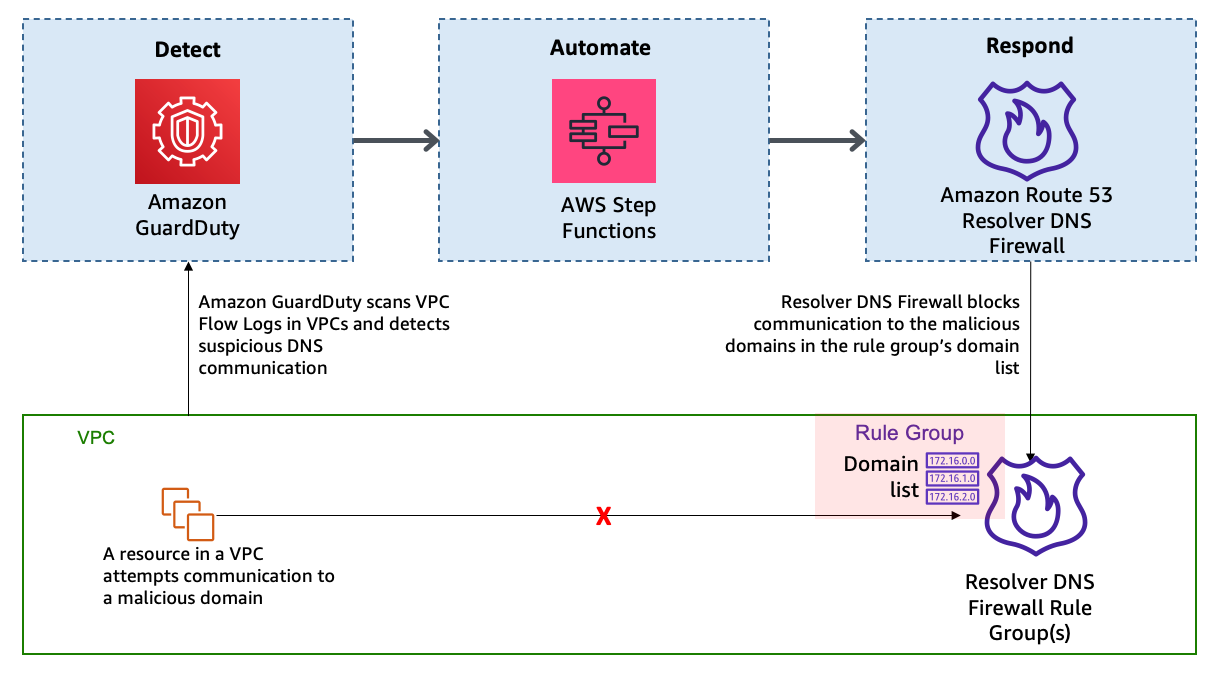
Refer to the DNS Firewall documentation to familiarize yourself with its constructs and understand how it works. The automation example we provide in this blog post is focused on providing blocks or alerts for DNS queries with suspicious domain names. For example, consider the scenario where an Amazon Elastic Compute Cloud (Amazon EC2) instance queries a domain name that is associated with a known command-and-control server. As shown in Figure 1, when GuardDuty detects communication with the malicious domain, it initiates a series of steps. First, AWS Step Functions orchestrates the remediation response through a defined workflow, then DNS Firewall adds the suspicious domain to deny list or alert list, and finally GuardDuty notifies the security operators of the attempted communication.

Figure 1: High-level solution overview

Figure 1: High-level solution overview

In this solution, the detection of threats by GuardDuty triggers the automated remediation procedure documented in this post. GuardDuty informs you of the status of your AWS environment by producing security findings. Each GuardDuty finding has an assigned severity level and value that reflects the potential risk that the finding could have to your network as determined by our security engineers. The value of the severity can fall anywhere within the 0.1 to 8.9 range, with higher values indicating greater security risk. To help you determine a response to a potential security issue that is highlighted by a finding, GuardDuty breaks down this range into High, Medium, and Low severity levels. We have seen that many of the DNS-based GuardDuty findings fall into the category of High severity, and many times these findings are strongly indicative of potential compromise (for example, pre ransomware activity).

In this blog post, we specifically focus on the following types of GuardDuty findings:

  • Backdoor:EC2/C&CActivity.B!DNS
  • Impact:EC2/MaliciousDomainRequest.Reputation
  • Trojan:EC2/DNSDataExfiltration

We’ve configured DNS Firewall to block only events with High severity by sending only those domains to the deny list. DNS Firewall sends the rest of the domains to an alert list.

This solution uses Step Functions and AWS Lambda so that incident response steps run in the correct order. Step Functions also provides retry and error-handling logic. Lambda functions interact with networking services to block traffic, and with databases to store data about blocked domain lists and AWS Security Hub finding Amazon Resource Names (ARNs).

How it works

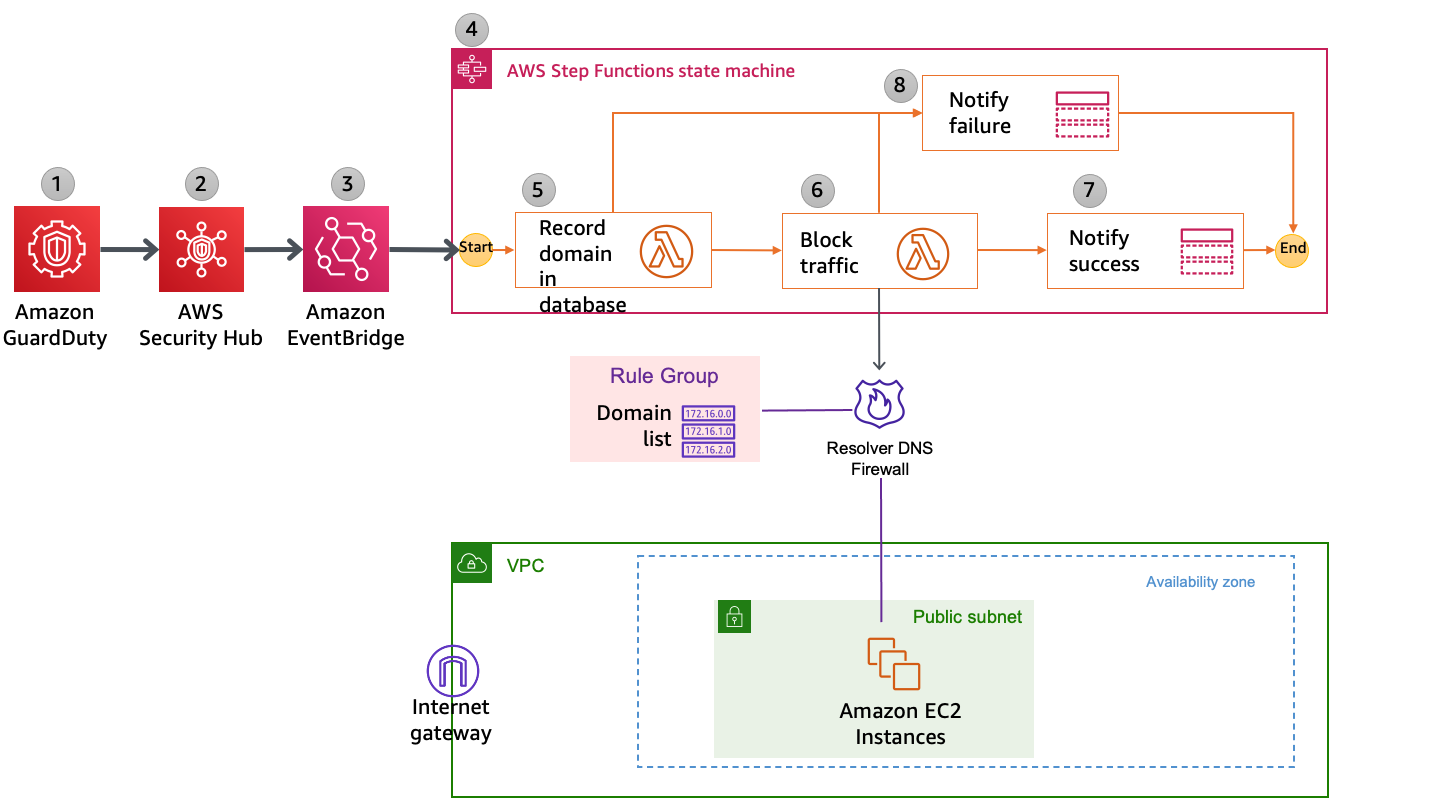
Figure 2 shows the automated remediation workflow in detail.
 

Figure 2: Detailed workflow diagram

Figure 2: Detailed workflow diagram

The solution is implemented as follows:

  1. GuardDuty detects communication attempts that include a suspicious domain. GuardDuty generates a finding, in JSON format, that includes details such as the EC2 instance ID involved (if applicable), account information, type of finding, domain, and other details. Following is a sample finding (some fields removed for brevity).
    {
      "schemaVersion": "2.0",
      "accountId": "123456789012",
      "id": " 1234567890abcdef0",
      "type": "Backdoor:EC2/C&CActivity.B!DNS",
      "service": {
        "serviceName": "guardduty",
        "action": {
          "actionType": "DNS_REQUEST",
         "dnsRequestAction": {
    "domain": "guarddutyc2activityb.com",
    "protocol": "UDP",
    "blocked": false
          }
        }
      }
    }
    

  2. Security Hub ingests the finding generated by GuardDuty and consolidates it with findings from other AWS security services. Security Hub also publishes the contents of the finding to the default bus in Amazon EventBridge. Following is a snippet from a sample event published to EventBridge.
    { 
      "id": "12345abc-ca56-771b-cd1b-710550598e37", 
      "detail-type": "Security Hub Findings - Imported", 
      "source": "aws.securityhub", 
      "account": "123456789012", 
      "time": "2021-01-05T01:20:33Z", 
      "region": "us-east-1", 
      "detail": { 
        "findings": [ 
            { "ProductArn": "arn:aws:securityhub:us-east-1::product/aws/guardduty", 
            "Types": ["Software and Configuration Checks/Backdoor:EC2.C&CActivity.B!DNS"], 
            "LastObservedAt": "2021-01-05T01:15:01.549Z", 
            "ProductFields": 
                {"aws/guardduty/service/action/dnsRequestAction/blocked": "false",
                "aws/guardduty/service/action/dnsRequestAction/domain": "guarddutyc2activityb.com"} 
                }
                ]}}
    

  3. EventBridge has a rule with an event pattern that matches GuardDuty events that contain the malicious domain name. When an event matching the pattern is published on the default bus, EventBridge routes that event to the designated target, in this case a Step Functions state machine. Following is a snippet of AWS CloudFormation code that defines the EventBridge rule.
    # EventBridge Event Rule - For Security Hub event published to EventBridge:
      SecurityHubtoFirewallStateMachineEvent:
        Type: "AWS::Events::Rule"
        Properties:
          Description: "Security Hub - GuardDuty findings with DNS Domain"
          EventPattern:
            source:
            - aws.securityhub
            detail:
              findings:
                ProductFields:
                  aws/guardduty/service/action/dnsRequestAction/blocked:
                    - "exists": true
          State: "ENABLED"
          Targets:
            -
              Arn: !GetAtt SecurityHubtoDnsFirewallStateMachine.Arn
              RoleArn: !GetAtt SecurityHubtoFirewallStateMachineEventRole.Arn
              Id: "GuardDutyEvent-StepFunctions-Trigger"
    

  4. The Step Functions state machine ingests the details of the Security Hub finding published in EventBridge and orchestrates the remediation response through a defined workflow. Figure 3 shows the state machine workflow.
     
    Figure 3: AWS Step Functions state machine workflow

    Figure 3: AWS Step Functions state machine workflow

  5. The first two steps in the state machine, getDomainFromDynamo and isDomainInDynamo, invoke the Lambda function CheckDomainInDynamoLambdaFunction that checks whether the flagged domain is already in the Amazon DynamoDB table. If the domain already exists in DynamoDB, then the workflow continues to check whether the domain is also in the domain list and adds it accordingly. If the domain is not in DynamoDB, then the workflow considers it a new addition and adds the domain to both domain lists, as well as the DynamoDB table.
  6. The next three steps in the state machine—getDomainFromDomainList, isDomainInDomainList, and addDomainToDnsFirewallDomainList—invoke a second Lambda function that checks and updates the DNS Firewall domain lists with the domain name. Figure 4 shows an example of the DNS Firewall rules and associated domain list.
     
    Figure 4: Sample rules in a DNS Firewall rule group

    Figure 4: Sample rules in a DNS Firewall rule group

    Figure 5 shows the domain lists.
     

    Figure 5: Domain lists

    Figure 5: Domain lists

    The next step in the state machine, updateDynamoDB, invokes a third Lambda function that updates the DynamoDB table with the domain that was just added to the domain list. Figure 6 shows an example domain entry that gets stored inside the DynamoDB table.
     

    Figure 6: DynamoDB table entry

    Figure 6: DynamoDB table entry

  7. The notifySuccess step of the state machine uses an Amazon Simple Notification Service (Amazon SNS) topic to send out a message that the automatic block or alert happened.
  8. If there was a failure in any of the previous steps, then the state machine runs the notifyFailure step. The state machine publishes a message on the SNS topic that the automated remediation workflow has failed to complete, and that manual intervention might be required.

Solution deployment and testing

To set up this solution, you’ll do the following steps:

  1. Verify prerequisites in your AWS account.
  2. Deploy the CloudFormation template.
  3. Create a test Security Hub event.
  4. Confirm the entry in the DNS Firewall rule group domain list.
  5. Confirm the SNS notification.
  6. Apply the rule group to your VPC by using DNS Firewall.

Step 1: Verify prerequisites in your AWS account

The sample solution we provide in this blog post requires that you activate both GuardDuty and Security Hub in your AWS account. If either of these services is not activated in your account, do the following:

Step 2: Deploy the CloudFormation template

For this next step, make sure that you deploy the template within the AWS account and the AWS Region where you want to monitor GuardDuty findings and block suspicious DNS activity. Depending on your architecture, you can deploy the solution one time centrally in a security account or deploy it repeatedly across multiple accounts.

To deploy the template

  1. Choose the Launch Stack button to launch a CloudFormation stack in your account:
    Select the Launch Stack button to launch the template

    Note: The stack will launch in the N. Virginia (us-east-1) Region. It takes approximately 15 minutes for the CloudFormation stack to complete. To deploy this solution into other AWS Regions, download the solution’s CloudFormation template and deploy it to the selected Region. Network Firewall isn’t currently available in all Regions. For more information about where it’s available, see the list of service endpoints.

  2. In the AWS CloudFormation console, select the Select Template form, and then choose Next.
  3. On the Specify Details page, provide the following input parameters. You can modify the default values to customize the solution for your environment.
    • AdminEmail – The email address to receive notifications. This must be a valid email address. There is no default value.
    • DnsFireWallAlertDomainListName – The name of the domain list for DNS Firewall that consists of domains that will be only alerted and not blocked. The default value is DemoAlertDomainListAutoUpdated.
    • DnsFireWallBlockDomainListName – The name of the domain list for DNS Firewall that consists of domains that will be blocked. The default value is DemoBlockedDomainListAutoUpdated.
    • DnsFirewallBlockAction – You can select NODATA or NXDOMAIN. NODATA implies that there is no response available if a DNS query from the VPC matches a domain in the block domain list. NXDOMAIN implies that the response is an error message, which indicates that a domain doesn’t exist. The default value is NODATA.

    Figure 7 shows an example of the values entered in the Parameters screen.

    Figure 7: Sample CloudFormation stack parameters

    Figure 7: Sample CloudFormation stack parameters

  4. After you’ve entered values for all of the input parameters, choose Next.
  5. On the Options page, keep the defaults, and then choose Next.
  6. On the Review page, in the Capabilities section, select the check box next to I acknowledge that AWS CloudFormation might create IAM resources. Then choose Create. Figure 8 shows what the CloudFormation capabilities acknowledgement prompt looks like.
     
    Figure 8: AWS CloudFormation capabilities acknowledgement

    Figure 8: AWS CloudFormation capabilities acknowledgement

While the stack is being created, check the email inbox that corresponds to the value that you gave for the AdminEmail address parameter. Look for an email message with the subject “AWS Notification – Subscription Confirmation.” Choose the link to confirm the subscription to the SNS topic.

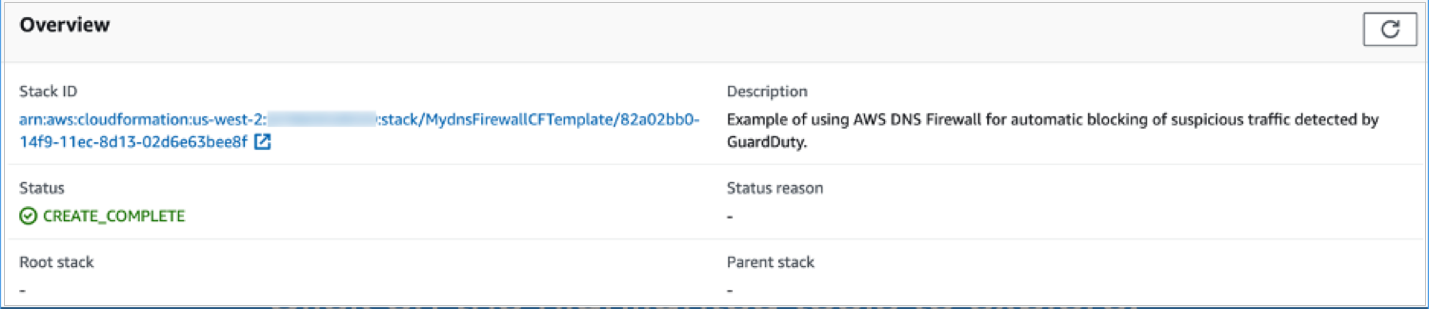
After the Status field for the CloudFormation stack changes to CREATE_COMPLETE, as shown in Figure 9, the solution is implemented and is ready for testing.
 

Figure 9: CloudFormation stack completed deployment

Figure 9: CloudFormation stack completed deployment

Step 3: Create a test Security Hub event

After the CloudFormation stack has completed deployment, you can test the functionality by creating a test event in the same format as would be published by Security Hub.

To create a test run of the solution

  1. In the AWS Management Console, choose Services, choose CloudFormation, and then for Stack, choose the stack name that you provided in Step 2: Deploy the CloudFormation template.
  2. In the Resources tab for the stack, look for the SecurityHubDnsFirewallStateMachine entry. It should appear as shown in Figure 10.
     
    Figure 10: CloudFormation stack resources

    Figure 10: CloudFormation stack resources

  3. Choose the link in the entry. You’ll be redirected to the Step Functions console, with the state machine already open. Choose Start execution.
     
    Figure 11: AWS Step Functions state machine

    Figure 11: AWS Step Functions state machine

  4. To facilitate testing, we’ve provided a test event file. On the Start execution page, in the Input section, paste the C&CActivity.B!DNS finding sample as shown in Figure 12.
     
    Figure 12: Sample input for the Step Functions state machine execution

    Figure 12: Sample input for the Step Functions state machine execution

  5. Note the domain name guarddutyc2activityb.com for the remote host identified in the GuardDuty finding in the test event on line 57 of the sample. The solution should block or alert traffic from that domain name in the following steps.
  6. Choose Start execution to begin the processing of the test event.
  7. You can now track the state machine processing of the test event. The processing should complete within a few seconds. You can select different steps in the visual Graph inspector to view input and output data. Figure 13 shows the input to the addDomainToDnsFirewallDomainList step that launches a Lambda function that interacts with DNS Firewall.
     
    Figure 13: Step Functions state machine step details

    Figure 13: Step Functions state machine step details

Step 4: Confirm the entry in the DNS Firewall rule group

Now that a test event was processed by the state machine, you can check whether the DNS Firewall rule group would block traffic to the domain name identified in the GuardDuty finding.

To validate entries in the DNS Firewall rule group

  1. In the AWS Management Console, choose Services, and then choose VPC. In the DNS Firewall section in the left navigation bar, choose DNS Firewall rule groups.
  2. Choose the demoDnsFirewallRuleGroup rule group created by the solution, and you’ll be able to see the rules as shown in Figure 14.
     
    Figure 14: Select the DNS Firewall rule

    Figure 14: Select the DNS Firewall rule

  3. Choose the domain list associated with the BLOCK rule. Confirm that the rules blocking the traffic from the source and to the domain that you specified in the test event were created. The domain list should look similar to what is shown in Figure 15.
     
    Figure 15: Verify that the domain was added to the blocked domain list

    Figure 15: Verify that the domain was added to the blocked domain list

Step 5: Confirm the SNS notification

In this step, you’ll view the SNS notification that was sent to the email address you set up.

To confirm the SNS notification

  • Review the email inbox for the value that you provided for the AdminEmail parameter and look for a message with the subject line “AWS Notification Message.” The contents of the message from SNS should be similar to the following.
    {"Blocked":"true","Input":{"ResponseMetadata":{"RequestId":"HOLOAAENUS3MN9B0DS6CO8BF4BVV4KQNSO5AEMVJF66Q9ASUAAJG","HTTPStatusCode":200,"HTTPHeaders":{"server":"Server","date":"Wed, 17 Nov 2021 08:20:38 GMT","content-type":"application/x-amz-json-1.0","content-length":"2","connection":"keep-alive","x-amzn-requestid":"HOLOAAENUS3MN9B0DS6CO8BF4BVV4KQNSO5AEMVJF66Q9ASUAAJG","x-amz-crc32":"2745614147"},"RetryAttempts":0}}}
    

Step 6: Apply the rule group to your VPC by using DNS Firewall

As part of the CloudFormation template deployment, two test VPCs have been created for you, to demonstrate that you can assign a single DNS Firewall rule group to multiple VPCs. You can also associate this rule group to your existing VPC of interest. To learn how to do this task, see Managing associations between your VPC and Route 53 Resolver DNS Firewall rule group. For visibility into DNS queries and for debugging purposes, the template creates log groups that accumulate DNS Resolver query logs.

After you’ve successfully tested the given sample that emulates C&CActivity.B!DNS, you can repeat steps 3 to 6 for the MaliciousDomainRequest.Reputation finding sample and the DNSDataExfiltration finding sample.

These samples are supplied for your convenience, and you will see the blocking action in a matter of minutes. Alternatively, you can use other ways to test, which might need about an hour for blocking action to happen. To initiate DNS C&C activity, you can make a DNS request from your instance (using dig for Linux or nslookup for Windows) against the test domain guarddutyc2activityb.com. Alternatively, you can use GuardDuty Tester, which generates DNS C&C activity and DNS exfiltration unauthorized events.

To take this solution one step further, you can implement automatic aging out of the domains that get added to the domain list. One way to do this is to use the Time to Live feature in DynamoDB and keep repopulating the domain list from DynamoDB at regular intervals of time. The benefit of this is that if the malicious nature of a domain in the domain list changes over time, the list will be kept up to date during this age out and repopulation process.

Considerations

There are a few considerations that you should keep in mind regarding DNS Firewall:

  • DNS Firewall and AWS Network Firewall work together for improved domain-filtering capability across HTTP(S) traffic. A domain list that you configure in Network Firewall should reflect the domain list configured in DNS Firewall.
  • DNS Firewall filters based on the domain name. It doesn’t translate that domain name to an IP address to be blocked.
  • It’s a best practice to block outbound traffic to port 53 with network access control lists (network ACLs) or Network Firewall so that GuardDuty can monitor DNS queries.
  • DNS Firewall filters DNS queries to the Amazon Route 53 Resolver (also known as AmazonProvidedDNS or VPC .2 Resolver) in the VPC. So for traffic leaving the VPC, we recommend that you use DNS Firewall along with Network Firewall, which you can use to secure traffic that isn’t headed to Amazon Route 53 Resolver. Network Firewall can also block domain names that exist in network traffic leaving the Amazon VPC, such as in HTTP HOST headers, TLS Server Name Indication (SNI) fields, and so on.
  • You can use Network Firewall to block external encrypted DNS services so that these services can’t be used to circumvent your DNS Firewall policies.

Conclusion

In this blog post, you learned how to automatically block malicious domains by using Route 53 Resolver DNS Firewall and GuardDuty. You can use this sample solution to automatically block communication to suspicious hosts discovered by GuardDuty, and you can apply those blocks across all configured DNS Firewall firewalls within your account.

All of the code for this solution is available on GitHub. Feel free to play around with the code; we hope it helps you learn more about automated security remediation. You can adjust the code to better fit your unique environment or extend the code with additional steps.

If you have comments about this blog post, submit them in the Comments section below. If you have questions about using this solution, start a thread in the Route 53 Resolver forum or GuardDuty forums, or contact AWS Support.

Want more AWS Security how-to content, news, and feature announcements? Follow us on Twitter.

Author

Akshay Karanth

Akshay is a senior solutions architect at AWS. He helps digital native businesses learn, build, and grow in the AWS Cloud. Before AWS, he worked at companies such as Juniper Networks and Microsoft in various customer facing roles across networking and security domains. When not at work, Akshay enjoys hiking up a hard trail or cooking a fulfilling meal with his family.

Author

Rohit Aswani

Rohit is a specialist solutions architect focussed on Networking at AWS, where he helps customers build and design scalable, highly-available, secure, resilient, and cost-effective networks. He holds an MS in telecommunication systems management from Northeastern University, specializing in computer networking.

Contributor

Special thanks to Fabrice Dall’ara who made significant contributions to this post.

[Security Nation] Jacques Chester of Shopify Talks CVSS Scores

Post Syndicated from Rapid7 original https://blog.rapid7.com/2022/07/20/security-nation-jacques-chester-of-shopify-talks-cvss-scores/

[Security Nation] Jacques Chester of Shopify Talks CVSS Scores

In this episode of Security Nation, Shopify Senior Staff Software Developer Jacques Chester joins Jen and Tod to discuss his intriguing paper on CVSS scores and the overall oddness of vulnerability distribution. The trio also dives into Jacques’ journey to understanding how security systems affect people in the real world.

Stick around for our Rapid Rundown, where Tod and Jen discuss PyPi’s alert to certain open-source publishers about the institution of 2FA technology on the platform.

Jacques Chester

[Security Nation] Jacques Chester of Shopify Talks CVSS Scores

Jacques is a Senior Staff Software Developer at Shopify in the Ruby & Rails Infrastructure group. He leads work on upstream and community improvements to supply chain security, with a focus on the Ruby ecosystem. Previously he worked in cloud-native platforms and consulting for VMware and Pivotal. He is a cat dad.

Show notes

Interview Links

Rapid Rundown Links

PyPi issues mentioned

Like the show? Want to keep Jen and Tod in the podcasting business? Feel free to rate and review with your favorite podcast purveyor, like Apple Podcasts.

Want More Inspiring Stories From the Security Community?

Subscribe to Security Nation Today

Hard Drive Life Expectancy

Post Syndicated from original https://www.backblaze.com/blog/hard-drive-life-expectancy/

For the last several years, we have written about drive failure, or more specifically, the annualized failure rates for the hard drives and SSDs we use for our cloud storage platform. In this post, we’ll look at drive failure from a different angle: life expectancy.

By looking at life expectancy, we can answer the question, “How long is the drive I am buying today expected to last?” This line of thinking matches the way we buy many things. For example, knowing that a washing machine has an annualized failure rate of 4% is academically interesting, but what we really want to know is, “How long can I expect the washing machine to last before I need to replace it?”

Using the Drive Stats data we’ve collected since 2013, we have selected 10 drive models that have a sufficient number of both drives and drive days to produce Kaplan-Meier life expectancy curves we can use to easily visualize their life expectancy. Using these life expectancy curves we’ll compare drive models in cohorts of 4TB, 8TB, 12TB, and 14TB to see what we can find.

What Is a Kaplan-Meier Curve?

Kaplan-Meier curves are most often used in biological sciences to forecast life expectancy by measuring the fraction of subjects living for a certain amount of time after receiving treatment. That said, the application of the technique to other fields is not unusual.

Comparing 4TB Drives

The two 4TB drive models we selected for comparison had the most 4TB drives in operation as of March 31, 2022. The Drive Stats for each drive model as of March 31, 2022 is shown below, followed by the Kaplan-Meier curve for each drive.

MFG Model Drives in Operation Lifetime Drive Failures Lifetime Drive Days Lifetime AFR
HGST HMS5C4040BLE640 12,728 343 30,025,871 0.40%
Seagate ST4000DM000 18,495 4,581 68,104,520 2.45%


What Is the Graph Telling Us?

  1. If you purchased an HGST drive at time zero, there is a 97% chance that drive would still be operational after six years (72 months).
  2. If you purchased a Seagate drive at time zero, there is an 81% chance that drive would still be operational after six years.

Case closed—we were stupid to buy any Seagate 4TB drives, right? Not so fast, there are other factors at work here: cost, availability, time, and maintenance, to name a few. For example, suppose I told you that the HGST drive you wanted was 1.2 to 1.5 times as expensive as the Seagate drive. In addition, the Seagate drive was readily available while the HGST drive was harder to get, and finally, at the time of purchase there was over an 80% chance that the Seagate drive would still be alive after six years. How does that change your perception?

In the case of buying one or two drives, you may find a single factor like, “how much do you have to spend” is the only thing that matters. In our case, these factors are intertwined. We explain some of the thinking behind our decision-making in our “How Backblaze Buys Hard Drives” post.

Was It Worth the Savings?

In the simple case, if the time and effort we spent replacing the failed Seagate drives was more than the savings, we failed. So, let’s do a little back-of-the-envelope math to see how we landed.

We replaced a little over 4,200 more Seagate drives over a six year period than HGST drives. That is 700 drives a year or about two Seagate drives per day we had to replace. That’s 30-40 minutes a day someone spent doing that task spread across multiple data centers. Yes, it’s work, but hardly something you would need to hire a person specifically to do.

Why Buy HGST Drives at All?

Fair question. At the time we were purchasing these Seagate and HGST drive models back in 2013 through 2015, there were no life expectancy curves and Drive Stats was just starting. We had anecdotal information that the HGST drives were better, but little else. In short, sometimes, the pricing and availability of the HGST was good enough so we bought them.

Comparing 8TB Drives

The two 8TB drives we’ve chosen to compare using life expectancy curves have done battle before. The 8TB Seagate model: ST8000DM002 is classified as a consumer drive, while the 8TB Seagate model: ST8000NM0055 is classified as an enterprise drive. Their lifetime annualized failure rates tell an interesting story. All data is as of March 31, 2022.

Type Model Drives in Operation Lifetime Drive Failures Lifetime Drive Days Lifetime AFR
Consumer ST8000DM002 9,678 628 19,815,919 1.13%
Enterprise ST8000NM0055 14,323 915 24,999,738 1.35%

Let’s take a look at the life expectancy curves and see what else we can learn.

Observations

  • If you purchased either drive, the life expectancy is nearly the same for early on, but starts to separate at about two years and the difference increases over the next three years.
  • For the consumer model (ST8000DM002) you would expect nearly 95% of the drives to survive five years.
  • For the enterprise model (ST8000NM0055) you would expect 93.6% of the drives to survive five years.

These results seem at odds with the warranties for each model. Consumer drives typically have two-year warranties, while enterprise drives typically have five-year warranties. Yet at five years, the consumer drives, in this case, are more likely to survive, and the trend starts at two years—the end of the typical consumer drive warranty period. It’s almost like we got the data backwards. We didn’t.

Even with this odd difference, both drives performed well. If you wanted to buy an 8TB drive and the salesperson said there would be a 93.6% chance the drive would last five years, well, that’s pretty good. Regardless of the failure rate or life expectancy, there are other reasons to purchase an enterprise class drive, including the ability to tune the drive, tweak the firmware, or get a replacement via the warranty for three more years versus the consumer drive. All are good reasons and may be worth the premium you will pay for an enterprise class drive, but in this case at least, long live the consumer drive.

A Word About Drive Warranties

One of the advantages we get for buying drives in bulk from a manufacturer or one of their top tier resellers is that they will honor the warranty period ascribed to the drive. When you are buying from a retailer (typically an online retailer, but not always), you may find the warranty terms and conditions to be less straightforward. Here are three common situations:

  • The retailer purchases the drive or takes the drive on consignment from the manufacturer/distributor/reseller/etc., and that event triggers the start of the manufacturer warranty. When you buy the drive six months later, the warranty is no longer “X” years, but “X” years minus six months.
  • The retailer replaces the warranty with their own time period. While this is usually done for refurbished drives, we have seen this done by online retailers for new drives as well. In one case we saw, the original five-year warranty period was reduced to one year.
  • The retailer is only a storefront while the actual seller is different. At that point, determining the warranty period and who services the drive can be, shall we say, challenging. Of course, you can always buy the add-on warranty that’s offered—it’s always nice to pay for something that was supposed to be included.

As a drive model gets older, these types of shenanigans are more likely to happen. For example, a given drive model gathers dust awaiting shipment while new models are coming to market at competitive prices. The multiple players on the path from a drive’s manufacture to its eventual sale are looking for ways to “move” these aging drives along that path. One option is to lower or eliminate the warranty period to help reduce the cost of the drive. The warranty becomes a casualty of the supply chain and you, as the last buyer, are left with the results.

Comparing 12TB Drives

If you are serious about storing copious amounts of data, you’re probably looking at 12TB drives and higher. Your Plex media server or eight-bay NAS system demands nothing less. To that end, we selected three 12TB models for which we have at least two years worth of data to base our life expectancy curves upon. The Drive Stats data for these three drives is as of March 31, 2022.

MFR Model Drives in Operation Lifetime Drive Failures Lifetime Drive Days Lifetime AFR
HGST HUH721212ALN604 10,813 148 11,813,149 0.48%
Seagate ST12000NM001G 12,269 104 6,166,144 0.63%
Seagate ST12000NM0008 20,139 449 14,802,577 1.12%


Observations and Thoughts

For any of the three models, at least 98% of the drives are expected to survive two years. I suspect that most of us would take that bet. While none of us wants to own the one or two drives out of 100 that will fail in that two years period, we know there are no 100% guarantees when it comes to hard drives.

That brings us to asking: What is the cost of each drive, and would that affect the buying decision? As we’ve noted previously, we buy in bulk and the price we pay is probably not reflective of the price you may pay in the consumer market. To that end, below are the current prices, via the Amazon website, for the three drive models. We’ve assumed that these are new drives and they have the same warranty coverage of five years.

  • HUH721212ALN604 – $413
  • ST12000NM001G – $249
  • ST12000NM0008 – $319

The Seagate model: ST12000NM001G and the HGST model: HUH721212ALN604 have about the same life expectancy after two years, but their price is significantly different. Which one do you buy today? If you are expecting the drive to last (i.e., survive) two years, you would select the Seagate drive and save yourself $164, plus tax. Some of you will disagree, and given we know nothing beyond the two-year point for the Seagate drive, you may be right. Time will tell.

One thing that may be perplexing here is why the Seagate model: ST12000NM0008 is more expensive than the Seagate model: ST12000NM001G even though the ST12000NM008 fails more often and has a lower life expectancy after two years? The reason is simple: Drive pricing is basically driven by supply and demand. We suspect that annualized failure rates and life expectancy curves are not part of the pricing math done by the various companies (manufacturers/distributors/resellers/etc.) along the supply chain.

By the way, if you purchase the 12TB HGST drive, it may say Western Digital (WDC) on the label. For the first couple of years when these drives were produced, they had HGST on the label, but that changed somewhere in the last couple of years. In either case, both “versions” report as HGST drives and have the same model number, HUH721212ALN604. The new Western Digital label is part of the continuing rebranding effort being done by WDC to update the HGST assets they purchased a few years back.

Comparing 14TB Drives

We will finish up our look at hard drive life expectancy curves with three models from our collection of 14TB drives. While the data ranges from 14 to 41 months depending on the drive model, this is the one cohort where we have comparable data on drives from all three of the major manufacturers: Seagate, Toshiba, and WDC. The Drive Stats data is below, followed by the life expectancy curves for the same models.

MFR Model Drives in Operation Lifetime Drive Failures Lifetime Drive Days Lifetime AFR
Toshiba MG07ACA14TA 38,210 454 19,834,886 0.83%
Seagate ST14000NM001G 10,734 123 4,474,417 1.00%
WDC WUH721414ALE6L4 8,268 35 3,941,427 0.33%


Observations and Thoughts

All three drives have a life expectancy of 99% or more after one year. Previously, we examined the bathtub curve for drive failure and made the observation that the early mortality rate for hard drives, those that failed during their first year in operation, was now nearly the same as the random failure rate. That seems to be the case for this collection of drives as the observed early mortality effect is nominal.

When considering the bathtub curve, the Toshiba model seems to be an outlier beginning at 22 months. At that point, the downward curvature in the line suggests an accelerating failure rate when the failure rate should be steady, as seen below.

The projected life expectancy curve line is derived by extending the random failure rate from the first 22 months. That said, 97% of the Toshiba drives survived for three years while the projected number was 98%, or simply put, the failure rate was one drive per hundred more over a three-year period.

Interested in More Drive Stats Insights?

Physical disk drives remain essential elements of business and personal tech. That’s why Backblaze publishes performance data and analysis on 200,000+ HDDs: to offer useful insights into how different drive models stack up in our data center. As SSDs increasingly become the norm in many computers and servers, Backblaze is now also sharing data for the thousands of SSDs we use as boot drives.

Methodology

The raw data comes from the Backblaze Drive Stats data and is based on the raw value of SMART attribute 9 (power on hours) for a defined cohort of drives. After removing outliers, we basically compared the number of drives which failed after a specific number of months versus the number of drives which managed to survive that many months. The math is absolutely more complex than that and I want to thank Dr. Charles Zaiontz, Ph.D. for providing an excellent tutorial on Kaplan-Meier curves and, more specifically, how to use Microsoft Excel to do the math.

Refresher: What Are SMART Stats?

SMART stands for Self-monitoring, Analysis, and Reporting Technology and is a monitoring system included in hard drives that reports on various attributes of the state of a given drive. Each day, Backblaze records the SMART stats that are reported by the hard drives we have in our data centers. Check out this post to learn more about SMART stats and how we use them.

Standing on the Shoulders

Using our Drive Stats data in combination with Kaplan-Meier curves has been done previously in various forms by others including Ross Lazarus, Simon Erni, and Tom Baldwin. We thank them for their collective efforts and for providing us with the inspiration to produce the current curves that enabled the comparisons we did in this post.

The post Hard Drive Life Expectancy appeared first on Backblaze Blog | Cloud Storage & Cloud Backup.

[$] Leaving python-dev behind

Post Syndicated from original https://lwn.net/Articles/901744/

It was not all that long ago that Python began its experiment with
replacing one of its mailing lists with a forum on its Discourse discussion site. Over
time, the Discourse instance has become more and more popular within the
Python community. It would seem that another mailing list will soon be
subsumed within Discourse as the Python steering council is planning to
effectively retire the venerable python-dev mailing list soon.

Russia Creates Malware False-Flag App

Post Syndicated from Bruce Schneier original https://www.schneier.com/blog/archives/2022/07/russia-creates-malware-false-flag-app.html

The Russian hacking group Turla released an Android app that seems to aid Ukrainian hackers in their attacks against Russian networks. It’s actually malware, and provides information back to the Russians:

The hackers pretended to be a “community of free people around the world who are fighting russia’s aggression”—much like the IT Army. But the app they developed was actually malware. The hackers called it CyberAzov, in reference to the Azov Regiment or Battalion, a far-right group that has become part of Ukraine’s national guard. To add more credibility to the ruse they hosted the app on a domain “spoofing” the Azov Regiment: cyberazov[.]com.

[…]

The app actually didn’t DDoS anything, but was designed to map out and figure out who would want to use such an app to attack Russian websites, according to Huntely.

[…]

Google said the fake app wasn’t hosted on the Play Store, and that the number of installs “was miniscule.”

Details from Google’s Threat Analysis Group here.

Stream Amazon EMR on EKS logs to third-party providers like Splunk, Amazon OpenSearch Service, or other log aggregators

Post Syndicated from Matthew Tan original https://aws.amazon.com/blogs/big-data/stream-amazon-emr-on-eks-logs-to-third-party-providers-like-splunk-amazon-opensearch-service-or-other-log-aggregators/

Spark jobs running on Amazon EMR on EKS generate logs that are very useful in identifying issues with Spark processes and also as a way to see Spark outputs. You can access these logs from a variety of sources. On the Amazon EMR virtual cluster console, you can access logs from the Spark History UI. You also have flexibility to push logs into an Amazon Simple Storage Service (Amazon S3) bucket or Amazon CloudWatch Logs. In each method, these logs are linked to the specific job in question. The common practice of log management in DevOps culture is to centralize logging through the forwarding of logs to an enterprise log aggregation system like Splunk or Amazon OpenSearch Service (successor to Amazon Elasticsearch Service). This enables you to see all the applicable log data in one place. You can identify key trends, anomalies, and correlated events, and troubleshoot problems faster and notify the appropriate people in a timely fashion.

EMR on EKS Spark logs are generated by Spark and can be accessed via the Kubernetes API and kubectl CLI. Therefore, although it’s possible to install log forwarding agents in the Amazon Elastic Kubernetes Service (Amazon EKS) cluster to forward all Kubernetes logs, which include Spark logs, this can become quite expensive at scale because you get information that may not be important for Spark users about Kubernetes. In addition, from a security point of view, the EKS cluster logs and access to kubectl may not be available to the Spark user.

To solve this problem, this post proposes using pod templates to create a sidecar container alongside the Spark job pods. The sidecar containers are able to access the logs contained in the Spark pods and forward these logs to the log aggregator. This approach allows the logs to be managed separately from the EKS cluster and uses a small amount of resources because the sidecar container is only launched during the lifetime of the Spark job.

Implementing Fluent Bit as a sidecar container

Fluent Bit is a lightweight, highly scalable, and high-speed logging and metrics processor and log forwarder. It collects event data from any source, enriches that data, and sends it to any destination. Its lightweight and efficient design coupled with its many features makes it very attractive to those working in the cloud and in containerized environments. It has been deployed extensively and trusted by many, even in large and complex environments. Fluent Bit has zero dependencies and requires only 650 KB in memory to operate, as compared to FluentD, which needs about 40 MB in memory. Therefore, it’s an ideal option as a log forwarder to forward logs generated from Spark jobs.

When you submit a job to EMR on EKS, there are at least two Spark containers: the Spark driver and the Spark executor. The number of Spark executor pods depends on your job submission configuration. If you indicate more than one spark.executor.instances, you get the corresponding number of Spark executor pods. What we want to do here is run Fluent Bit as sidecar containers with the Spark driver and executor pods. Diagrammatically, it looks like the following figure. The Fluent Bit sidecar container reads the indicated logs in the Spark driver and executor pods, and forwards these logs to the target log aggregator directly.

Architecture of Fluent Bit sidecar

Pod templates in EMR on EKS

A Kubernetes pod is a group of one or more containers with shared storage, network resources, and a specification for how to run the containers. Pod templates are specifications for creating pods. It’s part of the desired state of the workload resources used to run the application. Pod template files can define the driver or executor pod configurations that aren’t supported in standard Spark configuration. That being said, Spark is opinionated about certain pod configurations and some values in the pod template are always overwritten by Spark. Using a pod template only allows Spark to start with a template pod and not an empty pod during the pod building process. Pod templates are enabled in EMR on EKS when you configure the Spark properties spark.kubernetes.driver.podTemplateFile and spark.kubernetes.executor.podTemplateFile. Spark downloads these pod templates to construct the driver and executor pods.

Forward logs generated by Spark jobs in EMR on EKS

A log aggregating system like Amazon OpenSearch Service or Splunk should always be available that can accept the logs forwarded by the Fluent Bit sidecar containers. If not, we provide the following scripts in this post to help you launch a log aggregating system like Amazon OpenSearch Service or Splunk installed on an Amazon Elastic Compute Cloud (Amazon EC2) instance.

We use several services to create and configure EMR on EKS. We use an AWS Cloud9 workspace to run all the scripts and to configure the EKS cluster. To prepare to run a job script that requires certain Python libraries absent from the generic EMR images, we use Amazon Elastic Container Registry (Amazon ECR) to store the customized EMR container image.

Create an AWS Cloud9 workspace

The first step is to launch and configure the AWS Cloud9 workspace by following the instructions in Create a Workspace in the EKS Workshop. After you create the workspace, we create AWS Identity and Access Management (IAM) resources. Create an IAM role for the workspace, attach the role to the workspace, and update the workspace IAM settings.

Prepare the AWS Cloud9 workspace

Clone the following GitHub repository and run the following script to prepare the AWS Cloud9 workspace to be ready to install and configure Amazon EKS and EMR on EKS. The shell script prepare_cloud9.sh installs all the necessary components for the AWS Cloud9 workspace to build and manage the EKS cluster. These include the kubectl command line tool, eksctl CLI tool, jq, and to update the AWS Command Line Interface (AWS CLI).

$ sudo yum -y install git
$ cd ~ 
$ git clone https://github.com/aws-samples/aws-emr-eks-log-forwarding.git
$ cd aws-emr-eks-log-forwarding
$ cd emreks
$ bash prepare_cloud9.sh

All the necessary scripts and configuration to run this solution are found in the cloned GitHub repository.

Create a key pair

As part of this particular deployment, you need an EC2 key pair to create an EKS cluster. If you already have an existing EC2 key pair, you may use that key pair. Otherwise, you can create a key pair.

Install Amazon EKS and EMR on EKS

After you configure the AWS Cloud9 workspace, in the same folder (emreks), run the following deployment script:

$ bash deploy_eks_cluster_bash.sh 
Deployment Script -- EMR on EKS
-----------------------------------------------

Please provide the following information before deployment:
1. Region (If your Cloud9 desktop is in the same region as your deployment, you can leave this blank)
2. Account ID (If your Cloud9 desktop is running in the same Account ID as where your deployment will be, you can leave this blank)
3. Name of the S3 bucket to be created for the EMR S3 storage location
Region: [xx-xxxx-x]: < Press enter for default or enter region > 
Account ID [xxxxxxxxxxxx]: < Press enter for default or enter account # > 
EC2 Public Key name: < Provide your key pair name here >
Default S3 bucket name for EMR on EKS (do not add s3://): < bucket name >
Bucket created: XXXXXXXXXXX ...
Deploying CloudFormation stack with the following parameters...
Region: xx-xxxx-x | Account ID: xxxxxxxxxxxx | S3 Bucket: XXXXXXXXXXX

...

EKS Cluster and Virtual EMR Cluster have been installed.

The last line indicates that installation was successful.

Log aggregation options

There are several log aggregation and management tools on the market. This post suggests two of the more popular ones in the industry: Splunk and Amazon OpenSearch Service.

Option 1: Install Splunk Enterprise

To manually install Splunk on an EC2 instance, complete the following steps:

  1. Launch an EC2 instance.
  2. Install Splunk.
  3. Configure the EC2 instance security group to permit access to ports 22, 8000, and 8088.

This post, however, provides an automated way to install Spunk on an EC2 instance:

  1. Download the RPM install file and upload it to an accessible Amazon S3 location.
  2. Upload the following YAML script into AWS CloudFormation.
  3. Provide the necessary parameters, as shown in the screenshots below.
  4. Choose Next and complete the steps to create your stack.

Splunk CloudFormation screen - 1

Splunk CloudFormation screen - 2

Splunk CloudFormation screen - 3

Alternatively, run an AWS CLI script like the following:

aws cloudformation create-stack \
--stack-name "splunk" \
--template-body file://splunk_cf.yaml \
--parameters ParameterKey=KeyName,ParameterValue="< Name of EC2 Key Pair >" \
  ParameterKey=InstanceType,ParameterValue="t3.medium" \
  ParameterKey=LatestAmiId,ParameterValue="/aws/service/ami-amazon-linux-latest/amzn2-ami-hvm-x86_64-gp2" \
  ParameterKey=VPCID,ParameterValue="vpc-XXXXXXXXXXX" \
  ParameterKey=PublicSubnet0,ParameterValue="subnet-XXXXXXXXX" \
  ParameterKey=SSHLocation,ParameterValue="< CIDR Range for SSH access >" \
  ParameterKey=VpcCidrRange,ParameterValue="172.20.0.0/16" \
  ParameterKey=RootVolumeSize,ParameterValue="100" \
  ParameterKey=S3BucketName,ParameterValue="< S3 Bucket Name >" \
  ParameterKey=S3Prefix,ParameterValue="splunk/splunk-8.2.5-77015bc7a462-linux-2.6-x86_64.rpm" \
  ParameterKey=S3DownloadLocation,ParameterValue="/tmp" \
--region < region > \
--capabilities CAPABILITY_IAM
  1. After you build the stack, navigate to the stack’s Outputs tab on the AWS CloudFormation console and note the internal and external DNS for the Splunk instance.

You use these later to configure the Splunk instance and log forwarding.

Splunk CloudFormation output screen

  1. To configure Splunk, go to the Resources tab for the CloudFormation stack and locate the physical ID of EC2Instance.
  2. Choose that link to go to the specific EC2 instance.
  3. Select the instance and choose Connect.

Connect to Splunk Instance

  1. On the Session Manager tab, choose Connect.

Connect to Instance

You’re redirected to the instance’s shell.

  1. Install and configure Splunk as follows:
$ sudo /opt/splunk/bin/splunk start --accept-license
…
Please enter an administrator username: admin
Password must contain at least:
   * 8 total printable ASCII character(s).
Please enter a new password: 
Please confirm new password:
…
Done
                                                           [  OK  ]

Waiting for web server at http://127.0.0.1:8000 to be available......... Done
The Splunk web interface is at http://ip-xx-xxx-xxx-x.us-east-2.compute.internal:8000
  1. Enter the Splunk site using the SplunkPublicDns value from the stack outputs (for example, http://ec2-xx-xxx-xxx-x.us-east-2.compute.amazonaws.com:8000). Note the port number of 8000.
  2. Log in with the user name and password you provided.

Splunk Login

Configure HTTP Event Collector

To configure Splunk to be able to receive logs from Fluent Bit, configure the HTTP Event Collector data input:

  1. Go to Settings and choose Data input.
  2. Choose HTTP Event Collector.
  3. Choose Global Settings.
  4. Select Enabled, keep port number 8088, then choose Save.
  5. Choose New Token.
  6. For Name, enter a name (for example, emreksdemo).
  7. Choose Next.
  8. For Available item(s) for Indexes, add at least the main index.
  9. Choose Review and then Submit.
  10. In the list of HTTP Event Collect tokens, copy the token value for emreksdemo.

You use it when configuring the Fluent Bit output.

splunk-http-collector-list

Option 2: Set up Amazon OpenSearch Service

Your other log aggregation option is to use Amazon OpenSearch Service.

Provision an OpenSearch Service domain

Provisioning an OpenSearch Service domain is very straightforward. In this post, we provide a simple script and configuration to provision a basic domain. To do it yourself, refer to Creating and managing Amazon OpenSearch Service domains.

Before you start, get the ARN of the IAM role that you use to run the Spark jobs. If you created the EKS cluster with the provided script, go to the CloudFormation stack emr-eks-iam-stack. On the Outputs tab, locate the IAMRoleArn output and copy this ARN. We also modify the IAM role later on, after we create the OpenSearch Service domain.

iam_role_emr_eks_job

If you’re using the provided opensearch.sh installer, before you run it, modify the file.

From the root folder of the GitHub repository, cd to opensearch and modify opensearch.sh (you can also use your preferred editor):

[../aws-emr-eks-log-forwarding] $ cd opensearch
[../aws-emr-eks-log-forwarding/opensearch] $ vi opensearch.sh

Configure opensearch.sh to fit your environment, for example:

# name of our Amazon OpenSearch cluster
export ES_DOMAIN_NAME="emreksdemo"

# Elasticsearch version
export ES_VERSION="OpenSearch_1.0"

# Instance Type
export INSTANCE_TYPE="t3.small.search"

# OpenSearch Dashboards admin user
export ES_DOMAIN_USER="emreks"

# OpenSearch Dashboards admin password
export ES_DOMAIN_PASSWORD='< ADD YOUR PASSWORD >'

# Region
export REGION='us-east-1'

Run the script:

[../aws-emr-eks-log-forwarding/opensearch] $ bash opensearch.sh

Configure your OpenSearch Service domain

After you set up your OpenSearch service domain and it’s active, make the following configuration changes to allow logs to be ingested into Amazon OpenSearch Service:

  1. On the Amazon OpenSearch Service console, on the Domains page, choose your domain.

Opensearch Domain Console

  1. On the Security configuration tab, choose Edit.

Opensearch Security Configuration

  1. For Access Policy, select Only use fine-grained access control.
  2. Choose Save changes.

The access policy should look like the following code:

{
  "Version": "2012-10-17",
  "Statement": [
    {
      "Effect": "Allow",
      "Principal": {
        "AWS": "*"
      },
      "Action": "es:*",
      "Resource": "arn:aws:es:xx-xxxx-x:xxxxxxxxxxxx:domain/emreksdemo/*"
    }
  ]
}
  1. When the domain is active again, copy the domain ARN.

We use it to configure the Amazon EMR job IAM role we mentioned earlier.

  1. Choose the link for OpenSearch Dashboards URL to enter Amazon OpenSearch Service Dashboards.

Opensearch Main Console

  1. In Amazon OpenSearch Service Dashboards, use the user name and password that you configured earlier in the opensearch.sh file.
  2. Choose the options icon and choose Security under OpenSearch Plugins.

opensearch menu

  1. Choose Roles.
  2. Choose Create role.

opensearch-create-role-button

  1. Enter the new role’s name, cluster permissions, and index permissions. For this post, name the role fluentbit_role and give cluster permissions to the following:
    1. indices:admin/create
    2. indices:admin/template/get
    3. indices:admin/template/put
    4. cluster:admin/ingest/pipeline/get
    5. cluster:admin/ingest/pipeline/put
    6. indices:data/write/bulk
    7. indices:data/write/bulk*
    8. create_index

opensearch-create-role-button

  1. In the Index permissions section, give write permission to the index fluent-*.
  2. On the Mapped users tab, choose Manage mapping.
  3. For Backend roles, enter the Amazon EMR job execution IAM role ARN to be mapped to the fluentbit_role role.
  4. Choose Map.

opensearch-map-backend

  1. To complete the security configuration, go to the IAM console and add the following inline policy to the EMR on EKS IAM role entered in the backend role. Replace the resource ARN with the ARN of your OpenSearch Service domain.
{
    "Version": "2012-10-17",
    "Statement": [
        {
            "Sid": "VisualEditor0",
            "Effect": "Allow",
            "Action": [
                "es:ESHttp*"
            ],
            "Resource": "arn:aws:es:us-east-2:XXXXXXXXXXXX:domain/emreksdemo"
        }
    ]
}

The configuration of Amazon OpenSearch Service is complete and ready for ingestion of logs from the Fluent Bit sidecar container.

Configure the Fluent Bit sidecar container

We need to write two configuration files to configure a Fluent Bit sidecar container. The first is the Fluent Bit configuration itself, and the second is the Fluent Bit sidecar subprocess configuration that makes sure that the sidecar operation ends when the main Spark job ends. The suggested configuration provided in this post is for Splunk and Amazon OpenSearch Service. However, you can configure Fluent Bit with other third-party log aggregators. For more information about configuring outputs, refer to Outputs.

Fluent Bit ConfigMap

The following sample ConfigMap is from the GitHub repo:

apiVersion: v1
kind: ConfigMap
metadata:
  name: fluent-bit-sidecar-config
  namespace: sparkns
  labels:
    app.kubernetes.io/name: fluent-bit
data:
  fluent-bit.conf: |
    [SERVICE]
        Flush         1
        Log_Level     info
        Daemon        off
        Parsers_File  parsers.conf
        HTTP_Server   On
        HTTP_Listen   0.0.0.0
        HTTP_Port     2020

    @INCLUDE input-application.conf
    @INCLUDE input-event-logs.conf
    @INCLUDE output-splunk.conf
    @INCLUDE output-opensearch.conf

  input-application.conf: |
    [INPUT]
        Name              tail
        Path              /var/log/spark/user/*/*
        Path_Key          filename
        Buffer_Chunk_Size 1M
        Buffer_Max_Size   5M
        Skip_Long_Lines   On
        Skip_Empty_Lines  On

  input-event-logs.conf: |
    [INPUT]
        Name              tail
        Path              /var/log/spark/apps/*
        Path_Key          filename
        Buffer_Chunk_Size 1M
        Buffer_Max_Size   5M
        Skip_Long_Lines   On
        Skip_Empty_Lines  On

  output-splunk.conf: |
    [OUTPUT]
        Name            splunk
        Match           *
        Host            < INTERNAL DNS of Splunk EC2 Instance >
        Port            8088
        TLS             On
        TLS.Verify      Off
        Splunk_Token    < Token as provided by the HTTP Event Collector in Splunk >

  output-opensearch.conf: |
[OUTPUT]
        Name            es
        Match           *
        Host            < HOST NAME of the OpenSearch Domain | No HTTP protocol >
        Port            443
        TLS             On
        AWS_Auth        On
        AWS_Region      < Region >
        Retry_Limit     6

In your AWS Cloud9 workspace, modify the ConfigMap accordingly. Provide the values for the placeholder text by running the following commands to enter the VI editor mode. If preferred, you can use PICO or a different editor:

[../aws-emr-eks-log-forwarding] $  cd kube/configmaps
[../aws-emr-eks-log-forwarding/kube/configmaps] $ vi emr_configmap.yaml

# Modify the emr_configmap.yaml as above
# Save the file once it is completed

Complete either the Splunk output configuration or the Amazon OpenSearch Service output configuration.

Next, run the following commands to add the two Fluent Bit sidecar and subprocess ConfigMaps:

[../aws-emr-eks-log-forwarding/kube/configmaps] $ kubectl apply -f emr_configmap.yaml
[../aws-emr-eks-log-forwarding/kube/configmaps] $ kubectl apply -f emr_entrypoint_configmap.yaml

You don’t need to modify the second ConfigMap because it’s the subprocess script that runs inside the Fluent Bit sidecar container. To verify that the ConfigMaps have been installed, run the following command:

$ kubectl get cm -n sparkns
NAME                         DATA   AGE
fluent-bit-sidecar-config    6      15s
fluent-bit-sidecar-wrapper   2      15s

Set up a customized EMR container image

To run the sample PySpark script, the script requires the Boto3 package that’s not available in the standard EMR container images. If you want to run your own script and it doesn’t require a customized EMR container image, you may skip this step.

Run the following script:

[../aws-emr-eks-log-forwarding] $ cd ecr
[../aws-emr-eks-log-forwarding/ecr] $ bash create_custom_image.sh <region> <EMR container image account number>

The EMR container image account number can be obtained from How to select a base image URI. This documentation also provides the appropriate ECR registry account number. For example, the registry account number for us-east-1 is 755674844232.

To verify the repository and image, run the following commands:

$ aws ecr describe-repositories --region < region > | grep emr-6.5.0-custom
            "repositoryArn": "arn:aws:ecr:xx-xxxx-x:xxxxxxxxxxxx:repository/emr-6.5.0-custom",
            "repositoryName": "emr-6.5.0-custom",
            "repositoryUri": " xxxxxxxxxxxx.dkr.ecr.xx-xxxx-x.amazonaws.com/emr-6.5.0-custom",

$ aws ecr describe-images --region < region > --repository-name emr-6.5.0-custom | jq .imageDetails[0].imageTags
[
  "latest"
]

Prepare pod templates for Spark jobs

Upload the two Spark driver and Spark executor pod templates to an S3 bucket and prefix. The two pod templates can be found in the GitHub repository:

  • emr_driver_template.yaml – Spark driver pod template
  • emr_executor_template.yaml – Spark executor pod template

The pod templates provided here should not be modified.

Submitting a Spark job with a Fluent Bit sidecar container

This Spark job example uses the bostonproperty.py script. To use this script, upload it to an accessible S3 bucket and prefix and complete the preceding steps to use an EMR customized container image. You also need to upload the CSV file from the GitHub repo, which you need to download and unzip. Upload the unzipped file to the following location: s3://<your chosen bucket>/<first level folder>/data/boston-property-assessment-2021.csv.

The following commands assume that you launched your EKS cluster and virtual EMR cluster with the parameters indicated in the GitHub repo.

Variable Where to Find the Information or the Value Required
EMR_EKS_CLUSTER_ID Amazon EMR console virtual cluster page
EMR_EKS_EXECUTION_ARN IAM role ARN
EMR_RELEASE emr-6.5.0-latest
S3_BUCKET The bucket you create in Amazon S3
S3_FOLDER The preferred prefix you want to use in Amazon S3
CONTAINER_IMAGE The URI in Amazon ECR where your container image is
SCRIPT_NAME emreksdemo-script or a name you prefer

Alternatively, use the provided script to run the job. Change the directory to the scripts folder in emreks and run the script as follows:

[../aws-emr-eks-log-forwarding] cd emreks/scripts
[../aws-emr-eks-log-forwarding/emreks/scripts] bash run_emr_script.sh < S3 bucket name > < ECR container image > < script path>

Example: bash run_emr_script.sh emreksdemo-123456 12345678990.dkr.ecr.us-east-2.amazonaws.com/emr-6.5.0-custom s3://emreksdemo-123456/scripts/scriptname.py

After you submit the Spark job successfully, you get a return JSON response like the following:

{
    "id": "0000000305e814v0bpt",
    "name": "emreksdemo-job",
    "arn": "arn:aws:emr-containers:xx-xxxx-x:XXXXXXXXXXX:/virtualclusters/upobc00wgff5XXXXXXXXXXX/jobruns/0000000305e814v0bpt",
    "virtualClusterId": "upobc00wgff5XXXXXXXXXXX"
}

What happens when you submit a Spark job with a sidecar container

After you submit a Spark job, you can see what is happening by viewing the pods that are generated and the corresponding logs. First, using kubectl, get a list of the pods generated in the namespace where the EMR virtual cluster runs. In this case, it’s sparkns. The first pod in the following code is the job controller for this particular Spark job. The second pod is the Spark executor; there can be more than one pod depending on how many executor instances are asked for in the Spark job setting—we asked for one here. The third pod is the Spark driver pod.

$ kubectl get pods -n sparkns
NAME                                        READY   STATUS    RESTARTS   AGE
0000000305e814v0bpt-hvwjs                   3/3     Running   0          25s
emreksdemo-script-1247bf80ae40b089-exec-1   0/3     Pending   0          0s
spark-0000000305e814v0bpt-driver            3/3     Running   0          11s

To view what happens in the sidecar container, follow the logs in the Spark driver pod and refer to the sidecar. The sidecar container launches with the Spark pods and persists until the file /var/log/fluentd/main-container-terminated is no longer available. For more information about how Amazon EMR controls the pod lifecycle, refer to Using pod templates. The subprocess script ties the sidecar container to this same lifecycle and deletes itself upon the EMR controlled pod lifecycle process.

$ kubectl logs spark-0000000305e814v0bpt-driver -n sparkns  -c custom-side-car-container --follow=true

Waiting for file /var/log/fluentd/main-container-terminated to appear...
AWS for Fluent Bit Container Image Version 2.24.0Start wait: 1652190909
Elapsed Wait: 0
Not found count: 0
Waiting...
Fluent Bit v1.9.3
* Copyright (C) 2015-2022 The Fluent Bit Authors
* Fluent Bit is a CNCF sub-project under the umbrella of Fluentd
* https://fluentbit.io

[2022/05/10 13:55:09] [ info] [fluent bit] version=1.9.3, commit=9eb4996b7d, pid=11
[2022/05/10 13:55:09] [ info] [storage] version=1.2.0, type=memory-only, sync=normal, checksum=disabled, max_chunks_up=128
[2022/05/10 13:55:09] [ info] [cmetrics] version=0.3.1
[2022/05/10 13:55:09] [ info] [output:splunk:splunk.0] worker #0 started
[2022/05/10 13:55:09] [ info] [output:splunk:splunk.0] worker #1 started
[2022/05/10 13:55:09] [ info] [output:es:es.1] worker #0 started
[2022/05/10 13:55:09] [ info] [output:es:es.1] worker #1 started
[2022/05/10 13:55:09] [ info] [http_server] listen iface=0.0.0.0 tcp_port=2020
[2022/05/10 13:55:09] [ info] [sp] stream processor started
Waiting for file /var/log/fluentd/main-container-terminated to appear...
Last heartbeat: 1652190914
Elapsed Time since after heartbeat: 0
Found count: 0
list files:
-rw-r--r-- 1 saslauth 65534 0 May 10 13:55 /var/log/fluentd/main-container-terminated
Last heartbeat: 1652190918

…

[2022/05/10 13:56:09] [ info] [input:tail:tail.0] inotify_fs_add(): inode=58834691 watch_fd=6 name=/var/log/spark/user/spark-0000000305e814v0bpt-driver/stdout-s3-container-log-in-tail.pos
[2022/05/10 13:56:09] [ info] [input:tail:tail.1] inotify_fs_add(): inode=54644346 watch_fd=1 name=/var/log/spark/apps/spark-0000000305e814v0bpt
Outside of loop, main-container-terminated file no longer exists
ls: cannot access /var/log/fluentd/main-container-terminated: No such file or directory
The file /var/log/fluentd/main-container-terminated doesn't exist anymore;
TERMINATED PROCESS
Fluent-Bit pid: 11
Killing process after sleeping for 15 seconds
root        11     8  0 13:55 ?        00:00:00 /fluent-bit/bin/fluent-bit -e /fluent-bit/firehose.so -e /fluent-bit/cloudwatch.so -e /fluent-bit/kinesis.so -c /fluent-bit/etc/fluent-bit.conf
root       114     7  0 13:56 ?        00:00:00 grep fluent
Killing process 11
[2022/05/10 13:56:24] [engine] caught signal (SIGTERM)
[2022/05/10 13:56:24] [ info] [input] pausing tail.0
[2022/05/10 13:56:24] [ info] [input] pausing tail.1
[2022/05/10 13:56:24] [ warn] [engine] service will shutdown in max 5 seconds
[2022/05/10 13:56:25] [ info] [engine] service has stopped (0 pending tasks)
[2022/05/10 13:56:25] [ info] [input:tail:tail.1] inotify_fs_remove(): inode=54644346 watch_fd=1
[2022/05/10 13:56:25] [ info] [input:tail:tail.0] inotify_fs_remove(): inode=60917120 watch_fd=1
[2022/05/10 13:56:25] [ info] [input:tail:tail.0] inotify_fs_remove(): inode=60917121 watch_fd=2
[2022/05/10 13:56:25] [ info] [input:tail:tail.0] inotify_fs_remove(): inode=58834690 watch_fd=3
[2022/05/10 13:56:25] [ info] [input:tail:tail.0] inotify_fs_remove(): inode=58834692 watch_fd=4
[2022/05/10 13:56:25] [ info] [input:tail:tail.0] inotify_fs_remove(): inode=58834689 watch_fd=5
[2022/05/10 13:56:25] [ info] [input:tail:tail.0] inotify_fs_remove(): inode=58834691 watch_fd=6
[2022/05/10 13:56:25] [ info] [output:splunk:splunk.0] thread worker #0 stopping...
[2022/05/10 13:56:25] [ info] [output:splunk:splunk.0] thread worker #0 stopped
[2022/05/10 13:56:25] [ info] [output:splunk:splunk.0] thread worker #1 stopping...
[2022/05/10 13:56:25] [ info] [output:splunk:splunk.0] thread worker #1 stopped
[2022/05/10 13:56:25] [ info] [output:es:es.1] thread worker #0 stopping...
[2022/05/10 13:56:25] [ info] [output:es:es.1] thread worker #0 stopped
[2022/05/10 13:56:25] [ info] [output:es:es.1] thread worker #1 stopping...
[2022/05/10 13:56:25] [ info] [output:es:es.1] thread worker #1 stopped

View the forwarded logs in Splunk or Amazon OpenSearch Service

To view the forwarded logs, do a search in Splunk or on the Amazon OpenSearch Service console. If you’re using a shared log aggregator, you may have to filter the results. In this configuration, the logs tailed by Fluent Bit are in the /var/log/spark/*. The following screenshots show the logs generated specifically by the Kubernetes Spark driver stdout that were forwarded to the log aggregators. You can compare the results with the logs provided using kubectl:

kubectl logs < Spark Driver Pod > -n < namespace > -c spark-kubernetes-driver --follow=true

…
root
 |-- PID: string (nullable = true)
 |-- CM_ID: string (nullable = true)
 |-- GIS_ID: string (nullable = true)
 |-- ST_NUM: string (nullable = true)
 |-- ST_NAME: string (nullable = true)
 |-- UNIT_NUM: string (nullable = true)
 |-- CITY: string (nullable = true)
 |-- ZIPCODE: string (nullable = true)
 |-- BLDG_SEQ: string (nullable = true)
 |-- NUM_BLDGS: string (nullable = true)
 |-- LUC: string (nullable = true)
…

|02108|RETAIL CONDO           |361450.0            |63800.0        |5977500.0      |
|02108|RETAIL STORE DETACH    |2295050.0           |988200.0       |3601900.0      |
|02108|SCHOOL                 |1.20858E7           |1.20858E7      |1.20858E7      |
|02108|SINGLE FAM DWELLING    |5267156.561085973   |1153400.0      |1.57334E7      |
+-----+-----------------------+--------------------+---------------+---------------+
only showing top 50 rows

The following screenshot shows the Splunk logs.

splunk-result-driver-stdout

The following screenshots show the Amazon OpenSearch Service logs.

opensearch-result-driver-stdout

Optional: Include a buffer between Fluent Bit and the log aggregators

If you expect to generate a lot of logs because of high concurrent Spark jobs creating multiple individual connects that may overwhelm your Amazon OpenSearch Service or Splunk log aggregation clusters, consider employing a buffer between the Fluent Bit sidecars and your log aggregator. One option is to use Amazon Kinesis Data Firehose as the buffering service.

Kinesis Data Firehose has built-in delivery to both Amazon OpenSearch Service and Splunk. If using Amazon OpenSearch Service, refer to Loading streaming data from Amazon Kinesis Data Firehose. If using Splunk, refer to Configure Amazon Kinesis Firehose to send data to the Splunk platform and Choose Splunk for Your Destination.

To configure Fluent Bit to Kinesis Data Firehose, add the following to your ConfigMap output. Refer to the GitHub ConfigMap example and add the @INCLUDE under the [SERVICE] section:

     @INCLUDE output-kinesisfirehose.conf
…

  output-kinesisfirehose.conf: |
    [OUTPUT]
        Name            kinesis_firehose
        Match           *
        region          < region >
        delivery_stream < Kinesis Firehose Stream Name >

Optional: Use data streams for Amazon OpenSearch Service

If you’re in a scenario where the number of documents grows rapidly and you don’t need to update older documents, you need to manage the OpenSearch Service cluster. This involves steps like creating a rollover index alias, defining a write index, and defining common mappings and settings for the backing indexes. Consider using data streams to simplify this process and enforce a setup that best suits your time series data. For instructions on implementing data streams, refer to Data streams.

Clean up

To avoid incurring future charges, delete the resources by deleting the CloudFormation stacks that were created with this script. This removes the EKS cluster. However, before you do that, remove the EMR virtual cluster first by running the delete-virtual-cluster command. Then delete all the CloudFormation stacks generated by the deployment script.

If you launched an OpenSearch Service domain, you can delete the domain from the OpenSearch Service domain. If you used the script to launch a Splunk instance, you can go to the CloudFormation stack that launched the Splunk instance and delete the CloudFormation stack. This removes remove the Splunk instance and associated resources.

You can also use the following scripts to clean up resources:

Conclusion

EMR on EKS facilitates running Spark jobs on Kubernetes to achieve very fast and cost-efficient Spark operations. This is made possible through scheduling transient pods that are launched and then deleted the jobs are complete. To log all these operations in the same lifecycle of the Spark jobs, this post provides a solution using pod templates and Fluent Bit that is lightweight and powerful. This approach offers a decoupled way of log forwarding based at the Spark application level and not at the Kubernetes cluster level. It also avoids routing through intermediaries like CloudWatch, reducing cost and complexity. In this way, you can address security concerns and DevOps and system administration ease of management while providing Spark users with insights into their Spark jobs in a cost-efficient and functional way.

If you have questions or suggestions, please leave a comment.


About the Author

Matthew Tan is a Senior Analytics Solutions Architect at Amazon Web Services and provides guidance to customers developing solutions with AWS Analytics services on their analytics workloads.                       

Integrate Amazon Redshift row-level security with Amazon Redshift native IdP authentication

Post Syndicated from Maneesh Sharma original https://aws.amazon.com/blogs/big-data/integrate-amazon-redshift-row-level-security-with-amazon-redshift-native-idp-authentication/

Amazon Redshift is a fully managed, petabyte-scale data warehouse service in the cloud. You can start with just a few hundred gigabytes of data and scale to a petabyte or more. This enables you to use your data to acquire new insights for your business and customers.

As enterprise customers look to build their data warehouse on Amazon Redshift, they have business requirements to enforce adequate fine-grained access controls to govern who can access which rows of their sensitive data based on the user profiler. Furthermore, many organizations want to access Amazon Redshift using their existing identity provider (IdP) while maintaining these compliance and security requirements around their data. Without proper integrated features to enforce row-level and secure authentication, you may have to develop additional solutions such as views, or try to integrate third-party solutions around your data to enforce security.

With the introduction of row-level security in Amazon Redshift, you can restrict user access at the row level. Additionally, we have introduced a native IdP functionality to help you implement authentication and authorization with your choice of business intelligence (BI) tools in a seamless way.

Amazon Redshift row-level security (RLS) provides granular access control over your sensitive data. It does this by using RLS policies to determine which rows to return in the query result sets.

In this post, we walk you through an example on how you can implement row-level security in Amazon Redshift while using existing IdP credentials to simplify authentication and managing permissions. You can use this flexible solution to provide complete control over data access while maintaining authorization using your existing IdP.

Solution overview

For our use case, an organization requires row-level security to restrict access to sales performance data to specific states and their allocated salesperson. We have the following business rules and conditions:

  • Alice, the salesperson for NY, should have access to NY sales data only
  • Bob, the salesperson for CA, should get access to CA sales data only
  • Charlie, the sales manager for the North America region, should have access to sales data for all states
  • Jen, who belongs to HR department, shouldn’t have access to any sales data

The following diagram illustrates the solution architecture we implement to solve this problem statement using Amazon Redshift row-level security and Amazon Redshift native IdP authentication.

Solution Overview

The solution contains the following steps:

  1. Create RLS policies to provide fine-grained access control for row-level data on the Sales table.
  2. Create Amazon Redshift roles for each of the different Azure AD groups and assign relevant permissions to the table.

With native IdP, roles get created automatically based on Azure groups. However, as a best practice, we’re pre-creating the Amazon Redshift roles and assigning relevant permissions.

  1. Attach row-level security policies to the roles.
  2. Configure a JDBC or ODBC driver in your SQL client to use Azure AD federation and use Azure AD login credentials to sign in.
  3. Upon successful authentication, Azure AD issues an authentication token (OAuth token) back to the Amazon Redshift driver.
  4. The driver forwards the authentication token to the Amazon Redshift cluster to initiate a new database session. Amazon Redshift verifies and validates the authentication token.
  5. Amazon Redshift calls the Azure Graph API to obtain the user’s group membership.
  6. Amazon Redshift maps the logged-in Azure AD user to the Amazon Redshift user and maps the Azure AD groups to Amazon Redshift roles.
  7. The Amazon Redshift roles are pre-mapped with the RLS policies mentioned in step 3. This allows the respective users to query the fine-grained row-level access data from the client.

Prerequisites

To implement this solution, you must have the following prerequisites:

Implement your Amazon Redshift native IdP

To set up your Amazon Redshift native IdP setup, refer to Integrate Amazon Redshift native IdP federation with Microsoft Azure AD using a SQL client. Follow the steps to set up your Azure application and collect Azure AD information for the Amazon Redshift IdP.

For this post, we have created the following four groups in Azure AD:

  • sales_ny
  • sales_ca
  • sales_manager
  • hr_group

Then we created the following four users in Azure AD:

  • Alice – The salesperson in NY state
  • Bob – The salesperson in CA state
  • Charlie – The manager for the North America region
  • Jen – A member of the HR group

Add the respective users to their appropriate group:

  • Alicesales_ny
  • Bobsales_ca
  • Charliesales_manager
  • JenHR

Next, we need to register the IdP in Amazon Redshift using the following command:

CREATE IDENTITY PROVIDER rls_idp TYPE
azure NAMESPACE 'aad'
PARAMETERS '{
"issuer":"https://sts.windows.net/87f4aa26-78b7-410e-bf29-57b39929ef9a/",
"audience":["https://analysis.windows.net/powerbi/connector/AmazonRedshift",
"api://991abc78-78ab-4ad8-a123-zf123ab03612p"],
"client_id":"123ab555-a321-666d-7890-11a123a44890",
"client_secret":"KiG7Q~FEDnE.VsWS1IIl7LV1R2BtA4qVv2ixB" }'
;

In the preceding statement, the type azure indicates that the provider specifically facilitates communication with Microsoft Azure AD. We use the following parameters to collect Azure AD information (for more information, refer to Collect Azure AD Information in Integrate Amazon Redshift native IdP federation with Microsoft Azure AD using a SQL client).

  • issuer – The issuer ID to trust when a token is received. The unique identifier for the tenant_id is appended to the issuer.
  • client_id – The unique public identifier of the application registered with the IdP. This can be referred to as the application ID.
  • client_secret – A secret identifier, or password, known only to the IdP and the registered application.
  • audience – The application ID that is assigned to the application in Azure. For this post, we connect with Amazon Redshift using Power BI Desktop and SQL Workbench/J. The audience value is hardcoded for Power BI desktop, for example https://analysis.windows.net/powerbi/connector/AmazonRedshift . The second audience value is for the SQL client, which you get from the application ID URI in the OAuth application. For example, api://991abc78-78ab-4ad8-a123-zf123ab03612p.

Use the following command to view the registered IdP on Amazon Redshift:

DESC IDENTITY PROVIDER rls_idp;

Native IdP - data

Use the following command to view all the IdPs registered:

select * from svv_identity_providers;

The following Sales table contains information about each salesperson, the respective state they cover, and their total sales amount:

CREATE TABLE SALES (sales_person VARCHAR(30), state CHAR(2), "total_sales" INT);
INSERT INTO SALES VALUES ('Alice', 'NY', 5000);
INSERT INTO SALES VALUES ('Bob', 'CA', 6000);
INSERT INTO SALES VALUES ('Sally', 'IL', 7000);

Sales data

Now we create four roles in the Amazon Redshift cluster based on the groups that we created on the Azure AD portal and assign relevant permissions to them. This simplifies administration by assigning different permissions to different roles and assigning them to different users.

The role name in the Amazon Redshift cluster looks like <namespace>:<azure_ad_group_name>, where the namespace is the one we provided in the IdP creation command (aad) and the group name is the Azure AD group. See the following code:

CREATE ROLE "aad:sales_ny";
CREATE ROLE "aad:sales_ca";
CREATE ROLE "aad:sales_manager";
CREATE ROLE "aad:hr";

Now we grant permission to the Amazon Redshift role on the appropriate tables. For this post, we assign SELECT permission on the Sales table for all four roles:

GRANT SELECT ON TABLE SALES TO ROLE "aad:sales_ny";
GRANT SELECT ON TABLE SALES TO ROLE "aad:sales_ca";
GRANT SELECT ON TABLE SALES TO ROLE "aad:sales_manager";
GRANT SELECT ON TABLE SALES TO ROLE "aad:hr";

Use the following command to view all the roles in the cluster:

select * from svv_roles;

roles information

Create a row-level security policy

Let’s enforce an RLS policy on the Sales table to restrict access to sales performance information for a salesperson specific to a particular state. We create the following policy:

CREATE RLS POLICY policy_sales_ny
WITH (state char(2))
USING (state = 'NY');
CREATE RLS POLICY policy_sales_ca
WITH (state char(2))
USING (state = 'CA');

The sales manager is also required to view sales across the North American region. For this, we create the following policy:

CREATE RLS POLICY policy_sales_all
USING (true);

The policy_sales_all policy allows the sales manager to view all the information in the sales table.

Attach the row-level security policy to roles

Now we have to attach the row-level security policies to their respective Amazon Redshift roles so that when the user logs in using their Amazon Redshift native IdP, they can get fine-grained access to the records.

ATTACH RLS POLICY policy_sales_ny ON public.sales TO ROLE "aad:sales_ny";
ATTACH RLS POLICY policy_sales_ca ON public.sales TO ROLE "aad:sales_ca";
ATTACH RLS POLICY policy_sales_all ON public.sales TO ROLE "aad:sales_manager";

For the HR role, we haven’t created or attached any RLS policy because we don’t want any user from the HR group to get access to sales records.

Enable row-level security on the table

Now let’s enable row-level security on the respective tables. In this demo, we enable the RLS policy on the Sales table using the following command:

ALTER TABLE public.sales ROW LEVEL SECURITY ON;

Use the following command to view the RLS policies:

SELECT * FROM svv_rls_attached_policy;

RLS policy - Data

Test row-level security using Power BI Desktop

In this example, we use Microsoft Power BI Desktop to connect with Amazon Redshift using a native IdP. For this solution, use Microsoft Power BI Desktop- Version: 2.102.683.0 64-bit and above.

  1. In your Microsoft Power BI Desktop, choose Get data.

Native IdP- PowerBI Desktop-Login

  1. Search for the Amazon Redshift connector, choose it, and choose Connect.

Native IdP- PowerBI Desktop-Login

  1. For Server, enter your Amazon Redshift cluster’s endpoint. For example: test-cluster.ct4abcufthff.us-east-1.redshift.amazonaws.com.
  2. For Database, enter your database name (for this post, we enter dev).
  3. Choose OK.

Native IdP- PowerBI Desktop-connection

  1. Choose Microsoft Account.

Native IdP- PowerBI Desktop-Login

  1. Choose Sign in.

RLS-Native IdP- PowerBI Desktop-Login

  1. Enter your Microsoft Account credentials in the authorization dialog. For this example, we sign in with user Alice.
  1. Choose Next.

RLS-Native IdP- PowerBI Desktop-Login

Once connected, you will see the message “You are currently signed in.”

  1. Choose Connect.

As shown in the following screenshot, Azure AD user Alice is able to authenticate using an Amazon Redshift native IdP, and the RLS policies were applied automatically, allowing Alice to access sales performance information for only NY state.

RLS-Native IdP- PowerBI Desktop-Authorized to view respective data

Similarly, we can try signing in as user Bob and see only CA state information.

RLS-Native IdP- PowerBI Desktop-UnAuthorized to view respective data

Charlie belongs to the manager role where the view all policy has been applied, so when he signs in, he is able to view all the rows in the sales table.

RLS-Native IdP- PowerBI Desktop-Authorized to view data

Finally, when Jen signs in, she can access the table, but isn’t able to view any sales records because no RLS policy has been attached to the HR role.

RLS-Native IdP- PowerBI Desktop-UnAuthorized to view data

If we haven’t granted SELECT on the sales table to the role aad:hr, which Jen belongs to, then she can’t access the sales table.

RLS-Native IdP- PowerBI Desktop-UnAuthorized to access table

Test row-level security using SQL Workbench/J

Now we test row-level security with an Amazon Redshift native IdP using SQL Workbench/J.

  1. Create a new connection in SQL Workbench/J and choose Amazon Redshift as the driver.
  2. Choose Manage drivers and add all the files from the downloaded AWS JDBC driver pack .zip file. (Remember to unzip the file.)

Make sure to use the Amazon Redshift driver 2.1.0.4 onwards, because all previous Amazon Redshift driver versions don’t support the Amazon Redshift native IDP feature.

Native IdP- Workbench/J drivers

  1. For URL, enter jdbc:redshift://<cluster endpoint>:<port>:<databasename>. For example: jdbc:redshift://test-cluster.ab6yejheyhgf.us-east-1.redshift.amazonaws.com:5439/dev.

Native IdP- Workbench/J Connection

  1. On the Driver properties tab, add the following properties:
    1. plugin_namecom.amazon.redshift.plugin.BrowserAzureOAuth2CredentialsProvider
    2. listen_port – 7890
    3. idp_response_timeout – 50
    4. scope – Enter the scope value from the OAuth application. For example, api://991abc78-78ab-4ad8-a123-zf123ab03612p/jdbc_login.
    5. client_id – Enter the client_id value from the OAuth application. For example, 991abc78-78ab-4ad8-a123-zf123ab03612p.
    6. idp_tenant – Enter the tenant ID value from the OAuth application. For example, 87f4aa26-78b7-410e-bf29-57b39929ef9a.

Native IdP- Workbench/J Parameters

  1. Choose OK from SQL Workbench/J.

You’re redirected to the browser to sign in with your Azure AD credentials.

As shown in the following screenshot, Azure AD user Alice is able to authenticate using an Amazon Redshift native IdP and view only sales performance information for NY state.

Similarly, we can re-authenticate and sign in as user Bob, who is able to view sales information specific to CA state.

When Charlie signs in, he is able to view all the rows from every state.

Finally, when Jen signs in, she is able to access the table, but can’t view any sales records because no RLS policy has been attached to the HR role.

If we haven’t granted SELECT on the sales table to the role aad:hr, which Jen belongs to, then Jen can’t access the sales table.

Summary

In this post, we covered how you can achieve a secure end-to-end experience using Amazon Redshift native IdP authentication, which simplifies administration and row-level security to enable fine-grained row-level access in Amazon Redshift.

For more information about Amazon Redshift row-level security and native IdP federation, refer to:


About the authors

Maneesh Sharma is a Senior Database Engineer at AWS with more than a decade of experience designing and implementing large-scale data warehouse and analytics solutions. He collaborates with various Amazon Redshift Partners and customers to drive better integration.

Harshida Patel is a Specialist Sr. Solutions Architect, Analytics, with AWS.

Kiran Chinta is a Software Development Manager at Amazon Redshift. He leads a strong team in query processing, SQL language, data security, and performance. Kiran is passionate about delivering products that seamlessly integrate with customers’ business applications with the right ease of use and performance. In his spare time, he enjoys reading and playing tennis.

Debu-PandaDebu Panda is a Senior Manager, Product Management, with AWS. He is an industry leader in analytics, application platforms, and database technologies, and has more than 25 years of experience in the IT world. Debu has published numerous articles on analytics, enterprise Java, and databases, and has presented at multiple conferences such as AWS re:Invent, Oracle Open World, and Java One. He is lead author of the EJB 3 in Action (Manning Publications 2007, 2014) and Middleware Management (Packt).

4 Strategies for Achieving Greater Visibility in the Cloud

Post Syndicated from Jesse Mack original https://blog.rapid7.com/2022/07/20/4-strategies-for-achieving-greater-visibility-in-the-cloud/

4 Strategies for Achieving Greater Visibility in the Cloud

The cloud giveth, and the cloud taketh away. It giveth development teams the speed and scale to get applications into production and deployment faster than ever; it taketh away security teams’ comfort that they know exactly what’s going on in their environment.

Much has been said about the inherently slippery and hard-to-pin-down nature of the cloud in recent months — who thought the word “ephemeral” would appear in as much technology content as it has in 2022? The conversation has grown more critical as high-impact open-source vulnerabilities have proliferated just as fast as multi-cloud architectures have become the standard operating model in IT.

In this context, achieving cross-environment visibility — i.e., the very thing the cloud makes difficult — has become more critical than ever. While it may seem like an uphill battle, one we’re fighting against the very nature of the cloud, there are some strategies that can help in the effort. Here are four ways to put visibility at the center of your cloud security approach and understand what’s going on in your environment with greater clarity.

1. Take an inventory

Multi-cloud environments are now the dominant model, with 89% of organizations using this approach. As distributed architectures become the norm and the number of cloud providers in play at any given organization continues to climb, it becomes difficult to understand exactly what services are in use at any given time. This is where the problem of cloud visibility really starts — “What services are actually in our environment?” becomes a complex question to answer.

Parting the clouds of confusion and gaining visibility begins with getting a complete asset inventory, so you can understand what components are in your environment and clearly evaluate the risk associated with them.

That’s why it’s critical that your cloud security solution can provide a single, standardized asset inventory across all cloud service providers. This capability provides the foundation for many of the subsequent steps that help promote visibility for security teams, including consolidating policy management and spotting cloud misconfigurations.

2. Monitor from one vantage point, not many

With a cohesive inventory of all cloud assets in place, the next step is to monitor the environment — and as you might have guessed, monitoring from a centralized hub is another key way to promote big-picture visibility. But with multiple cloud providers and SaaS solutions, each with their own data and dashboards, actually achieving that consolidated view is easier said than done.

A cloud security tool that provides centralized monitoring can let you see the full picture of activity across a multi-cloud environment. This level of clarity will help you evaluate risks not just at the level of an individual cloud service but holistically, in the environment as a whole. And with developers working in a variety of platforms to innovate and iterate as quickly as possible, centralized monitoring also helps you quickly identify and remediate any issues that arise during development, such as unwanted configurations or compliance issues.

3. Prioritize risks through analytics

Alert fatigue is one of the biggest contributors to the noisiness that inundates security teams. Security operations center (SOC) analysts know this all too well when they’re faced with huge volumes of alerts from a security incident and event management (SIEM) solution. Especially when there’s a continued shortage of cybersecurity talent, there just aren’t enough hours in the day to chase down every alert.

A similar effect can take hold when monitoring cloud environments for risks and vulnerabilities. With increased complexity thanks to a growing number of services and a multitude of endpoints, how do you know what risks to prioritize and tackle first?

Analytics can help shed light on this often-cloudy picture, utilizing algorithms to set a baseline for “normal” activity, spot anomalies, and prioritize them based on severity. It’s one way to gain context into the data without actually being able to get the whole story as quickly as you need it. Some cloud security solutions provide these insights through integrations with cloud service provider (CSP) tools like Amazon GuardDuty, which continuously monitors for malicious activity in AWS environments.

4. Embrace automation

The first three steps are all about how security teams can collect and interpret data to more fully understand their cloud environments — but data is only as good as what you do with it. That’s where automation comes in: It helps standardize the remediation steps that occur after a security risk is identified.

Automation is often thought of as a means to increase speed and efficiency — and that’s certainly true. Being able to automatically set specific remediation actions in motion when a threat is detected can help reduce the time and effort it takes to mitigate the issue and reduce its potential impact. But automation can also be a key toward improving visibility.

When you’re looking back at a now-resolved security issue, understanding the timeline and sequence of events often becomes a hazy picture, especially when your team is working with increased urgency and speed. If you’ve set up automated actions as a standardized part of the remediation process, you won’t need to ask as many questions about what mitigation steps were taken, when, and who authorized them. There will surely be a large human element involved in mitigating cloud security issues, but automation can help provide structure and repeatability to the effort, streamlining the effort and reducing the number of places where confusion can creep in.

How are you handling cloud visibility challenges?

How to secure cloud environments effectively is an ongoing, dynamic conversation, and new difficulties surely lie ahead — but when security practitioners face challenges, they tend (rightly) to turn to their best and most reliable resource: each other.

What kinds of challenges is your team facing when it comes to achieving visibility in the cloud? Come chat with us at AWS re:Inforce on July 26-27, 2022 — we want to hear how you’re tackling these issues as you work toward fully cloud-native security.

The collective thoughts of the interwebz