Processor MMIO stale-data vulnerabilities

Post Syndicated from original https://lwn.net/Articles/898011/

The mainline kernel has just received a set of patches addressing a new set
of (seemingly) Intel-specific hardware vulnerabilities.

Processor MMIO Stale Data Vulnerabilities are a class of
memory-mapped I/O (MMIO) vulnerabilities that can expose data. The
sequences of operations for exposing data range from simple to very
complex. Because most of the vulnerabilities require the attacker
to have access to MMIO, many environments are not affected. System
environments using virtualization where MMIO access is provided to
untrusted guests may need mitigation. These vulnerabilities are not
transient execution attacks. However, these vulnerabilities may
propagate stale data into core fill buffers where the data can
subsequently be inferred by an unmitigated transient execution
attack. Mitigation for these vulnerabilities includes a combination
of microcode update and software changes, depending on the platform
and usage model.

Three separate CVE numbers have been issued for variants of this
vulnerability; more information can be found in this documentation
patch
. Stable updates containing these fixes are in the review process
and should be released shortly.

CFP for the Kernel and Maintainers Summits

Post Syndicated from original https://lwn.net/Articles/897994/

The 2022 Kernel Summit and Maintainers Summit will be held in Dublin; the
Kernel Summit will run as part of the Linux Plumbers Conference (September 12-14)
while the Maintainers Summit will be on September 15. The call for
proposals
for both events has been posted. The deadline for the Kernel
Summit is tight (June 19), so this is not the time for anybody wanting
to speak to procrastinate.

Complimentary GartnerⓇ Report “How to Respond to the 2022 Cyberthreat Landscape”: Ransomware Edition

Post Syndicated from Tom Caiazza original https://blog.rapid7.com/2022/06/15/complimentary-gartner-report-how-to-respond-to-the-2022-cyberthreat-landscape-ransomware-edition/

Complimentary GartnerⓇ Report

First things first — if you’re a member of a cybersecurity team bouncing from one stressful identify vulnerability, patch, repeat cycle to another, claim your copy of the GartnerⓇ report “How to Respond to the 2022 Cyberthreat Landscape” right now. It will help you understand the current landscape and better plan for what’s happening now and in the near term.

Ransomware is on the tip of every security professional’s tongue right now, and for good reason. It’s growing, spreading, and evolving faster than many organizations can keep up with. But just because we may all be targets doesn’t mean we have to be victims.

The analysts at Gartner have taken a good, long look at the latest trends in security, with a particular eye toward ransomware, and they had this to say about attacker trends in their report.

Expect attackers to:

  • “Diversify their targets by pursuing lower-profile targets more frequently, using smaller attacks to avoid attention from well-funded nation states.”
  • “Attack critical CPS, particularly when motivated by geopolitical tensions and aligned ransomware actors.”
  • “Optimize ransomware delivery by using ‘known good’ cloud applications, such as enterprise productivity software as a service (SaaS) suites, and using encryption to hide their activities.”
  • “Target individual employees, particularly those working remotely using potentially vulnerable remote access services like Remote Desktop Protocol (RDP) services, or simply bribe employees for access to organizations with a view to launching larger ransomware campaigns.”
  • “Exfiltrate data as part of attempts to blackmail companies into paying ransom or risk data breach disclosure, which may result in regulatory fines and limits the benefits of the traditional mitigation method of ‘just restore quickly.'”
  • “Combine ransomware with other techniques, such as distributed denial of service (DDoS) attacks, to force public-facing services offline until organizations pay a ransom.”

Ransomware is most definitely considered a “top threat,” and it has moved beyond just an IT problem but one that involves governments around the globe. Attackers recognize that the game got a lot bigger with well-funded nations joining the fray to combat it, so their tactics will be targeted, small, diverse, and more frequent to avoid poking the bear(s). Expect to see smaller organizations targeted more often and as part of ransomware-as-a-service campaigns.

Gartner also says that attackers will use RaaS to attack critical infrastructure like CPS more frequently:

“Attackers will aim at smaller targets and deliver ‘ransomware as a service’ to other groups. This will enable more targeted and sophisticated attacks, as the group targeting an organization will have access to ransomware developed by a specialist group. Attackers will also target critical assets, such as CPS.”

Mitigating ransomware

But there are things we can do to mitigate ransomware attacks and push back against the attackers. Gartner suggests several key recommendations, including:

  • “Construct a pre-incident strategy that includes backup (including a restore test), asset management, and restriction of user privileges.”
  • “Build post-incident response procedures by training staff and scheduling regular drills.”
  • “Expand the scope of ransomware protection programs to CPS.”
  • “Increase cross-team training for the nontechnical aspects of a ransomware incident.
  • “Remember that payment of a ransom does not guarantee erasure of exfiltrated data, full recovery of encrypted data, or immediate restoration of operations.”
  • “Don’t rely on cyber insurance only. There is frequently a disconnect between what executive leaders expect a cybersecurity insurance policy to cover and what it actually does cover.”

At Rapid7, we have the risk management, detection and response, and threat intelligence tools your organization needs to not only keep up with the evolution in ransomware threat actors, but to implement best practices of the industry.

If you want to learn more about what cybersecurity threats are out there now and on the horizon, check out the complimentary Gartner report.

Gartner, How to Respond to the 2022 Cyberthreat Landscape, 1 April 2022, by Jeremy D’Hoinne, John Watts, Katell Thielemann

GARTNER is a registered trademark and service mark of Gartner, Inc. and/or its affiliates in the U.S. and internationally and is used herein with permission. All rights reserved.

NEVER MISS A BLOG

Get the latest stories, expertise, and news about security today.

Additional reading:

M1 Chip Vulnerability

Post Syndicated from Bruce Schneier original https://www.schneier.com/blog/archives/2022/06/m1-chip-vulnerability.html

This is a new vulnerability against Apple’s M1 chip. Researchers say that it is unpatchable.

Researchers from MIT’s Computer Science and Artificial Intelligence Laboratory, however, have created a novel hardware attack, which combines memory corruption and speculative execution attacks to sidestep the security feature. The attack shows that pointer authentication can be defeated without leaving a trace, and as it utilizes a hardware mechanism, no software patch can fix it.

The attack, appropriately called “Pacman,” works by “guessing” a pointer authentication code (PAC), a cryptographic signature that confirms that an app hasn’t been maliciously altered. This is done using speculative execution—a technique used by modern computer processors to speed up performance by speculatively guessing various lines of computation—to leak PAC verification results, while a hardware side-channel reveals whether or not the guess was correct.

What’s more, since there are only so many possible values for the PAC, the researchers found that it’s possible to try them all to find the right one.

It’s not obvious how to exploit this vulnerability in the wild, so I’m unsure how important this is. Also, I don’t know if it also applies to Apple’s new M2 chip.

Research paper. Another news article.

We’ll see you at CSTA 2022 Annual Conference

Post Syndicated from James Robinson original https://www.raspberrypi.org/blog/csta-2022/

Connecting face to face with educators around the world is a key part of our mission at the Raspberry Pi Foundation, and it’s something that we’ve sorely missed doing over the last two years. We’re therefore thrilled to be joining over 1000 computing educators in the USA at the Computer Science Teachers Association (CSTA) Annual Conference in Chicago in July.

You will find us at booth 521 in the expo hall throughout the conference, as well as running four sessions. Gemma, Kevin, James, Sue, and Jane are team members representing Hello World magazine, the Raspberry Pi Computing Education Research Centre, and our other free programmes and education initiatives. We thank the team at CSTA for involving us in what we know will be an amazing conference.

Talk to us about computer science pedagogy

Developing and sharing effective computing pedagogy is our theme for CSTA 2022. We’ll be talking to you about our 12 pedagogy principles, laid out in The Big Book of Computing Pedagogy, available to download for free.

Cover of The Big Book of Computing Pedagogy.

An exciting piece of news is that everyone attending CSTA 2022 will find a free print copy of the Big Book in their conference goodie bag!

We’re really looking forward to sharing and discussing the book and all our work with US educators, and to seeing some familiar faces. We’re also hoping to interview lots of old and new friends about your approaches to teaching computing and computer science for future Hello World podcast episodes.

Your sessions with us

Our team will also be running a number of sessions where you can join us to learn, discuss, and prepare lesson plans.

Semantic Waves and Wavy Lessons: Connecting Theory to Practical Activities and Back Again

Thursday 14 July, 9am–12pm: Pre-conference workshop (booking required) with James Robinson and Jane Waite

If you enjoy explaining concepts using unplugged activities, analogy, or storytelling, then this practical pre-conference session is for you. In the session, we’ll introduce the idea of semantic waves, a learning theory that supports learners in building knowledge of new concepts through careful consideration of vocabulary and contexts. Across the world, this approach has been successfully used to teach topics ranging from ballet to chemistry — and now computing.

Three computer science educators discuss something at a screen.

You’ll learn how this theory can be applied to deliver powerful explanations that connect abstract ideas and concrete experiences. By taking part in the session, you’ll gain a solid understanding of semantic wave theory, see it in practice in some freely available lesson plans, and apply it to your own planning.

Write for a Global Computing Community with Hello World Magazine

Friday 15 July, 1–2pm: Workshop with Gemma Coleman

Do you enjoy sharing your teaching ideas, successes, and challenges with others? Do you want to connect with a global community of over 30,000 computing educators? Have you always wanted to be a published author? Then come along to this workshop session.

Issues of Hello World magazine arranged to form a number five.
Hello World has been going strong for five years — find out how you can become one of its authors.

Every single computing or CS teacher out there has at least one lesson to share, idea to voice, or story to tell. In the session, you’ll discuss what makes a good article with Gemma Coleman, Hello World’s Editor, and you’ll learn top tips for how to communicate your ideas in writing. Gemma will also guide you through writing a plan for your very own article. Even if you’re not sure whether you want to write an article, doing this is a powerful way to reflect on your teaching practice.

Developing a Toolkit for Teaching Computer Science in School

Saturday 16 July, 4–5pm: Keynote talk by Sue Sentance

To teach any subject requires good teaching skills, knowledge about the subject being taught, and specific knowledge that a teacher gains about how to teach a particular topic, to their particular students, in a particular context. Teaching computer science is no different, and it’s a challenge for teachers to develop a go-to set of pedagogical strategies for such a new subject, especially for elements of the subject matter that they are just getting to grips with themselves.

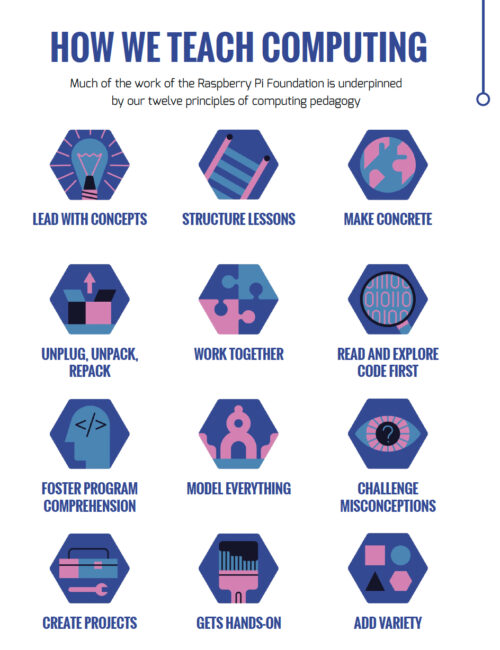
12 principles of computing pedagogy: lead with concepts; structure lessons; make concrete; unplug, unpack, repack; work together; read and explore code first; foster program comprehension; model everything; challenge misconceptions; create projects; get hands-on; add variety.

In this keynote talk, our Chief Learning Officer Sue Sentance will focus on some of the 12 pedagogy principles that we developed to support the teaching of computer science. We created this set of principles together with other teachers and researchers to help us and everyone in computing and computer science education reflect on how we teach our learners. Sue will share how we arrived at the principles, and she’ll use classroom examples to illustrate how you can apply them in practice.

Exploring the Hello World Big Book of Computing Pedagogy

Sunday 17 July, 9–10am: Workshop with Sue Sentance

The set of 12 pedagogy principles we’ve developed for teaching computing are presented in our Hello World Big Book of Computing Pedagogy. The book includes summaries, teachers’ perspectives, and lesson plans for each of the 12 principles.

A tweet praising The Big Book of Computing Pedagogy.

All CSTA attendees will get their own print copy of the Big Book, and in this practical session, we will use the book to explore together how you can use the 12 principles in the planning and delivery of your lessons. The session will be very hands-on, so bring along something you know you want or need to teach.

See you at CSTA in July

CSTA is now just a month away, and we can’t wait to meet old friends, make new connections, and learn from each other! Come find us at booth 521 or at our sessions to meet the team, discover Hello World magazine and the Hello World podcast, and find out more about our educational work. We hope to see you soon.

The post We’ll see you at CSTA 2022 Annual Conference appeared first on Raspberry Pi.

Combining Amazon AppFlow with AWS Step Functions to maximize application integration benefits

Post Syndicated from James Beswick original https://aws.amazon.com/blogs/compute/combining-amazon-appflow-with-aws-step-functions-to-maximize-application-integration-benefits/

This post is written by Ahmad Aboushady, Senior Technical Account Manager and Kamen Sharlandjiev, Senior Specialist Solution Architect, Integration.

In this blog post, you learn how to orchestrate AWS service integrations to reduce the manual steps in your workflow. The example uses AWS Step Functions SDK integration to integrate Amazon AppFlow and AWS Glue catalog without writing custom code. It automatically uses Amazon EventBridge to trigger Step Functions every time a new Amazon AppFlow flow finishes running.

Amazon AppFlow enables customers to transfer data securely between software as a service (SaaS) applications, like Salesforce, SAP, Zendesk, Slack, ServiceNow, and multiple AWS services.

An everyday use case of Amazon AppFlow is creating a customer-360 by integrating marketing, customer support, and sales data. For example, analyze the revenue impact of different marketing channels by synchronizing the revenue data from Salesforce with marketing data from Adobe Marketo.

This involves setting up flows to ingest data from different data sources and SaaS applications to AWS Data Lake based on Amazon S3. It uses AWS Glue to crawl and catalog this data. Customers use this catalog to access data quickly in several ways.

For example, they query the data using Amazon Athena or Amazon QuickSight for visualizations, business intelligence and anomaly detection. You can create those data flows quickly with no code required. However, to complete the next set of requirements, customers often go through multiple manual steps of provisioning and configuring different AWS resources. One such step requires creating AWS Glue crawler and running it with every Amazon AppFlow flow execution.

Step Functions can help us automate this process. This is a low-code workflow orchestration service that offers a visual workflow designer. You can quickly build workflows using the built-in drag-and-drop interface available in the AWS Management Console.

You can follow this blog and build your end-to-end state machine using the Step Functions Workflow Studio, or use the AWS Serverless Application Model (AWS SAM) template to deploy the example. The Step Functions state machine uses SDK integration with other AWS Services, so you don’t need to write any custom integration code.

Overview

The following diagram depicts the workflow with the different states in the state machine. You can group these into three phases: preparation, processing, and configuration.

  • The preparation phase captures all the configuration parameters and collects information about the metadata of the data, ingested by Amazon AppFlow.
  • The processing phase generates the AWS Glue table definition and sets the required parameters based on the destination file type. It iterates through the different columns and adds them as part of the table definition.
  • The last phase provides the Glue Catalog resources by creating or updating an existing AWS Glue table. With each Amazon AppFlow flow execution, the state machine determines if a new Glue table partition is required.

Workflow architecture

Preparation phase

The first state, “SetDatabaseAndContext”, is a pass state where you set the configuration parameters used in later states. Set the AWS Glue database and table name and capture the details of the data flow. You can do this by using the parameters filter to build a new JSON payload using parts of the state input similar to:

"Parameters": {
        "Config": {
          "Database": "<Glue-Database-Name>",
          "TableName.$": "$.detail['flow-name']",
          "detail.$": "$.detail"
        }
}

The following state, “DatabaseExist?” is an AWS SDK integration using a “GetDatabase” call to AWS Glue to ensure that the database exists. Here, the state uses error handling to intercept exception messages from the SDK call. This feature splits the workflow and adds an extra step if needed.

In this case, the SDK call returns an exception if the database does not exist, and the workflow invokes the “CreateDatabase” state. It moves to the “CleanUpError” state to clean up any errors and set the configuration parameters accordingly. Afterwards, with the database in place, the workflow continues to the next state: “DescribeFlow”. This returns the metadata of the Amazon AppFlow flow. Part of this metadata is the list of the object fields, which you must create in the Glue table and partitions.

Here is an error handling state that catches exceptions and routes the flow to execute an extra step:

"Catch": [
  {
    "ErrorEquals": [
      "States.ALL"
    ],
    "Comment": "Create Glue Database",
    "Next": "CreateDatabase",
    "ResultPath": "$.error"
  }
]

In the next state, “DescribeFlow”, you use the AWS SDK integration to get the Amazon AppFlow flow configuration. This uses the Amazon AppFlow “DescribeFlow API call. It moves to “S3AsDestination?”, which is a choice state to check if S3 is a destination for the flow. Amazon AppFlow allows you to bring data into different purpose-built data stores, such as S3, Amazon Redshift, or external SaaS or data warehouse applications. This automation can only continue if the configured destination is S3.

The choice definition is:

"Choices": [
  {
    "Variable": "$.FlowConfig.DestinationFlowConfigList[0].ConnectorType",
    "StringEquals": "S3",
    "Next": "GenerateTableDefinition"
  }
],
"Default": "S3NotDestination"

Processing phase

The following state generates the base AWS Glue table definition based on the destination file type. Then it uses a map state to iterate and transform the Amazon AppFlow schema output into what the AWS Glue Data Catalog expects as input.

Next, add the “GenerateTableDefinition” state and use the parameters filter to build a new JSON payload output. Finally, use the information from the “DescribeFlow” state similar to:

"Parameters": {
  "Config.$": "$.Config",
  "FlowConfig.$": "$.FlowConfig",
  "TableInput": {
    "Description": "Created by AmazonAppFlow",
    "Name.$": "$.Config.TableName",
    "PartitionKeys": [
      {
        "Name": "partition_0",
        "Type": "string"
      }
    ],
    "Retention": 0,
    "Parameters": {
      "compressionType": "none",
      "classification.$": "$.FlowConfig.DestinationFlowConfigList[0].DestinationConnectorProperties['S3'].S3OutputFormatConfig.FileType",
      "typeOfData": "file"
    },
    "StorageDescriptor": {
      "BucketColumns": [],
      "Columns.$": "$.FlowConfig.Tasks[?(@.TaskType == 'Map')]",
      "Compressed": false,
      "InputFormat": "org.apache.hadoop.mapred.TextInputFormat",
      "Location.$": "States.Format('{}/{}/', $.Config.detail['destination-object'], $.FlowConfig.FlowName)",
      "NumberOfBuckets": -1,
      "OutputFormat": "org.apache.hadoop.hive.ql.io.HiveIgnoreKeyTextOutputFormat",
      "SortColumns": [],
      "StoredAsSubDirectories": false
    },
    "TableType": "EXTERNAL_TABLE"
  }
}

The following state, “DestinationFileFormatEvaluator”, is a choice state to change the JSON payload according to the destination file type. Amazon AppFlow supports different file type conversions when S3 is the destination of your data. These formats are CSV, Parquet, and JSON Lines. AWS Glue uses various serialization libraries according to the file type.

You iterate within a map state to transform the AWS Glue table schema and set the column type to a known AWS Glue format. If the file type is unrecognized or does not have an equivalent in Glue, default this field to string. The map state configuration is defined as:

"Iterator": {
        "StartAt": "KnownFIleFormat?",
        "States": {
          "KnownFIleFormat?": {
            "Type": "Choice",
            "Choices": [
              {
                "Or": [
                  {
                    "Variable": "$.TaskProperties.SOURCE_DATA_TYPE",
                    "StringEquals": "boolean"
                  },
                  {
                    "Variable": "$.TaskProperties.SOURCE_DATA_TYPE",
                    "StringEquals": "double"
                  },
                  .
                  .
                  .
                  .
                  {
                    "Variable": "$.TaskProperties.SOURCE_DATA_TYPE",
                    "StringEquals": "timestamp"
                  }
                ],
                "Next": "1:1 mapping"
              }
            ],
            "Default": "Cast to String"
          },
          "1:1 mapping": {
            "Type": "Pass",
            "End": true,
            "Parameters": {
              "Name.$": "$.DestinationField",
              "Type.$": "$.TaskProperties.SOURCE_DATA_TYPE"
            }
          },
          "Cast to String": {
            "Type": "Pass",
            "End": true,
            "Parameters": {
              "Name.$": "$.DestinationField",
              "Type": "string"
            }
          }
        }
      },
"ItemsPath": "$.TableInput.StorageDescriptor.Columns",
"ResultPath": "$.TableInput.StorageDescriptor.Columns",

Configuration phase

The next stage in the workflow is “TableExist?”, which checks if the Glue table exists. If the state machine detects any error because the table does not exist, it moves to the “CreateTable” state. Alternatively, it goes to the “UpdateTable” state.

Both states use the AWS SDK integration to create or update the AWS Glue table definition using the “TableInput” parameter. AWS Glue operates with partitions. Every time you have new data stored in a new S3 prefix, you must update the table and add a new partition showing where the data sits.

You need an extra step to check if Amazon AppFlow has stored the data into a new S3 prefix or an existing one. In the “AddPartition?” State, you must review and determine the next step of your workflow. For example, you must validate that the flow executed successfully and processed data.

A choice state helps with those checks:

"And": [
            {
              "Variable": "$.Config.detail['execution-id']",
              "IsPresent": true
            },
            {
              "Variable": "$.Config.detail['status']",
              "StringEquals": "Execution Successful"
            },
            {
              "Not": {
                "Variable": "$.Config.detail['num-of-records-processed']",
                "StringEquals": "0"
              }
            }
          ]

Amazon AppFlow supports different types of flow execution. With scheduled flows, you can regularly configure Amazon AppFlow to hydrate a data lake by bringing only new data since its last execution. Sometimes, after a successful flow execution, there is no new data to ingest. The workflow concludes and moves to the success state in such cases. However, if there is new data, the state machine continues to the next state, “SingleFileAggregation?”.

Amazon AppFlow supports different file aggregation strategies and allows you to aggregate all ingested records into a single or multiple files. Depending on your flow configuration, it may store your data in a different S3 prefix with each flow execution.

In this state, you check this configuration to decide if you need a new partition for your AWS Glue table.

"Variable": "$.FlowConfig.DestinationFlowConfigList[0].DestinationConnectorProperties.S3.S3OutputFormatConfig.AggregationConfig.AggregationType",
"StringEquals": "SingleFile"

If the data flow aggregates all records into a single file per flow execution, it stores all data into a single S3 prefix. In this case, there is a single partition in your AWS Glue table. You must create that single partition the first time this state machine executes for a specific flow.

Use the AWS SDK integration to get the table partition from the AWS Glue in the “IsPartitionExist?” state. Conclude the workflow and move to the “Success” state if the partition exists. Otherwise, create that single partition in another state, “CreateMainPartition”.

If the flow run does not aggregate files, every flow run generates multiple files into a new S3 prefix. In this case, you add a new partition to the AWS Glue table. A pass state, “ConfigureDestination”, configures the required parameters for the partition creation:

"Parameters": {
        "InputFormat.$": "$.TableInput.StorageDescriptor.InputFormat",
        "OutputFormat.$": "$.TableInput.StorageDescriptor.OutputFormat",
        "Columns.$": "$.TableInput.StorageDescriptor.Columns",
        "Compressed.$": "$.TableInput.StorageDescriptor.Compressed",
        "SerdeInfo.$": "$.TableInput.StorageDescriptor.SerdeInfo",
        "Location.$": "States.Format('{}{}', $.TableInput.StorageDescriptor.Location, $.Config.detail['execution-id'])"
      },
 "ResultPath": "$.TableInput.StorageDescriptor"

Next, move to the “CreateNewPartition” state to use the AWS SDK integration to create a new partition to the Glue table similar to:

"Parameters": {
        "DatabaseName.$": "$.Config.Database",
        "TableName.$": "$.Config.TableName",
        "PartitionInput": {
          "Values.$": "States.Array($.Config.detail['execution-id'])",
          "StorageDescriptor.$": "$.TableInput.StorageDescriptor"
        }
      },
"Resource": "arn:aws:states:::aws-sdk:glue:createPartition"

This concludes the workflow with a “Succeed” state after configuring the AWS Glue table in response to the new Amazon AppFlow flow run.

Conclusion

This blog post explores how to integrate Amazon AppFlow and AWS Glue using Step Functions to automate your business requirements. You can use AWS Lambda to simplify the configuration phase and reduce state transitions or create complex checks, filters, or even data cleansing and preparation.

This approach allows you to tailor the schema conversion to your business requirements. Use this AWS SAM template, to deploy this example. This provides the Step Functions workflow described in this post and the EventBridge rule to trigger the state machine after each Amazon AppFlow flow run. The template also includes all required IAM roles and permissions.

For more serverless learning resources, visit Serverless Land.

Optimize Federated Query Performance using EXPLAIN and EXPLAIN ANALYZE in Amazon Athena

Post Syndicated from Nishchai JM original https://aws.amazon.com/blogs/big-data/optimize-federated-query-performance-using-explain-and-explain-analyze-in-amazon-athena/

Amazon Athena is an interactive query service that makes it easy to analyze data in Amazon Simple Storage Service (Amazon S3) using standard SQL. Athena is serverless, so there is no infrastructure to manage, and you pay only for the queries that you run. In 2019, Athena added support for federated queries to run SQL queries across data stored in relational, non-relational, object, and custom data sources.

In 2021, Athena added support for the EXPLAIN statement, which can help you understand and improve the efficiency of your queries. The EXPLAIN statement provides a detailed breakdown of a query’s run plan. You can analyze the plan to identify and reduce query complexity and improve its runtime. You can also use EXPLAIN to validate SQL syntax prior to running the query. Doing so helps prevent errors that would have occurred while running the query.

Athena also added EXPLAIN ANALYZE, which displays the computational cost of your queries alongside their run plans. Administrators can benefit from using EXPLAIN ANALYZE because it provides a scanned data count, which helps you reduce financial impact due to user queries and apply optimizations for better cost control.

In this post, we demonstrate how to use and interpret EXPLAIN and EXPLAIN ANALYZE statements to improve Athena query performance when querying multiple data sources.

Solution overview

To demonstrate using EXPLAIN and EXPLAIN ANALYZE statements, we use the following services and resources:

Athena uses the AWS Glue Data Catalog to store and retrieve table metadata for the Amazon S3 data in your AWS account. The table metadata lets the Athena query engine know how to find, read, and process the data that you want to query. We use Athena data source connectors to connect to data sources external to Amazon S3.

Prerequisites

To deploy the CloudFormation template, you must have the following:

Provision resources with AWS CloudFormation

To deploy the CloudFormation template, complete the following steps:

  1. Choose Launch Stack:

  1. Follow the prompts on the AWS CloudFormation console to create the stack.
  2. Note the key-value pairs on the stack’s Outputs tab.

You use these values when configuring the Athena data source connectors.

The CloudFormation template creates the following resources:

  • S3 buckets to store data and act as temporary spill buckets for Lambda
  • AWS Glue Data Catalog tables for the data in the S3 buckets
  • A DynamoDB table and Amazon RDS for MySQL tables, which are used to join multiple tables from different sources
  • A VPC, subnets, and endpoints, which are needed for Amazon RDS for MySQL and DynamoDB

The following figure shows the high-level data model for the data load.

Create the DynamoDB data source connector

To create the DynamoDB connector for Athena, complete the following steps:

  1. On the Athena console, choose Data sources in the navigation pane.
  2. Choose Create data source.
  3. For Data sources, select Amazon DynamoDB.
  4. Choose Next.

  1. For Data source name, enter DDB.

  1. For Lambda function, choose Create Lambda function.

This opens a new tab in your browser.

  1. For Application name, enter AthenaDynamoDBConnector.
  2. For SpillBucket, enter the value from the CloudFormation stack for AthenaSpillBucket.
  3. For AthenaCatalogName, enter dynamodb-lambda-func.
  4. Leave the remaining values at their defaults.
  5. Select I acknowledge that this app creates custom IAM roles and resource policies.
  6. Choose Deploy.

You’re returned to the Connect data sources section on the Athena console.

  1. Choose the refresh icon next to Lambda function.
  2. Choose the Lambda function you just created (dynamodb-lambda-func).

  1. Choose Next.
  2. Review the settings and choose Create data source.
  3. If you haven’t already set up the Athena query results location, choose View settings on the Athena query editor page.

  1. Choose Manage.
  2. For Location of query result, browse to the S3 bucket specified for the Athena spill bucket in the CloudFormation template.
  3. Add Athena-query to the S3 path.
  4. Choose Save.

  1. In the Athena query editor, for Data source, choose DDB.
  2. For Database, choose default.

You can now explore the schema for the sportseventinfo table; the data is the same in DynamoDB.

  1. Choose the options icon for the sportseventinfo table and choose Preview Table.

Create the Amazon RDS for MySQL data source connector

Now let’s create the connector for Amazon RDS for MySQL.

  1. On the Athena console, choose Data sources in the navigation pane.
  2. Choose Create data source.
  3. For Data sources, select MySQL.
  4. Choose Next.

  1. For Data source name, enter MySQL.

  1. For Lambda function, choose Create Lambda function.

  1. For Application name, enter AthenaMySQLConnector.
  2. For SecretNamePrefix, enter AthenaMySQLFederation.
  3. For SpillBucket, enter the value from the CloudFormation stack for AthenaSpillBucket.
  4. For DefaultConnectionString, enter the value from the CloudFormation stack for MySQLConnection.
  5. For LambdaFunctionName, enter mysql-lambda-func.
  6. For SecurityGroupIds, enter the value from the CloudFormation stack for RDSSecurityGroup.
  7. For SubnetIds, enter the value from the CloudFormation stack for RDSSubnets.
  8. Select I acknowledge that this app creates custom IAM roles and resource policies.
  9. Choose Deploy.

  1. On the Lambda console, open the function you created (mysql-lambda-func).
  2. On the Configuration tab, under Environment variables, choose Edit.

  1. Choose Add environment variable.
  2. Enter a new key-value pair:
    • For Key, enter MYSQL_connection_string.
    • For Value, enter the value from the CloudFormation stack for MySQLConnection.
  3. Choose Save.

  1. Return to the Connect data sources section on the Athena console.
  2. Choose the refresh icon next to Lambda function.
  3. Choose the Lambda function you created (mysql-lamdba-function).

  1. Choose Next.
  2. Review the settings and choose Create data source.
  3. In the Athena query editor, for Data Source, choose MYSQL.
  4. For Database, choose sportsdata.

  1. Choose the options icon by the tables and choose Preview Table to examine the data and schema.

In the following sections, we demonstrate different ways to optimize our queries.

Optimal join order using EXPLAIN plan

A join is a basic SQL operation to query data on multiple tables using relations on matching columns. Join operations affect how much data is read from a table, how much data is transferred to the intermediate stages through networks, and how much memory is needed to build up a hash table to facilitate a join.

If you have multiple join operations and these join tables aren’t in the correct order, you may experience performance issues. To demonstrate this, we use the following tables from difference sources and join them in a certain order. Then we observe the query runtime and improve performance by using the EXPLAIN feature from Athena, which provides some suggestions for optimizing the query.

The CloudFormation template you ran earlier loaded data into the following services:

AWS Storage Table Name Number of Rows
Amazon DynamoDB sportseventinfo 657
Amazon S3 person 7,025,585
Amazon S3 ticketinfo 2,488

Let’s construct a query to find all those who participated in the event by type of tickets. The query runtime with the following join took approximately 7 mins to complete:

SELECT t.id AS ticket_id, 
e.eventid, 
p.first_name 
FROM 
"DDB"."default"."sportseventinfo" e, 
"AwsDataCatalog"."athenablog"."person" p, 
"AwsDataCatalog"."athenablog"."ticketinfo" t 
WHERE 
t.sporting_event_id = cast(e.eventid as double) 
AND t.ticketholder_id = p.id

Now let’s use EXPLAIN on the query to see its run plan. We use the same query as before, but add explain (TYPE DISTRIBUTED):

EXPLAIN (TYPE DISTRIBUTED)
SELECT t.id AS ticket_id, 
e.eventid, 
p.first_name 
FROM 
"DDB"."default"."sportseventinfo" e, 
"AwsDataCatalog"."athenablog"."person" p, 
"AwsDataCatalog"."athenablog"."ticketinfo" t 
WHERE 
t.sporting_event_id = cast(e.eventid as double) 
AND t.ticketholder_id = p.id

The following screenshot shows our output

Notice the cross-join in Fragment 1. The joins are converted to a Cartesian product for each table, where every record in a table is compared to every record in another table. Therefore, this query takes a significant amount of time to complete.

To optimize our query, we can rewrite it by reordering the joining tables as sportseventinfo first, ticketinfo second, and person last. The reason for this is because the WHERE clause, which is being converted to a JOIN ON clause during the query plan stage, doesn’t have the join relationship between the person table and sportseventinfo table. Therefore, the query plan generator converted the join type to cross-joins (a Cartesian product), which less efficient. Reordering the tables aligns the WHERE clause to the INNER JOIN type, which satisfies the JOIN ON clause and runtime is reduced from 7 minutes to 10 seconds.

The code for our optimized query is as follows:

SELECT t.id AS ticket_id, 
e.eventid, 
p.first_name 
FROM 
"DDB"."default"."sportseventinfo" e, 
"AwsDataCatalog"."athenablog"."ticketinfo" t, 
"AwsDataCatalog"."athenablog"."person" p 
WHERE 
t.sporting_event_id = cast(e.eventid as double) 
AND t.ticketholder_id = p.id

The following is the EXPLAIN output of our query after reordering the join clause:

EXPLAIN (TYPE DISTRIBUTED) 
SELECT t.id AS ticket_id, 
e.eventid, 
p.first_name 
FROM 
"DDB"."default"."sportseventinfo" e, 
"AwsDataCatalog"."athenablog"."ticketinfo" t, 
"AwsDataCatalog"."athenablog"."person" p 
WHERE t.sporting_event_id = cast(e.eventid as double) 
AND t.ticketholder_id = p.id

The following screenshot shows our output.

The cross-join changed to INNER JOIN with join on columns (eventid, id, ticketholder_id), which results in the query running faster. Joins between the ticketinfo and person tables converted to the PARTITION distribution type, where both left and right tables are hash-partitioned across all worker nodes due to the size of the person table. The join between the sportseventinfo table and ticketinfo are converted to the REPLICATED distribution type, where one table is hash-partitioned across all worker nodes and the other table is replicated to all worker nodes to perform the join operation.

For more information about how to analyze these results, refer to Understanding Athena EXPLAIN statement results.

As a best practice, we recommend having a JOIN statement along with an ON clause, as shown in the following code:

SELECT t.id AS ticket_id, 
e.eventid, 
p.first_name 
FROM 
"AwsDataCatalog"."athenablog"."person" p 
JOIN "AwsDataCatalog"."athenablog"."ticketinfo" t ON t.ticketholder_id = p.id 
JOIN "ddb"."default"."sportseventinfo" e ON t.sporting_event_id = cast(e.eventid as double)

Also as a best practice when you join two tables, specify the larger table on the left side of join and the smaller table on the right side of the join. Athena distributes the table on the right to worker nodes, and then streams the table on the left to do the join. If the table on the right is smaller, then less memory is used and the query runs faster.

In the following sections, we present examples of how to optimize pushdowns for filter predicates and projection filter operations for the Athena data source using EXPLAIN ANALYZE.

Pushdown optimization for the Athena connector for Amazon RDS for MySQL

A pushdown is an optimization to improve the performance of a SQL query by moving its processing as close to the data as possible. Pushdowns can drastically reduce SQL statement processing time by filtering data before transferring it over the network and filtering data before loading it into memory. The Athena connector for Amazon RDS for MySQL supports pushdowns for filter predicates and projection pushdowns.

The following table summarizes the services and tables we use to demonstrate a pushdown using Aurora MySQL.

Table Name Number of Rows Size in KB
player_partitioned 5,157 318.86
sport_team_partitioned 62 5.32

We use the following query as an example of a filtering predicate and projection filter:

SELECT full_name,
name 
FROM "sportsdata"."player_partitioned" a 
JOIN "sportsdata"."sport_team_partitioned" b ON a.sport_team_id=b.id 
WHERE a.id='1.0'

This query selects the players and their team based on their ID. It serves as an example of both filter operations in the WHERE clause and projection because it selects only two columns.

We use EXPLAIN ANALYZE to get the cost for the running this query:

EXPLAIN ANALYZE 
SELECT full_name,
name 
FROM "MYSQL"."sportsdata"."player_partitioned" a 
JOIN "MYSQL"."sportsdata"."sport_team_partitioned" b ON a.sport_team_id=b.id 
WHERE a.id='1.0'

The following screenshot shows the output in Fragment 2 for the table player_partitioned, in which we observe that the connector has a successful pushdown filter on the source side, so it tries to scan only one record out of the 5,157 records in the table. The output also shows that the query scan has only two columns (full_name as the projection column and sport_team_id and the join column), and uses SELECT and JOIN, which indicates the projection pushdown is successful. This helps reduce the data scan when using Athena data source connectors.

Now let’s look at the conditions in which a filter predicate pushdown doesn’t work with Athena connectors.

LIKE statement in filter predicates

We start with the following example query to demonstrate using the LIKE statement in filter predicates:

SELECT * 
FROM "MYSQL"."sportsdata"."player_partitioned" 
WHERE first_name LIKE '%Aar%'

We then add EXPLAIN ANALYZE:

EXPLAIN ANALYZE 
SELECT * 
FROM "MYSQL"."sportsdata"."player_partitioned" 
WHERE first_name LIKE '%Aar%'

The EXPLAIN ANALYZE output shows that the query performs the table scan (scanning the table player_partitioned, which contains 5,157 records) for all the records even though the WHERE clause only has 30 records matching the condition %Aar%. Therefore, the data scan shows the complete table size even with the WHERE clause.

We can optimize the same query by selecting only the required columns:

EXPLAIN ANALYZE 
SELECT sport_team_id,
full_name 
FROM "MYSQL"."sportsdata"."player_partitioned" 
WHERE first_name LIKE '%Aar%'

From the EXPLAIN ANALYZE output, we can observe that the connector supports the projection filter pushdown, because we select only two columns. This brought the data scan size down to half of the table size.

OR statement in filter predicates

We start with the following query to demonstrate using the OR statement in filter predicates:

SELECT id,
first_name 
FROM "MYSQL"."sportsdata"."player_partitioned" 
WHERE first_name = 'Aaron' OR id ='1.0'

We use EXPLAIN ANALYZE with the preceding query as follows:

EXPLAIN ANALYZE 
SELECT * 
FROM 
"MYSQL"."sportsdata"."player_partitioned" 
WHERE first_name = 'Aaron' OR id ='1.0'

Similar to the LIKE statement, the following output shows that query scanned the table instead of pushing down to only the records that matched the WHERE clause. This query outputs only 16 records, but the data scan indicates a complete scan.

Pushdown optimization for the Athena connector for DynamoDB

For our example using the DynamoDB connector, we use the following data:

Table Number of Rows Size in KB
sportseventinfo 657 85.75

Let’s test the filter predicate and project filter operation for our DynamoDB table using the following query. This query tries to get all the events and sports for a given location. We use EXPLAIN ANALYZE for the query as follows:

EXPLAIN ANALYZE 
SELECT EventId,
Sport 
FROM "DDB"."default"."sportseventinfo" 
WHERE Location = 'Chase Field'

The output of EXPLAIN ANALYZE shows that the filter predicate retrieved only 21 records, and the project filter selected only two columns to push down to the source. Therefore, the data scan for this query is less than the table size.

Now let’s see where filter predicate pushdown doesn’t work. In the WHERE clause, if you apply the TRIM() function to the Location column and then filter, predicate pushdown optimization doesn’t apply, but we still see the projection filter optimization, which does apply. See the following code:

EXPLAIN ANALYZE 
SELECT EventId,
Sport 
FROM "DDB"."default"."sportseventinfo" 
WHERE trim(Location) = 'Chase Field'

The output of EXPLAIN ANALYZE for this query shows that the query scans all the rows but is still limited to only two columns, which shows that the filter predicate doesn’t work when the TRIM function is applied.

We’ve seen from the preceding examples that the Athena data source connector for Amazon RDS for MySQL and DynamoDB do support filter predicates and projection predicates for pushdown optimization, but we also saw that operations such as LIKE, OR, and TRIM when used in the filter predicate don’t support pushdowns to the source. Therefore, if you encounter unexplained charges in your federated Athena query, we recommend using EXPLAIN ANALYZE with the query and determine whether your Athena connector supports the pushdown operation or not.

Please note that running EXPLAIN ANALYZE incurs cost because it scans the data.

Conclusion

In this post, we showcased how to use EXPLAIN and EXPLAIN ANALYZE to analyze Athena SQL queries for data sources on AWS S3 and Athena federated SQL query for data source like DynamoDB and Amazon RDS for MySQL. You can use this as an example to optimize queries which would also result in cost savings.


About the Authors

Nishchai JM is an Analytics Specialist Solutions Architect at Amazon Web services. He specializes in building Big-data applications and help customer to modernize their applications on Cloud. He thinks Data is new oil and spends most of his time in deriving insights out of the Data.

Varad Ram is Senior Solutions Architect in Amazon Web Services. He likes to help customers adopt to cloud technologies and is particularly interested in artificial intelligence. He believes deep learning will power future technology growth. In his spare time, he like to be outdoor with his daughter and son.


Patch Tuesday – June 2022

Post Syndicated from Greg Wiseman original https://blog.rapid7.com/2022/06/14/patch-tuesday-june-2022/

Patch Tuesday - June 2022

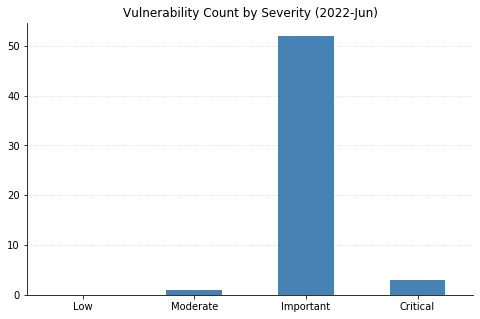
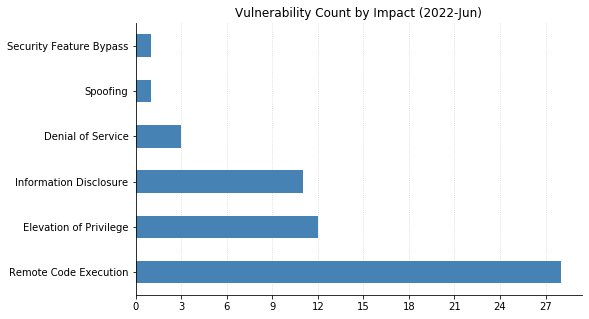
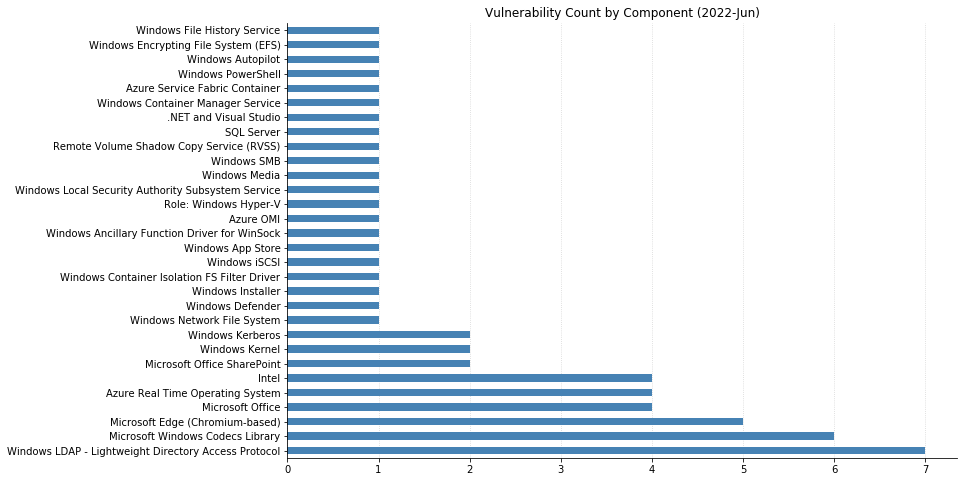
July’s Patch Tuesday sees Microsoft releasing fixes for over 60 CVEs. Top of mind for many administrators this month is CVE-2022-30190, also known as Follina, which was observed being exploited in the wild at the end of May. Microsoft provided mitigation instructions (disabling the MSDT URL protocol via the registry), but actual patches were not available until today’s cumulative Windows Updates. Even if the mitigation was previously applied, installing the updates is highly recommended.

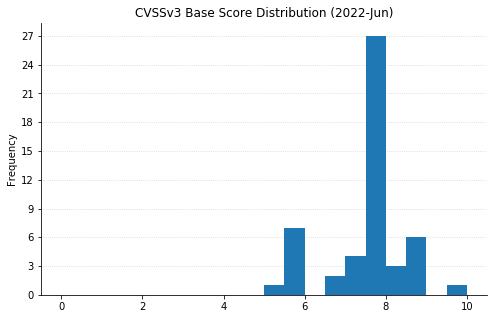
None of the other CVEs being addressed this month have been previously disclosed or seen exploited yet. However, it won’t be long before attackers start looking at CVE-2022-30136, a critical remote code execution (RCE) vulnerability affecting the Windows Network File System (NFS). Last month, Microsoft fixed a similar vulnerability (CVE-2022-26937) affecting NFS v2.0 and v3.0. CVE-2022-30136, on the other hand, is only exploitable in NFS v4.1. Microsoft has provided mitigation guidance to disable NFS v4.1, which should only be done if the May updates fixing previous NFS versions have been applied. Again, even if the mitigation has been put into place, best to patch sooner rather than later.

Also reminiscent of last month is CVE-2022-30139, a critical RCE in LDAP carrying a CVSSv3 base score of 7.1, which again is only exploitable if the MaxReceiveBuffer LDAP policy value is set higher than the default. Rounding out the critical RCEs for July is CVE-2022-30163, which could allow a malicious application running on a Hyper-V guest to execute code on the host OS.

The other big news this month is the end of support for Internet Explorer 11 (IE11) on Windows 10 Semi-Annual Channels and Windows 10 IoT Semi-Annual Channels, as Microsoft encourages users to adopt the Chromium-based Edge browser (which saw fixes for 5 CVEs this month). Internet Explorer 11 on other versions of Windows should continue receiving security updates and technical support based on the OS support lifecycle, so this is only the beginning of the end for the legacy browser.

Summary charts

Patch Tuesday - June 2022

Summary tables

Apps vulnerabilities

CVE Title Exploited? Publicly disclosed? CVSSv3 base score Has FAQ?
CVE-2022-30168 Microsoft Photos App Remote Code Execution Vulnerability No No 7.8 Yes

Azure vulnerabilities

CVE Title Exploited? Publicly disclosed? CVSSv3 base score Has FAQ?
CVE-2022-30137 Azure Service Fabric Container Elevation of Privilege Vulnerability No No 6.7 Yes
CVE-2022-30177 Azure RTOS GUIX Studio Remote Code Execution Vulnerability No No 7.8 Yes
CVE-2022-30178 Azure RTOS GUIX Studio Remote Code Execution Vulnerability No No 7.8 Yes
CVE-2022-30179 Azure RTOS GUIX Studio Remote Code Execution Vulnerability No No 7.8 Yes
CVE-2022-30180 Azure RTOS GUIX Studio Information Disclosure Vulnerability No No 7.8 Yes

Azure System Center vulnerabilities

CVE Title Exploited? Publicly disclosed? CVSSv3 base score Has FAQ?
CVE-2022-29149 Azure Open Management Infrastructure (OMI) Elevation of Privilege Vulnerability No No 7.8 Yes

Browser vulnerabilities

CVE Title Exploited? Publicly disclosed? CVSSv3 base score Has FAQ?
CVE-2022-22021 Microsoft Edge (Chromium-based) Remote Code Execution Vulnerability No No 8.3 Yes
CVE-2022-2011 Chromium: CVE-2022-2011 Use after free in ANGLE No No N/A Yes
CVE-2022-2010 Chromium: CVE-2022-2010 Out of bounds read in compositing No No N/A Yes
CVE-2022-2008 Chromium: CVE-2022-2008 Out of bounds memory access in WebGL No No N/A Yes
CVE-2022-2007 Chromium: CVE-2022-2007 Use after free in WebGPU No No N/A Yes

Developer Tools vulnerabilities

CVE Title Exploited? Publicly disclosed? CVSSv3 base score Has FAQ?
CVE-2022-30184 .NET and Visual Studio Information Disclosure Vulnerability No No 5.5 Yes

ESU Windows vulnerabilities

CVE Title Exploited? Publicly disclosed? CVSSv3 base score Has FAQ?
CVE-2022-30140 Windows iSCSI Discovery Service Remote Code Execution Vulnerability No No 7.1 Yes
CVE-2022-30152 Windows Network Address Translation (NAT) Denial of Service Vulnerability No No 7.5 No
CVE-2022-30135 Windows Media Center Elevation of Privilege Vulnerability No No 7.8 No
CVE-2022-30153 Windows Lightweight Directory Access Protocol (LDAP) Remote Code Execution Vulnerability No No 8.8 Yes
CVE-2022-30161 Windows Lightweight Directory Access Protocol (LDAP) Remote Code Execution Vulnerability No No 8.8 Yes
CVE-2022-30141 Windows Lightweight Directory Access Protocol (LDAP) Remote Code Execution Vulnerability No No 8.1 Yes
CVE-2022-30143 Windows Lightweight Directory Access Protocol (LDAP) Remote Code Execution Vulnerability No No 7.5 Yes
CVE-2022-30149 Windows Lightweight Directory Access Protocol (LDAP) Remote Code Execution Vulnerability No No 7.5 Yes
CVE-2022-30146 Windows Lightweight Directory Access Protocol (LDAP) Remote Code Execution Vulnerability No No 7.5 Yes
CVE-2022-30155 Windows Kernel Denial of Service Vulnerability No No 5.5 Yes
CVE-2022-30147 Windows Installer Elevation of Privilege Vulnerability No No 7.8 No
CVE-2022-30163 Windows Hyper-V Remote Code Execution Vulnerability No No 8.5 Yes
CVE-2022-30142 Windows File History Remote Code Execution Vulnerability No No 7.1 Yes
CVE-2022-30151 Windows Ancillary Function Driver for WinSock Elevation of Privilege Vulnerability No No 7 Yes
CVE-2022-30160 Windows Advanced Local Procedure Call Elevation of Privilege Vulnerability No No 7.8 No
CVE-2022-30166 Local Security Authority Subsystem Service Elevation of Privilege Vulnerability No No 7.8 No
CVE-2022-21166 Intel: CVE-2022-21166 Device Register Partial Write (DRPW) No No N/A Yes
CVE-2022-21127 Intel: CVE-2022-21127 Special Register Buffer Data Sampling Update (SRBDS Update) No No N/A Yes
CVE-2022-21125 Intel: CVE-2022-21125 Shared Buffers Data Sampling (SBDS) No No N/A Yes
CVE-2022-21123 Intel: CVE-2022-21123 Shared Buffers Data Read (SBDR) No No N/A Yes

Microsoft Office vulnerabilities

CVE Title Exploited? Publicly disclosed? CVSSv3 base score Has FAQ?
CVE-2022-30157 Microsoft SharePoint Server Remote Code Execution Vulnerability No No 8.8 Yes
CVE-2022-30158 Microsoft SharePoint Server Remote Code Execution Vulnerability No No 8.8 Yes
CVE-2022-30174 Microsoft Office Remote Code Execution Vulnerability No No 7.4 Yes
CVE-2022-30159 Microsoft Office Information Disclosure Vulnerability No No 5.5 Yes
CVE-2022-30171 Microsoft Office Information Disclosure Vulnerability No No 5.5 Yes
CVE-2022-30172 Microsoft Office Information Disclosure Vulnerability No No 5.5 Yes
CVE-2022-30173 Microsoft Excel Remote Code Execution Vulnerability No No 7.8 Yes

SQL Server vulnerabilities

CVE Title Exploited? Publicly disclosed? CVSSv3 base score Has FAQ?
CVE-2022-29143 Microsoft SQL Server Remote Code Execution Vulnerability No No 7.5 Yes

Windows vulnerabilities

CVE Title Exploited? Publicly disclosed? CVSSv3 base score Has FAQ?
CVE-2022-32230 Windows SMB Denial of Service Vulnerability No No N/A Yes
CVE-2022-30136 Windows Network File System Remote Code Execution Vulnerability No No 9.8 Yes
CVE-2022-30139 Windows Lightweight Directory Access Protocol (LDAP) Remote Code Execution Vulnerability No No 7.5 Yes
CVE-2022-30162 Windows Kernel Information Disclosure Vulnerability No No 5.5 Yes
CVE-2022-30165 Windows Kerberos Elevation of Privilege Vulnerability No No 8.8 Yes
CVE-2022-30145 Windows Encrypting File System (EFS) Remote Code Execution Vulnerability No No 7.5 Yes
CVE-2022-30148 Windows Desired State Configuration (DSC) Information Disclosure Vulnerability No No 5.5 Yes
CVE-2022-30150 Windows Defender Remote Credential Guard Elevation of Privilege Vulnerability No No 7.5 Yes
CVE-2022-30132 Windows Container Manager Service Elevation of Privilege Vulnerability No No 7.8 No
CVE-2022-30131 Windows Container Isolation FS Filter Driver Elevation of Privilege Vulnerability No No 7.8 No
CVE-2022-30189 Windows Autopilot Device Management and Enrollment Client Spoofing Vulnerability No No 6.5 Yes
CVE-2022-30154 Microsoft File Server Shadow Copy Agent Service (RVSS) Elevation of Privilege Vulnerability No No 5.3 Yes
CVE-2022-30164 Kerberos AppContainer Security Feature Bypass Vulnerability No No 8.4 Yes
CVE-2022-29111 HEVC Video Extensions Remote Code Execution Vulnerability No No 7.8 Yes
CVE-2022-22018 HEVC Video Extensions Remote Code Execution Vulnerability No No 7.8 Yes
CVE-2022-30188 HEVC Video Extensions Remote Code Execution Vulnerability No No 7.8 Yes
CVE-2022-29119 HEVC Video Extensions Remote Code Execution Vulnerability No No 7.8 Yes
CVE-2022-30167 AV1 Video Extension Remote Code Execution Vulnerability No No 7.8 Yes
CVE-2022-30193 AV1 Video Extension Remote Code Execution Vulnerability No No 7.8 Yes

NEVER MISS A BLOG

Get the latest stories, expertise, and news about security today.

Additional reading:

AWS and the UK rules on operational resilience and outsourcing

Post Syndicated from Arvind Kannan original https://aws.amazon.com/blogs/security/aws-and-the-uk-rules-on-operational-resilience-and-outsourcing/

Financial institutions across the globe use Amazon Web Services (AWS) to transform the way they do business. Regulations continue to evolve in this space, and we’re working hard to help customers proactively respond to new rules and guidelines. In many cases, the AWS Cloud makes it simpler than ever before to assist customers with their compliance efforts with different regulations and frameworks around the world.

In the United Kingdom, the Financial Conduct Authority (FCA), the Bank of England and the Prudential Regulation Authority (PRA) issued policy statements and rules on operational resilience in March, 2021. The PRA also additionally issued a supervisory statement on outsourcing and third-party risk management. Broadly, these Statements apply to certain firms that are regulated by the UK Financial Regulators: this includes banks, building societies, credit unions, insurers, financial markets infrastructure providers, payment and e-money institutions, major investment firms, mixed activity holding companies, and UK branches of certain overseas firms. For other FCA-authorized financial services firms, the FCA has previously issued FG 16/5 Guidance for firms outsourcing to the ‘cloud’ and other third-party IT services.

These Statements are relevant to the use of cloud services. AWS strives to help support our customers with their compliance obligations and help them meet their regulator’s expectations. We offer our customers a wide range of services that can simplify and directly assist in complying with these Statements, which apply from March 2022.

What do these Statements from the UK Financial Regulators mean for AWS customers?

The Statements aim to ensure greater operational resilience for UK financial institutions and, in the case of the PRA’s papers on outsourcing, facilitate greater adoption of the cloud and other new technologies while also implementing the Guidelines on outsourcing arrangements from the European Banking Authority (EBA) and the relevant sections of the EBA Guidelines on ICT and security risk management. (See the AWS approach to these EBA guidelines in this blog post).

For AWS and our customers, the key takeaway is that these Statements provide a regulatory framework for cloud usage in a resilient manner. The PRA’s outsourcing paper, in particular, sets out conditions that can help give PRA-regulated firms assurance that they can deploy to the cloud in a safe and resilient manner, including for material, regulated workloads. When they consider or use third-party services (such as AWS), many UK financial institutions already follow due diligence, risk management, and regulatory notification processes that are similar to the processes identified in these Statements, the EBA Outsourcing Guidelines, and FG 16/5. UK financial institutions can use a variety of AWS security and compliance services to help them meet requirements on security, resilience, and assurance.

Risk-based approach

The Statements reference the principle of proportionality throughout. In the case of the outsourcing requirements, this includes a focus on material outsourcing arrangements and incorporating a risk-based approach that expects regulated entities to identify, assess, and mitigate the risks associated with outsourcing arrangements. The recognition of a shared responsibility model, referenced by the PRA and the recognition in FCA Guidance FG 16/5 that firms need to be clear about where responsibility lies between themselves and their service providers, is consistent with the long-standing AWS shared responsibility model. The proportionality and risk-based approach applies throughout the Statements, including the areas such as risk assessment, contractual and audit requirements, data location and transfer, operational resilience, and security implementation:

  • Risk assessment – The Statements emphasize the need for UK financial institutions to assess the potential impact of outsourcing arrangements on their operational risk. The AWS shared responsibility model helps customers formulate their risk assessment approach, because it illustrates how their security and management responsibilities change depending on the services from AWS they use. For example, AWS operates some controls on behalf of customers, such as data center security, while customers operate other controls, such as event logging. In practice, AWS helps customers assess and improve their risk profile relative to traditional, on-premises environments.
     
  • Contractual and audit requirements – The PRA supervisory statement on outsourcing and third-party risk management, the EBA Outsourcing Guidelines, and the FCA guidance FG 16/5 lay out requirements for the written agreement between a UK financial institution and its service provider, including access and audit rights. For UK financial institutions that are running regulated workloads on AWS, please contact your AWS account team to address these contractual requirements. We also help institutions that require contractual audit rights to comply with these requirements through the AWS Security & Audit Series, which facilitates customer audits. To align with regulatory requirements and expectations, our audit program incorporates feedback that we’ve received from EU and UK financial supervisory authorities. UK financial services customers interested in learning more about the audit engagements offered by AWS can reach out to their AWS account teams.
     
  • Data location and transfer – The UK Financial Regulators do not place restrictions on where a UK financial institution can store and process its data, but rather state that UK financial institutions should adopt a risk-based approach to data location. AWS continually monitors the evolving regulatory and legislative landscape around data privacy to identify changes and determine what tools our customers might need to help meet their compliance needs. Refer to our Data Protection page for our commitments, including commitments on data access and data storage.
     
  • Operational resilience – Resiliency is a shared responsibility between AWS and the customer. It is important that customers understand how disaster recovery and availability, as part of resiliency, operate under this shared model. AWS is responsible for resiliency of the infrastructure that runs all of the services offered in the AWS Cloud. This infrastructure comprises the hardware, software, networking, and facilities that run AWS Cloud services. AWS uses commercially reasonable efforts to make these AWS Cloud services available, ensuring that service availability meets or exceeds the AWS Service Level Agreements (SLAs).

    The customer’s responsibility will be determined by the AWS Cloud services that they select. This determines the amount of configuration work they must perform as part of their resiliency responsibilities. For example, a service such as Amazon Elastic Compute Cloud (Amazon EC2) requires the customer to perform all of the necessary resiliency configuration and management tasks. Customers that deploy Amazon EC2 instances are responsible for deploying EC2 instances across multiple locations (such as AWS Availability Zones), implementing self-healing by using services like AWS Auto Scaling, as well as using resilient workload architecture best practices for applications that are installed on the instances.

    For managed services, such as Amazon Simple Storage Service (Amazon S3) and Amazon DynamoDB, AWS operates the infrastructure layer, the operating system, and platforms, whereas customers access the endpoints to store and retrieve data. Customers are responsible for managing resiliency of their data, including backup, versioning, and replication strategies. For more details about our approach to operational resilience in financial services, refer to this whitepaper.

  • Security implementation – The Statements set expectations on data security, including data classification and data security, and require UK financial institutions to consider, implement, and monitor various security measures. Using AWS can help customers meet these requirements in a scalable and cost-effective way, while helping improve their security posture. Customers can use AWS Config or AWS Security Hub to simplify auditing, security analysis, change management, and operational troubleshooting.

    As part of their cybersecurity measures, customers can activate Amazon GuardDuty, which provides intelligent threat detection and continuous monitoring, to generate detailed and actionable security alerts. Amazon Macie uses machine learning and pattern matching to help customers classify their sensitive and business-critical data in AWS. Amazon Inspector automatically assesses a customer’s AWS resources for vulnerabilities or deviations from best practices and then produces a detailed list of security findings prioritized by level of severity.

    Customers can also enhance their security by using AWS Key Management Service (AWS KMS) (creation and control of encryption keys), AWS Shield (DDoS protection), and AWS WAF (helps protect web applications or APIs against common web exploits). These are just a few of the many services and features we offer that are designed to provide strong availability and security for our customers.

As reflected in these Statements, it’s important to take a balanced approach when evaluating responsibilities in cloud implementation. AWS is responsible for the security of the AWS infrastructure, and for all of our data centers, we assess and manage environmental risks, employ extensive physical and personnel security controls, and guard against outages through our resiliency and testing procedures. In addition, independent third-party auditors evaluate the AWS infrastructure against more than 2,600 standards and requirements throughout the year.

Conclusion

We encourage customers to learn about how these Statements apply to their organization. Our teams of security, compliance, and legal experts continue to work with our UK financial services customers, both large and small, to support their journey to the AWS Cloud. AWS is closely following how the UK regulatory authorities apply the Statements and will provide further updates as needed. If you have any questions about compliance with these Statements and their application to your use of AWS, reach out to your account representative or request to be contacted.

 
Want more AWS Security news? Follow us on Twitter.

Arvind Kannan

Arvind Kannan

Arvind is a Principal Compliance Specialist at Amazon Web Services based in London, United Kingdom. He spends his days working with financial services customers in the UK and across EMEA, helping them address questions around governance, risk and compliance. He has a strong focus on compliance and helping customers navigate the regulatory requirements and understand supervisory expectations.

Accelerating GitHub theme creation with color tooling

Post Syndicated from Cole Bemis original https://github.blog/2022-06-14-accelerating-github-theme-creation-with-color-tooling/

Dark mode is no longer a nice-to-have feature. It’s an expectation. Yet, for many teams, implementing dark mode is still a daunting task.

Creating a palette for dark interfaces is not as simple as inverting colors and complexity increases if your team is planning multiple themes. Many people find themselves using a combination of disjointed color tools, which can be a painful experience.

GitHub dark mode (unveiled at GitHub Universe in December 2020) was the result of trial and error, copy and paste, as well as back and forth in a Figma file (with more than 370,000 layers!).

A screenshot of the Figma file we made while designing GitHub dark mode

A few months after shipping dark mode, we began working on a dark high contrast theme to provide an option that maximizes legibility. While we were designing this new theme, we set out to improve our workflow by building an experimental tool to solve some of the challenges we encountered while designing the original dark color palette.

We’re calling our experimental color tool Primer Prism.

A sneak peek of Primer Prism

Part of GitHub’s Primer ecosystem, Primer Prism is a tool for creating and maintaining cohesive, consistent, and accessible color palettes. It allows us to:

  • Create or import color scales.
  • Adjust colors in a perceptually uniform color space (HSLuv).
  • Check contrast of color pairs.
  • Edit lightness curves across multiple color scales at once.
  • Export color palettes to production-ready code (JSON).

Our workflow

Our improved workflow for creating color palettes with Primer Prism is an iterative cycle comprised of three steps:

  1.  Defining tones
  2. Choosing colors
  3. Testing colors

Defining tones

We start by defining the color palette’s tonal character and contrast needs:

  • How light or dark should the background be?
  • What should the contrast ratio between the foreground and background be?

Although each palette will have a unique tonal character, we are mindful that all palettes meet contrast accessibility guidelines.

In Primer Prism, we start a new color palette by creating a new color scale and adjusting the lightness curve. In this phase, we’re only concerned with lightness and contrast. We’ll revisit hue and saturation later.

As we change the lightness of each color, Primer Prism checks the contrast of potential color pairings in the scale using the WCAG 2 standard.

Dragging lightness sliders up and down to adjust the lightness curve of a scale

Primer Prism also allows us to share curves across multiple color scales. So, when we have more scales, we can quickly change the tonal character of the entire color palette by adjusting a single lightness curve.

Adjusting the lightness curve of all color scales at once

Primer Prism uses the HSLuv color space to ensure that the lightness values are perceptually uniform across the entire palette. In the HSLuv color space, two colors with the same lightness value will look equally bright.

Choosing colors

Next, we define the overall color character of our palette:

  • What hues do we need (for example: red, blue, green, etc.)?
  • How vibrant do we want the colors to be?

We create a color scale for every hue using the same lightness curve we made earlier. Then, we compare and adjust the base color (the fifth step in the scale) across all the color scales until the palette feels cohesive and consistent.

A side-by-side comparison of every color scale

After deciding on the base color for each scale, we fine-tune the tints (lighter colors) and shades (darker colors). Blue, for example, shifts towards green hues in the tints and purple hues in the shades.

The hue, saturation, and lightness curves of the blue color scale

Fine-tuning color scales is more of an art than a science and often requires many micro-adjustments before the colors “feel right.” Check out Color in UI Design: A (Practical) Framework by Eric D. Kennedy to learn more about the fundamentals of designing color scales.

Testing colors

To test our colors in real-world scenarios, we export the palette from Primer Prism as a JSON object and add it to Primer Primitives, our repository of design tokens. We use pre-releases of the Primer Primitives package to test new color palettes on GitHub.com.

The dark color palette applied to GitHub.com

What’s next

We used Primer Prism to design several new color palettes, accelerating the creation of dark high contrast, light high contrast, and colorblind themes for GitHub. Next, we plan to improve our tooling to support the following key workflows.

Visual testing workflow

We plan to integrate visual testing directly into Primer Prism. Currently, visual testing of color palettes happens outside of Primer Prism, typically in Figma or production applications. However, we want a more convenient way to visualize how the colors will look when mapped to functional variables and used in actual user interfaces.

GitHub workflow

We plan to integrate GitHub into Primer Prism. Right now, it’s a hassle to edit existing color palettes because Primer Prism is not connected to the GitHub repository where we store color variables (Primer Primitives). A GitHub integration will allow us to directly pull from and push to the Primer Primitives repository.

Figma workflow

Our designers use Figma to explore and test new design ideas. We plan to create a Figma plugin to seamlessly integrate Primer Prism into their workflow.

Try it out

Primer Prism is open source and available for anyone to use at primer.style/prism.

We’d love to hear what you think. If you have feedback, please create an issue or start a discussion in the GitHub repository.

Warning: Primer Prism is experimental. Expect bugs and breaking changes as we continue to iterate.

Thanks

Huge shout-out to @Juliusschaeper, @auareyou, @edokoa, and @broccolini for their incredible work on the GitHub dark mode color palette.

Primer Prism was inspired by many existing color tools:
ColorBox by Lyft
Components AI
Huetone by Alexey Ardov
Leonardo by Adobe
Palettte by Gabriel Adorf
Palx by Brent Jackson
Scale by Hayk An

Further reading

The “Hertzbleed” vulnerability

Post Syndicated from original https://lwn.net/Articles/897914/

Today’s branded, logo-equipped vulnerability is known as Hertzbleed; it affects x86
processors (at least) and can be exploited in some situations to extract
cryptographic keys from a remote server.

Hertzbleed takes advantage of our experiments showing that, under
certain circumstances, the dynamic frequency scaling of modern x86
processors depends on the data being processed. This means that, on
modern processors, the same program can run at a different CPU
frequency (and therefore take a different wall time) when
computing, for example, 2022 + 23823 compared to 2022 + 24436.

CVE-2022-32230: Windows SMB Denial-of-Service Vulnerability (FIXED)

Post Syndicated from Spencer McIntyre original https://blog.rapid7.com/2022/06/14/cve-2022-32230-windows-smb-denial-of-service-vulnerability-fixed/

CVE-2022-32230: Windows SMB Denial-of-Service Vulnerability (FIXED)

A remote and unauthenticated attacker can trigger a denial-of-service condition on Microsoft Windows Domain Controllers by leveraging a flaw that leads to a null pointer deference within the Windows kernel. We believe this vulnerability would be scored as CVSSv3 AV:N/AC:L/PR:N/UI:N/S:U/C:N/I:N/A:H or 7.5. This vulnerability was silently patched by Microsoft in April of 2022 in the same batch of changes that addressed the unrelated CVE-2022-24500 vulnerability.

Credit

This issue was fixed by Microsoft without disclosure in April 2022, but because it was originally classed as a mere stability bug fix, it did not go through the usual security issue process. In May, Spencer McIntyre of Rapid7 discovered this issue while researching the fix for CVE-2022-24500 and determined the security implications of CVE-2022-32230. It is being disclosed in accordance with Rapid7’s vulnerability disclosure policy.

Exploitation

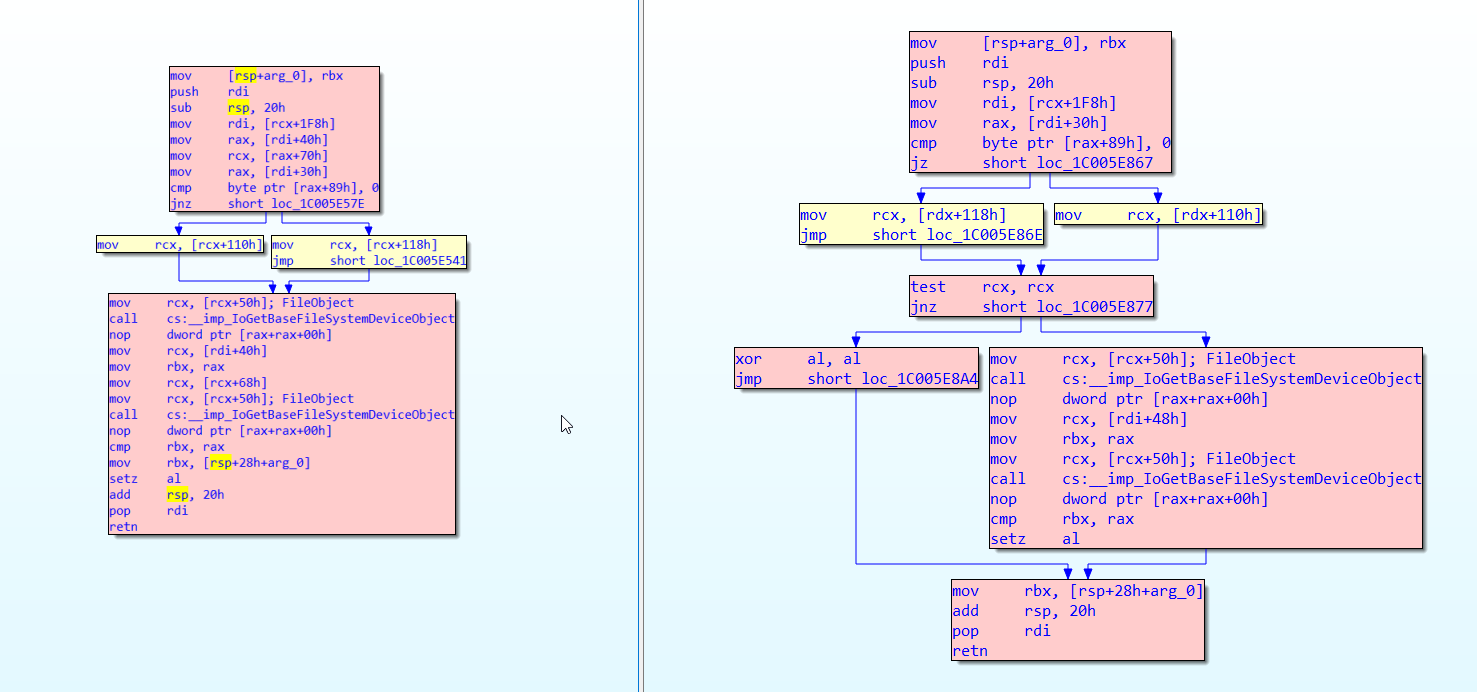
CVE-2022-32230 is caused by a missing check in srv2!Smb2ValidateVolumeObjectsMatch to verify that a pointer is not null before reading a PDEVICE_OBJECT from it and passing it to IoGetBaseFileSystemDeviceObject. The following patch diff shows the function in question for Windows 10 21H2 (unpatched version 10.0.19041.1566 on the left).

CVE-2022-32230: Windows SMB Denial-of-Service Vulnerability (FIXED)

This function is called from the dispatch routine for an SMB2 QUERY_INFO request of the FILE_INFO / FILE_NORMALIZED_NAME_INFORMATION class. Per the docs in MS-SMB2 section 3.3.5.20.1 Handling SMB2_0_INFO_FILE, FILE_NORMALIZED_NAME_INFORMATION is only available when the dialect is 3.1.1.

For FileNormalizedNameInformation information class requests, if not supported by the server implementation<392>, or if Connection.Dialect is "2.0.2", "2.1" or "3.0.2", the server MUST fail the request with STATUS_NOT_SUPPORTED.

To trigger this code path, a user would open any named pipe from the IPC$ share and make a QUERY_INFO request for the FILE_NORMALIZED_NAME_INFORMATION class. This typically requires user permissions or a non-default configuration enabling guest access. This is not the case, however, for the noteworthy exception of domain controllers where there are multiple named pipes that can be opened anonymously, such as netlogon. An alternative named pipe that can be used but does typically require permissions is the srvsvc pipe.

Under normal circumstances, the FILE_NORMALIZED_NAME_INFORMATION class would be used to query the normalized name information of a file that exists on disk. This differs from the exploitation scenario which queries a named pipe.

A system that has applied the patch for this vulnerability will respond to the request with the error STATUS_NOT_SUPPORTED.

Proof of concept

A proof-of-concept Metasploit module is available on GitHub. It requires Metasploit version 6.2 or later.

Impact

The most likely impact of an exploit leveraging this vulnerability is a denial-of-service condition. Given the current state of the art of exploitation, it is assumed that a null pointer dereference in the Windows kernel is not remotely exploitable for the purpose of arbitrary code execution without combining it with another, unrelated vulnerability.

In the default configuration, Windows will automatically restart after a BSOD.

Remediation

It is recommended that system administrators apply the official patches provided by Microsoft in their April 2022 update. If that is not possible, restricting access and disabling SMB version 3 can help remediate this flaw.

Disclosure timeline

April 12th, 2022 – Microsoft patches CVE-2022-32230
April 29th, 2022 – Rapid7 finds and confirms the vulnerability while investigating CVE-2022-24500
May 4th, 2022 – Rapid7 contacts MSRC to clarify confusion regarding CVE-2022-32230
May 18th, 2022 – Microsoft responds to Rapid7, confirming that the vulnerability now identified as CVE-2022-32230 is different from the disclosed vulnerability CVE-2022-24500 with which it was patched
June 1, 2022 — Rapid7 reserves CVE-2022-32230 after discussing with Microsoft
June 14th, 2022 – Rapid7 releases details in this disclosure, and Microsoft publishes its advisory

NEVER MISS A BLOG

Get the latest stories, expertise, and news about security today.

Additional reading:

The collective thoughts of the interwebz