На второ четене: „Неспокойните“ от Лин Улман

Post Syndicated from Стефан Иванов original https://toest.bg/na-vtoro-chetene-nespokoynite/

Никой от нас не чете единствено най-новите книги. Тогава защо само за тях се пише? „На второ четене“ е рубрика, в която отваряме списъците с книги, публикувани преди поне година, четем ги и препоръчваме любимите си от тях. Рубриката е част от партньорската програма Читателски клуб „Тоест“. Изборът на заглавия обаче е единствено на авторите – Стефан Иванов и Севда Семер, които биха ви препоръчали тези книги и ако имаше как веднъж на две седмици да се разходите с тях в книжарницата.

„Неспокойните“ от Лин Улман

превод от норвежки Радослав Папазов, изд. „Колибри“, 2020

Лин Улман е дъщерята на актрисата Лив Улман и режисьора Ингмар Бергман. Родителите ѝ никога не се женят и връзката им приключва, когато Лин е на три години. Книгата ѝ – смесица от автобиографични фрагменти, фикция и документални записи от разговори с баща ѝ седмици преди да почине, е наречена от нея роман.

И с право.

Единствено романът е такава многообразна художествена форма, която би могла правдиво и с достатъчно високо ниво на свобода да ѝ даде възможност да представи своята гледна точка. Гледната точка на майка ѝ може да бъде прочетена в автобиографичната ѝ книга „Промяна“. Тази на баща ѝ присъства във всичките му филми, но и в книгите му, някои от тях – като невероятния мемоар „Латерна магика“, са преведени на български.

В „Неспокойните“ няма сензации или скандали. По лаконичен, ясен и чист начин са разказани едни необикновени етапи от живота – детство, съзряване, остаряване и смърт на родител. Лин Улман се вглежда директно в себе си и в миналото си. Голямото човешко и писателско постижение на книгата е ясното ориентиране в този сложен лабиринт от самота и нужда, както и достигането до разбиране и прошка.

Очевиден е отказът от лесни обвинения – няма и помен от отмъщение. Очевидно е и нежеланието ѝ да представя себе си като жертва на амбициозни и егоистични нарцисисти. Усилията в разказването на истории в книгата са насочени в посока на приемане на сложността в живота. И в утвърждаване на дълбочината (понякога със здравословна доза добронамерен хумор), даже и понякога тя да не дава най-леките отговори. А това, което е повече от всичко и с лекота се открива на дъното на кладенеца от думи и спомени, е любов.

Книгата би могла да доставя читателско удоволствие, но може и да е в помощ на всички онези пораснали деца, преживели раздели и разводи на родителите си, познали липсата на доброта, разговори и внимание. „Неспокойните“ нашепва грижовно: „И аз се чувствах така“, „Беше тежко, но вече не е“. От романа лъха утеха и близост.

Бреме е да растеш в сянката на популярни родители. Особено е да имаш още осем братя и сестри от четирите брака на баща си. Може да е наистина тежко месеци наред да не виждаш майка си и да си в неприятната компания на детегледачки. Досадно е да живееш в света на правилата и законите на баща си. Трудно е да пишеш и говориш за травмите и пътя към себе си, но е и огромно облекчение. Хубавото на тази лековита свобода е, че е заразителна и дава сили за живот.

Откровените размишления за времето, тленността и паметта дават усещане за уединена красота и улесняват приемането на крайните истини в човешкия живот. Една иначе банална случка – Бергман за първи път закъснява за обичайното семейно гледане на филм – се оказва първи признак на остаряването. И слага точка на доскорошния му маниакално подреден, последователен и отдаден на работата начин на живот. Един етап вече е отминал. Дошъл е ред на епилога, в който силите и времето за игрите на въображението са прекалено малко. Други два великолепни момента, посветени на баща ѝ: как ѝ чете Астрид Линдгрен, Мария Грипе и Туве Янсон и как, вече пораснала, прекарва една самотна Коледа с него в Стокхолм и докато вървят към църквата, където дядо ѝ е бил свещеник в продължение на 30 години, вали сняг, той се спира и я докосва по бузата.

Докато четях, си представях как Антъни Хопкинс или Жан-Луи Трентинян играят Бергман. По също такъв спонтанен начин в главата ми книгата се свърза с „Дневник на скръбта“ на Ролан Барт, „Няма нищо страшно“ на Джулиан Барнс, „Годината на магическото мислене“ на Джоун Дидиън и антологията „Бащите не си отиват“. Но сякаш най-близка до Улман е Маргьорит Дюрас – с грижливостта към детайла, сливането на реално и въображаемо и безпощадността при назоваването на нещата, без увъртане и протакане.

От своя страна, миговете, които преминават по страниците, имат малко общо с филмите на Бергман. По-близки са до новия сериал „Сцени от един семеен живот“, в който има истинско всекидневие, автентичен диалог и среща между хора, а не вакуум, в който звучат отчуждени монолози на все по-отдалечаващи се един от друг човеци. В „Неспокойните“, за разлика от филмите на Бергман, има надежда и близост. Има щастливи безкрайни лета в безвремието на острова, където баща ѝ е намерил своето убежище и където работи, страхува се от настинка, плува гол в басейна и слуша Бетовен и Бах. Има римуване и повторения в живота на майка и дъщеря. Има деликатност. Има самота в хотели и в домове в Осло и САЩ. Има чести смени на училища и неспособност за вписване. Има детски тросвания и пакости. Има смели и утвърждаващи прояви пред лицето на скръбта, срама и страха. Има отказ от митологизация и е предпочетена искреността. Има и възможност малко да закъснее, по нелепи причини, за погребението на баща си.

Кратък откъс от записите, които Улман прави с Бергман буквално дни преди той да си отиде, е показателен за обезоръжаващата откровеност на книгата:

ТОЙ: Да, казвам: Беше игра и играех… и онова, което си мислех, че е важно, изчезна.

ТЯ: Искаш да кажеш, че всичко, свързано с театъра и киното, е било игра?

ТОЙ: Не. Това не, но писането. Работата. Много съм точен… както вероятно си чула от колегите ми.

ТЯ: Да, но на първо място съм го чувала от теб.

ТОЙ: Да.

ТЯ: Винаги си обичал да импровизираш.

ТОЙ: А, не.

Смее се.

Представям си как родителите на Улман четат „Неспокойните“ и си отдъхват. Спокойни са, че момичето е пораснало и е себе си. Има собствени важни неща и хора в живота си. И даже импровизира. И се смее.

Заглавна илюстрация: © Елена и Лина Кривошиеви
Активните дарители на „Тоест“ получават постоянна отстъпка в размер на 20% от коричната цена на всички заглавия от каталога на изд. „Колибри“, както и на няколко други български издателства в рамките на партньорската програма Читателски клуб „Тоест“. За повече информация прочетете на toest.bg/club.

Източник

Седмицата в „Тоест“ (15–19 ноември)

Post Syndicated from Тоест original https://toest.bg/editorial-15-19-november-2021/

В седмицата след изборите за Народно събрание и преди президентския балотаж очевидно темата за резултатите и анализите върху тях изпълва почти цялото медийно пространство. Затова няма как и ние да я подминем. Предлагаме ви гледните точки на наши редовни автори и на гостуващи в „Тоест“ политически и обществени наблюдатели. Ъглите, под които те коментират темата, са достатъчно различни, за да ви е интересно.

Станислав Додов

Нека започнем с текста на Станислав Додов, който е едновременно отрезвяващ и пронизващ като леден душ по време на авария в топлопреносната мрежа през есента. „Когато две трети от българските граждани с право на глас нямат проект, в който да вярват, да отстояват, чрез който да се свързват, значи две трети могат по всяко време да отредят всякаква съдба за всички и тя все по-малко ще изглежда като демокрация,“ пише Станислав в материала си „Непоносимата лекота на партийната политика“.


Светла Енчева

В „Тоест“ вече публикувахме няколко текста в опит да предупредим за нарастващото влияние на „Възраждане“ и потенциалните проблеми от това за политическия и обществения живот в България. Уви, вече в качеството си на парламентарно представена сила, партията ще има още повече възможности да разширява електоралната си база. Прочетете повече в текста на Светла Енчева „Как се проспа възходът на „Възраждане“.


Венелина Попова

Защо ДПС инвестира толкова средства и усилия точно в тези избори, когато всъщност не изглежда вероятно партията да се домогне до властта? Това е един от най-любопитните въпроси след резултатите от гласуването в неделя. Според Венелина Попова много вероятна хипотеза е, че ГЕРБ и ДПС са подготвяли общо управление (с подкрепата на БСП), заблудени от предварителните прогнози на социологическите агенции. Анализът ѝ е със заглавие „Историята се повтаря – и невинаги като фарс“.


Марина Лякова

Това пък ни води директно към следващата много важна за анализ тема, а именно „Провали ли се социологията?“. Така е озаглавен материалът на социоложката Марина Лякова, в който тя разглежда причините за сериозните разминавания между предварителните прогнози и реалните резултати след отварянето на урните миналата неделя.


Емилия Милчева

А утре, 20 ноември 2021 г., отново сме призовани да избираме. Без никаква изненада, до балотажа на президентските избори стигнаха действащият президент Румен Радев и основният му съперник Анастас Герджиков. След дебата между двамата в четвъртък в студиото на БНТ Емилия Милчева обобщава най-важното, което може да ви помогне, ако все още не сте намерили за себе си отговора на въпроса „Кой ви е любимият президент?“.


Стефан Иванов

Нека завършим с хубава книга. Този път тя е препоръчана от Стефан Иванов в нашата рубрика „На второ четене“. Книгата, пише Стефан, би могла да доставя читателско удоволствие, но може и да е в помощ на всички онези пораснали деца, преживели раздели и разводи на родителите си, познали липсата на доброта, разговори и внимание. А заглавието е „Неспокойните“ от Лин Улман – дъщеря на актрисата Лив Улман и режисьора Ингмар Бергман. Романът е микс от фикция с автобиографични детайли и документални спомени.

Приятно четене!

Източник

Introducing PII data identification and handling using AWS Glue DataBrew

Post Syndicated from Harsh Vardhan Singh Gaur original https://aws.amazon.com/blogs/big-data/introducing-pii-data-identification-and-handling-using-aws-glue-databrew/

AWS Glue DataBrew, a visual data preparation tool, can now identify and handle sensitive data by applying advance transformations like redaction, replacement, encryption, and decryption on your personally identifiable information (PII) data. With exponential growth of data, companies are handling huge volumes and a wide variety of data coming into their platform, including PII data. Identifying and protecting sensitive data at scale has become increasingly complex, expensive, and time-consuming. Organizations have to adhere to data privacy, compliance, and regulatory needs such as GDPR and CCPA. They need to identify sensitive data, including PII such as name, SSN, address, email, driver’s license, and more. Even after identification, it’s cumbersome to implement redaction, masking, or encryption of sensitive personal information at scale.

To enable data privacy and protection, DataBrew has launched PII statistics, which identifies PII columns and provide their data statistics when you run a profile job on your dataset. Furthermore, DataBrew has introduced PII data handling transformations, which enable you to apply data masking, encryption, decryption, and other operations on your sensitive data.

In this post, we walk through a solution in which we run a data profile job to identify and suggest potential PII columns present in a dataset. Next, we target PII columns in a DataBrew project and apply various transformations to handle the sensitive columns existing in the dataset. Finally, we run a DataBrew job to apply the transformations on the entire dataset and store the processed, masked, and encrypted data securely in Amazon Simple Storage Service (Amazon S3).

Solution overview

We use a public dataset that is available for download at Synthetic Patient Records with COVID-19. The data hosted within SyntheticMass has been generated by SyntheaTM, an open-source patient population simulation made available by The MITRE Corporation.

Download the zipped file 10k_synthea_covid19_csv.zip for this solution and unzip it locally. The solution uses the dummy data in the file patient.csv to demonstrate data redaction and encryption capability. The file contains 10,000 synthetic patient records in CSV format, including PII columns like driver’s license, birth date, address, SSN, and more.

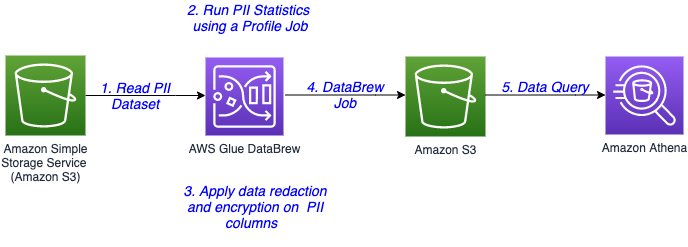
The following diagram illustrates the architecture for our solution.

The steps in this solution are as follows:

  1. The sensitive data is stored in an S3 bucket. You create a DataBrew dataset by connecting to the data in Amazon S3.
  2. Run a DataBrew profile job to identify the PII columns present in the dataset by enabling PII statistics.
  3. After identification of PII columns, apply transformations to redact or encrypt column values as a part of your recipe.
  4. A DataBrew job runs the recipe steps on the entire data and generates output files with sensitive data redacted or encrypted.
  5. After the output data is written to Amazon S3, we create an external table on top in Amazon Athena. Data consumers can use Athena to query the processed and cleaned data.

Prerequisites

For this walkthrough, you need an AWS account. Use us-east-1 as your AWS Region to implement this solution.

Set up your source data in Amazon S3

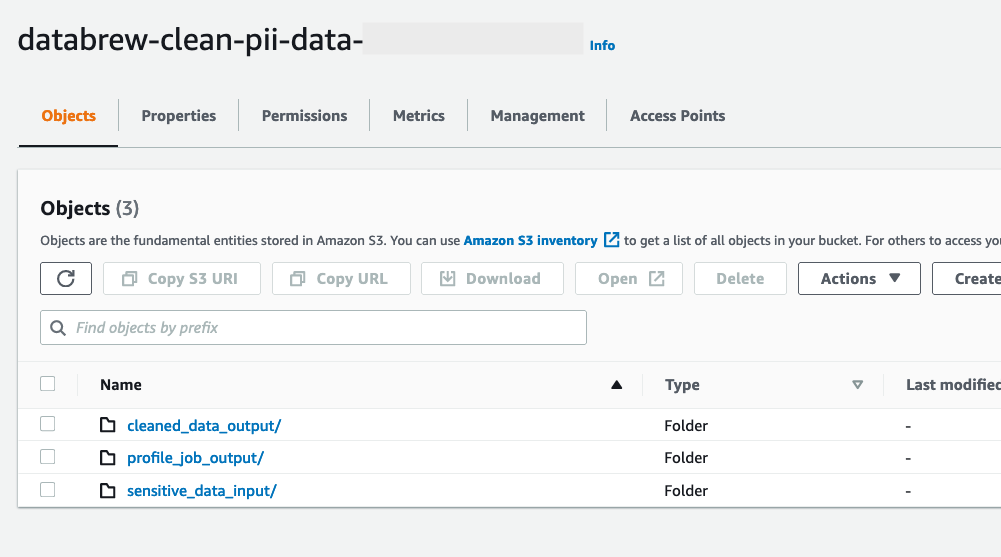
Create an S3 bucket called databrew-clean-pii-data-<Your-Account-ID> in us-east-1 with the following prefixes:

  • sensitive_data_input
  • cleaned_data_output
  • profile_job_output

Upload the patient.csv file to the sensitive_data_input prefix.

Create a DataBrew dataset

To create a DataBrew dataset, complete the following steps:

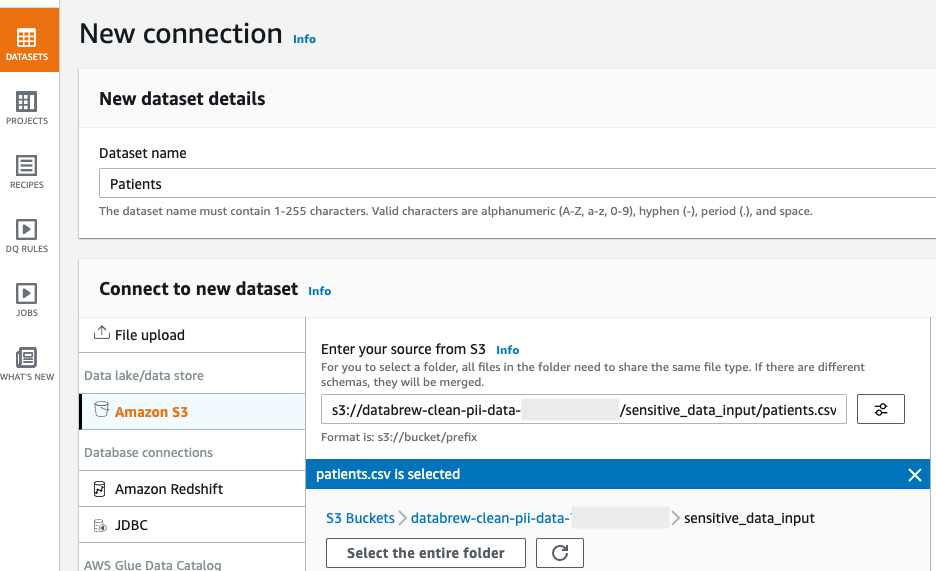
  1. On the DataBrew console, in the navigation pane, choose Datasets.
  2. Choose Connect new dataset.
  3. For Dataset name, enter a name (for this post, Patients).
  4. Under Connect to new dataset, select Amazon S3 as your source.
  5. For Enter your source from S3, enter the S3 path to the patient.csv file. In our case, this is s3://databrew-clean-pii-data-<Account-ID>/ sensitive_data_input/patients.csv.
  6. Scroll to the bottom of the page and choose Create dataset.

Run a data profile job

You’re now ready to create your profile job.

  1. In the navigation pane, choose Datasets.
  2. Select the Patients dataset.
  3. Choose Run data profile and choose Create profile job.
  4. Name the job Patients - Data Profile Job.
  5. We run the data profile on the entire dataset, so for Data sample, select Full dataset.
  6. In the Job output settings section, point to the profile_job_output S3 prefix where the data profile output is stored when the job is complete.
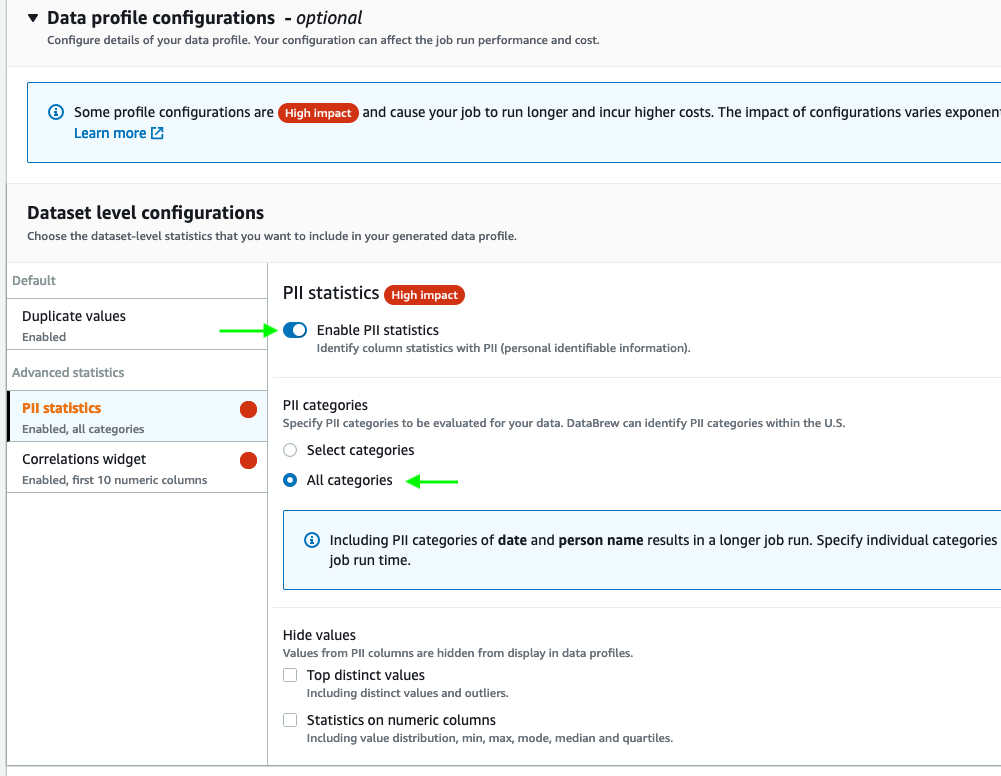
  7. Expand Data profile configurations, and select Enable PII statistics to identify PII columns when running the data profile job.

This option is disabled by default; you must enable it manually before running the data profile job.

  1. For PII categories, select All categories.
  2. Keep the remaining settings at their default.
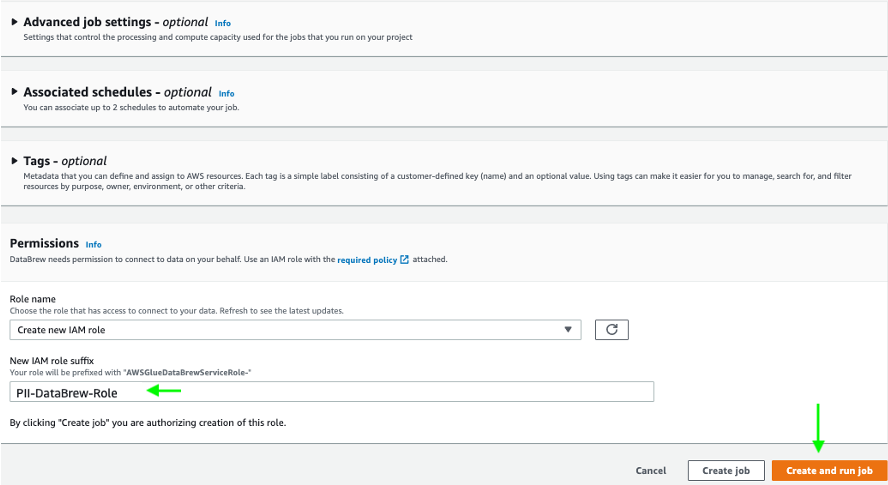
  3. In the Permissions section, create a new AWS Identity and Access Management (IAM) role that is used by the DataBrew job to run the profile job, and use PII-DataBrew-Role as the role suffix.
  4. Choose Create and run job.

The job runs on the sample data and takes a few minutes to complete.

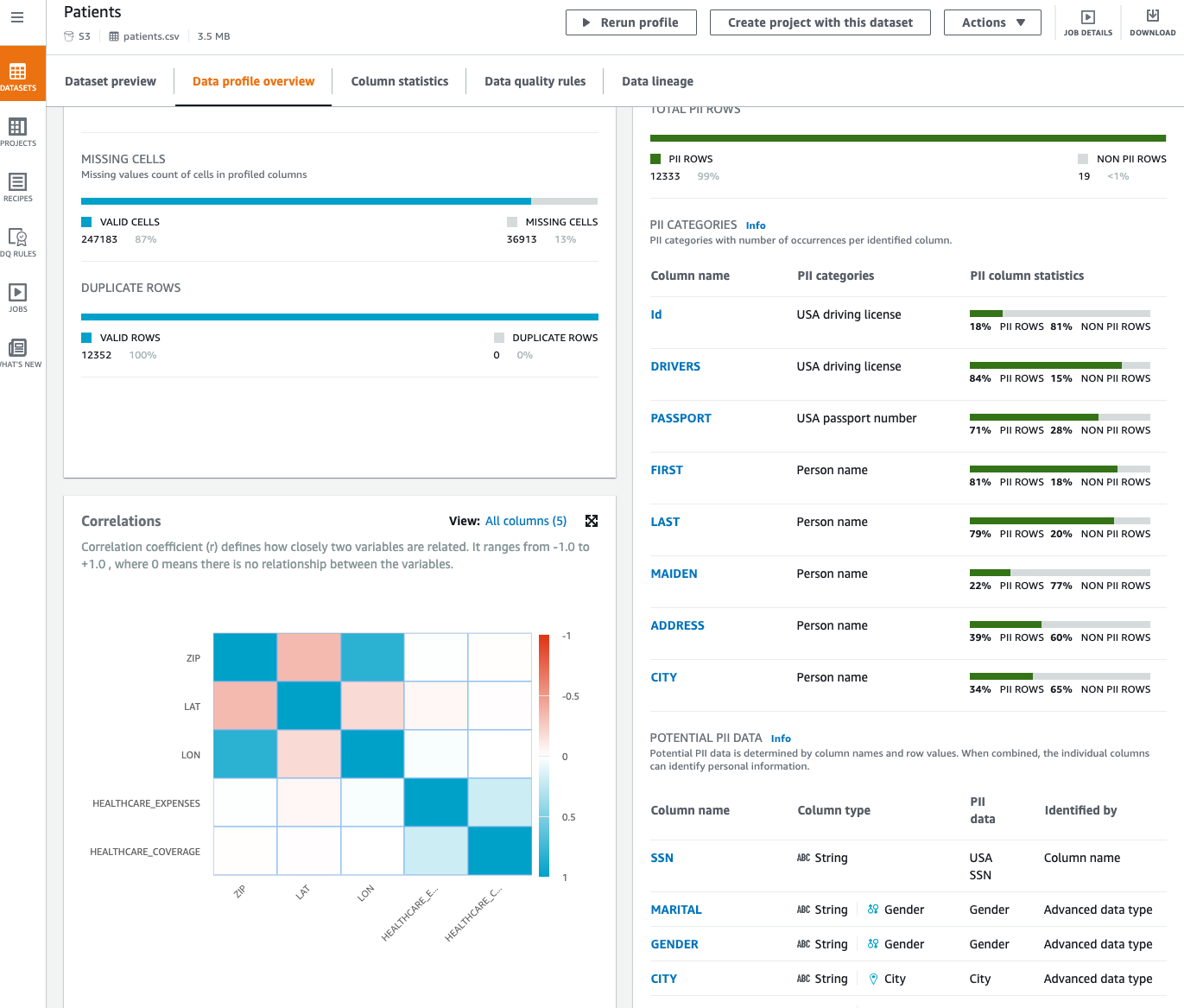
Now that we’ve run our profile job, we can review data profile insights about our dataset by choosing View data profile. We can also review the results of the profile through the visualizations on the DataBrew console and view the PII widget. This section provides a list of identified PII columns mapped to PII categories with column statistics. Furthermore, it suggests potential PII data that you can review.

Create a DataBrew project

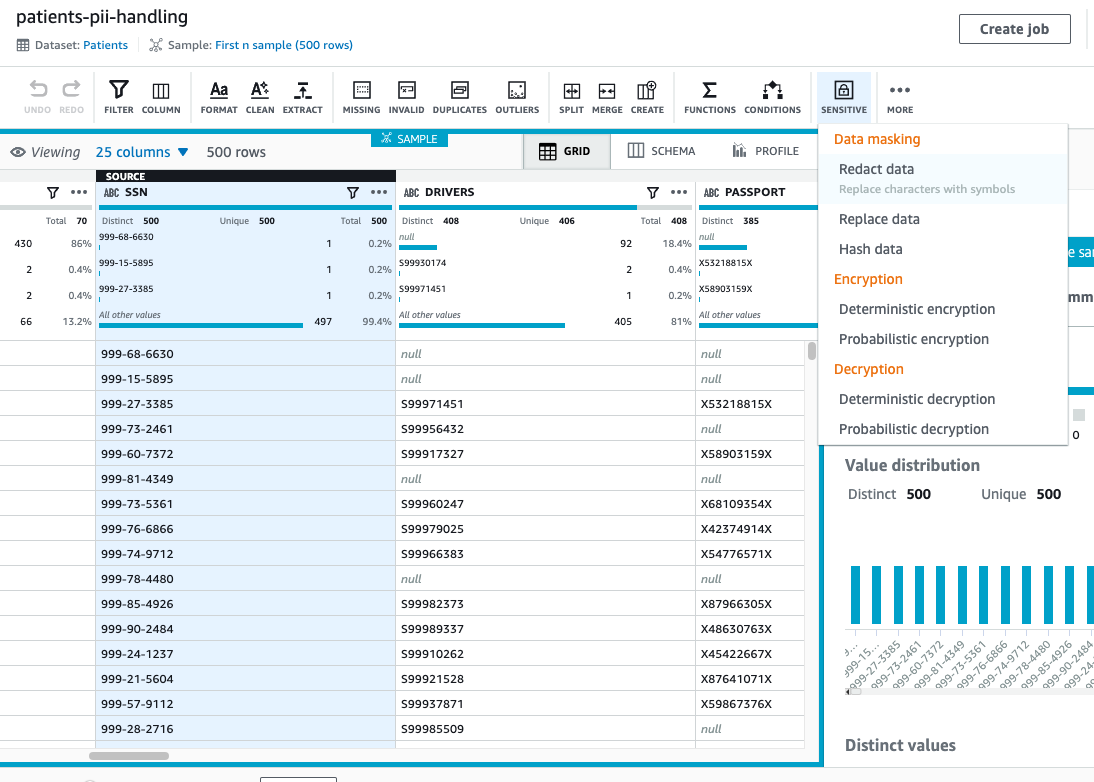
After we identify the PII columns in our dataset, we can focus on handling the sensitive data in our dataset. In this solution, we perform redaction and encryption in our DataBrew project using the Sensitive category of transformations.

To create a DataBrew project for handling our sensitive data, complete the following steps:

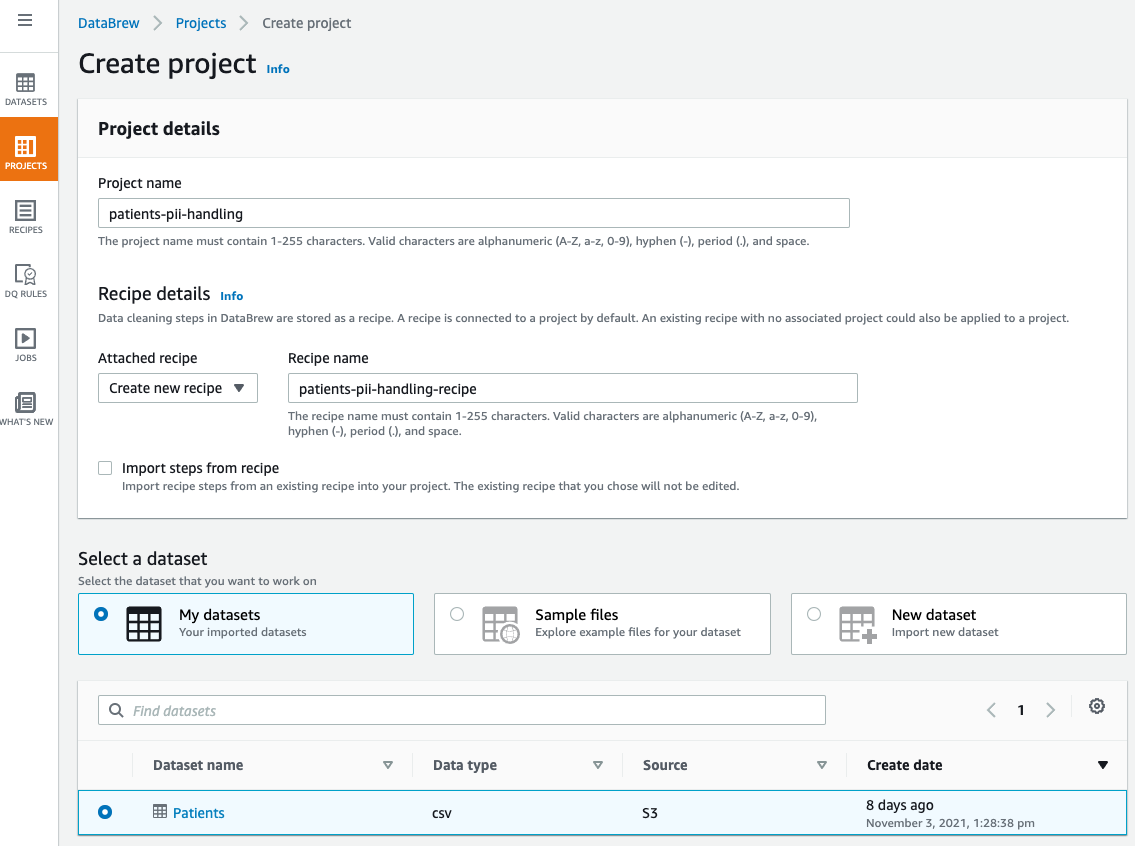
  1. On the DataBrew console, choose Projects.
  2. Choose Create project.
  3. For Project name, enter a name (for this post, patients-pii-handling).
  4. For Select a dataset, select My datasets.
  5. Select the Patients dataset.
  6. Under Permissions, for Role name, choose the IAM role that we created previously for our DataBrew profile job AWSGlueDataBrewServiceRole-PII-DataBrew-Role.
  7. Choose Create project.

The dataset takes few minutes to load. When the dataset is loaded, we can start performing redactions. Let us start with the column SSN.

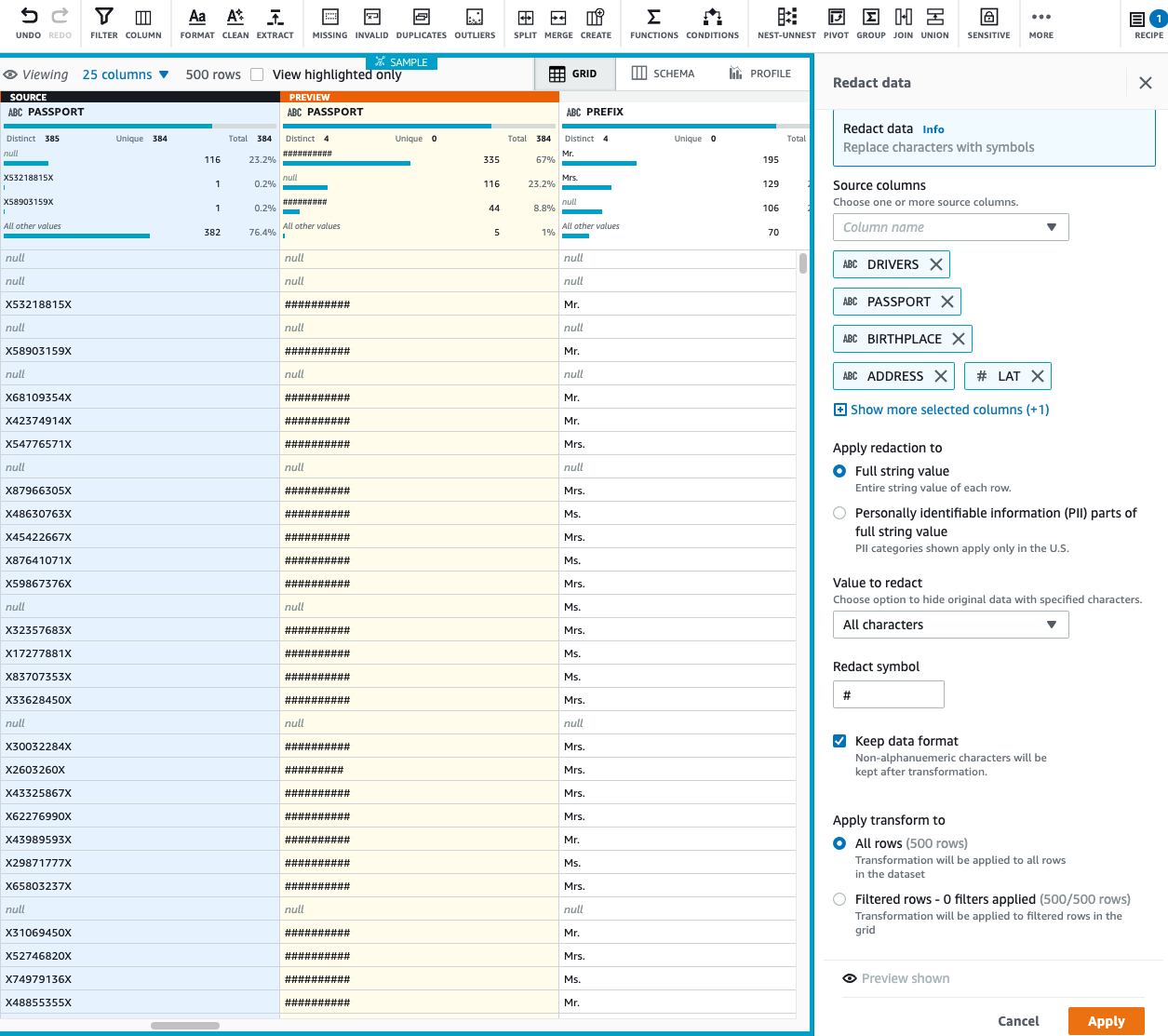
  1. For the SSN column, on the Sensitive menu, choose Redact data.
  2. Under Apply redaction, select Full string value.
  3. We redact all the non-alphanumeric characters and replace them with #.
  4. Choose Preview changes to compare the redacted values.
  5. Choose Apply.

On the Sensitive menu, all the data masking transformations—redact, replace, and hash data—are irreversible. After we finalize our recipe and run the DataBrew job, the job output to Amazon S3 is permanently redacted and we can’t recover it.

  1. Now, let’s apply redaction to multiple columns, assuming the following columns must not be consumed by any downstream users like data analyst, BI engineer, and data scientist:
    1. DRIVERS
    2. PASSPORT
    3. BIRTHPLACE
    4. ADDRESS
    5. LAT
    6. LON

In special cases, when we need to recover our sensitive data, instead of masking, we can encrypt our column values and when needed, decrypt the data to bring it back to its original format. Let’s assume we require a column value to be decrypted by a downstream application; in that case, we can encrypt our sensitive data.

We have two encryption options: deterministic and probabilistic. For use cases when we want to join two datasets on the same encrypted column, we should apply deterministic encryption. It makes sure that the encrypted value of all the distinct values is the same across DataBrew projects as long as we use the same AWS secret key. Additionally, keep in mind that when you apply deterministic encryption on your PII columns, you can only use DataBrew to decrypt those columns.

For our use case, let’s assume we want to perform deterministic encryption on a few of our columns.

  1. On the Sensitive menu, choose Deterministic encryption.
  2. For Source columns, select BIRTHDATE, DEATHDATE, FIRST, and LAST.
  3. For Encryption option, select Deterministic encryption.
  4. For Select secret, choose the databrew!default AWS secret.
  5. Choose Apply.
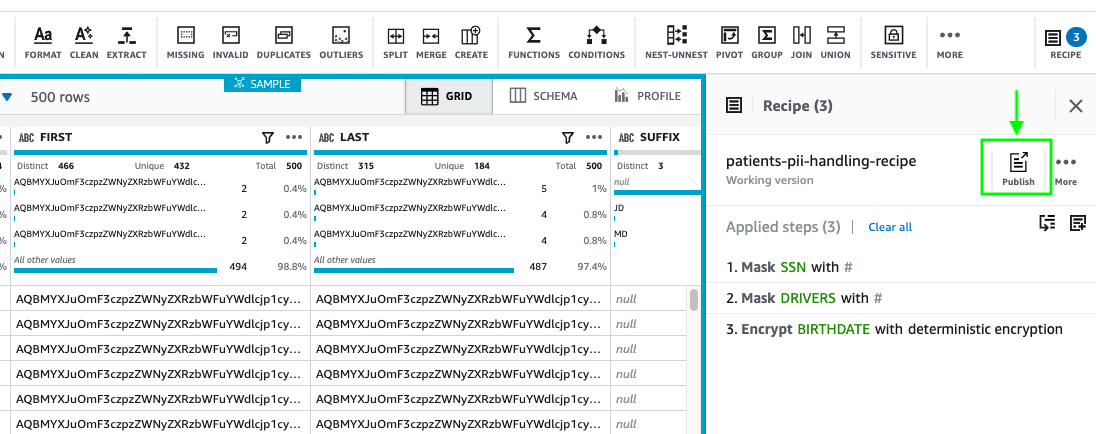
  6. After you finish applying all your transformations, choose Publish.
  7. Enter a description for the recipe version and choose Publish.

Create a DataBrew job

Now that our recipe is ready, we can create a job to apply the recipe steps to the Patients dataset.

  1. On the DataBrew console, choose Jobs.
  2. Choose Create a job.
  3. For Job name, enter a name (for example, Patient PII Making and Encryption).
  4. Select the Patients dataset and choose patients-pii-handling-recipe as your recipe.
  5. Under Job output settings¸ for File type, choose your final storage format to be Parquet.
  6. For S3 location, enter your S3 output as s3://databrew-clean-pii-data-<Account-ID>/cleaned_data_output/.
  7. For Compression, choose None.
  8. For File output storage, select Replace output files for each job run.
  9. Under Permissions, for Role name¸ choose the same IAM role we used previously.
  10. Choose Create and run job.

Create an Athena table

You can create tables by writing the DDL statement in the Athena query editor. If you’re not familiar with Apache Hive, you should review Creating Tables in Athena to learn how to create an Athena table that references the data residing in Amazon S3.

To create an Athena table, use the query editor and enter the following DDL statement:

CREATE EXTERNAL TABLE patient_masked_encrypted_data (
   `id` string, 
  `birthdate` string, 
  `deathdate` string, 
  `ssn` string, 
  `drivers` string, 
  `passport` string, 
  `prefix` string, 
  `first` string, 
  `last` string, 
  `suffix` string, 
  `maiden` string, 
  `marital` string, 
  `race` string, 
  `ethnicity` string, 
  `gender` string, 
  `birthplace` string, 
  `address` string, 
  `city` string, 
  `state` string, 
  `county` string, 
  `zip` int, 
  `lat` string, 
  `lon` string, 
  `healthcare_expenses` double, 
  `healthcare_coverage` double 
)
STORED AS PARQUET
LOCATION 's3://databrew-clean-pii-data-<Account-ID>/cleaned_data_output/'

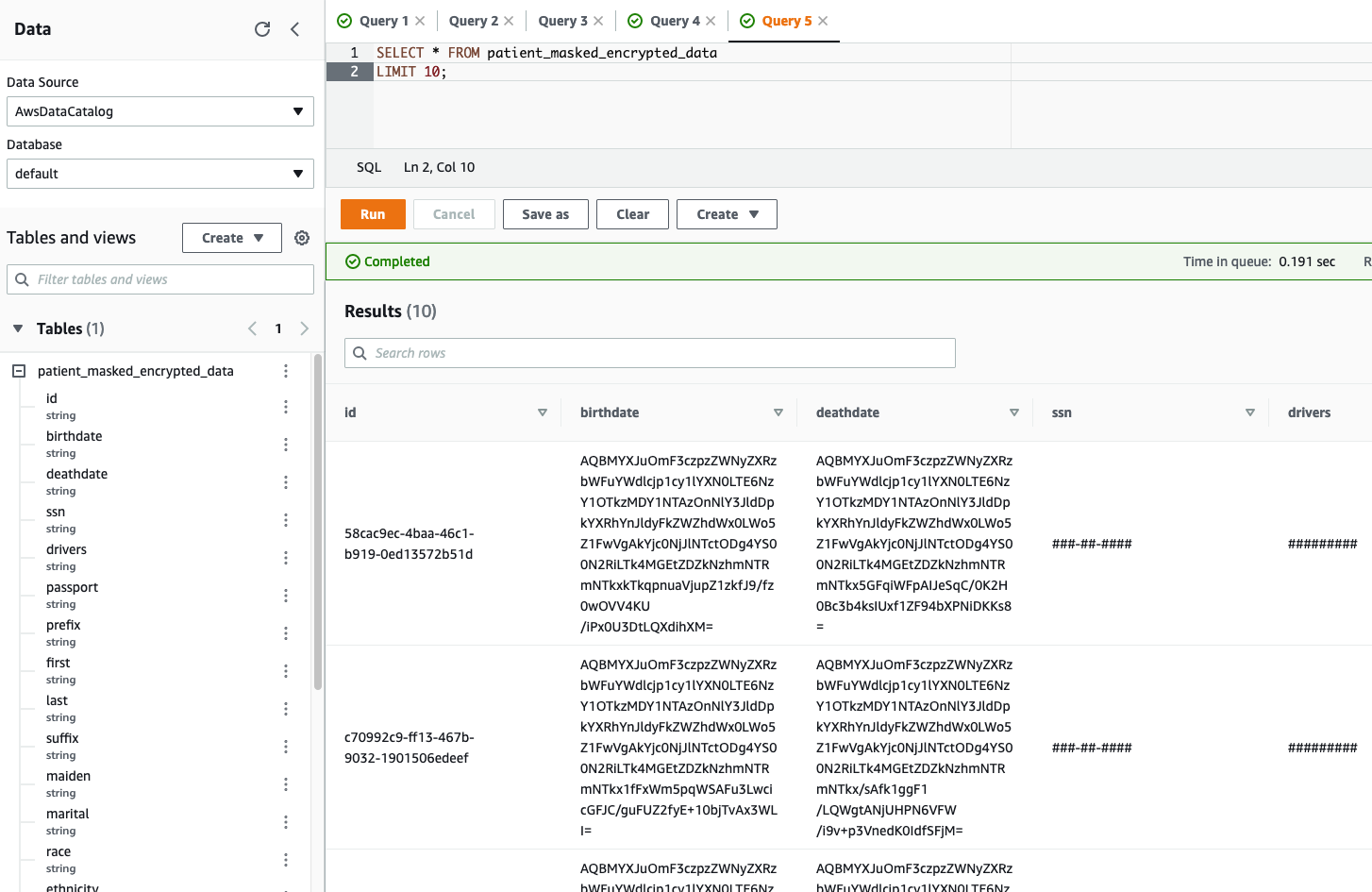
Let’s validate the table output in Athena by running a simple SELECT query. The following screenshot shows the output.

We can clearly see the encrypted and redacted column values in our query output.

Cleaning up

To avoid incurring future charges, delete the resources created during this walkthrough.

Conclusion

As demonstrated in this post, you can use DataBrew to help identify, redact, and encrypt PII data. With these new PII transformations, you can streamline and simplify customer data management across industries such as financial services, government, retail, and much more.

Now that you can protect your sensitive data workloads to meet regulatory and compliance best practices, you can use this solution to build de-identified data lakes in AWS. Sensitive data fields remain protected throughout their lifecycle, whereas non-sensitive data fields remain in the clear. This approach can allow analytics or other business functions to operate on data without exposing sensitive data.


About the Authors

Harsh Vardhan Singh Gaur is an AWS Solutions Architect, specializing in Analytics. He has over 5 years of experience working in the field of big data and data science. He is passionate about helping customers adopt best practices and discover insights from their data.

Navnit Shukla is an AWS Specialist Solution Architect, Analytics, and is passionate about helping customers uncover insights from their data. He has been building solutions to help organizations make data-driven decisions.

AWS attendee guide for DevOps and Developer Productivity track at re:Invent2021

Post Syndicated from Harshitha Putta original https://aws.amazon.com/blogs/devops/aws-attendee-guide-for-devops-and-developer-productivity-track-at-reinvent-2021/

AWS re:Invent is a learning conference hosted by Amazon Web Services for the global cloud computing community. We are super excited to join you at the 10th annual re:Invent to share the latest from AWS leaders and discover more ways to learn and build. Let’s celebrate this milestone, which will be offered in person in Las Vegas (November 29-December 3) and in virtual (November 29–December 10) formats. The health and safety of our customers, and partners remains our top priority and you can learn more about it in health measures page. For details about the virtual format, check out the virtual section. If you haven’t already registered, don’t forget to register and save your spot at your favorite sessions.

The AWS DevOps and Developer Productivity track at re:Invent offers you with sessions that are combination of cultural philosophies, practices, and tools that increase an organization’s ability to deliver applications and services at high velocity. The sessions vary from intermediate (200) through expert (400) levels, and help you accelerate the pace of innovation in your business. This blog post highlights the sessions from the Cloud Operations track that you shouldn’t miss.

Breakout Sessions

 AWS re:Invent breakout sessions are lecture-style and one hour long. These sessions are delivered by AWS experts, customers, and partners, and they typically include 10–15 minutes of Q&A at the end. For our virtual attendees, breakout sessions will be made available on demand in the week after re:Invent. 

Level 200 – Intermediate

  • DOP208-R1 and DOP208-R2 DevOps revolution

While DevOps has not changed much, the industry has fundamentally transformed over the last decade. Monolithic architectures have evolved into microservices. Containers and serverless have become the default. Applications are distributed on cloud infrastructure across the globe. The technical environment and tooling ecosystem has changed radically from the original conditions in which DevOps was created. So, what’s next? In this session, learn about the next phase of DevOps: a distributed model that emphasizes swift development, observable systems, accountable engineers, and resilient applications.

Level 300 – Advanced

  • DOP301 How to reuse patterns when developing infrastructure as code

This session explores the AWS Cloud Development Kit (AWS CDK) constructs and AWS CloudFormation modules and how they can be used to make building applications easier on AWS. Learn how you can extend CloudFormation to include support for third-party resources and how those resource types can be used by AWS Config.

  • DOP309 Amazon builders’ library: Operational excellence at Amazon

Operational excellence at Amazon is achieved through a DevOps model, where software development teams operate the systems they build. In this session, Senior Principal Engineer David Yanacek describes Amazon’s operational practices that he has observed during his 15 years of building and operating services at Amazon. Hear David describe the habits that teams have adopted, such as how teams handle retrospectives, share knowledge, and regularly review operational metrics as a team. David discusses how these behaviors have led teams to innovate to build better tools and make architectural shifts.

  • DOP310 Enabling decentralized development teams with a shared services platform

Speed in software development requires being able to equip development teams with tools and guardrails for DevOps, security, and infrastructure configuration. Too often, central teams find they need to piece together their own custom solutions or compromise the speed of their development organization in order to maintain standards. In this session, dive deep into the crawl, walk, and run options and best practices for building a shared services platform on AWS using tools and services such as AWS Copilot, AWS Proton, and pre-built solutions using AWS CloudFormation.

  • DOP311 Incorporating continuous resilience in your development ecosystem

Today, resilience encompasses a broad range of considerations from infrastructure, application patterns, and data management to application building and monitoring. Additionally, after incorporating resilience, it is essential to maintain it in a continuous manner. In this session, explore various considerations for implementing processes designed to provide continuous improvement through a DevOps methodology. Review various services that can incorporate resilience in the development process in a nearly continuous manner.

  • DOP312 Observing your applications from development through production

Implementing observability differs at various stages of the software development lifecycle. In development, detailed logging and tracing are necessary to understand application behavior. In testing, logging and tracing are needed but in varying levels of detail and must be augmented by new metrics. In integration and production, it’s necessary to correlate and contextualize large volumes of data with dashboards that encompass metrics, alarms, and notifications connected to internal and external events. In this session, explore the mechanisms, mental models, and tools (including Amazon CloudWatch, AWS CloudTrail, AWS X-Ray and Amazon DevOps Guru) that top-performing teams use to observe applications throughout various stages of the software development lifecycle.

  • DOP313 Best practices for securing your software delivery lifecycle

In this session, learn about ways you can secure your AWS CI/CD pipeline. Review topics like security of the pipeline versus security in the pipeline, and learn about practices to incorporate security checkpoints across various pipeline stages, security event management, and aggregation of vulnerability findings into a unified display. This session also introduces foundational methodologies that combine best practices, processes, and tools to increase an organization’s ability to deliver applications and services securely.

  • DOP314 Write, deploy, and provision cloud resources with AWS Developer Tools

In this session, learn how you can use various AWS Developer Tools to improve your ergonomics across the entire development lifecycle. This session dives deep into IDE extensions, SDKs, and toolkits that provide first-class integrations with AWS services. It also explores how to manage and fine-tune your resources with the AWS Command Line Interface (AWS CLI); how to define your infrastructure in common programming languages with AWS CDK; and how to automate testing, building, debugging, and deployment.

  • DOP315 What’s new with AWS CloudFormation and AWS CDK

Join this session to learn about new features to up-level your infrastructure as code (IaC) experiences on AWS. It covers working with AWS CloudFormation modules and AWS CDK constructs to make working with AWS easier; CloudFormation registry to streamline creating, publishing, discovering, and using AWS and third-party plugins; CloudFormation StackSets and CDK Pipelines to automate the deployment of resources and applications across multiple AWS Regions and accounts; CloudFormation Guard 2.0 to attain security and best practice compliance before deployments reach production; and more. Explore how AWS is improving our IaC coverage of AWS services and features in a scalable, decentralized way and how you can contribute.

  • DOP325 Building with the new AWS SDKs for Rust, Kotlin, and Swift

Writing code in the AWS SDKs for Rust, Kotlin, and Swift has never been as easy as it is now. This session explores how AWS built these SDKs in parallel, the commonalities they share, and how to build an application with each one. Then, it details best practices for using the SDKs and how to use the features to test your code efficiently. Lastly, this session takes a close look at how the SDKs work and reviews the road map for the future.

  • DOP328-S Slack is the digital HQ for AWS developers and DevOps teams (sponsored by Slack)

With increased pressure on software teams to release high-quality products faster, it’s more important than ever to work effectively in an interdependent and cross-functional manner. Yet, communication and collaboration have not changed to reflect the way Agile and DevOps teams actually get work done. Join this session to find out why Slack is the digital HQ for engineering and operations teams. This presentation is brought to you by Slack, an AWS Partner. Speakers: Logan Franey (Slack) and Clint Burns (Slack).

Level 400 – Expert

  • DOP402-R1 and DOP402-R2 Automating cross-account CI/CD pipelines

When building a deployment strategy for your applications, using a multi-account approach is a recommended best practice. This limits the area of impact for changes made and results in better modularity, security, and governance. In this session, dive deep into an example multi-account deployment using infrastructure as code (IaC) services such as the AWS CDK, AWS CodePipeline, and AWS CloudFormation. Also explore a real-world customer use case that is deploying at scale across hundreds of AWS accounts.

Builders’ Sessions

Builders Sessions are small-group sessions led by an AWS expert who guides you as you build the service or product. Each builders’ session begins with a short explanation or demonstration of what you are going to build. Once the demonstration is complete, use your laptop to experiment and build with the AWS expert.

Level 300 – Advanced

  • DOP303 Assessing your application resiliency using chaos engineering

This builders’ session guides you through the principles of chaos engineering and building observability to assess the resiliency of your application and infrastructure. Walk through a hands-on exercise using AWS Fault Injection Simulator to inject faults and observe the impacts using various managed services such as an Amazon CloudWatch dashboard. Learn to use Amazon DevOps Guru, which uses machine learning for observability, to improve the minimum time to recovery (MTTR) by decreasing downtime.

  • DOP304 Creating and publishing AWS CloudFormation public resources

This builders’ session guides you through the process for creating AWS CloudFormation extensions for a CloudFormation public or private registry. Also, learn how to consume resource types from the registries created by other teams or organizations.

  • DOP305-R1 and DOP305-R2 Continuous deployment with AWS CDK Pipelines

CDK Pipelines is a new AWS CDK construct that simplifies defining and building CI/CD pipelines for safely deploying software changes. This builders’ session shows you how to effectively use CDK Pipelines to manage software releases.

Chalk Talks

Chalk Talks are highly interactive sessions with a small audience. Experts lead you through problems and solutions on a digital whiteboard as the discussion unfolds. Each begins with a short lecture (10–15 minutes) delivered by an AWS expert, followed by a 45- or 50-minute Q&A session with the audience.

Level 200 – Intermediate

  • DOP201 Provisioning, automating, and orchestrating IaC on AWS

This chalk talk answers your questions about infrastructure as code (IaC), including relevant AWS services and partner products. It covers topics like IaC patterns, the AWS Cloud Development Kit (AWS CDK) and AWS CloudFormation, augmentation of your CI/CD workflows with services like AWS Systems Manager, and how to select the right tools for the job. Join this talk and bring your questions.

  • DOP202 Increasing availability with AWS observability solutions

In this chalk talk, learn how you can use Amazon CloudWatch to gain insights about the trends and patterns of your infrastructure performance in real time. Learn how to slice and dice your CloudWatch Container Insights metrics to help you gain actionable insights. Also, learn how to monitor blue/green deployments to stay away from downtimes. Lastly, discuss how to use metric querying to analyze and compare how your business is doing across different areas.

  • DOP203-R1 and DOP203-R2 Getting started developing backend applications in the cloud

This chalk talk dives deep into the most common strategies for organizing the development of complex cloud applications using various AWS services and solutions. Learn about how to get started with your local development environment, about how to select the right infrastructure, and about achieving the fastest time to market. Join this talk and bring your questions.

  • DOP204 Testing on AWS

Testing software is a crucial part of the software delivery lifecycle, with testing methodologies prescribed for every stage of the process from local unit testing on a developer laptop to load testing production environments. This chalk talk briefly covers several test methodologies, then transitions to a Q&A session where you can ask AWS experts your testing-related questions.

  • DOP209-R1 and DOP209-R2 Amazon’s DevOps culture

In this chalk talk, learn about how Amazon enables its developers to rapidly release and iterate software while maintaining industry-leading standards on security, reliability, and performance. Consider the tradition of two-pizza teams and how to maintain a culture of DevOps in a large enterprise. Also, hear how you can help AWS customers build such a culture for themselves.

  • DOP210 Using on-premises Git with AWS Developer Tools for security and compliance

In this chalk talk, learn about using AWS Development Tools in conjunction with third-party Git solutions, such as GitHub Enterprise, Bitbucket Server, and more.

  • DOP211-R1 and DOP211-R2 Building scalable machine-learning pipelines

In this chalk talk, explore how to build, automate, manage, and scale machine learning (ML) workflows using the AWS-native DevOps tools and services. Learn how to provision the underlying resources needed to enable CI/CD capabilities for your ML development lifecycle. Also, learn how to use the built-in templates or create your own custom templates using AWS CloudFormation.

Level 300 – Advanced

  • DOP302 Continuous compliance for your development workflow

This chalk talk dives deep into the importance of and mechanisms for meeting security and compliance requirements for your organization. Learn ways that you can enforce pre- and post-deployment standards, shift-left testing, and use of services like Amazon CodeGuru Reviewer, AWS CloudFormation Guard, and AWS Config for security static analysis and runtime compliance checks. Join this talk and bring your questions.

  • DOP316-R1 and DOP316-R2 continuous integration strategies and best practices

In this chalk talk, learn about using continuous integration across your branches and pull-request workflows. Explore various considerations for monolith versus containerized applications, incorporating best practices like security checkpoints, generating test reports, integrating open-source packages, and more. Learn some build-optimization techniques with available tools and services. Lastly, evaluate integration into the GitOps model.

  • DOP317 Application deployment strategies for AWS applications

This chalk talk covers deployment strategies, including blue/green, in-place, feature-flag, and canary deployments. It also explores strategies for working with data structure changes.

  • DOP318 Deploying AWS Config conformance packs with RDK using AWS CodePipeline

In this chalk talk, learn how to use a simple pipeline to create custom AWS Config rules and deploy them across an AWS Organizations organization-using AWS Config, the AWS Developer Tools, the AWS Config Rule Development Kit (RDK), and RDKLib. During the talk, explore how to build, test, and deploy these rules at scale across multiple AWS accounts in a repeatable, secure, and automated way.

  • DOP319-R1 and DOP319-R2 Choose your own adventure: AWS Java developer tooling

Are you a Java developer deploying applications to AWS? Do you wonder how you can improve your development cycle, be more productive, and deliver better-performing applications? During this highly interactive chalk talk, AWS experts adapt topics in real time to cover those that interest you the most. Choose from a range of options, from Java-specific integrations with popular services like Amazon S3, AWS Lambda, and Amazon DynamoDB, to Java-focused IDE tooling to help you be more productive when you’re authoring code that runs on AWS. Also, review Amazon Corretto (open JDK) and Amazon CodeGuru as part of Java application development.

Level 400 – Expert

  • DOP403-R1 and DOP403-R2 Maximize value with AWS CloudFormation advanced features

In this chalk talk, gain insights into AWS CloudFormation advanced features to transform the way you provision and manage your AWS and third-party resources. Discover how to use best practice plugins from the CloudFormation registry to create a CloudFormation template, use CloudFormation Guard to check the template for security and compliance errors, disable the rollback to accelerate provisioning, and use CloudFormation StackSets to provision resources in multiple AWS accounts and Regions.

Workshops

Workshops are two-hour interactive learning sessions where you work in small group teams to solve problems using AWS services. Each workshop starts with a short lecture (10–15 minutes) by the main speaker, and the rest of the time is spent working as a group. Come prepared with your laptop and a willingness to learn!

Level 200 – Intermediate

  • DOP205-R1 and DOP205-R2 Build your infrastructure with AWS CloudFormation and the AWS CDK

In this workshop, learn how to build using infrastructure as code with AWS CloudFormation and the AWS CDK. Create resources using CloudFormation and learn about maintenance and operations tips. Also delve into using the AWS CDK to enable developers to utilize their choice of programming language to create infrastructure. The workshop walks you through the steps of coding and building your own constructs (or integrating solution constructs) and publishing them as shared libraries. Let’s build!

  • DOP206 Improve availability and resilience with fault injection experiments

This workshop introduces you to chaos engineering. Learn how to improve the resiliency of applications and infrastructure using hypothesis-based experiments, disruption, and observation, including recurrent scenarios and CI/CD. Get hands-on with AWS Fault Injection Simulator and AWS Systems Manager to simulate outage scenarios, and learn how to combine this with observability tools like Amazon CloudWatch and Amazon DevOps Guru to uncover hidden issues, expose unseen areas, and validate remediation steps.

  • DOP207 Improving development ergonomics for developers

In this workshop, get hands-on with developer tools on AWS including AWS IDE toolkits, SDKs, and CLIs to build a modern application. Learn how to easily and efficiently build, test, and debug a serverless application and explore modern tooling, including Amazon CodeGuru, AWS Serverless Application Model (AWS SAM) tooling, and managed environments, to rapidly prototype and debug secure applications in the cloud.

Level 300 – Advanced

  • DOP306 Implementing release management strategies for CI/CD

This workshop guides you through building CI/CD pipelines with release-management best practices, including artifact management as well as zero-downtime release promotion and rollback mechanisms. Evaluate various rollback/roll forward strategies across compute types and assess the need for manual processes.

  • DOP307-R1 and DOP307-R2 AWS CLI tips and tricks

In this workshop, learn AWS Command Line Interface (AWS CLI) tips and tricks. Discover how to efficiently interact with your AWS services, manage your AWS resources, automate your regular repetitive operations, and utilize various use cases presented in this workshop. Join this workshop to hear about new feature functionalities integrated for developer operations.

  • DOP320 Observability: Best practices for improving developer productivity

In this hands-on workshop, dive deep into how you can improve developer productivity by correlating metrics and traces to identify user impact from any source and to find broken or expensive code paths as quickly as possible. Learn how to do this with AWS services, without having to re-instrument code, when adding new observability tools to development workflows.

Level 400 – Expert

  • DOP401-R1 and DOP401R2 Continuous security and compliance for your CI/CD pipeline

This workshop dives deep into the importance of and mechanisms for meeting security and compliance requirements for your organization. Learn ways that you can enforce pre- and post-deployment standards, shift-left testing, and use of services like Amazon CodeGuru Reviewer, AWS CloudFormation Guard, and AWS Config for security static analysis and runtime compliance checks. Join this talk and bring your questions.

In addition to these sessions, we offer leadership sessions through which you can hear directly from AWS leaders as they share the latest advances in AWS technologies, set the future product direction, and motivate you through compelling success stories. Also, expect to hear about the launch of new and exciting AWS services and features throughout the event.

Still looking for more?

We have an extensive list of curated content on DevOps on AWS, including case studies, white papers, previous re:Invent presentations, reference architectures, and how-to instructional videos. Subscribe to our AWS Developer Tools and Services channel to get updates when new videos are added.

About the author

Harshitha Putta

Harshitha Putta is a Senior Cloud Infrastructure Architect with AWS Professional Services in Seattle, WA. She is passionate about building innovative solutions using AWS services to help customers achieve their business objectives. She enjoys spending time with family and friends, playing board games and hiking.

Attendee guide for the AWS Analytics track at AWS re:Invent 2021

Post Syndicated from Imtiaz Sayed original https://aws.amazon.com/blogs/big-data/attendee-guide-for-the-aws-analytics-track-at-aws-reinvent-2021/

AWS re:Invent is a learning conference hosted by Amazon Web Services (AWS) for the global cloud computing community. We’re super excited to join you at the 10th annual re:Invent to share the latest from AWS leaders and discover more ways to learn and build. Let’s celebrate this milestone, which will be offered in person in Las Vegas (November 29–December 3) and virtually (November 29–December 10). The health and safety of our customers and partners remains our top priority. You can find additional information on the health measures page. For details about the virtual format, check out the virtual section.

The AWS Analytics track at re:Invent offers sessions in various analytics disciplines delivered by AWS Analytics experts and AWS customers. The sessions vary from intermediate (200) through expert (400) levels, share new AWS innovations, discuss exciting customer experiences, and provide you opportunities to learn how to easily extract more out of your data in the most cost-effective and performant manner.

Keynotes

Adam Selipsky – CEO, Amazon Web Services – Keynote
Adam Selipsky, AWS CEO, takes the stage to share his insights and the latest news about AWS customers, products, and services including Analytics services announcements

Swami Sivasubramanian – Vice President, Amazon Machine Learning – Keynote
Join Swami Sivasubramanian, Vice President, Amazon Machine Learning, on an exploration of what it takes to put data in action with an end to end data strategy including the latest news on databases, analytics, and machine learning.

Leadership session

ANT214-L – Reinvent your business for the future with AWS Analytics
The next wave of digital transformation will be data-driven, and organizations will have to reinvent themselves using data to make decisions quickly and gain faster and deeper insights to serve their customers. In this session, Rahul Pathak, VP of AWS Analytics, addresses the current state of analytics on AWS, focusing on the latest service innovations. Learn how you can put your data to work with the best of both data lakes and purpose-built data stores. Also, discover how AWS can help you build new experiences and reimagine old processes with a modern data architecture on AWS.

Breakout sessions

re:Invent breakout sessions are lecture-style and 1 hour long. These sessions are delivered by AWS experts, customers, and partners, and typically include 10–15 minutes of Q&A at the end. For our virtual attendees, breakout sessions will be made available on-demand in the week after re:Invent.

ANT215 – Introduction to AWS Data Exchange for Amazon Redshift
AWS Data Exchange for Amazon Redshift allows you to combine third-party data found on AWS Data Exchange with your own data from your Amazon Redshift cloud data warehouse, requiring no ETL and accelerating time to value. AWS Data Exchange allows an organization’s line of business to immediately access and analyze a provider’s data once access has been granted, eliminating the need to depend on IT teams to provision the necessary data. Data providers can license access to their Amazon Redshift cloud data warehouses or allow subscribers to download files from Amazon S3 with no heavy lifting.

ANT203 – What’s new in Amazon OpenSearch Service
Amazon OpenSearch Service (successor to Amazon Elasticsearch Service), is a fully managed service that makes it easy for you to deploy, secure, and run OpenSearch and Apache 2.0-licensed Elasticsearch clusters cost-effectively at scale. The OpenSearch project is a community-driven, open-source fork of Elasticsearch and Kibana. This session discusses customer use cases, best practices, and newly launched features. In addition, it discusses how AWS has made the move to OpenSearch seamless and what to expect going forward.

ANT201 – What’s new with Amazon Redshift
Join this session to hear about important new features of Amazon Redshift. Learn about the architectural evolution of Amazon Redshift and how it uses machine learning to create a self-optimizing data warehouse. Additionally, explore how Amazon Redshift integrates with other popular AWS services.

ANT202 – What’s new with Amazon EMR
Amazon EMR simplifies running open-source data processing applications such as Apache Spark, Apache Hive, and Presto on AWS, enabling users to run ETL, ML, real-time processing, data science, and low-latency SQL at petabyte scale. This session covers the latest on Amazon EMR and how Amazon EMR runtimes provide excellent performance to open-source versions of such engines without breaking API compatibility. Discover how Amazon EMR Studio and Amazon SageMaker Studio simplify building applications and pipelines for data scientists and engineers. Learn how to add support for transactions and real-time streams in data lakes with Apache Hudi and Apache Iceberg. See how to enforce fine-grained access control over data in Amazon S3.

ANT318 – Data lakes: Easily build, secure, and share data with AWS Lake Formation
Organizations are breaking down data silos and building petabyte-scale data lakes on AWS to democratize access to thousands of end-users. In this session, learn about recent innovations in AWS Lake Formation that make it easy to build, secure, and manage your data lakes. Hear how an AWS customer built their data mesh architecture using Lake Formation to share data across their lines of business and inform data-driven decisions.

ANT303 – Democratizing data for self-service analytics and ML
Access to all your data for fast analytics at scale is foundational for 360-degree projects involving data engineers, database developers, data analysts, data scientists, BI professionals, and the line of business. In this session, learn how easy-to-use ML can help your organization imagine new products or services, transform your customer experiences, streamline your business operations, and improve your decision-making. A secure, integrated platform that’s easy to use and supports nonproprietary data formats can improve collaboration through data sharing and can also improve customer responsiveness. Learn how AWS developer tools, including the Data API, and native support for semi-structured data using standard SQL commands can improve software time to market.

ANT316 – How Coinbase uses Amazon MSK as an event store for applications
In this session, learn how focusing on security, availability, and customer obsession has translated into operational excellence and product innovations with Amazon MSK, a managed service for Apache Kafka. This session features cryptocurrency exchange company Coinbase’s experience managing streaming events and analyzing billions of daily cryptocurrency transactions with Amazon MSK. Dive into Coinbase’s event streaming architecture to learn how it leverages Amazon MSK as an enterprise event bus to ingest and analyze a huge scale of events from users, applications, databases, and cryptocurrency sources across products.

ANT310 – How VMware uses Amazon Kinesis to keep customers safe from cyberattacks
Streaming data with Amazon Kinesis Data Streams is an easy and cost-effective way to capture data from hundreds of thousands of sources and make it available for analysis in milliseconds. VMware Carbon Black’s cloud-native intelligent threat detection system uses Kinesis Data Streams and other AWS services. Join this session to dive deep into how VMware Carbon Black, a leader in cybersecurity, processes trillions of events per day to uncover concerning behavioral patterns and detect and prevent cybersecurity risks. VMware Carbon Black shares lessons learned while scaling its multi-tenant streaming data infrastructure and best practices for cost-effective data processing in real time.

ANT317 – Serverless data integration with AWS Glue
The first step in an analytics or machine learning project is to prepare your data to obtain quality results. AWS Glue is a serverless data integration service that makes data preparation simpler, faster, and cheaper. In this session, learn about the latest innovations in AWS Glue and hear how an AWS customer uses AWS Glue to enable self-service data preparation across their organization.

ANT307 – What’s new with Amazon Athena
Amazon Athena is a highly scalable analytics service that makes it easy to analyze data in Amazon S3 and other data stores. Athena is serverless, so there is no infrastructure to manage, and you pay only for the queries that you run. This session offers a deep dive into the service, customer use cases, best practices, newly launched features, and what is next for Athena.

ANT401 – Deep dive: Accelerating Apache Spark with Amazon EMR
Running Apache Spark workloads on Amazon EMR is becoming faster and more cost-effective. In this session, explore the features that Amazon EMR offers to improve performance and reduce the cost of operating big data analytics workloads. In this session, dive deep into the architectures and design patterns that organizations have employed when migrating their open-source analytics applications to Amazon EMR, and explore features such as the performance-optimized Amazon EMR runtime for Apache Spark, Graviton2 instance support, and more.

Chalk talks

Chalk talks are highly interactive sessions with a small audience. Experts lead you through problems and solutions on a digital whiteboard as the discussion unfolds. Each begins with a short lecture (10–15 minutes) delivered by an AWS expert, followed by a Q&A session of 45–50 minutes with the audience.

ANT322 – Amazon EMR on EKS
Is your organization considering a move to Kubernetes and Amazon EKS and wondering how to run Apache Spark applications on Amazon EKS? In this chalk talk, learn how Amazon EMR on EKS simplifies running Spark applications on Amazon EKS. Learn about the benefits of moving to containerization and moving to Amazon EKS. Also, dive into architectures and best practices and learn from customers who are using Spark on Amazon EKS at 3,000 or more nodes.

ANT308 – Building analytics at scale with Amazon Athena
Organizations want analytics solutions that are easy to set up and maintain while delivering the powerful analytics required to succeed with a modern data strategy. This chalk talk covers how you can use Amazon Athena to build powerful capabilities, like real-time fraud detection, and enable data scientists to build and train ML models across all of your data. Learn how Athena offers this capability with no infrastructure for you to manage and offers simple centralized governance and security.

ANT320 – Building data lakes and sharing data with AWS Lake Formation
Building data lakes and sharing data across your organization can be challenging. In this chalk talk, learn how to use AWS Lake Formation to simplify building, securing, and managing your data lakes. Discover best practices for reliably building your data lakes and sharing this data across your lines of business and thousands of users.

ANT301 – Concurrency and scalability strategies with Amazon Redshift
Amazon Redshift provides multiple features to help you deliver consistent performance, even as workloads grow and vary. Learn how to use concurrency scaling, data sharing, and more on their own and together to manage your workloads. In this chalk talk, you have the opportunity to ask Amazon Redshift service team experts about your unique situation.

ANT319 – Data preparation: Building scalable ETL pipelines with AWS Glue
Do you have questions about how AWS Glue works? Join this chalk talk to learn more about the best practices for building data integration pipelines at scale. Learn how to use the different components of AWS Glue to discover, catalog, and prepare your data for machine learning and analytics. Also learn best practices for optimizing your Apache Spark scripts.

ANT306 – Modernize your log analytics solution with Amazon OpenSearch Service
Amazon OpenSearch Service (successor to Amazon Elasticsearch Service) is a fully managed service that makes it easy for you to deploy, secure, and run OpenSearch and Apache 2.0-licensed Elasticsearch clusters cost-effectively at scale. In this chalk talk, learn how to ingest data into Amazon OpenSearch Service from Amazon ECS using FireLens for logging and AWS Distro for OpenTelemetry for distributed tracing. Discover how to leverage OpenSearch Dashboards to analyze your application health and performance.

ANT302 – New use cases for Amazon Redshift
Amazon Redshift continuous innovations provide cloud data warehousing capabilities that deliver price performance leadership and ease of use with scale. Learn how Amazon Redshift features, built on the reliability and performance this service is known for today, can help you empower developers with automated capabilities, reduce time to business insights, or integrate across data types, AWS, and third-party services. Join this chalk talk to explore new features and learn from the experts about ways that you can use them.

ANT314 – Process streaming data using Amazon MSK & Amazon Kinesis Data Analytics
As data streaming architectures evolve, it’s vital to continuously improve your streaming data pipelines and take advantage of new features and updates to streaming services. With fully managed Apache Kafka and Apache Flink services, AWS makes it easy for developers to run streaming applications without managing infrastructure. In this chalk talk, learn how to use Amazon MSK, Amazon Kinesis Data Analytics for Apache Flink, and AWS Lambda to build serverless streaming data pipelines. Discover best practices for application operations and reliability, and see how AWS managed services can help you avoid potential challenges.

ANT321 – Set up capital markets analytics, integrated with your data, using FinSpace
Are you a financial services firm such as a hedge fund, sell side bank, or asset manager with quantitative financial analysts using Jupyter notebooks to perform financial analysis such as time series, portfolio, or risk analytics? Do your analysts require secure access to data across your enterprise? Do your analysts need scalable Apache Spark to process petabytes of data such as trade and quote data? In this chalk talk, learn how Amazon FinSpace provides a managed research notebook environment with the security controls you need and the ability to integrate with data from internal systems and third-party data feeds.

ANT309 – Simplifying Amazon S3 analytics with Amazon Kinesis Data Firehose
Join this chalk talk to learn how Amazon Kinesis Data Firehose enables you to reliably load your streaming data into data lakes, data warehouses, and analytics services built on AWS, with AWS Partners, and using open-source tools. This talk includes a demonstration showcasing how Kinesis Data Firehose easily captures, transforms, and delivers streaming data to a data lake built on Amazon S3. Dive deep into reducing the cost of Amazon S3 analytics queries and simplifying Amazon S3 analytics workflows using Kinesis Data Firehose, Apache Parquet, and dynamic partitioning.

ANT315 – Using Amazon Redshift to directly query third-party data on AWS
In this chalk talk, learn how companies spanning multiple industries are using AWS Data Exchange and Amazon Redshift to find, subscribe to, and immediately access and analyze third-party datasets without having to set up data ingestion pipelines.

ANT405 – Enforcing data access control on Amazon EMR
Organizations often want to enforce fine-grained data access controls across data lakes throughout a company. In this chalk talk, learn about what these controls are and how you can you enforce them when using Apache Spark, Presto, and Hive on Amazon EMR. Discover various ways of authenticating users and how each of these authentication mechanisms impact authorization policies. Lastly, review the use of IAM roles, AWS Lake Formation, and Apache Ranger as tools to enforce fine-grained data access controls, and learn when you should use which. This chalk talk covers the basic tools required to enforce fine-grained authorization and how to use them.

ANT402 – Sizing Amazon OpenSearch Service domains
Whether you’re searching your product catalog or storing your logs for infrastructure monitoring, application performance monitoring, or observability, Amazon OpenSearch Service is the ideal tool. Its distributed search engine scales to support high-volume ingest and query rates. How you scale affects the performance of your workload and your cost running that workload, so it’s important to get it right. How do you find your way through all of the configuration options to create an optimal cluster? Come to this chalk talk with your workload description—source data, velocity, query types, and quantity—and we’ll help you get sized right.

Builders’ sessions

Builders’ sessions are small group sessions led by an AWS expert who demonstrates and builds a solution on AWS. Each builders’ session is an interactive, hour-long engagement. It begins with a short explanation followed by a practical walkthrough of the demonstration. When the demonstration is complete, feel free to use the shared artifacts to build on your own.

ANT311 – Build a data mesh with AWS Lake Formation and AWS Glue
In this builders’ session, learn how to build a data mesh design pattern using AWS Glue and AWS Lake Formation that supports a proliferation of data producers and data consumers with consistent, centralized governance. The design approach facilitates best practices for building scalable data platforms, ubiquitous data sharing, and centralized governance, and enables self-service analytics on AWS.

ANT312 – Building a secure, modern data architecture with AWS analytics
In this builders’ session, learn how to build a secure modern data architecture to combine various disparate data sources using AWS Lake Formation, Amazon AppFlow, AWS Database Migration Service (AWS DMS), and AWS Glue. Gain an understanding of key architecture tenets for ingestion patterns, design factors for securely storing data, how to apply granular security policies, data cataloging, and transformation for consumption.

ANT313 – Security essentials with Amazon MSK
Organizations have unique security and compliance mandates. A well-informed understanding of authentication features is critical to making the right choice for an organization’s security posture. Amazon MSK provides several authentication options to control access to Apache Kafka clusters. In this builders’ session, explore the available Amazon MSK authentication mechanisms, industry best practices, and recommendations for running secure Amazon MSK clusters.

Workshops

Workshops are 2-hour interactive learning sessions where you work in small group teams to solve problems using AWS services. Each workshop starts with a short lecture (10–15 minutes) by the main speaker, and the rest of the time is spent working as a group. Come prepared with your laptop and a willingness to learn!

ANT205- Create and train ML models with ease using Amazon Redshift ML
Amazon Redshift is the most widely deployed data warehouse and is the cornerstone of AWS data lake strategy. Experience how quickly you can build your data warehouse with Amazon Redshift and gain insights using the integrated SQL query editor. In this workshop, data analysts and data scientists can easily train machine learning (ML) models using SQL with Amazon Redshift ML, with zero data movement required. Data engineers can learn how the data API simplifies access and allows you to easily integrate applications with Amazon Redshift and build event-driven applications systems.

ANT204 – Dive into Amazon OpenSearch Service
OpenSearch is an Apache 2.0-licensed tool that provides you with rich, relevant search results for your data. Paired with OpenSearch Dashboards, you can analyze and visualize your log data. In this workshop, discover how Amazon OpenSearch Service enables you to focus on your search or monitoring problem and not worry about managing your infrastructure. Explore the console and deploy an OpenSearch Service domain in Amazon VPC, use OpenSearch search APIs, and work with OpenSearch Dashboards to build out visualizations. Come see how Amazon OpenSearch Service can help you solve your search and analytics needs.

ANT305 – Data science and DataOps workflows with Amazon EMR Studio
Have you ever felt that building data science applications, data engineering pipelines, or machine learning models was hard with Apache Spark on Amazon EMR? Join this workshop to learn how Amazon EMR Studio makes it simple to do these things. The workshop includes a walkthrough of a couple of examples with sample data so you can see how collaboration works with Amazon EMR Studio.

 ANT404 – Event detection using Amazon MSK and Amazon Kinesis Data Analytics
In this workshop, you take on the role of an acting technology manager for a Las Vegas casino. Your assignment is to create a stream processing application that identifies customers entering your casino who have gambled heavily in the past and then sends you a text message when big spenders sit down at a gambling table. To do this, use Amazon MSK to capture events, Amazon Kinesis Data Analytics Studio to detect events of interest, and AWS Lambda with Amazon SNS to send you an email for any events.

ANT403 – Powering observability with Amazon OpenSearch Service
Amazon OpenSearch Service’s Trace Analytics functionality allows you to go beyond simple monitoring to understand not just what events are happening, but why they are happening. In this workshop, learn how to instrument, collect, and analyze metrics, traces, and log data all the way from user front ends to service backends and everything in between. Put this together with Amazon OpenSearch Service, AWS Distro for OpenTelemetry, and Data Prepper.

AWS Analytics Kiosk

Join us at the AWS Analytics Kiosk in the AWS Village at the Expo. Dive deep into AWS Analytics with AWS subject matter experts, see the latest demos, ask questions, or just drop by to chat with your peers.

AWS Analytics Meet-and-Greet Cocktail Hour

Date: Tuesday, November 30, 8:00 PM – 9:00 PM PST

Location: Canaletto Ristorante Veneto (The Venetian), Las Vegas, NV

Socialize with the AWS Analytics technical community. Join us and network over hors d’oeuvres and drinks with AWS leaders and specialists.

Looking forward to seeing you there!


About the Authors

Taz Sayed is the world-wide Analytics Tech Leader at AWS. He enjoys engaging with the wider data analytics community, and designing well-architected solutions for AWS customers.

Navnit Shukla is an Analytics Specialist Solution Architect with AWS. He is passionate about helping customers uncover insights from their data. He has been building solutions to help organizations make data-driven decisions.

Metasploit Wrap-Up

Post Syndicated from Erin Bleiweiss original https://blog.rapid7.com/2021/11/19/metasploit-wrap-up-139/

Azure Active Directory login scanner module

Metasploit Wrap-Up

Community contributor k0pak4 added a new login scanner module for Azure Active Directory. This module exploits a vulnerable authentication endpoint in order to enumerate usernames without generating log events. The error code returned by the endpoint can be used to discover the validity of usernames in the target Azure tenant. If a tenant’s domain is known, the module can also be used to brute-force login credentials by providing a list of usernames and passwords.

Aerohive NetConfig RCE module

Also new this week, community contributor Erik Wynter added an exploit module for Aerohive NetConfig, versions 10.0r8a build-242466 and below. These versions are vulnerable to local file inclusion and log poisoning, as they rely on a version of PHP 5 that is affected by string truncation attacks. This allows users to achieve unauthenticated remote code execution as root on vulnerable systems.

2021 Metasploit community CTF

In case you missed the announcement earlier this week, the 2021 edition of the Metasploit community CTF is set to kick off two weeks from today! Registration starts Monday, November 22 for up to 750 teams, with capacity for an additional 250 teams once play starts on Friday, December 3. Many thanks to TryHackMe for sponsoring the event and providing some great prizes. Find some teammates and mark your calendars, because this year’s event should be a great challenge and a lot of fun for both beginners and CTF veterans!

New module content (4)

  • Jetty WEB-INF File Disclosure by Mayank Deshmukh, cangqingzhe, charlesk40, h00die, and lachlan roberts, which exploits CVE-2021-28164 – This adds an auxiliary module that retrieves sensitive files from Jetty versions 9.4.37.v20210219, 9.4.38.v20210224, 9.4.37-9.4.42, 10.0.1-10.0.5, and 11.0.1-11.0.5 . Protected resources behind the WEB-INF path can be accessed due to servlet implementations improperly handling URIs containing certain encoded characters.
  • Microsoft Azure Active Directory Login Enumeration by Matthew Dunn – k0pak4 – This adds an auxiliary scanner module that leverages Azure Active Directory authentication flaw to enumerate usernames without generating log events. The module also supports brute-forcing passwords against this tenant.
  • Aerohive NetConfig 10.0r8a LFI and log poisoning to RCE by Erik Wynter and Erik de Jong, which exploits CVE-2020-16152 – This change adds a new module to exploit LFI and log poisoning vulnerabilities (CVE-2020-16152) in Aerohive NetConfig, version 10.0r8a build-242466 and older in order to achieve unauthenticated remote code execution as the root user.
  • Sitecore Experience Platform (XP) PreAuth Deserialization RCE by AssetNote and gwillcox-r7, which exploits CVE-2021-42237 – This adds an exploit for CVE-2021-42237 which is an unauthenticated RCE within the Sitecore Experience Platform. The vulnerability is due to the deserialization of untrusted data submitted by the attacker.

Enhancements and features

  • #15796 from zeroSteiner – Support for pivoted SSL server connections as used by capture modules and listeners has been added to Metasploit. The support works for both Meterpreter sessions and SSH sessions.
  • #15851 from smashery – Update several modules and core libraries so that now when sending HTTP requests that include user agents, the user agents are modernized, and are randomized at msfconsole start time. Users can also now request Rex to generate a random user agent from one of the ones in the User Agent pool should they need a random user agent for a particular module.
  • #15862 from smashery – Updates have been made to Linux Meterpreter libraries to support expanding environment variables in several different commands. This should provide users with a smoother experience when using environment variables in commands such as cd, ls, download, upload, mkdir and similar commands.
  • #15867 from h00die – The example modules have been updated to conform to current RuboCop rules and to better reflect recent changes in the Metasploit Framework coding standards, as well as to better showcase various features that may be needed when developing exploits.
  • #15878 from smashery – This fixes an issue whereby tab-completing a remote folder in Meterpreter would append a space onto the end. This change resolves that by not appending the space if we’re potentially in the middle of a tab completion journey, and adding a slash if we’ve completed a directory, providing a smoother tab completion experience for users.

Bugs fixed

  • #15875 from smashery – This fixes an issue with the reverse Bash command shell payloads where they would not work outside of the context of bash.
  • #15879 from jmartin-r7 – Updates batch scanner modules to no longer crash when being able to unable to correctly calculate a scanner thread’s batch size

Get it

As always, you can update to the latest Metasploit Framework with msfupdate
and you can get more details on the changes since the last blog post from
GitHub:

If you are a git user, you can clone the Metasploit Framework repo (master branch) for the latest.
To install fresh without using git, you can use the open-source-only Nightly Installers or the
binary installers (which also include the commercial edition).

Send personalized email reports with Amazon QuickSight

Post Syndicated from Sahitya Pandiri original https://aws.amazon.com/blogs/big-data/send-personalized-email-reports-with-amazon-quicksight/

Amazon QuickSight now supports personalization of email reports by user, which allows you to send customized snapshots of data in either PDF or image formats. This allows you to create a single dashboard that you can configure to load with different defaults for each user, providing a customized view of the dashboard in both email and interactive formats. In this post, we walk you through how to roll out customized daily, weekly, or monthly reports for thousands of users – without any servers to set up or manage.

Solution overview

QuickSight supports personalized emails via row-level or column-level security, or dynamic defaults for parameters. You can use row-level or column-level security when you want to restrict data available on dashboards by user, and only present data that they are authorized to see. Dynamic defaults, on the other hand, allow users to access all the data but make sure that each user gets a personalized view without data restrictions if they wish to browse other views of the data.

When used with emails, both models allow you to provide personalized email reports for each user. Dynamic defaults, however, also allow you to handle conditional rendering of visuals using parameter settings that allow you to personalize dashboards and email reports by the user by showing and hiding visuals as needed.

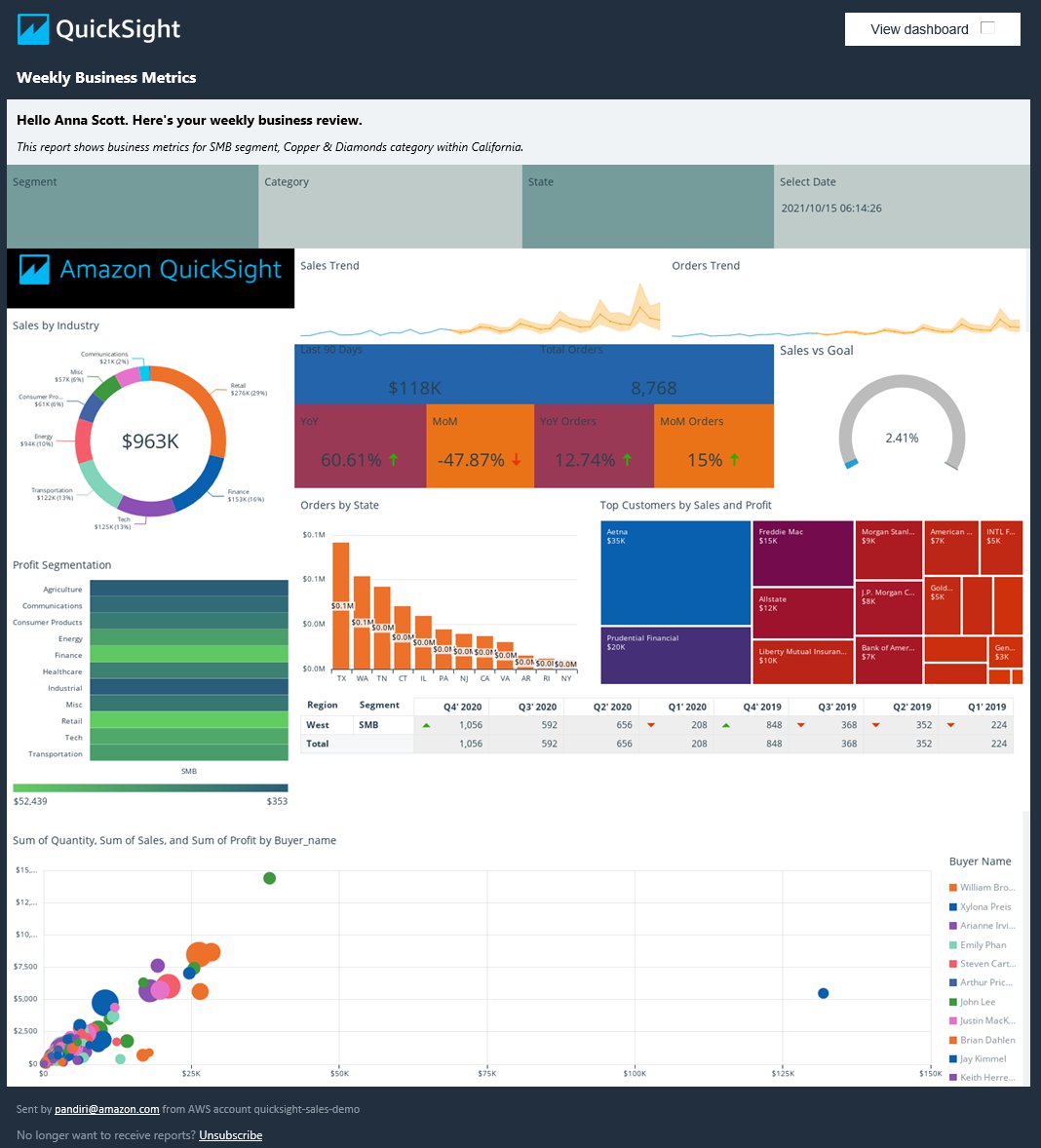
Let’s start with the following example dashboard, which shows sales insights and trends across different segments, categories, and states for any given date.

This dashboard is built with the new free-form layout that allows you to build pixel-perfect dashboards. You can define visual placement with X and Y coordinates, define height and width of visuals at the pixel level, and overlay visuals if needed. In addition to flexible visual placements, you can also set background, borders on visuals and filter controls. To learn more about building dashboards with free-form layouts, see Create stunning, pixel perfect dashboards with the new free-form layout mode in Amazon QuickSight.

Personalizing your dashboard

You can further customize this view for your readers so it always shows insights relevant to them on the dashboard, email reports, and the PDF attached to the email.

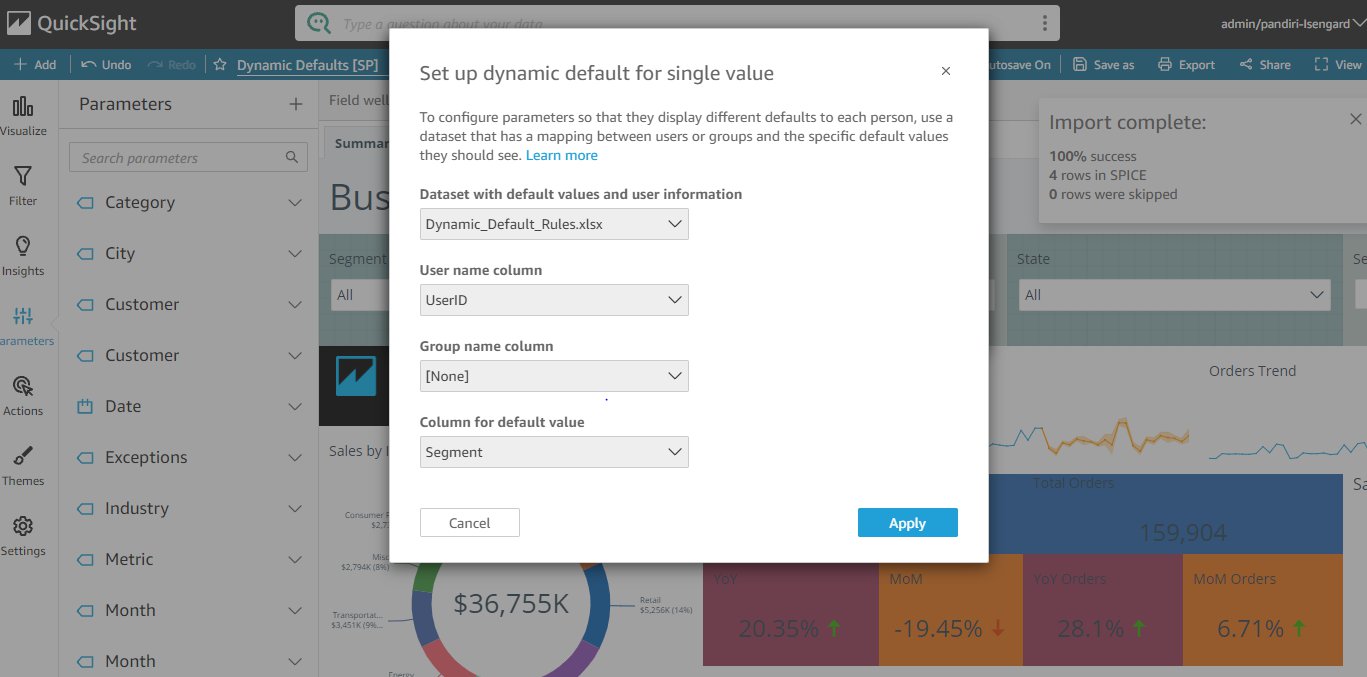
To personalize the dashboard, create a data table with dynamic default rules similar to the following table. In this table, you need to have the following columns: UserID for QuickSight usernames of dashboard readers, followed by one column each for parameters to set defaults to. For example, after we apply the following dynamic defaults dataset to our sample dashboard, when Ben Brown with username [email protected] accesses the dashboard, it shows business metrics for the Strategic segment within Aluminium category and Washington state.

To apply this dynamic default table to the dashboard, complete the following steps:

  1. Create a dataset with your dynamic default table on QuickSight.

This can be a SPICE or direct query dataset depending on where the rules are and how frequently the rules are updated. If rules are maintained in your backend source tables and updated often, create a direct query dataset. If the rules are uploaded from a flat file or are maintained in your backend source tables but not updated often, you can keep them in SPICE and schedule a refresh if needed.

  1. Add the dynamic default dataset to the analysis.
  2. Navigate to the analysis you want to set default rules on.
  3. In the navigation pane, choose Parameters.
  4. Choose the parameter you want to set defaults on and choose Set a dynamic default.
  5. Configure dynamic defaults by choosing the rules dataset, and mapping the user name, group name, and default columns to those from the dataset.

You can set dynamic defaults for individual users and also user groups.

  1. Repeat these steps for all parameters you want to set dynamic defaults on.

You can also add these parameters within titles and subtitles for a personalized view so readers know what fields the dashboard is filtered by.

Show and hide visuals

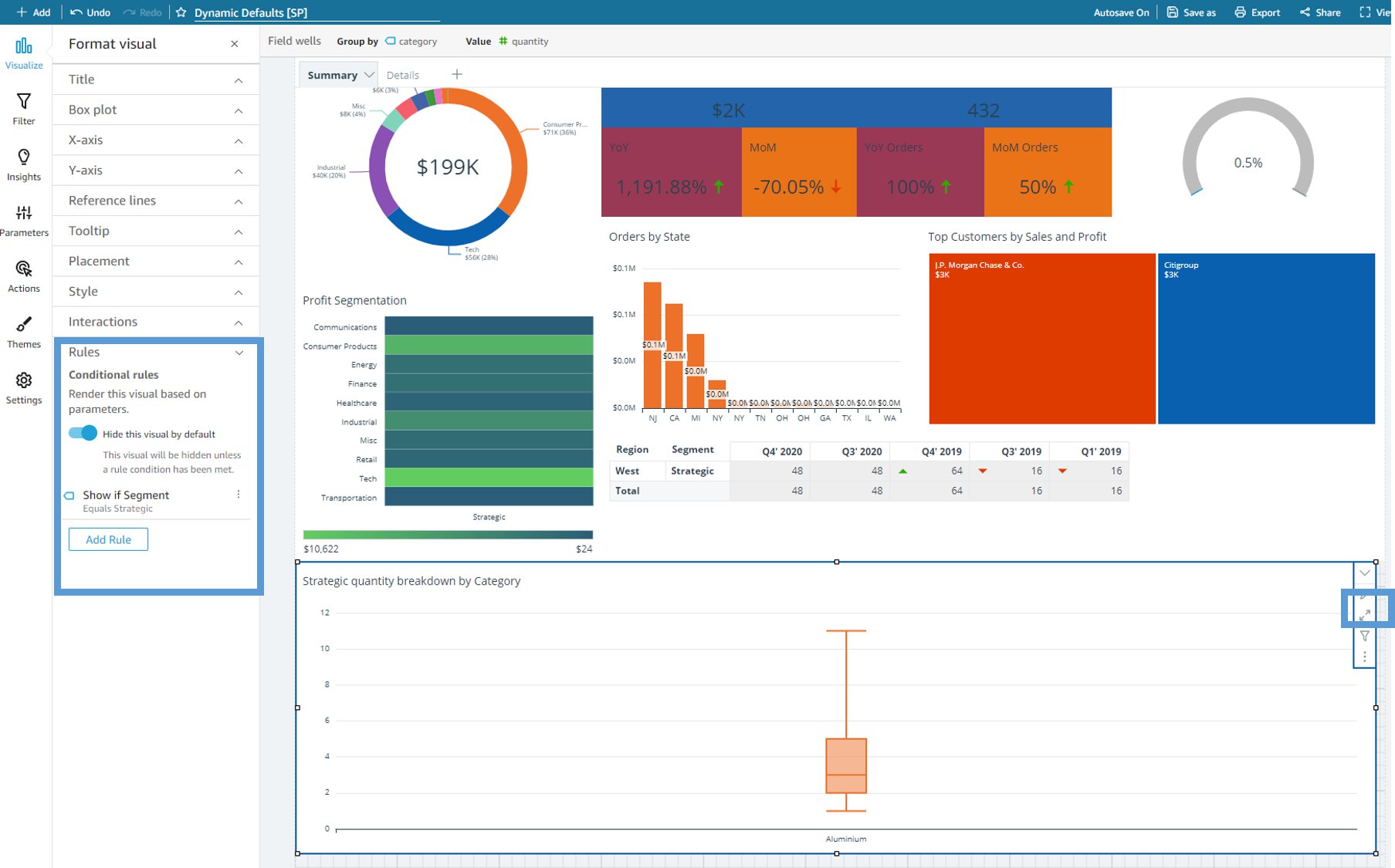
Additionally, you can conditionally show and hide visuals based on parameter values. You can use this in many creative ways, such as changing the visual type based on the parameter selected. For example, selecting Strategic as the segment could show a box plot of order quantity range grouped by Category. If you set the segment to SMB, you can replace the box plot with a different chart type. To conditionally show and hide visuals, complete the following steps:

  1. Create the visual you want to conditionally show and hide on the analysis.
  2. Click the pencil icon to edit the visual’s settings.
  3. Expand Rules and turn Hide this visual by default on.

In the following dashboard, the box plot is hidden by default, and is configured to show only when the segment parameter is set to Strategic.

  1. Similarly, create a scatter plot and configure the dashboard to hide this visual by default and only show when the segment parameter is set to SMB.
  2. Overlap this visual with the box plot visual so that either visual shows within this placement depending on the segment selected.

Publish and schedule email reports

Finally, publish the dashboard and share with all your readers, and schedule an email report and also configure to attach dashboard PDF to the report.

Readers now receive different views of the same dashboard, personalized to them, and showing metrics on the business sectors they care about.

For our example dashboard, Ben Brown receives an email report with business metrics for the Strategic segment and Aluminum category within Washington.

Anna Scott receives an email report of the same dashboard with for the SMB segment, Copper & Diamond category, and California state.

Conclusion

With the support for dynamic defaults on email reports, free form layout, and condition rendering of visuals, QuickSight allows you to build and deliver custom dashboards with personalized insights with end-users, directly to their email inboxes.

Learn more about other core capabilities such as Natural Language Querying with QuickSight Q and Embedded Analytics here.


About the Author

Sahitya Pandiri is a technical program manager with Amazon Web Services.

Improve Amazon Athena query performance using AWS Glue Data Catalog partition indexes

Post Syndicated from Noritaka Sekiyama original https://aws.amazon.com/blogs/big-data/improve-amazon-athena-query-performance-using-aws-glue-data-catalog-partition-indexes/

The AWS Glue Data Catalog provides partition indexes to accelerate queries on highly partitioned tables. In the post Improve query performance using AWS Glue partition indexes, we demonstrated how partition indexes reduce the time it takes to fetch partition information during the planning phase of queries run on Amazon EMR, Amazon Redshift Spectrum, and AWS Glue extract, transform, and load (ETL) jobs.

We’re pleased to announce Amazon Athena support for AWS Glue Data Catalog partition indexes. You can use the same indexes configured for Amazon EMR, Redshift Spectrum, and AWS Glue ETL jobs with Athena to reduce query planning times for highly partitioned tables, which is common in most data lakes on Amazon Simple Storage Service (Amazon S3).

In this post, we describe how to set up partition indexes and perform a few sample queries to demonstrate the performance improvement on Athena queries.

Set up resources with AWS CloudFormation

To help you get started quickly, we provide an AWS CloudFormation template, the same template we used in a previous post. You can review and customize it to suit your needs. Some of the resources this stack deploys incur costs when in use.

The CloudFormation template generates the following resources:

If you’re using AWS Lake Formation permissions, you need to make sure that the IAM user or role running AWS CloudFormation has the required permissions to create a database on the AWS Glue Data Catalog.

The tables created by the CloudFormation template use sample data located in an S3 public bucket. The data is partitioned by the columns year, month, day, and hour. There are 367,920 partition folders in total, and each folder has a single file in JSON format that contains an event similar to the following:

{
  "id": "95c4c9a7-4718-4031-9e79-b56b72220fbc",
  "value": 464.22130592811703
}

To create your resources, complete the following steps:

  1. Sign in to the AWS CloudFormation console.
  2. Choose Launch Stack:
  3. Choose Next.
  4. For DatabaseName, leave as the default.
  5. Choose Next.
  6. On the next page, choose Next.
  7. Review the details on the final page and select I acknowledge that AWS CloudFormation might create IAM resources.
  8. Choose Create.

Stack creation can take up to 5 minutes. When the stack is complete, you have two Data Catalog tables: table_with_index and table_without_index. Both tables point to the same S3 bucket, as mentioned previously, which holds data for more than 42 years (1980–2021) in 367,920 partitions. Each partition folder includes a data.json file containing the event data. In the following sections, we demonstrate how the partition indexes improve query performance with these tables using an example that represents large datasets in a data lake.

Set up partition indexes

You can create up to three partition indexes per table for new and existing tables. If you want to create a new table with partition indexes, you can include a list of PartitionIndex objects with the CreateTable API call. To add a partition index to an existing table, use the CreatePartitionIndex API call. You can also perform these actions from the AWS Glue console.

Let’s configure a new partition index for the table table_with_index we created with the CloudFormation template.

  1. On the AWS Glue console, choose Tables.
  2. Choose the table table_with_index.
  3. Choose Partitions and indices.
  4. Choose Add new index.
  5. For Index name, enter year-month-day-hour.
  6. For Selected keys from schema, select year, month, day, and hour. Make that you choose each column in this order, and confirm that Partition key for each column is correctly configured as follows:
    1. year: Partition (0)
    2. month: Partition (1)
    3. day: Partition (2)
    4. hour: Partition (3)
  7. Choose Add index.

The Status column of the newly created partition index shows as Creating. We need to wait for the partition index to be Active before it can be used by query engines. It should take about 1 hour to process and build the index for 367,920 partitions.

When the partition index is ready for table_with_index, you can use it when querying with Athena. For table_without_index, you should expect to see no change in query latency because no partition indexes were configured.

Enable partition filtering

To enable partition filtering in Athena, you need to update the table properties as follows:

  1. On the AWS Glue console, choose Tables.
  2. Choose the table table_with_index.
  3. Choose Edit table.
  4. Under Table properties, add the following:
    1. Keypartition_filtering.enabled
    2. Valuetrue
  5. Choose Apply.

Alternatively, you can set this parameter by running an ALTER TABLE SET PROPERTIES query in Athena:

ALTER TABLE partition_index.table_with_index
SET TBLPROPERTIES ('partition_filtering.enabled' = 'true')

Query tables using Athena

Now that your table has filtering enabled for Athena, let’s query both tables to see the performance differences.

First, query the table without using the partition index. In the Athena query editor, enter the following query:

SELECT count(*), sum(value) 
FROM partition_index.table_without_index 
WHERE year='2021' AND month='04' AND day='01'

The following screenshot shows the query took 44.9 seconds.

Next, query the table with using the partition index. You need to use the columns that are configured for the indexes in the WHERE clause to gain these performance benefits. Run the following query:

SELECT count(*), sum(value) 
FROM partition_index.table_with_index 
WHERE year='2021' AND month='04' AND day='01'

The following screenshot shows the query took just 1.3 seconds to complete, which is significantly faster than the table without indexes.

Query planning is the phase where the table and partition metadata are fetched from the AWS Glue Data Catalog. With partition indexes enabled, retrieving only the partitions required by the query can be done more efficiently and therefore quicker. Let’s retrieve the execution details of each query by using the AWS Command Line Interface (AWS CLI) to compare planning statistics.

The following is the query execution details for the query that ran against a table without partition indexes:

$ aws athena get-query-execution --query-execution-id 5e972df6-11f8-467a-9eea-77f509a23573 --query QueryExecution.Statistics --output table
--------------------------------------------
|             GetQueryExecution            |
+---------------------------------+--------+
|  DataScannedInBytes             |  1782  |
|  EngineExecutionTimeInMillis    |  44914 |
|  QueryPlanningTimeInMillis      |  44451 |
|  QueryQueueTimeInMillis         |  278   |
|  ServiceProcessingTimeInMillis  |  47    |
|  TotalExecutionTimeInMillis     |  45239 |
+---------------------------------+--------+

The following is the query execution details for a query that ran against a table with partition indexes:

% aws athena get-query-execution --query-execution-id 31d0b4ae-ae8d-4836-b20b-317fa9d9b79a --query QueryExecution.Statistics --output table
-------------------------------------------
|            GetQueryExecution            |
+---------------------------------+-------+
|  DataScannedInBytes             |  1782 |
|  EngineExecutionTimeInMillis    |  1361 |
|  QueryPlanningTimeInMillis      |  384  |
|  QueryQueueTimeInMillis         |  190  |
|  ServiceProcessingTimeInMillis  |  58   |
|  TotalExecutionTimeInMillis     |  1609 |
+---------------------------------+-------+

QueryPlanningTimeInMillis represents the number of milliseconds that Athena took to plan the query processing flow. This includes the time spent retrieving table partitions from the data source. Because the query engine performs the query planning, the query planning time is a subset of engine processing time.

Comparing the stats for both queries, we can see that QueryPlanningTimeInMillis is significantly lower in the query using partition indexes. It went from 44 seconds to 0.3 seconds when using partition indexes. The improvement in query planning resulted in a faster overall query runtime, going from 45 seconds to 1.3 seconds—a 35 times greater performance improvement.

Clean up

Now to the final step, cleaning up the resources:

  1. Delete the CloudFormation stack.
  2. Confirm both tables have been deleted from the AWS Glue Data Catalog.

Conclusion

At AWS, we strive to improve the performance of our services and our customers’ experience. The AWS Glue Data Catalog is a fully managed, Apache Hive compatible metastore that enables a wide range of big data, analytics, and machine learning services, like Athena, Amazon EMR, Redshift Spectrum, and AWS Glue ETL, to access data in the data lake. Athena customers can now further reduce query latency by enabling partition indexes for your tables in Amazon S3. Using partition indexes can improve the efficiency of retrieving metadata for highly partitioned tables ranging in the tens and hundreds of thousands and millions of partitions.

You can learn more about AWS Glue Data Catalog partition indexes in Working with Partition Indexes, and more about Athena best practices in Best Practices When Using Athena with AWS Glue.


About the Author

Noritaka Sekiyama is a Principal Big Data Architect on the AWS Glue team. He is passionate about architecting fast-growing data platforms, diving deep into distributed big data software like Apache Spark, building reusable software artifacts for data lakes, and sharing the knowledge in AWS Big Data blog posts. In his spare time, he enjoys having and watching killifish, hermit crabs, and grubs with his children.

How to set up Amazon Cognito for federated authentication using Azure AD

Post Syndicated from Ratan Kumar original https://aws.amazon.com/blogs/security/how-to-set-up-amazon-cognito-for-federated-authentication-using-azure-ad/

In this blog post, I’ll walk you through the steps to integrate Azure AD as a federated identity provider in Amazon Cognito user pool. A user pool is a user directory in Amazon Cognito that provides sign-up and sign-in options for your app users.

Identity management and authentication flow can be challenging when you need to support requirements such as OAuth, social authentication, and login using a Security Assertion Markup Language (SAML) 2.0 based identity provider (IdP) to meet your enterprise identity management requirements. Amazon Cognito provides you a managed, scalable user directory, user sign-up and sign-in, and federation through third-party identity providers. An added benefit for developers is that it provides you a standardized set of tokens (Identity, Access and Refresh Token). So, in situations when you have to support authentication with multiple identity providers (e.g. Social authentication, SAML IdP, etc.), you don’t have to write code for handling different tokens issued by different identity providers. Instead, you can just work with a consistent set of tokens issued by Amazon Cognito user pool.
 

Figure 1: High-level architecture for federated authentication in a web or mobile app

Figure 1: High-level architecture for federated authentication in a web or mobile app

As shown in Figure 1, the high-level application architecture of a serverless app with federated authentication typically involves following steps:

  1. User selects their preferred IdP to authenticate.
  2. User gets re-directed to the federated IdP for login. On successful authentication, the IdP posts back a SAML assertion or token containing user’s identity details to an Amazon Cognito user pool.
  3. Amazon Cognito user pool issues a set of tokens to the application
  4. Application can use the token issued by the Amazon Cognito user pool for authorized access to APIs protected by Amazon API Gateway.

To learn more about the authentication flow with SAML federation, see the blog post Building ADFS Federation for your Web App using Amazon Cognito User Pools.

Step-by-step instructions for enabling Azure AD as federated identity provider in an Amazon Cognito user pool

This post will walk you through the following steps:

  1. Create an Amazon Cognito user pool
  2. Add Amazon Cognito as an enterprise application in Azure AD
  3. Add Azure AD as SAML identity provider (IDP) in Amazon Cognito
  4. Create an app client and use the newly created SAML IDP for Azure AD

Prerequisites

You’ll need to have administrative access to Azure AD, an AWS account and the AWS Command Line Interface (AWS CLI) installed on your machine. Follow the instructions for installing, updating, and uninstalling the AWS CLI version 2; and then to configure your installation, follow the instructions for configuring the AWS CLI. If you don’t want to install AWS CLI, you can also run these commands from AWS CloudShell which provides a browser-based shell to securely manage, explore, and interact with your AWS resources.

Step 1: Create an Amazon Cognito user pool

The procedures in this post use the AWS CLI, but you can also follow the instructions to use the AWS Management Console to create a new user pool.

To create a user pool in the AWS CLI

  1. Use the following command to create a user pool with default settings. Be sure to replace <yourUserPoolName> with the name you want to use for your user pool.
    aws cognito-idp create-user-pool \
    --pool-name <yourUserPoolName>
    

    You should see an output containing number of details about the newly created user pool.

  2. Copy the value of user pool ID, in this example, ap-southeast-2_xx0xXxXXX. You will need this value for the next steps.
    "UserPool": {
            "Id": "ap-southeast-2_xx0xXxXXX",
            "Name": "example-corp-prd-userpool"
           "Policies": { …
    

Add a domain name to user pool

One of the many useful features of Amazon Cognito is hosted UI which provides a configurable web interface for user sign in. Hosted UI is accessible from a domain name that needs to be added to the user pool. There are two options for adding a domain name to a user pool. You can either use an Amazon Cognito domain, or a domain name that you own. This solution uses an Amazon Cognito domain, which will look like the following:

https://<yourDomainPrefix>.auth.<aws-region>.amazoncognito.com

To add a domain name to user pool

  1. Use following CLI command to add an Amazon Cognito domain to the user pool. Replace <yourDomainPrefix> with a unique domain name prefix (for example example-corp-prd). Note that you cannot use keywords aws, amazon, or cognito for domain prefix.
    aws cognito-idp create-user-pool-domain \
    --domain <yourDomainPrefix> \
    --user-pool-id <yourUserPoolID>
    

Prepare information for Azure AD setup

Next, you prepare Identifier (Entity ID) and Reply URL, which are required to add Amazon Cognito as an enterprise application in Azure AD (done in Step 2 below). Azure AD expects these values in a very specific format. In a text editor, note down your values for Identifier (Entity ID) and Reply URL according to the following formats:

  • For Identifier (Entity ID) the format is:
    urn:amazon:cognito:sp:<yourUserPoolID>
    

    For example:

    urn:amazon:cognito:sp:ap-southeast-2_nYYYyyYyYy
    

  • For Reply URL the format is:
    https://<yourDomainPrefix>.auth.<aws-region>.amazoncognito.com/saml2/idpresponse
    

    For example:

    https://example-corp-prd.auth.ap-southeast-2.amazoncognito.com/saml2/idpresponse
    

    Note: The Reply URL is the endpoint where Azure AD will send SAML assertion to Amazon Cognito during the process of user authentication.

Update the placeholders above with your values (without < >), and then note the values of Identifier (Entity ID) and Reply URL in a text editor for future reference.

For more information, see Adding SAML Identity Providers to a User Pool in the Amazon Cognito Developer Guide.

Step 2: Add Amazon Cognito as an enterprise application in Azure AD

In this step, you add an Amazon Cognito user pool as an application in Azure AD, to establish a trust relationship between them.

To add new application in Azure AD

  1. Log in to the Azure Portal.
  2. In the Azure Services section, choose Azure Active Directory.
  3. In the left sidebar, choose Enterprise applications.
  4. Choose New application.
  5. On the Browse Azure AD Gallery page, choose Create your own application.
  6. Under What’s the name of your app?, enter a name for your application and select Integrate any other application you don’t find in the gallery (Non-gallery), as shown in Figure 2. Choose Create.
     
    Figure 2: Add an enterprise app in Azure AD

    Figure 2: Add an enterprise app in Azure AD

It will take few seconds for the application to be created in Azure AD, then you should be redirected to the Overview page for the newly added application.

Note: Occasionally, this step can result in a Not Found error, even though Azure AD has successfully created a new application. If that happens, in Azure AD navigate back to Enterprise applications and search for your application by name.

To set up Single Sign-on using SAML

  1. On the Getting started page, in the Set up single sign on tile, choose Get started, as shown in Figure 3.
     
    Figure 3: Application configuration page in Azure AD

    Figure 3: Application configuration page in Azure AD

  2. On the next screen, select SAML.
  3. In the middle pane under Set up Single Sign-On with SAML, in the Basic SAML Configuration section, choose the edit icon ().
  4. In the right pane under Basic SAML Configuration, replace the default Identifier ID (Entity ID) with the Identifier (Entity ID) you copied previously. In the Reply URL (Assertion Consumer Service URL) field, enter the Reply URL you copied previously, as shown in Figure 4. Choose Save.
     
    Figure 4: Azure AD SAML-based Sign-on setup

    Figure 4: Azure AD SAML-based Sign-on setup

  5. In the middle pane under Set up Single Sign-On with SAML, in the User Attributes & Claims section, choose Edit.
  6. Choose Add a group claim.
  7. On the User Attributes & Claims page, in the right pane under Group Claims, select Groups assigned to the application, leave Source attribute as Group ID, as shown in Figure 5. Choose Save.
     
    Figure 5: Option to select group claims to release to Amazon Cognito

    Figure 5: Option to select group claims to release to Amazon Cognito

    This adds the group claim so that Amazon Cognito can receive the group membership detail of the authenticated user as part of the SAML assertion.

  8. In a text editor, note down the Claim names under Additional claims, as shown in Figure 5. You’ll need these when creating attribute mapping in Amazon Cognito.
  9. Close the User Attributes & Claims screen by choosing the X in the top right corner. You’ll be redirected to the Set up Single Sign-on with SAML page.
  10. Scroll down to the SAML Signing Certificate section, and copy the App Federation Metadata Url by choosing the copy into clipboard icon (highlighted with red arrow in Figure 6). Keep this URL in a text editor, as you’ll need it in the next step.
     
    Figure 6: Copy SAML metadata URL from Azure AD

    Figure 6: Copy SAML metadata URL from Azure AD

Step 3: Add Azure AD as SAML IDP in Amazon Cognito

Next, you need an attribute in the Amazon Cognito user pool where group membership details from Azure AD can be received, and add Azure AD as an identity provider.

To add custom attribute to user pool and add Azure AD as an identity provider

  1. Use the following CLI command to add a custom attribute to the user pool. Replace <yourUserPoolID> and <customAttributeName> with your own values.
    aws cognito-idp add-custom-attributes \
    --user-pool-id <yourUserPoolID> \
    --custom-attributes Name=<customAttributeName>,AttributeDataType="String"
    

    If the command succeeds, you’ll not see any output.

  2. Use the following CLI command to add Azure AD as an identity provider. Be sure to replace the following with your own values:
    • Replace <yourUserPoolID> with Amazon Cognito user pool ID copied previously.
    • Replace <IDProviderName> with a name for your identity provider (for example, Example-Corp-IDP).
    • Replace <MetadataURLCopiedFromAzureAD> with the Metadata URL copied from Azure AD.
    • Replace <customAttributeName> with custom attribute name created previously.
    aws cognito-idp create-identity-provider \
    --user-pool-id <yourUserPoolID> \
    --provider-name=<IDProviderName> \
    --provider-type SAML \
    --provider-details MetadataURL=<MetadataURLCopiedFromAzureAD> \
    --attribute-mapping email=http://schemas.xmlsoap.org/ws/2005/05/identity/claims/emailaddress,<customAttributeName>=http://schemas.microsoft.com/ws/2008/06/identity/claims/groups
    

    Successful running of this command adds Azure AD as a SAML IDP to your Amazon Cognito user pool.

Step 4: Create an app client and use the newly created SAML IDP for Azure AD

Before you can use Amazon Cognito in your web application, you need to register your app with Amazon Cognito as an app client. An app client is an entity within an Amazon Cognito user pool that has permission to call unauthenticated API operations (operations that do not require an authenticated user), for example to register, sign in, and handle forgotten passwords.

To create an app client

  1. Use following command to create an app client. Be sure to replace the following with your own values:
    • Replace <yourUserPoolID> with the Amazon Cognito user pool ID created previously.
    • Replace <yourAppClientName> with a name for your app client.
    • Replace <callbackURL> with the URL of your web application that will receive the authorization code. It must be an HTTPS endpoint, except for in a local development environment where you can use http://localhost:PORT_NUMBER.
    • Use parameter –allowed-o-auth-flows for allowed OAuth flows that you want to enable. In this example, we use code for Authorization code grant.
    • Use parameter –allowed-o-auth-scopes to specify which OAuth scopes (such as phone, email, openid) Amazon Cognito will include in the tokens. In this example, we use openid.
    • Replace <IDProviderName> with the same name you used for ID provider previously.
    aws cognito-idp create-user-pool-client \
    --user-pool-id <yourUserPoolID> \
    --client-name <yourAppClientName> \
    --no-generate-secret \
    --callback-urls <callbackURL> \
    --allowed-o-auth-flows code \
    --allowed-o-auth-scopes openid email\
    --supported-identity-providers <IDProviderName> \
    --allowed-o-auth-flows-user-pool-client
    

Successful running of this command will provide an output in following format. In a text editor, note down the ClientId for referencing in the web application. In this following example, the ClientId is 7xyxyxyxyxyxyxyxyxyxy.

{
    "UserPoolClient": {
        "UserPoolId": "ap-southeast-2_xYYYYYYY",
        "ClientName": "my-client-name",
        "ClientId": "7xyxyxyxyxyxyxyxyxyxy",
        "LastModifiedDate": "2021-05-04T17:33:32.936000+12:00",
        "CreationDate": "2021-05-04T17:33:32.936000+12:00",
        "RefreshTokenValidity": 30,
        "SupportedIdentityProviders": [
            "Azure-AD"
        ],
        "CallbackURLs": [
            "http://localhost:3030"
        ],
        "AllowedOAuthFlows": [
            "code"
        ],
        "AllowedOAuthScopes": [
            "openid", "email"
        ],
        "AllowedOAuthFlowsUserPoolClient": true
    }
}

Test the setup

Next, do a quick test to check if everything is configured properly.

  1. Open the Amazon Cognito console.
  2. Choose Manage User Pools, then choose the user pool you created in Step 1: Create an Amazon Cognito user pool.
  3. In the left sidebar, choose App client settings, then look for the app client you created in Step 4: Create an app client and use the newly created SAML IDP for Azure AD. Scroll to the Hosted UI section and choose Launch Hosted UI, as shown in Figure 7.
     
    Figure 7: App client settings showing link to access Hosted UI

    Figure 7: App client settings showing link to access Hosted UI

  4. On the sign-in page as shown in Figure 8, you should see all the IdPs that you enabled on the app client. Choose the Azure-AD button, which redirects you to the sign-in page hosted on https://login.microsoftonline.com/.
     
    Figure 8: Amazon Cognito hosted UI

    Figure 8: Amazon Cognito hosted UI

  5. Sign in using your corporate ID. If everything is working properly, you should be redirected back to the callback URL after successful authentication.

(Optional) Add authentication to a single page application

One way to add secure authentication using Amazon Cognito into a single page application (SPA) is to use the Auth.federatedSignIn() method of Auth class from AWS Amplify. AWS Amplify provides SDKs to integrate your web or mobile app with a growing list of AWS services, including integration with Amazon Cognito user pool. The federatedSign() method will render the hosted UI that gives users the option to sign in with the identity providers that you enabled on the app client (in Step 4), as shown in Figure 8. One advantage of hosted UI is that you don’t have to write any code for rendering it. Additionally, it will transparently implement the Authorization code grant with PKCE and securely provide your client-side application with the tokens (ID, Access and Refresh) that are required to access the backend APIs.

For a sample web application and instructions to connect it with Amazon Cognito authentication, see the aws-amplify-oidc-federation GitHub repository.

Conclusion

In this blog post, you learned how to integrate an Amazon Cognito user pool with Azure AD as an external SAML identity provider, to allow your users to use their corporate ID to sign in to web or mobile applications.

For more information about this solution, see our video Integrating Amazon Cognito with Azure Active Directory (from timestamp 25:26) on the official AWS twitch channel. In the video, you’ll find an end-to-end demo of how to integrate Amazon Cognito with Azure AD, and then how to use AWS Amplify SDK to add authentication to a simple React app (using the example of a pet store). The video also includes how you can access group membership details from Azure AD for authorization and fine-grained access control.

If you have feedback about this post, submit comments in the Comments section below. If you have questions about this post, start a new thread on the Amazon Cognito forum or contact AWS Support.

Want more AWS Security how-to content, news, and feature announcements? Follow us on Twitter.

Author

Ratan Kumar

Ratan is a solutions architect based out of Auckland, New Zealand. He works with large enterprise customers helping them design and build secure, cost-effective, and reliable internet scale applications using the AWS cloud. He is passionate about technology and likes sharing knowledge through blog posts and twitch sessions.

Author

Vishwanatha Nayak

Vish is a solutions architect at AWS. He engages with customers to create innovative solutions that are secure, reliable, and cost optimised to address business problems and accelerate the adoption of AWS services. He has over 15 years of experience in various software development, consulting, and architecture roles.

Introducing mutual TLS authentication for Amazon MSK as an event source

Post Syndicated from Julian Wood original https://aws.amazon.com/blogs/compute/introducing-mutual-tls-authentication-for-amazon-msk-as-an-event-source/

This post is written by Uma Ramadoss, Senior Specialist Solutions Architect, Integration.

Today, AWS Lambda is introducing mutual TLS (mTLS) authentication for Amazon Managed Streaming for Apache Kafka (Amazon MSK) and self-managed Kafka as an event source.

Many customers use Amazon MSK for streaming data from multiple producers. Multiple subscribers can then consume the streaming data and build data pipelines, analytics, and data integration. To learn more, read Using Amazon MSK as an event source for AWS Lambda.

You can activate any combination of authentication modes (mutual TLS, SASL SCRAM, or IAM access control) on new or existing clusters. This is useful if you are migrating to a new authentication mode or must run multiple authentication modes simultaneously. Lambda natively supports consuming messages from both self-managed Kafka and Amazon MSK through event source mapping.

By default, the TLS protocol only requires a server to authenticate itself to the client. The authentication of the client to the server is managed by the application layer. The TLS protocol also offers the ability for the server to request that the client send an X.509 certificate to prove its identity. This is called mutual TLS as both parties are authenticated via certificates with TLS.

Mutual TLS is a commonly used authentication mechanism for business-to-business (B2B) applications. It’s used in standards such as Open Banking, which enables secure open API integrations for financial institutions. It is one of the popular authentication mechanisms for customers using Kafka.

To use mutual TLS authentication for your Kafka-triggered Lambda functions, you provide a signed client certificate, the private key for the certificate, and an optional password if the private key is encrypted. This establishes a trust relationship between Lambda and Amazon MSK or self-managed Kafka. Lambda supports self-signed server certificates or server certificates signed by a private certificate authority (CA) for self-managed Kafka. Lambda trusts the Amazon MSK certificate by default as the certificates are signed by Amazon Trust Services CAs.

This blog post explains how to set up a Lambda function to process messages from an Amazon MSK cluster using mutual TLS authentication.

Overview

Using Amazon MSK as an event source operates in a similar way to using Amazon SQS or Amazon Kinesis. You create an event source mapping by attaching Amazon MSK as event source to your Lambda function.

The Lambda service internally polls for new records from the event source, reading the messages from one or more partitions in batches. It then synchronously invokes your Lambda function, sending each batch as an event payload. Lambda continues to process batches until there are no more messages in the topic.

The Lambda function’s event payload contains an array of records. Each array item contains details of the topic and Kafka partition identifier, together with a timestamp and base64 encoded message.

Kafka event payload

Kafka event payload

You store the signed client certificate, the private key for the certificate, and an optional password if the private key is encrypted in the AWS Secrets Manager as a secret. You provide the secret in the Lambda event source mapping.

The steps for using mutual TLS authentication for Amazon MSK as event source for Lambda are:

  1. Create a private certificate authority (CA) using AWS Certificate Manager (ACM) Private Certificate Authority (PCA).
  2. Create a client certificate and private key. Store them as secret in AWS Secrets Manager.
  3. Create an Amazon MSK cluster and a consuming Lambda function using the AWS Serverless Application Model (AWS SAM).
  4. Attach the event source mapping.

This blog walks through these steps in detail.

Prerequisites

1. Creating a private CA.

To use mutual TLS client authentication with Amazon MSK, create a root CA using AWS ACM Private Certificate Authority (PCA). We recommend using independent ACM PCAs for each MSK cluster when you use mutual TLS to control access. This ensures that TLS certificates signed by PCAs only authenticate with a single MSK cluster.

  1. From the AWS Certificate Manager console, choose Create a Private CA.
  2. In the Select CA type panel, select Root CA and choose Next.
  3. Select Root CA

    Select Root CA

  4. In the Configure CA subject name panel, provide your certificate details, and choose Next.
  5. Provide your certificate details

    Provide your certificate details

  6. From the Configure CA key algorithm panel, choose the key algorithm for your CA and choose Next.
  7. Configure CA key algorithm

    Configure CA key algorithm

  8. From the Configure revocation panel, choose any optional certificate revocation options you require and choose Next.
  9. Configure revocation

    Configure revocation

  10. Continue through the screens to add any tags required, allow ACM to renew certificates, review your options, and confirm pricing. Choose Confirm and create.
  11. Once the CA is created, choose Install CA certificate to activate your CA. Configure the validity of the certificate and the signature algorithm and choose Next.
  12. Configure certificate

    Configure certificate

  13. Review the certificate details and choose Confirm and install. Note down the Amazon Resource Name (ARN) of the private CA for the next section.
  14. Review certificate details

    Review certificate details

2. Creating a client certificate.

You generate a client certificate using the root certificate you previously created, which is used to authenticate the client with the Amazon MSK cluster using mutual TLS. You provide this client certificate and the private key as AWS Secrets Manager secrets to the AWS Lambda event source mapping.

  1. On your local machine, run the following command to create a private key and certificate signing request using OpenSSL. Enter your certificate details. This creates a private key file and a certificate signing request file in the current directory.
  2. openssl req -new -newkey rsa:2048 -days 365 -keyout key.pem -out client_cert.csr -nodes
    OpenSSL create a private key and certificate signing request

    OpenSSL create a private key and certificate signing request

  3. Use the AWS CLI to sign your certificate request with the private CA previously created. Replace Private-CA-ARN with the ARN of your private CA. The certificate validity value is set to 300, change this if necessary. Save the certificate ARN provided in the response.
  4. aws acm-pca issue-certificate --certificate-authority-arn Private-CA-ARN --csr fileb://client_cert.csr --signing-algorithm "SHA256WITHRSA" --validity Value=300,Type="DAYS"
  5. Retrieve the certificate that ACM signed for you. Replace the Private-CA-ARN and Certificate-ARN with the ARN you obtained from the previous commands. This creates a signed certificate file called client_cert.pem.
  6. aws acm-pca get-certificate --certificate-authority-arn Private-CA-ARN --certificate-arn Certificate-ARN | jq -r '.Certificate + "\n" + .CertificateChain' >> client_cert.pem
  7. Create a new file called secret.json with the following structure
  8. {
    "certificate":"",
    "privateKey":""
    }
    
  9. Copy the contents of the client_cert.pem in certificate and the content of key.pem in privatekey. Ensure that there are no extra spaces added. The file structure looks like this:
  10. Certificate file structure

    Certificate file structure

  11. Create the secret and save the ARN for the next section.
aws secretsmanager create-secret --name msk/mtls/lambda/clientcert --secret-string file://secret.json

3. Setting up an Amazon MSK cluster with AWS Lambda as a consumer.

Amazon MSK is a highly available service, so it must be configured to run in a minimum of two Availability Zones in your preferred Region. To comply with security best practice, the brokers are usually configured in private subnets in each Region.

You can use AWS CLI, AWS Management Console, AWS SDK and AWS CloudFormation to create the cluster and the Lambda functions. This blog uses AWS SAM to create the infrastructure and the associated code is available in the GitHub repository.

The AWS SAM template creates the following resources:

  1. Amazon Virtual Private Cloud (VPC).
  2. Amazon MSK cluster with mutual TLS authentication.
  3. Lambda function for consuming the records from the Amazon MSK cluster.
  4. IAM roles.
  5. Lambda function for testing the Amazon MSK integration by publishing messages to the topic.

The VPC has public and private subnets in two Availability Zones with the private subnets configured to use a NAT Gateway. You can also set up VPC endpoints with PrivateLink to allow the Amazon MSK cluster to communicate with Lambda. To learn more about different configurations, see this blog post.

The Lambda function requires permission to describe VPCs and security groups, and manage elastic network interfaces to access the Amazon MSK data stream. The Lambda function also needs two Kafka permissions: kafka:DescribeCluster and kafka:GetBootstrapBrokers. The policy template AWSLambdaMSKExecutionRole includes these permissions. The Lambda function also requires permission to get the secret value from AWS Secrets Manager for the secret you configure in the event source mapping.

  ConsumerLambdaFunctionRole:
    Type: AWS::IAM::Role
    Properties:
      AssumeRolePolicyDocument:
        Version: "2012-10-17"
        Statement:
          - Effect: Allow
            Principal:
              Service: lambda.amazonaws.com
            Action: sts:AssumeRole
      ManagedPolicyArns:
        - arn:aws:iam::aws:policy/service-role/AWSLambdaMSKExecutionRole
      Policies:
        - PolicyName: SecretAccess
          PolicyDocument:
            Version: "2012-10-17"
            Statement:
              - Effect: Allow
                Action: "SecretsManager:GetSecretValue"
                Resource: "*"

This release adds two new SourceAccessConfiguration types to the Lambda event source mapping:

1. CLIENT_CERTIFICATE_TLS_AUTH – (Amazon MSK, Self-managed Apache Kafka) The Secrets Manager ARN of your secret key containing the certificate chain (PEM), private key (PKCS#8 PEM), and private key password (optional) used for mutual TLS authentication of your Amazon MSK/Apache Kafka brokers. A private key password is required if the private key is encrypted.

2. SERVER_ROOT_CA_CERTIFICATE – This is only for self-managed Apache Kafka. This contains the Secrets Manager ARN of your secret containing the root CA certificate used by your Apache Kafka brokers in PEM format. This is not applicable for Amazon MSK as Amazon MSK brokers use public AWS Certificate Manager certificates which are trusted by AWS Lambda by default.

Deploying the resources:

To deploy the example application:

  1. Clone the GitHub repository
  2. git clone https://github.com/aws-samples/aws-lambda-msk-mtls-integration.git
  3. Navigate to the aws-lambda-msk-mtls-integration directory. Copy the client certificate file and the private key file to the producer lambda function code.
  4. cd aws-lambda-msk-mtls-integration
    cp ../client_cert.pem code/producer/client_cert.pem
    cp ../key.pem code/producer/client_key.pem
  5. Navigate to the code directory and build the application artifacts using the AWS SAM build command.
  6. cd code
    sam build
  7. Run sam deploy to deploy the infrastructure. Provide the Stack Name, AWS Region, ARN of the private CA created in section 1. Provide additional information as required in the sam deploy and deploy the stack.
  8. sam deploy -g
    Running sam deploy -g

    Running sam deploy -g

    The stack deployment takes about 30 minutes to complete. Once complete, note the output values.

  9. Create the event source mapping for the Lambda function. Replace the CONSUMER_FUNCTION_NAME and MSK_CLUSTER_ARN from the output of the stack created by the AWS SAM template. Replace SECRET_ARN with the ARN of the AWS Secrets Manager secret created previously.
  10. aws lambda create-event-source-mapping --function-name CONSUMER_FUNCTION_NAME --batch-size 10 --starting-position TRIM_HORIZON --topics exampleTopic --event-source-arn MSK_CLUSTER_ARN --source-access-configurations '[{"Type": "CLIENT_CERTIFICATE_TLS_AUTH","URI": "SECRET_ARN"}]'
  11. Navigate one directory level up and configure the producer function with the Amazon MSK broker details. Replace the PRODUCER_FUNCTION_NAME and MSK_CLUSTER_ARN from the output of the stack created by the AWS SAM template.
  12. cd ../
    ./setup_producer.sh MSK_CLUSTER_ARN PRODUCER_FUNCTION_NAME
  13. Verify that the event source mapping state is enabled before moving on to the next step. Replace UUID from the output of step 5.
  14. aws lambda get-event-source-mapping --uuid UUID
  15. Publish messages using the producer. Replace PRODUCER_FUNCTION_NAME from the output of the stack created by the AWS SAM template. The following command creates a Kafka topic called exampleTopic and publish 100 messages to the topic.
  16. ./produce.sh PRODUCER_FUNCTION_NAME exampleTopic 100
  17. Verify that the consumer Lambda function receives and processes the messages by checking in Amazon CloudWatch log groups. Navigate to the log group by searching for aws/lambda/{stackname}-MSKConsumerLambda in the search bar.
Consumer function log stream

Consumer function log stream

Conclusion

Lambda now supports mutual TLS authentication for Amazon MSK and self-managed Kafka as an event source. You now have the option to provide a client certificate to establish a trust relationship between Lambda and MSK or self-managed Kafka brokers. It supports configuration via the AWS Management Console, AWS CLI, AWS SDK, and AWS CloudFormation.

To learn more about how to use mutual TLS Authentication for your Kafka triggered AWS Lambda function, visit AWS Lambda with self-managed Apache Kafka and Using AWS Lambda with Amazon MSK.

[$] In search of an appropriate RLIMIT_MEMLOCK default

Post Syndicated from original https://lwn.net/Articles/876288/rss

One does not normally expect a lot of disagreement over a 13-line patch
that effectively tweaks a single line of code. Occasionally, though, such
a patch can expose a disagreement over how the behavior of the kernel
should be managed. This patch
from Drew DeVault
, who is evidently taking a break from stirring up
the npm community
, is a case in point. It brings to light the question
of how the kernel community should pick default values for configurable
parameters like resource limits.

2022 Planning: A First-Year CISO Shares Her Point of View

Post Syndicated from Jesse Mack original https://blog.rapid7.com/2021/11/19/2022-planning-a-first-year-ciso-shares-her-point-of-view/

2022 Planning: A First-Year CISO Shares Her Point of View

When you’re planning for the year ahead in cybersecurity, there’s always part of you that’s trying to play fortune-teller. You know what risks matter now, and the processes and resources you need to respond to them, but what threats might emerge over the coming 12 months — or 12 weeks, for that matter? What if the landscape changes before you have a chance to react?

Now, imagine you’re doing that crystal-ball-peering exercise while still in your first 6 months in a leadership role. That’s the situation a first-year CISO finds themselves in — and while it’s a little precarious, it’s equally ripe with opportunity.

On Thursday, November 17, Rapid7’s Chief Security Data Scientist Bob Rudis sat down with Katie Ledoux, Chief Information Security Officer at SMS marketing startup Attentive, to dive into how she’s tackling the challenges of planning for her security team’s needs in 2022 while navigating her new role.

Freedom to build from the ground up

At just 4 months into her tenure at Attentive as of November 2021, Katie has found a sense of freedom and clarity in being able to start from square one.

“Getting to build a program from scratch is actually kind of amazing… especially because I’ve made so many mistakes before,” she said. It was the process of learning from those mistakes in less high-stakes roles — including a 5-year stint at Rapid7 — and building back more effectively that helped her understand what to prioritize as a new CISO. Now, she has the opportunity start with the things she knows she and her first few hires can do well, addressing lower-complexity, higher-risk areas and seeing progress quickly.

“I’m starting off as very trusted — and I won’t lose that trust unless I screw up,” she quipped.

The importance of mentorship

For Katie, her own experience is only one part of keeping leadership’s trust and avoiding unforced errors. Getting the insights and expertise of others is essential.

“I have the most amazing mentor,” she said, going on to note that she cold-LinkedIn-messaged him after hearing him speak on a cybersecurity podcast. He responded, they connected, and the rest is history. He was particularly instrumental in helping her navigate the executive planning process as she ramped into her new role. While she wasn’t as well-versed in this area when she started, she leaned on the advice of her mentor and her teammates where she needed to.

“I consider my willingness to very loudly share things that I don’t know how to do to be one of my greatest strengths,” Katie said. “I’m constantly, constantly asking for help, which I think leads to better outcomes,” she continued.

Creating alignment on risk — and budget — priorities

One of the first things Katie’s mentor told her was to rethink the way she went about determining top-priority risks.

“I actually don’t dictate what our top risks are,” Katie said. Instead, she leads and facilitates a security committee and insists on collaborative input.


2022 Planning: A First-Year CISO Shares Her Point of View

Head to our 2022 Planning series page for more – full replay available soon!

“You basically lay out the facts and let people decide what the company’s risk appetite is,” she explained. “They’re going to try to get you to tell them what the biggest risks are,” she went on to say. But if you simply dictate the risk priorities unilaterally, it’s easy to lose buy-in as the months go on.

“They don’t really feel ownership over that work,” Katie pointed out, “and as soon as other priorities get in the way — you know, the job description that they were hired to do — they drop the security and risk remediation work.”

One of the keys of this setup is to keep the committee small — 6 to 8 people, Katie recommended. The right stakeholders will do a better job of ranking risks than one individual ever could.

Plus, with collective buy-in, getting budget for your security priorities becomes easier. For example, at Attentive, Katie shares a budgeting bucket with the engineering team. If the head of engineering helps decide what the top risks are, that makes it a whole lot less likely that Katie will end up in a tug-of-war with them over resources.

A new CISO’s top 3 priorities for 2022

With a solid structure in place for collaborative risk prioritization, what core components should CISOs include in their 2022 plan? Katie highlighted 3 key areas to put center-stage.

1. Hiring

It’s no secret that there’s a cybersecurity skills shortage, and building a pipeline of talent is critical for the coming year. In Katie’s case, she came in with a map of functions to hire for, job descriptions, and requisitions to post on the website — only to realize she had to rethink her approach. Her mentor suggested she spend 25% of her time interviewing general security candidates, regardless of whether or not she had a specific job opening for them right now.

There are a few reasons why this approach makes sense. As Bob pointed out, when talent is tough to find, you might not be able to bring in people who are mature enough in their careers to fill a specific niche. Plus, at startups and other fast-moving companies, the problem you had in mind when you posted a job listing might be gone by the time you fill the position.

Now, Katie has several evergreen, general cybersecurity job postings that specifically call out that it’s not necessary to have all the skill sets listed. Instead, she prioritizes bringing on talented candidates who can help meaningfully in any of the key areas that matter to the organization.


2022 Planning: A First-Year CISO Shares Her Point of View

2. Compliance

While compliance has become something of a dirty word in some security circles, Katie believes it can provide a great floor for a security program. The key is to do it thoughtfully.

After all, working toward a compliance certification like SOC 2 provides a clear priority that you can act on and show progress toward. If you design the components and controls you’re using carefully around this framework — and steer clear of the companies that tell you they can get you SOC 2-compliant in a month — you’ll avoid having a bunch of check-boxes and instead build a solid base of accountability.

For example, are all your assets really encrypted at rest? If you’re touting SOC 2 compliance and actively controlling for those requirements, you’ll know — and be able to remediate quickly if needed.

3. Identifying your top risks

Let’s face it: If you’re a new CISO, you’re going to need to go a board meeting some time soon (if you haven’t already) and explain what your organization’s most urgent risks are — and what you’re doing to fix them.

Build an initial risk matrix, and take your findings to your security committee for input and prioritization. From there, you’ll have a solid foundation to work from that will help you show the board, leadership, and yourself how you and your team are progressing toward your 2022 priorities.

Measuring success

While others tend to favor quantitative metrics in charting their security plan’s progress, Katie suggested going a level above that. The scores and numbers that make sense to security pros might not resonate with the CTO or other leadership.

“The best way for me to measure progress is probably in looking at risk management,” she said. “It’s my job to mitigate risks at an acceptable level.”

The top risks you identify for 2022 should be improving over time — and by 2023, you should have new ones. If you’re able to leave last year’s risks behind and move onto new ones, that’s a good sign you’re making progress. And if you need help in charting that course, don’t be afraid to rely on others’ expertise.

“LinkedIn-message random people and be like, ‘How do I do my job?'” Katie recommended, only half-jokingly. “Don’t be shy,” she went on to insist. “No one knows everything.”

So far, the collaborative, advice-seeking strategy is working out for Katie. It won’t be long before her own LinkedIn inbox is full of first-year CISOs looking to learn how a seasoned pro gets it done.

Want more 2022 planning tips from industry experts?

Sign up for our webinar series

Insulating AWS Outposts Workloads from Amazon EC2 Instance Size, Family, and Generation Dependencies

Post Syndicated from Emma White original https://aws.amazon.com/blogs/compute/insulating-aws-outposts-workloads-from-amazon-ec2-instance-size-family-and-generation-dependencies/

This post is written by Garry Galinsky, Senior Solutions Architect.

AWS Outposts is a fully managed service that offers the same AWS infrastructure, AWS services, APIs, and tools to virtually any datacenter, co-location space, or on-premises facility for a truly consistent hybrid experience. AWS Outposts is ideal for workloads that require low-latency access to on-premises systems, local data processing, data residency, and application migration with local system interdependencies.

Unlike AWS Regions, which offer near-infinite scale, Outposts are limited by their provisioned capacity, EC2 family and generations, configured instance sizes, and availability of compute capacity that is not already consumed by other workloads. This post explains how Amazon EC2 Fleet can be used to insulate workloads running on Outposts from EC2 instance size, family, and generation dependencies, reducing the likelihood of encountering an error when launching new workloads or scaling existing ones.

Product Overview

Outposts is available as a 42U rack that can scale to create pools of on-premises compute and storage capacity. When you order an Outposts rack, you specify the quantity, family, and generation of Amazon EC2 instances to be provisioned. As of this writing, five EC2 families, each of a single generation, are available on Outposts (m5, c5, r5, g4dn, and i3en). However, in the future, more families and generations may be available, and a given Outposts rack may include a mix of families and generations. EC2 servers on Outposts are partitioned into instances of homogenous or heterogeneous sizes (e.g., large, 2xlarge, 12xlarge) based on your workload requirements.

Workloads deployed through AWS CloudFormation or scaled through Amazon EC2 Auto Scaling generally assume that the required EC2 instance type will be available when the deployment or scaling event occurs. Although in the Region this is a reasonable assumption, the same is not true for Outposts. Whether as a result of competing workloads consuming the capacity, the Outpost having been configured with limited capacity for a given instance size, or an Outpost update resulting in instances being replaced with a newer generation, a deployment or scaling event tied to a specific instance size, family, and generation may encounter an InsufficentInstanceCapacity error (ICE). And this may occur even though sufficient unused capacity of a different size, family, or generation is available.

EC2 Fleet

Amazon EC2 Fleet simplifies the provisioning of Amazon EC2 capacity across different Amazon EC2 instance types and Availability Zones, as well as across On-Demand, Amazon EC2 Reserved Instances (RI), and Amazon EC2 Spot purchase models. A single API call lets you provision capacity across EC2 instance types and purchase models in order to achieve the desired scale, performance, and cost.

An EC2 Fleet contains a configuration to launch a fleet, or group, of EC2 instances. The LaunchTemplateConfigs parameter lets multiple instance size, family, and generation combinations be specified in a priority order.

This feature is commonly used in AWS Regions to optimize fleet costs and allocations across multiple deployment strategies (reserved, on-demand, and spot), while on Outposts it can be used to eliminate the tight coupling of a workload to specific EC2 instances by specifying multiple instance families, generations, and sizes.

Launch Template Overrides

The EC2 Fleet LaunchTemplateConfigs definition describes the EC2 instances required for the fleet. A specific parameter of this definition, the Overrides, can include prioritized and/or weighted options of EC2 instances that can be launched to satisfy the workload. Let’s investigate how you can use Overrides to decouple the EC2 size, family, and generation dependencies.

Overriding EC2 Instance Size

Let’s assume our Outpost was provisioned with an m5 server. The server is the equivalent of an m5.24xlarge, which can be configured into multiple instances. For example, the server can be homogeneously provisioned into 12 x m5.2xlarge, or heterogeneously into 1 x m5.8xlarge, 3 x m5.2xlarge, 8 x m5.xlarge, and 4 x m5.large. Let’s assume the heterogeneous configuration has been applied.

Our workload requires compute capacity equivalent to an m5.4xlarge (16 vCPUs, 64 GiB memory), but that instance size is not available on the Outpost. Attempting to launch this instance would result in an InsufficentInstanceCapacity error. Instead, the following LaunchTemplateConfigs override could be used:

"Overrides": [
    {
        "InstanceType": "m5.4xlarge",
        "WeightedCapacity": 1.0,
        "Priority": 1.0
    },
    {
        "InstanceType": "m5.2xlarge",
        "WeightedCapacity": 0.5,
        "Priority": 2.0
    },
    {
        "InstanceType": "m5.8xlarge",
        "WeightedCapacity": 2.0,
        "Priority": 3.0
    }
]

The Priority describes our order of preference. Ideally, we launch a single m5.4xlarge instance, but that’s not an option. Therefore, in this case, the EC2 Fleet would move to the next priority option, an m5.2xlarge. Given that an m5.2xlarge (8 vCPUs, 32 GiB memory) offers only half of the resource of the m5.4xlarge, the override includes the WeightedCapacity parameter of 0.5, resulting in two m5.2xlarge instances launching instead of one.

Our overrides include a third, over-provisioned and less preferable option, should the Outpost lack two m5.2xlarge capacity: launch one m5.8xlarge. Operating within finite resources requires tradeoffs, and priority lets us optimize them. Note that had the launch required 2 x m5.4xlarge, only one instance of m5.8xlarge would have been launched.

Overriding EC2 Instance Family

Let’s assume our Outpost was provisioned with an m5 and a c5 server, homogeneously partitioned into 12 x m5.2xlarge and 12 x c5.2xlarge instances. Our workload requires compute capacity equivalent to a c5.2xlarge instance (8 vCPUs, 16 GiB memory). As our workload scales, more instances must be launched to meet demand. If we couple our workload to c5.2xlarge, then our scaling will be blocked as soon as all 12 instances are consumed. Instead, we use the following LaunchTemplateConfigs override:

"Overrides": [
    {
        "InstanceType": "c5.2xlarge",
        "WeightedCapacity": 1.0,
        "Priority": 1.0
    },
    {
        "InstanceType": "m5.2xlarge",
        "WeightedCapacity": 1.0,
        "Priority": 2.0
    }
]

The Priority describes our order of preference. Ideally, we scale more c5.2xlarge instances, but when those are not an option EC2 Fleet would launch the next priority option, an m5.2xlarge. Here again the outcome may result in over-provisioned memory capacity (32 vs 16 GiB memory), but it’s a reasonable tradeoff in a finite resource environment.

Overriding EC2 Instance Generation

Let’s assume our Outpost was provisioned two years ago with an m5 server. Since then, m6 servers have become available, and there’s an expectation that m7 servers will be available soon. Our single-generation Outpost may unexpectedly become multi-generation if the Outpost is expanded, or if a hardware failure results in a newer generation replacement.

Coupling our workload to a specific generation could result in future scaling challenges. Instead, we use the following LaunchTemplateConfigs override:

"Overrides": [
    {
        "InstanceType": "m6.2xlarge",
        "WeightedCapacity": 1.0,
        "Priority": 1.0
    },
    {
        "InstanceType": "m5.2xlarge",
        "WeightedCapacity": 1.0,
        "Priority": 2.0
    },
    {
        "InstanceType": "m7.2xlarge",
        "WeightedCapacity": 1.0,
        "Priority": 3.0
    }

]

Note the Priority here, our preference is for the current generation m6, even though it’s not yet provisioned in our Outpost. The m5 is what would be launched now, given that it’s the only provisioned generation. However, we’ve also future-proofed our workload by including the yet unreleased m7.

Deploying an EC2 Fleet

To deploy an EC2 Fleet, you must:

  1. Create a launch template, which streamlines and standardizes EC2 instance provisioning by simplifying permission policies and enforcing best practices across your organization.
  2. Create a fleet configuration, where you set the number of instances required and specify the prioritized instance family/generation combinations.
  3. Launch your fleet (or a single EC2 instance).

These steps can be codified through AWS CloudFormation or executed through AWS Command Line Interface (CLI) commands. However, fleet definitions cannot be implemented by using the AWS Console. This example will use CLI commands to conduct these steps.

Prerequisites

To follow along with this tutorial, you should have the following prerequisites:

Create a Launch Template

Launch templates let you store launch parameters so that you do not have to specify them every time you launch an EC2 instance. A launch template can contain the Amazon Machine Images (AMI) ID, instance type, and network settings that you typically use to launch instances. For more details about launch templates, reference Launch an instance from a launch template .

For this example, we will focus on these specifications:

  • AMI image ImageId
  • Subnet (the SubnetId associated with your Outpost)
  • Availability zone (the AvailabilityZone associated with your Outpost)
  • Tags

Create a launch template configuration (launch-template.json) with the following content:

{
    "ImageId": "<YOUR-AMI>",
    "NetworkInterfaces": [
        {
            "DeviceIndex": 0,
            "SubnetId": "<YOUR-OUTPOST-SUBNET>"
        }
    ],
    "Placement": {
        "AvailabilityZone": "<YOUR-OUTPOST-AZ>"
    },
    "TagSpecifications": [
        {
            "ResourceType": "instance",
            "Tags": [
                {
                    "Key": "<YOUR-TAG-KEY>",
                    "Value": "<YOUR-TAG-VALUE>"
                }
            ]
        }
    ]
}

Create your launch template using the following CLI command:

aws ec2 create-launch-template \
  --launch-template-name <YOUR-LAUNCH-TEMPLATE-NAME> \
  --launch-template-data file://launch-template.json

You should see a response like this:

{
    "LaunchTemplate": {
        "LaunchTemplateId": "lt-010654c96462292e8",
        "LaunchTemplateName": "<YOUR-LAUNCH-TEMPLATE-NAME>",
        "CreateTime": "2021-07-12T15:55:00+00:00",
        "CreatedBy": "arn:aws:sts::<YOUR-AWS-ACCOUNT>:assumed-role/<YOUR-AWS-ROLE>",
        "DefaultVersionNumber": 1,
        "LatestVersionNumber": 1
    }
}

The value for LaunchTemplateId is the identifier for your newly created launch template. You will need this value lt-010654c96462292e8 in the subsequent step.

Create a Fleet Configuration

Refer to Generate an EC2 Fleet JSON configuration file for full documentation on the EC2 Fleet configuration.

For this example, we will use this configuration to override a mix of instance size, family, and generation. The override includes three EC2 instance types:

  • m5.large, the instance family and generation currently available on the Outpost.
  • m6.large, a forthcoming family and generation not yet available for Outposts.
  • m7.large, a potential future family and generation.

Create an EC2 fleet configuration (ec2-fleet.json) with the following content (note that the LaunchTemplateId was the value returned in the prior step):

{
    "TargetCapacitySpecification": {
        "TotalTargetCapacity": 1,
        "OnDemandTargetCapacity": 1,
        "SpotTargetCapacity": 0,
        "DefaultTargetCapacityType": "on-demand"
    },
    "OnDemandOptions": {
        "AllocationStrategy": "prioritized",
        "SingleInstanceType": true,
        "SingleAvailabilityZone": true,
        "MinTargetCapacity": 1
    },
    "LaunchTemplateConfigs": [
        {
            "LaunchTemplateSpecification": {
                "LaunchTemplateId": "lt-010654c96462292e8",
                "Version": "1"
            },
            "Overrides": [
                {
                    "InstanceType": "m6.2xlarge",
                    "WeightedCapacity": 1.0,
                    "Priority": 1.0
                },
                {
                    "InstanceType": "c5.2xlarge",
                    "WeightedCapacity": 1.0,
                    "Priority": 2.0
                },
                {
                    "InstanceType": "m5.large",
                    "WeightedCapacity": 0.25,
                    "Priority": 3.0
                },
                {
                    "InstanceType": "m5.2xlarge",
                    "WeightedCapacity": 1.0,
                    "Priority": 4.0
                },
                {
                    "InstanceType": "r5.2xlarge",
                    "WeightedCapacity": 1.0,
                    "Priority": 5.0
                }


            ]
        }
    ],
    "Type": "instant"
}

Launch the Single Instance Fleet

To launch the fleet, execute the following CLI command (this will launch a single instance, but a similar process can be used to launch multiple):

aws ec2 create-fleet \
  --cli-input-json file://ec2-fleet.json

You should see a response like this:

{
    "FleetId": "fleet-dc630649-5d77-60b3-2c30-09808ef8aa90",
    "Errors": [
        {
            "LaunchTemplateAndOverrides": {
                "LaunchTemplateSpecification": {
                    "LaunchTemplateId": "lt-010654c96462292e8",
                    "Version": "1"
                },
                "Overrides": {
                    "InstanceType": "m6.2xlarge",
                    "WeightedCapacity": 1.0,
                    "Priority": 1.0
                }
            },
            "Lifecycle": "on-demand",
            "ErrorCode": "InvalidParameterValue",
            "ErrorMessage": "The instance type 'm6.2xlarge' is not supported in Outpost 'arn:aws:outposts:us-west-2:111111111111:outpost/op-0000ffff0000fffff'."
        },
        {
            "LaunchTemplateAndOverrides": {
                "LaunchTemplateSpecification": {
                    "LaunchTemplateId": "lt-010654c96462292e8",
                    "Version": "1"
                },
                "Overrides": {
                    "InstanceType": "c5.2xlarge",
                    "WeightedCapacity": 1.0,
                    "Priority": 2.0
                }
            },
            "Lifecycle": "on-demand",
            "ErrorCode": "InsufficientCapacityOnOutpost",
            "ErrorMessage": "There is not enough capacity on the Outpost to launch or start the instance."
        }
    ],
    "Instances": [
        {
            "LaunchTemplateAndOverrides": {
                "LaunchTemplateSpecification": {
                    "LaunchTemplateId": "lt-010654c96462292e8",
                    "Version": "1"
                },
                "Overrides": {
                    "InstanceType": "m5.large",
                    "WeightedCapacity": 0.25,
                    "Priority": 3.0
                }
            },
            "Lifecycle": "on-demand",
            "InstanceIds": [
                "i-03d6323c8a1df8008",
                "i-0f62593c8d228dba5",
                "i-0ae25baae1f621c15",
                "i-0af7e688d0460a60a"
            ],
            "InstanceType": "m5.large"
        }
    ]
}

Results

Navigate to the EC2 Console where you will find new instances running on your Outpost. An example is shown in the following screenshot:

EC2 running instances, AWS console, network view, filtered by tag

Although multiple instance size, family, and generation combinations were included in the Overrides, only the c5.large was available on the Outpost. Instead of launching one m6.2xlarge, four c5.large were launched in order to compensate for their lower WeightedCapacity. From the fleet-create response, the overrides were clearly evaluated in priority order with the error messages explaining why the top two overrides were ignored.

Clean up

AWS CLI EC2 commands can be used to create fleets but can also be used to delete them.

To clean up the resources created in this tutorial:

    1. Note the FleetId values returned in the create-fleet command.
    2. Run the following command for each fleet created:
aws ec2 delete-fleets \
  --fleet-ids  \
  --terminate-instances
  1. Note the launch-template-name used in the create-launch-template command.
  2. Run the following command for each fleet created:
{
    "SuccessfulFleetDeletions": [
        {
            "CurrentFleetState": "deleted_terminating",
            "PreviousFleetState": "active",
            "FleetId": "fleet-dc630649-5d77-60b3-2c30-09808ef8aa90"
        }
    ],
    "UnsuccessfulFleetDeletions": []
}
  1. Clean up any resources you created for the prerequisites.

Conclusion

This post discussed how EC2 Fleet can be used to decouple the availability of specific EC2 instance sizes, families, and generation from the ability to launch or scale workloads. On an Outpost provisioned with multiple families of EC2 instances (say m5 and c5) and different sizes (say m5.large and m5.2xlarge), EC2 Fleet can be used to satisfy a workload launch request even if the capacity of the preferred instance size, family, or generation is unavailable.

To learn more about AWS Outposts, check out the Outposts product page. To see a full list of pre-defined Outposts configurations, visit the Outposts pricing page

Interview for FAKTI.bg Assen Yordanov: If a lustration law had been passed, Bulgaria would not be in this state

Post Syndicated from Екип на Биволъ original https://bivol.bg/assen-yordanov-if-a-lustration-law-had-been-passed-bulgaria-would-not-be-in-this-state.html

петък 19 ноември 2021


Interview by Peter Zdravkov (FAKTI.bg)  Thirty-two years after 10 November 1989 Bulgaria has changed a lot but at the same time, looking at that change, many more opportunities to transform…

Make Room for Cloud Security in Your 2022 Budget

Post Syndicated from Shelby Matthews original https://blog.rapid7.com/2021/11/19/make-room-for-cloud-security-in-your-2022-budget/

Make Room for Cloud Security in Your 2022 Budget

Are you thinking about cloud security when making your 2022 budget? You should be. Cloud is the key to innovation and business transformation. It can make life so much easier. The cloud enables companies to expand their products or services, rapidly develop new products, and reach new customers. In fact, 70% of companies that have moved to the cloud plan on increasing their budgets in the future.

But the cloud can also bring unwanted problems. Hackers have figured out new creative ways to get to your data, human error causes misconfigurations, and security is often implemented too far down the workflow.

Cloud security is growing

In the recent years, there has been a growing reliance on cloud-based services as more companies have adopted the cloud. According to Rapid7 survey data, 4 out of 5 organizations say cloud adoption was necessary to keep their business competitive. The global cloud security market is estimated to reach $34.8 billion at the end of 2021 and expected to grow 14.2% over the next 5 years.

So, why are companies adopting the cloud?

  • It saves you money. According to TechnologyAdvice, companies can save an average of 15% on technology costs by moving to the cloud.
  • You can work on the go. This is a big one, especially during the pandemic. Employees switched to remote work and the cloud enabled a smooth transition.
  • The cloud adapts to what you want. Want more storage? The cloud can do it. Want to switch to a private network? The cloud can do it.

Our Rapid7 researchers found 121 publicly reported cloud misconfigurations that resulted in data being exposed. Looking at 2021, we are seeing the same patterns of misconfigured buckets that are exposed online. The median number of files being exposed in a breach was 10 million last year. Those files range from small things like names or ages to more serious data like social security numbers and addresses.

2021 has already seen a couple of mega breaches, one exposing over 12 billion records and another two that exposed over a billion. Polecat, a UK reputation firm, exposed over 12 billion records in March after leaving an Elasticsearch server open with no protection. Cybercrimes and attacks have become more sophisticated and security has been slow to adapt. There is a simple solution to keep this from happening to your company: investing in cloud security. Most misconfigurations are the result of human error, and having cloud security tools in place will help mitigate the risk.

What can cloud security look like for you?

So how can you keep your data safe in the cloud? In 2022 and beyond, effective cloud security relies on three core concepts.

  • Shift left: Prevent problems before they even happen by implementing security earlier in your workflows. Having a consistent set of security checkpoints early in your pipeline will stop misconfigurations and policy violations before they deploy.
  • Reduce noise: It’s easy for security professionals to get lost in the noise from constant notifications about tickets being opened and closed or constant alerts that don’t need their attention. Reducing noise means having full visibility into cloud environments.
  • Automation and remediation: Automation is the key to achieving cloud security at the speed of scale. Having automated security resources prevents human error and catches misconfigurations before they are even noticed. InsightCloudSec provides automation tools such as bots that are customizable to fit your needs.

Cloud is the future of technology, and no one wants to be left behind. Invest in cloud security now to ensure that you aren’t featured in our next misconfigurations report. You don’t have to choose between innovation and security anymore.

Security is the next big step in cloud adoption

Learn why in our Trust in the Cloud report

New Rowhammer Technique

Post Syndicated from Bruce Schneier original https://www.schneier.com/blog/archives/2021/11/new-rowhammer-technique.html

Rowhammer is an attack technique involving accessing — that’s “hammering” — rows of bits in memory, millions of times per second, with the intent of causing bits in neighboring rows to flip. This is a side-channel attack, and the result can be all sorts of mayhem.

Well, there is a new enhancement:

All previous Rowhammer attacks have hammered rows with uniform patterns, such as single-sided, double-sided, or n-sided. In all three cases, these “aggressor” rows — meaning those that cause bitflips in nearby “victim” rows — are accessed the same number of times.

Research published on Monday presented a new Rowhammer technique. It uses non-uniform patterns that access two or more aggressor rows with different frequencies. The result: all 40 of the randomly selected DIMMs in a test pool experienced bitflips, up from 13 out of 42 chips tested in previous work from the same researchers.

[…]

The non-uniform patterns work against Target Row Refresh. Abbreviated as TRR, the mitigation works differently from vendor to vendor but generally tracks the number of times a row is accessed and recharges neighboring victim rows when there are signs of abuse. The neutering of this defense puts further pressure on chipmakers to mitigate a class of attacks that many people thought more recent types of memory chips were resistant to.

The collective thoughts of the interwebz