Security updates have been issued by CentOS (binutils, firefox, flatpak, freerdp, httpd, java-1.8.0-openjdk, java-11-openjdk, kernel, openssl, and thunderbird), Fedora (python-sport-activities-features, rpki-client, and vim), and Red Hat (devtoolset-10-annobin and devtoolset-10-binutils).
As your monitoring infrastructures evolve, you might hit a point when there’s no avoiding using the Zabbix API. The Zabbix API can be used to automate a particular part of your day-to-day workflow, troubleshoot your monitoring or to simply analyze or get statistics about a specific set of entities.
In this blog post, we will take a look at some of the more advanced API methods and specific method parameters and learn how they can be used to improve your API workflows.
1. Count entities with CountOutput
Let’s start with gathering some statistics. Let’s say you have to count the number of some matching entities – here we can use the CountOutput parameter. For a more advanced use case – what if we have to count the number of events for some time period? Let’s combine countOutput with time_from and time_till (in unixtime) and get the number of events created for the month of November. Let’s get all of the events for the month of November that have the Disaster severity:
Now let’s copy and paste the result of the export and import the template into another environment. It’s extremely important to remember that for this method to work exactly as we intend to, we need to include the parameters that specify the behavior of particular entities contained in the configuration string, such as items/value maps/templates, etc. For example, if I exclude the templates parameter here, no templates will be imported.
3. Expand trigger functions and macros with expand parameters
Using trigger.get to obtain information about a particular set of triggers is a relatively common practice. One particular caveat that we have to consider is that by default macros in trigger name, expression or descriptions are not expanded. To expand the available macros we need to use the expand parameters:
4. Obtaining additional LLD information for a discovered item
If we wish to display additional LLD information for a discovered entity, in this case – an item, we can use the selectDiscoveryRule and selectItemDiscovery parameters.
While selectDiscoveryRule will provide the ID of the LLD rule that created the item, selectItemDiscovery can point us at the parent item prototype id from which the item was created, last discovery time, item prototype key, and more.
The example below will return the item details and will also provide the LLD rule and Item prototype IDs, the time when the lost item will be deleted and the last time the item was discovered:
5. Searching through the matched entities with search parameters
Zabbix API provides a couple of standard parameters for performing a search. With search parameter, we can search string or text fields and try to find objects based on a single or multiple entries. searchByAny parameter is capable of extending the search – if you set this as true, we will search by ANY of the criteria in the search array, instead of trying to find an entity that matches ALL of them (default behavior).
The following API call will find items that match agent and Zabbix keys on a particular template:
Feel free to take the above examples, change them around so they fit your use case and you should be able to quite easily implement them in your environment. There are many other use cases that we might potentially cover down the line – if you have a specific API use case that you wish for us to cover, feel free to leave a comment under this post and we just might cover it in one of the upcoming blog posts!
This month, the team behind our Code Club programme supported nearly 6000 children across Scotland to “code against climate change” during the United Nations Climate Change Conference (COP26) in Glasgow.
“The scale of what we have achieved is outstanding. We have supported over 5750 young learners to code projects that are both engaging and meaningful to their conversations on climate.”
Louise Foreman, Education Scotland (Digital Skills team)
Creative coding to raise awareness of environmental issues
“This type of event at this scale would not have been possible before the pandemic. Now joining and learning through live online events is quite normal, thanks to platforms like e-Sgoil’s DYW Live. That said, the success of these code-alongs has been above even our wildest imaginations.”
Peter Murray, Education Scotland (Developing the Young Workforce team)
At our first session, for beginners, the coding newcomers explored the importance of pollinating insects for the environment. They first learned that a third of the food we eat depends on pollinators such as bees and butterflies, and that these insects are endangered by environmental crises.
Then the young coders celebrated pollinating insects by coding a garden scene filled with butterflies, based on our popular Butterfly garden project guide. This Scratch project introduces beginner coders to loops while they code their animations, and it allows them to get creative and customise the look of their projects. Above are still images of two example animations coded by the young learners.
The second Code Club code-along event was designed for more confident coders. First, learners were asked to consider the impact of plastic in our oceans and reflect on the recent news that around 26,000 tonnes of coronavirus-related plastic waste (such as masks and gloves) has already entered our oceans. To share this message, they then coded a game based on our Save the shark Scratch project guide. In this game, players help a shark swim through the ocean trying to avoid plastic waste, which is dangerous to its health.
Following on from last weeks’ coding session P4 were able to work collaboratively to code a game. The aim is for the shark to eat the fish and not the plastic. We have been learning about protecting our planet in class. Thank you @CodeClubScot for the detailed instructions! JP pic.twitter.com/3kmsmLFUzA
These two Scotland-wide code-along events for schools were made possible by the long-standing collaboration between Education Scotland and our Code Club team. Over the last five years, our shared mission to grow interest for coding and computer science among children across Scotland has helped Scottish teachers start hundreds of Code Clubs.
The school children who participated in the code-along sessions enjoyed themselves a lot, as shown by this note from one of them.
“The code-alongs were the perfect celebration of all the brilliant work we have done together over the years. What better way to demonstrate the importance of computing science to young people than to show them that not only can they use those skills on something important like climate change, but they are also in great company with thousands of other children across Scotland. I am excited about the future.”
Join thousands of teachers around the world who run Code Clubs
We also want to give kudos to the teachers of the 235 schools who helped their learners participate in this Code Club code-along. Thanks to your skills in supporting your learners to participate in online sessions — skills hard-won during school closures — over 5000 young people have been inspired about coding and protecting the planet we all share.
Teachers around the world run Code Clubs for their learners, with the help of our free Code Club resources and support. Find out more about starting a Code Club at your school at www.codeclub.org.
A research publication authored by Tenindra Abeywickrama (Grab), Victor Liang (Grab) and Kian-Lee Tan (NUS) based on their work, which was awarded the Best Scalable Data Science Paper Award for 2021.
Matching the right passengers to the right driver-partners is a critically important task in ride-hailing services. Doing this suboptimally can lead to passengers taking longer to reach their destinations and drivers losing revenue. Perhaps, the most challenging of all is that this is a continuous process with a constant stream of new ride requests and new driver-partners becoming available. This makes computing matchings a very computationally expensive task requiring high throughput.
We discovered that one component of the typically used algorithm to find matchings has a significant impact on efficiency that has hitherto gone unnoticed. However, we also discovered a useful property of real-world optimal matchings that allows us to improve the algorithm, in an interesting scenario of practice informing theory.
A real-world example
Let us consider a simple matching algorithm as depicted in Figure 1, where passengers and driver-partners are matched by travel time. In the figure, we have three driver-partners (D1, D2, and D3) and three passengers (P1, P2, and P3).
Finding the travel time involves computing the fastest route from each driver-partner to each passenger, for example the dotted routes from D1 to P1, P2 and P3 respectively. Finding the assignment of driver-partners to passengers that minimise the overall travel time involves representing the problem in a more abstract way as a bipartite graph shown below.
In the bipartite graph, the set of passengers and the set of driver-partners form the two bipartite sets, respectively. The edges connecting them represent the travel time of the fastest routes, and their costs are shown in the cost matrix on the right.
Figure 1. Example driver-to-passenger matching scenario
Finding the optimal assignment is known as solving the minimum weight bipartite matching problem (also known as the assignment problem). This problem is often solved using a technique called the Kuhn-Munkres (KM) algorithm1 (also known as the Hungarian Method).
If we were to run the algorithm on the scenario shown in Figure 1, we would find the optimal matching highlighted in red on the cost matrix shown in the figure. However, there is an important step that we have not paid great attention to so far, and that is the computation of the cost matrix. As it turns out, this step has quite a significant impact on performance in real-world settings.
Impact of the cost matrix
Past work that solves the assignment problem assumes the cost matrix is given as input, but we observe that the time taken to compute the cost matrix is not always trivial. This is especially true in our real-world scenario. Firstly, matching driver-partners and passengers is a continuous process, as we mentioned earlier. Costs are not fixed; they change over time as driver-partners move and new passenger requests are received.
This means the matrix must be recomputed each time we attempt a matching (for example every X seconds). Not only is finding the shortest path between a single passenger and driver-partner computationally expensive, we must do this for all pairs of passengers and driver-partners. In fact, in the real world, the time taken to compute the matrix is longer than the time taken to compute the optimal assignment! A simple consideration of time complexity suggests that this is true.
If m is the number of driver-partners/passengers we are trying to match, the KM algorithm typically runs in O(m^3). If n is the number of nodes in the road network, then computing the cost matrix runs in O(m x n log n) using Dijkstra’s algorithm2.
We know that n is around 400,000 for Singapore’s road network (and much larger for bigger cities), thus we can reasonably expect O(m x n log n) to dominate O(m^3) for m < 1500, which is the kind of value for m we expect in the real-world. We ran experiments on Singapore’s road network to verify this, as shown in Figure 2.
Figure 2. Proportion of time to compute the matrix vs. assignment for varying m on the Singapore road network
In Figure 2a, we can see that m must be greater than 2500, before the assignment time overtakes the matrix computation time. Even if we use a modern and advanced technique like Contraction Hierarchies3 to compute the fastest path, the observation holds, as shown in Figure 2b. This shows we can significantly improve overall matching performance if we can reduce the matrix computation time.
A redeeming intuition: Spatial locality of matching
While studying real-world locations of passengers and driver-partners, we observed an interesting property, which we dubbed “spatial locality of matching”. We find that the passenger assigned to each driver-partner in an optimal matching is one of the nearest passengers to the driver-partner (it might not be the nearest). This makes intuitive sense as passengers and driver-partners will be distributed throughout a city and it’s unlikely that the best match for a particular driver-partner is on the other side of the city.
In Figure 3, we see an example scenario exhibiting spatial locality of matching. While this is an idealised case to demonstrate the principle, it is not a significant departure from the real-world. From the cost matrix shown, it is very easy to see which assignment will give the lowest total travel time.
Figure 3. Example driver-partner to passenger matching scenario exhibiting spatial locality of matching
Now, it begs the question, do we even need to compute the other costs to find the optimal matching? For example, can we avoid computing the cost from D3 to P1, which are very far apart and unlikely to be matched?
Incremental Kuhn-Munkres
As it turns out, there is a way to take advantage of spatial locality of matching to reduce cost computation time. We propose an Incremental KM algorithm that computes costs only when they are required, and (hopefully) avoids computing all of them. Our modified KM algorithm incorporates an inexpensive lower-bounding technique to achieve this without adding significant overhead, as we will elaborate in the next section.
Figure 4. System overview of Incremental Kuhn-Munkres implementation
Retrieving objects nearest to a query point by their fastest route is a very well studied problem (commonly referred to as k-Nearest Neighbour search)4. We employ this concept to implement a priority queue Qi for each driver ui, as displayed in Figure 4. These priority queues allow retrieving the nearest passengers by a lower-bound on the travel time. The top of a priority queue implies a lower-bound on the travel time for all passengers that have not been retrieved yet. We can then use this minimum lower-bound as a lower-bound edge cost for all bipartite edges associated with that driver-partner for which we have not computed the exact cost so far.
Now, the KM algorithm can proceed as usual, using the virtual edge cost implied by the relevant priority queue, to avoid computing the exact edge cost. Of course, there may be circumstances where the virtual edge cost is insufficiently accurate for KM to compute the optimal matching. To solve this, we propose refinement rules that detect when a virtual edge cost is insufficient.
If a rule is triggered, we refine the queue by retrieving the top element and computing its exact edges; this is where the “incremental” part comes from. In almost all cases, this will also increase the minimum key (lower-bound) in the priority queue.
If you’re interested in finding out more, you can delve deeper into the pruning rules, inner workings of the algorithm and mathematical proofs of correctness by reading our research paper5.
For now, it suffices to say that the Incremental KM algorithm produces the exact same result as the original KM algorithm. It just does so in an optimistic incremental way, hoping that we can find the result without computing all possible costs. This is perfectly suited to take advantage of spatial locality of matching. Moreover, not only do we save time by avoiding computing exact costs, we avoid computing longer fastest paths/travel times to further away passengers that are more computationally expensive than those for nearby passengers.
Experimental investigation
Competition
We conducted a thorough experimental investigation to verify the practical performance of the proposed techniques. We implemented two variants of our Incremental KM technique, differing in the implementation of the priority queue and the shortest path technique used.
IKM-DIJK: Uses Dijkstra’s algorithm to compute shortest paths. Priority queues are simply the priority queue of the Dijkstra’s search from each driver-partner. This adds no overhead over the regular KM algorithm, so any speedup comes for free.
IKM-GAC: Uses state-of-the-art lower-bound technique COLT6 to implement the priority queues and G-tree4, a fast technique to compute shortest paths. The COLT index must be built for each assignment, and this overhead is included in all running times.
We compared our proposed variants against the regular KM algorithm using Dijkstra and G-tree, respectively, to compute the entire cost matrix up front. Thus, we can make an apples-to-apples comparison to see how effective our techniques are.
Datasets
We ran experiments using the real-world road network for Singapore. For the Singapore dataset, we also use a real production workload consisting of Grab bookings over a 7-day period from December 2018.
Performance evaluation
To test our technique on the Singapore workload, we created an assignment problem by first choosing the window size W in seconds. Then, we batched all the bookings in a randomly selected window of that size and used the passenger and driver-partner locations from these bookings to create the bipartite sets. Next, we found an optimal matching using each technique and reported the results averaged over several randomly selected windows for several metrics.
Figure 5. Average percentage of the cost matrix computed by each technique vs. batching window size
In Figure 5, we verify that our proposed techniques are indeed computing fewer exact costs compared to their counterparts. Naturally, the original KM variants compute 100% of the matrix.
Figure 6. Average running time to find an optimal assignment by each technique vs. batching window size
In Figure 6, we can see the running times of each technique. The results in the figure confirm that the reduced computation of exact costs translates to a significant reduction of running time by over an order of magnitude. This verifies that the time saved is greater than any overhead added. Remember, the improvement of IKM-DIJK comes essentially for free! On the other hand, using IKM-GAC can achieve very low running times.
Figure 7. Maximum throughput supported by each technique vs. batching window size
In Figure 7, we report a slightly different metric. We measure m, the maximum number of passengers/driver-partners that can be batched within the time window W. This can be considered as the maximum throughput of each technique. Our technique supports significantly higher throughput.
Note that the improvement is smaller than in other cases because real-world values of m rarely reach these levels, where the assignment time starts to take up a greater proportion of the overall computation time.
Conclusion
In summary, computing assignment costs do indeed have a significant impact on the running time of finding optimal assignments. However, we show that by utilising the spatial locality of matching inherent in real-world assignment problems, we can avoid computing exact costs, unless absolutely necessary, by modifying the KM algorithm to work incrementally.
We presented an interesting case where practice informs the theory, with our novel modifications to the classical KM algorithm. Moreover, our technique can be potentially applied beyond driver-partner and passenger matching in ride-hailing services.
For example, the Route Inspection algorithm also uses shortest path edge costs to find a minimum-weight bipartite matching, and our technique could be a drop-in replacement. It would also be interesting to see if these principles can be generalised and applied to other domains where the assignment problem is used.
Acknowledgements
This research was jointly conducted between Grab and the Grab-NUS AI Lab within the Institute of Data Science at the National University of Singapore (NUS). Tenindra Abeywickrama was previously a postdoctoral fellow at the lab and now a data scientist with Grab.
Special thanks to Kian-Lee Tan from NUS for co-authoring this paper.
Join us
Grab is a leading superapp in Southeast Asia, providing everyday services that matter to consumers. More than just a ride-hailing and food delivery app, Grab offers a wide range of on-demand services in the region, including mobility, food, package and grocery delivery services, mobile payments, and financial services across over 400 cities in eight countries.
Powered by technology and driven by heart, our mission is to drive Southeast Asia forward by creating economic empowerment for everyone. If this mission speaks to you, join our team today!
References
H. W. Kuhn. 1955. The Hungarian method for the assignment problem. Naval Research Logistics Quarterly 2, 1-2 (1955), 83–97 ↩
Dijkstra, E.W. A note on two problems in connexion with graphs. Numer. Math. 1, 269–271 (1959) ↩
Robert Geisberger, Peter Sanders, Dominik Schultes, and Daniel Delling. 2008. Contraction Hierarchies: Faster and Simpler Hierarchical Routing in Road Networks. In WEA. 319–333 ↩
Ruicheng Zhong, Guoliang Li, Kian-Lee Tan, Lizhu Zhou, and Zhiguo Gong. 2015. G-Tree: An Efficient and Scalable Index for Spatial Search on Road Networks. IEEE Trans. Knowl. Data Eng. 27, 8 (2015), 2175–2189 ↩↩2
Tenindra Abeywickrama, Victor Liang, and Kian-Lee Tan. 2021. Optimizing bipartite matching in real-world applications by incremental cost computation. Proc. VLDB Endow. 14, 7 (March 2021), 1150–1158 ↩
Tenindra Abeywickrama, Muhammad Aamir Cheema, and Sabine Storandt. 2020. Hierarchical Graph Traversal for Aggregate k Nearest Neighbors Search in Road Networks. In ICAPS. 2–10 ↩
This blog post is Part 2 of Hands-on walkthrough of the AWS Network Firewall flexible rules engine – Part 1. To recap, AWS Network Firewall is a managed service that offers a flexible rules engine that gives you the ability to write firewall rules for granular policy enforcement. In Part 1, we shared how to write a rule and how the rule engine processes rules differently depending on whether you are performing stateless or stateful inspection using the action order method.
In this blog, we focus on how stateful rules are evaluated using a recently added feature—the strict rule order method. This feature gives you the ability to set one or more default actions. We demonstrate how you can use this feature to create or update your rule groups and share scenarios where this feature can be useful.
In addition, after reading this post, you’ll be able to deploy an automated serverless solution that retrieves the latest Suricata-specific rules from the community, such as from Proofpoint’s Emerging Threats OPEN ruleset. By deploying such solutions into your Amazon Web Services (AWS) environment, you can seamlessly enhance your overall security posture as the solutions fetch the latest set of intrusion detection system (IDS) rules from Proofpoint (formerly Emerging Threats) and optionally using them as intrusion prevention system (IPS) thereby keeping the rule groups updated on your Network Firewall. You can select the refresh interval to update these rulesets—the default refresh interval is 6 hours. You can also convert the set of rule groups to intrusion prevention system (IPS) mode. Finally, you have granular visibility of the various categories of rules for your Network Firewall on the AWS Management Console.
How does Network Firewall evaluate your stateful rule group?
There are two ways that Network Firewall can evaluate your stateful rule groups: the action ordering method or the strict ordering method. The settings of your rule groups must match the settings of the firewall policy that they belong to.
With the action order evaluation method for stateless inspection, all individual packets in a flow are evaluated against each rule in the policy. The rules are processed in order based on the priority assigned to them with lowest numbered rules evaluated first. For stateful inspection using the action order evaluation method, the rule engine evaluates based on the order of their action setting with pass rules processed first, then drop, then alert. The engine stops processing rules when it finds a match. The firewall also takes into consideration the order that the rules appear in the rule group, and the priority assigned to the rule, if any. Part 1 provides more details on action order evaluation.
If your firewall policy is set up to use strict ordering, Network Firewall now allows you the option to manually set a strict rule group order for stateful rule groups. Using this optional setting, the rule groups are evaluated in order of priority, starting from the lowest numbered rule, and the rules in each rule group are processed in the order in which they’re defined. You can also select which of the default actions—drop all, drop established, alert all, or alert established—Network Firewall will take when following strict rule ordering.
A customer scenario where strict rule order is beneficial
Configuring rule groups by action order is appropriate for IDS use cases, but can be an obstacle for use cases where you deploy firewalls that follow security best practice, which is to allow only what’s required and deny everything else (default deny). You can’t achieve this best practice by using the default action order behavior. However, with strict order functionality, you can create a firewall policy that allows prioritization of stateful rules, or that can run 5-tuple and Suricata rules simultaneously. Strict rule order allows you to have a block of fine-grain rules with specific actions at the beginning followed by a coarse set of rules with specific actions and finally a default drop action. An example is shown in Figure 1 that follows.
Figure 1: An example snippet of a Network Firewall firewall policy with strict rule order
Figure 1 shows that there are two different default drop actions that you can choose: drop established and drop all. If you choose drop established, Network Firewall drops only the packets that are in established connections. This allows the layer 3 and 4 connection establishment packets that are needed for the upper-layer connections to be established, while dropping the packets for connections that are already established. This allows application-layer pass rules to be written in a default-deny setup without the need to write additional rules to allow the lower-layer handshaking parts of the underlying protocols.
The drop all action drops all packets. In this scenario, you need additional rules to explicitly allow lower-level handshakes for protocols to succeed. Evaluation order for stateful rule groups provides details of how Network Firewall evaluates the different actions. In order to set the additional environment variables that are shown in the snippet, follow the instructions outlined in Examples of stateful rules for Network Firewall and the Suricata rule variables.
An example walkthrough to set up a Network Firewall policy with a stateful rule group with strict rule order and default drop action
In this section, you’ll start by creating a firewall policy with strict rule order. From there, you’ll build on it by adding a stateful rule group with strict rule order and modifying the priority order of the rules within a stateful rule group.
Step 1: Create a firewall policy with strict rule order
You can configure the default actions on policies using strict rule order, which is a property that can only be set at creation time as described below.
Log in to the console and select the AWS Region where you have Network Firewall.
Select VPC service on the search bar.
On the left pane, under the Network Firewall section, select Firewall policies.
Choose Create Firewall policy. In Describe firewall policy, enter an appropriate name and (optional) description. Choose Next.
In the Add rule groups section.
Select the Stateless default actions:
Under Choose how to treat fragmented packets choose one of the options.
Choose one of the actions for stateless default actions.
Under Stateful rule order and default action
Under Rule order choose Strict.
Under Default actions choose the default actions for strict rule order. You can select one drop action and one or both of the alert actions from the list.
Next, add an optional tag (for example, for Key enter Name, and for Value enter Firewall-Policy-Non-Production). Review and choose Create to create the firewall policy.
Step 2: Create a stateful rule group with strict rule order
Log in to the console and select the AWS Region where you have Network Firewall.
Select VPC service on the search bar.
On the left pane, under the Network Firewall section, select Network Firewall rule groups.
In the center pane, select Create Network Firewall rule group on the top right.
In the rule group type, select Stateful rule group.
Enter a name, description, and capacity.
In the stateful rule group options select either 5-tuple or Suricata compatible IPS rules. These allow rule order to be strict.
In the Stateful rule order, choose Strict.
In the Add rule section, add the stateful rules that you require. Detailed instructions on creating a rule can be found at Creating a stateful rule group.
Finally, Select Create stateful rule group.
Step 3: Add the stateful rule group with strict rule order to a Network Firewall policy
Log in to the console and select the AWS Region where you have Network Firewall.
Select VPC service on the search bar.
On the left pane, under the Network Firewall section, select Firewall policies.
Chose the network firewall policy you created in step 1.
In the center pane, in the Stateful rule groups section, select Add rule group.
Select the stateful rule group you created in step 2. Next, choose Add stateful rule group. This is explained in detail in Updating a firewall policy.
Step 4: Modify the priority of existing rules in a stateful rule group
Log in to the console and select the AWS Region where you have Network Firewall.
Select VPC service on the search bar.
On the left pane, under the Network Firewall section, choose Network Firewall rule groups.
Select the rule group that you want to edit the priority of the rules.
Select the Edit rules tab. Select the rule you want to change the priority of and select the Move up and Move down buttons to reorder the rule. This is shown in Figure 2.
Figure 2: Modify the order of the rules within a stateful rule groups
Note:
Rule order can be set to strict order only when network firewall policies or rule groups are created. The rule order can’t be changed to strict order evaluation on existing objects.
You can only associate strict-order rule groups with strict-order policies, and default-order rule groups with default-order policies. If you try to associate an incompatible rule group, you will get a validation exception.
Today, creating domain list-type rule groups using strict order isn’t supported. So, you won’t be able to associate domain lists with strict order policies. However, 5-tuple and Suricata compatible rules are supported.
Automated serverless solution to retrieve Suricata rules
To help simplify and maintain your more advanced Network Firewall rules, let’s look at an automated serverless solution. This solution uses an Amazon CloudWatch Events rule that’s run on a schedule. The rule invokes an AWS Lambda function that fetches the latest Suricata rules from Proofpoint’s Emerging Threats OPEN ruleset and extracts them to an Amazon Simple Storage Service (Amazon S3) bucket. Once the files lands in the S3 bucket another Lambda function is invoked that parses the Suricata rules and creates rule groups that are compatible with Network Firewall. This is shown in Figure 3 that follows. This solution was developed as an AWS Serverless Application Model (AWS SAM) package to make it less complicated to deploy. AWS SAM is an open-source framework that you can use to build serverless applications on AWS. The deployment instructions for this solution can be found in this code repository on GitHub.
Multiple rule groups are created based on the Suricata IDS categories. This solution enables you to selectively change certain rule groups to IPS mode as required by your use case. It achieves this by modifying the default action from alert to drop in the ruleset. The modified stateful rule group can be associated to the active Network Firewall firewall policy. The quota for rule groups might need to be increased to incorporate all categories from Proofpoint’s Emerging Threats OPEN ruleset to meet your security requirements. An example screenshot of various IPS categories of rule groups created by the solution is shown in Figure 4. Setting up rule groups by categories is the preferred way to define an IPS rule, because the underlying signatures have already been grouped and maintained by Proofpoint.
Figure 4: Rule groups created by the solution based on Suricata IPS categories
The solution provides a way to use logs in CloudWatch to troubleshoot the Suricata rulesets that weren’t successfully transformed into Network Firewall rule groups. The final rulesets and discarded rules are stored in an S3 bucket for further analysis. This is shown in Figure 5.
Figure 5: Amazon S3 folder structure for storing final applied and discarded rulesets
Conclusion
AWS Network Firewall lets you inspect traffic at scale in a variety of use cases. AWS handles the heavy lifting of deploying the resources, patch management, and ensuring performance at scale so that your security teams can focus less on operational burdens and more on strategic initiatives. In this post, we covered a sample Network Firewall configuration with strict rule order and default drop. We showed you how the rule engine evaluates stateful rule groups with strict rule order and default drop. We then provided an automated serverless solution from Proofpoint’s Emerging Threats OPEN ruleset that can aid you in establishing a baseline for your rule groups. We hope this post is helpful and we look forward to hearing about how you use these latest features that are being added to Network Firewall.
Amazon QuickSight is a scalable business intelligence (BI) service built for the cloud, which allows insights to be shared with all users in the organization. QuickSight offers SPICE, an in-memory, cloud-native data store that allows end-users to interactively explore data. SPICE provides consistently fast query performance and automatically scales for high concurrency. With SPICE, you save time and cost because you don’t need to retrieve data from the data source (whether a database or data warehouse) every time you change an analysis or update a visual, and you remove the load of concurrent access or analytical complexity off the underlying data source with the data.
Today, we’re introducing incremental refresh in SPICE, with a refresh rate of 15 minutes (four times faster than before), which improves freshness of data in SPICE. In addition, we’re doubling SPICE limits on a per dataset basis to 500 million rows (twice that of our previous 250 million row limit). In this post, we walk through these new capabilities and how you can use them to create SPICE datasets that can help you scale your data to all your users.
What’s new with QuickSight SPICE?
We’ve added the following capabilities to QuickSight:
Incremental refresh – QuickSight now supports incrementally loading new data to SPICE datasets without needing to refresh the full set of data. With incremental refresh, you can update SPICE datasets in a fraction of the time a full refresh would take, enabling access to the most recent insights much sooner. You can schedule incremental refresh to run up to every 15 minutes on a dataset on SQL-based data sources, such as Amazon Redshift, Amazon Athena, PostgreSQL, Microsoft SQL Server, or Snowflake.
500 million row SPICE capacity – The QuickSight SPICE engine now supports datasets up to 500 million rows or 500 GB in size. This change lets you use SPICE for datasets twice as large than before.
In the next sections, we show you how to get started with incremental refresh and 500 million row SPICE capacity.
Create large datasets
Let’s say you’re part of the central data team that has access to data tables in data sources. You want to create a central dataset for analysts. SPICE can now scale to double the capacity, so you can create a large scaled dataset rather than create and maintain several unconnected datasets. You can bring in up to 32 tables (from different data sources) in a single dataset to a total of 500 million rows. You can enjoy the double capacity of SPICE with no extra step—it’s automatically available. To create a dataset, simply choose New Dataset on the Data page. On the Data Prep page for the new dataset, choose Add data to add tables to a single dataset.
Set up incremental refresh
With incremental refresh, QuickSight now allows you to ingest data incrementally for your SQL-based sources (such as Amazon Redshift, Athena, PostgreSQL, or Snowflake) in a specified time period. On the Datasets page, choose the dataset, and choose Refresh now or Schedule a refresh.
For Refresh type, select Incremental refresh.
Configure look-back window
While setting up incremental refresh, you have to specify a look-back window (for example, 1 day, 1 week, 6 hours) in which new rows are found, and modified and deleted rows sync. This means that less data needs to be queried and transferred for each refresh, thereby increasing the speed at which ingestions can complete.
Let’s walk through an example to illustrate the concept. We have a dataset that contains 6 months’ worth of sales records: 180,000 records (1,000 records per day). Right now, the dataset contains data from January 1 to June 30, and today is July 1. I run an incremental refresh with a look-back window of 7 days. QuickSight queries the database asking for all data since June 24 (7 days ago): 7,000 records. All the changes since June 24, including deleted, updated, and added data, are propagated into SPICE. The next day, July 2, QuickSight does the same, but querying from June 25 (7,000 records). The end result is that rather than having to ingest 180,000 records every day, you only have to process 7,000 records.
You can set up a look-back window as part of setting up your incremental refresh. After you select Incremental refresh from the steps in the preceding section, choose Configure.
You can choose all eligible date columns to use for look-back and the window size, which QuickSight uses to query for that range. Then choose Submit.
Schedule an incremental refresh
A scheduled SQL incremental refresh allows you to regularly ingest data from a data source to SPICE, incrementally. To set up a scheduled SQL incremental refresh, similar to manual incremental refresh, if this is a first-time setup, you’re prompted to set up a look-back window. After configuration, choose the time zone, repetition interval, and starting time and choose Create.
The scheduled refresh begins at the time you specified.
Set up full ingestion
Previously, for SPICE datasets, the only update mechanism in QuickSight was a full refresh. All the data defined by the dataset was queried and transferred into the dataset from its source, fully replacing what previously existed. With incremental refresh, you can update your data every 15 minutes. However, we still recommend a full refresh to make sure your dataset is in sync with the source. You can set up a full ingestion every week on a weekend to not disrupt any business workflows.
Conclusion
With incremental refresh and double SPICE capacity, QuickSight enables you to create datasets to cater to your scaling business needs in the following ways:
Faster and reliable refreshes – Incremental refreshes are faster because only the most recent data needs to be refreshed and not the entire dataset. Additionally, the refreshes are also more reliable because you don’t need to spend time on long-running queries or any potential network disruptions.
Large datasets – SPICE can now scale up to 500 million rows, but you don’t have to spend time updating, because you can update incrementally and don’t need to refresh the entire dataset.
Easy setup with fewer resources – With incremental refresh, you have less data to refresh. This reduces overall consumption of resources needed. The setup process is also much simpler with scheduled incremental refresh.
QuickSight’s SPICE incremental refresh and 500 million row SPICE capacity can help you create scalable and reliable datasets without putting a strain on underlying data sources. These features are now generally available in QuickSight Enterprise Editions in all Regions. Go ahead and try it out! To learn more about refreshing data in QuickSight, see Refreshing Data.
About the Authors
Shailesh Chauhan is a Product Manager at Amazon QuickSight, AWS’ cloud-native, fully managed BI service. Before QuickSight, Shailesh was global product lead at Uber for all data applications built from ground-up. Earlier, he was a founding team member at ThoughtSpot, where he created world’s first analytics search engine. Shailesh is passionate about building meaningful and impactful products from scratch. He looks forward to helping customers while working with people with great mind and big heart.
Anilkumar Senesetti is a Software Development Manager at AWS QuickSight. He leads the Data Ingestion (DI) team that delivers solutions to accelerate ingestion of customers data into SPICE ensuring correctness, durability, consistency and security of the data. With 15 years of industry experience in business intelligence domain, he provides valuable insights across layers to deliver solutions that improve customer experience. He is passionate about predictive analytics and outside of the work, he enjoys building features on astrological website that he owns.
Amazon Redshift is a fast, scalable, secure, and fully managed cloud data warehouse that enables you to analyze your data at scale. You can interact with an Amazon Redshift database in several different ways. One method is using an object-relational mapping (ORM) framework. ORM is widely used by developers as an abstraction layer upon the database, which allows you to write code in your preferred programming language instead of writing SQL. SQLAlchemy is a popular Python ORM framework that enables the interaction between Python code and databases.
A SQLAlchemy dialect is the system used to communicate with various types of DBAPI implementations and databases. Previously, the SQLAlchemy dialect for Amazon Redshift used psycopg2 for communication with the database. Because psycopg2 is a Postgres connector, it doesn’t support Amazon Redshift specific functionality such as AWS Identity and Access Management (IAM) authentication for secure connections and Amazon Redshift specific data types such as SUPER and GEOMETRY. The new Amazon Redshift SQLAlchemy dialect uses the Amazon Redshift Python driver (redshift_connector) and lets you securely connect to your Amazon Redshift database. It natively supports IAM authentication and single sign-on (SSO). It also supports Amazon Redshift specific data types such as SUPER, GEOMETRY, TIMESTAMPTZ, and TIMETZ.
In this post, we discuss how you can interact with your Amazon Redshift database using the new Amazon Redshift SQLAlchemy dialect. We demonstrate how you can securely connect using Okta and perform various DDL and DML operations. Because the new Amazon Redshift SQLAlchemy dialect uses redshift_connector, users of this package can take full advantage of the connection options provided by redshift_connector, such as authenticating via IAM and identity provider (IdP) plugins. Additionally, we also demonstrate the support for IPython SqlMagic, which simplifies running interactive SQL queries directly from a Jupyter notebook.
Prerequisites
The following are the prerequisites for this post:
Get started with the Amazon Redshift SQLAlchemy dialect
It’s easy to get started with the Amazon Redshift SQLAlchemy dialect for Python. You can install the sqlalchemy-redshift library using pip. To demonstrate this, we start with a Jupyter notebook. Complete the following steps:
redshift_connector provides many different connection options that help customize how you access your Amazon Redshift cluster. For more information, see Connection Parameters.
Connect to your Amazon Redshift cluster
In this step, we show you how to connect to your Amazon Redshift cluster using two different methods: Okta SSO federation, and direct connection using your database user and password.
To establish a connection to the Amazon Redshift cluster, we utilize the create_engine function. The SQLAlchemy create_engine() function produces an engine object based on a URL. The sqlalchemy-redshift package provides a custom interface for creating an RFC-1738 compliant URL that you can use to establish a connection to an Amazon Redshift cluster.
We build the SQLAlchemy URL as shown in the following code. URL.create() is available for SQLAlchemy version 1.4 and above. When authenticating using IAM, the host and port don’t need to be specified by the user. To connect with Amazon Redshift securely using SSO federation, we use the Okta user name and password in the URL.
import sqlalchemy as sa
from sqlalchemy.engine.url import URL
from sqlalchemy import orm as sa_orm

from sqlalchemy_redshift.dialect import TIMESTAMPTZ, TIMETZ


# build the sqlalchemy URL. When authenticating using IAM, the host
# and port do not need to be specified by the user.
url = URL.create(
drivername='redshift+redshift_connector', # indicate redshift_connector driver and dialect will be used
database='dev', # Amazon Redshift database
username='[email protected]', # Okta username
password='<PWD>' # Okta password
)

# a dictionary is used to store additional connection parameters
# that are specific to redshift_connector or cannot be URL encoded.
conn_params = {
"iam": True, # must be enabled when authenticating via IAM
"credentials_provider": "OktaCredentialsProvider",
"idp_host": "<prefix>.okta.com",
"app_id": "<appid>",
"app_name": "amazon_aws_redshift",
"region": "<region>",
"cluster_identifier": "<clusterid>",
"ssl_insecure": False, # ensures certificate verification occurs for idp_host
}

engine = sa.create_engine(url, connect_args=conn_params)
Connect with an Amazon Redshift database user and password
You can connect to your Amazon Redshift cluster using your database user and password. We construct a URL and use the URL.create() constructor, as shown in the following code:
import sqlalchemy as sa
from sqlalchemy.engine.url import URL

# build the sqlalchemy URL
url = URL.create(
drivername='redshift+redshift_connector', # indicate redshift_connector driver and dialect will be used
host='<clusterid>.xxxxxx.<aws-region>.redshift.amazonaws.com', # Amazon Redshift host
port=5439, # Amazon Redshift port
database='dev', # Amazon Redshift database
username='awsuser', # Amazon Redshift username
password='<pwd>' # Amazon Redshift password
)

engine = sa.create_engine(url)

Next, we will create a session using the already established engine above.

Session = sa_orm.sessionmaker()
Session.configure(bind=engine)
session = Session()

# Define Session-based Metadata
metadata = sa.MetaData(bind=session.bind)
Create a database table using Amazon Redshift data types and insert data
With new Amazon Redshift SQLAlchemy dialect, you can create tables with Amazon Redshift specific data types such as SUPER, GEOMETRY, TIMESTAMPTZ, and TIMETZ.
In this step, you create a table with TIMESTAMPTZ, TIMETZ, and SUPER data types.
Optionally, you can define your table’s distribution style, sort key, and compression encoding. See the following code:
import datetime
import uuid
import random

table_name = 'product_clickstream_tz'

RedshiftDBTable = sa.Table(
table_name,
metadata,
sa.Column('session_id', sa.VARCHAR(80)),
sa.Column('click_region', sa.VARCHAR(100), redshift_encode='lzo'),
sa.Column('product_id', sa.BIGINT),
sa.Column('click_datetime', TIMESTAMPTZ),
sa.Column('stream_time', TIMETZ),
sa.Column ('order_detail', SUPER),
redshift_diststyle='KEY',
redshift_distkey='session_id',
redshift_sortkey='click_datetime'
)

# Drop the table if it already exists
if sa.inspect(engine).has_table(table_name):
RedshiftDBTable.drop(bind=engine)

# Create the table (execute the "CREATE TABLE" SQL statement for "product_clickstream_tz")
RedshiftDBTable.create(bind=engine)

In this step, you will populate the table by preparing the insert command.

# create sample data set
# generate a UUID for this row
session_id = str(uuid.uuid1())

# create Region information
click_region = "US / New York"

# create Product information
product_id = random.randint(1,100000)

# create a datetime object with timezone
click_datetime = datetime.datetime(year=2021, month=10, day=20, hour=10, minute=12, second=40, tzinfo=datetime.timezone.utc)

# create a time object with timezone
stream_time = datetime.time(hour=10, minute=14, second=56, tzinfo=datetime.timezone.utc)

# create SUPER information
order_detail = '[{"o_orderstatus":"F","o_clerk":"Clerk#0000001991","o_lineitems":[{"l_returnflag":"R","l_tax":0.03,"l_quantity":4,"l_linestatus":"F"}]}]'

# create the insert SQL statement
insert_data_row = RedshiftDBTable.insert().values(
session_id=session_id,
click_region=click_region,
product_id=product_id,
click_datetime=click_datetime,
stream_time=stream_time,
order_detail=order_detail
)

# execute the insert SQL statement
session.execute(insert_data_row)
session.commit()
Query and fetch results from the table
The SELECT statements generated by SQLAlchemy ORM are constructed by a query object. You can use several different methods, such as all(), first(), count(), order_by(), and join(). The following screenshot shows how you can retrieve all rows from the queried table.
Use IPython SqlMagic with the Amazon Redshift SQLAlchemy dialect
The Amazon Redshift SQLAlchemy dialect now supports SqlMagic. To establish a connection, you can build the SQLAlchemy URL with the redshift_connector driver. More information about SqlMagic is available on GitHub.
In the next section, we demonstrate how you can use SqlMagic. Make sure that you have the ipython-sql package installed; if not, install it by running the following command:
pip install ipython-sql
Connect to Amazon Redshift and query the data
In this step, you build the SQLAlchemy URL to connect to Amazon Redshift and run a sample SQL query. For this demo, we have prepopulated TPCH data in the cluster from GitHub. See the following code:
import sqlalchemy as sa
from sqlalchemy.engine.url import URL
from sqlalchemy.orm import Session
%reload_ext sql
%config SqlMagic.displaylimit = 25

connect_to_db = URL.create(
drivername='redshift+redshift_connector',     host='cluster.xxxxxxxx.region.redshift.amazonaws.com',
port=5439,
database='dev',
username='awsuser',
password='xxxxxx'
)
%sql $connect_to_db
%sql select current_user, version();
You can view the data in tabular format by using the pandas.DataFrame() method.
If you installed matplotlib, you can use the result set’s .plot(), .pie(), and .bar() methods for quick plotting.
Clean up
Make sure that SQLAlchemy resources are closed and cleaned up when you’re done with them. SQLAlchemy uses a connection pool to provide access to an Amazon Redshift cluster. Once opened, the default behavior leaves these connections open. If not properly cleaned up, this can lead to connectivity issues with your cluster. Use the following code to clean up your resources:
session.close()

# If the connection was accessed directly, ensure it is invalidated
conn = engine.connect()
conn.invalidate()

# Clean up the engine
engine.dispose()
Summary
In this post, we discussed the new Amazon Redshift SQLAlchemy dialect. We demonstrated how it lets you securely connect to your Amazon Redshift database using SSO as well as direct connection using the SQLAlchemy URL. We also demonstrated how SQLAlchemy supports TIMESTAMPTZ, TIMETZ, and SUPER data types without explicitly casting it. We also showcased how redshift_connector and the dialect support SqlMagic with Jupyter notebooks, which enables you to run interactive queries against Amazon Redshift.
About the Authors
Sumeet Joshi is an Analytics Specialist Solutions Architect based out of New York. He specializes in building large-scale data warehousing solutions. He has over 16 years of experience in data warehousing and analytical space.
Brooke White is a Software Development Engineer at AWS. She enables customers to get the most out of their data through her work on Amazon Redshift drivers. Prior to AWS, she built ETL pipelines and analytics APIs at a San Francisco Bay Area startup.
Amazon QuickSight is a fully-managed, cloud-native business intelligence (BI) service that makes it easy to connect to your data, create interactive dashboards, and share these with tens of thousands of users, either within the QuickSight interface, or embedded in software as a service (SaaS) applications or web portals. Unlike many of the other solutions in the market today, QuickSight requires no server deployments or management for scaling to tens of thousands of users, and authors build dashboards using a web-based interface, with out any client downloads needed. QuickSight also supports private VPC connectivity to AWS databases and analytics services such as Amazon Relational Database Service (Amazon RDS) and Amazon Redshift, and AWS Identity and Access Management (IAM) permissions-based access to Amazon Simple Storage Service (Amazon S3) and Amazon Athena, making it secure and easy to access data in AWS via QuickSight.
In this post, we explore a new feature in QuickSight that allows administrators to further secure access to QuickSight with IP-based access restrictions. With this feature, you can enforce source IP restrictions on access to the QuickSight UI, mobile app, as well as embedded pages. For more information, see Turning On Internet Protocol (IP) Restrictions in Amazon QuickSight.
Solution overview
Our use case features OkTank, a fictional enterprise in the fintech space. They have hundreds of users across internal teams such as finance and HR that use QuickSight for their BI gathering needs. Employees in these teams use their respective QuickSight credentials to log in to QuickSight and do their work. In addition to the team-specific BI dashboards, some common dashboards are accessible to all the employees in the organization. These dashboards reflect overall business metrics such as number of active customers and the company’s growth over time.
Employees with access to the common dashboard and their QuickSight account are sometimes working with sensitive data, and in certain cases end-user data as well. Even though they need to have login credentials to use QuickSight, QuickSight is accessible outside of OkTank’s VPN network.
OkTank’s information security team would like to ensure employees only access QuickSight or view common dashboards while they’re within the company’s private network via VPN.
Enable IP-based restrictions
To enable IP-based restrictions, OkTank’s IT administrator with IAM credentials who has access to QuickSight admin console takes the following steps:
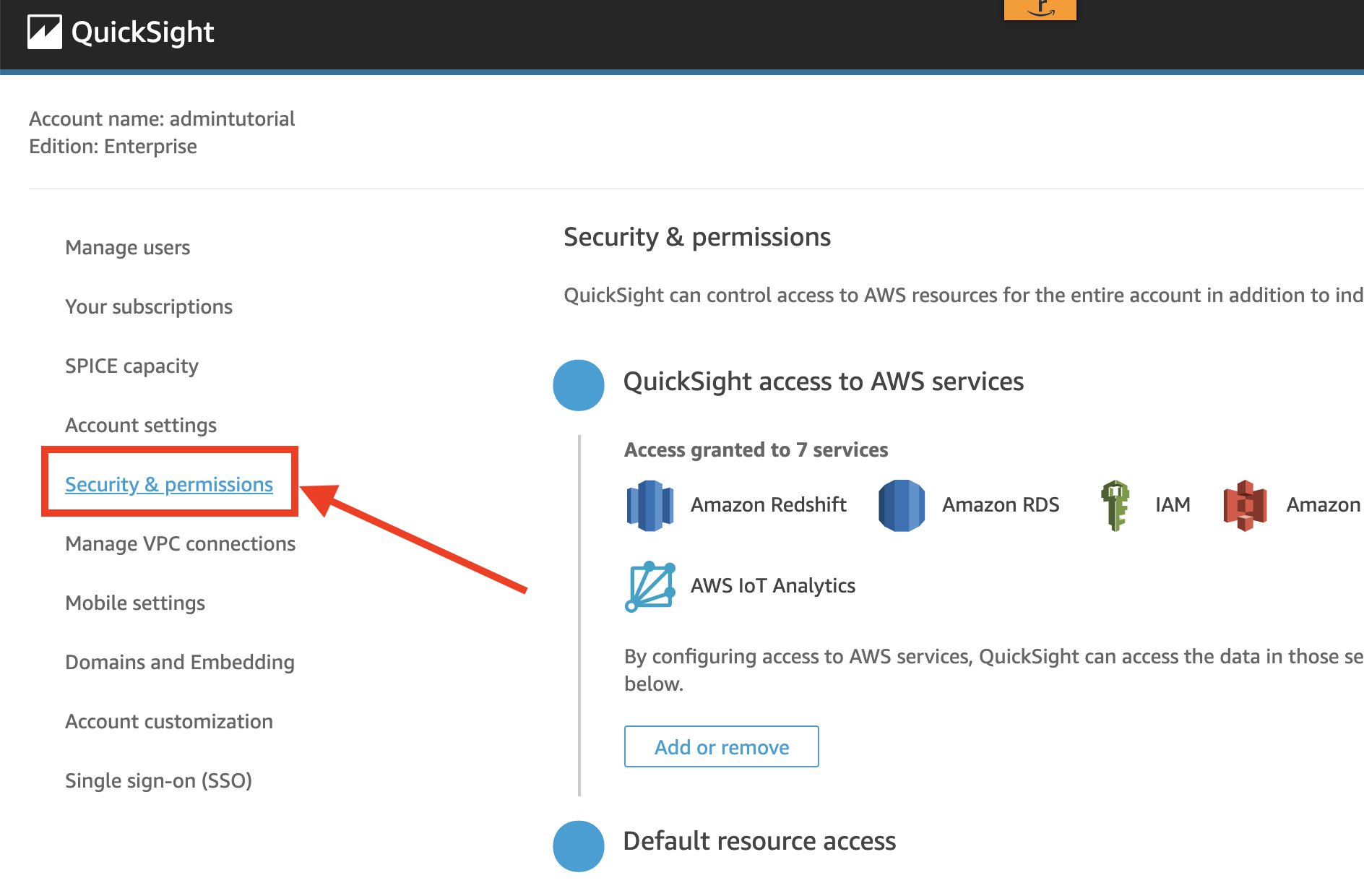
On the QuickSight console, on the user name menu, choose Manage QuickSight.
In the navigation pane, choose Security & permissions.
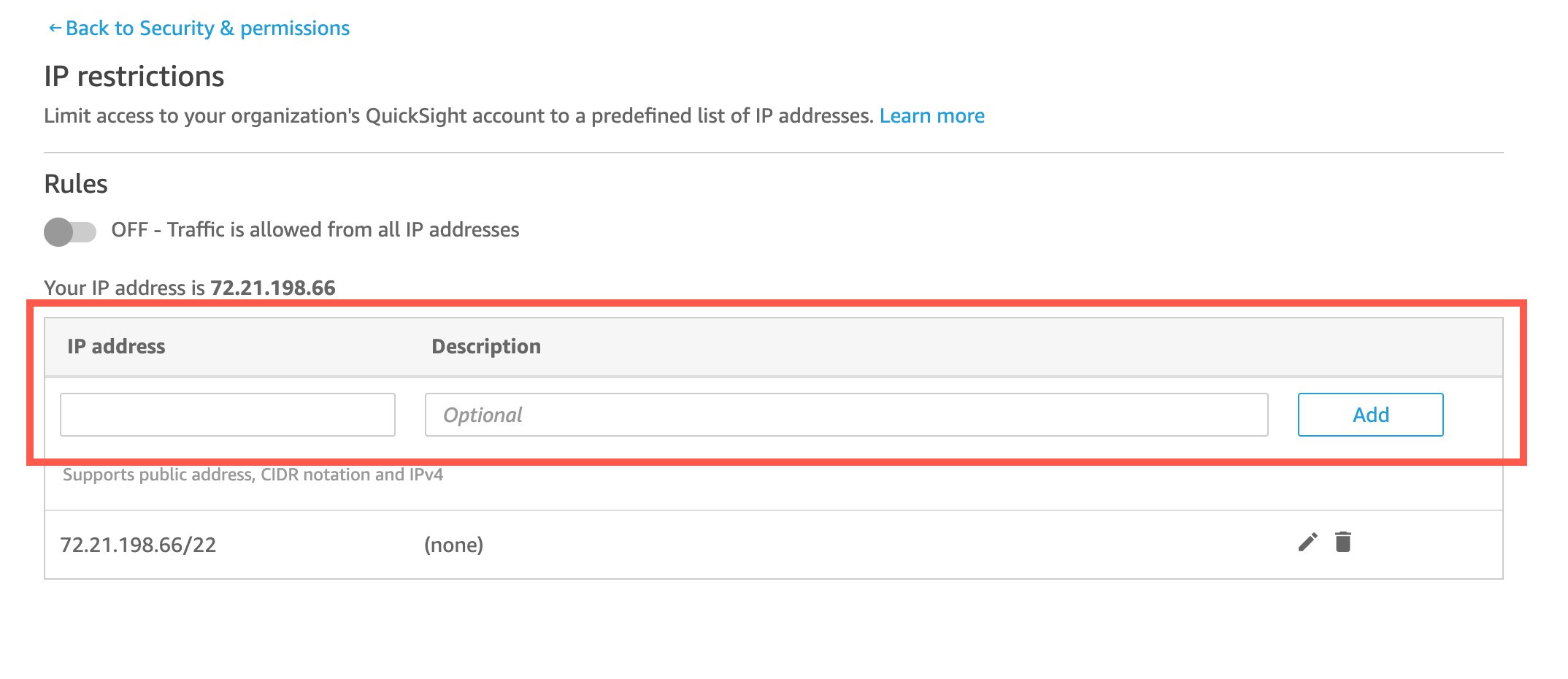
Under IP restrictions, choose Manage.
For IP address, enter the IP address which is to be allowed access in CIDR format.
Choose Add.
To edit an existing rule, choose the pencil icon next to the rule.
To delete an existing rule, choose the trash icon next to the rule.
Make sure to add your own IP address to the list to prevent being locked out yourself.
After you add, edit or delete IP address rules, choose Save changes.
Turn on the rules to start your IP-based restriction.
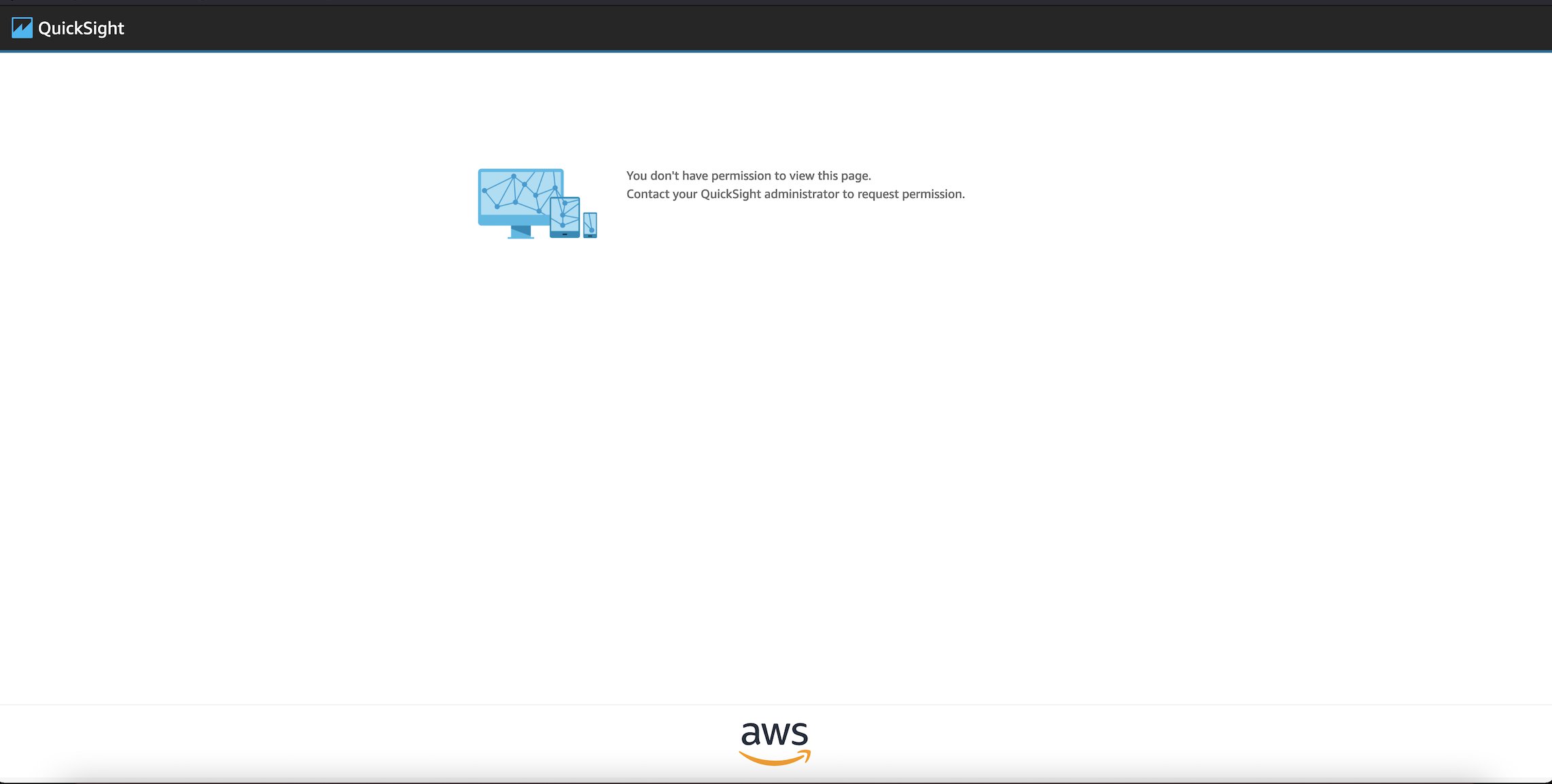
When the IP restriction is turned on and the list of allowed IP addresses in CIDR format is in place, any OkTank employee trying to access QuickSight when not logged in to OkTank’s VPN (regardless of their role of admin, author, or reader) is presented with an error page.
IP restriction can be turned on or off and rules can be viewed and edited by using following public APIs
With IP restrictions in place, administrators can now strengthen controls around QuickSight access by ensuring that only employees logged in the organization’s VPN network can access QuickSight. Stay tuned for more new admin capabilities, and follow What’s New with Analytics for the latest on QuickSight.
About the Author
Mayank Agarwal is a product manager for Amazon QuickSight, AWS’ cloud-native, fully managed BI service. He focuses on account administration, governance and developer experience. He started his career as an embedded software engineer developing handheld devices. Prior to QuickSight he was leading engineering teams at Credence ID, developing custom mobile embedded device and web solutions using AWS services that make biometric enrollment and identification fast, intuitive, and cost-effective for Government sector, healthcare and transaction security applications.
This post is written by Joseph Keating, AWS Modernization Architect, and Virginia Chu, Sr. DevSecOps Architect.
Container image support for AWS Lambda enables developers to package function code and dependencies using familiar patterns and tools. With this pattern, developers use standard tools like Docker to package their functions as container images and deploy them to Lambda.
In a typical deployment process for image-based Lambda functions, the container and Lambda function are created or updated in the same process. However, some use cases require developers to create the image first, and then update one or more Lambda functions from that image. In these situations, organizations may mandate that infrastructure components such as Amazon S3 and Amazon Elastic Container Registry (ECR) are centralized and deployed separately from their application deployment pipelines.
This post demonstrates how to use AWS continuous integration and deployment (CI/CD) services and Docker to separate the container build process from the application deployment process.
Overview
There is a sample application that creates two pipelines to deploy a Java application. The first pipeline uses Docker to build and deploy the container image to the Amazon ECR. The second pipeline uses AWS Serverless Application Model (AWS SAM) to deploy a Lambda function based on the container from the first process.
This shows how to build, manage, and deploy Lambda container images automatically with infrastructure as code (IaC). It also covers automatically updating or creating Lambda functions based on a container image version.
Example architecture
The example application uses AWS CloudFormation to configure the AWS Lambda container pipelines. Both pipelines use AWS CodePipeline, AWS CodeBuild, and AWS CodeCommit. The lambda-container-image-deployment-pipeline builds and deploys a container image to ECR. The sam-deployment-pipeline updates or deploys a Lambda function based on the new container image.
The pipeline deploys the sample application:
The developer pushes code to the main branch.
An update to the main branch invokes the pipeline.
The pipeline clones the CodeCommit repository.
Docker builds the container image and assigns tags.
Docker pushes the image to ECR.
The lambda-container-image-pipeline completion triggers an Amazon EventBridge event.
The pipeline clones the CodeCommit repository.
AWS SAM builds the Lambda-based container image application.
AWS SAM deploys the application to AWS Lambda.
Prerequisites
To provision the pipeline deployment, you must have the following prerequisites:
A Git client to clone the source code in a repository.
The pipeline relies on infrastructure elements like AWS Identity and Access Management roles, S3 buckets, and an ECR repository. Due to security and governance considerations, many organizations prefer to keep these infrastructure components separate from their application deployments.
To start, deploy the core infrastructure components using CloudFormation and the AWS CLI:
Create a local directory called BlogDemoRepo and clone the source code repository found in the following location:
mkdir -p $HOME/BlogDemoRepo
cd $HOME/BlogDemoRepo
git clone https://github.com/aws-samples/modernize-deployments-with-container-images-in-lambda
Change directory into the cloned repository:
cd modernize-deployments-with-container-images-in-lambda/
Deploy the s3-iam-config CloudFormation template, keeping the following CloudFormation template names:
The application uses Docker to build the container image and an ECR repository to store the container image. AWS SAM deploys the Lambda function based on the new container.
The Lambda container-image base includes the Amazon Linux operating system, and a set of base dependencies. The image also consists of the Lambda Runtime Interface Client (RIC) that allows your runtime to send and receive to the Lambda service. Take some time to review the Dockerfile and how it configures the Java application.
Configure the repository
The CodeCommit repository contains all of the configurations the pipelines use to deploy the application. To configure the CodeCommit repository:
Get metadata about the CodeCommit repository created in a previous step. Run the following command from the BlogDemoRepo directory created in a previous step:
This example deploys two separate pipelines. The first is called the modernize-deployments-with-container-images-in-lambda, which consists of building and deploying a container-image to ECR using Docker and the AWS CLI. An EventBridge event starts the pipeline when the CodeCommit branch is updated.
The second pipeline, sam-deployment-pipeline, is where the container image built from lambda-container-image-deployment-pipeline is deployed to a Lambda function using AWS SAM. This pipeline is also triggered using an Amazon EventBridge event. Successful completion of the lambda-container-image-deployment-pipeline invokes this second pipeline through Amazon EventBridge.
Both pipelines consist of AWS CodeBuild jobs configured with a buildspec file. The buildspec file enables developers to run bash commands and scripts to build and deploy applications.
Deploy the pipeline
You now configure and deploy the pipelines and test the configured application in the AWS Management Console.
Change directory back to modernize-serverless-deployments-leveraging-lambda-container-images directory and deploy the lambda-container-pipeline CloudFormation Template:
Wait for the status of both pipelines to show Succeeded:
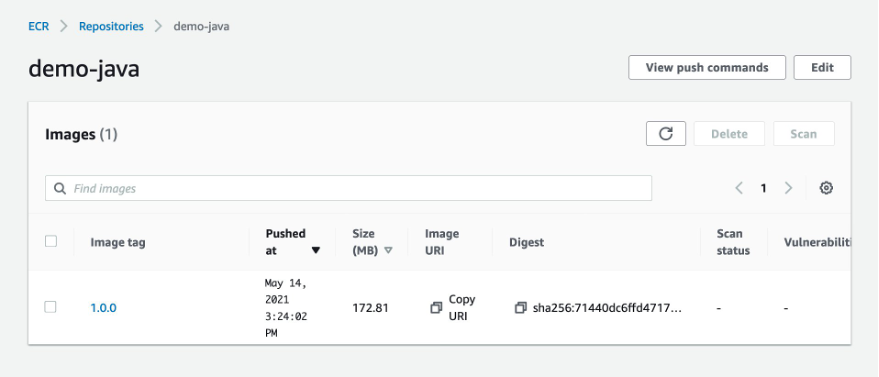
Navigate to the ECR console and choose demo-java. This shows that the pipeline is built and the image is deployed to ECR.
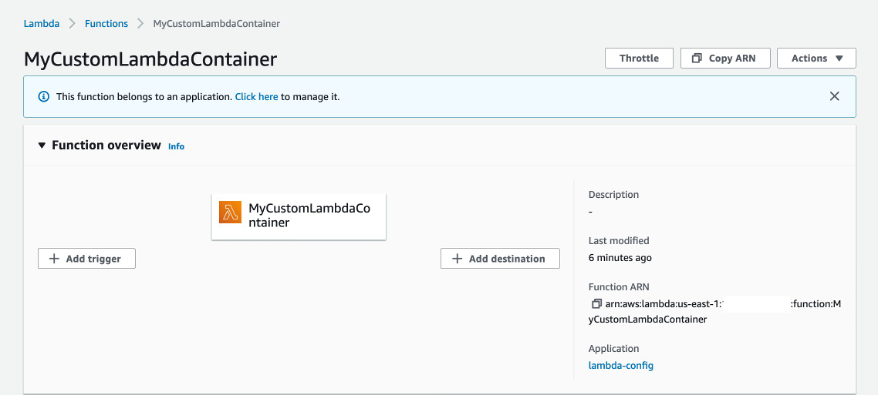
Navigate to the Lambda console and choose the MyCustomLambdaContainer function.
The Image configuration panel shows that the function is configured to use the image created earlier.
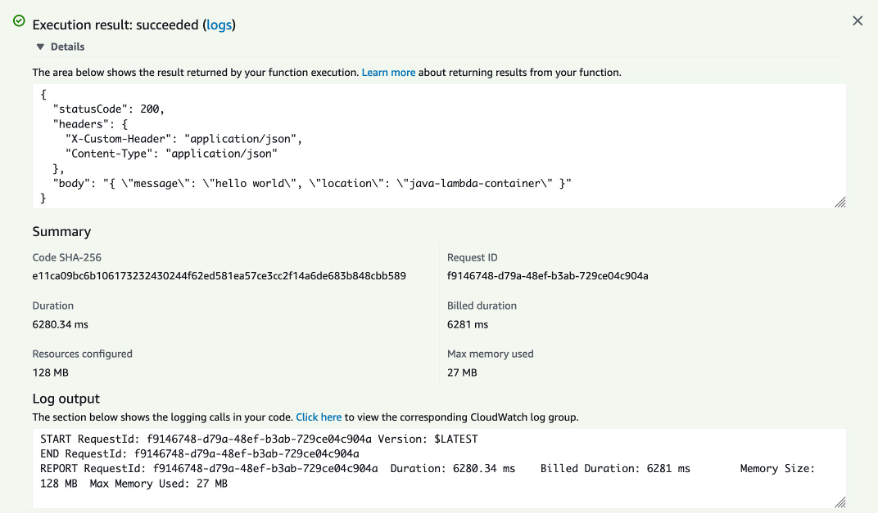
To test the function, choose Test.
Keep the default settings and choose Test.
This completes the walkthrough. To further test the workflow, modify the Java application and commit and push your changes to the main branch. You can then review the updated resources you have deployed.
Conclusion
This post shows how to use AWS services to automate the creation of Lambda container images. Using CodePipeline, you create a CI/CD pipeline for updates and deployments of Lambda container-images. You then test the Lambda container-image in the AWS Management Console.
Should disaster strike, business continuity can require more than just periodic data backups. A full recovery that meets the business’s recovery time objectives (RTOs) must also include the infrastructure, operating systems, applications, and configurations used to process their data. The growing threats of ransomware highlight the need to be able to perform a full point-in-time recovery. For businesses affected by a ransomware attack, restoration of data from an old, possibly manual, backup will not be sufficient.
Previously, businesses have elected to provision separate, physical disaster recovery (DR) infrastructure. However, customers tell us this can be both space- and cost-prohibitive, involving capital expenditure on hardware and facilities that remain idle until called upon. The infrastructure also incurs overhead in terms of regular inspection and maintenance, typically manual, to ensure that should it ever be called upon, it’s ready and able to handle the current business load, which may have grown considerably since initial provisioning. This also makes testing difficult and expensive.
Today, I am happy to announce AWS Elastic Disaster Recovery (DRS) a fully scalable, cost-effective disaster recovery service for physical, virtual, and cloud servers, based on CloudEndure Disaster Recovery. DRS enables customers to use AWS as an elastic recovery site without needing to invest in on-premises DR infrastructure that lies idle until needed. Once enabled, DRS maintains a constant replication posture for your operating systems, applications, and databases. This helps businesses meet recovery point objectives (RPOs) of seconds, and RTOs of minutes, after disaster strikes. In cases of ransomware attacks, for example, DRS also allows recovery to a previous point in time.
DRS provides for recovery that scales as needed to match your current setup and does not need any time-consuming manual processes to maintain that readiness. It also offers the ability to perform disaster recovery readiness drills. Just as it’s important to test restoration of data from backups, being able to conduct recovery drills in a cost-effective manner without impacting ongoing replication or user activities can help give confidence that you can meet your objectives and customer expectations should you need to call on a recovery.
Elastic Disaster Recovery in Action Once enabled, DRS continuously replicates block storage volumes from physical, virtual, or cloud-based servers, allowing it to support business RPOs measured in seconds. Recovery includes applications running on physical infrastructure, VMware vSphere, Microsoft Hyper-V, and cloud infrastructure to AWS. You’re able to recover all your applications and databases that run on supported Windows and Linux operating systems, with DRS orchestrating the recovery process for your servers on AWS to support an RTO measured in minutes.
Using an agent that you install on your servers, DRS securely replicates the data to a staging area subnet in a selected Region in your AWS account. The staging area subnet reduces costs to you, using affordable storage and minimal compute resources. Within the DRS console, you can recover Amazon Elastic Compute Cloud (Amazon EC2) instances in a different AWS Region if required. With DRS automating replication and recovery procedures, you can set up, test, and operate your disaster recovery capability using a single process without the need for specialized skill sets.
DRS gives you the flexibility to pay on an hourly basis, instead of needing to commit to a long-term contract or a set number of servers, a benefit over on-premises or data center recovery solutions. DRS charges hourly, on a pay-as-you-go basis. You can find specific details on pricing at the product page.
Exploring Elastic Disaster Recovery To set up disaster recovery for my resources I first need to configure my default replication settings. As I mentioned earlier, DRS can be used with physical, virtual, and cloud servers. For this post, I’m going to use a collection of EC2 instances as my source servers for disaster recovery.
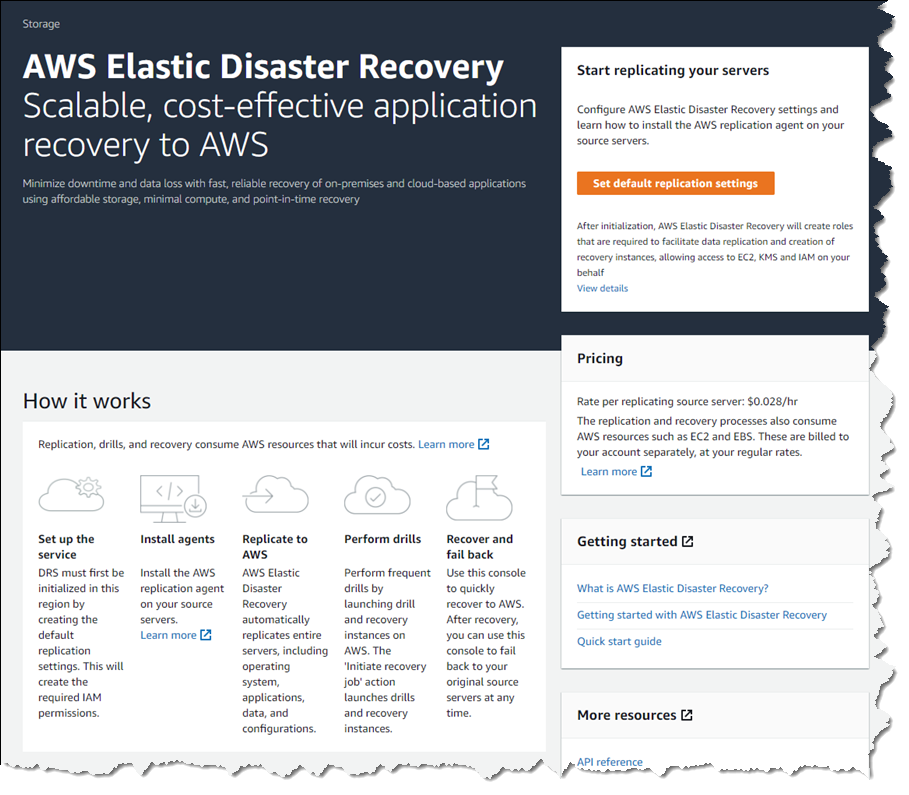
From the DRS console home, shown earlier, choosing Set default replication settings takes me to a short initialization wizard. In the wizard, I first need to select an Amazon Virtual Private Cloud (VPC) subnet that will be used for staging. This subnet does not need to be in the same VPC as my resources, but I need to select one that is not private or blocked to the world. Below, I’ve chosen a subnet from my default VPC in my Region. I can also change the instance type used for the replication instance. I chose to keep the suggested default and clicked Next to proceed.
I also left the default settings unchanged for the next two pages. In Volumes and security groups, the wizard suggests I use the general-purpose SSD (gp3) Amazon Elastic Block Store (EBS) storage type and to use a security group provided by DRS. On the Additional settings page I can elect to use a private IP for data replication instead of routing over the public internet, and set the snapshot retention period, which defaults to seven days. Clicking Next one final time, I arrive at the Review and create page of the wizard. Choosing Create default completes the process of configuring my default replication settings.
With my replication settings finalized (I can edit them later if I wish, from the Actions menu on the Source servers console page) it’s time to set up my servers. I’m running a test fleet in EC2 that includes two Windows Server 2019 instances, and three Amazon Linux 2 instances. The DRS User Guide contains full instructions on how to obtain and set up the agent on each server type, so I won’t repeat them here. As I run and configure the agent on each of my server instances, the Source servers list automatically updates to include the new source server. The status of the initial sync, and future replication and recovery status of each source server, are summarized in this view.
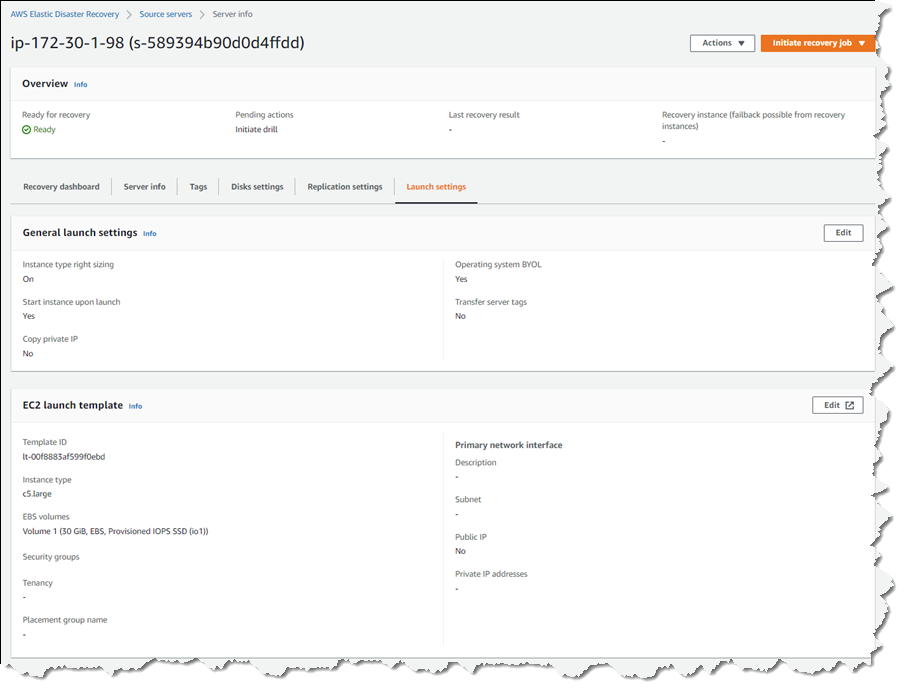
Selecting a hostname entry in the list takes me to a detail page. Here I can view a recovery dashboard, information on the underlying server, disk settings (including the ability to change the staging disk type from the default gp3 type selected by the initialization wizard, or whatever you choose during setup), and launch settings, shown below, that govern the recovery instance that will be created if I choose to initiate a drill or an actual recovery job.
Just like data backups, where established best practice is to periodically verify that the backups can actually be used to restore data, we recommend a similar best practice for disaster recovery. So, with my servers all configured and fully replicated, I decided to start a drill for a point-in-time (PIT) recovery for two of my servers. On these instances, following initial replication, I’d installed some additional software. In my scenario, perhaps this installation had gone badly wrong, or I’d fallen victim to a ransomware attack. Either way, I wanted to know and be confident that I could recover my servers if and when needed.
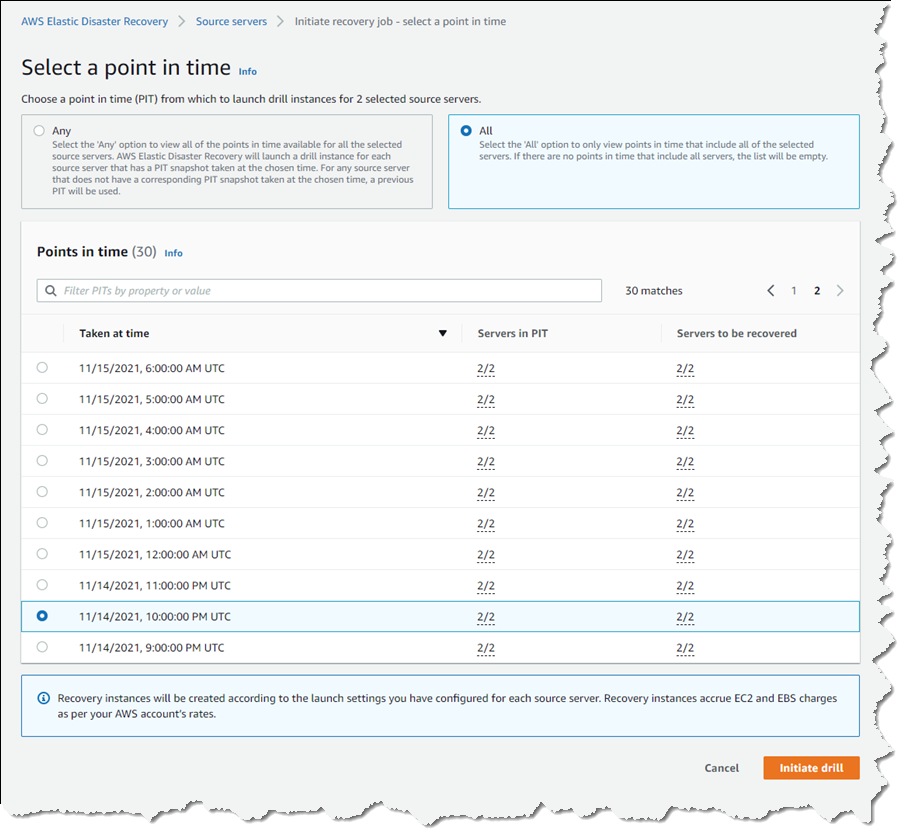
In the Source servers list I selected the two servers that I’d modified and from the Initiate recovery job drop-down menu, chose Initiate drill. Next, I can choose the recovery PIT I’m interested in. This view defaults to Any, meaning it lists all recovery PIT snapshots for the servers I selected. Or, I can choose to filter to All, meaning only PIT snapshots that apply to all the selected servers will be listed. Selecting All, I chose a time just after I’d completed installing additional software on the instances, and clicked Initiate drill.
I’m returned to the Source servers list, which shows status as the recovery proceeds. However, I switched to the Recovery job history view for more detail.
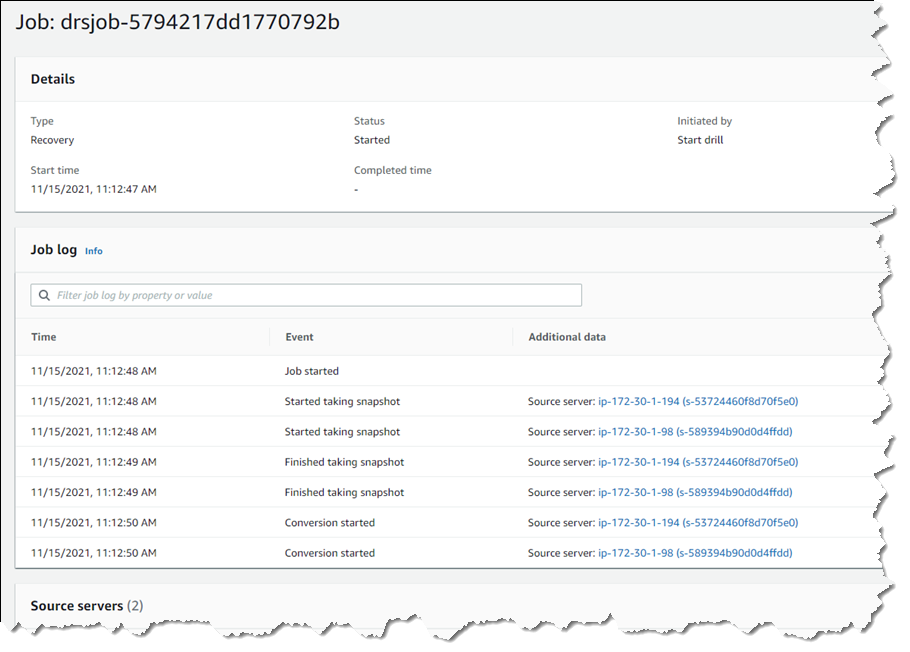
Clicking the job ID, I can drill down further to view a detail page of the source servers involved in the recovery (and can drill down further for each), as well as an overall recovery job log.
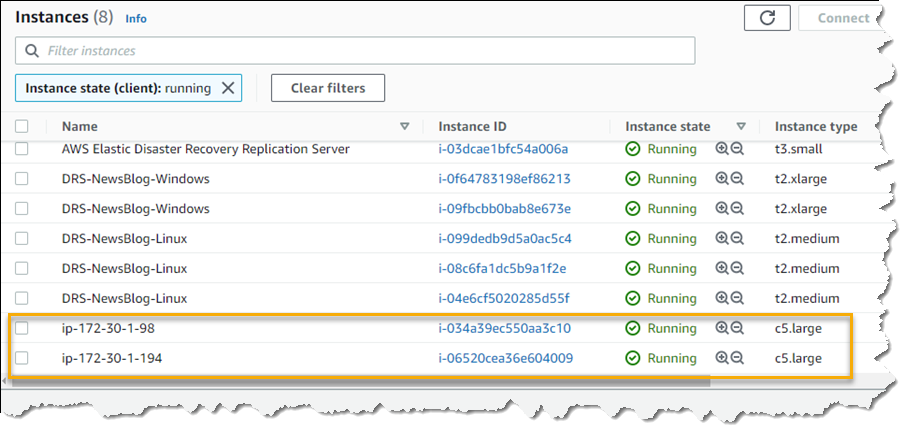
Note – during a drill, or an actual recovery, if you go to the EC2 console you’ll notice one or more additional instances, started by DRS, running in your account (in addition to the replication server). These temporary instances, named AWS Elastic Disaster Recovery Conversion Server, are used to process the PIT snapshots onto the actual recovery instance(s) and will be terminated when the job is complete.
Once the recovery is complete, I can see two new instances in my EC2 environment. These are in the state matching the point-in-time recovery I selected, and are using the instance types I selected earlier in the DRS initialization wizard. I can now connect to them to verify that the recovery drill performed as expected before terminating them. Had this been a real recovery, I would have the option of terminating the original instances to replace them with the recovery versions, or handle whatever other tasks are needed to complete the disaster recovery for my business.
Set Up Your Disaster Recovery Environment Today AWS Elastic Disaster Recovery is generally available now in the US East (N. Virginia), US East (Ohio), US West (Oregon), Asia Pacific (Singapore), Asia Pacific (Sydney), Asia Pacific (Tokyo), Europe (Frankfurt), Europe (Ireland), and Europe (London) Regions. Review the AWS Elastic Disaster Recovery User Guide for more details on setup and operation, and get started today with DRS to eliminate idle recovery site resources, enjoy pay-as-you-go billing, and simplify your deployments to improve your disaster recovery objectives.
Even encrypted data sent on the internet leaves some footprints—metadata
about where packets originate, where they are bound, and when they are sent. Mix networks are
meant to hide that metadata by routing packets through various intermediate
nodes to try to thwart the traffic analysis used by nation-state-level
adversaries to identify “opponents” of various kinds. Tor is perhaps the
best-known mix network, but there are others that make different
tradeoffs to increase the security of their users. Rollercoaster
is a recently announced mechanism that extends the functionality of mix
networks in order to more efficiently communicate among groups.
Rapid7 is investing heavily in the reporting and dashboard capabilities of InsightVM. In 2021 alone, we launched the ability to filter dashboards via single query, a new report creation wizard powered by our query builder, several use-case-driven dashboard templates, and most recently, the ability to distribute reports via email. This allows users to easily and quickly distribute reports to users who may not have access to InsightVM.
For example, let’s say Theresa is tasked with giving her manager a copy of our Patch Tuesday dashboard as a PDF at the end of every month. Previously, she had to go to the Reports Management page in InsightVM, download the PDF, create an email, and send this to her manager — who does not have an InsightVM account.
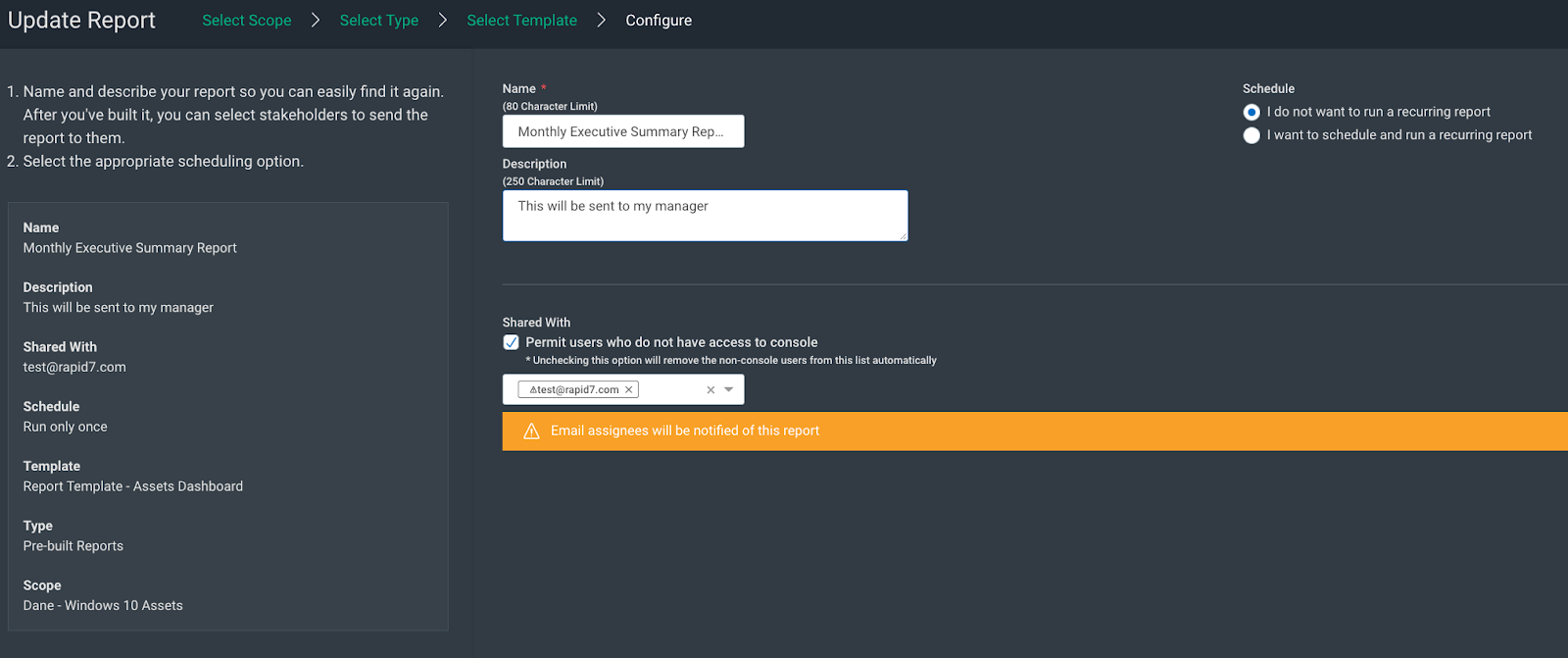
Now, she can either create this report via the query builder or edit the existing report, then check the checkbox labeled “Permit users who do not have access to console” under the “Shared with” section, and enter her manager’s email address. InsightVM will automatically send a link to an encrypted and password-protected PDF of the report and another email that contains the password.
This additional security feature was included because of the increased threat surrounding proprietary information. For example, say Theresa creates an Assets report that is delivered every Friday to a colleague, and that colleague accidentally forwards the email with the PDF link to an unattended party. While the recipient could download the PDF, they’re blocked from viewing the contents because they don’t have the password.
This is an example of our evolution to more powerful features in the SaaS version of InsightVM, and our intention here is to reduce the burden of reporting to various stakeholders so that they can get back to what they do best: securing their environments.
We are excited to bring this functionality to our users. Please read our help documents for more information.
In process manufacturing, it’s important to fetch real-time data from data historians to support decisions-based analytics. Most manufacturing use cases require real-time data for early identification and mitigation of manufacturing issues. A limited set of commercial off-the-shelf (COTS) tools integrate with OSIsoft’s PI Historian for real-time data. However, each integration requires months of development effort, can lack full data integrity, and often doesn’t address data loss issues. In addition, these tools may not provide native connectivity to the Amazon Web Services (AWS) Cloud. Leveraging legacy COTS applications can limit your agility, both in initial setup and ongoing updates. This can impact time to value (TTV) for critical analytics.
In this blog post, we’ll illustrate how you can integrate your on-premises PI Historian with AWS services for your real-time manufacturing use cases. We will highlight the key connector features and a common deployment architecture for your multiple manufacturing use cases.
Scope of OSIsoft PI data historian use
OSIsoft’s PI System is a plant process historian. It collects machine data from various sensors and operational technology (OT) systems during the manufacturing process. PI Historian is the most widely used data historian in process industries such as Healthcare & Life Sciences (HCLS), Chemicals, and Food & Beverage. Large HCLS companies use the PI system extensively in their manufacturing plants.
The PI System usually contains years of historical data ranging from terabytes to petabytes. The data from the PI system can be used in preventive maintenance, bioreactor yield improvement, golden batch analysis, and other machine learning (ML) use cases. It can be a powerful tool when paired with AWS compute, storage, and AI/ML services.
Analyzing real-time and historical data can garner many business benefits. For example, your batch yield could improve by optimizing inputs or you could reduce downtime by proactive intervention and maintenance. You could improve overall equipment effectiveness (OEE) by improving productivity and reducing waste. This could give you the ability to conduct key analysis and deliver products to your end customers in a timely manner.
PI integration options
The data from the PI System can be ingested to AWS services in a variety of ways:
With commercial off-the-shelf (COTS) tools from various business intelligence (BI) integration service providers
The PI Connector was developed by the AWS ProServe team as an extended AWS IoT Greengrass connector. The connector collects real-time and historical data from the PI system using PI Web Services. It publishes the data to various AWS services such as local ML models running at the edge, AWS IoT Core / AWS IoT SiteWise, and Amazon S3.
Connector requirements and design considerations
Specific requirements and design considerations were gathered in collaboration with various customers. These are essential for the most effective integration:
The connector should support reliable connectivity to the PI system for fetching real-time and historical data from the PI.
The connector should support subscription to various PI data modes like real-time, compressed/recorded, and interpolated, to support various use cases.
The initial setup and incremental updates to the PI tag configuration should be seamless without requiring any additional development effort.
The connector should support data contextualization in terms of asset/equipment hierarchy and process batch runs.
The connector should ensure full data integrity, reliable real-time data access, and support re-usability.
The connector should have support for handling data loss prevention scenarios for connectivity loss and/or maintenance/configuration updates.
The setup, deployment, and incremental updates should be fully automated.
Deployment architecture for PI Connector
The connector has been developed as part of AWS IoT Greengrass Connectivity Framework and can be deployed remotely on an edge machine. This can be running on-premises or in the AWS Cloud with access to the on-premises PI system. This machine can be run on a virtual machine (VM), a physical server, or a smaller device like a Raspberry Pi.
The connector incorporates a configuration file. You can specify connector functions such as authentication type, data access modes (polling or subscription), batch contextualization and validation on the data, or historical data access timeframe. It integrates with the PI Web APIs for subscription to real-time data for defined PI tags using secure WebSockets (wss). It can also invoke WebAPI calls for polling data with configured interval time.
The connector can be deployed as an AWS IoT Greengrass V1 AWS Lambda function or a Greengrass V2 component.
Figure 1. PI Connector architecture
Connector features and benefits
The connector supports subscription to real-time and recorded data to track tag value changes in streaming mode. This is useful in situations where process parameter changes must be closely monitored for decision support, actions, and notifications. The connector supports data subscription for individual PI event tags, PI Asset Framework (AF), and PI Event Frames (EF).
The connector supports fetching recorded/compressed or interpolated data based on recorded timestamps or defined intervals, to sample all tags associated with an asset at those intervals.
The connector helps define asset hierarchy and batch tags as part of configuration, and contextualizes all asset data with hierarchy and batch context at the event level. This offloads heavy data post-processing for real-time use cases.
The connector initiates event processing at the edge and provides configurable options to push data to the Cloud. This occurs only when a valid batch is running and/or when a reported tag data quality attribute is good.
The connector ensures availability and data integrity by doing graceful reconnects in case of session closures from the PI side. It fetches, contextualizes, and pushes any missed data due to disconnections, maintenance, or update scenarios.
The connector accelerates the TTV for business by providing a reusable no-code, configuration-only PI integration capability.
Summary
The PI Connector developed by AWS Proserve makes your real-time, data ingestion from PI historian into AWS services fast, secure, scalable, and reliable. The connector can be configured and deployed into your edge network quickly.
With this connector, you can ingest data into many AWS services such as Amazon S3, AWS IoT Core, AWS IoT SiteWise, Amazon Timestream, and more. Try the PI Connector for your manufacturing use cases, and realize the full potential of OSI PI Historian data.
Security updates have been issued by CentOS (389-ds-base and libxml2), Debian (atftp, axis, and ntfs-3g), Fedora (digikam, freerdp, guacamole-server, and remmina), openSUSE (java-11-openjdk, kernel, samba, and tomcat), SUSE (firefox, java-11-openjdk, kernel, libarchive, samba, and tomcat), and Ubuntu (accountsservice, hivex, and openexr).
In the military, the term “left of boom” refers to the strategy and tactics required to prevent — and protect personnel from — explosions by making proactive decisions before the event happens. Unless you’ve been fortunate enough to avoid tech and media press for the past 24 months, it should be clear by now that cyberattacks most certainly qualify as “boom” events, with the potential to cause reputational, financial, and even real-life physical harm to businesses, communities, and individuals, many of whom are truly innocent bystanders.
While telemetry-fueled detection and well-honed response plans are foundational components of truly effective cybersecurity programs, they are definitely “right of boom,” and we should not be so quick to cede ground to attackers with an “assume breach” mindset. Cybersecurity teams have myriad defense and mitigation strategies at their disposal to help ensure a sizable percentage of attackers never even have the chance to waltz their way through the killchain. In this post, we’ll use ransomware as an example for 3 left-of-boom areas to focus on (via the MITRE ATT&CK framework.)
The ransomware “booms”
One might argue that the singular “boom” of ransomware is the encryption of business critical information and assets, but attackers now also hunt for juicy data they can use for many purposes, including to pressure a target to pay or suffer a data disclosure event on top of a business-disrupting lock-up. There is another emerging scenario that adds a compounding denial-of-service attacks (or multiple attacks) into the mix – note that pure denial-of-service extortion, or “RansomDoS” in the modern vernacular, is out of scope for this post.
Knowing the potential negative outcomes, what can teams focus on ahead of time to help prevent these outcomes and protect their organizations? For ransomware (and, really, the vast majority of cyberattacks today), the main goal is to prevent initial access into your environment, so let’s explore what you need to do to stay left of that particular boom. Since there are many techniques used to gain initial access, we’ll focus the rest of the post on 3 areas (T1190, T1133, and T1078) and give you some tips on how to apply the same left-of-boom thinking to other ones.
Attack surface management (ASM) is just a 2021 pretty bow wrapped around the term “asset management” in the hopes that organizations will finally recognize the need for it, realizing that they aren’t just deploying cool services and capabilities but also providing potential inroads for attackers. With ASM, your goal is to understand:
What devices, operating systems, and software are deployed on your perimeter, intranet, and remote endpoints
The safe and resilient configurations required for those elements
The current state of those elements
You cannot get left of boom for a ransomware attack, and many other cyberattacks, without a functional ASM practice in place. This requires having a close partnership with your procurement department and IT endpoint/server/cloud operations teams, as well as the tools (proprietary or open-source) to help with organization and verification.
It’s vital to understand what you’re exposing to the internet — since that’s what attackers can directly see and touch — but it’s also critical to know the status of each node that may be involved in initial access attempts, including desktops, laptops, and mobile devices.
If you can stay ahead of exposing unpatched or unsafe services to the internet and keep your workforce systems patched and configured safely in a timely fashion, you’ll make it difficult to impossible for attackers to use known exploits (one of the most common methods in 2021) to achieve the access they need to carry out the rest of their campaign using that technique.
Even before our brave, newly expanded world of remote work, organizations needed ways for their workforce to access critical systems and applications outside the confines of the intranet. These include solutions such as virtual private networks (VPNs), remote desktop protocol (RDP), Citrix, and similar technologies. By their nature, these systems need to be configured well from the start, patched almost immediately, and require trusted authorized access (more on that in the last “boom”).
Your team needs to monitor each gateway vendor for patch/mitigation announcements and partner with all critical stakeholders to ensure you can change configurations or patch in an expedited fashion — which may mean having enough capacity and redundancy to take one set of systems down for patching but still let work continue. You should also have continuous configuration monitoring to ensure settings stay the way you need them to be.
←←←💥 Credentials, credentials, credentials
We discussed remote access in the previous section, and gaining remote access generally requires some sort of authentication and authorization. No external gateway, and no critical external application, should be accessible without a solid multi-factor authentication solution in place. Credentials are regularly up for sale on criminal marketplaces, and sellers test them regularly to ensure freshness. If you allow gateway or critical application access with just a single factor, you’ve pretty much handed the keys over to your adversaries.
Similarly, when a new breach is disclosed that includes stolen credential databases, it’s important to monitor services such as Have I Been Pwned and have a process in place to quickly reset any potentially compromised accounts (usually based on email address).
Staying left of boom: A general approach
The 3 examples covered here are important, but they’re far from the full picture. We encourage teams to look at all the forms of initial access and examine them through the lens of their threat assessment and remediation analysis library, so they can see all the areas that need to be covered and apply appropriate preventative measures. If your team doesn’t have said library, a good place to start is over at the MITRE bookshelf, where you can find free, vendor-agnostic, detailed resources on how to establish such a program in your organization.
However, a strong public-facing posture, solid service configurations, and multi-factor authentication will have your organization well-positioned to avoid many negative outcomes.
Want more 2022 planning tips from industry experts?
When we announced Cloudflare Pages as generally available in April, we promised you it was just the beginning. The journey of our platform started with support for static sites with small bits of dynamic functionality like setting redirects and custom headers. But we wanted to give even more power to you and your teams to begin building the unimaginable. We envisioned a future where your entire application — frontend, APIs, storage, data — could all be deployed with a single commit, easily testable in staging and requiring a single merge to deploy to production. So in the spirit of “Full Stack” Week, we’re bringing you the tools to do just that.
Welcome to the future, everyone. We’re thrilled to announce that Pages is now a Full Stack platform with help from But how?
Cloudflare Workers provides a serverless execution environment that allows you to create entirely new applications or augment existing ones without configuring or maintaining infrastructure. Before today, it was possible to connect Workers to a Pages project—installing Wrangler and manually deploying a Worker by writing your app in both Pages and Workers. But we didn’t just want “possible”, we wanted something that came as second nature to you so you wouldn’t have to think twice about adding dynamic functionality to your site.
How it works
By using your repo’s filesystem convention and exporting one or more function handlers, Pages can leverage Workers to deploy serverless functions on your behalf. To begin, simply add a ./functions directory in the root of your project, and inside a JavaScript or TypeScript file, export a function handler. For example, let’s say in your ./functions directory, you have a file, hello.js, containing:
// GET requests to /filename would return "Hello, world!"
export const onRequestGet = () => {
  return new Response("Hello, world!")
}

// POST requests to /filename with a JSON-encoded body would return "Hello, <name>!"
export const onRequestPost = async ({ request }) => {
  const { name } = await request.json()
  return new Response(`Hello, ${name}!`)
}
If you perform a git commit, it will trigger a new Pages build to deploy your dynamic site! During the build pipeline, Pages traverses your directory, mapping the filenames to URLs relative to your repo structure.
Under the hood, Pages generates Workers which include all your routing and functionality from the source. Functions supports deeply-nested routes, wildcard matching, middleware for things like authentication and error-handling, and more! To demonstrate all of its bells and whistles, we’ve created a blog post to walk through an example full stack application.
Letting you do what you do best
As your site grows in complexity, with Pages’ new full stack functionality, your developer experience doesn’t have to. You can enjoy the workflow you know and love while unlocking even more depth to your site.
Seamlessly build
In the same way we’ve handled builds and deployments with your static sites — with a `git commit` and `git push` — we’ll deploy your functions for you automatically. As long as your directory follows the proper structure, Pages will identify and deploy your functions to our network with your site.
Define your bindings
While bringing your Workers to Pages, bindings are a big part of what makes your application a full stack application. We’re so excited to bring to Pages all the bindings you’ve previously used with regular Workers!
KV namespace: Our serverless and globally accessible key-value storage solution. Within Pages, you can integrate with any of the KV namespaces you set in your Workers dashboard for your Pages project.
Durable Object namespace: Our strongly consistent coordination primitive that makes connecting WebSockets, handling state and building entire applications a breeze. As with KV, you can set your namespaces within the Workers dashboard and choose from that list within the Pages interface.
Environment Variable: An injected value that can be accessed by your functions and is stored as plain-text. You can set your environment variables directly within the Pages interface for both your production and preview environments at build-time and run-time.
Secret (coming soon!): An encrypted environment variable, which cannot be viewed by wrangler or any dashboard interfaces. Secrets are a great home for sensitive data including passwords and API tokens.
Preview deployments — now for your backend too
With the deployment of your serverless functions, you can still enjoy the ease of collaboration and testing like you did previously. Before you deploy to production, you can easily deploy your project to a preview environment to stage your changes. Even with your functions, Pages lets you keep a version history of every commit with a unique URL for each, making it easy to gather feedback whether it’s from a fellow developer, PM, designer or marketer! You can also enjoy the same infinite staging privileges that you did for static sites, with a consistent URL for the latest changes.
Develop and preview locally too
However, we realize that building and deploying with every small change just to stage your changes can be cumbersome at times if you’re iterating quickly. You can now develop full stack Pages applications with the latest release of our wrangler CLI. Backed by Miniflare, you can run your entire application locally with support for mocked secrets, environment variables, and KV (Durable Objects support coming soon!). Point wrangler at a directory of static assets, or seamlessly connect to your existing tools:
# Install wrangler v2 beta
npm install wrangler@beta

# Serve a folder of static assets
npx wrangler pages dev ./dist

# Or automatically proxy your existing tools
npx wrangler pages dev -- npx react-scripts start
This is just the beginning of Pages’ integrations with wrangler. Stay tuned as we continue to enhance your developer experience.
What else can you do?
Everything you can do with HTTP Workers today!
When deploying a Pages application with functions, Pages is compiling and deploying first class Workers on your behalf. This means there is zero functionality loss when deploying a Worker within your Pages application — instead, there are only new benefits to be gained!
Integrate with SvelteKit — out of the box!
SvelteKit is a web framework for building Svelte applications. It’s built and maintained by the Svelte team, which makes it the Svelte user’s go-to solution for all their application needs. Out of the box, SvelteKit allows users to build projects with complex API backends.
As of today, SvelteKit projects can attach and configure the @sveltejs/adapter-cloudflare package. After doing this, the project can be added to Pages and is ready for its first deployment! With Pages, your SvelteKit project(s) can deploy with API endpoints and full server-side rendering support. Better yet, the entire project — including the API endpoints — can enjoy the benefits of preview deployments, too! This, even on its own, is a huge victory for advanced projects that were previously on the Workers adapter. Check out this example to see the SvelteKit adapter for Pages in action!
Use server-side rendering
You are now able to intercept any request that comes into your Pages project. This means that you can define Workers logic that will receive incoming URLs and, instead of serving static HTML, your Worker can render fresh HTML responses with dynamic data.
For example, an application with a product page can define a single product/[id].js file that will receive the id parameter, retrieve the product information from a Workers KV binding, and then generate an HTML response for that page. Compared to a static-site generator approach, this is more succinct and easier to maintain over time since you do not need to build a static HTML page per product at build-time… which may potentially be tens or even hundreds of thousands of pages!
Already have a Worker? We’ve got you!
If you already have a single Worker and want to bring it right on over to Pages to reap the developer experience benefits of our platform, our announcement today also enables you to do precisely that. Your build can generate an ES module Worker called _worker.js in the output directory of your project, perform your git commands to deploy, and we’ll take care of the rest! This can be especially advantageous to you if you’re a framework author or have a more complex use case that doesn’t follow our provided file structure.
Try it at no cost — for a limited time only
We’re thrilled to be releasing our open beta today for everyone to try at no additional cost to your Cloudflare plan. While we will still have limits in place, we are using this open beta period to learn more about how you and your teams are deploying functions with your Pages projects. For the time being, we encourage you to lean into your creativity and build out that site you’ve been thinking about for a long time — without the worry of getting billed.
In just a few short months, when we announce General Availability, you can expect our billing to reflect that of the Workers Bundled plan — after all, these are just Workers under the hood!
Coming up…
As we’re only announcing this release as an open beta, we have some really exciting things planned for the coming weeks and months. We want to improve on the quick and easy Pages developer experience that you’re already familiar with by adding support for integrated logging and more analytics for your deployed functions.
Beyond that, we’ll be expanding our first-class support for the next generation of frontend frameworks. As we’ve shown with SvelteKit, Pages’ ability to seamlessly deploy both static and dynamic code together enables unbeatable end-user performance & developer ease, and we’re excited to unlock that for more people. Fans of similar frameworks & technologies, such as NextJS, NuxtJS, React Server Components, Remix, Hydrogen, etc., stay tuned to this blog for more announcements. Or better yet, come join us and help make it happen!
Additionally, as we’ve done with SvelteKit, we’re looking to include more first-class integration with existing frameworks, so Pages can become the primary home for your preferred frameworks of choice. Work is underway on making NextJS, NuxtJS, React Server Components, Shopify Hydrogen and more integrate seamlessly as you develop your full stack apps.
Finally, we’re working to speed up those build times, so you can focus on pushing changes and iterating quickly — without the wait!
Getting started
To get started head over to our Pages docs and check out our demo blog to learn more about how to deploy serverless functions to Pages using Cloudflare Workers.
Of course, what we love most is seeing what you build! Pop into our Discord and show us how you’re using Pages to build your full stack apps.
Chris Coyier has been building on the web for over 15 years. Chris made his mark on the web development world with CSS-Tricks in 2007, one of the web’s leading publications for frontend and full-stack developers.
In 2012, Chris co-founded CodePen, which is an online code editor that lives in the browser and allows developers to collaborate and share code examples written in HTML, CSS, and JavaScript.
Due to the nature of CodePen — namely, hosting code and an incredibly popular embedding feature, allowing developers to share their CodePen “pens” around the world — any sort of optimization can have a massive impact on CodePen’s business. Increasingly, CodePen relies on the ability to both execute code and store data on Cloudflare’s network as a first stop for those optimizations. As Chris puts it, CodePen uses Cloudflare Workers for “so many things”:
“We pull content from an external CMS and use Workers to manipulate HTML before it arrives to the user’s browser. For example, we fetch the original page, fetch the content, then stitch them together for a full response.”
Workers allows you to work with responses directly using the native Request/Response classes and, with the addition of our streaming HTMLRewriter engine, you can modify, combine, and parse HTML without any loss in performance. Because Workers functions are deployed to Cloudflare’s network, CodePen has the ability to instantly deploy highly-intelligent middleware in-between their origin servers and their clients, without needing to spin up any additional infrastructure.
In a popular YouTube video on Chris Coyier’s YouTube channel, he sits down with a front-end engineer at CodePen, and covers how they use Cloudflare Workers to build crucial CodePen features. Here’s Chris:
“Cloudflare Workers are like serverless functions that always run at the edge, making them incredibly fast. Not only that, but the tooling around them is really nice. They can run at particular routes on your own website, removing any awkward CORS troubles, and helping you craft clean APIs. But they also have special superpowers, like access to KV storage (also at the edge), image manipulation and optimization, and HTML rewriting.”
CodePen also leverages Workers KV to store data. This allows them to avoid an immense amount of repetitive processing work by caching results and making them accessible on Cloudflare’s network, geographically near their users:
“We use Workers combined with the KV Store to run expensive jobs. For example, we check the KV Store to see if we need to do some processing work, or if that work has already been done. If we need to do the work, we do it and then update KV to know it’s been done and where the result of that work is.”
In a follow-up video on his YouTube channel, Chris dives into Workers KV and shows how you can build a simple serverless function — with storage — and deploy it to Cloudflare. With the addition of Workers KV, you can persist complex data structures side-by-side with your Workers function, without compromising on performance or scalability.
Chris and the CodePen team are invested in Workers and, most importantly, they enjoy developing with Cloudflare’s developer tooling. “The DX around them is suspiciously nice. Coming from other cloud functions services, there seems to be a just-right amount of tooling to do the things we need to do.”
CodePen is a great example of what’s possible when you integrate the Cloudflare Workers developer environment into your stack. Across all parts of the business, Workers, and tools like Workers KV and HTMLRewriter, allow CodePen to build highly-performant applications that look towards the future.
If you’d like to learn more about Cloudflare Workers, and deploy your own serverless functions to Cloudflare’s network, check out workers.cloudflare.com!
The collective thoughts of the interwebz
Manage Consent
To provide the best experiences, we use technologies like cookies to store and/or access device information. Consenting to these technologies will allow us to process data such as browsing behavior or unique IDs on this site. Not consenting or withdrawing consent, may adversely affect certain features and functions.
Functional
Always active
The technical storage or access is strictly necessary for the legitimate purpose of enabling the use of a specific service explicitly requested by the subscriber or user, or for the sole purpose of carrying out the transmission of a communication over an electronic communications network.
Preferences
The technical storage or access is necessary for the legitimate purpose of storing preferences that are not requested by the subscriber or user.
Statistics
The technical storage or access that is used exclusively for statistical purposes.The technical storage or access that is used exclusively for anonymous statistical purposes. Without a subpoena, voluntary compliance on the part of your Internet Service Provider, or additional records from a third party, information stored or retrieved for this purpose alone cannot usually be used to identify you.
Marketing
The technical storage or access is required to create user profiles to send advertising, or to track the user on a website or across several websites for similar marketing purposes.








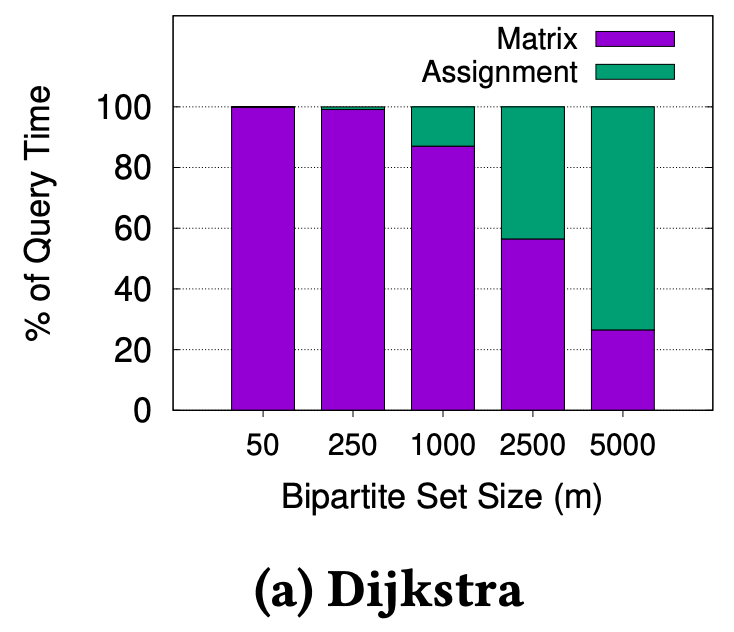
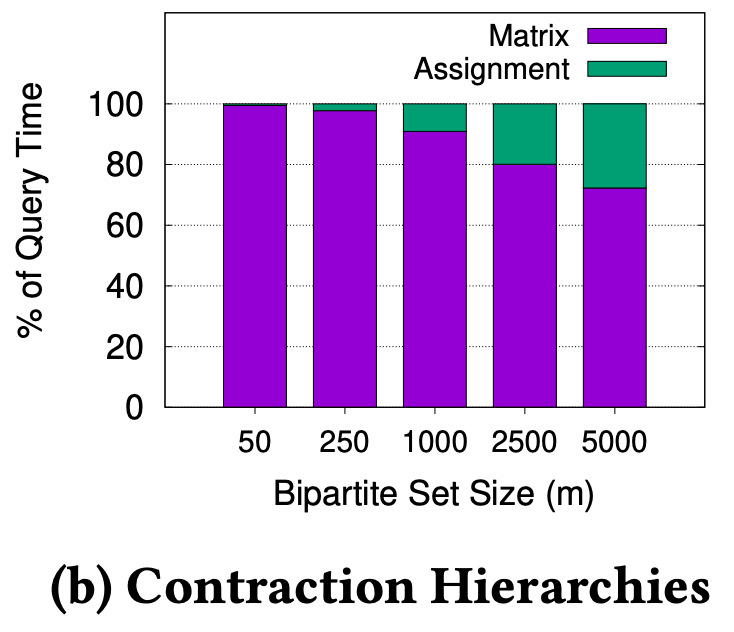

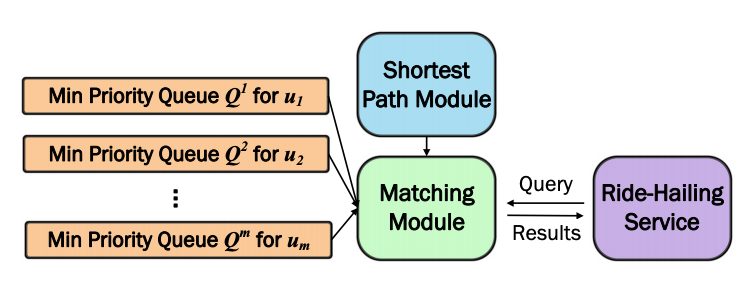
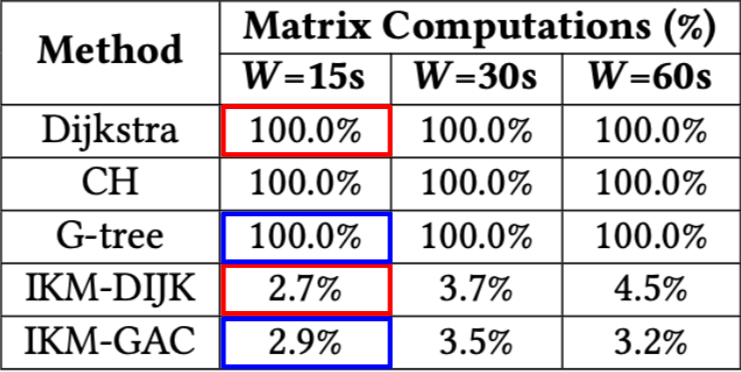
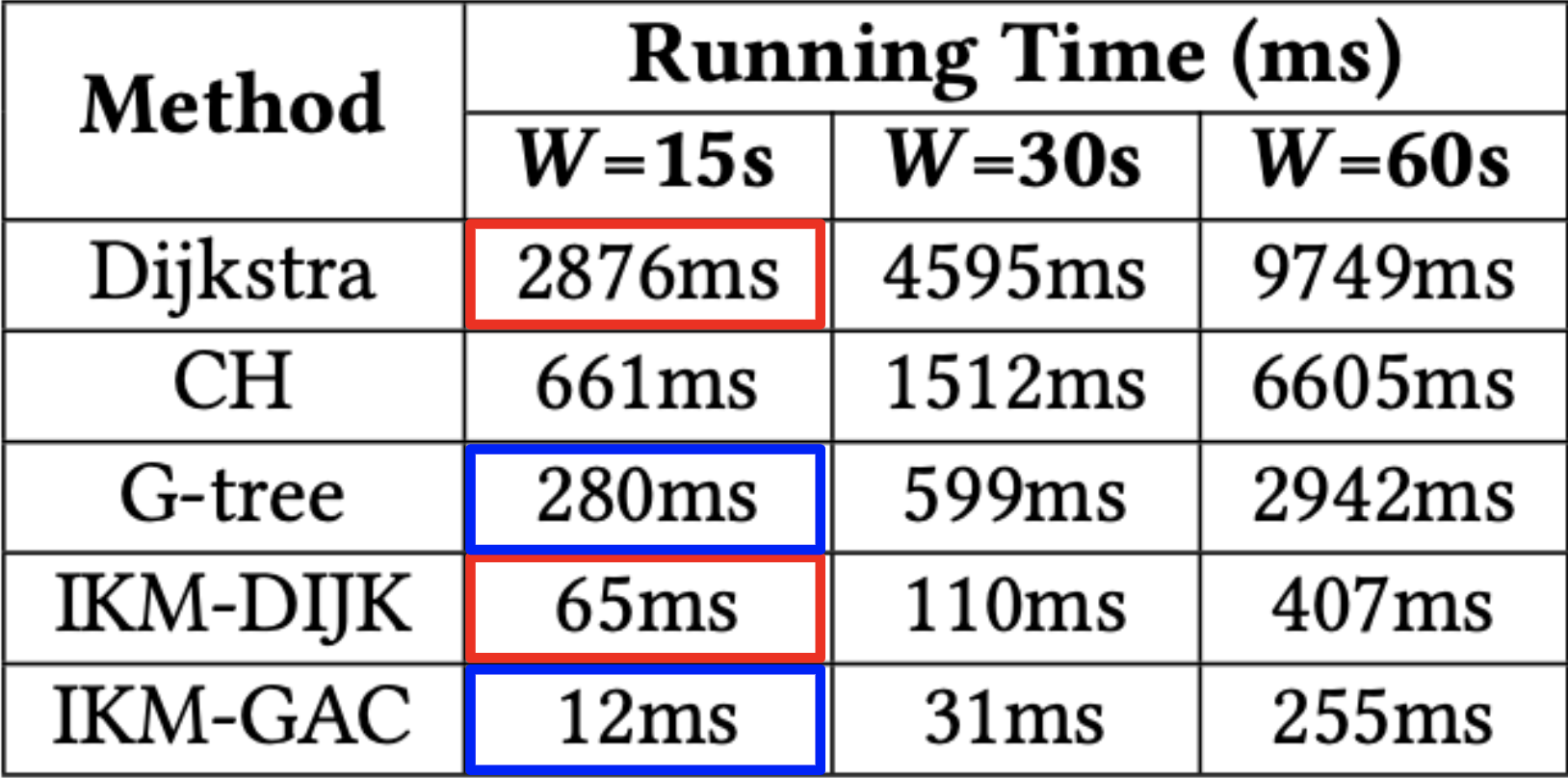
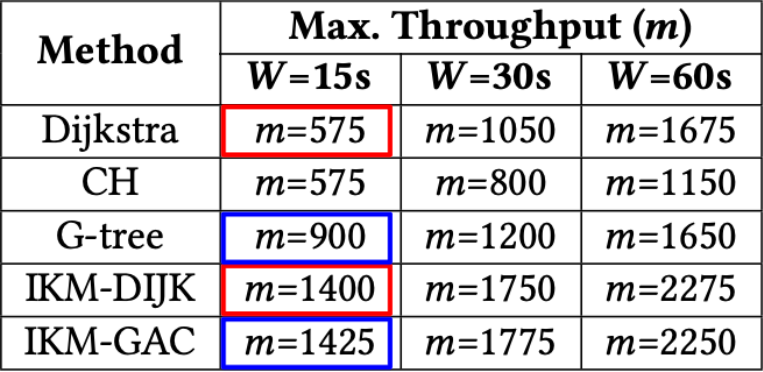
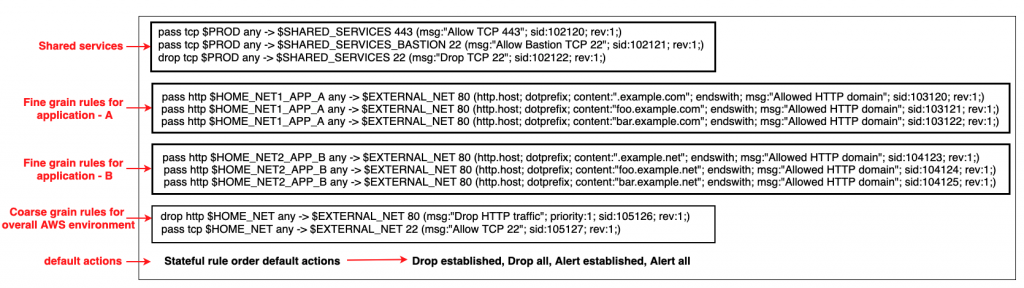
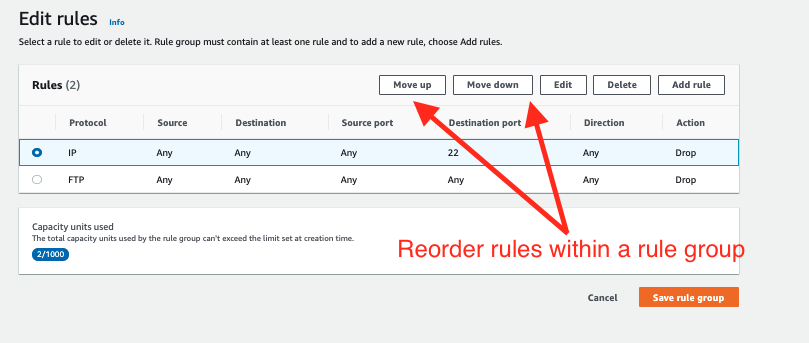
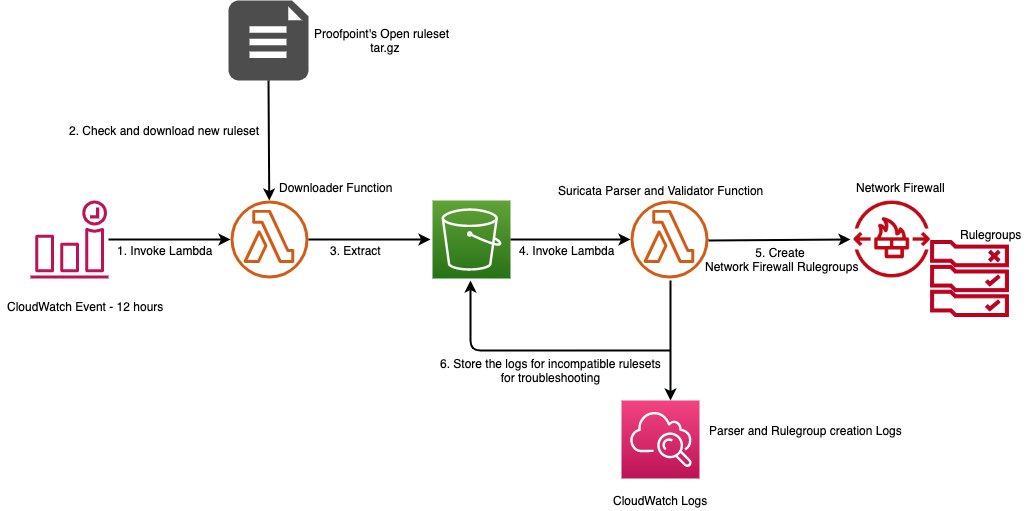
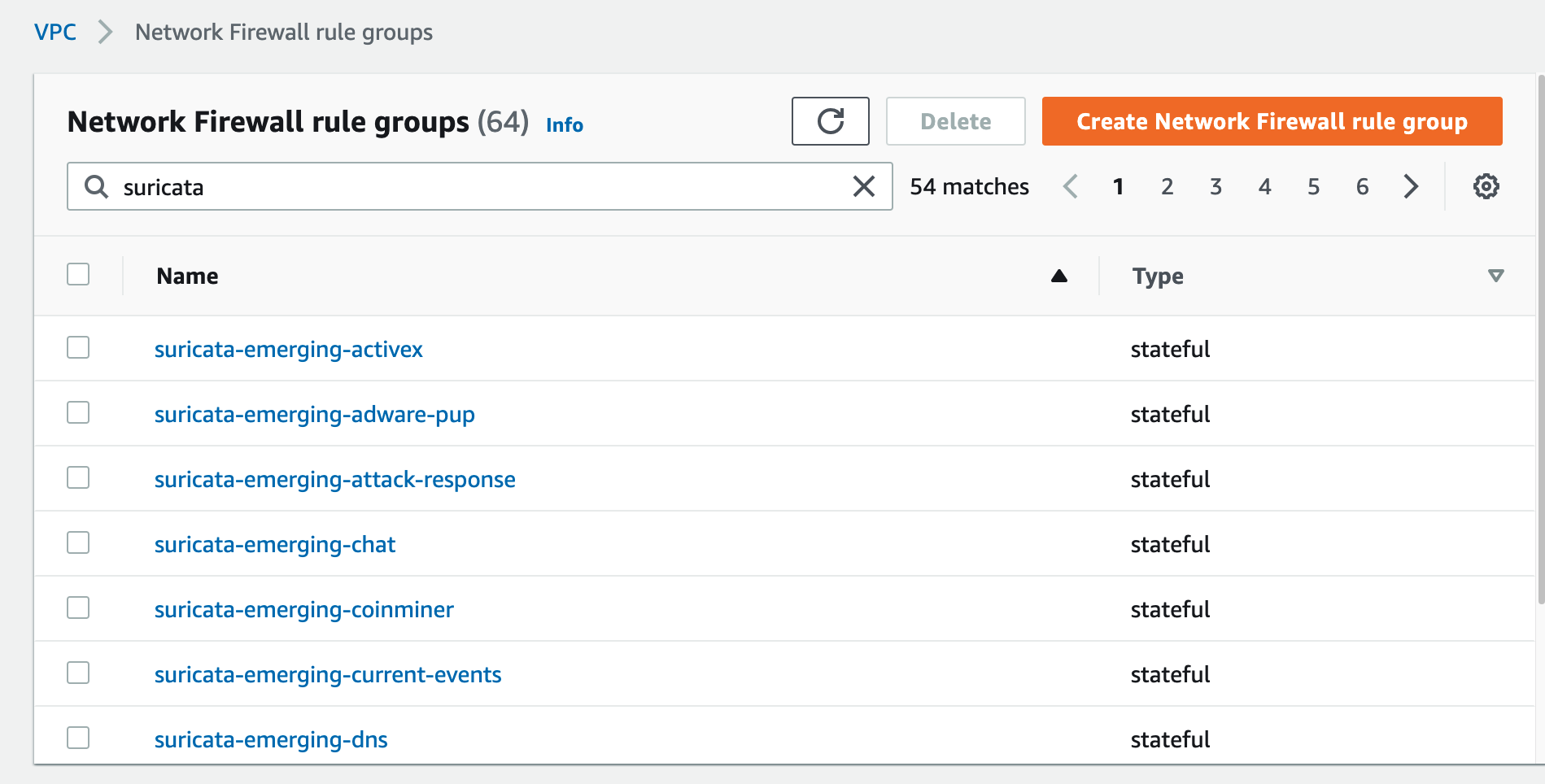
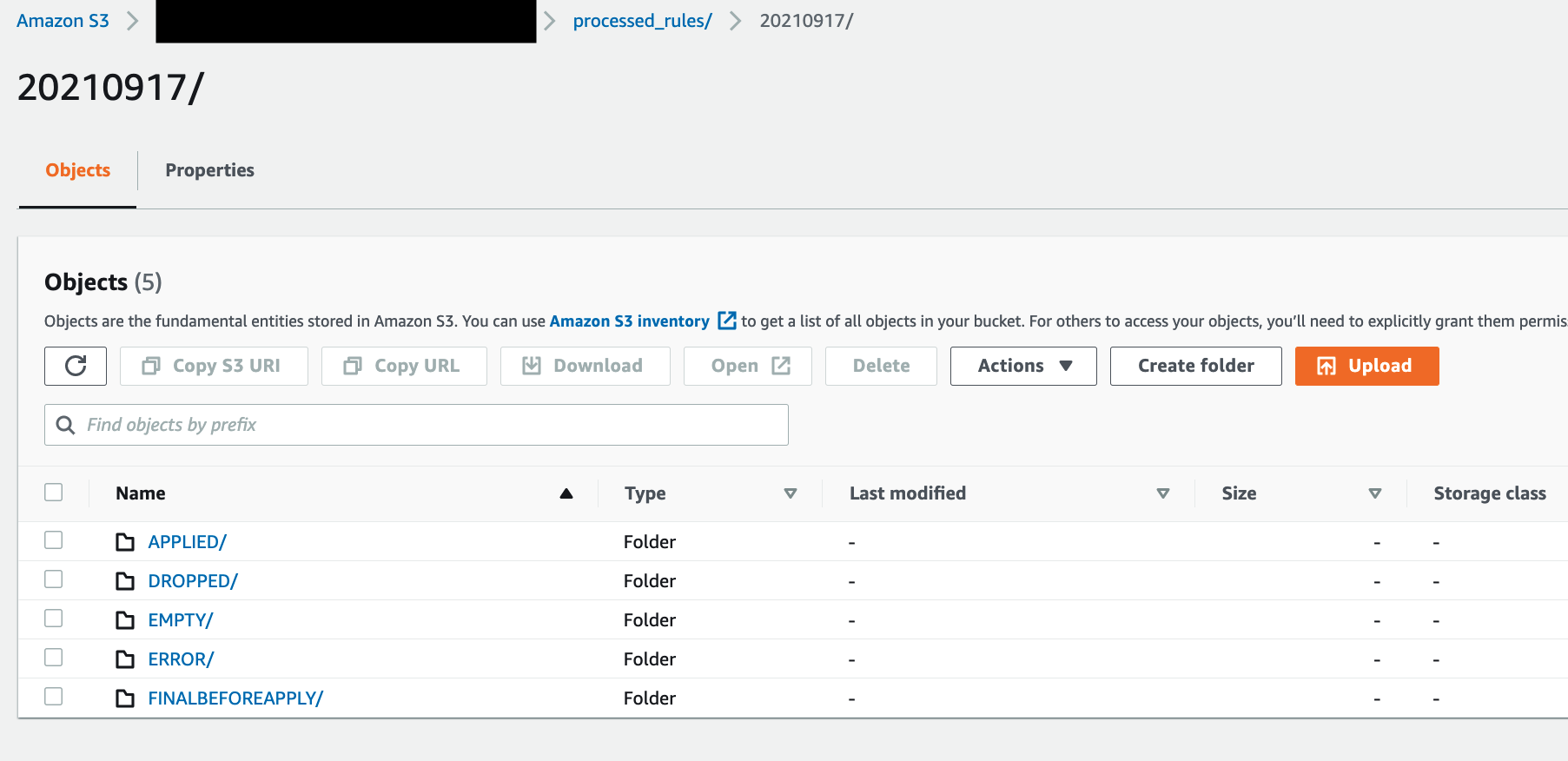
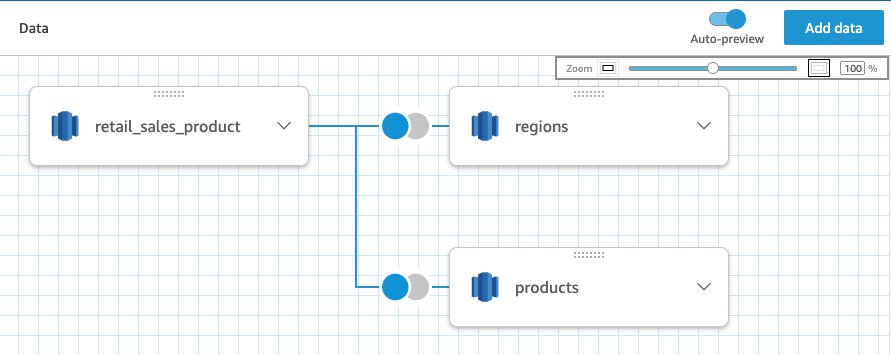
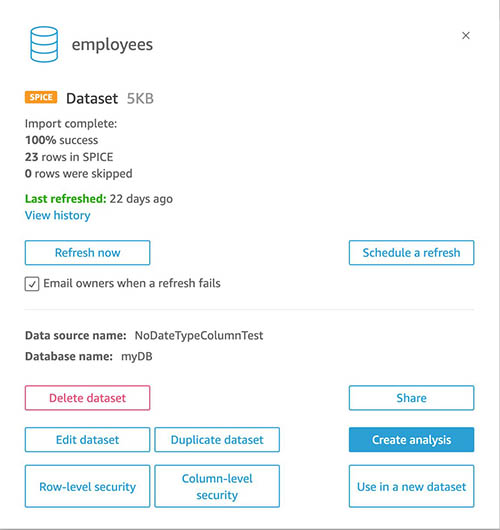
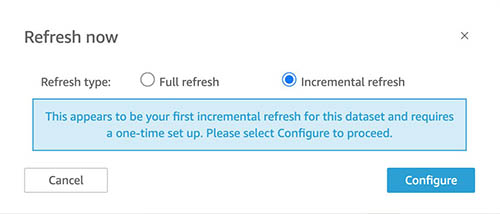
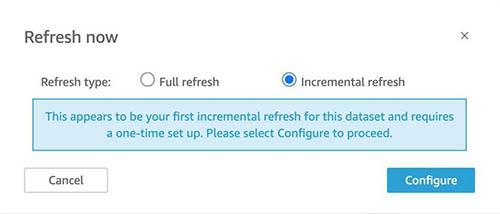
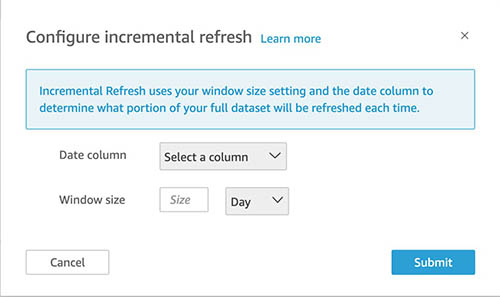
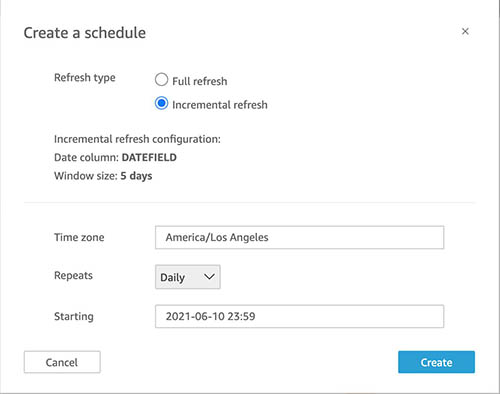




 Brooke White is a Software Development Engineer at AWS. She enables customers to get the most out of their data through her work on Amazon Redshift drivers. Prior to AWS, she built ETL pipelines and analytics APIs at a San Francisco Bay Area startup.