Post Syndicated from Explosm.net original https://explosm.net/comics/truth-bomb
New Cyanide and Happiness Comic
Post Syndicated from Explosm.net original https://explosm.net/comics/truth-bomb
New Cyanide and Happiness Comic
Post Syndicated from Bruce Schneier original https://www.schneier.com/blog/archives/2026/04/is-satoshi-nakamoto-really-adam-back.html
The New York Times has a long article where the author lays out an impressive array of circumstantial evidence that the inventor of Bitcoin is the cypherpunk Adam Back.
I don’t know. The article is convincing, but it’s written to be convincing.
I can’t remember if I ever met Adam. I was a member of the Cypherpunks mailing list for a while, but I was never really an active participant. I spent more time on the Usenet newsgroup sci.crypt. I knew a bunch of the Cypherpunks, though, from various conferences around the world at the time. I really have no opinion about who Satoshi Nakamoto really is.
Post Syndicated from LastWeekTonight original https://www.youtube.com/watch?v=ZN4njIQcSR4
Post Syndicated from LastWeekTonight original https://www.youtube.com/watch?v=sxiMe8Dlzlw
Post Syndicated from xkcd.com original https://xkcd.com/3235/

Post Syndicated from Ryan Smith original https://www.servethehome.com/aoc-16t20-portable-monitor-mini-review/
Recently, we purchased a handful of portable flat-panel monitors. Among these was AOC’s 16T20, an entry-level offering that sports a 15.6-inch 1080p IPS panel. Currently priced just $49 on Amazon (at the time of writing), the 16T20 is amongst the cheapest 1080p portable monitors on the market, offering a relatively bare feature set in exchange […]
The post AOC 16T20 Portable Monitor Mini Review appeared first on ServeTheHome.
Post Syndicated from Explosm.net original https://explosm.net/comics/underperforming
New Cyanide and Happiness Comic
Post Syndicated from John Lee original https://www.servethehome.com/arctic-freezer-4u-onex-ampereone-4u-cooler-mini-review/
We test the Arctic Freezer 4U-OneX, a 4U cooler designed for the AmpereOne series of processors including the A192-32X 192 core Arm CPU
The post Arctic Freezer 4U-OneX AmpereOne 4U Cooler Mini-Review appeared first on ServeTheHome.
Post Syndicated from The History Guy: History Deserves to Be Remembered original https://www.youtube.com/shorts/zZeKJ6jtad8
Post Syndicated from Oglaf! -- Comics. Often dirty. original https://www.oglaf.com/cryptwear/


Post Syndicated from digiblur DIY original https://www.youtube.com/watch?v=ZfzCETmvTpg
Post Syndicated from Екип на Биволъ original https://bivol.bg/politicians.html

Част 3 Биволъ винаги е на страната на истината и справедливостта, независимо от партийните и политически окраски и техните носители. След последната пресконференция на МВР и Прокуратурата последва продължителен период…
Материалът <span style='color:#ff0000;font-size:12px;'>Петрохан:</span> <BR> <H1 class='post-title single-post-title entry-title'>„Неблагодарните“ политици и благодетели ползвали и протектирали „оракула“ Калушев</H1> е публикуван за пръв път на Bivol!.
Post Syndicated from Matt Granger original https://www.youtube.com/watch?v=fCiCDqX9gWw
Post Syndicated from Natasha Rabinov original https://www.backblaze.com/blog/the-changing-landscape-of-cloud-sync-and-what-it-means-for-your-backup/

Backblaze Computer Backup was built on a simple promise: unlimited backup for everything on your computer. That promise hasn’t changed. But the way files live on your computer has, and we want to explain what’s happening, why it matters, and where we’re headed.
Not long ago, when you installed Dropbox or OneDrive, those apps copied your files directly onto your hard drive. They were real, local files. Backblaze would find them, back them up, and you could restore them just like anything else on your machine.
Over the past several years, cloud sync providers have fundamentally rearchitected how they store files at the operating system level. On Windows, tools like Dropbox and OneDrive now use something called the Cloud Files API, which represents your synced files as reparse points—essentially placeholders that point back to the cloud rather than storing actual data locally. The file appears to be there, but it’s really a redirect.
This isn’t a bad thing for those apps: it lets them sync efficiently and save local disk space. But it creates a real problem for backup software.
When Backblaze Computer Backup encounters a reparse point, we’re not looking at your file—we’re looking at a pointer. Backing that up wouldn’t actually protect your data; it would just save the redirect. And restoring a redirect isn’t a real restore. Since reliable backup and restore is the entire point, we made the decision to exclude folders managed this way rather than give customers a false sense of security.
This is also consistent with how we’ve always built the backup client: lightweight, unlimited, and focused on real user-generated files rather than duplicating data that already lives in the cloud.
We’ve successfully added support for iCloud Drive and Google Drive by working within those platforms’ models. Extending the same support to every sync provider is more complex, but it’s something we’re actively exploring.
Files where third-party tools have not added reparse points or other placeholder indicators and are stored directly on a customer’s computer, outside of third-party sync folders, continue to be backed up as they always have been. We are actively evaluating how to better support data from synced sources in the future.If you have questions about your current backup coverage, you can read our Docs about backing up third-party application data, or reach out to our Support team at [email protected].
The post The Changing Landscape of Cloud Sync, and What It Means for Your Backup appeared first on Backblaze Blog | Cloud Storage & Cloud Backup
Post Syndicated from Bruce Schneier original https://www.schneier.com/blog/archives/2026/04/friday-squid-blogging-new-giant-squid-video-2.html
Pretty fantastic video from Japan of a giant squid eating another squid.
As usual, you can also use this squid post to talk about the security stories in the news that I haven’t covered.
Post Syndicated from Jack Heysel original https://www.rapid7.com/blog/post/pt-metasploit-wrap-up-04-17-2026
We’re happy to announce that Metasploit Framework had a big week, landing seven new modules alongside various bug fixes and enhancements. This week’s highlights include RCE modules targeting AVideo, openDCIM, Selenium Grid/Selenoid, and ChurchCRM. On the post-exploitation side, Windows saw three new persistence techniques added as modules, targeting Telemetry scheduled tasks, PowerShell profiles, and Microsoft BITS.
What a time to be alive as a Metasploit user! We wish you all a wonderful weekend and happy hacking.
Authors: Valentin Lobstein [email protected] and arkmarta
Type: Auxiliary
Pull request: #21075 contributed by Chocapikk
Path: gather/avideo_catname_sqli
AttackerKB reference: CVE-2026-28501
Description: Adds an auxiliary module for CVE-2026-28501, an unauthenticated SQL injection in AVideo <= 22.0, along with a new BenchmarkBasedBlind SQLi mixin class and blind extraction improvements.
Author: Valentin Lobstein [email protected]
Type: Exploit
Pull request: #21034 contributed by Chocapikk
Path: linux/http/opendcim_install_sqli_rce
AttackerKB reference: CVE-2026-28517
Description: This PR adds a new exploit module for openDCIM that chains three vulnerabilities (https://github.com/advisories/GHSA-mg2w-x76x-59h8, https://github.com/advisories/GHSA-prmh-rp39-qc4m, https://github.com/advisories/GHSA-428h-8xhf-g3cw) to achieve remote code execution.
Authors: Jon Stratton, Takahiro Yokoyama, Valentin Lobstein [email protected], and Wiz Research
Type: Exploit
Pull request: #21003 contributed by Chocapikk
Path: linux/http/selenium_greed_rce
Description: This replaces the two separate Selenium Grid RCE modules (Chrome and Firefox) with a single unified module that auto-detects available browsers and selects the best attack vector. The module targets unauthenticated Selenium Grid and Selenoid instances, supporting two techniques: a Firefox profile handler injection that works on all Grid versions including the latest (never patched since 2021), and a Chrome binary override for Grid versions prior to 4.11.0 and all Selenoid versions. No authentication is required.
Author: LucasCsmt
Type: Exploit
Pull request: #21095 contributed by LucasCsmt
Path: multi/http/churchcrm_db_restore_rce
AttackerKB reference: CVE-2025-68109
Description: Adds a new exploit module for CVE-2025-68109, targeting a file upload vulnerability inside ChurchCRM leading to an RCE. This module will work on version 6.2.0 of ChurchCRM and earlier.
Author: h00die
Type: Exploit
Pull request: #20839 contributed by h00die
Path: windows/persistence/bits
Description: This adds a new persistence module that uses Microsoft Bits to maintain access to the system.
Author: madefourit
Type: Exploit
Pull request: #20933 contributed by madefourit
Path: windows/persistence/powershell_profile
Description: This adds a new persistence module that uses powershell profiles to maintain access.
Author: h00die
Type: Exploit
Pull request: #20843 contributed by h00die
Path: windows/persistence/telemetry
Description: Adds a new persistence module, exploit/windows/persistence/telemetry, that abuses the Windows Telemetry scheduled task (Microsoft Compatibility Appraiser / CompatTelRunner) to establish persistence. The module writes a payload to disk and configures the telemetry task to execute it, resulting in a SYSTEM-level Meterpreter session either on the next scheduled run or immediately on demand. Requires an admin-level Meterpreter session on the target.
You can always find more documentation on our docsite at docs.metasploit.com.
As always, you can update to the latest Metasploit Framework with msfupdate and you can get more details on the changes since the last blog post from GitHub:
If you are a git user, you can clone the Metasploit Framework repo (master branch) for the latest. To install fresh without using git, you can use the open-source-only Nightly Installers or the commercial edition Metasploit Pro
Post Syndicated from Надежда Радулова original https://www.toest.bg/sedmitsata-13-18-april/

Изборната седмица у нас започна с екзалтацията около едни чужди, но важни, включително по геополитически причини, избори. Дали заради великденското покачване на алкохолния градус и калорийния прием, дали заради не особено здравия ни национален интерес към „живота на другите“, но падането на Орбан и победата на Мадяр предизвикаха оживено бълбукане из социалните мрежи. Ще речеш, че 80% българи, а не унгарци бяха пуснали неделни бюлетини, за да кажат не на 16-годишния авторитарен режим на „Фидес“.
Парадоксално, бълбукането и клокоченето се оказаха най-вече от паралингвистичен характер предвид затрудненията, които кръстосващите социалните мрежи изпитаха с транскрипцията на името на победилия лидер. (Ти да видиш – веднъж на високосна година и езикът да има значение за някого!)
Иначе, за самия Мадяр се чу и написа относително малко и плитко – особено за Орбан-закваската му и за сенчестите страни в политическата му кариера. Лично аз например имам проблем с това, че в един момент възходът му стъпва с хусарски ботуши върху факта, че тайно записва разговорите с тогавашната си съпруга и майка на трите им деца Юдит Варга, а впоследствие предава където трябва уличаващите я записи. Такива „филми“ вече съм гледала, и книги съм чела даже, та – ще ме извините – на павликморозовци някак не мога да се доверя с чисто сърце.
Има обаче неща, на които се доверявам… Като прекарала две години от живота си в Будапеща; изпила стотици кафета във великолепните „Жербо“ на „Вьорошмарти“, „Мювеш“ на „Андраши“, „Пушкин“ в едноименното кино и пр., блажено пропиляла немалко летни дни в архитектурно смайващите закрити и открити термални бани „Рудаш“ и „Сечени“; живяла или гостувала в десетки квартири около „Астория“, „Ференциек тер“, „Блаха Луиза“, „Байчи Жилински“ и пр. – места, всмукващи те в мрачните си вътрешни дворове, с дантели от ковано желязо по висящите външни стълбища и балкони, с еклектична плетеница от влияния – неоготика, необарок, неоренесанс, сецесион, ар нуво, баухаус – нямам капка съмнение, че тази страна, която има неизброими „йотабайтове“ съхранена памет – историческа, културна, градска, – има и воля за бъдеще.
Ако не друго, отминалите там избори ни убедиха, че няма вечни режими, не и в сърцето на Европа. Не и когато обществото е съхранило демократичния си инстинкт, реакциите си, в крайна сметка – мускулите да се обединява и да… бие шута на който си го е заслужил. В подкрепа на това ето един документален филм за престъпните изборни практики на Орбан – филм, който спокойно можем да съотнасяме и към собствената си ситуация на избиратели в България.
Гледайте го днес, защото утре са нашите избори и само от нас зависи какви ще са резултатите и доколко представителни ще бъдат те.
За съжаление, настоящите предизборни кампании – сами по себе си скучновати – не получиха добро медийно отразяване. Чудесната протестна енергия, акумулирана по площадите в края на миналата година, сякаш постепенно се разми по време на новогодишните празници и се стопи с последния мартенски сняг. Дори т.нар. Големият дебат в „Извън ефир“, излъчван на живо на 14 април, беше вял и не особено сръчно модериран. Други дебати реално нямаше.
 Емилия Милчева
Затова пък в социалните мрежи станахме свидетели на купища особено грозни и груби мизогинни коментари – главно от тролове, но за жалост, и от реални хора с лица и биографии. Междувременно се появиха новини за купуване на гласове с фалшиви банкноти, тоест за „безплатно купуване“ на гласове… А из мрежата се чуха оплаквания на хора, ненамиращи точните платформи и кандидати, които да подкрепят.
Само че да избереш кой да те представлява в Народното събрание не е същото като да си избереш чифт обувки номер 38,5, след което да ги занесеш на обущаря, та леко да ги поразтегне с калъпа, тъй щото да не убиват на изхвръкналото кокалче на лявото ти стъпало. Гласуването в повечето случаи е компромис, понякога дори тежък, който идва с отговорността след това да изискваш и да предоговаряш, и да убеждаваш своя представител в нещата, в които вярваш, и – ако се наложи – при следващ избор да оттеглиш гласа си. В крайна сметка не е ли това смисълът на представителната демокрация?
Още за изборите в Унгария и България, както и за рисковете Румен Радев да се превърне в следващия Орбан четете в седмичния анализ на Светла Енчева „Отива ли България там, откъдето Унгария се връща“. Въпреки краткосрочната мощна купесто-дъждовна облачност, която се задава, Светла завършва по-скоро оптимистично:
… въпросът не е само дали България се е запътила натам, откъдето Унгария се връща. Въпросът е дали изобщо има хоризонт за този път, или той не след дълго ще бъде част от миналото.
Светла Енчева
Очаквано, на изборна тема е и текстът на Емилия Милчева „Българският нелиберален въпрос“. Въпросът, който остава да ме гложди след прочита на Емилия обаче, не е особено оптимистичен:
Може ли властта да бъде реално сменена, или само се преразпределя между нови лица?
Емилия Милчева
На пръв поглед встрани от темата, но в действителност дълбоко свързана е статията на Надежда Цекулова „Просто добави радост. Какво са съвременните палиативни грижи за деца“. Ще цитирам тук съвсем кратък откъс, който дава представа за належащата промяна в здравните политики и политиките, свързани с децата. И дано този болезнен въпрос, белег на цивилизационна (не)зрелост, намери място в следващия парламент:
В България има отделни специалисти и институции, които полагат усилия да предлагат модерни детски палиативни грижи. Липсата на рамка, работеща система и разбиране на темата обаче ги превръща в еднорози в една цялостно нехуманна към болните деца среда. За да се промени това, трябва първо достатъчно много хора да повярват, че болните деца също са деца и имат право на детство.
Надежда Цекулова
Децата наравно с възрастните са важни герои и в книгата, за която Антония Апостолова пише в рубриката „На второ четене“ – сборника с разкази „Август“ на румънката Елена Владаряну в майсторския превод на Лора Ненковска. Антония признава, че това са най-добрите разкази, които е чела от много време насам, а аз потвърждавам и на свой ред препоръчвам.
Антония Апостолова
Докато още се възстановяваме от великденските трапези, Атанас Шиников бърза да ни отрупа с още всякакви преизобилни – „бюлюк“, както казва самият той – храни и напитки. За щастие, имагинерни. „Вино или гной: Какво се яде и пие в отвъдното според исляма“ е новото попълнение в рубриката „Ориент кафе“. Макар че тази статия, както личи от заглавието, върви по-добре с чаша вино.
Атанас Шиников
И накрая, за да свържа още веднъж унгарските и българските избори, поздравявам ви с любим (че и награден с „Оскар“) епизод от „Том и Джери“, в който обаче котаракът свири не какво да е, а прочутата и извънредно трудна за изпълнение Унгарска рапсодия №2 от Ференц Лист, докато мишлето се опитва и в крайна сметка успява да му открадне шоуто.
Така че не оставяйте нещата в ръцете на онези, които за пореден път искат да ни откраднат шоуто. Сега ние сме на ход. Гласувайте! А докато чакате на опашките пред избирателните секции, подкрепете ни, като натиснете бутона по-долу. Благодарим ви!
Post Syndicated from Ryan Smith original https://www.servethehome.com/intel-launches-core-series-3-wildcat-lake-mobile-processors-for-low-cost-laptops/
Intel this week is expanding its 2026 mobile processor lineup with the release of the Core Series 3 processors, Intel’s lower-power, lower-cost offshoot of their flagship Core Ultra Series 3 (Panther Lake) silicon. Codenamed “Wildcat Lake”, the Series 3 processors are aimed at the budget and low-power computing markets, with Intel scaling down all of […]
The post Intel Launches Core Series 3 “Wildcat Lake” Mobile Processors for Low-Cost Laptops appeared first on ServeTheHome.
Post Syndicated from Vivek Gautam original https://aws.amazon.com/blogs/security/transform-security-logs-into-ocsf-format-using-a-configuration-driven-etl-solution/
Security logs capture essential security-related activities, such as user sign-ins, file access, network traffic, and application usage. These logs are important for monitoring, detecting, and responding to potential security events. The Open Cybersecurity Schema Framework (OCSF) addresses this challenge by providing a standardized format to represent security events, ensuring consistent and efficient data handling across various systems. OCSF enhances interoperability, streamlines analysis, simplifies compliance reporting, and reduces vendor lock-in, fostering greater flexibility and efficiency in security operations.
However, manually transforming diverse security logs into OCSF format at scale can be complex and time-consuming. Amazon Security Lake simplifies this process by automatically centralizing security data from AWS services such as AWS CloudTrail management and data events (Amazon Simple Storage Service (Amazon S3) and AWS Lambda), Amazon Elastic Kubernetes Service (Amazon EKS) audit logs, Amazon Route 53 resolver query logs, AWS Security Hub findings, Amazon Virtual Private Cloud (Amazon VPC) Flow Logs, and AWS WAF logs. It also centralizes security logs from software as a service (SaaS) providers, on-premises, and cloud sources into a purpose-built data lake stored in your account. It uses the OCSF format to standardize and normalize this data, ensuring consistency and simplifying analysis. By integrating with analytics tools such as Amazon Athena and Amazon Quick Sight, Security Lake simplifies threat detection, improves security posture monitoring, and streamlines compliance reporting, making it an essential tool for modern security operations.
In this post, we show you how to transform custom security logs into OCSF format after you have the OCSF mappings ready, using a configuration-driven extract, transform, load (ETL) solution.
Amazon Security Lake stores security data in OCSF format and so customers looking to use custom log sources in Security Lake must transform their logs into OCSF format. To facilitate this process, the AWS Professional Services (ProServe) team built an ETL solution accelerator that converts custom security logs into OCSF format. This solution bridges existing log formats with the OCSF version 1.1 standard, streamlining data onboarding into Security Lake or other data lakes of security logs coming from multiple security tools.
To implement this solution, you must have the following resources:
The solution uses two input files: a mapping file and a configuration file. These files guide the transformation of source logs into OCSF-compliant Parquet format, which is then partitioned by location/region=region/accountId=accountID/eventDay=yyyyMMdd/ and stored in an Amazon S3 location provided by Security Lake.
The following diagram shows the key architecture components of this solution and data flow between them.
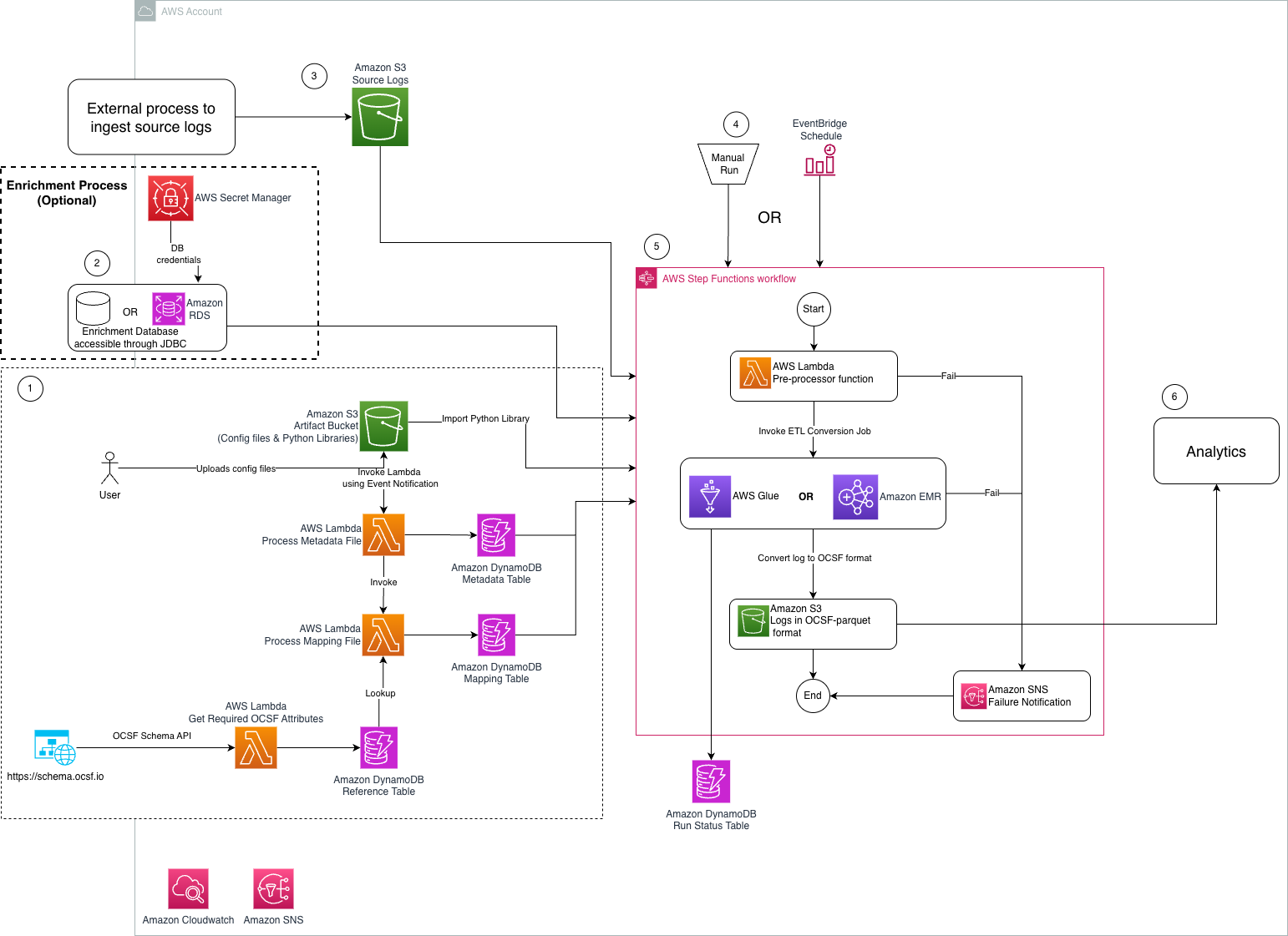
Figure 1: Architecture diagram of ETL solution to transform security logs into OCSF format
The steps mentioned below walks you through the architecture diagram:
asl-etl-framework-ocsf-attribute-metadata DynamoDB table when the metadata files are created or updated.Reference Lambda function extracts the required OCSF attributes using an API call and stores the results in a DynamoDB table.You can find the required resources to deploy this solution in this GitHub repository. It provides detailed instructions in the README on how to deploy the solution. After you have the prerequisites mentioned earlier, see the Environment Setup portion of the repository.
In this section, we walk you through steps to deploy this solution.
Before you start mapping the security logs into OCSF format, check if there are existing mappings available on OCSF mappings Github.
Mapping security logs into the OCSF format typically involves several steps. Here are the high-level steps:
By following these steps, you can effectively map security logs into the OCSF format, enabling better interoperability, analysis, and collaboration across security tools and platforms. AWS ProServe has helped many customers map their security logs to OCSF format. If you need guidance to map and transform security logs into OCSF format and want to use AWS ProServe, reach out to your account executive.
The ETL solution requires a CSV mapping file that maps the custom security log attributes into standardized OCSF attributes based on the specified OCSF class. For detailed instructions on generating this mapping file, see the Solution Usage section, bullet 2, in the README of the code repository. To follow the instructions in this post, you can enable Amazon S3 server access logging to publish source logs to Amazon S3. The following is a sample S3 server access log record:
90de84bb542adb54766fec66ee554475b7e1a56a9d8b30e3598230f9ef6d6ac7 azv-asl-src-logs [29/May/2025:04:35:45 +0000] - arn:aws:sts::768196192565:assumed-role/AwsSecurityAudit/Palisade QS8DSY4SGF8M8SD7 REST.GET.BUCKETPOLICY - “GET /?policy HTTP/1.1" 200 - 255 - 39 - "-" "-" - N9XclJkv6hw/y4yApPyDII2sRoMNbqJqBEXdnmzFndcvhQOpdcc3PNQNQX7NhQaPJ5FKSVPh6hLB0GqsSN4apcbBUHi3rNcPRqa6rFLAYU4= SigV4 TLS_AES_128_GCM_SHA256 AuthHeader azv-asl-src-logs.s3.amazonaws.com TLSv1.3 - -
Because the sample record uses spaces as delimiters and contains an extra space before +0000, you need to wrap each attribute in quotes. Here’s a sample Python code implementation that handles this requirement:
This sample code demonstrates how to wrap quotes around each attribute. You can extend this code to read source Amazon S3 server access log files from an S3 location and write the modified logs to another location. After these logs are available in an S3 bucket in your AWS account, you need to map the S3 server access logs to OCSF format. The following is an example of an S3 server access log CSV mapping file:
| src_log_type | src_column_name | tgt_column | default_values |
| s3-access-log | bucket_owner | resources:Object.owner:Object.uid:string | |
| s3-access-log | bucket | resources:array.value:string | |
| s3-access-log | time | time:timestamp | |
| s3-access-log | remote_ip | src_endpoint:object.ip:string | |
| s3-access-log | requester | actor:Object.user:object.uid:string | |
| s3-access-log | request_id | http_request:object.uid:string | |
| s3-access-log | operation | api:Object.operation:string | |
| s3-access-log | key | unmapped:Object.key:string | |
| s3-access-log | request_uri | http_request:object.url:object.url_string:string | |
| s3-access-log | http_status | http_response:object.code:integer | |
| s3-access-log | error_code | http_response:object.message:string | |
| s3-access-log | bytes_sent | http_response:object.length:integer | |
| s3-access-log | object_size | unmapped:Object.object_size:string | |
| s3-access-log | total_time | duration:integer | |
| s3-access-log | turn_around_time | http_response:object.Latency:integer | |
| s3-access-log | referer | http_request:object.referrer:string | |
| s3-access-log | user_agent | http_request:object.user_agent:string | |
| s3-access-log | version_id | unmapped:Object.version_id:string | |
| s3-access-log | host_id | unmapped:Object.host_id:string | |
| s3-access-log | signature_version | unmapped:Object.signature_version:string | |
| s3-access-log | cipher_suite | unmapped:Object.cipher_suite:string | |
| s3-access-log | authentication_type | unmapped:object.authentication_type:string | |
| s3-access-log | host_header | http_request:object.http_headers:array.value:string | |
| s3-access-log | tls_version | unmapped:Object.tls_version:string | |
| s3-access-log | access_point_arn | unmapped:Object.access_point_arn:string | |
| s3-access-log | acl_required | unmapped:Object.acl_required:string | |
| metadata:object.version:string | 1.1.0 | ||
| cloud:object.provider:string | AWS | ||
| metadata:object.product:string.name:string | S3 | ||
| metadata:object.product:string.vendor_name:string | AWS | ||
| http_request:object.http_headers:array.name:string | http_header | ||
| resources:array.name:string | bucket | ||
| activity_id:integer | 99 | ||
| severity_id:integer | 99 | ||
| type_uid:integer | 600399 | ||
| category_name:string | Application Activity |
Upload the mapping CSV file to the S3 artifact location s3://secure-datalake-artifacts-<account_number>-<aws_region>/config/mapping/. The Lambda function asl-etl-framework_update-mapping-ddb ingests this mapping CSV file, processes its entries, and converts them into the required DynamoDB format. This Lambda function writes the results to the asl-etl-framework-ocsf-attribute-mapping DynamoDB table, which stores the schema and mapping information for all source log files processed by this solution. You can find an example of an S3 server access log CSV metadata file in the GitHub repository.
To create a configuration metadata file, create a CSV file following the guidelines in Solution Usage, bullet 4, in the README of the code repository.
Upload the completed mapping CSV file into an S3 artifact location s3://secure-datalake-artifacts-<account_number>-<aws_region>/config/metadata/. An upload of a metadata CSV file to S3 invokes a Lambda function asl-etl-framework_insert_metadata_ddb, which stores the configuration in the asl-etl-framework-source-ocsf-metadata DynamoDB table. The following image shows the configuration in DynamoDB table.
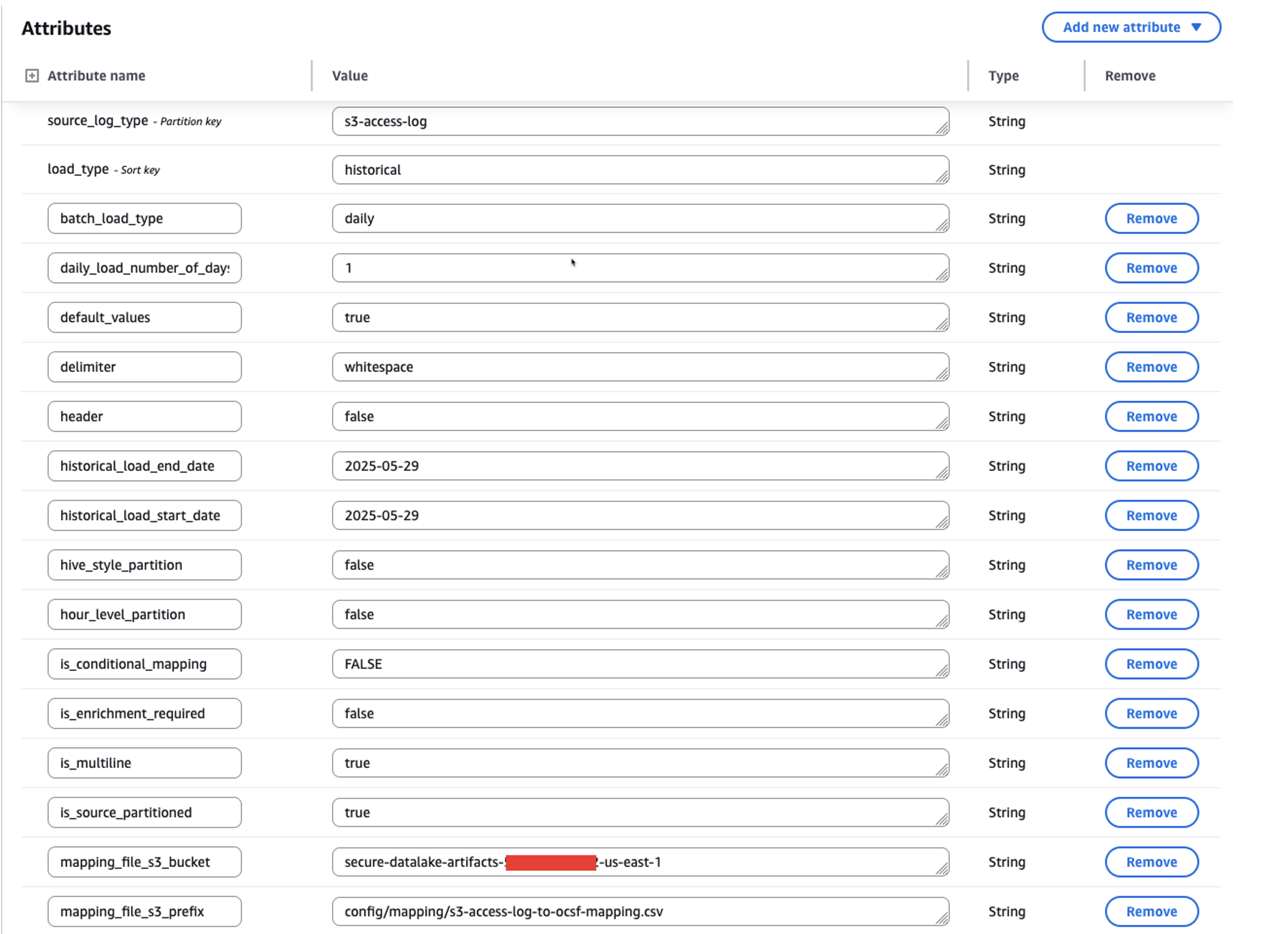
Figure 2: Screenshot of metadata configuration in the asl-etl-framework-source-ocsf-metadata DynamoDB table for S3 Access Logs
After inserting the metadata into the asl-etl-framework-source-ocsf-metadata DynamoDB table, the Lambda function asl-etl-framework_update-mapping-ddb is invoked to read the mapping CSV file and inserts mappings into the asl-etl-framework-ocsf-attribute-mapping DynamoDB table. The following image shows the mapping in DynamoDB table.
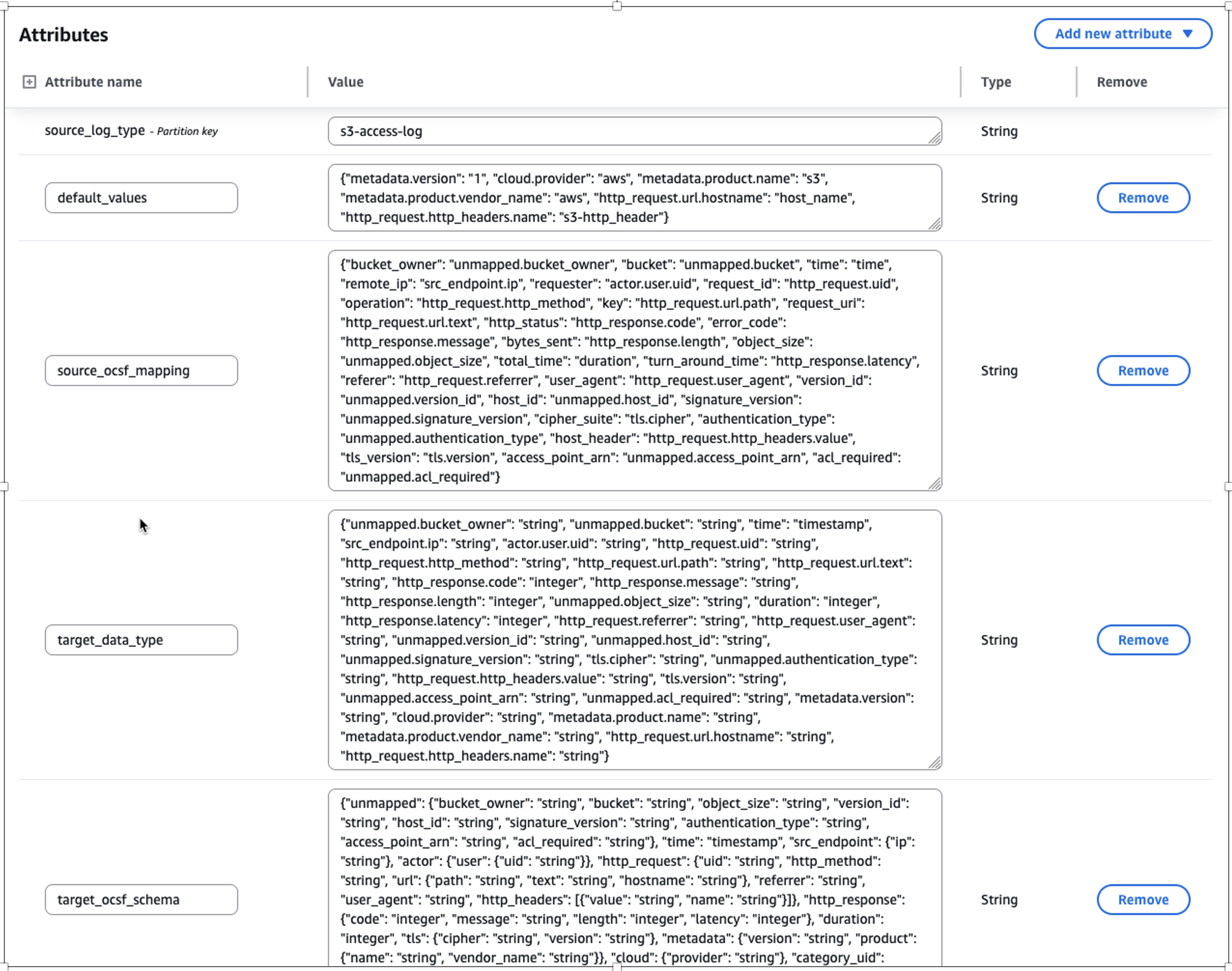
Figure 3: Screenshot of transformed mapping in the asl-etl-framework-ocsf-attribute-mapping DynamoDB table for S3 Access Logs
The ETL solution offers a historical load capability that processes logs from specified date or year ranges based on metadata file inputs. After being converted to OCSF format in Parquet file format, these logs can be integrated into Amazon Security Lake or be used to create a custom data lake. The solution includes checkpointing functionality to handle potential failures during historical data processing.
The checkpointing feature provides process resilience by tracking conversion progress in the asl-etl-framework-ocsf-run-status DynamoDB table. If a conversion process fails during multi-year historical processing, the solution resumes from the point of failure rather than reprocessing previously converted data. For example, if conversion fails while processing the second year’s data, the solution will resume from that point, preserving the first year’s successful conversion. While this feature is enabled by default, you can disable it, in which case any process restart will begin from the initial specified date. The following image shows the load_type as historical along with start_time and end_time for the period you want to transform the logs.
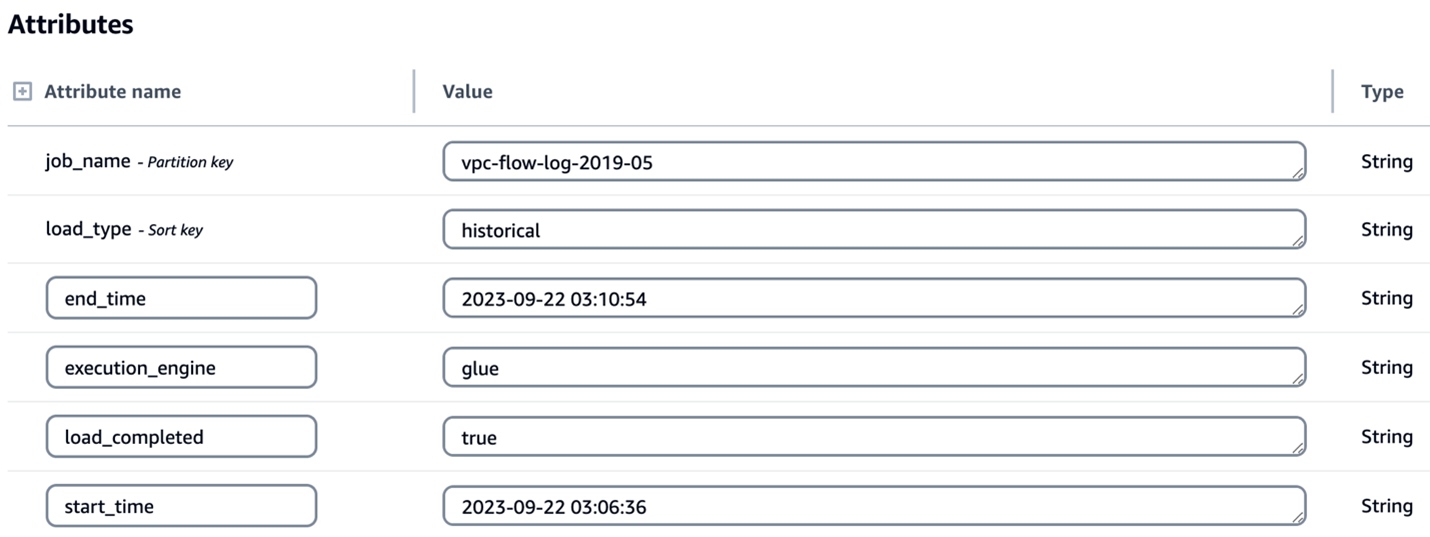
Figure 4: Screenshot of configuration for historical load attributes in the asl-etl-framework-source-ocsf-metadata DynamoDB table
Enterprises often possess valuable contextual data that can enhance their security logs through enrichment. By correlating existing data with security logs and appending relevant information, you can create more comprehensive datasets for advanced analytics and deeper security insights. After the logs are converted to OCSF, you might want to know more about specific columns or attributes so that you can extract meaningful information. To support this, the solution has an option for enrichment. For example, if you want to get additional information, such as the geolocation of each IP address in the logs, you can provide the source database information in the metadata CSV file of the solution. It connects to the source database through a JDBC connection, extracts the requested information associated with the IP address to enrich the dataset, and adds the extracted information as new columns to the converted OCSF log output. In this way, you can have detailed information about each IP address in the converted OCSF log. The following screenshot shows parameters for enabling enrichment by setting the is_enrichment_required flag as true and adding necessary enrichment_attributes to the metadata table.
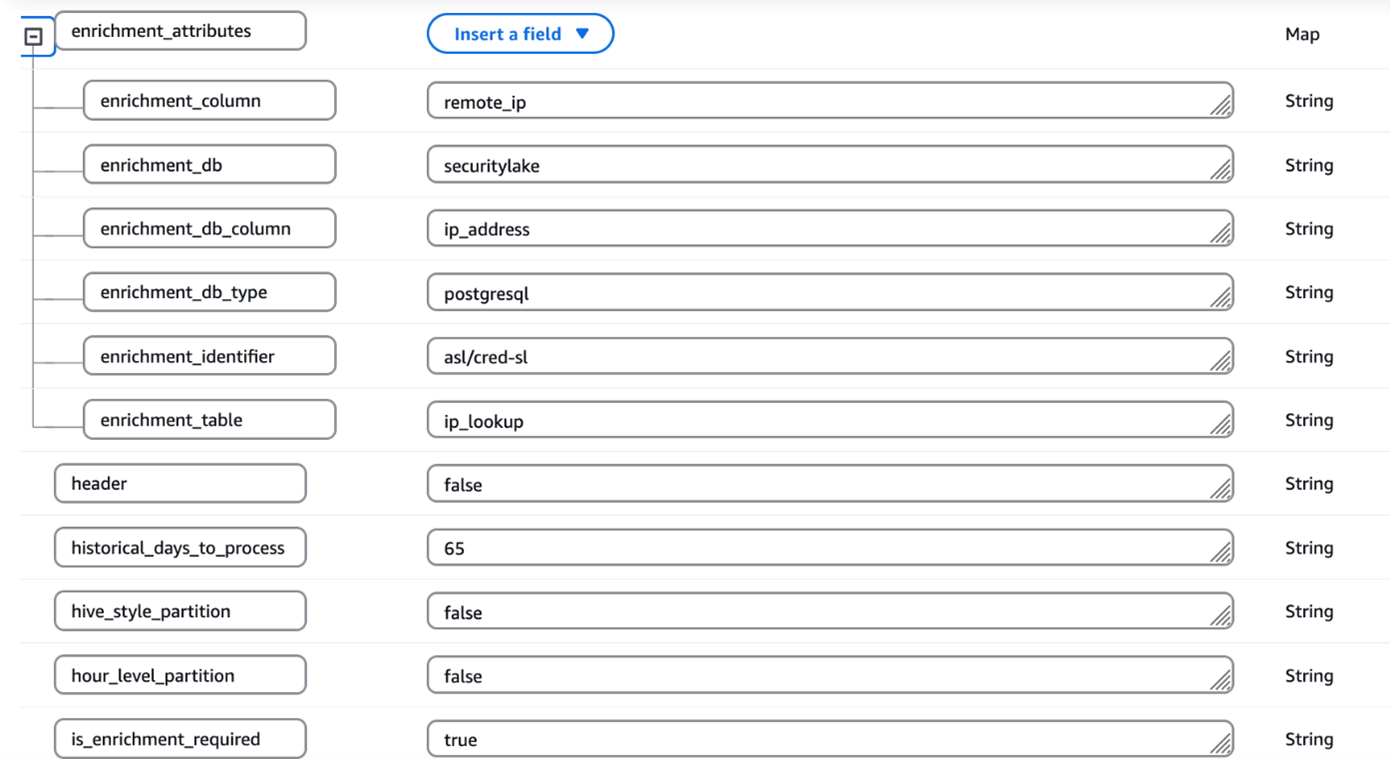
Figure 5: Screenshot of configuration for enrichment attributes in the asl-etl-framework-source-ocsf-metadata DynamoDB table
You can use the engine of your choice for the transformation by providing the engine name during the deployment steps as mentioned in the Pre-Deployment Configuration section of the ReadMe. Based on this, the solution uses either AWS Glue or EMR Serverless as mentioned in the Orchestration using Step Functions section.
The process includes the following steps:
asl-etl-framework-source-ocsf-metadata and, based on the input parameters passed for the Step Functions workflow shown in the Orchestration using Step Functions section, the Step Functions workflow generates the input arguments for the transformation job (AWS Glue or EMR Serverless based on the user’s choice).asl-etl-framework-source-ocsf-metadata. These custom OCSF logs on S3 can be integrated with Security Lake.This solution is orchestrated using Step Functions and offers two execution engine options: AWS Glue or EMR Serverless, depending on the services allow-listed in your enterprise. For processing historical loads, we recommend using EMR Serverless; however, AWS Glue is suitable for historical loads less than 100 GB. When invoking the Step Functions workflow, specify the execution engine as either emr-serverless or glue in the input parameters passed using EventBridge.
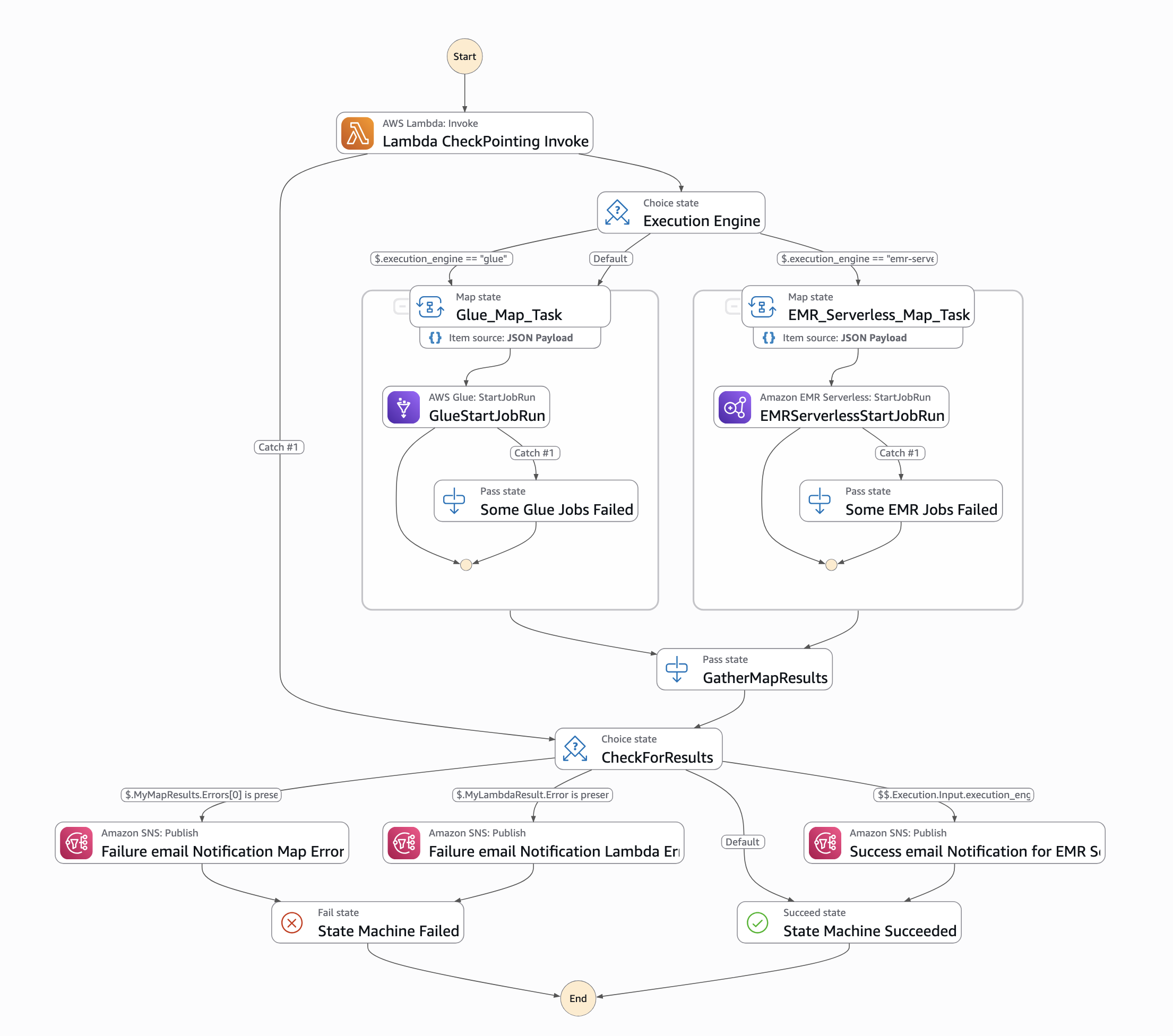
Figure 6: Screenshot of Step Functions workflow orchestration
To run the workflow, an input must be passed through an EventBridge schedule. The input parameters are as follows:
{
“source_log_type": “s3-access-log”,
“load_type": “historical”,
“full_load": “false”,
“ddb_lookup_table": “asl-etl-framework-ddb-table-details”,
“ddb_mapping_table": “asl-etl-framework-ocsf-attribute-mapping”,
“ddb_metadata_table": “asl-etl-framework-source-ocsf-metadata”,
“ddb_reference_table": “asl-etl-framework-ocsf-reference”,
“asl_status_table": “asl-etl-framework-run-status”,
“execution_engine": “glue”,
“asl_job_name": “asl-etl-framework-init-ocsf-conversion”
}
A description of the steps is also available in the ReadMe section of the code repository.
It’s a best practice to ensure that the generated Parquet files properly map to the various schema definitions specified within the Open Cybersecurity Schema Framework (OCSF). Validating the mapping helps to maintain data integrity and allows the security data to be effectively analyzed and processed by downstream applications and tools, such as Security Lake. You can use OCSF Schema Validator, which was built to provide supplementary validation for Security Lake. Performing this validation step helps detect any schema misalignments or data quality issues early in the process, leading to more reliable and trustworthy security analytics.
If validation of the transformed OCSF Schema fails using the OCSF Schema Validator, you need to validate if your mappings are aligned with the respective OCSF category. Adjust your mappings, rerun the solution, and validate the transformed OCSF logs using OCSF Schema Validator until you get a valid OCSF schema.
When discovering incorrect OCSF mappings or format inconsistencies in converted logs, begin by conducting a thorough validation against OCSF schema specifications to identify specific discrepancies. Update the mappings with correct field mappings, ensuring proper data type conversions and mandatory field requirements are met. Test these corrections using sample data to verify OCSF compliance using the above mentioned tool and data integrity before implementing in production.
In this post, we showed you how the ETL solution accelerator transforms custom security logs into the standardized OCSF format, enabling enhanced security analytics capabilities. This solution, developed by AWS Professional Services (AWS ProServe), addresses common challenges in security log standardization and streamlines the adoption of Amazon Security Lake. While the solution is available as an open source project, engaging with AWS ProServe provides significant advantages, including proven implementation expertise, best practices guidance, and accelerated deployment timelines. Our ProServe team brings extensive experience in security log standardization and can help customize the solution to your specific requirements while ensuring optimal integration with Security Lake. To begin your journey toward standardized security analytics using OCSF, contact your AWS account team to discuss how AWS ProServe can help implement this solution in your environment.