A Clearer Path from Prioritized Exposures to Remediation Progress

Post Syndicated from Michael Chroney original https://www.rapid7.com/blog/post/em-path-from-prioritized-exposures-to-remediation-progress

Security leaders know that reducing risk is not just about finding the right exposures, but helping the organization act on them before known issues turn into real incidents. 

That is often where remediation gets harder. Security teams may know which actions matter most, but progress can slow when infrastructure, cloud, endpoint, and IT teams do not have the context needed to execute. Teams need clear asset detail to scope the work, trusted status signals to validate remediation, and usable reporting to track progress and stay aligned.

This is exactly the challenge Exposure Command is built to help solve. Exposure Command helps customers understand and prioritize the exposures that matter most, while Remediation Hub (a prioritized remediation view within Exposure Command) helps teams turn that prioritization into action. With new enhancements to Remediation Hub, customers can now do that with more context and confidence, along with better visibility into progress over time through exportable reports. 

Why remediation work slows down

Prioritization is an important step, but remediation rarely happens in one place or with one team. Security, infrastructure, cloud, endpoint, and IT operations all need enough context to understand what is being asked of them.

When that context is hard to access, progress slows. Security teams may know what should be fixed, but asset owners still need the information required to assess impact, plan the work, and take action. Teams also need to understand whether assets are actually protected, whether patching has fully taken effect, and how remediation progress should be tracked over time. Without that clarity, remediation becomes harder to coordinate and harder to validate.

Making remediation more actionable

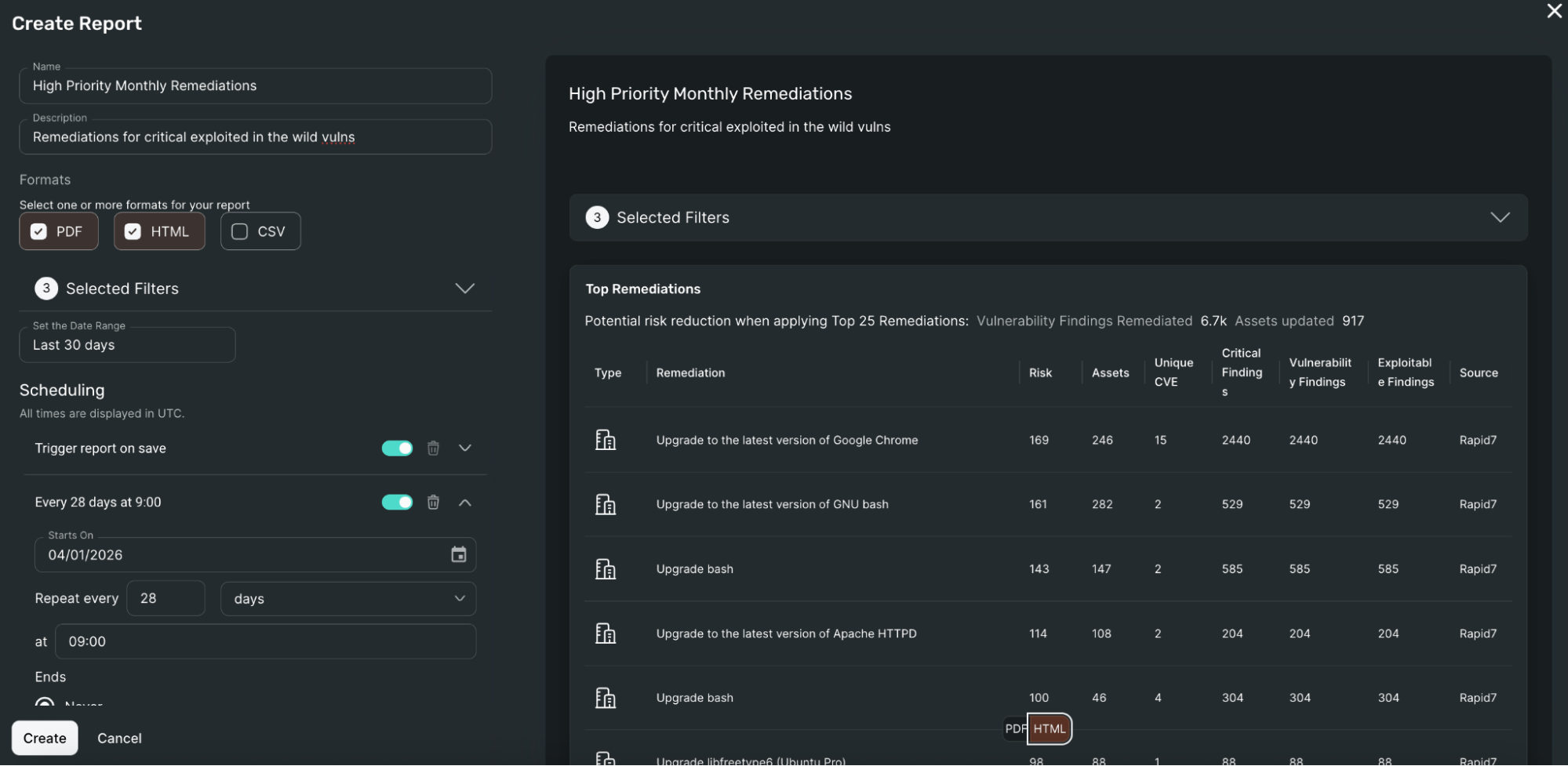
The Top Remediations Report helps close that gap by adding a comprehensive asset-level breakdown for each remediation. In addition to summary remediation information, customers can see source-specific metadata such as operating system, IP address, cloud provider, tags, endpoint protection, and patch management.

It can be used as a high-level summary of remediation priorities; many security teams use it to define remediation goals and share clear, actionable guidance with teams that may not work directly in security tools.

That gives teams a clearer view of the work behind each remediation and makes it easier to move from prioritization to execution.

Customers can also tailor reports to match the way they work, with customizable filters for specific environments, tags, or ownership groups. Reports can be exported in CSV, HTML, and PDF formats, shared with the teams responsible for action, and automatically generated and emailed on a schedule.

exposure-command-top-remediations-report.png

Building clearer visibility into patching and endpoint coverage

Action is only part of the equation, since teams also need clear, trustworthy context around asset posture.

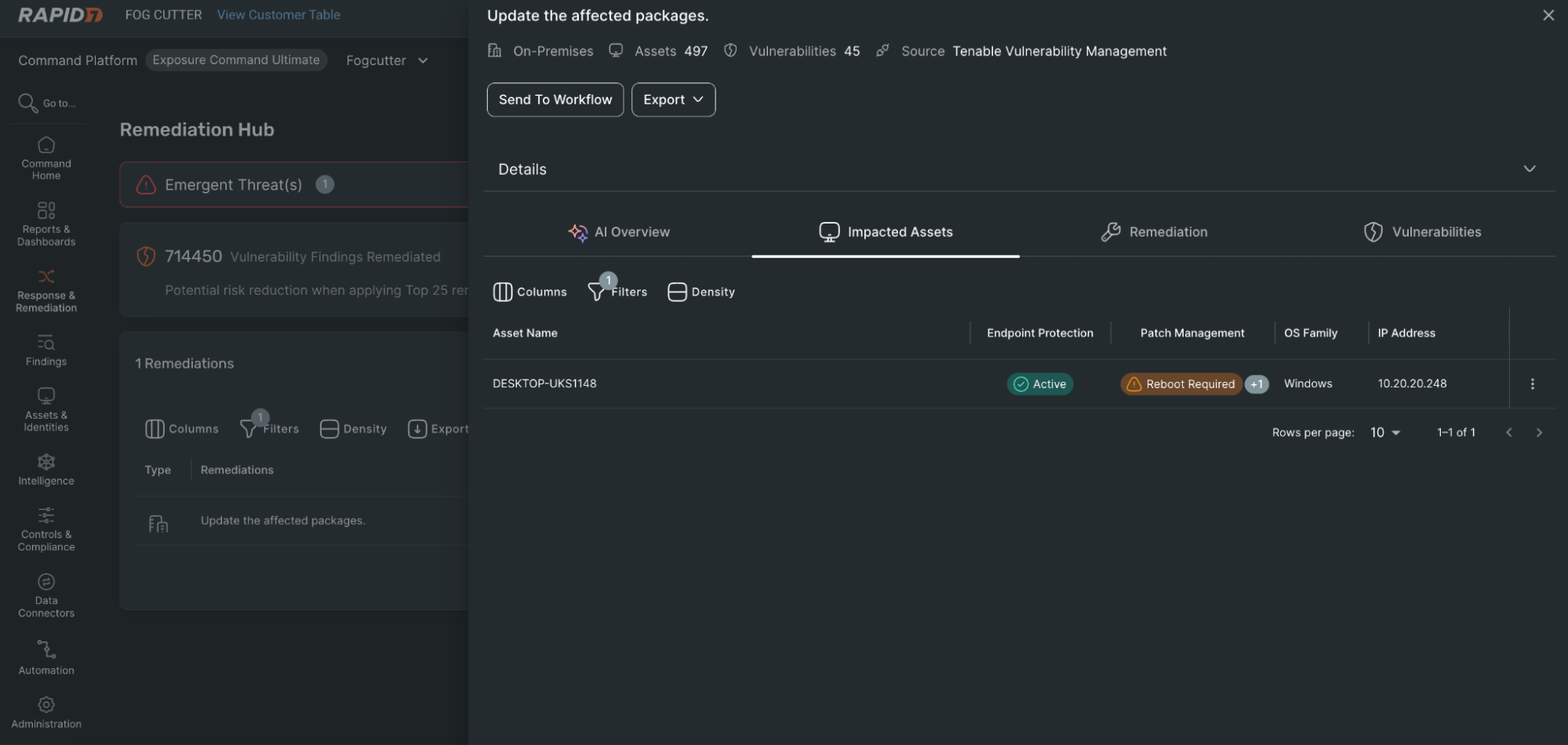
Remediation Hub now shows the source of patch management and endpoint protection coverage directly in remediation details, giving customers clearer visibility into where that data comes from and which tools are protecting a given asset. This is especially helpful in environments with multiple solutions in use, and reduces confusion when missing integrations would otherwise make assets appear unprotected.

The update also surfaces whether an asset still requires a reboot after patching, helping explain why vulnerabilities may persist even when remediation work has already started. Together, these additions make it easier for teams to assess true exposure, validate remediation progress, and identify where follow-up is still needed.

remediation-hub-package-update-progress.png

Extending remediation data into operational workflows

Remediation does not stop once a team has identified what to fix or validated that a change has been made. Security leaders also need ways to track progress, measure performance, and share remediation outcomes across the organization. That is where exported remediation data becomes important.

By extending access to remediation data outside the platform, customers can more easily support the workflows across reporting, operations, and leadership teams. This makes it easier to analyze remediation activity over time, align to internal reporting needs, and give stakeholders a clearer view of progress.

For security leaders, that means better visibility into whether remediation efforts are moving the organization in the right direction. For operational teams, it means less manual work to assemble and share updates, and more flexibility in how remediation data is used.

What this looks like in practice

For vulnerability management teams, this means faster handoff. Instead of sharing a remediation recommendation and then answering follow-up questions, they can send a report that already includes the asset context needed to begin planning.

For infrastructure and cloud teams, it becomes easier to focus on the parts of the environment they own. Filters help narrow remediation data to the assets, environments, and ownership groups that matter most, reducing noise and making action more straightforward.

For endpoint and patching teams, greater visibility into coverage source and reboot status helps explain why exposure may still remain, even when remediation work is already underway. That makes validation easier and helps teams troubleshoot more effectively.

For security and IT leaders, scheduled reporting and exported remediation data improve shared visibility. Rather than relying on one-off exports or manual updates, teams can more consistently track prioritized remediation work and measure progress over time.

Better context, faster progress

These enhancements help customers do more than identify top remediation priorities. They help teams act on them, validate them, and track them with more confidence.

By bringing together deeper asset context, clearer patch and endpoint visibility, and more usable remediation reporting, Remediation Hub helps reduce the friction that often slows remediation down. The result is smoother collaboration across functional teams, less manual effort, and quicker progress on the remediation work that matters most.

Read more about how Exposure Command helps teams share remediation context, improve coordination, and move faster on risk reduction.

Experience AI: Reaching millions of young people with AI literacy

Post Syndicated from Anna Burton original https://www.raspberrypi.org/blog/experience-ai-reaching-millions-of-young-people-with-ai-literacy/

AI is shaping the world young people are growing up in, and understanding how it works, as well as its benefits and risks, is now essential.

That’s the goal of Experience AI, our global education programme created in collaboration with Google DeepMind. Today, as we celebrate three years of the programme, we’re sharing our latest impact report, highlighting how the programme is helping educators and young people around the world build the knowledge and confidence to engage with AI critically and responsibly.

From tens of thousands of educators to millions of learners

Since launching 3 years ago in April 2023, Experience AI has grown into a truly global initiative:

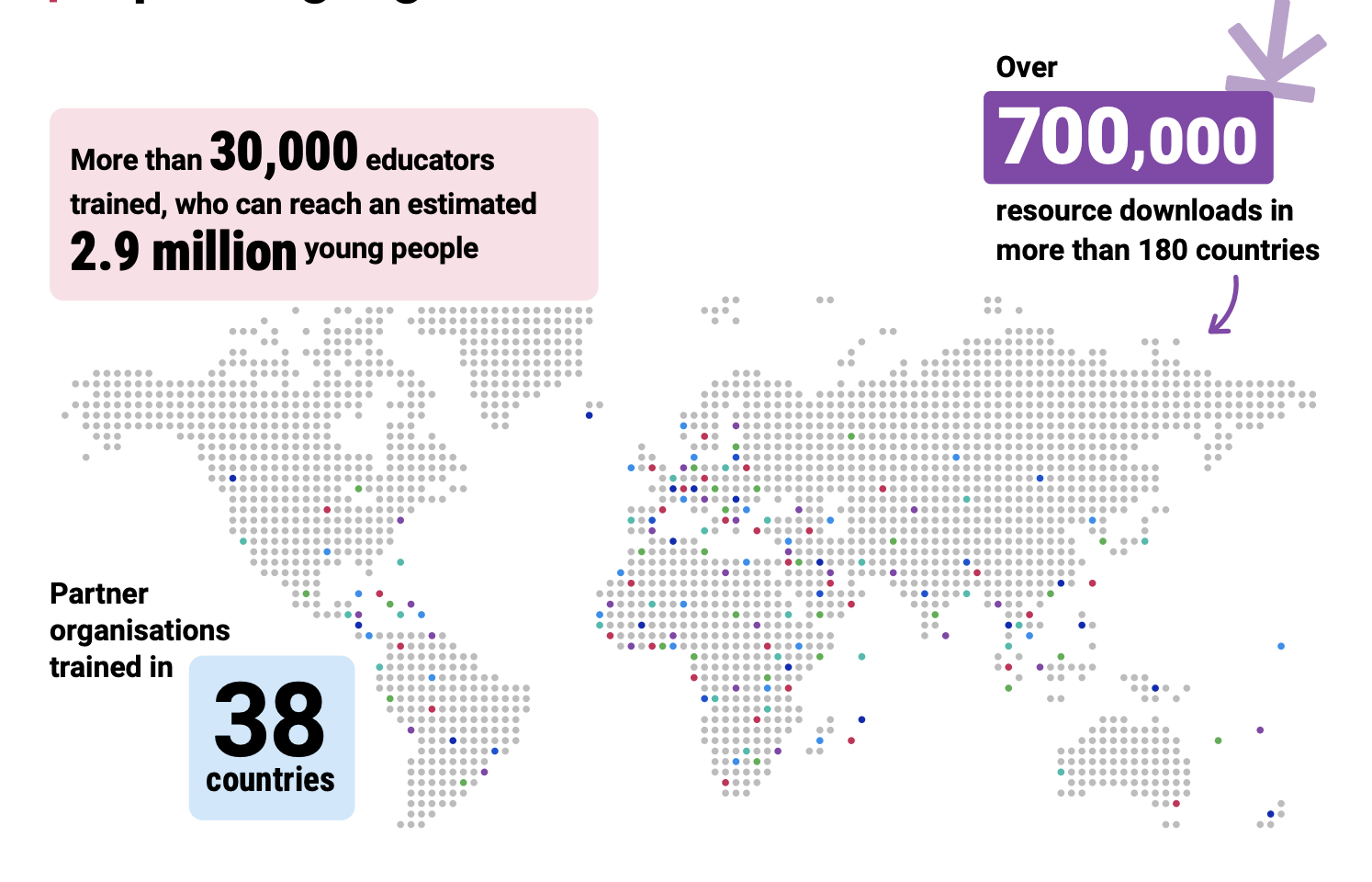
  • More than 30,000 educators trained, who can reach an estimated 2.9 million young people
  • Over 700,000 resource downloads across 180+ countries
  • A network of partners in 38 countries
  • Resources available in 19 languages
Infographic

These numbers reflect the growing global demand for AI literacy teaching, and the power of partnerships to meet that need.

But the real impact is what happens in classrooms.

From “AI is complicated” to confident teaching

For John Pierce, a teacher at Mwingo Academy Primary School in Kenya, AI once felt out of reach. “I thought that AI was complicated — maybe a puzzle”

John Pierce, a teacher at Mwingo Academy Primary School in Kenya

After taking part in Experience AI training, John’s perspective shifted. With structured lessons and ready-to-use resources, he now helps his students see AI as something they can understand and engage with.

“My learners are really enjoying the lessons… They keep asking, ‘Teacher, when are you having computer classes?’”

John’s experience reflects what we see across the programme: when teachers feel confident, students become curious, engaged, and motivated to learn more, often continuing those conversations beyond the classroom.

Building confidence, not just knowledge

A core focus of Experience AI is supporting educators, many of whom are new to teaching AI concepts. Our evaluation shows this approach is working:

  • 93% of educators say the training increased their knowledge of AI concepts
  • 87% report increased confidence in teaching AI

In Malaysia, educator Lee Siew Ling had previously struggled to explain AI concepts clearly. “Before this, I just shared simple examples… It was too hard to explain the concepts clearly to my students.”

Lee Siew Ling, educator in Malaysia

With Experience AI resources, that changed. “The materials make it easier to teach AI… After using them, I became more confident to guide my students.”

By reducing preparation time and providing clear, structured lessons, the programme enables teachers to focus on what matters most: supporting their students’ learning.

Helping young people understand, and question, AI

The impact extends directly to learners. Across classrooms worldwide:

  • 89% of students say they better understand what AI and machine learning are
  • 87% say they better understand the benefits and risks of AI

This is critical. AI literacy isn’t just about using technology, it’s about understanding how it works, questioning it, and recognising its societal impact.

Kim Williams, Head of Computing, at Wymondham College in the UK

At Wymondham College in the UK, Head of Computing, Kim Williams highlights the value of having trusted, research-informed resources: “Experience AI gave us a real structure to follow… It helps us deal with misconceptions and gives students the right messages.”

Through these lessons, students are not just learning about AI, they are developing the critical thinking skills they need to navigate a world shaped by it.

A global effort to democratise AI education

Experience AI’s reach is only possible through collaboration. Working with partners around the world, we localise content to make it relevant to different cultures and contexts, ensuring that AI education is not only accessible, but meaningful.

At the award ceremony of the 2025 UNESCO King Hamad Bin Isa Al-Khalifa Prize. © Government of the Kingdom of Bahrain

This work has also been recognised globally. In 2025, Experience AI was named a laureate of the UNESCO King Hamad Bin Isa Al-Khalifa Prize for the Use of ICT in Education, highlighting its strong ethical foundations and international impact.

Looking ahead

We’re continuing to expand and evolve the programme, updating resources, developing new materials for different age groups, and growing our global partner network.

By the end of 2026, we expect to reach over 45,000 educators who can reach an estimated 4.4 million young people.

Because the challenge is clear: AI literacy should not be limited to a few. Every young person deserves the opportunity to understand and shape the technologies influencing their future.

Read the full Experience AI impact report to explore the data, stories, and insights behind this work. rpf.io/expai-impact

The post Experience AI: Reaching millions of young people with AI literacy appeared first on Raspberry Pi Foundation.

Defense in Depth, Medieval Style

Post Syndicated from Bruce Schneier original https://www.schneier.com/blog/archives/2026/04/defense-in-depth-medieval-style.html

This article on the walls of Constantinople is fascinating.

The system comprised four defensive lines arranged in formidable layers:

  • The brick-lined ditch, divided by bulkheads and often flooded, 15­20 meters wide and up to 7 meters deep.
  • A low breastwork, about 2 meters high, enabling defenders to fire freely from behind.
  • The outer wall, 8 meters tall and 2.8 meters thick, with 82 projecting towers.
  • The main wall—a towering 12 meters high and 5 meters thick—with 96 massive towers offset from those of the outer wall for maximum coverage.

Behind the walls lay broad terraces: the parateichion, 18 meters wide, ideal for repelling enemies who crossed the moat, and the peribolos, 15–­20 meters wide between the inner and outer walls. From the moat’s bottom to the highest tower top, the defences reached nearly 30 meters—a nearly unscalable barrier of stone and ingenuity.

Optimized Monitoring for Hybrid Environments with ICT Solutions

Post Syndicated from Michael Kammer original https://blog.zabbix.com/optimized-monitoring-for-hybrid-environments-with-ict-solutions/32839/

ICT Solutions is a managed service provider (MSP) specializing in fully managed IT Support, cloud, cybersecurity and more. Based in Liverpool, they offer IT support across the UK.

They work together with Zabbix Premium Delivery Partner Opensource ICT Solutions to make sure that their customers get solid insights into their environments.

The challenge

While a lot of companies realize the potential of hybrid environments as opposed to full-cloud environments, on-premise equipment (including local network and server equipment) is still a big part of what they do. It’s relatively easy to monitor cloud equipment with Zabbix proxies in the cloud, but not every customer has what it takes to run a Zabbix proxy on site.

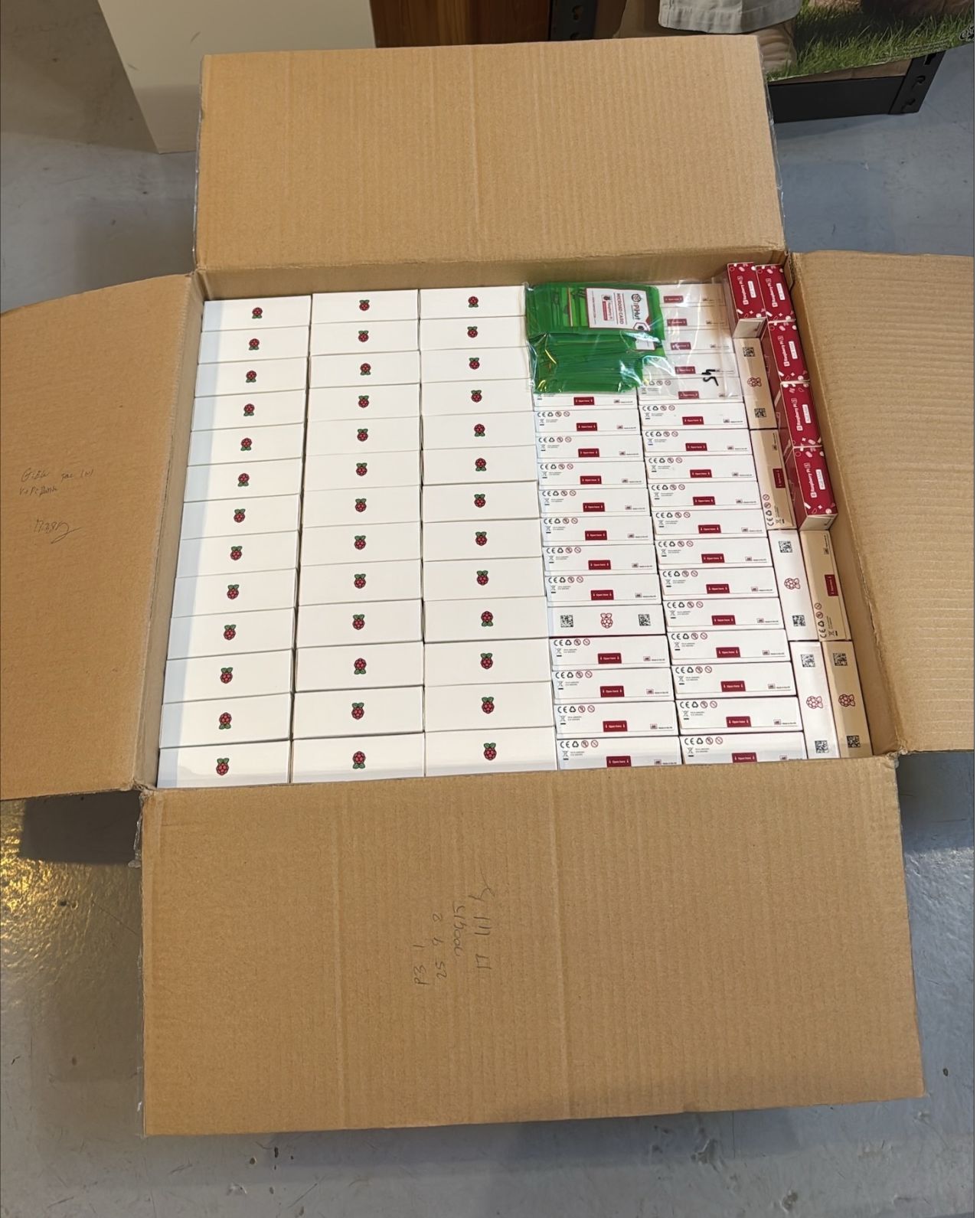
ICT Solutions offers fully managed hybrid environments that include monitoring, so their customers have never had to worry about Zabbix proxies. As such, ICT Solutions has been running Raspberry PI 3 devices for years. Environments grow, however, and managing tens or hundreds of Zabbix proxies is something that can take time when not properly set up.

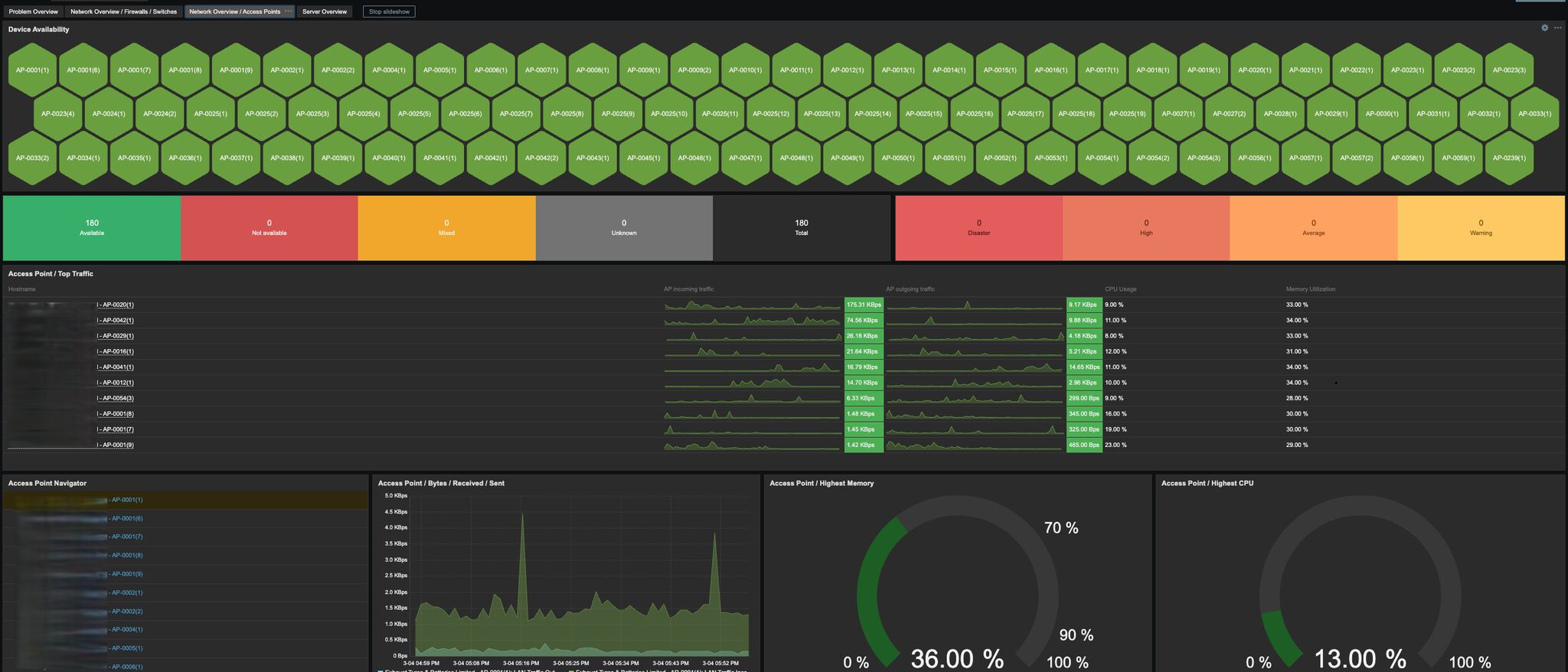
As an MSP, ICT Solutions looks after approximately 160 clients, 3,000 workstations and 1,300 network devices. These include firewalls, switches, access points, on-premise and hosted servers, network attached storage, CCTV, and door access – just to name a few. They have clients that they fully support, and clients that use them as an extension of their own IT teams.

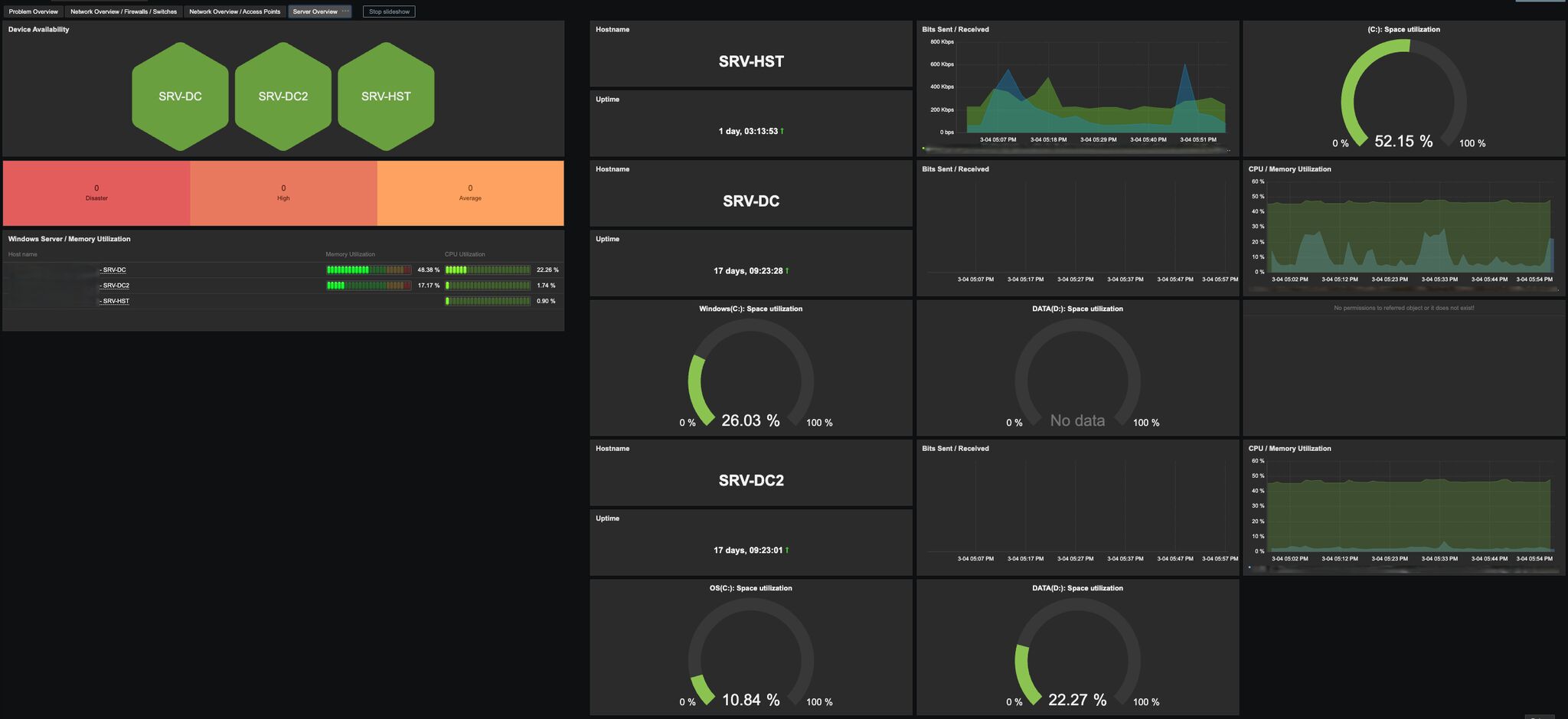
The company also has a wide variety of templates and scripts set up in Zabbix, along with many dashboards so that when issues arise, they can see straight away where an issue exists or provide a more targeted fault-finding process. They also provide their clients’ IT departments with access to their Zabbix environment so they can visually display this on screens for purposes of working together.

The solution

With Zabbix environments growing over the years, Ansible was deployed and Semaphore was harnessed to keep things simple and manageable. This makes proxy management a breeze, as all the ICT team needs to do to deploy a proxy is have a field engineer install it and then push a button to install all the required software, which leads to the proxy being fully secured and automated into Zabbix.

Unfortunately, proxy performance was dropping over time. As monitoring needs got more extensive, the Raspberry PI 3 was showing its age, which led to Raspberry PI 5 devices being ordered and installed.

Another problem often attributed to Raspberry PI devices is their reliance on SD cards. SD cards are prone to failure when overloaded, which can become a problem as Zabbix stores its proxy database on the SD card.

Fortunately, Zabbix 7.0 introduced the “ProxyBufferMode=hybrid”, which allowed the ICT Solutions team to use the RAM of the Raspberry PIs instead of SD cards for the database. They now write the history metrics to the database on the SD card only in the case of a longer outage.

The results

The end result is a manageable and highly scalable setup that provides ICT Solutions and their customers with valuable insights into their hybrid environments as well as improved flexibility and enhanced security.

The post Optimized Monitoring for Hybrid Environments with ICT Solutions appeared first on Zabbix Blog.

MikroTik CRS418-8P-8G-2S+5axQ2axQ-RM Review The All-in-One PoE Switch Router with WiFi 6

Post Syndicated from Ryan Smith original https://www.servethehome.com/mikrotik-crs418-8p-8g-2s5axq2axq-rm-review-the-all-in-one-poe-switch-router-with-wifi-6/

The MikroTik CRS418-8P-8G-2S+5axQ2axQ-RM is an all-in-one PoE+ switch with 10GbE SFP+ links, WiFi, and that can even serve as a router

The post MikroTik CRS418-8P-8G-2S+5axQ2axQ-RM Review The All-in-One PoE Switch Router with WiFi 6 appeared first on ServeTheHome.

AWS Interconnect is now generally available, with a new option to simplify last-mile connectivity

Post Syndicated from Sébastien Stormacq original https://aws.amazon.com/blogs/aws/aws-interconnect-is-now-generally-available-with-a-new-option-to-simplify-last-mile-connectivity/

Today, we’re announcing the general availability of AWS Interconnect – multicloud, a managed private connectivity service that connects your Amazon Virtual Private Cloud (Amazon VPC) directly to VPCs on other cloud providers. We’re also introducing AWS Interconnect – last mile, a new capability that simplifies how you establish high-speed, private connections to AWS from your branch offices, data centers, and remote locations through your existing network providers.

Large enterprises increasingly run workloads across multiple cloud providers, whether to use specialized services, meet data residency requirements, or support teams that have standardized on different providers. Connecting those environments reliably and securely has historically required significant coordination: managing VPN tunnels, working with colocation facilities, and configuring third-party network fabrics. The result is that your networking team spends time on undifferentiated heavy lifting instead of focusing on the applications that matter to your business.

AWS Interconnect is the answer to these challenges. It is a managed connectivity service that simplifies connectivity into AWS. Interconnect provides you the ability to establish private, high-speed network connections with dedicated bandwidth to and from AWS across hybrid and multicloud environments. You can configure resilient, end-to-end connectivity with ease in a few clicks through the AWS Console by selecting your location, partner, or cloud provider, preferred Region, and bandwidth requirements, removing the friction of discovering partners and the complexity of manual network configurations.

It comes with two capabilities: multicloud connectivity between AWS and other cloud providers, and last-mile connectivity between AWS and your private on-premises networks. Both capabilities are built on the same principle: a fully managed, turnkey experience that removes the infrastructure complexity from your team.

AWS Interconnect – multicloud
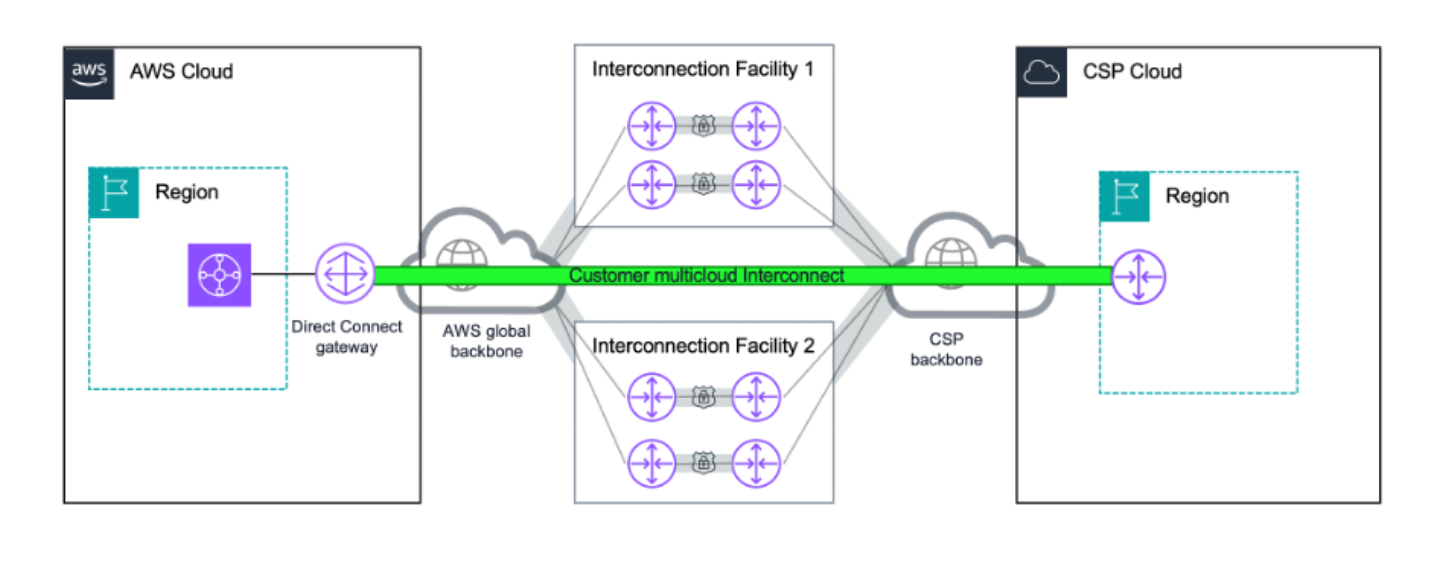
AWS Interconnect – multicloud gives you a private, managed Layer 3 connection between your AWS environment and other cloud providers, starting with Google Cloud, and Microsoft Azure coming later in 2026. Traffic flows entirely over the AWS global backbone and the partner cloud’s private network, so it never traverses the public internet. This means you get predictable latency, consistent throughput, and isolation from internet congestion without having to manage any physical infrastructure yourself.

Security is built in by default. Every connection uses IEEE 802.1AE MACsec encryption on the physical links between AWS routers and the partner cloud provider’s routers at the interconnection facilities. You don’t need to configure these separately. Note that each cloud provider manages encryption independently on its own backbone, so you should review the encryption documentation for your specific deployment to verify it meets your compliance requirements. Resiliency is also built in: each connection spans multiple logical links distributed across at least two physical facilities, so a single device or building failure does not interrupt your connectivity.

AWS Interconnect - multicloud - architectureFor monitoring, AWS Interconnect – multicloud integrates with Amazon CloudWatch. You get a Network Synthetic Monitor included with each connection to track round-trip latency and packet loss, and bandwidth utilization metrics to support capacity planning.

AWS has published the underlying specification on GitHub under the Apache 2.0 license, providing any cloud service provider the opportunity to collaborate with AWS Interconnect – multicloud. To become an AWS Interconnect partner, cloud providers must implement the technical specification and meet AWS operational requirements, including resiliency standards, support commitments, and service level agreements.

How it works
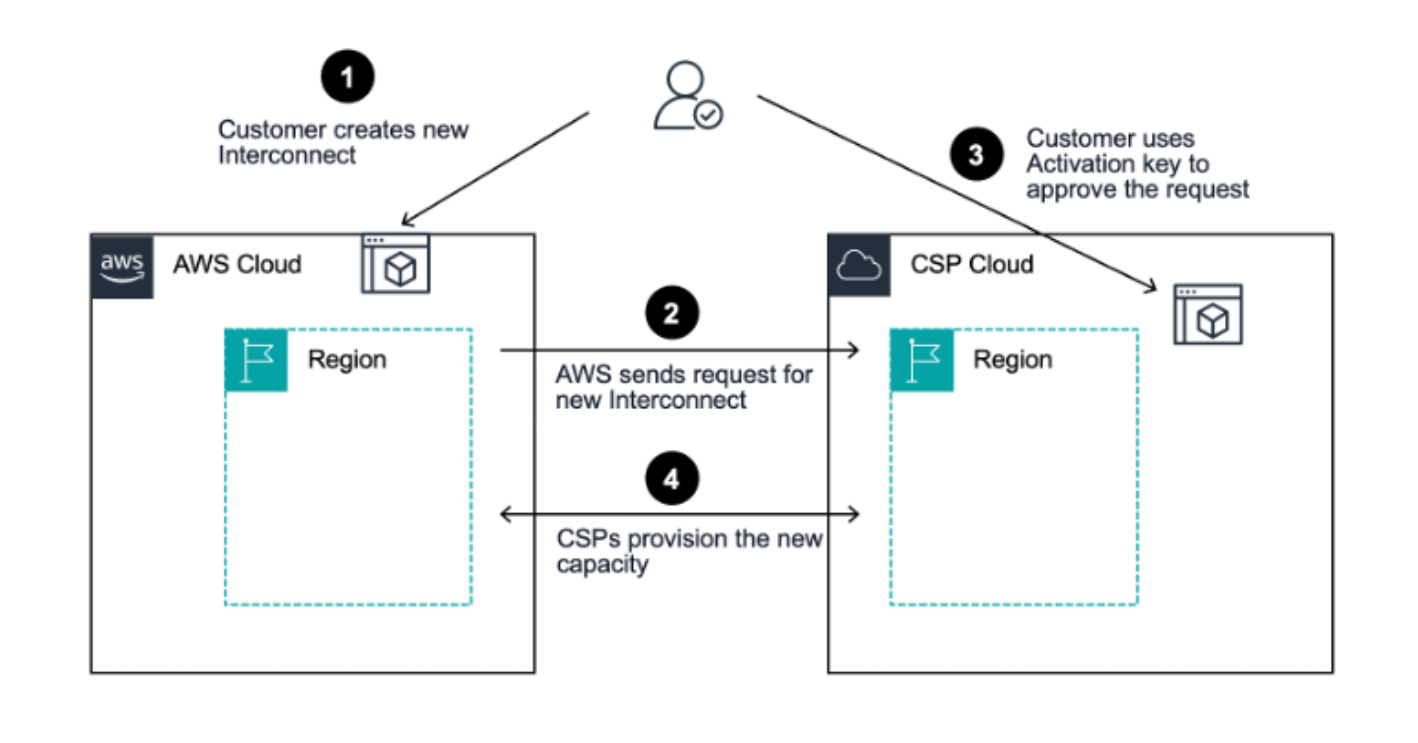
Provisioning a connection takes minutes. I create the connection from the AWS Direct Connect console. I start from the AWS Interconnect section and select Google Cloud as the provider. I select my source and destination regions. I specify bandwidth, and provide my Google Cloud project ID. AWS generates an activation key that I use on the Google Cloud side to complete the connection. Routes propagate automatically in both directions, and my workloads can start exchanging data shortly after.

AWS INterconnect - multicloud - provisionningFor this demo, I start with a single VPC and I connect it to a Google Cloud VPC. I use a Direct Connect Gateway. It’s the simplest path: one connection, one attachment, and my workloads on both sides can start talking to each other in minutes.

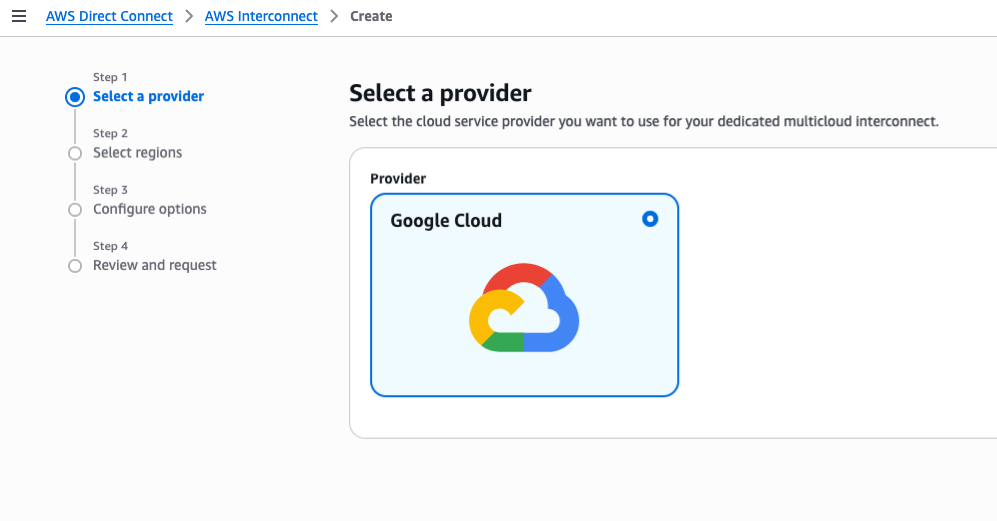
Step 1: request an interconnect in the AWS Management Console.

I navigate to AWS Direct Connect, AWS Interconnect and I select Create. I first choose the cloud provider I want to connect to. In this example, Google Cloud.

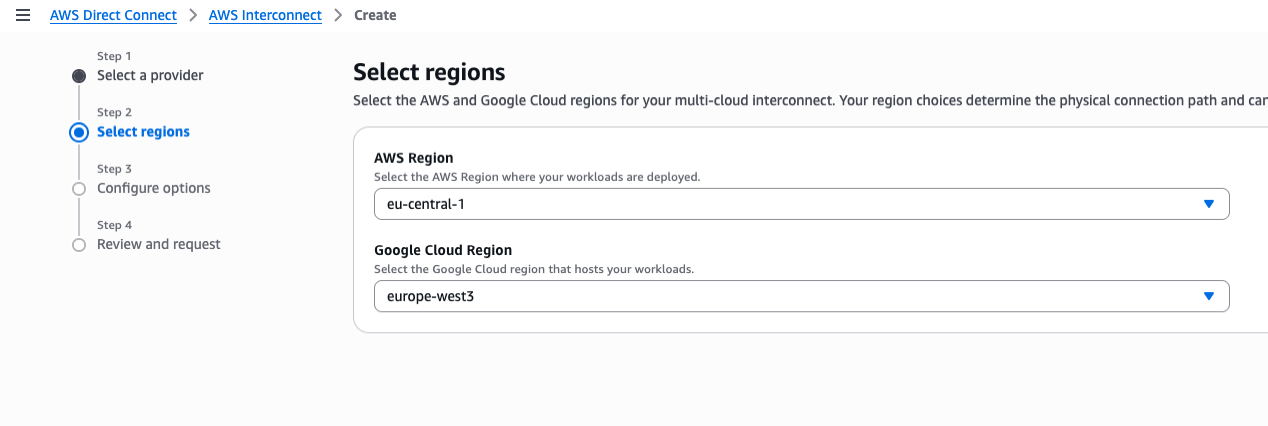
AWS interconnect - 1Then, I choose the AWS Region (eu-central-1) and the Google Cloud Region (europe-west3).

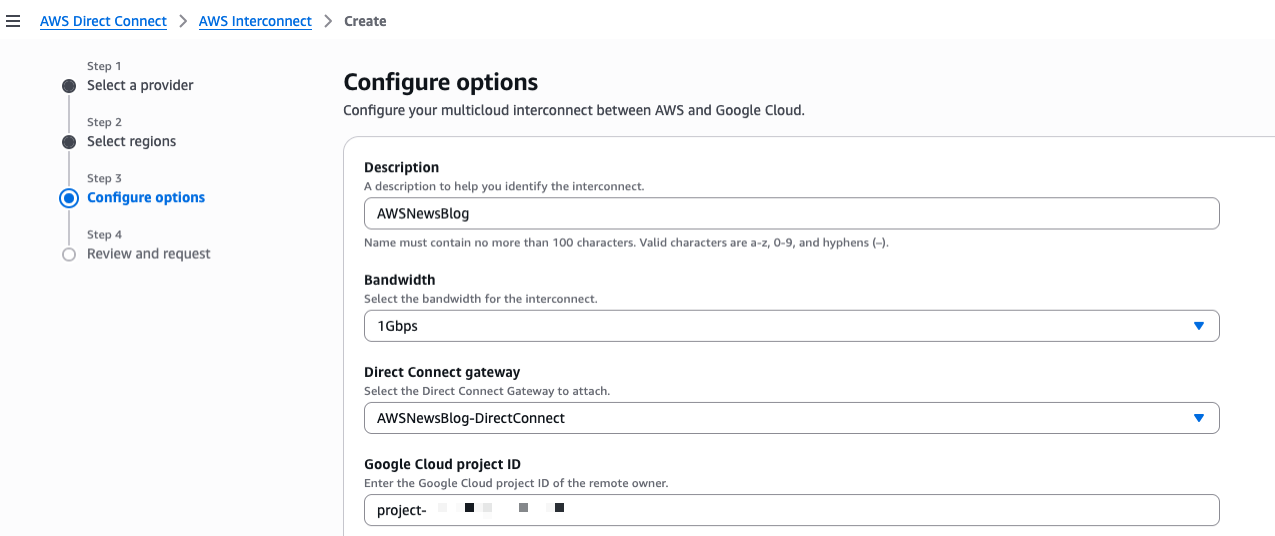
AWS interconnect - 2On step 3, I enter Description,I choose the Bandwidth, the Direct Connect gateway to attach, and the ID of my Google Cloud project.

AWS interconnect - 3

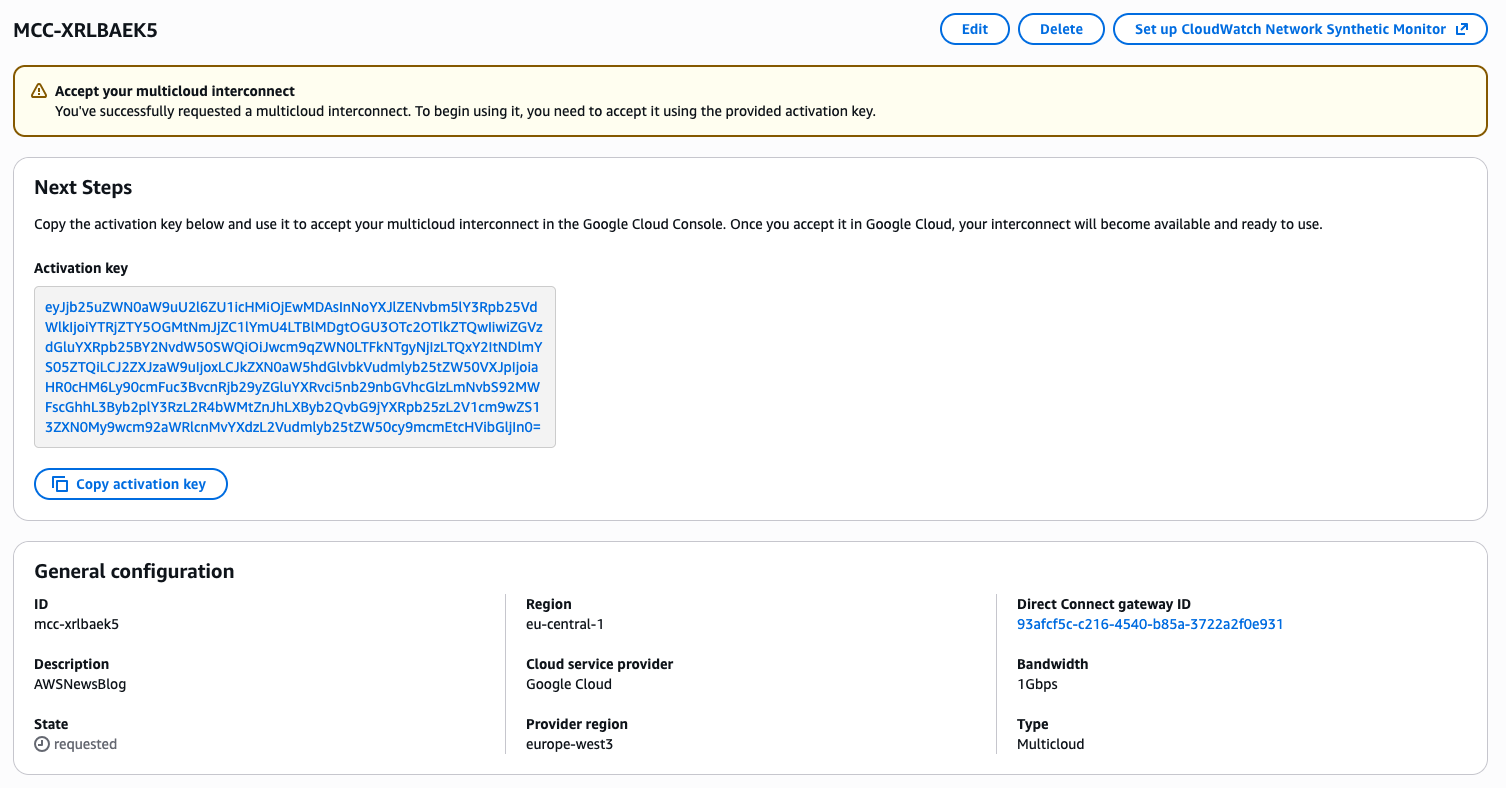
After reviewing and confirming the request, the console gives me an activation key. I will use that key to validate the request on the Google cloud side.

AWS interconnect - 4

Step 2: create the transport and VPC Peering resources on my Google Cloud Platform (GCP) account.

Now that I have the activation key, I continue the process on the GCP side. At the time of this writing, no web-based console was available. I choose to use the GCP command line (CLI) instead. I take note of the CIDR range in the GCP VPC subnet in the europe-west3 region. Then, I open a Terminal and type:

gcloud network-connectivity transports create aws-news-blog \
    --region=europe-west3  \
    --activation-key=${ACTIVATION_KEY} \
    --network=default \
    --advertised-routes=10.156.0.0/20

Create request issued for: [aws-news-blog]
...
peeringNetwork: projects/oxxxp-tp/global/networks/transport-9xxxf-vpc
...
state: PENDING_CONFIG
updateTime: '2026-03-19T09:30:51.103979219Z'

It takes a couple of minutes for the command to complete. Once the command returns, I create a peering between my GCP VPC and the new transport I just created. I can do that in the GCP console or with the gcloud command line. Because I was using the Terminal for the previous command, I continued with the command line:

gcloud compute networks peerings create aws-news-blog \
      --network=default \
      --peer-network=projects/oxxxp-tp/global/networks/transport-9xxxf-vpc \
      --import-custom-routes \
      --export-custom-routes

The network name is the name of my GCP VPC. The peer network is given in the output of the previous command.

Once completed, I can verify the peering in the GCP console.
AWS Interconnect - Peering in the Google console

In the AWS Interconnect console, I verify the status is available.

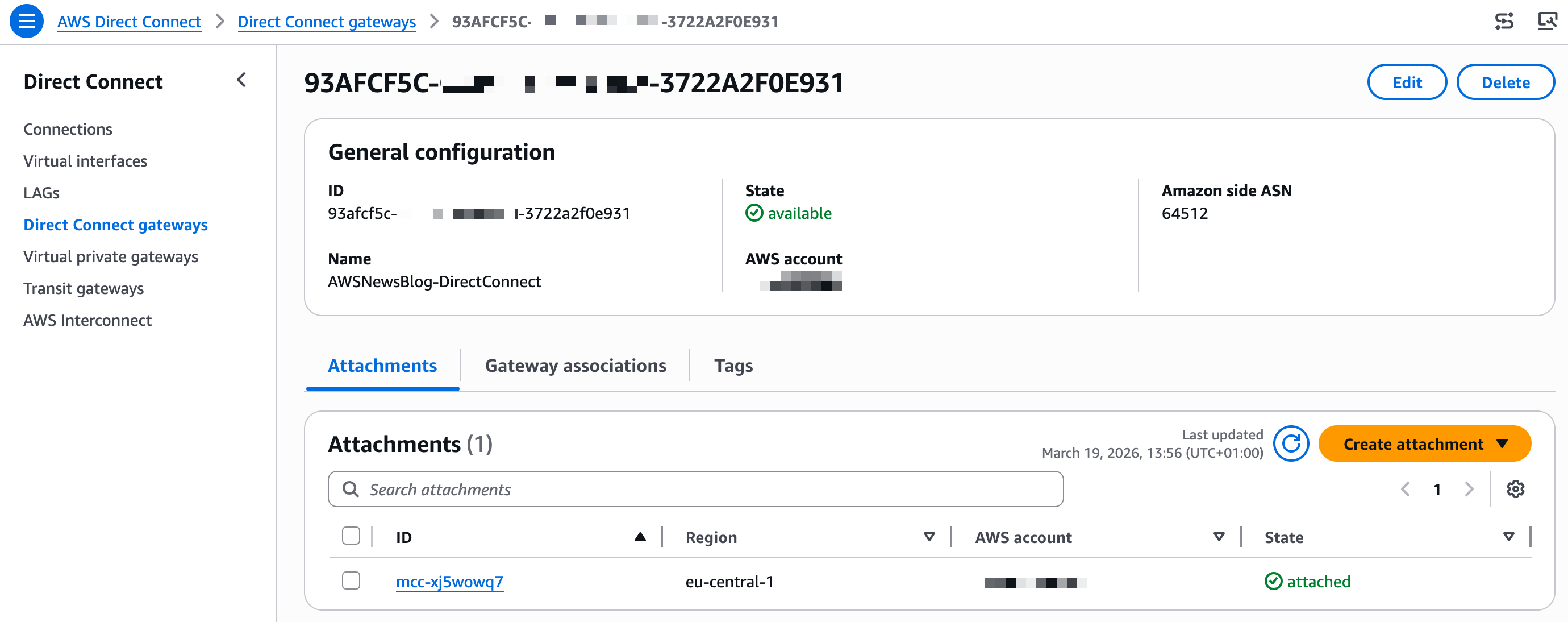
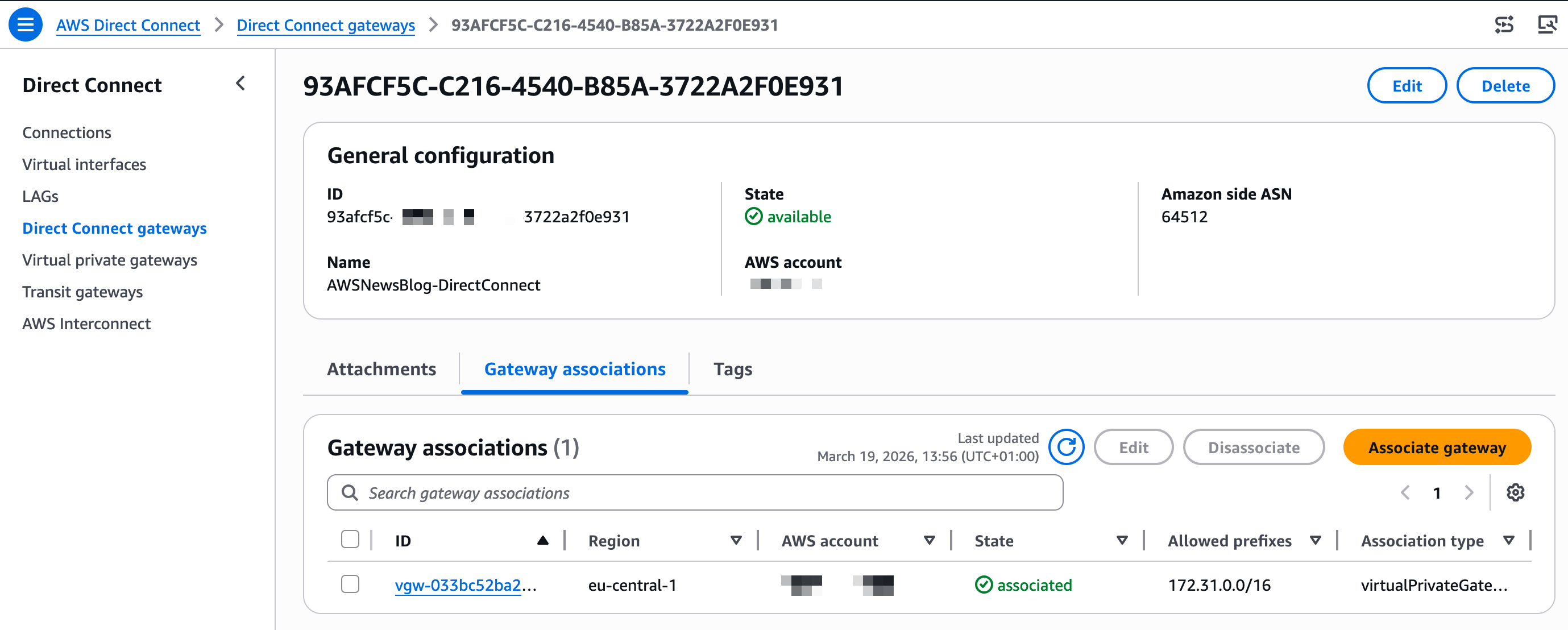
AWS Interconnect availableIn the AWS Direct Connect console, under Direct Connect gateways, I see the attachment to the new interconnect.

AWS INterconnect attachment

Step 3: associate the new gateway on the AWS side

I select Gateway associations and Associate gateway to attach the Virtual Private Gateway (VGW) that I created before starting this demo (pay attention to use a VGW in the same AWS Region as the interconnect)

AWS Interconnect associate CGW

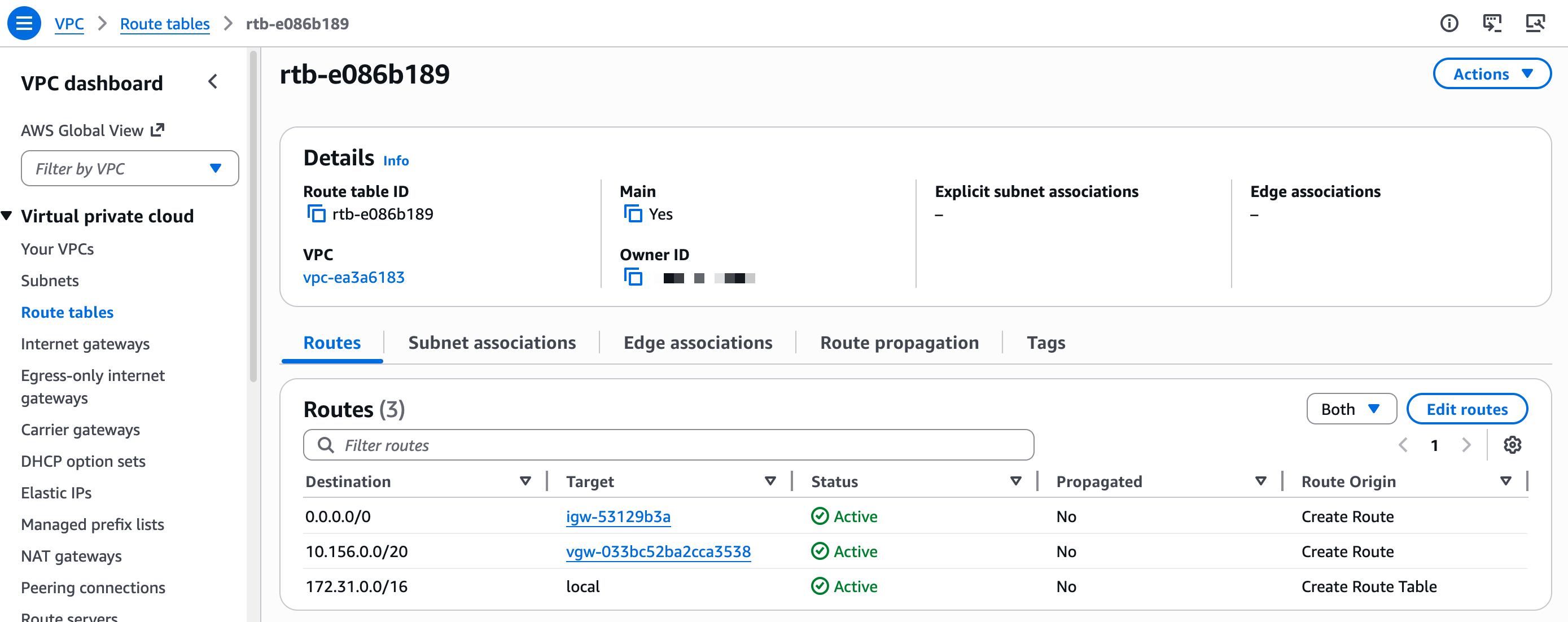
You don’t need to configure the network routing on the GCP side. On AWS, there is a final step: add a route entry in your VPC Route tables to send all traffic to the GCP IP address range through the Virtual Gateway.

VPC Route to the VGW

Once the network setup is done. I start two compute instances, one on AWS and one on GCP.

On AWS, I verify the Security Group accepts ingress traffic on TCP:8080. I connect to the machine and I start a minimal web server:

python3 -c \
"from http.server import HTTPServer, BaseHTTPRequestHandler 
class H(BaseHTTPRequestHandler):
   def do_GET(self):
      self.send_response(200);self.end_headers()
      self.wfile.write(b'Hello AWS World!\n\n')
HTTPServer(('',8080),H).serve_forever()"

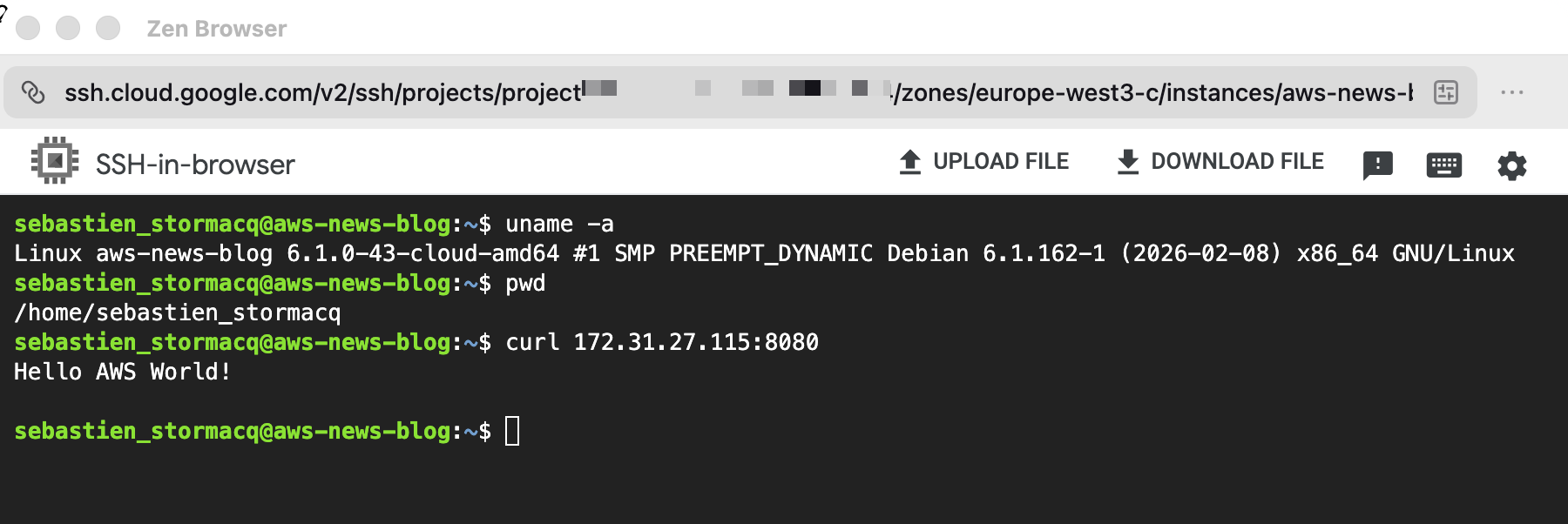
On the GCP side, I open a SSH session to the machine and I call the AWS web server by its private IP address.

AWS Interconnect : curl from GCP to AWS

Et voilà! I have a private network route between my two networks, entirely managed by the two Cloud Service Providers.

Things to know
There are a couple of configuration options that you should keep in mind:

  • When connecting networks, pay attention to the IP addresses range on both sides. The GCP and AWS VPC ranges can’t overlap. For this demo, the default range on AWS was 172.31.0.0/16and the default on GCP was 10.156.0.0/20. I was able to proceed with these default values.
  • You can configure IPV4, IPV6, or both on each side. You must select the same option on both sides.
  • The Maximum Transmission Unit (MTU) must be the same on both VPC. The default values for AWS VPCs and GCP VPCs are not. MTU is the largest packet size, in bytes, that a network interface can transmit without fragmentation. Mismatched MTU sizes between peered VPCs cause packet drops or fragmentation, leading to silent data loss, degraded throughput, and broken connections across the interconnect.
  • For more details, refer to the GCP Partner Cross Cloud Interconnect and the AWS Interconnect User Guide.

Reference architectures
When your deployment grows and you have multiple VPCs in a single region, AWS Transit Gateway gives you a centralized routing hub to connect them all through a single Interconnect attachment. You can segment traffic between environments, apply consistent routing policies, and integrate AWS Network Firewall if you need to inspect what crosses the cloud boundary.

And when you’re operating at global scale, with workloads spread across multiple AWS Regions and multiple Google Cloud environments, AWS Cloud WAN extends that same model across the world. Any region in your network can reach any Interconnect attachment globally, with centralized policy management and segment-based routing that applies consistently everywhere you operate.

My colleagues Alexandra and Santiago documented these reference architectures in their blog post: Build resilient and scalable multicloud connectivity architectures with AWS Interconnect – multicloud.

AWS Interconnect – last mile
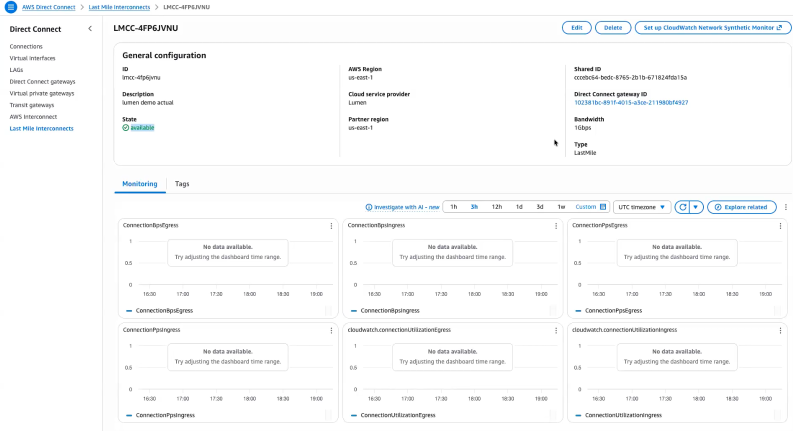
Based on the same architecture and design as AWS Interconnect – multicloud, AWS Interconnect – last mile provides the ability to connect your on-premises or remote location to AWS through a participating network provider’s last-mile infrastructure, directly from the AWS Management Console.

The onboarding process mirrors AWS Interconnect – multicloud: you select a provider, authenticate, and specify your connection endpoints and bandwidth. AWS generates an activation key that you provide in the provider console to complete the configuration. AWS Interconnect – last mile automatically provisions four redundant connections across two physical locations, configures BGP routing, and activates MACsec encryption and Jumbo Frames by default. The result is a resilient private connection to AWS that aligns with best practices, without requiring you to manually configure networking components.

AWS Interconnect - lastmile

AWS Interconnect – last mile supports bandwidths from 1 Gbps to 100 Gbps, and you can adjust bandwidth from the console without reprovisioning. The service includes a 99.99% availability SLA up to the Direct Connect port and bundles CloudWatch Network Synthetic Monitor for connection health monitoring. Just like AWS Interconnect – multicloud, AWS Interconnect – last mile attaches to a Direct Connect Gateway, which connects to your Virtual Private Gateway, Transit Gateway, or AWS Cloud WAN deployment. For more details, refer to the AWS Interconnect User Guide.

Scott Yow, SVP Product at Lumen Technologies, wrote:

By combining AWS Interconnect – last mile with Lumen fiber network and Cloud Interconnect, we simplify the last-mile complexity that often slows cloud adoption and enable a faster, and more resilient path to AWS for customers.

Pricing and availability
AWS Interconnect – multicloud and AWS Interconnect – last mile pricing is based on a flat hourly rate for the capacity you request, billed prorata by the hour. You select the bandwidth tier that fits your workload needs.

AWS Interconnect – multicloud pricing varies by region pair: a connection between US East (N. Virginia) and Google Cloud N. Virginia is priced differently from a connection between US East (N. Virginia) and a more distant region. When you use AWS Cloud WAN, the global any-to-any routing model means traffic can traverse multiple regions, which affects the total cost of your deployment. I recommend reviewing the AWS Interconnect pricing page for the full rate card by region pair and capacity tier before sizing your connection.

AWS Interconnect – multicloud is available today in five region pairs: US East (N. Virginia) to Google Cloud N. Virginia, US West (N. California) to Google Cloud Los Angeles, US West (Oregon) to Google Cloud Oregon, Europe (London) to Google Cloud London, and Europe (Frankfurt) to Google Cloud Frankfurt. Microsoft Azure support is coming later in 2026.

AWS Interconnect – last mile is launching in US East (N. Virginia) with Lumen as the initial partner. Additional partners, including AT&T and Megaport, are in progress, and additional regions are planned.

To get started with AWS Interconnect, visit the AWS Direct Connect console and select AWS Interconnect from the navigation menu.

I’d love to hear how you’re using AWS Interconnect in your environment. Leave a comment below or reach out through the AWS re:Post community.

— seb

Secure AI agent access patterns to AWS resources using Model Context Protocol

Post Syndicated from Riggs Goodman III original https://aws.amazon.com/blogs/security/secure-ai-agent-access-patterns-to-aws-resources-using-model-context-protocol/

AI agents and coding assistants interact with AWS resources through the Model Context Protocol (MCP). Unlike traditional applications with deterministic code paths, agents reason dynamically, choosing different tools or accessing different data depending on context. You must assume an agent can do anything within its granted entitlements, whether OAuth scopes, API keys, or AWS Identity and Access Management (IAM) permissions, and design your controls accordingly. Agents operate at machine speed, so the impact of misconfigured permissions scales quickly.

This blog post focuses on IAM as the authorization layer for AWS resource access and presents three security principles for building deterministic IAM controls for these non-deterministic AI systems. The principles apply whether you’re using AI coding assistants like Kiro and Claude Code, or deploying agents on hosting environments like Amazon Bedrock AgentCore. We cover deployment patterns, then explore each principle with concrete IAM policy examples and implementation guidance.

This post specifically addresses securing the MCP access path, where agents interact with AWS resources through MCP servers. AI coding assistants and agents can also access AWS service APIs directly through general-purpose tools like bash or shell execution, bypassing MCP servers entirely. For this reason, we recommend architecting agents to use MCP servers rather than direct service access where possible. MCP servers provide a layer of abstraction that enables the differentiation controls in principle 3 and creates additional monitoring capabilities through AWS CloudTrail. When agents bypass MCP, the differentiation mechanisms in principle 3 don’t apply, and principles 1 and 2 become your primary controls. We discuss this scope boundary in principle 3.

MCP deployment patterns

Your deployment pattern determines which security principles and implementation approaches apply. Three dimensions define this pattern, including where the agent runs, what type of MCP server offers the tools, and your level of control over the agent code. No matter how you connect to it, the MCP server needs AWS credentials to interact with AWS resources.

Where agents run

Agents access AWS resources from three locations: developer machines (where you control the infrastructure), hosting environments (where you control the infrastructure or significant aspects of it), and third-party agent platforms (where you do not control the infrastructure). This post focuses on the first two patterns. Each has a different credential model and different organizational control options.

AI coding assistants and local agents

AI coding assistants (Kiro, Claude Code) or local agent applications represent the first deployment pattern. These assistants run locally on developer machines and connect to MCP servers or use AWS Command Line Interface (AWS CLI) commands to access AWS resources. In this pattern, credentials come from the developer’s local environment. When a developer configures an MCP server in their mcp.json file, they specify which AWS credentials to use. Options include a named profile, which can use credential helpers and the credential provider chain for short-lived credentials, environment variables, or explicit credential configuration. This means the developer controls which IAM principal the agent uses to access AWS. This creates a governance challenge. Without additional controls, developers often use their developer admin credentials, shared development roles, or even production roles for agent access. Developer credentials often carry broad permissions designed for interactive use, where human judgment serves as a safeguard. When an agent inherits these permissions, it operates without that judgment at machine speed. Principle 1 explores this risk in detail.

Agents on hosting environments

Agents deployed on hosting environments represent the second deployment pattern. These agents run on infrastructure you manage, not on developer machines. This changes the credential management model. Using Amazon Bedrock AgentCore as an example, when an agent runs on AgentCore Runtime, it uses an execution IAM role that you configure when creating the runtime. The execution role’s permissions apply to all operations the agent performs and cannot be scoped down per-invocation at the runtime configuration level. For more granular control, agents can call AWS Security Token Service (AWS STS) AssumeRole or AssumeRoleWithWebIdentity (collectively referred to as AssumeRole in this post). This obtains temporary credentials with session policies that further restrict permissions beyond the role’s base permissions. Agents built with frameworks like Strands can also initialize individual MCP clients with different credential sets by calling AssumeRole and passing the resulting credentials to each client connection. This enables per-tool credential isolation within a single agent process. The same pattern applies to agents deployed on Amazon Elastic Compute Cloud (Amazon EC2) or Amazon Elastic Kubernetes Service (Amazon EKS).

With this centralized execution model, you can implement organizational controls. You define the available IAM roles through infrastructure configuration instead of relying on developer choice. However, you must design these roles carefully to prevent overly permissive access and implement session policies for tool-specific restrictions.

What type of MCP server

MCP servers come in two types, provider-managed and self-managed. AWS-managed servers are operated by AWS on your behalf. Self-managed servers are servers that you install and run yourself. The server type affects your operational overhead, available features, and how you implement security controls.

AWS offers fully managed MCP servers, including the AWS MCP Server, Amazon EKS MCP Server, and Amazon ECS MCP Server. These AWS-managed servers run on AWS infrastructure and require no installation or maintenance on your part. AWS-managed MCP servers automatically add IAM context keys (aws:ViaAWSMCPService and aws:CalledViaAWSMCP) to every downstream AWS service call. You can write IAM policies that check these keys to distinguish between AI-driven actions and human-initiated actions without any additional configuration.

Self-managed MCP servers include AWS-provided servers from the AWS MCP GitHub repository that you install and run yourself. They also include custom MCP servers that you build from scratch. With self-managed servers, you control the deployment location (local machine, Amazon EC2, Amazon EKS), the configuration, and the maintenance. These servers can be used with either AI coding assistants running locally or agents deployed on hosting environments. The key difference for security controls is that self-managed servers don’t automatically add IAM context keys for differentiation. You must configure the MCP server to add session tags when assuming IAM roles if you require differentiation between AI-driven and human-initiated actions. This requires modifying your MCP server code to call AWS STS AssumeRole with tags attached. You then write IAM policies that check for these tags using the aws:PrincipalTag condition key. Self-managed servers can also be extended to implement dynamic authorization flows, such as mapping inbound OAuth tokens to outbound IAM role assumptions, giving you control over the full authorization chain. Additionally, with AWS-managed MCP servers, AWS injects context keys at the service layer, so callers cannot spoof them. With self-managed servers, the entity calling AssumeRole sets the session tags, so you must trust that your MCP server code hasn’t been modified.

The responsibility model differs between server types. With AWS-managed MCP servers, AWS is responsible for server infrastructure, patching, and context key injection. You’re responsible for IAM policy design and credential configuration. With self-managed MCP servers, you’re additionally responsible for server patching, dependency and library supply chain security, session tag implementation, and verifying server integrity. This connects to the supply chain risk described in principle 1. While self-managed servers require more operational overhead to implement and maintain, they give you flexibility and control.

Level of client control

A third dimension shapes your security implementation, whether you control the agent and MCP client code (code-controlled) or are limited to configuring pre-built tools without modifying their runtime behavior (configuration-bound). This determines which security mechanisms are available to you at runtime.

In configuration-bound scenarios, you use an AI coding assistant such as Kiro or Claude Code and configure credentials in your mcp.json file. You select which IAM role or profile the agent uses, but you cannot modify the agent’s runtime behavior. The agent calls AWS APIs using whatever credentials you configured ahead of time, and you cannot inject session policies or tags into those calls programmatically. Your security controls must be in place before the agent runs. You select narrowly scoped roles at configuration time, and your organization enforces guardrails through permission boundaries and service control policies (SCPs). These mechanisms restrict what the agent can do regardless of which role the developer selects.

In code-controlled scenarios, you build or deploy a custom agent on Amazon Bedrock AgentCore, Amazon EC2, Amazon EKS, or your local machine, or you build and run a custom MCP server. Because you control the runtime code, you can implement credential management programmatically. For custom agents, this means calling AssumeRole with session policies scoped to each tool invocation, attaching session tags for differentiation, and obtaining temporary credentials with the minimum permissions each operation requires. For custom MCP servers, you can inject session policies into every AWS API call the server makes, applying a consistent set of restrictions across all operations. Both approaches give you runtime IAM controls that are not available in config-bound scenarios.

Deployment pattern summary

The following table summarizes how these dimensions combine.

Source type MCP server type Client control Credential source Differentiation mechanism Example use case
AI coding assistant AWS-managed MCP Config-bound Local (AWS CLI, env vars, ) Automatic context keys Kiro calling AWS-managed MCP server
AI coding assistant Self-managed MCP (local or remote) Config-bound Local (AWS CLI, env vars, ) Manual session tags or session policies Kiro calling local AWS MCP server
Agent on hosting environment AWS-managed MCP Code-controlled Execution role or AssumeRole Automatic context keys Amazon Bedrock AgentCore agent calling AWS-managed MCP server
Agent on hosting environment Self-managed MCP (remote) Code-controlled Execution role or AssumeRole Manual session tags or session policies Agent calling AWS MCP server deployed on Amazon Bedrock AgentCore

Your deployment pattern and level of client control determine which of the following security principles apply and how you implement them.

Three security principles for agent access

With this understanding of deployment patterns, let’s explore the three security principles that apply across all patterns.

  • Principle 1 – Assume all granted permissions could be used: Design permissions based on the acceptable scope of impact, not intended functionality alone.
  • Principle 2 – Provide organizational guidance on role usage: Enforce permission design through role governance, session policies, permission boundaries, and organizational policies.
  • Principle 3 – Differentiate AI-driven from human-initiated actions: Apply different IAM rules based on whether the action comes from an agent or a human.

Security principle 1: Assume all granted permissions could be used

The first security principle is fundamental. Any permission you grant to an agent can be exercised, regardless of your intended use case. If you give an agent s3:DeleteObject permission with a tool that can call the API, you must assume it can delete any Amazon Simple Storage Service (Amazon S3) object it has access to. This can happen in ways you cannot predict or fully prevent through code review alone. This non-deterministic behavior requires a shift in your approach to IAM permissions.

Traditional applications follow deterministic code paths. You can review the source code, identify every API call, and grant the permissions needed. AI agents operate differently. They make decisions at runtime based on reasoning, context, and learned patterns. You cannot predict which AWS APIs or tools an agent will call or which resources it will access. Static analysis of agent code tells you what tools are available, but not which tools will be invoked or how they’ll be used.

This creates a challenge when developers configure agents to use AWS credentials. Developers commonly use existing IAM roles, such as the role their traditional application uses or their local admin role for the AWS CLI. These roles were designed assuming predictable behavior and human judgment. Your local admin role has s3:* permissions because you exercise judgment on what to delete and when. You understand the context, recognize production resources, and can assess the impact of your actions.

An agent with that same role operates at machine speed without human judgment. It can delete production data through hallucination or be directed through prompt injection to perform unintended actions. It can also make a logical error in its reasoning that leads to unintended operations. The speed and scale at which agents operate increases the potential scope of these issues. An agent can make thousands of API calls in seconds, so the impact of misconfigured permissions scales quickly.

Consider the following scenarios with overly permissive access.

  • Hallucination: The agent misinterprets a user request and performs the wrong action. An agent designed to clean up temporary files might hallucinate that production data is temporary and delete it.
  • Prompt injection: An outside party crafts unexpected input that influences the agent’s reasoning. An agent designed to query Amazon DynamoDB tables could be directed to call dynamodb:PutItem or dynamodb:DeleteItem on resources outside its intended scope.
  • Logic errors: The agent’s reasoning leads to an incorrect conclusion. An agent analyzing S3 storage costs might conclude that frequently accessed production data is unused and delete it to save costs.
  • Tool poisoning: A compromised MCP server or dependency performs unintended operations using the agent’s credentials. An agent with broad S3 and DynamoDB permissions connects to an MCP server whose dependency has been modified to exfiltrate data. The compromised tool reads sensitive objects and writes them to an attacker-controlled location, all within the agent’s granted permissions.

This security principle reframes how you approach IAM permissions for agents. Instead of asking what does the agent need to do?, ask what is the scope of impact if the agent acts outside its intended use case? Design permissions based on the acceptable scope of access, not only on intended functionality. If an agent needs to read S3 objects, grant s3:GetObject, not s3:*. If it needs to write to specific paths, use resource-level conditions to restrict access to those paths. Consider what tools the agent has access to and what API calls those tools can make. Design permissions that limit what the agent is allowed to perform based on organizational policy. This doesn’t mean agents can’t have write or delete permissions. It means you and your organization must consider what resources those permissions apply to and what safeguards are in place.

Beyond IAM policies, consider implementing data perimeters as an additional layer of defense. Data perimeters use VPC endpoint policies, resource control policies (RCPs), resource policies, and service control policies (SCPs) to restrict access based on identity, resource, and network boundaries. For agents, data perimeters help verify that even if IAM permissions are broader than intended, access is limited to trusted resources from expected networks. For more information, see Building a data perimeter on AWS.

Practical implementation guidance:

  • Apply least privilege rigorously: If an agent needs read access, grant read permissions. If it needs write access, grant write to specific resources, not all resources of that type.
  • Use resource-level restrictions: Employ IAM policy conditions to limit permissions to specific buckets, paths, tables, or other resources. Don’t grant blanket permissions across all resources.
  • Consider read-only alternatives: Evaluate whether the agent’s task can be accomplished with read-only access. Many analysis and reporting tasks don’t require write or delete permissions.
  • Implement comprehensive monitoring: Set up Amazon CloudWatch alarms for unexpected agent actions, unusual access patterns, or operations on sensitive resources. Monitor for sensitive operations like deletions or modifications to production resources.
  • Conduct regular permission audits: As agents gain new tools and capabilities, developers often add permissions incrementally without removing unused ones. An agent that started with read-only access can gradually accumulate write and delete permissions across multiple services. Review agent IAM roles and policies regularly to identify and remove permissions that are no longer needed.
  • Verify MCP server integrity: Verify the provenance and integrity of MCP servers before granting them access to AWS credentials. Maintain an organizational registry of approved MCP servers and their expected behavior, and monitor for unauthorized server deployments that might have assumed execution roles. For more on agentic application risks, see the OWASP Top 10 for Agentic Applications.

Security principle 1 establishes the foundation. Understand the scope of every permission you grant. The next two security principles build on this foundation.

Security principle 2: Provide organizational guidance on role usage

The second security principle addresses organizational governance. Principle 1 requires that you design permissions based on acceptable scope of impact. Principle 2 addresses how your organization enforces that design through role governance, session policies, permission boundaries, and organizational policies.

When developers adopt AI coding assistants and configure MCP servers, they choose which credentials to use. Without organizational controls, developers often use existing roles (such as personal admin roles, shared development roles, or production roles) that were designed for human use with far more permissions than agents need. For agents deployed on hosting environments, you configure execution roles, but the same question applies. What permissions should those roles have, and how do you enforce consistency across deployments? The answer depends on your level of client control.

When you control the agent code

When you build or deploy custom agents on Amazon Bedrock AgentCore, Amazon EC2, Amazon EKS, or locally, you control the runtime code and can implement dynamic credential management. This is the strongest enforcement model because you can scope permissions per tool invocation at runtime. The same applies if you build or modify a custom MCP server. Because you control the server code, you can inject session policies into every AWS API call the server makes.

The IAM role defines the permission ceiling for the agent across all its tools. Instead of creating a separate role for every tool or MCP server, you use session policies to scope down the role’s permissions per operation. When the agent invokes a specific tool, it calls AssumeRole with a session policy that restricts permissions to just what that tool requires. The effective permissions are the intersection of the role’s policies and the session policy. Session policies restrict permissions but never expand them. If a role grants broad permissions but you attach the ReadOnlyAccess managed policy as a session policy, the agent can only perform read operations. You can also use inline session policies for resource-specific restrictions, such as limiting access to specific S3 buckets or DynamoDB tables.

The following example shows how to implement session policies in agent code.

import boto3

# Uses the execution IAM role as part of AgentCore Runtime
sts = boto3.client('sts')

# Assume role with ReadOnlyAccess managed policy as session policy
response = sts.assume_role(
    RoleArn='arn:aws:iam::111122223333:role/AgentDataRole',
    RoleSessionName='agent-data-reader',
    PolicyArns=[
        {'arn': 'arn:aws:iam::aws:policy/ReadOnlyAccess'}
    ],
    DurationSeconds=3600
)

# Use the temporary credentials
credentials = response['Credentials']
s3 = boto3.client(
    's3',
    aws_access_key_id=credentials['AccessKeyId'],
    aws_secret_access_key=credentials['SecretAccessKey'],
    aws_session_token=credentials['SessionToken']
)

For agents on hosting environments like Amazon Bedrock AgentCore, the execution role serves two purposes. It’s the trust anchor that lets the agent call AssumeRole for tool-specific credentials, and it can supply baseline permissions that all operations need, such as writing logs to CloudWatch. For tool-specific operations that access customer resources, use AssumeRole with session policies to obtain scoped temporary credentials rather than using the execution role’s permissions directly. This centralized execution model simplifies enforcing consistent session policies across all agent deployments. Agents can also attach tags when assuming roles for differentiation purposes (covered in Security principle 3).

When you’re configuration bound

When you use an AI coding assistant like Kiro or Claude Code with off-the-shelf MCP servers, you configure credentials in your mcp.json file but cannot modify the agent’s runtime behavior. Your security controls must be established before the agent runs.

Your first control is role selection. As described in the preceding deployment patterns section, AI coding assistants use credentials from the developer’s local environment. Create agent-specific IAM roles with narrower permissions than equivalent human roles, and direct developers to use them. For self-managed MCP servers running locally, the developer specifies the role through environment variables in the mcp.json configuration.

{
  "mcpServers": {
    "awslabs.aws-pricing-mcp-server": {
      "command": "uvx",
      "args": ["awslabs.aws-pricing-mcp-server@latest"],
      "env": {
        "AWS_PROFILE": "agent-dev-role",
        "AWS_REGION": "us-east-1"
      }
    }
  }
}

For AWS-managed MCP servers, the developer connects through the mcp-proxy-for-aws proxy and specifies the role through the profile parameter.

{
  "mcpServers": {
    "aws-mcp": {
      "command": "uvx",
      "args": [
        "mcp-proxy-for-aws@latest",
        "https://aws-mcp.us-east-1.api.aws/mcp",
        "--profile", "agent-dev-role",
        "--metadata", "AWS_REGION=us-east-1"
      ]
    }
  }
}

Only role selection depends on developer compliance. IAM permission boundaries provide organizational enforcement without requiring code changes or developer cooperation. A permission boundary is a managed policy that your security team attaches to an IAM role to set the maximum permissions that role can grant. The effective permissions are the intersection of the role’s identity-based policies and the permission boundary. Permission boundaries are most effective on agent-specific roles that your organization creates for agent use. They ensure those roles cannot exceed their intended permissions even if misconfigured. If a developer configures their existing role in mcp.json instead, a permission boundary on that role restricts all use of the role, not just agent use. For AWS-managed MCP servers, principle 3’s context keys address this gap. They let you write IAM policies that restrict actions only when they come through an MCP server, leaving the developer’s direct use of the same role unaffected. For self-managed MCP servers, modifying the server code to AssumeRole into an organization-defined role provides a similar override, and session tags can be attached during that AssumeRole for differentiation (see principle 3). For multi-account environments, SCPs in AWS Organizations provide guardrails at the account or organizational unit level. SCPs set the maximum permissions for all principals in an account, giving your central governance team control over agent permissions across your organization.

Organizational governance at scale

Whether your agents are config-bound or code-controlled, you need organizational mechanisms to enforce consistent governance across teams and accounts.

Tag IAM roles intended for agent use with a consistent identifier, such as a tag key of Usage with a value of Agent. This lets your governance team inventory all agent roles across accounts, identify roles that don’t have permission boundaries, and distinguish agent roles from human roles in audit reports. You can also use tag-based conditions in SCPs to enforce that only properly tagged roles are used for agent operations. For AWS-managed MCP servers, the automatic context keys (principle 3) provide this identification without requiring role tags, but tagging remains useful for role inventory and audit purposes.

Use CloudTrail to monitor all API calls made by agent sessions and set up CloudWatch alarms for sensitive operations like resource deletion or permission changes. Principle 3 covers how to filter and analyze agent activity using context keys (AWS-managed MCP) and session tags (self-managed MCP).

For multi-account environments, combine SCPs with permission boundaries and resource control policies (RCPs) for layered enforcement. SCPs set the maximum permissions for principals within your organization at the account or organizational unit level, while permission boundaries constrain individual roles. RCPs enforce controls at the resource level regardless of the caller’s organizational membership, protecting resources even from cross-account access. Verify that the AWS services you use support MCP context keys in RCP evaluation. This layered approach gives your central governance team control over agent permissions across your organization, even when individual teams manage their own accounts and roles. Conduct quarterly reviews of agent roles and session policies to identify permissions that are no longer needed as agent capabilities evolve.

Practical implementation guidance:

  • For code controlled agents: Implement session policies for every tool invocation. Use AssumeRole with the minimum permissions each operation requires rather than relying on the execution role’s base permissions.
  • For config-bound agents: Create agent-specific IAM roles with narrower permissions than human roles or configure self-managed MCP servers to AssumeRole into an organization-defined role. Have your security team attach permission boundaries to agent-specific roles to enforce maximum permissions regardless of developer role selection.
  • At the organization level: Tag agent roles consistently, enforce guardrails through SCPs, and monitor agent activity through CloudTrail. Conduct quarterly reviews to remove unused permissions.

Security principle 2 gives you organizational control over agent permissions through mechanisms matched to your level of client control. Session policies and dynamic credential scoping enforce permissions at runtime for code-controlled agents. Permission boundaries and SCPs enforce permissions at the organizational level for config-bound agents. The next principle adds a complementary layer of governance at the resource level based on whether a human or agent is performing the action.

Security principle 3: Differentiate AI-driven from human-initiated actions

The third security principle adds an additional level of control on top of principle 2. Where principle 2 governs what permissions an agent has, this principle governs what the agent can do with those permissions based on whether the action is AI-driven or human-initiated.

This principle is essential for two reasons. For AWS-managed MCP servers, you cannot modify the server code to inject session policies or call AssumeRole with scoped credentials. The developer’s credentials flow through as-is. Context keys are your primary mechanism to restrict agent actions differently from human-initiated actions on the same role. For self-managed MCP servers where principle 2’s session policies are already in place, differentiation adds a second layer of defense at the resource level. Even if the session policy is broader than intended, differentiation policies can deny specific dangerous operations when performed through an agent.

For example, you can allow both humans and agents to read Amazon S3 objects, but deny delete operations when accessed through agents. Without a differentiation mechanism, IAM policies can’t distinguish between AI-driven actions and human-initiated actions. If a developer has s3:DeleteObject permission and uses an agent with their credentials, the agent also has s3:DeleteObject permission with no way to restrict it.

Differentiation gives you granular governance. Allow human-initiated actions with broad permissions while restricting agent actions to narrower permissions. Apply different rules based on context and implement progressive restrictions. Allow read operations for everyone, require approval for AI-driven write operations, and deny delete operations for agent actions entirely. Maintain audit trails showing which actions were AI-driven versus human-initiated, essential for compliance and security investigations.

When agents bypass MCP servers

Differentiation through condition keys and session tags applies when the agent accesses AWS through an MCP server. AI coding assistants like Kiro and Claude Code have access to general-purpose tools, including bash, shell, and code execution. When an agent uses a bash tool to run an AWS CLI command like aws s3 rm s3://my-bucket/my-object or executes a Python script that calls boto3 directly, the request goes straight to AWS using the developer’s existing credentials. The request bypasses MCP servers entirely. The aws:ViaAWSMCPService condition key isn’t set, session tags from MCP server AssumeRole calls aren’t applied, and IAM policies conditioned on these values don’t evaluate.

This means a deny policy like “Condition": {"Bool": {"aws:ViaAWSMCPService": “true"}} blocks the agent when it calls Amazon S3 through a managed MCP server, but doesn’t block the same agent when it runs the equivalent AWS CLI command through a bash tool. The agent has two paths to the same AWS API, and differentiation controls govern one path.

The condition keys work as designed, differentiating MCP-mediated access from direct access. This is a scope boundary. Differentiation controls secure the MCP access path. For the direct access path, principles 1 and 2 are your controls. Least privilege on the underlying IAM role (principle 1) and organizational guardrails like permission boundaries and SCPs (principle 2) apply regardless of how the agent reaches AWS. If the role doesn’t have s3:DeleteObject permission, the agent can’t delete objects through a bash tool or through an MCP server.

Restricting which tools an agent can access is a complementary control outside the scope of IAM. You can use agent frameworks and hosting environments such as Amazon Bedrock AgentCore to limit the set of available tools, removing general-purpose execution capabilities for agents that interact with AWS exclusively through MCP servers. When you combine tool restriction with the IAM controls in this post, you close the gap between the MCP access path and the direct access path.

AWS-managed MCP servers: Automatic context keys

AWS-managed MCP servers, including the AWS MCP Server, Amazon EKS MCP Server, and Amazon ECS MCP Server, offer differentiation by default. They automatically add IAM context keys to every downstream AWS service call. These context keys are aws:ViaAWSMCPService, a boolean set to true when the request comes through any AWS-managed MCP server. The second key is aws:CalledViaAWSMCP, a string containing the MCP server name like aws-mcp.amazonaws.com, eks-mcp.amazonaws.com, or ecs-mcp.amazonaws.com. No configuration is required on your part. You only need to write IAM policies that check for these keys to apply different rules for agent actions.

The following IAM policy denies delete operations when accessed through any AWS-managed MCP server.

{
  "Version": "2012-10-17",
  "Statement": [{
    "Sid": "AllowS3ReadOperations",
    "Effect": "Allow",
    "Action": [
      "s3:GetObject",
      "s3:ListBucket"
    ],
    "Resource": "*"
  }, {
    "Sid": "DenyDeleteWhenAccessedViaMCP",
    "Effect": "Deny",
    "Action": [
      "s3:DeleteObject",
      "s3:DeleteBucket"
    ],
    "Resource": "*",
    "Condition": {
      "Bool": {
        "aws:ViaAWSMCPService": "true"
      }
    }
  }]
}

When a request doesn’t come through an AWS-managed MCP server, the aws:ViaAWSMCPService condition key isn’t present in the request context. The Deny statement only applies when the key is explicitly set to true, so human-initiated actions are unaffected by this policy.

You can also restrict operations to specific MCP servers. With this policy, you can run EKS operations only when accessed through the EKS MCP server, not through the AWS API MCP server.

{
  "Version": "2012-10-17",
  "Statement": [{
    "Sid": "AllowEKSOperationsViaEKSMCP",
    "Effect": "Allow",
    "Action": "eks:*",
    "Resource": "*",
    "Condition": {
      "StringEquals": {
        "aws:CalledViaAWSMCP": "eks-mcp.amazonaws.com"
      }
    }
  }, {
    "Sid": "DenyEKSOperationsViaOtherMCP",
    "Effect": "Deny",
    "Action": "eks:*",
    "Resource": "*",
    "Condition": {
      "Bool": {
        "aws:ViaAWSMCPService": "true"
      },
      "StringNotEquals": {
        "aws:CalledViaAWSMCP": "eks-mcp.amazonaws.com"
      }
    }
  }]
}

Self-managed MCP servers: Manual session tags

Self-managed MCP servers, whether AWS-provided servers from the AWS MCP GitHub repository or custom servers you build yourself, don’t automatically add IAM context keys. To implement differentiation with self-managed servers, you must configure the MCP server to add session tags when assuming IAM roles. This requires modifying your MCP server to call AWS STS AssumeRole with tags attached. The tags remain active for the duration of the assumed role session and can be referenced in IAM policies using the aws:PrincipalTag condition key. This approach gives you flexibility and control over the session tag configuration. To maintain consistency, verify that all MCP server instances add the appropriate tags.

The following example shows how to configure your MCP server to add session tags.

import boto3

sts = boto3.client('sts')

response = sts.assume_role(
    RoleArn='arn:aws:iam::111122223333:role/MCPServerRole',
    RoleSessionName='mcp-server-session',
    Tags=[
        {'Key': 'AccessType', 'Value': 'AI'},
        {'Key': 'Source', 'Value': 'AgentRuntime'},
        {'Key': 'MCPServer', 'Value': 'org-data-server'}
    ]
)

# Use the temporary credentials from response['Credentials']
credentials = response['Credentials']

After your MCP server has added session tags, you can write IAM policies that check for these tags to differentiate agent actions.

{
  "Version": "2012-10-17",
  "Statement": [{
    "Sid": "AllowS3ReadOperations",
    "Effect": "Allow",
    "Action": [
      "s3:GetObject",
      "s3:ListBucket"
    ],
    "Resource": "*"
  }, {
    "Sid": "DenyDeleteWhenAccessedViaAI",
    "Effect": "Deny",
    "Action": [
      "s3:DeleteObject",
      "s3:DeleteBucket"
    ],
    "Resource": "*",
    "Condition": {
      "StringEquals": {
        "aws:PrincipalTag/AccessType": "AI"
      }
    }
  }]
}

Session tags and session policies are both passed to AssumeRole, but serve different purposes. Session policies (covered in security principle 2) constrain what permissions the agent has. Session tags (covered here in security principle 3) mark the session as AI-driven, enabling IAM policies to differentiate between agent and human actions. You can use both in the same AssumeRole call for defense-in-depth. The session policy constrains what the agent can do. The session tags let IAM policies apply different rules based on the actor type.

The following example uses both session policies and session tags together.

import boto3

sts = boto3.client('sts')

# Assume role with both managed session policy and tags
response = sts.assume_role(
    RoleArn='arn:aws:iam::111122223333:role/AgentDataRole',
    RoleSessionName='agent-data-reader',
    PolicyArns=[                              # Principle 2: Constrains permissions
        {'arn': 'arn:aws:iam::aws:policy/ReadOnlyAccess'}
    ],
    Tags=[                                    # Principle 3: Enables differentiation
        {'Key': 'AccessType', 'Value': 'AI'},
        {'Key': 'Source', 'Value': 'AgentRuntime'},
        {'Key': 'MCPServer', 'Value': 'org-data-server'}
    ],
    DurationSeconds=3600
)

CloudTrail logging and audit trails

Both differentiation mechanisms generate CloudTrail logs for audit trails. For AWS-managed MCP servers, downstream AWS API calls include the MCP service identifier in the invokedBy, sourceIPAddress, and userAgent fields. You can filter on these fields to isolate agent activity. MCP-originated downstream calls are classified as data events, so you must enable data event logging on your CloudTrail trail to capture them.

{
  "eventVersion": "1.11",
  "userIdentity": {
    "type": "AssumedRole",
    "principalId": "AROAEXAMPLE:developer-session",
    "arn": "arn:aws:sts::111122223333:assumed-role/DeveloperRole/developer-session",
    "accountId": "111122223333",
    "sessionContext": {
      "sessionIssuer": {
        "type": "Role",
        "principalId": "AROAEXAMPLE",
        "arn": "arn:aws:iam::111122223333:role/DeveloperRole",
        "accountId": "111122223333",
        "userName": "DeveloperRole"
      }
    },
    "invokedBy": "aws-mcp.amazonaws.com"
  },
  "eventSource": "s3.amazonaws.com",
  "eventName": "GetObject",
  "sourceIPAddress": "aws-mcp.amazonaws.com",
  "userAgent": "aws-mcp.amazonaws.com",
  "eventType": "AwsApiCall",
  "managementEvent": false,
  "eventCategory": "Data"
}

For self-managed MCP servers with session tags, the tags appear in the requestParameters.principalTags field of the AssumeRole CloudTrail event. You can correlate the session name from the AssumeRole event to downstream API calls to trace agent activity.

{
  "eventSource": "sts.amazonaws.com",
  "eventName": "AssumeRole",
  "requestParameters": {
    "roleArn": "arn:aws:iam::111122223333:role/MCPServerRole",
    "roleSessionName": "mcp-server-session",
    "principalTags": {
      "AccessType": "AI",
      "Source": "AgentRuntime",
      "MCPServer": "org-data-server"
    }
  }
}

With these logs, you can query CloudTrail to find all AI-driven actions and analyze patterns of agent behavior. You can also identify unexpected or unauthorized operations and maintain compliance audit trails. Set up CloudWatch alarms to detect agent actions on sensitive resources or unusual patterns that indicate unintended access or misconfiguration.

Things to consider

When deciding between AWS-managed and self-managed MCP servers, consider the trade-offs. AWS-managed MCP servers offer the most straightforward path. Context keys are added automatically with no configuration on your part. Self-managed MCP servers require modifying code to add session tags. However, they give you complete control over the tags and let you implement custom functionality not available in AWS-managed servers. Organizations can use both approaches, AWS-managed servers for standard AWS operations and self-managed servers for specialized use cases.

Practical implementation guidance:

  • Assess direct access paths: Evaluate whether your agents have access to general-purpose tools (bash, shell, code execution) that can bypass MCP servers. If they do, rely on principles 1 and 2 for those paths and consider restricting tool availability where possible.
  • Choose a differentiation mechanism: Select based on your MCP server type (for managed, use context keys, for self-managed, use session tags).
  • For AWS-managed MCP: Write IAM policies that check aws:ViaAWSMCPService and aws:CalledViaAWSMCP condition keys. No MCP server configuration needed.
  • For self managed MCP: Modify MCP server code to add session tags when assuming roles. Verify consistent tag application across all instances.
  • Update IAM policies: Add differentiation conditions to existing policies. Test in non-production first to verify behavior.
  • Monitor CloudTrail logs: Verify differentiation is working by checking for context keys or session tags in CloudTrail events.
  • Set up alerts: Configure CloudWatch alarms for AI-driven sensitive operations or policy violations.
  • Perform regular audits: Review IAM policies quarterly to verify differentiation conditions remain correct as agent capabilities evolve.

Conclusion

Securing AI agent access to AWS resources requires building deterministic IAM controls for non-deterministic AI systems. The three security principles give you a defense-in-depth framework that adapts to your deployment pattern and level of client control.

Your implementation path depends on your situation. Start with principle 1. Audit current agent permissions and default to read-only access where possible. Next, implement principle 2. For config-bound scenarios, establish permission boundaries and select agent-specific roles. For code-controlled scenarios, implement dynamic session policies scoped to each tool invocation. Finally, add principle 3 differentiation based on your MCP server type. Use automatic context keys with AWS-managed MCP servers, or configure session tags with self-managed servers.

By applying these three security principles, you can use AI agents while maintaining the governance and compliance controls your organization requires.
Riggs Goodman III

Riggs Goodman III

Riggs is a Principal Solution Architect at AWS. His current focus is on AI security, providing technical guidance, architecture patterns, and leadership for customers and partners to build AI workloads on AWS. Internally, Riggs focuses on driving overall technical strategy and innovation across AWS service teams to address customer and partner challenges.

Patch Tuesday – April 2026

Post Syndicated from Adam Barnett original https://www.rapid7.com/blog/post/em-patch-tuesday-april-2026

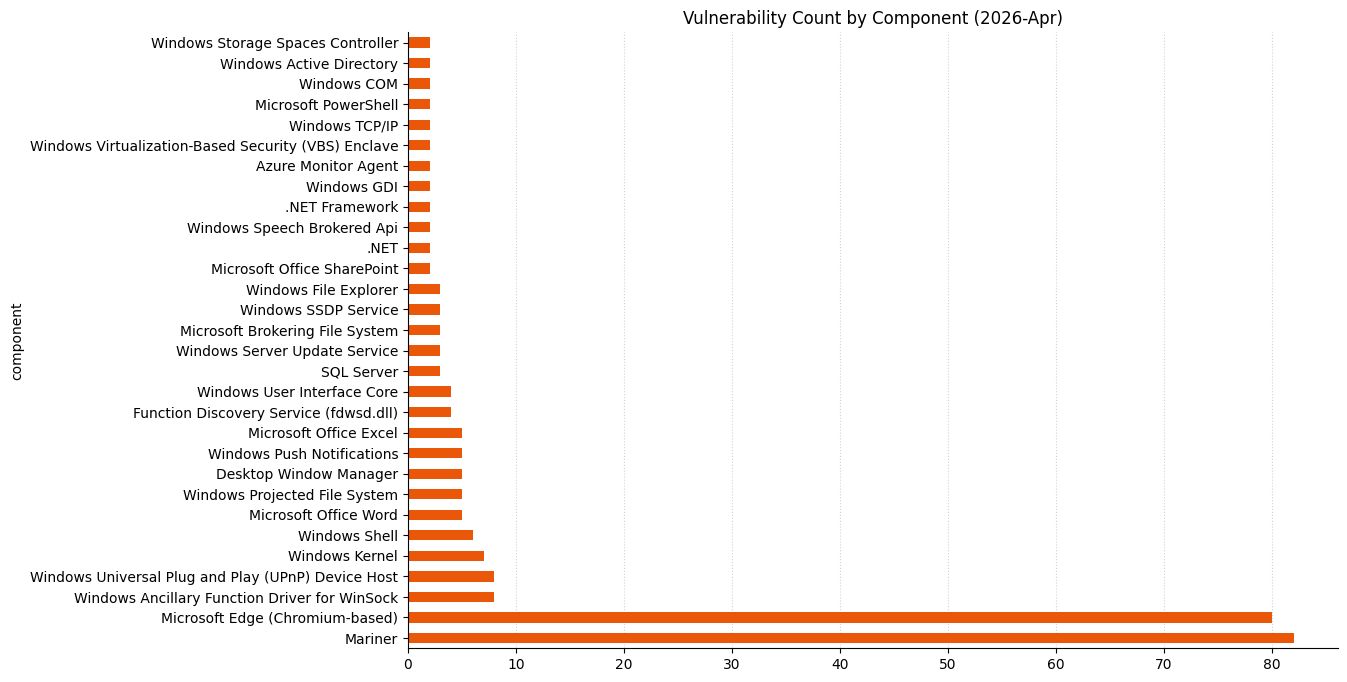
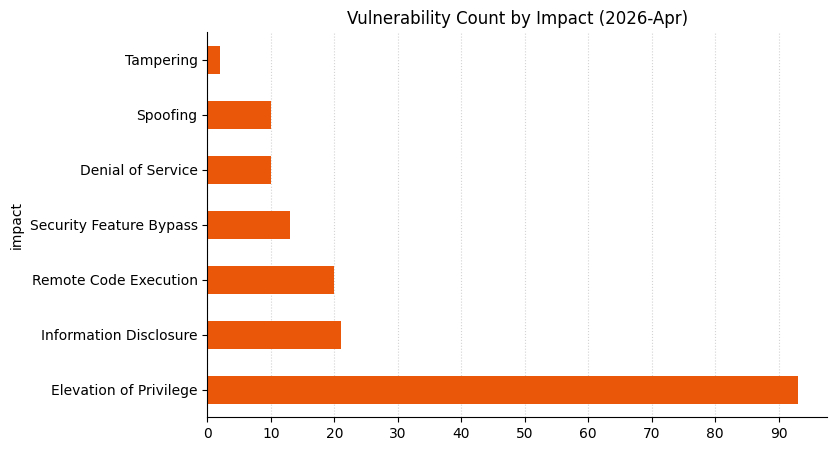
Microsoft is publishing 167 vulnerabilities on April 2026 Patch Tuesday. Microsoft is aware of exploitation in the wild for one of today’s vulnerabilities, and public disclosure for one other. Microsoft evaluates 19 of the vulnerabilities published today as more likely to see future exploitation. So far this month, Microsoft has provided patches to address 80 browser vulnerabilities, which are not included in the Patch Tuesday count above.

Increasing volumes of vulnerabilities

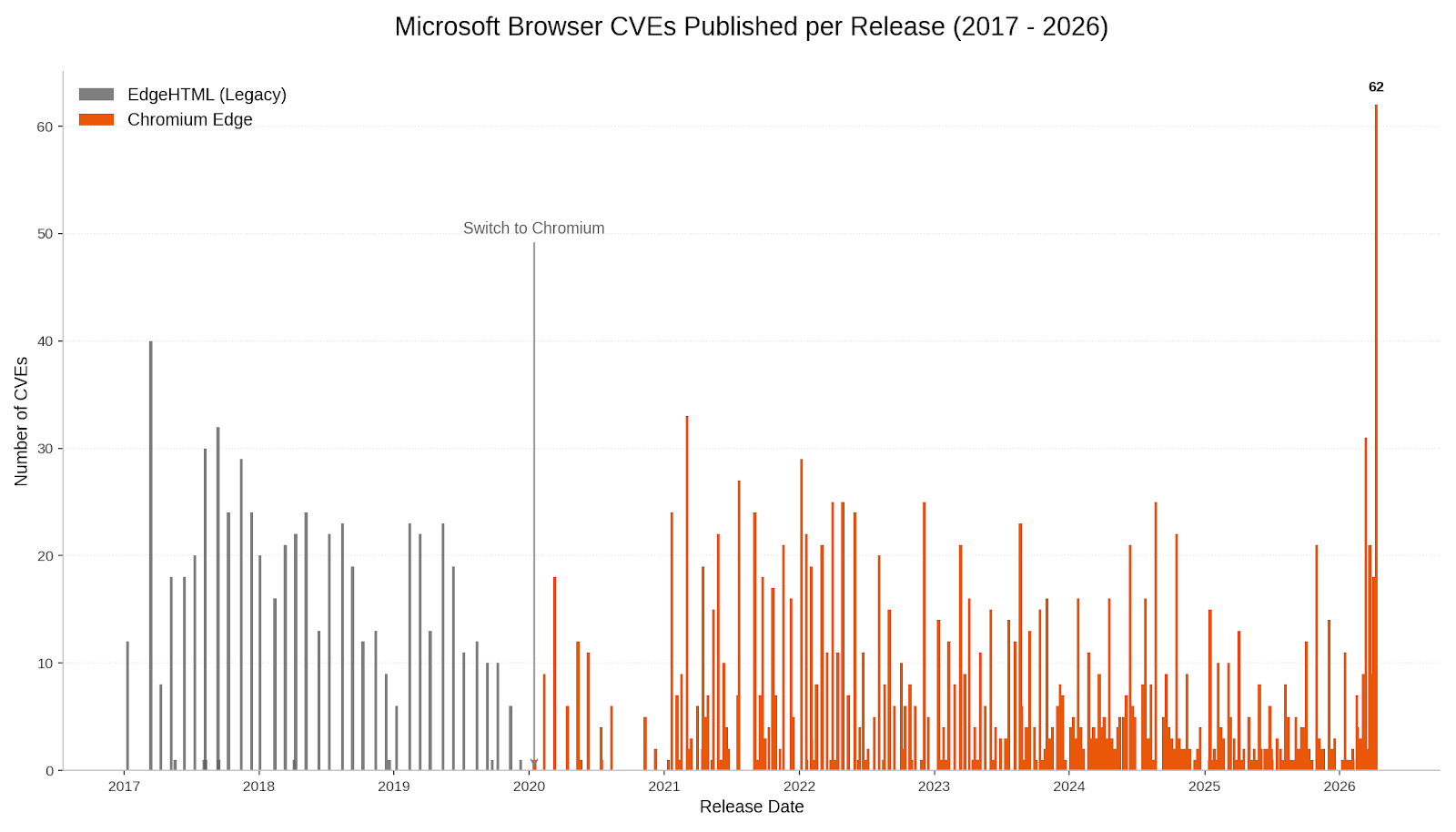
Regular Patch Tuesday watchers will know that these vulnerability totals are significantly higher than usual, especially the browser numbers. Late last week, Microsoft published patches to resolve more than 60 browser vulnerabilities in a single day, which is a new record in that very specific category.

A bar chart showing the number of Microsoft browser advisories per day from 2017 to 2026. A significant spike is visible in April 2026.

It might be tempting to imagine that this sudden spike was tied to the buzz around the announcement a week ago today of Project Glasswing, but this is not the case. Edge is based on the Chromium engine, and the Chromium maintainers acknowledge a wide range of researchers for the vulnerabilities which Microsoft republished last Friday. This reflects a significant industry-wide uptick in the volume of vulnerability reports over the past few weeks. A safe conclusion is that this increase in volume is driven by ever-expanding AI capabilities. We should expect to see further increases in vulnerability reporting volume as the impact of AI models extend further, both in terms of capability and availability.

SharePoint: zero-day spoofing

When everything is changing rapidly, it can be tempting to look to familiar things for comfort. SharePoint admins should start by addressing CVE-2026-32201, an exploited-in-the-wild spoofing vulnerability. The advisory doesn’t offer much detail, but does mention CWE-20: Improper Input Validation and low impact to confidentiality and integrity, with no impact to availability. Of course, the greatest attacker impact is typically achieved by chaining together multiple vulnerabilities that by themselves might not seem so bad.

Ever-increasing novel AI capabilities in offensive cybersecurity now appear to provide real competition for all but the most elite human researchers; if it was ever valid to suppose that a vulnerability with a CVSS v3 base score of 6.5 was unlikely to cause much pain, it’s certainly not a safe defensive assumption in 2026. Patches are available for all supported versions of SharePoint, including SharePoint 2016, which moves beyond extended support on July 14, 2026.

Defender: zero-day elevation of privilege

Microsoft Defender receives a patch today for CVE-2026-33825, a local privilege escalation vulnerability for which Microsoft is aware of public disclosure. Successful exploitation leads to SYSTEM privileges, so this is certainly worth patching sooner rather than later. Microsoft points out that no action should be required to install this update, since the Microsoft Defender Antimalware Platform automatically updates by default. A further silver lining is that systems that have disabled Microsoft Defender are not in an exploitable state. Hopefully, any such system is running a suitable third-party replacement for Defender’s capabilities.

Windows [I don’t like] IKE: zero-day pre-auth RCE

The Windows Internet Key Exchange (IKE) Services Extensions is the site of CVE-2026-33824, a critical unauthenticated remote code execution vulnerability. Exploitation requires an attacker to send specially crafted packets to a Windows machine with IKE v2 enabled, which could enable remote code execution. Vulnerabilities leading to unauthenticated RCE against modern Windows assets are relatively rare, or we’d see more wormable vulnerabilities self-propagating across the internet. However, since IKE provides secure tunnel negotiation services, for instance for VPNs, it is necessarily exposed to untrusted networks and reachable in a pre-authorization context. It’s hard to imagine this turning into a rampaging internet-wide worm, but there’s plenty of scope for initial access abuse, so this IKE vulnerability is still yikes.

The advisory does contain a section with potential mitigations for anyone unable to patch immediately, which center on least-privilege restriction of relevant UDP traffic. This same portion of the advisory also furnishes a helpful link to the definition of the word “mitigations” in the MSDN glossary. All versions of Windows back as far as Server 2016 and Windows 10 1607 LTSC receive patches.

The advisory credits both the WARP and MORSE (Microsoft Offensive Research & Security Engineering) teams at Microsoft. MORSE appears in Acknowledgements over the past few years, but today marks the first explicit mention of WARP in a Microsoft security advisory Acknowledgements section; we can speculate that WARP is an internal designator for the Microsoft Windows Enterprise Security Team.

Microsoft lifecycle update

In Microsoft lifecycle news, extended support ends April 14, 2026 for a wide range of Microsoft product legacy enterprise tools, including Dynamics C5 2016, Dynamics NAV 2016, App-V 5.0 and App-V 5.1, UE-V 2.1, and BitLocker Administration and Monitoring 2.5 SP1. Microsoft .NET 9 STS (Standard Term Support, as distinct from Long Term Support) was originally scheduled to move past the end of support in May 2026, but late last year, Microsoft granted a six-month extension, so that .NET 9 STS now reaches end of support on November 10, 2026.

Summary charts

A bar chart showing vulnerability count by component for Microsoft Patch Tuesday 2026-Apr

A bar chart showing vulnerability count by impact for Microsoft Patch Tuesday 2026-Apr

A bar chart showing distribution of impact type by component for Microsoft Patch Tuesday 2026-Apr

Summary tables

Azure vulnerabilities

CVE

Title

Exploitation status

Publicly disclosed?

CVSS v3 base score

CVE-2026-32171

Azure Logic Apps Elevation of Privilege Vulnerability

Exploitation Less Likely

No

8.8

CVE-2026-32168

Azure Monitor Agent Elevation of Privilege Vulnerability

Exploitation Less Likely

No

7.8

CVE-2026-32192

Azure Monitor Agent Elevation of Privilege Vulnerability

Exploitation Less Likely

No

7.8

CVE-2026-32184

Microsoft High Performance Compute (HPC) Pack Elevation of Privilege Vulnerability

Exploitation Less Likely

No

7.8

Developer Tools vulnerabilities

CVE

Title

Exploitation status

Publicly disclosed?

CVSS v3 base score

CVE-2026-32203

.NET and Visual Studio Denial of Service Vulnerability

Exploitation Less Likely

No

7.5

CVE-2026-26171

.NET Denial of Service Vulnerability

Exploitation Less Likely

No

7.5

CVE-2026-32226

.NET Framework Denial of Service Vulnerability

Exploitation Less Likely

No

5.9

CVE-2026-23666

.NET Framework Denial of Service Vulnerability

Exploitation Less Likely

No

7.5

CVE-2026-32178

.NET Spoofing Vulnerability

Exploitation Less Likely

No

7.5

CVE-2026-33116

.NET, .NET Framework, and Visual Studio Denial of Service Vulnerability

Exploitation Less Likely

No

7.5

CVE-2026-23653

GitHub Copilot and Visual Studio Code Information Disclosure Vulnerability

Exploitation Less Likely

No

5.7

CVE-2026-32631

GitHub: CVE-2026-32631 ‘git clone’ from manipulated repositories can leak NTLM hashes

Exploitation Less Likely

No

7.4

CVE-2026-21637

HackerOne: CVE-2026-21637 TLS PSK/ALPN Callback Exceptions Bypass Error Handlers

N/A

No

7.5

CVE-2026-26143

Microsoft PowerShell Security Feature Bypass Vulnerability

Exploitation Less Likely

No

7.8

ESU vulnerabilities

CVE

Title

Exploitation status

Publicly disclosed?

CVSS v3 base score

CVE-2026-32072

Active Directory Spoofing Vulnerability

Exploitation Less Likely

No

6.2

CVE-2026-32181

Connected User Experiences and Telemetry Service Denial of Service Vulnerability

Exploitation Less Likely

No

5.5

CVE-2026-27924

Desktop Window Manager Elevation of Privilege Vulnerability

Exploitation Less Likely

No

7.8

CVE-2026-32154

Desktop Window Manager Elevation of Privilege Vulnerability

Exploitation More Likely

No

7.8

CVE-2026-27923

Desktop Window Manager Elevation of Privilege Vulnerability

Exploitation Less Likely

No

7.8

CVE-2026-32155

Desktop Window Manager Elevation of Privilege Vulnerability

Exploitation Less Likely

No

7.8

CVE-2026-32091

Microsoft Brokering File System Elevation of Privilege Vulnerability

Exploitation Less Likely

No

8.4

CVE-2026-26152

Microsoft Cryptographic Services Elevation of Privilege Vulnerability

Exploitation Less Likely

No

7.0

CVE-2026-26155

Microsoft Local Security Authority Subsystem Service Information Disclosure Vulnerability

Exploitation Less Likely

No

6.5

CVE-2026-27914

Microsoft Management Console Elevation of Privilege Vulnerability

Exploitation More Likely

No

7.8

CVE-2026-25250

MITRE: CVE-2026-25250 Secure Boot disable Eazy Fix

Exploitation Less Likely

No

6.0

CVE-2026-32081

Package Catalog Information Disclosure Vulnerability

Exploitation Unlikely

No

5.5

CVE-2026-26170

PowerShell Elevation of Privilege Vulnerability

Exploitation Less Likely

No

7.8

CVE-2026-26183

Remote Access Management service/API (RPC server) Elevation of Privilege Vulnerability

Exploitation Less Likely

No

7.8

CVE-2026-32157

Remote Desktop Client Remote Code Execution Vulnerability

Exploitation Less Likely

No

8.8

CVE-2026-26160

Remote Desktop Licensing Service Elevation of Privilege Vulnerability

Exploitation Less Likely

No

7.8

CVE-2026-26159

Remote Desktop Licensing Service Elevation of Privilege Vulnerability

Exploitation Less Likely

No

7.8

CVE-2026-26151

Remote Desktop Spoofing Vulnerability

Exploitation More Likely

No

7.1

CVE-2026-32085

Remote Procedure Call Information Disclosure Vulnerability

Exploitation Unlikely

No

5.5

CVE-2026-0390

UEFI Secure Boot Security Feature Bypass Vulnerability

Exploitation More Likely

No

6.7

CVE-2026-32212

Universal Plug and Play (upnp.dll) Information Disclosure Vulnerability

Exploitation Less Likely

No

5.5

CVE-2026-32214

Universal Plug and Play (upnp.dll) Information Disclosure Vulnerability

Exploitation Less Likely

No

5.5

CVE-2026-32079

Web Account Manager Information Disclosure Vulnerability

Exploitation Unlikely

No

5.5

CVE-2026-33104

Win32k Elevation of Privilege Vulnerability

Exploitation Less Likely

No

7.0

CVE-2026-33826

Windows Active Directory Remote Code Execution Vulnerability

Exploitation More Likely

No

8.0

CVE-2026-26178

Windows Advanced Rasterization Platform Elevation of Privilege Vulnerability

Exploitation Less Likely

No

8.8

CVE-2026-32073

Windows Ancillary Function Driver for WinSock Elevation of Privilege Vulnerability

Exploitation Less Likely

No

7.0

CVE-2026-26168

Windows Ancillary Function Driver for WinSock Elevation of Privilege Vulnerability

Exploitation Less Likely

No

7.8

CVE-2026-26173

Windows Ancillary Function Driver for WinSock Elevation of Privilege Vulnerability

Exploitation Less Likely

No

7.0

CVE-2026-26177

Windows Ancillary Function Driver for WinSock Elevation of Privilege Vulnerability

Exploitation Less Likely

No

7.0

CVE-2026-26182

Windows Ancillary Function Driver for WinSock Elevation of Privilege Vulnerability

Exploitation Less Likely

No

7.0

CVE-2026-27922

Windows Ancillary Function Driver for WinSock Elevation of Privilege Vulnerability

Exploitation Less Likely

No

7.0

CVE-2026-33099

Windows Ancillary Function Driver for WinSock Elevation of Privilege Vulnerability

Exploitation Less Likely

No

7.0

CVE-2026-33100

Windows Ancillary Function Driver for WinSock Elevation of Privilege Vulnerability

Exploitation Less Likely

No

7.0

CVE-2026-32088

Windows Biometric Service Security Feature Bypass Vulnerability

Exploitation Less Likely

No

6.1

CVE-2026-27913

Windows BitLocker Security Feature Bypass Vulnerability

Exploitation More Likely

No

7.7

CVE-2026-26175

Windows Boot Manager Security Feature Bypass Vulnerability

Exploitation Less Likely

No

4.6

CVE-2026-26176

Windows Client Side Caching driver (csc.sys) Elevation of Privilege Vulnerability

Exploitation Less Likely

No

7.8

CVE-2026-27926

Windows Cloud Files Mini Filter Driver Elevation of Privilege Vulnerability

Exploitation Less Likely

No

7.0

CVE-2026-32162

Windows COM Elevation of Privilege Vulnerability

Exploitation More Likely

No

8.4

CVE-2026-20806

Windows COM Server Information Disclosure Vulnerability

Exploitation Unlikely

No

5.5

CVE-2026-32070

Windows Common Log File System Driver Elevation of Privilege Vulnerability

Exploitation More Likely

No

7.0

CVE-2026-33098

Windows Container Isolation FS Filter Driver Elevation of Privilege Vulnerability

Exploitation Unlikely

No

7.8

CVE-2026-26153

Windows Encrypted File System (EFS) Elevation of Privilege Vulnerability

Exploitation Less Likely

No

7.8

CVE-2026-32087

Windows Function Discovery Service (fdwsd.dll) Elevation of Privilege Vulnerability

Exploitation Less Likely

No

7.0

CVE-2026-32093

Windows Function Discovery Service (fdwsd.dll) Elevation of Privilege Vulnerability

Exploitation More Likely

No

7.0

CVE-2026-32086

Windows Function Discovery Service (fdwsd.dll) Elevation of Privilege Vulnerability

Exploitation Less Likely

No

7.0

CVE-2026-32150

Windows Function Discovery Service (fdwsd.dll) Elevation of Privilege Vulnerability

Exploitation Less Likely

No

7.0

CVE-2026-27931

Windows GDI Information Disclosure Vulnerability

Exploitation Less Likely

No

5.5

CVE-2026-27930

Windows GDI Information Disclosure Vulnerability

Exploitation Less Likely

No

5.5

CVE-2026-27906

Windows Hello Security Feature Bypass Vulnerability

Exploitation More Likely

No

4.4

CVE-2026-26156

Windows Hyper-V Remote Code Execution Vulnerability

Exploitation Less Likely

No

7.8

CVE-2026-32149

Windows Hyper-V Remote Code Execution Vulnerability

Exploitation Less Likely

No

7.3

CVE-2026-27910

Windows Installer Elevation of Privilege Vulnerability

Exploitation Less Likely

No

7.8

CVE-2026-33824

Windows Internet Key Exchange (IKE) Service Extensions Remote Code Execution Vulnerability

Exploitation Less Likely

No

9.8

CVE-2026-27912

Windows Kerberos Elevation of Privilege Vulnerability

Exploitation Less Likely

No

8.0

CVE-2026-26180

Windows Kernel Elevation of Privilege Vulnerability

Exploitation Less Likely

No

7.8

CVE-2026-26163

Windows Kernel Elevation of Privilege Vulnerability

Exploitation Less Likely

No

7.8

CVE-2026-32215

Windows Kernel Information Disclosure Vulnerability

Exploitation Less Likely

No

5.5

CVE-2026-32217

Windows Kernel Information Disclosure Vulnerability

Exploitation Less Likely

No

5.5

CVE-2026-32218

Windows Kernel Information Disclosure Vulnerability

Exploitation Less Likely

No

5.5

CVE-2026-26169

Windows Kernel Memory Information Disclosure Vulnerability

Exploitation More Likely

No

6.1

CVE-2026-32071

Windows Local Security Authority Subsystem Service (LSASS) Denial of Service Vulnerability

Exploitation Less Likely

No

7.5

CVE-2026-27929

Windows LUA File Virtualization Filter Driver Elevation of Privilege Vulnerability

Exploitation Less Likely

No

7.0

CVE-2026-20930

Windows Management Services Elevation of Privilege Vulnerability

Exploitation Less Likely

No

7.8

CVE-2026-26162

Windows OLE Elevation of Privilege Vulnerability

Exploitation Less Likely

No

7.8

CVE-2026-32084

Windows Print Spooler Information Disclosure Vulnerability

Exploitation Unlikely

No

5.5

CVE-2026-27927

Windows Projected File System Elevation of Privilege Vulnerability

Exploitation Less Likely

No

7.8

CVE-2026-26184

Windows Projected File System Elevation of Privilege Vulnerability

Exploitation Less Likely

No

7.8

CVE-2026-32069

Windows Projected File System Elevation of Privilege Vulnerability

Exploitation Less Likely

No

7.8

CVE-2026-32074

Windows Projected File System Elevation of Privilege Vulnerability

Exploitation Less Likely

No

7.8

CVE-2026-32078

Windows Projected File System Elevation of Privilege Vulnerability

Exploitation Less Likely

No

7.8

CVE-2026-26167

Windows Push Notifications Elevation of Privilege Vulnerability

Exploitation Less Likely

No

8.8

CVE-2026-32158

Windows Push Notifications Elevation of Privilege Vulnerability

Exploitation Unlikely

No

7.8

CVE-2026-32159

Windows Push Notifications Elevation of Privilege Vulnerability

Exploitation Less Likely

No

7.8

CVE-2026-32160

Windows Push Notifications Elevation of Privilege Vulnerability

Exploitation Unlikely

No

7.8

CVE-2026-26172

Windows Push Notifications Elevation of Privilege Vulnerability

Exploitation Less Likely

No

7.8

CVE-2026-20928

Windows Recovery Environment Security Feature Bypass Vulnerability

Exploitation Less Likely

No

4.6

CVE-2026-27909

Windows Search Service Elevation of Privilege Vulnerability

Exploitation More Likely

No

7.8

CVE-2026-26161

Windows Sensor Data Service Elevation of Privilege Vulnerability

Exploitation Less Likely

No

7.8

CVE-2026-26174

Windows Server Update Service (WSUS) Elevation of Privilege Vulnerability

Exploitation Less Likely

No

7.0

CVE-2026-26154

Windows Server Update Service (WSUS) Tampering Vulnerability

Exploitation Less Likely

No

7.5

CVE-2026-27918

Windows Shell Elevation of Privilege Vulnerability

Exploitation Less Likely

No

7.8

CVE-2026-32151

Windows Shell Information Disclosure Vulnerability

Exploitation Less Likely

No

6.5

CVE-2026-32225

Windows Shell Security Feature Bypass Vulnerability

Exploitation More Likely

No

8.8

CVE-2026-32202

Windows Shell Spoofing Vulnerability

Exploitation More Likely

No

4.3

CVE-2026-32082

Windows Simple Search and Discovery Protocol (SSDP) Service Elevation of Privilege Vulnerability

Exploitation Less Likely

No

7.0

CVE-2026-32083

Windows Simple Search and Discovery Protocol (SSDP) Service Elevation of Privilege Vulnerability

Exploitation Less Likely

No

7.0

CVE-2026-32068

Windows Simple Search and Discovery Protocol (SSDP) Service Elevation of Privilege Vulnerability

Exploitation Unlikely

No

7.0

CVE-2026-32183

Windows Snipping Tool Remote Code Execution Vulnerability

Exploitation Less Likely

No

7.8

CVE-2026-33829

Windows Snipping Tool Spoofing Vulnerability

Exploitation Unlikely

No

4.3

CVE-2026-32089

Windows Speech Brokered Api Elevation of Privilege Vulnerability

Exploitation Less Likely

No

7.8

CVE-2026-32090

Windows Speech Brokered Api Elevation of Privilege Vulnerability

Exploitation Unlikely

No

7.8

CVE-2026-32153

Windows Speech Runtime Elevation of Privilege Vulnerability

Exploitation Less Likely

No

7.8

CVE-2026-33827

Windows TCP/IP Remote Code Execution Vulnerability

Exploitation Less Likely

No

8.1

CVE-2026-27908

Windows TDI Translation Driver (tdx.sys) Elevation of Privilege Vulnerability

Exploitation More Likely

No

7.0

CVE-2026-27921

Windows TDI Translation Driver (tdx.sys) Elevation of Privilege Vulnerability

Exploitation More Likely

No

7.0

CVE-2026-27915

Windows UPnP Device Host Elevation of Privilege Vulnerability

Exploitation Less Likely

No

7.8

CVE-2026-27919

Windows UPnP Device Host Elevation of Privilege Vulnerability

Exploitation Less Likely

No

7.8

CVE-2026-32075

Windows UPnP Device Host Elevation of Privilege Vulnerability

Exploitation More Likely

No

7.0

CVE-2026-27916

Windows UPnP Device Host Elevation of Privilege Vulnerability

Exploitation Less Likely

No

7.8

CVE-2026-27920

Windows UPnP Device Host Elevation of Privilege Vulnerability

Exploitation Less Likely

No

7.8

CVE-2026-32077

Windows UPnP Device Host Elevation of Privilege Vulnerability

Exploitation Less Likely

No

7.8

CVE-2026-27925

Windows UPnP Device Host Information Disclosure Vulnerability

Exploitation Less Likely

No

6.5

CVE-2026-32156

Windows UPnP Device Host Remote Code Execution Vulnerability

Exploitation Less Likely

No

7.4

CVE-2026-32165

Windows User Interface Core Elevation of Privilege Vulnerability

Exploitation Less Likely

No

7.8

CVE-2026-27911

Windows User Interface Core Elevation of Privilege Vulnerability

Exploitation Unlikely

No

7.8

CVE-2026-32163

Windows User Interface Core Elevation of Privilege Vulnerability

Exploitation Unlikely

No

7.8

CVE-2026-32164

Windows User Interface Core Elevation of Privilege Vulnerability

Exploitation Less Likely

No

7.8

CVE-2026-23670

Windows Virtualization-Based Security (VBS) Security Feature Bypass Vulnerability

Exploitation Less Likely

No

5.7

CVE-2026-27917

Windows WFP NDIS Lightweight Filter Driver (wfplwfs.sys) Elevation of Privilege Vulnerability

Exploitation Less Likely

No

7.0

Microsoft Dynamics vulnerabilities

CVE

Title

Exploitation status

Publicly disclosed?

CVSS v3 base score

CVE-2026-33103

Microsoft Dynamics 365 (On-Premises) Information Disclosure Vulnerability

Exploitation Unlikely

No

5.5

CVE-2026-26149

Microsoft Power Apps Security Feature Bypass

Exploitation Less Likely

No

9.0

Microsoft Office vulnerabilities

CVE

Title

Exploitation status

Publicly disclosed?

CVSS v3 base score

CVE-2026-32188

Microsoft Excel Information Disclosure Vulnerability

Exploitation Less Likely

No

7.1

CVE-2026-32189

Microsoft Excel Remote Code Execution Vulnerability

Exploitation Less Likely

No

7.8

CVE-2026-32197

Microsoft Excel Remote Code Execution Vulnerability

Exploitation Less Likely

No

7.8

CVE-2026-32198

Microsoft Excel Remote Code Execution Vulnerability

Exploitation Less Likely

No

7.8

CVE-2026-32199

Microsoft Excel Remote Code Execution Vulnerability

Exploitation Less Likely

No

7.8

CVE-2026-32190

Microsoft Office Remote Code Execution Vulnerability

Exploitation Less Likely

No

8.4

CVE-2026-32200

Microsoft PowerPoint Remote Code Execution Vulnerability

Exploitation Less Likely

No

7.8

CVE-2026-20945

Microsoft SharePoint Server Spoofing Vulnerability

Exploitation Less Likely

No

4.6

CVE-2026-32201

Microsoft SharePoint Server Spoofing Vulnerability

Exploitation Detected

No

6.5

CVE-2026-33822

Microsoft Word Information Disclosure Vulnerability

Exploitation Less Likely

No

6.1

CVE-2026-33095

Microsoft Word Remote Code Execution Vulnerability

Exploitation Less Likely

No

7.8

CVE-2026-23657

Microsoft Word Remote Code Execution Vulnerability

Exploitation Less Likely

No

7.8

CVE-2026-33114

Microsoft Word Remote Code Execution Vulnerability

Exploitation Less Likely

No

8.4

CVE-2026-33115

Microsoft Word Remote Code Execution Vulnerability

Exploitation Less Likely

No

8.4

Open Source Software vulnerabilities

CVE

Title

Exploitation status

Publicly disclosed?

CVSS v3 base score

CVE-2026-40386

n/a

No

4.0

CVE-2026-40385

n/a

No

4.0

CVE-2026-40393

n/a

No

8.1

CVE-2026-31416

netfilter: nfnetlink_log: account for netlink header size

n/a

No

8.1

CVE-2026-31423

net/sched: sch_hfsc: fix divide-by-zero in rtsc_min()

n/a

No

5.5

CVE-2026-31424

netfilter: x_tables: restrict xt_check_match/xt_check_target extensions for NFPROTO_ARP

n/a

No

5.5

CVE-2026-31417

net/x25: Fix overflow when accumulating packets

n/a

No

8.1

CVE-2026-31422

net/sched: cls_flow: fix NULL pointer dereference on shared blocks

n/a

No

5.5

CVE-2026-31414

netfilter: nf_conntrack_expect: use expect->helper

n/a

No

8.1

CVE-2026-31427

netfilter: nf_conntrack_sip: fix use of uninitialized rtp_addr in process_sdp

n/a

No

7.8

CVE-2026-31426

ACPI: EC: clean up handlers on probe failure in acpi_ec_setup()

n/a

No

5.5

CVE-2026-31419

net: bonding: fix use-after-free in bond_xmit_broadcast()

n/a

No

7.1

CVE-2026-31420

bridge: mrp: reject zero test interval to avoid OOM panic

n/a

No

5.5

CVE-2026-31421

net/sched: cls_fw: fix NULL pointer dereference on shared blocks

n/a

No

5.5

CVE-2026-31428

netfilter: nfnetlink_log: fix uninitialized padding leak in NFULA_PAYLOAD

n/a

No

5.5

CVE-2026-31418

netfilter: ipset: drop logically empty buckets in mtype_del

n/a

No

8.1

SQL Server vulnerabilities

CVE

Title

Exploitation status

Publicly disclosed?

CVSS v3 base score

CVE-2026-33120

Microsoft SQL Server Remote Code Execution Vulnerability

Exploitation Less Likely

No

8.8

CVE-2026-32167

SQL Server Elevation of Privilege Vulnerability

Exploitation Less Likely

No

6.7

CVE-2026-32176

SQL Server Elevation of Privilege Vulnerability

Exploitation Less Likely

No

6.7

System Center vulnerabilities

CVE

Title

Exploitation status

Publicly disclosed?

CVSS v3 base score

CVE-2026-33825

Microsoft Defender Elevation of Privilege Vulnerability

Exploitation More Likely

Yes

7.8

Windows vulnerabilities

CVE

Title

Exploitation status

Publicly disclosed?

CVSS v3 base score

CVE-2026-32072

Active Directory Spoofing Vulnerability

Exploitation Less Likely

No

6.2

CVE-2023-20585

AMD: CVE-2023-20585 IOMMU Write Buffer Vulnerability

Exploitation Less Likely

No

5.3

CVE-2026-25184

Applocker Filter Driver (applockerfltr.sys) Elevation of Privilege Vulnerability

Exploitation Less Likely

No

7.0

CVE-2026-32181

Connected User Experiences and Telemetry Service Denial of Service Vulnerability

Exploitation Less Likely

No

5.5

CVE-2026-27924

Desktop Window Manager Elevation of Privilege Vulnerability

Exploitation Less Likely

No

7.8

CVE-2026-32152

Desktop Window Manager Elevation of Privilege Vulnerability

Exploitation More Likely

No

7.8

CVE-2026-32154

Desktop Window Manager Elevation of Privilege Vulnerability

Exploitation More Likely

No

7.8

CVE-2026-27923

Desktop Window Manager Elevation of Privilege Vulnerability

Exploitation Less Likely

No

7.8

CVE-2026-32155

Desktop Window Manager Elevation of Privilege Vulnerability

Exploitation Less Likely

No

7.8

CVE-2026-33096

HTTP.sys Denial of Service Vulnerability

Exploitation Less Likely

No

7.5

CVE-2026-26181

Microsoft Brokering File System Elevation of Privilege Vulnerability

Exploitation Less Likely

No

7.8

CVE-2026-32219

Microsoft Brokering File System Elevation of Privilege Vulnerability

Exploitation Unlikely

No

7.0

CVE-2026-32091

Microsoft Brokering File System Elevation of Privilege Vulnerability

Exploitation Less Likely

No

8.4

CVE-2026-26152

Microsoft Cryptographic Services Elevation of Privilege Vulnerability

Exploitation Less Likely

No

7.0

CVE-2026-26155

Microsoft Local Security Authority Subsystem Service Information Disclosure Vulnerability

Exploitation Less Likely

No

6.5

CVE-2026-27914

Microsoft Management Console Elevation of Privilege Vulnerability

Exploitation More Likely

No

7.8

CVE-2026-25250

MITRE: CVE-2026-25250 Secure Boot disable Eazy Fix

Exploitation Less Likely

No

6.0

CVE-2026-32081

Package Catalog Information Disclosure Vulnerability

Exploitation Unlikely

No

5.5

CVE-2026-26170

PowerShell Elevation of Privilege Vulnerability

Exploitation Less Likely

No

7.8

CVE-2026-26183

Remote Access Management service/API (RPC server) Elevation of Privilege Vulnerability

Exploitation Less Likely

No

7.8

CVE-2026-32157

Remote Desktop Client Remote Code Execution Vulnerability

Exploitation Less Likely

No

8.8

CVE-2026-26160

Remote Desktop Licensing Service Elevation of Privilege Vulnerability

Exploitation Less Likely

No

7.8

CVE-2026-26159

Remote Desktop Licensing Service Elevation of Privilege Vulnerability

Exploitation Less Likely

No

7.8

CVE-2026-26151

Remote Desktop Spoofing Vulnerability

Exploitation More Likely

No

7.1

CVE-2026-32085

Remote Procedure Call Information Disclosure Vulnerability

Exploitation Unlikely

No

5.5

CVE-2026-0390

UEFI Secure Boot Security Feature Bypass Vulnerability

Exploitation More Likely

No

6.7

CVE-2026-32220

UEFI Secure Boot Security Feature Bypass Vulnerability

Exploitation Less Likely

No

4.4

CVE-2026-32212

Universal Plug and Play (upnp.dll) Information Disclosure Vulnerability

Exploitation Less Likely

No

5.5

CVE-2026-32214

Universal Plug and Play (upnp.dll) Information Disclosure Vulnerability

Exploitation Less Likely

No

5.5

CVE-2026-32079

Web Account Manager Information Disclosure Vulnerability

Exploitation Unlikely

No

5.5

CVE-2026-33104

Win32k Elevation of Privilege Vulnerability

Exploitation Less Likely

No

7.0

CVE-2026-33826

Windows Active Directory Remote Code Execution Vulnerability

Exploitation More Likely

No

8.0

CVE-2026-32196

Windows Admin Center Spoofing Vulnerability

Exploitation Less Likely

No

6.1

CVE-2026-26178

Windows Advanced Rasterization Platform Elevation of Privilege Vulnerability

Exploitation Less Likely

No

8.8

CVE-2026-32073

Windows Ancillary Function Driver for WinSock Elevation of Privilege Vulnerability

Exploitation Less Likely

No

7.0

CVE-2026-26168

Windows Ancillary Function Driver for WinSock Elevation of Privilege Vulnerability

Exploitation Less Likely

No

7.8

CVE-2026-26173

Windows Ancillary Function Driver for WinSock Elevation of Privilege Vulnerability

Exploitation Less Likely

No

7.0

CVE-2026-26177

Windows Ancillary Function Driver for WinSock Elevation of Privilege Vulnerability

Exploitation Less Likely

No

7.0

CVE-2026-26182

Windows Ancillary Function Driver for WinSock Elevation of Privilege Vulnerability

Exploitation Less Likely

No

7.0

CVE-2026-27922

Windows Ancillary Function Driver for WinSock Elevation of Privilege Vulnerability

Exploitation Less Likely

No

7.0

CVE-2026-33099

Windows Ancillary Function Driver for WinSock Elevation of Privilege Vulnerability

Exploitation Less Likely

No

7.0

CVE-2026-33100

Windows Ancillary Function Driver for WinSock Elevation of Privilege Vulnerability

Exploitation Less Likely

No

7.0

CVE-2026-32088

Windows Biometric Service Security Feature Bypass Vulnerability

Exploitation Less Likely

No

6.1

CVE-2026-27913

Windows BitLocker Security Feature Bypass Vulnerability

Exploitation More Likely

No

7.7

CVE-2026-26175

Windows Boot Manager Security Feature Bypass Vulnerability

Exploitation Less Likely

No

4.6

CVE-2026-26176

Windows Client Side Caching driver (csc.sys) Elevation of Privilege Vulnerability

Exploitation Less Likely

No

7.8

CVE-2026-27926

Windows Cloud Files Mini Filter Driver Elevation of Privilege Vulnerability

Exploitation Less Likely

No

7.0

CVE-2026-32162

Windows COM Elevation of Privilege Vulnerability

Exploitation More Likely

No

8.4

CVE-2026-20806

Windows COM Server Information Disclosure Vulnerability

Exploitation Unlikely

No

5.5

CVE-2026-32070

Windows Common Log File System Driver Elevation of Privilege Vulnerability

Exploitation More Likely

No

7.0

CVE-2026-33098

Windows Container Isolation FS Filter Driver Elevation of Privilege Vulnerability

Exploitation Unlikely

No

7.8

CVE-2026-26153

Windows Encrypted File System (EFS) Elevation of Privilege Vulnerability

Exploitation Less Likely

No

7.8

CVE-2026-32087

Windows Function Discovery Service (fdwsd.dll) Elevation of Privilege Vulnerability

Exploitation Less Likely

No

7.0

CVE-2026-32093

Windows Function Discovery Service (fdwsd.dll) Elevation of Privilege Vulnerability

Exploitation More Likely

No

7.0

CVE-2026-32086

Windows Function Discovery Service (fdwsd.dll) Elevation of Privilege Vulnerability

Exploitation Less Likely

No

7.0

CVE-2026-32150

Windows Function Discovery Service (fdwsd.dll) Elevation of Privilege Vulnerability

Exploitation Less Likely

No

7.0

CVE-2026-27931

Windows GDI Information Disclosure Vulnerability

Exploitation Less Likely

No

5.5

CVE-2026-27930

Windows GDI Information Disclosure Vulnerability

Exploitation Less Likely

No

5.5

CVE-2026-32221

Windows Graphics Component Remote Code Execution Vulnerability

Exploitation Less Likely

No

8.4

CVE-2026-27906

Windows Hello Security Feature Bypass Vulnerability

Exploitation More Likely

No

4.4

CVE-2026-27928

Windows Hello Security Feature Bypass Vulnerability

Exploitation Less Likely

No

8.7

CVE-2026-26156

Windows Hyper-V Remote Code Execution Vulnerability

Exploitation Less Likely

No

7.8

CVE-2026-32149

Windows Hyper-V Remote Code Execution Vulnerability

Exploitation Less Likely

No

7.3

CVE-2026-27910

Windows Installer Elevation of Privilege Vulnerability

Exploitation Less Likely

No

7.8

CVE-2026-33824

Windows Internet Key Exchange (IKE) Service Extensions Remote Code Execution Vulnerability

Exploitation Less Likely

No

9.8

CVE-2026-27912

Windows Kerberos Elevation of Privilege Vulnerability

Exploitation Less Likely

No

8.0

CVE-2026-26179

Windows Kernel Elevation of Privilege Vulnerability

Exploitation Less Likely

No

7.8

CVE-2026-26180

Windows Kernel Elevation of Privilege Vulnerability

Exploitation Less Likely

No

7.8

CVE-2026-32195

Windows Kernel Elevation of Privilege Vulnerability

Exploitation Less Likely

No

7.0

CVE-2026-26163

Windows Kernel Elevation of Privilege Vulnerability

Exploitation Less Likely

No

7.8

CVE-2026-32215

Windows Kernel Information Disclosure Vulnerability

Exploitation Less Likely

No

5.5

CVE-2026-32217

Windows Kernel Information Disclosure Vulnerability

Exploitation Less Likely

No

5.5

CVE-2026-32218

Windows Kernel Information Disclosure Vulnerability

Exploitation Less Likely

No

5.5

CVE-2026-26169

Windows Kernel Memory Information Disclosure Vulnerability

Exploitation More Likely

No

6.1

CVE-2026-32071

Windows Local Security Authority Subsystem Service (LSASS) Denial of Service Vulnerability

Exploitation Less Likely

No

7.5

CVE-2026-27929

Windows LUA File Virtualization Filter Driver Elevation of Privilege Vulnerability

Exploitation Less Likely

No

7.0

CVE-2026-20930

Windows Management Services Elevation of Privilege Vulnerability

Exploitation Less Likely

No

7.8

CVE-2026-26162

Windows OLE Elevation of Privilege Vulnerability

Exploitation Less Likely

No

7.8

CVE-2026-33101

Windows Print Spooler Elevation of Privilege Vulnerability

Exploitation Unlikely

No

7.8

CVE-2026-32084

Windows Print Spooler Information Disclosure Vulnerability

Exploitation Unlikely

No

5.5

CVE-2026-27927

Windows Projected File System Elevation of Privilege Vulnerability

Exploitation Less Likely

No

7.8

CVE-2026-26184

Windows Projected File System Elevation of Privilege Vulnerability

Exploitation Less Likely

No

7.8

CVE-2026-32069

Windows Projected File System Elevation of Privilege Vulnerability

Exploitation Less Likely

No

7.8

CVE-2026-32074

Windows Projected File System Elevation of Privilege Vulnerability

Exploitation Less Likely

No

7.8

CVE-2026-32078

Windows Projected File System Elevation of Privilege Vulnerability

Exploitation Less Likely

No

7.8

CVE-2026-26167

Windows Push Notifications Elevation of Privilege Vulnerability

Exploitation Less Likely

No

8.8

CVE-2026-32158

Windows Push Notifications Elevation of Privilege Vulnerability

Exploitation Unlikely

No

7.8

CVE-2026-32159

Windows Push Notifications Elevation of Privilege Vulnerability

Exploitation Less Likely

No

7.8

CVE-2026-32160

Windows Push Notifications Elevation of Privilege Vulnerability

Exploitation Unlikely

No

7.8

CVE-2026-26172

Windows Push Notifications Elevation of Privilege Vulnerability

Exploitation Less Likely

No

7.8

CVE-2026-20928

Windows Recovery Environment Security Feature Bypass Vulnerability

Exploitation Less Likely

No

4.6

CVE-2026-32216

Windows Redirected Drive Buffering System Denial of Service Vulnerability

Exploitation Less Likely

No

5.5

CVE-2026-27909

Windows Search Service Elevation of Privilege Vulnerability

Exploitation More Likely

No

7.8

CVE-2026-26161

Windows Sensor Data Service Elevation of Privilege Vulnerability

Exploitation Less Likely

No

7.8

CVE-2026-26174

Windows Server Update Service (WSUS) Elevation of Privilege Vulnerability

Exploitation Less Likely

No

7.0

CVE-2026-32224

Windows Server Update Service (WSUS) Elevation of Privilege Vulnerability

Exploitation Unlikely

No

7.0

CVE-2026-26154

Windows Server Update Service (WSUS) Tampering Vulnerability

Exploitation Less Likely

No

7.5

CVE-2026-26165

Windows Shell Elevation of Privilege Vulnerability

Exploitation Less Likely

No

7.0

CVE-2026-26166

Windows Shell Elevation of Privilege Vulnerability

Exploitation Less Likely

No

7.0

CVE-2026-27918

Windows Shell Elevation of Privilege Vulnerability

Exploitation Less Likely

No

7.8

CVE-2026-32151

Windows Shell Information Disclosure Vulnerability

Exploitation Less Likely

No

6.5

CVE-2026-32225

Windows Shell Security Feature Bypass Vulnerability

Exploitation More Likely

No

8.8

CVE-2026-32202

Windows Shell Spoofing Vulnerability

Exploitation More Likely

No

4.3

CVE-2026-32082

Windows Simple Search and Discovery Protocol (SSDP) Service Elevation of Privilege Vulnerability

Exploitation Less Likely

No

7.0

CVE-2026-32083

Windows Simple Search and Discovery Protocol (SSDP) Service Elevation of Privilege Vulnerability

Exploitation Less Likely

No

7.0

CVE-2026-32068

Windows Simple Search and Discovery Protocol (SSDP) Service Elevation of Privilege Vulnerability

Exploitation Unlikely

No

7.0

CVE-2026-32183

Windows Snipping Tool Remote Code Execution Vulnerability

Exploitation Less Likely

No

7.8

CVE-2026-33829

Windows Snipping Tool Spoofing Vulnerability

Exploitation Unlikely

No

4.3

CVE-2026-32089

Windows Speech Brokered Api Elevation of Privilege Vulnerability

Exploitation Less Likely

No

7.8

CVE-2026-32090

Windows Speech Brokered Api Elevation of Privilege Vulnerability

Exploitation Unlikely

No

7.8

CVE-2026-32153

Windows Speech Runtime Elevation of Privilege Vulnerability

Exploitation Less Likely

No

7.8

CVE-2026-27907

Windows Storage Spaces Controller Elevation of Privilege Vulnerability

Exploitation Less Likely

No

7.8

CVE-2026-32076

Windows Storage Spaces Controller Elevation of Privilege Vulnerability

Exploitation Less Likely

No

7.8

CVE-2026-33827

Windows TCP/IP Remote Code Execution Vulnerability

Exploitation Less Likely

No

8.1

CVE-2026-27908

Windows TDI Translation Driver (tdx.sys) Elevation of Privilege Vulnerability

Exploitation More Likely

No

7.0

CVE-2026-27921

Windows TDI Translation Driver (tdx.sys) Elevation of Privilege Vulnerability

Exploitation More Likely

No

7.0

CVE-2026-27915

Windows UPnP Device Host Elevation of Privilege Vulnerability

Exploitation Less Likely

No

7.8

CVE-2026-27919

Windows UPnP Device Host Elevation of Privilege Vulnerability

Exploitation Less Likely

No

7.8

CVE-2026-32075

Windows UPnP Device Host Elevation of Privilege Vulnerability

Exploitation More Likely

No

7.0

CVE-2026-27916

Windows UPnP Device Host Elevation of Privilege Vulnerability

Exploitation Less Likely

No

7.8

CVE-2026-27920

Windows UPnP Device Host Elevation of Privilege Vulnerability

Exploitation Less Likely

No

7.8

CVE-2026-32077

Windows UPnP Device Host Elevation of Privilege Vulnerability

Exploitation Less Likely

No

7.8

CVE-2026-27925

Windows UPnP Device Host Information Disclosure Vulnerability

Exploitation Less Likely

No

6.5

CVE-2026-32156

Windows UPnP Device Host Remote Code Execution Vulnerability

Exploitation Less Likely

No

7.4

CVE-2026-32223

Windows USB Printing Stack (usbprint.sys) Elevation of Privilege Vulnerability

Exploitation Less Likely

No

6.8

CVE-2026-32165

Windows User Interface Core Elevation of Privilege Vulnerability

Exploitation Less Likely

No

7.8

CVE-2026-27911

Windows User Interface Core Elevation of Privilege Vulnerability

Exploitation Unlikely

No

7.8

CVE-2026-32163

Windows User Interface Core Elevation of Privilege Vulnerability

Exploitation Unlikely

No

7.8

CVE-2026-32164

Windows User Interface Core Elevation of Privilege Vulnerability

Exploitation Less Likely

No

7.8

CVE-2026-23670

Windows Virtualization-Based Security (VBS) Security Feature Bypass Vulnerability

Exploitation Less Likely

No

5.7

CVE-2026-32080

Windows WalletService Elevation of Privilege Vulnerability

Exploitation Less Likely

No

7.0

CVE-2026-27917

Windows WFP NDIS Lightweight Filter Driver (wfplwfs.sys) Elevation of Privilege Vulnerability

Exploitation Less Likely

No

7.0

CVE-2026-32222

Windows Win32k Elevation of Privilege Vulnerability

Exploitation Less Likely

No

7.8

Zero-Day Vulnerabilities: Known Exploited

CVE

Title

Exploitation status

Publicly disclosed?

CVSS v3 base score

CVE-2026-32201

Microsoft SharePoint Server Spoofing Vulnerability

Exploitation Detected

No

6.5

Zero-Day Vulnerabilities: Publicly Disclosed (No known exploitation)

CVE

Title

Exploitation status

Publicly disclosed?

CVSS v3 base score

CVE-2026-33825

Microsoft Defender Elevation of Privilege Vulnerability

Exploitation More Likely

Yes

7.8

Critical RCEs and EoPs

CVE

Title

Exploitation status

Publicly disclosed?

CVSS v3 base score

CVE-2026-33824

Windows Internet Key Exchange (IKE) Service Extensions Remote Code Execution Vulnerability

Exploitation Less Likely

No

9.8

Zig 0.16.0 released

Post Syndicated from jzb original https://lwn.net/Articles/1067634/

The Zig project has announced version
0.16.0 of the Zig programming language.

This release features 8 months of work: changes
from 244 different contributors, spread among
1183 commits.

Perhaps most notably, this release debuts I/O
as an Interface
, but don’t sleep on the Language
Changes
or enhancements to the Compiler,
Build
System
, Linker,
Fuzzer,
and Toolchain
which are also included in this release.

LWN last covered Zig in
December 2025.

Upgrade business messaging with RCS on AWS

Post Syndicated from Brett Ezell original https://aws.amazon.com/blogs/messaging-and-targeting/upgrade-business-messaging-with-rcs-on-aws/

SMS remains a reliable workhorse for business-to-consumer reach, but it isn’t without its hurdles. Messages from unrecognized numbers are frequently ignored or flagged as spam, and the limitations of plain text can’t provide the interactive experiences modern customers expect. Rich Communication Services (RCS) on AWS End User Messaging addresses these challenges as the next generation of mobile messaging.

Before we get into the technical implementation, it is important to understand what RCS is, why it’s becoming the new standard for business-to-consumer (B2C) communication, and the strategic value it brings to your messaging stack.

The problem with traditional business messaging

Traditional SMS has long been confined to a “narrow lane” of one-directional alerts—think one-time passcodes (OTP) and basic shipment updates. Because these messages arrive from generic-looking short codes or long codes, recipients have no native way to verify the sender’s legitimacy. As a result, users often do the rational thing: they ignore the message or treat it with suspicion.

What is RCS?

RCS is the next-generation messaging protocol developed by the GSM Association (GSMA) to update traditional Short Message Service (SMS) and Multimedia Messaging Service (MMS). Unlike SMS, which relies on the cellular signaling channel, RCS is entirely IP-based, operating over data connectivity (Wi-Fi or mobile data). This shift allows RCS to bring high-resolution media and interactive capabilities directly to the default messaging application.

The core innovation is the RCS Agent—your verified sending identity. Instead of a random number, recipients see your brand name, logo, and a verified checkmark. This shift from “unknown sender” to “verified brand” transforms the recipient’s behavior from passive ignore to active engagement. When customers trust the sender, they stop only reading alerts and start completing workflows, asking questions, and engaging with AI-powered agents built on services like Amazon Bedrock.

The business case for RCS

We can see the future of RCS by looking at markets where over-the-top (OTT) apps like WhatsApp are dominant. In those regions, businesses use messaging for full-lifecycle order management, customer service, and complex scheduling. In markets without that OTT distribution, businesses have been stuck with one-way SMS notifications.

RCS levels this playing field. By bringing a branded, verified identity natively to the default messaging app, it opens up a range of interactive use cases previously reserved for dedicated apps or websites.

Where to start?

When evaluating RCS for your program, we recommend starting with your highest-volume transactional messages. These are often the easiest to migrate because they follow predictable templates. More importantly, they provide the most immediate ROI by maximizing the visibility of your verified identity across your largest customer touchpoints.

To illustrate the business impact across industries:

  • Ecommerce: Order confirmations arriving from a verified brand logo eliminate the “Is this legitimate?” hesitation customers have with SMS from generic numbers. Customers click tracking links confidently because they recognize the sender immediately.
  • Healthcare: Appointment reminders with verified provider identity reduce no-shows and eliminate verification calls. Patients respond more quickly to verified communications and handle appointment management through messaging rather than calling the office.
  • Financial services: Fraud alerts with verified bank identity increase response rates and reduce phishing confusion. Customers see their bank’s logo and verified badge and know the alert is legitimate — enabling faster fraud detection and prevention.

Prerequisites

Before you begin the registration process, make sure that you have the following prerequisites in place:

  • An active AWS account with billing configured.
  • Access to AWS End User Messaging.
  • AWS Identity and Access Management (IAM) permissions to create and manage RCS agents and origination identities.
  • Existing SMS infrastructure to serve as a fallback.
  • A planned timeline that accounts for carrier approval lead times, which vary by country and carrier.
  • A budget for registration and verification fees.

Timeline, planning, and costs

Adopting RCS requires careful planning for both timelines and budgets. Carrier approval timelines vary by country and carrier — approval is not instant. Plan and verify that your processes, such as opt-in consent collection and brand asset preparation, are in place well before your intended launch date.

Registration and usage fees also differ significantly by market. Currently, AWS End User Messaging supports RCS in the United States and Canada, with additional countries planned for future rollout.

  • United States: This market uses a per-segment (160-character) pricing model similar to SMS. It features a higher initial barrier to entry, including a one-time agent setup fee and an annual brand vetting fee.
  • Canada: Canada utilizes a distinct message-based model (“Basic” vs. “Single” messages) rather than segments. Notably, it currently lacks the one-time setup and annual vetting fees found in the US, though a monthly maintenance fee applies globally to all active agents.

Also note that RCS is billed only upon successful delivery, whereas SMS is charged at the time of the request. For the latest rates and a breakdown of carrier-specific content violation fees, see AWS End User Messaging pricing.

Note: You are charged only for successfully delivered messages, not delivery attempts. In the United States, long messages are billed per 160-character segment; however, for the Rest of the World (ROW), messages exceeding 160 characters are billed as a single ‘RCS Single’ message. When automatic fallback occurs, you are typically charged only for the successful SMS delivery. While rare, note that if both the RCS and SMS messages reach the device (dual-delivery), charges for both may apply. For more details, see the RCS billing and pricing model.

RCS and SMS: Better together

RCS works alongside SMS to create a reliable messaging solution with automatic SMS fallback. AWS End User Messaging ensures reliable delivery by intelligently handling three common scenarios where RCS may be unavailable, triggering an automatic fallback to SMS:

  • Carrier-specific availability — Your RCS agent may be approved on some carriers but still pending on others, or a carrier may not have deployed RCS infrastructure yet. AWS detects this upfront using carrier lookup data and automatically routes via SMS so that the message is delivered.
  • Device compatibility — Not all devices support RCS, even if the carrier does. This includes older Android models, devices with RCS disabled, or iPhones running versions earlier than iOS 18. AWS detects this compatibility upfront where possible and automatically routes the message via SMS so that it reaches the recipient.
  • Temporary connectivity — A device may support RCS but lack data connectivity at the moment of delivery (for example, traveling through a tunnel or with data roaming turned off). The device still has cellular coverage for SMS. AWS falls back to SMS so that the message is delivered.
SMS text message from short code 47205 showing a Verizon Call Filter trial activation notice in a dark-themed mobile messaging app, with no sender branding, a generic profile icon, and a "Report Spam" warning at the bottom.

Figure 1: A typical SMS business message often appears from an unrecognizable short code, making it difficult for customers to verify the sender before clicking a link or replying.

When RCS delivery falls back to SMS because of a lack of data connectivity or other availability reasons, AWS uses sticky sending. The service prioritizes the origination number that most recently delivered successfully to that destination—maintaining that preference for 24 hours before retrying RCS. This ensures consistent, recognizable delivery across various connectivity and compatibility scenarios.

Effective phone number management is the foundation for fallback behavior. AWS provides three ways to send messages, each with different fallback behavior:

  • Pool-based sending — AWS selects from identities in a specific pool containing your RCS agent and SMS phone numbers. This is the recommended approach for production deployments. Pools give you precise control over which identities are used while AWS handles automatic routing and fallback.
  • Account-level sending — AWS automatically selects the best identity from your entire account. This is similar to the default behavior in Amazon Simple Notification Service (SNS), where you cannot isolate traffic into specific pools. This approach is ideal for development, testing, or simple deployments where a single identity is used for all messaging use cases within a country.
  • Direct send — You specify an exact RCS agent as the origination identity. The message fails if RCS isn’t available. Use this for testing or when you want to handle fallback yourself.

For production messaging where delivery is critical, use pool-based or account-level sending for reliable delivery. Pools route your fallback SMS messages through consistent, recognizable numbers your customers trust.

RCS vs. SMS at a glance

For a detailed comparison of capabilities, see the following table.

Feature SMS RCS
Character limit 160 characters No practical limit
Media support MMS (compressed) High-resolution images, video, audio
Read receipts No Yes
Typing indicators No Yes
Interactive buttons No Yes
Branded identity Basic (Sender ID) Full (Verified Profile)
Delivery over internet No Yes
Verified RCS business profile for "Go Big or Go Home!" showing a branded hippo logo, purple banner, company tagline, and contact options for call, website, and email in a mobile messaging app.

Figure 2: The final result – A verified brand profile featuring your high-resolution logo, banner image, and custom brand colors—elements that significantly increase trust and click-through rates compared to standard SMS.

The recommended adoption path

Consider a phased approach to RCS adoption that aligns with your operational readiness. First, register your brand and get carrier approval. Next, move your existing SMS use cases to RCS. Finally, after you are comfortable with the channel, test and expand with advanced use cases.

How to register

Brand asset requirements

Before submitting your registration, prepare the following brand assets. Carriers reject assets that don’t meet exact specifications, so verify these requirements before submitting.

Asset Requirements
Logo 224×224 pixels, PNG with transparency, under 50 KB
Banner 1440×448 pixels, PNG or JPEG, under 200 KB
Brand Color Hex format (e.g. #1A73E8), minimum 4.5:1 contrast ratio

Note: A 4.5:1 contrast ratio means your brand color must be at least 4.5 times brighter (or darker) than its background. This threshold meets WCAG 2.1 Level AA standards, ensuring your brand name is legible for users with moderate vision loss or color blindness. To verify compliance, use a Contrast Checker to test your hex code against a solid white background.

Use case selection

Your use case determines what types of messages you can send in production. Select carefully before submitting — the use case does not affect approval timeline, but it does determine your message restrictions and how carriers perceive your traffic.

Use Case What you can send
OTP Authentication codes and security verification only
Transactional Order updates, shipping notifications, account alerts
Promotional Marketing campaigns and offers (requires opt-in consent)
Multi-use Combined transactional and promotional messaging

Why not just choose Multi-use for everything?

While Multi-use offers the most flexibility, it is often subject to stricter carrier scrutiny during the vetting process. Carriers prefer single-purpose agents (like OTP) because they provide a more predictable and trustworthy experience for the recipient. If you have a high-volume OTP use case, registering it separately can help protect your sender reputation from being impacted by the lower engagement rates typically associated with promotional marketing.

Important: Agents must be use-case specific. Sending message types that don’t match your registered use case could result in suspension.

Registration steps

To submit your registration, complete the following steps:

  1. Sign in to the AWS Management Console and open the AWS End User Messaging console.
  2. In the navigation pane, under Configurations, choose RCS agents.
  3. Choose Create RCS Agent. This creates an AWS RCS Agent and then immediately guides you through creating a testing registration in a single workflow.
RCS tester invitation from RBM Tester Management showing interactive "Make me a tester" and "Decline" buttons, user selection, and confirmation message for the "Go Big or Go Home!" RCS agent in a dark-themed mobile messaging app.

Figure 3: Once your agent is created in the AWS console, your registered test devices will receive an invitation like this one. Tapping ‘Make me a tester’ allows you to immediately see your branded content in action.

  1. The next screen shows an introduction to RCS and explains the setup process. Review the information and choose Next to continue.
  2. On the Agent details page, set the following:
    1. Friendly name — A console-only label for your AWS RCS Agent. This is an internal name for your reference (stored as a tag) and is not the name displayed on recipients’ phones. The friendly name is not available through the API.
    2. Deletion protection — (Optional) Enable to prevent accidental deletion of the agent.
    3. Tags — (Optional) Add tags to organize and identify your agent.
  3. In the Brand information section of the same page, enter the following:
    1. Display name — The brand name that recipients see alongside your RCS messages.
    2. Description — A brief description of your brand or business.
    3. Use case — Select the primary use case for your RCS messaging (for example, transactional notifications, marketing, or customer support).
  4. In the Brand assets section of the same page, upload the following:
    1. Logo — 224 × 224 pixels, PNG with transparency, under 50 KB.
    2. Banner image — 1440 × 448 pixels, PNG or JPEG, under 200 KB.
    3. Brand color — A hex color code (for example, #1A73E8) with a minimum contrast ratio of 4.5:1 against a white background.

Important: Some brand assets cannot be changed after the agent is submitted for registration. Prepare your final brand assets before creating the agent. If you want to experiment first, you can quickly create a test agent using this flow, then create a fresh AWS RCS Agent with finalized brand assets later.

  1. On the Compliance keywords page, configure your keywords and auto-response messages.
  2. On the Review page, verify all your settings.
  3. Choose Validate and submit to create the AWS RCS Agent and submit the testing registration.

Testing and production launch phases

Launching RCS follows a distinct path from testing to production:

  1. Testing Registration: The initial guided console flow creates your AWS RCS Agent and a testing agent, or RBM Agent(RCS Business Messaging Agents). This allows you to validate your integration immediately by sending messages to registered test devices without waiting for carrier approval.
  2. Country Launch Registrations: After testing is complete, you must submit separate country launch registrations for each production market.

Carrier review and approval

  • Independent Approval: Each country launch registration undergoes a separate review process by every carrier in that target country.
  • Partial Reach: Approval is per-carrier. You are considered “partially approved” as soon as at least one carrier approves your agent, allowing you to start sending production messages to recipients on that carrier’s network via the SendTextMessage API.
  • Timelines: For both the U.S. and Canada, expect the carrier approval process to take several months. To avoid delays, verify that all registration fields are accurate and, for U.S. launches, provide a clear screen recording demonstrating your intended use case.

Important considerations

Multi-level identity: Think of the AWS RCS Agent as your brand’s unified identity. Under this one resource, you will have multiple RCS for Business IDs: one for your testing agent and separate IDs for each country launch (e.g., one for the US and one for Canada).

Carrier approval is per-carrier, not all-at-once: You do not need to wait for every carrier to approve before you begin sending. As soon as an individual carrier approves your agent, you can reach that carrier’s subscribers.

Sandbox testing: Testing with sandbox agents does not require carrier approval and can begin immediately upon submission. Note that testing messages are charged at standard RCS rates.

Finality of configurations: Brand assets are defined on each specific registration and are final after submission. While minor updates are permitted through supporting documentation, significant structural changes require creating a new agent. Plan your configuration carefully before you submit.

Accuracy matters: Filling out registration forms incorrectly can result in lengthy delays or rejection. Double-check all information before submitting and verify that business documents are current and valid. In this early phase of RCS adoption, carriers have been approving recognizable brands more readily.

Managing costs and usage

Monitor your RCS message volume through Amazon CloudWatch metrics and set up billing alerts to track spending against your SMS baseline. For more information, see AWS End User Messaging pricing.

Conclusion

In this post, we showed you how RCS on AWS End User Messaging solves customer engagement challenges through verified branding, interactive features, and automatic SMS fallback. You get a branded messaging experience with the reliability of SMS built in. Evaluate your current SMS message volume and identify high-priority transactional messages that would benefit from verified branding. Consider migrating these high-impact use cases first to establish your brand presence and improve customer trust.

Get started today

Ready to implement RCS? Here are your next steps:

  • If you’re ready to register: Contact your AWS account team or AWS Support to begin the registration process.
  • If you want to learn more: Review the AWS End User Messaging and RCS documentation.
  • If you’re still evaluating: Start by auditing your current SMS message volume and identifying high-priority transactional messages that would benefit from verified branding.

About the authors

AWS Outposts monitoring and reporting: A comprehensive Amazon EventBridge solution

Post Syndicated from Matt Price original https://aws.amazon.com/blogs/compute/aws-outposts-monitoring-and-reporting-a-comprehensive-amazon-eventbridge-solution/

Organizations using AWS Outposts racks commonly manage capacity from a single AWS account and share resources through AWS Resource Access Manager (AWS RAM) with other AWS accounts (consumer accounts) within AWS Organizations. In this post, we demonstrate one approach to create a multi-account serverless solution to surface costs in shared AWS Outposts environments using Amazon EventBridge, AWS Lambda, and Amazon DynamoDB. This solution reports on instance runtime and allocated storage for Amazon Elastic Compute Cloud (Amazon EC2), Amazon Relational Database Services (Amazon RDS), and Amazon Elastic Block Store (Amazon EBS) services running on Outposts racks. In turn, teams can track the cost of infrastructure associated with their workloads across AWS accounts. This solution is a framework that can be customized to meet your organization’s specific business objectives.

Solution overview

The following is the Terraform-based reference architecture used to represent the solution, including EventBridge, DynamoDB, and Lambda across a multi-account environment. Relevant launch events are tracked in EventBridge that invoke Lambda functions, which are logged in DynamoDB tables (see sample code). This allows reporting on captured event data through the AWS SDK for Python (Boto3). AWS architecture diagram showing data collection and workload account integration with EventBridge, CloudTrail, and Outposts
Figure 1: Reference architecture for reporting solution on AWS Outposts 

Prerequisites

The following prerequisites are necessary to implement this solution:

Walkthrough

The following sections walk you through how to deploy this solution.

Deploying in data collection account

Step 1: Create a bucket in-Region to hold the Terraform state file in the data collection account.

aws s3 mb s3://state-bucket-name

Step 2: Clone the repository.On your local machine, clone the repository that contains the sample by running the following command:

git clone https://github.com/aws-samples/sample-outposts-monitoring-and-reports.git

Navigate to the cloned repository by running the following command:cd sample-outposts-monitoring-and-reports/data_collection

Step 3: Edit the providers.tf to configure the AWS provider.


provider "aws" {
  region = ""
}

Step 4: Edit the backend.tf to provide the Terraform state bucket and Outposts anchored AWS Region.

terraform {
  backend "s3" {
    bucket = ""
    key    = "terraform.tfstate"
    region = ""
  }
}

Step 5: Modify the variables.tf.From the root directory of the cloned repository, modify the variables.tf file with the target Region and workload accounts as shown in the following example. The target Region is the collection destination.

variable "aws_region" {
  description = "AWS region for resources"
  type        = string
  default     = ""
}

variable "allowed_account_id" {
  description = "AWS account ID allowed to put events to the event bus"
  

}

Initialize the configuration directory of the data collection account to download and install the providers defined in the configuration by running the following command:

terraform init

All resources are deployed with minimal permissions to serve as an example. We recommend viewing all configurations to make sure that they meet your organizational security policies. Step 6: Deploy infrastructure in the data collection account.Run terraform plan on the configuration to and review which resources are created:

terraform plan

When you have reviewed the plan, run the following command and enter “yes” to accept the changes and deploy:

terraform apply

Deployment should take less than 5 minutes. If you receive any errors, review the previously mentioned steps to ensure that you followed them in their entirety. If the errors persist, reach out to AWS Support for additional guidance.

Deploying in workload account

The data collection account receives events from EventBridge and performs intelligent analysis and storage from the AWS Outposts resource data.Step 1: Navigate to the workload account directory by running the following command:

cd ../workload_account

Step 2: Edit variables.tf to set up the Region and event bus Amazon Resource Name (ARN). 

variable "aws_region" {
  description = "AWS region for resources"
  type        = string
  default     = ""
}

variable "event_bus_arn" {
  description = "target event bus arn"
  type        = string
  default     = ""
}

Edit the code to update the event bus name.

Step 3: Run the following command to create the backend.tf and create the Terraform state bucket for each workload account.

./init-backend.sh

This is an idempotent operation that creates a file from the template and a bucket with a fixed name including the account ID if it doesn’t exist. 

Step 4: Initialize the configuration directory of the Data Collection Account to download and install the providers defined in the configuration by running the following command:

terraform init

Step 5: Deploy the infrastructure in the Data Collection Account.Run a terraform plan on the configuration and review which resources are created:

terraform plan

After you have reviewed the plan, run the following command and enter “yes” to accept the changes and deploy:

terraform apply

Deployment should take less than 5 minutes. If you receive any errors, follow the troubleshooting steps in the previous section.

At this point, any Amazon EC2 or Amazon RDS instances and Amazon EBS volumes are logged to the DynamoDB tables in the data collection account. Repeat Steps 3–5 for each workload account running resources on AWS Outposts with appropriate account credentials. If you’re deploying at scale and using AWS Control Tower consider using AWS Control Tower Account Factory for Terraform (AFT).

Running monthly reports

With this solution in place, reports can be generated on demand. These reports can be customized by modifying the Python example scripts shown to support your needs. Reports can be created from a local machine with credentials that have access to the DynamoDB tables in the data collection account. The examples were created from the source directory of the data collection account git repository. Run the following command to view the report for Amazon RDS usage in September 2025:

./rds_runtime_calculator.py --year 2025 --month 9 --output rds_report.csv

Spreadsheet showing RDS database instances with configuration details, storage allocation, and operational status in us-west-2 region

Figure 2: Example of RDS runtime report 


Run the following command to view the report for Amazon EBS usage in September 2025:

./ebs_volume_reporter.py --year 2025 --month 9 --output ebs_report.csv


EBS volume tracking table showing volume configurations, lifecycle hours, and active/deleted status in us-west-2

Figure 3: Example of EBS usage report 


Run the following command to view the report for Amazon EC2 usage in September 2025:

./ec2_runtime_calculator.py --month 9 --year 2025 --output ec2_report.csv

EC2 instance tracking table showing c5.large instances with runtime hours and running/stopped status on AWS Outposts

Figure 4: Example of EC2 runtime report 


Cleaning up

Complete the following steps to clean up the resources that were deployed by this solution. For each workload account, complete the following:

cd sample-outposts-monitoring-and-reports/workload_account
terraform destroy 

Enter “yes” to proceed. You can then manually empty and remove the terraform state S3 bucket for that account.

For the data collection, complete the following:

cd ../data_collection
terraform destroy

Enter “yes” to proceed. You can then manually empty and remove the terraform state S3 bucket for that account.

Conclusion

Customers who have shared multi-account Outposts deployments can use this solution to create account level reporting for Outposts resources using real-time event capture and processing, state analysis and categorization, historical usage metrics, and serverless architecture. Teams can use this to visualize and report on the costs of running their workloads on Outposts. The event-driven design supports accurate tracking while maintaining low operational overhead. The solution scales effectively across multiple Outposts and accounts, providing a unified view of hybrid infrastructure. Keep in mind that you can extend the functionality described here to meet your business objectives.

Deploy this solution today using the GitHub repository to gain financial insights to share with the tenants of your Outposts workload accounts. Reach out to your AWS account team, or fill out this form to learn more about Outposts.

Upcoming Speaking Engagements

Post Syndicated from Bruce Schneier original https://www.schneier.com/blog/archives/2026/04/upcoming-speaking-engagements-55.html

This is a current list of where and when I am scheduled to speak:

The list is maintained on this page.

[$] Tagging music with MusicBrainz Picard

Post Syndicated from jzb original https://lwn.net/Articles/1066384/

Part of the “fun” that comes with curating a self-hosted music library is tagging
music so that it has accurate and uniform metadata, such as the band names, album titles,
cover images, and so on. This can be a tedious endeavor, but there are quite a few
open-source tools to make this process easier. One of the best, or at least my
favorite, is MusicBrainz Picard. It is
a cross-platform music-tagging application that pulls information from the
well-curated, crowdsourced MusicBrainz
database project and writes it to almost any audio file format.

The collective thoughts of the interwebz