Post Syndicated from Explosm.net original https://explosm.net/comics/aliens-2
New Cyanide and Happiness Comic
Post Syndicated from Explosm.net original https://explosm.net/comics/aliens-2
New Cyanide and Happiness Comic
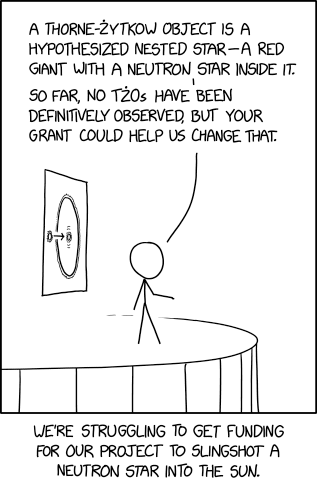
Post Syndicated from xkcd.com original https://xkcd.com/3000/
Post Syndicated from Ekta Ahuja original https://aws.amazon.com/blogs/big-data/get-started-with-amazon-dynamodb-zero-etl-integration-with-amazon-redshift/
We’re excited to announce the general availability (GA) of Amazon DynamoDB zero-ETL integration with Amazon Redshift, which enables you to run high-performance analytics on your DynamoDB data in Amazon Redshift with little to no impact on production workloads running on DynamoDB. As data is written into a DynamoDB table, it’s seamlessly made available in Amazon Redshift, eliminating the need to build and maintain complex data pipelines.
Zero-ETL integrations facilitate point-to-point data movement without the need to create and manage data pipelines. You can create zero-ETL integration on an Amazon Redshift Serverless workgroup or Amazon Redshift provisioned cluster using RA3 instance types. You can then run enhanced analysis on this DynamoDB data with the rich capabilities of Amazon Redshift, such as high-performance SQL, built-in machine learning (ML) and Spark integrations, materialized views (MV) with automatic and incremental refresh, data sharing, and the ability to join data across multiple data stores and data lakes.
The DynamoDB zero-ETL integration with Amazon Redshift has helped our customers simplify their extract, transform, and load (ETL) pipelines. The following is a testimony from Keith McDuffee, Director of DevOps at Verisk Analytics, a customer who used zero-ETL integration with DynamoDB in place of their homegrown solution and benefitted from the seamless replication that it provided:
“We have dashboards built on top of our transactional data in Amazon Redshift. Earlier, we used our homegrown solution to move data from DynamoDB to Amazon Redshift, but those jobs would often time out and lead to a lot of operational burden and missed insights on Amazon Redshift. Using the DynamoDB zero-ETL integration with Amazon Redshift, we no longer run into such issues and the integration seamlessly and continuously replicates data to Amazon Redshift.”
In this post, we showcase how an ecommerce application can use this zero-ETL integration to analyze the distribution of customers by attributes such as location and customer signup date. You can also use the integration for retention and churn analysis by calculating retention rates by comparing the number of active profiles over different time periods.
The zero-ETL integration provides end-to-end fully managed process that allows data to be seamlessly moved from DynamoDB tables to Amazon Redshift without the need for manual ETL processes, ensuring efficient and incremental updates in Amazon Redshift environment. It leverages DynamoDB exports to incrementally replicate data changes from DynamoDB to Amazon Redshift every 15-30 minutes. The initial data load is a full load, which may take longer depending on the data volume. This integration also enables replicating data from multiple DynamoDB tables into a single Amazon Redshift provisioned cluster or serverless workgroup, providing a holistic view of data across various applications.
This replication is done with little to no performance or availability impact to your DynamoDB tables and without consuming DynamoDB read capacity units (RCUs). Your applications will continue to use DynamoDB while data from those tables will be seamlessly replicated to Amazon Redshift for analytics workloads such as reporting and dashboards.
The following diagram illustrates this architecture.

In the following sections, we show how to get started with DynamoDB zero-ETL integration with Amazon Redshift. This general availability release supports creating and managing the zero-ETL integrations using the AWS Command Line Interface (AWS CLI), AWS SDKs, API, and AWS Management Console. In this post, we demonstrate using the console.
Complete the following prerequisite steps:
You can create the integration either on the DynamoDB console or Amazon Redshift console. The following steps use the Amazon Redshift console.
If you choose to create the integration on the DynamoDB console, choose Integrations in the navigation pane and then choose Create integration and Amazon Redshift.

ddb-rs-customerprofiles-zetl-integration).
You can only choose one table. If you need data from multiple tables in a single Redshift cluster, you need to create a separate integration for each table.
If you don’t have PITR enabled on the source DynamoDB table, an error will pop up while choosing the source. In this case, you can select Fix it for me for DynamoDB to enable the PITR on your source table. Review the changes and choose Continue.

If you get an error about the resource policy, select Fix it for me for Amazon Redshift to fix policies as part of this creation process. Alternatively, you can add resource policies for Amazon Redshift manually prior to creating zero-ETL integration. Review the changes and choose Reboot and continue.

The zero-ETL integration creation should show the status Creating. Wait for the status to change to Active.

Complete the following steps to create a Redshift database:

ddb_rs_customerprofiles_zetl_db).
After you create the database, the database state should change from Creating to Active. This will start the replication of data in the source DynamoDB tables to the target Redshift tables, which will be created under the public schema of the destination database (ddb_rs_customerprofiles_zetl_db).
Now you can query your data in Amazon Redshift using the integration with DynamoDB.
Data exported from DynamoDB to Amazon Redshift is stored in the Redshift database that you created from your zero-ETL integration (ddb_rs_customerprofiles_zetl_db). A single table of the same name as the DynamoDB source table is created and is under the default (public) Redshift schema. DynamoDB only enforces schemas for the primary key attributes (partition key and optionally sort key). Because of this, your DynamoDB table structure is replicated to Amazon Redshift in three columns: partition key, sort key, and a SUPER data type column named value that contains all the attributes. The data in this value column is in DynamoDB JSON format. For information about the data format, see DynamoDB table export output format.
The DynamoDB partition key is used as the Redshift table distribution key, and the combination of the DynamoDB partition and sort keys are used as the Redshift table sort keys. Amazon Redshift also allows changing the sort keys on the zero-ETL integration replicated tables using the ALTER SORT KEY command.
The DynamoDB data in Amazon Redshift is read-only data. After the data is available in the Amazon Redshift table, you can query the value column as a SUPER data type using PartiQL SQL or create and query materialized views on the table, which are incrementally refreshed automatically.
For more information about the SUPER data type, see Semistructured data in Amazon Redshift.
To validate the ingested records, you can use the Amazon Redshift Query Editor to query the target table in Amazon Redshift using PartiQL SQL. For example, you can use the following query to select email and unnest the data in the value column to the retrieve the customer name and address:

To demonstrate the replication of incremental changes in action, we make the following updates to the source DynamoDB table:
[email protected]:
With these changes, the DynamoDB table customerprofiles has four items (three existing, two new, and one delete), as shown in the following screenshot.

Next, you can go to the query editor to validate these changes. At this point, you can expect incremental changes to reflect in the Redshift table (four records in table).

Common analytics use cases generally involve aggregating data across multiple source tables using complex queries to generate reports and dashboards for downstream applications. Customers usually create late binding views to meet such use cases, which aren’t always optimized to meet the stringent query SLAs due to the long underlying query runtimes. Another option is to create a table that stores the data across multiple source tables, which brings the challenge of incrementally updating and refreshing data based on the changes in the source table.
To serve such use cases and get around the challenges associated with traditional options, you can create materialized views on top of zero-ETL replicated tables in Amazon Redshift, which can get automatically refreshed incrementally as the underlying data changes. Materialized views are also convenient for storing frequently accessed data by unnesting and shredding data stored in the SUPER column value by the zero-ETL integration.
For example, we can use the following query to create a materialized view on the customerprofiles table to analyze customer data:

This view is set to AUTO REFRESH, which means it will be automatically and incrementally refreshed when the new data arrives in the underlying source table customerprofiles.
Now let’s say you want to understand the distribution of customers across different status categories. You can query the materialized view customer_mv created from the zero-ETL DynamoDB table as follows:

Next, let’s say you want to compare the number of active customer profiles over different time periods. You can run the following query on customer_mv to get that data:

Let’s try to make a few incremental changes, which involves two new items and one delete on the source DynamoDB table using following AWS CLI commands.
To monitor the history of materialized view refreshes, you can use the SYS_MV_REFRESH_HISTORY system view. As you can see in the following output, the materialized view customer_mv was incrementally refreshed.

Now let’s query the materialized view created from the zero-ETL table. You can see two new records. The changes were propagated into the materialized view with an incremental refresh.

There are several options to obtain metrics on the performance and status of the DynamoDB zero-ETL integration with Amazon Redshift.
On the Amazon Redshift console, choose Zero-ETL integrations in the navigation pane. You can choose the zero-ETL integration you want and display Amazon CloudWatch metrics related to the integration. These metrics are also directly available in CloudWatch.

For each integration, there are two tabs with information available:

After inserting, deleting, and updating rows in the source DynamoDB table, the Table statistics section displays the details, as shown in the following screenshot.

In addition to the CloudWatch metrics, you can query the following system views, which provide information about the integrations:
AWS does not charge an additional fee for the zero-ETL integration. You pay for existing DynamoDB and Amazon Redshift resources used to create and process the change data created as part of a zero-ETL integration. These include DynamoDB PITR, DynamoDB exports for the initial and ongoing data changes to your DynamoDB data, additional Amazon Redshift storage for storing replicated data, and Amazon Redshift compute on the target. For pricing on DynamoDB PITR and DynamoDB exports, see Amazon DynamoDB pricing. For pricing on Redshift clusters, see Amazon Redshift pricing.
When you delete a zero-ETL integration, your data isn’t deleted from the DynamoDB table or Redshift, but data changes happening after that point of time aren’t sent to Amazon Redshift.
To delete a zero-ETL integration, complete the following steps:

confirm and choose Delete.
In this post, we explained how you can set up the zero-ETL integration from DynamoDB to Amazon Redshift to derive holistic insights across many applications, break data silos in your organization, and gain significant cost savings and operational efficiencies.
To learn more about zero-ETL integration, refer to documentation.
 Ekta Ahuja is an Amazon Redshift Specialist Solutions Architect at AWS. She is passionate about helping customers build scalable and robust data and analytics solutions. Before AWS, she worked in several different data engineering and analytics roles. Outside of work, she enjoys landscape photography, traveling, and board games.
 Raghu Kuppala is an Analytics Specialist Solutions Architect experienced working in the databases, data warehousing, and analytics space. Outside of work, he enjoys trying different cuisines and spending time with his family and friends.
 Veerendra Nayak is a Principal Database Solutions Architect based in the Bay Area, California. He works with customers to share best practices on database migrations, resiliency, and integrating operational data with analytics and AI services.
Post Syndicated from BeardedTinker original https://www.youtube.com/watch?v=2QDe-xTaG8Q
Post Syndicated from The Atlantic original https://www.youtube.com/watch?v=TwYtYPUB71w
Post Syndicated from The History Guy: History Deserves to Be Remembered original https://www.youtube.com/watch?v=7H9zt-iGkrw
Post Syndicated from The Atlantic original https://www.youtube.com/watch?v=vj1q1j6iONg
Post Syndicated from Chris McPeek original https://aws.amazon.com/blogs/compute/simplifying-lambda-function-development-using-cloudwatch-logs-live-tail-and-metrics-insights/
This post is written by Shridhar Pandey, Senior Product Manager, AWS Lambda
Today, AWS is announcing two new features which make it easier for developers and operators to build and operate serverless applications using AWS Lambda. First, the Lambda console now natively supports Amazon CloudWatch Logs Live Tail which provides you real-time visibility into Lambda function logs, making it easier to develop and troubleshoot Lambda functions. Second, the Lambda console now offers Amazon CloudWatch Metrics Insights dashboard for key Lambda function metrics, enabling you to easily identify and troubleshoot the source of errors or performance issues.
This blog post dives into the new capabilities enabled by these launches, how these capabilities simplify the developer and operator experience for building serverless applications with Lambda, and how you can get started with them.
Customers building serverless applications using Lambda want visibility into the behavior of their Lambda functions in real time, such as when an error occurs or a code change causes unexpected behavior. For example, developers want to instantly see the result of their code or configuration changes on the behavior of the function, and operators want to quickly troubleshoot any critical issues which would prevent the function from operating smoothly.
To help you monitor and troubleshoot the behavior of your function, the Lambda service automatically captures and sends logs to CloudWatch Logs. However, previously, you had to wait for Lambda function logs to be ingested, processed, and stored by CloudWatch Logs before you could view them. Then, you had to navigate to the CloudWatch console to view, search, and query logs using tools like CloudWatch Logs Insights. This caused frequent context switching between the Lambda and CloudWatch consoles in order to access logs, which introduced friction in the process of rapidly developing and troubleshooting Lambda functions.
The Lambda console now natively supports CloudWatch Logs Live Tail, an interactive log streaming and analytics capability which enables developers and operators to view and analyze their Lambda function logs in real time. This capability provides a built-in, real-time view of function logs as they become available in the Lambda console, as seen in the following image. Developers can now easily start a Live Tail session with one click and view the latest log entries as their function is executing. So, they can now edit the function code, deploy changes, invoke the function, and view the result of their code change in real time, without navigating away from the Lambda console. This streamlines and accelerates the author-test-deploy cycle (also known as the “inner dev loop”) when building serverless applications using Lambda.

Figure 1 CloudWatch Logs Live Tail in Lambda console
The Live Tail experience in Lambda console also offers fine-grained log analysis capabilities to filter logs, making it easier for operators and DevOps teams to debug and troubleshoot issues and critical errors in their Lambda functions. For example, while investigating errors in the Lambda function, operators can apply filter patterns to only display log events containing keywords of interest e.g., ERROR, exception, etc. This helps narrow down the search to relevant log events and cut out the noise, reducing the mean time to recovery (MTTR) when troubleshooting Lambda function errors. Thus, Live Tail enables operators to proactively monitor the health of their serverless applications built using Lambda and react faster to resolve errors or unexpected behavior.
To use Live Tail capabilities on any CloudWatch log group, you must have logs:StartLiveTail, logs:StopLiveTail, and logs:DescribeLogGroups AWS Identity and Access Management (IAM) permissions for that CloudWatch log group. Alternatively, you can add CloudWatchLogsReadOnlyAccess managed IAM policy (which contains these IAM permissions) to your IAM role. See Overview of managing access permissions to your CloudWatch Logs resources to learn more.
To get started with Live Tail in the Lambda console:
 Figure 2: Starting Live Tail from code editor in Lambda console
Figure 3: Active Live Tail session
The CloudWatch Logs Live Tail bottom drawer features a Filter panel on the left-hand side, which contains useful controls such as CloudWatch log group selection, option to filter logs, and the Start and Stop buttons. You can collapse this panel if you want to utilize the entire width of your screen to view logs (without horizontal scrolling) in the Live Tail session, as shown in the following image.

Figure 4: Active Live Tail session with collapsed Filter Panel
The Filter panel has the CloudWatch log group corresponding to your Lambda function selected by default, but you can select other log groups. You can select up to 5 log groups at a time. You can also stop the Live Tail session at any time by selecting Stop in the Filter panel.
To filter logs based on specific terms or keywords, apply patterns using the “Add filter pattern” option in the Filter panel. The filters field is case sensitive. You can specify keywords, phrases, numeric values, or regular expressions in the filter pattern. See Filter pattern syntax for metric filters, subscription filters, filter log events, and Live Tail to learn more about how to use filter patterns to display only log events of interest. For example, you can filter log events containing specific keywords or phrases (e.g., ERROR, FATAL, exception, etc.) as shown in the following image.

Figure 5: Active Live Tail session with multiple log groups selected and filter patterns applied
The Live Tail session automatically stops after 15 minutes (i.e., 900 seconds) of inactivity or when the Lambda console session times out. However, when you restart the Live Tail session, the previously applied filtering criteria will be retained. This means, you can pick up where you left off with just one click.
You get 1,800 minutes of Live Tail session usage per month for free with the AWS Free Tier, after which you pay $0.01 per minute of usage. See CloudWatch pricing page for Live Tail pricing details.
The Live Tail experience in Lambda console is available in all commercial AWS Regions where AWS Lambda and Amazon CloudWatch Logs are available. See Lambda documentation and this introductory video to learn more about native Live Tail support for Lambda.
In order to effectively operate distributed applications, easily identifying the source of errors or performance issues is critical. For example, when you notice a spike in critical metrics like errors or invocation duration in your Lambda dashboard, you want to quickly find out which Lambda functions are causing these spikes. Previously, you had to navigate to the CloudWatch console and query metrics or create custom dashboards.
Now, the Lambda console features a new built-in CloudWatch Metrics Insights dashboard which provides you instant visibility into critical insights for Lambda functions in your account, such as “most invoked Lambda functions”, “functions with highest number of errors”, and “functions taking the longest to run”. The dashboard leverages CloudWatch Metrics Insights capability to enable you to easily identify functions driving the highest usage, errors, and performance issues. Thus, the Metrics Insights dashboard surfaces key insights right where you need them, reducing friction due to context switching and making it easy for your operator team(s) to identify and fix errors and performance anomalies for your serverless applications built using Lambda.
You can easily get started with Metrics Insights dashboard without making any code changes or creating custom dashboards. Simply navigate to the Dashboard page in the Lambda console to start accessing the insights surfaced in the Metrics Insights dashboard. The following image shows the Metric Insights dashboard in the Lambda console.

Figure 6: Lambda Dashboard page with Metrics Insights dashboard
The dashboard shows the top 10 Lambda functions in your AWS account with highest number of invocations, errors, and longest invocation duration. In the example shown in the following image, the Lambda function named 1-LambdaConsoleStack-er4D14B2288-VulWZHExuSFp shows the highest error rate among all functions experiencing errors. This could be a signal to the operator team to prioritize identifying the root cause behind the high error rate for this function.

Figure 7: Metrics Insights dashboard showing top 10 functions with highest errors, invocations, and concurrent executions
The Metrics Insights dashboard displays data for the most recent 3 hours. You can view and query metrics in the CloudWatch console if you require metrics for longer than 3 hours.
Metrics Insights dashboard in Lambda console is now available in all commercial AWS Regions where AWS Lambda and Amazon CloudWatch are available, including the AWS GovCloud (US) Regions, at no additional cost.
This post introduces and illustrates two new Lambda features — native support for CloudWatch Logs Live Tail and Metrics Insights dashboard in the Lambda console. These features simplify the developer and operator experience for serverless applications built using Lambda. Live Tail enables you to view and analyze Lambda logs in real time, which simplifies and accelerates the author-test-deploy cycle and makes it easy to troubleshoot errors in Lambda functions. On the other hand, Metrics Insights dashboard shows key Lambda metrics like errors, invocations, and duration to reduce the mean time to recover (MTTR) from errors and performance issues for Lambda functions.
For more serverless learning resources, visit Serverless Land.
Post Syndicated from corbet original https://lwn.net/Articles/994654/
Version
1.82.0 of the Rust language has been released. There are a lot of new
features this time, including a cargo info command, tier-1 support
for 64-bit Apple Arm systems, a new native syntax (&raw) to create
raw pointers, changes to unsafe extern, unsafe attributes,
standardized rules around the handling of floating-point not-a-number
values, and more.
Post Syndicated from Explosm.net original https://explosm.net/comics/pillow-talking
New Cyanide and Happiness Comic
Post Syndicated from Patrick Kennedy original https://www.servethehome.com/inventec-96-dimm-cxl-expansion-box-at-ocp-summit-2024-for-tbs-of-memory-astera-labs-intel-xeon-6/
Perhaps the coolest bit of hardware at OCP Summit 2024, Inventec has an 8-way Intel Xeon 6 server with a 96 DIMM CXL Box for 224 DIMMs total
The post Inventec 96 DIMM CXL Expansion Box at OCP Summit 2024 for TBs of Memory appeared first on ServeTheHome.
Post Syndicated from Talks at Google original https://www.youtube.com/watch?v=C7Bp2kkQhLg
Post Syndicated from Jagadish Kumar original https://aws.amazon.com/blogs/big-data/elevate-your-search-and-analytics-skills-with-the-new-amazon-opensearch-service-youtube-channel/
Attention all developers, architects, and IT professionals! We’re thrilled to announce the launch of the official Amazon OpenSearch Service YouTube channel—a comprehensive resource for anyone looking to master Amazon OpenSearch Service. Whether you’re just getting started with searches , vectors, analytics, or you’re looking to optimize large-scale implementations, our channel can be your go-to resource to help you unlock the full potential of OpenSearch Service.
OpenSearch is a distributed search and analytics suite that is open source, community-driven, Apache License v2 licensed, and governed by the OpenSearch Software Foundation, under the Linux Foundation.
Amazon OpenSearch Service is a managed service that makes it straightforward to deploy, operate, and scale OpenSearch domains in AWS. OpenSearch Service offers a robust set of features that can transform the way you handle log analytics, real-time monitoring, vector search, and advanced search workloads. But to truly unlock its full potential, you need more than just the basics. That’s where our new YouTube channel comes in.
We’ve carefully curated a collection of videos that are designed to provide you with the tools, techniques, and insights you need to navigate OpenSearch Service with confidence. The channel also offers a direct line of communication between you and the AWS team. By leaving comments on our videos, you can share your feedback, ideas, and pain points. We’ll be closely monitoring these comments and using them to shape the content we create and influence the future roadmap of OpenSearch Service.
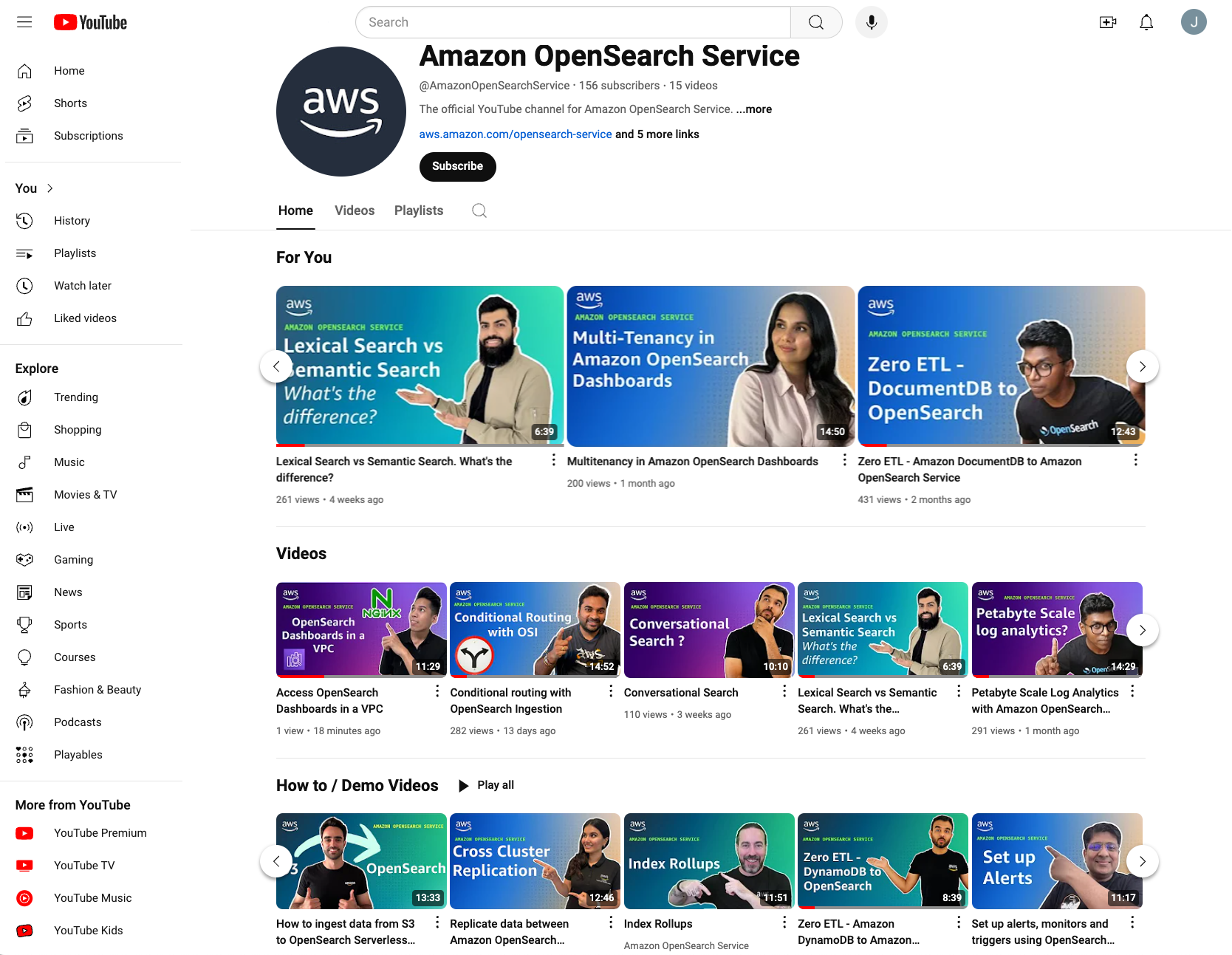
Here’s what sets our channel apart:
On the OpenSearch Service YouTube channel, you can expect new content regularly, including:
Learn how to ingest, search, and visualize logs at scale with OpenSearch, making log analytics efficient and powerful for enterprises of all sizes. Gain deep insights into using OpenSearch Service for observability, including infrastructure monitoring, application performance management (APM), and more.
Discover the key differences between lexical and semantic search, and learn how to implement both in OpenSearch Service. We’ll cover optimizing search relevancy, handling complex queries, using machine learning models for semantic understanding and much more.
Explore OpenSearch Service’s vector database capabilities to power advanced semantic search and AI-driven applications. Learn how generative AI models can enhance your search solutions.
Learn the best practices for running OpenSearch Service in production, covering everything from security and scaling to performance tuning and cost management.
Expect a wide array of content, including deep dives into new features, architecture best practices, how to demo videos, use case showcases, and interviews with industry experts.
Whether you’re a beginner looking to get started or an experienced professional seeking to optimize your workflows, make sure to subscribe to the OpenSearch Service YouTube channel so you don’t miss out on the latest tutorials, insights, and updates. Get ready to elevate your search and analytics skills and be part of shaping the future of this channel and powerful service.
 Jagadish Kumar (Jag) is a Senior Specialist Solutions Architect at AWS focused on Amazon OpenSearch Service. He is deeply passionate about Data Architecture and helps customers build analytics solutions at scale on AWS.
 Sohaib Katariwala is a Senior Specialist Solutions Architect at AWS focused on Amazon OpenSearch Service. He has over 14 years of experience helping organizations derive insights from their data.
 Wendy Neu is a Senior Manager at AWS focused on leading the NoSQL Specialist Solutions Architecture team worldwide. She is passionate about Data Services and leverages her extensive expertise to help customers optimize their data storage, management, and analytics strategies, enabling them to drive innovation and achieve their business goals.
Post Syndicated from jzb original https://lwn.net/Articles/993498/
Email has become somewhat unfashionable as a collaboration tool for
open-source projects, but there are still a number of projects—such as
PostgreSQL and the Linux kernel—that expect contributors to send and
review patches via email. The aerc
mail client is aimed at developers looking for a text-based, efficient, and
extensible client that is meant to be used for working with Git and
email. It uses Vim-style keybindings by default, and has an interface
inspired by tmux that
lets users manage multiple accounts, mails, and embedded terminals at once.
Post Syndicated from Julian Payne original https://aws.amazon.com/blogs/big-data/migrate-from-amazon-kinesis-data-analytics-for-sql-to-amazon-managed-service-for-apache-flink-and-amazon-managed-service-for-apache-flink-studio/
Amazon Kinesis Data Analytics for SQL is a data stream processing engine that helps you run your own SQL code against streaming sources to perform time series analytics, feed real-time dashboards, and create real-time metrics. AWS has made the decision to discontinue Kinesis Data Analytics for SQL, effective January 27, 2026. In this post, we explain why we plan to end support for Kinesis Data Analytics for SQL, alternative AWS offerings, and how to migrate your SQL queries and workloads.
The following diagram illustrates the workflow for using Kinesis Data Analytics for SQL.

Kinesis Data Analytics for SQL has been denoted a legacy offering since 2021 on our marketing pages, the AWS Management Console, and public documentation. In this time, we haven’t added new functionality or expanded Kinesis Data Analytics for SQL to new AWS Regions. However, we continue to actively maintain and patch the offering and support customers using the service. We will continue to undertake these activities.
To help you plan and migrate away from Kinesis Data Analytics for SQL, we will discontinue the offering gradually:
Kinesis Data Analytics for SQL, which was launched in 2016, predates several popular AWS data stream processing offerings, such as Amazon Managed Service for Apache Flink and Amazon Managed Service for Apache Flink Studio. We have found that customers often want to use these newer offerings over Kinesis Data Analytics for SQL.
Amazon Managed Service for Apache Flink is a serverless, low-latency, highly scalable, and highly available real-time stream processing service. Apache Flink is a distributed open source engine for processing data streams. These managed Flink-based offerings provide functionality not available in Kinesis Data Analytics for SQL and can help you build end-to-end streaming pipelines and maintain the accuracy and timeliness of data. For example, Amazon Managed Service for Apache Flink supports built-in scaling, exactly-once processing semantics, multi-language support (including SQL), over 40 source and destination connectors, durable application state, and more
We see customers migrating their Kinesis Data Analytics for SQL workloads to take advantage of the advanced features available with managed Flink offerings. Customers running SQL queries typically select Amazon Managed Service for Apache Flink Studio. Amazon Managed Service for Apache Flink Studio allows you to create a notebook, which is a web-based development environment. With notebooks, you get a simple interactive development experience combined with the advanced capabilities provided by Flink. Amazon Managed Service for Apache Flink Studio uses Apache Zeppelin as the notebook, and uses Flink as the stream processing engine. Amazon Managed Service for Apache Flink Studio notebooks seamlessly combine these technologies to make advanced analytics on data streams accessible to developers of all skill sets. Notebooks are provisioned quickly and provide a way for you to instantly view and analyze your streaming data. Zeppelin provides your Amazon Managed Service for Apache Flink Studio notebooks with a complete suite of analytics tools, including the following capabilities:
The following diagram illustrates a common workflow for Managed Service for Apache Flink.

Unlike Kinesis Data Analytics for SQL, Managed Service for Apache Flink adds the following SQL support:
Another benefit of Amazon Managed Service for Apache Flink is the improved scalability of the solution post-deployment, because you can scale the underlying resources to meet demand. In Kinesis Data Analytics for SQL, scaling is performed by adding more pumps to persuade the application into adding more resources.
For more information about migrating Kinesis Data Analytics for SQL to Amazon Managed Service for Apache Flink Studio, see Migrate from Amazon Kinesis Data Analytics for SQL Applications to Amazon Managed Service for Apache Flink Studio. Additionally, we have provided guidance in our public documentation, including sample code for how to recreate 17 common Kinesis Data Analytics for SQL queries in Amazon Managed Service for Apache Flink Studio, which we will continue to expand over time. We have created step by step migration guidance for customers using Amazon Data Firehose as a source, or who want to use user-defined functions in Amazon Managed Service for Apache Flink . We also provide documentation to help customers migrating machine learning workloads from Kinesis Data Analytics for SQL to Amazon Managed Service for Apache Flink.
In this post, we outlined how we plan to discontinue Kinesis Data Analytics for SQL and why we’re taking these steps. We recommend migrating your Kinesis Data Analytics for SQL workloads to Amazon Managed Service for Apache Flink or Apache Flink Studio, and we have provided resources to help you get started with your migration. If you need more help, you can ask questions in re:Post, making sure to tag Kinesis Data Analytics for SQL.
 Julian Payne is a Principal Product Manager at AWS. He is passionate about building products and features to help customers innovate using real-time data processing applications in the cloud. Outside of work he writes and illustrates graphic novels.
Post Syndicated from jake original https://lwn.net/Articles/994630/
Security updates have been issued by Debian (python-cryptography), Fedora (dnsdist and python-virtualenv), Red Hat (java-1.8.0-openjdk, java-11-openjdk, java-17-openjdk, and java-21-openjdk), Slackware (libssh2 and mozilla), SUSE (haproxy, keepalived, libarchive, libnss_slurm2, php8, and python310-pytest-html), and Ubuntu (linux, linux-aws, linux-aws-5.15, linux-gcp, linux-gcp-5.15, linux-gkeop,
linux-gkeop-5.15, linux-hwe-5.15, linux-ibm, linux-ibm-5.15,
linux-intel-iotg, linux-intel-iotg-5.15, linux-kvm, linux-lowlatency,
linux-lowlatency-hwe-5.15, linux-nvidia, linux-oracle, linux-oracle-5.15,
linux-raspi, linux-xilinx-zynqmp, linux, linux-aws, linux-aws-5.4, linux-bluefield, linux-gcp,
linux-gcp-5.4, linux-gkeop, linux-hwe-5.4, linux-ibm, linux-ibm-5.4,
linux-kvm, linux-oracle, linux-oracle-5.4, linux-raspi, linux-raspi-5.4,
linux-xilinx-zynqmp, and linux, linux-aws, linux-aws-6.8, linux-gcp, linux-gcp-6.8, linux-hwe-6.8,
linux-ibm, linux-lowlatency, linux-lowlatency-hwe-6.8, linux-nvidia,
linux-nvidia-6.8, linux-nvidia-lowlatency, linux-oem-6.8, linux-oracle,
linux-oracle-6.8, linux-raspi).
Post Syndicated from BeardedTinker original https://www.youtube.com/watch?v=3WAOIqvrndQ
Post Syndicated from Bozho original https://blog.bozho.net/blog/4416
Напоследък темата с незаконните подслушвания пак става актуална. Затова ще обобщя информация за методите за подслушване, които са на разположение на държавните органи, а част от тях – и на частни субекти.
Започвам с уточнението, че подслушването може да бъде законно, за целите на наказателното преследване при тежки престъпления и на защитата на националната сигурност, а Конституцията го разрешава в определени от закона случаи. Частните субекти, обаче, не трябва да могат да използват нито един от долните механизми, поради липсата на какъвто и да било контрол. Ето възможните начини:
1. Подслушване чрез технически устройства, напр. чрез поставяне на подслушвателно устройство в кабинет/жилище; насочени микрофони към прозорец; записващи устройства, носени от лица (напр. свидетели) (чл. 6 от Закона за специалните разузнавателни средства)
2. Прихващане на телефонни разговори и съобщения чрез фалшива мобилна клетка в близост до мобилното устройство (отново приложим е чл. 6 от ЗСРС)
3. Подслушване на смартфон чрез шпионски софтуер като Pegasus или Predator (също предполагам приложим е чл. 6 от ЗСРС)
4. Подслушване на телефонни разговори и съобщения чрез прихващащи интерфейси в ДАТО и ДАНС, които се „закачат“ директно към телекомите (чл. 304-310 от Закона за електронните съобщения)
Подслушвателните устройства са дълга тема, която не засяга мобилните устройства, за разлика от останалите три, затова ще я оставия настрана.
Прихващане на мобилна комуникация чрез фалшива клетка (т.нар. cell-site simulator / IMSI-catcher / Stingray) е нещо, от което не можем да се предпазим, но можем да засичаме по косвени белези (поради което наскоро споделих едно приложение, което с екип доброволци разработваме). Ако си изключим 2G поддръжката от телефона, тези атаки стават по-трудни и започват да разчитат на изтичане на криптографски ключове от телекоми. Дали това се случва в България – не знам.
Подслушването със шпионски софтуер е скъпо, поради което само цели с много висок интерес биха попаднали в обхвата му. Там има два вида атаки: 0-click (когато просто ти „превземат“ телефона без да разбереш, но които не винаги работят, защото 0-click уязвимостите са рядкост) и 1-click (които разчитат на това жертвата да натисне линк). Не ми е известно българската държава да използва такъв софтуер, но има слухове за частни клиенти. Двата популярни (Pegasus и Predator) са в черните списъци на САЩ, а лица, свързани с тях влизат в санкционни списъци. Тук интересното е, че дъщерно дружество на NSO Group (производителят на Pegasus) функционира в България и изнася софтуер и хардуер за подслушване към трети страни, с разрешения от съответния държавен орган, а санкционирани лица покрай Predator имат/са имали фирми в България.
Последният начин е най-лесен за службите – т.нар. законно прихващане (legal interception) включва задължение на всеки оператор да предостави „прихващащ интерфейс“ към службите (ДАТО и ДАНС), които, образно казано, могат да започнат да слушат разговорите и sms-ите на всеки, чийто телефонен номер бъде въведен „в системата“, като телекомите не получават информация за това. Това е уредено в чл. 304 до 310 от Закона за електронните съобщения в далечната 2007 г. Този подход не може да бъде засечен и по косвени белези, както фалшивата клетка. Това засяга единствено гласовата комуникация и не може да се използва за криптирани приложения като Signal.
Законът приравнява това прихващане на специално разузнавателно средство, т.е. за да се извърши, трябва или предварително разрешение от съд, или в случаи на неотложност – одобрение в рамките на 24 часа след започване. Т.е. на теория, имаме защита срещу неправомерно подслушване по този начин. Това, обаче, има две слабости.
Първата е, че разрешенията за СРС се дават от дежурен административен ръководител или негов заместник, т.е. доста е ограничен кръга на лицата, които разрешават, а те пък се избират от Висшия съдебен съвет. Т.е. ако имаш влияние върху административните ръководители, имаш и бланкетни, понякога незаконосъобразни разрешения за подслушване.
Втората е, че в живия живот правилата и реалностите се разминават. Ако има техническа възможност да подслушаш нечии разговори, е необходим значителен контрол, за да го правиш винаги само със съдебно решение, особено ако това след това няма да се ползва за целите на наказателното преследване, а за компромати и изнудване.
Това означава, че трябва да има пълна проследимост, с невъзможност за изтриване на следи, на всяко „включване“ на прихващащите интерфейси, където номера на разрешението на съда да е задължителен параметър. Освен това трябва да има външен контрол, който по принцип се осъществява от Националното бюро за контрол на СРС. То контролира прилагането на всички СРС-та, но пък няма правомощия по Закона за електронните съобщения, поради което съм изпратил запитване дали и как осъществяват външния контрол върху тази процедура. Припомням, че освен Пеевски, санкции по Магнитски получи и Илко Желязков, известен като един от „лейтенантите на Пеевски“ – до освобождаването му след попадането му под санкциите, той е бил заместник-председател на бюрото за контрол (или вероятно, в неговия случай, за „замитане“).
Отделно от това зададох писмен въпрос на премиера Главчев (който отговаря и за двете агенции – ДАТО и ДАНС), какви вътрешни механизми за предотвратяване на злоупотреби се прилагат. Защото ако тези механизми не работят, или могат да се заобикалят по някакъв начин, и някой (напр. Пеевски), има влияние върху ключови служители в някоя от двете агенции, то това би значело, че има устойчив източник на компромати, с които да увеличава влиянието си в законодателната, изпълнителната и съдебната власт.
Отговорите от Главчев и от бюрото за контрол на СРС ще пристигнат вероятно следващата седмица, като ще ви информирам за това дали има адекватен вътрешен и външен контрол върху прихващането по Закона за електронните съобщения. С цялата получена информация – както сега, така и покрай убийството на „Нотариуса“, ще поправим дупките в законите, които позволяват злоупотреби с подслушване.
Материалът Законно и незаконно подслушване и мерки за контрол е публикуван за пръв път на БЛОГодаря.
Post Syndicated from Byron Cook original https://aws.amazon.com/blogs/security/an-unexpected-discovery-automated-reasoning-often-makes-systems-more-efficient-and-easier-to-maintain/
During a recent visit to the Defense Advanced Research Projects Agency (DARPA), I mentioned a trend that piqued their interest: Over the last 10 years of applying automated reasoning at Amazon Web Services (AWS), we’ve found that formally verified code is often more performant than the unverified code it replaces.
The reason is that the bug fixes we make during the process of formal verification often positively impact the code’s runtime. Automated reasoning also gives our builders confidence to explore additional optimizations that improve system performance even further. We’ve found that formally verified code is easier to update, modify, and operate, leading to fewer late-night log analysis and debugging sessions. In this post, I’ll share three examples that came up during my discussions with DARPA.
At AWS, we strive to build services that are simple and intuitive for our customers. Underneath that simplicity lie vast, complex distributed systems that process billions of requests every second. Verifying the correctness of these complex systems is a significant challenge. Our production services are in a constant state of evolution as we introduce new features, redesign components, enhance security, and optimize performance. Many of these changes are complex themselves, and must be made without impacting the security or resilience of AWS or our customers.
Design reviews, code audits, stress testing, and fault injection are all invaluable tools we use regularly, and always will. However, we’ve found that we need to supplement these techniques in order to confirm correctness in many cases. Subtle bugs can still escape detection, particularly in large-scale, fault-tolerant architectures. And some issues might even be rooted in the original system design, rather than implementation flaws. As our services have grown in scale and complexity, we’ve had to supplement traditional testing approaches with more powerful techniques based on math and logic. This is where the branch of artificial intelligence (AI) called automated reasoning comes into play.
While traditional testing focuses on validating system behavior under specific scenarios, automated reasoning aims to use logic to verify system behavior under any possible scenario. In even a moderately complex system, it would take an intractably large amount of time to reproduce every combination of possible states and parameters that may occur. With automated reasoning, it’s possible to achieve the same effect quickly and efficiently by computing a logical proof of the correctness of the system.
Using automated reasoning requires our builders to have a different mindset. Instead of trying to think about all possible input scenarios and how they might go wrong, we define how the system should work and identify the conditions that must be met in order for it to behave correctly. Then we can verify that those conditions are true by using mathematical proof. In other words, we can verify that the system is correct.
Automated reasoning views a system’s specification and implementation in mathematics, then applies algorithmic approaches to verify that the mathematical representation of the system satisfies the specification. By encoding our systems as mathematical systems and reasoning about them using formal logic, automated reasoning allows us to efficiently and authoritatively answer critical questions about the systems’ future behavior. What can the system do? What will it do? What can it never do? Automated reasoning can help answer these questions for even the most complex, large-scale, and potentially unbounded systems—scenarios that are impossible to exhaustively validate through traditional testing alone.
Does automated reasoning allow us to achieve perfection? No, because it still depends on certain assumptions about the correct behavior of the components of a system and the relationship between the system and the model of its environment. For example, the model of a system might incorrectly assume that underlying components such as compilers and processors don’t have any bugs (although it is possible to formally verify those components as well). That said, automated reasoning allows us to achieve higher confidence in correctness than is possible by using traditional software development and testing methods.
Automated reasoning is not just for mathematicians and scientists. Our Amazon Simple Storage Service (Amazon S3) engineers use automated reasoning every day to prevent bugs. Behind the simple interface of S3 is one of the world’s largest and most complex distributed systems, holding 400 trillion objects, exabytes of data, and regularly processing over 150 million requests per second. S3 is composed of many subsystems that are distributed systems in their own right, many consisting of tens of thousands of machines. New features are being added all the time, while S3 is under heavy use by our customers.
A key component of S3 is the S3 index subsystem, an object metadata store that enables fast data lookups. This component contains a very large, complex data structure and intricate, optimized algorithms. Because the algorithms are difficult for humans to get right at S3 scale, and because we can’t afford errors in S3 lookups, we made new improvements on a cadence of about once per quarter, due to the extreme care and extensive testing required to confidently make a change.
S3 is a well-built and well-tested system built on 15 years of experience. However, there was a bug in the S3 index subsystem for which we couldn’t determine the root cause for some time. The system was able to automatically recover from the exception, so its presence didn’t impact the behavior of the system. Still, we were not satisfied.
Why was this bug around so long? Distributed systems like S3 have a large number of components, each with their own corner cases, and a number of corner cases happen at the same time. In the case of S3, which has over 300 microservices, the number of potential combinations of these corner cases is enormous. It’s not possible for developers to think through each of these corner cases, even when they have evidence the bug exists and ideas about its root cause—never mind all of the possible combinations of corner cases.
This complexity drove us to look at how we could use automated reasoning to explore the possible states and errors that might be hidden in those states. By building a formal specification of the system, we were able to find the bug and prove the absence of further bugs of its type. Using automated reasoning also gave us the confidence to ship updates and improvements every one to two months rather than just three to four times a year.
The correctness of the AWS Identity and Access Management (IAM) service is foundational to the security of our customers’ workloads. Across millions of customers, thousands of resource types, and hundreds of AWS services, every API call—every single request to AWS—is processed by the IAM authorization engine. That’s over 1.2 billion requests per second. This is some of the most security-critical and highly scaled software in AWS.
Before any change at AWS goes into production, we need an extremely high degree of confidence that the system remains secure and correct. Using automated reasoning, we can prove that our systems adhere to specific security properties, under an exhaustive number of circumstances. We call this provable security. Not only has automated reasoning enabled us to provide provable security assurance to our customers, it gives us the ability to deliver functionality, security, and optimization at scale.
Like S3, IAM has evolved over 15 years into a time-tested and trusted system. But we wanted to raise the bar further. We built a formal specification that captures the behavior of the existing IAM authorization engine, codified its policy evaluation principles into provable theorems, and used automated reasoning to build a new and more efficient implementation. Earlier this year, we deployed the new proved-correct authorization engine —and no one noticed. Automated reasoning allowed us to seamlessly replace one of the most critical pieces of AWS infrastructure, the authorization engine, with a proved-correct equivalent.
With the specification and proofs in place, we could safely and aggressively optimize the code with a high degree of confidence. At the massive scale of IAM, every microsecond of performance improvement translates into a better customer experience and better cost optimization for AWS. We optimized string matching, removed unnecessary memory allocation and redundant computations, strengthened security, and improved scalability. After every change, we re-ran our proofs to confirm that the system was still operating correctly.
The optimized IAM authorization engine is now 50% faster than its predecessor. We simply would not have been able to make these types of impactful optimizations with such confidence if we didn’t use automated reasoning. For a deeper look at how we did this, see this AWS re:Inforce session.
Most secure online transactions are protected by encryption. For example, the RSA encryption algorithm protects data by generating two keys: one to encrypt the data, and one to decrypt it. These keys enable secure data transmission as well as secure digital signatures. In the context of encryption, correctness and performance are both essential—a bug in an encryption algorithm can be disastrous.
As AWS customers move their workloads to AWS Graviton, the benefits of optimizing cryptography for the ARM instruction set increase. But optimizing encryption for better performance is complex, which makes it difficult to verify that modified encryption algorithms are behaving properly. Before we started to use automated reasoning, optimizations to cryptography libraries often required months-long reviews to achieve confidence for release into production.
Enter the power of automated reasoning: formal verification made RSA faster, and faster to deploy. We are seeing similar improvements when we apply automated reasoning to elliptic curve cryptography.
Over the last decade, we’ve increasingly applied automated reasoning techniques within AWS to prove the correctness of our cloud infrastructure and services. We routinely use these methods not only to verify correctness, but also to enhance security and reliability and minimize design flaws. Automated reasoning can be used to create a precise, testable model of a system, which we can use to quickly verify that changes are safe—or learn they are unsafe without causing harm in production.
We can answer critical questions about our infrastructure to detect misconfigurations that might expose data. We can help stop subtle but serious bugs from reaching production that we would not have found with other techniques. We can make bold performance optimizations that we would not have dared attempt without model checking. Automated reasoning provides rigorous mathematical assurance that critical systems behave as expected.
AWS is the first and only cloud provider to use automated reasoning at this scale. As adoption of automated reasoning tools increases, it becomes easier for us to justify ever-larger investments into improving the usability and scalability of automated reasoning tools. The easier it is to use the automated reasoning tools and the more powerful they become, the more adoption we’ve observed. The more we’re able to prove correctness of our cloud infrastructure, the more compelling the cloud is to security-obsessed customers. And, as the examples in this post illustrate, not only are we able to increase security assurance, we are delivering higher performant code to customers faster, translating into cost savings that we can eventually pass on to customers.
My prediction is that we’re in the beginning of an era in which critical properties like security, compliance, availability, durability, and safety can be proved automatically for large-scale cloud architectures. From preventing potential issues with AI hallucinations to analyzing hypervisors, cryptography, and distributed systems, having sound mathematical reasoning at our foundations and continuously analyzing what we build sets Amazon apart.
If you have feedback about this post, submit comments in the Comments section below. If you have questions about this post, contact AWS Support.