Firefox 127.0 released

Post Syndicated from corbet original https://lwn.net/Articles/977973/

Version
127.0
of the Firefox browser is out. Changes include support for DNS
prefetching and the ability to close duplicate tabs in a window. The
browser will now try to upgrade images and videos with HTTP URLs that are
found in an HTTPS page to HTTPS as well; if that fails, the non-HTTPS
resources will simply fail to load.

Update: this
Mozilla Secuirty Blog post
describes the HTTPS-related changes in
detail.

2024 State of the Backup: Survey Says Security Incidents and Data Loss on the Rise

Post Syndicated from Yev original https://backblaze.com/blog/2024-state-of-the-backup-security-incidents-and-data-loss-on-the-rise/

A decorative image showing several icons that represent graphs, charts, and stats.

June is Backup Awareness Month, and every year, we work with the Harris Poll to survey the state of computer backups in the U.S. It’s our 16th year running, and this year, we expanded our lens and created a new survey focused on analyzing the state of backups among businesses, providing critical insights into organizational backup strategies and challenges. 

And as in previous years, our consumer backup survey provides a comprehensive summary which reflects trends and changes over nearly two decades. The combination of these two audience surveys provides a more complete picture for the state of backups in the U.S. Let’s start with our new survey data.

Spotlight: Business Backup Is Coming Up Short

Our inaugural Business Backup Survey included 300 IT decision makers across the U.S. Part of what we wanted to learn was: 

With all of the different ways IT professionals have to protect their user’s data, how are they choosing to back up and are backup solutions even working? 

We can infer the answers to those questions by looking at the tools organizations use to back up their data, the frequency of data recoveries, and how successful or not those recoveries were.

What Tools Do Organizations Use to Back Up Their Data?

One of the most striking findings from the poll is that a significant majority (84%) of IT decision makers say their organizations utilize cloud drive services, which rely on syncing data to the cloud, for off-site data backup. You may have heard us say this before—sync is not backup. 

What’s Wrong with Cloud Drives and Sync Services?

Cloud drives allow for file storage and sharing but may not protect against file corruption or accidental deletion. Sync services automatically update files across multiple devices, meaning that any changes or deletions are replicated everywhere, which can lead to unintended data loss. While some cloud drives have added minimal backup capabilities (i.e., 30 days of version history or similar), they are often lacking in key areas that are necessary for business continuity or compliance standards. 

Cloud backup solutions, on the other hand, are designed to systematically and securely back up data, offering robust protection against loss, corruption, and security breaches. This makes cloud backup a better choice, particularly for addressing security concerns and ensuring the integrity and availability of critical data.

How Often Do Organizations Need to Restore Data?

39% of IT decision-makers report that their organizations need to restore data from backups at least once a month, with special requests for archived or deleted data (62%), backup software failure (54%), hard drive failure (52%), and cyber attacks (49%) reported as some of the top reasons. This frequent need for data recovery underscores the persistent vulnerabilities IT professionals face.

Are Data Recoveries Successful?

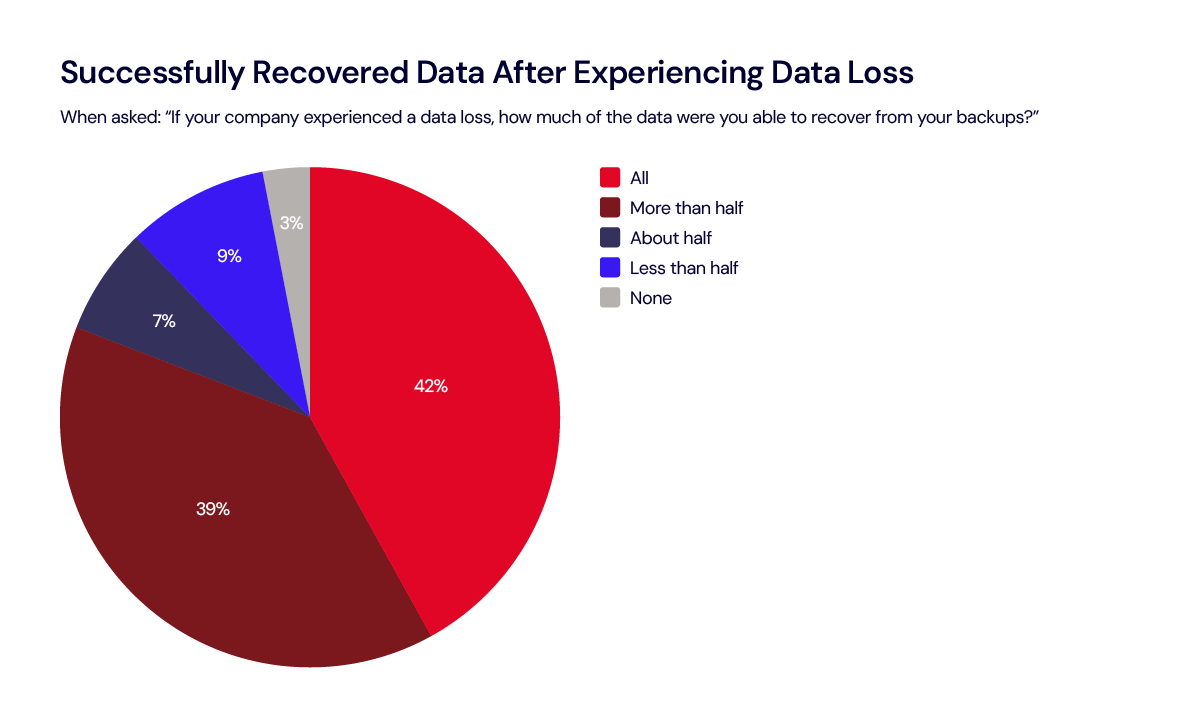
Not only do many organizations need to restore on a regular basis, but the survey also shows that among those that experienced data loss, only 42% were able to recover all of their data when they perform a restore. That leaves 58% with some amount of unrecovered data. 

Are Backups Working?

The data shows a sizable gap between the use of backup services and the effectiveness of data restoration. Although a significant percentage of organizations indicate they’re using what they would consider a cloud backup solution (the shortcomings of cloud drives and cloud sync services aside), only 42% of those that experienced data loss were able to restore all their data. This discrepancy highlights the risks associated with inadequate backup measures and the potential for data loss, which can have serious repercussions for businesses.

Only 42% of organizations that experienced data loss were able to restore all their data.

There are all sorts of ways businesses need to slice their data management strategy in order to make sure all data is backed up. This includes data type (e.g., files vs. system information), frequency with which the data is updated or changed, retention requirements for compliance, and more. There are often reasons that businesses will employ different backup frequency or strategies for different file types—file-based versus block-level incremental backups, for example. However, incomplete backups can lead to situations where only parts of the data can be restored, disrupting business operations and resulting in downtime as efforts are made to recover or reconstruct lost data. 

The importance of creating an end-to-end data backup plan, as well as choosing the right tools that provide comprehensive coverage, may be highlighted only at the moment of failure. As it stands, the Harris Poll data suggests that the limitations of cloud sync and cloud drive tools are leaving gaps in data protection and disaster recovery strategies.

This is further validated by the features IT decision makers report as being absolutely essential/very important in selecting backup tools, including security (97%), bandwidth and memory capacity (87%), a variety of features (79%), ease of operations and customizable elements (83% each). These rigorous requirements suggest that many existing solutions may fall short of meeting the comprehensive needs of modern businesses, and/or that the complex mix of tools may be contributing to blind spots in an overall data management strategy, only exposed at the point of recovery.  

How To Close the Gap?

These insights underscore the need for innovative and robust backup solutions that address evolving business requirements. As the volume of data continues to grow and cyber threats become increasingly sophisticated, the demand for reliable, secure, and user-friendly backup systems will only heighten. Given the challenges many businesses face in fully recovering their data, there’s an opportunity to promote education and awareness regarding the importance of refreshing backup strategies and utilizing suitable backup tools.

Consumer Backup Practices: Less Than 1 in 5 Are Certain of Their Backups

The consumer portion of the 2024 Backup Awareness Survey seeks to understand a simple question we’ve asked year after year: How often do you back up all of the data on your computer? We also look at who backs up the most and the reasons people cite for needing to restore data, and we compare those trends over time. Let’s dig in to the results. 

How Often Do People Back Up?

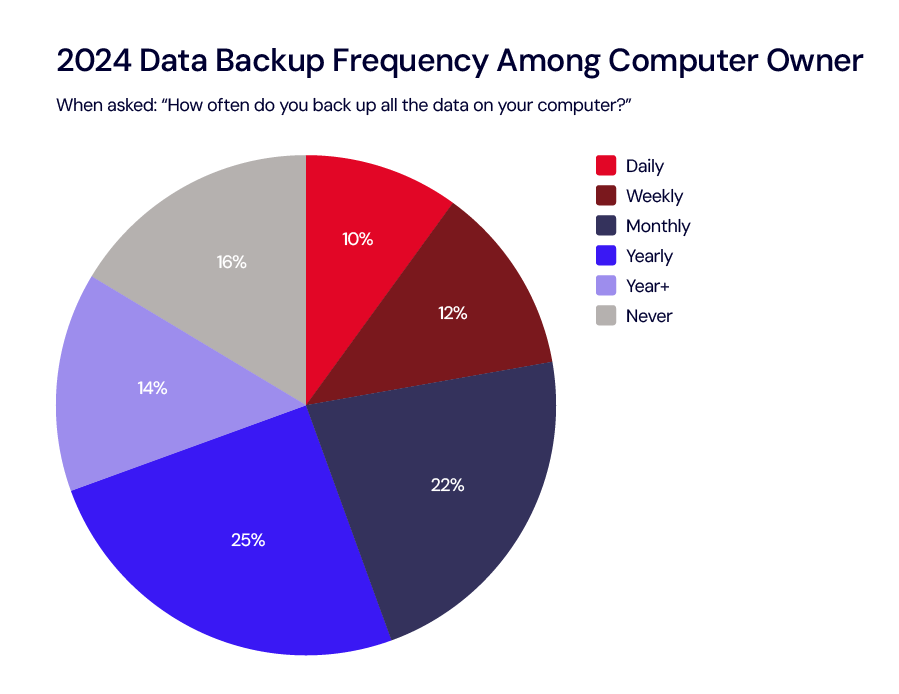
This year’s survey reveals that fewer than 1 in 5 Americans (15%) feel absolutely certain that their most important files are securely backed up. This is despite 84% of Americans who own a computer stating that they’ve backed up all their data and 45% performing backups at least once a month.

The survey also highlights the predominance of cloud solutions among backup methods. 63% of individuals who back up their data use a cloud-based system as their primary method. However, only 11% utilize dedicated cloud backup services, indicating a preference towards cloud drives (39%) and sync services (13%). As we noted above, cloud drives and sync services are fundamentally different from cloud backup solutions and can create gaps in a robust 3-2-1 backup strategy. 

Who Is Best at Backing Up?

Every year, we highlight which demographic is the best at backing up their data, and in 2024, men (73% vs. 66% of women) and younger adults ages 18–54 (76% vs. just 61% of those ages 55+) take the lead backing up at least once a year. 

The Reasons for Restores

The survey also found that 74% of Americans who own a computer have accidentally deleted important data (a 5.7% increase from 2023), and 57% have experienced a security incident on their computer.

Trends Over Time

For those interested in the data over time, let’s travel back and see how this year’s data compares to previous years. The first graph is one of our favorites. Since 2023, daily backups have dipped by 1%, while weekly and monthly backups have remained steady, which is encouraging. Additionally, there is a slight, but not statistically significant, increase of 1% in yearly and more-than-yearly backups. Notably, the percentage of people who have never backed up their data has decreased by 2%. 

For all the table enthusiasts, you’ll appreciate this detailed view showcasing how 2024 compares with previous years. We love to see Never down to an all-time low, although Daily took a slight dip. 

If you’re a visual person who appreciates vibrant pie charts for easier data digestion, here are pie charts comparing data from 2008 to 2024:

Within each population (business and consumer), the most striking data points are around the differences between backup and sync. Both consumers and businesses are leveraging cloud drive and sync services for ease of use, but that has not translated to successful data recoveries. With ransomware attacks on the rise, now more than ever, it’s essential to have a strong backup strategy. 

Still, we’ve come a long way since 2008, and the consumer data shows positive change over time around backup awareness and tool adoption. Going forward, we’ll be interested to see how the business audience data changes over time. See below for our full testing methodology, and, as always, drop us a line in the comment section if you have any questions or insights.

Consumer Survey Method:

This survey was conducted online within the United States by The Harris Poll on behalf of Backblaze from April 25-29, 2024, among 2,058 adults ages 18 and older, among whom 1,877 own a computer. The sampling precision of Harris online polls is measured by using a Bayesian credible interval.  For this study, the sample data is accurate to within +/- 2.5 percentage points using a 95% confidence level.

Prior year’s surveys were conducted online by The Harris Poll on behalf of Backblaze among U.S. adults ages 18+ who own a computer in April 25–27, 2023 (n=1,857) May 19–23, 2022 (n=1,861); May 12–14, 2021 (n=1,870); June 1–3, 2020 (n=1,913); June 6–10, 2019 (n=1,858); June 5–7, 2018 (n=1,871); May 19–23, 2017 (n=1,954); May 13–17, 2016 (n=1,920); May 15–19, 2015 (n=2,009); June 2-4, 2014 (n=1,991); June 13–17, 2013 (n=1,952); May 31–June 4, 2012 (n=2,176); June 28–30, 2011 (n=2,209); June 3–7, 2010 (n=2,051); May 13–14, 2009 (n=2,154); and May 27–29, 2008 (n=2,723).

Business Backup Survey Method:

This survey was conducted online within the United States by The Harris Poll on behalf of Backblaze from April 30 – May 8, 2024, among 300 IT Decision Makers. The sampling precision of Harris online polls is measured by using a Bayesian credible interval.  For this study, the sample data is accurate to within +/- 5.7 percentage points using a 95% confidence level.

For complete survey methodologies, including weighting variables and subgroup sample sizes, please contact Backblaze.

The post 2024 State of the Backup: Survey Says Security Incidents and Data Loss on the Rise appeared first on Backblaze Blog | Cloud Storage & Cloud Backup

Optimize storage costs in Amazon OpenSearch Service using Zstandard compression

Post Syndicated from Sarthak Aggarwal original https://aws.amazon.com/blogs/big-data/optimize-storage-costs-in-amazon-opensearch-service-using-zstandard-compression/

This post is co-written with Praveen Nischal and Mulugeta Mammo from Intel.

Amazon OpenSearch Service is a managed service that makes it straightforward to secure, deploy, and operate OpenSearch clusters at scale in the AWS Cloud. In an OpenSearch Service domain, the data is managed in the form of indexes. Based on the usage pattern, an OpenSearch cluster may have one or more indexes, and their shards are spread across the data nodes in the cluster. Each data node has a fixed disk size and the disk usage is dependent on the number of index shards stored on the node. Each index shard may occupy different sizes based on its number of documents. In addition to the number of documents, one of the important factors that determine the size of the index shard is the compression strategy used for an index.

As part of an indexing operation, the ingested documents are stored as immutable segments. Each segment is a collection of various data structures, such as inverted index, block K dimensional tree (BKD), term dictionary, or stored fields, and these data structures are responsible for retrieving the document faster during the search operation. Out of these data structures, stored fields, which are largest fields in the segment, are compressed when stored on the disk and based on the compression strategy used, the compression speed and the index storage size will vary.

In this post, we discuss the performance of the Zstandard algorithm, which was introduced in OpenSearch v2.9, amongst other available compression algorithms in OpenSearch.

Importance of compression in OpenSearch

Compression plays a crucial role in OpenSearch, because it significantly impacts the performance, storage efficiency and overall usability of the platform. The following are some key reasons highlighting the importance of compression in OpenSearch:

  1. Storage efficiency and cost savings OpenSearch often deals with vast volumes of data, including log files, documents, and analytics datasets. Compression techniques reduce the size of data on disk, leading to substantial cost savings, especially in cloud-based and/or distributed environments.
  2. Reduced I/O operations Compression reduces the number of I/O operations required to read or write data. Fewer I/O operations translate into reduced disk I/O, which is vital for improving overall system performance and resource utilization.
  3. Environmental impact By minimizing the storage requirements and reduced I/O operations, compression contributes to a reduction in energy consumption and a smaller carbon footprint, which aligns with sustainability and environmental goals.

When configuring OpenSearch, it’s essential to consider compression settings carefully to strike the right balance between storage efficiency and query performance, depending on your specific use case and resource constraints.

Core concepts

Before diving into various compression algorithms that OpenSearch offers, let’s look into three standard metrics that are often used while comparing compression algorithms:

  1. Compression ratio The original size of the input compared with the compressed data, expressed as a ratio of 1.0 or greater
  2. Compression speed The speed at which data is made smaller (compressed), expressed in MBps of input data consumed
  3. Decompression speed The speed at which the original data is reconstructed from the compressed data, expressed in MBps

Index codecs

OpenSearch provides support for codecs that can be used for compressing the stored fields. Until OpenSearch 2.7, OpenSearch provided two codecs or compression strategies: LZ4 and Zlib. LZ4 is analogous to best_speed because it provides faster compression but a lesser compression ratio (consumes more disk space) when compared to Zlib. LZ4 is used as the default compression algorithm if no explicit codec is specified during index creation and is preferred by most because it provides faster indexing and search speeds though it consumes relatively more space than Zlib. Zlib is analogous to best_compression because it provides a better compression ratio (consumes less disk space) when compared to LZ4, but it takes more time to compress and decompress, and therefore has higher latencies for indexing and search operations. Both LZ4 and Zlib codecs are part of the Lucene core codecs.

Zstandard codec

The Zstandard codec was introduced in OpenSearch as an experimental feature in version 2.7, and it provides Zstandard-based compression and decompression APIs. The Zstandard codec is based on JNI binding to the Zstd native library.

Zstandard is a fast, lossless compression algorithm aimed at providing a compression ratio comparable to Zlib but with faster compression and decompression speed comparable to LZ4. The Zstandard compression algorithm is available in two different modes in OpenSearch: zstd and zstd_no_dict. For more details, see Index codecs.

Both codec modes aim to balance compression ratio, index, and search throughput. The zstd_no_dict option excludes a dictionary for compression at the expense of slightly larger index sizes.

With the recent OpenSearch 2.9 release, the Zstandard codec has been promoted from experimental to mainline, making it suitable for production use cases.

Create an index with the Zstd codec

You can use the index.codec during index creation to create an index with the Zstd codec. The following is an example using the curl command (this command requires the user to have necessary privileges to create an index):

# Creating an index
curl -XPUT "http://localhost:9200/your_index" -H 'Content-Type: application/json' -d'
{
  "settings": {
    "index.codec": "zstd"
  }
}'

Zstandard compression levels

With Zstandard codecs, you can optionally specify a compression level using the index.codec.compression_level setting, as shown in the following code. This setting takes integers in the [1, 6] range. A higher compression level results in a higher compression ratio (smaller storage size) with a trade-off in speed (slower compression and decompression speeds lead to higher indexing and search latencies). For more details, see Choosing a codec.

# Creating an index
curl -XPUT "http://localhost:9200/your_index" -H 'Content-Type: application/json' -d'
{
  "settings": {
    "index.codec": "zstd",
    "index.codec.compression_level": 2
  }
}
'

Update an index codec setting

You can update the index.codec and index.codec.compression_level settings any time after the index is created. For the new configuration to take effect, the index needs to be closed and reopened.

You can update the setting of an index using a PUT request. The following is an example using curl commands.

Close the index:

# Close the index 
curl -XPOST "http://localhost:9200/your_index/_close"

Update the index settings:

# Update the index.codec and codec.compression_level setting
curl -XPUT "http://localhost:9200/your_index/_settings" -H 'Content-Type: application/json' -d' 
{ 
  "index": {
    "codec": "zstd_no_dict", 
    "codec.compression_level": 3 
  } 
}'

Reopen the index:

# Reopen the index
curl -XPOST "http://localhost:9200/your_index/_open"

Changing the index codec settings doesn’t immediately affect the size of existing segments. Only new segments created after the update will reflect the new codec setting. To have consistent segment sizes and compression ratios, it may be necessary to perform a reindexing or other indexing processes like merges.

Benchmarking compression performance of compression in OpenSearch

To understand the performance benefits of Zstandard codecs, we carried out a benchmark exercise.

Setup

The server setup was as follows:

  1. Benchmarking was performed on an OpenSearch cluster with a single data node which acts as both data and coordinator node and with a dedicated cluster_manager node.
  2. The instance type for the data node was r5.2xlarge and the cluster_manager node was r5.xlarge, both backed by an Amazon Elastic Block Store (Amazon EBS) volume of type GP3 and size 100GB.

Benchmarking was set up as follows:

  1. The benchmark was run on a single node of type c5.4xlarge (sufficiently large to avoid hitting client-side resource constraints) backed by an EBS volume of type GP3 and size 500GB.
  2. The number of clients was 16 and bulk size was 1024
  3. The workload was nyc_taxis

The index setup was as follows:

  1. Number of shards: 1
  2. Number of replicas: 0

Results

From the experiments, zstd provides a better compression ratio compared to Zlib (best_compression) with a slight gain in write throughput and with similar read latency as LZ4 (best_speed). zstd_no_dict provides 14% better write throughput than LZ4 (best_speed) and a slightly lower compression ratio than Zlib (best_compression).

The following table summarizes the benchmark results.

Limitations

Although Zstd provides the best of both worlds (compression ratio and compression speed), it has the following limitations:

  1. Certain queries that fetch the entire stored fields for all the matching documents may observe an increase in latency. For more information, see Changing an index codec.
  2. You can’t use the zstd and zstd_no_dict compression codecs for k-NN or Security Analytics indexes.

Conclusion

Zstandard compression provides a good balance between storage size and compression speed, and is able to tune the level of compression based on the use case. Intel and the OpenSearch Service team collaborated on adding Zstandard as one of the compression algorithms in OpenSearch. Intel contributed by designing and implementing the initial version of compression plugin in open-source which was released in OpenSearch v2.7 as experimental feature. OpenSearch Service team worked on further improvements, validated the performance results and integrated it into the OpenSearch server codebase where it was released in OpenSearch v2.9 as a generally available feature.

If you would want to contribute to OpenSearch, create a GitHub issue and share your ideas with us. We would also be interested in learning about your experience with Zstandard in OpenSearch Service. Please feel free to ask more questions in the comments section.


About the Authors

Praveen Nischal is a Cloud Software Engineer, and leads the cloud workload performance framework at Intel.

Mulugeta Mammo is a Senior Software Engineer, and currently leads the OpenSearch Optimization team at Intel.

Akash Shankaran is a Software Architect and Tech Lead in the Xeon software team at Intel. He works on pathfinding opportunities, and enabling optimizations for data services such as OpenSearch.

Sarthak Aggarwal is a Software Engineer at Amazon OpenSearch Service. He has been contributing towards open-source development with indexing and storage performance as a primary area of interest.

Prabhakar Sithanandam is a Principal Engineer with Amazon OpenSearch Service. He primarily works on the scalability and performance aspects of OpenSearch.

Passkeys enhance security and usability as AWS expands MFA requirements

Post Syndicated from Arynn Crow original https://aws.amazon.com/blogs/security/passkeys-enhance-security-and-usability-as-aws-expands-mfa-requirements/

Amazon Web Services (AWS) is designed to be the most secure place for customers to run their workloads. From day one, we pioneered secure by design and secure by default practices in the cloud. Today, we’re taking another step to enhance our customers’ options for strong authentication by launching support for FIDO2 passkeys as a method for multi-factor authentication (MFA) as we expand our MFA capabilities. Passkeys deliver a highly secure, user-friendly option to enable MFA for many of our customers.

What’s changing

In October 2023, we first announced we would begin requiring MFA for the most privileged users in an AWS account, beginning with AWS Organizations management account root users before expanding to other use cases. Beginning in July 2024, root users of standalone accounts (those that aren’t managed with AWS Organizations) will be required to use MFA when signing in to the AWS Management Console. Just as with management accounts, this change will start with a small number of customers and increase gradually over a period of months. Customers will have a grace period to enable MFA, which is displayed as a reminder at sign-in. This change does not apply to the root users of member accounts in AWS Organizations. We will share more information about MFA requirements for remaining root user use cases, such as member accounts, later in 2024 as we prepare to launch additional features to help our customers manage MFA for larger numbers of users at scale.

As we prepare to expand this program over the coming months, today we are launching support for FIDO2 passkeys as an MFA method to help customers align with their MFA requirements and enhance their default security posture. Customers already use passkeys on billions of computers and mobile devices across the globe, using only a security mechanism such as a fingerprint, facial scan, or PIN built in to their device. For example, you could configure Apple Touch ID on your iPhone or Windows Hello on your laptop as your authenticator, then use that same passkey as your MFA method as you sign in to the AWS console across multiple other devices you own.

There has been a lot of discussion about passkeys in the industry over the past year, so in this blog post, I’ll address some common questions about passkeys and share reflections about how they can fit into your security strategy.

What are passkeys, anyway?

Passkeys are a new name for a familiar technology: Passkeys are FIDO2 credentials, which use public key cryptography to provide strong, phishing-resistant authentication. Syncable passkeys are an evolution of FIDO2 implementation by credential providers—such as Apple, 1Password, Google, Dashlane, Microsoft, and others—that enable FIDO keys to be backed up and synced across devices and operating systems rather than being stored on physical devices like a USB-based key.

These changes are substantial enhancements for customers who prioritize usability and account recovery, but the changes required no modifications to the specifications that make up FIDO2. Passkeys possess the same fundamental cryptographically secure, phishing-resistant properties FIDO2 has had from the start. As a member company of the FIDO Alliance, we continue to work with FIDO to support the evolution and growth of strong authentication technologies, and are excited to enable this new experience for FIDO technology that provides a good balance between usability and strong security.

Who should use passkeys?

Before describing who should use passkeys, I want to emphasize that any type of MFA is better than no MFA at all. MFA is one of the simplest but most effective security controls you can apply to your account, and everyone should be using some form of MFA. Still, it’s useful to understand some of the key differences between types of MFA when making a decision about what to use personally or to deploy at your company.

We recommend phishing-resistant forms of MFA, such as passkeys and other FIDO2 authenticators. In recent years, as credential-based exploits increased, so did phishing and social engineering exploits that target users who utilize one-time PINs (OTPs) for MFA. As an example, a user of an OTP device must read the PIN from the device and enter it manually, so bad actors could attempt to get unsuspecting users to read the OTP to them instead, thereby bypassing the value of MFA. Although passkeys are a clear improvement above password-only authentication, like any kind of MFA, in many cases passkeys are both more user friendly and also more secure than OTP-based MFA. This is why passkeys are such an important tool in the Secure by Design strategy: Usable security is essential to effective security. For this reason, passkeys are a great option to balance user experience and security for most people. It’s not always easy to find security mechanisms that are both more secure and yet easier to use, but compared to OTP-based MFA, passkeys are one of those nice exceptions.

If you’re already using another form of MFA like a non-syncable FIDO2 hardware security key or authenticator app, the question of whether or not you should migrate to syncable passkeys is dependent on your or your organizations’ uses and requirements. Because their credentials are bound only to the device that created them, FIDO2 security keys provide the highest level of security assurance for customers whose regulatory or security requirements demand the strongest forms of authentication, such as FIPS-certified devices. It’s also important to understand that the passkey providers’ security model, such as what requirements the provider places for accessing or recovering access to the key vault, are now important considerations in your overall security model when you decide what kinds of MFA to deploy or to use going forward.

Increasing the use of MFA

At the RSA Conference last month, we made the decision to sign on to the Cybersecurity and Infrastructure Security Agency’s (CISA’s) Secure by Design pledge, a voluntary pledge for enterprise software products and services, in line with CISA’s Secure by Design principles. One key element of the pledge is to increase the use of MFA, one of the simplest and most effective ways to enhance account security.

When used as MFA, passkeys provide enhanced security for human authentication in a user-friendly manner. You can register and use passkeys today to enhance the security of your AWS console access. This will help you to adhere to AWS default MFA security requirements as those roll out to a larger group of customers starting in July. We’ll cover more about our status and progress regarding other elements of the Secure by Design pledge in subsequent communications. Meanwhile, we strongly encourage you adopt some form of MFA anywhere you’re signing in today, and especially phishing-resistant MFA, which we’re excited to enhance with FIDO2 passkeys.

If you have feedback about this post, submit comments in the Comments section below. If you have questions about this post, contact AWS Support.

Arynn Crow

Arynn Crow
Arynn is the Senior Manager of User Authentication Products for AWS Identity. Arynn started at Amazon in 2012 as a customer service agent, trying out many different roles over the years before finding her happy place in security and identity in 2017. Arynn now leads the product team responsible for developing user authentication services.

[$] Dropping the page cache for filesystems

Post Syndicated from jake original https://lwn.net/Articles/977486/

VFS maintainer Christian Brauner led a discussion about the possibility of
selectively dropping the contents of the page cache for a filesystem in a
session at the
2024 Linux Storage,
Filesystem, Memory Management, and BPF Summit
. As he described in his
topic
proposal
, the use case that started him down this path comes from
GNOME, which wants to be able to safely suspend access to an encrypted home
directory. While it is known to kernel
developers, it is surprising to others that reads from encrypted
filesystems that have been suspended will succeed if the data to be read
still exists in the
page cache.

CVE-2024-28995: Trivially Exploitable Information Disclosure Vulnerability in SolarWinds Serv-U

Post Syndicated from Stephen Fewer original https://blog.rapid7.com/2024/06/11/etr-cve-2024-28995-trivially-exploitable-information-disclosure-vulnerability-in-solarwinds-serv-u/

CVE-2024-28995: Trivially Exploitable Information Disclosure Vulnerability in SolarWinds Serv-U

On June 5, 2024, SolarWinds disclosed CVE-2024-28995, a high-severity directory traversal vulnerability affecting their Serv-U file transfer server, which comes in two editions (Serv-U FTP and Serv-U MFT). Successful exploitation of the vulnerability allows unauthenticated attackers to read sensitive files on the target server. Rapid7’s vulnerability research team has reproduced the vulnerability and confirmed that it’s trivially exploitable and allows an external unauthenticated attacker to read any file on disk, including binary files, so long as they know the path and the file is not locked (i.e., opened exclusively by something else).

CVE-2024-28995 is not known to be exploited in the wild as of 9 AM ET on June 11. We expect this to change; Rapid7 recommends installing the vendor-provided hotfix (Serv-U 15.4.2 HF 2) immediately, without waiting for a regular patch cycle to occur.

High-severity information disclosure issues like CVE-2024-28995 can be used in smash-and-grab attacks where adversaries gain access to and attempt to quickly exfiltrate data from file transfer solutions with the goal of extorting victims. File transfer products have been targeted by a wide range of adversaries the past several years, including ransomware groups.

Internet exposure estimates for SolarWinds Serv-U vary substantially based on the query used. For example (note that exposed does not automatically mean vulnerable):

Mitigation guidance

SolarWinds Serv-U 15.4.2 HF 1 and previous versions are vulnerable to CVE-2024-28995, per the vendor advisory. The vulnerability is fixed in SolarWinds Serv-U 15.4.2 HF 2. SolarWinds Serv-U customers should apply the vendor-provided hotfix immediately.

Rapid7 customers

InsightVM and Nexpose customers can assess their exposure to CVE-2024-28995 with an unauthenticated vulnerability check available as of the Monday, June 10 content release.

AWS Audit Manager extends generative AI best practices framework to Amazon SageMaker

Post Syndicated from Matheus Guimaraes original https://aws.amazon.com/blogs/aws/aws-audit-manager-extends-generative-ai-best-practices-framework-to-amazon-sagemaker/

Sometimes I hear from tech leads that they would like to improve visibility and governance over their generative artificial intelligence applications. How do you monitor and govern the usage and generation of data to address issues regarding security, resilience, privacy, and accuracy or to validate against best practices of responsible AI, among other things? Beyond simply taking these into account during the implementation phase, how do you maintain long-term observability and carry out compliance checks throughout the software’s lifecycle?

Today, we are launching an update to the AWS Audit Manager generative AI best practice framework on AWS Audit Manager. This framework simplifies evidence collection and enables you to continually audit and monitor the compliance posture of your generative AI workloads through 110 standard controls which are pre-configured to implement best practice requirements. Some examples include gaining visibility into potential personally identifiable information (PII) data that may not have been anonymized before being used for training models, validating that multi-factor authentication (MFA) is enforced to gain access to any datasets used, and periodically testing backup versions of customized models to ensure they are reliable before a system outage, among many others. These controls perform their tasks by fetching compliance checks from AWS Config and AWS Security Hub, gathering user activity logs from AWS CloudTrail and capturing configuration data by making application programming interface (API) calls to relevant AWS services. You can also create your own custom controls if you need that level of flexibility.

Previously, the standard controls included with v1 were pre-configured to work with Amazon Bedrock and now, with this new version, Amazon SageMaker is also included as a data source so you may gain tighter control and visibility of your generative AI workloads on both Amazon Bedrock and Amazon SageMaker with less effort.

Enforcing best practices for generative AI workloads
The standard controls included in the “AWS generative AI best practices framework v2” are organized under domains named accuracy, fair, privacy, resilience, responsible, safe, secure and sustainable.

Controls may perform automated or manual checks or a mix of both. For example, there is a control which covers the enforcement of periodic reviews of a model’s accuracy over time. It automatically retrieves a list of relevant models by calling the Amazon Bedrock and SageMaker APIs, but then it requires manual evidence to be uploaded at certain times showing that a review has been conducted for each of them.

You can also customize the framework by including or excluding controls or customizing the pre-defined ones. This can be really helpful when you need to tailor the framework to meet regulations in different countries or update them as they change over time. You can even create your own controls from scratch though I would recommend you search the Audit Manager control library first for something that may be suitable or close enough to be used as a starting point as it could save you some time.

The Control library interface featuring a search box and three tabs: Common, Standard and Custom.

The control library where you can browse and search for common, standard and custom controls.

To get started you first need to create an assessment. Let’s walk through this process.

Step 1 – Assessment Details
Start by navigating to Audit Manager in the AWS Management Console and choose “Assessments”. Choose “Create assessment”; this takes you to the set up process.

Give your assessment a name. You can also add a description if you desire.

Step 1 screen of the assessment creation process. It has a textbox where you must enter a name for your assessment and a description text box where you can optionally enter a description.

Choose a name for this assessment and optionally add a description.

Next, pick an Amazon Simple Storage Service (S3) bucket where Audit Manager stores the assessment reports it generates. Note that you don’t have to select a bucket in the same AWS Region as the assessment, however, it is recommended since your assessment can collect up to 22,000 evidence items if you do so, whereas if you use a cross-Region bucket then that quota is significantly reduced to 3,500 items.

Interface with a textbox where you can type or search for your S3 buckets as well as buttons for browsing and creating a new bucket.

Choose the S3 bucket where AWS Audit Manager can store reports.

Next, we need to pick the framework we want to use. A framework effectively works as a template enabling all of its controls for use in your assessment.

In this case, we want to use the “AWS generative AI best practices framework v2” framework. Use the search box and click on the matched result that pops up to activate the filter.

The Framework searchbox where we typed "gene" which is enough to bring a few results with the top one being "AWS Generative AI Best Practices Framework v2"

Use the search box to find the “AWS generative AI best practices framework V2”

You then should see the framework’s card appear .You can choose the framework’s title, if you wish, to learn more about it and browse through all the included controls.

Select it by choosing the radio button in the card.

A widget containing the framework's title and summary with a radio button that has been checked.

Check the radio button to select the framework.

You now have an opportunity to tag your assessment. Like any other resources, I recommend you tag this with meaningful metadata so review Best Practices for Tagging AWS Resources if you need some guidance.

Step 2 – Specify AWS accounts in scope
This screen is quite straight-forward. Just pick the AWS accounts that you want to be continuously evaluated by the controls in your assessment. It displays the AWS account that you are currently using, by default. Audit Manager does support running assessments against multiple accounts and consolidating the report into one AWS account, however, you must explicitly enable integration with AWS Organizations first, if you would like to use that feature.

Screen displaying all the AWS accounts available for you to select that you want to include in your assessment.

Select the AWS accounts that you want to include in your assessment.

I select my own account as listed and choose “Next”

Step 3 – Specify audit owners
Now we just need to select IAM users who should have full permissions to use and manage this assessment. It’s as simple as it sounds. Pick from a list of identity and access management (IAM) users or roles available or search using the box. It’s recommended that you use the AWSAuditManagerAdministratorAccess policy.

You must select at least one, even if it’s yourself which is what I do here.

Interface for searching and selecting IAM users or roles.

Select IAM users or roles who will have full permissions over this assessment and act as owners.

Step 4 – Review and create
All that is left to do now is review your choices and click on “Create assessment” to complete the process.

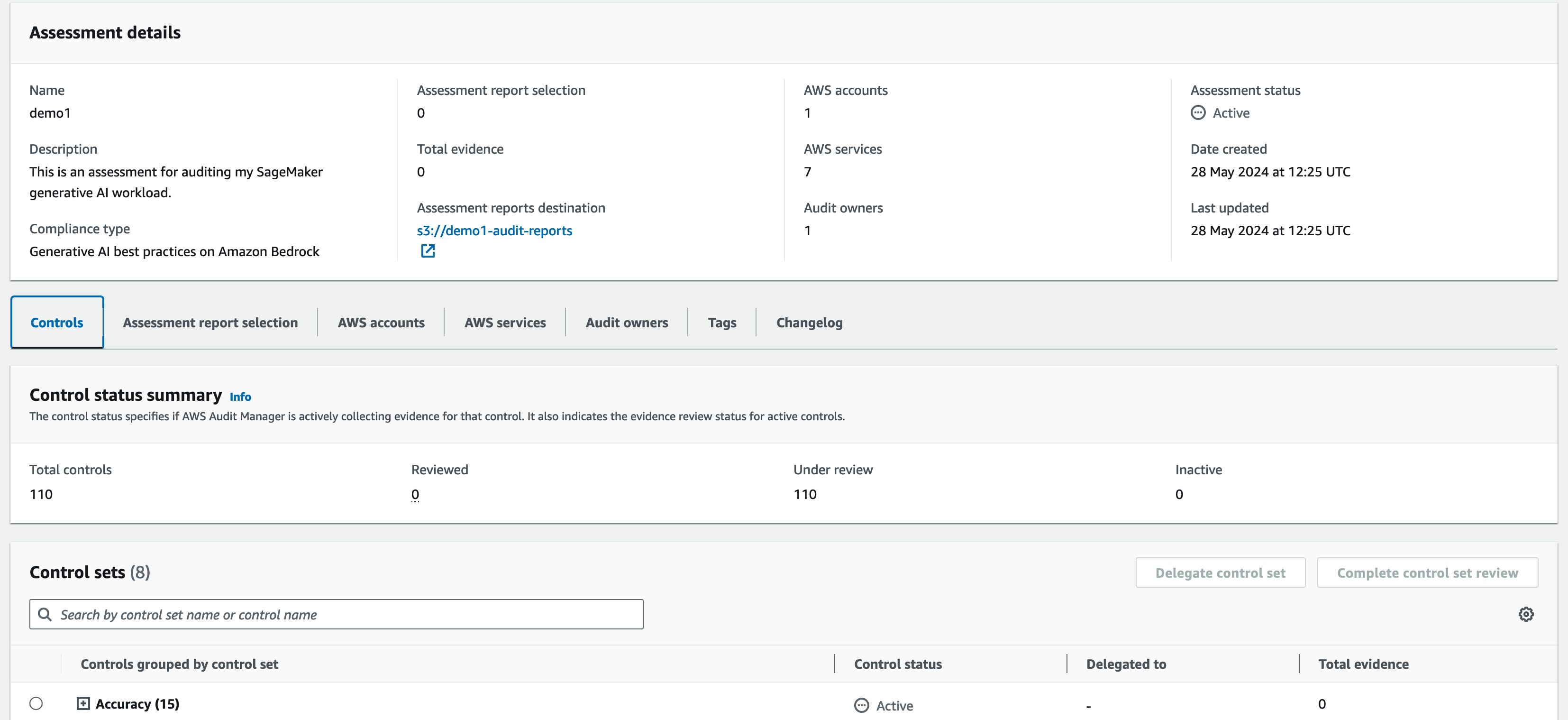
Once the assessment is created, Audit Manager starts collecting evidence in the selected AWS accounts and you start generating reports as well as surfacing any non-compliant resources in the summary screen. Keep in mind that it may take up to 24 hours for the first evaluation to show up.

The summary screen for the assessment showing details such as how many controls are available, the status of each control displaying whether they "under review" or their compliance status plus tabs where you can revisit the assessment configuration.

You can visit the assessment details screen at any time to inspect the status for any of the controls.

Conclusion
The “AWS generative AI best practices framework v2” is available today in the AWS Audit Manager framework library in all AWS Regions where Amazon Bedrock and Amazon SageMaker are available.

You can check whether Audit Manager is available in your preferred Region by visiting AWS Services by Region.

If you want to dive deeper, check out a step-by-step guide on how to get started.

Simplify AWS CloudTrail log analysis with natural language query generation in CloudTrail Lake (preview)

Post Syndicated from Esra Kayabali original https://aws.amazon.com/blogs/aws/simplify-aws-cloudtrail-log-analysis-with-natural-language-query-generation-in-cloudtrail-lake-preview/

Today, I am happy to announce in preview the generative artificial intelligence (generative AI)–powered natural language query generation in AWS CloudTrail Lake, which is a managed data lake for capturing, storing, accessing, and analyzing AWS CloudTrail activity logs to meet compliance, security, and operational needs. You can ask a question using natural language about these activity logs (management and data events) stored in CloudTrail Lake without having the technical expertise to write a SQL query or spend time to decode the exact structure of activity events. For example, you might ask, “Tell me how many database instances are deleted without a snapshot”, and the feature will convert that question to a CloudTrail Lake query, which you can run as-is or modify to get the requested event information. Natural language query generation makes the process of exploration of AWS activity logs simpler.

Now, let me show you how to start using natural language query generation.

Getting started with natural language query generation
The natural language query generator uses generative AI to produce a ready-to-use SQL query from your prompt, which you can then choose to run in the query editor of CloudTrail Lake.

In the AWS CloudTrail console, I choose Query under Lake. The query generator can only generate queries for event data stores that collect CloudTrail management and data events. I choose an event data store for my CloudTrail Lake query from the dropdown list in Event data store. In the Query generator, I enter the following prompt in the Prompt field using natural language:

How many errors were logged during the past month?

Then, I choose Generate query. The following SQL query is automatically generated:

SELECT COUNT(*) AS error_count
FROM 8a6***
WHERE eventtime >= '2024-04-21 00:00:00'
    AND eventtime <= '2024-05-21 23:59:59'
    AND (
        errorcode IS NOT NULL
        OR errormessage IS NOT NULL
    )

I choose Run to see the results.

This is interesting, but I want to know more details. I want to see which services had the most errors and why these actions were erroring out. So I enter the following prompt to request additional details:

How many errors were logged during the past month for each service and what was the cause of each error?

I choose Generate query, and the following SQL query is generated:

SELECT eventsource,
    errorcode,
    errormessage,
    COUNT(*) AS errorCount
FROM 8a6***
WHERE eventtime >= '2024-04-21 00:00:00'
    AND eventtime <= '2024-05-21 23:59:59'
    AND (
        errorcode IS NOT NULL
        OR errormessage IS NOT NULL
    )
GROUP BY 1,
    2,
    3
ORDER BY 4 DESC;

I choose Run to see the results.

In the results, I see that my account experiences most number of errors related to Amazon S3, and top errors are related to CORS and object level configuration. I can continue to dig deeper to see more details by asking further questions. But now let me give natural language query generator another instruction. I enter the following prompt in the Prompt field:

What are the top 10 AWS services that I used in the past month? Include event name as well.

I choose Generate query, and the following SQL query is generated. This SQL statement retrieves the field names (eventSource,
eventName, COUNT(*) AS event_count), restricts the rows with the date interval of the past month in the WHERE clause, groups the rows by eventSource and eventName, sorts them by the usage count, and limit the result to 10 rows as I requested in a natural language.

SELECT eventSource,
    eventName,
    COUNT(*) AS event_count
FROM 8a6***
WHERE eventTime >= timestamp '2024-04-21 00:00:00'
    AND eventTime <= timestamp '2024-05-21 23:59:59'
GROUP BY 1,
    2
ORDER BY 3 DESC
LIMIT 10;

Again, I choose Run to see the results.

I now have a better understanding of how many errors were logged during the past month, what service the error was for, and what caused the error. You can try asking questions in plain language and run the generated queries over your logs to see how this feature works with your data.

Join the preview
Natural language query generation is available in preview in the US East (N. Virginia) Region as part of CloudTrail Lake.

You can use natural language query generation in preview for no additional cost. CloudTrail Lake query charges apply when running the query to generate results. For more information, visit AWS CloudTrail Pricing.

To learn more and get started using natural language query generation, visit AWS CloudTrail Lake User Guide.

— Esra

Introducing Amazon GuardDuty Malware Protection for Amazon S3

Post Syndicated from Channy Yun original https://aws.amazon.com/blogs/aws/introducing-amazon-guardduty-malware-protection-for-amazon-s3/

Today we are announcing the general availability of Amazon GuardDuty Malware Protection for Amazon Simple Storage Service (Amazon S3), an expansion of GuardDuty Malware Protection to detect malicious file uploads to selected S3 buckets. Previously, GuardDuty Malware Protection provided agentless scanning capabilities to identify malicious files on Amazon Elastic Block Store (Amazon EBS) volumes attached to Amazon Elastic Compute Cloud (Amazon EC2) and container workloads.

Now, you can continuously evaluate new objects uploaded to S3 buckets for malware and take action to isolate or eliminate any malware found. Amazon GuardDuty Malware Protection uses multiple Amazon Web Services (AWS) developed and industry-leading third-party malware scanning engines to provide malware detection without degrading the scale, latency, and resiliency profile of Amazon S3.

With GuardDuty Malware Protection for Amazon S3, you can use built-in malware and antivirus protection on your designated S3 buckets to help you remove the operational complexity and cost overhead associated with automating malicious file evaluation at scale. Unlike many existing tools used for malware analysis, this managed solution from GuardDuty does not require you to manage your own isolated data pipelines or compute infrastructure in each AWS account and AWS Region where you want to perform malware analysis.

Your development and security teams can work together to configure and oversee malware protection throughout your organization for select buckets where new uploaded data from untrusted entities is required to be scanned for malware. You can configure post-scan action in GuardDuty, such as object tagging, to inform downstream processing, or consume the scan status information provided through Amazon EventBridge to implement isolation of malicious uploaded objects.

Getting started with GuardDuty Malware Protection for your S3 bucket
To get started, in the GuardDuty console, select Malware Protection for S3 and choose Enable.

Enter the S3 bucket name or choose Browse S3 to select an S3 bucket name from a list of buckets that belong to the currently selected Region. You can select All the objects in the S3 bucket when you want GuardDuty to scan all the newly uploaded objects in the selected bucket. Or you can also select Objects beginning with a specific prefix when you want to scan the newly uploaded objects that belong to a specific prefix.

After scanning a newly uploaded S3 object, GuardDuty can add a predefined tag with the key as GuardDutyMalwareScanStatus and the value as the scan status:

  • NO_THREATS_FOUND – No threat found in the scanned object.
  • THREATS_FOUND – Potential threat detected during scan.
  • UNSUPPORTED – GuardDuty cannot scan this object because of size.
  • ACCESS_DENIED – GuardDuty cannot access object. Check permissions.
  • FAILED – GuardDuty could not scan the object.

When you want GuardDuty to add tags to your scanned S3 objects, select Tag objects. If you use tags, you can create policies to prevent objects from being accessed before the malware scan completes and prevent your application from accessing malicious objects.

Now, you must first create and attach an AWS Identity and Access Management (IAM) role that includes the required permissions:

  • EventBridge actions to create and manage the EventBridge managed rule so that Malware Protection for S3 can listen to your S3 Event Notifications.
  • Amazon S3 and EventBridge actions to send S3 Event Notifications to EventBridge for all events in this bucket.
  • Amazon S3 actions to access the uploaded S3 object and add a predefined tag to the scanned S3 object.
  • AWS Key Management Service (AWS KMS) key actions to access the object before scanning and putting a test object on buckets with the supported DSSE-KMS and SSE-KMS

To add these permissions, choose View permissions and copy the policy template and trust relationship template. These templates include placeholder values that you should replace with the appropriate values associated with your bucket and AWS account. You should also replace the placeholder value for the AWS KMS key ID.

Now, choose Attach permissions, which opens the IAM console in a new tab. You can choose to create a new IAM role or update an existing IAM role with the permissions from the copied templates. If you want to create or update your IAM role in advance, visit Prerequisite – Create or update IAM PassRole policy in the AWS documentation.

Finally, go back to the GuardDuty browser tab that has the IAM console open, choose your created or updated IAM role, and choose Enable.

Now, you will see Active in the protection Status column for this protected bucket.

Choose View all S3 malware findings to see the generated GuardDuty findings associated with your scanned S3 bucket. If you see the finding type S3Object:S3/MaliciousFile, GuardDuty has detected the listed S3 object as malicious. Choose the Threats detected section in the Findings details panel and follow the recommended remediation steps. To learn more, visit Remediating a potentially malicious S3 object in the AWS documentation.

Things to know
You can set up GuardDuty Malware Protection for your S3 buckets even without GuardDuty enabled for your AWS account. However, if you enable GuardDuty in your account, you can use the full monitoring of foundational sources, such as AWS CloudTrail management events, Amazon Virtual Private Cloud (Amazon VPC) Flow Logs, and DNS query logs, as well as malware protection features. You can also have security findings sent to AWS Security Hub and Amazon Detective for further investigation.

GuardDuty can scan files belonging to the following synchronous Amazon S3 storage classes: S3 Standard, S3 Intelligent-Tiering, S3 Standard-IA, S3 One Zone-IA, and Amazon S3 Glacier Instant Retrieval. It will scan the file formats known to be used to spread or contain malware. At the launch, the feature supports file sizes up to 5 GB, including archive files with up to five levels and 1,000 files per level after it is decompressed.

As I said, GuardDuty will send scan metrics to your EventBridge for each protected S3 bucket. You can set up alarms and define post-scan actions, such as tagging the object or moving the malicious object to a quarantine bucket. To learn more about other monitoring options, such as Amazon CloudWatch metrics and S3 object tagging, visit Monitoring S3 object scan status in the AWS documentation.

Now available
Amazon GuardDuty Malware Protection for Amazon S3 is generally available today in all AWS Regions where GuardDuty is available, excluding China Regions and GovCloud (US) Regions.

The pricing is based on the GB volume of the objects scanned and number of objects evaluated per month. This feature comes with a limited AWS Free Tier, which includes 1,000 requests and 1 GB each month, pursuant to conditions for the first 12 months of account creation for new AWS accounts, or until June 11, 2025, for existing AWS accounts. To learn more, visit the Amazon GuardDuty pricing page.

Give GuardDuty Malware Protection for Amazon S3 a try in the GuardDuty console. For more information, visit the Amazon GuardDuty User Guide and send feedback to AWS re:Post for Amazon GuardDuty or through your usual AWS support contacts.

— Channy

IAM Access Analyzer Update: Extending custom policy checks & guided revocation

Post Syndicated from Jeff Barr original https://aws.amazon.com/blogs/aws/iam-access-analyzer-update-extending-custom-policy-checks-guided-revocation/

We are making IAM Access Analyzer even more powerful, extending custom policy checks and adding easy access to guidance that will help you to fine-tune your IAM policies. Both of these new features build on the Custom Policy Checks and the Unused Access analysis that were launched at re:Invent 2023. Here’s what we are launching:

New Custom Policy Checks – Using the power of automated reasoning, the new checks help you to detect policies that grant access to specific, critical AWS resources, or that grant any type of public access. Both of the checks are designed to be used ahead of deployment, possibly as part of your CI/CD pipeline, and will help you proactively detect updates that do not conform to your organization’s security practices and policies.

Guided Revocation – IAM Access Analyzer now gives you guidance that you can share with your developers so that they can revoke permissions that grant access that is not actually needed. This includes unused roles, roles with unused permissions, unused access keys for IAM users, and unused passwords for IAM users. The guidance includes the steps needed to either remove the extra items or to replace them with more restrictive ones.

New Custom Policy Checks
The new policy checks can be invoked from the command line or by calling an API function. The checks examine a policy document that is supplied as part of the request and return a PASS or FAIL value. In both cases, PASS indicates that the policy document properly disallows the given access, and FAIL indicates that the policy might allow some or all of the permissions. Here are the new checks:

Check No Public Access – This check operates on a resource policy, and checks to see if the policy grants public access to a specified resource type. For example, you can check a policy to see if it allows public access to an S3 bucket by specifying the AWS::S3::Bucket resource type. Valid resource types include DynamoDB tables and streams, EFS file systems, OpenSearch domains, Kinesis streams and stream consumers, KMS keys, Lambda functions, S3 buckets and access points, S3 Express directory buckets, S3 Outposts buckets and access points, Glacier, Secrets Manager secrets, SNS topics and queues, and IAM policy documents that assume roles. The list of valid resource types will expand over time and can be found in the CheckNoPublicAccess documentation,

Let’s say that I have a policy which accidentally grants public access to an Amazon Simple Queue Service (Amazon SQS) queue. Here’s how I check it:

$ aws accessanalyzer check-no-public-access --policy-document file://resource.json \
  --resource-type AWS::SQS::Queue --output json

And here is the result:

{
    "result": "FAIL",
    "message": "The resource policy grants public access for the given resource type.",
    "reasons": [
        {
            "description": "Public access granted in the following statement with sid: SqsResourcePolicy.",
            "statementIndex": 0,
            "statementId": "SqsResourcePolicy"
        }
    ]
}

I edit the policy to remove the access grant and try again, and this time the check passes:

{
    "result": "PASS",
    "message": "The resource policy does not grant public access for the given resource type."
}

Check Access Not Granted – This check operates on a single resource policy or identity policy at a time. It also accepts an list of actions and resources, both in the form that are acceptable as part of an IAM policy. The check sees if the policy grants unintended access to any of the resources in the list by way of the listed actions. For example, this check could be used to make sure that a policy does not allow a critical CloudTrail trail to be deleted:

$ aws accessanalyzer check-access-not-granted --policy-document file://ct.json \
  --access resources="arn:aws:cloudtrail:us-east-1:123456789012:trail/MySensitiveTrail" \
  --policy-type IDENTITY_POLICY --output json

IAM Access Analyzer indicates that the check fails:

{
    "result": "FAIL",
    "message": "The policy document grants access to perform one or more of the listed actions or resources.",
    "reasons": [
        {
            "description": "One or more of the listed actions or resources in the statement with index: 0.",
            "statementIndex": 0
        }
    ]
}

I fix the policy and try again, and this time the check passes, indicating that the policy does not grant access to the listed resources:

{
    "result": "PASS",
    "message": "The policy document does not grant access to perform the listed actions or resources."
}

Guided Revocation
In my earlier post I showed you how IAM Access Analyzer discovers and lists IAM items that grant access which is not actually needed. With today’s launch, you now get guidance to help you (or your developer team) to resolve these findings. Here are the latest findings from my AWS account:

Some of these are leftovers from times when I was given early access to a service so that I could use and then blog about it; others are due to my general ineptness as a cloud admin! Either way, I need to clean these up. Let’s start with the second one, Unused access key. I click on the item and can see the new Recommendations section at the bottom:

I can follow the steps and delete the access key or I can click Archive to remove the finding from the list of active findings and add it to the list of archived ones. I can also create an archive rule that will do the same for similar findings in the future. Similar recommendations are provided for unused IAM users, IAM roles, and passwords.

Now let’s take a look at a finding of Unused permissions:

The recommendation is to replace the existing policy with a new one. I can preview the new policy side-by-side with the existing one:

As in the first example I can follow the steps or I can archive the finding.

The findings and the recommendations are also available from the command line. I generate the recommendation by specifying an analyzer and a finding from it:

$ aws accessanalyzer generate-finding-recommendation \
  --analyzer-arn arn:aws:access-analyzer-beta:us-west-2:123456789012:analyzer/MyAnalyzer \
  --id 67110f3e-05a1-4562-b6c2-4b009e67c38e

Then I retrieve the recommendation. In this example, I am filtering the output to only show the steps since the entire JSON output is fairly rich:

$ aws accessanalyzer get-finding-recommendation \
  --analyzer-arn arn:aws:access-analyzer-beta:us-west-2:123456789012:analyzer/MyAnalyzer \
  --id 67110f3e-05a1-4562-b6c2-4b009e67c38e --output json | \
  jq .recommendedSteps[].unusedPermissionsRecommendedStep.recommendedAction
"CREATE_POLICY"
"DETACH_POLICY"

You can use these commands (or the equivalent API calls) to integrate the recommendations into your own tools and systems.

Available Now
The new checks and the resolution steps are available now and you can start using them today in all public AWS regions!

— Jeff;

AWS adds passkey multi-factor authentication (MFA) for root and IAM users

Post Syndicated from Sébastien Stormacq original https://aws.amazon.com/blogs/aws/aws-adds-passkey-multi-factor-authentication-mfa-for-root-and-iam-users/

Security is our top priority at Amazon Web Services (AWS), and today, we’re launching two capabilities to help you strengthen the security posture of your AWS accounts:

MFA is one of the simplest and most effective ways to enhance account security, offering an additional layer of protection to help prevent unauthorized individuals from gaining access to systems or data.

MFA with passkey for your root and IAM users
Passkey is a general term used for the credentials created for FIDO2 authentication.

A passkey is a pair of cryptographic keys generated on your client device when you register for a service or a website. The key pair is bound to the web service domain and unique for each one.

The public part of the key is sent to the service and stored on their end. The private part of the key is either stored in a secured device, such as a security key, or securely shared across your devices connected to your user account when you use cloud services, such as iCloud Keychain, Google accounts, or a password manager such as 1Password.

Typically, the access to the private part of the key is protected by a PIN code or a biometric authentication, such as Apple Face ID or Touch ID or Microsoft Hello, depending on your devices.

When I try to authenticate on a service protected with passkeys, the service sends a challenge to my browser. The browser then requests my device sign the challenge with my private key. This triggers a PIN or biometric authentication to access the secured storage where the private key is stored. The browser returns the signature to the service. When the signature is valid, it confirms I own the private key that matches the public key stored on the service, and the authentication succeeds.

You can read more about this process and the various standards at work (FIDO2, CTAP, WebAuthn) in the post I wrote when AWS launched support for passkeys in AWS IAM Identity Center back in November 2020.

Passkeys can be used to replace passwords. However, for this initial release, we choose to use passkeys as a second factor authentication, in addition to your password. The password is something you know, and the passkey is something you have.

Passkeys are more resistant to phishing attacks than passwords. First, it’s much harder to gain access to a private key protected by your fingerprint, face, or a PIN code. Second, passkeys are bound to a specific web domain, reducing the scope in case of unintentional disclosure.

As an end user, you will benefit from the convenience of use and easy recoverability. You can use the built-in authenticators in your phones and laptops to unlock a cryptographically secured credential to your AWS sign-in experience. And when using a cloud service to store the passkey (such as iCloud keychain, Google accounts, or 1Password), the passkey can be accessed from any of your devices connected to your passkey provider account. This helps you to recover your passkey in the unfortunate case of losing a device.

How to enable passkey MFA for an IAM user
To enable passkey MFA, I navigate to the AWS Identity and Access Management (IAM) section of the console. I select a user, and I scroll down the page to the Multi-factor authentication (MFA) section. Then, I select Assign MFA device.

Note that to help you increase resilience and account recovery, you can have multiple MFA devices enabled for a user.

Enable MFA in AM console

On the next page, I enter an MFA device name, and I select Passkey or security key. Then, I select next.

enable MFA : select passkey

When using a password manager application that supports passkeys, it will pop up and ask if you want to generate and store a passkey using that application. Otherwise, your browser will present you with a couple of options. The exact layout of the screen depends on the operating system (macOS or Windows) and the browser you use. Here is the screen I see on macOS with a Chromium-based browser.

Enable passkey : choose method

The rest of the experience depends on your selection. iCloud Keychain will prompt you for a Touch ID to generate and store the passkey.

In the context of this demo, I want to show you how to bootstrap the passkey on another device, such as a phone. I therefore select Use a phone, tablet, or security key instead. The browser presents me with a QR code. Then, I use my phone to scan the QR code. The phone authenticates me with Face ID and generates and stores the passkey.

Passkey : scan a QR code

This QR code-based flow allows a passkey from one device to be used to sign in on another device (a phone and my laptop in my demo). It is defined by the FIDO specification and known as cross device authentication (CDA).

When everything goes well, the passkey is now registered with the IAM user.

Enable passkey : success

Note that we don’t recommend using IAM users to authenticate human beings to the AWS console. We recommend configuring single sign-on (SSO) with AWS IAM Identity Center instead.

What’s the sign-in experience?
Once MFA is enabled and configured with a passkey, I try to sign in to my account.

The user experience differs based on the operating system, browser, and device you use.

For example, on macOS with iCloud Keychain enabled, the system prompts me for a touch on the Touch ID key. For this demo, I registered the passkey on my phone using CDA. Therefore, the system asks me to scan a QR code with my phone. Once scanned, the phone authenticates me with Face ID to unlock the passkey, and the AWS console terminates the sign-in procedure.

Authenticate with MFA and passkey

Enforcing MFA for root users
The second announcement today is that we have started to enforce the use of MFA for the root user on some AWS accounts. This change was announced last year in a blog post from Stephen Schmidt, Chief Security Officer at Amazon.

To quote Stephen:

Verifying that the most privileged users in AWS are protected with MFA is just the latest step in our commitment to continuously enhance the security posture of AWS customers.

We started with your most sensitive account: your management account for AWS Organizations. The deployment of the policy is progressive, with just a few thousand accounts at a time. Over the coming months, we will progressively deploy the MFA enforcement policy on root users for the majority of the AWS accounts.

When you don’t have MFA enabled on your root user account, and your account is updated, a new message will pop up when you sign in, asking you to enable MFA. You will have a grace period, after which the MFA becomes mandatory.

Enable MFA on root account

You can start to use passkeys for multi-factor authentication today in all AWS Regions, except in China.

We’re enforcing the use of multi-factor authentication in all AWS Regions, except for the two regions in China (Beijing, Ningxia) and for AWS GovCloud (US), because the AWS accounts in these Regions have no root user.

Now go activate passkey MFA for your root user in your accounts.

— seb

Как (не) се печелят демократични избиратели

Post Syndicated from Светла Енчева original https://www.toest.bg/kak-ne-se-pechelyat-demokratichni-izbirateli/

Как (не) се печелят демократични избиратели

Ако резултатите от тези избори не ни харесат, ще има и други, мислят си и избирателите, и политиците в България. Те се отнасят едни към други като към консуматив, който можеш да изхвърлиш след употреба. Докато избирателите обаче имат възможността да си намерят нова партия, от която после да се разочароват, партиите разполагат с една-единствена електорална база – няма как да си създадат други граждани, имащи право на глас. Но не изглежда да го осъзнават.

Колко представителни са резултатите от изборите

До избирателните урни са отишли малко под 1/3 от гласоподавателите. Това означава, че резултатите спрямо всички избиратели са поне три пъти по-ниски от съобщаваните. Защото делът на гласовете за една или друга политическа сила се изчислява спрямо гласувалите, а не по отношение на всички, които имат активно избирателно право.

За да видим в каква степен изборните резултати представят всички български граждани, нека направим едно на пръв поглед странно упражнение – да съотнесем получените гласове не към гласувалите, а към имащите право на глас.

Ако има безспорен победител на тези избори, това е ГЕРБ. „Категоричната“ победа на партията на Бойко Борисов обаче се изразява в няма и 8% от гласовете на всички имащи право на глас. ДПС взема 5% и нещо на националните избори, ПП–ДБ и „Възраждане“ едва минават 4-процентовата бариера. БСП и ИТН вземат около 2%. „Изненадващо“ класиралата се за българския парламент партия „Величие“ – около 1,5%.

Около 17% са достатъчни за формирането на парламентарно мнозинство от 50% плюс един глас, било то явно или на принципа на „патериците“. Такова мнозинство има нелоши шансове да излезе стабилно, защото депутатите от ПП–ДБ, които клатеха лодката, пардон, сглобката, с опитите си да правят дълбоки реформи, по всяка вероятност ще са в опозиция. И току-виж станало така, че с гласовете на 17% се управляват останалите 83% от българските граждани в следващите четири години.

Кой има и кой няма сметка от ниската избирателна активност

Ниската избирателна активност е от полза най-вече за ГЕРБ. Бойко Борисов може да се тупа в гърдите каква победа е постигнала партията му, като пренебрегва факта, че гласовете за нея продължават прогресивно да намаляват.

Щастливи са, разбира се, и в ДПС. И разчитането на твърдия електорат, и контролираният вот водят до толкова по-високи резултати, колкото по-малко хора са гласували. Нямат основание да се оплакват и от „Възраждане“, както и от другите популистки партии, прескочили 4-процентовата бариера – ИТН (иронично, защото задължителното гласуване, което на практика не работи, беше въведено тъкмо след референдума на Слави Трифонов) и особено „Величие“.

За партиите, които не се класират за националния парламент, но получават над 1% от гласовете, има утешителна награда – партийни субсидии. С такива ще разполага само ПП МЕЧ. На ВМРО не ѝ достига съвсем малко, тъй като резултатът ѝ е 0,99%. Без субсидия остават също „Център“ на Васил Божков, „Синя България“ и „Солидарна България“, защото са коалиции и за тях минималният праг е 4% от действителните гласове.

Потърпевши от ниската избирателна активност са най-вече ПП–ДБ и бившият им партньор Зелено движение, който взема по-малко от 0,5% и на двата вида избори – за национален и за европейски парламент. Също и някои по-малки партии с политически амбиции, както и БСП, която не може да мобилизира левите избиратели.

Демократични ценности срещу антидемократични резултати

Най-потърпевши всъщност са партиите, изповядващи демократични ценности, защото разполагат с огромен електорален ресурс, който не успяват да привлекат.

Одобрението за демокрацията като форма на държавно управление в последните години нараства, сочат резултатите от изследване на „Отворено общество“. Докато през 2018 г. 44% от пълнолетните български граждани одобряват демокрацията, а 34% – не, през 2023 г. подкрепата за нея вече е 63%, а неодобрението – едва 19%.

Според изследване на „Алфа Рисърч“ от март 2024 г. пък 60% от избирателите искат България да е в ЕС, а възможността да защитават правата си в Европейския съд по правата на човека в Страсбург и да работят в друга страна членка се оценява положително от над 80%. В същото време българите са критични към редица европейски политики, както впрочем и европейските им събратя.

Разбира се, този демократичен мед не е без някоя и друга капка катран. От изследването на „Отворено общество“ научаваме, че близо половината пълнолетни български граждани биха искали да има не парламент и избори, а силен водач. Също толкова са съгласни да се ограничат за кратко време някои от демократичните права и свободи, за да има ред и сигурност (но този възглед би могъл отчасти да е последствие от пандемията и ограничителните мерки, свързани с нея). И цели 65% смятат, че е по-добре решенията да се вземат от експерти, а не от правителство, дошло на власт след демократични избори.

Накратко, като че на мнозинството от българските граждани им харесва да има демокрация, но много от тях не виждат собственото си участие в нея, а им се ще решенията да се вземат от някой друг – било експерти, било силен лидер. Парадоксът е, че тъкмо участието на хората прави възможна демокрацията. А отказът от участие я подкопава.

Как демократичните партии (не) привличат избиратели

От една страна, имаме избиратели, които поне декларират, че са демократично и проевропейски настроени. От друга страна, имаме демократични и проевропейски партии, за които демократичните и проевропейските избиратели не гласуват. По-конкретно, от 60-ина процента гласуват по-малко от 20%, и то при условие, че броим и избирателите на ГЕРБ и ДПС – партии, които се водят евроатлантически.

Следователно има едни около 40% от гласоподавателите, които се идентифицират като демократични, но не припознават демократичните партии като представляващи техните интереси. Тези 40% са повече от всички гласували на последните избори, взети заедно.

Как подходиха към тези избиратели големите губещи на изборите – ПП–ДБ? С една дума – неадекватно. С малко повече думи – в огромната си част посланията на коалицията бяха насочени най-вече към твърдия ѝ електорат, който обаче все повече се топи. 

Само в „балона“ на ПП–ДБ се намираха хора, които да се радват на „скандалните“ билбордове – с карикатурата с прасето и тиквата и със снимките на Денков, Борисов и Пеевски. Но дори и в този „балон“ настана чуденето: защо коалицията отправя послания, сякаш никога не е управлявала с Борисов и Пеевски? Защо по-скоро не акцентира върху пропутинския завой, който без това компромисно управление можеше да стане необратим?

По традиция от ДБ говорят за необходимостта от правосъдна реформа с думи, които са не особено разбираеми, но затова пък скучни за по-голямата част от населението. Дигитализацията е значима тема за много тънък слой избиратели.

От ПП имаха и послания, смислени за повече хора. Особено Асен Василев все повтаряше колко са се повишили доходите и пенсиите по време на кратките управления с участието на коалицията. Въпреки че доходите са важна тема за населението на България, която е свикнала да е най-бедната страна в ЕС (напоследък Унгария е тръгнала да я изпреварва), припомняните от Василев факти така и не се превърнаха в чуваеми послания.

За сметка на това избирателят беше занимаван с всекидневието на Кирил Петков в потомственото му жилище в центъра на София. Нещо, което е в състояние да отблъсне повечето потенциални гласоподаватели на ПП–ДБ, а и някои от актуалните (които, обяснимо, не живеят в потомствени жилища в столичния център).

За комуникационния гений, дал идеята за това видео с Петков, би било полезно да се пресели за някой и друг месец в някое градче, в което работните места и институциите зависят от неколцина местни дерибеи, а най-важна за личното и професионалното оцеляване е лоялността към силните. И като се премести, нека е така добър да обсъди идеите си за политическа реклама с хората от града.

Още по-нелепо е видеото с патриотарските дитирамби, изрецитирани от Петков. Ако комуникационния гений на кампанията е решил по този начин да събере малко националпопулистки вот, не му се е получило. Има си автентични представители на жанра, връх в който беше Слави Трифонов, преди предвожданата от него партия ИТН да се сведе до патерица на ГЕРБ. Очевидно и предводителите на „Величие“ се справят добре на това поле.

Пътят към негласуващите

По нищо не личи специалистите, които правят комуникационните кампании на демократичните партии, да се интересуват що за хора са избирателите, в частност – потенциалните избиратели на съответните партии, които обаче не гласуват за тях. За самите демократични политици изглежда по-важно да не засягат определени теми, които се смятат за спорни, отколкото да разберат що за хора са си поставили за цел да представляват.

Да се изследват негласуващите не е нещо невъзможно. Не е и евтино, но е платимо, особено с оглед на залога – политическото бъдеще (и на демократичните партии, и на страната). Вече има отделни изследвания, върху които може да се стъпи.

Различни социологически агенции засягат темата за негласуващите в свои изследвания. Екип под ръководството на психолога Пламен Димитров е съставил психологически профили на икономически активните негласуващи в течение на пет електорални кампании. В края на май т.г. тема на броя на „Капитал“ бяха негласуващите. От екипа на вестника са разговаряли със социолози, а също така са взели кратки интервюта от млади гласоподаватели.

Какво може да направи една партия или коалиция, която иска да опознае по-добре потенциалните си негласуващи избиратели?

  • На първо място – скринингово изследване, за да отдели избиратели, които споделят нейните базисни ценности, но не гласуват.
  • Второ – от тях да подбере участници в групови дискусии (фокус групи) в различни населени места в страната. В дискусиите да се обсъжда например как живеят участниците, какви са основните им проблеми, кое ги спира да гласуват, за каква политика биха дали гласа си.
  • Трето – груповите дискусии да се анализират, да се извадят както общите проблемни области, така и типичните за различните региони и гласоподаватели.
  • Четвърто – да се съставят по-малко групи, но с по-разнообразен профил, с които да се обсъждат евентуални предизборни послания.

Нищо от горното обаче не би имало смисъл, ако демократичните партии не се понаучат да общуват с избирателите си с уважение. Ако не се опитват да ги включват пълноценно в политическия живот, да създават общности около себе си, да вдъхновяват, да делегират отговорности и да поемат отговорност за неуспехите си, да се извиняват, да благодарят.

Най-малкото – да се покажат след изборите, а не да се крият. Така, както се показаха политиците от страните в ЕС, където също имаше избори.

Каква е алтернативата

Отказът от живо политическо общуване, каквото имаше в България след 1989 г., започна да става норма с управлението на Симеон Сакскобургготски, припомня главната редакторка на „Свободна Европа“ Татяна Ваксберг. Лидерът на ГЕРБ нормализира отказа от участието в политически дебати и интервюта. С течение на времето на практика изчезнаха и следизборните пресконференции. Хората свикнаха Борисов да се включва с видео където и когато той си реши. И монологичните включвания станаха популярни. Това издигна и Слави Трифонов на гребена на вълната преди няколко години, а днес – и „Величие“.

Всичко това е добре за ГЕРБ, доколкото партията все успява да се върне на власт, дори да губи гласоподаватели. Добре е и за ДПС. И за популистите, които се изживяват като велики водачи. Затова просто съобщават „истината“, а не се „принизяват“ да спорят и да отговарят на въпроси. Не е добре обаче за демократичните партии, защото автентичното политическо общуване е в сърцето на демокрацията.

Алтернативата всъщност вече я живеем. Щом сме допуснали в парламента да влезе партия като „Величие“, зад която стоят хора, подозирани не просто в съмнителни дейности, но и че си правят нещо като частна армия. Това е противоконституционно. Но е факт. Станал е възможен, защото демократичното мнозинство в България е допуснало имитационна демокрация, нереформирани служби и куца правосъдна система. А е допуснало всичко това, защото е свикнало с мисълта, че нищо не зависи от него.

Затова вече е крайно време демократичните партии да излязат от елитарното си високомерие. В противен случай не след дълго и малкото демократични избиратели, които искат да гласуват, няма да има за кого. А когато изборите загубят смисъл, вече не живеем в демокрация. А в диктатура. Дали тази диктатура ще направи завой към путинизма като Унгария, или ще имитира евроатлантизъм, е друг въпрос.

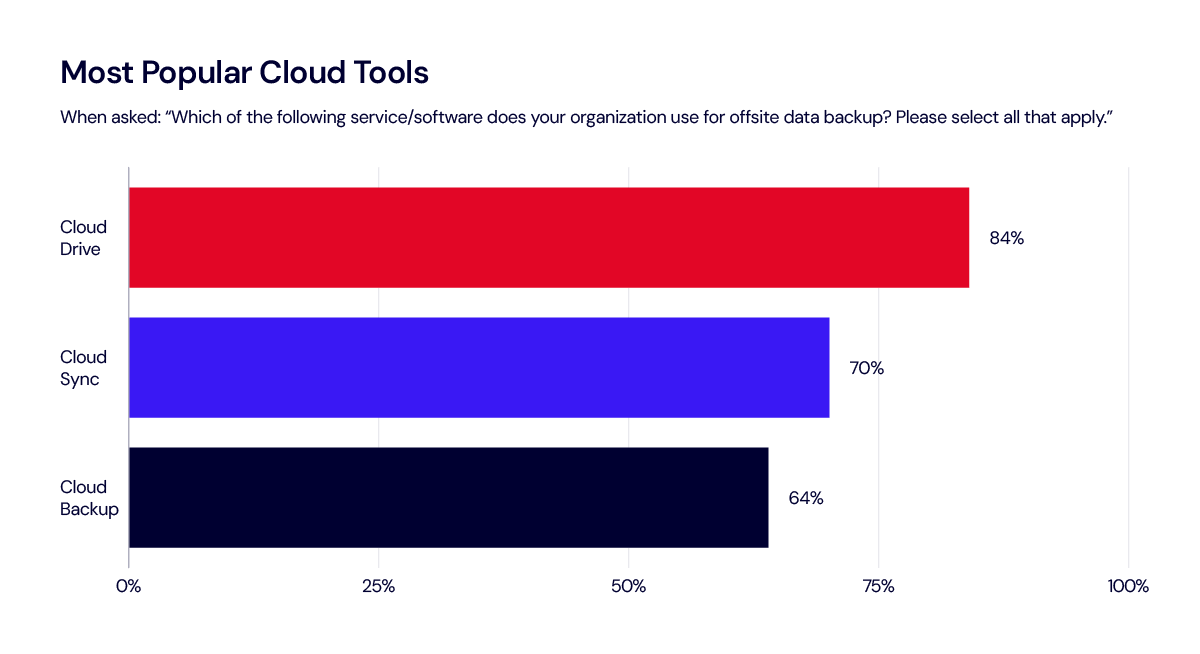
Security updates for Tuesday

Post Syndicated from corbet original https://lwn.net/Articles/977939/

Security updates have been issued by AlmaLinux (ruby:3.3), Fedora (efifs, libvirt, podman-tui, prometheus-podman-exporter, and strongswan), Red Hat (firefox, idm:DL1, ipa, nghttp2, and thunderbird), SUSE (aws-nitro-enclaves-cli, cdi-apiserver-container, cdi-cloner-container, cdi- controller-container, cdi-importer-container, cdi-operator-container, cdi- uploadproxy-container, cdi-uploadserver-container, containerized-data-importer, frr, glibc, go1.21, go1.22, gstreamer-plugins-base, kernel, kernel-firmware-nvidia-gspx-G06, nvidia-open- driver-G06-signed, libxml2, mariadb, poppler, python-Brotli, python-docker, python-idna, rmt-server, skopeo, sssd, unbound, unrar, util-linux, and webkit2gtk3), and Ubuntu (giflib, libphp-adodb, linux-gkeop, linux-gkeop-5.15, linux-kvm, linux-laptop, linux-oem-6.8, nodejs, and tiff).

LLMs Acting Deceptively

Post Syndicated from Bruce Schneier original https://www.schneier.com/blog/archives/2024/06/llms-acting-deceptively.html

New research: “Deception abilities emerged in large language models“:

Abstract: Large language models (LLMs) are currently at the forefront of intertwining AI systems with human communication and everyday life. Thus, aligning them with human values is of great importance. However, given the steady increase in reasoning abilities, future LLMs are under suspicion of becoming able to deceive human operators and utilizing this ability to bypass monitoring efforts. As a prerequisite to this, LLMs need to possess a conceptual understanding of deception strategies. This study reveals that such strategies emerged in state-of-the-art LLMs, but were nonexistent in earlier LLMs. We conduct a series of experiments showing that state-of-the-art LLMs are able to understand and induce false beliefs in other agents, that their performance in complex deception scenarios can be amplified utilizing chain-of-thought reasoning, and that eliciting Machiavellianism in LLMs can trigger misaligned deceptive behavior. GPT-4, for instance, exhibits deceptive behavior in simple test scenarios 99.16% of the time (P < 0.001). In complex second-order deception test scenarios where the aim is to mislead someone who expects to be deceived, GPT-4 resorts to deceptive behavior 71.46% of the time (P < 0.001) when augmented with chain-of-thought reasoning. In sum, revealing hitherto unknown machine behavior in LLMs, our study contributes to the nascent field of machine psychology.

Heeding the call to support Australia’s most at-risk entities

Post Syndicated from Carly Ramsey original https://blog.cloudflare.com/heeding-the-call-to-support-australias-most-at-risk-entities


When Australia unveiled its 2023-2030 Australian Cyber Security Strategy in November 2023, we enthusiastically announced Cloudflare’s support, especially for the call for the private sector to work together to protect Australia’s smaller, at-risk entities. Today, we are extremely pleased to announce that Cloudflare and the Critical Infrastructure – Information Sharing and Analysis Centre (CI-ISAC), a member-driven organization helping to defend Australia’s critical infrastructure from cyber attacks, are teaming up to protect some of Australia’s most at-risk organizations – General Practitioner (GP) clinics.

Cloudflare helps a broad range of organizations -– from multinational organizations, to entrepreneurs and small businesses, to nonprofits, humanitarian groups, and governments across the globe — to secure their employees, applications and networks. We support a multitude of organizations in Australia, including some of Australia’s largest banks and digital natives, with our world-leading security products and services.

When it comes to protecting entities at high risk of cyber attack who might not have significant resources, we at Cloudflare believe we have a lot to offer. Our mission is to help build a better Internet. A key part of that mission is democratizing cybersecurity – making a range of tools readily available for all, including small and medium enterprises (SMEs), non-profits, and individuals. We also offer our cyber protection products and services at no cost to certain at-risk organizations. One example of this is Australia’s Citizens of the Great Barrier Reef, which is a participant in Cloudflare’s Project Galileo. Through Project Galileo, they have access to our advanced cybersecurity tools and support, freeing them to focus on their mission.

CI-ISAC Australia is a not-for-profit organization with a mission to help build the collective defenses of Australia’s critical infrastructure to protect them from crippling cyberattacks. CI-ISAC facilitates sharing, aggregates sources, and analyzes cyber threat intelligence across multiple sectors, including healthcare.

Project Secure Health – protecting Australia’s General Practitioner (GP) clinics

Globally, the healthcare sector consistently reports the highest financial costs from cyber attacks. Sensitive patient data is a prime target for cybercriminals. Not surprisingly, Australia’s big and small healthcare organizations alike are facing crippling cyberattacks. GP clinics serve as the backbone of Australia’s community healthcare, but these small-but-essential entities typically face resource constraints that make it difficult for them to implement fundamental but costly cybersecurity measures, leaving Australian patient data exposed to cybercriminals.

The 2023-2030 Australia Cybersecurity Strategy is clear about the threat to smaller at-risk organizations and the vital role of the private sector in supporting these entities. We couldn’t agree more. Heeding their call to help make Australia more secure for all, we are extremely pleased to introduce Project Secure Health: Cloudflare and CI-ISAC’s combined cyber security support for Australia’s GP clinics. This program will enable Australia’s GP Clinics to counter a range of challenging cyber threats: data breaches, ransomware attacks, phishing scams, and insider threats.

CI-ISAC will provide GP clinics with membership in its organization for free and with no time limit, which will enable member GP clinics to proactively understand and respond to healthcare-specific cyber threats. Clinics will have access to CI-ISAC’s tailored threat intelligence products and services, informed by observations across Australia’s critical infrastructure sectors.

As members of CI-ISAC, GP clinics will also receive key Cloudflare services, for free and with no time limit: Cloudflare Gateway, and Cloudflare Access, our Zero Trust Network Access (ZTNA) service. Cloudflare Gateway helps protect GP clinics against Internet threats by preventing staff from accessing harmful and inappropriate Internet content, like ransomware or phishing sites. With Cloudflare Access, GP clinics can simply and effectively manage user access to sensitive patient data, thereby minimizing the risk of unauthorized users gaining access.

Cloudflare and CI-ISAC are ready to support

For GP Clinics interested in participating in Project Secure Health, please contact CI-ISAC at [email protected]. To be eligible for free CI-ISAC membership and Cloudflare ZTNA services, GP Clinics must have fewer than 50 staff members.

The collective thoughts of the interwebz