Post Syndicated from Explosm.net original https://explosm.net/comics/employment-gap
New Cyanide and Happiness Comic
Post Syndicated from Explosm.net original https://explosm.net/comics/employment-gap
New Cyanide and Happiness Comic
Post Syndicated from Danilo Poccia original https://aws.amazon.com/blogs/aws/new-self-service-provisioning-of-terraform-open-source-configurations-with-aws-service-catalog/
With AWS Service Catalog, you can create, govern, and manage a catalog of infrastructure as code (IaC) templates that are approved for use on AWS. These IaC templates can include everything from virtual machine images, servers, software, and databases to complete multi-tier application architectures. You can control which IaC templates and versions are available, what is configured by each version, and who can access each template based on individual, group, department, or cost center. End users such as engineers, database administrators, and data scientists can then quickly discover and self-service provision approved AWS resources that they need to use to perform their daily job functions.
When using Service Catalog, the first step is to create products based on your IaC templates. You can then collect products, together with configuration information, in a portfolio.
Starting today, you can define Service Catalog products and their resources using either AWS CloudFormation or Hashicorp Terraform and choose the tool that better aligns with your processes and expertise. You can now integrate your existing Terraform configurations into Service Catalog to have them part of a centrally approved portfolio of products and share it with the AWS accounts used by your end users. In this way, you can prevent inconsistencies and mitigate the risk of noncompliance.
When resources are deployed by Service Catalog, you can maintain least privilege access during provisioning and govern tagging on the deployed resources. End users of Service Catalog pick and choose what they need from the list of products and versions they have access to. Then, they can provision products in a single action regardless of the technology (CloudFormation or Terraform) used for the deployment.
The Service Catalog hub-and-spoke model that enables organizations to govern at scale can now be extended to include Terraform configurations. With the Service Catalog hub and spoke model, you can centrally manage deployments using a management/user account relationship:
Let’s see how this works in practice.
Creating an AWS Service Catalog Product Using Terraform
To get started, I install the Terraform Reference Engine (provided by AWS on GitHub) that configures the code and infrastructure required for the Terraform open-source engine to work with AWS Service Catalog. I only need to do this once, in the management account for Service Catalog, and the setup takes just minutes. I use the automated installation script:
./deploy-tre.sh -r us-east-1To keep things simple for this post, I create a product deploying a single EC2 instance using AWS Graviton processors and the Amazon Linux 2023 operating system. Here’s the content of my main.tf file:
I sign in to the AWS Management Console in the management account for Service Catalog. In the Service Catalog console, I choose Product list in the Administration section of the navigation pane. There, I choose Create product.
In Product details, I select Terraform open source as Product type. I enter a product name and description and the name of the owner.

In the Version details, I choose to Upload a template file (using a tar.gz archive). Optionally, I can specify the template using an S3 URL or an external code repository (on GitHub, GitHub Enterprise Server, or Bitbucket) using an AWS CodeStar provider.

I enter support details and custom tags. Note that tags can be used to categorize your resources and also to check permissions to create a resource. Then, I complete the creation of the product.
Adding an AWS Service Catalog Product Using Terraform to a Portfolio
Now that the Terraform product is ready, I add it to my portfolio. A portfolio can include both Terraform and CloudFormation products. I choose Portfolios from the Administrator section of the navigation pane. There, I search for my portfolio by name and open it. I choose Add product to portfolio. I search for the Terraform product by name and select it.

Terraform products require a launch constraint. The launch constraint specifies the name of an AWS Identity and Access Management (IAM) role that is used to deploy the product. I need to separately ensure that this role is created in every account with which the product is shared.
The launch role is assumed by the Terraform open-source engine in the management account when an end user launches, updates, or terminates a product. The launch role also contains permissions to describe, create, and update a resource group for the provisioned product and tag the product resources. In this way, Service Catalog keeps the resource group up-to-date and tags the resources associated with the product.
The launch role enables least privilege access for end users. With this feature, end users don’t need permission to directly provision the product’s underlying resources because your Terraform open-source engine assumes the launch role to provision those resources, such as an approved configuration of an Amazon Elastic Compute Cloud (Amazon EC2) instance.
In the Launch constraint section, I choose Enter role name to use a role I created before for this product:

I complete the addition of the product to my portfolio. Now the product is available to the end users who have access to this portfolio.
Launching an AWS Service Catalog Product Using Terraform
End users see the list of products and versions they have access to and can deploy them in a single action. If you already use Service Catalog, the experience is the same as with CloudFormation products.
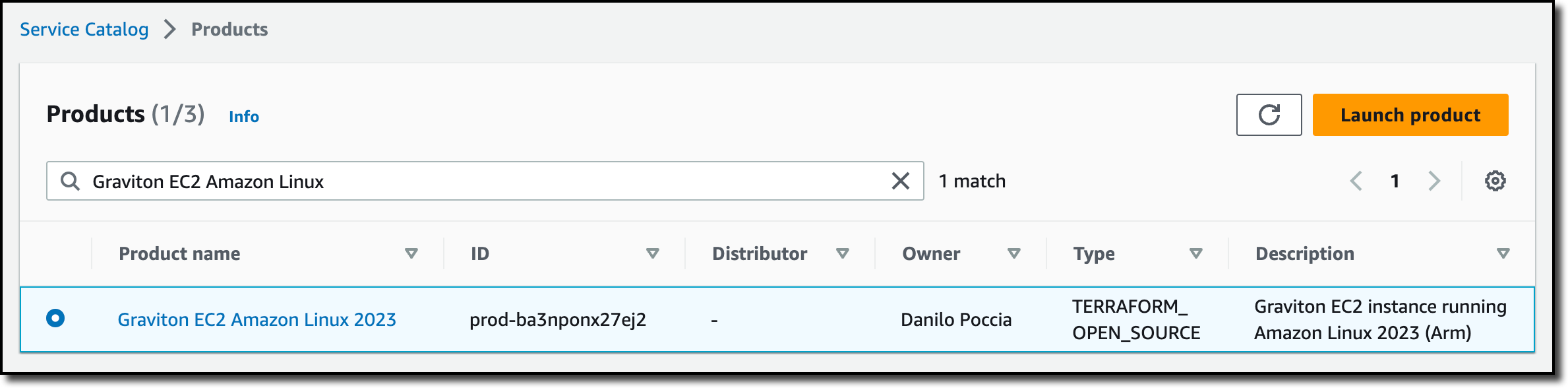
I sign in to the AWS Console in the user account for Service Catalog. The portfolio I used before has been shared by the management account with this user account. In the Service Catalog console, I choose Products from the Provisioning group in the navigation pane. I search for the product by name and choose Launch product.
I let Service Catalog generate a unique name for the provisioned product and select the product version to deploy. Then, I launch the product.

After a few minutes, the product has been deployed and is available. The deployment has been managed by the Terraform Reference Engine.
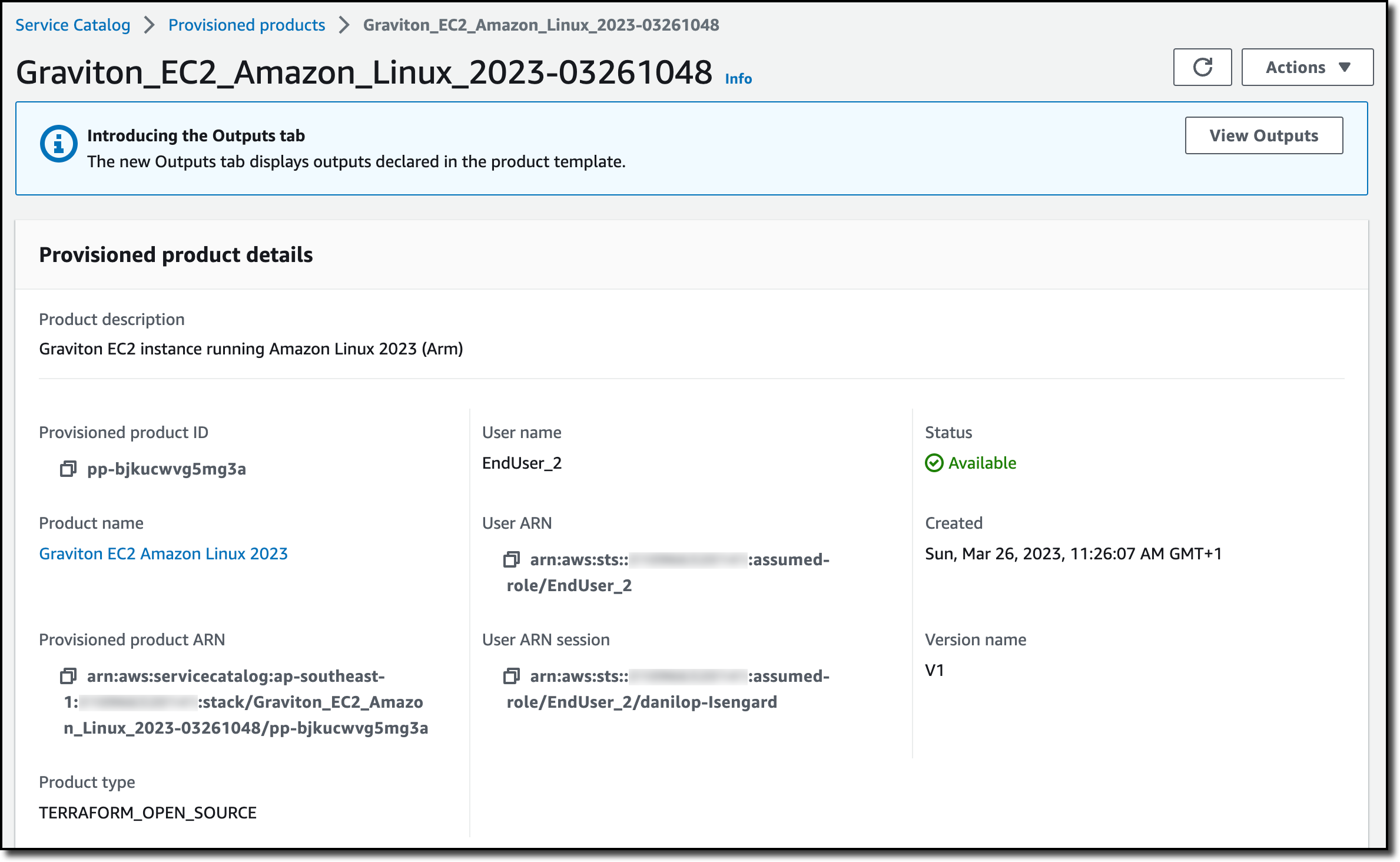
In the Associated tags tab, I see that Service Catalog automatically added information on the portfolio and the product.

In the Resources tab, I see the resources created by the provisioned product. As expected, it’s an EC2 instance, and I can follow the link to open the Amazon EC2 console and get more information.

End users such as engineers, database administrators, and data scientists can continue to use Service Catalog and launch the products they need without having to consider if they are provisioned using Terraform or CloudFormation.
Availability and Pricing
AWS Service Catalog support for Terraform open-source configurations is available today in all AWS Regions where it is offered. There is no change in pricing when using Terraform. With Service Catalog, you pay for the API calls you make to the service, and you can start for free with the free tier. You also pay for the resources used and created by the Terraform Reference Engine. For more information, see Service Catalog Pricing.
Enable self-service provisioning at scale for your Terraform open-source configurations.
— Danilo
Post Syndicated from Danilo Poccia original https://aws.amazon.com/blogs/aws/aws-supply-chain-now-generally-available-mitigate-risks-and-lower-costs-with-increased-visibility-and-actionable-insights/
Like many of you, I experienced the disrupting effects introduced by external forces such as weather, geopolitical instability, and the COVID-19 pandemic. To improve supply chain resilience, organizations need visibility across their supply chain so that they can quickly find and respond to risks. This is increasingly complex as their customers’ preferences are rapidly changing, and historical demand assumptions are not valid anymore.
To add to that, supply chain data is often spread out across disconnected systems, and existing tools lack the elastic processing power and specialized machine learning (ML) models needed to create meaningful insights. Without real-time insights, organizations cannot detect variations in demand patterns, unexpected trends, or supply disruptions. And failing to react quickly can impact their customers and operational costs.
Today, I am happy to share that AWS Supply Chain is generally available. AWS Supply Chain is a cloud application that mitigates risk and lowers costs with unified data, ML-powered actionable insights, and built-in contextual collaboration. Let’s see how it can help your organization before taking a look at how you can use it.
How AWS Supply Chain Works
AWS Supply Chain connects to your existing enterprise resource planning (ERP) and supply chain management systems. When those connections are in place, you can benefit from the following capabilities:
Now, let’s see how this works in practice.
Using AWS Supply Chain To Reduce Inventory Risks
The AWS Supply Chain team was kind enough to share an environment connected to an ERP system. When I log in, I choose Inventory and the Network Map from the navigation pane. Here, I have a general overview of the inventory status of the distribution centers (DCs). Using the timeline slider, I am able to fast forward in time and see how the inventory risks change over time. This allows me to predict future risks, not just the current ones.
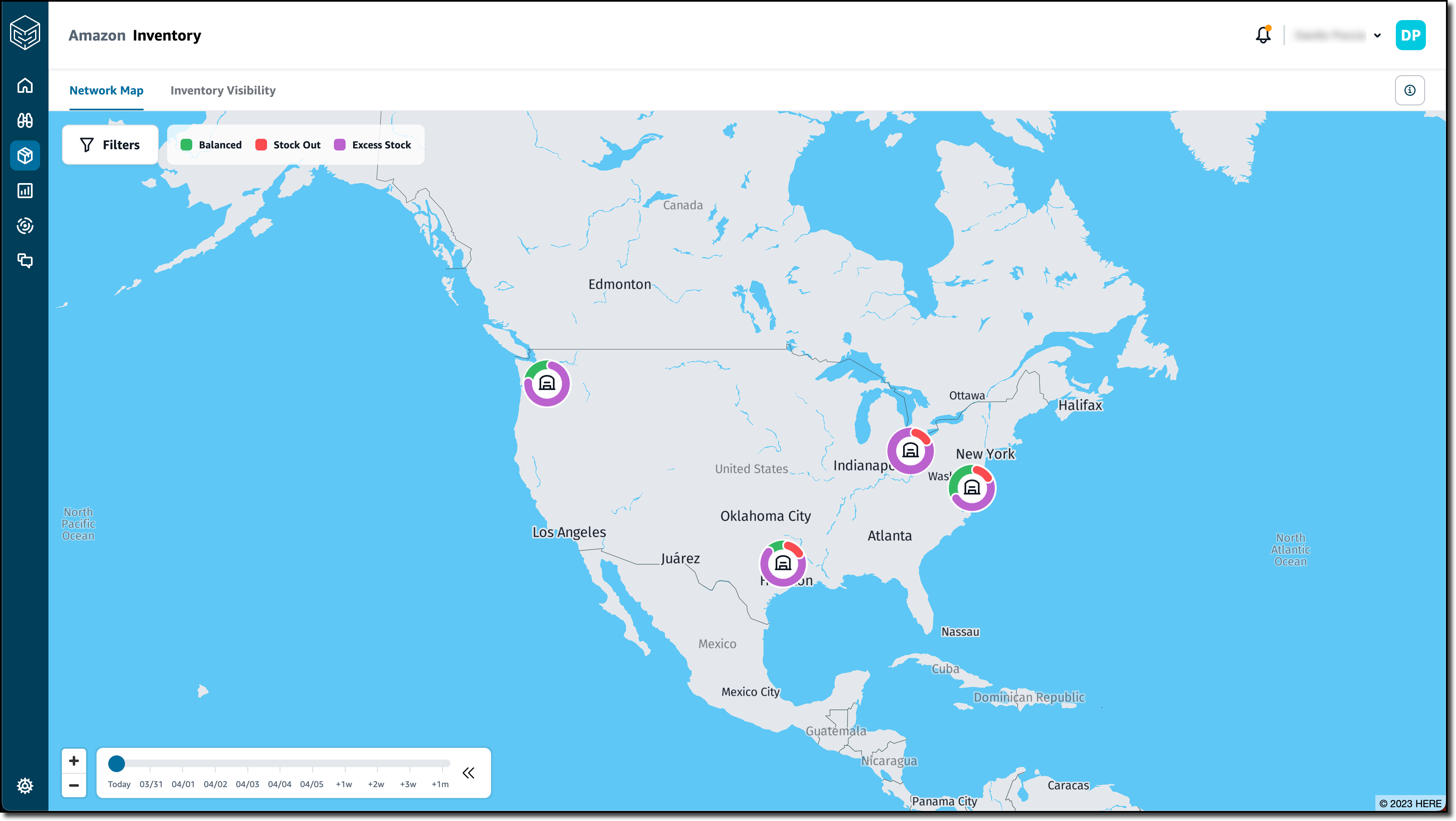
I choose the Seattle DC to have more information on that location.

Instead of looking at each distribution center, I create an insight watchlist that is analyzed by AWS Supply Chain. I choose Insights from the navigation pane and then Inventory Risk to track stock out and inventory excess risks. I enter a name (Shortages) for the insight watchlist and select all locations and products.

In the Tracking parameters, I choose to only track Stock Out Risk. I want to be warned if the inventory level is 10 percent below the minimum inventory target and set my time horizon to two weeks. I save to complete the creation of the insight watchlist.

I choose New Insight Watchlist to create another one. This time, I select the Lead time Deviation insight type. I enter a name (Lead time) for the insight watchlist and, again, all locations and products. This time, I choose to be notified when there is a deviation in the lead time that is 20 percent or more than the planned lead times. I choose to consider one year of historical time.

After a few minutes, I see that new insights are available. In the Insights page, I select Shortages from the dropdown. On the left, I have a series of stacks of insights grouped by week. I expand the first stack and drag one of the insights to put it In Review.

I choose View Details to see the status and the recommendations for this out-of-stock risk for a specific product and location.
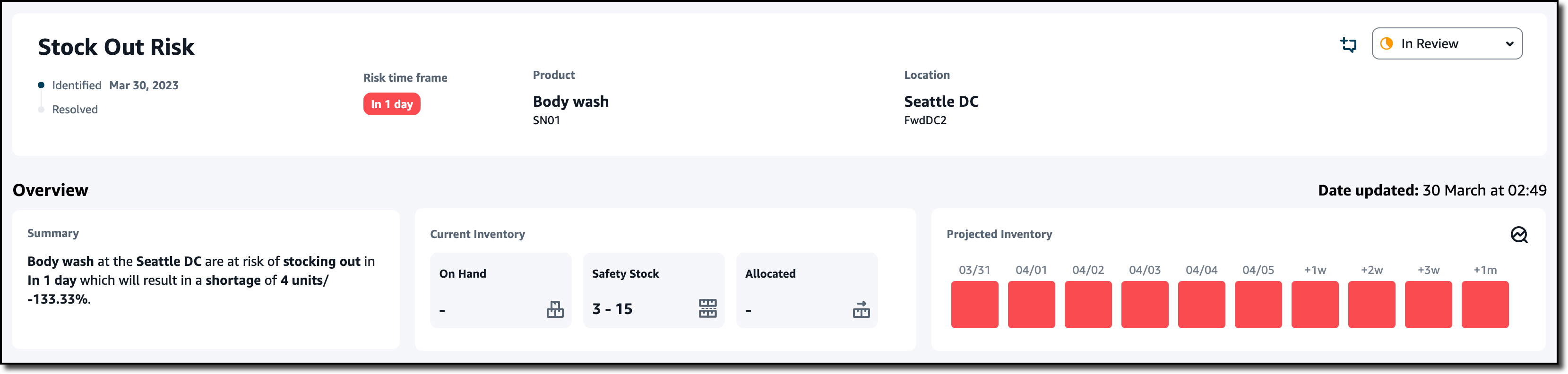
Just after the Overview, a list of Resolution Recommendations is sorted by a Score. Score weights are used to rank recommendations by setting the relative importance of distance, emissions (CO2), and percentage of the risk resolved. In the settings, I can also configure a max distance to be considered when proposing recommendations. The first recommendation is the best based on how I configure the score.
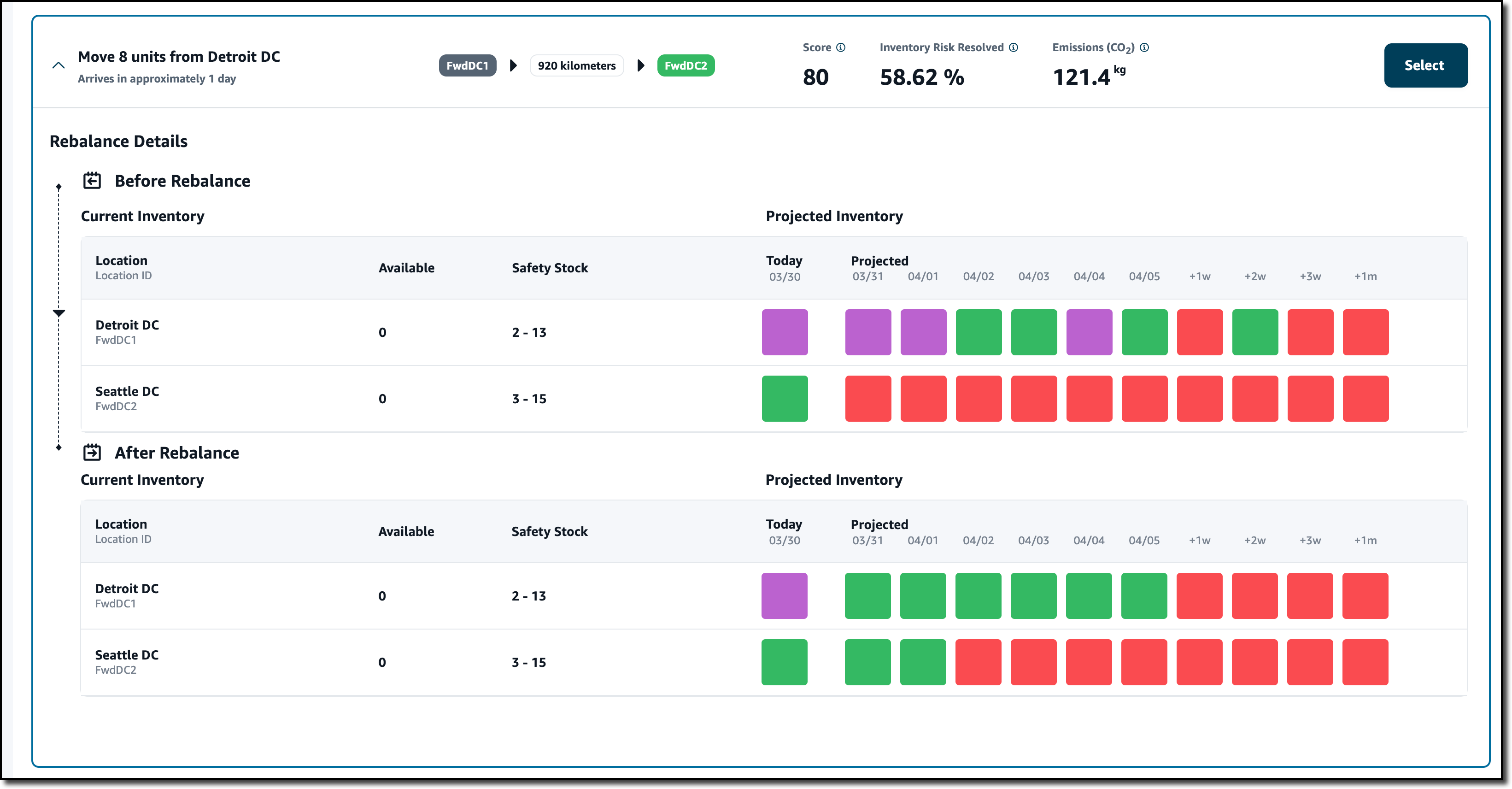
The recommendation shows the effect of the rebalance. If I move eight units of this product from the Detroit DC to the Seattle DC, the projected inventory is now balanced (color green) for the next two days in the After Rebalance section instead of being out of stock (red) as in the Before Rebalance section. This also solves the excess stock risk (purple) in the Detroit DC. At the top of the recommendation, I see the probability that this rebalance resolves the inventory risk and the impact on emissions (CO2).
I choose Select to proceed with this recommendation. In the dialog, I enter a comment and choose to message the team to start using the collaboration capabilities of AWS Supply Chain. In this way, all the communication from those involved in solving this inventory issue is stored and linked to the specific issue instead of happening in a separate channel such as emails. I choose Confirm.

Straight from the Stock Out Risk, I can message those that can help me implement the recommendation.

I get the reply here, but I prefer to see it in all its context. I choose Collaboration from the navigation pane. There, I find all the conversations started from insights (one for now) and the Stock Out Risk and Resolution recommendations as proposed before. All those collaborating on solving the issue have a clear view of the problem and the possible resolutions. For future reference, this conversation will be available with its risk and resolution context.

When the risk is resolved, I move the Stock Out Risk card to Resolved.

Now, I look at the Lead time insights. Similar to before, I choose an insight and put it In Review. I choose View Details to have more information. I see that, based on historical purchase orders, the recommended lead time for this specific product and location should be seven days and not one day as found in the connected ERP system. This can have a negative impact on the expectations of my customers.
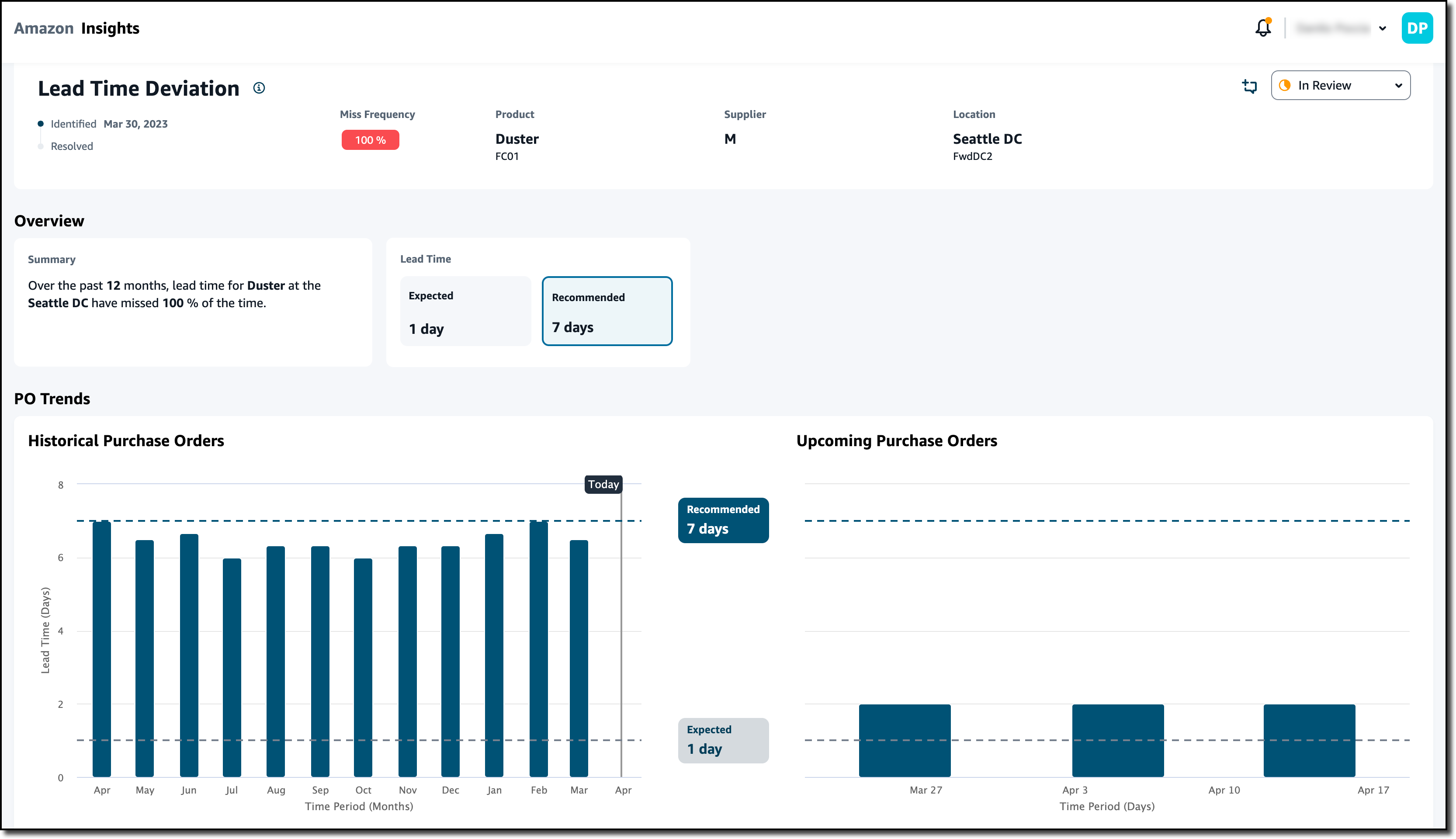
Without the need of re-platforming or reimplementing the current systems, I was able to connect AWS Supply Chain and get insights on the inventory of the distribution centers and recommendations based on my personal settings. These recommendations help resolve inventory risks such as items being out of stock or having excess stock in a distribution center. By better understanding the lead time, I can set better expectations for end customers.
Availability and Pricing
AWS Supply Chain is available today in the following AWS Regions: US East (N. Virginia), US West (Oregon), and Europe (Frankfurt).
AWS Supply Chain allows your organization to quickly gain visibility across your supply chain, and it helps you make more informed supply chain decisions. You can use AWS Supply Chain to mitigate overstock and stock-out risks. In this way, you can improve your customer experience, and at the same time, AWS Supply Chain can help you lower excess inventory costs. Using contextual chat and messaging, you can improve the way you collaborate with other teams and resolve issues quickly.
With AWS Supply Chain, you only pay for what you use. There are no required upfront licensing fees or long-term contracts. For more information, see AWS Supply Chain pricing.
— Danilo
Post Syndicated from Akhil B original https://aws.amazon.com/blogs/big-data/generic-orchestration-framework-for-data-warehousing-workloads-using-amazon-redshift-rsql/
Tens of thousands of customers run business-critical workloads on Amazon Redshift, AWS’s fast, petabyte-scale cloud data warehouse delivering the best price-performance. With Amazon Redshift, you can query data across your data warehouse, operational data stores, and data lake using standard SQL. You can also integrate AWS services like Amazon EMR, Amazon Athena, Amazon SageMaker, AWS Glue, AWS Lake Formation, and Amazon Kinesis to take advantage of all of the analytic capabilities in the AWS Cloud.
Amazon Redshift RSQL is a native command-line client for interacting with Amazon Redshift clusters and databases. You can connect to an Amazon Redshift cluster, describe database objects, query data, and view query results in various output formats. You can use Amazon Redshift RSQL to replace existing extract, transform, load (ETL) and automation scripts, such as Teradata BTEQ scripts. You can wrap Amazon Redshift RSQL statements within a shell script to replicate existing functionality in the on-premise systems. Amazon Redshift RSQL is available for Linux, Windows, and macOS operating systems.
This post explains how you can create a generic configuration-driven orchestration framework using AWS Step Functions, Amazon Elastic Compute Cloud (Amazon EC2), AWS Lambda, Amazon DynamoDB, and AWS Systems Manager to orchestrate RSQL-based ETL workloads. If you’re migrating from legacy data warehouse workloads to Amazon Redshift, you can use this methodology to orchestrate your data warehousing workloads.
Customers migrating from legacy data warehouses to Amazon Redshift may have a significant investment in proprietary scripts like Basic Teradata Query (BTEQ) scripting for database automation, ETL, or other tasks. You can now use the AWS Schema Conversion Tool (AWS SCT) to automatically convert proprietary scripts like BTEQ scripts to Amazon Redshift RSQL scripts. The converted scripts run on Amazon Redshift with little to no changes. To learn about new options for database scripting, refer to Accelerate your data warehouse migration to Amazon Redshift – Part 4.
During such migrations, you may also want to modernize your current on-premises, third-party orchestration tools with a cloud-native framework to replicate and enhance your current orchestration capability. Orchestrating data warehouse workloads includes scheduling the jobs, checking if the pre-conditions have been met, running the business logic embedded within RSQL, monitoring the status of the jobs, and alerting if there are any failures.
This solution allows on-premises customers to migrate to a cloud-native orchestration framework that uses AWS serverless services such as Step Functions, Lambda, DynamoDB, and Systems Manager to run the Amazon Redshift RSQL jobs deployed on a persistent EC2 instance. You can also deploy the solution for greenfield implementations. In addition to meeting functional requirements, this solution also provides full auditing, logging, and monitoring of all ETL and ELT processes that are run.
To ensure high availability and resilience, you can use multiple EC2 instances that are a part of an auto scaling group along with Amazon Elastic File System (Amazon EFS) to deploy and run the RSQL jobs. When using auto scaling groups, you can install RSQL onto the EC2 instance as a part of the bootstrap script. You can also deploy the Amazon Redshift RSQL scripts onto the EC2 instance using AWS CodePipeline and AWS CodeDeploy. For more details, refer to Auto Scaling groups, the Amazon EFT User Guide, and Integrating CodeDeploy with Amazon EC2 Auto Scaling.
The following diagram illustrates the architecture of the orchestration framework.

The key components of the framework are as follows:
SendCommand API to trigger the RSQL job and goes into a paused state with TaskToken. The RSQL scripts are persisted on an EC2 instance and are wrapped in a shell script. Systems Manager runs an AWS-RunShellScript SSM document to run the RSQL job on the EC2 instance.TaskToken that was received from Step Functions. The Python module logs the RSQL job status in the job audit DynamoDB audit table, and exports logs to the Amazon CloudWatch log group.SendTaskSuccess or SendTaskFailure API call based on the RSQL job run status. Based on the status of the RSQL job, Step Functions either resumes the flow or stops with failure.You should have the following prerequisites:
dbname. For instructions, refer to Modify an AWS Secrets Manager secret.Complete the following steps to deploy your resources using the AWS CDK:
cdk.json (this file can be found in the infra directory):
The following is a sample cdk.json file after being populated with the parameters
Let’s look at the resources the AWS CDK stack deploys in more detail.
A CloudWatch log group (/ops/rsql-logs/) is created, which is used to store, monitor, and access log files from EC2 instances and other sources.
The log group is used to store the RSQL job run logs. For each RSQL script, all the stdout and stderr logs are stored as a log stream within this log group.
The DynamoDB configuration table (rsql-blog-rsql-config-table) is the basic building block of this solution. All the RSQL jobs, restart information and run mode (sequential or parallel), and sequence in which the jobs are to be run are stored in this configuration table.
The table has the following structure:
The following is an example of an entry in the configuration table. You can see the workflow_id is blog_test_workflow and the description is Test Workflow for Blog.
It has three stages that are triggered in the following order: Schema & Table Creation Stage, Data Insertion Stage 1, and Data Insertion Stage 2. The stage Schema & Table Creation Stage has two RSQL jobs running sequentially, and Data Insertion Stage 1 and Data Insertion Stage 2 each have two jobs running in parallel.
The audit tables store the run details for each RSQL job within the ETL workflow with a unique identifier for monitoring and reporting purposes. The reason why there are two audit tables is because one table stores the audit information at a RSQL job level and the other stores it at a workflow level.
The job audit table (rsql-blog-rsql-job-audit-table) has the following structure:
Running, Completed, Failed)workflow_id under which the RSQL job is runThe workflow audit table (rsql-blog-rsql-workflow-audit-table) has the following structure:
Running, Completed, Failed)The AWS CDK creates the Lambda functions that retrieve the config data from the DynamoDB config table, update the audit details in DynamoDB, trigger the RSQL scripts on the EC2 instance, and iterate through each stage. The following is a list of the functions:
rsql-blog-master-iterator-lambdarsql-blog-parallel-load-check-lambdarsql-blog-sequential-iterator-lambdarsql-blog-rsql-invoke-lambdarsql-blog-update-audit-ddb-lambdaThis solution implements a Step Functions callback task integration pattern that enables Step Functions workflows to send a token to an external system via multiple AWS services.
The AWS CDK deploys the following state machines:
Copy the instance_code and rsql_scripts directories (present in the GitHub repo) to the EC2 instance. Make sure the framework directory within instance_code is copied as well.
The following screenshots show that the instance_code and rsql_scripts directories are copied to the same parent folder on the EC2 instance.


To further illustrate the mechanism to run the RSQL scripts, see the following diagram.

The Lambda function, which gets the configuration details from the configuration DynamoDB table, triggers the Step Functions workflow, which performs the following steps:
TaskToken and configuration details.TaskToken and configuration details are passed onto the EC2 instance using the Systems Manger SendCommand API call. After the Lambda function is run, the workflow branch goes into paused state and waits for a callback token.TaskToken to a Python script. This Python script is embedded within the RSQL script.TaskToken using the SendTaskSuccess or SendTaskFailure API call.If EC2 auto scaling groups are used, then you can use the Systems Manager SendCommand to ensure resilience and high availability by specifying one or more EC2 instances (that are a part of the auto scaling group). For more information, refer to Run commands at scale.
When multiple EC2 instances are used, set the max-concurrency parameter of the RunCommand API call to 1, which makes sure that the RSQL job is triggered on only one EC2 instance. For further details, refer to Using concurrency controls.
To run the orchestration framework, complete the following steps:


rsql-master-state-machine function to open the details page.


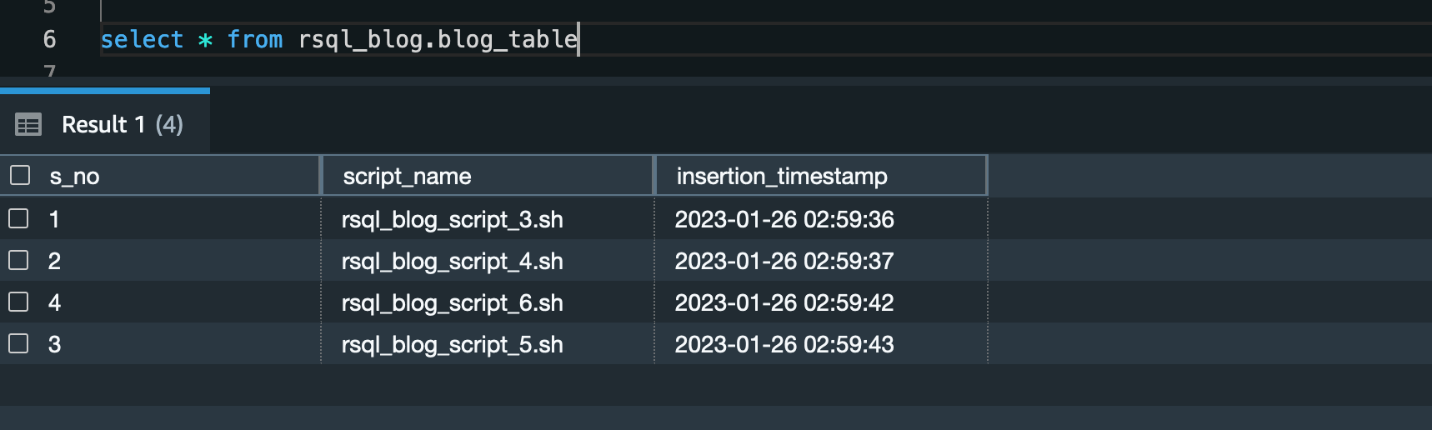
rsql_blog within the databaseblog_table within the schema created in the earlier scriptYou need to replace these RSQL scripts with the RSQL scripts developed for your workloads by inserting the relevant configuration details into the configuration DynamoDB table (rsql-blog-rsql-config-table).
After you run the framework, you’ll find a schema (called rsql_blog) with one table (called blog_table) created. This table consists of four rows.
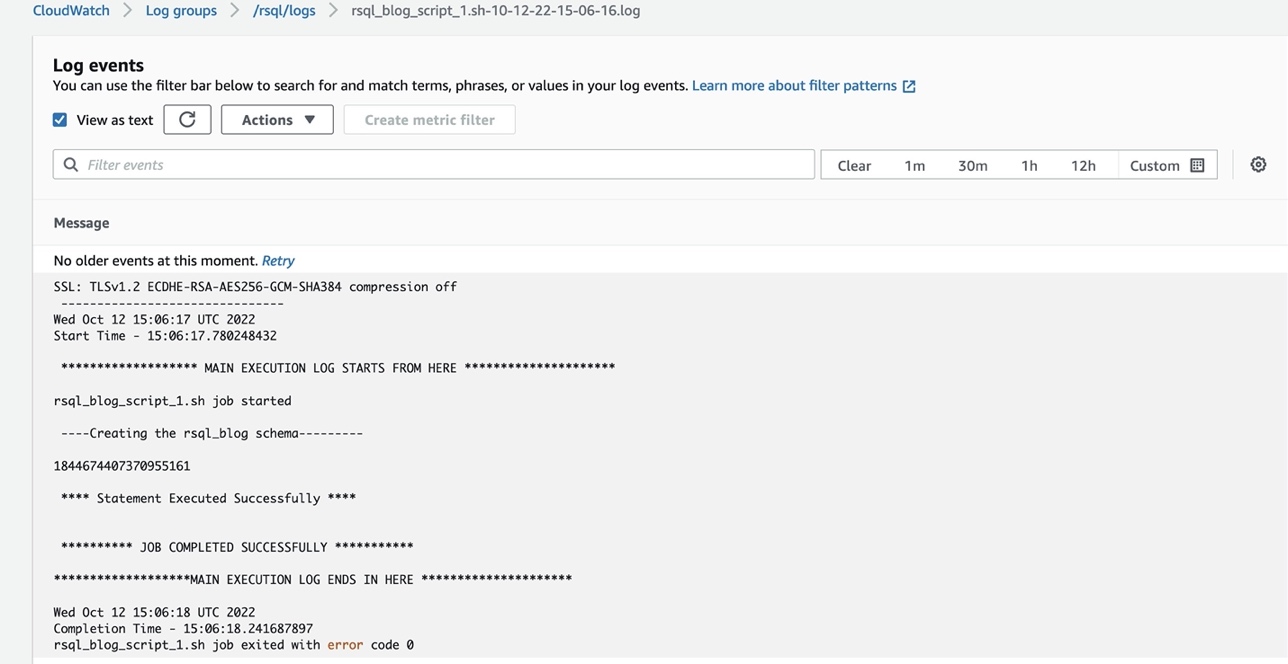
You can check the logs of the RSQL job in the CloudWatch log group (/ops/rsql-logs/) and also the run status of the workflow in the workflow audit DynamoDB table (rsql-blog-rsql-workflow-audit-table).

To avoid ongoing charges for the resources that you created, delete them. AWS CDK deletes all resources except data resources such as DynamoDB tables.
rsql-blog-rsql-config-tablersql-blog-rsql-job-audit-tablersql-blog-rsql-workflow-audit-tableYou can use Amazon Redshift RSQL, Systems Manager, EC2 instances, and Step Functions to create a modern and cost-effective orchestration framework for ETL workflows. There is no overhead to create and manage different state machines for each of your ETL workflow. In this post, we demonstrated how to use this configuration-based generic orchestration framework to trigger complex RSQL-based ETL workflows.
You can also trigger an email notification through Amazon Simple Notification Service (Amazon SNS) within the state machine to the notify the operations team of the completion status of the ETL process. Further, you can achieve a event-driven ETL orchestration framework by using EventBridge to start the workflow trigger lambda function.
 Akhil is a Data Analytics Consultant at AWS Professional Services. He helps customers design & build scalable data analytics solutions and migrate data pipelines and data warehouses to AWS. In his spare time, he loves travelling, playing games and watching movies.

Ramesh Raghupathy is a Senior Data Architect with WWCO ProServe at AWS. He works with AWS customers to architect, deploy, and migrate to data warehouses and data lakes on the AWS Cloud. While not at work, Ramesh enjoys traveling, spending time with family, and yoga.
 Raza Hafeez is a Senior Data Architect within the Shared Delivery Practice of AWS Professional Services. He has over 12 years of professional experience building and optimizing enterprise data warehouses and is passionate about enabling customers to realize the power of their data. He specializes in migrating enterprise data warehouses to AWS Modern Data Architecture.
 Dipal Mahajan is a Lead Consultant with Amazon Web Services based out of India, where he guides global customers to build highly secure, scalable, reliable, and cost-efficient applications on the cloud. He brings extensive experience on Software Development, Architecture and Analytics from industries like finance, telecom, retail and healthcare.
Post Syndicated from Channy Yun original https://aws.amazon.com/blogs/aws/aws-week-in-review-public-preview-of-amazon-datazone-and-aws-datasync-updates-april-3-2023/
 Last weekend, I enjoyed the spring vibes at Seoul Forest, a large park in the middle of Seoul city, where cherry blossoms are in full bloom.
Compared to last year, there were crowds of people, so I realized that it was really back to normal after the pandemic. I hope you all enjoy the season of spring or fall with your family.
Last Week’s Launches
Like an April Fool’s Day joke, there were 65 launches last week, far more than usual. AWS product teams are working hard with a customer obsession.
So, I had a lot of trouble choosing the important ones. Other than the ones I’ve picked out, there may be important feature releases that fit your needs. Be sure to take a look at the full launches list in the last week.
First, here is a list of the general availability of AWS services and features treated by AWS News Blog:
Let’s take a look at some launches from the last week that I want to remind you of:
The Preview of Amazon DataZone – At AWS re:Invent 2022, we preannounced Amazon DataZone, a new data management service to catalog, discover, analyze, share, and govern data between data producers and consumers in the organization. You can now try out the public preview of Amazon DataZone.
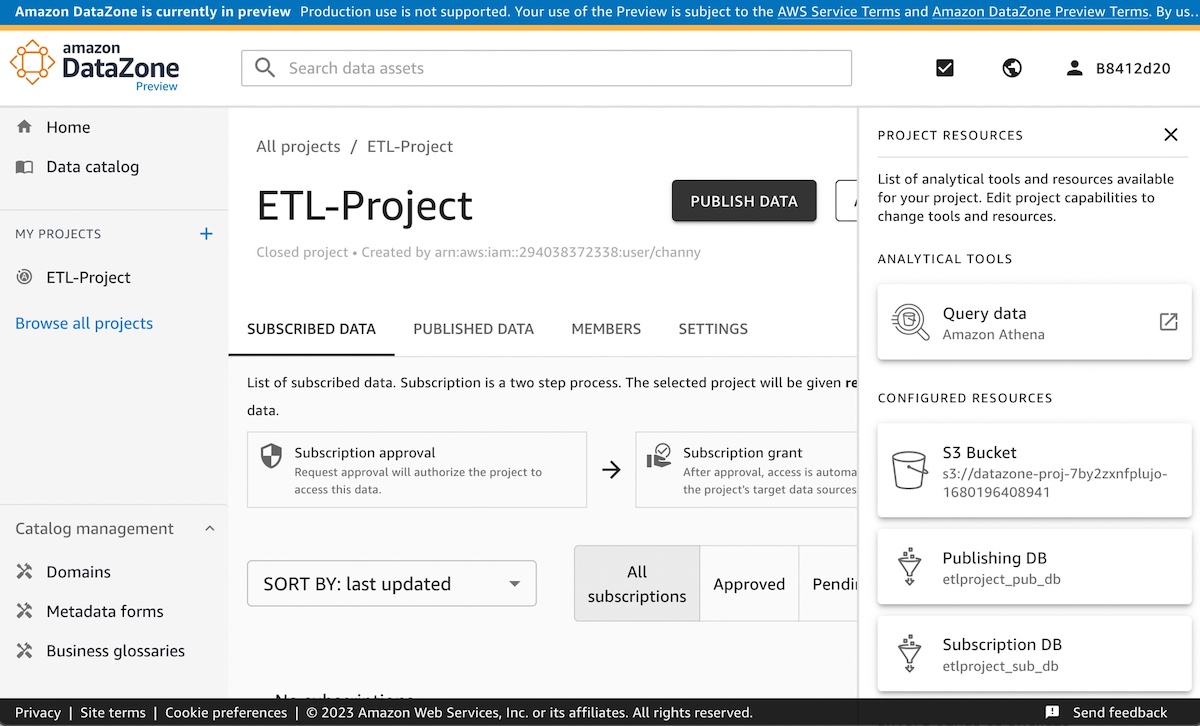
Data producers populate the business data catalog from AWS Glue Data Catalog and Amazon Redshift tables. Data consumers search for and subscribe to data assets in the data catalog and analyze with tools such as Amazon Athena query editors in the Amazon DataZone portal. To get started with Amazon DataZone, see our Quick Start Guide to include sample datasets to implement a complete use case.
AWS DataSync Supports Azure Blob Storage in Preview – AWS DataSync supports copying your object data at scale from Azure Blob Storage to AWS storage services such as Amazon S3. AWS DataSync supports all blob types within Azure Blob Storage and can also be used with Azure Data Lake Storage (ADLS) Gen 2.

In addition to Azure Blob Storage, DataSync supports Google Cloud Storage and Azure Files storage locations as well as various general storage systems and AWS storage services. To learn more, see Migrating Azure Blob Storage to Amazon S3 using AWS DataSync in the AWS Storage Blog.
On-call schedules with AWS Systems Manager Incident Manager – You can now configure or change on-call rotation schedules with a group of contacts and have 24/7 coverage and responsiveness for critical issues in the Incident Manager console.
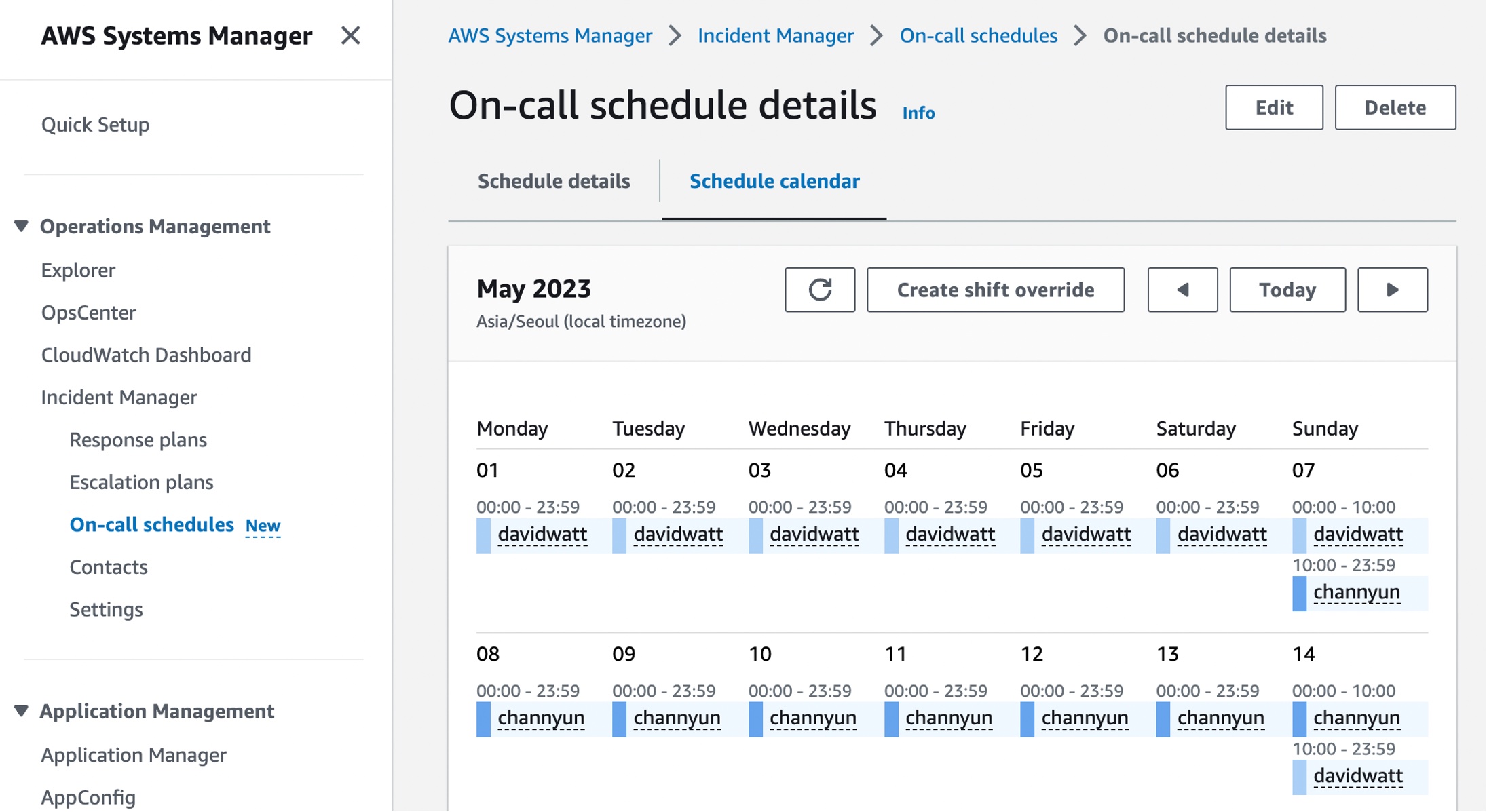
AWS Incident Manager helps you bring the right people and information together when a critical issue is detected, activating preconfigured response plans to engage responders using SMS, phone calls, and chat channels, as well as to run AWS Systems Manager Automation runbooks. To learn how to get started with an-call schedules in Incident Manager, see our Working with on-call schedules in Incident Manager in the AWS documentation.
AWS CloudShell Colsone Toolbar – You can now use AWS Cloudshell Console Toolbar with AWS Management Console in a single view. The Console Toolbar maintains its state (e.g., open, closed) and commands will continue to run in CloudShell as you navigate between services in the Console. For example, it allows you to run a command in CloudShell and view a CloudWatch alarm in the Console at the same time.
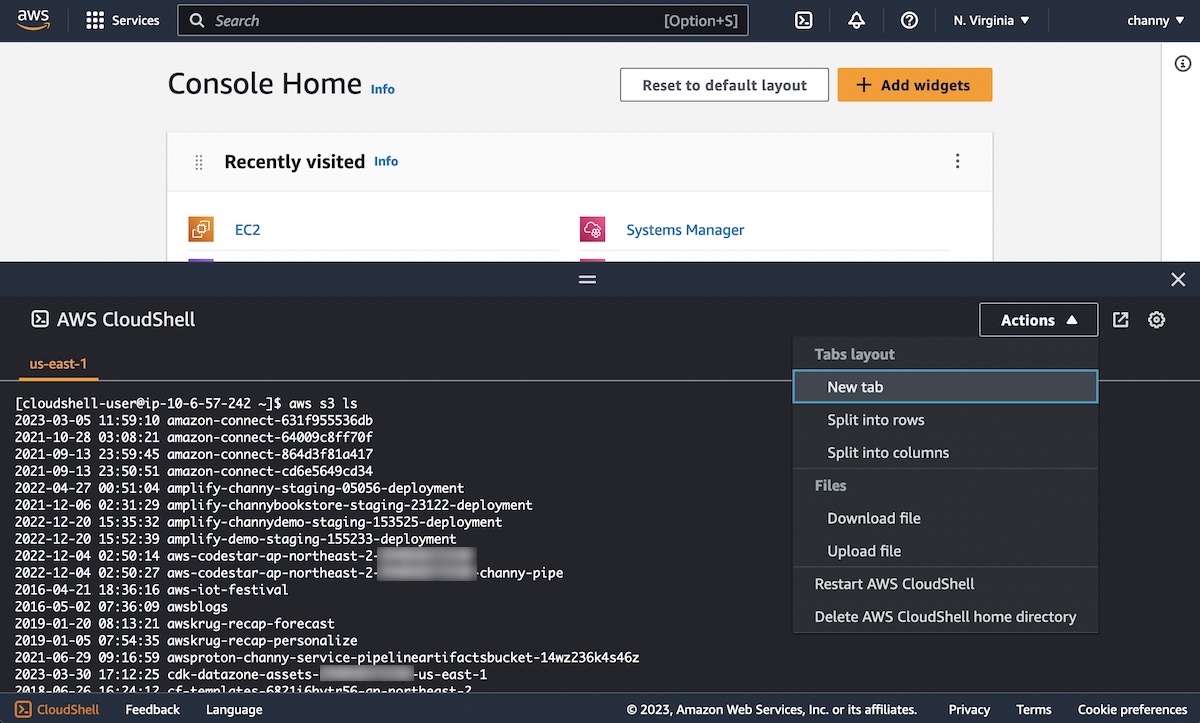
After signing into the Console, you can access CloudShell in the lower left of the Console by selecting the CloudShell icon in the Console Toolbar.
New Features of AWS Well-Architected Tool – The Consolidated Report and Enhanced Search enable customers to quickly identify risk themes across their workloads and scale improvements across their organization. This macro-level view helps executive stakeholders understand where common issues lie and prioritize team resources to drive widespread improvement. To learn more, see AWS Well-Architected Tool Dashboard in the AWS documentation.
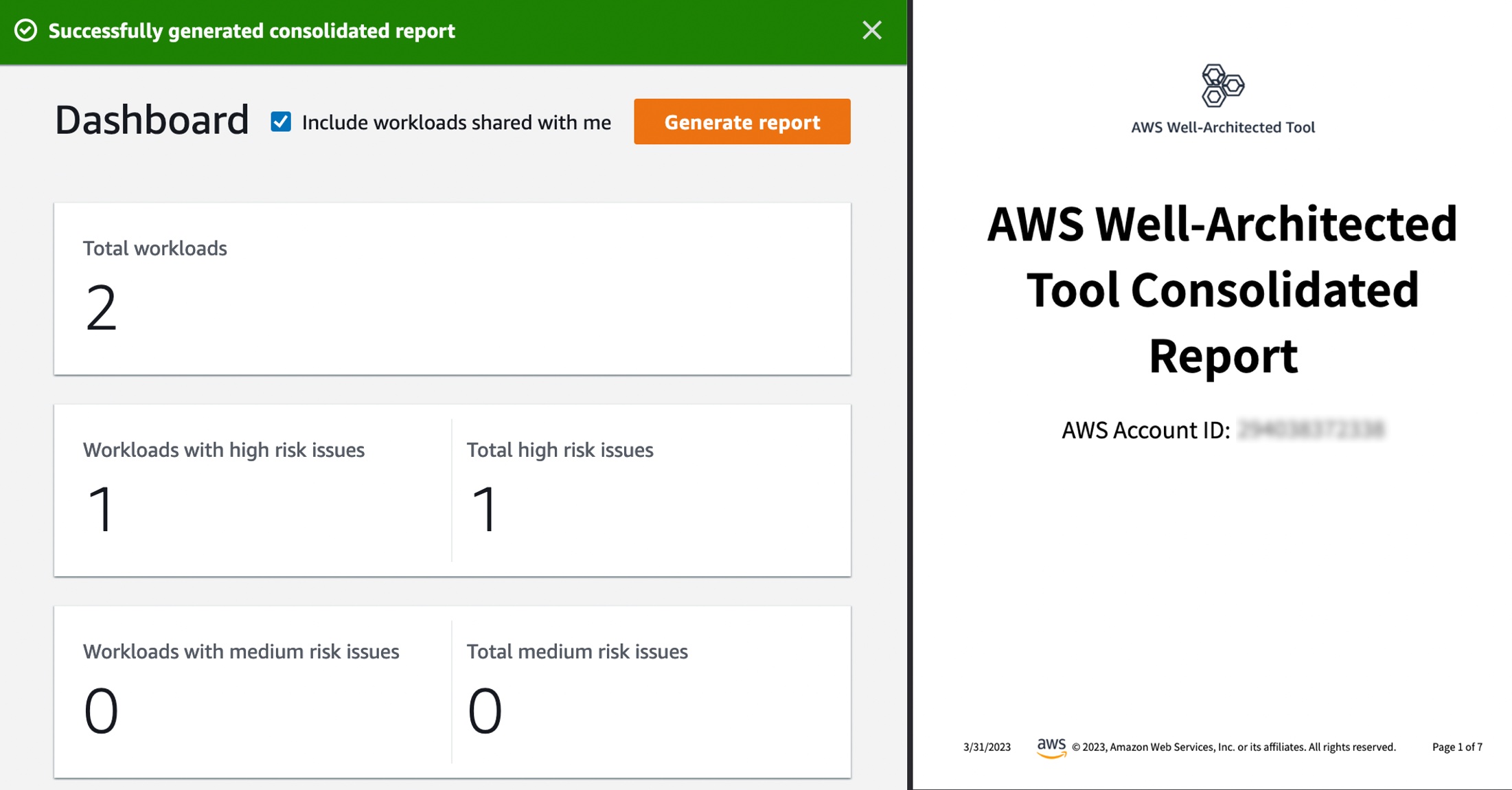
For a full list of AWS announcements, be sure to keep an eye on the What’s New at AWS page.
Other AWS News
Here are some other news items that you may find interesting from the last week:
Welcome to the .NET on AWS Blog – We launched a new blog channel for millions of .NET developers across the world. Blog posts will also cover built-for-the-cloud development, modernizing .NET Framework applications, and how to deploy .NET workloads on different AWS services. We will use this channel to share news on the work we’ve done with the .NET open-source community, post follow-ups from important events, and post announcements about upcoming presentations from our .NET developer advocates. To learn more, visit our .NET on AWS website and follow us on Twitter at @dotnetonAWS.
AWS Knowledge Center in AWS re:Post – You can now access trusted, authoritative articles and videos of AWS Knowledge Center on AWS re:Post to get answers to technical questions. Knowledge Center content is produced by an AWS team and covers the most frequent questions and requests from AWS customers. These articles are available in 10 localized languages: English, French, German, Italian, Japanese, Korean, Portuguese, Simplified Chinese, Spanish, and Traditional Chinese.
TF1’s FIFA Worldcup Digital Broadcasting Story – Sébastien shared an awesome story about how the French broadcaster TF1 use AWS Cloud technology and expertise to bring the FIFA World Cup to millions of people. He shared the history of redesigning its digital broadcasting architecture on AWS, testing the new platform on large-scale sporting events. For the preparation of the FIFA Worldcup event, TF1 enhanced monitoring to detect anomalies during the event and established the backup plan in a “war room” for the worst scenario. Even if you’re not a fan of football, I recommend reading the behind-the-scenes of the FIFA Worldcup Finals. It’s long but really fun!
Upcoming AWS Events
Check your calendars and sign up for these AWS-led events:
 AWS re:Inforce 2023 – Now register AWS re:Inforce, in Anaheim, California, June 13–14. AWS Chief Information Security Officer CJ Moses will share the latest innovations in cloud security and what AWS Security is focused on. The breakout sessions will provide real-world examples of how security is embedded into the way businesses operate. To learn more and get the limited discount code to register, see CJ’s blog post of Gain insights and knowledge at AWS re:Inforce 2023 in the AWS Security Blog.
 AWS Global Summits – Check your calendars and sign up for the AWS Summit closest to your city: Paris and Sydney (April 4), Seoul (May 3-4), Berlin and Singapore (May 4), Stockholm (May 11), Hong Kong (May 23), Amsterdam (June 1), London (June 7), Madrid (June 15), and Milano (June 22).
 AWS Community Day – Join community-led conferences driven by AWS user group leaders closest to your city: Peru (April 15), Helsinki (April 20), Chicago (June 15), Philippines (June 29–30), and Munich (September 14). Recently, we are bringing together AWS user groups from around the world into Meetup Pro accounts. Find your group and its meetups in your city!
You can browse all upcoming AWS-led in-person and virtual events, and developer-focused events such as AWS DevDay.
That’s all for this week. Check back next Monday for another Week in Review!
— Channy
This post is part of our Week in Review series. Check back each week for a quick roundup of interesting news and announcements from AWS!
Post Syndicated from Eric Smith original https://www.servethehome.com/nvidia-jetson-orin-nano-developer-kit-launched-for-499-arm-ampere/
We have a quick look at the newly launched $499 NVIDIA Jetson Orin Nano Developer Kit so you can see what is in the box
The post NVIDIA Jetson Orin Nano Developer Kit Launched for $499 appeared first on ServeTheHome.
Post Syndicated from original https://lwn.net/Articles/927595/
The kernel has a well-developed mechanism for the control of tracing of
events in
kernel space. Developers often want to be able to trace user-space
activity as well, using the same interfaces, but that mode is rather less
well supported. One year ago, an attempt to
add an API for the control of user-space trace events ran into trouble
and has never been fully enabled. Now, Beau Belgrave is back with a
reworked API that may finally result in this mechanism becoming
generally available.
Post Syndicated from James Simon original https://aws.amazon.com/blogs/architecture/software-defined-edge-architecture-for-connected-vehicles/
To remain competitive in a marketplace that increasingly views transportation as a service emphasizing customer experience, vehicle capabilities and mobility applications need to improve and increase value over time, much like the internet of things and smart phones have done.
Vehicle manufacturers and fleet operators are responding to this change by using data to inform and operate their businesses, and by adopting software-defined vehicle features and capabilities. In the broader transportation community, insurance providers are evolving to usage-based insurance, which offers rates that are based on a customer’s risk profile rather than a general population. Telematics service providers are expanding their offerings to fleet operators to include machine learning (ML)-driven capabilities like driver coaching, compliance, and predictive maintenance. Rental car providers are developing apps that provide a personalized in-vehicle experience.
All of these features rely on in-vehicle data collection and processing, evolving vehicles from simple data gathering sensors to fully smart devices. To meet these demands, you can adopt cloud native architectures that use microservices, containers, and declarative application programming interfaces (APIs). This blog post explores a system architecture AWS and Luxsoft have developed together in order to help our customers reduce friction and accelerate time to market for the development, deployment and operation of edge applications required to make vehicles into smart devices.
Software is becoming more critical to vehicle function. A modern car has approximately 70-100 Electronic Control Units (ECUs), which control most core functions in the engine, transmission, Heating, ventilation, and air conditioning (HVAC) Automatic Brake System (ABS), body, and airbag hardware components. With new features such as infotainment systems, autonomous driving (AD), and advanced driver assistance systems (ADAS), modern cars use approximately 100 million lines of code, and this is increasing rapidly. ECU and software complexity produce challenges with portability of applications, this could be due to variations of the hardware, or CAN and other network communication differences, without an abstraction layer, application software must be conformed to the operating environment.
One difficulty presented by this increasing complexity and the multitude of integration points and communication interfaces at the edge is that applications typically must be re-developed, customized or at least cross-compiled to fit each hardware platform, often requiring a lengthy integration development and testing cycle for each new device. As a result, edge applications executing ML and other data-driven workloads can produce a pace that is slower than consumer expectations.
The development pace for software-defined vehicles (SDVs) relies on reusing and redeploying software applications. Software reuse is a challenge when target hardware and processing environments aren’t designed in a common way. Therefore, an early step in developing SDVs is to address these challenges at the vehicle edge, that is to say, the externally connected vehicle devices.
To help address the challenges of creating reusable software and applications for the vehicle edge, we worked with AWS Partner DXC Luxsoft to create an end-to-end system architecture. The architecture in Figure 1 uses software-defined mobility devices at the vehicle edge to connect to multiple hardware components.

Figure 1. AWS Partner DXC Luxsoft to create an end-to-end system architecture
Let’s explore this architecture step by step.
This technology stack abstracts the specific hardware used, presenting a common run environment that you can deploy to devices that are based on ARM processors with ARM Sytem Ready firmware, including Amazon EC2 Graviton instances.
This architecture uses the following:
We paired this stack with AWS IoT Greengrass V2 and a container-based version of AWS IoT Fleetwise edge agent that we been modified to publish to a local broker first to allow pre and post-processing. This also makes AWS IoT Fleetwise-collected data available to other application containers running on the device. The pre- and post-processing containers prepare messages and data for use by other edge applications or exchange with the cloud services and will be available with the architecture source code.
Because this architecture is container-based and abstracts the hardware, deploying and updating applications becomes more efficient. Because Amazon EC2 Graviton instances are ARM-based, you can deploy specific AMIs and configurations that contain this architecture’s technology stack as part of a continuous integration and continuous deployment (CI/CD) pipeline. This means that you can develop new applications and services entirely in the cloud, test them in the cloud with bit equivalent binaries and containers, and then deploy them to hardware components. This can save weeks to months of development and verification through the use of automation. The use of ARM based systems cloud native development and testing strategies can be applied, reducing the need for hardware test equipment and bringing new revenue streams and customer experiences to market at a pace that matches the current demand.
With this architecture, you can develop and deliver new edge processing applications to one or more vehicle device platforms. You can also develop, test, and deploy purpose-built edge compute applications as containerized AWS IoT Greengrass V2 components, including applications like Usage Based Insurance, over the air update agents, and driver distraction.
With this architecture alone in place, value can quickly be added by developing AWS IoT Fleetwise data campaigns targeting specific data required to fulfill business value for consumers, operators or fleet managers, such as vehicle battery state of charge or health indicators.
You can add value to this architecture by developing AWS IoT Fleetwise data campaigns for specific data required to fulfill business value for consumers, operators, or fleet managers. Examples of this data include vehicle battery state of charge and health indicators.
If you’re interested in creating or contributing to a common architecture that can accelerate developing and deploying edge applications to multiple hardware components, contact Connected Vehicle Tech Strategy Lead James Simon or AWS Partner DXC Luxsoft for a working demonstration or to start a proof of concept.
Post Syndicated from original https://lwn.net/Articles/928204/
Security updates have been issued by Debian (duktape, firmware-nonfree, intel-microcode, svgpp, and systemd), Fedora (amanda, dino, flatpak, golang, libldb, netconsd, samba, tigervnc, and vim), Red Hat (nodejs:14), Slackware (ruby and seamonkey), SUSE (drbd, flatpak, glibc, grub2, ImageMagick, kernel, runc, thunderbird, and xwayland), and Ubuntu (amanda).
Post Syndicated from Cloudflare original https://blog.cloudflare.com/introducing-rollbacks-for-workers-deployments/
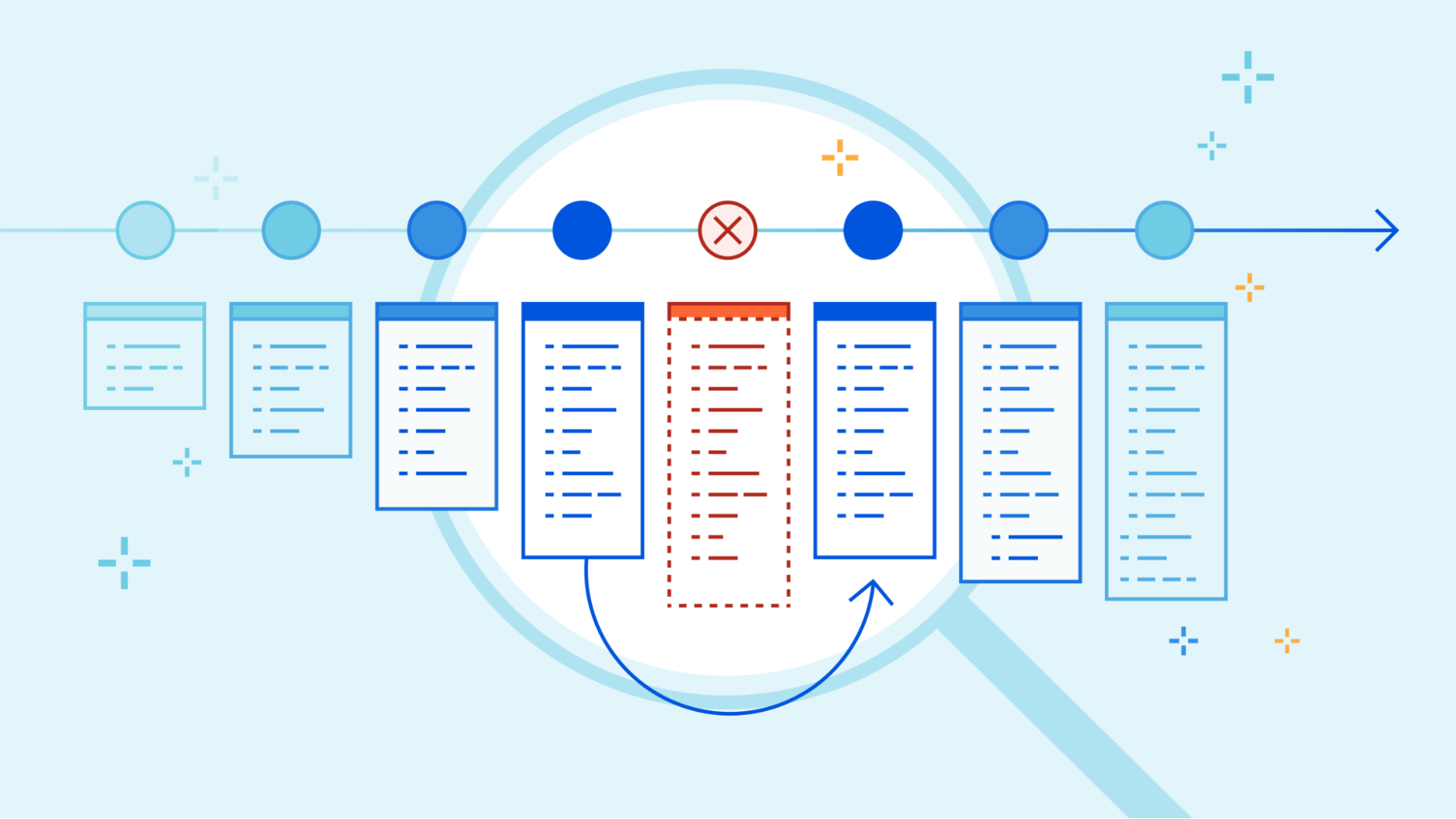
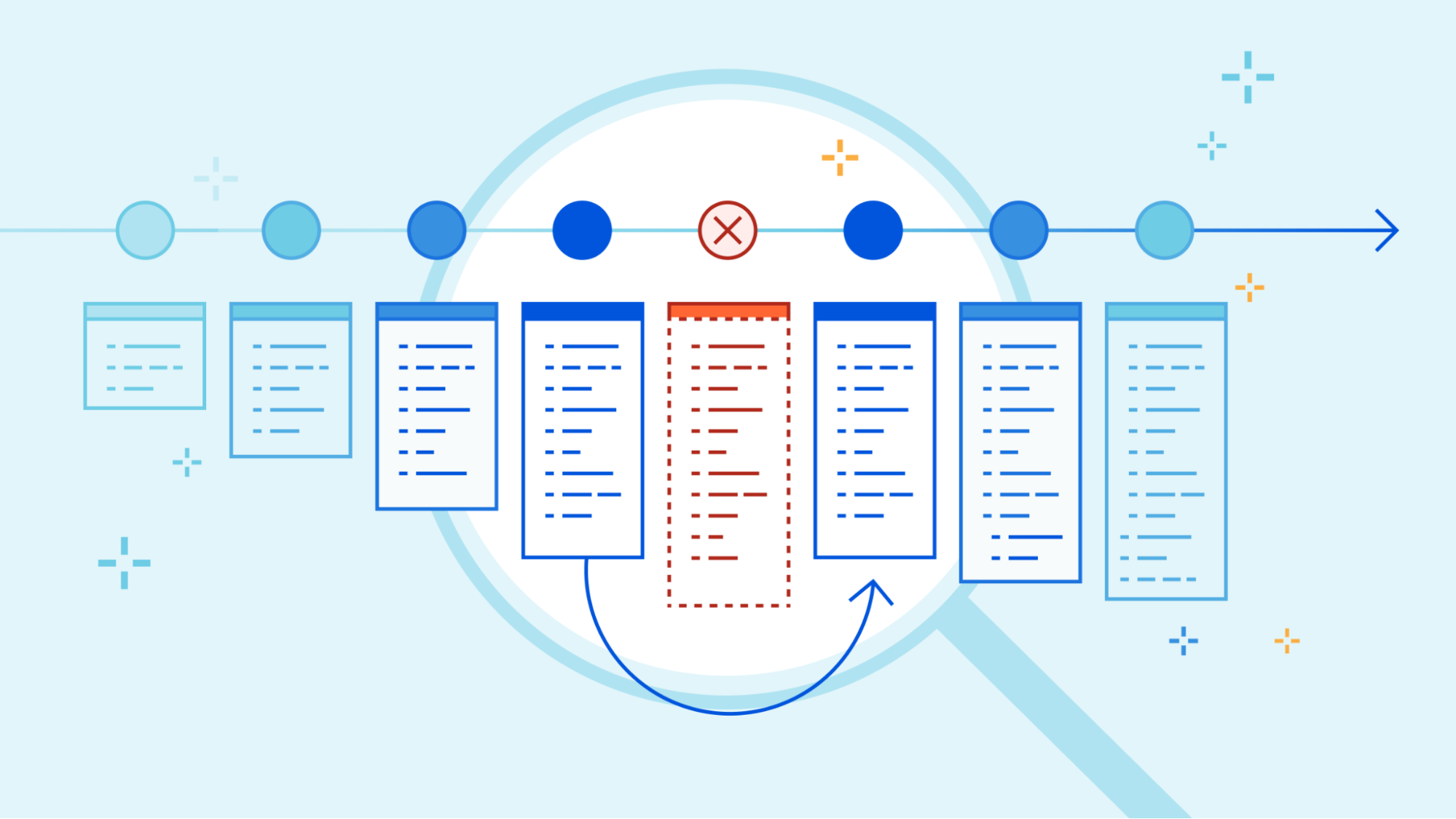
In November, 2022, we introduced deployments for Workers. Deployments are created as you make changes to a Worker. Each one is unique. These let you track changes to your Workers over time, seeing who made the changes, and where they came from.
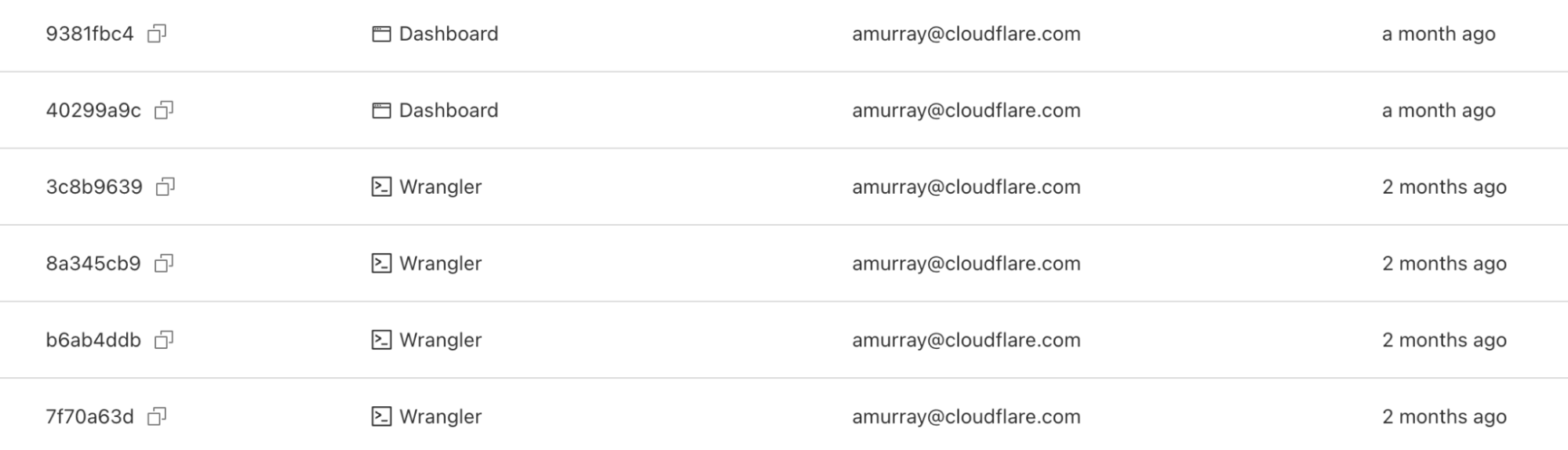
When we made the announcement, we also said our intention was to build more functionality on top of deployments.
Today, we’re proud to release rollbacks for deployments.
As nice as it would be to know that every deployment is perfect, it’s not always possible – for various reasons. Rollbacks provide a quick way to deploy past versions of a Worker – providing another layer of confidence when developing and deploying with Workers.
In the dashboard, you can navigate to the Deployments tab. For each deployment that’s not the most recent, you should see a new icon on the far right of the deployment. Hovering over that icon will display the option to rollback to the specified deployment.
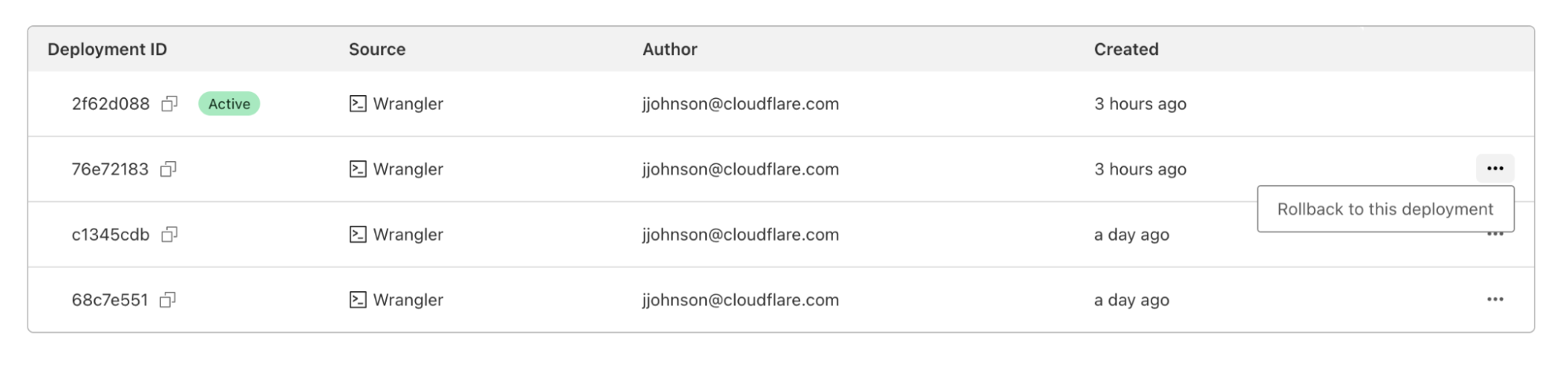
Clicking on that will bring up a confirmation dialog, where you can enter a reason for rollback. This provides another mechanism of record-keeping and helps give more context for why the rollback was necessary.
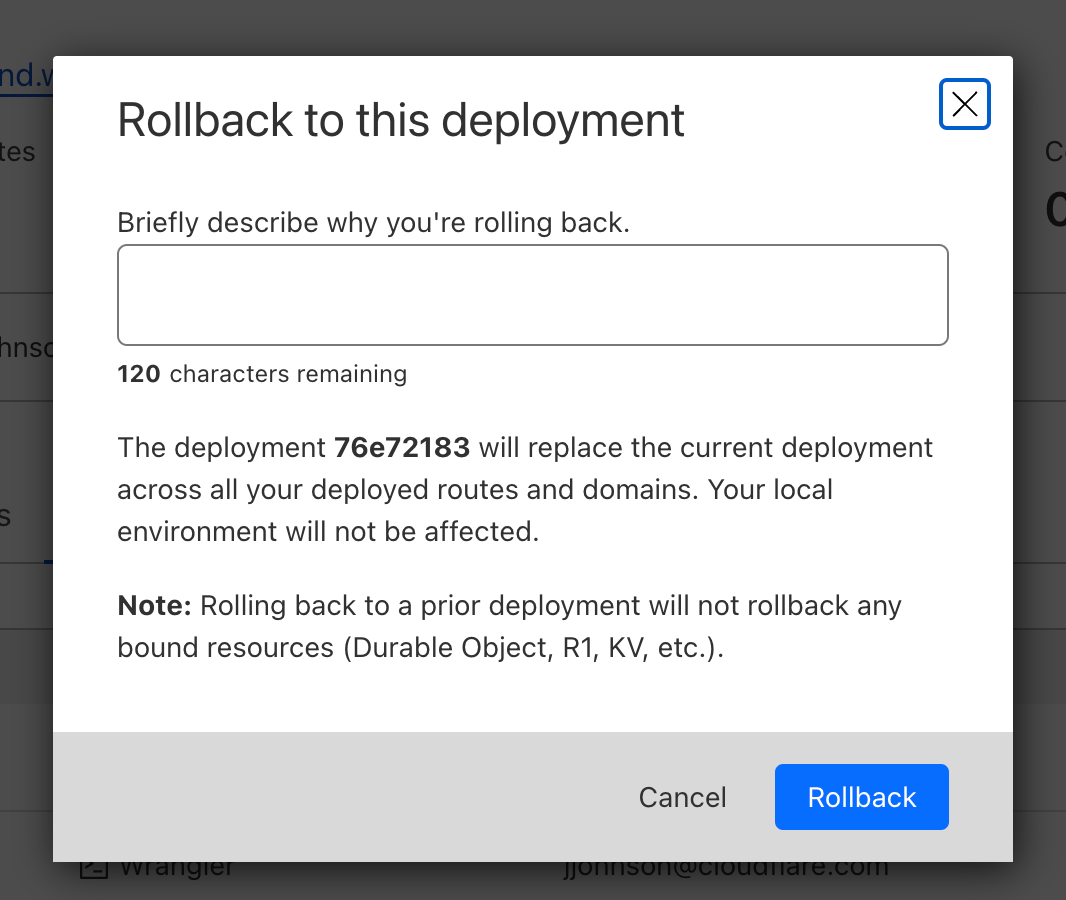
Once you enter a reason and confirm, a new rollback deployment will be created. This deployment has its own ID, but is a duplicate of the one you rolled back to. A message appears with the new deployment ID, as well as an icon showing the rollback message you entered above.
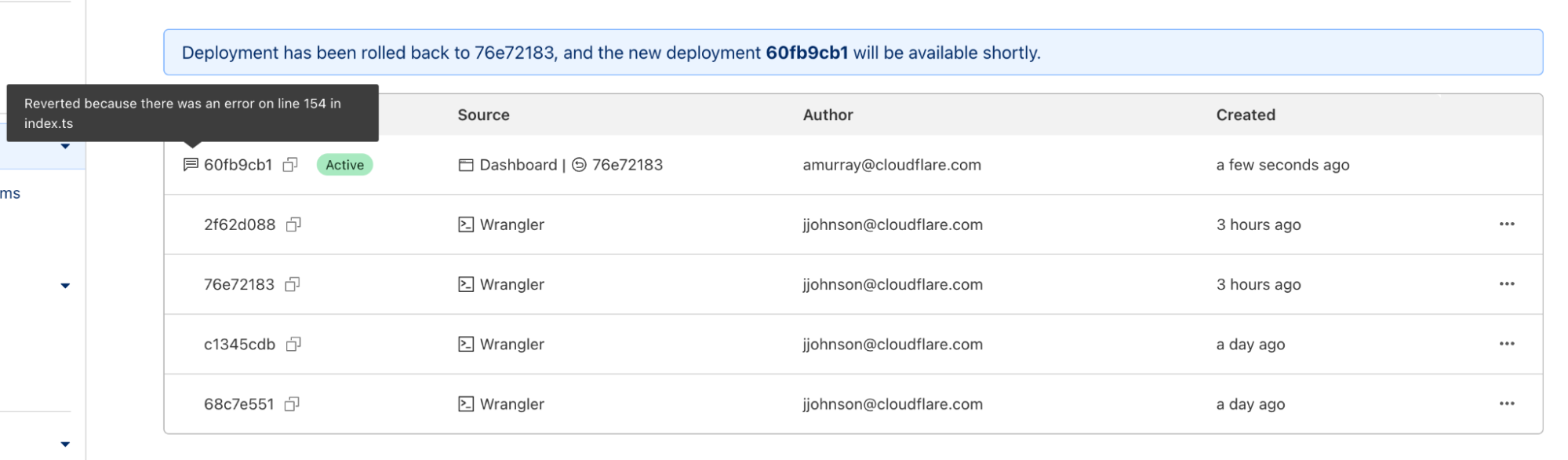
With Wrangler version 2.13, rolling back deployments via Wrangler can be done via a new command – wrangler rollback. This command takes an optional ID to rollback to a specific deployment, but can also be run without an ID to rollback to the previous deployment. This provides an even faster way to rollback in a situation where you know that the previous deployment is the one that you want.

Just like the dashboard, when you initiate a rollback you will be prompted to add a rollback reason and to confirm the action.
In addition to wrangler rollback we’ve done some refactoring to the wrangler deployments command. Now you can run wrangler deployments list to view up to the last 10 deployments.
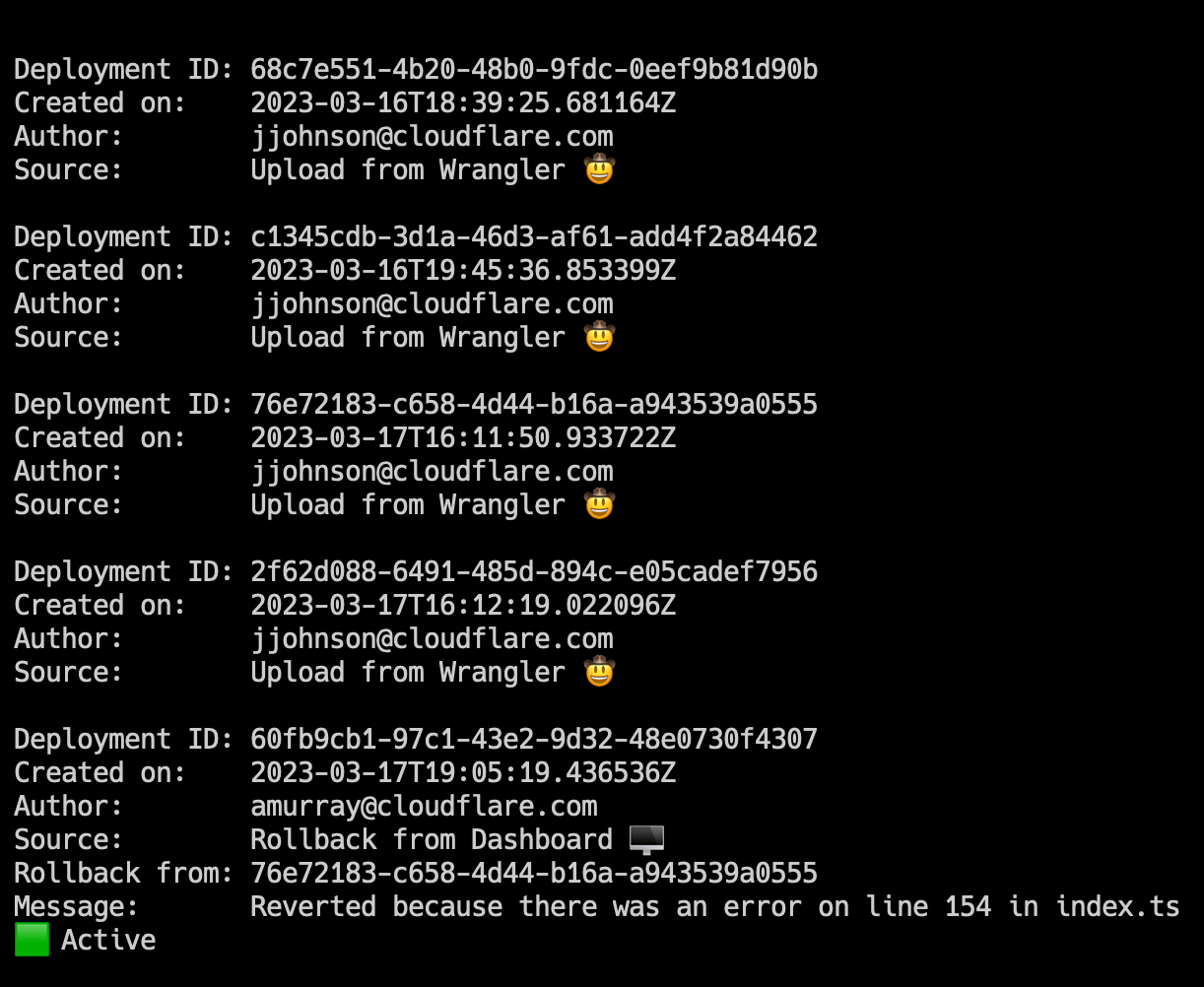
Here, you can see two new annotations: rollback from and message. These match the dashboard experience, and provide more visibility into your deployment history.
To view an individual deployment, you can run wrangler deployments view. This will display the last deployment made, which is the active deployment. If you would like to see a specific deployment, you can run wrangler deployments view [ID].
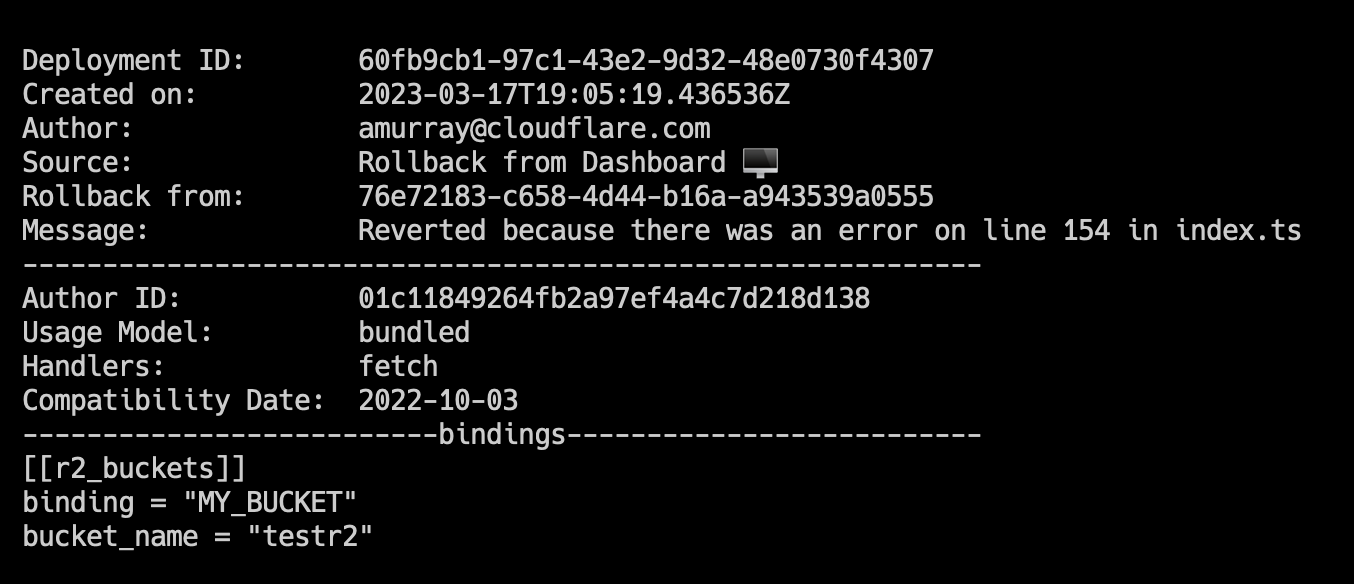
We’ve updated this command to display more data like: compatibility date, usage model, and bindings. This additional data will help you to quickly visualize changes to Worker or to see more about a specific Worker deployment without having to open your editor and go through source code.
We hope this feature provides even more confidence in deploying Workers, and encourages you to try it out! If you leverage the Cloudflare dashboard to manage deployments, you should have access immediately. Wrangler users will need to update to version 2.13 to see the new functionality.
Make sure to check out our updated deployments docs for more information, as well as information on limitations to rollbacks. If you have any feedback, please let us know via this form.
Post Syndicated from Rushil Mehra original https://blog.cloudflare.com/mtls-client-certificate-revocation-vulnerability-with-tls-session-resumption/


On December 16, 2022, Cloudflare discovered a bug where, in limited circumstances, some users with revoked certificates may not have been blocked by Cloudflare firewall settings. Specifically, Cloudflare’s Firewall Rules solution did not block some users with revoked certificates from resuming a session via mutual transport layer security (mTLS), even if the customer had configured Firewall Rules to do so. This bug has been mitigated, and we have no evidence of this being exploited. We notified any customers that may have been impacted in an abundance of caution, so they can check their own logs to determine if an mTLS protected resource was accessed by entities holding a revoked certificate.
One of Cloudflare Firewall Rules’ features, introduced in March 2021, lets customers revoke or block a client certificate, preventing it from being used to authenticate and establish a session. For example, a customer may use Firewall Rules to protect a service by requiring clients to provide a client certificate through the mTLS authentication protocol. Customers could also revoke or disable a client certificate, after which it would no longer be able to be used to authenticate a party initiating an encrypted session via mTLS.
When Cloudflare receives traffic from an end user, a service at the edge is responsible for terminating the incoming TLS connection. From there, this service is a reverse proxy, and it is responsible for acting as a bridge between the end user and various upstreams. Upstreams might include other services within Cloudflare such as Workers or Caching, or may travel through Cloudflare to an external server such as an origin hosting content. Sometimes, you may want to restrict access to an endpoint, ensuring that only authorized actors can access it. Using client certificates is a common way of authenticating users. This is referred to as mutual TLS, because both the server and client provide a certificate. When mTLS is enabled for a specific hostname, this service at the edge is responsible for parsing the incoming client certificate and converting that into metadata that is attached to HTTP requests that are forwarded to upstreams. The upstreams can process this metadata and make the decision whether the client is authorized or not.
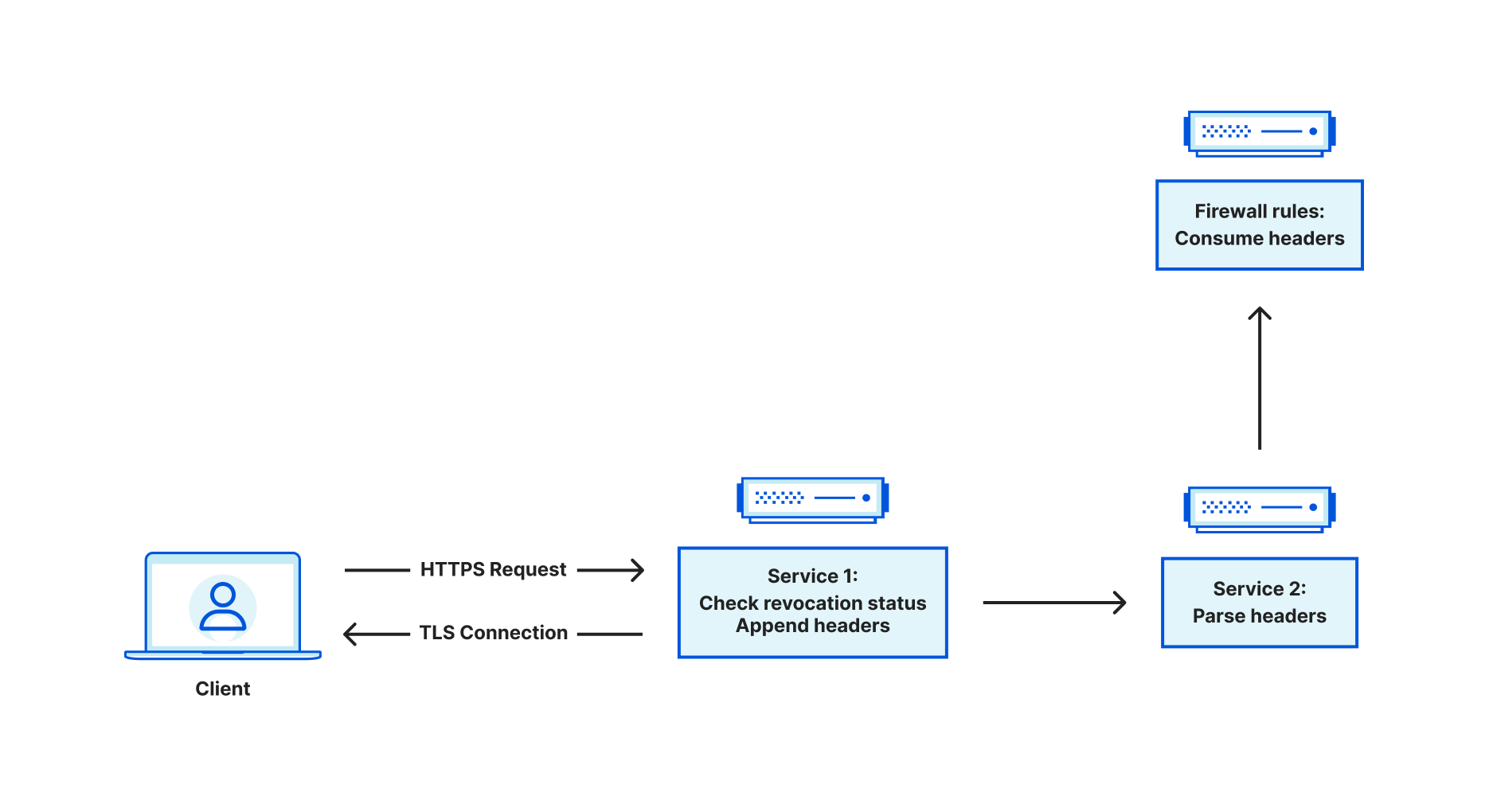
Customers can use the Cloudflare dashboard to revoke existing client certificates. Instead of immediately failing handshakes involving revoked client certificates, revocation is optionally enforced via Firewall Rules, which take effect at the HTTP request level. This leaves the decision to enforce revocation with the customer.
So how exactly does this service determine whether a client certificate is revoked?
When we see a client certificate presented as part of the TLS handshake, we store the entire certificate chain on the TLS connection. This means that for every HTTP request that is sent on the connection, the client certificate chain is available to the application. When we receive a request, we look at the following fields related to a client certificate chain:
Some of these values are used for upstream processing, but the issuer SKI and leaf certificate SN are used to query our internal data stores for revocation status. The data store indexes on an issuer SKI, and stores a collection of revoked leaf certificate serial numbers. If we find the leaf certificate in this collection, we set the relevant metadata for consumption in Firewall Rules.
But what does this have to do with TLS session resumption?
To explain this, let’s first discuss how session resumption works. At a high level, session resumption grants the ability for clients and servers to expedite the handshake process, saving both time and resources. The idea is that if a client and server successfully handshake, then future handshakes are more or less redundant, assuming nothing about the handshake needs to change at a fundamental level (e.g. cipher suite or TLS version).
Traditionally, there are two mechanisms for session resumption – session IDs and session tickets. In both cases, the TLS server will handle encrypting the context of the session, which is basically a snapshot of the acquired TLS state that is built up during the handshake process. Session IDs work in a stateful fashion, meaning that the server is responsible for saving this state, somewhere, and keying against the session ID. When a client provides a session ID in the client hello, the server checks to see if it has a corresponding session cached. If it does, then the handshake process is expedited and the cached session is restored. In contrast, session tickets work in a stateless fashion, meaning that the server has no need to store the encrypted session context. Instead, the server sends the client the encrypted session context (AKA a session ticket). In future handshakes, the client can send the session ticket in the client hello, which the server can decrypt in order to restore the session and expedite the handshake.
Recall that when a client presents a certificate, we store the certificate chain on the TLS connection. It was discovered that when sessions were resumed, the code to store the client certificate chain in application data did not run. As a result, we were left with an empty certificate chain, meaning we were unable to check the revocation status and pass this information to firewall rules for further processing.
To illustrate this, let’s use an example where mTLS is used for api.example.com. Firewall Rules are configured to block revoked certificates, and all certificates are revoked. We can reconstruct the client certificate checking behavior using a two-step process. First we use OpenSSL’s s_client to perform a handshake using the revoked certificate (recall that revocation has nothing to do with the success of the handshake – it only affects HTTP requests on the connection), and dump the session’s context into a “session.txt” file. We then issue an HTTP request on the connection, which fails with a 403 status code response because the certificate is revoked.
❯ echo -e "GET / HTTP/1.1\r\nHost:api.example.com\r\n\r\n" | openssl s_client -connect api.example.com:443 -cert cert2.pem -key key2.pem -ign_eof  -sess_out session.txt | grep 'HTTP/1.1'
depth=2 C=IE, O=Baltimore, OU=CyberTrust, CN=Baltimore CyberTrust Root
verify return:1
depth=1 C=US, O=Cloudflare, Inc., CN=Cloudflare Inc ECC CA-3
verify return:1
depth=0 C=US, ST=California, L=San Francisco, O=Cloudflare, Inc., CN=sni.cloudflaressl.com
verify return:1
HTTP/1.1 403 Forbidden
^C⏎
Now, if we reuse “session.txt” to perform session resumption and then issue an identical HTTP request, the request succeeds. This shouldn’t happen. We should fail both requests because they both use the same revoked client certificate.
❯ echo -e "GET / HTTP/1.1\r\nHost:api.example.com\r\n\r\n" | openssl s_client -connect api.example.com:443 -cert cert2.pem -key key2.pem -ign_eof -sess_in session.txt | grep 'HTTP/1.1'
HTTP/1.1 200 OK
Upon realizing that session resumption led to the inability to properly check revocation status, our first reaction was to disable session resumption for all mTLS connections. This blocked the vulnerability immediately.
The next step was to figure out how to safely re-enable resumption for mTLS. To do so, we need to remove the requirement of depending on data stored within the TLS connection state. Instead, we can use an API call that will grant us access to the leaf certificate in both session resumption and non session resumption cases. Two pieces of information are necessary: the leaf certificate serial number and the issuer SKI. The issuer SKI is actually included in the leaf certificate, also known as the Authority Key Identifier (AKI). Similar to how one would obtain the SKI for a certificate, X509_get0_subject_key_id, we can use X509_get0_authority_key_id to get the AKI.
All timestamps are in UTC
In March 2021 we introduced a new feature in Firewall Rules that allows customers to block traffic from revoked mTLS certificates.
2022-12-16 21:53 – Cloudflare discovers that the vulnerability resulted from a bug whereby certificate revocation status was not checked for session resumptions. Cloudflare begins working on a fix to disable session resumption for all mTLS connections to the edge.
2022-12-17 02:20 – Cloudflare validates the fix and starts to roll out a fix globally.
2022-12-17 21:07 – Rollout is complete, mitigating the vulnerability.
2023-01-12 16:40 – Cloudflare starts to roll out a fix that supports both session resumption and revocation.
2023-01-18 14:07 – Rollout is complete.
In conclusion: once Cloudflare identified the vulnerability, a remediation was put into place quickly. A fix that correctly supports session resumption and revocation has been fully rolled out as of 2023-01-18. After reviewing the logs, Cloudflare has not seen any evidence that this vulnerability has been exploited in the wild.
Post Syndicated from The History Guy: History Deserves to Be Remembered original https://www.youtube.com/watch?v=XT_noLsaEP8
Post Syndicated from Bruce Schneier original https://www.schneier.com/blog/archives/2023/04/uk-runs-fake-ddos-for-hire-sites.html
Brian Krebs is reporting that the UK’s National Crime Agency is setting up fake DDoS-for-hire sites as part of a sting operation:
The NCA says all of its fake so-called “booter” or “stresser” sites - which have so far been accessed by several thousand people—have been created to look like they offer the tools and services that enable cyber criminals to execute these attacks.
“However, after users register, rather than being given access to cyber crime tools, their data is collated by investigators,” reads an NCA advisory on the program. “Users based in the UK will be contacted by the National Crime Agency or police and warned about engaging in cyber crime. Information relating to those based overseas is being passed to international law enforcement.”
The NCA declined to say how many phony booter sites it had set up, or for how long they have been running. The NCA says hiring or launching attacks designed to knock websites or users offline is punishable in the UK under the Computer Misuse Act 1990.
“Going forward, people who wish to use these services can’t be sure who is actually behind them, so why take the risk?” the NCA announcement continues.
Post Syndicated from Julian Wood original https://aws.amazon.com/blogs/compute/serverless-icymi-q1-2023/
Welcome to the 21st edition of the AWS Serverless ICYMI (in case you missed it) quarterly recap. Every quarter, we share all the most recent product launches, feature enhancements, blog posts, webinars, live streams, and other interesting things that you might have missed!

In case you missed our last ICYMI, check out what happened last quarter here.
Artificial intelligence (AI) technologies, ChatGPT, and DALL-E are creating significant interest in the industry at the moment. Find out how to integrate serverless services with ChatGPT and DALL-E to generate unique bedtime stories for children.

Example notification of a story hosted with Next.js and App Runner
Serverless Land is a website maintained by the Serverless Developer Advocate team to help you build serverless applications and includes workshops, code examples, blogs, and videos. There is now enhanced search functionality so you can search across resources, patterns, and video content.

ServerlessLand search
AWS Lambda has improved how concurrency works with Amazon SQS. You can now control the maximum number of concurrent Lambda functions invoked.
The launch blog post explains the scaling behavior of Lambda using this architectural pattern, challenges this feature helps address, and a demo of maximum concurrency in action.

Maximum concurrency is set to 10 for the SQS queue.
AWS Lambda Powertools is an open-source library to help you discover and incorporate serverless best practices more easily. Lambda Powertools for .NET is now generally available and currently focused on three observability features: distributed tracing (Tracer), structured logging (Logger), and asynchronous business and application metrics (Metrics). Powertools is also available for Python, Java, and Typescript/Node.js programming languages.
To learn more:
Lambda announced a new feature, runtime management controls, which provide more visibility and control over when Lambda applies runtime updates to your functions. The runtime controls are optional capabilities for advanced customers that require more control over their runtime changes. You can now specify a runtime management configuration for each function with three settings, Automatic (default), Function update, or manual.
There are three new Amazon CloudWatch metrics for asynchronous Lambda function invocations: AsyncEventsReceived, AsyncEventAge, and AsyncEventsDropped. You can track the asynchronous invocation requests sent to Lambda functions to monitor any delays in processing and take corrective actions if required. The launch blog post explains the new metrics and how to use them to troubleshoot issues.
Lambda now supports Amazon DocumentDB change streams as an event source. You can use Lambda functions to process new documents, track updates to existing documents, or log deleted documents. You can use any programming language that is supported by Lambda to write your functions.
There is a helpful blog post suggesting best practices for developing portable Lambda functions that allow you to port your code to containers if you later choose to.
AWS Step Functions has expanded its AWS SDK integrations with support for 35 additional AWS services including Amazon EMR Serverless, AWS Clean Rooms, AWS IoT FleetWise, AWS IoT RoboRunner and 31 other AWS services. In addition, Step Functions also added support for 1000+ new API actions from new and existing AWS services such as Amazon DynamoDB and Amazon Athena. For the full list of added services, visit AWS SDK service integrations.
Amazon EventBridge has launched the AWS Controllers for Kubernetes (ACK) for EventBridge and Pipes . This allows you to manage EventBridge resources, such as event buses, rules, and pipes, using the Kubernetes API and resource model (custom resource definitions).
EventBridge event buses now also support enhanced integration with Service Quotas. Your quota increase requests for limits such as PutEvents transactions-per-second, number of rules, and invocations per second among others will be processed within one business day or faster, enabling you to respond quickly to changes in usage.
The AWS Serverless Application Model (SAM) Command Line Interface (CLI) has added the sam list command. You can now show resources defined in your application, including the endpoints, methods, and stack outputs required to test your deployed application.
AWS SAM has a preview of sam build support for building and packaging serverless applications developed in Rust. You can use cargo-lambda in the AWS SAM CLI build workflow and AWS SAM Accelerate to iterate on your code changes rapidly in the cloud.
You can now use AWS SAM connectors as a source resource parameter. Previously, you could only define AWS SAM connectors as a AWS::Serverless::Connector resource. Now you can add the resource attribute on a connector’s source resource, which makes templates more readable and easier to update over time.
AWS SAM connectors now also support multiple destinations to simplify your permissions. You can now use a single connector between a single source resource and multiple destination resources.
In October 2022, AWS released OpenID Connect (OIDC) support for AWS SAM Pipelines. This improves your security posture by creating integrations that use short-lived credentials from your CI/CD provider. There is a new blog post on how to implement it.
Find out how best to build serverless Java applications with the AWS SAM CLI.
AWS App Runner now supports retrieving secrets and configuration data stored in AWS Secrets Manager and AWS Systems Manager (SSM) Parameter Store in an App Runner service as runtime environment variables.
AppRunner also now supports incoming requests based on HTTP 1.0 protocol, and has added service level concurrency, CPU and Memory utilization metrics.
Amazon S3 now automatically applies default encryption to all new objects added to S3, at no additional cost and with no impact on performance.
You can now use an S3 Object Lambda Access Point alias as an origin for your Amazon CloudFront distribution to tailor or customize data to end users. For example, you can resize an image depending on the device that an end user is visiting from.
S3 has introduced Mountpoint for S3, a high performance open source file client that translates local file system API calls to S3 object API calls like GET and LIST.
S3 Multi-Region Access Points now support datasets that are replicated across multiple AWS accounts. They provide a single global endpoint for your multi-region applications, and dynamically route S3 requests based on policies that you define. This helps you to more easily implement multi-Region resilience, latency-based routing, and active-passive failover, even when data is stored in multiple accounts.
Amazon Kinesis Data Firehose now supports streaming data delivery to Elastic. This is an easier way to ingest streaming data to Elastic and consume the Elastic Stack (ELK Stack) solutions for enterprise search, observability, and security without having to manage applications or write code.
Amazon DynamoDB now supports table deletion protection to protect your tables from accidental deletion when performing regular table management operations. You can set the deletion protection property for each table, which is set to disabled by default.
Amazon SNS now supports AWS X-Ray active tracing to visualize, analyze, and debug application performance. You can now view traces that flow through Amazon SNS topics to destination services, such as Amazon Simple Queue Service, Lambda, and Kinesis Data Firehose, in addition to traversing the application topology in Amazon CloudWatch ServiceLens.
SNS also now supports setting content-type request headers for HTTPS notifications so applications can receive their notifications in a more predictable format. Topic subscribers can create a DeliveryPolicy that specifies the content-type value that SNS assigns to their HTTPS notifications, such as application/json, application/xml, or text/plain.
The Serverless Developer Advocate team has extended Serverless Land and introduced EDA visuals. These are small bite sized visuals to help you understand concept and patterns about event-driven architectures. Find out about batch processing vs. event streaming, commands vs. events, message queues vs. event brokers, and point-to-point messaging. Discover bounded contexts, migrations, idempotency, claims, enrichment and more!
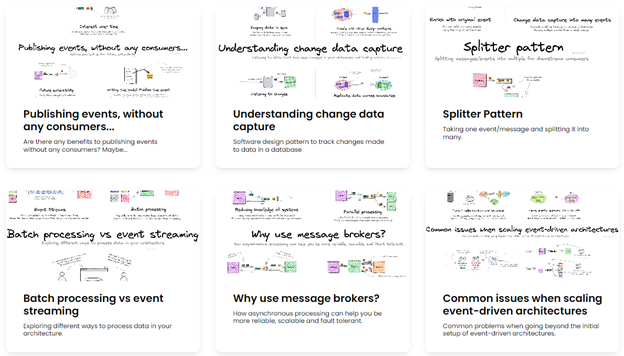
EDA Visuals
To learn more:
There is also a new section on Serverless Land containing helpful code repositories. You can search for code repos to use for examples, learning or building serverless applications. You can also filter by use-case, runtime, and level.

Serverless Repos Collection
Jan 12 – Introducing maximum concurrency of AWS Lambda functions when using Amazon SQS as an event source
Jan 20 – Processing geospatial IoT data with AWS IoT Core and the Amazon Location Service
Jan 23 – AWS Lambda: Resilience under-the-hood
Jan 24 – Introducing AWS Lambda runtime management controls
Jan 24 – Best practices for working with the Apache Velocity Template Language in Amazon API Gateway
Feb 6 – Previewing environments using containerized AWS Lambda functions
Feb 7 – Building ad-hoc consumers for event-driven architectures
Feb 9 – Implementing architectural patterns with Amazon EventBridge Pipes
Feb 9 – Securing CI/CD pipelines with AWS SAM Pipelines and OIDC
Feb 9 – Introducing new asynchronous invocation metrics for AWS Lambda
Feb 14 – Migrating to token-based authentication for iOS applications with Amazon SNS
Feb 15 – Implementing reactive progress tracking for AWS Step Functions
Feb 23 – Developing portable AWS Lambda functions
Feb 23 – Uploading large objects to Amazon S3 using multipart upload and transfer acceleration
Feb 28 – Introducing AWS Lambda Powertools for .NET
Mar 9 – Server-side rendering micro-frontends – UI composer and service discovery
Mar 9 – Building serverless Java applications with the AWS SAM CLI
Mar 10 – Managing sessions of anonymous users in WebSocket API-based applications
Mar 14 –
Implementing an event-driven serverless story generation application with ChatGPT and DALL-E
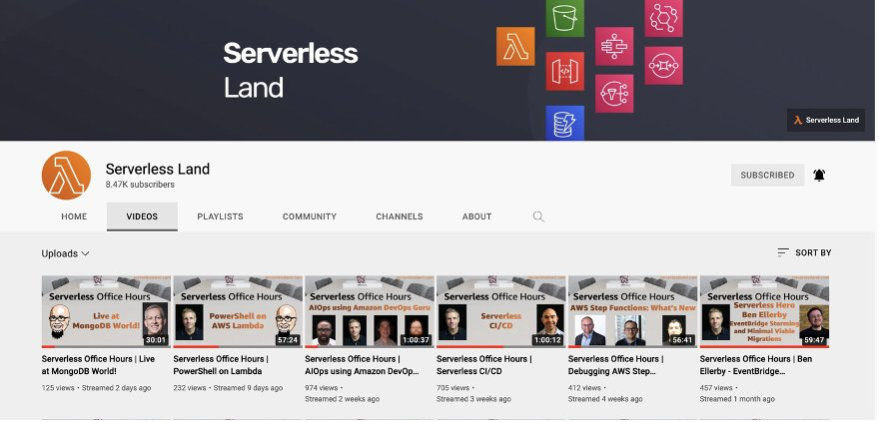
Weekly office hours live stream. In each session we talk about a specific topic or technology related to serverless and open it up to helping you with your real serverless challenges and issues. Ask us anything you want about serverless technologies and applications.
Jan 10 – Building .NET 7 high performance Lambda functions
Jan 17 – Amazon Managed Workflows for Apache Airflow at Scale
Jan 24 – Using Terraform with AWS SAM
Jan 31 – Preparing your serverless architectures for the big day
Feb 07- Visually design and build serverless applications
Feb 14 – Multi-tenant serverless SaaS
Feb 21 – Refactoring to Serverless
Feb 28 – EDA visually explained
Mar 07 – Lambda cookbook with Python
Mar 14 – Succeeding with serverless
Mar 21 – Lambda Powertools .NET
Mar 28 – Server-side rendering micro-frontends
Marcia Villalba frequently publishes new videos on her popular serverless YouTube channel. You can view all of Marcia’s videos at https://www.youtube.com/c/FooBar_codes.

Jan 12 – Serverless Badge – A new certification to validate your Serverless Knowledge
Jan 19 – Step functions Distributed map – Run 10k parallel serverless executions!
Jan 26 – Step Functions Intrinsic Functions – Do simple data processing directly from the state machines!
Feb 02 – Unlock the Power of EventBridge Pipes: Integrate Across Platforms with Ease!
Feb 09 – Amazon EventBridge Pipes: Enrichment and filter of events Demo with AWS SAM
Feb 16 – AWS App Runner – Deploy your apps from GitHub to Cloud in Record Time
Feb 23 – AWS App Runner – Demo hosting a Node.js app in the cloud directly from GitHub (AWS CDK)
Mar 02 – What is Amazon DynamoDB? What are the most important concepts? What are the indexes?
Mar 09 – Choreography vs Orchestration: Which is Best for Your Distributed Application?
Mar 16 – DynamoDB Single Table Design: Simplify Your Code and Boost Performance with Table Design Strategies
Mar 23 – 8 Reasons You Should Choose DynamoDB for Your Next Project and How to Get Started

AWS SAM & Friends
Eric Johnson is exploring how developers are building serverless applications. We spend time talking about AWS SAM as well as others like AWS CDK, Terraform, Wing, and AMPT.
Feb 16 – What’s new with AWS SAM
Feb 23 – AWS SAM with AWS CDK
Mar 02 – AWS SAM and Terraform
Mar 10 – Live from ServerlessDays ANZ
Mar 16 – All about AMPT
Mar 23 – All about Wing
Mar 30 – SAM Accelerate deep dive
The Serverless landing page has more information. The Lambda resources page contains case studies, webinars, whitepapers, customer stories, reference architectures, and even more Getting Started tutorials.
You can also follow the Serverless Developer Advocacy team on Twitter to see the latest news, follow conversations, and interact with the team.
Post Syndicated from LastWeekTonight original https://www.youtube.com/watch?v=_uSZwErdH3I
Post Syndicated from Explosm.net original https://explosm.net/comics/die
New Cyanide and Happiness Comic
Post Syndicated from original https://xkcd.com/2758/
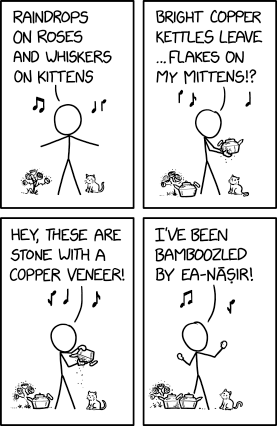
Post Syndicated from Patrick Kennedy original https://www.servethehome.com/inspur-nf3180a6-review-a-1u-amd-epyc-7003-milan-platform-with-a-huge-cooler/
In our Inspur NF3180A6 review, we see how the flexible design implements an AMD EPYC 7003 processor with massive cooling in a 1U server
The post Inspur NF3180A6 Review A 1U AMD EPYC 7003 Milan Platform with a HUGE Cooler appeared first on ServeTheHome.
Post Syndicated from original https://lwn.net/Articles/928131/
The 6.3-rc5 kernel prepatch is out for
testing. “This release continues to appear very normal and boring,
”
which is just how I like it. The commit count says that we’ve started
calming down right on schedule, and the diffstat looks normal too.
Post Syndicated from Explosm.net original https://explosm.net/comics/mirrors
New Cyanide and Happiness Comic