Tag Archives: Cloudflare Zero Trust

Introducing Access for Infrastructure: SSH

Post Syndicated from Sharon Goldberg original https://blog.cloudflare.com/intro-access-for-infrastructure-ssh

BastionZero joined Cloudflare in May 2024. We are thrilled to announce Access for Infrastructure as BastionZero’s native integration into our SASE platform, Cloudflare One. Access for Infrastructure will enable organizations to apply Zero Trust controls in front of their servers, databases, network devices, Kubernetes clusters, and more. Today, we’re announcing short-lived SSH access as the first available feature. Over the coming months we will announce support for other popular infrastructure access target types like Remote Desktop Protocol (RDP), Kubernetes, and databases.

Applying Zero Trust principles to infrastructure

Organizations have embraced Zero Trust initiatives that modernize secure access to web applications and networks, but often the strategies they use to manage privileged access to their infrastructure can be siloed, overcomplicated, or ineffective. When we speak to customers about their infrastructure access solution, we see common themes and pain points:

  • Too risky: Long-lived credentials and shared keys get passed around and inflate the risk of compromise, excessive permissions, and lateral movement

  • Too clunky: Manual credential rotations and poor visibility into infrastructure access slow down incident response and compliance efforts

Some organizations have dealt with the problem of privileged access to their infrastructure by purchasing a Privileged Access Management (PAM) solution or by building a homegrown key management tool. Traditional PAM solutions introduce audit logging and session recording features that capture user interactions with their servers and other infrastructure and/or centralized vaults that rotate keys and passwords for infrastructure every time a key is used. But this centralization can introduce performance bottlenecks, harm usability, and come with a significant price tag. Meanwhile, homegrown solutions are built from primitives provided by cloud providers or custom infrastructure-as-code solutions, and can be costly and tiresome to build out and maintain. 

We believe that organizations should apply Zero Trust principles to their most sensitive corporate resources, which naturally includes their infrastructure. That’s why we’re augmenting Cloudflare’s Zero Trust Network Access (ZTNA) service with Access to Infrastructure to support privileged access to sensitive infrastructure, and offering features that will look somewhat similar to those found in a PAM solution:

  • Access: Connect remote users to infrastructure targets via Cloudflare’s global network.

  • Authentication: Eliminate the management of credentials for servers, containers, clusters, and databases and replace them with SSO, MFA, and device posture

  • Authorization: Use policy-based access control to determine who can access what target, when, and under what role. 

  • Auditing: Provide command logs and session recordings to allow administrators to audit and replay their developers’ interactions with the organization’s infrastructure.

At Cloudflare, we are big believers that unified experiences produce the best security outcomes, and because of that, we are natively rebuilding each BastionZero feature into Cloudflare’s ZTNA service. Today, we will cover the recently-released feature for short-lived SSH access.

Secure Shell (SSH) and its security risks

SSH (Secure Shell) is a protocol that is commonly used by developers or system administrators to secure the connections used to remotely administer and manage (usually Linux/Unix) servers. SSH access to a server often comes with elevated privileges, including the ability to delete or exfiltrate data or to install or remove applications on the server. 

Modern enterprises can have tens, hundreds, or even thousands of SSH targets. Servers accessible via SSH can be targeted in cryptojacking or proxyjacking attacks. Manually tracking, rotating, and validating SSH credentials that grant access is a chore that is often left undone, which creates risks that these long-lived credentials could be compromised. There’s nothing stopping users from copying SSH credentials and sharing them with other users or transferring them to unauthorized devices.

Although many organizations will gate access to their servers to users that are inside their corporate network, this is no longer enough to protect against modern attackers. Today, the principles of Zero Trust demand that an organization also tracks who exactly is accessing their servers with SSH, and what commands they are running on those servers once they have access. In fact, the elevated privileges that come along with SSH access mean that compliance frameworks like SOC2, ISO27001, FedRAMP and others have criteria that require monitoring who has access with SSH and what exactly they are doing with that access. 

Introducing SSH with Access for Infrastructure

We’ve introduced SSH with Access for Infrastructure to provide customers with granular control over privileged access to servers via SSH. The feature provides improved visibility into who accessed what service and what they did during their SSH session, while also eliminating the risk and overhead associated with managing SSH credentials. Specifically, this feature enables organizations to:

  • Eliminate security risk and overhead of managing SSH keys and instead use short-lived SSH certificates issued by a Cloudflare-managed certificate authority (CA).

  • Author fine-grained policy to govern who can SSH to your servers and through which SSH user(s) they can log in as.

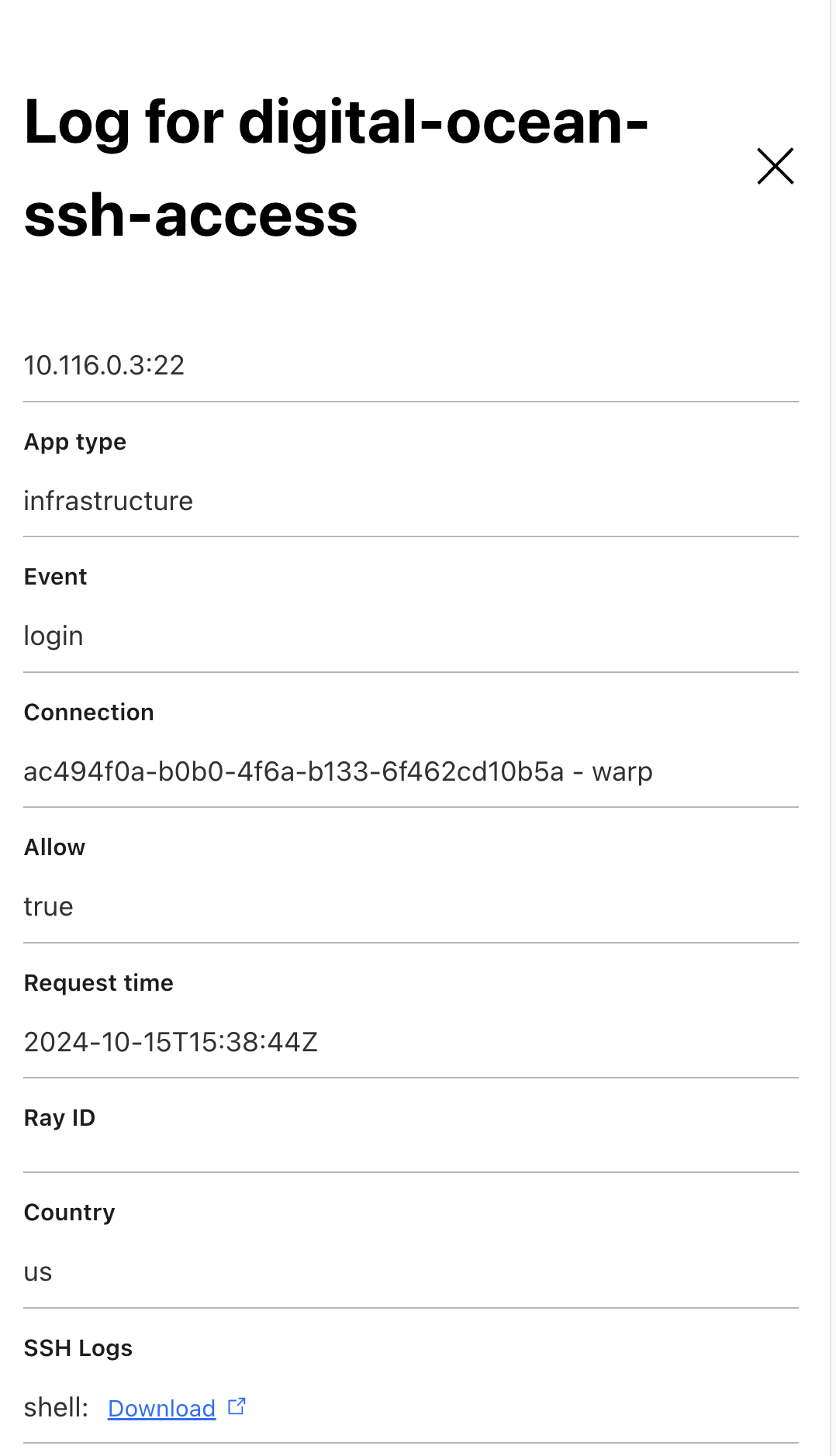
  • Monitor infrastructure access with Access and SSH command logs, supporting regulatory compliance and providing visibility in case of security breach.

  • Avoid changing end-user workflows. SSH with Access for Infrastructure supports whatever native SSH clients end users happen to be using. 

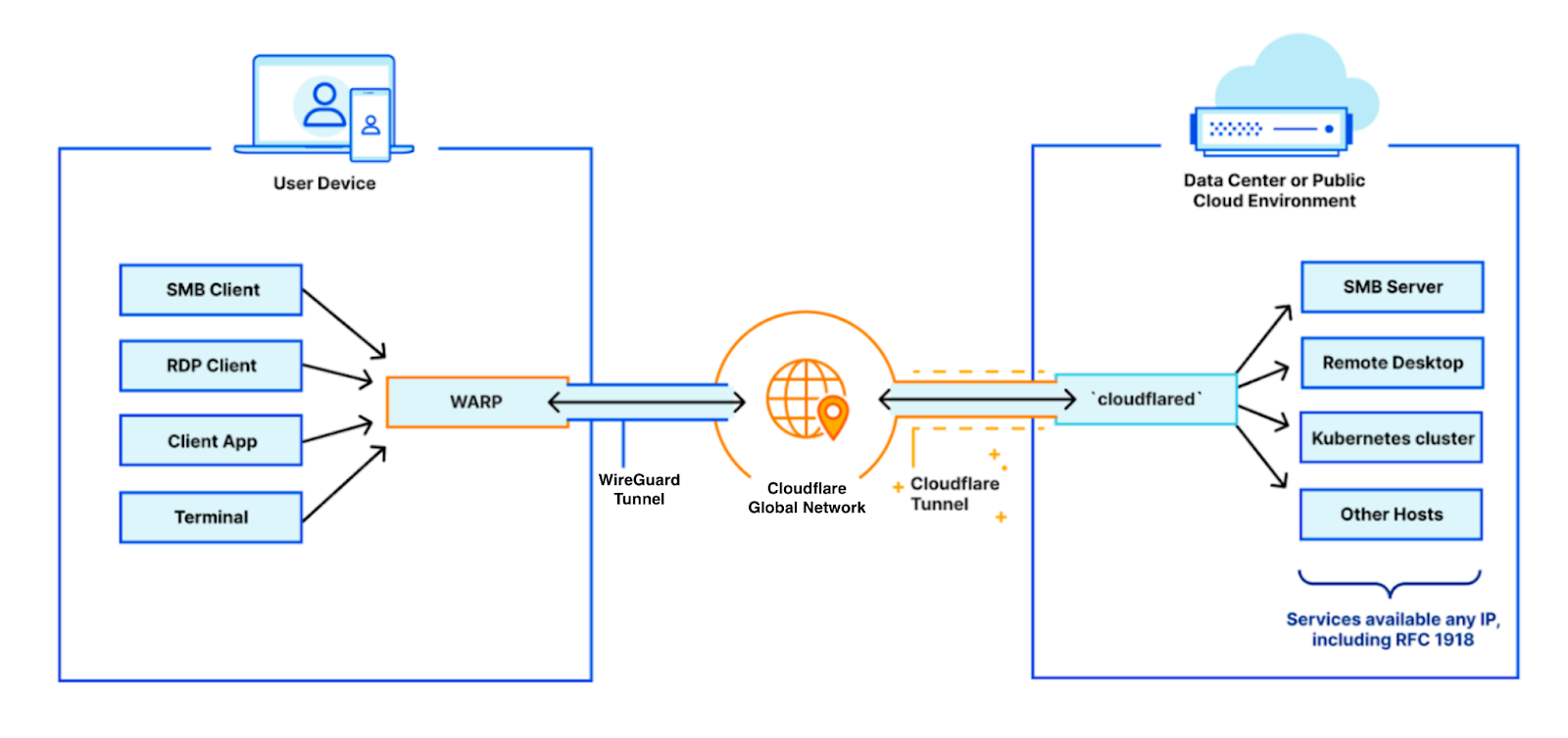
SSH with Access for Infrastructure is supported through one of the most common deployment models of Cloudflare One customers. Users can connect using our device client (WARP), and targets are made accessible using Cloudflare Tunnel (cloudflared or the WARP connector). This architecture allows customers with existing Cloudflare One deployments to enable this feature with little to no effort. The only additional setup will be configuring your target server to accept a Cloudflare SSH certificate.


Cloudflare One already offers multiple ways to secure organizations’ SSH traffic through network controls. This new SSH with Access for Infrastructure aims to incorporate the strengths of those existing solutions together with additional controls to authorize ports, protocols, and specific users as well as a much improved deployment workflow and audit logging capabilities.

Eliminating SSH credentials using an SSH CA

How does Access for Infrastructure eliminate your SSH credentials? This is done by replacing SSH password and SSH keys with an SSH Certificate Authority (CA) that is managed by Cloudflare. Generally speaking, a CA’s job is to issue certificates that bind an entity to an entity’s public key. Cloudflare’s SSH CA has a secret key that is used to sign certificates that authorize access to a target (server) via SSH, and a public key that is used by the target (server) to cryptographically validate these certificates. The public key for the SSH CA can be obtained by querying the Cloudflare API. And the secret key for the SSH CA is kept secure by Cloudflare and never exposed to anyone. 

To use SSH with Access for Infrastructure to grant access via SSH to a set of targets (i.e. servers), you need to instruct those servers to trust the Cloudflare SSH CA. Those servers will then grant access via SSH whenever they are presented with an SSH certificate that is validly signed by the Cloudflare SSH CA.

The same Cloudflare SSH CA is used to support SSH access for all of your developers and engineers to all your target servers. This greatly simplifies key management. You no longer need to manage long-lived SSH keys and passwords for individual end users, because access to targets with SSH is granted via certificates that are dynamically issued by the Cloudflare SSH CA. And, because the Cloudflare SSH CA issued short-lived SSH certificates that expire after 3 minutes, you also don’t have to worry about creating or managing long-lived SSH credentials that could be stolen by attackers. 

The 3-minute time window on the SSH certificate only applies to the time window during which the user has to authenticate to the target server; it does not apply to the length of the SSH session, which can be arbitrarily longer than 3 minutes. This 3-minute window was chosen because it was short enough to reduce the risk of security compromise and long enough to ensure that we don’t miss the time window of the user’s authentication to the server, especially if the user is on a slow connection.

Centrally managing policies down to the specific Linux user

One of the problems with traditional SSH is that once a user has an SSH key or password installed on a server, they will have access to that server forever — unless an administrator somehow remembers to remove their SSH key or password from the server in question. This leads to privilege creep, where too many people have standing access to too many servers, creating a security risk if an SSH key or password is ever stolen or leaked.

Instead, SSH with Access for Infrastructure allows you to centrally write policies in the Cloudflare dashboard specifying exactly what (set of) users has access to what (set of) servers. Users may be authenticated by SSO, MFA, device posture, location, and more, which provides better security than just authenticating them via long-lived SSH keys or passwords that could be stolen by attackers.

Moreover, the SSH certificates issued by the Cloudflare CA include a field called ValidPrinciples which indicates the specific Linux user (e.g. root, read-only, ubuntu, ec2-user) that can be assumed by the SSH connection. As such, you can write policies that specify the (set of) Linux users that a given (set of) end users may access on a given (set of) servers, as shown in the figure below. This allows you to centrally control the privileges that a given end user has when accessing a given target server. (The one caveat here is that the server must also be pre-configured to already know about the specific Linux user (e.g. root) that is specified in the policies and presented in the SSH certificate. Cloudflare is NOT managing the Linux users on your Linux servers.)

As shown below, you could write a policy that says users in Canada, the UK, and Australia that are authenticated with MFA and face recognition can access the root and ec2-user Linux users on a given set of servers in AWS.


How does Cloudflare capture SSH command logs?

Cloudflare captures SSH command logs because we built an SSH proxy that intercepts the SSH connections. The SSH proxy establishes one SSH connection between itself and the end user’s SSH client, and another SSH connection between itself and the target (server). The SSH proxy can therefore inspect the SSH commands and log them. 

SSH commands are encrypted at rest using a public key that the customer uploads via the Cloudflare API. Cloudflare cannot read SSH command logs at rest, but they can be extracted (in encrypted form) from the Cloudflare API and decrypted by the customer (who holds the corresponding private key). Instructions for uploading the encryption public key are available in our developer documentation.

How the SSH interception works under the hood

How does generic SSH work?

To understand how Cloudflare’s SSH proxy works, we first must review how a generic SSH connection is established.

First off, SSH runs over TCP, so to establish an SSH connection, we first need to complete a TCP handshake. Then, once the TCP handshake is complete, an SSH key exchange is needed to establish an ephemeral symmetric key between the client and the server that will be used to encrypt and authenticate their SSH traffic. The SSH key exchange is based on the server public key, also known as the hostkey. If you’ve ever used SSH, you’ve probably seen this message — that is the SSH server telling your SSH client to trust this hostkey for all future SSH interactions. (This is also known as TOFU or Trust On First Use.)


Finally, the client needs to authenticate itself to the server. This can be done using SSH passwords, SSH keys, or SSH certificates (as described above). SSH also has a mode called none, which means that the client does NOT need to authenticate itself to the server at all.

So how does Cloudflare’s SSH proxy work? 


To understand this, we note that whenever you set up SSH with Access for Infrastructure in the Cloudflare dashboard, you first need to create the set of targets (i.e. servers) that you want to make accessible via SSH. Targets can be defined by IP address or hostname. You then create an Access for Infrastructure application that captures the TCP ports (e.g. port 22) that SSH runs over for those targets, and write policies for those SSH connections, as we already described above and in our developer documentation.

This setup allows Cloudflare to know the set of IP addresses and ports for which it must intercept SSH traffic. Thus, whenever Cloudflare sees a TCP handshake with an IP address and port that must be intercepted, it sends traffic for that TCP connection to the SSH proxy. 

The SSH proxy leverages the client’s already authenticated identity from the WARP client, and enforces the configured Access for Infrastructure policies against it. If the policies do not allow the identity to connect to the target under the requested Linux user (e.g. root), the SSH proxy will reject the connection and log an Access denied event to the Access logs. Otherwise, if policies do allow the identity to connect, the the SSH proxy will establish the following two SSH connections: 

  1. SSH connection from SSH proxy to target

  2. SSH connection from end user’s SSH client (via Cloudflare’s WARP client) to SSH proxy

Let’s take a look at each of these SSH connections, and the cryptographic material used to set them up. 

To establish the SSH connection from SSH proxy to the target, the SSH proxy acts as a client in the SSH key exchange between itself and the target server. The handshake uses the target server’s hostkey to establish an ephemeral symmetric key between the client and the server that will encrypt and authenticate their SSH traffic. Next, the SSH proxy must authenticate itself to the target server. This is done by presenting the server with a short-lived SSH certificate, issued by the Cloudflare SSH CA, for the specified Linux user that is requested for this connection as we already described above. Because the target server has been configured to trust the Cloudflare SSH CA, the target server will be able to successfully validate the certificate and the SSH connection will be established.

To establish the SSH connection from the end-user’s SSH client to SSH proxy, the SSH proxy acts as a server in the SSH key exchange between itself and the end-user’s SSH client. 

To do this, the SSH proxy needs to inform the end user’s SSH client about the hostkey that will be used to establish this connection. But what hostkey should be used? We cannot use the same hostkey used by the target server, because that hostkey is the public key that corresponds to a private key that is known only to the target server, and not known to the SSH proxy. So, Cloudflare’s SSH proxy needs to generate its own hostkey. We don’t want the end user to randomly see warnings like the one shown below, so the SSH proxy should provide the same hostkey each time the user wants to access a given target server. But, if something does change with the hostkey of the target server, we do want the warning below to be shown. 


To achieve the desired behavior, the SSH proxy generates a hostkey and its corresponding private key by hashing together (a) a fixed secret value valid that associated with the customer account, along with (b) the hostkey that was provided by this target server (in the connection from SSH proxy to target server). This part of the design ensures that the end user only needs to see the TOFU notification the very first time it connects to the target server via WARP, because the same hostkey is used for all future connections to that target. And, if the hostkey of the target server does change as a result of a Monster-In-The-Middle attack, the warning above will be shown to the user.

Finally, during the SSH key exchange handshake from WARP client to SSH proxy, the SSH proxy informs that end user’s native SSH client that it is using none for client authentication. This means that the SSH client does NOT need to authenticate itself to the server at all. This part of the design ensures that the user need not enter any SSH passwords or store any SSH keys in its SSH configuration in order to connect to the target server via WARP. Also, this does not compromise security, because the SSH proxy has already authenticated the end user via Cloudflare’s WARP client and thus does not need to use the native SSH client authentication in the native SSH client.

Put this all together, and we have accomplished our goal of having end users authenticate to target servers without any SSH keys or passwords, using Cloudflare’s SSH CA instead. Moreover, we also preserve the desired behaviors of the TOFU notifications and warnings built into native SSH clients!

All the keys

Before we wrap up, let’s review the cryptographic keys you need in order to deploy SSH with Access for Infrastructure. There are two keys:

  1. Public key of the SSH CA. The private key of the SSH CA is only known to Cloudflare and not shared with anyone. The public key of the SSH CA is obtained from the Cloudflare API and must be installed on all your target servers. The same public key is used for all of your targets. This public key does not need to be kept secret.

  2. Private key for SSH command log encryption. To obtain logs of SSH commands, you need to generate a public-private key pair, and upload the public key to Cloudflare. The public key will be used to encrypt your SSH commands logs at REST. You need to keep the private key secret, and you can use it to decrypt your SSH command logs. 

That’s it! No other keys, passwords, or credentials to manage!

Try it out today

At Cloudflare, we are committed to providing the most comprehensive solution for ZTNA, which now also includes privileged access to sensitive infrastructure like servers accessed over SSH.

Organizations can now treat SSH like any other Access application and enforce strong MFA, device context, and policy-based access prior to granting user access. This allows organizations to consolidate their infrastructure access policies into their broader SSE or SASE architecture.

You can try out Access for Infrastructure today by following these instructions in our developer documentation. Access for Infrastructure is currently available free to teams of under 50 users, and at no extra cost to existing pay-as-you-go and Contract plan customers through an Access or Zero Trust subscription. Expect to hear about a lot more features from us as we continue to natively rebuild BastionZero’s technology into Cloudflare’s Access for Infrastructure service!

Protect against identity-based attacks by sharing Cloudflare user risk scores with Okta

Post Syndicated from Noelle Kagan original https://blog.cloudflare.com/protect-against-identity-based-attacks-by-sharing-cloudflare-user-risk-with-okta

Cloudflare One, our secure access service edge (SASE) platform, is introducing a new integration with Okta, the identity and access management (IAM) vendor, to share risk indicators in real-time and simplify how organizations can dynamically manage their security posture in response to changes across their environments.

For many organizations, it is becoming increasingly challenging and inefficient to adapt to risks across their growing attack surface. In particular, security teams struggle with multiple siloed tools that fail to share risk data effectively with each other, leading to excessive manual effort to extract signals from the noise. To address this complexity, Cloudflare launched risk posture management capabilities earlier this year to make it easier for organizations to accomplish three key jobs on one platform:

  1. Evaluating risk posed by people by using first-party user entity and behavior analytics (UEBA) models

  2. Exchanging risk telemetry with best-in-class security tools, and

  3. Enforcing risk controls based on those dynamic first- and third-party risk scores.

Today’s announcement builds on these capabilities (particularly job #2) and our partnership with Okta by enabling organizations to share Cloudflare’s real-time user risk scores with Okta, which can then automatically enforce policies based on that user’s risk. In this way, organizations can adapt to evolving risks in less time with less manual effort.

Cloudflare’s user risk scoring

Introduced earlier this year, Cloudflare’s user risk scoring analyzes real-time telemetry of user activities and behaviors and assigns a risk score of high, medium, or low. For example, if Cloudflare detects risky or suspicious activity from a user — such as impossible travel, where a user logs in from multiple geographically dispersed locations within a short time frame, data loss prevention (DLP) detections, or endpoint detections suggesting that the device is infected — the user’s risk score will increase. The activity leading to that scoring is logged for analysis.

Cloudflare includes predefined risk behaviors to help you get started. Administrators can create policies based on specific risk behaviors and adjust the risk level for each behavior based on their company’s tolerance.

Share risk scores with Okta and take action automatically

Customers that opt in to this new integration will be able to share continually updated Cloudflare user risk scores with Identity Threat Protection with Okta AI. If a user is deemed too risky, Okta will automatically take action to mitigate the risk, such as enforcing multi-factor authentication (MFA) verification or universally logging the user out from all applications. 

For example, a user has a low risk score from Cloudflare that was shared with Okta, but after exhibiting “impossible travel” behavior, the user’s risk level is raised to high. Cloudflare sends the updated score to Okta, which triggers a Universal Logout and an MFA challenge if the user attempts to log in again. Access to sensitive systems may be revoked completely until the user is verified. 

How it works: continuous risk evaluation and exchange


Figure 1. Diagram showing risky behavior by a user, resulting in sign-out.

We begin by detecting risky behavior from a user (such as an “impossible travel” event between two geographic locations). Instances of risky behavior are called Risk Events. We perform two actions when we observe a Risk Event: logging the event and evaluating whether further action is required. For customers that have enabled Risk Score Sharing with Okta, any change in Risk Score is transmitted to Okta’s Identity Threat Protection (ITP).

Upon receiving a new event, Okta evaluates the change in user risk against the organization’s policies. These policies may include actions such as re-authenticating the user if they become high risk.

When we design new features, we aim for them to be extensible across the industry. For this reason, we chose the OpenID Shared Signals Framework Specification (SSF) to be the foundation of our transmission format. By doing this, we are able to leverage current and future providers that support the standard. The core functionality of SSF revolves around sharing Security Event Tokens (SETs), a specialized version of a JSON Web Token (JWT). Providers can produce and consume Security Event Tokens, forming a “network” of shared user risk information between providers.


Figure 2. Diagram showing a Security Event Token being transmitted from Cloudflare to Okta.

The diagram above (Figure 2) details the process of sharing risk. When sharing Risk Score changes with Okta, we bundle metadata about the risk event and user into the body of a Security Event Token. Following this, the JWT/SET is signed using our private key. This is an important step, as the signature is used to verify the sender’s identity (cryptographic authenticity) and that the payload body has not been tampered with (cryptographic integrity). In plain terms, this signature is used by Okta to verify that the event is unaltered and was sent by Cloudflare.

Once Okta has verified the authenticity and integrity of the SET token, they may use the risk metadata within the body to execute Identity Threat Protection policies defined by the customer. These policies could include actions such as “if a high risk score is received from Cloudflare, sign out the offending user”.

Learn more about the Shared Signals Framework and CAEP in Okta’s announcement blog post.

Get started today

Cloudflare customers can easily enable risk score sharing from the Cloudflare One SSO setup page. This is available to customers whether you’ve already integrated with Okta or are setting up the integration for the first time. You will also be able to confirm that the feature was enabled in your audit logs.

If you’ve already integrated Okta within your Cloudflare One dashboard:

  1. As an admin, navigate to Settings > Authentication and select the Okta login method.

  2. Select “send risk score to Okta.”

If you haven’t yet integrated Okta within your Cloudflare One dashboard:

  1. As an admin, navigate to Settings > Authentication and select a new login method.

  2. Follow the instructions to add Okta as an SSO.

  3. Select “send risk score to Okta.”

Now, whenever a user’s risk score changes within the organization, information is sent to Okta automatically and an audit log is documented.

Uphold Zero Trust principles

In conclusion, the ability to incorporate rich context is essential for making accurate and informed access decisions. With vast amounts of data — including user logins, logouts, websites visited, and emails sent — human analysts would struggle to keep pace with modern security challenges. Cloudflare provides context in the form of a risk score, enabling Okta’s risk engine to make more informed policy decisions about users. This sharing of information powers the continuous evaluation required to enforce Zero Trust policies within your organization, ultimately strengthening your organization’s security posture.

Not yet a Cloudflare One customer? Reach out for a consultation or contact your account manager.

What’s new in Cloudflare One: Digital Experience (DEX) monitoring notifications and seamless access to Cloudflare Gateway with China Express

Post Syndicated from Guy Nir original https://blog.cloudflare.com/whats-new-in-cloudflare-one-digital-experience-dex-monitoring-notifications

At Cloudflare, we are constantly innovating and launching new features and capabilities across our product portfolio. We are introducing roundup blog posts to ensure that you never miss the latest updates across our platform. In this post, we are excited to share two new ways that our customers can continue to keep their web properties performant and secure with Cloudflare One: new Digital Experience Monitoring (DEX) notifications help proactively identify issues that can affect the end-user digital experience, and integration with China Express enables secure access to China-hosted sites for Cloudflare Gateway customers.   

Using DEX Notifications for proactive monitoring with Cloudflare Zero Trust


As with other notification types, DEX notifications can be configured and reviewed from Cloudflare dashboard notifications.

What problem does it solve?

DEX notifications address the challenge of proactively identifying issues affecting the digital experience of your end users. By monitoring device health and conducting synthetic tests from WARP clients deployed on your fleet’s end-user devices, DEX provides valuable insights. These notifications empower IT administrators to quickly identify and address connectivity and application performance problems before they impact a wide range of users.

By proactively notifying administrators when problems arise, DEX helps minimize user disruption and provides peace of mind. Instead of actively refreshing and looking for issues as before, administrators can now receive immediate notifications. Management is simple, as notifications can be easily configured through the Cloudflare dashboard.

Administrators can now create three new notification types:

1) Device Connectivity Anomaly

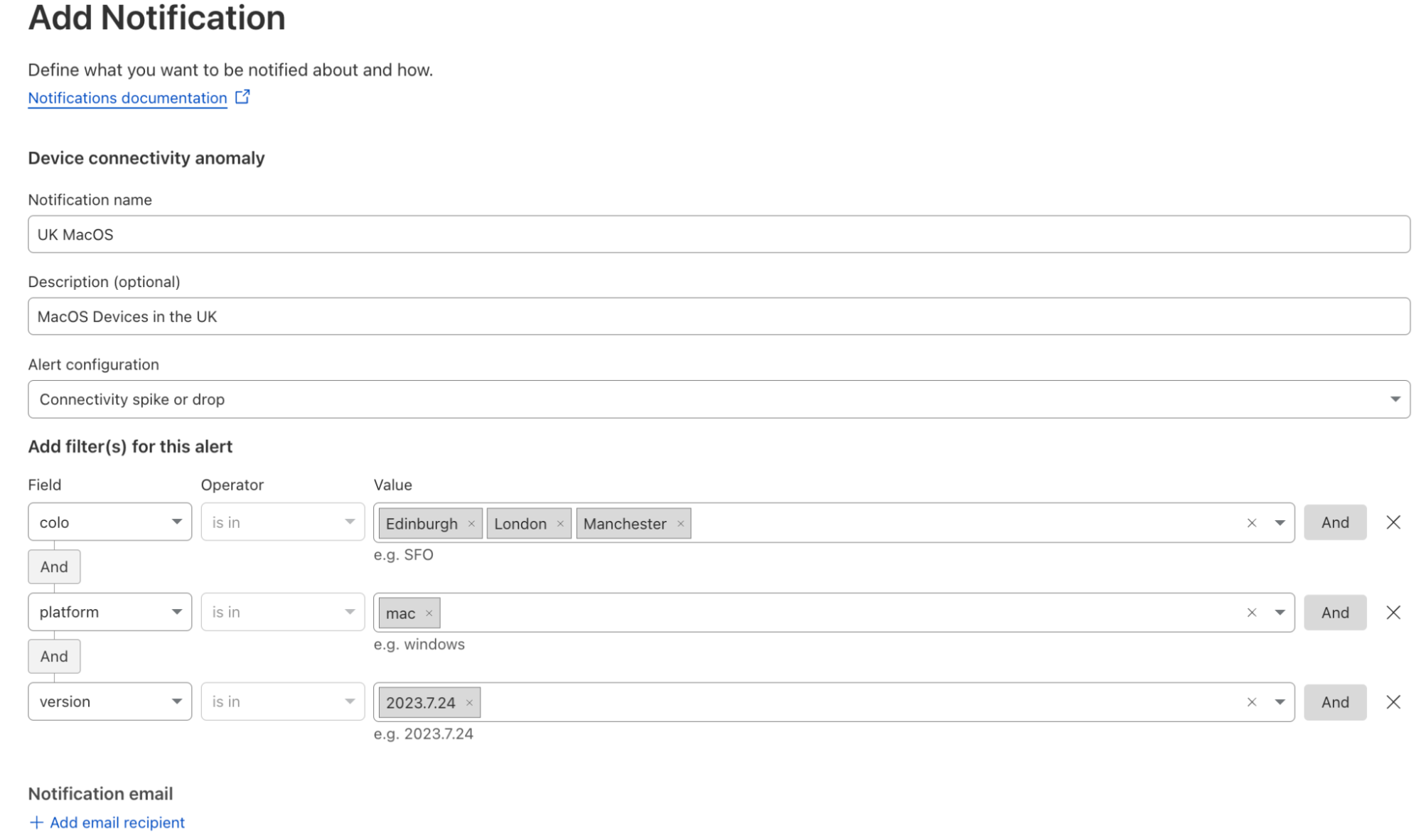
Are you tired of manually monitoring your end-users’ device connectivity? Do you want to be notified immediately when there’s a sudden change? Our new DEX notification for Device Connectivity Anomaly alerts you when there’s a significant increase or decrease in the number of monitored devices connecting or disconnecting to the WARP Client. This can be filtered by various characteristics such as data center (“colo”), platform (operating system), and WARP Client version.

We use a statistical method called z-score to detect anomalies in monitored device count. A z-score measures how many standard deviations a data point is from the mean. By comparing the current five minutes of data to the past four hours, we can calculate the mean and standard deviation. If the z-score value exceeds 3.5 or falls below -3.5, a notification is triggered.

Here’s an example of a notification configuration for macOS devices in the UK using WARP Client version 2023.7.24:


2) DEX Test Latency 

Ever worry application performance is slow? We’re thrilled to introduce DEX Test Latency notifications, which are designed for administrators who want to stay ahead of the curve when it comes to application performance. This notification proactively alerts you of significant spikes or drops in latency based on:

  • HTTP Test: Resource Fetch Time measures the time it takes for a web browser to retrieve a specific resource from your application and deliver it to the end user.

  • Traceroute Test: Round Trip Time measures the average time it takes for data packets to travel from your device to a specific destination IP address and back (when successful). Traceroute tests focus on the overall network performance between the test client/device and your application.

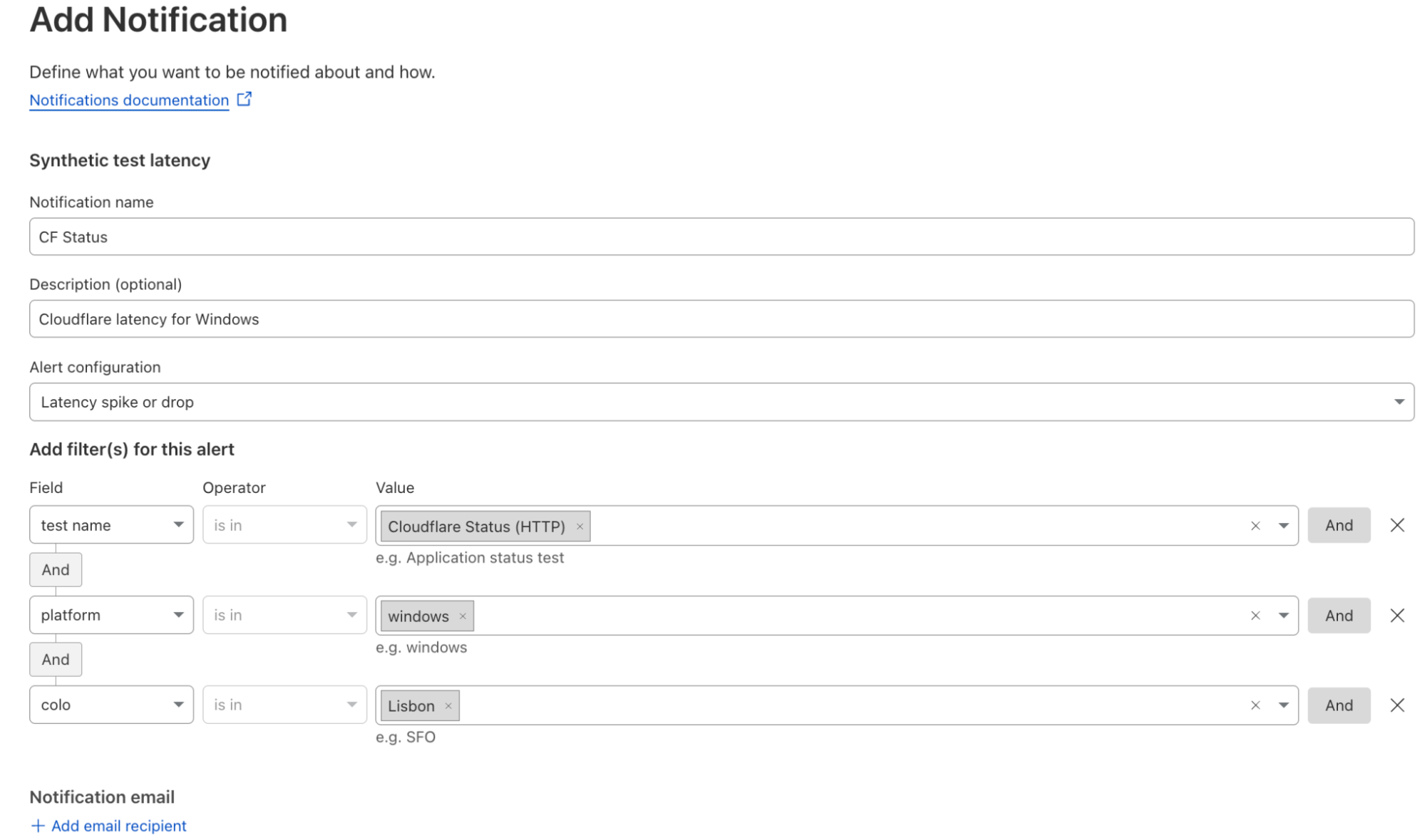
This notification can be filtered by various characteristics such as data center (“colo”), platform (operating system), WARP Client version, and test name.

In this example, you have a DEX test monitoring the latency of the website www.cloudflarestatus.com. This test, named “Cloudflare Status,” uses an HTTP GET request and runs on Windows devices connecting through the Lisbon colo (data center). 


3) DEX Test Low Availability

Is application downtime causing headaches for you and your users? 

DEX Test Low Availability notifications help maintain optimal application health by notifying you when availability  falls below a given threshold. This notification monitors the success rate of HTTP or Traceroute requests sent to an application through pre-configured DEX tests. These synthetic tests simulate user traffic and measure the percentage of successful interactions with your application.

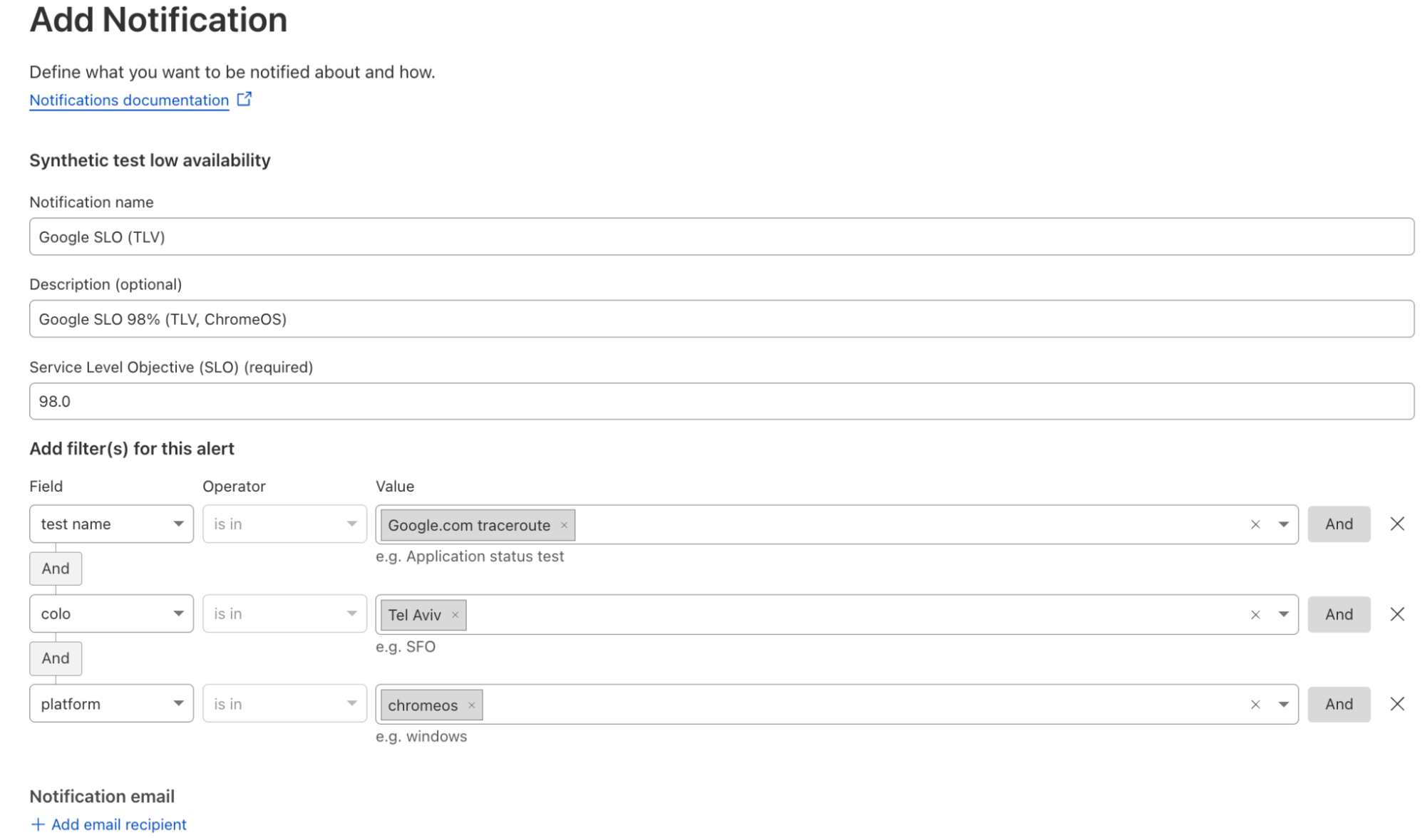
You define the Service Level Objective (SLO) — a specific availability threshold — for each notification. When the percentage of successful requests falls below this threshold, you’ll receive immediate notification, allowing you to proactively address issues before they impact a wide range of end users.

This can be filtered by various characteristics such as colo (data center), platform (operating system), WARP Client version, and test name.

In this example, a DEX test is targeting www.google.com. This Traceroute test runs on Chrome OS devices connecting through the Tel Aviv colo. The example notification is configured to alert you whenever the availability (percentage of successful requests) drops below 98%, allowing you to investigate potential issues and take corrective action quickly.


Get started today

DEX notifications are now available for Cloudflare One customers. They can be configured by going to Cloudflare Dashboard > Account home > Notifications > Add, and then selecting any of the three DEX notification types. For more information, refer to Create a notification. DEX notifications are one of the many ways the Cloudflare One suite of solutions work seamlessly together as a unified platform to find and fix security issues across SaaS applications. Get started now with Cloudflare’s Zero Trust platform by signing up here


Seamless access to Cloudflare Gateway with China Express


In January 2023, we proudly launched China Express with multiple partners in China to extend Cloudflare One into China and provide connectivity to ensure that customers within the country could enjoy the same level of access to global services as the rest of the world. Our goal was simple: to deliver a consistent experience for customers and employees everywhere.

Over the past year, we’ve observed a notable increase in demand from enterprise customers seeking secure access to China-hosted sites. These customers, who often require consistent zero trust security policies applied through Cloudflare Gateway, including device posture checks, have faced challenges like scenic routing, where Internet traffic passes through multiple countries or networks, leading to significant packet loss when connecting to these websites.

Understanding the problem

For example, a global company with offices in both Hong Kong and San Jose has implemented WARP on their devices to manage Internet access. As part of their daily operations, employees need to access websites hosted in mainland China. However, they have experienced unstable connections, particularly when accessing the AWS web console in China. Further investigation revealed long and sometimes unpredictable network routes, contributing to the instability.

Global Internet traffic to and from China flows through a limited number of international links, tightly regulated by government authorities, often leading to significant instability and fluctuations. To address these challenges, our China Express partners offer the ‘Reverse Tunnel’ solution, a reliable service that ensures stable access to Chinese websites, effectively mitigating connectivity issues.

Reverse tunnel

Today, we are thrilled to announce a significant enhancement to China Express: a new offering tailored to the needs of global Cloudflare Gateway customers accessing China-hosted sites. This enhancement introduces a dedicated tunnel configuration, ensuring safe and predictable connectivity while maintaining stringent zero trust security policies.

By partnering with JD Cloud, one of our trusted local providers in China, we’ve developed a solution that seamlessly integrates with Cloudflare’s Zero Trust Firewall DNS Policies by:

Directly routing through our Cloudflare Hong Kong data center: When global Cloudflare Gateway customers attempt to access China-hosted sites, their traffic is routed directly to our Hong Kong data center. This strategic routing point allows us to apply Zero Trust policies before the traffic continues its journey into China.

Using JD Cloud’s connectivity tunnel: From our Cloudflare Hong Kong data center, the traffic is then securely transmitted through JD Cloud’s private tunnel infrastructure, ensuring reliable and efficient connectivity into China. This partnership with JD Cloud leverages their local expertise and infrastructure capabilities, further enhancing the reliability and performance of the connection. 

Note: This premium service is exclusive to China Network customers and requires a dedicated reverse tunnel contract with JD Cloud.

Key benefits

This solution offers several key benefits for our customers:

  • Improved stability: By directing all traffic to a dedicated tunnel, customers experience more reliable connections to websites within China.

  • Enhanced security: Zero Trust policies are consistently applied to all traffic, regardless of its destination, ensuring the highest level of security for customers accessing China-hosted sites.

  • Seamless customer experience: With a dedicated tunnel configuration, customers can access websites in China with confidence, knowing that their connections are both safe and predictable. Whether it’s multinational corporations expanding into the Chinese market, e-commerce platforms serving Chinese customers, or remote workers accessing corporate resources from within China, Cloudflare’s China Express with JD Cloud partnership provides a solution tailored to their specific needs.

Conclusion

By having companies implement a DNS host override policy in Cloudflare Gateway for origins in China, which routes traffic through the China Express Reverse Tunnel instead of using public Internet routes, companies can ensure more stable and reliable connections for their employees.

Looking ahead, we remain committed to continuously improving and expanding our offerings within China Express. Future developments may include further enhancements to performance, additional partnerships with local providers, and ongoing innovation to meet the evolving needs of our customers in the region.


Never Miss an Update

We’ll continue to share roundup blog posts as we continue to build and innovate. Be sure to follow along on the Cloudflare Blog for the latest news and updates.

What’s new in Cloudflare One: Digital Experience (DEX) monitoring notifications and seamless access to Cloudflare Gateway with China Express

Post Syndicated from Guy Nir original https://blog.cloudflare.com/roundup-dex-alerts-cloudflare-gateway-china-express

At Cloudflare, we are constantly innovating and launching new features and capabilities across our product portfolio. We are introducing roundup blog posts to ensure that you never miss the latest updates across our platform. In this post, we are excited to share two new ways that our customers can continue to keep their web properties performant and secure with Cloudflare One: new Digital Experience Monitoring (DEX) notifications help proactively identify issues that can affect the end-user digital experience, and integration with China Express enables secure access to China-hosted sites for Cloudflare Gateway customers.   

Using DEX Notifications for proactive monitoring with Cloudflare Zero Trust


Digital Experience Monitoring (DEX) offers device, application, and network performance monitoring, providing IT administrators with insights to quickly identify and resolve issues. With DEX notifications , account administrators can create configurable alert rules based on available algorithms (z-score, SLO) and existing DEX filters. When notification criteria are satisfied, customers are notified via email, Pagerduty, or Webhooks

As with other notification types, DEX notifications can be configured and reviewed from Cloudflare dashboard notifications.

What problem does it solve?

DEX notifications address the challenge of proactively identifying issues affecting the digital experience of your end users. By monitoring device health and conducting synthetic tests from WARP clients deployed on your fleet’s end-user devices, DEX provides valuable insights. These notifications empower IT administrators to quickly identify and address connectivity and application performance problems before they impact a wide range of users.

By proactively notifying administrators when problems arise, DEX helps minimize user disruption and provides peace of mind. Instead of actively refreshing and looking for issues as before, administrators can now receive immediate notifications. Management is simple, as notifications can be easily configured through the Cloudflare dashboard.

Administrators can now create three new notification types:

1) Device Connectivity Anomaly

Are you tired of manually monitoring your end-users’ device connectivity? Do you want to be notified immediately when there’s a sudden change? Our new DEX notification for Device Connectivity Anomaly alerts you when there’s a significant increase or decrease in the number of monitored devices connecting or disconnecting to the WARP Client. This can be filtered by various characteristics such as data center (“colo”), platform (operating system), and WARP Client version.

We use a statistical method called z-score to detect anomalies in monitored device count. A z-score measures how many standard deviations a data point is from the mean. By comparing the current five minutes of data to the past four hours, we can calculate the mean and standard deviation. If the z-score value exceeds 3.5 or falls below -3.5, a notification is triggered.

Here’s an example of a notification configuration for macOS devices in the UK using WARP Client version 2023.7.24:


2) DEX Test Latency 

Ever worry application performance is slow? We’re thrilled to introduce DEX Test Latency notifications, which are designed for administrators who want to stay ahead of the curve when it comes to application performance. This notification proactively alerts you of significant spikes or drops in latency based on:

  • HTTP Test: Resource Fetch Time measures the time it takes for a web browser to retrieve a specific resource from your application and deliver it to the end user.

  • Traceroute Test: Round Trip Time measures the average time it takes for data packets to travel from your device to a specific destination IP address and back (when successful). Traceroute tests focus on the overall network performance between the test client/device and your application.

This notification can be filtered by various characteristics such as data center (“colo”), platform (operating system), WARP Client version, and test name.

In this example, you have a DEX test monitoring the latency of the website www.cloudflarestatus.com. This test, named “Cloudflare Status,” uses an HTTP GET request and runs on Windows devices connecting through the Lisbon colo (data center). 


3) DEX Test Low Availability

Is application downtime causing headaches for you and your users? 

DEX Test Low Availability notifications help maintain optimal application health by notifying you when availability falls below a given threshold. This notification monitors the success rate of HTTP or Traceroute requests sent to an application through pre-configured DEX tests. These synthetic tests simulate user traffic and measure the percentage of successful interactions with your application.

You define the Service Level Objective (SLO) — a specific availability threshold — for each notification. When the percentage of successful requests falls below this threshold, you’ll receive immediate notification, allowing you to proactively address issues before they impact a wide range of end users.

This can be filtered by various characteristics such as colo (data center), platform (operating system), WARP Client version, and test name.

In this example, a DEX test is targeting www.google.com. This Traceroute test runs on Chrome OS devices connecting through the Tel Aviv colo. The example notification is configured to alert you whenever the availability (percentage of successful requests) drops below 98%, allowing you to investigate potential issues and take corrective action quickly.


Get started today

DEX notifications are now available for Cloudflare One customers. They can be configured by going to Cloudflare Dashboard > Account home > Notifications > Add, and then selecting any of the three DEX notification types. For more information, refer to Create a notification. DEX notifications are one of the many ways the Cloudflare One suite of solutions work seamlessly together as a unified platform to find and fix security issues across SaaS applications. Get started now with Cloudflare’s Zero Trust platform by signing up here.

Seamless access to Cloudflare Gateway with China Express


In January 2023, we proudly launched China Express with multiple partners in China to extend Cloudflare One into China and provide connectivity to ensure that customers within the country could enjoy the same level of access to global services as the rest of the world. Our goal was simple: to deliver a consistent experience for customers and employees everywhere.

Over the past year, we’ve observed a notable increase in demand from enterprise customers seeking secure access to China-hosted sites. These customers, who often require consistent zero trust security policies applied through Cloudflare Gateway, including device posture checks, have faced challenges like scenic routing, where Internet traffic passes through multiple countries or networks, leading to significant packet loss when connecting to these websites.

Understanding the problem

For example, a global company with offices in both Hong Kong and San Jose has implemented WARP on their devices to manage Internet access. As part of their daily operations, employees need to access websites hosted in mainland China. However, they have experienced unstable connections, particularly when accessing the AWS web console in China. Further investigation revealed long and sometimes unpredictable network routes, contributing to the instability.

Global Internet traffic to and from China flows through a limited number of international links, tightly regulated by government authorities, often leading to significant instability and fluctuations. To address these challenges, our China Express partners offer the ‘Reverse Tunnel’ solution, a reliable service that ensures stable access to Chinese websites, effectively mitigating connectivity issues.

Reverse tunnel

Today, we are thrilled to announce a significant enhancement to China Express: a new offering tailored to the needs of global Cloudflare Gateway customers accessing China-hosted sites. This enhancement introduces a dedicated tunnel configuration, ensuring safe and predictable connectivity while maintaining stringent zero trust security policies.

By partnering with JD Cloud, one of our trusted local providers in China, we’ve developed a solution that seamlessly integrates with Cloudflare’s Zero Trust Firewall DNS Policies by:

Directly routing through our Cloudflare Hong Kong data center: When global Cloudflare Gateway customers attempt to access China-hosted sites, their traffic is routed directly to our Hong Kong data center. This strategic routing point allows us to apply Zero Trust policies before the traffic continues its journey into China.

Using JD Cloud’s connectivity tunnel: From our Cloudflare Hong Kong data center, the traffic is then securely transmitted through JD Cloud’s private tunnel infrastructure, ensuring reliable and efficient connectivity into China. This partnership with JD Cloud leverages their local expertise and infrastructure capabilities, further enhancing the reliability and performance of the connection.

Note: This premium service is exclusive to China Network customers and requires a dedicated reverse tunnel contract with JD Cloud.

Key benefits

This solution offers several key benefits for our customers:

  • Improved stability: By directing all traffic to a dedicated tunnel, customers experience more reliable connections to websites within China.

  • Enhanced security: Zero Trust policies are consistently applied to all traffic, regardless of its destination, ensuring the highest level of security for customers accessing China-hosted sites.

  • Seamless customer experience: With a dedicated tunnel configuration, customers can access websites in China with confidence, knowing that their connections are both safe and predictable. Whether it’s multinational corporations expanding into the Chinese market, e-commerce platforms serving Chinese customers, or remote workers accessing corporate resources from within China, Cloudflare’s China Express with JD Cloud partnership provides a solution tailored to their specific needs.

Conclusion

By having companies implement a DNS host override policy in Cloudflare Gateway for origins in China, which routes traffic through the China Express Reverse Tunnel instead of using public Internet routes, companies can ensure more stable and reliable connections for their employees.

Looking ahead, we remain committed to continuously improving and expanding our offerings within China Express. Future developments may include further enhancements to performance, additional partnerships with local providers, and ongoing innovation to meet the evolving needs of our customers in the region.

Never Miss an Update

We’ll continue to share roundup blog posts as we continue to build and innovate. Be sure to follow along on the Cloudflare Blog for the latest news and updates.

Extending local traffic management load balancing to Layer 4 with Spectrum

Post Syndicated from Chris Ward original https://blog.cloudflare.com/extending-local-traffic-management-load-balancing-to-layer-4-with-spectrum


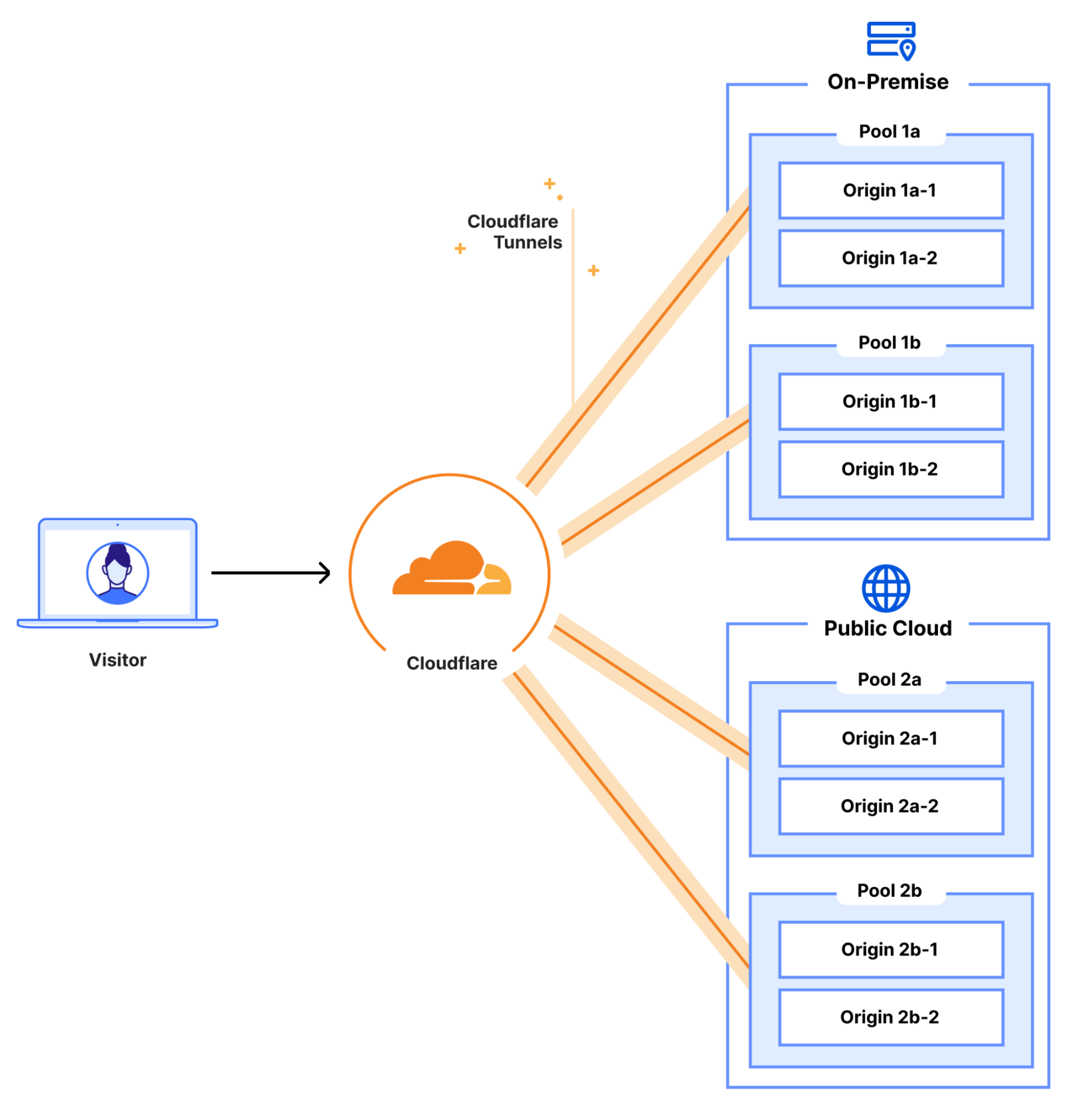
In 2023, Cloudflare introduced a new load balancing solution, supporting Local Traffic Management (LTM). This gives organizations a way to balance HTTP(S) traffic between private or internal servers within a region-specific data center. Today, we are thrilled to be able to extend those same LTM capabilities to non-HTTP(S) traffic. This new feature is enabled by the integration of Cloudflare Spectrum, Cloudflare Tunnels, and Cloudflare load balancers and is available to enterprise customers. Our customers can now use Cloudflare load balancers for all TCP and UDP traffic destined for private IP addresses, eliminating the need for expensive on-premise load balancers.

A quick primer

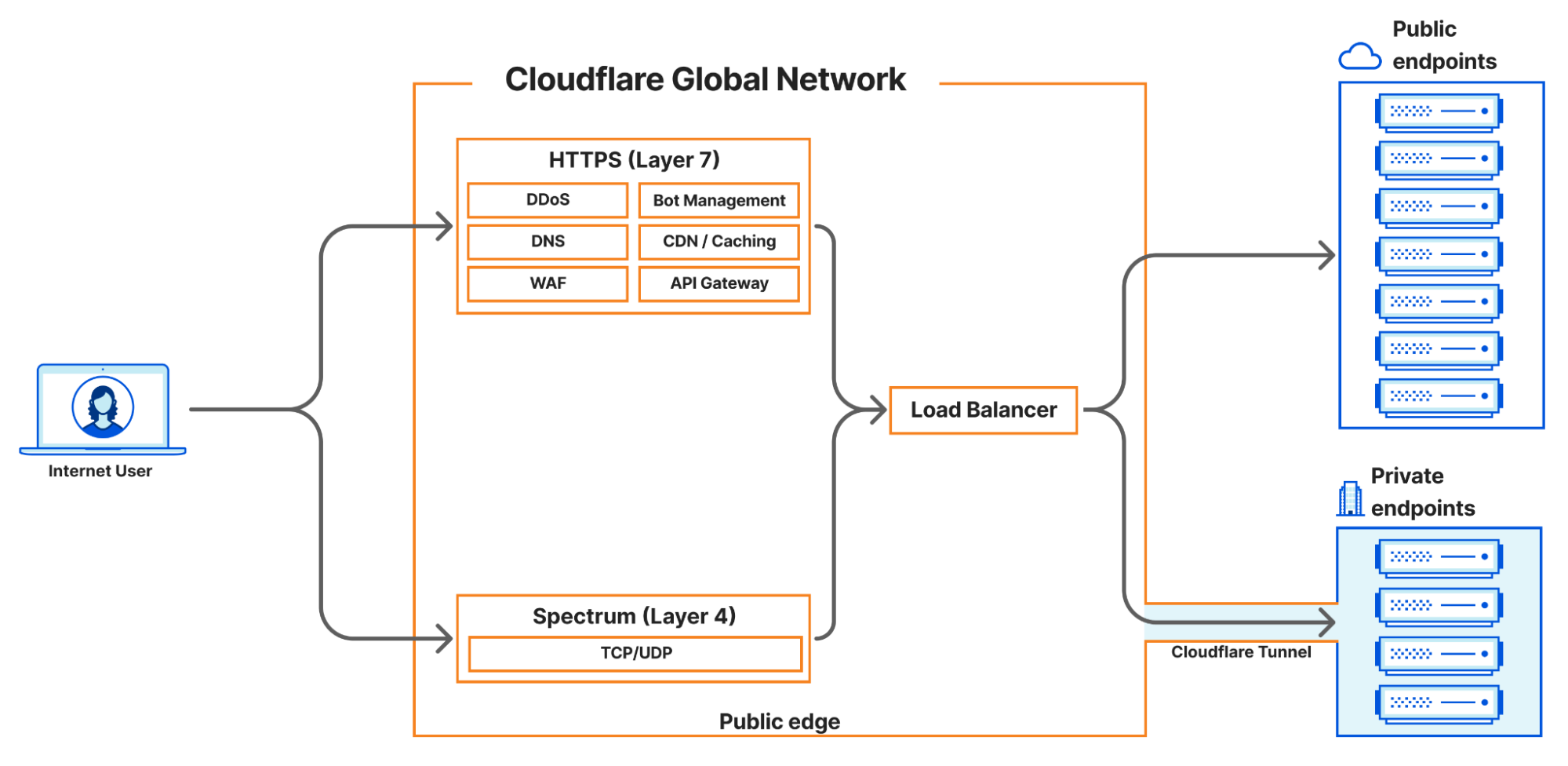
In this blog post, we will be referring to load balancers at either layer 4 or layer 7. This is, of course, referring to layers of the OSI model but more specifically, the ingress path that is being used to reach the load balancer. Layer 7, also known as the Application Layer, is where the HTTP(S) protocol exists. Cloudflare is well known for our layer 7 capabilities, which are built around speeding up and protecting websites which run over HTTP(S). When we refer to layer 7 load balancers, we are referring to HTTP(S)-based services. Our layer 7 stack allows Cloudflare to apply services like CDN, WAF, Bot Management, DDoS protection, and more to a customer’s website or application to improve performance, availability, and security.

Layer 4 load balancers operate at a lower level of the OSI model, called the Transport Layer, which means they can be used to support a much broader set of services and protocols. At Cloudflare, our public layer 4 load balancers are enabled by a Cloudflare product called Spectrum. Spectrum works as a layer 4 reverse proxy. This places Cloudflare in front of any DDoS attacks that may be launched against Spectrum-proxied services, and by using Spectrum in front of your application, your private origin IP address is concealed, which also prevents bad actors from discovering and attacking your origin’s IP address directly.

Services that use TCP or UDP for transport can leverage Spectrum with a Cloudflare load balancer. Layer 4 load balancing allows us to support other application layer protocols such as SSH, FTP, NTP, and SMTP since they operate over TCP and UDP. Given the breadth of services and protocols this represents, the treatment provided is more generalized. Cloudflare Spectrum supports features such as TLS/SSL offloading, DDoS protection, Argo Smart Routing, and session persistence with our layer 4 load balancers.

Cloudflare’s current load balancing capabilities

Before we dig into the new features we are announcing, it’s important to understand what Cloudflare load balancing supports today and the challenges our customers face with regard to their load balancing needs.

There are three main load balancing traffic flows that Cloudflare supports today:

  1. Internet-facing load balancers connecting to publicly accessible origins operating at layer 7, which supports HTTP(S)
  2. Internet-facing load balancers connecting to publicly accessible origins operating at layer 4 (Spectrum), which supports all TCP-based and UDP-based services such as SSH, FTP, NTP, SMTP, etc.
  3. Publicly accessible load balancers connecting to private origins operating at layer 7 HTTP(S) over Cloudflare Tunnels

One of the biggest advantages Cloudflare’s load balancing solutions offer our customers is that there is no hardware to purchase or maintain. Hardware-based load balancers are expensive to purchase, license, operate, and upgrade. “Need more bandwidth? Just buy and install this additional module.” “Need more features? Just buy and install this new license.” “Oh, your hardware load balancer is End-of-Life? Just purchase an entire new kit which we will EOL in a few years!” The upgrade or refresh cycle on a fully integrated LTM load balancer setup can take years and, by the time you finish the planning, implementation, and cutover, it might actually be time to start planning the next refresh.

Cloudflare eliminates all these concerns and lets you focus on innovation and growth. Your load balancers exist in every Cloudflare data center across the globe, in over 300 cities, with virtually unlimited scale and capacity. You never need to worry about bandwidth constraints, deployment locations, extra hardware modules, downtime, upgrades, or maintenance windows ever again. With Cloudflare’s global Anycast network, every customer connects to a nearby Cloudflare data center and load balancer, where relevant policies, rules, and steering are applied.

Load balancing more than websites with Cloudflare Spectrum

Today, we are excited to announce that Cloudflare Spectrum can now support load balancing traffic to private networks. The addition of private IP origin support for Cloudflare load balancers is very powerful and that’s why we are extending that support to load balancing with Cloudflare Spectrum as well. This means that any set of private or internal applications that use TCP or UDP can now be locally load balanced via Cloudflare. These services will also benefit from Spectrum’s layer 3/4 DDoS protection and can leverage other features like session persistence without compromising security. So while the ingress to these load balancers is public, the origins to which they distribute traffic can all be private, inaccessible from the public Internet.

Ordinarily, load balancing to private networks would require expensive on-premise hardware or costly direct physical connections to cloud providers. But, by using Spectrum as the ingress path for TCP and UDP load balancing, customers can keep their origins completely protected and unreachable from the Internet and allow access exclusively through their Cloudflare load balancer – no expensive hardware required. Customers no longer need to manage complex ACLs or security settings to make sure only certain source IP addresses are connecting to the origins. These private origins can be hosted in private data centers, a public cloud, a private cloud, or on-premise.

How we enabled Spectrum to support private networks

All of our changes to create this feature center around integrations with Apollo, the unifying service created by the Cloudflare Zero Trust team. You can read their previous blog post on the Oxy framework for more details on how Zero Trust handles and routes traffic. Apollo accepts incoming traffic from supported on-ramps, applies Zero Trust logic as configured by the customer, and then routes the traffic to egress via supported off-ramps. For example, Apollo enables clients connected securely using Cloudflare’s WARP client to communicate over Cloudflare Tunnels with private origins in a customer’s data center. Now, Apollo is being extended to do more.

When a user creates a load balanced Spectrum app, they choose a hostname and port, and select a Cloudflare load balancer as their origin. This allocates a hostname which will resolve to an IP address where Spectrum will listen for incoming traffic on the customer-configured port. Spectrum makes a call to Cloudflare’s internal load balancing service, Director, which responds with the appropriate endpoint, to which Spectrum will proxy the connection. Previously, load balanced Spectrum apps only supported publicly addressable origins. Now, if the response from Director indicates that the traffic is destined for a private origin, Spectrum passes the private origin’s IP address and virtual network ID to Apollo, which then proxies the traffic to the customer’s private origin.

In short, new integrations between our Spectrum service and Apollo and between Apollo and Director have allowed us to expand our load balancing offerings not only to layer 4, but also enable us to leverage virtual networks to keep load balanced traffic private and off the public Internet. This also sets the stage for integrating load balancing with other traffic on-ramps and off-ramps, such as WARP, in the future. It also opens the door to a number of exciting possibilities like load balancing authenticated device traffic to private networks or even load balancing internal traffic that is never exposed to the public Internet.

Looking to the future

We are excited to be releasing this new load balancing feature which enables Cloudflare Spectrum to reach private IP endpoints. Cloudflare load balancers now support steering any TCP or UDP-based protocols over Cloudflare Tunnels to private IP endpoints, which are otherwise not accessible via the public Internet. You can learn more about how to configure this feature on our load balancing documentation pages.

We are just getting started with our local traffic management load balancing support. There is so much more to come including support for load balancing internal traffic, enhanced layer 4 session affinity, new steering methods, additional traffic ingress methods, and more!
Announcing two highly requested DLP enhancements: Optical Character Recognition (OCR) and Source Code Detections

Post Syndicated from Noelle Kagan original https://blog.cloudflare.com/dlp-ocr-sourcecode


We are excited to announce two enhancements to Cloudflare’s Data Loss Prevention (DLP) service: support for Optical Character Recognition (OCR) and predefined source code detections. These two highly requested DLP features make it easier for organizations to protect their sensitive data with granularity and reduce the risks of breaches, regulatory non-compliance, and reputational damage:

  • With OCR, customers can efficiently identify and classify sensitive information contained within images or scanned documents.
  • With predefined source code detections, organizations can scan inline traffic for common code languages and block those HTTP requests to prevent data leaks, as well as detecting the storage of code in repositories such as Google Drive.

These capabilities are available now within our DLP engine, which is just one of several Cloudflare services, including cloud access security broker (CASB), Zero Trust network access (ZTNA), secure web gateway (SWG), remote browser isolation (RBI), and cloud email security, that help organizations protect data everywhere across web, SaaS, and private applications.

About Optical Character Recognition (OCR)

OCR enables the extraction of text from images. It converts the text within those images into readable text data that can be easily edited, searched, or analyzed, unlike images.

Sensitive data regularly appears in image files. For example, employees are often asked to provide images of identification cards, passports, or documents as proof of identity or work status. Those images can contain a plethora of sensitive and regulated classes of data, including Personally Identifiable Information (PII) — for example, passport numbers, driver’s license numbers, birthdates, tax identification numbers, and much more.

OCR can be leveraged within DLP policies to prevent the unauthorized sharing or leakage of sensitive information contained within images. Policies can detect when sensitive text content is being uploaded to cloud storage or shared through other communication channels, and block the transaction to prevent data loss. This assists in enforcing compliance with regulatory requirements related to data protection and privacy.

About source code detection

Source code fuels digital business and contains high-value intellectual property, including proprietary algorithms and encrypted secrets about a company’s infrastructure. Source code has been and will continue to be a target for theft by external attackers, but customers are also increasingly concerned about the inadvertent exposure of this information by internal users. For example, developers may accidentally upload source code to a publicly available GitHub repository or to generative AI tools like ChatGPT. While these tools have their place (like using AI to help with debugging), security teams want greater visibility and more precise control over what data flows to and from these tools.

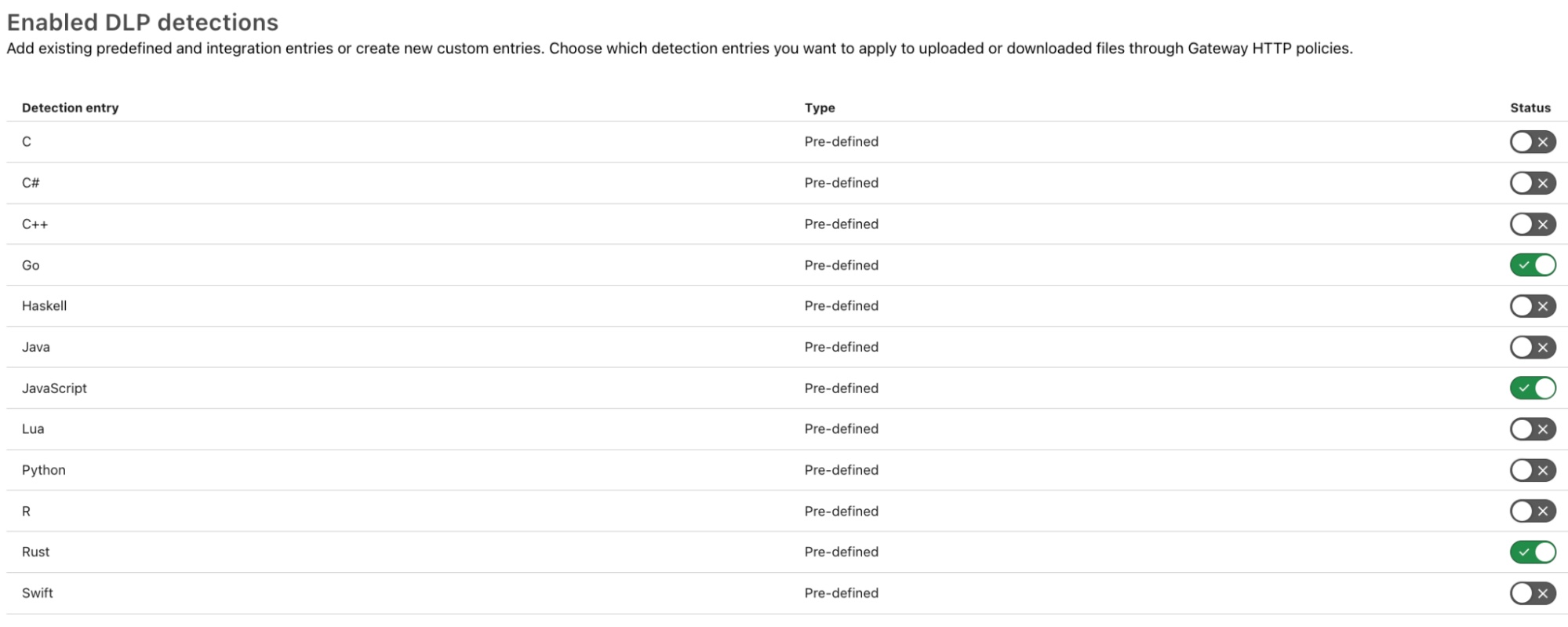
To help customers, Cloudflare now offers predefined DLP profiles for common code languages — specifically C, C++, C#, Go, Haskell, Java, Javascript, Lua, Python, R, Rust, and Swift. These machine learning-based detections train on public repositories for algorithm development, ensuring they remain up to date. Cloudflare’s DLP inspects the HTTP body of requests for these DLP profiles, and security teams can block traffic accordingly to prevent data leaks.

How to use these capabilities

Cloudflare offers you flexibility to determine what data you are interested in detecting via DLP policies. You can use predefined profiles created by Cloudflare for common types of sensitive or regulated data (e.g. credentials, financial data, health data, identifiers), or you can create your own custom detections.

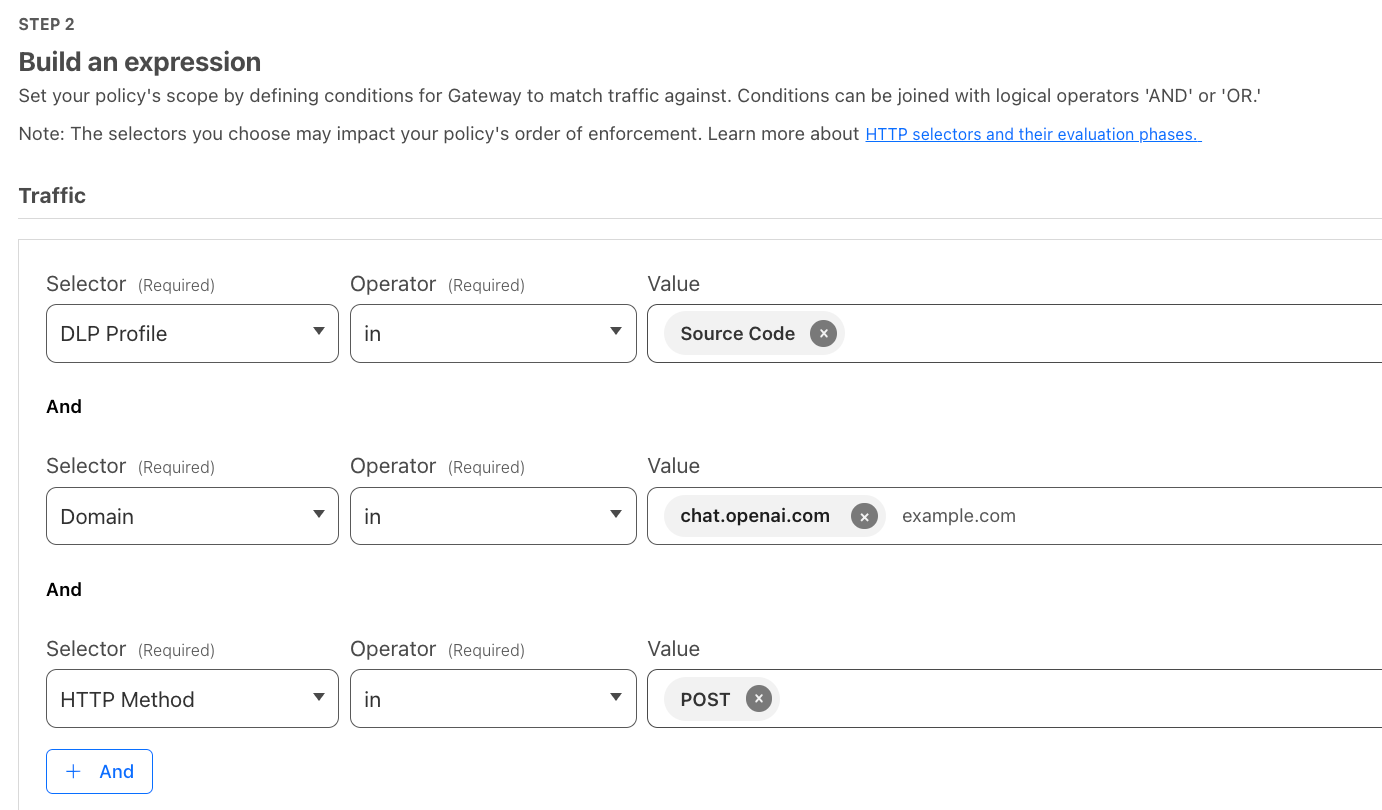
To implement inline blocking of source code, simply select the DLP profiles for the languages you want to detect. For example, if my organization uses Rust, Go, and JavaScript, I would turn on those detections:

I would then create a blocking policy via our secure web gateway to prevent traffic containing source code. Here, we block source code from being uploaded to ChatGPT:

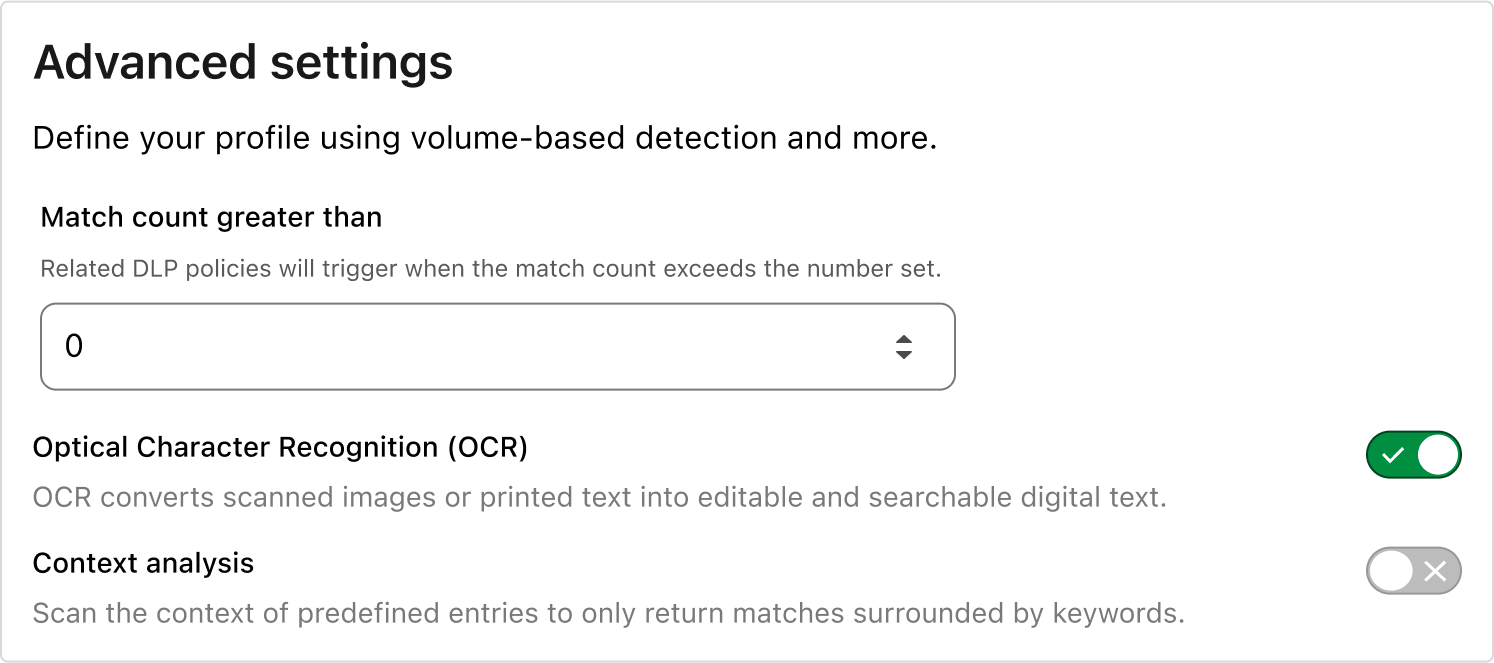
Adding OCR to any detection is similarly easy. Below is a profile looking for sensitive data that could be stored in scanned documents.

With the detections selected, simply enable the OCR toggle, and wherever you are applying DLP inspections, images in your content will be scanned for sensitive data. The detections work the same in images as they do in the text, including Match Counts and Context Analysis, so no additional logic or settings are needed.

Consistency across use cases is a core principle of our DLP solution, so as always, this feature is available for both data at rest, available via CASB, and data in transit, available via Gateway.

How do I get started?

DLP is available with other data protection services as part of Cloudflare One, our Secure Access Service Edge (SASE) platform that converges Zero Trust security and network connectivity services. To get started protecting your sensitive data, reach out for a consultation, or contact your account manager.

Introducing behavior-based user risk scoring in Cloudflare One

Post Syndicated from Noelle Kagan original https://blog.cloudflare.com/cf1-user-risk-score


Cloudflare One, our secure access service edge (SASE) platform, is introducing new capabilities to detect risk based on user behavior so that you can improve security posture across your organization.

Traditionally, security and IT teams spend a lot of time, labor, and money analyzing log data to track how risk is changing within their business and to stay on top of threats. Sifting through such large volumes of data – the majority of which may well be benign user activity – can feel like finding a needle in a haystack.

Cloudflare’s approach simplifies this process with user risk scoring. With AI/machine learning techniques, we analyze the real-time telemetry of user activities and behaviors that pass through our network to identify abnormal behavior and potential indicators of compromises that could lead to danger for your organization, so your security teams can lock down suspicious activity and adapt your security posture in the face of changing risk factors and sophisticated threats.

User risk scoring

The concept of trust in cybersecurity has evolved dramatically. The old model of “trust but verify” has given way to a Zero Trust approach, where trust is never assumed and verification is continuous, as each network request is scrutinized. This form of continuous evaluation enables administrators to grant access based not just on the contents of a request and its metadata, but on its context — such as whether the user typically logs in at that time or location.

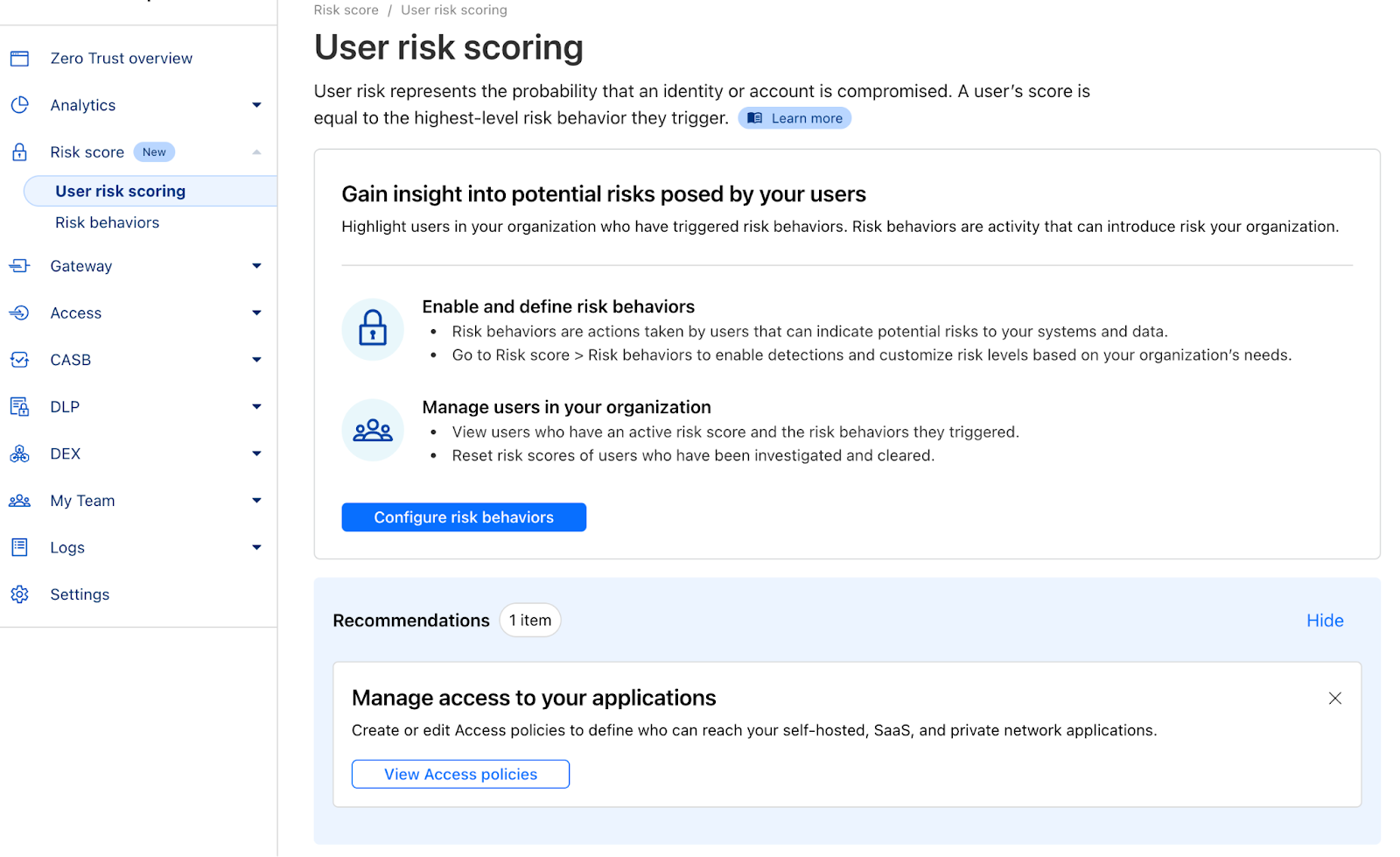
Previously, this kind of contextual risk assessment was time-consuming and required expertise to parse through log data. Now, we’re excited to introduce Zero Trust user risk scoring which does this automatically, allowing administrators to specify behavioral rules — like monitoring for anomalous “impossible travel” and custom Data Loss Prevention (DLP) triggers, and use these to generate dynamic user risk scores.

Zero Trust user risk scoring detects user activity and behaviors that could introduce risk to your organizations, systems, and data and assigns a score of Low, Medium, or High to the user involved. This approach is sometimes referred to as user and entity behavior analytics (UEBA) and enables teams to detect and remediate possible account compromise, company policy violations, and other risky activity.

How risk scoring works and detecting user risk

User risk scoring is built to examine behaviors. Behaviors are actions taken or completed by a user and observed by Cloudflare One, our SASE platform that helps organizations implement Zero Trust.

Once tracking for a particular behavior is enabled, the Zero Trust risk scoring engine immediately starts to review existing logs generated within your Zero Trust account. Then, after a user in your account performs a behavior that matches one of the enabled risk behaviors based on observed log data, Cloudflare assigns a risk score — Low, Medium, or High — to the user who performed the behavior.

Behaviors are built using log data from within your Cloudflare account. No additional user data is being collected, tracked or stored beyond what is already available in the existing Zero Trust logs (which adhere to the log retention timeframes).

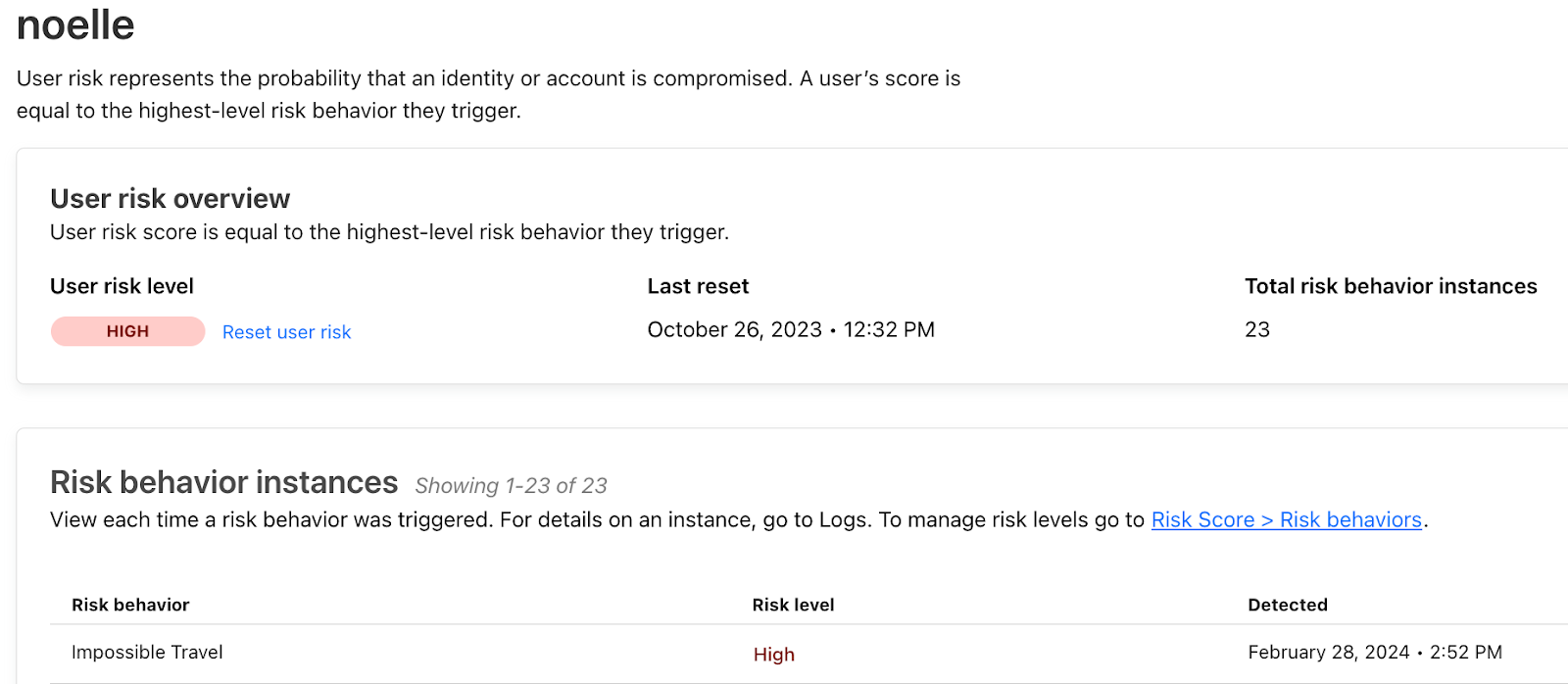
A popular priority amongst security and insider threat teams is detecting when a user performs so-called “impossible travel”. Impossible travel, available as a predefined risk behavior today, is when a user completes a login from two different locations that the user could not have traveled to in that period of time. For example, if Alice is in Seattle and logs into her organization’s finance application that is protected by Cloudflare Access and only a few minutes later is seen logging into her organization’s business suite from Sydney, Australia, impossible travel would be triggered and Alice would be assigned a risk level of High.

For users that are observed performing multiple risk behaviors, they will be assigned the highest-level risk behavior they’ve triggered. This real-time risk assessment empowers your security teams to act swiftly and decisively.

Zero Trust user risk scoring detecting impossible travel and flagging a user as high risk

Enabling predefined risk behaviors

Behaviors can be enabled and disabled at any time, but are disabled by default. Therefore, users will not be assigned risk scores until you have decided what is considered a risk to your organization and how urgent that risk is.

To start detecting a given risk behavior, an administrator must first ensure the behavior requirements are met (for instance, to detect whether a user has triggered a high number of DLP policies, you’ll need to first set up a DLP profile). From there, simply enable the behavior in the Zero Trust dashboard.

After a behavior has been enabled, Cloudflare will start analyzing behaviors to flag users with the corresponding risk when detected. The risk level of any behavior can be changed by an administrator. You have the freedom to enable behaviors that are relevant to your security posture as well as adjust the default risk score (Low, Medium, or High) from an out-of-the-box assignment.

And for security administrators who have investigated a user and need to clear a user’s risk score, simply go to Risk score > User risk scoring, choose the appropriate user, and select ‘Reset user risk’ followed by ‘Confirm.’ Once a user’s risk score is reset, they disappear from the risk table — until or unless they trigger another risk behavior.

Zero Trust user risk scoring behaviors can be enabled in seconds

How do I get started?

User risk scoring and DLP are part of Cloudflare One, which converges Zero Trust security and network connectivity services on one unified platform and global control plane.

To get access via Cloudflare One, reach out for a consultation, or contact your account manager.

Cloudflare One DLP integrates with Microsoft Information Protection labels

Post Syndicated from Noelle Kagan original https://blog.cloudflare.com/cloudflare-dlp-mip/

Cloudflare One DLP integrates with Microsoft Information Protection labels

Cloudflare One DLP integrates with Microsoft Information Protection labels

The crown jewels for an organization are often data, and the first step in protection should be locating where the most critical information lives. Yet, maintaining a thorough inventory of sensitive data is harder than it seems and generally a massive lift for security teams. To help overcome data security troubles, Microsoft offers their customers data classification and protection tools. One popular option are the sensitivity labels available with Microsoft Purview Information Protection. However, customers need the ability to track sensitive data movement even as it migrates beyond the visibility of Microsoft.

Today, we are excited to announce that Cloudflare One now offers Data Loss Prevention (DLP) detections for Microsoft Purview Information Protection labels. Simply integrate with your Microsoft account, retrieve your labels, and build rules to guide the movement of your labeled data. This extends the power of Microsoft’s labels to any of your corporate traffic in just a few clicks.

Data Classification with Microsoft Labels

Every organization has a wealth of data to manage, from publicly accessible data, like documentation, to internal data, like the launch date of a new product. Then, of course, there is the data requiring the highest levels of protection, such as customer PII. Organizations are responsible for confining data to the proper destinations while still supporting accessibility and productivity, which is no small feat.

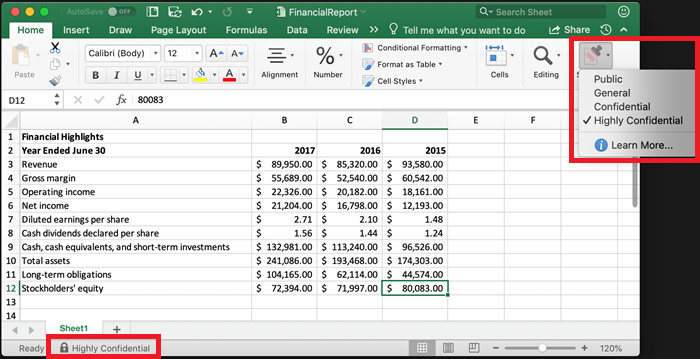
Microsoft Purview Information Protection offers sensitivity labels to let you classify your organization’s data. With these labels, Microsoft provides the ability to protect sensitive data, while still enabling productivity and collaboration. Sensitivity labels can be used in a number of Microsoft applications, which includes the ability to apply the labels to Microsoft Office documents. The labels correspond to the sensitivity of the data within the file, such as Public, Confidential, or Highly Confidential.

Cloudflare One DLP integrates with Microsoft Information Protection labels

The labels are embedded in a document’s metadata and are preserved even when it leaves the Microsoft environment, such as a download from OneDrive.

Sync Cloudflare One and Microsoft Information Protection

Cloudflare One, our SASE platform that delivers network-as-a-service (NaaS) with Zero Trust security natively built-in, connects users to enterprise resources, and offers a wide variety of opportunities to secure corporate traffic, including the inspection of data moving across the Microsoft productivity suite. We’ve designed Cloudflare One to act as a single pane of glass for your organization. This means that after you’ve deployed any of our Zero Trust services, whether that be Zero Trust Network Access or Secure Web Gateway, you are clicks, not months, away from deploying Data Loss Prevention, Cloud Access Security Broker, Email Security, and Browser Isolation to enhance your Microsoft security and overall data protection.

Specifically, Cloudflare’s API-driven Cloud Access Security Broker (CASB) can scan SaaS applications like Microsoft 365 for misconfigurations, unauthorized user activity, shadow IT, and other data security issues that can occur after a user has successfully logged in.

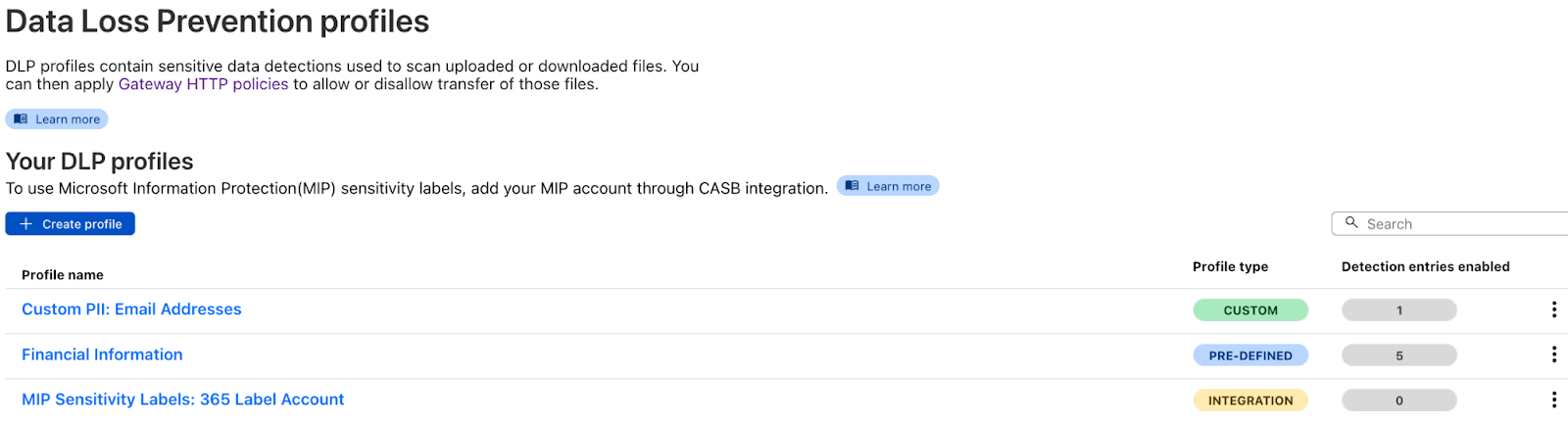
With this new integration, CASB can now also retrieve Information Protection labels from your Microsoft account. If you have labels configured, upon integration, CASB will automatically populate the labels into a Data Loss Prevention profile.

Cloudflare One DLP integrates with Microsoft Information Protection labels

DLP profiles are the building blocks for applying DLP scanning. They are where you identify the sensitive data you want to protect, such as Microsoft labeled data, credit card numbers, or custom keywords. Your labels are stored as entries within the Microsoft Purview Information Protection Sensitivity Labels profile using the name of your CASB integration. You can also add the labels to custom DLP profiles, of  fering more detection flexibility.

Build DLP Rules

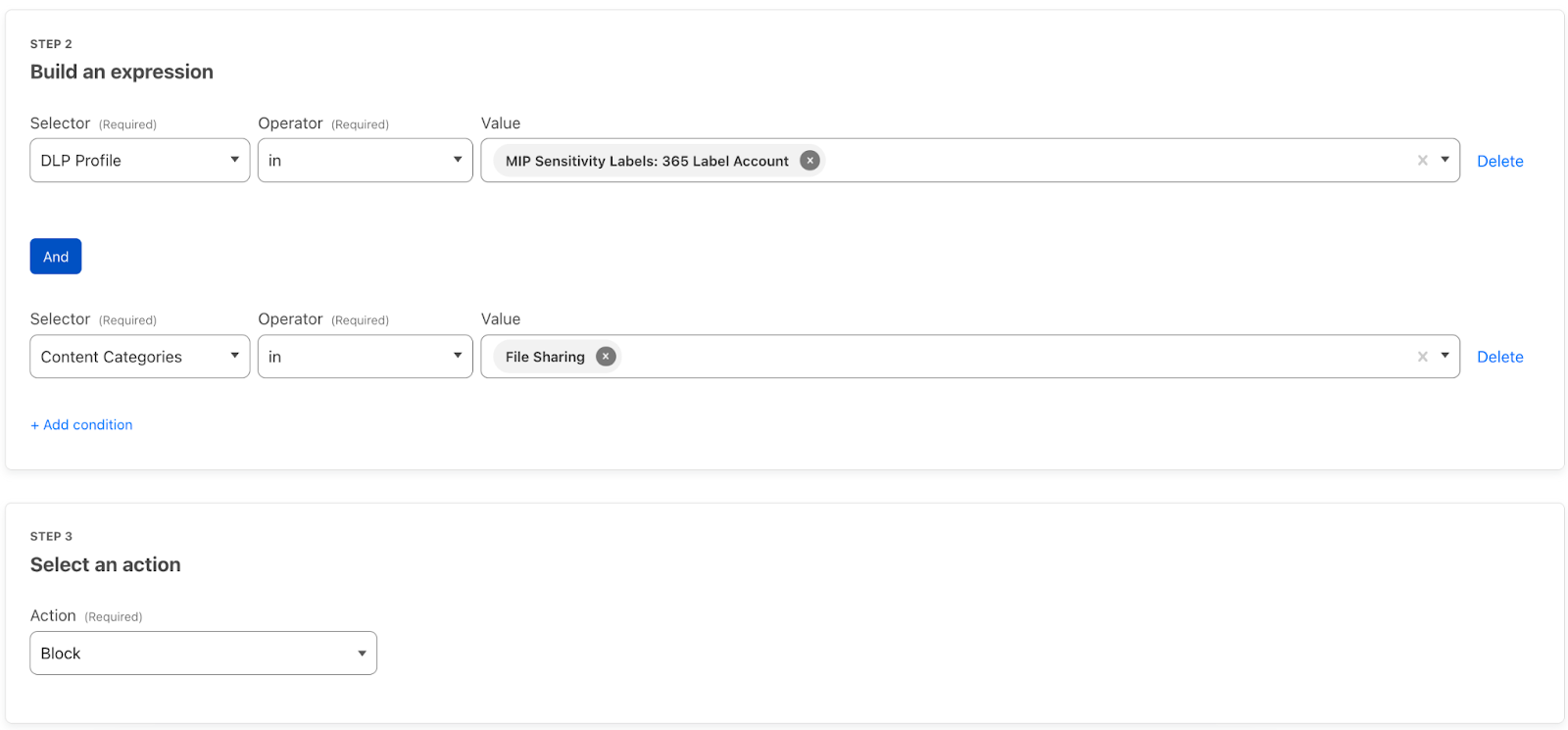
You can now extend the power of Microsoft’s labels to protect your data as it moves to other platforms. By building DLP rules, you determine how labeled data can move around and out of your corporate network. Perhaps you don’t want to allow Highly Confidential labels to be downloaded from your OneDrive account, or you don’t want any data more sensitive than Confidential to be uploaded to file sharing sites that you don’t use. All of this can be implemented using DLP and Cloudflare Gateway.

Simply navigate to your Gateway Firewall Policies and start implementing building rules using your DLP profiles:

Cloudflare One DLP integrates with Microsoft Information Protection labels

How to Get Started

To get access to DLP, reach out for a consultation, or contact your account manager.

Scan and secure Atlassian with Cloudflare CASB

Post Syndicated from Alex Dunbrack original https://blog.cloudflare.com/scan-atlassian-casb/

Scan and secure Atlassian with Cloudflare CASB

Scan and secure Atlassian with Cloudflare CASB

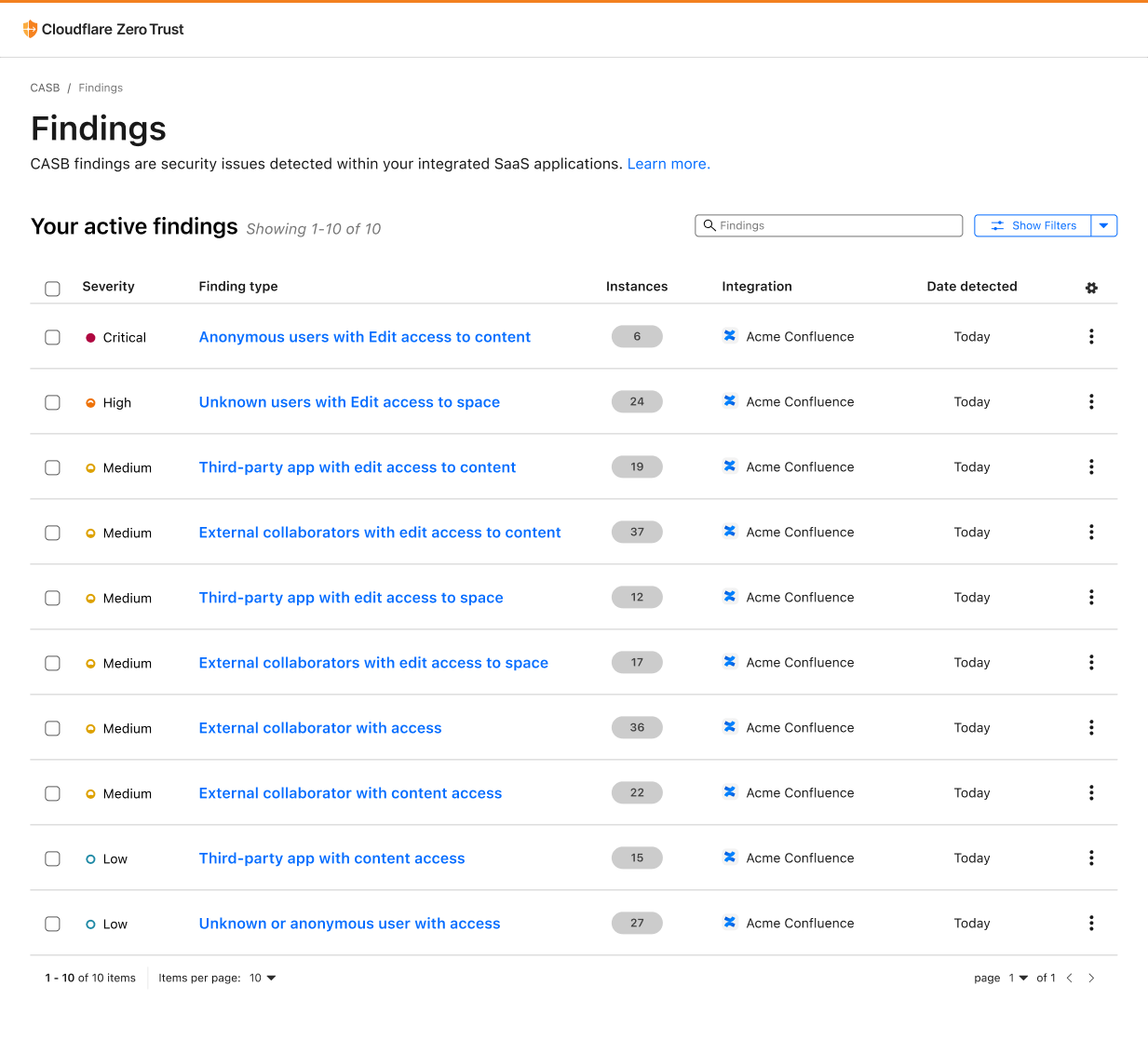
As part of Security Week, two new integrations are coming to Cloudflare CASB, one for Atlassian Confluence and the other for Atlassian Jira.

We’re excited to launch support for these two new SaaS applications (in addition to those we already support) given the reliance that we’ve seen organizations from around the world place in them for streamlined, end-to-end project management.

Let’s dive into what Cloudflare Zero Trust customers can expect from these new integrations.

CASB: Security for your SaaS apps

First, a quick recap. CASB, or Cloud Access Security Broker, is one of Cloudflare’s newer offerings, released last September to provide security operators – CISOs and security engineers – clear visibility and administrative control over the security of their SaaS apps.

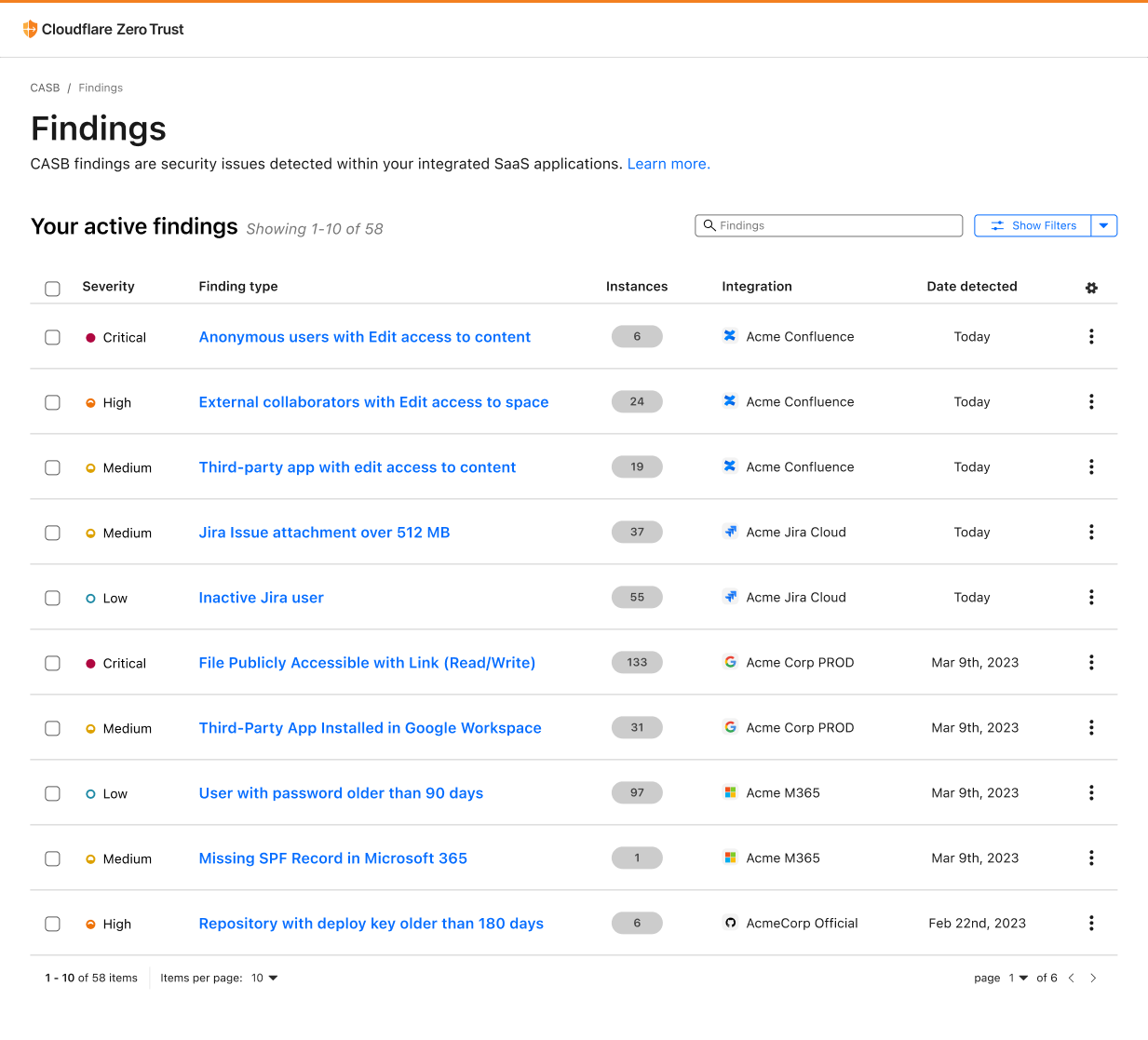
Whether it’s Google Workspace, Microsoft 365, Slack, Salesforce, Box, GitHub, or Atlassian (whew!), CASB can easily connect and scan these apps for critical security issues, and provide users an exhaustive list of identified problems, organized for triage.

Scan and secure Atlassian with Cloudflare CASB

Scan Confluence with Cloudflare CASB

Scan and secure Atlassian with Cloudflare CASB

Over time, Atlassian Confluence has become the go-to collaboration platform for teams to create, organize, and share content, such as documents, notes, and meeting minutes. However, from a security perspective, Confluence’s flexibility and wide compatibility with third-party applications can pose a security risk if not properly configured and monitored.

With this new integration, IT and security teams can begin scanning for Atlassian- and Confluence-specific security issues that may be leaving sensitive corporate data at risk. Customers of CASB using Confluence Cloud can expect to identify issues like publicly shared content, unauthorized access, and other vulnerabilities that could be exploited by bad actors.

By providing this additional layer of SaaS security, Cloudflare CASB can help organizations better protect their sensitive data while still leveraging the collaborative power of Confluence.

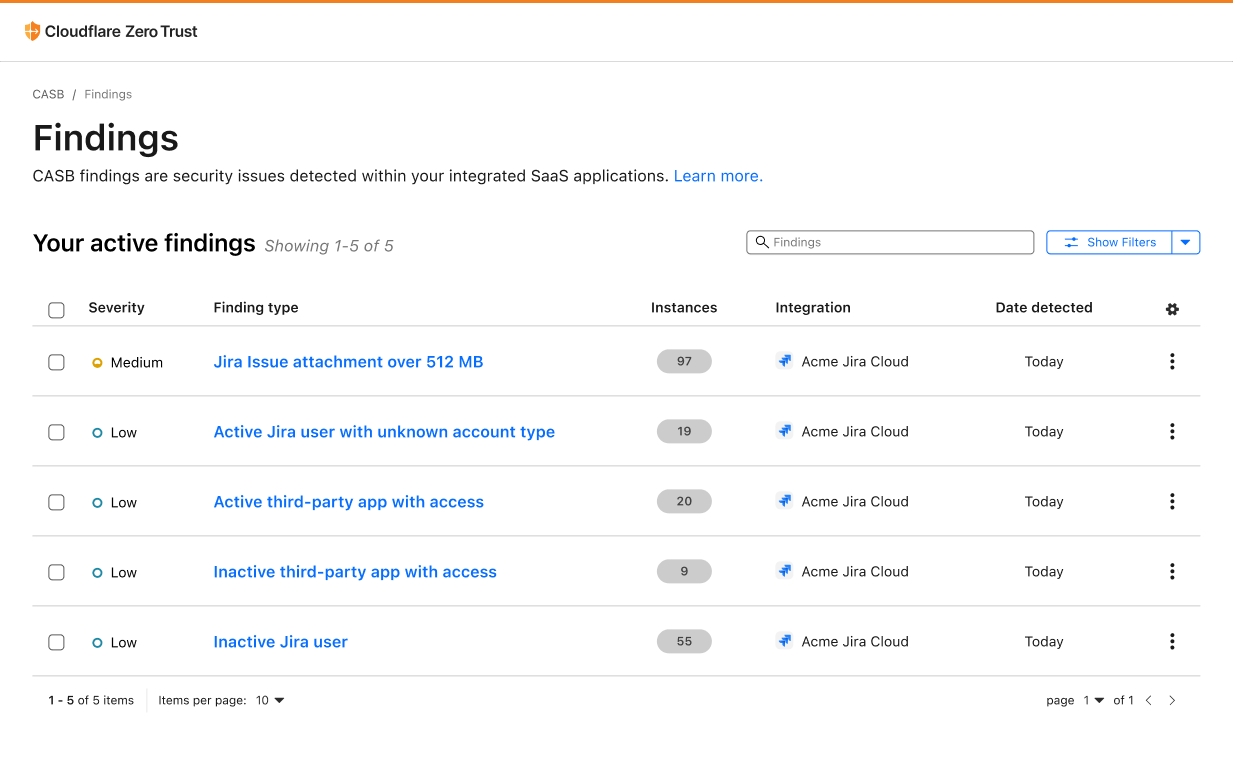
Scan Jira with Cloudflare CASB

Scan and secure Atlassian with Cloudflare CASB

A mainstay project management tool used to track tasks, issues, and progress on projects, Atlassian Jira has become an essential part of the software development process for teams of all sizes. At the same time, this also means that Jira has become a rich target for those looking to exploit and gain access to sensitive data.

With Cloudflare CASB, security teams can now easily identify security issues that could leave employees and sensitive business data vulnerable to compromise. Compatible with Jira Cloud accounts, Identified issues can range from flagging user and third-party app access issues, such as account misuse and users not following best practices, to identification of files that could be potentially overshared and worth deeper investigation.

By providing security admins with a single view to see security issues across their entire SaaS footprint, now including Jira and Confluence, Cloudflare CASB makes it easier for security teams to stay up-to-date with potential security risks.

Getting started

With the addition of Jira and Confluence to the growing list of CASB integrations, we’re making our products as widely compatible as possible so that organizations can continue placing their trust and confidence in us to help keep them secure.

Today, Cloudflare CASB supports integrations with Google Workspace, Microsoft 365, Slack, Salesforce, Box, GitHub, Jira, and Confluence, with a growing list of other critical applications on their way, so if there’s one in particular you’d like to see soon, let us know!
For those not already using Cloudflare Zero Trust, don’t hesitate to get started today – see the platform yourself with 50 free seats by signing up here, then get in touch with our team here to learn more about how Cloudflare CASB can help your organization lock down its SaaS apps.

New Zero Trust navigation coming soon (and we need your feedback)

Post Syndicated from Emily Flannery original https://blog.cloudflare.com/zero-trust-navigation/

New Zero Trust navigation coming soon (and we need your feedback)

We’re updating the Zero Trust navigation

New Zero Trust navigation coming soon (and we need your feedback)

On March 20, 2023, we will be launching an updated navigation in the Zero Trust dashboard, offering all of our Zero Trust users a more seamless experience across Cloudflare as a whole. This change will allow you to more easily manage your Zero Trust organization alongside your application and network services, developer tools, and more.

As part of this upcoming release, you will see three key changes:

Quicker navigation

Instead of opening another window or typing in a URL, you can go back to the Cloudflare dashboard in one click.

New Zero Trust navigation coming soon (and we need your feedback)

Switch accounts with ease

View and switch accounts at the top of your sidebar.

New Zero Trust navigation coming soon (and we need your feedback)

Resources and support

Find helpful links to our Community, developer documentation, and support team at the top of your navigation bar.

New Zero Trust navigation coming soon (and we need your feedback)

Why we’re updating the Zero Trust navigation

In 2020, Gateway was broadly released as the first Cloudflare product that didn’t require a site hosted on Cloudflare’s infrastructure. In other words, Gateway was unconstrained by the site-specific model most other Cloudflare products relied on at the time, while also used in close conjunction with Access. And so, the Cloudflare for Teams dashboard was built on a new model, designed from scratch, to give our customers a designated home—consolidated under a single roof—to manage their Teams products and accounts.

Fast forward to today and Zero Trust has grown tremendously, both in capability and reach. Many of our customers are using multiple Cloudflare products together, including Cloudflare One and Zero Trust products. Our home has grown, and this navigation change is one step toward expanding our roof to cover Cloudflare’s rapidly expanding footprint.

A focus on user experience

We have heard from many of you about the pains you experience when using multiple Cloudflare products, including Zero Trust. Your voice matters to us, and we’re invested in building a world-class user experience to make your time with Cloudflare an easy and enjoyable one. Our user experience improvements are based on three core principles: Consistency, Interconnectivity, and Discoverability.

We aim to offer a consistent and predictable user experience across the entire Cloudflare ecosystem so you never have to think twice about where you are in your journey, whether performing your familiar daily tasks or discovering our new ground-breaking products and features.

What else?

This navigation change we’re announcing today isn’t the only user experience improvement we’ve built! You may have noticed a few more optimizations recently:

User authorization and loading experience

Remember the days of the recurrent loading screen? Or perhaps when your Zero Trust account didn’t match the one you had logged in with to manage, say, your DNS? Those days are over! Our team has built a smarter, faster, and more seamless user and account authorization experience.

New tables

Tables are table stakes when it comes to presenting large quantities of data and information. (Yes, pun intended.) Tables are a common UI element across Cloudflare, and now Zero Trust uses the same tables UI as you will see when managing other products and features.

UI consistency

A slight change in color scheme and page layout brings the Zero Trust dashboard into the same visual family as the broader Cloudflare experience. Now, when you navigate to Zero Trust, we want you to know that you’re still under our one single Cloudflare roof.

We’re as excited about these improvements as you are! And we hope the upcoming navigation and page improvements come as a welcome addition to the changes noted above.

What’s next?

The user experience changes we’ve covered today go a long way toward creating a more consistent, seamless and user-friendly interface to make your work on Cloudflare as easy and efficient as possible. We know there’s always room for further improvement (we already have quite a few big improvements on our radar!).

To ensure we’re solving your biggest problems, we’d like to hear from you. Please consider filling out a short survey to share the most pressing user experience improvements you’d like to see next.

The Chief Zero Trust Officer: a new role for a new era of cybersecurity

Post Syndicated from John Engates original https://blog.cloudflare.com/chief-zero-trust-officer/

The Chief Zero Trust Officer: a new role for a new era of cybersecurity

Setting the stage for Zero Trust

The Chief Zero Trust Officer: a new role for a new era of cybersecurity

Over the last few years the topic of cyber security has moved from the IT department to the board room. The current climate of geopolitical and economic uncertainty has made the threat of cyber attacks all the more pressing, with businesses of all sizes and across all industries feeling the impact. From the potential for a crippling ransomware attack to a data breach that could compromise sensitive consumer information, the risks are real and potentially catastrophic. Organizations are recognizing the need for better resilience and preparation regarding cybersecurity. It is not enough to simply react to attacks as they happen; companies must proactively prepare for the inevitable in their approach to cybersecurity.

The security approach that has gained the most traction in recent years is the concept of Zero Trust. The basic principle behind Zero Trust is simple: don’t trust anything; verify everything. The impetus for a modern Zero Trust architecture is that traditional perimeter-based (castle-and-moat) security models are no longer sufficient in today’s digitally distributed landscape. Organizations must adopt a holistic approach to security based on verifying the identity and trustworthiness of all users, devices, and systems that access their networks and data.

The Chief Zero Trust Officer: a new role for a new era of cybersecurity

Zero Trust has been on the radar of business leaders and board members for some time now. However, Zero Trust is no longer just a concept being discussed; it’s now a mandate. With remote or hybrid work now the norm and cyber-attacks continuing to escalate, businesses realize they must take a fundamentally different approach to security. But as with any significant shift in strategy, implementation can be challenging, and efforts can sometimes stall. Although many firms have begun implementing Zero Trust methods and technologies, only some have fully implemented them throughout the organization. For many large companies, this is the current status of their Zero Trust initiatives – stuck in the implementation phase.

A new leadership role emerges

But what if there was a missing piece in the cybersecurity puzzle that could change everything? Enter the role of “Chief Zero Trust Officer” (CZTO) – a new position that we believe will become increasingly common in large organizations over the next year.

The idea of companies potentially creating the role of Chief Zero Trust Officer evolved from conversations last year between Cloudflare’s Field CTO team members and US federal government agencies. A similar job function was first noted in the White House memorandum directing federal agencies to “move toward Zero Trust cybersecurity principles” and requiring agencies “designate and identify a Zero Trust strategy implementation lead for their organization” within 30 days. In government, a role like this is often called a “czar,” but the title “chief” is more appropriate within a business.

Large organizations need strong leaders to efficiently get things done. Businesses assign the ultimate leadership responsibility to people with titles that begin with the word chief, such as Chief Executive Officer (CEO) or Chief Financial Officer (CFO). These positions exist to provide direction, set strategy, make critical decisions, and manage day-to-day operations and they are often accountable to the board for overall performance and success.

Why a C-level for Zero Trust, and why now?

An old saying goes, “when everyone is responsible, no one is responsible.” As we consider the challenges in implementing Zero Trust within an enterprise, it appears that a lack of clear leadership and accountability is a significant issue. The question remains, who *exactly* is responsible for driving the adoption and execution of Zero Trust within the organization?

Large enterprises need a single person responsible for driving the Zero Trust journey. This leader should be empowered with a clear mandate and have a singular focus: getting the enterprise to Zero Trust. This is where the idea of the Chief Zero Trust Officer was born. “Chief Zero Trust Officer” may seem like just a title, but it holds a lot of weight. It commands attention and can overcome many obstacles to Zero Trust.

Barriers to adoption

Implementing Zero Trust can be hindered by various technological challenges. Understanding and implementing the complex architecture of some vendors can take time, demand extensive training, or require a professional services engagement to acquire the necessary expertise. Identifying and verifying users and devices in a Zero Trust environment can also be a challenge. It requires an accurate inventory of the organization’s user base, groups they’re a part of, and their applications and devices.

On the organizational side, coordination between different teams is crucial for effectively implementing Zero Trust. Breaking down the silos between IT, cybersecurity, and networking groups, establishing clear communication channels, and regular meetings between team members can help achieve a cohesive security strategy. General resistance to change can also be a significant obstacle. Leaders should use techniques such as leading by example, transparent communication, and involving employees in the change process to mitigate it. Proactively addressing concerns, providing support, and creating employee training opportunities can also help ease the transition.

Responsibility and accountability – no matter what you call it

But why does an organization need a CZTO? Is another C-level role essential? Why not assign someone already managing security within the CISO organization? Of course, these are all valid questions. Think about it this way – companies should assign the title based on the level of strategic importance to the company. So, whether it’s Chief Zero Trust Officer, Head of Zero Trust, VP of Zero Trust, or something else, the title must command attention and come with the power to break down silos and cut through bureaucracy.

New C-level titles aren’t without precedent. In recent years, we’ve seen the emergence of titles such as Chief Digital Transformation Officer, Chief eXperience Officer, Chief Customer Officer, and Chief Data Scientist. The Chief Zero Trust Officer title is likely not even a permanent role. What’s crucial is that the person holding the role has the authority and vision to drive the Zero Trust initiative forward, with the support of company leadership and the board of directors.

Getting to Zero Trust in 2023

Getting to Zero Trust security is now a mandate for many companies, as the traditional perimeter-based security model is no longer enough to protect against today’s sophisticated threats. To navigate the technical and organizational challenges that come with Zero Trust implementation, the leadership of a CZTO is crucial. The CZTO will lead the Zero Trust initiative, align teams and break down barriers to achieve a smooth rollout. The role of CZTO in the C-suite emphasizes the importance of Zero Trust in the company. It ensures that the Zero Trust initiative is given the necessary attention and resources to succeed. Organizations that appoint a CZTO now will be the ones that come out on top in the future.

Cloudflare One for Zero Trust

Cloudflare One is Cloudflare’s Zero Trust platform that is easy to deploy and integrates seamlessly with existing tools and vendors. It is built on the principle of Zero Trust and provides organizations with a comprehensive security solution that works globally. Cloudflare One is delivered on Cloudflare’s global network, which means that it works seamlessly across multiple geographies, countries, network providers, and devices. With Cloudflare’s massive global presence, traffic is secured, routed, and filtered over an optimized backbone that uses real-time Internet intelligence to protect against the latest threats and route traffic around bad Internet weather and outages. Additionally, Cloudflare One integrates with best-of-breed identity management and endpoint device security solutions, creating a complete solution that encompasses the entire corporate network of today and tomorrow. If you’d like to know more, let us know here, and we’ll reach out.

Do you prefer to avoid talking to someone just yet? Nearly every feature in Cloudflare One is available at no cost for up to 50 users. Many of our largest enterprise customers start by exploring our Zero Trust products themselves on our free plan, and we invite you to do so by following the link here.

Working with another Zero Trust vendor?

Cloudflare’s security experts have built a vendor-neutral roadmap to provide a Zero Trust architecture and an example implementation timeline. The Zero Trust Roadmap https://zerotrustroadmap.org/ is an excellent resource for organizations that want to learn more about the benefits and best practices of implementing Zero Trust. And if you feel stuck on your current Zero Trust journey, have your chief Zero Trust officer give us a call at Cloudflare!

Welcome to Wildebeest: the Fediverse on Cloudflare

Post Syndicated from Celso Martinho original https://blog.cloudflare.com/welcome-to-wildebeest-the-fediverse-on-cloudflare/

Welcome to Wildebeest: the Fediverse on Cloudflare

Welcome to Wildebeest: the Fediverse on Cloudflare

The Fediverse has been a hot topic of discussion lately, with thousands, if not millions, of new users creating accounts on platforms like Mastodon to either move entirely to “the other side” or experiment and learn about this new social network.

Today we’re introducing Wildebeest, an open-source, easy-to-deploy ActivityPub and Mastodon-compatible server built entirely on top of Cloudflare’s Supercloud. If you want to run your own spot in the Fediverse you can now do it entirely on Cloudflare.

The Fediverse, built on Cloudflare

Today you’re left with two options if you want to join the Mastodon federated network: either you join one of the existing servers (servers are also called communities, and each one has its own infrastructure and rules), or you can run your self-hosted server.

There are a few reasons why you’d want to run your own server:

  • You want to create a new community and attract other users over a common theme and usage rules.
  • You don’t want to have to trust third-party servers or abide by their policies and want your server, under your domain, for your personal account.
  • You want complete control over your data, personal information, and content and visibility over what happens with your instance.

The Mastodon gGmbH non-profit organization provides a server implementation using Ruby, Node.js, PostgreSQL and Redis. Running the official server can be challenging, though. You need to own or rent a server or VPS somewhere; you have to install and configure the software, set up the database and public-facing web server, and configure and protect your network against attacks or abuse. And then you have to maintain all of that and deal with constant updates. It’s a lot of scripting and technical work before you can get it up and running; definitely not something for the less technical enthusiasts.

Wildebeest serves two purposes: you can quickly deploy your Mastodon-compatible server on top of Cloudflare and connect it to the Fediverse in minutes, and you don’t need to worry about maintaining or protecting it from abuse or attacks; Cloudflare will do it for you automatically.

Wildebeest is not a managed service. It’s your instance, data, and code running in our cloud under your Cloudflare account. Furthermore, it’s open-sourced, which means it keeps evolving with more features, and anyone can extend and improve it.

Here’s what we support today:

  • ActivityPub, WebFinger, NodeInfo, WebPush and Mastodon-compatible APIs. Wildebeest can connect to or receive connections from other Fediverse servers.
  • Compatible with the most popular Mastodon web (like Pinafore), desktop, and mobile clients. We also provide a simple read-only web interface to explore the timelines and user profiles.
  • You can publish, edit, boost, or delete posts, sorry, toots. We support text, images, and (soon) video.
  • Anyone can follow you; you can follow anyone.
  • You can search for content.
  • You can register one or multiple accounts under your instance. Authentication can be email-based on or using any Cloudflare Access compatible IdP, like GitHub or Google.
  • You can edit your profile information, avatar, and header image.

How we built it

Our implementation is built entirely on top of our products and APIs. Building Wildebeest was another excellent opportunity to showcase our technology stack’s power and versatility and prove how anyone can also use Cloudflare to build larger applications that involve multiple systems and complex requirements.

Here’s a birds-eye diagram of Wildebeest’s architecture:

Welcome to Wildebeest: the Fediverse on Cloudflare

Let’s get into the details and get technical now.

Cloudflare Pages

At the core, Wildebeest is a Cloudflare Pages project running its code using Pages Functions. Cloudflare Pages provides an excellent foundation for building and deploying your application and serving your bundled assets, Functions gives you full access to the Workers ecosystem, where you can run any code.

Functions has a built-in file-based router. The /functions directory structure, which is uploaded by Wildebeest’s continuous deployment builds, defines your application routes and what files and code will process each HTTP endpoint request. This routing technique is similar to what other frameworks like Next.js use.

Welcome to Wildebeest: the Fediverse on Cloudflare

For example, Mastodon’s /api/v1/timelines/public API endpoint is handled by /functions/api/v1/timelines/public.ts with the onRequest method.

export onRequest = async ({ request, env }) => {
	const { searchParams } = new URL(request.url)
	const domain = new URL(request.url).hostname
...
	return handleRequest(domain, env.DATABASE, {})
}

export async function handleRequest(
    …
): Promise<Response> {
    …
}

Unit testing these endpoints becomes easier too, since we only have to call the handleRequest() function from the testing framework. Check one of our Jest tests, mastodon.spec.ts:

import * as v1_instance from 'wildebeest/functions/api/v1/instance'

describe('Mastodon APIs', () => {
	describe('instance', () => {
		test('return the instance infos v1', async () => {
			const res = await v1_instance.handleRequest(domain, env)
			assert.equal(res.status, 200)
			assertCORS(res)

			const data = await res.json<Data>()
			assert.equal(data.rules.length, 0)
			assert(data.version.includes('Wildebeest'))
		})
       })
})

As with any other regular Worker, Functions also lets you set up bindings to interact with other Cloudflare products and features like KV, R2, D1, Durable Objects, and more. The list keeps growing.

We use Functions to implement a large portion of the official Mastodon API specification, making Wildebeest compatible with the existing ecosystem of other servers and client applications, and also to run our own read-only web frontend under the same project codebase.

Welcome to Wildebeest: the Fediverse on Cloudflare

Wildebeest’s web frontend uses Qwik, a general-purpose web framework that is optimized for speed, uses modern concepts like the JSX JavaScript syntax extension and supports server-side-rendering (SSR) and static site generation (SSG).

Qwik provides a Cloudflare Pages Adaptor out of the box, so we use that (check our framework guide to know more about how to deploy a Qwik site on Cloudflare Pages). For styling we use the Tailwind CSS framework, which Qwik supports natively.

Our frontend website code and static assets can be found under the /frontend directory. The application is handled by the /functions/[[path]].js dynamic route, which basically catches all the non-API requests, and then invokes Qwik’s own internal router, Qwik City, which takes over everything else after that.

The power and versatility of Pages and Functions routes make it possible to run both the backend APIs and a server-side-rendered dynamic client, effectively a full-stack app, under the same project.

Let’s dig even deeper now, and understand how the server interacts with the other components in our architecture.

D1

Wildebeest uses D1, Cloudflare’s first SQL database for the Workers platform built on top of SQLite, now open to everyone in alpha, to store and query data. Here’s our schema:

Welcome to Wildebeest: the Fediverse on Cloudflare

The schema will probably change in the future, as we add more features. That’s fine, D1 supports migrations which are great when you need to update your database schema without losing your data. With each new Wildebeest version, we can create a new migration file if it requires database schema changes.

-- Migration number: 0001 	 2023-01-16T13:09:04.033Z

CREATE UNIQUE INDEX unique_actor_following ON actor_following (actor_id, target_actor_id);

D1 exposes a powerful client API that developers can use to manipulate and query data from Worker scripts, or in our case, Pages Functions.

Here’s a simplified example of how we interact with D1 when you start following someone on the Fediverse:

export async function addFollowing(db, actor, target, targetAcct): Promise<UUID> {
	const query = `INSERT OR IGNORE INTO actor_following (id, actor_id, target_actor_id, state, target_actor_acct) VALUES (?, ?, ?, ?, ?)`
	const out = await db
		.prepare(query)
		.bind(id, actor.id.toString(), target.id.toString(), STATE_PENDING, targetAcct)
		.run()
	return id
}

Cloudflare’s culture of dogfooding and building on top of our own products means that we sometimes experience their shortcomings before our users. We did face a few challenges using D1, which is built on SQLite, to store our data. Here are two examples.

ActivityPub uses UUIDs to identify objects and reference them in URIs extensively. These objects need to be stored in the database. Other databases like PostgreSQL provide built-in functions to generate unique identifiers. SQLite and D1 don’t have that, yet, it’s in our roadmap.

Worry not though, the Workers runtime supports Web Crypto, so we use crypto.randomUUID() to get our unique identifiers. Check the /backend/src/activitypub/actors/inbox.ts:

export async function addObjectInInbox(db, actor, obj) {
	const id = crypto.randomUUID()
	const out = await db
		.prepare('INSERT INTO inbox_objects(id, actor_id, object_id) VALUES(?, ?, ?)')
		.bind(id, actor.id.toString(), obj.id.toString())
		.run()
}

Problem solved.

The other example is that we need to store dates with sub-second resolution. Again, databases like PostgreSQL have that:

psql> select now();
2023-02-01 11:45:17.425563+00

However SQLite falls short with:

sqlite> select datetime();
2023-02-01 11:44:02

We worked around this problem with a small hack using strftime():

sqlite> select strftime('%Y-%m-%d %H:%M:%f', 'NOW');
2023-02-01 11:49:35.624

See our initial SQL schema, look for the cdate defaults.

Images

Mastodon content has a lot of rich media. We don’t need to reinvent the wheel and build an image pipeline; Cloudflare Images provides APIs to upload, transform, and serve optimized images from our global CDN, so it’s the perfect fit for Wildebeest’s requirements.

Things like posting content images, the profile avatar, or headers, all use the Images APIs. See /backend/src/media/image.ts to understand how we interface with Images.

async function upload(file: File, config: Config): Promise<UploadResult> {
	const formData = new FormData()
	const url = `https://api.cloudflare.com/client/v4/accounts/${config.accountId}/images/v1`

	formData.set('file', file)

	const res = await fetch(url, {
		method: 'POST',
		body: formData,
		headers: {
			authorization: 'Bearer ' + config.apiToken,
		},
	})

      const data = await res.json()
	return data.result
}

If you’re curious about Images for your next project, here’s a tutorial on how to integrate Cloudflare Images on your website.

Cloudflare Images is also available from the dashboard. You can use it to browse or manage your catalog quickly.

Welcome to Wildebeest: the Fediverse on Cloudflare

Queues

The ActivityPub protocol is chatty by design. Depending on the size of your social graph, there might be a lot of back-and-forth HTTP traffic. We can’t have the clients blocked waiting for hundreds of Fediverse message deliveries every time someone posts something.

We needed a way to work asynchronously and launch background jobs to offload data processing away from the main app and keep the clients snappy. The official Mastodon server has a similar strategy using Sidekiq to do background processing.

Fortunately, we don’t need to worry about any of this complexity either. Cloudflare Queues allows developers to send and receive messages with guaranteed delivery, and offload work from your Workers’ requests, effectively providing you with asynchronous batch job capabilities.

To put it simply, you have a queue topic identifier, which is basically a buffered list that scales automatically, then you have one or more producers that, well, produce structured messages, JSON objects in our case, and put them in the queue (you define their schema), and finally you have one or more consumers that subscribes that queue, receive its messages and process them, at their own speed.

Welcome to Wildebeest: the Fediverse on Cloudflare

Here’s the How Queues works page for more information.

In our case, the main application produces queue jobs whenever any incoming API call requires long, expensive operations. For example, when someone posts, sorry, toots something, we need to broadcast that to their followers’ inboxes, potentially triggering many requests to remote servers. Here we are queueing a job for that, thus freeing the APIs to keep responding:

export async function deliverFollowers(
	db: D1Database,
	from: Actor,
	activity: Activity,
	queue: Queue
) {
	const followers = await getFollowers(db, from)

	const messages = followers.map((id) => {
		const body = {
			activity: JSON.parse(JSON.stringify(activity)),
			actorId: from.id.toString(),
			toActorId: id,
		}
		return { body }
	})

	await queue.sendBatch(messages)
}

Similarly, we don’t want to stop the main APIs when remote servers deliver messages to our instance inboxes. Here’s Wildebeest creating asynchronous jobs when it receives messages in the inbox:

export async function handleRequest(
	domain: string,
	db: D1Database,
	id: string,
	activity: Activity,
	queue: Queue,
): Promise<Response> {
	const handle = parseHandle(id)

	const actorId = actorURL(domain, handle.localPart)
const actor = await actors.getPersonById(db, actorId)

      // creates job
	await queue.send({
		type: MessageType.Inbox,
		actorId: actor.id.toString(),
		activity,
	})

	// frees the API
	return new Response('', { status: 200 })
}

And the final piece of the puzzle, our queue consumer runs in a separate Worker, independently from the Pages project. The consumer listens for new messages and processes them sequentially, at its rhythm, freeing everyone else from blocking. When things get busy, the queue grows its buffer. Still, things keep running, and the jobs will eventually get dispatched, freeing the main APIs for the critical stuff: responding to remote servers and clients as quickly as possible.

export default {
	async queue(batch, env, ctx) {
		for (const message of batch.messages) {
			…

			switch (message.body.type) {
				case MessageType.Inbox: {
					await handleInboxMessage(...)
					break
				}
				case MessageType.Deliver: {
					await handleDeliverMessage(...)
					break
				}
			}
		}
	},
}

If you want to get your hands dirty with Queues, here’s a simple example on Using Queues to store data in R2.

Caching and Durable Objects

Caching repetitive operations is yet another strategy for improving performance in complex applications that require data processing. A famous Netscape developer, Phil Karlton, once said: “There are only two hard things in Computer Science: cache invalidation and naming things.”

Cloudflare obviously knows a lot about caching since it’s a core feature of our global CDN. We also provide Workers KV to our customers, a global, low-latency, key-value data store that anyone can use to cache data objects in our data centers and build fast websites and applications.

However, KV achieves its performance by being eventually consistent. While this is fine for many applications and use cases, it’s not ideal for others.

The ActivityPub protocol is highly transactional and can’t afford eventual consistency. Here’s an example: generating complete timelines is expensive, so we cache that operation. However, when you post something, we need to invalidate that cache before we reply to the client. Otherwise, the new post won’t be in the timeline and the client can fail with an error because it doesn’t see it. This actually happened to us with one of the most popular clients.

Welcome to Wildebeest: the Fediverse on Cloudflare

We needed to get clever. The team discussed a few options. Fortunately, our API catalog has plenty of options. Meet Durable Objects.

Durable Objects are single-instance Workers that provide a transactional storage API. They’re ideal when you need central coordination, strong consistency, and state persistence. You can use Durable Objects in cases like handling the state of multiple WebSocket connections, coordinating and routing messages in a chatroom, or even running a multiplayer game like Doom.

You know where this is going now. Yes, we implemented our key-value caching subsystem for Wildebeest on top of a Durable Object. By taking advantage of the DO’s native transactional storage API, we can have strong guarantees that whenever we create or change a key, the next read will always return the latest version.

The idea is so simple and effective that it took us literally a few lines of code to implement a key-value cache with two primitives: HTTP PUT and GET.

export class WildebeestCache {
	async fetch(request: Request) {
		if (request.method === 'GET') {
			const { pathname } = new URL(request.url)
			const key = pathname.slice(1)
			const value = await this.storage.get(key)
			return new Response(JSON.stringify(value))
		}

		if (request.method === 'PUT') {
			const { key, value } = await request.json()
			await this.storage.put(key, value)
			return new Response('', { status: 201 })
		}
	}
}

Strong consistency it is. Lets move to user registration and authentication now.

Zero Trust Access

The official Mastodon server handles user registrations, typically using email, before you can choose your local user name and start using the service. Handling user registration and authentication can be daunting and time-consuming if we were to build it from scratch though.

Furthermore, people don’t want to create new credentials for every new service they want to use and instead want more convenient OAuth-like authorization and authentication methods so that they can reuse their existing Apple, Google, or GitHub accounts.

We wanted to simplify things using Cloudflare’s built-in features. Needless to say, we have a product that handles user onboarding, authentication, and access policies to any application behind Cloudflare; it’s called Zero Trust. So we put Wildebeest behind it.

Zero Trust Access can either do one-time PIN (OTP) authentication using email or single-sign-on (SSO) with many identity providers (examples: Google, Facebook, GitHub, Linkedin), including any generic one supporting SAML 2.0.

When you start using Wildebeest with a client, you don’t need to register at all. Instead, you go straight to log in, which will redirect you to the Access page and handle the authentication according to the policy that you, the owner of your instance, configured.

The policy defines who can authenticate, and how.

Welcome to Wildebeest: the Fediverse on Cloudflare

When authenticated, Access will redirect you back to Wildebeest. The first time this happens, we will detect that we don’t have information about the user and ask for your Username and Display Name. This will be asked only once and is what will be to create your public Mastodon profile.

Welcome to Wildebeest: the Fediverse on Cloudflare

Technically, Wildebeest implements the OAuth 2 specification. Zero Trust protects the /oauth/authorize endpoint and issues a valid JWT token in the request headers when the user is authenticated. Wildebeest then reads and verifies the JWT and returns an authorization code in the URL redirect.

Once the client has an authorization code, it can use the /oauth/token endpoint to obtain an API access token. Subsequent API calls inject a bearer token in the Authorization header:

Authorization: Bearer access_token

Deployment and Continuous Integration

We didn’t want to run a managed service for Mastodon as it would somewhat diminish the concepts of federation and data ownership. Also, we recognize that ActivityPub and Mastodon are emerging, fast-paced technologies that will evolve quickly and in ways that are difficult to predict just yet.

For these reasons, we thought the best way to help the ecosystem right now would be to provide an open-source software package that anyone could use, customize, improve, and deploy on top of our cloud. Cloudflare will obviously keep improving Wildebeest and support the community, but we want to give our Fediverse maintainers complete control and ownership of their instances and data.

The remaining question was, how do we distribute the Wildebeest bundle and make it easy to deploy into someone’s account when it requires configuring so many Cloudflare features, and how do we facilitate updating the software over time?

The solution ended up being a clever mix of using GitHub with GitHub Actions, Deploy with Workers, and Terraform.

Welcome to Wildebeest: the Fediverse on Cloudflare

The Deploy with Workers button is a specially crafted link that auto-generates a workflow page where the user gets asked some questions, and Cloudflare handles authorizing GitHub to deploy to Workers, automatically forks the Wildebeest repository into the user’s account, and then configures and deploys the project using a GitHub Actions workflow.

Welcome to Wildebeest: the Fediverse on Cloudflare

A GitHub Actions workflow is a YAML file that declares what to do in every step. Here’s the Wildebeest workflow (simplified):

name: Deploy
on:
  push:
    branches:
      - main
  repository_dispatch:
jobs:
  deploy:
    runs-on: ubuntu-latest
    timeout-minutes: 60
    steps:
      - name: Ensure CF_DEPLOY_DOMAIN and CF_ZONE_ID are defined
        ...
      - name: Create D1 database
        uses: cloudflare/[email protected]
        with:
          command: d1 create wildebeest-${{ env.OWNER_LOWER }}
        ...
      - name: retrieve Zero Trust organization
        ...
      - name: retrieve Terraform state KV namespace
        ...
      - name: download VAPID keys
        ...
      - name: Publish DO
      - name: Configure
        run: terraform plan && terraform apply -auto-approve
      - name: Create Queue
        ...
      - name: Publish consumer
        ...
      - name: Publish
        uses: cloudflare/[email protected]
        with:
          command: pages publish --project-name=wildebeest-${{ env.OWNER_LOWER }} .

Updating Wildebeest

This workflow runs automatically every time the main branch changes, so updating the Wildebeest is as easy as synchronizing the upstream official repository with the fork. You don’t even need to use git commands for that; GitHub provides a convenient Sync button in the UI that you can simply click.

Welcome to Wildebeest: the Fediverse on Cloudflare

What’s more? Updates are incremental and non-destructive. When the GitHub Actions workflow redeploys Wildebeest, we only make the necessary changes to your configuration and nothing else. You don’t lose your data; we don’t need to delete your existing configurations. Here’s how we achieved this:

We use Terraform, a declarative configuration language and tool that interacts with our APIs and can query and configure your Cloudflare features. Here’s the trick, whenever we apply a new configuration, we keep a copy of the Terraform state for Wildebeest in a Cloudflare KV key. When a new deployment is triggered, we get that state from the KV copy, calculate the differences, then change only what’s necessary.

Data loss is not a problem either because, as you read above, D1 supports migrations. If we need to add a new column to a table or a new table, we don’t need to destroy the database and create it again; we just apply the necessary SQL to that change.

Welcome to Wildebeest: the Fediverse on Cloudflare

Protection, optimization and observability, naturally

Once Wildebeest is up and running, you can protect it from bad traffic and malicious actors. Cloudflare offers you DDoS, WAF, and Bot Management protection out of the box at a click’s distance.

Likewise, you’ll get instant network and content delivery optimizations from our products and analytics on how your Wildebeest instance is performing and being used.

Welcome to Wildebeest: the Fediverse on Cloudflare

ActivityPub, WebFinger, NodeInfo and Mastodon APIs

Mastodon popularized the Fediverse concept, but many of the underlying technologies used have been around for quite a while. This is one of those rare moments when everything finally comes together to create a working platform that answers an actual use case for Internet users. Let’s quickly go through the protocols that Wildebeest had to implement:

ActivityPub

ActivityPub is a decentralized social networking protocol and has been around as a W3C recommendation since at least 2018. It defines client APIs for creating and manipulating content and server-to-server APIs for content exchange and notifications, also known as federation. ActivityPub uses ActivityStreams, an even older W3C protocol, for its vocabulary.

The concepts of Actors (profiles), messages or Objects (the toots), inbox (where you receive toots from people you follow), and outbox (where you send your toots to the people you follow), to name a few of many other actions and activities, are all defined on the ActivityPub specification.

Here’s our folder with the ActivityPub implementation.

import type { APObject } from 'wildebeest/backend/src/activitypub/objects'
import type { Actor } from 'wildebeest/backend/src/activitypub/actors'

export async function addObjectInInbox(db, actor, obj) {
	const id = crypto.randomUUID()
	const out = await db
		.prepare('INSERT INTO inbox_objects(id, actor_id, object_id) VALUES(?, ?, ?)')
		.bind(id, actor.id.toString(), obj.id.toString())
		.run()
}

WebFinger

WebFinger is a simple HTTP protocol used to discover information about any entity, like a profile, a server, or a specific feature. It resolves URIs to resource objects.

Mastodon uses WebFinger lookups to discover information about remote users. For example, say you want to interact with @[email protected]. Your local server would request https://example.com/.well-known/webfinger?resource=acct:[email protected] (using the acct scheme) and get something like this:

{
    "subject": "acct:[email protected]",
    "aliases": [
        "https://example.com/ap/users/user"
    ],
    "links": [
        {
            "rel": "self",
            "type": "application/activity+json",
            "href": "https://example.com/ap/users/user"
        }
    ]
}

Now we know how to interact with @[email protected], using the https://example.com/ap/users/user endpoint.

Here’s our WebFinger response:

export async function handleRequest(request, db): Promise<Response> {
	…
	const jsonLink = /* … link to actor */

	const res: WebFingerResponse = {
		subject: `acct:...`,
		aliases: [jsonLink],
		links: [
			{
				rel: 'self',
				type: 'application/activity+json',
				href: jsonLink,
			},
		],
	}
	return new Response(JSON.stringify(res), { headers })
}

Mastodon API

Finally, things like setting your server information, profile information, generating timelines, notifications, and searches, are all Mastodon-specific APIs. The Mastodon open-source project defines a catalog of REST APIs, and you can find all the documentation for them on their website.

Our Mastodon API implementation can be found here (REST endpoints) and here (backend primitives). Here’s an example of Mastodon’s server information /api/v2/instance implemented by Wildebeest:

export async function handleRequest(domain, db, env) {

	const res: InstanceConfigV2 = {
		domain,
		title: env.INSTANCE_TITLE,
		version: getVersion(),
		source_url: 'https://github.com/cloudflare/wildebeest',
		description: env.INSTANCE_DESCR,
		thumbnail: {
			url: DEFAULT_THUMBNAIL,
		},
		languages: ['en'],
		registrations: {
			enabled: false,
		},
		contact: {
			email: env.ADMIN_EMAIL,
		},
		rules: [],
	}

	return new Response(JSON.stringify(res), { headers })
}

Wildebeest also implements WebPush for client notifications and NodeInfo for server information.

Other Mastodon-compatible servers had to implement all these protocols too; Wildebeest is one of them. The community is very active in discussing future enhancements; we will keep improving our compatibility and adding support to more features over time, ensuring that Wildebeest plays well with the Fediverse ecosystem of servers and clients emerging.

Get started now

Enough about technology; let’s get you into the Fediverse. We tried to detail all the steps to deploy your server. To start using Wildebeest, head to the public GitHub repository and check our Get Started tutorial.

Most of Wildebeest’s dependencies offer a generous free plan that allows you to try them for personal or hobby projects that aren’t business-critical, however you will need to subscribe an Images plan (the lowest tier should be enough for most needs) and, depending on your server load, Workers Unbound (again, the minimum cost should be plenty for most use cases).

Following our dogfooding mantra, Cloudflare is also officially joining the Fediverse today. You can start following our Mastodon accounts and get the same experience of having regular updates from Cloudflare as you get from us on other social platforms, using your favorite Mastodon apps. These accounts are entirely running on top of a Wildebeest server:

Welcome to Wildebeest: the Fediverse on Cloudflare
1

Wildebeest is compatible with most client apps; we are confirmed to work with the official Mastodon Android and iOS apps, Pinafore, Mammoth, and tooot, and looking into others like Ivory. If your favorite isn’t working, please submit an issue here, we’ll do our best to help support it.

Final words

Wildebeest was built entirely on top of our Supercloud stack. It was one of the most complete and complex projects we have created that uses various Cloudflare products and features.

We hope this write-up inspires you to not only try deploying Wildebeest and joining the Fediverse, but also building your next application, however demanding it is, on top of Cloudflare.

Wildebeest is a minimally viable Mastodon-compatible server right now, but we will keep improving it with more features and supporting it over time; after all, we’re using it for our official accounts. It is also open-sourced, meaning you are more than welcome to contribute with pull requests or feedback.

In the meantime, we opened a Wildebeest room on our Developers Discord Server and are keeping an eye open on the GitHub repo issues tab. Feel free to engage with us; the team is eager to know how you use Wildebeest and answer your questions.

PS: The code snippets in this blog were simplified to benefit readability and space (the TypeScript types and error handling code were removed, for example). Please refer to the GitHub repo links for the complete versions.

CIO Week 2023 recap

Post Syndicated from James Chang original https://blog.cloudflare.com/cio-week-2023-recap/

CIO Week 2023 recap

CIO Week 2023 recap

In our Welcome to CIO Week 2023 post, we talked about wanting to start the year by celebrating the work Chief Information Officers do to keep their organizations safe and productive.

Over the past week, you learned about announcements addressing all facets of your technology stack – including new services, betas, strategic partnerships, third party integrations, and more. This recap blog summarizes each announcement and labels what capability is generally available (GA), in beta, or on our roadmap.

We delivered on critical capabilities requested by our customers – such as even more comprehensive phishing protection and deeper integrations with the Microsoft ecosystem. Looking ahead, we also described our roadmap for emerging technology categories like Digital Experience Monitoring and our vision to make it exceedingly simple to route traffic from any source to any destination through Cloudflare’s network.

Everything we launched is designed to help CIOs accelerate their pursuit of digital transformation. In this blog, we organized our announcement summaries based on the three feelings we want CIOs to have when they consider partnering with Cloudflare:

  1. CIOs now have a simpler roadmap to Zero Trust and SASE: We announced new capabilities and tighter integrations that make it easier for organizations to adopt Zero Trust security best practices and move towards aspirational architectures like Secure Access Service Edge (SASE).
  2. CIOs have access to the right technology and channel partners: We announced integrations and programming to help organizations access the right expertise to modernize IT and security at their own pace with the technologies they already use.
  3. CIOs can streamline a multi-cloud strategy with ease: We announced new ways to connect, secure, and accelerate traffic across diverse cloud environments.

Thank you for following CIO Week, Cloudflare’s first of many Innovation Weeks in 2023. It can be hard to keep up with our pace of innovation sometimes, but we hope that reading this blog and registering for our recap webinar will help!

If you want to speak with us about how to modernize your IT and security and make life easier for your organization’s CIO, fill out the form here.

Simplifying your journey to Zero Trust and SASE

Securing access
These blog posts are focused on making it faster, easier, and safer to connect any user to any application with the granular controls and comprehensive visibility needed to achieve Zero Trust.

Blog Summary
Beta: Introducing Digital Experience Monitoring Cloudflare Digital Experience Monitoring will be an all-in-one dashboard that helps CIOs understand how critical applications and Internet services are performing across their entire corporate network. Sign up for beta access.
Beta: Weave your own global, private, virtual Zero Trust network on Cloudflare with WARP-to-WARP With a single click, any device running Cloudflare’s device client, WARP, in your organization can reach any other device running WARP over a private network. Sign up for beta access.
GA: New ways to troubleshoot Cloudflare Access ‘blocked’ messages Investigate ‘allow’ or ‘block’ decisions based on how a connection was made with the same level of ease that you can troubleshoot user identity within Cloudflare’s Zero Trust platform.
Beta: One-click data security for your internal and SaaS applications Secure sensitive data by running application sessions in an isolated browser and control how users interact with sensitive data – now with just one click. Sign up for beta access.
GA: Announcing SCIM support for Cloudflare Access & Gateway Cloudflare’s ZTNA (Access) and SWG (Gateway) services now support the System for Cross-domain Identity Management (SCIM) protocol, making it easier for administrators to manage identity records across systems.
GA: Cloudflare Zero Trust: The Most Exciting Ping Release Since 1983 Cloudflare Zero Trust administrators can use familiar debugging tools that use the ICMP protocol (like Ping, Traceroute, and MTR) to test connectivity to private network destinations.

Threat defense
These blog posts are focused on helping organizations filter, inspect, and isolate traffic to protect users from phishing, ransomware, and other Internet threats.

Blog Summary
GA: Email Link Isolation: your safety net for the latest phishing attacks Email Link Isolation is your safety net for the suspicious links that end up in inboxes and that users may click. This added protection turns Cloudflare Area 1 into the most comprehensive email security solution when it comes to protecting against phishing attacks.
GA: Bring your own certificates to Cloudflare Gateway Administrators can use their own custom certificates to apply HTTP, DNS, CASB, DLP, RBI and other filtering policies.
GA: Announcing Custom DLP profiles Cloudflare’s Data Loss Prevention (DLP) service now offers the ability to create custom detections, so that organizations can inspect traffic for their most sensitive data.
GA: Cloudflare Zero Trust for Managed Service Providers Learn how the U.S. Federal Government and other large Managed Service Providers (MSPs) are using Cloudflare’s Tenant API to apply security policies like DNS filtering across the organizations they manage.

Secure SaaS environments
These blog posts are focused on maintaining consistent security and visibility across SaaS application environments, in particular to protect leaks of sensitive data.

Blog Summary
Roadmap: How Cloudflare CASB and DLP work together to protect your data Cloudflare Zero Trust will introduce capabilities between our CASB and DLP services that will enable administrators to peer into the files stored in their SaaS applications and identify sensitive data inside them.
Roadmap: How Cloudflare Area 1 and DLP work together to protect data in email Cloudflare is combining capabilities from Area 1 Email Security and Data Loss Prevention (DLP) to provide complete data protection for corporate email.
GA: Cloudflare CASB: Scan Salesforce and Box for security issues Cloudflare CASB now integrates with Salesforce and Box, enabling IT and security teams to scan these SaaS environments for security risks.

Accelerating and securing connectivity
In addition to product capabilities, blog posts in this section highlight speed and other strategic benefits that organizations realize with Cloudflare.

Blog Summary
Why do CIOs choose Cloudflare One? As part of CIO Week, we spoke with the leaders of some of our largest customers to better understand why they selected Cloudflare One. Learn six thematic reasons why.
Cloudflare is faster than Zscaler Cloudflare is 38-55% faster at delivering Zero Trust experiences than Zscaler, as validated by third party testing.
GA: Network detection and settings profiles for the Cloudflare One agent Cloudflare’s device client (WARP) can now securely detect pre-configured locations and route traffic based on the needs of the organization for that location.

Making Cloudflare easier to use
These blog posts highlight innovations across the Cloudflare portfolio, and outside the Zero Trust and SASE categories, to help organizations secure and accelerate traffic with ease.

Blog Summary
Preview any Cloudflare product today Enterprise customers can now start previewing non-contracted services with a single click in the dashboard.
GA: Improved access controls: API access can now be selectively disabled Cloudflare is making it easier for account owners to view and manage the access their users have on an account by allowing them to restrict API access to the account.
GA: Zone Versioning is now generally available Zone Versioning allows customers to safely manage zone configuration by versioning changes and choosing how and when to deploy those changes to defined environments of traffic.
Roadmap: Cloudflare Application Services for private networks: do more with the tools you already love Cloudflare is unlocking operational efficiencies by working on integrations between our Application Services to protect Internet-facing websites and our Cloudflare One platform to protect corporate networks.

Collaborating with the right partners

In addition to new programming for our channel partners, these blog posts describe deeper technical integrations that help organizations work more efficiently with the IT and security tools they already use.

Blog Summary
GA: Expanding our Microsoft collaboration: Proactive and automated Zero Trust security for customers Cloudflare announced four new integrations between Microsoft Azure Active Directory (Azure AD) and Cloudflare Zero Trust that reduce risk proactively. These integrated offerings increase automation, allowing security teams to focus on threats versus implementation and maintenance.
Beta: API-based email scanning Now, Microsoft Office 365 customers can deploy Area 1 cloud email security via Microsoft Graph API. This feature enables O365 customers to quickly deploy the Area 1 product via API, with onboarding through the Microsoft Marketplace coming in the near future.
GA: China Express: Cloudflare partners to boost performance in China for corporate networks China Express is a suite of offerings designed to simplify connectivity and improve performance for users in China and developed in partnership with China Mobile International and China Broadband Communications.
Beta: Announcing the Authorized Partner Service Delivery Track for Cloudflare One Cloudflare announced the limited availability of a new specialization track for our channel and implementation partners, designed to help develop their expertise in delivering Cloudflare One services.

Streamlining your multi-cloud strategy

These blog posts highlight innovations that make it easier for organizations to simply ‘plug into’ Cloudflare’s network and send traffic from any source to any destination.

Blog Summary
Beta: Announcing the Magic WAN Connector: the easiest on-ramp to your next generation network Cloudflare is making it even easier to get connected with the Magic WAN Connector: a lightweight software package you can install in any physical or cloud network to automatically connect, steer, and shape any IP traffic. Sign up for early access.
GA: Cloud CNI privately connects your clouds to Cloudflare Customers using Google Cloud Platform, Azure, Oracle Cloud, IBM Cloud, and Amazon Web Services can now open direct connections from their private cloud instances into Cloudflare.
Cloudflare protection for all your cardinal directions This blog post recaps how definitions of corporate network traffic have shifted and how Cloudflare One provides protection for all traffic flows, regardless of source or destination.

Join our upcoming live roadshow series: ‘Zero Trust, Zero Nonsense’

Post Syndicated from Selam Negatu original https://blog.cloudflare.com/join-our-upcoming-live-roadshow-series-zero-trust-zero-nonsense/

Join our upcoming live roadshow series: ‘Zero Trust, Zero Nonsense’

Join our upcoming live roadshow series: ‘Zero Trust, Zero Nonsense’

Many companies now believe that Zero Trust is the answer to common perimeter network infrastructure problems. But they sometimes struggle to make the progress they’d like, frequently pushing adoption timelines back.

The most common reason we hear from our customers is: “We aren’t sure how to get started.” There’s a lot of Zero Trust talk in the market, but comparatively little substance — leading to uncertainty about how to proceed.

Businesses need a strategy for tackling Zero Trust adoption and security modernization one step at a time. Cloudflare wants to help. So we’re hosting in-person discussions with security and IT leaders to do just that.

We’re hosting a series of Zero Trust Roadshows in various North American cities. These events will feature Cloudflare executives, industry experts, and other organizations like yours, and focus on ways of breaking the Zero Trust roadmap into manageable pieces, allowing organizations to make steps towards:

  • Augmenting (or replacing) a VPN: Provide simple, secure access to resources and maintain a great employee experience, while mitigating risk of lateral movement—a favorite hacker and ransomware tactic.
  • Streamlining SaaS security: Empower IT with the visibility and controls of SaaS apps and email they deserve to better care for their employees, catching shadow IT, misconfigurations, and business email compromise before it spirals out of control.
  • Strengthening threat and data protection: Keep your data safe against modern threats starting with simple DNS filtering, then extending Zero Trust principles to the Internet and email with remote browser isolation.

We hope you’ll be able to join us. See the full list of events, and register to attend, here.

Gateway + CASB: alphabetti spaghetti that spells better SaaS security

Post Syndicated from Alex Dunbrack original https://blog.cloudflare.com/gateway-casb-in-action/

Gateway + CASB: alphabetti spaghetti that spells better SaaS security

This post is also available in 简体中文 and Español.

Gateway + CASB: alphabetti spaghetti that spells better SaaS security

Back in June 2022, we announced an upcoming feature that would allow for Cloudflare Zero Trust users to easily create prefilled HTTP policies in Cloudflare Gateway (Cloudflare’s Secure Web Gateway solution) via issues identified by CASB, a new Cloudflare product that connects, scans, and monitors your SaaS apps – like Google Workspace and Microsoft 365 – for security issues.

With Cloudflare’s 12th Birthday Week nearing its end, we wanted to highlight, in true Cloudflare fashion, this new feature in action.

Gateway + CASB: alphabetti spaghetti that spells better SaaS security

What is CASB? What is Gateway?

To quickly recap, Cloudflare’s API-driven CASB offers IT and security teams a fast, yet effective way to connect, scan, and monitor their SaaS apps for security issues, like file exposures, misconfigurations, and Shadow IT. In just a few clicks, users can see an exhaustive list of security issues that may be affecting the security of their SaaS apps, including Google Workspace, Microsoft 365, Slack, and GitHub.

Cloudflare Gateway, our Secure Web Gateway (SWG) offering, allows teams to monitor and control the outbound connections originating from endpoint devices. For example, don’t want your employees to access gambling and social media websites on company devices? Just block access to them in our easy-to-use Zero Trust dashboard.

The problems at hand

As we highlighted in our first post, Shadow IT – or unapproved third-party applications being used by employees – continues to be one of the biggest pain points for IT administrators in the cloud era. When employees grant access to external services without the consent of their IT or security department, they risk granting bad actors access to some of the company’s most sensitive data stored in these SaaS applications.

Another major issue affecting the security of data stored in the cloud is file exposure in the form of oversharing. When an employee shares a highly sensitive Google Doc to someone via a public link, would your IT or security team know about it? And even if they do, do they have a way to minimize the risk and block access to it?

With these two products now being used by customers around the world, we’re excited to share how visibility and basic awareness of SaaS security issues doesn’t have to be the end of it. What are admins supposed to do next?

Gateway + CASB: blocking identified threats in three (yes, three) clicks

Now, when CASB discovers a problem (which we call a Finding), it’s now possible to easily create a corresponding Gateway policy in as few as three clicks.

This means users can now automatically generate fine-grained Gateway policies to prevent specific inappropriate behavior from continuing, while still allowing for expected access and usage that meets company policy.

Example 1: Block employees from uploading to their personal Google Drive

Gateway + CASB: alphabetti spaghetti that spells better SaaS security

A common use case we heard during CASB’s beta program was the tendency for employees to upload corporate data – documents, spreadsheets, files, folders,  etc. – to their personal Google Drive (or similar) accounts, presenting the risk of intellectual property making its way out of a secure corporate environment. With Gateway and CASB working together, IT administrators can now directly block upload activity from anywhere other than their corporate tenant of Google Drive or Microsoft OneDrive.

Example 2: Restrict repeat oversharers from uploading and downloading files

Gateway + CASB: alphabetti spaghetti that spells better SaaS security

A great existing use case of Cloudflare CASB has been the ability to identify employees that are habitual oversharers of files in their corporate Google or Microsoft tenants – sharing files to anyone that has the link, sharing files with emails outside their company, etc.

Now when these employees are identified, CASB admins can create Gateway policies to block specific users from further upload and download activity until the behavior has been addressed.

Example 3: Prevent file uploads to unapproved, Shadow IT applications

Gateway + CASB: alphabetti spaghetti that spells better SaaS security

To address the concern of Shadow IT, CASB-originating Gateway policies can be customized, including being able to restrict upload and download events to only the SaaS applications your organization uses. Let’s say your company uses Box as its file storage solution; in just a few clicks, you can use an identified CASB Finding to create a Gateway policy that blocks activity to any file sharing application other than Box. This gives IT and security admins the peace of mind that their files will only end up in the approved cloud application they use.

Get started today with the Cloudflare Zero Trust

Ultimately, the power of Cloudflare Zero Trust comes from its existence as a single, unified platform that draws strength from its combination of products and features. As we continue our work towards bringing these new and exciting offerings to market, we believe that it’s just as important to highlight their synergies and associated use cases, this time from Cloudflare Gateway and CASB.

For those not already using Cloudflare Zero Trust, don’t hesitate to get started today – see the platform yourself with 50 free seats by signing up here.

For those who already know and love Cloudflare Zero Trust, reach out to your Cloudflare sales contact to get started with CASB and Gateway. We can’t wait to hear what interesting and exciting use cases you discover from this new cross-product functionality.

Cloudflare One vs Zscaler Zero Trust Exchange: who is most feature complete? It’s not who you might expect

Post Syndicated from Ben Munroe original https://blog.cloudflare.com/cloudflare-one-vs-zscaler-zero-trust-exchange/

Cloudflare One vs Zscaler Zero Trust Exchange: who is most feature complete? It’s not who you might expect

Cloudflare One vs Zscaler Zero Trust Exchange: who is most feature complete? It’s not who you might expect

Zscaler has been building out its security offerings for 15 years. Cloudflare is 13 years old, and we have been delivering Zero Trust for the last four. This sounds like we are a late starter — but in this post, we’re going to show that on total Zero Trust, SSE, SASE and beyond, Cloudflare One functionality surpasses that of Zscaler Zero Trust Exchange.

Functional Criteria Group Cloudflare Zscaler
Internet-native network platform 100% (5 of 5) 20% (1 of 5)
Cloud-native service platform 100% (4 of 4) 25% (1 of 4)
Services to adopt SASE 83% (5 of 6) 66% (4 of 6)
Services to extend ZT, SSE, SASE and beyond 66% (8 of 12) 58% (7 of 12)
Network on-ramps 90% (9 of 10) 50% (5 of 10)

This may come as a surprise to many folks. When we’ve shared this with customers, the question we’ve often received is: How? How has Cloudflare been able to build out a competitive offering so quickly?

Having built out the world’s largest programmable Anycast network has certainly been a big advantage. This was the foundation for Cloudflare’s existing application services business — which delivers secure, performant web and application experiences to customers all around the world. It’s given us deep insight into security and performance on the Internet. But not only was our infrastructure ready to address real customer problems at scale, but our serverless compute development platform — Workers — was specifically designed to build globally distributed applications with security, reliability, and performance built in. We’ve been able to build on top of our platform to deliver Zero Trust services at an unmatched velocity — a velocity which we only expect to continue.

But we’ve also had another advantage that this timelines belies. So much has changed in the enterprise security space in the past 15 years. The idea of a performant global network like ours, for example, was not an assumption that could be made back then. When we started building out our Zero Trust offering, we had the benefit of a complete blank slate, and we’ve built out our offering on completely modern cloud assumptions.

But we know the reason you’re here — you want to see the proof. Here it is: we have released a new functional deep dive on our public page comparing Zscaler and Cloudflare’s platforms. Let’s share a sneak peek of two of the five criteria groups – services to adopt SASE and network on-ramps. Many criteria include footnotes in the PDF for added context and clarity (indicated by an *)

Services to adopt SASE Cloudflare Zscaler
Zero Trust Network Access (ZTNA) YES YES
Cloud Access Security Broker (CASB) YES YES
Secure Web Gateway (SWG) YES YES
Firewall as a Service (FWaaS) YES YES
WAN as a Service with L3-7 traffic acceleration* YES NO
On-premise SD-WAN* NO – partner NO – partner

Network on-ramps Cloudflare Zscaler
Clientless browser-based access YES YES
Device client software YES YES
Application connector software* YES YES
Branch connector software* NO YES
Anycast DNS, GRE, IPsec, QUIC, Wireguard tunnels* YES NO
Private network interconnect for data centers & offices YES NO
Inbound IP transit (BYOIP) YES NO
IPv6-only connection support* YES NO
Recursive DNS resolvers YES YES
Device clients and DNS resolvers freely open to public* YES NO

While the deep dive comparison of 37 functional criteria shows we’re out in front, and our page explains why our architecture is simpler, more trusted, and faster to innovate — we also know there’s more to a product than a list of features. Given that zero trust gets rolled out across an entire organization, the experience of using the product is paramount. Here are three key areas where Cloudflare One surpasses the Zscaler Zero Trust Exchange for both end-users and administrators.

1) Every service is built to run in every location at enterprise scale

Claim: Zscaler claims to run the “largest security cloud on the planet” yet Zscaler’s network is broken into at least 8 distinct clouds, according to its own configuration resources: zscalertwo.net, zscalerthree.net, for example. On the front end, from a usability perspective, many clouds don’t make for a seamless administrator experience as each of Zscaler’s key offerings comes with its own portal and login, meaning you interact with each like a separate product rather than with one single “security cloud.”

The Cloudflare One advantage: We are transparent about the size of our massive, global Anycast network and we report on the number of cities, not data centers. The location of our customers matter, and their ability to access every one of our services no matter where they are, matters. The number of cities in which we have data centers is more than 270 (all in the same cloud network) compared to Zscaler’s 55 cities (and remember — not all of these cities are in the same cloud network). Every service (and their updates and new features) on Cloudflare One is built to run on every server in every data center in every city, which is available to every one of our customers. And on the frontend, Cloudflare One provides one dashboard for all Zero Trust — ZTNA, CASB, SWG, RBI, DLP, and much more — solving the swivel chair problem by not spending time manually aligning policies and analytics isolated across separate screens.

2) More throughput for improved end-user experience

It’s no good offering great security if it slows and degrades user experience; seamless, frictionless, and fast access is critical to successful Zero Trust deployments — otherwise you will find your users looking for work arounds before you know it.

Zscaler states that they support “… a maximum bandwidth of 1 Gbps for each GRE [IP] tunnel if its internal IP addresses aren’t behind NAT.”  While most internet applications and connections would hit a 1 Gbps network bottleneck somewhere in their path to the end user, some applications require more bandwidth and have been designed to support it — for example, users expect video streams or large file sharing to be as instant as anything else on the Internet. The assumption that there will be a bottleneck creates an artificial limit on the kinds of throughput that can be achieved, limiting throughput even when link speeds and connectivity can be guaranteed.

The Cloudflare One advantage: We have spent a lot of time testing, and the results are clear: from an end-user perspective, performance on Cloudflare One is exceptional, and exceeds that of Zscaler.  We tested the throughput between two devices that were running a high-bandwidth application. These devices were located in different VPCs within a public cloud’s network, but they could also be on different subnets within an on-premise private network. Each VPC was configured to use Cloudflare’s Anycast IP tunnel as an on-ramp to Cloudflare’s network thereby enabling both devices to connect securely over Cloudflare One. And the throughput results recorded in both directions was 6 Gbps, which is significantly more capacity than the limits placed by Zscaler and others. So, your organization doesn’t need to worry that your new high-bandwidth application will be constrained by the Zero Trust platform you adopted.

3) Better connected to the rest of the Internet

Zscaler claims to be the “fastest onramp to the Internet.” But this is a sleight of hand: an on-ramp is only one part of the equation; your data needs to transit the network, and also exit when it reaches its destination. Without fast, effective connectivity capabilities beyond the on-ramp, Zscaler is just an SSE platform and does not extend to SASE — translating this from initialism to English, Zscaler has not focused on the net working part of the platform.

The Cloudflare One advantage: We have over 10,500 interconnection peers, which is an order of magnitude better. We don’t hand customers off at the edge like Zscaler. You can use Cloudflare’s virtual backbone for transit. The Cloudflare network routes over 3 trillion requests per day — providing Argo Smart Routing with a unique vantage point to detect real-time congestion and route IP packets across the fastest and most reliable network paths.

We started this blog writing about the importance of functionality and so let’s end there. All the peering and proven throughout advantages don’t matter as much without considering the services offered. And, while Zscaler claims to be able to eliminate the need for regional DC hubs by offering services such as SWG and ZTNA, they completely miss out on addressing organizations’ need to protect their cloud applications or on-premise servers end-to-end — including inbound traffic when they’re exposed to the Internet — using Web Application Firewalls, Load Balancing, Authoritative DNS, and DDoS Protection, exactly the space in which Cloudflare had its beginnings and now leads the pack.

In four years, we have surpassed Zscaler in completeness of offering including deployment simplicity, network resiliency and innovation velocity; read the details here for yourself and join us as we look to the next four years and beyond.

How Cloudflare Security does Zero Trust

Post Syndicated from Noelle Gotthardt original https://blog.cloudflare.com/how-cloudflare-security-does-zero-trust/

How Cloudflare Security does Zero Trust

How Cloudflare Security does Zero Trust

Throughout Cloudflare One week, we provided playbooks on how to replace your legacy appliances with Zero Trust services. Using our own products is part of our team’s culture, and we want to share our experiences when we implemented Zero Trust.

Our journey was similar to many of our customers. Not only did we want better security solutions, but the tools we were using made our work more difficult than it needed to be. This started with just a search for an alternative to remotely connecting on a clunky VPN, but soon we were deploying Zero Trust solutions to protect our employees’ web browsing and email. Next, we are looking forward to upgrading our SaaS security with our new CASB product.

We know that getting started with Zero Trust can seem daunting, so we hope that you can learn from our own journey and see how it benefited us.

Replacing a VPN: launching Cloudflare Access

Back in 2015, all of Cloudflare’s internally-hosted applications were reached via a hardware-based VPN. On-call engineers would fire up a client on their laptop, connect to the VPN, and log on to Grafana. This process was frustrating and slow.

Many of the products we build are a direct result of the challenges our own team is facing, and Access is a perfect example. Launching as an internal project in 2015, Access enabled employees to access internal applications through our identity provider. We started with just one application behind Access with the goal of improving incident response times. Engineers who received a notification on their phones could tap a link and, after authenticating via their browser, would immediately have the access they needed. As soon as people started working with the new authentication flow, they wanted it everywhere. Eventually our security team mandated that we move our apps behind Access, but for a long time it was totally organic: teams were eager to use it.

With authentication occuring at our network edge, we were able to support a globally-distributed workforce without the latency of a VPN, and we were able to do so securely. Moreover, our team is committed to protecting our internal applications with the most secure and usable authentication mechanisms, and two-factor authentication is one of the most important security controls that can be implemented. With Cloudflare Access, we’re able to rely on the strong two-factor authentication mechanisms of our identity provider.

Not all second factors of authentication deliver the same level of security. Some methods are still vulnerable to man-in-the-middle (MITM) attacks. These attacks often feature bad actors stealing one-time passwords, commonly through phishing, to gain access to private resources. To eliminate that possibility, we implemented FIDO2 supported security keys. FIDO2 is an authenticator protocol designed to prevent phishing, and we saw it as an improvement to our reliance on soft tokens at the time.

While the implementation of FIDO2 can present compatibility challenges, we were enthusiastic to improve our security posture. Cloudflare Access enabled us to limit access to our systems to only FIDO2. Cloudflare employees are now required to use their hardware keys to reach our applications. The onboarding of Access was not only a huge win for ease of use, the enforcement of security keys was a massive improvement to our security posture.

Mitigate threats & prevent data exfiltration: Gateway and Remote Browser Isolation

Deploying secure DNS in our offices

A few years later, in 2020, many customers’ security teams were struggling to extend the controls they had enabled in the office to their remote workers. In response, we launched Cloudflare Gateway, offering customers protection from malware, ransomware, phishing, command & control, shadow IT, and other Internet risks over all ports and protocols. Gateway directs and filters traffic according to the policies implemented by the customer.

Our security team started with Gateway to implement DNS filtering in all of our offices. Since Gateway was built on top of the same network as 1.1.1.1, the world’s fastest DNS resolver, any current or future Cloudflare office will have DNS filtering without incurring additional latency. Each office connects to the nearest data center and is protected.

Deploying secure DNS for our remote users

Cloudflare’s WARP client was also built on top of our 1.1.1.1 DNS resolver. It extends the security and performance offered in offices to remote corporate devices. With the WARP client deployed, corporate devices connect to the nearest Cloudflare data center and are routed to Cloudflare Gateway. By sitting between the corporate device and the Internet, the entire connection from the device is secure, while also offering improved speed and privacy.

We sought to extend secure DNS filtering to our remote workforce and deployed the Cloudflare WARP client to our fleet of endpoint devices. The deployment enabled our security teams to better preserve our privacy by encrypting DNS traffic over DNS over HTTPS (DoH). Meanwhile, Cloudflare Gateway categorizes domains based on Radar, our own threat intelligence platform, enabling us to block high risk and suspicious domains for users everywhere around the world.

How Cloudflare Security does Zero Trust

Adding on HTTPS filtering and Browser Isolation

DNS filtering is a valuable security tool, but it is limited to blocking entire domains. Our team wanted a more precise instrument to block only malicious URLs, not the full domain. Since Cloudflare One is an integrated platform, most of the deployment was already complete. All we needed was to add the Cloudflare Root CA to our endpoints and then enable HTTP filtering in the Zero Trust dashboard. With those few simple steps, we were able to implement more granular blocking controls.

In addition to precision blocking, HTTP filtering enables us to implement tenant control. With tenant control, Gateway HTTP policies regulate access to corporate SaaS applications. Policies are implemented using custom HTTP headers. If the custom request header is present and the request is headed to an organizational account, access is granted. If the request header is present and the request goes to a non-organizational account, such as a personal account, the request can be blocked or opened in an isolated browser.

After protecting our users’ traffic at the DNS and HTTP layers, we implemented Browser Isolation. When Browser Isolation is implemented, all browser code executes in the cloud on Cloudflare’s network. This isolates our endpoints from malicious attacks and common data exfiltration techniques. Some remote browser isolation products introduce latency and frustrate users. Cloudflare’s Browser Isolation uses the power of our network to offer a seamless experience for our employees. It quickly improved our security posture without compromising user experience.

Preventing phishing attacks: Onboarding Area 1 email security

Also in early 2020, we saw an uptick in employee-reported phishing attempts. Our cloud-based email provider had strong spam filtering, but they fell short at blocking malicious threats and other advanced attacks. As we experienced increasing phishing attack volume and frequency we felt it was time to explore more thorough email protection options.

The team looked for four main things in a vendor: the ability to scan email attachments, the ability to analyze suspected malicious links, business email compromise protection, and strong APIs into cloud-native email providers. After testing many vendors, Area 1 became the clear choice to protect our employees. We implemented Area 1’s solution in early 2020, and the results have been fantastic.

Given the overwhelmingly positive response to the product and the desire to build out our Zero Trust portfolio, Cloudflare acquired Area 1 Email Security in April 2022. We are excited to offer the same protections we use to our customers.

What’s next: Getting started with Cloudflare’s CASB

Cloudflare acquired Vectrix in February 2022. Vectrix’s CASB offers functionality we are excited to add to Cloudflare One. SaaS security is an increasing concern for many security teams. SaaS tools are storing more and more sensitive corporate data, so misconfigurations and external access can be a significant threat. However, securing these platforms can present a significant resource challenge. Manual reviews for misconfigurations or externally shared files are time consuming, yet necessary processes for many customers. CASB reduces the burden on teams by ensuring security standards by scanning SaaS instances and identifying vulnerabilities with just a few clicks.

We want to ensure we maintain the best practices for SaaS security, and like many of our customers, we have many SaaS applications to secure. We are always seeking opportunities to make our processes more efficient, so we are excited to onboard one of our newest Zero Trust products.

Always striving for improvement

Cloudflare takes pride in deploying and testing our own products. Our security team works directly with Product to “dog food” our own products first. It’s our mission to help build a better Internet — and that means providing valuable feedback from our internal teams. As the number one consumer of Cloudflare’s products, the Security team is not only helping keep the company safer, but also contributing to build better products for our customers.

We hope you have enjoyed Cloudflare One week. We really enjoyed sharing our stories with you. To check out our recap of the week, please visit our Cloudflare TV segment.

HTTP/3 inspection on Cloudflare Gateway

Post Syndicated from Ankur Aggarwal original https://blog.cloudflare.com/cloudflare-gateway-http3-inspection/

HTTP/3 inspection on Cloudflare Gateway

HTTP/3 inspection on Cloudflare Gateway

Today, we’re excited to announce upcoming support for HTTP/3 inspection through Cloudflare Gateway, our comprehensive secure web gateway. HTTP/3 currently powers 25% of the Internet and delivers a faster browsing experience, without compromising security. Until now, administrators seeking to filter and inspect HTTP/3-enabled websites or APIs needed to either compromise on performance by falling back to HTTP/2 or lose visibility by bypassing inspection. With HTTP/3 support in Cloudflare Gateway, you can have full visibility on all traffic and provide the fastest browsing experience for your users.

Why is the web moving to HTTP/3?

HTTP is one of the oldest technologies that powers the Internet. All the way back in 1996, security and performance were afterthoughts and encryption was left to the transport layer to manage. This model doesn’t scale to the performance needs of the modern Internet and has led to HTTP being upgraded to HTTP/2 and now HTTP/3.

HTTP/3 accelerates browsing activity by using QUIC, a modern transport protocol that is always encrypted by default. This delivers faster performance by reducing round-trips between the user and the web server and is more performant for users with unreliable connections. For further information about HTTP/3’s performance advantages take a look at our previous blog here.

HTTP/3 development and adoption

Cloudflare’s mission is to help build a better Internet. We see HTTP/3 as an important building block to make the Internet faster and more secure. We worked closely with the IETF to iterate on the HTTP/3 and QUIC standards documents. These efforts combined with progress made by popular browsers like Chrome and Firefox to enable QUIC by default have translated into HTTP/3 now being used by over 25% of all websites and for an even more thorough analysis.

We’ve advocated for HTTP/3 extensively over the past few years. We first introduced support for the underlying transport layer QUIC in September 2018 and then from there worked to introduce HTTP/3 support for our reverse proxy services the following year in September of 2019. Since then our efforts haven’t slowed down and today we support the latest revision of HTTP/3, using the final “h3” identifier matching RFC 9114.

HTTP/3 inspection hurdles

But while there are many advantages to HTTP/3, its introduction has created deployment complexity and security tradeoffs for administrators seeking to filter and inspect HTTP traffic on their networks. HTTP/3 offers familiar HTTP request and response semantics, but the use of QUIC changes how it looks and behaves “on the wire”. Since QUIC runs atop UDP, it  is architecturally distinct from legacy TCP-based protocols and has poor support from legacy secure web gateways. The combination of these two factors has made it challenging for administrators to keep up with the evolving technological landscape while maintaining the users’ performance expectations and ensuring visibility and control over Internet traffic.

Without proper secure web gateway support for HTTP/3, administrators have needed to choose whether to compromise on security and/or performance for their users. Security tradeoffs include not inspecting UDP traffic, or even worse forgoing critical security capabilities such as inline anti-virus scanning, data-loss prevention, browser isolation and/or traffic logging. Naturally, for any security conscious organization discarding security and visibility is not an acceptable approach and this has led administrators to proactively disable HTTP/3 on their end user devices. This introduces deployment complexity and sacrifices performance as it requires disabling QUIC-support within the users web browsers.

How to enable HTTP/3 Inspection

Once support for HTTP/3 inspection is available for select browsers later this year, you’ll be able to enable HTTP/3 inspection through the dashboard. Once logged into the Zero Trust dashboard you will need to toggle on proxying, click the box for UDP traffic, and enable TLS decryption under Settings > Network > Firewall. Once these settings have been enabled; AV-scanning, remote browser isolation, DLP, and HTTP filtering can be applied via HTTP policies to all of your organization’s proxied HTTP traffic.

HTTP/3 inspection on Cloudflare Gateway

What’s next

Administrators will no longer need to make security tradeoffs based on the evolving technological landscape and can focus on protecting their organization and teams. We’ll reach out to all Cloudflare One customers once HTTP/3 inspection is available and are excited to simplify secure web gateway deployments for administrators.

HTTP/3 traffic inspection will be available to all administrators of all plan types; if you have not signed up already click here to get started.

Introducing browser isolation for email links to stop modern phishing threats

Post Syndicated from Shalabh Mohan original https://blog.cloudflare.com/email-link-isolation/

Introducing browser isolation for email links to stop modern phishing threats

This post is also available in 简体中文, 日本語 and Español.

Introducing browser isolation for email links to stop modern phishing threats

There is an implicit and unearned trust we place in our email communications. This realization — that an organization can’t truly have a Zero Trust security posture without including email — was the driving force behind Cloudflare’s acquisition of Area 1 Security earlier this year.  Today, we have taken our first step in this exciting journey of integrating Cloudflare Area 1 email security into our broader Cloudflare One platform. Cloudflare Secure Web Gateway customers can soon enable Remote Browser Isolation (RBI) for email links, giving them an unmatched level of protection from modern multi-channel email-based attacks.

Research from Cloudflare Area 1 found that nearly 10% of all observed malicious attacks involved credential harvesters, highlighting that victim identity is what threat actors usually seek. While commodity phishing attacks are blocked by existing security controls, modern attacks and payloads don’t have a set pattern that can reliably be matched with a block or quarantine rule. Additionally, with the growth of multi-channel phishing attacks, an effective email security solution needs the ability to detect blended campaigns spanning email and Web delivery, as well as deferred campaigns that are benign at delivery time, but weaponized at click time.

When enough “fuzzy” signals exist, isolating the destination to ensure end users are secure is the most effective solution. Now, with the integration of Cloudflare Browser Isolation into Cloudflare Area 1 email security, these attacks can now be easily detected and neutralized.

Human error is human

Why do humans still click on malicious links? It’s not because they haven’t attended enough training sessions or are not conscious about security. It’s because they have 50 unread emails in their inbox, have another Zoom meeting to get to, or are balancing a four-year old on their shoulders. They are trying their best. Anyone, including security researchers, can fall for socially engineered attacks if the adversary is well-prepared.

If we accept that human error is here to stay, developing security workflows introduces new questions and goals:

  • How can we reduce, rather than eliminate, the likelihood of human error?
  • How can we reduce the impact of human error when, not if, it happens?
  • How can security be embedded into an employee’s existing daily workflows?

It’s these questions that we had in mind when we reached the conclusion that email needs to be a fundamental part of any Zero Trust platform. Humans make mistakes in email just as regularly — in fact, sometimes more so — as they make mistakes surfing the Web.

To block, or not to block?

For IT teams, that is the question they wrestle with daily to balance risk mitigation with user productivity. The SOC team wants IT to block everything risky or unknown, whereas the business unit wants IT to allow everything not explicitly bad. If IT decides to block risky or unknown links, and it results in a false positive, they waste time manually adding URLs to allow lists — and perhaps the attacker later pivots those URLs to malicious content anyway. If IT decides to allow risky or unknown sites, best case they waste time reimaging infected devices and resetting login credentials — but all too common, they triage the damage from a data breach or ransomware lockdown. The operational simplicity of enabling RBI with email — also known as email link isolation — saves the IT, SOC, and business unit teams significant time.

How it works

For a Cloudflare Area 1 customer, the initial steps involve enabling RBI within your portal:

Introducing browser isolation for email links to stop modern phishing threats

With email link isolation in place, here’s the short-lived life of an email with suspicious links:

Step 1: Cloudflare Area 1 inspects the email and determines that certain links in the messages are suspicious or on the margin

Step 2: Suspicious URLs and hyperlinks in the email get rewritten to a custom Cloudflare Area 1 prefix URL.

Step 3: The email is delivered to the intended inboxes.

Step 4: If a user clicks the link in the email, Cloudflare redirects to a remote browser via <authdomain>.cloudflareaccess.com/browser/{{url}}.

Step 5: Remote browser loads a website on a server on the Cloudflare Global Network and serves draw commands to the user’s clientless browser endpoint.

By executing the browser code and controlling user interactions on a remote server rather than a user device, any and all malware and phishing attempts are isolated, and won’t infect devices and compromise user identities. This improves both user and endpoint security when there are unknown risks and unmanaged devices, and allows users to access websites without having to connect to a VPN or having strict firewall policies.

Cloudflare’s RBI technology uses a unique patented technology called Network Vector Rendering (NVR) that utilizes headless Chromium-based browsers in the cloud, transparently intercepts draw layer output, transmits the draw commands efficiency and securely over the web, and redraws them in the windows of local HTML5 browsers. Unlike legacy Browser Isolation technologies that relied on pixel pushing or DOM reconstruction, NVR is optimized for scalability, security and end user transparency, while ensuring the broadest compatibility with websites.

Introducing browser isolation for email links to stop modern phishing threats

Let’s look at a specific example of a deferred phishing attack, how it slips past traditional defenses, and how email link isolation addresses the threat.

As organizations look to adopt new security principles and network architectures like Zero Trust, adversaries continually come up with techniques to bypass these controls by exploiting the most used and most vulnerable application – email. Email is a good candidate for compromise because of its ubiquity and ability to be bypassed pretty easily by a motivated attacker.

Let’s take an example of a “deferred phishing attack”, without email link isolation.

Introducing browser isolation for email links to stop modern phishing threats

Attacker preparation: weeks before launch
The attacker sets up infrastructure for the phishing attempt to come. This may include:

  • Registering a domain
  • Encrypting it with SSL
  • Setting up proper email authentication (SPF, DKIM, DMARC)
  • Creating a benign web page

At this point, there is no evidence of an attack that can be picked up by secure email gateways, authentication-based solutions, or threat intelligence that relies solely on reputation-based signals and other deterministic detection techniques.

Attack “launch”: Sunday afternoon
The attacker sends an authentic-looking email from the newly-created domain. This email includes a link to the (still benign) webpage. There’s nothing in the email to block or flag it as suspicious. The email gets delivered to intended inboxes.

Attack launch: Sunday evening
Once the attacker is sure that all emails have reached their destination, they pivot the link to a malicious destination by changing the attacker-controlled webpage, perhaps by creating a fake login page to harvest credentials.

Attack landing: Monday morning
As employees scan their inboxes to begin their week, they see the email. Maybe not all of them click the link, but some of them do. Maybe not all of those that clicked enter their credentials, but a handful do. Without email link isolation, the attack is successful.

The consequences of the attack have also just begun – once user login credentials are obtained, attackers can compromise legitimate accounts, distribute malware to your organization’s network, steal confidential information, and cause much more downstream damage.

The integration between Cloudflare Area 1 and Cloudflare Browser Isolation provides a critical layer of post-delivery protection that can foil attacks like the deferred phishing example described above.

If the attacker prepares for and executes the attack as stated in the previous section, our email link isolation would analyze the email link at the time of click and perform a high-level assessment on whether the user should be able to navigate to it.

Safe link – Users will be redirected to this site transparently

Malicious link Users are blocked from navigating

Suspicious link Users are heavily discouraged to navigating and are presented with a splash warning page encouraging them to view in the link in an isolated browser

Introducing browser isolation for email links to stop modern phishing threats

While a splash warning page was the mitigation employed in the above example, email link isolation will also offer security administrators other customizable mitigation options as well, including putting the webpage in read-only mode, restricting the download and upload of files, and disabling keyboard input altogether within their Cloudflare Gateway consoles.

Email link isolation also fits into users’ existing workflows without impacting productivity or sapping their time with IT tickets. Because Cloudflare Browser Isolation is built and deployed on the Cloudflare network, with global locations in 270 cities, web browsing sessions are served as close to users as possible, minimizing latency. Additionally, Cloudflare Browser Isolation sends the final output of each webpage to a user instead of page scrubbing or sending a pixel stream, further reducing latency and not breaking browser-based applications such as SaaS.

How do I get started?

Existing Cloudflare Area 1 and Cloudflare Gateway customers are eligible for the beta release of email link isolation. To learn more and to express interest, sign up for our upcoming beta.

If you’d like to see what threats Cloudflare Area 1 detects on your live email traffic, request a free phishing risk assessment here. It takes five minutes to get started and does not impact mail flow.

Building many private virtual networks through Cloudflare Zero Trust

Post Syndicated from Nuno Diegues original https://blog.cloudflare.com/building-many-private-virtual-networks-through-cloudflare-zero-trust/

Building many private virtual networks through Cloudflare Zero Trust

We built Cloudflare’s Zero Trust platform to help companies rely on our network to connect their private networks securely, while improving performance and reducing operational burden. With it, you could build a single virtual private network, where all your connected private networks had to be uniquely identifiable.

Starting today, we are thrilled to announce that you can start building many segregated virtual private networks over Cloudflare Zero Trust, beginning with virtualized connectivity for the connectors Cloudflare WARP and Cloudflare Tunnel.

Connecting your private networks through Cloudflare

Consider your team, with various services hosted across distinct private networks, and employees accessing those resources. More than ever, those employees may be roaming, remote, or actually in a company office. Regardless, you need to ensure only they can access your private services. Even then, you want to have granular control over what each user can access within your network.

This is where Cloudflare can help you. We make our global, performant network available to you, acting as a virtual bridge between your employees and private services. With your employees’ devices running Cloudflare WARP, their traffic egresses through Cloudflare’s network. On the other side, your private services are behind Cloudflare Tunnel, accessible only through Cloudflare’s network. Together, these connectors protect your virtual private network end to end.

Building many private virtual networks through Cloudflare Zero Trust

The beauty of this setup is that your traffic is immediately faster and more secure. But you can then take it a step further and extract value from many Cloudflare services for your private network routed traffic: auditing, fine-grained filtering, data loss protection, malware detection, safe browsing, and many others.

Our customers are already in love with our Zero Trust private network routing solution. However, like all things we love, they can still improve.

The problem of overlapping networks

In the image above, the user can access any private service as if they were physically located within the network of that private service. For example, this means typing jira.intra in the browser or SSH-ing to a private IP 10.1.2.3 will work seamlessly despite neither of those private services being exposed to the Internet.

However, this has a big assumption in place: those underlying private IPs are assumed to be unique in the private networks connected to Cloudflare in the customer’s account.

Suppose now that your Team has two (or more) data centers that use the same IP space — usually referred to as a CIDR — such as 10.1.0.0/16. Maybe one is the current primary and the other is the secondary, replicating one another. In such an example situation, there would exist a machine in each of those two data centers, both with the same IP, 10.1.2.3.

Until today, you could not set up that via Cloudflare. You would connect data center 1 with a Cloudflare Tunnel responsible for traffic to 10.1.0.0/16. You would then do the same in data center 2, but receive an error forbidding you to create an ambiguous IP route:

$ cloudflared tunnel route ip add 10.1.0.0/16 dc-2-tunnel

API error: Failed to add route: code: 1014, reason: You already have a route defined for this exact IP subnet

In an ideal world, a team would not have this problem: every private network would have unique IP space. But that is just not feasible in practice, particularly for large enterprises. Consider the case where two companies merge: it is borderline impossible to expect them to rearrange their private networks to preserve IP addressing uniqueness.

Getting started on your new virtual networks

You can now overcome the problem above by creating unique virtual networks that logically segregate your overlapping IP routes. You can think of a virtual network as a group of IP subspaces. This effectively allows you to compose your overall infrastructure into independent (virtualized) private networks that are reachable by your Cloudflare Zero Trust organization through Cloudflare WARP.

Building many private virtual networks through Cloudflare Zero Trust

Let us set up this scenario.

We start by creating two virtual networks, with one being the default:

$ cloudflared tunnel vnet add —-default vnet-frankfurt "For London and Munich employees primarily"

Successfully added virtual network vnet-frankfurt with ID: 8a6ea860-cd41-45eb-b057-bb6e88a71692 (as the new default for this account)

$ cloudflared tunnel vnet add vnet-sydney "For APAC employees primarily"

Successfully added virtual network vnet-sydney with ID: e436a40f-46c4-496e-80a2-b8c9401feac7

We can then create the Tunnels and route the CIDRs to them:

$ cloudflared tunnel create tunnel-fra

Created tunnel tunnel-fra with id 79c5ba59-ce90-4e91-8c16-047e07751b42

$ cloudflared tunnel create tunnel-syd

Created tunnel tunnel-syd with id 150ef29f-2fb0-43f8-b56f-de0baa7ab9d8

$ cloudflared tunnel route ip add --vnet vnet-frankfurt 10.1.0.0/16 tunnel-fra

Successfully added route for 10.1.0.0/16 over tunnel 79c5ba59-ce90-4e91-8c16-047e07751b42

$ cloudflared tunnel route ip add --vnet vnet-sydney 10.1.0.0/16 tunnel-syd

Successfully added route for 10.1.0.0/16 over tunnel 150ef29f-2fb0-43f8-b56f-de0baa7ab9d8

And that’s it! Both your Tunnels can now be run and they will connect your private data centers to Cloudflare despite having overlapping IPs.

Your users will now be routed through the virtual network vnet-frankfurt by default. Should any user want otherwise, they could choose on the WARP client interface settings, for example, to be routed via vnet-sydney.

Building many private virtual networks through Cloudflare Zero Trust

When the user changes the virtual network chosen, that informs Cloudflare’s network of the routing decision. This will propagate that knowledge to all our data centers via Quicksilver in a matter of seconds. The WARP client then restarts its connectivity to our network, breaking existing TCP connections that were being routed to the previously selected virtual network. This may be perceived as if you were disconnecting and reconnecting the WARP client.

Every current Cloudflare Zero Trust organization using private network routing will now have a default virtual network encompassing the IP Routes to Cloudflare Tunnels. You can start using the commands above to expand your private network to have overlapping IPs and reassign a default virtual network if desired.

If you do not have overlapping IPs in your private infrastructure, no action will be required.

What’s next

This is just the beginning of our support for distinct virtual networks at Cloudflare. As you may have seen, last week we announced the ability to create, deploy, and manage Cloudflare Tunnels directly from the Zero Trust dashboard. Today, virtual networks are only supported through the cloudflared CLI, but we are looking to integrate virtual network management into the dashboard as well.

Our next step will be to make Cloudflare Gateway aware of these virtual networks so that Zero Trust policies can be applied to these overlapping IP ranges. Once Gateway is aware of these virtual networks, we will also surface this concept with Network Logging for auditability and troubleshooting moving forward.