Tag Archives: news

New – Amazon EBS Snapshot Lock

Post Syndicated from Jeff Barr original https://aws.amazon.com/blogs/aws/new-amazon-ebs-snapshot-lock/

You can now lock individual Amazon Elastic Block Store (Amazon EBS) snapshots in order to enforce better compliance with your data retention policies. Locked snapshots cannot be deleted until the lock is expired or released, giving you the power to keep critical backups safe from accidental or malicious deletion, including ransomware attacks.

The Need for Locking
AWS customers use EBS snapshots for backups, disaster recovery, data migration, and compliance. Customers in financial services and health care often need to meet specific compliance requirements, with prescribed time frames for retention, and also need to ensure that the snapshots are truly Write Once Read Many (WORM). In order to meet these requirements, customers have implemented solutions that use multiple AWS accounts with one-way “air gaps” between them.

EBS Snapshot Lock
The new EBS Snapshot Lock feature helps you to meet your retention and compliance requirements without the need for custom solutions. You can lock new and existing EBS snapshots using a lock duration that can range from one day to about 100 years. The snapshot is locked for the specified duration and cannot be deleted.

There are two lock modes:

Governance – This mode protects snapshots from deletions by all users. However, with the proper IAM permissions, the lock duration can be extended or shortened, the lock can be deleted, and the mode can be changed from Governance mode to Compliance mode.

Compliance – This mode protects snapshots from actions by the root user and all IAM users. After a cooling-off period of up to 72 hours, neither the snapshot nor the lock can be deleted until the lock duration expires, and the mode cannot be changed. With the proper IAM permissions the lock duration can be extended, but it cannot be shortened.

Snapshots in either mode can still be shared or copied. They can be archived to the low-cost Amazon EBS Snapshots Archive tier, and locks can be applied to snapshots that have already been archived.

Using Snapshot Lock
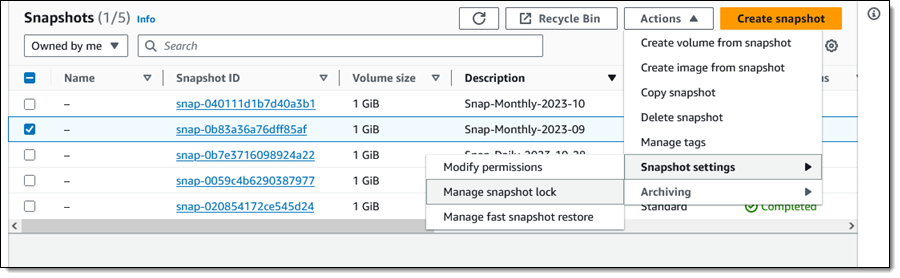
From the EBS Console I select a snapshot (Snap-Monthly-2023-09) and choose Manage snapshot lock from Snapshot Settings in the Actions menu:

This is a monthly snapshot and I want to lock it for one year. I choose Governance mode and select the duration, then click Save lock settings:

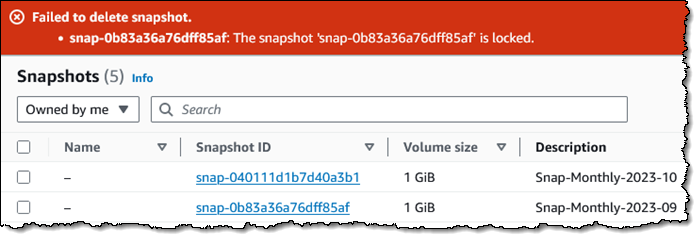
I try to delete it, and the deletion fails, as it should:

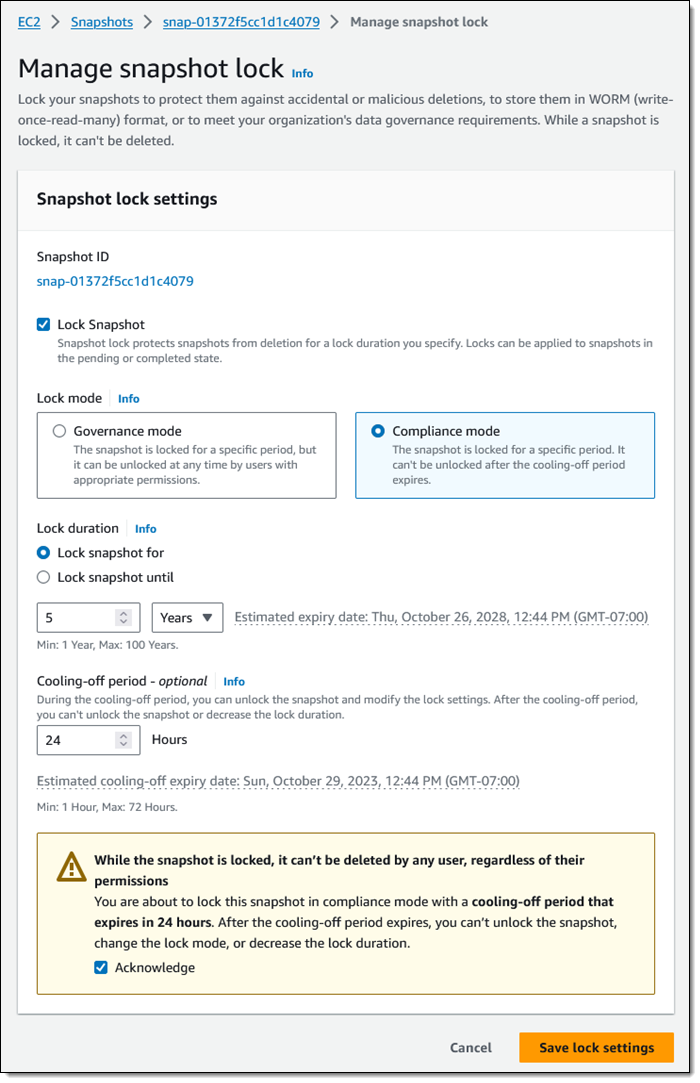
Now I would like to lock one of my annual snapshots for 5 years, using Compliance mode this time:

I set my cooling-off period to 24 hours, just in case I change my mind. Perhaps I have to run some kind of audit or final date validation on the snapshot before committing to keeping it around for five years.

Programmatically, I can use new API functions to establish and control locks on my EBS snapshots:

LockSnapshot – Lock a snapshot in governance or compliance mode, or modify the settings of a snapshot that is already locked.

UnlockSnapshot – Unlock a snapshot that is is governance mode, or is in compliance mode but within the cooling-off period.

DescribeLockedSnapshots – Get information about the lock status of my snapshots, with optional filtering based on the state of the lock.

IAM users must have the appropriate permissions (ec2:lockSnapshot, ec2:UnlockSnapshot, and ec2:DescribeLockedSnapshots) in order to use these functions.

Things to Know
Here are a couple of things to keep in mind about this new feature:

AWS Backup – AWS Backup independently manages retention for the snapshots that it creates. We do not recommend locking them.

Pricing – There is no extra charge for the use of this feature. You pay the usual rates for storage of snapshots and archived snapshots.

Regions – EBS Snapshot Locking is available in all commercial AWS Regions.

KMS Key Retention – If you are using customer-managed AWS Key Management Service (AWS KMS) keys to encrypt your EBS volumes and snapshots, you need to make sure that the key will remain valid for the lifetime of the snapshot.

— Jeff;

New – Multi-account search in AWS Resource Explorer

Post Syndicated from Danilo Poccia original https://aws.amazon.com/blogs/aws/new-multi-account-search-in-aws-resource-explorer/

With AWS Resource Explorer, you can search for and discover your resources, such as Amazon Elastic Compute Cloud (Amazon EC2) instances, Amazon Kinesis data streams, and Amazon DynamoDB tables, across AWS Regions. Starting today, you can also search across accounts within your organization.

It takes just a few minutes to turn on and configure Resource Explorer for an entire organization or a specific organizational unit (OU) and use simple free-form text and filtered searches to find relevant AWS resources across accounts and Regions.

Multi-account search is available in the Resource Explorer console, anywhere in the AWS Management Console through the unified search bar (the search bar at the top of every AWS console page), using the AWS Command Line Interface (AWS CLI), AWS SDKs, or AWS Chatbot. In this way, you can locate a resource quickly, navigate to the appropriate account and service, and take action.

When operating in a well-architected manner, multiple AWS accounts are used to help isolate and manage business applications and data. You can now use Resource Explorer to simplify how you explore your resources across accounts and act on them at scale. For example, Resource Explorer can help you locate impacted resources across your entire organization when investigating increased operational costs, troubleshooting a performance issue, or remediating a security alert.

Let’s see how this works in practice.

Setting up multi-account search
You can set up multi-account search for your organization in four steps:

  1. Enable trusted access for AWS Account Management.
  2. Configure Resource Explorer in every account in the organization or in the OU you want to search through. You can do that in just a few clicks using AWS Systems Manager Quick Setup. Optionally, you can use AWS CloudFormation, or other management tools you are comfortable with.
  3. It is not mandatory, but we suggest creating a delegated admin account for AWS Account Management. Then, to centralize all the required permissions for multi-account creation, we recommend using the delegated admin account to create Resource Explorer multi-account views.
  4. Finally, you can create a multi-account view to start searching across the organization.

Create a multi-account view
I already implemented the first three steps in the previous list. Using the delegated admin account, I go to the Resource Explorer console. There, I choose Views in the Explore resources section and create a view.

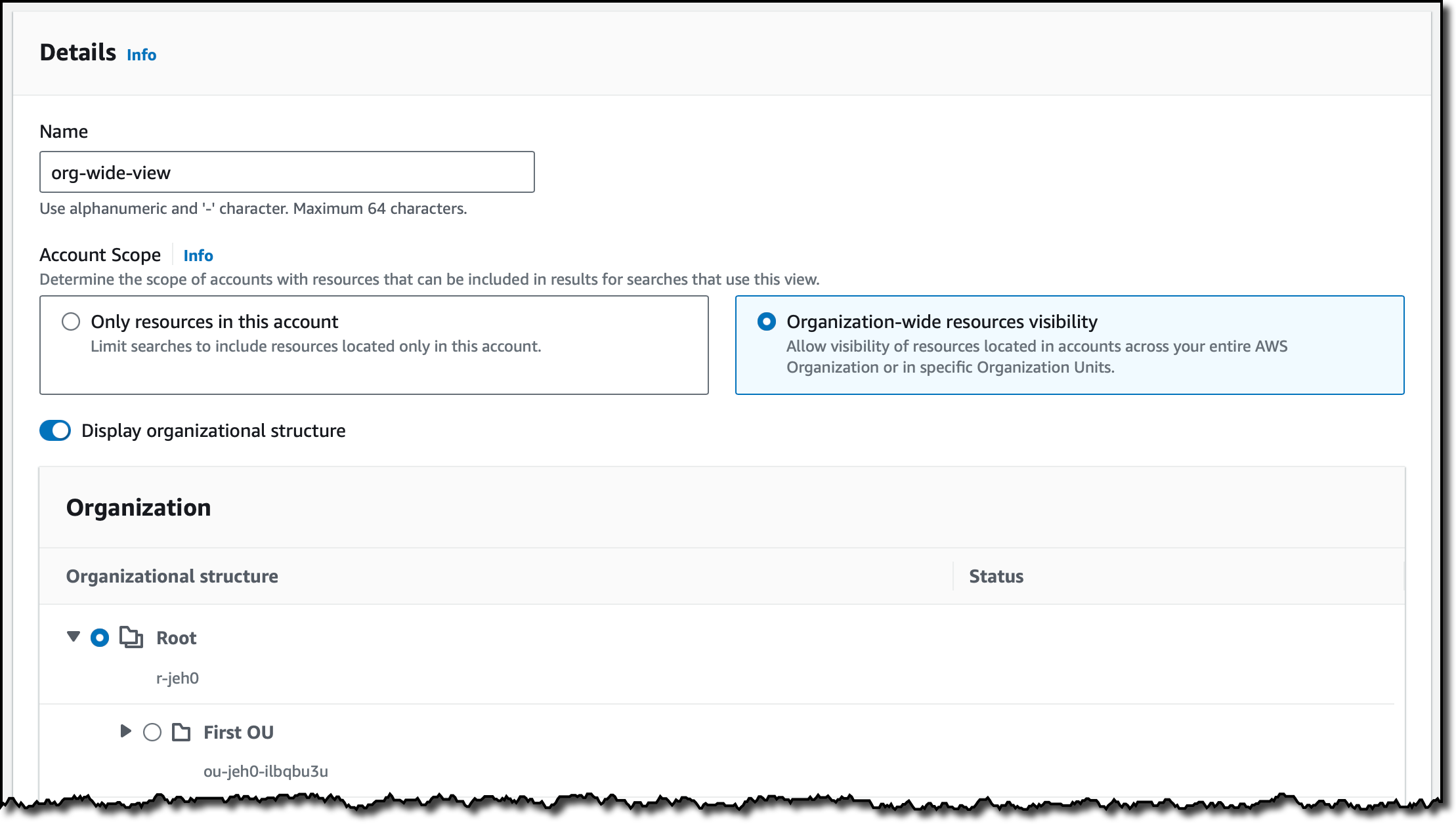
I enter a name for the view and select Organization-wide resources visibility. In this way, I can allow visibility of resources located in accounts across my entire organization or in specific OUs. For this view, I select the whole organization.

Console screenshot.

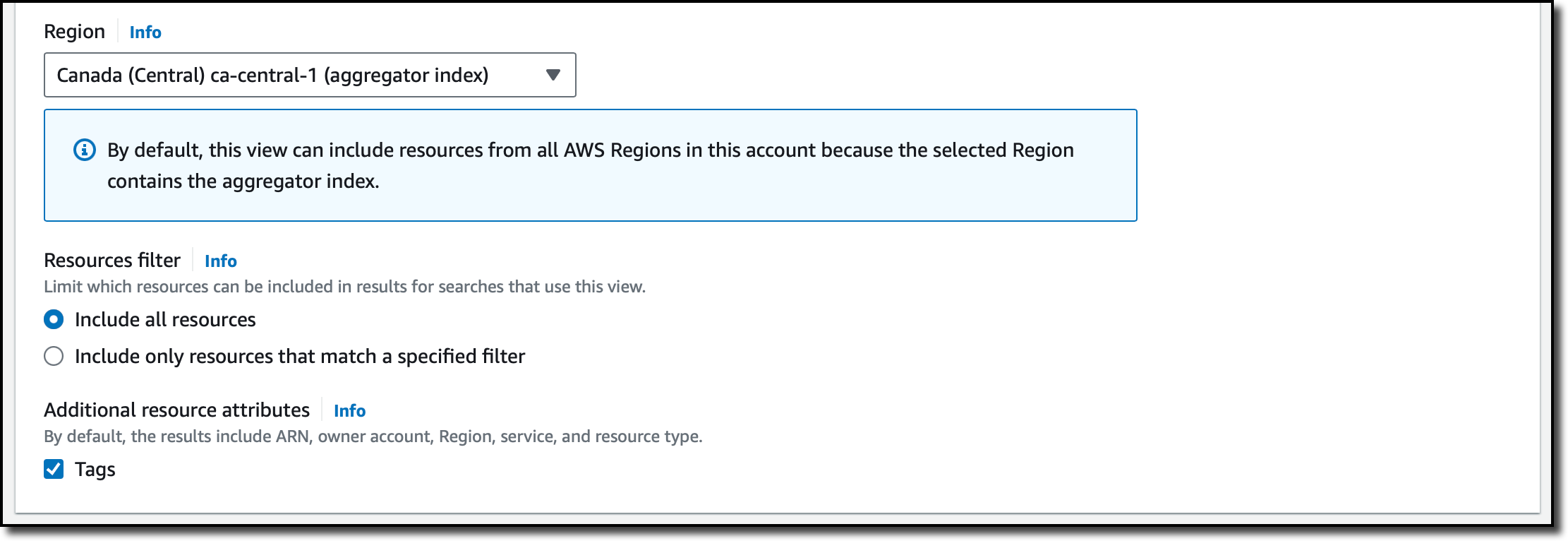
For the Region, I select the one where I have the aggregator index. The aggregator index contains a replicated copy of the local index in every other Region where Resource Explorer has been turned on. Optionally, I can use a filter to limit which resources should be included in this view. I choose to include all resources and additional resource attributes such as tags.

Console screenshot.

Then, I complete the creation of the view. Now, by granting access to the view, I can control who can access what resource information in Resource Explorer.

Using multi-account search
To try the new multi-account view, I choose Resource search from the Explore resources section of the navigation pane. In my query, I want to see if there are Amazon ElastiCache resources for an old version of Redis. I type elasticache:* redis3.2 in the Query field.

Console screenshot.

In the results, I see the different AWS accounts and Regions where these resources are based. For resources in my account, there is a link in the first column that opens that resource in the console. For resources in other accounts, I can use the console with the appropriate account and service to get more information or take action.

Things to know
Multi-account search is available in the following AWS Regions: [[ Regions ]].

There is no additional charge for using AWS Resource Explorer, including for multi-account searches.

To share views with other accounts in an organization, we suggest you use the delegated admin account to create the view with the necessary visibility in terms of resources, Regions, and accounts within the organization and then use AWS Resource Access Manager to share access to the view. For example, you can create a view for a specific OU and then share the view with an account in that OU.

Search for and discover relevant resources across accounts in your organization and across Regions with AWS Resource Explorer.

— Danilo

AWS Glue Data Catalog now supports automatic compaction of Apache Iceberg tables

Post Syndicated from Sébastien Stormacq original https://aws.amazon.com/blogs/aws/aws-glue-data-catalog-now-supports-automatic-compaction-of-apache-iceberg-tables/

Today, we’re making available a new capability of AWS Glue Data Catalog to allow automatic compaction of transactional tables in the Apache Iceberg format. This allows you to keep your transactional data lake tables always performant.

Data lakes were initially designed primarily for storing vast amounts of raw, unstructured, or semi structured data at a low cost, and they were commonly associated with big data and analytics use cases. Over time, the number of possible use cases for data lakes has evolved as organizations have recognized the potential to use data lakes for more than just reporting, requiring the inclusion of transactional capabilities to ensure data consistency.

Data lakes also play a pivotal role in data quality, governance, and compliance, particularly as data lakes store increasing volumes of critical business data, which often requires updates or deletion. Data-driven organizations also need to keep their back end analytics systems in near real-time sync with customer applications. This scenario requires transactional capabilities on your data lake to support concurrent writes and reads without data integrity compromise. Finally, data lakes now serve as integration points, necessitating transactions for safe and reliable data movement between various sources.

To support transactional semantics on data lake tables, organizations adopted an open table format (OTF), such as Apache Iceberg. Adopting OTF formats comes with its own set of challenges: transforming existing data lake tables from Parquet or Avro formats to an OTF format, managing a large number of small files as each transaction generates a new file on Amazon Simple Storage Service (Amazon S3), or managing object and meta-data versioning at scale, just to name a few. Organizations are typically building and managing their own data pipelines to address these challenges, leading to additional undifferentiated work on infrastructure. You need to write code, deploy Spark clusters to run your code, scale the cluster, manage errors, and so on.

When talking with our customers, we learned that the most challenging aspect is the compaction of individual small files produced by each transactional write on tables into a few large files. Large files are faster to read and scan, making your analytics jobs and queries faster to execute. Compaction optimizes the table storage with larger-sized files. It changes the storage for the table from a large number of small files to a small number of larger files. It reduces metadata overhead, lowers network round trips to S3, and improves performance. When you use engines that charge for the compute, the performance improvement is also beneficial to the cost of usage as the queries require less compute capacity to run.

But building custom pipelines to compact and optimize Iceberg tables is time-consuming and expensive. You have to manage the planning, provision infrastructure, and schedule and monitor the compaction jobs. This is why we launch automatic compaction today.

Let’s see how it works
To show you how to enable and monitor automatic compaction on Iceberg tables, I start from the AWS Lake Formation page or the AWS Glue page of the AWS Management Console. I have an existing database with tables in the Iceberg format. I execute transactions on this table over the course of a couple of days, and the table starts to fragment into small files on the underlying S3 bucket.

List of Iceberg table on Lake Formation console

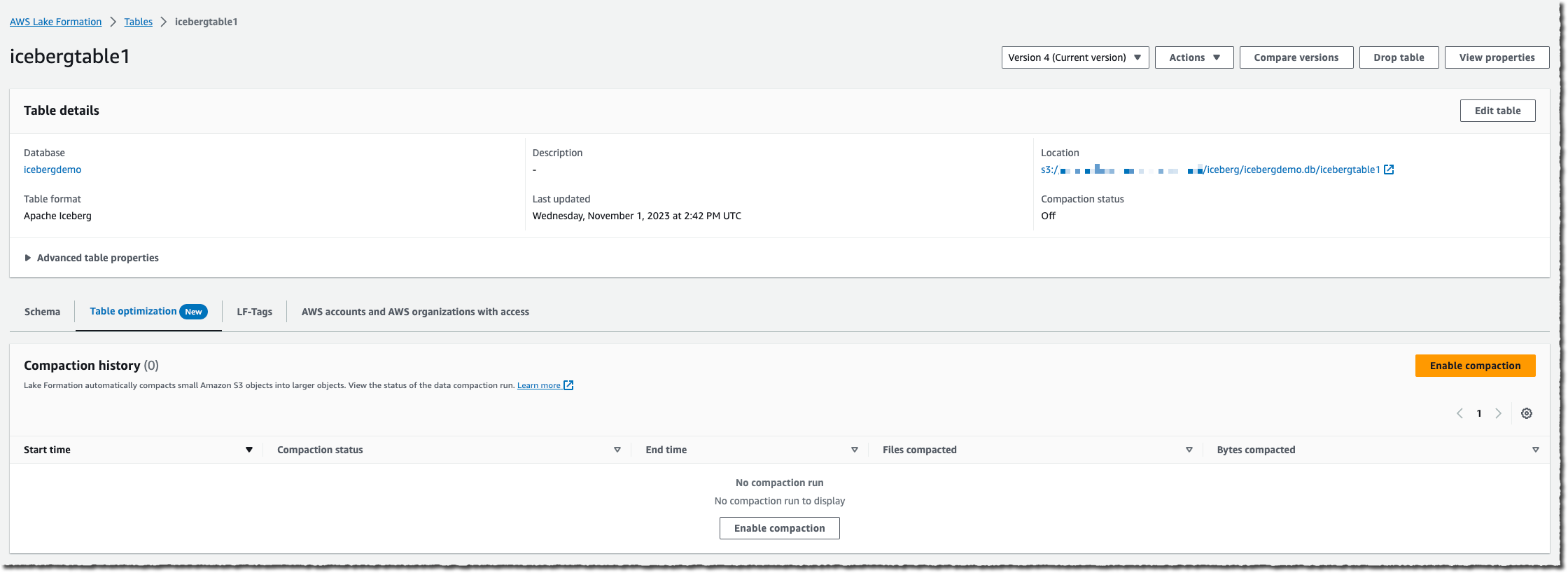
I select the table on which I want to enable compaction, and then I select Enable compaction.

View details of a table in lake formation

An IAM role is required to pass permissions to the Lake Formation service to access my AWS Glue tables, S3 buckets, and CloudWatch log streams. Either I choose to create a new IAM role, or I select an existing one. Your existing role must have lakeformation:GetDataAccess and glue:UpdateTable permissions on the table. The role also needs logs:CreateLogGroup, logs:CreateLogStream, logs:PutLogEvents, to “arn:aws:logs:*:your_account_id:log-group:/aws-lakeformation-acceleration/compaction/logs:*“. The role trusted permission service name must be set to glue.amazonaws.com.

Then, I select Turn on compaction. Et voilà! Compaction is automatic; there is nothing to manage on your side.

The service starts to measure the table’s rate of change. As Iceberg tables can have multiple partitions, the service calculates this change rate for each partition and schedules managed jobs to compact the partitions where this rate of change breaches a threshold value.

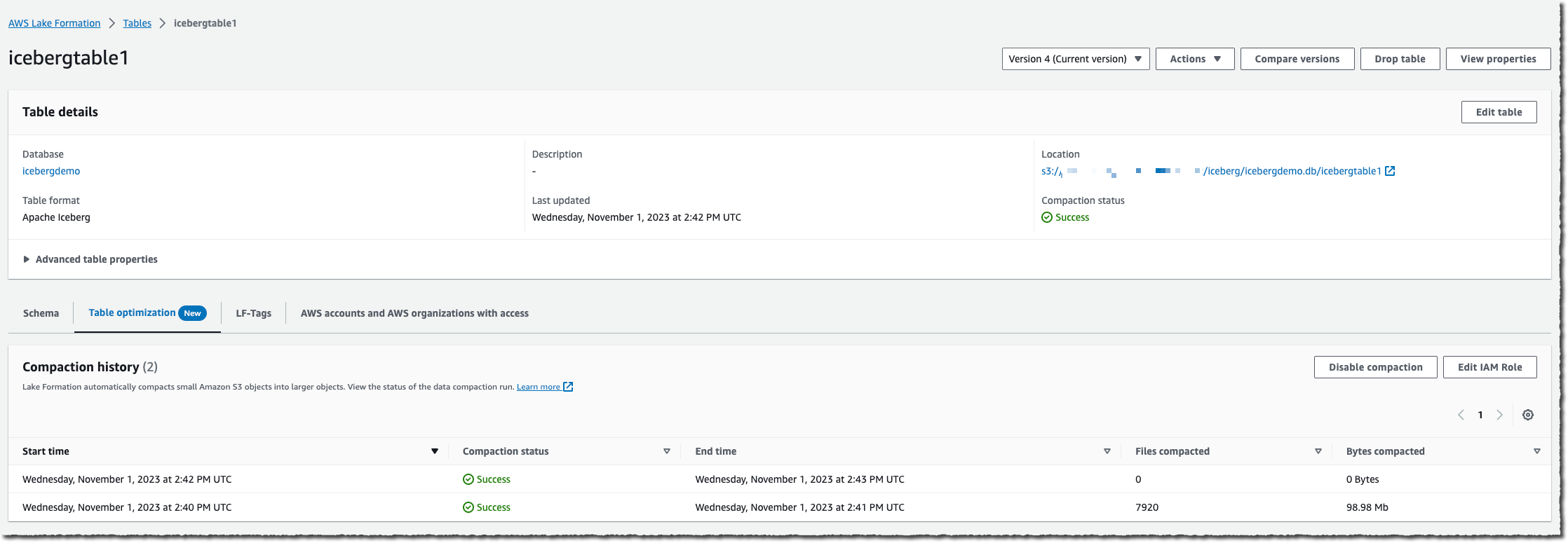
When the table accumulates a high number of changes, you will be able to view the Compaction history under the Optimization tab in the console.

Lake formation compaction history in the console

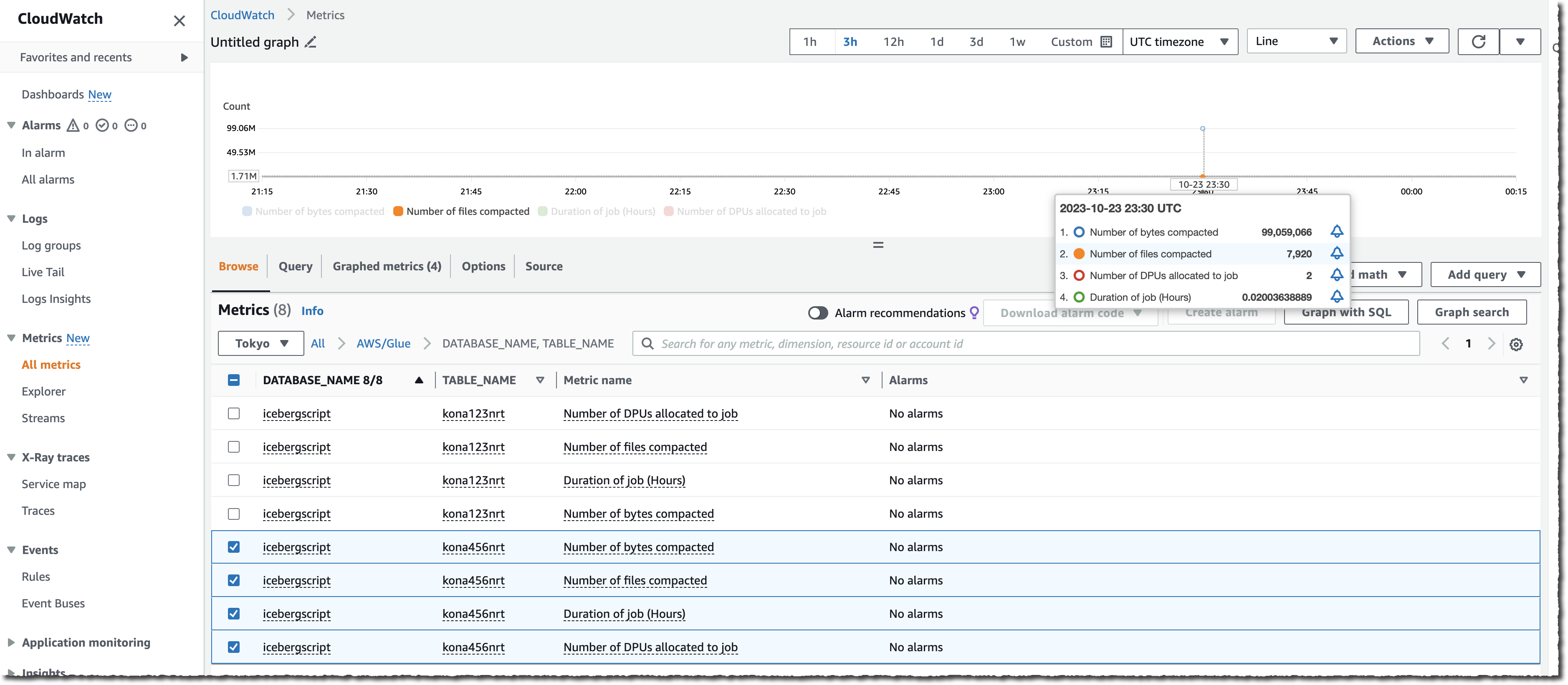
You can also monitor the whole process either by observing the number of files on your S3 bucket (use the NumberOfObjects metric) or one of the two new Lake Formation metrics: numberOfBytesCompacted or numberOfFilesCompacted.

Iceberg table compaction metrics in the cloudwatch console

In addition to the AWS console, there are six new APIs that expose this new capability:CreateTableOptimizer, BatchGetTableOptimizer , UpdateTableOptimizer, DeleteTableOptimizer, GetTableOptimizer, and ListTableOptimizerRuns. These APIs are available in the AWS SDKs and AWS Command Line Interface (AWS CLI). As usual, don’t forget to update the SDK or the CLI to their latest versions to get access to these new APIs.

Things to know
As we launched this new capability today, there are a couple of additional points I’d like to share with you:

Availability
This new capability is available starting today in all AWS Regions where AWS Glue Data Catalog is available.

The pricing metric is the data processing unit (DPU), a relative measure of processing power that consists of 4 vCPUs of compute capacity and 16 GB of memory. There is a charge per DPU/hours metered by second, with a minimum of one minute.

Now it’s time to decommission your existing compaction data pipeline and switch to this new, entirely managed capability today.

— seb

Meet the final cohort of AWS Heroes this year – November 2023

Post Syndicated from Taylor Jacobsen original https://aws.amazon.com/blogs/aws/meet-the-final-cohort-of-aws-heroes-this-year-november-2023/

As 2023 comes to an end, we’re celebrating our final Heroes cohort launch of the year! These technical experts are passionate about helping their local communities build faster on AWS—they’re focused on sharing best practices, solving problems, and even more. We’re thrilled to have them join the AWS Heroes program, and recognizing them for their contributions to the greater AWS community.

Please meet our newest Heroes!

Emin Alemdar – Izmir, Turkey

Container Hero Emin Alemdar is a Solutions Architect at Spacelift where he produces solutions related to Kubernetes, Cloud technologies, and Cloud Native Transformation. In general, his work focuses on these services and technologies, and he shares best practices with the AWS community. Additionally, Emin is a CNCF Ambassador and is part of the HashiCorp Ambassador Program within the open source community.

Richard Fan – Hong Kong

Security Hero Richard Fan is a Security Engineer at ExpressVPN. He is dedicated to helping builders easily adopt AWS, and shares best practices around streamlines for cloud governance. Richard has also developed different tools to simplify the experience with AWS security services, such as his nitro-enclave-python-demo project, which helps builders get started on AWS Nitro Enclaves and has been adopted by some AWS workshops. Furthermore, Richard promotes the concept and use cases of enclave technology by partnering with multiple companies to review their AWS Nitro Enclaves offering.

Takuya Tachibana – Misawa, Japan

Community Hero Takuya Tachibana is the CEO of Heptagon inc. and Director of DigitalCube Co. Ltd. Since 2012, he has been contributing to the Japan AWS User Group (JAWS-UG), and he was the leader from 2016-2017 for all of the JAWS-UGs, representing and overseeing every chapter in Japan. Tachibana has been a speaker at over 100 community and cloud events throughout all of Japan, including AWS Summit Seoul, AWS Summit Beijing, and AWS Community Day APAC.

Learn More

To learn more about the AWS Heroes program or to connect with a Hero near you, please visit the AWS Heroes website.

— Taylor

Amazon Bedrock now provides access to Meta’s Llama 2 Chat 13B model

Post Syndicated from Sébastien Stormacq original https://aws.amazon.com/blogs/aws/amazon-bedrock-now-provides-access-to-llama-2-chat-13b-model/

Today, we’re announcing the availability of Meta’s Llama 2 Chat 13B large language model (LLM) on Amazon Bedrock. With this launch, Amazon Bedrock becomes the first public cloud service to offer a fully managed API for Llama 2, Meta’s next-generation LLM. Now, organizations of all sizes can access Llama 2 Chat models on Amazon Bedrock without having to manage the underlying infrastructure. This is a step change in accessibility.

Amazon Bedrock is a fully managed service that offers a choice of high-performing foundation models (FMs) from leading AI companies, including AI21 Labs, Anthropic, Cohere, Stability AI, Amazon, and now Meta, along with a broad set of capabilities to build generative AI applications, simplifying the development while maintaining privacy and security. You can read more about Amazon Bedrock in Antje’s post here.

Llama 2 is a family of publicly available LLMs by Meta. The Llama 2 base model was pre-trained on 2 trillion tokens from online public data sources. According to Meta, the training of Llama 2 13B consumed 184,320 GPU/hour. That’s the equivalent of 21.04 years of a single GPU, not accounting for bissextile years.

Built on top of the base model, the Llama 2 Chat model is optimized for dialog use cases. It is fine-tuned with over 1 million human annotations (a technique known as reinforcement learning from human feedback or RLHF) and has undergone testing by Meta to identify performance gaps and mitigate potentially problematic responses in chat use cases, such as offensive or inappropriate responses.

To promote a responsible, collaborative AI innovation ecosystem, Meta established a range of resources for all who use Llama 2: individuals, creators, developers, researchers, academics, and businesses of any size. In particular, I like the Meta Responsible Use Guide, a resource for developers that provides best practices and considerations for building products powered by LLMs in a responsible manner, covering various stages of development from inception to deployment. This guide fits well in the set of AWS tools and resources to build AI responsibly.

You can now integrate the LLama 2 Chat model in your applications written in any programming language by calling the Amazon Bedrock API or using the AWS SDKs or the AWS Command Line Interface (AWS CLI).

Llama 2 Chat in action
Those of you who read the AWS News blog regularly know we like to show you the technologies we write about. So let’s write code to interact with Llama2.

I was lucky enough to talk at the AWS UG Perú Conf a few weeks ago. Jeff and Marcia were there too. Jeff opened the conference with an inspiring talk about generative AI, and he used a wall of generated images of llamas, the emblematic animal from Perú. So what better subject to talk about with Llama 2 Chat than llamas?

(And before writing code, I can’t resist sharing two photos of llamas I took during my visit to Machu Picchu)

A white llama at Machu Picchu A brown llama at Machu Picchu

To get started with a new model on Bedrock, I first navigate to Amazon Bedrock on the console. I select Model access on the bottom left pane, then select the Edit button on the top right side, and enable access to the Llama 2 Chat model.

Bedrock Llama2 Grant Access

In the left navigation bar, under Playgrounds, I select Chat to interact with the model without writing any code.

Bedrock chat playground for llama2

Now that I know I can access the model, I open a code editor on my laptop. I assume you have the AWS Command Line Interface (AWS CLI) configured, which will allow the AWS SDK to locate your AWS credentials. I use Python for this demo, but I want to show that Bedrock can be called from any language. I also share a public gist with the same code sample written in the Swift programming language.

Returning to Python, I first run the ListFoundationModels API call to discover the modelId for Llama 2 Chat 13B.

import boto3

bedrock = boto3.client(service_name='bedrock', region_name='us-east-1')
listModels = bedrock.list_foundation_models(byProvider='meta')
print("\n".join(list(map(lambda x: f"{x['modelName']} : { x['modelId'] }", listModels['modelSummaries']))))

Running this code produces the list:

Llama 2 Chat 13B : meta.llama2-13b-chat-v1

I select meta-llama2-chat-13b model ID and write the code to send a prompt to the LLama 2 Chat 13B model.

import boto3
import json

llamaModelId = 'meta.llama2-13b-chat-v1' 
prompt = "What is the difference between a llama and an alpaca?"

llamaPayload = json.dumps({ 
	'prompt': prompt,
    'max_gen_len': 512,
	'top_p': 0.9,
	'temperature': 0.2
})

bedrock_runtime = boto3.client(
    service_name='bedrock-runtime', 
    region_name='us-east-1'
)
response = bedrock_runtime.invoke_model(
    body=llamaPayload, 
    modelId=llamaModelId, 
    accept='application/json', 
    contentType='application/json'
)
body = response.get('body').read().decode('utf-8')
response_body = json.loads(body)
print(response_body['generation'].strip())

The response is printed:

Llamas and alpacas are both members of the camelid family, 
but they are different species with distinct physical and behavioral characteristics. 
Here are some of the main differences: (...)

I redacted the answer for brevity.

You can tune the different request parameters to see how they influence the response.

Optimizing your prompts
To get the best results out of the Llama 2 Chat model, you can experiment with a couple of prompt engineering techniques, such as using roles or chain-of-thought prompts.

Using roles, you tell the model how to behave by giving it a role and instructions before asking your question. For example:

Prompt: You are a teacher. You explain things for six-year old kids.
What is the difference between a llama and an alpaca?

Answer: Great question! Both llamas and alpacas are animals that live in South America, and they look a little bit similar. But there are some differences that we can talk about.
First, let's talk about their fur. Llamas have longer fur than alpacas. It's like they have a big, fluffy coat that helps them stay warm in the cold weather. Alpacas, on the other hand, have shorter fur that's a little bit smoother.
Another difference is their ears. Llamas have banana-shaped ears that are really big, while alpacas have small, triangular ears.
Finally, let's talk about their size. Llamas are generally bigger than alpacas. They can grow up to 6 feet tall and weigh a lot, while alpacas are usually smaller, only growing up to 3 feet tall.
So, those are some of the main differences between llamas and alpacas. They're both really cool animals, and it's fun to learn about them!

With chain-of-thought prompts, you ask the model to explain each step that led to the answer. For example:

Prompt: You are a a very intelligent bot with exceptional critical thinking.
I went to the market and bought 10 apples. I gave 2 apples to your friend and 2 to the helper. I then went and bought 5 more apples and ate 1. How many apples did I remain with?
Let's think step by step.

Answer:
1. You went to the market and bought 10 apples.
2. You gave 2 apples to your friend.
3. You gave 2 apples to the helper.
4. You went back to the market and bought 5 more apples.
5. You ate 1 apple.
Now, let's count how many apples you have:
10 apples (from the first trip to the market) - 2 apples (given to your friend) - 2 apples (given to the helper) = 6 apples
6 apples + 5 apples (from the second trip to the market) = 11 apples
11 apples - 1 apple (that you ate) = 10 apples
Therefore, you remain with 10 apples.
I hope this helps! Do you have any more questions or would you like to play again?

Meta shared more examples in section 4.2 of their getting to know Llama notebook.

Availability
The Llama 2 Chat model is available today for all AWS customers in two of the AWS Regions where Bedrock is available: US East (N. Virginia) and US West (Oregon).

You will be charged for model inference. You can choose to be charged on a pay-as-you-go basis, with no upfront or recurring fees; AWS charges per processed input and output tokens. Or you can provision sufficient throughput to meet your application’s performance requirements in exchange for a time-based term commitment. The Bedrock pricing page has the details.

With this information, you’re prepared to start using Amazon Bedrock and the Llama 2 Chat model in your applications.

Go build!

— seb

Amazon Bedrock now provides access to Cohere Command Light and Cohere Embed English and multilingual models

Post Syndicated from Sébastien Stormacq original https://aws.amazon.com/blogs/aws/amazon-bedrock-now-provides-access-to-cohere-command-light-and-cohere-embed-english-and-multilingual-models/

Cohere provides text generation and representation models powering business applications to generate text, summarize, search, cluster, classify, and utilize Retrieval Augmented Generation (RAG). Today, we’re announcing the availability of Cohere Command Light and Cohere Embed English and multilingual models on Amazon Bedrock. They’re joining the already available Cohere Command model.

Amazon Bedrock is a fully managed service that offers a choice of high-performing foundation models (FMs) from leading AI companies, including AI21 Labs, Anthropic, Cohere, Meta, Stability AI, and Amazon, along with a broad set of capabilities to build generative AI applications, simplifying the development while maintaining privacy and security. With this launch, Amazon Bedrock further expands the breadth of model choices to help you build and scale enterprise-ready generative AI. You can read more about Amazon Bedrock in Antje’s post here.

Command is Cohere’s flagship text generation model. It is trained to follow user commands and to be useful in business applications. Embed is a set of models trained to produce high-quality embeddings from text documents.

Embeddings are one of the most fascinating concepts in machine learning (ML). They are central to many applications that process natural language, recommendations, and search algorithms. Given any type of document, text, image, video, or sound, it is possible to transform it into a suite of numbers, known as a vector. Embeddings refer specifically to the technique of representing data as vectors in such a way that it captures meaningful information, semantic relationships, or contextual characteristics. In simple terms, embeddings are useful because the vectors representing similar documents are “close” to each other. In more formal terms, embeddings translate semantic similarity as perceived by humans to proximity in a vector space. Embeddings are typically generated through training algorithms or models.

Cohere Embed is a family of models trained to generate embeddings from text documents. Cohere Embed comes in two forms, an English language model and a multilingual model, both of which are now available in Amazon Bedrock.

There are three main use cases for text embeddings:

Semantic searches – Embeddings enable searching collections of documents by meaning, which leads to search systems that better incorporate context and user intent compared to existing keyword-matching systems.

Text Classification – Build systems that automatically categorize text and take action based on the type. For example, an email filtering system might decide to route one message to sales and escalate another message to tier-two support.

Retrieval Augmented Generation (RAG) – Improve the quality of a large language model (LLM) text generation by augmenting your prompts with data provided in context. The external data used to augment your prompts can come from multiple data sources, such as document repositories, databases, or APIs.

Imagine you have hundreds of documents describing your company policies. Due to the limited size of prompts accepted by LLMs, you have to select relevant parts of these documents to be included as context into prompts. The solution is to transform all your documents into embeddings and store them in a vector database, such as OpenSearch.

When a user wants to query this corpus of documents, you transform the user’s natural language query into a vector and perform a similarity search on the vector database to find the most relevant documents for this query. Then, you embed (pun intended) the original query from the user and the relevant documents surfaced by the vector database together in a prompt for the LLM. Including relevant documents in the context of the prompt helps the LLM generate more accurate and relevant answers.

You can now integrate Cohere Command Light and Embed models in your applications written in any programming language by calling the Bedrock API or using the AWS SDKs or the AWS Command Line Interface (AWS CLI).

Cohere Embed in action
Those of you who regularly read the AWS News Blog know we like to show you the technologies we write about.

We’re launching three distinct models today: Cohere Command Light, Cohere Embed English, and Cohere Embed multilingual. Writing code to invoke Cohere Command Light is no different than for Cohere Command, which is already part of Amazon Bedrock. So for this example, I decided to show you how to write code to interact with Cohere Embed and review how to use the embedding it generates.

To get started with a new model on Bedrock, I first navigate to the AWS Management Console and open the Bedrock page. Then, I select Model access on the bottom left pane. Then I select the Edit button on the top right side, and I enable access to the Cohere model.

Bedrock - model activation with Cohere models

Now that I know I can access the model, I open a code editor on my laptop. I assume you have the AWS Command Line Interface (AWS CLI) configured, which will allow the AWS SDK to locate your AWS credentials. I use Python for this demo, but I want to show that Bedrock can be called from any language. I also share a public gist with the same code sample written in the Swift programming language.

Back to Python, I first run the ListFoundationModels API call to discover the modelId for Cohere Embed.

import boto3
import json
import numpy

bedrock = boto3.client(service_name='bedrock', region_name='us-east-1')

listModels = bedrock.list_foundation_models(byProvider='cohere')
print("\n".join(list(map(lambda x: f"{x['modelName']} : { x['modelId'] }", listModels['modelSummaries']))))

Running this code produces the list:

Command : cohere.command-text-v14
Command Light : cohere.command-light-text-v14
Embed English : cohere.embed-english-v3
Embed Multilingual : cohere.embed-multilingual-v3

I select cohere.embed-english-v3 model ID and write the code to transform a text document into an embedding.

cohereModelId = 'cohere.embed-english-v3'

# For the list of parameters and their possible values, 
# check Cohere's API documentation at https://docs.cohere.com/reference/embed

coherePayload = json.dumps({
     'texts': ["This is a test document", "This is another document"],
     'input_type': 'search_document',
     'truncate': 'NONE'
})

bedrock_runtime = boto3.client(
    service_name='bedrock-runtime', 
    region_name='us-east-1'
)
print("\nInvoking Cohere Embed...")
response = bedrock_runtime.invoke_model(
    body=coherePayload, 
    modelId=cohereModelId, 
    accept='application/json', 
    contentType='application/json'
)

body = response.get('body').read().decode('utf-8')
response_body = json.loads(body)
print(np.array(response_body['embeddings']))

The response is printed

[ 1.234375 -0.63671875 -0.28515625 ... 0.38085938 -1.2265625 0.22363281]

Now that I have the embedding, the next step depends on my application. I can store this embedding in a vector store or use it to search similar documents in an existing store, and so on.

To learn more, I highly recommend following the hands-on instructions provided by this section of the Amazon Bedrock workshop. This is an end-to-end example of RAG. It demonstrates how to load documents, generate embeddings, store the embeddings in a vector store, perform a similarity search, and use relevant documents in a prompt sent to an LLM.

Availability
The Cohere Embed models are available today for all AWS customers in two of the AWS Regions where Amazon Bedrock is available: US East (N. Virginia) and US West (Oregon).

AWS charges for model inference. For Command Light, AWS charges per processed input or output token. For Embed models, AWS charges per input tokens. You can choose to be charged on a pay-as-you-go basis, with no upfront or recurring fees. You can also provision sufficient throughput to meet your application’s performance requirements in exchange for a time-based term commitment. The Amazon Bedrock pricing page has the details.

With this information, you’re ready to use text embeddings with Amazon Bedrock and the Cohere Embed models in your applications.

Go build!

— seb

AWS Weekly Roundup – CloudFront security dashboard, EBS snapshots improvements, and more – November 13, 2023

Post Syndicated from Danilo Poccia original https://aws.amazon.com/blogs/aws/aws-weekly-roundup-cloudfront-security-dashboard-ebs-snapshots-improvements-and-more-november-13-2023/

This week, it was really difficult to choose what to recap here because, as we’re getting closer to AWS re:Invent, service teams are delivering new capabilities at an incredible pace.

Last week’s launches
Here are some of the launches that caught my attention last week:

Amazon Aurora – Aurora MySQL zero-ETL integration with Amazon Redshift is now generally available. Get a walk-through in our AWS News Blog post. Here’s a recap of data integration innovations at AWS. Optimized reads for Aurora PostgreSQL provide up to 8x improved query latency and up to 30 percent cost savings for I/O-intensive applications. Here’s more of a deep dive from the AWS Database Blog.

Amazon EBS – You can now block public sharing of EBS snapshots. Read more about how that works in the launch post.

Amazon Data Lifecycle Manager – Support for pre- and post-script automation of EBS snapshots simplifies application-consistent snapshots. Here’s how to use it with Windows applications.

AWS Health – There’s now improved visibility into planned lifecycle events like end of standard support of a Kubernetes version in Amazon EKS, Amazon RDS certificate rotations, and end of support for other open source software. Here’s how it works.

Amazon CloudFront – Unified security dashboard to enable, monitor, and manage common security protections for your web applications directly from the CloudFront console. Read more at Introducing CloudFront Security Dashboard, a Unified CDN and Security Experience.

Amazon Connect – Reduced outbound telephony pricing across Europe and South America. It’s also easier now to deliver persistent chat experiences for end users.

AWS Lambda – Busy week for the Lambda team! There is now support for Amazon Linux 2023 as both a managed runtime and a container base image. More details in this Compute Blog post. There’s also enhanced auto scaling for Kafka event sources (the Compute Blog has a post with more details) and faster polling scale-up rate for Amazon SQS events when AWS Lambda functions are configured with SQS.

AWS CodeBuild – Now supports AWS Lambda compute to build and test software packages. Read about how it works in this post.

Amazon SQS – Now supports JSON protocol to reduce latency and client-side CPU usage. More in the launch post. There’s also a new integration for Amazon SQS in the Amazon EventBridge Pipes console (the week before that, Amazon Kinesis Data Streams was also integrated into the EventBridge Pipes console).

Amazon SNS –  FIFO topics now support 3,000 messages per second by default.

Amazon EventBridge – There are 22 additional Amazon CloudWatch metrics to help you monitor the performance of your event buses. More info in this post from the AWS Compute Blog.

Amazon OpenSearch Service – Neural search makes it easier to create and manage semantic search applications.

Amazon Timestream – The UNLOAD statement simplifies exporting time-series data for additional insights.

Amazon Comprehend – New trust and safety features with toxicity detection and prompt safety classification. Read how to apply that to generative AI applications using LangChain.

AWS App Runner – Now available in London, Mumbai, and Paris AWS Regions.

AWS Application Migration Service – Support for AWS App2Container replatforming  of .NET and Java based applications.

Amazon FSx for OpenZFS – Now available in ten additional AWS Regions with support for additional deployment types in seven Regions.

AWS Global Accelerator – There’s now IPv6 support for Network Load Balancer (NLB) endpoints. It was already available for Application Load Balancers (ALBs) and Amazon Elastic Compute Cloud (Amazon EC2) instances.

Amazon GuardDuty – New machine learning (ML) capability enhances threat detection for Amazon EKS.

Other AWS news
Some other news and blog posts that you might have missed:

AWS Local Zones Credit Program – If you have low-latency or data residency requirements for your application, our Local Zones Credit Program can get you started. Fill out our form to receive $500 in AWS credits and apply it to a Local Zones workload.

Amazon CodeWhisperer – Customizing coding companions for organizations and optimizing for sustainability.

Sharing what we have learned – Creating a correction of errors document to understand what went wrong and what would be done to prevent it from happening again.

Good tips for containers – Securing API endpoints using Amazon API Gateway and Amazon VPC Lattice.

Another post in this amazing series – Let’s Architect! Tools for developers.

A few highlights from Community.AWS:

Don’t miss the latest AWS open source newsletter by my colleague Ricardo.

Upcoming AWS events
Check your calendars and sign up for these AWS events:

AWS Community Days – Join a community-led conference run by AWS user group leaders in your region: Uruguay (November 14), Central Asia (Kazakhstan, Uzbekistan, Kyrgyzstan, and Mongolia on November 17–18), and Guatemala (November 18).

AWS re:Invent (November 27 – December 1) – Join us to hear the latest from AWS, learn from experts, and connect with the global cloud community. Browse the session catalog and attendee guides and check out the highlights for generative AI. In the AWS re:Invent Builder Hub you can find developer-focused sessions, events, competitions, and content.

Here you can browse all upcoming AWS-led in-person and virtual events and developer-focused events.

And that’s all from me for this week. We’re now taking a break. The next weekly roundup will be after re:Invent!

— Danilo

This post is part of our Weekly Roundup series. Check back for a quick roundup of interesting news and announcements from AWS!

New for Amazon SQS – Update the AWS SDK to reduce latency

Post Syndicated from Danilo Poccia original https://aws.amazon.com/blogs/aws/new-for-amazon-sqs-update-the-aws-sdk-to-reduce-latency/

With Amazon SQS, you can send and receive messages between software components at any scale. It was one of the first AWS services I used and as a Solutions Architect, I helped many customers take advantage of asynchronous communications using message queues. In fact, Amazon SQS has been generally available since July 2006 and, under the hood, has always used the same wire protocol based on XML that we call AWS Query protocol.

Today, I am happy to announce that Amazon SQS now supports a JSON-based wire protocol for all APIs. The AWS JSON protocol avoids many of the shortcomings of AWS Query protocol.

AWS JSON is more efficient than the previous XML-based protocol and can reduce both latency and client-side CPU usage when sending and receiving SQS messages. For example, for a request that sends a simple “hello world” message, the response body size using the old AWS Query protocol is about 400 bytes. The content length of the same SendMessage response using the new AWS JSON protocol is less than 1/3 of the previous size.

Using the New JSON-Based Protocol with Amazon SQS
This is the nicest part of this launch! To benefit from the AWS JSON protocol, you just need to update the AWS SDK to the latest version. While building this new capability, the SQS team was careful so that no code changes are needed to use the new JSON-based wire protocol.

For example, we ran a benchmark using the AWS SDK for Java to compare the old and new wire protocols. We expect similar results from the other AWS SDKs. Based on AWS performance tests for a 5KB message payload, JSON protocol for Amazon SQS reduces end-to-end message processing latency by up to 23 percent and reduces application client side CPU and memory usage. These numbers depend on the actual implementation and can differ from what you’ll see for your own applications.

Availability and Pricing
Amazon SQS support for the new JSON protocol is available today in all AWS Regions where SQS is offered. All generally available AWS SDKs now support AWS JSON for SQS APIs. To get the benefits of this optimization, you just need to update the AWS SDK to the latest version available.

There is no change in pricing when using the AWS JSON protocol. For more information, see Amazon SQS pricing.

If you’re interested in more details on how AWS protocols work, you can have a look at Smithy, the language we use at AWS for defining services and SDKs.

After almost 17 years of being generally available, we’re improving and innovating around our oldest service. Just a few months back, we introduced server-side encryption with Amazon SQS-managed encryption keys (SSE-SQS) by default for newly created queues, increased the default quota for high throughput mode for FIFO queues, and announced support for attribute-based access control (ABAC) using queue tags. More recently, Amazon SQS added new APIs to manage dead-letter queue (DLQ) redrive programmatically. At AWS, it’s always day 1!

Update the AWS SDK to improve CPU and memory usage and reduce latency when using Amazon SQS.

— Danilo

New for Amazon Comprehend – Toxicity Detection

Post Syndicated from Danilo Poccia original https://aws.amazon.com/blogs/aws/new-for-amazon-comprehend-toxicity-detection/

With Amazon Comprehend, you can extract insights from text without being a machine learning expert. Using its built-in models, Comprehend can analyze the syntax of your input documents and find entities, events, key phrases, personally identifiable information (PII), and the overall sentiment or sentiments associated with specific entities (such as brands or products).

Today, we are adding the capability to detect toxic content. This new capability helps you build safer environments for your end users. For example, you can use toxicity detection to improve the safety of applications open to external contributions such as comments. When using generative AI, toxicity detection can be used to check the input prompts and the output responses from large language models (LLMs).

You can use toxicity detection with the AWS Command Line Interface (AWS CLI) and AWS SDKs. Let’s see how this works in practice with a few examples using the AWS CLI, an AWS SDK, and to check the use of an LLM.

Using Amazon Comprehend Toxicity Detection with AWS CLI
The new detect-toxic-content subcommand in the AWS CLI detects toxicity in text. The output contains a list of labels, one for each text segment in input. For each text segment, a list is provided with the labels and a score (between 0 and 1).

Amazon Comprehend toxicity detection API

For example, this AWS CLI command analyzes one text segment and returns one Labels section and an overall Toxicity score for the segment between o and 1:

aws comprehend detect-toxic-content --language-code en --text-segments Text="'Good morning, it\'s a beautiful day.'"
{
    "ResultList": [
        {
            "Labels": [
                {
                    "Name": "PROFANITY",
                    "Score": 0.00039999998989515007
                },
                {
                    "Name": "HATE_SPEECH",
                    "Score": 0.01510000042617321
                },
                {
                    "Name": "INSULT",
                    "Score": 0.004699999932199717
                },
                {
                    "Name": "GRAPHIC",
                    "Score": 9.999999747378752e-05
                },
                {
                    "Name": "HARASSMENT_OR_ABUSE",
                    "Score": 0.0006000000284984708
                },
                {
                    "Name": "SEXUAL",
                    "Score": 0.03889999911189079
                },
                {
                    "Name": "VIOLENCE_OR_THREAT",
                    "Score": 0.016899999231100082
                }
            ],
            "Toxicity": 0.012299999594688416
        }
    ]
}

As expected, all scores are close to zero, and no toxicity was detected in this text.

To pass input as a file, I first use the AWS CLI --generate-cli-skeleton option to generate a skeleton of the JSON syntax used by the detect-toxic-content command:

aws comprehend detect-toxic-content --generate-cli-skeleton
{
    "TextSegments": [
        {
            "Text": ""
        }
    ],
    "LanguageCode": "en"
}

I write the output to a file and add three text segments (I will not show here the text used to show what happens with toxic content). This time, different levels of toxicity content has been found. Each Labels section is related to the corresponding input text segment.

aws comprehend detect-toxic-content --cli-input-json file://input.json
{
    "ResultList": [
        {
            "Labels": [
                {
                    "Name": "PROFANITY",
                    "Score": 0.03020000085234642
                },
                {
                    "Name": "HATE_SPEECH",
                    "Score": 0.12549999356269836
                },
                {
                    "Name": "INSULT",
                    "Score": 0.0738999992609024
                },
                {
                    "Name": "GRAPHIC",
                    "Score": 0.024399999529123306
                },
                {
                    "Name": "HARASSMENT_OR_ABUSE",
                    "Score": 0.09510000050067902
                },
                {
                    "Name": "SEXUAL",
                    "Score": 0.023900000378489494
                },
                {
                    "Name": "VIOLENCE_OR_THREAT",
                    "Score": 0.15549999475479126
                }
            ],
            "Toxicity": 0.06650000065565109
        },
        {
            "Labels": [
                {
                    "Name": "PROFANITY",
                    "Score": 0.03400000184774399
                },
                {
                    "Name": "HATE_SPEECH",
                    "Score": 0.2676999866962433
                },
                {
                    "Name": "INSULT",
                    "Score": 0.1981000006198883
                },
                {
                    "Name": "GRAPHIC",
                    "Score": 0.03139999881386757
                },
                {
                    "Name": "HARASSMENT_OR_ABUSE",
                    "Score": 0.1777999997138977
                },
                {
                    "Name": "SEXUAL",
                    "Score": 0.013000000268220901
                },
                {
                    "Name": "VIOLENCE_OR_THREAT",
                    "Score": 0.8395000100135803
                }
            ],
            "Toxicity": 0.41280001401901245
        },
        {
            "Labels": [
                {
                    "Name": "PROFANITY",
                    "Score": 0.9997000098228455
                },
                {
                    "Name": "HATE_SPEECH",
                    "Score": 0.39469999074935913
                },
                {
                    "Name": "INSULT",
                    "Score": 0.9265999794006348
                },
                {
                    "Name": "GRAPHIC",
                    "Score": 0.04650000110268593
                },
                {
                    "Name": "HARASSMENT_OR_ABUSE",
                    "Score": 0.4203999936580658
                },
                {
                    "Name": "SEXUAL",
                    "Score": 0.3353999853134155
                },
                {
                    "Name": "VIOLENCE_OR_THREAT",
                    "Score": 0.12409999966621399
                }
            ],
            "Toxicity": 0.8180999755859375
        }
    ]
}

Using Amazon Comprehend Toxicity Detection with AWS SDKs
Similar to what I did with the AWS CLI, I can use an AWS SDK to programmatically detect toxicity in my applications. The following Python script uses the AWS SDK for Python (Boto3) to detect toxicity in the text segments and print the labels if the score is greater than a specified threshold. In the code, I redacted the content of the second and third text segments and replaced it with ***.

import boto3

comprehend = boto3.client('comprehend')

THRESHOLD = 0.2
response = comprehend.detect_toxic_content(
    TextSegments=[
        {
            "Text": "You can go through the door go, he's waiting for you on the right."
        },
        {
            "Text": "***"
        },
        {
            "Text": "***"
        }
    ],
    LanguageCode='en'
)

result_list = response['ResultList']

for i, result in enumerate(result_list):
    labels = result['Labels']
    detected = [ l for l in labels if l['Score'] > THRESHOLD ]
    if len(detected) > 0:
        print("Text segment {}".format(i + 1))
        for d in detected:
            print("{} score {:.2f}".format(d['Name'], d['Score']))

I run the Python script. The output contains the labels and the scores detected in the second and third text segments. No toxicity is detected in the first text segment.

Text segment 2
HATE_SPEECH score 0.27
VIOLENCE_OR_THREAT score 0.84
Text segment 3
PROFANITY score 1.00
HATE_SPEECH score 0.39
INSULT score 0.93
HARASSMENT_OR_ABUSE score 0.42
SEXUAL score 0.34

Using Amazon Comprehend Toxicity Detection with LLMs
I deployed the Mistral 7B model using Amazon SageMaker JumpStart as described in this blog post.

To avoid toxicity in the responses of the model, I built a Python script with three functions:

  • query_endpoint invokes the Mistral 7B model using the endpoint deployed by SageMaker JumpStart.
  • check_toxicity uses Comprehend to detect toxicity in a text and return a list of the detected labels.
  • avoid_toxicity takes in input a list of the detected labels and returns a message describing what to do to avoid toxicity.

The query to the LLM goes through only if no toxicity is detected in the input prompt. Then, the response from the LLM is printed only if no toxicity is detected in output. In case toxicity is detected, the script provides suggestions on how to fix the input prompt.

Here’s the code of the Python script:

import json
import boto3

comprehend = boto3.client('comprehend')
sagemaker_runtime = boto3.client("runtime.sagemaker")

ENDPOINT_NAME = "<REPLACE_WITH_YOUR_SAGEMAKER_JUMPSTART_ENDPOINT>"
THRESHOLD = 0.2


def query_endpoint(prompt):
    payload = {
        "inputs": prompt,
        "parameters": {
            "max_new_tokens": 68,
            "no_repeat_ngram_size": 3,
        },
    }
    response = sagemaker_runtime.invoke_endpoint(
        EndpointName=ENDPOINT_NAME, ContentType="application/json", Body=json.dumps(payload).encode("utf-8")
    )
    model_predictions = json.loads(response["Body"].read())
    generated_text = model_predictions[0]["generated_text"]
    return generated_text


def check_toxicity(text):
    response = comprehend.detect_toxic_content(
        TextSegments=[
            {
                "Text":  text
            }
        ],
        LanguageCode='en'
    )

    labels = response['ResultList'][0]['Labels']
    detected = [ l['Name'] for l in labels if l['Score'] > THRESHOLD ]

    return detected


def avoid_toxicity(detected):
    formatted = [ d.lower().replace("_", " ") for d in detected ]
    message = (
        "Avoid content that is toxic and is " +
        ", ".join(formatted) + ".\n"
    )
    return message


prompt = "Building a website can be done in 10 simple steps:"

detected_labels = check_toxicity(prompt)

if len(detected_labels) > 0:
    # Toxicity detected in the input prompt
    print("Please fix the prompt.")
    print(avoid_toxicity(detected_labels))
else:
    response = query_endpoint(prompt)

    detected_labels = check_toxicity(response)

    if len(detected_labels) > 0:
        # Toxicity detected in the output response
        print("Here's an improved prompt:")
        prompt = avoid_toxicity(detected_labels) + prompt
        print(prompt)
    else:
        print(response)

You’ll not get a toxic response with the sample prompt in the script, but it’s safe to know that you can set up an automatic process to check and mitigate if that happens.

Availability and Pricing
Toxicity detection for Amazon Comprehend is available today in the following AWS Regions: US East (N. Virginia), US West (Oregon), Europe (Ireland), and Asia Pacific (Sydney).

When using toxicity detection, there are no long-term commitments, and you pay based on the number of input characters in units of 100 characters (1 unit = 100 characters), with a minimum charge of 3 units (300 character) per request. For more information, see Amazon Comprehend pricing.

Improve the safety of your online communities and simplify the adoption of LLMs in your applications with toxicity detection.

— Danilo

Amazon Aurora MySQL zero-ETL integration with Amazon Redshift is now generally available

Post Syndicated from Donnie Prakoso original https://aws.amazon.com/blogs/aws/amazon-aurora-mysql-zero-etl-integration-with-amazon-redshift-is-now-generally-available/

“Data is at the center of every application, process, and business decision,” wrote Swami Sivasubramanian, VP of Database, Analytics, and Machine Learning at AWS, and I couldn’t agree more. A common pattern customers use today is to build data pipelines to move data from Amazon Aurora to Amazon Redshift. These solutions help them gain insights to grow sales, reduce costs, and optimize their businesses.

To help you focus on creating value from data instead of preparing data for analysis, we announced Amazon Aurora zero-ETL integration with Amazon Redshift at AWS re:Invent 2022 and in public preview for Amazon Aurora MySQL-Compatible Edition in June 2023.

Now generally available: Amazon Aurora MySQL zero-ETL integration with Amazon Redshift
Today, we announced the general availability of Amazon Aurora MySQL zero-ETL integration with Amazon Redshift. With this fully managed solution, you no longer need to build and maintain complex data pipelines in order to derive time-sensitive insights from your transactional data to inform critical business decisions.

This zero-ETL integration between Amazon Aurora and Amazon Redshift unlocks opportunities for you to run near real-time analytics and machine learning (ML) on petabytes of transactional data in Amazon Redshift. As this data gets written into Aurora, it will be available in Amazon Redshift within seconds.

It also enables you to run consolidated analytics from multiple Aurora MySQL database clusters in Amazon Redshift to derive holistic insights across many applications or partitions. Amazon Aurora MySQL zero-ETL integration with Amazon Redshift processes over 1 million transactions per minute (an equivalent of 17.5 million insert/update/delete row operations per minute) from multiple Aurora databases and makes them available in Amazon Redshift in less than 15 seconds (p50 latency lag).

Furthermore, you can take advantage of the analytics and built-in ML capabilities of Amazon Redshift, such as materialized views, cross-Region data sharing, and federated access to multiple data stores and data lakes.

Let’s get started
In this article, I’ll highlight some steps along with information on how you can get started easily. I will use my existing Amazon Aurora MySQL serverless database and Amazon Redshift data warehouse.

To get started, I need to navigate to Amazon RDS and select Create zero-ETL integration on the Zero-ETL integrations page.

On the Create zero-ETL integration page, I need to follow a few steps to configure the integration for my Amazon Aurora database cluster and my Amazon Redshift data warehouse.

First, I define an identifier for my integration and select Next.

On the next page, I need to select the source database by selecting Browse RDS databases.

Here, I can select my existing database as the source.

The next step asks me the target Amazon Redshift data warehouse. Here, I have the flexibility to choose the Amazon Redshift Serverless or RA3 data warehouse in my account or in different account. I select Browse Redshift data warehouses.

Then, I choose the target data warehouse.

Because Amazon Aurora needs to replicate into the data warehouse, we need to add an additional resource policy and add the Aurora database as an authorized integration source in the Amazon Redshift data warehouse.

I can solve this by manually updating in the Amazon Redshift console or let Amazon RDS fix it for me. I tick the checkbox.

On the next page, it shows me the changes that Amazon RDS will perform for us. I select Continue.

On the next page, I can configure the tags and also the encryption. By default, zero-ETL integration encrypts your data using AWS Key Management Service (AWS KMS), and I have the option to use my own key.

Then, I need to review all the configurations and select Create zero-ETL integration to create the integration.

After a few minutes, my zero-ETL integration is sucessfully created. Then, I switch to Amazon Redshift, and on the Zero-ETL integrations page, I can see that I have my recently created zero-ETL integration.

Since the integration does not yet have a target database inside Amazon Redshift, I need to create one.

Now the integration configuration is complete. On this page, I can see the integration status is active, and there is one table that has been replicated.

For testing, I create a new table in my Amazon Aurora database and insert a record into this table.

Then I switched to the Redshift query editor v2 inside Amazon Redshift. Here I can make a connection to the database that I formed as part of the integration. By running a simple query, I can see that my data is already available inside Amazon Redshift.

I found this zero-ETL integration very convenient for two reasons. First, I could unify all data from multiple database clusters together and analyze it in aggregate. Second, within seconds of the transactional data being written into Amazon Aurora MySQL, this zero-ETL integration seamlessly made the data available in Amazon Redshift.

Things to know

Availability – Amazon Aurora zero-ETL integration with Amazon Redshift is available in US East (Ohio), US East (N. Virginia), US West (Oregon), Asia Pacific (Singapore), Asia Pacific (Sydney), Asia Pacific (Tokyo), Europe (Frankfurt), Europe (Ireland), and Europe (Stockholm).

Supported Database Engines – Amazon Aurora zero-ETL Integration with Amazon Redshift currently supports MySQL-compatible editions of Amazon Aurora. Support for Amazon Aurora PostgreSQL-Compatible Edition is a work in progress.

Pricing –  Amazon Aurora zero-ETL integration with Amazon Redshift is provided at no additional cost. You pay for existing Amazon Aurora and Amazon Redshift resources used to create and process the change data created as part of a zero-ETL integration.

We’re one step closer to helping you focus more on creating value from data instead of preparing it for analysis. To learn more on how to get started, please visit the Amazon Aurora MySQL zero-ETL integration with Amazon Redshift page.

Happy integrating!
— Donnie

New – Create application-consistent snapshots using Amazon Data Lifecycle Manager and custom scripts

Post Syndicated from Jeff Barr original https://aws.amazon.com/blogs/aws/new-create-application-consistent-snapshots-using-amazon-data-lifecycle-manager-and-custom-scripts/

Amazon Data Lifecycle Manager now supports the use of pre-snapshot and post-snapshot scripts embedded in AWS Systems Manager documents. You can use these scripts to ensure that Amazon Elastic Block Store (Amazon EBS) snapshots created by Data Lifecycle Manager are application-consistent. Scripts can pause and resume I/O operations, flush buffered data to EBS volumes, and so forth. As part of this launch we are also publishing a set of detailed blog posts that show you how to use this feature with self-managed relational databases and Windows Volume Shadow Copy Service (VSS).

Data Lifecycle Manager (DLM) Recap
As a quick recap, Data Lifecycle Manager helps you to automate the creation, retention, and deletion of Amazon EBS volume snapshots. Once you have completed the prerequisite steps such as onboarding your EC2 instance to AWS Systems Manager, setting up an IAM role for DLM, and tagging your SSM documents, you simply create a lifecycle policy and indicate (via tags) the applicable Amazon Elastic Compute Cloud (Amazon EC2) instances, set a retention model, and let DLM do the rest. The policies specify when they are to be run, what is to be backed up, and how long the snapshots must be retained. For a full walk-through of DLM, read my 2018 blog post, New – Lifecycle Management for Amazon EBS Snapshots.

Application Consistent Snapshots
EBS snapshots are crash-consistent, meaning that they represent the state of the associated EBS volume at the time that the snapshot was created. This is sufficient for many types of applications, including those that do not use snapshots to capture the state of an active relational database. To make a snapshot that is application-consistent, it is necessary to take pending transactions into account (either waiting for them to finish or causing them to fail), momentarily pause further write operations, take the snapshot, and then resume normal operations.

And that’s where today’s launch comes in. DLM now has the ability to tell the instance to prepare for an application-consistent backup. The pre-snapshot script can manage pending transactions, flush in-memory data to persistent storage, freeze the filesystem, or even bring the application or database to a stop. Then the post-snapshot script can bring the application or database back to life, reload in-memory caches from persistent storage, thaw the filesystem, and so forth.

In addition to the base-level support for custom scripts, you can also use this feature to automate the creation of VSS Backup snapshots:

Pre and Post Scripts
The new scripts apply to DLM policies for instances. Let’s assume that I have created a policy that references SSM documents with pre-snapshot and post-snapshot scripts, and that it applies to a single instance. Here’s what happens when the policy is run per its schedule:

  1. The pre-snapshot script is started from the SSM document.
  2. Each command in the script is run and the script-level status (success or failure) is captured. If enabled in the policy, DLM will retry failed scripts.
  3. Multi-volume EBS snapshots are initiated for EBS volumes attached to the instance, with further control via the policy.
  4. The post-snapshot script is started from the SSM document,
  5. Each command in the script is run and and the script-level status (success or failure) is captured.

The policy contains options that give you control over the actions that are taken (retry, continue, or skip) when either of the scripts times out or fails. The status is logged, Amazon CloudWatch metrics are published, Amazon EventBridge events are emitted, and the status is also encoded in tags that are automatically assigned to each snapshot.

The pre-snapshot and post-snapshot scripts can perform any of the actions that are allowed in a command document: running shell scripts, running PowerShell scripts, and so forth. The actions must complete within the timeout specified in the policy, with an allowable range of 10 seconds to 120 seconds.

Getting Started
You will need to have a detailed understanding of your application or database in order to build a robust pair of scripts. In addition to handling the “happy path” when all goes well, your scripts need to plan for several failure scenarios. For example, a pre-snapshot script should fork a background task that will serve as a failsafe in case the post-snapshot script does not work as expected. Each script must return a shell-level status code, as detailed here.

Once I have written and tested my scripts and packaged them as SSM documents, I open the Data Lifecycle Manager page in the EC2 Console, select EBS snapshot policy, and click Next step:

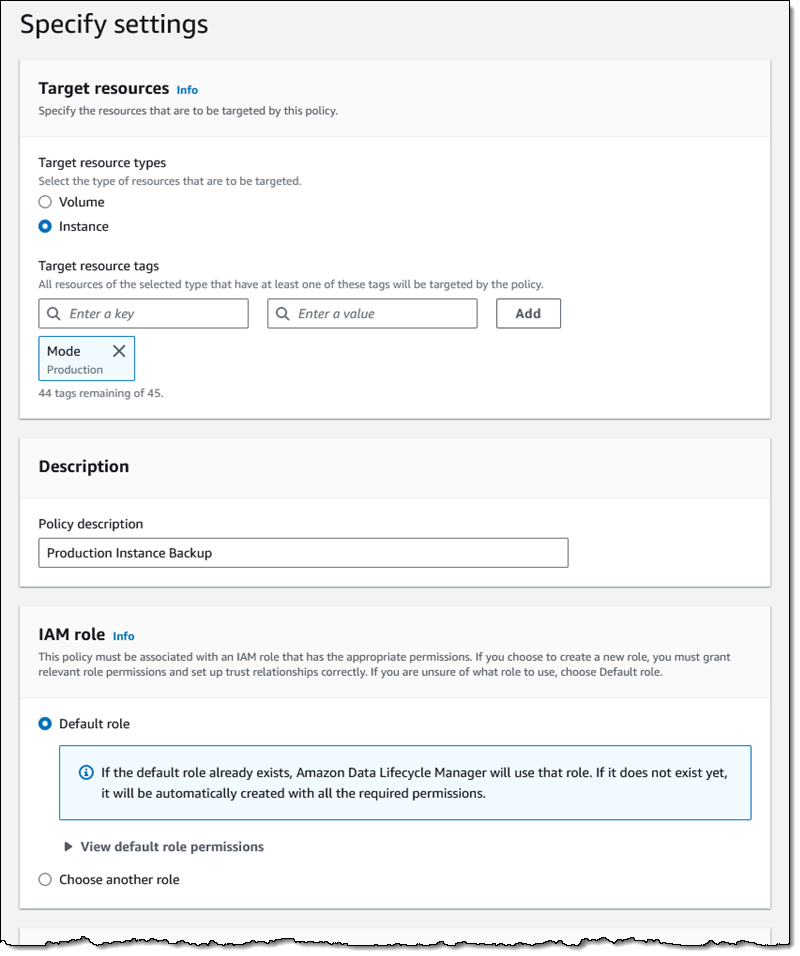
I target all of my instances that are tagged with a Mode of Production, and use the default IAM role (if you use a different role, it must enable access to SSM), leave the rest of the values as-is, and proceed:

On the next page I scroll down to Pre and post scripts and expand the section. I click Enable pre and post scripts, choose Custom SSM document, and then select my SSM document from the menu. I also set the timeout and retry options, and choose to default to a crash-consistent backup if one of my scripts fails. I click Review policy, do one final check, and click Create policy on the following page:

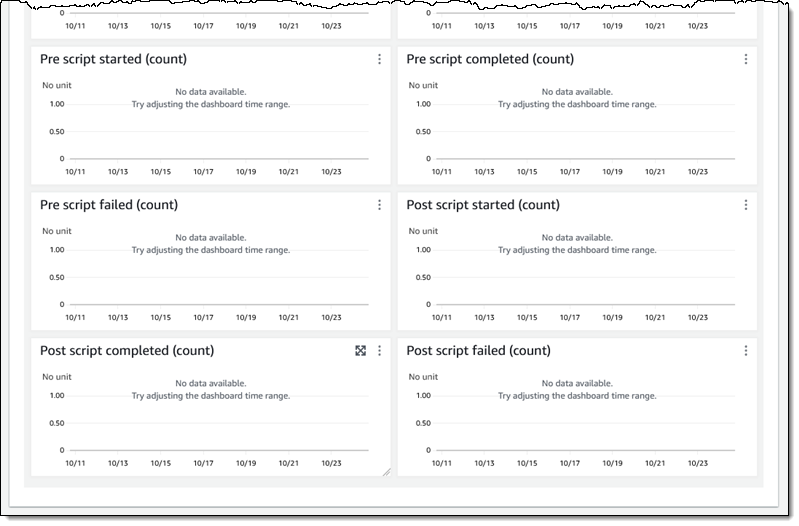
My policy is created, and will take effect right away. After it has run at least once, I can inspect the CloudWatch metrics to check for starts, completions, and failures:

Additional Reading
Here are the first of the detailed blog posts that I promised you earlier:

We have more in the works for later this year and I will update the list above when they are published.

You can also read the documentation to learn more.

DLM Videos
While I’ve got your attention, I would like to share a couple of helpful videos with you:

This new feature is available now and you can start using it today!

— Jeff;

Amazon EC2 Instance Metadata Service IMDSv2 by default

Post Syndicated from Jeff Barr original https://aws.amazon.com/blogs/aws/amazon-ec2-instance-metadata-service-imdsv2-by-default/

Effective mid-2024, newly released Amazon EC2 instance types will use only version 2 of the EC2 Instance Metadata Service (IMDSv2). We are also taking a series of steps to make IMDSv2 the default choice for AWS Management Console Quick Starts and other launch pathways.

Background
This service is accessible from within an EC2 instance at a fixed IP address (169.254.169.254 via IPv4 or fd00:ec2::254 via IPv6 on Nitro instances). It gives you (or the code running on the instance) access to a wealth of static and dynamic data including the ID of the AMI that was used to launch the instance, block device mappings, temporary IAM credentials for roles that are attached to the instance, network interface information, user data, and much more, as detailed in Instance Metadata Categories.

The v1 service uses a request/response access method and the v2 service uses a session-oriented method, as detailed in this blog post. Both services are fully secure, but v2 provides additional layers of protection for four types of vulnerabilities that could be used to try to access IMDS.

Many applications and instances are already using and benefiting from IMDSv2, but the full range of benefits become available only when IMDSv1 is disabled at the AWS account level.

Migration Plan
Here are the significant steps that we have taken, and those that plan to take, on the road to making IMDSv2 the default choice for new AWS infrastructure (allow a tiny bit of wiggle room on the 2023 and 2024 dates):

November 2019 – We launched IMDSv2 and showed you how to use it to add defense in depth.

February 2020 – We began to verify that all newly published products from AWS Marketplace sellers and AWS Partners support IMDSv2.

March 2023 – We launched Amazon Linux 2023, which uses IMDSv2 by default for all launches.

September 2023 – We published a blog post to show you how to Get the full benefits of IMDSv2 and disable IMDSv1 across your AWS infrastructure.

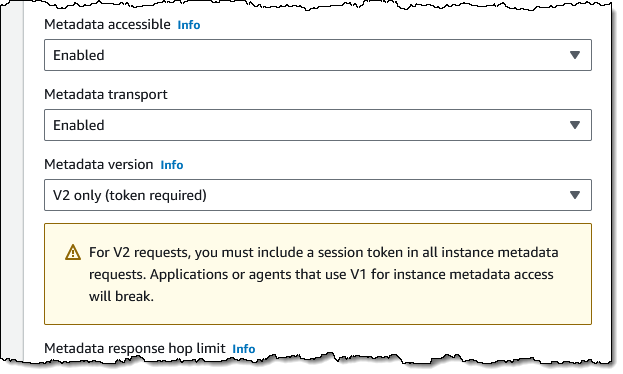
November 2023 – Starting today, all console Quick Start launches will use IMDSv2-only (all Amazon and Partner Quick Start AMIs support this). Here’s how this is specified in the EC2 Console within Advanced details when launching an instance:

February 2024 – We plan to introduce a new API function that will allow you to control the use of IMDSv1 as the default at the account level. You can already control IMDSv1 usage in an IAM policy (taking away and limiting existing permission), or as an SCP that is applied globally across an account, an organizational unit (OU), or an entire organization. For example IAM policies read Work with instance metadata.

Mid-2024 – Newly released Amazon EC2 instance types will use IMDSv2 only by default. For transition support, you will still be able to enable/turn on IMDSv1 at launch or after launch on an instance live without the need for a restart or stop/start.

What to Do
Now is the time to get started on your migration from IMDSv1 to IMDSv2 using the Get the full benefits.. blog post as a guide. You should also become familiar with the Tools for helping with the transition to IMDSv2, along with the recommended path on the same page. In addition to recommending tools, this page shows you how to set up an IAM policy that disables the use of IMDSv1 and shows you how to use the MetadataNoToken CloudWatch metric to detect any remaining usage:

Another helpful resource can be found on AWS re:Post: How can I use Systems Manager automation to enforce that only IMDSv2 is used to access instance metadata from my Amazon EC2 instance?

We want this transition to be as smooth as possible for you and for your customers. If you need any additional help, please contact AWS Support.

— Jeff;

Announcing Amazon EC2 Capacity Blocks for ML to reserve GPU capacity for your machine learning workloads

Post Syndicated from Channy Yun original https://aws.amazon.com/blogs/aws/announcing-amazon-ec2-capacity-blocks-for-ml-to-reserve-gpu-capacity-for-your-machine-learning-workloads/

Recent advancements in machine learning (ML) have unlocked opportunities for customers across organizations of all sizes and industries to reinvent new products and transform their businesses. However, the growth in demand for GPU capacity to train, fine-tune, experiment, and inference these ML models has outpaced industry-wide supply, making GPUs a scarce resource. Access to GPU capacity is an obstacle for customers whose capacity needs fluctuate depending on the research and development phase they’re in.

Today, we are announcing Amazon Elastic Compute Cloud (Amazon EC2) Capacity Blocks for ML, a new Amazon EC2 usage model that further democratizes ML by making it easy to access GPU instances to train and deploy ML and generative AI models. With EC2 Capacity Blocks, you can reserve hundreds of GPUs collocated in EC2 UltraClusters designed for high-performance ML workloads, using Elastic Fabric Adapter (EFA) networking in a peta-bit scale non-blocking network, to deliver the best network performance available in Amazon EC2.

This is an innovative new way to schedule GPU instances where you can reserve the number of instances you need for a future date for just the amount of time you require. EC2 Capacity Blocks are currently available for Amazon EC2 P5 instances powered by NVIDIA H100 Tensor Core GPUs in the AWS US East (Ohio) Region. With EC2 Capacity Blocks, you can reserve GPU instances in just a few clicks and plan your ML development with confidence. EC2 Capacity Blocks make it easy for anyone to predictably access EC2 P5 instances that offer the highest performance in EC2 for ML training.

EC2 Capacity Block reservations work similarly to hotel room reservations. With a hotel reservation, you specify the date and duration you want your room for and the size of beds you’d like─a queen bed or king bed, for example. Likewise, with EC2 Capacity Block reservations, you select the date and duration you require GPU instances and the size of the reservation (the number of instances). On your reservation start date, you’ll be able to access your reserved EC2 Capacity Block and launch your P5 instances. At the end of the EC2 Capacity Block duration, any instances still running will be terminated.

You can use EC2 Capacity Blocks when you need capacity assurance to train or fine-tune ML models, run experiments, or plan for future surges in demand for ML applications. Alternatively, you can continue using On-Demand Capacity Reservations for all other workload types that require compute capacity assurance, such as business-critical applications, regulatory requirements, or disaster recovery.

Getting started with Amazon EC2 Capacity Blocks for ML
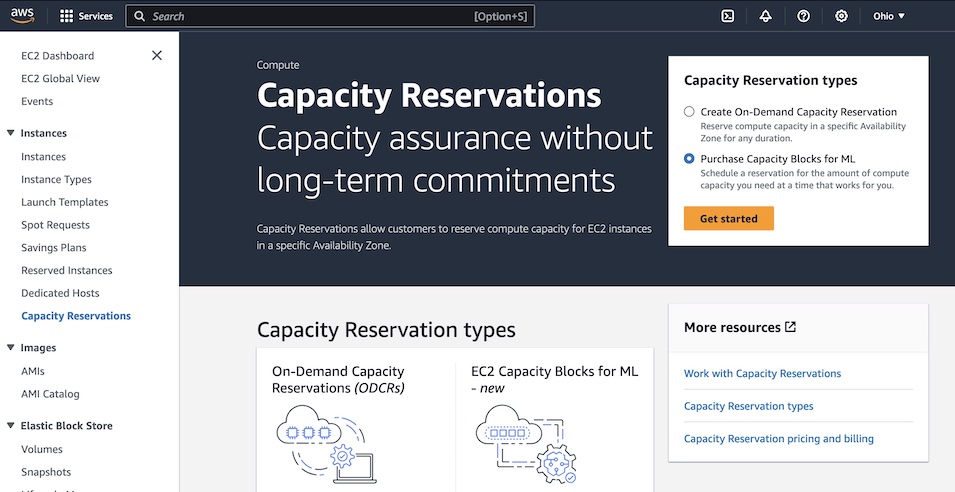
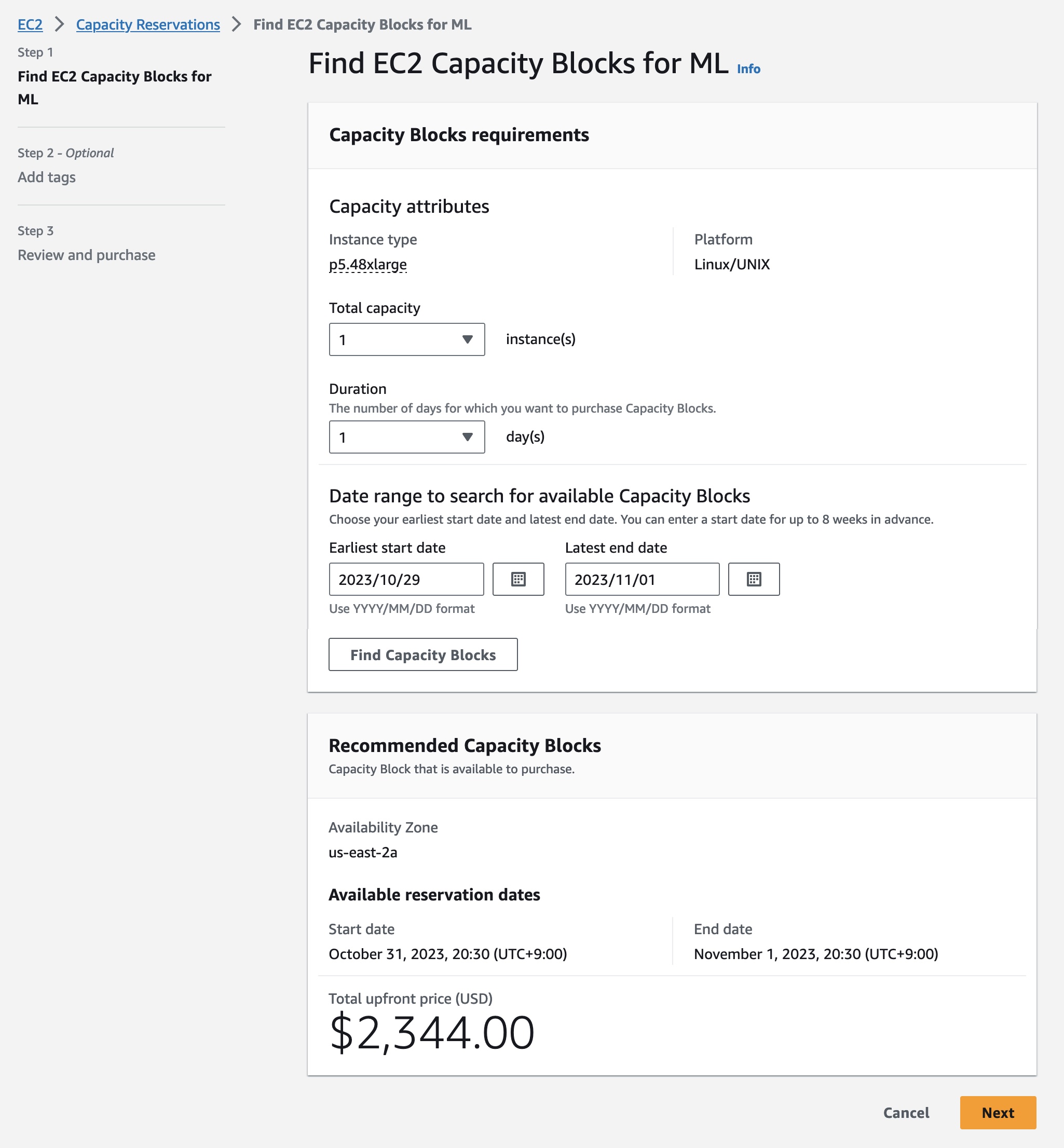
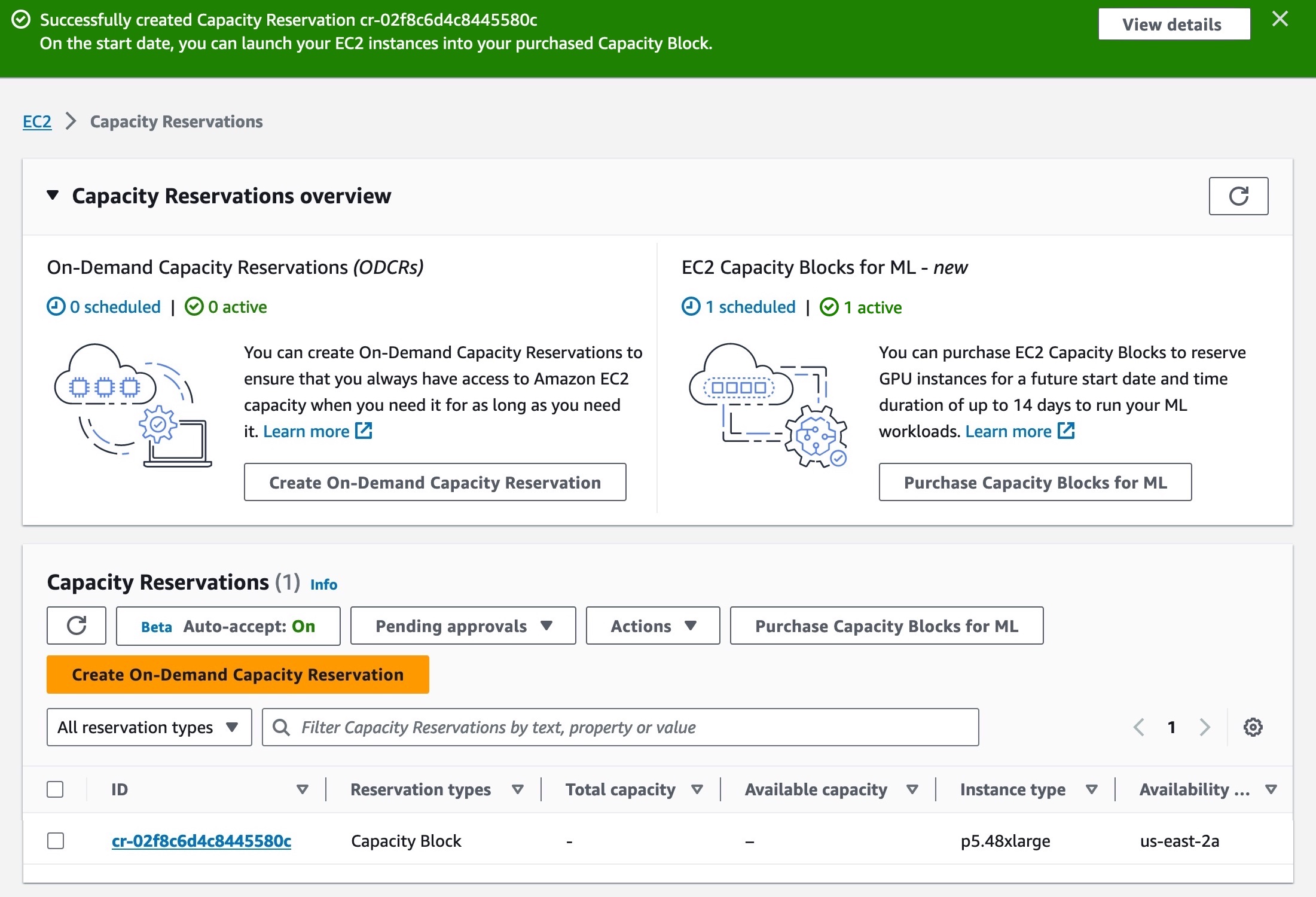
To reserve your Capacity Blocks, choose Capacity Reservations on the Amazon EC2 console in the US East (Ohio) Region. You can see two capacity reservation options. Select Purchase Capacity Blocks for ML and then Get started to start looking for an EC2 Capacity Block.

Choose your total capacity and specify how long you need the EC2 Capacity Block. You can reserve an EC2 Capacity Block in the following sizes: 1, 2, 4, 8, 16, 32, or 64 p5.48xlarge instances. The total number of days that you can reserve EC2 Capacity Blocks is 1– 14 days in 1-day increments. EC2 Capacity Blocks can be purchased up to 8 weeks in advance.

EC2 Capacity Block prices are dynamic and depend on total available supply and demand at the time you purchase the EC2 Capacity Block. You can adjust the size, duration, or date range in your specifications to search for other EC2 Capacity Block options. When you select Find Capacity Blocks, AWS returns the lowest-priced offering available that meets your specifications in the date range you have specified. At this point, you will be shown the price for the EC2 Capacity Block.

After reviewing EC2 Capacity Blocks details, tags, and total price information, choose Purchase. The total price of an EC2 Capacity Block is charged up front, and the price does not change after purchase. The payment will be billed to your account within 12 hours after you purchase the EC2 Capacity Blocks.

All EC2 Capacity Blocks reservations start at 11:30 AM Coordinated Universal Time (UTC). EC2 Capacity Blocks can’t be modified or canceled after purchase.

You can also use AWS Command Line Interface (AWS CLI) and AWS SDKs to purchase EC2 Capacity Blocks. Use the describe-capacity-block-offerings API to provide your cluster requirements and discover an available EC2 Capacity Block for purchase.

$ aws ec2 describe-capacity-block-offerings \
          --instance-type p5.48xlarge \
          --instance-count 4 \
          --start-date-range 2023-10-30T00:00:00Z \
          --end-date-range 2023-11-01T00:00:00Z \
          –-capacity-duration 48

After you find an available EC2 Capacity Block with the CapacityBlockOfferingId and capacity information from the preceding command, you can use purchase-capacity-block-reservation API to purchase it.

$ aws ec2 purchase-capacity-block-reservation \
          --capacity-block-offering-id cbr-0123456789abcdefg \
          –-instance-platform Linux/UNIX

For more information about new EC2 Capacity Blocks APIs, see the Amazon EC2 API documentation.

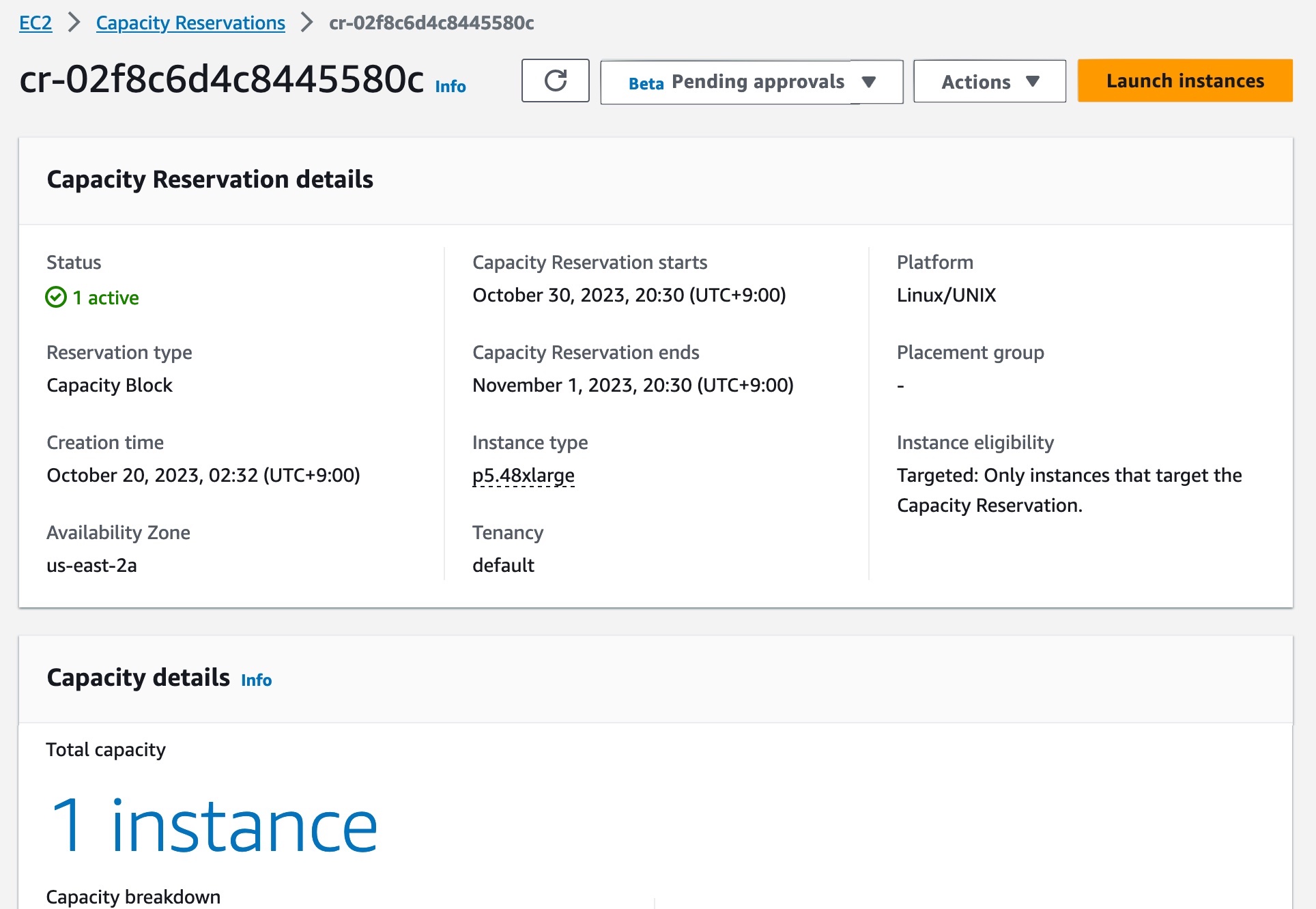
Your EC2 Capacity Block has now been scheduled successfully. On the scheduled start date, your EC2 Capacity Block will become active. To use an active EC2 Capacity Block on your starting date, choose the capacity reservation ID for your EC2 Capacity Block. You can see a breakdown of the reserved instance capacity, which shows how the capacity is currently being utilized in the Capacity details section.

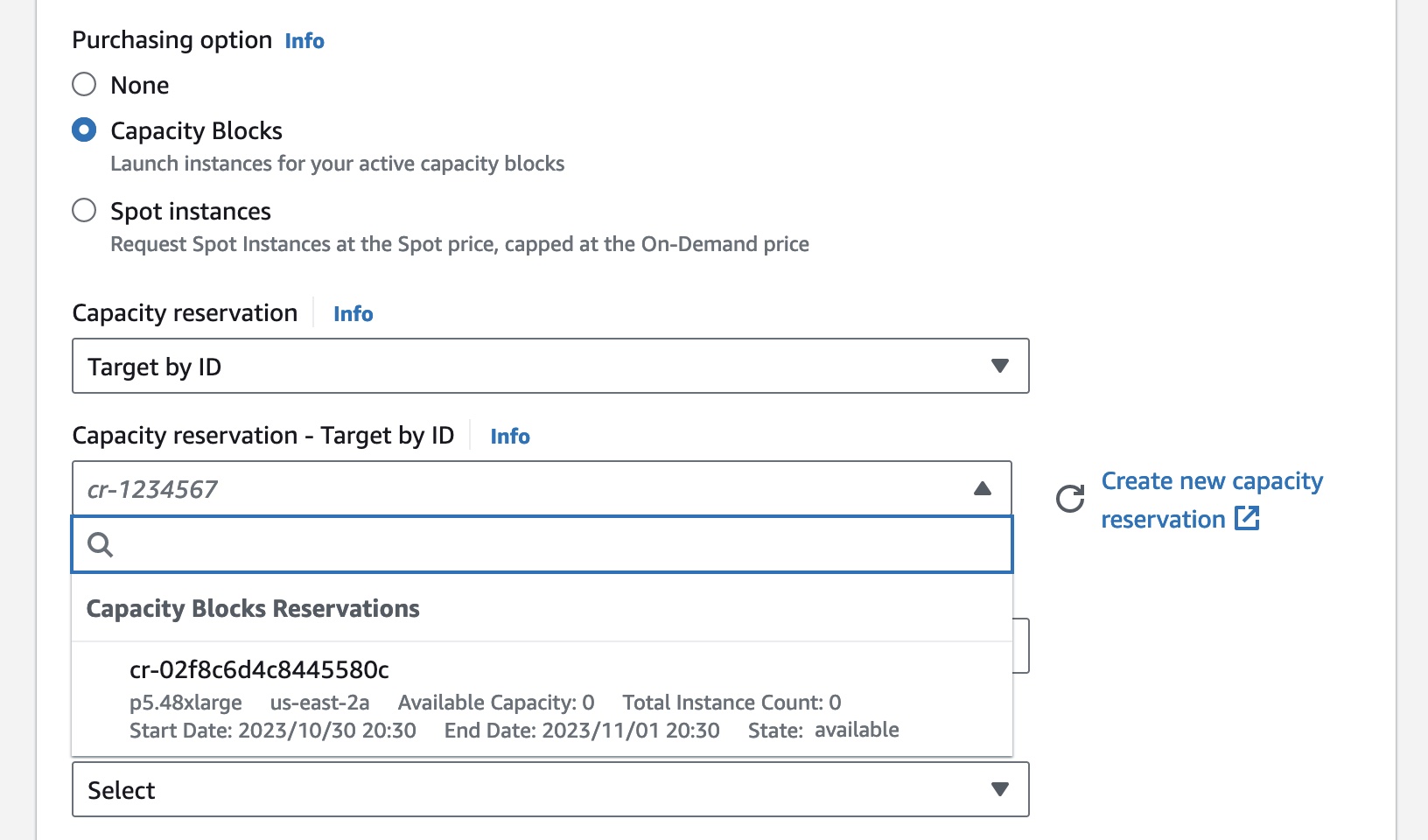
To launch instances into your active EC2 Capacity Block, choose Launch instances and follow the normal process of launching EC2 instances and running your ML workloads.

In the Advanced details section, choose Capacity Blocks as the purchase option and select the capacity reservation ID of the EC2 Capacity Block you’re trying to target.

As your EC2 Capacity Block end time approaches, Amazon EC2 will emit an event through Amazon EventBridge, letting you know your reservation is ending soon so you can checkpoint your workload. Any instances running in the EC2 Capacity Block go into a shutting-down state 30 minutes before your reservation ends. The amount you were charged for your EC2 Capacity Block does not include this time period. When your EC2 Capacity Block expires, any instances still running will be terminated.

Now available
Amazon EC2 Capacity Blocks are now available for p5.48xlarge instances in the AWS US East (Ohio) Region. You can view the price of an EC2 Capacity Block before you reserve it, and the total price of an EC2 Capacity Block is charged up-front at the time of purchase. For more information, see the EC2 Capacity Blocks pricing page.

To learn more, see the EC2 Capacity Blocks documentation and send feedback to AWS re:Post for EC2 or through your usual AWS Support contacts.

— Channy

AWS Weekly Roundup – re:Post Selections, SNS and SQS FIFO improvements, multi-VPC ENI attachments, and more – October 30, 2023

Post Syndicated from Danilo Poccia original https://aws.amazon.com/blogs/aws/aws-weekly-roundup-repost-selections-sns-and-sqs-fifo-improvements-multi-vpc-eni-attachments-and-more-october-30-2023/

It’s less than a month to AWS re:Invent, but interesting news doesn’t slow down in the meantime. This week is my turn to help keep you up to date!

Last week’s launches
Here are some of the launches that caught my attention last week:

AWS re:Post – With re:Post, you have access to a community of experts that helps you become even more successful on AWS. With Selections, community members can organize knowledge in an aggregated view to create learning paths or curated content sets.

Amazon SNS – First-in-First-out (FIFO) topics now support the option to store and replay messages without needing to provision a separate archival resource. This improves the durability of your event-driven applications and can help you recover from downstream failure scenarios. Find out more in this AWS Comput Blog post – Archiving and replaying messages with Amazon SNS FIFO. Also, you can now use custom data identifiers to protect not only common sensitive data (such as names, addresses, and credit card numbers) but also domain-specific sensitive data, such as your company’s employee IDs. You can find additional info on this feature in this AWS Security blog post – Mask and redact sensitive data published to Amazon SNS using managed and custom data identifiers.

Amazon SQS – With the increased throughput quota for FIFO high throughput mode, you can process up to 18,000 transactions per second, per API action. Note the throughput quota depends on the AWS Region.

Amazon OpenSearch Service – OpenSearch Serverless now supports automated time-based data deletion with new index lifecycle policies. To determine the best strategy to deliver accurate and low latency vector search queries, OpenSearch can now intelligently evaluate optimal filtering strategies, like pre-filtering with approximate nearest neighbor (ANN) or filtering with exact k-nearest neighbor (k-NN). Also, OpenSearch Service now supports Internet Protocol Version 6 (IPv6).

Amazon EC2 – With multi-VPC ENI attachments, you can launch an instance with a primary elastic network interface (ENI) in one virtual private cloud (VPC) and attach a secondary ENI from another VPC. This helps maintain network-level segregation, but still allows specific workloads (like centralized appliances and databases) to communicate between them.

AWS CodePipeline – With parameterized pipelines, you can dynamically pass input parameters to a pipeline execution. You can now start a pipeline execution when a specific git tag is applied to a commit in the source repository.

Amazon MemoryDB – Now supports Graviton3-based R7g nodes that deliver up to 28 percent increased throughput compared to R6g. These nodes also deliver higher networking bandwidth.

Other AWS news
Here are a few posts from some of the other AWS and cloud blogs that I follow:

Networking & Content Delivery Blog – Some of the technical management and hardware decisions we make when building AWS network infrastructure: A Continuous Improvement Model for Interconnects within AWS Data Centers

Interconnect monitoring service infrastructure diagram

DevOps Blog – To help enterprise customers understand how many of developers use CodeWhisperer, how often they use it, and how often they accept suggestions: Introducing Amazon CodeWhisperer Dashboard and CloudWatch Metrics

Front-End Web & Mobile Blog – How to restrict access to your GraphQL APIs to consumers within a private network: Architecture Patterns for AWS AppSync Private APIs

Architecture Blog – Another post in this super interesting series: Let’s Architect! Designing systems for stream data processing

A serverless streaming data pipeline using Amazon Kinesis and AWS Glue

From Community.AWS: Load Testing WordPress Amazon Lightsail Instances and Future-proof Your .NET Apps With Foundation Model Choice and Amazon Bedrock.

Don’t miss the latest AWS open source newsletter by my colleague Ricardo.

Upcoming AWS events
Check your calendars and sign up for these AWS events

AWS Community Days – Join a community-led conference run by AWS user group leaders in your region: Jaipur (November 4), Vadodara (November 4), Brasil (November 4), Central Asia (Kazakhstan, Uzbekistan, Kyrgyzstan, and Mongolia on November 17-18), and Guatemala (November 18).

AWS re:Invent (November 27 – December 1) – Join us to hear the latest from AWS, learn from experts, and connect with the global cloud community. Browse the session catalog and attendee guides and check out the highlights for generative AI.

Here you can browse all upcoming AWS-led in-person and virtual events and developer-focused events.

And that’s all from me for this week. On to the next one!

— Danilo

This post is part of our Weekly Roundup series. Check back each week for a quick roundup of interesting news and announcements from AWS!

In the Works – AWS European Sovereign Cloud

Post Syndicated from Jeff Barr original https://aws.amazon.com/blogs/aws/in-the-works-aws-european-sovereign-cloud/

The AWS European Sovereign Cloud will allow government agencies, regulated industries, and the independent software vendors (ISVs) that support them to store sensitive data and run critical workloads on AWS infrastructure that is operated and supported by AWS employees located in and residents of the European Union (EU). The first Region will be located in Germany.

Background
Late last year we announced the AWS Digital Sovereignty Pledge and made a commitment to offer you (and all AWS customers) the most advanced set of sovereignty controls and features available in the cloud. Since that announcement we have taken several important steps forward in fulfillment of that pledge:

May 2023 – We announced that AWS Nitro System had been validated by an independent third-party to confirm that it contains no mechanism that allows anyone at AWS to access your data on AWS hosts. At the same time we announced that the AWS Key Management Service (KMS) External Key Store allows you to store keys outside of AWS and use them to encrypt data stored in AWS.

August 2023 – We announced AWS Dedicated Local Zones, infrastructure that is fully managed by AWS and built for exclusive use by a customer or community, and placed in a customer-specified location or data center.

AWS European Sovereign Cloud
The upcoming AWS European Sovereign Cloud will be separate from, and independent of, the eight existing AWS Regions already open in Frankfurt, Ireland, London, Milan, Paris, Stockholm, Spain, and Zurich. It will give you additional options for deployment, while providing AWS services, APIs, and tools that you are already familiar with. The design will help you meet your data residency, operational autonomy, and resiliency needs.

In order to maintain separation between this cloud and the existing AWS Global Cloud you will need to create a fresh AWS account. The metadata you create such as data labels, categories, permissions, and configurations will be stored within the EU. This does not apply to AWS account information such as spend and billing data, which will be aggregated and used to ensure that you get favorable pricing within any applicable volume usage tiers.

As I mentioned earlier, this cloud will be operated and supported by AWS employees located in and residents of the EU, with support available 24/7/365.

The AWS European Sovereign Cloud will be operationally independent of the other regions, with separate in-Region billing and usage metering systems.

Initial Region
The initial region will be located in Germany. It will launch with multiple Availability Zones, each in separate and distinct geographic locations, with enough distance between them to significantly reduce the risk of a single event impacting your business continuity. We will have additional details on the list of available services, instance types, and so forth as we get closer to the launch.

Over time, this and other regions in this cloud will also function as parent regions for AWS Outposts and Dedicated Local Zones. These options give you even more flexibility with regard to isolation and in-country data residency. If you would like to express your interest in Dedicated Local Zones in your country, please contact your AWS account manager.

Get Ready
You can start to build applications today in any of the existing regions and move them to the AWS European Sovereign Cloud when the region launches. You can also initiate conversations with your local regulatory authorities in order to better understand any issues that are specific to your particular location.

— Jeff;

Rotate Your SSL/TLS Certificates Now – Amazon RDS and Amazon Aurora Expire in 2024

Post Syndicated from Channy Yun original https://aws.amazon.com/blogs/aws/rotate-your-ssl-tls-certificates-now-amazon-rds-and-amazon-aurora-expire-in-2024/

Don’t be surprised if you have seen the Certificate Update in the Amazon Relational Database Service (Amazon RDS) console.

If you use or plan to use Secure Sockets Layer (SSL) or Transport Layer Security (TLS) with certificate verification to connect to your database instances of Amazon RDS for MySQL, MariaDB, SQL Server, Oracle, PostgreSQL, and Amazon Aurora, it means you should rotate new certificate authority (CA) certificates in both your DB instances and application before the root certificate expires.

Most SSL/TLS certificates (rds-ca-2019) for your DB instances will expire in 2024 after the certificate update in 2020. In December 2022, we released new CA certificates that are valid for 40 years (rds-ca-rsa2048-g1) and 100 years (rds-ca-rsa4096-g1 and rds-ca-ecc384-g1). So, if you rotate your CA certificates, you don’t need to do It again for a long time.

Here is a list of affected Regions and their expiration dates of rds-ca-2019:

Expiration Date Regions
May 8, 2024 Middle East (Bahrain)
August 22, 2024 US East (Ohio), US East (N. Virginia), US West (N. California), US West (Oregon), Asia Pacific (Mumbai), Asia Pacific (Osaka), Asia Pacific (Seoul), Asia Pacific (Singapore), Asia Pacific (Sydney), Asia Pacific (Tokyo), Canada (Central), Europe (Frankfurt), Europe (Ireland), Europe (London), Europe (Milan), Europe (Paris), Europe (Stockholm), and South America (São Paulo)
September 9, 2024 China (Beijing), China (Ningxia)
October 26, 2024 Africa (Cape Town)
October 28, 2024 Europe (Milan)
Not affected until 2061 Asia Pacific (Hong Kong), Asia Pacific (Hyderabad), Asia Pacific (Jakarta), Asia Pacific (Melbourne), Europe (Spain), Europe (Zurich), Israel (Tel Aviv), Middle East (UAE), AWS GovCloud (US-East), and AWS GovCloud (US-West)

The following steps demonstrate how to rotate your certificates to maintain connectivity from your application to your database instances.

Step 1 – Identify your impacted Amazon RDS resources
As I said, you can identify the total number of affected DB instances in the Certificate update page of the Amazon RDS console and see all of your affected DB instances. Note: This page only shows the DB instances for the current Region. If you have DB instances in more than one Region, check the certificate update page in each Region to see all DB instances with old SSL/TLS certificates.

You can also use AWS Command Line Interface (AWS CLI) to call describe-db-instances to find instances that use the expiring CA. The query will show a list of RDS instances in your account and us-east-1 Region.

$ aws rds describe-db-instances --region us-east-1 | 
      jq -r '.DBInstances[] | 
      select ((.CACertificateIdentifier != "rds-ca-rsa2048-g1") and 
              (.CACertificateIdentifier != "rds-ca-rsa4096-g1") and 
              (.CACertificateIdentifier != "rds-ca-ecc384-g1")) | 
               "DBInstanceIdentifier: 
              (.DBInstanceIdentifier), CACertificateIdentifier: 
              (.CACertificateIdentifier)"'

Step 2 – Updating your database clients and applications
Before applying the new certificate on your DB instances, you should update the trust store of any clients and applications that use SSL/TLS and the server certificate to connect.  There’s currently no easy method from your DB instances themselves to determine if your applications require certificate verification as a prerequisite to connect. The only option here is to inspect your applications’ source code or configuration files.

Although the DB engine-specific documentation outlines what to look for in most common database connectivity interfaces, we strongly recommend you work with your application developers to determine whether certificate verification is used and the correct way to update the client applications’ SSL/TLS certificates for your specific applications.

To update certificates for your application, you can use the new certificate bundle that contains certificates for both the old and new CA so you can upgrade your application safely and maintain connectivity during the transition period.

For information about checking for SSL/TLS connections and updating applications for each DB engine, see the following topics:

Step 3 – Test CA rotation on a non-production RDS instance
If you have updated new certificates in all your trust stores, you should test with a RDS instance in non-production. Do this set up in a development environment with the same database engine and version as your production environment. This test environment should also be deployed with the same code and configurations as production.

To rotate a new certificate in your test database instance, choose Modify for the DB instance that you want to modify in the Amazon RDS console.

In the Connectivity section, choose rds-ca-rsa2048-g1.

Choose Continue to check the summary of modifications. If you want to apply the changes immediately, choose Apply immediately.

To use the AWS CLI to change the CA from rds-ca-2019 to rds-ca-rsa2048-g1 for a DB instance, call the modify-db-instance command and specify the DB instance identifier with the --ca-certificate-identifier option.

$ aws rds modify-db-instance \
          --db-instance-identifier <mydbinstance> \
          --ca-certificate-identifier rds-ca-rsa2048-g1 \
          --apply-immediately

This is the same way to rotate new certificates manually in the production database instances. Make sure your application reconnects without any issues using SSL/TLS after the rotation using the trust store or CA certificate bundle you referenced.

When you create a new DB instance, the default CA is still rds-ca-2019 until January 25, 2024, when it will be changed to rds-ca-rsa2048-g1. For setting the new CA to create a new DB instance, you can set up a CA override to ensure all new instance launches use the CA of your choice.

$ aws rds modify-certificates \
          --certificate-identifier rds-ca-rsa2048-g1 \
          --region <region name>

You should do this in all the Regions where you have RDS DB instances.

Step 4 – Safely update your production RDS instances
After you’ve completed testing in non production environment, you can start the rotation of your RDS databases CA certificates in your production environment. You can rotate your DB instance manually as shown in Step 3. It’s worth noting that many of the modern engines do not require a restart, but it’s still a good idea to schedule it in your maintenance window.

In the Certificate update page of Step 1, choose the DB instance you want to rotate. By choosing Schedule, you can schedule the certificate rotation for your next maintenance window. By choosing Apply now, you can apply the rotation immediately.

If you choose Schedule, you’re prompted to confirm the certificate rotation. This prompt also states the scheduled window for your update.

After your certificate is updated (either immediately or during the maintenance window), you should ensure that the database and the application continue to work as expected.

Most of modern DB engines do not require restarting your database to update the certificate. If you don’t want to restart the database just for CA update, you can use the --no-certificate-rotation-restart flag in the modify-db-instance command.

$ aws rds modify-db-instance \
          --db-instance-identifier <mydbinstance> \
          --ca-certificate-identifier rds-ca-rsa2048-g1 \
          --no-certificate-rotation-restart

To check if your engine requires a restart you can check the SupportsCertificateRotationWithoutRestart field in the output of the describe-db-engine-versions command. You can use this command to see which engines support rotations without restart:

$ aws rds describe-db-engine-versions \
          --engine <engine> --include-all --region <region> | 
          jq -r '.DBEngineVersions[] | 
          "EngineName: (.Engine), 
           EngineVersion: (.EngineVersion), 
           SupportsCertificateRotationWithoutRestart: (.SupportsCertificateRotationWithoutRestart), 
           SupportedCAs: ([.SupportedCACertificateIdentifiers | 
          join(", ")])"'

Even if you don’t use SSL/TLS for the database instances, I recommend to rotate your CA. You may need to use SSL/TLS in the future, and some database connectors like the JDBC and ODBC connectors check for a valid cert before connecting and using an expired CA can prevent you from doing that.

To learn about updating your certificate by modifying your DB instance manually, automatic server certificate rotation, and finding a sample script for importing certificates into your trust store, see the Amazon RDS User Guide or the Amazon Aurora User Guide.

Things to Know
Here are a couple of important things to know:

  • Amazon RDS Proxy and Amazon Aurora Serverless use certificates from the AWS Certificate Manager (ACM). If you’re using Amazon RDS Proxy when you rotate your SSL/TLS certificate, you don’t need to update applications that use Amazon RDS Proxy connections. If you’re using Aurora Serverless, rotating your SSL/TLS certificate isn’t required.
  • Now through January 25, 2024 – new RDS DB instances will have the rds-ca-2919 certificate by default, unless you specify a different CA via the ca-certificate-identifier option on the create-db-instance API; or you specify a default CA override for your account like mentioned in the above section. Starting January 26, 2024 – any new database instances will default to using the rds-ca-rsa2048-g1 certificate. If you wish for new instances to use a different certificate, you can specify which certificate to use with the AWS console or the AWS CLI. For more information, see the create-db-instance API documentation.
  • Except for Amazon RDS for SQL Server, most modern RDS and Aurora engines support certificate rotation without a database restart in the latest versions. Call describe-db-engine-versions and check for the response field SupportsCertificateRotationWithoutRestart. If this field is set to true, then your instance will not require a database restart for CA update. If set to false, a restart will be required. For more information, see Setting the CA for your database in the AWS documentation.
  • Your rotated CA signs the DB server certificate, which is installed on each DB instance. The DB server certificate identifies the DB instance as a trusted server. The validity of DB server certificate depends on the DB engine and version either 1 year or 3 year. If your CA supports automatic server certificate rotation, RDS automatically handles the rotation of the DB server certificate too. For more information about DB server certificate rotation, see Automatic server certificate rotation in the AWS documentation.
  • You can choose to use the 40-year validity certificate (rds-ca-rsa2048-g1) or the 100-year certificates. The expiring CA used by your RDS instance uses the RSA2048 key algorithm and SHA256 signing algorithm. The rds-ca-rsa2048-g1 uses the exact same configuration and therefore is best suited for compatibility. The 100-year certificates (rds-ca-rsa4096-g1 andrds-ca-ecc384-g1) use more secure encryption schemes than rds-ca-rsa2048-g1. If you want to use them, you should test well in pre-production environments to double-check that your database client and server support the necessary encryption schemes in your Region.

Just Do It Now!
Even if you have one year left until your certificate expires, you should start planning with your team. Updating SSL/TLS certificate may require restart your DB instance before the expiration date. We strongly recommend that you schedule your applications to be updated before the expiry date and run tests on a staging or pre-production database environment before completing these steps in a production environments. To learn more about updating SSL/TLS certificates, see Amazon RDS User Guide and Amazon Aurora User Guide.

If you don’t use SSL/TLS connections, please note that database security best practices are to use SSL/TLS connectivity and to request certificate verification as part of the connection authentication process. To learn more about using SSL/TLS to encrypt a connection to your DB instance, see Amazon RDS User Guide and Amazon Aurora User Guide.

If you have questions or issues, contact your usual AWS Support by your Support plan.

— Channy

Introducing Amazon MSK Replicator – Fully Managed Replication across MSK Clusters in Same or Different AWS Regions

Post Syndicated from Danilo Poccia original https://aws.amazon.com/blogs/aws/introducing-amazon-msk-replicator-fully-managed-replication-across-msk-clusters-in-same-or-different-aws-regions/

Amazon Managed Streaming for Apache Kafka (Amazon MSK) provides a fully managed and highly available Apache Kafka service simplifying the way you process streaming data. When using Apache Kafka, a common architectural pattern is to replicate data from one cluster to another.

Cross-cluster replication is often used to implement business continuity and disaster recovery plans and increase application resilience across AWS Regions. Another use case, when building multi-Region applications, is to have copies of streaming data in multiple geographies stored closer to end consumers for lower latency access. You might also need to aggregate data from multiple clusters into one centralized cluster for analytics.

To address these needs, you would have to write custom code or install and manage open-source tools like MirrorMaker 2.0, available as part of Apache Kafka starting with version 2.4. However, these tools can be complex and time-consuming to set up for reliable replication, and require continuous monitoring and scaling.

Today, we’re introducing MSK Replicator, a new capability of Amazon MSK that makes it easier to reliably set up cross-Region and same-Region replication between MSK clusters, scaling automatically to handle your workload. You can use MSK Replicator with both provisioned and serverless MSK cluster types, including those using tiered storage.

With MSK Replicator, you can setup both active-passive and active-active cluster topologies to increase the resiliency of your Kafka application across Regions:

  • In an active-active setup, both MSK clusters are actively serving reads and writes.
  • In an active-passive setup, only one MSK cluster at a time is actively serving streaming data while the other cluster is on standby.

Let’s see how that works in practice.

Creating an MSK Replicator across AWS Regions
I have two MSK clusters deployed in different Regions. MSK Replicator requires that the clusters have IAM authentication enabled. I can continue to use other authentication methods such as mTLS or SASL for my other clients. The source cluster also needs to enable multi-VPC private connectivity.

MSK Replicator cross-Region architecture diagram.

From a network perspective, the security groups of the clusters allow traffic between the cluster and the security group used by the Replicator. For example, I can add self-referencing inbound and outbound rules that allow traffic from and to the same security group. For simplicity, I use the default VPC and its default security group for both clusters.

Before creating a replicator, I update the cluster policy of the source cluster to allow the MSK service (including replicators) to find and reach the cluster. In the Amazon MSK console, I select the source Region. I choose Clusters from the navigation pane and then the source cluster. First, I copy the source cluster ARN at the top. Then, in the Properties tab, I choose Edit cluster policy in the Security settings. There, I use the following JSON policy (replacing the source cluster ARN) and save the changes:

{
    "Version": "2012-10-17",
    "Statement": [
        {
            "Effect": "Allow",
            "Principal": {
                "Service": "kafka.amazonaws.com"
            },
            "Action": [
                "kafka:CreateVpcConnection",
                "kafka:GetBootstrapBrokers",
                "kafka:DescribeClusterV2"
            ],
            "Resource": "<SOURCE_CLUSTER_ARN>"
        }
    ]
}

I select the target Region in the console. I choose Replicators from the navigation pane and then Create replicator. Here, I enter a name and a description for the replicator.

Console screenshot.

In the Source cluster section, I select the Region of the source MSK cluster. Then, I choose Browse to select the source MSK cluster from the list. Note that Replicators can be created only for clusters that have a cluster policy set.

Console screenshot.

I leave Subnets and Security groups as their default values to use my default VPC and its default security group. This network configuration may be used to place elastic network interfaces (EINs) to facilitate communication with your cluster.

The Access control method for the source cluster is set to IAM role-based authentication. Optionally, I can turn on multiple authentication methods at the same time to continue to use clients that need other authentication methods like mTLS or SASL while the Replicator uses IAM. For cross-Region replication, the source cluster cannot have unauthenticated access enabled, because we use multi-VPC to access their source cluster.

Console screenshot.

In the Target cluster section, the Cluster region is set to the Region where I’m using the console. I choose Browse to select the target MSK cluster from the list.

Console screenshot.

Similar to what I did for the source cluster, I leave Subnets and Security groups as their default values. This network configuration is used to place the ENIs required to communicate with the target cluster. The Access control method for the target cluster is also set to IAM role-based authentication.

Console screenshot.

In the Replicator settings section, I use the default Topic replication configuration, so that all topics are replicated. Optionally, I can specify a comma-separated list of regular expressions that indicate the names of the topics to replicate or to exclude from replication. In the Additional settings, I can choose to copy topics configurations, access control lists (ACLs), and to detect and copy new topics.

Console screenshot.

Consumer group replication allows me to specify if consumer group offsets should be replicated so that, after a switchover, consuming applications can resume processing near where they left off in the primary cluster. I can specify a comma-separated list of regular expressions that indicate the names of the consumer groups to replicate or to exclude from replication. I can also choose to detect and copy new consumer groups. I use the default settings that replicate all consumer groups.

Console screenshot.

In Compression, I select None from the list of available compression types for the data that is being replicated.

Console screenshot.

The Amazon MSK console can automatically create a service execution role with the necessary permissions required for the Replicator to work. The role is used by the MSK service to connect to the source and target clusters, to read from the source cluster, and to write to the target cluster. However, I can choose to create and provide my own role as well. In Access permissions, I choose Create or update IAM role.

Console screenshot.

Finally, I add tags to the replicator. I can use tags to search and filter my resources or to track my costs. In the Replicator tags section, I enter Environment as the key and AWS News Blog as the value. Then, I choose Create.

Console screenshot.

After a few minutes, the replicator is running. Let’s put it into use!

Testing an MSK Replicator across AWS Regions
To connect to the source and target clusters, I already set up two Amazon Elastic Compute Cloud (Amazon EC2) instances in the two Regions. I followed the instructions in the MSK documentation to install the Apache Kafka client tools. Because I am using IAM authentication, the two instances have an IAM role attached that allows them to connect, send, and receive data from the clusters. To simplify networking, I used the default security group for the EC2 instances and the MSK clusters.

First, I create a new topic in the source cluster and send a few messages. I use Amazon EC2 Instance Connect to log into the EC2 instance in the source Region. I change the directory to the path where the Kafka client executables have been installed (the path depends on the version you use):

cd /home/ec2-user/kafka_2.12-2.8.1/bin

To connect to the source cluster, I need to know its bootstrap servers. Using the MSK console in the source Region, I choose Clusters from the navigation page and then the source cluster from the list. In the Cluster summary section, I choose View client information. There, I copy the list of Bootstrap servers. Because the EC2 instance is in the same VPC as the cluster, I copy the list in the Private endpoint (single-VPC) column.

Console screenshot.

Back to the EC2 instance, I put the list of bootstrap servers in the SOURCE_BOOTSTRAP_SERVERS environment variable.

export SOURCE_BOOTSTRAP_SERVERS=b-2.uscluster.esijym.c9.kafka.us-east-1.amazonaws.com:9098,b-3.uscluster.esijym.c9.kafka.us-east-1.amazonaws.com:9098,b-1.uscluster.esijym.c9.kafka.us-east-1.amazonaws.com:9098

Now, I create a topic on the source cluster.

./kafka-topics.sh --bootstrap-server $SOURCE_BOOTSTRAP_SERVERS --command-config client.properties --create --topic my-topic --partitions 6

Using the new topic, I send a few messages to the source cluster.

./kafka-console-producer.sh --broker-list $SOURCE_BOOTSTRAP_SERVERS --producer.config client.properties --topic my-topic
>Hello from the US
>These are my messages

Let’s see what happens in the target cluster. I connect to the EC2 instance in the target Region. Similar to what I did for the other instance, I get the list of bootstrap servers for the target cluster and put it into the TARGET_BOOTSTRAP_SERVERS environment variable.

On the target cluster, the source cluster alias is added as a prefix to the replicated topic names. To find the source cluster alias, I choose Replicators in the MSK console navigation pane. There, I choose the replicator I just created. In the Properties tab, I look up the Cluster alias in the Source cluster section.

Console screenshot.

I confirm the name of the replicated topic by looking at the list of topics in the target cluster (it’s the last one in the output list):

./kafka-topics.sh --list --bootstrap-server $TARGET_BOOTSTRAP_SERVERS --command-config client.properties
. . .
us-cluster-c78ec6d63588.my-topic

Now that I know the name of the replicated topic on the target cluster, I start a consumer to receive the messages originally sent to the source cluster:

./kafka-console-consumer.sh --bootstrap-server $TARGET_BOOTSTRAP_SERVERS --consumer.config client.properties --topic us-cluster-c78ec6d63588.my-topic --from-beginning
Hello from the US
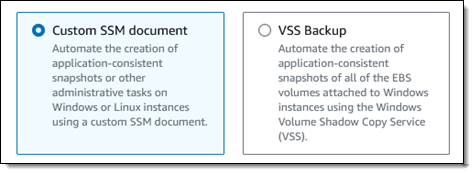
These are my messages

Note that I can use a wildcard in the topic subscription (for example, .*my-topic) to automatically handle the prefix and have the same configuration in the source and target clusters.

As expected, all the messages I sent to the source cluster have been replicated and received by the consumer connected to the target cluster.

I can monitor the MSK Replicator latency, throughput, errors, and lag metrics using the Monitoring tab. Because this works through Amazon CloudWatch, I can easily create my own alarms and include these metrics in my dashboards.

To update the configuration to an active-active setup, I follow similar steps to create a replicator in the other Region and replicate streaming data between the clusters in the other direction. For details on how to manage failover and failback, see the MSK Replicator documentation.

Availability and Pricing
MSK Replicator is available today in: US East (Ohio), US East (N. Virginia), US West (Oregon), Asia Pacific (Singapore), Asia Pacific (Sydney), Europe (Frankfurt), and Europe (Ireland).

With MSK Replicator, you pay per GB of data replicated and an hourly rate for each Replicator. You also pay Amazon MSK’s usual charges for your source and target MSK clusters and standard AWS charges for cross-Region data transfer. For more information, see MSK pricing.

Using MSK replicators, you can quickly implement cross-Region and same-Region replication to improve the resiliency of your architecture and store data close to your partners and end users. You can also use this new capability to get better insights by replicating streaming data to a single, centralized cluster where it is easier to run your analytics.

Simplify your data streaming architectures using Amazon MSK Replicator.

— Danilo