[$] The first half of the 6.10 merge window

Post Syndicated from corbet original https://lwn.net/Articles/973687/

The merge window for the 6.10 kernel release opened on May 12; between
then and the time of this writing, 6,819 non-merge commits were pulled into
the mainline kernel for that release. Your editor has taken some time out
from LSFMM+BPF in an attempt to keep
up with the commit flood. Read on for an overview of the most significant
changes that were pulled in the early part of the 6.10 merge window.

How to set up SAML federation in Amazon Cognito using IdP-initiated single sign-on, request signing, and encrypted assertions

Post Syndicated from Vishal Jakharia original https://aws.amazon.com/blogs/security/how-to-set-up-saml-federation-in-amazon-cognito-using-idp-initiated-single-sign-on-request-signing-and-encrypted-assertions/

When an identity provider (IdP) serves multiple service providers (SPs), IdP-initiated single sign-on provides a consistent sign-in experience that allows users to start the authentication process from one centralized portal or dashboard. It helps administrators have more control over the authentication process and simplifies the management.

However, when you support IdP-initiated authentication, the SP (Amazon Cognito in this case) can’t verify that it has solicited the SAML response that it receives from IdP because there is no SAML request initiated from the SP. To accept unsolicited SAML assertions in your user pool, you must consider its effect on your app security. Although your user pool can’t verify an IdP-initiated sign-in session, Amazon Cognito validates your request parameters and SAML assertions.

Amazon Cognito has recently enhanced support for the SAML 2.0 protocol by adding support to IdP-initiated single sign-on (SSO), SAML request signing and accepting encrypted SAML responses.

Amazon Cognito acts as the SP representing your application and generates a token after federation that can be used by the application to access protected backends. The SAML provider acts as an IdP, where the user identities and credentials are stored, and is responsible for authenticating the user.

This post describes the steps to integrate a SAML IdP, Microsoft Entra ID, with an Amazon Cognito user pool and use SAML IdP-initiated SSO flow. It also describes steps to enable signing authentication requests and accepting encrypted SAML responses.

IdP-initiated authentication flow using SAML federation

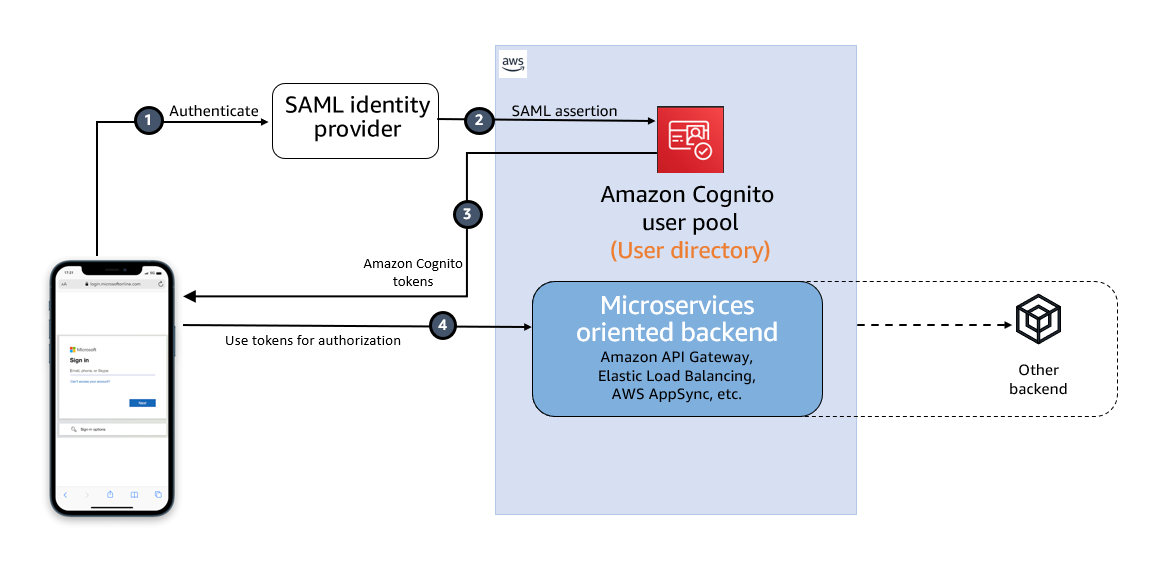
Figure 1: High-level diagram for SAML IdP-initiated authentication flow in a web or mobile app

Figure 1: High-level diagram for SAML IdP-initiated authentication flow in a web or mobile app

As shown in Figure 1, the high-level flow diagram of an application with federated authentication typically involves the following steps:

  1. An enterprise user opens their SSO portal and signs in. This usually opens a portal with several applications that the user has access to. When the user selects an Amazon Cognito protected application from their SSO portal, an IdP-initiated SSO flow is initiated.
  2. When the user launches an application from the SSO portal, Entra ID sends a SAML assertion to the Cognito endpoint to federate the user.
  3. Amazon Cognito validates the SAML assertion and creates the user in Cognito if this is first-time federation for the user or updates the user’s record if user has signed in before from this IdP. Cognito then generates an authorization code and redirects the user to the application URL with this authorization code. The application exchanges the authorization code for tokens from the Cognito token endpoint.
  4. After the application has tokens, it uses them to authorize access within the application stack as needed.

The SAML response contains claims or assertions that contain user-specific data. The SAML response is transferred over HTTPS to protect confidentiality of the data, but you can also enable encryption to further protect the confidentiality of transferred user information. This enables trusted parties who have the decryption key to decrypt the data. It protects the confidentiality of the data after it’s received by the SP.

Setting up SAML federation between Amazon Cognito and Entra ID

To set up SAML federation and use IdP-initiated SSO, you will complete the following steps:

  1. Create an Amazon Cognito user pool.
  2. Create an app client in the Cognito user pool.
  3. Add Cognito as an enterprise application in Entra ID.
  4. Add Entra ID as the SAML IdP and enable IdP-initiated SSO in Cognito.
  5. Add the newly created SAML IdP to your user pool app client.
  6. Enable encrypting the SAML response.
  7. Add RelayState in Entra ID SAML SSO.

Prerequisites

To implement the solution, you must have the necessary permissions to perform these tasks in Azure portal and in your AWS account.

Step 1: Create an Amazon Cognito user pool

Create a new user pool in Amazon Cognito with the default settings. Make a note of the user pool ID, for example, us-east-1_abcd1234. You will need this value for the next steps.

Add a domain name to user pool

The Cognito user pool’s hosted UI can be used as the OAuth 2.0 authorization server with a customizable web interface for sign-up and sign-in. Cognito OAuth 2.0 endpoints are accessible from a domain name that must be added to the user pool. There are two options for adding a domain name to a user pool. You can either use a Cognito domain or a domain name that you own. This solution uses a Cognito domain, which will look like the following:

https://<yourDomainPrefix>.auth.<aws-region>.amazoncognito.com

To add a domain name to a user pool:

  1. In the AWS Management Console for Amazon Cognito, navigate to the App integration tab for your user pool.
  2. On the right side of the pane, choose Actions and select Create Cognito domain.

    Figure 2: Create a Cognito domain

    Figure 2: Create a Cognito domain

  3. Enter an available domain prefix (for example example-corp-prd) to use with the Cognito domain.

    Figure 3: Add a domain prefix

    Figure 3: Add a domain prefix

  4. Choose Create Cognito domain.

Step 2: Create an app client in the Cognito user pool

Before you can use Amazon Cognito in your web application, you must register your app with Amazon Cognito as an app client. The IdP-initiated SAML flow can’t be enabled on one app client with the other SP-initiated authentication SAML IdPs or social IdPs. IdP-initiated SAML introduces additional risks that other SSO providers aren’t subject to. For example, it’s not possible to add a state parameter, which is usually used for cross-site request forgery (CSRF) mitigation. Because of this, you can’t add IdPs that aren’t SAML, including the user pool itself, to an app client that uses a SAML provider with IdP-initiated SSO.

To create an app client:

  1. In the Amazon Cognito console, navigate to the App integration tab for the same user pool and locate App clients. Choose Create an app client.
  2. Select an Application type. For this example, create a public client.
  3. Enter an App client name.
  4. Choose Don’t generate client secret.
  5. Keep the rest of the settings as default.
  6. Under Hosted UI settings, add Allowed callback URLs for your app client. This is where you will be directed after authentication.
  7. Choose Authorization code grant for OAuth 2.0 grant types.
  8. You can keep the remaining configuration as default and choose Create app client.

After the app client is successfully created, capture the app client ID from the App integration tab of the user pool.

Prepare information for the Entra ID setup

Prepare the Identifier (Entity ID) and Reply URL, which are required to add Amazon Cognito as an enterprise application in Entra ID (Step 3).

Create values for Identifier (Entity ID) and Reply URL according to the following formats:

For Identifier (Entity ID), the format is:
urn:amazon:cognito:sp:<yourUserPoolID>

For example: urn:amazon:cognito:sp:us-east-1_abcd1234

For Reply URL, the format is:
https://<yourDomainPrefix>.auth.<aws-region>.amazoncognito.com/saml2/idpresponse

For example: https://example-corp-prd.auth.us-east-1.amazoncognito.com/saml2/idpresponse

The reply URL is the endpoint where Entra ID will send the SAML assertion to Amazon Cognito during user authentication.

For more information, see Adding SAML identity providers to a user pool.

Step 3: Add Amazon Cognito as an enterprise application in Entra ID

With the user pool and app client created and the information for Entra ID prepared, you can add Amazon Cognito as an application in Entra ID. To complete this step, you will add Cognito as an enterprise application and set up SSO.

To add Cognito as an enterprise application

  1. Sign in to the Azure portal.
  2. In the search box, search for the service Microsoft Entra ID.
  3. In the left sidebar, select Enterprise applications.
  4. Choose New application.
  5. On the Browse Microsoft Entra Gallery page, choose Create your own application.

    Figure 4: Create an application in Entra ID

    Figure 4: Create an application in Entra ID

  6. Under What’s the name of your app?, enter a name for your application and select Integrate any other application you don’t find in the gallery (Non-gallery), as shown in Figure 4. Choose Create.
  7. It will take few seconds for the application to be created in Entra ID, and then you should be redirected to the Overview page for the newly added application.

To set up SSO using SAML:

  1. On the Getting started page, in the Set up single sign on tile, choose Get started, as shown in Figure 5.

    Figure 5: Choose Set up single sign-on in Getting Started

    Figure 5: Choose Set up single sign-on in Getting Started

  2. On the next screen, select SAML.
  3. In the middle pane under Set up Single Sign-On with SAML, in the Basic SAML Configuration section, choose the edit icon.
  4. In the right pane under Basic SAML Configuration, replace the default Identifier ID (Entity ID) with the identifier (entity ID) you created in Step 2. Replace Reply URL (Assertion Consumer Service URL) with the reply URL you created in Step 2.

    Figure 6: Add the identifier (entity ID) and reply URL

    Figure 6: Add the identifier (entity ID) and reply URL

  5. Now go to Attributes & Claims and note the claims, as shown in Figure 7. You’ll need these when creating attribute mapping in Amazon Cognito.

    Figure 7: Entra ID Attributes & Claims

    Figure 7: Entra ID Attributes & Claims

  6. Scroll down to the SAML Certificates section and copy the App Federation Metadata Url by choosing the copy into clipboard icon. Make a note of this URL to use in the next step.

    Figure 8: Copy SAML metadata URL from Entra ID

    Figure 8: Copy SAML metadata URL from Entra ID

Step 4: Add Entra ID as SAML IdP in Amazon Cognito

In this step, you’ll add Entra ID as a SAML IdP to your user pool and download the signing and encryption certificates.

To add the SAML IdP:

  1. In the Amazon Cognito console, navigate to the Sign-in experience tab of the same user pool. Locate Federated identity provider sign-in and choose Add an Identity provider.
  2. Choose a SAML IdP.
  3. Enter a Provider name, for example, EntraID.
  4. Under IdP-initiated SAML sign-in, choose Accept SP-initiated and IdP-initiated SAML assertions.
  5. Under Metadata document source, enter the metadata document endpoint URL you captured in Step 3.
  6. (Optional) Under SAML signing and encryption, select Require encrypted SAML assertion from this provider.

    Enable Required encrypted SAML assertion from this provider only if you can turn on token encryption in the Entra ID application. See Step 6.

  7. Under Map attributes between your SAML provider and your user pool to map SAML provider attributes to the user profile in your user pool. Include your user pool required attributes in your attribute map.

    For example, when you choose User pool attribute email, enter the SAML attribute name as it appears in the SAML assertion from your IdP. In our case it will be http://schemas.xmlsoap.org/ws/2005/05/identity/claims/emailaddress.

    Figure 9: Enter the SAML attribute name

    Figure 9: Enter the SAML attribute name

  8. Choose Add identity provider.

After the IdP has been created, you can navigate to the recently added EntraID IdP in the user pool for downloading the SAML signing and encryption certificate. These certificates must be imported into the Entra ID enterprise application.

To download the certificates

  1. To download the SAML signing certificate, Choose View signing certificate and Download as .crt
  2. To download the SAML encryption certificate, Choose View encryption certificate and Download as .crt.

Step 5: Add the newly created SAML IdP to your user pool app client

Before you can use Amazon Cognito in your web application, you must add the SAML IdP created in Step 4 to your app client.

To add the SAML IdP:

  1. In the Amazon Cognito console, navigate to the App integration tab for the same user pool and locate App clients.
  2. Choose the app client you created in Step 2.
  3. Locate the Hosted UI section and choose Edit.
  4. Under Identity providers, select the identity provider you created in Step 4 and choose Save changes.

    Figure 10: Enabling the Entra ID SAML identity provider in the Cognito app client

    Figure 10: Enabling the Entra ID SAML identity provider in the Cognito app client

At this stage, the Amazon Cognito OAuth 2.0 server is up and running and the web interface is accessible and ready to use. You can access the Cognito hosted UI from your app client using the Cognito console to test it further.

Step 6: Enable encrypting the SAML response in EntraID

For additional security and privacy of user data, enable encrypting the SAML response. Amazon Cognito and your IdP can establish confidentiality in SAML responses when users sign in and sign out. Cognito assigns a public-private RSA key pair and a certificate to each external SAML provider that you configure in your user pool. You will use the SAML encryption certificate downloaded in step 4.

To enable encrypting the SAML response:

  1. Navigate to your Enterprise application in Entra ID and in the left menu, under Security, select Token encryption.
  2. Import the SAML encryption certificate you have already downloaded in step 4.

    Figure 11: Import the Cognito encryption certificate to Entra ID

    Figure 11: Import the Cognito encryption certificate to Entra ID

  3. After the certificate is imported, it’s inactive by default. To activate it, right-click on the certificate and select Activate token encryption certificate. This enables the encrypted SAML response.

    Figure 12: Activate the token encryption certificate in Entra ID

    Figure 12: Activate the token encryption certificate in Entra ID

Step 7: Add RelayState in Entra ID SAML SSO

A RelayState parameter is required when using SAML IdP-initiated authentication flow. Set this up in Entra ID for the Amazon Cognito user pool and the enabled app client ID.

To add RelayState in Entra ID SAML SSO:

  1. Sign in to the Azure portal and open the enterprise application created in Step 3.
  2. In the left sidebar, choose Single sign-on.
  3. In the middle pane under Set up Single Sign-On with SAML, in the Basic SAML Configuration section, choose the edit icon.
  4. In the right pane under Basic SAML Configuration, apply the value as the format below to the Relay State (Optional) field.
    identity_provider=<IDProviderName>&client_id=<ClientId>&redirect_uri=<callbackURL>&response_type=code&scope=openid+email+phone

    1. Replace <IDProviderName> with the name you previously used for ID provider.
    2. Replace <ClientId> with the app client’s ClientID created in Step 2.
    3. Replace <ecallbackURL> with the URL of your web application that will receive the authorization code. It must be an HTTPS endpoint, except for in a local development environment where you can use http://localhost:PORT_NUMBER.

    For example:

    identity_provider=EntraID&client_id=abcd1234567&redirect_uri=https://example.com&response_type=code&scope=openid+email+phone

    Figure 13: Set RelayState in Entra ID single sign-on

    Figure 13: Set RelayState in Entra ID single sign-on

Test the IdP-initiated flow

Next, do a quick test to check if everything is configured properly.

  1. Sign in to the Azure portal and open the Enterprise application created in Step 3.
  2. In the left sidebar, choose Users and groups.
  3. On the right side, choose Add user/group. This will show the Add Assignment page.
  4. From the left side of the page, choose None Selected .
  5. Select a user from the right of the screen and follow the prompt to assign the user for this application.
  6. Once the user is assigned successfully, open https://www.microsoft365.com/apps and sign in as the assigned user.
  7. After you are signed in, choose the application icon registered as the IdP-initiated SSO.

    Figure 14: Testing IdP-initiated SSO from an Office 365 application

    Figure 14: Testing IdP-initiated SSO from an Office 365 application

  8. The application will start the IdP-initiated authentication flow and the user will be redirected to the application as a signed-in user.

Signing an authentication request in case of SP-initiated flow

The preceding authentication flow that you tested uses IdP-initiated SSO. If you’re using an SP-initiated flow, you can enable signing of the SAML request that is sent from the SP (Amazon Cognito) to the IdP (Entra ID) for additional security and integrity of communication between them.

You can enable the authentication request signing in Cognito while creating the IdP or by updating your existing IdP.

To enable signing of the SAML request:

  1. In the Amazon Cognito console, when you create or edit your SAML identity provider, under SAML signing and encryption, select the box Sign SAML requests to this provider and choose Save changes.

    Figure 15: Enabling signing SAML request

    Figure 15: Enabling signing SAML request

  2. Sign in to the Azure portal and access your Entra ID enterprise application. Go to Set up single sign on and edit Verification certificates (optional).
  3. Select the checkbox Require verification certificates and upload the Cognito user pool SAML signing certificate already downloaded in Step 4 with a .cer file extension. You must convert the .crt file to a .cer file because Entra ID requires a verification certificate in a .cer extension.

To convert the .crt certificate extension to .cer:

  1. Right-click the .crt file and choose Open.
  2. Navigate to the Details tab.
  3. Select Copy to File… and choose Next.
  4. Select Base-64 encoded X.509 (.CER) and choose Next.
  5. Give your export file a name (for example, Entra ID.cer) and choose Save.
  6. Choose Next.
  7. Confirm the details and choose Finish.

Test the SP-initiated flow

Next, do a quick test to check if everything is configured properly.

  1. In the Amazon Cognito console, navigate to the App integration tab for the same user pool and locate App clients.
  2. Choose the app client you created in Step 2.
  3. Locate the Hosted UI section and choose View Hosted UI.
  4. From the hosted UI, authenticate yourself using Entra ID as the identity provider.
  5. After authentication is completed successfully, you will be redirected to the callback URL you configured in your app client with the authorization code.

If you capture the SAML request, you will see that Amazon Cognito is sending a cryptographic signature with the signing certificate in the SAML request to the IdP, and the IdP will match the cryptographic signature with the uploaded certificate to ensure the integrity of the request.

Conclusion

In this post, you learned the benefits of using IdP-initiated single sign-on. It helps centralize administration and lowers dependency on service provider applications. Also, you learned how to integrate an Amazon Cognito user pool with Microsoft Entra ID as an external SAML IdP using IdP-initiated SSO so your users can use their corporate ID to sign in to web or mobile applications. Also, you learned about how to enable signed authentication requests when using an SP-initiated flow and encrypting SAML responses for additional security between Cognito and the SAML IdP.

 
If you have feedback about this post, submit comments in the Comments section below. If you have questions about this post, contact AWS Support.

Want more AWS Security news? Follow us on Twitter.

Vishal Jakharia

Vishal Jakharia

Vishal is a cloud support engineer based in New Jersey, USA. He is an Amazon Cognito subject matter expert who loves to work with customers and provide them solutions for implementing authentication and authorization. He helps customers migrate and build secure scalable architecture on the AWS Cloud.

Yungang Wu

Yungang Wu

Yungang is a senior cloud support engineer who specializes in the Amazon Cognito service. He helps AWS customers troubleshoot issues and suggests well-designed application authentication and authorization implementations.

Using the circuit-breaker pattern with AWS Lambda extensions and Amazon DynamoDB

Post Syndicated from James Beswick original https://aws.amazon.com/blogs/compute/using-the-circuit-breaker-pattern-with-aws-lambda-extensions-and-amazon-dynamodb/

This post is written by Alan Oberto Jimenez, Senior Cloud Application Architect, and Tobias Drees, Cloud Application Architect.

Modern software systems frequently rely on remote calls to other systems across networks. When failures occur, they can cascade across multiple services causing service disruptions. One technique for mitigating this risk is the circuit breaker pattern, which can detect and isolate failures in a distributed system. The circuit breaker pattern can help prevent cascading failures and improve overall system stability.

The pattern isolates the failing service and thus prevents cascading failures. It improves the overall responsiveness by preventing long waiting times for timeout periods. Furthermore, it also increases the fault tolerance of the system since it lets the system interact with the affected service again once it is available again.

This blog post presents an example application, showing how AWS Lambda extensions integrate with Amazon DynamoDB to implement the circuit breaker pattern.

Using Lambda extensions to implement the circuit breaker pattern

AWS Lambda extensions provide a way to integrate monitoring, observability, security, and governance tools into the Lambda execution environment without complex installation or configuration management. You can run extensions both as part of the runtime process with an internal extension or as a separate process in the execution environment with an external extension.

Lambda extensions enable the circuit breaker pattern without modifying the core function code. An external extension checks in a separate runtime whether a certain service is reachable or not. This approach decouples the business logic in the Lambda function from failure detection, allowing for the reuse of this Lambda extension across different Lambda functions. Both decoupling of code with different purposes and code reuse is in line with the best practices for building Lambda functions.

Pinging a microservice at each Lambda invocation increases network traffic and latency. Circuit breaker implementations benefit from a caching layer to store the state of the microservices. The Lambda extension fetches the status of a microservice from a database and stores the result in memory for a specified time avoiding a disk write. The Lambda function checks the extension cache before pinging the microservice reducing network traffic. Lambda extensions are an ideal tool to build a caching layer for Lambda functions since its in-memory cache makes it more secure, easier to manage, and more performant due to higher availability compared to calling a network resource instead.

Overview

Architecture Overview

  1. The main function process handles the event after every AWS Lambda invocation. Before performing any external call against the external components, it listens for HTTP POST events from the Lambda extension process to fetch the last status of the circuits.
  2. The extension process provides the circuit state to the main process via HTTP POST.
    1. The extension checks its internal cache and returns a valid value if available, otherwise reads the state of the circuits from the DynamoDB table and updates the cache.
    2. Finally, the extension process returns the state of the circuits to the main function via an API call response.
    3. Because of the Lambda extensions lifecycle, this process occurs periodically to keep the local cache updated until the execution environment is terminated.
  3. If the circuit is in the OPEN state, the main function process executes calls against the external microservices, otherwise the process returns a local response.
  4. An Amazon EventBridge event periodically invokes a Lambda responsible for updating the circuit states.
  5. This Lambda function performs the validations needed to determine the status of the different remote microservices (circuits) with an Amazon API Gateway entrypoint.
  6. The Lambda function writes the result of the verification process to the DynamoDB table.

Walkthrough

The following prerequisites are required to complete the walkthrough:

  • An active AWS account
  • AWS CLI 2.15.17 or later
  • AWS SAM CLI 1.116.0 or later
  • Git 2.39.3 or later
  • Python 3.12

Initial setup

  1. Clone the code from GitHub onto a local machine:
    git clone https://github.com/aws-samples/implementing-the-circuit-breaker-pattern-with-lambda-extensions-and-dynamodb.git
  2. To install the packages, utilize a virtual environment:
    python -m venv circuit_breaker_venv && source circuit_breaker_venv/bin/activate
  3. To prepare the services for deployment, execute the following AWS Serverless Application Model (SAM) command:
    sam build
  4. To deploy the services, use this command specifying the AWS CLI profile (in the config file in the .aws folder) for the AWS account to deploy the services in:
    sam deploy --guided --profile <AWSProfile>

    Answer the question prompts as appropriate.

  5. You can deploy subsequent local changes in the code with:
    sam build 
    sam deploy

Testing and adjusting the solution

The Lambda function updating the state in DynamoDB runs every minute as specified by the template. After the function has run for the first time after 1 minute, the DynamoDB entry containing the status (“OPEN” or “CLOSED”) is ready. Since the mock API is part of the stack, the status is “OPEN”.

You can invoke the My Microservice Lambda function manually to see:

Response

The Lambda function updating the state in DynamoDB is invoked with an EventBridge rule that specifies the URL and the ID of the service to be monitored. By creating a new EventBridge rule with the correct URL and a new ID, you can use the AWS SAM template for monitoring multiple services.

To add a new EventBridge rule, add this to the template:

  NewEventRule:
    Type: AWS::Events::Rule
    Properties:
      Description: Event rule to trigger the Lambda function with a JSON payload
      ScheduleExpression: rate(1 minute) 
      State: ENABLED
      Targets:
        - Arn: !GetAtt UpdatingStateLambda.Arn
          Id: TargetFunction
          Input: '{ "URL": "https://aws.amazon.com/", "ID": "NewMicroservice"}'  # Add the JSON payload here

  MyPermissionForNewEventRule:
    Type: AWS::Lambda::Permission
    Properties:
      FunctionName: !Ref UpdatingStateLambda
      Action: lambda:InvokeFunction
      Principal: events.amazonaws.com
      SourceArn: !GetAtt NewEventRule.Arn    

In the Lambda function that contains the business logic, add the following environment variables. However, for more complex cases with multiple microservices to be monitored, it’s recommended to use AWS Config. Using AWS Config, configurations for Lambda functions can be stored to enable more granular control than with environment variables.

Environment:
        Variables:
          service_name: "NewMicroservice"

You can adjust the logic of this Lambda function by changing the code in my-microservice/lambda-handler.py or directly in the Lambda section of the AWS Management Console.

If you end up using your own Lambda function to use the circuit breaker Lambda extension, include the circuit breaker extension as a layer:

BusinessLogicMicroservice:
    Type: AWS::Serverless::Function
    Properties:
      CodeUri: business-logic-microservice/
      Handler: lambda_function.lambda_handler
      MemorySize: 128
      Policies:
      - DynamoDBCrudPolicy:
          TableName: !Ref CircuitBreakerStateTable
      Timeout: 100
      Runtime: python3.8
      Layers:
      - !Ref CircuitBreakerExtensionLayer

Circuit breaker in closed state

So far, the sample application only features an open circuit breaker state signaling a functioning microservice. This section simulates an unresponsive microservice to test the behavior of the system with a closed-circuit breaker state.

  1. Edit the environment variables of the MyMicroservice Lambda function in line 47 of the template.yaml file and the URL of the input to the Lambda updating the state in the event rule in line 107 to a domain that times out such as ”https://aws.amazon.com:81/“.
    API_URL: "https://aws.amazon.com:81/"
    Input: '{ "URL": "https://aws.amazon.com:81/", "ID": "MyMicroservice"}'
    
  2. Deploy these changes:
    sam build
    sam deploy

The event rule invokes the Lambda function, updating the state every minute. To see the output of this Lambda function, invoke it manually:

Execution result

This Lambda function changes the DynamoDB entry for this URL to:

DynamoDB entry

The MyMicroservice Lambda function receives the DynamoDB entries for the status over HTTP from the Circuit Breaker Lambda extension and proceeds with the logic following a closed state. The output of invoking the Lambda manually is:

Manual output

This shows the circuit breaker pattern working as intended. In the Lambda updating state, the time it takes for the Lambda function to throw a timeout exception is defined as 4 seconds and can be adjusted to the use case.

requests.get(API_URL, headers=headers, timeout=4)

Clean-up

To delete all resources from this stack, run:

sam delete --stack-name new-circuit-breaker-sam-stack

Security

The provided AWS SAM template does not provide an Amazon Virtual Private Cloud (VPC) in which to host the resources. Integrate the resources into an appropriate networking configuration if you are using it in production applications.

The solution has auditability characteristics, as calls to the circuit breaker and to the microservices are logged to the Amazon CloudWatch log group. The audit log is encrypted using AWS Key Management Service.

To monitor the security of your account with the solution, use Amazon GuardDuty, AWS CloudTrail, AWS Config, and AWS WAF for API Gateway.

Conclusion

The circuit breaker pattern is a powerful tool for helping to ensure the resiliency and stability of serverless applications. Lambda extensions are a good fit for its implementation, as demonstrated in this example. With the provided Lambda extension and code, you can incorporate the circuit breaker pattern into your applications and customize it to suit your specific requirements, helping to ensure a robust and reliable system.

For more serverless learning resources, visit Serverless Land.

Breaking barriers in geospatial: Amazon Redshift, CARTO, and H3

Post Syndicated from Ravi Animi original https://aws.amazon.com/blogs/big-data/breaking-barriers-in-geospatial-amazon-redshift-carto-and-h3/

This post is co-written with Javier de la Torre from CARTO.

In this post, we discuss how Amazon Redshift spatial index functions such as Hexagonal hierarchical geospatial indexing system (or H3) can be used to represent spatial data using H3 indexing for fast spatial lookups at scale. Navigating the vast landscape of data-driven insights has always been an exciting endeavor. As technology continues to evolve, one specific facet of this journey is reaching unprecedented proportions: geospatial data. In our increasingly interconnected world, where every step we take, every location we visit, and every event we encounter leaves a digital footprint, the volume and complexity of geospatial data are expanding at an astonishing pace. From GPS-enabled smartphones to remote sensing satellites, the sources of geospatial information are multiplying, generating an immense gold mine of location-based insights.

However, visualizing and analyzing large-scale geospatial data presents a formidable challenge due to the sheer volume and intricacy of information. This often overwhelms traditional visualization tools and methods. The need to balance detail and context while maintaining real-time interactivity can lead to issues of scalability and rendering complexity.

Because of this, many organizations are turning to novel ways of approaching geospatial data, such as spatial indexes such as H3.

Figure 1 – Map built with CARTO Builder and the native support to visualize H3 indexes

Figure 1 – Map built with CARTO Builder and the native support to visualize H3 indexes

What are spatial indexes?

Spatial indexes are global grid systems that exist at multiple resolutions. But what makes them special? Traditionally, spatial data is represented through a geography or geometry in which features are geolocated on the earth by a long reference string describing the coordinates of every vertex. Unlike geometries, spatial indexes are georeferenced by a short ID string. This makes them far smaller to store and lightning fast to process! Because of this, many organizations are utilizing them as a support geography, aggregating their data to these grids to optimize both their storage and analysis.

Figure 2 shows some of the possible types of savings with spatial indexes. To learn more details about their benefits, see Introduction to Spatial Indexes.

Figure 2 – Comparison of performance between geometries and spatial indexes. Learn more about these differences in CARTO’s free ebook Spatial Indexes

Figure 2 – Comparison of performance between geometries and spatial indexes. Learn more about these differences in CARTO’s free ebook Spatial Indexes

Benefits of H3

One of the flagship examples of spatial indexes is H3, which is a hexagonal spatial index. Originally developed by Uber, it is now used far beyond the ridesharing industry. Unlike square-based grids, H3’s well-structured hexagons accurately represent intricate geographic features like rivers and roads, enabling precise depiction of nonperpendicular shapes. The hexagonal geometry excels at capturing gradual spatial changes and movement, and its consistent distance between one centroid and neighboring centroids eliminates outliers. This ensures robust data representation in all directions. Learn more about the benefits of using hexagons for location intelligence at Hexagons for Location Intelligence.

Figure 3 – H3: the relationships between different resolutions

Figure 3 – H3: the relationships between different resolutions

H3 available now in Amazon Redshift

Given the immense benefits of H3 for spatial analysis, we’re very excited to announce the availability of H3 in Amazon Redshift. Seamlessly accessible through the powerful infrastructure of Amazon Redshift, H3 unlocks a new realm of possibilities for visualizing, analyzing, and deriving insights from geospatial data.

Amazon Redshift support for H3 offers an easy way to index spatial coordinates into a hexagonal grid, down to a square meter resolution. Indexed data can be quickly joined across different datasets and aggregated at different levels of precision. H3 enables several spatial algorithms and optimizations based on the hexagonal grid, including nearest neighbors, shortest path, gradient smoothing, and more. H3 indexes refer to cells that can be either hexagons or pentagons. The space is subdivided hierarchically, and given a resolution. H3 supports 16 resolutions from 0–15, inclusive, with 0 being the coarsest and 15 being the finest. H3 indexing and related H3 spatial functions are now available for Amazon Redshift spatial analytics.

Support for the three new H3 indexing related spatial functions, H3_FromLongLat, H3_FromPoint, and H3_PolyFill spatial functions, is now available in all commercial AWS Regions. For more information or to get started with Amazon Redshift spatial analytics, see the documentation for querying spatial data, spatial functions, and the spatial tutorial.

Examples of H3 functions in Amazon Redshift:

To create or access the indexed values of the hexagonal tiles, you use one of the three H3 indexing functions Amazon Redshift has released for the particular spatial GEOMETRY object you want to index. For example, a polygon (a series of Cartesian X Y points that makes a closed 2D object), a point (a single Cartesian X Y value) or a point as a latitude, longitude value (a single latitude, longitude value). For example, if you have a spatial polygon already, you would use the H3_PolyFill function to get the index values of the hexagonal tiles that cover or fit the polygon vertices. Imagine you have a polygon with the following Cartesian (X Y) coordinates:

(0 0, 0 1, 1 1, 1 0, 0 0) , which is just a 1 x 1 unit square. You would then invoke the H3_PolyFill() function by converting the text values of the Cartesian coordinates to a GEOMETRY data type and then use the POLYGON() function to convert those coordinates to a polygon object of GEOMETRY data type. This is what you would call:

SELECT H3_Polyfill(ST_GeomFromText('POLYGON((0 0, 0 1, 1 1, 1 0, 0 0))'), 4);

The return values from the this function are the actual index values to the individual hexagonal tiles that cover the 1 x 1 polygon. Of course, you could define arbitrary polygons of any shape just by using vertices of the enclosing 2D polygon of GEOMETRY data type. The actual H3 tile index values that are returned as Amazon Redshift SUPER data type arrays for the preceding example are:

h3_polyfill
_____________________________________________________________________
[596538848238895103,596538805289222143,596538856828829695,596538813879156735,596537920525959167,596538685030137855,596538693620072447,596538839648960511]
_____________________________________________________________________

So there are eight hexagonal tiles when the resolution of four is used when you call the H3_PolyFill function.

Similarly, the following SQL returns the H3 cell ID from longitude 0, latitude 0, and resolution 10.

SELECT H3_FromLongLat(0, 0, 10);

 h3_fromlonglat
______________________________________________________________
 623560421467684863
______________________________________________________________

As does this SQL that returns the H3 cell ID from point 0,0 with resolution 10.

SELECT H3_FromPoint(ST_GeomFromText('POINT(0 0)'), 10);

 h3_frompoint
_____________________________________________________________________________________
 623560421467684863
_____________________________________________________________________________________

Data visualization and analysis made easy with H3 and CARTO

To illustrate how H3 can be used in action, let’s turn to CARTO. As an AWS Partner, CARTO offers a software solution on the curated digital catalog AWS Marketplace that seamlessly integrates distinctive capabilities for spatial visualization, analysis, and app development directly within the AWS data warehouse environment. Notably setting CARTO apart from certain GIS platforms is its strategy of query optimization by using the data warehouse and conducting analytical tasks and computations within Amazon Redshift through the use of user-defined functions (UDFs).

Figure 4 – Basic workflow build with CARTO to polyfill a set of polygons into H3 indexes

Figure 4 – Basic workflow build with CARTO to polyfill a set of polygons into H3 indexes

Amazon Redshift comes equipped with a variety of preexisting spatial functions, and CARTO enhances this foundation by providing additional spatial functions within its Analytics Toolbox for Amazon Redshift, thereby expanding the range of analytical possibilities even further. Let’s dive into a use case to see how this can be used to solve an example spatial analysis problem.

Unveiling H3 spatial indexes in logistics

Logistics, particularly in last-mile delivery, harness substantial benefits from utilizing H3 spatial indexes in operational analytics. This framework has revolutionized geospatial analysis, particularly in efficiently managing extensive datasets.

H3 divides earth’s surface into varying-sized hexagons, precisely representing different geographic areas across multiple hierarchy levels. This precision allows detailed location representation at various scales, offering versatility in analyses and optimizations—from micro to macro, spanning neighborhoods to cities—efficiently managing vast datasets.

H3-based analytics empower the processing and understanding of delivery data patterns, such as peak times, popular destinations, and high-demand areas. This insight aids in predicting future demand and facilitates operations-related decisions. H3 can also help create location-based profiling features for predictive machine learning (ML) models such as risk-mitigation models. Further use cases can include adjustments to inventory, strategic placement of permanent or temporary distribution centers, or even refining pricing strategies to become more effective and adaptive.

The uniform scalability and size consistency of H3 make it an ideal structure for organizing data, effectively replacing traditional zip codes in day-to-day operations.

In essence, insights derived from H3-based analytics empower businesses to make informed decisions, swiftly adapt to market changes, and elevate customer satisfaction through efficient deliveries.

The feature is eagerly anticipated by Amazon Redshift and CARTO customers. “The prospect of leveraging H3’s advanced spatial capabilities within the robust framework of Amazon Redshift has us excited about the new insights and efficiencies we can unlock for our geospatial analysis. This partnership truly aligns with our vision for smarter, data-driven decision-making,” says the Data Science Team at Aramex.

Figure 5 – Diagram illustrating the process of using H3-powered analytics for strategic decision-making

Figure 5 – Diagram illustrating the process of using H3-powered analytics for strategic decision-making

Let’s talk about your use case

You can experience the future of location intelligence firsthand by requesting a demo from CARTO today. Discover how H3’s hexagonal spatial index, seamlessly integrated with Amazon Redshift, can empower your organization with efficiency in handling large-scale geospatial data.

About Amazon Redshift

Thousands of customers rely on Amazon Redshift to analyze data from terabytes to petabytes and run complex analytical queries.

With Amazon Redshift, you can get real-time insights and predictive analytics on all of your data across your operational databases, data lake, data warehouse, and third-party datasets. It delivers this at a price performance that’s up to three times better than other cloud data warehouses out of the box, helping you keep your costs predictable.

Amazon Redshift provides capabilities likeAmazon Redshift spatial analytics, Amazon Redshift streaming analytics, Amazon Redshift ML and Amazon Redshift Serverless to further simplify application building and make it easier, simpler, and faster for independent software vendors (ISVs) to embed rich data analytics capabilities within their applications.

With Amazon Redshift serverless, ISVs can run and scale analytics quickly without the need to set up and manage data warehouse infrastructure. Developers, data analysts, business professionals, and data scientists can go from data to insights in seconds by simply loading and querying in the data warehouse.

To request a demo of Amazon Redshift, visit Amazon Redshift free trial or to get started on your own, visit Getting started with Amazon Redshift.

About CARTO

From smartphones to connected cars, location data is changing the way we live and the way we run businesses. Everything happens somewhere, but visualizing data to see where things are isn’t the same as understanding why they happen there. CARTO is the world’s leading cloud-based location intelligence platform, enabling organizations to use spatial data and analysis for more efficient delivery routes, better behavioral marketing, strategic store placements, and much more.

Data scientists, developers, and analysts use CARTO to optimize business processes and predict future outcomes through the power of spatial data science. To learn more, visit CARTO.


About the authors

Ravi Animi is a senior product leader in the Amazon Redshift team and manages several functional areas of the Amazon Redshift cloud data warehouse service, including spatial analytics, streaming analytics, query performance, Spark integration, and analytics business strategy. He has experience with relational databases, multidimensional databases, IoT technologies, storage and compute infrastructure services, and more recently, as a startup founder in the areas of artificial intelligence (AI) and deep learning, computer vision, and robotics.

Ioanna Tsalouchidou is a software development engineer in the Amazon Redshift team focusing on spatial analytics and query processing. She holds a PhD in graph algorithms from UPF Spain and a Masters in distributed systems and computing from KTH Sweden and UPC Spain.

Hinnerk Gildhoff is a senior engineering leader in the Amazon Redshift team leading query processing, spatial analytics, materialized views, autonomics, query languages and more. Prior to joining Amazon, Hinnerk spent over a decade as both an engineer and a manager in the field of in-memory and cluster computing, specializing in building databases and distributed systems.

Javier de la Torre is founder and Chief Strategy Officer of CARTO, has been instrumental in advancing the geospatial industry. At CARTO, he’s led innovations in location intelligence. He also serves on the Open Geospatial Consortium board, aiding in the development of standards like geoparquet. Javier’s commitment extends to environmental causes through his work with Tierra Pura, focusing on climate change and conservation, demonstrating his dedication to using data for global betterment.

Neovim 0.10 released

Post Syndicated from jzb original https://lwn.net/Articles/973917/

Version
0.10
of the Vim-based text editor Neovim is now available. This release
includes a new default color scheme, enhanced support for rendering
multibyte characters, support for hyperlinks, system clipboard
synchronization, and more. Many features have been deprecated
in 0.10 and will be removed in future release. Neovim core contributor
Gregory Anders has written a summary
of some of the highlights and thoughts on upcoming releases:

We follow a “fun driven development” paradigm: for the most part,
contributors and maintainers work on things that are personally
interesting to them. Because of this, it can be difficult to predict
what will happen in future releases. If there is a feature you want
to see implemented, the best way to do it is to take a crack at it
yourself: many of the features mentioned in this very blog post were
contributed by users that are not part of the “core” maintenance
team!

Deploy Stable Diffusion ComfyUI on AWS elastically and efficiently

Post Syndicated from Wang Rui original https://aws.amazon.com/blogs/architecture/deploy-stable-diffusion-comfyui-on-aws-elastically-and-efficiently/

Introduction

ComfyUI is an open-source node-based workflow solution for Stable Diffusion. It offers the following advantages:

  • Significant performance optimization for SDXL model inference
  • High customizability, allowing users granular control
  • Portable workflows that can be shared easily
  • Developer-friendly

Due to these advantages, ComfyUI is increasingly being used by artistic creators. In this post, we will introduce how to deploy ComfyUI on AWS elastically and efficiently.

Overview of solution

The solution is characterized by the following features:

  • Infrastructure as Code (IaC) deployment: We employ a minimalist approach to operations and maintenance. Using AWS Cloud Development Kit (AWS CDK) and Amazon Elastic Kubernetes Service (Amazon EKS) Blueprints, we manage the Amazon EKS clusters that host and run ComfyUI.
  • Dynamic scaling with Karpenter: Leveraging the capabilities of Karpenter, we customize node scaling strategies to meet business needs.
  • Cost savings with Amazon Spot Instances: We use Amazon Spot Instances to reduce the costs of GPU instances.
  • Optimized use of GPU instance store: By fully utilizing the instance store of GPU instances, we maximize performance for model loading and switching while minimizing the costs associated with model storage and transfer.
  • Direct image writing with Amazon Simple Storage Service (Amazon S3) CSI driver: Images generated are directly written to Amazon S3 using the S3 CSI driver, reducing storage costs.
  • Accelerated dynamic requests with Amazon CloudFront: To facilitate the use of the platform by art studios across different regions, we use Amazon CloudFront for faster dynamic request processing.
  • Serverless event-initiated model synchronization: When models are uploaded to or deleted from Amazon S3, serverless event initiations activate, syncing the model directory data across worker nodes.

Walkthrough

The solution’s architecture is structured into two distinct phases: the deployment phase and the user interaction phase.

Architecture for deploying stable diffusion on ComfyUI

Figure 1. Architecture for deploying stable diffusion on ComfyUI

Deployment phase

  1. Model storage in Amazon S3: ComfyUI’s models are stored in Amazon S3 for models, following the same directory structure as the native ComfyUI/models directory.
  2. GPU node initialization in Amazon EKS cluster: When GPU nodes in the EKS cluster are initiated, they format the local instance store and synchronize the models from Amazon S3 to the local instance store using user data scripts.
  3. Running ComfyUI pods in EKS: Pods operating ComfyUI effectively link the instance store directory on the node to the pod’s internal models directory, facilitating seamless model access and loading.
  4. Model sync with AWS Lambda: When models are uploaded to or deleted from Amazon S3, an AWS Lambda function synchronizes the models from S3 to the local instance store on all GPU nodes by using SSM commands.
  5. Output mapping to Amazon S3: Pods running ComfyUI map the ComfyUI/output directory to S3 for outputs with Persistent Volume Claim (PVC) methods.

User interaction phase

  1. Request routing: When a user request reaches the Amazon EKS pod through CloudFront t0 ALB, the pod first loads the model from the instance store.
  2. Post-inference image storage: After inference, the pod stores the image in the ComfyUI/output directory, which is directly written to Amazon S3 using the S3 CSI driver.
  3. Performance advantages of instance store: Thanks to the performance benefits of the instance store, the time taken for initial model loading and model switching is significantly reduced.

You can find the deployment code and detailed instructions in our GitHub samples library.

Image Generation

Once deployed, you can access and use the ComfyUI frontend directly through a browser by visiting the domain name of CloudFront or the domain name of Kubernetes Ingress.

Accessing ComfyUI through a browser

Figure 2. Accessing ComfyUI through a browser

You can also interact with ComfyUI by saving its workflow as an API-callable JSON file.

Accessing ComfyUI through an API

Figure 3. Accessing ComfyUI through an API

Deployment Instructions

Prerequisites

This solution assumes that you have already installed, deployed, and are familiar with the following tools:

Make sure that you have enough vCPU quota for G instances (at least 8 vCPU for a g5.2xl/g4dn.2x used in this guidance).

  1. Download the code, check out the branch, install rpm packages, and check the environment:
    git clone https://github.com/aws-samples/comfyui-on-eks ~/comfyui-on-eks
    cd ~/comfyui-on-eks && git checkout v0.2.0
    npm install
    npm list
    cdk list
  2. Run npm list to ensure following packages are installed:
    git clone https://github.com/aws-samples/comfyui-on-eks ~/comfyui-on-eks
    cd ~/comfyui-on-eks && git checkout v0.2.0
    npm install
    npm list
    cdk list
  3. Run cdk list to ensure the environment is all set, you will have following AWS CloudFormation stack to deploy:
    Comfyui-Cluster
    CloudFrontEntry
    LambdaModelsSync
    S3OutputsStorage
    ComfyuiEcrRepo

Deploy EKS Cluster

  1. Run the following command:
    cd ~/comfyui-on-eks && cdk deploy Comfyui-Cluster
  2. CloudFormation will create a stack named Comfyui-Cluster to deploy all the resources required for the EKS cluster. This process typically takes around 20 to 30 minutes to complete.
  3. Upon successful deployment, the CDK outputs will present a ConfigCommand. This command is used to update the configuration, enabling access to the EKS cluster via kubectl.

    ConfigCommand output screenshot

    Figure 4. ConfigCommand output screenshot

  4. Execute the ConfigCommand to authorize kubectl to access the EKS cluster.
  5. To verify that kubectl has been granted access to the EKS cluster, execute the following command:
    kubectl get svc

The deployment of the EKS cluster is complete. Note that EKS Blueprints has output KarpenterInstanceNodeRole, which is the role for the nodes managed by Karpenter. Record this role; it will be configured later.

Deploy an Amazon S3 bucket for storing models and set up AWS Lambda for dynamic model synchronization

  1. Run the following command:
    cd ~/comfyui-on-eks && cdk deploy LambdaModelsSync
  2. The LambdaModelsSync stack primarily creates the following resources:
    • S3 bucket: The S3 bucket is named following the format comfyui-models-{account_id}-{region}; it’s used to store ComfyUI models.
    • Lambda function, along with its associated role and event source: The Lambda function, named comfy-models-sync, is designed to initiate the synchronization of models from the S3 bucket to local storage on GPU instances whenever models are uploaded to or deleted from S3.
  3. Once the S3 for models and Lambda function are deployed, the S3 bucket will initially be empty. Execute the following command to initialize the S3 bucket and download the SDXL model for testing purposes.
    region="us-west-2" # Modify the region to your current region.
    cd ~/comfyui-on-eks/test/ && bash init_s3_for_models.sh $region

    There’s no need to wait for the model to finish downloading and uploading to S3. You can proceed with the following steps once you ensure the model is uploaded to S3 before starting the GPU nodes.

Deploy S3 bucket for storing images generated by ComfyUI.

Run the following command:
cd ~/comfyui-on-eks && cdk deploy S3OutputsStorage

The S3OutputsStorage stack creates an S3 bucket, named following the pattern comfyui-outputs-{account_id}-{region}, which is used to store images generated by ComfyUI.

Deploy ComfyUI workload

The ComfyUI workload is deployed through Kubernetes.

Build and push ComfyUI Docker image

  1. Run the following command, create an ECR repo for ComfyUI image:
    cd ~/comfyui-on-eks && cdk deploy ComfyuiEcrRepo
  2. Run the build_and_push.sh script on a machine where Docker has been successfully installed:
    region="us-west-2" # Modify the region to your current region.
    cd ~/comfyui-on-eks/comfyui_image/ && bash build_and_push.sh $region

    Note:

    • The Dockerfile uses a combination of git clone and git checkout to pin a specific version of ComfyUI. Modify this as needed.
    • The Dockerfile does not install customer nodes, these can be added as needed using the RUN command.
    • You only need to rebuild the image and replace it with the new version to update ComfyUI.

Deploy Karpenter for managing GPU instance scaling

Get the KarpenterInstanceNodeRole in previous section, run the following command to deploy Karpenter Provisioner:

KarpenterInstanceNodeRole="Comfyui-Cluster-ComfyuiClusterkarpenternoderole" # Modify the role to your own.
sed -i "s/role: KarpenterInstanceNodeRole.*/role: $KarpenterInstanceNodeRole/g" comfyui-on-eks/manifests/Karpenter/karpenter_v1beta1.yaml
kubectl apply -f comfyui-on-eks/manifests/Karpenter/karpenter_v1beta1.yaml

The KarpenterInstanceNodeRole acquired in previous section needs an additional S3 access permission to allow GPU nodes to sync files from S3. Run the following command:

KarpenterInstanceNodeRole="Comfyui-Cluster-ComfyuiClusterkarpenternoderole" # Modify the role to your own.
aws iam attach-role-policy --policy-arn arn:aws:iam::aws:policy/AmazonS3FullAccess --role-name $KarpenterInstanceNodeRole

Deploy S3 PV and PVC to store generated images

Execute the following command to deploy the PV and PVC for S3 CSI:

region="us-west-2" # Modify the region to your current region.
account=$(aws sts get-caller-identity --query Account --output text)
sed -i "s/region .*/region $region/g" comfyui-on-eks/manifests/PersistentVolume/sd-outputs-s3.yaml
sed -i "s/bucketName: .*/bucketName: comfyui-outputs-$account-$region/g" comfyui-on-eks/manifests/PersistentVolume/sd-outputs-s3.yaml
kubectl apply -f comfyui-on-eks/manifests/PersistentVolume/sd-outputs-s3.yaml

Deploy EKS S3 CSI Driver

  1. Run the following command to add your AWS Identity and Access Management (IAM) principal to the EKS cluster:
    identity=$(aws sts get-caller-identity --query 'Arn' --output text --no-cli-pager)
    if [[ $identity == *"assumed-role"* ]]; then
        role_name=$(echo $identity | cut -d'/' -f2)
        account_id=$(echo $identity | cut -d':' -f5)
        identity="arn:aws:iam::$account_id:role/$role_name"
    fi
    aws eks update-cluster-config --name Comfyui-Cluster --access-config authenticationMode=API_AND_CONFIG_MAP
    aws eks create-access-entry --cluster-name Comfyui-Cluster --principal-arn $identity --type STANDARD --username comfyui-user
    aws eks associate-access-policy --cluster-name Comfyui-Cluster --principal-arn $identity --access-scope type=cluster --policy-arn arn:aws:eks::
  2. Execute the following command to create a role and service account for the S3 CSI driver, enabling it to read and write to S3:
    region="us-west-2" # Modify the region to your current region.
    account=$(aws sts get-caller-identity --query Account --output text)
    ROLE_NAME=EKS-S3-CSI-DriverRole-$account-$region
    POLICY_ARN=arn:aws:iam::aws:policy/AmazonS3FullAccess
    eksctl create iamserviceaccount \
        --name s3-csi-driver-sa \
        --namespace kube-system \
        --cluster Comfyui-Cluster \
        --attach-policy-arn $POLICY_ARN \
        --approve \
        --role-name $ROLE_NAME \
        --region $region
  3. Run the following command to install aws-mountpoint-s3-csi-driver Addon:
    region="us-west-2" # Modify the region to your current region.
    account=$(aws sts get-caller-identity --query Account --output text)
    eksctl create addon --name aws-mountpoint-s3-csi-driver --version v1.0.0-eksbuild.1 --cluster Comfyui-Cluster --service-account-role-arn "arn:aws:iam::${account}:role/EKS-S3-CSI-DriverRole-${account}-${region}" --force

Deploy ComfyUI deployment and service

  1. Run the following command to replace docker image:
    region="us-west-2" # Modify the region to your current region.
    account=$(aws sts get-caller-identity --query Account --output text)
    sed -i "s/image: .*/image: ${account}.dkr.ecr.${region}.amazonaws.com\/comfyui-images:latest/g" comfyui-on-eks/manifests/ComfyUI/comfyui_deployment.yaml
  2. Run the following command to deploy ComfyUI Deployment and Service:
    kubectl apply -f comfyui-on-eks/manifests/ComfyUI

Test ComfyUI on EKS

API Test

To test with an API, run the following command in the comfyui-on-eks/test directory:

ingress_address=$(kubectl get ingress|grep comfyui-ingress|awk '{print $4}')
sed -i "s/SERVER_ADDRESS = .*/SERVER_ADDRESS = \"${ingress_address}\"/g" invoke_comfyui_api.py
sed -i "s/HTTPS = .*/HTTPS = False/g" invoke_comfyui_api.py
sed -i "s/SHOW_IMAGES = .*/SHOW_IMAGES = False/g" invoke_comfyui_api.py
./invoke_comfyui_api.py

Test with browser

  1. Run the following command to get the K8S ingress address:
    kubectl get ingress
  2. Access the ingress address through a web browser.

The deployment and testing of ComfyUI on EKS is now complete. Next we will connect the EKS cluster to CloudFront for edge acceleration.

Deploy CloudFront for edge acceleration (Optional)

Execute the following command in the comfyui-on-eks directory to connect the Kubernetes ingress to CloudFront:

cdk deploy CloudFrontEntry

After deployment completes, outputs will be printed, including the CloudFront URL CloudFrontEntry.cloudFrontEntryUrl. Refer to previous section for testing via the API or browser.

Cleaning up

Run the following command to delete all Kubernetes resources:

kubectl delete -f comfyui-on-eks/manifests/ComfyUI/
kubectl delete -f comfyui-on-eks/manifests/PersistentVolume/
kubectl delete -f comfyui-on-eks/manifests/Karpenter/

Run the following command to delete all deployed resources:

cdk destroy ComfyuiEcrRepo
cdk destroy CloudFrontEntry
cdk destroy S3OutputsStorage
cdk destroy LambdaModelsSync
cdk destroy Comfyui-Cluster

Conclusion

This article introduces a solution for deploying ComfyUI on EKS. By combining instance store and S3, it maximizes model loading and switching performance while reducing storage costs. It also automatically syncs models in a serverless way, leverages spot instances to lower GPU instance costs, and accelerates globally via CloudFront to meet the needs of geographically distributed art studios. The entire solution manages underlying infrastructure as code to minimize operational overhead.

Security updates for Thursday

Post Syndicated from jzb original https://lwn.net/Articles/973908/

Security updates have been issued by AlmaLinux (.NET 7.0, .NET 8.0, and nodejs:20), Debian (chromium, firefox-esr, ghostscript, and libreoffice), Fedora (djvulibre, mingw-glib2, mingw-python-jinja2, and mingw-python-werkzeug), Oracle (.NET 7.0, .NET 8.0, kernel, and nodejs:18), Red Hat (nodejs:20), Slackware (gdk and git), SUSE (python), and Ubuntu (linux-hwe-5.15, linux-raspi).

Backblaze Plugs In to Internet2

Post Syndicated from Brent Nowak original https://www.backblaze.com/blog/backblaze-plugs-into-internet2/

A decorative images showing the Internet2 logo.

Who doesn’t love a sequel? From Star Wars to the Godfather, some of the best moments in storytelling have been part twos. (Let’s not talk about some of those part threes though.) And, if you were to write a sequel to The Internet, you couldn’t look for a better second chapter than a mission to support the technical and networking needs of leading academic and research organizations.  

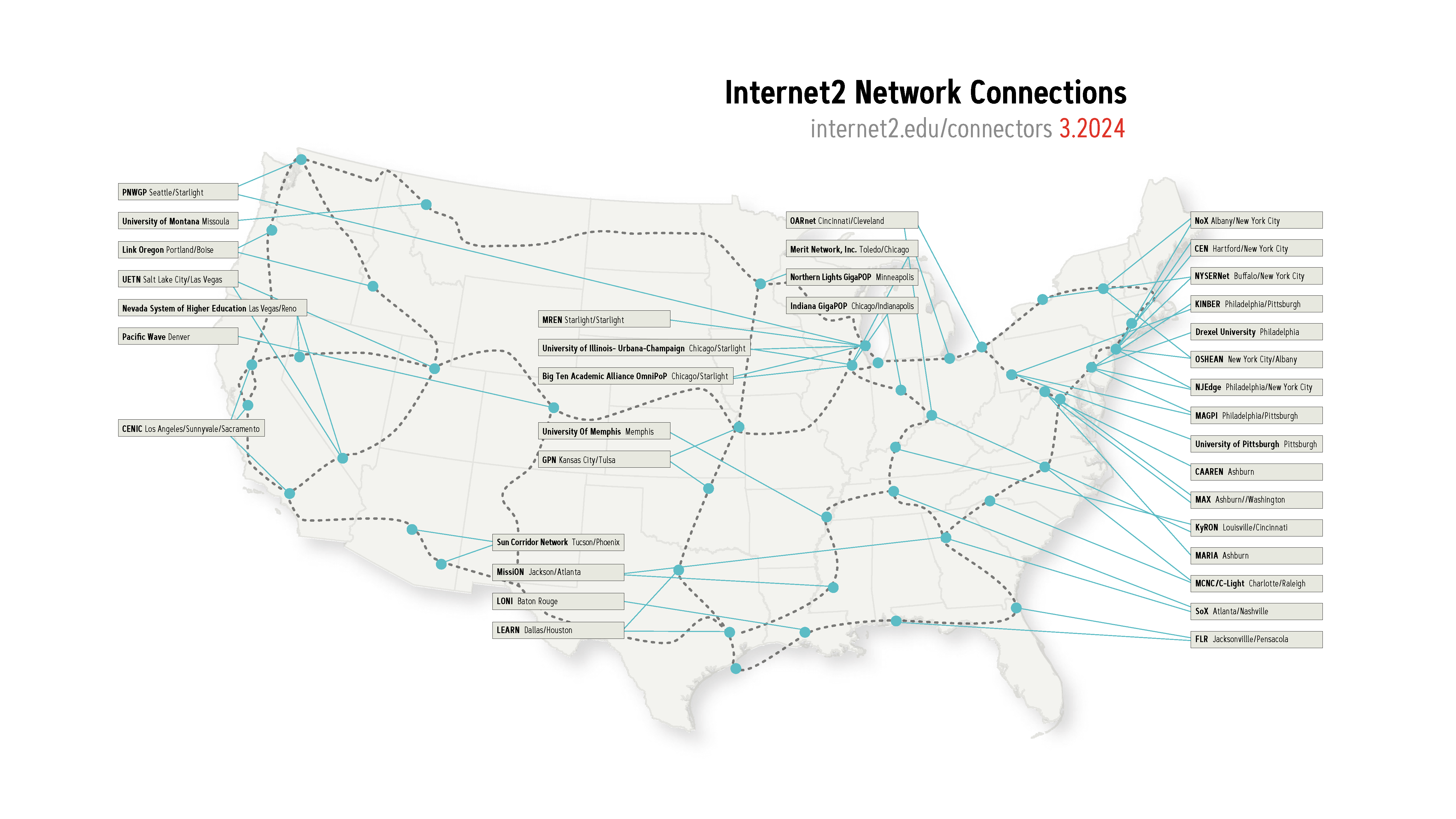
Well, Internet2 is not actually a sequel, and it’s not a new version of the internet we all use every day. It’s an organization dedicated to delivering technical solutions and dedicated, high speed connectivity to institutions—ranging from the Smithsonian to Harvard and 330 other colleges, universities, regional research and education networks, nonprofit and government organizations, and more—who are working to solve today’s most pressing issues.

And today, Backblaze joined the Internet2 community to help further their mission. Here’s what that means:

  • First and foremost, the Backblaze Storage Cloud now connects to Internet2’s network as part of the Internet2 Peer Exchange (I2PX) program. This means that members of Internet2 can now move data into and out of Backblaze’s US-West and US-East regions at incredibly high speeds.
  • Second, Backblaze also completed the Internet2 Cloud Scorecard to offer research and educational institutions relevant details about Backblaze’s security, compliance, and technology specifications, making it easier to assess and procure our solutions.

Hundreds of institutions in the higher education and research space already use Backblaze for storing and using their data and protecting their endpoints. However, many others require data transmission via Internet2 for new cloud solutions. For these folks, Backblaze’s participation in Internet2’s community and I2PX program provides secure data storage with less latency and a lower cost for their data needs.

What type of data are we talking about? Think genetic sequencing records, billions of vector data points to help model and forecast weather events, or images of particle collisions at the subatomic level! 

The Backblaze team is incredibly excited to take this step forward in serving the different use cases that Internet2 supports. And of course, in addition to being a part of the Internet2 community, we’re always excited to add more high-quality peering relationships to our wider network (and to share some stats about it, too) . 

How big is the Internet2 network? Take a look below.

Now, let’s dig into how Internet2 creates high speed data transfer pathways, and how it will impact traffic here at Backblaze.

Our Connection

The diagram below gives you an idea of what the data path looks like for someone on the left with direct connectivity to Internet2 or access via a regional provider reaching the Backblaze US-West or US-East regions.

The entities on the left could exist locally in California or as far as the U.S. East Coast. At any source location, the traffic will transport the Internet2 network and then enter our network in our common peering points in San Jose, CA and Reston, VA.

Turning Up The Peering Session

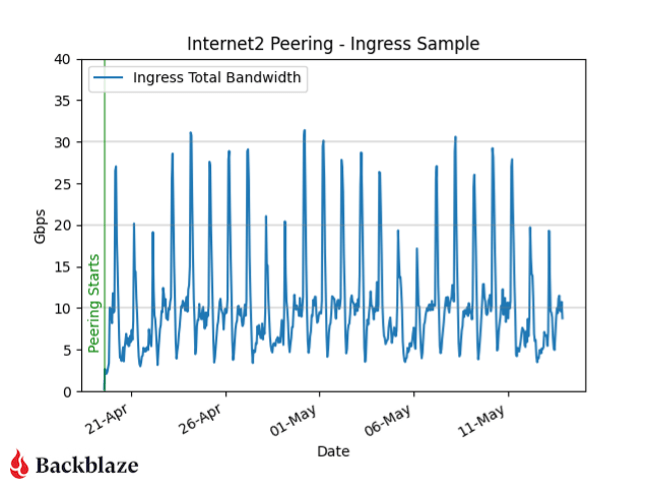
Below is a chart of ingress traffic that was once reaching us over the public internet and is now taking the preferred path over Internet2. As soon as we established peering we started to receive a few gigabits per second of traffic, with large spikes occurring overnight.

Whenever we add a new service or peer, the flow of information in our network changes. This latest addition creates more interesting traffic patterns for our Network Engineering team to profile, monitor, and capacity plan for.

An Example of How that Speed Is Used: Moving Scientific Data

If you’re a scientist in Texas and want to send your 50TB research set quickly and reliably to a partner in California, you might only have a commercial connection to the internet. This could be a 1Gbps or smaller connection, and even that could have data transfer limits on each month—not ideal. Our 50TB example dataset would take over 4.6 days to complete and use 100% of the available bandwidth if we were limited to 1Gbps (assuming perfect conditions and no latency).

The Internet2 network is built with capacity in mind. With backbone links up to 400Gbps, our example dataset would transfer in 16.7 minutes. Now, there are other limitations that will impede you from being able to reach that rate (hard drive read speed, local Internet2 connection speed, and distance/latency factors), but this example gives you an idea of how much faster the Internet2 network can be over vanilla commercial connections that might be available to a local university, college, or other research institution.

Conclusion

We’re very excited to be joining the Internet2 community and network, supporting industry best practices and enabling better connectivity to our storage platform. Hopefully, the next scientific breakthrough is sitting encrypted on our hard drives, and we can be part of the many, many people, tools, and organizations who helped it on its way from research to reality.  

For more information about Backblaze and Internet2, you can read our press release or check out the Internet2 member directory.  

The post Backblaze Plugs In to Internet2 appeared first on Backblaze Blog | Cloud Storage & Cloud Backup

Zero-Trust DNS

Post Syndicated from Bruce Schneier original https://www.schneier.com/blog/archives/2024/05/zero-trust-dns.html

Microsoft is working on a promising-looking protocol to lock down DNS.

ZTDNS aims to solve this decades-old problem by integrating the Windows DNS engine with the Windows Filtering Platform—the core component of the Windows Firewall—directly into client devices.

Jake Williams, VP of research and development at consultancy Hunter Strategy, said the union of these previously disparate engines would allow updates to be made to the Windows firewall on a per-domain name basis. The result, he said, is a mechanism that allows organizations to, in essence, tell clients “only use our DNS server, that uses TLS, and will only resolve certain domains.” Microsoft calls this DNS server or servers the “protective DNS server.”

By default, the firewall will deny resolutions to all domains except those enumerated in allow lists. A separate allow list will contain IP address subnets that clients need to run authorized software. Key to making this work at scale inside an organization with rapidly changing needs. Networking security expert Royce Williams (no relation to Jake Williams) called this a “sort of a bidirectional API for the firewall layer, so you can both trigger firewall actions (by input *to* the firewall), and trigger external actions based on firewall state (output *from* the firewall). So instead of having to reinvent the firewall wheel if you are an AV vendor or whatever, you just hook into WFP.”

Case Study: Monitoring Railway Infrastructure for Infrabel

Post Syndicated from Arturs Lontons original https://blog.zabbix.com/case-study-monitoring-railway-infrastructure-for-infrabel/28035/

Infrabel is a government-owned public limited company that builds, owns, maintains, and upgrades the Belgian railway network, makes its capacity available to railway operator companies, and handles train traffic control. Headquartered in Brussels, Infrabel employs over 9,000 people and manages 3,602 kilometers of rail lines.

The challenge

Infrabel needed a monitoring solution that was flexible enough to manage not only infrastructure, but also OS level metrics, data centers, service and application states, and the availability of railway infrastructure components.

The solution

To begin with, Zabbix agents are deployed on railway station screens and broadcasting systems. This is possible because under the hood these pieces of hardware they run Debian OS, which means they can be monitored on the OS level by Zabbix agents right out of the box with our official templates.

This can be very easily automated together with low level discovery, autoregistration, or network discovery. Devices can be pinged from Zabbix proxies or Zabbix servers to check if they are available. If they are unavailable, Zabbix sends a notification, after which an engineer either restores the network connectivity or replaces the hardware.

In addition, Infrabel also uses Zabbix to retrieve and monitor data collected from ActiveMQ. This is where a combination of custom bash scripts and Zabbix sender is used, so the required data (also related to the railway infrastructure and data centre, hardware, and software) is retrieved from ActiveMQ via Bash script, then forwarded to Zabbix sender via a wrapper script, sent to the Zabbix server or proxy, stored and analyzed in Zabbix, and acted upon if required.

The results

Infrabel found that they could get the most out of Zabbix by integrating it with a third-party ticketing system they were already using. The integration itself is simple – when Zabbix generates a problem, the Zabbix API is then used to retrieve the problems related to a particular set of triggers that need to be forwarded to this third-party system.

These alerts are then forwarded via API to whatever system Infrabel requires – Zabbix has a variety of integrations available right out-of-the-box using web hooks, including Slack, JIRA, Microsoft Teams, and many others. Messengers can also be used with Zabbix, but Infrabel has opted to use Zabbix API for their custom ticketing solution.

In conclusion

Infrabel is the perfect example of how the flexibility of Zabbix allows it to adapt to any industry or need. The possibility to use Zabbix API, web hooks, or a combination of both was a game-changer for Infrabel – just as it could be for any customer in any industry.

You can learn more about what we can do for customers across a variety of industries by visiting our website or requesting a demo.

The post Case Study: Monitoring Railway Infrastructure for Infrabel appeared first on Zabbix Blog.

Симаф, която иска да учи и да стане лекарка

Post Syndicated from Надежда Цекулова original https://www.toest.bg/simaf-interview/

Симаф, която иска да учи и да стане лекарка

Симаф е на 12, от Сирия. Тя е дете бежанец и от юли миналата година живее в Регистрационно-приемателния център на Държавната агенция за бежанците в Харманли. Пристигнала е в България с леля си Лейля, но според българското законодателство леля ѝ не може да бъде нейна настойничка и за системата Симаф е „непридружено непълнолетно лице“. 

Като всяко дете под 16 години, търсещо закрила в страната ни, Симаф подлежи на задължително обучение в училище и органите на ДАБ подават името ѝ към образователната система. Малцина от непридружените деца обаче наистина тръгват на училище. Властите казват, че децата не са мотивирани, защото плановете им най-често не са да останат в България, а някои никога не са ходили на училище в живота си. 

Разговаряме със Симаф и Лейля за опита им с българското училище, но този разговор е неразделен от разговора за това какво е да си бежанец в България. Срещам се с тях в току-що ремонтираната с помощта на „УНИЦЕФ България“ сграда в бежанския център в Харманли, която ще функционира като „сигурна зона“ – обособен сектор с по-високо ниво на сигурност, в който ще бъдат настанявани децата бежанци, попаднали в страната ни сами. 

Симаф и Лейля не могат да коментират доколко българското образование е подготвено да посрещне деца като Симаф – които не знаят езика, имат малка или никаква образователна подготовка, живеят в много трудни битови условия и несигурност за бъдещето и нямат никаква подкрепа. Те могат само да ни разкажат за това, с което се сблъскват. Изводите ще трябва да си направим сами. 

В какъв момент ви намирам?

Лейля: Добре сме, слава богу. Вече повече от осем месеца сме тук, текат процедури. Настанени сме в семейния сектор. Там е по-спокойно, но тук (в сигурната зона – б.а.) е станало много хубаво, несравнимо е с другите сгради в лагера. 

Извън битовизмите е доста трудно. Семейството на Симаф все още е в Турция, близо до границата със Сирия. Да, аз съм ѝ леля, но тя има нужда от родителите си и понякога ѝ е много тежко.

Как стигнахте до България?

Лейля: Като всички – платихме на трафиканти. В началото искахме да тръгне цялото семейство, но се оказа много скъпо, затова тръгнах аз и взех с мен най-голямото дете – Симаф. Пътувахме през Турция, тук сме от миналото лято и сега чакаме процедурата за събиране със семейството (след като получат бежански статут, децата бежанци имат законно право да „изтеглят“ родителите си и непълнолетните си братя и сестри – б.а.). Симаф вече ходи на училище. 

Искам да ви помоля да поговорим малко за опита ви с българското училище. Симаф, откога ходиш на българско училище?

Симаф: Малко след като пристигнахме в България миналата година, тук започна учебната година. Записаха ме в училище. Тогава в лагера имаше много деца, които ходеха на училище, и ми беше приятно да съм с тях. Освен това ходехме заедно до училището и обратно и беше лесно. След това обаче всички получиха бежански статут и тръгнаха нанякъде. Останах сама и стана трудно. Не успявам да ходя всеки ден. 

Лейля: Училището е далеч, а трябва да стигнем до него пеша. Аз трябва да я заведа, после да се върна в лагера, след това да отида да я взема и пак да се върнем дотук. Тя е дете, не може да се придвижва сама, а за мен е много изморително, не всеки път успявам. Но иначе учителката на Симаф казва много хубави неща – че бързо се адаптирала, че децата ѝ помагат, а тя много бързо учи. 

В кой клас си?

Симаф: В трети.

В Сирия ходила ли си на училище?

Симаф: Не. 

Звучи доста трудно човек да тръгне на училище директно в трети клас, особено като не знае езика. Как учиш български език?

Лейля: В лагера има уроци, тя ги посещава. Като цяло много разчитаме на заниманията, които организират периодично в лагера, защото навън е много трудно да я водя. Няма транспорт, навсякъде трябва да стигнем пеша, а не знаем езика, не познаваме града… Тук я занимаваха с български и с математика, тя ходи с удоволствие.

Симаф: Когато тръгнах на училище, имаше едно момиче от Сирия в първи клас. Заедно с нея научих българската азбука, буквите. Тя вече замина, но аз се научих да пиша и да чета. Сега мога да чета на български език, но не разбирам това, което чета. 

В лагера идват Иванка и Катя, които ни занимава с различни неща. При тях също учим и много обичам да ходя.

А как учиш в училище? Как се справяте двете с учителката, когато тя трябва да ти обясни някой урок? 

Симаф: Някои неща разбирам, за някои другите деца ми помагат. Имаме в класа деца, които говорят турски. Те ми обясняват каквото не разбирам.

Превеждат ти какво обяснява учителката? 

Симаф: Да.

Освен децата има ли кой да помага на теб и учителката да се разбирате, когато нещо не е ясно?

Симаф: Не.

А как се справяш с другите предмети, в които учите – за миналото, за природата, за различни неща от света?

Симаф: Не успявам. В тези часове просто стоя и гледам през прозореца, нищо не разбирам. Най-много обичам математиката и рисуването. 

А на какъв език говориш със съучениците си?

Симаф: Малко на турски, малко на български. Вече знам някои неща на български. Но ако знаех по-добре езика, щях повече да обичам да ходя на училище, защото щях да мога да си говоря повече с децата. Сега в училище няма никой друг от Сирия, само аз съм. 

Лейля: Забелязах, че когато има други деца, с които да ходи на училище и да си помагат, Симаф отива с повече желание, учи повече, по-бързо напредва. Докато ходеха повече деца от лагера, изобщо не можех да я отделя от тетрадките, казвам ѝ: „Хайде, сега ще направиш само тази страница“, а тя ми отговаря: „Не, искам още да уча.“ Но сега позагуби ентусиазъм, защото няма с кого да споделя ученето. Чака семейството си, чака брат си и сестра си. Разказва ми как ще ходят заедно на училище и тя ще им помага. 

Симаф: И ще им казвам какво трябва и какво не трябва да правят (смее се). 

Имаш ли приятели в клас?

Симаф: Да, имам.

Интересно ми е как се разбирате, какви общи теми намирате… В България има хора, които не знаят нищо за децата от Сирия и се притесняват как те могат да учат в българско училище. Затова ми се иска да разкажеш.

Симаф: Децата също не знаеха много за нас. Например ме питаха къде живеем тук, и аз им казах, че живеем в лагера. А те си мислеха, че живеем в гората! Разказах им за лагера и че децата от Сирия, които те срещат в града, всичките живеят в лагера. 

А случвало ли се е да говорите с тях или с учителката за Сирия?

Симаф: Не много. 

Лейля: В началото я бяха питали къде е семейството ѝ. Когато стана ясно, че е още в Сирия, никой повече нищо не я попита. 

Може би са забелязали, че това я натъжава.

Лейля: На нея ѝ е много трудно… В момента тече процедурата за събиране на семейството. И чакаме, не знаем колко време ще отнеме всичко. За едно дете осем месеца без родители са много време. Опитвам се да я успокоявам, но неяснотата много тежи. Всеки ден казвам: „Не си сама, аз съм тук. Може би утре ще имаме новини.“ Правим планове да се устроим някак, когато пристигнат майка ѝ, баща ѝ, братчето и сестричката ѝ, да потърсим квартира, работа… Иска ни се да останем в България. 

Мислили ли сте дали ще останете в Харманли, дали ще търсите по-голям град, изобщо как си представяте бъдещето? 

Симаф: Аз искам да продължа да ходя на училище, защото искам да стана лекарка.

Лейля: Гледала съм животни и ми се иска да се занимавам пак със същото. Бащата на Симаф, моят брат, е шивач. Представям си, че бихме могли да гледаме животни и тук, така че по-скоро бихме живели на село. В Сирия имахме глинена пещ в двора, в нея се приготвят някои много вкусни наши традиционни ястия. Мечтата ми е да мога да си направя такава на мястото, където се устроя да живея.

Introducing classroom management to the Code Editor

Post Syndicated from Phil Howell original https://www.raspberrypi.org/blog/code-editor-classroom-management/

I’m excited to announce that we’re developing a new set of Code Editor features to help school teachers run text-based coding lessons with their students.

Secondary school age learners in a computing classroom.

New Code Editor features for teaching

Last year we released our free Code Editor and made it available as an open source project. Right now we’re developing a new set of features to help schools use the Editor to run text-based coding lessons online and in-person.

The new features will enable educators to create coding activities in the Code Editor, share them with their students, and leave feedback directly on each student’s work. In a simple and easy-to-use interface, educators will be able to give students access, group them into classes within a school account, and quickly help with resetting forgotten passwords.

Example Code Editor feedback screen from an early prototype

We’re adding these teaching features to the Code Editor because one of the key problems we’ve seen educators face over the last few months has been the lack of an ideal tool to teach text-based coding in the classroom. There are some options available, but they can be cost-prohibitive for schools and educators. Our mission is to support young people to realise their full potential through the power of computing, and we believe that to tackle educational disadvantage, we need to offer high-quality tools and make them as accessible as possible. This is why we’ll offer the Code Editor and all its features to educators and students for free, forever.

A learner and educator at a laptop.

Alongside the new classroom management features, we’re also working on improved Python library support for the Code Editor, so that you and your students can get more creative and use the Editor for more advanced topics. We continue to support HTML, CSS, and JavaScript in the Editor too, so you can set website development tasks in the classroom.

Two learners at a laptop in a computing classroom.

Educators have already been incredibly generous in their time and feedback to help us design these new Code Editor features, and they’ve told us they’re excited to see the upcoming developments. Pete Dring, Head of Computing at Fulford School, participated in our user research and said on LinkedIn: “The class management and feedback features they’re working on at the moment look really promising.” Lee Willis, Head of ICT and Computing at Newcastle High School for Girls, also commented on the Code Editor: “We have used it and love it, the fact that it is both for HTML/CSS and then Python is great as the students have a one-stop shop for IDEs.”

Our commitment to you

  • Free forever: We will always provide the Code Editor and all of its features to educators and students for free.
  • A safe environment: Accounts for education are designed to be safe for students aged 9 and up, with safeguarding front and centre.
  • Privacy first: Student data collection is minimised and all collected data is handled with the utmost care, in compliance with GDPR and the ICO Children’s Code.
  • Best-practice pedagogy: We’ll always build with education and learning in mind, backed by our leading computing education research.
  • Community-led: We value and seek out feedback from the computing education community so that we can continue working to make the Code Editor even better for teachers and students.

Get started

We’re working to have the Code Editor’s new teaching features ready later this year. We’ll launch the setup journey sooner, so that you can pre-register for your school account as we continue to work on these features.

Before then, you can complete this short form to keep up to date with progress on these new features or to get involved in user testing.

A female computing educator with three female students at laptops in a classroom.

The Code Editor is already being used by thousands of people each month. If you’d like to try it, you can get started writing code right in your browser today, with zero setup.

The post Introducing classroom management to the Code Editor appeared first on Raspberry Pi Foundation.

Минало и бъдеще на електронното управление

Post Syndicated from Bozho original https://blog.bozho.net/blog/4250

С електронно управление се занимавам отдавна, като по тази причина ще си позволява да направя един обзор на миналото, настоящето и бъдещето му.

Електронното управление има няколко компонента – „хардуер и мрежи“, „политики и процеси“, “информационни системи, регистри и данни”. В миналото, политиката и процесите са били част от Министерството на държавната администрация и административната реформа, а впоследствие – дирекция в Министерство на транспорта, информационните технологии и съобщенията (МТИТС), мрежите са били последователно в Държавна агенция за информационни технологии и съобщения и в Изпълнителна агенция „Електронни съобщителни мрежи и информационни системи“ към МТИТС, а “информационните системи, регистрите и данните” – разпръснати по отделните министерства, без много обща политика, като изключим неща като оперативна съвместимост и администриране на някои централизирани информационни системи (в МТИТС и ИА ЕСМИС).

През 2008 г. е приет Закона за електронното управление, който се сблъсква с това, че никоя администрация не го прилага, защото “не работи по него” и остава една декларация за това как трябва да бъдат нещата, както и основание да бъдат изградени няколко централизирани системи и регистри, които също не заработват на практика. В този период, като софтуерен инженер, работих по един от малките под-проекти за електронни услуги и добих първите представи “защо няма електронно управление” и “как може да има”.

Реформата от 2016 г.

В този момент започна моето официално участие в процеса, когато през 2015 г. станах съветник на вицепремиера с ресор „административна реформа“ Румяна Бъчварова.

Тогава подготвихме мащабно изменение в Закона за електронното управление и няколко свързани с него закони, като събрахме „парчетата“ в една нова Държавна агенция „Електронно управление“ (ДАЕУ), на която дадохме значителни правомощия (в т.ч. задължителни разпореждания, административни санкции на държавни служители за неспазване на закона, проектен контрол, в т.ч. за информационните системи и регистрите, бюджетен контрол на разходите за информационни и комуникационни технологии (ИКТ), отворени данни и др.)

Със законовите и подзаконовите промени, която подготвихме и прокарахме тогава, създадохме реална възможност за т.нар. „еднократно събиране на данни“, която, в комбинация с правомощията на агенцията, да доведе до едно от най-важните неща в електронното управление – администрацията да събира служебно данни, вместо да изисква тяхното доказване с удостоверения, които гражданите да разнасят. До 2021 г. това даде само частичен резултат, като само някои удостоверения бяха заменени от справки, и се очерта един друг проблем – че специалните закони, по които работят администрациите, продължават да изискват удостоверения и има спор дали те могат да отпаднат. Този проблем го решихме с измененията, които подготвихме, докато аз бях министър и приехме през 2023 г., така че вече няма оправдания за отказ от отпадане на удостоверения.

Създадохме и концепцията за “държавен облак”, където да се консолидира необходимия хардуер (със съответните системи за неговото управление), вместо всяка администрация сама да си прави “мини-центърчета за данни” (или по-често – “сървъри в килера”), които не отговарят на нужните стандарти и не могат да постигнат икономии от мащаба.

Единен системен оператор и преминаване към „системна интеграция“

Другата важна част от измененията през 2016 г. беше и създаването на Държавно предприятие „Единен системен оператор“ (ДП ЕСО), като в закона бяха разписани детайлно услугите, които то ще предоставя на администрациите – всички свързани с подпомагане на развитието на електронното управление и използването на ИКТ. Идеята беше Информационно обслужване АД да бъде трансформирано в такова държавно предприятие (напр. чрез апорт на активи и преназначаване на служители), като така да се реши проблема с директното възлагане по каталог на услуги (чрез вменяване на публични функции) не свързания с това проблем с малкия процент частни акционери в дружеството. До 2019 г. това не се случи и ДП ЕСО не беше създадено. В този период, в рамките на малко повече от година, стана пробивът в НАП и сривът в Търговския регистър, и правителството на ГЕРБ „на пожар“ прокара една поправка в закона, без тя да е минала обществено обсъждане, и малко отвъд ръба на съгласувателните правила на Министерския съвет – цялата глава от закона за ДП ЕСО беше изтрита и беше заменена с един член 7с и един параграф 45, според които Информационно обслужване извършва системна интеграция за администрации, определени с решение на Министерски съвет. Тогава, нарочно или не, бяха изтрити разпоредбите за прозрачност както на държавното предприятие, така и на самата държавна агенция (ДАЕУ). Отпаднала беше и концепцията за публичен каталог на услугите, приет от Министерски съвет, с ясна стойност, както и други гаранции, които бяхме заложили за да предотвратим свръхконцентрацията на неформална власт в ДП ЕСО чрез системите, които оперира.

Така възлагането на Информационно обслужване става не по реда на Закона за обществените поръчки, а е изключение от него. Спорно е дали това изключение е в съответствие с директивата за обществените поръчки (т.е. дали минава за „изключително право“) или е скрито допълнително изключение, но така или иначе, то дава гъвкавост да се възлагат дейности на Информационно обслужване директно, от определен кръг администрации. От една страна, тези администрации са малко на брой (варират през годините, но са около 20), но пък в тях е концентрирана голяма част от ключовите системи (в което има логика) и голяма част от разходите за ИКТ – това са НАП, Митници, Агенция по вписванията, ГРАО, Кадастъра, Министерство на здравеопазването, НЗОК. Възлагането става по реда на едно малко известно решение на Министерския съвет – 481 от 2020 г.

И тогава, и след това, съм критикувал тази промяна не защото целите, които тя опитва да постигне не са разумни – държавата да има вътрешен капацитет за управление на информационните технологии в най-ключовите си структури, а защото законовата уредба е много постна и отваря вратата както за злоупотреби, така и за спекулации за такива злоупотреби (когато тях ги няма). През 2021 г. (преди да стана министър) написах публикация, според която „Все пак Информационно обслужване е важен инструмент за държавата“. И поради това, за краткия период, в който бях министър, възложих анализ на практиките в други европейски държави и на база на него започнахме подготовка на законови промени, които да адресират дефицитите и да максимизират ползите от наличието на дружество като Информационно обслужване.

В първите години на новия режим, свързан със „системната интеграция“ се наблюдаваха добри резултати – напр. беше изградена, след години забавяне, Националната здравноинформационна система, сигурността в НАП се повиши, а в Търговския регистър имаше стабилизация, което не беше неочаквано, тъй като в Информационно обслужване работят много добри експерти (и това е експертната ми оценка, а не политически коментар). Започнаха обаче да се усещат и някои дефицити – много от възложителите се оплакват от бавно и не особено приятелско обслужване, от невъзможност да постигнат своите цели, защото ИО мисли друго, вкл. от откази за предоставяне на определени услуги в последния момент.

Информационно обслужване често превъзлага възложеното му (все пак – по реда на Закона за обществените поръчки в повечето случаи), като това има както позитивни ефекти (по линия на „ефективно управление на проекти“ и по линия на ограничаване на дребната корупция по отделните структури) така и негативни (превръщайки ИО в „гара разпределителна“ и повишавайки корупционния риск). Един от индикаторите за последното е големият процент (пре)възложени поръчки, за които има само един кандидат.

Министерство на електронното управление

През 2021 г. (на практика през февруари 2022 г.) създадохме Министерство на електронното управление, като целта беше то да надгради Държавна агенция „Електронно управление“, като качи профила на тези политики – те вече имаха място на масата на Министерския съвет, в пряк и преносен смисъл. Министерството на електронното управление, със структурите към него, трябва да води дигитализацията в цялата администрация, да осигурява споделени ресурси (облак, мрежи, защитен интернет възел), споделени услуги и хоризонтални системи за цялото електронно управление (сигурно връчване, електронна идентификация, междурегистров обмен и др.)

Смятам, че създаването на министерството беше важна стъпка за електронното управление – то вече е централен политически въпрос, а не поредната итерация на разместване на дирекции и агенции. А това дава устойчивост и тежест. И макар и за кратко, мисля, че поне по време на моя мандат постигнахме немалко резултати.

Инфраструктурната част („мрежи и хардуер“) преместихме в изпълнителна агенция към министерството, като след първата стъпка (механично преливане на хора от ДАЕУ) трябваше да последва стора стъпка – кадрова реформа, защото с наличните човешки ресурси там не може да се обслужва ефективно държавния облак, мрежа и другите споделени ресурси. Такава не се случи нито в служебния кабинет, нито след това при министър Йоловски, макар че имаше ясна концепция за нея. Недостатъчният капацитет в изпълнителната агенция създава аргументи за прехвърляне на дейности към Информационно обслужване, но има аргументи и срещу това – че и капацитет на Информационно обслужване не е достатъчен (според техните настоящи възложители), че се създава свръхцентрализация, от която няма нужда, но носи рискове; че се възлагат твърде много основни функции на търговско дружество; че (поне до скоро) нямаше необходимото ниво на достъп до класифицирана информация.

Тук следва да се отбележи, че в периода 2017-2020 г, ДАЕУ изгражда държавната облачна инфраструктура (държавния облак), като решава това да бъде с класифицирани процедури, вероятно защото по исторически причини тези структури са имали и функции свързани с отбраната и националната сигурност, и съответно в тях работят много военни. Това обаче води след себе си доста особености и усложнения за бъдещи проекти и нужда от поетапно декласифициране на елементи от него – нещо, което бях поискал като министър както за облака, така и за държавната мрежа, но след като завършихме първия етап от трансформацията през май 2022 г., нямах време да довърша и тази задача (гласуваха ни оставките през юни 2022 г.).

Не на последно място, в министерството преместихме и дирекция “Информационни технологии” (от Министерството на транспорта и съобщенията), която се занимава с широк спектър от политки, като развитие на информационното общество, дигитални умения, нови технологии, координиране на европейските политики в сферата на информационните технологии и др. Този компонент дава цялостния облик на министерството като “електронно министерство”.

Киберсигурност

Паралелно на въпросите с електронното управление и инфраструктурата за него, все по-важна тема е киберсигурността. Със Закона за киберсигурност, приет през 2019 г, тя е споделена между ДАЕУ, впоследствие МЕУ и ДАНС, по начин, който е извън обхвата на тази публикация. Информационно обслужване пък е доставчик на услуги по киберсигурност на своите възложители. В МЕУ и изпълнителната агенция към него има редица оперативни и координационни звена, които на теория имат важна роля за киберсигурността, но поради липсата на достатъчно хора, често само препращат имейли. С това не омаловажавам усилията на няколкото колеги, които опитват да създадат работещ център за оперативно наблюдение, но поради неслучилата се цялостна реформа в агенцията, те не са успешни.

Тласък на развитието на киберсигурноста трябваше да дадат мерките, приети на секретно заседание на съвета по киберсигурност, което свиках два месеца след началото на войната. Те дадоха частичен резултат, но поради политическата нестабилност и липсата на реформи в изпълнителната агенция, не постигнаха всички заложени цели. Поради тази причина, дейности, свързани с киберсигурността, през 2023 г. изглеждаха възможни за възлагане на Информационно обслужване (което в очите на някои хора е като автобус от градския транспорт – „винаги има място за обслужване на още една администрация, с още услуги“), но това отново се сблъсква с дилемата „свръхцентрализация срещу икономии от мащаба“, както и с наличния капацитет. Според кореспонденция с ДАНС, която получих (некласифицирана), ДАНС са дали уклончиво мнение за прехвърлянето на функции към ИО – именно защото няма прост и кратък отговор.

Предстоящите въпроси пред киберсигурността са как тя да бъде структурирана ефективно, дали националният SOC (security operations center) да бъде част от администрацията или да бъде възложен на ИО, как да се намерят достатъчно експерти и да им се създаде достатъчно добра среда за работа, как най-ефективно да взаимодействат различните звена (CERT, НЕРИКС, НКЦ и др.), дали да се създаде агенция за киберсигурност и какви функции да има тя (вкл. за гореспоменатия национален SOC).

Електронна идентификация

Електронната идентификация е средството, с което всеки ще може да заявява електронни услуги. В Естония това започва като „чип в личната карта“, но вече по-популярен носител на идентификацията е мобилният телефон. През 2016 г. това беше друга ключова реформа – приемане на Закон за електронната идентификация и подготовка на техническата спецификация за нея (и в двете имат основно участие). За съжаление, МВР направи почти всички възможни грешки по пътя (писал съм за това), поради което при закон, приет през 2016 г, към май 2024 г все още резултат няма.

В началото на 2022 г. все още работата по проекта на МВР не беше стартирала, защото се чакаше решение на съда в Люксембург дали МВР правилно прилага духа на директивата за обществените поръчки, така че, съобразявайки се с технологичния напредък и повишената сигурност на мобилните устройства, след обществено обсъждане, възложих на Информационно обслужване изграждането на мобилно приложение за електронна идентификация. Защо на Информационно обслужване – по две причини. Бързина на възлагане и изпълнение (имахме огромно забавяне за наваксване) и наличния експертен капацитет (ИО е доставчик на квалифицирани удостоверителни услуги и има нужната експертиза).

За съжаление, с известен саботаж от страна на МВР, и с липсата на активна подкрепа за проекта в служебния кабинет, работата по него спря, като в края на същата година МВР подписа договора за своя проект. Няма тук да влизам в детайли защо двата проекта не си противоречат, а се допълват, но в последната година и половина опитах да убедя МВР да използва разработеното по проекта за мобилно приложение – те отказаха. Тогава споделих публично притесненията си, че със спецификация от 2016 г. може и да не получим адекватен на 2024 г. резултат. МВР вече закъснява както с личните карти, така и със системата за електронна идентификация. Надявам се резултатът да може да адаптиран към настоящите реалности, включително към последните изменения в Закона за електронното управление, с които направихме възможно услуги да се заявяват без квалифициран електронен подпис, а само с електронна идентификация. МВР впоследствие възрази и срещу предложени от мен изменения в закона, с които да даде на МЕУ да оперира националната схема за електронна идентификация.

Докато МВР се „натутка“, Европейският съюз прие втори регламент за електронната идентификация и въведе „европейски портфейл за цифрова самоличност“. Разписал съм проект на изменение на Закона за електронната идентификация, с който да се създаде българския цифров портфейл, с който не просто да може да се идентифицираме онлайн, но и през който да правим всякакви справки и да заявяваме услуги.

Нов Закона за управление на информационните и комуникационните технологии в обществения сектор

Всичко описано по-горе подчертава основните проблеми – липса на достатъчно капацитет, липса на адекватна структура, неефективност на харченето, бавно и неадекватно възлагане и др. Смятам, че това може да се поправи с нов закон, чиято подготовка стартирах през 2022 г. и вече е в доста напреднал стадий – Закон за управление на информационните и комуникационни технологии в обществения сектор. Целта е с него да се уреди повече ефективност, предвидимост, фокус и прозрачност на възлагането, както на системния интегратор (ИО), така и на свободния пазар, вкл. чрез рамкови споразумения и отчитане на общата стойност на притежаване (т.нар. TCO), както правят много европейски държави; по-висока отчетност и контрол на дейността на системния интегратор; намиране на баланса между ефективност чрез „икономии от мащаба“ и ограничаване на рисковете от свръхцентрализация на управлението на ИКТ; по-добра вътрешна организация на работата в администрацията; използването на споделени услуги по утвърден каталог, вместо „всеки да се оправя поединично“; повече яснота по предоставянето на споделени ресурси (облак, мрежа и др.) от МЕУ; по-малко зависимости от един или друг доставчик; обособяване на отделна агенция за киберсигурност, която освен услуги по мониторинг и отговор на инциденти, да подпомага ГДБОП в разследването на киберпрестъпления; на разкачане на структурата и заплащането на ИТ експертите в двете агенции (инфраструктурата агенция и кибер агенцията) от общата структура в администрацията, за да има по-привлекателни условия за специалистите; организиране на централен орган за покупки на стандартен хардуер и софтуер, така че да се спестят както време, така и средства за най-стандартните неща.

Без такъв закон и без такива реформи, електронното управление ще продължи да се развива много бавно (и много скъпо), защото успехите ще се дължат не на работата на добре смазана машина, а на инцидентни политически проблясъци, кризисни мерки, без които не може, базово спазване на европейски задължения и на персонални постижения.

Знам, че в горните наблюдения и предложения всеки участник ще намери за какво да е недоволен – и системният интегратор, и частният сектор, и администрацията, и политическите ръководства на министерствата, и страничните наблюдатели, които имат силно мнение по някой въпрос. Но това е неизбежно – всяка една реформа оставя всички по малко недоволни днес, за да имаме по-добър резултат за всички след години.

Заключение

Електронното управление в частност, и цифровата трансформация в по-общ план, не са самоцел, а важен инструмент за ефективно управление, за удобство на гражданите, за прозрачност, за правене на политики на база на данни, за намаляване на корупцията. Те трябва да спрат да бъда нишова тема, от която разбират в дълбочина една шепа хора, и да се превърнат в добре осмислени процеси, системи, взаимовръзки, правила, подкрепени с политическо разбиране.

В последните парламенти приехме много изменения, с които дигитализираме различни процеси и регистри в администрацията, така че да отпада излишната хартия, а дигитализацията ѝ да стане по правилния начин. Но този подход не е достатъчно бърз и координиран – нужен е институционален “upgrade”.

Законът за електронното управление вече е уредил достатъчно добре „какво“ трябва да се случи, особено след последното му изменение миналата година. Предстои да отговорим на въпроса „как“. Един нов закон няма да реши всичко, но ще постави ясна рамка, в която да се вдигнат и оборотите, и качеството.

Материалът Минало и бъдеще на електронното управление е публикуван за пръв път на БЛОГодаря.