As our digital world becomes increasingly more complex, the importance of cybersecurity grows ever more critical. As a result, Cloudflare is proud to promote our commitment to the Cybersecurity and Infrastructure Security Agency (CISA)‘Secure by Design’pledge. The commitment is built around seven security goals, aimed at enhancing the safety of our products and delivering the most secure solutions to our customers.
Cloudflare’s commitment to the CISA pledge reflects our dedication to transparency and accountability to our customers, and to cybersecurity best practices. Furthermore, Cloudflare is committed to being a trusted partner by sharing our strategies to ensure the highest priority is placed on safeguarding our customers’ security.
Bug bounty VIP program
Cloudflare has successfully managed a public Vulnerability Disclosure Program (VDP) for years; our belief is that collaboration is the cornerstone of effective cybersecurity. We are excited to announce a major milestone in our journey to meet Goal #5 of the pledge: our program will now include a bug bounty VIP program in conjunction with our bug bounty public program.
Continuous investment in maturing our bug bounty program is a vital tool for the success of any security organization. By encouraging broader participation in vulnerability testing, we open the door to more diverse perspectives and expertise, ultimately leading to stronger, more resilient security measures. Additionally, the new VIP program will allow us greater flexibility in engaging security researchers on upcoming betas for Cloudflare products, and will allow us to award higher bounty payouts.
Our commitment to this effort underscores our belief that a safer Internet is achievable through shared responsibility and proactive engagement. The security team at Cloudflare is looking forward to implementing a more proactive approach to securing our products with the launch of the new bug bounty VIP program!
What is in scope for the new VIP program?
The new bug bounty VIP program is an exclusive hub for select security researchers who either have the specialized technical expertise in the niche areas Cloudflare is building products in (such as Cloudflare Workers) or have demonstrated a deep understanding of our products and platform by actively participating in the public program with meaningful security findings. As a VIP member, security researchers will have access to beta testing environments for Cloudflare products. This includes early access to our newest features and unannounced products before they go live.
The VIP program’s scope will be carefully modeled from Cloudflare’s product release roadmap. Security researchers will have the opportunity to influence Cloudflare’s product and security development before release. VIP program participants also have the option to participate in external/gray box penetration testing activities (Spot Checks) for higher bounties related to security findings for upcoming product releases or critical infrastructure and services.
The VIP program’s new & enhanced reward structure
We believe that exceptional contributions deserve exceptional rewards. As a result, we’ve restructured our bounty offerings for the VIP program with higher payouts. Recognizing the specialized skills and expertise required, VIP researchers will be eligible for significantly higher rewards.We have also introduced bonus rewards for high-impact findings, particularly those that address critical vulnerabilities in our beta projects through the aforementioned Spot Checks. To further incentivize meaningful contributions, security researchers in our public program will receive milestone bonuses and be invited to our VIP program based on the number and quality of their submissions over time.
VIP Program (Private)
Critical
High
Medium
Low
$10,000-15,000
$4,000-7,000
$1,000-3,000
$250-750
What outcomes are we driving with the new VIP program?
The VIP bug bounty program’s focus is not only finding and fixing bugs, but it’s also aimed at fostering a deeper, more impactful relationship with our security researchers. Moreover, these outcomes align well with the CISA Vulnerability Disclosure Policy (VDP) goal. By offering exclusive access to beta software and enhanced rewards, our goals are as follows:
Elevate security standards: VIP researchers focusing on the most critical assets allows for further hardening of the overall security posture of Cloudflare’s products and services.
Accelerate product development: Early identification of vulnerabilities allows the remediation of potential issues before they reach production, yielding faster, more secure, and more stable releases.
Foster innovation: Involving researchers in the development process creates an additional feedback loop that encourages innovative approaches to security challenges.
Encourage collaboration: The bug bounty team will encourage collaborative blog posts for select reports as a way to disseminate security learnings and build partnerships with researchers.
This is a great professional growth opportunity for anyone in the technical research space as it gives participants the ability to work on cutting-edge technology with complex challenges, and can provide future opportunities for career/skill development.
How does Cloudflare benefit from it?
The launch of the VIP program marks a new chapter in Cloudflare’s security journey. We are excited about the opportunity to partner more closely with our top security researchers to build safer products for customers. Together, we can achieve new heights in security excellence:
Stronger security: Security researchers with expertise in niche topics can help enhance Cloudflare’s defenses against emerging and novel threats.
Proactive risk management: The new VIP program provides Cloudflare an additional avenue to identify and mitigate risks early in the product release cycle, reducing the likelihood of future security incidents.
Reinforced trust: Our commitment to security is central to our customer relationships and the trust they place in Cloudflare; by continuously improving our security posture, we seek to preserve that trust.
How can you help?
If you are a software manufacturer, we encourage you to familiarize yourself with CISA’s ‘Secure by Design’ principles and create a plan to implement them in your company.
As an individual, we encourage you to participate in the Cloudflare bug bounty program and promote cybersecurity awareness in your community.
Stay tuned for more updates, and if you’re part of our public program, keep submitting those reports — you might just earn an invitation to join the VIP ranks! You can also find more updates on our blog, as we build our roadmap to meet all seven CISA Secure by Design pledge goals by May 2025!
Today we’re announcing the Dev Starter Pack, an alliance of innovative tools for developers to get started with discounts and free services. We’re also excited to share an update on our Workers Launchpad Program.
Creating from the ground up often means spending countless hours piecing together the right development stack, navigating different pricing models, and managing growing costs — all of which can take your focus away from what truly matters: building your product and growing your business.
Introducing Dev Starter Pack: the tools you need to start building your startup
Hey! Dani Grant here, one of the first PMs at Cloudflare and co-founder of Jam.dev. Ten years ago (during 2014’s Birthday Week), Cloudflare launched Universal SSL, making SSL free on the Internet for the first time, and in one night doubling the size of the encrypted web.
I was a college student back then, and I immediately became enraptured by Cloudflare’s mission: helping build a better Internet. As part of this mission, Cloudflare has developed powerful tools typically accessible only to Internet giants, oftentimes offering them for free to developers and individuals alike. Heck yeah! I joined Cloudflare in January 2015, and 5 years after that, co-founded a developer tool company called Jam, inspired by the impact that I saw building tools for developers could have while at Cloudflare.
It’s now 10 years later, and a lot has changed –– “software ate the world” and it’s now powering all aspects of our lives, from health to finances to how we work. It’s more important than ever to empower every developer with the best tools available, because the faster we build software, the sooner people’s experiences improve.
Today we’re thrilled to announce the Dev Starter Pack, an alliance of like-minded dev tool companies giving away their services for free, or heavily discounting them for developers who want to start companies and build the future.
Not only does this stack include all the tools you need to build a startup, it also includes all the tools you need to build AI-powered features. We believe that the next wave of startups will be AI-native, as AI becomes as ubiquitous as the electricity that powers the servers.
We haven’t even scratched the surface of what’s possible with AI, and we hope this launch gets developers closer to solving the challenges of building non-deterministic software.
If you’re a software engineer, and you want to build a project or a company and need an off the shelf stack of dev tools to get started, go to devstarterpack.io to start using all of these tools.
Each provider is offering developers a heavily discounted or even free plan to get started building. You can redeem these services by either using the special code “devstarterpack” or selecting “Dev Starter Pack” while applying to relevant programs.
We welcome more tools to join the alliance — this is just the beginning. If you are building a developer tool and would like to include your product in the Dev Starter Pack, let us know here, so we can include you.
What will you build?
We are very excited to see what you will build. Please share with us in Cloudflare’s Discord and community forum, so we can support you however it makes sense.
Software developers are changing the world, and we believe in providing support to help you make an even greater impact. If you’re looking for additional funding or support, check out Cloudflare’s Launchpad for developers turned founders building startups.
Introducing Workers Launchpad Cohort #4
Melissa and Chris from the Cloudflare for Startups team here. Our team is blown away by what customers are demonstrating on the Developer Platform. Just a few weeks ago, our Workers Launchpad Cohort #3 wrapped up. On Demo Day, customers demoed their applications built on Cloudflare, spanning AI, dev tools, IaaS, observability, SaaS, media, and beyond. We’re incredibly proud of Cohort #3 participants, and we look forward to their continued success with Cloudflare.
Following Demo Day of Workers Launchpad Cohort #3, we’ve been excited to receive a surge of new applications from startups around the world. These startups are pushing the boundaries of innovation, particularly in areas like observability, PaaS, AI, automation, e-commerce, and other industries. Many startups that applied this go-around demonstrated that they’ve built some great applications on Cloudflare, and today, we’re excited to announce the accepted participants for our upcoming Workers Launchpad Cohort #4.
Let’s take a look at what Cohort #4 participants are building in their own words:
The Cloudflare team is ecstatic to work with the amazing participants of Cohort #4. If you want to follow along on Cohort #4’s journey, be sure to follow @CloudflareDev on X and join our Developer Discord server.
Cloudflare Radar showcases global Internet traffic patterns, attack activity, and technology trends and insights. It is powered by data from Cloudflare’s global network, as well as aggregated and anonymized data from Cloudflare’s 1.1.1.1 public DNS Resolver, and is built on top of a rich, publicly accessible API. This API allows users to explore Radar data beyond the default set of visualizations, for example filtering by protocol, comparing metrics across multiple locations or autonomous systems, or examining trends over two different periods of time. However, not every user has the technical know-how to make a raw API query or process the JSON-formatted response.
Today, we are launching the Cloudflare Radar Data Explorer, which provides a simple Web-based interface to enable users to easily build more complex API queries, including comparisons and filters, and visualize the results. And as a complement to the Data Explorer, we are also launching an AI Assistant, which uses Cloudflare Workers AI to translate a user’s natural language statements or questions into the appropriate Radar API calls, the results of which are visualized in the Data Explorer. Below, we introduce the AI Assistant and Data Explorer, and also dig into how we used Cloudflare Developer Platform tools to build the AI Assistant.
Ask the AI Assistant
Sometimes, a user may know what they are looking for, but aren’t quite sure how to build the relevant API query by selecting from the available options and filters. (The sheer number may appear overwhelming.) In those cases, they can simply pose a question to the AI Assistant, like “Has there been an uptick in malicious email over the last week?” The AI Assistant makes a series of Workers AI and Radar API calls to retrieve the relevant data, which is visualized within seconds:
The AI Assistant pane is found on the right side of the page in desktop browsers, and appears when the user taps the “AI Assistant” button on a mobile browser. To use the AI Assistant, users just need to type their question into the “Ask me something” area at the bottom of the pane and submit it. A few sample queries are also displayed by default to provide examples of how and what to ask, and clicking on one submits it.
The submitted question is evaluated by the AI Assistant (more below on how that happens), and the resulting visualization is displayed in the Results section of the Data Explorer. In addition to the visualization of the results, the appropriate Data, Filter, and Compare options are selected in the Query section above the visualization, allowing the user to further tune or refine the results if necessary. The Keep current filters toggle within the AI Assistant pane allows users to build on the previous question. For example, with that toggle active, a user could ask “Traffic in the United States”, see the resultant graph, and then ask “Compare it with traffic in Mexico” to add Mexico’s data to the graph.
Building a query directly
For users that prefer a more hands-on approach, a wide variety of Radar datasets are available to explore, including traffic metrics, attacks, Internet quality, email security, and more. Once the user selects a dataset, the Breakdown By: dropdown is automatically populated with relevant options (if any), and Filter options are also dynamically populated. As the user selects additional options, the visualization in the Result section is automatically updated.
In addition to building the query of interest, Data Explorer also enables the user to compare the results, both against a specific date range and/or another location or autonomous system (AS). To compare results with the immediately previous period (the last seven days with the seven days before that, for instance), just toggle on the Previous period switch. Otherwise, clicking on the Date Range field brings up a calendar that enables the user to select a starting date — the corresponding date range is intelligently selected, based on the date range selected in the Filter section. To compare results across locations or ASNs, clicking on the “Location or ASN” field brings up a search box in which the user can enter a location (country/region) name, AS name, or AS number, with search results updating as the user types. Note that locations can be compared with other locations or ASes, and ASes can be compared with other ASes or locations. This enables a user, for example, to compare trends for their ISP with trends for their country.
Visualizing the results
Much of the value of Cloudflare Radar comes from its visualizations – the graphs, maps, and tables that illustrate the underlying data, and Data Explorer does not disappoint here. Depending on the dataset and filters selected, and the volume of data returned, results may be visualized in a time series graph, bar chart, treemap, or global choropleth map. The visualization type is determined automatically based on the contents of the API response. For example, the presence of countryalpha2 keys in the response means a choropleth map will be used, the presence of timestamps in the response means a line graph (“xychart”) should be shown, and more than 40 items in the response selects a treemap as the visualization type.
To illustrate the extended visualizations available in Data Explorer, the figure below is an expanded version of one that would normally be found on Radar’s Adoption & Usage page. The “standard” version of the graph plots the shares of the HTTP versions over the last seven days for the United States, as well as the summary share values. In this extended version of the graph generated in the Data Explorer, we compare data for the United States with HTTP version share data for AS701 (Verizon), for both the past seven days and the previous seven-day period. In addition to the comparisons plotted on the time series graph, the associated summary values are also compared in an accompanying bar chart. This comprehensive visualization makes comparisons easy.
For some combinations of datasets/filters/comparisons, time series graphs can get quite busy, with a significant number of lines being plotted. To isolate just a single line on the graph, double-click on the item in the legend. To add/remove additional lines back to/from the graph, single-click on the relevant legend item.
Similar to other visualizations on Radar, the resulting graphs or maps can be downloaded, copied, or embedded into another website or application. Simply click on the “Share” button above the visualization card to bring up the Share modal dialog. We hope to see these graphs shared in articles, blog posts, and presentations, and to see embedded visualizations with real-time data in your portals and operations centers!
Still want to use the API? No problem.
Although Data Explorer was designed to simplify the process of building, and viewing the results of, more complex API queries, we recognize that some users may still want to retrieve data directly from the API. To enable that, Data Explorer’s API section provides copyable API calls as a direct request URL and a cURL command. The raw data returned by the query is also available to copy or download as a JSON blob, for those users that want to save it locally, or paste it into another application for additional manipulation or analysis.
How we built the AI Assistant
Knowing all that AI is capable of these days, we thought that creating a system for an LLM to answer questions didn’t seem like an overly complex task. While there were some challenges, Cloudflare’s developer platform tools thankfully made it fairly straightforward.
LLM-assisted API querying
The main challenge we encountered in building the API Assistant was the large number of combinations of datasets and parameters that can potentially be visualized in the Data Explorer. There are around 100 API endpoints from which the data can be fetched, with most able to take multiple parameters.
There were a few potential approaches to getting started. One was to take a previously trained LLM and further train it with the API endpoint descriptions in order to have it return the output in the required structured format which would then be used to execute the API query. However, for the first version, we decided against this approach of fine-tuning, as we wanted to quickly test a few different models supported by Workers AI, and we wanted the flexibility to easily add or remove parameter combinations, as Data Explorer development was still under way. As such, we decided to start with prompt engineering, where all the endpoint-specific information is placed in the instructions sent to the LLM.
Putting the full detailed description of the API endpoints supported by the Data Explorer into the system prompt would be possible for an LLM with a larger context window (the number of tokens the model takes as input before generating output). Newer models are getting better with the needle in a haystack problem, which refers to the issue whereby LLMs do not retrieve information (the needle) equally well if it is placed in different positions within the long textual input (the haystack). However, it has been empirically shown that the position of information within the large context still matters. Additionally, many of the Radar API endpoints have quite similar descriptions, and putting all the descriptions in a single instruction could be more confusing for the model, and the processing time also increases with larger contexts. Based on this, we adopted the approach of having multiple inference calls to an LLM.
First, when the user enters a question, a Worker sends this question and a short general description of the available datasets to the LLM, asking it to determine the topic of the question. Then, based on the topic returned by the model, a system prompt is generated with the endpoint descriptions, including only those related to the topic. This prompt, along with the original question, is sent to the LLM asking it to select the appropriate endpoint and its specific parameters. At the same time, two parallel inference calls to the model are also made, one with the question and the system prompt related to the description of location parameters, and another with the description of time range parameters. Then, all three model outputs are put together and validated.
If the final output is a valid dataset and parameter combination, it is sent back to the Data Explorer, which executes the API query and displays the resulting visualization for the user. Different LLMs were tested for this task, and at the end, openhermes-2.5-mistral-7b, trained on code datasets, was selected as the best option. To give the model more context, not only is the user’s current question sent to the model, but the previous one and its response are as well, in case the next question asked by the user is related to the previous one. In addition, calls to the model are sent through Cloudflare’s AI Gateway, to allow for caching, rate limiting, and logging.
After the user is shown the result, they can indicate whether what was shown to them was useful or not by clicking the “thumbs up” or “thumbs down” icons in the response. This rating information is saved with the original question in D1, our serverless SQL database, so the results can be analyzed and applied to future AI Assistant improvements.
The full end-to-end data flow for the Cloudflare Radar AI Assistant is illustrated in the diagram below.
When the LLM doesn’t know the answer
In some cases, however, the LLM may not “know” the answer to the question posed by the user. If the model does not generate a valid final response, then the user is shown three alternative questions. The intent here is to guide the user into asking an answerable question — that is, a question that is answerable with data from Radar.
This is achieved using a previously compiled (static) list of various questions related to different Radar datasets. For each of these questions, their embedding is calculated using an embeddings model, and stored in our Vectorizevector database. “Embeddings” are numerical representations of textual data (vectors) capturing their semantic meaning and relationships, with similar text having vectors that are closer. When a user’s question does not generate a valid model response, the embedding of that question is calculated, and its vector is compared against all the stored vectors from the vector database, and the three most similar ones are selected. These three questions, determined to be similar to the user’s original question, are then shown to the user.
There are also cases when the LLM gives answers which do not correspond to what the user asked, as hallucinations are currently inevitable in LLMs, or when time durations are calculated inaccurately, as LLMs sometimes struggle with mathematical calculations. To help guard against this, AI Assistant responses are first validated against the API schema to confirm that the dataset and the parameter combination is valid. Additionally, Data Explorer dropdown options are automatically populated based on the AI Assistant’s response, and the chart titles are also automatically generated, so the user always knows exactly what data is shown in the visualization, even if it might not answer their actual question.
Looking ahead
We’re excited to enable more granular access to the rich datasets that currently power Cloudflare Radar. As we add new datasets in the future, such as DNS metrics, these will be available through Data Explorer and AI Assistant as well.
As noted above, Radar offers a predefined set of visualizations, and these serve as an excellent starting point for further exploration. We are adding links from each Radar visualization into Data Explorer, enabling users to further analyze the associated data to answer more specific questions. Clicking the “pie chart” icon next to a graph’s description brings up a Data Explorer page with the relevant metrics, options, and filters selected.
Correlating observations across two different metrics is another capability that we are also working on adding to Data Explorer. For example, if you are investigating an Internet disruption, you will be able to plot traffic trends and announced IP address space for a given country or autonomous system on the same graph to determine if both dropped concurrently.
But for now, use the Data Explorer and AI Assistant to go beyond what Cloudflare Radar offers, finding answers to your questions about what’s happening on the Internet. If you share Data Explorer visualizations on social media, be sure to tag us: @CloudflareRadar (X), noc.social/@cloudflareradar (Mastodon), and radar.cloudflare.com (Bluesky). You can also reach out on social media, or contact us via email, with suggestions for future Data Explorer and AI Assistant functionality.
Cloudflare launched our free tier at the same time our company launched — fourteen years ago, on September 27, 2010. Of course, a bit has changed since then — there are now millions of Internet properties behind Cloudflare. As we’ve grown in size and amassed millions of free customers, one of the questions we often get asked is: how can Cloudflare afford to do this at such scale?
Cloudflare always has, and always will, offer a generous free version for public-facing applications (Application Services), internal private networks and people (Cloudflare One), and developer tools (Developer Platform). Counterintuitively: our free service actually helps us keep our costs lower. Not only is it mission-aligned, our free tier is business-aligned. We want to make abundantly clear: our free plan is here to stay, and we reaffirmed that commitment this week with 15 releases across our product portfolio that make the Free plan even better.
Understanding our Cost of Goods Sold
To understand the economics of Free, you need to understand our Cost of Goods Sold (COGS). Cloudflare hasn’t outsourced its network — we built it ourselves, and it spans more than 330 cities. We design and ship our own hardware across the world, we interconnect with more than 12,500 networks, and we manage over 300 Tbps of network capacity. We even have a dedicated backbone that spans the globe.
There are three major costs of running our network, which together comprise about 80% of our COGS. First and largest is bandwidth: the traffic that traverses our network. Then there is hardware: the servers that process traffic. And third are colocation costs: the power and space at the data centers where we house our servers. There are other parts of COGS, too, like our SRE team that keeps the network running, and our payment processor fees, without which we couldn’t collect revenue.
To get traffic across the Internet for a network of our scale, we need a lot of bandwidth. Typically, a network like ours would pay third-party transit networks and Internet Service Providers (ISPs) to transmit data anywhere on the Internet. But there are thousands of ISPs that we don’t have to pay at all, and hundreds that also offer us space in their data center at no cost. How did we manage that? The surprising answer: Free.
How our Free services keep costs low
Imagine you run an ISP serving your local community. Your job is to connect your customers to the Internet. You notice that your customers are often visiting sites behind Cloudflare, which sits in front of roughly 20% of the web. You need to deliver those webpages and facilitate connections to the applications behind Cloudflare, but right now you have to pay a transit provider to reach them. Instead, you could choose to peer directly with Cloudflare and exchange traffic at no cost.
Cloudflare is one of the most peered networks in the world. We freely exchange traffic with thousands of ISPs, who in turn benefit because they can cut out a third-party transit provider to reach the millions of sites and applications behind Cloudflare.
Continuing with this hypothetical, if as an ISP, your customers pay for Internet connectivity based on data usage (a common model outside of Western Europe and the US), your revenue scales with data consumption. One simple way to increase data consumption? Make the Internet faster! Hosting Cloudflare’s servers in your facility, as close to your users as possible, reduces latency for millions of websites and apps. So it’s in your best interest to host Cloudflare’s servers in your data centers, too.
We have hundreds of ISP partnerships that look just like that. The value ISPs get from Cloudflare stems from the breadth of the web that sits behind Cloudflare, a number driven by our Free customers. This arrangement is a big part of why we have a free service, and is part of what enables us to continue to offer one. PS: If you really are an operator for a local ISP and don’t partner with us yet, please connect with us through our peering portal!
These days, we are at such a scale that the traffic our customers generate requires much more capacity than can fit within our ISP partners. To reliably serve our enterprise customers, we operate in multiple facilities in every major Internet hub city. And yet, the traffic patterns of our enterprise customers are typically very predictable. They usually follow a diurnal cycle, with peaks and troughs throughout a day. Enterprise customer traffic is prioritized and served as close to end users as possible, regardless of the time of day. But our Free customers use off-cycle headroom. That’s why we’re able to continue to offer unmetered bandwidth on the Free plan: we serve the traffic from across our network, wherever there is spare room. It might not have quite the same performance as our enterprise traffic, but it’s still reliable and fast.
There do have to be some rules for this to continue to work, however. Free traffic needs to remain a manageable proportion of our total traffic. To ensure that remains true, and that we can continue to offer unmetered traffic to Free customers at no cost, we have to be opinionated about what kind of traffic we serve for free. Our terms of service specify that large assets (like videos) are not supported on our Free plan. So we require that customers pushing large files and videos move onto one of our paid services, like Images and Stream.
Free customers help us build better products and grow our business
The benefits of our Free plan extend well beyond direct economics.
Our Free plan gives Cloudflare access to unique threat intelligence. A wide surface area exposes our network to diverse traffic and attacks that we wouldn’t otherwise see, often allowing us to identify potential security and reliability issues at the earliest stage. Like an immune system, we learn from these attacks and adapt to improve our products for all customers. This is a special competitive advantage. Visibility into attacks allows us to build products that no one else could.
Our Free customers help us do quality assurance (QA) quickly. Free customers are often the first to try new products and features. When we launch something new, we get signal immediately and at an incredible scale. We use that signal to swiftly address bugs and iterate on our products.
Offering a Free plan challenges us to build more intuitive products. Free customers represent a broad audience, from tech enthusiasts to those simply looking to secure their website or build an application. Building for a broad spectrum of users forces us to create more user-friendly tools for everyone.
Offering a Free service has other benefits, too. Some of our strongest customer advocates are folks that used our Free plan on their hobby projects before bringing Cloudflare with them to work. Some of them even end up working at Cloudflare!
Our free plan will keep getting better
Our Free offering is a flywheel that helps make Cloudflare’s products, team, and cost structure more efficient. We pay back these efficiencies by continuing to improve our free offerings. Just this week, we’ve announced 15 updates that make our Free plans even better:
All customers will benefit from the introduction of Zstandard compression, which improves web performance by compressing up to 42% faster than Brotli.
Free customer traffic is now more private as we roll out Encrypted Client Hello (ECH) which obfuscates the Server Name Identifier (SNI) during a TLS handshake.
All customers can store and query 3 days of logs from their Cloudflare Worker.
Cloudflare Image Optimization is now available for free to all Cloudflare customers.
We offer a Free plan out of more than goodwill — it is a core business differentiator that helps us build better products, drive growth, and keep costs low. And it helps us advance our mission. Building a better Internet is a collective effort. Today, more than 30 million domains, comprising some 20% of the web, sit behind Cloudflare. Our Free plan makes that portion of the web faster, more secure, and more efficient. Free is not just a commitment — it’s a cornerstone of our strategy.
We’ve been working on something new — a platform for running containers across Cloudflare’s network. We already use it in production for Workers AI, Workers Builds, Remote Browsing Isolation, and the Browser Rendering API. Today, we want to share an early look at how it’s built, why we built it, and how we use it ourselves.
In 2024, Cloudflare Workers celebrates its 7th birthday. When we first announced Workers, it was a completely new model for running compute in a multi-tenant way — on isolates, as opposed to containers. While, at the time, Workers was a pretty bare-bones functions-as-a-service product, we took a big bet that this was going to become the way software was going to be written going forward. Since introducing Workers, in addition to expanding our developer products in general to include storage and AI, we have been steadily adding more compute capabilities to Workers:
With each of these, we’ve faced a question — can we build this natively into the platform, in a way that removes, rather than adds complexity? Can we build it in a way that lets developers focus on building and shipping, rather than managing infrastructure, so that they don’t have to be a distributed systems engineer to build distributed systems?
In each instance, the answer has been YES. We try to solve problems in a way that simplifies things for developers in the long run, even if that is the harder path for us to take ourselves. If we didn’t, you’d be right to ask — why not self-host and manage all of this myself? What’s the point of the cloud if I’m still provisioning and managing infrastructure? These are the questions many are asking today about the earlier generation of cloud providers.
Pushing ourselves to build platform-native products and features helped us answer this question. Particularly because some of these actually use containers behind the scenes, even though as a developer you never interact with or think about containers yourself.
If you’ve used AI inference on GPUs with Workers AI, spun up headless browsers with Browser Rendering, or enqueued build jobs with the new Workers Builds, you’ve run containers on our network, without even knowing it. But to do so, we needed to be able to run untrusted code across Cloudflare’s network, outside a v8 isolate, in a way that fits what we promise:
You shouldn’t have to think about regions or data centers. Routing, scaling, load balancing, scheduling, and capacity are our problem to solve, not yours, with tools like Smart Placement.
You should be able to build distributed systems without being a distributed systems engineer.
Every millisecond matters — Cloudflare has to be fast.
There wasn’t an off-the-shelf container platform that solved for what we needed, so we built it ourselves — from scheduling to IP address management, pulling and caching images, to improving startup times and more. Our container platform powers many of our newest products, so we wanted to share how we built it, optimized it, and well, you can probably guess what’s next.
Global scheduling — “The Network is the Computer”
Cloudflare serves the entire world — region: earth. Rather than asking developers to provision resources in specific regions, data centers and availability zones, we think “The Network is the Computer”. When you build on Cloudflare, you build software that runs on the Internet, not just in a data center.
When we started working on this, Cloudflare’s architecture was to just run every service via systemd on every server (we call them “metals” — we run our own hardware), allowing all services to take advantage of new capacity we add to our network. That fits running NGINX and a few dozen other services, but cannot fit a world where we need to run many thousands of different compute heavy, resource hungry workloads. We’d run out of space just trying to load all of them! Consider a canonical AI workload — deploying Llama 3.1 8B to an inference server. If we simply ran a Llama 3.1 8B service on every Cloudflare metal, we’d have no flexibility to use GPUs for the many other models that Workers AI supports.
We needed something that would allow us to still take advantage of the full capacity of Cloudflare’s entire network, not just the capacity of individual machines. And ideally not put that burden on the developer.
The answer: we built a control plane on our own Developer Platform that lets us schedule a container anywhere on Cloudflare’s Network:
The global scheduler is built on Cloudflare Workers, Durable Objects, and KV, and decides which Cloudflare location to schedule the container to run in. Each location then runs its own scheduler, which decides which metals within that location to schedule the container to run on. Location schedulers monitor compute capacity, and expose this to the global scheduler. This allows Cloudflare to dynamically place workloads based on capacity and hardware availability (e.g. multiple types of GPUs) across our network.
Why does global scheduling matter?
When you run compute on a first generation cloud, the “contract” between the developer and the platform is that the developer must specify what runs where. This is regional scheduling, the status quo.
Let’s imagine for a second if we applied regional scheduling to running compute on Cloudflare’s network, with locations in 330+ cities, across 120+ countries. One of the obvious reasons people tell us they want to run on Cloudflare is because we have compute in places where others don’t, within 50ms of 95% of the world’s Internet-connected population. In South America, other clouds have one region in one city. Cloudflare has 19:
Running anywhere means you can be faster, highly available, and have more control over data location. But with regional scheduling, the more locations you run in, the more work you have to do. You configure and manage load balancing, routing, auto-scaling policies and more. Balancing performance and cost in a multi-region setup is literally a full-time job (or more) at most companies who have reached meaningful scale on traditional clouds.
But most importantly, no matter what tools you bring, you were the one who told the cloud provider, “run this container over here”. The cloud platform can’t move it for you, even if moving it would make your workload faster. This prevents the platform from adding locations, because for each location, it has to convince developers to take action themselves to move their compute workloads to the new location. Each new location carries a risk that developers won’t migrate workloads to it, or migrate too slowly, delaying the return on investment.
Global scheduling means Cloudflare can add capacity and use it immediately, letting you benefit from it. The “contract” between us and our customers isn’t tied to a specific datacenter or region, so we have permission to move workloads around to benefit customers. This flexibility plays an essential role in all of our own uses of our container platform, starting with GPUs and AI.
GPUs everywhere: Scheduling large images with Workers AI
In late 2023, we launched Workers AI, which provides fast, easy to use, and affordable GPU-backed AI inference.
The more efficiently we can use our capacity, the better pricing we can offer. And the faster we can make changes to which models run in which Cloudflare locations, the closer we can move AI inference to the application, lowering Time to First Token (TTFT). This also allows us to be more resilient to spikes in inference requests.
AI models that rely on GPUs present three challenges though:
Models have different GPU memory needs. GPU memory is the most scarce resource, and different GPUs have different amounts of memory.
Not all container runtimes, such as Firecracker, support GPU drivers and other dependencies.
AI models, particularly LLMs, are very large. Even a smaller parameter model, like @cf/meta/llama-3.1-8b-instruct, is at least 5 GB. The larger the model, the more bytes we need to pull across the network when scheduling a model to run in a new location.
Let’s dive into how we solved each of these…
First, GPU memory needs. The global scheduler knows which Cloudflare locations have blocks of GPU memory available, and then delegates scheduling the workload on a specific metal to the local scheduler. This allows us to prioritize placement of AI models that use a large amount of GPU memory, and then move smaller models to other machines in the same location. By doing this, we maximize the overall number of locations that we run AI models in, and maximize our efficiency.
Second, container runtimes and GPU support. Thankfully, from day one we built our container platform to be runtime agnostic. Using a runtime agnostic scheduler, we’re able to support gVisor, Firecracker microVMs, and traditional VMs with QEMU. We are also evaluating adding support for another one: cloud-hypervisor which is based on rust-vmm and has a few compelling advantages for our use case:
vhost-user-net support, enabling high throughput between the host network interface and the VM
vhost-user-blk support, adding flexibility to introduce novel network-based storage backed by other Cloudflare Workers products
all the while being a smaller codebase than QEMU and written in a memory-safe language
Our goal isn’t to build a platform that makes you as the developer choose between runtimes, and ask, “should I use Firecracker or gVisor”. We needed this flexibility in order to be able to run workloads with different needs efficiently, including workloads that depend on GPUs. gVisor has GPU support, while Firecracker microVMs currently does not.
gVisor’s main component is an application kernel (called Sentry) that implements a Linux-like interface but is written in a memory-safe language (Go) and runs in userspace. It works by intercepting application system calls and acting as the guest kernel, without the need for translation through virtualized hardware.
The resource footprint of a containerized application running on gVisor is lower than a VM because it does not require managing virtualized hardware and booting up a kernel instance. However, this comes at the price of reduced application compatibility and higher per-system call overhead.
To add GPU support, the Google team introduced nvproxy which works using the same principles as described above for syscalls: it intercepts ioctls destined to the GPU and proxies a subset to the GPU kernel module.
To solve the third challenge, and make scheduling fast with large models, we weren’t satisfied with the status quo. So we did something about it.
Docker pull was too slow, so we fixed it (and cut the time in half)
Many of the images we need to run for AI inference are over 15 GB. Specialized inference libraries and GPU drivers add up fast. For example, when we make a scheduling decision to run a fresh container in Tokyo, naively running docker pull to fetch the image from a storage bucket in Los Angeles would be unacceptably slow. And scheduling speed is critical to being able to scale up and down in new locations in response to changes in traffic.
We had 3 essential requirements:
Pulling and pushing very large images should be fast
We should not rely on a single point of failure
Our teams shouldn’t waste time managing image registries
We needed globally distributed storage, so we used R2. We needed the highest cache hit rate possible, so we used Cloudflare’s Cache, and will soon use Tiered Cache. And we needed a fast container image registry that we could run everywhere, in every Cloudflare location, so we built and open-sourced serverless-registry, which is built on Workers. You can deploy serverless-registry to your own Cloudflare account in about 5 minutes. We rely on it in production.
This is fast, but we can be faster. Our performance bottleneck was, somewhat surprisingly, docker push. Docker uses gzip to compress and decompress layers of images while pushing and pulling. So we started using Zstandard (zstd) instead, which compresses and decompresses faster, and results in smaller compressed files.
In order to build, chunk, and push these images to the R2 registry, we built a custom CLI tool that we use internally in lieu of running docker build and docker push. This makes it easy to use zstd and split layers into 500 MB chunks, which allows uploads to be processed by Workers while staying under body size limits.
Using our custom build and push tool doubled the speed of image pulls. Our 30 GB GPU images now pull in 4 minutes instead of 8. We plan on open sourcing this tool in the near future.
Anycast is the gift that keeps on simplifying — Virtual IPs and the Global State Router
We still had another challenge to solve. And yes, we solved it with anycast. We’re Cloudflare, did you expect anything else?
First, a refresher — Cloudflare operates Unimog, a Layer 4 load balancer that handles all incoming Cloudflare traffic. Cloudflare’s network uses anycast, which allows a single IP address to route requests to a variety of different locations. For most Cloudflare services with anycast, the given IP address will route to the nearest Cloudflare data center, reducing latency. Since Cloudflare runs almost every service in every data center, Unimog can simply route traffic to any Cloudflare metal that is online and has capacity, without needing to map traffic to a specific service that runs on specific metals, only in some locations.
The new compute-heavy, GPU-backed workloads we were taking on forced us to confront this fundamental “everything runs everywhere” assumption. If we run a containerized workflow in 20 Cloudflare locations, how does Unimog know which locations, and which metals, it runs in? You might say “just bring your own load balancer” — but then what happens when you make scheduling decisions to migrate a workload between locations, scale up, or scale down?
Anycast is foundational to how we build fast and simple products on our network, and we needed a way to keep building new types of products this way — where a team can deploy an application, get back a single IP address, and rely on the platform to balance traffic, taking load, container health, and latency into account, without extra configuration. We started letting teams use the container platform without solving this, and it was painfully clear that we needed to do something about it.
So we started integrating directly into our networking stack, building a sidecar service to Unimog. We’ll call this the Global State Router. Here’s how it works:
An eyeball makes a request to a virtual IP address issued by Cloudflare
Request sent to the best location as determined by BGP routing. This is anycast routing.
A small eBPF program sits on the main networking interface and ensures packets bound to a virtual IP address are handled by the Global State Router.
The main Global State Router program contains a mapping of all anycast IPs addresses to potential end destination container IP addresses. It updates this mapping based on container health, readiness, distance, and latency. Using this information, it picks a best-fit container.
Packets are forwarded at the L4 layer.
When a target container’s server receives a packet, its own Global State Router program intercepts the packet and routes it to the local container.
This might sound like just a lower level networking detail, disconnected from developer experience. But by integrating directly with Unimog, we can let developers:
Push a containerized application to Cloudflare.
Provide constraints, health checks, and load metrics that describe what the application needs.
Delegate scheduling and scaling many containers across Cloudflare’s network.
Get back a single IP address that can be used everywhere.
We’re actively working on this, and are excited to continue building on Cloudflare’s anycast capabilities, and pushing to keep the simplicity of running “everywhere” with new categories of workloads.
Our container platform actually started because of a very specific challenge, running Remote Browser Isolation across our network. Remote Browser Isolation provides Chromium browsers that run on Cloudflare, in containers, rather than on the end user’s own computer. Only the rendered output is sent to the end user. This provides a layer of protection against zero-day browser vulnerabilities, phishing attacks, and ransomware.
Location is critical — people expect their interactions with a remote browser to feel just as fast as if it ran locally. If the server is thousands of miles away, the remote browser will feel slow. Running across Cloudflare’s network of over 330 locations means the browser is nearly always as close to you as possible.
Imagine a user in Santiago, Chile, if they were to access a browser running in the same city, each interaction would incur negligible additional latency. Whereas a browser in Buenos Aires might add 21 ms, São Paulo might add 48 ms, Bogota might add 67 ms, and Raleigh, NC might add 128 ms. Where the container runs significantly impacts the latency of every user interaction with the browser, and therefore the experience as a whole.
It’s not just browser isolation that benefits from running near the user: WebRTC servers stream video better, multiplayer games have less lag, online advertisements can be served faster, financial transactions can be processed faster. Our container platform lets us run anything we need to near the user, no matter where they are in the world.
Using spare compute — “off-peak” jobs for Workers CI/CD builds
At any hour of the day, Cloudflare has many CPU cores that sit idle. This is compute power that could be used for something else.
Via anycast, most of Cloudflare’s traffic is handled as close as possible to the eyeball (person) that requested it. Most of our traffic originates from eyeballs. And the eyeballs of (most) people are closed and asleep between midnight and 5:00 AM local time. While we use our compute capacity very efficiently during the daytime in any part of the world, overnight we have spare cycles. Consider what a map of the world looks like at night-time in Europe and Africa:
As shown above, we can run containers during “off-peak” in Cloudflare locations receiving low traffic at night. During this time, the CPU utilization of a typical Cloudflare metal looks something like this:
We have many “background” compute workloads at Cloudflare. These are workloads that don’t actually need to run close to the eyeball because there is no eyeball waiting on the request. The challenge is that many of these workloads require running untrusted code — either a dependency on open-source code that we don’t trust enough to run outside of a sandboxed environment, or untrusted code that customers deploy themselves. And unlike Cron Triggers, which already make a best-effort attempt to use off-peak compute, these other workloads can’t run in v8 isolates.
On Builder Day 2024, we announced Workers Builds in open beta. You connect your Worker to a git repository, and Cloudflare builds and deploys your Worker each time you merge a pull request. Workers Builds run on our containers platform, using otherwise idle “off-peak” compute, allowing us to offer lower pricing, and hold more capacity for unexpected spikes in traffic in Cloudflare locations during daytime hours when load is highest. We preserve our ability to serve requests as close to the eyeball as possible where it matters, while using the full compute capacity of our network.
We developed a purpose-built API for these types of jobs. The Workers Builds service has zero knowledge of where Cloudflare has spare compute capacity on its network — it simply schedules an “off-peak” job to run on the containers platform, by defining a scheduling policy:
scheduling_policy: "off-peak"
Making off-peak jobs faster with prewarmed images
Just because a workload isn’t “eyeball-facing” doesn’t mean speed isn’t relevant. When a build job starts, you still want it to start as soon as possible.
Each new build requires a fresh container though, and we must avoid reusing containers to provide strong isolation between customers. How can we keep build job start times low, while using a new container for each job without over-provisioning?
We prewarm servers with the proper image.
Before a server becomes eligible to receive an “off peak” job, the container platform instructs it to download the correct image. Once the image is downloaded and cached locally, new containers can start quickly in a Firecracker VM after receiving a request for a new build. When a build completes, we throw away the container, and start the next build using a fresh container based on the prewarmed image.
Without prewarming, pulling and unpacking our Workers Build images would take roughly 75 seconds. With prewarming, we’re able to spin up a new container in under 10 seconds. We expect this to get even faster as we introduce optimizations like pre-booting images before new runs, or Firecracker snapshotting, which can restore a VM in under 200ms.
Workers and containers, better together
As more of our own engineering teams rely on our containers platform in production, we’ve noticed a pattern: they want a deeper integration with Workers.
We plan to give it to them.
Let’s take a look at a project deployed on our container platform already, Key Transparency. If the container platform were highly integrated with Workers, what would this team’s experience look like?
Cloudflare regularly audits changes to public keys used by WhatsApp for encrypting messages between users. Much of the architecture is built on Workers, but there are long-running compute-intensive tasks that are better suited for containers.
We don’t want our teams to have to jump through hoops to deploy a container and integrate with Workers. They shouldn’t have to pick specific regions to run in, figure out scaling, expose IPs and handle IP updates, or set up Worker-to-container auth.
We’re still exploring many different ideas and API designs, and we want your feedback. But let’s imagine what it might look like to use Workers, Durable Objects and Containers together.
In this case, an outer layer of Workers handles most business logic and ingress, a specialized Durable Object is configured to run alongside our new container, and the platform ensures the image is loaded on the right metals and can scale to meet demand.
I didn’t have to worry about placement, scaling, service discovery authorization, and I was able to leverage integrations into other services like KV and R2 with just a few lines of code. The container platform took care of routing, placement, and auth. If I needed more instances, I could call the binding with a new ID, and the platform would scale up containers for me.
We are still in the early stages of building these integrations, but we’re excited about everything that containers will bring to Workers and vice versa.
So, what do you want to build?
If you’ve read this far, there’s a non-zero chance you were hoping to get to run a container yourself on our network. While we’re not ready (quite yet) to open up the platform to everyone, now that we’ve built a few GA products on our container platform, we’re looking for a handful of engineering teams to start building, in advance of wider availability in 2025. And we’re continuing to hire engineers to work on this.
We’ve told you about our use cases for containers, and now it’s your turn. If you’re interested, tell us here what you want to build, and why it goes beyond what’s possible today in Workers and on our Developer Platform. What do you wish you could build on Cloudflare, but can’t yet today?
The continued growth of AI has fundamentally changed the Internet over the past 24 months. AI is increasingly ubiquitous, and Cloudflare is leaning into the new opportunities and challenges it presents in a big way. This year for Cloudflare’s birthday, we’ve extended our AI Assistant capabilities to help you build new WAF rules, added AI bot traffic insights on Cloudflare Radar, and given customers new AI bot blocking capabilities.
AI Assistant for WAF Rule Builder
At Cloudflare, we’re always listening to your feedback and striving to make our products as user-friendly and powerful as possible. One area where we’ve heard your feedback loud and clear is in the complexity of creating custom and rate-limiting rules for our Web Application Firewall (WAF). With this in mind, we’re excited to introduce a new feature that will make rule creation easier and more intuitive: the AI Assistant for WAF Rule Builder.
By simply entering a natural language prompt, you can generate a custom or rate-limiting rule tailored to your needs. For example, instead of manually configuring a complex rule matching criteria, you can now type something like, “Match requests with low bot score,” and the assistant will generate the rule for you. It’s not about creating the perfect rule in one step, but giving you a strong foundation that you can build on.
The assistant will be available in the Custom and Rate Limit Rule Builder for all WAF users. We’re launching this feature in Beta for all customers, and we encourage you to give it a try. We’re looking forward to hearing your feedback (via the UI itself) as we continue to refine and enhance this tool to meet your needs.
AI bot traffic insights on Cloudflare Radar
AI platform providers use bots to crawl and scrape websites, vacuuming up data to use for model training. This is frequently done without the permission of, or a business relationship with, the content owners and providers. In July, Cloudflare urged content owners and providers to “declare their AIndependence”, providing them with a way to block AI bots, scrapers, and crawlers with a single click. In addition to this so-called “easy button” approach, sites can provide more specific guidance to these bots about what they are and are not allowed to access through directives in a robots.txt file. Regardless of whether a customer chooses to block or allow requests from AI-related bots, Cloudflare has insight into request activity from these bots, and associated traffic trends over time.
Tracking traffic trends for AI bots can help us better understand their activity over time — which are the most aggressive and have the highest volume of requests, which launch crawls on a regular basis, etc. The new AI bot & crawler traffic graph on Radar’s Traffic page provides insight into these traffic trends gathered over the selected time period for the top known AI bots. The associated list of bots tracked here is based on the ai.robots.txt list, and will be updated with new bots as they are identified. Time series and summary data is available from the Radar API as well. (Traffic trends for the full set of AI bots & crawlers can be viewed in the new Data Explorer.)
Blocking more AI bots
For Cloudflare’s birthday, we’re following up on our previous blog post, Declaring Your AIndependence, with an update on the new detections we’ve added to stop AI bots. Customers who haven’t already done so can simply click the button to block AI bots to gain more protection for their website.
Enabling dynamic updates for the AI bot rule
The old button allowed customers to block verified AI crawlers, those that respect robots.txt and crawl rate, and don’t try to hide their behavior. We’ve added new crawlers to that list, but we’ve also expanded the previous rule to include 27 signatures (and counting) of AI bots that don’t follow the rules. We want to take time to say “thank you” to everyone who took the time to use our “tip line” to point us towards new AI bots. These tips have been extremely helpful in finding some bots that would not have been on our radar so quickly.
For each bot we’ve added, we’re also adding them to our “Definitely automated” definition as well. So, if you’re a self-service plan customer using Super Bot Fight Mode, you’re already protected. Enterprise Bot Management customers will see more requests shift from the “Likely Bot” range to the “Definitely automated” range, which we’ll discuss more below.
Under the hood, we’ve converted this rule logic to a Cloudflare managed rule (the same framework that powers our WAF). This enables our security analysts and engineers to safely push updates to the rule in real-time, similar to how new WAF rule changes are rapidly delivered to ensure our customers are protected against the latest CVEs. If you haven’t logged back into the Bots dashboard since the previous version of our AI bot protection was announced, click the button again to update to the latest protection.
The impact of new fingerprints on the model
One hidden beneficiary of fingerprinting new AI bots is our ML model. As we’ve discussed before, our global ML model uses supervised machine learning and greatly benefits from more sources of labeled bot data. Below, you can see how well our ML model recognized these requests as automated, before and after we updated the button, adding new rules. To keep things simple, we have shown only the top 5 bots by the volume of requests on the chart. With the introduction of our new managed rule, we have observed an improvement in our detection capabilities for the majority of these AI bots. Button v1 represents the old option that let customers block only verified AI crawlers, while Button v2 is the newly introduced feature that includes managed rule detections.
So how did we make our detections more robust? As we have mentioned before, sometimes a single attribute can give a bot away. We developed a sophisticated set of heuristics tailored to these AI bots, enabling us to effortlessly and accurately classify them as such. Although our ML model was already detecting the vast majority of these requests, the integration of additional heuristics has resulted in a noticeable increase in detection rates for each bot, and ensuring we score every request correctly 100% of the time. Transitioning from a purely machine learning approach to incorporating heuristics offers several advantages, including faster detection times and greater certainty in classification. While deploying a machine learning model is complex and time-consuming, new heuristics can be created in minutes.
The initial launch of the AI bots block button was well-received and is now used by over 133,000 websites, with significant adoption even among our Free tier customers. The newly updated button, launched on August 20, 2024, is rapidly gaining traction. Over 90,000 zones have already adopted the new rule, with approximately 240 new sites integrating it every hour. Overall, we are now helping to protect the intellectual property of more than 146,000 sites from AI bots, and we are currently blocking 66 million requests daily with this new rule. Additionally, we’re excited to announce that support for configuring AI bots protection via Terraform will be available by the end of this year, providing even more flexibility and control for managing your bot protection settings.
Bot behavior
With the enhancements to our detection capabilities, it is essential to assess the impact of these changes to bot activity on the Internet. Since the launch of the updated AI bots block button, we have been closely monitoring for any shifts in bot activity and adaptation strategies. The most basic fingerprinting technique we use to identify AI bot looking for simple user-agent matches. User-agent matches are important to monitor because they indicate the bot is transparently announcing who they are when they’re crawling a website.
The graph below shows a volume of traffic we label as AI bot over the past two months. The blue line indicates the daily request count, while the red line represents the monthly average number of requests. In the past two months, we have seen an average reduction of nearly 30 million requests, with a decrease of 40 million in the most recent month.This decline coincides with the release of Button v1 and Button v2. Our hypothesis is that with the new AI bots blocking feature, Cloudflare is blocking a majority of these bots, which is discouraging them from crawling.
This hypothesis is supported by the observed decline in requests from several top AI crawlers. Specifically, the Bytespider bot reduced its daily requests from approximately 100 million to just 50 million between the end of June and the end of August (see graph below). This reduction could be attributed to several factors, including our new AI bots block button and changes in the crawler’s strategy.
We have also observed an increase in the accountability of some AI crawlers. The most basic fingerprinting technique we use to identify AI bot looking for simple user-agent matches. User-agent matches are important to monitor because they indicate the bot is transparently announcing who they are when they’re crawling a website. These crawlers are now more frequently using their agents, reflecting a shift towards more transparent and responsible behavior. Notably, there has been a dramatic surge in the number of requests from the Perplexity user agent. This increase might be linked to previous accusationsthat Perplexity did not properly present its user agent, which could have prompted a shift in their approach to ensure better identification and compliance.
These trends suggest that our updates are likely affecting how AI crawlers interact with content. We will continue to monitor AI bot activity to help users control who accesses their content and how. By keeping a close watch on emerging patterns, we aim to provide users with the tools and insights needed to make informed decisions about managing their traffic.
Wrap up
We’re excited to continue to explore the AI landscape, whether we’re finding more ways to make the Cloudflare dashboard usable or new threats to guard against. Our AI insights on Radar update in near real-time, so please join us in watching as new trends emerge and discussing them in the Cloudflare Community.
NIST’s second draft of its “SP 800-63-4“—its digital identify guidelines—finally contains some really good rules about passwords:
The following requirements apply to passwords:
lVerifiers and CSPs SHALL require passwords to be a minimum of eight characters in length and SHOULD require passwords to be a minimum of 15 characters in length.
Verifiers and CSPs SHOULD permit a maximum password length of at least 64 characters.
Verifiers and CSPs SHOULD accept all printing ASCII [RFC20] characters and the space character in passwords.
Verifiers and CSPs SHOULD accept Unicode [ISO/ISC 10646] characters in passwords. Each Unicode code point SHALL be counted as a signgle character when evaluating password length.
Verifiers and CSPs SHALL NOT impose other composition rules (e.g., requiring mixtures of different character types) for passwords.
Verifiers and CSPs SHALL NOT require users to change passwords periodically. However, verifiers SHALL force a change if there is evidence of compromise of the authenticator.
Verifiers and CSPs SHALL NOT permit the subscriber to store a hint that is accessible to an unauthenticated claimant.
Verifiers and CSPs SHALL NOT prompt subscribers to use knowledge-based authentication (KBA) (e.g., “What was the name of your first pet?”) or security questions when choosing passwords.
Verifiers SHALL verify the entire submitted password (i.e., not truncate it).
В старите текстове се дават инструкции как се организира винопийството като част от дворцовия живот.
Низам ал-Мулк, онази емблематична фигура на единадесетото столетие, „златния век“ на Абасидския халифат, оставя заръки в своята „Книга за управлението“, подобна на Макиавелианските съвети към принца, как се организират събрания за пиене на вино. А той е един от най-интересните образи в историографията от периода – политик, юрист, богослов. Обича показно да преподава хадис, т.е. пророческото предание, в основаните от него религиозни училища (медресета). Учредява религиозни стипендии. Покровителства един от любимите ми интелектуалци и богослови от периода – Абу Хамид ал-Газали, този Тома от Аквино на халифата, драматичен, чувствителен, но и номенклатурен инфлуенсър. Другарува и с Омар Хаям. Умира от ръката на хашишин, т.е. убиец от движението на Хасан Сабах, легендарния Старец от планината.
Та трябва да има ден или два през седмицата, казва везирът, когато владетелят се среща с простолюдието и пият вино заедно. Ама това простолюдие не е всеки. На въпросните седенки (джаласат), да не кажа банкети, трябва да се знаят имената на присъстващите, както и точният им брой. Всеки идва най-много с един слуга. Не може да си носи питието, нито да си води виночерпци. А някои, припомня се, не стига че си носели питието, ами то било и с долно качество. Тогава гостът бил хокан за нахалството. Кръгът, в който владетелят пие вино, е тесен. Защото, казва везирът, да се седи в компанията на множество роби и слуги ги одързостява срещу него и му отнема от престижа. Не бива също да се позволява прекомерно отдаване на веселие, нито пък твърде голямо задълбочаване в делата по управление на държавата.
(Ами да, не може агата да се разпасва в присъствието на простия електорат на ДПС. Простете интерпретативното своеволие тук, че и скока на мисълта.)
Да бяха само старите арабски и персийски текстове! Османските султани пият. По нашите земи агите, казва Захари Стоянов, се възползват от „кефа на ракията“. Турците във „Видрица“ на поп Минчо Кънчев пият. Че и описаните от Раковски турци. Коран ли, Сунна ли?
Когда мислят веке, що са се напили добре, тогда започнат да пият отново със скотски начин, като от източник, догде им попукат ушеса,
казва някак ехидно той в „Пиршество на турски велможи“. Попукали им се били ушесата. Баба ми казваше „яде и ушите му плющят“. Ама тук не се яде, а се пие.
Откъдето следва и логичното питане: ако съм приклещен в това „силово поле“ на напрежението между религиозната норма, от една страна, и практиката, от друга, и искам да опитам от забраненото питие, какво правя? Откъде си набавям пиене? Защото в страните от арабския свят или в тези с преобладаващо мюсюлманско население определено се пие. Поне така ми казват данните на Световната здравна организация. Ако гледаме средната консумация на човек в литри чист алкохол на годишна база, се набиват няколко неща. Страни като Афганистан, Йемен, Кувейт, Либия, Пакистан, Саудитска Арабия, Судан отчитат 0 литра, което някак е разбираемо. Добре, това е официалната информация, която се подава навън. Но пък в същото време в Саудитска Арабия отварят гореспоменатия магазин за алкохол тази година, за да противостоят на нелегалната търговия със забраненото питие. Сирия и Египет отчитат 0,1 литра. Стограмки на човек, два пъти по-малко от иракчаните. Числата нарастват при Оман (0,3) до Мароко и Алжир – по половин килце. Катар е голямата изненада – 0,9 литра! Ливан закръгля на литър и накрая истински шампион, е Тунис с 1,3 литра. Турция почти настига Тунис с 1,2 литра. Ердоган може би не харесва това.
Ако съм измежду пиещите в тези държави, може да си купя лесно алкохол. Поне където е позволено. Като в Мароко например. При едно пътуване там откриваме магазин с плътно облепени прозорци, упътени от шушукащ местен евреин, собственик на ресторант, когото срещаме на рибния пазар. В магазина даже имат кашерно вино. И всякакъв друг алкохол. Там лесно може да купиш и в супермаркета. Но не може да пиеш на публични места. Виж, в баровете и кафенетата става.
В Египет е подобна история, продава се, но не може да пиеш публично. В Турция е още по-лесно. Ама в Пакистан? В репортаж за VICE жени от тази страна споделят за преживяването да си купиш и употребиш алкохол в консервативна мюсюлманска среда. Отиват на срещи с непознати мъже, с които са разговаряли по телефона. После се уговарят да се видят на тайно място. С риск дори да пострадат от тормоз, не могат да се оплачат, защото така и така е нелегално. Бутилка алкохол се купува от дилър в кола. Ако родата научи, може и да те убият, за да премахнат позора от семейството и да защитят честта си. Накрая на човек му остава да опре до българската поговорка:
Защо на вълка му е дебел врата? Защото сам си вари ракията.
Ако си чужденец в мюсюлманския свят, може би не е толкова проблематично. Цялата строгост на шариата може и да те подмине. „Но ти не лежи на тази кълка!“, би казал баща ми, лека му пръст. Почти съм сигурен, че всеки един от нас има поне един роднина, който има роднина, който познава един човек, който навремето бил на гурбет в Либия, Мароко, Ирак или друга страна в арабския свят, където изнасяме специалисти. И там си е варял сам ракия. Че дори и в случая с нашите медицински сестри в Либия, държани там осем години, се промъкна – някъде измежду всичко друго – обвинение за производство, разпространение и търговия с алкохол.
Много по-щастлива съдба имат западните преселници, работещи за Арабско-американската петролна компания (АРАМКО) в Саудитска Арабия през втората половина на XX век. Може би си мислите, че там, в ожарената пустинна земя на консервативния ислям, застрашително и загадъчно обвеян от експертни термини като салафизъм и уахабизъм, алкохолът бива забранен още от началото на кралството. Нищо подобно. Забраната се спуска категорично като сабя над врата на грешник едва през 1952 г., и то след грозен дипломатически инцидент.
През ноември 1951 г. Мишари ибн Абдулазиз ас-Сауд, син на крал Ибн Сауд, се озовава на парти, организирано от Сирил Усман, тогавашния британски вицеконсул в Джеда. На партито принцът се отдава твърде охотно на забраненото питие и при настояване да получи още едно вицеконсулът му отказва. След това принцът, тогава деветнайсетгодишен, излиза, връща се с оръжие и застрелва вицеконсула. В дома на Саудитите няма спънки да екзекутират собствените си принцове, че и принцеси. Само че при предложението на краля да стори същото с Мишари вдовицата на Усман се съгласява да приеме компенсация, а принцът е осъден на доживотен затвор. Само че кралският гняв намира отдушник в пълна забрана на алкохола. Е, какво да правят тогава западните преселници, работещи за нефтената индустрия в Саудитска Арабия? Измислят го –
наръчник за домашнярка.
Започва да се разпространява като наръчник през 70-те години на миналия век в средите на служителите в „АРАМКО“. Напомня ми малко на нелегалните лекции по история на исляма по време на моето студентстване в арабистиката. Ксерокопия на апокрифни материали, събрани отвсякъде, напечатани на машина. Тук наръчникът носи заглавието „Синият пламък“, без да е ясно кой е автор или държи авторските права. Но пък е доста добър откъм съдържание.
Дестилираният в домашна обстановка алкохол се нарича сиддики, накратко „Сид“. Диалектна версия на книжовното садики – „приятелю мой“. Което си е термин за домашнярка. Ако сравним отделнисвидетелства, наръчникът може би съществува във вариации с малки отлики, но с много ясна съдържателна структура. Има си въведение, в което се обяснява откъде идвало голямото количество първокачествен алкохол (почти без да води до махмурлук!) в Саудитска Арабия. Как арабите имали историческата заслуга да подобрят несъвършените дестилационни методи от Античността, как в Саудитска Арабия „сокът сиддики“ е забранен и как това налага пълна дискретност при следването на инструкциите.
Но си личи, че документът е писан за технически кадри – с елемент на досадна акуратност. Дори и в описанието на ефекта на етиловия алкохол върху тялото – какво става при разграждането му, откъде идва отпускащият ефект, каква е концентрацията му в кръвта, която се смята за висока степен на опиянение. Става още по-точно, когато се говори за пропорциите на вода, захар и дрожди. Какви видове дестилатори има. И какви са предпазните мерки. Всичко нужно, за да спаси жадния западняк по време на пустинна суша.
Ако не те хванат, де. Стават и фалове по време на процеса, за което имаме сравнително пресен пример. През 2015 г. нашумява случаят с британския пенсионер Карл Андре, който е хванат в Саудитска Арабия с бутилки домашно вино (даже не сиддики) в колата. Бившият петролен инженер е осъден на една година затвор и 350 удара с камшик публично. От тях излежава само затвора, а ударите с пръчка са му спестени след намесата на премиера Дейвид Камерън.
Но не само западните емигранти произвеждат алкохол. Все пак Близкият изток има хилядолетна местна традиция в занаята. „Пийте водка!“, се казва в статия със заглавие „Лесни стъпки за производство на алкохол вкъщи“ в либералната арабска медия „Расиф22“. Естествено, създадената след Арабската пролет мрежа е базирана на сравнително безопасно място – в Бейрут, Ливан. И може да си позволи лукса да публикува такива материали. Е, на първо място споменава и за риска, ако те хванат, да отнесеш известен брой удари с пръчка или камшик, като се споменава случаят с Карл Андре. Но пък статията е почти игрива. Авторката – ливанската журналистка Кристин Аби Азар, отбелязва, че дестилацията на водка вкъщи може да се превърне не само в забавно хоби, но и в повод за веселба при консумация.
Ето и най-простата рецепта: 25 кг картофи, 1 кг смлян малц, 50–100 г добра мая и питейна вода. Голям съд за ферментация, мелачка за месо, за да смелиш картофите, апарат за дестилация. Процедурата може и да не е детайлно описана като при „Синия пламък“ (все пак онова е наръчник за инженери от петролната индустрия, да не забравяме!), но затова пък съдържа препоръка за омекотяване на вкуса чрез прецеждане на готовата течност през медицински въглен. Има и рецепта за домашно вино от плодове (не непременно кораничното хамр, а плодовата ферментирала напитка набиз) – не само от гроздов сок, но и от праскови, кайсии, круши, ягоди, каквото падне. И бирата не остава по-назад.
На същия профил е качено и провокативно видео на арабски език защо ислямът не забранявал виното под надслов „Не пристъпвайте към молитвата, когато сте пияни“, е доказателство, че виното е позволено“. На фона на бутилки с алкохол човек с качулка, маска и модулиран глас, почти като на джихадистко видео по телевизията, обяснява как Коранът не запрещавал алкохола, защото „имам един приятел мюсюлманин, който казва това“… Винаги рано или късно се прибягва до такъв аргумент: „Познавам един човек, който казва…“ или „Имам един приятел, който е мюсюлманин и го прави“. Защото призивът „Не пристъпвайте към молитвата, когато сте пияни“ приличал на надпис върху табелка в офис „Моля, изключете тук звука на мобилните си телефони!“. Което, разбира се, значело, че извън офиса е позволено. Та така било и с пиенето.
Понякога е интересно да четеш само коментарите. Под видеото за превръщането на безалкохолна бира в алкохолна реакциите се люшкат между възхита и проклинане в името на Аллах. „Чуден човек си!“, казва един от гледащите. „Благодаря ти – добавя друг, – ти си възлюбеният на бедните, защото това е вино за тях!“ Само че има и такива, които цитират стиховете от Корана, определящи виното заедно с хазарта, идолите и гадаенето на стрели като мръсотия от дявола, наред с пророческата Сунна. Трети пък търсят прошка от Аллах за дявола (Иблис), който се е вселил в човека с рецептата от видеото.
Очевидно битката между алкохола и исляма, тези извечни, вкопчени един в друг противници, ще продължи да се вихри с пълна сила с неясен победител не само на публичен терен, но и в частното пространство на дома. Ако трябва да прибегна до междукултурен паралел (каквито принципно избягвам), прилича на Брьогеловата битка между карнавала и поста. Борбата понякога изглежда гротескова и забавна. Но в действителност дава истински жертви.
Заглавно изображение: Ръкопис на „Тути наме“ („Книга за папагала“), XVI век, колекция на Университета в Кливланд
В рубриката „Ориент кафе“ Атанас Шиников поднася любопитни теми, свързани не толкова с горещата политика, колкото с историята и културата на Близкия изток. А той, древен и днешен, е по-близко до нас и съвремието ни, отколкото си представяме.
В първия ден на кампанията ето накратко моите 12 приоритета за следващия парламент, като ще развия всяка една от точките в рамките на кампанията.
1. Национален цифров портфейл (мобилно приложение), чрез който всеки гражданин да може да се идентифицира и заявява онлайн услуги, както и да проверява всички данни, с които държавата разполага за него, да получава напомняния за изтичащи документи и предстоящи задължения, в която да има тематични секции (напр. „родителски портал“, „движение по пътищата“, „работа“ и др.).
2. Изцяло нов закон за управление на информационните и комуникационните технологии в обществения сектор, за да може всички дигитални инициативи да бъдат успешни и държавата да може да си управлява информационните технологии адекватно, вкл. по отношение на киберсигурността и ограничаването на чуждестранни цифрови влияния.
3. Пълна дигитализация на болничните листове, за да не се налага работниците и служителите да разнасят хартии, а работодателите да ги съхраняват.
4. Единна входна точка за подаване на отчети с финансова информация – за да могат фирмите да подават финансовите данни на едно място и максимално автоматизирано.
5. Пълна дигитализация на процесите по инвестиционно проектиране и устройствено планиране – край на папките в кашони и шарени печати, които се изискват за всяка построена сграда.
6. Изменения в Закона за движението по пътищата за въвеждане на множество административни облекчения, вкл. отпадане на стикери, онлайн заявяване на регистрация на автомобил, уведомяване за изтичащи документи и др.
7. Превенция на измами с недвижими имоти: ограничаване на прането на пари чрез имоти (напр. чрез комплексна проверка при аномалии), превенция на кражби на имоти чрез автоматизирана оценка на риска (напр. при прехвърляне на единствен имот на възрастен човек) и изпращане на уведомления на всеки собственик.
8. Намаляване на бюрокрацията във връзка превенцията на прането на пари – повече служебни справки и по-малко излишни документи, които финансовите институции и други организации събират от клиентите си.
9. Отпадане на удостоверенията за липса на задължения и други често изисквани удостоверения и замяната им със служебни справки.
10. Въвеждане на електронни фактури, които да се обменят между търговците и НАП, което ще облекчи значително отчитането.
11. Облекчаване на привличането на висококвалифицирани специалисти от трети страни (напр. в ИТ сектора) чрез въвеждане на платформата за дигитализация на издаването на сини карти и премахване на бюрократични пречки.
12. Въвеждане на електронно досъдебно производство, защото към момента досъдебните производства са папки с документи, които подлежат на подмяна, изтичане и нерегламентиран достъп и водят до неефективност.
Границата на картата се изражда в бодли и затова баща ми зачака в провалена държава с провалени хора. Ние, бележки под линия на овъглен пергамент. Предели, размити над бездната на войната, съшитите истории менят се всеки час.
Баща ми зачака в провалена държава с провалени хора, и защо? Нима е искал да ни доведе в пустиня? Над бездната на войната съшитите истории менят се всеки час отвътре туптеше призив да остави дома. Неотложни пулсации,
и защо? Нима е искал да ни доведе в пустиня? В пусти и жадни градове? В душата му се разгаряше огън, отвътре туптеше призив да остави дома. Неотложни пулсации – едни през други като притоци върху прясно начертани карти.
В пусти и жадни градове в душата му се разгаряше огън, затова ни отведе, защото в страната властваха оръжия, едни през други като притоци върху прясно начертани карти. А залповете ехтяха цяла нощ като при честване на светец.
Затова ни отведе, защото в страната властваха оръжия и властваха мъже, окичени с нашивки и значки. А залповете ехтяха цяла нощ като при честване на светец, но всъщност имаше още повече тишина. И тревога, и страх,
и мъже, окичени с нашивки и значки, поставяха черни кръстове върху вече завладените места. Да. После още повече тишина. И тревога, и страх. Мухите пееха своите химни в шествие около мъртвите.
Черни кръстове върху вече завладените места. Карти на области, градове, родови нишки, рисувани и прерисувани. Мухите, пеещи своите химни в шествие около мъртвите, и баща ми, с билет за бягство – домът не ни позволи да останем.
Карти на области, градове – родови нишки, рисувани и прерисувани в пътеписи и дневници. В истории, предавани нощем, като баща ми с билет за бягство – домът не ни позволи да останем. Ръмжи самолет. Ръмжи кола на празен ход. Ръмжи двигател на лодка.
В пътеписи и дневници. В истории, предавани нощем, ние, бележки под линия на овъглен пергамент. Границите – размити, ръмжи самолет, кола на празен ход, ръмжи двигател на лодка, и всичко, защото контурът на картата се изражда в бодли.
Оливър де ла Пас Превод от английски Габриела Манова
Оливър де ла Пас (р. 1972) е университетски преподавател във Вашингтон и Масачузетс. Поет лауреат на Устър, Масачузетс в периода 2023–2025 г. Автор и редактор на седем книги. Стихосбирката му „Сонети за диаспората“ (The Diaspora Sonnets) излиза през 2023 г. и попада в дългия списък на Националната литературна награда на САЩ. Печели и Литературната награда „Ню Ингланд“. През юни 2024 г. Пас е сред участниците в Международната поетическа конференция в Копривщица, организирана от Фондация „Елизабет Костова“, в рамките на която е преведен и публикуваният по-горе пантун. Това е поетична форма, състояща се от поредица четиристишия. Вторият и четвъртият стих от едно четиристишие се повтарят като първия и третия стих от следващото – и така до края на стихотворението. Оригиналът на формата е малайзийски, но се ползва в поезията на френски език, а понякога – както в случая – и в англоезичната поезия.
Габриела Манова (р. 1995) е писателка, преводачка и редакторка. Има интерес към превода на поезия. Дебютната ѝ стихосбирка „Навици“ е номинирана за наградата „Иван Николов“ през 2021 г. През 2023 г. печели конкурс за творческа резиденция в Националния писателски център, Норич, където превежда съвременна българска поезия на английски.
Според Екатерина Йосифова „четящият стихотворение сутрин… добре понася другите часове“ от деня. Убедени, че поезията държи умовете ни будни, а сърцата – отворени, в края на всеки месец ви предлагаме по едно стихотворение. Защото и в най-смутни времена доброто стихотворение е добра новина.
On Thursday, September 26, 2024, a security researcher publicly disclosed several vulnerabilities affecting different components of OpenPrinting’s CUPS (Common Unix Printing System). CUPS is a popular IPP-based open-source printing system primarily (but not only) for Linux and UNIX-like operating systems. According to the researcher, a successful exploit chain allows remote unauthenticated attackers to replace existing printers’ IPP URLs with malicious URLs, resulting in arbitrary command execution when a print job is started from the target device.
The vulnerabilities disclosed by the researcher are:
CVE-2024-47176: Affects cups-browsed <= 2.0.1. The service binds on UDP *:631, trusting any packet from any source to trigger a Get-Printer-Attributes IPP request to an attacker-controlled URL.
CVE-2024-47076: Affects libcupsfilters <= 2.1b1. cfGetPrinterAttributes5 does not validate or sanitize the IPP attributes returned from an IPP server, providing attacker-controlled data to the rest of the CUPS system.
CVE-2024-47175: Affects libppd <= 2.1b1. The ppdCreatePPDFromIPP2 API does not validate or sanitize the IPP attributes when writing them to a temporary PPD file, allowing the injection of attacker-controlled data in the resulting PPD.
CVE-2024-47177: Affects cups-filters <= 2.0.1. The foomatic-rip filter allows arbitrary command execution via the FoomaticRIPCommandLine PPD parameter.
According to the researcher’s disclosure blog, affected systems are exploitable from the public internet, or across network segments, if UDP port 631 is exposed and the vulnerable service is listening. CUPS is enabled by default on most popular Linux distributions, but exploitability may vary across implementations. As of 6 PM ET on Thursday, September 26, Red Hat has an advisory available noting that they consider this group of vulnerabilities of Important severity rather than Critical.
Mitigation guidance
We expect patches and remediation guidance to be forthcoming from affected vendors and distributions over the next few days. While the vulnerabilities are not known to be exploited in the wild at time of disclosure, technical details were leaked before the issues were released publicly, which may mean attackers and researchers have had opportunity to develop exploit code. We advise applying patches and/or mitigations as soon as they are available as a precaution, even if exploitability is more limited in some implementations.
Additional mitigation guidance:
Disable and remove the cups-browsed service if it is not necessary
Block or restrict traffic to UDP port 631
Rapid7 customers
InsightVM and Nexpose customers will be able to assess their exposure to these CVEs with authenticated checks that look for affected CUPS packages on UNIX-based systems. These checks are expected to be released in a second content release this evening (ETA 10 PM ET on Thursday, September 26).
We expect to update with additional checks in the coming days as vendors release fixes and more information.
Security researcher Simone Margaritelli
has reported a new vulnerability in
CUPS, the software that many Linux systems use to manage printers and print jobs. Margaritelli describes the impact of the attack by saying:
A remote unauthenticated attacker can silently replace existing printers’ (or install new ones) IPP urls with a malicious one, resulting in arbitrary command execution (on the computer) when a print job is started (from that computer).
The vulnerability relies on a few related problems in CUPS libraries and utilities; versions before 2.0.1 or 2.1b1 (depending on the component) may be affected.
In today’s rapidly evolving digital landscape, enterprises across regulated industries face a critical challenge as they navigate their digital transformation journeys: effectively managing and governing data from legacy systems that are being phased out or replaced. This historical data, often containing valuable insights and subject to stringent regulatory requirements, must be preserved and made accessible to authorized users throughout the organization.
Failure to address this issue can lead to significant consequences, including data loss, operational inefficiencies, and potential compliance violations. Moreover, organizations are seeking solutions that not only safeguard this legacy data but also provide seamless access based on existing user entitlements, while maintaining robust audit trails and governance controls. As regulatory scrutiny intensifies and data volumes continue to grow exponentially, enterprises must develop comprehensive strategies to tackle these complex data management and governance challenges, making sure they can use their historical information assets while remaining compliant and agile in an increasingly data-driven business environment.
In this post, we explore a solution using AWS Lake Formation and AWS IAM Identity Center to address the complex challenges of managing and governing legacy data during digital transformation. We demonstrate how enterprises can effectively preserve historical data while enforcing compliance and maintaining user entitlements. This solution enables your organization to maintain robust audit trails, enforce governance controls, and provide secure, role-based access to data.
Solution overview
This is a comprehensive AWS based solution designed to address the complex challenges of managing and governing legacy data during digital transformation.
In this blog post, there are three personas:
Data Lake Administrator (with admin level access)
User Silver from the Data Engineering group
User Lead Auditor from the Auditor group.
You will see how different personas in an organization can access the data without the need to modify their existing enterprise entitlements.
Note: Most of the steps here are performed by Data Lake Administrator, unless specifically mentioned for other federated/user logins. If the text specifies “You” to perform this step, then it assumes that you are a Data Lake administrator with admin level access.
In this solution you move your historical data into Amazon Simple Storage Service (Amazon S3) and apply data governance using Lake Formation. The following diagram illustrates the end-to-end solution.
The workflow steps are as follows:
You will use IAM Identity Center to apply fine-grained access control through permission sets. You can integrate IAM Identity Center with an external corporate identity provider (IdP). In this post, we have used Microsoft Entra ID as an IdP, but you can use another external IdP like Okta.
The data ingestion process is streamlined through a robust pipeline that combines AWS Database Migration service (AWS DMS) for efficient data transfer and AWS Glue for data cleansing and cataloging.
You will use AWS LakeFormation to preserve existing entitlements during the transition. This makes sure the workforce users retain the appropriate access levels in the new data store.
User personas Silver and Lead Auditor can use their existing IdP credentials to securely access the data using Federated access.
For analytics, Amazon Athena provides a serverless query engine, allowing users to effortlessly explore and analyze the ingested data. Athena workgroups further enhance security and governance by isolating users, teams, applications, or workloads into logical groups.
The following sections walk through how to configure access management for two different groups and demonstrate how the groups access data using the permissions granted in Lake Formation.
Prerequisites
To follow along with this post, you should have the following:
Set up IAM Identity Center with Entra ID as an external IdP.
In this post, we use users and groups in Entra ID. We have created two groups: Data Engineering and Auditor. The user Silver belongs to the Data Engineering and Lead Auditor belongs to the Auditor.
Configure identity and access management with IAM Identity Center
Entra ID automatically provisions (synchronizes) the users and groups created in Entra ID into IAM Identity Center. You can validate this by examining the groups listed on the Groups page on the IAM Identity Center console. The following screenshot shows the group Data Engineering, which was created in Entra ID.
If you navigate to the group Data Engineering in IAM Identity Center, you should see the user Silver. Similarly, the group Auditor has the user Lead Auditor.
You now create a permission set, which will align to your workforce job role in IAM Identity Center. This makes sure that your workforce operates within the boundary of the permissions that you have defined for the user.
On the IAM Identity Center console, choose Permission sets in the navigation pane.
Click Create Permission set. Select Custom permission set and then click Next. In the next screen you will need to specify permission set details.
Provide a permission set a name (for this post, Data-Engineer) while keeping rest of the option values to its default selection.
To enhance security controls, attach the inline policy text described here to Data-Engineer permission set, to restrict the users’ access to certain Athena workgroups. This additional layer of access management makes sure that users can only operate within the designated workgroups, preventing unauthorized access to sensitive data or resources.
For this post, we are using separate Athena workgroups for Data Engineering and Auditors. Pick a meaningful workgroup name (for example, Data-Engineer, used in this post) which you will use during the Athena setup. Provide the AWS Region and account number in the following code with the values relevant to your AWS account.
Edit the inline policy for Data-Engineer permission set. Copy and paste the following JSON policy text, replace parameters for the arn as suggested earlier and save the policy.
The preceding inline policy restricts anyone mapped to Data-Engineer permission sets to only the Data-Engineer workgroup in Athena. The users with this permission set will not be able to access any other Athena workgroup.
Next, you assign the Data-Engineer permission set to the Data Engineering group in IAM Identity Center.
Select AWS accounts in the navigation pane and then select the AWS account (for this post, workshopsandbox).
Select Assign users and groups to choose your groups and permission sets. Choose the group Data Engineering from the list of Groups, then select Next. Choose the permission set Data-Engineer from the list of permission sets, then select Next. Finally review and submit.
Follow the previous steps to create another permission set with the name Auditor.
Use an inline policy similar to the preceding one to restrict access to a specific Athena workgroup for Auditor.
Assign the permission set Auditor to the group Auditor.
This completes the first section of the solution. In the next section, we create the data ingestion and processing pipeline.
Create the data ingestion and processing pipeline
In this step, you create a source database and move the data to Amazon S3. Although the enterprise data often resides on premises, for this post, we create an Amazon Relational Database Service (Amazon RDS) for Oracle instance in a separate virtual private cloud (VPC) to mimic the enterprise setup.
Create an RDS for Oracle DB instance and populate it with sample data. For this post, we use the HR schema, which you can find in Oracle Database Sample Schemas.
Create source and target endpoints in AWS DMS:
The source endpoint demo-sourcedb points to the Oracle instance.
The target endpoint demo-targetdb is an Amazon S3 location where the relational database will be stored in Apache Parquet format.
The source database endpoint will have the configurations required to connect to the RDS for Oracle DB instance, as shown in the following screenshot. The target endpoint for the Amazon S3 location will have an S3 bucket name and folder where the relational database will be stored. Additional connection attributes, like DataFormat, can be provided on the Endpoint settings tab. The following screenshot shows the configurations for demo-targetdb. Set the DataFormat to Parquet for the stored data in the S3 bucket. Enterprise users can use Athena to query the data held in Parquet format. Next, you use AWS DMS to transfer the data from the RDS for Oracle instance to Amazon S3. In large organizations, the source database could be located anywhere, including on premises.
On the AWS DMS console, create a replication instance that will connect to the source database and move the data.
You need to carefully select the class of the instance. It should be proportionate to the volume of the data. The following screenshot shows the replication instance used in this post.
Provide the database migration task with the source and target endpoints, which you created in the previous steps.
The following screenshot shows the configuration for the task datamigrationtask.
After you create the migration task, select your task and start the job.
The full data load process will take a few minutes to complete.
You have data available in Parquet format, stored in an S3 bucket. To make this data accessible for analysis by your users, you need to create an AWS Glue crawler. The crawler will automatically crawl and catalog the data stored in your Amazon S3 location, making it available in Lake Formation.
When creating the crawler, specify the S3 location where the data is stored as the data source.
Provide the database name myappdb for the crawler to catalog the data into.
Run the crawler you created.
After the crawler has completed its job, your users will be able to access and analyze the data in the AWS Glue Data Catalog with Lake Formation securing access.
On the Lake Formation console, choose Databases in the navigation pane.
You will find mayappdb in the list of databases.
Configure data lake and entitlement access
With Lake Formation, you can lay the foundation for a robust, secure, and compliant data lake environment. Lake Formation plays a crucial role in our solution by centralizing data access control and preserving existing entitlements during the transition from legacy systems. This powerful service enables you to implement fine-grained permissions, so your workforce users retain appropriate access levels in the new data environment.
On the Lake Formation console, choose Data lake locations in the navigation pane.
Choose Register location to register the Amazon S3 location with Lake Formation so it can access Amazon S3 on your behalf.
For Amazon S3 path, enter your target Amazon S3 location.
For IAM role¸ keep the IAM role as AWSServiceRoleForLakeFormationDataAccess.
For the Permission mode, select Lake Formation option to manage access.
Create an LF-Tag data classification with the following values:
General – To imply that the data is not sensitive in nature.
Restricted – To imply generally sensitive data.
HighlyRestricted – To imply that the data is highly restricted in nature and only accessible to certain job functions.
Navigate to the database myappdb and on the Actions menu, choose Edit LF-Tags to assign an LF-Tag to the database. Choose Save to apply the change.
As shown in the following screenshot, we have assigned the value General to the myappdb database.
The database myappdb has 7 tables. For simplicity, we work with the table jobs in this post. We apply restrictions to the columns of this table so that its data is visible to only the users who are authorized to view the data.
Navigate to the jobs table and choose Edit schema to add LF-Tags at the column level.
Tag the value HighlyRestricted to the two columns min_salary and max_salary.
Choose Save as new version to apply these changes.
The goal is to restrict access to these columns for all users except Auditor.
Choose Databases in the navigation pane.
Select your database and on the Actions menu, choose Grant to provide permissions to your enterprise users.
For IAM users and roles, choose the role created by IAM Identity Center for the group Data Engineer. Choose the IAM role with prefix AWSResrevedSSO_DataEngineer from the list. This role is created as a result of creating permission sets in IAM identity Center.
In the LF-Tags section, select option Resources matched by LF-Tags. The choose Add LF-Tag key-value pair. Provide the LF-Tag key data classification and the values as General and Restricted. This grants the group of users (Data Engineer) to the database myappdb as long as the group is tagged with the values General and Restricted.
In the Database permissions and Table permissions sections, select the specific permissions you want to give to the users in the group Data Engineering. Choose Grant to apply these changes.
Repeat these steps to grant permissions to the role for the group Auditor. In this example, choose IAM role with prefix AWSResrevedSSO_Auditor and give the data classification LF-tag to all possible values.
This grant implies that the personas logging in with the Auditor permission set will have access to the data that is tagged with the values General, Restricted, and Highly Restricted.
You have now completed the third section of the solution. In the next sections, we demonstrate how the users from two different groups—Data Engineer and Auditor—access data using the permissions granted in Lake Formation.
Log in with federated access using Entra ID
Complete the following steps to log in using federated access:
On the IAM Identity Center console, choose Settings in the navigation pane.
Choose your job function Data-Engineer (this is the permission set from IAM Identity Center).
Perform data analytics and run queries in Athena
Athena serves as the final piece in our solution, working with Lake Formation to make sure individual users can only query the datasets they’re entitled to access. By using Athena workgroups, we create dedicated spaces for different user groups or departments, further reinforcing our access controls and maintaining clear boundaries between different data domains.
You can create Athena workgroup by navigating to Amazon Athena in AWS console.
Select Workgroups from left navigation and choose Create Workgroup.
On the next screen, provide workgroup name Data-Engineer and leave other fields as default values.
For the query result configuration, select the S3 location for the Data-Engineer workgroup.
Chose Create workgroup.
Similarly, create a workgroup for Auditors. Choose a separate S3 bucket for Athena Query results for each workgroup. Ensure that the workgroup name matches with the name used in arn string of the inline policy of the permission sets.
In this setup, users can only view and query tables that align with their Lake Formation granted entitlements. This seamless integration of Athena with our broader data governance strategy means that as users explore and analyze data, they’re doing so within the strict confines of their authorized data scope.
This approach not only enhances our security posture but also streamlines the user experience, eliminating the risk of inadvertent access to sensitive information while empowering users to derive insights efficiently from their relevant data subsets.
Let’s explore how Athena provides this powerful, yet tightly controlled, analytical capability to our organization.
When user Silver accesses Athena, they’re redirected to the Athena console. According to the inline policy in the permission set, they have access to the Data-Engineer workgroup only.
After they select the correct workgroup Data-Engineer from the Workgroup drop-down menu and the myapp database, it displays all columns except two columns. The min_sal and max_sal columns that were tagged as HighlyRestricted are not displayed.
This outcome aligns with the permissions granted to the Data-Engineer group in Lake Formation, making sure that sensitive information remains protected.
If you repeat the same steps for federated access and log in as Lead Auditor, you’re similarly redirected to the Athena console. In accordance with the inline policy in the permission set, they have access to the Auditor workgroup only.
When they select the correct workgroup Auditor from the Workgroup dropdown menu and the myappdb database, the job table will display all columns.
This behavior aligns with the permissions granted to the Auditor workgroup in Lake Formation, making sure all information is accessible to the group Auditor.
Enabling users to access only the data they are entitled to based on their existing permissions is a powerful capability. Large organizations often want to store data without having to modify queries or adjust access controls.
This solution enables seamless data access while maintaining data governance standards by allowing users to use their current permissions. The selective accessibility helps balance organizational needs for storage and data compliance. Companies can store data without compromising different environments or sensitive information.
This granular level of access within data stores is a game changer for regulated industries or businesses seeking to manage data responsibly.
Clean up
To clean up the resources that you created for this post and avoid ongoing charges, delete the following:
IAM Identity Center application in Entra ID
IAM Identity Center configurations
RDS for Oracle and DMS replication instances.
Athena workgroups and the query results in Amazon S3
S3 buckets
Conclusion
This AWS powered solution tackles the critical challenges of preserving, safeguarding, and scrutinizing historical data in a scalable and cost-efficient way. The centralized data lake, reinforced by robust access controls and self-service analytics capabilities, empowers organizations to maintain their invaluable data assets while enabling authorized users to extract valuable insights from them.
By harnessing the combined strength of AWS services, this approach addresses key difficulties related to legacy data retention, security, and analysis. The centralized repository, coupled with stringent access management and user-friendly analytics tools, enables enterprises to safeguard their critical information resources while simultaneously empowering sanctioned personnel to derive meaningful intelligence from these data sources.
If your organization grapples with similar obstacles surrounding the preservation and management of data, we encourage you to explore this solution and evaluate how it could potentially benefit your operations.
For more information on Lake Formation and its data governance features, refer to AWS Lake Formation Features.
About the authors
Manjit Chakraborty is a Senior Solutions Architect at AWS. He is a Seasoned & Result driven professional with extensive experience in Financial domain having worked with customers on advising, designing, leading, and implementing core-business enterprise solutions across the globe. In his spare time, Manjit enjoys fishing, practicing martial arts and playing with his daughter.
Neeraj Roy is a Principal Solutions Architect at AWS based out of London. He works with Global Financial Services customers to accelerate their AWS journey. In his spare time, he enjoys reading and spending time with his family.
Evren Sen is a Principal Solutions Architect at AWS, focusing on strategic financial services customers. He helps his customers create Cloud Center of Excellence and design, and deploy solutions on the AWS Cloud. Outside of AWS, Evren enjoys spending time with family and friends, traveling, and cycling.
The collective thoughts of the interwebz
Manage Consent
To provide the best experiences, we use technologies like cookies to store and/or access device information. Consenting to these technologies will allow us to process data such as browsing behavior or unique IDs on this site. Not consenting or withdrawing consent, may adversely affect certain features and functions.
Functional
Always active
The technical storage or access is strictly necessary for the legitimate purpose of enabling the use of a specific service explicitly requested by the subscriber or user, or for the sole purpose of carrying out the transmission of a communication over an electronic communications network.
Preferences
The technical storage or access is necessary for the legitimate purpose of storing preferences that are not requested by the subscriber or user.
Statistics
The technical storage or access that is used exclusively for statistical purposes.The technical storage or access that is used exclusively for anonymous statistical purposes. Without a subpoena, voluntary compliance on the part of your Internet Service Provider, or additional records from a third party, information stored or retrieved for this purpose alone cannot usually be used to identify you.
Marketing
The technical storage or access is required to create user profiles to send advertising, or to track the user on a website or across several websites for similar marketing purposes.


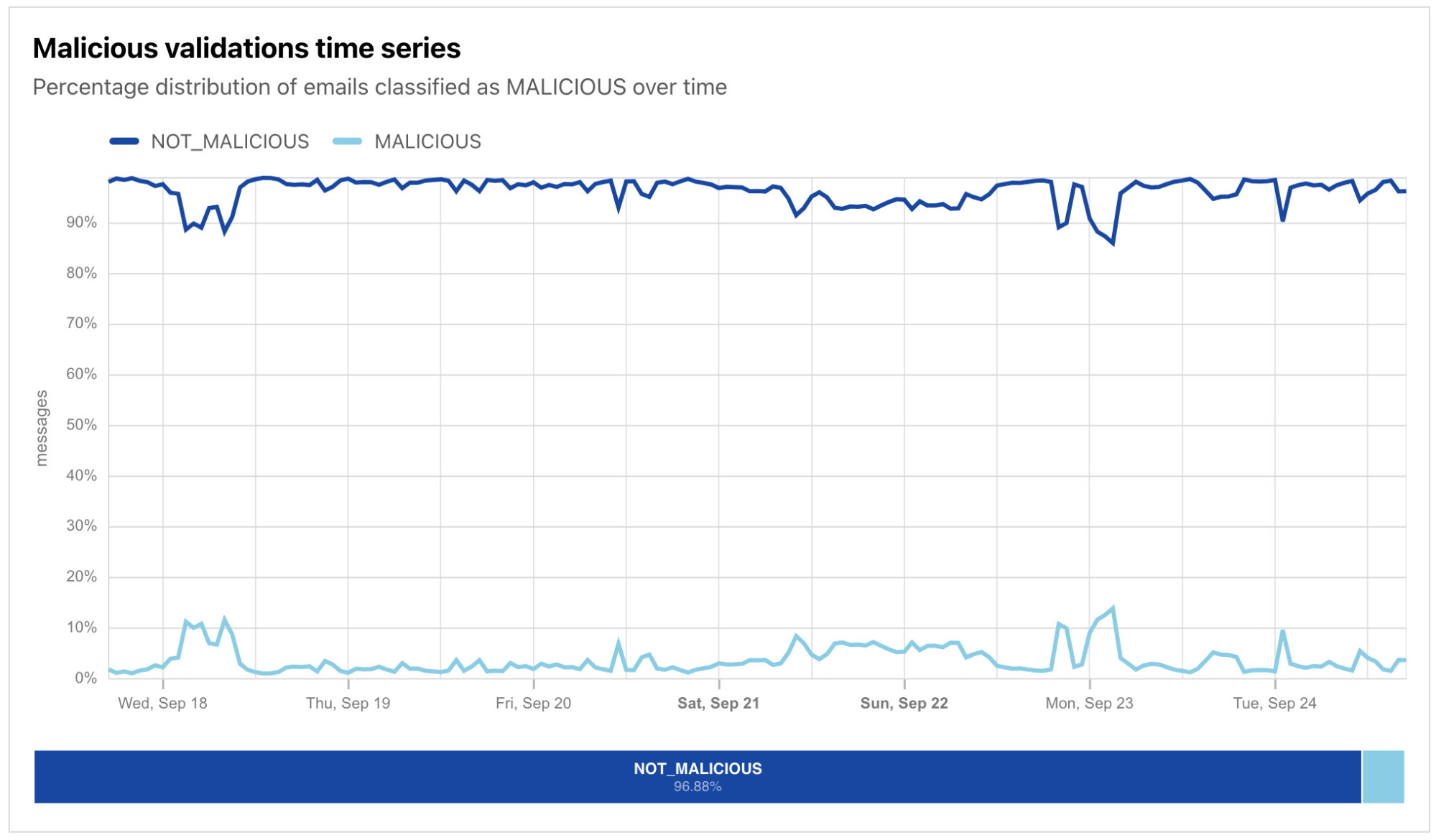
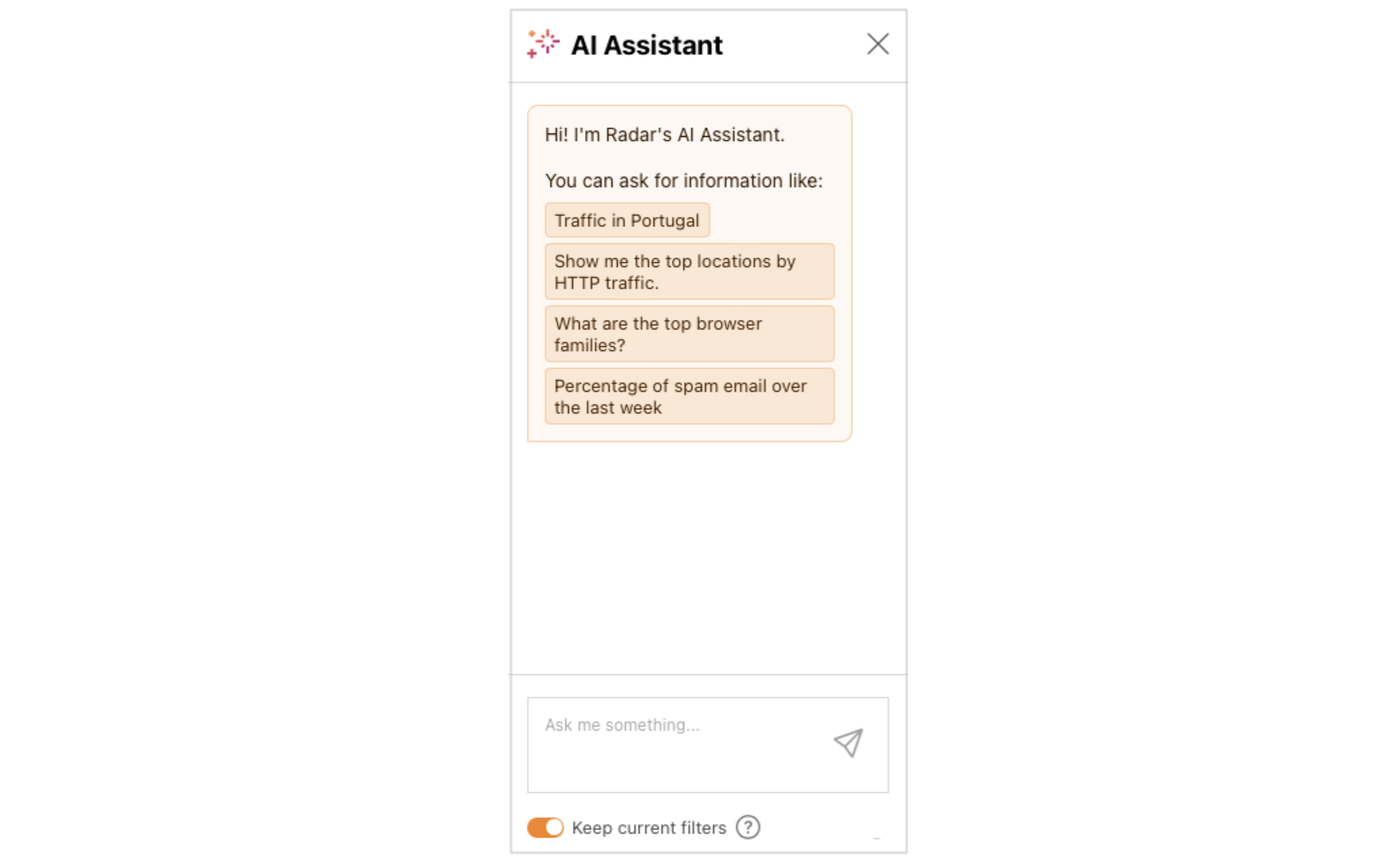
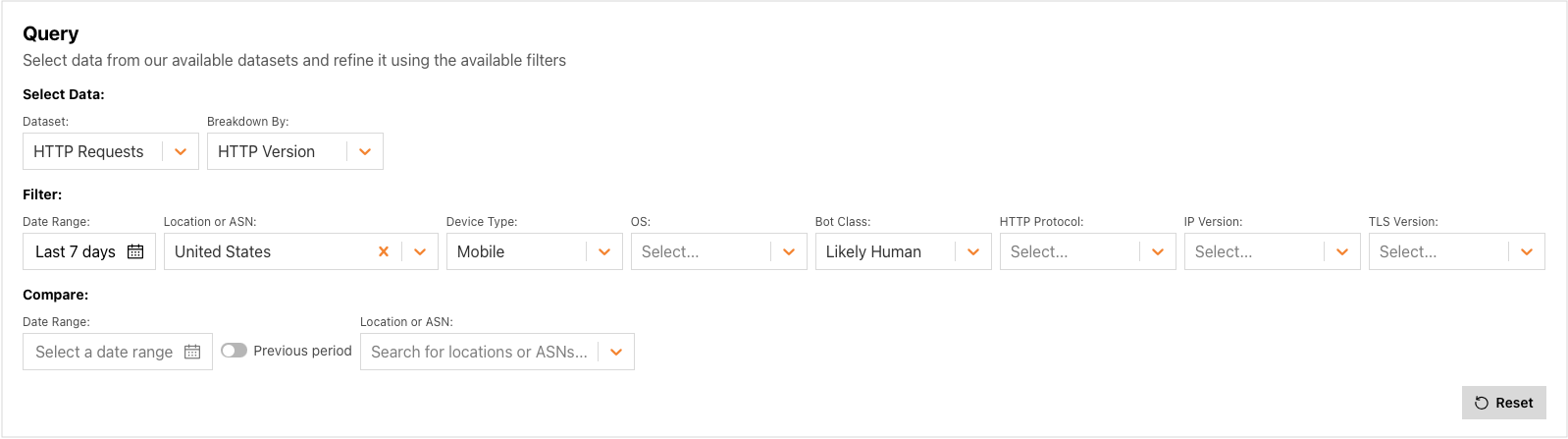
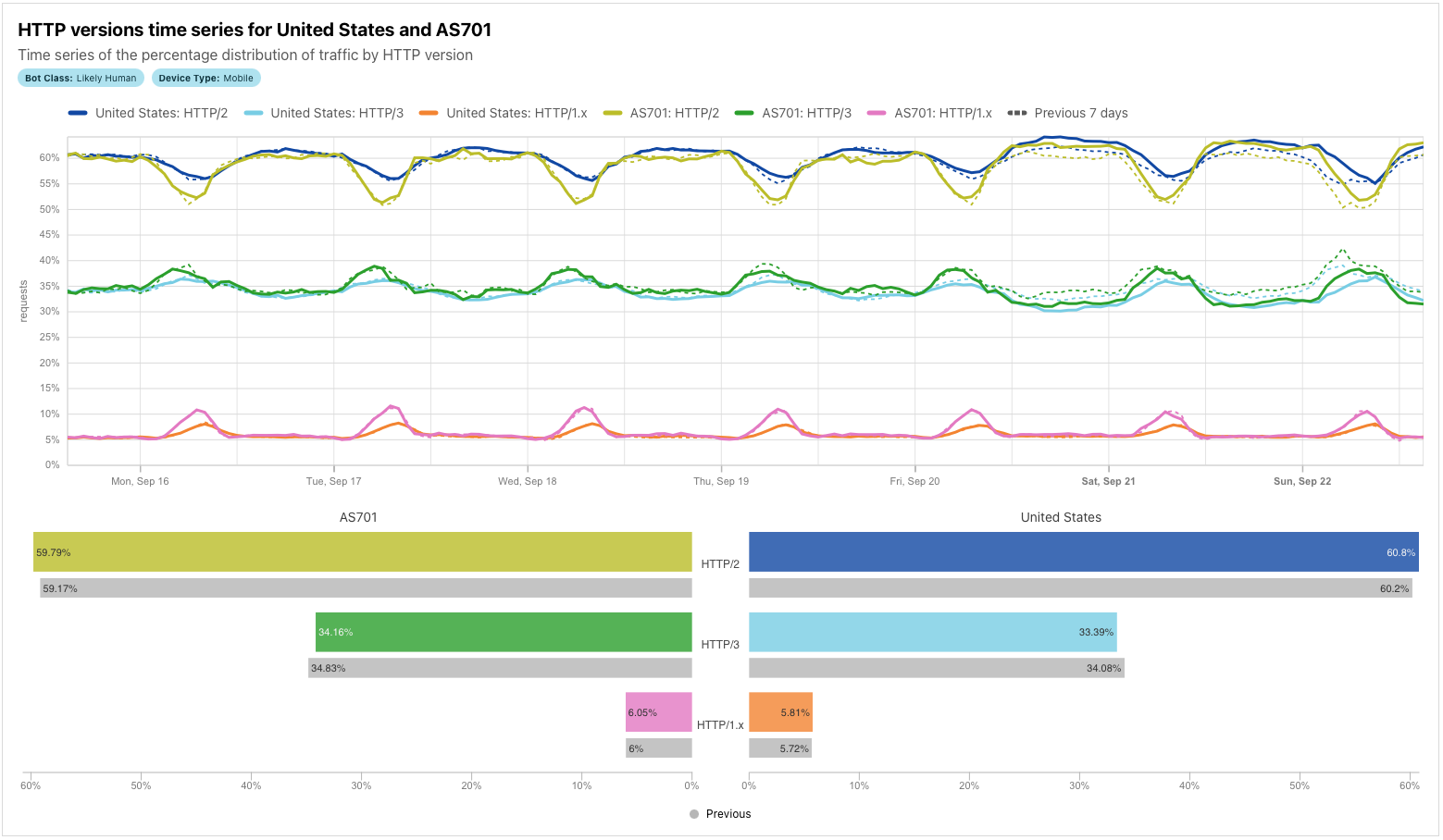
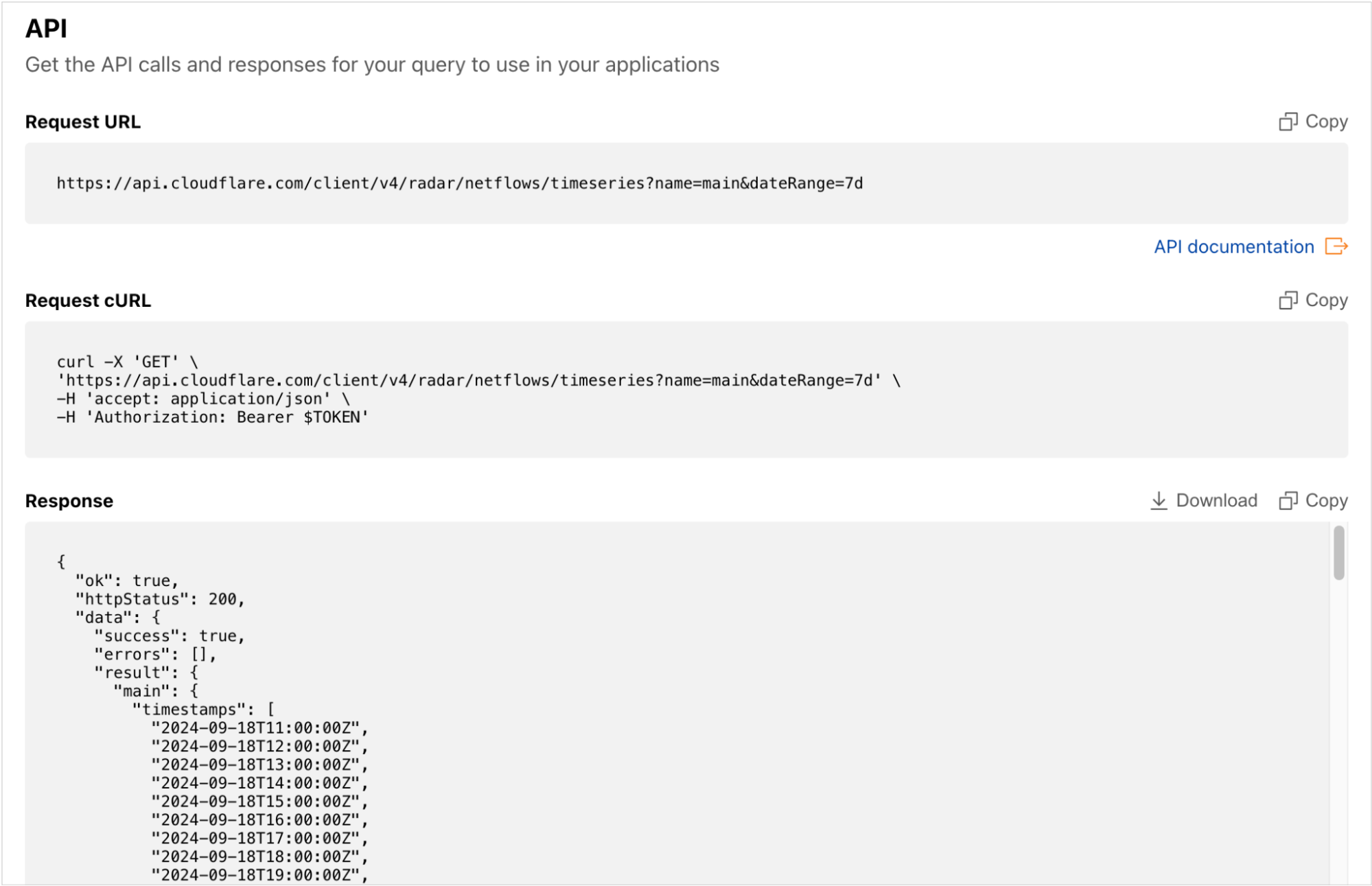
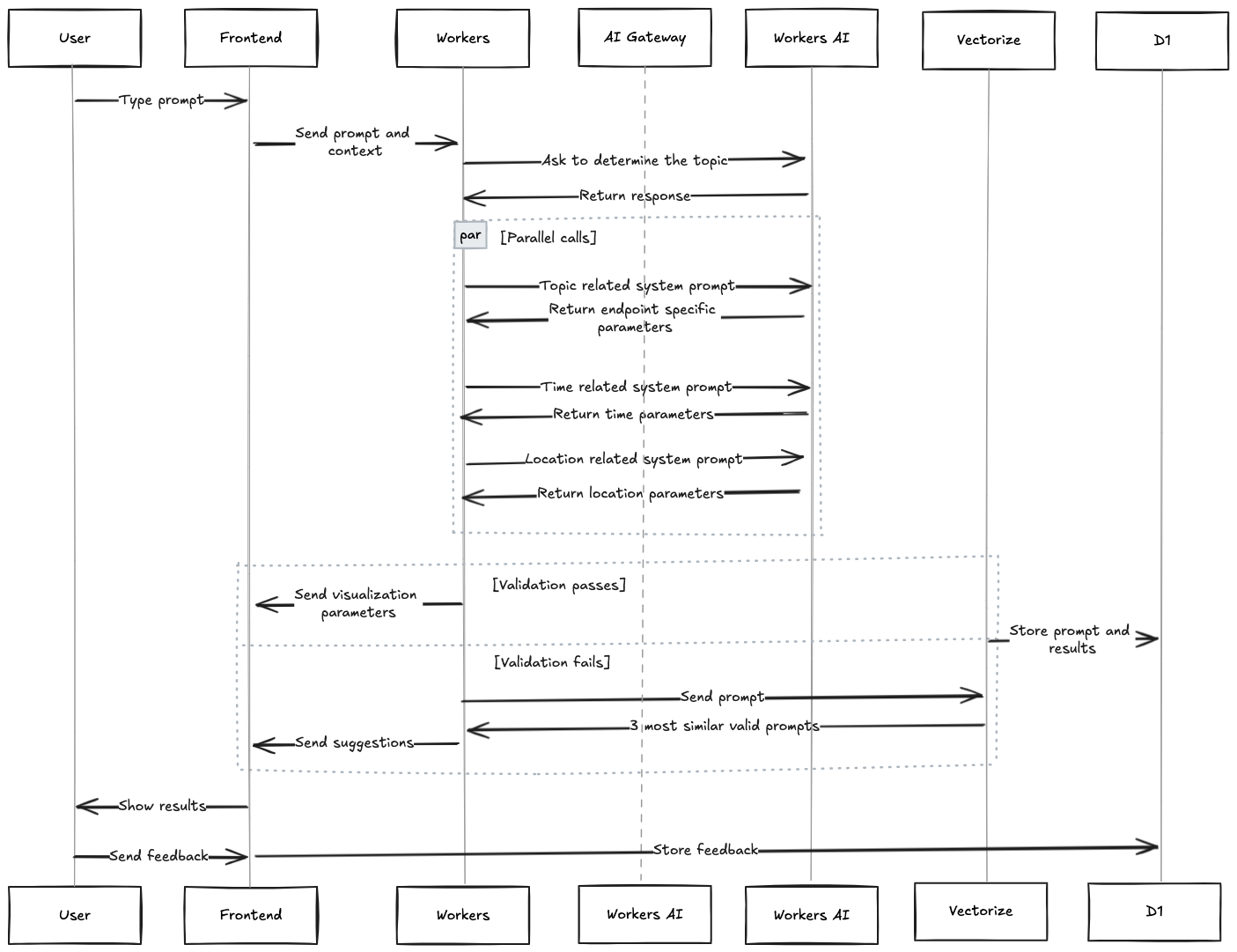



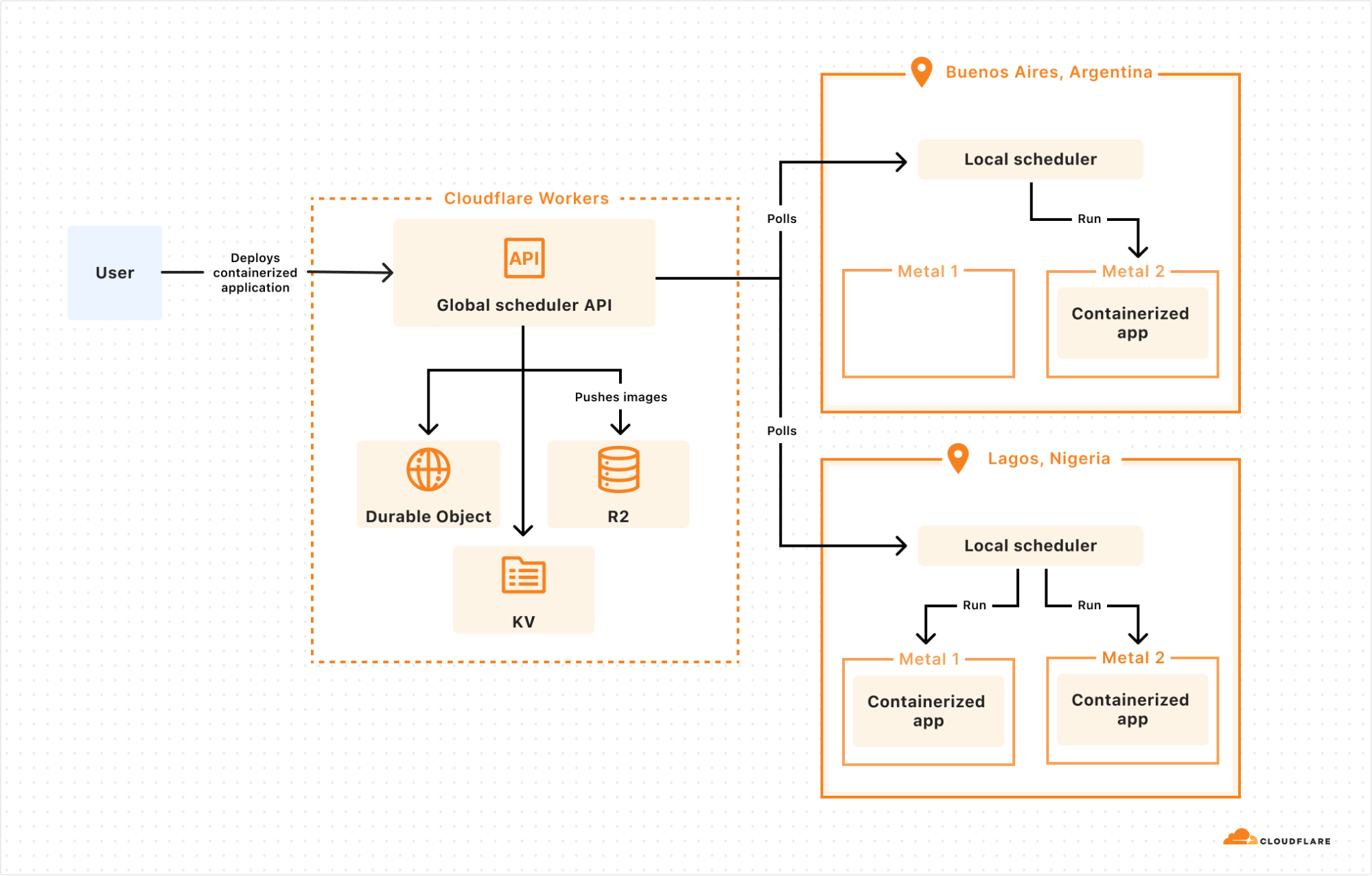
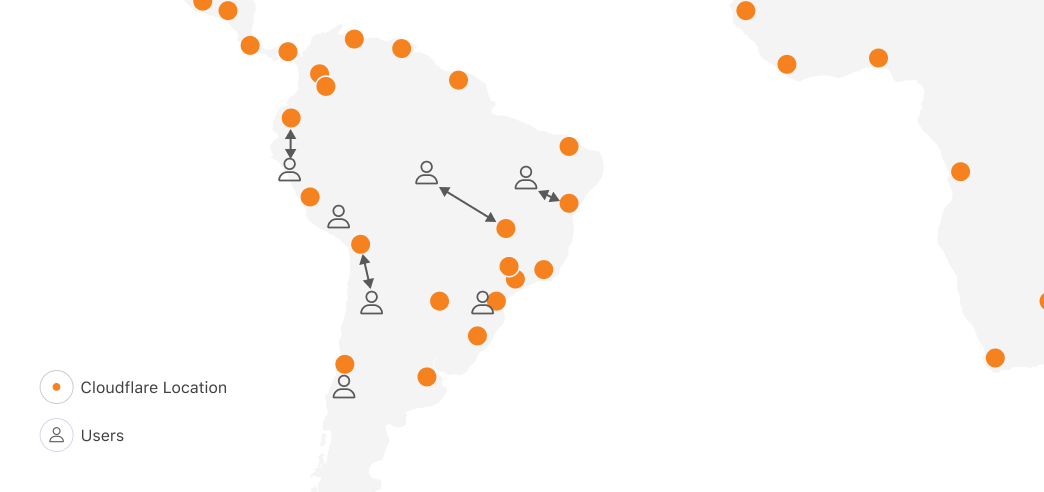
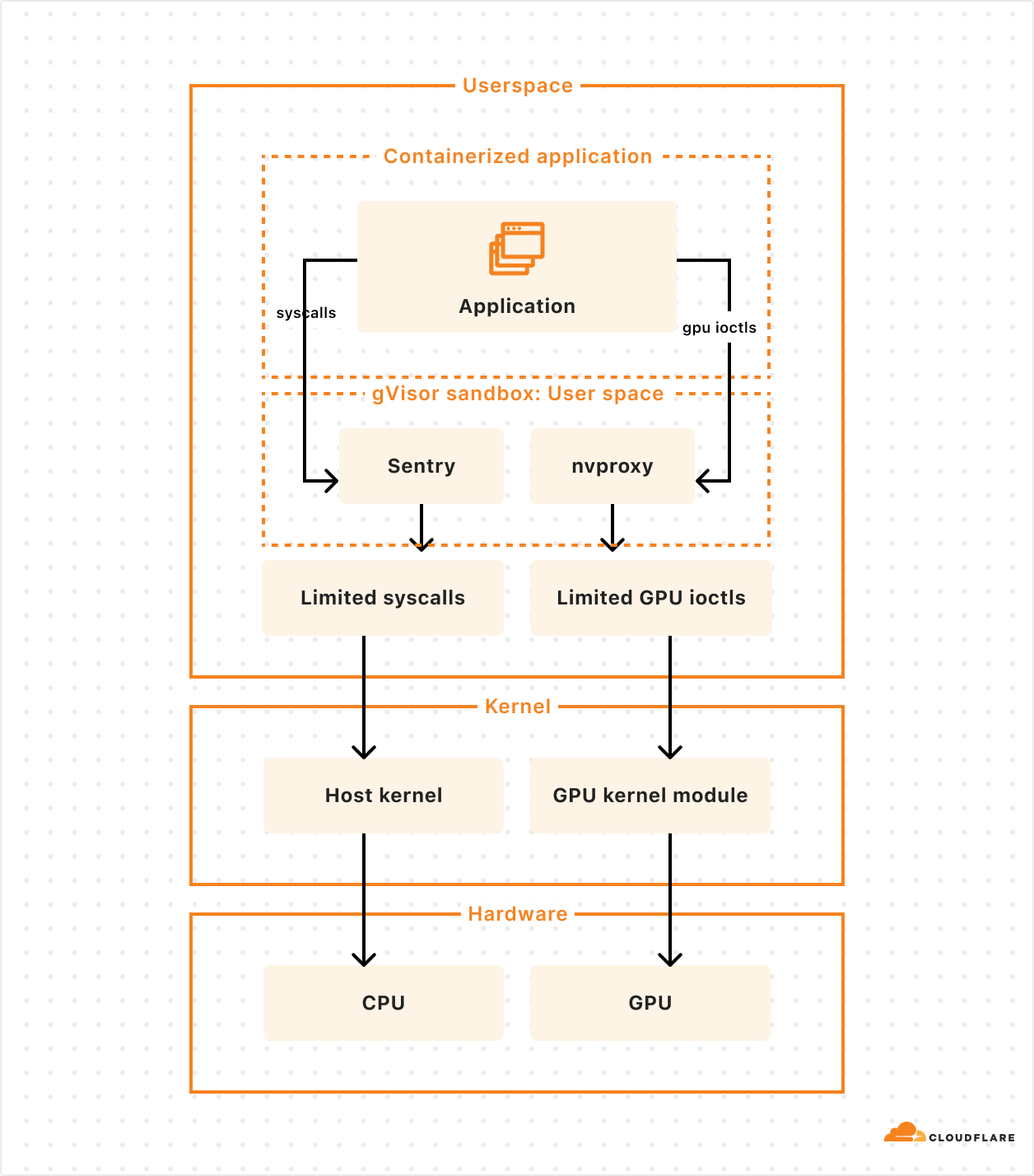
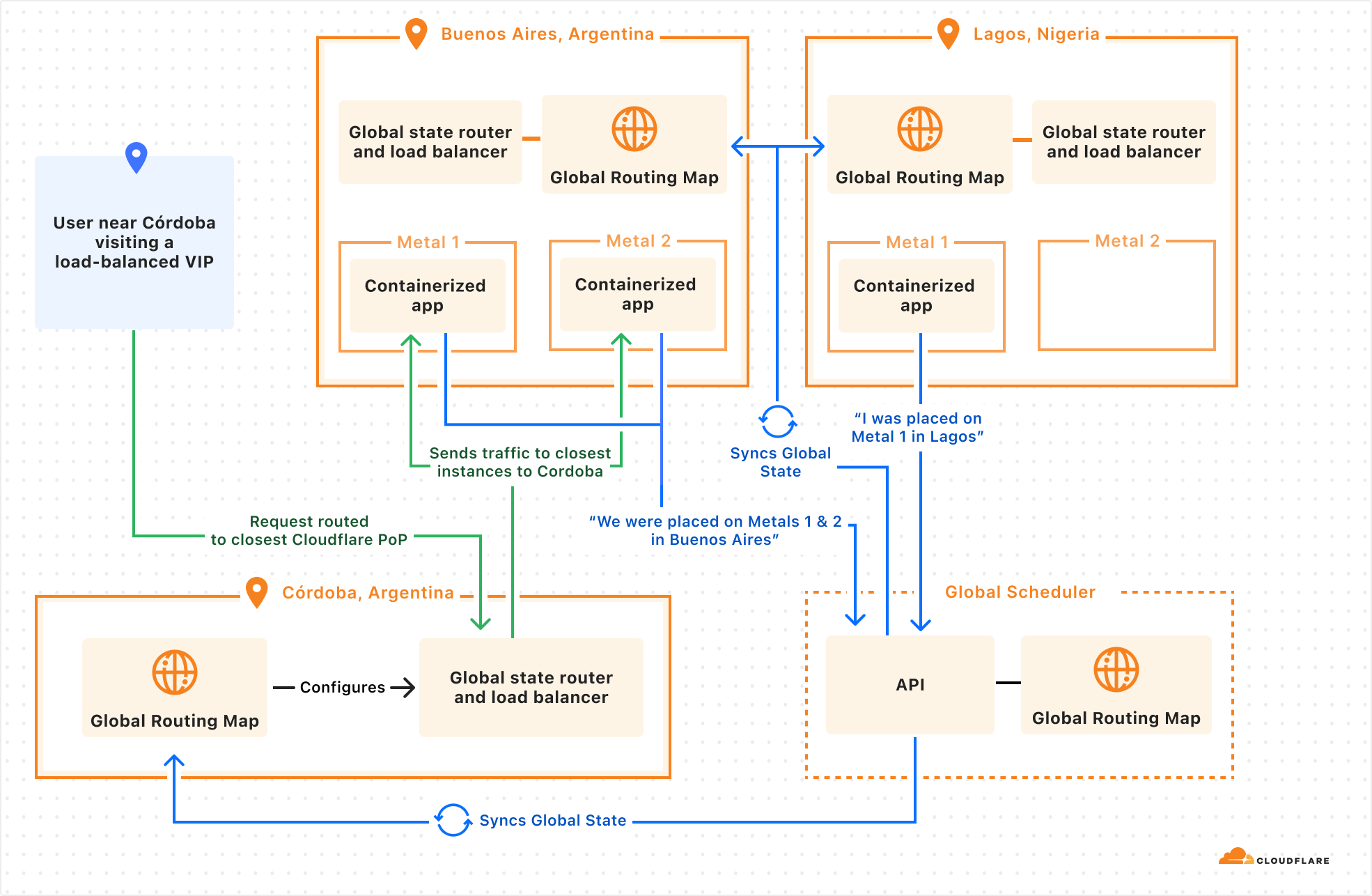
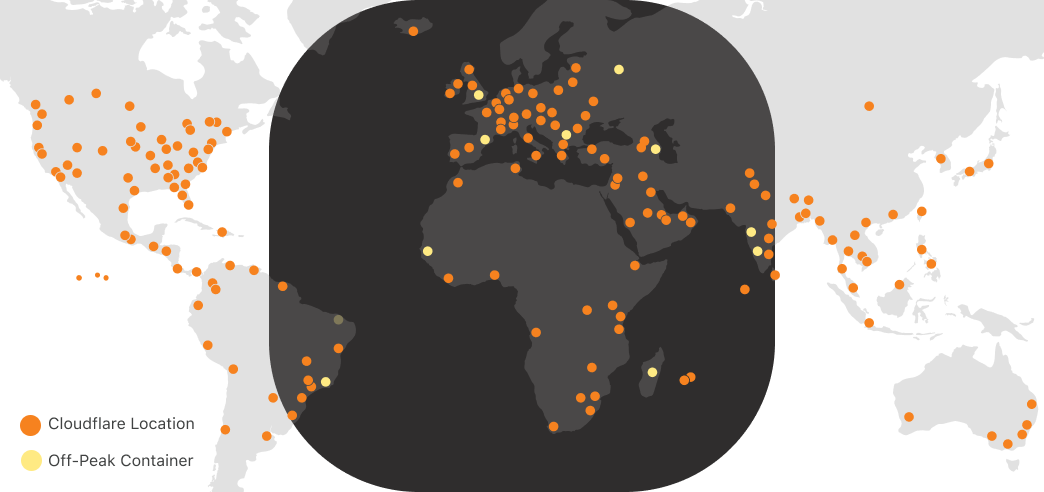
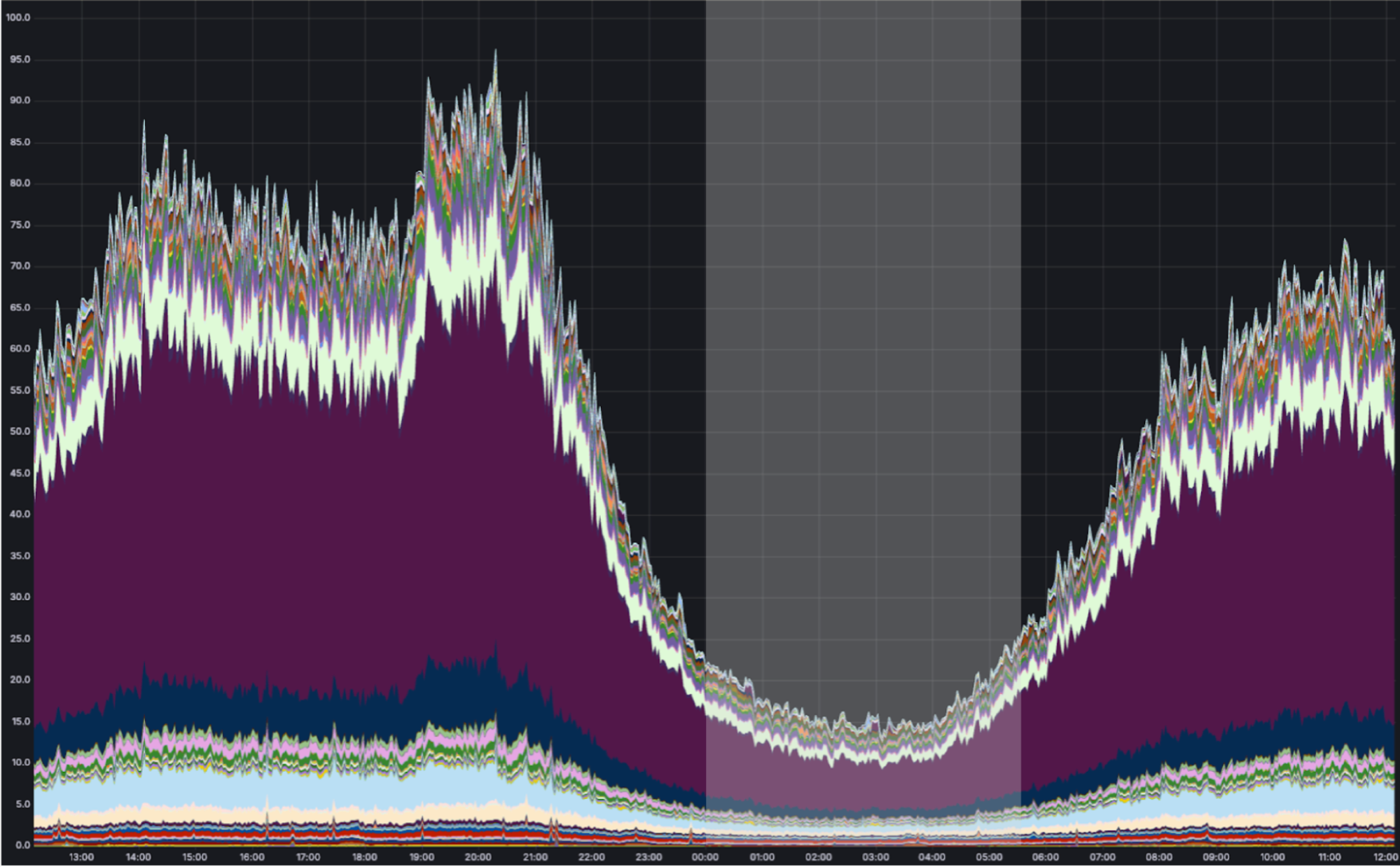
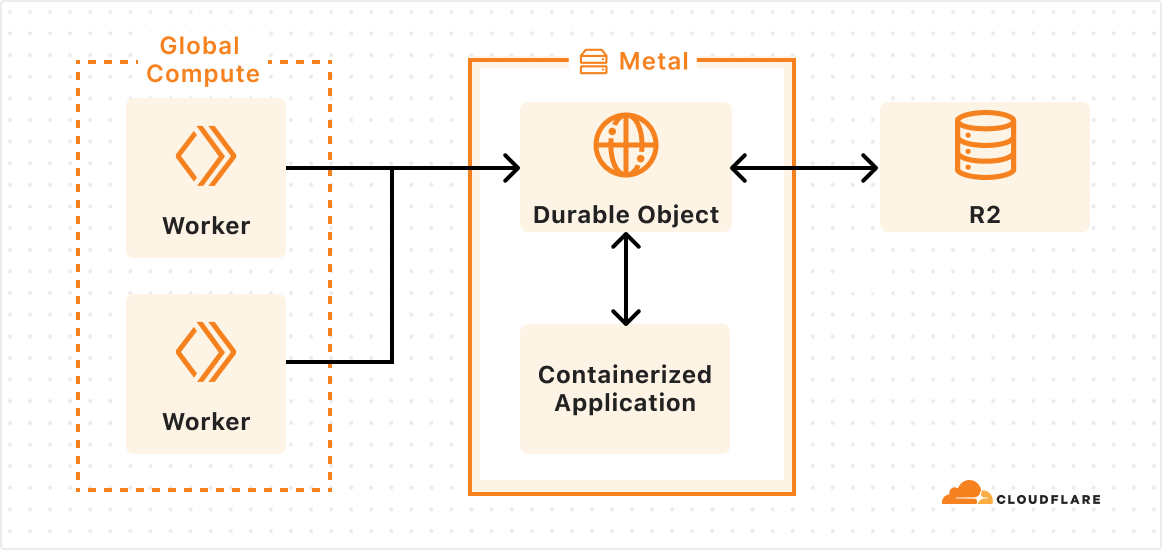

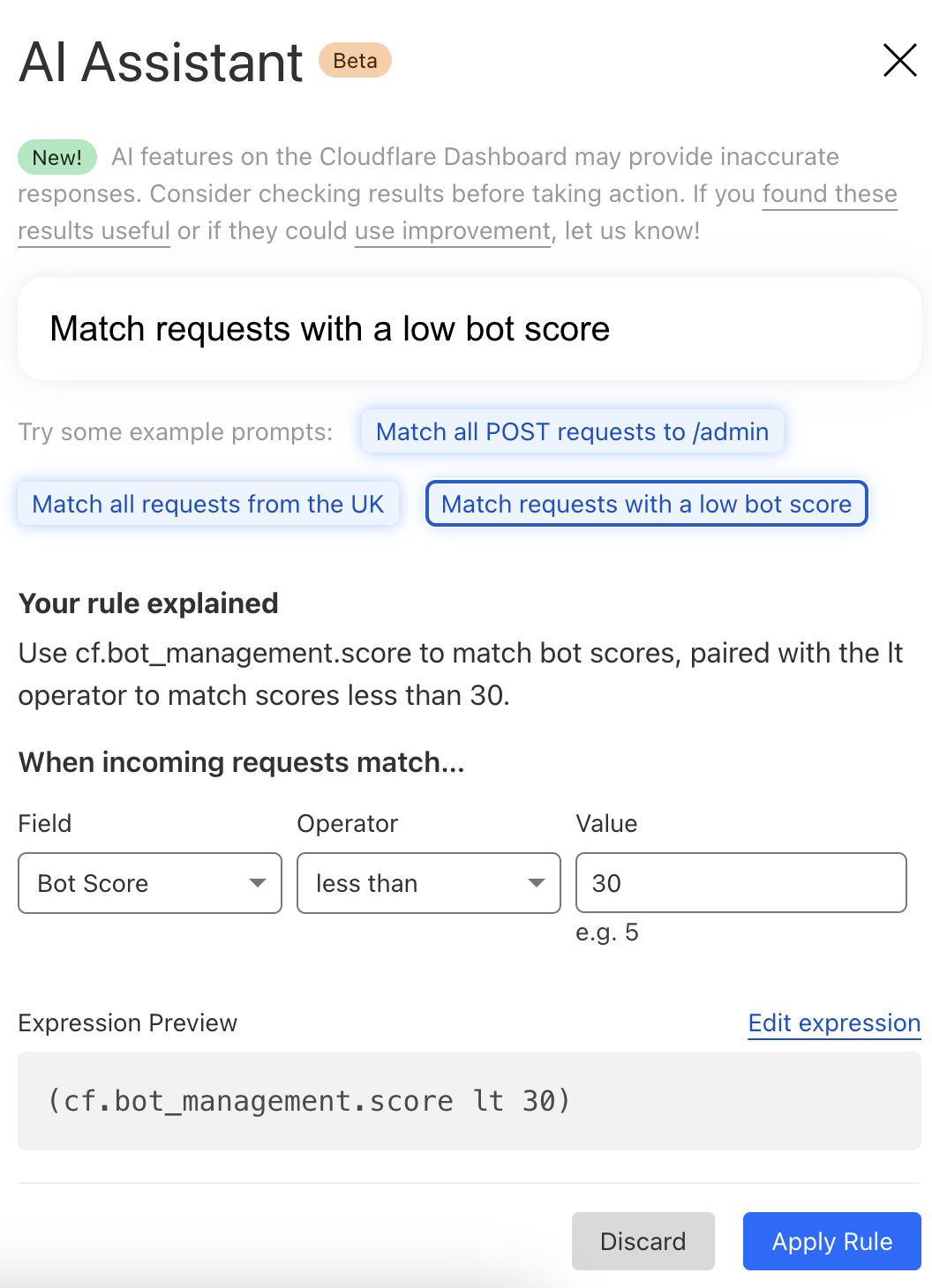
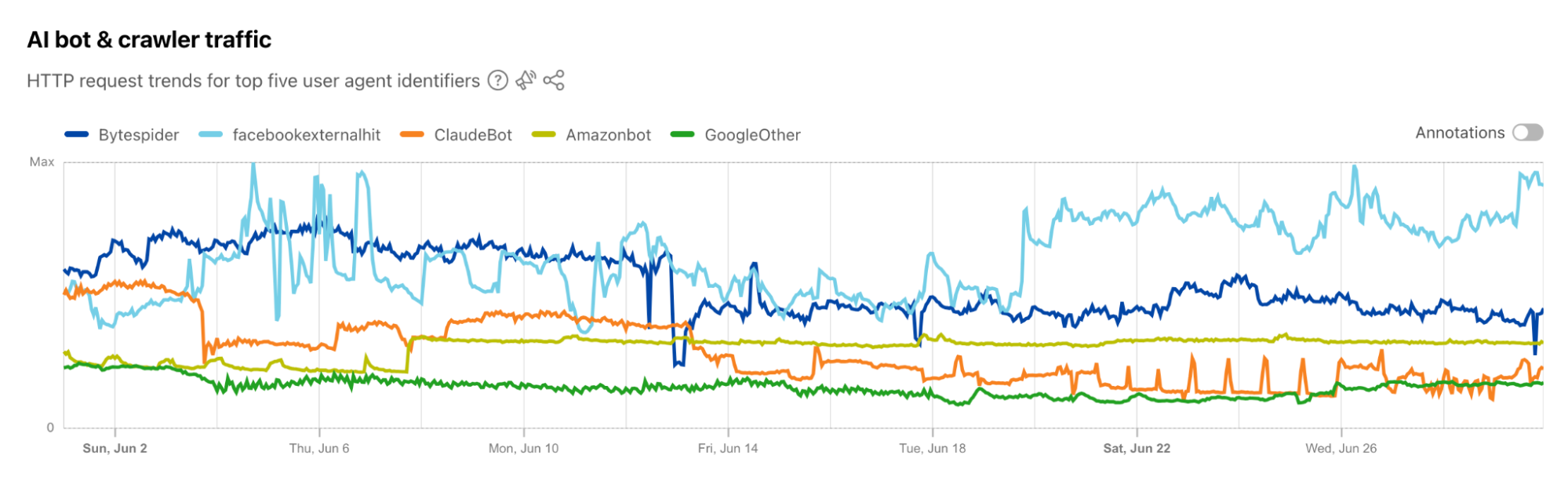

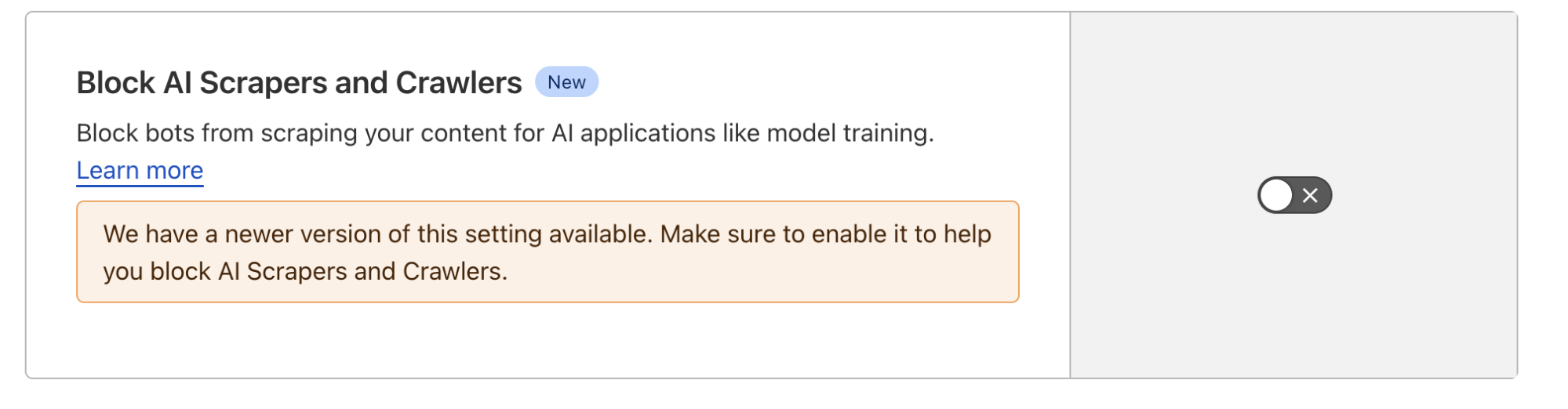
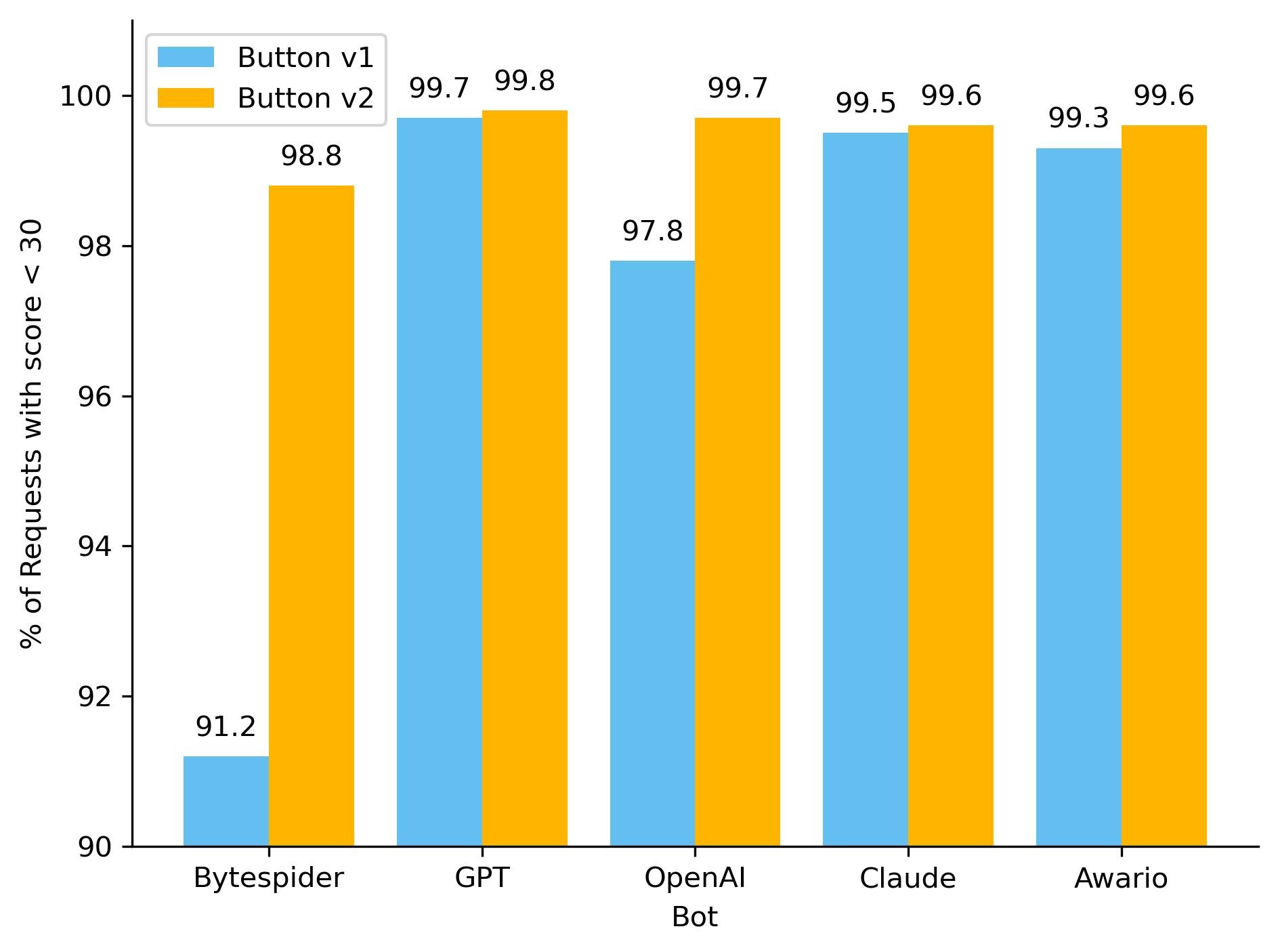
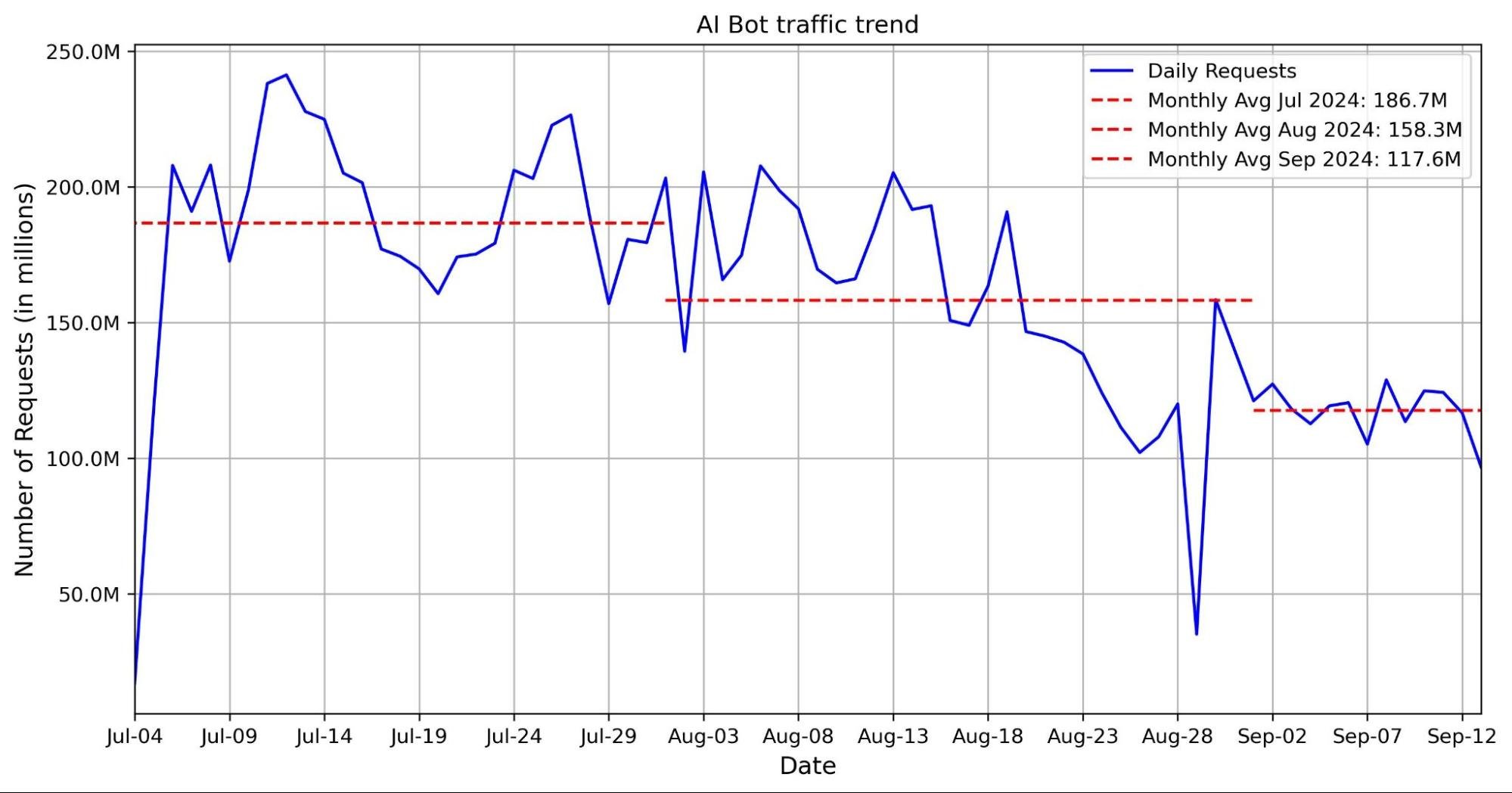
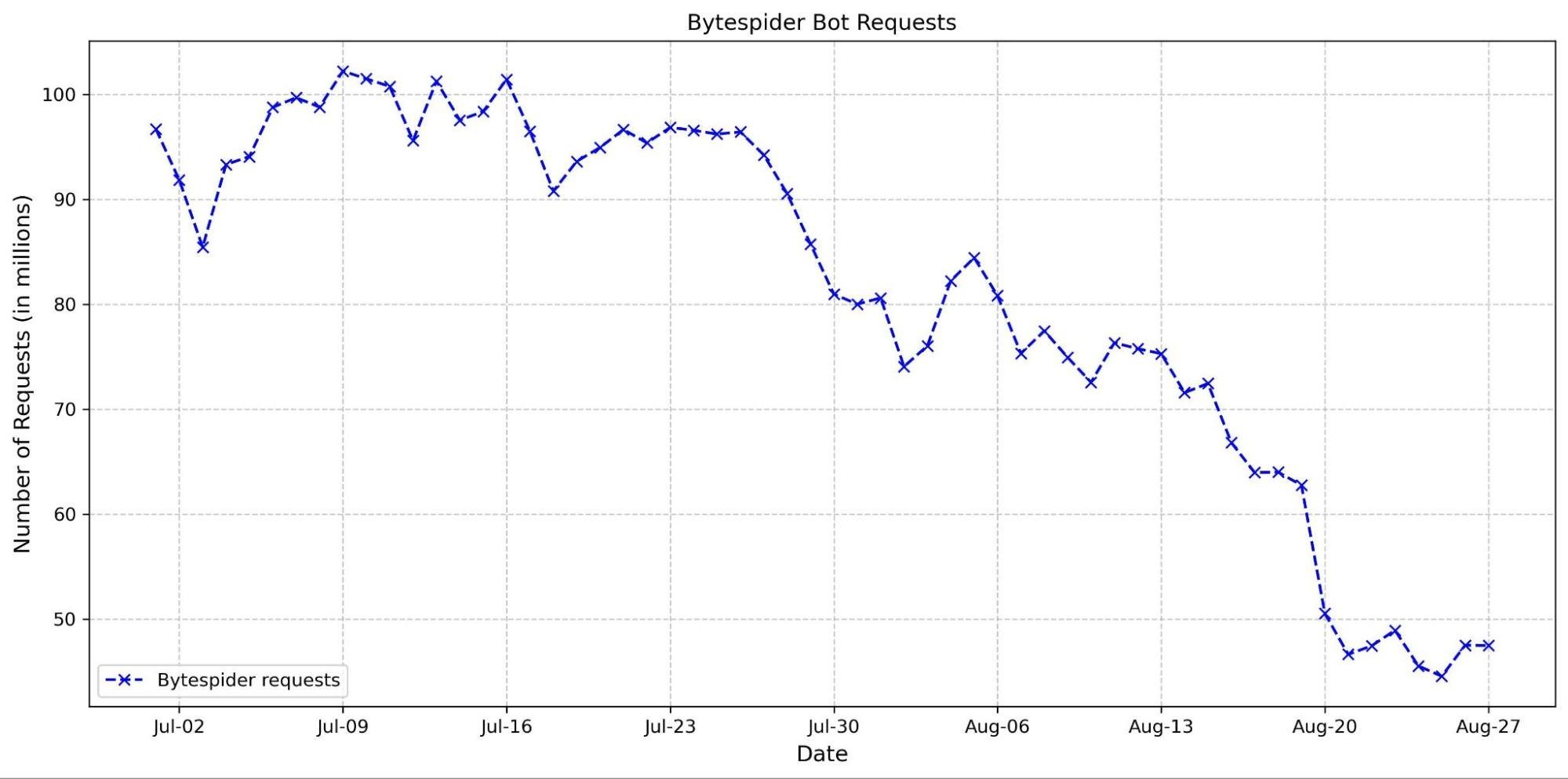
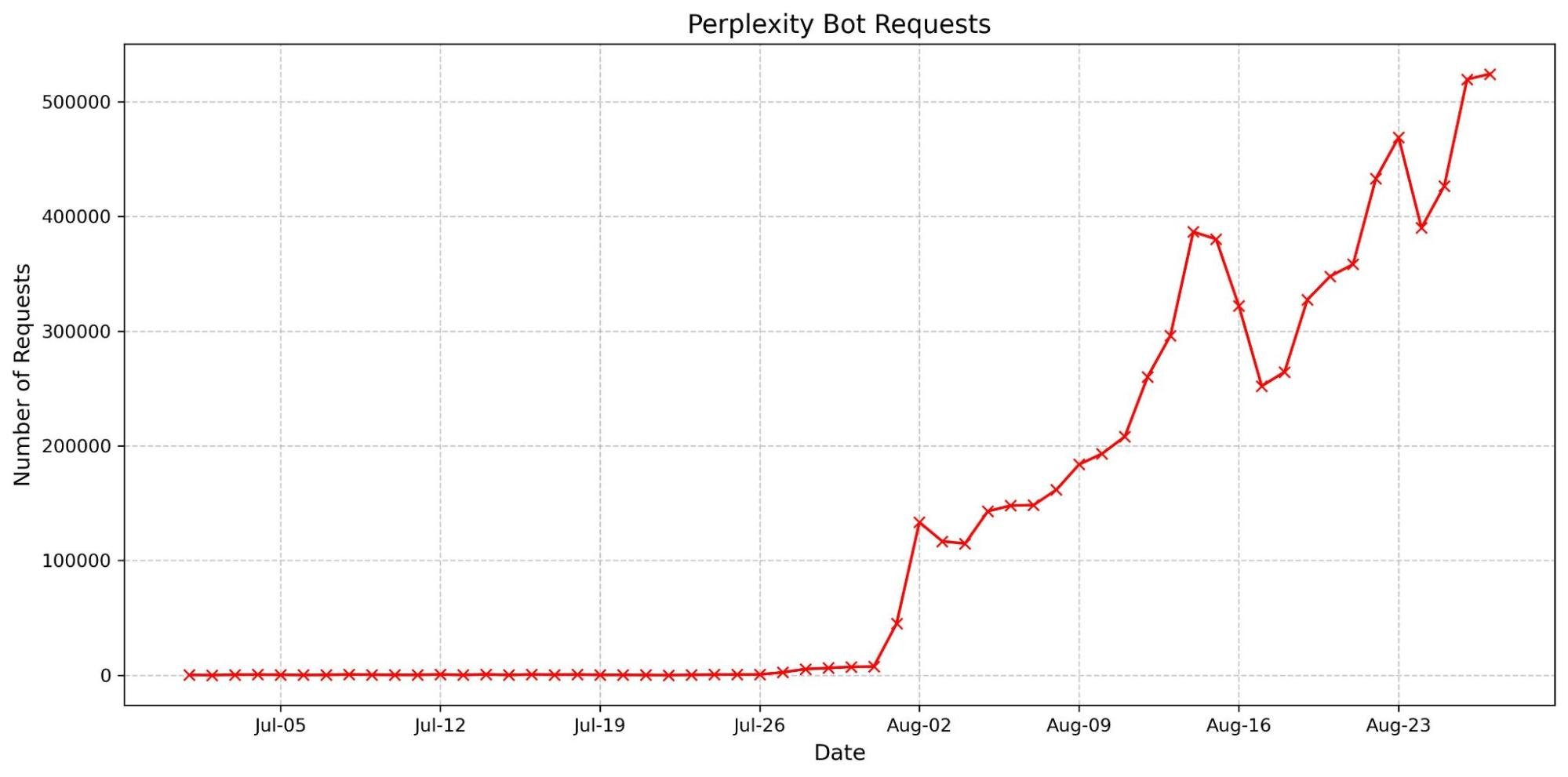






 Manjit Chakraborty is a Senior Solutions Architect at AWS. He is a Seasoned & Result driven professional with extensive experience in Financial domain having worked with customers on advising, designing, leading, and implementing core-business enterprise solutions across the globe. In his spare time, Manjit enjoys fishing, practicing martial arts and playing with his daughter.
 Neeraj Roy is a Principal Solutions Architect at AWS based out of London. He works with Global Financial Services customers to accelerate their AWS journey. In his spare time, he enjoys reading and spending time with his family.