Post Syndicated from Explosm.net original https://explosm.net/comics/mind-if-i-sit-here
New Cyanide and Happiness Comic
Post Syndicated from Explosm.net original https://explosm.net/comics/mind-if-i-sit-here
New Cyanide and Happiness Comic
Post Syndicated from Laura Reith original https://aws.amazon.com/blogs/security/how-to-use-multiple-instances-of-aws-iam-identity-center/
Recently, AWS launched a new feature that allows deployment of account instances of AWS IAM Identity Center . With this launch, you can now have two types of IAM Identity Center instances: organization instances and account instances. An organization instance is the IAM Identity Center instance that’s enabled in the management account of your organization created with AWS Organizations. This instance is used to manage access to AWS accounts and applications across your entire organization. Organization instances are the best practice when deploying IAM Identity Center. Many customers have requested a way to enable AWS applications using test or sandbox identities. The new account instances are intended to support sand-boxed deployments of AWS managed applications such as Amazon CodeCatalyst and are only usable from within the account and AWS Region in which they were created. They can exist in a standalone account or in a member account within AWS Organizations.
In this blog post, we show you when to use each instance type, how to control the deployment of account instances, and how you can monitor, manage, and audit these instances at scale using the enhanced IAM Identity Center APIs.
IAM Identity Center now offers two deployment types, the traditional organization instance and an account instance, shown in Figure 1. In this section, we show you the differences between the two.

Figure 1: IAM Identity Center instance types
An organization instance of IAM Identity Center is the fully featured version that’s available with AWS Organizations. This type of instance helps you securely create or connect your workforce identities and manage their access centrally across AWS accounts and applications in your organization. The recommended use of an organization instance of Identity Center is for workforce authentication and authorization on AWS for organizations of any size and type.
Using the organization instance of IAM Identity Center, your identity center administrator can create and manage user identities in the Identity Center directory, or connect your existing identity source, including Microsoft Active Directory, Okta, Ping Identity, JumpCloud, Google Workspace, and Azure Active Directory (Entra ID). There is only one organization instance of IAM Identity Center at the organization level. If you have enabled IAM Identity Center before November 15, 2023, you have an organization instance.
Account instances of IAM Identity Center provide a subset of the features of the organization instance. Specifically, account instances support user and group assignments initially only to Amazon CodeCatalyst. They are bound to a single AWS account, and you can deploy them in either member accounts of an organization or in standalone AWS accounts. You can only deploy one account instance per AWS account regardless of Region.
You can use account instances of IAM Identity Center to provide access to supported Identity Center enabled application if the application is in the same account and Region.
Account instances of Identity Center don’t support permission sets or assignments to customer managed applications. If you’ve enabled Identity Center before November 15, 2023 then you must enable account instance creation from your management account. To learn more see Enable account instances in the AWS Management Console documentation. If you haven’t yet enabled Identity Center, then account instances are now available to you.
Account instances are intended for use in specific situations where organization instances are unavailable or impractical, including:
When working with multiple instances of IAM Identity Center, you want to keep a number of things in mind:
If you’ve enabled IAM Identity Center prior to November 15, 2023 then account instance creation is off by default. If you want to allow account instance creation, you must enable this feature from the Identity Center console in your organization’s management account. This includes scenarios where you’re using IAM Identity Center centrally and want to allow deployment and management of account instances. See Enable account instances in the AWS Management Console documentation.
If you enable IAM Identity Center after November 15, 2023 or if you haven’t enabled Identity Center at all, you can control the creation of account instances of Identity Center through a service control policy (SCP). We recommend applying the following sample policy to restrict the use of account instances to all but a select set of AWS accounts. The sample SCP that follows will help you deny creation of account instances of Identity Center to accounts in the organization unless the account ID matches the one you specified in the policy. Replace <ALLOWED-ACCOUNT_ID> with the ID of the account that is allowed to create account instances of Identity Center:
To learn more about SCPs, see the AWS Organizations User Guide on service control policies.
If your organization has an existing log ingestion pipeline solution to collect logs and generate reports through AWS CloudTrail, then IAM Identity Center supported CloudTrail operations will automatically be present in your pipeline, including additional account instances of IAM Identity Center actions such as sso:CreateInstance.
To create a monitoring solution for IAM Identity Center events in your organization, you should set up monitoring through AWS CloudTrail. CloudTrail is a service that records events from AWS services to facilitate monitoring activity from those services in your accounts. You can create a CloudTrail trail that captures events across all accounts and all Regions in your organization and persists them to Amazon Simple Storage Service (Amazon S3).
After creating a trail for your organization, you can use it in several ways. You can send events to Amazon CloudWatch Logs and set up monitoring and alarms for Identity Center events, which enables immediate notification of supported IAM Identity Center CloudTrail operations. With multiple instances of Identity Center deployed within your organization, you can also enable notification of instance activity, including new instance creation, deletion, application registration, user authentication, or other supported actions.
If you want to take action on IAM Identity Center events, you can create a solution to process events using additional service such as Amazon Simple Notification Service, Amazon Simple Queue Service, and the CloudTrail Processing Library. With this solution, you can set your own business logic and rules as appropriate.
Additionally, you might want to consider AWS CloudTrail Lake, which provides a powerful data store that allows you to query CloudTrail events without needing to manage a complex data loading pipeline. You can quickly create a data store for new events, which will immediately start gathering data that can be queried within minutes. To analyze historical data, you can copy your organization trail to CloudTrail Lake.
The following is an example of a simple query that shows you a list of the Identity Center instances created and deleted, the account where they were created, and the user that created them. Replace <Event_data_store_ID> with your store ID.
You can save your query result to an S3 bucket and download a copy of the results in CSV format. To learn more, follow the steps in Download your CloudTrail Lake saved query results. Figure 2 shows the CloudTrail Lake query results.

Figure 2: AWS CloudTrail Lake query results
If you want to automate the sourcing, aggregation, normalization, and data management of security data across your organization using the Open Cyber Security Framework (OCSF) standard, you will benefit from using Amazon Security Lake. This service helps make your organization’s security data broadly accessible to your preferred security analytics solutions to power use cases such like threat detection, investigation, and incident response. Learn more in What is Amazon Security Lake?
You can create account instances of IAM Identity Center in a standalone account or in an account that belongs to your organization. Creation can happen from an API call (CreateInstance) from the Identity Center console in a member account or from the setup experience of a supported AWS managed application. Learn more about Supported AWS managed applications.
If you decide to apply the DenyCreateAccountInstances SCP shown earlier to accounts in your organization, you will no longer be able to create account instances of IAM Identity Center in those accounts. However, you should also consider that when you invite a standalone AWS account to join your organization, the account might have an existing account instance of Identity Center.
To identify existing instances, who’s using them, and what they’re using them for, you can audit your organization to search for new instances. The following script shows how to discover all IAM Identity Center instances in your organization and export a .csv summary to an S3 bucket. This script is designed to run on the account where Identity Center was enabled. Click here to see instructions on how to use this script.
The following table shows the resulting IAM Identity Center instance summary report with all of the accounts in your organization and their corresponding Identity Center instances.
| AccountId | IdentityCenterInstance |
| 111122223333 | d-111122223333 |
| 111122224444 | d-111122223333 |
| 111122221111 | d-111111111111 |
A consideration of having multiple IAM Identity Center instances is the possibility of having the same person existing in two or more instances. In this situation, each instance creates a unique identifier for the same person and the identifier associates application-related data to the user. Create a user management process for incoming and outgoing users that is similar to the process you use at the organization level. For example, if a user leaves your organization, you need to revoke access in all Identity Center instances where that user exists.
The code that follows can be added to the previous script to help detect where duplicates might exist so you can take appropriate action. If you find a lot of duplication across account instances, you should consider adopting an organization instance to reduce your management overhead.
The following table shows the resulting report with duplicated users in your organization and their corresponding IAM identity Center instances.
| User_email | IdentityStoreId |
| [email protected] | d-111122223333, d-111111111111 |
| [email protected] | d-111122223333, d-111111111111, d-222222222222 |
| [email protected] | d-111111111111, d-222222222222 |
The full script for all of the above use cases is available in the multiple-instance-management-iam-identity-center GitHub repository. The repository includes instructions to deploy the script using AWS Lambda within the management account. After deployment, you can invoke the Lambda function to get .csv files of every IAM Identity center instance in your organization, the applications assigned to each instance, and the users that have access to those applications. With this function, you also get a report of users that exist in more than one local instance.
In this post, you learned the differences between an IAM Identity Center organization instance and an account instance, considerations for when to use an account instance, and how to use Identity Center APIs to automate discovery of Identity Center account instances in your organization.
To learn more about IAM Identity Center, see the AWS IAM Identity Center user guide.
If you have feedback about this post, submit comments in the Comments section below. If you have questions about this post, start a new thread on AWS IAM Identity Center re:Post or contact AWS Support.
Want more AWS Security news? Follow us on Twitter.
Post Syndicated from Patrick Madec original https://aws.amazon.com/blogs/architecture/how-sonar-built-a-unified-api-on-aws/
SonarCloud, a software-as-a-service (SaaS) product developed by Sonar, seamlessly integrates into developers’ CI/CD workflows to increase code quality and identify vulnerabilities. Over the last few months, Sonar’s cloud engineers have worked on modernizing SonarCloud to increase the lead time to production.
Following Domain Driven Design principles, Sonar split the application into multiple business domains, each owned by independent teams. They also built a unified API to expose these domains publicly.
This blog post will explore Sonar’s design for SonarCloud’s unified API, utilizing Elastic Load Balancing, AWS PrivateLink, and Amazon API Gateway. Then, we’ll uncover the benefits aligned with the AWS Well-Architected Framework including enhanced security and minimal operational overhead.
This solution isn’t exclusive to Sonar; it’s a blueprint for organizations modernizing their applications towards domain-driven design or microservices with public service exposure.
SonarCloud’s core was initially built as a monolithic application on AWS, managed by a single team. Over time, it gained widespread adoption among thousands of organizations, leading to the introduction of new features and contributions from multiple teams.
In response to this growth, Sonar recognized the need to modernize its architecture. The decision was made to transition to domain-driven design, aligning with the team’s structure. New functionalities are now developed within independent domains, managed by dedicated teams, while existing components are gradually refactored using the strangler pattern.
This transformation resulted in SonarCloud being composed of multiple domains, and securely exposing them to customers became a key challenge. To address this, Sonar’s engineers built a unified API, a solution we’ll explore in the following section.
Figure 1 illustrates the architecture of the unified API, the gateway through which end-users access SonarCloud services. It is built on an Application Load Balancer and Amazon API Gateway private APIs.

Figure 1. Unified API architecture
The VPC endpoint for API Gateway spans three Availability Zones (AZs), providing an Elastic Network Interface (ENI) in each private subnet. Meanwhile, the ALB is configured with an HTTPS listener, linked to a target group containing the IP addresses of the ENIs.
To streamline access, we’ve established an API Gateway custom domain at api.example.com. Within this domain, we’ve created API mappings for each domain. This setup allows for seamless routing, with paths like /domain1 leading directly to the corresponding domain1 private API of the API Gateway service.
Here is how it works:
api.example.com/domain1, which is routed to the ALB using Amazon Route53 for DNS resolution.api.example.com, and our API mapping for /domain1.In this solution, we leverage the two following functionalities of the Amazon API Gateway:
https://api-id.execute-api.region.amazonaws.com/stage
With custom domains you can define a more intuitive URL, such as:
https://api.example.com/domain1This is not supported for private REST APIs by default so we are using a workaround documented in https://github.com/aws-samples/.
In this post, we described the architecture of a unified API built by Sonar to securely expose multiple domains through a single API endpoint. To conclude, let’s review how this solution is aligned with the best practices of the AWS Well-Architected Framework.
The unified API approach improves the security of the application by reducing the attack surface as opposed to having a public API per domain. AWS Web Application Firewall (WAF) used on the ALB protects the application from common web exploits. AWS Shield, enabled by default on Amazon CloudFront, provides Network/Transport layer protection against DDoS attacks.
The design allows each team to independently deploy application and infrastructure changes behind a dedicated private API Gateway. This leads to a minimal operational overhead for the platform team and was a requirement. In addition, the architecture is based on managed services, which scale automatically as SonarCloud usage evolves.
The solution is built using AWS services providing high-availability by default across Availability Zones (AZs) in the AWS Region. Requests throttling can be configured on each private API Gateway to protect the underlying resources from being overwhelmed.
Amazon CloudFront increases the performance of the API, especially for users located far from the deployment AWS Region. The traffic flows through the AWS network backbone which offers superior performance for accessing the ALB.
The ALB is used as the single entry-point and brings an extra cost as opposed to exposing multiple public API Gateways. This is a trade-off for enhanced security and customer experience.
By using serverless managed services, Sonar is able to match the provisioned infrastructure with the customer demand. This avoids overprovisioning resources and reduces the environmental impact of the solution.
Post Syndicated from Patrick Kennedy original https://www.servethehome.com/amd-ryzen-threadripper-7980x-review-a-funky-workstation-cpu-some-will-love/
The AMD Ryzen Threadripper 7980X is a funky workstation CPU that if you treat it right, offers massive performance and relative efficiency
The post AMD Ryzen Threadripper 7980X Review A Funky Workstation CPU Some Will LOVE appeared first on ServeTheHome.
Post Syndicated from Brendan Falk original https://aws.amazon.com/blogs/devops/introducing-amazon-codewhisperer-for-command-line/
The command line is used by over thirty million engineers to write, build, run, debug, and deploy software. However, despite how critical it is to the software development process, the command line is notoriously hard to use. Its output is terse, its interface is from the 1970s, and it offers no hints about the ‘right way’ to use it. With tens of thousands of command line applications (called command-line interfaces or CLIs), it’s almost impossible to remember the correct input syntax. The command line’s lack of input validation also means typos can cause unnecessary errors, security risks, and even production outages. It’s no wonder that most software engineers find the command line an error-prone and often frustrating experience.
Announcing Amazon CodeWhisperer for command line
Amazon CodeWhisperer for command line is a new set of capabilities and integrations for AI-powered productivity tool, Amazon CodeWhisperer, that makes software developers more productive in the command line. CodeWhisperer for command line modernizes the command line with features such personalized code completions, inline documentation, and AI natural-language-to-code translation. You don’t need to change the tools you use to start benefiting from CodeWhisperer for command line: it integrates directly with your existing tools, such as iTerm2 or the VS Code embedded terminal.
IDE-style completions for 500+ CLIs
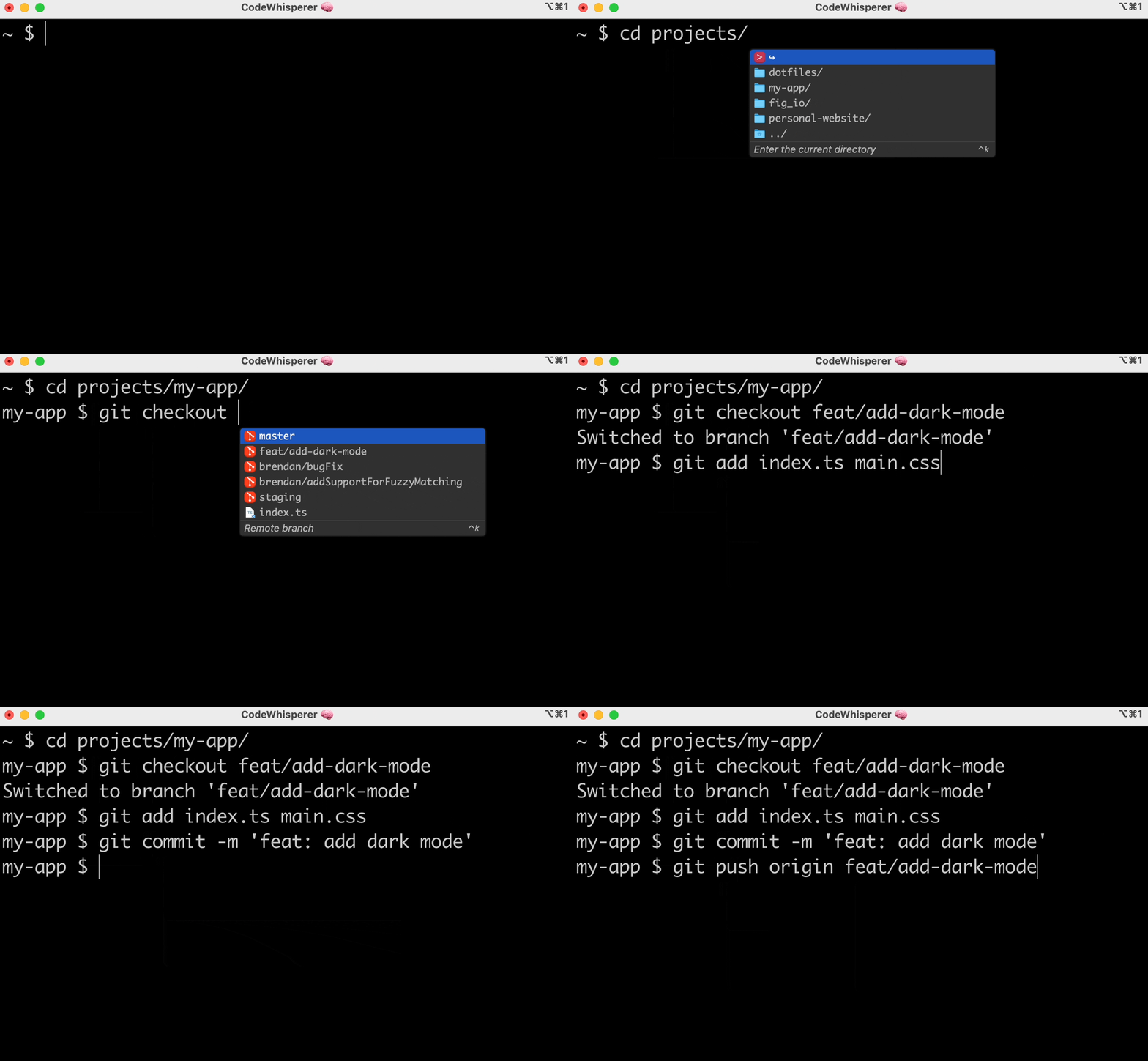
CodeWhisperer for command line adds IDE-style completions for hundreds of popular CLIs like as Git, npm, Docker, MongoDB Atlas, and the AWS CLI. These typeahead completions increase your productivity by reducing the time spent typing repetitive or boilerplate commands. Inline documentation helps you understand CLI functionality without context-switching to the browser and interrupting your workflow.
Previously, typing a CLI command like git and hitting tab either wouldn’t show you any completions or would show an incomplete list of completions in a clunky interface without descriptions. Now, you can type git and see all the git subcommands, options, and arguments with descriptions, ordered by usage recency. You can also type cd to see a list of all your directories, npm install to see a list of all the node packages available to install, or aws to see a list of all the AWS CLI subcommands.
Natural language-to-bash translation
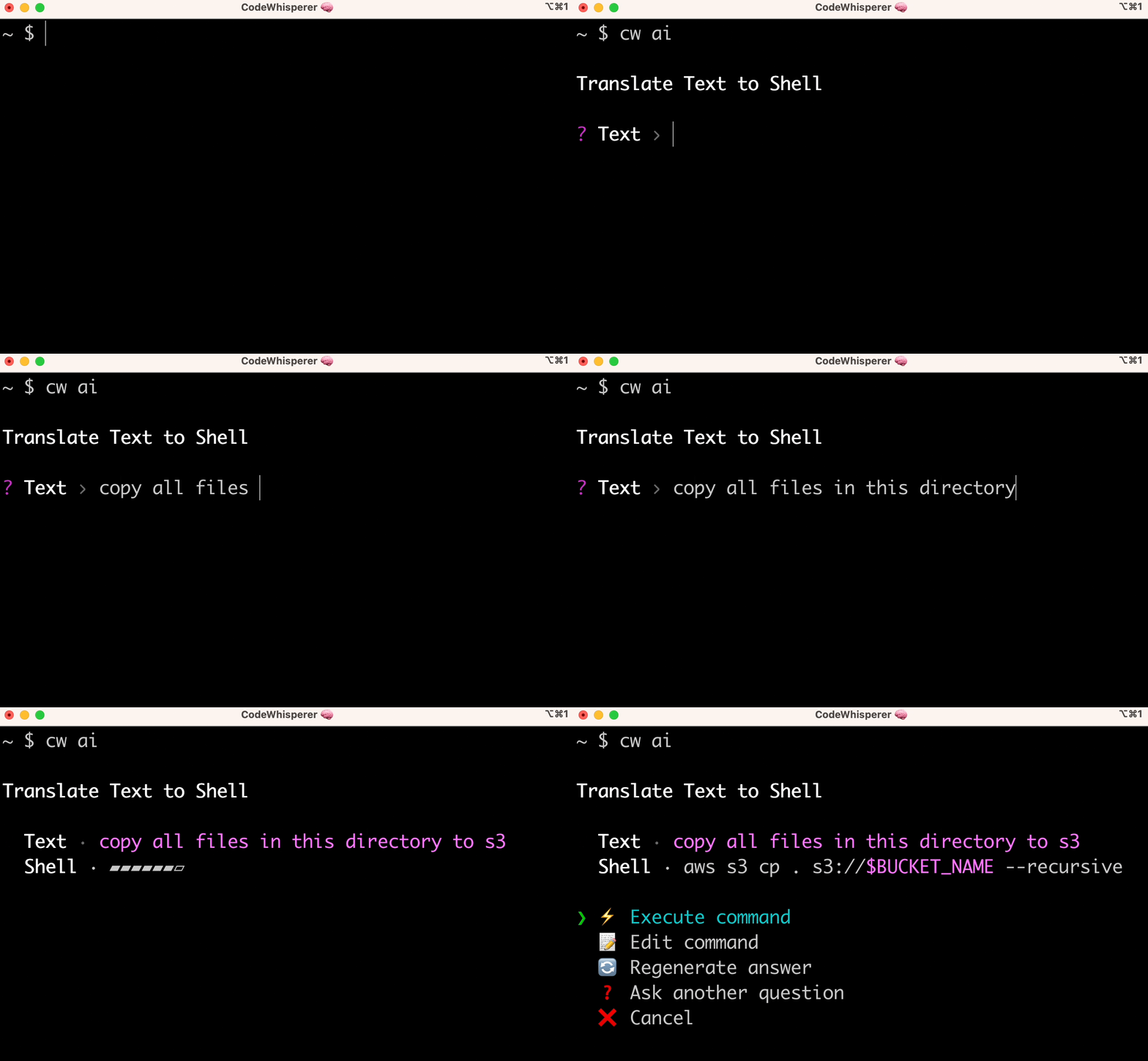
CLI completions are great for tasks where you already know how to do something and just want to move faster. But what do you do when you’re trying to solve a problem and you’re not 100% sure how? Enter: cw ai!
The cw ai command lets you write a natural language instruction and CodeWhisperer will translate it to an instantly executable shell code snippet. For instance, imagine you want to copy a file from your local machine to Amazon Simple Storage Service (Amazon S3). You would write “copy all files in my current directory to s3” and CodeWhisperer will output aws s3 cp . s3://$BUCKET_NAME --recursive — now all you need to do is choose an S3 bucket. Natural language to bash translation is perfect for those workflows you occasionally have to do, but always forget the correct bash syntax like reversing a git commit, finding strings inside files with grep, or compressing files with tar. And just like with CLI completions, cw ai translator works great with the AWS CLI.
Get started
CodeWhisperer for command line is available on macOS for all major shells (bash, zsh, and fish) and major terminal emulators such as Terminal, iTerm2, Hyper, and the built-in terminals in Visual Studio Code and JetBrains.
To get started, visit aws.amazon.com/codewhisperer/resources
Post Syndicated from Airish Mariano original https://aws.amazon.com/blogs/security/aws-achieves-sni-27001-certification-for-the-aws-asia-pacific-jakarta-region/
Amazon Web Services (AWS) is proud to announce the successful completion of its first Standar Nasional Indonesia (SNI) certification for the AWS Asia Pacific (Jakarta) Region in Indonesia. SNI is the Indonesian National Standard, and it comprises a set of standards that are nationally applicable in Indonesia. AWS is now certified according to the SNI 27001 requirements. An independent third-party auditor that is accredited by the Komite Akreditasi Nasional (KAN/National Accreditation Committee) assessed AWS, per regulations in Indonesia.
SNI 27001 is based on the ISO/IEC 27001 standard, which provides a framework for the development and implementation of an effective information security management system (ISMS). An ISMS that is implemented according to this standard is a tool for risk management, cyber-resilience, and operational excellence.
AWS achieved the certification for compliance with SNI 27001 on October 28, 2023. The SNI 27001 certification covers the Asia Pacific (Jakarta) Region in Indonesia. For a full list of AWS services that are certified under the SNI 27001, see the SNI 27001 compliance page. Customers can also download the latest SNI 27001 certificate on AWS Artifact, a self-service portal for on-demand access to AWS compliance reports. Sign in to AWS Artifact in the AWS Management Console, or learn more at Getting Started with AWS Artifact.
AWS is committed to bringing new services into the scope of its compliance programs to help you meet your architectural, business, and regulatory needs. If you have questions about the SNI 27001 certification, contact your AWS account team.
If you have feedback about this post, submit comments in the Comments section below.
Want more AWS Security how-to content, news, and feature announcements? Follow us on Twitter.
Post Syndicated from Channy Yun original https://aws.amazon.com/blogs/aws/aws-weekly-roundup-ec2-dl2q-instances-partyrock-amplifys-6th-birthday-and-more-november-20-2023/
Last week I saw an astonishing 160+ new service launches. There were so many updates that we decided to publish a weekly roundup again. This continues the same innovative pace of the previous week as we are getting closer to AWS re:Invent 2023.
Our News Blog team is also finalizing new blog posts for re:Invent to introduce awesome launches with service teams for your reading pleasure. Jeff Barr shared The Road to AWS re:Invent 2023 to explain our blogging journey and process. Please stay tuned in the next week!
Last week’s launches
Here are some of the launches that caught my attention last week:
Amazon EC2 DL2q instances – New DL2q instances are powered by Qualcomm AI 100 Standard accelerators and are the first to feature Qualcomm’s AI technology in the public cloud. With eight Qualcomm AI 100 Standard accelerators and 128 GiB of total accelerator memory, you can run popular generative artificial intelligence (AI) applications and extend to edge devices across smartphones, autonomous driving, personal compute, and extended reality headsets to develop and validate these AI workloads before deploying.
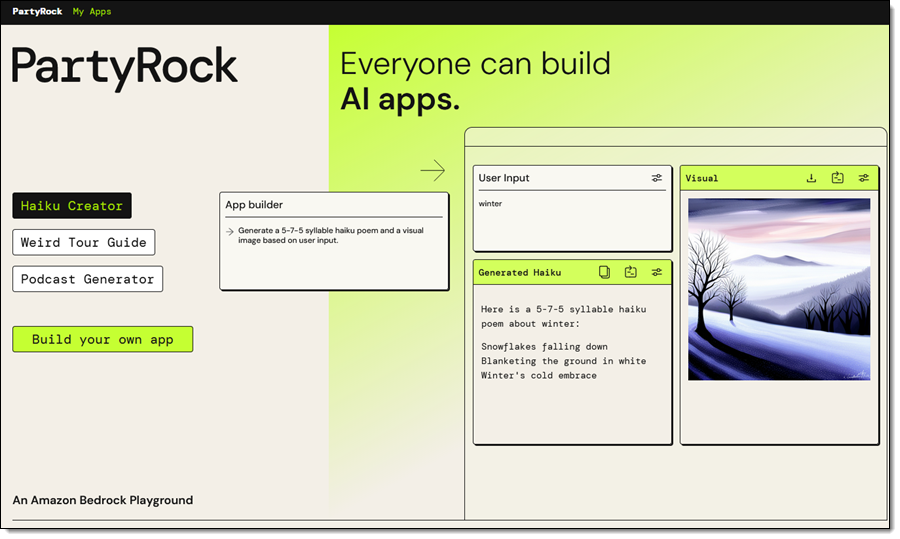
PartyRock for Amazon Bedrock – We introduced PartyRock, a fun and intuitive hands-on, generative AI app-building playground powered by Amazon Bedrock. You can experiment, learn all about prompt engineering, build mini-apps, and share them with your friends—all without writing any code or creating an AWS account.
You also can now access the Meta Llama 2 Chat 13B foundation model and Cohere Command Light, Embed English, and multilingual models for Amazon Bedrock.
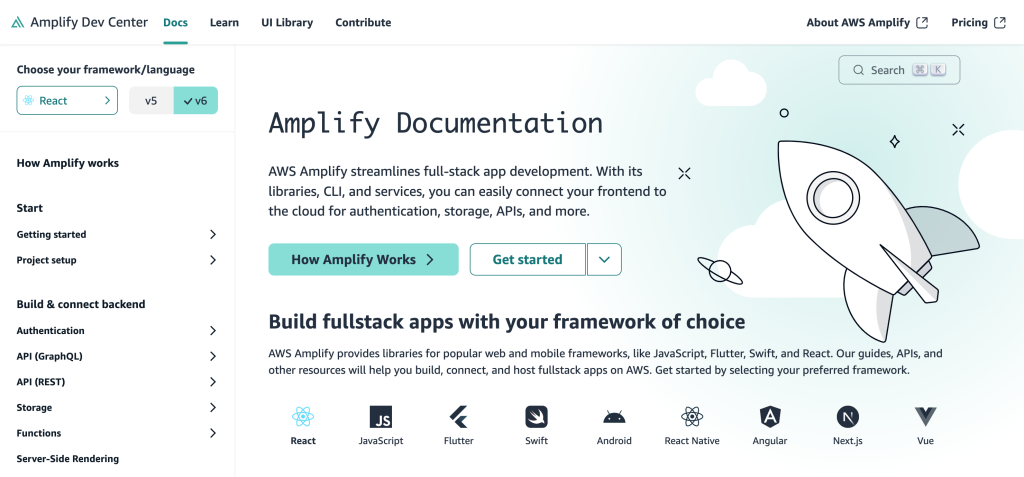
AWS Amplify celebrates its sixth birthday – We announced six new launches; a new documentation site, support for Next.js 14 with our hosting and JavaScript library, added custom token providers and an automatic React Native social sign-in update to Amplify Auth, new ChangePassword and DeleteUser account settings components, and updated all Amplify UI packages to use new Amplify JavaScript v6. You can also use wildcard subdomains when using a custom domain with your Amplify application deployed to AWS Amplify Hosting.
Also check out other News Blog posts about major launches published in the past week:
Other AWS service launches
Here are some other bundled feature launches per AWS service:
Amazon Athena – You can use a new cost-based optimizer (CBO) to enhance query performance based on table and column statistics, collected by AWS Glue Data Catalog and Athena JDBC 3.x driver, a new alternative that supports almost all authentication plugins. You can also use Amazon EMR Studio to develop and run interactive queries on Amazon Athena.
Amazon CloudWatch – You can use a new CloudWatch metric called EBS Stalled I/O Check to monitor the health of your Amazon EBS volumes, the regular expression for Amazon CloudWatch Logs Live Tail filter pattern syntax to search and match relevant log events, observability of SAP Sybase ASE database in CloudWatch Application Insights, and up to two stats commands in a Log Insights query to perform aggregations on the results.
Amazon CodeCatalyst – You can connect to a Amazon Virtual Private Cloud (Amazon VPC) from CodeCatalyst Workflows, provision infrastructure using Terraform within CodeCatalyst Workflows, access CodeCatalyst with your workforce identities configured in IAM Identity Center, and create teams made up of members of the CodeCatalyst space.
Amazon Connect – You can use a pre-built queue performance dashboard and Contact Lens conversational analytics dashboard to view and compare real-time and historical aggregated queue performance. You can use quick responses for chats, previously written formats such as typing in ‘/#greet’ to insert a personalized response, and scanning attachments to detect malware or other unwanted content.
AWS Glue – AWS Glue for Apache Spark added new six database connectors: Teradata, SAP HANA, Azure SQL, Azure Cosmos DB, Vertica, and MongoDB, as well as the native connectivity to Amazon OpenSearch Service.
AWS Lambda – You can see single pane view of metrics, logs, and traces in the AWS Lambda console and advanced logging controls to natively capture logs in JSON structured format. You can view the SAM template on the Lambda console and export the function’s configuration to AWS Application Composer. AWS Lambda also supports Java 21 and NodeJS 20 versions built on the new Amazon Linux 2023 runtime.
AWS Local Zones in Dallas – You can enable the new Local Zone in Dallas, Texas, us-east-1-dfw-2a, with Amazon EC2 C6i, M6i, R6i, C6gn, and M6g instances and Amazon EBS volume types gp2, gp3, io1, sc1, and st1. You can also access Amazon ECS, Amazon EKS, Application Load Balancer, and AWS Direct Connect in this new Local Zone to support a broad set of workloads at the edge.
Amazon Managed Streaming for Apache Kafka (Amazon MSK) – You can standardize access control to Kafka resources using AWS Identity and Access Management (IAM) and build Kafka clients for Amazon MSK Serverless written in all programming languages. These are open source client helper libraries and code samples for popular languages, including Java, Python, Go, and JavaScript. Also, Amazon MSK now supports an enhanced version of Apache Kafka 3.6.0 that offers generally available Tiered Storage and automatically sends you storage capacity alerts when you are at risk of exhausting your storage.
Amazon OpenSearch Service Ingestion – You can migrate your data from Elasticsearch version 7.x clusters to the latest versions of Amazon OpenSearch Service and use persistent buffering to protect the durability of incoming data.
Amazon RDS –Amazon RDS for MySQL now supports creating active-active clusters using the Group Replication plugin, upgrading MySQL 5.7 snapshots to MySQL 8.0, and Innovation Release version of MySQL 8.1.
Amazon RDS Custom for SQL Server extends point-in-time recovery support for up to 1,000 databases, supports Service Master Key Retention to use transparent data encryption (TDE), table- and column-level encryption, DBMail and linked servers, and use SQL Server Developer edition with the bring your own media (BYOM).
Additionally, Amazon RDS Multi-AZ deployments with two readable standbys now supports minor version upgrades and system maintenance updates with typically less than one second of downtime when using Amazon RDS Proxy.
AWS Partner Central – You can use an improved user experience in AWS Partner Central to build and promote your offerings and the new Investments tab in the Partner Analytics Dashboard to gain actionable insights. You can now link accounts and associated users between Partner Central and AWS Marketplace and use an enhanced co-sell experience with APN Customer Engagements (ACE) manager.
Amazon QuickSight – You can programmatically manage user access and custom permissions support for roles to restrict QuickSight functionality to the QuickSight account for IAM Identity Center and Active Directory using APIs. You can also use shared restricted folders, a Contributor role and support for data source asset types in folders and the Custom Week Start feature, an addition designed to enhance the data analysis experience for customers across diverse industries and social contexts.
AWS Trusted Advisor – You can use new APIs to programmatically access Trusted Advisor best practices checks, recommendations, and prioritized recommendations and 37 new Amazon RDS checks that provide best practices guidance by analyzing DB instance configuration, usage, and performance data.
There’s a lot more launch news that I haven’t covered. See AWS What’s New for more details.
See you virtually in AWS re:Invent
 Next week we’ll hear the latest from AWS, learn from experts, and connect with the global cloud community in Las Vegas. If you come, check out the agenda, session catalog, and attendee guides before your departure.
If you’re not able to attend re:Invent in person this year, we’re offering the option to livestream our Keynotes and Innovation Talks. With the registration for online pass, you will have access to on-demand keynote, Innovation Talks, and selected breakout sessions after the event.
– Channy
Post Syndicated from Harsha Sharma original https://aws.amazon.com/blogs/security/establishing-a-data-perimeter-on-aws-require-services-to-be-created-only-within-expected-networks/
Welcome to the fifth post in the Establishing a data perimeter on AWS series. Throughout this series, we’ve discussed how a set of preventative guardrails can create an always-on boundary to help ensure that your trusted identities are accessing your trusted resources over expected networks. In a previous post, we emphasized the importance of preventing access from unexpected locations, even for authorized users. For example, you wouldn’t expect non-public corporate data to be accessed from outside the corporate network. In this post, we demonstrate how to use preventative controls to help ensure that your resources are deployed within your Amazon Virtual Private Cloud (Amazon VPC), so that you can effectively enforce the network perimeter controls. We also explore detective controls you can use to detect the lack of adherence to this requirement.
Let’s begin with a quick refresher on the fundamental concept of data perimeters using Figure 1 as a reference. Customers generally prefer establishing a high-level perimeter to help prevent untrusted entities from coming in and data from going out. The perimeter defines what access customers expect within their AWS environment. It refers to the access patterns among your identities, resources, and networks that should always be blocked. Using those three elements, an assertion can be made to define your perimeter’s goal: access can only be allowed if the identity is trusted, the resource is trusted, and the network is expected. If any of these conditions are false, then the access inside the perimeter is unintended and should be denied. The perimeter is composed of controls implemented on your identities, resources, and networks to maintain that the necessary conditions are true.

Figure 1: A high-level depiction of defining a perimeter around your AWS resources to prevent interaction with unintended IAM principals, unintended resources, and unexpected networks
Now, let’s consider a scenario to understand the problem statement this post is trying to solve. Assume a setup like the one in Figure 2, where an application needs to access an Amazon Simple Storage Service (Amazon S3) bucket using its temporary AWS Identity and Access Management (IAM) credentials over an Amazon S3 VPC endpoint.

Figure 2: Scenario of a simple app using its temporary credential to access an S3 bucket
From our previous posts in this series, we’ve learned that we can use the following set of capabilities to build a network perimeter to achieve our control objectives for this sample scenario.
| Control objective | Implemented using | Applicable IAM capability |
| My identities can access resources only from expected networks. For example, in Figure 2, my application’s temporary credential can only access my S3 bucket when my application is within my expected network space. | Service control policies (SCP) | aws:SourceIp aws:SourceVpc aws:SourceVpce |
| My resources can only be accessed from expected networks. For example, in Figure 2, my S3 bucket can only be accessed from my expected network space. | Resource-based policies | aws:SourceIp aws:SourceVpc aws:SourceVpce |
But there are certain AWS services that allow for different network deployment models, such as providing the choice of associating the service resources with either an AWS managed VPC or a customer managed VPC. For example, an AWS Lambda function always runs inside a VPC owned by the Lambda service (AWS managed VPC) and by default isn’t connected to VPCs in your account (customer managed VPC). For more information, see Connecting Lambda functions to your VPC.
This means that if your application code was deployed as a Lambda function that isn’t connected to your VPC, then the function cannot access your resources with standard network perimeter controls enforced. Let’s understand this situation better using Figure 3, where a Lambda function isn’t configured to connect to the customer VPC. This function cannot access your S3 bucket over the internet because of how the recommended data perimeter in the preceding table has been defined, that is, to only allow your bucket to be accessible from a known network segment (the customer VPC and IP CIDR range) and only allow the IAM role associated with the Lambda function to allow accessing the bucket from known networks. The function also cannot access your S3 bucket through your S3 VPC endpoint because the function isn’t associated with the customer VPC. Lastly, unless other compensating controls are in place, this function might be able to access untrusted resources as your standard data perimeter controls enforced with the VPC endpoint policies won’t be in effect, which might not meet your company’s security requirements.

Figure 3: Lambda function configured to be associated with AWS managed VPC
This means that for the Lambda function to conform to your data perimeter, it must be associated with your network segment (customer VPC) as shown in Figure 4.

Figure 4: Lambda function configured to be associated with the customer managed VPC
To make sure that your Lambda functions are deployed into your networks so that they can access your resources under the purview of data perimeter controls, it’s preferable to have a way to automatically prevent deployment or configuration errors. Additionally, if you have a large deployment of Lambda functions across hundreds or even thousands of accounts, you want an efficient way to enforce conformance of these functions to your data perimeter.
To solve for this problem and make sure that an application team or a developer cannot create a function that’s not associated with your VPC, you can use the lambda:VpcIds or lambda:SubnetIds IAM condition keys (for more information, see Using IAM condition keys for VPC settings). These keys allow you to create and update functions only when VPC settings are satisfied.
In the following SCP example, an IAM principal that is subject to the following SCP policy will only be able to create or update a Lambda function if the function is associated with a VPC (customer VPC). When the customer VPC isn’t specified, the lambda:VpcIds condition key has no value—it is null—and thus this policy will deny creating or updating the function. For more information about how the Null condition operator functions, see Condition operator to check existence of condition keys.
Additionally, you can use variations of the preceding example and create more fine-grained controls using these condition keys. For more such examples, see Example policies with condition keys for VPC settings.
AWS services such as AWS Glue and Amazon SageMaker have similar feature behavior and provide similar condition keys. For example, the glue:VpcIds condition key allows you to govern the creation of AWS Glue jobs only in your VPC. For further details and an example policy, see Control policies that control settings using condition keys.
Similarly, Amazon SageMaker Studio, SageMaker notebook instances, SageMaker training, and deployed inference containers are internet accessible or enabled by default. The sagemaker:VpcSubnets condition key can be used to restrict launching these resources in a VPC. For more information, see Condition keys for Amazon SageMaker, Connect to Resources From Within a VPC, and Run Training and Inference Containers in Internet-Free Mode.
The AWS Well-Architected Framework recommends applying a defense in-depth approach with multiple security controls (see Security Pillar). This is why in addition to the preventative controls discussed in the form of condition keys in this post, you should also consider using AWS native fully managed governance tools to help you manage your environment’s deployed resources and their conformance to your data perimeter (see Management and Governance on AWS).
For example, AWS Config provides managed rules to check for Lambda functions inside a VPC and Sagemaker notebooks inside a VPC. You can also use the built-in checks of AWS Security Hub to detect and consolidate findings, such as [Lambda.3] Lambda functions should be in a VPC and [SageMaker.2] SageMaker notebook instances should be launched in a custom VPC.
You can also use similar detective controls for AWS services that don’t currently offer built-in preventative controls. For example, OpenSearch Service has an AWS Config managed rule for OpenSearch in VPC only and security hub check for [Opensearch.2] OpenSearch domains should be in a VPC.
In this post, we discussed how you can enforce that specific AWS services resources can only be created such that they adhere to your data perimeter. We used a sample scenario to dive into AWS Lambda and its network deployment options. We then used IAM condition keys as preventative controls to enforce predictable creation of Lambda functions conforming with our security standard. We also discussed additional AWS services that have similar behavior when the same concepts apply. Finally, we briefly discussed some AWS provided managed rules and security checks that you can use as supplementary detective controls to ensure that your preventative controls are in effect as expected.
The following are some additional resources that you can use to further explore data perimeters.
If you have feedback about this post, submit comments in the Comments section below. If you have questions about this post, contact AWS Support.
Want more AWS Security news? Follow us on Twitter.
Post Syndicated from Jocelyn Woolbright original http://blog.cloudflare.com/2024-the-year-of-elections/

2024 is a year of elections, with more than 70 elections scheduled in 40 countries around the world. One of the key pillars of democracy is trust. To that end, ensuring that the Internet is trusted, secure, reliable, and accessible for the public and those working in the election space is critical to any free and fair election.
Cloudflare has considerable experience in gearing up for elections and identifying how our cyber security tools can be used to help vulnerable groups in the election space. In December 2022, we expanded our product set to include Zero Trust products to assist these groups against new and emerging threats. Over the last few years, we’ve reported on our work in protecting a range of election entities and as we prepare for the 2024 elections, we want to provide insight into attack trends we’ve seen against these groups to understand what to expect in the next year.
For this blog post, we identified cyber attack trends for a variety of groups in the elections space based in the United States, as many of our Cloudflare Impact projects provide services to these groups. These include U.S. state and local government websites protected under the Athenian Project, as well as U.S. nonprofit organizations that work in voting rights and promoting democracy under Project Galileo, and political campaigns and parties under Cloudflare for Campaigns.
Our main findings:
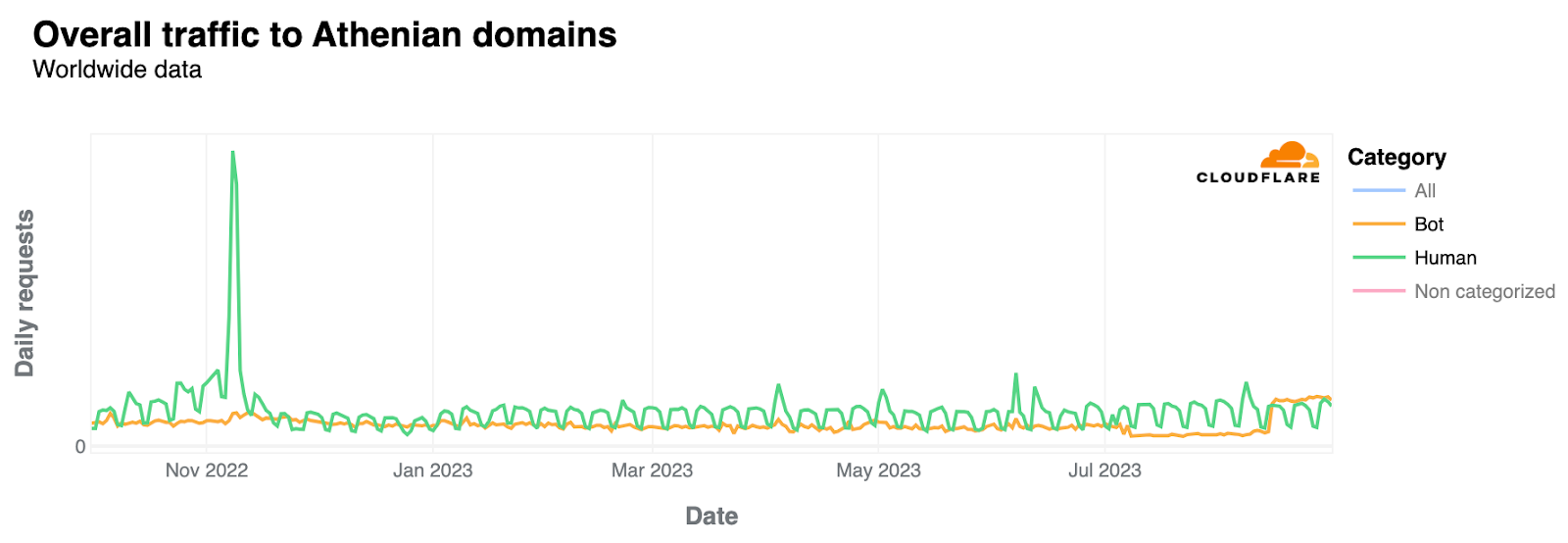
Under the Athenian Project, Cloudflare provides our highest level of protection to state and local governments in the United States that run elections. As of November 2023, 390 state and local governments in 31 states are protected under the project. Across this cohort, Cloudflare mitigated 213.78 million threats to government election sites between November 1, 2022, and August 31, 2023, an average of 703,223 threats per day.
On Election Day, November 7, 2022, we saw traffic to state and local government sites increase by more than 500%. Analysis shows that 80% of this traffic was classified as coming from human users, which is expected, as we tend to see an increase in traffic during election time as constituents view their local county board of election sites to identify polling locations and election results.
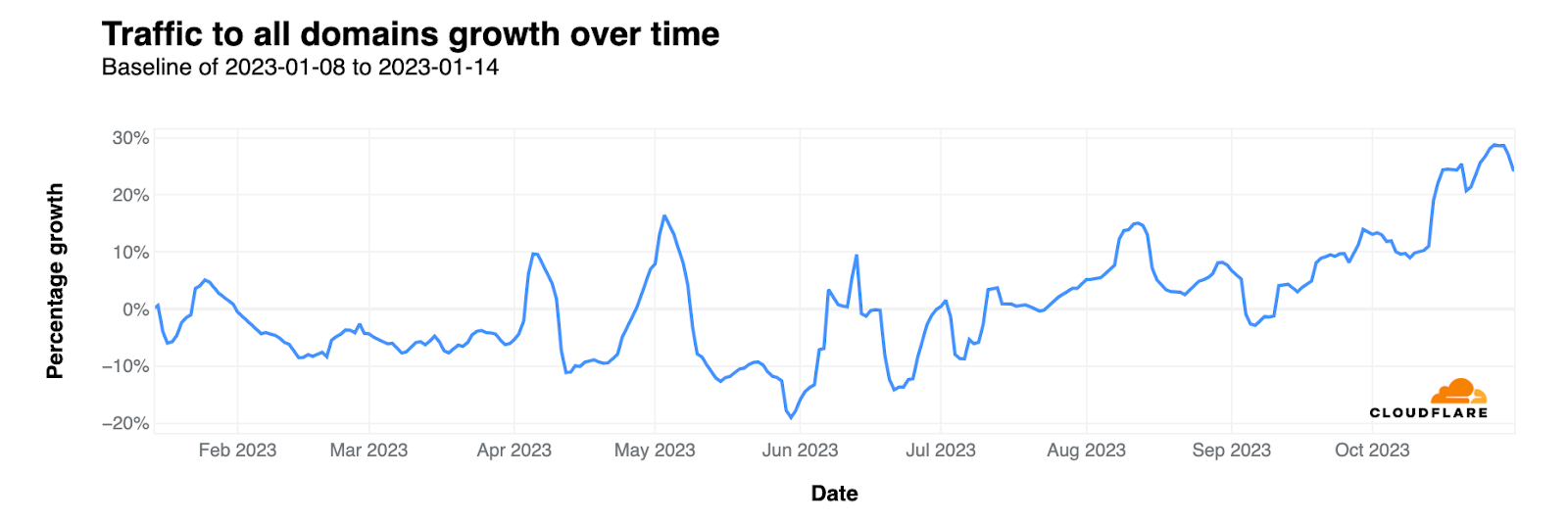
We’ve also seen an increase in state and local governments onboarding .gov domains to Cloudflare. In September 2022, The U.S Department of Homeland Security’s Cybersecurity and Infrastructure Security Agency (CISA) announced the agency would launch a new .gov registrar with the intent of making it easier for government organizations to set up a .gov website, while also making the domain more secure. We observed that 65% of traffic to Athenian domains is to .gov domains.
When we look at traffic that was mitigated by Cloudflare’s Web Application Firewall (WAF), specifically Cloudflare managed rulesets, we see an oscillating traffic pattern identified as HTTP anomalies until a sudden (and seemingly permanent) drop after mid-April 2023. Managed rulesets are pre-configured firewall rules that provide immediate protection against common vulnerabilities. These managed rulesets are created by the Cloudflare security team, provide fast and effective protection for customer applications, and are updated frequently to cover new vulnerabilities and reduce false positives.
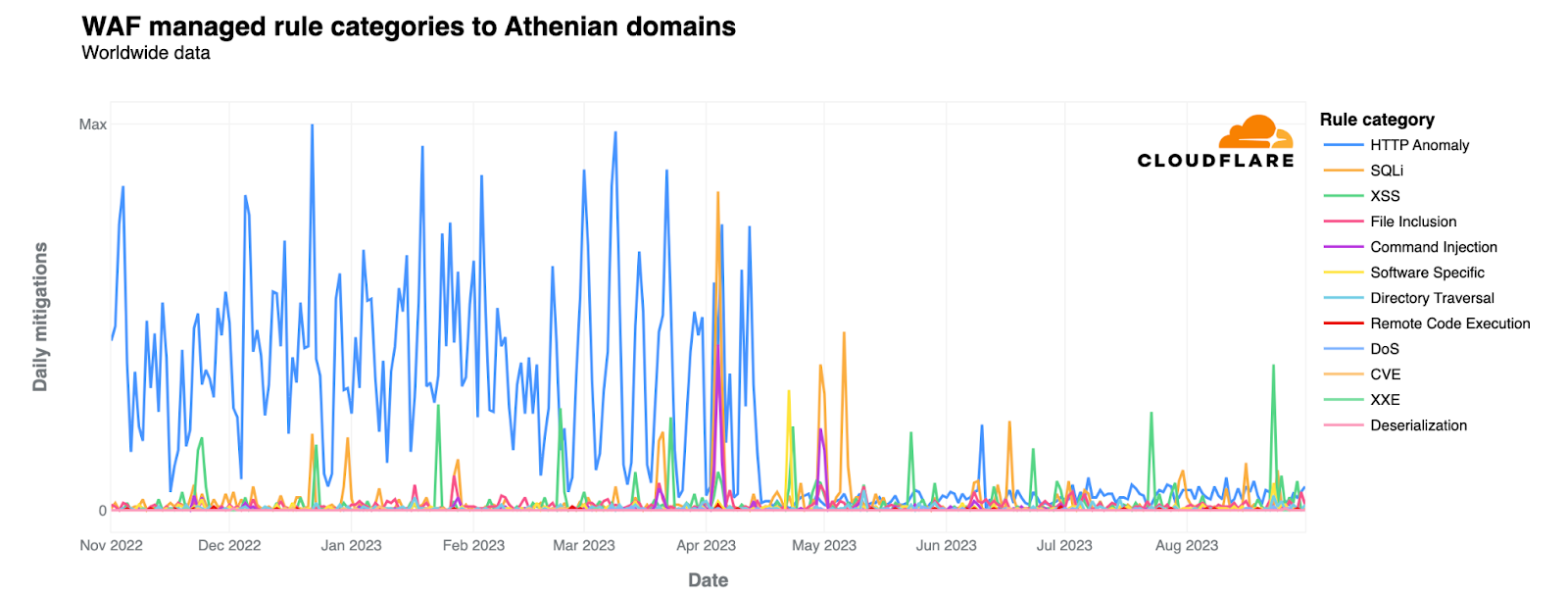
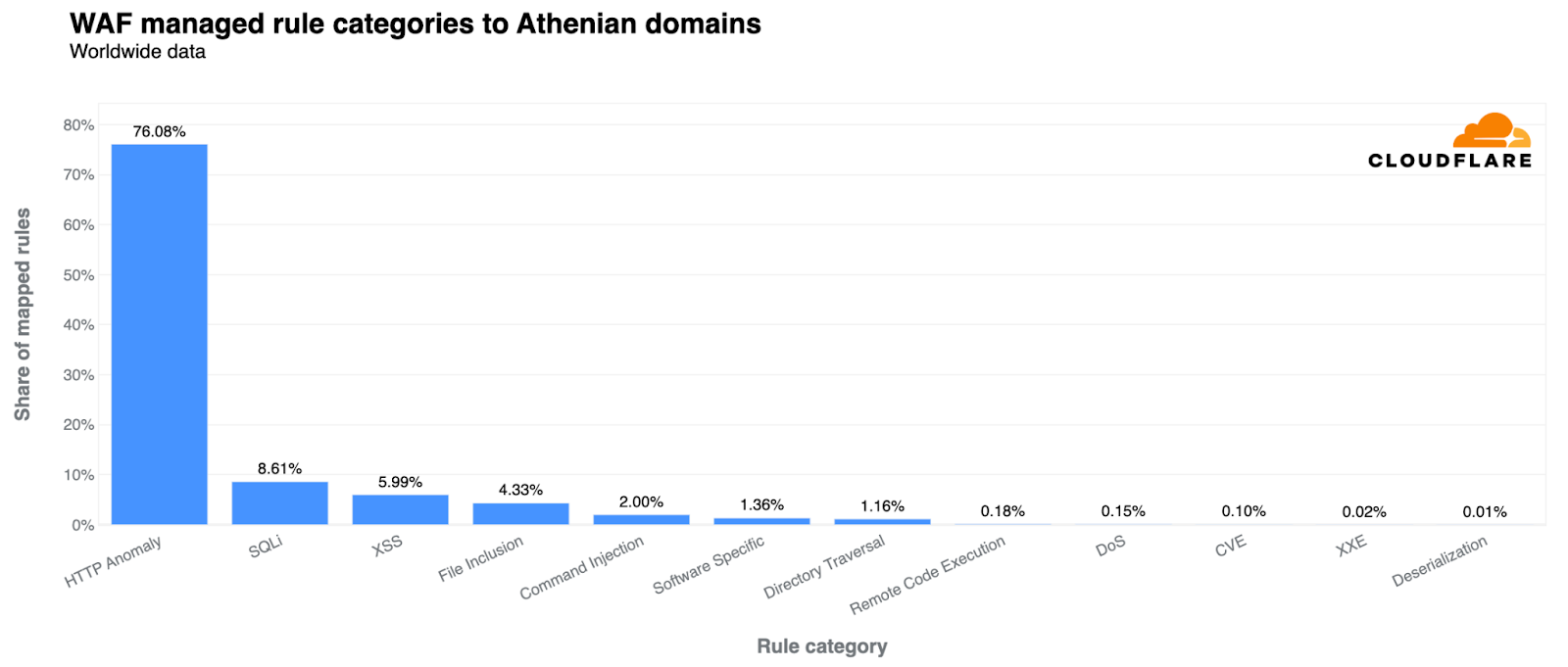
The managed rules are a great feature, especially for organizations with limited security resources, as they are easy to enable and protect against common vulnerabilities that Cloudflare has identified that have hit thousands of websites. Within the WAF Managed Rules, the top category that we see for mitigations is HTTP Anomaly. HTTP anomalies include such things as malformed method names, null byte characters in headers, non-standard ports, or content length of zero with a POST request.
We found 76% of traffic that was mitigated by the WAF was HTTP anomalies, followed by SQL Injection (SQLi) at only 8%. There is another pattern seen in XSS (Cross-Site-Scripting) attempts that are observed every 23rd day of the month. Given this very “strict” pattern, this could be due to an automated attack of some sort.
Cloudflare launched Cloudflare for Campaigns in January 2020, in partnership with the nonprofit, nonpartisan organization Defending Digital Campaigns. Under the partnership, we protect 70 political campaigns and 20 political parties in the United States. Between November 1, 2022, and August 31, 2023,Cloudflare mitigated 1.83 million threats to political campaign sites, which is an average of 6,019 threats per day.
When we look at traffic trends for these domains, we see a spike in November 2022 during the midterm elections in the United States, but significantly lower traffic after this time. Overall, interest in these campaign websites appears to be limited only to election times and some months prior.
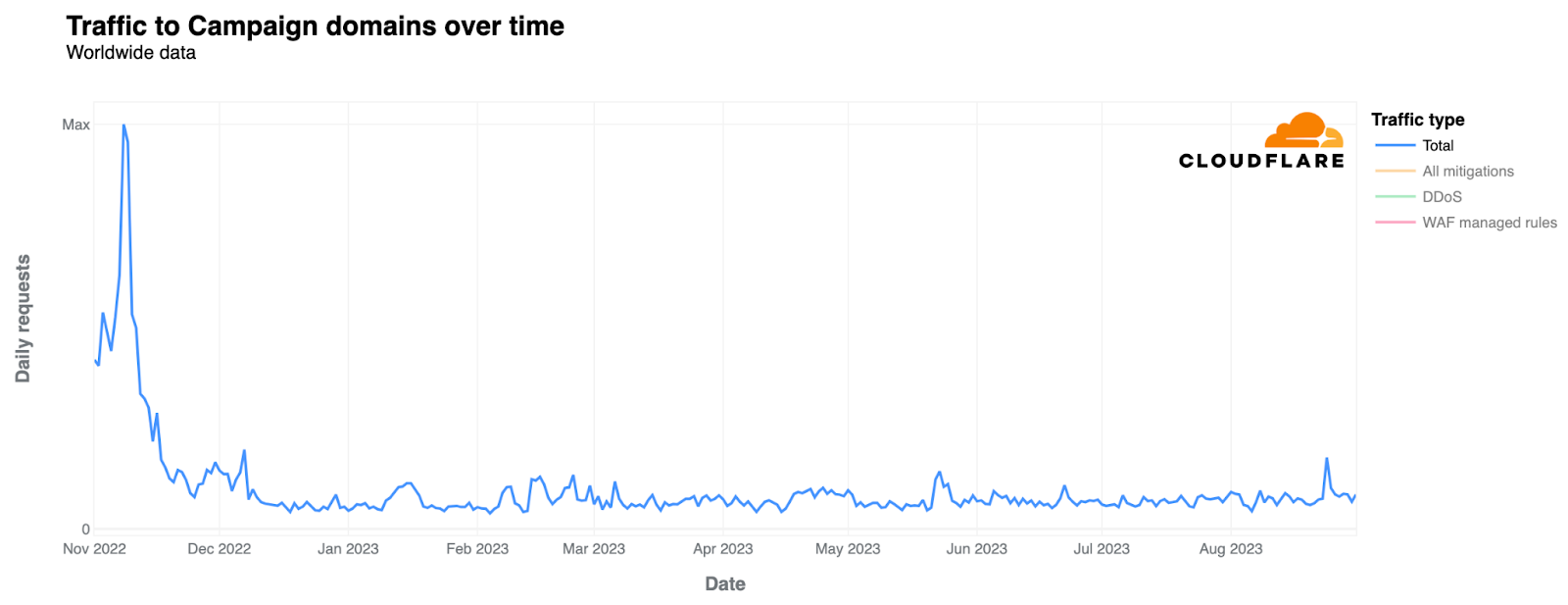
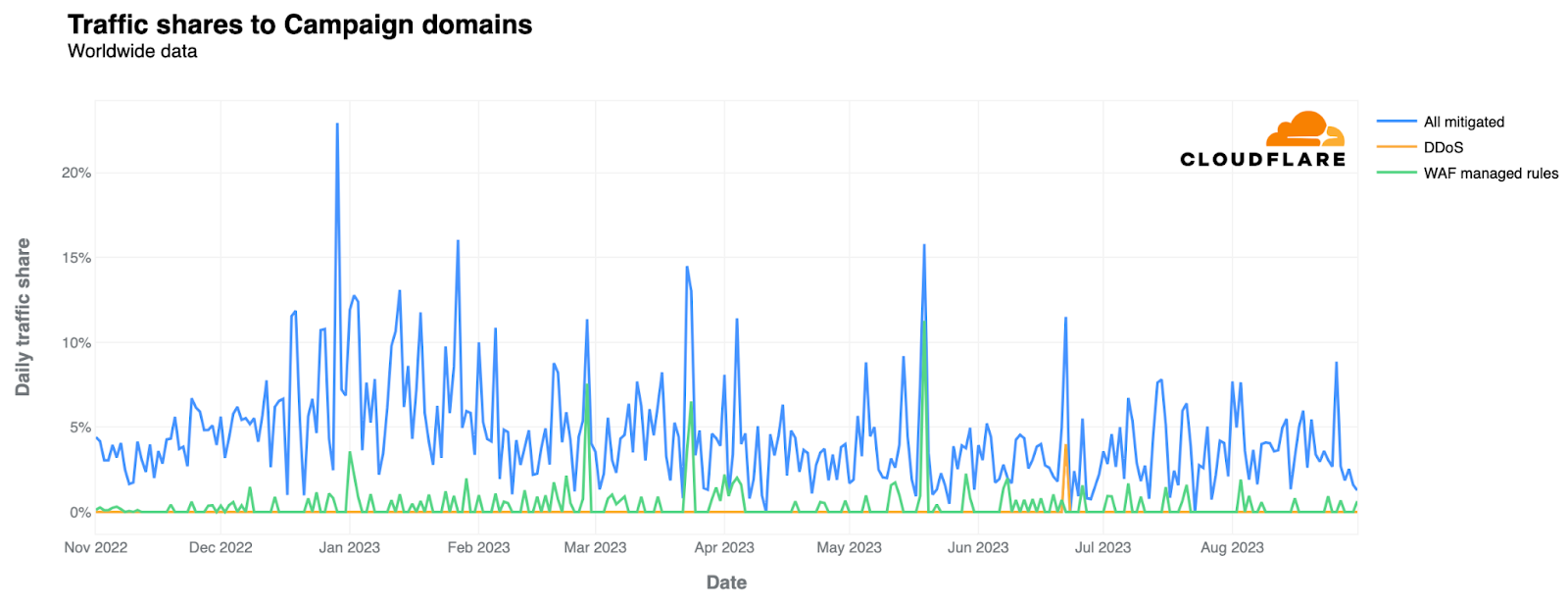
When we identify traffic that was blocked by Cloudflare, a majority (79%) was blocked by WAF rules. However, this wasn’t all from malicious sources, as some of the rules have been configured by the campaigns themselves to block other types of unwanted traffic. For example, some campaigns block traffic from outside of the United States from accessing the website, which would be classified as a blocked request. As we’ve worked with many campaigns in the past on how to get the most out of Cloudflare security tools, we think it is a sign of progress that campaigns are setting specific rules that help them mitigate or challenge traffic that they may not want to access the site.
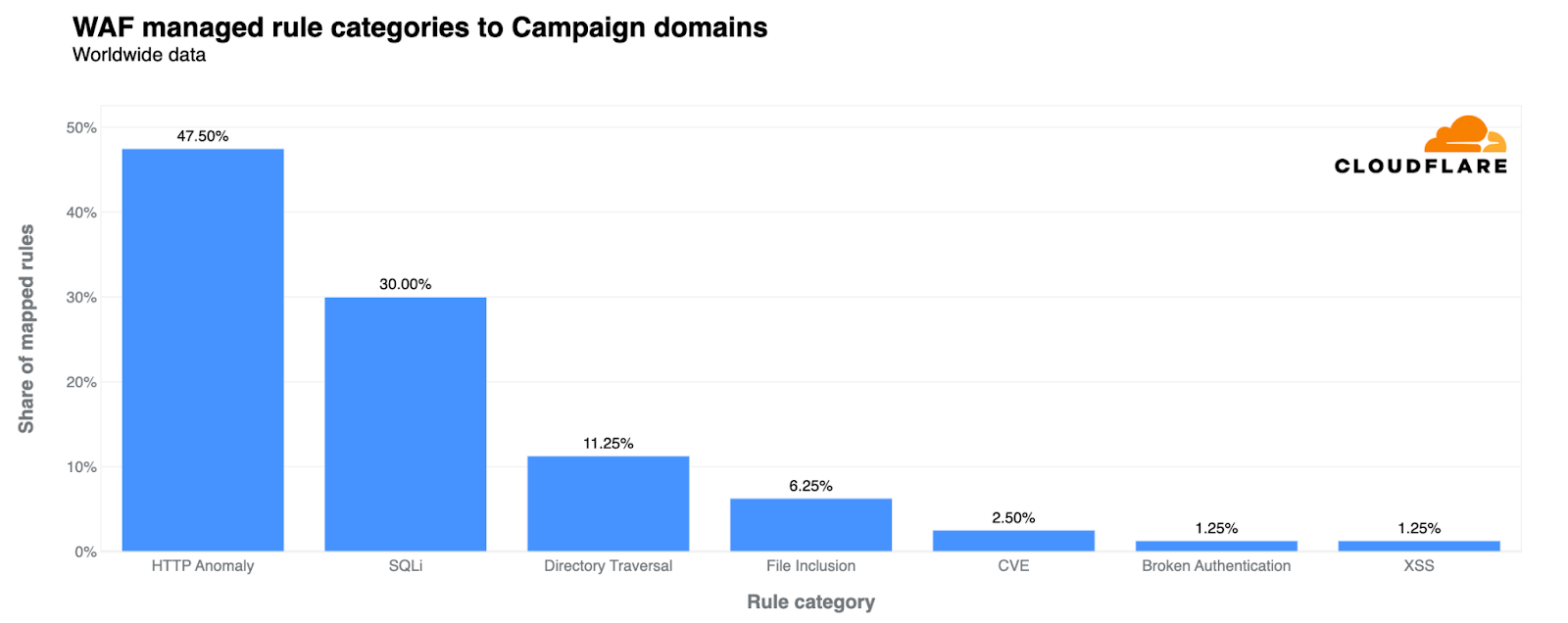
In addition to the customer-configured rules, these campaign sites are also protected by WAF managed rules (run by Cloudflare), with 47% of mitigated traffic identified as HTTP Anomaly and 30% SQLi.
As part of our analysis we also identified 69 organizations in the United States that are protected under Project Galileo that work on a range of topics related to voting rights and promoting free and fair elections. For those organizations, Cloudflare mitigated 19.13 million threats between November 1, 2022, and August 31, 2023, an average of 62,927 threats per day.
We saw a spike in traffic during election time in November 2022 and another slight increase in April 2023. During this time, the largest number of blocked requests was mitigated by Cloudflare’s Security Level. Cloudflare’s Security Level is a security tool that ranks requests based on IP reputation to decide whether to present a Managed Challenge page. A managed challenge helps determine whether the request is considered malicious or legitimate. If the visitor passes the challenge, their request is allowed. If they fail, the request will be blocked. Many of these challenges are issued as a result of domains enabling Under Attack Mode, which enforces an elevated Security Level to help mitigate layer 7 DDoS attacks.

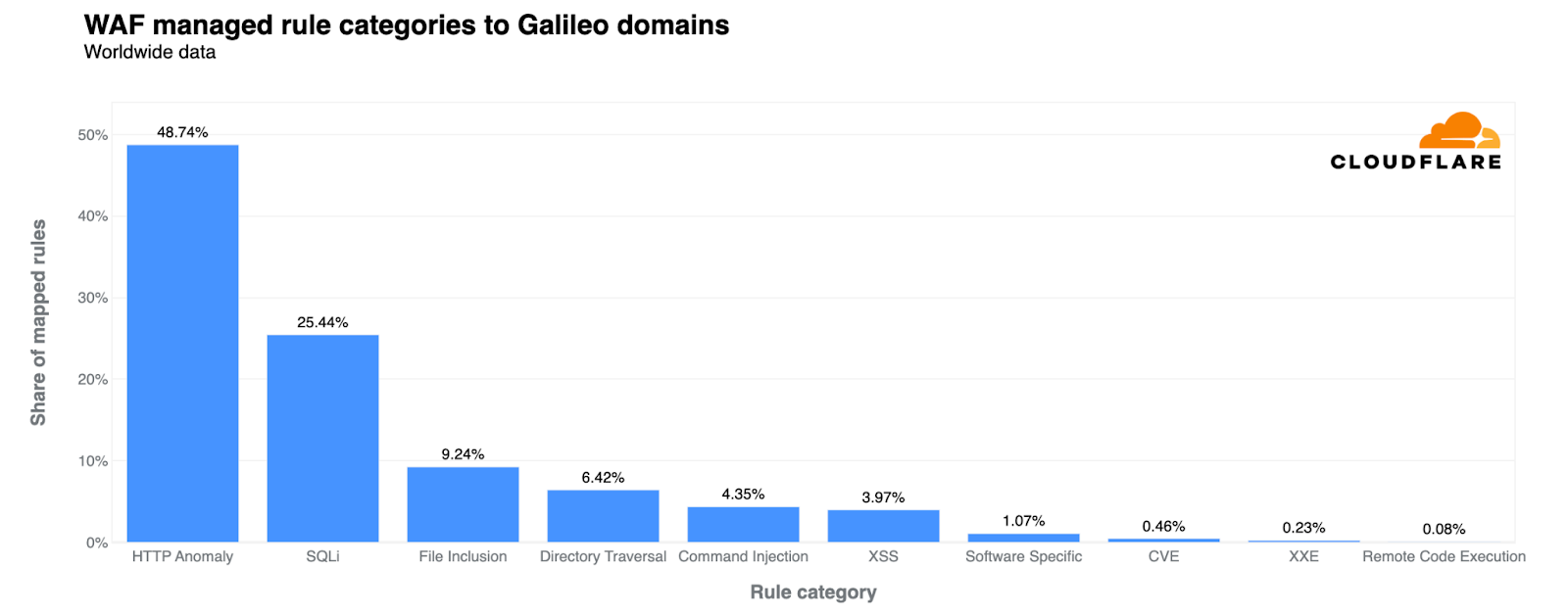
For traffic that was mitigated by the WAF, we found the top mitigation categories to be HTTP Anomalies at 48% and SQLi at 25%. Overall, we saw more requests mitigated by Cloudflare’s WAF than traffic that was considered DDoS.
In 2021, we announced our partnership with the International Foundation for Electoral Systems (IFES) to provide our highest level of protection for free to election management bodies (EMBs) around the world. An EMB is an institution responsible for organizing and overseeing elections in a particular jurisdiction with a primary role of ensuring that the electoral process is conducted fairly and transparently. Since beginning our partnership, we’ve provided protection or expertise to 7 election management bodies to support their work in promoting free and fair elections. As part of this, we’ve worked with election commissions in Kosovo and North Macedonia to protect their election infrastructure.
“Security is the cornerstone of any democratic process, and free and fair elections are no exception. Security products like those from Cloudflare become even more critical in an increasingly digital world. With Cloudflare, we have effectively mitigated numerous cyber threats, ensuring citizens uninterrupted access to electoral information in Kosovo. This has significantly fostered trust and transparency in our electoral processes.”
– Kreshnik Spahiu
Director of the Information Technology Department, Central Election Commission of Kosovo
As we approach 2024 with many elections in newly emerging democracies, we are excited to continue our work with IFES to provide our services and share our expertise to help election groups stay secure online.

If 2024 is anything like 2023, we should continue to expect irregularities regarding Internet access during elections. We’ve seen this in areas such as Cambodia, where ahead of the 2023 elections, Cambodian officials ordered internet service providers to block website access to three news outlets reporting on the election as a way to control the independent media. In Zimbabwe, a new law known as the Patriotic Bill was passed before the general election, encompassing a wide range of provisions that make it illegal to engage in speech deemed to pose a threat to the nation’s sovereignty or vital national interests.
The last few years contain many examples of how governments have undermined and controlled the flow of information through Internet shutdowns, restricted social media sites during elections, and imposed blocking of websites that report on results. If current trends continue, 2024 will be a pivotal year for online freedoms.
In light of this, we want to ensure that all groups working to promote democracy around the world have the tools they need to stay secure online. If you work in the election space and need our help, please apply at https://www.cloudflare.com/election-security.
Post Syndicated from Yaron Kaplan original https://blog.rapid7.com/2023/11/20/rapid7-introduces-ai-driven-cloud-anomaly-detection/
It’s that time of year again! AWS Re:Invent, Amazon Web Services’ annual mega-conference will soon kick off in Las Vegas and there are sure to be a ton of new cloud security innovations unveiled throughout the week. From a Rapid7 perspective, we’re launching an exciting new capability – Cloud Anomaly Detection.
Now available in early access for Rapid7 customers, Cloud Anomaly Detection helps security teams detect unknown threats in their cloud environments that traditional rule-based detections miss, and with more precision to avoid excess noise and false positives.
Detecting malicious activity in cloud environments poses a formidable challenge in cybersecurity due to the inherent speed and complexity of the cloud. Cloud infrastructure is dynamic, with constantly changing virtual assets, which makes it hard to pinpoint and respond to threats effectively. The complexity of cloud configurations, the transient nature of assets, and the vast data generated can obscure malicious activities, necessitating advanced monitoring and analysis tools.
Additionally, the unique cloud threat landscape, the different dynamics of detection and response compared to traditional IT environments, and the multiplicity of stakeholders involved further complicate the security landscape. Cloud incident investigations are often hindered by inefficient data access and a lack of context for affected cloud assets. This complexity, combined with a skills gap and the ongoing transition to cloud technologies, makes cloud security particularly challenging.
For some time now Rapid7 customers have benefited from the ability to ingest native threat detections from cloud providers and consolidate them into a single place. Cloud Anomaly Detection represents a significant leap forward adding native threat detections fueled by Rapid7’s proprietary AI detection engine to analyze control plane API activity and surface anomalous behavior across customers’ cloud environments. When combined with deep, real-time understanding of the environment, the platform allows security teams to respond to threats quickly and with the context needed to determine root cause and potential impact.
One of the persistent challenges that comes with attempting to detect anomalous user and entity behavior is that it can often present a significant amount of excess noise, often associated with a flood of false positives. This is due in large part to the complexity and rate of change that we outlined earlier. Not only is the overall composition of the environment constantly changing, but the way users and services in turn interact with each other are constantly-changing in kind. Often security teams are faced with a tradeoff between casting a wide net and dealing with the inevitable situation of chasing down benign activity or honing in further and risking actually malicious activity going undetected.
Rapid7’s Cloud Anomaly Detection connects to your cloud environment – without the need for an agent – to monitor API activity by analyzing audit logs, creating an activity profile for each cloud principal, such as users, machines, storage buckets, and more. What sets this engine apart is its ability to automatically search for behavioral anomalies and prioritize potential risks in less than 10 minutes based on historical data. Importantly, the engine is calibrated to reduce false positive alerts by focusing on detecting malicious activity without relying on specific pre-configured attack indicators. It also considers the context of suspicious activity, taking into account recent actions by the same principal and adapting to changes in overall activity profiles and the cloud environment automatically.
When talking with SOC analysts, one of the things that became crystal clear to the team here at Rapid7 early on in the development process was the desire to consolidate threat detection and response activities into the existing workflows teams had in place today, including the SIEM/XDR tools that the SOC teams relied on (and had made significant investment in already). Integrating cloud threat detections, including both native and third-party solutions, into your current SOC workflows involves making the cloud threat findings themselves as well as the context needed to enrich those findings with all relevant environment details accessible through an API for easy ingestion into SIEM/XDR tools.
To that end, we’ve ensured teams can easily send detections from Cloud Anomaly Detection via API into whatever tools they’re using today. The Cloud Context Enrichment API, which was released earlier this year, provides a wide range of data related to cloud attributes, insights, misconfigurations, vulnerabilities, risks, and more, to expedite the investigative process, enhancing the efficiency of security operations. The combination of Cloud Anomaly Detection and Cloud Context Enrichment ensures SOC teams have the tools needed to incorporate cloud into their existing detection and response workflows.
We’ll be showcasing Cloud Anomaly Detection at AWS Re:Invent, so if you’re there be sure to stop by booth #1270 and check it out!
Post Syndicated from jake original https://lwn.net/Articles/951999/
Security updates have been issued by Debian (freerdp2, lwip, netty, and wireshark), Fedora (dotnet6.0, dotnet7.0, golang, gst-devtools, gstreamer1, gstreamer1-doc, gstreamer1-plugin-libav, gstreamer1-plugins-bad-free, gstreamer1-plugins-base, gstreamer1-plugins-good, gstreamer1-plugins-ugly-free, gstreamer1-rtsp-server, gstreamer1-vaapi, podman-tui, prometheus-podman-exporter, python-gstreamer1, syncthing, and tigervnc), Mageia (chromium-browser-stable, haproxy, and tigervnc), Oracle (curl, ghostscript, microcode_ctl, nghttp2, open-vm-tools, samba, and squid), SUSE (gcc13, postgresql14, and yt-dlp), and Ubuntu (iniparser).
Post Syndicated from Rohit Kumar original https://www.servethehome.com/nvidia-goes-ethernet-for-ai-and-copies-supernic-for-bluefield-3-brand/
NVIDIA is using Ethernet for AI clusters as it combines Spectrum-4 and BlueField-3 DPUs and its software for enterprises
The post NVIDIA Goes Ethernet for AI and Copies SuperNIC for BlueField-3 Brand appeared first on ServeTheHome.
Post Syndicated from The History Guy: History Deserves to Be Remembered original https://www.youtube.com/watch?v=tRT7RO0sEfk
Post Syndicated from Matt Granger original https://www.youtube.com/watch?v=GI2zjOfK-BI
Post Syndicated from Bruce Schneier original https://www.schneier.com/blog/archives/2023/11/using-generative-ai-for-surveillance.html
Generative AI is going to be a powerful tool for data analysis and summarization. Here’s an example of it being used for sentiment analysis. My guess is that it isn’t very good yet, but that it will get better.
Post Syndicated from Bonnie Sheppard original https://www.raspberrypi.org/blog/support-new-computing-teachers-debugging-scratch-litterbox/
We all know that learning to program, and specifically learning how to debug or fix code, can be frustrating and leave beginners overwhelmed and disheartened. In a recent blog article, our PhD student Lauria at the Raspberry Pi Computing Education Research Centre highlighted the pivotal role that teachers play in shaping students’ attitudes towards debugging. But what about teachers who are coding novices themselves?

In many countries, primary school teachers are holistic educators and often find themselves teaching computing despite having little or no experience in the field. In a recent seminar of our series on computing education for primary-aged children, Luisa Greifenstein told attendees that struggling with debugging and negative attitudes towards programming were among the top ten challenges mentioned by teachers.

Luisa is a researcher at the University of Passau, Germany, and has been working closely with both teacher trainees and experienced primary school teachers in Germany. She’s found that giving feedback to students can be difficult for primary school teachers, and especially for teacher trainees, as programming is still new to them. Luisa’s seminar introduced a tool to help.
To address this issue, the University of Passau has initiated the primary::programming project. One of its flagship tools, LitterBox, offers a unique solution to debugging and is specifically designed for Scratch, a beginners’ programming language widely used in primary schools.
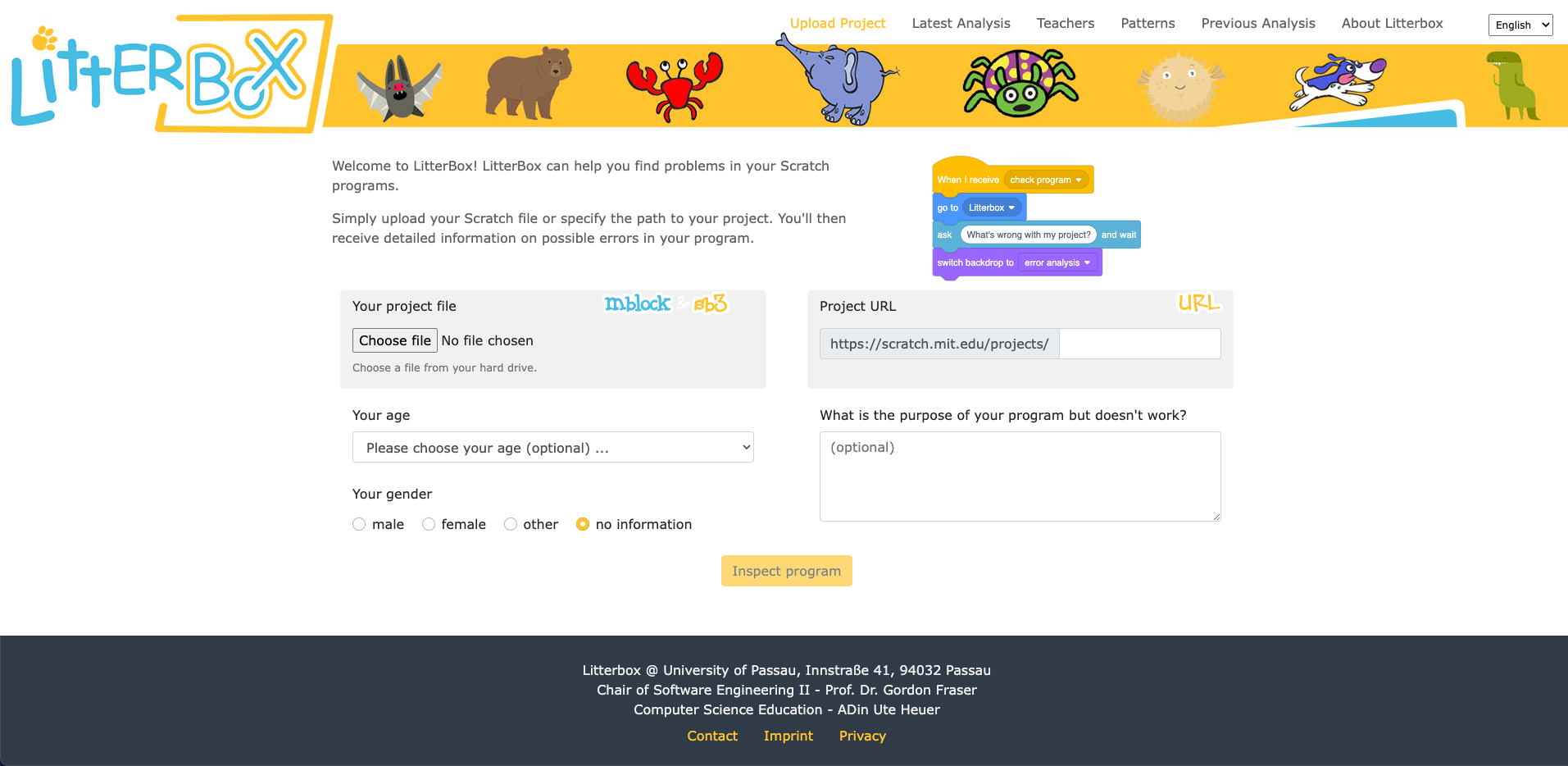
LitterBox serves as a static code debugging tool that transforms code examination into an engaging experience. With a nod to the Scratch cat, the tool visualises the debugging of Scratch code as checking the ‘litterbox’, categorising issues into ‘bugs’ and ‘smells’:
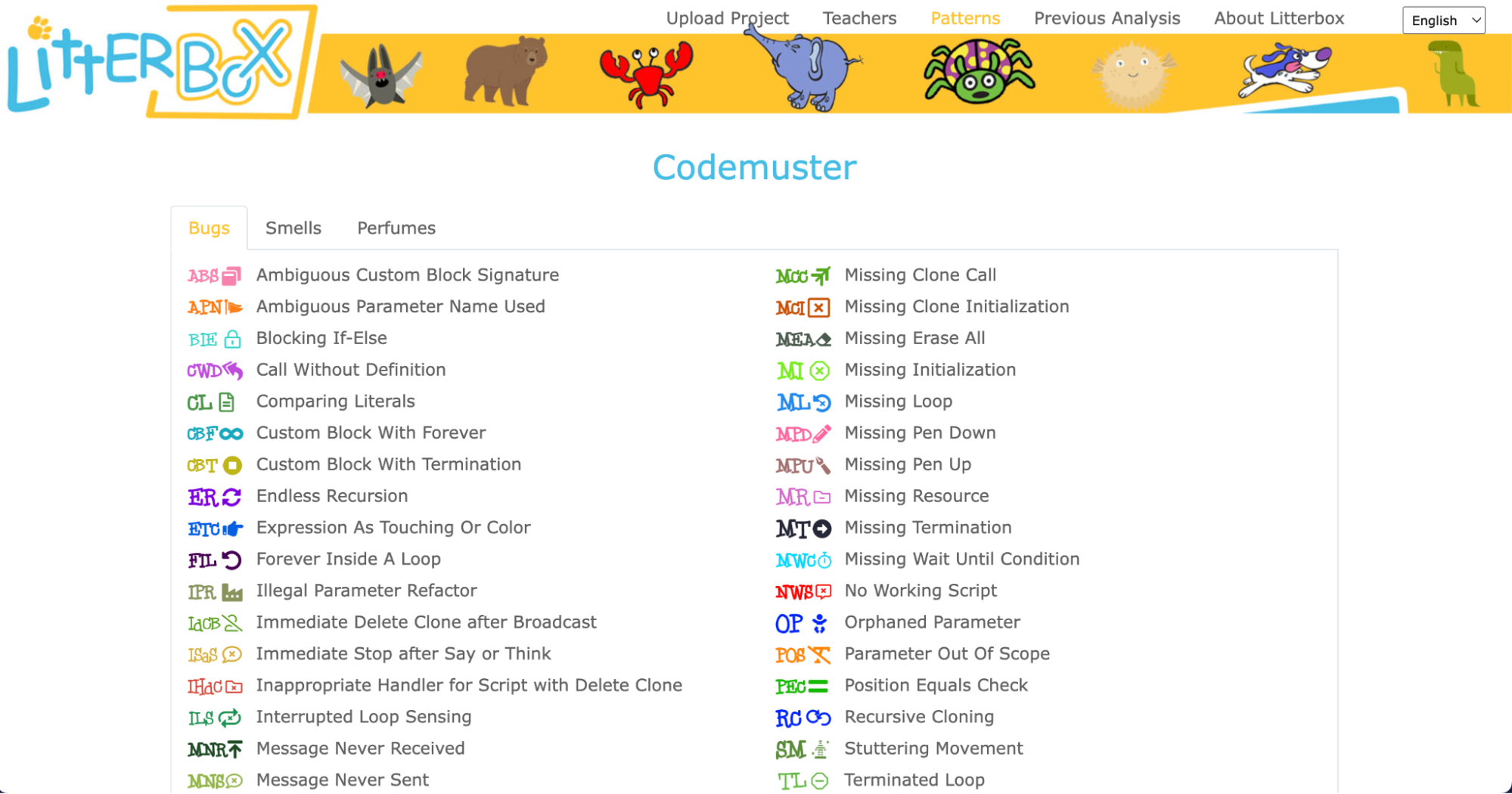
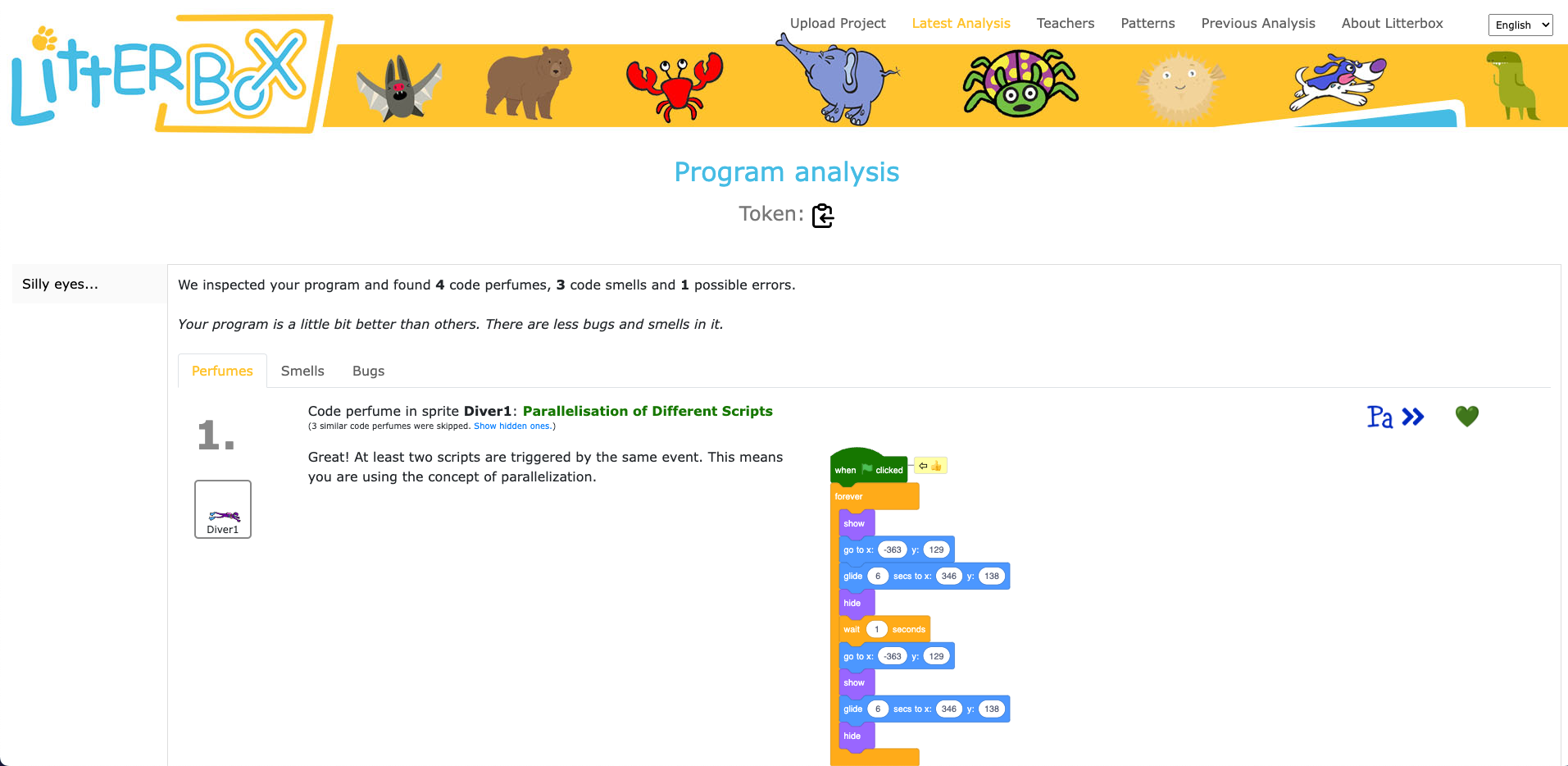
What sets LitterBox apart is that it also rewards correct code by displaying ‘perfumes’. For instance, it will praise correct broadcasting or the use of custom blocks. For every identified problem or achievement, the tool provides short and direct feedback.
Luisa and her team conducted a study to gauge the effectiveness of LitterBox. In the study, teachers were given fictitious student code with bugs and were asked to first debug the code themselves and then explain in a manner appropriate to a student how to do the debugging.
The results were promising: teachers using LitterBox outperformed a control group with no access to the tool. However, the team also found that not all hints proved equally helpful. When hints lacked direct relevance to the code at hand, teachers found them confusing, which highlighted the importance of refining the tool’s feedback mechanisms.
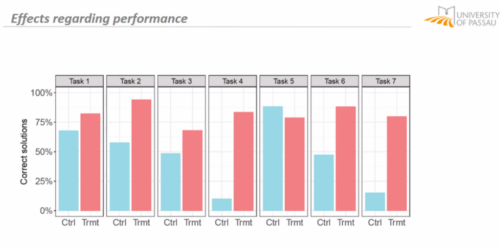
Despite its limitations, LitterBox proved helpful in another important aspect of the teachers’ work: coding task creation. Novice students require structured tasks and help sheets when learning to code, and teachers often invest substantial time in developing these resources. While LitterBox does not guide educators in generating new tasks or adapting them to their students’ needs, in a second study conducted by Luisa’s team, teachers who had access to LitterBox not only received support in debugging their own code but also provided more scaffolding in task instructions they created for their students compared to teachers without LitterBox.
One important realisation that we had in the Q&A phase of Luisa’s seminar was that many different research teams are working on solutions for similar challenges, and that the impact of this research can be maximised by integrating new findings and resources. For instance, what the LitterBox tool cannot offer could be filled by:
As we navigate the evolving landscape of programming education, it’s clear that innovative tools like LitterBox can make a significant difference in the journey of both educators and students. By equipping educators with effective debugging and task creation solutions, we can create a more positive and engaging learning experience for students.
If you’re an educator, consider exploring how such tools can enhance your teaching and empower your students in their coding endeavours.
You can watch the recording of Luisa’s seminar here:
If you’re interested in the latest developments in computing education, join us at one of our free, monthly seminars. In these sessions, researchers from all over the world share their innovative ideas and are eager to discuss them with educators and students. In our December seminar, Anaclara Gerosa (University of Edinburgh) will share her findings about how to design and structure early-years computing activities.
This will be the final seminar in our series about primary computing education. Look out for news about the theme of our 2024 seminar series, which are coming soon.
The post Support for new computing teachers: A tool to find Scratch programming errors appeared first on Raspberry Pi Foundation.
Post Syndicated from LastWeekTonight original https://www.youtube.com/watch?v=p4QGOHahiVM
Post Syndicated from Rohit Kumar original https://www.servethehome.com/cornelis-networks-shows-off-576-port-400gbps-omni-path-cn5000-at-sc23/
At SC23, we saw the Cornelis Networks 576-port 400Gbps Omni-Path CN5000 director switch with a whopping 48kW of power supplies
The post Cornelis Networks Shows off 576-Port 400Gbps Omni-Path CN5000 at SC23 appeared first on ServeTheHome.
Post Syndicated from corbet original https://lwn.net/Articles/951907/
The second 6.7 kernel prepatch is out for
testing. “The most noticeable thing is probably the turbostat tool
”
update, which actually came in during the merge window, but was delayed by
just waiting for getting the pull request properly signed.