Why I Hate Password Rules

Post Syndicated from Bruce Schneier original https://www.schneier.com/blog/archives/2021/11/why-i-hate-password-rules.html

The other day, I was creating a new account on the web. It was financial in nature, which means it gets one of my most secure passwords. I used Password Safe to generate this 16-character alphanumeric password:

:s^Twd.J;3hzg=Q~

Which was rejected by the site, because it didn’t meet its password security rules.

It took me a minute to figure out what was wrong with it. The site wanted at least two numbers.

Sheesh.

Okay, that’s not really why I don’t like password rules. I don’t like them because they’re all different. Even if someone has a strong password generation system, it is likely that whatever they come up with won’t pass somebody’s ruleset.

Zabbix 6.0 LTS at Zabbix Summit Online 2021

Post Syndicated from Arturs Lontons original https://blog.zabbix.com/zabbix-6-0-lts-at-zabbix-summit-online-2021/16115/

With Zabbix Summit Online 2021 just around the corner, it’s time to have a quick overview of the 6.0 LTS features that we can expect to see featured during the event. The Zabbix 6.0 LTS release aims to deliver some of the long-awaited enterprise-level features while also improving the general user experience, performance, scalability, and many other aspects of Zabbix.

Native Zabbix server cluster

Many of you will be extremely happy to hear that Zabbix 6.0 LTS release comes with out-of-the-box High availability for Zabbix Server. This means that HA will now be supported natively, without having to use external tools to create Zabbix Server clusters.

The native Zabbix Server cluster will have a speech dedicated to it during the Zabbix Summit Online 2021. You can expect to learn both the inner workings of the HA solution, the configuration and of course the main benefits of using the native HA solution. You can also take a look at the in-development version of the native Zabbix server cluster in the latest Zabbix 6.0 LTS alpha release.

Business service monitoring and root cause analysis

Service monitoring is also about to go through a significant redesign, focusing on delivering additional value by providing robust Business service monitoring (BSM) features. This is achieved by delivering significant additions to the existing service status calculation logic. With features such as service weights, service status analysis based on child problem severities, ability to calculate service status based on the number or percentage of children in a problem state, users will be able to implement BSM on a whole new level. BSM will also support root cause analysis – users will be informed about the root cause problem of the service status change.

All of this and more, together with examples and use cases will be covered during a separate speech dedicated to BSM. In addition, some of the BSM features are available in the latest Zabbix 6.0 LTS alpha release – with more to come as we continue working on the Zabbix 6.0 release.

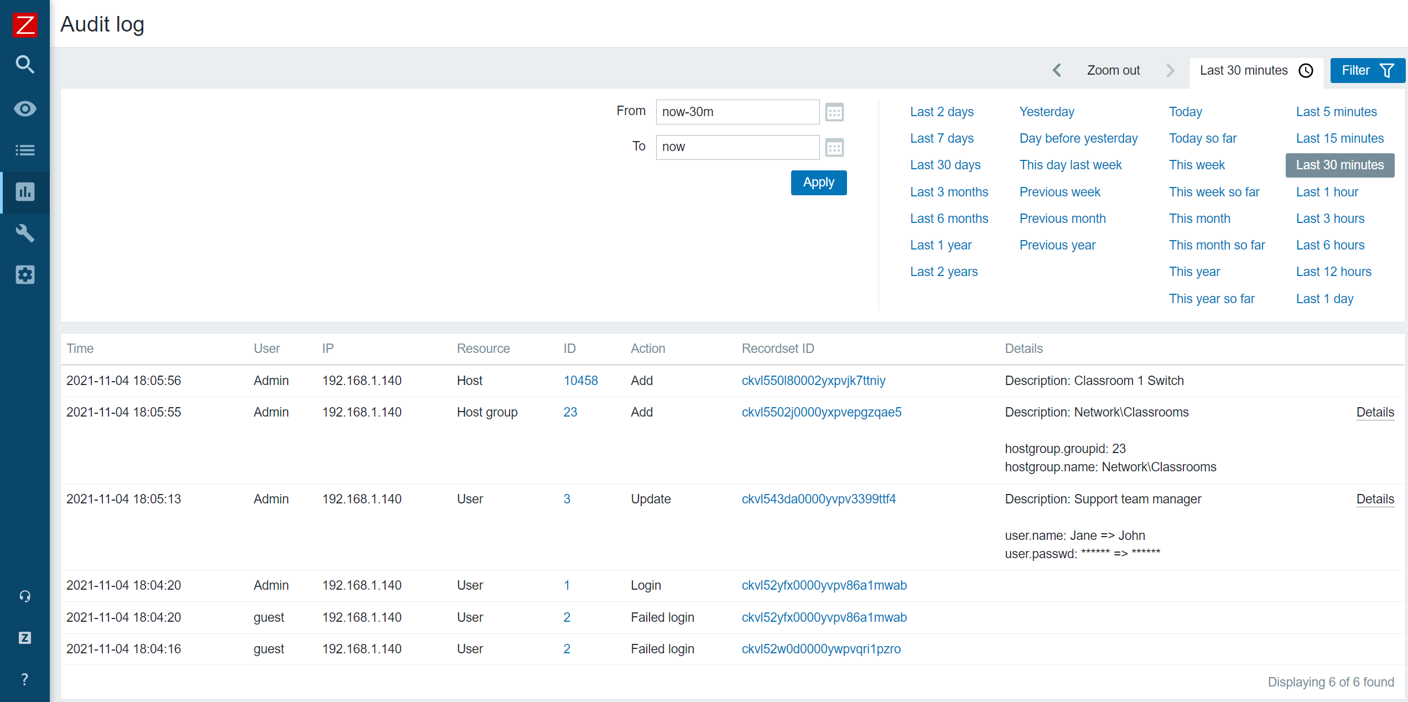
Audit log redesign

The Audit log is another existing feature that has received a complete redesign. With the ability to log each and every change performed both by the Zabbix Server and Zabbix Frontend, the Audit log will become an invaluable source of audit information. Of course, the redesign also takes performance into consideration – the redesign was developed with the least possible performance impact in mind.

The audit log is constantly in development and the current Zabbix 6.0 LTS alpha release offers you an early look at the feature. We will also be covering the technical details of the new audit log implementation during the Summit and will explain how we are able to achieve minimal performance impact with major improvements to Zabbix audit logging.

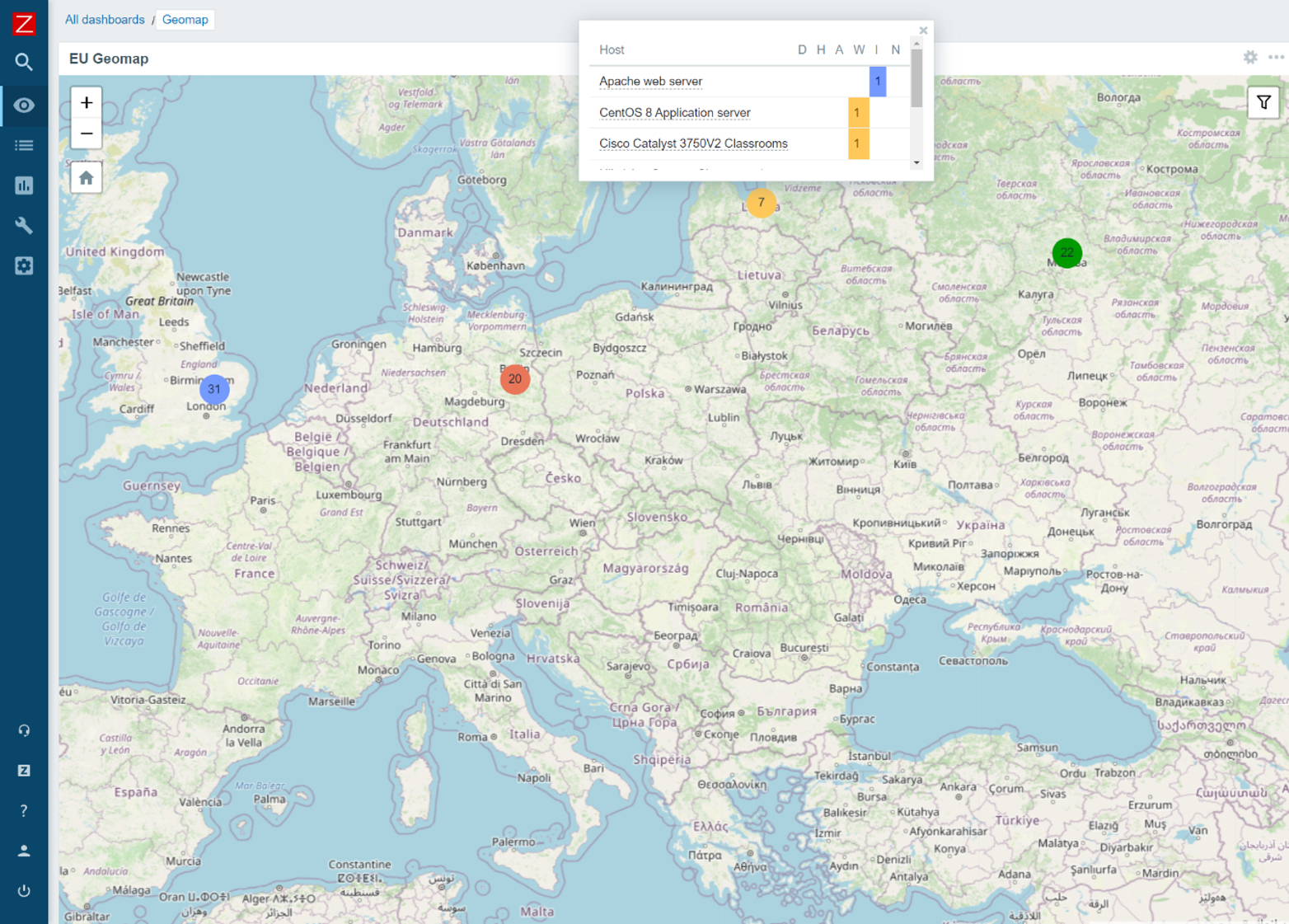
Geographical maps

With Geographical maps, our users can finally display their entities on a geographical map based on the coordinates of the entity. Geographical maps can be used with multiple geographical map providers and display your hosts with their most severe problems. In addition, geographical maps will react dynamically to Zoom levels and support filtering.

The latest Zabbix 6.0 Alpha release includes the Geomap widget – feel free to deploy it in your QA environment, check out the different map providers, filter options and other great features that come with this widget.

Machine learning

When it comes to problem detection, Zabbix 6.0 LTS will deliver multiple trend new functions. A specific set of functions provides machine learning functionality for Anomaly detection and Baseline monitoring.

The topic will be covered in-depth during the Zabbix Summit Online 2021. We will look at the configuration of the new functions and also take a deeper dive at the logic and algorithms used under the hood.

During the Zabbix Summit Online 2021, we will also cover many other new features, such as:

  • New Dashboard widgets
  • New items for Zabbix Agent
  • New templates and integrations
  • Zabbix login password complexity settings
  • Performance improvements for Zabbix Server, Zabbix Proxy, and Zabbix Frontend
  • UI and UX improvements
  • Zabbix login password complexity requirements
  • New history and trend functions
  • And more!

Not only will you get the chance to have an early look at many new features not yet available in the latest alpha release, but also you will have a great chance to learn the inner workings of the new features, the upgrade and migration process to Zabbix 6.0 LTS and much more!

We are extremely excited to share all of the new features with our community, so don’t miss out – take a look at the full Zabbix Summit online 2021 agenda and register for the event by visiting our Zabbix Summit page, and we will see you at the Zabbix Summit Online 2021 on November 25!

Introducing Prometheus Agent Mode, an Efficient and Cloud-Native Way for Metric Forwarding

Post Syndicated from Bartlomiej Plotka (@bwplotka) original https://prometheus.io/blog/2021/11/16/agent/

Bartek Płotka has been a Prometheus Maintainer since 2019 and Principal Software Engineer at Red Hat. Co-author of the CNCF Thanos project. CNCF Ambassador and tech lead for the CNCF TAG Observability. In his free time, he writes a book titled “Efficient Go” with O’Reilly. Opinions are my own!

What I personally love in the Prometheus project, and one of the many reasons why I joined the team, was the laser focus on the project’s goals. Prometheus was always about pushing boundaries when it comes to providing pragmatic, reliable, cheap, yet invaluable metric-based monitoring. Prometheus’ ultra-stable and robust APIs, query language, and integration protocols (e.g. Remote Write and OpenMetrics) allowed the Cloud Native Computing Foundation (CNCF) metrics ecosystem to grow on those strong foundations. Amazing things happened as a result:

  • We can see community exporters for getting metrics about virtually everything e.g. containers, eBPF, Minecraft server statistics and even plants’ health when gardening.
  • Most people nowadays expect cloud-native software to have an HTTP/HTTPS /metrics endpoint that Prometheus can scrape. A concept developed in secret within Google and pioneered globally by the Prometheus project.
  • The observability paradigm shifted. We see SREs and developers rely heavily on metrics from day one, which improves software resiliency, debuggability, and data-driven decisions!

In the end, we hardly see Kubernetes clusters without Prometheus running there.

The strong focus of the Prometheus community allowed other open-source projects to grow too to extend the Prometheus deployment model beyond single nodes (e.g. Cortex, Thanos and more). Not mentioning cloud vendors adopting Prometheus’ API and data model (e.g. Amazon Managed Prometheus, Google Cloud Managed Prometheus, Grafana Cloud and more). If you are looking for a single reason why the Prometheus project is so successful, it is this: Focusing the monitoring community on what matters.

In this (lengthy) blog post, I would love to introduce a new operational mode of running Prometheus called “Agent”. It is built directly into the Prometheus binary. The agent mode disables some of Prometheus’ usual features and optimizes the binary for scraping and remote writing to remote locations. Introducing a mode that reduces the number of features enables new usage patters. In this blog post I will explain why it is a game-changer for certain deployments in the CNCF ecosystem. I am super excited about this!

History of the Forwarding Use Case

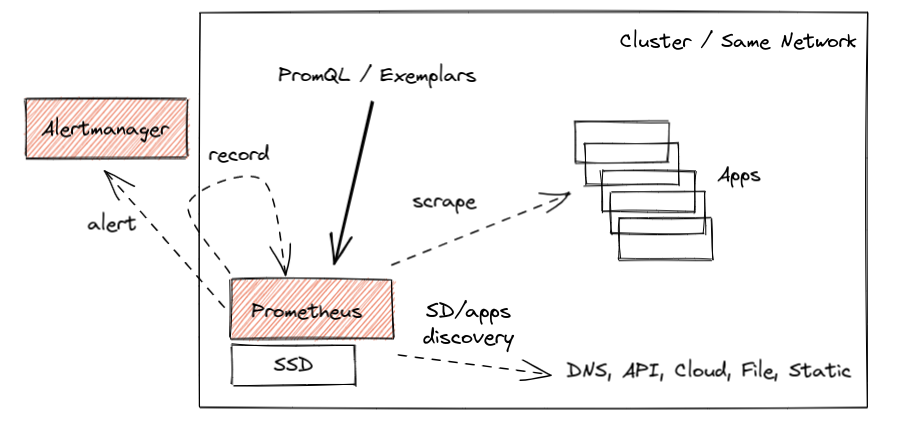
The core design of Prometheus has been unchanged for the project’s entire lifetime. Inspired by Google’s Borgmon monitoring system, you can deploy a Prometheus server alongside the applications you want to monitor, tell Prometheus how to reach them, and allow to scrape the current values of their metrics at regular intervals. Such a collection method, which is often referred to as the “pull model”, is the core principle that allows Prometheus to be lightweight and reliable. Furthermore, it enables application instrumentation and exporters to be dead simple, as they only need to provide a simple human-readable HTTP endpoint with the current value of all tracked metrics (in OpenMetrics format). All without complex push infrastructure and non-trivial client libraries. Overall, a simplified typical Prometheus monitoring deployment looks as below:

Prometheus high-level view

This works great, and we have seen millions of successful deployments like this over the years that process dozens of millions of active series. Some of them for longer time retention, like two years or so. All allow to query, alert, and record metrics useful for both cluster admins and developers.

However, the cloud-native world is constantly growing and evolving. With the growth of managed Kubernetes solutions and clusters created on-demand within seconds, we are now finally able to treat clusters as “cattle”, not as “pets” (in other words, we care less about individual instances of those). In some cases, solutions do not even have the cluster notion anymore, e.g. kcp, Fargate and other platforms.

Yoda

The other interesting use case that emerges is the notion of Edge clusters or networks. With industries like telecommunication, automotive and IoT devices adopting cloud-native technologies, we see more and more much smaller clusters with a restricted amount of resources. This is forcing all data (including observability) to be transferred to remote, bigger counterparts as almost nothing can be stored on those remote nodes.

What does that mean? That means monitoring data has to be somehow aggregated, presented to users and sometimes even stored on the global level. This is often called a Global-View feature.

Naively, we could think about implementing this by either putting Prometheus on that global level and scraping metrics across remote networks or pushing metrics directly from the application to the central location for monitoring purposes. Let me explain why both are generally very bad ideas:

🔥 Scraping across network boundaries can be a challenge if it adds new unknowns in a monitoring pipeline. The local pull model allows Prometheus to know why exactly the metric target has problems and when. Maybe it’s down, misconfigured, restarted, too slow to give us metrics (e.g. CPU saturated), not discoverable by service discovery, we don’t have credentials to access or just DNS, network, or the whole cluster is down. By putting our scraper outside of the network, we risk losing some of this information by introducing unreliability into scrapes that is unrelated to an individual target. On top of that, we risk losing important visibility completely if the network is temporarily down. Please don’t do it. It’s not worth it. (:

🔥 Pushing metrics directly from the application to some central location is equally bad. Especially when you monitor a larger fleet, you know literally nothing when you don’t see metrics from remote applications. Is the application down? Is my receiver pipeline down? Maybe the application failed to authorize? Maybe it failed to get the IP address of my remote cluster? Maybe it’s too slow? Maybe the network is down? Worse, you may not even know that the data from some application targets is missing. And you don’t even gain a lot as you need to track the state and status of everything that should be sending data. Such a design needs careful analysis as it can be a recipe for a failure too easily.

NOTE: Serverless functions and short-living containers are often cases where we think about push from application as the rescue. At this point however we talk about events or pieces of metrics we might want to aggregate to longer living time series. This topic is discussed here, feel free to contribute and help us support those cases better!

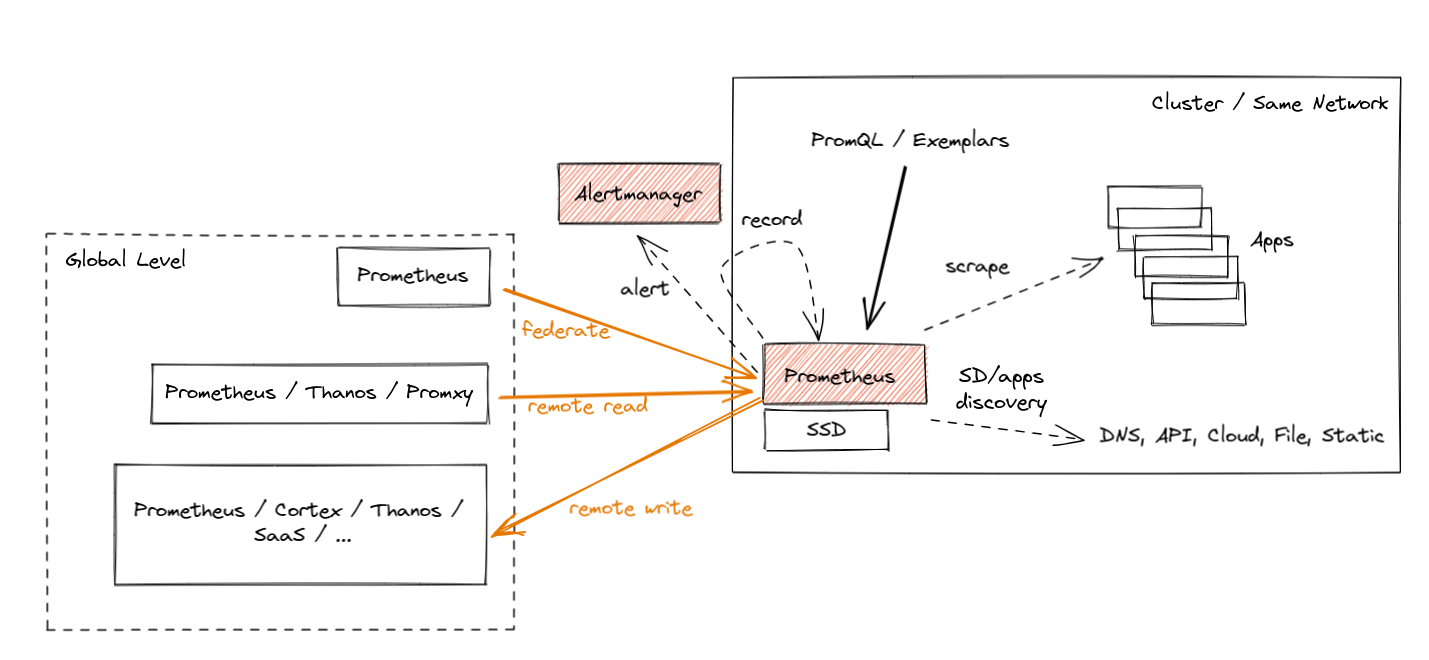
Prometheus introduced three ways to support the global view case, each with its own pros and cons. Let’s briefly go through those. They are shown in orange color in the diagram below:

Prometheus global view

  • Federation was introduced as the first feature for aggregation purposes. It allows a global-level Prometheus server to scrape a subset of metrics from a leaf Prometheus. Such a “federation” scrape reduces some unknowns across networks because metrics exposed by federation endpoints include the original samples’ timestamps. Yet, it usually suffers from the inability to federate all metrics and not lose data during longer network partitions (minutes).
  • Prometheus Remote Read allows selecting raw metrics from a remote Prometheus server’s database without a direct PromQL query. You can deploy Prometheus or other solutions (e.g. Thanos) on the global level to perform PromQL queries on this data while fetching the required metrics from multiple remote locations. This is really powerful as it allows you to store data “locally” and access it only when needed. Unfortunately, there are cons too. Without features like Query Pushdown we are in extreme cases pulling GBs of compressed metric data to answer a single query. Also, if we have a network partition, we are temporarily blind. Last but not least, certain security guidelines are not allowing ingress traffic, only egress one.
  • Finally, we have Prometheus Remote Write, which seems to be the most popular choice nowadays. Since the agent mode focuses on remote write use cases, let’s explain it in more detail.

Remote Write

The Prometheus Remote Write protocol allows us to forward (stream) all or a subset of metrics collected by Prometheus to the remote location. You can configure Prometheus to forward some metrics (if you want, with all metadata and exemplars!) to one or more locations that support the Remote Write API. In fact, Prometheus supports both ingesting and sending Remote Write, so you can deploy Prometheus on a global level to receive that stream and aggregate data cross-cluster.

While the official Prometheus Remote Write API specification is in review stage, the ecosystem adopted the Remote Write protocol as the default metrics export protocol. For example, Cortex, Thanos, OpenTelemetry, and cloud services like Amazon, Google, Grafana, Logz.io, etc., all support ingesting data via Remote Write.

The Prometheus project also offers the official compliance tests for its APIs, e.g. remote-write sender compliance for solutions that offer Remote Write client capabilities. It’s an amazing way to quickly tell if you are correctly implementing this protocol.

Streaming data from such a scraper enables Global View use cases by allowing you to store metrics data in a centralized location. This also enables separation of concerns, which is useful when applications are managed by different teams than the observability or monitoring pipelines. Furthermore, it is also why Remote Write is chosen by vendors who want to offload as much work from their customers as possible.

Wait for a second, Bartek. You just mentioned before that pushing metrics directly from the application is not the best idea!

Sure, but the amazing part is that, even with Remote Write, Prometheus still uses a pull model to gather metrics from applications, which gives us an understanding of those different failure modes. After that, we batch samples and series and export, replicate (push) data to the Remote Write endpoints, limiting the number of monitoring unknowns that the central point has!

It’s important to note that a reliable and efficient remote-writing implementation is a non-trivial problem to solve. The Prometheus community spent around three years to come up with a stable and scalable implementation. We reimplemented the WAL (write-ahead-log) a few times, added internal queuing, sharding, smart back-offs and more. All of this is hidden from the user, who can enjoy well-performing streaming or large amounts of metrics stored in a centralized location.

Hands-on Remote Write Example: Katacoda Tutorial

All of this is not new in Prometheus. Many of us already use Prometheus to scrape all required metrics and remote-write all or some of them to remote locations.

Suppose you would like to try the hands-on experience of remote writing capabilities. In that case, we recommend the Thanos Katacoda tutorial of remote writing metrics from Prometheus, which explains all steps required for Prometheus to forward all metrics to the remote location. It’s free, just sign up for an account and enjoy the tutorial! 🤗

Note that this example uses Thanos in receive mode as the remote storage. Nowadays, you can use plenty of other projects that are compatible with the remote write API.

So if remote writing works fine, why did we add a special Agent mode to Prometheus?

Prometheus Agent Mode

From Prometheus v2.32.0 (next release), everyone will be able to run the Prometheus binary with an experimental --enable-feature=agent flag. If you want to try it before the release, feel free to use Prometheus v2.32.0-beta.0 or use our quay.io/prometheus/prometheus:v2.32.0-beta.0 image.

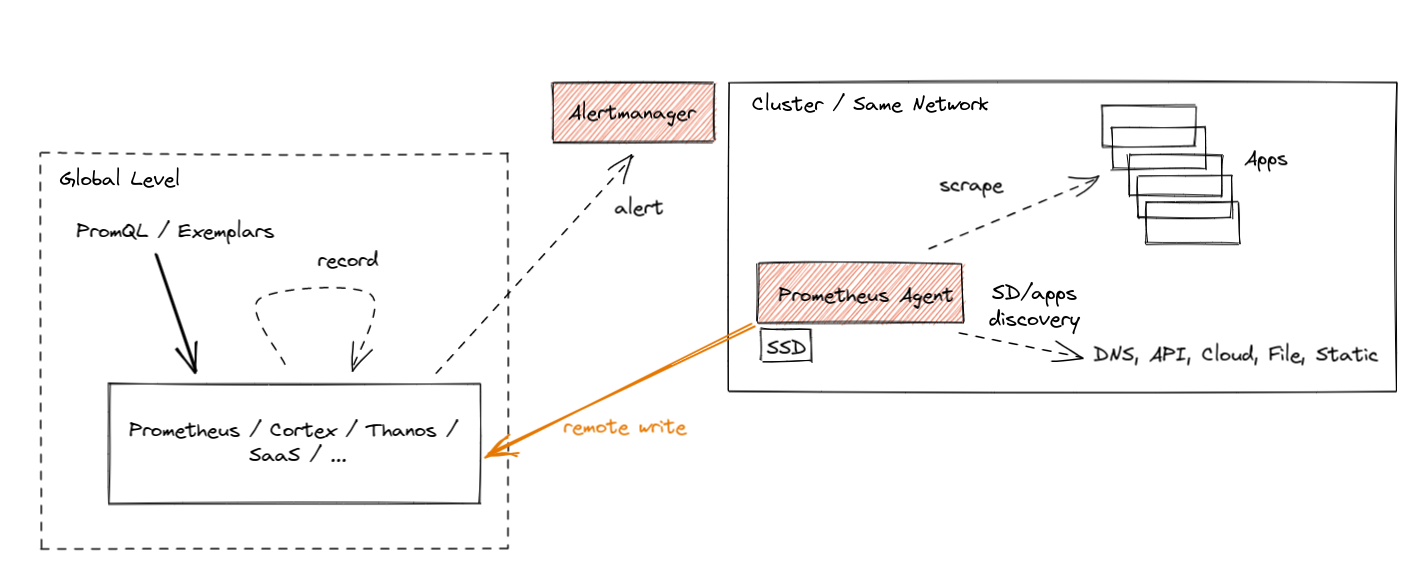
The Agent mode optimizes Prometheus for the remote write use case. It disables querying, alerting, and local storage, and replaces it with a customized TSDB WAL. Everything else stays the same: scraping logic, service discovery and related configuration. It can be used as a drop-in replacement for Prometheus if you want to just forward your data to a remote Prometheus server or any other Remote-Write-compliant project. In essence it looks like this:

Prometheus agent

The best part about Prometheus Agent is that it’s built into Prometheus. Same scraping APIs, same semantics, same configuration and discovery mechanism.

What are the benefits of using the Agent mode if you plan not to query or alert on data locally and stream metrics outside? There are a few:

First of all, efficiency. Our customized Agent TSDB WAL removes the data immediately after successful writes. If it cannot reach the remote endpoint, it persists the data temporarily on the disk until the remote endpoint is back online. This is currently limited to a two-hour buffer only, similar to non-agent Prometheus, hopefully unblocked soon. This means that we don’t need to build chunks of data in memory. We don’t need to maintain a full index for querying purposes. Essentially the Agent mode uses a fraction of the resources that a normal Prometheus server would use in a similar situation.

Does this efficiency matter? Yes! As we mentioned, every GB of memory and every CPU core used on edge clusters matters for some deployments. On the other hand, the paradigm of performing monitoring using metrics is quite mature these days. This means that the more relevant metrics with more cardinality you can ship for the same cost – the better.

NOTE: With the introduction of the Agent mode, the original Prometheus server mode still stays as the recommended, stable and maintained mode. Agent mode with remote storage brings additional complexity. Use with care.

Secondly, the benefit of the new Agent mode is that it enables easier horizontal scalability for ingestion. This is something I am excited about the most. Let me explain why.

The Dream: Auto-Scalable Metric Ingestion

A true auto-scalable solution for scraping would need to be based on the amount of metric targets and the number of metrics they expose. The more data we have to scrape, the more instances of Prometheus we deploy automatically. If the number of targets or their number of metrics goes down, we could scale down and remove a couple of instances. This would remove the manual burden of adjusting the sizing of Prometheus and stop the need for over-allocating Prometheus for situations where the cluster is temporarily small.

With just Prometheus in server mode, this was hard to achieve. This is because Prometheus in server mode is stateful. Whatever is collected stays as-is in a single place. This means that the scale-down procedure would need to back up the collected data to existing instances before termination. Then we would have the problem of overlapping scrapes, misleading staleness markers etc.

On top of that, we would need some global view query that is able to aggregate all samples across all instances (e.g. Thanos Query or Promxy). Last but not least, the resource usage of Prometheus in server mode depends on more things than just ingestion. There is alerting, recording, querying, compaction, remote write etc., that might need more or fewer resources independent of the number of metric targets.

Agent mode essentially moves the discovery, scraping and remote writing to a separate microservice. This allows a focused operational model on ingestion only. As a result, Prometheus in Agent mode is more or less stateless. Yes, to avoid loss of metrics, we need to deploy an HA pair of agents and attach a persistent disk to them. But technically speaking, if we have thousands of metric targets (e.g. containers), we can deploy multiple Prometheus agents and safely change which replica is scraping which targets. This is because, in the end, all samples will be pushed to the same central storage.

Overall, Prometheus in Agent mode enables easy horizontal auto-scaling capabilities of Prometheus-based scraping that can react to dynamic changes in metric targets. This is definitely something we will look at with the Prometheus Kubernetes Operator community going forward.

Now let’s take a look at the currently implemented state of agent mode in Prometheus. Is it ready to use?

Agent Mode Was Proven at Scale

The next release of Prometheus will include Agent mode as an experimental feature. Flags, APIs and WAL format on disk might change. But the performance of the implementation is already battle-tested thanks to Grafana Labs’ open-source work.

The initial implementation of our Agent’s custom WAL was inspired by the current Prometheus server’s TSDB WAL and created by Robert Fratto in 2019, under the mentorship of Tom Wilkie, Prometheus maintainer. It was then used in an open-source Grafana Agent project that was since then used by many Grafana Cloud customers and community members. Given the maturity of the solution, it was time to donate the implementation to Prometheus for native integration and bigger adoption. Robert (Grafana Labs), with the help of Srikrishna (Red Hat) and the community, ported the code to the Prometheus codebase, which was merged to main 2 weeks ago!

The donation process was quite smooth. Since some Prometheus maintainers contributed to this code before within the Grafana Agent, and since the new WAL is inspired by Prometheus’ own WAL, it was not hard for the current Prometheus TSDB maintainers to take it under full maintenance! It also really helps that Robert is joining the Prometheus Team as a TSDB maintainer (congratulations!).

Now, let’s explain how you can use it! (:

How to Use Agent Mode in Detail

From now on, if you show the help output of Prometheus (--help flag), you should see more or less the following:

usage: prometheus [<flags>]

The Prometheus monitoring server

Flags:
  -h, --help                     Show context-sensitive help (also try --help-long and --help-man).
      (... other flags)
      --storage.tsdb.path="data/"
                                 Base path for metrics storage. Use with server mode only.
      --storage.agent.path="data-agent/"
                                 Base path for metrics storage. Use with agent mode only.
      (... other flags)
      --enable-feature= ...      Comma separated feature names to enable. Valid options: agent, exemplar-storage, expand-external-labels, memory-snapshot-on-shutdown, promql-at-modifier, promql-negative-offset, remote-write-receiver,
                                 extra-scrape-metrics, new-service-discovery-manager. See https://prometheus.io/docs/prometheus/latest/feature_flags/ for more details.

Since the Agent mode is behind a feature flag, as mentioned previously, use the --enable-feature=agent flag to run Prometheus in the Agent mode. Now, the rest of the flags are either for both server and Agent or only for a specific mode. You can see which flag is for which mode by checking the last sentence of a flag’s help string. “Use with server mode only” means it’s only for server mode. If you don’t see any mention like this, it means the flag is shared.

The Agent mode accepts the same scrape configuration with the same discovery options and remote write options.

It also exposes a web UI with disabled query capabitilies, but showing build info, configuration, targets and service discovery information as in a normal Prometheus server.

Hands-on Prometheus Agent Example: Katacoda Tutorial

Similarly to Prometheus remote-write tutorial, if you would like to try the hands-on experience of Prometheus Agent capabilities, we recommend the Thanos Katacoda tutorial of Prometheus Agent, which explains how easy it is to run Prometheus Agent.

Summary

I hope you found this interesting! In this post, we walked through the new cases that emerged like:

  • edge clusters
  • limited access networks
  • large number of clusters
  • ephemeral and dynamic clusters

We then explained the new Prometheus Agent mode that allows efficiently forwarding scraped metrics to the remote write endpoints.

As always, if you have any issues or feedback, feel free to submit a ticket on GitHub or ask questions on the mailing list.

This blog post is part of a coordinated release between CNCF, Grafana, and Prometheus. Feel free to also read the CNCF announcement and the angle on the Grafana Agent which underlies the Prometheus Agent.

Book Sale: Click Here to Kill Everybody and Data and Goliath

Post Syndicated from Bruce Schneier original https://www.schneier.com/blog/archives/2021/11/book-sale-click-here-to-kill-everybody-and-data-and-goliath.html

For a limited time, I am selling signed copies of Click Here to Kill Everybody and Data and Goliath, both in paperback, for just $6 each plus shipping.

I have 500 copies of each book available. When they’re gone, the sale is over and the price will revert to normal.

Order here and here.

Please be patient on delivery. It’s a lot of work to sign and mail hundreds of books. And the pandemic is causing mail slowdowns all over the world. I’ll send them out as quickly as I can, but I can’t guarantee any particular delivery date. Also, signed but not personalized books will arrive faster.

EDITED TO ADD (11/17): I am sold out. The sale is over.

Git 2.34.0 released

Post Syndicated from original https://lwn.net/Articles/876154/rss

Version 2.34.0 of the Git source-code management system is out.
It is comprised of 834 non-merge commits since
v2.33.0, contributed by 109 people, 29 of which are new faces
“. See
this
GitHub blog post
for a look at some of the more significant changes in
this release:

ort does just that: it’s a full-blown rewrite of the merge strategy
that aims to emulate the same concepts behind recursive while
avoiding many of its long-standing performance and correctness
problems. In a merge containing many renames, ort outperforms
recursive by 500x. For a series of similar merges (like in a rebase
operation), the speedup is over 9000x since ort can cache and reuse
results from previous merges.

Apply CI/CD DevOps principles to Amazon Redshift development

Post Syndicated from Ashok Srirama original https://aws.amazon.com/blogs/big-data/apply-ci-cd-devops-principles-to-amazon-redshift-development/

CI/CD in the context of application development is a well-understood topic, and developers can choose from numerous patterns and tools to build their pipelines to handle the build, test, and deploy cycle when a new commit gets into version control. For stored procedures or even schema changes that are directly related to the application, this is typically part of the code base and is included in the code repository of the application. These changes are then applied when the application gets deployed to the test or prod environment.

This post demonstrates how you can apply the same set of approaches to stored procedures, and even schema changes to data warehouses like Amazon Redshift.

Stored procedures are considered code and as such should undergo the same rigor as application code. This means that the pipeline should involve running tests against changes to make sure that no regressions are introduced to the production environment. Because we automate the deployment of both stored procedures and schema changes, this significantly reduces inconsistencies in between environments.

Solution overview

The following diagram illustrates our solution architecture. We use AWS CodeCommit to store our code, AWS CodeBuild to run the build process and test environment, and AWS CodePipeline to orchestrate the overall deployment, from source, to test, to production.

Database migrations and tests also require connection information to the relevant Amazon Redshift cluster; we demonstrate how to integrate this securely using AWS Secrets Manager.

We discuss each service component in more detail later in the post.

You can see how all these components work together by completing the following steps:

  1. Clone the GitHub repo.
  2. Deploy the AWS CloudFormation template.
  3. Push code to the CodeCommit repository.
  4. Run the CI/CD pipeline.

Clone the GitHub repository

The CloudFormation template and the source code for the example application are available in the GitHub repo. Before you get started, you need to clone the repository using the following command:

git clone https://github.com/aws-samples/amazon-redshift-devops-blog

This creates a new folder, amazon-redshift-devops-blog, with the files inside.

Deploy the CloudFormation template

The CloudFormation stack creates the VPC, Amazon Redshift clusters, CodeCommit repository, CodeBuild projects for both test and prod, and the pipeline using CodePipeline to orchestrate the change release process.

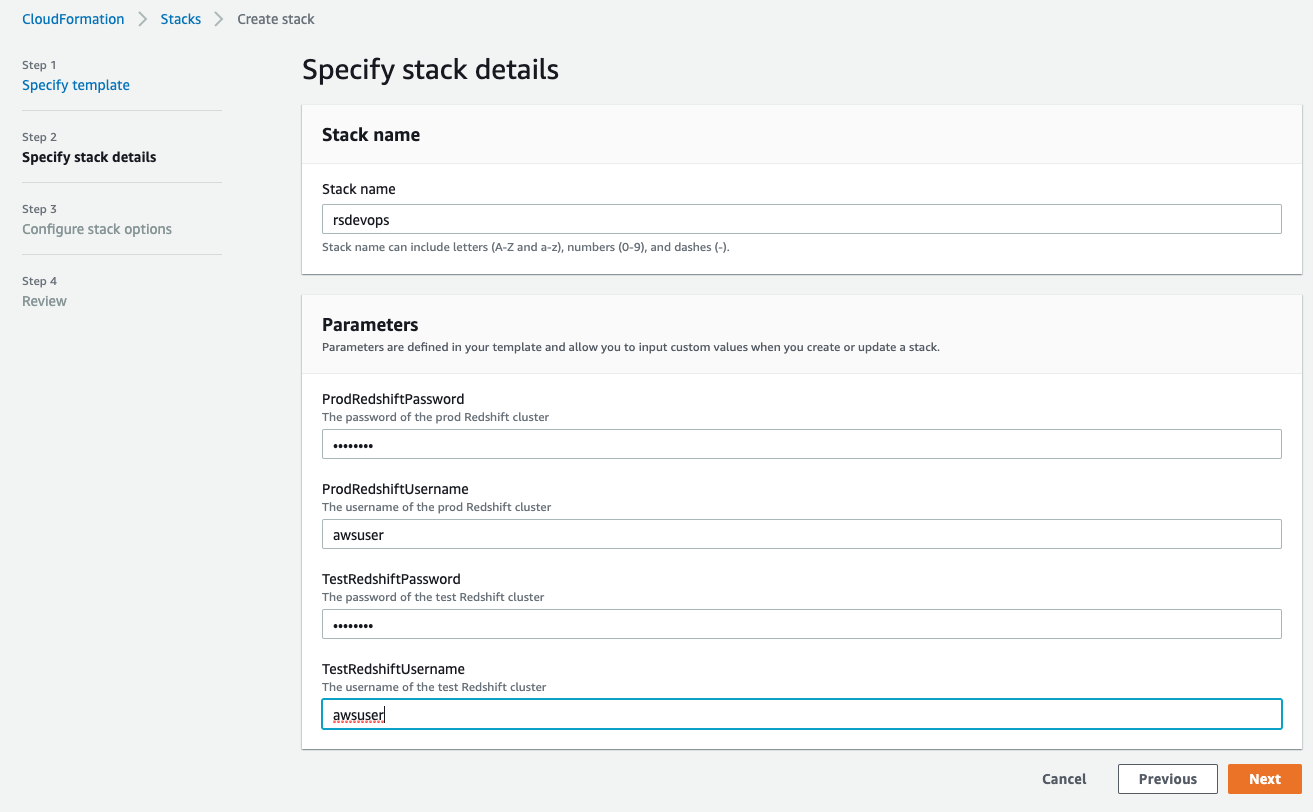
  1. On the AWS CloudFormation console, choose Create stack.
  2. Choose With new resources (standard).
  3. Select Upload a template file.
  4. Choose Choose file and locate the template file (<cloned_directory>/cloudformation_template.yml).
  5. Choose Next.
  6. For Stack name, enter a name.
  7. In the Parameters section, provide the primary user name and password for both the test and prod Amazon Redshift clusters.

The username must be 1–128 alphanumeric characters, and it can’t be a reserved word.

The password has the following criteria:

  • Must be 8-64 characters
  • Must contain at least one uppercase letter
  • Must contain at least one lowercase letter
  • Must contain at least one number
  • Can only contain ASCII characters (ASCII codes 33–126), except ‘ (single quotation mark), ” (double quotation mark), /, \, or @

Please note that production credentials could be created separately by privileged admins, and you could pass in the ARN of a pre-existing secret instead of the actual password if you so choose.

  1. Choose Next.
  2. Leave the remaining settings at their default and choose Next.
  3. Select I acknowledge that AWS CloudFormation might create IAM resources.
  4. Choose Create stack.

You can choose the refresh icon on the stack’s Events page to track the progress of the stack creation.

Push code to the CodeCommit repository

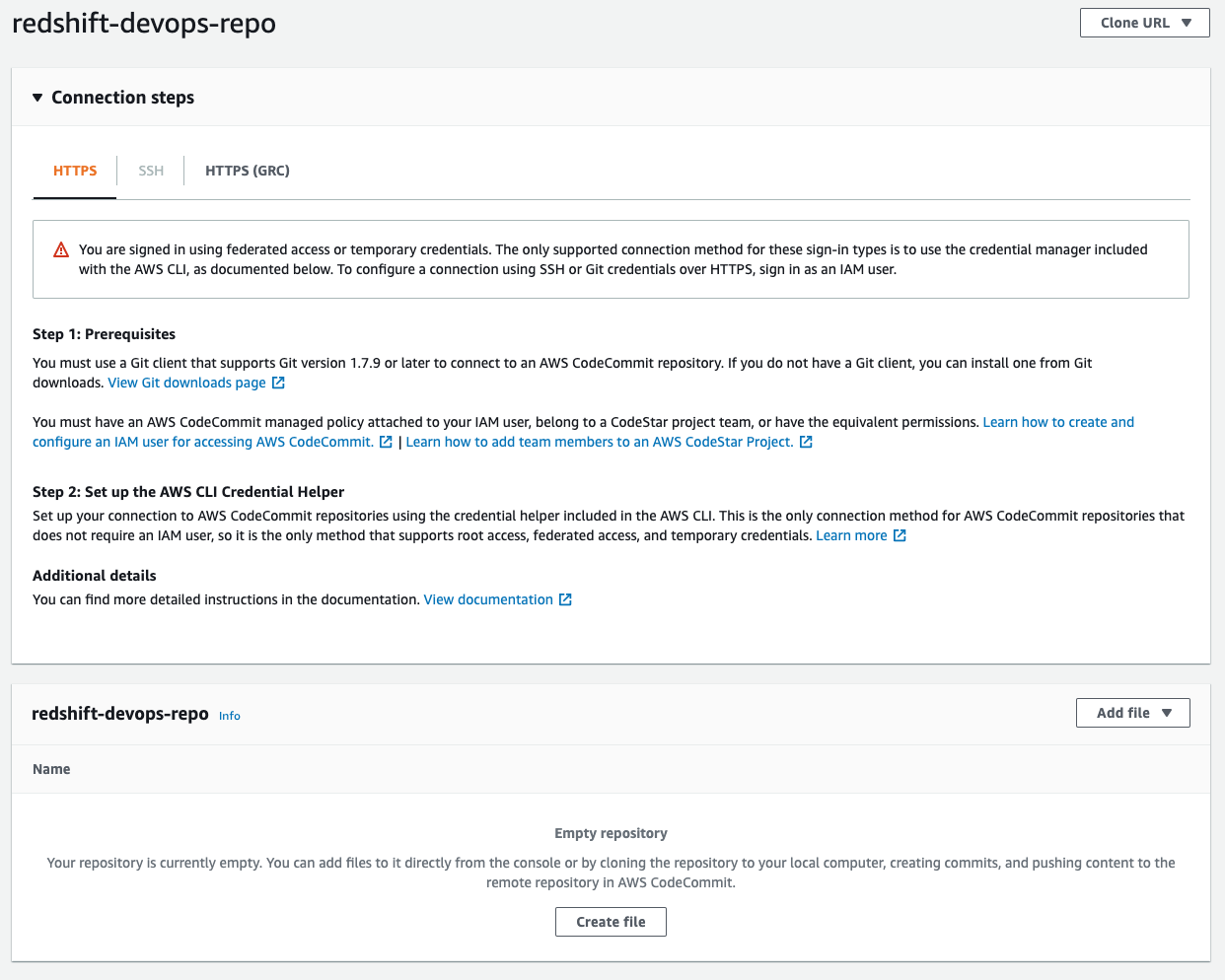
When stack creation is complete, go to the CodeCommit console. Locate the redshift-devops-repo repository that the stack created. Choose the repository to view its details.

Before you can push any code into this repo, you have to set up your Git credentials using instructions here Setup for HTTPS users using Git credentials. At Step 4 of the Setup for HTTPS users using Git credentials, copy the HTTPS URL, and instead of cloning, add the CodeCommit repo URL into the code that we cloned earlier:

git remote add codecommit <repo_https_url> 
git push codecommit main

The last step populates the repository; you can check it by refreshing the CodeCommit console. If you get prompted for a user name and password, enter the Git credentials that you generated and downloaded from Step 3 of the Setup for HTTPS users using Git credentials

Run the CI/CD pipeline

After you push the code to the CodeCommit repository, this triggers the pipeline to deploy the code into both the test and prod Amazon Redshift clusters. You can monitor the progress on the CodePipeline console.

To dive deeper into the progress of the build, choose Details.

You’re redirected to the CodeBuild console, where you can see the run logs as well as the result of the test.

Components and dependencies

Although from a high-level perspective the test and prod environment look the same, there are some nuances with regards to how these environments are configured. Before diving deeper into the code, let’s look at the components first:

  • CodeCommit – This is the version control system where you store your code.
  • CodeBuild – This service runs the build process and test using Maven.
    • Build – During the build process, Maven uses FlyWay to connect to Amazon Redshift to determine the current version of the schema and what needs to be run to bring it up to the latest version.
    • Test – In the test environment, Maven runs JUnit tests against the test Amazon Redshift cluster. These tests may involve loading data and testing the behavior of the stored procedures. The results of the unit tests are published into the CodeBuild test reports.
  • Secrets Manager – We use Secrets Manager to securely store connection information to the various Amazon Redshift clusters. This includes host name, port, user name, password, and database name. CodeBuild refers to Secrets Manager for the relevant connection information when a build gets triggered. The underlying CodeBuild service role needs to have the corresponding permission to access the relevant secrets.
  • CodePipeline – CodePipeline is responsible for the overall orchestration from source to test to production.

As referenced in the components, we also use some additional dependencies at the code level:

  • Flyway – This framework is responsible for keeping different Amazon Redshift clusters in different environments in sync as far as schema and stored procedures are concerned.
  • JUnit – Unit testing framework written in Java.
  • Apache Maven – A dependency management and build tool. Maven is where we integrate Flyway and JUnit.

In the following sections, we dive deeper into how these dependencies are integrated.

Apache Maven

For Maven, the configuration file is pom.xml. For an example, you can check out the pom file from our demo app. The pertinent part of the xml is the build section:

<build>
        <plugins>
            <plugin>
                <groupId>org.flywaydb</groupId>
                <artifactId>flyway-maven-plugin</artifactId>
                <version>${flyway.version}</version>
                <executions>
                    <execution>
                        <phase>process-resources</phase>
                        <goals>
                            <goal>migrate</goal>
                        </goals>
                    </execution>
                </executions>
            </plugin>
            <plugin>
                <groupId>org.apache.maven.plugins</groupId>
                <artifactId>maven-surefire-plugin</artifactId>
                <version>${surefire.version}</version>
            </plugin>
        </plugins>
    </build>

This section describes two things:

  • By default, the Surefire plugin triggers during the test phase of Maven. The plugin runs the unit tests and generates reports based on the results of those tests. These reports are stored in the target/surefire-reports folder. We reference this folder in the CodeBuild section.
  • Flyway is triggered during the process-resources phase of Maven, and it triggers the migrate goal of Flyway. Looking at Maven’s lifecycle, this phase is always triggered first and deploys the latest version of stored procedures and schemas to the test environment before running test cases.

Flyway

Changes to the database are called migrations, and these can be either versioned or repeatable. Developers can define which type of migration by the naming convention used by Flyway to determine which one is which. The following diagram illustrates the naming convention.

A versioned migration consists of the regular SQL script that is run and an optional undo SQL script to reverse the specific version. You have to create this undo script in order to enable the undo functionality for a specific version. For example, a regular SQL script consists of creating a new table, and the corresponding undo script consists of dropping that table. Flyway is responsible for keeping track of which version a database is currently at, and runs N number of migrations depending on how far back the target database is compared to the latest version. Versioned migrations are the most common use of Flyway and are primarily used to maintain table schema and keep reference or lookup tables up to date by running data loads or updates via SQL statements. Versioned migrations are applied in order exactly one time.

Repeatable migrations don’t have a version; instead they’re rerun every time their checksum changes. They’re useful for maintaining user-defined functions and stored procedures. Instead of having multiple files to track changes over time, we can just use a single file and Flyway keeps track of when to rerun the statement to keep the target database up to date.

By default, these migration files are located in the classpath under db/migration, the full path being src/main/resources/db/migration. For our example application, you can find the source code on GitHub.

JUnit

When Flyway finishes running the migrations, the test cases are run. These test cases are under the folder src/test/java. You can find examples on GitHub that run a stored procedure via JDBC and validate the output or the impact.

Another aspect of unit testing to consider is how the test data is loaded and maintained in the test Amazon Redshift cluster. There are a couple of approaches to consider:

  • As per our example, we’re packaging the test data as part of our version control and loading the data when the first unit test is run. The advantage of this approach is that you get flexibility of when and where you run the test cases. You can start with either a completely empty or partially populated test cluster and you get with the right environment for the test case to run. Other advantages are that you can test data loading queries and have more granular control over the datasets that are being loaded for each test. The downside of this approach is that, depending on how big your test data is, it may add additional time for your test cases to complete.
  • Using an Amazon Redshift snapshot dedicated to the test environment is another way to manage the test data. With this approach, you have a couple more options:
    • Transient cluster – You can provision a transient Amazon Redshift cluster based on the snapshot when the CI/CD pipeline gets triggered. This cluster stops after the pipeline completes to save cost. The downside of this approach is that you have to factor in Amazon Redshift provisioning time in your end-to-end runtime.
    • Long-running cluster – Your test cases can connect to an existing cluster that is dedicated to running test cases. The test cases are responsible for making sure that data-related setup and teardown are done accordingly depending on the nature of the test that’s running. You can use @BeforeAll and @AfterAll JUnit annotations to trigger the setup and teardown, respectively.

CodeBuild

CodeBuild provides an environment where all of these dependencies run. As shown in our architecture diagram, we use CodeBuild for both test and prod. The differences are in the actual commands that run in each of those environments. These commands are stored in the buildspec.yml file. In our example, we provide a separate buildspec file for test and a different one for prod. During the creation of a CodeBuild project, we can specify which buildspec file to use.

There are a few differences between the test and prod CodeBuild project, which we discuss in the following sections.

Buildspec commands

In the test environment, we use mvn clean test and package the Surefire reports so the test results can be displayed via the CodeBuild console. While in the prod environment, we just run mvn clean process-resources. The reason for this is because in the prod environment, we only need to run the Flyway migrations, which are hooked up to the process-resources Maven lifecycle, whereas in the test environment, we not only run the Flyway migrations, but also make sure that it didn’t introduce any regressions by running test cases. These test cases might have an impact on the underlying data, which is why we don’t run it against the production Amazon Redshift cluster. If you want to run the test cases against production data, you can use an Amazon Redshift production cluster snapshot and run the test cases against that.

Secrets via Secrets Manager

Both Flyway and JUnit need information to identify and connect to Amazon Redshift. We store this information in Secrets Manager. Using Secrets Manager has several benefits:

  • Secrets are encrypted automatically
  • Access to secrets can be tightly controlled via fine-grained AWS Identity and Access Management (IAM) policies
  • All activity with secrets is recorded, which enables easy auditing and monitoring
  • You can rotate secrets securely and safely without impacting applications

For our example application, we define the secret as follows:

{
  "username": "<Redshift username>",
  "password": "<Redshift password>",
  "host": "<Redshift hostname>",
  "port": <Redshift port>,
  "dbName": "<Redshift DB Name>"
}

CodeBuild is integrated with Secrets Manager, so we define the following environment variables as part of the CodeBuild project:

  • TEST_HOST: arn:aws:secretsmanager:<region>:<AWS Account Id>:secret:<secret name>:host
  • TEST_JDBC_USER: arn:aws:secretsmanager:<region>:<AWS Account Id>:secret:<secret name>:username
  • TEST_JDBC_PASSWORD: arn:aws:secretsmanager:<region>:<AWS Account Id>:secret:<secret name>:password
  • TEST_PORT: arn:aws:secretsmanager:<region>:<AWS Account Id>:secret:<secret name>:port
  • TEST_DB_NAME: arn:aws:secretsmanager:<region>:<AWS Account Id>:secret:<secret name>:dbName
  • TEST_REDSHIFT_IAM_ROLE: <ARN of IAM role> (This can be in plaintext and should be attached to the Amazon Redshift cluster)
  • TEST_DATA_S3_BUCKET: <bucket name> (This is where the test data is staged)

CodeBuild automatically retrieves the parameters from Secrets Manager and they’re available in the application as environment variables. If you look at the buildspec_prod.yml example, we use the preceding variables to populate the Flyway environment variables and JDBC connection URL.

VPC configuration

For CodeBuild to be able to connect to Amazon Redshift, you need to configure which VPC it runs in. This includes the subnets and security group that it uses. The Amazon Redshift cluster’s security group also needs to allow access from the CodeBuild security group.

CodePipeline

To bring all these components together, we use CodePipeline to orchestrate the flow from the source code through prod deployment. CodePipeline also has additional capabilities. For example, you can add an approval step between test and prod so a release manager can review the results of the tests before releasing the changes to production.

Example scenario

You can use tests as a form of documentation of what is the expected behavior of a function. To further illustrate this point, let’s look at a simple stored procedure:

create or replace procedure merge_staged_products()
as $$
BEGIN
    update products set status='CLOSED' where product_name in (select product_name from products_staging) and status='ACTIVE';
    insert into products(product_name,price) select product_name, price from products_staging;
END;
$$ LANGUAGE plpgsql;

If you deployed the example app from the previous section, you can follow along by copying the stored procedure code and pasting it in src/main/resources/db/migration/R__MergeStagedProducts.sql. Save it and push the change to the CodeCommit repository by issuing the following commands (assuming that you’re at the top of the project folder):

git add src
git commit -m “<commit message>”
git push codecommit main

After you push the changes to the CodeCommit repository, you can follow the progress of the build and test stages on the CodePipeline console.

We implement a basic Slowly Changing Dimension Type 2 approach in which we mark old data as CLOSED and append newer versions of the data. Although the stored procedure works as is, our test has the following expectations:

  • The number of closed status in the products table needs to correspond to the number of duplicate entries in the staging table.
  • The products table has a close_date column that needs to be populated so we know when it was deprecated
  • At the end of the merge, the staging table needs to be cleared for subsequent ETL runs

The stored procedure will pass the first test, but fail later tests. When we push this change to CodeCommit and the CI/CD process runs, we can see results like in the following screenshot.

The tests show that the second and third tests failed. Failed tests result in the pipeline stopping, which means these bad changes don’t end up in production.

We can update the stored procedure and push the change to CodeCommit to trigger the pipeline again. The updated stored procedure is as follows:

create or replace procedure merge_staged_products()
as $$
BEGIN
    update products set status='CLOSED', close_date=CURRENT_DATE where product_name in (select product_name from products_staging) and status='ACTIVE';
    insert into products(product_name,price) select product_name, price from products_staging;
    truncate products_staging;
END;
$$ LANGUAGE plpgsql; 

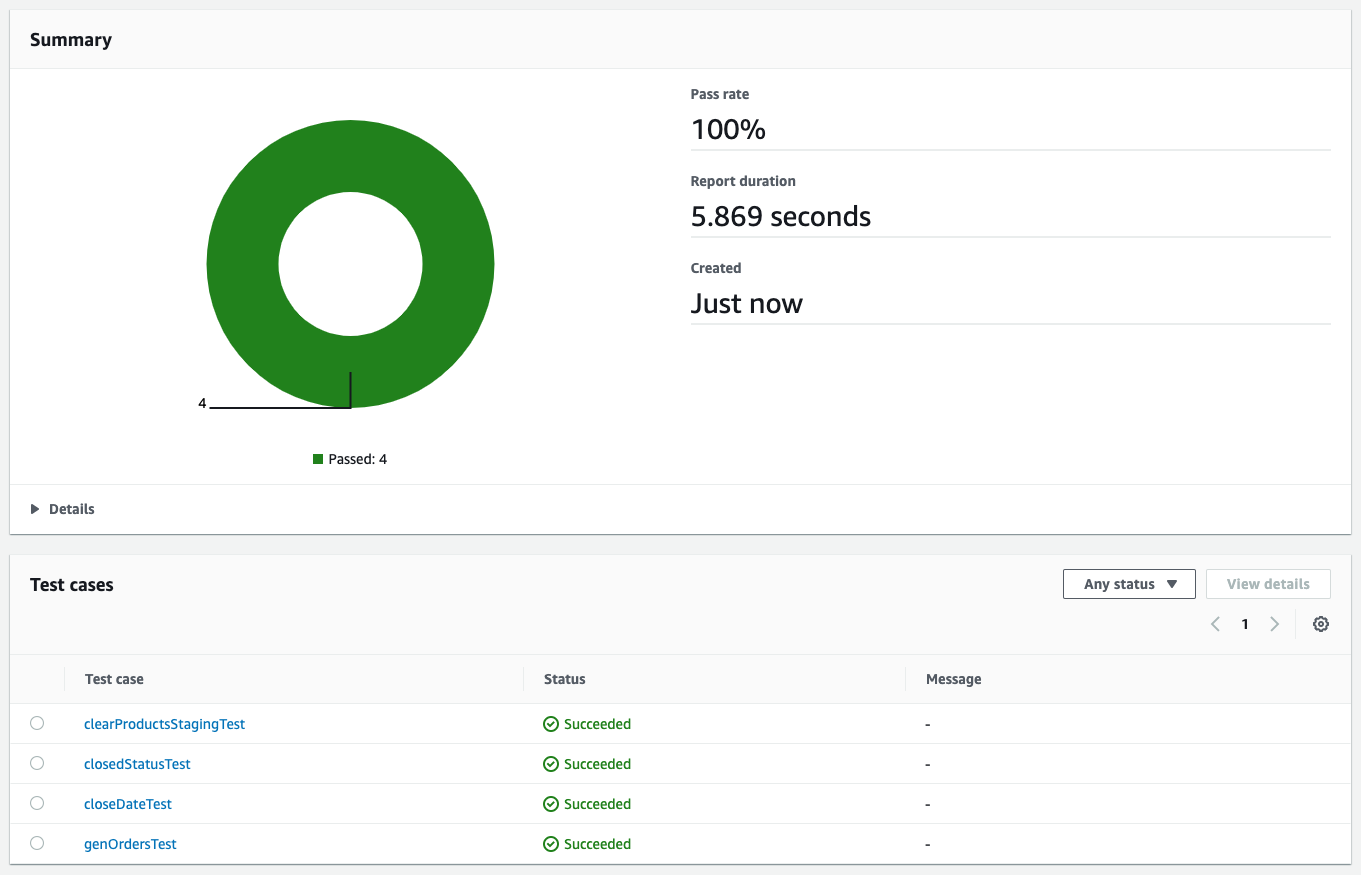
All the tests passed this time, which allows CodePipeline to proceed with deployment to production.

We used Flyway’s repeatable migrations to make the changes to the stored procedure. Code is stored in a single file and Flyway verifies the checksum of the file to detect any changes and reapplies the migration if the checksum is different from the one that’s already deployed.

Clean up

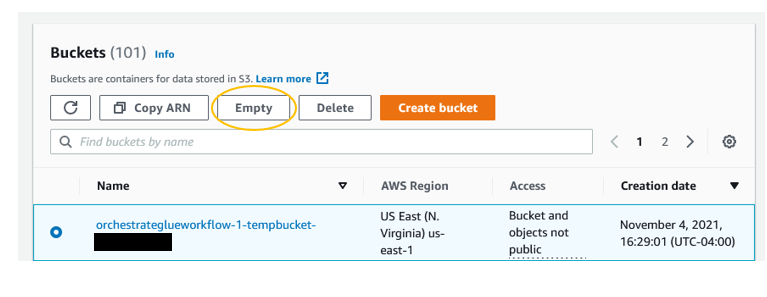
After you’re done, it’s crucial to tear down the environment to avoid incurring additional charges beyond your testing. Before you delete the CloudFormation stack, go to the Resources tab of your stack and make sure the two buckets that were provisioned are empty. If they’re not empty, delete all the contents of the buckets.

Now that the buckets are empty, you can go back to the AWS CloudFormation console and delete the stack to complete the cleanup of all the provisioned resources.

Conclusion

Using CI/CD principles in the context of Amazon Redshift stored procedures and schema changes greatly improves confidence when updates are getting deployed to production environments. Similar to CI/CD in application development, proper test coverage of stored procedures is paramount to capturing potential regressions when changes are made. This includes testing both success paths as well as all possible failure modes.

In addition, versioning migrations enables consistency across multiple environments and prevents issues arising from schema changes that aren’t applied properly. This increases confidence when changes are being made and improves development velocity as teams spend more time developing functionality rather than hunting for issues due to environment inconsistencies.

We encourage you to try building a CI/CD pipeline for Amazon Redshift using these steps described in this blog.


About the Authors

Ashok Srirama is a Senior Solutions Architect at Amazon Web Services, based in Washington Crossing, PA. He specializes in serverless applications, containers, devops, and architecting distributed systems. When he’s not spending time with his family, he enjoys watching cricket, and driving his bimmer.

Indira Balakrishnan is a Senior Solutions Architect in the AWS Analytics Specialist SA Team. She is passionate about helping customers build cloud-based analytics solutions to solve their business problems using data-driven decisions. Outside of work, she volunteers at her kids’ activities and spends time with her family.

Vaibhav Agrawal is an Analytics Specialist Solutions Architect at AWS.Throughout his career, he has focused on helping customers design and build well-architected analytics and decision support platforms.

Rajesh Francis is a Sr. Analytics Customer Experience Specialist at AWS. He specializes in Amazon Redshift and works with customers to build scalable Analytic solutions.

Jeetesh Srivastva is a Sr. Manager, Specialist Solutions Architect at AWS. He specializes in Amazon Redshift and works with customers to implement scalable solutions using Amazon Redshift and other AWS Analytic services. He has worked to deliver on-premises and cloud-based analytic solutions for customers in banking and finance and hospitality industry verticals.

Fall 2021 SOC reports now available with 141 services in scope

Post Syndicated from Ninad Naik original https://aws.amazon.com/blogs/security/fall-2021-soc-reports-now-available-with-141-services-in-scope/

At Amazon Web Services (AWS), we’re committed to providing our customers with continued assurance over the security, availability and confidentiality of the AWS control environment. We’re proud to deliver the System and Organizational (SOC) 1, 2, and 3 reports to enable our AWS customers to maintain confidence in AWS services.

For the Fall 2021 SOC reports, covering April 1, 2021, to September 30, 2021, we are excited to announce eight new services in scope, for a total of 141 total services in scope. You can see the full list on Services in Scope by Compliance Program. The associated infrastructure supporting our in-scope products and services is updated to reflect new regions, edge locations, Wavelength, and Local Zones.

Here are the eight new services in scope for Fall 2021 SOC reports:

The Fall 2021 SOC reports are now available through Artifact in the AWS Management Console. The SOC 3 report can also be downloaded here as PDF.

AWS strives to bring services into scope of its compliance programs to help you meet your architectural and regulatory needs. If there are additional AWS services you would like to see added to the scope of our SOC reports (or other compliance programs), reach out to your AWS representatives.

As always, we value your feedback and questions. Feel free to reach out to the team through the Contact Us page. If you have feedback about this post, submit comments in the Comments section below.

Want more AWS Security how-to-content, news, and feature announcements? Follow us on Twitter.


Author

Ninad Naik

Ninad is a Security Assurance Manager at Amazon Web Services. He leads multiple security and privacy initiatives within AWS. Ninad holds a Master’s degree in Information Systems from Syracuse University, NY and a Bachelor’s of Engineering degree in Information Technology from Mumbai University, India. Ninad has 11 years of experience in security assurance and ITIL, CISA, CGEIT, and CISM certifications.

Author

Lu Yu

Lu is a Compliance Program Manager at Amazon Web Services. She leads multiple security and privacy initiatives within AWS. Lu holds a Master’s degree in Accounting and dual Bachelor’s degrees in Accounting and Management Information System from University of Minnesota, Twin Cities. Lu has AWS Cloud Practitioner and CPA certifications and 8 years of experience in security assurance.

Author

Nimesh Ravasa

Nimesh is a Compliance Program Manager at Amazon Web Services. He leads multiple security and privacy initiatives within AWS. Nimesh has 14 years of experience in information security and holds CISSP, CISA, PMP, CSX, AWS Solution Architect – Associate, and AWS Security Specialty certifications.

Monitoring delay of AWS Batch jobs in transit before execution

Post Syndicated from Emma White original https://aws.amazon.com/blogs/compute/monitoring-delay-of-aws-batch-jobs-in-transit-before-execution/

This post is written by Nikhil Anand, Solutions Architect 

AWS Batch enables developers, scientists, and engineers to easily and efficiently run hundreds of thousands of batch processing jobs on AWS. With AWS Batch you no longer have to install and manage batch computing software or server clusters used to run your jobs. This lets you focus on analyzing results and solving problems, not managing infrastructure. When you use AWS Batch, in the job lifetime, a job goes through several states. When creating a compute environment to run the Batch jobs and submit Batch jobs, a settings misconfiguration could cause the job to get stuck in a transit state. This means the job will not proceed to the desired RUNNING state – a common issue faced by most customers.

If your compute environment contains compute resources, but your jobs don’t progress beyond the RUNNABLE state, then something is preventing the jobs from being placed on a compute resource. There are various reasons why a job could remain in the RUNNABLE state. The usual call to action is referring the troubleshooting documentation in order to fix the issue. Similarly, if your job is dependent on another job, then the job would stay in the PENDING state.

However, if you have scheduled actions to be completed with Batch jobs, or if you do not have any mechanism monitoring the jobs, then your jobs might stay in any of the transit states if left unattended. You may end up continuing forward, unaware that your job has yet to run. Eventually, when you see the jobs not progressing beyond the RUNNABLE or PENDING state, you miss the task that the job was expected to do in the given timeframe. This can result in additional time and effort troubleshooting the stuck job.

To prevent this accidental avoidance or lack of in-transit job monitoring, this post provides a monitoring solution for jobs in transit (from the SUBMITTED to the RUNNING state) in AWS Batch.

You can configure a threshold monitoring duration for your jobs so that if a job stays in SUBMITTED/PENDING/RUNNABLE longer than that, then you get a notification. For example, you might have a job that you would want to proceed to the RUNNING state in approximately 15 minutes since the job submission. Sometimes a slight misconfiguration can cause the job to get stuck in RUNNABLE indefinitely. In that case, you can set a threshold of 15 minutes. Or, suppose you have a job that is dependent on the other job that is stuck in processing. In these situations, once the specified duration is crossed, you are notified about your job staying in transit beyond your defined threshold status.

The solution is deployed by using AWS CloudFormation.

Overview of solution

The solution creates an Amazon CloudWatch Events rule that triggers an AWS Lambda function on a schedule. Then, the Lambda function checks every job in transit for more than ‘X’ seconds on all compute environments since the job submission. Specify your own value for ‘X’ when you launch the AWS CloudFormation stack. The solution consists of the following components created via CloudFormation:

  • An Amazon CloudWatch event rule to monitor the submitted jobs in Batch using the target Lambda function
  • An AWS Lambda function with the logic to monitor the submitted jobs and trigger Amazon Simple Notification Service (Amazon SNS) notifications
  • A Lambda execution AWS Identity and Access Management (IAM) role
  • An Amazon SNS topic to be subscribed by end users in order to be notified about the submitted jobs

The solution components and workflow.

Prerequisites

For this walkthrough, you should have the following prerequisites:

Walkthrough

To provision the necessary solution components, use this CloudFormation template. 

  1. While launching the CloudFormation stack, you will be asked to input the following information in addition to the CloudFormation stack name:
    1. The upper threshold (in seconds) for the jobs to stay in the transit state
    2. The evaluation period after which the Lambda runs periodically
    3. The email ID to get notifications after the job stays in the transit state for the defined threshold value.

pecify parameter values during CloudFormation stack launch

  1. Once the stack is created, the following resources will be provisioned – SNS topic, CloudWatch Events rule, Lambda function, Lambda invoke permissions, and Lambda execution role. View it in the ‘Resources’ tab of your CloudFormation stack.

Successful creation of the CloudFormation stack

  1. After the stack is created, the email ID you entered in step III above will receive an email from Amazon SNS in order to confirm the Amazon SNS subscription.

Subscription confirmation email that you receive on the specified email ID.

Click Confirm subscription in the email.

Subscription confirmed.

  1. Based on the customer’s inputs during stack launch, a Lambda function will be periodically invoked to look out for Batch jobs stuck in the RUNNABLE state for the defined threshold.
  2. An Amazon SNS notification is sent out at the evaluation periods with the job IDs of the jobs that have stayed stuck in the RUNNABLE state.

Verifying the solution

Launch your monitoring solution by using the CloudFormation template. Once the stack creation is complete, I get an email to subscribe to the SNS topic. Then, I subscribe to the SNS topic.

Click to launch Stack. 

Submit a job in AWS Batch by using console, CLI, or SDK. To test the solution, submit a job, Job1, to a job queue associated with a compute environment with no public subnets. Compute resources require access in order to communicate with the Amazon ECS service endpoint. This can be done through an interface VPC endpoint or your compute resources having public IP addresses. Since the compute environment was configured to only have a private subnet, Job1 will not proceed from the RUNNABLE state. Similarly, submit another job, Job2, and during submission add a dependency of Job1 on Job2. Therefore, Job2 will not proceed from the PENDING state. Thus, creating a sample space wherein two jobs will be stuck in transit.

AWS Batch jobs submitted and in transit.

Based on the CloudFormation template inputs, you will get notified on the subscribed Email ID when the job stays in transit for more than ‘X’ seconds (the input provided during stack launch).

otification received for the jobs that stayed in transit longer than expected.

Modifications

The Lambda function uses the ListJobs API call. The maximum number of results is returned by ListJobs in paginated output. Therefore, if you are submitting many jobs, then you must modify the Lambda function to fetch more results from the initial response of the call by using the nextToken response element. Use this nextToken element and iterate through in a loop to keep fetching the paginated results until there are no further nextToken elements present.

Cleaning up

To avoid incurring future charges, delete the resources. You can delete the CloudFormation stack that will clean up every resource that it provisioned for the monitoring solution.

Conclusion

This solution lets you detect AWS Batch jobs that remain in the transit state longer than expected. It provides you with an efficient way to monitor your Batch jobs. If the jobs stay in the RUNNABLE/PENDING/SUBMITTED state for a significant amount of time, then it is indicative of potential misconfiguration with either the compute environment setup, or with the job parameters that were passed during the job submission. An early notification around the issue can help you troubleshoot the misconfigurations early on and take subsequent actions.

If you have multiple jobs that remain in the RUNNABLE state and you realize that they will not proceed further to the RUNNING state due to a misconfiguration, then you can shut down all RUNNABLE jobs by using a simple bash script.

For additional references regarding troubleshooting RUNNABLE jobs in AWS Batch, refer to the suggested Knowledge Center article and the troubleshooting documentation.

Fall 2021 SOC 2 Type I Privacy report now available

Post Syndicated from Ninad Naik original https://aws.amazon.com/blogs/security/fall-2021-soc-2-type-i-privacy-report-now-available/

 Your privacy considerations are at the core of our compliance work, and at Amazon Web Services (AWS), we are focused on the protection of your content while using AWS services. Our Fall 2021 SOC 2 Type I Privacy report is now available, demonstrating the privacy compliance commitments we made to you.

The Fall 2021 SOC 2 Type I Privacy report provides you with a third-party attestation of our system and the suitability of the design of our privacy controls. The SOC 2 Privacy Trust Service Criteria (TSC), developed by the American Institute of CPAs (AICPA) establishes the criteria for evaluating controls relating to how personal information is collected, used, retained, disclosed and disposed of to meet AWS’ objectives. You can find additional information related to privacy commitments supporting our SOC 2 Type 1 report in the AWS Customer Agreement documentation.

The scope of the privacy report includes information about how we handle the content that you upload to AWS and how it is protected in all of the services and locations that are in scope for the latest AWS SOC reports. You can find our SOC 2 Type I Privacy report through Artifact in the AWS Management Console.

As always, we value your feedback and questions. Feel free to reach out to the compliance team through the Contact Us page. If you have feedback about this post, submit comments in the Comments section below.

Want more AWS Security how-to-content, news, and feature announcements? Follow us on Twitter.

Author

Ninad Naik

Ninad is a Security Assurance Manager at Amazon Web Services. He leads multiple security and privacy initiatives within AWS. Ninad holds a Master’s degree in Information Systems from Syracuse University, NY and a Bachelor’s of Engineering degree in Information Technology from Mumbai University, India. Ninad has 11 years of experience in security assurance and ITIL, CISA, CGEIT, and CISM certifications.

Author

Lu Yu

Lu is a Compliance Program Manager at Amazon Web Services. She leads multiple security and privacy initiatives within AWS. Lu holds a Master’s degree in Accounting and dual Bachelor’s degrees in Accounting and Management Information System from University of Minnesota, Twin Cities. Lu has AWS Cloud Practitioner and CPA certifications and 8 years of experience in security assurance.

Author

Nimesh Ravasa

Nimesh is a Compliance Program Manager at Amazon Web Services. He leads multiple security and privacy initiatives within AWS. Nimesh has 14 years of experience in information security and holds CISSP, CISA, PMP, CSX, AWS Solution Architect – Associate, and AWS Security Specialty certifications.

Highlights from Git 2.34

Post Syndicated from Taylor Blau original https://github.blog/2021-11-15-highlights-from-git-2-34/

The open source Git project just released Git 2.34 with features and bug fixes from over 109 contributors, 29 of them new. We last caught up with you on the latest in Git back when 2.33 was released. To celebrate this most recent release, here’s GitHub’s look at some of the most interesting features and changes introduced since last time.

Sparse index

In the past, we’ve talked about new Git features to make it possible to work with large repositories, like partial clones and sparse-checkout. For a complete description, check out the linked blog posts. But as a refresher, these two features work together to allow you to:

  • Fetch or clone only part of a repository’s objects, and
  • Only populate part of your working copy, typically scoped to a set of
    sub-directories.

This pair of features is designed to create the illusion that you are working in a much smaller repository than you actually are. For instance, if your work takes place in an all-encompassing monorepo, your local copy only needs to contain the parts of the repository that you frequently work in.

But often, this illusion falls short. Why? The answer is the index. The index is the data structure Git uses to track what will be written the next time you run git commit, as well as to track the state of every file in your repository at the current point in history.

As you can imagine, even if you are working in a small corner of a large repository, the index still has to keep track of the repository’s entire contents, not just the parts that you are working in. Unfortunately, that overhead adds up: every time Git needs work with the index, it needs to parse and write out a lot of data that doesn’t affect the parts of your repository outside of your sparse checkout.

That’s changing in this release with the addition of a sparse-enabled index. Unlike the index of previous versions, this release enables the index to only track the parts of your repository that you care about. Specifically, it only contains entries for parts of your repository that are either in your sparse checkout, or at the boundary between your sparse checkout and the rest of the repository.

Collapsing to a sparse index

Triangles represent trees and boxes represent blobs. Left: a representation of a non-sparse index’s contents. Right: a sparse-ified index.

The high-level details here are that the index format now understands that specially marked directories indicate the boundary between the contents of your sparse checkout and the parts of your repository that you don’t have checked out. But the process of implementing this new format, teaching sub-commands how to use it, and making sure that the sparse index can be expanded to a full index is much more detailed.

For all of the details behind this exciting new feature, check out a comprehensive blog post published by Derrick Stolee last week: Making your monorepo feel small with Git’s sparse index.

[source, source, source, source, source, source, source, source]

Multi-pack reachability bitmaps

In a previous blog post, we talked about a new feature to enable reachability bitmaps to keep track of objects stored in multiple packs within your object store.

This release of Git contains the remaining components described in that blog post. If you haven’t read it, here’s a summary. When serving a fetch, a Git server needs to send the client everything reachable from the set of objects they want, less anything reachable from the set that they already have. (You can think of a clone as a “special case” fetch where the client wants everything and has nothing).

In order to compute this set efficiently, Git can use reachability bitmaps. One of these .bitmap files stores a set of bitmaps, each corresponding to some commit. The contents of an individual bitmap is a string of bits, one per object, indicating which objects are reachable from each commit.

In the past, the contents of a reachability bitmap were tied to the order of objects within a single packfile. This meant that a bitmap could only cover objects in one packfile. In other words, bitmaps were only useful if you could efficiently pack the entire contents of your repository down into a single packfile.

For many repositories, writing all objects into the same pack is completely feasible. But the effort it takes to write a pack (including searching for deltas between objects, compressing individual objects, and I/O cost) scales with the size of the pack you’re writing.

Git 2.34 introduces a new bitmap format that is instead tied to the contents of the multi-pack index file. This means that a bitmap can now flexibly represent objects in multiple packs, and server operators no longer need to repack their biggest repositories into a single pack in order to take full advantage of reachability bitmaps.

For more details, including some of the steps required to make this new feature work, see the aforementioned blog post.

[source, source, source]

A new default merge strategy

In an earlier blog post, we explained Git’s newest merge strategy: ort. Here are some of the basics:

When Git needs to merge two branches, it uses one of several “strategy” backends in order to resolve the changes or emit conflicts when two changes cannot be reconciled.

For years, Git has used a strategy called “recursive”. If you have ever done a merge in Git without passing -s <strategy>, then you have almost certainly used the recursive engine. Recursive behaves mostly like a standard three-way merge, with one exception. In the case of “criss-cross” merges (where there isn’t a single merge base), recursive merges multiple bases together in pairs (recursively) in order to produce a single tree which is then treated as the new merge base. This makes it possible to resolve cases where a traditional three-way merge might produce a conflict.

In recent versions of Git, there has been an ongoing effort to replace the recursive strategy with a new one called ort (short for “ostensibly recursive‘s twin”). Why do this? There are a few reasons, but perhaps the most compelling is that a rewrite allowed Git to implement a merge strategy that doesn’t operate on the index (that same one we talked about a couple of sections ago)!

ort does just that: it’s a full-blown rewrite of the merge strategy that aims to emulate the same concepts behind recursive while avoiding many of its long-standing performance and correctness problems. In a merge containing many renames, ort outperforms recursive by 500x. For a series of similar merges (like in a rebase operation), the speedup is over 9000x, in part due to ort’s ability to cache and reuse results from previous merges.

These numbers show off some of the worst-case scenarios for recursive, but in testing, ort consistently outperforms recursive with much less variance. In Git 2.34, ort is now the default merge strategy, so you should notice faster merges with fewer bugs just by upgrading.

For more details about the ort merge strategy, see our earlier blog post, or any one of a six-part series of posts written by ort‘s creator, Elijah Newren: part one, part two, part three, part four, part five, and part six.

[source]

Tidbits

Now that we have looked at some of the bigger features in detail, let’s turn to a handful of smaller topics from this release.

  • You might be aware that Git allows you to sign your work by attaching your PGP signature to certain objects. For example, the Git project itself publishes tags signed by the maintainer in order to verify that each release comes from someone trustworthy.

    But the experience of using GPG and maintaining keys can be somewhat
    cumbersome. One alternative is to use a new feature of OpenSSH (released
    back in OpenSSH 8.0) that allows using the SSH key you likely already have as a signing key.

    Git 2.34 includes support to take advantage of this feature and allows you to sign your work using SSH keys. To try it out, you can either set user.signingKey to the SSH key you want to use (for example, by asking your ssh-agent for a list with ssh-add -L), or set gpg.format to ssh and gpg.ssh.defaultKeyCommand to ssh-add -L in order to automatically use the first SSH key available.

    After configuring Git to sign objects using your SSH keys, you can use git
    commit -S
    , git merge -S, and git tag -s as usual, and they will automatically use your SSH key.

    For more information about the new configuration options, including information about how to verify SSH signatures with an “allowed signers” file, check out the documentation.

    [source, source, source]

  • If you’ve ever accidentally typed git psuh when you meant push, you
    might have seen this message:

    $ git psuh
    git: 'psuh' is not a git command. See 'git --help'.
    
    The most similar command is
      push
    

    You have always been able to control this behavior by setting the
    help.autoCorrect configuration. You can hide this advice by setting that
    configuration to never, or let Git automatically rerun the most similar
    command for you immediately or with a delay (by setting immediate, or a
    real number of seconds to wait before rerunning your command).

    In Git 2.34, you can now configure Git to ask you interactively whether you
    want to rerun your last operation with the suggested command by setting
    help.autoCorrect to prompt.

    [source]

In Git 2.34, a handful of patch series were focused on improving the performance of interacting with other repositories. Here’s a pair of tidbits that improves the performance of git fetch and git push:

  • When fetching from a remote, your client needs to do some bookkeeping before
    and after it receives a set of objects from the remote.

    Before anything happens, your client needs to figure out what it has in common with the remote it’s fetching from, and what commits it wants as a result. Previously, this process was somewhat wasteful: Git used to load commit objects directly when they could instead have been read from the commit-graph, resulting in much improved performance. In Git 2.34, commits loaded in this code path use the commit-graph when possible. The effect of this scales with the number of references in your repository: in an example repository with over 2 million references, it cuts the time it takes to fetch a single commit by more than half.

    [source]

  • Another patch series made a handful of improvements to updating local references when fetching, along with some changes to improve fetch negotiation, as well as skipping the connectivity check (which I’ll talk about in more detail in the next tidbit) when the receiving end had already verified the connectedness of the new objects. These changes together contributed similarly impressive performance improvements to the git fetch command.

    [source]

You might have heard of “submodules,” the Git feature that allows combining multiple repositories by storing links to other repositories. Submodules have been somewhat neglected over the years, but this release brought renewed attention to the feature. Here are just some of the changes that enhance submodules:

  • It might be a surprise to learn that, though the majority of Git is written in C, the original git submodule command is actually a shell script!

    The Git project has been converting many of its subcommands written in other languages into C. Reimplementing subcommands as C programs means that
    they can be read and written more easily, take advantage of Git’s comprehensive libraries, and avoid the overhead of spawning many processes, especially on platforms where the new process overhead is rather costly.

    In Git 2.34, many parts of the git submodule command were rewritten in C.
    This project was completed by Atharva Raykar, who is a Google Summer of Code
    student. You can check out their final report here, along with Git’s other GSoC participant ZheNing Hu’s report here.

    [source, source, source]

  • While we’re on the topic of submodules, one thing you might not know is that
    when using commands that deal with objects from both the submodule and the
    repository containing it, the submodule is temporarily added as an alternate
    object store of the other repository!

    Alternates are Git’s object borrowing mechanism, which allow you to in effect link multiple object stores together. When using a repository with alternates, any object lookups that fail to find an object are retried in that repository’s alternate.

    In order to make both the objects in a submodule and the objects in the repository that contains that submodule available to git grep (among a select set of
    other commands), the submodule would temporarily be added as an alternate for the duration of that command.

    If you’re thinking to yourself, “this is a hack”, then you’re not alone. Git has made internal changes to parameterize many functions in terms of a repository (which is usually the global the_repository). This allowed Git to avoid combining multiple repositories via alternates and instead make function calls by passing two (or more) separate repository instances. This enables Git to avoid hackily relying on the alternates mechanism, which produced less confusing and error-prone code as a result.

    [source, source, source]

  • One last submodule-related topic (though there are more we couldn’t fit here!). If you are cloning a repository that you know to contain submodules, it is often useful to pass the --recurse-submodules, which will cause that repository’s submodules to be cloned and initialized, too.

    But other commands that can optionally recurse into submodules (like git diff, for example) don’t themselves recurse into submodules by default, even when you cloned with --recurse-submodules. In Git 2.34, this is no longer the case, with one caveat: when cloning with --recurse-submodules, other commands only recurse into submodules if the submodule.stickyRecursiveClone configuration is set, to prevent commands from unintentionally running in submodules.

    [source]

Now that I’ve listed out a few of the submodule-related changes, let’s get back
to the rest of the tidbits:

  • If you’ve ever scripted around Git, you have almost certainly run into Git’s cat-file plumbing command. This tool can be used to print out a single object (by providing the object name as an argument), a stream of objects (by providing line-delimited object names over stdin), or all objects in your repository (with --batch-all-objects).

    This low-level command accidentally took into account replace refs, which produced confusing results when combined with --batch-all-objects, resulting in it not actually showing all objects in your repository if some were hidden by refs/replace.

    Dropping support for replacement refs made it possible for cat-file to reuse some information when it is given --batch-all-objects. Namely, to populate the list of objects, it iterates each object in each pack and therefore knows the byte offset within each pack where each object can be found. Previous versions of Git did not reuse this information when looking up objects to parse them, but Git 2.34 retains this information.

    This makes it possible to process an object’s metadata much more quickly by avoiding having to locate it twice. In a copy of torvalds/linux, the time it takes to print the name and type of each object (for the curious, that’s git cat-file --batch-check='%(objectname) %(objecttype)' --batch-all-objects --unordered) dropped from 8.1 seconds to just 4.3 seconds.

    [source]

  • There has been a recent concerted effort to remove some memory leaks from Git’s code. Unlike library code, Git typically has a very short runtime. This makes the need to free allocated memory much less urgent, since if a process is about to exit, all memory allocated to it will be “freed” by the operating system.

    A recent patch has made it so that Git’s integration tests can be run in a mode that ensures no memory is leaked (by setting GIT_TEST_PASSING_SANITIZE_LEAK=true in the environment). Since Git’s test suite still contains memory leaks in some tests, a new mode was added to run only tests that have been specifically marked as being leak-free. That way, when Git is compiled with leak detection (by running make SANITIZE=leak), you can easily spot regressions in tests that were supposedly leak-free.

    Building off this new infrastructure, there have been many patch series that remove leaks from the code in various places.

    [source, source, source, source, source, source, source, source, source, source, source]

  • When you need to get some debugging information out of a Git process, like what version you’re running, or how much time it spent in a particular region, the trace2 mechanism is a good choice. Often, looking at these logs is like looking at a piece of a puzzle. For example, when you run git fetch, you actually run git fetch-pack, which then invokes git upload-pack on the remote, which itself invokes git pack-objects.

    Trace2 output includes information about when child processes are started and stopped (and consequently, how long they took to run), but what if you’re trying to figure out something more basic than that, like what process you were started by? In other words, if you’re stuck looking at output from a slow git pack-objects, how do you figure out whether it was a fetch (in which case it would have been started by upload-pack) or part of a repository repack (which here would be started by git repack)?

    Git 2.34 includes additional debugging information in trace2 output to indicate the full ancestry of a process, so you can easily read out the name of the program a process was started by, like so:

    $ cat trace2.log
    21:14:38.170730 common-main.c:48                  version 2.34.0.rc1.14.g88d915a634
    21:14:38.170810 common-main.c:49                  start /home/ttaylorr/src/git/git pack-objects git pack-objects --revs --thin --stdout --progress --delta-base-offset
    21:14:38.174325 compat/linux/procinfo.c:170       cmd_ancestry sh <- git-upload-pack <- sh <- git <- zsh <- sshd <- systemd
    

    (Above, you can see that pack-objects was run by git upload-pack, which was run by sh–that’s where we inserted the trace point via uploadpack.packObjectsHook, which was run by git, in my shell, over sshd, which was started by systemd.)

    [source, source]

  • In a previous post, we talked about the background maintenance daemon, which can be used to perform routine repository maintenance in the background (like pre-fetching, or repacking the objects in your repository).

    When this feature was first released back in Git 2.31, it had support for cron on Linux, launchctl on macOS, and schtasks on Windows. Git 2.34 brings support for systemd-based timers on Linux. This has a few benefits over cron: cron may not be available everywhere, and using systemd isolates each service into its own cgroup and writes its logs separately.

    If you want to use systemd instead of the default scheduler, you can run:

    $ git maintenance start --scheduler=systemd
    

    [source]

  • In a previous blog post, we talked about how git rebase works, and how to move a complicated branching structure elsewhere in your repository’s history.

    The brief history is that this used to be done with the --preserve-merges option, which attempted to replay merges elsewhere in history. Confusingly, this mode uses rebase’s interactive machinery internally, so attempting to manually edit the rebase sequence (with git rebase -i) often produced counterintuitive results.

    The --rebase-merges option fixed many of these issues and has been the recommended replacement of --preserve-merges for some time now. In Git 2.34, the --preserve-merges option is now gone for good.

    [source]

  • You might have used git grep to quickly search through your code. But you might not have known that git log has a --grep=<expression> option, which allows you to filter through commits produced by git log to only show ones whose commit messages match the provided expression.

    In previous versions, the --grep option only filtered down which results were presented in the output of git log. But in Git 2.34, git log now knows how to colorize the parts of its output that matched the provided expression, like so:

    [source]

  • Last but not least, if you’re using Git in a terminal on Windows, you might have noticed that your terminal is left in a weird state after running git commit, or git rebase, like in this issue.

    This was because Git shares its terminal with any child processes it spawns, including your $EDITOR. If your editor sets special terminal settings but does not clear them upon exiting, it can leave your terminal in a broken state.

    Git 2.34 introduces functionality to save and restore the terminal settings before and after launching your editor. That means that even misbehaving editors cannot corrupt your terminal since it will always be restored to the state it was in before launching the editor.

    [source]

The rest of the iceberg

That’s just a sample of changes from the latest release. For more, check out the release notes for 2.34, or any previous version in the Git repository.

Thawing Out the Chilling Effect Of DMCA Section 1201

Post Syndicated from Harley Geiger original https://blog.rapid7.com/2021/11/15/thawing-out-the-chilling-effect-of-dmca-section-1201/

Thawing Out the Chilling Effect Of DMCA Section 1201

The Copyright Office has issued the latest rules on exemptions to Section 1201 of the Digital Millennium Copyright Act (DMCA). Great news: Legal protections for independent security research have once again been meaningfully strengthened. On the whole, these protections are now significantly greater than they were just a few years ago.

Some quick background: DMCA Section 1201 restricts security research on software without authorization of the owner of the copyright of the software, even for software on devices the researcher owns. This has long been criticized as having an adverse chilling effect on legitimate security research that would otherwise benefit consumers. However, the Librarian of Congress (acting through the Copyright Office) can establish exceptions to DMCA Section 1201, which must be renewed every three years. A three-year cycle has just concluded, with the Copyright Office issuing an updated exception for security research.

[For additional background information on why DMCA is important for security research, please see this earlier post.]

Most recent change: “All other laws” requirement removed

Prior to this most recent update, the security researcher exception provided legal protection from Section 1201 only if the researcher was compliant with every other law or regulation in the world, no matter how obscure. If that sounds ridiculous and burdensome, that’s because it is.

We made this “obey all other laws” issue the focus of our advocacy on Section 1201 throughout 2020 and 2021. As we argued extensively before the Copyright Office, the “all other laws” limitation meant security researchers could lose liability protection under Section 1201 for inadvertently violating laws with significant gray area (like CFAA), minor laws unrelated to security (like the electrical code), or sweepingly restrictive foreign laws (such as China’s rules on vulnerability disclosure).

Rapid7 proposed specific language to address this problem. And thankfully, the Department of Justice (DOJ) formally weighed in with the Copyright Office and supported our proposed language. Without the DOJ’s action to support good-faith security researchers, this effort would likely not have succeeded. Then the Dept. of Commerce joined in support of the language as well.

In October 2021, the Copyright Office handed down an updated exception for security research that adopted our proposed language and removed the “all other laws” requirement. This effectively killed the most harmful aspect of the previous rule, representing major progress in legal protection for security researchers under DMCA Section 1201. The DOJ, NTIA, and Copyright Office were united in expanding  protection — a sign of the growing consensus on the importance of this activity.

The change to the language essentially turns the requirement of compliance with all other laws into a helpful reminder that other laws may still apply. The language looks like this:

Striking:  “and does not violate any applicable law, including without limitation the Computer Fraud and Abuse Act of 1986, as amended and codified in title 18, United States Code.”

Inserting: Good-faith security research that qualifies for the exemption under paragraph (b)(16)(i) of this section may nevertheless incur liability under other applicable laws, including without limitation the Computer Fraud and Abuse Act of 1986, as amended and codified in title 18, United States Code, and eligibility for that exemption is not a safe harbor from, or defense to, liability under other applicable laws.

Long-haul advocacy

Many hands — too many to adequately thank here — worked tirelessly to ensure security researchers were protected from DMCA Section 1201. It has truly been a community effort.

For our part, Rapid7 has been engaged in advocacy to protect security research under DMCA Section 1201 for the better part of a decade. Testimony from Rapid7 researchers helped establish the first security research exemption in 2015. But this 2015 exemption was limited, and in 2016 we repeatedly pressed the Copyright Office to support expanded protections and reform the rulemaking process, and the Copyright Office implemented many of our recommendations. During the Copyright Office’s 2018 exemption cycle, we argued against holding security researchers liable for what third parties do with research results, to which the Copyright Office agreed. And now, in 2021, we worked with DOJ to convince the Copyright Office to remove the “any other law” restriction.

Taken together, this is a lot of progress. Rapid7 has put real time and effort into living up to its values in support of independent cybersecurity research, and it has borne fruit.

Though improved, Section 1201 remains flawed

These gains are significant and welcome. Still, it is astonishing just how much time and effort were required to wade through the sea of FUD and bureaucracy to achieve this progress. It is a testament to the danger of regulatory inertia.

And there is still more to be done on DMCA. While the security researcher protections are now greatly strengthened under DMCA Section 1201, which helps address its chilling effect on research, the law still has many flaws. As Rapid7 has noted, DMCA Section 1201 continues to be a legal risk for the use of security tools — something the researcher exemption does not address. And outside of security, DMCA continues to affect the right to repair, accessibility for the disabled, education, and much more. This is a law in acute need of a ruthless overhaul.

As far as US computer crime laws go, DMCA Section 1201 is surely among the most unsound and anachronistic. If DMCA Section 1201 were introduced in Congress today, it would be derided as toxic and never advance far enough to receive a vote. DMCA Section 1201’s most beneficial use now is as a smoldering example of how a sweeping restriction on widely used technology can become an absurd burden as technology matures. Other than that, the law is at best a waste of everyone’s time, and we should celebrate its erosion even as we lament that this erosion is gradual.

Our respect and gratitude go to all the advocates who spent their time and resources working with the Copyright Office to drive this progress.

New Amazon Virtual Andon 3.0 – Automate Issue Resolution via APIs and Predictive Services

Post Syndicated from Ajay Swamy original https://aws.amazon.com/blogs/architecture/new-amazon-virtual-andon-3-0-automate-issue-resolution-via-apis-and-predictive-services/

Developing a modern manufacturing enterprise requires careful thought and attention to several priorities. Predictive maintenance and issue resolution automation are likely high on your list. Maximizing your operational efficiency and optimizing output are critical in this competitive global market. As demand grows, manufacturers are under pressure to fulfill increased production needs.

A recent report from McKinsey on Industry 4.0 technologies discusses pandemic implementations such as digital issue detection and resolution. These solutions are critical for crisis response in the COVID-19 era. 30% of manufacturers have highlighted increased operational productivity, reduced time-to-market, and reduction in cost as major strategic imperatives for their Industry 4.0 transformation.

Amazon Virtual Andon 3.0 (AVA) is an Amazon Web Services (AWS) Solution that provides a scalable, digital Andon system to help detect and resolve issues. It optimizes processes, supports your transition to predictive maintenance, and helps prevent future equipment failures.

Overview of new features

AVA provides factory and fulfillment center associates with an intuitive, responsive web interface and workflow. This can be used to raise issues, route those issues to the appropriate engineers, and resolve them in a timely way. With AVA, you can associate explanatory root causes with resolved issues for more insightful reporting. Issue raising and resolution happen digitally. There’s no need for manual intervention (such as raising a manual alarm at a factory workstation.)

AVA introduces the capability to raise issues directly from devices and automated APIs. Flexible integrations can be made directly with your factory devices and systems. Additionally, the APIs integrate with Amazon Machine Learning (ML) services, such as Amazon Lookout for Equipment and Amazon Lookout for Vision. This enables you to automate ML inference into your AVA-based workflows.

With AVA 3.0, you can now monitor your factory floors for disruptions in near-real-time. You can respond and resolve issues quickly, minimizing production disruption. AVA 3.0 provides users with an analytics pipeline so you can create dashboards and custom reports.

Introducing GraphQL APIs

The solution introduces GraphQL APIs via AWS AppSync, secured through AWS Identity and Access Management (IAM) policies. This powers the web interface and functionality to create, route, and manage issues. With AVA GraphQL APIs, you can create and manage site hierarchies, devices, events, and raise and manage issues. For example, you can create an issue by calling the createIssue API to raise issues and track them to completion automatically.

createIssue
{
    id: "<string>",
    siteName: "<string>",
    areaName: "<string>",
    stationName: "<string>",
    deviceName: "<string>",
    processName: "<string>",
    eventId: "<string>",
    eventDescription: "<string>",
    eventType: "<string>",
    issueSource: "<string>",
    priority: "<string>",
    status: "<string>",
    created: "AWSDateTime",
    acknowledged: "AWSDateTime",
    closed: "AWSDateTime",
    acknowledgedTime: "<number>",
    resolutionTime: "<number>",
    createdBy: "<string>",
    additionalDetails: "<string>"
  }

Integration with Amazon Machine Learning services to raise issues automatically

With AVA APIs, you can integrate with predictive services like Amazon Lookout for Equipment (L4E). AVA provides an AWS Lambda function for detecting anomalies generated via L4E. It automatically calls the APIs to create issues for abnormal events.

When L4E detects anomalies in your machinery or production line, AVA can automatically raise issues for those anomalies (Figure 1). This gives you the visibility and tracking mechanism to ensure anomalies are resolved. You can create automated events and issues via APIs by integrating with Amazon Lookout for Equipment. You’re able to track anomalies with their details in near-real-time.

Figure 1. AVA displays anomalies raised from L4E. A prediction score of > 0 indicates that an anomaly has been detected, and AVA will raise an issue with the underlying sensor details.” width=”1063″ height=”611″></p>
<p id=Figure 1. AVA displays anomalies raised from L4E. A prediction score of > 0 indicates that an anomaly has been detected, and AVA will raise an issue with the underlying sensor details.

Direct device integration

AVA provides the capability to integrate with IoT devices via AWS IoT Core. You can configure your IoT devices to send data to the ava/issues AWS IoT Core topic. Additionally, AVA can send messages to the ava/devices AWS IoT Core topic to automatically raise issues via MQTT or HTTPS. It maps your machine name to an AVA device and a tag/value combination to an AVA event.

{
  "id": <ID!>,
  "eventId": String,
  "eventDescription": String,
  "type": String,
  "priority": String,
  "siteName": String,
  "processName": String,
  "areaName":" String,
  "stationName": String,
  "deviceName": String,
  "created": AWSDateTime,
  "acknowledged": AWSDateTime,
  "closed": AWSDateTime,
  "status": "open"
}

Analytics pipeline for custom dashboards

AVA uses Amazon DynamoDB to store factory configuration and issues data. All AVA data is exported from the DynamoDB database to an Amazon S3 bucket via an AWS Glue workflow. You can then use Amazon Athena to query underlying data and create custom reports using business intelligence (BI) solutions like Amazon QuickSight (Figure 2). With the analytics pipeline, you can create custom dashboards and monitor your factory operations holistically.

Figure 2. Custom dashboard generated via Amazon QuickSight

Figure 2. Custom dashboard generated via Amazon QuickSight

Architecture and workflow

Figure 3. AVA 3.0 architecture

Figure 3. AVA 3.0 architecture

The AWS CloudFormation template deploys the following infrastructure, shown in Figure 3:

  1. The AWS CloudFormation template provides an Amazon CloudFront web interface that deploys into an Amazon Simple Storage Service (Amazon S3) bucket configured for web hosting.
  2. An Amazon Cognito user pool allows this solution’s administrators to register users and groups using the web interface.
  3. AWS AppSync GraphQL APIs and AWS Amplify power the web interface. Amazon DynamoDB tables store the factory data.
  4. An AWS IoT rule engine helps you monitor manufacturing workstations or devices for events. It then routes the event to the correct engineer for resolution in real time.
  5. Authorized users can interact with and receive notifications from this solution. An AWS Lambda function and Amazon Simple Notification Service (Amazon SNS) send emails and SMS notifications.
  6. Issues created, acknowledged, and closed in the web interface are recorded and updated using AWS AppSync and DynamoDB.
  7. The AWS AppSync GraphQL APIs can be called directly with HTTP POST requests.
  8. If you are using L4E to monitor your machines, enter the name of the Amazon S3 bucket where inference files will be delivered in the Anomaly Detection Output Bucket CloudFormation parameter. This solution can be configured to automatically raise issues if an anomaly is detected.
  9. When the Activate Glue Workflow CloudFormation parameter is set to “Yes”, an AWS Glue workflow will be created to extract data from DynamoDB. It delivers this data via an AWS Glue Data Catalog into Amazon S3. For more information, refer to the Data Analysis section.
  10. You can use an existing SAML provider as an additional identity provider for access to this solution. You can configure the Amazon Cognito Domain Prefix, SAML Provider Name, and SAML Provider Metadata URL CloudFormation parameters. For more information, refer to SAML identity provider.

An intuitive UI with nested events

With AVA, you also can create nested events / issues, so you can more easily get to the root of the problem and resolve issues quickly. The solution builds upon the same intuitive UI as highlighted in this previous Amazon Virtual Andon blog post. In addition, it allows you to manage events granularly, create subevents, raise, and resolve issues and sub issues (Figure 4).

Figure 4. AVA allows you to raise issues and sub issues (for example, ‘Out of boxes’ allows you to specify the kind of boxes you need to resolve the issue)

Figure 4. AVA allows you to raise issues and sub issues (for example, ‘Out of boxes’ allows you to specify the kind of boxes you need to resolve the issue)

Conclusion

Amazon Virtual Andon (AVA) is a self-deployable solution that provides you the digital capability to create, route, manage, and resolve issues. With AVA, you can monitor your overall enterprise for issues and engage with the right engineers to resolve them promptly. It offers a clear, intuitive user interface and straightforward workflow to help team members resolve issues.

Get started with Amazon Virtual Andon today.

[$] 5.16 Merge window, part 2

Post Syndicated from original https://lwn.net/Articles/875135/rss

Linus Torvalds released
5.16-rc1
and ended the 5.16 merge window on November 14, as
expected. At that point, 12,321 non-merge changesets had been pulled into
the mainline; about 5,500 since our summary of
the first half of the merge window
was written. As is usually the case,
the patch mix in the latter part of the merge window tended more toward
fixes, but there were a number other changes as well.

Building confidence in a decision

Post Syndicated from Netflix Technology Blog original https://netflixtechblog.com/building-confidence-in-a-decision-8705834e6fd8

Martin Tingley with Wenjing Zheng, Simon Ejdemyr, Stephanie Lane, Michael Lindon, and Colin McFarland

This is the fifth post in a multi-part series on how Netflix uses A/B tests to inform decisions and continuously innovate on our products. Need to catch up? Have a look at Part 1 (Decision Making at Netflix), Part 2 (What is an A/B Test?), Part 3 (False positives and statistical significance), and Part 4 (False negatives and power). Subsequent posts will go into more details on experimentation across Netflix, how Netflix has invested in infrastructure to support and scale experimentation, and the importance of developing a culture of experimentation within an organization.

In Parts 3 (False positives and statistical significance) and 4 (False negatives and power), we discussed the core statistical concepts that underpin A/B tests: false positives, statistical significance and p-values, as well as false negatives and power. Here, we’ll get to the hard part: how do we use test results to support decision making in a complex business environment?

The unpleasant reality about A/B testing is that no test result is a certain reflection of the underlying truth. As we discussed in previous posts, good practice involves first setting and understanding the false positive rate, and then designing an experiment that is well powered so it is likely to detect true effects of reasonable and meaningful magnitudes. These concepts from statistics help us reduce and understand error rates and make good decisions in the face of uncertainty. But there is still no way to know whether the result of a specific experiment is a false positive or a false negative.

Figure 1: Inspiration from Voltaire.

In using A/B testing to evolve the Netflix member experience, we’ve found it critical to look beyond just the numbers, including the p-value, and to interpret results with strong and sensible judgment to decide if there’s compelling evidence that a new experience is a “win” for our members. These considerations are aligned with the American Statistical Association’s 2016 Statement on Statistical Significance and P-Values, where the following three direct quotes (bolded) all inform our experimentation practice.

“Proper inference requires full reporting and transparency.” As discussed in Part 3: (False positives and statistical significance), by convention we run experiments at a 5% false positive rate. In practice, then, if we run twenty experiments (say to evaluate if each of twenty colors of jelly beans are linked to acne) we’d expect at least one significant result — even if, in truth, the null hypothesis is true in each case and there is no actual effect. This is the Multiple Comparisons Problem, and there are a number of approaches to controlling the overall false positive rate that we’ll not cover here. Of primary importance, though, is to report and track not only results from tests that yield significant results — but also those that do not.

Figure 2: All you need to know about false positives, in cartoon form.

“A p-value, or statistical significance, does not measure the size of an effect or the importance of a result.” In Part 4 (False negatives and power), we talked about the importance, in the experimental design phase, of powering A/B tests to have a high probability of detecting reasonable and meaningful metric movements. Similar considerations are relevant when interpreting results. Even if results are statistically significant (p-value < 0.05), the estimated metric movements may be so small that they are immaterial to the Netflix member experience, and we are better off investing our innovation efforts in other areas. Or the costs of scaling out a new feature may be so high relative to the benefits that we could better serve our members by not rolling out the feature and investing those funds in improving different areas of the product experience.

“Scientific conclusions and business or policy decisions should not be based only on whether a p-value passes a specific threshold.” The remainder of this post gives insights into practices we use at Netflix to arrive at decisions, focusing on how we holistically evaluate evidence from an A/B test.

Building a data-driven case

One practical way to evaluate the evidence in support of a decision is to think in terms of constructing a legal case in favor of the new product experience: is there enough evidence to “convict” and conclude, beyond that 5% reasonable doubt, that there is a true effect that benefits our members? To help build that case, here are some helpful questions that we ask ourselves in interpreting test results:

  • Do the results align with the hypothesis? If the hypothesis was about optimizing compute resources for back-end infrastructure, and results showed a major and statistically significant increase in user satisfaction, we’d be skeptical. The result may be a false positive — or, more than likely, the result of a bug or error in the execution of the experiment (Twyman’s Law). Sometimes surprising results are correct, but more often than not they are either the result of implementation errors or false positives, motivating us to dig deep into the data to identify root causes.
  • Does the metric story hang together? In Part 2 (What is an A/B Test?), we talked about the importance of describing the causal mechanism through which a change made to the product impacts both secondary metrics and the primary decision metric specified for the test. In evaluating test results, it’s important to look at changes in these secondary metrics, which are often specific to a particular experiment, to assess if any changes in the primary metric follow the hypothesized causal chain. With the Top 10 experiment, for example, we’d check if inclusion in the Top 10 list increases title-level engagement, and if members are finding more of the titles they watch from the home page versus other areas of the product. Increased engagement with the Top 10 titles and more plays coming from the home page would help build our confidence that it is in fact the Top 10 list that is increasing overall member satisfaction. In contrast, if our primary member satisfaction metric was up in the Top 10 treatment group, but analysis of these secondary metrics showed no increase in engagement with titles included in the Top 10 list, we’d be skeptical. Maybe the Top 10 list isn’t a great experience for our members, and its presence drives more members off the home page, increasing engagement with the Netflix search experience — which is so amazing that the result is an increase in overall satisfaction. Or maybe it’s a false positive. In any case, movements in secondary metrics can cast sufficient doubt that, despite movement in the primary decision metric, we are unable to confidently conclude that the treatment is activating the hypothesized causal mechanism.
  • Is there additional supporting or refuting evidence, such as consistent patterns across similar variants of an experience? It’s common to test a number of variants of an idea within a single experiment. For example, with something like the Top 10 experience, we may test a number of design variants and a number of different ways to position the Top 10 row on the homepage. If the Top 10 experience is great for Netflix members, we’d expect to see similar gains in both primary and secondary metrics across many of these variants. Some designs may be better than others, but seeing broadly consistent results across the variants helps build that case in favor of the Top 10 experience. If, on the other hand, we test 20 design and positioning variants and only one yields a significant movement in the primary decision metric, we’d be much more skeptical. After all, with that 5% false positive rate, we expect on average one significant result from random chance alone.
  • Do results repeat? Finally, the surest way to build confidence in a result is to see if results repeat in a follow-up test. If results of an initial A/B test are suggestive but not conclusive, we’ll often run a follow-up test that hones in on the hypothesis based on learnings generated from the first test. With something like the Top 10 test, for example, we might observe that certain design and row positioning choices generally lead to positive metric movements, some of which are statistically significant. We’d then refine these most promising design and positioning variants, and run a new test. With fewer experiences to test, we can also increase the allocation size to gain more power. Another strategy, useful when the product changes are large, is to gradually roll out the winning treatment experience to the entire user or member based to confirm benefits seen in the A/B test, and to ensure there are no unexpected deleterious impacts. In this case, instead of rolling out the new experience to all users at once, we slowly ramp up the fraction of members receiving the new experience, and observe differences with respect to those still receiving the old experience.

Connections with decision theory

In practice, each person has a different framework for interpreting the results of a test and making a decision. Beyond the data, each individual brings, often implicitly, prior information based on their previous experiences with similar A/B tests, as well as a loss or utility function based on their assessment of the potential benefits and consequences of their decision. There are ways to formalize these human judgements about estimated risks and benefits using decision theory, including Bayesian decision theory. These approaches involve formally estimating the utility of making correct or incorrect decisions (e.g., the cost of rolling out a code change that doesn’t improve the member experience). If, at the end of the experiment, we can also estimate the probability of making each type of mistake for each treatment group, we can make a decision that maximizes the expected utility for our members.

Decision theory couples statistical results with decision-making and is therefore a compelling alternative to p-value-based approaches to decision making. However, decision-theoretic approaches can be difficult to generalize across a broad range of experiment applications, due to the nuances of specifying utility functions. Although imperfect, the frequentist approach to hypothesis testing that we’ve outlined in this series, with its focus on p-values and statistical significance, is a broadly and readily applicable framework for interpreting test results.

Another challenge in interpreting A/B test results is rationalizing through the movements of multiple metrics (primary decision metric and secondary metrics). A key challenge is that the metrics themselves are often not independent (i.e. metrics may generally move in the same direction, or in opposite directions). Here again, more advanced concepts from statistical inference and decision theory are applicable, and at Netflix we are engaged in research to bring more quantitative approaches to this multimetric interpretation problem. Our approach is to include in the analysis information about historical metric movements using Bayesian inference — more to follow!

Finally, it’s worth noting that different types of experiments warrant different levels of human judgment in the decision making process. For example, Netflix employs a form of A/B testing to ensure safe deployment of new software versions into production. Prior to releasing the new version to all members, we first set up a small A/B test, with some members receiving the previous code version and some the new, to ensure there are no bugs or unexpected consequences that degrade the member experience or the performance of our infrastructure. For this use case, the goal is to automate the deployment process and, using frameworks like regret minimization, the test-based decision making as well. In success, we save our developers time by automatically passing the new build or flagging metric degradations to the developer.

Summary

Here we’ve described how to build the case for a product innovation through careful analysis of the experimental data, and noted that different types of tests warrant differing levels of human input to the decision process.

Decision making under uncertainty, including acting on results from A/B tests, is difficult, and the tools we’ve described in this series of posts can be hard to apply correctly. But these tools, including the p-value, have withstood the test of time, as reinforced in 2021 by the American Statistical Association president’s task force statement on statistical significance and replicability: “the use of p-values and significance testing, properly applied and interpreted, are important tools that should not be abandoned. . . . [they] increase the rigor of the conclusions drawn from data.”

The notion of publicly sharing and debating results of key product tests is ingrained in the Experimentation Culture at Netflix, which we’ll discuss in the last installment of this series. But up next, we’ll talk about the different areas of experimentation across Netflix, and the different roles that focus on experimentation. Follow the Netflix Tech Blog to stay up to date.


Building confidence in a decision was originally published in Netflix TechBlog on Medium, where people are continuing the conversation by highlighting and responding to this story.

Orchestrate an ETL pipeline using AWS Glue workflows, triggers, and crawlers with custom classifiers

Post Syndicated from Mohit Mehta original https://aws.amazon.com/blogs/big-data/orchestrate-an-etl-pipeline-using-aws-glue-workflows-triggers-and-crawlers-with-custom-classifiers/

Extract, transform, and load (ETL) orchestration is a common mechanism for building big data pipelines. Orchestration for parallel ETL processing requires the use of multiple tools to perform a variety of operations. To simplify the orchestration, you can use AWS Glue workflows. This post demonstrates how to accomplish parallel ETL orchestration using AWS Glue workflows and triggers. We also demonstrate how to use custom classifiers with AWS Glue crawlers to classify fixed width data files.

AWS Glue workflows provide a visual and programmatic tool to author data pipelines by combining AWS Glue crawlers for schema discovery and AWS Glue Spark and Python shell jobs to transform the data. A workflow consists of one of more task nodes arranged as a graph. Relationships can be defined and parameters passed between task nodes to enable you to build pipelines of varying complexity. You can trigger workflows on a schedule or on-demand. You can track the progress of each node independently or the entire workflow, making it easier to troubleshoot your pipelines.

You need to define a custom classifier if you want to automatically create a table definition for data that doesn’t match AWS Glue built-in classifiers. For example, if your data originates from a mainframe system that utilizes a COBOL copybook data structure, you need to define a custom classifier when crawling the data to extract the schema. AWS Glue crawlers enable you to provide a custom classifier to classify your data. You can create a custom classifier using a Grok pattern, an XML tag, JSON, or CSV. When the crawler starts, it calls a custom classifier. If the classifier recognizes the data, it stores the classification and schema of the data in the AWS Glue Data Catalog.

Use case

For this post, we use automated clearing house (ACH) and check payments data ingestion as an example. ACH is a computer-based electronic network for processing transactions, and check payments is a negotiable transaction drawn against deposited funds, to pay the recipient a specific amount of funds on demand. Both ACH and check payments data files, which are in fixed width format, need to be ingested in the data lake incrementally over a time series. As part of the ingestion, these two data types need to be merged to get a consolidated view of all payments. ACH and check payment records are consolidated into a table that is useful for performing business analytics using Amazon Athena.

Solution overview

We define an AWS Glue crawler with a custom classifier for each file or data type. We use an AWS Glue workflow to orchestrate the process. The workflow triggers crawlers to run in parallel. When the crawlers are complete, the workflow starts an AWS Glue ETL job to process the input data files. The workflow tracks the completion of the ETL job that performs the data transformation and updates the table metadata in AWS Glue Data Catalog.

The following diagram illustrates a typical workflow for ETL workloads.

This post is accompanied by an AWS CloudFormation template that creates resources described by the AWS Glue workflow architecture. AWS CloudFormation enables you to model, provision, and manage AWS resources by treating infrastructure as code.

The CloudFormation template creates the following resources:

  • An AWS Glue workflow trigger that is started manually. The trigger starts two crawlers simultaneously for processing the data file related to ACH payments and check payments, respectively.
  • Custom classifiers for parsing incoming fixed width files containing ACH and check data.
  • AWS Glue crawlers:
    • A crawler to classify ACH payments in the RAW database. This crawler uses the custom classifier defined for ACH payments raw data. The crawler creates a table named ACH in the Data Catalog’s RAW database.
    • A crawler to classify check payments. This crawler uses the custom classifier defined for check payments raw data. This crawler creates a table named Check in the Data Catalog’s RAW database.
  • An AWS Glue ETL job that runs when both crawlers are complete. The ETL job reads the ACH and check tables, performs transformations using PySpark DataFrames, writes the output to a target Amazon Simple Storage Service (Amazon S3) location, and updates the Data Catalog for the processedpayment table with new hourly partition.
  • S3 buckets designated as RawDataBucket, ProcessedBucket, and ETLBucket. RawDataBucket holds the raw payment data as it is received from the source system, and ProcessedBucket holds the output after AWS Glue transformations have been applied. This data is suitable for consumption by end-users via Athena. ETLBucket contains the AWS Glue ETL code that is used for processing the data as part of the workflow.

Create resources with AWS CloudFormation

To create your resources with the CloudFormation template, complete the following steps:

  1. Choose Launch Stack:
  2. Choose Next.
  3. Choose Next again.
  4. On the Review page, select I acknowledge that AWS CloudFormation might create IAM resources.
  5. Choose Create stack.

Examine custom classifiers for fixed width files

Let’s review the definition of the custom classifier.

  1. On the AWS Glue console, choose Crawlers.
  2. Choose the crawler ach-crawler.
  3. Choose the RawACHClassifier classifier and review the Grok pattern.

This pattern assumes that the first 16 characters in the fixed width file are reserved for acct_num, and the next 10 characters are reserved for orig_pmt_date. When a crawler finds a classifier that matches the data, the classification string and schema are used in the definition of tables that are written to your Data Catalog.

Run the workflow

To run your workflow, complete the following steps:

  1. On the AWS Glue console, select the workflow that the CloudFormation template created.
  2. On the Actions menu, select Run.

This starts the workflow.

  1. When the workflow is complete, on the History tab, choose View run details.

You can review a graph depicting the workflow.

Examine the tables

In the Databases section under AWS Glue console, you can find a database named glue-database-raw, which contains two tables named ach and check. These tables are created by the respective AWS Glue crawler using the custom classification pattern specified.

Query processed data

To query your data, complete the following steps:

  1. On the AWS Glue console, select the database glue-database-processed.
  2. On the Action menu, choose View data.

The Athena console opens. If this is your first time using Athena, you need to set up the S3 bucket to store the query result.

  1. In the query editor, run the following query:
select acct_num,pymt_type,count(pymt_type)
from glue_database_processed.processedpayment 
group by acct_num,pymt_type;

You can see the count of payment type in each account displayed from the processedpayment table.

Clean up

To avoid incurring ongoing charges, clean up your infrastructure by deleting the CloudFormation stack. However, you first need to empty your S3 buckets.

  1. On the Amazon S3 console, select each bucket created by the CloudFormation stack.
  2. Choose Empty.
  3. On the AWS CloudFormation console, select the stack you created.
  4. Choose Delete.

Conclusion

In this post we explored how AWS Glue Workflows enable data engineers to build and orchestrate a data pipeline to discover, classify and process standard and non-standard data files. We also discussed how to leverage AWS Glue Workflow along with AWS Glue Custom Classifier, AWS Glue Crawlers and AWS Glue ETL capabilities to ingest from multiple sources into a data lake. We also walked through how you can use Amazon Athena to perform interactive SQL analysis.

For more details on using AWS Glue Workflows, see Performing Complex ETL Activities Using Blueprints and Workflows in AWS Glue.

For more information on AWS Glue ETL jobs, see Build a serverless event-driven workflow with AWS Glue.

For More information on using Athena, see Getting Started with Amazon Athena.


Appendix: Create a regular expression pattern for a custom classifier

Grok is a tool that you can use to parse textual data given a matching pattern. A Grok pattern is a named set of regular expressions (regex) that are used to match data one line at a time. AWS Glue uses Grok patterns to infer the schema of your data. When a Grok pattern matches your data, AWS Glue uses the pattern to determine the structure of your data and map it into fields. AWS Glue provides many built-in patterns, or you can define your own. When defining you own pattern, it’s a best practice to test the regular expression prior to setting up the AWS Glue classifier.

One way to do that is to build and test your regular expression by using https://regex101.com/#PYTHON. For this, you need to take a small sample from your input data. You can visualize the output of your regular expression by completing the following steps:

  1. Copy the following rows from the source file to the test string section.
    111111111ABCDEX 01012019000A2345678A23456S12345678901012ABCDEFGHMJOHN JOE                           123A5678ABCDEFGHIJK      ISECNAMEA                           2019-01-0100000123123456  VAC12345678901234
    211111111BBCDEX 02012019001B2345678B23456712345678902012BBCDEFGHMJOHN JOHN                          123B5678BBCDEFGHIJK      USECNAMEB                           2019-02-0100000223223456  XAC12345678901234

  2. Construct the regex pattern based on the specifications. For example, the first 16 characters represent acct_num followed by orig_pmt_date of 10 characters. You should end up with a pattern as follows:
(?<acct_num>.{16})(?<orig_pmt_date>.{10})(?<orig_rfc_rtn_num>.{8})(?<trace_seq_num>.{7})(?<cls_pmt_code>.{1})(?<orig_pmt_amt>.{14})(?<aas_code>.{8})(?<line_code>.{1})(?<payee_name>.{35})(?<fi_rtn_num>.{8})(?<dpst_acct_num>.{17})(?<ach_pmt_acct_ind>.{1})(?<scndry_payee_name>.{35})(?<r_orig_pmt_date>.{10})(?<r_orig_rfc_rtn_num>.{8})(?<r_trace_seq_num>.{7})(?<type_pmt_code>.{1})(?<va_stn_code>.{2})(?<va_approp_code>.{1})(?<schedule_num>.{14})

After you validate your pattern, you can create a custom classifier and attach it to an AWS Glue crawler.


About the Authors

Mohit Mehta is a leader in the AWS Professional Services Organization with expertise in AI/ML and big data technologies. Prior to joining AWS, Mohit worked as a digital transformation executive at a Fortune 100 financial services organization. Mohit holds an M.S in Computer Science, all AWS certifications, an MBA from College of William and Mary, and a GMP from Michigan Ross School of Business.

Meenakshi Ponn Shankaran is Senior Big Data Consultant in the AWS Professional Services Organization with expertise in big data. Meenakshi is a SME on working with big data use cases at scale and has experience in architecting and optimizing workloads processing petabyte-scale data lakes. When he is not solving big data problems, he likes to coach the game of cricket.

Better Together: XDR, SOAR, Vulnerability Management, and External Threat Intelligence

Post Syndicated from Matthew Gardiner original https://blog.rapid7.com/2021/11/15/better-together-xdr-soar-vulnerability-management-and-external-threat-intelligence/

Better Together: XDR, SOAR, Vulnerability Management, and External Threat Intelligence

One of the biggest challenges with both incident response and vulnerability management is not just the raw number of incidents and vulnerabilities organizations need to triage and manage, but the fact that it’s often difficult to separate the critical incidents and vulnerabilities from the minor ones. If all incidents and vulnerabilities are treated as equal, teams will tend to underprioritize the critical ones and overprioritize those that are less significant. In fact, ZDNet reports that only 5.5% of all vulnerabilities are ever exploited in the wild. Meaning that fixing all vulnerabilities with equal priority is a significant misallocation of resources, as 95% of them will likely never be exploited.

Unjamming incident response and vulnerability management

My experience with organizations over the years shows a similar issue with security incidents. Clearly not all incidents are created equal in terms of risk and potential impact, so if your organization is treating them equally, this also is a sign of misprioritization. And what organization has a surplus of incident response cycles to waste? Without some informed triaging and prioritization, the remediation of both incidents and vulnerabilities can get jammed up, and the security team can be blamed for “crying wolf” by raising the security alarm too often without strong evidence.

How to better prioritize security incidents and vulnerabilities? Fundamentally, it comes down to simultaneously having the right data and intelligence from both inside your IT environment and the world outside. What if you could know with high certainty what you have, what is currently going on inside your IT environment, and how and whether the threat actors’ current tools, tactics, techniques, and procedures are currently active and relevant to you? If this information and analysis was available at the right time, it would go a long way to helping prioritize responses to both detected incidents and discovered vulnerabilities.

Integrating XDR, SOAR, vulnerability management, and external threat intelligence

The key building blocks of this approach require the combination of extended detection and response (XDR) for continuous visibility and threat detection; vulnerability management for vulnerability detection and management; SOAR for security management, integration, and automation; and external threat intelligence to inject information about what threat actors are actually doing and how this relates back to the organization. The intersection of these four security systems and sources of intelligence is where the magic happens.

Separately, XDR, SOAR, vulnerability management, and external threat intelligence are valuable in their own right. But when used closely together, they deliver greater security insights that help guide incident response and vulnerability management. Together, they help security teams focus their limited resources on the risks that matter most.

What Rapid7 is doing about it

Rapid7 is on the forefront of bringing this integrated approach to market. It starts — but does not end — with possessing all the underlying technology and expertise necessary to bring this approach to life through our products in XDR, SOAR, vulnerability management, and external threat intelligence. New and particularly important to this story is how Rapid7’s external threat intelligence offering, brought forward by the recent acquisition of IntSights, is integrated and directly available to assist with incident and vulnerability management prioritization and automation.

The newly released InsightConnect for IntSights Plugin enables, among other capabilities, the enrichment of indicators — IP addresses, domains, URLs, file hashes — with what is known about them in the outside world, such as whether they are part of attackers’ infrastructure, their registration details, when they were first seen, any associations with threat actor groups, severity, and other key aspects. This information, when linked to alerts and vulnerabilities, can help drive the response prioritizations that are incredibly important to improving incident response and vulnerability management effectiveness and efficiency.

This is just the start of integrating IntSights threat intelligence into Rapid7’s broader set of security offerings. Stay tuned for additional integration news as Rapid7 brings best-of-breed solutions further, combining our vulnerability management, detection and response, and threat intelligence products and services to solve more real-world security challenges.

NEVER MISS A BLOG

Get the latest stories, expertise, and news about security today.

The collective thoughts of the interwebz