Tag Archives: announcements

Introducing Amazon Route 53 Application Recovery Controller

Post Syndicated from Sébastien Stormacq original https://aws.amazon.com/blogs/aws/amazon-route-53-application-recovery-controller/

I am pleased to announce the availability today of Amazon Route 53 Application Recovery Controller, a Amazon Route 53 set of capabilities that continuously monitors an application’s ability to recover from failures and controls application recovery across multiple AWS Availability Zones, AWS Regions, and on premises environments to help you to build applications that must deliver very high availability.

At AWS, the security and availability of your data and workloads are our top priorities. From the very beginning, AWS global infrastructure allowed you to build application architectures that are resilient to different type of failures. When your business or application requires high availability, you typically use AWS global infrastructure to deploy redundant application replicas across AWS Availability Zones inside an AWS Region. Then, you use a Network or Application Load Balancer to route traffic to the appropriate replica. This architecture handles the requirements of the vast majority of workloads.

However, some industries and workloads have higher requirements in terms of high availability: availability rate at or above 99.99% with recovery time objectives (RTO) measured in seconds or minutes. Think about how real-time payment processing or trading engines can affect entire economies if disrupted. To address these requirements, you typically deploy multiple replicas across a variety of AWS Availability Zones, AWS Regions, and on premises environments. Then, you use Amazon Route 53 to reliably route end users to the appropriate replica.

Amazon Route 53 Application Recovery Controller helps you to build these applications requiring very high availability and low RTO, typically those using active-active architectures, but other type of redundant architectures might also benefit from Amazon Route 53 Application Recovery Controller. It is made of two parts: readiness check and routing control.

Readiness checks continuously monitor AWS resource configurations, capacity, and network routing policies, and allow you to monitor for any changes that would affect the ability to execute a recovery operation. These checks ensure that the recovery environment is scaled and configured to take over when needed. They check the configuration of Auto Scaling groups, Amazon Elastic Compute Cloud (Amazon EC2) instances, Amazon Elastic Block Store (EBS) volumes, load balancers, Amazon Relational Database Service (RDS) instances, Amazon DynamoDB tables, and several others. For example, readiness check verifies AWS service limits to ensure enough capacity can be deployed in an AWS Region in case of failover. It also verifies capacity and scaling characteristics of application replicas are the same across AWS Region.

Routing controls help to rebalance traffic across application replicas during failures, to ensure that the application stays available. Routing controls work with Amazon Route 53 health checks to redirect traffic to an application replica, using DNS resolution. Routing controls improve traditional automated Amazon Route 53 health check-based failovers in three ways:

  • First, routing controls give you a way to failover the entire application stack based on application metrics or partial failures, such as a 5% increased error rate or a millisecond of increased latency.
  • Second, routing controls give you safe and simple manual overrides. You can use them to shift traffic for maintenance purposes or to recover from failures when your monitors fail to detect an issue.
  • Third, routing controls can use a capability called safety rules to prevent common side effects associated with fully automated health checks, such as preventing fail over to an unprepared replica, or flapping issues.

To help you understand how Route 53 Application Recovery Controller works, I’ll walk you through the process I used to configure my own high availability application.

How It Works
For demo purposes, I built an application made up of a load balancer, an Auto Scaling group with two EC2 instances, and a global DynamoDB table. I wrote a CDK script to deploy the application in two AWS Regions: US East (N. Virginia) and US West (Oregon). The global DynamoDB table ensures data is replicated across the two AWS Regions. This is an active-standby architecture, as I described earlier.

The application is a multi-player TicTacToe game, an application that typically needs 99.99% availability or more :-). One DNS record (tictactoe.seb.go-aws.com) points to the load balancer in the US East (N. Virginia) region. The following diagram shows the architecture for this application:

Example application architecture

Preparing My Application
To configure Route 53 Application Recovery Controller for my application, I first deployed independent replicas of my application stack so that I can fail over traffic across the stacks. These copies are deployed across AWS high-availability boundaries, such as Availability Zones, or AWS Regions. I chose to deploy my application replicas across multiple AWS Regions

Then, I configured data replication across these independent replicas. I’m using DynamoDB global tables to help replicate my data.

Lastly, I configured each independent stack to expose a DNS name. This DNS name is the entry point into my application, such as a regional load balancer DNS name.

Terminology
Before I configure readiness check, let me share some basic terminology.

A cell defines the silo that contains my application’s independent units of failover. It groups all AWS resources that are required for my application to operate independently. For my demo, I have two cells: one per AWS Region where my application is deployed. A cell is typically aligned with AWS high-availability boundaries, such as AWS Regions or Availability Zones, but it can be smaller too. It is possible to have multiple cells in one Availability Zone. This is an effective way to reduce blast radius, especially when you follow one-cell-at-a-time change management practices.

definition of a cell

A recovery group is a collection of cells that represent an application or group of applications that I want to check for failover readiness. A recovery group typically consists of two or more cells that mirror each other in terms of functionality.

definition of a recovery group

A resource set is a set of AWS resources that can span multiple cells. For this demo, I have three resource sets: one for the two load balancers in us-east-1 and us-west-2, one for the two Auto Scaling groups in the two Regions, and one for the global DynamoDB table.

A readiness check validates a set of AWS resources readiness to be failed over to. In this example, I want to audit readiness for my load balancers, Auto Scaling groups, and DynamoDB table. I create a readiness check for the Auto Scaling groups. The service constantly monitors the instance types and counts in the groups to make sure that each group is scaled equally. I repeat the process for the load balancer and the global DynamoDB table.

definition of a resource set

To help determine recovery readiness for my application, Route 53 Application Recovery Controller continuously audits mismatches in capacity, AWS resource limits, and AWS throttle limits across application cells (Availability Zones or Regions). When Route 53 Application Recovery Controller detects a mismatch in limits, it raises an AWS Service Quota request for the resource across the cells. If Route 53 Application Recovery Controller detects a capacity mismatch in resources, I can take actions to align capacity across the cells. For example, I could trigger a scaling increase for my Auto Scaling groups.

Create a Readiness Check
To create a readiness check, I open the AWS Management Console and navigate to the Application Recovery Controller section under Route 53.

Create Recovery Group

To create a recovery group for my application, I navigate to the Getting Started section, then I choose Create recovery group.

Create Recovery Group - enter a name

I enter a name (for example AWSNewsBlogDemo) and then choose Next.
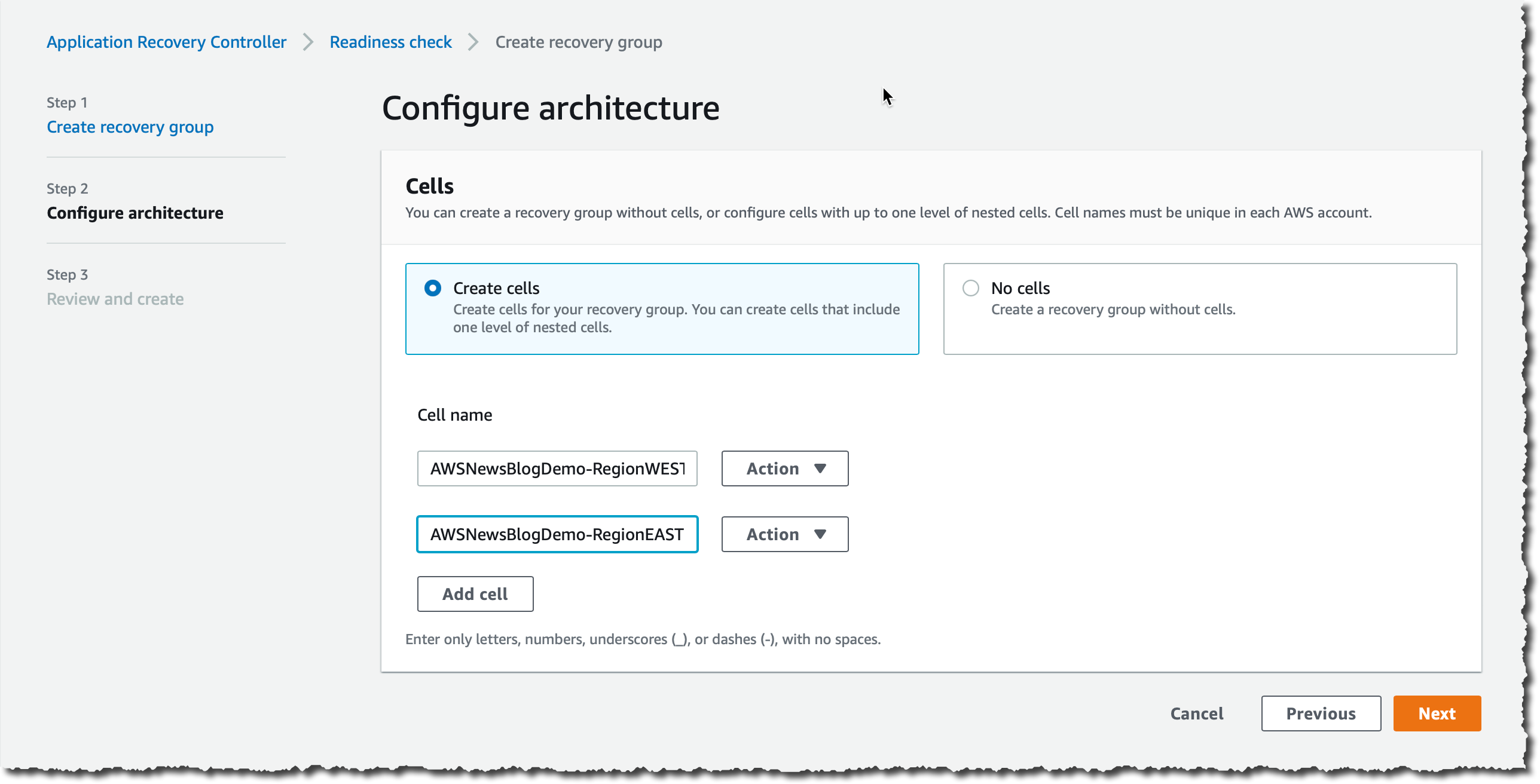
Create Recovery readiness - create cells

In Configure Architecture, I choose Add Cell, then I enter a cell name (AWSNewsBlogDemo-RegionWEST) and then choose Add Cell again to add a second cell. I enter AWSNewsBlogDemo-RegionEAST for the second cell. I choose Next to review my inputs, then I choose Create recovery group.

I now need to associate resources such as my load balancers, Auto Scaling groups, and DynamoDB table with my recovery group.
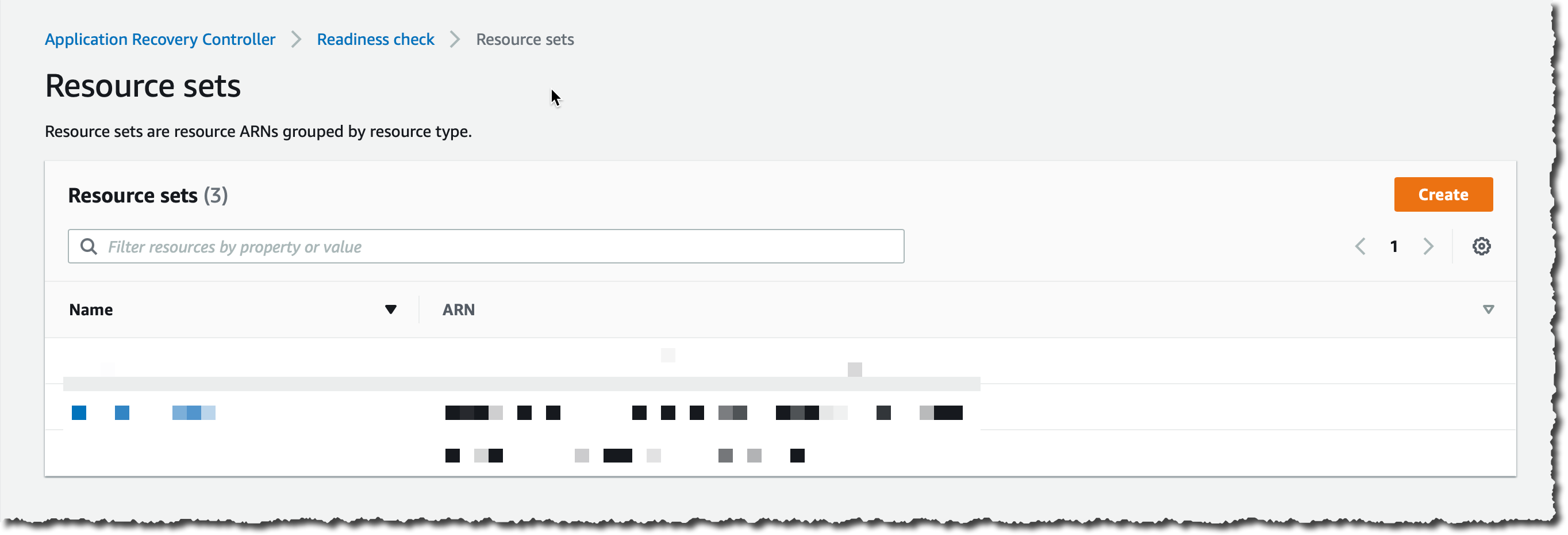
Create Resource Set

In the left navigation pane, I choose Resource Set and then I choose Create.

Create Resource Set - load balancers

I enter a name for my first resource set (for example, load_balancers). For Resource type, I choose Network Load Balancer or Application Load Balancer and I then choose Add to add the load balancer ARN.

I choose Add again to enter the second load balancer ARN, and then I choose Create resource set.

I repeat the process to create one resource set for the two Auto Scaling groups and a third resource set for the global DynamoDB table (one ARN). I now have three resource sets:
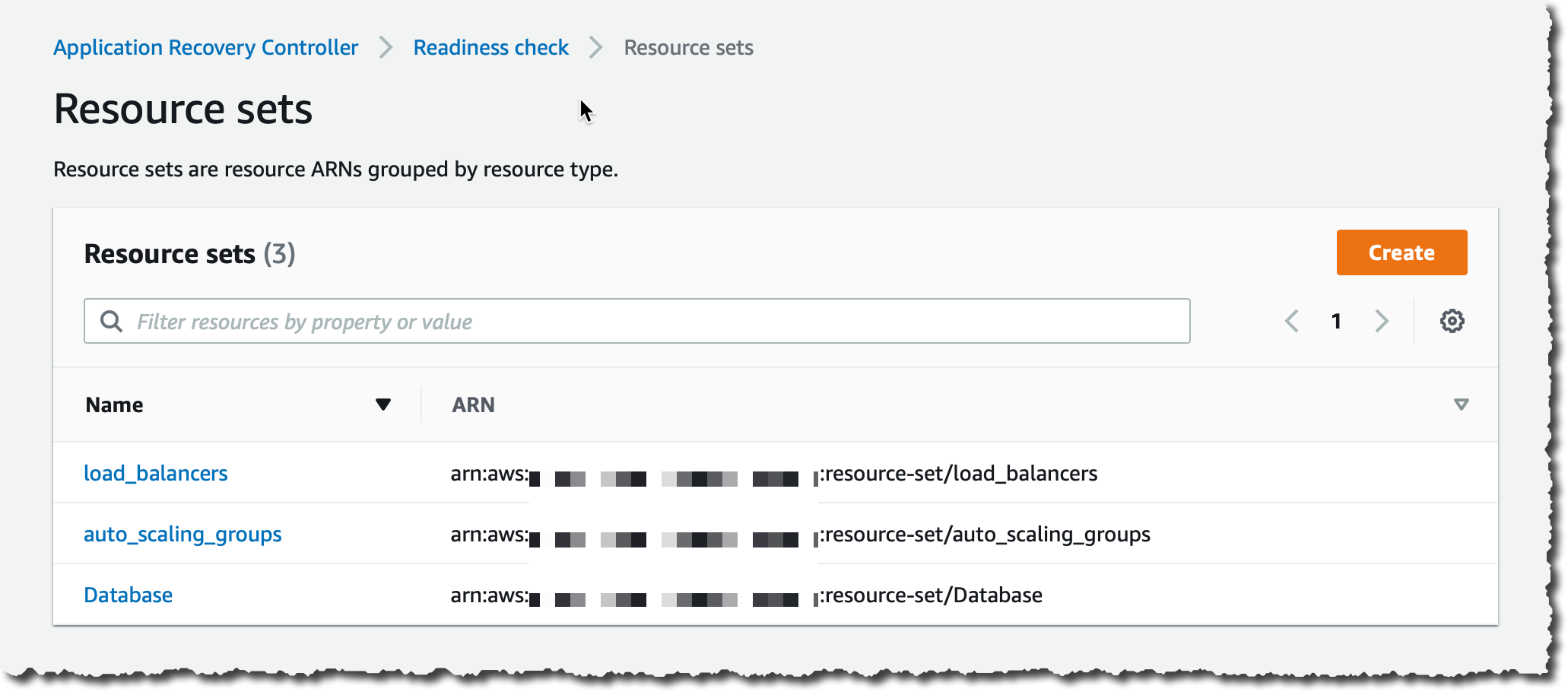
Create Resource Set - 3 Resource Sets

My last step is to create the readiness check. This will associate the resources with cells in the resource groups.
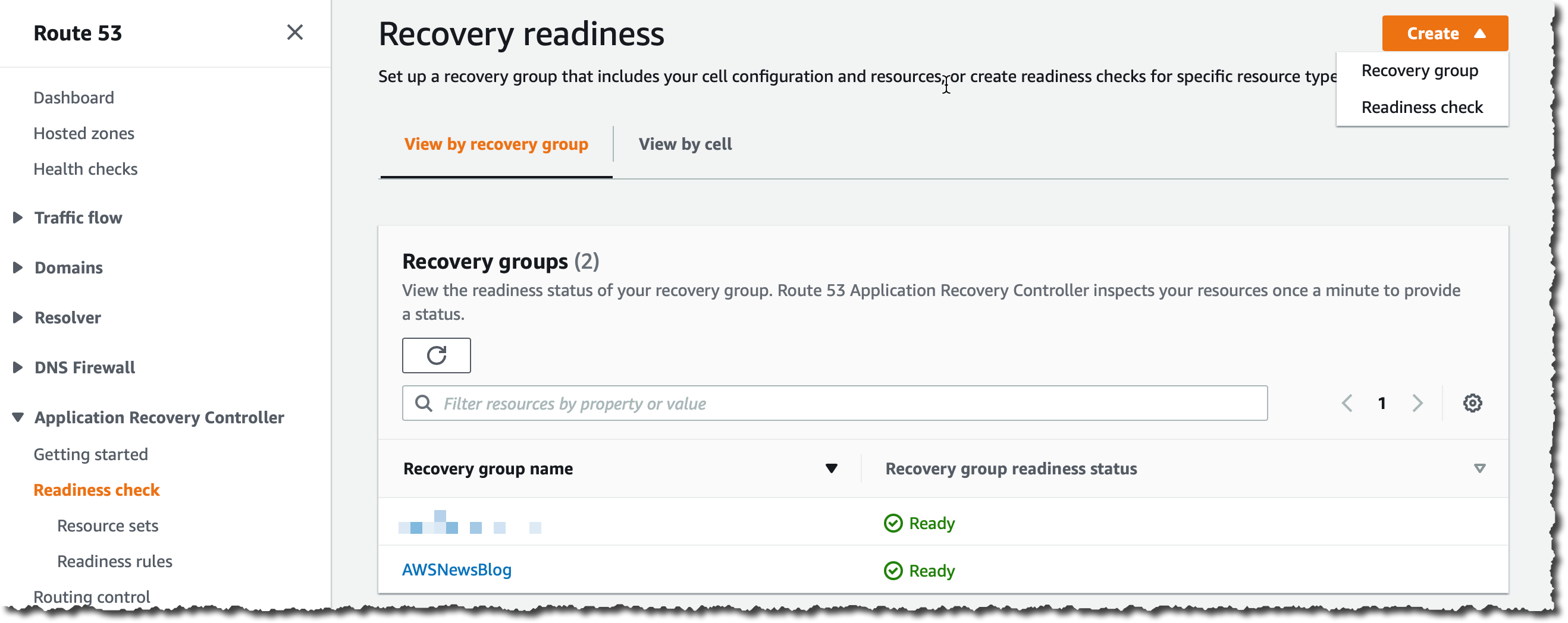
Create Readiness Check

In Readiness check, I choose Create at the top right of the screen, then Readiness check.
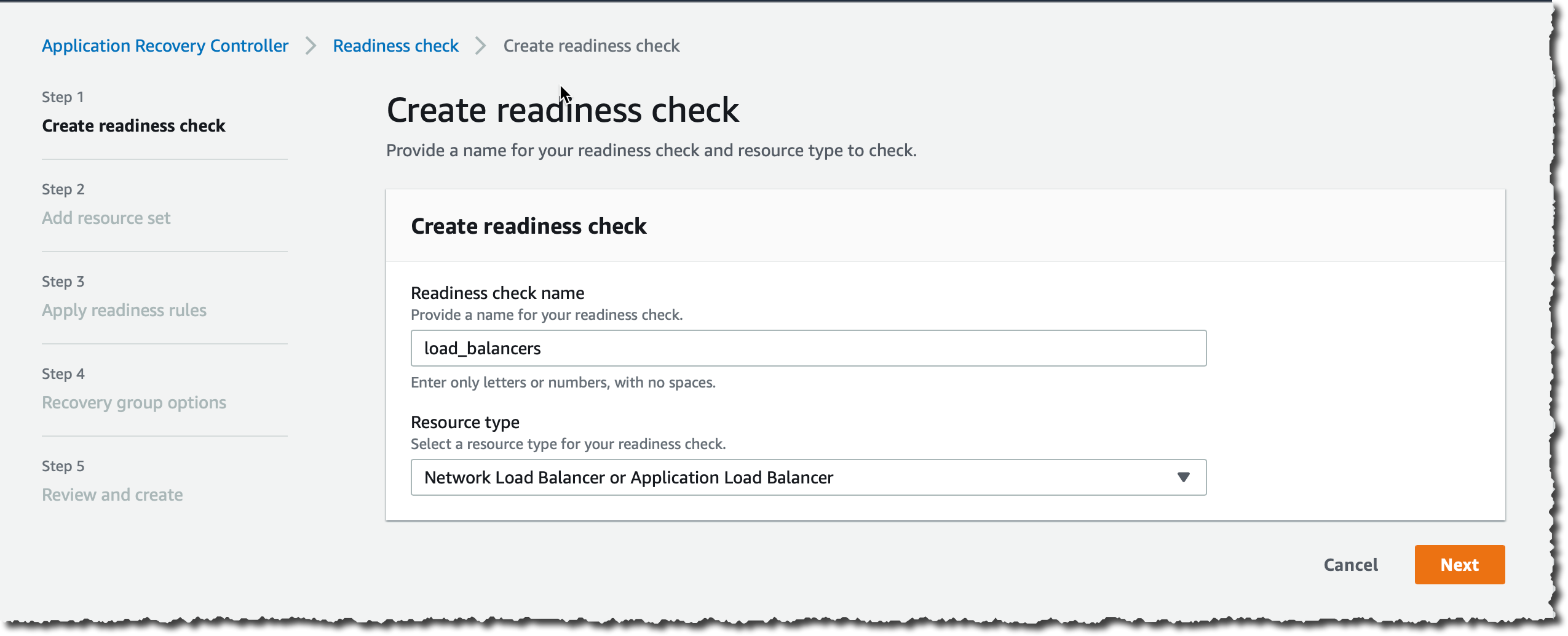
Create Readiness Check Step 1

Step 1 (Create readiness check), I enter a name (for example, load_balancers). For Resource Type, I choose Network Load Balancer or Application Load Balancer and then choose Next.
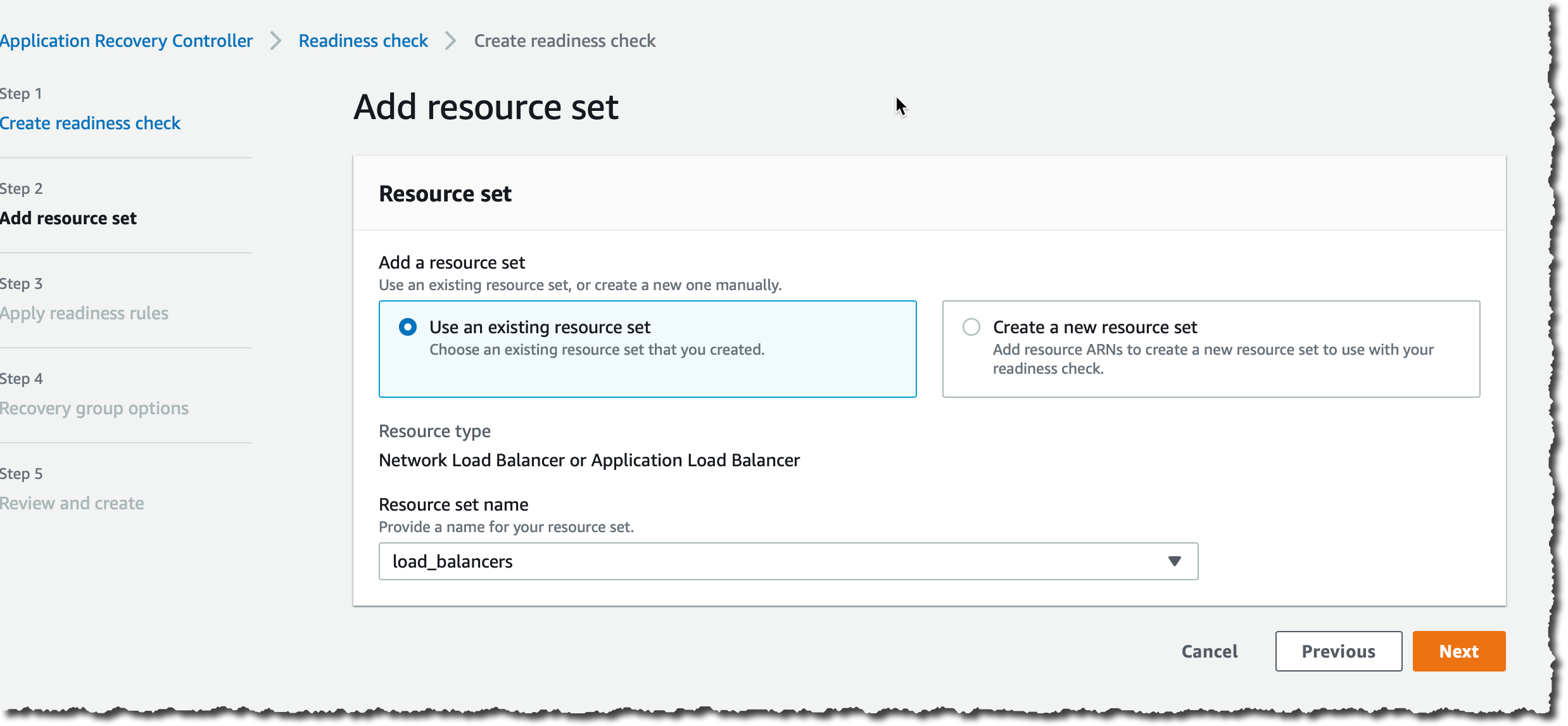
Create Readiness Check Step 2

Step 2 (Add resource set), I keep the default selection Use an existing resource set and for Resource set name, I choose load_balancers and then I choose Next.

Step 3 (Apply readiness rules), I review the rules and then choose Next.

Recovery Group Options

Step 4 (Recovery Group Options), I keep the default selection Associate with an existing recovery group. For Recovery group name, I choose AWSNewsBlog. Then, I associate the two cells (EAST and WEST) with the two load balancers ARN. Be sure to associate the correct load balancer to each cell. The Region name is included in the ARN.

Step 5 (Review and create), I review my choices and then choose Create readiness check.

Three readiness checks

I repeat this process for the Auto Scaling group and the DynamoDB global table.
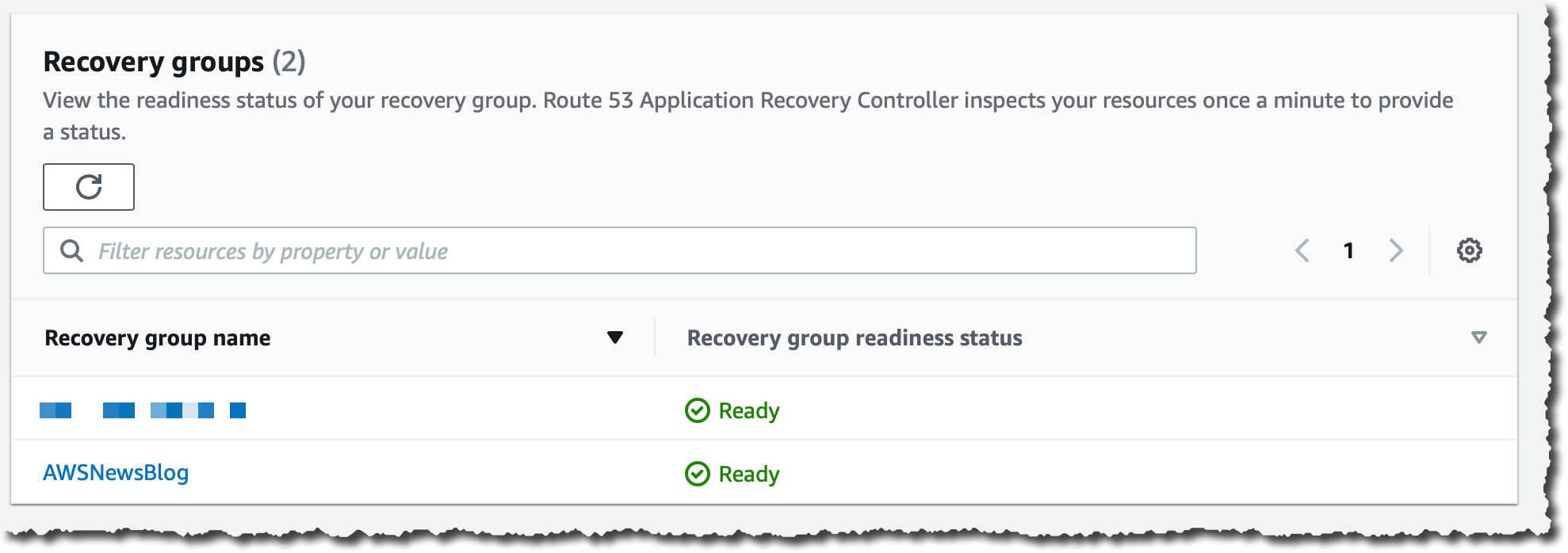
Recovery Groups in Ready mode

When all readiness checks in the group are green, the group has a status of Ready.

Now, I can configure and test the routing controls.

Terminology
Before I configure routing controls, let me share some basic terminology.

A cluster is a set of five redundant Regional endpoints against which you can execute API calls to update or get the state of routing controls. You can host multiple control panels and routing controls on one cluster.

A routing control is a simple on/off switch, hosted on a cluster, that you use to control routing of client traffic in and out of cells. When you create a routing control, you add a health check in Route 53 so that you can reroute traffic when you update the routing control in Route 53 Application Recovery Controller. The health checks must be associated with DNS failover records that front each application replica if you want to use them to route traffic with routing controls.

A control panel groups together a set of related routing controls.

Configure Routing Controls
I can use the Route 53 console or API actions to create a routing control for each AWS Region for my application. After I create routing controls, I create an Amazon Route 53 Application Recovery Controller health check for each one, and then associate each health check with a DNS failover record for my load balancers in each Region. Then, to fail over traffic between Regions, I change the routing control state for one routing control to off and another routing control state to on.

The first step is to create a cluster. A cluster is charged $2.5 / hour. When you create a cluster to experience Route 53 Application Recovery Controller, be sure to delete the cluster after your experimentation.

Create Cluster

In the left navigation pane, I navigate to the cluster panel and then I choose Create.

Create Cluster - enter name

I enter a name for my cluster and then choose Create cluster.

The cluster is in Pending state for a few minutes. After a while, its status changes to Deployed.

After it’s deployed, I select the cluster name to discover the five redundant API endpoints. You must specify one of those endpoints when you build recovery tools to retrieve or set routing control states. You can use any of the cluster endpoints, but in complex or automated scenarios, we recommend that your systems be prepared to retry with each of the available endpoints, using a different endpoint with each retry request.
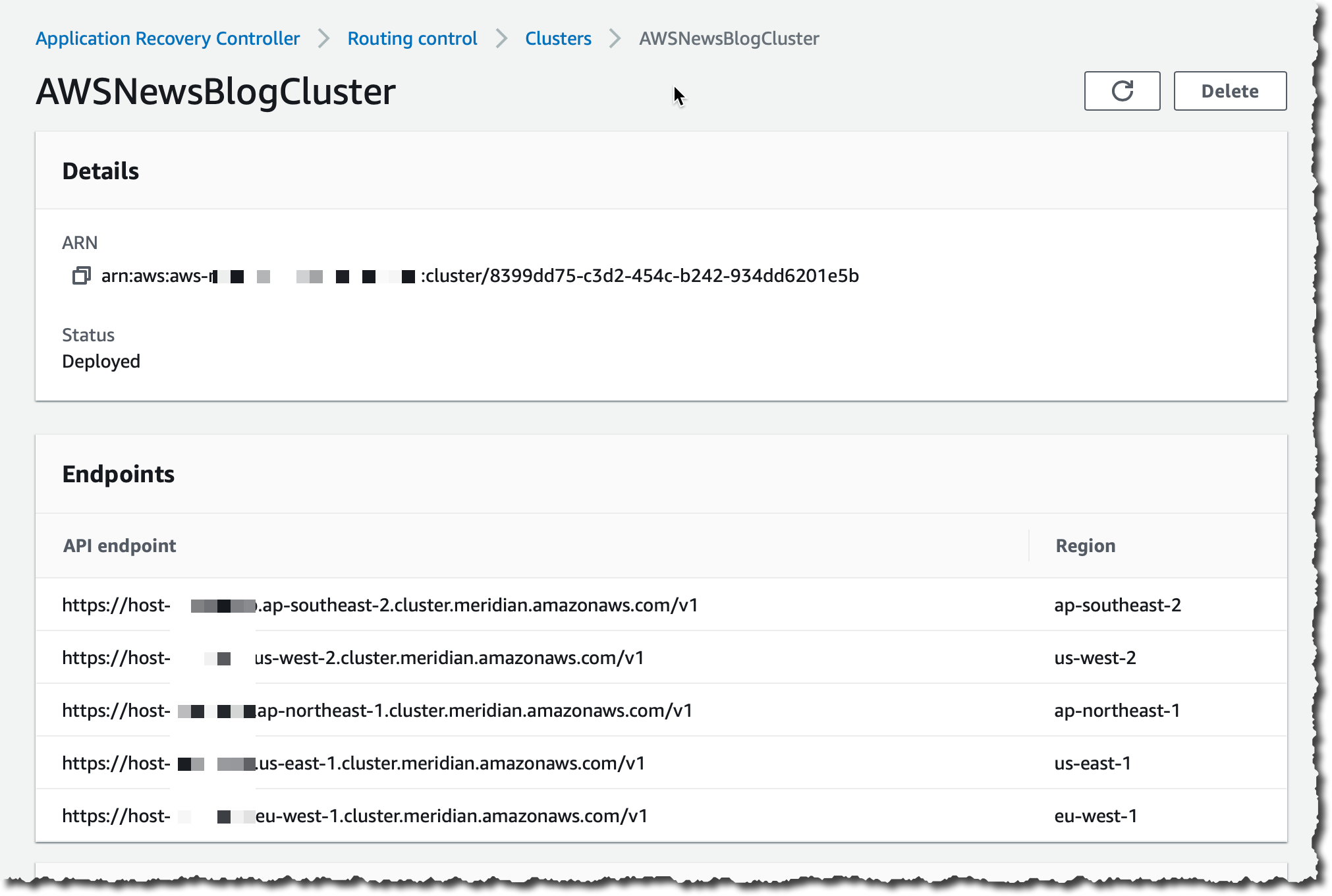
Routing Control Cluster Endpoints

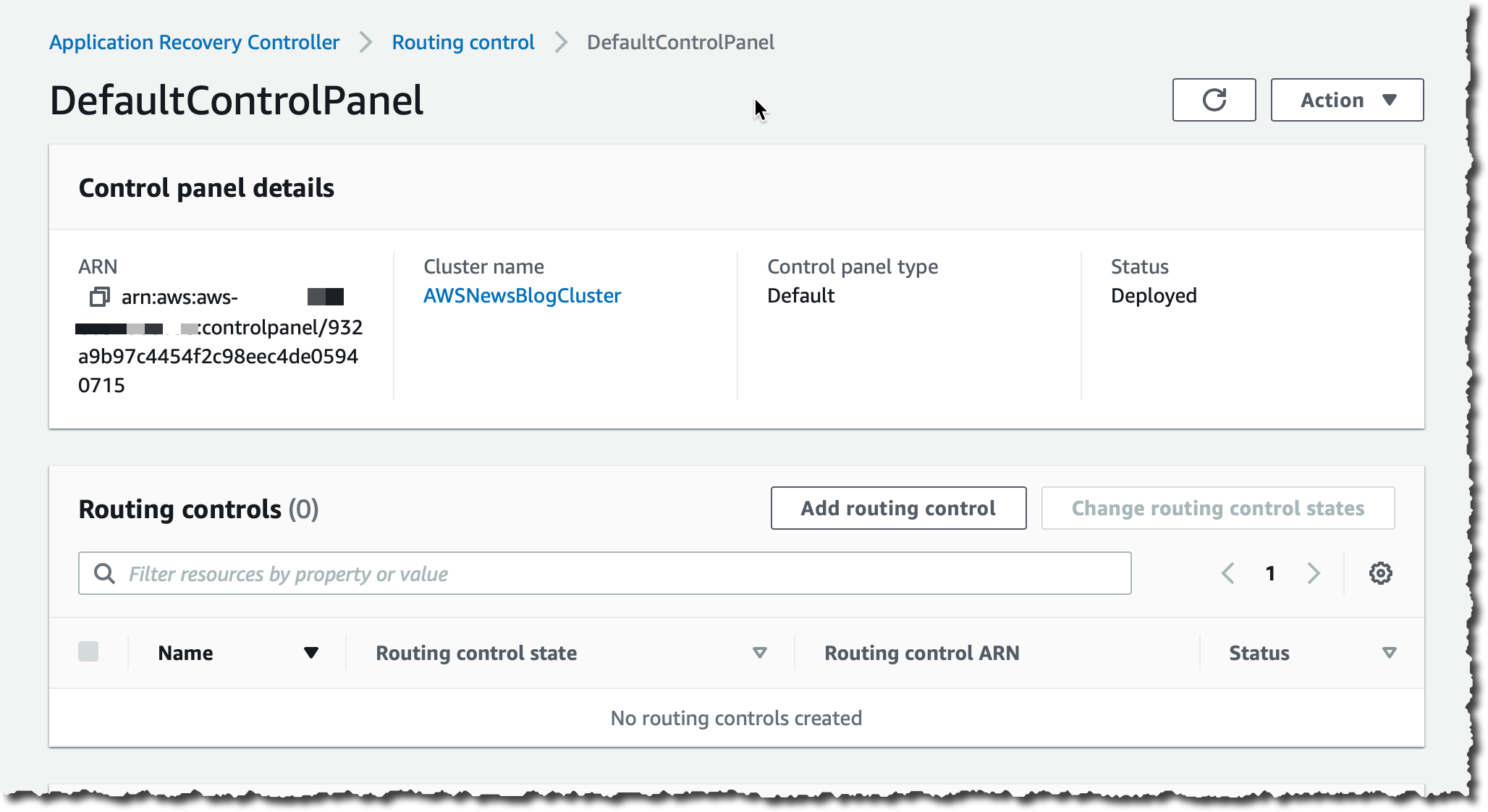
Traffic routing is managed through routing controls that are grouped in a control panel. You can create one or use the default one that is created for you.
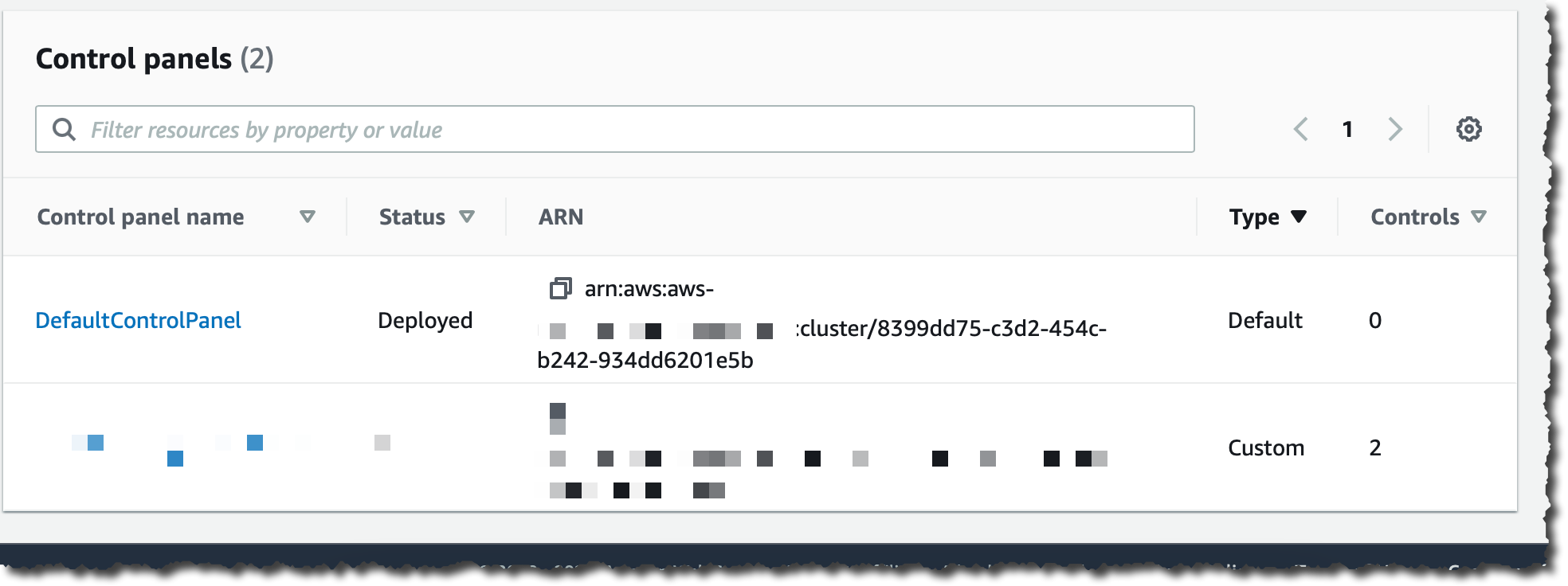
Default Control Panel

I choose DefaultControlPanel.

Default Control Panel - Add routing control

I choose Add routing control.

Create Routing Control

I enter a name for my routing (FailToWEST) control and then choose Create routing control. I repeat the operation for the second routing control (FailToEAST).
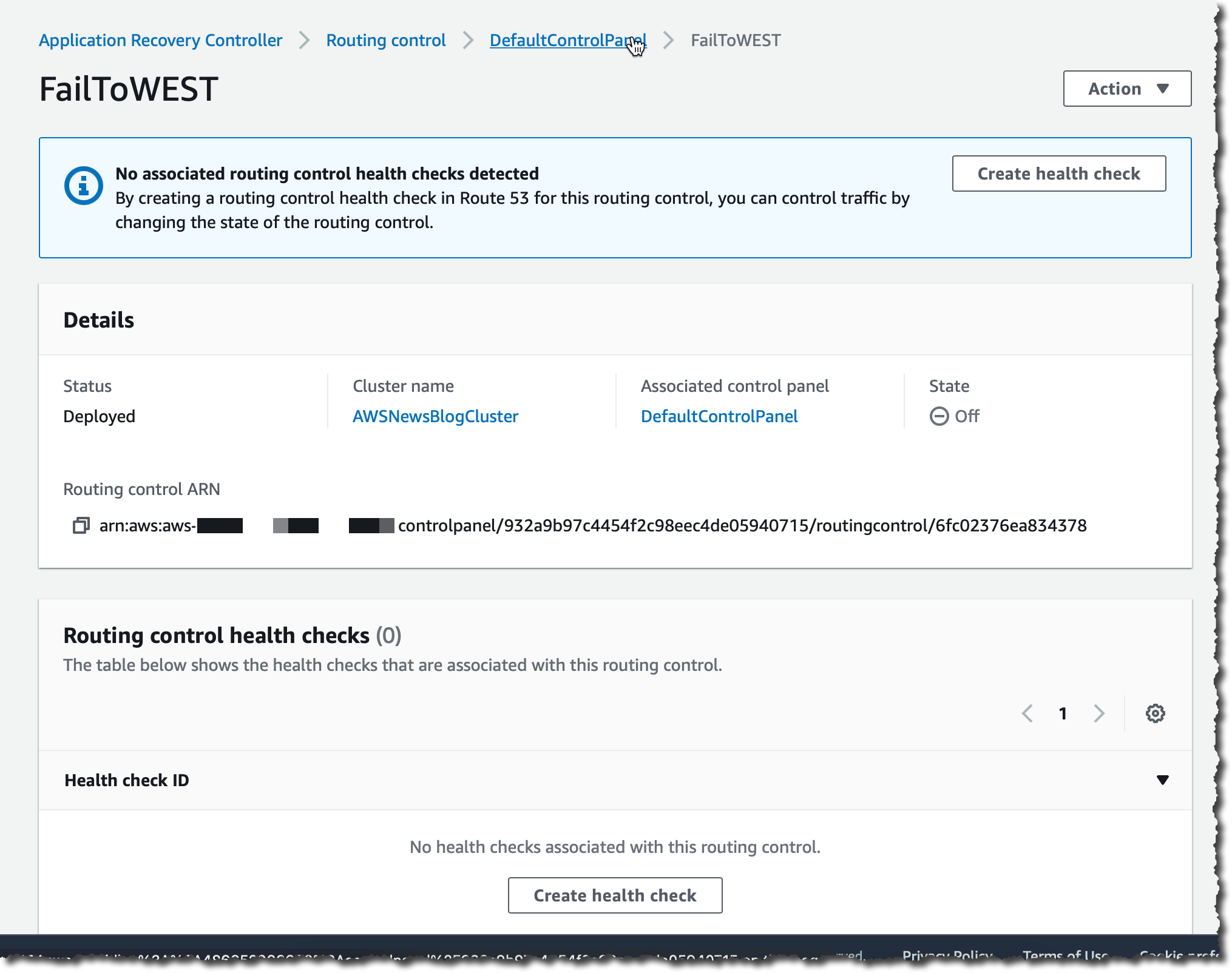
Control Panel - Create Health Check

After the routing control is created, I choose it from the list. On the detail page, I choose Create health check to create a health check in Route 53.

Control Panel - Create Health Check

I enter a name for the health check and then choose Create. I navigate to the Route 53 console to verify the health check was correctly created.

I create one health check for each routing control.

You might have noticed that the Control Panel provides a place where you can add Safety Rules. When you work with several routing controls at the same time, you might want some safeguards in place when you enable and disable them. These help you to avoid initiating a failover when a replica is not ready, or unintended consequences like turning both routing controls off and stopping all traffic flow. To create these safeguards, you create safety rules. For more information about safety rules, including usage examples, see the Route 53 Application Recovery Controller developer guide.

Now the routing controls and the DNS health check are in place, the last step is to route traffic to my application.

Adjust My DNS Settings
To route traffic to my application. I assign a DNS alias to the top-level entry point of the application in the cell. For this example, using the Route 53 console, I create two ALIAS A records of type FAILOVER and associate each health check with each DNS record. The two records have the same record name. One is the primary record and the other is the secondary record. For more information about Amazon Route 53 health checks, see the Amazon Route 53 developer guide.

DNS Alias Record Primary DNS Alias Record Secondary

On the application recovery routing controls page, I enable one of the two routing controls.

Application recovery Control - enable one control state

As soon as I do, all the traffic pointed to tictactoe.seb.go-aws.com goes to the infrastructure deployed on us-east-1.

Testing My Setup
To test my setup, I first use the dig command in a terminal. It shows the DNS CNAME record that points to the load balancer deployed in us-east-1.

testing alias for us-east-1

I also test the application with a web browser. I observe the name tictactoe.seb.go-aws.com goes to us-east-1.
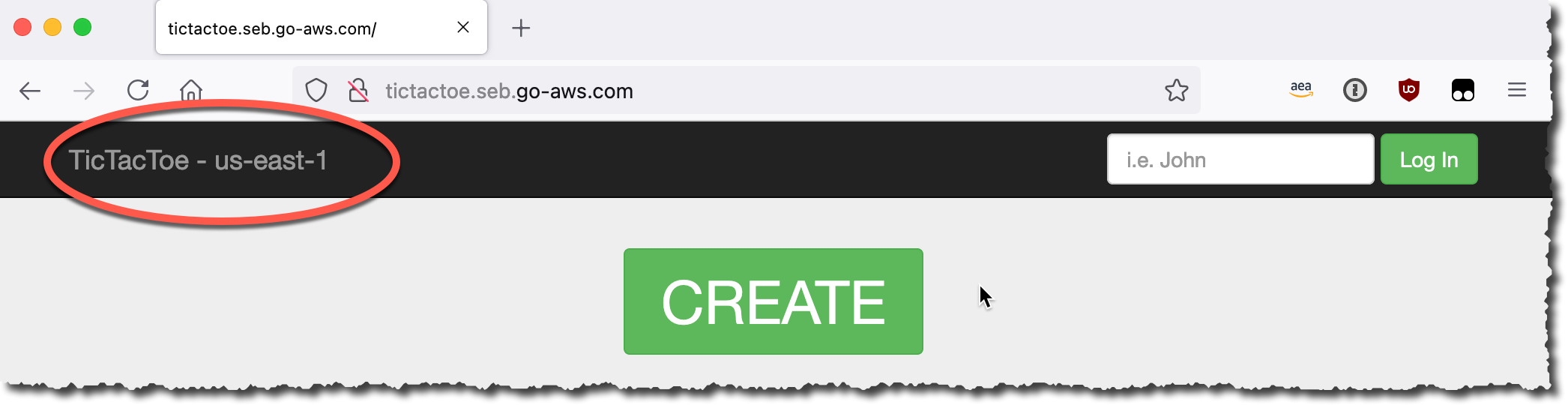
Tic Tac Toe application

Now, using the update-routing-control-state API action, the CLI, or the console, I turn off the routing control to the us-east-1 Region and turn on the one to the us-west-2 Region. When I use the CLI, I use the endpoints provided by my cluster.

aws route53-recovery-cluster update-routing-control-state \
     --routing-control-arn arn:aws:route53-recovery-control::012345678:controlpanel/xxx/routingcontrol/abcd \
     --routing-control-state On \
     --region us-west-2 \
     --endpoint-url https://host-xxx.us-west-2.cluster.routing-control.amazonaws.com/v1

In the console, I navigate to the control panel, I select the routing control I want to change and click Change routing control states.

Changing routing control states

After less than a minute, the DNS address is updated. My application traffic is now routed to the us-west-2 Region.

DNS checked after a routing control state change

Readiness checks and routing controls provide a controlled failover for my application traffic, redirecting traffic from my active replica to my standby one, in another AWS Region. I can change the traffic routing manually, as I showed in the demo, or I can automate it using Amazon CloudWatch alarms based on technical and business metrics for my application.

Pricing
This new capability is charged on demand. There are no upfront costs. You are charged per readiness check and per cluster per hour. Readiness checks are charged $0.045 / hour. Cluster are charged $2.5 / hour. In the demo example used for this blog post, there are three readiness checks and one cluster. The price per hour for this setup, excluding the application itself, is 3 x $0.045 + 1 x $2.5 = $2.635 / hour. For more details about the pricing, including an example, see the Route 53 pricing page.

This new capability is a global service that can be used to monitor and control application recovery for application running in any of the public commercial AWS Regions. Give it a try and let us know what you think. As always, you can send feedback through your usual AWS Support contacts or post it on the AWS forum for Route 53 Application Recovery Controller.
— seb

New 2021 H1 IRAP report is now available on AWS Artifact for Australian customers

Post Syndicated from Clara Lim original https://aws.amazon.com/blogs/security/new-2021-h1-irap-report-is-now-available-on-aws-artifact-for-australian-customers/

We are excited to announce that an additional 15 AWS services are now assessed to be in scope for Information Security Registered Assessors Program (IRAP) after a successful incremental audit completed in June 2021 by independent ASD (Australian Signals Directorate) certified IRAP assessor. This brings the total to 112 services assessed at IRAP PROTECTED level. The new IRAP report is now available in AWS Artifact, a self-service portal for on-demand access to AWS compliance reports. Sign in to AWS Artifact in the AWS Management Console, or learn more at Getting Started with AWS Artifact.

For the full list of these services, see the AWS Services in Scope page on the IRAP tab. All services in scope are available in the Asia Pacific (Sydney) Region.

The following are the 15 newly added services in scope:

  1. Amazon Connect Customer Profiles
  2. Amazon Detective
  3. Amazon Fraud Detector
  4. Amazon Kendra
  5. Amazon Keyspaces (for Apache Cassandra)
  6. Amazon Lex
  7. Amazon Textract
  8. AWS App Mesh
  9. AWS Cloud Map
  10. AWS Cloud9
  11. AWS Ground Station
  12. AWS OpsWorks for Chef Automate
  13. AWS OpsWorks for Puppet Enterprise
  14. AWS Personal Health Dashboard
  15. AWS Resource Groups

The IRAP documentation pack is developed in accordance with the Australian Cyber Security Centre (ACSC) Cloud Security Guidance and their Anatomy of a Cloud Assessment and Authorisation framework, which addresses guidance within the Australian Government Information Security Manual (ISM), the Attorney-General’s Department Protective Security Policy Framework (PSPF), and the Digital Transformation Agency (DTA) Secure Cloud Strategy.

The IRAP package on AWS Artifact also includes the AWS Consumer Guide and the whitepaper Reference Architectures for ISM PROTECTED Workloads in the AWS Cloud.

We created the IRAP documentation pack to help Australian government agencies and their partners to plan, architect, and risk assess their workloads, in utilizing AWS Cloud services. Please reach out to your AWS representatives to let us know which additional services you would like to see in scope for coming IRAP assessments. We strive to bring more services into the scope of the IRAP PROTECTED level, based on your requirements.

If you have feedback about this post, submit comments in the Comments section below.

Want more AWS Security how-to content, news, and feature announcements? Follow us on Twitter.

Author

Clara Lim

Clara is the Audit Program Manager for the Asia Pacific Region, leading multiple security certification programs. Clara is passionate about leveraging her decade-long experience to deliver compliance programs that provide assurance and build trust with customers.

OSPAR 2021 report now available with 127 services in scope

Post Syndicated from Clara Lim original https://aws.amazon.com/blogs/security/ospar-2021-report-now-available-with-127-services-in-scope/

We are excited to announce the completion of the third Outsourced Service Provider Audit Report (OSPAR) audit cycle on July 1, 2021. The latest OSPAR certification includes the addition of 19 new services in scope, bringing the total number of services to 127 in the Asia Pacific (Singapore) Region.

You can download our latest OSPAR report in AWS Artifact, a self-service portal for on-demand access to AWS compliance reports. Sign in to AWS Artifact in the AWS Management Console, or learn more at Getting Started with AWS Artifact. The list of services in scope for OSPAR is available in the report, and is also available on the AWS Services in Scope by Compliance Program webpage.

Some of the newly added services in scope include the following:

  • AWS Outposts, a fully managed service that extends AWS infrastructure, AWS services, APIs, and tools to any datacenter, co-location space, or an on-premises facility for a consistent hybrid experience.
  • Amazon Connect, an easy to use omnichannel cloud contact center that helps customers provide superior customer service across voice, chat, and tasks at lower cost than traditional contact center systems.
  • Amazon Lex, a service for building conversational interfaces into any application using voice and text.
  • Amazon Macie, a fully managed data security and data privacy service that uses machine learning and pattern matching to help customers discover, monitor, and protect customers’ sensitive data in AWS.
  • Amazon Quantum Ledger Database (QLDB), a fully managed ledger database that provides a transparent, immutable and cryptographically verifiable transaction log owned by a central trusted authority.

The OSPAR assessment is performed by an independent third-party auditor, selected from the ABS list of approved auditors. The assessment demonstrates that AWS has a system of controls in place that meet the Association of Banks in Singapore (ABS) Guidelines on Control Objectives and Procedures for Outsourced Service Providers. Our alignment with the ABS guidelines demonstrates to customers, our commitment to meet the security expectations for cloud service providers set by the financial services industry in Singapore. You can leverage the OSPAR assessment report to conduct due diligence, and to help reduce the effort and costs required for compliance. AWS OSPAR reporting period is now updated in the ABS list of OSPAR Audited Outsourced Service Providers.

As always, we are committed to bringing new services into the scope of our OSPAR program based on your architectural and regulatory needs. Please reach out to your AWS account team if you have questions about the OSPAR report.

If you have feedback about this post, submit comments in the Comments section below.

Want more AWS Security how-to content, news, and feature announcements? Follow us on Twitter.

Author

Clara Lim

Clara is the Audit Program Manager for the Asia Pacific Region, leading multiple security certification programs. Clara is passionate about leveraging her decade-long experience to deliver compliance programs that provide assurance and build trust with customers.

How AWS is helping EU customers navigate the new normal for data protection

Post Syndicated from Stephen Schmidt original https://aws.amazon.com/blogs/security/how-aws-is-helping-eu-customers-navigate-the-new-normal-for-data-protection/

Achieving compliance with the European Union’s data protection regulations is critical for hundreds of thousands of Amazon Web Services (AWS) customers. Many of them are subject to the EU’s General Data Protection Regulation (GDPR), which ensures individuals’ fundamental right to privacy and the protection of personal data. In February, we announced strengthened commitments to protect customer data, such as challenging law enforcement requests for customer data that conflict with EU law.

Today, we’re excited to announce that we’ve launched two new online resources to help customers more easily complete data transfer assessments and comply with the GDPR, taking into account the European Data Protection Board (EDPB) recommendations. These resources will also assist AWS customers in other countries to understand whether their use of AWS services involves a data transfer.

Using AWS’s new “Privacy Features for AWS Services,” customers can determine whether their use of an individual AWS service involves the transfer of customer data (the personal data they’ve uploaded to their AWS account). Knowing this information enables customers to choose the right action for their applications, such as opting out of the data transfer or creating an appropriate disclosure of the transfer for end user transparency.

We’re also providing additional information on the processing activities and locations of the limited number of sub-processors that AWS engages to provide services that involve the processing of customer data. AWS engages three types of sub-processors:

  • Local AWS entities that provide the AWS infrastructure.
  • AWS entities that process customer data for specific AWS services.
  • Third parties that AWS contracts with to provide processing activities for specific AWS services.

The enhanced information available on our updated Sub-processors page enables customers to assess if a sub-processor is relevant to their use of AWS services and AWS Regions.

These new resources make it easier for AWS customers to conduct their data transfer assessments as set out in the EDPB recommendations and, as a result, comply with GDPR. After completing their data transfer assessments, customers will also be able to determine whether they need to implement supplemental measures in line with the EDPB’s recommendations.

These resources support our ongoing commitment to giving customers control over where their data is stored, how it’s stored, and who has access to it.

Since we opened our first region in the EU in 2007, customers have been able to choose to store customer data with AWS in the EU. Today, customers can store their data in our AWS Regions in France, Germany, Ireland, Italy, and Sweden, and we’re adding Spain in 2022. AWS will never transfer data outside a customer’s selected AWS Region without the customer’s agreement.

AWS customers control how their data is stored, and we have a variety of tools at their disposal to enhance security. For example, AWS CloudHSM and AWS Key Management Service (AWS KMS) allow customers to encrypt data in transit and at rest and securely generate and manage encryption keys that they control.

Finally, our customers control who can access their data. We never use customer data for marketing or advertising purposes. We also prohibit, and our systems are designed to prevent, remote access by AWS personnel to customer data for any purpose, including service maintenance, unless requested by a customer, required to prevent fraud and abuse, or to comply with the law.

As previously mentioned, we challenge law enforcement requests for customer data from governmental bodies, whether inside or outside the EU, where the request conflicts with EU law, is overbroad, or we otherwise have any appropriate grounds to do so.

Earning customer trust is the foundation of our business at AWS, and we know protecting customer data is key to achieving this. We also know that helping customers protect their data in a world with constantly changing regulations, technology, and risks takes teamwork. We would never expect our customers to go it alone.

As we continue to enhance the capabilities customers have at their fingertips, they can be confident that choosing AWS will ensure they have the tools necessary to help them meet the most stringent security, privacy, and compliance requirements.

If you have questions or need more information, visit our EU Data Protection page.

Want more AWS Security how-to content, news, and feature announcements? Follow us on Twitter.

Author

Steve Schmidt

Steve is Vice President and Chief Information Security Officer for AWS. His duties include leading product design, management, and engineering development efforts focused on bringing the competitive, economic, and security benefits of cloud computing to business and government customers. Prior to AWS, he had an extensive career at the Federal Bureau of Investigation, where he served as a senior executive and section chief. He currently holds 11 patents in the field of cloud security architecture. Follow Steve on Twitter.

Author

Donna Dodson

Donna is a Senior Principal Scientist at AWS focusing on security and privacy capabilities including cryptography, risk management, standards, and assessments. Before joining AWS, Donna was the Chief Cybersecurity Advisor at the National Institute of Standards and Technology (NIST). She led NIST’s comprehensive cybersecurity research and development to cultivate trust in technology for stakeholders nationally and internationally.

Paging Doctor Cloud! Amazon HealthLake Is Now Generally Available

Post Syndicated from Julien Simon original https://aws.amazon.com/blogs/aws/paging-doctor-cloud-amazon-healthlake-is-now-generally-available/

At AWS re:Invent 2020, we previewed Amazon HealthLake, a fully managed, HIPAA-eligible service that allows healthcare and life sciences customers to aggregate their health information from different silos and formats into a structured, centralized AWS data lake, and extract insights from that data with analytics and machine learning (ML). Today, I’m very happy to announce that Amazon HealthLake is generally available to all AWS customers.

The ability to store, transform, and analyze health data quickly and at any scale is critical in driving high-quality health decisions. In their daily practice, doctors need a complete chronological view of patient history to identify the best course of action. During an emergency, giving medical teams the right information at the right time can dramatically improve patient outcomes. Likewise, healthcare and life sciences researchers need high-quality, normalized data that they can analyze and build models with, to identify population health trends or drug trial recipients.

Traditionally, most health data has been locked in unstructured text such as clinical notes, and stored in IT silos. Heterogeneous applications, infrastructure, and data formats have made it difficult for practitioners to access patient data, and extract insights from it. We built Amazon HealthLake to solve that problem.

If you can’t wait to get started, you can jump to the AWS console for Amazon HealthLake now. If you’d like to learn more, read on!

Introducing Amazon HealthLake
Amazon HealthLake is backed by fully-managed AWS infrastructure. You won’t have to procure, provision, or manage a single piece of IT equipment. All you have to do is create a new data store, which only takes a few minutes. Once the data store is ready, you can immediately create, read, update, delete, and query your data. HealthLake exposes a simple REST Application Programming Interface (API) available in the most popular languages, which customers and partners can easily integrate in their business applications.

Security is job zero at AWS. By default, HealthLake encrypts data at rest with AWS Key Management Service (KMS). You can use an AWS-managed key or your own key. KMS is designed so that no one, including AWS employees, can retrieve your plaintext keys from the service. For data in transit, HealthLake uses industry-standard TLS 1.2 encryption end to end.

At launch, HealthLake supports both structured and unstructured text data typically found in clinical notes, lab reports, insurance claims, and so on. The service stores this data in the Fast Healthcare Interoperability Resource (FHIR, pronounced ‘fire’) format, a standard designed to enable exchange of health data. HealthLake is compatible with the latest revision (R4) and currently supports 71 FHIR resource types, with additional resources to follow.

If your data is already in FHIR format, great! If not, you can convert it yourself, or rely on partner solutions available in AWS Marketplace. At launch, HealthLake includes validated connectors for Redox, HealthLX, Diameter Health, and InterSystems applications. They make it easy to convert your HL7v2, CCDA, and flat file data to FHIR, and to upload it to HealthLake.

As data is uploaded, HealthLake uses integrated natural language processing to extract entities present in your documents and stores the corresponding metadata. These entities include anatomy, medical conditions, medication, protected health information, test, treatments, and procedures. They are also matched to industry-standard ICD-10-CM and RxNorm entities.

After you’ve uploaded your data, you can start querying it, by assigning parameter values to FHIR resources and extracted entities. Whether you need to access information on a single patient, or want to export many documents to build a research dataset, all it takes is a single API call.

Let’s do a quick demo.

Querying FHIR Data in Amazon HealthLake
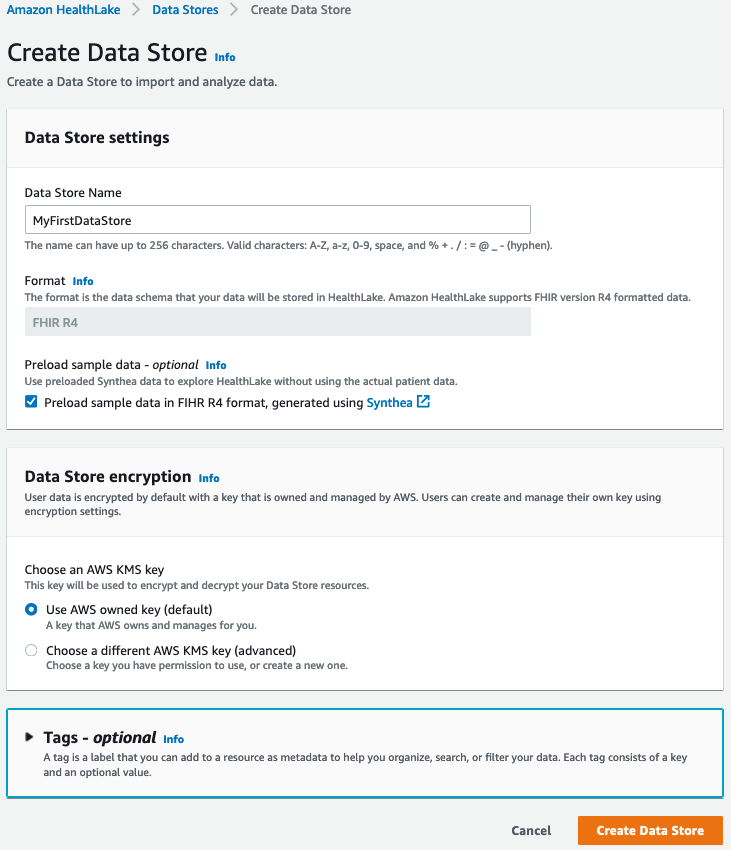
Opening the AWS console for HealthLake, I click on ‘Create a Data Store’. Then, I simply pick a name for my data store, and decide to encrypt it with an AWS managed key. I also tick the box that preloads sample synthetic data, which is a great way to quickly kick the tires of the service without having to upload my own data.

Creating a data store

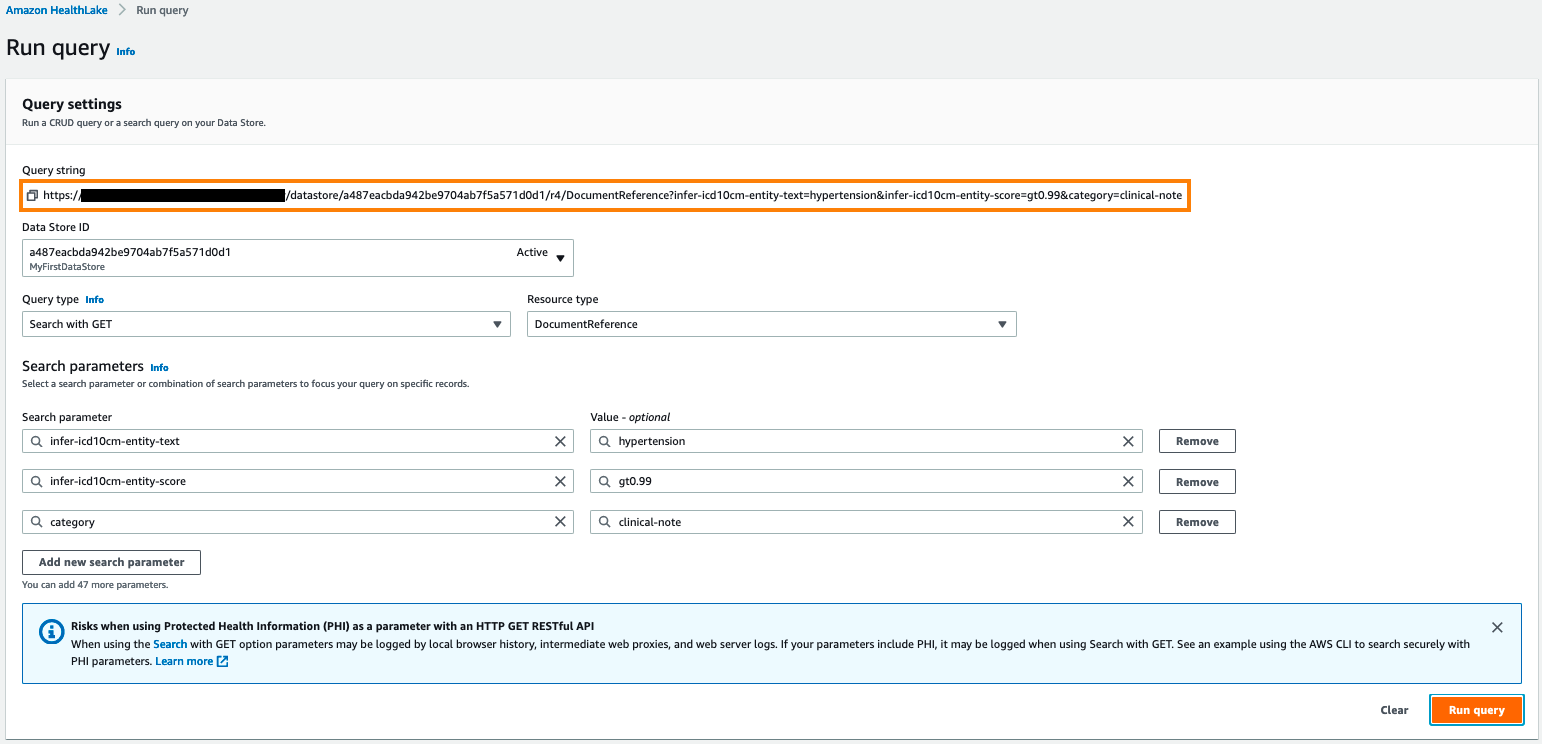
After a few minutes, the data store is active, and I can send queries to its HTTPS endpoint. In the example below, I look for clinical notes (and clinical notes only) that contain the ICD-CM-10 entity for ‘hypertension’ with a confidence score of 99% or more. Under the hood, the AWS console is sending an HTTP GET request to the endpoint. I highlighted the corresponding query string.

Querying HealthLake

The query runs in seconds. Examining the JSON response in my browser, I see that it contains two documents. For each one, I can see lots of information: when it was created, which organization owns it, who the author is, and more. I can also see that HealthLake has automatically extracted a long list of entities, with names, descriptions, and confidence scores, and added them to the document.

HealthLake entities

The document is attached in the response in base64 format.

HealthLake document

Saving the string to a text file, and decoding it with a command-line tool, I see the following:

Mr Nesser is a 52 year old Caucasian male with an extensive past medical history that includes coronary artery disease , atrial fibrillation , hypertension , hyperlipidemia , presented to North ED with complaints of chills , nausea , acute left flank pain and some numbness in his left leg

This document is spot on. As you can see, it’s really easy to query and retrieve data stored in Amazon HealthLake.

Analyzing Data Stored in Amazon HealthLake
You can export data from HealthLake, store it in an Amazon Simple Storage Service (Amazon S3) bucket and use it for analytics and ML tasks. For example, you could transform your data with AWS Glue, query it with Amazon Athena, and visualize it with Amazon QuickSight. You could also use this data to build, train and deploy ML models on Amazon SageMaker.

The following blog posts show you end-to-end analytics and ML workflows based on data stored in HealthLake:

Last but not least, this self-paced workshop will show you how to import and export data with HealthLake, process it with AWS Glue and Amazon Athena, and build an Amazon QuickSight dashboard.

Now, let’s see what our customers are building with HealthLake.

Customers Are Already Using Amazon HealthLake
Based in Chicago, Rush University Medical Center is an early adopter of HealthLake. They used it to build a public health analytics platform on behalf of the Chicago Department of Public Health. The platform aggregates, combines, and analyzes multi-hospital data related to patient admissions, discharges and transfers, electronic lab reporting, hospital capacity, and clinical care documents for COVID-19 patients who are receiving care in and across Chicago hospitals. 17 of the 32 hospitals in Chicago are currently submitting data, and Rush plans to integrate all 32 hospitals by this summer. You can learn more in this blog post.

Recently, Rush launched another project to identify communities that are most exposed to high blood pressure risks, understand the social determinants of health, and improve healthcare access. For this purpose, they collect all sorts of data, such as clinical notes, ambulatory blood pressure measurements from the community, and Medicare claims data. This data is then ingested it into HealthLake and stored in FHIR format for further analysis.

Dr. Hota

Says Dr. Bala Hota, Vice President and Chief Analytics Officer at Rush University Medical Center: “We don’t have to spend time building extraneous items or reinventing something that already exists. This allows us to move to the analytics phase much quicker. Amazon HealthLake really accelerates the sort of insights that we need to deliver results for the population. We don’t want to be spending all our time building infrastructure. We want to deliver the insights.”


Cortica is on a mission to revolutionize healthcare for children with autism and other developmental differences. Today, Cortica use HealthLake to store all patient data in a standardized, secured, and compliant manner. Building ML models with that data, they can track the progress of their patients with sentiment analysis, and they can share with parents the progress that their children are doing on speech development and motor skills. Cortical can also validate the effectiveness of treatment models and optimize medication regimens.

Ernesto DiMarinoErnesto DiMarino, Head of Enterprise Applications and Data at Cortica told us: “In a matter of weeks rather than months, Amazon HealthLake empowered us to create a centralized platform that securely stores patients’ medical history, medication history, behavioral assessments, and lab reports. This platform gives our clinical team deeper insight into the care progression of our patients. Using predefined notebooks in Amazon SageMaker with data from Amazon HealthLake, we can apply machine learning models to track and prognosticate each patient’s progression toward their goals in ways not otherwise possible. Through this technology, we can also share HIPAA-compliant data with our patients, researchers, and healthcare partners in an interoperable manner, furthering important research into autism treatment.”

MEDHOST provides products and services to more than 1,000 healthcare facilities of all types and sizes. These customers want to develop solutions to standardize patient data in FHIR format and build dashboards and advanced analytics to improve patient care, but that is difficult and time consuming today.

Says Pandian Velayutham, Sr. Director Of Engineering at MEDHOST: “With Amazon HealthLake we can meet our customers’ needs by creating a compliant FHIR data store in just days rather than weeks with integrated natural language processing and analytics to improve hospital operational efficiency and provide better patient care.”


Getting Started
Amazon HealthLake is available today in the US East (N. Virginia), US East (Ohio), and US West (Oregon) Regions.

Give our self-paced workshop a try, and let us know what you think. As always, we look forward to your feedback. You can send it through your usual AWS Support contacts, or post it on the AWS Forums.

– Julien

Easily Manage Security Group Rules with the New Security Group Rule ID

Post Syndicated from Sébastien Stormacq original https://aws.amazon.com/blogs/aws/easily-manage-security-group-rules-with-the-new-security-group-rule-id/

At AWS, we tirelessly innovate to allow you to focus on your business, not its underlying IT infrastructure. Sometimes we launch a new service or a major capability. Sometimes we focus on details that make your professional life easier.

Today, I’m happy to announce one of these small details that makes a difference: VPC security group rule IDs.

A security group acts as a virtual firewall for your cloud resources, such as an Amazon Elastic Compute Cloud (Amazon EC2) instance or a Amazon Relational Database Service (RDS) database. It controls ingress and egress network traffic. Security groups are made up of security group rules, a combination of protocol, source or destination IP address and port number, and an optional description.

When you use the AWS Command Line Interface (CLI) or API to modify a security group rule, you must specify all these elements to identify the rule. This produces long CLI commands that are cumbersome to type or read and error-prone. For example:

aws ec2 revoke-security-group-egress \
         --group-id sg-0xxx6          \
         --ip-permissions IpProtocol=tcp, FromPort=22, ToPort=22, IpRanges='[{CidrIp=192.168.0.0/0}, {84.156.0.0/0}]'

What’s New?
A security group rule ID is an unique identifier for a security group rule. When you add a rule to a security group, these identifiers are created and added to security group rules automatically. Security group IDs are unique in an AWS Region. Here is the Edit inbound rules page of the Amazon VPC console:

Security Group Rules Ids

As mentioned already, when you create a rule, the identifier is added automatically. For example, when I’m using the CLI:

aws ec2 authorize-security-group-egress                                  \
        --group-id sg-0xxx6                                              \
        --ip-permissions IpProtocol=tcp,FromPort=22,ToPort=22,           \
                         IpRanges=[{CidrIp=1.2.3.4/32}]
        --tag-specifications                                             \
                         ResourceType='security-group-rule',             \
                         "Tags": [{                                      \
                           "Key": "usage", "Value": "bastion"            \
                         }]

The updated AuthorizeSecurityGroupEgress API action now returns details about the security group rule, including the security group rule ID:

"SecurityGroupRules": [
    {
        "SecurityGroupRuleId": "sgr-abcdefghi01234561",
        "GroupId": "sg-0xxx6",
        "GroupOwnerId": "6800000000003",
        "IsEgress": false,
        "IpProtocol": "tcp",
        "FromPort": 22,
        "ToPort": 22,
        "CidrIpv4": "1.2.3.4/32",
        "Tags": [
            {
                "Key": "usage",
                "Value": "bastion"
            }
        ]
    }
]

We’re also adding two API actions: DescribeSecurityGroupRules and ModifySecurityGroupRules to the VPC APIs. You can use these to list or modify security group rules respectively.

What are the benefits ?
The first benefit of a security group rule ID is simplifying your CLI commands. For example, the RevokeSecurityGroupEgress command used earlier can be now be expressed as:

aws ec2 revoke-security-group-egress \
         --group-id sg-0xxx6         \
         --security-group-rule-ids "sgr-abcdefghi01234561"

Shorter and easier, isn’t it?

The second benefit is that security group rules can now be tagged, just like many other AWS resources. You can use tags to quickly list or identify a set of security group rules, across multiple security groups.

In the previous example, I used the tag-on-create technique to add tags with --tag-specifications at the time I created the security group rule. I can also add tags at a later stage, on an existing security group rule, using its ID:

aws ec2 create-tags                         \
        --resources sgr-abcdefghi01234561   \
        --tags "Key=usage,Value=bastion"

Let’s say my company authorizes access to a set of EC2 instances, but only when the network connection is initiated from an on-premises bastion host. The security group rule would be IpProtocol=tcp, FromPort=22, ToPort=22, IpRanges='[{1.2.3.4/32}]' where 1.2.3.4 is the IP address of the on-premises bastion host. This rule can be replicated in many security groups.

What if the on-premises bastion host IP address changes? I need to change the IpRanges parameter in all the affected rules. By tagging the security group rules with usage : bastion, I can now use the DescribeSecurityGroupRules API action to list the security group rules used in my AWS account’s security groups, and then filter the results on the usage : bastion tag. By doing so, I was able to quickly identify the security group rules I want to update.

aws ec2 describe-security-group-rules \
        --max-results 100 
        --filters "Name=tag-key,Values=usage" --filters "Name=tag-value,Values=bastion" 

This gives me the following output:

{
    "SecurityGroupRules": [
        {
            "SecurityGroupRuleId": "sgr-abcdefghi01234561",
            "GroupId": "sg-0xxx6",
            "GroupOwnerId": "40000000003",
            "IsEgress": false,
            "IpProtocol": "tcp",
            "FromPort": 22,
            "ToPort": 22,
            "CidrIpv4": "1.2.3.4/32",
            "Tags": [
                {
                    "Key": "usage",
                    "Value": "bastion"
                }
            ]
        }
    ],
    "NextToken": "ey...J9"
}

As usual, you can manage results pagination by issuing the same API call again passing the value of NextToken with --next-token.

Availability
Security group rule IDs are available for VPC security groups rules, in all commercial AWS Regions, at no cost.

It might look like a small, incremental change, but this actually creates the foundation for future additional capabilities to manage security groups and security group rules. Stay tuned!

AWS achieves Spain’s ENS High certification across 149 services

Post Syndicated from Niyaz Noor original https://aws.amazon.com/blogs/security/aws-achieves-spains-ens-high-certification-across-149-services/

Gaining and maintaining customer trust is an ongoing commitment at Amazon Web Services (AWS). We continually add more services to our ENS certification scope. This helps to assure public sector organizations in Spain that want to build secure applications and services on AWS that the expected ENS certification security standards are being met.

ENS certification establishes security standards that apply to all government agencies and public organizations in Spain, and to service providers that the public services are dependent on. Spain’s National Security Framework is regulated under Royal Decree 3/2010 and was developed through close collaboration between Entidad Nacional de Acreditación (ENAC), the Ministry of Finance and Public Administration, and the National Cryptologic Centre (CCN), as well as other administrative bodies.

We’re excited to announce the addition of 44 new services to the scope of our Spain Esquema Nacional de Seguridad (ENS) High certification, for a total of 149 services. The certification covers all AWS Regions. Some of the new security services included in ENS High scope are:

  • Amazon Macie is a data security and data privacy service that uses machine learning and pattern matching to help you discover, monitor, and protect your sensitive data in AWS.
  • AWS Control Tower is a service you can use to set up and govern a new, secure, multi-account AWS environment based on best practices established through AWS’s experience working with thousands of enterprises as they move to the cloud.
  • Amazon Fraud Detector is a fully managed machine learning (ML) fraud detection solution that provides everything needed to build, deploy, and manage fraud detection models.
  • AWS Network Firewall is a managed service that makes it easier to deploy essential network protections for all your Amazon Virtual Private Clouds (Amazon VPC).

AWS’s achievement of the ENS High certification is verified by BDO España, which conducted an independent audit and attested that AWS meets the required confidentiality, integrity, and availability standards.

For more information about ENS High, see the AWS Compliance page Esquema Nacional de Seguridad High. To view which services are covered, see the ENS High tab on the AWS Services in Scope by Compliance Program page. You can download the Esquema Nacional de Seguridad (ENS) Certificate from AWS Artifact in the AWS Console or from the Compliance page Esquema Nacional de Seguridad High.

As always, we’re committed to bringing new services into the scope of our ENS High program based on your architectural and regulatory needs. Please reach out to your AWS account team or [email protected] if you have questions about the ENS program.

If you have feedback about this post, submit comments in the Comments section below.

Want more AWS Security how-to content, news, and feature announcements? Follow us on Twitter.

Author

Niyaz Noor

Niyaz is a Security Audit Program Manager at AWS. Niyaz leads multiple security certification programs across the Asia Pacific, Japan, and Europe Regions. During his professional career, he has helped multiple cloud service providers obtain global and regional security certifications. He is passionate about delivering programs that build customers’ trust and provide them assurance on cloud security.

AWS Verified episode 6: A conversation with Reeny Sondhi of Autodesk

Post Syndicated from Stephen Schmidt original https://aws.amazon.com/blogs/security/aws-verified-episode-6-a-conversation-with-reeny-sondhi-of-autodesk/

I’m happy to share the latest episode of AWS Verified, where we bring you global conversations with leaders about issues impacting cybersecurity, privacy, and the cloud. We take this opportunity to meet with leaders from various backgrounds in security, technology, and leadership.

For our latest episode of Verified, I had the opportunity to meet virtually with Reeny Sondhi, Vice President and Chief Security Officer of Autodesk. In her role, Reeny drives security-related strategy and decisions across the company. She leads the teams responsible for the security of Autodesk’s infrastructure, cloud, products, and services, as well as the teams dedicated to security governance, risk & compliance, and security incident response.

Reeny and I touched on a variety of subjects, from her career journey, to her current stewardship of Autodesk’s security strategy based on principles of trust. Reeny started her career in product management, having conceptualized, created, and brought multiple software and hardware products to market. “My passion as a product manager was to understand customer problems and come up with either innovative products or features to help solve them. I tell my team I entered the world of security by accident from product management, but staying in this profession has been my choice. I’ve been able to take the same passion I had when I was a product manager for solving real world customer problems forward as a security leader. Even today, sitting down with my customers, understanding what their problems are, and then building a security program that directly solves these problems, is core to how I operate.”

Autodesk has customers across a wide variety of industries, so Reeny and her team work to align the security program with customer experience and expectations. Reeny has also worked to drive security awareness across Autodesk, empowering employees throughout the organization to act as security owners. “One lesson is consistency in approach. And another key lesson that I’ve learned over the last few years is to demystify security as much as possible for all constituents in the organization. We have worked pretty hard to standardize security practices across the entire organization, which has helped us in scaling security throughout Autodesk.”

Reeny and Autodesk are setting a great example on how to innovate on behalf of their customers, securely. I encourage you to learn more about her perspective on this, and other aspects of how to manage and scale a modern security program, by watching the interview.

Watch my interview with Reeny, and visit the Verified webpage for previous episodes, including conversations with security leaders at Netflix, Comcast, and Vodafone. If you have any suggestions for topics you’d like to see featured in future episodes, please leave a comment below.

Want more AWS Security how-to content, news, and feature announcements? Follow us on Twitter.

Author

Steve Schmidt

Steve is Vice President and Chief Information Security Officer for AWS. His duties include leading product design, management, and engineering development efforts focused on bringing the competitive, economic, and security benefits of cloud computing to business and government customers. Prior to AWS, he had an extensive career at the Federal Bureau of Investigation, where he served as a senior executive and section chief. He currently holds 11 patents in the field of cloud security architecture. Follow Steve on Twitter.

Join us in person for AWS re:Inforce 2021

Post Syndicated from Stephen Schmidt original https://aws.amazon.com/blogs/security/join-us-in-person-for-aws-reinforce-2021/

I’d like to personally invite you to attend our security conference, AWS re:Inforce 2021 in Houston, TX on August 24–25. This event will offer interactive educational content to address your security, compliance, privacy, and identity management needs.

As the Chief Information Security Officer of Amazon Web Services (AWS), my primary job is to help our customers navigate their security journey while keeping the AWS environment safe. AWS re:Inforce will help you understand how you can change to accelerate the pace of innovation in your business while staying secure. With recent headlines around ransomware, misconfigurations, and unintended privacy consequences, this is your chance to learn the tactical and strategic lessons that will help keep your systems and tools protected.

AWS re:Inforce 2021 will kick off with my keynote on Tuesday, August 24. You’ll hear about the latest innovations in cloud security from AWS and learn what you can do to foster a culture of security in your business. Take a look at my re:Invent 2020 presentation, AWS Security: Where we’ve been, where we’re going, or this short overview of the top 10 areas security groups should focus on for examples of the type of content to expect.

For those who are just getting started on AWS and for our more tenured customers, AWS re:Inforce offers you an opportunity to learn how to prioritize your security posture and investments. Using the Security pillar of the AWS Well-Architected Framework, sessions will address how you can build practical and prescriptive measures to protect your data, systems, and assets.

Sessions are offered at all levels and for all backgrounds, from business to technical, and there are learning opportunities in over 100 sessions across five tracks: Data Protection & Privacy; Governance, Risk & Compliance; Identity & Access Management; Network & Infrastructure Security; and Threat Detection & Incident Response. In these sessions, you’ll connect with and learn from AWS experts, customers, and partners who share actionable insights that you can apply in your everyday work. AWS re:Inforce is interactive, with sessions like chalk talks and lecture-style breakout content available to suit your learning style and goals. Sessions will be available from the intermediate (200) through expert (400) levels, so you can grow your skills, no matter where you are in your career. Finally, there will be a leadership session for each track, where AWS leaders will share best practices and trends in each of these areas.

At re:Inforce, AWS developers and experts will cover the latest advancements in AWS security, compliance, privacy, and identity solutions—including actionable insights your business can use right now. Plus, you’ll learn from AWS customers and partners who are using AWS services in innovative ways to protect their data, achieve security at scale, and stay ahead of bad actors in this rapidly evolving security landscape.

We hope you can join us in Houston, and we want you to feel safe if you do. The health and safety of our customers, partners, and employees remains our top priority. If you want to learn more about health measures that are being taken at re:Inforce, visit our Health Measures page on the conference website. If you’re not yet comfortable attending in person, or if local travel restrictions prevent you from doing so, register to access a livestream of my keynote for free. Also, a selection of sessions will be recorded and available to watch after the event. Keep checking the AWS re:Inforce website for additional updates.

A full conference pass is $1,099. However, if you register today with the code “RFSALUwi70xfx” you’ll receive a $300 discount (while supplies last).

We’re excited to get back to re:Inforce; it is emblematic of our commitment to giving customers direct access to the latest security research and trends. We’ll continue to release additional details about the event on our website, and we look forward to seeing you in Houston!

Want more AWS Security how-to content, news, and feature announcements? Follow us on Twitter.

Author

Steve Schmidt

Steve is Vice President and Chief Information Security Officer for AWS. His duties include leading product design, management, and engineering development efforts focused on bringing the competitive, economic, and security benefits of cloud computing to business and government customers. Prior to AWS, he had an extensive career at the Federal Bureau of Investigation, where he served as a senior executive and section chief. He currently holds 11 patents in the field of cloud security architecture. Follow Steve on Twitter.

Introducing new self-paced courses to improve Java and Python code quality with Amazon CodeGuru

Post Syndicated from Rafael Ramos original https://aws.amazon.com/blogs/devops/new-self-paced-courses-to-improve-java-and-python-code-quality-with-amazon-codeguru/

Amazon CodeGuru icon

During the software development lifecycle, organizations have adopted peer code reviews as a common practice to keep improving code quality and prevent bugs from reaching applications in production. Developers traditionally perform those code reviews manually, which causes bottlenecks and blocks releases while waiting for the peer review. Besides impacting the teams’ agility, it’s a challenge to maintain a high bar for code reviews during the development workflow. This is especially challenging for less experienced developers, who have more difficulties identifying defects, such as thread concurrency and resource leaks.

With Amazon CodeGuru Reviewer, developers have an automated code review tool that catches critical issues, security vulnerabilities, and hard-to-find bugs during application development. CodeGuru Reviewer is powered by pre-trained machine learning (ML) models and uses millions of code reviews on thousands of open-source and Amazon repositories. It also provides recommendations on how to fix issues to improve code quality and reduces the time it takes to fix bugs before they reach customer-facing applications. Java and Python developers can simply add Amazon CodeGuru to their existing development pipeline and save time and reduce the cost and burden of bad code.

If you’re new to writing code or an experienced developer looking to automate code reviews, we’re excited to announce two new courses on CodeGuru Reviewer. These courses, developed by the AWS Training and Certification team, consist of guided walkthroughs, gaming elements, knowledge checks, and a final course assessment.

About the course

During these courses, you learn how to use CodeGuru Reviewer to automatically scan your code base, identify hard-to-find bugs and vulnerabilities, and get recommendations for fixing the bugs and security issues. The course covers CodeGuru Reviewer’s main features, provides a peek into how CodeGuru finds code anomalies, describes how its ML models were built, and explains how to understand and apply its prescriptive guidance and recommendations. Besides helping on improving the code quality, those recommendations are useful for new developers to learn coding best practices, such as refactor duplicated code, correct implementation of concurrency constructs, and how to avoid resource leaks.

The CodeGuru courses are designed to be completed within a 2-week time frame. The courses comprise 60 minutes of videos, which include 15 main lectures. Four of the lectures are specific to Java, and four focus on Python. The courses also include exercises and assessments at the end of each week, to provide you with in-depth, hands-on practice in a lab environment.

Week 1

During the first week, you learn the basics of CodeGuru Reviewer, including how you can benefit from ML and automated reasoning to perform static code analysis and identify critical defects from coding best practices. You also learn what kind of actionable recommendations CodeGuru Reviewer provides, such as refactoring, resource leak, potential race conditions, deadlocks, and security analysis. In addition, the course covers how to integrate this tool on your development workflow, such as your CI/CD pipeline.

Topics include:

  • What is Amazon CodeGuru?
  • How CodeGuru Reviewer is trained to provide intelligent recommendations
  • CodeGuru Reviewer recommendation categories
  • How to integrate CodeGuru Reviewer into your workflow

Week 2

Throughout the second week, you have the chance to explore CodeGuru Reviewer in more depth. With Java and Python code snippets, you have a more hands-on experience and dive into each recommendation category. You use these examples to learn how CodeGuru Reviewer looks for duplicated lines of code to suggest refactoring opportunities, how it detects code maintainability issues, and how it prevents resource leaks and concurrency bugs.

Topics include (for both Java and Python):

  • Common coding best practices
  • Resource leak prevention
  • Security analysis

Get started

Developed at the source, this new digital course empowers you to learn about CodeGuru from the experts at AWS whenever, wherever you want. Advance your skills and knowledge to build your future in the AWS Cloud. Enroll today:

Rafael Ramos

Rafael Ramos

Rafael is a Solutions Architect at AWS, where he helps ISVs on their journey to the cloud. He spent over 13 years working as a software developer, and is passionate about DevOps and serverless. Outside of work, he enjoys playing tabletop RPG, cooking and running marathons.

AWS welcomes Wickr to the team

Post Syndicated from Stephen Schmidt original https://aws.amazon.com/blogs/security/aws-welcomes-wickr-to-the-team/

We’re excited to share that AWS has acquired Wickr, an innovative company that has developed the industry’s most secure, end-to-end encrypted, communication technology. With Wickr, customers and partners benefit from advanced security features not available with traditional communications services – across messaging, voice and video calling, file sharing, and collaboration. This gives security conscious enterprises and government agencies the ability to implement important governance and security controls to help them meet their compliance requirements.

wickrToday, public sector customers use Wickr for a diverse range of missions, from securely communicating with office-based employees to providing service members at the tactical edge with encrypted communications. Enterprise customers use Wickr to keep communications between employees and business partners private, while remaining compliant with regulatory requirements.

The need for this type of secure communications is accelerating. With the move to hybrid work environments, due in part to the COVID-19 pandemic, enterprises and government agencies have a growing desire to protect their communications across many remote locations. Wickr’s secure communications solutions help enterprises and government organizations adapt to this change in their workforces and is a welcome addition to the growing set of collaboration and productivity services that AWS offers customers and partners.

AWS is offering Wickr services effective immediately and Wickr customers, channel, and business partners can continue to use Wickr’s services as they do today. To get started with Wickr visit www.wickr.com.

Want more AWS Security news? Follow us on Twitter.

Author

Stephen Schmidt

Steve is Vice President and Chief Information Security Officer for AWS. His duties include leading product design, management, and engineering development efforts focused on bringing the competitive, economic, and security benefits of cloud computing to business and government customers. Prior to AWS, he had an extensive career at the Federal Bureau of Investigation, where he served as a senior executive and section chief. He currently holds 11 patents in the field of cloud security architecture. Follow Steve on Twitter.

Amazon CodeGuru Reviewer Updates: New Java Detectors and CI/CD Integration with GitHub Actions

Post Syndicated from Alex Casalboni original https://aws.amazon.com/blogs/aws/amazon_codeguru_reviewer_updates_new_java_detectors_and_cicd_integration_with_github_actions/

Amazon CodeGuru allows you to automate code reviews and improve code quality, and thanks to the new pricing model announced in April you can get started with a lower and fixed monthly rate based on the size of your repository (up to 90% less expensive). CodeGuru Reviewer helps you detect potential defects and bugs that are hard to find in your Java and Python applications, using the AWS Management Console, AWS SDKs, and AWS CLI.

Today, I’m happy to announce that CodeGuru Reviewer natively integrates with the tools that you use every day to package and deploy your code. This new CI/CD experience allows you to trigger code quality and security analysis as a step in your build process using GitHub Actions.

Although the CodeGuru Reviewer console still serves as an analysis hub for all your onboarded repositories, the new CI/CD experience allows you to integrate CodeGuru Reviewer more deeply with your favorite source code management and CI/CD tools.

And that’s not all! Today we’re also releasing 20 new security detectors for Java to help you identify even more issues related to security and AWS best practices.

A New CI/CD Experience for CodeGuru Reviewer
As a developer or development team, you push new code every day and want to identify security vulnerabilities early in the development cycle, ideally at every push. During a pull-request (PR) review, all the CodeGuru recommendations will appear as a comment, as if you had another pair of eyes on the PR. These comments include useful links to help you resolve the problem.

When you push new code or schedule a code review, recommendations will appear in the Security > Code scanning alerts tab on GitHub.

Let’s see how to integrate CodeGuru Reviewer with GitHub Actions.

First of all, create a .yml file in your repository under .github/workflows/ (or update an existing action). This file will contain all your actions’ step. Let’s go through the individual steps.

The first step is configuring your AWS credentials. You want to do this securely, without storing any credentials in your repository’s code, using the Configure AWS Credentials action. This action allows you to configure an IAM role that GitHub will use to interact with AWS services. This role will require a few permissions related to CodeGuru Reviewer and Amazon S3. You can attach the AmazonCodeGuruReviewerFullAccess managed policy to the action role, in addition to s3:GetObject, s3:PutObject and s3:ListBucket.

This first step will look as follows:

- name: Configure AWS Credentials
  uses: aws-actions/configure-aws-credentials@v1
  with:
    aws-access-key-id: ${{ secrets.AWS_ACCESS_KEY_ID }}
    aws-secret-access-key: ${{ secrets.AWS_SECRET_ACCESS_KEY }}
    aws-region: eu-west-1

These access key and secret key correspond to your IAM role and will be used to interact with CodeGuru Reviewer and Amazon S3.

Next, you add the CodeGuru Reviewer action and a final step to upload the results:

- name: Amazon CodeGuru Reviewer Scanner
  uses: aws-actions/codeguru-reviewer
  if: ${{ always() }} 
  with:
    build_path: target # build artifact(s) directory
    s3_bucket: 'codeguru-reviewer-myactions-bucket'  # S3 Bucket starting with "codeguru-reviewer-*"
- name: Upload review result
  if: ${{ always() }}
  uses: github/codeql-action/upload-sarif@v1
  with:
    sarif_file: codeguru-results.sarif.json

The CodeGuru Reviewer action requires two input parameters:

  • build_path: Where your build artifacts are in the repository.
  • s3_bucket: The name of an S3 bucket that you’ve created previously, used to upload the build artifacts and analysis results. It’s a customer-owned bucket so you have full control over access and permissions, in case you need to share its content with other systems.

Now, let’s put all the pieces together.

Your .yml file should look like this:

name: CodeGuru Reviewer GitHub Actions Integration
on: [pull_request, push, schedule]
jobs:
  CodeGuru-Reviewer-Actions:
    runs-on: ubuntu-latest
    steps:
      - name: Configure AWS Credentials
        uses: aws-actions/configure-aws-credentials@v1
        with:
          aws-access-key-id: ${{ secrets.AWS_ACCESS_KEY_ID }}
          aws-secret-access-key: ${{ secrets.AWS_SECRET_ACCESS_KEY }}
          aws-region: us-east-2
	  - name: Amazon CodeGuru Reviewer Scanner
        uses: aws-actions/codeguru-reviewer
        if: ${{ always() }} 
        with:
          build_path: target # build artifact(s) directory
          s3_bucket: 'codeguru-reviewer-myactions-bucket'  # S3 Bucket starting with "codeguru-reviewer-*"
      - name: Upload review result
        if: ${{ always() }}
        uses: github/codeql-action/upload-sarif@v1
        with:
          sarif_file: codeguru-results.sarif.json

It’s important to remember that the S3 bucket name needs to start with codeguru_reviewer- and that these actions can be configured to run with the pull_request, push, or schedule triggers (check out the GitHub Actions documentation for the full list of events that trigger workflows). Also keep in mind that there are minor differences in how you configure GitHub-hosted runners and self-hosted runners, mainly in the credentials configuration step. For example, if you run your GitHub Actions in a self-hosted runner that already has access to AWS credentials, such as an EC2 instance, then you don’t need to provide any credentials to this action (check out the full documentation for self-hosted runners).

Now when you push a change or open a PR CodeGuru Reviewer will comment on your code changes with a few recommendations.

Or you can schedule a daily or weekly repository scan and check out the recommendations in the Security > Code scanning alerts tab.

New Security Detectors for Java
In December last year, we launched the Java Security Detectors for CodeGuru Reviewer to help you find and remediate potential security issues in your Java applications. These detectors are built with machine learning and automated reasoning techniques, trained on over 100,000 Amazon and open-source code repositories, and based on the decades of expertise of the AWS Application Security (AppSec) team.

For example, some of these detectors will look at potential leaks of sensitive information or credentials through excessively verbose logging, exception handling, and storing passwords in plaintext in memory. The security detectors also help you identify several web application vulnerabilities such as command injection, weak cryptography, weak hashing, LDAP injection, path traversal, secure cookie flag, SQL injection, XPATH injection, and XSS (cross-site scripting).

The new security detectors for Java can identify security issues with the Java Servlet APIs and web frameworks such as Spring. Some of the new detectors will also help you with security best practices for AWS APIs when using services such as Amazon S3, IAM, and AWS Lambda, as well as libraries and utilities such as Apache ActiveMQ, LDAP servers, SAML parsers, and password encoders.

Available Today at No Additional Cost
The new CI/CD integration and security detectors for Java are available today at no additional cost, excluding the storage on S3 which can be estimated based on size of your build artifacts and the frequency of code reviews. Check out the CodeGuru Reviewer Action in the GitHub Marketplace and the Amazon CodeGuru pricing page to find pricing examples based on the new pricing model we launched last month.

We’re looking forward to hearing your feedback, launching more detectors to help you identify potential issues, and integrating with even more CI/CD tools in the future.

You can learn more about the CI/CD experience and configuration in the technical documentation.

— Alex

New – AWS BugBust: It’s Game Over for Bugs

Post Syndicated from Martin Beeby original https://aws.amazon.com/blogs/aws/new-aws-bugbust-its-game-over-for-bugs/

Today, we are launching AWS BugBust, the world’s first global challenge to fix one million bugs and reduce technical debt by over $100 million.

You might have participated in a bug bash before. Many of the software companies where I’ve worked (including Amazon) run them in the weeks before launching a new product or service. AWS BugBust takes the concept of a bug bash to a new level.

AWS BugBust allows you to create and manage private events that will transform and gamify the process of finding and fixing bugs in your software. It includes automated code analysis, built-in leaderboards, custom challenges, and rewards. AWS BugBust fosters team building and introduces some friendly competition into improving code quality and application performance. What’s more, your developers can take part in the world’s largest code challenge, win fantastic prizes, and receive kudos from their peers.

Behind the scenes, AWS BugBust uses Amazon CodeGuru Reviewer and Amazon CodeGuru Profiler. These developer tools use machine learning and automated reasoning to find bugs in your applications. These bugs are then available for your developers to claim and fix. The more bugs a developer fixes, the more points the developer earns. A traditional bug bash requires developers to find and fix bugs manually. With AWS BugBust, developers get a list of bugs before the event begins so they can spend the entire event focused on fixing them.

Fix Your Bugs and Earn Points
As a developer, each time you fix a bug in a private event, points are allocated and added to the global leaderboard. Don’t worry: Only your handle (profile name) and points are displayed on the global leaderboard. Nobody can see your code or details about the bugs that you’ve fixed.

As developers reach significant individual milestones, they receive badges and collect exclusive prizes from AWS, for example, if they achieve 100 points they will win an AWS BugBust T-shirt and if they earn 2,000 points they will win an AWS BugBust Varsity Jacket. In addition, on the 30th of September 2021, the top 10 developers on the global leaderboard will receive a ticket to AWS re:Invent.

Create an Event
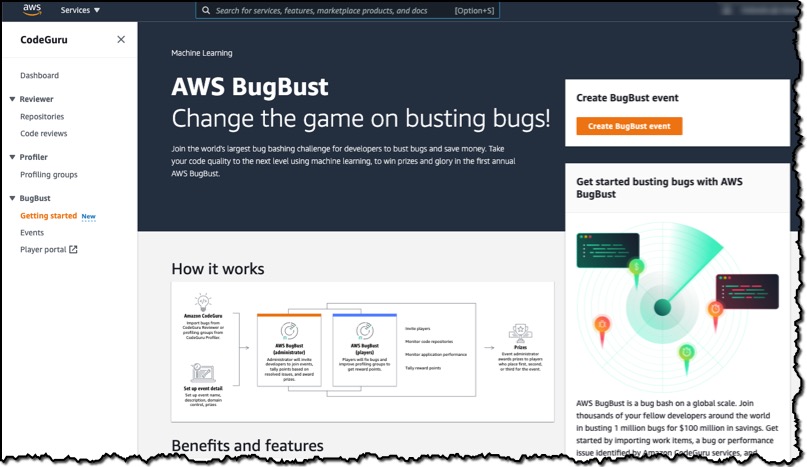
To show you how the challenge works, I’ll create a private AWS BugBust event. In the CodeGuru console, I choose Create BugBust event.

Under Step 1- Rules and scoring, I see how many points are awarded for each type of bug fix. Profiling groups are used to determine performance improvements after the players submit their improved solutions.

In Step 2, I sign in to my player account. In Step 3, I add event details like name, description, and start and end time.

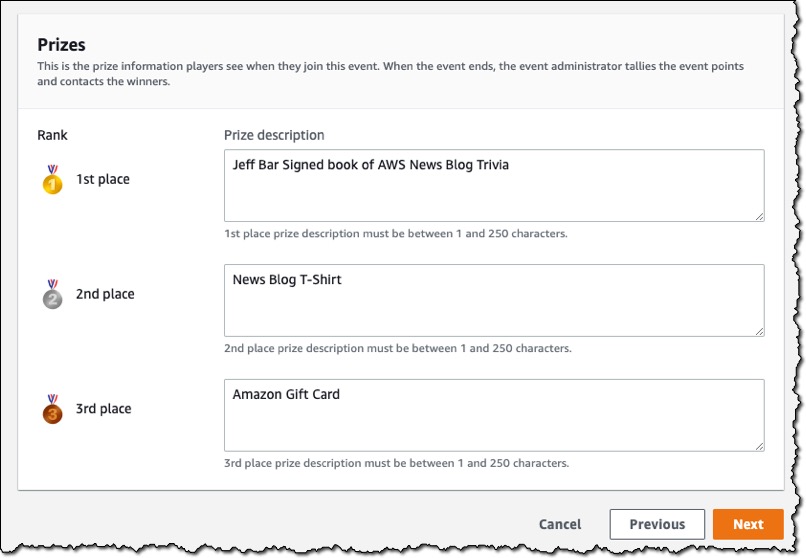
I also enter details about the first-, second-, and third-place prizes. This information will be displayed to players when they join the event.

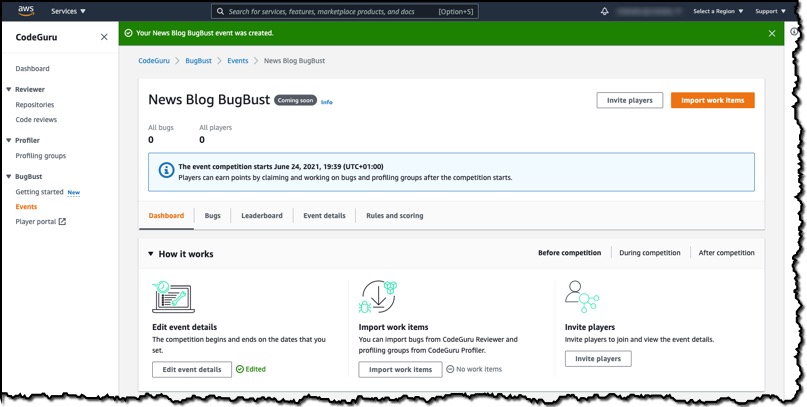
After I have reviewed the details and created the event, my event dashboard displays essential information, I can also import work items and invite players.

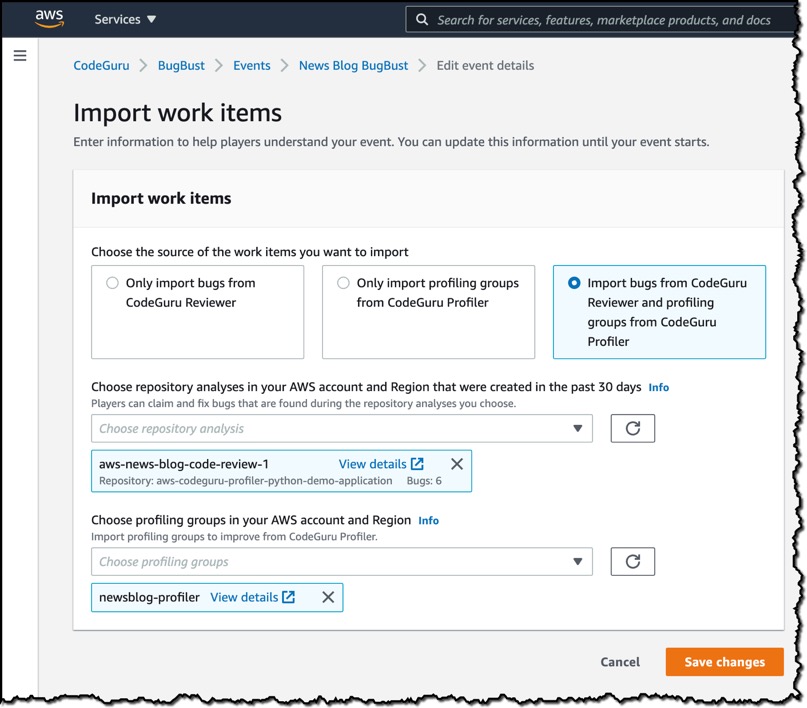
I select the Import work items button. This takes me to the Import work items screen where I choose to Import bugs from CodeGuru Reviewer and profiling groups from CodeGuru Profiler. I choose a repository analysis from my account and AWS BugBust imports all the identified bugs for players to claim and fix. I also choose several profiling groups that will be used by AWS BugBust.

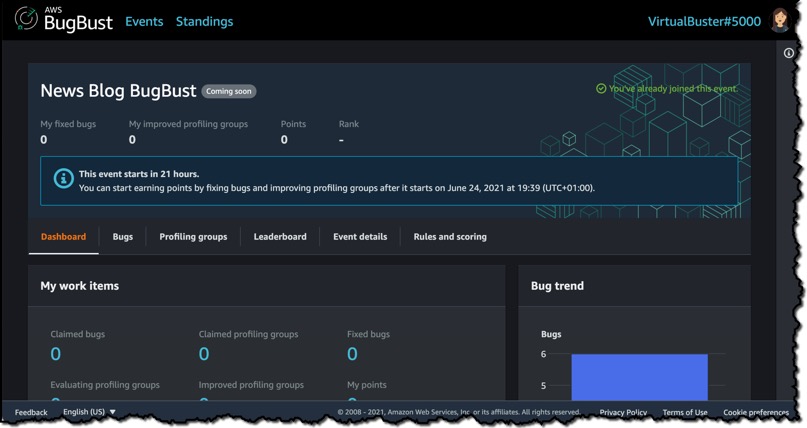
Now that my event is ready, I can invite players. Players can now sign into a player portal using their player accounts and start claiming and fixing bugs.

Things to Know
Amazon CodeGuru currently supports Python and Java. To compete in the global challenge, your project must be written in one of these languages.

Pricing
When you create your first AWS BugBust event, all costs incurred by the underlying usage of Amazon CodeGuru Reviewer and Amazon CodeGuru Profiler are free of charge for 30 days per AWS account. This 30 day free period applies even if you have already utilized the free tiers for Amazon CodeGuru Reviewer and Amazon CodeGuru Profiler. You can create multiple AWS BugBust events within the 30-day free trial period. After the 30-day free trial expires, you will be charged for Amazon CodeGuru Reviewer and Amazon CodeGuru Profiler based on your usage in the challenge. See the Amazon CodeGuru Pricing page for details.

Available Today
Starting today, you can create AWS BugBust events in the Amazon CodeGuru console in the US East (N. Virginia) Region. Start planning your AWS BugBust today.

— Martin

Security is the top priority for Amazon S3

Post Syndicated from Maddie Bacon original https://aws.amazon.com/blogs/security/security-is-the-top-priority-for-amazon-s3/

Amazon Simple Storage Service (Amazon S3) launched 15 years ago in March 2006, and became the first generally available service from Amazon Web Services (AWS). AWS marked the fifteenth anniversary with AWS Pi Week—a week of in-depth streams and live events. During AWS Pi Week, AWS leaders and experts reviewed the history of AWS and Amazon S3, and some of the key decisions involved in building and evolving S3.

As part of this celebration, Werner Vogels, VP and CTO for Amazon.com, and Eric Brandwine, VP and Distinguished Engineer with AWS Security, had a conversation about the role of security in Amazon S3 and all AWS services. They touched on why customers come to AWS, and how AWS services grow with customers by providing built-in security that can progress to protections that are more complex, based on each customer’s specific needs. They also touched on how, starting with Amazon S3 over 15 years ago and continuing to this day, security is the top priority at AWS, and how nothing can proceed at AWS without security that customers can rely on.

“In security, there are constantly challenging tradeoffs,” Eric says. “The path that we’ve taken at AWS is that our services are usable, but secure by default.”

To learn more about how AWS helps secure its customers’ systems and information through a culture of security first, watch the video, and be sure to check out AWS Pi Week 2021: The Birth of the AWS Cloud.

If you have feedback about this post, submit comments in the Comments section below.

Want more AWS Security how-to content, news, and feature announcements? Follow us on Twitter.

Author

Maddie Bacon

Maddie (she/her) is a technical writer for AWS Security with a passion for creating meaningful, inclusive content. She previously worked as a security reporter and editor at TechTarget and has a BA in Mathematics. In her spare time, she enjoys reading, traveling, and all things Harry Potter.

New – AWS Step Functions Workflow Studio – A Low-Code Visual Tool for Building State Machines

Post Syndicated from Marcia Villalba original https://aws.amazon.com/blogs/aws/new-aws-step-functions-workflow-studio-a-low-code-visual-tool-for-building-state-machines/

AWS Step Functions allow you to build scalable, distributed applications using state machines. Until today, building workflows on Step Functions required you to learn and understand Amazon State Language (ASL). Today, we are launching Workflow Studio, a low-code visual tool that helps you learn Step Functions through a guided interactive interface and allows you to prototype and build workflows faster.

In December 2016, when Step Functions was launched, I was in the middle of a migration to serverless. My team moved all the business logic from applications that were built for a traditional environment to a serverless architecture. Although we tried to have functions that did one thing and one thing only, when we put all the state management from our applications into the functions, they became very complex. When I saw that Step Functions was launched, I realized they would reduce the complexity of the serverless application we were building. The downside was that I spent a lot of time learning and writing state machines using ASL, learning how to invoke different AWS services, and performing the flow operations the state machine required. It took weeks of work and lots of testing to get it right.

Step Functions is amazing for visualizing the processes inside your distributed applications, but developing those state machines is not a visual process. Workflow Studio makes it easy for developers to build serverless workflows. It empowers developers to focus on their high-value business logic while reducing the time spent writing configuration code for workflow definitions and building data transformations.

Workflow Studio is great for developers who are new to Step Functions, because it reduces the time to build their first workflow and provides an accelerated learning path where developers learn by doing. Workflow Studio is also useful for developers who are experienced in building workflows, because they can now develop them faster using a visual tool. For example, you can use Workflow Studio to do prototypes of the workflows and share them with your stakeholders quickly. Or you can use Workflow Studio to design the boilerplate of your state machine. When you use Workflow Studio, you don’t need to have all the resources deployed in your AWS account. You can build the state machines and start completing them with the different actions as they get ready.

Workflow Studio simplifies the building of enterprise applications such as ecommerce platforms, financial transaction processing systems, or e-health services. It abstracts away the complexities of building fault-tolerant, scalable applications by assembling AWS services into workflows. Because Workflow Studio exposes many of the capabilities of AWS services in a visual workflow, it’s easy to sequence and configure calls to AWS services and APIs and transform the data flowing through a workflow.

Build a workflow using Workflow Studio
Imagine that you need to build a system that validates data when an account is created. If the input data is correct, the system saves the record in persistent storage and an email is sent to the administrator to confirm the account was created successfully. If the account cannot be created due to a validation error, the data is not stored and an email is sent to notify the administrator that there was a problem with the creation of the account.

There are many ways to solve this problem, but if you want to make the application with the least amount of code, and take advantage of all the managed services that AWS provides, you should use Workflow Studio to design the state machine and build the integrations with all the managed services.

Architectural diagram of what we are building

Let me show you how easy is to create a state machine using Workflow Studio. To get started, go to the Step Functions console and create a state machine. You will see an option to start designing the new state machine visually with Workflow Studio.

Creating a new state machine

You can start creating state machines in Workflow Studio. In the left pane, the States Browser, you can view and search the available actions and flow states. Actions are operations you can perform using AWS services, like invoking an AWS Lambda function, making a request with Amazon API Gateway, and sending a message to an Amazon Simple Notification Service (SNS) topic. Flows are the state types you can use to make a workflow appropriate for your use case.

Here are some of the available flow states:

  • Choice: Adds if-then-else logic.
  • Parallel: Adds parallel branches.
  • Map: Adds a for-each loop.
  • Wait: Delays for a specific time.

In the center of the page, you can see the state machine you are currently working on.

Screenshot of Studio workflow first view

To build the account validator workflow, you need:

  • One task that invokes a Lambda function that validates the data provided to create the account.
  • One task that puts an item into a DynamoDB table.
  • Two tasks that put a message to an SNS topic.
  • One choice flow state, to decide which action to take, depending on the results of a Lambda function.

When creating the workflow, you don’t need to have all the AWS resources in advance to start working on the state machine. You can build the state machine and then you can add the definitions to the resources later. Or, as we are going to do in this blog post, you can have all your AWS resources deployed in your AWS account before you start working on your state machine. You can deploy the required resources into your AWS account from this Serverless Application Model template. After you create and deploy those resources, you can continue with the other steps in this post.

Configure the Lambda function
The first step in your workflow is the Lambda function. To add it to your state machine, just drag an Invoke action from the Actions list into the center of Workflow Studio, as shown in step 1. You can edit the configuration of your function in the right pane. For example, you can change the name (as shown in step 2). You can also edit which Lambda function should be invoked from the list of functions deployed in this account, as shown in step 3. When you’re done, you can edit the output for this task, as shown in step 4.

Steps for adding a new Lambda function to the state machine

Configuring the output of the task is very important, because these values will be passed to the next state as input. We will construct a result object with just the information we need (in this case, if the account is valid). First, clear Filter output with OutputPath, as shown in step 1. Then you can select Transform result with Result Selector, and add the JSON shown in step 2. Then, to combine the input of this current state with the output, and send it to the next state as input, select Combine input and result with ResultPath, as shown in step 3. We need the input of this state, because the input is the account information. If the validation is successful, we need to store that data in a DynamoDB table.

If need help understanding what each of the transformations does, choose the Info links in each of the transformations.

Screenshot of configuration for the Lambda output

Configure the choice state
After you configure the Lambda function, you need to add a choice state. A choice will validate the input using choice rules. Based on the result of applying those rules, the state machine will direct the execution to a different path.

The following figure shows the workflow for adding a choice state. In step 1, you drag it from the flow menu. In step 2, you enter a name for it. In step 3, you can define the rules. For this use case, you will have one rule with a specific condition.

Screenshot of configuring a choice state

The condition for this rule compares the results of the output of the previous state against a boolean constant. If the previous state operation returns a value of true, the rule is executed. This is your happy path. In this example, you want to validate the result of the Lambda function. If the function validates the input data, it returns validated is equals to true, as shown here.

Configuring the rule

If the rule doesn’t apply, the choice state makes the default branch run. This is your error path.

Configure the error path
When there is an error, you want to send an email to let the administrator know that the account couldn’t be created. You should have created an SNS topic earlier in the post. Make sure that the email address you configured in the SNS topic accepts the email subscription for this topic.

To add the SNS task of publishing a message, first search for SNS:Publish task as shown in step 1, and then drag it to the state machine, as shown in step 2. Drag a Fail state flow to the state machine, as shown in step 3, so that when this branch of execution is complete, the state machine is in a fail state.

One nice feature of Workflow Studio is that you can drag the different states around in the state machine and place them in different parts of the worklow.

Now you can configure the SNS task for publishing a message. First, change the state name, as shown in step 4. Choose the topic from the ones deployed in your AWS account, as shown in step 5. Finally, change the message that will be sent in the email to something appropriate for your use case, as shown in step 6.

Steps for configuring the error path

Configure the happy path
For the happy path, you want to store the account information in a DynamoDB table and then send an email using the SNS topic you deployed earlier. To do that, add the DynamoDB:PutItem task, as shown in step 1, and the SNS:Publish task, as shown in step 2, into the state machine. You configure the SNS:Publish task in a similar way to the error path. You just send a different message. For that, you can duplicate the state from the error path, drag it to the right place, and just modify it with the new message.

The DynamoDB:PutItem task puts an item into a DynamoDB table. This is a very handy task because we don’t need to execute this operation inside a Lambda function. To configure this task, you first change its name, as shown in step 3. Then, you need to configure the API parameters, as shown in step 4, to put the right data into the DynamoDB table.

Steps for configuring the happy path

These are the API parameters to use for this particular item (an account):

{
  "TableName": "<THE NAME OF YOUR TABLE>",
  "Item": {
    "id": {
      "S.$": "$.Name"
    },
    "mail": {
      "S.$": "$.Mail"
    },
    "work": {
      "S.$": "$.Work"
    }
  }
}

Save and execute the state machine
Workflow Studio created the ASL definition of the state machine for you, but you can always edit the ASL definition and return to the visual editor whenever you want to edit the state machine.

Now that your state machine is ready, you can run the first execution. Save it and start a new execution. When you start a new execution, a message will be displayed, asking for the input event to the state machine. Make sure that the attributes for this event are named Name, Mail and Work, because the execution of the state machine depends on those.

Starting the execution After you run your state machine, you see a visualization for the execution. It shows you all the steps that the execution ran. In each step, you see the step input and step output. This is very useful for debugging and fine-tuning the state machine.

Execution results

Available Now

There are a lot of great features on our roadmap for Workflow Studio. Although the details may change, we are currently working to give you the power to visually create, run, and even debug workflow executions. Stay tuned for more information, and please feel free to send us feedback.

Workflow Studio is available now in all the AWS Regions where Step Functions is available.

Try it and learn more.

— Marcia

Migrate Your Workloads with the Graviton Challenge!

Post Syndicated from Steve Roberts original https://aws.amazon.com/blogs/aws/migrate-your-workloads-with-the-graviton-challenge/

Today, Dave Brown, VP of Amazon EC2 at AWS, announced the Graviton Challenge as part of his session on AWS silicon innovation at the Six Five Summit 2021. We invite you to take the Graviton Challenge and move your applications to run on AWS Graviton2. The challenge, intended for individual developers and small teams, is based on the experiences of customers who’ve already migrated. It provides a framework of eight, approximately four-hour chunks to prepare, port, optimize, and finally deploy your application onto Graviton2 instances. Getting your application running on Graviton2, and enjoying the improved price performance, aren’t the only rewards. There are prizes and swag for those who complete the challenge!

AWS Graviton2 is a custom-built processor from AWS that’s based on the Arm64 architecture. It’s supported by popular Linux operating systems including Amazon Linux 2, Red Hat Enterprise Linux, SUSE Linux Enterprise Server, and Ubuntu. Compared to fifth-generation x86-based Amazon Elastic Compute Cloud (Amazon EC2) instance types, Graviton2 instance types have a 20% lower cost. Overall, customers who have moved applications to Graviton2 typically see up to 40% better price performance for a broad range of workloads including application servers, container-based applications, microservices, caching fleets, data analytics, video encoding, electronic design automation, gaming, open-source databases, and more.

Before I dive in to talk more about the challenge, check out the fun introductory video below from Jeff Barr, Chief Evangelist, AWS and Dave Brown, Vice President, EC2. As Jeff mentions in the video: same exact workload, same or better performance, and up to 40% better price performance!

After you complete the challenge, we invite you to tell us about your adoption journey and enter the contest. If you post on social media with the hashtag #ITookTheGravitonChallenge, you’ll earn a t-shirt. To earn a hoodie, include a short video with your post.

To enter the competition, you’ll need to create a 5 to 10-minute video that describes your project and the application you migrated, any hurdles you needed to overcome, and the price performance benefits you realized.

All valid contest entries will each receive a $500 AWS credit (limited to 500 quantity). A panel of judges will evaluate the content entries and award additional prizes across six categories. All category winners will receive an AWS re:Invent 2021 conference pass, flight, and hotel for one company representative, and winners will be able to meet with senior members of the Graviton2 team at the conference. Here are additional category-specific prizes:

  • Best adoption – enterprise
    Based on the performance gains, total cost savings, number of instances the workload is running on, and time taken to migrate the workload (faster is better), for companies with over 1000 employees. The winner will also receive a chance to present at the conference.
  • Best adoption – small/medium business
    Based on the performance gains, total cost savings, number of instances the workload is running on, and time taken to migrate the workload (faster is better), for companies with 100-1000 employees. The winner will also receive a chance to present at the conference.
  • Best adoption – startup
    Based on the performance gains, total cost savings, number of instances the workload is running on, and time taken to migrate the workload (faster is better), for companies with fewer than 100 employees. The winner will also receive a chance to present at the conference.
  • Best new workload adoption
    Awarded to a workload that’s new to EC2 (migrated to Graviton2 from on-premises, or other cloud) based on the performance gains, total cost savings, number of instances the workload is running on, and time taken to migrate the workload (faster is better). The winner will also receive a chance to participate in a video or written case study.
  • Most impactful adoption
    Awarded to the workload with the biggest social impact based on details provided about what the workload/application does. Applications in this category are related to fields such as sustainability, healthcare and life sciences, conservation, learning/education, justice/equity. The winner will also receive a chance to participate in a video or written case study.
  • Most innovative adoption
    Applications in this category solve unique problems for their customers, address new use cases, or are groundbreaking. The award will be based on the workload description, price performance gains, and total cost savings. The winner will also receive a chance to participate in a video or written case study.

Competition submissions open on June 22 and close August 31. Winners will be announced on October 1 2021.

Identifying a workload to migrate
Now that you know what’s possible with Graviton2, you’re probably eager to get started and identify a workload to tackle as part of the challenge. The ideal workload is one that already runs on Linux and uses open-source components. This means you’ll have full access to the source code of every component and can easily make any required changes. If you don’t have an existing Linux workload that is entirely open-source based, you can, of course, move other workloads. A robust ecosystem of ISVs and AWS services already support Graviton2. However, if you are using software from a vendor that does not support Arm64/Graviton2, reach out to the Graviton Challenge Slack channel for support.

What’s involved in the challenge?
The challenge includes eight steps performed over four days (but you don’t have to do the challenge in four consecutive days). If you need assistance from Graviton2 experts, a dedicated Slack channel is available and you can sign up for emails containing helpful tips and guidance. In addition to support on Slack and supporting emails, you also get $25 AWS credit to cover the cost of the taking the challenge. Graviton2-based burstable T4g instances also have a free trial, available until December 31 2021, that can be used to qualify your workloads.

You can download the complete whitepaper can be downloaded from the Graviton Challenge page, but here is an outline of the process.

Day 1: Learn and explore
The first day you’ll learn about Graviton2 and then assess your selected workload. I recommend that you start by checking out the 2020 AWS re:Invent session, Deep dive on AWS Graviton2 processor-powered EC2 instances. The Getting Started with AWS Graviton GitHub repository will be a useful reference as you work through the challenge.

Assessment involves identifying the application’s dependencies and requirements. As with all preparatory work, the more thorough you are at this stage, the better positioned you are for success. So, don’t skimp on this task!

Day 2: Create a plan and start porting
On the second day, you’ll create a Graviton2 environment. You can use EC2 virtual machine instances with AWS-provided images or build your own custom images. Alternatively, you can go the container route, because both Amazon Elastic Container Service (Amazon ECS) and Amazon Elastic Kubernetes Service (EKS) support Graviton2-based instances.

After you have created your environment, you’ll bootstrap the application. The Getting Started Guide on GitHub contains language-specific getting started information. If your application uses Java, Python, Node.js, .NET, or other high-level languages, then it might run as-is or need minimal changes. Other languages like C, C++, or Go will need to be compiled for the 64-bit Arm architecture. For more information, see the guides on GitHub.

Day 3: Debug and optimize
Now that the application is running on a Graviton2 environment, it’s time to test and verify its functionality. When you have a fully functional application, you can test performance and compare it to x86-64 environments. If you don’t observe the expected performance, reach out to your account team, or get support on the Graviton Challenge Slack channel. We’re here to help analyze and resolve any potential performance gaps.

Day 4: Update infrastructure and start deployments
It’s shipping day! You’ll update your infrastructure to add Graviton2-based instances, and then start deploying. We recommend that you use canary or blue-green deployments so that a portion of your traffic is redirected to the new environments. When you’re comfortable, you can transition all traffic.

At this point, you can celebrate completing the challenge, publish a post on social media using the #ITookTheGravitonChallenge hashtag, let us know about your success, and consider entering the competition. Remember, entries for the competition are due by August 31, 2021.

Start the challenge today!
Now that you have some details about the challenge and rewards, it’s time to start your (migration) engines. Download the whitepaper from the Graviton Challenge landing page, familiarize yourself with the details, and off you go! And, if you do decide to enter the competition, good luck!

Footnote
In my role as a .NET Developer Advocate at AWS, I would be remiss if I failed to mention that this challenge is equally applicable to .NET applications using .NET Core or .NET 5 and later! In fact, .NET 5 includes ARM64-specific optimizations. For information about performance improvements my colleagues found for .NET applications running on AWS Graviton2, see the Powering .NET 5 with AWS Graviton2: Benchmarks blog post. There’s also a lab for .NET 5 on Graviton2. I invite you to check out the getting started material for .NET in the aws-graviton-getting-started GitHub repository and start migrating.

— Steve

Approaches to meeting Australian Government gateway requirements on AWS

Post Syndicated from John Hildebrandt original https://aws.amazon.com/blogs/security/approaches-to-meeting-australian-government-gateway-requirements-on-aws/

Australian Commonwealth Government agencies are subject to specific requirements set by the Protective Security Policy Framework (PSPF) for securing connectivity between systems that are running sensitive workloads, and for accessing less trusted environments, such as the internet. These agencies have often met the requirements by using some form of approved gateway solution that provides network-based security controls.

This post examines the types of controls you need to provide a gateway that can meet Australian Government requirements defined in the Protective Security Policy Framework (PSPF) and the challenges of using traditional deployment models to support cloud-based solutions. PSPF requirements are mandatory for non-corporate Commonwealth entities, and represent better practice for corporate Commonwealth entities, wholly-owned Commonwealth companies, and state and territory agencies. We discuss the ability to deploy gateway-style solutions in the cloud, and show how you can meet the majority of gateway requirements by using standard cloud architectures plus services. We provide guidance on deploying gateway solutions in the AWS Cloud, and highlight services that can support such deployments. Finally, we provide an illustrative AWS web architecture pattern to show how to meet the majority of gateway requirements through Well-Architected use of services.

Australian Government gateway requirements

The Australian Government Protective Security Policy Framework (PSPF) highlights the requirement to use secure internet gateways (SIGs) and references the Australian Information Security Manual (ISM) control framework to guide agencies. The ISM has a chapter on gateways, which includes the following recommendations for gateway architecture and operations:

  • Provide a central control point for traffic in and out of the system.
  • Inspect and filter traffic.
  • Log and monitor traffic and gateway operation to a secure location. Use appropriate security event alerting.
  • Use secure administration practices, including multi-factor authentication (MFA) access control, minimum privilege, separation of roles, and network segregation.
  • Perform appropriate authentication and authorization of users, traffic, and equipment. Use MFA when possible.
  • Use demilitarized zone (DMZ) patterns to limit access to internal networks.
  • Test security controls regularly.
  • Set up firewalls between security domains and public network infrastructure.

Since the PSPF references the ISM, the agency should apply the overall ISM framework to meet ISM requirements such as governance and security patching for the environment. The ISM is a risk-based framework, and the risk posture of the workload and organization should inform how to assess the controls. For example, requirements for authentication of users might be relaxed for a public-facing website.

In traditional on-premises environments, some Australian Government agencies have mandated centrally assessed and managed gateway capabilities in order to drive economies of scale across multiple government agencies. However, the PSPF does provide the option for gateways used only by a single government agency to undertake their own risk-based assessment for the single agency gateway solution.

Other government agencies also have specific requirements to connect with cloud providers. For example, the U.S. Government Office of Management and Budget (OMB) mandates that U.S. government users access the cloud through a specific agency connection.

Connecting to the cloud through on-premises gateways

Given the existence of centrally managed off-cloud gateways, one approach by customers has been to continue to use these off-cloud gateways and then connect to AWS through the on-premises gateway environment by using AWS Direct Connect, as shown in Figure 1.
 

Figure 1: Connecting to the AWS Cloud through an agency gateway and then through AWS Direct Connect

Figure 1: Connecting to the AWS Cloud through an agency gateway and then through AWS Direct Connect

Although this approach does work, and makes use of existing gateway capability, it has a number of downsides:

  • A potential single point of failure: If the on-premises gateway capability is unavailable, the agency can lose connectivity to the cloud-based solution.
  • Bandwidth limitations: The agency is limited by the capacity of the gateway, which might not have been developed with dynamically scalable and bandwidth-intensive cloud-based workloads in mind.
  • Latency issues: The requirement to traverse multiple network hops, in addition to the gateway, will introduce additional latency. This can be particularly problematic with architectures that involve API communications being sent back and forth across the gateway environment.
  • Castle-and-moat thinking: Relying only on the gateway as the security boundary can discourage agencies from using and recognizing the cloud-based security controls that are available.

Some of these challenges are discussed in the context of US Trusted Internet Connection (TIC) programs in this whitepaper.

Moving gateways to the cloud

In response to the limitations discussed in the last section, both customers and AWS Partners have built gateway solutions on AWS to meet gateway requirements while remaining fully within the cloud environment. See this type of solution in Figure 2.
 

Figure 2: Moving the gateway to the AWS Cloud

Figure 2: Moving the gateway to the AWS Cloud

With this approach, you can fully leverage the scalable bandwidth that is available from the AWS environment, and you can also reduce latency issues, particularly when multiple hops to and from the gateway are required. This blog post describes a pilot program in the US that combines AWS services and AWS Marketplace technologies to provide a cloud-based gateway.

You can use AWS Transit Gateway (released after the referenced pilot program) to provide the option to centralize such a gateway capability within an organization. This makes it possible to utilize the gateway across multiple cloud solutions that are running in their own virtual private clouds (VPCs) and accounts. This approach also facilitates the principle of the gateway being the central control point for traffic flowing in and out. For more information on using AWS Transit Gateway with security appliances, see the Appliance VPC topic in the Amazon VPC documentation.

More recently, AWS has released additional services and features that can assist with delivering government gateway requirements.

Elastic Load Balancing Gateway Load Balancer provide the capability to deploy third-party network appliances in a scalable fashion. With this capability, you can leverage existing investment in licensing, use familiar tooling, reuse intellectual property (IP) such as rule sets, and reuse skills, because staff are already trained in configuring and managing the chosen device. You have one gateway for distributing traffic across multiple virtual appliances, while scaling the appliances up and down based on demand. This reduces the potential points of failure in your network and increases availability. Gateway Load Balancer is a straightforward way to use third-party network appliances from industry leaders in the cloud. You benefit from the features of these devices, while Gateway Load Balancer makes them automatically scalable and easier to deploy. You can find an AWS Partner with Gateway Load Balancer expertise on the AWS Marketplace. For more information on combining Transit Gateway and Gateway Load Balancer for a centralized inspection architecture, see this blog post. The post shows centralized architecture for East-West (VPC-to-VPC) and North-South (internet or on-premises bound) traffic inspection, plus processing.

To further simplify this area for customers, AWS has introduced the AWS Network Firewall service. Network Firewall is a managed service that you can use to deploy essential network protections for your VPCs. The service is simple to set up and scales automatically with your network traffic so you don’t have to worry about deploying and managing any infrastructure. You can combine Network Firewall with Transit Gateway to set up centralized inspection architecture models, such as those described in this blog post.

Reviewing a typical web architecture in the cloud

In the last section, you saw that SIG patterns can be created in the cloud. Now we can put that in context with the layered security controls that are implemented in a typical web application deployment. Consider a web application hosted on Amazon Elastic Compute Cloud (Amazon EC2) instances, as shown in Figure 3, within the context of other services that will support the architecture.
 

Figure 3: Security controls in a web application hosted on EC2

Figure 3: Security controls in a web application hosted on EC2

Although this example doesn’t include a traditional SIG-type infrastructure that inspects and controls traffic before it’s sent to the AWS Cloud, the architecture has many of the technical controls that are called for in SIG solutions as a result of using the AWS Well-Architected Framework. We’ll now step through some of these services to highlight the relevant security functionality that each provides.

Network control services

Amazon Virtual Private Cloud (Amazon VPC) is a service you can use to launch AWS resources in a logically isolated virtual network that you define. You have complete control over your virtual networking environment, including selection of your own IP address range, creation of subnets, and configuration of route tables and network gateways. Amazon VPC lets you use multiple layers of security, including security groups and network access control lists (network ACLs), to help control access to Amazon EC2 instances in each subnet. Security groups act as a firewall for associated EC2 instances, controlling both inbound and outbound traffic at the instance level. A network ACL is an optional layer of security for your VPC that acts as a firewall for controlling traffic in and out of one or more subnets. You might set up network ACLs with rules similar to your security groups to add an additional layer of security to your VPC. Read about the specific differences between security groups and network ACLs.

Having this level of control throughout the application architecture has advantages over relying only on a central, border-style gateway pattern, because security groups for each tier of the application architecture can be locked down to only those ports and sources required for that layer. For example, in the architecture shown in Figure 3, only the application load balancer security group would allow web traffic (ports 80, 443) from the internet. The web-tier-layer security group would only accept traffic from the load-balancer layer, and the database-layer security group would only accept traffic from the web tier.

If you need to provide a central point of control with this model, you can use AWS Firewall Manager, which simplifies the administration and maintenance of your VPC security groups across multiple accounts and resources. With Firewall Manager, you can configure and audit your security groups for your organization using a single, central administrator account. Firewall Manager automatically applies rules and protections across your accounts and resources, even as you add new resources. Firewall Manager is particularly useful when you want to protect your entire organization, or if you frequently add new resources that you want to protect via a central administrator account.

To support separation of management plan activities from data plane aspects in workloads, agencies can use multiple elastic network interface patterns on EC2 instances to provide a separate management network path.

Edge protection services

In the example in Figure 3, several services are used to provide edge-based protections in front of the web application. AWS Shield is a managed distributed denial of service (DDoS) protection service that safeguards applications that are running on AWS. AWS Shield provides always-on detection and automatic inline mitigations that minimize application downtime and latency, so there’s no need to engage AWS Support to benefit from DDoS protection. There are two tiers of AWS Shield: Standard and Advanced. When you use Shield Advanced, you can apply protections at both the Amazon CloudFront, Amazon EC2 and application load balancer layers. Shield Advanced also gives you 24/7 access to the AWS DDoS Response Team (DRT).

AWS WAF is a web application firewall that helps protect your web applications or APIs against common web exploits that can affect availability, compromise security, or consume excessive resources. AWS WAF gives you control over how traffic reaches your applications by enabling you to create security rules that block common attack patterns, such as SQL injection or cross-site scripting, and rules that filter out specific traffic patterns that you define. Again, you can apply this protection at both the Amazon CloudFront and application load balancer layers in our illustrated solution. Agencies can also use managed rules for WAF to benefit from rules developed and maintained by AWS Marketplace sellers.

Amazon CloudFront is a fast content delivery network (CDN) service. CloudFront seamlessly integrates with AWS Shield, AWS WAF, and Amazon Route 53 to help protect against multiple types of unauthorized access, including network and application layer DDoS attacks.

Logging and monitoring services

The example application in Figure 3 shows several services that provide logging and monitoring of network traffic, application activity, infrastructure, and AWS API usage.

At the VPC level, the VPC Flow Logs feature provides you with the ability to capture information about the IP traffic going to and from network interfaces in your VPC. Flow log data can be published to Amazon CloudWatch Logs or Amazon Simple Storage Service (Amazon S3). Traffic Mirroring is a feature that you can use in a VPC to capture traffic if needed for inspection. This allows agencies to implement full packet capture on a continuous basis, or in response to a specific event within the application.

Amazon CloudWatch provides a monitoring service with alarms and analytics. In the example application, AWS WAF can also be configured to log activity as described in the AWS WAF Developer Guide.

AWS Config provides a timeline view of the configuration of the environment. You can also define rules to provide alerts and remediation when the environment moves away from the desired configuration.

AWS CloudTrail is a service that you can use to handle governance, compliance, operational auditing, and risk auditing of your AWS account. With CloudTrail, you can log, continuously monitor, and retain account activity that is related to actions across your AWS infrastructure.

Amazon GuardDuty is a threat detection service that continuously monitors for malicious activity and unauthorized behavior to protect your AWS accounts. GuardDuty analyzes tens of billions of events across multiple AWS data sources, such as AWS CloudTrail event logs, Amazon VPC Flow Logs, and DNS logs. This blog post highlights a third-party assessment of GuardDuty that compares its performance to other intrusion detection systems (IDS).

Route 53 Resolver Query Logging lets you log the DNS queries that originate in your VPCs. With query logging turned on, you can see which domain names have been queried, the AWS resources from which the queries originated—including source IP and instance ID—and the responses that were received.

With Route 53 Resolver DNS Firewall, you can filter and regulate outbound DNS traffic for your VPCs. To do this, you create reusable collections of filtering rules in DNS Firewall rule groups, associate the rule groups to your VPC, and then monitor activity in DNS Firewall logs and metrics. Based on the activity, you can adjust the behavior of DNS Firewall accordingly.

Mapping services to control areas

Based on the above description of the use of additional services, we can summarize which services contribute to the control and recommendation areas in the gateway chapter in the Australian ISM framework.

Control and recommendation areas Contributing services
Inspect and filter traffic AWS WAF, VPC Traffic Mirroring
Central control point Infrastructure as code, AWS Firewall Manager
Authentication and authorization (MFA) AWS Identity and Access Management (IAM), solution and application IAM, VPC security groups
Logging and monitoring Amazon CloudWatch, AWS CloudTrail, AWS Config, Amazon VPC (flow logs and mirroring), load balancer logs, Amazon CloudFront logs, Amazon GuardDuty, Route 53 Resolver Query Logging
Secure administration (MFA) IAM, directory federation (if used)
DMZ patterns VPC subnet layout, security groups, network ACLs
Firewalls VPC security groups, network ACLs, AWS WAF, Route 53 Resolver DNS Firewall
Web proxy; site and content filtering and scanning AWS WAF, Firewall Manager

Note that the listed AWS service might not provide all relevant controls in each area, and it is part of the customer’s risk assessment and design to determine what additional controls might need to be implemented.

As you can see, many of the recommended practices and controls from the Australian Government gateway requirements are already encompassed in a typical Well-Architected solution. The implementing agency has the choice of two options: it can continue to place such a solution behind a gateway that runs either within or outside of AWS, leveraging the gateway controls that are inherent in the application architecture as additional layers of defense. Otherwise, the agency can conduct a risk assessment to understand which gateway controls can be supplied by means of the application architecture to reduce the gateway control requirements at any gateway layer in front of the application.

Summary

In this blog post, we’ve discussed the requirements for Australian Government gateways which provide network controls to secure workloads. We’ve outlined the downsides of using traditional on-premises solutions and illustrated how services such as AWS Transit Gateway, Elastic Load Balancing, Gateway Load Balancer, and AWS Network Firewall facilitate moving gateway solutions into the cloud. These are services you can evaluate against your network control requirements. Finally, we reviewed a typical web architecture running in the AWS Cloud with associated services to illustrate how many of the typical gateway controls can be met by using a standard Well-Architected approach.

If you have feedback about this post, submit comments in the Comments section below. If you have questions about this post, start a new thread on one of the AWS Security or Networking forums or contact AWS Support.

Want more AWS Security how-to content, news, and feature announcements? Follow us on Twitter.

Author photo

John Hildebrandt

John is a Principal Solutions Architect in the Australian National Security team at AWS in Canberra, Australia. He is passionate about facilitating cloud adoption for customers to enable innovation. John has been working with government customers at AWS for over 8 years, as the first employee for the ANZ Public Sector team.

Announcing migration of the Java 8 runtime in AWS Lambda to Amazon Corretto

Post Syndicated from James Beswick original https://aws.amazon.com/blogs/compute/announcing-migration-of-the-java-8-runtime-in-aws-lambda-to-amazon-corretto/

This post is written by Jonathan Tuliani, Principal Product Manager, AWS Lambda.

What is happening?

Beginning July 19, 2021, the Java 8 managed runtime in AWS Lambda will migrate from the current Open Java Development Kit (OpenJDK) implementation to the latest Amazon Corretto implementation.

To reflect this change, the AWS Management Console will change how Java 8 runtimes are displayed. The display name for runtimes using the ‘java8’ identifier will change from ‘Java 8’ to ‘Java 8 on Amazon Linux 1’. The display name for runtimes using the ‘java8.al2’ identifier will change from ‘Java 8 (Corretto)’ to ‘Java 8 on Amazon Linux 2’. The ‘java8’ and ‘java8.al2’ identifiers themselves, as used by tools such as the AWS CLI, CloudFormation, and AWS SAM, will not change.

Why are you making this change?

This change enables customers to benefit from the latest innovations and extended support of the Amazon Corretto JDK distribution. Amazon Corretto is a no-cost, multiplatform, production-ready distribution of the OpenJDK. Corretto is certified as compatible with the Java SE standard and used internally at Amazon for many production services.

Amazon is committed to Corretto, and provides regular updates that include security fixes and performance enhancements. With this change, these benefits are available to all Lambda customers. For more information on improvements provided by Amazon Corretto 8, see Amazon Corretto 8 change logs.

How does this affect existing Java 8 functions?

Amazon Corretto 8 is designed as a drop-in replacement for OpenJDK 8. Most functions benefit seamlessly from the enhancements in this update without any action from you.

In rare cases, switching to Amazon Corretto 8 introduces compatibility issues. See below for known issues and guidance on how to verify compatibility in advance of this change.

When will this happen?

This migration to Amazon Corretto takes place in several stages:

  • June 15, 2021: Availability of Lambda layers for testing the compatibility of functions with the Amazon Corretto runtime. Start of AWS Management Console changes to java8 and java8.al2 display names.
  • July 19, 2021: Any new functions using the java8 runtime will use Amazon Corretto. If you update an existing function, it will transition to Amazon Corretto automatically. The public.ecr.aws/lambda/java:8 container base image is updated to use Amazon Corretto.
  • August 16, 2021: For functions that have not been updated since June 28, AWS will begin an automatic transition to the new Corretto runtime.
  • September 10, 2021: Migration completed.

These changes are only applied to functions not using the arn:aws:lambda:::awslayer:Java8Corretto or arn:aws:lambda:::awslayer:Java8OpenJDK layers described below.

Which of my Lambda functions are affected?

Lambda supports two versions of the Java 8 managed runtime: the java8 runtime, which runs on Amazon Linux 1, and the java8.al2 runtime, which runs on Amazon Linux 2. This change only affects functions using the java8 runtime. Functions the java8.al2 runtime are already using the Amazon Corretto implementation of Java 8 and are not affected.

The following command shows how to use the AWS CLI to list all functions in a specific Region using the java8 runtime. To find all such functions in your account, repeat this command for each Region:

aws lambda list-functions --function-version ALL --region us-east-1 --output text --query "Functions[?Runtime=='java8'].FunctionArn"

What do I need to do?

If you are using the java8 runtime, your functions will be updated automatically. For production workloads, we recommend that you test functions in advance for compatibility with Amazon Corretto 8.

For Lambda functions using container images, the existing public.ecr.aws/lambda/java:8 container base image will be updated to use the Amazon Corretto Java implementation. You must manually update your functions to use the updated container base image.

How can I test for compatibility with Amazon Corretto 8?

If you are using the java8 managed runtime, you can test functions with the new version of the runtime by adding the layer reference arn:aws:lambda:::awslayer:Java8Corretto to the function configuration. This layer instructs the Lambda service to use the Amazon Corretto implementation of Java 8. It does not contain any data or code.

If you are using container images, update the JVM in your image to Amazon Corretto for testing. Here is an example Dockerfile:

FROM public.ecr.aws/lambda/java:8

# Update the JVM to the latest Corretto version
## Import the Corretto public key
rpm --import https://yum.corretto.aws/corretto.key

## Add the Corretto yum repository to the system list
curl -L -o /etc/yum.repos.d/corretto.repo https://yum.corretto.aws/corretto.repo

## Install the latest version of Corretto 8
yum install -y java-1.8.0-amazon-corretto-devel

# Copy function code and runtime dependencies from Gradle layout
COPY build/classes/java/main ${LAMBDA_TASK_ROOT}
COPY build/dependency/* ${LAMBDA_TASK_ROOT}/lib/

# Set the CMD to your handler
CMD [ "com.example.LambdaHandler::handleRequest" ]

Can I continue to use the OpenJDK version of Java 8?

You can continue to use the OpenJDK version of Java 8 by adding the layer reference arn:aws:lambda:::awslayer:Java8OpenJDK to the function configuration. This layer tells the Lambda service to use the OpenJDK implementation of Java 8. It does not contain any data or code.

This option gives you more time to address any code incompatibilities with Amazon Corretto 8. We do not recommend that you use this option to continue to use Lambda’s OpenJDK Java implementation in the long term. Following this migration, it will no longer receive bug fix and security updates. After addressing any compatibility issues, remove this layer reference so that the function uses the Lambda-Amazon Corretto managed implementation of Java 8.

What are the known differences between OpenJDK 8 and Amazon Corretto 8 in Lambda?

Amazon Corretto caches TCP sessions for longer than OpenJDK 8. Functions that create new connections (for example, new AWS SDK clients) on each invoke without closing them may experience an increase in memory usage. In the worst case, this could cause the function to consume all the available memory, which results in an invoke error and a subsequent cold start.

We recommend that you do not create AWS SDK clients in your function handler on every function invocation. Instead, create SDK clients outside the function handler as static objects that can be used by multiple invocations. For more information, see static initialization in the Lambda Operator Guide.

If you must use a new client on every invocation, make sure it is shut down at the end of every invocation. This avoids TCP session caches using unnecessary resources.

What if I need additional help?

Contact AWS Support, the AWS Lambda discussion forums, or your AWS account team if you have any questions or concerns.

For more serverless learning resources, visit Serverless Land.

Announcing the AWS Security and Privacy Knowledge Hub for Australia and New Zealand

Post Syndicated from Phil Rodrigues original https://aws.amazon.com/blogs/security/announcing-the-aws-security-and-privacy-knowledge-hub-for-australia-and-new-zealand/

Cloud technology provides organizations across Australia and New Zealand with the flexibility to adapt quickly and scale their digital presences up or down in response to consumer demand. In 2021 and beyond, we expect to see cloud adoption continue to accelerate as organizations of all sizes realize the agility, operational, and financial benefits of moving to the cloud.

To fully harness the benefits of the digital economy it’s important that you remain vigilant about the security of your technology resources in order to protect the confidentiality, integrity, and availability of your systems and data. Security is our top priority at AWS, and more than ever we believe it’s critical for everyone to understand the best practices to use cloud technology securely. Organizations of all sizes can benefit by implementing automated guardrails that allow you to innovate while maintaining the highest security standards. We want to help you move fast and innovate quickly while staying secure.

This is why we are excited to announce the new AWS Security and Privacy Knowledge Hub for Australia and New Zealand.

The new website offers many resources specific to Australia and New Zealand, including:

  • The latest local security and privacy updates from AWS security experts in Australia and New Zealand.
  • How customers can use AWS to help meet the requirements of local privacy laws, government security standards, and banking security guidance.
  • Local customer stories about Australian and New Zealand companies and agencies that focus on security, privacy, and compliance.
  • Details about AWS infrastructure in Australia and New Zealand, including the upcoming AWS Region in Melbourne.
  • General FAQs on security and privacy in the cloud.

AWS maintains the highest security and privacy practices, which is one reason we are trusted by governments and organizations around the world to deliver services to millions of individuals. In Australia and New Zealand, we have hundreds of thousands of active customers using AWS each month, with many building mission critical applications for their business. For example, the National Bank of Australia (NAB) provides banking platforms like NAB Connect that offer services to businesses of all sizes, built on AWS. The Australian Taxation Office (ATO) offers the flexibility and speed for all Australians to lodge their tax returns electronically on the MyTax application, built on AWS. The University of Auckland runs critical teaching and learning applications relied on by their 18,000 students around the world, built on AWS. AWS Partner Versent helps businesses like Transurban and government agencies like Service NSW operate in the cloud securely, built on AWS.

Security is a shared responsibility between AWS and our customers. You should review the security features that we provide with our services, and be familiar with how to implement your security requirements within your AWS environment. To help you with your responsibility, we offer security services and partner solutions that you can utilize to implement automated and effective security in the cloud. This allows you to focus on your business while keeping your content and applications secure.

We’re inspired by the rapid rate of innovation as customers of all sizes use the cloud to create new business models and work to improve our communities, now and into the future. We look forward to seeing what you will build next on AWS – with security as your top priority.

The AWS Security and Privacy Knowledge Hub for Australia and New Zealand launched today.

If you have feedback about this post, submit comments in the Comments section below.

Want more AWS Security how-to content, news, and feature announcements? Follow us on Twitter.

Author

Phil Rodrigues

Phil is the Head of the Security Team, Australia & New Zealand for AWS, based in Sydney. He and his team work with AWS’s largest customers to improve their security, risk and compliance in the cloud. Phil is a frequent speaker at AWS and cloud security events across Australia. Prior to AWS he worked for over 20 years in Information Security in the US, Europe, and Asia-Pacific.