Tag Archives: launch

New General Purpose, Compute Optimized, and Memory-Optimized Amazon EC2 Instances with Higher Packet-Processing Performance

Post Syndicated from Jeff Barr original https://aws.amazon.com/blogs/aws/new-general-purpose-compute-optimized-and-memory-optimized-amazon-ec2-instances-with-higher-packet-processing-performance/

Today I would like to tell you about the next generation of Intel-powered general purpose, compute-optimized, and memory-optimized instances. All three of these instance families are powered by 3rd generation Intel Xeon Scalable processors (Ice Lake) running at 3.5 GHz, and are designed to support your data-intensive workloads with up to 200 Gbps of network bandwidth, the highest EBS performance in EC2 (up to 80 Gbps of bandwidth and up to 350,000 IOPS), and the ability to handle up to twice as many packets per second (PPS) as earlier instances.

New General Purpose (M6in/M6idn) Instances
The original general purpose EC2 instance (m1.small) was launched in 2006 and was the one and only instance type for a little over a year, until we launched the m1.large and m1.xlarge in late 2007. After that, we added the m3 in 2012, m4 in 2015, and the first in a very long line of m5 instances starting in 2017. The family tree branched in 2018 with the addition of the m5d instances with local NVMe storage.

And that brings us to today, and to the new m6in and m6idn instances, both available in 9 sizes:

Name vCPUs Memory Local Storage
(m6idn only)
Network Bandwidth EBS Bandwidth EBS IOPS
m6in.large
m6idn.large
2 8 GiB 118 GB Up to 25 Gbps Up to 20 Gbps Up to 87,500
m6in.xlarge
m6idn.xlarge
4 16 GiB 237 GB Up to 30 Gbps Up to 20 Gbps Up to 87,500
m6in.2xlarge
m6idn.2xlarge
8 32 GiB 474 GB Up to 40 Gbps Up to 20 Gbps Up to 87,500
m6in.4xlarge
m6idn.4xlarge
16 64 GiB 950 GB Up to 50 Gbps Up to 20 Gbps Up to 87,500
m6in.8xlarge
m6idn.8xlarge
32 128 GiB 1900 GB 50 Gbps 20 Gbps 87,500
m6in.12xlarge
m6idn.12xlarge
48 192 GiB 2950 GB
(2 x 1425)
75 Gbps 30 Gbps 131,250
m6in.16xlarge
m6idn.16xlarge
64 256 GiB 3800 GB
(2 x 1900)
100 Gbps 40 Gbps 175,000
m6in.24xlarge
m6idn.24xlarge
96 384 GiB 5700 GB
(4 x 1425)
150 Gbps 60 Gbps 262,500
m6in.32xlarge
m6idn.32xlarge
128 512 GiB 7600 GB
(4 x 1900)
200 Gbps 80 Gbps 350,000

The m6in and m6idn instances are available in the US East (Ohio, N. Virginia) and Europe (Ireland) regions in On-Demand and Spot form. Savings Plans and Reserved Instances are available.

New C6in Instances
Back in 2008 we launched the first in what would prove to be a very long line of Amazon Elastic Compute Cloud (Amazon EC2) instances designed to give you high compute performance and a higher ratio of CPU power to memory than the general purpose instances. Starting with those initial c1 instances, we went on to launch cluster computing instances in 2010 (cc1) and 2011 (cc2), and then (once we got our naming figured out), multiple generations of compute-optimized instances powered by Intel processors: c3 (2013), c4 (2015), and c5 (2016). As our customers put these instances to use in environments where networking performance was starting to become a limiting factor, we introduced c5n instances with 100 Gbps networking in 2018. We also broadened the c5 instance lineup by adding additional sizes (including bare metal), and instances with blazing-fast local NVMe storage.

Today I am happy to announce the latest in our lineup of Intel-powered compute-optimized instances, the c6in, available in 9 sizes:

Name vCPUs Memory
Network Bandwidth EBS Bandwidth
EBS IOPS
c6in.large 2 4 GiB Up to 25 Gbps Up to 20 Gbps Up to 87,500
c6in.xlarge 4 8 GiB Up to 30 Gbps Up to 20 Gbps Up to 87,500
c6in.2xlarge 8 16 GiB Up to 40 Gbps Up to 20 Gbps Up to 87,500
c6in.4xlarge 16 32 GiB Up to 50 Gbps Up to 20 Gbps Up to 87,500
c6in.8xlarge 32 64 GiB 50 Gbps 20 Gbps 87,500
c6in.12xlarge 48 96 GiB 75 Gbps 30 Gbps 131,250
c6in.16xlarge 64 128 GiB 100 Gbps 40 Gbps 175,000
c6in.24xlarge 96 192 GiB 150 Gbps 60 Gbps 262,500
c6in.32xlarge 128 256 GiB 200 Gbps 80 Gbps 350,000

The c6in instances are available in the US East (Ohio, N. Virginia), US West (Oregon), and Europe (Ireland) Regions.

As I noted earlier, these instances are designed to be able to handle up to twice as many packets per second (PPS) as their predecessors. This allows them to deliver increased performance in situations where they need to handle a large number of small-ish network packets, which will accelerate many applications and use cases includes network virtual appliances (firewalls, virtual routers, load balancers, and appliances that detect and protect against DDoS attacks), telecommunications (Voice over IP (VoIP) and 5G communication), build servers, caches, in-memory databases, and gaming hosts. With more network bandwidth and PPS on tap, heavy-duty analytics applications that retrieve and store massive amounts of data and objects from Amazon Amazon Simple Storage Service (Amazon S3) or data lakes will benefit. For workloads that benefit from low latency local storage, the disk versions of the new instances offer twice as much instance storage versus previous generation.

New Memory-Optimized (R6in/R6idn) Instances
The first memory-optimized instance was the m2, launched in 2009 with the now-quaint Double Extra Large and Quadruple Extra Large names, and a higher ration of memory to CPU power than the earlier m1 instances. We had yet to learn our naming lesson and launched the High Memory Cluster Eight Extra Large (aka cr1.8xlarge) in 2013, before settling on the r prefix and launching r3 instances in 2013, followed by r4 instances in 2014, and r5 instances in 2018.

And again that brings us to today, and to the new r6in and r6idn instances, also available in 9 sizes:

Name vCPUs Memory Local Storage
(r6idn only)
Network Bandwidth EBS Bandwidth EBS IOPS
r6in.large
r6idn.large
2 16 GiB 118 GB Up to 25 Gbps Up to 20 Gbps Up to 87,500
r6in.xlarge
r6idn.xlarge
4 32 GiB 237 GB Up to 30 Gbps Up to 20 Gbps Up to 87,500
r6in.2xlarge
r6idn.2xlarge
8 64 GiB 474 GB Up to 40 Gbps Up to 20 Gbps Up to 87,500
r6in.4xlarge
r6idn.4xlarge
16 128 GiB 950 GB Up to 50 Gbps Up to 20 Gbps Up to 87,500
r6in.8xlarge
r6idn.8xlarge
32 256 GiB 1900 GB 50 Gbps 20 Gbps 87,500
r6in.12xlarge
r6idn.12xlarge
48 384 GiB 2950 GB
(2 x 1425)
75 Gbps 30 Gbps 131,250
r6in.16xlarge
r6idn.16xlarge
64 512 GiB 3800 GB
(2 x 1900)
100 Gbps 40 Gbps 175,000
r6in.24xlarge
r6idn.24xlarge
96 768 GiB 5700 GB
(4 x 1425)
150 Gbps 60 Gbps 262,500
r6in.32xlarge
r6idn.32xlarge
128 1024 GiB 7600 GB
(4 x 1900)
200 Gbps 80 Gbps 350,000

The r6in and r6idn instances are available in the US East (Ohio, N. Virginia), US West (Oregon), and Europe (Ireland) regions in On-Demand and Spot form. Savings Plans and Reserved Instances are available.

Inside the Instances
As you can probably guess from these specs and from the blog post that I wrote to launch the c6in instances, all of these new instance types have a lot in common. I’ll do a rare cut-and-paste from that post in order to reiterate all of the other cool features that are available to you:

Ice Lake Processors – The 3rd generation Intel Xeon Scalable processors run at 3.5 GHz, and (according to Intel) offer a 1.46x average performance gain over the prior generation. All-core Intel Turbo Boost mode is enabled on all instance sizes up to and including the 12xlarge. On the larger sizes, you can control the C-states. Intel Total Memory Encryption (TME) is enabled, protecting instance memory with a single, transient 128-bit key generated at boot time within the processor.

NUMA – Short for Non-Uniform Memory Access, this important architectural feature gives you the power to optimize for workloads where the majority of requests for a particular block of memory come from one of the processors, and that block is “closer” (architecturally speaking) to one of the processors. You can control processor affinity (and take advantage of NUMA) on the 24xlarge and 32xlarge instances.

NetworkingElastic Network Adapter (ENA) is available on all sizes of m6in, m6idn, c6in, r6in, and r6idn instances, and Elastic Fabric Adapter (EFA) is available on the 32xlarge instances. In order to make use of these adapters, you will need to make sure that your AMI includes the latest NVMe and ENA drivers. You can also make use of Cluster Placement Groups.

io2 Block Express – You can use all types of EBS volumes with these instances, including the io2 Block Express volumes that we launched earlier this year. As Channy shared in his post (Amazon EBS io2 Block Express Volumes with Amazon EC2 R5b Instances Are Now Generally Available), these volumes can be as large as 64 TiB, and can deliver up to 256,000 IOPS. As you can see from the tables above, you can use a 24xlarge or 32xlarge instance to achieve this level of performance.

Choosing the Right Instance
Prior to today’s launch, you could choose a c5n, m5n, or r5n instance to get the highest network bandwidth on an EC2 instance, or an r5b instance to have access to the highest EBS IOPS performance and high EBS bandwidth. Now, customers who need high networking or EBS performance can choose from a full portfolio of instances with different memory to vCPU ratio and instance storage options available, by selecting one of c6in, m6in, m6idn, r6in, or r6idn instances.

The higher performance of the c6in instances will allow you to scale your network intensive workloads that need a low memory to vCPU, such as network virtual appliances, caching servers, and gaming hosts.

The higher performance of m6in instances will allow you to scale your network and/or EBS intensive workloads such as data analytics, and telco applications including 5G User Plane Functions (UPF). You have the option to use the m6idn instance for workloads that benefit from low-latency local storage, such as high-performance file systems, or distributed web-scale in-memory caches.

Similarly, the higher network and EBS performance of the r6in instances will allow you to scale your network-intensive SQL, NoSQL, and in-memory database workloads, with the option to use the r6idn when you need low-latency local storage.

Jeff;

New Amazon EC2 Instance Types In the Works – C7gn, R7iz, and Hpc7g

Post Syndicated from Jeff Barr original https://aws.amazon.com/blogs/aws/new-amazon-ec2-instance-types-in-the-works-c7gn-r7iz-and-hpc7g/

We are getting ready to launch three new Amazon Elastic Compute Cloud (Amazon EC2) instance types and I am happy to be able to give you a sneak peek at them today.

C7gn Instances are designed for your most demanding network-intensive workloads: network virtual appliances (firewalls, virtual routers, load balancers, and so forth), data analytics, and tightly-coupled cluster computing jobs. They are powered by AWS Graviton3E processors and will support up to 200 Gbps of network bandwidth, along with 50% higher packet processing performance. The c7gn instances will be available in multiple sizes with up to 64 vCPUs and 128 GiB of memory. We are launching the preview today and you can Sign Up Today to join in.

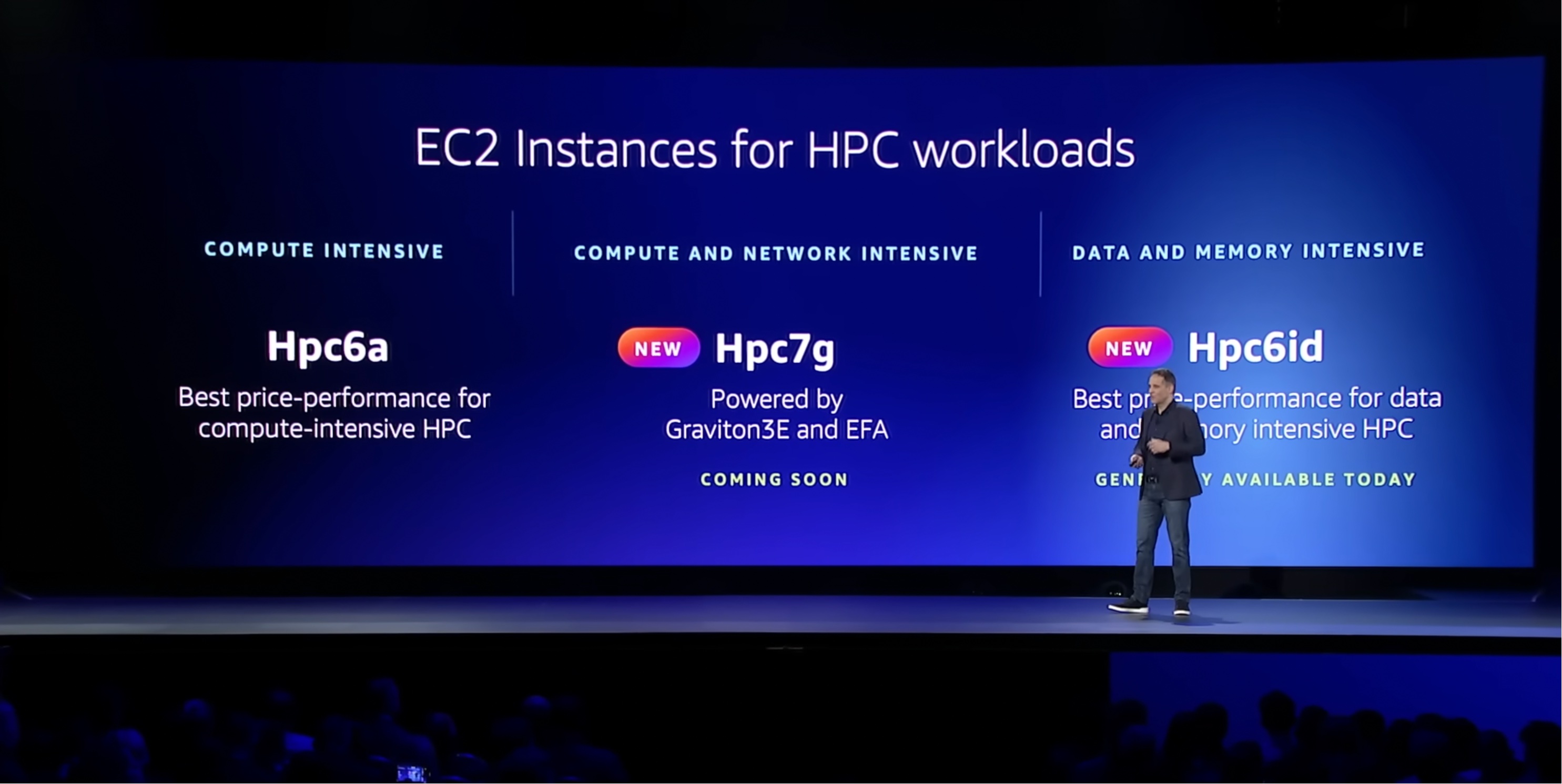
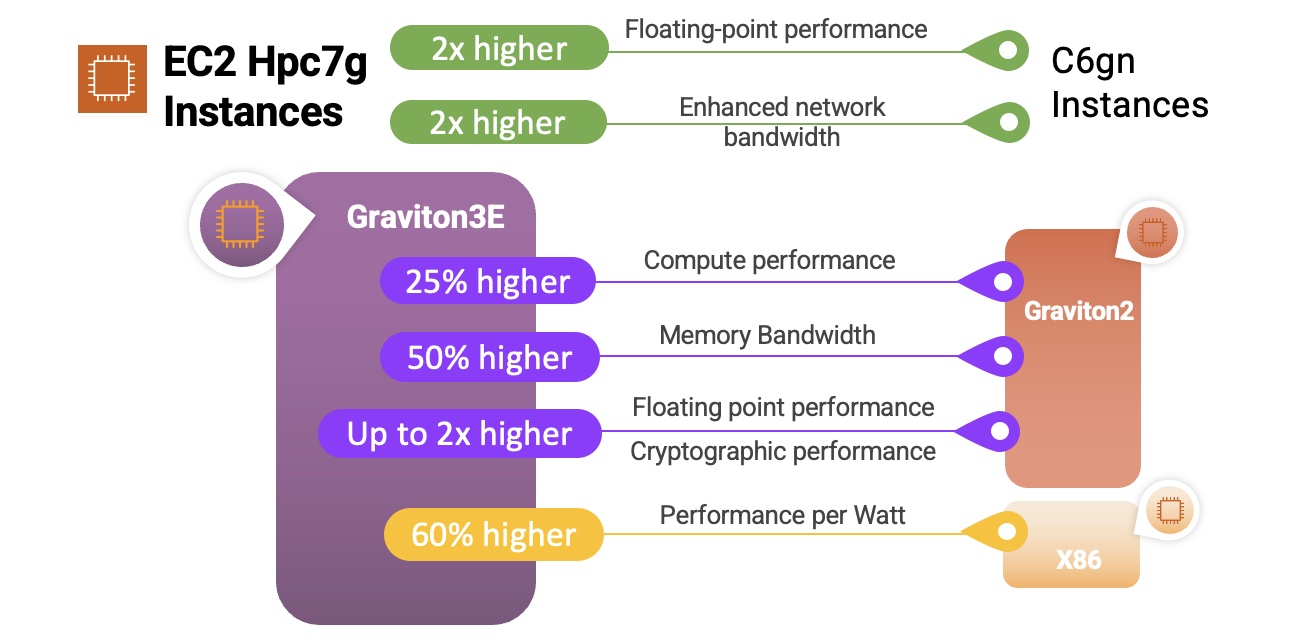
Hpc7g Instances are also powered by AWS Graviton3E processors, with up to 35% higher vector instruction processing performance than the Graviton3. They are designed to give you the best price/performance for tightly coupled compute-intensive HPC and distributed computing workloads, and deliver 200 Gbps of dedicated network bandwidth that is optimized for traffic between instances in the same VPC. The hpc7g instances will be available in multiple sizes with up to 64 vCPUs and 128 GiB of memory. I’ll have more information to share on these instances in early 2023.

R7iz Instances are powered by the latest 4th generation Intel Xeon Scalable Processors (code named Sapphire Rapids) and run at a sustained all-core turbo frequency of 3.9 GHz. With high performance and DDR5 memory, these instances are a perfect match for your Electronic Design Automation (EDA), financial, actuarial, and simulation workloads. They are also great hosts for relational databases and other commercial software that is licensed on a per-core basis. The r7iz instances will be available in multiple sizes with up to 128 vCPUs and 1 TiB of memory. We are launching the instances in preview today and you can Sign up Today to participate.

Jeff;

New – Failover Controls for Amazon S3 Multi-Region Access Points

Post Syndicated from Jeff Barr original https://aws.amazon.com/blogs/aws/new-failover-controls-for-amazon-s3-multi-region-access-points/

We launched Amazon S3 Multi-Region Access Points to give you a global endpoint that spans S3 buckets in multiple AWS Regions. With S3 Multi-Region Access Points, you can build multi-region applications with the same simple architecture used in a single Region. This cool and powerful feature uses AWS Global Accelerator to monitor network congestion and connectivity, and to route traffic to the closest copy of your data. In the event that connectivity between a client and a bucket in a particular Region is lost, the Multi-Region Access Point will automatically route all traffic to the closest bucket (synchronized via S3 Replication) in another Region.

In addition to the use case that I just described, customers have told us that they want to build highly available multi-region apps and need explicit control over failover and failback.

New Failover Controls
Today we are adding failover controls for Multi-Region Access Points. These controls let you shift S3 data access request traffic routed through an Amazon S3 Multi-Region Access Point to an alternate AWS Region within minutes to test and build highly available applications for business continuity.

The existing Multi-Region Access Point model treats all of the Regions as active and can send traffic to any of them. The model that we are introducing today lets you designate Regions as either active or passive. Buckets in active Regions receive traffic (GET, PUT, and other requests) from the Multi-Region Access Point, buckets in passive Regions don’t. Amazon S3 Cross-Region Replication operates regardless of the active or passive status of a Region with respect to a particular Multi-Region Access Point.

To get started, I create a new Multi-Region Access Point that refers to two or more S3 buckets in distinct AWS Regions. I enter a name for my Multi-Region Access Point (jbarr-mrap-1), and choose the buckets:

I leave the Amazon S3 Block Public Access settings as-is, and click Create Multi-Region Access Point:

Then I wait until my Multi-Region Access Point is ready (generally just a few minutes):

By default, my new Multi-Region Access Point routes traffic to all of the buckets, and behaves as it did before we launched this new feature. However, I can now exercise control over routing and failover. I click on the Multi-Region Access Point, and on the Replication and failover tab (which used to be just a Replication tab). The map now allows me to see my replication rules and my failover status:

I can scroll down to view, create, and modify my replication rules:

As you can see, the replication rules that I created for this demo preserve the storage class. S3 Intelligent-Tiering is generally a better choice, since I would get automatic cost savings without increased data retrieval costs after a failover. I can use S3 Replication metrics to make sure that my replication rules are proceeding as expected. Also, S3 Replication Time Control provides a predictable replication time (backed by an SLA), and should also be considered.

The tab also includes the failover configuration:

To change my failover configuration, I select the buckets of interest and click Edit failover configuration. My application runs in the Asia Pacific (Tokyo) Region and makes use of a bucket there, so I leave the Tokyo Region active and make the others passive:

All is well until one fine day Godzilla wakes up and eats all of the submarine cables in and around Tokyo. I quickly pull up the console, return to the Failover configuration, select the active Tokyo Region and the passive Osaka Region, and click Failover:

I confirm my intent, click Failover again, and the failover is complete within two minutes:

Later, after Godzilla has been subdued and the cables have been repaired, I can fail back to the original bucket in the Tokyo Region:

Things to Know
Here are a couple of things to keep in mind as you start to make use of this important new AWS feature:

Active/Passive – There must be at least one active Region at all times.

CLI & API Access – You can initiate a failover programmatically by calling SubmitMultiRegionAccessPointRoutes. You can retrieve the current set of routes by calling GetMultiRegionAccessPointRoutes. The endpoints for these APIs are available in the US East (N. Virginia), US West (Oregon), Asia Pacific (Sydney, Tokyo), and Europe (Ireland) Regions.

Pricing – There is no extra charge for this feature beyond the use of the new APIs, which are billed as standard S3 GET and PUT requests. For S3 Multi-Region Access Point usage prices, see the Pricing tab of the Amazon S3 Pricing page.

Regions – This feature is available in all AWS Regions where Multi-Region Access Points are currently available.

Jeff;

Automated Data Discovery for Amazon Macie

Post Syndicated from Sébastien Stormacq original https://aws.amazon.com/blogs/aws/automated-data-discovery-for-amazon-macie/

Today, we announce automated data discovery for Amazon Macie. This new capability allows you to gain visibility into where your sensitive data resides on Amazon Simple Storage Service (Amazon S3) at a fraction of the cost of running a full data inspection across all your S3 buckets.

At AWS, security is our first priority. The security of the infrastructure itself, but also the security of your data. We give you access to services to manage identities and access, to protect the network and your applications, to detect suspicious activities, to protect your data, and to report on and monitor your compliance status.

Amazon Macie is a data security service that discovers sensitive data using machine learning and pattern matching and enables visibility and automated protection against data security risks. You use Amazon Macie to protect your data in S3 by scanning for the presence of sensitive data, such as names, addresses, and credit card numbers, and continually monitoring for properly configured preventative controls, such as encryption and access policies. Amazon Macie generates alerts when it detects publicly accessible buckets, unencrypted buckets, or buckets shared with an AWS account outside of your organization. You may also configure Amazon Macie to scan your S3 to run full sensitive data discovery scans on your S3 buckets to provide visibility into where sensitive data resides.

But customers operating at scale told us it is difficult to know where to start. When employees and applications add new buckets and generate petabytes of data on a daily basis, what should be scanned first?

Automated data discovery automates the continual discovery of sensitive data and potential data security risks across your entire set of buckets aggregated at AWS Organizations level.

When you enable automated discovery in the console, Macie starts to evaluate the level of sensitivity of each of your buckets and highlights any data security risks. Automated data discovery introduces intelligent and fully managed data sampling to provide an optimized sample rate that meaningfully reduces the amount of data that needs to be analyzed. This reduces the cost of discovering S3 buckets containing sensitive data compared to the cost of full data inspection.

You can tune automated data discovery to only identify the types of sensitive data that are relevant for your use case by choosing from over 100 managed sensitive data types, such as personally identifiable information (PII) and financial records with specific formats for multiple countries. For example, you can enable detection of Spanish or Swedish driving license numbers and choose to ignore US Social Security numbers, depending on your use cases. When the specific type of data you manage is not on our list, you can create custom data types that may be unique to your business, such as employee or patient identification numbers.

Let’s See It in Action
Automated data discovery is on by default for all new Amazon Macie customers, and existing Macie customers can enable it with one click in the AWS Management Console of the Amazon Macie administrator account. There is a 30-day free trial, and you can always opt out at the administrator level.

I can enable or disable the capability from the Automated discovery entry–under Settings–on the left side navigation menu. The Status section reveals the current status.

Automated data discovery for Amazon Macie - Enable

On the same page, I can configure the list of managed data identifiers. I can turn on or off individual types of data among more than one hundred managed data identifier types. I can also configure new ones. I select Edit on the Managed data identifiers section to include or exclude additional data identifiers.

Automated data discovery for Amazon Macie - include or exclude data identifiers

If I have some buckets with lots of objects and others with a few, Macie won’t spend all its time inspecting one really large bucket at the expense of other smaller ones. Macie also prioritizes buckets that it knows the least about. For example, if it looked at the majority of objects in a small bucket, that bucket will be deprioritized compared to larger buckets where it has seen proportionally fewer objects.

Automated data discovery can provide an interactive data map of sensitive data distribution in S3 buckets within days of the feature being enabled. This data map refreshes daily as it intelligently picks and scans S3 objects in buckets and spreads the scan effort across the entire S3 estate in a given month.

Here is the Summary section of the Amazon Macie page. It looks like my set of buckets is secured. I have no bucket with public access, and 31 of my buckets might contain sensitive data.

Automated data discovery for Amazon Macie - Summary section

When selecting the S3 buckets section of the navigation menu on the left side, I can see a data map of my buckets. The more red the squares are, the more sensitive data are detected in the buckets. The squares in blue represent buckets with no sensitive data detected so far. From there, I can drill down at bucket level to investigate the details.

Automated data discovery for Amazon Macie - Heat map

Pricing and Availability
When you are new to Amazon Macie, automated data discovery is enabled by default. When you already use Amazon Macie in your organization, you can enable automatic data discovery with one click in the Management Console of the Amazon Macie administrator account.

There is a 30-day free trial period when you enable automatic data discovery on your AWS account. After the evaluation period, we charge based on the total quantity of S3 objects in your account as well as the bytes scanned for sensitive content. Charges are prorated per day. You can disable this capability at any time. The pricing page has all the details.

This new capability is now available in all 21 commercial AWS Regions where Macie is available.

Go and enable Amazon Macie automated data discovery today!

— seb

New – AWS Config Rules Now Support Proactive Compliance

Post Syndicated from Danilo Poccia original https://aws.amazon.com/blogs/aws/new-aws-config-rules-now-support-proactive-compliance/

When operating a business, you have to find the right balance between speed and control for your cloud operations. On one side, you want to have the ability to quickly provision the cloud resources you need for your applications. At the same time, depending on your industry, you need to maintain compliance with regulatory, security, and operational best practices.

AWS Config provides rules, which you can run in detective mode to evaluate if the configuration settings of your AWS resources are compliant with your desired configuration settings. Today, we are extending AWS Config rules to support proactive mode so that they can be run at any time before provisioning and save time spent to implement custom pre-deployment validations.

When creating standard resource templates, platform teams can run AWS Config rules in proactive mode so that they can be tested to be compliant before being shared across your organization. When implementing a new service or a new functionality, development teams can run rules in proactive mode as part of their continuous integration and continuous delivery (CI/CD) pipeline to identify noncompliant resources.

You can also use AWS CloudFormation Guard in your deployment pipelines to check for compliance proactively and ensure that a consistent set of policies are applied both before and after resources are provisioned.

Let’s see how this works in practice.

Using Proactive Compliance with AWS Config
In the AWS Config console, I choose Rules in the navigation pane. In the rules table, I see the new Enabled evaluation mode column that specifies whether the rule is proactive or detective. Let’s set up my first rule.

Console screenshot.

I choose Add rule, and then I enter rds-storage in the AWS Managed Rules search box to find the rds-storage-encrypted rule. This rule checks whether storage encryption is enabled for your Amazon Relational Database Service (RDS) DB instances and can be added in proactive or detective evaluation mode. I choose Next.

Console screenshot.

In the Evaluation mode section, I turn on proactive evaluation. Now both the proactive and detective evaluation switches are enabled.

Console screenshot.

I leave all the other settings to their default values and choose Next. In the next step, I review the configuration and add the rule.

Console screenshot.

Now, I can use proactive compliance via the AWS Config API (including the AWS Command Line Interface (CLI) and AWS SDKs) or with CloudFormation Guard. In my CI/CD pipeline, I can use the AWS Config API to check the compliance of a resource before creating it. When deploying using AWS CloudFormation, I can set up a CloudFormation hook to proactively check my configuration before the actual deployment happens.

Let’s do an example using the AWS CLI. First, I call the StartProactiveEvaluationResponse API with in input the resource ID (for reference only), the resource type, and its configuration using the CloudFormation schema. For simplicity, in the database configuration, I only use the StorageEncrypted option and set it to true to pass the evaluation. I use an evaluation timeout of 60 seconds, which is more than enough for this rule.

aws configservice start-resource-evaluation --evaluation-mode PROACTIVE \
    --resource-details '{"ResourceId":"myDB",
                         "ResourceType":"AWS::RDS::DBInstance",
                         "ResourceConfiguration":"{\"StorageEncrypted\":true}",
                         "ResourceConfigurationSchemaType":"CFN_RESOURCE_SCHEMA"}' \
    --evaluation-timeout 60
{
    "ResourceEvaluationId": "be2a915a-540d-4595-ac7b-e105e39b7980-1847cb6320d"
}

I get back in output the ResourceEvaluationId that I use to check the evaluation status using the GetResourceEvaluationSummary API. In the beginning, the evaluation is IN_PROGRESS. It usually takes a few seconds to get a COMPLIANT or NON_COMPLIANT result.

aws configservice get-resource-evaluation-summary \
    --resource-evaluation-id be2a915a-540d-4595-ac7b-e105e39b7980-1847cb6320d
{
    "ResourceEvaluationId": "be2a915a-540d-4595-ac7b-e105e39b7980-1847cb6320d",
    "EvaluationMode": "PROACTIVE",
    "EvaluationStatus": {
        "Status": "SUCCEEDED"
    },
    "EvaluationStartTimestamp": "2022-11-15T19:13:46.029000+00:00",
    "Compliance": "COMPLIANT",
    "ResourceDetails": {
        "ResourceId": "myDB",
        "ResourceType": "AWS::RDS::DBInstance",
        "ResourceConfiguration": "{\"StorageEncrypted\":true}"
    }
}

As expected, the Amazon RDS configuration is compliant to the rds-storage-encrypted rule. If I repeat the previous steps with StorageEncrypted set to false, I get a noncompliant result.

If more than one rule is enabled for a resource type, all applicable rules are run in proactive mode for the resource evaluation. To find out individual rule-level compliance for the resource, I can call the GetComplianceDetailsByResource API:

aws configservice get-compliance-details-by-resource \
    --resource-evaluation-id be2a915a-540d-4595-ac7b-e105e39b7980-1847cb6320d
{
    "EvaluationResults": [
        {
            "EvaluationResultIdentifier": {
                "EvaluationResultQualifier": {
                    "ConfigRuleName": "rds-storage-encrypted",
                    "ResourceType": "AWS::RDS::DBInstance",
                    "ResourceId": "myDB",
                    "EvaluationMode": "PROACTIVE"
                },
                "OrderingTimestamp": "2022-11-15T19:14:42.588000+00:00",
                "ResourceEvaluationId": "be2a915a-540d-4595-ac7b-e105e39b7980-1847cb6320d"
            },
            "ComplianceType": "COMPLIANT",
            "ResultRecordedTime": "2022-11-15T19:14:55.588000+00:00",
            "ConfigRuleInvokedTime": "2022-11-15T19:14:42.588000+00:00"
        }
    ]
}

If, when looking at these details, your desired rule is not invoked, be sure to check that proactive mode is turned on.

Availability and Pricing
Proactive compliance will be available in all commercial AWS Regions where AWS Config is offered but it might take a few days to deploy this new capability across all these Regions. I’ll update this post when this deployment is complete. To see which AWS Config rules can be turned into proactive mode, see the Developer Guide.

You are charged based on the number of AWS Config rule evaluations recorded. A rule evaluation is recorded every time a resource is evaluated for compliance against an AWS Config rule. Rule evaluations can be run in detective mode and/or in proactive mode, if available. If you are running a rule in both detective mode and proactive mode, you will be charged for only the evaluations in detective mode. For more information, see AWS Config pricing.

With this new feature, you can use AWS Config to check your rules before provisioning and avoid implementing your own custom validations.

Danilo

New AWS Glue 4.0 – New and Updated Engines, More Data Formats, and More

Post Syndicated from Jeff Barr original https://aws.amazon.com/blogs/aws/new-aws-glue-4-0-new-and-updated-engines-more-data-formats-and-more/

AWS Glue is a scalable, serverless tool that helps you to accelerate the development and execution of your data integration and ETL workloads. Today we are launching Glue 4.0, with updated engines, support for additional data formats, Ray support, and a lot more.

Before I dive in, just a word about versioning. Unlike most AWS services, where the service team owns and has full control over the APIs, Glue includes a collection of libraries, engines, and tools developed by the open source community. Some of these components do not maintain strict backward compatibility, often in pursuit of efficiency. In order to make sure that changes to the components do not impact your Glue jobs, you must select a particular Glue version when you create the job.

Each version of Glue includes performance and reliability benefits in addition to the added features, and you should plan to upgrade your jobs over time to take advantage of all that Glue has to offer.

Dive in to Glue
Let’s take a look at what’s new in Glue 4.0:

Updated Engines – This version of Glue includes Python 3.10 and Apache Spark 3.3.0. Both engines include bug fixes and performance enhancements; Spark includes new features such as row-level runtime filtering, improved error messages, additional built-in functions, and much more. Glue and Amazon EMR make use of the same optimized Spark runtime, which has been optimized to run in the AWS cloud and can be 2-3 times faster than the basic open source version.

New Engine Plugins – Glue 4.0 adds native support for the Cloud Shuffle Service Plugin for Spark to help you scale your disk usage, and Adaptive Query Execution to dynamically optimize your queries as they run.

Pandas Support Pandas is an open source data analysis and manipulation tool that is built on top of Python. It is easy to learn and includes all kinds of interesting and useful data manipulation functions.

New Data Formats – Whether you are building a data lake or a data warehouse, Glue 4.0 now handles new open source data formats for sources and targets, with support for Apache Hudi, Apache Iceberg, and Delta Lake. To learn more about these new options and formats, read Get Started with Apache Hudi using AWS Glue by Implementing Key Design Concepts.

Everything Else – In addition to the above items, Glue 4.0 also includes the Parquet vectorized reader, with support for additional data types and encodings. It has been upgraded to use log4j 2 and is no longer dependent on log4j 1.

Available Now
Glue 4.0 is available today in the US East (Ohio, N. Virginia), US West (N. California, Oregon), Africa (Cape Town), Asia Pacific (Hong Kong, Jakarta, Mumbai, Osaka, Seoul, Singapore, Sydney, Tokyo), Canada (Central), Europe (Frankfurt, Ireland, London, Milan, Paris, Stockholm), Middle East (Bahrain), and South America (Sao Paulo) AWS Regions.

Jeff;

AWS Wickr – A Secure, End-to-End Encrypted Communication Service For Enterprises With Auditing And Regulatory Requirements

Post Syndicated from Sébastien Stormacq original https://aws.amazon.com/blogs/aws/aws-wickr-a-secure-end-to-end-encrypted-communication-service-for-enterprises-with-auditing-and-regulatory-requirements/

I am excited to announce the availability of AWS Wickr, an enterprise communications service with end-to-end encryption, that allows businesses and public sector organizations to communicate more securely, enabling customers to meet auditing and regulatory requirements like e-discovery, legal hold, and FOIA requests. Unlike many enterprise communication tools, Wickr uses end-to-end encryption mechanisms to ensure your messages, files, voice, or video calls are solely accessible to their intended recipients.

The flexible administrative controls make it easy for your Wickr administrator to manage the communication channels and retain information to meet regulatory requirements when required. The information retained is stored on the servers you choose and stays entirely under your control.

End-to-End Encryption
Wickr provides secure communication between two or more correspondents. It means that the system provides authenticity and confidentiality: no unauthorized party can inject a message into the system, and no unintended party can access or understand the communications without being given them by one of the correspondents.

Each message gets a unique AES encryption key and a unique ECDH public key to negotiate the key exchange with other recipients. The message content (text, files, audio, or video) is encrypted on the sending device (your iPhone, for example) using the message-specific AES key. The message-specific AES key is exchanged with recipients via a Diffie-Hellman elliptic curve key exchange (EDCH521) mechanism. This ensures that only intended recipients have the message-specific AES key to decrypt the message.

Message-specific keys are passed through a key derivation function that binds the key exchange to a recipient device. When the recipient adds devices to their account later on (for example, I add a macOS client to my Wickr account, in addition to my iPhone), the new device will not see the message history by default. There is a way to migrate history from your old device to your new device if you have the two devices at hand and single sign-on (SSO) configured.

I drew the below diagram to show how the key exchange works at a high level.

wickr key exchange

The Wickr secure messaging protocol is open and documented, allowing the community to inspect it. The source code we use in Wickr clients to implement the secure messaging protocol is available to audit and review.

Wickr Client Application
The Wickr client application is very familiar to end users and easy to get started with. It is available for Windows, macOS, Linux, Android, and iOS devices. Once downloaded from a preferred app store and registered, users can create chat rooms or send messages to individual recipients. They may use emoticons to react to messages, exchange files, and make audio and video calls.

Here I am on macOS connected with me on iOS in my kitchen.

Wickr text message Wickr video calls

Wickr for the Administrator
Wickr administration is now integrated and available in the AWS Management Console. You can control access to Wickr administration using familiar AWS Identity and Access Management (IAM) access control and policies. It is integrated with AWS Cloud Development Kit (AWS CDK) and Amazon CloudWatch for monitoring.

A Wickr administrator manages networks. A network is a group of users and its related configuration, similar to Slack workspaces. Users might be added manually or imported. Most organizations will federate users through an existing identity system. Wickr will federate users with any OpenID Connect-compliant system.

A Wickr network is also the place where Wickr administrators configure security groups to manage messaging, calling, security, and federation settings. It also allows Wickr administrators to configure logging, data retention, and bots.

To get started, I select Wickr in the AWS Management Console. Then, I select Create a network. I enter a Network name, and I select Continue.

Wickr from AWS console Wickr - Create a network

The Wickr page of the Management Console lets you configure the Wickr network, the user federation with other Wickr networks, and more.

The Wickr consoleIn this demo, I don’t use single sign-on. I manually add two users by selecting Create new user. Once added, the user receives an invitation email with links to the client app. The client app asks the user to define a password at first use.

Customer-Controlled Data Retention and Bots
Wickr allows administrators to selectively retain information that must be maintained for regulatory needs into a secure, controlled data store that they manage. No one other than the recipient—including AWS—has access to keys to decrypt conversations or documents, giving organizations full control over their data. It helps organizations in the public sector to use Wickr for their secure collaboration needs.

Data retention is implemented as a process added to conversations, like a participant. The data retention process participates in the key exchange, just like any recipient, allowing it to decrypt the messages. The data retention process can run anywhere: on-premises, on an Amazon Elastic Compute Cloud (Amazon EC2) virtual machine, or at any location of your choice. Once data retention is configured in the console, Wickr administrators may start the data retention process and register it with their Wickr network.

Wickr Compliance Architecture schema

The data retention process is available as a Docker container for ease of deployment. The process stores clear text messages on the storage of your choice: a local or remote file system or Amazon Simple Storage Service (Amazon S3).

To try this process, I follow the documentation. I open the Wickr administration page and selected Data Retention under Network Settings.

Wickr Data retention

I copy the docker command, the Username, and the Password (not shown in the previous screenshot). Then, I connect to a Linux EC2 instance I created beforehand. I create a local directory for data retention, and I start the container.

docker run -v 
       /home/ec2-user/retention_34908291_bot:/tmp/retention_34908291_bot
       --restart on-failure:5 
       --name="retention_34908291_bot"
       -it 
       -e WICKRIO_BOT_NAME='retention_34908291_bot'
       wickr/bot-retention-cloud:5.109.08.03

The application prompts for the username and password collected in the console. When the process starts, I return to the console and activate the Data Retention switch at the bottom of the screen.

Note that for this demo, I choose to store data on the local file system. In reality, you might want to use S3 to securely store all your organization communications, encrypt the data at rest, and use the mechanisms you already have in place to control access to this data. The data retention process natively supports integration with AWS Secrets Manager and S3.

As a user, I exchange a few messages in a Wickr room. Then, as an administrator, I look at the data captured. I can observe that the data retention process captured the message and its metadata in JSON format.

Wickr Compliance data

When configuring the data retention capability, compliance and security officers can audit and review communications in a secure and controlled data store.

The retention bot is not the only bot available for Wickr. The Wickr Broadcast Bot allows you to broadcast messages to all of the members of your network or specific security groups. Developers can create workflows using Wickr Bots to automate chat-based workflows and integrate them with other systems. Similarly, a bot is a process integrated into conversation or chat rooms that can receive and act upon messages. Developers write bots with NodeJS. Bot processes securely integrate with a Wickr network, as defined by the network administrator. They are typically packaged as Docker containers for ease of deployment at the location of your choice. If you are a developer, have a look at the Wickr bot developer documentation to learn all the details.

Pricing and availability
Wickr is available in the US East (N. Virginia) AWS Region.

Wickr is free for individuals and teams of up to 30 users looking for a more secure workspace for the first 3 months. For organizations with more than 30 users, there is a standard plan available starting at $5 per user per month and a premium plan for $15 per user per month. The premium plan adds features and retention capabilities like granular administrative controls, client-side data expiration timer of up to 1 year, data retention, and e-discovery. As usual, there are no upfront fees or long-term engagement. You pay per user and per month (annual billing is available, contact us). Have a look at the pricing page for details.

Create your first Wickr network today!

— seb

New for AWS Control Tower – Comprehensive Controls Management (Preview)

Post Syndicated from Danilo Poccia original https://aws.amazon.com/blogs/aws/new-for-aws-control-tower-comprehensive-controls-management-preview/

Today, customers in regulated industries face the challenge of defining and enforcing controls needed to meet compliance and security requirements while empowering engineers to make their design choices. In addition to addressing risk, reliability, performance, and resiliency requirements, organizations may also need to comply with frameworks and standards such as PCI DSS and NIST 800-53.

Building controls that account for service relationships and their dependencies is time-consuming and expensive. Sometimes customers restrict engineering access to AWS services and features until their cloud architects identify risks and implement their own controls.

To make that easier, today we are launching comprehensive controls management in AWS Control Tower. You can use it to apply managed preventative, detective, and proactive controls to accounts and organizational units (OUs) by service, control objective, or compliance framework. AWS Control Tower does the mapping between them on your behalf, saving time and effort.

With this new capability, you can now also use AWS Control Tower to turn on AWS Security Hub detective controls across all accounts in an OU. In this way, Security Hub controls are enabled in every AWS Region that AWS Control Tower governs.

Let’s see how this works in practice.

Using AWS Control Tower Comprehensive Controls Management
In the AWS Control Tower console, there is a new Controls library section. There, I choose All controls. There are now more than three hundred controls available. For each control, I see which AWS service it is related to, the control objective this control is part of, the implementation (such as AWS Config rule or AWS CloudFormation Guard rule), the behavior (preventive, detective, or proactive), and the frameworks it maps to (such as NIST 800-53 or PCI DSS).

Console screenshot.

In the Find controls search box, I look for a preventive control called CT.CLOUDFORMATION.PR.1. This control uses a service control policy (SCP) to protect controls that use CloudFormation hooks and is required by the control that I want to turn on next. Then, I choose Enable control.

Console screenshot.

Then, I select the OU for which I want to enable this control.

Console screenshot.

Now that I have set up this control, let’s see how controls are presented in the console in categories. I choose Categories in the navigation pane. There, I can browse controls grouped as Frameworks, Services, and Control objectives. By default, the Frameworks tab is selected.

Console screenshot.

I select a framework (for example, PCI DSS version 3.2.1) to see all the related controls and control objectives. To implement a control, I can select the control from the list and choose Enable control.

Console screenshot.

I can also manage controls by AWS service. When I select the Services tab, I see a list of AWS services and the related control objectives and controls.

Console screenshot.

I choose Amazon DynamoDB to see the controls that I can turn on for this service.

Console screenshot.

I select the Control objectives tab. When I need to assess a control objective, this is where I have access to the list of related controls to turn on.

Console screenshot.

I choose Encrypt data at rest to see and search through the available controls for that control objective. I can also check which services are covered in this specific case. I type RDS in the search bar to find the controls related to Amazon Relational Database Service (RDS) for this control objective.

I choose CT.RDS.PR.16 – Require an Amazon RDS database cluster to have encryption at rest configured and then Enable control.

Console screenshot.

I select the OU for which I want to enable the control for, and I proceed. All the AWS accounts in this organization’s OU will have this control enabled in all the Regions that AWS Control Tower governs.

Console screenshot.

After a few minutes, the AWS Control Tower setup is updated. Now, the accounts in this OU have proactive control CT.RDS.PR.16 turned on. When an account in this OU deploys a CloudFormation stack, any Amazon RDS database cluster has to have encryption at rest configured. Because this control is proactive, it’ll be checked by a CloudFormation hook before the deployment starts. This saves a lot of time compared to a detective control that would find the issue only when the CloudFormation deployment is in progress or has terminated. This also improves my security posture by preventing something that’s not allowed as opposed to reacting to it after the fact.

Availability and Pricing
Comprehensive controls management is available in preview today in all AWS Regions where AWS Control Tower is offered. These enhanced control capabilities reduce the time it takes you to vet AWS services from months or weeks to minutes. They help you use AWS by undertaking the heavy burden of defining, mapping, and managing the controls required to meet the most common control objectives and regulations.

There is no additional charge to use these new capabilities during the preview. However, when you set up AWS Control Tower, you will begin to incur costs for AWS services configured to set up your landing zone and mandatory controls. For more information, see AWS Control Tower pricing.

Simplify how you implement compliance and security requirements with AWS Control Tower.

Danilo

New – AWS Marketplace for Containers Now Supports Direct Deployment to Amazon EKS Clusters

Post Syndicated from Channy Yun original https://aws.amazon.com/blogs/aws/new-aws-marketplace-for-containers-now-supports-direct-deployment-to-amazon-eks-clusters/

Today we are announcing the extension of the Amazon Elastic Kubernetes Service (EKS) add-ons deployment experience to include software from AWS Marketplace for Containers. Amazon EKS add-ons allow you to consistently ensure that your EKS clusters are secure and stable and reduce the amount of work that you need to do in order to install, configure, and update Kubernetes software.

This new launch makes it easier for you to find third-party Kubernetes operation software from the Amazon EKS console and deploy it to your EKS clusters using the same commands used to deploy EKS add-ons.

Amazon EKS customers can now find and deploy third-party operational software to their EKS clusters through the EKS console or using command-line interface (CLI), eksctl, AWS APIs, or infrastructure as code tools such as AWS CloudFormation and Terraform. All software in AWS Marketplace is continually scanned for common vulnerabilities and exposures (CVEs), providing you confidence when deploying software onto your EKS clusters.

In this launch, you can find commercial software from popular independent software vendors (ISVs), such as Kubecost, Teleport, Tetrate, Upbound, Factorhouse, and Dynatrace.

Deploying AWS Marketplace for Containers to Your EKS Clusters
To get started, in the Amazon EKS console, go to your EKS clusters, and in the Add-ons tab, select Get more add-ons to find new third-party EKS add-ons in the cluster setting of your existing EKS clusters.

You can see a list of Amazon EKS add-ons provided by AWS and a list of products from independent software vendors provided by AWS Marketplace add-ons. You can use the search bar and filter by categories, vendors, and pricing models. Check your favorite add-ons and select Next.

In the next step, configure selected add-ons, such as the version and some optional settings for each add-on. In step 3, you can review and add your third-party add-ons in your EKS cluster.

If you do not have a subscription to Kubecost, you will be presented with a button to redirect you to the AWS Marketplace website to complete the subscription.

Subscribe to the software in AWS Marketplace. You will need to accept the end user license agreement (EULA), select the version of the software you would like to deploy, and finally configure the software if required.

You can also deploy kubecost using the AWS Command Line Interface (AWS CLI). Using the create-addon API, you can install Kubernetes software from AWS Marketplace. If you try to deploy software from AWS Marketplace without first subscribing to it, the API will return an error and redirect you to subscribe to the software.

$ aws eks create-addon --cluster-name channy-eks --addon-name kubecost_kubecost  
{
"addon": {
"addonName": "kubecost_kubecost",
"clusterName": "channy-eks",
"status": "CREATING",
"addonVersion": "v1.97.0-eksbuild.1",
"health": {
 "issues": []
     }
       }
}

As I noted, after subscribing your software, you can finish add-ons settings for selected software. To learn more, see the Amazon EKS add-ons documentation or the Amazon EKS API reference.

AWS Marketplace seller EKS Add-ons Available at Launch
Here is a list of AWS Marketplace software sellers that support Amazon EKS add-ons today.

All software in AWS Marketplace is continually scanned for common vulnerabilities and exposures (CVEs) and is validated by AWS to work with EKS. After deployment, customers will receive notifications when new versions of the software are available to upgrade and ensure they are running the latest patches at all times. Try them out today!

To learn more details about creating container products on AWS Marketplace, visit Getting started as a seller and Container-based products in the AWS documentation. If you have any further questions please email [email protected] or contact your usual AWS partner contact.

Available Now
The feature of AWS Marketplace for Amazon EKS add-ons is available now in all commercial Regions that support AWS Marketplace and Amazon EKS. You can start using the feature directly from the above products of launch partners.

Give it a try, and please send us feedback either in the AWS re:Post for Amazon EKS, AWS Marketplace, or through your usual AWS support contacts.

Channy

Top Announcements of AWS re:Invent 2022

Post Syndicated from AWS News Blog Team original https://aws.amazon.com/blogs/aws/top-announcements-of-aws-reinvent-2022/

AWS VP and Chief Evangelist Jeff Barr, plus a select group of AWS Developer Advocate colleagues, have personally chosen their picks for some of the most impactful and exciting product and service launches to debut at AWS re:Invent 2022. From now through Dec. 1, we’ll update this page daily with links to their AWS News Blog posts (plus a few noteworthy preview posts) so you can dive deeper once the launches have been announced.

As always, there’s simply too much for the team to cover and even if a launch doesn’t make this list, that doesn’t mean it’s not noteworthy. Make sure to check out What’s New for a complete rundown of all the AWS re:Invent 2022 announcements.

Here are a few more resources to help you keep up with all the re:Invent news:

(This post was updated: 10:23 p.m. PST, Nov. 27, 2022.)


Quick category links:

Analytics | Artificial Intelligence / Machine Learning | Compute | Database | Management Tools | Migration & Transfer Services |

Analytics

New for Amazon Transcribe – Real-Time Analytics During Live Calls
Real-time call analytics provides APIs for developers to accurately transcribe live calls and at the same time identify customer experience issues and sentiment in real time.

Artificial Intelligence / Machine Learning

Classifying and Extracting Mortgage Loan Data with Amazon Textract
The new API was created in response to requests from major lenders in the industry to help them process applications faster and reduce errors, which improves the end-customer experience and lowers operating costs.

Preview: Amazon CodeWhisperer Adds Enterprise Administrative Controls, Simple Sign-up, and Support for New Languages
Administrators can now easily integrate CodeWhisperer with their existing workforce identity solutions, provide access to users and groups, and configure organization-wide settings.

Compute

New – Amazon ECS Service Connect Enables Easy Communication Between Microservices
This new capability simplifies building and operating resilient distributed applications. You can add a layer of resilience to your ECS service communication and get traffic insights with no changes to your application code.

Database

New – Amazon RDS Optimized Reads and Optimized Writes
These two new features will accelerate your Amazon RDS for MySQL workloads.

New – Fully Managed Blue/Green Deployments in Amazon Aurora and Amazon RDS
This new feature for Amazon Aurora with MySQL compatibility, Amazon RDS for MySQL, and Amazon RDS for MariaDB, enables you to make database updates safer, simpler, and faster.

Management Tools

Protect Sensitive Data with Amazon CloudWatch Logs
This new set of capabilities for Amazon CloudWatch Logs leverages pattern matching and machine learning (ML) to detect and protect sensitive log data in transit.

New – Amazon CloudWatch Cross-Account Observability
This new capability lets you search, analyze, and correlate cross-account telemetry data stored in CloudWatch such as metrics, logs, and traces.

Preview: Amazon CloudWatch Internet Monitor Provides End-to-End Visibility into Internet Performance for your Applications
This new capability gives visibility into how an internet issue might impact the performance and availability of your applications. It allows you to reduce the time it takes to diagnose internet issues from days to minutes.

Storage

New – Announcing Amazon EFS Elastic Throughput
This new throughput mode is designed to provide your applications with as much throughput as they need with pay-as-you-use pricing.

New for AWS Backup – Protect and Restore Your CloudFormation Stacks
You now have an automated solution to create and restore your applications with a simplified experience, eliminating the need to manage custom scripts.

New – Amazon Redshift Support in AWS Backup

AWS Backup allows you to define a central backup policy to manage data protection of your applications and can now also protect your Amazon Redshift clusters.

Announcing Automated in-AWS Failback for AWS Elastic Disaster Recovery
The new automated support provides a simplified and expedited experience to fail back Amazon Elastic Compute Cloud (Amazon EC2) instances to the original Region, and both failover and failback processes (for on-premises or in-AWS recovery) can be conveniently started from the AWS Management Console.

Migration & Transfer Services

New – A Fully Managed Schema Conversion in AWS Database Migration Service
AWS DMS Schema Conversion streamlines database migrations by making schema assessment and conversion available inside AWS DMS. You can now plan, assess, convert and migrate under one central DMS service.

AWS Application Migration Service Major Updates – New Migration Servers Grouping, Updated Launch, and Post-Launch Template
These three major updates will support your migration projects of any size.

New – Amazon RDS Optimized Reads and Optimized Writes

Post Syndicated from Jeff Barr original https://aws.amazon.com/blogs/aws/new-amazon-rds-optimized-reads-and-optimized-writes/

Way back in 2009 I wrote Introducing Amazon RDS – The Amazon Relational Database Service and told you that:

RDS makes it easier for you to set up, operate, and scale a relational database in the cloud. You get direct database access without worrying about infrastructure provisioning, software maintenance, or common database management tasks.

Since that launch we have continued to do our best to help you to avoid all of those items, while also working to make RDS ever-more cost effective. For example, we recently launched Graviton2 DB Instances that deliver up to 52% better price/performance and a new Multi-AZ Deployment Option that delivers up to 33% better price/performance along with 2x faster transaction commit latency.

Today I would like to tell you about two new features that will accelerate your Amazon RDS for MySQL workloads:

Amazon RDS Optimized Reads achieve faster query processing by placing temporary tables generated by MySQL on NVMe-based SSD block storage that is physically connected to the host server. Queries that use temporary tables, such as those involving sorts, hash aggregations, high-load joins, and Common Table Expressions (CTEs) can execute up to 50% faster with Optimized Reads.

Amazon RDS Optimized Writes deliver an improvement of up to 2x in write transaction throughput at no extra charge, and with the same level of provisioned IOPS. Optimized Writes are a great fit for write-heavy workloads that generate lots of concurrent transactions. This includes digital payments, financial trading platforms, and online games.

Amazon RDS Optimized Reads
Amazon RDS for MySQL without Optimized Reads places temporary tables on Amazon Elastic Block Store (Amazon EBS) volumes. Optimized Reads offload the operations on temporary objects from EBS to the instance store attached to r5d, m5d, r6gd and m6gd instances. As a result EBS volumes can be more efficiently utilized for reads and writes on persistent data, as well as background operations such as flushes, insert buffer merges, and so forth. This increased efficiency is (of course) always nice to have, but it is particularly beneficial for certain use cases:

  • Analytical Queries that include Complex Table Expressions, derived tables, and grouping operations.
  • Read Replicas that handle the unoptimized queries for an application.
  • On-Demand or Dynamic Reporting Queries with complex operations such as GROUP BY and ORDER BY that can’t always use appropriate indexes.
  • Other Workloads that use internal temporary tables.

You can monitor the MySQL status variable created_tmp_files to observe the rate of creation for temporary tables.

The amount of instance storage available on the instance varies by instance family and size. Here’s a guide:

Instance Family Minimum Storage
Maximum Storage
m5d 75 GB 3.6 TB
m6gd 237 GB 3.8 TB
r5d 75 GB 3.6 TB
r6gd 59 GB 3.8 TB

Using Optimized Reads
To take advantage of this new feature, choose MySQL engine version 8.0.28 or newer and launch Amazon RDS for MySQL on one of the instance types listed above:

You can monitor the use of instance storage by watching new CloudWatch metrics including FreeLocalStorage, ReadIOPSLocalStorage, WriteIOPSLocalStorage, and so forth (see the User Guide for a complete list of new and existing metrics).

Optimized Reads are available in all AWS Regions where the eligible database instance types are available.

Amazon RDS Optimized Writes
By default, MySQL uses an on-disk doublewrite buffer that serves as an intermediate stop between memory and the final on-disk storage. Each page of the buffer is 16 KiB but is written to the final on-disk storage in 4 KiB chunks. This extra step maintains data integrity, but also consumes additional I/O bandwidth. When running those write-heavy workloads that I described earlier, this might require provisioning of additional IOPS to meet your performance and throughput requirements.

Optimized Writes uses uniform 16 KiB database pages, file system blocks, and operating system pages, and writes them to storage atomically (all or nothing), resulting in the performance improvement of up to 2x that I mentioned earlier.

Using Optimized Writes
You must create a new DB Instance from scratch on a db.r5b or db.r6i instance with the latest version of MySQL 8.0 in order to make use of Optimized Writes:

This setting affects the format of DB snapshots, with two important consequences:

  1. You cannot restore an existing non-optimized snapshot to a new, optimized one in order to enable Optimized Writes.
  2. Restoring a snapshot that was made with optimization enabled will enable Optimized Writes in the new instance.

If you scale to an instance type that does not support Optimized Writes, Amazon RDS will enable MySQL’s doublewrite mode on the instance as a fallback. If you scale into an instance that supports Optimized Writes from one that does not, Amazon RDS will launch MySQL in doublewrite mode, wait for the recovery and log replay to complete, and then relaunch MySQL with doublewrite disabled.

Optimized Writes are now available in the US East (Ohio, N. Virginia), US West (Oregon), Asia Pacific (Singapore, Tokyo), and Europe (Frankfurt, Ireland, Paris) Regions and you can start to benefit from them today!

Jeff;

Classifying and Extracting Mortgage Loan Data with Amazon Textract

Post Syndicated from Steve Roberts original https://aws.amazon.com/blogs/aws/classifying-and-extracting-mortgage-loan-data-with-amazon-textract/

Mortgage loan applications, at least in the United States, comprise around 500 or more pages of diverse documents. In order for applications to be reviewed, all these documents need to be classified, and the data on each form extracted. This isn’t as easy as it might sound! Besides different data structures in each document, the same data element may have different names on different documents—for example, SSN, or Social Security Number, or Tax ID. These three all refer to the same data.

Today, a new Analyze Lending API, for analyzing and classifying the documents contained in mortgage loan application packages, and extracting the data they contain, is available for Amazon Textract. The new API was created in response to requests from major lenders in the industry to help them process applications faster and reduce errors, which improves the end-customer experience and lower operating costs.

Until now, classification and extraction of data from mortgage loan application packages have been human-intensive tasks, although some lenders have used a hybrid approach, using technology such as Amazon Textract. However, customers told us that they needed even greater workflow automation to speed up automation efforts and reduce human error so that their staff could focus on higher-value tasks.

The new API also provides additional value-add services. It’s able to perform signature detection in terms of which documents have signatures and which don’t. It also provides a summary output of the documents in a mortgage application package and identifies select important documents such as bank statements and 1003 forms that would normally be present. The new workflow is powered by a collection of machine learning (ML) models. When a mortgage application package is uploaded, the workflow classifies the documents in the package before routing them to the right ML model, based on their classification, for data extraction.

Test-Driving the New Analyze Lending API
Although the new API is intended for lenders to incorporate into their business process workflows and applications, anyone can actually try it using the Amazon Textract console. This enables you to see how the API classifies documents and extracts the data elements they contain. If you’re interested in the application of machine learning and artificial intelligence, this may be of interest to you even if you’re not processing a mortgage application package.

I start by opening the Amazon Textract console, expanding Analyze Lending in the navigation panel, and then selecting Demo. The demo console immediately analyzes a set of synthetic test files, and outputs the results shown below (you can always restart the demo by clicking the Reset demo button). I get a summary of the analysis results and a document carousel for each of the documents in the package. The demo console also has a handy help panel containing (among other things) a summary of terminology related to the documents.

Mortgage document analysis summary, carousel, and terminology help text

In the carousel I can see that one document has a signature badge, indicating a signature was detected, but, before taking a look, if I scroll the carousel, I can see that one document was labeled Unclassified:

Unclassified document notification

Returning in the carousel to the document marked with a signature badge, I can see that it’s a check. Signature detection is usually a highly manual process so having the document analysis automatically mark when one is detected is a significant time saver.

Signature detection

Payslips are another document type that customers have told us can be difficult and time-consuming to handle. Selecting the detected payslip in the carousel shows the data extracted from it.

Payslip detection and data extraction

The synthetic data in the demo console provides an overview of how the API is able to analyze, classify, and extract data from the documents in a mortgage application package. However, I can also use my own documents. To do this in the demo console, I click the Upload package button and provide a single file, up to 5 MB, and 10 pages maximum for testing in the demo console, containing documents to analyze. Outside use in the demo console, the API supports documents with up to 3000 pages.

The results, for both the synthetic and your own data, can be downloaded by clicking the Download results button. This provides a .zip file containing four files—two are the raw JSON responses from the API. The other two are CSV-format files containing the summary (summary.csv) and the extracted data (extractions.csv). Both files are in key-value format.

The contents of the summary data file, for the synthetic test data, are below.

'DocumentName,'FirstPage,'LastPage
"'Payslips","'1","'1"
"'Checks","'2","'2"
"'Identity document","'3","'3"
"'1099 DIV","'4","'4"
"'Bank statement","'5","'5"
"'W2","'6","'6"
"'Unclassified","'7","'7"

Below is an example of the data contained in the extractions file.

'key,'value
"'PAY PERIOD END DATE","'7/18/2008"
"'PAY DATE","'7/25/2008"
"'BORROWER NAME","'JOHN STILES"
"'BORROWER ADDRESS","'101 MAIN STREET ANYTOWN, USA 12345"
"'COMPANY NAME","'ANY COMPANY CORP."
"'COMPANY ADDRESS","'475 ANY AVENUE ANYTOWN, USA 10101"
"'FEDERAL FILING STATUS","'Married"
"'STATE FILING STATUS","'2"
"'CURRENT GROSS PAY","'$ 452.43"
"'YTD GROSS PAY","'23,526.80"
"'CURRENT NET PAY","'$ 291.90"
"'REGULAR HOURLY RATE","'10.00"
"'HOLIDAY HOURLY RATE","'10.00"
"'WARNINGS MESSAGES NOTES","'EFFECTIVE THIS PAY PERIOD YOUR REGULAR HOURLY RATE HAS BEEN CHANGED FROM $8.00 TO $10.00 PER HOUR."
"'CURRENT REGULAR PAY","'320"
...

Try the Analyze Lending API Yourself
The new API is available in all Regions where Amazon Textract is offered but do be aware that the workflow and processing are focused on US-centric documents. Pricing for the new API is the same as for the existing table, form, and queries. You can find more details on the service pricing page. Finally, you can read more on the API in the Developer Guide.

Explore the new Analyze Lending API for yourself today in the Amazon Textract console!

— Steve

New – A Fully Managed Schema Conversion in AWS Database Migration Service

Post Syndicated from Channy Yun original https://aws.amazon.com/blogs/aws/new-a-fully-managed-schema-conversion-in-aws-database-migration-service/

Since we launched AWS Database Migration Service (AWS DMS) in 2016, customers have securely migrated more than 800,000 databases to AWS with minimal downtime. AWS DMS supports migration between 20+ database and analytics engines, such as Oracle to Amazon Aurora MySQL, MySQL to Amazon Relational Database (Amazon RDS) MySQL, Microsoft SQL Server to Amazon Aurora PostgreSQL, MongoDB to Amazon DocumentDB, Oracle to Amazon Redshift, and to and from Amazon Simple Storage Service (Amazon S3).

Specifically, the AWS Schema Conversion Tool (AWS SCT) makes heterogeneous database and data warehouse migrations predictable and can automatically convert the source schema and a majority of the database code objects, including views, stored procedures, and functions, to a format compatible with the target engine. For example, it supports the conversion of Oracle PL/SQL and SQL Server T-SQL code to equivalent code in the Amazon Aurora MySQL dialect of SQL or the equivalent PL/pgSQL code in PostgreSQL. You can download the AWS SCT for your platform, including Windows or Linux (Fedora and Ubuntu).

Today we announce fully managed AWS DMS Schema Conversion, which streamlines database migrations by making schema assessment and conversion available inside AWS DMS. With DMS Schema Conversion, you can now plan, assess, convert and migrate under one central DMS service. You can access features of DMS Schema Conversion in the AWS Management Console without downloading and executing AWS SCT.

AWS DMS Schema Conversion automatically converts your source database schemas, and a majority of the database code objects to a format compatible with the target database. This includes tables, views, stored procedures, functions, data types, synonyms, and so on, similar to AWS SCT. Any objects that cannot be automatically converted are clearly marked as action items with prescriptive instructions on how to migrate to AWS manually.

In this launch, DMS Schema Conversion supports the following databases as sources for migration projects:

  • Microsoft SQL Server version 2008 R2 and higher
  • Oracle version 10.2 and later, 11g and up to 12.2, 18c, and 19c

DMS Schema Conversion supports the following databases as targets for migration projects:

  • Amazon RDS for MySQL version 8.x
  • Amazon RDS for PostgreSQL version 14.x

Setting Up AWS DMS Schema Conversion
To get started with DMS Schema Conversion, and if it is your first time using AWS DMS, complete the setup tasks to create a virtual private cloud (VPC) using the Amazon VPC service, source, and target database. To learn more, see Prerequisites for AWS Database Migration Service in the AWS documentation.

In the AWS DMS console, you can see new menus to set up Instance profiles, add Data providers, and create Migration projects.

Before you create your migration project, set up an instance profile by choosing Instance profiles in the left pane. An instance profile specifies network and security settings for your DMS Schema Conversion instances. You can create multiple instance profiles and select an instance profile to use for each migration project.

Choose Create instance profile and specify your default VPC or a new VPC, Amazon Simple Storage Service (Amazon S3) bucket to store your schema conversion metadata, and additional settings such as AWS Key Management Service (AWS KMS) keys.

You can create the simplest network configuration with a single VPC configuration. If your source or target data providers are in different VPCs, you can create your instance profile in one of the VPCs, and then link these two VPCs by using VPC peering.

Next, you can add data providers that store the data store type and location information about your source and target databases by choosing Data providers in the left pane. For each database, you can create a single data provider and use it in multiple migration projects.

Your data provider can be a fully managed Amazon RDS instance or a self-managed engine running either on-premises or on an Amazon Elastic Compute Cloud (Amazon EC2) instance.

Choose Create data provider to create a new data provider. You can set the type of the database location manually, such as database engine, domain name or IP address, port number, database name, and so on, for your data provider. Here, I have selected an RDS database instance.

After you create a data provider, make sure that you add database connection credentials in AWS Secrets Manager. DMS Schema Conversion uses this information to connect to a database.

Converting your database schema with AWS DMS Schema Conversion
Now, you can create a migration project for DMS Schema Conversion by choosing Migration projects in the left pane. A migration project describes your source and target data providers, your instance profile, and migration rules. You can also create multiple migration projects for different source and target data providers.

Choose Create migration project and select your instance profile and source and target data providers for DMS Schema Conversion.

After creating your migration project, you can use the project to create assessment reports and convert your database schema. Choose your migration project from the list, then choose the Schema conversion tab and click Launch schema conversion.

Migration projects in DMS Schema Conversion are always serverless. This means that AWS DMS automatically provisions the cloud resources for your migration projects, so you don’t need to manage schema conversion instances.

Of course, the first launch of DMS Schema Conversion requires starting a schema conversion instance, which can take up to 10–15 minutes. This process also reads the metadata from the source and target databases. After a successful first launch, you can access DMS Schema Conversion faster.

An important part of DMS Schema Conversion is that it generates a database migration assessment report that summarizes all of the schema conversion tasks. It also details the action items for schema that cannot be converted to the DB engine of your target database instance. You can view the report in the AWS DMS console or export it as a comma-separated value (.csv) file.

To create your assessment report, choose the source database schema or schema items that you want to assess. After you select the checkboxes, choose Assess in the Actions menu in the source database pane. This report will be archived with .csv files in your S3 bucket. To change the S3 bucket, edit the schema conversion settings in your instance profile.

Then, you can apply the converted code to your target database or save it as a SQL script. To apply converted code, choose Convert in the pane of Source data provider and then Apply changes in the pane of Target data provider.

Once the schema has been converted successfully, you can move on to the database migration phase using AWS DMS. To learn more, see Getting started with AWS Database Migration Service in the AWS documentation.

Now Available
AWS DMS Schema Conversion is now available in the US East (Ohio), US East (N. Virginia), US West (Oregon), Asia Pacific (Singapore), Asia Pacific (Sydney), Asia Pacific (Tokyo), Europe (Frankfurt), Europe (Ireland), and Europe (Stockholm) Regions, and you can start using it today.

To learn more, see the AWS DMS Schema Conversion User Guide, give it a try, and please send feedback to AWS re:Post for AWS DMS or through your usual AWS support contacts.

Channy

AWS Application Migration Service Major Updates – New Migration Servers Grouping, Updated Launch, and Post-Launch Template

Post Syndicated from Channy Yun original https://aws.amazon.com/blogs/aws/aws-application-migration-service-major-updates-new-migration-servers-grouping-updated-launch-and-post-launch-template/

Last year, we introduced the general availability of AWS Application Migration Service that simplifies and expedites your migration to AWS by automatically converting your source servers from physical, virtual, or cloud infrastructure to run natively on AWS. Since the GA launch, we have made improvements, adding features such as agentless replication, MAP 2.0 auto-tagging and support for optional post-launch modernization actions.

Today we announce three major updates of Application Migration Service to support your migration projects of any size:

  • New Migration Servers Grouping – You can group migration servers into “applications,” a group of servers that function together as a single application, and manage the migration stage in “waves,” a plan of migrations including grouping servers and applications.
  • Updated Launch Template – You can modify the general settings and default launch template, and this template is then used to generate the Amazon Elastic Compute Cloud (Amazon EC2) instance launch template of subsequently installed source servers.
  • Updated Post-Launch Template – You can configure custom modernization actions for the post-launch template. You can associate any AWS Systems Manager documents and their parameters with a post-launch custom action.

Let’s dive deep into each launch!

New Migration Servers Grouping – Applications and Waves
Customers have clusters of servers that comprise an application, with dependencies between them. The servers within an application share the same configurations, such as network, security policies, etc. Customers want to migrate complete applications and services, as well as set up and configure the application environment.

We introduce the new concept of “application,” representing a group of servers, and you can manage the migration of an application.

The new application feature groups source servers together with the same application for integrated migration jobs. It includes configuring the environment before migrating the application’s servers, creating the appropriate security groups, and performing bulk actions on all of the applications servers.

You can track and monitor the status of application migration and data replication within the migration lifecycle from source servers.

Also, customers with large migrations plan their migration, grouping servers and applications in waves. These are logical groups that describe the migration plan over time. Waves may include multiple servers and applications that do not necessarily have dependencies between them.

We introduce the new concept of “wave,” assisting customers in building their migration plan, as well as executing and monitoring it.

Application Migration Service supports actions on waves, such as launching all servers in a testing environment or performing cutover of a wave. Application Migration Service also provides reporting and monitoring information at the wave level so that customers will be able to manage their migration projects.

Updated Launch Template – Launch Settings and Default EC2 Launch Template
The launch template allows you to control the way Application Migration Service launches instances in the AWS Cloud. You can change the settings for existing and newly added servers individually. Previously, we only supported the AWS Migration Acceleration Program (MAP) option to add tags to launched migration instances.

We added two new options to modify the global launch template, and this template is then used to generate the EC2 launch templates of subsequently installed source servers. Customers start with a global Application Migration Service launch template, which can be used for predefined launch templates. They would then potentially only have to perform modifications to a smaller subset of source servers, as opposed to all of them.

Here are default settings that will be used when launching target servers:

  • Activate instance type right-sizing – The service will determine the best match instance type. The default instance type defined in the EC2 template will be ignored.
  • Start instance upon launch – The service will launch instances automatically. If this option is not selected, the launched instance will need to be manually started after launch.
  • Copy private IP – This enables you to copy the private IP of your source server to the target.
  • Transfer server tags – Transfer the tags from the source server to the launched instances.
  • Operating system licensing – Specify whether to continue to use the Bring Your Own License model (BYOL) of the source server or use an AWS provided license.

Also, you can configure the default settings that will be applied to the EC2 launch template of every target server, such as default target subnet, additional security groups, default instance type, Amazon Elastic Block Store (Amazon EBS) volume type, IOPS, and throughput to associate with all instances launched by this service.

Updated Post-Launch Template – Custom Actions
Post-launch settings allow you to control and automate actions performed after the server has been launched in AWS. It includes four built-in actions: installing the AWS Systems Manager agent, installing the AWS Elastic Disaster Recover agent and configuring replication, CentOS conversion, and SUSE subscription conversion.

We added a new option to configure custom actions in the post-launch template. You can associate any AWS Systems Manager and its action parameters. It also includes the order in which the actions will be executed and the source server’s operating systems for which the custom action can be configured.

Choose Add custom action to make a new post-launch custom action. For example, the AWS-CopySnapshot, one of Systems Manager Automation’s runbooks, copies a point-in-time snapshot of an EBS volume. You can copy the snapshot within the same AWS Region or from one Region to another.

In the Action parameters, you can assign SnapshotId and SourceRegion to run the AWS Systems Manager CopySnapshot runbook.

You can create your own Systems Manager document to define the actions that Systems Manager performs on your managed instances. Systems Manager offers more than 100 preconfigured documents that you can use by specifying parameters as the post-launch actions. To learn more, see AWS Systems Manager Automation runbook reference in the AWS documentation.

Now Available
The new migration servers grouping, updates on the launch, and post-launch template are available now, and you can start using them today in all Regions where AWS Application Migration Service is supported.

To learn more, see the Application Migration Service User Guide, give it a try, and please send feedback to AWS re:Post for Application Migration Service or through your usual AWS support contacts.

Channy

New – Announcing Amazon EFS Elastic Throughput

Post Syndicated from Veliswa Boya original https://aws.amazon.com/blogs/aws/new-announcing-amazon-efs-elastic-throughput/

Today, we are announcing the availability of Amazon EFS Elastic Throughput, a new throughput mode for Amazon EFS that is designed to provide your applications with as much throughput as they need with pay-as-you-use pricing. This new throughput mode enables you to further simplify running workloads and applications on AWS by providing shared file storage that doesn’t need provisioning or capacity management.

Elastic Throughput is ideal for spiky and unpredictable workloads with performance requirements that are difficult to forecast. When you enable Elastic Throughput on an Amazon EFS file system, you no longer need to think about actively managing your file system performance or over-paying for idle resources in order to ensure performance for your applications. When you enable Elastic Throughput, you don’t specify or provision throughput capacity, Amazon EFS automatically delivers the throughput performance your application needs while you the builder pays only for the amount of data read or written.

Amazon EFS is built to provide serverless, fully elastic file storage that lets you share file data for your cloud-based applications without having to think about provisioning or managing storage capacity and performance. With Elastic Throughput, Amazon EFS now extends its simplicity and elasticity to performance, enabling you to run an even broader range of file workloads on Amazon EFS. Amazon EFS is well suited to support a broad spectrum of use cases that include analytics and data science, machine learning, CI/CD tools, content management and web serving, and SaaS applications.

A Quick Review
As you may already know, Amazon EFS already has the Bursting Throughput mode, which is available as a default and supports bursting to higher levels for up to 12 hours a day. If your application is throughput constrained on Bursting mode (for example, utilizes more than 80 percent of permitted throughput or exhausts burst credits), then you should consider using Provisioned (which we announced in 2018), or the new Elastic Throughput modes.

With this announcement of Elastic Throughput mode, and in addition to the already existing Provisioned Throughput mode, Amazon EFS now offers two options for workloads that require higher levels of throughput performance. You should use Provisioned Throughput if you know your workload’s performance requirements and you expect your workload to consume a higher share (more than 5 percent on average) of your application’s peak throughput capacity. You should use Elastic Throughput if you don’t know your application’s throughput or your application is very spiky.

To access Elastic Throughput mode (or any of the Throughput modes), select Customize (selecting Create instead will create your file system with the default Bursting mode).

Create File system

Create File system

New - Elastic Throughput

New – Elastic Throughput

You can also enable Elastic Throughput for new and existing General Purpose file systems using the Amazon EFS console or programmatically using the Amazon EFS CLI, Amazon EFS API, or AWS CloudFormation.

Elastic Throughput in Action
Once you have enabled Elastic Throughput mode, you will be able to monitor your cost and throughput usage using Amazon CloudWatch and set alerts on unplanned throughput charges using AWS Budgets.

I have a test file system elasticblog that I created previously using the Amazon EFS console, and now I cannot wait to see Elastic Throughput in action.

File system (elasticblog)

File system (elasticblog)

I have provisioned an Amazon Elastic Compute Cloud (Amazon C2) instance which I mounted to my file system. This EC2 instance has data that I will add to the file system.

I have also created CloudWatch Alarms, which will monitor throughput usage and set alarm thresholds (ReadIOBytes, WriteIOBytes, TotalIOBytes, and MetadataIOBytes).

CloudWatch for Throughput Usage

CloudWatch for Throughput Usage

The CloudWatch dashboard for my test file system elasticblog looks like this.

CloudWatch Dashboard - TotalIOBytes for File System

CloudWatch Dashboard – TotalIOBytes for File System

Elastic Throughput allows you to drive throughput up to a limit of 3 GiB/s for read operations and 1 GiB/s for write operations per file system in all Regions.

Available Now
Amazon EFS Elastic Throughput is available in all Regions supporting EFS except for the AWS China Regions.

To learn more, see the Amazon EFS User Guide. Please send feedback to AWS re:Post for Amazon Elastic File System or through your usual AWS support contacts.

Veliswa x

New – Fully Managed Blue/Green Deployments in Amazon Aurora and Amazon RDS

Post Syndicated from Channy Yun original https://aws.amazon.com/blogs/aws/new-fully-managed-blue-green-deployments-in-amazon-aurora-and-amazon-rds/

When updating databases, using a blue/green deployment technique is an appealing option for users to minimize risk and downtime. This method of making database updates requires two database environments—your current production environment, or blue environment, and a staging environment, or green environment. You must then keep these two environments in sync with each other so you may safely test and upgrade your changes to production.

Amazon Aurora and Amazon Relational Database Service (Amazon RDS) customers can use database cloning and promotable read replicas to help self-manage a blue/green deployment. However, self-managing a blue/green deployment can be costly and complex to build and manage. As a result, customers sometimes delay implementing database updates, choosing availability over the benefits that they would gain from updating their databases.

Today, we are announcing the general availability of Amazon RDS Blue/Green Deployments, a new feature for Amazon Aurora with MySQL compatibility, Amazon RDS for MySQL, and Amazon RDS for MariaDB that enables you to make database updates safer, simpler, and faster.

With just a few steps, you can use Blue/Green Deployments to create a separate, synchronized, fully managed staging environment that mirrors the production environment. The staging environment clones your production environment’s primary database and in-Region read replicas. Blue/Green Deployments keep these two environments in sync using logical replication.

In as fast as a minute, you can promote the staging environment to be the new production environment with no data loss. During switchover, Blue/Green Deployments blocks writes on blue and green environments so that the green catches up with the blue, ensuring no data loss. Then, Blue/Green Deployments redirects production traffic to the newly promoted staging environment, all without any code changes to your application.

With Blue/Green Deployments, you can make changes, such as major and minor version upgrades, schema modifications, and operating system or maintenance updates, to the staging environment without impacting the production workload.

Getting Started with Blue/Green Deployments for MySQL Clusters
You can start updating your databases with just a few clicks in the AWS Management Console. To get started, simply select the database that needs to be updated in the console and click Create Blue/Green Deployment under the Actions dropdown menu.

You can set a Blue/Green Deployment identifier and the attributes of your database to be modified, such as the engine version, DB cluster parameter group, and DB parameter group for green databases. To use a Blue/Green Deployment in your Aurora MySQL DB cluster, you should turn on binary logging, changing the value for the binlog_format parameter from OFF to MIXED in the DB cluster parameter group.

When you choose Create Blue/Green Deployment, it creates a new staging environment and runs automated tasks to prepare the database for production. Note, you will be charged the cost of the green database, including read replicas and DB instances in Multi-AZ deployments, and any other features such as Amazon RDS Performance Insights that you may have enabled on green.

You can also do the same job in the AWS Command Line Interface (AWS CLI). To perform an engine version upgrade, simply add a targetEngineVersion parameter and specify the engine version you’d like to upgrade to. This parameter works with both minor and major version upgrades, and it accepts short versions like 5.7 for Amazon Aurora MySQL-Compatible.

$ aws rds create-blue-green-deployment \
--blue-green-deployment-name my-bg-deployment \
--source arn:aws:rds:us-west-2:1234567890:db:my-aurora-mysql \
--target-engine-version 5.7 \
--region us-west-2 \

After creation is complete, you now have a staging environment that is ready for test and validation before promoting it to be the new production environment.

When testing and qualification of changes are complete, you can choose Switch over in the Actions dropdown menu to promote the staging environment marked as Green to be the new production system.

Now you are nearly ready to switch over your green databases to production. Check the settings of your green databases to verify that they are ready for the switchover. You may also set a timeout setting to determine the maximum time limit for your switchover. If Blue/Green Deployments’ switchover guardrails detect that it would take longer than the specified duration, then the switchover is canceled, and no changes are made to the environments. We recommend that you identify times of low or moderate production traffic to initiate a switchover.

After switchover, Blue/Green Deployments does not delete your old production environment. You may access it for additional validations and performance/regression testing, if needed. Please note that it is your responsibility to delete the old production environment when you no longer need it. Standard billing charges apply on old production instances until you delete them.

Now Available
Amazon RDS Blue/Green Deployments is available today on Amazon Aurora with MySQL Compatibility 5.6 or higher, Amazon RDS for MySQL major version 5.6 or higher, and Amazon RDS for MariaDB 10.2 and higher in all AWS commercial Regions, excluding China, and AWS GovCloud Regions.

To learn more, read the Amazon Aurora MySQL Developer Guide or the Amazon RDS for MySQL User Guide. Give it a try, and please send feedback to AWS re:Post for Amazon RDS or through your usual AWS support contacts.

Channy

New for AWS Backup – Protect and Restore Your CloudFormation Stacks

Post Syndicated from Danilo Poccia original https://aws.amazon.com/blogs/aws/new-for-aws-backup-protect-and-restore-your-cloudformation-stacks/

To define the data protection policy of an application, you have to look at its components and find which ones store data that needs to be protected. Those are the stateful components of your application, such as databases and file systems. Other components don’t store data but need to be restored as well in case of issues. These are stateless components, such as containers and their network configurations.

When you manage your application using infrastructure as code (IaC), you have a single repository where all these components are described. Can we use this information to help protect your applications? Yes! AWS Backup now supports attaching an AWS CloudFormation stack to your data protection policies.

When you use CloudFormation as a resource, all stateful components supported by AWS Backup are backed up around the same time. The backup also includes the stateless resources in the stack, such as AWS Identity and Access Management (IAM) roles and Amazon Virtual Private Cloud (Amazon VPC) security groups. This gives you a single recovery point that you can use to recover the application stack or the individual resources you need. In case of recovery, you don’t need to mix automated tools with custom scripts and manual activities to recover and put the whole application stack back together. As you modernize and update an application managed with CloudFormation, AWS Backup automatically keeps track of changes and updates the data protection policies for you.

CloudFormation support for AWS Backup also helps you prove compliance of your data protection policies. You can monitor your application resources in AWS Backup Audit Manager, a feature of AWS Backup that enables you to audit and report on the compliance of data protection policies. You can also use AWS Backup Vault Lock to manage the immutability of your backups as required by your compliance obligations.

Let’s see how this works in practice.

Using AWS Backup Support for CloudFormation Stacks
First, I need to turn on the CloudFormation resource type for AWS Backup. In the AWS Backup console, I choose Settings in the navigation pane and then, in the Service opt-in section, Configure resources. There, I toggle the CloudFormation resource type on and choose Confirm.

Console screenshot.

Now that CloudFormation support is enabled, I choose Dashboard in the navigation pane and then Create backup plan. I select the Start with a template option and then the Daily-35day-Retention template. As the name suggests, this template creates daily backups that are kept for 35 days before being automatically deleted. I enter a name for the backup plan and choose Create plan.

Console screenshot.

Now I can assign resources to my backup plan. I enter a resource assignment name and use the default IAM role that is automatically created with the correct permissions.

Console screenshot.

In the Resource selection, I can select Include all resource types to automatically protect all resource types that are enabled in my account. Because I’d like to show how CloudFormation support works, I select Include specific resource types and then CloudFormation in the Select resource types dropdown menu. In the Choose resources menu, I can use the All supported CloudFormation stacks option to have all my stacks protected. For simplicity, I choose to protect only one stack, the my-app stack.

Console screenshot.

I leave the other options at their default values and choose Assign resources. That’s all! Now the CloudFormation stack that I selected will be backed up daily with 35 days of retention. What does that mean? Let’s have a look at what happens when I create an on-demand backup of a CloudFormation stack.

Creating On-Demand Backups for CloudFormation Stacks
I choose Protected resources in the navigation pane and then Create on-demand backup. The next steps are similar to what I did before when assigning resources to a backup plan. I select the CloudFormation resource type and the my-app stack. I use the Create backup now option to start the backup within one hour. I choose 7 days of retention and the Default backup vault. Backup vaults are logical containers that store and organize your backups. I select the default IAM role and choose Create on-demand backup.

Console screenshot.

Within a few minutes, the backup job is running. I expand the Backup job ID in the Backup jobs list to see the resources being backed up. The stateful resources (such as Amazon DynamoDB tables and Amazon Relational Database Service (RDS) databases) are listed with the current state of the backup job. The stateless resources in my stack (such as IAM roles, AWS Lambda functions, and VPC configurations) are backed up by the job with the CloudFormation resource type.

Console screenshot.

When the backup job has completed, I go back to the Protected resources page to see the list of resources that I can now restore. In the list, I see the IDs of the stateful resources (in this case, two DynamoDB tables and an Aurora database) and of the CloudFormation stack. If I choose each of the stateful resources, I see the available recovery points corresponding to the different points in time when that resource has been backed up.

Console screenshot.

If I choose the CloudFormation stack, I get a list of composite recovery points. Each composite recovery point includes all stateless and stateful resources in the stack. More specifically, the stateless resources are included in the CloudFormation template recovery point (the last one in the following screenshot).

Console screenshot.

Restoring a CloudFormation Backup
Inside the composite recovery point, I select the recovery point of the CloudFormation stack and choose Restore. Restoring a CloudFormation stack backup creates a new stack with a change set that represents the backup. I enter the new stack and change set names and choose Restore backup. After a few minutes, the restore job is completed.

In the CloudFormation console, the new stack is under review. I need to apply the change set.

Console screenshot.

I choose the new stack and select the change set created by the restore job to apply the change set.

Console screenshot.

After some time, the resources in my original stack have been recreated in the new stack. The stateful resources have been recreated empty. To recover the stateful resources, I can go back to the list of recovery points, select the recovery point I need, and initiate a restore.

Availability and Pricing
AWS Backup support for CloudFormation stacks is available today using the console, AWS Command Line Interface (CLI), and AWS SDKs in all AWS Regions where AWS Backup is offered. There is no additional cost for the stateless resources backed up and restored by AWS Backup. You only pay for the stateful resources such as databases, storage volumes, or file systems. For more information, see AWS Backup pricing.

You now have an automated solution to create and restore your applications with a simplified experience, eliminating the need to manage custom scripts.

Danilo

Amazon CloudWatch Internet Monitor Preview – End-to-End Visibility into Internet Performance for your Applications

Post Syndicated from Sébastien Stormacq original https://aws.amazon.com/blogs/aws/cloudwatch-internet-monitor-end-to-end-visibility-into-internet-performance-for-your-applications/

How many times have you had monitoring dashboards show you a normal situation, and at the same time, you have received customer tickets reporting your app is “slow” or unavailable to them? How much time did it take to diagnose these customer reports?

You told us one of your challenges when monitoring internet-facing applications is to gather data outside of AWS to build a realistic picture of how your application behaves for your customers connected to multiple and geographically distant internet providers. Capturing and monitoring data about internet traffic before it reaches your infrastructure is either difficult or very expensive.

I am happy to announce the public preview of Amazon CloudWatch Internet Monitor, a new capability of CloudWatch that gives visibility into how an internet issue might impact the performance and availability of your applications. It allows you to reduce the time it takes to diagnose internet issues from days to minutes.

Internet Monitor uses the connectivity data that we capture from our global networking footprint to calculate a baseline of performance and availability for internet traffic. This is the same data that we use at AWS to monitor our own internet uptime and availability. With Internet Monitor, you can gain awareness of problems that arise on the internet experienced by your end users in different geographic locations and networks.

There is no need to instrument your application code. You can enable the service in the CloudWatch section of the AWS Management Console and start to use it immediately.

Let’s See It in Action
Getting started with Internet Monitor is easy. Let’s imagine I want to monitor the network paths between my customers and my AWS resources. I open the AWS Management Console and navigate to CloudWatch. I select Internet Monitor on the left-side navigation menu. Then, I select Create monitor.

Internet Monitor - Create

On the Create monitor page, I enter a Monitor name, and I select Add resources to choose the resources to monitor. For this demo, I select the VPC and the CloudFront distribution hosting my customer-facing application.

Internet Monitor - Select resources

I have the opportunity to review my choices. Then, I select Create monitor.

Internet Monitor - Final screen

From that moment on, Internet Monitor starts to collect data based on my application’s resource logs behind the scene. There is no need for you to activate (or pay for) VPC Flow Logs, CloudFront logs, or other log types.

After a while, I receive customer complaints about our application being slow. I open Internet Monitor again, I select the monitor I created earlier (Monitor_example), and I immediately see that the application suffers from internet performance issues.

The Health scores graph shows you performance and availability information for your global traffic. AWS has substantial historical data about internet performance and availability for network traffic between geographic locations for different network providers and services. By applying statistical analysis to the data, we can detect when the performance and availability towards your application have dropped, compared to an estimated baseline that we’ve calculated. To make it easier to see those drops, we report that information to you in the form of an estimated performance score and an availability score.

Internet Monitor - Health scoree

I scroll a bit down the page. The Internet traffic overview map shows the overall event status across all monitored locations. I look at the details in the Health events table. It also highlights other events that are happening globally, sorted by total traffic impact. I notice that a performance issue in Las Vegas, Nevada, US, is affecting my application traffic the most.

Internet Monitor - Internet Traffic OverviewNow that I have identified the issue, I am curious about the historical data. Has it happened before?

I select the Historical Explorer tab to understand trends and see earlier data related to this location and network provider. I can view aggregated metrics such as performance score, availability score, bytes transferred, and round-trip time at p50, p90, and p95 percentiles, for a customized timeframe, up to 18 months in the past.

Internet Monitor - Historical dataI can see today’s incident is not the first one. This specific client location and network provider has had multiple issues in the past few months.

Internet Monitor - Historical data detailsNow that I understand the context, I wonder what action I can take to mitigate the issue.

I switch to the Traffic insights tab. I see overall traffic data and top client locations that are being monitored based on total traffic (bytes). Apparently, Las Vegas, Nevada, US, is one of the top client locations.

Internet Monitor - Traffic insights 1

I select the graph to see traffic details for Las Vegas, Nevada, US. In the Lowest Time To First Byte (TTFB) column, I see AWS service and AWS Region setup recommendations for all of the top client location and network combinations. The Predicted Time To First Byte in the table shows the potential impact if I make the suggested architectural change.

In this example, Internet Monitor suggests having CloudFront distribute the traffic currently distributed by EC2 and to allow for some additional traffic to be served by EC2 instances in us-east-1 in addition to us-east-2.

Internet Monitor - Traffic insights 2

Available Today
Internet Monitor is available in public preview today in 20 AWS Regions:

  • In the Americas: US East (Ohio), US East (N. Virginia), US West (N. California), US West (Oregon), Canada (Central), South America (São Paulo).
  • In Asia and Pacific: Asia Pacific (Hong Kong), Asia Pacific (Mumbai), Asia Pacific (Seoul), Asia Pacific (Singapore), Asia Pacific (Sydney), Asia Pacific (Tokyo).
  • In Europe, Middle East, and Africa: Africa (Cape Town), Europe (Frankfurt), Europe (Ireland), Europe (London), Europe (Milan), Europe (Paris), Europe (Stockholm), Middle East (Bahrain)

Note that AWS CloudFormation support is missing at the moment; it will be added soon.

There is no costs associated with the service during the preview period. Just keep in mind that Internet Monitor vends metrics and logs to CloudWatch; you will be charged for these additional CloudWatch logs and CloudWatch metrics.

Whether you work for a startup or a large enterprise, CloudWatch Internet Monitor helps you be proactive about your application performance and availability. Give it a try today!

— seb

New for Amazon Transcribe – Real-Time Analytics During Live Calls

Post Syndicated from Danilo Poccia original https://aws.amazon.com/blogs/aws/new-for-amazon-transcribe-real-time-analytics-during-live-calls/

The experience customers have when interacting with a contact center can have a profound impact on them. For this reason, we launched Amazon Transcribe Call Analytics last year to help you analyze customer call recordings and get insights into issues and trends related to customer satisfaction and agent performance.

To assist agents in resolving live calls faster, we are introducing today real-time call analytics in Amazon Transcribe Call Analytics. Real-time call analytics provides APIs for developers to accurately transcribe live calls and at the same time identify customer experience issues and sentiment in real time. Transcribe Call Analytics uses state-of-the-art machine learning capabilities to automatically assess thousands of in-progress calls and detect customer experience issues, such as repeated requests to speak to a manager or cancel a subscription.

With a few clicks, supervisors and analysts can create categories in the AWS console to identify customer experience issues using criteria such as specific terms such as “not happy,” “poor quality,” and “cancel my subscription.” Transcribe Call Analytics analyzes in-progress calls in real time to detect when a category is met. Developers can use those signals, along with sentiment trends from the API, to build a proactive system that alerts supervisors about emerging issues or assists agents with relevant information to solve customer issues.

Transcribe Call Analytics also provides a real-time transcript of the live conversation that supervisors can use to quickly get up to speed on the customer interaction and assess the appropriate action. The in-call transcript also eliminates the need for customers to repeat themselves if the call is transferred to another agent. Agents can focus all their attention on the customer during the call instead of taking notes for entry in a CRM system because Transcribe Call Analytics includes an automated call summarization capability, which identifies the issue, outcome, and action item associated with a call.

Transcribe Call Analytics is a foundational API for AWS Contact Center Intelligence solutions such as post-call analytics and the updated real-time call analytics with agent assist solution using the new real-time capabilities.

Let’s see how this works in practice.

Exploring Real-Time Call Analytics in the Console
To see how this works visually, I use the Amazon Transcribe console. First, I create a category to be notified if some terms are used in the call that would require an escalation. I choose Category Management from the navigation pane and then Create category.

I enter Escalation as the name for the category. I select REAL_TIME in the Category type dropdown. Then, I choose Create from scratch.

Console screenshot.

I only need one rule for this category. In the Rule type dropdown, I select Transcript content match. In the next three options, I choose to trigger the rule when any of the words are mentioned during the entire call, and the speaker is either the customer or the agent. Now, I can enter the words or phrases to look for in the transcript. In this case, I enter cancel, canceled, cancelled, manager, and supervisor. In your case, you might be more specific depending on your business. For example, if subscriptions are your business, you can look for the phrase cancel my subscription.

Console screenshot.

Now that the category has been created, I use one of the sample calls in the console to test it. I choose Real-Time Analytics in the navigation pane. By choosing Configure advanced settings, I can configure the personally identifiable information (PII) identification and redaction settings. For example, I can choose to identify personal data such as email addresses or redact financial data like bank account numbers.

With no additional charge, I can enable Post-call Analytics so that, at the end of the call, I receive the output of the transcription job in an Amazon Simple Storage Service (Amazon S3) bucket. This output is in a similar format to what I’d receive if I were analyzing a call recording with Transcribe Call Analytics. In this way, I can use the post-call analytics output derived from the audio stream in any process I already have in place for output of analytics generated from call recordings, for example, to update dashboards or generate periodic reports.

With Insurance complaints in Step 1: Specify input audio selected, I choose Start streaming. In the Transcription output section of the console, I receive in real-time the transcription of the call. The words of the customer and agent appear as they are pronounced. Each sentence is flagged with its recognized sentiment (positive, neutral, or negative). The Escalation category that I just configured is found in two sentences, first, when the customer mentions that their insurance has been canceled, and then when the agent mentions their manager. Also, part of a sentence is underlined because an issue has been detected.

Console screenshot.

Using the Download dropdown, I download the full JSON transcript. If I am only interested in the transcription, I can download the text transcript. The JSON transcript contains an array where each item is similar to what I’d get in real time when using the real-time call analytics API.

Using the Live Call Analytics With Agent Assist (LCA) Solution
You can use the open-source real-time call analytics with agent assist solution for your contact center or as an inspiration of what Amazon Transcribe enables for developers. Let’s look at a couple of screenshots to understand how it works.

Here there is a list of on-going calls with the overall sentiment, the sentiment trend (is it improving or not?), and the categories found in real-time during the call that can be used for specific activities.

Screenshot from the real-time call analytics with agent assist solution.

When selecting a call from the list, you have access to more in-depth information, including the call transcript and the issues found during the on-going call. This allows to take action quickly to help resolve the call.

Screenshot from the real-time call analytics with agent assist solution.

Availability and Pricing
Amazon Transcribe Call Analytics with real-time capabilities is available today in US (N. Virginia, Oregon), Canada (Central), Europe (Frankfurt, London), and Asia Pacific (Seoul, Sydney, Tokyo) and supports US English, British English, Australian English, US Spanish, Canadian French, French, German, Italian, and Brazilian Portuguese.

With Amazon Transcribe Call Analytics, you pay as you go and are billed monthly based on tiered pricing. For more information, see Amazon Transcribe pricing.

As part of the AWS Free Tier, you can get started with Amazon Transcribe Call Analytics for free, including the new real-time call analytics API. You can analyze up to 60 minutes of call audio monthly for free for the first 12 months. For more information, see the AWS Free Tier page.

If you’re at re:Invent, you can learn more about this new capability in session AIM307 – JPMorganChase real-time agent assist for contact center productivity. I will update this post when the recording of the session is publicly available.

Start analyzing contact center conversations in real-time to improve your customers’ experience.

Danilo

Automated in-AWS Failback for AWS Elastic Disaster Recovery

Post Syndicated from Steve Roberts original https://aws.amazon.com/blogs/aws/automated-in-aws-failback-for-aws-elastic-disaster-recovery/

I first covered AWS Elastic Disaster Recovery (DRS) in a 2021 blog post. In that post, I described how DRS “enables customers to use AWS as an elastic recovery site for their on-premises applications without needing to invest in on-premises DR infrastructure that lies idle until needed. Once enabled, DRS maintains a constant replication posture for your operating systems, applications, and databases.” I’m happy to announce that, today, DRS now also supports in-AWS failback, adding to the existing support for non-disruptive recovery drills and on-premises failback included in the original release.

I also wrote in my earlier post that drills are an important part of disaster recovery since, if you don’t test, you simply won’t know for sure that your disaster recovery solution will work properly when you need it to. However, customers rarely like to test because it’s a time-consuming activity and also disruptive. Automation and simplification encourage frequent drills, even at scale, enabling you to be better prepared for disaster, and now you can use them irrespective of whether your applications are on-premises or in AWS. Non-disruptive recovery drills provide confidence that you will meet your recovery time objectives (RTOs) and recovery point objectives (RPOs) should you ever need to initiate a recovery or failback. More information on RTOs and RPOs, and why they’re important to define, can be found in the recovery objectives documentation.

The new automated support provides a simplified and expedited experience to fail back Amazon Elastic Compute Cloud (Amazon EC2) instances to the original Region, and both failover and failback processes (for on-premises or in-AWS recovery) can be conveniently started from the AWS Management Console. Also, for customers that want to customize the granular steps that make up a recovery workflow, DRS provides three new APIs, linked at the bottom of this post.

Failover vs. Failback
Failover is switching the running application to another Availability Zone, or even a different Region, should outages or issues occur that threaten the availability of the application. Failback is the process of returning the application to the original on-premises location or Region. For failovers to another Availability Zone, customers who are agnostic to the zone may continue running the application in its new zone indefinitely if so required. In this case, they will reverse the recovery replication, so the recovered instance is protected for future recovery. However, if the failover was to a different Region, its likely customers will want to eventually fail back and return to the original Region when the issues that caused failover have been resolved.

The below images illustrate architectures for in-AWS applications protected by DRS. The architecture in the image below is for cross-Availability Zone scenarios.

Cross-Availability Zone architecture for DRS

The architecture diagram below is for cross-Region scenarios.

Cross-Region architecture for DRS

Let’s assume an incident occurs with an in-AWS application, so we initiate a failover to another AWS Region. When the issue has been resolved, we want to fail back to the original Region. The following animation illustrates the failover and failback processes.

Illustration of the failover and failback processes

Learn more about in-AWS failback with Elastic Disaster Recovery
As I mentioned earlier, three new APIs are also available for customers who want to customize the granular steps involved. The documentation for these can be found using the links below.

The new in-AWS failback support is available in all Regions where AWS Elastic Disaster Recovery is available. Learn more about AWS Elastic Disaster Recovery in the User Guide. For specific information on the new failback support I recommend consulting this topic in the service User Guide

— Steve