This article gives a good rundown of the security risks of Windows Recall, and the repurposed copyright protection took that Signal used to block the AI feature from scraping Signal data.
Microsoft discovered eleven vulnerabilities in GRUB2, including integer and buffer overflows in filesystem parsers, command flaws, and a side-channel in cryptographic comparison.
Additionally, 9 buffer overflows in parsing SquashFS, EXT4, CramFS, JFFS2, and symlinks were discovered in U-Boot and Barebox, which require physical access to exploit.
The newly discovered flaws impact devices relying on UEFI Secure Boot, and if the right conditions are met, attackers can bypass security protections to execute arbitrary code on the device.
Nothing major here. These aren’t exploitable out of the box. But that an AI system can do this at all is impressive, and I expect their capabilities to continue to improve.
For a long time, we have been focusing a lot on the hardware costs of new processors but missing the virtualization license costs. Part of that is simply due to the number of virtualization licenses and support models. Recently, we purchased the most popular barebones server and the most popular server processor on Newegg to […]
Not sure this will matter in the end, but it’s a positive move:
Microsoft is accusing three individuals of running a “hacking-as-a-service” scheme that was designed to allow the creation of harmful and illicit content using the company’s platform for AI-generated content.
The foreign-based defendants developed tools specifically designed to bypass safety guardrails Microsoft has erected to prevent the creation of harmful content through its generative AI services, said Steven Masada, the assistant general counsel for Microsoft’s Digital Crimes Unit. They then compromised the legitimate accounts of paying customers. They combined those two things to create a fee-based platform people could use.
It was a sophisticated scheme:
The service contained a proxy server that relayed traffic between its customers and the servers providing Microsoft’s AI services, the suit alleged. Among other things, the proxy service used undocumented Microsoft network application programming interfaces (APIs) to communicate with the company’s Azure computers. The resulting requests were designed to mimic legitimate Azure OpenAPI Service API requests and used compromised API keys to authenticate them.
Microsoft is updating SymCrypt, its core cryptographic library, with new quantum-secure algorithms. Microsoft’s details are here. From a news article:
The first new algorithm Microsoft added to SymCrypt is called ML-KEM. Previously known as CRYSTALS-Kyber, ML-KEM is one of three post-quantum standards formalized last month by the National Institute of Standards and Technology (NIST). The KEM in the new name is short for key encapsulation. KEMs can be used by two parties to negotiate a shared secret over a public channel. Shared secrets generated by a KEM can then be used with symmetric-key cryptographic operations, which aren’t vulnerable to Shor’s algorithm when the keys are of a sufficient size.
The ML in the ML-KEM name refers to Module Learning with Errors, a problem that can’t be cracked with Shor’s algorithm. As explained here, this problem is based on a “core computational assumption of lattice-based cryptography which offers an interesting trade-off between guaranteed security and concrete efficiency.”
ML-KEM, which is formally known as FIPS 203, specifies three parameter sets of varying security strength denoted as ML-KEM-512, ML-KEM-768, and ML-KEM-1024. The stronger the parameter, the more computational resources are required.
The other algorithm added to SymCrypt is the NIST-recommended XMSS. Short for eXtended Merkle Signature Scheme, it’s based on “stateful hash-based signature schemes.” These algorithms are useful in very specific contexts such as firmware signing, but are not suitable for more general uses.
In this blog post, I’ll explain how to use a Microsoft Entra ID and Visual Studio Code editor to access Amazon Q developer service and speed up your development. Additionally, I’ll explain how to minimize the time spent on repetitive tasks and quickly integrate users from external identity sources so they can immediately use and explore Amazon Web Services (AWS).Generative AI on AWS holds great ability for businesses seeking to unlock new opportunities and drive innovation. AWS offers a robust suite of tools and capabilities that can revolutionize software development, generate valuable insights, and deliver enhanced customer value. AWS is committed to simplifying generative AI for businesses through services like Amazon Q, Amazon Bedrock, Amazon SageMaker, Data foundation & AI infrastructure.
Amazon Q Developer is a generative AI-powered assistant that helps developers and IT professionals with all of their tasks across the software development lifecycle. Amazon Q Developer assists with coding, testing, and upgrading to troubleshooting, performing security scanning and fixes, optimizing AWS resources, and creating data engineering pipelines.
A common request from Amazon Q Developer customers is to allow developer sign-ins using established identity providers (IdP) such as Entra ID. Amazon Q Developer offers authentication support through AWS Builder ID or AWS IAM Identity Center. AWS Builder ID is a personal profile for builders. IAM Identity Center is ideal for an enterprise developer working with Amazon Q and employed by organizations with an AWS account. When using the Amazon Q Developer Pro tier, the developer should authenticate with the IAM Identity Center. See the documentation, Understanding tiers of service for Amazon Q Developer for more information.
How it works
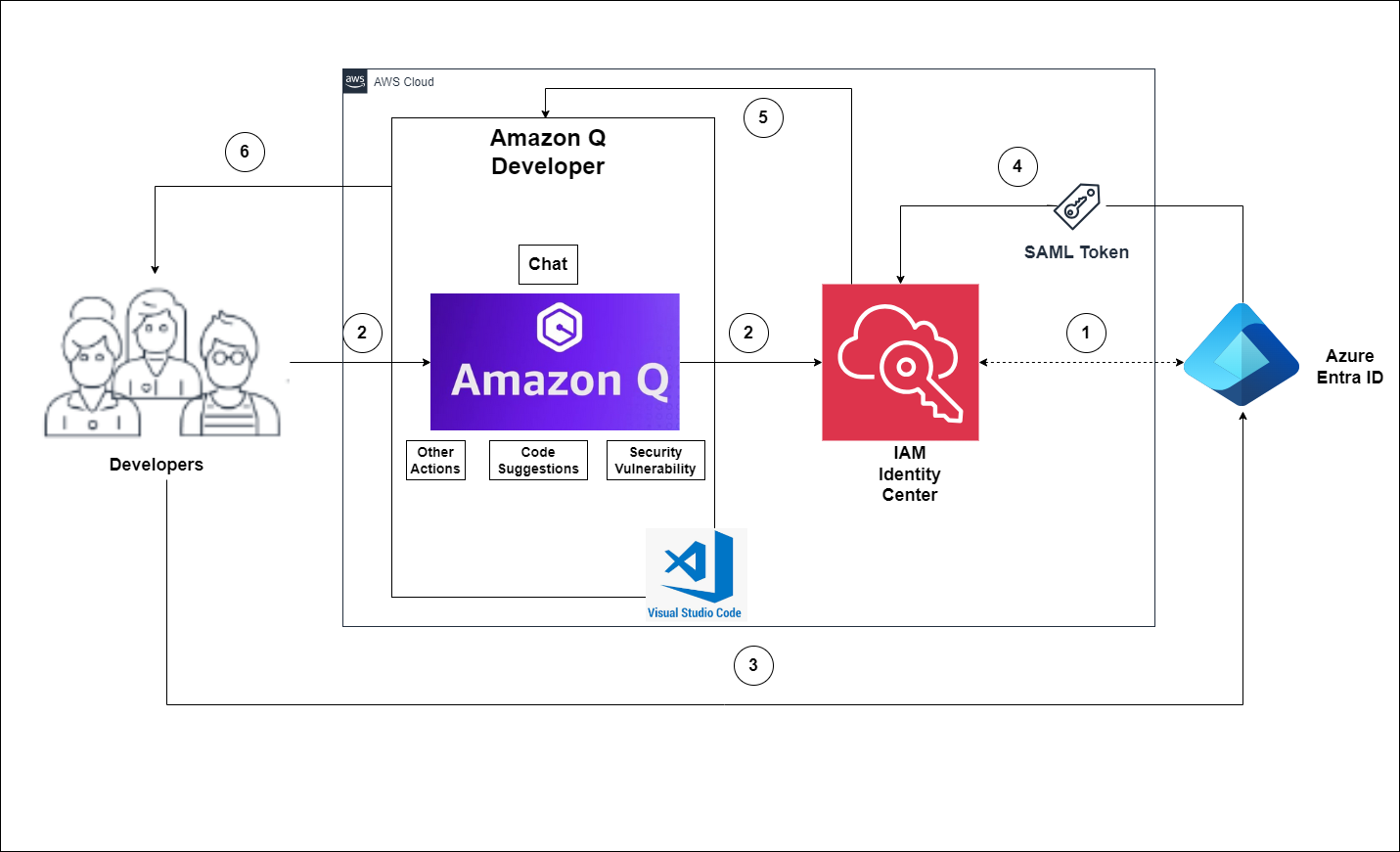
The flow for accessing Amazon Q Developer through the IAM Identity Center involves the authentication of Entra ID users using Security Assertion Markup Language (SAML) 2.0 authentication (Figure 1).
Figure 1 – Solution Overview
The flow for accessing Amazon Q Developer through the IAM Identity Center involves the authentication of Entra ID users using SAML 2.0 authentication. (Figure 1).
IAM Identity Center synchronizes users and groups information from Entra ID into IAM Identity Center using the System for Cross-domain Identity Management (SCIM) v2.0 protocol.
Developers with an Entra ID account connect to Amazon Q Developer through IAM Identity Center using the VS Code IDE.
If a developer isn’t already authenticated, they will be redirected to the Entra ID account login. The developer will sign in using their Entra ID credentials.
If the sign-in is successful, Entra ID processes the request and sends a SAML response containing the developer identity and authentication status to IAM Identity Center.
If the SAML response is valid and the developer is authenticated, IAM Identity Center grants access to Amazon Q Developer.
The developer can now securely access and use Amazon Q Developer.
Prerequisites
In order to perform the following procedure, make sure the following are in place.
Configure Entra ID and AWS IAM Identity Center integration
In this section, I will show how you can create a SAML base connection between Entra ID and AWS Identity Center so you can access AWS generative AI services using your Entra ID.
Note: You need to switch the console between Entra ID portal and AWS IAM Identity center. I recommend to open new browser tabs for each console.
Step 1 – Prepare your Microsoft tenant
Perform the below steps in the Entra identity provider section.
Navigate to Identity > Applications > Enterprise applications, and then choose New application.
On the Browse Microsoft Entra Gallery page, enter AWS IAM Identity Center in the search box.
Select AWS IAM Identity Center from the results area.
Choose Create.
Now you have created AWS IAM Identity Center application, set up single sign-on to enable users to sign into their applications using their Entra ID credentials. Select the Single sign-on tab from the left navigation plane and select Setup single sign on.
Step 2 – Collect required service provider metadata from IAM Identity Center
In this step, you will launch the Change identity source wizard from within the IAM Identity Center console and retrieve the metadata file and the AWS specific sign-in URL. You will need this to enter when configuring the connection with Entra ID in the next step.
IAM Identity Center.
You need to enable this in order to configure SSO.
Navigate to Services –> Security, Identity, & Compliance –> AWS IAM Identity Center.
Choose Enable (Figure 2).
Figure 2 – Get started with AWS IAM Identity Center
In the left navigation pane, choose Settings.
On the Settings page, find Identity source, select Actions pull-down menu, and select Change identity source.
On the Change identity source page, choose External identity provider (Figure 3).
Figure 3 – Select External identity provider
On the Configure external identity provider page, under Service provider metadata, select Download metadata file (XML file).
In the same section, locate the AWS access portal sign-in URL value and copy it. You will need to enter this value when prompted in the next step (Figure 4).
Figure 4 – Copy provider metadata URLs
Leave this page open, and move to the next step to configure the AWS IAM Identity Center enterprise application in Entra ID. Later, you will return to this page to complete the process.
Step 3 – Configure the AWS IAM Identity Center enterprise application in Entra ID
This procedure establishes one-half of the SAML connection on the Microsoft side using the values from the metadata file and Sign-On URL you obtained in the previous step.
In the Microsoft Entra admin center console, navigate to Identity > Applications > Enterprise applications and then choose AWS IAM Identity Center.
On the left, choose Single sign-on.
On the Set up Single sign on with SAML page, choose Upload metadata file, choose the folder icon, select the service provider metadata file that you downloaded in the previous step 2.6, and then choose Add.
On the Basic SAML Configuration page, verify that both the Identifier and Reply URL values now point to endpoints in AWS that start with https://<REGION>.signin.aws.amazon.com/platform/saml/.
Under Sign on URL (Optional), paste in the AWS access portal sign-in URL value you copied in the previous step (Step 2.7), choose Save, and then choose X to close the window.
If prompted to test single sign-on with AWS IAM Identity Center, choose No I’ll test later. You will do this verification in a later step.
On the Set up Single Sign-On with SAML page, in the SAML Certificates section, next to Federation Metadata XML, choose Download to save the metadata file to your system. You will need to upload this file when prompted in the next step.
Step 4 – Configure the Entra ID external IdP in AWS IAM Identity Center
Next you will return to the Change identity source wizard in the IAM Identity Center console to complete the second-half of the SAML connection in AWS.
Return to the browser session you left open in the IAM Identity Center console.
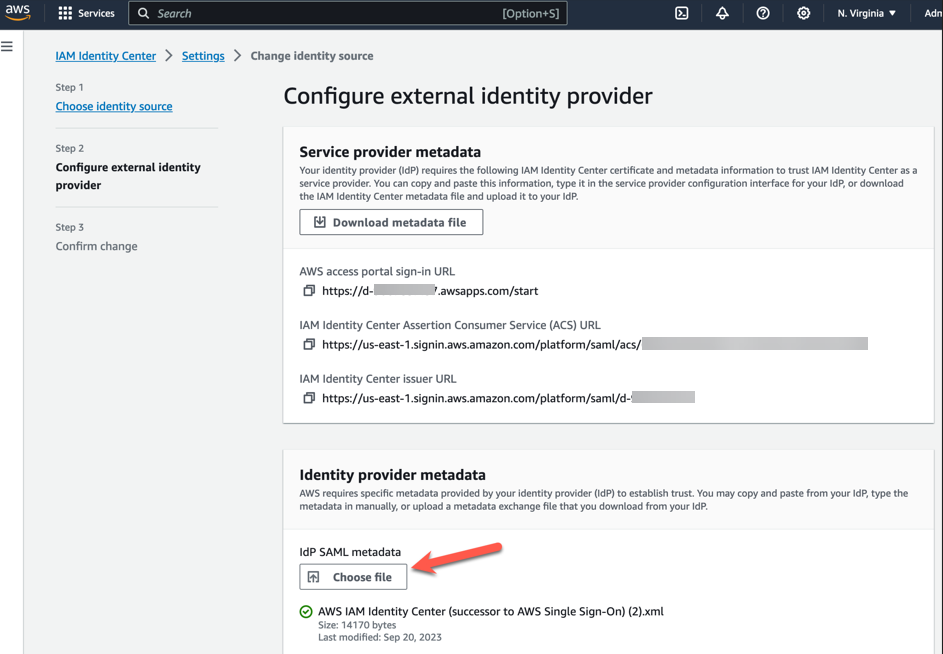
On the Configure external identity provider page, in the Identity provider metadata section, under IdP SAML metadata, choose the Choose file button, and select the identity provider metadata file that you downloaded from Microsoft Entra ID in the previous step, and then choose Open (Figure 5).
Figure 5 – AWS IAM Identity center metadata
Choose Next
After you read the disclaimer and are ready to proceed, enter ACCEPT
Choose Change identity source to apply your changes (Figure 6).
Figure 6 – AWS IAM Identity center metadata
Confirm the changes (Figure 7).
Figure 7 – AWS IAM Identity center metadata configuration changes progress console.
Step 5 – Configure and test your SCIM synchronization
In this step, you will set up automatic provisioning (synchronization) of user and group information from Microsoft Entra ID into IAM Identity Center using the SCIM v2.0 protocol. You configure this connection in Microsoft Entra ID using your SCIM endpoint for AWS IAM Identity Center and a bearer token that is created automatically by AWS IAM Identity Center.
To enable automatic provisioning of Entra ID users to IAM Identity Center, follow these steps using the IAM Identity Center application in Entra ID. For testing purposes, you can create a new user (TestUser) in Entra ID with details like First Name, Last Name, Email ID, Department, and more. Once you’ve configured SCIM synchronization, you can verify that this user and their relevant attributes were successfully synced to AWS IAM Identity Center.
In this procedure, you will use the IAM Identity Center console to enable automatic provisioning of users and groups coming from Entra ID into IAM Identity Center.
Open the IAM Identity Center console and Choose Setting in the left navigation pane.
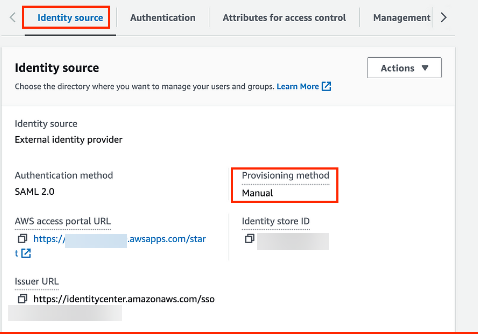
On the Settings page, under the Identity source tab, notice that Provisioning method is set to Manual (Figure 8).
Figure 8 – AWS IAM Identity center console with provisioning method configuration details
Locate the Automatic provisioning information box, and then choose Enable. This immediately enables automatic provisioning in IAM Identity Center and displays the necessary SCIM endpoint and access token information.
In the Inbound automatic provisioning dialog box, copy each of the values for the following options. You will need to paste these in the next step when you configure provisioning in Entra ID.
SCIM endpoint – For example, https://scim.us-east-2.amazonaws.com/11111111111-2222-3333-4444-555555555555/scim/v2/
Access token – Choose Show token to copy the value (Figure 9).
Figure 9 – AWS IAM Identity center automatic provisioning info
Choose Close.
Under the Identity source tab, notice that Provisioning method is now set to SCIM.
Step 6 – Configure automatic provisioning in Entra ID
Now that you have your test user in place and have enabled SCIM in IAM Identity Center, you can proceed with configuring the SCIM synchronization settings in Entra ID.
In the Microsoft Entra admin center console, navigate to Identity > Applications > Enterprise applications and then choose AWS IAM Identity Center.
Choose Provisioning, under Manage, choose Provisioning
In Provisioning Mode select
For Admin Credentials, in Tenant URL paste in the SCIM endpoint URL value you copied earlier. In Secret Token, paste in the Access token value (Figure 10).
Figure 10 – Azure Enterprise AWS IAM Identity center application provisioning configuration tab
Choose Test Connection. You should see a message indicating that the tested credentials were successfully authorized to enable provisioning (Figure 11).
Figure 11 – Azure Enterprise AWS IAM Identity center application provisioning testing status
Choose Save.
Under Manage, choose Users and groups, and then choose Add user/group.
On the Add Assignment page, under Users, choose None Selected.
Select TestUser, and then choose Select.
On the Add Assignment page, choose
Choose Overview, and then choose Start provisioning (Figure 12).
Figure 12 – AWS IAM Identity center application Start provisioning tab
Note : The default provisioning interval is set to 40 minutes. Our users (Figure 13) are successfully provisioned and are now available in the AWS IAM Identity Center console.
In this section, you will verify that TestUser user was successfully provisioned and that all attributes are displayed in IAM Identity Center (Figure 13).
Figure 13 – AWS IAM Identity center application user console example
In the Identity source in IDC section, enable Identity-aware console sessions (Figure 14). This enables AWS IAM Identity Center user and session IDs to be included in users’ AWS console sessions when they sign in. For example, Amazon Q Developer Pro uses identity-aware console sessions to personalize the service experience.
I have completed Entra ID and AWS Identity Center configuration. You can see Entra ID identity synced successfully with AWS IAM identity center.
Step 7 – Set up AWS Toolkit with IAM Identity Center
To use Amazon Q Developer, you will now set up the AWS Toolkit within integrated development environments (IDE) to establish authentication with the IAM Identity Center.
AWS Toolkit for Visual Studio Code is an open-source plug-in for VS Code that makes it easier for developers by providing an integrated experience to create, debug, and deploy applications on AWS. Getting started with Amazon Q Developer in VS Code is simple.
Open the AWS Toolkit for Visual Studio Code extension in your VS Code IDE. Install AWS Toolkit for VS Code, which is available as a download from the VS Code Marketplace.
From the AWS Toolkit for Visual Studio Code extension in the VS Code Marketplace, choose Install to begin the installation process.
When prompted, choose to restart VS Code to complete the installation process.
Step 8 – Setup Amazon Q Developer service with VS Code using AWS IAM identity center.
After installing the Amazon Q extension or plugin, authenticate through IAM Identity Center or AWS Builder ID.
After your identity has been subscribed to Amazon Q Developer Pro, complete the following steps to authenticate.
Choose the Amazon Q icon from the sidebar in your IDE
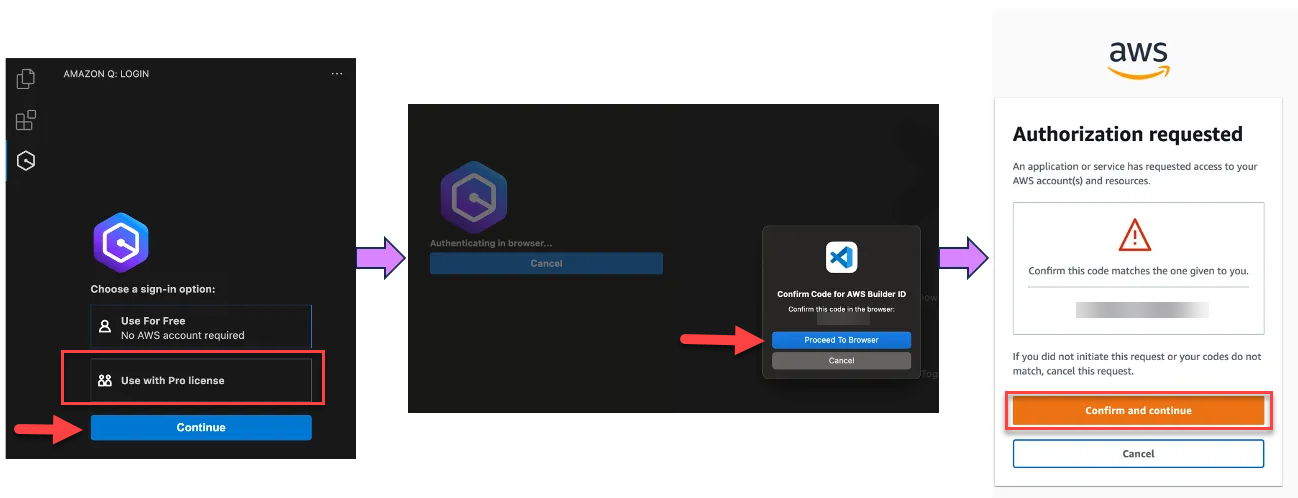
Choose Use with Pro license and select Continue (Figure 15).
Figure 15 – Visual Studio code Amazon Q Developer extension
Enter the IAM Identity Center URL you previously copied into the Start URL
Set the appropriate region, example us-east-1, and select Continue
Click Copy Code and Proceed to copy the code from the resulting pop-up.
When prompted by the Do you want Code to open the external website? pop-up, select Open
Paste the code copied in Step 6 and select Next
Enter your Entra ID credentials and select Sign in
Select Allow Access toAWS IDE Extensions for VSCode to access Amazon Q Developer (Figure 16).
Figure 16 – Allow VS Code to access Amazon Q Developer
When the connection is complete, a notification indicates that it is safe to close your browser. Close the browser tab and return to your IDE.
You are now all set to use Amazon Q Developer from within IDE, authenticated with your Entra ID credentials.
Step 9 – Test configuration examples
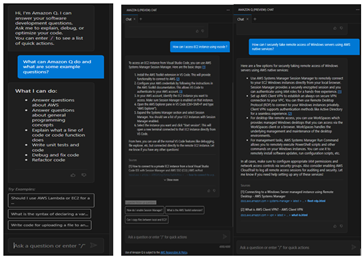
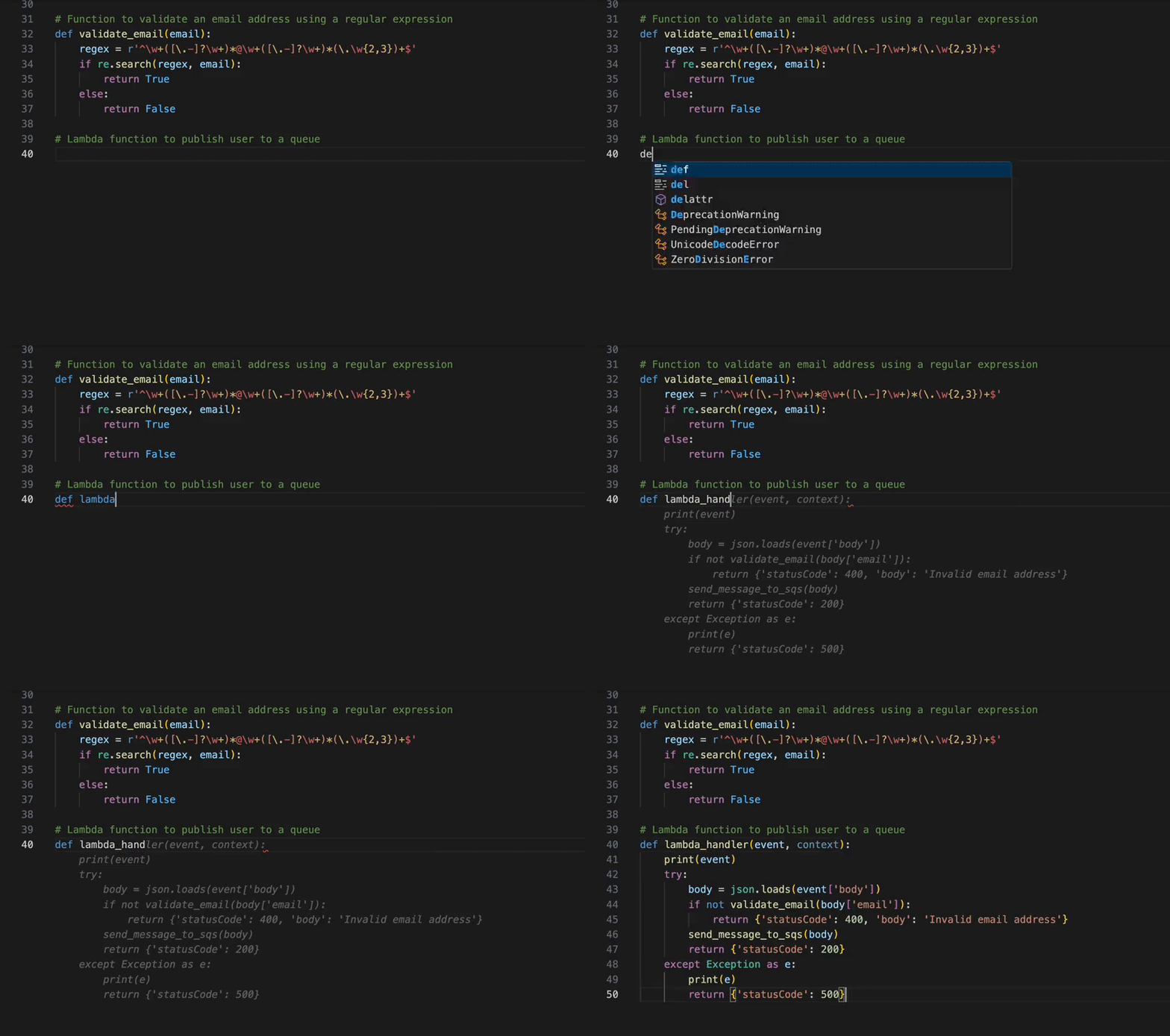
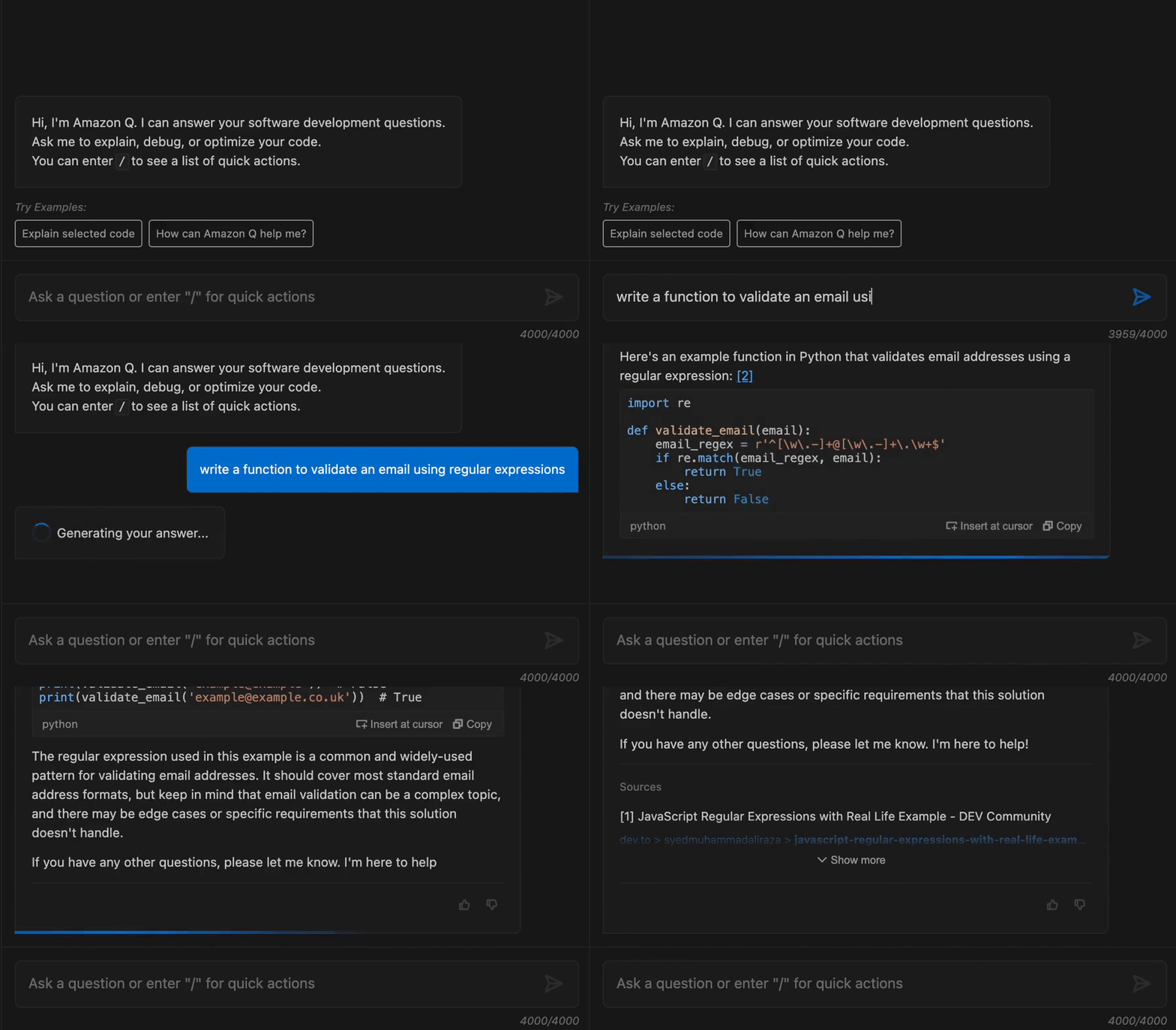
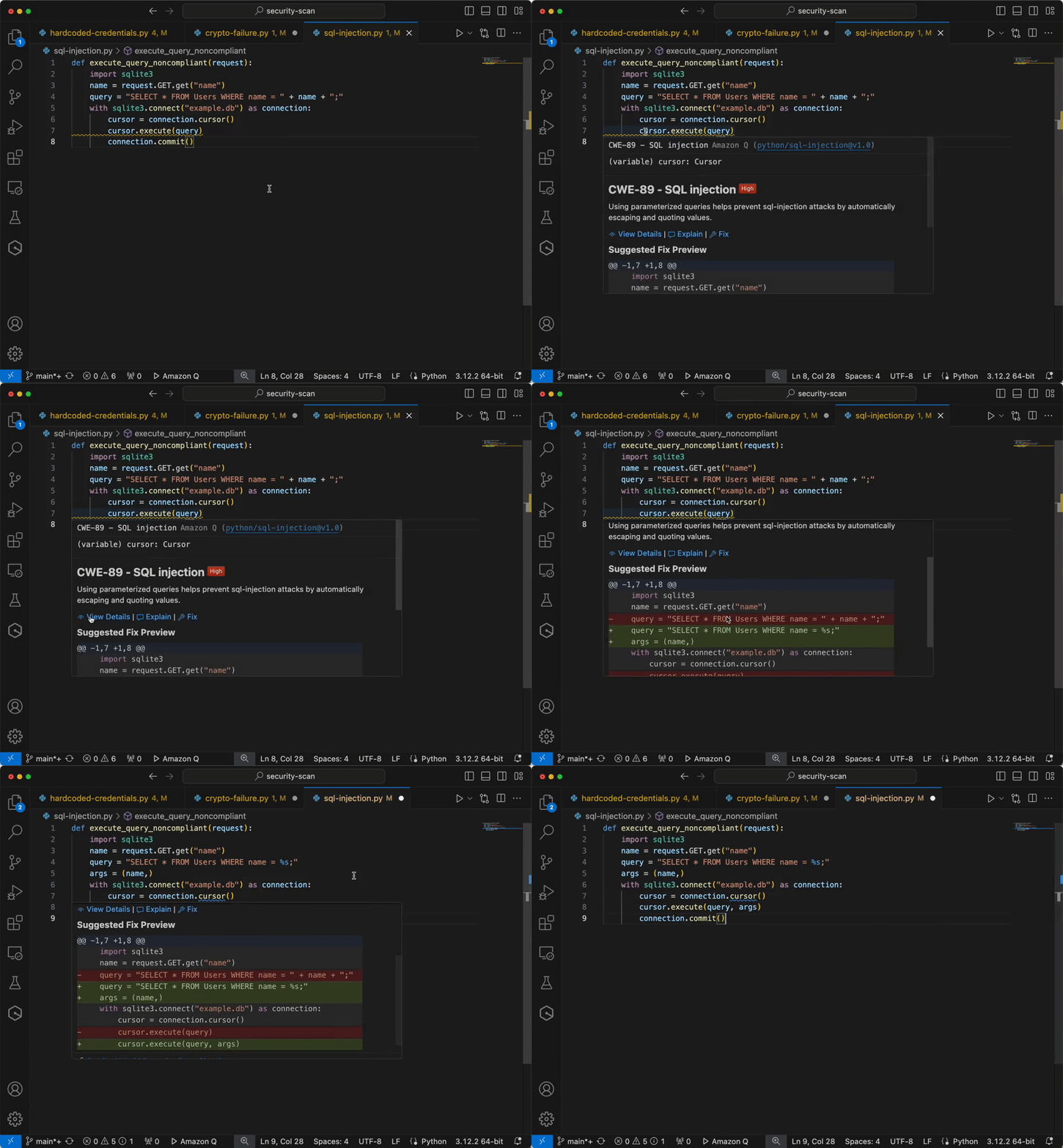
Now you have configured IAM identity Center access with VS code now you can chat, get inline code suggestions, check for security vulnerabilities with Amazon Q Developer to learn about, build, and operate AWS applications. I have mentioned a few examples of Amazon Q Suggestions, Code suggestions, Security Vulnerabilities during development for your reference (Figures 17 ,18 ,19 ,20).
Figure 17 – Amazon Q suggestion examples
Example of developers get the recommendations using Amazon Q developer.
Figure 18 – Amazon Q Developer example
Figure 19 – Generate code, explain code, and get answers to questions about software development.
Example of integrating secure coding practices early in the software development lifecycle using Amazon Q developer.
Figure 20 – Analyze and fix security vulnerabilities in your project example
Cleanup
Configuring AWS and Azure services from this blog will provision resources which incur cost. It is a best practice to delete configurations and resources that you are no longer using so that you do not incur unintended charges.
Conclusion
In this blog post, you learned how to integrate AWS IAM Identity Center and Entra ID IdP for accessing Amazon Q Developer service using VS Code IDE, which speeds up development. Next, you set up the AWS Toolkit to establish a secure connection to AWS using Entra ID credentials, granting you access to the Amazon Q Developer Professional Tier. Using SCIM automatic provisioning for user provisioning and access assignment saves time and speeds up onboarding, allowing for immediate use of AWS services using you own identity. Using Amazon Q, developers get the recommendations and information within their working environment in the IDE, enabling them to integrate secure coding practices early in the software development lifecycle. Developers can proactively scan their existing code using Amazon Q and remediate the security vulnerabilities found in the code.
The press is reporting a critical Windows vulnerability affecting IPv6.
As Microsoft explained in its Tuesday advisory, unauthenticated attackers can exploit the flaw remotely in low-complexity attacks by repeatedly sending IPv6 packets that include specially crafted packets.
Microsoft also shared its exploitability assessment for this critical vulnerability, tagging it with an “exploitation more likely” label, which means that threat actors could create exploit code to “consistently exploit the flaw in attacks.”
Details are being withheld at the moment. Microsoft strongly recommends patching now.
ProPublica has a long investigative article on how the Cyber Safety Review Board failed to investigate the SolarWinds attack, and specifically Microsoft’s culpability, even though they were directed by President Biden to do so.
Microsoft recently caught state-backed hackers using its generative AI tools to help with their attacks. In the security community, the immediate questions weren’t about how hackers were using the tools (that was utterly predictable), but about how Microsoft figured it out. The natural conclusion was that Microsoft was spying on its AI users, looking for harmful hackers at work.
Some pushed back at characterizing Microsoft’s actions as “spying.” Of course cloud service providers monitor what users are doing. And because we expect Microsoft to be doing something like this, it’s not fair to call it spying.
We see this argument as an example of our shifting collective expectations of privacy. To understand what’s happening, we can learn from an unlikely source: fish.
In the mid-20th century, scientists began noticing that the number of fish in the ocean—so vast as to underlie the phrase “There are plenty of fish in the sea”—had started declining rapidly due to overfishing. They had already seen a similar decline in whale populations, when the post-WWII whaling industry nearly drove many species extinct. In whaling and later in commercial fishing, new technology made it easier to find and catch marine creatures in ever greater numbers. Ecologists, specifically those working in fisheries management, began studying how and when certain fish populations had gone into serious decline.
One scientist, Daniel Pauly, realized that researchers studying fish populations were making a major error when trying to determine acceptable catch size. It wasn’t that scientists didn’t recognize the declining fish populations. It was just that they didn’t realize how significant the decline was. Pauly noted that each generation of scientists had a different baseline to which they compared the current statistics, and that each generation’s baseline was lower than that of the previous one.
What seems normal to us in the security community is whatever was commonplace at the beginning of our careers.
Pauly called this “shifting baseline syndrome” in a 1995 paper. The baseline most scientists used was the one that was normal when they began their research careers. By that measure, each subsequent decline wasn’t significant, but the cumulative decline was devastating. Each generation of researchers came of age in a new ecological and technological environment, inadvertently masking an exponential decline.
Pauly’s insights came too late to help those managing some fisheries. The ocean suffered catastrophes such as the complete collapse of the Northwest Atlantic cod population in the 1990s.
Internet surveillance, and the resultant loss of privacy, is following the same trajectory. Just as certain fish populations in the world’s oceans have fallen 80 percent, from previously having fallen 80 percent, from previously having fallen 80 percent (ad infinitum), our expectations of privacy have similarly fallen precipitously. The pervasive nature of modern technology makes surveillance easier than ever before, while each successive generation of the public is accustomed to the privacy status quo of their youth. What seems normal to us in the security community is whatever was commonplace at the beginning of our careers.
Historically, people controlled their computers, and software was standalone. The always-connected cloud-deployment model of software and services flipped the script. Most apps and services are designed to be always-online, feeding usage information back to the company. A consequence of this modern deployment model is that everyone—cynical tech folks and even ordinary users—expects that what you do with modern tech isn’t private. But that’s because the baseline has shifted.
AI chatbots are the latest incarnation of this phenomenon: They produce output in response to your input, but behind the scenes there’s a complex cloud-based system keeping track of that input—both to improve the service and to sell you ads.
Shifting baselines are at the heart of our collective loss of privacy. The U.S. Supreme Court has long held that our right to privacy depends on whether we have a reasonable expectation of privacy. But expectation is a slippery thing: It’s subject to shifting baselines.
The question remains: What now? Fisheries scientists, armed with knowledge of shifting-baseline syndrome, now look at the big picture. They no longer consider relative measures, such as comparing this decade with the last decade. Instead, they take a holistic, ecosystem-wide perspective to see what a healthy marine ecosystem and thus sustainable catch should look like. They then turn these scientifically derived sustainable-catch figures into limits to be codified by regulators.
In privacy and security, we need to do the same. Instead of comparing to a shifting baseline, we need to step back and look at what a healthy technological ecosystem would look like: one that respects people’s privacy rights while also allowing companies to recoup costs for services they provide. Ultimately, as with fisheries, we need to take a big-picture perspective and be aware of shifting baselines. A scientifically informed and democratic regulatory process is required to preserve a heritage—whether it be the ocean or the Internet—for the next generation.
This essay was written with Barath Raghavan, and previously appeared in IEEE Spectrum.
Cloudforce One is publishing the results of our investigation and real-time effort to detect, deny, degrade, disrupt, and delay threat activity by the Russia-aligned threat actor FlyingYeti during their latest phishing campaign targeting Ukraine. At the onset of Russia’s invasion of Ukraine on February 24, 2022, Ukraine introduced a moratorium on evictions and termination of utility services for unpaid debt. The moratorium ended in January 2024, resulting in significant debt liability and increased financial stress for Ukrainian citizens. The FlyingYeti campaign capitalized on anxiety over the potential loss of access to housing and utilities by enticing targets to open malicious files via debt-themed lures. If opened, the files would result in infection with the PowerShell malware known as COOKBOX, allowing FlyingYeti to support follow-on objectives, such as installation of additional payloads and control over the victim’s system.
Since April 26, 2024, Cloudforce One has taken measures to prevent FlyingYeti from launching their phishing campaign – a campaign involving the use of Cloudflare Workers and GitHub, as well as exploitation of the WinRAR vulnerability CVE-2023-38831. Our countermeasures included internal actions, such as detections and code takedowns, as well as external collaboration with third parties to remove the actor’s cloud-hosted malware. Our effectiveness against this actor prolonged their operational timeline from days to weeks. For example, in a single instance, FlyingYeti spent almost eight hours debugging their code as a result of our mitigations. By employing proactive defense measures, we successfully stopped this determined threat actor from achieving their objectives.
Executive Summary
On April 18, 2024, Cloudforce One detected the Russia-aligned threat actor FlyingYeti preparing to launch a phishing espionage campaign targeting individuals in Ukraine.
From mid-April to mid-May, we observed FlyingYeti conduct reconnaissance activity, create lure content for use in their phishing campaign, and develop various iterations of their malware. We assessed that the threat actor intended to launch their campaign in early May, likely following Orthodox Easter.
After several weeks of monitoring actor reconnaissance and weaponization activity (Cyber Kill Chain Stages 1 and 2), we successfully disrupted FlyingYeti’s operation moments after the final COOKBOX payload was built.
The payload included an exploit for the WinRAR vulnerability CVE-2023-38831, which FlyingYeti will likely continue to use in their phishing campaigns to infect targets with malware.
We offer steps users can take to defend themselves against FlyingYeti phishing operations, and also provide recommendations, detections, and indicators of compromise.
Who is FlyingYeti?
FlyingYeti is the cryptonym given by Cloudforce One to the threat group behind this phishing campaign, which overlaps with UAC-0149 activity tracked by CERT-UA in February and April 2024. The threat actor uses dynamic DNS (DDNS) for their infrastructure and leverages cloud-based platforms for hosting malicious content and for malware command and control (C2). Our investigation of FlyingYeti TTPs suggests this is likely a Russia-aligned threat group. The actor appears to primarily focus on targeting Ukrainian military entities. Additionally, we observed Russian-language comments in FlyingYeti’s code, and the actor’s operational hours falling within the UTC+3 time zone.
Campaign background
In the days leading up to the start of the campaign, Cloudforce One observed FlyingYeti conducting reconnaissance on payment processes for Ukrainian communal housing and utility services:
April 22, 2024 – research into changes made in 2016 that introduced the use of QR codes in payment notices
April 22, 2024 – research on current developments concerning housing and utility debt in Ukraine
April 25, 2024 – research on the legal basis for restructuring housing debt in Ukraine as well as debt involving utilities, such as gas and electricity
Cloudforce One judges that the observed reconnaissance is likely due to the Ukrainian government’s payment moratorium introduced at the start of the full-fledged invasion in February 2022. Under this moratorium, outstanding debt would not lead to evictions or termination of provision of utility services. However, on January 9, 2024, the government lifted this ban, resulting in increased pressure on Ukrainian citizens with outstanding debt. FlyingYeti sought to capitalize on that pressure, leveraging debt restructuring and payment-related lures in an attempt to increase their chances of successfully targeting Ukrainian individuals.
Analysis of the Komunalka-themed phishing site
The disrupted phishing campaign would have directed FlyingYeti targets to an actor-controlled GitHub page at hxxps[:]//komunalka[.]github[.]io, which is a spoofed version of the Kyiv Komunalka communal housing site https://www.komunalka.ua. Komunalka functions as a payment processor for residents in the Kyiv region and allows for payment of utilities, such as gas, electricity, telephone, and Internet. Additionally, users can pay other fees and fines, and even donate to Ukraine’s defense forces.
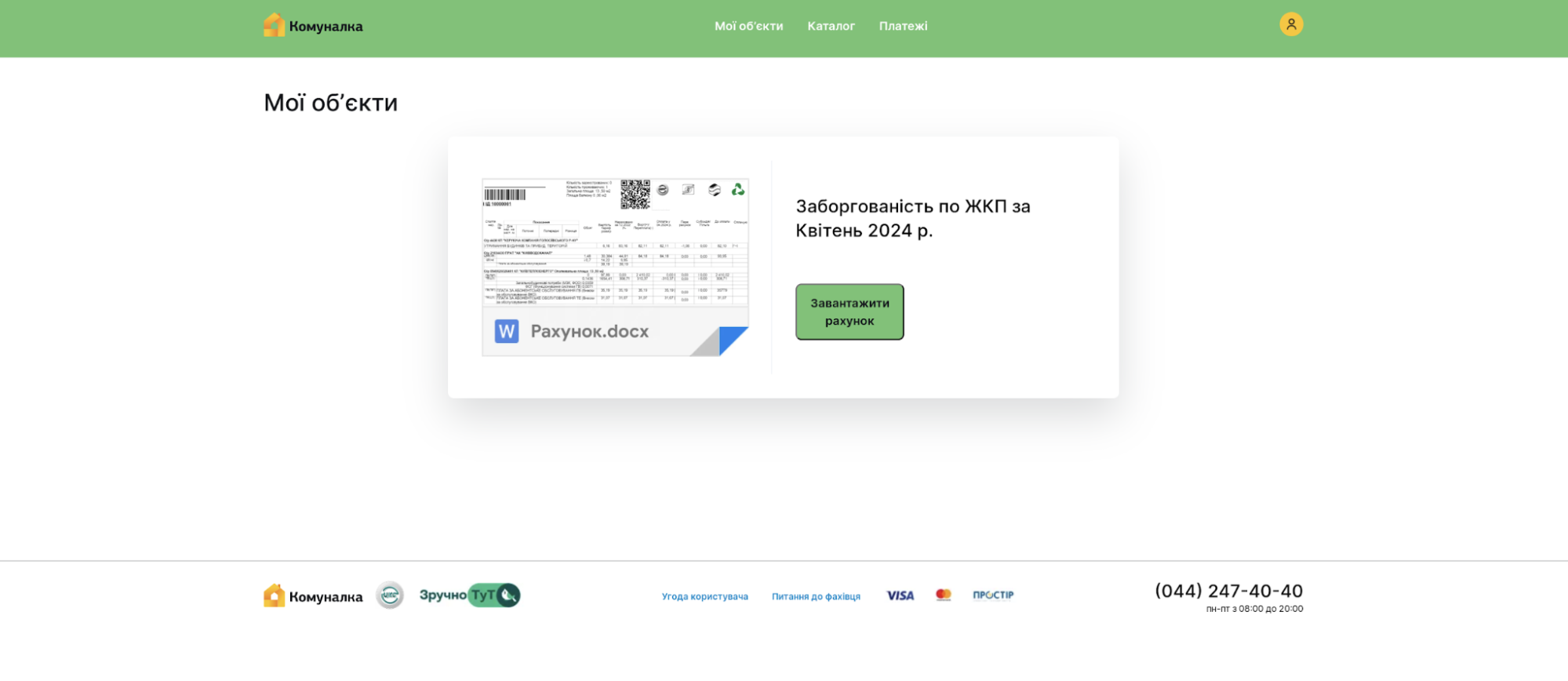
Based on past FlyingYeti operations, targets may be directed to the actor’s Github page via a link in a phishing email or an encrypted Signal message. If a target accesses the spoofed Komunalka platform at hxxps[:]//komunalka[.]github[.]io, the page displays a large green button with a prompt to download the document “Рахунок.docx” (“Invoice.docx”), as shown in Figure 1. This button masquerades as a link to an overdue payment invoice but actually results in the download of the malicious archive “Заборгованість по ЖКП.rar” (“Debt for housing and utility services.rar”).
Figure 1: Prompt to download malicious archive “Заборгованість по ЖКП.rar”
A series of steps must take place for the download to successfully occur:
The target clicks the green button on the actor’s GitHub page hxxps[:]//komunalka.github[.]io
The target’s device sends an HTTP POST request to the Cloudflare Worker worker-polished-union-f396[.]vqu89698[.]workers[.]dev with the HTTP request body set to “user=Iahhdr”
The Cloudflare Worker processes the request and evaluates the HTTP request body
If the request conditions are met, the Worker fetches the RAR file from hxxps[:]//raw[.]githubusercontent[.]com/kudoc8989/project/main/Заборгованість по ЖКП.rar, which is then downloaded on the target’s device
Cloudforce One identified the infrastructure responsible for facilitating the download of the malicious RAR file and remediated the actor-associated Worker, preventing FlyingYeti from delivering its malicious tooling. In an effort to circumvent Cloudforce One’s mitigation measures, FlyingYeti later changed their malware delivery method. Instead of the Workers domain fetching the malicious RAR file, it was loaded directly from GitHub.
Analysis of the malicious RAR file
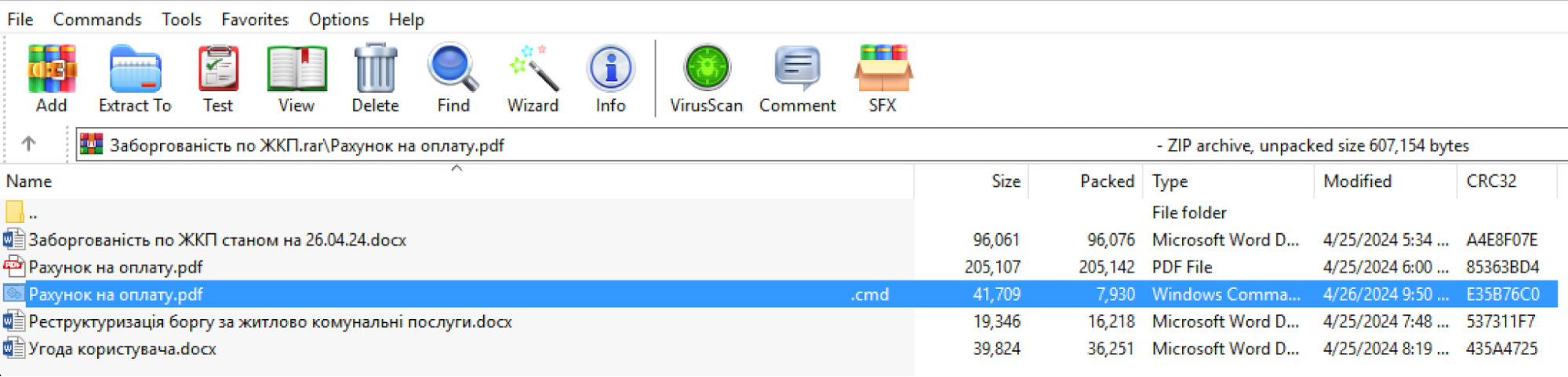
During remediation, Cloudforce One recovered the RAR file “Заборгованість по ЖКП.rar” and performed analysis of the malicious payload. The downloaded RAR archive contains multiple files, including a file with a name that contains the unicode character “U+201F”. This character appears as whitespace on Windows devices and can be used to “hide” file extensions by adding excessive whitespace between the filename and the file extension. As highlighted in blue in Figure 2, this cleverly named file within the RAR archive appears to be a PDF document but is actually a malicious CMD file (“Рахунок на оплату.pdf[unicode character U+201F].cmd”).
Figure 2: Files contained in the malicious RAR archive “Заборгованість по ЖКП.rar” (“Housing Debt.rar”)
FlyingYeti included a benign PDF in the archive with the same name as the CMD file but without the unicode character, “Рахунок на оплату.pdf” (“Invoice for payment.pdf”). Additionally, the directory name for the archive once decompressed also contained the name “Рахунок на оплату.pdf”. This overlap in names of the benign PDF and the directory allows the actor to exploit the WinRAR vulnerability CVE-2023-38831. More specifically, when an archive includes a benign file with the same name as the directory, the entire contents of the directory are opened by the WinRAR application, resulting in the execution of the malicious CMD. In other words, when the target believes they are opening the benign PDF “Рахунок на оплату.pdf”, the malicious CMD file is executed.
The CMD file contains the FlyingYeti PowerShell malware known as COOKBOX. The malware is designed to persist on a host, serving as a foothold in the infected device. Once installed, this variant of COOKBOX will make requests to the DDNS domain postdock[.]serveftp[.]com for C2, awaiting PowerShell cmdlets that the malware will subsequently run.
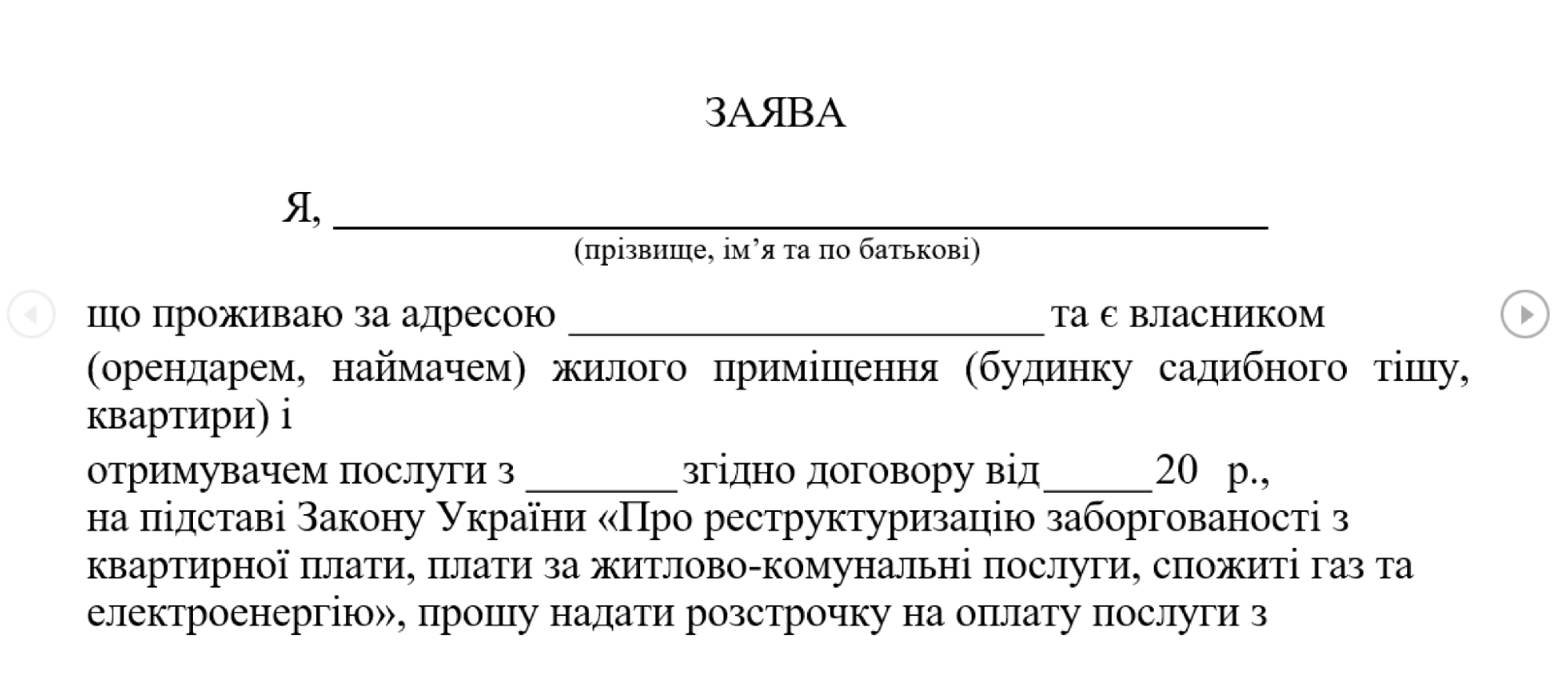
Alongside COOKBOX, several decoy documents are opened, which contain hidden tracking links using the Canary Tokens service. The first document, shown in Figure 3 below, poses as an agreement under which debt for housing and utility services will be restructured.
Figure 3: Decoy document Реструктуризація боргу за житлово комунальні послуги.docx
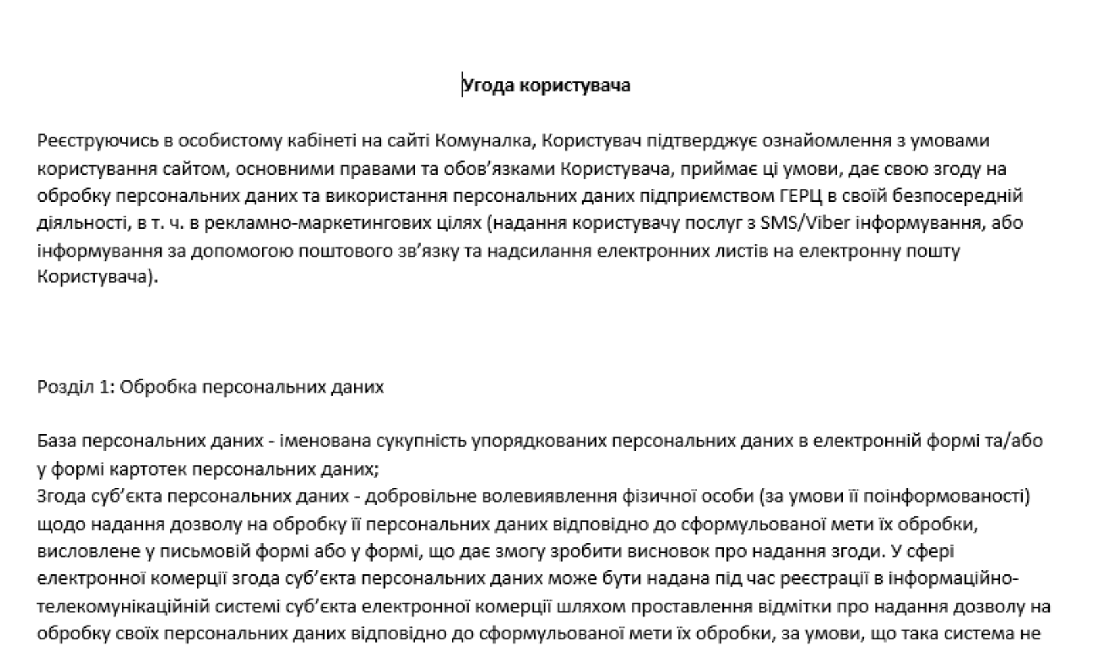
The second document (Figure 4) is a user agreement outlining the terms and conditions for the usage of the payment platform komunalka[.]ua.
The use of relevant decoy documents as part of the phishing and delivery activity are likely an effort by FlyingYeti operators to increase the appearance of legitimacy of their activities.
The phishing theme we identified in this campaign is likely one of many themes leveraged by this actor in a larger operation to target Ukrainian entities, in particular their defense forces. In fact, the threat activity we detailed in this blog uses many of the same techniques outlined in a recent FlyingYeti campaign disclosed by CERT-UA in mid-April 2024, where the actor leveraged United Nations-themed lures involving Peace Support Operations to target Ukraine’s military. Due to Cloudforce One’s defensive actions covered in the next section, this latest FlyingYeti campaign was prevented as of the time of publication.
Mitigating FlyingYeti activity
Cloudforce One mitigated FlyingYeti’s campaign through a series of actions. Each action was taken to increase the actor’s cost of continuing their operations. When assessing which action to take and why, we carefully weighed the pros and cons in order to provide an effective active defense strategy against this actor. Our general goal was to increase the amount of time the threat actor spent trying to develop and weaponize their campaign.
We were able to successfully extend the timeline of the threat actor’s operations from hours to weeks. At each interdiction point, we assessed the impact of our mitigation to ensure the actor would spend more time attempting to launch their campaign. Our mitigation measures disrupted the actor’s activity, in one instance resulting in eight additional hours spent on debugging code.
Due to our proactive defense efforts, FlyingYeti operators adapted their tactics multiple times in their attempts to launch the campaign. The actor originally intended to have the Cloudflare Worker fetch the malicious RAR file from GitHub. After Cloudforce One interdiction of the Worker, the actor attempted to create additional Workers via a new account. In response, we disabled all Workers, leading the actor to load the RAR file directly from GitHub. Cloudforce One notified GitHub, resulting in the takedown of the RAR file, the GitHub project, and suspension of the account used to host the RAR file. In return, FlyingYeti began testing the option to host the RAR file on the file sharing sites pixeldrain and Filemail, where we observed the actor alternating the link on the Komunalka phishing site between the following:
We notified GitHub of the actor’s evolving tactics, and in response GitHub removed the Komunalka phishing site. After analyzing the files hosted on pixeldrain and Filemail, we determined the actor uploaded dummy payloads, likely to monitor access to their phishing infrastructure (FileMail logs IP addresses, and both file hosting sites provide view and download counts). At the time of publication, we did not observe FlyingYeti upload the malicious RAR file to either file hosting site, nor did we identify the use of alternative phishing or malware delivery methods.
A timeline of FlyingYeti’s activity and our corresponding mitigations can be found below.
Event timeline
Date
Event Description
2024-04-18 12:18
Threat Actor (TA) creates a Worker to handle requests from a phishing site
2024-04-18 14:16
TA creates phishing site komunalka[.]github[.]io on GitHub
2024-04-25 12:25
TA creates a GitHub repo to host a RAR file
2024-04-26 07:46
TA updates the first Worker to handle requests from users visiting komunalka[.]github[.]io
2024-04-26 08:24
TA uploads a benign test RAR to the GitHub repo
2024-04-26 13:38
Cloudforce One identifies a Worker receiving requests from users visiting komunalka[.]github[.]io, observes its use as a phishing page
2024-04-26 13:46
Cloudforce One identifies that the Worker fetches a RAR file from GitHub (the malicious RAR payload is not yet hosted on the site)
2024-04-26 19:22
Cloudforce One creates a detection to identify the Worker that fetches the RAR
2024-04-26 21:13
Cloudforce One deploys real-time monitoring of the RAR file on GitHub
2024-05-02 06:35
TA deploys a weaponized RAR (CVE-2023-38831) to GitHub with their COOKBOX malware packaged in the archive
2024-05-06 10:03
TA attempts to update the Worker with link to weaponized RAR, the Worker is immediately blocked
2024-05-06 10:38
TA creates a new Worker, the Worker is immediately blocked
2024-05-06 11:04
TA creates a new account (#2) on Cloudflare
2024-05-06 11:06
TA creates a new Worker on account #2 (blocked)
2024-05-06 11:50
TA creates a new Worker on account #2 (blocked)
2024-05-06 12:22
TA creates a new modified Worker on account #2
2024-05-06 16:05
Cloudforce One disables the running Worker on account #2
2024-05-07 22:16
TA notices the Worker is blocked, ceases all operations
2024-05-07 22:18
TA deletes original Worker first created to fetch the RAR file from the GitHub phishing page
2024-05-09 19:28
Cloudforce One adds phishing page komunalka[.]github[.]io to real-time monitoring
2024-05-13 07:36
TA updates the github.io phishing site to point directly to the GitHub RAR link
2024-05-13 17:47
Cloudforce One adds COOKBOX C2 postdock[.]serveftp[.]com to real-time monitoring for DNS resolution
2024-05-14 00:04
Cloudforce One notifies GitHub to take down the RAR file
2024-05-15 09:00
GitHub user, project, and link for RAR are no longer accessible
2024-05-21 08:23
TA updates Komunalka phishing site on github.io to link to pixeldrain URL for dummy payload (pixeldrain only tracks view and download counts)
2024-05-21 08:25
TA updates Komunalka phishing site to link to FileMail URL for dummy payload (FileMail tracks not only view and download counts, but also IP addresses)
2024-05-21 12:21
Cloudforce One downloads PixelDrain document to evaluate payload
2024-05-21 12:47
Cloudforce One downloads FileMail document to evaluate payload
2024-05-29 23:59
GitHub takes down Komunalka phishing site
2024-05-30 13:00
Cloudforce One publishes the results of this investigation
Coordinating our FlyingYeti response
Cloudforce One leveraged industry relationships to provide advanced warning and to mitigate the actor’s activity. To further protect the intended targets from this phishing threat, Cloudforce One notified and collaborated closely with GitHub’s Threat Intelligence and Trust and Safety Teams. We also notified CERT-UA and Cloudflare industry partners such as CrowdStrike, Mandiant/Google Threat Intelligence, and Microsoft Threat Intelligence.
Hunting FlyingYeti operations
There are several ways to hunt FlyingYeti in your environment. These include using PowerShell to hunt for WinRAR files, deploying Microsoft Sentinel analytics rules, and running Splunk scripts as detailed below. Note that these detections may identify activity related to this threat, but may also trigger unrelated threat activity.
PowerShell hunting
Consider running a PowerShell script such as this one in your environment to identify exploitation of CVE-2023-38831. This script will interrogate WinRAR files for evidence of the exploit.
CVE-2023-38831
Description:winrar exploit detection
open suspios (.tar / .zip / .rar) and run this script to check it

function winrar-exploit-detect(){
$targetExtensions = @(".cmd" , ".ps1" , ".bat")
$tempDir = [System.Environment]::GetEnvironmentVariable("TEMP")
$dirsToCheck = Get-ChildItem -Path $tempDir -Directory -Filter "Rar*"
foreach ($dir in $dirsToCheck) {
    $files = Get-ChildItem -Path $dir.FullName -File
    foreach ($file in $files) {
        $fileName = $file.Name
        $fileExtension = [System.IO.Path]::GetExtension($fileName)
        if ($targetExtensions -contains $fileExtension) {
            $fileWithoutExtension = [System.IO.Path]::GetFileNameWithoutExtension($fileName); $filename.TrimEnd() -replace '\.$'
            $cmdFileName = "$fileWithoutExtension"
            $secondFile = Join-Path -Path $dir.FullName -ChildPath $cmdFileName

            if (Test-Path $secondFile -PathType Leaf) {
                Write-Host "[!] Suspicious pair detected "
                Write-Host "[*]  Original File:$($secondFile)" -ForegroundColor Green
                Write-Host "[*] Suspicious File:$($file.FullName)" -ForegroundColor Red

                # Read and display the content of the command file
                $cmdFileContent = Get-Content -Path $($file.FullName)
                Write-Host "[+] Command File Content:$cmdFileContent"
            }
        }
    }
}
}
winrar-exploit-detect
Microsoft Sentinel
In Microsoft Sentinel, consider deploying the rule provided below, which identifies WinRAR execution via cmd.exe. Results generated by this rule may be indicative of attack activity on the endpoint and should be analyzed.
DeviceProcessEvents
| where InitiatingProcessParentFileName has @"winrar.exe"
| where InitiatingProcessFileName has @"cmd.exe"
| project Timestamp, DeviceName, FileName, FolderPath, ProcessCommandLine, AccountName
| sort by Timestamp desc
Splunk
Consider using this script in your Splunk environment to look for WinRAR CVE-2023-38831 execution on your Microsoft endpoints. Results generated by this script may be indicative of attack activity on the endpoint and should be analyzed.
| tstats `security_content_summariesonly` count min(_time) as firstTime max(_time) as lastTime from datamodel=Endpoint.Processes where Processes.parent_process_name=winrar.exe `windows_shells` OR Processes.process_name IN ("certutil.exe","mshta.exe","bitsadmin.exe") by Processes.dest Processes.user Processes.parent_process_name Processes.parent_process Processes.process_name Processes.process Processes.process_id Processes.parent_process_id
| `drop_dm_object_name(Processes)`
| `security_content_ctime(firstTime)`
| `security_content_ctime(lastTime)`
| `winrar_spawning_shell_application_filter`
Cloudflare product detections
Cloudflare Email Security
Cloudflare Email Security (CES) customers can identify FlyingYeti threat activity with the following detections.
CVE-2023-38831
FLYINGYETI.COOKBOX
FLYINGYETI.COOKBOX.Launcher
FLYINGYETI.Rar
Recommendations
Cloudflare recommends taking the following steps to mitigate this type of activity:
Implement Zero Trust architecture foundations:
Deploy Cloud Email Security to ensure that email services are protected against phishing, BEC and other threats
Leverage browser isolation to separate messaging applications like LinkedIn, email, and Signal from your main network
Scan, monitor and/or enforce controls on specific or sensitive data moving through your network environment with data loss prevention policies
Ensure your systems have the latest WinRAR and Microsoft security updates installed
Consider preventing WinRAR files from entering your environment, both at your Cloud Email Security solution and your Internet Traffic Gateway
Run an Endpoint Detection and Response (EDR) tool such as CrowdStrike or Microsoft Defender for Endpoint to get visibility into binary execution on hosts
Search your environment for the FlyingYeti indicators of compromise (IOCs) shown below to identify potential actor activity within your network.
If you’re looking to uncover additional Threat Intelligence insights for your organization or need bespoke Threat Intelligence information for an incident, consider engaging with Cloudforce One by contacting your Customer Success manager or filling out this form.
At a Build conference event on Monday, Microsoft revealed a new AI-powered feature called “Recall” for Copilot+ PCs that will allow Windows 11 users to search and retrieve their past activities on their PC. To make it work, Recall records everything users do on their PC, including activities in apps, communications in live meetings, and websites visited for research. Despite encryption and local storage, the new feature raises privacy concerns for certain Windows users.
One of the promises of generative AI is a personal digital assistant. Acting as your advocate with others, and as a butler with you. This requires an intimacy greater than your search engine, email provider, cloud storage system, or phone. You’re going to want it with you 24/7, constantly training on everything you do. You will want it to know everything about you, so it can most effectively work on your behalf.
And it will help you in many ways. It will notice your moods and know what to suggest. It will anticipate your needs and work to satisfy them. It will be your therapist, life coach, and relationship counselor.
You will default to thinking of it as a friend. You will speak to it in natural language, and it will respond in kind. If it is a robot, it will look humanoid—or at least like an animal. It will interact with the whole of your existence, just like another person would.
[…]
And you will want to trust it. It will use your mannerisms and cultural references. It will have a convincing voice, a confident tone, and an authoritative manner. Its personality will be optimized to exactly what you like and respond to.
It will act trustworthy, but it will not be trustworthy. We won’t know how they are trained. We won’t know their secret instructions. We won’t know their biases, either accidental or deliberate.
We do know that they are built at enormous expense, mostly in secret, by profit-maximizing corporations for their own benefit.
[…]
All of this is a long-winded way of saying that we need trustworthy AI. AI whose behavior, limitations, and training are understood. AI whose biases are understood, and corrected for. AI whose goals are understood. That won’t secretly betray your trust to someone else.
The market will not provide this on its own. Corporations are profit maximizers, at the expense of society. And the incentives of surveillance capitalism are just too much to resist.
We are going to need some sort of public AI to counterbalance all of these corporate AIs.
EDITED TO ADD (5/24): Lots of comments about Microsoft Recall and security:
Because Recall is “default allow” (it relies on a list of things not to record) … it’s going to vacuum up huge volumes and heretofore unknown types of data, most of which are ephemeral today. The “we can’t avoid saving passwords if they’re not masked” warning Microsoft included is only the tip of that iceberg. There’s an ocean of data that the security ecosystem assumes is “out of reach” because it’s either never stored, or it’s encrypted in transit. All of that goes out the window if the endpoint is just going to…turn around and write it to disk. (And local encryption at rest won’t help much here if the data is queryable in the user’s own authentication context!)
The fact that Microsoft’s new Recall thing won’t capture DRM content means the engineers do understand the risk of logging everything. They just chose to preference the interests of corporates and money over people, deliberately.
Microsoft Recall is going to make post-breach impact analysis impossible. Right now IR processes can establish a timeline of data stewardship to identify what information may have been available to an attacker based on the level of access they obtained. It’s not trivial work, but IR folks can do it. Once a system with Recall is compromised, all data that has touched that system is potentially compromised too, and the ML indirection makes it near impossible to confidently identify a blast radius.
You may be in a position where leaders in your company are hot to turn on Microsoft Copilot Recall. Your best counterargument isn’t threat actors stealing company data. It’s that opposing counsel will request the recall data and demand it not be disabled as part of e-discovery proceedings.
Microsoft is working on a promising-looking protocol to lock down DNS.
ZTDNS aims to solve this decades-old problem by integrating the Windows DNS engine with the Windows Filtering Platform—the core component of the Windows Firewall—directly into client devices.
Jake Williams, VP of research and development at consultancy Hunter Strategy, said the union of these previously disparate engines would allow updates to be made to the Windows firewall on a per-domain name basis. The result, he said, is a mechanism that allows organizations to, in essence, tell clients “only use our DNS server, that uses TLS, and will only resolve certain domains.” Microsoft calls this DNS server or servers the “protective DNS server.”
By default, the firewall will deny resolutions to all domains except those enumerated in allow lists. A separate allow list will contain IP address subnets that clients need to run authorized software. Key to making this work at scale inside an organization with rapidly changing needs. Networking security expert Royce Williams (no relation to Jake Williams) called this a “sort of a bidirectional API for the firewall layer, so you can both trigger firewall actions (by input *to* the firewall), and trigger external actions based on firewall state (output *from* the firewall). So instead of having to reinvent the firewall wheel if you are an AV vendor or whatever, you just hook into WFP.”
The collective thoughts of the interwebz
Manage Consent
To provide the best experiences, we use technologies like cookies to store and/or access device information. Consenting to these technologies will allow us to process data such as browsing behavior or unique IDs on this site. Not consenting or withdrawing consent, may adversely affect certain features and functions.
Functional
Always active
The technical storage or access is strictly necessary for the legitimate purpose of enabling the use of a specific service explicitly requested by the subscriber or user, or for the sole purpose of carrying out the transmission of a communication over an electronic communications network.
Preferences
The technical storage or access is necessary for the legitimate purpose of storing preferences that are not requested by the subscriber or user.
Statistics
The technical storage or access that is used exclusively for statistical purposes.The technical storage or access that is used exclusively for anonymous statistical purposes. Without a subpoena, voluntary compliance on the part of your Internet Service Provider, or additional records from a third party, information stored or retrieved for this purpose alone cannot usually be used to identify you.
Marketing
The technical storage or access is required to create user profiles to send advertising, or to track the user on a website or across several websites for similar marketing purposes.