[…] Based on the high severity of the defense-in-depth issues
shown in this report, our assessment is that there is effectively no
separation between root and the plasmalogin service user account.
At this time there is no bugfix available by upstream, but a
security fix is planned for the next Plasma release on May 12. We have
not been involved in upstream’s bugfix process so far and have no
knowledge about the approach that will be taken to address the issues
from this report.
This week on Experts on Experts, I’m joined by Christiaan Beek, Rapid7’s VP of Threat Analytics, to talk through what we’re seeing in the 2026 threat landscape and how it connects to recent research coming out of Rapid7 Labs.
We start with the report, but quickly move into what’s already playing out in active campaigns. What stands out is not a change in attacker technique, but the pace. Weak credentials, missing MFA, exposed services, and unpatched systems still drive most intrusions. What has changed is how quickly those conditions are identified and exploited, and that shift is forcing security teams to rethink how they prioritize and respond.
The window to act is disappearing
One of the clearest themes in the conversation is timing. The issue is no longer how many vulnerabilities exist, but how quickly they are being used. The gap between disclosure and exploitation has narrowed to a matter of days in many cases, which removes the buffer teams used to rely on.
At the same time, most intrusions still begin with familiar conditions. Identity and access remain consistent weaknesses, with missing MFA and exposed remote access continuing to provide reliable entry points. What has changed is how those weaknesses are used. Access is now packaged and sold through a broader ecosystem, which increases both the speed and scale of attacks.
Access, persistence, and trusted systems
We also look at how attacker behaviour is evolving beyond initial access. In some environments, the goal is no longer immediate disruption but long-term presence. That changes how teams should think about detection, because finding activity is only the starting point. Understanding how long access has existed and what has already happened becomes just as important.
At the same time, attacks are concentrating inside systems organizations rely on every day. Identity platforms, cloud environments, and collaboration tools are all becoming key targets. The challenge is that activity in these systems often looks legitimate, which makes it harder to distinguish between normal behaviour and something that requires investigation.
AI is accelerating what already works
AI is part of this shift, but not because it introduces entirely new attack paths. What it does is make existing techniques faster and easier to scale, particularly in areas like social engineering and reconnaissance. Attackers can generate and adapt campaigns quickly, while defenders are dealing with increasing volumes of data.
That creates a simple but important shift. Security teams are not falling behind because they lack tools, but because the timing of attacks has changed and their processes have not kept up. The focus now is on understanding exposure earlier, prioritizing what matters, and preparing actions in advance.
Watch the full episode below to hear Christiaan’s perspective on how these trends are evolving and what they mean for security leaders heading into 2026.
Представете си, че страдате от безсъние, налага се да пишете научна работа или искате късно нощем да се усамотите на светло и тихо. Има ли във вашия град обществено място, на което да бъдете едновременно защитени и в усамотение?
Извън България не е необичайно библиотеките да функционират като многофункционални обществени центрове, които комбинират културни, образователни и обществени роли. Те вече са не просто места за книги, а активни хъбове, които могат да се използват от различни общности. Точно така функционира Регионална библиотека „Пейо Яворов“ в Бургас.
Намира се на мястото на някогашната Немска болница и е единствената нова сграда, строена в последните десетилетия у нас и нарочно предназначена за нуждите на библиотека и културно-образователен център – около 6000 квадратни метра с читални, интерактивни зали и конферентна зала, галерия и впечатляващ архив, магичен път с модули, свързани с обучението по науки и устойчива околна среда, вътрешен двор, подземен паркинг, книжарница и детски център с добавена реалност. Работи без почивен ден, от понеделник до неделя, от 8 до 23 часа, а в летния сезон и 24/7. Горе-долу по всяко време на денонощието там може да бъде срещната и Яна Кършийска, директорка на институцията.
Яна работи като администратор, но живее с размаха на творец, обладан от идея. Като дете мечтае да стане ветеринарна лекарка заради любовта си към животните, през 90-те обаче е приета с висок успех в тогавашния Държавен библиотекарски институт. По това време установява, че библиотекознанието е сериозна наука. Да си библиотекар е предизвикателство – имаш достъп до всички полета на познанието, а това неизбежно разширява мирогледа. От театър до неорганична химия, от квантова физика, през география, до литература. Това е широкообхватно знание, което стига назад във времето. Яна се докосва до палеографията и старобългарския език, открива голямата метафора на Александрийската библиотека.
И сега като ме питат: нещо ново? Ами нищо ново няма, ние се връщаме там, където е било най-хубаво, там, откъдето сме тръгнали. Александрийската библиотека е символ на безкрайната вселена, извор на вдъхновение и център на всичко. А днес се опитваме да ограничим библиотеката до място, на което се раздават книги и се правят справки. Което не е малко, но не това е основното. Въздухът в библиотеките е друг, отношението към книгите е друго – да си спомним „Името на розата“ на Умберто Еко.
Изобщо, идеята за паметта, за хранилището на познание, което не се интересува от времето, е част от фундамента на цивилизацията. Но и смиряващо преживяване, в което неизбежно става ясно колко дребно е всяко единично човешко усилие.
Библиотеката трябва да бъде храм на знанието, но и на комуникацията, на общуването.
Когато кандидатства за длъжността директор, Яна Кършийска представя мащабния си проект за библиотека, която да функционира като обществено пространство, без изобщо да вярва, че има шанс.
Нямах познанства, нямах лобита. Когато ми се обадиха, че съм избрана, помолих да си проверят пак резултатите, защото нямаше как аз да бъда избрана.
После започва трудното. Постепенното откриване на различни зали, кандидатстването по проекти за средства за интерактивни пространства, обогатяването на художествения фонд, възможността читателите сами да вземат и връщат книги през електронна система, дори хигиенизирането на книгите със специален уред с газ. Пространството предлага дигитални услуги, но в една от залите работи и ретро киномашина.
В Регионална библиотека „Пейо Яворов“ е приветливо и светло като във всекидневна, в читалните има обособени кътове с мека мебел и лампи, може да се видят млади хора с лаптопи и слушалки – чувстват се свободни да откривателстват из архивите с музика, визуални изкуства и литература.
Като дете Яна е била хокана от сърдита библиотекарка, така че нейната революция започва със стандартите, които налага на своя екип – хора основно между 35- и 40-годишни.
В библиотеката трябва да се пази тишина и да се спазва установен ред, но е хубаво да бъде обяснено на читателите защо. И как. Нашите читатели и ние сме в симбиоза, дължим си взаимно уважение.
Извън броя на административните служители екосистемата на библиотеката се поддържа от едва 37 души. Те не само се грижат за съхранението на книгите, а и подсигуряват културната и образователната дейност на пространството. Отново заради вечно актуалната визия за библиотеката като средище. И ако в Александрийската библиотека, основана през III век пр.Хр., по времето на Птолемеите, се е извършвал културен обмен и са се правили научни открития, в по-късните антични и римски библиотеки са били играни театрални постановки и организирани диспути наред с преписването на текстове. Днес Яна Кършийска продължава традицията на допълващите се институции, които са свързани с образованието и културата. Нейната последователност в отстояването на тази концепция променя облика на бургаската библиотека година след година.
Докторантурата, върху която работи Яна Кършийска, е свързана именно със създаването на аватари, които помагат при търсенето на книги в библиотеката. Дигиталните, интерактивни инструменти, които са приятелски ориентирани към младите – това е водещото в подхода ѝ.
Новото поколение е много аналитично и с ясна визия за достъпността, краткостта и обобщеността на информацията. Живеем в безобразен информационен шум. Затова се опитваме да дадем алтернатива, но да сме адекватни на времето.
Самата Яна обаче твърди, че избягва да анализира. Предпочита вдъхновението, емоцията. От преподавателката си в института Ина Андонова научава за разликата между дух и душа. Днес смята, че ако като по-млада е била заета предимно с „трябва“, с работата на духа, днес вече опитва да действа по вдъхновение, да бъде себе си, интуитивно и емоционално. Макар че винаги обмисля план А, В и С.
Ако трябва да разкаже живота си в образи, ще е през любими книги – детството си свързва с Пърсиг и свободолюбивия дух на „Дзен и изкуството да поддържаш мотоциклет“, младостта – с „Джонатан Ливингстън Чайката“ на Ричард Бах и стихотворението на Емили Дикинсън „От какво се прави ливада“. За по-зрелите си години предпочита сравнението със „Степния вълк“ на Херман Хесе, макар да намира и допирни точки с „Метаморфозата“ на Кафка.
Лудостта и бързината на съвремието ни може да те премажат, ако не обичаш. А какво да обичаш, вече е твое решение. Аз предпочитам природата, книгите и избирателно – хората. Не обичам да внимавам, предпочитам да действам емоционално и ако трябва – да си разбия главата. Но да знам, че съм опитала. Ако сега срещна малкото дете, което съм била, ще му кажа: не слушай никого, прави това, което искаш.
В живота на бързи обороти и гоненето на крайни срокове за изпълнението на проектите си Яна с изумление установява, че докато е работила по своите идеи, губейки представа за времето, тук-там из нейния Бургас са изникнали нови сгради. Местата, които обитава, обикновено са паркът и библиотеката. И една къщичка в Стара планина, защото припознава планината като мечтано убежище.
Корените ѝ по бащина линия са от Северозападна България, от с. Галиче, където са се преселили прадедите ѝ, румънски власи. По майчина линия Яна е наследничка на преселници от Лозенградско. Бургас обаче е мястото, което тя почти не напуска.
Тук работи не просто с партньорски институции, а със съмишленици.
Наистина е много важно да знаеш, че когато вървиш, до теб има хора, за които си сигурен, че ако залитнеш, ще те подпрат. Ще те изправят. Има такива хора около мен и се появиха просто така, не знам кой ги постави на пътя ми.
Човекът, който повярва в мен и прие лудите ми идеи, е нашият кмет – г-н Николов. Нямаше как иначе да се случи денонощната работа на библиотеката.
През годините в Регионална библиотека „Пейо Яворов“ е имало курсове по калиграфия, езиково и компютърно обучение, шах; пространството приютява бургаски клубове и им дава възможност да развиват дейността си в достъпна среда. Тук е сърцето и на Черноморския литературен фестивал, а след двайсетгодишно прекъсване се възстановява и Наградата за научна фантастика „Гравитон“. Предстоят и срещи с корейския театър в партньорство с Корейската национална библиотека.
Мащабът на мислене и действие на екипа на Регионалната библиотека е впечатляващ, но е и доказателство, че съществуват адекватни програми за финансиране.
Често ми се е случвало да ме питат: ама как си го позволи финансово? Всички иновации, които се случват тук, са проектни разходи. Просто се иска труд.
Яна Кършийска е прословута с режима си на перпетуум-мобиле; с половин уста признава, че не ползва отпуск. Но от тази година се учи да ползва съботите и неделите, наложила си е да не говори по телефона по работа. Извежда кучето си или отива в Стара планина, за да релаксира. Смята, че тя я лекува от желанието ѝ да контролира всичко.
Планината е кротка стихия, нито е твърде висока, нито е ниска, тя е естествената очарователна бариера между юга и севера.
Със сигурност обаче на директорката на Регионална библиотека „Пейо Яворов“ ѝ предстои да изпълни още планове, затова ѝ е трудно да назове мечта – Яна Кършийска просто функционира на полето на осъществимите идеи.
Веднъж получих обаждане от г-н Николов – трябваше да отида на среща, за да обсъдим предстоящ проект. В същото време в библиотеката течеше поредната проверка, казах му. Той отговори: „Мислѝ по-широкообхватно.“ Тогава осъзнах, че проверки винаги ще има, междувременно трябва да вършим по-важното.
Хората, които тихо и кротко променят средата, формират общности и задават посоки, в които има смисъл да тръгнем заедно. Тук ви срещаме с тях. Това са „Тези хора“.
Since February, the Firefox team has been working around the clock using frontier AI models to find and fix latent security vulnerabilities in the browser. We wrote previously about our collaboration with Anthropic to scan Firefox with Opus 4.6, which led to fixes for 22 security-sensitive bugs in Firefox 148.
As part of our continued collaboration with Anthropic, we had the opportunity to apply an early version of Claude Mythos Preview to Firefox. This week’s release of Firefox 150 includes fixes for 271 vulnerabilities identified during this initial evaluation.
As these capabilities reach the hands of more defenders, many other teams are now experiencing the same vertigo we did when the findings first came into focus. For a hardened target, just one such bug would have been red-alert in 2025, and so many at once makes you stop to wonder whether it’s even possible to keep up.
Our experience is a hopeful one for teams who shake off the vertigo and get to work. You may need to reprioritize everything else to bring relentless and single-minded focus to the task, but there is light at the end of the tunnel. We are extremely proud of how our team rose to meet this challenge, and others will too. Our work isn’t finished, but we’ve turned the corner and can glimpse a future much better than just keeping up. Defenders finally have a chance to win, decisively.
They’re right. Assuming the defenders can patch, and push those patches out to users quickly, this technology favors the defenders.
In this blog post, I will show you how to create a template for monitoring your Docker server with only API calls (without the Zabbix agent 2). Instead of creating a template, templated items, LLD rules, and trigger prototypes from scratch, we will adapt them from the existing template “Docker by Zabbix agent 2.”
In short, it uses a Unix non-TCP socket, makes the Docker API requests on the host, and returns JSON objects. Hey, we already know how to use it ourselves from the previous blog post, right?
For the Zabbix agent 2 to work with the Docker template, it needs access to the Unix socket, either by adding the user Zabbix to the group: Docker or running the Zabbix-agent2 as root.
Fig 1. The Zabbix agent 2 Docker plugin source code
How we will do it
I can adapt this template, improvise whenever I encounter a non-existing metric, and overcome any technical challenge with effort! For the most part, in the template we have a few Zabbix agent items that collect data in bulk and a lot of dependent items (and dependent item prototypes from the LLD rules).
The path forward is quite straightforward – we will clone the template and replace the Zabbix agent item type with the HTTP agent type item and add additional parameters shown below. I will also add additional user macros on the template, including the Docker server IP address, port, CA, SSL certificate, and key file names so that these can be adjusted on the host level.
Fig 2. The workflow of the template modifications
Cloning the template and changing the item type
First, clone the template “Docker by Zabbix agent 2” and give it a new name: “Docker stats by HTTP.” Next, modify the Templated Zabbix agent type item configuration with the following parameters:
Fig 3. The modification of the templated item configuration
After that, we will also make changes in the LLD rule “Containers discovery” by modifying a few existing item prototypes (Zabbix agent type) and adding a new item. Below are the item prototypes that require modification:
● In LLD rule Containers discovery, modify parameters for item prototype: Container {#NAME}: CPU percent usage
  ▪ Type: Calculated
  ▪ Formula: last(//docker.container_stats.cpu_usage.total.rate["{#NAME}"])/last(//docker.container_stats.system_cpu_usage.total.rate["{#NAME}"])*last(//docker.container_stats.online_cpus["{#NAME}"])*100
♯ Preprocessing (delete preprocessing step JSONPath)
● In LLD rule Containers discovery, add new item prototype: Container {#NAME}: System CPU total usage per second
  ▪ Name: Container {#NAME}: System CPU total usage per second
  ▪ Type: Dependent item
  ▪ Key: docker.container_stats.system_cpu_usage.total.rate["{#NAME}"]
  ▪ Type of information Numeric (float)
  ▪ Master item    prototype > Container {#NAME}: Get stats

♦ Tags (name:value)
  ▪ component:cpu
  ▪ container:{#NAME}

♯ Preprocessing

  ▪ JSONPath       $.cpu_stats.system_cpu_usage
  ▪ Change per second
  ▪ Custom multiplier: 1.0E-9
Cloning the template (again) and making minor modifications
Next, I will clone the template “Docker statistics by HTTP” and give the copy a new name – “Docker containers by HTTP.” In the template “Docker containers by HTTP,” delete the LLD rule Images discovery; delete templated items; from the LLD rule “Containers discovery” rule, delete all prototype entities (item prototypes), and add a filter in the LLD rule (shown below):
In LLD rule Containers discovery rule, in Filter tab: add additional filter option
Filters [type of calculation: A and B and C]
   ▪ {#ID} matches {HOST.HOST}
I have also created a host group “Docker” where the discovered container hosts will be added. In the template “Docker statistics by HTTP” delete all item prototypes in the LLD rule “Containers discovery.” We will create a Host prototype in the LLD discovery rule “Containers discovery” – the parameters are shown below:
Fig 5. Host prototype settings in LLD rule: Containers discoveryFig 6. The cloned and modified templates
Creating a host and linking the template
Now all that is left is to create a host and link a template: “Docker statistics by HTTP.” Do not forget to add the correct Docker IP address or DNS name in the user macro.
I have created a new host “Docker server,” linked a template, and modified the user macro for the Docker IP address. This host will collect Docker overall statistics. After the LLD discovery execution, the container names will be automatically discovered and container hosts will be created with a linked template.
Fig 7. The Discovered container hosts with linked templates
If for some reason you are monitoring multiple Docker instances, you could have the same container names discovered, which will lead to LLD errors, as there can’t be hosts with the same name (container ID) or visible name (container name). Quick solution – for each Docker instance, add a prefix to each container name. Another solution – don’t split the template into two parts, then the items will be discovered under the same host, and you will not have this issue.
The Docker server host shows general information about the Docker server’s overall state and status:
Fig 8. Docker server hosts the latest data
A host will be created automatically for each discovered container and will collect the container-specific performance metrics:
Fig 9. The container: zabbix-agent2 latest data
Summary
Now you and I know a little bit more about how Zabbix agent2 is collecting Docker metrics. This blog post has shown you how to improvise and adapt existing templates with different data collection methods. Zabbix is a very versatile tool that you can use in multiple ways to get the data if you have some technical constraints. The included template can also be used as is, or you can modify it to suit your needs.
The AWS Customer Incident Response Team (AWS CIRT) regularly encounters patterns that repeat across their engagements when helping customers respond to security incidents. We’re passionate about making sure that information is widely accessible so that everyone can improve their security posture and their organization’s resilience to disruption. The primary method we use to share this information is the Threat Technique Catalog for AWS (TTC). The latest update to the catalog for March 2026 addresses identity, persistence, infrastructure destruction, and privilege escalation. Each new entry reflects something we’ve encountered in practice, and each provides straightforward mitigations. This post breaks down what changed, why it matters, and what you can do about it today.
What we’re seeing
Based on recent observations, we’ve added three new entries to the TTC.
Cognito refresh token abuse: The quiet persistence mechanism
Amazon Cognito refresh tokens are designed for convenience. They let applications obtain new access and ID tokens without requiring users to re-authenticate. The default lifetime is 30 days and is configurable up to 10 years. Cognito provides the flexibility to address a wide range of use cases, however the AWS CIRT has seen this lifetime window used by threat actors in an unauthorized way to maintain persistence by refreshing credentials.
When a threat actor obtains a valid refresh token—through credential theft, compromised client-side storage, or elevated permissions—they can call cognito-idp:GetTokensFromRefreshToken to silently generate fresh tokens. The legitimate user’s session continues normally because their application independently refreshes tokens as needed—the threat actor’s refresh calls don’t invalidate the user’s token. This creates a parallel, persistent foothold that’s invisible to the user. In environments where refresh token rotation isn’t enabled, the same token can be reused indefinitely within its validity window.
This method of gaining persistent access is often overlooked by response teams who were confident that the initial compromise was contained, only to discover ongoing unauthorized access weeks later through a refresh token they didn’t know existed.
Enabling refresh token rotation and reducing the lifetime of tokens can help mitigate this risk. Dive deeper in the TTC (T1098.A006).
AMI image deletion: Targeting recovery capabilities
Amazon Machine Images (AMI) are a core part of many solutions and foundational to disaster recovery. They often contain the operating system, application configurations, and everything needed to rebuild your infrastructure. Threat actors know this, and we’re seeing ec2:DeregisterImage used to make it more difficult to recover from an incident.
By default, when an AMI is deregistered, it’s gone. Recycle Bin retention rules can allow the recovery of the AMI, but if you haven’t explicitly enabled that functionality, there’s no way to undo the deregister action. Working with customers, we’ve seen cases where the impact of this action goes beyond the immediate loss because the threat actors have also removed the golden images the teams planned to restore from.
The TTC has more information about how to detect and mitigate this technique, including how to enable Recycle Bin retention rules for key AMIs (T1485.A002).
Additional cloud roles: The trust policy blind spot
We’ve updated T1098.003: Additional Cloud Roles to now include UpdateAssumeRolePolicy as a tracked API call. We’ve seen an increase in the use of this call to avoid detections set to flag new role creation (iam:CreateRole). By modifying the trust policy of an existing role, a threat actor with sufficient permissions can use UpdateAssumeRolePolicy to subtly add an external account or an identity they control. No new roles appear. No new policies are created. The existing role simply trusts a new principal which the threat actor can assume.
This persistence and privilege escalation technique blends into the volume of normal AWS Identity and Access Management (IAM) operations. It’s especially effective in environments with a large number of roles where trust policy changes aren’t actively monitored.
The current trend
A common thread runs through all three of these updates: threat actors are using subtle, default, or unexpected behaviors to sidestep detection. Refresh tokens working as designed. AMI deregistration completing without guardrails. Trust policies being modified through legitimate API calls. These actions might not trigger alarms in most environments because they look like normal operations.
This is a shift worth paying attention to. Rather than relying on novel exploits or zero-days, the techniques we’re cataloging reflect threat actors who understand how cloud services work and use that knowledge to hide in plain sight. The implication for security teams is clear: prevention and detection strategies need to mature beyond monitoring for obviously malicious actions. Customers need to be watching for legitimate actions happening in illegitimate context—such as the right API call, made by the wrong principal, at the wrong time.
The Threat Technique Catalogue for AWS is designed to help with exactly this. Each technique entry includes detection guidance and mitigations specific to AWS environments. We encourage teams to review the relevant entries and assess whether their current monitoring would catch these patterns:
T1098.A006: Cognito Refresh Token Abuse: Are you monitoring for cognito-idp:GetTokensFromRefreshToken from unexpected sources? Is refresh token rotation enabled?
T1485.A002: AMI Image Deletion: Do you have Recycle Bin retention rules protecting your critical AMIs? Would you know if a production AMI was deregistered outside a maintenance window?
T1098.003: Additional Cloud Roles: Are trust policy modifications tracked and alerted on? Could an external account be added to an existing role without anyone noticing?
Each of these techniques leaves traces in AWS CloudTrail, and the TTC provides specific guidance on what to watch for and how to respond.
Looking ahead
The Threat Technique Catalog for AWS exists because we believe the patterns we observe during security engagements shouldn’t stay behind closed doors. When we see techniques repeating across customers, the most effective thing we can do is document them and make that knowledge available so you can act on it before you’re in the middle of an incident.
This March update adds three new entries, and the catalog will continue to evolve. Our team regularly updates it based on what we’re seeing in the real world when helping customers respond to security events. We encourage security teams to review the catalog regularly, incorporate its techniques into threat modeling exercises, and use it as a shared vocabulary for discussing cloud-specific threats.
LWN has received the sad news that Seth Nickell passed away, on
April 16, from his father, Eric Nickell:
Many of you knew Seth from his work in the GNOME Usability Project, but his
roots in that community trace back to his high school years. As a father of
a high school junior, I remember being terrified when he flashed the hard
drive of a computer he purchased for himself with this weird “Linux” thing.
And I was a bit awed by the college application essay he wrote about open
source and Linus Torvalds.
It was his interest in packet radio that drew him into working with
the Linux AX.25 HOWTO
as a high schooler, and from there to his focus on making the Linux
desktop work for everyone.
The family plans to share news of a memorial at a later time. He
will be deeply missed.
Today at the What’s Next with AWS, Matt Garman, CEO of AWS, Colleen Aubrey, SVP Amazon Applied AI Solutions, Julia White, CMO of AWS, and OpenAI leaders discussed how they and their customers are changing how businesses operate with agents.
Here’s our roundup of the biggest announcements from the event:
Amazon Quick is an AI assistant for work that connects to all of them, learns what matters to you, and takes action on your behalf. Starting today, you can use the new desktop app, sign up for Free and Plus pricing plans, generate visual assets in the chat, and easily connect Quick to even more apps.
Quick’s new desktop app (Preview): You can create a personalized experience by staying connected to your local files, calendar, and communications without opening a browser.
New Free and Plus pricing plans for Quick: You can sign up within minutes using your personal email address or existing Google, Apple, Github, or Amazon credentials—no AWS account required.
Generate visual assets on the fly: Available today, Quick now lets you create polished documents, presentations, infographics, and images directly from the chat interface, no design skills or hours of formatting required.
Easily connect Quick to even more apps: Also available today, Quick is expanding its native integrations to include Google Workspace, Zoom, Airtable, Dropbox, and Microsoft Teams.
Amazon Connectis expanding from a single product into a set of four agentic AI solutions designed to work within your existing workflows: Amazon Connect Decisions (supply chains), Talent (hiring), Customer (customer experience), and Health (health care).
Amazon Connect Decisions is a supply chain planning and intelligence solution that shifts teams from crisis management to proactive planning and decisioning. AI teammates, combining 30 years of Amazon operational science and 25+ specialized supply chain tools, adapt to your business, learn from your team, and continuously improve your operations.
Amazon Connect Talent (Preview) is an agentic AI hiring solution built for talent acquisition leaders managing scaled hiring. It delivers AI-led interviews, science-backed assessments, and consistent evaluation, helping recruiters hire high quality candidates faster while providing applicants with a flexible interview experience that reduces human preconceptions.
Amazon Connect Customer, previously known as Amazon Connect, delivers intelligent, personalized customer experiences across voice, chat, and digital channels. Amazon Connect Customer now offers new configuration capabilities that enable organizations to set up conversational AI in weeks, not months, and configure experiences without technical expertise.
Amazon Connect Health delivers agentic patient verification, appointment management, patient insights, ambient documentation, and medical coding — giving patients faster access to care, clinicians more time for care, and staff capacity for specialized work.
AWS and OpenAI extended partnership AWS and OpenAI are bringing the latest OpenAI models to Amazon Bedrock, launching Codex on Amazon Bedrock, and launching Amazon Bedrock Managed Agents, powered by OpenAI (all in limited preview), giving enterprises the frontier intelligence they want on the infrastructure they trust.
OpenAI models on Amazon Bedrock (Limited preview): The latest OpenAI models, including GPT-5.5 and GPT-5.4, will be available in preview on Amazon Bedrock. Use OpenAI’s frontier models through the same Bedrock APIs you already rely on, with unified security, governance, and cost controls. No additional infrastructure to configure, no new security model to learn.
Codex on Amazon Bedrock (Limited preview): You can access the OpenAI coding agent within the AWS environments where they already operate at scale. You can authenticate using their AWS credentials, process inference through Amazon Bedrock infrastructure, and apply Codex usage toward their AWS cloud commitments. Codex on Bedrock is available through the Bedrock API, starting with the Codex CLI, the Codex desktop app, and Visual Studio Code extension.
Amazon Bedrock Managed Agents, powered by OpenAI (Limited preview): Amazon Bedrock Managed Agents combines frontier AI models with trusted AWS infrastructure, enabling customers to quickly and easily build production-ready OpenAI-powered agents in the cloud. It is built with the OpenAI harness, which is engineered to unlock the full potential of OpenAI frontier models, delivering faster execution, sharper reasoning, and reliable steering of long-running tasks.
Amazon OpenSearch Service now brings application monitoring, native Amazon Managed Service for Prometheus integration, and AI agent tracing together in OpenSearch UI‘s observability workspace. You can query Prometheus metrics with PromQL alongside logs and traces stored in Amazon OpenSearch Service, trace an AI agent’s full reasoning chain down to the failing tool call, and drill from a service-level health view to the exact span that caused a checkout failure, all without leaving the interface.
In this post, we walk through two real-world scenarios using the OpenTelemetry sample app: a multi-agent travel planner facing slow processing, and a checkout flow quietly failing on one microservice. We chase each one to its root cause using these new capabilities.
Scenario 1: An underperforming AI agent
Your multi-agent travel planner is live and users start reporting slow responses. With the new AI agent tracing capability in Amazon OpenSearch Service, you can trace the agent’s full processing path to pinpoint exactly where things went wrong.
In any observability workspace in OpenSearch UI, navigate to Application Map in the left navigation pane.
You can see the full topology of your system including the travel agent and the sub-agents it calls. The travel agent node shows elevated latency and occasional errors. Select it, and the side panel confirms that latency is up but the latency chart shows intermittent spikes rather than consistent degradation.
The application map tells you something is wrong, but understanding why an AI agent is underperforming requires seeing its reasoning chain. Select Agent Traces in the left navigation pane, then filter by service name and time range.
Select one of the traces to see the trace tree. Unlike a traditional span waterfall, this view organizes around the agent’s reasoning chain: the root agent span, the LLM calls it made, the tools it invoked, and how they nested each step color-coded by type. The trace map provides a visual directed graph of the same execution. You can see which model was called, how many input and output tokens were consumed, and the actual messages sent to and received from the model.
A tool call inside the weather agent errored out. The agent then spent additional time reasoning about the failure before returning a partial response explaining the intermittent latency spikes and occasional faults.
Why this matters for AI agents
Agents make autonomous decisions based on LLM responses, tool results, and chained reasoning. Unlike traditional microservices with deterministic code paths, agent behavior varies across executions. Without semantic tracing that captures these AI-specific signals, root-cause analysis is guesswork. The trace tree surfaced the model name, token counts, and failing tool call because the travel planner was instrumented with OpenTelemetry’s generative AI semantic conventions. The next section describes how.
Instrumenting AI agents
OpenTelemetry auto-instrumentation enriches spans with well-known attributes for HTTP, database, and gRPC calls. AI agents need a different set of attributes such as which LLM was called, what tokens were consumed, which tools were invoked, that standard instrumentation doesn’t cover.
The OpenTelemetry gen_ai semantic conventions define standard attributes for these signals, including gen_ai.operation.name, gen_ai.usage.input_tokens, gen_ai.request.model, and gen_ai.tool.name. When Amazon OpenSearch Service receives spans with these attributes, it categorizes them by operation type (agent, LLM, tool, embeddings, retrieval) and renders the agent trace tree and trace map views.
The Python SDK provides one way to generate these spans. To send traces to Amazon OpenSearch Ingestion, configure the SDK with AWS Signature Version 4 (SigV4) authentication. The AWSSigV4OTLPExporter cryptographically signs each HTTP request to help prevent unauthorized data ingestion. The calling identity needs an IAM policy that grants osis:Ingest on your pipeline’s ARN. Credentials are resolved through the standard AWS credential provider chain.
Use the @observe decorator to trace agent functions and enrich() to add model metadata:
@observe(op=Op.EXECUTE_TOOL)
def get_weather(city: str) -> dict:
    return {"city": city, "temp": 22, "condition": "sunny"}

@observe(op=Op.INVOKE_AGENT)
def assistant(query: str) -> str:
    enrich(model="gpt-4o", provider="openai")
    data = get_weather("Paris")
    return f"{data['condition']}, {data['temp']}C"

result = assistant("What's the weather?")
The SDK also supports auto-instrumentation for OpenAI, Anthropic, Amazon Bedrock, LangChain, LlamaIndex, and others. Because the instrumentation is built on OpenTelemetry standards, any agent framework that emits spans with gen_ai.* attributes is compatible with OpenSearch UI.
Scenario 2: Investigating a microservice issue
AI agents are only one part of most production environments. The same interface surfaces telemetry from conventional microservices, where the troubleshooting workflow follows a more familiar path.
Your ecommerce checkout begins paging during a busy traffic window. From OpenSearch UI, navigate to APM Services in the left navigation pane. Every instrumented service is listed alongside its health indicators. The checkout service shows an elevated error rate.
Select the affected service. The detail view shows Request, Error, and Duration (RED) metrics: request rate is climbing, fault rate has spiked in the last 15 minutes, and p99 duration has doubled. You can see exactly when the degradation started.
Drill into the correlated spans for the affected time window. The span list shows multiple failed requests, all hitting the same endpoint. Select one to see the full trace waterfall. The checkout service called prepareOrder, which failed trying to retrieve a product from the catalog. The error message in the span details tells you exactly what went wrong, that’s your root cause.
Checking the infrastructure with PromQL
In both scenarios, the natural next question is whether the problem originates in the application or in the infrastructure beneath it. With the new Amazon Managed Service for Prometheus integration, you can answer that question without leaving OpenSearch UI.
Prometheus metrics are now queryable directly from the same workspace using native PromQL syntax, alongside the logs and traces you’ve already been navigating.
For the database timeout in Scenario 2, run a PromQL query to check the database instance’s read/write throughput for the same time window. For the agent latency issue in Scenario 1, check the LLM endpoint’s response time metrics to see if the slowness originates from the model provider.
This is a key architectural decision: metrics continue to live in Amazon Managed Service for Prometheus, logs and traces continue to live in Amazon OpenSearch Service, and neither signal is copied or warehoused into a second store. Each backend remains the single store for the data type it’s purpose-built to handle, while OpenSearch UI federates queries across both at runtime. The cost, retention, and operational model of each store stay intact while the troubleshooting workflow collapses into a single interface.
To configure the OpenTelemetry Collector and OpenSearch Ingestion pipelines that route metrics into Amazon Managed Service for Prometheus, see Ingesting application telemetry.
How it’s wired together
The following diagram shows the end-to-end architecture. Applications instrumented with OpenTelemetry send traces, logs, and metrics over OTLP to Amazon OpenSearch Ingestion. OpenSearch Ingestion routes each signal to the appropriate store: traces and logs land in Amazon OpenSearch Service, while metrics flow into Amazon Managed Service for Prometheus. OpenSearch UI then queries both stores to render the Application Map, Services catalog, Agent Traces, and Metrics views.
The entire experience rests on open-source foundations, Prometheus for metrics, OpenSearch for logs and traces, and OpenTelemetry for instrumentation, so teams already running an OpenTelemetry collector can adopt it by updating the collector’s export configuration to point at Amazon OpenSearch Ingestion, with no proprietary agents or rewritten instrumentation required.
Getting started
To enable these capabilities, log in to OpenSearch UI’s observability workspace, select the Gear icon in the bottom left corner to open Settings and setup, and verify that the Observability:apmEnabled toggle is on under the Observability section. OpenSearch UI is available at no additional charge for Amazon OpenSearch Service customers.
Explore locally first. The OpenSearch Observability Stack gives you a fully configured environment including application monitoring, agent tracing, and Prometheus integration, running on your machine with a single install command. It ships with sample instrumented services, including a multi-agent travel planner, so you can explore the full workflow with real telemetry data out of the box.
For AI agent development.Agent Health is an open-source, evaluation-driven observability tool designed for local development. It gives you execution flow graphs, token tracking, and tool invocation visibility right in your development loop, before you push to production.
What does great training for computing teachers look like?
High-quality professional development (PD) is one of the most effective ways to improve your students’ outcomes, and participating in PD is a core part of being a teacher. By changing and refining your teaching practices, you can create a direct, positive impact on the young people we teach.
Find practical tips for how to use and design effective professional development opportunities
Read a summary of the research behind effective PD
The unique impact of professional development for computer science educators
Professional development is vital for anyone teaching computing. In many subjects, the curriculum stays the same for decades. Computer science, however, can change quickly — as with the development of new technologies such as AI and quantum computing, and new hardware — and PD can help you stay up to date.
Another challenge is that many educators who teach computing are not necessarily subject specialists. So educators often benefit from building their own subject knowledge and learning new computing-specific pedagogical approaches through PD.
What makes effective professional development?
Drawing on academic research and our own expertise, we’ve identified several key principles that make professional development effective for computer science educators:
Learner-focused and research-informed: PD should be based on evidence and equip you with the skills and confidence to make real changes in your practice
Sustained and actionable: The best outcomes happen when you can select your own learning pathways and you’re given the time to test, adapt, and reflect on new approaches
Collaborative and contextual: Sharing ideas and new ways of thinking with other educators in a low-stakes environment can help you and your peers benefit from different perspectives and experiences
There may be factors that influence your teaching that you have little control over: you might teach computing as a standalone subject, or you may be required to weave computer science into other lessons across the curriculum. Or you might be working with older devices or limited internet access, all of which have an impact on your practice.
Effective PD should recognise these realities, and offer practical tools that work for your specific classroom and students.
How to find or design PD for computing educators
You can use the principles in our latest Quick Read when you’re looking for your next training course or if you are designing a session for your team. The full list of principles is available in our Quick Read, but here are some ideas for you to consider:
Focus on small, manageable changes: Rather than trying to overhaul your entire teaching practice at once, reflect on one approach at a time and adapt it as necessary before moving on to the next
Encourage low-stakes rehearsal: Practise new techniques with peers before implementing them in a live lesson
Align with school priorities: Ensure your self-directed learning also meets the wider needs of your department or school
You can read more about the principles of effective PD in our Quick Read.
The benefits of professional development
Potential benefits for teachers:
Provides a clear structure for updating your subject knowledge and teaching methods
Helps you feel more confident teaching
Allows you to take ownership of your career journey and focus on what matters most to your students
Potential benefits for learners:
Improved learning outcomes through:
Higher quality lessons
More engaging lessons
Lessons better suited to their individual needs
Our new Quick Read shares tips on how to best use these principles in your setting.
As organizations expand their Amazon Web Services (AWS) footprint, managing secure, scalable, and cost-efficient access across multiple accounts becomes increasingly important. AWS IAM Identity Center offers a centralized, unified solution for managing workforce access to AWS accounts. It simplifies authentication, enhances security, and provides a seamless user sign-in experience to AWS services across diverse environments.
By combining IAM Identity Center permission sets with session tags, organizations can unlock powerful capabilities for fine-grained access control and resource optimization. You can use session tags to pass dynamic attributes from your external identity provider into AWS, enabling more context-aware permissions and better cost visibility. This integration makes it possible to use advanced AWS features such as AWS Glue usage profiles and AWS Systems Manager Session Manager run as to enforce fine-grained access control, so that administrators can dynamically map permissions and runtime configurations based on user attributes passed during federated access.
In this post, I demonstrate how session tags derived from directory group attributes in Microsoft Entra ID can deliver functionality equivalent to AWS Identity and Access Management (IAM) role tags. Using role tags, you can implement attribute-based access control (ABAC) using IAM Identity Center, while maintaining centralized and efficient access management. To demonstrate this, you can configure an AWS Glue usage profile, as described in Introducing AWS Glue usage profiles for flexible cost control, where session tags can be passed through Identity Center and an external identity provider like Microsoft Entra ID. This approach is extensible to other AWS services such as AWS Systems Manager Session Manager (run as) and can also be used with other identity providers.
User authentication and IAM Identity Center Federation flow
The following figure shows the architecture and workflow of the solution.
Figure 1 – User authentication and federation flow between Microsoft Entra and AWS
The user authentication and federation flow includes the following steps:
User accesses application using a browser.
The enterprise application (configured in Azure) initiates authentication.
Microsoft Entra ID handles sign-in.
Users and groups are managed in Entra ID.
A SAML trust is established between Entra ID and IAM Identity Center.
SCIM provisioning syncs users and groups from Entra ID to AWS.
Synced users and groups appear in Identity Center.
Session tags are passed during SAML authentication.
Entra ID can send user attributes (department, role, cost center, project ID, and so on) as SAML attributes.
Identity Center consumes these as session tags, which are used for fine-grained access control and attribute-based access control inside AWS.
Admins define permission sets for users and groups in Identity Center.
Users get federated access to AWS using their Entra ID credentials.
Access to an external identity provider such as Microsoft Entra ID to federate users into AWS. You can enable federated access between Microsoft Entra ID and IAM Identity Center by completing the steps in Configure SAML and SCIM with Microsoft Entra ID and IAM Identity Center. They include configuring SAML and SCIM integration between the two systems, testing the SAML connection to help ensure authentication is functioning correctly, and enabling SCIM synchronization to automate user and group provisioning.
Solution implementation
With the prerequisites in place, you’re ready to configure access control through IAM Identity center tags by using the following steps.
Note: For fine-grained access control, you can create custom permission sets by combining AWS managed, customer managed, and inline policies in IAM. In this post, you use AWS managed policies with intentionally broad permissions for simplicity. In production, always follow the principles of least privilege and scope permissions appropriately.
By default, when you create a permission set, the permission set isn’t provisioned (used in any AWS accounts). To provision a permission set in an AWS account, you must assign IAM Identity Center access to users or groups in the account and then apply the permission set to those users and groups. For more information, see Assign user or group access to AWS accounts.
Configure user attributes in Microsoft Entra ID for access control in IAM Identity Center as described in Step 5 of Configure SAML and SCIM with Microsoft Entra ID and IAM Identity Center to set up ABAC. Add claim conditions for attribute mapping based on Entra ID group membership. Assign the developer value for users in a corresponding group. This enables logic such as Users in this group receive this profile or All users receive this profile. When using an AWS Glue profile and when making API calls to create AWS Glue resources, admins need to tag the user or role with glue:UsageProfile as the key and the profile name as the value.
Next, sign in to the enterprise application that you created in the previous step, which has SCIM and SAML connections set up to IAM Identity Center:
Figure 3 – An enterprise application created in Microsoft Entra ID
When you’re signed in to your application, select Manage and then Single sign-on in the navigation pane, then select Attributes & Claims.
Figure 4 – Attributes & Claims section in Microsoft Entra ID
Configure the key value pair that will used as session tags by selecting Add new claim.
Figure 5 – Configuring attributes by adding a new claim
For Name, enter AccessControl:<AttributeName>. Replace <AttributeName> with the name of the attribute you are expecting in IAM Identity Center. For this example, use AccessControl:glue:UsageProfile.
In Claim conditions set the following:
User type, select Members
Source, select Attribute.
Value, enter developer (without quotation marks).
Figure 6 – Attribute claim addition in Microsoft Entra using group membership
It’s important to note that the tags are being assigned based on group membership in Microsoft Entra ID. This approach lets you manage access and configuration dynamically without needing to set tags individually for each user. By assigning the tag to a Microsoft Entra ID group, anyone signing in to IAM Identity Center and who is in that group will automatically have the tag value applied to their session.
Test the solution
Now that the required configuration is complete, test the setup using the developer usage profile created as part of the Solution implementation section. Sign in as your user through Microsoft Entra ID using https://myapps.microsoft.com/ and verify the job creation using the following steps mentioned.
To verify successful job creation:
Open the AWS Glue console using the developer usage profile.
In the navigation pane, choose ETL jobs.
Select Script editor, then choose Create script.
Create a new job using the values you want to validate.
The green banner at the top of the screen should say Successfully updated job.
Figure 7 – Successful AWS Glue job creation with configured parameters for the developer usage profile
Validation using AWS CloudTrail
Examine the AssumeRoleWithSAML event using AWS Cloudtrail. Use the following steps to verify the sequence of events.
Navigate to the CloudTrail console.
Select Event history.
In the Lookup attributes dropdown, select Event name.
Set the event name to AssumeRoleWithSAML.
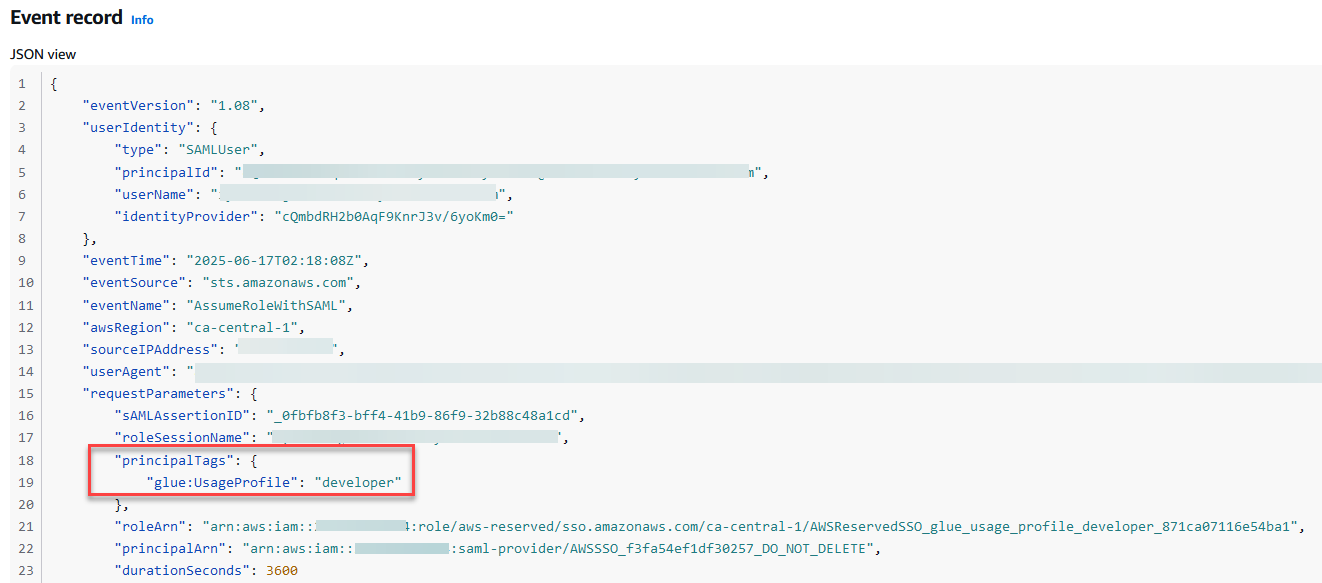
Open a relevant event and inspect the requestParameters section.
Confirm that the expected session tags appear under PrincipalTags.
Figure 8 – ABAC tags passed during the role assumption
Using session tags for other use cases
The concepts discussed in this post can be extended to configure AWS Systems ManagerSession ManagerRun As support for federated users using session tags. By default, Session Manager launches sessions using a system-generated ssm-user account. For Linux instances, you can optionally configure sessions to run as a specific OS-level user through Session Manager preferences. You can configure your identity provider to pass the user attribute (AccessControl: SSMSessionRunAs and name of an OS user account for the key value during federation and the session will be tagged using the attribute value.
Clean up
To avoid incurring future charges, delete any resources created during this walkthrough if they’re no longer needed:
Remove the IAM Identity Center instance and clean up the associated enterprise application in Microsoft Entra.
Delete the AWS Glue usage profile.
Remove any other AWS resources you provisioned for testing the solution.
Conclusion
In this post, you learned how to federate access to AWS using AWS IAM Identity Center and SAML 2.0 identity providers like Microsoft Entra ID, enabling a secure, scalable, and centralized approach to managing user access across multiple AWS accounts. By using permission sets, reserved IAM roles, and session tags, organizations can implement fine-grained ABAC without the complexity of managing individual IAM users or static roles.
As cloud environments become more complex, adopting modern identity federation and ABAC through IAM Identity Center helps security teams maintain control while providing users with seamless, context-aware access to the resources they need.
Днес имах интересна среща и разговор. На път да взема щерката от градина забелязах, че една от автомивките наместила се покрай заветния бъдещ Зелен ринг в частта на район Изгрев е изсекла между 15 и 30 дървета и е изчистила терен от 2 декара държавна земя. Всъщност 500 кв. м. от тях са били заравнени и се използват в последните 7 години като паркинг, но там поне не е имало дървета.
Спрях се да снимам, при което двама мъже ме заградиха. Единият се представи като собственик (което не мога да потвърдя) и ми поиска лична карта, защото съм снимал частен имот. Казах му, че няма такова право и снимам, за да подам сигнал за незаконна сеч на дървета и разчистване на държавна земя. Тогава стана още по-нападателен и настоя, че е частен имота и може да прави каквото си иска. След малко разправии смени версията, че всъщност било на държавна фирма, но имал разрешение и кой па съм бил аз и прочие.
По стечение на обстоятелствата знам наизуст парцелите и границите им в района, та още там видях три проблема с твърденията му.
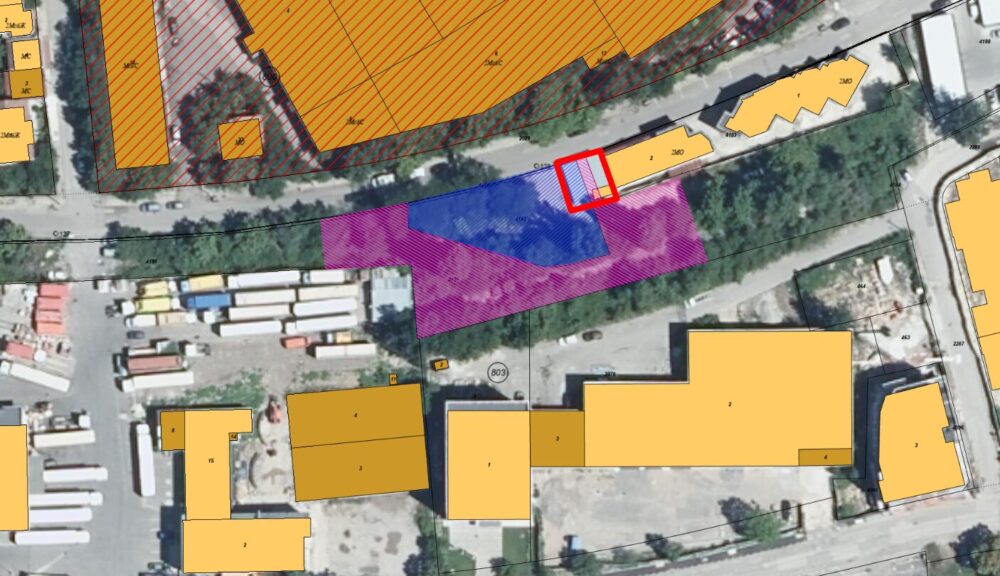
Първо, това, което виждате на снимките са три имота. Сградите са плътно бетонирали парцел, който незнайно как е станал частен преди 2000 г. и още по-малко ясно е дали са законни въобще. Има апокрифно разрешение за строеж на кафене и автосервиз, но на пръв поглед се вижда, че доста са надстроявали. Имотът, за който вероятно единия заградил ме говореше, е 68134.803.4182. Той е част от Железопътна инфраструктура и през ноември 2025-та е имало търг за наем. Не е обявено кой го е спечелил, но предполагаме, че за тях си е направен търга и те са си го спечелили. Интересното тук е, че точно този търг не е обявен на специалната страница на АППК за разлика от търговете на всички останали държавни дружества, както и други на това предприятие.
Снимка на мястото от края на 2024-та
Тук обаче въпросът е, че този наем не им дава право да изсичат дърветата, нито договорът за наем е основание да им се дава такова право. За целта независимо от собствеността на имота трябва да искат разрешение от район Изгрев, които са наясно с това. По наредба тези заповеди се издават при строго определени хипотези, следва да са публични също както протоколите от общинския служител присъстващ на сечта. Такива не са публикувани и приемайки за чиста монета демонстрираната загриженост на районния кмет за зелените площи, приемаме, че разрешение за сеч нямат.
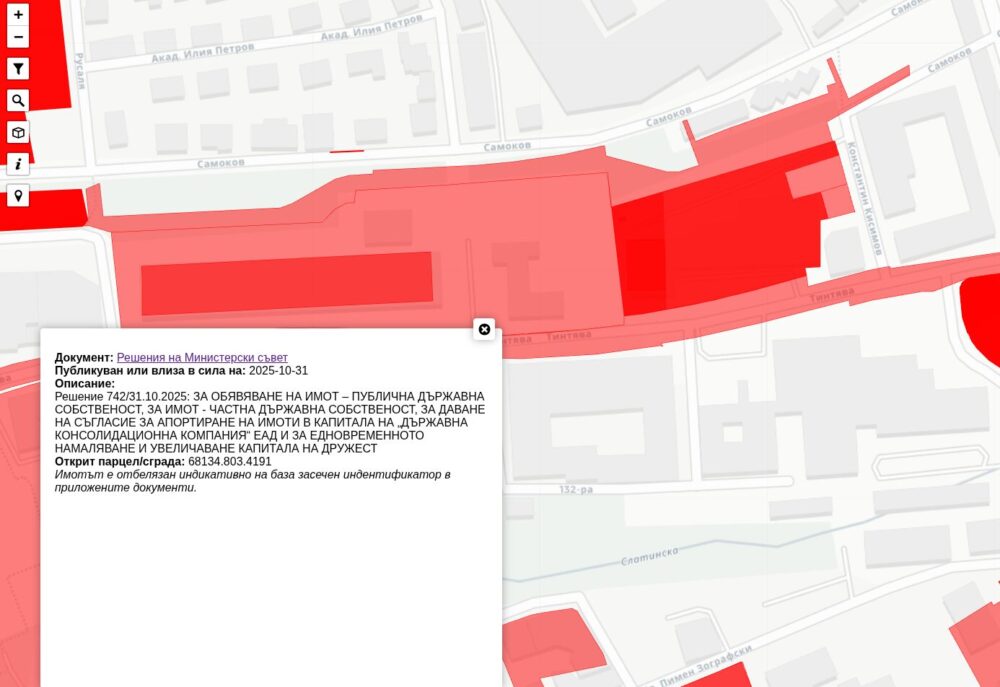
Вторият проблем е, че както се вижда на последната снимка, те са разчистили не само парцел 4182, но и 1.4 декара от 68134.803.4191. Вижда се с просто око дигата и бетонната стена. Този имот не влиза в хипотетичния договор за наем, а е основна част от Зеления ринг. За него със сигурност районният кмет Георгиев не следва да е подписал заповед за сеч предвид, че се похвали с това, че областния управител задейства прехвърлянето на въпросния парцел и други след решение на Министерски съвет и дълги усилия от неправителствени организации и Столична община да се случи това.
Третият проблем е, че от поне 15 години навесът, където се извършва основната дейност на автомивката не е законен, тъй като според кадастъра и ортофотозаснемането само малка част е в частния имот, а другите две части са в имота предполагаемо даден под наем, а имотът с решение за прехвърляне на общината минава точно между въпросните два парцела. Та, ако следваме стриктно закона, навесът следва да се събори и пространството с широчина от 2.5 да се освободи.
В синьо е имотът с предполагаем наем. В лилаво е какво допълнително са изсекли. В червено е незаконния навес.
Бързах за детската градина и не ми се обясняваше всичко това. С поведението им и клишираните въпроси „ти па от къде знаеш, че е незаконно“ не видях и причина да се обяснявам. В крайна сметка ми освободиха пътя пред колелото и продължих, а те тръгнаха да звънят на някого. Имам идея с кого, но не искам да спекулирам точно сега.
Сигналът през call.sofia пътува към районния кмет. Да видим дали този път ще направи нещо за разлика от десетките други подобни в района.
Това далеч не е първият подобен случай на територията на бъдещия Зелен ринг. Миналия август писах как буквално на метри от това място терен беше заграден и изравнен за сметище за строителни отпадъци, а тонове почвен слой – изхвърлен. В последствие се разбра, че извършителят е небезизвестният инвеститор Грийн Лайф стоящ туловището на Тинтява 80. Нашумя със схемата за ощетяване на купувачи на друг техен обект. В случая последствия за него нямаше тъй като районният кмет си изми ръцете, че било собственост на държавно предприятие. Нищо, че никой няма право да прави сметище дори на частен имот и най-малкото следва да задейства процедурата по санкциониране и премахване.
Подобно неглижиране и раздаване на държавни и общински имоти, както и изискванията за озеленяване и строителен контрол виждаме редовно и с всякакви мащаби. Ето няколко примера, за които съм писал през времето:
To provide the best experiences, we use technologies like cookies to store and/or access device information. Consenting to these technologies will allow us to process data such as browsing behavior or unique IDs on this site. Not consenting or withdrawing consent, may adversely affect certain features and functions.
Functional
Always active
The technical storage or access is strictly necessary for the legitimate purpose of enabling the use of a specific service explicitly requested by the subscriber or user, or for the sole purpose of carrying out the transmission of a communication over an electronic communications network.
Preferences
The technical storage or access is necessary for the legitimate purpose of storing preferences that are not requested by the subscriber or user.
Statistics
The technical storage or access that is used exclusively for statistical purposes.The technical storage or access that is used exclusively for anonymous statistical purposes. Without a subpoena, voluntary compliance on the part of your Internet Service Provider, or additional records from a third party, information stored or retrieved for this purpose alone cannot usually be used to identify you.
Marketing
The technical storage or access is required to create user profiles to send advertising, or to track the user on a website or across several websites for similar marketing purposes.


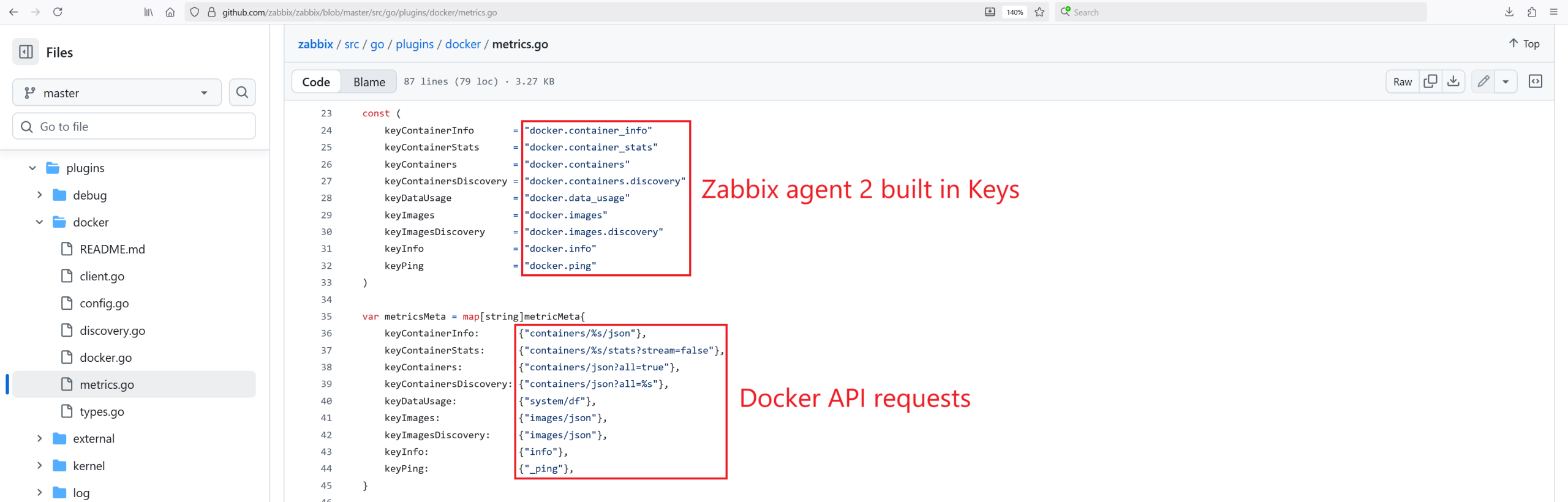
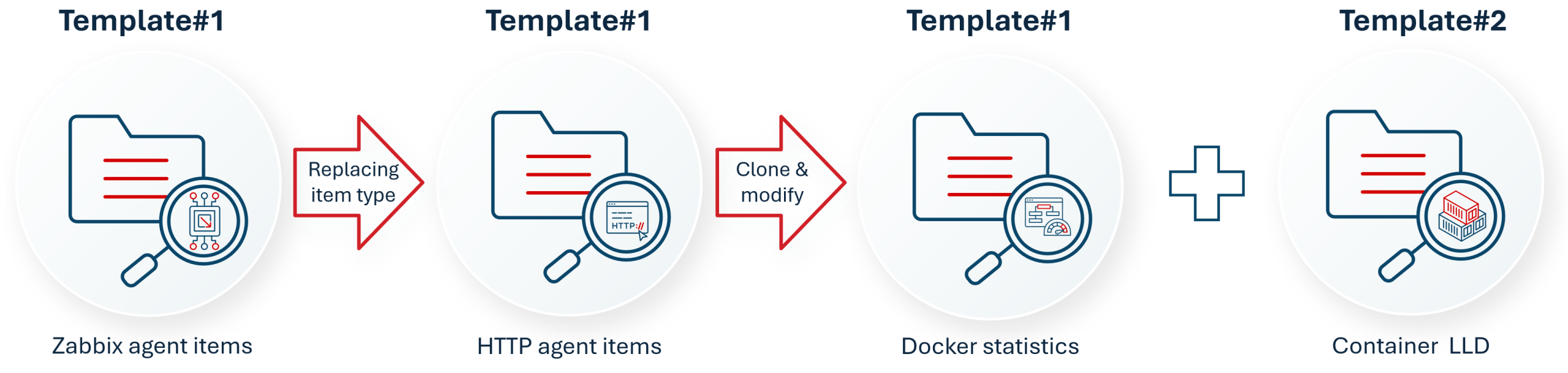
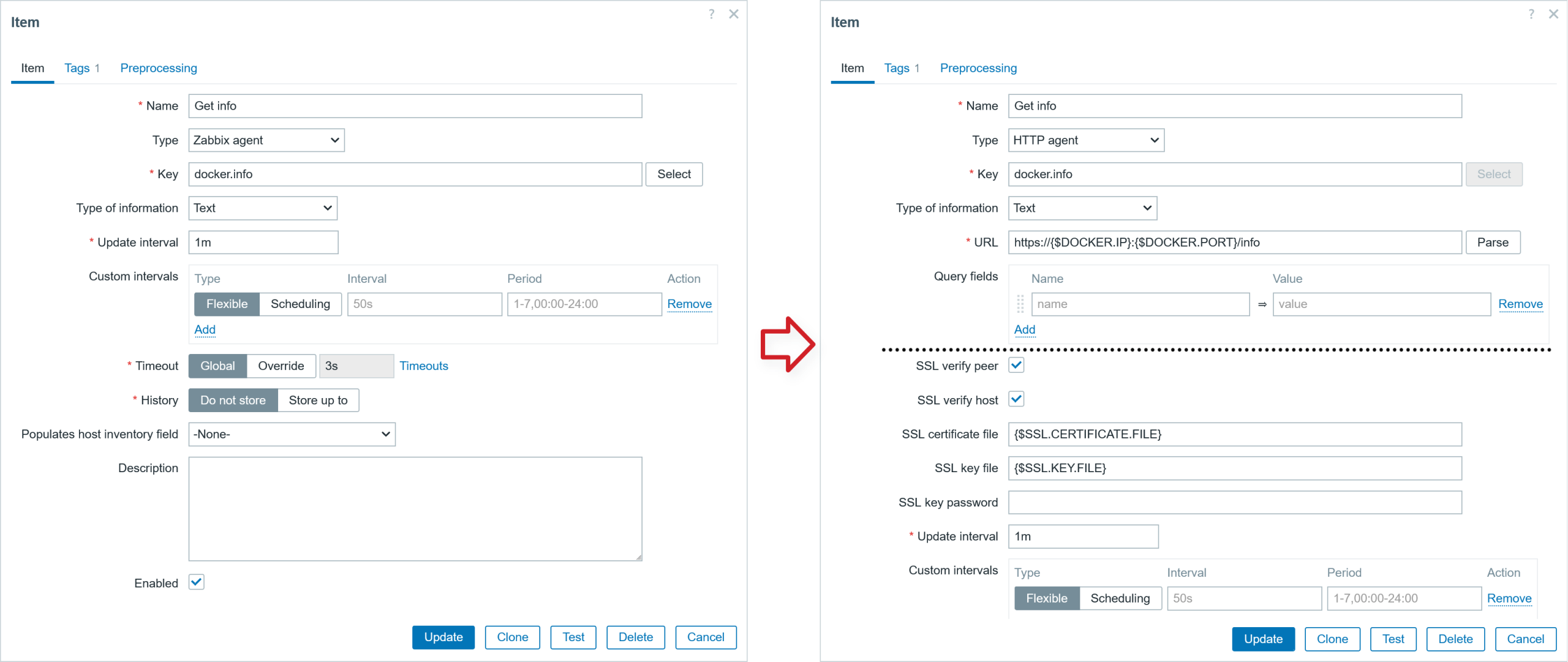
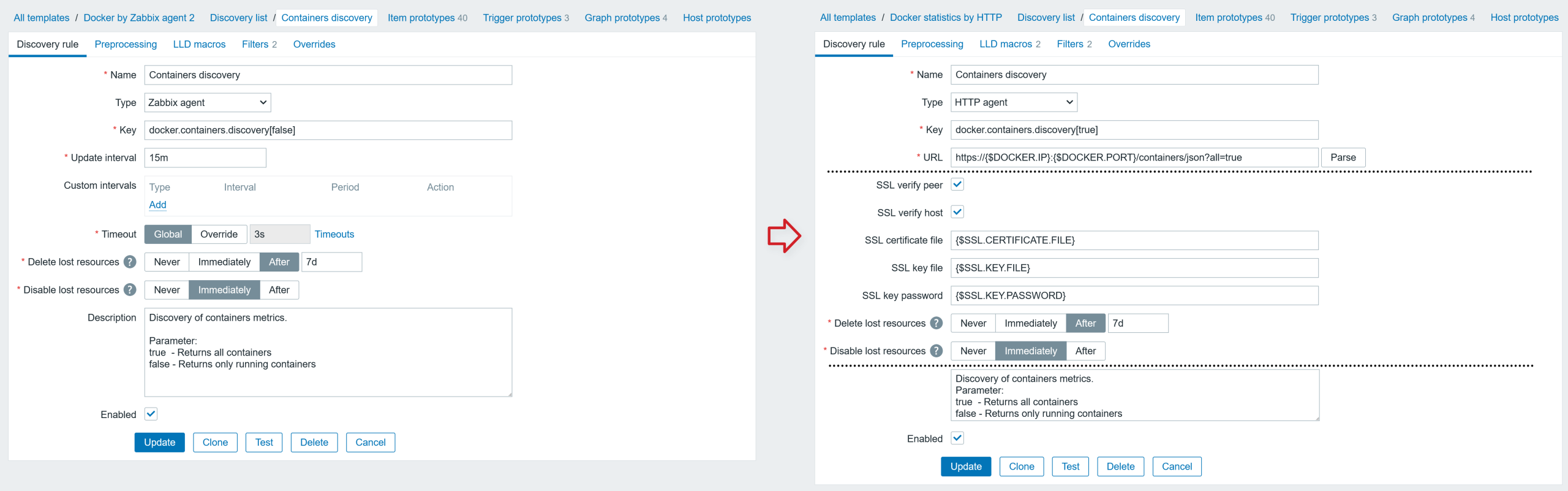
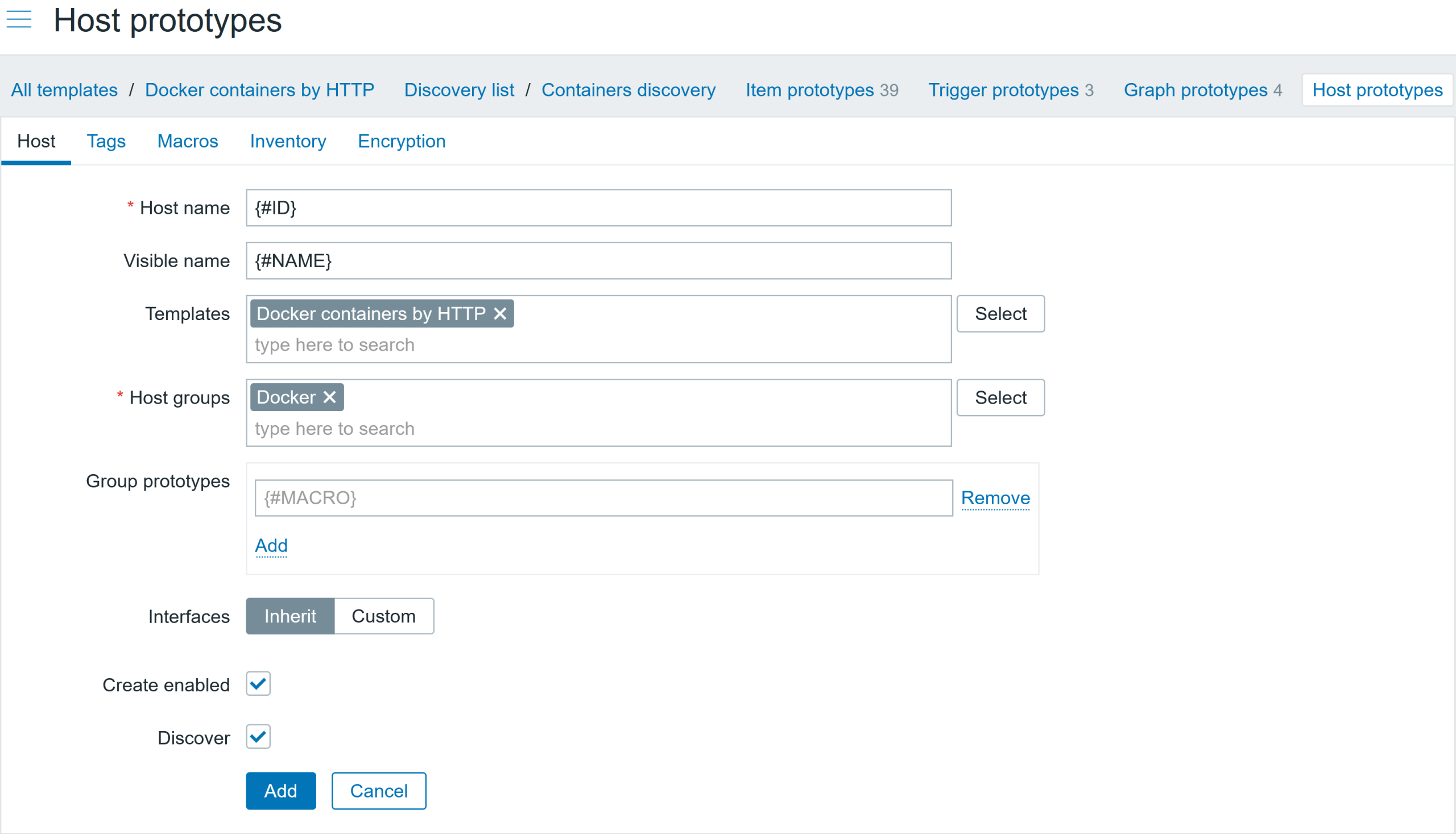

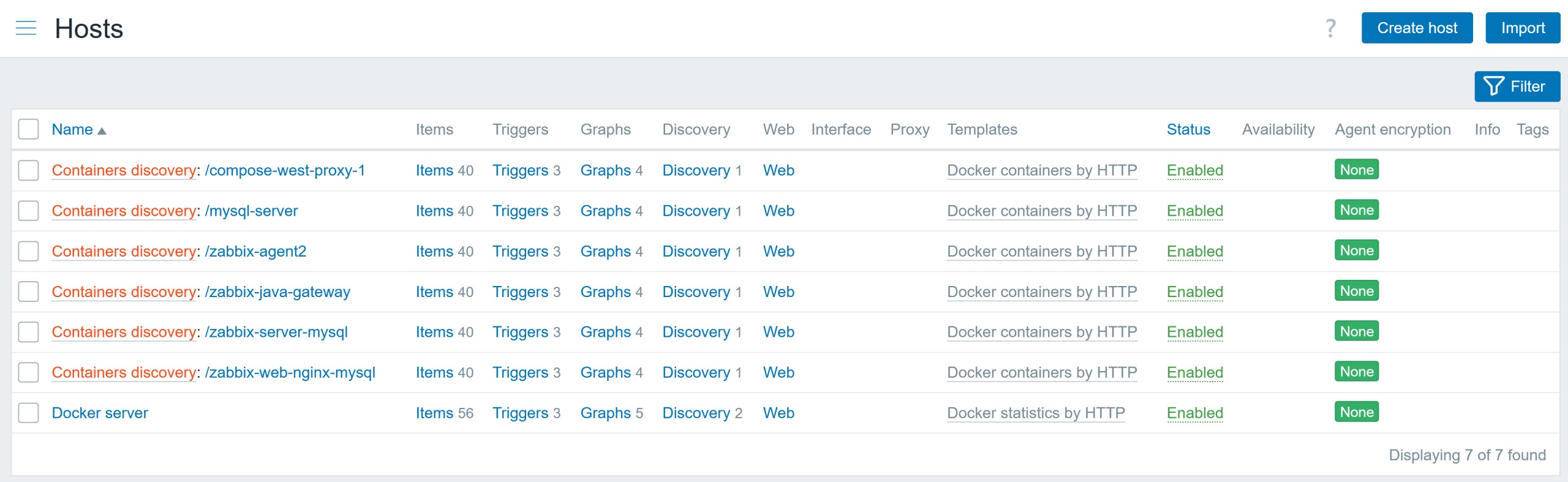
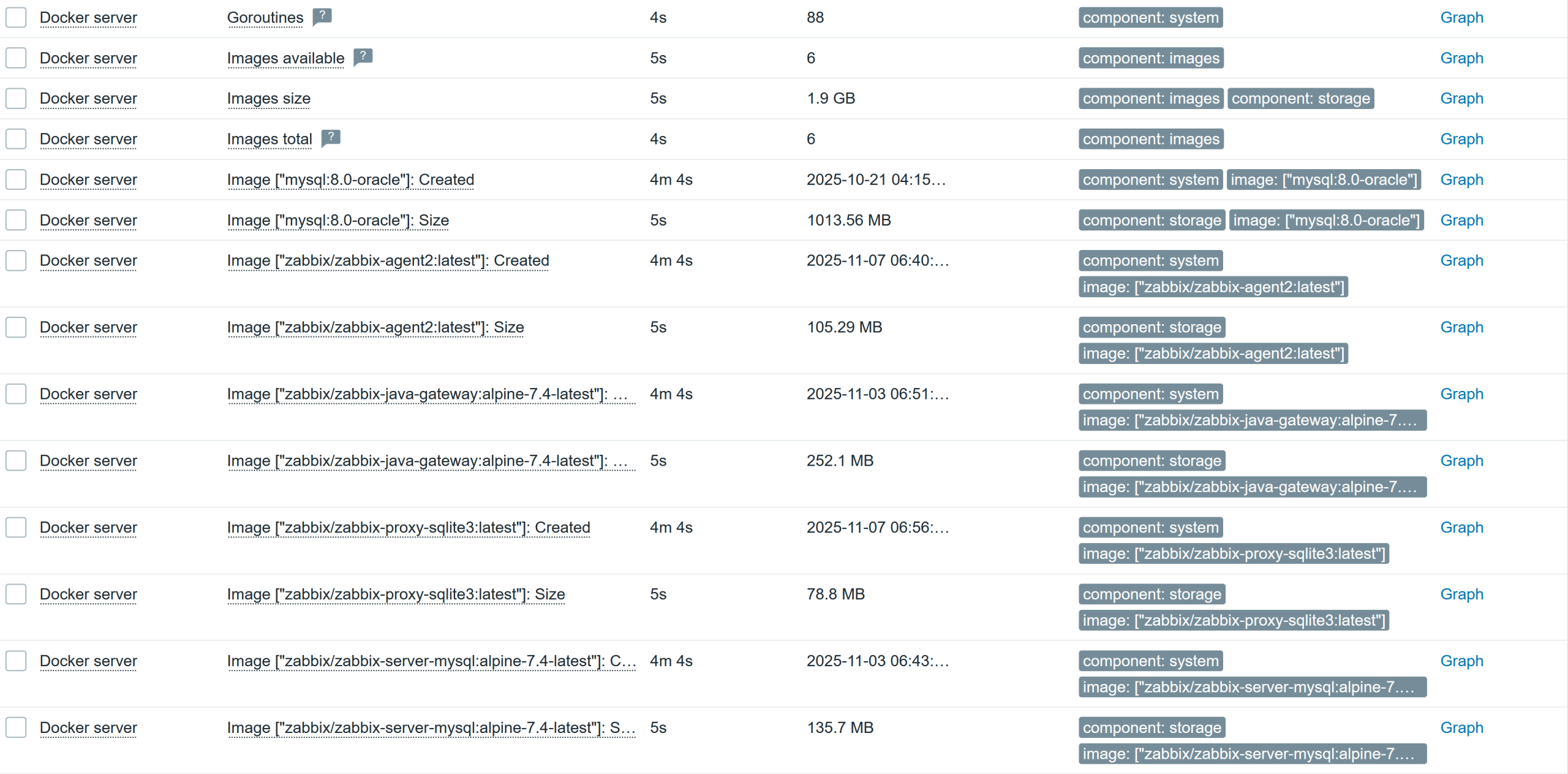
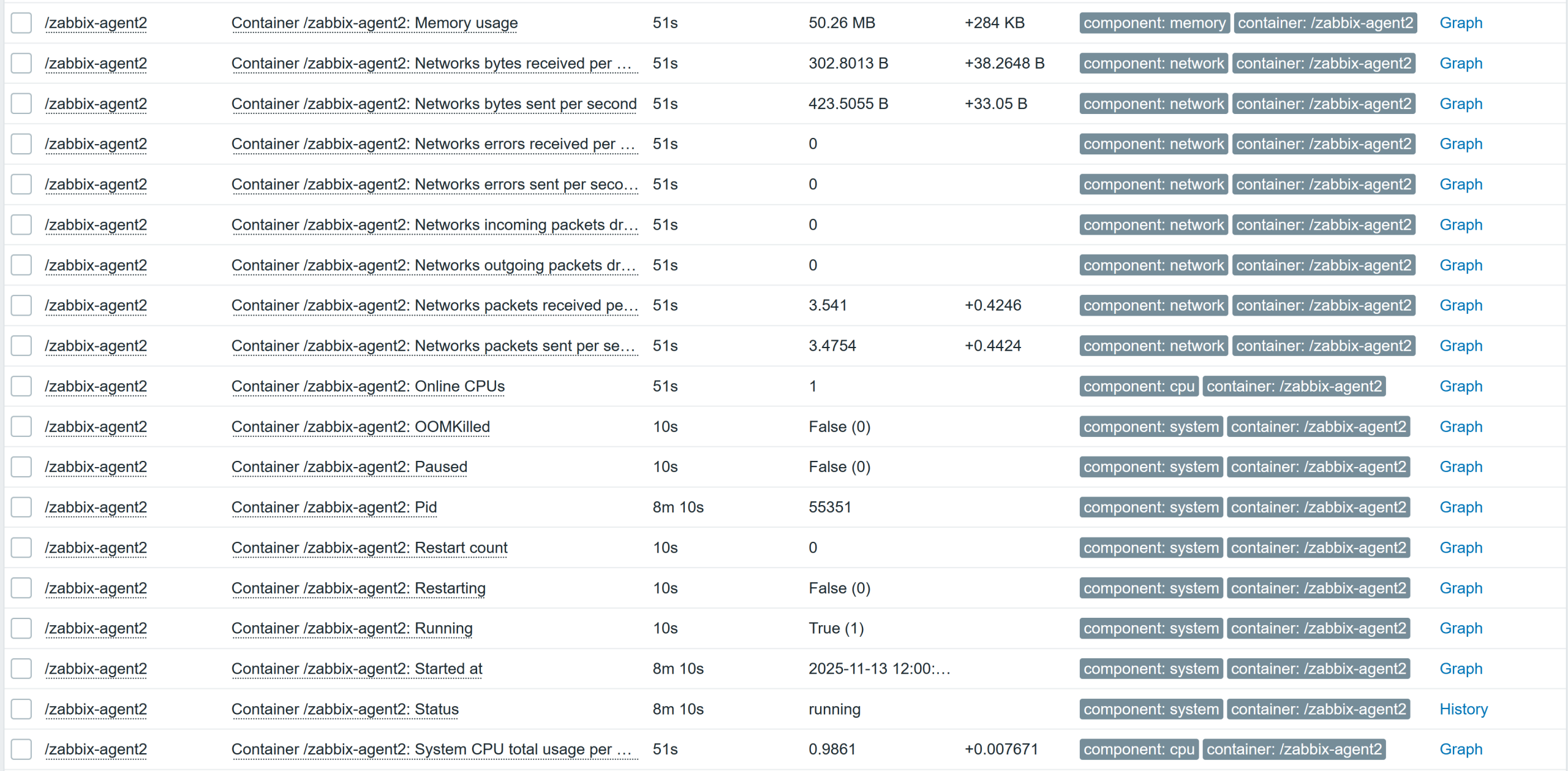

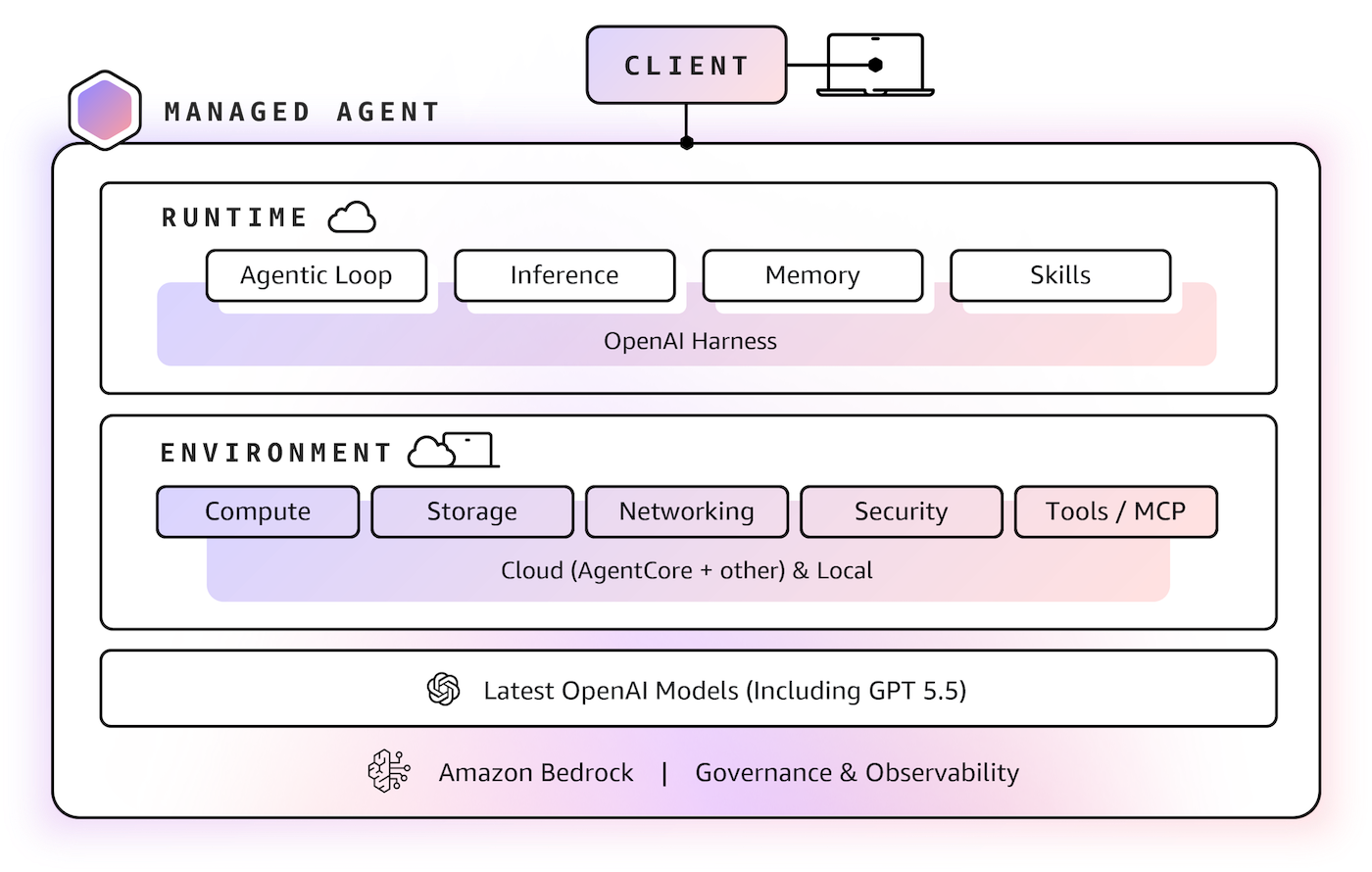
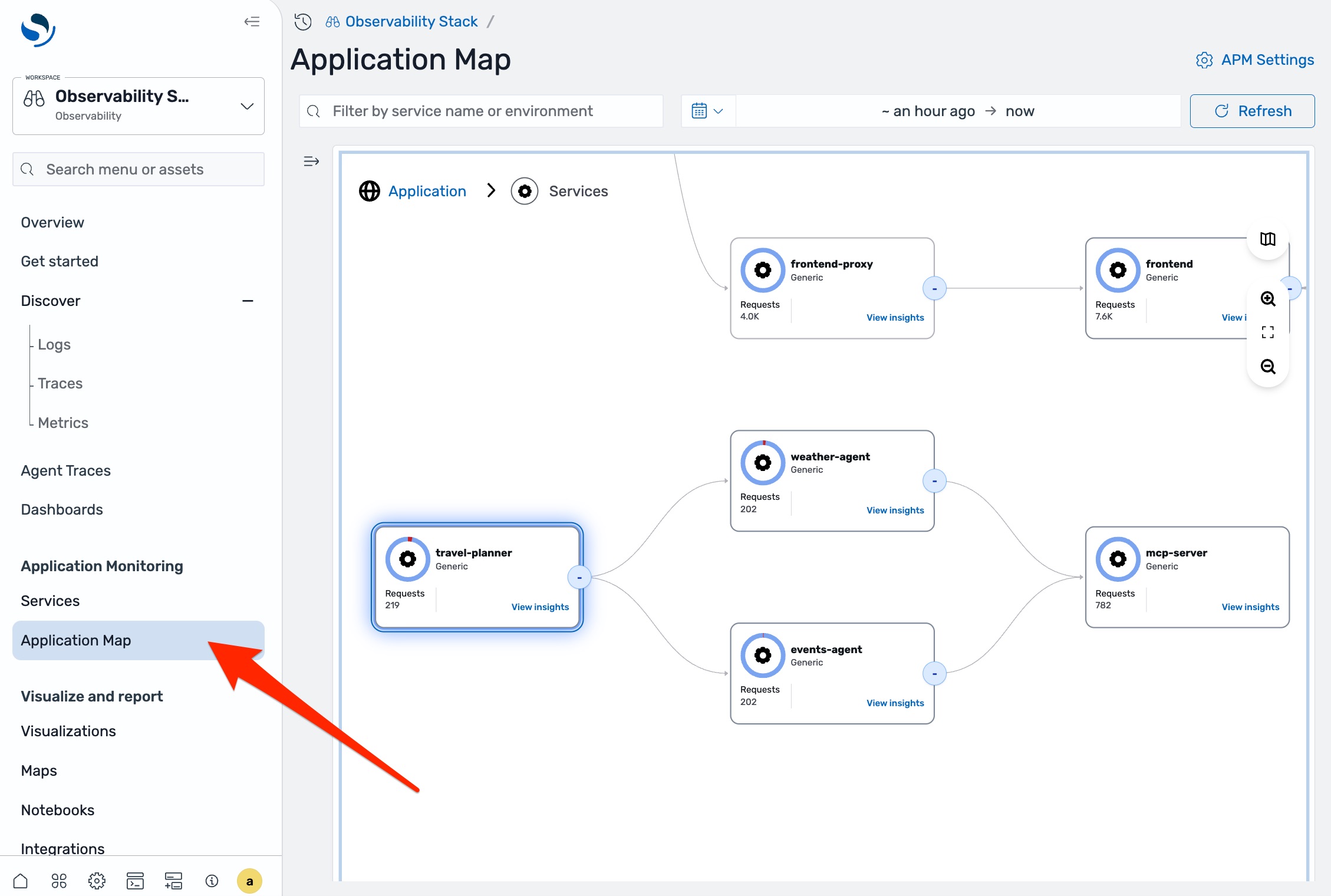
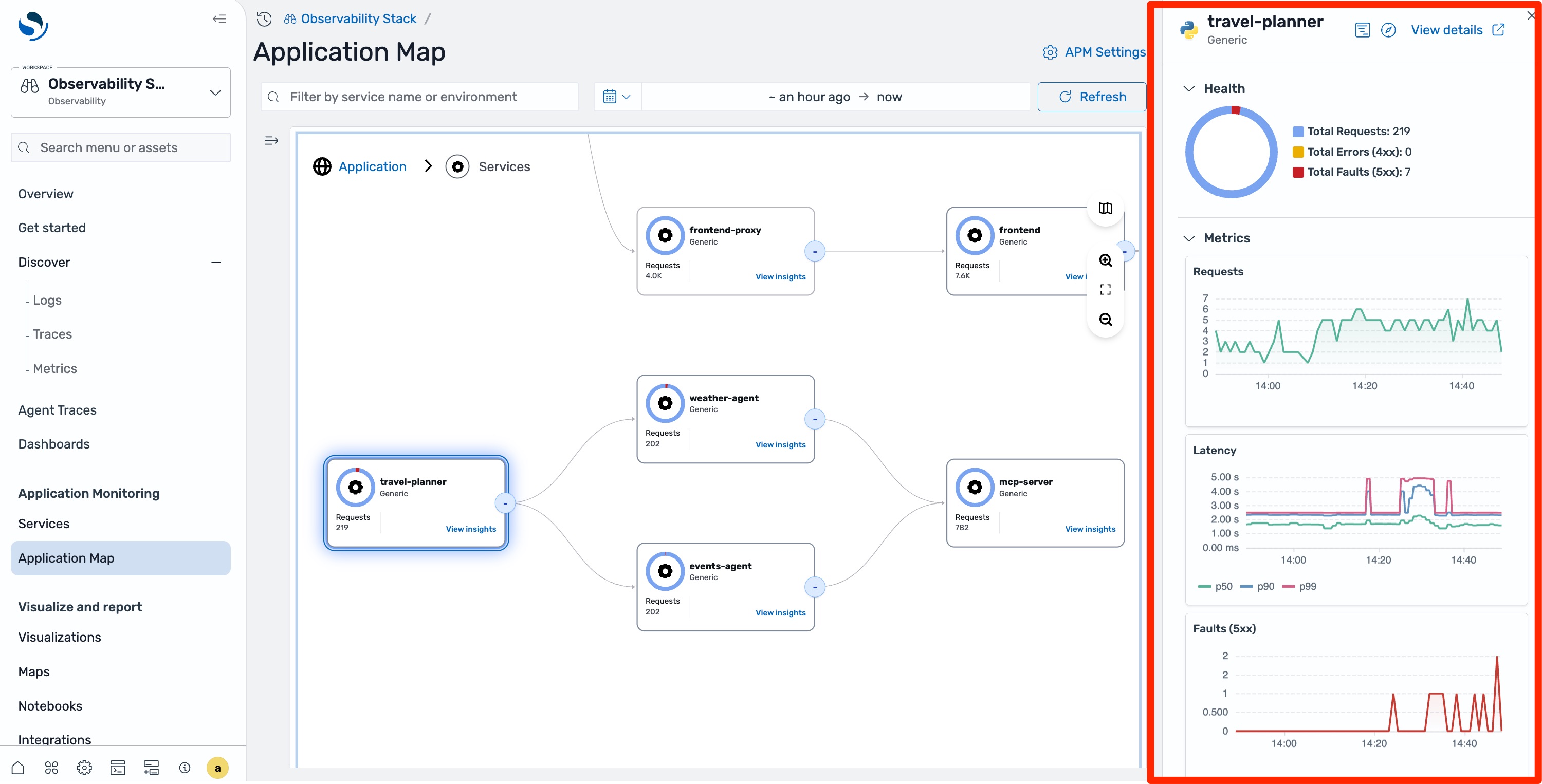
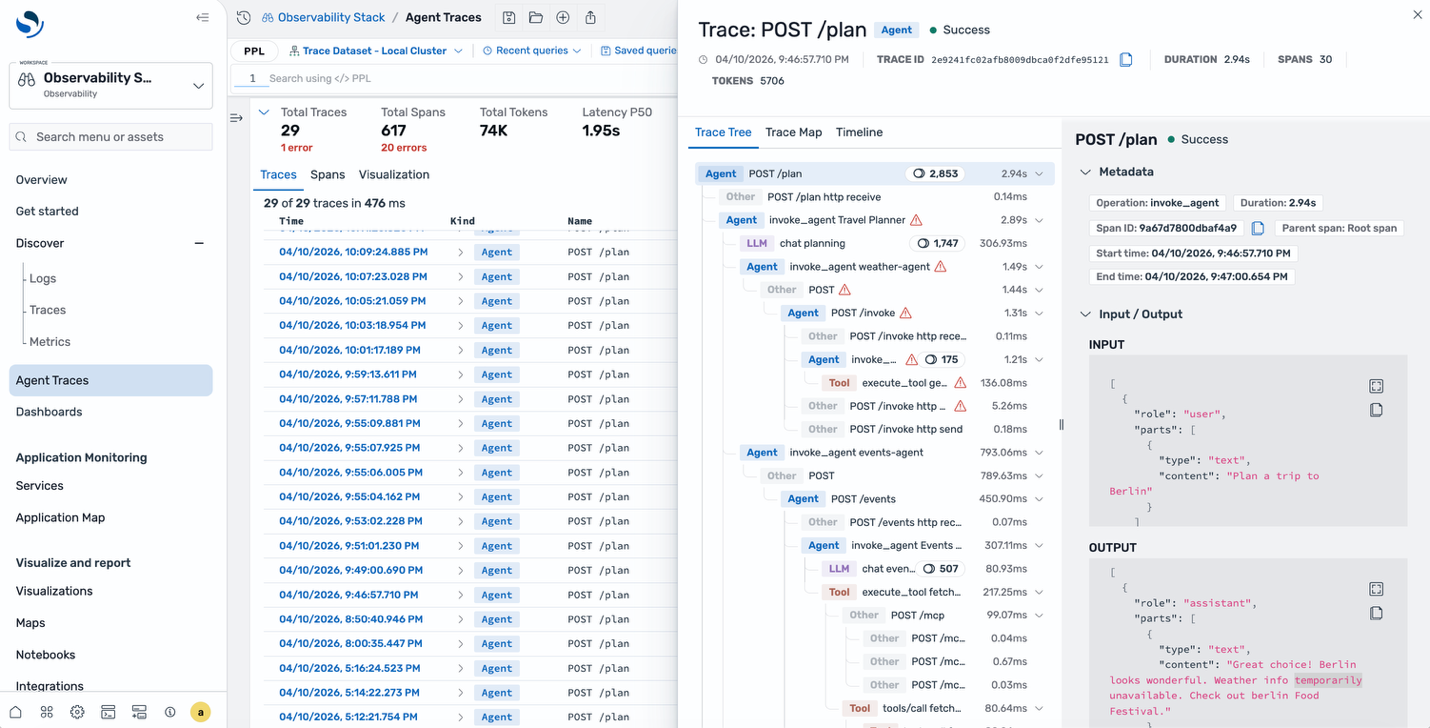
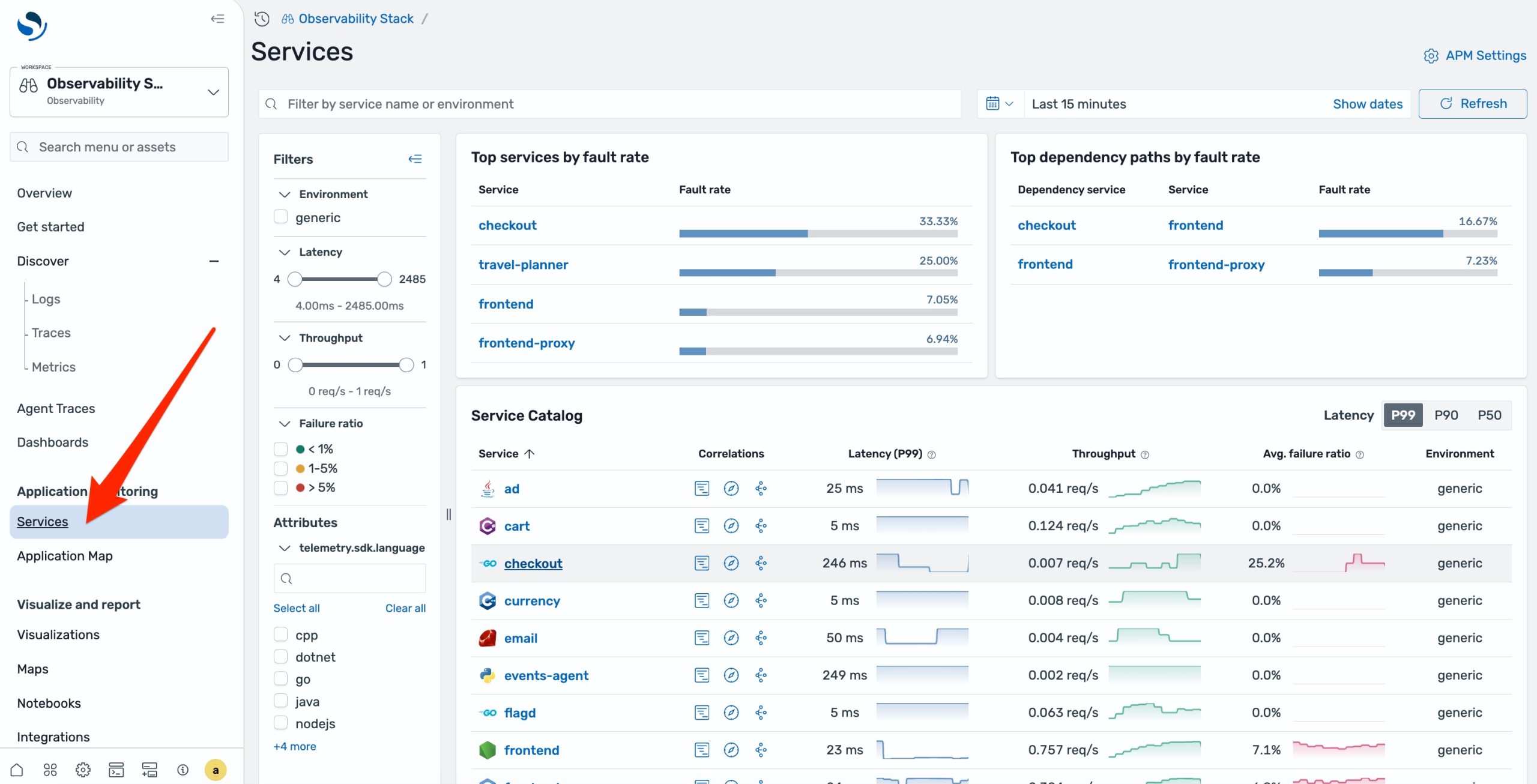
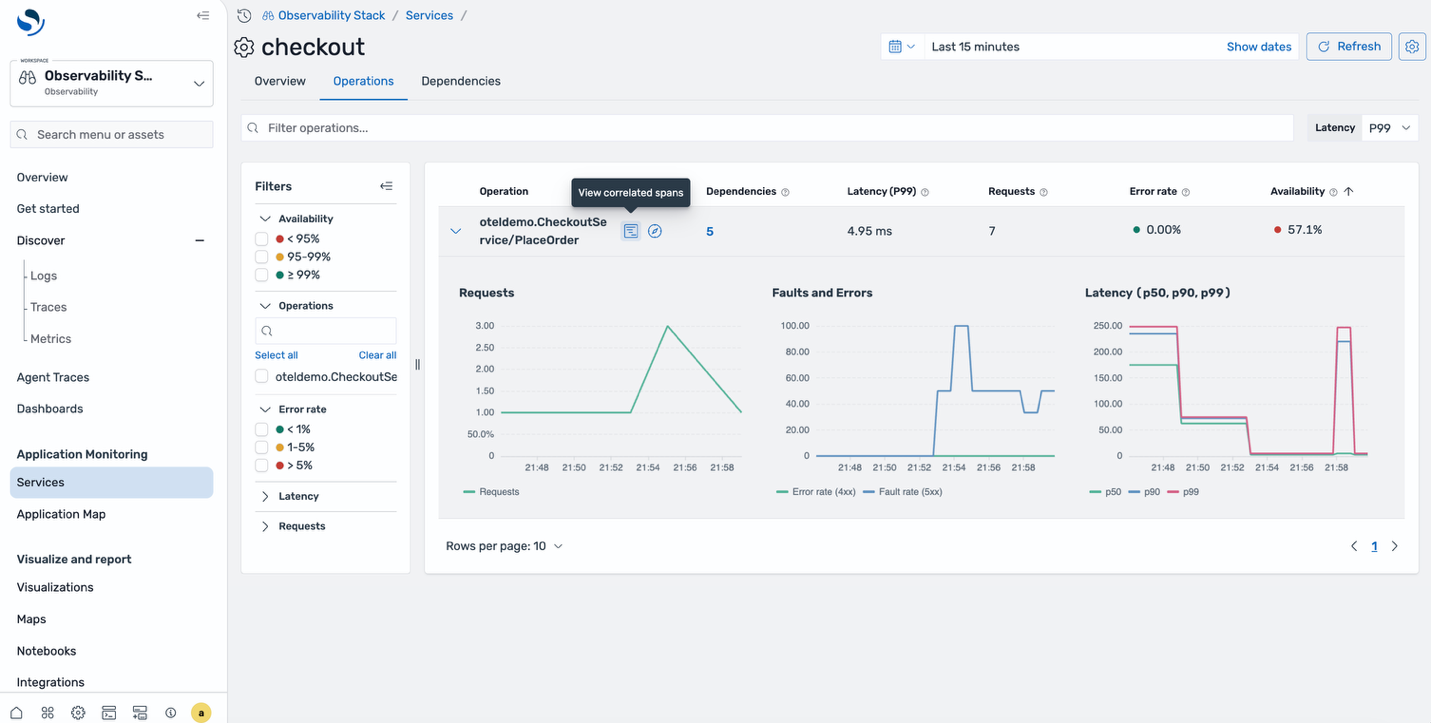
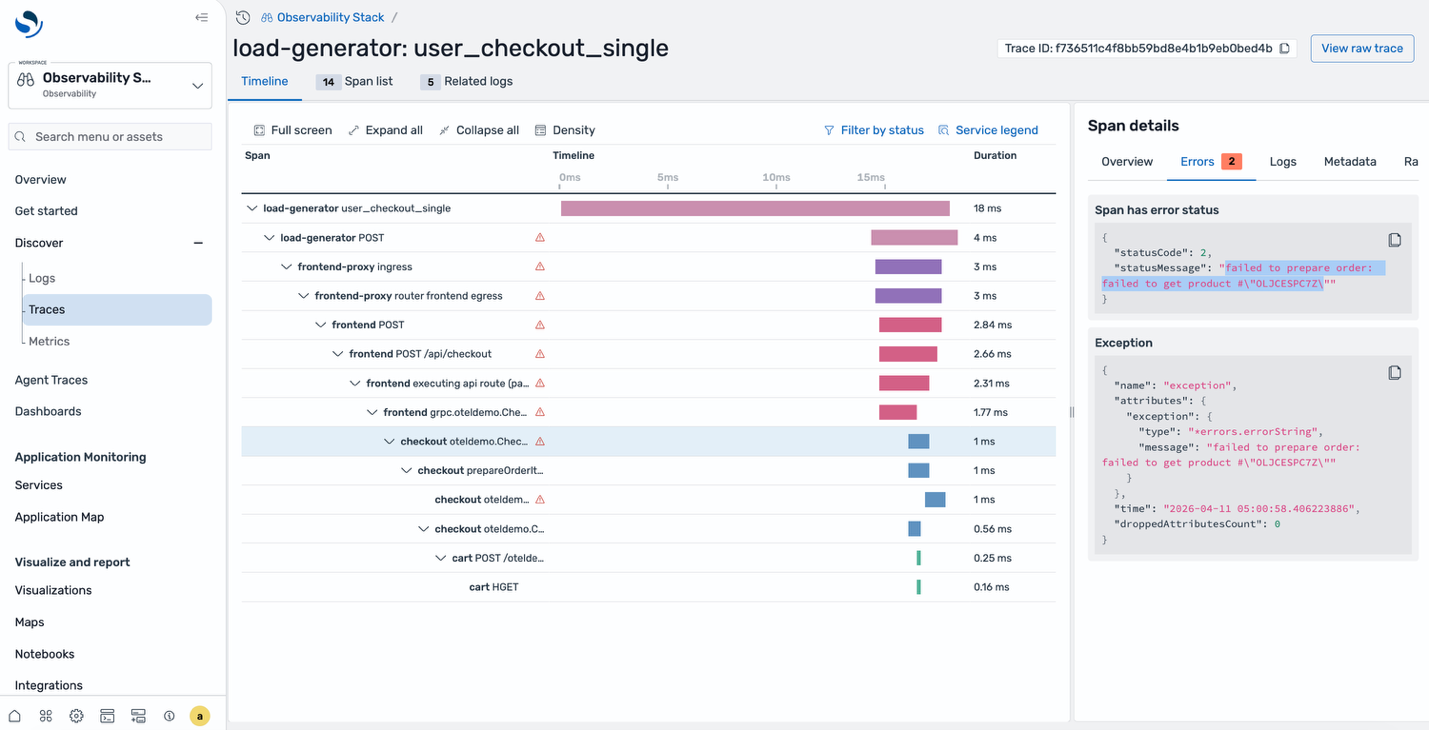
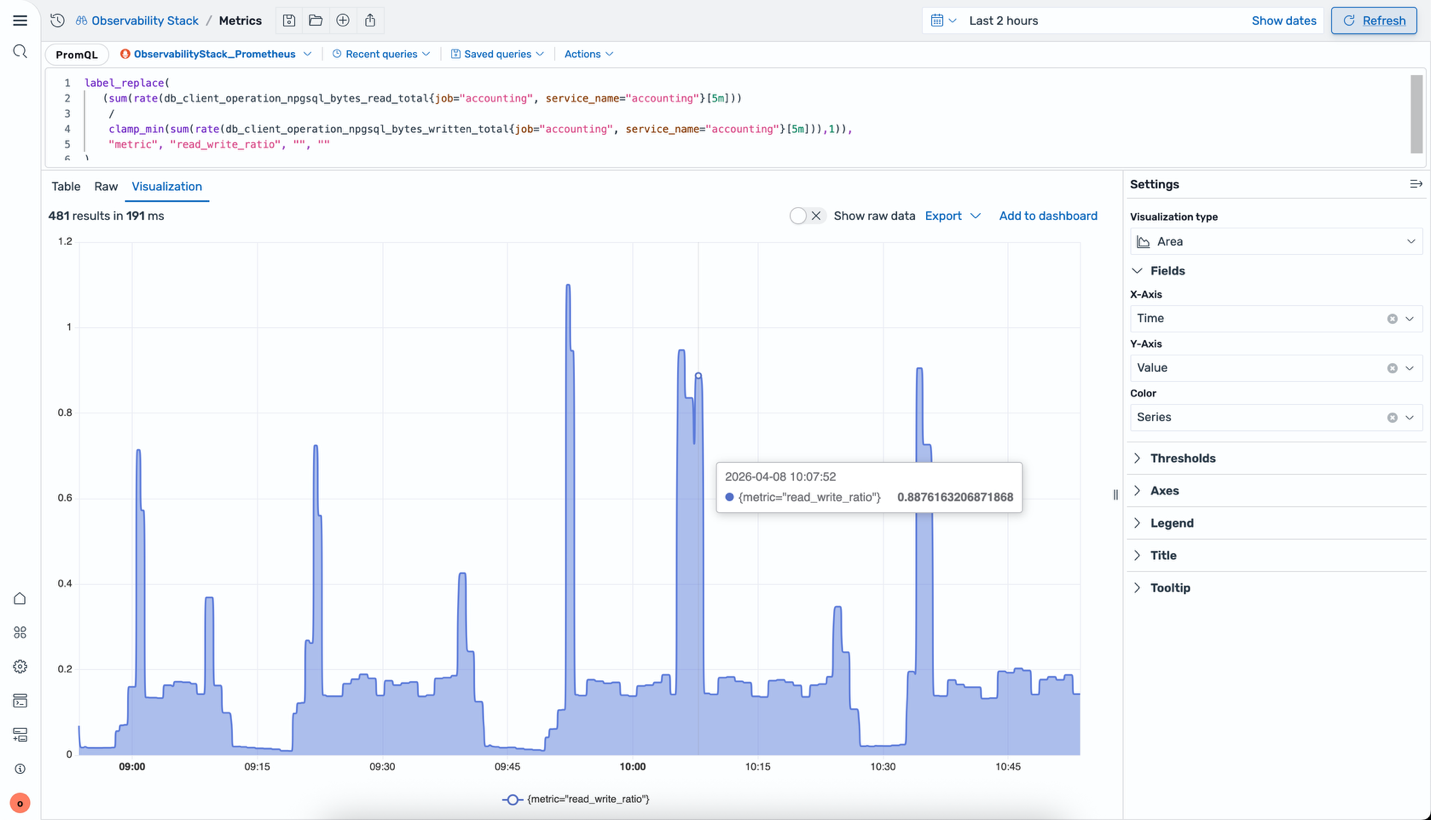
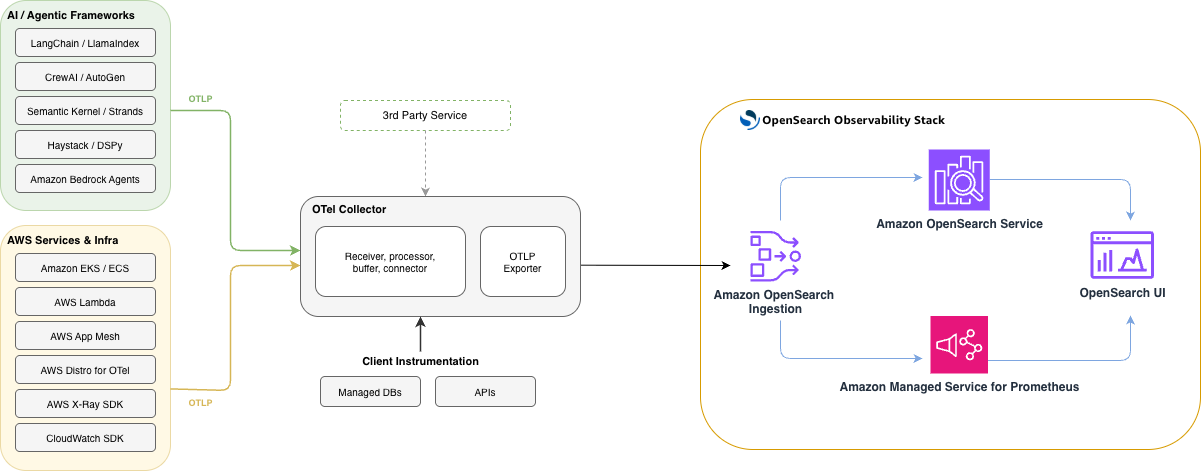
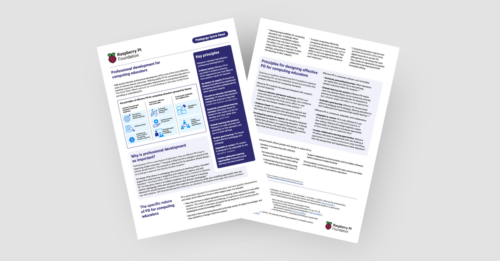

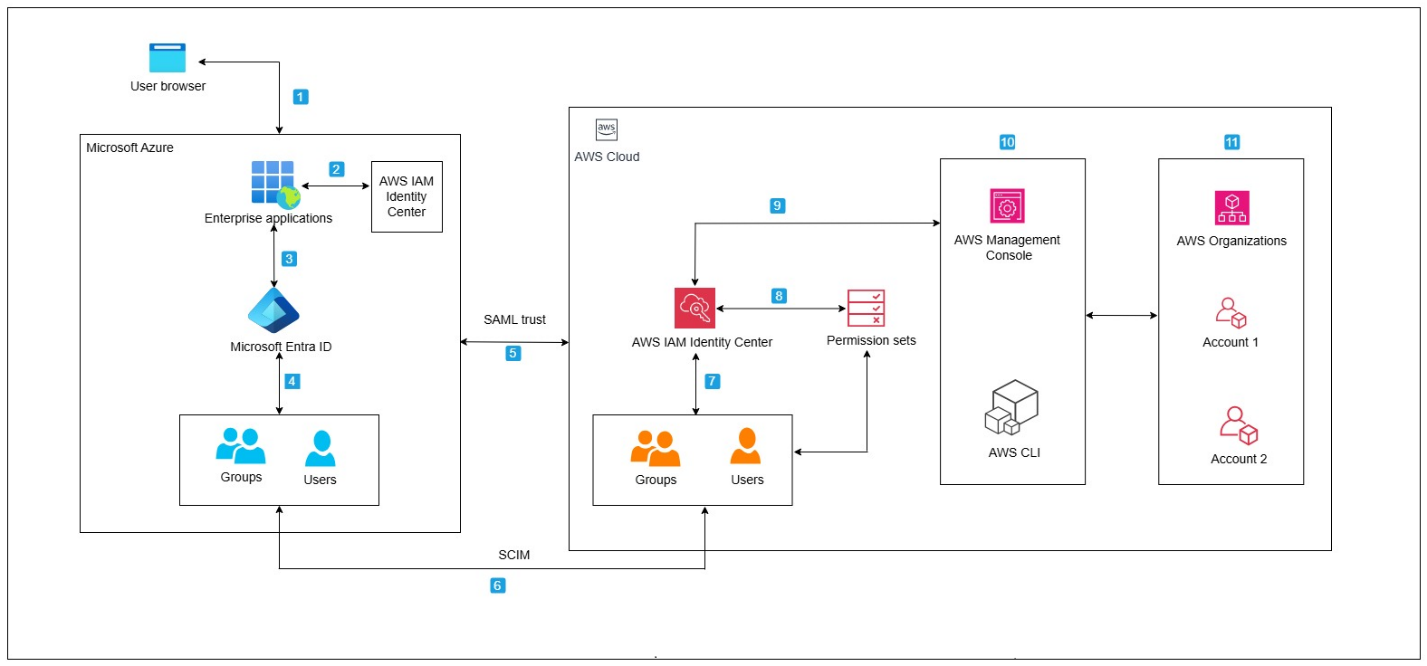
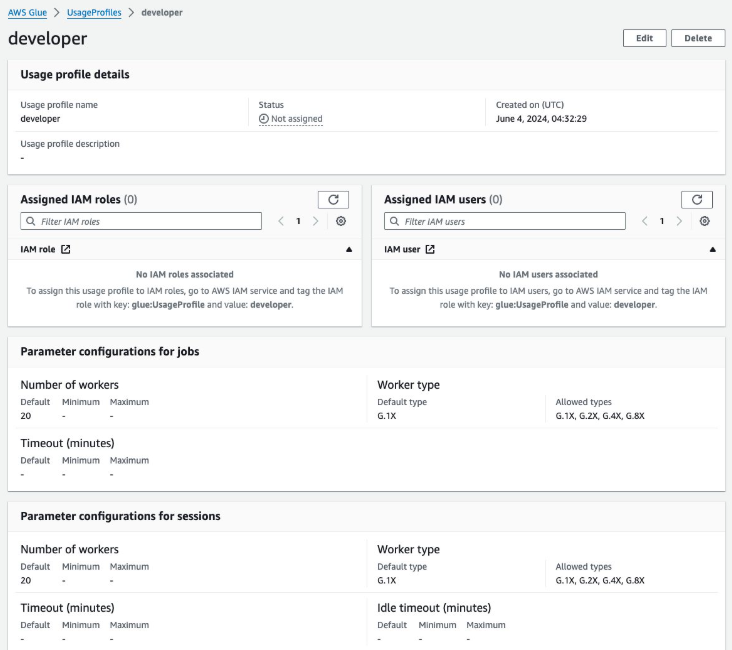
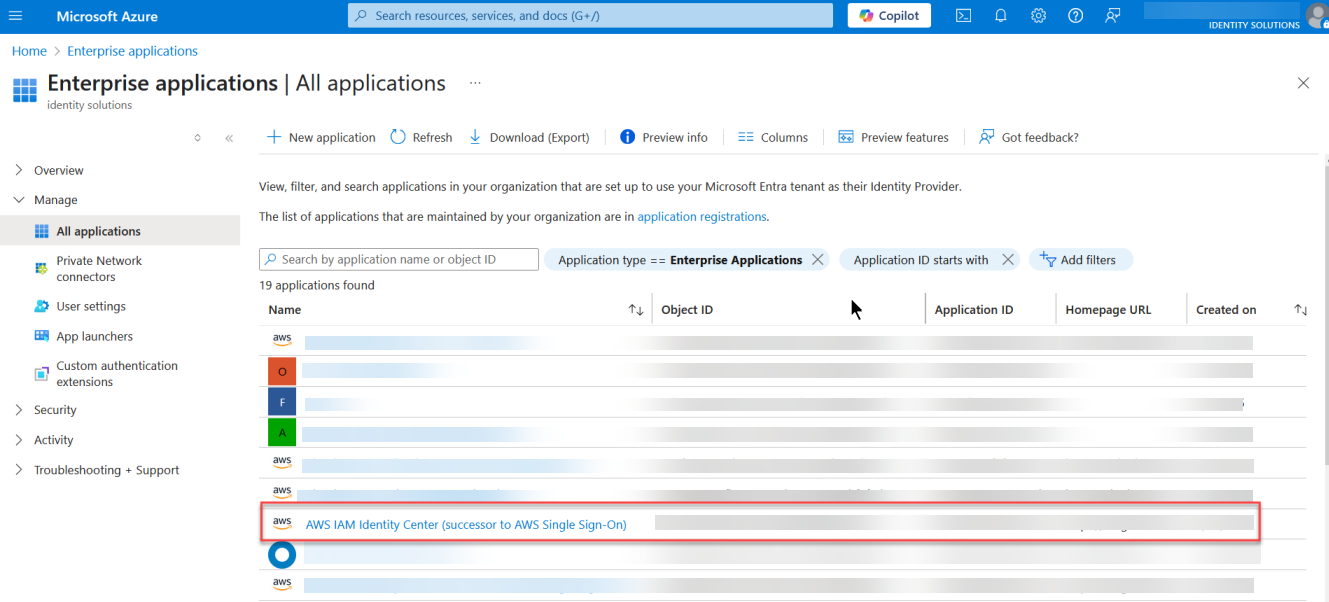
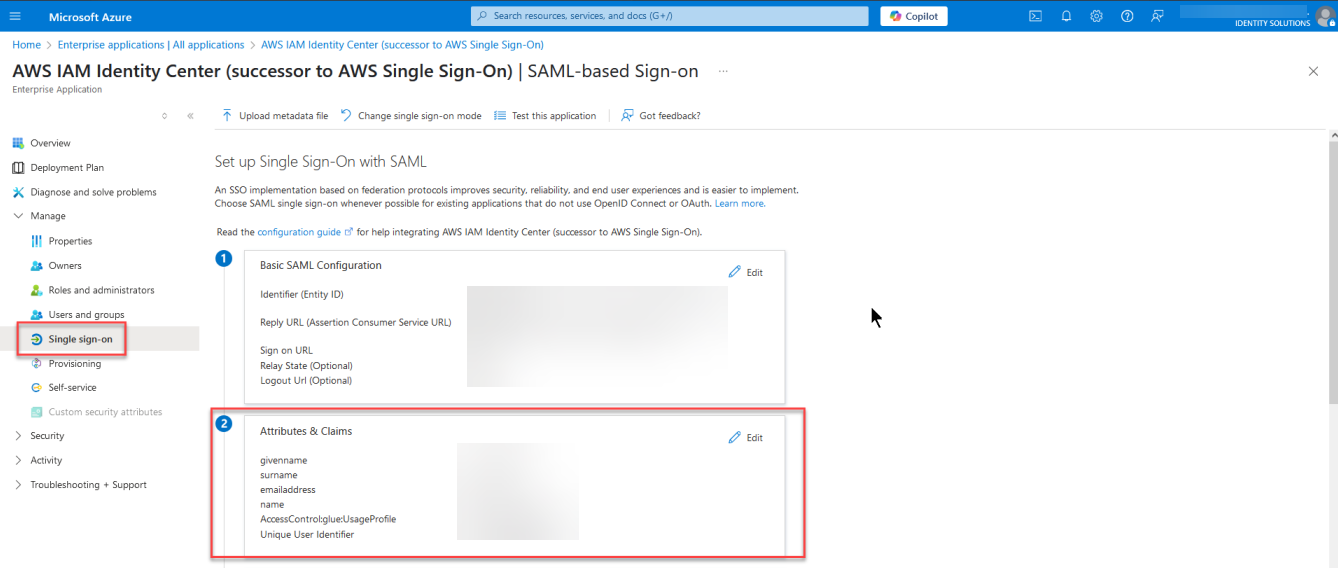
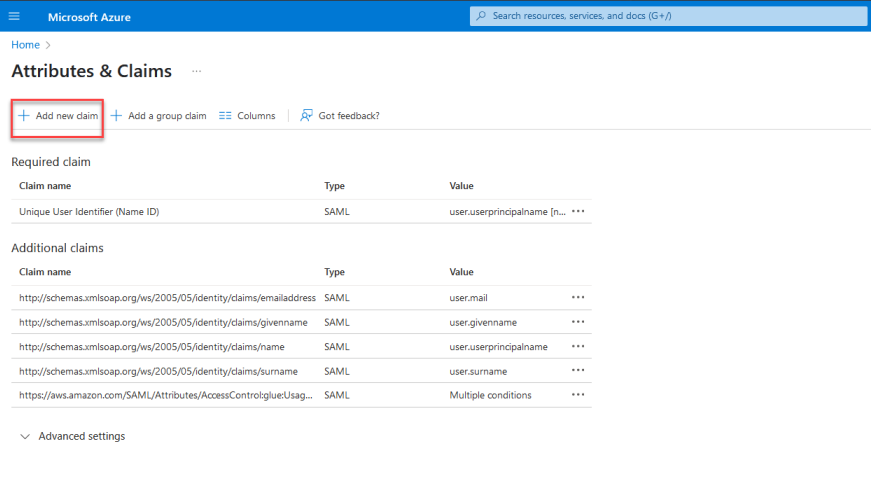
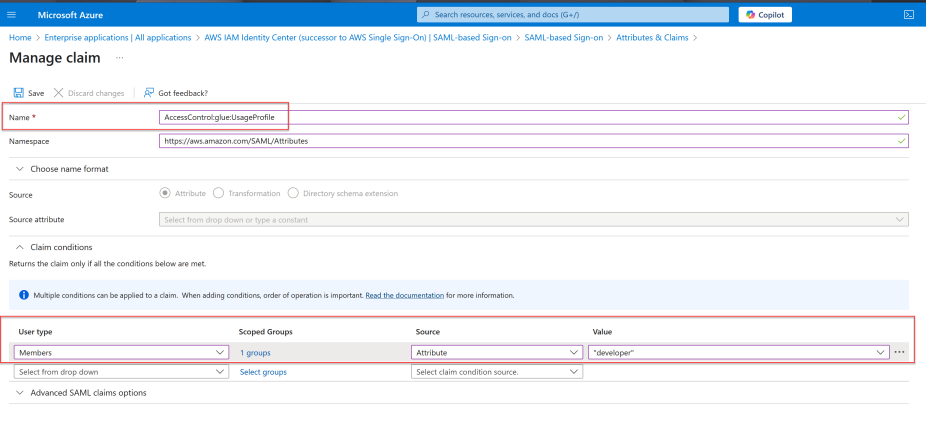
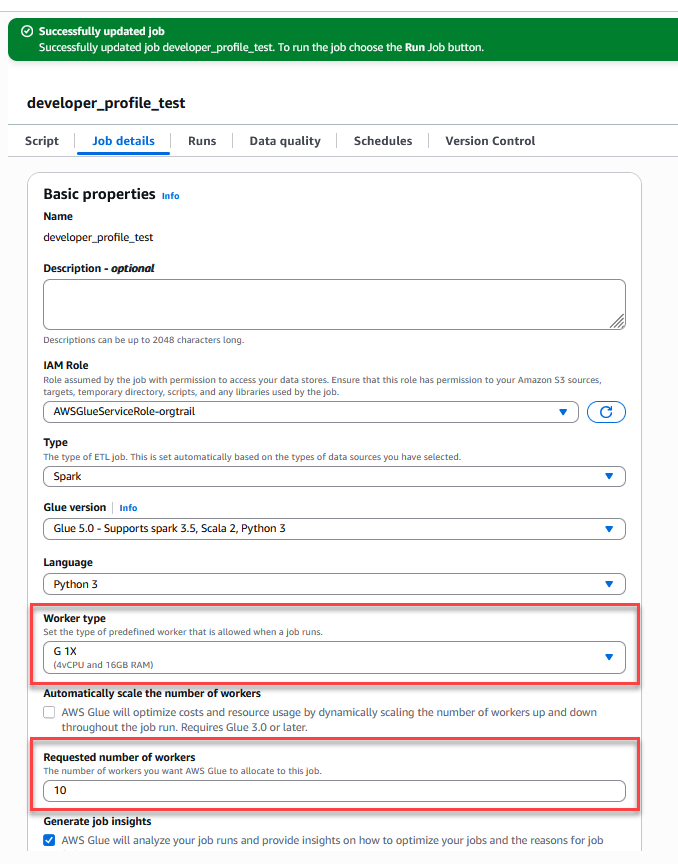 Figure 7 – Successful AWS Glue job creation with configured parameters for the developer usage profile