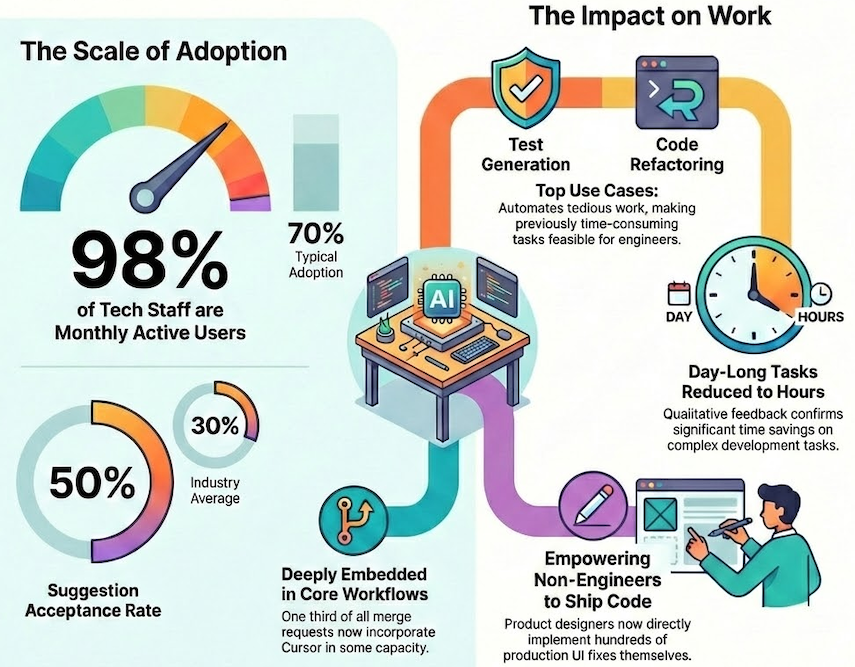
The illustration below encapsulates how Cursor is scaled across Grab, achieving rapid and widespread adoption that accelerated software development and empowered non-technical teams to build solutions.
Figure 1: Adoption overview of AI tool Cursor in Grab.
Multi-tool strategy
Grab embraces a multi-tool strategy for AI coding assistants. Rather than committing to a single solution, we experiment with multiple tools simultaneously, allowing us to compare outcomes and adopt what works. This approach keeps us flexible in a space that evolves quickly. We covered this philosophy in a previous post.
Growth
We introduced Cursor in late 2024 as one of several tools in our AI engineering toolkit. Adoption grew quickly—98% of tech Grabbers became monthly active users, and about 75% use it weekly. For comparison, Google’s 2025 State of AI-Assisted Software Development report highlights that even among high-performing teams, AI coding tool adoption seldom surpasses 70%. Notably, Cursor’s appeal extended beyond engineering, with non-technical teams incorporating it into their workflows.
A standout metric is Cursor’s suggestion acceptance rate, which is around 50%, surpassing the industry average of 30%. This indicates two key insights: first, the suggestions are sufficiently relevant for engineers to accept them half of the time; second, engineers maintain a critical review process rather than accepting suggestions indiscriminately. We attribute this relevance to continuous feedback loops and environment-specific tuning, ensuring suggestions remain aligned with Grab’s codebase and conventions.
Extent of adoption
Raw adoption figures don’t provide the complete picture. We aimed to determine whether engineers were truly incorporating Cursor into their daily workflows or merely experimenting with it sporadically.
The data indicates genuine integration. Approximately half of Cursor users engage with it 10 or more days each month, with some teams achieving full adoption. Over 98% of merge requests now incorporate Cursor in some capacity. Engineers actively share tips and workflows via a dedicated Slack channel, fostering an organic knowledge base.
Across various teams, we’ve observed significant transitions from light usage to moderate and power user levels over the past six months.
Engineer utilization patterns
The most common patterns we see are unit test generation, code refactoring, cross-repository navigation, bug fixing, and automation of routine tasks like API scaffolding or commit messages.
Test generation is particularly popular. Writing tests manually is tedious, and Cursor’s ability to generate and iteratively refine tests has become a standard part of many engineers’ workflows. Cross-repository navigation helps with onboarding and context-switching—engineers can ask Cursor questions about unfamiliar codebases rather than hunting through documentation.
Qualitative feedback confirms what the adoption numbers suggest: tasks that took a full day to complete now take hours. Engineers report tackling refactors and test additions they would have otherwise skipped due to time pressure. Cursor doesn’t just speed up existing work; it makes previously impractical work feasible.
Integration with Grab’s stack
Integrating Cursor effectively at Grab required custom tooling. We built solutions for monorepo indexing to handle Grab’s scale and to distribute preconfigured rules that align Cursor’s suggestions with Grab-specific coding conventions. This integration ensures that Cursor understands our environment rather than offering generic suggestions.
What’s next
Cursor is one tool in a broader toolkit. Our multi-tool strategy means we’re also investing in terminal-based workflows and GrabGPT for internal knowledge retrieval. Different tools suit different workflows. The aim is to empower users, not to restrict them.
Beyond engineering, we’re expanding AI-assisted development to new personas. Our AI Upskilling workshops have trained several hundred Grabbers across five countries, including executive committee members and senior leaders who have built and deployed their own apps. Non-engineers in Financial Planning and Analysis (FP&A), Operations, and regional teams are now building tools with the assitance of AI to solve their own pain points.
Our product design team has launched an initiative empowering designers to directly implement production fixes. Designers have successfully merged hundreds of merge requests, often with same-day turnaround, facilitating quicker iterations on UI fixes without the engineering queue delay. This process requires designers to be trained in Git fundamentals prior to gaining access, with initial reviews conducted by design managers.
Cursor has become part of daily work at Grab. But adoption is only half the question — the other half is impact. We’ve been running a parallel effort to measure productivity effects rigorously, using fixed-effects regression to isolate Cursor’s contribution from other factors. Early findings show a dose-response relationship: productivity gains scale with usage intensity, and the effects hold up to statistical scrutiny.
We will address the measurement methodology and present our findings in a subsequent post.
Join us
Grab is a leading superapp in Southeast Asia, operating across the deliveries, mobility and digital financial services sectors. Serving over 800 cities in eight Southeast Asian countries, Grab enables millions of people everyday to order food or groceries, send packages, hail a ride or taxi, pay for online purchases or access services such as lending and insurance, all through a single app. Grab was founded in 2012 with the mission to drive Southeast Asia forward by creating economic empowerment for everyone. Grab strives to serve a triple bottom line – we aim to simultaneously deliver financial performance for our shareholders and have a positive social impact, which includes economic empowerment for millions of people in the region, while mitigating our environmental footprint.
Powered by technology and driven by heart, our mission is to drive Southeast Asia forward by creating economic empowerment for everyone. If this mission speaks to you, join our team today!
Root cause analysis during incidents is one of the most time-consuming and stressful parts of operating cloud applications. Engineers must quickly correlate telemetry data across multiple services, review deployment history, and understand complex application dependencies—all while under pressure to restore service. AWS DevOps Agent changes this paradigm by bringing autonomous investigation capabilities to your operations team, reducing mean time to resolution (MTTR) from hours to minutes.
However, the effectiveness of AWS DevOps Agent depends heavily on how you configure your Agent Spaces which control resource access boundaries. An Agent Space that’s too narrow misses critical context during investigations. One that’s too broad introduces performance overhead and complexity. This post provides best practices for setting up Agent Spaces that balance investigation capability with operational efficiency, drawing from our experience onboarding early customers and using DevOps agent across our own teams.
By the end of this post, you’ll understand how to structure Agent Spaces for optimal investigation accuracy, determine the right scope of resource access, and use Infrastructure as Code (IaC) to streamline deployment. Let’s start by understanding the foundational concept that makes all of this possible: the Agent Space itself.
What is an Agent Space and Why Does It Matter?
An Agent Space is a logical container that defines what AWS DevOps Agent can access and investigate. Think of it as the agent’s operational boundary—it determines which cloud accounts the agent can query, which third-party integrations are available, and who can interact with investigations.
Agent Spaces are critical because AWS DevOps Agent needs sufficient context to perform accurate root cause analysis.
When an incident occurs, the agent:
Learns your resources and their relationships across accounts
Correlates telemetry data from logs, metrics, and traces
Reviews recent changes including deployments and configuration updates
Generates and tests hypotheses by querying additional data sources
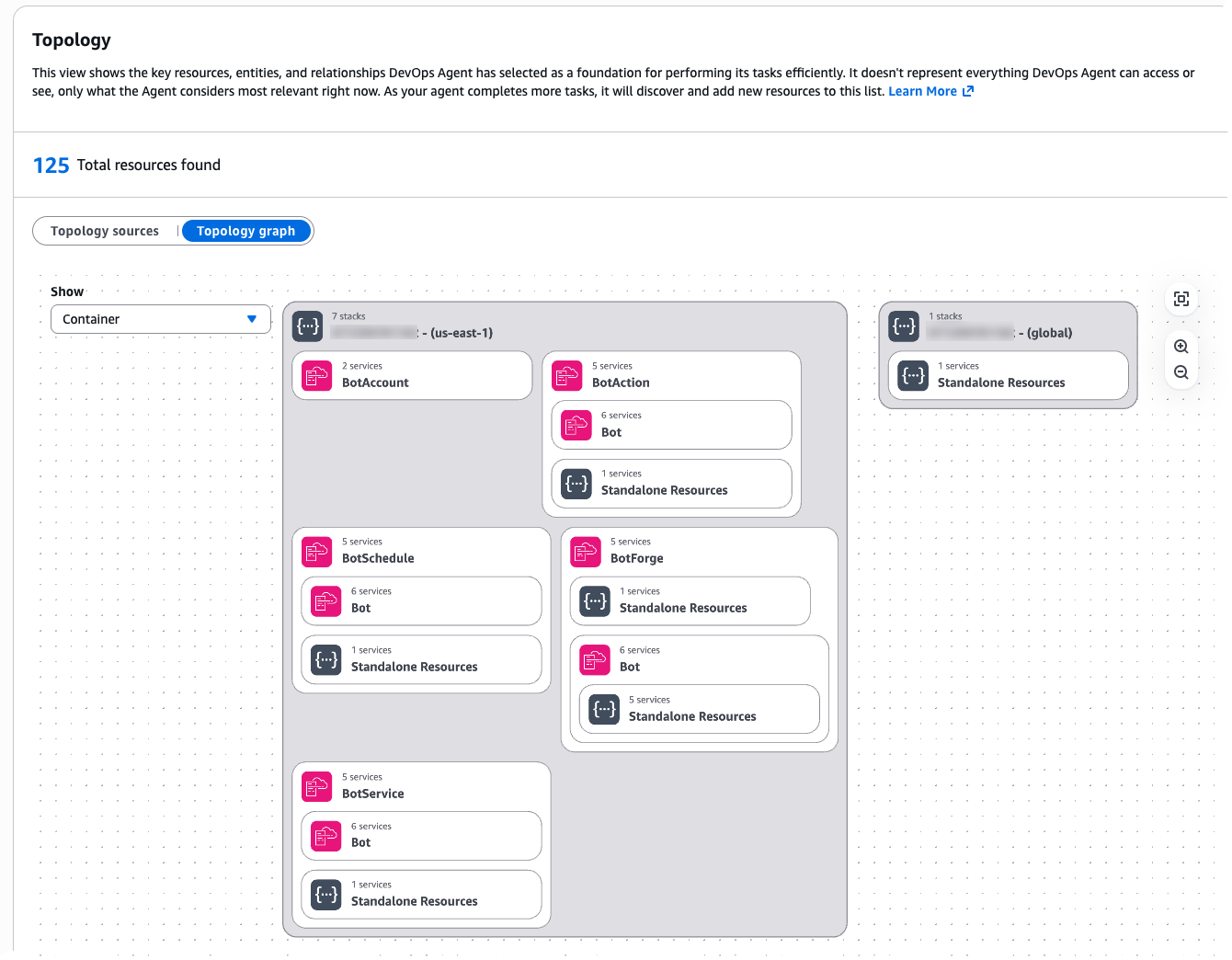
Figure 1: Agent Space Topology
If the Agent Space doesn’t include access to a critical account or integration, the agent might miss the root cause entirely. Conversely, an overly broad Agent Space introduces performance challenges as the agent considers more resource permutations during investigations.
Understanding these trade-offs between scope and performance is essential. The question becomes: how do you determine the right boundaries for your specific organization and operational model?”
Part 1: Design your Agent Space architecture
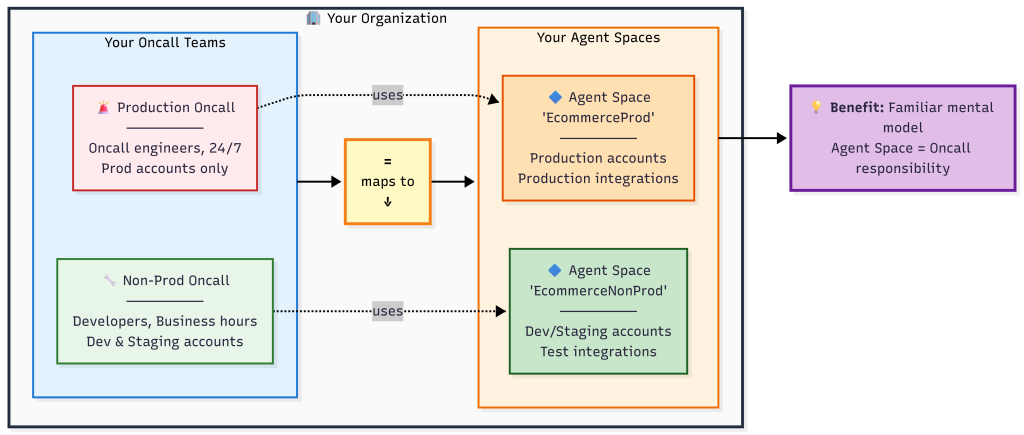
We recommend thinking about Agent Space boundaries the same way you think about on-call responsibilities: grant access to accounts relevant to the application, but separate production from non-production environments.
This approach provides several benefits:
Familiar mental model – Operations teams already understand on-call boundaries
Appropriate investigation scope – Mirrors how human engineers would investigate incidents
Two-way door decision – You can expand or narrow Agent Space scope as needs evolve
Performance balance – Provides sufficient context without overwhelming the agent
Determine Your Agent Space Boundaries
Start by mapping your application architecture to Agent Space boundaries and consider the following questions:
What defines a logical application?
Does your team own multiple independent applications? If so, create separate Agent Spaces.
Is it a monolith spanning multiple accounts? Then one Agent Space with cross-account access makes sense.
How do you organize on-call rotations?
Separate teams for production versus non-production suggests separate Agent Spaces.
One team handling all environments might work with one Agent Space per application.
What are your investigation patterns?
Do production incidents require querying dependent services in other accounts? Include those accounts.
Are environments completely isolated? Keep Agent Spaces separate.
Figure 2: Agent Space boundaries mirror on-call team responsibilities
Common Agent Space Patterns and Decision Points
Beyond the basic single-application pattern, organizations encounter more complex scenarios that require careful consideration. Here are critical patterns to address that we’ve seen customers successfully adopt:
Pattern 1: Investigations Spanning Multiple Teams. Large organizations with multiple teams (example: 3 teams managing 100+ production accounts) encounter situations where an issue originates in Team A’s infrastructure but the root cause lies in Team B’s services. The question becomes: how do you enable collaboration across Agent Spaces?
Recommended approach: Create application-specific Agent Spaces that include read-only access to shared resource accounts e.g. dependencies. Establish clear on-call escalation procedures and add them as runbooks when investigations identify cross-team root causes for efficient communication (e.g. via chat in Slack). Configure the shared service team’s resources with tags identifying which applications use them (example: app-id: ecommerce-frontend). Following a consistent tagging strategy provides investigation context for shared resources while maintaining clear resource ownership.
Pattern 2: Shared Services and Network Operations Center (NOC) Teams. Some organizations have centralized teams that provide and support shared infrastructure services (databases, networking, monitoring, security) used by multiple applications across the organization. These NOC or central operations teams need visibility into their services without requiring access to every application’s Agent Space.
Recommended approach: Create a dedicated Agent Space for the shared service team and configure an Agent Space scoped to the shared service team’s infrastructure and operational responsibilities:
Include AWS accounts containing shared databases, network infrastructure, centralized logging, and monitoring systems
Add relevant CloudFormation stacks for shared platform services
Configure IAM roles that provide read-only access to the specific resources the team supports
Include runbooks and operational procedures specific to the shared services
This follows the same principle as application-specific Agent Spaces: one Agent Space per on-call team, even when that Agent Space’s scope spans multiple applications. While shared services teams manage specific infrastructure domains, SRE teams often face an even larger challenge: operational responsibility for hundreds or thousands of applications at enterprise scale.
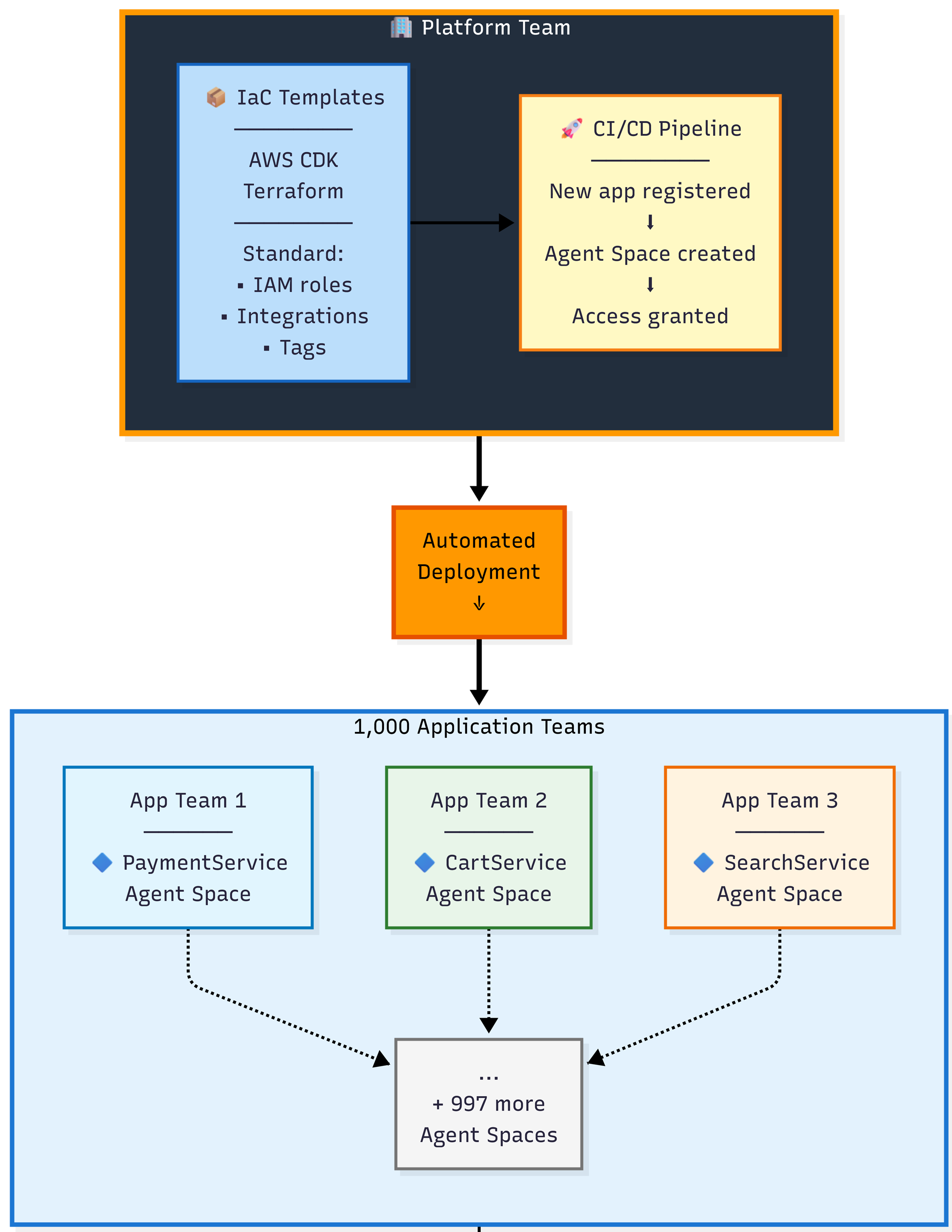
Pattern 3: Central Operations Teams Managing Many Applications. Central operations teams responsible for operational tooling across hundreds or thousands of applications can efficiently manage Agent Spaces at scale using Infrastructure as Code.
Recommended approach: Use the AWS CDK or Terraform samples available as starting points. These samples enable teams to:
Define a standardized Agent Space template with your organization’s required IAM roles, integrations, resource boundaries and governance tags
Deploy Agent Spaces programmatically as part of application onboarding workflows
Enforce compliance through AWS Config rules or service control policies
Track all Agent Spaces through consolidated billing and tagging (application-id, team, cost-center, environment)
Central operations teams manage the templates and governance policies, while application teams operate within those guardrails. This approach scales to thousands of applications with consistent configuration and automated deployment. AWS DevOps agent allows limiting agent access in an AWS account and controlling access for users to the operator console for teams to manage Agent Space access at scale.
Figure 3: Enterprise scale pattern using Infrastructure as Code
Now that you understand how to design Agent Space boundaries aligned with your team structure and scale requirements, let’s walk through the practical implementation steps to bring these architectural patterns to life.
Part 2: Implement your Agent Space architecture
This section walks you through the practical steps of creating your first Agent Space—from verifying prerequisites and configuring IAM roles across accounts to integrating observability tools, setting up access controls, and testing your configuration to ensure investigations have the context they need.
Step 1: Agent Space Prerequisites
Before setting up your first Agent Space, ensure you have:
AWS accounts – At least one AWS account where your application resources run
IAM permissions – Sufficient access to create IAM roles and policies across accounts. AWS DevOps Agent requires two distinct sets of IAM permissions:
Agent Space role permissions – The IAM role that AWS DevOps Agent assumes to query your AWS resources, access CloudWatch Logs, and discover topology. This role requires the AIOpsAssistantPolicy managed policy plus additional permissions for AWS Support and expanded capabilities. See the CLI onboarding guide for the complete role configuration.
Operator app role permissions – The IAM role that controls what human operators can do in the AWS DevOps Agent web application, such as starting investigations, viewing results, and creating AWS Support cases. This role is separate from the agent’s investigation permissions.
Service Control Policies (SCPs) – Verify that your organization’s SCPs allow AWS DevOps Agent API actions. Common issue: Teams complete Agent Space setup but investigations fail because SCPs block aidevops:* actions or bedrock:InvokeModel actions. Review your AWS Organization’s SCPs and add exceptions for DevOps Agent if needed. Note that DevOps Agent and Amazon Bedrock inference are not impacted by policies that restrict customer content to specific AWS regions—Bedrock may use US regions other than US East (N. Virginia) for stateless inference.
Observability tools – At minimum, Amazon CloudWatch (automatically available via IAM roles) and Amazon CloudTrail. For comprehensive investigations, integrate Application Performance Monitoring tools like Datadog, Dynatrace, New Relic, Grafana, or Splunk. See Connecting telemetry sources for supported integrations.
Understanding third-party integration configuration – Some third-party tools require a two-step configuration process:
Account-level registration – Tools that use OAuth (like GitHub, Dynatrace) must first be registered at the AWS account level through the DevOps Agent console. This establishes OAuth credentials that are shared across all Agent Spaces in your account.
Agent Space-level association – After registration, each Agent Space individually specifies which resources from that tool to use. For example, after registering GitHub once, Agent Space “EcommerceProd” can associate only production repositories while Agent Space “EcommerceNonProd” associates development repositories.Other tools like Datadog, New Relic, and Splunk can be directly associated with an Agent Space using API keys or tokens without separate account-level registration. CloudWatch requires no additional configuration beyond IAM roles.
Source control – GitHub or GitLab repository access for code context and deployment correlation (optional but highly recommended)
IaC tooling – AWS CDK (TypeScript/Python), Terraform, AWS CLI, or AWS Management Console for Agent Space deployment
With prerequisites verified, you’re ready to create your Agent Space and establish the IAM trust relationships that enable investigations.
Step 2: Create an Agent Space
AWS DevOps Agent requires IAM roles in each AWS account within the Agent Space boundary. The agent assumes these roles to query CloudWatch Logs, describe resources, and build application topology.
The AWS DevOps Agent is designed to retrieve operational data from multiple AWS Regions across all AWS accounts that you grant access to within the configured Agent Space, enabling comprehensive visibility into distributed infrastructure and applications regardless of their geographic deployment, while supporting multiple accounts through a configuration process that involves creating IAM roles with appropriate trust policies and permissions in secondary accounts
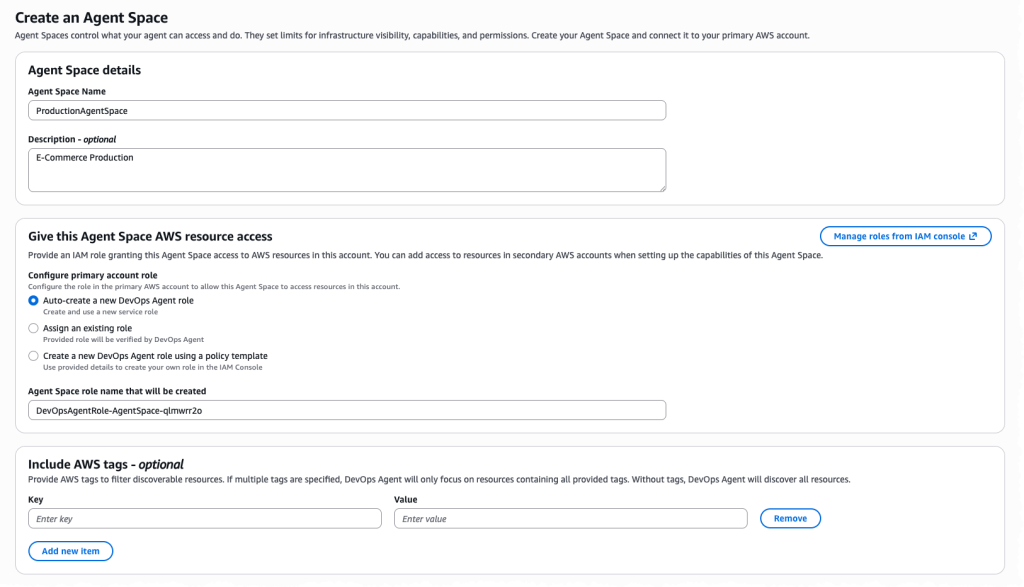
Option A: Use the AWS Console wizard Navigate to the AWS DevOps Agent console and choose Create Agent Space and follow the guided setup to create IAM roles in each target account.
Figure 4: Creating an Agent Space in the Console
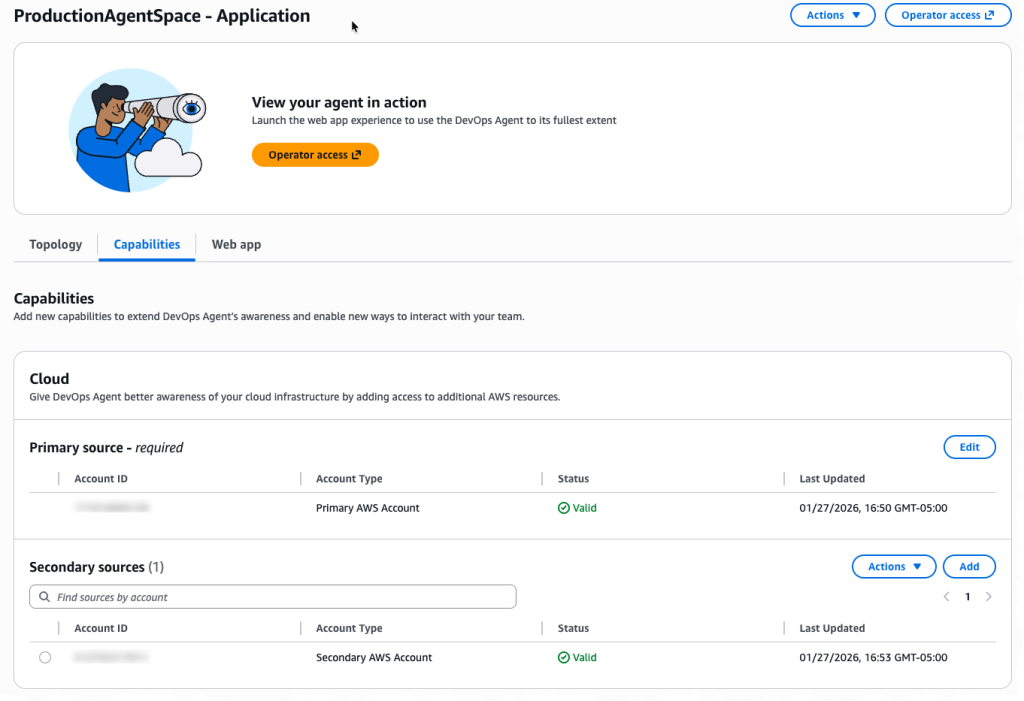
The setup wizard helps in configuring cross-account trust relationships.
Figure 5: Multiple account configuration for your Agent Space
Option B: Use Infrastructure as Code (Recommended) We provide sample CDK and Terraform templates that automate Agent Space creation and IAM role deployment across multiple accounts.
For detailed instructions on setting up IAM roles and permissions across accounts, see the CLI Onboarding Guide.
Once your Agent Space exists and has access to AWS accounts, the next critical step is connecting the observability and development tools that provide investigation context beyond AWS native services.
Step 3: Configure Integrations
AWS DevOps Agent investigates incidents by correlating data from multiple sources. The more context available, the more accurate the root cause analysis.
Recommended integrations by priority:
Amazon CloudWatch – Provides logs, metrics, and traces from AWS services. The agent queries CloudWatch Logs Insights automatically during investigations. No additional configuration is needed if IAM roles are properly configured.
Application Performance Monitoring tools – Datadog, Dynatrace, New Relic, and Splunk provide distributed tracing, custom metrics, and application-level context. Configure via Agent Space integrations in the AWS Console.
Code repositories – GitHub or GitLab integration enables the agent to review recent deployments and code changes. Requires OAuth or personal access token.
CI/CD pipelines – GitHub Actions or GitLab workflows help the agent correlate incidents with deployment timing. Configured alongside code repository integration.
Communication Channels – Slack and ServiceNow integration enables DevOps Agent to post real-time investigation updates to team channels and automatically update incident tickets with findings, root cause analysis, and recommended mitigation steps throughout the investigation lifecycle.
Advanced Integrations
Beyond built-in integrations, AWS DevOps Agent supports webhook triggered investigations and custom MCP (Model Context Protocol) servers so you can bring-your-own observability tools.
Webhook configuration for investigation triggers Webhooks allow external systems (Grafana, Prometheus, PagerDuty, custom monitoring tools) to automatically trigger DevOps Agent investigations when incidents occur. Each Agent Space receives a unique webhook URL that accepts JSON payloads describing the incident.
Common configuration pitfalls:
Webhook authentication: Webhooks use HMAC signatures for security. Store the webhook secret in AWS Secrets Manager and rotate it according to your security policies.
Payload format: Ensure your monitoring tool sends incident context including timestamps, affected resources, and symptom descriptions. Richer context enables more accurate investigations.
Bring-your-own MCP servers If you use observability tools beyond the built-in integrations (Grafana, Prometheus, custom telemetry systems), you can connect them via MCP servers. MCP servers expose your tool’s data through a standardized protocol that DevOps Agent queries during investigations.
Key requirements for MCP servers:
Publicly accessible HTTPS endpoint: MCP servers must be reachable from the public internet. VPC-hosted servers are not currently supported.
Read-only tools only: For security, only expose MCP tools that perform read operations. Write operations introduce prompt injection risks.
Tool allowlisting: Register MCP servers at the account level, then selectively enable specific tools per Agent Space. Don’t grant access to all tools—choose only those relevant to investigations.
Common MCP setup errors:
Authentication misconfiguration: MCP servers support OAuth 2.0 or API key authentication. Verify your OAuth client credentials are correct and that token exchange URLs are accessible from AWS infrastructure.
Tool name length: MCP tool names have a maximum length of 64 characters. Longer names will fail registration.
Endpoint URL format: Use the full HTTPS URL including path. Example: https://mcp.example.com/v1/mcp not just mcp.example.com.
For comprehensive MCP server setup including authentication configuration, see Connecting MCP Servers.
Testing your integrations After configuring webhooks or MCP servers, trigger a test investigation to verify connectivity:
For webhooks: Send a test payload from your monitoring tool and verify the investigation starts in the DevOps Agent web app
For MCP servers: Start an investigation manually and check the agent journal to confirm it successfully called your MCP tools
Review any errors in AWS CloudTrail logs which capture all DevOps Agent API calls including integration attempts
With your data sources connected, you now need to ensure the right people have appropriate access to investigations while maintaining security boundaries.
Step 4: Configure Access Controls
Agent Spaces support fine-grained access controls to ensure only authorized team members can interact with investigations.
Access control considerations:
Who should view investigations? Typically on-call engineers, SREs, and DevOps engineers. Consider including security teams for security-related incidents.
Who should create AWS Support cases? Typically on-call leads and senior engineers. Restrict this permission to prevent excessive case creation.
Who should modify Agent Space configuration? Typically central operations or infrastructure teams. Separate this from day-to-day investigation access.
IAM-based access control:
AWS DevOps Agent uses IAM policies to control access to Agent Spaces. Attach policies to IAM users, groups, or roles:
AWS DevOps Agent operates within your AWS environment with privileged access to operational data across multiple accounts. While general security foundations apply, Agent Space configuration introduces specific considerations. For comprehensive security guidance, see the AWS DevOps Agent Security documentation.
Access controls are in place—now it’s time to validate that your Agent Space configuration provides the investigation coverage you need.
Step 5: Test and Iterate
Agent Space configuration is a two-way door decision. Start with a focused scope and expand based on investigation results.
Testing your Agent Space:
Trigger a test investigation using the AWS DevOps Agent web app.
Start an investigation and provide symptoms such as “High latency on /api/checkout endpoint”.
Observe which resources the agent queries.
Review investigation completeness. Did the agent identify the root cause?
Were any accounts or services missing from the investigation?
Did the agent have sufficient telemetry data?
Adjust Agent Space boundaries based on results.
Add accounts if investigations lack context.
Add integrations if telemetry gaps exist.
Narrow scope if performance degrades.
Conclusion
AWS DevOps Agent transforms incident response from a manual, time-consuming process into an autonomous, data-driven investigation. However, the agent’s effectiveness depends on proper Agent Space configuration. By following the on-call based approach—granting access to accounts relevant to your application while separating production from non-production environments—you provide sufficient context for accurate root cause analysis without introducing unnecessary complexity.
Key takeaways:
Think on-call boundaries – Agent Space scope should mirror how your team investigates incidents
Use Infrastructure as Code – CDK and Terraform templates ensure consistent, repeatable deployments
Integrate observability tools – More data sources equals more accurate investigations
Iterate based on results – Expand or narrow Agent Space scope as investigation patterns emerge
We’re committed to making AWS DevOps Agent easier to adopt and more accurate in solving customer problems. Your Agent Space setup is the foundation for achieving fast, reliable incident resolution. Have questions or feedback? Leave a comment below.
We have received the sad news that Didier Spaier, maintainer of the
blind-friendly Slackware-based Slint distribution, has recently passed
away. Philippe Delavalade, who posted the announcement to the
Slint mailing list, said:
Early 2015, I asked on the slackware list if brltty could be added
in the installer; Didier answered promptly that he could do it on
slint. Afterwards, he worked hard so that slint became as accessible
as possible for visually impaired people.
You all know that all these years, he tried and succeeded to answer
as quickly as possible to our issues and questions.
The Open Source Initiative (OSI) has announced
that it will not be holding the 2026 spring board election. Instead,
it will be creating a working group to “review and improve OSI’s
board member selection process” and provide recommendations by
September 2026:
The public election process was designed to gather community
priorities and improve board member selection, while final
appointments remained with the board.
Over time, that nuance has become a source of understandable
confusion for community members. Many reasonably expected elections to
function as elections normally do, and in fact, the board has
generally adopted the electorate’s recommendations. When a process
feels unclear, trust suffers. When trust suffers, engagement becomes
harder. This is especially problematic for an organization whose
mission depends on legitimacy and credibility. […]
OSI tried its experiment for the right reasons, but a variety of
factors resulted in “elections” that are performatively democratic
while being gameable and representative of only a small group, and
we’ve learned from the results. Now we are making space to align our
director selection process with our bylaws, to rebuild trust, and to
develop better, more durable and truly representative participation in
which the global stakeholder community can be heard.
This is a guest post by Jake J. Dalli, Data Platform Team Lead at Tipico, in partnership with AWS.
Tipico is the number one name in sports betting in Germany. Every day, we connect millions of fans to the thrill of sport, combining technology, passion, and trust to deliver fast, secure, and exciting betting, both online and in more than a thousand retail shops across Germany. We also bring this experience to Austria, where we proudly operate a strong sports betting business.
To support critical needs such as product monitoring, customer insights, and revenue assurance, our central data function needed to provide the tools for several cross-functional analytics and data science teams to run scalable batch workloads on the existing data warehouse, powered by Amazon Redshift. The workloads of Tipico’s data community included extract, transform, and load (ELT), statistical modeling, machine learning (ML) training, and reporting across diverse frameworks and languages.
In the past, analytics teams operated in isolation, distinct from each other and the central data function. Different teams maintained their own set of tools, often performing the same function and creating data silos. Lack of visibility meant a lack of standardization. This siloed approach slowed down the delivery of insights and prevented the company from achieving a unified data strategy that ensured availability and scalability.
The need to introduce a single, unified platform that promoted visibility and collaboration became clear. However, the diversity of workloads brought another layer of complexity. Teams needed to tackle different types of problems and brought distinct skillsets and preferences in tooling. Analysts might rely heavily on SQL and business intelligence (BI) platforms, whereas data scientists preferred Python or R, and engineers leaned on containerized workflows or orchestration frameworks.
Our goal was to architect a new system that supports diversity while maintaining operational control, delivering an open orchestration platform with built-in security isolation, scheduling, retry mechanisms, fine-grained role-based access control (RBAC), and governance features such as two-person approval for production workflows. We achieved this by designing a system with the following principles:
Bring Your Own Container (BYOC) – Teams are given the flexibility to package their workloads as containers and are free to choose dependencies, libraries, or runtime environments. For teams with highly specialized workloads, this meant that they could work in a setup tailored to their needs while also operating within a harmonized platform. On the other hand, teams that didn’t require fully customized environments could redesign their workloads to align with existing workloads.
Centralized orchestration for full transparency – All teams can see all workflows and build interdependencies between them
Shared orchestration, isolated compute – Workloads run in team-specific Docker containers within a unified compute environment, providing scalability while keeping execution traceable to each team.
Standardized interfaces, flexible execution – Common patterns (operators, hooks, logging, or monitoring) reduce complexity, and teams retain freedom to innovate within their containers.
Cross-team approvals for critical workflows stored inside version control – Changes follow a four-eye principle, requiring review and approval from another team before execution, providing accountability and reducing risk. This allowed our core data function to monitor and contribute suggestions to work across different analytics teams.
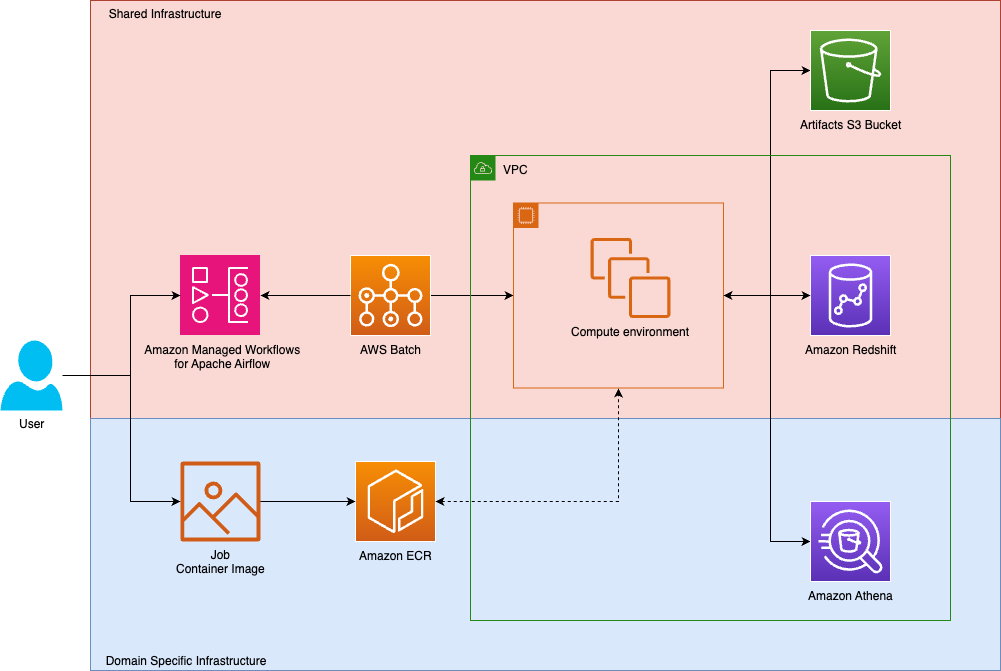
We devised a system wherein orchestration and execution of tasks operate on shared infrastructure, which teams interact with through domain-specific infrastructure. In Tipico’s case, each team pushes images to team-owned container instances. Such containers provide code for workflows, including execution of ELT pipelines or transformations on top of domain-specific data lakes.
The following diagram shows the solution architecture.
The technical challenge was to architect a flexible and high-performance orchestration layer that could scale reliably while also remaining framework-agnostic, integrating seamlessly with existing infrastructure.
When designing our system, we were aware of the several container orchestration solutions offered by Amazon Web Services (AWS), including Amazon Elastic Kubernetes Service (Amazon EKS), Amazon Elastic Container Service (Amazon ECS), and AWS Batch, among others. In the end, the team selected AWS Batch because it abstracts away cluster management, provides elastic scaling, and inherently supports batch workloads as a design feature.
Solution details
Before adopting the current solution, Tipico experimented with operating a self-managed Apache Airflow setup. Although it was functional, it became increasingly burdensome to maintain. The shift toward a managed and scalable solution was driven by the need to focus more on empowering teams to deliver rather than maintaining the infrastructure. Tipico replatformed the central orchestration solution using Amazon MWAA and AWS Batch.
Amazon MWAA is a fully managed service that simplifies running open source Apache Airflow on AWS. Users can build and execute data processing workflows while integrating seamlessly with various AWS services, which means developers and data engineers can concentrate on building workflows rather than managing infrastructure.
AWS Batch is a fully managed service that simplifies batch computing in the cloud so users can run batch jobs without needing to provision, manage, or maintain clusters. It automates resource provisioning and workload distribution, with users only paying for the underlying AWS resources consumed.
The new design provides a unified framework where analytics workloads are containerized, orchestrated, and executed on scalable compute and integrated with persistent storage:
Containerization – Analytics workloads are packaged into Docker containers, with dependencies bundled to provide reproducibility. These images are versioned and stored in Amazon Elastic Container Registry (Amazon ECR). This approach decouples execution from infrastructure and enables consistent behavior across environments.
Workflow orchestration – Airflow Directed Acyclic Graphs (DAGs) are version-controlled in Git and deployed to Amazon MWAA using a continuous integration and continuous delivery (CI/CD) pipeline. Amazon MWAA schedules and orchestrates tasks, triggering AWS Batch jobs using custom operators. Logs and metrics are streamed to Amazon CloudWatch, enabling real-time observability and alerting.
Data persistence – Workflows interact with Amazon Simple Storage Service (Amazon S3) for durable storage of inputs, outputs, and intermediate artifacts. Amazon Elastic File System (Amazon EFS) is mounted to Amazon MWAA for fast access to shared code and configuration files, synchronized continuously from the Git repository.
Scalable compute – Amazon MWAA triggers AWS Batch jobs using standardized job definitions. These jobs run in elastic compute environments such as Amazon Elastic Compute Cloud (Amazon EC2) or AWS Fargate, with secrets securely injected using AWS Secrets Manager. AWS Batch environments auto scale based on workload demand, optimizing cost and performance.
Security and governance – AWS Identity and Access Management (IAM) roles are scoped per team and workload, providing least-privilege access. Job executions are logged and auditable, with fine-grained access control enforced across Amazon S3, Amazon ECR, and AWS Batch.
Common operators
To streamline the execution of batch jobs across teams, we developed a shared operator that wraps the built-in Airflow AWS Batch operator. This abstraction simplifies the execution of containerized workloads by encapsulating common logic such as:
Job definition selection
Job queue targeting
Environment variable injection
Secrets resolution
Retry policies and logging configuration
Parameterization is handled using Airflow Variables and XComs, enabling dynamic behavior across DAG runs. The operator is maintained in a shared Git repository, versioned and centrally governed, but accessible to all teams.
To further accelerate development, some teams use a DAG Factory pattern, which programmatically generates DAGs from configuration files. This reduces boilerplate and enforces consistency so teams can define new workflows declaratively.
By standardizing this operator and supporting patterns, Tipico reduces onboarding friction, promotes reuse, and provides consistent observability and error handling across the analytics ecosystem.
Governance
Governance is enforced through a combination of fine-grained IAM roles, AWS IAM Identity Center and automated role mapping. Each team is assigned a dedicated IAM role, which governs access to AWS services such as Amazon S3, Amazon ECR, AWS Batch and Secrets Manager. These roles are tightly scoped to minimize the extent of damage and provide traceability.
Given that the airflow environment runs version 2.9.2, which doesn’t support multi-tenant access, Tipico developed a custom component that dynamically maps AWS IAM roles to Airflow roles. The component, which executes periodically using Airflow itself, dynamically syncs IAM role assignments with Airflow’s internal RBAC model. Airflow tags are used to govern access to different DAGs, governing which teams have access to execute or modify the settings on the DAG. This aligns access permissions remain with organizational structure and team responsibilities.
Adoption
The shift toward a managed, scalable solution was driven by the need for greater team autonomy, standardization, and scalability. The journey began with a single analytics team validating the new approach. When it was successful, the platform team generalized the solution and rolled it out incrementally to other teams, refining it with each iteration.One of the biggest challenges was migrating legacy code, which often included outdated logic and undocumented dependencies. To support adoption, Tipico introduced a structured onboarding process with hands-on training, real use cases, and internal champions. In some cases, teams also had to adopt Git for the first time—marking a broader shift toward modern engineering practices within the analytics organization.
Key benefits
One of the most valuable outcomes of our new architecture that is primarily built around Amazon MWAA and AWS Batch is to accelerate analytics teams’ time to value. Analysts can now focus on building transformation logic and workloads without worrying about the underlying infrastructure. With this system, analysts can rely on preprepared integrations and analytics patterns used across different teams, supported by standard interfaces developed by the core data team.
Aside from building analytics on Amazon Redshift, the orchestration solution also interfaces with several other analytics services such as Amazon Athena and AWS Glue ETL, providing maximum flexibility on the type of workloads being delivered. Teams within the organization have also shared practices in using different frameworks, such as dbt Labs, to reuse custom developments to carry out standard processes.
Another valuable outcome is the ability to clearly segregate costs across teams. Within the architecture, Airflow delegates heavy lifting to AWS Batch, providing task isolation that spans beyond Airflow’s built-in workers. Through this, we gain granular visibility into resource usage and accurate cost attribution, promoting financial accountability across the organization.
Finally, the platform also provides embedded governance and security, with RBAC and standardized secrets management providing an operationalized model for securing and governing working flows across different teams.
Teams can now focus on building and iterating quickly, knowing that the surrounding structures provide full transparency and are coherent with the organization’s governance, architecture, and FinOps goals. At the same time, centralized orchestration fosters a collaborative environment where teams can discover, reuse, and build upon each other’s workflows, driving innovation and reducing duplication across the data landscape.
Conclusion
By reimagining our orchestration layer with Amazon MWAA and AWS Batch, Tipico has unlocked a new level of agility and transparency across its data workflows.
Previously, analytics teams faced long lead times, often stretching into weeks, to implement new reporting use cases. Much of this time was spent identifying datasets, aligning transformation logic, discovering integration options, and navigating inconsistent quality assurance processes. Today, that has changed. Analysts can now develop and deploy a use case within a single business day, shifting their focus from groundwork to action.
The modern architecture empowers teams to move faster and more independently within a secure, governed, and scalable framework. The result is a collaborative data ecosystem where experimentation is encouraged, operational overhead is reduced, and insights are delivered at speed.
Game studios generate massive amounts of player and gameplay telemetry, but transforming that data into meaningful insights is often slow, technical, and dependent on SQL expertise. With the new Amazon Redshift integration for Amazon Bedrock Knowledge Bases, teams can unlock instant, AI-powered analytics by asking questions in natural language. Analysts, product managers, and designers can now explore Amazon Redshift data conversationally—no query writing required—and Amazon Bedrock automatically generates optimized SQL, executes it on Amazon Redshift, and returns clear, actionable answers. This brings together the scale and performance of Amazon Redshift with the intelligence of Amazon Bedrock, enabling faster decisions, deeper player understanding, and more engaging game experiences.
Amazon Redshift can be used as a structured data source for Amazon Bedrock Knowledge Bases, allowing for natural language querying and retrieval of information from Amazon Redshift. Amazon Bedrock Knowledge Bases can transform natural language queries into SQL queries, so users can retrieve data directly from the source without needing to move or preprocess the data. A game analyst can now ask, “How many players completed all the levels in a game?” or “List the top 5 players by the number of times the game was played,” and Amazon Bedrock Knowledge Bases automatically translates that query into SQL, runs the query against Amazon Redshift, and returns the results—or even provides a summarized narrative response.
To generate accurate SQL queries, Amazon Bedrock Knowledge Bases uses database schema, previous query history, and other domain or business knowledge such as table and column annotations that are provided about the data sources. In this post, we discuss some of the best practices to improve accuracy while interacting with Amazon Bedrock using Amazon Redshift as the knowledge base.
Solution overview
In this post, we illustrate the best practices using gaming industry use cases. You will converse with players and their game attempts data in natural language and get the response back in natural language. In the process, you will learn the best practices. To follow along with the use case, follow these high-level steps:
Load game attempts data into the Redshift cluster.
Create a knowledge base in Amazon Bedrock and sync it with the Amazon Redshift data store.
Review the approaches and best practices to improve the accuracy of response from the knowledge base.
Complete the detailed walkthrough for defining and using curated queries to improve the accuracy of responses from the knowledge base.
Prerequisites
To implement the solution, you need to complete the following prerequisites:
Run the following SQL to create the data tables to store games attempts and player details:
CREATE TABLE game_attempts (
    player_id numeric(10, 0), -- Player ID.
    level_id numeric(5, 0), -- Game level ID
    f_success integer, -- Indicates whether user completed the level (1: completed, 0: fails).
    f_duration real, -- duration of the attempt.  Units in seconds
    f_reststep real, -- The ratio of the remaining steps to the limited steps.  Failure is 0.
    f_help integer, -- Whether extra help, such as props and hints, was used.  1- used, 0- not used
    game_time timestamp, -- Attempt timestamp
    bp_used boolean -- Whether bonus packages used or not.  true: used, false: not used.
);
CREATE TABLE players (
	player_id numeric(10, 0), -- Player ID
	lost_label boolean, -- Indicated if user retained or lost.  true: lost ,  false: retained
	bp_category integer -- bonus package category codes
);
Upload the downloaded files into your newly created S3 bucket.
Using the following COPY command statements, load the datasets from Amazon S3 into the new tables you created in Amazon Redshift. Replace <<your_s3_bucket>> with the name of your S3 bucket and <<your_region>> with your AWS Region:
COPY game_attempts
FROM 's3://<<your_s3_bucket>>/game_attempts.csv'
IAM_ROLE DEFAULT
FORMAT AS CSV
IGNOREHEADER 1;
COPY players
FROM 's3://<<your_s3_bucket>>/players.csv'
IAM_ROLE DEFAULT
FORMAT AS CSV
IGNOREHEADER 1;
Create knowledge base and sync
To create a knowledge base and sync your data store with your knowledge base, complete these steps:
If you’re not getting the expected response from the knowledge base, you can consider these key strategies:
Provide additional information in the Query Generation Configuration. The knowledge base’s response accuracy can be improved by providing supplementary information and context to help it better understand your specific use case.
Use representative sample queries. Running example queries that reflect common use cases helps train the knowledge base on your database’s specific patterns and conventions.
Consider a database that stores player information using country codes rather than full country names. By running sample queries that demonstrate the relationship between country names and their corresponding codes (for example, “USA” for “United States”), you help the knowledge base understand how to properly translate user requests that reference full country names into queries using the correct country codes. This approach helps connect natural language requests and your database’s specific implementation details, resulting in more accurate query generation.
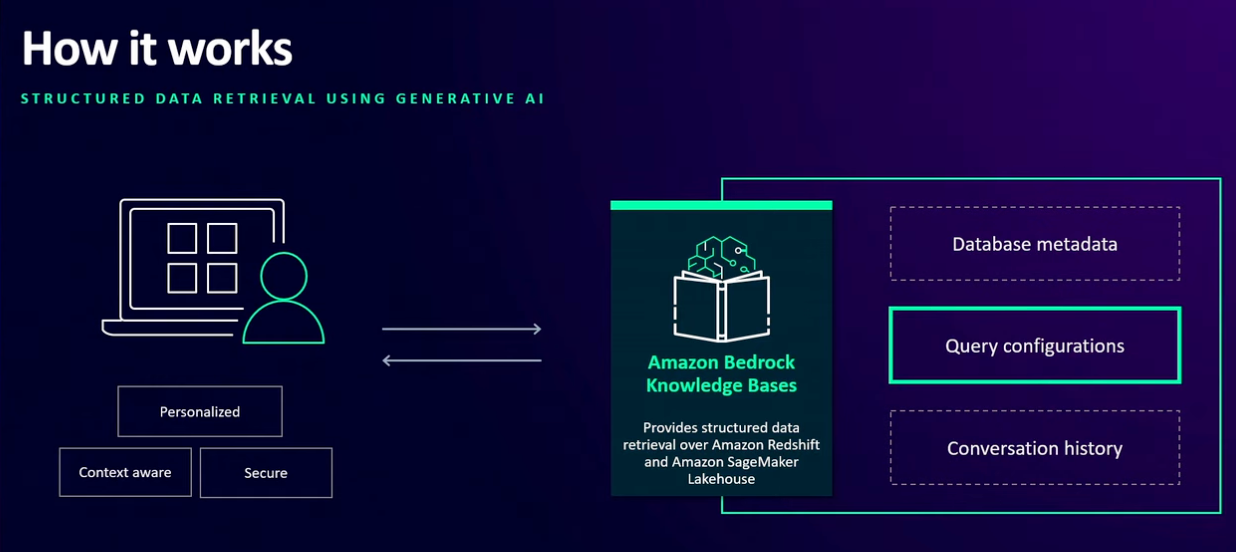
Before we dive into more optimizations options, let’s explore how you can personalize the query engine to generate queries for a specific query engine. In this walkthrough, we use Amazon Redshift. Amazon Bedrock Knowledge Bases analyzes three key components to generate accurate SQL queries:
Database metadata
Query configurations
Historical query and conversation data
The following graphic illustrates this flow.
You can configure these settings to enhance query accuracy in two ways:
When creating a new Amazon Redshift knowledge base
By editing the query engine settings of an existing knowledge base
To configure setting when editing the query engine of an existing knowledge base, follow these steps:
On the Amazon Bedrock console in the left navigation pane, choose Knowledge Bases and select your Redshift Knowledge Base.
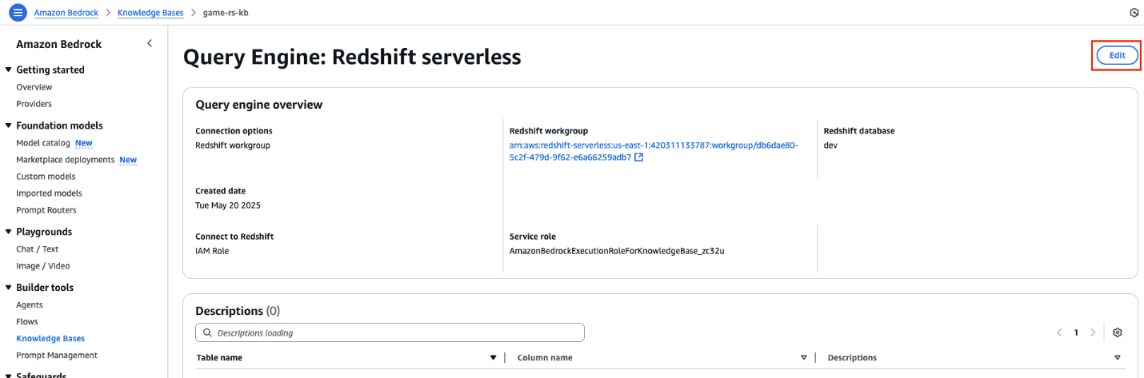
Choose your query engine and choose Edit,
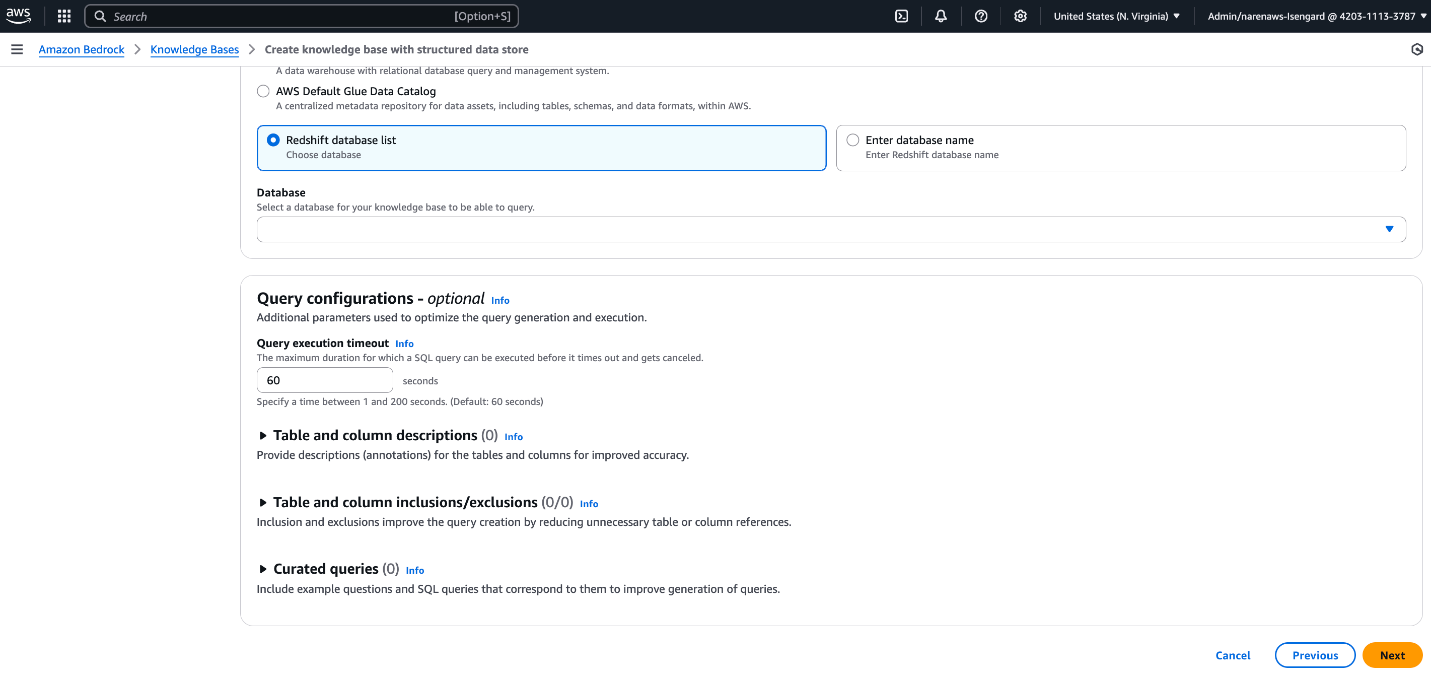
Configure below parameters in (Optional) Query configurations section as shown in following screenshot:
Table and column descriptions
Table and column inclusions/exclusions
Curated queries
Let’s explore the available query configuration options in more detail to understand how these help the knowledge base generate a more accurate response.
Table and column descriptions provide essential metadata that helps Amazon Bedrock Knowledge Bases understand your data structure and generate more accurate SQL queries. These descriptions can include table and column purposes, usage guidelines, business context, and data relationships.
Follow these best practices for descriptions:
Use clear, specific names instead of abstract identifiers
Include business context for technical fields
Define relationships between related columns
For example, consider a gaming table with timestamp columns named t1, t2, and t3. Adding these descriptions helps the knowledge base generate appropriate queries. For example, if t1 is play start time, t2 is play end time, and t3 is record creation time, adding these descriptions will indicate to the knowledge base to use t2–t1 for finding the game duration.
Curated queries are a set of predefined question and answer examples. Questions are written as natural language queries (NLQs) and answers are the corresponding SQL query. These examples help the SQL generation process by providing examples of the kinds of queries that should be generated. They serve as reference points to improve the accuracy and relevance of generative SQL outputs. Using this option, you can provide some example queries to the knowledge base for it understand custom vocabulary also. For example, if the country field in the table is populated with a country code, adding an example query will help the knowledge base to convert the country name to a country code before running the query to answer questions on the data of players in a specific country. You can also provide some example complex queries to help the knowledge base to respond to more complex questions. The following is an example query that can be added to the knowledge base:
Select count(*) from players_address where country = ‘USA’;
With table and column inclusion and exclusion, you can specify a set of tables or columns to be included or excluded for SQL generation. This field is crucial if you want to limit the scope of SQL queries to a defined subset of available tables or columns. This option can help optimize the generation process by reducing unnecessary table or column references. You can also use this option to:
Exclude redundant tables, for example, those generated by copying the original table to run a complex analysis
Exclude tables and columns containing sensitive data
If you specify inclusions, all other tables and columns are ignored. If you specify exclusions, the tables and columns you specify are ignored.
Walkthrough for defining and using curated queries to improve accuracy
To define and use curated queries to improve accuracy, complete the following steps.
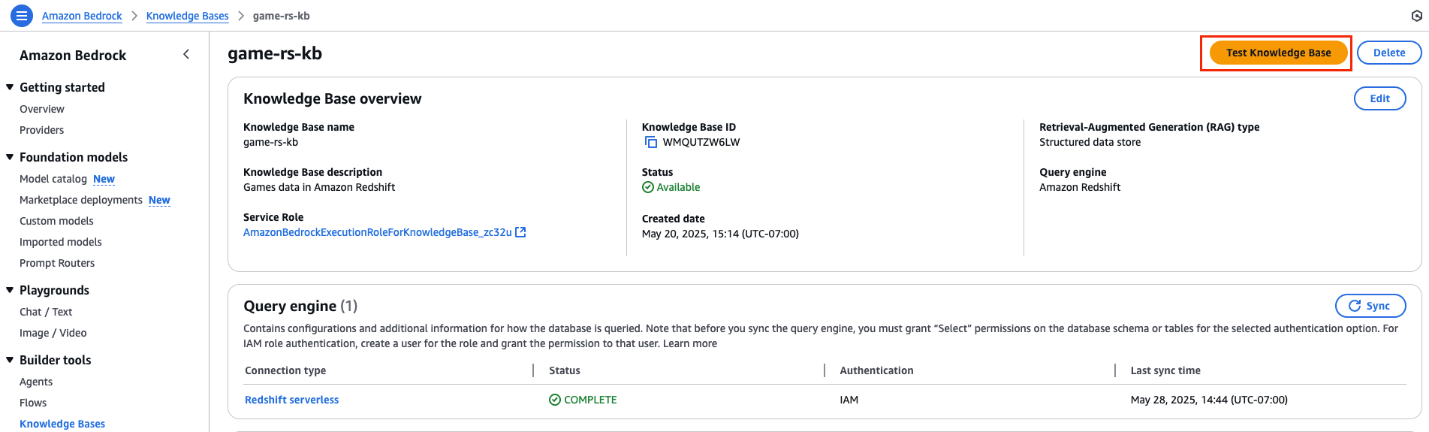
On the AWS Management Console, navigate to Amazon Bedrock and in the left navigation pane, choose Knowledge Bases. Select the knowledge base you created with Amazon Redshift.
Choose Test Knowledge Base, as shown in the following screenshot, to validate the accuracy of the knowledge base response.
On the Test Knowledge Base screen under Retrieval and response generation, choose Retrieval and response generation: data sources and model.
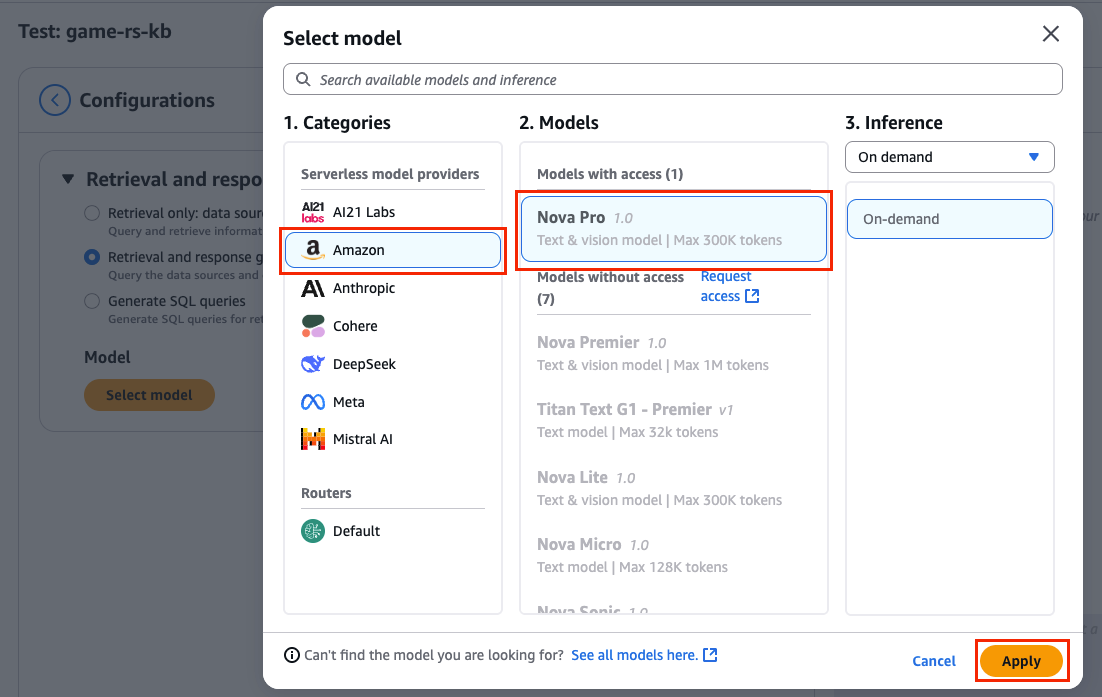
Choose Select model to pick a large language model (LLM) to convert the SQL query response from the knowledge base to a natural language response.
Choose Nova Pro in the popup and choose Apply, as shown in the following screenshot.
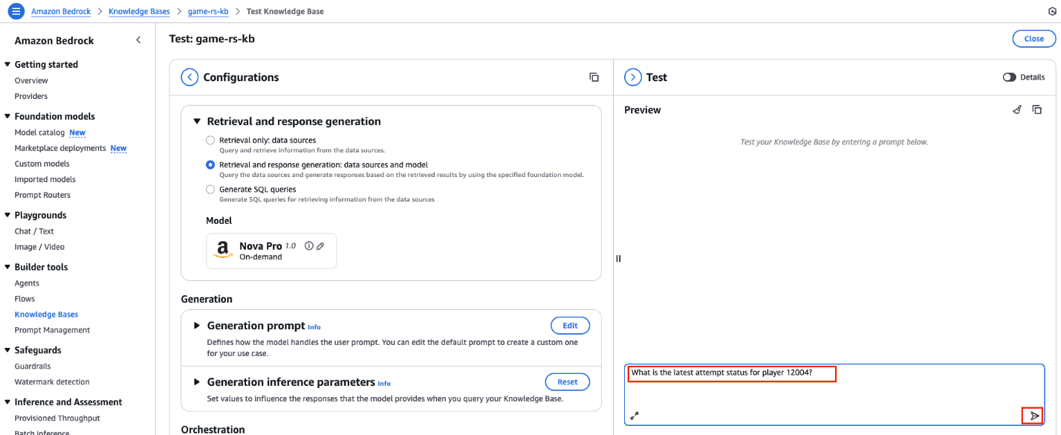
Now you have Amazon Nova Pro connected to your knowledge base to respond to your queries based on the data available in Amazon Redshift. You can ask some questions and verify them with actual data in Amazon Redshift. Follow these steps:
In the Test section on the right, enter the following prompt, then choose the send message icon, as shown in the following screenshot.
What is the latest attempt status for player 12004?
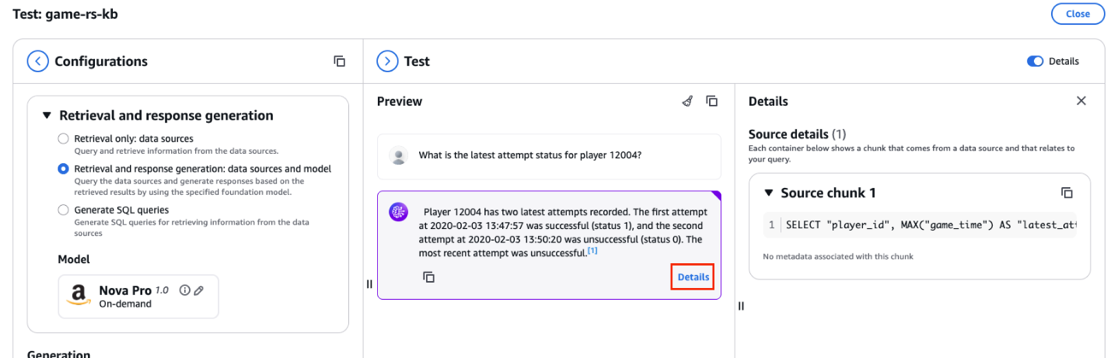
Amazon Nova Pro generates a response using the data stored in the Redshift knowledge base.
Choose Details to see the SQL query generated and used by Amazon Nova Pro, as shown in the following screenshot.
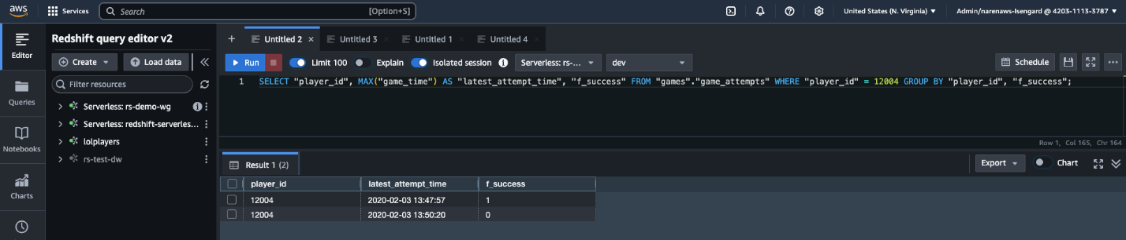
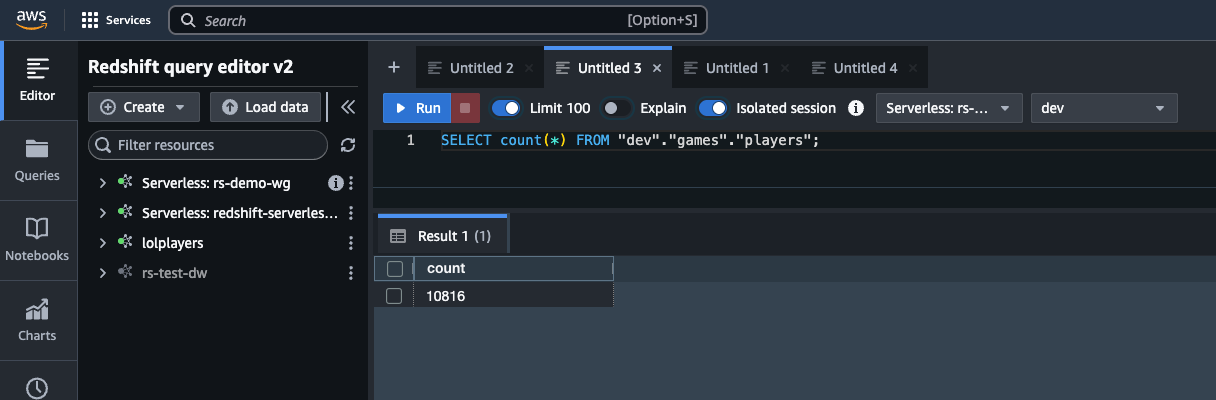
Copy the query and enter it in query editor v2 of the Redshift knowledge base, as shown in the following screenshot.
Verify that the response generated by Amazon Nova Pro in natural language matches the data in Amazon Redshift and that the generated SQL query is also accurate.
You can try some more questions to verify the Amazon Nova Pro response, for example:
What is the lost status for player ID 12004?
How many levels did the player 12004 play?
What level did player 12004 play the most?
Show me the summary of all 14 attempts by player 12004 for level 76.
But what if the response generated by the knowledge base isn’t accurate? In those cases, you can add additional context the knowledge base can use to provide more accurate responses. For example, try asking the following question:
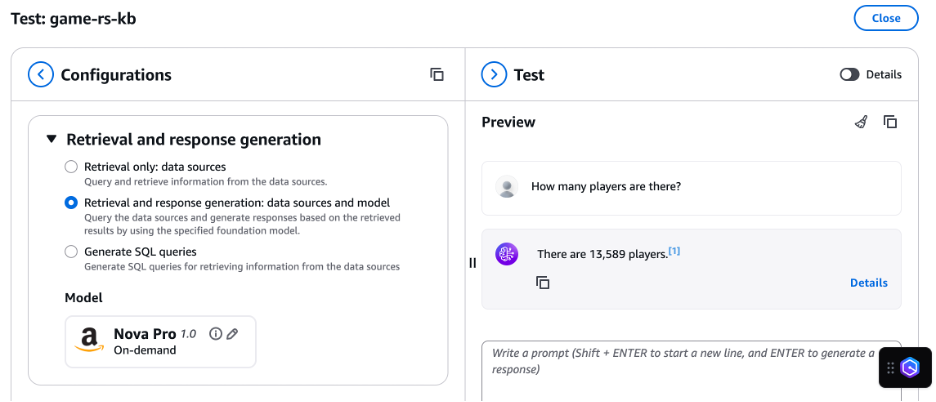
How many total players are there?
In this case, the response generated by the knowledge base doesn’t match the actual player count in Amazon Redshift. The knowledge base reported about 13,589 players and generated the following query to get the player count:
SELECT COUNT(DISTINCT player_id) AS "Number of Players" FROM games.game_attempts;
The following screenshot shows this question and result.
The knowledge base should have used the players table in Amazon Redshift to find the unique players. The correct response is 10,816 players.
To help the knowledge base, add a curated query for it to use the players table instead of the attempts table to find the total player count. Follow these steps:
On the Amazon Bedrock console in the left navigation pane, choose Knowledge Bases and select your Redshift Knowledge Base.
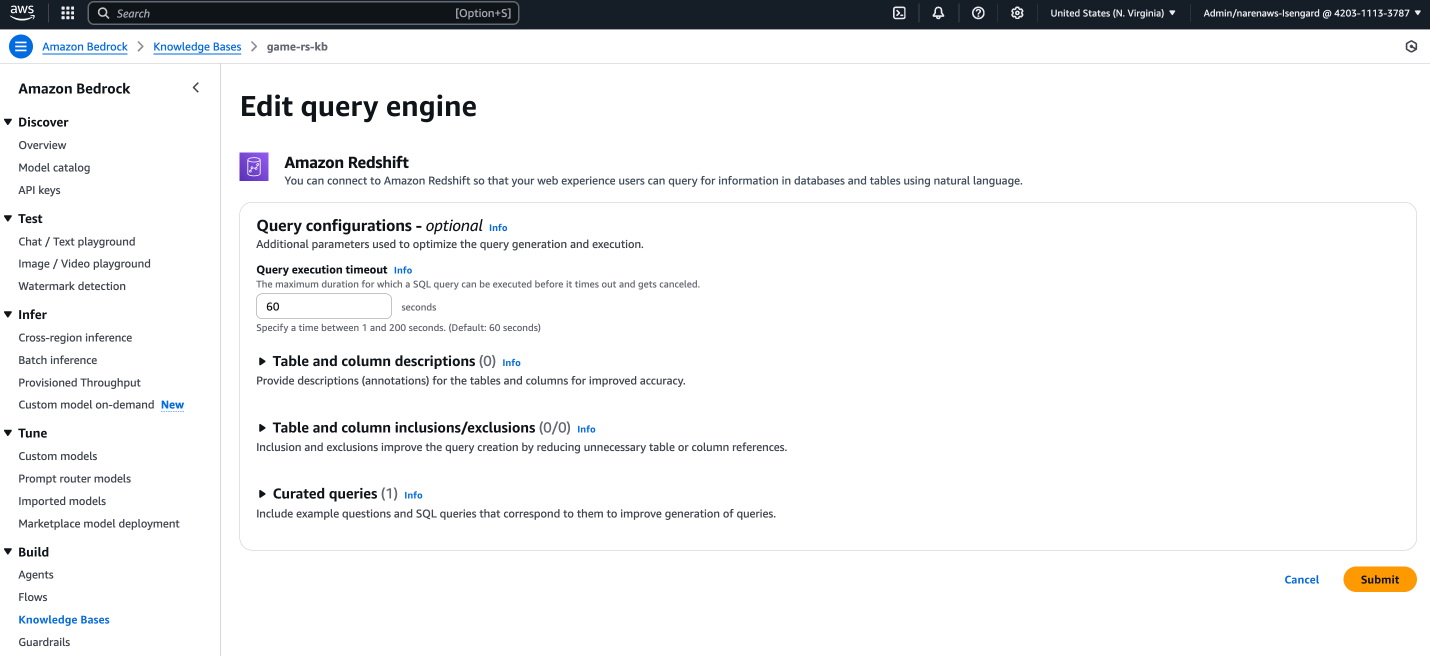
Choose your query engine and choose Edit, as shown in the following screenshot.
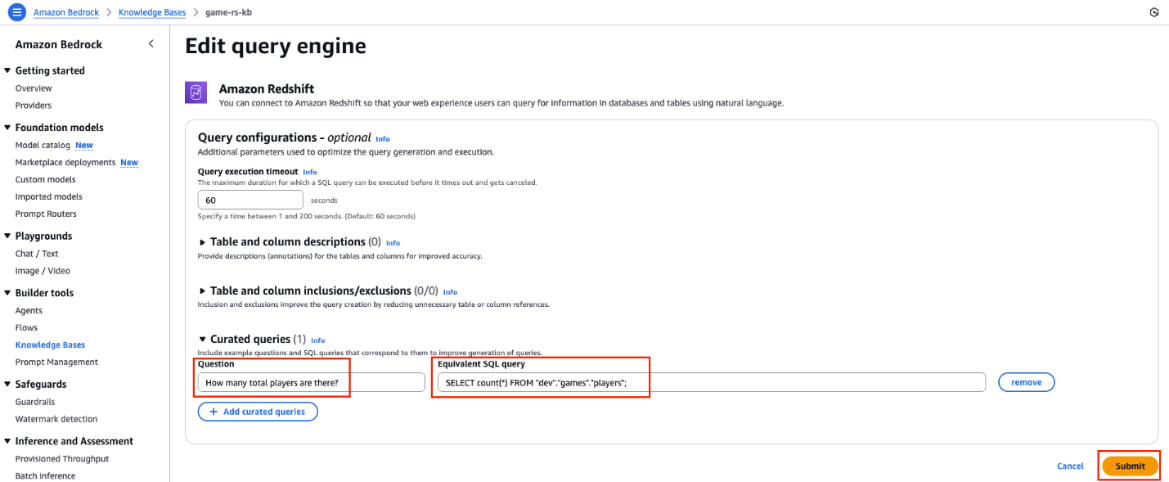
Expand the Curated queries section and enter the following:
In the Questions field, enter How many total players are there?.
In the Equivalent SQL query field, enter SELECT count(*) FROM “dev”,“games”,“players”;.
Choose Submit, as shown in the following screenshot.
Navigate back to your knowledge base and query engine. Choose Sync to sync the knowledge base. This starts the metadata ingestion process so that data can be retrieved. The metadata allows Amazon Bedrock Knowledge Bases to translate user prompts into a query for the connected database. Refer to Sync your structured data store with your Amazon Bedrock knowledge base for more details.
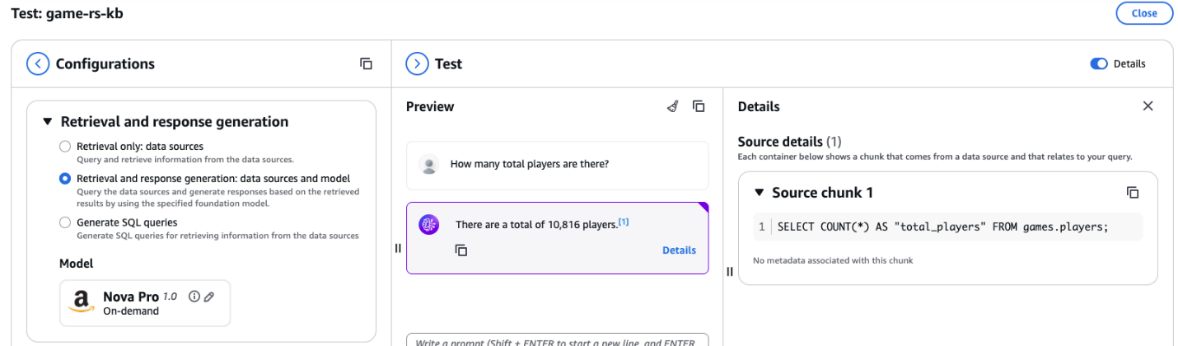
Return to Test Knowledge Base with Amazon Nova Pro and repeat the question about how many total players there are, as shown in the following screenshot. Now, the response generated by the knowledge base matches the data in player table in Amazon Redshift, and the query generated by the knowledge base uses the curated query with the player table instead of the attempts table to determine the player count.
Cleanup
For the walkthrough section, we used serverless services, and your cost will be based on your usage of these services. If you’re using provisioned Amazon Redshift as a knowledge base, follow these steps to stop incurring charges:
In this post, we discussed how you can use Amazon Redshift as a knowledge base to provide additional context to your LLM. We identified best practices and explained how you can improve the accuracy of responses from the knowledge base by following these best practices.
About the authors
Narendra Gupta
Narendra is a Specialist Solutions Architect at AWS, helping customers on their cloud journey with a focus on AWS analytics services. Outside of work, Narendra enjoys learning new technologies, watching movies, and visiting new places.
For provisioned clusters, Amazon Redshift periodically performs maintenance to apply fixes, enhancements, and new features to your cluster. Amazon Redshift assigns a 30-minute maintenance window. To prioritize business continuity and to align with your operational needs, this maintenance window is fully customizable, either programmatically or through the AWS Management Console for Amazon Redshift. For more information, see Managing clusters using the console.
A robust notification system is available to inform you about maintenance activities on your Amazon Redshift clusters to help you plan effectively and maintain communication with your users about scheduled system updates. Using the Amazon Redshift integration with Amazon Simple Notification Service (Amazon SNS), you can enable notifications of an upcoming maintenance events by creating an Amazon Redshift event notification subscription.
Customizing your provisioned cluster maintenance events
Amazon Redshift provides several ways to control how AWS maintains your provisioned clusters. The following are the primary customization options available:
Modifying the schedule for upcoming maintenance events: You can control when we deploy updates to your clusters.
Deferring upcoming maintenance: You can defer non-mandatory maintenance updates for a defined period of time.
Choosing a maintenance track to optimize performance: You can choose whether your cluster runs the most recently released version or the version released prior to the most recently released version.
Receiving notifications of upcoming maintenance: You can set up notifications for upcoming maintenance events scheduled for your clusters.
There is no set maintenance window for Amazon Redshift Serverless. When a new version becomes available for a workgroup’s chosen track, Amazon Redshift Serverless typically applies the update during an idle period as long as there is no pending track update request. If the workgroup doesn’t experience an idle period within 14 days, Redshift Serverless forces the version update.
Modifying the schedule for upcoming maintenance events
If a maintenance event is scheduled for a given week, it starts during the assigned 30-minute maintenance window. While Amazon Redshift is performing maintenance, it terminates queries or other operations that are in progress. If there are no maintenance tasks to perform during the scheduled maintenance window, your cluster continues to operate normally until the next scheduled maintenance window.
You can change the scheduled maintenance window by modifying the cluster, either programmatically or by using the Amazon Redshift console. You can find the maintenance window and set the day and time it occurs for the cluster under the Maintenance tab.
Deferring upcoming maintenance
Amazon Redshift provides additional control over cluster maintenance by deferring upcoming maintenance for up to 45 days. This feature is invaluable when you need uninterrupted cluster access during critical business periods. For instance, if your cluster’s maintenance window is set to Thursday from 5:30–6:00 UTC, and you need to have nonstop access to your cluster for the next 2 weeks, you can defer maintenance to a date 2 weeks from now. We don’t perform maintenance on your cluster during a specified deferment.
While standard maintenance can be deferred, mandatory updates—such as critical security patches, which typically occur at most annually, or hardware updates—must proceed as required. In these cases, Amazon Redshift notifies you through both the console and your Amazon SNS subscription, marking these as pending events, and implements these changes regardless of deferral settings to maintain the security and reliability of your infrastructure.
While performing deferred maintenance on Amazon Redshift clusters with Amazon Redshift data sharing configured, maintaining version compatibility between producer and consumer clusters is crucial for supporting reliable data sharing. As a best practice, you should keep producer and consumer clusters within two versions of each other to minimize potential compatibility issues. For instance, if a producer cluster is running version P195, consumer clusters should be between P193 and P197. To support effective version management, you can also use notification systems that provide timely alerts about planned cluster patching, enabling proactive version alignment and reducing the risk of potential data sharing disruptions.
Choosing a maintenance track to optimize cluster performance
Amazon Redshift offers two maintenance tracks that provide you control over how and when cluster version updates are applied, helping to ensure optimal performance while minimizing business disruption. The Currenttrack automatically applies updates during your scheduled maintenance window, keeping your cluster on the latest version with the newest features and improvements. For organizations requiring additional validation time, the Trailingtrack delays version updates after release, allowing thorough testing of your workloads in development environments before production deployment.
Using the Amazon Redshift Trailing track in your production environment, and the Current track in your testing and development environment, gives you additional diligence and time to evaluate the latest release. This approach enables you to validate version updates thoroughly before they reach your production environment. Additionally, scheduling maintenance windows during off-peak hours and establishing a communication protocol to notify stakeholders about upcoming maintenance events minimizes potential impact on production because of maintenance events.
Receiving notifications of upcoming maintenance events
By setting up an Amazon SNS email notification, you can receive real-time updates about your cluster’s maintenance details directly in your inbox. See Amazon Redshift provisioned cluster event notifications for maintenance event categories along with event ID, severity, and notification descriptions.
Set up Amazon Redshift event notifications using Amazon SNS
This section demonstrates how you can set up Amazon SNS notifications for Amazon Redshift maintenance events. For setting up the event notification, we showcase the following two options in this post:
We assume you have already deployed an Amazon Redshift provisioned cluster. For more information on creating a provisioned cluster, see Creating a cluster.
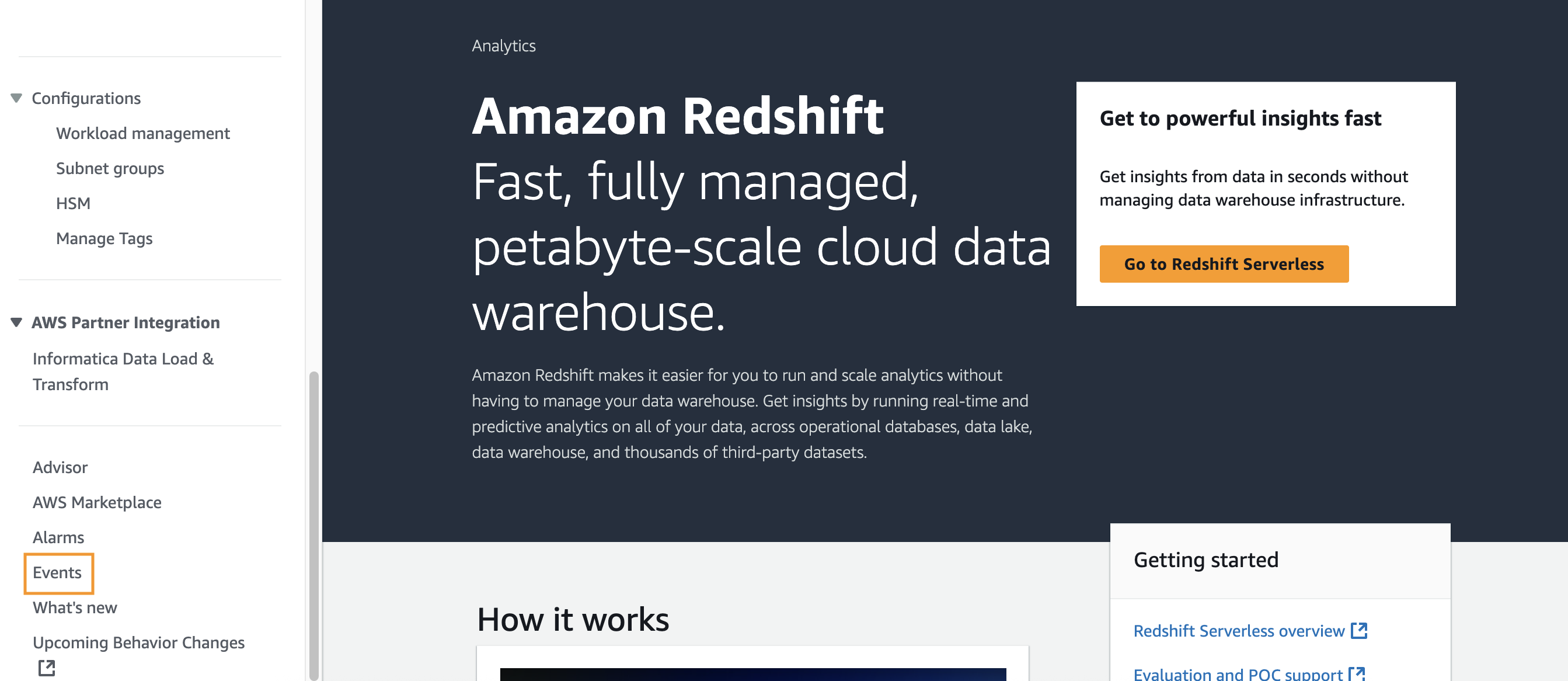
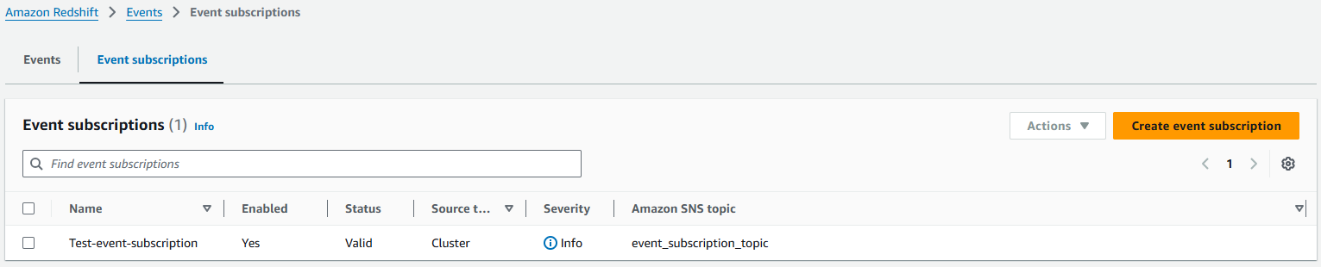
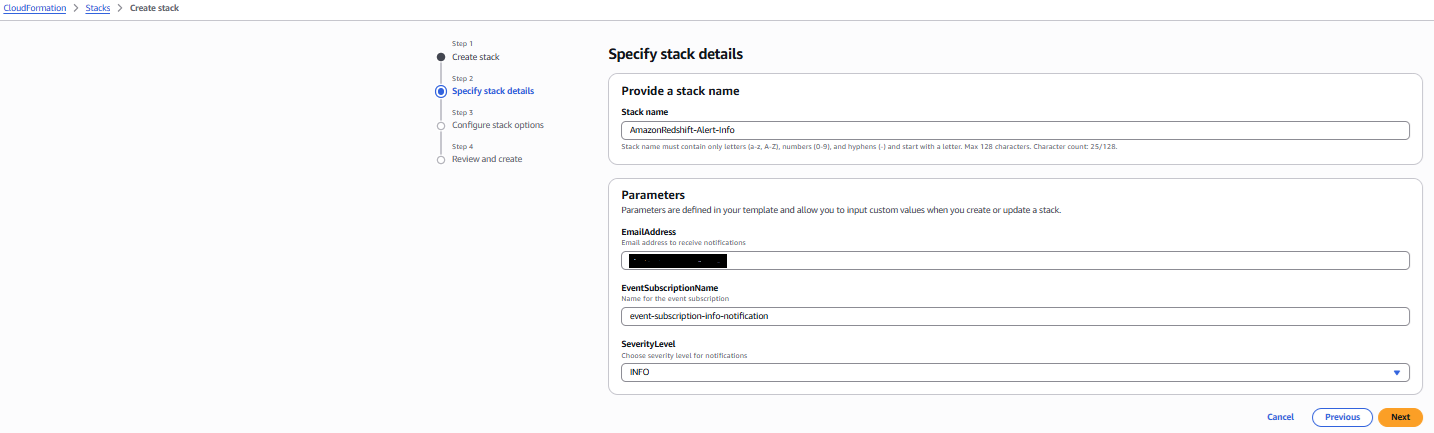
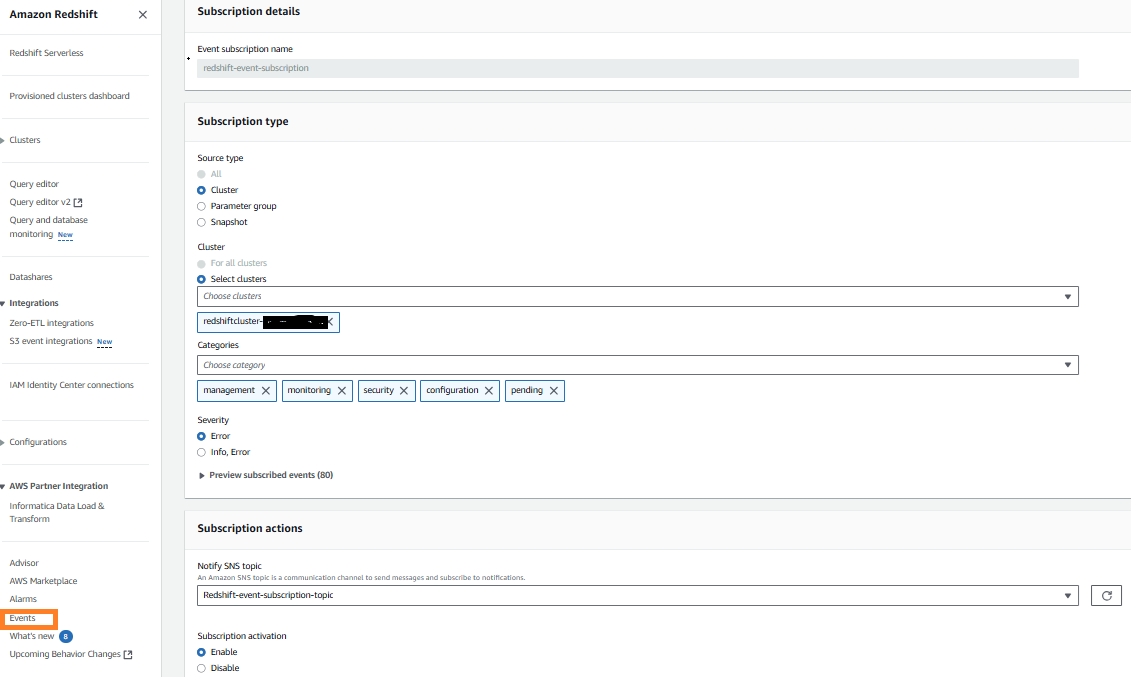
In the left navigation pane, choose Amazon Redshift and then choose Events.
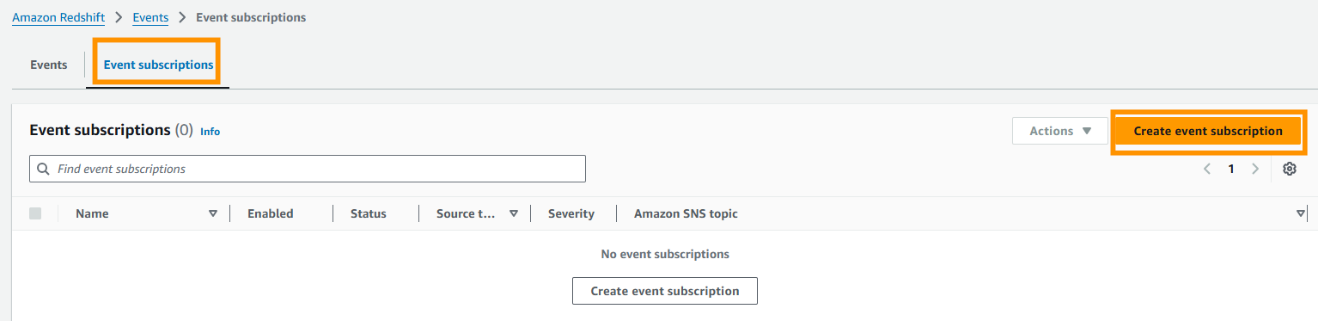
Select Event Subscriptions and then choose Create event subscription.
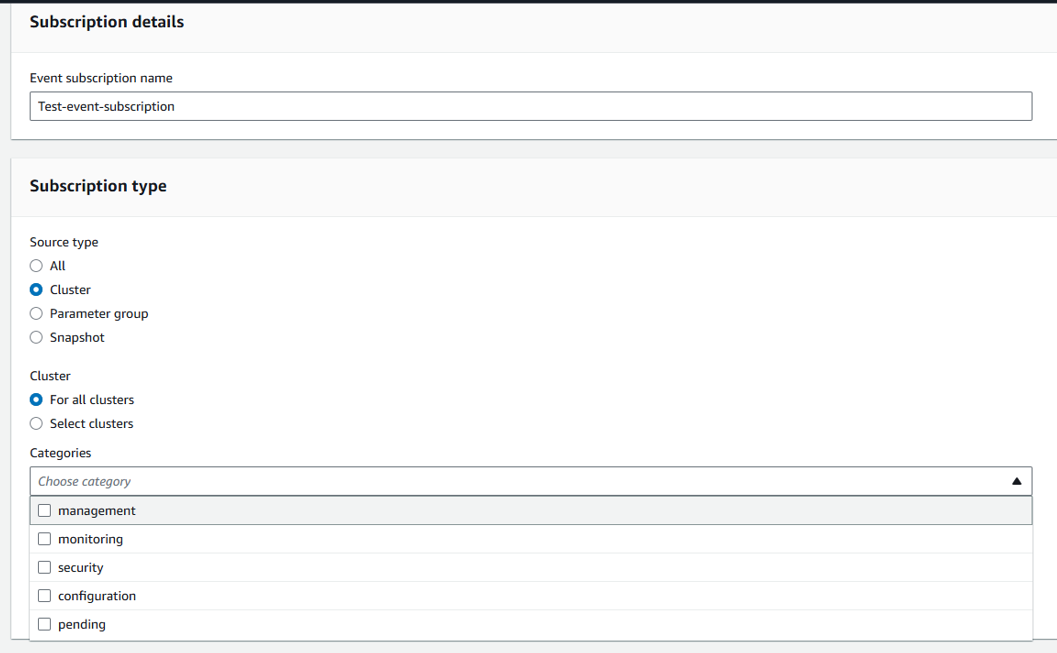
On the Create event subscription page, enter the following information:
In the Subscription details section, under Event subscription name, enter a name for the event.
In the Subscription type section, under Source type, select Cluster.
For Cluster, choose Select clusters, and then select your cluster IDs.
For Categories, select your categories.
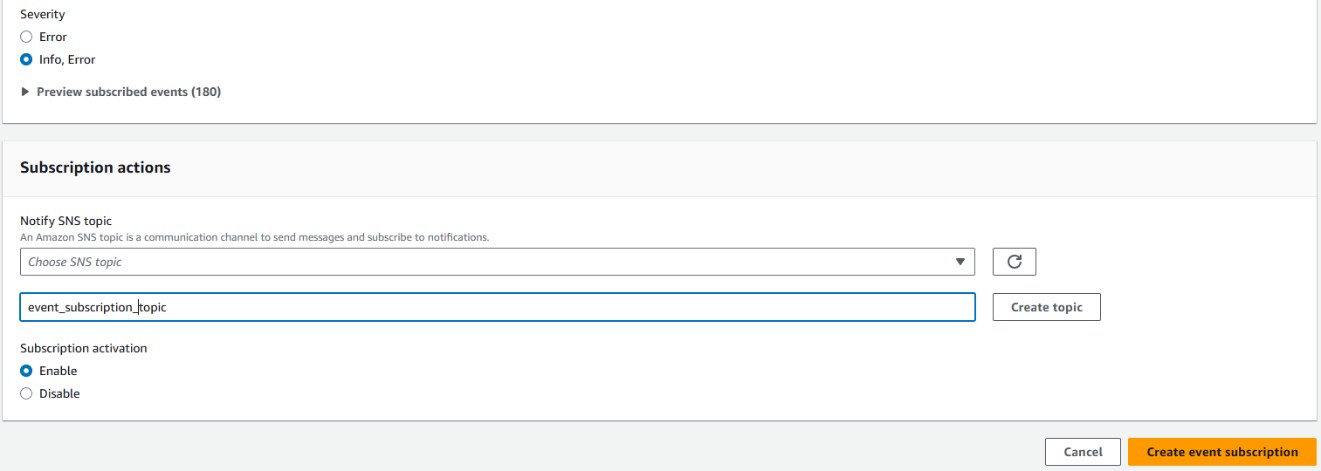
For Severity, select either Error or Info, Error.
In the Subscription actions section, select an existing topic or choose Create a new Amazon SNS topic, enter a topic name and then choose Create topic. See create a topic for information about creating a new topic using the Amazon SNS console.
Choose Create event subscription.
Under the Event subscriptions section, you can now see the new event subscription.
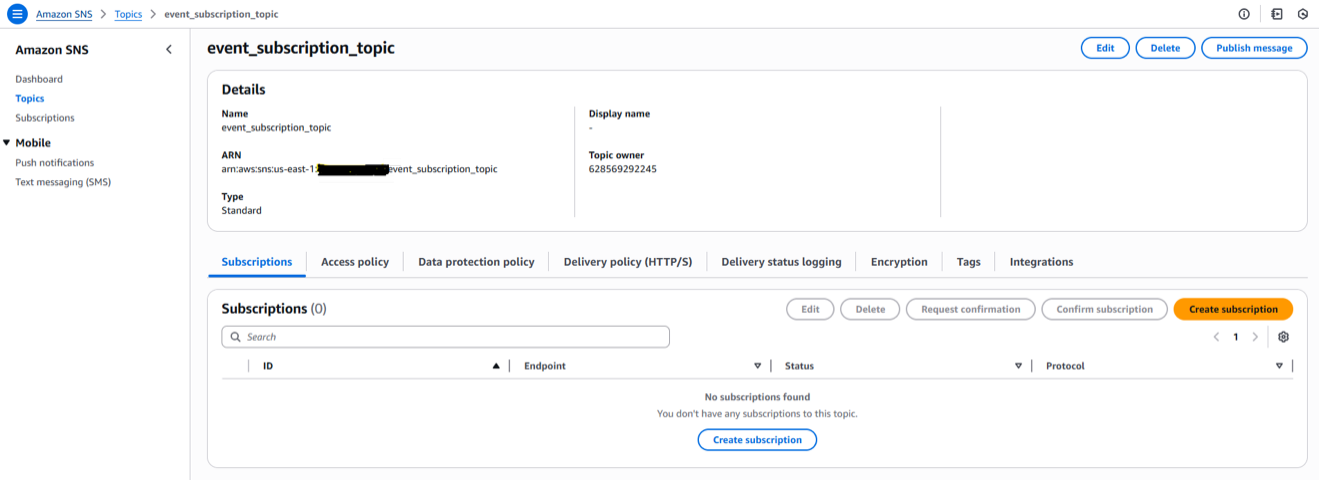
In the Amazon SNS console, choose Topics and select the topic you configured in Amazon Redshift events in the previous step.
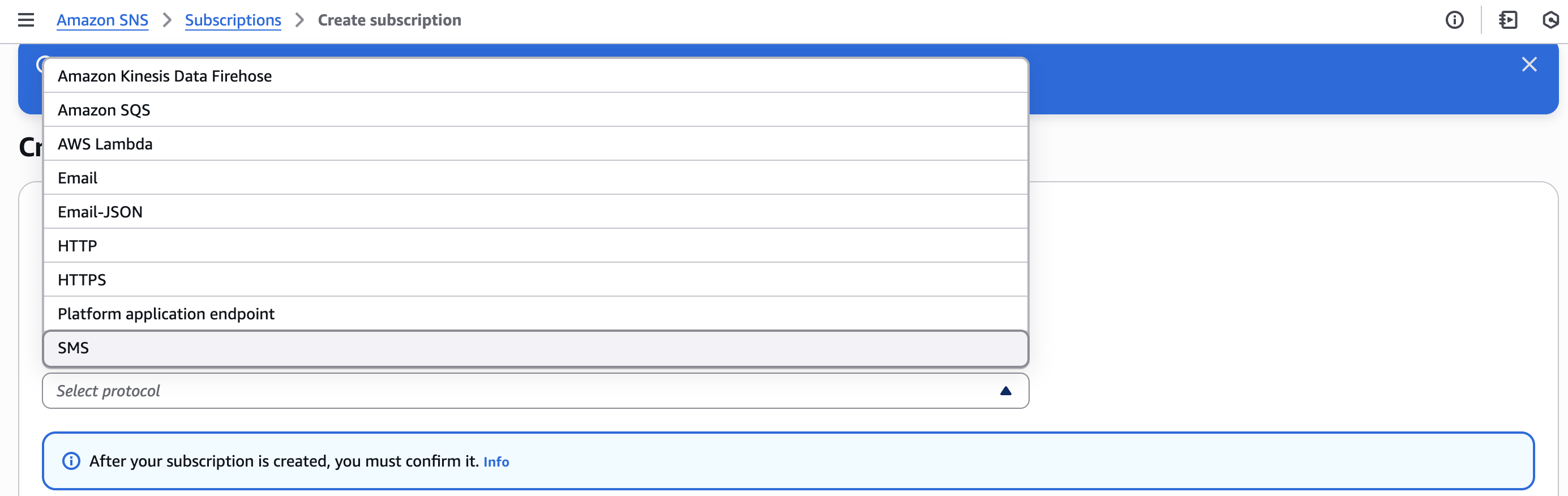
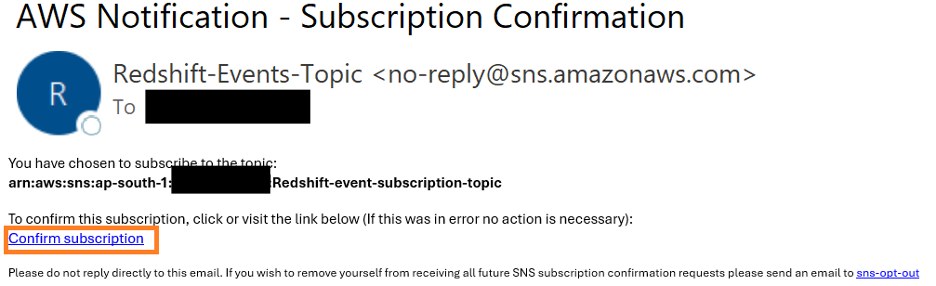
Choose Create Subscription, under Protocol choose Email and enter a valid email address and choose Create Subscription. You can also select additional protocols based on your preference.
Choose Pending Subscription and choose Request Confirmation. After the confirmation email is received, choose the Confirm Subscription link in the email.
These event notifications work at the AWS account level.
Using an AWS CloudFormation stack
In this section, you build and configure event notifications on existing Amazon Redshift clusters using an AWS CloudFormation stack:
Choose Create Stack and select With new resources (standard).
Under Specify template, select Upload a template file.
Select Choose file and upload the CloudFormation template you downloaded in Step 1 and choose Next.
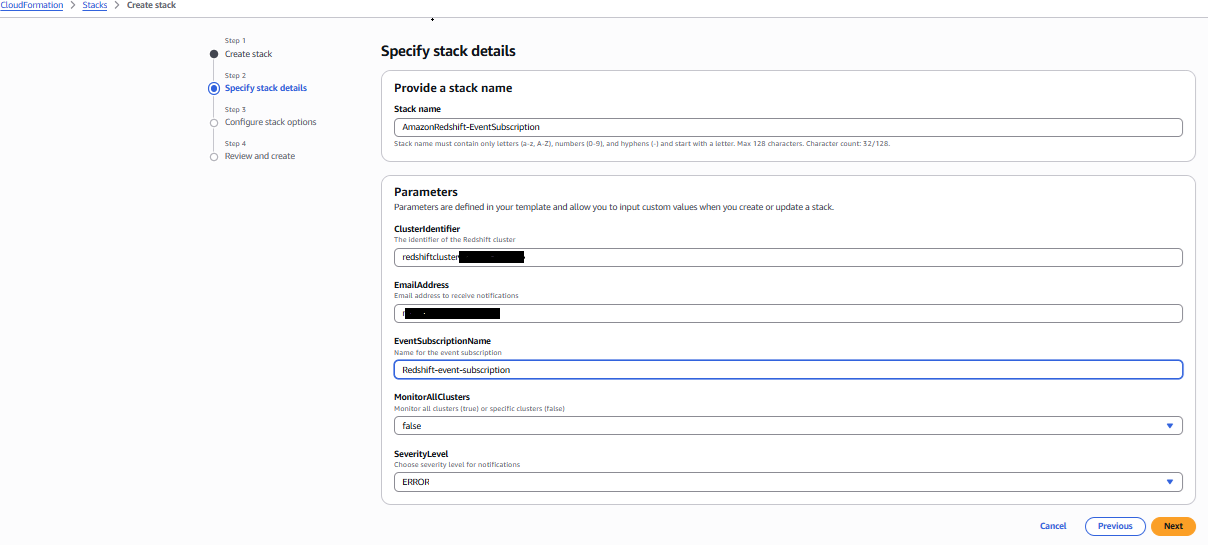
In Stack Name, enter AmazonRedshift-EventSubscription.
Enter the Parameters as follows:
For ClusterIdentifier, enter the value for your Amazon Redshift cluster. This can be found by navigating to the Amazon Redshift console and locating the cluster identifier. To subscribe for all clusters in your account, leave this field blank.
For EmailAddress, enter a valid email address.
For EventSubscriptionName, enter the value for your event subscription. (for example, Redshift-event-subscription).
For MonitorAllClusters, select from dropdown:
Select False if you entered a cluster identifier (subscribing to notification for one cluster)
Select True if you want to monitor all clusters.
For Severity Level, select from dropdown:
Select Error if you want to subscribe to error notifications only.
Select Info if you want to subscribe to both error and information notifications.
Choose Next, review the final page, and choose Submit.
You will receive an email with subject AWS Notification – Subscription Confirmation. Choose Confirm subscription.
In this section, we show you some examples of notification emails sent through Amazon SNS based on the configuration:
Database Update notification:
Amazon Redshift regularly releases cluster versions. The Scheduled Database Update notification, shown in the following screenshot, is sent before an upcoming Amazon Redshift patch version upgrade.
System Update notification:
AWS performs regular updates to the underlying hardware and operating system of Amazon Redshift clusters, including security patches and performance improvements. The Scheduled System Update notification, shown in the following screenshot, is sent before scheduled hardware and OS updates.
If you’re running your non-production clusters on the Current track and production services on the Trailing track, you can receive notifications when your non-production clusters undergo patching, so you can proactively test the release before it goes to your production servers. You can promptly report issues with the update through the AWS Support Center console. If the reported issues are still present when your production clusters are scheduled for the same patch in the Trailing track, you can defer maintenance until the concerns are resolved for stability. To learn how to change tracks for an Amazon Redshift cluster, see Switching between tracks.
Stay informed about version updates using RSS feeds
To stay informed about the latest cluster versions released for Amazon Redshift, you can also use the RSS feed of the Cluster versions for Amazon Redshift page in your monitoring toolkit. Unlike real-time cluster notifications, this feed serves as your window into documentation updates, giving you early updates into published features and best practices. While it won’t alert you about immediate cluster maintenance or security patches, you’ll be notified whenever Amazon updates their cluster management documentation. By adding this RSS feed to your preferred reader, you’re subscribing to a continuous stream of AWS documentation updates, helping you to maintain a proactive rather than reactive approach to your data warehouse management.
Setting up an RSS feed for your Amazon Redshift documentation is straightforward and offers multiple options to suit your workflow preferences. The key is to first choose your preferred RSS reader, such as Slack or Microsoft Outlook, or your preferred web-based RSS feed reader. To start receiving notifications about AWS documentation updates, add the RSS feed URL to the reader to start receiving updates. After setup, you will receive notifications whenever the Amazon Redshift cluster management documentation is updated, helping to keep you informed about new features and best practices.
You can also see the updates directly on the Cluster versions for Amazon Redshift page to stay informed whenever a new version has been released and before it’s scheduled to be released to your cluster.
Cleanup
If you don’t need the Amazon SNS notification created for this post, delete the Amazon SNS topics from the Amazon SNS console to avoid incurring future charges. If you have configured the notification using AWS CloudFormation, delete the stack to delete related configurations. See Amazon SNS Pricing for pricing information for the service.
Conclusion
In this post, you learned how to configure maintenance event notifications for Amazon Redshift provisioned clusters using Amazon SNS. We also explained the details of Amazon Redshift maintenance activities, including how to manage the schedule for upcoming maintenance by using Amazon Redshift maintenance tracks to optimize cluster performance, and using RSS feeds to receive real-time updates about critical cluster information.Upgrading your Amazon Redshift clusters to the suggested maintenance track is critical for optimizing cluster performance and to help to ensure that the latest fixes, security patches and enhancements are applied to your clusters. Seamless integration with the Amazon SNS notification system helps ensure that you’re informed of maintenance events ahead of time, so that you can prepare for them. This proactive approach helps you to plan effectively and maintain communication with your users about scheduled system updates.
Phones running Linux are ubiquitous these days and it has been that way
since Android started working toward dominance in the smartphone market.
Unfortunately, Android has slowly increased its freedom-unfriendliness and
has become something of a privacy nightmare. In a talk entitled “We need
an open-source phone OS” at Open
Source Summit Japan 2025, Luca Weiss described the smartphone landscape
and gave an overview of postmarketOS as an alternative Linux
operating system for mobile handsets.
If you received an email with the subject “I LOVE YOU” and an attachment called “LOVE-LETTER-FOR-YOU.TXT”, would you open it? Probably not, but back in the year 2000, plenty of people did exactly that. The internet learned a hard lesson about the disproportionate power available to a university dropout with some VBScript skills, and millions of ordinary people suffered the anguish of deleted family photos or even reputational damage as the worm propagated itself across their entire Outlook address book.
In the quarter century since ILOVEYOU rampaged across global networks, cybersecurity has moved from a niche topic to an “everyone” problem, and many users are wary of all sorts of threats. In recent years, the increasing ubiquity and urgency of AI adoption across the business landscape has attracted the attention of both security researchers and threat actors.
Of course, recency bias and shiny object fixation are real. Even as AI and automation continue to drive down time to known exploitation (TTKE), an attacker who abuses a traditional exploit chain to achieve SYSTEM privileges on a sensitive server still has the keys to the kingdom.
Wormable remote code execution (RCE) vulnerabilities remain rare, but well over half of the 25 exploited-in-the-wild zero-day vulnerabilities published by Microsoft during 2025 provided attackers with elevation of privilege opportunities on Windows assets. Some of those flaws are older than the iPhone, let alone ChatGPT.
Microsoft’s decades-long commitment to backwards compatibility creates a conveyor belt supply of déjà vu vulnerabilities. Ultimately, the most pressing threats faced by defenders managing Microsoft estates remain essentially unchanged. Rather than a new wave of AI-related flaws, the chief danger stems from the towering tech debt within core Windows components.
A whirlwind tour of exploited-in-the-wild Microsoft vulnerabilities (2025 edition)
If we really want to know which Microsoft vulnerabilities will provide the most value to attackers in 2026, we should ask a threat actor. Since that might prove difficult to arrange, we’ll do the next best thing: review vulnerabilities exploited in the wild during 2025.
⠀
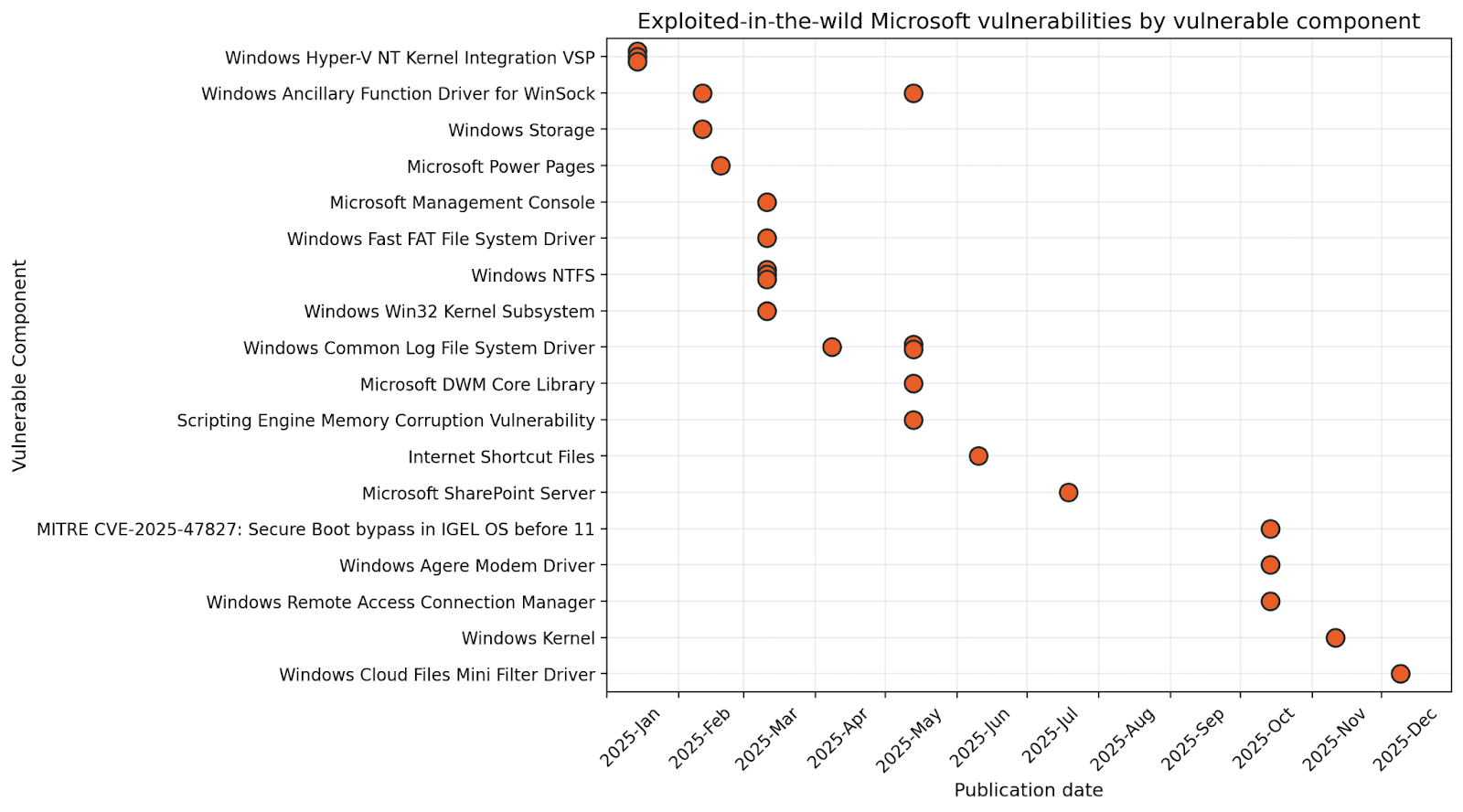
Chart 1: Exploited-in-the-wild Microsoft vulnerabilities, by vulnerable component
January: The great escape
The vast Microsoft ecosystem has something for everyone, whether customer or threat actor. Patch Tuesday January 2025 brought us a trio of exploited-in-the-wild Hyper-V kernel vulnerabilities. By September 2025, at least one plausible public proof-of-concept (PoC) for CVE-2025-21333 was published by a vulnerability researcher who apparently shares a name with a Kazakhstani Olympic gymnast. The only safe assumption is that a well-resourced threat actor could develop a private exploit far in advance of that.
Starting from a child VM or Windows Sandbox, exploitation first requires setting out a banquet of benign requests for the hypervisor, delivered via the Hyper-V Virtualization Service Provider (VSP). The goal: mass-allocating objects to arrange large swathes of hypervisor memory in a predictable pattern (aka “heap feng shui”). Next, the attacker sends a malicious request with an oversized buffer, which an unpatched VSP merrily copies into kernel memory, overwriting the header of the adjacent object, whose relative position is now easily surmised. Once the kernel subsequently references the artfully corrupted sibling object, execution as SYSTEM jumps to a portion of memory where the attacker has planted shellcode to exfiltrate a token. The compromised hypervisor could be anything from a developer laptop running a malicious container all the way up to enterprise private cloud infrastructure.
So far, January 2025 is the only time that Microsoft has ever published vulnerabilities in the Hyper-V VSP. Generally speaking, a significant degree of sophistication is required to develop successful exploits of this nature. This goes double if the name of the game is stealth and stability, since a wave of unexplained BSOD events on critical production infrastructure tends to attract blue team attention. Still, once a viable proof of concept hits the public internet, ransomware crews will fold it into their toolkits, and someone, somewhere, is either sitting on an unknown Hyper-V VSP exploit, or hard at work creating the next one.
February: Socket to me
It’s hard to imagine a modern computer without storage or networking capabilities. In fact, it’s hard to imagine a computer from several decades ago without storage or networking. Microsoft is now middle-aged, and that means that buried deep within your shiny new PC are a variety of architectural decisions and logic paths born in the 1980s. If this sounds far-fetched, take a minute to find yourself a fully-patched Windows 11 25H2 machine, and then try to rename any file or directory CON, NUL or PRN. I’ll wait.
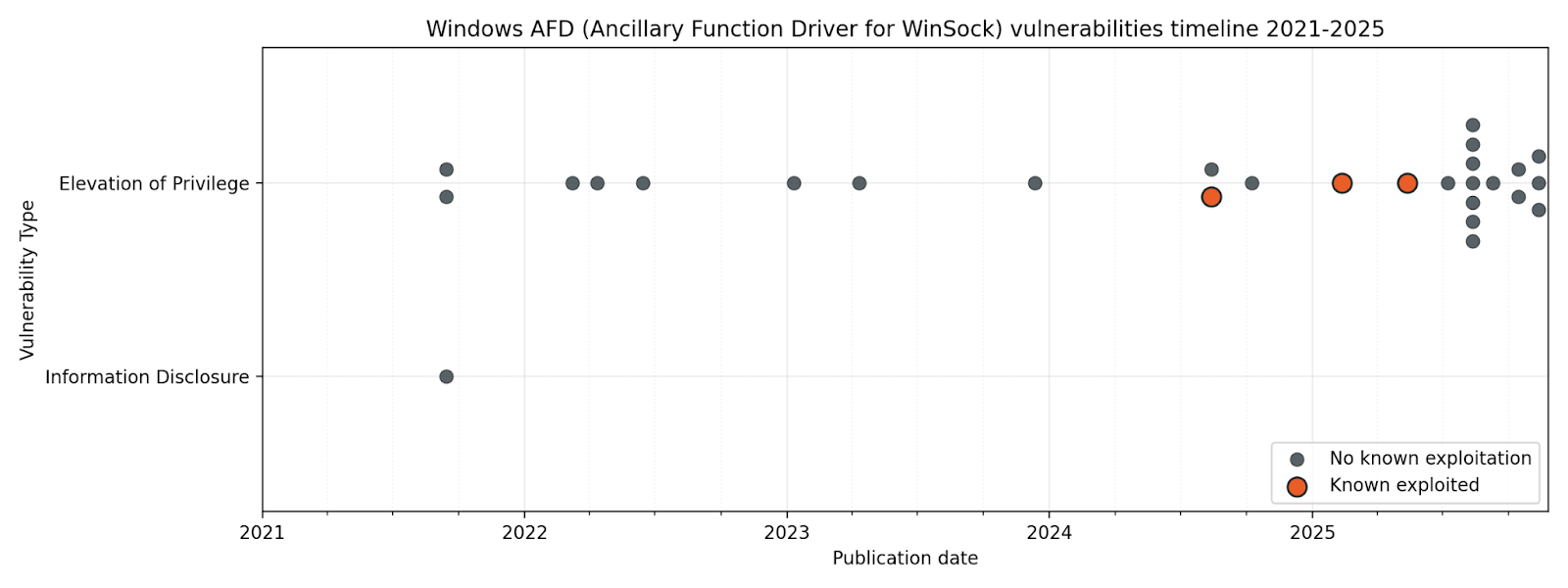
Generally speaking, user-mode applications are prevented from wreaking havoc on the kernel through a careful separation of concerns. On Windows, when a user mode application wants to communicate over the network, it talks to WinSock, which in turn talks to the ancillary function driver (AFD), which sits on the kernel side, and coordinates with the kernel network drivers which handle the actual traffic. The AFD is a security boundary between user space and kernel space, and it must be universally accessible to local processes, because even a browser tab in a sandbox needs to make network calls. Any defect in the way AFD parses input from user space can thus provide a way to influence the kernel in unexpected ways. A number of advanced exploit development courses, including offerings from SANS and OffSec, cover AFD in detail.
⠀
Chart 2: Windows AFD vulnerabilities timeline, 2021-2025
⠀
Patch Tuesday February 2025 brought us CVE-2025-21418, which Microsoft credited to Anonymous. We don’t know whether the unnamed tipster provided evidence of exploitation in the wild, or whether Microsoft threat hunters subsequently tracked down their own trail of suspicious bread crumbs, but notorious threat actors such as North Korea’s Lazarus are known to be enthusiastic students of AFD exploits. With several high-profile zero-day vulnerabilities emerging from AFD from late 2024 onwards, it tracks that Microsoft subsequently published and patched a cluster of AFD vulnerabilities in the latter half of 2025.
March: File system shenanigans
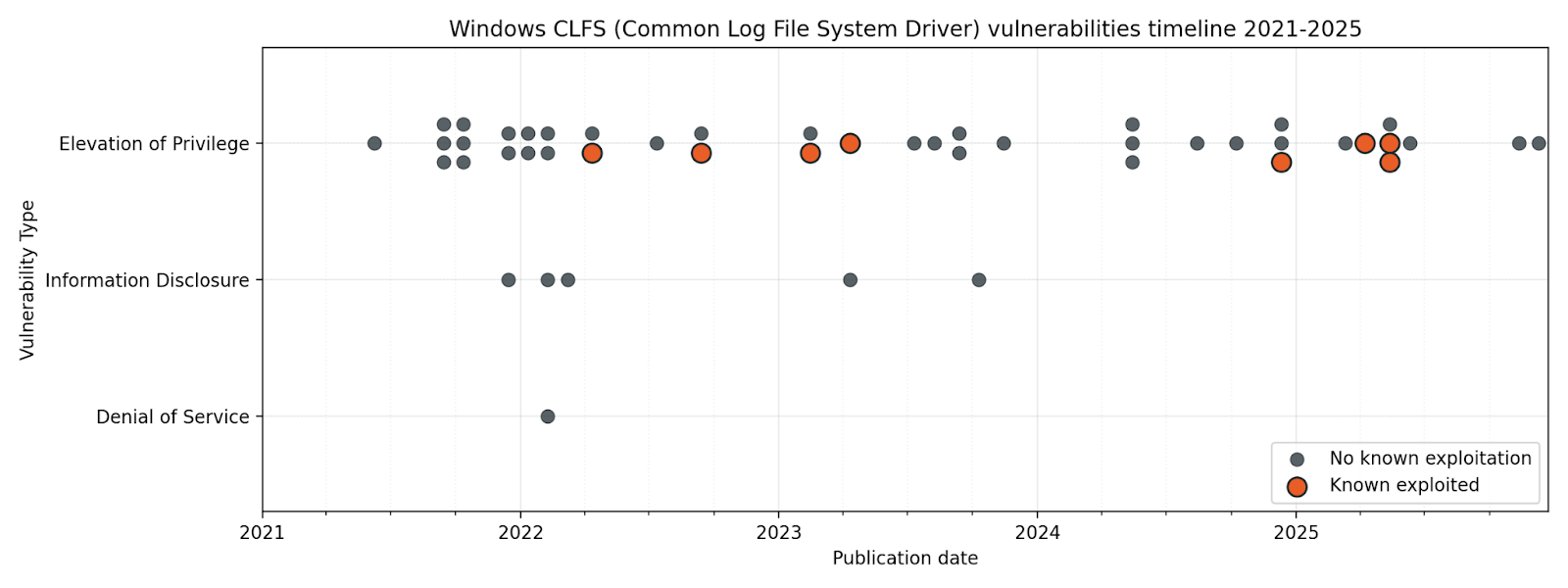
Any defenders who had enjoyed a quieter start to the year were rudely awakened by Patch Tuesday March 2025, when six exploited-in-the-wild vulnerabilities all dropped at once. Exploitation of most of the zero-day vulnerabilities published in March starts with the user mounting a malicious Virtual Hard Disk (VHD) image or plugging in a malicious USB stick so that the attacker can exploit a weakness in a filesystem driver, including NTFS and FastFAT.
Remember that information security training which asked you to imagine finding a USB stick with an “IMPORTANT (CONFIDENTIAL)” label on the floor outside the office? The one which asked if you would A) plug the mystery stick into your work PC B) use your boss’ personal laptop in case the files are business critical C) try it in all the PCs in the office until someone asks you to stop or D) report it immediately to the security officer? This is why.
Meanwhile, the true villain of the month was almost certainly CVE-2025-24983, a no-user-interaction-required elevation of privilege vulnerability in the Win32 kernel subsystem. At the time, we pondered why Windows 11 and Server 2019 onwards didn’t receive patches for what looks like a fairly severe vulnerability, but since Microsoft is gradually reimplementing portions of the kernel in memory-safe Rust, we can hope that the vulnerability simply doesn’t exist in modern Windows.
April: Common Log File System driver vulns are quite common
If anyone ever corners you at a party and talks at length about the Ancillary Function Driver as a bounteous source of elevation of privilege vulnerabilities, you will probably have to concede that they are technically correct. While your options include “doing a lap” and then climbing out of the bathroom window, the power move here is to hold your ground, and point to the Common Log File System driver as a far richer vein of exploitable goodness.
As of Patch Tuesday April 2025, CLFS boasts almost twice the number of total vulnerabilities over the past five years vs. AFD, and more than double the number of known-exploited zero-day vulnerabilities. It really is the gift which keeps on giving.
⠀
Windows CLFS vulnerabilities timeline, 2021-2025
⠀
It makes sense that something like the Ancillary Function Driver lives in kernel space. After all, something has to sit inside the perimeter to marshall all those network requests from dozens of Chrome tabs. What about the Common Log File System driver though?
It would be tempting to imagine that anything which simply handles log files shouldn’t need direct kernel access at all. When exploring this concept, it’s useful to understand that not only was CLFS designed a long time ago, when high performance in user mode was harder to achieve than it is today, but also that CLFS is much more than simply a means to interact with log files. CLFS is the home of still-essential building blocks like Transactional NTFS (TxF), first introduced almost 25 years ago in Windows Vista, which provides a means for applications to guarantee the integrity of data on disk.
For the past several years, Microsoft has strongly recommended that developers avoid the use of TxF, and while Microsoft is gradually providing modern alternatives to TxF functionality, essential Windows functions such as Windows Update still rely on it to manage critical file integrity. Moreover, CLFS is more than just TxF, and is so tightly integrated into Windows that it’s here to stay for the foreseeable future.
May: The month of expectation, wishes, hope, and classic Windows zero-days [1]
A few days after Patch Tuesday May 2025, Satya Nadella took to the stage at Microsoft Build 2025 to pitch his vision of the open agentic web, although exactly who this version of the future would be open to remains an open question, like: What if a cloud email service was vulnerable to a zero-click prompt injection attack, but could also now buy things with your credit card?
While critical reception for the open agentic web has been mixed, threat actors will be glad of the new attack surface. Meanwhile, defenders worried about in-the-wild exploitation were hard at work patching some more frequent fliers, including another pair of CLFS vulnerabilities and an MSHTML/Trident arbitrary code execution bug. That last one will be familiar to regular Patch Tuesday watchers, but it might come as a surprise to anyone who thought Internet Explorer had gone to live on a nice farm upstate years ago.
The Ancillary Function Driver made another appearance, although it couldn’t quite summon the same main character energy this time around. The May 2025 episode of “AFD vulns exploited in the wild” offered elevation to Administrator, rather than SYSTEM, and a lower exploit code maturity rating. We can always be grateful for small mercies.
[1]: With apologies to Emily Brontë.
June: I’m afraid I can’t let you do that, WebDAV
Windows archeologists and internet users of a certain age may remember WebDAV, a standard originally dreamed up to support interactivity on the web. It was employed by versions of Microsoft Exchange up to and including 2010 to handle interactions with mailboxes and public folders.
Surprising no-one, Windows still more or less supports WebDAV, and it was only a matter of time before that turned out to be a bit of a problem, in the form of CVE-2025-33053 published as part of Patch Tuesday June 2025. Microsoft acknowledged Check Point Research (CPR) on the advisory; CPR in turn attributes exploitation to an APT (Advanced Persistent Threat), which they track as the objectively cool-sounding Stealth Falcon, an established threat actor with a long-running interest in governments and government-adjacent entities across the Middle East and beyond.
June 2025 also saw the publication of CVE-2025-32711, a critical information disclosure vulnerability in Microsoft 365 Copilot. Microsoft is not aware of exploitation in the wild. The researchers named it EchoLeak, describing it as “the first real-world zero-click prompt injection exploit in a production LLM system,” although other researchers arguably got there first.
EchoLeak relies on hidden white-text-on-white-background instructions in an email, which are then ingested into the LLM via RAG (Retrieval-Augmented Generation) when the user asks an entirely pedestrian question (e.g. “Summarize my emails from the past two days”) which requires Copilot to scan the inbox. The malicious instructions have two parts: First, dig up some juicy info, and then retrieve an image from an attacker-controlled server with the sensitive data exfiltrated as a URL parameter.
EchoLeak circumvented Copilot’s Content Security Policy by making the request via a trusted Microsoft service: a now-patched Teams image preview proxy. History suggests that attackers will find other ways out of the walled garden. The Microsoft advisory makes a virtue of minimalism by providing almost no information about the nature of the vulnerability, although Microsoft is surely to be commended for assigning CVEs for cloud service vulnerabilities.
July: The call is coming from inside the intranet
When Patch Tuesday July 2025 came and went without a single exploited-in-the-wild vulnerability published, many people may have breathed a sigh of relief. Possibly this was a valid move, at least for anyone not responsible for a SharePoint instance.
SharePoint defenders will remember July as the month of ToolShell, an actively-exploited vulnerability chain in SharePoint which Microsoft published out of band ten days after Patch Tuesday. Out of band patches for Microsoft flagship products are rare, since they inevitably cause downstream disruption. Once MSTIC publicly attributes exploitation to two Chinese nation-state actors, that line has been crossed.
The vulnerability described by the out-of-band CVE-2025-53770 turned out to be a bypass for the patch introduced by CVE-2025-49704 earlier in the month, which was itself a response to a successful Pwn2Own Berlin entry from May.
August: It’s almost too quiet
Microsoft was not aware of exploitation in the wild for any of the vulnerabilities published as part of Patch Tuesday August 2025. SharePoint admins may have been dealing with the fallout from last month’s ToolShell and bracing for a possible repeat, but August might otherwise have made for an eerily quiet month. Still, the Windows implementation of Kerberos managed to cough up a publicly-disclosed elevate-to-domain-admin vulnerability.
Separately, we learned that simply saving a JPEG could be enough to hand an attacker RCE capabilities, because the internet never sleeps. If the vulnerable codepath had been within JPEG decoding, rather than encoding, this one could have been the biggest vuln of the year.
September: Almost too quiet, part 2
Patch Tuesday September 2025 was the second month in a row with no known-exploited vulnerabilities, but vuln spotters will appreciate that this month saw the publication of a fairly rare beast: a Microsoft vulnerability with a perfect(?) CVSS v3 base score of 10.0, albeit a cloud service vulnerability discovered by Microsoft and patched prior to publication. No customer action required, but also no customer verification possible, and since the impacted cloud service was Azure Networking, the blast radius could have been stupendous.
October: Dial M for exploitation
These days, there are plenty of seasoned IT professionals who don’t even know what a dialup modem negotiation song sounds like, simply because broadband has been around for that long. For younger readers, “broadband” is what we used to call “internet fast enough that you don’t have to wait to download a single email attachment”.
By this point, we all know where this is going: Windows still ships with modem capabilities well beyond their sell-by date, and someone found a good old elevation of privilege vulnerability. The vulnerable fax modem driver was developed almost 30 years ago by a long-defunct third party, and Microsoft has now taken uncharacteristically bold action by removing it from Windows altogether, perhaps recognizing that traditional landlines are no longer available at all in many places. Are there other fax modem drivers still lurking in Windows? You betcha.
Patch Tuesday November 2025 included an exploited-in-the-wild vulnerability in the Windows kernel itself. While the advisory was light with details, exploitation of CVE-2025-62215 led to elevation to SYSTEM, presumably via a complex bit of memory management three card monte. Those kernel Rust rewrites can’t come soon enough.
December: A cloud of suspicion
After a year filled with variations of the same old exploitable vulns, it might almost be refreshing to consider the altogether more modern-sounding exploited-in-the-wild vulnerability published on Patch Tuesday December 2025. CVE-2025-62221 describes an elevation of privilege vulnerability in the Windows Cloud Files Mini Filter Driver.
On Windows, a file or directory can contain a reparse point, a collection of user-controlled metadata designed to be interpreted by a file filter driver. An example would be a file which appears present in a local folder, but where the actual contents of the file are stored remotely on OneDrive. The user double-clicks on the file, the file filter driver intercepts the request, reads the metadata, and calls out to OneDrive, while the user gets the experience of opening the file as though it had been stored locally. Of course, the file filter driver needs kernel access to perform its duties. Find an exploitable flaw in the way a file filter driver parses the metadata, and you can trick it into doing things like overwriting protected system files.
What’s next?
Everything gets faster, including bad things
As Rapid7 has observed repeatedly, time to known exploitation for widely-exploited vulnerabilities has been shrinking year-on-year. By 2022, the time to exploitation after public disclosure for some of the most notable security vulnerabilities was as low as 24 hours. With exploit development now widely augmented by automation and AI, there is every reason to suppose that the window will continue to shrink further.
Threat actors will stay best friends with elevation of privilege vulns
A wormable unauthenticated RCE vulnerability remains the scariest scenario, but mercifully these are historically rare. The one-two combo of minimally-privileged initial access and local privilege escalation presents a much more clear and present danger in most modern threat models. Sure, you could parachute in from a helicopter, abseil down from the roof, and crawl through an air vent to steal the diamond, but why bother when you could simply tailgate a delivery driver, and then distract a maintenance worker while you swipe their all-access keycard?
AI is here to stay, but tech debt is the real killer
In 2026, Microsoft will regularly publish AI-related vulnerabilities, and AI-wielding threat actors will hammer Microsoft’s cloud services. Blue teams managing significant Windows estates will still spend more time worrying about on-prem vulnerabilities where the root cause is a classic software engineering snafu.
Final thoughts
Arguably the biggest takeaway from 2025 is that the more things change, the more they stay the same. The scariest Microsoft vulnerabilities tend to emerge from the same few familiar places: core Windows components with codebases older than many of the humans who rely on them.
Microsoft’s wildly successful business model is founded on a decades-long insistence on ironclad backwards compatibility. Why? Enterprise customers with deep pockets and deeper catalogues of ancient business applications. These retro capabilities come at a high price: a supervolcano of tech debt potentially unmatched in all of human history, and a seemingly endless supply of sort-of-new but depressingly familiar vulnerabilities.
For anyone responsible for defending a significant Microsoft footprint in 2026, tomorrow’s biggest problem remains today’s secrets exposed by yesterday’s software design choices.
Most people think ASCII art is simple, and a nostalgic remnant of the early internet. But when the GitHub Copilot CLI team asked for a small entrance banner for the new command-line experience, they discovered the opposite: An ASCII animation in a real-world terminal is one of the most constrained UI engineering problems you can take on.
Part of what makes this even more interesting is the moment we’re in. Over the past year, CLIs have seen a surge of investment as AI-assisted and agentic workflows move directly into the terminal. But unlike the web—where design systems, accessibility standards, and rendering models are well-established—the CLI world is still fragmented. Terminals behave differently, have few shared standards, and offer almost no consistent accessibility guidelines. That reality shaped every engineering decision in this project.
Different terminals interpret ANSI color codes differently. Screen readers treat fast-changing characters as noise. Layout engines vary. Buffers flicker. Some users override global colors for accessibility. Others throttle redraw speed. There is no canvas, no compositor, no consistent rendering model, and no standard animation framework.
So when an animated Copilot mascot flying into the terminal appeared, it looked playful. But behind it was serious engineering work, unexpected complexity, a custom design toolchain, and a tight pairing between a designer and a long-time CLI engineer.
That complexity only became fully visible once the system was built. In the end, animating a three-second ASCII banner required over 6,000 lines of TypeScript—most of it dedicated not to visuals, but to handling terminal inconsistencies, accessibility constraints, and maintainable rendering logic.
This is the technical story of how it came together.
Why animated ASCII is a hard engineering problem
Before diving into the build process, it’s worth calling out why this problem space is more advanced than it looks.
Terminals don’t have a canvas
Unlike browsers (DOM), native apps (views), or graphics frameworks (GPU surfaces), terminals treat output as a stream of characters. There’s no native concept of:
Frames
Sprites
Z-index
Rasterized pixels
Animation tick rates
Because of this, every “frame” has to be manually repainted using cursor movements and redraw commands. There’s no compositor smoothing anything over behind the scenes. Everything is stdout writes + ANSI control sequences.
ANSI escape codes are inconsistent, and terminal color is its own engineering challenge
ANSI escape codes like \x1b[35m (bright magenta) or \x1b[H (cursor home) behave differently across terminals—not just in how they render, but in whether they’re supported at all. Some environments (like Windows Command Prompt or older versions of PowerShell) have limited or no ANSI support without extra configuration.
But even in terminals that do support ANSI, the hardest part isn’t the cursor movement. It’s the colors.
When you’re building a CLI, you realistically have three approaches:
Use no color at all. This guarantees broad compatibility, but makes it harder to highlight meaning or guide users’ attention—especially in dense CLI output.
Use richer color modes (3-bit, 4-bit, 8-bit, or truecolor) that aren’t uniformly supported or customizable. This introduces a maintenance headache: Different terminals, themes, and accessibility profiles render the same color codes differently, and users often disagree about what “good” colors look like.
Use a minimal, customizable palette (usually 4-bit colors) that most terminals allow users to override in their preferences. This is the safest path, but it limits how accurately you can represent a brand palette—and it forces you to design for environments with widely varying contrast and theme choices.
For the Copilot CLI animation, this meant treating color as a semantic system, not a literal one: Instead of committing specific RGB values, the team mapped high-level “roles” (eyes, goggles, shadow, border) to ANSI colors that degrade gracefully across different terminals and accessibility settings.
Accessibility is a first-class concern
Terminals are used by developers with a wide range of visual abilities—not just blind users with screen readers, but also low-vision users, color-blind users, and anyone working in high-contrast or customized themes.
That means:
Rapid re-renders can create auditory clutter for screen readers
Color-based meaning must degrade safely, since bold, dim, or subtle hues may not be perceivable
Low-vision users may not see contrast differences that designers expect
Animations must be opt-in, not automatic
Clearing sequences must avoid confusing assistive technologies
This is also why the Copilot CLI animation ended up behind an opt-in flag early on—accessibility constraints shaped the architecture from the start.
These constraints guided every decision in the Copilot CLI animation. The banner had to work when colors were overridden, when contrast was limited, and even when the animation itself wasn’t visible.
Ink (React for the terminal) helps, but it’s not an animation engine
Ink lets you build terminal interfaces using React components, but:
It re-renders on every state change
It doesn’t manage frame deltas
It doesn’t synchronize with terminal paint cycles
It doesn’t solve flicker or cursor ghosting
Which meant animation logic had to be handcrafted.
Frame-based ASCII animation has no existing workflow for designers
There are tools for ASCII art, but virtually none for:
Frame-by-frame editing
Multi-color ANSI previews
Exporting color roles
Generating Ink-ready components
Testing contrast and accessibility
Even existing ANSI preview tools don’t simulate how different terminals remap colors or handle cursor updates, which makes accurate design iteration almost impossible without custom tooling. So the team had to build one.
Part 1: A request that didn’t fit any workflow
Cameron Foxly (@cameronfoxly), a brand designer at GitHub with a background in animation, was asked to create a banner for the Copilot CLI.
“Normally, I’d build something in After Effects and hand off assets,” Cameron said. “But engineers didn’t have the time to manually translate animation frames into a CLI. And honestly, I wanted something more fun.”
He’d seen the static ASCII intro in Claude Code and knew Copilot deserved more personality.
The 3D Copilot mascot flying in to reveal the CLI logo felt right. But after attempting to create just one frame manually, the idea quickly ran into reality.
“It was a nightmare,” Cameron said. “If this is going to exist, I need to build my own tool.”
Part 2: Building an ASCII animation editor from scratch
Cameron opened an empty repository in VS Code, and began asking GitHub Copilot for help scaffolding an animation MVP that could:
Read text files as frames
Render them sequentially
Control timing
Clear the screen without flicker
Add a primitive “UI”
Within an hour, he had a working prototype that was monochrome, but functional.
Simplified early animation loop
Below is a simplified example variation of the frame loop logic Cameron prototyped:
import fs from "fs";
import readline from "readline";

/**
 * Load ASCII frames from a directory.
 */
const frames = fs
  .readdirSync("./frames")
  .filter(f => f.endsWith(".txt"))
  .map(f => fs.readFileSync(`./frames/${f}`, "utf8"));

let current = 0;

function render() {
  // Move cursor to top-left of terminal
  readline.cursorTo(process.stdout, 0, 0);

  // Clear the screen below the cursor
  readline.clearScreenDown(process.stdout);

  // Write the current frame
  process.stdout.write(frames[current]);

  // Advance to next frame
  current = (current + 1) % frames.length;
}

// 75ms = ~13fps. Higher can cause flicker in some terminals.
setInterval(render, 75);
This introduced the first major obstacle: color. The prototype worked in monochrome, but the moment color was added, inconsistencies across terminals—and accessibility constraints—became the dominant engineering problem.
Part 3: ANSI color theory and the real-world limitations
The Copilot brand palette is vibrant and high-contrast, which is great for web but exceptionally challenging for terminals.
ANSI terminals support:
16-color mode (standard)
256-color mode (extended)
Sometimes truecolor (“24-bit”) but inconsistently
Even in 256-color mode, terminals remap colors based on:
User themes
Accessibility settings
High-contrast modes
Light/dark backgrounds
OS-level overrides
Which means you can’t rely on exact hues. You have to design with variability in mind.
Cameron needed a way to paint characters with ANSI color roles while previewing how they look in different terminals.
He took a screenshot of the Wikipedia ANSI table, handed it to Copilot, and asked it to scaffold a palette UI for his tool.
Adding a color “brush” tool
A simplified version:
function applyColor(char, color) {
  // Minimal example: real implementation needed support for roles,
  // contrast testing, and multiple ANSI modes.
  const codes = {
    magenta: "\x1b[35m",
    cyan: "\x1b[36m",
    white: "\x1b[37m"
  };

  return `${codes[color]}${char}\x1b[0m`; // Reset after each char
}
This enabled Cameron to paint ANSI-colored ASCII like you would in Photoshop, one character at a time.
But now he had to export it into the real Copilot CLI codebase.
Part 4: Exporting to Ink (React for the terminal)
Ink is a React renderer for building CLIs using JSX components. Instead of writing to the DOM, components render to stdout.
Cameron asked Copilot to help generate an Ink component that would:
Accept frames
Render them line-by-line
Animate them with state updates
Integrate cleanly into the CLI codebase
Simplified Ink frame renderer
import React from "react";
import { Box, Text } from "ink";

/**
 * Render a single ASCII frame.
 */
export const CopilotBanner = ({ frame }) => (
  <Box flexDirection="column">
    {frame.split("\n").map((line, i) => (
      <Text key={i}>{line}</Text>
    ))}
  </Box>
);
This gave Cameron the confidence to open a pull request (his first engineering pull request in nine years at GitHub).
“Copilot filled in syntax I didn’t know,” Cameron said. “But I still made all the architectural decisions.”
Now it was time for the engineering team to turn a prototype into something production-worthy.
Part 5: Terminal animation isn’t solved technology
Andy Feller (@andyfeller), a long-time GitHub engineer behind the GitHub CLI, partnered with Cameron to bring the animation into the Copilot CLI codebase.
Unlike browsers—which share rendering engines, accessibility APIs, and standards like WCAG—terminal environments are a patchwork of behaviors inherited from decades-old hardware like the VT100. There’s no DOM, no semantic structure, and only partial agreement on capabilities across terminals. This makes even “simple” UI design problems in the terminal uniquely challenging, especially as AI-driven workflows push CLIs into daily use for more developers.
“There’s no framework for terminal animations,” Andy explained. “We had to figure out how to do this without flickering, without breaking accessibility, and across wildly different terminals.”
Andy broke the engineering challenges into four broad categories:
Challenge 1: From banner to ready without flickering
Most terminals repaint the entire viewport when new content arrives. At the same time, CLIs come with a strict usability expectation: when developers run a command, they want to get to work immediately. Any animation that flickers, blocks input, or lingers too long actively degrades the experience.
This created a core tension the team had to resolve: how to introduce a brief, animated banner without slowing startup, stealing focus, or destabilizing the terminal render loop.
In practice, this was complicated by the fact that terminals behave differently under load. Some:
Throttle fast writes
Reveal cleared frames momentarily
Buffer output differently
Repaint the cursor region inconsistently
To avoid flicker while keeping the CLI responsive across popular terminals like iTerm2, Windows Terminal, and VS Code, the team had to carefully coordinate several interdependent concerns:
Keeping the animation under three seconds so it never delayed user interaction
Separating static and non-static components to minimize unnecessary redraws
Initializing MCP servers, custom agents, and user setup without blocking render
Working within Ink’s asynchronous re-rendering model
The result was an animation treated as a non-blocking, best-effort enhancement—visible when it could be rendered safely, but never at the expense of startup performance or usability.
Challenge 2: Brand color mapping in ANSI
“ANSI color consistency simply doesn’t exist,” Andy said.
Most modern terminals support 8-bit color, allowing CLIs to choose from 256 colors. However, how those colors are actually rendered varies widely based on terminal themes, OS settings, and user accessibility overrides. In practice, CLIs can’t rely on exact hues—or even consistent contrast—across environments.
The Copilot banner introduced an additional complexity: although it’s rendered using text characters, the block-letter Copilot logo functions as a graphical object, not readable body text. Under accessibility guidelines, non-text graphical elements have different contrast requirements than text, and they must remain perceivable without relying on fine detail or precise color matching.
To account for this, the team deliberately chose a minimal 4-bit ANSI palette—one of the few color modes most terminals allow users to customize—to ensure the animation remained legible under high-contrast themes, low-vision settings, and color overrides.
This meant the team had to:
Treat the Copilot wordmark as non-text graphical content with appropriate contrast requirements
Select ANSI color codes that approximate the Copilot palette without relying on exact hues
Satisfy WCAG contrast guidance for both text and non-text elements
Ensure the animation remained legible in light and dark terminals
Degrade gracefully when users override terminal colors for accessibility
Test color combinations across multiple terminal emulators and theme configurations
Rather than encoding brand colors directly, the animation maps semantic roles—such as borders, eyes, highlights, and text—to ANSI color slots that terminals can reinterpret safely. This allows the banner to remain recognizable without assuming control over the user’s color environment.
Challenge 3: Making the animation maintainable
Cameron’s prototype was a great starting point for Andy to incorporate into the Copilot CLI but it wasn’t without its challenges:
Banner consisted of ~20 animation frames covering an 11×78 area
There are ~10 animation elements to stylize in any given frame
Needed a way to separate the text of the frame from the colors involved
Each frame mapped hard coded colors to row and column coordinates
Each frame required precise timing to display Cameron’s vision
First, the animation was broken down into distinct animation elements that could be used to create separate light and dark themes:
Then, each animation frame was captured to separate frame content from stylistic and animation details, resulting in over 6,000 lines of TypeScript to safely animate three seconds of the Copilot logo across terminals with wildly different rendering and accessibility behaviors:
Respect global color overrides both in terminal and system preferences
After the first use, avoid animations unless explicitly enabled via the Copilot CLI configuration file
Minimize ANSI instructions that can confuse assistive tech
“CLI accessibility is under researched,” Andy noted. “We’ve learned a lot from users who are blind as well as users with low vision, and those lessons shaped this project.”
Because of this, the animation is opt-in and gated behind its own flag—so it’s not something developers see by default. And when developers run the CLI in –screen-reader mode, the banner is automatically skipped so no decorative characters or motion are sent to assistive technologies.
Part 6: An architecture built to scale
By the end of the refactor, the team had:
Frames stored as plain text
Animation elements
Themes as simple mappings
A runtime colorization step
Ink-driven timing and rendering
A maintainable foundation for future animations
This pattern—storing frames as plain text, layering semantic roles, and applying themes at runtime—isn’t specific to Copilot. It’s a reusable approach for anyone building terminal UIs or animations.
Part 7: What this project reveals about building for the terminal
A “simple ASCII banner” turned into:
A frame-based animation tool that didn’t exist
A custom ANSI color palette strategy
A new Ink component
A maintainable rendering architecture
Accessibility-first CLI design choices
A designer’s first engineering contribution
Real-world testing across diverse terminals
Open source contributions from the community
“The most rewarding part was stepping into open source for the first time,” Cameron said. “With Copilot, I was able to build out my MVP ASCII animation tool into a full open source app at ascii-motion.app,. Someone fixed a typo in my README, and it made my day.”
As Andy pointed out, building accessible experiences for CLIs is still largely unexplored territory and far behind the tooling and standards available for the web.
Today, developers are already contributing to Cameron’s ASCII Motion tool, and the Copilot CLI team can ship new animations without rebuilding the system.
This is what building for the terminal demands: deep understanding of constraints, discipline around accessibility, and the willingness to invent tooling where none exists.
Use GitHub Copilot in your terminal
The GitHub Copilot CLI brings AI-assisted workflows directly into your terminal — including commands for explaining code, generating files, refactoring, testing, and navigating unfamiliar projects.
The scheduler is full of bizarre features, like its ability to
perform real planetary calculations based on accurate geocentric
planetary positions, lunar phase scheduling (the full moon gives a
1.4x boost to tasking, apparently) and “zodiac-based task
classification”.
That latter feature is easily one of my favourite bits. Specific
planetary bodies “rule” over specific system tasks, so the Sun is
in charge of critical system processes, the Moon (tied to emotions,
of course) rules over interactive tasks, and Jupiter is assigned to
memory-heavy applications, among others.
Creating fair governance models for open-source projects is not
easy; defining criteria for participants to receive membership and
voting rights is a particularly thorny problem for projects that have
elections for representative bodies. The Fedora
Council, the project’s top-level governance body, is wrestling
with that conundrum now. This was triggered by a Fedora special-interest
group (SIG) granting temporary membership to at least one person for the
sole purpose of allowing them to vote in the most recent Fedora
Engineering Steering Council (FESCo) election. That opened a large can
of worms about what it means to be a contributor and how contributors
can be identified for voting purposes.
The collective thoughts of the interwebz
Manage Consent
To provide the best experiences, we use technologies like cookies to store and/or access device information. Consenting to these technologies will allow us to process data such as browsing behavior or unique IDs on this site. Not consenting or withdrawing consent, may adversely affect certain features and functions.
Functional
Always active
The technical storage or access is strictly necessary for the legitimate purpose of enabling the use of a specific service explicitly requested by the subscriber or user, or for the sole purpose of carrying out the transmission of a communication over an electronic communications network.
Preferences
The technical storage or access is necessary for the legitimate purpose of storing preferences that are not requested by the subscriber or user.
Statistics
The technical storage or access that is used exclusively for statistical purposes.The technical storage or access that is used exclusively for anonymous statistical purposes. Without a subpoena, voluntary compliance on the part of your Internet Service Provider, or additional records from a third party, information stored or retrieved for this purpose alone cannot usually be used to identify you.
Marketing
The technical storage or access is required to create user profiles to send advertising, or to track the user on a website or across several websites for similar marketing purposes.