Post Syndicated from Bo Li original https://aws.amazon.com/blogs/big-data/developing-testing-and-deploying-custom-connectors-for-your-data-stores-with-aws-glue/
AWS Glue is a serverless data integration service that makes it easy to discover, prepare, and combine data for analytics, machine learning, and application development. AWS Glue already integrates with various popular data stores such as the Amazon Redshift, RDS, MongoDB, and Amazon S3. Organizations continue to evolve and use a variety of data stores that best fit their applications and data requirements. We recently announced general availability of AWS Glue custom connectors, which makes it easy to discover and integrate with variety of additional data sources, such as SaaS applications and your custom data sources. With just a few clicks, you can search and select connectors from the AWS Marketplace and begin your data preparation workflow in minutes. We are also releasing a new framework to develop, validate, and deploy your own custom connectors (bring your own connectors / BYOC).
In this blog post, we go over three key aspects of AWS Glue custom connectors. First, we introduce the two mechanisms using which you can plug in a custom connector by either subscribing from AWS Marketplace or bring your own connector into Glue Spark jobs. Second, we describe the three interfaces based on Apache Spark DataSource, Amazon Athena Federated Query, and JDBC, which you can use to develop a custom connector with the released Glue Spark runtime. Finally, we get deeper into the development process, and describe how Glue Spark runtime interfaces simplify data integration by offering powerful features that are built-in for Glue custom connectors. These features include job bookmarks for incremental loads of your data, at-source data filtering with SQL queries, partitioned execution for data parallelism, data type mapping, advanced Spark and built-in AWS Glue data transformations, integration with AWS Secrets Manager to securely store authentication credentials, AWS Glue Data Catalog for storing connections and table metadata. Glue custom connectors are also supported with AWS Glue Studio that enables visual authoring of your data integration jobs.

This post introduces two mechanisms to use custom connectors with AWS Glue Spark runtime and AWS Glue Studio console. First, we go over the user experience for seamless discovery and subscription to custom connectors developed by AWS Glue partners that are hosted on AWS Marketplace. Next, we go deeper into the five simple steps to develop and test your own connectors with AWS Glue Spark runtime, and deploy them into your production Apache Spark applications for ETL and analytics workloads that run on AWS Glue.
AWS Glue custom connectors: AWS Marketplace and BYOC
You can use an AWS Glue connector available on AWS Marketplace or bring your own connector (BYOC) and plug it into AWS Glue Spark runtime. This is in addition to the native connectors available with AWS Glue.
Connectors available on AWS Marketplace
As we make AWS Glue custom connectors generally available today, we have an ecosystem of Glue connectors listed on AWS Marketplace available from different AWS Glue partners, big data architects, and third-party developers. The following posts go into more detail on using some of these connectors for different use cases with AWS Glue:
BYOC connector example
Customers and application developers also need a method to develop connectors for custom data stores. The next section describes the end-to-end process to develop and test a custom connector using the AWS Glue Spark runtime library and interfaces locally.
After testing and validating, you can package and deploy the custom connector using the BYOC workflow in AWS Glue Studio. For instructions on deploying and using the Snowflake connector with AWS Glue jobs as a BYOC custom connector, see Performing data transformations using Snowflake and AWS Glue.
AWS Glue Spark runtime connector interfaces
AWS Glue Spark runtime offers three interfaces to plug in custom connectors built for existing frameworks: the Spark DataSource API, Amazon Athena Data Source API, or Java JDBC API. The following code snippets show how you can plug in these connectors into AWS Glue Spark runtime without any changes.
For connectors subscribed from AWS Marketplace, use the following code:
Datasource = glueContext.create_dynamic_frame.from_options(connection_type = "marketplace.spark|athena|jdbc", connection_options = {"dbTable":"Account","connectionName":"my-marketplace-connection"}, transformation_ctx = "DataSource0)
For custom connectors developed and deployed with AWS Glue, use the following code:
Datasource = glueContext.create_dynamic_frame.from_options(connection_type = "custom.spark|athena|jdbc", connection_options = {"dbTable":"Account","connectionName":"my-custom-connection"}, transformation_ctx = "DataSource0")
The following table summarizes the interfaces you need to implement for connectivity with AWS Glue Spark runtime using the Spark DataSource API.
| Interfaces |
Description |
DataSourceV2 |
The base interface for Spark DataSource v2 API. |
ReadSupport |
A mix-in interface for DataSourceV2 for the connector to provide data reading ability and scan the data from the data source. |
DataSourceReader |
A data source reader that is created by ReadSupport to scan the data from this data source. It also supports reading actual schema and generating a list of InputPartition for parallel reads from Spark executors. |
InputPartition |
Each InputPartition is responsible for creating a data reader to read data into one RDD partition. InputPartitions are serialized and sent to executors, then the reader is created on executors to do the actual reading. |
InputPartitionReader |
Responsible for reading data into an RDD partition. |
The following table summarizes the interfaces you need to implement for connectivity with AWS Glue Spark runtime using the Athena Data Source API.
| Interfaces |
Description |
| MetadataHandler |
|
doGetSplits |
Splits up the reads required to scan the requested batch of partitions. |
doListSchemaNames |
Gets the list of schemas (databases) that this source contains. |
doGetTable |
Gets a definition (such as field names, types, and descriptions) of a table. |
doListTables |
Gets the list of tables that this source contains. |
getPartitions |
Gets the partitions that must be read from the request table. |
| RecordHandler |
|
doReadRecords |
Reads the row data associated with the provided split. |
The following diagram shows the class structure for the three interfaces and their execution on Spark drivers to read metadata and Spark executors to read data from the underlying datasource. The classes shown in pink are the ones that need to be implemented as part of the connector. Classes shown in green are already implemented as part of the Glue Spark runtime.

Steps to develop a custom connector
In the following sections, we describe how to develop, test, and validate an AWS Glue custom connector. We also show how to deploy the connectors to AWS Glue jobs using the AWS Glue Studio console.
Implementing the solution includes the following 5 high-level steps:
- Download and install AWS Glue Spark runtime, and review sample connectors.
- Develop using the required connector interface.
- Build, test, and validate your connector locally.
- Package and deploy the connector on AWS Glue.
- Use AWS Glue Studio to author a Spark application with the connector.
Downloading and installing AWS Glue Spark runtime and reviewing sample connectors
The first step to developing a connector is to install the Glue Spark runtime from Maven and refer to AWS Glue sample connectors on AWS Glue GitHub repository.
Developing and testing using the required connector interface
As discussed earlier, you can develop AWS Glue custom connectors with one of the following interfaces:
- Spark DataSource
- Athena Federated Query
- JDBC
In this section, we walk you through each interface.
Spark DataSource interface
We use a simple example to illustrate the development of an AWS Glue custom connector with the Spark DataSource interface. You can also find intermediate and complex examples for developing connectors with more functionality for different data sources.
This solution implements a DataSourceReader that returns predefined data as InputPartitions stored in-memory with a given schema. The following interfaces need to be implemented for DataSourceReader. The DataSourceReader implementation runs on the Spark driver and plans the execution of Spark executors reading the data in InputPartitions:
class Reader implements DataSourceReader {
        public StructType readSchema() { ... }

        public List<InputPartition<InternalRow>> planInputPartitions() { ... }
}
The InputPartitions are read in parallel by different Spark executors using the InputPartitionReader implementation, which returns the records in Spark’s InternalRow format. The InputPartitionReader is essentially implemented to return an iterator of the records scanned from the underlying data store. Refer the following code:
class SimpleInputPartitionReader implements InputPartitionReader<InternalRow> {
    public boolean next() { ... }

    public InternalRow get() { ... }

    public void close() throws IOException { ... }
}
The second connector example shows how to use an Amazon S3 client to read the data in CSV format from an S3 bucket and path supplied as reader options. The third connector example shows how to use a JDBC driver to read data from a MySQL source. It also shows how to push down a SQL query to filter records at source and authenticate with the user name and password supplied as reader options.
You can plug the connectors based on the Spark DataSource API into AWS Glue Spark runtime as follows. You need to supply the connection_type for custom.spark and an AWS Glue catalog connection containing the reader options, such as user name and password. AWS Glue Spark runtime automatically converts the data source into a Glue DynamicFrame. The following code is an example to plug in the Elasticsearch Spark connector:
Datasource = glueContext.create_dynamic_frame.from_options(connection_type = "custom.spark", connection_options = {"path": "test", "es.nodes": "https://search-glue-etl-job-xxx.us-east-1.es.amazonaws.com","es.net.http.auth.user": "user","es.net.http.auth.pass": "pwd","es.port": "443","es.nodes.wan.only": "true" ,"connectionName":"my-custom-es-connection"}, transformation_ctx = "DataSource0")
AWS Glue Studio provides a visual ETL console that can also auto-generate the preceding code to construct a DynamicFrame for a deployed Spark connector (as described later in this post).
Athena Federated Query interface
AWS Glue Spark runtime also supports connectors developed with the Athena connector interface for federated queries. Similar to the Spark DataSource API, it requires implementation of two key handler interfaces: MetadataHandler and RecordHandler.
The MetadataHandler implementation runs on the Spark driver and contains the functions required to compute the schema, tables, and table partitions, and plan the actual scan by splitting the reads of individual partitions into different splits. See the following code:
public class MyMetadataHandler extends MetadataHandler{
       ListSchemasResponse doListSchemaNames(BlockAllocator allocator, ListSchemasRequest request) { … }

       ListTablesResponse doListTables(BlockAllocator allocator, ListTablesRequest request) { … }

       GetTableResponse doGetTable(BlockAllocator allocator, GetTableRequest request) { … }

       void getPartitions(BlockWriter blockWriter, GetTableLayoutRequest request, QueryStatusChecker queryStatusChecker) { … }

       GetSplitsResponse doGetSplits(BlockAllocator allocator, GetSplitsRequest request) { … }
}
The RecordHandler implements the reader to scan the data from the underlying data store associated with the split contained in the ReadRecordsRequest structure.
AWS Glue custom connectors uses the Athena RecordHandler interface, but it do not need the BlockSpiller implementation or use AWS Lambda to read the data from the underlying data store. Instead, the implementation directly runs inline within each Spark executor to return the records as Apache Arrow column vector batches. Refer the following code:
public class MyRecordHandlerextends RecordHandler{

void readWithConstraint(ConstraintEvaluator constraints, BlockSpiller spiller, ReadRecordsRequest recordsRequest, QueryStatusChecker queryStatusChecker){…}
}
AWS Glue Spark runtime can convert records returned by plugging in an Athena connector to an AWS Glue DynamicFrame as follows:
Datasource = glueContext.create_dynamic_frame.from_options(connection_type = "custom.athena", connection_options = {"tableName":"table","schemaName":"schema","connectionName":"my-custom-athena-connection"}, transformation_ctx = "DataSource0")
JDBC interface
AWS Glue Spark runtime also allows you to plug in any connector compliant with the JDBC interface. It allows you to pass in any connection option available with the JDBC connector as follows:
Datasource = glueContext.create_dynamic_frame.from_options(connection_type = "custom.jdbc", connection_options = {"dbTable":"Account","connectionName":"my-custom-jdbc-connection"}, transformation_ctx = "DataSource0")
Advanced ETL and analytics with AWS Glue
AWS Glue Spark runtime also provides different features supported out-of-the-box with the custom connectors to enable advanced extract, data transformations, and load.

Data type mapping
You can type cast the columns while reading them from the underlying data store itself. For example, a dataTypeMapping of {"INTEGER":"STRING"} casts all integer columns to string while parsing the records and constructing the DynamicFrame. This also helps you cast columns to types of your choice. Refer the following code:
DataSource0 = glueContext.create_dynamic_frame.from_options(connection_type = "custom.jdbc", connection_options = {"dataTypeMapping":{"INTEGER":"STRING"}", connectionName":"test-connection-snowflake-jdbc"}, transformation_ctx = "DataSource0")
Partitioning for parallel reads
AWS Glue allows you to read data in parallel from the data store by partitioning it on a column by specifying the partitionColumn, lowerBound, upperBound, and numPartitions. This allows you to use data parallelism and multiple Spark executors allocated for the Spark application. Refer the following code, which reads data from Snowflake using 4 Spark executors in parallel. Data is partitioned across executors uniformly along the id column in the range [0, 200]:
DataSource0 = glueContext.create_dynamic_frame.from_options(connection_type = "custom.jdbc", connection_options = {"upperBound":"200","numPartitions":"4","partitionColumn":"id","lowerBound":"0","connectionName":"my-connection-snowflake"}, transformation_ctx = "DataSource0")
Glue Data Catalog connections
You can encapsulate all your connection properties with Glue Data Catalog connections and supply the connection name as follows. Integration with Glue Data Catalog connections allows you to use the same connection properties across multiple calls in a single Spark application or across different applications. See the following code:
DataSource = glueContext.create_dynamic_frame.from_options(connection_type = "custom.jdbc", connection_options = {"connectionName":"my-connection-snowflake"}, transformation_ctx = "DataSource0")
Secrets Manager for credentials
The Data Catalog connection can also contain a secretId corresponding to a secret stored in AWS Secrets Manager that can be used to securely gather authentication and credentials information at runtime. For more details on using a secretId on the AWS Glue Studio console, see Adding connectors to AWS Glue Studio. secretId can also be specified within the ETL script as follows.
DataSource = glueContext.create_dynamic_frame.from_options(connection_type = "custom.jdbc", connection_options = {"connectionName":"my-connection-snowflake", "secretId"-> "my-secret-id"}, transformation_ctx = "DataSource0")
Secret Id can be used to store credentials for different authentication mechanisms that your connector can support such as username/password, access keys, and OAuth.
SQL queries at source: Filtering with row predicates and column projections
AWS Glue Spark runtime allows you to push down SQL queries to filter data at source with row predicates and column projections. This allows you to load filtered data faster from data stores that support pushdowns. An example SQL query pushed down to a JDBC data source is SELECT id, name, department FROM department WHERE id < 200. Refer the following code:
DataSource = glueContext.create_dynamic_frame.from_options(connection_type = "custom.jdbc", connection_options = {"query":"SELECT id, name, department FROM department WHERE id < 200","connectionName":"my-connection-snowflake "}, transformation_ctx = "DataSource0")
Job bookmarks
AWS Glue job bookmarks allows for incremental loading of data from JDBC sources. It keeps track of the last processed record from the data store and processes new data records in subsequent AWS Glue job runs. Job bookmarks use the primary key as the default column as the bookmark key if it increases or decreases sequentially. Refer the following code that uses a transformation_ctx with job bookmarks enabled for the job:
DataSource0 = glueContext.create_dynamic_frame.from_options(connection_type = "custom.jdbc", connection_options = {"connectionName":"test-connection-snowflake-jdbc"}, transformation_ctx = "DataSource0")
AWS Glue transformations
AWS Glue offers more than 35 commonly used data transformation operations with DynamicFrames and Spark DataFrames. These transforms allow you to get insights from your data and prepare it for further analytics using hundreds of available Spark SQL functions. These transformations include popular functions for schema manipulation, projecting columns, and performing joins across different data sources; transforming data with map, split, and explode; flattening nested datasets with relationalize and unnest; group and aggregate records; and run arbitrary SQL on datasets.
VPC support for networking
AWS Glue jobs allow you to securely connect to your data stores within a private VPC subnet. You can also enable a NAT (Network Address Translation) gateway within a VPC to access both VPC resources and public internet.
Building, testing, and validating your connector locally
After developing the connector for your favorite data store with the interface of your choice, you can follow the instructions to build the connector using Maven by doing a maven install. This builds the connector and installs the resulting JAR into your local Maven repository. You can now include this JAR in the class path of your IDE or AWS Glue Spark runtime downloaded from Maven.
After you build and import the JAR, you can test it locally by plugging it in AWS Glue Spark runtime and writing a validation test. We provide sample validation tests in the AWS Glue’s GitHub repository. These cover several scenarios for both local testing and validation on the AWS Glue job system. The following table lists the validation tests, the functionality they test, and the associated interfaces.
| Test Name |
Description |
JDBC |
Spark |
Athena |
DataSourceTest |
Tests connector connectivity and reading functionality. |
x |
x |
x |
ReadWriteTest |
Tests reading and writing end-to-end workflow. |
x |
x |
x |
CatalogConnectionTest |
Tests catalog connection integration. |
x |
x |
x |
DataSchemaTest |
Tests data schema from reading with the connector. |
x |
x |
x |
SecretsManagerTest |
Tests Secrets Manager integration. |
x |
x |
– |
DataSinkTest |
Tests connector connectivity and writing functionality |
x |
x |
– |
ColumnPartitioningTest |
Tests connector column partitioning functionality. |
x |
– |
– |
FilterPredicateTest |
Tests connector filter predicate functionality. |
x |
– |
– |
JDBCUrlTest |
Tests connector extra parameters for JDBC Url functionality. |
x |
– |
– |
DbtableQueryTest |
Tests connector dbTable and query option functionality. |
x |
– |
– |
DataTypeMappingTest |
Tests connector custom data type mapping functionality. |
x |
– |
– |
Functionality such as AWS Glue job bookmarks that allow incremental loads can be tested on the AWS Glue job system only. We also provide a Python script to run all tests together as a suite on the AWS Glue job system.
Packaging and deploying the connector on AWS Glue
We now discuss how you can package your connector and deploy it on AWS Glue using the BYOC workflow:
- Package the custom connector as a JAR and upload the JAR file to an Amaon S3 bucket in your account.
- Follow the flow to create a custom connector referencing the JAR in Amazon S3 from AWS Glue Studio.
- Instantiate a connection for that connector and create an AWS Glue job using it.
For step-by-step instructions on the BYOC workflow, see Creating custom connectors.
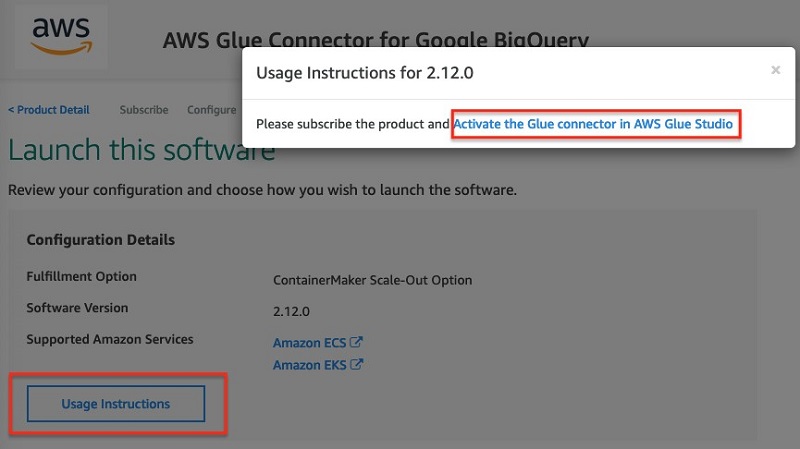
Alternatively, we also provide the scripts and instructions for you to share the connector publicly using AWS Marketplace for a price or free. For instructions on subscribing to the connector, see Subscribing to AWS Marketplace connectors.
Using AWS Glue Studio to author a Spark application
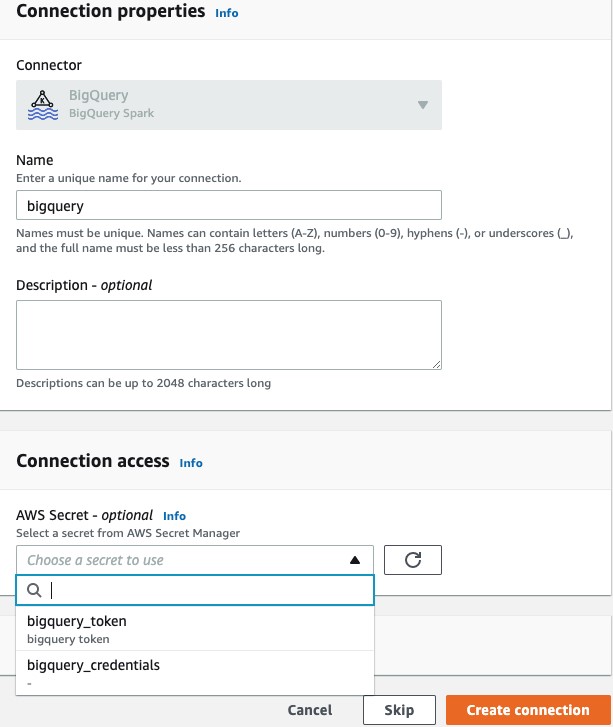
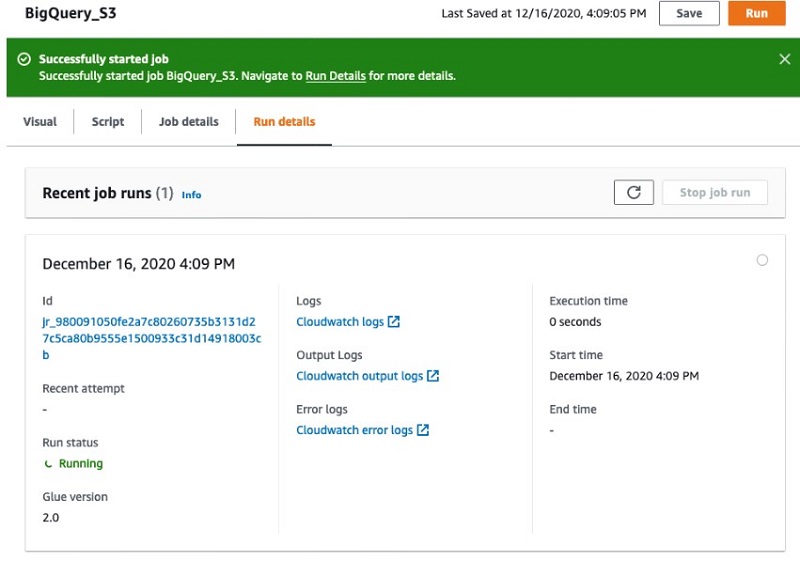
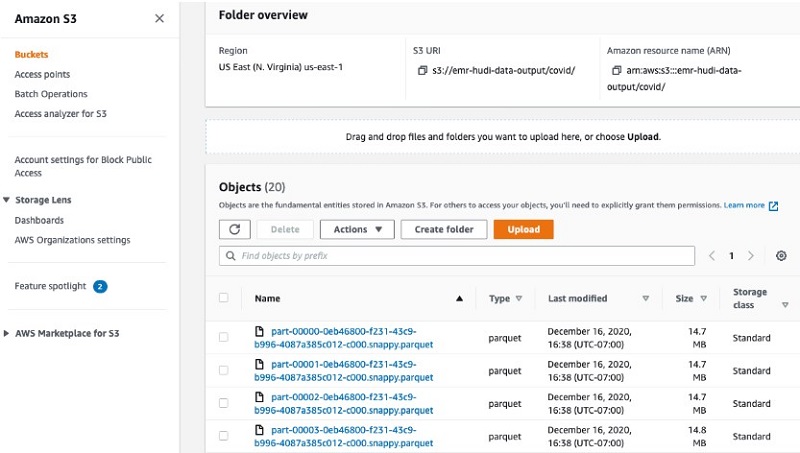
After you create a connection for using a BYOC or AWS Marketplace – AWS Glue connector, you can follow the instructions to visually author a Spark ETL application with AWS Glue Studio. These instructions are available here for Job Authoring with custom connectors. Following are screenshots from AWS Glue Studio:
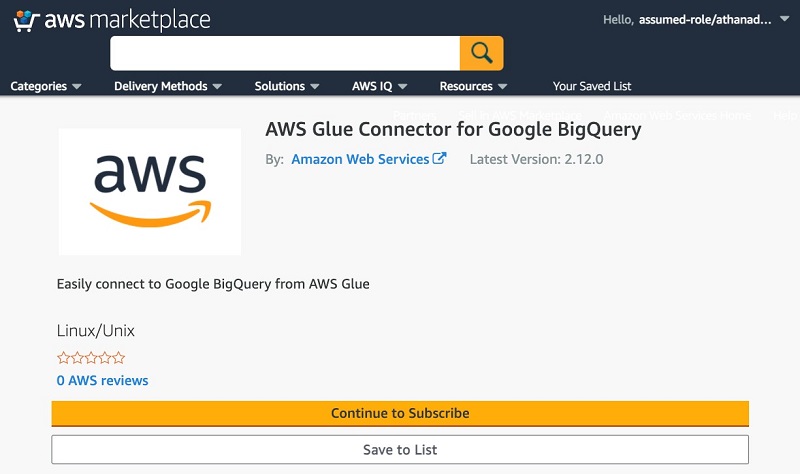
Connectors on AWS Marketplace

Visually author Glue jobs using connectors with AWS Glue Studio
Step 1 – Select a connector

Step 2 – Visually author the job using the associated connection

Conclusion
You can use two different mechanisms to use custom connectors with AWS Glue Spark runtime and AWS Glue Studio console. In this post, we discussed the user experience for seamless discovery and subscription to custom connectors, and walked you through developing and testing your own connectors with AWS Glue Spark runtime, and deploying them into your production Apache Spark applications for ETL and analytics workloads that run on AWS Glue.
Build a custom connector yourself or try one on AWS Marketplace with AWS Glue Studio.
If you would like to partner or add a new Glue connector to AWS Marketplace, please reach out to us at [email protected]
Resources
For additional resources, see the following:
About the Authors
 Bo Li is a software engineer in AWS Glue and devoted to designing and building end-to-end solutions to address customer’s data analytic and processing needs with cloud-based data-intensive technologies.
Yubo Xu is a Sofware Development Engineer on the AWS Glue team. His main focus is to improve the stability and efficiency of Spark runtime for AWS Glue and the easiness to connect to various data sources. Outside of work, he enjoys reading books and hiking the trails in the Bay area with his dog, Luffy, a one-year old Shiba Inu.
 Xiaoxi Liu is a software engineer at AWS Glue team. Her passion is building scalable distributed systems for efficiently managing big data on cloud and her concentrations are distributed system, big data and cloud computing
 Mohit Saxena is a Software Development Manager at AWS Glue. His team works on Glue’s Spark runtime to enable new customer use cases for efficiently managing data lakes on AWS and optimize Apache Spark for performance and reliability.















 Vikas Omer is an analytics specialist solutions architect at Amazon Web Services. Vikas has a strong background in analytics, customer experience management (CEM), and data monetization, with over 11 years of experience in the telecommunications industry globally. With six AWS Certifications, including Analytics Specialty, he is a trusted analytics advocate to AWS customers and partners. He loves traveling, meeting customers, and helping them become successful in what they do.


 Bo Li is a software engineer in AWS Glue and devoted to designing and building end-to-end solutions to address customer’s data analytic and processing needs with cloud-based data-intensive technologies.
 Yubo Xu is a Sofware Development Engineer on the AWS Glue team. His main focus is to improve the stability and efficiency of Spark runtime for AWS Glue and the easiness to connect to various data sources. Outside of work, he enjoys reading books and hiking the trails in the Bay area with his dog, Luffy, a one-year old Shiba Inu.
 Xiaoxi Liu is a software engineer at AWS Glue team. Her passion is building scalable distributed systems for efficiently managing big data on cloud and her concentrations are distributed system, big data and cloud computing
 Mohit Saxena is a Software Development Manager at AWS Glue. His team works on Glue’s Spark runtime to enable new customer use cases for efficiently managing data lakes on AWS and optimize Apache Spark for performance and reliability.


 Srinivas Kesanapally is a principal partner solution architect at AWS and has over 25 years of experience in working with database and analytics products from traditional to modern database vendors and has helped many large technology companies in designing data analytics solutions as well as led engineering teams involved in modernizing data analytic platforms.
 Srikanth Sopirala is a Sr. Analytics Specialist Solutions Architect at AWS. He is a seasoned leader with over 20 years of experience, who is passionate about helping customers build scalable data and analytics solutions to gain timely insights and make critical business decisions. In his spare time, he enjoys reading, spending time with his family and road biking.
 Naresh Gautam is a Sr. Analytics Specialist Solutions Architect at AWS. His role is helping customers architect highly available, high-performance, and cost-effective data analytics solutions to empower customers with data-driven decision-making. In his free time, he enjoys meditation and cooking.


 Saurabh Shanbhag is a Partner Solutions Architect at AWS and has over 12 years of experience in working with data integration and analytics products. He focuses on enabling partners to build and enhance joint solutions on AWS.




 Saurabh Bhutyani is a Senior Big Data Specialist Solutions Architect at Amazon Web Services. He is an early adopter of open-source big data technologies. At AWS, he works with customers to provide architectural guidance for running analytics solutions on Amazon EMR, Amazon Athena, AWS Glue, and AWS Lake Formation. In his free time, he likes to watch movies and spend time with his family.






 Vishal Pathak is a Data Lab Solutions Architect at AWS. Vishal works with the customers on their use cases, architects a solution to solve their business problems and helps the customers build an scalable prototype. Prior to his journey in AWS, Vishal helped customers implement BI, DW and DataLake projects in US and Australia.
 Brian Likosar is a Senior Streaming Specialist Solutions Architect at Amazon Web Services. Brian loves helping customers capture value from real-time streaming architectures, because he knows life doesn’t happen in batch. He’s a big fan of open-source collaboration, theme parks, and live music.
 Larry Heathcote is a Senior Product Marketing Manager at Amazon Web Services for data streaming and analytics. Larry is passionate about seeing the results of data-driven insights on business outcomes. He enjoys walking his Samoyed Sasha in the mornings so she can look for squirrels to bark at.




 Dipankar Ghosal is a Sr Data Architect at Amazon Web Services and is based out of Minneapolis, MN. He has a focus in analytics and enjoys helping customers solve their unique use cases. When he’s not working, he loves going hiking with his wife and daughter.










 Arash Rowshan is a Software Engineer at Amazon Web Services. He’s passionate about big data and applications of ML. Most recently he was part of the team that launched AWS Glue DataBrew. Any time he’s not at his desk, he’s likely playing soccer somewhere. You can follow him on Twitter





 Calvin Wang is a Data Scientist at AWS AI/ML. He holds a B.S. in Computer Science from UC Santa Barbara and loves using machine learning to build cool stuff.
 Chris Ghyzel is a Data Engineer for AWS Professional Services. Currently, he is working with customers to integrate machine learning solutions on AWS into their production pipelines.
 Veronika Megler, PhD, is Principal Data Scientist for Amazon.com Consumer Packaging. Until recently she was the Principal Data Scientist for AWS Professional Services. She enjoys adapting innovative big data, AI, and ML technologies to help companies solve new problems, and to solve old problems more efficiently and effectively. Her work has lately been focused more heavily on economic impacts of ML models and exploring causality.










 Shilpa Mohan is a Sr. UX designer at AWS and leads the design of AWS Glue DataBrew. With over 13 years of experience across multiple enterprise domains, she is currently crafting products for Database, Analytics and AI services for AWS. Shilpa is a passionate creator, she spends her time creating anything from content, photographs to crafts
 Romi Boimer is a Sr. Software Development Engineer at AWS and a technical lead for AWS Glue DataBrew. She designs and builds solutions that enable customers to efficiently prepare and manage their data. Romi has a passion for aerial arts, in her spare time she enjoys fighting gravity and hanging from fabric.