Tag Archives: Uncategorized

Create a serverless feedback collector application using Amazon Pinpoint’s two-way SMS functionality

Post Syndicated from Murat Balkan original https://aws.amazon.com/blogs/messaging-and-targeting/create-a-serverless-feedback-collector-application-by-using-amazon-pinpoints-two-way-sms-functionality/

Introduction

Two-way SMS communication is used by many companies to create interactive engagements with their customers. Traditional SMS notifications are one-way. While this is valid for many different use cases like one-time passwords (OTP) notifications and security notifications or reminders, some other use-cases may benefit from collecting information from the same channel. Two-way SMS allows customers to create this feedback mechanism and enhance business interactions and overall customer experience.

SMS is chosen for its simplicity and availability across different sets of devices. By combining the two-way SMS mechanism with the vast breadth of services Amazon Web Services (AWS) offers, companies can create effective architectures to better interact and serve their customers.

This blog post shows you how a serverless online appointment application can use Amazon Pinpoint’s two-way SMS functionality to collect customer feedback for completed appointments. You will learn how Amazon Pinpoint interacts with other AWS serverless services with its out-of-the-box integrations to create a scalable messaging application.

Architecture

By completing the steps in this post, you can create a system that uses the architecture illustrated in the following image:

The architecture of a feedback collector application that is composed of serverless AWS services

The flow of events starts when a Amazon DynamoDB table item, representing an online appointment, changes its status to COMPLETED. An AWS Lambda function which is subscribed to these changes over DynamoDB Streams detects this change and sends an SMS to the customer by using Amazon Pinpoint API’s sendMessages operation.

Amazon Pinpoint delivers the SMS to the recipient and generates a unique message ID to the AWS Lambda function. The Lambda function then adds this message ID to a DynamoDB table called “message-lookup”. This table is used for tracking different feedback requests sent during a multi-step conversation and associate them with the appointment ids. At this stage, the Lambda function also populates another table “feedbacks” which will hold the feedback responses that will be sent as SMS reply messages.

Each time a recipient replies to an SMS, Amazon Pinpoint publishes this reply event to an Amazon SNS topic which is subscribed by an Amazon SQS queue. Amazon Pinpoint will also add a messageId to this event which allows you to bind it to a sendMessages operation call.

A second AWS Lambda function polls these reply events from the Amazon SQS queue. It checks whether the reply is in the correct format (i.e. a number) and also associated with a previous request. If all conditions are met, the AWS Lambda function checks the ConversationStage attribute’s value from its message-lookup table. According to the current stage and the SMS answer received, AWS Lambda function will determine the next step.

For example, if the feedback score received is less than 5, a follow-up SMS is sent to the user asking if they’ll be happy to receive a call from the customer support team.

All SMS replies from the users are reflected to “feedbacks” table for further analysis.

Deploying the Sample Application

  1. Clone this GitHub repository to your local machine and install and configure AWS SAM with a test AWS IAM user.

You will use AWS SAM to deploy the remaining parts of this serverless architecture.

The AWS SAM template creates the following resources:

    • An Amazon DynamoDB table (appointments) that contains information about appointments, customers and their appointment status.
    • An Amazon DynamoDB table (feedbacks) that holds the received feedbacks from customers.
    • An Amazon DynamoDB table (message-lookup) that holds the Amazon Pinpoint message ids and associate them to appointments to track a multi-step conversation.
    • Two AWS Lambda functions (FeedbackSender and FeedbackReceiver)
    • An Amazon SNS topic that collects state change events from Amazon Pinpoint.
    • An Amazon SQS queue that queues the incoming messages.
    • An Amazon Pinpoint Application with an associated SMS channel.

This architecture consists of two Lambda functions, which are represented as two different apps in the AWS SAM template. These functions are named FeedbackSender and FeedbackReceiver. The FeedbackSender function listens the Amazon DynamoDB Stream associated with the appointments table and sends the SMS message requesting a feedback. Second Lambda function, FeedbackReceiver, polls the Amazon SQS queue and updates the feedbacks table in Amazon DynamoDB. (pinpoint-two-way-sms)

          Note: You’ll incur some costs by deploying this stack into your account.

  1. To start the SAM deployment, navigate to the root directory of the repository you downloaded and where the template.yaml AWS SAM template resides. AWS SAM also requires you to specify an Amazon Simple Storage Service (Amazon S3) bucket to hold the deployment artifacts. If you haven’t already created a bucket for this purpose, create one now. The bucket should have read and write access by an AWS Identity and Access Management (IAM) user.

At the command line, enter the following command to package the application:

sam package --template template.yaml --output-template-file output_template.yaml --s3-bucket BUCKET_NAME_HERE

In the preceding command, replace BUCKET_NAME_HERE with the name of the Amazon S3 bucket that should hold the deployment artifacts.

AWS SAM packages the application and copies it into this Amazon S3 bucket.

When the AWS SAM package command finishes running, enter the following command to deploy the package:

sam deploy --template-file output_template.yaml --stack-name BlogStackPinpoint --capabilities CAPABILITY_IAM

When you run this command, AWS SAM shows the progress of the deployment. When the deployment finishes, navigate to the Amazon Pinpoint console and choose the project named “BlogApplication”. This example uses “BlogStackPinpoint” as the stack name, you can change this to any other name you want.

  1. From the left navigation, choose Settings, SMS and voice. On the SMS and voice settings page, choose the Request phone number button under Number settings

Screenshot of request phone number screen

  1. Choose a target country. Set the Default message type as Transactional, and click on the Request long codes button to buy a long code.

Note: In United States, you can also request a Toll Free Number(TFN)

Screenshot showing long code additio

A long code will be added to the Number settings list.

  1. Choose the newly added number to reach the SMS Settings page and enable the option Enable two-way-SMS. At the Incoming messages destination, select Choose an existing SNS topic, and from the drop down select the Amazon SNS topic that was created by the BlogStackPinpoint stack.

Choose Save to save your SMS settings.


Testing the Sample Application

Now that the application is deployed and configured, test it by creating sample records in the Amazon DynamoDB table. Navigate to Amazon DynamoDB console and reach the tables view. Inspect the tables that were created by the AWS SAM application.

Here, appointments table is the table where the appointments and their statuses are kept. It tracks the appointment lifecycle events with items identified by unique ids. In this sample scenario, we are assuming that an appointment application creates a record with ‘CREATED’ status when a new appointment is planned. After the appointment is finished, same application updates the status to ‘COMPLETED’ which will trigger the feedback collection process. Feedback results are collected in the feedbacks table. Amazon Pinpoint message id’s, conversation stage and appointment id’s are kept in the message-lookup table.

  1. To start testing the end-to-end flow, choose the appointments table to open table overview page.
  2. Next, select the Items tab and choose the Create item From the dropdown, select Text. Add the following and choose Save to create your first appointment object. While adding the following object, replace CustomerPhone attribute’s value with a phone number you own. The feedback request messages will be delivered to that number. Note: This number should match the country number for the long code you provisioned.

{

"CustomerName": "Customer A",

"CustomerPhone": "+12345678900",

"AppointmentStatus":"CREATED",

"id": "1"

}

  1. To trigger sending the feedback SMS, you need to set an existing item’s status to “COMPLETED” To do this, select the item and click Edit from the Actions menu.

Replace the item’s current JSON with the following.

{

"AppointmentStatus": "COMPLETED",

"CustomerName": "Customer A",

"CustomerPhone": "+12345678900",

"id": "1"

}

  1. Before choosing the Save button, double check that you have set CustomerPhone attribute’s value to a valid phone number.

After the change, you should receive an SMS message asking for a feedback. Provide a numeric reply of that is less than five to this message. This will trigger a follow up question asking for a consent to receive an in-person callback.


During your SMS conversation with the application, inspect the feedbacks table. The feedback you have given over this two-way SMS channel should have been reflected into the table.

If you want to repeat the process, make sure to increment the AppointmentId field for any additional appointment records.

Cleanup

To clean up the resources you used in your account, simply navigate to AWS Cloudformation console and delete the stack named “BlogStackPinpoint”.

After the stack is deleted, you also need to delete the Long code from the Pinpoint Console by choosing the number and pressing Remove phone number button. You can also delete the Amazon S3 bucket you used for packaging and deploying the AWS SAM application.

Conclusion

This architecture shows how Amazon Pinpoint can be used to make two-way SMS communication with your customers. You can implement Two-way SMS functionality in other use cases such as appointment reminders, polls, Q&A services, and more.

To learn more about Pinpoint and it’s two-way SMS mechanism, you can visit the Pinpoint documentation.


Send SMS at scale to Indian recipients using Amazon Pinpoint

Post Syndicated from Meng Kang original https://aws.amazon.com/blogs/messaging-and-targeting/send-sms-at-scale-to-indian-recipients-using-amazon-pinpoint/

SMS has one of the highest open rates of all customer communications channels, and is popular with application builders for both transactional use cases like appointment reminders or asynchronous use cases like a SMS chatbot. Amazon Pinpoint supports SMS in over 200 countries and territories, but SMS sending requirements can vary by recipient destination. SMS sending requirements, depending on locale, can include restrictions on origination identity used, messages content, or the routes used to deliver to recipients. Amazon Pinpoint is making it easier for you to send application-to-person (A2P) SMS to Indian recipients using domestic routes. Amazon Pinpoint now supports submitting the Principal Entity ID (PEID) and Template ID using the Send Message API.

Introduction to new regulations and DLT platform

In 2018, the Telecom Regulatory Authority of India (TRAI) released The Telecom Commercial Communication Customer Preference Regulation (TCCCPR) to regulate text messaging in India. To implement this, TRAI adopted a block-chain technology called the Distributed Ledger Technology (DLT) platform. Every business entity who wants to send Application-to-Person (A2P) SMS to their end users in India using domestic routes will need to register their business and use case on the DLT platform. DLT registration is a concept that is unique to the SMS industry in India. If you don’t send text messages to recipients in India then DLT registration doesn’t apply to you. You will not be able to send A2P SMS to Indian recipients using domestic routes if you do not register on the DLT platform. Please note that if you are an international enterprise and you would like to send A2P SMS to recipients in India, you can leverage Amazon Pinpoint’s International Long Distance Operator (ILDO) routes. See more information here.

Changes in sending A2P SMS

DLT has brought many changes to the way SMS is sent in India. These include a new registration process, new message categorization, as well as restrictions around how to send messages. See below for an overview of this process.

Registration with TRAI: Prior to DLT, only service providers/telemarketers were required to register with TRAI. With the updated regulations, business owners/principal entity who wants to send SMS to their customers in India have to sign-up and complete the registration process on DLT platform.

Sender ID & Template Registration: Prior to DLT, bulk SMS service providers used to approve Sender IDs and templates. With the updated regulations, business owners/principal entity have to register Sender ID and Templates on the DLT platform and get those approved.

Customer Preference and Consent: Prior to DLT, customers were either on National Do Not Disturb Registry (DND) or not. The new regulation gave control to consumers/mobile subscribers by offering a time-window where they can manage their preferences based on a specific time or day and allow receipt of certain kinds of promotional messages. It means that customers can choose to receive promotional text from a company even if they have activated DND.

Types of Message: With the new regulation, the DLT-defined domestic routes are as follows.

  • Promotional SMS: these include offers, discounts to non-opt in users, and SMS delivered to Non-DND numbers where the customer has not explicitly opted in. These can only be delivered between 10.00AM to 21:00PM IST. Operators have also stopped supporting delivery notification and receipts for promotional SMS. Promotional messages are sent using 6-digit numeric Sender IDs.
  • Transactional SMS: this is reserved for financial organizations to send One-Time-Passwords (OTPs). Transactional messages use 6-digit alpha Sender IDs.
  • Service Implicit: these include service-related informative messages other than OTPs. Amazon Pinpoint classifies these under the “transactional” route type, so customers will continue to select the “transactional” route type to send these messages.
  • Service Explicit: these include promotional messages customers have opted to receive from a particular business. Amazon Pinpoint classifies these under the “transactional” route type, so customers will continue to select the “transactional” route type to send these messages.

Validation (Scrubbing) Functionality: With DLT, customers’ mobile numbers are filtered in real-time to match the desired criteria set by the customer. This means that if a customer gave consent to receive SMS on Monday, but withdraws the permission on Wednesday, then the SMS will not be delivered on Thursday. Customer preferences are updated in real-time and the results are immediately available on DLT. When sending, the DLT platform will validate the PEID customers used to send against the registered Sender ID, and validate the SMS Template against the registered Brand name, so that only approved businesses using approved SMS Sender are able to send SMS to the end recipient.

DLT registration timeline

TRAI is the entity enforcing DLT implementation in India. TRAI has designated these changes to take place over several phases and months, with each phase increasing the level of restriction on message sending:

Phase 1 (Initiated June 2020): The first phase is to complete Principal Entity ID (PEID) & the SMS Header or Sender ID registration on the DLT platform. Only registered SMS Header or Sender ID can be used to send SMS to India using domestic routes.

Phase 2 (Initiated Nov 2020): The second phase is to register Template ID on the DLT platform. For each SMS send, the PEID and Template ID are validated against the registered Sender ID.

Phase 3 (Initiated April 2021): The third phase is to validate that the content of the message template matches exactly what was registered on the DLT platform. Brand Name is a mandatory field to be included in content for template registration.

Using Pinpoint to send SMS to India

To send SMS messages to India from Amazon Pinpoint, you’ll first need to complete DLT registration. To do so, follow the steps described on the Special requirements for sending SMS messages to recipients in India documentation.

Next, to make sure your SMS messages are delivered successfully using local routes, you need to do the following when using Amazon Pinpoint sending the SMS message.

  • Use a Sender ID which has been registered on the DLT platform that matches your message content.
  • In the Pinpoint Send Message API, provide values for the following parameters:
    • EntityId – The entity ID or Principal Entity (PE) ID received from the regulatory body for sending SMS in your country.
    • TemplateId – The template ID received from the regulatory body for sending SMS in your country.
  • Choose one of the following route types:
    • Promotional – Choose this type for promotional messages, which use a numeric sender ID.
    • Transactional – Choose this type for transactional messages, which use a case-sensitive alphanumeric sender ID.

When adding the content to your message, thoroughly review your content to ensure that it exactly matches the content in the DLT registered template. If you include additional character returns, spaces, punctuation, or mismatched sentence case, carriers will block your SMS. Variables in a template – for example, {#var#} – cannot exceed 30 characters for each variable. The following are some common use cases for message rejection:

No template was found that matched the content sent.
Content sent: <#> 12345 is your OTP to verify mobile number. Your OTP is valid for 15 minutes — ABC Pvt. Ltd.
Matched template: None
Issue: There are no DLT templates that include <#> or {#var#} at the beginning of the DLT registered template.

The value of a variable exceeds 30 characters.
Content sent: 12345 is your OTP code for ABC (ABC Company – India Private Limited) – (ABC 123456789). Share with your agent only. – ABC Pvt. Ltd.
Matched template: {#var#} is your OTP code for {#var#} ({#var#}) – ({#var#} {#var#}). Share with your agent only. – ABC Pvt. Ltd.
Issue: The value of “ABC Company – India Private Limited” in the content sent exceeds a single {#var#} character limit of 30.

The message sentence case does not match the sentence case in the template.
Content sent: 12345 is your OTP code for ABC (ABC Company – India Private Limited) – (ABC 123456789). Share with your agent only. – ABC Pvt. Ltd.
Matched template: {#var#} is your OTP code for {#var#} ({#var#}) – ({#var#} {#var#}). Share with your agent only. – ABC PVT. LTD.
Issue: The company name appended to the DLT matched template is capitalized while the content sent has changed parts of the name to lowercase — “ABC Pvt. Ltd.” vs. “ABC PVT. LTD.”

Start using Amazon Pinpoint to send SMS messages to Indian recipients by following the steps described on the Special requirements for sending SMS messages to recipients in India documentation.

Maintain consistency in emails with custom content using Amazon SES templates

Post Syndicated from Seth Theeke original https://aws.amazon.com/blogs/messaging-and-targeting/maintain-consistency-in-emails-with-custom-content-with-amazon-ses-templates/

When sending emails, content creators often want to add custom content such as images or videos while maintaining consistency in their messages. They also want to send those emails automatically once new content is ready. In this blog, we will show you how to create templates for emails with a common theme by combining Amazon Simple Email Service (Amazon SES) templates, AWS Lambda, Amazon Simple Storage Service (Amazon S3), and Amazon SES templates.

Promotional content (such as logos, images, videos, and more) can be stored, managed, and hosted in Amazon S3. You can then embed this content into promotional emails without making any changes to email templates or email processing. You can trigger a Lambda function to send promotional emails with the newly added content through using the Amazon SES SDK.

This post shows readers how to:

  • Create an Amazon SES email template with tags to be replaced by image URLs
  • Upload those templates to Amazon SES
  • Setup an AWS CloudFormation stack using the AWS Cloud Development Kit(AWS CDK)
  • Create a Lambda function and Amazon S3 bucket to send emails using the AWS SDK for Javascript

Solution Architecture

The proceeding image shows the architecture you will build as part of this post. You will use the AWS CDK to provision an Amazon S3 bucket, Lambda, and AWS Identity and Access Management(IAM) permissions. You will also use the AWS Command Line Interface(AWS CLI) to upload and manage our Amazon SES templates.

The architecture allows you to upload content to S3 which will trigger a Lambda function. That Lambda will form an Amazon SES request using the template you have uploaded and embed the S3 content as a parameter which will be sent to the user and render in their email client.

Metadata

Time to Read: ~ 20 minutes

Time to Complete: ~ 15 minutes

Cost to Complete: Free Tier

Learning Level: Intermediate

Services Used: Amazon Simple Email Service, Amazon Simple Storage Service, AWS Lambda

Prerequisites

For this walkthrough, you should have the following prerequisites:

Solution Overview

You will walk through creating Amazon SES templates and then a CloudFormation stack using the AWS CDK. You will then create a template file, a lambda directory, and a CDK application directory which should all be in the same level in your package structure in order to follow these steps explicitly.

Step 1: Create an Amazon SES template in JSON with a tag representing your image URL and upload via the CLI

Step 2: Initialize an AWS CDK package using the AWS CDK CLI and add necessary dependencies

Step 3: Initialize a NodeJS AWS Lambda package

Step 4: Provision an Amazon S3 bucket and Lambda in your AWS CDK app

Step 5: Configure your Lambda to be triggered when objects are added to S3

Step 6: Configure your Lambda’s IAM role to allow sending emails via Amazon SES

Step 7: Write necessary code for AWS Lambda to send emails via Amazon SES

Step 8: Deploy and Test!

Step 1: Create an Amazon SES Email template

Amazon SES Email templates are defined as a JSON object containing:

  • TemplateName – name of the template, must be unique across email templates and will be used by our Lambda to pass to Amazon SES
  • SubjectPart – represents the subject of the email
  • HtmlPart – represents the body of the email
  • TextPart – when email clients cannot render HTML, this is displayed instead of HtmlPart

More detailed information about email templates can be found in the Amazon SES Developer Guide.

1.     Open your text editor and save the empty file as email-template.json

2.     Paste the following into your json file and save your changes

{
  "Template": {
    "TemplateName": "MyTemplate",
    "SubjectPart": "Greetings Customer",
    "HtmlPart": "<img src={{imageURL}} alt=\"logo\" width=\"100\" height=\"100\">",
    "TextPart": "Dear Customer,\r\nCheck out our website for new promotional content."
  }
}

This template has a single tag called imageURL which will be replaced during execution with our content’s S3 URL.

3.     Run the following AWS CLI command to upload your template to Amazon SES

aws ses create-template --cli-input-json file://email-template.json

4.     Once your template has been uploaded, you can confirm its creation by logging into the AWS Console, navigating to Amazon SES, and then selecting Email Templates

Step 2: Initialize an AWS CDK package and add necessary dependencies

In this section, you will be using the AWS CDK CLI to initialize a new code package and add the dependencies for Lambda and Amazon S3.

1.     Create a new directory at the same level as email-template.json called email-infrastructure

2.     Navigate to the promotional-email-infrastructure directory and run the following CDK CLI command to generate the skeleton for your cdk application

cdk init app --language=typescript

3.     Add dependencies for Amazon S3, Lambda, and IAM by adding the following lines to your dependencies section of your package.json and then run npm install

"@aws-cdk/aws-lambda": "1.86.0"
"@aws-cdk/aws-lambda-event-sources": "1.86.0"
"@aws-cdk/aws-s3": "1.86.0"
"@aws-cdk/aws-iam": "1.86.0"

Make sure to install the version of these dependencies that matches the version of the aws-cdk stack so you don’t run into compatibility issues.

Step 3: Create a NodeJS Lambda package

In this step, you will create the barebones for our Lambda function that will call Amazon SES and revisit in step 7 to implement the handler

1.     Create a new directory at the same level as email-template.json called email-lambda

2.     Add a package.json file in the email-lambda directory that looks like the following

{
    "name": "email-lambda",
    "version": "1.0.0",
    "main": "index.js",
    "dependencies": {
        "aws-sdk": "2.831.0"
    }
}

3.     Add a file called index.js, this will be our Lambda handler and will look like the following for now. Make sure to insert your verified email address into the testAddress variable, this will be used later as both your to and from address for testing.

var AWS = require("aws-sdk");
var ses = new AWS.SES({apiVersion: "2010-12-01"});
var testAddress = "INSERT_VERIFIED_EMAIL_HERE";

exports.handler = async function(event) { 
    console.log(JSON.stringify(event));
    return "200";
}

4.     Finish this step by running npm install in the email-lambda directory to install the aws-sdk dependencies you will use in a later step. Your top-level directory structure should look like the following:

  • email-template.json – contains your email template from step 1
  • email-infrastructure – contains your CDK stack from step 2
  • email-lambda – contains your email lambda function code from step 3

Step 4: Provision an Amazon S3 bucket and Lambda function in your CDK app

In this step, you will add an Amazon S3 bucket and a NodeJS Lambda function into our CDK application based on what you setup in previous steps. After this, you will connect all the pieces together.

1.     Import all the services you need into our CDK stack construct. The imports you will need are listed below, copy them into your editor in the imports section.

import * as s3 from '@aws-cdk/aws-s3';
import * as lambda from '@aws-cdk/aws-lambda';
import * as lambdaEventSource from '@aws-cdk/aws-lambda-event-sources';
import * as iam from '@aws-cdk/aws-iam';
import path = require('path');

2.     Add S3 bucket to CDK App by adding an instance of the Bucket construct

const promotionalContentBucket = new s3.Bucket(this, "DOC-EXAMPLE-BUCKET");

3.     Similarly, add your Lambda function by creating an instance of the Function construct referencing your Lambda function package by path

const emailLambda = new lambda.Function(this, "EmailLambda", {
    code: lambda.Code.fromAsset(path.join(__dirname, "../../email-lambda")),
    handler: "index.handler",
    runtime: lambda.Runtime.NODEJS_12_X
});

4.     Execute npm run build in your CDK directory to ensure you’ve setup the package correctly. You can get additional help from the Troubleshooting Guide for CDK

Step 5: Configure Lambda with an S3 Event Source

In this step, you will configure your Lambda function to be triggered when objects are added to your Amazon S3 bucket by using the Lambda event sources module for CDK.

1.     Create an instance of the S3EventSource construct in your stack for OBJECT_CREATED events only because you don’t want to trigger a lambda invocation when an object is removed for this post

const s3EventSource = new lambdaEventSource.S3EventSource(promotionalContentBucket, {
    events: [s3.EventType.OBJECT_CREATED]
});

2.     Now that you have an event source defined, you need to add the event source to your Lambda function

emailLambda.addEventSource(s3EventSource);

3.     Add the Amazon S3 bucket’s domain name as an environment variable so you can reference objects by URL by adding the environment property to your Lambda function like below.

environment: {
    "BUCKET_DOMAIN_NAME": promotionalContentBucket.bucketDomainName
}

Step 6: Configure the email Lambda IAM role

In this step, you will add an IAM policy statement to your email Lambda’s execution role so it can call Amazon SES.

1.     Add an IAM PolicyStatement construct with effect ALLOW on all resources with SendTemplatedEmail action

const emailPolicyStatement = new iam.PolicyStatement({
    effect: iam.Effect.ALLOW,
    actions: ["ses:SendTemplatedEmail"],
    resources: ["*"]
});

2.     Finish this step by adding your newly created policy to the Lambda execution role

emailLambda.addToRolePolicy(emailPolicyStatement)

Step 7: Add Lambda implementation to send templated emails

You will use the AWS NodeJS Amazon SES SDK to send emails using the SendTemplatedEmail API. Our implementation will assume a batch of size 1 for each Lambda invocation for simplicity.

1.     Replace your function handler in the email Lambda function with the code below. This will read the S3Event’s first record, prepare parameters for the Amazon SES SDK call and invoke the sendTemplatedEmail function with the imageURL embedded into your previously created template.

exports.handler =  async function(event) {  
    console.log(JSON.stringify(event));
    let s3Object = event.Records[0];
    let sendEmailParams = {
        Destination: {
            ToAddresses: [testAddress]
        },
        Template: 'MyTemplate',
        TemplateData: JSON.stringify({
            "imageURL": process.env.BUCKET_DOMAIN_NAME + "/" + s3Object.s3.object.key,
        }),
        Source: testAddress
    };
    let response = await ses.sendTemplatedEmail(sendEmailParams).promise();
    return response;
}

2.     Deploy your stack with the CDK CLI by running cdk deploy, this may take a couple minutes. If you run into problems, see the Troubleshooting Guide for CDK.

Step 8: Test your System

At this point, you should have an Amazon SES template uploaded to your account as well as a CloudFormation stack that contains an Amazon S3 bucket and a Lambda function that is triggered when objects are added to that bucket and had permissions to invoke Amazon SES APIs. Now you will test the system by adding an image into our Amazon S3 bucket.

1.     Log in to the AWS Console

2.     Navigate to Amazon S3

3.     Select your promotional content bucket from the list of buckets

4.     Click Upload on the right-hand side of the screen

5.     Add an image from your computer by clicking Add files

6.     Scroll down to the bottom and expand Additional Upload Options

7.     Scroll down to Access Control List

8.     Select the check boxes for Read for Everyone(public access) so the images are accessible when the user opens their email

9.     Scroll down to the bottom and select Upload

10.     Done! You should have an email in your inbox shortly that renders the image you just uploaded. Check the Lambda logs and errors in case you don’t see your email.

Cleaning up

To avoid incurring future charges, delete your CloudFormation stack by running cdk destroy or manually through the AWS Console. Keep in mind, by default Amazon S3 buckets won’t be deleted so you will need to navigate to Amazon S3 in the AWS Console, clear the bucket of any objects and then manually delete the resource.

Conclusion

Congratulations! You now have an understanding of how to combine Amazon SES templates with Amazon S3 and Lambda to inject custom images into emails without the need for any servers and have launched this stack using the AWS Cloud Development Kit.

Author Bio

My name is Seth Theeke, I work as a Software Development Engineer in Amazon Freight. I’ve been working with AWS since 2016 and hold a Developer Associate Certification. I love soccer and I love software engineering, the simplest things in life!

Solving abandoned cart scenarios using Amazon Pinpoint event-triggered journeys

Post Syndicated from Ryan Lowe original https://aws.amazon.com/blogs/messaging-and-targeting/solving-abandon-cart-scenarios-using-amazon-pinpoints-event-triggered-journeys/

In this post, we will walk through building an abandoned shopping cart user journey in Amazon Pinpoint. Journeys are multi-step user engagements with channels sends (SMS, email or push) based on conditional logic with a goal to drive a high value action. This journey will enable customers to identify users who added a product to their shopping cart but have not purchased, and follow up with them via email to encourage them to complete the transaction. Though the example will be specific to this use case, the steps used can be adapted to fit similar user journeys.

Abandoned Shopping Cart Journey

The Baynard Institute states the average cart abandonment rate is 69.57%, which means over half of users add a product to cart but do not check out. Any improvement in this metric has a direct impact on revenue, and is easily measurable. This makes it a no brainer for marketers to support through campaigns. Previously, customers did not have a way to immediately react to a cart abandonment or other important events within a journey. This meant customers would need to create a segment of users who abandoned their cart and do a daily send. By this time, the user might have purchased an item somewhere else, or lost interest in the product or service.

Solution Overview

The solution that we will build relies on Amazon Pinpoint’s events API to report two application events: AddToCartEvent, CartPurchasedEvent. These events should be reported to Amazon Pinpoint from your electronic shopping cart system. The integration with the online shopping cart system is out of scope for this article. Please refer to the Amazon Pinpoint developer guide for more information.

Architecture Diagram

When a user of your e-commerce shopping cart adds items to their shopping cart, you can report the AddToCartEvent to Amazon Pinpoint. At a later time, when the user completes their purchase, you can report the CartPurchasedEvent. If the CartPurchasedEvent does not get reported to Amazon Pinpoint within an hour of receiving the AddToCartEvent, then you can trigger our abandon shopping cart email to encourage the user to return and complete their purchase.

Using these events, you are able to use Amazon Pinpoint’s journey feature to orchestrate our user experience. You will use the first event, AddToCartEvent, to trigger your journey. After an hour wait, you will then use the second event, CartPurchasedEvent, to filter out users who have completed the purchase. The remaining users will receive your abandon shopping cart email message urging them to return to their cart and complete their order.

Step 1: Create Add to Cart and Purchase custom events

The first step in setting up this solution is to create and report the two custom events. There are multiple ways to report events in your application. For demonstration purposes, we have included two example event calls in the proceeding code chunk using the AWS SDK for Python (Boto3) from inside an AWS Lambda Function.

It is important to note that the Amazon Pinpoint events API can also be used to update endpoints at the same time that the event gets registered. In the proceeding example, the first API call will update the endpoint’s attribute Cart with the contents of the shopping cart. In the second example, the API call update the endpoint’s attribute Purchased with the flag Yes.

Sample Event: Item Hat was added to cart with a price of $29.95

import boto3

client = boto3.client('pinpoint')
app_id = '[PINPOINT_PROJECT_ID]'
endpoint_id = '[ENDPOINT_ID]'
address = '[EMAIL_ADDRESS]'

def lambda_handler(event, context):
    
    client.put_events(
        ApplicationId = applicationId,
        EventsRequest={
            'BatchItem': {
                endpoint_id: {
                    'Endpoint': {
                        'ChannelType': 'EMAIL',
                        'Address': address,
                        'Attributes': {
                            'Cart': ['Hat'],
                            'Purchased': ['No']
                        }
                    },
                    'Events':{
                        'cart-event-2': {
                            'Attributes':{
                                'AddedToCart': 'Hat'
                            },
                            'EventType': 'AddToCartEvent',
                            'Metrics': 29.95,
                            'Timestamp': datetime.datetime.fromtimestamp(time.time()).isoformat()
                        }
                    }
                }
            } 
        }
    )

Sample Event: Cart purchased

import boto3

client = boto3.client('pinpoint')
app_id = '[PINPOINT_PROJECT_ID]'
endpoint_id = '[ENDPOINT_ID]'
address = '[EMAIL_ADDRESS]'

def lambda_handler(event, context):
    
    client.put_events(
        ApplicationId = applicationId,
        EventsRequest={
            'BatchItem': {
                endpoint_id: {
                    'Endpoint': {
                        'ChannelType': 'EMAIL',
                        'Address': address,
                        'Attributes': {
                            'Cart': ['Hat'],
                            'Purchased': ['Yes']
                        }
                    },
                    'Events':{
                        'cart-event-2': {
                            'Attributes':{
                                'Purchased': 'Yes'
                            },
                            'EventType': 'CartPurchasedEvent',
                            'Timestamp': datetime.datetime.fromtimestamp(time.time()).isoformat()
                        }
                    }
                }
            } 
        }
    )

Note: Both events above must be reported to Amazon Pinpoint in order to complete the remaining steps in this post.

Step 2: Create a “Made a Purchase” Dynamic Segment

The second step in our solution is to create a dynamic segment to filter out users who have made a purchase. To do this, you will look for users with the endpoint attribute of Purchased to be the value Yes.

  1. Navigate to your project in the Amazon Pinpoint Console, then Segments.
  2. Choose Create a segment.
  3. Select Build a segment.
  4. Provide the name Made a Purchase into the name field.
  5. Configure Segment Group 1 to add segment filters.
    1. Under the Add filters to refine your segment choose Filter by endpoint.
    2. For the Choose an endpoint attribute dropdown choose Purchased
    3. Ensure Is is chosen in the middle dropdown.
    4. In the Choose values dropdown choose Yes.
  6. Click Create Segment to create your first dynamic segment. Note, a pop-up will appear highlighting that this segment targets multiple endpoint channels. Select I Understand.

Step 3: Create our Abandon Cart Journey

The last step is to design out the journey itself.

  1. Navigate to your project in the Amazon Pinpoint Console, then Journeys.
  2. Choose Create journey to create a new journey.
  3. Give the Journey the name Abandon Cart by replacing the Untitled text.
  4. Define a Journey entry criteria
    1. Choose Set entry condition to expand the Journey entry activity.
    2. Choose Add participants when they perform an activity and choose AddToCartEvent in the Events field.
    3. Choose Save
  5. Create a branch to target users who did not make a purchase
    1. Choose Add activity directly under the Journey entry activity
    2. Under Choose a journey activity choose Yes/no split.
    3. Under Select a condition type choose Segment.
    4. Under Segments choose the Made a Purchase dynamic segment created earlier.
    5. Under Condition evaluation choose Evaluate after and then choose 1 hours.
    6. Choose Save
  6. Add an email activity to send our abandon cart message
    1. Choose Add activity directly under the No split path.
    2. Under Choose a journey activity choose Send email.
    3. Choose Choose an email template and select your messaging template and choose Choose template.
    4. Choose Save.

At this point, your journey should look like the screenshot below. You can now choose Review to walkthrough steps to publish your journey.

Next Steps

You can continue to iterate on this experience using the journeys tool to create a custom user-experience for your users without any code changes.

  • Filter the journey entry event to only high dollar cart items by adding Event metrics filters in the Journey entry criteria.
  • Test out different channels by sending message to users over SMS instead of email.
  • Add additional splits to send messages on users’ preferred channels.
  • Add a second wait of 24 hours and send a final reminder with a 10% off coupon code.
  • Add random splits to do A/B testing of different messages and channels.

Cleanup

To stop and remove the journey in order to not incur further charges, please follow the steps below.

  1. Navigate to your project in the Amazon Pinpoint Console, then Journeys.
  2. Select the Abandon Cart journey.
  3. Choose Stop journey then choose Stop journey again in the Stop journey confirmation.
  4. To fully delete the journey choose Delete from the Actions menu.

Conclusion

Cart abandonment is a major issue that has a direct impact on revenue. This solution allows customers to recognize a user has abandoned a critical flow and allows a marketer to re-engage them through a messaging channel before it is too late. Different components of the user journey can also be A/B tested and targeted with different user segments to drive the highest return from different user cohorts. Once set up, the journey can be always-on and independently drive incremental revenue for a business.

Log into the Amazon Pinpoint Console to get started creating your own abandon shopping cart journey.

No, RSA Is Not Broken

Post Syndicated from Bruce Schneier original https://www.schneier.com/blog/archives/2021/03/no-rsa-is-not-broken.html

I have been seeing this paper by cryptographer Peter Schnorr making the rounds: “Fast Factoring Integers by SVP Algorithms.” It describes a new factoring method, and its abstract ends with the provocative sentence: “This destroys the RSA cryptosystem.”

It does not. At best, it’s an improvement in factoring — and I’m not sure it’s even that. The paper is a preprint: it hasn’t been peer reviewed. Be careful taking its claims at face value.

Some discussion here.

I’ll append more analysis links to this post when I find them.

Chinese Hackers Stole an NSA Windows Exploit in 2014

Post Syndicated from Bruce Schneier original https://www.schneier.com/blog/archives/2021/03/chinese-hackers-stole-an-nsa-windows-exploit-in-2014.html

Check Point has evidence that (probably government affiliated) Chinese hackers stole and cloned an NSA Windows hacking tool years before (probably government affiliated) Russian hackers stole and then published the same tool. Here’s the timeline:

The timeline basically seems to be, according to Check Point:

  • 2013: NSA’s Equation Group developed a set of exploits including one called EpMe that elevates one’s privileges on a vulnerable Windows system to system-administrator level, granting full control. This allows someone with a foothold on a machine to commandeer the whole box.
  • 2014-2015: China’s hacking team code-named APT31, aka Zirconium, developed Jian by, one way or another, cloning EpMe.
  • Early 2017: The Equation Group’s tools were teased and then leaked online by a team calling itself the Shadow Brokers. Around that time, Microsoft cancelled its February Patch Tuesday, identified the vulnerability exploited by EpMe (CVE-2017-0005), and fixed it in a bumper March update. Interestingly enough, Lockheed Martin was credited as alerting Microsoft to the flaw, suggesting it was perhaps used against an American target.
  • Mid 2017: Microsoft quietly fixed the vulnerability exploited by the leaked EpMo exploit.

Lots of news articles about this.

Analyzing Freshdesk data using Amazon EventBridge and Amazon Athena

Post Syndicated from Benjamin Smith original https://aws.amazon.com/blogs/compute/analyzing-freshdesk-data-using-amazon-eventbridge-and-amazon-athena/

This post is written by Shashi Shankar, Application Architect, Shared Delivery Teams

Freshdesk is an omnichannel customer service platform by Freshworks. It provides automation services to help speed up customer support processes.

The Freshworks connector to Amazon EventBridge allows real time streaming of Freshdesk events with minimal configuration and setup. This integration provides real-time insights into customer support operations without the operational overhead of provisioning and maintaining any servers.

In this blog post, I walk through a serverless approach to ingest and analyze Freshdesk data. This solution uses EventBridge, Amazon Kinesis Data Firehose, Amazon S3, and Amazon Athena. I also look at examples of customer service questions that can be answered using this approach.

The following diagram shows a high-level architecture of the proposed solution:

  1. When a Freshdesk ticket is updated or created, the Freshworks connector pushes event data to the Amazon EventBridge partner event bus.
  2. A rule on the partner event bus pushes the event data to Kinesis Data Firehose.
  3. Kinesis Data Firehose batches data before sending to S3. An AWS Lambda function transforms the data by adding a new line to each record before sending.
  4. Kinesis Data Firehose delivers the batch of records to S3.
  5. Athena is used to query relevant data from S3 using standard SQL.

The walkthrough shows you how to:

  1. Add the EventBridge app to Freshdesk account.
  2. Configure a Freshworks partner event bus in EventBridge.
  3. Deploy a Kinesis Data Firehose stream, a Lambda function, and an S3 bucket.
  4. Set up a custom rule on the event bus to push data to Kinesis Data Firehose.
  5. Generate sample Freshdesk data to validate the ingestion process.
  6. Set up a table in Athena to query the S3 bucket.
  7. Query and analyze data

Pre-requisites

  • A Freshdesk account (which can be created here).
  • An AWS account.
  • AWS Serverless Application Model (AWS SAM CLI), installed and configured.

Adding the Amazon EventBridge app to a Freshdesk account

  1. Log in to your Freshdesk account and navigate to Admin Helpdesk Productivity Apps. Search for EventBridge:
  2. Choose the Amazon EventBridge icon and choose Install.
  • Enter your AWS account number in the AWS Account ID field.
  • Enter “OnTicketCreate”, “OnTicketUpdate” in the Events field.
  • Enter the AWS Region to send the Freshdesk events in the Region field. This walkthrough uses the us-east-1 Region.

Configuring a Freshworks partner event bus in EventBridge

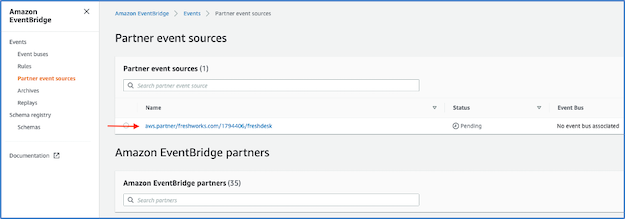
Once previous step is completed, a partner event source is automatically created in the EventBridge console. Copy the partner event source name to a clipboard.

  1. Clone the GitHub repo and deploy the AWS SAM template:
    git clone https://github.com/aws-samples/amazon-eventbridge-freshdesk-example.git
    cd ./amazon-eventbridge-freshdesk-example
    sam deploy --guided
  2. PartnerEventSource – Enter partner event source name copied from the previous step.
  3. S3BucketName – Enter an S3 bucket name to store Freshdesk ticket event data.

The AWS SAM template creates an association between the partner event source and event bus:

    Type: AWS::Events::EventBus
    Properties:
      EventSourceName: !Ref PartnerEventSource
      Name: !Ref PartnerEventSource

The template creates a Kinesis Data Firehose delivery stream, Lambda function, and S3 bucket to process and store the events from Freshdesk tickets. It also adds a rule to the custom event bus with the Kinesis Data Firehose stream as the target:

  PushToFirehoseRule:
    Type: "AWS::Events::Rule"
    Properties:
      Description: Test Freshdesk Events Rule
      EventBusName: !Ref PartnerEventSource
      EventPattern:
        account: [!Ref AWS::AccountId]
      Name: freshdeskeventrule
      State: ENABLED
      Targets:
        - Arn:
            Fn::GetAtt:
              - "FirehoseDeliveryStream"
              - "Arn"
          Id: "idfreshdeskeventrule"
          RoleArn: !GetAtt EventRuleTargetIamRole.Arn

  EventRuleTargetIamRole:
    Type: AWS::IAM::Role
    Properties:
      AssumeRolePolicyDocument:
        Version: "2012-10-17"
        Statement:
          - Sid: ""
            Effect: "Allow"
            Principal:
              Service:
                - "events.amazonaws.com"
            Action:
              - "sts:AssumeRole"
      Path: "/"
      Policies:
        - PolicyName: Invoke_Firehose
          PolicyDocument:
            Version: "2012-10-17"
            Statement:
              - Effect: "Allow"
                Action:
                  - "firehose:PutRecord"
                  - "firehose:PutRecordBatch"
                Resource:
                  - !GetAtt FirehoseDeliveryStream.Arn

Generating sample Freshdesk data to validate the ingestion process:

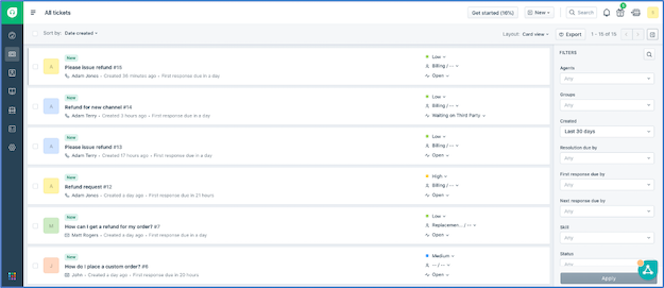
To generate sample Freshdesk data, login to the Freshdesk account and browse to the “Tickets” screen as shown:

Follow the steps to simulate two customer service operations:

  1. To create a ticket of type “Refund”. Choose the New button and enter the details:
  2. Update an existing ticket and change the priority to “Urgent”.
  3. Within a few minutes of updating the ticket, the data is pushed via the Freshworks connector to the S3 bucket created using the AWS SAM template. To verify this, browse to the S3 bucket and see that a new object with the ticket data is created:

You can also use the S3 Select option under object actions to view the raw JSON data that is sent from the partner system. You are now ready to analyze the data using Athena.

Setting up a table in Athena to query the S3 bucket

If you are familiar with Apache Hive, you may find creating tables on Athena helpful. You can create tables by writing the DDL statement in the query editor or by using the wizard or JDBC driver. To create a table in Athena:

  1. Copy and paste the following DDL statement in the Athena query editor to create a Freshdesk’s events table. For this example, the table is created in the default database.
  2. Replace S3_Bucket_Name in the following query with the name of the S3 bucket created by deploying the previous AWS SAM template:
CREATE EXTERNAL TABLE ` freshdeskevents`(
  `id` string COMMENT 'from deserializer', 
  `detail-type` string COMMENT 'from deserializer', 
  `source` string COMMENT 'from deserializer', 
  `account` string COMMENT 'from deserializer', 
  `time` string COMMENT 'from deserializer', 
  `region` string COMMENT 'from deserializer', 
  `detail` struct<ticket:struct<subject:string,description:string,is_description_truncated:boolean,description_text:string,is_description_text_truncated:boolean,due_by:string,fr_due_by:string,fr_escalated:boolean,is_escalated:boolean,fwd_emails:array<string>,reply_cc_emails:array<string>,email_config_id:string,id:int,group_id:bigint,product_id:string,company_id:string,requester_id:bigint,responder_id:bigint,status:int,priority:int,type:string,tags:array<string>,spam:boolean,source:int,tweet_id:string,cc_emails:array<string>,to_emails:string,created_at:string,updated_at:string,attachments:array<string>,custom_fields:string,changes:struct<responder_id:array<bigint>,ticket_type:array<string>,status:array<int>,status_details:array<struct<id:int,name:string>>,group_id:array<bigint>>>,requester:struct<id:bigint,name:string,email:string,mobile:string,phone:string,language:string,created_at:string>> COMMENT 'from deserializer')
ROW FORMAT SERDE 
  'org.openx.data.jsonserde.JsonSerDe' 
WITH SERDEPROPERTIES ( 
  'paths'='account,detail,detail-type,id,region,resources,source,time,version') 
STORED AS INPUTFORMAT 
  'org.apache.hadoop.mapred.TextInputFormat' 
OUTPUTFORMAT 
  'org.apache.hadoop.hive.ql.io.HiveIgnoreKeyTextOutputFormat'
LOCATION  's3://S3_Bucket_Name/'

The table is created on the data stored in S3 and is ready to be queried. Note that table freshdeskevents points at the bucket s3://S3_Bucket_Name/. As more data is added to the bucket, the table automatically grows, providing a near-real-time data analysis experience.

Querying and analyzing data

You can use the following examples to get started with querying the Athena table.

  1. To get all the events data, run:
SELECT * FROM default.freshdeskevents  limit 10

The preceding output has a detail column containing the details related to the ticket. Tickets can be filtered on nested notations to build more insightful queries. Also, the detail-type column provides classification of tickets as new (onTicketCreate) vs updated (onTicketUpdate).

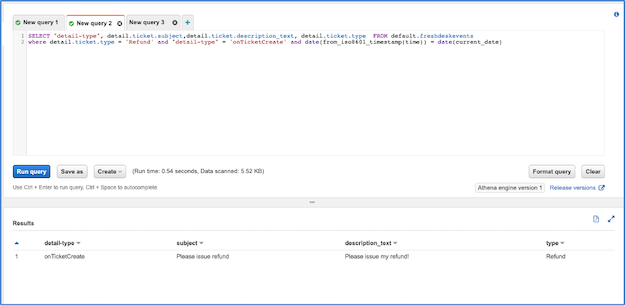
  1. To show new tickets created today with the type “Refund”:
SELECT detail.ticket.subject,detail.ticket.description_text, detail.ticket.type  FROM default.freshdeskevents
where detail.ticket.type = 'Refund' and "detail-type" = 'onTicketCreate' and date(from_iso8601_timestamp(time)) = date(current_date)
  1. All tickets with an “Urgent” priority but not assigned to an agent:
SELECT "detail-type", detail.ticket.responder_id,detail.ticket.priority, detail.ticket.subject, detail.ticket.type  FROM default.freshdeskevents
where detail.ticket.responder_id is null and detail.ticket.priority = 4

Conclusion

In this blog post, you learn how to configure Freshworks partner event source from the Freshdesk console. Once a partner event source is configured, an AWS SAM template is deployed that creates a custom event bus by attaching the partner event source. A Kinesis Data Firehose, Lambda function, and S3 bucket is used to ingest Freshdesk’s ticket events data for analysis. An EventBridge rule is configured to route the event data to the S3 bucket.

Once event data starts flowing into the S3 bucket, an Amazon Athena table is created to run queries and analyze the ticket events data. Alternative customer service data analysis use cases can be built on the architecture shown in this blog.

To learn more about other partner integrations and the native capabilities of EventBridge, visit the AWS Compute Blog.

Mysterious Macintosh Malware

Post Syndicated from Bruce Schneier original https://www.schneier.com/blog/archives/2021/03/mysterious-macintosh-malware.html

This is weird:

Once an hour, infected Macs check a control server to see if there are any new commands the malware should run or binaries to execute. So far, however, researchers have yet to observe delivery of any payload on any of the infected 30,000 machines, leaving the malware’s ultimate goal unknown. The lack of a final payload suggests that the malware may spring into action once an unknown condition is met.

Also curious, the malware comes with a mechanism to completely remove itself, a capability that’s typically reserved for high-stealth operations. So far, though, there are no signs the self-destruct feature has been used, raising the question of why the mechanism exists.

Besides those questions, the malware is notable for a version that runs natively on the M1 chip that Apple introduced in November, making it only the second known piece of macOS malware to do so. The malicious binary is more mysterious still because it uses the macOS Installer JavaScript API to execute commands. That makes it hard to analyze installation package contents or the way that package uses the JavaScript commands.

The malware has been found in 153 countries with detections concentrated in the US, UK, Canada, France, and Germany. Its use of Amazon Web Services and the Akamai content delivery network ensures the command infrastructure works reliably and also makes blocking the servers harder. Researchers from Red Canary, the security firm that discovered the malware, are calling the malware Silver Sparrow.

Feels government-designed, rather than criminal or hacker.

Another article. And the Red Canary analysis.

National Security Risks of Late-Stage Capitalism

Post Syndicated from Bruce Schneier original https://www.schneier.com/blog/archives/2021/03/national-security-risks-of-late-stage-capitalism.html

Early in 2020, cyberspace attackers apparently working for the Russian government compromised a piece of widely used network management software made by a company called SolarWinds. The hack gave the attackers access to the computer networks of some 18,000 of SolarWinds’s customers, including US government agencies such as the Homeland Security Department and State Department, American nuclear research labs, government contractors, IT companies and nongovernmental agencies around the world.

It was a huge attack, with major implications for US national security. The Senate Intelligence Committee is scheduled to hold a hearing on the breach on Tuesday. Who is at fault?

The US government deserves considerable blame, of course, for its inadequate cyberdefense. But to see the problem only as a technical shortcoming is to miss the bigger picture. The modern market economy, which aggressively rewards corporations for short-term profits and aggressive cost-cutting, is also part of the problem: Its incentive structure all but ensures that successful tech companies will end up selling insecure products and services.

Like all for-profit corporations, SolarWinds aims to increase shareholder value by minimizing costs and maximizing profit. The company is owned in large part by Silver Lake and Thoma Bravo, private-equity firms known for extreme cost-cutting.

SolarWinds certainly seems to have underspent on security. The company outsourced much of its software engineering to cheaper programmers overseas, even though that typically increases the risk of security vulnerabilities. For a while, in 2019, the update server’s password for SolarWinds’s network management software was reported to be “solarwinds123.” Russian hackers were able to breach SolarWinds’s own email system and lurk there for months. Chinese hackers appear to have exploited a separate vulnerability in the company’s products to break into US government computers. A cybersecurity adviser for the company said that he quit after his recommendations to strengthen security were ignored.

There is no good reason to underspend on security other than to save money — especially when your clients include government agencies around the world and when the technology experts that you pay to advise you are telling you to do more.

As the economics writer Matt Stoller has suggested, cybersecurity is a natural area for a technology company to cut costs because its customers won’t notice unless they are hacked ­– and if they are, they will have already paid for the product. In other words, the risk of a cyberattack can be transferred to the customers. Doesn’t this strategy jeopardize the possibility of long-term, repeat customers? Sure, there’s a danger there –­ but investors are so focused on short-term gains that they’re too often willing to take that risk.

The market loves to reward corporations for risk-taking when those risks are largely borne by other parties, like taxpayers. This is known as “privatizing profits and socializing losses.” Standard examples include companies that are deemed “too big to fail,” which means that society as a whole pays for their bad luck or poor business decisions. When national security is compromised by high-flying technology companies that fob off cybersecurity risks onto their customers, something similar is at work.

Similar misaligned incentives affect your everyday cybersecurity, too. Your smartphone is vulnerable to something called SIM-swap fraud because phone companies want to make it easy for you to frequently get a new phone — and they know that the cost of fraud is largely borne by customers. Data brokers and credit bureaus that collect, use, and sell your personal data don’t spend a lot of money securing it because it’s your problem if someone hacks them and steals it. Social media companies too easily let hate speech and misinformation flourish on their platforms because it’s expensive and complicated to remove it, and they don’t suffer the immediate costs ­– indeed, they tend to profit from user engagement regardless of its nature.

There are two problems to solve. The first is information asymmetry: buyers can’t adequately judge the security of software products or company practices. The second is a perverse incentive structure: the market encourages companies to make decisions in their private interest, even if that imperils the broader interests of society. Together these two problems result in companies that save money by taking on greater risk and then pass off that risk to the rest of us, as individuals and as a nation.

The only way to force companies to provide safety and security features for customers and users is with government intervention. Companies need to pay the true costs of their insecurities, through a combination of laws, regulations, and legal liability. Governments routinely legislate safety — pollution standards, automobile seat belts, lead-free gasoline, food service regulations. We need to do the same with cybersecurity: the federal government should set minimum security standards for software and software development.

In today’s underregulated markets, it’s just too easy for software companies like SolarWinds to save money by skimping on security and to hope for the best. That’s a rational decision in today’s free-market world, and the only way to change that is to change the economic incentives.

This essay previously appeared in the New York Times.

The Problem with Treating Data as a Commodity

Post Syndicated from Bruce Schneier original https://www.schneier.com/blog/archives/2021/02/the-problem-with-treating-data-as-a-commodity.html

Excellent Brookings paper: “Why data ownership is the wrong approach to protecting privacy.”

From the introduction:

Treating data like it is property fails to recognize either the value that varieties of personal information serve or the abiding interest that individuals have in their personal information even if they choose to “sell” it. Data is not a commodity. It is information. Any system of information rights­ — whether patents, copyrights, and other intellectual property, or privacy rights — ­presents some tension with strong interest in the free flow of information that is reflected by the First Amendment. Our personal information is in demand precisely because it has value to others and to society across a myriad of uses.

From the conclusion:

Privacy legislation should empower individuals through more layered and meaningful transparency and individual rights to know, correct, and delete personal information in databases held by others. But relying entirely on individual control will not do enough to change a system that is failing individuals, and trying to reinforce control with a property interest is likely to fail society as well. Rather than trying to resolve whether personal information belongs to individuals or to the companies that collect it, a baseline federal privacy law should directly protect the abiding interest that individuals have in that information and also enable the social benefits that flow from sharing information.

On Chinese-Owned Technology Platforms

Post Syndicated from Bruce Schneier original https://www.schneier.com/blog/archives/2021/02/on-chinese-owned-technology-platforms.html

I am a co-author on a report published by the Hoover Institution: “Chinese Technology Platforms Operating in the United States.” From a blog post:

The report suggests a comprehensive framework for understanding and assessing the risks posed by Chinese technology platforms in the United States and developing tailored responses. It starts from the common view of the signatories — one reflected in numerous publicly available threat assessments — that China’s power is growing, that a large part of that power is in the digital sphere, and that China can and will wield that power in ways that adversely affect our national security. However, the specific threats and risks posed by different Chinese technologies vary, and effective policies must start with a targeted understanding of the nature of risks and an assessment of the impact US measures will have on national security and competitiveness. The goal of the paper is not to specifically quantify the risk of any particular technology, but rather to analyze the various threats, put them into context, and offer a framework for assessing proposed responses in ways that the signatories hope can aid those doing the risk analysis in individual cases.

Twelve-Year-Old Vulnerability Found in Windows Defender

Post Syndicated from Bruce Schneier original https://www.schneier.com/blog/archives/2021/02/twelve-year-old-vulnerability-found-in-windows-defender.html

Researchers found, and Microsoft has patched, a vulnerability in Windows Defender that has been around for twelve years. There is no evidence that anyone has used the vulnerability during that time.

The flaw, discovered by researchers at the security firm SentinelOne, showed up in a driver that Windows Defender — renamed Microsoft Defender last year — uses to delete the invasive files and infrastructure that malware can create. When the driver removes a malicious file, it replaces it with a new, benign one as a sort of placeholder during remediation. But the researchers discovered that the system doesn’t specifically verify that new file. As a result, an attacker could insert strategic system links that direct the driver to overwrite the wrong file or even run malicious code.

It isn’t unusual that vulnerabilities lie around for this long. They can’t be fixed until someone finds them, and people aren’t always looking.

Dependency Confusion: Another Supply-Chain Vulnerability

Post Syndicated from Bruce Schneier original https://www.schneier.com/blog/archives/2021/02/dependency-confusion-another-supply-chain-vulnerability.html

Alex Birsan writes about being able to install malware into proprietary corporate software by naming the code files to be identical to internal corporate code files. From a ZDNet article:

Today, developers at small or large companies use package managers to download and import libraries that are then assembled together using build tools to create a final app.

This app can be offered to the company’s customers or can be used internally at the company as an employee tool.

But some of these apps can also contain proprietary or highly-sensitive code, depending on their nature. For these apps, companies will often use private libraries that they store inside a private (internal) package repository, hosted inside the company’s own network.

When apps are built, the company’s developers will mix these private libraries with public libraries downloaded from public package portals like npm, PyPI, NuGet, or others.

[…]

Researchers showed that if an attacker learns the names of private libraries used inside a company’s app-building process, they could register these names on public package repositories and upload public libraries that contain malicious code.

The “dependency confusion” attack takes place when developers build their apps inside enterprise environments, and their package manager prioritizes the (malicious) library hosted on the public repository instead of the internal library with the same name.

The research team said they put this discovery to the test by searching for situations where big tech firms accidentally leaked the names of various internal libraries and then registered those same libraries on package repositories like npm, RubyGems, and PyPI.

Using this method, researchers said they successfully loaded their (non-malicious) code inside apps used by 35 major tech firms, including the likes of Apple, Microsoft, PayPal, Shopify, Netflix, Yelp, Uber, and others.

Clever attack, and one that has netted him $130K in bug bounties.

More news articles.

GPS Vulnerabilities

Post Syndicated from Bruce Schneier original https://www.schneier.com/blog/archives/2021/02/gps-vulnerabilities.html

Really good op-ed in the New York Times about how vulnerable the GPS system is to interference, spoofing, and jamming — and potential alternatives.

The 2018 National Defense Authorization Act included funding for the Departments of Defense, Homeland Security and Transportation to jointly conduct demonstrations of various alternatives to GPS, which were concluded last March. Eleven potential systems were tested, including eLoran, a low-frequency, high-power timing and navigation system transmitted from terrestrial towers at Coast Guard facilities throughout the United States.

“China, Russia, Iran, South Korea and Saudi Arabia all have eLoran systems because they don’t want to be as vulnerable as we are to disruptions of signals from space,” said Dana Goward, the president of the Resilient Navigation and Timing Foundation, a nonprofit that advocates for the implementation of an eLoran backup for GPS.

Also under consideration by federal authorities are timing systems delivered via fiber optic network and satellite systems in a lower orbit than GPS, which therefore have a stronger signal, making them harder to hack. A report on the technologies was submitted to Congress last week.

GPS is a piece of our critical infrastructure that is essential to a lot of the rest of our critical infrastructure. It needs to be more secure.