Tag Archives: Uncategorized

Insurance and Ransomware

Post Syndicated from Bruce Schneier original https://www.schneier.com/blog/archives/2021/07/insurance-and-ransomware.html

As ransomware becomes more common, I’m seeing more discussions about the ethics of paying the ransom. Here’s one more contribution to that issue: a research paper that the insurance industry is hurting more than it’s helping.

However, the most pressing challenge currently facing the industry is ransomware. Although it is a societal problem, cyber insurers have received considerable criticism for facilitating ransom payments to cybercriminals. These add fuel to the fire by incentivising cybercriminals’ engagement in ransomware operations and enabling existing operators to invest in and expand their capabilities. Growing losses from ransomware attacks have also emphasised that the current reality is not sustainable for insurers either.

To overcome these challenges and champion the positive effects of cyber insurance, this paper calls for a series of interventions from government and industry. Some in the industry favour allowing the market to mature on its own, but it will not be possible to rely on changing market forces alone. To date, the UK government has taken a light-touch approach to the cyber insurance industry. With the market undergoing changes amid growing losses, more coordinated action by government and regulators is necessary to help the industry reach its full potential.

The interventions recommended here are still relatively light, and reflect the fact that cyber insurance is only a potential incentive for managing societal cyber risk.They include: developing guidance for minimum security standards for underwriting; expanding data collection and data sharing; mandating cyber insurance for government suppliers; and creating a new collaborative approach between insurers and intelligence and law enforcement agencies around ransomware.

Finally, although a well-functioning cyber insurance industry could improve cyber security practices on a societal scale, it is not a silver bullet for the cyber security challenge. It is important to remember that the primary purpose of cyber insurance is not to improve cyber security, but to transfer residual risk. As such, it should be one of many tools that governments and businesses can draw on to manage cyber risk more effectively.

Basically, the insurance industry incents companies to do the cheapest mitigation possible. Often, that’s paying the ransom.

News article.

Prime Day 2021 – Two Chart-Topping Days

Post Syndicated from Jeff Barr original https://aws.amazon.com/blogs/aws/prime-day-2021-two-chart-topping-days/

In what has now become an annual tradition (check out my 2016, 2017, 2019, and 2020 posts for a look back), I am happy to share some of the metrics from this year’s Prime Day and to tell you how AWS helped to make it happen.

This year I bought all sorts of useful goodies including a Toshiba 43 Inch Smart TV that I plan to use as a MagicMirror, some watering cans, and a Dremel Rotary Tool Kit for my workshop.

Powered by AWS
As in years past, AWS played a critical role in making Prime Day a success. A multitude of two-pizza teams worked together to make sure that every part of our infrastructure was scaled, tested, and ready to serve our customers. Here are a few examples:

Amazon EC2 – Our internal measure of compute power is an NI, or a normalized instance. We use this unit to allow us to make meaningful comparisons across different types and sizes of EC2 instances. For Prime Day 2021, we increased our number of NIs by 12.5%. Interestingly enough, due to increased efficiency (more on that in a moment), we actually used about 6,000 fewer physical servers than we did in Cyber Monday 2020.

Graviton2 Instances – Graviton2-powered EC2 instances supported 12 core retail services. This was our first peak event that was supported at scale by the AWS Graviton2 instances, and is a strong indicator that the Arm architecture is well-suited to the data center.

An internal service called Datapath is a key part of the Amazon site. It is highly optimized for our peculiar needs, and supports lookups, queries, and joins across structured blobs of data. After an in-depth evaluation and consideration of all of the alternatives, the team decided to port Datapath to Graviton and to run it on a three-Region cluster composed of over 53,200 C6g instances.

At this scale, the price-performance advantage of the Graviton2 of up to 40% versus the comparable fifth-generation x86-based instances, along with the 20% lower cost, turns into a big win for us and for our customers. As a bonus, the power efficiency of the Graviton2 helps us to achieve our goals for addressing climate change. If you are thinking about moving your workloads to Graviton2, be sure to study our very detailed Getting Started with AWS Graviton2 document, and also consider entering the Graviton Challenge! You can also use Graviton2 database instances on Amazon RDS and Amazon Aurora; read about Key Considerations in Moving to Graviton2 for Amazon RDS and Amazon Aurora Databases to learn more.

Amazon CloudFront – Fast, efficient content delivery is essential when millions of customers are shopping and making purchases. Amazon CloudFront handled a peak load of over 290 million HTTP requests per minute, for a total of over 600 billion HTTP requests during Prime Day.

Amazon Simple Queue Service – The fulfillment process for every order depends on Amazon Simple Queue Service (SQS). This year, traffic set a new record, processing 47.7 million messages per second at the peak.

Amazon Elastic Block Store – In preparation for Prime Day, the team added 159 petabytes of EBS storage. The resulting fleet handled 11.1 trillion requests per day and transferred 614 petabytes per day.

Amazon Aurora – Amazon Fulfillment Technologies (AFT) powers physical fulfillment for purchases made on Amazon. On Prime Day, 3,715 instances of AFT’s PostgreSQL-compatible edition of Amazon Aurora processed 233 billion transactions, stored 1,595 terabytes of data, and transferred 615 terabytes of data

Amazon DynamoDB – DynamoDB powers multiple high-traffic Amazon properties and systems including Alexa, the Amazon.com sites, and all Amazon fulfillment centers. Over the course of the 66-hour Prime Day, these sources made trillions of API calls while maintaining high availability with single-digit millisecond performance, and peaking at 89.2 million requests per second.

Prepare to Scale
As I have detailed in my previous posts, rigorous preparation is key to the success of Prime Day and our other large-scale events. If your are preparing for a similar event of your own, I can heartily recommend AWS Infrastructure Event Management. As part of an IEM engagement, AWS experts will provide you with architectural and operational guidance that will help you to execute your event with confidence.

— Jeff;

Implementing a LIFO task queue using AWS Lambda and Amazon DynamoDB

Post Syndicated from Eric Johnson original https://aws.amazon.com/blogs/compute/implementing-a-lifo-task-queue-using-aws-lambda-and-amazon-dynamodb/

This post was written by Diggory Briercliffe, Senior IoT Architect.

When implementing a task queue, you can use Amazon SQS standard or FIFO (First-In-First-Out) queue types. Both queue types give priority to tasks created earlier over tasks that are created later. However, there are use cases where you need a LIFO (Last-In-First-Out) queue.

This post shows how to implement a serverless LIFO task queue. This uses AWS Lambda, Amazon DynamoDB, AWS Serverless Application Model (AWS SAM), and other AWS Serverless technologies.

The LIFO task queue gives priority to newer queue tasks over earlier tasks. Under heavy load, earlier tasks are deprioritized and eventually removed. This is useful when your workload must communicate with a system that is throughput-constrained and newer tasks should have priority.

To help understand the approach, consider the following use case. As part of optimizing the responsiveness of a mobile application, an IoT application validates device IP addresses after connecting to AWS IoT Core. Users open the application soon after the device connects so the most recent connection events should take priority for the validation work.

If the validation work is not done at connection time, it can be done later. A legacy system validates the IP addresses, but its throughput capacity cannot match the peak connection rate of the IoT devices. A LIFO queue can manage this load, by prioritizing validation of newer connection events. It can buffer or load shed earlier connection event validation.

For a more detailed discussion around insurmountable queue backlogs and queuing theory, read “Avoiding insurmountable queue backlogs” in the Amazon Builders’ Library.

Example application

An example application implementing the LIFO queue approach is available at https://github.com/aws-samples/serverless-lifo-queue-demonstration.

The application uses AWS SAM and the Lambda functions are written in Node.js. The AWS SAM template describes AWS resources required by the application. These include a DynamoDB table, Lambda functions, and Amazon SNS topics.

The README file contains instructions on deploying and testing the application, with detailed information on how it works.

Overview

The example application has the following queue characteristics:

  1. Newer queue tasks are prioritized over earlier tasks.
  2. Queue tasks are buffered if they cannot be processed.
  3. Queue tasks are eventually deleted if they are never processed, such as when the queue is under insurmountable load.
  4. Correct queue task state transition is maintained (such as PENDING to TAKEN, but not PENDING to SUCCESS).

A DynamoDB table stores queue task items. It uses the following DynamoDB features:

  • A global secondary index (GSI) sorts queue task items by a created timestamp, in reverse chronological (LIFO) order.
  • Update expressions and condition expressions provide atomic and exclusive queue task item updates. This prevents duplicate processing of queue tasks and ensures that the queue task state transitions are valid.
  • Time to live (TTL) deletes queue task items once they expire. Under insurmountable load, this ensures that tasks are deleted if they are never processed from the queue. It also deletes queue task items once they have been processed.
  • DynamoDB Streams invoke a Lambda function when new queue task items are inserted into the table and must be processed.

The application consists of the following resources defined in the AWS SAM template:

  • QueueTable: A DynamoDB table containing queue task items, which is configured for DynamoDB Streams to invoke a TriggerFunction.
  • TriggerFunction: A Lambda function, which governs triggering of queue task processing. Source code: app/trigger.js
  • ProcessTasksFunction: A Lambda function, which processes queue tasks and ensures consistent queue task state flow. Source code: app/process_tasks.js
  • CreateTasksFunction: A Lambda function, which inserts queue task items into the QueueTable. Source code: app/create_tasks.js
  • TriggerTopic: An SNS topic which TriggerFunction subscribes to.
  • ProcessTasksTopic: An SNS topic which ProcessTasksFunction subscribes to.

The following diagram illustrates how those resources interact to implement the LIFO queue.

LIFO Architecture diagram

LIFO Architecture diagram

  1. CreateTasksFunction inserts queue task items into QueueTable with PENDING state.
  2. A DynamoDB stream invokes TriggerFunction for all queue task item activity in QueueTable.
  3. TriggerFunction publishes a notification on ProcessTasksTopic if queue tasks should be processed.
  4. ProcessTasksFunction subscribes to ProcessTasksTopic.
  5. ProcessTasksFunction queries for PENDING queue task items in QueueTable for up to 1 minute, or until no PENDING queue task items remain.
  6. ProcessTasksFunction processes each PENDING queue task by calling the throughput constrained legacy system.
  7. ProcessTasksFunction updates each queue task item during processing to reflect state (first to TAKEN, and then to SUCCESS, FAILURE, or PENDING).
  8. ProcessTasksFunction publishes an SNS notification on TriggerTopic if PENDING tasks remain in the queue.
  9. TriggerFunction subscribes to TriggerTasksTopic.

Application activity continues while DynamoDB Streams receives QueueTable events (2) or TriggerTasksTopic receives notifications (9).

LIFO queue DynamoDB table

A DynamoDB table stores the LIFO queue task items. The AWS SAM template defines this resource (named QueueTable):

  • Each item in the table represents a queue task. It has the item attributes taskId (hash key), taskStatus, taskCreated, and taskUpdated.
  • The table has a single global secondary index (GSI) with taskStatus as the hash key and taskCreated as the range key. This GSI is fundamental to LIFO queue characteristics. It allows you to query for PENDING queue tasks, in reverse chronological order, so that the newest tasks can be processed first.
  • The DynamoDB TTL attribute causes earlier queue tasks to expire and be deleted. This prevents the queue from growing indefinitely if there is insurmountable load.
  • DynamoDB Streams invokes the TriggerFunction Lambda function for all changes in QueueTable.

Triggering queue task processing

The application continuously processes all PENDING queue tasks until there is none remaining. With no PENDING queue tasks, the application will be idle.

As the application is serverless, task processing is triggered by events. If a single Lambda function cannot process the volume of PENDING tasks, the application notifies itself so that processing can continue in another invocation. This is a tail call, which is an SNS notification sent by ProcessTasksFunction to TriggerTopic.

The Lambda functions, which collaborate on managing the LIFO queue are:

  • TriggerFunction is a proxy to ProcessTasksFunction and decides if task processing should be triggered. This function is invoked by DynamoDB Streams events on item changes in QueueTable or by a tail call SNS notification received from TriggerTopic.
  • ProcessTasksFunction performs the processing of queue tasks and implements the LIFO queue behavior. An SNS notification published on ProcessTasksTopic invokes this function.

Processing queue task items

The ProcessTasksFunction function processes queue tasks:

  1. The function is invoked by an SNS notification on ProcessTasksTopic.
  2. While the function runs, it polls QueueTable for PENDING queue tasks.
  3. The function processes each queue task and then updates the item.
  4. The function stops polling after 1 minute or if there are no PENDING queue tasks remaining.
  5. If there are more PENDING tasks in the queue, the function triggers another task. It sends a tail call SNS notification to TriggerTopic.

This uses DynamoDB expressions to ensure that tasks are not processed more than once during periods of concurrent function invocations. To prevent higher concurrency, the reserved concurrent executions attribute is set to 1.

Before processing a queue task, the taskStatus item attribute is transitioned from PENDING to TAKEN. Following queue task processing, the taskStatus item attribute is transitioned from TAKEN to SUCCESS or FAILURE.

If a queue task cannot be processed (for example, an external system has reached capacity), the item taskStatus attribute is set to PENDING again. Any aging PENDING queue tasks that cannot be processed are buffered. They are eventually deleted once they expire, due to the TTL configuration.

Querying for queue task items

To get the most recently created PENDING queue tasks, query the task-status-created-index GSI. The following shows the DynamoDB query action request parameters for the task-status-created-index. By using a Limit of 10 and setting ScanIndexForward to false, it retrieves the 10 most recently created queue task items:

{
  "TableName": "QueueTable",
  "IndexName": "task-status-created-index",
  "ExpressionAttributeValues": {
    ":taskStatus": {
      "S": "PENDING"
    }
  },
  "KeyConditionExpression": "taskStatus = :taskStatus",
  "Limit": 10,
  "ScanIndexForward": false
}

Updating queue tasks items

The following code shows request parameters for the DynamoDB UpdateItem action. This sets the taskStatus attribute of a queue task item (to TAKEN from PENDING). The update expression and condition expression ensure that the taskStatus is set (to TAKEN) only if the current value is as expected (from PENDING). It also ensures that the update is atomic. This prevents more-than-once processing of a queue task.

{
  "TableName": "QueueTable",
  "Key": {
    "taskId": {
      "S": "task-123"
    }
  },
  "UpdateExpression": "set taskStatus = :toTaskStatus, taskUpdated = :taskUpdated",
  "ConditionExpression": "taskStatus = :fromTaskStatus",
  "ExpressionAttributeValues": {
    ":fromTaskStatus": {
      "S": "PENDING"
    },
    ":toTaskStatus": {
      "S": "TAKEN"
    },
    ":taskUpdated": {
      "N": "1623241938151"
    }
  }
}

Conclusion

This post describes how to implement a LIFO queue with AWS Serverless technologies, using an example application as an example. Newer tasks in the queue are prioritized over earlier tasks. Tasks that cannot be processed are buffered and eventually load shed. This helps for use cases with heavy load and where newer queue tasks must take priority.

For more serverless learning resources, visit Serverless Land.

Risks of Evidentiary Software

Post Syndicated from Bruce Schneier original https://www.schneier.com/blog/archives/2021/06/risks-of-evidentiary-software.html

Over at Lawfare, Susan Landau has an excellent essay on the risks posed by software used to collect evidence (a Breathalyzer is probably the most obvious example).

Bugs and vulnerabilities can lead to inaccurate evidence, but the proprietary nature of software makes it hard for defendants to examine it.

The software engineers proposed a three-part test. First, the court should have access to the “Known Error Log,” which should be part of any professionally developed software project. Next the court should consider whether the evidence being presented could be materially affected by a software error. Ladkin and his co-authors noted that a chain of emails back and forth are unlikely to have such an error, but the time that a software tool logs when an application was used could easily be incorrect. Finally, the reliability experts recommended seeing whether the code adheres to an industry standard used in an non-computerized version of the task (e.g., bookkeepers always record every transaction, and thus so should bookkeeping software).

[…]

Inanimate objects have long served as evidence in courts of law: the door handle with a fingerprint, the glove found at a murder scene, the Breathalyzer result that shows a blood alcohol level three times the legal limit. But the last of those examples is substantively different from the other two. Data from a Breathalyzer is not the physical entity itself, but rather a software calculation of the level of alcohol in the breath of a potentially drunk driver. As long as the breath sample has been preserved, one can always go back and retest it on a different device.

What happens if the software makes an error and there is no sample to check or if the software itself produces the evidence? At the time of our writing the article on the use of software as evidence, there was no overriding requirement that law enforcement provide a defendant with the code so that they might examine it themselves.

[…]

Given the high rate of bugs in complex software systems, my colleagues and I concluded that when computer programs produce the evidence, courts cannot assume that the evidentiary software is reliable. Instead the prosecution must make the code available for an “adversarial audit” by the defendant’s experts. And to avoid problems in which the government doesn’t have the code, government procurement contracts must include delivery of source code­ — code that is more-or-less readable by people — ­for every version of the code or device.

NFC Flaws in POS Devices and ATMs

Post Syndicated from Bruce Schneier original https://www.schneier.com/blog/archives/2021/06/nfc-flaws-in-pos-devices-and-atms.html

It’s a series of vulnerabilities:

Josep Rodriguez, a researcher and consultant at security firm IOActive, has spent the last year digging up and reporting vulnerabilities in the so-called near-field communications reader chips used in millions of ATMs and point-of-sale systems worldwide. NFC systems are what let you wave a credit card over a reader — rather than swipe or insert it — to make a payment or extract money from a cash machine. You can find them on countless retail store and restaurant counters, vending machines, taxis, and parking meters around the globe.

Now Rodriguez has built an Android app that allows his smartphone to mimic those credit card radio communications and exploit flaws in the NFC systems’ firmware. With a wave of his phone, he can exploit a variety of bugs to crash point-of-sale devices, hack them to collect and transmit credit card data, invisibly change the value of transactions, and even lock the devices while displaying a ransomware message. Rodriguez says he can even force at least one brand of ATMs to dispense cash­though that “jackpotting” hack only works in combination with additional bugs he says he’s found in the ATMs’ software. He declined to specify or disclose those flaws publicly due to nondisclosure agreements with the ATM vendors.

Continuous Compliance Workflow for Infrastructure as Code: Part 2

Post Syndicated from DAMODAR SHENVI WAGLE original https://aws.amazon.com/blogs/devops/continuous-compliance-workflow-for-infrastructure-as-code-part-2/

In the first post of this series, we introduced a continuous compliance workflow in which an enterprise security and compliance team can release guardrails in a continuous integration, continuous deployment (CI/CD) fashion in your organization.

In this post, we focus on the technical implementation of the continuous compliance workflow. We demonstrate how to use AWS Developer Tools to create a CI/CD pipeline that releases guardrails for Terraform application workloads.

We use the Terraform-Compliance framework to define the guardrails. Terraform-Compliance is a lightweight, security and compliance-focused test framework for Terraform to enable the negative testing capability for your infrastructure as code (IaC).

With this compliance framework, we can ensure that the implemented Terraform code follows security standards and your own custom standards. Currently, HashiCorp provides Sentinel (a policy as code framework) for enterprise products. AWS has CloudFormation Guard an open-source policy-as-code evaluation tool for AWS CloudFormation templates. Terraform-Compliance allows us to build a similar functionality for Terraform, and is open source.

This post is from the perspective of a security and compliance engineer, and assumes that the engineer is familiar with the practices of IaC, CI/CD, behavior-driven development (BDD), and negative testing.

Solution overview

You start by building the necessary resources as listed in the workload (application development team) account:

  • An AWS CodeCommit repository for the Terraform workload
  • A CI/CD pipeline built using AWS CodePipeline to deploy the workload
  • A cross-account AWS Identity and Access Management (IAM) role that gives the security and compliance account the permissions to pull the Terraform workload from the workload account repository for testing their guardrails in observation mode

Next, we build the resources in the security and compliance account:

  • A CodeCommit repository to hold the security and compliance standards (guardrails)
  • A CI/CD pipeline built using CodePipeline to release new guardrails
  • A cross-account role that gives the workload account the permissions to pull the activated guardrails from the main branch of the security and compliance account repository.

The following diagram shows our solution architecture.

solution architecture diagram

The architecture has two workflows: security and compliance (Steps 1–4) and application delivery (Steps 5–7).

  1. When a new security and compliance guardrail is introduced into the develop branch of the compliance repository, it triggers the security and compliance pipeline.
  2. The pipeline pulls the Terraform workload.
  3. The pipeline tests this compliance check guardrail against the Terraform workload in the workload account repository.
  4. If the workload is compliant, the guardrail is automatically merged into the main branch. This activates the guardrail by making it available for all Terraform application workload pipelines to consume. By doing this, we make sure that we don’t break the Terraform application deployment pipeline by introducing new guardrails. It also provides the security and compliance team visibility into the resources in the application workload that are noncompliant. The security and compliance team can then reach out to the application delivery team and suggest appropriate remediation before the new standards are activated. If the compliance check fails, the automatic merge to the main branch is stopped. The security and compliance team has an option to force merge the guardrail into the main branch if it’s deemed critical and they need to activate it immediately.
  5. The Terraform deployment pipeline in the workload account always pulls the latest security and compliance checks from the main branch of the compliance repository.
  6. Checks are run against the Terraform workload to ensure that it meets the organization’s security and compliance standards.
  7. Only secure and compliant workloads are deployed by the pipeline. If the workload is noncompliant, the security and compliance checks fail and break the pipeline, forcing the application delivery team to remediate the issue and recheck-in the code.

Prerequisites

Before proceeding any further, you need to identify and designate two AWS accounts required for the solution to work:

  • Security and Compliance – In which you create a CodeCommit repository to hold compliance standards that are written based on Terraform-Compliance framework. You also create a CI/CD pipeline to release new compliance guardrails.
  • Workload – In which the Terraform workload resides. The pipeline to deploy the Terraform workload enforces the compliance guardrails prior to the deployment.

You also need to create two AWS account profiles in ~/.aws/credentials for the tools and target accounts, if you don’t already have them. These profiles need to have sufficient permissions to run an AWS Cloud Development Kit (AWS CDK) stack. They should be your private profiles and only be used during the course of this use case. Therefore, it should be fine if you want to use admin privileges. Don’t share the profile details, especially if it has admin privileges. I recommend removing the profile when you’re finished with this walkthrough. For more information about creating an AWS account profile, see Configuring the AWS CLI.

In addition, you need to generate a cucumber-sandwich.jar file by following the steps in the cucumber-sandwich GitHub repo. The JAR file is needed to generate pretty HTML compliance reports. The security and compliance team can use these reports to make sure that the standards are met.

To implement our solution, we complete the following high-level steps:

  1. Create the security and compliance account stack.
  2. Create the workload account stack.
  3. Test the compliance workflow.

Create the security and compliance account stack

We create the following resources in the security and compliance account:

  • A CodeCommit repo to hold the security and compliance guardrails
  • A CI/CD pipeline to roll out the Terraform compliance guardrails
  • An IAM role that trusts the application workload account and allows it to pull compliance guardrails from its CodeCommit repo

In this section, we set up the properties for the pipeline and cross-account role stacks, and run the deployment scripts.

Set up properties for the pipeline stack

Clone the GitHub repo aws-continuous-compliance-for-terraform and navigate to the folder security-and-compliance-account/stacks. This contains the folder pipeline_stack/, which holds the code and properties for creating the pipeline stack.

The folder has a JSON file cdk-stack-param.json, which has the parameter TERRAFORM_APPLICATION_WORKLOADS, which represents the list of application workloads that the security and compliance pipeline pulls and runs tests against to make sure that the workloads are compliant. In the workload list, you have the following parameters:

  • GIT_REPO_URL – The HTTPS URL of the CodeCommit repository in the workload account against which the security and compliance check pipeline runs compliance guardrails.
  • CROSS_ACCOUNT_ROLE_ARN – The ARN for the cross-account role we create in the next section. This role gives the security and compliance account permissions to pull Terraform code from the workload account.

For CROSS_ACCOUNT_ROLE_ARN, replace <workload-account-id> with the account ID for your designated AWS workload account. For GIT_REPO_URL, replace <region> with AWS Region where the repository resides.

security and compliance pipeline stack parameters

Set up properties for the cross-account role stack

In the cloned GitHub repo aws-continuous-compliance-for-terraform from the previous step, navigate to the folder security-and-compliance-account/stacks. This contains the folder cross_account_role_stack/, which holds the code and properties for creating the cross-account role.

The folder has a JSON file cdk-stack-param.json, which has the parameter TERRAFORM_APPLICATION_WORKLOAD_ACCOUNTS, which represents the list of Terraform workload accounts that intend to integrate with the security and compliance account for running compliance checks. All these accounts are trusted by the security and compliance account and given permissions to pull compliance guardrails. Replace <workload-account-id> with the account ID for your designated AWS workload account.

security and compliance cross account role stack parameters

Run the deployment script

Run deploy.sh by passing the name of the AWS security and compliance account profile you created earlier. The script uses the AWS CDK CLI to bootstrap and deploy the two stacks we discussed. See the following code:

cd aws-continuous-compliance-for-terraform/security-and-compliance-account/
./deploy.sh "<AWS-COMPLIANCE-ACCOUNT-PROFILE-NAME>"

You should now see three stacks in the tools account:

  • CDKToolkit – AWS CDK creates the CDKToolkit stack when we bootstrap the AWS CDK app. This creates an Amazon Simple Storage Service (Amazon S3) bucket needed to hold deployment assets such as an AWS CloudFormation template and AWS Lambda code package.
  • cf-CrossAccountRoles – This stack creates the cross-account IAM role.
  • cf-SecurityAndCompliancePipeline – This stack creates the pipeline. On the Outputs tab of the stack, you can find the CodeCommit source repo URL from the key OutSourceRepoHttpUrl. Record the URL to use later.

security and compliance stack

Create a workload account stack

We create the following resources in the workload account:

  • A CodeCommit repo to hold the Terraform workload to be deployed
  • A CI/CD pipeline to deploy the Terraform workload
  • An IAM role that trusts the security and compliance account and allows it to pull Terraform code from its CodeCommit repo for testing

We follow similar steps as in the previous section to set up the properties for the pipeline stack and cross-account role stack, and then run the deployment script.

Set up properties for the pipeline stack

In the already cloned repo, navigate to the folder workload-account/stacks. This contains the folder pipeline_stack/, which holds the code and properties for creating the pipeline stack.

The folder has a JSON file cdk-stack-param.json, which has the parameter COMPLIANCE_CODE, which provides details on where to pull the compliance guardrails from. The pipeline pulls and runs compliance checks prior to deployment, to make sure that application workload is compliant. You have the following parameters:

  • GIT_REPO_URL – The HTTPS URL of the CodeCommit repositoryCode in the security and compliance account, which contains compliance guardrails that the pipeline in the workload account pulls to carry out compliance checks.
  • CROSS_ACCOUNT_ROLE_ARN – The ARN for the cross-account role we created in the previous step in the security and compliance account. This role gives the workload account permissions to pull the Terraform compliance code from its respective security and compliance account.

For CROSS_ACCOUNT_ROLE_ARN, replace <compliance-account-id> with the account ID for your designated AWS security and compliance account. For GIT_REPO_URL, replace <region> with Region where the repository resides.

workload pipeline stack config

Set up the properties for cross-account role stack

In the already cloned repo, navigate to folder workload-account/stacks. This contains the folder cross_account_role_stack/, which holds the code and properties for creating the cross-account role stack.

The folder has a JSON file cdk-stack-param.json, which has the parameter COMPLIANCE_ACCOUNT, which represents the security and compliance account that intends to integrate with the workload account for running compliance checks. This account is trusted by the workload account and given permissions to pull compliance guardrails. Replace <compliance-account-id> with the account ID for your designated AWS security and compliance account.

workload cross account role stack config

Run the deployment script

Run deploy.sh by passing the name of the AWS workload account profile you created earlier. The script uses the AWS CDK CLI to bootstrap and deploy the two stacks we discussed. See the following code:

cd aws-continuous-compliance-for-terraform/workload-account/
./deploy.sh "<AWS-WORKLOAD-ACCOUNT-PROFILE-NAME>"

You should now see three stacks in the tools account:

  • CDKToolkit –AWS CDK creates the CDKToolkit stack when we bootstrap the AWS CDK app. This creates an S3 bucket needed to hold deployment assets such as a CloudFormation template and Lambda code package.
  • cf-CrossAccountRoles – This stack creates the cross-account IAM role.
  • cf-TerraformWorkloadPipeline – This stack creates the pipeline. On the Outputs tab of the stack, you can find the CodeCommit source repo URL from the key OutSourceRepoHttpUrl. Record the URL to use later.

workload pipeline stack

Test the compliance workflow

In this section, we walk through the following steps to test our workflow:

  1. Push the application workload code into its repo.
  2. Push the security and compliance code into its repo and run its pipeline to release the compliance guardrails.
  3. Run the application workload pipeline to exercise the compliance guardrails.
  4. Review the generated reports.

Push the application workload code into its repo

Clone the empty CodeCommit repo from workload account. You can find the URL from the variable OutSourceRepoHttpUrl on the Outputs tab of the cf-TerraformWorkloadPipeline stack we deployed in the previous section.

  1. Create a new branch main and copy the workload code into it.
  2. Copy the cucumber-sandwich.jar file you generated in the prerequisites section into a new folder /lib.
  3. Create a directory called reports with an empty file dummy. The reports directory is where Terraform-Compliance framework create compliance reports.
  4. Push the code to the remote origin.

See the following sample script

git checkout -b main
# Copy the code from git repo location
# Create reports directory and a dummy file.
mkdir reports
touch reports/dummy
git add .
git commit -m “Initial commit”
git push origin main

The folder structure of workload code repo should match the structure shown in the following screenshot.

workload code folder structure

The first commit triggers the pipeline-workload-main pipeline, which fails in the stage RunComplianceCheck due to the security and compliance repo not being present (which we add in the next section).

Push the security and compliance code into its repo and run its pipeline

Clone the empty CodeCommit repo from the security and compliance account. You can find the URL from the variable OutSourceRepoHttpUrl on the Outputs tab of the cf-SecurityAndCompliancePipeline stack we deployed in the previous section.

  1. Create a new local branch main and check in the empty branch into the remote origin so that the main branch is created in the remote origin. Skipping this step leads to failure in the code merge step of the pipeline due to the absence of the main branch.
  2. Create a new branch develop and copy the security and compliance code into it. This is required because the security and compliance pipeline is configured to be triggered from the develop branch for the purposes of this post.
  3. Copy the cucumber-sandwich.jar file you generated in the prerequisites section into a new folder /lib.

See the following sample script:

cd security-and-compliance-code
git checkout -b main
git add .
git commit --allow-empty -m “initial commit”
git push origin main
git checkout -b develop main
# Here copy the code from git repo location
# You also copy cucumber-sandwich.jar into a new folder /lib
git add .
git commit -m “Initial commit”
git push origin develop

The folder structure of security and compliance code repo should match the structure shown in the following screenshot.

security and compliance code folder structure

The code push to the develop branch of the security-and-compliance-code repo triggers the security and compliance pipeline. The pipeline pulls the code from the workload account repo, then runs the compliance guardrails against the Terraform workload to make sure that the workload is compliant. If the workload is compliant, the pipeline merges the compliance guardrails into the main branch. If the workload fails the compliance test, the pipeline fails. The following screenshot shows a sample run of the pipeline.

security and compliance pipeline

Run the application workload pipeline to exercise the compliance guardrails

After we set up the security and compliance repo and the pipeline runs successfully, the workload pipeline is ready to proceed (see the following screenshot of its progress).

workload pipeline

The service delivery teams are now being subjected to the security and compliance guardrails being implemented (RunComplianceCheck stage), and their pipeline breaks if any resource is noncompliant.

Review the generated reports

CodeBuild supports viewing reports generated in cucumber JSON format. In our workflow, we generate reports in cucumber JSON and BDD XML formats, and we use this capability of CodeBuild to generate and view HTML reports. Our implementation also generates report directly in HTML using the cucumber-sandwich library.

The following screenshot is snippet of the script compliance-check.sh, which implements report generation.

compliance check script

The bug noted in the screenshot is in the radish-bdd library that Terraform-Compliance uses for the cucumber JSON format report generation. For more information, you can review the defect logged against radish-bdd for this issue.

After the script generates the reports, CodeBuild needs to be configured to access them to generate HTML reports. The following screenshot shows a snippet from buildspec-compliance-check.yml, which shows how the reports section is set up for report generation:

buildspec compliance check

For more details on how to set up buildspec file for CodeBuild to generate reports, see Create a test report.

CodeBuild displays the compliance run reports as shown in the following screenshot.

code build cucumber report

We can also view a trending graph for multiple runs.

code build cucumber report

The other report generated by the workflow is the pretty HTML report generated by the cucumber-sandwich library.

code build cucumber report

The reports are available for download from the S3 bucket <OutPipelineBucketName>/pipeline-security-an/report_App/<zip file>.

The cucumber-sandwich generated report marks scenarios with skipped tests as failed scenarios. This is the only noticeable difference between the CodeBuild generated HTML and cucumber-sandwich generated HTML reports.

Clean up

To remove all the resources from the workload account, complete the following steps in order:

  1. Go to the folder where you cloned the workload code and edit buildspec-workload-deploy.yml:
    • Comment line 44 (- ./workload-deploy.sh).
    • Uncomment line 45 (- ./workload-deploy.sh --destroy).
    • Commit and push the code change to the remote repo. The workload pipeline is triggered, which cleans up the workload.
  2. Delete the CloudFormation stack cf-CrossAccountRoles. This step removes the cross-account role from the workload account, which gives permission to the security and compliance account to pull the Terraform workload.
  3. Go to the CloudFormation stack cf-TerraformWorkloadPipeline and note the OutPipelineBucketName and OutStateFileBucketName on the Outputs tab. Empty the two buckets and then delete the stack. This removes pipeline resources from workload account.
  4. Go to the CDKToolkit stack and note the BucketName on the Outputs tab. Empty that bucket and then delete the stack.

To remove all the resources from the security and compliance account, complete the following steps in order:

  1. Delete the CloudFormation stack cf-CrossAccountRoles. This step removes the cross-account role from the security and compliance account, which gives permission to the workload account to pull the compliance code.
  2. Go to CloudFormation stack cf-SecurityAndCompliancePipeline and note the OutPipelineBucketName on the Outputs tab. Empty that bucket and then delete the stack. This removes pipeline resources from the security and compliance account.
  3. Go to the CDKToolkit stack and note the BucketName on the Outputs tab. Empty that bucket and then delete the stack.

Security considerations

Cross-account IAM roles are very powerful and need to be handled carefully. For this post, we strictly limited the cross-account IAM role to specific CodeCommit permissions. This makes sure that the cross-account role can only do those things.

Conclusion

In this post in our two-part series, we implemented a continuous compliance workflow using CodePipeline and the open-source Terraform-Compliance framework. The Terraform-Compliance framework allows you to build guardrails for securing Terraform applications deployed on AWS.

We also showed how you can use AWS developer tools to seamlessly integrate security and compliance guardrails into an application release cycle and catch noncompliant AWS resources before getting deployed into AWS.

Try implementing the solution in your enterprise as shown in this post, and leave your thoughts and questions in the comments.

About the authors

sumit mishra


Sumit Mishra is Senior DevOps Architect at AWS Professional Services. His area of expertise include IaC, Security in pipeline, CI/CD and automation.


Damodar Shenvi Wagle


Damodar Shenvi Wagle is a Cloud Application Architect at AWS Professional Services. His areas of expertise include architecting serverless solutions, CI/CD and automation.

Building an end-to-end Kubernetes-based DevSecOps software factory on AWS

Post Syndicated from Srinivas Manepalli original https://aws.amazon.com/blogs/devops/building-an-end-to-end-kubernetes-based-devsecops-software-factory-on-aws/

DevSecOps software factory implementation can significantly vary depending on the application, infrastructure, architecture, and the services and tools used. In a previous post, I provided an end-to-end DevSecOps pipeline for a three-tier web application deployed with AWS Elastic Beanstalk. The pipeline used cloud-native services along with a few open-source security tools. This solution is similar, but instead uses a containers-based approach with additional security analysis stages. It defines a software factory using Kubernetes along with necessary AWS Cloud-native services and open-source third-party tools. Code is provided in the GitHub repo to build this DevSecOps software factory, including the integration code for third-party scanning tools.

DevOps is a combination of cultural philosophies, practices, and tools that combine software development with information technology operations. These combined practices enable companies to deliver new application features and improved services to customers at a higher velocity. DevSecOps takes this a step further by integrating and automating the enforcement of preventive, detective, and responsive security controls into the pipeline.

In a DevSecOps factory, security needs to be addressed from two aspects: security of the software factory, and security in the software factory. In this architecture, we use AWS services to address the security of the software factory, and use third-party tools along with AWS services to address the security in the software factory. This AWS DevSecOps reference architecture covers DevSecOps practices and security vulnerability scanning stages including secret analysis, SCA (Software Composite Analysis), SAST (Static Application Security Testing), DAST (Dynamic Application Security Testing), RASP (Runtime Application Self Protection), and aggregation of vulnerability findings into a single pane of glass.

The focus of this post is on application vulnerability scanning. Vulnerability scanning of underlying infrastructure such as the Amazon Elastic Kubernetes Service (Amazon EKS) cluster and network is outside the scope of this post. For information about infrastructure-level security planning, refer to Amazon Guard Duty, Amazon Inspector, and AWS Shield.

You can deploy this pipeline in either the AWS GovCloud (US) Region or standard AWS Regions. All listed AWS services are authorized for FedRamp High and DoD SRG IL4/IL5.

Security and compliance

Thoroughly implementing security and compliance in the public sector and other highly regulated workloads is very important for achieving an ATO (Authority to Operate) and continuously maintain an ATO (c-ATO). DevSecOps shifts security left in the process, integrating it at each stage of the software factory, which can make ATO a continuous and faster process. With DevSecOps, an organization can deliver secure and compliant application changes rapidly while running operations consistently with automation.

Security and compliance are shared responsibilities between AWS and the customer. Depending on the compliance requirements (such as FedRamp or DoD SRG), a DevSecOps software factory needs to implement certain security controls. AWS provides tools and services to implement most of these controls. For example, to address NIST 800-53 security controls families such as access control, you can use AWS Identity Access and Management (IAM) roles and Amazon Simple Storage Service (Amazon S3) bucket policies. To address auditing and accountability, you can use AWS CloudTrail and Amazon CloudWatch. To address configuration management, you can use AWS Config rules and AWS Systems Manager. Similarly, to address risk assessment, you can use vulnerability scanning tools from AWS.

The following table is the high-level mapping of the NIST 800-53 security control families and AWS services that are used in this DevSecOps reference architecture. This list only includes the services that are defined in the AWS CloudFormation template, which provides pipeline as code in this solution. You can use additional AWS services and tools or other environmental specific services and tools to address these and the remaining security control families on a more granular level.

# NIST 800-53 Security Control Family – Rev 5 AWS Services Used (In this DevSecOps Pipeline)
1 AC – Access Control

AWS IAM, Amazon S3, and Amazon CloudWatch are used.

AWS::IAM::ManagedPolicy
AWS::IAM::Role
AWS::S3::BucketPolicy
AWS::CloudWatch::Alarm

2 AU – Audit and Accountability

AWS CloudTrail, Amazon S3, Amazon SNS, and Amazon CloudWatch are used.

AWS::CloudTrail::Trail
AWS::Events::Rule
AWS::CloudWatch::LogGroup
AWS::CloudWatch::Alarm
AWS::SNS::Topic

3 CM – Configuration Management

AWS Systems Manager, Amazon S3, and AWS Config are used.

AWS::SSM::Parameter
AWS::S3::Bucket
AWS::Config::ConfigRule

4 CP – Contingency Planning

AWS CodeCommit and Amazon S3 are used.

AWS::CodeCommit::Repository
AWS::S3::Bucket

5 IA – Identification and Authentication

AWS IAM is used.

AWS:IAM:User
AWS::IAM::Role

6 RA – Risk Assessment

AWS Config, AWS CloudTrail, AWS Security Hub, and third party scanning tools are used.

AWS::Config::ConfigRule
AWS::CloudTrail::Trail
AWS::SecurityHub::Hub
Vulnerability Scanning Tools (AWS/AWS Partner/3rd party)

7 CA – Assessment, Authorization, and Monitoring

AWS CloudTrail, Amazon CloudWatch, and AWS Config are used.

AWS::CloudTrail::Trail
AWS::CloudWatch::LogGroup
AWS::CloudWatch::Alarm
AWS::Config::ConfigRule

8 SC – System and Communications Protection

AWS KMS and AWS Systems Manager are used.

AWS::KMS::Key
AWS::SSM::Parameter
SSL/TLS communication

9 SI – System and Information Integrity

AWS Security Hub, and third party scanning tools are used.

AWS::SecurityHub::Hub
Vulnerability Scanning Tools (AWS/AWS Partner/3rd party)

10 AT – Awareness and Training N/A
11 SA – System and Services Acquisition N/A
12 IR – Incident Response Not implemented, but services like AWS Lambda, and Amazon CloudWatch Events can be used.
13 MA – Maintenance N/A
14 MP – Media Protection N/A
15 PS – Personnel Security N/A
16 PE – Physical and Environmental Protection N/A
17 PL – Planning N/A
18 PM – Program Management N/A
19 PT – PII Processing and Transparency N/A
20 SR – SupplyChain Risk Management N/A

Services and tools

In this section, we discuss the various AWS services and third-party tools used in this solution.

CI/CD services

For continuous integration and continuous delivery (CI/CD) in this reference architecture, we use the following AWS services:

  • AWS CodeBuild – A fully managed continuous integration service that compiles source code, runs tests, and produces software packages that are ready to deploy.
  • AWS CodeCommit – A fully managed source control service that hosts secure Git-based repositories.
  • AWS CodeDeploy – A fully managed deployment service that automates software deployments to a variety of compute services such as Amazon Elastic Compute Cloud (Amazon EC2), AWS Fargate, AWS Lambda, and your on-premises servers.
  • AWS CodePipeline – A fully managed continuous delivery service that helps you automate your release pipelines for fast and reliable application and infrastructure updates.
  • AWS Lambda – A service that lets you run code without provisioning or managing servers. You pay only for the compute time you consume.
  • Amazon Simple Notification Service – Amazon SNS is a fully managed messaging service for both application-to-application (A2A) and application-to-person (A2P) communication.
  • Amazon S3 – Amazon S3 is storage for the internet. You can use Amazon S3 to store and retrieve any amount of data at any time, from anywhere on the web.
  • AWS Systems Manager Parameter Store – Parameter Store provides secure, hierarchical storage for configuration data management and secrets management.

Continuous testing tools

The following are open-source scanning tools that are integrated in the pipeline for the purpose of this post, but you could integrate other tools that meet your specific requirements. You can use the static code review tool Amazon CodeGuru for static analysis, but at the time of this writing, it’s not yet available in AWS GovCloud and currently supports Java and Python.

  • Anchore (SCA and SAST) – Anchore Engine is an open-source software system that provides a centralized service for analyzing container images, scanning for security vulnerabilities, and enforcing deployment policies.
  • Amazon Elastic Container Registry image scanning – Amazon ECR image scanning helps in identifying software vulnerabilities in your container images. Amazon ECR uses the Common Vulnerabilities and Exposures (CVEs) database from the open-source Clair project and provides a list of scan findings.
  • Git-Secrets (Secrets Scanning) – Prevents you from committing sensitive information to Git repositories. It is an open-source tool from AWS Labs.
  • OWASP ZAP (DAST) – Helps you automatically find security vulnerabilities in your web applications while you’re developing and testing your applications.
  • Snyk (SCA and SAST) – Snyk is an open-source security platform designed to help software-driven businesses enhance developer security.
  • Sysdig Falco (RASP) – Falco is an open source cloud-native runtime security project that detects unexpected application behavior and alerts on threats at runtime. It is the first runtime security project to join CNCF as an incubation-level project.

You can integrate additional security stages like IAST (Interactive Application Security Testing) into the pipeline to get code insights while the application is running. You can use AWS partner tools like Contrast Security, Synopsys, and WhiteSource to integrate IAST scanning into the pipeline. Malware scanning tools, and image signing tools can also be integrated into the pipeline for additional security.

Continuous logging and monitoring services

The following are AWS services for continuous logging and monitoring used in this reference architecture:

Auditing and governance services

The following are AWS auditing and governance services used in this reference architecture:

  • AWS CloudTrail – Enables governance, compliance, operational auditing, and risk auditing of your AWS account.
  • AWS Config – Allows you to assess, audit, and evaluate the configurations of your AWS resources.
  • AWS Identity and Access Management – Enables you to manage access to AWS services and resources securely. With IAM, you can create and manage AWS users and groups, and use permissions to allow and deny their access to AWS resources.

Operations services

The following are the AWS operations services used in this reference architecture:

  • AWS CloudFormation – Gives you an easy way to model a collection of related AWS and third-party resources, provision them quickly and consistently, and manage them throughout their lifecycles, by treating infrastructure as code.
  • Amazon ECR – A fully managed container registry that makes it easy to store, manage, share, and deploy your container images and artifacts anywhere.
  • Amazon EKS – A managed service that you can use to run Kubernetes on AWS without needing to install, operate, and maintain your own Kubernetes control plane or nodes. Amazon EKS runs up-to-date versions of the open-source Kubernetes software, so you can use all of the existing plugins and tooling from the Kubernetes community.
  • AWS Security Hub – Gives you a comprehensive view of your security alerts and security posture across your AWS accounts. This post uses Security Hub to aggregate all the vulnerability findings as a single pane of glass.
  • AWS Systems Manager Parameter Store – Provides secure, hierarchical storage for configuration data management and secrets management. You can store data such as passwords, database strings, Amazon Machine Image (AMI) IDs, and license codes as parameter values.

Pipeline architecture

The following diagram shows the architecture of the solution. We use AWS CloudFormation to describe the pipeline as code.

Containers devsecops pipeline architecture

Kubernetes DevSecOps Pipeline Architecture

The main steps are as follows:

    1. When a user commits the code to CodeCommit repository, a CloudWatch event is generated, which triggers CodePipeline to orchestrate the events.
    2. CodeBuild packages the build and uploads the artifacts to an S3 bucket.
    3. CodeBuild scans the code with git-secrets. If there is any sensitive information in the code such as AWS access keys or secrets keys, CodeBuild fails the build.
    4. CodeBuild creates the container image and perform SCA and SAST by scanning the image with Snyk or Anchore. In the provided CloudFormation template, you can pick one of these tools during the deployment. Please note, CodeBuild is fully enabled for a “bring your own tool” approach.
      • (4a) If there are any vulnerabilities, CodeBuild invokes the Lambda function. The function parses the results into AWS Security Finding Format (ASFF) and posts them to Security Hub. Security Hub helps aggregate and view all the vulnerability findings in one place as a single pane of glass. The Lambda function also uploads the scanning results to an S3 bucket.
      • (4b) If there are no vulnerabilities, CodeBuild pushes the container image to Amazon ECR and triggers another scan using built-in Amazon ECR scanning.
    5. CodeBuild retrieves the scanning results.
      • (5a) If there are any vulnerabilities, CodeBuild invokes the Lambda function again and posts the findings to Security Hub. The Lambda function also uploads the scan results to an S3 bucket.
      • (5b) If there are no vulnerabilities, CodeBuild deploys the container image to an Amazon EKS staging environment.
    6. After the deployment succeeds, CodeBuild triggers the DAST scanning with the OWASP ZAP tool (again, this is fully enabled for a “bring your own tool” approach).
      • (6a) If there are any vulnerabilities, CodeBuild invokes the Lambda function, which parses the results into ASFF and posts it to Security Hub. The function also uploads the scan results to an S3 bucket (similar to step 4a).
    7. If there are no vulnerabilities, the approval stage is triggered, and an email is sent to the approver for action via Amazon SNS.
    8. After approval, CodeBuild deploys the code to the production Amazon EKS environment.
    9. During the pipeline run, CloudWatch Events captures the build state changes and sends email notifications to subscribed users through Amazon SNS.
    10. CloudTrail tracks the API calls and sends notifications on critical events on the pipeline and CodeBuild projects, such as UpdatePipeline, DeletePipeline, CreateProject, and DeleteProject, for auditing purposes.
    11. AWS Config tracks all the configuration changes of AWS services. The following AWS Config rules are added in this pipeline as security best practices:
      1. CODEBUILD_PROJECT_ENVVAR_AWSCRED_CHECK – Checks whether the project contains environment variables AWS_ACCESS_KEY_ID and AWS_SECRET_ACCESS_KEY. The rule is NON_COMPLIANT when the project environment variables contain plaintext credentials. This rule ensures that sensitive information isn’t stored in the CodeBuild project environment variables.
      2. CLOUD_TRAIL_LOG_FILE_VALIDATION_ENABLED – Checks whether CloudTrail creates a signed digest file with logs. AWS recommends that the file validation be enabled on all trails. The rule is noncompliant if the validation is not enabled. This rule ensures that pipeline resources such as the CodeBuild project aren’t altered to bypass critical vulnerability checks.

Security of the pipeline is implemented using IAM roles and S3 bucket policies to restrict access to pipeline resources. Pipeline data at rest and in transit is protected using encryption and SSL secure transport. We use Parameter Store to store sensitive information such as API tokens and passwords. To be fully compliant with frameworks such as FedRAMP, other things may be required, such as MFA.

Security in the pipeline is implemented by performing the Secret Analysis, SCA, SAST, DAST, and RASP security checks. Applicable AWS services provide encryption at rest and in transit by default. You can enable additional controls on top of these wherever required.

In the next section, I explain how to deploy and run the pipeline CloudFormation template used for this example. As a best practice, we recommend using linting tools like cfn-nag and cfn-guard to scan CloudFormation templates for security vulnerabilities. Refer to the provided service links to learn more about each of the services in the pipeline.

Prerequisites

Before getting started, make sure you have the following prerequisites:

  • An EKS cluster environment with your application deployed. In this post, we use PHP WordPress as a sample application, but you can use any other application.
  • Sysdig Falco installed on an EKS cluster. Sysdig Falco captures events on the EKS cluster and sends those events to CloudWatch using AWS FireLens. For implementation instructions, see Implementing Runtime security in Amazon EKS using CNCF Falco. This step is required only if you need to implement RASP in the software factory.
  • A CodeCommit repo with your application code and a Dockerfile. For more information, see Create an AWS CodeCommit repository.
  • An Amazon ECR repo to store container images and scan for vulnerabilities. Enable vulnerability scanning on image push in Amazon ECR. You can enable or disable the automatic scanning on image push via the Amazon ECR
  • The provided buildspec-*.yml files for git-secrets, Anchore, Snyk, Amazon ECR, OWASP ZAP, and your Kubernetes deployment .yml files uploaded to the root of the application code repository. Please update the Kubernetes (kubectl) commands in the buildspec files as needed.
  • A Snyk API key if you use Snyk as a SAST tool.
  • The Lambda function uploaded to an S3 bucket. We use this function to parse the scan reports and post the results to Security Hub.
  • An OWASP ZAP URL and generated API key for dynamic web scanning.
  • An application web URL to run the DAST testing.
  • An email address to receive approval notifications for deployment, pipeline change notifications, and CloudTrail events.
  • AWS Config and Security Hub services enabled. For instructions, see Managing the Configuration Recorder and Enabling Security Hub manually, respectively.

Deploying the pipeline

To deploy the pipeline, complete the following steps:

  1. Download the CloudFormation template and pipeline code from the GitHub repo.
  2. Sign in to your AWS account if you have not done so already.
  3. On the CloudFormation console, choose Create Stack.
  4. Choose the CloudFormation pipeline template.
  5. Choose Next.
  6. Under Code, provide the following information:
    1. Code details, such as repository name and the branch to trigger the pipeline.
    2. The Amazon ECR container image repository name.
  7. Under SAST, provide the following information:
    1. Choose the SAST tool (Anchore or Snyk) for code analysis.
    2. If you select Snyk, provide an API key for Snyk.
  8. Under DAST, choose the DAST tool (OWASP ZAP) for dynamic testing and enter the API token, DAST tool URL, and the application URL to run the scan.
  9. Under Lambda functions, enter the Lambda function S3 bucket name, filename, and the handler name.
  10. For STG EKS cluster, enter the staging EKS cluster name.
  11. For PRD EKS cluster, enter the production EKS cluster name to which this pipeline deploys the container image.
  12. Under General, enter the email addresses to receive notifications for approvals and pipeline status changes.
  13. Choose Next.
  14. Complete the stack.
  15. After the pipeline is deployed, confirm the subscription by choosing the provided link in the email to receive notifications.
Pipeline-CF-Parameters.png

Pipeline CloudFormation Parameters

The provided CloudFormation template in this post is formatted for AWS GovCloud. If you’re setting this up in a standard Region, you have to adjust the partition name in the CloudFormation template. For example, change ARN values from arn:aws-us-gov to arn:aws.

Running the pipeline

To trigger the pipeline, commit changes to your application repository files. That generates a CloudWatch event and triggers the pipeline. CodeBuild scans the code and if there are any vulnerabilities, it invokes the Lambda function to parse and post the results to Security Hub.

When posting the vulnerability finding information to Security Hub, we need to provide a vulnerability severity level. Based on the provided severity value, Security Hub assigns the label as follows. Adjust the severity levels in your code based on your organization’s requirements.

  • 0 – INFORMATIONAL
  • 1–39 – LOW
  • 40– 69 – MEDIUM
  • 70–89 – HIGH
  • 90–100 – CRITICAL

The following screenshot shows the progression of your pipeline.

DevSecOps-Pipeline.png

DevSecOps Kubernetes CI/CD Pipeline


Secrets analysis scanning

In this architecture, after the pipeline is initiated, CodeBuild triggers the Secret Analysis stage using git-secrets and the buildspec-gitsecrets.yml file. Git-Secrets looks for any sensitive information such as AWS access keys and secret access keys. Git-Secrets allows you to add custom strings to look for in your analysis. CodeBuild uses the provided buildspec-gitsecrets.yml file during the build stage.

SCA and SAST scanning

In this architecture, CodeBuild triggers the SCA and SAST scanning using Anchore, Snyk, and Amazon ECR. In this solution, we use the open-source versions of Anchore and Snyk. Amazon ECR uses open-source Clair under the hood, which comes with Amazon ECR for no additional cost. As mentioned earlier, you can choose Anchore or Snyk to do the initial image scanning.

Scanning with Anchore

If you choose Anchore as a SAST tool during the deployment, the build stage uses the buildspec-anchore.yml file to scan the container image. If there are any vulnerabilities, it fails the build and triggers the Lambda function to post those findings to Security Hub. If there are no vulnerabilities, it proceeds to next stage.

Anchore-lambda-codesnippet.png

Anchore Lambda Code Snippet

Scanning with Snyk

If you choose Snyk as a SAST tool during the deployment, the build stage uses the buildspec-snyk.yml file to scan the container image. If there are any vulnerabilities, it fails the build and triggers the Lambda function to post those findings to Security Hub. If there are no vulnerabilities, it proceeds to next stage.

Snyk-lambda-codesnippet.png

Snyk Lambda Code Snippet

Scanning with Amazon ECR

If there are no vulnerabilities from Anchore or Snyk scanning, the image is pushed to Amazon ECR, and the Amazon ECR scan is triggered automatically. Amazon ECR lists the vulnerability findings on the Amazon ECR console. To provide a single pane of glass view of all the vulnerability findings and for easy administration, we retrieve those findings and post them to Security Hub. If there are no vulnerabilities, the image is deployed to the EKS staging cluster and next stage (DAST scanning) is triggered.

ECR-lambda-codesnippet.png

ECR Lambda Code Snippet


DAST scanning with OWASP ZAP

In this architecture, CodeBuild triggers DAST scanning using the DAST tool OWASP ZAP.

After deployment is successful, CodeBuild initiates the DAST scanning. When scanning is complete, if there are any vulnerabilities, it invokes the Lambda function, similar to SAST analysis. The function parses and posts the results to Security Hub. The following is the code snippet of the Lambda function.

Zap-lambda-codesnippet.png

Zap Lambda Code Snippet

The following screenshot shows the results in Security Hub. The highlighted section shows the vulnerability findings from various scanning stages.

SecurityHub-vulnerabilities.png

Vulnerability Findings in Security Hub

We can drill down to individual resource IDs to get the list of vulnerability findings. For example, if we drill down to the resource ID of SASTBuildProject*, we can review all the findings from that resource ID.

Anchore-Vulnerability.png

SAST Vulnerabilities in Security Hub


If there are no vulnerabilities in the DAST scan, the pipeline proceeds to the manual approval stage and an email is sent to the approver. The approver can review and approve or reject the deployment. If approved, the pipeline moves to next stage and deploys the application to the production EKS cluster.

Aggregation of vulnerability findings in Security Hub provides opportunities to automate the remediation. For example, based on the vulnerability finding, you can trigger a Lambda function to take the needed remediation action. This also reduces the burden on operations and security teams because they can now address the vulnerabilities from a single pane of glass instead of logging into multiple tool dashboards.

Along with Security Hub, you can send vulnerability findings to your issue tracking systems such as JIRA, Systems Manager SysOps, or can automatically create an incident management ticket. This is outside the scope of this post, but is one of the possibilities you can consider when implementing DevSecOps software factories.

RASP scanning

Sysdig Falco is an open-source runtime security tool. Based on the configured rules, Falco can detect suspicious activity and alert on any behavior that involves making Linux system calls. You can use Falco rules to address security controls like NIST SP 800-53. Falco agents on each EKS node continuously scan the containers running in pods and send the events as STDOUT. These events can be then sent to CloudWatch or any third-party log aggregator to send alerts and respond. For more information, see Implementing Runtime security in Amazon EKS using CNCF Falco. You can also use Lambda to trigger and automatically remediate certain security events.

The following screenshot shows Falco events on the CloudWatch console. The highlighted text describes the Falco event that was triggered based on the default Falco rules on the EKS cluster. You can add additional custom rules to meet your security control requirements. You can also trigger responsive actions from these CloudWatch events using services like Lambda.

Falco alerts in CloudWatch

Falco alerts in CloudWatch

Cleanup

This section provides instructions to clean up the DevSecOps pipeline setup:

  1. Delete the EKS cluster.
  2. Delete the S3 bucket.
  3. Delete the CodeCommit repo.
  4. Delete the Amazon ECR repo.
  5. Disable Security Hub.
  6. Disable AWS Config.
  7. Delete the pipeline CloudFormation stack.

Conclusion

In this post, I presented an end-to-end Kubernetes-based DevSecOps software factory on AWS with continuous testing, continuous logging and monitoring, auditing and governance, and operations. I demonstrated how to integrate various open-source scanning tools, such as Git-Secrets, Anchore, Snyk, OWASP ZAP, and Sysdig Falco for Secret Analysis, SCA, SAST, DAST, and RASP analysis, respectively. To reduce operations overhead, I explained how to aggregate and manage vulnerability findings in Security Hub as a single pane of glass. This post also talked about how to implement security of the pipeline and in the pipeline using AWS Cloud-native services. Finally, I provided the DevSecOps software factory as code using AWS CloudFormation.

To get started with DevSecOps on AWS, see AWS DevOps and the DevOps blog.

Srinivas Manepalli is a DevSecOps Solutions Architect in the U.S. Fed SI SA team at Amazon Web Services (AWS). He is passionate about helping customers, building and architecting DevSecOps and highly available software systems. Outside of work, he enjoys spending time with family, nature and good food.

AI-Piloted Fighter Jets

Post Syndicated from Bruce Schneier original https://www.schneier.com/blog/archives/2021/06/ai-piloted-fighter-jets.html

News from Georgetown’s Center for Security and Emerging Technology:

China Claims Its AI Can Beat Human Pilots in Battle: Chinese state media reported that an AI system had successfully defeated human pilots during simulated dogfights. According to the Global Times report, the system had shot down several PLA pilots during a handful of virtual exercises in recent years. Observers outside China noted that while reports coming out of state-controlled media outlets should be taken with a grain of salt, the capabilities described in the report are not outside the realm of possibility. Last year, for example, an AI agent defeated a U.S. Air Force F-16 pilot five times out of five as part of DARPA’s AlphaDogfight Trial (which we covered at the time). While the Global Times report indicated plans to incorporate AI into future fighter planes, it is not clear how far away the system is from real-world testing. At the moment, the system appears to be used only for training human pilots. DARPA, for its part, is aiming to test dogfights with AI-piloted subscale jets later this year and with full-scale jets in 2023 and 2024.

Banning Surveillance-Based Advertising

Post Syndicated from Bruce Schneier original https://www.schneier.com/blog/archives/2021/06/banning-surveillance-based-advertising.html

The Norwegian Consumer Council just published a fantastic new report: “Time to Ban Surveillance-Based Advertising.” From the Introduction:

The challenges caused and entrenched by surveillance-based advertising include, but are not limited to:

  • privacy and data protection infringements
  • opaque business models
  • manipulation and discrimination at scale
  • fraud and other criminal activity
  • serious security risks

In the following chapters, we describe various aspects of these challenges and point out how today’s dominant model of online advertising is a threat to consumers, democratic societies, the media, and even to advertisers themselves. These issues are significant and serious enough that we believe that it is time to ban these detrimental practices.

A ban on surveillance-based practices should be complemented by stronger enforcement of existing legislation, including the General Data Protection Regulation, competition regulation, and the Unfair Commercial Practices Directive. However, enforcement currently consumes significant time and resources, and usually happens after the damage has already been done. Banning surveillance-based advertising in general will force structural changes to the advertising industry and alleviate a number of significant harms to consumers and to society at large.

A ban on surveillance-based advertising does not mean that one can no longer finance digital content using advertising. To illustrate this, we describe some possible ways forward for advertising-funded digital content, and point to alternative advertising technologies that may contribute to a safer and healthier digital economy for both consumers and businesses.

Press release. Press coverage.

I signed their open letter.

Mollitiam Industries is the Newest Cyberweapons Arms Manufacturer

Post Syndicated from Bruce Schneier original https://www.schneier.com/blog/archives/2021/06/mollitiam-industries-is-the-newest-cyberweapons-arms-manufacturer.html

Wired is reporting on a company called Mollitiam Industries:

Marketing materials left exposed online by a third-party claim Mollitiam’s interception products, dubbed “Invisible Man” and “Night Crawler,” are capable of remotely accessing a target’s files, location, and covertly turning on a device’s camera and microphone. Its spyware is also said to be equipped with a keylogger, which means every keystroke made on an infected device — including passwords, search queries and messages sent via encrypted messaging apps — can be tracked and monitored.

To evade detection, the malware makes use of the company’s so-called “invisible low stealth technology” and its Android product is advertised as having “low data and battery consumption” to prevent people from suspecting their phone or tablet has been infected. Mollitiam is also currently marketing a tool that it claims enables “mass surveillance of digital profiles and identities” across social media and the dark web.

Deploying machine learning models with serverless templates

Post Syndicated from Eric Johnson original https://aws.amazon.com/blogs/compute/deploying-machine-learning-models-with-serverless-templates/

This post written by Sean Wilkinson, Machine Learning Specialist Solutions Architect, and Newton Jain, Senior Product Manager for Lambda

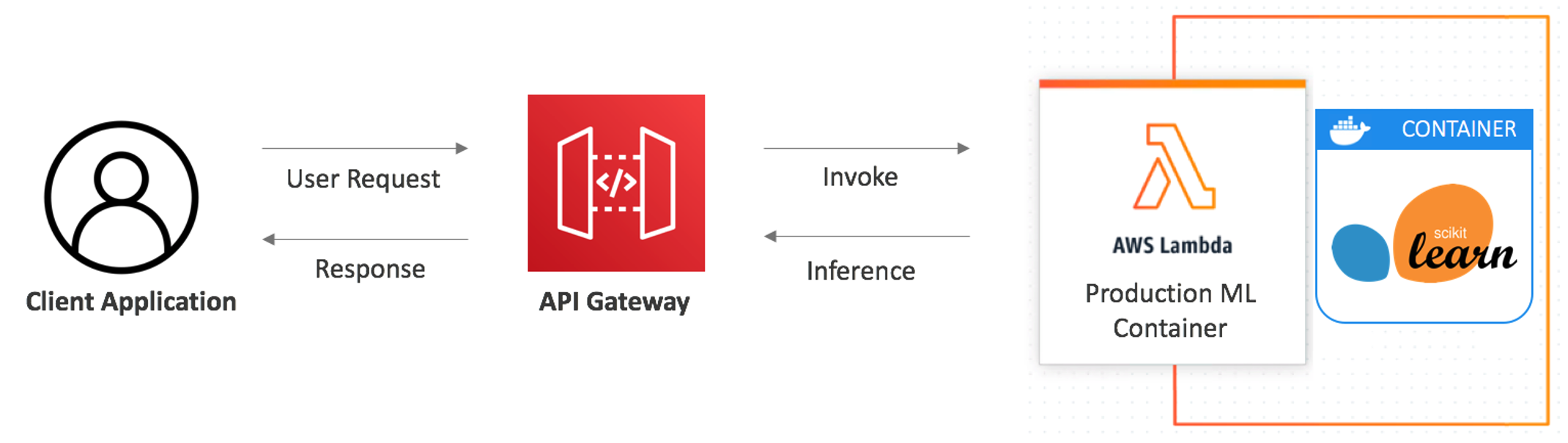
After designing and training machine learning models, data scientists deploy the models so applications can use them. AWS Lambda is a compute service that lets you run code without provisioning or managing servers. Lambda’s pay-per-request billing, automatic scaling, and ease of use make it a popular deployment choice for data science teams.

With minimal code, data scientists can turn a model into a cost effective and scalable API endpoint backed by Lambda. Lambda supports container images, Advanced Vector Extensions 2 (AVX2), and functions with up to 10 GB of memory. Using these capabilities, data science teams can deploy larger, more powerful models with improved performance.

To deploy Lambda-based applications, serverless developers can use the AWS Serverless Application Model framework (AWS SAM). AWS SAM creates and manages serverless applications based on templates. It supports local testing, aids best practices, and integrates with popular developer tools. It allows data scientists to define serverless applications, security permissions, and advanced configuration capabilities using YAML.

AWS SAM contains pre-built templates that allow developers to get started quickly. This blog shows how to use machine learning templates to deploy a Scikit-Learn based model that classifies images of handwritten digits from zero to nine. Once deployed to Lambda, you can access the model via a REST API.

This walkthrough creates resources that incur costs in an AWS account. To minimize cost, follow the Cleaning up section to remove resources after completing the walkthrough.

Overview

The AWS SAM machine learning templates are available for the Scikit-Learn, PyTorch, TensorFlow, and XGBoost frameworks. Each template deploys a Lambda function to host the model behind an Amazon API Gateway, which serves as the front end and handles authentication. The following diagram shows the architecture of the solution:

Serverless architecture for ML inference

Serverless architecture for ML inference

Creating the containerized Lambda function

This section uses AWS SAM to build, test, and deploy a Docker image containing a pre-trained digit classifier model on Lambda:

  1. Update or install AWS SAM. AWS SAM CLI v1.24.1 or later is required to use the machine learning templates.
  2. In a terminal, create a new serverless application in AWS SAM using the command:
    sam init
  3. Follow the on-screen prompts, select AWS Quick Start Templates as the template source.

    SAM: choose a template source

    SAM: choose a template source

  4. Choose Image as the package type.

    SAM: Choose a package type

    SAM: Choose a package type

  5. Select amazon/python3.8-base as the base image.

    SAM: Choose an runtime image

    SAM: Choose an runtime image

  6. When prompted, enter an application name. AWS SAM uses this to group and label resources it creates.

    SAM: Choose an runtime image

    SAM: Choose an runtime image

  7. Select the desired ML framework from the template list. The walkthrough uses the Scikit-Learn template.

    SAM: choose the application template

    SAM: choose the application template

  8. AWS SAM creates a directory with the name of your application. Change to the new directory and run the AWS SAM build command:
    sam build

    SAM: build results

    SAM: build results

Files generated by AWS SAM

After selecting the template, AWS SAM generates the following files in the application directory:

  • Dockerfile: The application uses the Lambda-provided Python 3.8 base image. It installs the relevant dependencies and defines the CMD variable for the Lambda execution environment to initialize the handler.
    FROM public.ecr.aws/lambda/python:3.8
    
    COPY app.py requirements.txt ./
    
    COPY digit_classifier.joblib /opt/ml/model/1
    
    RUN python3.8 -m pip install -r requirements.txt -t .
    
    CMD ["app.lambda_handler"]
  • app.py: This Python code runs after the Lambda handler is invoked and generates predictions from the Scikit-Learn model. The model is reused across multiple Lambda invocations by loading it outside the lambda_handler.
    import joblib
    import base64
    import numpy as np
    import json
    
    from io import BytesIO
    from PIL import Image
    from scipy.ndimage import interpolation
    
    model_file = '/opt/ml/model'
    model = joblib.load(model_file)
    
    
    # Functions to pre-process images (we used same preprocessing when training)
    
    def moments(image):
        c0, c1 = np.mgrid[:image.shape[0], :image.shape[1]]
        img_sum = np.sum(image)
        
        m0 = np.sum(c0 * image) / img_sum
        m1 = np.sum(c1 * image) / img_sum
        m00 = np.sum((c0-m0)**2 * image) / img_sum
        m11 = np.sum((c1-m1)**2 * image) / img_sum
        m01 = np.sum((c0-m0) * (c1-m1) * image) / img_sum
        
        mu_vector = np.array([m0,m1])
        covariance_matrix = np.array([[m00, m01],[m01, m11]])
        
        return mu_vector, covariance_matrix
    
    
    def deskew(image):
        c, v = moments(image)
        alpha = v[0,1] / v[0,0]
        affine = np.array([[1,0], [alpha,1]])
        ocenter = np.array(image.shape) / 2.0
        offset = c - np.dot(affine, ocenter)
    
        return interpolation.affine_transform(image, affine, offset=offset)
    
    
    def get_np_image(image_bytes):
        image = Image.open(BytesIO(base64.b64decode(image_bytes))).convert(mode='L')
        image = image.resize((28, 28))
    
        return np.array(image)
    
    
    # Lambda handler code
    
    def lambda_handler(event, context):
        image_bytes = event['body'].encode('utf-8')
        x = deskew(get_np_image(image_bytes))
    
        prediction = int(model.predict(x.reshape(1, -1))[0])
    
        return {
            'statusCode': 200,
            'body': json.dumps(
                {
                    "predicted_label": prediction,
                }
            )
        }

After completing these steps, this is the directory structure:

File structure

File structure

Testing the AWS SAM templates

For container image-based Lambda functions, sam build creates and updates a container image in the local Docker repo. It copies the template to the output directory and updates the location for the newly built image.

You can see the following top-level tree under the .aws-sam directory:

SAM build artifacts directory structure

SAM build artifacts directory structure

After building the Docker image, use AWS SAM’s local test functionality to test the endpoint. There are two ways to test the application locally:

  1. Local invoke –event uses the mock data in event.json to invoke the function and generate a prediction. An image of a handwritten digit is encoded as a base64 string in the body attribute in the event.json file. Test using mock event.json:
    sam local invoke InferenceFunction --event events/event.json

    SAM local invoke results

    SAM local invoke results

  2. The start-api command starts up a local endpoint that emulates a REST API endpoint. It downloads an execution container that runs API Gateway and the Lambda function locally. Invoke using the API Gateway emulator:
    sam local start-apiSAM local start-api monitor

SAM local start-api monitorTo test the local endpoint use a REST client, like Postman, to send a POST request to the /classify_digit endpoint.

Testing with Postman

Testing with Postman

While testing locally, use images smaller than 100 KB. If the file is larger, the request fails with status code: 502 and the error “argument list too long”. After deploying to Lambda, you can use larger images.

Deploying the application to Lambda

After testing the model locally, use the AWS SAM guided deployment process to package and deploy the application:

  1. To deploy a Lambda function based on a container image, the container image must be pushed to Amazon Elastic Container Registry (ECR). Run the following command to retrieve an authentication token and authenticate the Docker client with the ECR registry. Replace the region and accountID placeholders with your Region and AWS account ID:
    aws --region <region> ecr get-login-password | docker login --username AWS --password-stdin <accountID>.dkr.ecr.<region>.amazonaws.com

    Login Succeeded

    Login Succeeded

  2. Use the AWS CLI to create an ECR repository called classifier-demo:
    aws ecr create-repository \
    --repository-name classifier-demo \
    --image-tag-mutability MUTABLE \
    --image-scanning-configuration scanOnPush=true
    

    Create ECR repo results

    Create ECR repo results

  3. Copy the repositoryUri from the output. This is needed in the next step. Initiate the AWS SAM guided deployment using the deploy command:
    sam deploy --guided
  4. Follow the on-screen prompts. To accept the default options provided in the interactive experience, press Enter. When prompted for an ECR repository, use the Amazon ECR repository created in the previous step.
    CloudFormation change set verification screen

    CloudFormation change set verification screen

    CloudFormation outputs

    CloudFormation outputs

  5. AWS SAM packages and deploys the application as a versioned entity. After deployment, the production API endpoint is ready to use. The template produces multiple outputs. Find the unique URL of the endpoint in the “HelloWorldAPI” key in the “Outputs” section.

After retrieving the URL, test the live endpoint using a REST client:

Testing with Postman

Testing with Postman

Optimizing performance

After the Lambda function is deployed, you can optimize for latency and cost. To do this, adjust the memory allocation setting for the function, which also linearly changes the allocated vCPU (to learn more, read the AWS News Blog).

The digit classifier model is optimized with 5 GB memory (~3 vCPUs). Any gains beyond 5 GB are relatively minor. Each model responds differently to changes in vCPU and memory, so it is best practice to determine this experimentally. There are open-source tools available to automate performance tuning.

Further optimizations can be made by compiling the source code to take advantage of AVX2 instructions. AVX2 allows Lambda to run more operations per clock cycle, reducing the time it takes a model to generate predictions.

Cleaning up

This walkthrough creates a Lambda function, API Gateway endpoint, and an ECR repository. These resources incur charges so it is recommended to clean up resources to avoid incurring cost. To delete the ECR repository, run:

aws ecr delete-repository --registry-id <account-id> --repository-name classifier-demo --force

To delete the remaining resources, navigate to AWS CloudFormation in the AWS Management Console and select the Region used for the walkthrough. Select the stack created by AWS SAM (the default is “sam-app”) and choose Delete.

Conclusion

Lambda is a cost-effective, scalable, and reliable way for data scientists to deploy CPU-based machine learning models for inference. With support for larger functions sizes, AVX2 instruction sets, and container image support, Lambda can now deploy more complex models while maintaining low latency.

Use the new machine learning templates within AWS SAM today to deploy your first serverless machine learning application in minutes. We look forward to seeing the exciting machine learning applications that you build on Lambda.

For more serverless learning resources, visit Serverless Land.

Apple Will Offer Onion Routing for iCloud/Safari Users

Post Syndicated from Bruce Schneier original https://www.schneier.com/blog/archives/2021/06/apple-will-offer-onion-routing-for-icloud-safari-users.html

At this year’s Apple Worldwide Developer Conference, Apple announced something called “iCloud Private Relay.” That’s basically its private version of onion routing, which is what Tor does.

Privacy Relay is built into both the forthcoming iOS and MacOS versions, but it will only work if you’re an iCloud Plus subscriber and you have it enabled from within your iCloud settings.

Once it’s enabled and you open Safari to browse, Private Relay splits up two pieces of information that — when delivered to websites together as normal — could quickly identify you. Those are your IP address (who and exactly where you are) and your DNS request (the address of the website you want, in numeric form).

Once the two pieces of information are split, Private Relay encrypts your DNS request and sends both the IP address and now-encrypted DNS request to an Apple proxy server. This is the first of two stops your traffic will make before you see a website. At this point, Apple has already handed over the encryption keys to the third party running the second of the two stops, so Apple can’t see what website you’re trying to access with your encrypted DNS request. All Apple can see is your IP address.

Although it has received both your IP address and encrypted DNS request, Apple’s server doesn’t send your original IP address to the second stop. Instead, it gives you an anonymous IP address that is approximately associated with your general region or city.

Not available in China, of course — and also Belarus, Colombia, Egypt, Kazakhstan, Saudi Arabia, South Africa, Turkmenistan, Uganda, and the Philippines.

The Future of Machine Learning and Cybersecurity

Post Syndicated from Bruce Schneier original https://www.schneier.com/blog/archives/2021/06/the-future-of-machine-learning-and-cybersecurity.html

The Center for Security and Emerging Technology has a new report: “Machine Learning and Cybersecurity: Hype and Reality.” Here’s the bottom line:

The report offers four conclusions:

  • Machine learning can help defenders more accurately detect and triage potential attacks. However, in many cases these technologies are elaborations on long-standing methods — not fundamentally new approaches — that bring new attack surfaces of their own.
  • A wide range of specific tasks could be fully or partially automated with the use of machine learning, including some forms of vulnerability discovery, deception, and attack disruption. But many of the most transformative of these possibilities still require significant machine learning breakthroughs.
  • Overall, we anticipate that machine learning will provide incremental advances to cyber defenders, but it is unlikely to fundamentally transform the industry barring additional breakthroughs. Some of the most transformative impacts may come from making previously un- or under-utilized defensive strategies available to more organizations.
  • Although machine learning will be neither predominantly offense-biased nor defense-biased, it may subtly alter the threat landscape by making certain types of strategies more appealing to attackers or defenders.

Friday Squid Blogging: Video of Giant Squid Hunting Prey

Post Syndicated from Bruce Schneier original https://www.schneier.com/blog/archives/2021/06/friday-squid-blogging-video-of-giant-squid-hunting-prey.html

Fantastic video of a giant squid hunting at depths between 1,827 and 3,117 feet.

This is a follow-on from this post.

As usual, you can also use this squid post to talk about the security stories in the news that I haven’t covered.

Read my blog posting guidelines here.

Getting started with serverless for developers part 5: Sandbox developer account

Post Syndicated from Benjamin Smith original https://aws.amazon.com/blogs/compute/getting-started-with-serverless-for-developers-part-5-sandbox-developer-account/

This is part 5 of the Getting started with serverless series. In part 4, you learn how the developer workflow for building serverless applications differs to a traditional developer workflow. You see how to test business logic locally before deploying to an AWS account.

In this post, you learn how to secure and manage access to your AWS Lambda functions. I show how to invoke Lambda functions in a sandbox developer account directly from an integrated developer environment (IDE) and view output logs in near-real-time. Finally, I show how this helps to test for infrastructure and security configurations before committing changes to the main branch.

A sandbox developer account

Serverless services like Lambda and Amazon API Gateway are pay-per-use, this means developers no longer need to share multiple environments (for example, dev, staging, and production). Instead, every developer can have their own sandboxed AWS developer account. This allows developers to not have to replicate everything to their local environment but rather test with real resources in the cloud.

You can still run code locally during the development of a feature. In post 4, I show how I run Lambda function code locally, using a test harness. This allows me to maintain a fast inner loop, iteratively updating and locally testing code. If my Lambda function interacts with other AWS infrastructure, I deploy them to a sandboxed AWS developer account. This allows me to test my Lambda function code locally while still being able to access managed services in the cloud.

However, it is useful to deploy your function code to a Lambda function in a sandboxed developer account. A sandbox developer account is an AWS account allocated to a developer on a 1:1 basis. It should give developers as much freedom as possible while still protecting resources and budget.

This allows you to test for security configurations and ensure that your Lambda function code behaves as expected when run in the Lambda execution environment:

Creating a sandboxed developer account

The following best practices can help to minimize costs and prevent unauthorized usage.

After creating a sandbox account, it can be useful to associate a named profile with it. A named profile is a collection of credentials that you can apply to an AWS Command Line Interface (AWS CLI) command. When you specify a profile to run a command, the settings and credentials are used to run that command. The AWS CLI supports multiple named profiles that are stored in the config and credentials files.

Configure profiles by adding entries to the config and credentials files. To learn more about named profiles refer to the AWS CLI documentation.

In the following example I configure my credentials file with two named profiles.

The profile named prod is my production account, and the profile named default is my sandbox developer account. The CLI automatically uses the profile named default, if no --profile option is specified in a CLI command.

[default]
aws_access_key_id=AKIAIOSFODNN7EXAMPLE
aws_secret_access_key=wJalrXUtnFEMI/K7MDENG/bPxRfiCYEXAMPLEKEY

[dev]
aws_access_key_id=AKIAIOSFODNN7EXAMPLE
aws_secret_access_key=wJalBBUtnFEMI/&7MDENG/bPxRfiCYEXAMPLEKEY

[prod]
aws_access_key_id=AKIAI44QH8DHBEXAMPLE
aws_secret_access_key=je7MtGbClwBF/2Zp9Utk/h3yCo8nvbEXAMPLEKEY

AWS Lambda security permissions

AWS Identity and Access Management (IAM) is the service used to manage access to AWS services. Lambda is fully integrated with IAM, allowing you to control precisely what each Lambda function can do within the AWS Cloud. There are two important things that define the scope of permissions in Lambda functions:

The resource policy: Defines which events are authorized to invoke the function.

The execution role policy: Limits what the Lambda function is authorized to do.

Using IAM roles to describe a Lambda function’s permissions, decouples it’s security configuration from the code. This helps reduce the complexity of a lambda function, making it easier to maintain.

A Lambda function’s resource and execution policy should be granted the minimum required permissions for the function to perform it’s task effectively. This is sometimes referred to as the rule of least privilege. As you develop a Lambda function, you expand the scope of this policy to allow access to other resources as required.

When building Lambda-based applications with frameworks such as AWS SAM, you describe both policies in the application’s template.

The following steps show how I deploy and test a Lambda function in a sandbox developer account from within my IDE.

Before you start

All the code relating to this example application can be found in this GitHub repository. To deploy this stage of the application, follow the steps from post 1 to clone the sample application.

  1. Run the following command from the root directory of the cloned repository:
    cd ./part_5
  2. After creating a sandbox developer account, deploy the example application into it by specifying the corresponding profile name in the AWS SAM CLI command. You can omit this if you named the profile default:
    sam deploy --config-file ../samconfig.toml  –guided  --profile default

    This produces the following output:

    Make a note of the StarWebhookLambdaFunctionName, you will use this in the following steps.

Logging with serverless applications

After deploying your serverless application to the sandboxed developer account, you need to verify that it’s operating properly. Lambda automatically monitors functions on your behalf, reporting metrics through Amazon CloudWatch. It collects data in the form of logs, metrics, and events and provides a unified view of AWS resources, applications, and services.

To help simplify troubleshooting, the AWS Serverless Application Model CLI (AWS SAM CLI) has a command called sam logs. This command lets you fetch CloudWatch Logs generated by your Lambda function from the command line.

Run the following command in a terminal window to view a live tail of logs generated by the StarWebhookHandler Lambda function. Replace StarWebhookLambdaFunctionName with the Lambda function name generated by your deployment:

sam logs -n StarWebhookLambdaFunctionName --tail

Checking Lambda function permissions in a sandbox developer account

I open a new terminal window and invoke the StarWebhookHandler Lambda function directly from my IDE by running the following AWS SAM CLI command. To invoke the function I pass an example payload located in events/testEvent.json.

aws lambda invoke --function-name <<replace-with-function-name>> \
--payload fileb://events/testEvent.json  \
out.txt

The following screenshot shows my two terminal windows side by side.

The response returned by the CLI command is on the right. The left window shows the tail of logs generated by the Lambda function. I observe that the CLI invocation shows a status 200 response, but the Lambda function logs report an ‘AccessDenied’ error. The function does not have the required permissions to write to Amazon S3.

I edit the Lambda function policy definition, adding permission for my Lambda function to write to an S3 bucket. I run sam build and sam deploy to re-deploy the application to the sandbox developer account. I invoke the Lambda function again. The logs show the following:

  1. The Lambda function responds with “StatusCode 200″.
  2. The Lambda function billed duration, memory size and running duration.
  3. The Lambda function has successfully copied the file to S3

IAM permission errors such as these may not be detected when running the function code locally. This is one of the advantages of deploying and running Lambda functions in a sandboxed developer account while developing an application.

Conclusion

This post explains the advantages of using a sandbox developer account. It shows how to deploy your business logic to a Lambda function in a sandboxed developer account. You are introduced to IAM policies, which control precisely what each Lambda function can do within the AWS Cloud. You learn that CloudWatch provides a unified view of logs for all AWS resources.

Finally, I show how to use the AWS SAM CLI and AWS CLI to invoke a Lambda function in the cloud and view its log output directly from the IDE. This helps to test for security configurations and to ensure that your business logic behaves as expected when run in the Lambda service. Invoking functions and observing their log output directly from your IDE helps to reduce context switching as you build.

Getting Started with serverless for developers: Part 4 – Local developer workflow

Post Syndicated from Benjamin Smith original https://aws.amazon.com/blogs/compute/getting-started-with-serverless-for-developers-part-4-local-developer-workflow/

This blog is part 4 of the “Getting started with serverless for developers” series, helping developers start building serverless applications from their IDE.

Many “getting started” guides demonstrate how to build serverless applications from within the AWS Management Console. However, most developers spend the majority of their time building from within their local integrated development environment (IDE).

The next two blog posts in this series focus on the serverless developer workflow. They describe how to check logs, test, and iterate on business logic while building locally, and how this differs from traditional applications.

This blog post explains how the developer workflow for building serverless applications differs from a traditional developer workflow. It shows the methods that I use to test business logic locally before deploying to a sandbox AWS developer account, and how to test against cloud services as you build. This eliminates the need to deploy to the AWS Cloud each time you want to test a code change.

Traditional developer workflow

Developers typically use the following workflow cycle before committing code to the main branch:

  1. Write code.
  2. Save code.
  3. Run code.
  4. Check results.

This is sometimes referred to as the inner loop, shown as follows:

With traditional (non-serverless) applications, developers commonly create a development environment on their local machine. This local development environment keeps parity with the staging and production environments. It allows developers to test their application locally end-to-end before committing code to the main branch.

Serverless developer workflow

Part 2: the business logic, explains how serverless applications use managed services that abstract away the need for developers to patch and scale their application infrastructure. This means that the code base in a serverless application is focused purely on business logic, allowing managed services to handle other important layers such as:

  • Authorization
  • Presentation
  • Database
  • Application integration
  • Notification

A good serverless developer workflow enables developers to test and iterate on business logic quickly. It allows them to check that the business logic runs correctly with the managed services that compose an application.

To achieve this, the best approach is not to try and emulate managed services on your local development machine. Instead, your local code should interact directly with real cloud services in a sandboxed AWS account.

This approach lets you rapidly test and iterate on business logic locally, deploying to the development environment to test for infrastructure, security, and environment configuration changes. Once the business logic is ready in the development environment, it can be deployed to other environments (test, staging, production) via CI/CD automation or manually triggered commands.

The following sections explain how I test business logic locally using a custom-written test harness. Each time I create a Lambda function I create a directory to hold:

  1. The function code.
  2. A relative package.json.
  3. A file called testharness.js.

The test harness file is used to run the Lambda function code on my local development machine. It is configured to mock environment variables loaded from a file named `env.json` and loads a JSON test event payload located in the events directory.

Testing Lambda function code locally with a test harness

Part 2: the business logic, explains the anatomy of a Lambda function and its handler:

A small Lambda function

Note that the function handler receives an input payload called an event object. To test the local function code effectively, use a test event object that represents the production event object.

The serverless application introduced in getting started with serverless part 1, shows that Amazon API Gateway invokes the Lambda function.

This invocation contains an event object with a JSON representation of the HTTP request. The event object has a defined structure. Follow the steps in this GitHub repository to see how to create a test event object.

Before you start

To deploy this stage of the application, follow the steps from post 1 to clone and deploy the sample application.

  1. Run the following commands from the root directory of the cloned repository:
    cd ./part_4/src_starred
    npm install

The following steps show how I configure my testharness.js file to run my function code:

// Mock event
const event = require('../events/testEvent.json')
// Mock environment variables
const environmentVars = require('../env.json')
process.env.AWS_REGION = environmentVars.AWS_REGION
process.env.localTest = true
process.env.slackEndpoint= environmentVars.slackEndpoint
process.env.bucket = environmentVars.bucket
// Lambda handler
const { handler } = require('./app')
const main = async () => {
  console.time('localTest')
  console.dir(await handler(event))
  console.timeEnd('localTest')
}
main().catch(error => console.error(error))
  1. A test event object is loaded into a variable called event.
  2. The environment variables required by the Lambda function are defined in env.json and loaded.
  3. The Lambda function code is loaded into a variable called handler
  4. The Lambda function code is run synchronously
  5. The console shows output from the Lambda function code, along with any errors that occur.

I run my test harness file by entering the following command in a terminal window:

$ node testharness.js

This produces the following output:

The output indicates that the function code ran without error, it returned a 200 status code and completed in 30.999 ms.

To generate an error in the function code,  I change the app.js file by commenting out the following line:

//const axios = require('axios');

I save the file and run the test harness again. I see the following response in the terminal window:

f

This indicates an error in my function code that I must resolve before deploying to my AWS account.

By iteratively updating and locally testing my code, I maintain a fast inner loop. This eliminates the need to deploy to the AWS Cloud each time I want to test a code change.

Testing against cloud resources

In many instances, a Lambda function interacts with other cloud resources. This could be via an SDK or some other native integration. In this case, you should deploy those resources to a sandboxed AWS developer account.

In the following example, I update a Lambda function to log each inbound HTTP request to a bucket in Amazon S3, a highly scalable object storage service running in the AWS cloud. To do this, I use the JavaScript SDK:

s3.putObject(params, function(err, data)

I update the AWS Serverless Application Model (AWS SAM) template to define a new S3 bucket:

SrcBucket:
Type: AWS::S3::Bucket

I change into the part_4 directory then build and deploy the application with the following commands:

cd ../part_4
sam build
sam deploy --guided --config-file ../samconfig.toml

After deploying, the output shows:

I copy the new bucket value to the environment variable defined in in /part_4/env.json .

"slackEndpoint": "Insert_Slack_Endpoint",
"bucket" : "Insert_S3_Bucket_Name"
}

Now I am ready to test the local Lambda function code against cloud resources in my sandbox AWS development account. I run a new local test with the following command:

node testHarness.js

The terminal returns:

This indicates that the Lambda function code completed without error. I can verify this by checking the contents of the S3 bucket using the AWS Command Line Interface (AWS CLI):

aws s3 ls s3://githubtoslackapp-srcbucket-ge4wkt9dljwa

This returns the following, confirming that the request object has been saved to S3 and the application code is running correctly:

Conclusion

Using managed services to build serverless applications helps developers focus on business logic. It also changes the developer workflow compared with building traditional (non-serverless) applications.

A good serverless developer workflow enables developers to test and iterate on business logic quickly while still being able to interact with cloud services. This blog post shows how I achieve this by using a test harness to run function code locally and deploying application resources to a sandboxed developer account.

In the next blog post, I show how to invoke Lambda functions deployed to sandboxed developer account, without leaving your IDE. This lets you test for infrastructure, security, and environment configuration changes while building.

CDK Corner – May 2021

Post Syndicated from Christian Weber original https://aws.amazon.com/blogs/devops/cdk-corner-may-2021/

Social – community engagement

According to Matt Coulter’s tweet, nearly 4000 people signed up for CDK Day to celebrate all things CDK on April 30. As a single-day, two-track event, there was a significant amount of content to learn from while having fun, and interacting with the CDK community.

Eric Johnson as the emcee, keynoted the first session of the morning, presenting “Better together: AWS CDK and AWS SAM.” This keynote was the announcement for the public preview of the AWS Serverless Application Model CLI (AWS SAM CLI). The AWS Serverless Application Model CLI includes support for local development and testing of AWS CDK projects.

To learn more, the blog post announcing the AWS SAM CLI public preview has more detail about the capabilities of the AWS SAM CLI.

If you missed CDK Day, fear not! CDK Day Track 1 and Track2 are available to watch online.

Great job and round of applause to the sign-language translators, the speakers, the organizers, and the hosts for making the second CDK Day a success! We can’t wait for CDK Day number 3!

Updates to the CDK

AWS CDK v2 developer preview

It’s here! The much-anticipated release of CDK v2’s developer preview is now available!

When using CDK previously, developers in JavaScript and TypeScript have faced challenges with the way that npm handles transitive dependencies; the dependencies that your dependencies rely on. For example, the aws-ec2 package.json file lists dependencies for other CDK construct libraries. If one of these transitive dependencies were updated, all of them would be need to be updated. Or you would run into dependency tree resolution errors, as seen in this StackOverflow thread.

With v2, all construct modules are now provided in a single package: aws-cdk-lib. All of the dependencies are now pinned to a single version of aws-cdk-lib, making it easier to manage. This also gives you the flexibility of having all CDK construct library modules available without having to run npm install each time you want to use a new construct library.

Another change to AWS CDK v2 is the removal of experimental modules. To help promote API stability and comply with semantic versioning, CDK v2 ships only with modules marked as stable.

Experimental modules aren’t going away completely, though. In v1, experimental modules and constructs will be provided together with no change. In v2, experimental modules are distributed and versioned separately from the aws-cdk-lib package, in their own dedicated package and namespace. Once a v2 construct is deemed stable, it is then merged into the aws-cdk-lib package.

The CDK team is still determining the best method of distributing experimental modules and constructs, so stay tuned for more information. Read more about the AWS CDK v2 developer preview in the What’s new blog post.

AWS CDK for Go developer preview

On April 7, the AWS CDK team announced support for golang. From the Go tracking issue on GitHub, nearly 900 members of the CDK community have requested for CDK to support golang, and we’re happy to see it become available! We are looking forward to helping out all the golang gophers out there build amazing CDK applications!

To learn more about Go and AWS CDK, read the AWS CDK for Go module API documentation on pkg.go.dev. You can also read the Go bindings for JSII RFC document on GitHub. Want to contribute to the success of Go and CDK? The project tracking board for Go’s General Availability has tasks and items which could use your help.

Construct modules promoted to General Availability

Many new construct modules were promoted to General Availability recently. General Availability indicates a module’s stability, giving confidence to run these modules in production workloads. In April, a total of 15 modules were promoted stable:

Notable new L2 constructs

In the @aws-cdk/route-53 module, name server (NS) records were previously defined with the route53.RecordType enum. In PR#13895, user stijnbrouwers introduces the NS record as its own L2 construct: route53.NSRecord. bringing it into company with other record type L2s, such as route53.ARecord. This makes managing NS records consistent with the other record types represented as L2 constructs.

Improving the @aws-cdk/aws-events-targets module, CDK community user hedrall submitted PR#13823. This change brings support for Amazon API Gateway as a target for an Amazon EventBridge event.

@aws-cdk/aws-codepipeline-actions now includes an L2 construct for AWS CodeStar Connections supporting BitBucket and GitHub. This construct lets you create a CDK application that uses AWS CodeStar with a source connection from either provider, thanks to PR#13781 from the CDK Team.

Level ups to existing CDK constructs

Amazon Elastic Inference makes available low-cost GPU-acceleration for deep-learning workloads. PR#13950 now lets you use the service via @aws-cdk/aws-ecs in Amazon Elastic Container Service tasks, from CDK community user upparekh.

In PR#13473, from pgarbe, the @aws-cdk/aws-lambda-nodejs module will now bundle AWS Lambda functions with Docker images sourced from the Amazon Elastic Container Registry (Amazon ECR) Public Registry, instead of DockerHub. Prior to this change, CDK used your DockerHub credentials to pull a Docker image for the Lambda function. If your account was in DockerHub’s free-tier account level, your account is throttled whenever it exceeds the API limit within a short time frame set by DockerHub. This can cause your AWS CDK deployment to be delayed until you are under DockerHub’s API limit. By moving to the Amazon ECR Public Registry, this removes the risk of being affected by DockerHub’s API rate limiting . You can read more in this blog post giving customers advice about DockerHub rate limits from last year.

With @aws-cdk/aws-codebuild, you can use concurrent build support to speed up your build process. Sometimes you’ll want to limit the number of builds that run concurrently, whether for cost reduction or reducing the complexity of your build process. PR#14185, authored by gmokki, adds the ability to define a concurrent build limit for an AWS CodeBuild project Stage.

It is common for customers to have applications or resources spanning multiple AWS Regions. If you’re using @aws-cdk/aws-secretsmanager, you can now replicate secrets to multiple Regions, with PR#14266 from the CDK team. Make sure you’re not setting your secret as “test123” for your production databases in multiple Regions!

For users of @aws-cdk/aws-eks, PR#12659 from anguslees lets you pass arguments from bootstrap.sh to avoid the DescribeCluster API call. This will speed up the time it takes nodes to join an EKS cluster.

PR#14250 from the CDK team gives developers using @aws-cdk/aws-ec2 the ability to set fixed IPs when defining NAT gateways. This change will now pre-create Elastic IP address allocations and assign them to the NAT gateway. This can be useful when managing links from an Amazon Virtual Private Cloud (VPC) to an on-premises data center that relies on fixed/static IP addresses.

@aws-cdk/aws-iam now lets you add AWS Identity and Access Management (AWS IAM) users to new or existing groups. For example, you might want to have a user in a specific group for the life of a deployed CDK application. And on stack deletion, revoke that membership. Thanks to PR#13698 from jogold, this is now possible.

Learning – Finds from across the internet

If you work with CDK parameters, you might be curious how parameters derive their names and values. Borislav Hadzhiev released a blog post about setting and using CDK parameters.

Ibrahim Cesar’s wrote an awesome blog post detailing the experience of discovering and working with CDK. It’s an enjoyable read of inspiration and animated gifs.

Twitter user edwin4_ released a tool for CDK automation called RocketCDK. From the project’s GitHub repository, this tool will initialize your CDK app, install your packages, and auto-import them into your stack. Neat! Anything that helps save time is a plus-one.

Community acknowledgments

And finally, congratulations and rounds of applause for these folks who had their first Pull Request merged to the CDK repository!

*These users’ Pull Requests were merged in April.

Thank you for joining us on this update of the CDK corner. See you next time!

In the Works – AWS Region in the United Arab Emirates (UAE)

Post Syndicated from Jeff Barr original https://aws.amazon.com/blogs/aws/in-the-works-aws-region-in-the-united-arab-emirates-uae/

We are currently building AWS regions in Australia, Indonesia, Spain, India, and Switzerland.

UAE in the Works
I am happy to announce that the AWS Middle East (UAE) Region is in the works and will open in the first half of 2022. The new region is an extension of our existing investment, which already includes two AWS Direct Connect locations and two Amazon CloudFront edge locations, all of which have been in place since 2018. The new region will give AWS customers in the UAE the ability to run workloads and to store data that must remain in-country, in addition to the ability to serve local customers with even lower latency.

The new region will have three Availability Zones, and will be the second AWS Region in the Middle East, joining the existing AWS Region in Bahrain. There are 80 Availability Zones within 25 AWS Regions in operation today, with 15 more Availability Zones and five announced regions underway in the locations that I listed earlier.

As is always the case with an AWS Region, each of the Availability Zones will be a fully isolated part of the AWS infrastructure. The AZs in this region will be connected together via high-bandwidth, low-latency network connections to support applications that need synchronous replication between AZs for availability or redundancy.

AWS in the UAE
In addition to the upcoming AWS Region and the Direct Connect and CloudFront edge locations, we continue to build our team of account managers, partner managers, data center technicians, systems engineers, solutions architects, professional service providers, and more (check out our current positions).

We also plan to continue our on-going investments in education initiatives, training, and start-up enablement to support the UAE’s plans for economic development and digital transformation.

Our customers in the UAE are already using AWS to drive innovation! For example:

Mohammed Bin Rashid Space Centre (MBRSC) – Founded in 2006, MBSRC is home to the UAE’s National Space Program. The Hope Probe was launched last year and reached Mars in February of this year. Data from the probe’s instruments is processed and analyzed on AWS, and made available to the global scientific community in less than 20 minutes.

Anghami is the leading music platform in the Middle East and North Africa, giving over 70 million users access to 57 million songs. They have been hosting their infrastructure on AWS since their days as a tiny startup,. and have benefited from the ability to scale up by as much as 300% when new music is launched.

Sarwa is an investment bank and personal finance platform that was born on the AWS cloud in 2017. They grew by a factor of four in 2020 while processing hundreds of thousands of transactions. Recent AWS-powered innovations from Sarwa include the Sarwa App (design to market in 3 months) and the upcoming Sarwa Trade platform.

Stay Tuned
We’ll be announcing the opening of the Middle East (UAE) Region in a forthcoming blog post, so be sure to stay tuned!

— Jeff;

Build and Deploy Docker Images to AWS using EC2 Image Builder

Post Syndicated from Joseph Keating original https://aws.amazon.com/blogs/devops/build-and-deploy-docker-images-to-aws-using-ec2-image-builder/

The NFL, an AWS Professional Services partner, is collaborating with NFL’s Player Health and Safety team to build the Digital Athlete Program. The Digital Athlete Program is working to drive progress in the prevention, diagnosis, and treatment of injuries; enhance medical protocols; and further improve the way football is taught and played. The NFL, in conjunction with AWS Professional Services, delivered an EC2 Image Builder pipeline for automating the production of Docker images. Following similar practices from the Digital Athlete Program, this post demonstrates how to deploy an automated Image Builder pipeline.

“AWS Professional Services faced unique environment constraints, but was able to deliver a modular pipeline solution leveraging EC2 Image Builder. The framework serves as a foundation to create hardened images for future use cases. The team also provided documentation and knowledge transfer sessions to ensure our team was set up to successfully manage the solution.”—Joseph Steinke, Director, Data Solutions Architect, National Football League

A common scenario you may face is how to build Docker images that can be utilized throughout your organization. You may already have existing processes that you’re looking to modernize. You may be looking for a streamlined, managed approach so you can reduce the overhead of operating your own workflows. Additionally, if you’re new to containers, you may be seeking an end-to-end process you can use to deploy containerized workloads. With either case, there is need for a modern, streamlined approach to centralize the configuration and distribution of Docker images. This post demonstrates how to build a secure end-to-end workflow for building secure Docker images.

Image Builder now offers a managed service for building Docker images. With Image Builder, you can automatically produce new up-to-date container images and publish them to specified Amazon Elastic Container Registry (Amazon ECR) repositories after running stipulated tests. You don’t need to worry about the underlying infrastructure. Instead, you can focus simply on your container configuration and use the AWS tools to manage and distribute your images. In this post, we walk through the process of building a Docker image and deploying the image to Amazon ECR, share some security best practices, and demonstrate deploying a Docker image to Amazon Elastic Container Service (Amazon ECS). Additionally, we dive deep into building Docker images following modern principles.

The project we create in this post addresses a use case in which an organization needs an automated workflow for building, distributing, and deploying Docker images. With Image Builder, we build and deploy Docker images and test our image locally that we have created with our Image Builder pipeline.


Solution Overview

The following diagram illustrates our solution architecture.

Show the architecture of the Docker EC2 Image Builder Pipeline

Figure: Show the architecture of the Docker EC2 Image Builder Pipeline


We configure the Image Builder pipeline with AWS CloudFormation. Then we use Amazon Simple Storage Service (Amazon S3) as our source for the pipeline. This means that when we want to update the pipeline with a new Dockerfile, we have to update the source S3 bucket. The pipeline assumes an AWS Identity and Access Management (IAM) role that we generate later in the post. When the pipeline is run, it pulls the latest Dockerfile configuration from Amazon S3, builds a Docker image, and deploys the image to Amazon ECR. Finally, we use AWS Copilot to deploy our Docker image to Amazon ECS. For more information about Copilot, see Applications.

The style in which the Dockerfile application code was written is a personal preference. For more information, see Best practices for writing Dockerfiles.


Overview of AWS services

For this post, we use the following services:

  • EC2 Image Builder – Image Builder is a fully managed AWS service that makes it easy to automate the creation, management, and deployment of customized, secure, and up-to-date server images that are pre-installed and pre-configured with software and settings to meet specific IT standards.
  • Amazon ECR – Amazon ECR is an AWS managed container image registry service that is secure, scalable, and reliable.
  • CodeCommit – AWS CodeCommit is a fully-managed source control service that hosts secure Git-based repositories.
  • AWS KMS – Amazon Key Management Service (AWS KMS) is a fully managed service for creating and managing cryptographic keys. These keys are natively integrated with most AWS services. You use a KMS key in this post to encrypt resources.
  • Amazon S3 – Amazon Simple Storage Service (Amazon S3) is an object storage service utilized for storing and encrypting data. We use Amazon S3 to store our configuration files.
  • AWS CloudFormation – AWS CloudFormation allows you to use domain-specific languages or simple text files to model and provision, in an automated and secure manner, all the resources needed for your applications across all Regions and accounts. You can deploy AWS resources in a safe, repeatable manner, and automate the provisioning of infrastructure.


Prerequisites

To provision the pipeline deployment, you must have the following prerequisites:


CloudFormation templates

You use the following CloudFormation templates to deploy several resources:

  • vpc.yml – Contains all the core networking configuration. It deploys the VPC, two private subnets, two public subnets, and the route tables. The private subnets utilize a NAT gateway to communicate to the internet. The public subnets have full outbound access to the internet gateway.
  • kms.yml – Contains the AWS Key Management Service (AWS KMS) configuration that we use for encrypting resources. The KMS key policy is also configured in this template.
  • s3-iam-config.yml – Contains the S3 bucket and IAM roles we use with our Image Builder pipeline.
  • docker-image-builder.yml – Contains the configuration for the Image Builder pipeline that we use to build Docker images.


Docker Overview

Containerizing an application comes with many benefits. By containerizing an application, the application is decoupled from the underlying infrastructure, greater consistency is gained across environments, and the application can now be deployed in a loosely coupled microservice model. The lightweight nature of containers enables teams to spend less time configuring their application and more time building features that create value for their customers. To achieve these great benefits, you need reliable resources to centralize the creation and distribution of your container images. Additionally, you need to understand container fundamentals. Let’s start by reviewing a Docker base image.

In this post, we follow the multi-stage pattern for building our Docker image. With this approach, we can selectively copy artifacts from one phase to another. This allows you to remove anything not critical to the application’s function in the final image. Let’s walk through some of the logic we put into our Docker image to optimize performance and security.

Let’s begin by looking at line 15-25. Here, we are pulling down the latest amazon/aws-cli Docker image. We are leveraging this image so that we can utilize IAM credentials to clone our CodeCommit repository. In lines 15-24 we are installing and configuring our git configuration. Finally, in line 25 we are cloning our application code from our repository.

In this next section, we set environment variables, installing packages, unpack tar files, and set up a custom Java Runtime Environment (JRE). Amazon Corretto is a no-cost, multi-platform, production-ready distribution of the Open Java Development Kit (OpenJDK). One important distinction to make here is how we are utilizing RUN and ADD in the Dockerfile. By configuring our own custom JRE we can remove unnecessary modules from our image. One of our goals with building Docker images is to keep them lightweight, which is why we are taking the extra steps to ensure that we don’t add any unnecessary configuration.

Let’s take a look at the next section of the Dockerfile. Now that we have all the package that we require, we will create a working directory where we will install our demo app. After the application code is pulled down from CodeCommit, we use Maven to build our artifact.

In the following code snippet, we use FROM to begin a new stage in our build. Notice that we are using the same base as our first stage. If objects on the disk/filesystem in in the first stage stay the same, the previous stage cache can be reused. Using this pattern can greatly reduce build time.

Docker images have a single unique digest. This is a SHA-256 value and is known as the immutable identifier for the image. When changes are made to your image, through a Dockerfile update for example, a new image with a new immutable identifier is generated. The immutable identifier is pinned to prevent unexpected behaviors in code due to change or update. You can also prevent man-in-the-middle attacks by adopting this pattern. Additionally, using a SHA can mitigate the risk of having to rely on mutable tags that can be applied or changed to the wrong image by mistake. You can use the following command to check to ensure that no unintended changes occured.

docker images <input_container_image_id> --digests

Lastly, we configure our final stage, in which we create a user and group to manage our application inside the container. As this user, we copy the binaries created from our first stage. With this pattern, you can clearly see the benefit of using stages when building Docker images. Finally, we note the port that should be published with expose for the container and we define our Entrypoint, which is the instruction we use to run our container.


Deploying the CloudFormation templates

To deploy your templates, complete the following steps:

1. Create a directory where we store all of our demo code by running the following from your terminal:

mkdir awsblogrepo && cd awsblogrepo


2. Clone the source code repository found in the following location:

git clone https://github.com/aws-samples/build-and-deploy-docker-images-to-aws-using-ec2-image-builder.git

You now use the AWS CLI to deploy the CloudFormation templates. Make sure to leave the CloudFormation template names as written in this post.


3. Deploy the VPC CloudFormation template:

aws cloudformation create-stack \
--stack-name vpc-config \
--template-body file://templates/vpc.yml \
--parameters file://parameters/vpc-params.json  \
--capabilities CAPABILITY_IAM \
--region us-east-1

The output should look like the following code:

{
    "StackId": "arn:aws:cloudformation:us-east-1:123456789012:stack/vpc-config/12e90fe0-76c9-11eb-9284-12717722e021"
}


4. Open the parameters/kms-params.json file and update the UserARN parameter with your account ID:

[
  {
      "ParameterKey": "KeyName",
      "ParameterValue": "DemoKey"
  },
  {
    "ParameterKey": "UserARN",
    "ParameterValue": "arn:aws:iam::<input_your_account_id>:root"
  }
]


5. Deploy the KMS key CloudFormation template:

aws cloudformation create-stack \
--stack-name kms-config \
--template-body file://templates/kms.yml \
--parameters file://parameters/kms-params.json \
--capabilities CAPABILITY_IAM \
--region us-east-1

The output should look like the following:

{
    "StackId": "arn:aws:cloudformation:us-east-1:123456789012:stack/kms-config/66a663d0-777d-11eb-ad2b-0e84b19d341f"
}


6. Open the parameters/s3-iam-config.json file and update the DemoConfigS3BucketName parameter to a unique name of your choosing:

[
  {
    "ParameterKey" : "Environment",
    "ParameterValue" : "dev"
  },
  {
    "ParameterKey": "NetworkStackName",
    "ParameterValue" : "vpc-config"
  },
  {
    "ParameterKey" : "EC2InstanceRoleName",
    "ParameterValue" : "EC2InstanceRole"
  },
  {
    "ParameterKey" : "DemoConfigS3BucketName",
    "ParameterValue" : "<input_your_unique_bucket_name>"
  },
  {
    "ParameterKey" : "KMSStackName",
    "ParameterValue" : "kms-config"
  }
]


7. Deploy the IAM role configuration template:

aws cloudformation create-stack \
--stack-name s3-iam-config \
--template-body file://templates/s3-iam-config.yml \
--parameters file://parameters/s3-iam-config.json \
--capabilities CAPABILITY_NAMED_IAM \
--region us-east-1

The output should look like the following:

{
    "StackId": "arn:aws:cloudformation:us-east-1:123456789012:stack/s3-iam-config/8b69c270-7782-11eb-a85c-0ead09d00613"
}


8. Open the parameters/kms-params.json file:

[
  {
      "ParameterKey": "KeyName",
      "ParameterValue": "DemoKey"
  },
  {
    "ParameterKey": "UserARN",
    "ParameterValue": "arn:aws:iam::1234567891012:root"
  }
]


9. Add the following values as a comma-separated list to the UserARN parameter key. Make sure to provide your AWS account ID:

arn:aws:iam::<input_your_aws_account_id>:role/EC2ImageBuilderRole

When finished, the file should look similar to the following:

[
  {
      "ParameterKey": "KeyName",
      "ParameterValue": "DemoKey"
  },
  {
    "ParameterKey": "UserARN",
    "ParameterValue": "arn:aws:iam::123456789012:role/EC2ImageBuilderRole,arn:aws:iam::123456789012:root"
  }
]

Now that the AWS KMS parameter file has been updated, you update the AWS KMS CloudFormation stack.


10. Run the following command to update the kms-config stack:

aws cloudformation update-stack \
--stack-name kms-config \
--template-body file://templates/kms.yml \
--parameters file://parameters/kms-params.json \
--capabilities CAPABILITY_IAM \
--region us-east-1

The output should look like the following:

{
    "StackId": "arn:aws:cloudformation:us-east-1:123456789012:stack/kms-config/66a663d0-777d-11eb-ad2b-0e84b19d341f"
}


11. Open the parameters/docker-image-builder-params.json file and update the ImageBuilderBucketName parameter to the bucket name you generated earlier:

[
  {
    "ParameterKey": "Environment",
    "ParameterValue": "dev"
  },
  {
      "ParameterKey": "ImageBuilderBucketName",
      "ParameterValue": "<input_your_s3_bucket_name>"
  },
  {
      "ParameterKey": "NetworkStackName",
      "ParameterValue": "vpc-config"
  },
  {
      "ParameterKey": "KMSStackName",
      "ParameterValue": "kms-config"
  },
  {
      "ParameterKey": "S3ConfigStackName",
      "ParameterValue": "s3-iam-config"
  },
  {
      "ParameterKey": "ECRName",
      "ParameterValue": "demo-ecr"
  }
]


12. Run the following commands to upload the Dockerfile and component file to S3. Make sure to update the s3 bucket name with the name you generated earlier:

aws s3 cp java/Dockerfile s3://<input_your_bucket_name>/Dockerfile && \
aws s3 cp components/component.yml s3://<input_your_bucket_name>/component.yml

The output should look like the following:

upload: java/Dockerfile to s3://demo12345/Dockerfile
upload: components/component.yml to s3://demo12345/component.yml


13. Deploy the docker-image-builder.yml template:

aws cloudformation create-stack \
--stack-name docker-image-builder-config \
--template-body file://templates/docker-image-builder.yml \
--parameters file://parameters/docker-image-builder-params.json \
--capabilities CAPABILITY_NAMED_IAM \
--region us-east-1

The output should look like the following:

{
    "StackId": "arn:aws:cloudformation:us-east-1:123456789012:stack/docker-image-builder/24317190-76f4-11eb-b879-0afa5528cb21"
}


Configure the Repository

You use AWS CodeCommit as your source control repository. You now walk through the steps of deploying our CodeCommit repository:


1. On the CodeCommit console, choose Repositories.


2. Locate your repository and under Clone URL, choose HTTPS.

Shows DemoRepo CodeCommit Repository

Figure: Shows DemoRepo CodeCommit Repository

You clone this repository in the build directory you created when deploying the CloudFormation templates.


3. In your terminal, past the Git URL from the previous step and clone the repository:

git clone https://git-codecommit.us-east-1.amazonaws.com/v1/repos/DemoRepo


4. Now let’s create and push your main branch:

cd DemoRepo
git checkout -b main
touch initial.txt
git add . && git commit -m "Initial commit"
git push -u origin main


5. On the Repositories page of the CodeCommit console, choose DemoRepo.

The following screenshot shows that we have created our main branch and pushed our first commit to our repository.

Shows the DemoRepo main branch

Figure: Shows the DemoRepo main branch


6. Back in your terminal, create a new feature branch:

git checkout -b feature/configure-repo


7. Create the build directories:

mkdir templates; \
mkdir parameters; \
mkdir java; \
mkdir components

You now copy over the configuration files from the cloned GitHub repository to our CodeCommit repository.


8. Run the following command from the awsblogrepo directory you created earlier:

cp -r build-and-deploy-docker-images-to-aws-using-ec2-image-builder/* DemoRepo/


9. Commit and push your changes:

git add . && git commit -m "Copying config files into source control." 
git push --set-upstream origin feature/configure-repo


10. On the CodeCommit console, navigate to DemoRepo.

Shows the DemoRepo CodeCommit Repository

Figure: Shows the DemoRepo CodeCommit Repository


11. In the navigation pane, under Repositories, choose Branches.

Shows the DemoRepo's code

Figure: Shows the DemoRepo’s code


12. Select the feature/configure-repo branch.

Shows the DemoRepo's branches

Figure: Shows the DemoRepo’s branches


13. Choose Create pull request.

Shows the DemoRepo code

Figure: Shows the DemoRepo code


14. For Title, enter Repository Configuration.


15. For Description, enter a brief description.


16. Choose Create pull request.

Shows a pull request for DemoRepo

Figure: Shows a pull request for DemoRepo


17. Choose Merge to merge the pull request.

Shows merge for DemoRepo pull request

Figure: Shows merge for DemoRepo pull request

Now that you have all the code copied into your CodeCommit repository, you now build an image using the Image Builder pipeline.


EC2 Image Builder Deep Dive

With Image Builder, you can build and deploy Docker images to your AWS account. Let’s look at how your Image Builder pipeline is configured.

A recipe defines the source image to use as your starting point to create a new image, along with the set of components that you add to customize your image and verify that everything is working as expected. Take note of the ParentImage property. Here, you’re declaring that the parent image that your pipeline pulls from the latest Amazon Linux image. This enables organizations to define images that they have approved to be utilized downstream by development teams. Having better control over what Docker images development teams are using improves an organization security posture while enabling the developers to have the tools they need readily available. The DockerfileTemplateUri property refers to the location of the Dockerfile that your Image Builder pipeline is deploying. Take some time to review the configuration.


Run the Image Builder Pipeline

Now you build a Docker image by running the pipeline.

1. Update your account ID and run the following command:

aws imagebuilder start-image-pipeline-execution \
--image-pipeline-arn arn:aws:imagebuilder:us-east-1:<input_your_aws_account_id>:image-pipeline/docker-image-builder-config-docker-java-container

The output should look like the following:

{
    "requestId": "87931a2e-cd74-44e9-9be1-948fec0776aa",
    "clientToken": "e0f710be-0776-43ea-a6d7-c10137a554bf",
    "imageBuildVersionArn": "arn:aws:imagebuilder:us-east-1:123456789012:image/docker-image-builder-config-container-recipe/1.0.0/1"
}


2. On the Image Builder console, choose the docker-image-builder-config-docker-java-container pipeline.

 Shows EC2 Image Builder Pipeline status

Figure: Shows EC2 Image Builder Pipeline status

At the bottom of the page, a new Docker image is building.


3. Wait until the image status becomes Available.

Shows docker image building in EC2 Image Builder console

Figure: Shows docker image building in EC2 Image Builder console


4. On the Amazon ECR console, open java-demo-ib.

The Docker image has been successfully created, tagged, and deployed to Amazon ECR from the Image Builder pipeline.

Shows demo-java-ib image in ECR

Figure: Shows demo-java-ib image in ECR


Test the Docker Image Locally

1. On the Amazon ECR console, open java-demo-ib.


2. Copy the image URI.

ECR Screenshot


3. Run the following commands to authenticate to your ECR repository:

aws ecr get-login-password --region us-east-1 | docker login --username AWS --password-stdin <input_your_account_id>.dkr.ecr.us-east-1.amazonaws.com


4. Run the following command in your terminal, and update the Amazon ECR URI with the content you copied from the previous step:

docker pull <input_ecr_image_uri>

You should see output similar to the following:

1.0.0-80: Pulling from demo-java-ib
596ba82af5aa: Pull complete 
6f476912a053: Pull complete 
3e7162a86ef8: Pull complete 
ec7d8bb8d044: Pull complete 
Digest: sha256:14668cda786aa496f406062ce07087d66a14a7022023091e9b953aae0bdf2634
Status: Downloaded newer image for 123456789012.dkr.ecr.us-east-1.amazonaws.com/demo-java-ib:1.0.0-1
123456789012.dkr.ecr.us-east-1.amazonaws.com/demo-java-ib:1.0.0-1


5. Run the following command from your terminal:

docker image ls

You should see output similar to the following:

REPOSITORY                                                  TAG        IMAGE ID       CREATED          SIZE
123456789012.dkr.ecr.us-east-1.amazonaws.com/demo-java-ib   1.0.0-1   ac75e982863c   34 minutes ago   47.3MB


6. Run the following command from your terminal using the IMAGE ID value from the previous output:

docker run -dp 8090:8090 --name java_hello_world -it <docker_image_id> sh

You should see an output similar to the following:

49ea3a278639252058b55ab80c71245d9f00a3e1933a8249d627ce18c3f59ab1


7. Test your container by running the following command:

curl localhost:8090

You should see an output similar to the following:

Hello World!


8. Now that you have verified that your container is working properly, you can stop your container. Run the following command from your terminal:

docker stop java_hello_world


Conclusion

In this article, we showed how to leverage AWS services to automate the creation, management, and distribution of Docker Images. We walked through how to configure EC2 Image Builder to create and distribute Docker images. Finally, we built a Docker image using our EC2 Image Builder pipeline and tested the image locally. Thank you for reading!


Joe Keating is a Modernization Architect in Professional Services at Amazon Web Services. He works with AWS customers to design and implement a variety of solutions in the AWS Cloud. Joe enjoys cooking with a glass or two of wine and achieving mediocrity on the golf course.


Virginia Chu is a Sr. Cloud Infrastructure Architect in Professional Services at Amazon Web Services. She works with enterprise-scale customers around the globe to design and implement a variety of solutions in the AWS Cloud.


BK works as a Senior Security Architect with AWS Professional Services. He love to solve security problems for his customers, and help them feel comfortable within AWS. Outside of work, BK loves to play computer games, and go on long drives.