Check Point has evidence that (probably government affiliated) Chinese hackers stole and cloned an NSA Windows hacking tool years before (probably government affiliated) Russian hackers stole and then published the same tool. Here’s the timeline:
The timeline basically seems to be, according to Check Point:
2013: NSA’s Equation Group developed a set of exploits including one called EpMe that elevates one’s privileges on a vulnerable Windows system to system-administrator level, granting full control. This allows someone with a foothold on a machine to commandeer the whole box.
2014-2015: China’s hacking team code-named APT31, aka Zirconium, developed Jian by, one way or another, cloning EpMe.
Early 2017: The Equation Group’s tools were teased and then leaked online by a team calling itself the Shadow Brokers. Around that time, Microsoft cancelled its February Patch Tuesday, identified the vulnerability exploited by EpMe (CVE-2017-0005), and fixed it in a bumper March update. Interestingly enough, Lockheed Martin was credited as alerting Microsoft to the flaw, suggesting it was perhaps used against an American target.
Mid 2017: Microsoft quietly fixed the vulnerability exploited by the leaked EpMo exploit.
This post is written by Shashi Shankar, Application Architect, Shared Delivery Teams
Freshdesk is an omnichannel customer service platform by Freshworks. It provides automation services to help speed up customer support processes.
The Freshworks connector to Amazon EventBridge allows real time streaming of Freshdesk events with minimal configuration and setup. This integration provides real-time insights into customer support operations without the operational overhead of provisioning and maintaining any servers.
In this blog post, I walk through a serverless approach to ingest and analyze Freshdesk data. This solution uses EventBridge, Amazon Kinesis Data Firehose, Amazon S3, and Amazon Athena. I also look at examples of customer service questions that can be answered using this approach.
The following diagram shows a high-level architecture of the proposed solution:
When a Freshdesk ticket is updated or created, the Freshworks connector pushes event data to the Amazon EventBridge partner event bus.
A rule on the partner event bus pushes the event data to Kinesis Data Firehose.
Kinesis Data Firehose batches data before sending to S3. An AWS Lambda function transforms the data by adding a new line to each record before sending.
Kinesis Data Firehose delivers the batch of records to S3.
Athena is used to query relevant data from S3 using standard SQL.
The walkthrough shows you how to:
Add the EventBridge app to Freshdesk account.
Configure a Freshworks partner event bus in EventBridge.
Deploy a Kinesis Data Firehose stream, a Lambda function, and an S3 bucket.
Set up a custom rule on the event bus to push data to Kinesis Data Firehose.
Generate sample Freshdesk data to validate the ingestion process.
AWS Serverless Application Model (AWS SAM CLI), installed and configured.
Adding the Amazon EventBridge app to a Freshdesk account
Log in to your Freshdesk account and navigate to Admin Helpdesk Productivity Apps. Search for EventBridge:
Choose the Amazon EventBridge icon and choose Install.
Enter your AWS account number in the AWS Account ID field.
Enter “OnTicketCreate”, “OnTicketUpdate” in the Events field.
Enter the AWS Region to send the Freshdesk events in the Region field. This walkthrough uses the us-east-1 Region.
Configuring a Freshworks partner event bus in EventBridge
Once previous step is completed, a partner event source is automatically created in the EventBridge console. Copy the partner event source name to a clipboard.
Clone the GitHub repo and deploy the AWS SAM template:
git clone https://github.com/aws-samples/amazon-eventbridge-freshdesk-example.git
cd ./amazon-eventbridge-freshdesk-example
sam deploy --guided
PartnerEventSource – Enter partner event source name copied from the previous step.
S3BucketName – Enter an S3 bucket name to store Freshdesk ticket event data.
The AWS SAM template creates an association between the partner event source and event bus:
The template creates a Kinesis Data Firehose delivery stream, Lambda function, and S3 bucket to process and store the events from Freshdesk tickets. It also adds a rule to the custom event bus with the Kinesis Data Firehose stream as the target:
Generating sample Freshdesk data to validate the ingestion process:
To generate sample Freshdesk data, login to the Freshdesk account and browse to the “Tickets” screen as shown:
Follow the steps to simulate two customer service operations:
To create a ticket of type “Refund”. Choose the New button and enter the details:
Update an existing ticket and change the priority to “Urgent”.
Within a few minutes of updating the ticket, the data is pushed via the Freshworks connector to the S3 bucket created using the AWS SAM template. To verify this, browse to the S3 bucket and see that a new object with the ticket data is created:
You can also use the S3 Select option under object actions to view the raw JSON data that is sent from the partner system. You are now ready to analyze the data using Athena.
Setting up a table in Athena to query the S3 bucket
If you are familiar with Apache Hive, you may find creating tables on Athena helpful. You can create tables by writing the DDL statement in the query editor or by using the wizard or JDBC driver. To create a table in Athena:
Copy and paste the following DDL statement in the Athena query editor to create a Freshdesk’s events table. For this example, the table is created in the default database.
Replace S3_Bucket_Name in the following query with the name of the S3 bucket created by deploying the previous AWS SAM template:
The table is created on the data stored in S3 and is ready to be queried. Note that table freshdeskevents points at the bucket s3://S3_Bucket_Name/. As more data is added to the bucket, the table automatically grows, providing a near-real-time data analysis experience.
Querying and analyzing data
You can use the following examples to get started with querying the Athena table.
To get all the events data, run:
SELECT * FROM default.freshdeskevents limit 10
The preceding output has a detail column containing the details related to the ticket. Tickets can be filtered on nested notations to build more insightful queries. Also, the detail-type column provides classification of tickets as new (onTicketCreate) vs updated (onTicketUpdate).
To show new tickets created today with the type “Refund”:
SELECT detail.ticket.subject,detail.ticket.description_text, detail.ticket.type FROM default.freshdeskevents
where detail.ticket.type = 'Refund' and "detail-type" = 'onTicketCreate' and date(from_iso8601_timestamp(time)) = date(current_date)
All tickets with an “Urgent” priority but not assigned to an agent:
SELECT "detail-type", detail.ticket.responder_id,detail.ticket.priority, detail.ticket.subject, detail.ticket.type FROM default.freshdeskevents
where detail.ticket.responder_id is null and detail.ticket.priority = 4
Conclusion
In this blog post, you learn how to configure Freshworks partner event source from the Freshdesk console. Once a partner event source is configured, an AWS SAM template is deployed that creates a custom event bus by attaching the partner event source. A Kinesis Data Firehose, Lambda function, and S3 bucket is used to ingest Freshdesk’s ticket events data for analysis. An EventBridge rule is configured to route the event data to the S3 bucket.
Once event data starts flowing into the S3 bucket, an Amazon Athena table is created to run queries and analyze the ticket events data. Alternative customer service data analysis use cases can be built on the architecture shown in this blog.
To learn more about other partner integrations and the native capabilities of EventBridge, visit the AWS Compute Blog.
Once an hour, infected Macs check a control server to see if there are any new commands the malware should run or binaries to execute. So far, however, researchers have yet to observe delivery of any payload on any of the infected 30,000 machines, leaving the malware’s ultimate goal unknown. The lack of a final payload suggests that the malware may spring into action once an unknown condition is met.
Also curious, the malware comes with a mechanism to completely remove itself, a capability that’s typically reserved for high-stealth operations. So far, though, there are no signs the self-destruct feature has been used, raising the question of why the mechanism exists.
Besides those questions, the malware is notable for a version that runs natively on the M1 chip that Apple introduced in November, making it only the second known piece of macOS malware to do so. The malicious binary is more mysterious still because it uses the macOS Installer JavaScript API to execute commands. That makes it hard to analyze installation package contents or the way that package uses the JavaScript commands.
The malware has been found in 153 countries with detections concentrated in the US, UK, Canada, France, and Germany. Its use of Amazon Web Services and the Akamai content delivery network ensures the command infrastructure works reliably and also makes blocking the servers harder. Researchers from Red Canary, the security firm that discovered the malware, are calling the malware Silver Sparrow.
Feels government-designed, rather than criminal or hacker.
Early in 2020, cyberspace attackers apparently working for the Russian government compromised a piece of widely used network management software made by a company called SolarWinds. The hack gave the attackers access to the computer networks of some 18,000 of SolarWinds’s customers, including US government agencies such as the Homeland Security Department and State Department, American nuclear research labs, government contractors, IT companies and nongovernmental agencies around the world.
It was a huge attack, with major implications for US national security. The Senate Intelligence Committee is scheduled to hold a hearing on the breach on Tuesday. Who is at fault?
The US government deserves considerable blame, of course, for its inadequate cyberdefense. But to see the problem only as a technical shortcoming is to miss the bigger picture. The modern market economy, which aggressively rewards corporations for short-term profits and aggressive cost-cutting, is also part of the problem: Its incentive structure all but ensures that successful tech companies will end up selling insecure products and services.
Like all for-profit corporations, SolarWinds aims to increase shareholder value by minimizing costs and maximizing profit. The company is owned in large part by Silver Lake and Thoma Bravo, private-equity firms known for extreme cost-cutting.
SolarWinds certainly seems to have underspent on security. The company outsourced much of its software engineering to cheaper programmers overseas, even though that typically increases the risk of security vulnerabilities. For a while, in 2019, the update server’s password for SolarWinds’s network management software was reported to be “solarwinds123.” Russian hackers were able to breach SolarWinds’s own email system and lurk there for months. Chinese hackers appear to have exploited a separate vulnerability in the company’s products to break into US government computers. A cybersecurity adviser for the company said that he quit after his recommendations to strengthen security were ignored.
There is no good reason to underspend on security other than to save money — especially when your clients include government agencies around the world and when the technology experts that you pay to advise you are telling you to do more.
As the economics writer Matt Stoller has suggested, cybersecurity is a natural area for a technology company to cut costs because its customers won’t notice unless they are hacked – and if they are, they will have already paid for the product. In other words, the risk of a cyberattack can be transferred to the customers. Doesn’t this strategy jeopardize the possibility of long-term, repeat customers? Sure, there’s a danger there – but investors are so focused on short-term gains that they’re too often willing to take that risk.
The market loves to reward corporations for risk-taking when those risks are largely borne by other parties, like taxpayers. This is known as “privatizing profits and socializing losses.” Standard examples include companies that are deemed “too big to fail,” which means that society as a whole pays for their bad luck or poor business decisions. When national security is compromised by high-flying technology companies that fob off cybersecurity risks onto their customers, something similar is at work.
Similar misaligned incentives affect your everyday cybersecurity, too. Your smartphone is vulnerable to something called SIM-swap fraud because phone companies want to make it easy for you to frequently get a new phone — and they know that the cost of fraud is largely borne by customers. Data brokers and credit bureaus that collect, use, and sell your personal data don’t spend a lot of money securing it because it’s your problem if someone hacks them and steals it. Social media companies too easily let hate speech and misinformation flourish on their platforms because it’s expensive and complicated to remove it, and they don’t suffer the immediate costs – indeed, they tend to profit from user engagement regardless of its nature.
There are two problems to solve. The first is information asymmetry: buyers can’t adequately judge the security of software products or company practices. The second is a perverse incentive structure: the market encourages companies to make decisions in their private interest, even if that imperils the broader interests of society. Together these two problems result in companies that save money by taking on greater risk and then pass off that risk to the rest of us, as individuals and as a nation.
The only way to force companies to provide safety and security features for customers and users is with government intervention. Companies need to pay the true costs of their insecurities, through a combination of laws, regulations, and legal liability. Governments routinely legislate safety — pollution standards, automobile seat belts, lead-free gasoline, food service regulations. We need to do the same with cybersecurity: the federal government should set minimum security standards for software and software development.
In today’s underregulated markets, it’s just too easy for software companies like SolarWinds to save money by skimping on security and to hope for the best. That’s a rational decision in today’s free-market world, and the only way to change that is to change the economic incentives.
Treating data like it is property fails to recognize either the value that varieties of personal information serve or the abiding interest that individuals have in their personal information even if they choose to “sell” it. Data is not a commodity. It is information. Any system of information rights — whether patents, copyrights, and other intellectual property, or privacy rights — presents some tension with strong interest in the free flow of information that is reflected by the First Amendment. Our personal information is in demand precisely because it has value to others and to society across a myriad of uses.
From the conclusion:
Privacy legislation should empower individuals through more layered and meaningful transparency and individual rights to know, correct, and delete personal information in databases held by others. But relying entirely on individual control will not do enough to change a system that is failing individuals, and trying to reinforce control with a property interest is likely to fail society as well. Rather than trying to resolve whether personal information belongs to individuals or to the companies that collect it, a baseline federal privacy law should directly protect the abiding interest that individuals have in that information and also enable the social benefits that flow from sharing information.
The report suggests a comprehensive framework for understanding and assessing the risks posed by Chinese technology platforms in the United States and developing tailored responses. It starts from the common view of the signatories — one reflected in numerous publicly available threat assessments — that China’s power is growing, that a large part of that power is in the digital sphere, and that China can and will wield that power in ways that adversely affect our national security. However, the specific threats and risks posed by different Chinese technologies vary, and effective policies must start with a targeted understanding of the nature of risks and an assessment of the impact US measures will have on national security and competitiveness. The goal of the paper is not to specifically quantify the risk of any particular technology, but rather to analyze the various threats, put them into context, and offer a framework for assessing proposed responses in ways that the signatories hope can aid those doing the risk analysis in individual cases.
Researchers found, and Microsoft has patched, a vulnerability in Windows Defender that has been around for twelve years. There is no evidence that anyone has used the vulnerability during that time.
The flaw, discovered by researchers at the security firm SentinelOne, showed up in a driver that Windows Defender — renamed Microsoft Defender last year — uses to delete the invasive files and infrastructure that malware can create. When the driver removes a malicious file, it replaces it with a new, benign one as a sort of placeholder during remediation. But the researchers discovered that the system doesn’t specifically verify that new file. As a result, an attacker could insert strategic system links that direct the driver to overwrite the wrong file or even run malicious code.
It isn’t unusual that vulnerabilities lie around for this long. They can’t be fixed until someone finds them, and people aren’t always looking.
Alex Birsan writes about being able to install malware into proprietary corporate software by naming the code files to be identical to internal corporate code files. From a ZDNet article:
Today, developers at small or large companies use package managers to download and import libraries that are then assembled together using build tools to create a final app.
This app can be offered to the company’s customers or can be used internally at the company as an employee tool.
But some of these apps can also contain proprietary or highly-sensitive code, depending on their nature. For these apps, companies will often use private libraries that they store inside a private (internal) package repository, hosted inside the company’s own network.
When apps are built, the company’s developers will mix these private libraries with public libraries downloaded from public package portals like npm, PyPI, NuGet, or others.
[…]
Researchers showed that if an attacker learns the names of private libraries used inside a company’s app-building process, they could register these names on public package repositories and upload public libraries that contain malicious code.
The “dependency confusion” attack takes place when developers build their apps inside enterprise environments, and their package manager prioritizes the (malicious) library hosted on the public repository instead of the internal library with the same name.
The research team said they put this discovery to the test by searching for situations where big tech firms accidentally leaked the names of various internal libraries and then registered those same libraries on package repositories like npm, RubyGems, and PyPI.
Using this method, researchers said they successfully loaded their (non-malicious) code inside apps used by 35 major tech firms, including the likes of Apple, Microsoft, PayPal, Shopify, Netflix, Yelp, Uber, and others.
Clever attack, and one that has netted him $130K in bug bounties.
Really good op-ed in the New York Times about how vulnerable the GPS system is to interference, spoofing, and jamming — and potential alternatives.
The 2018 National Defense Authorization Act included funding for the Departments of Defense, Homeland Security and Transportation to jointly conduct demonstrations of various alternatives to GPS, which were concluded last March. Eleven potential systems were tested, including eLoran, a low-frequency, high-power timing and navigation system transmitted from terrestrial towers at Coast Guard facilities throughout the United States.
“China, Russia, Iran, South Korea and Saudi Arabia all have eLoran systems because they don’t want to be as vulnerable as we are to disruptions of signals from space,” said Dana Goward, the president of the Resilient Navigation and Timing Foundation, a nonprofit that advocates for the implementation of an eLoran backup for GPS.
Also under consideration by federal authorities are timing systems delivered via fiber optic network and satellite systems in a lower orbit than GPS, which therefore have a stronger signal, making them harder to hack. A report on the technologies was submitted to Congress last week.
GPS is a piece of our critical infrastructure that is essential to a lot of the rest of our critical infrastructure. It needs to be more secure.
This report is six months old, and I don’t know anything about the organization that produced it, but it has some alarming data about router security.
Conclusion: Our analysis showed that Linux is the most used OS running on more than 90% of the devices. However, many routers are powered by very old versions of Linux. Most devices are still powered with a 2.6 Linux kernel, which is no longer maintained for many years. This leads to a high number of critical and high severity CVEs affecting these devices.
Since Linux is the most used OS, exploit mitigation techniques could be enabled very easily. Anyhow, they are used quite rarely by most vendors except the NX feature.
A published private key provides no security at all. Nonetheless, all but one vendor spread several private keys in almost all firmware images.
Mirai used hard-coded login credentials to infect thousands of embedded devices in the last years. However, hard-coded credentials can be found in many of the devices and some of them are well known or at least easy crackable.
However, we can tell for sure that the vendors prioritize security differently. AVM does better job than the other vendors regarding most aspects. ASUS and Netgear do a better job in some aspects than D-Link, Linksys, TP-Link and Zyxel.
Additionally, our evaluation showed that large scale automated security analysis of embedded devices is possible today utilizing just open source software. To sum it up, our analysis shows that there is no router without flaws and there is no vendor who does a perfect job regarding all security aspects. Much more effort is needed to make home routers as secure as current desktop of server systems.
One-third ship with Linux kernel version 2.6.36 was released in October 2010. You can walk into a store today and buy a brand new router powered by software that’s almost 10 years out of date! This outdated version of the Linux kernel has 233 known security vulnerabilities registered in the Common Vulnerability and Exposures (CVE) database. The average router contains 26 critically-rated security vulnerabilities, according to the study.
We know the reasons for this. Most routers are designed offshore, by third parties, and then private labeled and sold by the vendors you’ve heard of. Engineering teams come together, design and build the router, and then disperse. There’s often no one around to write patches, and most of the time router firmware isn’t even patchable. The way to update your home router is to throw it away and buy a new one.
And this paper demonstrates that even the new ones aren’t likely to be secure.
This twinkly tutorial is fresh from the latest issue of HackSpace magazine, out now.
Adding flashing lights to a project is a great way to make it a little more visually appealing, and WS2812B LEDs (sometimes known as NeoPixels) are a great way to do that.
They have their own mini communications protocol, so you can control lots of them with just a single pin on your microcontroller, and there’s a handy library for Pico MicroPython that lets you control them.
First, you need to grab the library from hsmag.cc/PicoPython and copy the PY file to your Pico device. You can do this by opening the file in Thonny and clicking Save As, and then selecting your MicroPython device and calling it ws2812b.py.
You create an object with the following parameters: number of LEDs, state machine ID, and GPIO number, in that order. So, to create a strip of ten LEDs on state machine 0 and GPIO 0, you use:
pixels = ws2812b.ws2812b(10,0,0)
This object has two methods: show() which sends the data to the strip, and set_pixel which sets the colour values for a particular LED. The parameters are LED number, red, green, blue, with the colours taking values between 0 and 255.
At the time of writing, there’s an issue using this library in the interpreter. The author is investigating, but it’s best to run it from saved files to ensure everything runs properly. Create a file with the following and run it:
So, now we can light up some LEDs, let’s take a look at how to turn this into an interesting light fixture.
We originally created the fireflies example in the WS2812B project for Christmas tree lights, but once the festive season was over, we liked them so much that we wanted to keep them going year round. Obviously, we can’t just keep a tree up all the time, so we needed another way to display them. We’re using them on thin-wire WS2812B LEDs that are available from direct-from-China sellers, but they should work on other types of WS2812B-compatible LEDs.
There are some other methods in the WS2812B module, such as set_pixel_line_gradient() to add effects to your projects
For display, we’ve put the string of LEDs into a glass demijohn that we used to use for brewing, but any large glass jar would work. This gives an effect inspired by fireflies trapped in a jar. You can just download the code and run it (it’s in the examples folder in the above repository), but let’s take a look and see how it works. The first part of the code sets everything up:
import time import ws2812b import random
bright_div = 20 numpix = 50 # Number of NeoPixels strip = ws2812b.ws2812b(numpix, 0,0)
You can change numpix, and the details for creating the WS2812B object, to whatever’s suitable for your setup. The colors array holds the different colours that you want your LEDs to flash (in red, green, blue format). You can add to these or change them. We like the subtle pastels of this palette, but you can make it bolder by having more pure colours.
The max_len and min_ len variables control the length of time each light flashes for. They’re not in any units (other than iterations of the main loop), so you may need a little trial and error to get settings that are pleasing for you. The remaining code is what actually does the work of flashing each LED:
for i in range(num_flashes): pix = random.randint(0, numpix - 1) col = random.randint(1, len(colors) - 1) flash_len = random.randint(min_len, max_len) flashing.append([pix, colors[col], flash_len, 0, 1])
strip.fill(0,0,0)
while True: strip.show() for i in range(num_flashes):
The flashing list contains an entry for every LED that’s currently flashing. It stores the LED position colour, length of the flash, current position of the flash, and whether it’s getting brighter or dimmer. These are initially seeded with random data; then we start a loop that keeps updating the display.
That’s all there is to it. You can tweak this code or create your very own custom display.
Issue 40 of Hackspace Magazine is out NOW
Each month, HackSpace magazine brings you the best projects, tips, tricks and tutorials from the makersphere. You can get it from the Raspberry Pi Press online store, The Raspberry Pi store in Cambridge, or your local newsagents.
Interesting research on persistent web tracking using favicons. (For those who don’t know, favicons are those tiny icons that appear in browser tabs next to the page name.)
Abstract: The privacy threats of online tracking have garnered considerable attention in recent years from researchers and practitioners alike. This has resulted in users becoming more privacy-cautious and browser vendors gradually adopting countermeasures to mitigate certain forms of cookie-based and cookie-less tracking. Nonetheless, the complexity and feature-rich nature of modern browsers often lead to the deployment of seemingly innocuous functionality that can be readily abused by adversaries. In this paper we introduce a novel tracking mechanism that misuses a simple yet ubiquitous browser feature: favicons. In more detail, a website can track users across browsing sessions by storing a tracking identifier as a set of entries in the browser’s dedicated favicon cache, where each entry corresponds to a specific subdomain. In subsequent user visits the website can reconstruct the identifier by observing which favicons are requested by the browser while the user is automatically and rapidly redirected through a series of subdomains. More importantly, the caching of favicons in modern browsers exhibits several unique characteristics that render this tracking vector particularly powerful, as it is persistent (not affected by users clearing their browser data), non-destructive (reconstructing the identifier in subsequent visits does not alter the existing combination of cached entries), and even crosses the isolation of the incognito mode. We experimentally evaluate several aspects of our attack, and present a series of optimization techniques that render our attack practical. We find that combining our favicon-based tracking technique with immutable browser-fingerprinting attributes that do not change over time allows a website to reconstruct a 32-bit tracking identifier in 2 seconds. Furthermore,our attack works in all major browsers that use a favicon cache, including Chrome and Safari. Due to the severity of our attack we propose changes to browsers’ favicon caching behavior that can prevent this form of tracking, and have disclosed our findings to browser vendors who are currently exploring appropriate mitigation strategies.
Strehle has set up a website that demonstrates how easy it is to track a user online using a favicon. He said it’s for research purposes, has released his source code online, and detailed a lengthy explanation of how supercookies work on his website.
The scariest part of the favicon vulnerability is how easily it bypasses traditional methods people use to keep themselves private online. According to Strehle, the supercookie bypasses the “private” mode of Chrome, Safari, Edge, and Firefox. Clearing your cache, surfing behind a VPN, or using an ad-blocker won’t stop a malicious favicon from tracking you.
Amazon CodeGuru Profiler is a developer tool powered by machine learning (ML) that helps identify an application’s most expensive lines of code and provides intelligent recommendations to optimize it. You can identify application performance issues and troubleshoot latency and CPU utilization issues in your application.
This post gives a high-level overview of how CodeGuru Profiler has reduced CPU usage and latency by approximately 50% and saved around $100,000 a year for a particular Amazon retail service.
Technical and business value of CodeGuru Profiler
CodeGuru Profiler is easy and simple to use, just turn it on and start using it. You can keep it running in the background and you can just look into the CodeGuru Profiler findings and implement the relevant changes.
It’s fairly low cost and unlike traditional tools that take up lot of CPU and RAM, running CodeGuru Profiler has less than 1% impact on total CPU usage overhead to applications and typically uses no more than 100 MB of memory.
You can run it in a pre-production environment to test changes to ensure no impact occurs on your application’s key metrics.
It automatically detects performance anomalies in the application stack traces that start consuming more CPU or show increased latency. It also provides visualizations and recommendations on how to fix performance issues and the estimated cost of running inefficient code. Detecting the anomalies early prevents escalating the issue in production. This helps you prioritize remediation by giving you enough time to fix the issue before it impacts your service’s availability and your customers’ experience.
How we used CodeGuru Profiler at Amazon
Amazon has on-boarded many of its applications to CodeGuru Profiler, which has resulted in an annual savings of millions of dollars and latency improvements. In this post, we discuss how we used CodeGuru Profiler on an Amazon Prime service. A simple code change resulted in saving around $100,000 for the year.
Opportunity to improve
After a change to one of our data sources that caused its payload size to increase, we expected a slight increase to our service latency, but what we saw was higher than expected. Because CodeGuru Profiler is easy to integrate, we were able to quickly make and deploy the changes needed to get it running on our production environment.
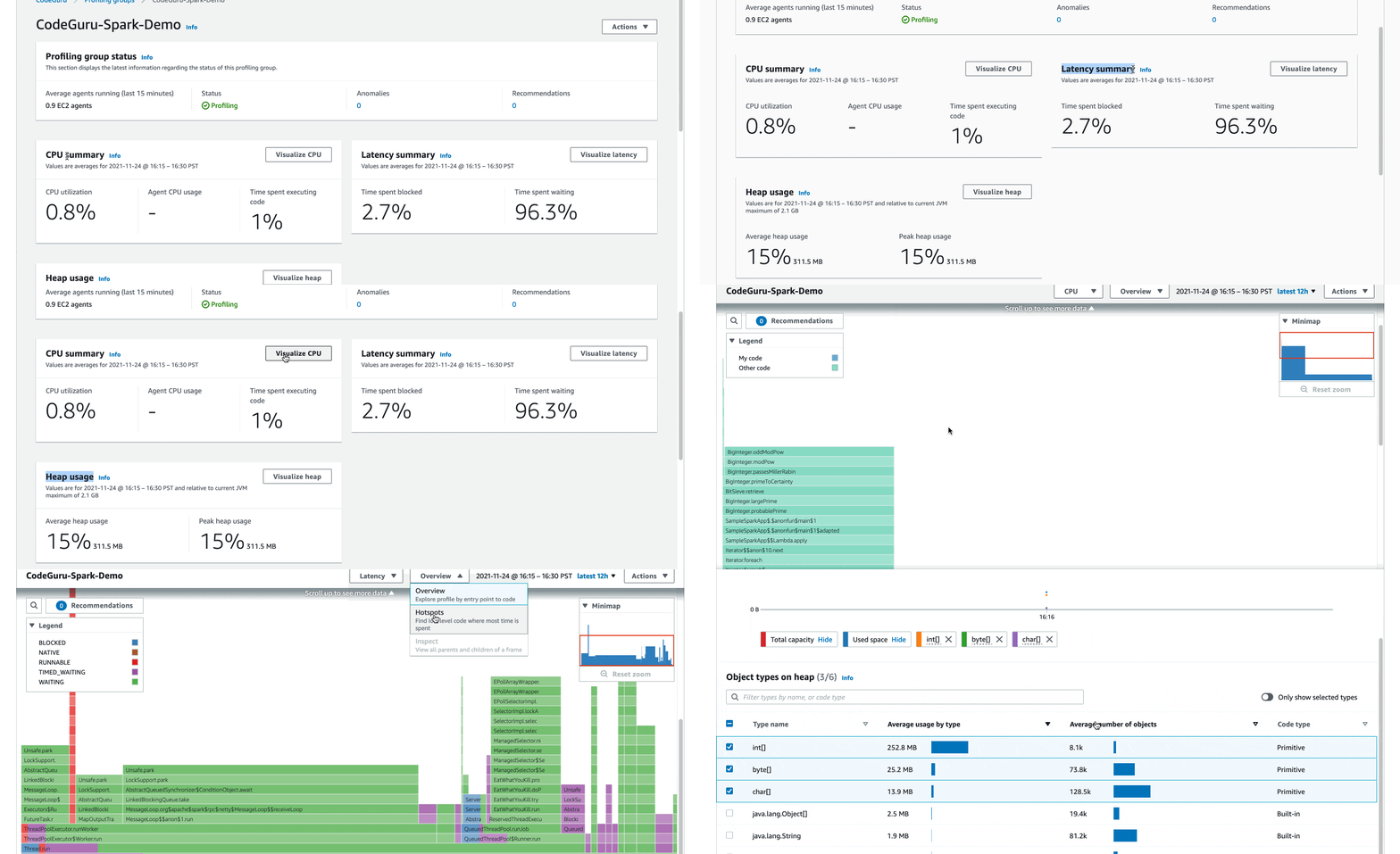
After loading up the profile in Amazon CodeGuru Profiler, it was immediately apparent from the visualization that a very large portion of the service’s CPU time was being taken up by Jackson deserialization (37%, across the two call sites). It was also interesting that most of the blocking calls in the program (in blue) was happening in the jackson.databind method _createAndCacheValueDeserializer.
Flame graphs represent the relative amount of time that the CPU spends at each point in the call graph. The wider it is, the more CPU usage it corresponds to.
The following flame graph is from before the performance improvements were implemented.
The Flame Graph before the deployment
Looking at the source for _createAndCacheValueDeserializer confirmed that there was a synchronized block. From within it, _createAndCache2 was called, which actually did the adding to the cache. Adding to the cache was guarded by a boolean condition which had a comment that indicated that caching would only be enabled for custom serializers if @JsonCachable was set.
Solution
Checking the documentation for @JsonCachable confirmed that this annotation looked like the correct solution for this performance issue. After we deployed a quick change to add @JsonCachable to our four custom deserializers, we observed that no visible time was spent in _createAndCacheValueDeserializer.
Results
Adding a one-line annotation in four different places made the code run twice as fast. Because it was holding a lock while it recreated the same deserializers for every call, this was allowing only one of the four CPU cores to be used and therefore causing latency and inefficiency. Reusing the deserializers avoided repeated work and saved us lot of resources.
After the CodeGuru Profiler recommendations were implemented, the amount of CPU spent in Jackson reduced from 37% to 5% across the two call paths, and there was no visible blocking. With the removal of the blocking, we could run higher load on our hosts and reduce the fleet size, saving approximately $100,000 a year in Amazon EC2 costs, thereby resulting in overall savings.
The following flame graph shows performance after the deployment.
The Flame Graph after the deployment
Metrics
The following graph shows that CPU usage reduced by almost 50%. The blue line shows the CPU usage the week before we implemented CodeGuru Profiler recommendations, and green shows the dropped usage after deploying. We could later safely scale down the fleet to reduce costs, while still having better performance than prior to the change.
The following graph shows the server latency, which also dropped by almost 50%. The latency dropped from 100 milliseconds to 50 milliseconds as depicted in the initial portion of the graph. The orange line depicts p99, green p99.9, and blue p50 (mean latency).
Conclusion
With a few lines of changed code and a half-hour investigation, we removed the bottleneck which led to lower utilization of resources and thus we were able to decrease the fleet size. We have seen many similar cases, and in one instance, a change of literally six characters of inefficient code, reduced CPU usage from 99% to 5%.
Across Amazon, CodeGuru Profiler has been used internally among various teams and resulted in millions of dollars of savings and performance optimization. You can use CodeGuru Profiler for quick insights into performance issues of your application. The more efficient the code and application is, the less costly it is to run. You can find potential savings for any application running in production and significantly reduce infrastructure costs using CodeGuru Profiler. Reducing fleet size, latency, and CPU usage is a major win.
About the Authors
Neha Gupta
Neha Gupta is a Solutions Architect at AWS and have 16 years of experience as a Database architect/ DBA. Apart from work, she’s outdoorsy and loves to dance.
Ian Clark
Ian is a Senior Software engineer with the Last Mile organization at Amazon. In his spare time, he enjoys exploring the Vancouver area with his family.
Interesting story about a barcode scanner app that has been pushing malware on to Android phones. The app is called Barcode Scanner. It’s been around since 2017 and is owned by the Ukrainian company Lavabird Ldt. But a December 2020 update included some new features:
However, a rash of malicious activity was recently traced back to the app. Users began noticing something weird going on with their phones: their default browsers kept getting hijacked and redirected to random advertisements, seemingly out of nowhere.
Generally, when this sort of thing happens it’s because the app was recently sold. That’s not the case here.
It is frightening that with one update an app can turn malicious while going under the radar of Google Play Protect. It is baffling to me that an app developer with a popular app would turn it into malware. Was this the scheme all along, to have an app lie dormant, waiting to strike after it reaches popularity? I guess we will never know.
AWS Amplify is a set of tools and services for building secure, scalable mobile and web applications. Currently, Amplify supports iOS, Android, and JavaScript (web and React Native) and is the quickest and easiest way to build applications powered by Amazon Web Services (AWS).
Flutter is Google’s UI toolkit for building natively compiled mobile, web, and desktop applications from a single code base and is one of the fastest-growing mobile frameworks.
Amplify Flutter brings together AWS Amplify and Flutter, and we designed it for customers who have invested in the Flutter ecosystem and now want to take advantage of the power of AWS.
In August 2020, we launched the developer preview of Amplify Flutter and asked for feedback. We were delighted with the response. After months of refining the service, today we are happy to announce the general availability of Amplify Flutter.
New Amplify Flutter Features in GA The GA release makes it easier to build powerful Flutter apps with the addition of three new capabilities:
Second, Amplify DataStore provides a programming model for leveraging shared and distributed data without writing additional code for offline and online scenarios, which makes working with distributed, cross-user data just as simple as working with local-only data.
Finally, we have Hosted UI which is a great way to implement authentication, and works with Amazon Cognito and other social identity providers such as Facebook, Google and Amazon. Hosted UI is a customizable OAuth 2.0 flow that allows you to launch a login screen without embedding the SDK for Cognito or a social provider in your application.
Digging Deeper Into Amplify DataStore I have been building an app over the past two weeks using Amplify Flutter, and my favorite feature is Amplify DataStore, primarily because it has saved me so much time.
Working with the REST and GraphQL APIs is great in Amplify. However, when I create a mobile app, I’m often thinking about what happens when the mobile device has intermittent connectivity and can’t connect to the API endpoints. Storing data locally and syncing back to the cloud can become quite complicated. Amplify DataStore solves that problem by providing a persistent on-device data store that handles the offline or online scenario.
When I started developing my app, I used DataStore as a stand-alone local database. However, its power became apparent to me when I connected it to a cloud backend. DataStore uses my AWS AppSync API to sync data when network connectivity is available. If the app is offline, it stores it locally, ready for when a connection becomes available.
Amplify DataStore automatically versions data and implements conflict detection and resolution in the cloud using AppSync. The toolchain also generates object definitions for Dart based on the GraphQL schema that I provide.
Writing to Amplify DataStore Writing to the DataStore is straightforward. The documentation site shows an example that you can try yourself that uses a schema from a blog site.
Post newPost = Post(
title: 'New Post being saved', rating: 15, status: PostStatus.DRAFT);
await Amplify.DataStore.save(newPost);
Reading from Amplify DataStore To read from the DataStore, you can query for all records of a given model type.
Synchronization with Amplify DataStore If you enable data synchronization, there can be different versions of an object across clients, and multiple clients may have updated their copies of an object. DataStore will converge different object versions by applying conflict detection and resolution strategies. The default resolution is called Auto Merge, but other strategies include optimistic concurrency control and custom Lambda functions.
Additional Amplify Flutter Features Amplify Flutter allows you to work with AWS in three additional ways:
Authentication. Amplify Flutter provides an interface for authenticating a user and enables use cases like Sign-Up, Sign-In, and Multi-Factor Authentication. Behind the scenes, it provides the necessary authorization to the other Amplify categories. It comes with built-in support for Cognito user pools and identity pools.
Storage.Amplify Flutter provides an interface for managing user content for your app in public, protected, or private storage buckets. It enables use cases like upload, download, and deleting objects and provides built-in support for Amazon Simple Storage Service (S3) by default.
Analytics. Amplify Flutter enables you to collect tracking data for authenticated or unauthenticated users in Amazon Pinpoint. You can easily record events and extend the default functionality for custom metrics or attributes as needed.
Available Now Amplify Flutter is now available in GA in all regions that support AWS Amplify. There is no additional cost for using Amplify Flutter; you only pay for the backend services your applications use above the free tier; check out the pricing page for more details.
To provide the best experiences, we use technologies like cookies to store and/or access device information. Consenting to these technologies will allow us to process data such as browsing behavior or unique IDs on this site. Not consenting or withdrawing consent, may adversely affect certain features and functions.
Functional
Always active
The technical storage or access is strictly necessary for the legitimate purpose of enabling the use of a specific service explicitly requested by the subscriber or user, or for the sole purpose of carrying out the transmission of a communication over an electronic communications network.
Preferences
The technical storage or access is necessary for the legitimate purpose of storing preferences that are not requested by the subscriber or user.
Statistics
The technical storage or access that is used exclusively for statistical purposes.The technical storage or access that is used exclusively for anonymous statistical purposes. Without a subpoena, voluntary compliance on the part of your Internet Service Provider, or additional records from a third party, information stored or retrieved for this purpose alone cannot usually be used to identify you.
Marketing
The technical storage or access is required to create user profiles to send advertising, or to track the user on a website or across several websites for similar marketing purposes.