Tag Archives: AWS re:Invent

Join the Preview – Amazon EC2 C7g Instances Powered by New AWS Graviton3 Processors

Post Syndicated from Jeff Barr original https://aws.amazon.com/blogs/aws/join-the-preview-amazon-ec2-c7g-instances-powered-by-new-aws-graviton3-processors/

We announced the first generation AWS-designed Graviton processor in late 2018, and followed it up with the second generation Graviton2 a year later. Today, AWS customers make use of twelve different Graviton2-powered instances including the new X2gd instances that are designed for memory-intensive workloads. All Graviton processors include dedicated cores & caches for each vCPU, along with additional security features courtesy of AWS Nitro System; the Graviton2 processors add support for always-on memory encryption.

C7g in the Works
I am thrilled to tell you about our upcoming C7g instances. Powered by new Graviton3 processors, these instances are going to be a great match for your compute-intensive workloads: HPC, batch processing, electronic design automation (EDA), media encoding, scientific modeling, ad serving, distributed analytics, and CPU-based machine learning inferencing.

While we are still optimizing these instances, it is clear that the Graviton3 is going to deliver amazing performance. In comparison to the Graviton2, the Graviton3 will deliver up to 25% more compute performance and up to twice as much floating point & cryptographic performance. On the machine learning side, Graviton3 includes support for bfloat16 data and will be able to deliver up to 3x better performance.

Graviton3 processors also include a new pointer authentication feature that is designed to improve security. Before return addresses are pushed on to the stack, they are first signed with a secret key and additional context information, including the current value of the stack pointer. When the signed addresses are popped off the stack, they are validated before being used. An exception is raised if the address is not valid, thereby blocking attacks that work by overwriting the stack contents with the address of harmful code. We are working with operating system and compiler developers to add additional support for this feature, so please get in touch if this is of interest to you.

C7g instances will be available in multiple sizes (including bare metal), and are the first in the cloud industry to be equipped with DDR5 memory. In addition to drawing less power, this memory delivers 50% higher bandwidth than the DDR4 memory used in the current generation of EC2 instances.

On the network side, C7g instances will offer up to 30 Gbps of network bandwidth and Elastic Fabric Adapter (EFA) support.

Join the Preview
We are now running a preview of the C7g instances so that you can be among the first to experience all of this power. Sign up now, take an instance for a spin, and let me know what you think!

Jeff;

New – Use Amazon S3 Event Notifications with Amazon EventBridge

Post Syndicated from Jeff Barr original https://aws.amazon.com/blogs/aws/new-use-amazon-s3-event-notifications-with-amazon-eventbridge/

We launched Amazon EventBridge in mid-2019 to make it easy for you to build powerful, event-driven applications at any scale. Since that launch, we have added several important features including a Schema Registry, the power to Archive and Replay Events, support for Cross-Region Event Bus Targets, and API Destinations to allow you to send events to any HTTP API. With support for a very long list of destinations and the ability to do pattern matching, filtering, and routing of events, EventBridge is an incredibly powerful and flexible architectural component.

S3 Event Notifications
Today we are making it even easier for you to use EventBridge to build applications that react quickly and efficiently to changes in your S3 objects. This is a new, “directly wired” model that is faster, more reliable, and more developer-friendly than ever. You no longer need to make additional copies of your objects or write specialized, single-purpose code to process events.

At this point you might be thinking that you already had the ability to react to changes in your S3 objects, and wondering what’s going on here. Back in 2014 we launched S3 Event Notifications to SNS Topics, SQS Queues, and Lambda functions. This was (and still is) a very powerful feature, but using it at enterprise-scale can require coordination between otherwise-independent teams and applications that share an interest in the same objects and events. Also, EventBridge can already extract S3 API calls from CloudTrail logs and use them to do pattern matching & filtering. Again, very powerful and great for many kinds of apps (with a focus on auditing & logging), but we always want to do even better.

Net-net, you can now configure S3 Event Notifications to directly deliver to EventBridge! This new model gives you several benefits including:

Advanced Filtering – You can filter on many additional metadata fields, including object size, key name, and time range. This is more efficient than using Lambda functions that need to make calls back to S3 to get additional metadata in order to make decisions on the proper course of action. S3 only publishes events that match a rule, so you save money by only paying for events that are of interest to you.

Multiple Destinations – You can route the same event notification to your choice of 18 AWS services including Step Functions, Kinesis Firehose, Kinesis Data Streams, and HTTP targets via API Destinations. This is a lot easier than creating your own fan-out mechanism, and will also help you to deal with those enterprise-scale situations where independent teams want to do their own event processing.

Fast, Reliable Invocation – Patterns are matched (and targets are invoked) quickly and directly. Because S3 provides at-least-once delivery of events to EventBridge, your applications will be more reliable.

You can also take advantage of other EventBridge features, including the ability to archive and then replay events. This allows you to reprocess events in case of an error or if you add a new target to an event bus.

Getting Started
I can get started in minutes. I start by enabling EventBridge notifications on one of my S3 buckets (jbarr-public in this case). I open the S3 Console, find my bucket, open the Properties tab, scroll down to Event notifications, and click Edit:

I select On, click Save changes, and I’m ready to roll:

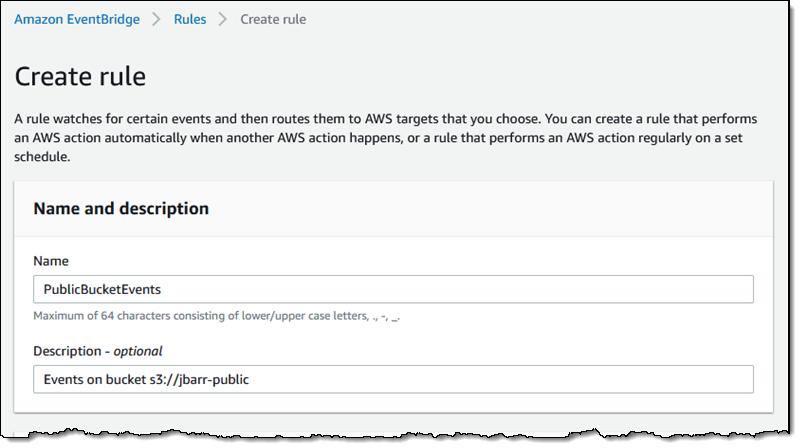
Now I use the EventBridge Console to create a rule. I start, as usual, by entering a name and a description:

Then I define a pattern that matches the bucket and the events of interest:
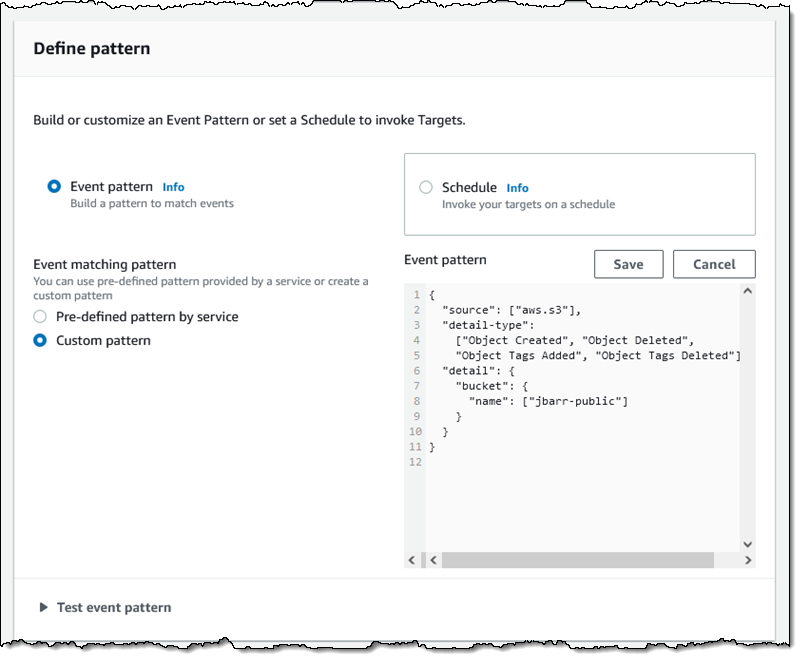
One pattern can match one or more buckets and one or more events; the following events are supported:
  • Object Created
  • Object Deleted
  • Object Restore Initiated
  • Object Restore Completed
  • Object Restore Expired
  • Object Tags Added
  • Object Tags Deleted
  • Object ACL Updated
  • Object Storage Class Changed
  • Object Access Tier Changed

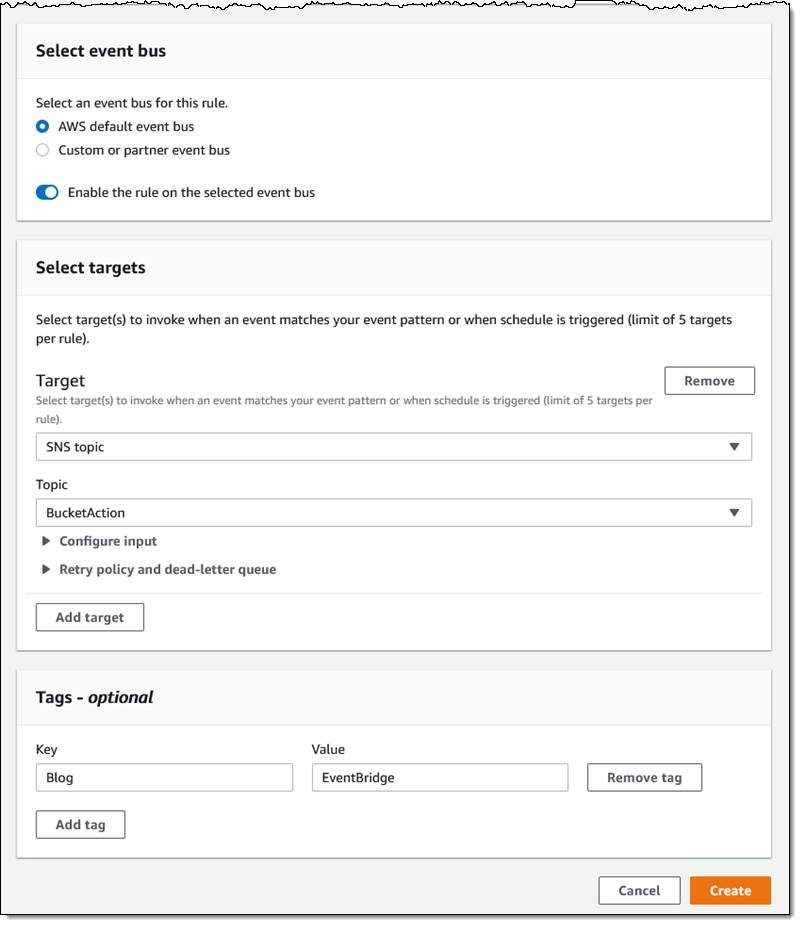
Then I choose the default event bus, and set the target to an SNS topic (BucketAction) which publishes the messages to my Amazon email address:

I click Create, and I am all set. To test it out, I simply upload some files to my bucket and await the messages:

The message contains all of the interesting and relevant information about the event, and (after some unquoting and formatting), looks like this:

{
    "version": "0",
    "id": "2d4eba74-fd51-3966-4bfa-b013c9da8ff1",
    "detail-type": "Object Created",
    "source": "aws.s3",
    "account": "348414629041",
    "time": "2021-11-13T00:00:59Z",
    "region": "us-east-1",
    "resources": [
        "arn:aws:s3:::jbarr-public"
    ],
    "detail": {
        "version": "0",
        "bucket": {
            "name": "jbarr-public"
        },
        "object": {
            "key": "eb_create_rule_mid_1.png",
            "size": 99797,
            "etag": "7a72374e1238761aca7778318b363232",
            "version-id": "a7diKodKIlW3mHIvhGvVphz5N_ZcL3RG",
            "sequencer": "00618F003B7286F496"
        },
        "request-id": "4Z2S00BKW2P1AQK8",
        "requester": "348414629041",
        "source-ip-address": "72.21.198.68",
        "reason": "PutObject"
    }

My initial event pattern was very simple, and matched only the bucket name. I can use content-based filtering to write more complex and more interesting patterns. For example, I could use numeric matching to set up a pattern that matches events for objects that are smaller than 1 megabyte:

{
    "source": [
        "aws.s3"
    ],
    "detail-type": [
        "Object Created",
        "Object Deleted",
        "Object Tags Added",
        "Object Tags Deleted"
    ],

    "detail": {
        "bucket": {
            "name": [
                "jbarr-public"
            ]
        },
        "object" : {
            "size": [{"numeric" :["<=", 1048576 ] }]
        }
    }
}

Or, I could use prefix matching to set up a pattern that looks for objects uploaded to a “subfolder” (which doesn’t really exist) of a bucket:

"object": {
  "key" : [{"prefix" : "uploads/"}]
  }]
}

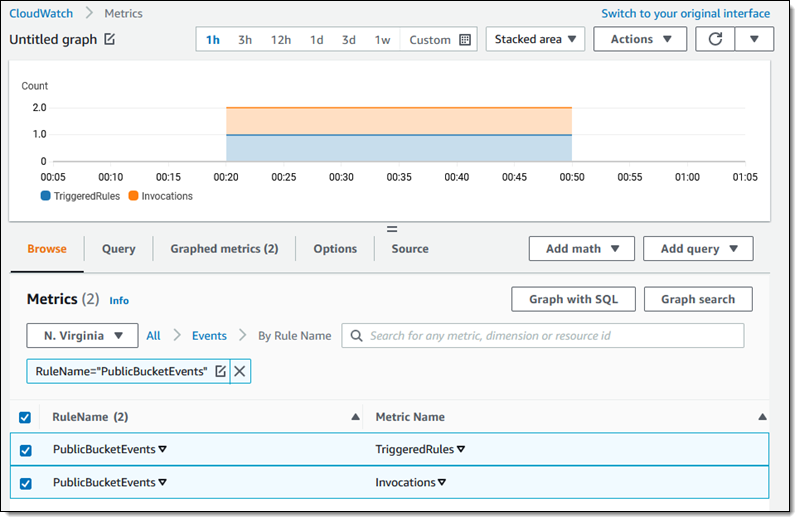
You can use all of this in conjunction with all of the existing EventBridge features, including Archive/Replay. You can also access the CloudWatch metrics for each of your rules:

Available Now
This feature is available now and you can start using it today in all commercial AWS Regions. You pay $1 for every 1 million events that match a rule; check out the EventBridge Pricing page for more information.

Jeff;

New – Amazon EBS Snapshots Archive

Post Syndicated from Sébastien Stormacq original https://aws.amazon.com/blogs/aws/new-amazon-ebs-snapshots-archive/

I am pleased to announce the availability of Amazon EBS Snapshots Archive, a new storage tier for the long-term retention of Amazon Elastic Block Store (EBS) snapshots of your EBS volumes.

In a nutshell, EBS is an easy-to-use high-performance block storage service for your Amazon Elastic Compute Cloud (Amazon EC2) instances. An EBS volume mounted to your EC2 instances lets you boot an operating system and store data for your most performance-demanding workloads. You may use EBS snapshots to create point-in-time copies of your volume data. The first snapshot of a volume contains all of the data written into that volume. Subsequent snapshots are incremental. Snapshots are stored on Amazon Simple Storage Service (Amazon S3), and they may be shared between AWS accounts and AWS Regions.

The ability to take frequent snapshots and easily restore volumes makes EBS snapshots an obvious choice for your data management strategy, alongside other backup options. The incremental nature of snapshots makes them cost-effective for daily and weekly backups that need immediate restores. However, you were telling us that business compliance and regulatory needs have meant that you needed to retain EBS snapshots for longer periods of time (months or years). For example, snapshots taken at the end of a project, or snapshots for test and development preserved for future project releases. The vast majority of these snapshots are taken and never read. For these snapshots, you are looking to lower your storage costs. Today, to benefit from lower storage costs, you may have written complex scripts involving temporary EC2 instances to restore snapshots, mount the corresponding volumes, and transfer the data to lower-cost storage tiers, such as Amazon Glacier.

EBS Snapshots Archive provides a low-cost storage tier to archive full, point-in-time copies of EBS Snapshots that you must retain for 90 days or more for regulatory and compliance reasons, or for future project releases. Now, you can easily archive and manage EBS Snapshots, thereby eliminating the need for custom scripts and third-party tools to manage these snapshots. This lets you move your rarely accessed snapshots to EBS Snapshots Archive to achieve up to 75% lower storage costs, and avoid licensing costs for third-party tools. Furthermore, you can retrieve an archived snapshot within 24-72 hours, and, once restored, use the snapshot to recover an EBS volume.

As per usual, let me show you how it works.

How to Get Started
I have a snapshot available in the US East (N. Virginia) Region, and I want to archive this snapshot for compliance reasons. I open the AWS Management Console, navigate to EC2, then to Snapshots. I select the snapshot I want to archive, and select the Actions menu. I select the Archive snapshot menu option.

EBS Snapshot Archive - create snapshot

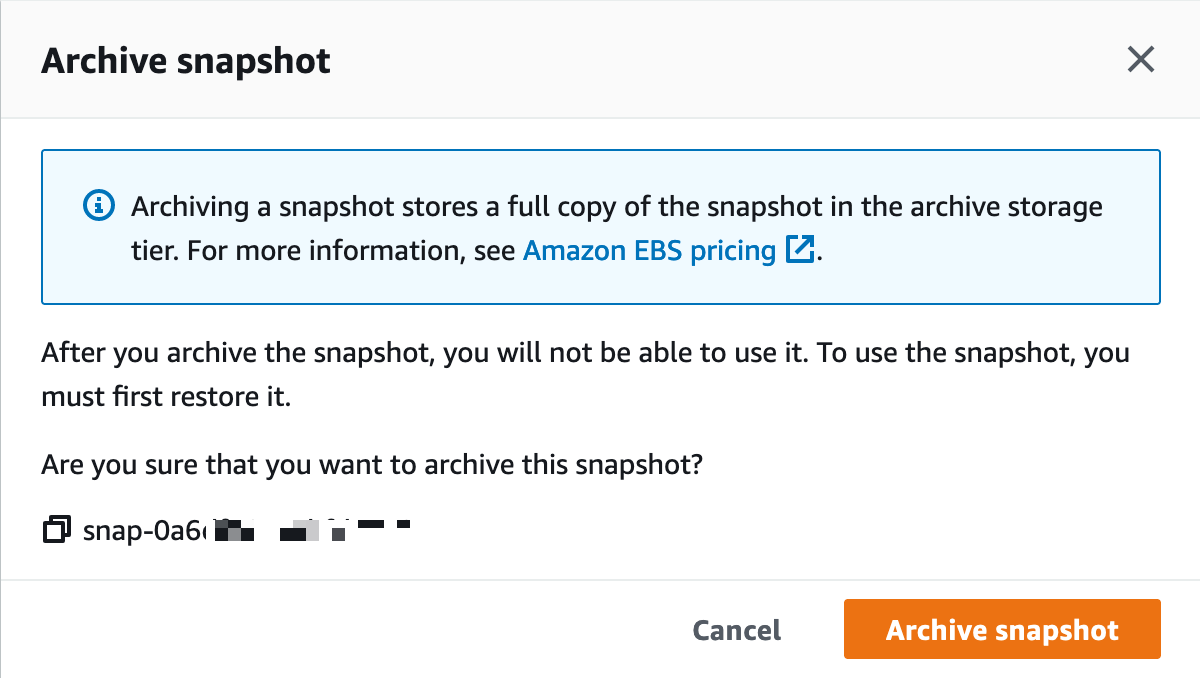
I carefully read the confirmation message :-), and I select Archive snapshot.

EBS Snapshot Archive - create snapshot - confirmation

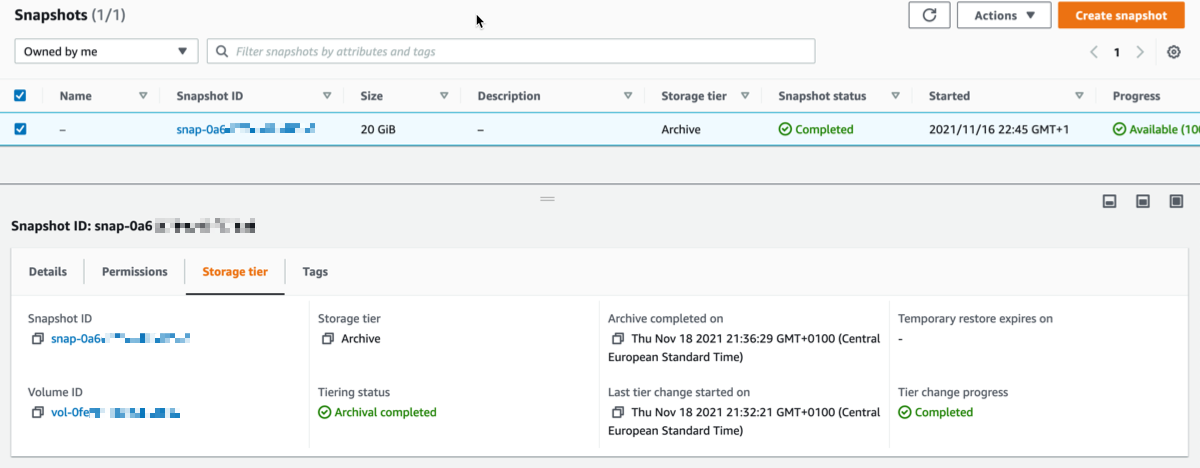
I may monitor the progress of the archive operation with the new Storage Tier tab at the bottom of the screen. After some time, depending on the size of the snapshot, the Tiering status becomes ✅ Archival completed.

EBS Snapshot Archive - create snapshot - archival completedArchived snapshots stay visible in the console. The new Storage tier column indicates the tier used for storage (Standard or Archive).

How do I Restore a Volume?
Restoring a volume from EBS Snapshots Archive is a two-step process. First, I retrieve the snapshot from EBS Snapshots Archive to its original snapshot ID, using RestoreSnapshotTier API call or the management console. It takes between 24-72 hours to retrieve the snapshot from the archive, depending on the snapshot size. Once retrieved, the snapshot appears as a regular snapshot on my account. At this stage, I hydrate the retrieved snapshot into an EBS volume using the default snapshot restore or Fast Snapshot Restore (FSR) for expedited restores, just like usual.

A CloudWatch event is generated when the snapshot is restored. You may listen to this event to avoid pulling the status with the API.

A CreateVolume API call on an archived snapshot will fail. You must restore a snapshot from archive before you use it to create a volume.

Using the AWS Management Console, I select the snapshot that I want to restore, I select the Actions menu, and then I select the Restore snapshot from archive menu option.

EBS Snapshot Archive - create snapshot - restore archive

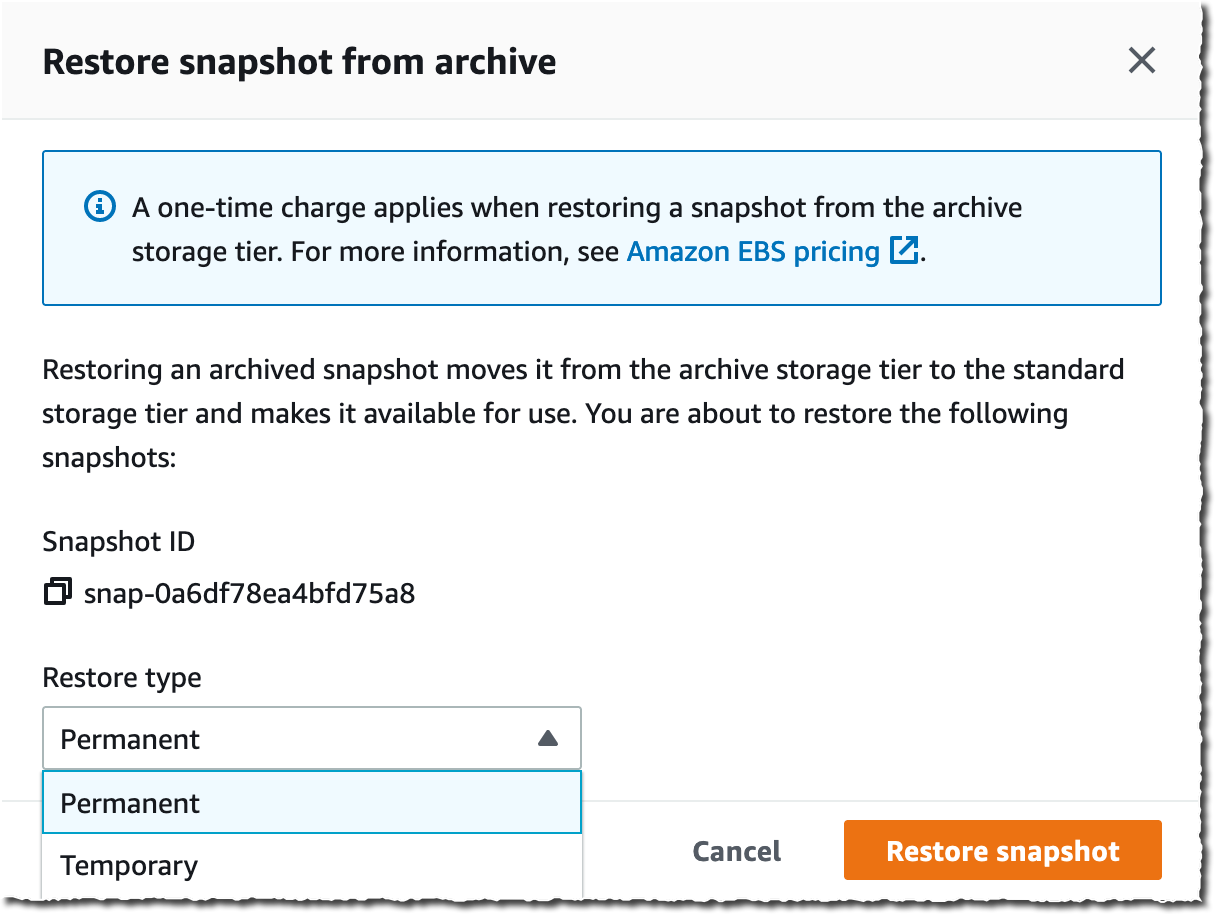
I have the choice to restore the snapshot permanently, or just temporarily. At the end of the temporary duration, the standard tier snapshot is deleted, and only the archive is preserved.

EBS Snapshot Archive - create snapshot - restore archive - confirmation

After a while, depending on the snapshot size, the archive is restored to standard storage and may be used to recreate a volume, just like usual. I may monitor the progress of the retrieval and the lifetime for temporarily restored archives in the new Storage tier tab in the bottom half of the screen. Temporary restored snapshots may be kept for up to 180 days.

Pricing and Availability
EBS Snapshots Archive is available for you today in 17 AWS Regions. At the time of launch, it is not available in the two Regions in China, Asia Pacific (Seoul), Asia Pacific (Osaka), Canada (Central), and South America (São Paulo).

As per usual, you pay as-you-go, with no minimum or fixed fees. There are two metrics that influence EBS Snapshots Archive billing: data storage and data retrieval. We charge you $0.0125 per GB-month of stored data and $0.03 per GB retrieved. You are charged for a 90-day period at minimum. This means that if you delete a snapshot archive or permanently restore it less than 90 days after creation, then we charge for the full 90-day period. The EBS pricing page has the details.

Go ahead and start to configure your long term storage for EBS snaphots today.

— seb

New – AWS Control Tower Account Factory for Terraform

Post Syndicated from Danilo Poccia original https://aws.amazon.com/blogs/aws/new-aws-control-tower-account-factory-for-terraform/

AWS Control Tower makes it easier to set up and manage a secure, multi-account AWS environment. AWS Control Tower uses AWS Organizations to create what is called a landing zone, bringing ongoing account management and governance based on our experience working with thousands of customers.

If you use AWS CloudFormation to manage your infrastructure as code, you can customize your AWS Control Tower landing zone using Customizations for AWS Control Tower, a solution that helps you deploy custom templates and policies to individual accounts and organizational units (OUs) within your organization.

But what if you use Terraform to manage your AWS infrastructure?

Today, I am happy to share the availability of AWS Control Tower Account Factory for Terraform (AFT), a new Terraform module maintained by the AWS Control Tower team that allows you to provision and customize AWS accounts through Terraform using a deployment pipeline. The source code for the development pipeline can be stored in AWS CodeCommit, GitHub, GitHub Enterprise, or BitBucket. With AFT, you can automate the creation of fully functional accounts that have access to all the resources they need to be productive. The module works with Terraform open source, Terraform Enterprise, and Terraform Cloud.

Architectural diagram.

Let’s see how this works in practice.

Using AWS Control Tower Account Factory for Terraform
First, I create a main.tf file that uses the AWS Control Tower Account Factory for Terraform (AFT) module:

module "aft" {
  source = "[email protected]:aws-ia/terraform-aws-control_tower_account_factory.git"

  # Required Parameters
  ct_management_account_id    = "123412341234"
  log_archive_account_id      = "234523452345"
  audit_account_id            = "345634563456"
  aft_management_account_id   = "456745674567"
  ct_home_region              = "us-east-1"
  tf_backend_secondary_region = "us-west-2"

  # Optional Parameters
  terraform_distribution = "oss"
  vcs_provider           = "codecommit"

  # Optional Feature Flags
  aft_feature_delete_default_vpcs_enabled = false
  aft_feature_cloudtrail_data_events      = false
  aft_feature_enterprise_support          = false
}

The first six parameters are required. As a prerequisite, I need to pass the ID of four AWS accounts in my AWS organization:

  • ct_management_account_id – AWS Control Tower management account
  • log_archive_account_id – Log Archive account
  • audit_account_id – Audit account
  • aft_management_account_id – AFT management account

Then, I have to pass two AWS Regions:

  • ct_home_region – The Region from which this module will be executed. This must be the same Region where AWS Control Tower is deployed.
  • tf_backend_secondary_region – The backend primary Region is the same as the AFT Region. This parameter defines the secondary Region to replicate to. AFT creates a backend for state tracking for its own state. It is also used for Terraform when using the open-source version.

The other parameters are optional and are set to their default value in the previous main.tf file:

  • terraform_distribution – To select between Terraform open source (default), Enterprise, or Cloud
  • vcs_provider – To choose the version control system to use between AWS CodeCommit (default), GitHub, GitHub Enterprise, or BitBucket.

These feature flags are disabled by default and can be omitted unless you want to enable them:

  • aft_feature_delete_default_vpcs_enabled – To automatically delete the default VPC for new accounts.
  • aft_feature_cloudtrail_data_events – To enable AWS CloudTrail data events for new accounts. Be aware that this option, usually required for compliance in highly regulated environments, can have an impact on your costs.
  • aft_feature_enterprise_support – To automatically enroll new accounts with Enterprise Support (if you have an Enterprise Support Plan).

First, I initialize the project and download the plugins:

terraform init

Then, I use AWS Single Sign-On to log in with the AWS Control Tower management account and start the deployment:

terraform apply

I confirm with a yes and, after some time, the deployment is complete.

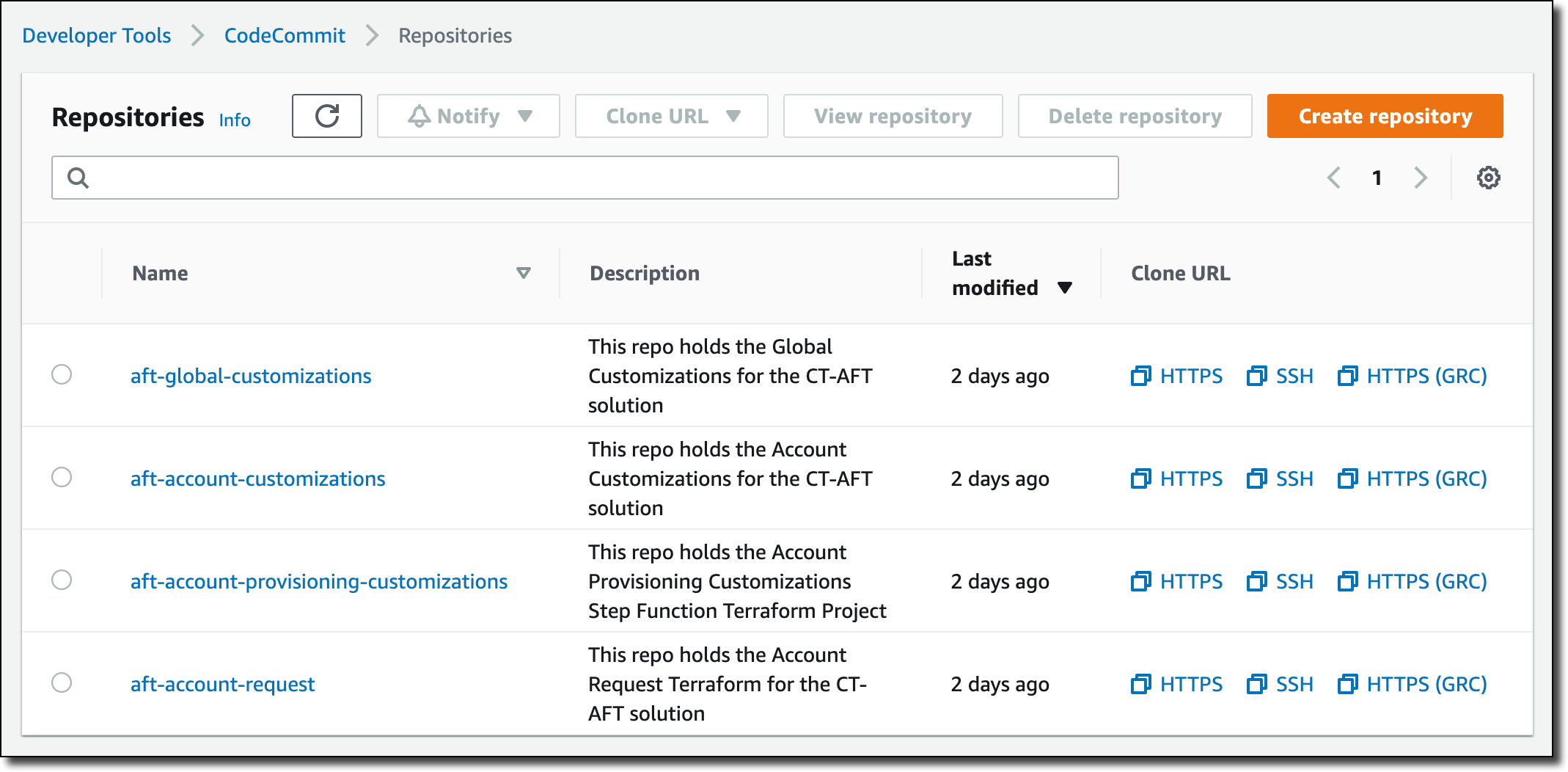
Now, I use AWS SSO again to log in with the AFT management account. In the AWS CodeCommit console, I find four repositories that I can use to customize the accounts created with AFT.

Console screenshot.

These repositories are used by pipelines managed by AWS CodePipeline to automate the account creation:

  • xaft-account-request – This is where I place requests for accounts provisioned and managed by AFT.
  • aft-global-customizations – I can use this repository to customize all provisioned accounts with customer-defined resources. The resources can be created through Terraform or through Python.
  • aft-account-customizations – Here, I can customize provisioned accounts depending on the value of the account_customizations_name parameter in the aft-account-request repository. In this way, I can create different sets of customizations depending on the role the account will be used for.
  • aft-account-provisioning-customizations – This repository uses AWS Step Functions to customize the provisioning process for new accounts and simplify the integration with additional environments. State machines can use AWS Lambda functions, Amazon Elastic Container Service (Amazon ECS) or AWS Fargate tasks, custom activities hosted either on AWS or on-premises, or Amazon Simple Notification Service (SNS) and Amazon Simple Queue Service (SQS) to communicate with external applications.

Currently, these four repositories are all empty. To start, I use the code in the sources/aft-customizations-repos folder in the GitHub repo of the AFT Terraform module.

Using the example in the aft-account-request repository, I prepare a template to create a couple of AWS accounts. One of the two accounts is for a software developer.

To help software developers be productive quickly, I create a specific account customization. In the template, I set the parameter account_customizations_name equal to developer-customization.

Then, in the aft-account-customizations repository, I create a developer-customization folder where I put a Terraform template to automatically create an AWS Cloud9 EC2-based development environment for new accounts of that type. Optionally, I can extend that with my Python code, for example, to invoke internal or external APIs. Using this approach, all new accounts for software developers will have their development environment ready as they go through the delivery pipeline.

I push the changes to the main branch (first for the aft-account-customizations repository, then for the aft-account-request). This triggers the execution of the pipeline. After a few minutes, the two new accounts are ready to be used.

You can customize accounts created by AFT based on your unique requirements. For example, you can provide each account with its own specific security setup (such as IAM roles or security groups) and storage (for example, pre-configured Amazon Simple Storage Service (Amazon S3) buckets).

Availability and Pricing
AWS Control Tower Account Factory for Terraform (AFT) works in any Region where AWS Control Tower is available. There are no additional costs when using AFT. You pay for the services used by the solution. For example, when you set up AWS Control Tower, you will begin to incur costs for AWS services configured to set up your landing zone and mandatory guardrails.

When building this solution, we worked together with HashiCorp. Armon Dadgar, HashiCorp Co-Founder and CTO, told us: “Managing cloud environments with hundreds or thousands of users can be a complex and time-consuming process. Using a software delivery pipeline integrating Terraform and AWS Control Tower makes it easier to achieve consistent governance and compliance requirements across all accounts.”

The pipeline provides an account creation process that monitors when account provisioning is complete and then triggers additional Terraform modules to enhance the account with further customizations. You can configure the pipeline to use your own custom Terraform modules or pick from pre-published Terraform modules for common products and configurations.

Simplify and standardize AWS account creation using AWS Control Tower Account Factory for Terraform.

Danilo

New – Recycle Bin for EBS Snapshots

Post Syndicated from Jeff Barr original https://aws.amazon.com/blogs/aws/new-recycle-bin-for-ebs-snapshots/

It is easy to create EBS Snapshots, and just as easy to either delete them manually or to use the Data Lifecycle Manager to delete them automatically in accord with your organization’s retention model. Sometimes, as it turns out, it is a bit too easy to delete snapshots, and a well-intended cleanup effort or a wayward script can sometimes go a bit overboard!

New Recycle Bin
In order to give you more control over the deletion process, we are launching a Recycle Bin for EBS Snapshots. As you will see in a moment, you can now set up rules to retain deleted snapshots so that you can recover them after an accidental deletion. You can think of this as a two-level model, where individual AWS users are responsible for the initial deletion, and then a designated “Recycle Bin Administrator” (as specified by an IAM role) manages retention and recovery.

Rules can apply to all snapshots, or to snapshots that include a specified set of tag/value pairs. Each rule specifies a retention period (between one day and one year), after which the snapshot is permanently deleted.

Let’s Recycle!
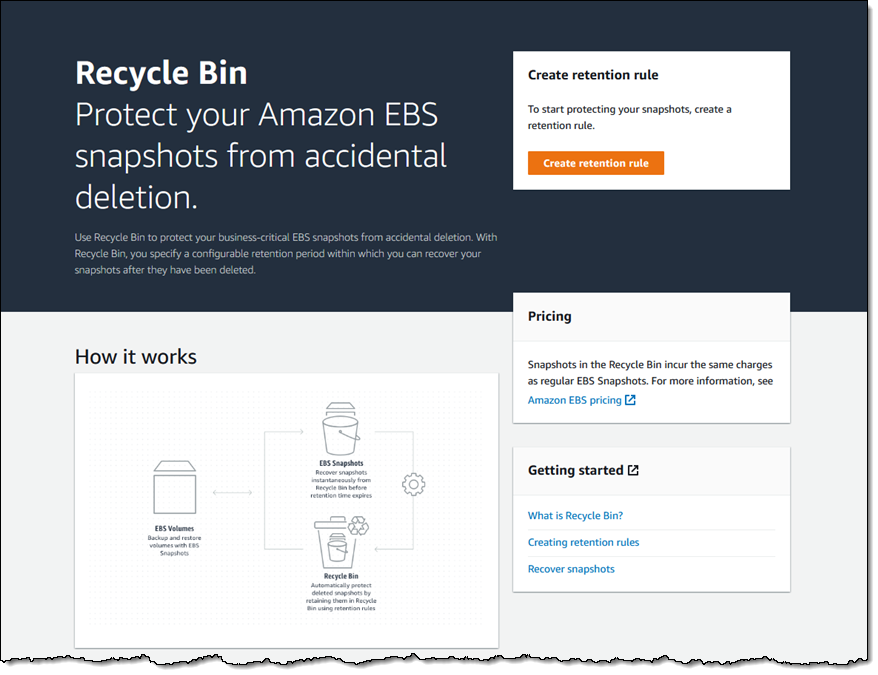
I open the Recycle Bin Console, select the region of interest, and click Create retention rule to begin:

I call my first rule KeepAll, and set it to retain all deleted EBS snapshots for 4 days:

I add a tag (User) to the rule, and click Create retention rule:
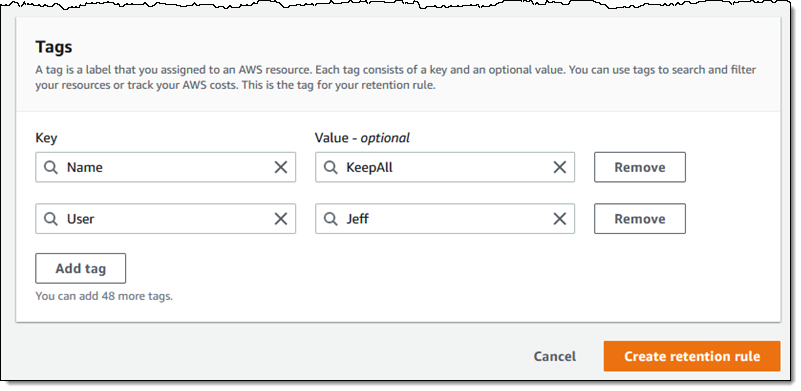
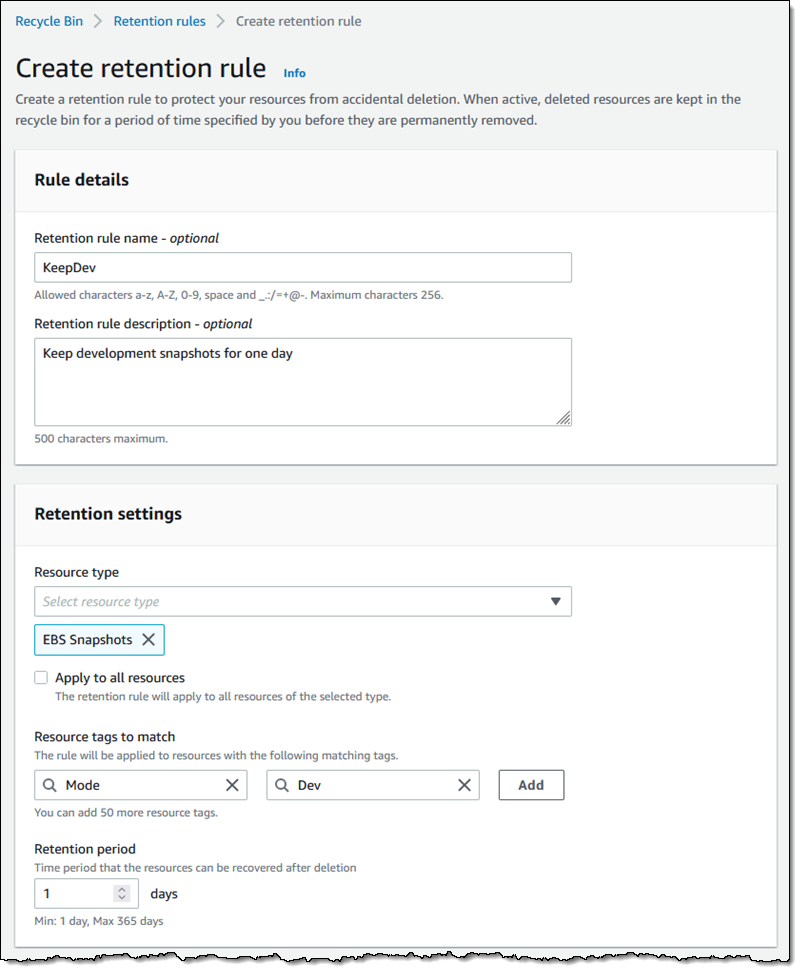
Because Apply to all resources is checked, this is a general rule that applies when there are no applicable rules that specify one or more tags.

Then I create a second rule (KeepDev) that retains snapshots tagged with a Mode of Dev for just one day:

If two different tag-based rules match the same resource, then the one with the longer retention period applies.

Here are my retention rules:

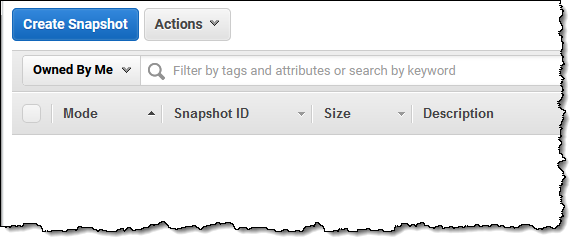
Here are my EBS snapshots. As you can see, the first three are tagged with a Mode of Dev:

In an effort to save several cents per month, I impulsively delete them all:

And they are gone:

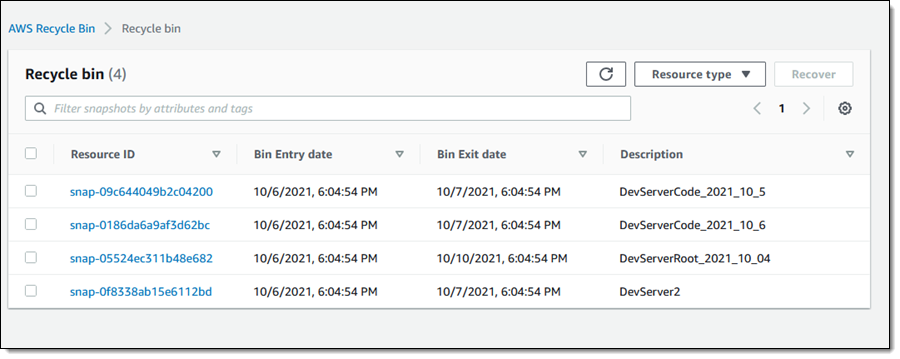
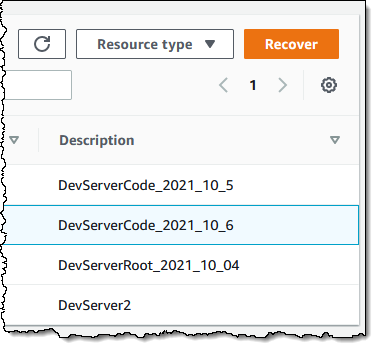
Later in the day, a member of my developer team messages me in a panic and lets me know that they desperately need the latest snapshot of the development server’s code. I open the Recycle Bin and I locate the snapshot (DevServer_2021_10_6):

I select the snapshot and click Recover:

Then I confirm my intent:

And the snapshot is available once again:

As has always been the case, Fast Snapshot Restore is disabled when a snapshot is deleted. With this launch, it will remain disabled when a snapshot is restored.

All of this functionality (creating rules, listing resources in the Recycle Bin, and restoring them) is also available from the CLI and via the Recycle Bin APIs.

Things to Know
Here are a couple of things to know about the new Recycle Bin:

IAM Support – As I mentioned earlier, you can use AWS Identity and Access Management (IAM) to grant access to this feature, and should consider creating an empowered user known as the Recycle Bin Administrator.

Rule Changes – You can make changes to your retention rules at any time, but be aware that the rules are evaluated (and the retention period is set) when you delete a snapshot. Changing a rule after an item has been deleted will not alter the retention period for the item.

Pricing – Resources that are in the Recycle Bin are charged the usual price, but be aware that creating rules with long retention periods could increase your AWS bill. On a related note, be sure that keeping deleted snapshots around does not violate your organization’s data retention policies. There is no charge for deleting or recovering a resource.

In the Bin – Resources in the Recycle Bin are immutable. If a resource is recovered, all of its existing metadata (tags and so forth) is also recovered intact.

Recycling  – We will do our best to recycle all of the zeroes and all of the ones once when a resource in your Recycle Bin reaches the end of its retention period!

Jeff;

Introducing Karpenter – An Open-Source High-Performance Kubernetes Cluster Autoscaler

Post Syndicated from Channy Yun original https://aws.amazon.com/blogs/aws/introducing-karpenter-an-open-source-high-performance-kubernetes-cluster-autoscaler/

Today we are announcing that Karpenter is ready for production. Karpenter is an open-source, flexible, high-performance Kubernetes cluster autoscaler built with AWS. It helps improve your application availability and cluster efficiency by rapidly launching right-sized compute resources in response to changing application load. Karpenter also provides just-in-time compute resources to meet your application’s needs and will soon automatically optimize a cluster’s compute resource footprint to reduce costs and improve performance.

Before Karpenter, Kubernetes users needed to dynamically adjust the compute capacity of their clusters to support applications using Amazon EC2 Auto Scaling groups and the Kubernetes Cluster Autoscaler. Nearly half of Kubernetes customers on AWS report that configuring cluster auto scaling using the Kubernetes Cluster Autoscaler is challenging and restrictive.

When Karpenter is installed in your cluster, Karpenter observes the aggregate resource requests of unscheduled pods and makes decisions to launch new nodes and terminate them to reduce scheduling latencies and infrastructure costs. Karpenter does this by observing events within the Kubernetes cluster and then sending commands to the underlying cloud provider’s compute service, such as Amazon EC2.

Karpenter is an open-source project licensed under the Apache License 2.0. It is designed to work with any Kubernetes cluster running in any environment, including all major cloud providers and on-premises environments. We welcome contributions to build additional cloud providers or to improve core project functionality. If you find a bug, have a suggestion, or have something to contribute, please engage with us on GitHub.

Getting Started with Karpenter on AWS
To get started with Karpenter in any Kubernetes cluster, ensure there is some compute capacity available, and install it using the Helm charts provided in the public repository. Karpenter also requires permissions to provision compute resources on the provider of your choice.

Once installed in your cluster, the default Karpenter provisioner will observe incoming Kubernetes pods, which cannot be scheduled due to insufficient compute resources in the cluster and automatically launch new resources to meet their scheduling and resource requirements.

I want to show a quick start using Karpenter in an Amazon EKS cluster based on Getting Started with Karpenter on AWS. It requires the installation of AWS Command Line Interface (AWS CLI), kubectl, eksctl, and Helm (the package manager for Kubernetes). After setting up these tools, create a cluster with eksctl. This example configuration file specifies a basic cluster with one initial node.

cat <<EOF > cluster.yaml
---
apiVersion: eksctl.io/v1alpha5
kind: ClusterConfig
metadata:
  name: eks-karpenter-demo
  region: us-east-1
  version: "1.20"
managedNodeGroups:
  - instanceType: m5.large
    amiFamily: AmazonLinux2
    name: eks-kapenter-demo-ng
    desiredCapacity: 1
    minSize: 1
    maxSize: 5
EOF
$ eksctl create cluster -f cluster.yaml

Karpenter itself can run anywhere, including on self-managed node groups, managed node groups, or AWS Fargate. Karpenter will provision EC2 instances in your account.

Next, you need to create necessary AWS Identity and Access Management (IAM) resources using the AWS CloudFormation template and IAM Roles for Service Accounts (IRSA) for the Karpenter controller to get permissions like launching instances following the documentation. You also need to install the Helm chart to deploy Karpenter to your cluster.

$ helm repo add karpenter https://charts.karpenter.sh
$ helm repo update
$ helm upgrade --install --skip-crds karpenter karpenter/karpenter --namespace karpenter \
  --create-namespace --set serviceAccount.create=false --version 0.5.0 \
  --set controller.clusterName=eks-karpenter-demo
  --set controller.clusterEndpoint=$(aws eks describe-cluster --name eks-karpenter-demo --query "cluster.endpoint" --output json) \
  --wait # for the defaulting webhook to install before creating a Provisioner

Karpenter provisioners are a Kubernetes resource that enables you to configure the behavior of Karpenter in your cluster. When you create a default provisioner, without further customization besides what is needed for Karpenter to provision compute resources in your cluster, Karpenter automatically discovers node properties such as instance types, zones, architectures, operating systems, and purchase types of instances. You don’t need to define these spec:requirements if there is no explicit business requirement.

cat <<EOF | kubectl apply -f -
apiVersion: karpenter.sh/v1alpha5
kind: Provisioner
metadata:
name: default
spec:
#Requirements that constrain the parameters of provisioned nodes. 
#Operators { In, NotIn } are supported to enable including or excluding values
  requirements:
    - key: node.k8s.aws/instance-type #If not included, all instance types are considered
      operator: In
      values: ["m5.large", "m5.2xlarge"]
    - key: "topology.kubernetes.io/zone" #If not included, all zones are considered
      operator: In
      values: ["us-east-1a", "us-east-1b"]
    - key: "kubernetes.io/arch" #If not included, all architectures are considered
      values: ["arm64", "amd64"]
    - key: " karpenter.sh/capacity-type" #If not included, the webhook for the AWS cloud provider will default to on-demand
      operator: In
      values: ["spot", "on-demand"]
  provider:
    instanceProfile: KarpenterNodeInstanceProfile-eks-karpenter-demo
  ttlSecondsAfterEmpty: 30  
EOF

The ttlSecondsAfterEmpty value configures Karpenter to terminate empty nodes. If this value is disabled, nodes will never scale down due to low utilization. To learn more, see Provisioner custom resource definitions (CRDs) on the Karpenter site.

Karpenter is now active and ready to begin provisioning nodes in your cluster. Create some pods using a deployment, and watch Karpenter provision nodes in response.

$ kubectl create deployment --name inflate \
          --image=public.ecr.aws/eks-distro/kubernetes/pause:3.2

Let’s scale the deployment and check out the logs of the Karpenter controller.

$ kubectl scale deployment inflate --replicas 10
$ kubectl logs -f -n karpenter $(kubectl get pods -n karpenter -l karpenter=controller -o name)
2021-11-23T04:46:11.280Z        INFO    controller.allocation.provisioner/default       Starting provisioning loop      {"commit": "abc12345"}
2021-11-23T04:46:11.280Z        INFO    controller.allocation.provisioner/default       Waiting to batch additional pods        {"commit": "abc123456"}
2021-11-23T04:46:12.452Z        INFO    controller.allocation.provisioner/default       Found 9 provisionable pods      {"commit": "abc12345"}
2021-11-23T04:46:13.689Z        INFO    controller.allocation.provisioner/default       Computed packing for 10 pod(s) with instance type option(s) [m5.large]  {"commit": " abc123456"}
2021-11-23T04:46:16.228Z        INFO    controller.allocation.provisioner/default       Launched instance: i-01234abcdef, type: m5.large, zone: us-east-1a, hostname: ip-192-168-0-0.ec2.internal    {"commit": "abc12345"}
2021-11-23T04:46:16.265Z        INFO    controller.allocation.provisioner/default       Bound 9 pod(s) to node ip-192-168-0-0.ec2.internal  {"commit": "abc12345"}
2021-11-23T04:46:16.265Z        INFO    controller.allocation.provisioner/default       Watching for pod events {"commit": "abc12345"}

The provisioner’s controller listens for Pods changes, which launched a new instance and bound the provisionable Pods into the new nodes.

Now, delete the deployment. After 30 seconds (ttlSecondsAfterEmpty = 30), Karpenter should terminate the empty nodes.

$ kubectl delete deployment inflate
$ kubectl logs -f -n karpenter $(kubectl get pods -n karpenter -l karpenter=controller -o name)
2021-11-23T04:46:18.953Z        INFO    controller.allocation.provisioner/default       Watching for pod events {"commit": "abc12345"}
2021-11-23T04:49:05.805Z        INFO    controller.Node Added TTL to empty node ip-192-168-0-0.ec2.internal {"commit": "abc12345"}
2021-11-23T04:49:35.823Z        INFO    controller.Node Triggering termination after 30s for empty node ip-192-168-0-0.ec2.internal {"commit": "abc12345"}
2021-11-23T04:49:35.849Z        INFO    controller.Termination  Cordoned node ip-192-168-116-109.ec2.internal   {"commit": "abc12345"}
2021-11-23T04:49:36.521Z        INFO    controller.Termination  Deleted node ip-192-168-0-0.ec2.internal    {"commit": "abc12345"}

If you delete a node with kubectl, Karpenter will gracefully cordon, drain, and shut down the corresponding instance. Under the hood, Karpenter adds a finalizer to the node object, which blocks deletion until all pods are drained, and the instance is terminated.

Things to Know
Here are a couple of things to keep in mind about Kapenter features:

Accelerated Computing: Karpenter works with all kinds of Kubernetes applications, but it performs particularly well for use cases that require rapid provisioning and deprovisioning large numbers of diverse compute resources quickly. For example, this includes batch jobs to train machine learning models, run simulations, or perform complex financial calculations. You can leverage custom resources of nvidia.com/gpu, amd.com/gpu, and aws.amazon.com/neuron for use cases that require accelerated EC2 instances.

Provisioners Compatibility: Kapenter provisioners are designed to work alongside static capacity management solutions like Amazon EKS managed node groups and EC2 Auto Scaling groups. You may choose to manage the entirety of your capacity using provisioners, a mixed model with both dynamic and statically managed capacity, or a fully static approach. We recommend not using Kubernetes Cluster Autoscaler at the same time as Karpenter because both systems scale up nodes in response to unschedulable pods. If configured together, both systems will race to launch or terminate instances for these pods.

Join our Karpenter Community
Karpenter’s community is open to everyone. Give it a try, and join our working group meeting, or follow our roadmap for future releases that interest you. As I said, we welcome any contributions such as bug reports, new features, corrections, or additional documentation.

To learn more about Karpenter, see the documentation and demo video from AWS Container Day.

Channy

New – AWS Marketplace for Containers Anywhere to Deploy Your Kubernetes Cluster in Any Environment

Post Syndicated from Channy Yun original https://aws.amazon.com/blogs/aws/new-aws-marketplace-for-containers-anywhere-to-deploy-your-kubernetes-cluster-in-any-environment/

More than 300,000 customers use AWS Marketplace today to find, subscribe to, and deploy third-party software packaged as Amazon Machine Images (AMIs), software-as-a-service (SaaS), and containers. Customers can find and subscribe containerized third-party applications from AWS Marketplace and deploy them in Amazon Elastic Container Service (Amazon ECS) and Amazon Elastic Kubernetes Service (Amazon EKS).

Many customers that run Kubernetes applications on AWS want to deploy them on-premises due to constraints, such as latency and data governance requirements. Also, once they have deployed the Kubernetes application, they need additional tools to govern the application through license tracking, billing, and upgrades.

Today, we announce AWS Marketplace for Containers Anywhere, a set of capabilities that allows AWS customers to find, subscribe to, and deploy third-party Kubernetes applications from AWS Marketplace on any Kubernetes cluster in any environment. This capability makes the AWS Marketplace more useful for customers who run containerized workloads.

With this launch, you can deploy third party Kubernetes applications to on-premises environments using Amazon EKS Anywhere or any customer self-managed Kubernetes cluster in on-premises environments or in Amazon Elastic Compute Cloud (Amazon EC2), enabling you to use a single catalog to find container images regardless of where they eventually plan to deploy.

With AWS Marketplace for Containers Anywhere, you can get the same benefits as any other products in AWS Marketplace, including consolidated billing, flexible payment options, and lower pricing for long-term contracts. You can find vetted, security-scanned, third-party Kubernetes applications, manage upgrades with a few clicks, and track all licenses and bills. You can migrate applications between any environment without purchasing duplicate licenses. After you have subscribed to an application using this feature, you can migrate your Kubernetes applications to AWS by deploying the independent software vendor (ISV) provided Helm charts onto their Kubernetes clusters on AWS without changing their licenses.

Getting Started with AWS Marketplace for Containers Anywhere
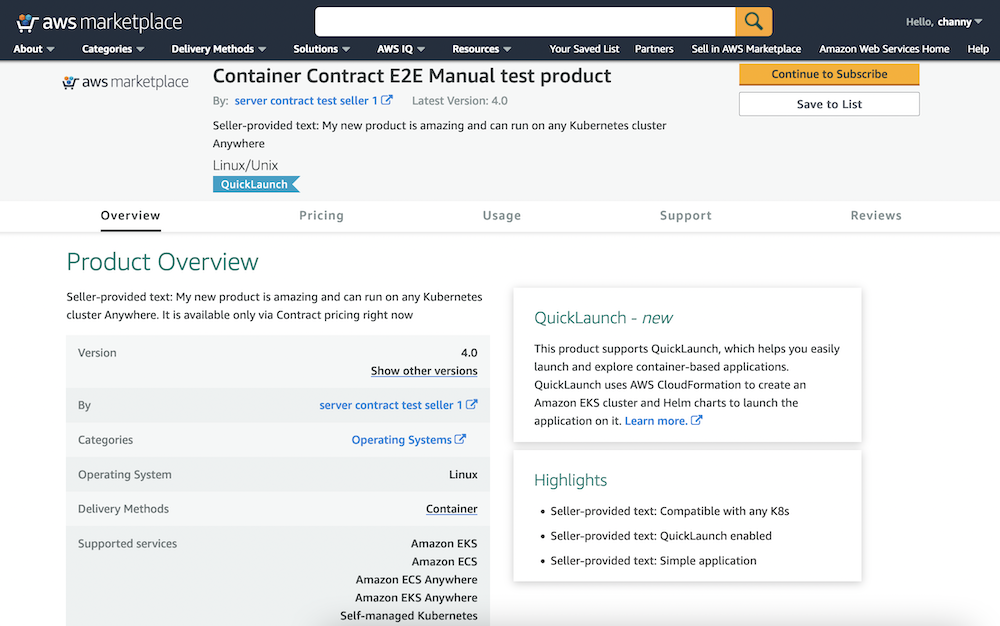
You can get started by visiting AWS Marketplace. Easily search in Delivery methods in all products, then filter Helm Chart in the catalog to find Kubernetes-based applications that they can deploy on AWS and on premises.

If you chose to subscribe to your favorite product, you would select Continue to Subscribe.

Once you accept the seller’s end user license agreement (EULA), select Create Contract and Continue to Configuration.

You can configure the software deployment using the dropdowns. Once Fulfillment option and Software Version are selected, choose Continue to Launch.

To deploy on Amazon EKS, you have the option to deploy the application on a new EKS cluster or copy and paste commands into existing clusters. You can also deploy into self-managed Kubernetes in EC2 by clicking on the self-managed Kubernetes option in the supported services.

To deploy on-premises or in EC2, you can select EKS Anywhere and then take an additional step to request a license token on the AWS Marketplace launch page. You will then use commands provided by AWS Marketplace to download container images, Helm charts from the AWS Marketplace Elastic Container Registry (ECR), the service account creation, and the token to apply IAM Roles for Service Accounts on your EKS cluster.

To upgrade or renew your existing software licenses, you can go to the AWS Marketplace website for a self-service upgrade or renewal experience. You can also negotiate a private offer directly with ISVs to upgrade and renew the application. After you subscribe to the new offer, the license is automatically updated in AWS License Manager. You can view all the licenses you have purchased from AWS Marketplace using AWS License Manager, including the application capabilities you’re entitled to and the expiration date.

Launch Partners of AWS Marketplace for Containers Anywhere
Here is the list of our launch partners to support an on-premises deployment option. Try them out today!

  • D2iQ delivers the leading independent platform for enterprise-grade Kubernetes implementations at scale and across environments, including cloud, hybrid, edge, and air-gapped.
  • HAProxy Technologies offers widely used software load balancers to deliver websites and applications with the utmost performance, observability, and security at any scale and in any environment.
  • Isovalent builds open-source software and enterprise solutions such as Cilium and eBPF solving networking, security, and observability needs for modern cloud-native infrastructure.
  • JFrog‘s “liquid software” mission is to power the world’s software updates through the seamless, secure flow of binaries from developers to the edge.
  • Kasten by Veeam provides Kasten K10, a data management platform purpose-built for Kubernetes, an easy-to-use, scalable, and secure system for backup and recovery, disaster recovery, and application mobility.
  • Nirmata, the creator of Kyverno, provides open source and enterprise solutions for policy-based security and automation of production Kubernetes workloads and clusters.
  • Palo Alto Networks, the global cybersecurity leader, is shaping the cloud-centric future with technology that is transforming the way people and organizations operate.
  • Prosimo‘s SaaS combines cloud networking, performance, security, AI powered observability and cost management to reduce enterprise cloud deployment complexity and risk.
  • Solodev is an enterprise CMS and digital ecosystem for building custom cloud apps, from content to crypto. Get access to DevOps, training, and 24/7 support—powered by AWS.
  • Trilio, a leader in cloud-native data protection for Kubernetes, OpenStack, and Red Hat Virtualization environments, offers solutions for backup and recovery, migration, and application mobility.

If you are interested in offering your Kubernetes application on AWS Marketplace, register and modify your product to integrate with AWS License Manager APIs using the provided AWS SDK. Integrating with AWS License Manager will allow the application to check licenses procured through AWS Marketplace.

Next, you would create a new container product on AWS Marketplace with a contract offer by submitting details of the listing, including the product information, license options, and pricing. The details would be reviewed, approved, and published by AWS Marketplace Technical Account Managers. You would then submit the new container image to AWS Marketplace ECR and add it to a newly created container product through the self-service Marketplace Management Portal. All container images are scanned for Common Vulnerabilities and Exposures (CVEs).

Finally, the product listing and container images would be published and accessible by customers on AWS Marketplace’s customer website. To learn more details about creating container products on AWS Marketplace, visit Getting started as a seller and Container-based products in the AWS documentation.

Available Now
The feature of AWS Marketplace for Containers Anywhere is available now in all Regions that support AWS Marketplace. You can start using the feature directly from the product of launch partners.

Give it a try, and please send us feedback either in the AWS forum for AWS Marketplace or through your usual AWS support contacts.

Channy

Announcing AWS Data Exchange for APIs: Find, Subscribe to, and Use Third-party APIs with Consistent Authentication

Post Syndicated from Alex Casalboni original https://aws.amazon.com/blogs/aws/data-exchange-for-apis-find-subscribe-use-third-party-apis-consistent-authentication/

Data is at the center of many processes and products, whether it’s a large-scale dataset used to train machine learning models, a relational database, or an API-based integration. AWS Data Exchange lets you discover, subscribe to, and use hundreds of file-based datasets via Amazon Simple Storage Service (Amazon S3) offered by third parties such as Reuters, Foursquare, Change Healthcare, Vortexa, IMDb, and many more. Additionally, AWS Data Exchange for Amazon Redshift makes it even easier to ingest third-party data in your Amazon Redshift data warehouse, without any manual processing or transformation.

However, in many cases your data projects require more than static datasets because you need frequent and synchronous retrieval of small amounts of information – for example, you might need to fetch a stock price every hour. Data APIs let you answer specific questions quickly and without having to build ad-hoc data pipelines to ingest, process, and analyze bulk datasets. But each API provider has its own ease of use, SDK, documentation, and authentication mechanisms, which makes this harder than it needs to be.

Today, I’m happy to announce the general availability of AWS Data Exchange for APIs, a new capability that lets you find, subscribe to, and use third-party APIs with a consistent access using AWS SDKs, as well as consistent AWS-native authentication and governance. This simplifies the lives of developers and IT administrators who have to integrate and secure the access to multiple third-party APIs.

Now you can make RESTful or GraphQL API calls directly to AWS Data Exchange and receive synchronous responses that contain the information you need, using the AWS SDK in the programming language of your choice. We take care of integrating with the API provider, implementing proper authentication, managing the API subscription, and ensuring charges appear on your AWS bill. You can manage API access centrally with AWS Identity and Access Management (IAM).

As a data provider, you make your API discoverable by millions of AWS customers by listing it in the AWS Data Exchange catalog using an OpenAPI specification and fronting it with an Amazon API Gateway endpoint.

AWS Data Exchange for APIs in Action
First, I look for an API product in the AWS Data Exchange catalog, review its subscription terms, support information, and auto-renewal. Each API product might include multiple public or private subscription offers and periods.

I select Subscribe and a couple of minutes later I’m successfully subscribed.

Within the API product, I select an entitled data set and its latest revision.

Each API revision contains one or more API assets that correspond to a specific API endpoint and a unique Asset ARN.

AWS Data Exchange takes care of invoking API endpoints with the correct authentication.

All I need to do is check the Integration notes, which include instructions and code snippets based on the AWS Command Line Interface (CLI).

Of course, I could implement the very same API call with my favorite programming language using one of the AWS SDKs.

For example, here’s how I’d implement a simple wrapper function in Python:

import json
import urllib
import boto3

adx = boto3.client('dataexchange')

def get_api_response(path, method="GET", querystring={}, headers={}, body={}):
    return adx.send_api_asset(
        DataSetId="4b3fbabc31171662851531b8576a3411",
        RevisionId="e8e78e921af12c76499edc40f92e3082",
        AssetId="557d858c317efdfb5b6c9a2860ec4a03",
        Method=method,
        Path=path,
        QueryStringParameters=urllib.urlencode(querystring),
        RequestHeaders=urllib.urlencode(headers),
        Body=json.dumps(body),
    )

Please note that there are no hard-coded credentials in the code above because all the authorization happens via AWS Identity and Access Management (IAM).

And that’s how you make your first API call via AWS Data Exchange for APIs.

Available Today
AWS Data Exchange for APIs is generally available in all AWS Regions where AWS Data Exchange is available. We’re looking forward to helping you simplify and centralize the management and governance of third-party APIs while we take care of the undifferentiated heavy lifting for you.

Today you can start integrating third-party APIs such as Infutor, Variety Business Intelligence, IMDb, PeopleDataLabs, Neustar, Experian, Foursquare, PredictHQ, WeatherTrends International, and many more.

If you’re a developer, check out the new AWS Data Exchange for APIs documentation to learn more about subscribing and using APIs. If you’re an API provider, check out the new publishing documentation to learn more about publishing new APIs on the AWS Data Exchange catalog.

Alex

AWS Security Profiles: Jenny Brinkley, Director, AWS Security

Post Syndicated from Maddie Bacon original https://aws.amazon.com/blogs/security/aws-security-profiles-jenny-brinkley-director-aws-security/

AWS Security Profiles: Jenny Brinkley, Director, AWS Security
In the week leading up to AWS re:Invent 2021, we’ll share conversations we’ve had with people at AWS who will be presenting, and get a sneak peek at their work.


How long have you been at AWS, and what do you do in your current role?

I’ve been at AWS for 5½ years. I get to focus on the future of security and compliance. It gives me a lot of space to experiment and try new things, which is how I like to operate.

How did you get started in AWS Security?

I joined AWS through a startup acquisition, and I actually didn’t think I was going to go with the acquisition. I thought AWS would be way too big and move way too slow. I love being in environments where I get to move fast and be entrepreneurial. I started on the product side. I was able to learn what it takes to build and ship products at the scale of AWS – which is on another level and mind-blowing.

Then, like others at AWS, I was able to reinvent myself, find different passions, and experiment with new things. One of those areas for me was compliance. I started to get perspective on how that space was being defined by regulatory activity for the cloud, and it started opening my mind in different ways.

I started thinking, how do you make compliance easier for customers? How do you work with regulated entities to understand how to audit, and to understand the function of how the cloud operates? From there, my career has been about changing how to think about product, about how to make security easier. Layering in this compliance aspect, too, means I get to play in all these different worlds, work with internal and external customers, and work to simplify security, while also understanding where and how compliance fits in, without slowing down innovation.

How do you explain your job to non-tech friends?

I explain my work as removing the fear around security. You go see images of people in hoodies, with darkened faces, and binary code running behind them, and my job is to break that perception and walk in the light – yes, that’s my nod to Olivia Pope in Scandal. I love the idea of that gladiator mentality. You’re going in and solving the big problems, but you’re also creating more visibility and transparency around how security operates. And you’re doing this without making anyone afraid that they’re being watched or monitored, and without holding back innovation. My job is to provide that transparency and clarity, and give people prescriptive guidance on how to operate securely on AWS.

What are you currently working on that you’re excited about?

So much! That’s what I really love about my job – I get to play in a lot of spaces, and the context switching is something that really fuels me. One of the top projects I’m working on is something we just released in response to an ask from the White House, which I feel really privileged to work on. We released a new Cybersecurity Awareness training which is now available to everyone in the world. You can access this training right now, and you can share it with your grandparents or implement it in your corporation or small business. We were able to take a training product we built for all Amazon employees–and then externalize it. The size and the scope is something I’m really excited about. Making security easier for everybody is a big mission for us.

Another big area is up-skilling. You hear a lot about security jobs being the future, so we’re building everything from apprenticeships to new learning paths for anyone interested in security. We’re thinking about how we can build quick learning modules for people to listen to on the go. That’s something I get really excited about in this job – creating opportunities for people to understand that security jobs and opportunities are vast. If you’re curious and want to learn new things, AWS is endless.

You’re presenting at re:Invent this year – can you give readers a sneak peek at what you’re covering?

I am partnering with Eric Brandwine, AWS VP/Distinguished Engineer for a session called Introverts and extroverts collide: Build an inclusive workforce (SEC204). Eric and I are night and day in terms of how we work. In our talk we’ll touch on some of the challenges we had when we first started working together, but how we found value in our different approaches.

We’ll be discussing how he solves problems with technology and how I solve problems regarding people, and thinking about how that empathetic layer resonates between the two perspectives. Not every problem needs technology, and not every problem needs a people-focused solution. But, humans are behind any of those aspects of impact.

We’ll give prescriptive guidance to customers on how they should think about their security culture as it relates to people and as it relates to technology. We’ll talk about how those two worlds can blend together in a way that empowers an entire organization to prioritize security, and that they shouldn’t be afraid of it. We want to help bridge the gaps between the technologists and the empathetic individuals who think about how the technology lands in use cases across a business.

From your perspective, what’s the most important thing leaders can do to create an inclusive work environment?

Listening. Sitting back, getting the feedback, being vulnerable, asking the questions. So much of what we need to do now is practice that listening skill, really understand the motivations of our teams, and then try to create these safe working environments where people feel comfortable sharing their perspectives. It’s not that you’re going to act on everything everyone’s talking about, but at least you get diverse perspectives and points of view to help create an inclusive work environment that makes everyone want to show up, support each other, and do the best work possible.

What’s your favorite Leadership Principle at Amazon and why?

I have two. One is Learn and Be Curious because that is how I like to operate. I think, “what if…” or “why can’t we…”. Then Think Big pairs with “why can’t we…” The culture within AWS really supports that. On a daily basis, we can flip the script on how we think about our jobs and how we position the business.

If you’re entrepreneurial and like to create, this place is like a magic playground. Some people look at my job and they’re so confused with all the different things I get to do – but it goes back to that context switching. I believe that Learn and Be Curious and Think Big fit in that realm for me–I feel like I can be anything, I can do anything. I also had parents who told me as a kid that I could do anything and be anything, so I think that’s just who I am. Those two leadership principles help me to produce and do my best work.

What’s the thing you’re most proud of in your career?

That’s hard. It’s a couple of things. I’ve had a lot of incredible opportunities. One of which was being involved in a startup. We raised the money quickly, we worked with incredible customers, we solved really challenging business issues. The fact that I was able to bring that here to AWS, in a way that now hundreds of thousands of people get to see the kind of work we’re able to produce, is pretty cool.

But honestly, working with some of our new hires who are just getting into the workforce–especially with our diverse candidates–I’m at a place in my career where I want to create opportunities for others. I’m working to create safe spaces for people to operate and do their best work and really break down barriers for people who might not otherwise get those opportunities. That’s what I’m most excited about for the future, and also the most proud about–giving people opportunities to work in careers they never thought were available to them. I love that, and I get to do it daily.

If you had to pick any other job, what would you want to do?

Sports agent. I think I’d be so good at it. I would love to go work with young athletes, especially with the new NCAA ruling that college athletes can get paid for the use of their likeness. I would love to help them develop really interesting business plans.

If you have feedback about this post, submit comments in the Comments section below.

Want more AWS Security news? Follow us on Twitter.

Jenny Brinkley, Director, AWS Security

Jenny Brinkley

Jenny leads efforts for AWS Security to understand where compliance and security is headed. In her role as a Director, she helps teams understand how to consider security when building their services and deliverables. Prior to joining AWS, Jenny co-founded a security start-up, harvest.ai, that was acquired by AWS in April 2016.

Author

Maddie Bacon

Maddie (she/her) is a technical writer for AWS Security with a passion for creating meaningful content. She previously worked as a security reporter and editor at TechTarget and has a BA in Mathematics. In her spare time, she enjoys reading, traveling, and all things Harry Potter.

Improved, Automated Vulnerability Management for Cloud Workloads with a New Amazon Inspector

Post Syndicated from Steve Roberts original https://aws.amazon.com/blogs/aws/improved-automated-vulnerability-management-for-cloud-workloads-with-a-new-amazon-inspector/

Amazon Inspector is a service used by organizations of all sizes to automate security assessment and management at scale. Amazon Inspector helps organizations meet security and compliance requirements for workloads deployed to AWS, scanning for unintended network exposure, software vulnerabilities, and deviations from application security best practice.

Since the original launch of Amazon Inspector in 2015, vulnerability management for cloud customers has changed considerably. Over the last six years, the team delivered several new customer-requested features, including assessment reporting, support for proxy environments, and integration with Amazon CloudWatch Metrics. However, the team also recognized that there were new requirements to meet – enabling frictionless deployment at scale, support for an expanded set of resource types needing assessment, and a critical need to detect and remediate at speed. Today I’m happy to announce a new Amazon Inspector, able to meet these requirements with the following features:

  • Continual, automated assessment scans—replaces periodic, manual scanning.
  • Automated resource discovery – once enabled, the new Amazon Inspector automatically discovers all running Amazon Elastic Compute Cloud (Amazon EC2) instances and Amazon Elastic Container Registry repositories.
  • New support for container-based workloads—workloads are now assessed on both EC2 and container infrastructure.
  • Integration with AWS Organizations—allowing security and compliance teams to enable and take advantage of Amazon Inspector across all accounts in an organization.
  • Removal of the stand-alone Amazon Inspector scanning agent—assessment scanning now uses the widely deployed AWS Systems Manager agent, eliminating the need for a separate agent installation.
  • Improved risk scoring—a highly contextualized risk score is now generated for each finding by correlating Common Vulnerability and Exposures (CVE) metadata with environmental factors for resources, such as network accessibility. This makes it easier to identify the most critical vulnerabilities to address as a priority.
  • Integration with Amazon EventBridge—integrate with event management and workflow systems such as Splunk and Jira. And, you can trigger automated remediation, for example, system patching using Systems Manager or virtual machine image rebuilds using EC2 Image Builder.
  • Integration with AWS Security Hub—helping your teams to more easily identify those resources with critical vulnerabilities or deviations from security best practices.

Automatically Assessing your Workloads with Amazon Inspector
Tens of thousands of vulnerabilities exist, with new ones being discovered and made public on a regular basis. With this continually growing threat, manual assessment can lead to customers being unaware of an exposure and thus potentially vulnerable between assessments. Additionally, customers with manual processes for managing their inventories of applications resources, the deployment of stand-alone security agents on those resources, and the scheduling of periodic assessments may find the whole process to be a costly and time-consuming exercise. That’s before they have to then sift through the mass of assessment findings to determine the most critical issues to address.

With the new Amazon Inspector, all you need to do is enable the service. It will auto-discover and start continual assessment of your EC2 and your Amazon Elastic Container Registry-based container workloads to evaluate your security posture, even as the underlying resources change.

EC2 instances are discovered and assessed for unintended exposure to external networks and software vulnerabilities using the Systems Manager agent, already included by default in images provided by AWS for instance management, automated patching, and more. Container-based workloads are assessed as the images are pushed to Amazon Elastic Container Registry. Without needing additional software or agents, container images and EC2 instances are assessed in near real time when an event occurs.

Automated assessment is driven by changes in workload configuration and newly published vulnerabilities to ensure resources are only assessed when needed. The new Amazon Inspector collects events from over 50 vulnerability intelligence sources, including CVE, the National Vulnerability Database (NVD), and MITRE. Images that may be affected by a newly identified entry, for example, a new CVE notification, will be automatically rescanned. Image rescanning is enabled for 30 days from the date they are pushed to the registry. You can also enable an option to only scan on image push and not subsequently perform rescans.

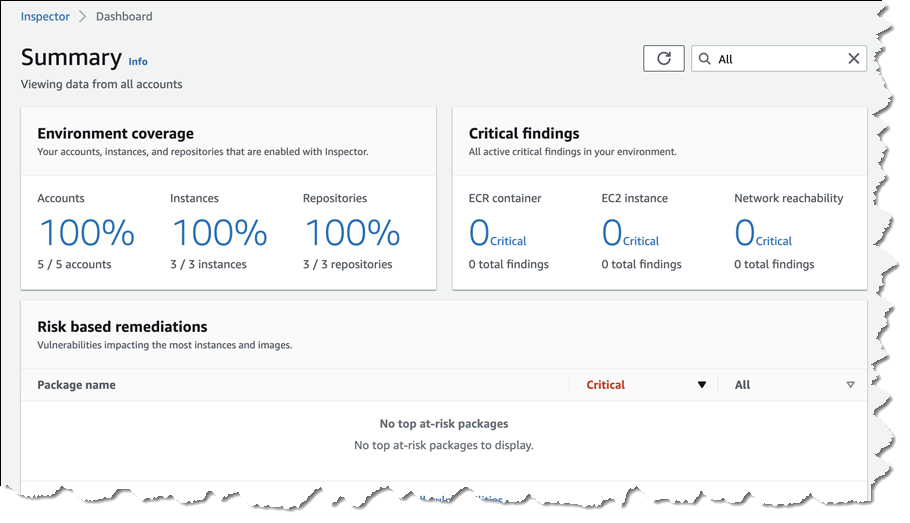
Summary page for Amazon Inspector

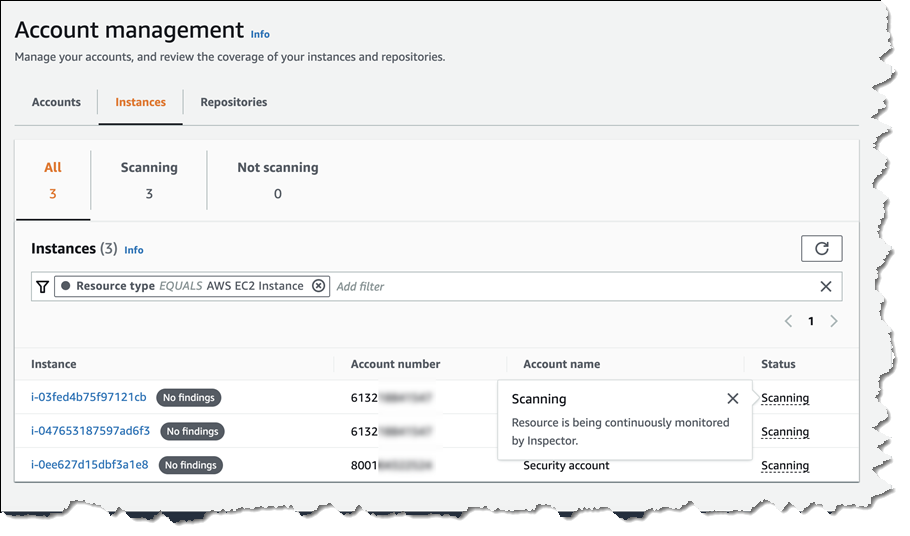
Selecting either Accounts, Instances, or Repositories from your Dashboard page takes you to a detail summary for the selected resource. Below, I’m viewing summary data for EC2 instances across a couple of accounts.

Viewing instances scanned by Amazon Inspector across accounts

If vulnerabilities are found, you receive actionable assessment findings in a report. Starting today, these findings are summarized with enhanced risk scoring and improved resource detail to help you prioritize the most at-risk resources needing to be addressed. Also new today, the Amazon Inspector console has been redesigned to surface all findings and recommendations for remediation.

Vulnerabilities in container images are also sent to Amazon Elastic Container Registry to be summarized for the owner. And, as I noted earlier, new integrations with AWS Security Hub and Amazon EventBridge allow findings to be sent downstream for additional visibility and remediation by automated workflows. For example, automation can be created to isolate instances, trigger system patching, software image rebuilds, and more. The availability of multiple integration points makes it easier for security and application teams to collaborate to manage remediation. Below, I’m viewing findings from Amazon Inspector in the AWS Security Hub console.

Viewing findings from Amazon Inspector in the Security Hub console

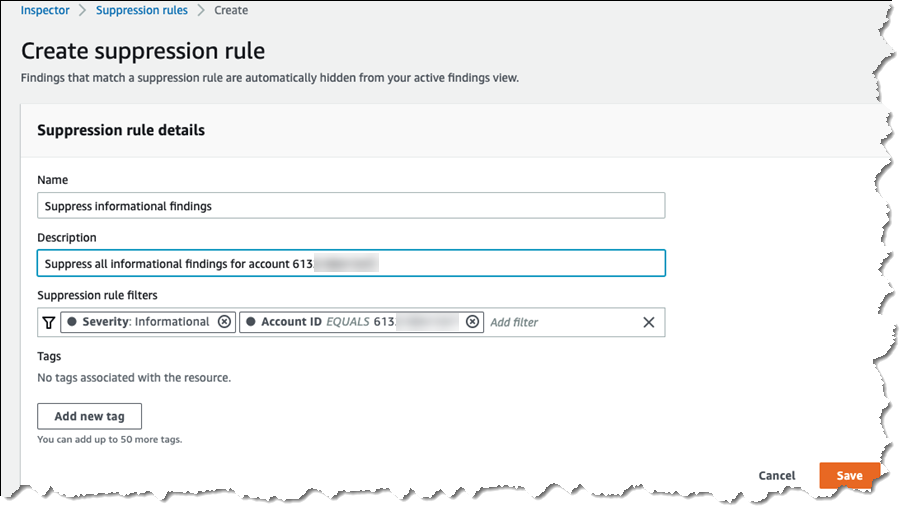
Assessments can result in hundreds of thousands, or more, findings that need to be filtered and sifted to determine the most critical to action. Also available today, organizations can determine which of the findings they consider to be acceptable and mark those findings for temporary or permanent suppression. This helps reduce the volume of alerts, further assisting with prioritization and automated remediation. Suppression filters can be set from several screens. Rules specify one or more filters, such as Severity, that will cause findings that match the filters to be removed from display. When defining rules, a list is shown of the findings that will be suppressed, helping you fine-tune the filter values to match your specific needs.

Setting up suppression rules for Amazon Inspector findings

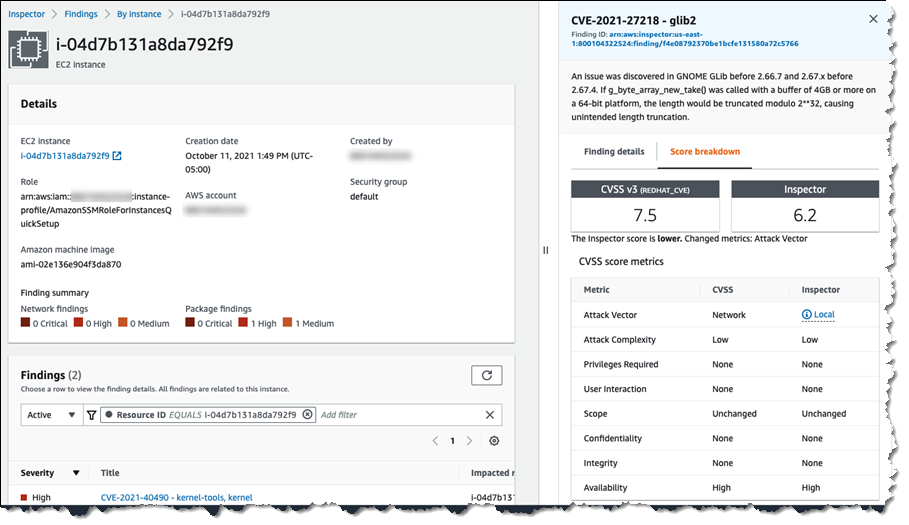
I mentioned earlier that the new Amazon Inspector implements a contextualized risk assessment score for findings. The screenshot below shows an example of Amazon Inspector‘s risk assessment score, compared to a generic Common Vulnerability Scoring System (CVSS) score. Contextual risk assessment takes into account additional factors such as accessibility to the internet and ease of exploitability to make the score more meaningful. In the image below, Amazon Inspector‘s risk assessment score is lower than the CVSS score because the attack vector requires network access. Amazon Inspector knows that the vulnerability identified in the GNOME Glib will be difficult to exploit because in this resource, there is no network access, and therefore it lowered the risk score.

Risk assessment score

Start a Free Trial with Amazon Inspector Today
The new Amazon Inspector is available now in the US East (Ohio), US East (N. Virginia), US West (Oregon), Asia Pacific (Hong Kong), Asia Pacific (Mumbai), Asia Pacific (Seoul), Asia Pacific (Singapore), Asia Pacific (Sydney), Asia Pacific (Tokyo), Canada (Central), Europe (Frankfurt), Europe (Ireland), Europe (London), Europe (Milan), Europe (Paris), Europe (Stockholm), Middle East (Bahrain), and South America (São Paulo) Regions.

Amazon Inspector offers a free 15-day trial, so you can put it to work to see how Amazon Inspector can help your security and compliance teams reduce operational complexity and cost associated with managing resource inventories, stand-alone security agents, and repetitive manual assessments.

— Steve

Announcing AWS Well-Architected Custom Lenses: Extend the Well-Architected Framework with Your Internal Best Practices

Post Syndicated from Alex Casalboni original https://aws.amazon.com/blogs/aws/well-architected-custom-lenses-internal-best-practices/

We launched the AWS Well-Architected Framework back in 2015 to help you review workloads against architectural best practices, and across pillars such as operational excellence, security, reliability, performance efficiency, and cost optimization. In 2017, we extended the framework with the concept of “lenses” to optimize specific workload types such as the Serverless Lens, the SaaS Lens, and the Foundational Technical Review (FTR) Lens for APN Partners. In 2018, we launched the AWS Well-Architected Tool, a self-service tool designed to help you review AWS workloads at any time, without the need for an AWS Solutions Architect.

Today, I’m happy to announce the general availability of AWS Well-Architected Custom Lenses, a new feature of the AWS Well-Architected Tool that lets you bring your own best practices to complement the existing framework based on your industry, operational plans, and internal processes. Custom Lenses provide a consolidated view and a consistent way to measure and improve your workloads on AWS without relying on external spreadsheets or third-party systems.

In addition to AWS Well-Architected Lenses, now you can create and share custom lenses and include them in your workload reviews, ultimately tailoring the review to your organizational needs. For example, you could define a custom lens to review your workloads against PCI compliance, SOC 2 compliance, or other national or industry regulations. As an AWS Partner, you might include ad-hoc best practices in your custom lenses when reviewing workloads with customers from different industries and segments, ultimately making the review process easier, faster, and more comprehensive.

How to Define a new Custom Lens
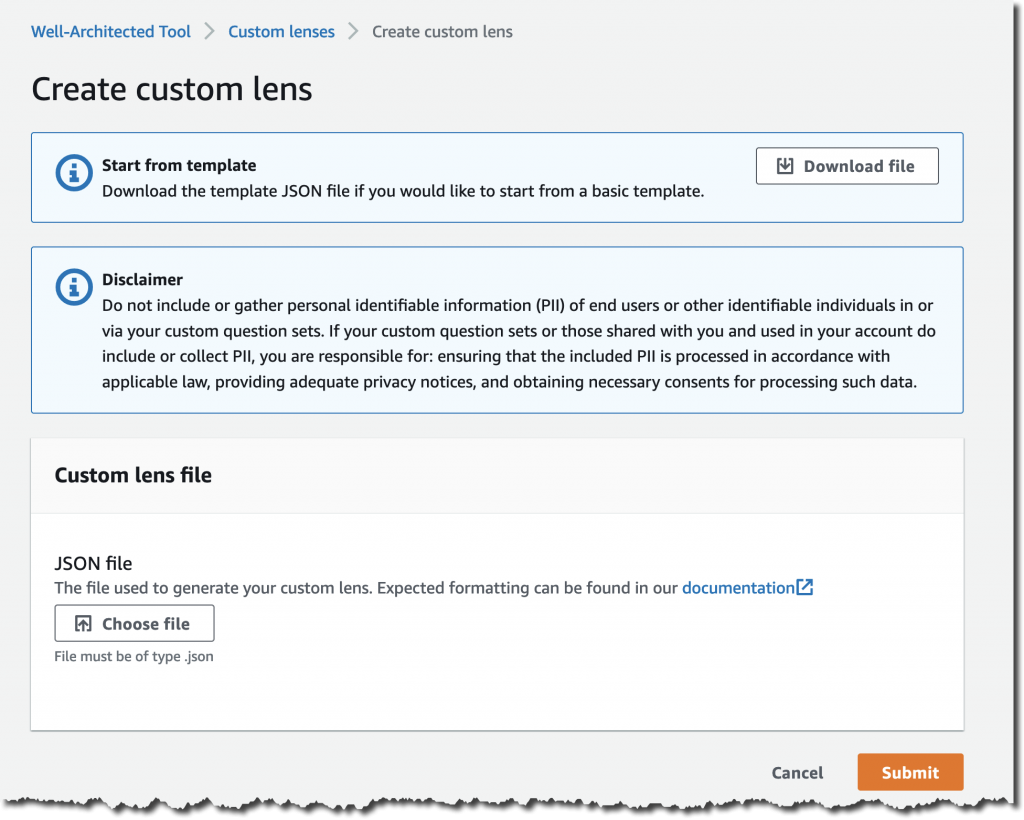
You author a new custom lens by editing a JSON preset template, where you define questions, choices, helpful resources, improvement plans, and risk rules.

Here’s how it works: download the template from the AWS Well-Architected Tool, work on it locally, and then re-upload it.

The JSON structure is composed of multiple pillars. Each pillar might contain multiple questions, each with its own choices and risk rules.

Your JSON file will look like this:

{
    "schemaVersion": "2021-11-01",
    "name": "My Test Lens",
    "description": "This is a description of my test lens.",
    "pillars": [
        {
            "id": "pillar_red",
            "name": "Red Pillar",
            "questions": [
                {
                    "id": "pillar_1_q1",
                    "title": "How do you get started with this pillar?",
                    "description": "Optional description.",
                    "choices": [
                        {
                            "id": "choice1",
                            "title": "Best practice #1",
                            "helpfulResource": {
                                "displayText": "This is helpful text for the first choice.",
                                "url": "https://aws.amazon.com"
                            },
                            "improvementPlan": {
                                "displayText": "This is text that will be shown for improvement of this choice."
                            }
                        },
                        {
                            "id": "choice2",
                            "title": "Best practice #2",
                            ...
                        }
                    ],
                    "riskRules": [
                        {
                            "condition": "choice1 && choice2",
                            "risk": "NO_RISK"
                        },
                        {
                            "condition": "choice1 && !choice2",
                            "risk": "MEDIUM_RISK"
                        },
                        {
                            "condition": "default",
                            "risk": "HIGH_RISK"
                        }
                    ]
                }
            ]
            ...
        },
        ...
    ]
}

Once you’re ready to submit your JSON file, proceed with the upload.

And don’t worry about making it perfect on the first try. You’ll be able to improve it and add new versions.

AWS Well-Architected Custom Lenses in Action
You find the list of custom lenses and their latest version in the new Custom Lenses section.

Each custom lens has an owner and can be shared with multiple AWS accounts too.

Before using this new custom lens in a workload review, you’ll need to publish it and assign it a version.

Select Publish lens and provide a version name such as 1.0.

Now you can create a new workload review and apply both AWS-owned lenses and your own custom lenses, in addition to the main framework.

During the workload review, you will go through each pillar and questions of the custom lens, using the same user interface provided by the AWS Well-Architected Tool.

Last but not least, you can share your custom lens with other AWS Identity and Access Management (IAM) principals such as AWS accounts, IAM users, and IAM roles.

Available Today at No Charge
Custom Lenses are available today in all AWS Regions where the AWS Well-Architected Tool is available, at no cost. You can define up to five custom lenses and share them across AWS Accounts, in addition to the existing Well-Architected Framework and AWS-owned Lenses.

Check out the technical documentation here.

We’re looking forward to hearing your feedback and iterating quickly to improve the authoring and sharing experience based on your needs.

Alex

Announcing Pull Through Cache Repositories for Amazon Elastic Container Registry

Post Syndicated from Steve Roberts original https://aws.amazon.com/blogs/aws/announcing-pull-through-cache-repositories-for-amazon-elastic-container-registry/

Organizations, development teams, and individual developers who have chosen to use containers to host their applications may prefer, or perhaps are required, to source all images from Amazon Elastic Container Registry to take advantage of its high availability and security. To satisfy those requirements, customers have needed to take on the burden of manually pulling images from public registries into their private Amazon Elastic Container Registry repositories, and then keeping them in sync. This adds operational complexity and maintenance costs, thereby impacting developer productivity. Additionally, some registries may have limitations or restrictions on how frequently images can be downloaded. When reached, those limitations then begin impacting developers and the release velocity of their business, due to build errors when image pulls are throttled, or even rejected.

Today, we have announced pull through cache repository support in Amazon Elastic Container Registry, for publicly accessible registries that do not require authentication. Pull through cache repositories offer developers the improved performance, security, and availability of Amazon Elastic Container Registry for container images that they source from public registries. Images in pull through cache repositories are automatically kept in sync with the upstream public registries, thereby eliminating the manual work of pulling images and periodically updating.

Pull through cache repositories provide the benefits of the built-in security capabilities in Amazon Elastic Container Registry, such as AWS PrivateLink enabling you to keep all of the network traffic private, image scanning to detect vulnerabilities, encryption with AWS Key Management Service (KMS) keys, cross-region replication, and lifecycle policies. When enabled, cross-region replication is designed to automatically distribute updated images to additional Regions. All you need to do is update the pull URL so that the image is downloaded from the relevant Region.

When consuming images from pull through cache repositories, download throttling is also no longer a problem for developers, as well as the build and deployment infrastructure that supports their applications. While Amazon Elastic Container Registry is designed to automatically keep the cache repository in sync, you can also manually sync a repository at any time. And, if you wish, the automatic sync can be turned off.

Getting Started with Amazon Elastic Container Registry Pull Through Cache Repositories
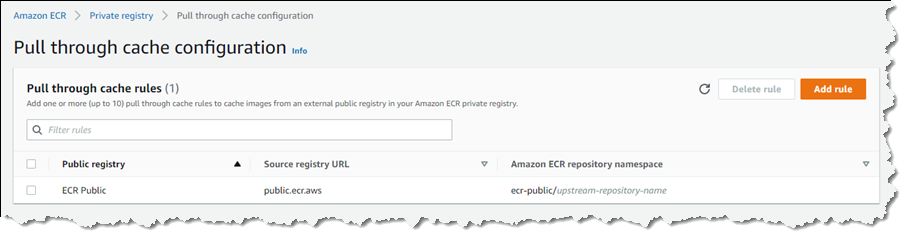
Setting up pull through cache repositories is a simple process. For the following example, I’m using Amazon Elastic Container Registry Public in the South America (São Paulo) Region as my upstream registry.

First, I must modify my private registry’s settings to add a rule that references the upstream, publicly accessible registry (multiple rules can be set if I need additional upstream registries). In the Amazon Elastic Container Registry console, I begin by selecting Private registry, and then select Edit in the Pull through cache panel to change settings. This takes me to the Pull through cache configuration page, where I select Add rule.

On the Create pull through cache rule page, I choose the upstream registry, which is ECR Public in this example. I also must set a namespace that I’ll use when referring to images in my pull commands. For this example, I’ll accept the suggested namespace, ecr-public.

Configuring ECR Public as the upstream registry

Selecting Save takes me back to the Pull through cache configuration page where my newly configured rule is listed. Now, I’m ready to utilize the cache repository when pulling images.

Newly configured rule for an upstream registry

To reference an image, I must specify the namespace that I chose in the pull URL, using the URL format <accountId>.dkr.ecr.<region>.amazonaws.com/<namespace>/<sourcerepo>:<tag>. When images are pulled, the cache repository associated with the namespace is checked for the image. In my case, the cache repository doesn’t exist yet, but I don’t have to create it myself. The image is fetched from the upstream repository in the public registry associated with the namespace, and then stored in a new cache repository that is created for me automatically.

In the command prompt session below, I first authenticate with my registry, and then pull an Amazon Linux 2 image from Amazon Elastic Container Registry Public into the cache:

C:\ aws ecr get-login-password --region sa-east-1 | docker login --username AWS --password-stdin 111122223333.dkr.ecr.sa-east-1.amazonaws.com/ecr-public
Login Succeeded
C:\ docker pull 111122223333.dkr.ecr.sa-east-1.amazonaws.com/ecr-public/amazonlinux/amazonlinux:latest
latest: Pulling from ecr-public/amazonlinux/amazonlinux
e11e8d46e102: Pull complete
Digest: sha256:916dbbb288948b54c94b5b9f0769085aa601d4468d099e90d8a7da5cfa551b50
Status: Downloaded newer image for 111122223333.dkr.ecr.sa-east-1.amazonaws.com/ecr-public/amazonlinux/amazonlinux:latest
111122223333.dkr.ecr.us-west-2.amazonaws.com/ecr-public/amazonlinux/amazonlinux:latest

In my Amazon Elastic Container Registry console, a check of the Repositories page shows that a new private repository has been created containing the image I pulled, together with an indication that a pull through cache is active.

Pulled image in the cache repository

Working with images and the pull through cache repository is just as straightforward in Dockerfiles. All I need do is reference the image I need using the namespace in the pull URL. If the image is not in the cache repository, then it will be pulled and stored there for me. Cached images are checked once per 24 hours to verify if the cached image is the latest version, with the timer based off the last pull time of the cached image.

Start using Pull through Cache Repositories Today
Pull through cache repositories for Amazon Elastic Container Registry are available for you to take advantage of today in all commercial AWS Regions. There is no charge for using pull through cache repositories, only standard Amazon Elastic Container Registry pricing for storage and data transfer charges applies. You can find more details on pricing at the Amazon Elastic Container Registry pricing page. Learn more about pull through cache repositories in the Amazon Elastic Container Registry User Guide, and get started today.

— Steve

Introducing Amazon Braket Hybrid Jobs – Set Up, Monitor, and Efficiently Run Hybrid Quantum-Classical Workloads

Post Syndicated from Danilo Poccia original https://aws.amazon.com/blogs/aws/introducing-amazon-braket-hybrid-jobs-set-up-monitor-and-efficiently-run-hybrid-quantum-classical-workloads/

I find quantum computing fascinating! At its simplest level, it extends the concept of bits, that have 0 or 1 values, with quantum bits, or qubits, that can have a combination of two different (quantum) states.

Two characteristics make qubits really interesting:

  • When you look at the value of a qubit, you get only one of the two possible states with a probability that depends on how its own states are combined.
  • Multiple qubits can be “connected” together (this is called quantum entanglement) so that by changing the state of one, even just by reading its value, you alter the states of the others.

These characteristics come from low-level properties described by quantum mechanics, a fundamental theory in physics that provides a description of the physical properties of nature at atomic and subatomic scales. Luckily, we don’t need a degree in quantum mechanics to use quantum computing in the same way we don’t need to be expert in semiconductors to use an ordinary computer.

Using qubits, researchers are designing new algorithms that have the potential to be much faster than what classical computers can achieve. To help speed up scientific research and software development for quantum computing, we introduced Amazon Braket at re:Invent 2019. A fully managed quantum computing service, Amazon Braket allows you to build, test, and run quantum algorithms on simulators and quantum computers.

Hybrid Algorithms and Quantum Processing Units (QPUs)
Quantum algorithms, which would be transformational in many different areas, require the execution of hundreds of thousands to millions of quantum gates. Unfortunately, the current generation of QPUs suffer from noise, creating errors that limit operations to only a few hundreds or thousands of gates before the errors take over.

To help solve this, we can take inspiration from machine learning: instead of using fixed quantum circuits, the logic that implements the algorithm, we let the algorithm “learn” by adjusting the parameters that tune the circuit to have a better chance of solving a given problem by adapting to the noise in a particular device (think of them as “self-learning quantum algorithms”).

This is similar to computer vision: instead of hand-crafting the features to distinguish a dog from a cat (which is notoriously difficult for a computer), machine learning algorithms “learn” the right features by iteratively adjusting parameters of a neural network.

A rapidly emerging area of research in quantum computing uses QPUs, the processors used by quantum computers, in the same way as GPUs are used in machine learning: Quantum circuits are parameterized, initialized with some values, and then run on the QPU. Like the weights in a neural network, these parameters are then iteratively adjusted based on the results of the computation. These so-called hybrid algorithms rely on rapid, iterative computations between classical computers and QPUs.

Architectural diagram.

To run hybrid algorithms, you need to manually set up a classical infrastructure, install the required software, and manage the interaction between your quantum and classical compute processes for the duration of your hybrid algorithm. You then need to build custom monitoring solutions to visualize the progress of your algorithm to make sure it converges to the solution as expected or intervene if necessary to adjust the parameters of the algorithm.

Another big challenge is that QPUs are shared, inelastic resources, and you compete with others for access. This can slow down the execution of your algorithm. A single large workload from another customer can bring the algorithm to a halt, potentially extending your total runtime for hours. This is not only inconvenient but also impacts the quality of the results because today’s QPUs need periodic re-calibration, which can invalidate the progress of a hybrid algorithm. In the worst case, the algorithm fails, wasting budget and time.

Introducing Amazon Braket Hybrid Jobs
Today, I am happy to introduce Amazon Braket Hybrid Jobs, a new capability of Amazon Braket that simplifies the process of setting up, monitoring, and efficiently executing hybrid quantum-classical algorithms. Jobs are fully managed so you can avoid extensive infrastructure and software management and confidently execute your algorithms quickly and predictably, with on-demand priority access to QPUs.

When you create a job, Amazon Braket spins up the job instance (providing a CPU environment based on an Amazon Elastic Compute Cloud (Amazon EC2) instance), executes the algorithm (using quantum hardware or simulators), and releases the resources once the job is completed so that you only pay for what you use. You can also define custom metrics for algorithms, which are automatically logged by Amazon CloudWatch and displayed in near real-time in the Amazon Braket console as the algorithm runs. This provides you with live insights into how your algorithm is progressing, creating the opportunity to adjust your algorithm as necessary and innovate more quickly.

Architectural diagram.

To run hybrid algorithms as jobs, you can define your algorithm using the Amazon Braket SDK or with PennyLane, an open-source library for hybrid quantum computing. Let’s see how that works in practice with a couple of examples.

Using Amazon Braket Hybrid Jobs
Before building a trainable quantum algorithm, let’s get started by running a series of fixed quantum operations, what we’ll refer to as quantum tasks. I use Python and the Amazon Braket SDK to define a circuit that constructs what is called a bell state, a state which has a fifty-fifty chance of resolving to each of two states. It’s the quantum computing equivalent of tossing a coin.

Here’s the content of the algorithm_script.py file:

import os

from braket.aws import AwsDevice
from braket.circuits import Circuit
from braket.jobs import save_job_result


def start_here():

    print("Test job started!")

    device = AwsDevice(os.environ["AMZN_BRAKET_DEVICE_ARN"])

    results = []
    
    bell = Circuit().h(0).cnot(0, 1)
    for count in range(5):
        task = device.run(bell, shots=100)
        print(task.result().measurement_counts)
        results.append(task.result().measurement_counts)

    save_job_result({ "measurement_counts": results })
    
    print("Test job completed!")

This script uses the environment variable AMZN_BRAKET_DEVICE_ARN to instantiate the device that I select when creating the job.

Quantum computing is probabilistic. For this reason, circuits need to be evaluated multiple times to get accurate results. A single run is called a shot. The higher the number of shots, the better the accuracy of the result. In this case, the circuit is run for 100 shots.

I use the save_job_result function to store the results of my job so that I can analyze them at the end.

In the Amazon Braket console, I choose Jobs on the left panel and then Create job. To start, I give the job a name.

Console screenshot.

Then, I pass the file with the algorithm. The CPU component of the hybrid algorithm runs in a container, and I can choose which container image to use. For example, I can use a pre-built container image that includes software my algorithm depends on, such as PennyLane, TensorFlow, or PyTorch, or bring my own custom image. I select the Base container image because I don’t have external dependencies.

I leave all other settings to their default value. In this way, I use the SV1 simulator, rather than quantum hardware, to run the quantum tasks.

After some time, the job has completed, and I follow the link to the Amazon Simple Storage Service (Amazon S3) console to download the result. As expected, for each of the five tasks, the results show that the proportion of the 00 and 11 states is roughly 50:50. The proportions vary slightly because of the probabilistic nature of quantum computing.

{
    "braketSchemaHeader": {
        "name": "braket.jobs_data.persisted_job_data",
        "version": "1"
    },
    "dataDictionary": {
        "measurement_counts": [
            {
                "00": 51,
                "11": 49
            },
            {
                "00": 44,
                "11": 56
            },
            {
                "11": 51,
                "00": 49
            },
            {
                "00": 56,
                "11": 44
            },
            {
                "00": 49,
                "11": 51
            }
        ]
    },
    "dataFormat": "plaintext"
}

This example is quite basic because I am not running any classical logic other than initiating tasks. To see the real value, let’s see how it works with a hybrid algorithm where we tweak the parameters of the quantum circuit iteratively from task to task.

Using Amazon Braket Hybrid Jobs with Hybrid Algorithms
For a more advanced example, I use a well-known example of an actual hybrid algorithm, called the quantum approximate optimization algorithm (QAOA), included in the examples provided by Amazon Braket when creating a notebook from the Braket console. QAOA is a quantum algorithm that produces approximate solutions for combinatorial optimization problems. You can also find the example in this GitHub repo.

In this case, I am using QAOA to solve the Max-Cut problem: when partitioning nodes of a graph in two, what is the maximum number of edges connecting nodes between the two parts? For example, in the figure below, there are six nodes connected by eight edges. The thick yellow line partitions the nodes into two sets by crossing six edges.

In the QAOA example, the tuning of parameters that are used to run the successive rounds of quantum tasks is optimized in a classical computing environment (such as an EC2 instance) using tools like TensorFlow or PyTorch. In one of the notebook cells, I can choose which interface to use to tune the parameters as well as the other hyperparameters in a similar way to what I’d do for machine learning training.

Braket jobs then coordinates running the classical and quantum computing parts of the algorithm and the exchange of parameters and results between them. I can just sit back and relax as I watch my algorithm converge, ready to retrieve my results from S3, as before, for deeper analysis.

Running Hybrid Algorithms in Local Mode
To test and debug hybrid algorithms quickly, the Amazon Braket SDK can run jobs in local mode. With local mode, Braket jobs are run locally on your machine (for example, your laptop). In this way, you can get fast feedback and iterate quickly during the development of your algorithms.

To run a job in local mode, you just need to replace AwsQuantumJob with LocalQuantumJob. Note that AwsQuantumJob is imported from braket.aws , while LocalQuantumJob is imported from braket.jobs.local.

Availability and Pricing
Amazon Braket Hybrid Jobs are available today in all AWS Regions where Amazon Braket is available. For more information, see the AWS Regional Services List.

With Amazon Braket Hybrid Jobs, you only pay for the resources you use. There is no need to deploy, configure, and manage classical infrastructure, making it easy to experiment and improve algorithms iteratively. For more information, see the Amazon Braket pricing page.

Instead of relying on theoretical studies, you can start to use quantum computers as the primary tool to understand and improve hybrid algorithms and test their applicability for industry and research use cases. In this way, you can focus on your research and not deal with setting up and coordinating these different compute resources for your experiments.

During the development of this new capability, we talked with customers and partners to understand their needs. “As application developers, Braket Hybrid Jobs gives us the opportunity to explore the potential of hybrid variational algorithms with our customers,” says Vic Putz head of engineering at QCWare. “We are excited to extend our integration with Amazon Braket and the ability to run our own proprietary algorithms libraries in custom containers means we can innovate quickly in a secure environment. The operational maturity of Amazon Braket and the convenience of priority access to different types of quantum hardware means we can build this new capability into our stack with confidence.”

Simplify running hybrid quantum-classical workloads with Amazon Braket Hybrid Jobs.

Danilo

New – Amazon EC2 M6a Instances Powered By 3rd Gen AMD EPYC Processors

Post Syndicated from Channy Yun original https://aws.amazon.com/blogs/aws/new-amazon-ec2-m6a-instances-powered-by-3rd-gen-amd-epyc-processors/

AWS and AMD have collaborated to give customers more choice and value in cloud computing, starting with the first generation AMD EPYC™ processors in 2018 such as M5a/R5a, M5ad/R5ad, and T3a instances. In 2020, we expanded the second generation AMD EPYC™ processors to include C5a/C5ad instances and recently G4ad instances, combining the power of both second-generation AMD EPYC™ processors and AMD Radeon Pro GPUs.

Today, I am happy to announce the general availability of Amazon EC2 M6a instances featuring the 3rd Gen AMD EPYC processors, running at frequencies up to 3.6 GHz to offer up to 35 percent price performance versus the previous generation M5a instances.

You can launch M6a instances today in ten sizes in the AWS US East (N. Virginia), US West (Oregon), and Europe (Ireland) Regions as On-Demand, Spot, and Reserved Instance or as part of a Savings Plan. Here are the specs:

Name vCPUs Memory
(GiB)
Network Bandwidth
(Gbps)
EBS Throughput
(Gbps)
m6a.large 2 8 Up to 12.5 Up to 6.6
m6a.xlarge 4 16 Up to 12.5 Up to 6.6
m6a.2xlarge 8 32 Up to 12.5 Up to 6.6
m6a.4xlarge 16 64 Up to 12.5 Up to 6.6
m6a.8xlarge 32 128 12.5 6.6
m6a.12xlarge 48 192 18.75 10
m6a.16xlarge 64 256 25 13.3
m6a.24xlarge 96 384 37.5 20
m6a.32xlarge 128 512 50 26.6
m6a.48xlarge 192 768 50 40

Compared to M5a instances, the new M6a instances offer:

  • Larger instance size with 48xlarge with up to 192 vCPUs and 768 GiB of memory, enabling you to consolidate more workloads on a single instance. M6a also offers Elastic Fabric Adapter (EFA) support for workloads that benefit from lower network latency and highly scalable inter-node communication, such as HPC and video processing.
  • Up to 35 percent higher price performance per vCPU versus comparable M5a instances, up to 50 Gbps of networking speed, and up to 40 Gbps bandwidth of Amazon EBS, more than twice that of M5a instances.
  • Always-on memory encryption and support for new AVX2 instructions for accelerating encryption and decryption algorithms

M6a instances expand the 6th generation general purpose instances portfolio and provide high-performance processing at 10 percent lower cost over comparable x86 instances. M6a instances are a good fit for running general-purpose workloads such as web servers,  application servers, and small data stores.

To learn more, visit the M6a instances page. Please send feedback to [email protected], AWS forum for EC2, or through your usual AWS Support contacts.

— Channy

New – Securely manage your AWS IoT Greengrass edge devices using AWS Systems Manager

Post Syndicated from Sean M. Tracey original https://aws.amazon.com/blogs/aws/new-securely-manage-your-aws-iot-greengrass-edge-devices-using-aws-systems-manager/

A header image with the text AWS IoT Greengrass announces AWS System Manager

In 2020, we launched AWS IoT Greengrass 2.0, an open-source edge runtime and cloud service for building, deploying, and managing device software and applications. Today, we’re very excited to announce the ability to securely manage your AWS IoT Greengrass edge devices using AWS Systems Manager (SSM).

Managing vast fleets of varying systems and applications remotely can be a challenge for administrators of edge devices. AWS IoT Greengrass was built to enable these administrators to manage their edge device application stack. While this addressed the needs of many typical edge device administrators, system software on these devices still needed to be updated and maintained through operational policies consistent with those of their broader IT organizations. To this end, administrators would typically have to build or integrate tools to create a centralized interface for managing their edge and IT device software stacks – from security updates, to remote access, and operating system patches.

Until today, IT administrators have had to build or integrate custom tools to make sure edge devices can be managed alongside EC2 and on-prem instances, through a consistent set of policies. At scale, managing device and systems software across a wide variety of edge and IT systems becomes a significant investment in time and money. This is time that could be better spent deploying, optimizing, and managing the very edge devices that they’re maintaining.

What’s New?
Today, we have integrated IoT Greengrass and Systems Manager to simplify the management and maintenance of system software for edge devices. When coupled with the AWS IoT Greengrass Client Software, edge device administrators now can remotely access and securely manage with the multitude of devices that they own – from OS patching, to application deployments. Additionally, regularly scheduled operations that maintain edge compute systems can be automated, all without the need for creating additional custom processes. For IT administrators, this release gives a complete overview of all of their devices through a centralized interface, and a consistent set of tools and policies with the AWS Systems Manager.

For customers new to the AWS IoT Greengrass platform, the integration with Systems Manager simplifies setup even further with a new on- boarding wizard that can reduce the time it takes to create operational management systems for edge devices from weeks to hours.

How is this achieved?
This new capability is enabled by the AWS Systems Manager (SSM) Agent. As of today, customers can deploy the AWS Systems Manager Agent, via the AWS IoT Greengrass console, to their existing edge devices. Once installed on each device, AWS Systems Manager will list all of the devices in the Systems Manager Console, thereby giving administrators and IoT stakeholders an overview of their entire fleet. When coupled with the AWS IoT Greengrass console, administrators can manage their newly configured devices remotely; patching or updating operating systems, troubleshooting remotely, and deploying new applications, all through a centralized, integrated user interface. Devices can be patched individually, or in groups organized by tags or resource groups.

Further information
These new features are now available in all regions where AWS Systems Manager and AWS IoT Greengrass are available. To get started, please visit the IoT Greengrass home page.

New – Real-User Monitoring for Amazon CloudWatch

Post Syndicated from Jeff Barr original https://aws.amazon.com/blogs/aws/cloudwatch-rum/

Way back in 2009 I wrote a blog post titled New Features for Amazon EC2: Elastic Load Balancing, Auto Scaling, and Amazon CloudWatch. In that post I talked about how Amazon CloudWatch helps you to build applications that are highly scalable and highly available, and noted that it gives you cost-effective real-time visibility into your metrics, with no deployment and no maintenance. Since that launch, we have added many new features to CloudWatch, all with that same goal in mind. For example, last year I showed you how you could Use CloudWatch Synthetics to Monitor Sites, API Endpoints, Web Workflows ,and More.

Real-User Monitoring (RUM)
The next big challenge (and the one that we are addressing today) is monitoring web applications with the goal of understanding performance and providing an optimal experience for your users. Because of the number of variables involved—browser type, browser configuration, user location, connectivity, and so forth—synthetic testing can only go so far. What really matters to your users is the experience that they receive, and that’s what we want to help you to deliver!

Amazon CloudWatch RUM will help you to collect the metrics that give you the insights that will help you to identity, understand, and improve this experience. You simply register your application, add a snippet of JavaScript to the header of each page, and deploy. The snippet runs when your users step through each page of your application, and sends the data to RUM for consolidation and analysis. You can use this tool on its own, and in conjunction with both Amazon CloudWatch ServiceLens and AWS X-Ray.

CloudWatch RUM in Action
To get started, I open the CloudWatch Console and navigate to RUM. Then I click Add app monitor:

I give my monitor a name and specify the domain that hosts my application:

Then I choose the events that I want to monitor & collect, and specify the percentage of sessions. My personal blog does not get a lot of traffic, so I will collect all of the sessions. I can also choose to store data in Amazon CloudWatch Logs in order to keep it around for more than the 30 days provided by CloudWatch RUM:

Finally, I opt to create a new Cognito identy pool, and add a tag. If I want to use CloudWatch ServiceLens and X-Ray, I can expand Active tracing and enable XRay. My app does not make any API requests, so I will not do that. I finish by clicking Add app monitor:

The console then shows me the JavaScript code snippet that I need to insert into the <head> element of my application:

I save the snippet, click Done, and then edit my application (my somewhat neglected personal blog in this case) to add the code snippet. I am using Jekyll, and added the snippet to my blog template:

Then I wait for some traffic to arrive. When I return to the RUM Console, I can see all of my app monitors. I click MonitorMyBlog to learn more:

Then I can explore the aggregated timing data and the other information that has been collected. There’s far more than I have space to show today, so feel free to try this out on your own and do a deeper dive. Each of the tabs contains multiple filters and options to help you to zoom in on areas of interest: specific pages, locations, browsers, user journeys, and so forth.

The Performance tab shows the vital signs for my application, followed by additional information:

The vital signs are apportioned into three levels (Positive, Tolerable, and Frustrating):

The screen above contains a metric (largest contentful paint) that was new to me. As Philip Walton explains it, “Largest Contentful Paint (LCP) is an important user-centered metric for measuring perceived load speed because it marks the point in the page load timeline when the page’s main content has likely loaded.”

I can also see the time consumed by the steps that the browser takes when loading a page:

And I can see average load time by time of day:

I can also see all of this information on a page-by-page basis:

The Browsers & Devices tab also shows a lot of interesting and helpful data. For example, I can learn more about the browsers that are used to access my blog, again with the page-by-page option:

I can also view the user journeys (page sequences) through my blog. Based on this information, it looks like I need to do a better job of leading users from one page to another:

As I noted earlier, there’s a lot of interesting and helpful information here, and you should check it out on your own.

Available Now
CloudWatch RUM is available now and you can start using it today in ten AWS Regions: US East (N. Virginia), US East (Ohio), US West (Oregon), Europe (Ireland), Europe (London), Europe (Frankfurt), Europe (Stockholm), Asia Pacific (Sydney), Asia Pacific (Tokyo), and Asia Pacific (Singapore). You pay $1 for every 100K events that are collected.

Jeff;

New – Amazon CloudWatch Evidently – Experiments and Feature Management

Post Syndicated from Sébastien Stormacq original https://aws.amazon.com/blogs/aws/cloudwatch-evidently/

As a developer, I am excited to announce the availability of Amazon CloudWatch Evidently. This is a new Amazon CloudWatch capability that makes it easy for developers to introduce experiments and feature management in their application code. CloudWatch Evidently may be used for two similar but distinct use-cases: implementing dark launches, also known as feature flags, and A/B testing.

Features flags is a software development technique that lets you enable or disable features without needing to deploy your code. It decouples the feature deployment from the release. Features in your code are deployed in advance of the actual release. They stay hidden behind if-then-else statements. At runtime, your application code queries a remote service. The service decides the percentage of users who are exposed to the new feature. You can also configure the application behavior for some specific customers, your beta testers for example.

When you use feature flags you can deploy new code in advance of your launch. Then, you can progressively introduce a new feature to a fraction of your customers. During the launch, you monitor your technical and business metrics. As long as all goes well, you may increase traffic to expose the new feature to additional users. In the case that something goes wrong, you may modify the server-side routing with just one click or API call to present only the old (and working) experience to your customers. This lets you revert back user experience without requiring rollback deployments.

A/B Testing shares many similarities with feature flags while still serving a different purpose. A/B tests consist of a randomized experiment with multiple variations. A/B testing lets you compare multiple versions of a single feature, typically by testing the response of a subject to variation A against variation B, and determining which of the two is more effective. For example, let’s imagine an e-commerce website (a scenario we know quite well at Amazon). You might want to experiment with different shapes, sizes, or colors for the checkout button, and then measure which variation has the most impact on revenue.

The infrastructure required to conduct A/B testing is similar to the one required by feature flags. You deploy multiple scenarios in your app, and you control how to route part of the customer traffic to one scenario or the other. Then, you perform deep dive statistical analysis to compare the impacts of variations. CloudWatch Evidently assists in interpreting and acting on experimental results without the need for advanced statistical knowledge. You can use the insights provided by Evidently’s statistical engine, such as anytime p-value and confidence intervals for decision-making while an experiment is in progress.

At Amazon, we use feature flags extensively to control our launches, and A/B testing to experiment with new ideas. We’ve acquired years of experience to build developers’ tools and libraries and maintain and operate experimentation services at scale. Now you can benefit from our experience.

CloudWatch Evidently uses the terms “launches” for feature flags and “experiments” for A/B testing, and so do I in the rest of this article.

Let’s see how it works from an application developer point of view.

Launches in Action
For this demo, I use a simple Guestbook web application. So far, the guest book page is read-only, and comments are entered from our back-end only. I developed a new feature to let customers enter their comments on the guestbook page. I want to launch this new feature progressively over a week and keep the ability to revert the change back if it impacts important technical or business metrics (such as p95 latency, customer engagement, page views, etc.). Users are authenticated, and I will segment users based on their user ID.

Before launch:
Evidently - experiment off
After launch:
Evidently - experiment on

Create a Project
Let’s start by configuring Evidently. I open the AWS Management Console and navigate to CloudWatch Evidently. Then, I select Create a project.

Evidently - create project


I enter a Project name and Description.

Evidently lets you optionally store events to CloudWatch logs or S3, so that you can move them to systems such as Amazon Redshift to perform analytical operations. For this demo, I choose not to store events. When done, I select Create project.

Evidently - create project second part

Add a Feature
Next, I create a feature for this project by selecting Add feature. I enter a Feature name and Feature description. Next, I define my Feature variations. In this example, there are two variations, and I use a Boolean type. true indicates the guestbook is editable and false indicates it is read only. Variations types might be boolean, double, long, or string.

Evidently - create featureI may define overrides. Overrides let me pre-define the variation for selected users. I want the user “seb”, my beta tester, to always receive the editable variation.

Evidently - Create feature - overridesThe console shares the JavaScript and Java code snippets to add into my application.

Evidently - code snippetTalking about code snippets, let’s look at the changes at the code level.

Instrument my Application Code
I use a simple web application for this demo. I coded this application using JavaScript. I use the AWS SDK for JavaScript and Webpack to package my code. I also use JQuery to manipulate the DOM to hide or show elements. I designed this application to use standard JavaScript and a minimum number of frameworks to make this example inclusive to all. Feel free to use higher level tools and frameworks, such as React or Angular for real-life projects.

I first initialize the Evidently client. Just like other AWS Services, I have to provide an access key and secret access key for authentication. Let’s leave the authentication part out for the moment. I added a note at the end of this article to discuss the options that you have. In this example, I use Amazon Cognito Identity Pools to receive temporary credentials.

// Initialize the Amazon CloudWatch Evidently client
const evidently = new AWS.Evidently({
    endpoint: EVIDENTLY_ENDPOINT,
    region: 'us-east-1',
    credentials: fromCognitoIdentityPool({
        client: new CognitoIdentityClient({ region: 'us-west-2' }),
        identityPoolId: IDENTITY_POOL_ID
    }),
});

Armed with this client, my code may invoke the EvaluateFeature API to make decisions about the variation to display to customers. The entityId is any string-based attribute to segment my customers. It might be a session ID, a customer ID, or even better, a hash of these. The featureName parameter contains the name of the feature to evaluate. In this example, I pass the value EditableGuestBook.

const evaluateFeature = async (entityId, featureName) => {

    // API request structure
    const evaluateFeatureRequest = {
        // entityId for calling evaluate feature API
        entityId: entityId,
        // Name of my feature
        feature: featureName,
        // Name of my project
        project: "AWSNewsBlog",
    };

    // Evaluate feature
    const response = await evidently.evaluateFeature(evaluateFeatureRequest).promise();
    console.log(response);
    return response;
}

The response contains the assignment decision from Evidently, as based on traffic rules defined on the server-side.

{
 details: {
   launch: "EditableGuestBook", group: "V2"},
   reason: "LAUNCH_RULE_MATCH", 
   value: {boolValue: false},
   variation: "readonly"
}}

The last part consists of hiding or displaying part of the user interface based on the value received above. Using basic JQuery DOM manipulation, it would be something like the following:

window.aws.evaluateFeature(entityId, 'EditableGuestbook').then((response, error) => {
    if (response.value.boolValue) {
        console.log('Feature Flag is on, showing guest book');
        $('div#guestbook-add').show();
    } else {
        console.log('Feature Flag is off, hiding guest book');
        $('div#guestbook-add').hide();
    }
});

Create a Launch
Now that the feature is defined on the server-side, and the client code is instrumented, I deploy the code and expose it to my customers. At a later stage, I may decide to launch the feature. I navigate back to the console, select my project, and select Create Launch. I choose a Launch name and a Launch description for my launch. Then, I select the feature I want to launch.

Evidently - create launchIn the Launch Configuration section, I configure how much traffic is sent to each variation. I may also schedule the launch with multiple steps. This lets me plan different steps of routing based on a schedule. For example, on the first day, I may choose to send 10% of the traffic to the new feature, and on the second day 20%, etc. In this example, I decide to split the traffic 50/50.

Evidently - launch configurationFinally, I may define up to three metrics to measure the performance of my variations. Metrics are defined by applying rules to data events.

Evidently - Custom MetricsAgain, I have to instrument my code to send these metrics with PutProjectEvents API from Evidently. Once my launch is created, the EvaluateFeature API returns different values for different values of entityId (users in this demo).

At any moment, I may change the routing configuration. Moreover, I also have access to a monitoring dashboard to observe the distribution of my variations and the metrics for each variation.

Evidently - launch monitoringI am confident that your real-life launch graph will get more data than mine did, as I just created it to write this post.

A/B Testing
Doing an A/B test is similar. I create a feature to test, and I create an Experiment. I configure the experiment to route part of the traffic to variation 1, and then the other part to variation 2. When I am ready to launch the experiment, I explicitly select Start experiment.

Evidently - start experiment

In this experiment, I am interested in sending custom metrics. For example:

// pageLoadTime custom metric
const timeSpendOnHomePageData = `{
   "details": {
      "timeSpendOnHomePage": ${timeSpendOnHomePageValue}
   },
   "userDetails": { "userId": "${randomizedID}", "sessionId": "${randomizedID}" }
}`;

const putProjectEventsRequest: PutProjectEventsRequest = {
   project: 'AWSNewsBlog',
   events: [
    {
        timestamp: new Date(),
        type: 'aws.evidently.custom',
        data: JSON.parse(timeSpendOnHomePageData)
    },
   ],
};

this.evidently.putProjectEvents(putProjectEventsRequest).promise().then(res =>{})

Switching to the Results page, I see raw values and graph data for Event Count, Total Value, Average, Improvement (with 95% confidence interval), and Statistical significance. The statistical significance describes how certain we are that the variation has an effect on the metric as compared to the baseline.

These results are generated throughout the experiment and the confidence intervals and the statistical significance are guaranteed to be valid anytime you want to view them. Additionally, at the end of the experiment, Evidently also generates a Bayesian perspective of the experiment that provides information about how likely it is that a difference between the variations exists.

The following two screenshots show graphs for the average value of two metrics over time, and the improvement for a metric within a 95% confidence interval.

Evidently - experiment monitoring - average valuesEvidently - experiment monitoring - improvement

Additional Thoughts
Before we wrap-up, I’d like to share some additional considerations.

First, it is important to understand that I choose to demo Evidently in the context of front-end application development. However, you may use Evidently with any application type: front-end web or mobile, back-end API, or even machine learning (ML). For example, you may use Evidently to deploy two different ML models and conduct experiments just like I showed above.

Second, just like with other AWS Services, Evidently API is available in all of our AWS SDK. This lets you use EvaluateFeature and other APIs from nine programing languages: C++, Go, Java, JavaScript (and Typescript), .Net, NodeJS, PHP, Python, and Ruby. AWS SDK for Rust and Swift are in the making.

Third, for a front-end application as I demoed here, it is important to consider how to authenticate calls to Evidently API. Hard coding access keys and secret access keys is not an option. For the front-end scenario, I suggest that you use Amazon Cognito Identity Pools to exchange user identity tokens for a temporary access and secret keys. User identity tokens may be obtained from Cognito User Pools, or third-party authentications systems, such as Active Directory, Login with Amazon, Login with Facebook, Login with Google, Signin with Apple, or any system compliant with OpenID Connect or SAML. Cognito Identity Pools also allows for anonymous access. No identity token is required. Cognito Identity Pools vends temporary tokens associated with IAM roles. You must Allow calls to the evidently:EvaluateFeature API in your policies.

Finally, when using feature flags, plan for code cleanup time during your sprints. Once a feature is launched, you might consider removing calls to EvaluateFeature API and the if-then-else logic used to initially hide the feature.

Pricing and Availability
Amazon Cloudwatch Evidently is generally available in nine AWS Regions: US East (N. Virginia), US East (Ohio), US West (Oregon), Asia Pacific (Singapore), Asia Pacific (Sydney), Asia Pacific (Tokyo), Europe (Ireland), Europe (Frankfurt), and Europe (Stockholm). As usual, we will gradually extend to other Regions in the coming months.

Pricing is pay-as-you-go with no minimum or recurring fees. CloudWatch Evidently charges your account based on Evidently events and Evidently analysis units. Evidently analysis units are generated from Evidently events, based on rules you have created in Evidently. For example, a user checkout event may produce two Evidently analysis units: checkout value and the number of items in cart. For more information about pricing, see Amazon CloudWatch Pricing.

Start experimenting with CloudWatch Evidently today!

— seb

New – Amazon EC2 G5g Instances Powered by AWS Graviton2 Processors and NVIDIA T4G Tensor Core GPUs

Post Syndicated from Channy Yun original https://aws.amazon.com/blogs/aws/new-amazon-ec2-g5g-instances-powered-by-aws-graviton2-processors-and-nvidia-t4g-tensor-core-gpus/

AWS Graviton2 processors are custom-designed by AWS to enable the best price performance in Amazon EC2. Thousands of customers are realizing significant price performance benefits for a wide variety of workloads with Graviton2-based instances.

Today, we are announcing the general availability of Amazon EC2 G5g instances that extend Graviton2 price-performance benefits to GPU-based workloads including graphics applications and machine learning inference. In addition to Graviton2 processors, G5g instances feature NVIDIA T4G Tensor Core GPUs to provide the best price performance for Android game streaming, with up to 25 Gbps of networking bandwidth and 19 Gbps of EBS bandwidth.

These instances provide up to 30 percent lower cost per stream per hour for Android game streaming than x86-based GPU instances. G5g instances are also ideal for machine learning developers who are looking for cost-effective inference, have ML models that are sensitive to CPU performance, and leverage NVIDIA’s AI libraries.

G5g instances are available in the six sizes as shown below.

Instance Name vCPUs Memory (GB) NVIDIA T4G Tensor Core GPU GPU Memory (GB) EBS Bandwidth (Gbps) Network Bandwidth (Gbps)
g5g.xlarge 4 8 1 16 Up to 3.5 Up to 10
g5g.2xlarge 8 16 1 16 Up to 3.5 Up to 10
g5g.4xlarge 16 32 1 16 Up to 3.5 Up to 10
g5g.8xlarge 32 64 1 16 9 12
g5g.16xlarge 64 128 2 32 19 25
g5g.metal 64 128 2 32 19 25

These instances are a great fit for many interesting types of workloads. Here are a few examples:

  • Streaming Android gaming—With G5g instances, Android game developers can build natively on Arm-based GPU instances without the need for cross-compilation or emulation on x86-based instances. They can encode the rendered graphics and stream the game over the network to a mobile device. This helps simplify development efforts and time and lowers the cost per stream per hour by up to 30 percent.
  • ML Inference —G5g instances are also ideal for machine learning developers who are looking for cost-effective inference, have ML models that are sensitive to CPU performance, and leverage NVIDIA’s AI If you don’t have any dependencies on NVIDIA software, you may use Inf1 instances, which deliver up to 70 percent lower cost-per-inference than G4dn instances.
  • Graphics rendering—G5g instances are the most cost-effective option for customers with rendering workloads and dependencies on NVIDIA libraries. These instances also support rendering applications and use cases that leverage industry-standard APIs such as OpenGL and Vulkan.
  • Autonomous Vehicle Simulations—Several of our customers are designing and simulating autonomous vehicles that include multiple real-time sensors. They can use ray tracing to simulate sensor input in real time.

The instances are compatible with a very long list of graphical and machine learning libraries on Linux, including NVENC, NVDEC, nvJPEG, OpenGL, Vulkan, CUDA, CuDNN, CuBLAS, and TensorRT.

Available Now
The new G5g instances are available now, and you can start using them today in the US East (N. Virginia), US West (Oregon), and Asia-Pacific (Seoul, Singapore and Tokyo) Regions in On-Demand, Spot, Savings Plan, and Reserved Instance form. To learn more, see the EC2 pricing page.

G5g instances are available now in AWS Deep Learning AMIs with NVIDIA drivers and popular ML frameworks, Amazon Elastic Container Service (Amazon ECS), or Amazon Elastic Kubernetes Service (Amazon EKS) clusters for containerized ML applications.

You can send feedback to the AWS forum for Amazon EC2 or through your usual AWS Support contacts.

Channy

New for AWS Compute Optimizer – Resource Efficiency Metrics to Estimate Savings Opportunities and Performance Risks

Post Syndicated from Danilo Poccia original https://aws.amazon.com/blogs/aws/new-for-aws-compute-optimizer-resource-efficiency-metrics-to-estimate-savings-opportunities-and-performance-risks/

By applying the knowledge drawn from Amazon’s experience running diverse workloads in the cloud, AWS Compute Optimizer identifies workload patterns and recommends optimal AWS resources.

Today, I am happy to share that AWS Compute Optimizer now delivers resource efficiency metrics alongside its recommendations to help you assess how efficiently you are using AWS resources:

  • A dashboard shows you savings and performance improvement opportunities at the account level. You can dive into resource types and individual resources from the dashboard.
  • The Estimated monthly savings (On-Demand) and Savings opportunity (%) columns estimate the possible savings for over-provisioned resources. You can sort your recommendations using these two columns to quickly find the resources on which to focus your optimization efforts.
  • The Current performance risk column estimates the bottleneck risk with the current configuration for under-provisioned resources.

These efficiency metrics are available for Amazon Elastic Compute Cloud (Amazon EC2), AWS Lambda, and Amazon Elastic Block Store (EBS) at the resource and AWS account levels.

For multi-account environments, Compute Optimizer continuously calculates resource efficiency metrics at individual account level in an AWS organization to help identify teams with low cost-efficiency or possible performance risks. This lets you to create goals and track progress over time. You can quickly understand just how resource-efficient teams and applications are, easily prioritize recommendation evaluation and adoption by engineering team, and establish a mechanism that drives a cost-aware culture and accountability across engineering teams.

Using Resource Efficiency Metrics in AWS Compute Optimizer
You can opt in using the AWS Management Console or the AWS Command Line Interface (CLI) to start using Compute Optimizer. You can enroll the account that you’re currently signed in to or all of the accounts within your organization. Depending on your choice, Compute Optimizer analyzes resources that are in your individual account or for each account in your organization, and then generates optimization recommendations for those resources.

To see your savings opportunity in Compute Optimizer, you should also opt in to AWS Cost Explorer and enable the rightsizing recommendations in the AWS Cost Explorer preferences page. For more details, see Getting started with rightsizing recommendations.

I already enrolled some time ago, and in the Compute Optimizer console I see the overall savings opportunity for my account.

Console screenshot.

Below that, I have a recap of the performance improvement opportunity. This includes an overview of the under-provisioned resources, as well as the performance risks that they pose by resource type.

Console screenshot.

Let’s dive into some of those savings. In the EC2 instances section, Compute Optimizer found 37 over-provisioned instances.

Console screenshot.

I follow the 37 instances link to get recommendations for those resources, and then sort the table by Estimated monthly savings (On-Demand) descending.

Console screenshot.

On the right, in the same table, I see which is the current instance type, the recommended instance type based on Computer Optimizer estimates, the difference in pricing, and if there are platform differences between the current and recommended instance types.

Console screenshot.

I can select each instance to further drill down into the metrics collected, as well as the other possible instance types suggested by Computer Optimizer.

Back to the Compute Optimizer Dashboard, in the Lambda functions section, I see that eight functions have under-provisioned memory.

Console screenshot.

Again, I follow the 8 functions link to get recommendations for those resources, and then sort the table by Current performance risk. In my case, the risk is always low, but different values can help prioritize your activities.

Console screenshot.

Here, I see the current and recommended configured memory for those Lambda functions. I can select each function to get a view of the metrics collected. Choosing the memory allocated to Lambda functions is an optimization process that balances speed (duration) and cost. See Profiling functions with AWS Lambda Power Tuning in the documentation for more information.

Availability and Pricing
You can use resource efficiency metrics with AWS Compute Optimizer in any AWS Region where it is offered. For more information, see the AWS Regional Services List. There is no additional charge for this new capability. See the AWS Compute Optimizer pricing page for more information.

This new feature lets you implement a periodic workflow to optimize your costs:

  • You can start by reviewing savings opportunities for all of your accounts to identify which accounts have the highest savings opportunity.
  • Then, you can drill into those accounts with the highest savings opportunity. You can refer to the estimated monthly savings to see which recommendations can drive the largest absolute cost impact.
  • Finally, you can communicate optimization opportunities and priority order to the teams using those accounts.

Start using AWS Compute Optimizer today to find and prioritize savings opportunities in your AWS account or organization.

Danilo

New for AWS Compute Optimizer – Enhanced Infrastructure Metrics to Extend the Look-Back Period to Three Months

Post Syndicated from Danilo Poccia original https://aws.amazon.com/blogs/aws/new-for-aws-compute-optimizer-enhanced-infrastructure-metrics-to-extend-the-look-back-period-to-three-months/

By using machine learning to analyze historical utilization metrics, AWS Compute Optimizer recommends optimal AWS resources for your workloads to reduce costs and improve performance. Over-provisioning resources can lead to unnecessary infrastructure costs, and under-provisioning resources can lead to poor application performance. Compute Optimizer helps you choose optimal configurations for three types of AWS resources: Amazon Elastic Compute Cloud (Amazon EC2) instances, Amazon Elastic Block Store (EBS) volumes, and AWS Lambda functions, based on your utilization data. Today, I am happy to share that AWS Compute Optimizer now supports recommendation preferences where you can opt in or out of features that enhance resource-specific recommendations.

For EC2 instances, AWS Compute Optimizer analyzes Amazon CloudWatch metrics from the past 14 days to generate recommendations. For this reason, recommendations weren’t relevant for a subset of workloads that had monthly or quarterly patterns. For those workloads, you had to look for unoptimized resources and determine the right resource configurations over a longer period of time. This can be time-consuming and requires deep cloud expertise, especially for large organizations.

With the launch of recommendation preferences, Compute Optimizer now offers enhanced infrastructure metrics, a new paid recommendation preference feature that enhances recommendation quality for EC2 instances and Auto Scaling groups. Activating it extends the metrics look-back period to three months. You can activate enhanced infrastructure metrics for individual resources or at the AWS account or AWS organization level.

Let’s see how that works in practice.

Using Enhanced Infrastructure Metrics with AWS Compute Optimizer
Here, I am using the management account of my AWS organization to see organization-level preferences. In the left pane of the Compute Optimizer console, I choose Accounts. Here, there is a new section to set up Organization level preferences for enhanced infrastructure metrics. The console warns me that this is a paid feature.

I want to activate enhanced infrastructure metrics for EC2 instances running in the US East (N. Virginia) Region for all accounts in my organization. I choose the Edit button. For Resource type, I select EC2 instances. For Region, I select US East (N. Virginia). I check that the flag is active and save.

Console screenshot.

If I select one of the AWS accounts on this page, I can choose View preferences and override the setting for that specific account. For example, I can disable accounts that I use for testing because EC2 instances there are created automatically by a CI/CD pipeline and are usually terminated within a few hours.

Console screenshot.

In the console Dashboard, I look at the overall recommendations for EC2 instances and Auto Scaling groups.

Console screenshot.

In the EC2 instances box, I choose View recommendations and then one of the instances. With the Edit button, I can activate or inactivate enhanced infrastructure metrics for this specific resource. Here, I can also see if, considering all settings at organization, account, and resource level, enhanced infrastructure metrics is actually active or not for this specific EC2 instance. I see Active (pending) here because I’ve just changed the setting and it may take a few hours for Compute Optimizer to consider my updated preferences in its recommendations.

Console screenshot.

Below, I see the recommended options for the instance. Considering the current workload, I should change instance type and size from c3.2xlarge to r5d.large and save some money.

Console screenshot.

In a few hours, Compute Optimizer updates its recommendations based on the latest three months of CloudWatch metrics. In this way, I get better suggestions for workloads that have monthly or quarterly activities.

Availability and Pricing
You can activate enhanced infrastructure metrics in the AWS Compute Optimizer account preferences page for all the accounts in your organization or for individual accounts. If you need more granular controls, you can activate (or deactivate) for an individual resource (Auto Scaling group or EC2 instance) in the resource detail page. You can also activate enhanced infrastructure metrics using the AWS Command Line Interface (CLI) or AWS SDKs.

Default preferences in Compute Optimizer (with 14-day look-back) are free. Enabling enhanced infrastructure metrics costs $0.0003360215 per resource per hour and is charged based on the number of hours per month the resource is running. For a resource running a full 31-day month, that’s $0.25. For more information, see the Compute Optimizer pricing page.

Use enhanced infrastructure metrics to generate recommendations with Compute Optimizer based on metrics from the past three months.

Danilo