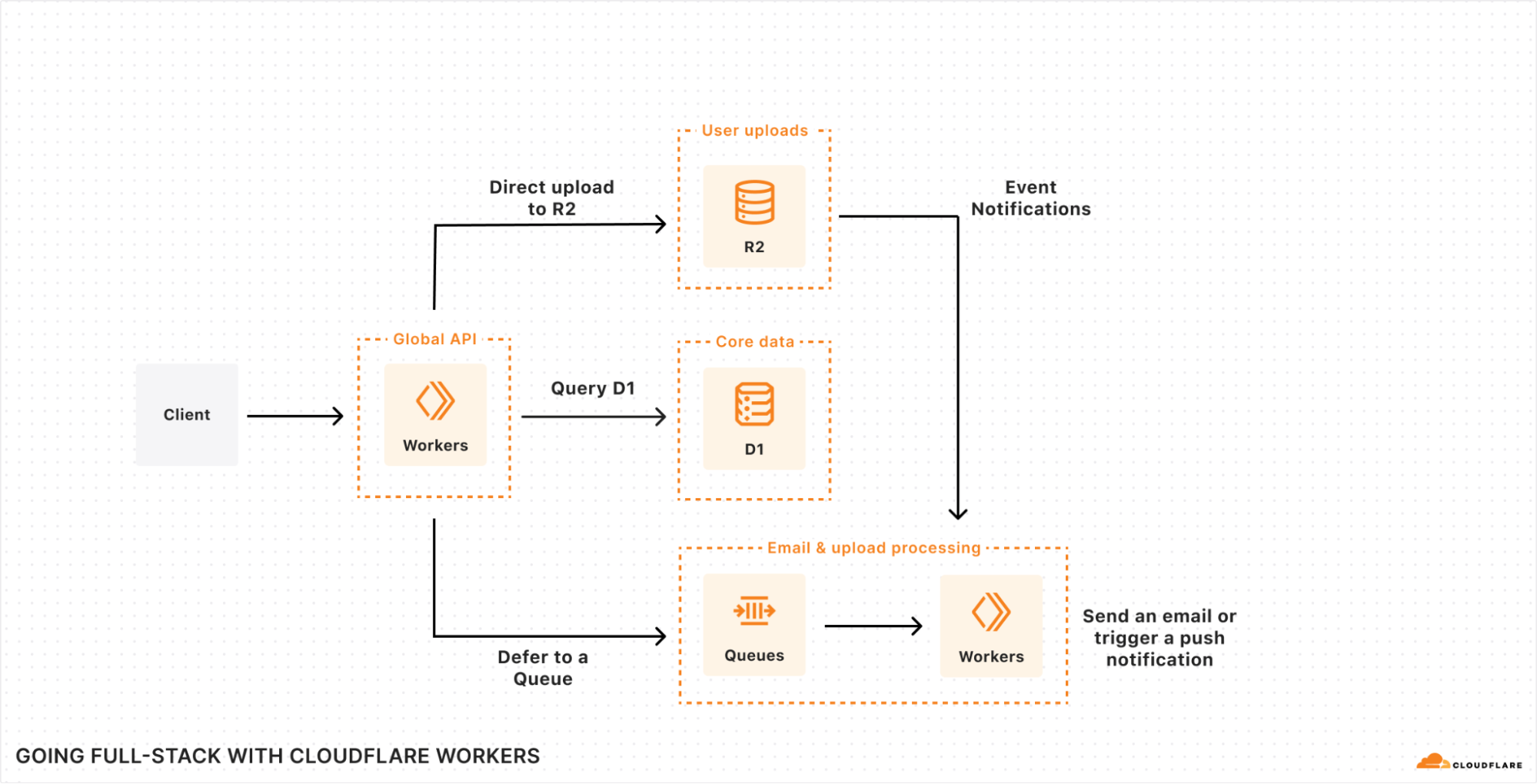
Working with databases can be difficult. Developers face increasing data complexity and needs beyond simple create, read, update, and delete (CRUD) operations. Unfortunately, these issues also compound on themselves: developers have a harder time iterating in an increasingly complex environment. Cloudflare Workers and D1 help by reducing time spent managing infrastructure and deploying applications, and Prisma provides a great experience for your team to work and interact with data.
Together, Cloudflare and Prisma make it easier than ever to deploy globally available apps with a focus on developer experience. To further that goal, Prisma Object Relational Mapper (ORM) now natively supports Cloudflare Workers and D1 in Preview. With version 5.12.0 of Prisma ORM you can now interact with your data stored in D1 from your Cloudflare Workers with the convenience of the Prisma Client API. Learn more and try it out now.
What is Prisma?
From writing to debugging, SQL queries take a long time and slow developer productivity. Even before writing queries, modeling tables can quickly become unwieldy, and migrating data is a nerve-wracking process. Prisma ORM looks to resolve all of these issues by providing an intuitive data modeling language, an automated migration workflow, and a developer-friendly and type-safe client for JavaScript and TypeScript, allowing developers to focus on what they enjoy: developing!
Prisma is focused on making working with data easy. Alongside an ORM, Prisma offers Accelerate and Pulse, products built on Cloudflare that cover needs from connection pooling, to query caching, to real-time type-safe database subscriptions.
How to get started with Prisma ORM, Cloudflare Workers, and D1
To get started with Prisma ORM and D1, first create a basic Cloudflare Workers app. This guide will start with the ”Hello World” Worker example app, but any Workers example app will work. If you don’t have a project yet, start by creating a new one. Name your project something memorable, like my-d1-prisma-app and select “Hello World” worker and TypeScript. For now, we will choose to not deploy and will wait until after we have set up D1 and Prisma ORM.
npm create cloudflare@latest
Next, move into your newly created project and make sure that dependencies are installed:
cd my-d1-prisma-app && npm install
After dependencies are installed, we can move on to the D1 setup.
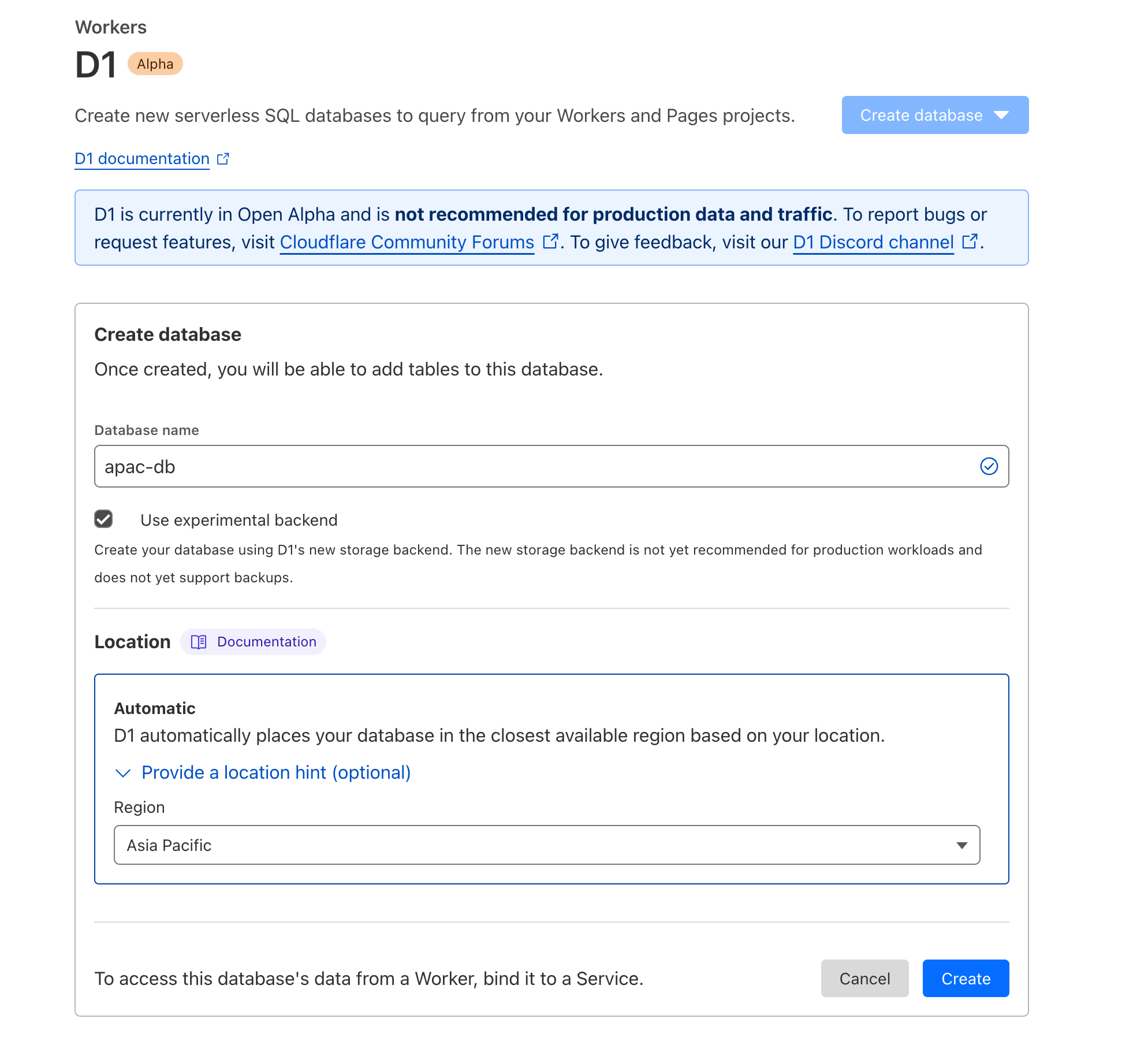
First, create a new D1 database for your app.
npx wrangler d1 create prod-prisma-d1-app
.
.
.

[[d1_databases]]
binding = "DB" # i.e. available in your Worker on env.DB
database_name = "prod-prisma-d1-app"
database_id = "<unique-ID-for-your-database>"
The section starting with [[d1_databases]] is the binding configuration needed in your wrangler.toml for your Worker to communicate with D1. Add that now:
// wrangler.toml
name="my-d1-prisma-app"
main = "src/index.ts"
compatibility_date = "2024-03-20"
compatibility_flags = ["nodejs_compat"]

[[d1_databases]]
binding = "DB" # i.e. available in your Worker on env.DB
database_name = "prod-prisma-d1-app"
database_id = "<unique-ID-for-your-database>"
Your application now has D1 available! Next, add Prisma ORM to manage your queries, schema and migrations! To add Prisma ORM, first make sure the latest version is installed. Prisma ORM versions 5.12.0 and up support Cloudflare Workers and D1.
Now run npx prisma init in order to create the necessary files to start with. Since D1 uses SQLite’s SQL dialect, we set the provider to be sqlite.
npx prisma init --datasource-provider sqlite
This will create a few files, but the one to look at first is your Prisma schema file, available at prisma/schema.prisma
// schema.prisma
// This is your Prisma schema file,
// learn more about it in the docs: https://pris.ly/d/prisma-schema

generator client {
  provider = "prisma-client-js"
}

datasource db {
  provider = "sqlite"
  url  = env("DATABASE_URL")
}
Before you can create any models, first enable the driverAdapters Preview feature. This will allow the Prisma Client to use an adapter to communicate with D1.
// schema.prisma
// This is your Prisma schema file,
// learn more about it in the docs: https://pris.ly/d/prisma-schema

generator client {
  provider = "prisma-client-js"
+ previewFeatures = ["driverAdapters"]
}

datasource db {
  provider = "sqlite"
  url      = env("DATABASE_URL")
}
Now you are ready to create your first model! In this app, you will be creating a “ticker”, a mainstay of many classic Internet sites.
Add a new model to your schema, Visit, which will track that an individual visited your site. A Visit is a simple model that will have a unique ID and the time at which an individual visited your site.
// This is your Prisma schema file,
// learn more about it in the docs: https://pris.ly/d/prisma-schema

generator client {
  provider        = "prisma-client-js"
  previewFeatures = ["driverAdapters"]
}

datasource db {
  provider = "sqlite"
  url      = env("DATABASE_URL")
}

+ model Visit {
+   id        Int      @id @default(autoincrement())
+   visitTime DateTime @default(now())
+ }
Now that you have a schema and a model, let’s create a migration. First use wrangler to generate an empty migration file and prisma migrate to fill it. If prompted, select “yes” to create a migrations folder at the root of your project.
npx wrangler d1 migrations create prod-prisma-d1-app init
 ⛅️ wrangler 3.36.0
-------------------
✔ No migrations folder found. Set `migrations_dir` in wrangler.toml to choose a different path.
Ok to create /path/to/your/project/my-d1-prisma-app/migrations? … yes
✅ Successfully created Migration '0001_init.sql'!

The migration is available for editing here
/path/to/your/project/my-d1-prisma-app/migrations/0001_init.sql
The npx prisma migrate diff command takes the difference between your database (which is currently empty) and the Prisma schema. It then saves this difference to a new file in the migrations directory.
Make sure to import PrismaClient and PrismaD1, define the binding for your D1 database, and you’re ready to use Prisma in your application.
// src/index.ts
import { PrismaClient } from "@prisma/client";
import { PrismaD1 } from "@prisma/adapter-d1";

export interface Env {
  DB: D1Database,
}

export default {
  async fetch(request: Request, env: Env, ctx: ExecutionContext): Promise<Response> {
    const adapter = new PrismaD1(env.DB);
    const prisma = new PrismaClient({ adapter });
    const { pathname } = new URL(request.url);

    if (pathname === '/') {
      const numVisitors = await prisma.visit.count();
      return new Response(
        `You have had ${numVisitors} visitors!`
      );
    }

    return new Response('');
  },
};
You may notice that there’s always 0 visitors. Add another route to create a new visitor whenever someone visits the /visit route
// src/index.ts
import { PrismaClient } from "@prisma/client";
import { PrismaD1 } from "@prisma/adapter-d1";

export interface Env {
  DB: D1Database,
}

export default {
  async fetch(request: Request, env: Env, ctx: ExecutionContext): Promise<Response> {
    const adapter = new PrismaD1(env.DB);
    const prisma = new PrismaClient({ adapter });
    const { pathname } = new URL(request.url);

    if (pathname === '/') {
      const numVisitors = await prisma.visit.count();
      return new Response(
        `You have had ${numVisitors} visitors!`
      );
    } else if (pathname === '/visit') {
      const newVisitor = await prisma.visit.create({ data: {} });
      return new Response(
        `You visited at ${newVisitor.visitTime}. Thanks!`
      );
    }

    return new Response('');
  },
};
Your app is now set up to record visits and report how many visitors you have had!
Summary and further reading
We were able to build a simple app easily with Cloudflare Workers, D1 and Prisma ORM, but the benefits don’t stop there! Check the official documentation for information on using Prisma ORM with D1 along with workflows for migrating your data, and even extending the Prisma Client for your specific needs.
Data is fundamental to any real-world application: the database storing your user data and inventory, the analytics tracking sales events and/or error rates, the object storage with your web assets and/or the Parquet files driving your data science team, and the vector database enabling semantic search or AI-powered recommendations for your users.
When we first announced Workers back in 2017, and then Workers KV, Cloudflare R2, and D1, it was obvious that the next big challenge to solve for developers would be in making it easier to ingest, store, and query the data needed to build scalable, full-stack applications.
To that end, as part of our quest to make building stateful, distributed-by-default applications even easier, we’re launching our new Event Notifications service; a preview of our upcoming streaming ingestion product, Pipelines; and a sneak peek into our take on durable execution, Workflows.
Event-based architectures
When you’re writing data — whether that’s new data, changing existing data, or deleting old data — you often want to trigger other, asynchronous work to run in response. That could be processing user-driven uploads, updating search indexes as the underlying data changes, or removing associated rows in your SQL database when content is removed.
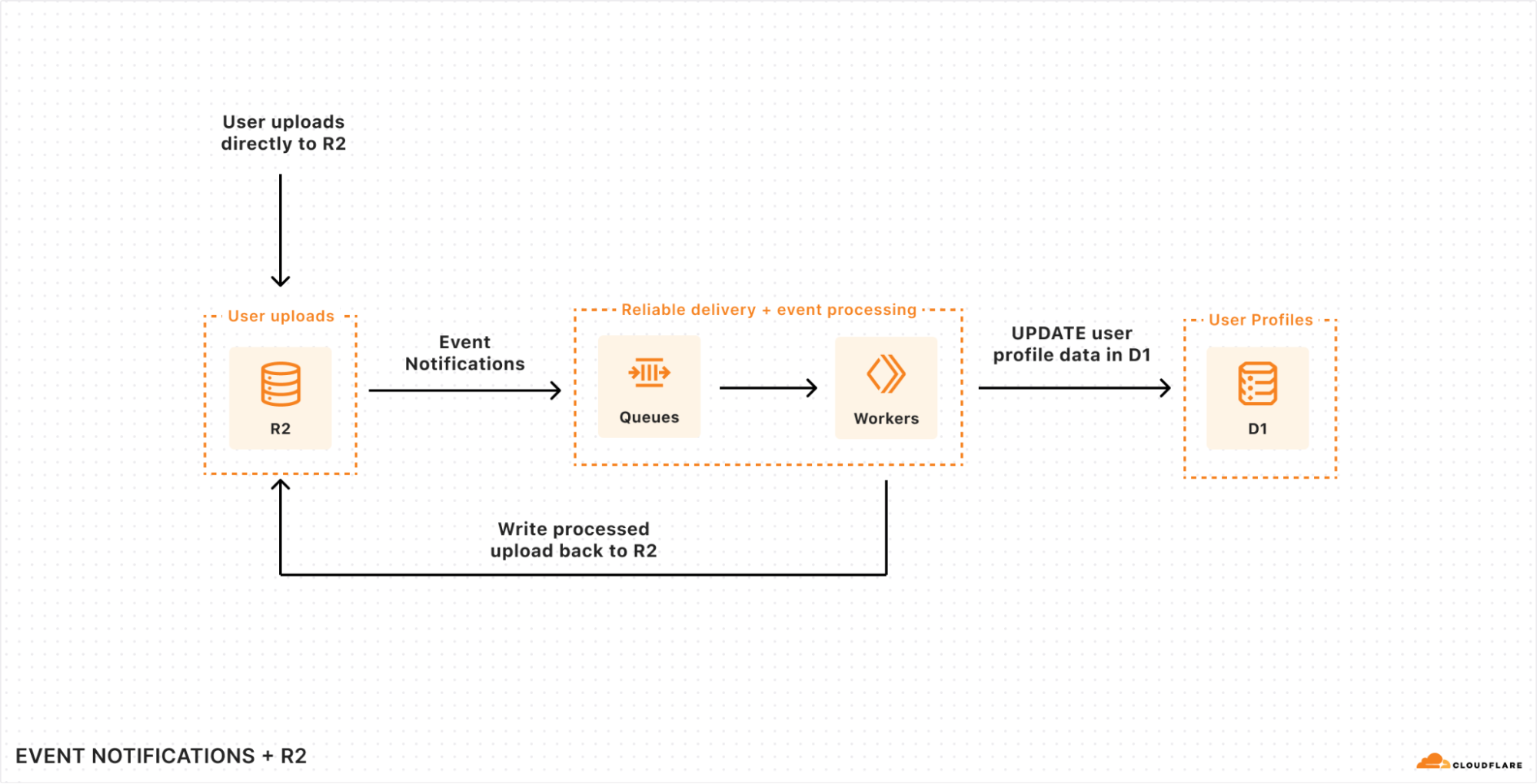
In order to make these event-driven workflows far easier to build across Cloudflare, we’re launching the first step towards a wider Event Notifications platform across Cloudflare, starting with notifications support in R2.
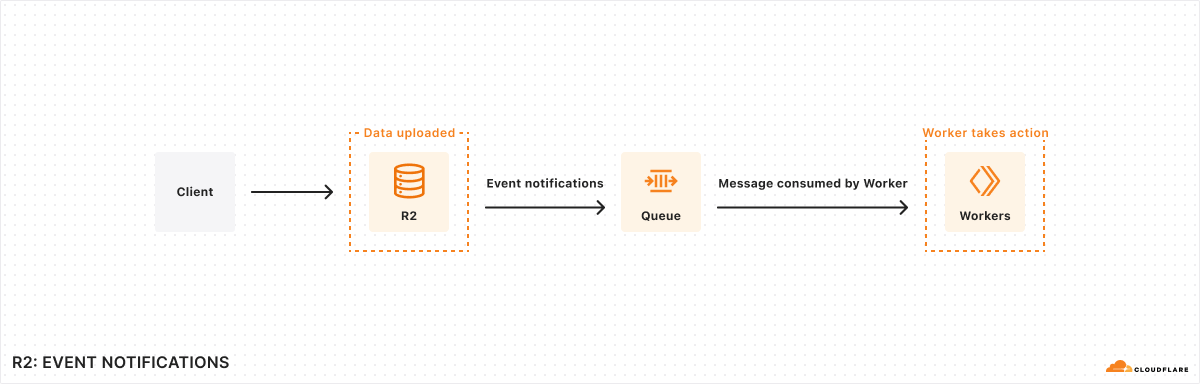
You can read more in the deep-dive on Event Notifications for R2, but in a nutshell: you can configure changes to content in any R2 bucket to write directly to a Queue, allowing you to reliably consume those events in a Worker or to pull from compute in a legacy cloud.
Event Notifications for R2 are just the beginning, though. There are many kinds of events you might want to trigger as a developer — these are just some of the event types we’re planning to support:
Changes (writes) to key-value pairs in your Workers KV namespaces.
Updates to your D1 databases, including changed rows or triggers.
Consuming event notifications from a single Worker is just one approach, though. As you start to consume events, you may want to trigger multi-step workflows that execute reliably, resume from errors or exceptions, and ensure that previous steps aren’t duplicated or repeated unnecessarily. An event notification framework turns out to be just the thing needed to drive a workflow engine that executes durably…
Making it even easier to ingest data
When we launched Cloudflare R2, our object storage service, we knew that supporting the de facto-standard S3 API was critical in order to allow developers to bring the tooling and services they already had over to R2. But the S3 API is designed to be simple: at its core, it provides APIs for upload, download, multipart and metadata operations, and many tools don’t support the S3 API.
What if you want to batch clickstream data from your web services so that it’s efficient (and cost-effective) to query by your analytics team? Or partition data by customer ID, merchant ID, or locale within a structured data format like JSON?
Well, we want to help solve this problem too, and so we’re announcing Pipelines, an upcoming streaming ingestion service designed to ingest data at scale, aggregate it, and write it directly to R2, without you having to manage infrastructure, partitions, runners, or worry about durability.
With Pipelines, creating a globally scalable ingestion endpoint that can ingest tens-of-thousands of events per second doesn’t require any code:
$ wrangler pipelines create clickstream-ingest-prod --batch-size="1MB" --batch-timeout-secs=120 --batch-on-json-key=".merchantId" --destination-bucket="prod-cs-data"

✅ Successfully created new pipeline "clickstream-ingest-prod"
📥 Created endpoints:
➡ HTTPS: https://d458dbe698b8eef41837f941d73bc5b3.pipelines.cloudflarestorage.com/clickstream-ingest-prod
➡ WebSocket: wss://d458dbe698b8eef41837f941d73bc5b3.pipelines.cloudflarestorage.com:8443/clickstream-ingest-prod
➡ Kafka: d458dbe698b8eef41837f941d73bc5b3.pipelines.cloudflarestorage.com:9092 (topic: clickstream-ingest-prod)
As you can see here, we’re already thinking about how to make Pipelines protocol-agnostic: write from a HTTP client, stream events over a WebSocket, and/or redirect your existing Kafka producer (and stop having to manage and scale Kafka) directly to Pipelines.
But that’s just the beginning of our vision here. Scalable ingestion and simple batching is one thing, but what about if you have more complex needs? Well, we have a massively scalable compute platform (Cloudflare Workers) that can help address this too.
The code below is just an initial exploration for how we’re thinking about an API for running transforms over streaming data. If you’re aware of projects like Apache Beam or Flink, this programming model might even look familiar:
export default {
   // Pipeline handler is invoked when batch criteria are met
   async pipeline(stream: StreamPipeline, env: Env, ctx: ExecutionContext): Promise<StreamingPipeline> {
      // ...
      return stream
         // Type: transform(label: string, transformFunc: TransformFunction): Promise<StreamPipeline>
         // Each transform has a label that is used in metrics to provide
    // per-transform observability and debugging
         .transform("human readable label", (events: Array<StreamEvent>) => {
            return events.map((e) => ...)
         })
         .transform("another transform", (events: Array<StreamEvent>) => {
            return events.map((e) => ...)
         })
         .writeToR2({
            format: "json",
            bucket: "MY_BUCKET_NAME",
            prefix: somePrefix,
            batchSize: "10MB"
         })
   }
}
Specifically:
The Worker describes a pipeline of transformations (mapping, reducing, filtering) that operates over each subset of events (records)
You can call out to other services — including D1 or KV — in order to synchronously or asynchronously hydrate data or lookup values during your stream processing
We take care of scaling horizontally based on records-per-second and/or any concurrency settings you configure based on processing latency requirements.
We’ll be bringing Pipelines into open beta later in 2024, and it will initially launch with support for HTTP ingestion and R2 as a destination (sink), but we’re already thinking bigger.
We’ll be sharing more as Pipelines gets closer to release. In the meantime, you can register your interest and share your use-case, and we’ll reach out when Pipelines reaches open beta.
Durable Execution
If the term “Durable Execution” is new to you, don’t worry: the term comes from the desire to run applications that can resume execution from where they left off, even if the underlying host or compute fails (where the “durable” part comes from).
As we’ve continued to build out our data and AI platforms, we’ve been acutely aware that developers need ways to create reliable, repeatable workflows that operate over that data, turn unstructured data into structured data, trigger on fresh data (or periodically), and automatically retry, restart, and export metrics for each step along the way. The industry calls this Durable Execution: we’re just calling it Workflows.
What makes Workflows different from other takes on Durable Execution is that we provide the underlying compute as part of the platform. You don’t have to bring-your-own compute, or worry about scaling it or provisioning it in the right locations. Workflows runs on top of Cloudflare Workers – you write the workflow, and we take care of the rest.
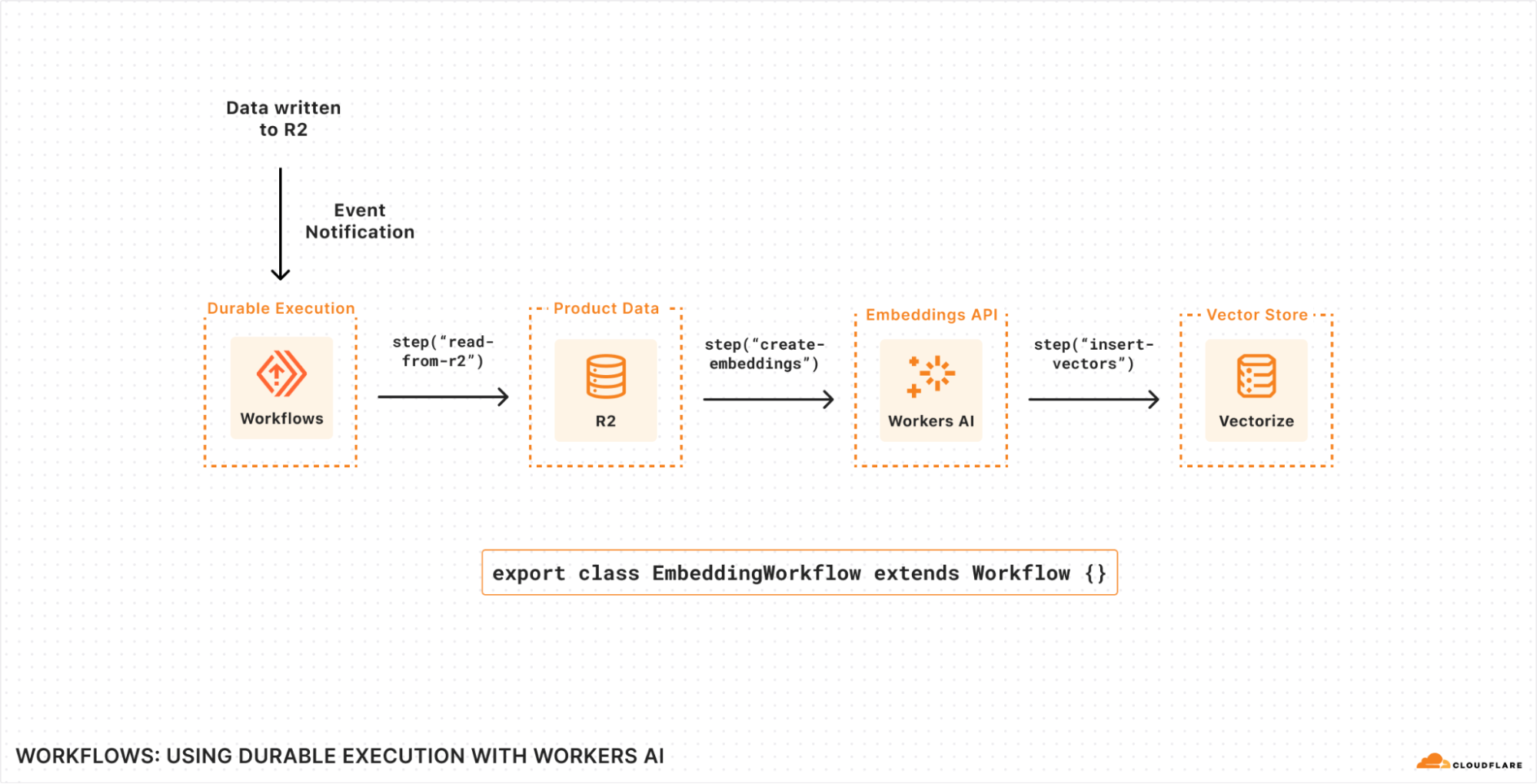
Here’s an early example of writing a Workflow that generates text embeddings using Workers AI and stores them (ready to query) in Vectorize as new content is written to (or updated within) R2.
Each Workflow run is triggered by an Event Notification consumed from a Queue, but could also be triggered by a HTTP request, another Worker, or even scheduled on a timer.
Individual steps within the Workflow allow us to define individually retriable units of work: in this case, we’re reading the new objects from R2, creating text embeddings using Workers AI, and then inserting.
State is durably persisted between steps: each step can emit state, and Workflows will automatically persist that so that any underlying failures, uncaught exceptions or network retries can resume execution from the last successful step.
Every call to step() automatically emits metrics associated with the unique Workflow run, making it easier to debug within each step and/or break down your application into its smallest units of execution, without having to worry about observability.
Step-by-step, it looks like this:
Transforming this series of steps into real code, here’s what this would look like with Workflows:
import { Ai } from "@cloudflare/ai";
import { Workflow } from "cloudflare:workers";

export interface Env {
  R2: R2Bucket;
  AI: any;
  VECTOR_INDEX: VectorizeIndex;
}

export default class extends Workflow {
  async run(event: Event) {
    const ai = new Ai(this.env.AI);

    // List of keys to fetch from our incoming event notification
    const keysToFetch = event.messages.map((val) => {
      return val.object.key;
    });

    // The return value of each step is stored (the "durable" part
    // of "durable execution")
    // This ensures that state can be persisted between steps, reducing
    // the need to recompute results ($$, time) should subsequent
    // steps fail.
    const inputs = await this.ctx.run(
      // Each step has a user-defined label
      // Metrics are emitted as each step runs (to success or failure)
// with this label attached and available within per-Workflow
// analytics in near-real-time.
"read objects from R2", async () => {
      const objects = [];

      for (const key of keysToFetch) {
        const object = await this.env.R2.get(key);
        objects.push(await object.text());
      }

      return objects;
    });


    // Persist the output of this step.
    const embeddings = await this.ctx.run(
      "generate embeddings",
      async () => {
        const { data } = await ai.run("@cf/baai/bge-small-en-v1.5", {
          text: inputs,
        });

        if (data.length) {
          return data;
        } else {
          // Uncaught exceptions trigger an automatic retry of the step
          // Retries and timeouts have sane defaults and can be overridden
    // per step
          throw new Error("Failed to generate embeddings");
        }
      },
      {
        retries: {
          limit: 5,
          delayMs: 1000,
          backoff: "exponential",
        },
      }
    );

    await this.ctx.run("insert vectors", async () => {
      const vectors = [];

      keysToFetch.forEach((key, index) => {
        vectors.push({
          id: crypto.randomUUID(),
          // Our embeddings from the previous step
          values: embeddings[index].values,
          // The path to each R2 object to map back to during
 	    // vector search
          metadata: { r2Path: key },
        });
      });

      return this.env.VECTOR_INDEX.upsert();
    });
  }
}
This is just one example of what a Workflow can do. The ability to durably execute an application, modeled as a series of steps, applies to a wide number of domains. You can apply this model of execution to a number of use-cases, including:
Deploying software: each step can define a build step and subsequent health check, gating further progress until your deployment meets your criteria for “healthy”.
Post-processing user data: triggering a workflow based on user uploads (e.g. to Cloudflare R2) that then subsequently parses that data asynchronously, redacts PII or sensitive data, writes the sanitized output, and triggers a notification via email, webhook, or mobile push.
Payment and batch workflows: aggregating raw customer usage data on a periodic schedule by querying your data warehouse (or Workers Analytics Engine), triggering usage or spend alerts, and/or generating PDF invoices.
Each of these use cases model tasks that you want to run to completion, minimize redundant retries by persisting intermediate state, and (importantly) easily observe success and failure.
We’ll be sharing more about Workflows during the second quarter of 2024 as we work towards an open (public!) beta. This includes how we’re thinking about idempotency and interactions with our storage, per-instance observability and metrics, local development, and templates to bootstrap common workflows.
Putting it together
We’ve often thought of Cloudflare’s own network as one massively scalable parallel data processing cluster: data centers in 310+ cities, with the ability to run compute close to users and/or close to data, keep it within the bounds of regulatory or compliance requirements, and most importantly, use our massive scale to enable our customers to scale as well.
Recapping, a fully-fledged data platform needs to enable three things:
Ingesting data: getting data into the platform (in the right format, from the right sources)
Storing data: securely, reliably, and durably.
Querying data: understanding and extracting insights from the data, and/or transforming it for use by other tools.
When we launched R2 we tackled the second part, but knew that we’d need to follow up with the first and third parts in order to make it easier for developers to get data in and make use of it.
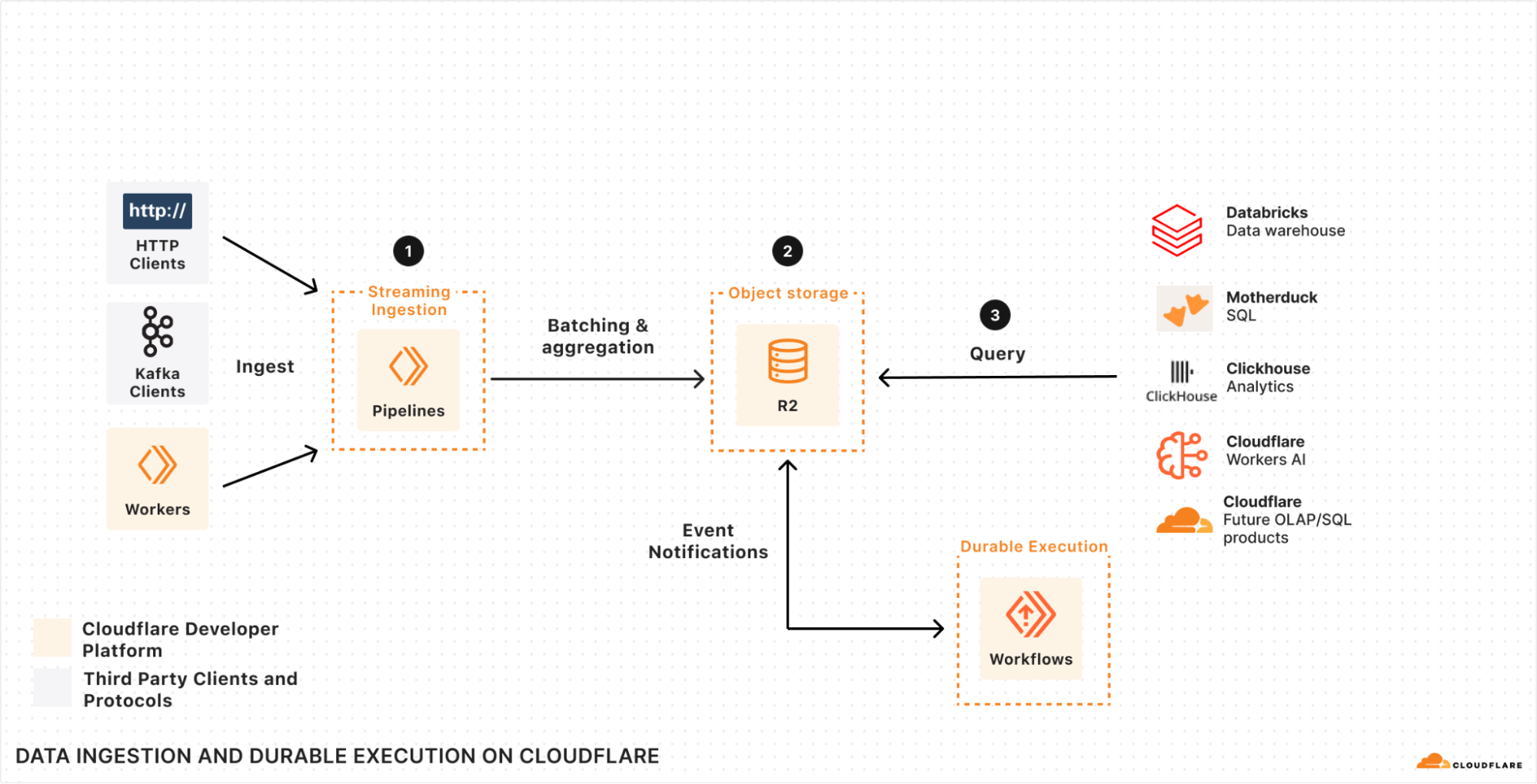
If we look at how we can build a system that helps us solve each of these three parts together with Pipelines, Event Notifications, R2, and Workflows, we end up with an architecture that resembles this:
Specifically, we have Pipelines (1) scaling out to ingest data, batch it, filter it, and then durably store it in R2 (2) in a format that’s ready and optimized for querying. Workflows, ClickHouse, Databricks, or the query engine of your choice can then query (3) that data as soon as it’s ready — with “ready” being automatically triggered by an Event Notification as soon as the data is ingested and written to R2.
There’s no need to poll, no need to batch after the fact, no need to have your query engine slow down on data that wasn’t pre-aggregated or filtered, and no need to manage and scale infrastructure in order to keep up with load or data jurisdiction requirements. Create a Pipeline, write your data directly to R2, and query directly from it.
If you’re also looking at this and wondering about the costs of moving this data around, then we’re holding to one important principle: zero egress fees across all of our data products. Just as we set the stage for this with our R2 object storage, we intend to apply this to every data product we’re building, Pipelines included.
Start Building
We’ve shared a lot of what we’re building so that developers have an opportunity to provide feedback (including via our Developer Discord), share use-cases, and think about how to build their next application on Cloudflare.
The lifecycle of data often doesn’t stop immediately after upload to an R2 bucket – event data may need to be transformed and loaded into a data warehouse, media files may need to go through a post-processing step, etc. We’re releasing event notifications for R2 in open beta to enable building applications and workflows driven by your changing data.
Event notifications work by sending messages to your queue each time there is a change to your data. These messages are then received by a consumer Worker where you can then define any subsequent action that needs to be taken.
To get started enabling event notifications on your R2 bucket, you can run the following Wrangler command (replacing bucket_name and queue_name with your bucket and queue names respectively):
For more information on how to set up event notifications on your R2 buckets today and limitations during beta, please refer to the documentation.
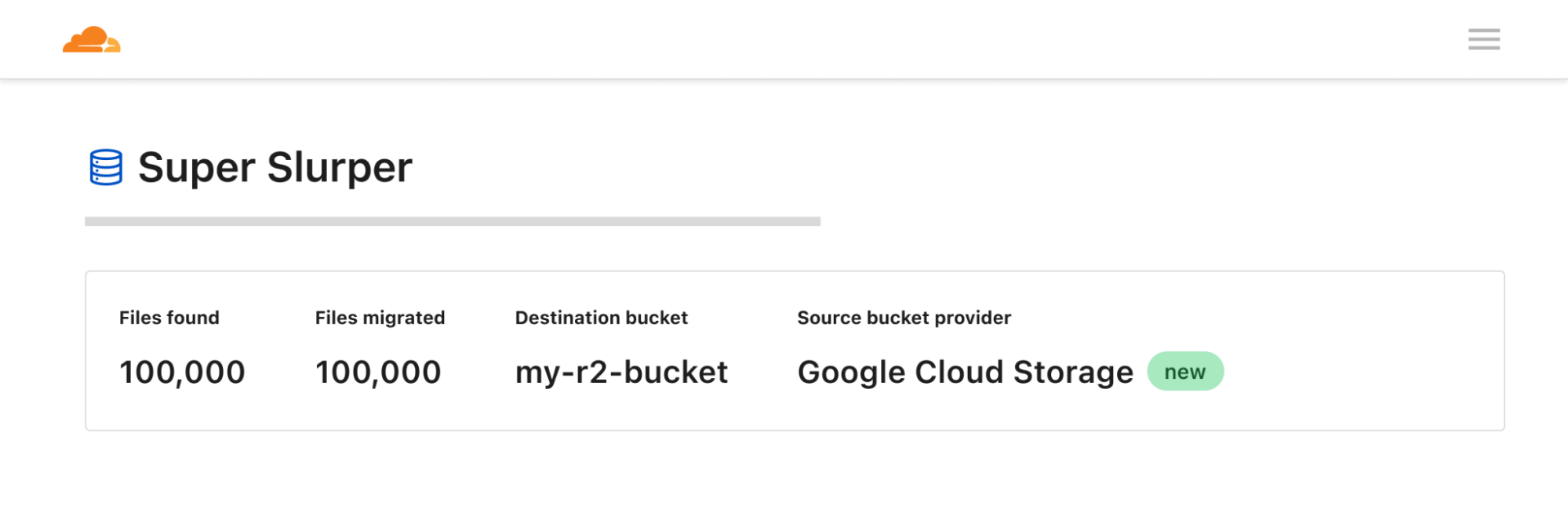
Super Slurper for Google Cloud Storage
Super Slurper can now migrate data from Google Cloud Storage (GCS) to Cloudflare R2. We released Super Slurper last year with the goal of making one-time comprehensive data migrations fast, reliable, and easy: there’s no need to spin up migration VMs and implement complicated retry logic. Since then, thousands of developers have used Super Slurper to migrate petabytes of data from AWS S3 to R2. Now Google Cloud Storage customers can migrate data to Cloudflare R2 to benefit from Cloudflare’s zero egress fees, whether you are permanently moving data to another provider or not.
To get started migrating data from GCS:
From the Cloudflare dashboard, select R2 > Data Migration.
Select Migrate files.
Select Google Cloud Storage for the source bucket provider.
Enter your bucket name and associated credentials and select Next.
Enter your R2 bucket name and associated credentials and select Next.
After you finish reviewing the details of your migration, select Migrate files.
You can view the status of your migration job at any time on the dashboard. For more information on how to use Super Slurper, please refer to the documentation here.
Infrequent Access Private Beta
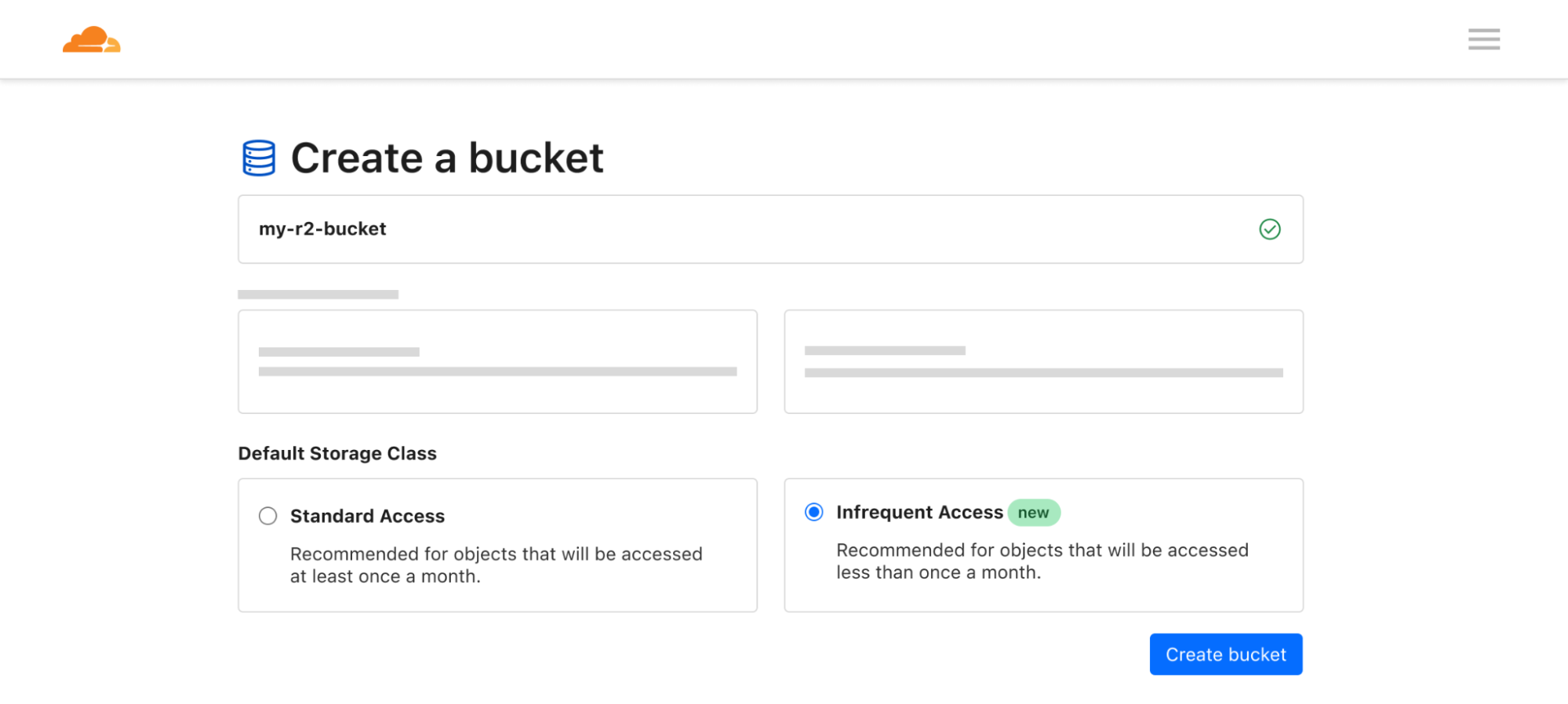
We’re excited to introduce the private beta of our new Infrequent Access storage class. For use cases that involve data that isn’t frequently accessed (long tail user-generated content, logs, etc), Infrequent Access gives you the ability to pay less for storage while maintaining performance and durability.
Here’s an example of how you can upload an object to your R2 bucket with the new Infrequent Access storage class using Workers:
In addition to uploading objects directly to Infrequent Access, you can define an object lifecycle policy to move data to Infrequent Access after a period of time goes by and you no longer need to access your data as often. In the future, we plan to automatically optimize storage classes for data so you can avoid manually creating rules and better adapt to changing data access patterns.
For data stored in the Infrequent Access storage class, the pricing components will be similar to what you’re used to with R2: storage, Class A operations (writes, lists), Class B operations (reads), and data retrieval (processing). Data retrieval is charged per GB when data in the Infrequent Access storage class is retrieved and is what allows us to provide storage at a lower price. It reflects the additional computational resources required to fetch data from underlying storage optimized for less frequent access. And when the time comes, and you do need to use your data, there are still no egress fees.
Component
Price
Storage
$0.01 / GB-month
Class A Operations
$9.00 / million requests
Class B Operations
$0.90 / million requests
Data Retrieval (Processing)
$0.01 / GB
Egress (or Data Transfer)
$0 – No Charge
Are you interested in participating in the private beta for Infrequent Access?
We would love to hear from you! To share your feedback about R2 and our data migration services, please join the Cloudflare Developer Discord. If you’re interested in learning more about R2, get started by visiting R2’s developer documentation or see how much you could save with our pricing calculator.
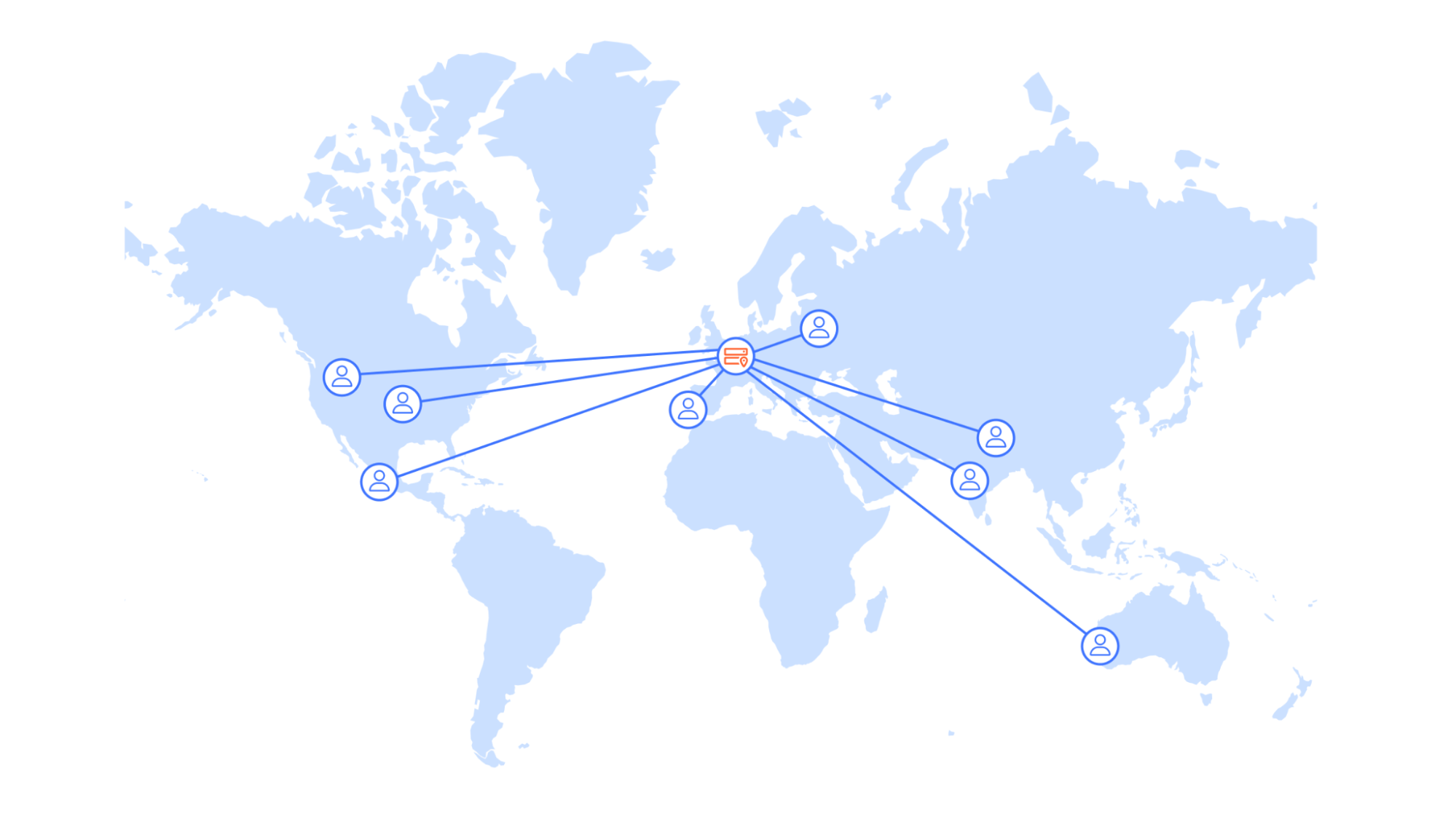
Delivering great user experiences with a global user base can be challenging. While serving requests quickly when you start out in a local market is straightforward, doing so for a global audience is much more difficult. Why? Even under optimal conditions, you cannot be faster than the speed of light, which brings single data center solutions to their performance limits.
In this post, we will cover how Picsart improved the performance of one of its most critical services by moving from a centralized architecture to a globally distributed service built on Cloudflare. Our serverless compute platform, Workers, distributed throughout 310+ cities around the world, and our globally distributed Workers KV storage allowed them to improve their performance significantly and drive real business impact.
Success driven by data-driven insights
Picsart is one of the world’s largest digital creation platforms and a long-standing Cloudflare partner. At its core, an advanced tech stack powers its comprehensive features, including AI-driven photo and video editing tools and community-driven content sharing. With its infrastructure spanning across multiple cloud environments and on-prem deployments, Picsart is engineered to handle billions of daily requests from its huge mobile and web user base and API integrations. For over a decade, Cloudflare has been integral to Picsart, providing support for performant content delivery and securing its digital ecosystem.
Similar to many other tech giants, Picsart approaches product development in a data-driven way. At the core of the innovation is Picsart’s remote configuration and experimentation platform, which enables product managers, UX researchers, and others to segment their user base into different test groups. These test groups might get to see slightly different implementations of features or designs of the Picsart app. Users might also get early access to experimental features or see different in-app promotions. In combination with constant monitoring of relevant KPIs, this allows for informed product decisions based on user preference and business impact.
On each app start, the client device sends a request to the remote configuration service for the latest setup tailored to the user’s session. The assignment of experiments relies on factors like the operating system and previous sessions, making each request unique and uncachable. Picsart’s app showcases extensive remote configuration capabilities, enabling adjustments to nearly every element. This results in a response containing a 1.5 MB configuration file for mobile clients. While the long-term solution is to reduce the file size, which has grown over time as more teams adopted the powerful service, this is not possible in the near or mid-term as it requires a major rewrite of all clients.
This setup request is blocking in the “hot path” during app start, as the results of this request will decide how the app itself looks and behaves. Hence, performance is critical. To ensure users are not waiting for too long, Picsart apps will wait for 1500ms on mobile for the request to complete – if it does not, the user will not be assigned a test group and the app will fallback to default settings.
The clock is ticking
While a 1500ms round trip time seems like a sufficiently large time budget, the data suggested otherwise. Before the improvements were implemented, a staggering 50% of devices could not complete the requests in time. How come? In these 1.5 seconds the following steps need to complete:
The request must travel from the users’ devices to the centralized backend servers
The server processes the request based on dozens of user attributes provided in the request and thousands of defined remote configuration variations, running experiments, and segments metadata. Using all the info, the server selects the right variation of each remote setting entry and builds the response payload.
The response must travel from the centralized backend servers to the user devices.
Looking at the data, it was clear to the Picsart team that their backend service was already well-optimized, taking only 30 milliseconds, a tiny fraction of the available time budget, to process each of the billions of monthly requests. The bulk of the request time came from network latency. Especially with mobile devices, last mile performance can be very volatile, eating away a significant amount of the available time budget. Not only that, but the data was clear: users closer to the origin server had a much higher chance of making the round trip in time versus users out of region. It quickly became obvious that Picsart, fueled by its global success, had outgrown a single-region setup.
To the drawing board
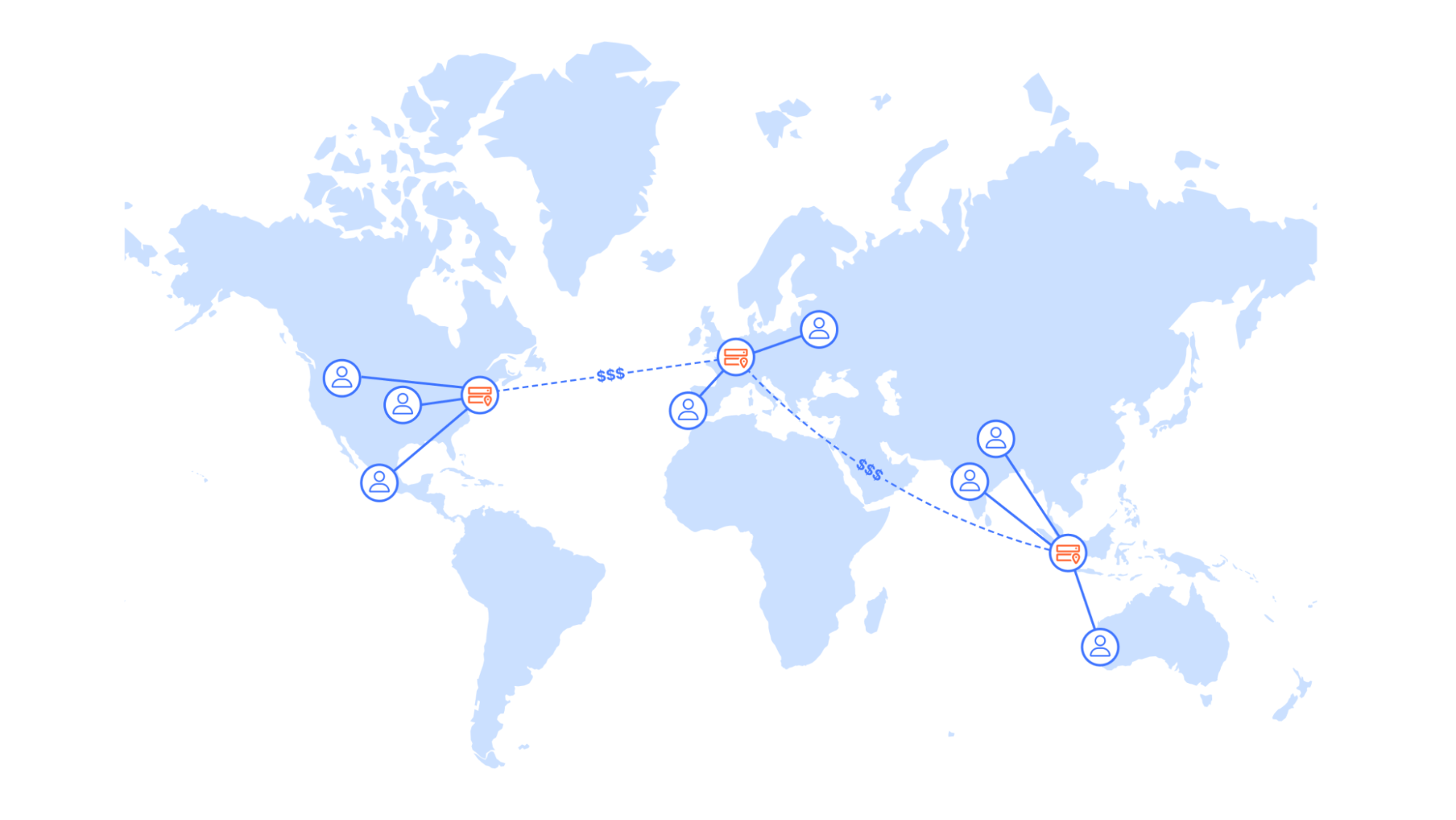
A solution that comes to mind would be to replicate the existing cloud infrastructure in multiple regions and use global load balancing to minimize the distance a request needs to travel. However, this introduces significant overhead and cost. On the infrastructure side, it is not only the additional compute instances and database clusters that incur cost, but also cross-region data transfer to keep data in sync. Moreover, technical teams would need to operate and monitor infrastructure in multiple regions, which can add a lot to the complexity and cognitive load, leading to decreased development velocity and productivity loss.
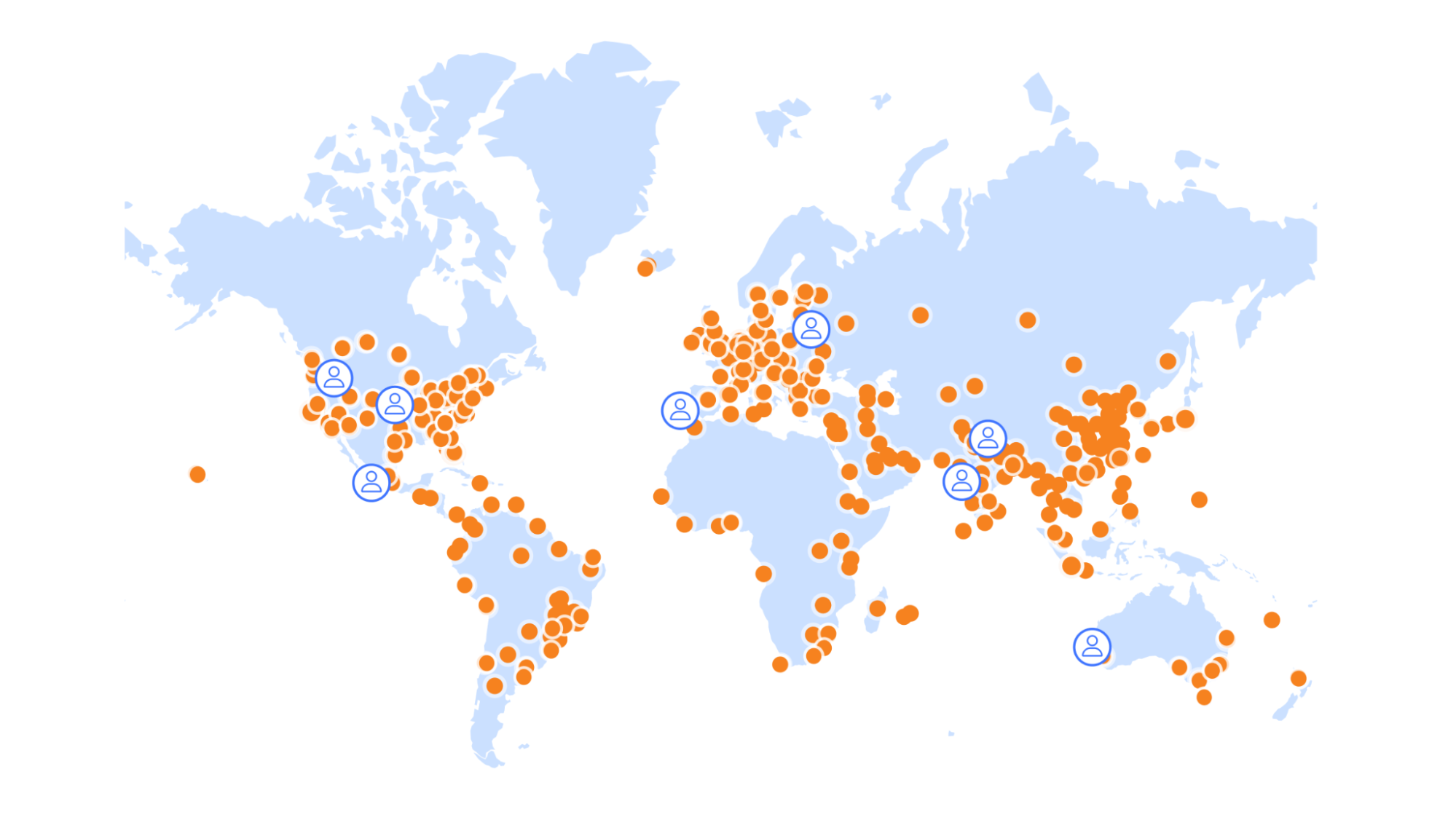
Workers and Workers KV seemed like the ideal solution. Both compute and data are globally distributed in 310+ locations around the world, resulting in a shorter distance between end users and the experimentation service. Not only that, but Cloudflare’s global-by-default approach allows for deployment with minimal overhead, and in contrast to other considered solutions, no additional fees to distribute the data around the globe.
No race without a clock
The objective for the refactor of the experimentation service was to increase the share of devices that successfully receive experimentation configuration within the set time budget.
But how to measure success? While synthetic testing can be useful in many situations, Picsart opted to come up with another clever solution:
During development, the Picsart engineers had already added a testing endpoint to the web and mobile versions of their app that sends a duplicate request to the new endpoint, discarding the response and swallowing all potential errors. This allows them to collect timing data based on real-user metrics without impacting the app’s performance and reliability.
A simplified version of this pattern for a web client could look like this:
// API endpoint URLs
const prodUrl = 'https://prod.example.com/';
const devUrl = 'https://new.example.com/';

// Function to collect metrics
const collectMetrics = (duration) => {
    console.log('Request duration:', duration);
    // …
};

// Function to fetch data from an endpoint and call collectMetrics
const fetchData = async (url, options) => {
    const startTime = performance.now();

    try {
        const response = await fetch(url, options);
        const endTime = performance.now();
        const duration = endTime - startTime;
        collectMetrics(duration);
        return await response.json();
    } catch (error) {
        console.error('Error fetching data:', error);
    }
};

// Fetching data from both endpoints
async function fetchDataFromBothEndpoints() {
    try {
        const result1 = await fetchData(prodUrl, { method: 'POST', ... });
        console.log('Result from endpoint 1:', result1);

        // Fetching data from the second endpoint without awaiting its completion
        fetchData(devUrl, { method: 'POST', ... });
    } catch (error) {
        console.error('Error fetching data from both endpoints:', error);
    }
}

fetchDataFromBothEndpoints();
Using existing data analytics tools, Picsart was able to analyze the performance of the new services from day one, starting with a dummy endpoint and a ‘hello world’ response. And with that a v0 was created that did not have the correct logic just yet, but simulated reading multiple values from KV and returning a response of a realistic size back to the end user.
The need for a do-over
In the initial phase, outcomes fell short of expectations. Surprisingly, requests were slower despite the service’s proximity to end users. What caused this setback? Subsequent investigation unveiled multiple culprits and design patterns in need for optimization.
Data segmentation
The previous, stateful solution operated on a single massive “blob” of data exceeding 100MB in value. Loading this into memory incurred a few seconds of initial startup time, but once the VM completed the task, request handling was fast, benefiting from the readily available data in memory.
However, this approach doesn’t seamlessly transition to the serverless realm. Unlike long-running VMs, Worker isolates have short lifespans. Repeatedly parsing large JSON objects led to prolonged compute durations. Simply parsing four KV entries of 25MB each (KV maximum value size is 25MB) on each request was not a feasible option.
The Picsart team went back to solution design and embarked on a journey to optimize their system’s execution time, resulting in a series of impactful improvements.
The fundamental insight that guided the solution was the unnecessary overhead that was involved in loading and parsing data irrelevant to the user’s specific context. The 100MB configuration file contained configurations for all platforms and locations worldwide – a setup that was far from efficient in a globally distributed, serverless compute environment. For instance, when processing requests from users in the United States, there was no need to fetch configurations targeted for users in other countries, or for different platforms.
To address this inefficiency, the Picsart team stored the configuration of each platform and country in separate KV records. This targeted strategy meant that for a request originating from a US user on an Android device, our system would only fetch and parse the KV record specific to Android users in the US, thereby excluding all irrelevant data. This resulted in approximately 600 KV records, each with a maximum size of 10MB. While this leads to data duplication on the KV storage side, it decreases the amount of data that needs to be parsed upon request. As Cloudflare operates in over 120 countries around the world, only a subset of records were needed in each location. Hence, the increase in cardinality had minimal impact on KV cache performance, as demonstrated by more than 99.5% of KV reads being served from local cache.
Key
Size
settings_part1.json
25MB
settings_part2.json
25MB
…
….
Before (simplified)
Key
Size
com.picsart.studio_apple_us.json
6.1MB
com.picsart.studio_apple_de.json
6.1MB
com.picsart.studio_android_us.json
5.9MB
…
…
After (simplified)
This approach was a significant move for Picsart as they transitioned from a regional cloud setup to Cloudflare’s globally distributed connectivity cloud. By serving data from close proximity to end user locations, they were able to combat the high network latency from their previous setup. This strategy radically transformed the data-handling process. which unlocked two major benefits:
Performance Gains: By ensuring that only the relevant subset of data is fetched and parsed based on the user’s platform and geographical location, wall time and compute resources required for these operations could be significantly reduced.
Scalability and Flexibility: the granular segmentation of data enables effortless scaling of the service for new features or regional content. Adding support for new applications now only requires inserting new, standalone KV records in contrast to the previous solution where this would require increasing the size of the single record.
Immutable updates
Now that changes to the configuration were segmented by app, country, and platform, this also allowed for individual updates of the configuration in KV. KV storage showcases its best performance when records are updated infrequently but read very often. This pattern leverages KV’s fundamental design to cache values at edge locations upon reads, ensuring that subsequent queries for the same record are swiftly served by local caches rather than requiring a trip back to KV’s centralized data centers. This architecture is fundamental for minimizing latency and maximizing the speed of data retrieval across a globally distributed platform.
A crucial requirement for Picsart’s experimentation system was the ability to propagate updates of remote configuration values immediately. Updating existing records would require very short cache TTLs and even the minimum KV cache TTL of 60 seconds was considered unacceptable for the dynamic nature of the feature flagging. Moreover, setting short TTLs also impacts the cache hit ratio and the overall KV performance, specifically in regions with low traffic.
To reconcile the need for both rapid updates and efficient caching, Picsart adopted an innovative approach: making KV records immutable. Instead of modifying existing records, they opted to create new records with each configuration change. By appending the content hash to the KV key and writing new records after each update, Picsart ensured that each record was unique and immutable. This allowed them to leverage higher cache TTLs, as these records would never be updated.
Key
Size
com.picsart.studio_apple_us.json
60s
…
….
Before (simplified)
Key
Size
com.picsart.studio_apple_us_b58b59.json
86400s
com.picsart.studio_apple_us_273678.json
86400s
–
…
After (simplified)
There was a catch, though. The service must now keep track of the correct KV keys to use. The Picsart team addressed this challenge by storing references to the latest KV keys in the environment variables of the Worker.
Each configuration change triggers a new KV pair to be written and the services’ environment variables to be updated. As global Workers deployments take mere seconds, changes to the experimentation and configuration data are near-instantaneously globally available.
JSON serialization & alternatives
Following the previous improvements, the Picsart team made another significant discovery: only a small fraction of configuration data is needed to assign the experiments, while the remaining majority of the data comprises JSON values for the remote configuration payloads. While the service must deliver the latter in the response, the data is not required during the initial processing phase.
The initial implementation used KV’s get() method to retrieve the configuration data with the parameter type=json, which converts the KV value to an object. This process is very compute-intensive compared to using the get() method with parameter type= text, which simply returns the value as a string. In the context of Picsart’s data, the bulk of the CPU cycles were wasted on serializing JSON data that is not needed to perform the required business logic.
What if the data structure and code could be changed in such a way that only the data needed to assign experiments was parsed as JSON, while the configuration values were treated as text? Picsart went ahead with a new approach: splitting the KV records into two, creating a small 300KB record for the metadata, which can be quickly parsed to an object, and a 9.7MB record of configuration values. The extracted configuration values are delimited by newline characters. The respective line number is used as reference in the metadata entry, so that the respective configuration value for an experiment can be merged back into the payload response later.
After calculating the experiments and selecting the correct variants based solely on the small metadata entry, the service constructs a JSON string for the response containing placeholders for the actual values that reference the corresponding line numbers in the separate text file. To finalize the response, the server replaces the placeholders with the corresponding serialized JSON strings from the text file. This approach circumvents the need for parsing and re-serializing large JSON objects and helps to avoid a significant computational overhead.
Note that the process of parsing the metadata JSON and determining the correct experiments as well as the loading of the large file with configuration values are executed in parallel, saving additional milliseconds.
By minimizing the size of the JSON data that needed to be parsed and leveraging a more efficient method for constructing the final response, the Picsart team managed to not only reduce the response times but also optimize the compute resource usage. This approach reflects a broader principle applicable across the tech industry: that efficiency, particularly in serverless architectures, can often be dramatically improved by rethinking data structure and utilization.
Getting a head start
The changes on the server-side, moving from a single region setup to Cloudflare’s global architecture, paid off massively. Median response times globally dropped by more than 1 second, which was already a huge improvement for the team. However, in looking at the new data, two more paths for client-side optimizations were found.
As the web and mobile app would call the service at startup, most of the time no active connections to the servers were alive and establishing that connection at request time costs valuable milliseconds.
For the web version, setting a pre-connect header on initial page load showed a positive impact. For the mobile app version, the Picsart team took it a step further. Investigation showed that before the connection could be established, three modules had to complete initialization: the error tracker, the HTTP client, and the SDK. Reordering of the modules to initialize the HTTP client first allowed for connection establishment in parallel to the initialization of the SDK and error tracker, again saving time. This resulted in another 200ms improvement for end users.
Setting a new personal best
The day had come and it was time for the phased rollout, web first and the mobile apps second. With suspense, the team looked at the dashboards, and were pleasantly surprised. The rollout was successful and billions of requests were handled with ease.
Share of successfully delivered experiments
The result? The Picsart apps are loading faster than ever for millions of users worldwide, while the share of successfully delivered experiments increased from 50% to 85%. Median response time dropped from 1500 ms to 280 ms. The response time dropped to 70 ms on the web since the response size is smaller compared to mobile. This translates to a real business impact for Picsart as they can now deliver more personalized and data-driven experiences to even more of their users.
A bright future ahead
Picsart is already thinking of the next generation of experimentation. To integrate with Cloudflare even further, the plan is to use Durable Objects to store hundreds of millions of user data records in a decentralized fashion, enabling even more powerful experiments without impacting performance. This is possible thanks to Durable Objects’ underlying architecture that stores the user data in-region, close to the respective end user device.
Beyond that, Picsart’s experimentation team is also planning to onboard external B2B customers to their experimentation platform as Cloudflare’s developer platform provides them with the scale and global network to handle more traffic and data with ease.
Get started yourself
If you’re also working on or with an application that would benefit from Cloudflare’s speed and scale, check out our developer documentation and tutorials, and join our developer Discord to get community support and inspiration.
Inference from fine-tuned LLMs with LoRAs is now in open beta
Today, we’re excited to announce that you can now run fine-tuned inference with LoRAs on Workers AI. This feature is in open beta and available for pre-trained LoRA adapters to be used with Mistral, Gemma, or Llama 2, with some limitations. Take a look at our product announcements blog post to get a high-level overview of our Bring Your Own (BYO) LoRAs feature.
In this post, we’ll do a deep dive into what fine-tuning and LoRAs are, show you how to use it on our Workers AI platform, and then delve into the technical details of how we implemented it on our platform.
What is fine-tuning?
Fine-tuning is a general term for modifying an AI model by continuing to train it with additional data. The goal of fine-tuning is to increase the probability that a generation is similar to your dataset. Training a model from scratch is not practical for many use cases given how expensive and time consuming they can be to train. By fine-tuning an existing pre-trained model, you benefit from its capabilities while also accomplishing your desired task. Low-Rank Adaptation (LoRA) is a specific fine-tuning method that can be applied to various model architectures, not just LLMs. It is common that the pre-trained model weights are directly modified or fused with additional fine-tune weights in traditional fine-tuning methods. LoRA, on the other hand, allows for the fine-tune weights and pre-trained model to remain separate, and for the pre-trained model to remain unchanged. The end result is that you can train models to be more accurate at specific tasks, such as generating code, having a specific personality, or generating images in a specific style. You can even fine-tune an existing LLM to understand additional information about a specific topic.
The approach of maintaining the original base model weights means that you can create new fine-tune weights with relatively little compute. You can take advantage of existing foundational models (such as Llama, Mistral, and Gemma), and adapt them for your needs.
How does fine-tuning work?
To better understand fine-tuning and why LoRA is so effective, we have to take a step back to understand how AI models work. AI models (like LLMs) are neural networks that are trained through deep learning techniques. In neural networks, there are a set of parameters that act as a mathematical representation of the model’s domain knowledge, made up of weights and biases – in simple terms, numbers. These parameters are usually represented as large matrices of numbers. The more parameters a model has, the larger the model is, so when you see models like llama-2-7b, you can read “7b” and know that the model has 7 billion parameters.
A model’s parameters define its behavior. When you train a model from scratch, these parameters usually start off as random numbers. As you train the model on a dataset, these parameters get adjusted bit-by-bit until the model reflects the dataset and exhibits the right behavior. Some parameters will be more important than others, so we apply a weight and use it to show more or less importance. Weights play a crucial role in the model’s ability to capture patterns and relationships in the data it is trained on.
Traditional fine-tuning will adjust all the parameters in the trained model with a new set of weights. As such, a fine-tuned model requires us to serve the same amount of parameters as the original model, which means it can take a lot of time and compute to train and run inference for a fully fine-tuned model. On top of that, new state-of-the-art models, or versions of existing models, are regularly released, meaning that fully fine-tuned models can become costly to train, maintain, and store.
LoRA is an efficient method of fine-tuning
In the simplest terms, LoRA avoids adjusting parameters in a pre-trained model and instead allows us to apply a small number of additional parameters. These additional parameters are applied temporarily to the base model to effectively control model behavior. Relative to traditional fine-tuning methods it takes a lot less time and compute to train these additional parameters, which are referred to as a LoRA adapter. After training, we package up the LoRA adapter as a separate model file that can then plug in to the base model it was trained from. A fully fine-tuned model can be tens of gigabytes in size, while these adapters are usually just a few megabytes. This makes it a lot easier to distribute, and serving fine-tuned inference with LoRA only adds ms of latency to total inference time.
If you’re curious to understand why LoRA is so effective, buckle up — we first have to go through a brief lesson on linear algebra. If that’s not a term you’ve thought about since university, don’t worry, we’ll walk you through it.
Show me the math
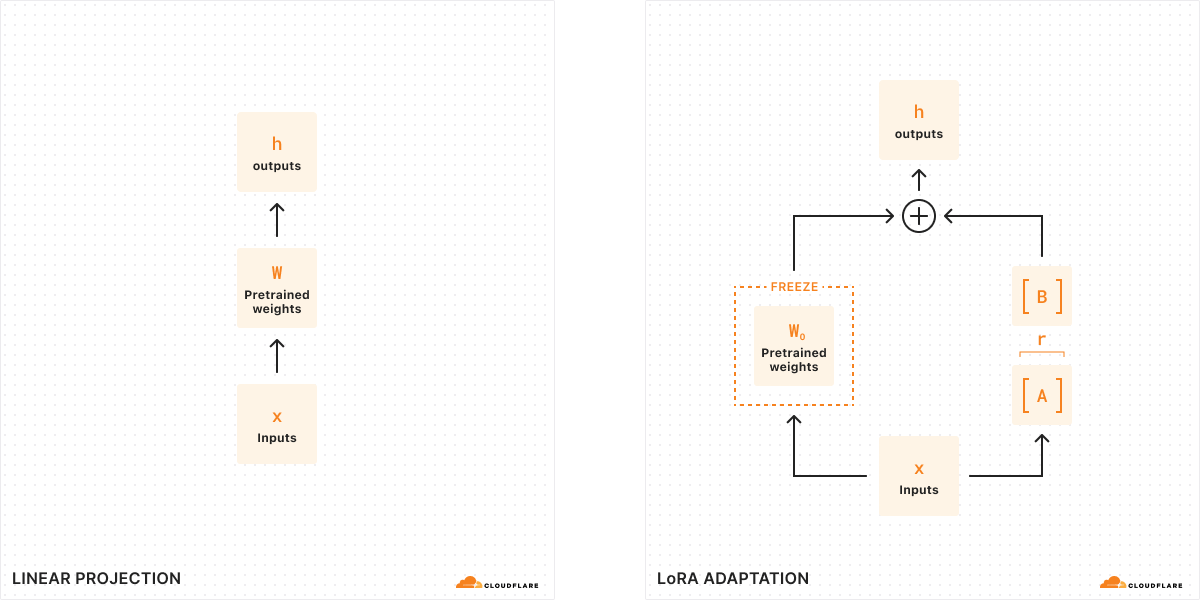
With traditional fine-tuning, we can take the weights of a model (W0) and tweak them to output a new set of weights — so the difference between the original model weights and the new weights is ΔW, representing the change in weights. Therefore, a tuned model will have a new set of weights which can be represented as the original model weights plus the change in weights, W0 + ΔW.
Remember, all of these model weights are actually represented as large matrices of numbers. In math, every matrix has a property called rank (r), which describes the number of linearly independent columns or rows in a matrix. When matrices are low-rank, they have only a few columns or rows that are “important”, so we can actually decompose or split them into two smaller matrices with the most important parameters (think of it like factoring in algebra). This technique is called rank decomposition, which allows us to greatly reduce and simplify matrices while keeping the most important bits. In the context of fine-tuning, rank determines how many parameters get changed from the original model – the higher the rank, the stronger the fine-tune, giving you more granularity over the output.
According to the original LoRA paper, researchers have found that when a model is low-rank, the matrix representing the change in weights is also low-rank. Therefore, we can apply rank decomposition to our matrix representing the change in weights ΔW to create two smaller matrices A, B, where ΔW = BA. Now, the change in the model can be represented by two smaller low-rank matrices. This is why this method of fine-tuning is called Low-Rank Adaptation.
When we run inference, we only need the smaller matrices A, B to change the behavior of the model. The model weights in A, B constitute our LoRA adapter (along with a config file). At runtime, we add the model weights together, combining the original model (W0) and the LoRA adapter (A, B). Adding and subtracting are simple mathematical operations, meaning that we can quickly swap out different LoRA adapters by adding and subtracting A, B from W0.. By temporarily adjusting the weights of the original model, we modify the model’s behavior and output and as a result, we get fine-tuned inference with minimal added latency.
According to the original LoRA paper, “LoRA can reduce the number of trainable parameters by 10,000 times and the GPU memory requirement by 3 times”. Because of this, LoRA is one of the most popular methods of fine-tuning since it’s a lot less computationally expensive than a fully fine-tuned model, doesn’t add any material inference time, and is much smaller and portable.
How can you use LoRAs with Workers AI?
Workers AI is very well-suited to run LoRAs because of the way we run serverless inference. The models in our catalog are always pre-loaded on our GPUs, meaning that we keep them warm so that your requests never encounter a cold start. This means that the base model is always available, and we can dynamically load and swap out LoRA adapters as needed. We can actually plug in multiple LoRA adapters to one base model, so we can serve multiple different fine-tuned inference requests at once.
When you fine-tune with LoRA, your output will be two files: your custom model weights (in safetensors format) and an adapter config file (in json format). To create these weights yourself, you can train a LoRA on your own data using the Hugging Face PEFT (Parameter-Efficient Fine-Tuning) library combined with the Hugging Face AutoTrain LLM library. You can also run your training tasks on services such as Auto Train and Google Colab. Alternatively, there are many open-source LoRA adapters available on Hugging Face today that cover a variety of use cases.
Eventually, we want to support the LoRA training workloads on our platform, but we’ll need you to bring your trained LoRA adapters to Workers AI today, which is why we’re calling this feature Bring Your Own (BYO) LoRAs.
For the initial open beta release, we are allowing people to use LoRAs with our Mistral, Llama, and Gemma models. We have set aside versions of these models which accept LoRAs, which you can access by appending -lora to the end of the model name. Your adapter must have been fine-tuned from one of our supported base models listed below:
@cf/meta-llama/llama-2-7b-chat-hf-lora
@cf/mistral/mistral-7b-instruct-v0.2-lora
@cf/google/gemma-2b-it-lora
@cf/google/gemma-7b-it-lora
As we are launching this feature in open beta, we have some limitations today to take note of: quantized LoRA models are not yet supported, LoRA adapters must be smaller than 100MB and have up to a max rank of 8, and you can try up to 30 LoRAs per account during our initial open beta. To get started with LoRAs on Workers AI, read the Developer Docs.
As always, we expect people to use Workers AI and our new BYO LoRA feature with our Terms of Service in mind, including any model-specific restrictions on use contained in the models’ license terms.
How did we build multi-tenant LoRA serving?
Serving multiple LoRA models simultaneously poses a challenge in terms of GPU resource utilization. While it is possible to batch inference requests to a base model, it is much more challenging to batch requests with the added complexity of serving unique LoRA adapters. To tackle this problem, we leverage the Punica CUDA kernel design in combination with global cache optimizations in order to handle the memory intensive workload of multi-tenant LoRA serving while offering low inference latency.
The Punica CUDA kernel was introduced in the paper Punica: Multi-Tenant LoRA Serving as a method to serve multiple, significantly different LoRA models applied to the same base model. In comparison to previous inference techniques, the method offers substantial throughput and latency improvements. This optimization is achieved in part through enabling request batching even across requests serving different LoRA adapters.
The core of the Punica kernel system is a new CUDA kernel called Segmented Gather Matrix-Vector Multiplication (SGMV). SGMV allows a GPU to store only a single copy of the pre-trained model while serving different LoRA models. The Punica kernel design system consolidates the batching of requests for unique LoRA models to improve performance by parallelizing the feature-weight multiplication of different requests in a batch. Requests for the same LoRA model are then grouped to increase operational intensity. Initially, the GPU loads the base model while reserving most of its GPU memory for KV Cache. The LoRA components (A and B matrices) are then loaded on demand from remote storage (Cloudflare’s cache or R2) when required by an incoming request. This on demand loading introduces only milliseconds of latency, which means that multiple LoRA adapters can be seamlessly fetched and served with minimal impact on inference performance. Frequently requested LoRA adapters are cached for the fastest possible inference.
Once a requested LoRA has been cached locally, the speed it can be made available for inference is constrained only by PCIe bandwidth. Regardless, given that each request may require its own LoRA, it becomes critical that LoRA downloads and memory copy operations are performed asynchronously. The Punica scheduler tackles this exact challenge, batching only requests which currently have required LoRA weights available in GPU memory, and queueing requests that do not until the required weights are available and the request can efficiently join a batch.
By effectively managing KV cache and batching these requests, it is possible to handle significant multi-tenant LoRA-serving workloads. A further and important optimization is the use of continuous batching. Common batching methods require all requests to the same adapter to reach their stopping condition before being released. Continuous batching allows a request in a batch to be released early so that it does not need to wait for the longest running request.
Given that LLMs deployed to Cloudflare’s network are available globally, it is important that LoRA adapter models are as well. Very soon, we will implement remote model files that are cached at Cloudflare’s edge to further reduce inference latency.
A roadmap for fine-tuning on Workers AI
Launching support for LoRA adapters is an important step towards unlocking fine-tunes on our platform. In addition to the LLM fine-tunes available today, we look forward to supporting more models and a variety of task types, including image generation.
Our vision for Workers AI is to be the best place for developers to run their AI workloads — and this includes the process of fine-tuning itself. Eventually, we want to be able to run the fine-tuning training job as well as fully fine-tuned models directly on Workers AI. This unlocks many use cases for AI to be more relevant in organizations by empowering models to have more granularity and detail for specific tasks.
With AI Gateway, we will be able to help developers log their prompts and responses, which they can then use to fine-tune models with production data. Our vision is to have a one-click fine-tuning service, where log data from AI Gateway can be used to retrain a model (on Cloudflare) and then the fine-tuned model can be redeployed on Workers AI for inference. This will allow developers to personalize their AI models to fit their applications, allowing for granularity as low as a per-user level. The fine-tuned model can then be smaller and more optimized, helping users save time and money on AI inference – and the magic is that all of this can all happen within our very own Developer Platform.
We’re excited for you to try the open beta for BYO LoRAs! Read our Developer Docs for more details, and tell us what you think on Discord.
Welcome to Tuesday – our AI day of Developer Week 2024! In this blog post, we’re excited to share an overview of our new AI announcements and vision, including news about Workers AI officially going GA with improved pricing, a GPU hardware momentum update, an expansion of our Hugging Face partnership, Bring Your Own LoRA fine-tuned inference, Python support in Workers, more providers in AI Gateway, and Vectorize metadata filtering.
Workers AI GA
Today, we’re excited to announce that our Workers AI inference platform is now Generally Available. After months of being in open beta, we’ve improved our service with greater reliability and performance, unveiled pricing, and added many more models to our catalog.
Improved performance & reliability
With Workers AI, our goal is to make AI inference as reliable and easy to use as the rest of Cloudflare’s network. Under the hood, we’ve upgraded the load balancing that is built into Workers AI. Requests can now be routed to more GPUs in more cities, and each city is aware of the total available capacity for AI inference. If the request would have to wait in a queue in the current city, it can instead be routed to another location, getting results back to you faster when traffic is high. With this, we’ve increased rate limits across all our models – most LLMs now have a of 300 requests per minute, up from 50 requests per minute during our beta phase. Smaller models have a limit of 1500-3000 requests per minute. Check out our Developer Docs for the rate limits of individual models.
Lowering costs on popular models
Alongside our GA of Workers AI, we published a pricing calculator for our 10 non-beta models earlier this month. We want Workers AI to be one of the most affordable and accessible solutions to run inference, so we added a few optimizations to our models to make them more affordable. Now, Llama 2 is over 7x cheaper and Mistral 7B is over 14x cheaper to run than we had initially published on March 1. We want to continue to be the best platform for AI inference and will continue to roll out optimizations to our customers when we can.
As a reminder, our billing for Workers AI started on April 1st for our non-beta models, while beta models remain free and unlimited. We offer 10,000 neurons per day for free to all customers. Workers Free customers will encounter a hard rate limit after 10,000 neurons in 24 hours while Workers Paid customers will incur usage at $0.011 per 1000 additional neurons. Read our Workers AI Pricing Developer Docs for the most up-to-date information on pricing.
New dashboard and playground
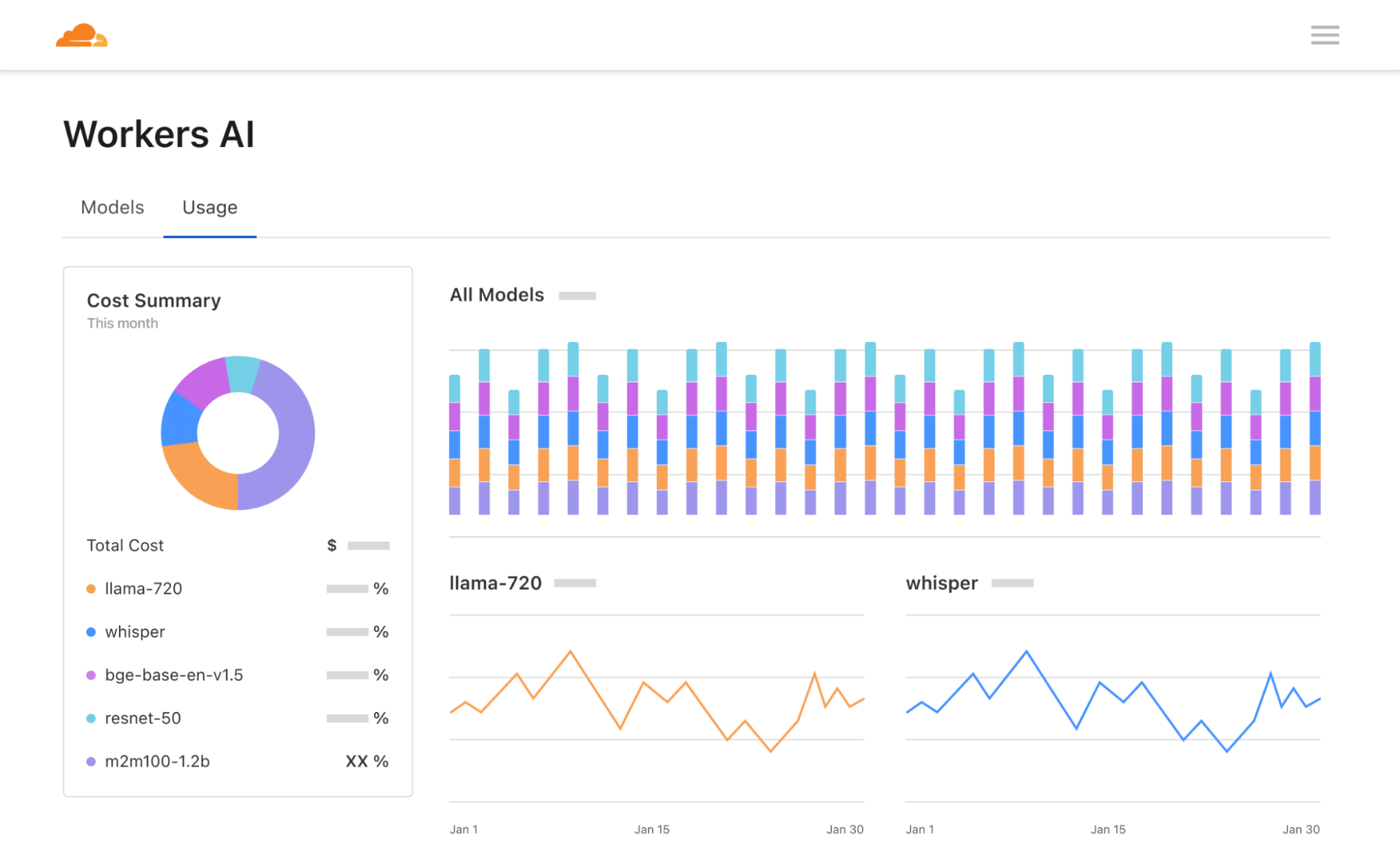
Lastly, we’ve revamped our Workers AI dashboard and AI playground. The Workers AI page in the Cloudflare dashboard now shows analytics for usage across models, including neuron calculations to help you better predict pricing. The AI playground lets you quickly test and compare different models and configure prompts and parameters. We hope these new tools help developers start building on Workers AI seamlessly – go try them out!
Run inference on GPUs in over 150 cities around the world
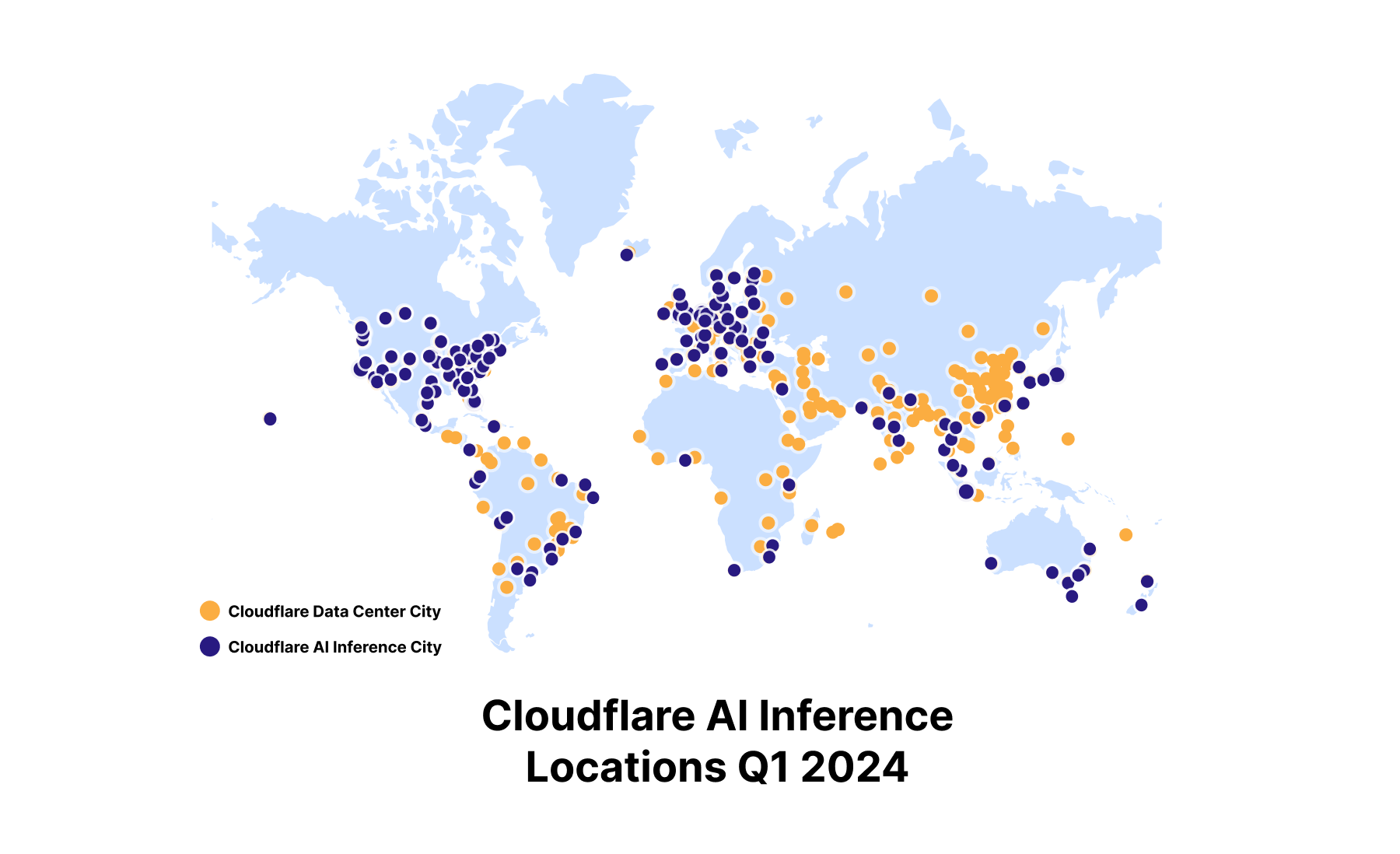
When we announced Workers AI back in September 2023, we set out to deploy GPUs to our data centers around the world. We plan to deliver on that promise and deploy inference-tuned GPUs almost everywhere by the end of 2024, making us the most widely distributed cloud-AI inference platform. We have over 150 cities with GPUs today and will continue to roll out more throughout the year.
We also have our next generation of compute servers with GPUs launching in Q2 2024, which means better performance, power efficiency, and improved reliability over previous generations. We provided a preview of our Gen 12 Compute servers design in a December 2023 blog post, with more details to come. With Gen 12 and future planned hardware launches, the next step is to support larger machine learning models and offer fine-tuning on our platform. This will allow us to achieve higher inference throughput, lower latency and greater availability for production workloads, as well as expanding support to new categories of workloads such as fine-tuning.
Hugging Face Partnership
We’re also excited to continue our partnership with Hugging Face in the spirit of bringing the best of open-source to our customers. Now, you can visit some of the most popular models on Hugging Face and easily click to run the model on Workers AI if it is available on our platform.
We’re happy to announce that we’ve added 4 more models to our platform in conjunction with Hugging Face. You can now access the new Mistral 7B v0.2 model with improved context windows, Nous Research’s Hermes 2 Pro fine-tuned version of Mistral 7B, Google’s Gemma 7B, and Starling-LM-7B-beta fine-tuned from OpenChat. There are currently 14 models that we’ve curated with Hugging Face to be available for serverless GPU inference powered by Cloudflare’s Workers AI platform, with more coming soon. These models are all served using Hugging Face’s technology with a TGI backend, and we work closely with the Hugging Face team to curate, optimize, and deploy these models.
“We are excited to work with Cloudflare to make AI more accessible to developers. Offering the most popular open models with a serverless API, powered by a global fleet of GPUs is an amazing proposition for the Hugging Face community, and I can’t wait to see what they build with it.” – Julien Chaumond, Co-founder and CTO, Hugging Face
You can find all of the open models supported in Workers AI in this Hugging Face Collection, and the “Deploy to Cloudflare Workers AI” button is at the top of each model card. To learn more, read Hugging Face’s blog post and take a look at our Developer Docs to get started. Have a model you want to see on Workers AI? Send us a message on Discord with your request.
Supporting fine-tuned inference – BYO LoRAs
Fine-tuned inference is one of our most requested features for Workers AI, and we’re one step closer now with Bring Your Own (BYO) LoRAs. Using the popular Low-Rank Adaptation method, researchers have figured out how to take a model and adapt some model parameters to the task at hand, rather than rewriting all model parameters like you would for a fully fine-tuned model. This means that you can get fine-tuned model outputs without the computational expense of fully fine-tuning a model.
We now support bringing trained LoRAs to Workers AI, where we apply the LoRA adapter to a base model at runtime to give you fine-tuned inference, at a fraction of the cost, size, and speed of a fully fine-tuned model. In the future, we want to be able to support fine-tuning jobs and fully fine-tuned models directly on our platform, but we’re excited to be one step closer today with LoRAs.
const response = await ai.run(
  "@cf/mistralai/mistral-7b-instruct-v0.2-lora", //the model supporting LoRAs
  {
      messages: [{"role": "user", "content": "Hello world"],
      raw: true, //skip applying the default chat template
      lora: "00000000-0000-0000-0000-000000000", //the finetune id OR name
  }
);
BYO LoRAs is in open beta as of today for Gemma 2B and 7B, Llama 2 7B and Mistral 7B models with LoRA adapters up to 100MB in size and max rank of 8, and up to 30 total LoRAs per account. As always, we expect you to use Workers AI and our new BYO LoRA feature with our Terms of Service in mind, including any model-specific restrictions on use contained in the models’ license terms.
Python is the second most popular programming language in the world (after JavaScript) and the language of choice for building AI applications. And starting today, in open beta, you can now write Cloudflare Workers in Python. Python Workers support all bindings to resources on Cloudflare, including Vectorize, D1, KV, R2 and more.
…and are configured by simply pointing at a .py file in your wrangler.toml:
name = "hello-world-python-worker"
main = "src/entry.py"
compatibility_date = "2024-03-18"
compatibility_flags = ["python_workers"]
There are no extra toolchain or precompilation steps needed. The Pyodide Python execution environment is provided for you, directly by the Workers runtime, mirroring how Workers written in JavaScript already work.
There’s lots more to dive into — take a look at the docs, and check out our companion blog post for details about how Python Workers work behind the scenes.
AI Gateway now supports Anthropic, Azure, AWS Bedrock, Google Vertex, and Perplexity
Our AI Gateway product helps developers better control and observe their AI applications, with analytics, caching, rate limiting, and more. We are continuing to add more providers to the product, including Anthropic, Google Vertex, and Perplexity, which we’re excited to announce today. We quietly rolled out Azure and Amazon Bedrock support in December 2023, which means that the most popular providers are now supported via AI Gateway, including Workers AI itself.
Take a look at our Developer Docs to get started with AI Gateway.
Coming soon: Persistent Logs
In Q2 of 2024, we will be adding persistent logs so that you can push your logs (including prompts and responses) to object storage, custom metadata so that you can tag requests with user IDs or other identifiers, and secrets management so that you can securely manage your application’s API keys.
We want AI Gateway to be the control plane for your AI applications, allowing developers to dynamically evaluate and route requests to different models and providers. With our persistent logs feature, we want to enable developers to use their logged data to fine-tune models in one click, eventually running the fine-tune job and the fine-tuned model directly on our Workers AI platform. AI Gateway is just one product in our AI toolkit, but we’re excited about the workflows and use cases it can unlock for developers building on our platform, and we hope you’re excited about it too.
Vectorize metadata filtering and future GA of million vector indexes
Vectorize is another component of our toolkit for AI applications. In open beta since September 2023, Vectorize allows developers to persist embeddings (vectors), like those generated from Workers AI text embedding models, and query for the closest match to support use cases like similarity search or recommendations. Without a vector database, model output is forgotten and can’t be recalled without extra costs to re-run a model.
Since Vectorize’s open beta, we’ve added metadata filtering. Metadata filtering lets developers combine vector search with filtering for arbitrary metadata, supporting the query complexity in AI applications. We’re laser-focused on getting Vectorize ready for general availability, with an target launch date of June 2024, which will include support for multi-million vector indexes.
The most comprehensive Developer Platform to build AI applications
On Cloudflare’s Developer Platform, we believe that all developers should be able to quickly build and ship full-stack applications – and that includes AI experiences as well. With our GA of Workers AI, announcements for Python support in Workers, AI Gateway, and Vectorize, and our partnership with Hugging Face, we’ve expanded the world of possibilities for what you can build with AI on our platform. We hope you are as excited as we are – take a look at all our Developer Docs to get started, and let us know what you build.
This new support for Python is different from how Workers have historically supported languages beyond JavaScript — in this case, we have directly integrated a Python implementation into workerd, the open-source Workers runtime. All bindings, including bindings to Vectorize, Workers AI, R2, Durable Objects, and more are supported on day one. Python Workers can import a subset of popular Python packages including FastAPI, Langchain, Numpy and more. There are no extra build steps or external toolchains.
To do this, we’ve had to push the bounds of all of our systems, from the runtime itself, to our deployment system, to the contents of the Worker bundle that is published across our network. You can read the docs, and start using it today.
We want to use this post to pull back the curtain on the internal lifecycle of a Python Worker, share what we’ve learned in the process, and highlight where we’re going next.
Beyond “Just compile to WebAssembly”
Cloudflare Workers have supported WebAssembly since 2018 — each Worker is a V8 isolate, powered by the same JavaScript engine as the Chrome web browser. In principle, it’s been possible for years to write Workers in any language — including Python — so long as it first compiles to WebAssembly or to JavaScript.
In practice, just because something is possible doesn’t mean it’s simple. And just because “hello world” works doesn’t mean you can reliably build an application. Building full applications requires supporting an ecosystem of packages that developers are used to building with. For a platform to truly support a programming language, it’s necessary to go much further than showing how to compile code using external toolchains.
Python Workers are different from what we’ve done in the past. It’s early, and still in beta, but we think it shows what providing first-class support for programming languages beyond JavaScript can look like on Workers.
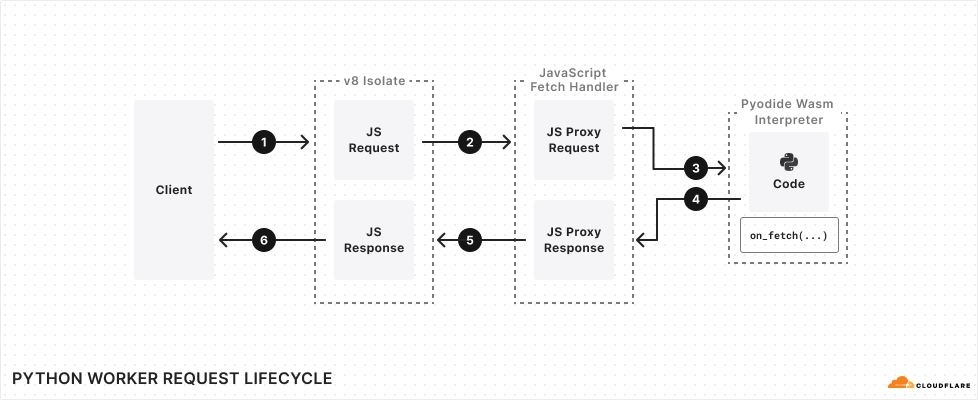
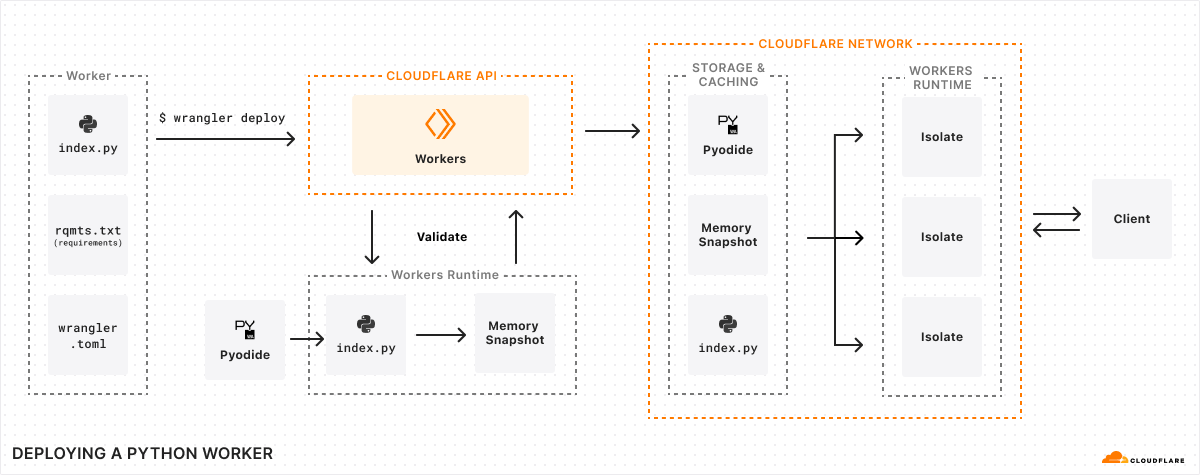
Create an isolate for your Worker, and automatically inject Pyodide
Serve your Python code using Pyodide
This all happens under the hood — no extra toolchain or precompilation steps needed. The Python execution environment is provided for you, mirroring how Workers written in JavaScript already work.
A Python interpreter built into the Workers runtime
Just as JavaScript has many engines, Python has many implementations that can execute Python code. CPython is the reference implementation of Python. If you’ve used Python before, this is almost certainly what you’ve used, and is commonly referred to as just “Python”.
Pyodide is a port of CPython to WebAssembly. It interprets Python code, without any need to precompile the Python code itself to any other format. It runs in a web browser — check out this REPL. It is true to the CPython that Python developers know and expect, providing most of the Python Standard Library. It provides a foreign function interface (FFI) to JavaScript, allowing you to call JavaScript APIs directly from Python — more on this below. It provides popular open-source packages, and can import pure Python packages directly from PyPI.
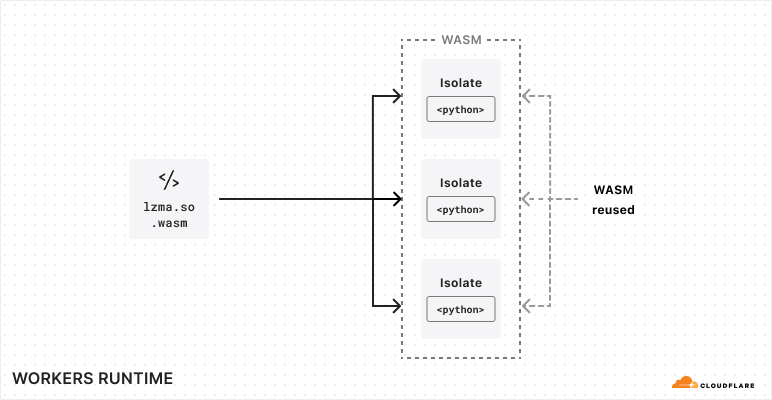
Pyodide struck us as the perfect fit for Workers. It is designed to allow the core interpreter and each native Python module to be built as separate WebAssembly modules, dynamically linked at runtime. This allows the code footprint for these modules to be shared among all Workers running on the same machine, rather than requiring each Worker to bring its own copy. This is essential to making WebAssembly work well in the Workers environment, where we often run thousands of Workers per machine — we need Workers using the same programming language to share their runtime code footprint. Running thousands of Workers on every machine is what makes it possible for us to deploy every application in every location at a reasonable price.
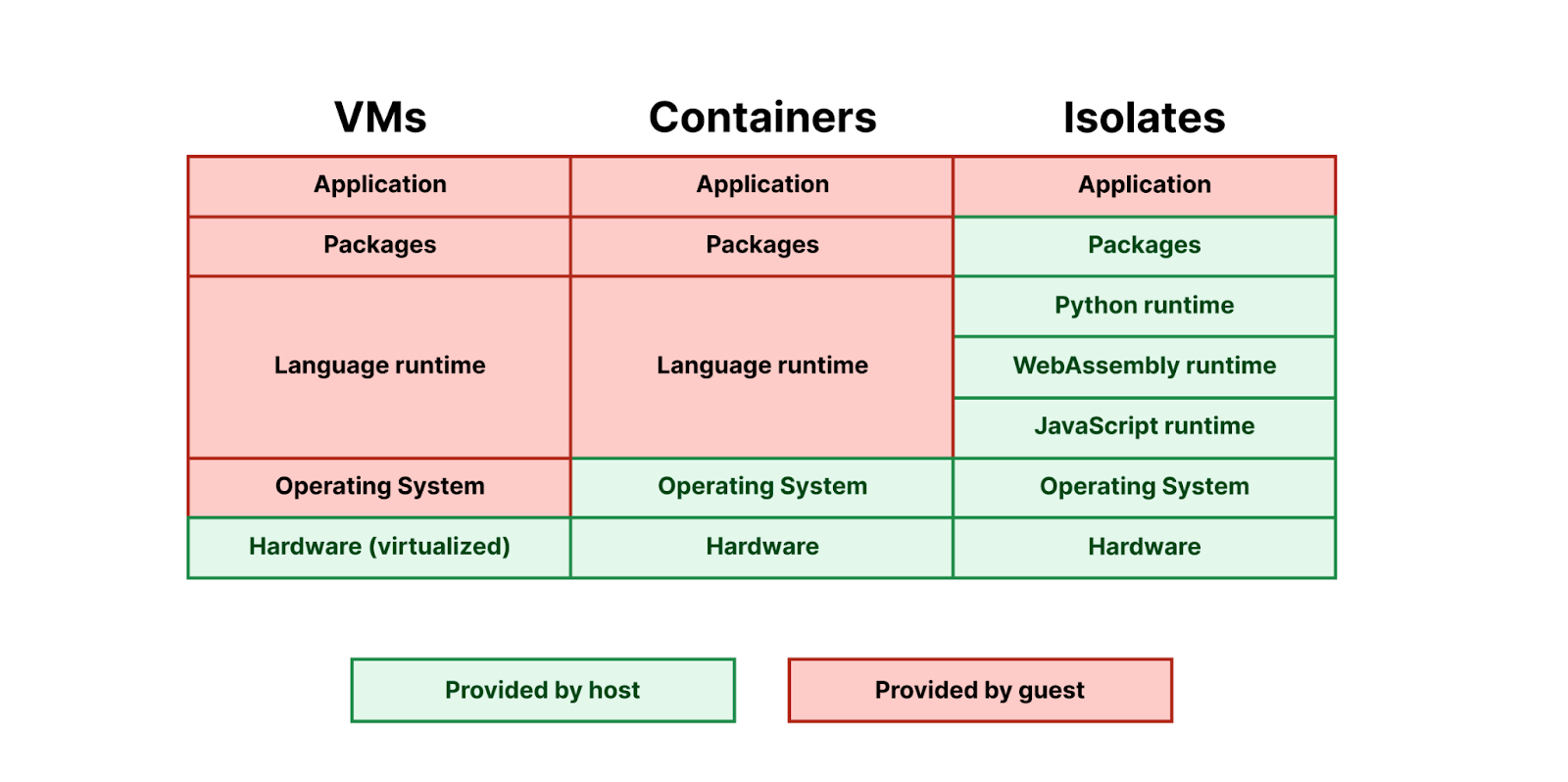
Just like with JavaScript Workers, with Python Workers we provide the runtime for you:
Pyodide is currently the exception — most languages that target WebAssembly do not yet support dynamic linking, so each application ends up bringing its own copy of its language runtime. We hope to see more languages support dynamic linking in the future, so that we can more effectively bring them to Workers.
How Pyodide works
Pyodide executes Python code in WebAssembly, which is a sandboxed environment, separated from the host runtime. Unlike running native code, all operations outside of pure computation (such as file reads) must be provided by a runtime environment, then imported by the WebAssembly module.
LLVM provides three target triples for WebAssembly:
wasm32-unknown-unknown – this backend provides no C standard library or system call interface; to support this backend, we would need to manually rewrite every system or library call to make use of imports we would define ourselves in the runtime.
wasm32-wasi – WASI is a standardized system interface, and defines a standard set of imports that are implemented in WASI runtimes such as wasmtime.
wasm32-unknown-emscripten – Like WASI, Emscripten defines the imports that a WebAssembly program needs to execute, but also outputs an accompanying JavaScript library that implements these imported functions.
Pyodide uses Emscripten, and provides three things:
A distribution of the CPython interpreter, compiled using Emscripten
A foreign function interface (FFI) between Python and JavaScript
A set of third-party Python packages, compiled using Emscripten’s compiler to WebAssembly.
Of these targets, only Emscripten currently supports dynamic linking, which, as we noted above, is essential to providing a shared language runtime for Python that is shared across isolates. Emscripten does this by providing implementations of dlopen and dlsym, which use the accompanying JavaScript library to modify the WebAssembly program’s table to link additional WebAssembly-compiled modules at runtime. WASI does not yet support the dlopen/dlsym dynamic linking abstractions used by CPython.
Pyodide and the magic of foreign function interfaces (FFI)
You might have noticed that in our Hello World Python Worker, we import Response from the js module:
Most Workers are written in JavaScript, and most of our engineering effort on the Workers runtime goes into improving JavaScript Workers. There is a risk in adding a second language that it might never reach feature parity with the first language and always be a second class citizen. Pyodide’s foreign function interface (FFI) is critical to avoiding this by providing access to all JavaScript functionality from Python. This can be used by the Worker author directly, and it is also used to make packages like FastAPI and Langchain work out-of-the-box, as we’ll show later in this post.
An FFI is a system for calling functions in one language that are implemented in another language. In most cases, an FFI is defined by a “higher-level” language in order to call functions implemented in a systems language, often C. Python’s ctypes module is such a system. These sorts of foreign function interfaces are often difficult to use because of the nature of C APIs.
Pyodide’s foreign function interface is an interface between Python and JavaScript, which are two high level object-oriented languages with a lot of design similarities. When passed from one language to another, immutable types such as strings and numbers are transparently translated. All mutable objects are wrapped in an appropriate proxy.
When a JavaScript object is passed into Python, Pyodide determines which JavaScript protocols the object supports and dynamically constructs an appropriate Python class that implements the corresponding Python protocols. For example, if the JavaScript object supports the JavaScript iteration protocol then the proxy will support the Python iteration protocol. If the JavaScript object is a Promise or other thenable, the Python object will be an awaitable.
from js import JSON

js_array = JSON.parse("[1,2,3]")

for entry in js_array:
   print(entry)
The lifecycle of a request to a Python Worker makes use of Pyodide’s FFI, wrapping the incoming JavaScript Request object in a JsProxy object that is accessible in your Python code. It then converts the value returned by the Python Worker’s handler into a JavaScript Response object that can be delivered back to the client:
Why dynamic linking is essential, and static linking isn’t enough
Python comes with a C FFI, and many Python packages use this FFI to import native libraries. These libraries are typically written in C, so they must first be compiled down to WebAssembly in order to work on the Workers runtime. As we noted above, Pyodide is built with Emscripten, which overrides Python’s C FFI — any time a package tries to load a native library, it is instead loaded from a WebAssembly module that is provided by the Workers runtime. Dynamic linking is what makes this possible — it is what lets us override Python’s C FFI, allowing Pyodide to support many Python packages that have native library dependencies.
Dynamic linking is “pay as you go”, while static linking is “pay upfront” — if code is statically linked into your binary, it must be loaded upfront in order for the binary to run, even if this code is never used.
Dynamic linking enables the Workers runtime to share the underlying WebAssembly modules of packages across different Workers that are running on the same machine.
We won’t go too much into detail on how dynamic linking works in Emscripten, but the main takeaway is that the Emscripten runtime fetches WebAssembly modules from a filesystem abstraction provided in JavaScript. For each Worker, we generate a filesystem at runtime, whose structure mimics a Python distribution that has the Worker’s dependencies installed, but whose underlying files are shared between Workers. This makes it possible to share Python and WebAssembly files between multiple Workers that import the same dependency. Today, we’re able to share these files across Workers, but copy them into each new isolate. We think we can go even further, by employing copy-on-write techniques to share the underlying resource across many Workers.
Supporting Server and Client libraries
Python has a wide variety of popular HTTP client libraries, including httpx, urllib3, requests and more. Unfortunately, none of them work out of the box in Pyodide. Adding support for these has been one of the longest running user requests for the Pyodide project. The Python HTTP client libraries all work with raw sockets, and the browser security model and CORS do not allow this, so we needed another way to make them work in the Workers runtime.
Async Client libraries
For libraries that can make requests asynchronously, including aiohttp and httpx, we can use the Fetch API to make requests. We do this by patching the library, instructing it to use the Fetch API from JavaScript — taking advantage of Pyodide’s FFI. The httpx patch ends up quite simple —fewer than 100 lines of code. Simplified even further, it looks like this:
Another challenge in supporting Python HTTP client libraries is that many Python APIs are synchronous. For these libraries, we cannot use the fetch API directly because it is asynchronous.
Thankfully, Joe Marshall recently landed a contribution to urllib3 that adds Pyodide support in web browsers by:
Checking if blocking with Atomics.wait() is possible a. If so, start a fetch worker thread b. Delegate the fetch operation to the worker thread and serialize the response into a SharedArrayBuffer c. In the Python thread, use Atomics.wait to block for the response in the SharedArrayBuffer
If Atomics.wait() doesn’t work, fall back to a synchronous XMLHttpRequest
Despite this, today Cloudflare Workers do not support worker threads or synchronous XMLHttpRequest, so neither of these two approaches will work in Python Workers. We do not support synchronous requests today, but there is a way forward…
FastAPI and Python’s Asynchronous Server Gateway Interface
FastAPI is one of the most popular libraries for defining Python servers. FastAPI applications use a protocol called the Asynchronous Server Gateway Interface (ASGI). This means that FastAPI never reads from or writes to a socket itself. An ASGI application expects to be hooked up to an ASGI server, typically uvicorn. The ASGI server handles all of the raw sockets on the application’s behalf.
Conveniently for us, this means that FastAPI works in Cloudflare Workers without any patches or changes to FastAPI itself. We simply need to replace uvicorn with an appropriate ASGI server that can run within a Worker. Our initial implementation lives here, in the fork of Pyodide that we maintain. We hope to add a more comprehensive feature set, add test coverage, and then upstream this implementation into Pyodide.
You can try this yourself by cloning cloudflare/python-workers-examples, and running npx wrangler@latest dev in the directory of the FastAPI example.
Importing Python Packages
Python Workers support a subset of Python packages, which are provided directly by Pyodide, including numpy, httpx, FastAPI, Langchain, and more. This ensures compatibility with the Pyodide runtime by pinning package versions to Pyodide versions, and allows Pyodide to patch internal implementations, as we showed above in the case of httpx.
To import a package, simply add it to your requirements.txt file, without adding a version number. A specific version of the package is provided directly by Pyodide. Today, you can use packages in local development, and in the coming weeks, you will be able to deploy Workers that define dependencies in a requirements.txt file. Later in this post, we’ll show how we’re thinking about managing new versions of Pyodide and packages.
We maintain our own fork of Pyodide, which allows us to provide patches specific to the Workers runtime, and to quickly expand our support for packages in Python Workers, while also committing to upstreaming our changes back to Pyodide, so that the whole ecosystem of developers can benefit.
Python packages are often big and memory hungry though, and they can do a lot of work at import time. How can we ensure that you can bring in the packages you need, while mitigating long cold start times?
Making cold starts faster with memory snapshots
In the example at the start of this post, in local development, we mentioned injecting Pyodide into your Worker. Pyodide itself is 6.4MB — and Python packages can also be quite large.
If we simply shoved Pyodide into your Worker and uploaded it to Cloudflare, that’d be quite a large Worker to load into a new isolate — cold starts would be slow. On a fast computer with a good network connection, Pyodide takes about two seconds to initialize in a web browser, one second of network time and one second of cpu time. It wouldn’t be acceptable to initialize it every time you update your code for every isolate your Worker runs in across Cloudflare’s network.
Wrangler uploads your Python code and your requirements.txt file to the Workers API
We send your Python code, and your requirements.txt file to the Workers runtime to be validated
We create a new isolate for your Worker, and automatically inject Pyodide plus any packages you’ve specified in your requirements.txt file.
We scan the Worker’s code for import statements, execute them, and then take a snapshot of the Worker’s WebAssembly linear memory. Effectively, we perform the expensive work of importing packages at deploy time, rather than at runtime.
We deploy this snapshot alongside your Worker’s Python code to Cloudflare’s network.
Just like a JavaScript Worker, we execute the Worker’s top-level scope.
When a request comes in to your Worker, we load this snapshot and use it to bootstrap your Worker in an isolate, avoiding expensive initialization time:
This takes cold starts for a basic Python Worker down to below 1 second. We’re not yet satisfied with this though. We’re confident that we can drive this down much, much further. How? By reusing memory snapshots.
Reusing Memory Snapshots
When you upload a Python Worker, we generate a single memory snapshot of the Worker’s top-level imports, including both Pyodide and any dependencies. This snapshot is specific to your Worker. It can’t be shared, even though most of its contents are the same as other Python Workers.
Instead, we can create a single, shared snapshot ahead of time, and preload it into a pool of “pre-warmed” isolates. These isolates would already have the Pyodide runtime loaded and ready — making a Python Worker work just like a JavaScript Worker. In both cases, the underlying interpreter and execution environment is provided by the Workers runtime, and available on-demand without delay. The only difference is that with Python, the interpreter runs in WebAssembly, within the Worker.
Snapshots are a common pattern across runtimes and execution environments. Node.js uses V8 snapshots to speed up startup time. You can take snapshots of Firecracker microVMs and resume execution in a different process. There’s lots more we can do here — not just for Python Workers, but for Workers written in JavaScript as well, caching snapshots of compiled code from top-level scope and the state of the isolate itself. Workers are so fast and efficient that to-date we haven’t had to take snapshots in this way, but we think there are still big performance gains to be had.
This is our biggest lever towards driving cold start times down over the rest of 2024.
Future proofing compatibility with Pyodide versions and Compatibility Dates
When you deploy a Worker to Cloudflare, you expect it to keep running indefinitely, even if you never update it again. There are Workers deployed in 2018 that are still running just fine in production.
We achieve this using Compatibility Dates and Compatibility Flags, which provide explicit opt-in mechanisms for new behavior and potentially backwards-incompatible changes, without impacting existing Workers.
This works in part because it mirrors how the Internet and web browsers work. You publish a web page with some JavaScript, and rightly expect it to work forever. Web browsers and Cloudflare Workers have the same type of commitment of stability to developers.
There is a challenge with Python though — both Pyodide and CPython are versioned. Updated versions are published regularly and can contain breaking changes. And Pyodide provides a set of built-in packages, each with a pinned version number. This presents a question — how should we allow you to update your Worker to a newer version of Pyodide?
A new version of Python is released every year in August, and a new version of Pyodide is released six (6) months later. When this new version of Pyodide is published, we will add it to Workers by gating it behind a Compatibility Flag, which is only enabled after a specified Compatibility Date. This lets us continually provide updates, without risk of breaking changes, extending the commitment we’ve made for JavaScript to Python.
Each Python release has a five (5) year support window. Once this support window has passed for a given version of Python, security patches are no longer applied, making this version unsafe to rely on. To mitigate this risk, while still trying to hold as true as possible to our commitment of stability and long-term support, after five years any Python Worker still on a Python release that is outside of the support window will be automatically moved forward to the next oldest Python release. Python is a mature and stable language, so we expect that in most cases, your Python Worker will continue running without issue. But we recommend updating the compatibility date of your Worker regularly, to stay within the support window.
In between Python releases, we also expect to update and add additional Python packages, using the same opt-in mechanism. A Compatibility Flag will be a combination of the Python version and the release date of a set of packages. For example, python_3.17_packages_2025_03_01.
How bindings work in Python Workers
We mentioned earlier that Pyodide provides a foreign function interface (FFI) to JavaScript — meaning that you can directly use JavaScript objects, methods, functions and more, directly from Python.
This means that from day one, all binding APIs to other Cloudflare resources are supported in Cloudflare Workers. The env object that is provided by handlers in Python Workers is a JavaScript object that Pyodide provides a proxy API to, handling type translations across languages automatically.
For example, to write to and read from a KV namespace from a Python Worker, you would write:
from js import Response

async def on_fetch(request, env):
    await env.FOO.put("bar", "baz")
    bar = await env.FOO.get("bar")
    return Response.new(bar) # returns "baz"
This works for Web APIs too — see how Response is imported from the js module? You can import any global from JavaScript this way.
Get this JavaScript out of my Python!
You’re probably reading this post because you want to write Python instead of JavaScript. from js import Response just isn’t Pythonic. We know — and we have actually tackled this challenge before for another language (Rust). And we think we can do this even better for Python.
We launched workers-rs in 2021 to make it possible to write Workers in Rust. For each JavaScript API in Workers, we, alongside open-source contributors, have written bindings that expose a more idiomatic Rust API.
We plan to do the same for Python Workers — starting with the bindings to Workers AI and Vectorize. But while workers-rs requires that you use and update an external dependency, the APIs we provide with Python Workers will be built into the Workers runtime directly. Just update your compatibility date, and get the latest, most Pythonic APIs.
This is about more than just making bindings to resources on Cloudflare more Pythonic though — it’s about compatibility with the ecosystem.
Similar to how we recently converted workers-rs to use types from the http crate, which makes it easy to use the axum crate for routing, we aim to do the same for Python Workers. For example, the Python standard library provides a raw socket API, which many Python packages depend on. Workers already provides connect(), a JavaScript API for working with raw sockets. We see ways to provide at least a subset of the Python standard library’s socket API in Workers, enabling a broader set of Python packages to work on Workers, with less of a need for patches.
But ultimately, we hope to kick start an effort to create a standardized serverless API for Python. One that is easy to use for any Python developer and offers the same capabilities as JavaScript.
We’re just getting started with Python Workers
Providing true support for a new programming language is a big investment that goes far beyond making “hello world” work. We chose Python very intentionally — it’s the second most popular programming language after JavaScript — and we are committed to continuing to improve performance and widen our support for Python packages.
We’re grateful to the Pyodide maintainers and the broader Python community — and we’d love to hear from you. Drop into the Python Workers channel in the Cloudflare Developers Discord, or start a discussion on Github about what you’d like to see next and which Python packages you’d like us to support.
Developers who build Worker applications focus on what they’re creating, not the infrastructure required, and benefit from the global reach of Cloudflare’s network. Many applications require persistent data, from personal projects to business-critical workloads. Workers offer various database and storage options tailored to developer needs, such as key-value and object storage.
Relational databases are the backbone of many applications today. D1, Cloudflare’s relational database complement, is now generally available. Our journey from alpha in late 2022 to GA in April 2024 focused on enabling developers to build production workloads with the familiarity of relational data and SQL.
What’s D1?
D1 is Cloudflare’s built-in, serverless relational database. For Worker applications, D1 offers SQL’s expressiveness, leveraging SQLite’s SQL dialect, and developer tooling integrations, including object-relational mappers (ORMs) like Drizzle ORM. D1 is accessible via Workers or an HTTP API.
Serverless means no provisioning, default disaster recovery with Time Travel, and usage-based pricing. D1 includes a generous free tier that allows developers to experiment with D1 and then graduate those trials to production.
How to make data global?
D1 GA has focused on reliability and developer experience. Now, we plan on extending D1 to better support globally-distributed applications.
In the Workers model, an incoming request invokes serverless execution in the closest data center. A Worker application can scale globally with user requests. Application data, however, remains stored in centralized databases, and global user traffic must account for access round trips to data locations. For example, a D1 database today resides in a single location.
Workers support Smart Placement to account for frequently accessed data locality. Smart Placement invokes a Worker closer to centralized backend services like databases to lower latency and improve application performance. We’ve addressed Workers placement in global applications, but need to solve data placement.
The question, then, is how can D1, as Cloudflare’s built-in database solution, better support data placement for global applications? The answer is asynchronous read replication.
What is asynchronous read replication?
In a server-based database management system, like Postgres, MySQL, SQL Server, or Oracle, a read replica is a separate database server that serves as a read-only, almost up-to-date copy of the primary database server. An administrator creates a read replica by starting a new server from a snapshot of the primary server and configuring the primary server to send updates asynchronously to the replica server. Since the updates are asynchronous, the read replica may be behind the current state of the primary server. The difference between the primary server and a replica is called replica lag. It’s possible to have more than one read replica.
Asynchronous read replication is a time-proven solution for improving the performance of databases:
It’s possible to increase throughput by distributing load across multiple replicas.
It’s possible to lower query latency when the replicas are close to the users making queries.
Note that some database systems also offer synchronous replication. In a synchronous replicated system, writes must wait until all replicas have confirmed the write. Synchronous replicated systems can run only as fast as the slowest replica and come to a halt when a replica fails. If we’re trying to improve performance on a global scale, we want to avoid synchronous replication as much as possible!
Consistency models & read replicas
Most database systems provide read committed, snapshot isolation, or serializable consistency models, depending on their configuration. For example, Postgres defaults to read committed but can be configured to use stronger modes. SQLite provides snapshot isolation in WAL mode. Stronger modes like snapshot isolation or serializable are easier to program against because they limit the permitted system concurrency scenarios and the kind of concurrency race conditions the programmer has to worry about.
Read replicas are updated independently, so each replica’s contents may differ at any moment. If all of your queries go to the same server, whether the primary or a read replica, your results should be consistent according to whatever consistency model your underlying database provides. If you’re using a read replica, the results may just be a little old.
In a server-based database with read replicas, it’s important to stick with the same server for all of the queries in a session. If you switch among different read replicas in the same session, you compromise the consistency model provided by your application, which may violate your assumptions about how the database acts and cause your application to return incorrect results!
Example For example, there are two replicas, A and B. Replica A lags the primary database by 100ms, and replica B lags the primary database by 2s. Suppose a user wishes to:
Execute query 1
1a. Do some computation based on query 1 results
Execute query 2 based on the results of the computation in (1a)
At time t=10s, query 1 goes to replica A and returns. Query 1 sees what the primary database looked like at t=9.9s. Suppose it takes 500ms to do the computation, so at t=10.5s, query 2 goes to replica B. Remember, replica B lags the primary database by 2s, so at t=10.5s, query 2 sees what the database looks like at t=8.5s. As far as the application is concerned, the results of query 2 look like the database has gone backwards in time!
Formally, this is read committed consistency since your queries will only see committed data, but there’s no other guarantee – not even that you can read your own writes. While read committed is a valid consistency model, it’s hard to reason about all of the possible race conditions the read committed model allows, making it difficult to write applications correctly.
Snapshot isolation is a familiar consistency model that most developers find easy to use. We implement this consistency model in D1 by ensuring at most one active copy of the D1 database and routing all HTTP requests to that single database. While ensuring that there’s at most one active copy of the D1 database is a gnarly distributed systems problem, it’s one that we’ve solved by building D1 using Durable Objects. Durable Objects guarantee global uniqueness, so once we depend on Durable Objects, routing HTTP requests is easy: just send them to the D1 Durable Object.
This trick doesn’t work if you have multiple active copies of the database since there’s no 100% reliable way to look at a generic incoming HTTP request and route it to the same replica 100% of the time. Unfortunately, as we saw in the previous section’s example, if we don’t route related requests to the same replica 100% of the time, the best consistency model we can provide is read committed.
Given that it’s impossible to route to a particular replica consistently, another approach is to route requests to any replica and ensure that the chosen replica responds to requests according to a consistency model that “makes sense” to the programmer. If we’re willing to include a Lamport timestamp in our requests, we can implement sequential consistency using any replica. The sequential consistency model has important properties like “read my own writes” and “writes follow reads,” as well as a total ordering of writes. The total ordering of writes means that every replica will see transactions commit in the same order, which is exactly the behavior we want in a transactional system. Sequential consistency comes with the caveat that any individual entity in the system may be arbitrarily out of date, but that caveat is a feature for us because it allows us to consider replica lag when designing our APIs.
The idea is that if D1 gives applications a Lamport timestamp for every database query and those applications tell D1 the last Lamport timestamp they’ve seen, we can have each replica determine how to make queries work according to the sequential consistency model.
A robust, yet simple, way to implement sequential consistency with replicas is to:
Associate a Lamport timestamp with every single request to the database. A monotonically increasing commit token works well for this.
Send all write queries to the primary database to ensure the total ordering of writes.
Send read queries to any replica, but have the replica delay servicing the query until the replica receives updates from the primary database that are later than the Lamport timestamp in the query.
What’s nice about this implementation is that it’s fast in the common case where a read-heavy workload always goes to the same replica and will work even if requests get routed to different replicas.
Sneak Preview: bringing read replication to D1 with Sessions
To bring read replication to D1, we will expand the D1 API with a new concept: Sessions. A Session encapsulates all the queries representing one logical session for your application. For example, a Session might represent all requests coming from a particular web browser or all requests coming from a mobile app. If you use Sessions, your queries will use whatever copy of the D1 database makes the most sense for your request, be that the primary database or a nearby replica. D1’s Sessions implementation will ensure sequential consistency for all queries in the Session.
Since the Sessions API changes D1’s consistency model, developers must opt-in to the new API. Existing D1 API methods are unchanged and will still have the same snapshot isolation consistency model as before. However, only queries made using the new Sessions API will use replicas.
Here’s an example of the D1 Sessions API:
export default {
  async fetch(request: Request, env: Env) {
    // When we create a D1 Session, we can continue where we left off
    // from a previous Session if we have that Session's last commit
    // token.  This Worker will return the commit token back to the
    // browser, so that it can send it back on the next request to
    // continue the Session.
    //
    // If we don't have a commit token, make the first query in this
    // session an "unconditional" query that will use the state of the
    // database at whatever replica we land on.
    const token = request.headers.get('x-d1-token') ?? 'first-unconditional'
    const session = env.DB.withSession(token)


    // Use this Session for all our Workers' routes.
    const response = await handleRequest(request, session)


    if (response.status === 200) {
      // Set the token so we can continue the Session in another request.
      response.headers.set('x-d1-token', session.latestCommitToken)
    }
    return response
  }
}


async function handleRequest(request: Request, session: D1DatabaseSession) {
  const { pathname } = new URL(request.url)


  if (pathname === '/api/orders/list') {
    // This statement is a read query, so it will execute on any
    // replica that has a commit equal or later than `token` we used
    // to create the Session.
    const { results } = await session.prepare('SELECT * FROM Orders').all()


    return Response.json(results)
  } else if (pathname === '/api/orders/add') {
    const order = await request.json<Order>()


    // This statement is a write query, so D1 will send the query to
    // the primary, which always has the latest commit token.
    await session
      .prepare('INSERT INTO Orders VALUES (?, ?, ?)')
      .bind(order.orderName, order.customer, order.value)
      .run()


    // In order for the application to be correct, this SELECT
    // statement must see the results of the INSERT statement above.
    // The Session API keeps track of commit tokens for queries
    // within the session and will ensure that we won't execute this
    // query until whatever replica we're using has seen the results
    // of the INSERT.
    const { results } = await session
      .prepare('SELECT COUNT(*) FROM Orders')
      .all()


    return Response.json(results)
  }


  return new Response('Not found', { status: 404 })
}
D1’s implementation of Sessions makes use of commit tokens. Commit tokens identify a particular committed query to the database. Within a session, D1 will use commit tokens to ensure that queries are sequentially ordered. In the example above, the D1 session ensures that the “SELECT COUNT(*)” query happens after the “INSERT” of the new order, even if we switch replicas between the awaits.
There are several options on how you want to start a session in a Workers fetch handler. db.withSession(<condition>) accepts these arguments:
condition argument
Behavior
<commit_token>
(1) starts Session as of given commit token
(2) subsequent queries have sequential consistency
first-unconditional
(1) if the first query is read, read whatever current replica has and use the commit token of that read as the basis for subsequent queries. If the first query is a write, forward the query to the primary and use the commit token of the write as the basis for subsequent queries.
(2) subsequent queries have sequential consistency
first-primary
(1) runs first query, read or write, against the primary
(2) subsequent queries have sequential consistency
null or missing argument
treated like first-unconditional
It’s possible to have a session span multiple requests by “round-tripping” the commit token from the last query of the session and using it to start a new session. This enables individual user agents, like a web app or a mobile app, to make sure that all of the queries the user sees are sequentially consistent.
D1’s read replication will be built-in, will not incur extra usage or storage costs, and will require no replica configuration. Cloudflare will monitor an application’s D1 traffic and automatically create database replicas to spread user traffic across multiple servers in locations closer to users. Aligned with our serverless model, D1 developers shouldn’t worry about replica provisioning and management. Instead, developers should focus on designing applications for replication and data consistency tradeoffs.
We’re actively working on global read replication and realizing the above proposal (share feedback In the #d1 channel on our Developer Discord). Until then, D1 GA includes several exciting new additions.
Check out D1 GA
Since D1’s open beta in October 2023, we’ve focused on D1’s reliability, scalability, and developer experience demanded of critical services. We’ve invested in several new features that allow developers to build and debug applications faster with D1.
Build bigger with larger databases We’ve listened to developers who requested larger databases. D1 now supports up to 10GB databases, with 50K databases on the Workers Paid plan. With D1’s horizontal scaleout, applications can model database-per-business-entity use cases. Since beta, new D1 databases process 40x more requests than D1 alpha databases in a given period.
Import & export bulk data Developers import and export data for multiple reasons:
Database migration testing to/from different database systems
Data copies for local development or testing
Manual backups for custom requirements like compliance
While you could execute SQL files against D1 before, we’re improving wrangler d1 execute –file=<filename> to ensure large imports are atomic operations, never leaving your database in a halfway state. wrangler d1 execute also now defaults to local-first to protect your remote production database.
To import our Northwind Traders demo database, you can download the schema & data and execute the SQL files.
npx wrangler d1 create northwind-traders

# omit --remote to run on a local database for development
npx wrangler d1 execute northwind-traders --remote --file=./schema.sql

npx wrangler d1 execute northwind-traders --remote --file=./data.sql
D1 database data & schema, schema-only, or data-only can be exported to a SQL file using:
# database schema & data
npx wrangler d1 export northwind-traders --remote --output=./database.sql

# single table schema & data
npx wrangler d1 export northwind-traders --remote --table='Employee' --output=./table.sql

# database schema only
npx wrangler d1 export <database_name> --remote --output=./database-schema.sql --no-data=true
Debug query performance Understanding SQL query performance and debugging slow queries is a crucial step for production workloads. We’ve added the experimental wrangler d1 insights to help developers analyze query performance metrics also available via GraphQL API.
# To find top 10 queries by average execution time:
npx wrangler d1 insights <database_name> --sort-type=avg --sort-by=time --count=10
Developer tooling Various community developer projects support D1. New additions include Prisma ORM, in version 5.12.0, which now supports Workers and D1.
Next steps
The features available now with GA and our global read replication design are just the start of delivering the SQL database needs for developer applications. If you haven’t yet used D1, you can get started right now, visit D1’s developer documentation to spark some ideas, or join the #d1 channel on our Developer Discord to talk to other D1 developers and our product engineering team.
If you’ve ever written a Cloudflare Worker using Workers KV for storage, you may have noticed something unsettling.
// A simple Worker that always returns the value named "content",
// read from Workers KV storage.
export default {
  async fetch(request, env, ctx) {
    return new Response(await env.MY_KV.get("content"));
  }
}
Do you feel something is… missing? Like… Where is the setup? The authorization keys? The client library instantiation? Aren’t environment variables normally strings? How is it that env.MY_KV seems to be an object with a get() method that is already hooked up?
Coming from any other platform, you might expect to see something like this instead:
// How would a "typical cloud platform" do it?

// Import KV client library?
import { KV } from "cloudflare:kv";

export default {
  async fetch(request, env, ctx) {
    // Connect to the database?? Using my secret auth key???
    // Which comes from an environment variable????
    let myKv = KV.connect("my-kv-namespace", env.MY_KV_AUTHKEY);

    return new Response(await myKv.get("content"));
  }
}
As another example, consider service bindings, which allow a Worker to send requests to another Worker.
// A simple Worker that greets an authenticated user, delegating to a
// separate service to perform authentication.
export default {
  async fetch(request, env, ctx) {
    // Forward headers to auth service to get user info.
    let authResponse = await env.AUTH_SERVICE.fetch(
        "https://auth/getUser",
        {headers: request.headers});
    let userInfo = await authResponse.json();
    return new Response("Hello, " + userInfo.name);
  }
}
Notice in particular the use of env.AUTH_SERVICE.fetch() to send the request. This sends the request directly to the auth service, regardless of the hostname we give in the URL.
On “typical” platforms, you’d expect to use a real (perhaps internal) hostname to route the request instead, and also include some credentials proving that you’re allowed to use the auth service API:
// How would a "typical cloud platform" do it?
export default {
  async fetch(request, env, ctx) {
    // Forward headers to auth service, via some internal hostname?
    // Hostname needs to be configurable, so get it from an env var.
    let authRequest = new Request(
        "https://" + env.AUTH_SERVICE_HOST + "/getUser",
        {headers: request.headers});

    // We also need to prove that our service is allowed to talk to
    // the auth service API. Add a header for that, containing a
    // secret token from our environment.
    authRequest.headers.set("X-Auth-Service-Api-Key",
        env.AUTH_SERVICE_API_KEY);

    // Now we can make the request.
    let authResponse = await fetch(authRequest);
    let userInfo = await authResponse.json();
    return new Response("Hello, " + userInfo.name);
  }
}
As you can see, in Workers, the “environment” is not just a bunch of strings. It contains full-fledged objects. We call each of these objects a “binding“, because it binds the environment variable name to a resource. You configure exactly what resource a name is bound to when you deploy your Worker – again, just like a traditional environment variable, but not limited to strings.
We can clearly see above that bindings eliminate a little bit of boilerplate, which is nice. But, there’s so much more.
Bindings don’t just reduce boilerplate. They are a core design feature of the Workers platform which simultaneously improve developer experience and application security in several ways. Usually these two goals are in opposition to each other, but bindings elegantly solve for both at the same time.
Security
It may not be obvious at first glance, but bindings neatly solve a number of common security problems in distributed systems.
SSRF is Not A Thing
Bindings, when used properly, make Workers immune to Server-Side Request Forgery (SSRF) attacks, one of the most common yet deadly security vulnerabilities in application servers today. In an SSRF attack, an attacker tricks a server into making requests to other internal services that only it can see, thus giving the attacker access to those internal services.
As an example, imagine we have built a social media application where users are able to set their avatar image. Imagine that, as a convenience, instead of uploading an image from their local disk, a user can instead specify the URL of an image on a third-party server, and the application server will fetch that image to use as the avatar. Sounds reasonable, right? We can imagine the app contains some code like:
let resp = await fetch(userAvatarUrl);
let data = await resp.arrayBuffer();
await setUserAvatar(data);
One problem: What if the user claims their avatar URL is something like “https://auth-service.internal/status”? Whoops, now the above code will actually fetch a status page from the internal auth service, and set it as the user’s avatar. Presumably, the user can then download their own avatar, and it’ll contain the content of this status page, which they were not supposed to be able to access!
But using bindings, this is impossible: There is no URL that the attacker can specify to reach the auth service. The application must explicitly use the binding env.AUTH_SERVICE to reach it. The global fetch() function cannot reach the auth service no matter what URL it is given; it can only make requests to the public Internet.
A legacy caveat: When we originally designed Workers in 2017, the primary use case was implementing a middleware layer in front of an origin server, integrated with Cloudflare’s CDN. At the time, bindings weren’t a thing yet, and we were primarily trying to implement the Service Workers interface. To that end, we made a design decision: when a Worker runs on Cloudflare in front of some origin server, if you invoke the global fetch() function with a URL that is within your zone’s domain, the request will be sent directly to the origin server, bypassing most logic Cloudflare would normally apply to a request received from the Internet. Sadly, this means that Workers which run in front of an origin server are not immune to SSRF – they must worry about it just like traditional servers on private networks must. Although this puts Workers in the same place as most servers, we now see a path to make SSRF a thing you never have to worry about when writing Workers. We will be introducing “origin bindings”, where the origin server is represented by an explicit binding. That is, to send a request to your origin, you’d need to do env.ORIGIN.fetch(). Then, the global fetch() function can be restricted to only talk to the public Internet, fully avoiding SSRF. This is a big change and we need to handle backwards-compatibility carefully – expect to see more in the coming months. Meanwhile, for Workers that do not have an origin server behind them, or where the origin server does not rely on Cloudflare for security, global fetch() is SSRF-safe today.
And a reminder: Requests originating from Workers have a header, CF-Worker, identifying the domain name that owns the Worker. This header is intended for abuse mitigation: if your server is receiving abusive requests from a Worker, it tells you who to blame and gives you a way to filter those requests. This header is not intended for authorization. You should not implement a private API that grants access to your Workers based solely on the CF-Worker header matching your domain. If you do, you may re-open the opportunity for SSRF vulnerabilities within any Worker running on that domain.
You can’t leak your API key if there is no API key
Usually, if your web app needs access to a protected resource, you will have to obtain some sort of an API key that grants access to the resource. But typically anyone who has this key can access the resource as if they were the Worker. This makes handling auth keys tricky. You can’t put it directly in a config file, unless the entire config file is considered a secret. You can’t check it into source control – you don’t want to publish your keys to GitHub! You probably shouldn’t even store the key on your hard drive – what if your laptop is compromised? And so on.
Even if you have systems in place to deliver auth keys to services securely (like Workers Secrets), if the key is just a string, the service itself can easily leak it. For instance, a developer might carelessly insert a log statement for debugging which logs the service’s configuration – including keys. Now anyone who can access your logs can discover the secret, and there’s probably no practical way to tell if such a leak has occurred.
With Workers bindings, we endeavor for bindings to be live objects, not secret keys. For instance, as seen in the first example in this post, when using a Workers KV binding, you never see a key at all. It’s therefore impossible for a Worker to accidentally leak access to a KV namespace.
No certificate management
This is similar to the API key problem, but arguably worse. When internal services talk to each other over a network, you presumably want them to use secure transports, but typically that requires that every service have a certificate and a private key signed by some CA, and clients must be configured to trust that CA. This is all a big pain to manage, and often the result is that developers don’t bother; they set up a VPC and assume the network is trusted.
In Workers, since all intra-service communications happen over a binding, the system itself can take on all the work of ensuring the transport is secure and goes to the right place.
No frustrating ACL management – but also no lazy “allow all”
At this point you might be thinking: Why are we talking about API keys at all? Cloudflare knows which Worker is sending any request. Can’t it handle the authentication that way?
Consider the earlier example where we imagined that KV namespaces could be opened by name:
// Imagine KV namespaces could be open by name?
let myKv = KV.connect("my-kv-namespace", env.MY_KV_AUTHKEY);
What if we made it simply:
// No authkey, because the system knows whether the Worker has
// permission?
let myKv = KV.connect("my-kv-namespace");
We could then imagine that we could separately configure each KV namespace with an Access Control List (ACL) that specifies which Workers can access it.
Of course, the first problem with this is that it’s vulnerable to SSRF. But, we discussed that already, so let’s discuss another problem.
Many platforms use ACLs for security, but have you ever noticed how everyone hates them? You end up with two choices:
Tediously maintain ACLs on every resource. Inevitably, this is always a huge pain. First you deploy your code, which you think is properly configured. Then you discover that it’s failing with permissions errors causing a production outage! So you go fiddle with the IAM system. There are 533,291 roles to choose from and none of them are actually what you want. It turns out you’re supposed to create a custom role, but that’s not obvious, and once you get there, the UI is confusing. Also it’s easy to confuse your team’s service account with your team’s email group, so you give the permissions to the wrong principal, but it takes you an hour of staring at it to realize what you did wrong. Then somehow you manage to remove your own access to the resource and you can’t add it back even though you’re a project admin? (Why yes, all this did in fact happen to me, while using a cloud provider that shall remain nameless.)
Give up and grant everything access to everything. Just put all your services in a single VPC where they can all freely talk to each other. This is what most developers are inclined to do, if their security team doesn’t step in to stop them.
Much of this pain comes about because connecting a server to a resource today involves two steps that should really be one step:
Configure the server to point at the resource.
Configure the resource to accept requests from the server.
Developers are primarily concerned with step 1, and forget that step 2 exists until it blows up in their faces. Then it’s a mad scramble to learn how step 2 even works.
What if step 1 just implied step 2? Obviously, if you’re trying to configure a service to access a resource, then you also want the resource to allow access to the service. As long as the person trying to set this up has permissions to both, then there is no reason for this to be a two-step process.
But in typical platforms, the platform itself has no way of knowing that a service has been configured to talk to a resource, because the configuration is just a string.
Bindings fix that. When you define a binding from a Worker to a particular KV namespace, the platform inherently understands that you are telling the Worker to use the KV namespace. Therefore, it can implicitly ensure that the correct permissions are granted. There is no step 2.
And conversely, if no binding is configured, then the Worker does not have access. That means that every Worker starts out with no access by default, and only receives access to exactly the things it needs. Secure by default.
As a related benefit, you can always accurately answer the question “What services are using this resource?” based on bindings. Since the system itself understands bindings and what they point to, the system can answer the query without knowing anything about the service’s internals.
Developer Experience
We’ve seen that bindings improve security in a number of ways. Usually, people expect security and developer friendliness to be a trade-off, with each security measure making life harder for developers. Bindings, however, are entirely the opposite! They actually make life easier!
Easier setup
As we saw in the intro, using a binding reduces setup boilerplate. Instead of receiving an environment variable containing an API key which must be passed into some sort of library, the environment variable itself is an already-initialized client library.
Observability
Because the system understands what bindings a Worker has, and even exactly when those bindings are exercised, the system can answer a lot of questions that would normally require more manual instrumentation or analysis to answer, such as:
For a given Worker, what resources does it use? Since the system understands the types of all bindings and what they point to (it doesn’t just see them as opaque strings), it can answer this question.
For a given resource, which Workers use it? This is the reverse query. The system can maintain an index of bindings in order to find ones pointing at a given resource.
How often does a particular Worker use a particular resource? Since bindings are invoked by calling methods on the binding itself, the system can observe these calls, log them, collect metrics, etc.
Testability via dependency injection
When you deploy a test version of your service, you probably want it to operate on test resources rather than real production resources. For instance, you might have a separate testing KV namespace for storage. But, you probably want to deploy exactly the same code to test that you will eventually deploy to production. That means the names of these resources cannot be hard-coded.
On traditional platforms, the obvious way to avoid hard-coding resource names is to put the name in an environment variable. Going back to our example from the intro, if KV worked in a traditional way not using bindings, you might end up with code like this:
// Hypothetical non-binding-based KV.
let myKv = KV.connect(env.MY_KV_NAMESPACE, env.MY_KV_AUTHKEY);
At best, you now have two environment variables (which had better stay in sync) just to specify what namespace to use.
But at worst, developers might forget to parameterize their resources this way.
A developer may write new code that is hard-coded to use a test database, and then forget to update it before pushing it to production, accidentally using the test database in prod.
A developer might prototype a new service using production resources from the start (or using new resources which become production resources), only later on deciding that they need to create a new deployment for testing. But by then, it may be a pain to find and parameterize all the different resources used.
With bindings, it’s impossible to have this problem. Since you can only connect to a KV namespace through a binding, it’s always possible to make a separate deployment of the same code which talks to a test namespace instead of production, e.g. using Wrangler Environments.
In the testing world, this is sometimes called “dependency injection”. With bindings, dependencies are always injectable.
Adaptability
Dependency injection isn’t just for tests. A service whose dependencies can be changed out easily will be easier to deploy into new environments, including new production environments.
Say, for instance, you have a service that authenticates users. Now you are launching a new product, which, for whatever reason, has a separate userbase from the original product. You need to deploy a new version of the auth service that uses a different database to implement a separate user set. As long as all dependencies are injectable, this should be easy.
Again, bindings are not the only way to achieve dependency injection, but a bindings-based system will tend to lead developers to write dependency-injectable code by default.
Q&A
Has anyone done this before?
You have. Every time you write code.
As it turns out, this approach is used all the time at the programming language level. Bindings are analogous to parameters of a function, or especially parameters to a class constructor. In a memory-safe programming language, you can’t access an object unless someone has passed you a pointer or reference to that object. Objects in memory don’t have URLs that you use to access them.
Programming languages work this way because they are designed to manage complexity, and this proves to be an elegant way to do so. Yet, this style which we’re used to using at the programming language level is much less common at the distributed system level. The Cloudflare Workers platform aims to treat the network as one big computer, and so it makes sense to extend programming language concepts across the network.
Of course, we’re not the first to apply this to distributed systems, either. The paradigm is commonly called “capability-based security”, which brings us to the next question…
Is this capability-based security?
Bindings are very much inspired by capability-based security.
At present, bindings are not a complete capability system. In particular, there is currently no particular mechanism for a Worker to pass a binding to another Worker. However, this is something we can definitely imagine adding in the future.
Imagine, for instance, you want to call another Worker through a service binding, and as you do, you want to give that other Worker temporary access to a KV namespace for it to operate on. Wouldn’t it be nice if you could just pass the object, and have it auto-revoked at the end of the request? In the future, we might introduce a notion of dynamic bindings which can bind to different resources on a per-request basis, where a calling Worker can pass in a particular value to use for a given request.
For the time being, bindings cannot really be called object capabilities. However, many of the benefits of bindings are the same benefits commonly attributed to capability systems. This is because of some basic similarities:
Like a capability, a binding simultaneously designates a resource and also confers permission to access that resource, without referencing any separate ACL.
Like capabilities, bindings do not exist in any global namespace: they are scoped to the env object passed to a specific Worker.
Like a capability, to use a binding, the application must explicitly specify which binding it is trying to use, and only specifies the binding. In particular, the application does not separately specify the name of the resource in any other namespace (no URL, no global ID, etc.). The existence of the binding only affects the application’s behavior when the application explicitly invokes that binding.
Why is env a parameter to fetch(), not global?
This is a bit wonky, but the goal is to enable composition of Workers.
Imagine you have two Workers, one which implements your API, mapped to api.example.com, and one which serves static assets, mapped to assets.example.com. One day, for whatever reason, you decide you want to combine these two Workers into a single Worker. So you write this code:
import apiWorker from "api-worker.js";
import assetWorker from "asset-worker.js";

export default {
  async fetch(req, env, ctx) {
    let url = new URL(req.url);
    if (url.hostname == "api.example.com") {
      return apiWorker.fetch(req, env, ctx);
    } else if (url.hostname == "assets.example.com") {
      return assetWorker.fetch(req, env, ctx);
    } else {
      return new Response("Not found", {status: 404});
    }
  }
}
This is great! No code from either Worker needed to be modified at all. We just create a new file containing a router Worker that delegates to one or the other.
But, you discover a problem: both the API Worker and the assets Worker use a KV namespace binding, and it turns out that they both decided to name the binding env.KV, but these bindings are meant to point to different namespaces used for different purposes. Does this mean I have to go edit the Workers to change the name of the binding before I can merge them?
No, it doesn’t, because I can just remap the environments before delegating:
import apiWorker from "api-worker.js";
import assetWorker from "asset-worker.js";

export default {
  async fetch(req, env, ctx) {
    let url = new URL(req.url);
    if (url.hostname == "api.example.com") {
      let subenv = {KV: env.API_KV};
      return apiWorker.fetch(req, subenv, ctx);
    } else if (url.hostname == "assets.example.com") {
      let subenv = {KV: env.ASSETS_KV};
      return assetWorker.fetch(req, subenv, ctx);
    } else {
      return new Response("Not found", {status: 404});
    }
  }
}
If environments were globals, this remapping would not be possible.
In fact, this benefit goes much deeper than this somewhat-contrived example. The fact that the environment is not a global essentially forces code to be internally designed for dependency injection (DI). Designing code to be DI-friendly sometimes seems tedious, but every time I’ve done it, I’ve been incredibly happy that I did. Such code tends to be much easier to test and to adapt to new circumstances, for the same reasons mentioned when we discussed dependency injection earlier, but applying at the level of individual modules rather than whole Workers.
With that said, if you really insist that you don’t care about making your code explicitly DI-friendly, there is an alternative: Put your env into AsyncLocalStorage. That way it is “ambiently” available anywhere in your code, but you can still get some composability.
import { AsyncLocalStorage } from 'node:async_hooks';

// Allocate a new AsyncLocalStorage to store the value of `env`.
const ambientEnv = new AsyncLocalStorage();

// We can now define a global function that reads a key from env.MY_KV,
// without having to pass `env` down to it.
function getFromKv(key) {
  // Get the env from AsyncLocalStorage.
  return ambientEnv.getStore().MY_KV.get(key);
}

export default {
  async fetch(req, env, ctx) {
    // Put the env into AsyncLocalStorage while we handle the request,
    // so that calls to getFromKv() work.
    return ambientEnv.run(env, async () => {
      // Handle request, including calling functions that may call
      // getFromKv().

      // ... (code) ...
    });
  }
};
How does a KV binding actually work?
Under the hood, a Workers KV binding encapsulates a secret key used to access the corresponding KV namespace. This key is actually the encryption key for the namespace. The key is distributed to the edge along with the Worker’s code and configuration, using encrypted storage to keep it safe.
Although the key is distributed with the Worker, the Worker itself has no way to access the key. In fact, even the owner of the Cloudflare account cannot see the key – it is simply never revealed outside of Cloudflare’s systems. (Cloudflare employees are also prevented from viewing these keys.)
Even if an attacker somehow got ahold of the key, it would not be useful to them as-is. Cloudflare’s API does not provide any way for a user to upload a raw key to use in a KV binding. The API instead has the client specify the public ID of the namespace they want to use. The deployment system verifies that the KV namespace in question is on the same account as the Worker being uploaded (and that the client is authorized to deploy Workers on said account).
Get Started
To learn about all the types of bindings offered by Workers and how to use them, check out the documentation.
Today might be April Fools, and while we like to have fun as much as anyone else, we like to use this day for serious announcements. In fact, as of today, there are over 2 million developers building on top of Cloudflare’s platform — that’s no joke!
To kick off this Developer Week, we’re flipping the big “production ready” switch on three products: D1, our serverless SQL database; Hyperdrive, which makes your existing databases feel like they’re distributed (and faster!); and Workers Analytics Engine, our time-series database.
We’ve been on a mission to allow developers to bring their entire stack to Cloudflare for some time, but what might an application built on Cloudflare look like?
The diagram itself shouldn’t look too different from the tools you’re already familiar with: you want a database for your core user data. Object storage for assets and user content. Maybe a queue for background tasks, like email or upload processing. A fast key-value store for runtime configuration. Maybe even a time-series database for aggregating user events and/or performance data. And that’s before we get to AI, which is increasingly becoming a core part of many applications in search, recommendation and/or image analysis tasks (at the very least!).
Yet, without having to think about it, this architecture runs on Region: Earth, which means it’s scalable, reliable and fast — all out of the box.
D1: Production Ready
Your core database is one of the most critical pieces of your infrastructure. It needs to be ultra-reliable. It can’t lose data. It needs to scale. And so we’ve been heads down over the last year getting the pieces into place to make sure D1 is production-ready, and we’re extremely excited to say that D1 — our global, serverless SQL database — is now Generally Available.
The GA for D1 lands some of the most asked-for features, including:
Support for 10GB databases — and 50,000 databases per account;
New data export capabilities; and
Enhanced query debugging (we call it “D1 Insights”) — that allows you to understand what queries are consuming the most time, cost, or that are just plain inefficient…
… to empower developers to build production-ready applications with D1 to meet all their relational SQL needs. And importantly, in an era where the concept of a “free plan” or “hobby plan” is seemingly at risk, we have no intention of removing the free tier for D1 or reducing the 25 billion row reads included in the $5/mo Workers Paid plan:
Plan
Rows Read
Rows Written
Storage
WorkersPaid
First 25 billion / month included + $0.001 / million rows
First 50 million / month included + $1.00 / million rows
First 5 GB included
+ $0.75 / GB-mo
Workers Free
5 million / day
100,000 / day
5 GB (total)
For those who’ve been following D1 since the start: this is the same pricing we announced at open beta
But things don’t just stop at GA: we have some major new features lined up for D1, including global read replication, even larger databases, more Time Travel capabilities that will allow you to branch your database, and new APIs for dynamically querying and/or creating new databases-on-the-fly from within a Worker.
D1’s read replication will automatically deploy read replicas as needed to get data closer to your users: and without you having to spin up, manage scaling, or run into consistency (replication lag) issues. Here’s a sneak preview of what D1’s upcoming Replication API looks like:
export default {
  async fetch(request: Request, env: Env) {
    const {pathname} = new URL(request.url);
    let resp = null;
    let session = env.DB.withSession(token); // An optional commit token or mode

    // Handle requests within the session.
    if (pathname === "/api/orders/list") {
      // This statement is a read query, so it will work against any
      // replica that has a commit equal or later than `token`.
      const { results } = await session.prepare("SELECT * FROM Orders");
      resp = Response.json(results);
    } else if (pathname === "/api/orders/add") {
      order = await request.json();

      // This statement is a write query, so D1 will send the query to
      // the primary, which always has the latest commit token.
      await session.prepare("INSERT INTO Orders VALUES (?, ?, ?)")
        .bind(order.orderName, order.customer, order.value);
        .run();

      // In order for the application to be correct, this SELECT
      // statement must see the results of the INSERT statement above.
      //
      // D1's new Session API keeps track of commit tokens for queries
      // within the session and will ensure that we won't execute this
      // query until whatever replica we're using has seen the results
      // of the INSERT.
      const { results } = await session.prepare("SELECT COUNT(*) FROM Orders")
        .run();
      resp = Response.json(results);
    }

    // Set the token so we can continue the session in another request.
    resp.headers.set("x-d1-token", session.latestCommitToken);
    return resp;
  }
}
Importantly, we will give developers the ability to maintain session-based consistency, so that users still see their own changes reflected, whilst still benefiting from the performance and latency gains that replication can bring.
You can learn more about how D1’s read replication works under the hood in our deep-dive post, and if you want to start building on D1 today, head to our developer docs to create your first database.
Hyperdrive: GA
We launched Hyperdrive into open beta last September during Birthday Week, and it’s now Generally Available — or in other words, battle-tested and production-ready.
If you’re not caught up on what Hyperdrive is, it’s designed to make the centralized databases you already have feel like they’re global. We use our global network to get faster routes to your database, keep connection pools primed, and cache your most frequently run queries as close to users as possible.
Importantly, Hyperdrive supports the most popular drivers and ORM (Object Relational Mapper) libraries out of the box, so you don’t have to re-learn or re-write your queries:
// Use the popular 'pg' driver? Easy. Hyperdrive just exposes a connection string
// to your Worker.
const client = new Client({ connectionString: env.HYPERDRIVE.connectionString });
await client.connect();

// Prefer using an ORM like Drizzle? Use it with Hyperdrive too.
// https://orm.drizzle.team/docs/get-started-postgresql#node-postgres
const client = new Client({ connectionString: env.HYPERDRIVE.connectionString });
await client.connect();
const db = drizzle(client);
But the work on Hyperdrive doesn’t stop just because it’s now “GA”. Over the next few months, we’ll be bringing support for the other most widely deployed database engine there is: MySQL. We’ll also be bringing support for connecting to databases inside private networks (including cloud VPC networks) via Cloudflare Tunnel and Magic WAN On top of that, we plan to bring more configurability around invalidation and caching strategies, so that you can make more fine-grained decisions around performance vs. data freshness.
As we thought about how we wanted to price Hyperdrive, we realized that it just didn’t seem right to charge for it. After all, the performance benefits from Hyperdrive are not only significant, but essential to connecting to traditional database engines. Without Hyperdrive, paying the latency overhead of 6+ round-trips to connect & query your database per request just isn’t right.
And so we’re happy to announce that for any developer on a Workers Paid plan, Hyperdrive is free. That includes both query caching and connection pooling, as well as the ability to create multiple Hyperdrives — to separate different applications, prod vs. staging, or to provide different configurations (cached vs. uncached, for example).
Plan
Price per query
Connection Pooling
WorkersPaid
$0
$0
To get started with Hyperdrive, head over to the docs to learn how to connect your existing database and start querying it from your Workers.
Queues: Pull From Anywhere
The task queue is an increasingly critical part of building a modern, full-stack application, and this is what we had in mind when we originally announced the open beta of Queues. We’ve since been working on several major Queues features, and we’re launching two of them this week: pull-based consumers and new message delivery controls.
Any HTTP-speaking client can now pull messages from a queue: call the new /pull endpoint on a queue to request a batch of messages, and call the /ack endpoint to acknowledge each message (or batch of messages) as you successfully process them:
// Pull and acknowledge messages from a Queue using any HTTP client
$  curl "https://api.cloudflare.com/client/v4/accounts/${CF_ACCOUNT_ID}/queues/${QUEUE_ID}/messages/pull" -X POST --data '{"visibilityTimeout":10000,"batchSize":100}}' \
     -H "Authorization: Bearer ${QUEUES_TOKEN}" \
     -H "Content-Type:application/json"

// Ack the messages you processed successfully; mark others to be retried.
$ curl "https://api.cloudflare.com/client/v4/accounts/${CF_ACCOUNT_ID}/queues/${QUEUE_ID}/messages/ack" -X POST --data '{"acks":["lease-id-1", "lease-id-2"],"retries":["lease-id-100"]}' \
     -H "Authorization: Bearer ${QUEUES_TOKEN}" \
     -H "Content-Type:application/json"
A pull-based consumer can run anywhere, allowing you to run queue consumers alongside your existing legacy cloud infrastructure. Teams inside Cloudflare adopted this early on, with one use-case focused on writing device telemetry to a queue from our 310+ data centers and consuming within some of our back-of-house infrastructure running on Kubernetes. Importantly, our globally distributed queue infrastructure means that messages are retained within the queue until the consumer is ready to process them.
Queues also now supports delaying messages, both when sending to a queue, as well as when marking a message for retry. This can be useful to queue (pun intended) tasks for the future, as well apply a backoff mechanism if an upstream API or infrastructure has rate limits that require you to pace how quickly you are processing messages.
// Apply a delay to a message when sending it
await env.YOUR_QUEUE.send(msg, { delaySeconds: 3600 })

// Delay a message (or a batch of messages) when marking it for retry
for (const msg of batch.messages) {
	msg.retry({delaySeconds: 300})
}
We’ll also be bringing substantially increased per-queue throughput over the coming months on the path to getting Queues to GA. It’s important to us that Queues is extremely reliable: lost or dropped messages means that a user doesn’t get their order confirmation email, that password reset notification, and/or their uploads processed — each of those are user-impacting and hard to recover from.
Workers Analytics Engine
Workers Analytics Engine provides unlimited-cardinality analytics at scale, via a built-in API to write data points from Workers, and a SQL API to query that data.
Workers Analytics Engine is backed by the same ClickHouse-based system we have depended on for years at Cloudflare. We use it ourselves to observe the health of our own services, to capture product usage data for billing, and to answer questions about specific customers’ usage patterns. At least one data point is written to this system on nearly every request to Cloudflare’s network. Workers Analytics Engine lets you build your own custom analytics using this same infrastructure, while we manage the hard parts for you.
Since launching in beta, developers have started depending on Workers Analytics Engine for these same use cases and more, from large enterprises to open-source projects like Counterscale. Workers Analytics Engine has been operating at production scale with mission-critical workloads for years — but we hadn’t shared anything about pricing, until today.
We are keeping Workers Analytics Engine pricing simple, and based on two metrics:
Data points written — every time you call writeDataPoint() in a Worker, this counts as one data point written. Every data point costs the same amount — unlike other platforms, there is no penalty for adding dimensions or cardinality, and no need to predict what the size and cost of a compressed data point might be.
Read queries — every time you post to the Workers Analytics Engine SQL API, this counts as one read query. Every query costs the same amount — unlike other platforms, there is no penalty for query complexity, and no need to reason about the number of rows of data that will be read by each query.
Both the Workers Free and Workers Paid plans will include an allocation of data points written and read queries, with pricing for additional usage as follows:
Plan
Data points written
Read queries
WorkersPaid
10 million included per month
+$0.25 per additional million
1 million included per month
+$1.00 per additional million
Workers Free
100,000 included per day
10,000 included per day
With this pricing, you can answer, “how much will Workers Analytics Engine cost me?” by counting the number of times you call a function in your Worker, and how many times you make a request to a HTTP API endpoint. Napkin math, rather than spreadsheet math.
This pricing will be made available to everyone in coming months. Between now and then, Workers Analytics Engine continues to be available at no cost. You can start writing data points from your Worker today — it takes just a few minutes and less than 10 lines of code to start capturing data. We’d love to hear what you think.
The week is just getting started
Tune in to what we have in store for you tomorrow on our second day of Developer Week. If you have questions or want to show off something cool you already built, please join our developer Discord.
It’s time to ship. For us (that’s what Innovation Weeks are all about!), and also for our developers.
Shipping itself is always fun, but getting there is not always easy. Bringing something from idea to life requires many stars to align. That’s what this week is all about — helping developers, including the two million developers already building on our platform, bring their ideas to life.
The full-stack cloud
Building applications requires assembling many different components.
The frontend, the face of the application, must be intuitive, responsive, and visually appealing to engage users effectively. Behind the scenes, you need a backend to handle data processing, storage, and retrieval, ensuring smooth functionality and performance. On top of all that, in the past year AI has entered the chat, so to speak, and increasingly every application requires an element of AI, making it a crucial part of the stack.
The job of a good platform is to provide all these components, and any others you will need, to you, the developer.
Just as there’s nothing more frustrating than coming home from the grocery store and realizing you left out an ingredient, realizing a platform is missing a major component or piece of functionality is no different.
We view providing the tooling that developers need as a critical part of our job as a platform, which is why with every Developer Week, we make it our mission to provide you with more and more pieces you may need. This week is no different — you can expect us to announce more tools and primitives from the frontend to backend to AI.
However, our job doesn’t stop there. If a good platform provides the components, a great platform goes a step further than that.
The job of a great platform is not only to provide the components, but make sure they play well with each other in a way that makes your job as a developer easier. Our vision for the developer platform is exactly that: to anticipate not just the tools you need but also think about how they work with each other, and how they integrate into your development flow.
This week, you will see announcements and deep dives that expound on our vision for an integrated platform: pulling back the curtain on the way we expose services in Workers through bindings for an integrated developer experience, talking about our vision for a unified data platform, updating you on framework support, and more.
The connectivity cloud
While we’re excited for you to build on us as much as possible, we also realize that development projects are rarely greenfield. If you’ve been at this for a long time, chances are a large portion of your application already lives somewhere, whether on another cloud, or on-prem.
That’s why we’re constantly making it easier for you to connect to existing infrastructure or other providers, and working hard to make sure you can still reap the benefits of building on Cloudflare by making your application feel fast and global, regardless of where your backend is.
And vice versa, if your data is on us, but you need to access it from other providers, it’s not our job to keep it hostage in a captivity cloud by charging a tariff for egress.
The experimentation cloud
Before you start assembling components, or even coming up with a plan or a spec for it, there’s an important but overlooked step to the development process — experimentation.
Experimentation can take many forms. Experimentation can be in the form of prototyping an MVP before you spend months developing a product or a feature. If you’ve found yourself rewriting your entire personal website just to try out a new tool or framework, that’s also experimentation.
It’s easy to overlook experimentation as a part of the process, but innovation doesn’t happen without it, which is why it’s something we always want to encourage and support as a part of our platform.
That’s why offering a generous free tier is something that’s been a part of our DNA since the very beginning, and something you can expect to forever be a staple of our platform.
The demo to production cloud
Alright, you’ve got all the tools you need, you’ve had a chance to experiment, and at some point… it’s time to ship.
Shipping is exciting, but shipping is also vulnerable and scary. You’re exposing the thing you’ve been working hard on to the world to criticize. You’re exposing your code to a world of untested edge cases and abuse. You’re exposing your colleagues who are on call to the possibility of getting paged at 1 AM due to the code you released.
Of course, the wrong answer is not shipping.
The right answer is having a platform that supports you and holds your hand through the scary parts. This means a platform that can seamlessly scale from zero to sixty. A platform gives you the tools to test your code, and release it gradually to the world to help you gain confidence. Or a platform provides the observability you need when you are trying to figure out what’s gone wrong at 1 AM.
That’s why this week, you can look forward to some announcements from us that we hope will help you sleep better.
The demo to production cloud — for inference
We talked about some of the scary parts of deploying to production, and while all these apply to AI as well, building AI applications today, especially in production, presents its own unique set of challenges.
Almost every day you see a new AI demo go viral — from Sora to Devin, it’s easy and inspiring to imagine our world completely changed by AI. But if you’ve started actually playing with and implementing AI use cases, you know the harsh reality of making AI truly work. It requires a lot of trial and error to get the results you want — choosing a model, RAG, fine-tuning…
And that’s before you even go to production.
That’s when you encounter the real challenge — provisioning enough capacity to stay up, without over-provisioning and overpaying. This is the exact challenge we set out to solve from the early days of Workers — helping developers not worry about infrastructure, just the application they want to build.
With the recent rise of AI, we’ve noticed many of these challenges return. Thankfully, managing loads and infrastructure is what we’re good at here at Cloudflare. It’s what we’ve had practice at for over a decade of running our platform. It’s all just one giant scheduler.
Our vision for our AI platform is to help solve the exact challenges in deploying AI workloads that we’ve been helping developers solve for, well, any other type of workload. Whether you’re deploying directly on us with Workers AI, or another provider, we’ll help provide the tools you need to access the models you need, without overpaying for idle compute.
Don’t worry, it’s all going to be fine.
So what can you expect this week?
No one in my family can keep a secret — my sister cannot get me a birthday present without spoiling it the week before. For me, the anticipation and the look of surprise is part of the fun! My coworkers seem to have clued into this.
While I won’t give away too much, we’ve already teased out a few things last week (you can find some hints here, here and here), as well as in this blog post if you read closely (because as it turns out, I too, can’t help myself).
See you tomorrow!
Our series of announcements starts on Monday, April 1st. We look forward to sharing them with you here on our blog, and discussing them with you on Discord and X.
Developer Week 2023 is officially a wrap. Last week, we shipped 34 posts highlighting what has been going on with our developer platform and where we’re headed in the future – including new products & features, in-depth tutorials to help you get started, and customer stories to inspire you.
We’ve loved already hearing feedback from you all about what we’ve shipped:
🤯 Serverless machine learning deployments – OMG! We used to need a team of devops to deploy a todo list MVP, it’s now 3 clicks with workers. They’re gonna do the same with ML workloads. Just like that. Boom. https://t.co/AcKUQ79fv0
Love this direction, for open source, for demos and running things on edge.
It's still in development, but as someone who've built an AI product on top of Cloudflare and has been asking for something like this, I'm really excited! https://t.co/AnywRDqecb
Yes! Loving this! I definitely this is the right direction and will help the general DevX and onboarding to the platform a lot ❤️! https://t.co/rEQWreeS96
We hope you’re able to spend the coming weeks slinging some code and experimenting with some of the new tools we shipped last week. As you’re building, join us in our developers discord and let us know what you think.
In case you missed any of our announcements here’s a handy recap:
The emergence of large language models (LLMs) is going to change the way developers write, debug, and modify code. Developer Platforms need to evolve to integrate AI capabilities to assist developers in their journeys.
Run pre-trained machine learning models and inference tasks on Cloudflare’s global network with Constellation AI. We’ll maintain a catalog of verified and ready-to-use models, or you can upload and train your own.
When getting started with a new technology comes a lot of questions on how to get started. Finding answers quickly is a time-saver. To help developers build in the fastest way possible we’ve introduced Cursor, an experimental AI assistant, to answer questions you may have about the Developer Platform. The assistant responds with both text and relevant links to our documentation to help you go further.
ChatGPT, recently allowed the ability for developers to create custom extensions to make ChatGPT even more powerful. It’s now possible to provide guidance to the conversational workflows within ChatGPT such as up-to-date statistics and product information. We’ve published plugins for Radar and our Developer Documentation and a tutorial showing how you can build your own plugin using Workers.
With any new technology comes concerns about risk and AI is no different. If you want to build with AI and maintain a Zero Trust security posture, Cloudflare One offers a collection of features to build with AI without increased risk. We’ve also compiled some best practices around securing your LLM.
Training large language models requires massive amount of compute which has led AI companies to look at multi-cloud architectures, with R2 and MosaicML companies can build these infrastructures at a fraction of the cost.
AI startups no longer need affiliation with an accelerator or an employee referral to gain access to the Startup Program. Bootstrapped AI startups can apply today to get free access to Cloudflare services including R2, Workers, Pages, and a host of other security and developer services.
A tutorial on building your first LangChainJS and Workers application to build more sophisticated applications by switching between LLMs or chaining prompts together.
We’ve partnered with other database providers, including Neon, PlanetScale, and Supabase, to make authenticating and connecting back to your databases there just work, without having to copy-paste credentials and connection strings back and forth.
Connect back to existing PostgreSQL and MySQL databases directly from Workers with outbound TCP sockets allowing you to connect to any database when building with Workers.
D1 is now not only significantly faster, but has a raft of new features, including the ability to time travel: restore your database to any minute within the last 30 days, without having to make a manual backup.
Bringing compute closer to the end user isn’t always the right answer to improve performance. Smart Placement for Workers and Pages Functions moves compute to the optimal location whether that is closer to the end user or closer to backend services and data.
Get valuable insights from your data when you use Snowflake to query data stored in your R2 data lake and load data from R2 into Snowflake’s Data Cloud.
Create Cloudflare CLI (C3) is a companion CLI to Wrangler giving you a single entry-point to configure Cloudflare via CLI. Pick your framework, all npm dependencies are installed, and you’ll receive a URL for where your application was deployed.
Manage all your Workers scripts and Pages projects from a single place in the Cloudflare dashboard. Over the next year we’ll be working to converge these two separate experiences into one eliminating friction when building.
Now in beta, the build system for Pages includes the latest versions of Node.js, Python, Hugo, and more. You can opt in to use this for existing projects or stay on the existing system, so your builds won’t break.
Having a local development environment that mimics production as closely as possible helps to ensure everything runs as expected in production. You can test every aspect prior to deployment. Wrangler 3 now leverages Miniflare3 based on workerd with local-by-default development.
Our terms of service were not clear about serving content hosted on the Developer Platform via our CDN. We’ve made it clearer that customers can use the CDN to serve video and other large files stored on the Developer Platform including Images, Pages, R2, and Stream.
A retrospective on the first year of Workers for Platform, what’s coming next, and featuring how customers like Shopify and Grafbase are building with it.
Deploy a Worker script that requires Browser Rendering capabilities through Wrangler.
Watch on Cloudflare TV
If you missed any of the announcements or want to also view the associated Cloudflare TV segments, where blog authors went through each announcement, you can now watch all the Developer Week videos on Cloudflare TV.
In 2018, we first launched our Open Source Software Sponsorships program, and since then, we've been listening to your feedback, and realized that it's time to introduce a fresh and enhanced version of the program that's more inclusive and better addresses the needs of the OSS community.
A subset of open source projects on Cloudflare. See more >>
Previously, our sponsorship focused on engineering tools, but we're excited to announce that we've now opened it to include any non-profit and open source projects.
Program criteria and eligibility
To qualify for our Open Source Sponsorship Program, projects must be open source and meet the following criteria:
Can Cloudflare help your open source project be successful and sustainable? Fill out the application form to submit your project for review, and please share this so that more open source projects can be supported by Cloudflare.
We launched the $2B Workers Launchpad Funding Program in late 2022 to help support the over one million developers building on Cloudflare’s Developer Platform, many of which are startups leveraging Cloudflare to ship faster, scale more efficiently, and accelerate their growth.
Cohort #1 wrap-up
Since announcing the program just a few months ago, we have welcomed 25 startups from all around the world into our inaugural cohort and recently wrapped up the program with the Demo Day. Cohort #1 gathered weekly for Office Hours with our Solutions Architects for technical advice and the Founders Bootcamp, where they spent time with Cloudflare leadership, preview upcoming products with our Developer Platform Product Managers, and receive advice on a wide range of topics such as how to build Sales teams and think about the right pricing model for your product.
Learn more about what these companies are building and what they’ve been up to below:
Why they chose Cloudflare “Cloudflare is the de facto Infrastructure for building resilient serverless products, it was a no-brainer to migrate to Cloudflare Workers to build the most frictionless experience for our customers.”
Recent updates Learn more about how Authdog is using Cloudflare’s Developer Platform in their Built With Workerscase study.
Automotive Commerce APIs to Buy & Sell Cars Online.
Demo Day pitch
Why they chose Cloudflare “We believe that Cloudflare is the next-generation of cloud computing platforms, and Drivly is completely built on Cloudflare, from Workers, Queues, PubSub, and especially Durable Objects.”
Recent updates Drivly made their public launch at Demo Day!
Why they chose Cloudflare “Simplicity and Performance. Using Pages and KV is extremely easy, but what really impresses are Workers with a nearly instant cold start!”
Recent updates Check out how Cloudflare is helping Flethy improve and accelerate API service integrations for developers here.
The easiest way to build and deploy GraphQL backends.
Demo Day pitch
Why they chose Cloudflare “The Grafbase platform is built from the ground up to be highly performant and deployed to the edge using Rust and WebAssembly. Services like Cloudflare Workers, KV, Durable Objects, Edge Caching were a natural choice as it fits perfectly into our vision architecturally.”
Recent updates Grafbase, which is building on Workers for Platforms among other Cloudflare products, celebrated their public launch and 7 new features in their April 2023 Launch Week.
The last line of defense for the software supply chain.
Demo Day pitch
Why they chose Cloudflare “Cloudflare's developer products offer effortlessly powerful building blocks essential to scaling up product to meet strenuous customer demand while enabling our developers to deliver faster than ever.”
Recent updates Karambit recently received a grant from the Virginia Innovation Partnership Corporation to help scale their commercial growth.
A no-code analytics platform for growth teams that automatically turns raw data into actionable narratives.
Demo Day pitch
Why they chose Cloudflare “Our customers benefit as we improve the quality of insights for them by running advanced algorithms for finding unqualified data points and quickly solving them with the unlimited power of Cloudflare Workers.”
Recent updates Learn more about how Cloudflare is helping Narrative BI improve the quality of insights they generate for customers here.
API-first personalization and experimentation solution to give your customers blazing-fast experiences.
Demo Day pitch
Why they chose Cloudflare “Cloudflare’s developers platform allows us to fully deploy our everything-on-the-edge approach to both data and delivery means personalized experience cause zero loading lag and zero interruptions for the customer.”
Recent updates Ninetailed recently launched integrations with Contentstack, Zapier, and other tools to improve and personalize digital customer experiences. Learn more on the Ninetailed blog and their Built with Workers case study.
Scalable, secure and cost-effective digital infrastructure, without the complexities of it.
Demo Day pitch
Why they chose Cloudflare “Workers provides us with a global network of edge compute that we can use to route data internally to our user's deployments, providing our users with infinite scale.”
Recent updates Patr was recently highlighted as a Product of the Day on Product Hunt!
Quest is a code-generation tool that automatically generates frontend code for business applications.
Demo Day pitch
Why they chose Cloudflare “We chose Cloudflare's Workers and Pages product to augment our frontend code-gen to include backend and hosting capabilities.”
Recent updates Quest has been hard at work expanding their platform and recently added animations, CSS grid, MUI & Chakra UI support, NextJS support, breakpoints, nested components, and more.
Simple & Secure User Access. Rollup is all your authentication and authorization needs bundled into one great package.
Demo Day pitch
Why they chose Cloudflare “We chose Cloudflare’s developer platform because it provides us all the tools to build a logical user graph at the edge. We can utilize everything from Durable Objects, D1, R2, and more to build a fast and distributed auth platform.”
Recent updates Rollup ID recently made their public debut and has rolled out lots of new features since. Learn more here.
Translating videos at the speed of social media using AI.
Demo Day pitch
Why they chose Cloudflare “Cloudflare Stream allows us to compete with YouTube's scale while being a 1-person startup, and Cloudflare Workers handles millions of unique views on Targum without waking us up at night.”
Recent updates Targum launched its platform to customers and hit $100K MRR in just a few days! Check out their Built With Workers case study to learn more.
Why they chose Cloudflare “Workers and the Cloudflare developer platform have been pivotal in enabling us to modernize and enhance existing website platforms and grow their conversions by 5X with little to no code.”
Recent updates Touchless has been growing their ecosystem and recently joined the RudderStack Solutions Partner Program.
Introducing Cohort #2 of the Workers Launchpad!
We have received hundreds of applications from startups from nearly 50 different countries. There were many AI or AI-related companies helping everyone from developers, to security teams and sales organizations. We also heard from many startups looking to improve developer tooling and collaboration, new social and gaming platforms, and companies solving a wide range of problems that ecommerce, consumer, real estate, and other businesses face today.
While these applicants are tackling a diverse set of real-world problems, the common thread is that they chose to leverage Cloudflare’s developer platform to build more secure, scalable, and feature-rich products faster than they otherwise could.
Without further ado, we are thrilled to announce the 25 incredible startups selected for Cohort #2 of the Workers Launchpad:
All-in-one web framework designed for speed. Pull your content from anywhere and deploy everywhere, all powered by your favorite UI components and libraries.
Buildless is a global build cache, like Cloudflare for compiled code; we cache artifacts and make them available over the internet to exponentially accelerate developer velocity.
We are looking forward to working with each of these companies over the next few months and sharing what they’re building with you.
If you’re building on Cloudflare’s Developer Platform, head over to @CloudflareDev or join the Cloudflare Developer Discord community to stay in the loop on Launchpad updates. In the early fall, we’ll be selecting Cohort #3 — apply early here!
Cloudflare is not providing any funding or making any funding decisions, and there is no guarantee that any particular company will receive funding through the program. All funding decisions will be made by the venture capital firms that participate in the program. Cloudflare is not a registered broker-dealer, investment adviser, or other similar intermediary.
Today we are announcing support for three additional APIs from Node.js in Cloudflare Workers. This increases compatibility with the existing ecosystem of open source npm packages, allowing you to use your preferred libraries in Workers, even if they depend on APIs from Node.js.
We recently added support for AsyncLocalStorage, EventEmitter, Buffer, assert and parts of util. Today, we are adding support for:
We are also sharing a preview of a new module type, available in the open-source Workers runtime, that mirrors a Node.js environment more closely by making some APIs available as globals, and allowing imports without the node: specifier prefix.
The Node.js streams API is the original API for working with streaming data in JavaScript that predates the WHATWG ReadableStream standard. Now, a full implementation of Node.js streams (based directly on the official implementation provided by the Node.js project) is available within the Workers runtime.
Let's start with a quick example:
import {
  Readable,
  Transform,
} from 'node:stream';

import {
  text,
} from 'node:stream/consumers';

import {
  pipeline,
} from 'node:stream/promises';

// A Node.js-style Transform that converts data to uppercase
// and appends a newline to the end of the output.
class MyTransform extends Transform {
  constructor() {
    super({ encoding: 'utf8' });
  }
  _transform(chunk, _, cb) {
    this.push(chunk.toString().toUpperCase());
    cb();
  }
  _flush(cb) {
    this.push('\n');
    cb();
  }
}

export default {
  async fetch() {
    const chunks = [
      "hello ",
      "from ",
      "the ",
      "wonderful ",
      "world ",
      "of ",
      "node.js ",
      "streams!"
    ];

    function nextChunk(readable) {
      readable.push(chunks.shift());
      if (chunks.length === 0) readable.push(null);
      else queueMicrotask(() => nextChunk(readable));
    }

    // A Node.js-style Readable that emits chunks from the
    // array...
    const readable = new Readable({
      encoding: 'utf8',
      read() { nextChunk(readable); }
    });

    const transform = new MyTransform();
    await pipeline(readable, transform);
    return new Response(await text(transform));
  }
};
In this example we create two Node.js stream objects: one stream.Readable and one stream.Transform. The stream.Readable simply emits a sequence of individual strings, piped through the stream.Transform which converts those to uppercase and appends a new-line as a final chunk.
The example is straightforward and illustrates the basic operation of the Node.js API. For anyone already familiar with using standard WHATWG streams in Workers the pattern here should be recognizable.
The Node.js streams API is used by countless numbers of modules published on npm. Now that the Node.js streams API is available in Workers, many packages that depend on it can be used in your Workers. For example, the split2 module is a simple utility that can break a stream of data up and reassemble it so that every line is a distinct chunk. While simple, the module is downloaded over 13 million times each week and has over a thousand direct dependents on npm (and many more indirect dependents). Previously it was not possible to use split2 within Workers without also pulling in a large and complicated polyfill implementation of streams along with it. Now split2 can be used directly within Workers with no modifications and no additional polyfills. This reduces the size and complexity of your Worker by thousands of lines.
import {
  PassThrough,
} from 'node:stream';

import { default as split2 } from 'split2';

const enc = new TextEncoder();

export default {
  async fetch() {
    const pt = new PassThrough();
    const readable = pt.pipe(split2());

    pt.end('hello\nfrom\nthe\nwonderful\nworld\nof\nnode.js\nstreams!');
    for await (const chunk of readable) {
      console.log(chunk);
    }

    return new Response("ok");
  }
};
Path
The Node.js Path API provides utilities for working with file and directory paths. For example:
Note that in the Workers implementation of path, the path.win32 variants of the path API are not implemented, and will throw an exception.
StringDecoder
The Node.js StringDecoder API is a simple legacy utility that predates the WHATWG standard TextEncoder/TextDecoder API and serves roughly the same purpose. It is used by Node.js' stream API implementation as well as a number of popular npm modules for the purpose of decoding UTF-8, UTF-16, Latin1, Base64, and Hex encoded data.
import { StringDecoder } from 'node:string_decoder';
const decoder = new StringDecoder('utf8');

const cent = Buffer.from([0xC2, 0xA2]);
console.log(decoder.write(cent));

const euro = Buffer.from([0xE2, 0x82, 0xAC]);
console.log(decoder.write(euro));
In the vast majority of cases, your Worker should just keep on using the standard TextEncoder/TextDecoder APIs, but the StringDecoder is available directly for workers to use now without relying on polyfills.
Node.js Compat Modules
One Worker can already be a bundle of multiple assets. This allows a single Worker to be made up of multiple individual ESM modules, CommonJS modules, JSON, text, and binary data files.
Soon there will be a new type of module that can be included in a Worker bundles: the NodeJsCompatModule.
A NodeJsCompatModule is designed to emulate the Node.js environment as much as possible. Within these modules, common Node.js global variables such as process, Buffer, and even __filename will be available. More importantly, it is possible to require() our Node.js core API implementations without using the node: specifier prefix. This maximizes compatibility with existing NPM packages that depend on globals from Node.js being present, or don’t import Node.js APIs using the node: specifier prefix.
Support for this new module type has landed in the open source workerd runtime, with deeper integration with Wrangler coming soon.
What’s next
We’re adding support for more Node.js APIs each month, and as we introduce new APIs, they will be added under the nodejs_compat compatibility flag — no need to take any action or update your compatibility date.
Have an NPM package that you wish worked on Workers, or an API you’d like to be able to use? Join the Cloudflare Developers Discord and tell us what you’re building, and what you’d like to see next.
Communicating between systems can be a balancing act that has a major impact on your business. APIs have limits, billing frequently depends on usage, and end-users are always looking for more speed in the services they use. With so many conflicting considerations, it can feel like a challenge to get it just right. Cloudflare Queues is a tool to make this balancing act simple. With our latest features like consumer concurrency and explicit acknowledgment, it’s easier than ever for developers to focus on writing great code, rather than worrying about the fees and rate limits of the systems they work with.
Queues is a messaging service, enabling developers to send and receive messages across systems asynchronously with guaranteed delivery. It integrates directly with Cloudflare Workers, making for easy message production and consumption working with the many products and services we offer.
What’s new in Queues?
Consumer concurrency
Oftentimes, the systems we pull data from can produce information faster than other systems can consume them. This can occur when consumption involves processing information, storing it, or sending and receiving information to a third party system. The result of which is that sometimes, a queue can fall behind where it should be. At Cloudflare, a queue shouldn't be a quagmire. That’s why we’ve introduced Consumer Concurrency.
With Concurrency, we automatically scale up the amount of consumers needed to match the speed of information coming into any given queue. In this way, customers no longer have to worry about an ever-growing backlog of information bogging down their system.
How it works
When setting up a queue, developers can set a Cloudflare Workers script as a target to send messages to. With concurrency enabled, Cloudflare will invoke multiple instances of the selected Worker script to keep the messages in the queue moving effectively. This feature is enabled by default for every queue and set to automatically scale.
Autoscaling considers the following factors when spinning up consumers: the number of messages in a queue, the rate of new messages, and successful vs. unsuccessful consumption attempts.
If a queue has enough messages in it, concurrency will increase each time a message batch is successfully processed. Concurrency is decreased when message batches encounter errors. Customers can set a max_concurrency value in the Dashboard or via Wrangler, which caps out how many consumers can be automatically created to perform processing for a given queue.
Setting the max_concurrency value manually can be helpful in the following situations where producer data is provided in bursts, the datasource API is rate limited, and datasource API has higher costs with more usage.
Setting a max concurrency value manually allows customers to optimize their workflows for other factors beyond speed.
// in your wrangler.toml file


[[queues.consumers]]
  queue = "my-queue"

//max concurrency can be set to a number between 1 and 10
//this defines the total amount of consumers running simultaneously

max_concurrency = 7
To learn more about concurrency you can check out our developer documentation here.
Concurrency in practice
It’s baseball season in the US, and for many of us that means fantasy baseball is back! This year is the year we finally write a program that uses data and statistics to pick a winning team, as opposed to picking players based on “feelings” and “vibes”. We’re engineers after all, and baseball is a game of rules. If the Oakland A’s can do it, so can we!
So how do we put this together? We’ll need a few things:
A list of potential players
An API to pull historical game statistics from
A queue to send this data to its consumer
A Worker script to crunch the numbers and generate a score
A developer can pull from a baseball reference API into a Workers script, and from that worker pass this information to a queue. Historical data is… historical, so we can pull data into our queue as fast as the baseball API will allow us. For our list of potential players, we pull statistics for each game they’ve played. This includes everything from batting averages, to balls caught, to game day weather. Score!
//get data from a third party API and pass it along to a queue


const response = await fetch("http://example.com/baseball-stats.json");
const gamesPlayedJSON = await response.json();

for (game in gamesPlayedJSON){
//send JSON to your queue defined in your workers environment
env.baseballqueue.send(jsonData)
}
Our producer Workers script then passes these statistics onto the queue. As each game contains quite a bit of data, this results in hundreds of thousands of “game data” messages waiting to be processed in our queue. Without concurrency, we would have to wait for each batch of messages to be processed one at a time, taking minutes if not longer. But, with Consumer Concurrency enabled, we watch as multiple instances of our worker script invoked to process this information in no time!
Our Worker script would then take these statistics, apply a heuristic, and store the player name and a corresponding quality score into a database like a Workers KV store for easy access by your application presenting the data.
Explicit Acknowledgment
In Queues previously, a failure of a single message in a batch would result in the whole batch being resent to the consumer to be reprocessed. This resulted in extra cycles being spent on messages that were processed successfully, in addition to the failed message attempt. This hurts both customers and developers, slowing processing time, increasing complexity, and increasing costs.
With Explicit Acknowledgment, we give developers the precision and flexibility to handle each message individually in their consumer, negating the need to reprocess entire batches of messages. Developers can now tell their queue whether their consumer has properly processed each message, or alternatively if a specific message has failed and needs to be retried.
An acknowledgment of a message means that that message will not be retried if the batch fails. Only messages that were not acknowledged will be retried. Inversely, a message that is explicitly retried, will be sent again from the queue to be reprocessed without impacting the processing of the rest of the messages currently being processed.
How it works
In your consumer, there are 4 new methods you can call to explicitly acknowledge a given message: .ack(), .retry(), .ackAll(), .retryAll().
Both ack() and retry() can be called on individual messages. ack() tells a queue that the message has been processed successfully and that it can be deleted from the queue, whereas retry() tells the queue that this message should be put back on the queue and delivered in another batch.
async queue(batch, env, ctx) {
    for (const msg of batch.messages) {
	try {
//send our data to a 3rd party for processing
await fetch('https://thirdpartyAPI.example.com/stats', {
	method: 'POST',
	body: msg,
	headers: {
		'Content-type': 'application/json'
}
});
//acknowledge if successful
msg.ack();
// We don't have to re-process this if subsequent messages fail!
}
catch (error) {
	//send message back to queue for a retry if there's an error
      msg.retry();
		console.log("Error processing", msg, error);
}
    }
  }
ackAll() and retryAll() work similarly, but act on the entire batch of messages instead of individual messages.
For more details check out our developer documentation here.
Explicit Acknowledgment in practice
In the course of making our Fantasy Baseball team picker, we notice that data isn’t always sent correctly from the baseball reference API. This results in data not being correctly parsed and rejected from our player heuristics.
Without Explicit Acknowledgment, the entire batch of baseball statistics would need to be retried. Thankfully, we can use Explicit Acknowledgment to avoid that, and tell our queue which messages were parsed successfully and which were not.
import heuristic from "baseball-heuristic";
export default {
  async queue(batch: MessageBatch, env: Env, ctx: ExecutionContext) {
    for (const msg of batch.messages) {
      try {
        // Calculate the score based on the game stats
        heuristic.generateScore(msg)
        // Explicitly acknowledge results
        msg.ack()
      } catch (err) {
        console.log(err)
        // Retry just this message
        msg.retry()
      }
    }
  },
};
Higher throughput
Under the hood, we’ve been working on improvements to further increase the amount of messages per second each queue can handle. In the last few months, that number has quadrupled, improving from 100 to over 400 messages per second.
Scalability can be an essential factor when deciding which services to use to power your application. You want a service that can grow with your business. We are always aiming to improve our message throughput and hope to see this number quadruple again over the next year. We want to grow with you.
What’s next?
As our service grows, we want to provide our customers with more ways to interact with our service beyond the traditional Cloudflare Workers workflow. We know our customers’ infrastructure is often complex, spanning across multiple services. With that in mind, our focus will be on enabling easy connection to services both within the Cloudflare ecosystem and beyond.
R2 as a consumer
Today, the only type of consumer you can configure for a queue is a Workers script. While Workers are incredibly powerful, we want to take it a step further and give customers a chance to write directly to other services, starting with R2. Coming soon, customers will be able to select an R2 bucket in the Cloudflare Dashboard for a Queue to write to directly, no code required. This will save valuable developer time by avoiding the initial setup in a Workers script, and any maintenance that is required as services evolve. With R2 as a first party consumer in Queues, customers can simply select their bucket, and let Cloudflare handle the rest.
HTTP pull
We're also working to allow you to consume messages from existing infrastructure you might have outside of Cloudflare. Cloudflare Queues will provide an HTTP API for each queue from which any consumer can pull batches of messages for processing. Customers simply make a request to the API endpoint for their queue, receive data they requested, then send an acknowledgment that they have received the data, so the queue can continue working on the next batch.
Always working to be faster
For the Queues team, speed is always our focus, as we understand our customers don't want bottlenecks in the performance of their applications. With this in mind the team will be continuing to look for ways to increase the velocity through which developers can build best in class applications on our developer platform. Whether it's reducing message processing time, the amount of code you need to manage, or giving developers control over their application pipeline, we will continue to implement solutions to allow you to focus on just the important things, while we handle the rest.
Cloudflare Queues is currently in Open Beta and ready to power your most complex applications.
Check out our getting started guide and build your service with us today!
The Workers Browser Rendering API allows developers to programmatically control and interact with a headless browser instance and create automation flows for their applications and products.
Since the private beta announcement, based on the feedback we've been receiving and our own roadmap, the team has been working on the developer experience and improving the platform architecture for the best possible performance and reliability. Today we enter the open beta and will start onboarding the customers on the wait list.
Developer experience
Starting today, Wrangler, our command-line tool for configuring, building, and deploying applications with Cloudflare developer products, has support for the Browser Rendering API bindings.
Bindings allow your Workers to interact with resources on the Cloudflare developer platform. In this case, they will provide your Worker script with an authenticated endpoint to interact with a dedicated Chromium browser instance.
This is all you need in your wrangler.toml once this service is enabled for your account:
browser = { binding = "MYBROWSER", type = "browser" }
Now you can deploy any Worker script that requires Browser Rendering capabilities. You can spawn Chromium instances and interact with them programmatically in any way you typically do manually behind your browser.
Under the hood, the Browser Rendering API gives you access to a WebSocket endpoint that speaks the DevTools Protocol. DevTools is what allows us to instrument a Chromium instance running in our global network, and it's the same protocol that Chrome uses on your computer when you inspect a page.
With enough dedication, you can, in fact, implement your own DevTools client and talk the protocol directly. But that'd be crazy; almost no one does that.
So…
Puppeteer
Puppeteer is one of the most popular libraries that abstract the lower-level DevTools protocol from developers and provides a high-level API that you can use to easily instrument Chrome/Chromium and automate browsing sessions. It's widely used for things like creating screenshots, crawling pages, and testing web applications.
Puppeteer typically connects to a local Chrome or Chromium browser using the DevTools port.
We forked a version of Puppeteer and patched it to connect to the Workers Browser Rendering API instead. The changes are minimal; after connecting the developers can then use the full Puppeteer API as they would on a standard setup.
In the long term, we will update Puppeteer to keep matching the version of our Chromium instances infrastructure running in our network.
Developer documentation
Following the tradition with other Developer products, we created a dedicated section for the Browser Rendering APIs in our Developer's Documentation site.
You can access this page to learn more about how the service works, Wrangler support, APIs, and limits, and find examples of starter templates for common applications.
An example application: taking screenshots
Taking screenshots from web pages is one of the typical cases for browser automation.
Let's create a Worker that uses the Browser Rendering API to do just that. This is a perfect example of how to set up everything and get an application running in minutes, it will give you a good overview of the steps involved and the basics of the Puppeteer API, and then you can move from here to other more sophisticated use-cases.
Step one, start a project, install Wrangler and Cloudflare’s fork of Puppeteer:
Step two, let’s create the simplest possible wrangler.toml configuration file with the Browser Rendering API binding:
name = "browser-worker"
main = "src/index.ts"
compatibility_date = "2023-03-14"
node_compat = true
workers_dev = true

browser = { binding = "MYBROWSER", type = "browser" }
Step three, create src/index.ts with your Worker code:
import puppeteer from "@cloudflare/puppeteer";

export default {
    async fetch(request: Request, env: Env): Promise<Response> {
        const { searchParams } = new URL(request.url);
        let url = searchParams.get("url");
        let img: Buffer;
        if (url) {
            const browser = await puppeteer.launch(env.MYBROWSER);
            const page = await browser.newPage();
            await page.goto(url);
            img = (await page.screenshot()) as Buffer;
            await browser.close();
            return new Response(img, {
                headers: {
                    "content-type": "image/jpeg",
                },
            });
        } else {
            return new Response(
                "Please add the ?url=https://example.com/ parameter"
            );
        }
    },
};
That's it, no more steps. This Worker instantiates a browser using Puppeteer, opens a new page, navigates to whatever you put in the "url" parameter, takes a screenshot of the page, closes the browser, and responds with the JPEG image of the screenshot. It can't get any easier to get started with the Browser Rendering API.
Run npx wrangler dev –remote to test it and npx wrangler publish when you’re done.
You can explore the entire Puppeteer API and implement other functionality and logic from here. And, because it's Workers, you can add other developer products to your code. You might need a relational database, or a KV store to cache your screenshots, or an R2 bucket to archive your crawled pages and assets, or maybe use a Durable Object to keep your browser instance alive and share it with multiple requests, or queues to handle your jobs asynchronous, we have all of this and more.
You can also find this and other examples of how to use Browser Rendering in the Developer Documentation.
How do we use Browser Rendering
Dogfooding our products is one of the best ways to test and improve them, and in some cases, our internal needs dictate or influence our roadmap. Workers Browser Rendering is a good example of that; it was born out of our necessities before we realized it could be a product. We've been using it extensively for things like taking screenshots of pages for social sharing or dashboards, testing web software in CI, or gathering page load performance metrics of our applications.
But there's one product we've been using to stress test and push the limits of the Browser Rendering API and drive the engineering sprints that brought us to open the beta to our customers today: The Cloudflare Radar URL Scanner.
The URL Scanner scans any URL and compiles a full report containing technical, performance, privacy, and security details about that page. It's processing thousands of scans per day currently. It was built on top of Workers and uses a combination of the Browser Rendering APIs with Puppeteer to create enriched HAR archives and page screenshots, Durable Objects to reuse browser instances, Queues to handle customers' load and execute jobs asynchronously, and R2 to store the final reports.
This tool will soon have its own "how we built it" blog. Still, we wanted to let you know about it now because it is a good example of how you can build sophisticated applications using Browser Rendering APIs at scale starting today.
Future plans
The team will keep improving the Browser Rendering API, but a few things are worth mentioning today.
First, we are looking into upstreaming the changes in our Puppeteer fork to the main project so that using the official library with the Cloudflare Workers Browser Rendering API becomes as easy as a configuration option.
Second, one of the reasons why we decided to expose the DevTools protocol bare naked in the Worker binding is so that it can support other browser instrumentalization libraries in the future. Playwright is a good example of another popular library that developers want to use.
And last, we are also keeping an eye on and testing WebDriver BiDi, a "new standard browser automation protocol that bridges the gap between the WebDriver Classic and CDP (DevTools) protocols." Click here to know more about the status of WebDriver BiDi.
Final words
The Workers Browser Rendering API enters open beta today. We will gradually be enabling the customers in the wait list in batches and sending them emails. We look forward to seeing what you will be building with it and want to hear from you.
For developers, performance is everything. If your app is slow, it will get outclassed and no one will use it. In order for your application to be fast, every underlying component and system needs to be as performant as possible. In the past, we’ve shown how our network helps make your apps faster, even in remote places. We’ve focused on how Workers provides the fastest compute, even in regions that are really far away from traditional cloud datacenters.
For Developer Week 2023, we’re going to be looking at one of the newest Cloudflare developer offerings and how it compares to an alternative when retrieving assets from buckets: R2 versus Amazon Simple Storage Service (S3). Spoiler alert: we’re faster than S3 when serving media content via public access. Our test showed that on average, Cloudflare R2 was 20-40% faster than Amazon S3. For this test, we used 95th percentile Response tests, which measures the time it takes for a user to make a request to the bucket, and get the entirety of the response. This test was designed with the goal of measuring end-user performance when accessing content in public buckets.
In this blog we’re going to talk about why your object store needs to be fast, how much faster R2 is, why that is, and how we measured it.
Storage performance is user-facing
Storage performance is critical to a snappy user experience. Storage services are used for many scenarios that directly impact the end-user experience, particularly in the case where the data stored doesn’t end up in a cache (uncacheable or dynamic content). Compute and database services can rely on storage services, so if they’re not fast, the services using them won’t be either. Even the basic content fetching scenarios that use a CDN require storage services to be fast if the asset is either uncacheable or was not cached on the request: if the storage service is slow or far away, users will be impacted by that performance. And as every developer knows, nobody remembers the nine fast API calls if the last call was slow. Users don’t care about API calls, they care about overall experience. One slow API call, one slow image, one slow anything can muck up the works and provide users with a bad experience.
Because there are lots of different ways to use storage services, we’re going to focus on a relatively simple scenario: fetching static images from these services. Let’s talk about R2 and how it compares to one of the alternatives in this scenario: Amazon S3.
Benchmarking storage performance
When looking at uncached raw file delivery for users in North America retrieving content from a bucket in Ashburn, Virginia (US-East) and examining 95th percentile Response, R2 is 38% faster than S3:
Storage Performance: Response in North America (US-East)
95th percentile (ms)
Cloudflare R2
1,262
Amazon S3
2,055
For content hosted in US-East (Ashburn, VA) and only looking at North America-based eyeballs, R2 beats S3 by 30% in response time. When we look at why this is the case, the answer lies in our closeness to users and highly optimized HTTP stacks. Let’s take a look at the TCP connect and SSL times for these tests, which are the times it takes to reach the storage bucket (TCP connect) and the time to complete TLS handshake (SSL time):
Storage Performance: Connect and SSL in North America (US-East)
95th percentile connect (ms)
95th percentile SSL (ms)
Cloudflare R2
32
59
Amazon S3
78
180
Cloudflare’s cumulative connect + SSL time is almost 1/2 of Amazon’s SSL time alone. Being able to be fast on connection establishment gives us an edge right off the bat, especially in North America where cloud and storage providers tend to optimize for performance, and connect times tend to be low because ISPs have good peering with cloud and storage providers. But this isn’t just true in North America. Let’s take a look at Europe (EMEA) and Asia (APAC), where Cloudflare also beats out AWS in 95th percentile response time when we look at eyeballs in region for both regions:
Storage Performance: Response in EMEA (EU-East)
95th percentile (ms)
Cloudflare R2
1,303
Amazon S3
1,729
Cloudflare beats Amazon by 20% in EMEA. And when you look at the SSL times, you’ll see the same trends that were present in North America: faster Connect and SSL times:
Storage Performance: Connect and SSL in EMEA (EU-East)
95th percentile connect (ms)
95th percentile SSL (ms)
Cloudflare R2
57
94
Amazon S3
80
178
Again, the separator is how optimized Cloudflare is at setting up connections to deliver content. This is also true in APAC, where objects stored in Tokyo are served about 1.5 times faster on Cloudflare than for AWS:
Storage Performance: Response in APAC (Tokyo)
95th percentile (ms)
Cloudflare R2
4,057
Amazon S3
6,850
Focus on cross-region
Up until this point, we’ve been looking at scenarios where users are accessing data that is stored in the same region as they are. But what if that isn’t the case? What if a user in Germany is accessing content in Ashburn? In those cases, Cloudflare also pulls ahead. This is a chart showing 95th percentile response times for cases where users outside the United States are accessing content hosted in Ashburn, VA, or US-East:
Storage Performance: Response for users outside of US connecting to US-East
95th percentile (ms)
Cloudflare R2
3,224
Amazon S3
6,387
Cloudflare wins again, at almost 2x faster than S3 at P95. This data shows that not only do our in-region calls win out, but we win across the world. Even if you don’t have the money to buy storage everywhere in the world, R2 can still give you world-class performance because not only is R2 faster cross-region, R2’s default no-region setup ensures your data will be close to your users as often as possible.
Testing methodology
To measure these tests, we set up over 400 Catchpoint backbone nodes embedded in last mile ISPs around the world to retrieve a 1 MB file from R2 and S3 in specific locations: Ashburn, Tokyo, and Frankfurt. We recognize that many users will store larger files than the one we tested with, and we plan to test with larger files next showing that we’re faster delivering larger files as well.
We had these 400 nodes retrieve the file uncached from each storage service every 30 minutes for four days. We configured R2 to disable caching. This allows us to make sure that we aren’t reaping any benefits from our CDN pipeline and are only retrieving uncached files from the storage services.
Finally, we had to fix where the public buckets were stored in R2 to get an equivalent test compared to S3. You may notice that when configuring R2, you aren’t able to select specific datacenter locations like you can in AWS. Instead, you can provide a location hint to a general region. Cloudflare will store data anywhere in that region.
This feature is designed to make it easier for developers to deploy storage that benefits larger ranges of users as opposed to needing to know where specific datacenters are. However, that makes performance comparisons difficult, so for this test we configured R2 to store data in those specific locations (consistent with the S3 placement) on the backend as opposed to in any location in that region to ensure we would get better apples-to-apples results.
Putting the pieces together
Storage services like R2 are only part of the equation. Developers will often use storage services in conjunction with other compute services for a complete end-to-end application experience. Previously, we performed comparisons of Workers and other compute products such as Fastly’s Compute@Edge and AWS’s Lambda@Edge. We’ve rerun the numbers, and for compute times, Workers is still the fastest compute around, beating AWS Lambda@Edge and Fastly’s Compute@Edge for end-to-end performance for Rust hard tests:
Cloudflare is faster than Fastly for both JavaScript and Rust tests, while also being faster than AWS at JavaScript, which is the only test Lambda@Edge supports
To run these tests, we perform two tests against each provider: a complex JavaScript function, and a complex Rust function. These tests run as part of our network benchmarking tests that run from real user browsers around the world. For a more in-depth look at how we collect this data for Workers scenarios, check our previous Developer Week posts.
Here are the functions for both complex functions in JavaScript and Rust:
JavaScript complex function:
function testHardBusyLoop() {
  let value = 0;
  let offset = Date.now();

  for (let n = 0; n < 15000; n++) {
    value += Math.floor(Math.abs(Math.sin(offset + n)) * 10);
  }

  return value;
}
Rust complex function:
fn test_hard_busy_loop() -> i32 {
  let mut value = 0;
  let offset = Date::now().as_millis();

  for n in 0..15000 {
    value += (((offset + n) as f64).sin().abs() * 10.0) as i32;
  }

  value
}
By combining Workers and R2, you get a much simpler developer experience and a much faster user experience than you would get with any of the competition.
Storage, sped up and simplified
R2 is a unique storage service that doesn’t require the knowledge of specific locations, has a more global footprint, and integrates easily with existing Cloudflare Developer Platform products for a simple, performant experience for both users and developers. However, because it’s built on top of Cloudflare, it comes with performance baked in, and that’s evidenced by R2 being faster than its primary alternatives.
At Cloudflare, we believe that developers shouldn’t have to think about performance, you have so many other things to think about. By choosing Cloudflare, you should be able to rest easy knowing that your application will be faster because it’s built on Cloudflare, not because you’re manipulating Cloudflare to be faster for you. And by using R2 and the rest of our developer platform, we’re happy to say that we’re delivering on our vision to make performance easy for you.
We’re not going to bury the lede: we’re excited to launch a major update to our D1 database, with dramatic improvements to performance and scalability. Alpha users (which includes any Workers user) can create new databases using the new storage backend right now with the following command:
In the coming weeks, it’ll be the default experience for everyone, but we want to invite developers to start experimenting with the new version of D1 immediately. We’ll also be sharing more about how we built D1’s new storage subsystem, and how it benefits from Cloudflare’s distributed network, very soon.
Remind me: What’s D1?
D1 is Cloudflare’s native serverless database, which we launched into alpha in November last year. Developers have been building complex applications with Workers, KV, Durable Objects, and more recently, Queues & R2, but they’ve also been consistently asking us for one thing: a database they can query.
We also heard consistent feedback that it should be SQL-based, scale-to-zero, and (just like Workers itself), take a Region: Earth approach to replication. And so we took that feedback and set out to build D1, with SQLite giving us a familiar SQL dialect, robust query engine and one of the most battle tested code-bases to build on.
We shipped the first version of D1 as a “real” alpha: a way for us to develop in the open, gather feedback directly from developers, and better prioritize what matters. And living up to the alpha moniker, there were bugs, performance issues and a fairly narrow “happy path”.
Despite that, we’ve seen developers spin up thousands of databases, make billions of queries, popular ORMs like Drizzle and Kysely add support for D1 (already!), and Remix and Nuxt templates build directly around it, as well.
Turning it up to 11
If you’ve used D1 in its alpha state to date: forget everything you know. D1 is now substantially faster: up to 20x faster on the well-known Northwind Traders Demo, which we’ve just migrated to use our new storage backend:
Our new architecture also increases write performance: a simple benchmark inserting 1,000 rows (each row about 200 bytes wide) is approximately 6.8x faster than the previous version of D1.
Larger batches (10,000 rows at ~200 bytes wide) see an even larger improvement: between 10-11x, with the new storage backend’s latency also being significantly more consistent. We’ve also not yet started to optimize our overall write throughput, and so expect D1 to only get faster here.
With our new storage backend, we also want to make clear that D1 is not a toy, and we’re constantly benchmarking our performance against other serverless databases. A query against a 500,000 row key-value table (recognizing that benchmarks are inherently synthetic) sees D1 perform about 3.2x faster than a popular serverless Postgres provider:
We ran the Postgres queries several times to prime the page cache and then took the median query time, as measured by the server. We’ll continue to sharpen our performance edge as we go forward.
Developers with existing databases can import data into a new database backed by the storage engine by following the steps to export their database and then import it in our docs.
What did I miss?
We’ve also been working on a number of improvements to D1’s developer experience:
A new console interface that allows you to issue queries directly from the dashboard, making it easier to get started and/or issue one-shot queries.
Location Hints, allowing you to influence where your leader (which is responsible for writes) is located globally.
Although D1 is designed to work natively within Cloudflare Workers, we realize that there’s often a need to quickly issue one-shot queries via CLI or a web editor when prototyping or just exploring a database. On top of the support in wrangler for executing queries (and files), we’ve also introduced a console editor that allows you to issue queries, inspect tables, and even edit data on the fly:
JSON functions allow you to query JSON stored in TEXT columns in D1: allowing you to be flexible about what data is associated strictly with your relational database schema and what isn’t, whilst still being able to query all of it via SQL (before it reaches your app).
For example, suppose you store the last login timestamps as a JSON array in a login_history TEXT column: I can query (and extract) sub-objects or array items directly by providing a path to their key:
SELECT user_id, json_extract(login_history, '$.[0]') as latest_login FROM users
D1’s support for JSON functions is extremely flexible, and leverages the SQLite core that D1 builds on.
When you create a database for the first time with D1, we automatically infer the location based on where you’re currently connecting from. There are some cases, however, where you might want to influence that — maybe you’re traveling, or you have a distributed team that’s distinct from the region you expect the majority of your writes to come from.
D1’s support for Location Hints makes that easy:
# Automatically inferred based your location
$ wrangler d1 create user-prod-db --experimental-backend

# Indicate a preferred location to create your database
$ wrangler d1 create eu-users-db --location=weur --experimental-backend
Location Hints are also now available in the Cloudflare dashboard:
We’ve also published more documentation to help developers not only get started, but make use of D1’s advanced features. Expect D1’s documentation to continue to grow substantially over the coming months.
Not going to burn a hole in your wallet
We’ve had many, many developers ask us about how we’ll be pricing D1 since we announced the alpha, and we’re ready to share what it’s going to look like. We know it’s important to understand what something might cost before you start building on it, so you’re not surprised six months later.
In a nutshell:
We’re announcing pricing so that you can start to model how much D1 will cost for your use-case ahead of time. Final pricing may be subject to change, although we expect changes to be relatively minor.
We won’t be enabling billing until later this year, and we’ll notify existing D1 users via email ahead of that change. Until then, D1 will remain free to use.
D1 will include an always-free tier, included usage as part of our $5/mo Workers subscription, and charge based on reads, writes and storage.
If you’re already subscribed to Workers, then you don’t have to lift a finger: your existing subscription will have D1 usage included when we enable billing in the future.
Here’s a summary (we’re keeping it intentionally simple):
Importantly, when we enable global read replication, you won’t have to pay extra for it, nor will replication multiply your storage consumption. We think built-in, automatic replication is important, and we don’t think developers should have to pay multiplicative costs (replicas x storage fees) in order to make their database fast everywhere.
Beyond that, we wanted to ensure D1 took the best parts of serverless pricing — scale-to-zero and pay-for-what-you-use — so that you’re not trying to figure out how many CPUs and/or how much memory you need for your workload or writing scripts to scale down your infrastructure during quieter hours.
D1’s read pricing is based on the familiar concept of a read unit (per 4KB read), and a write unit (per 1KB written). A query that reads (scans) ~10,000 rows of 64 bytes each would consume 160 read units. Write a big 3KB row in a “blog_posts” table that has a lot of Markdown, and that’s three write units. And if you create indexes for your most popular queries to improve performance and reduce how much data those queries need to scan, you’ll also reduce how much we bill you. We think making the fast path more cost-efficient by default is the right approach.
Importantly: we’ll continue to take feedback on our pricing before we flip the switch.
Time Travel
We’re also introducing new backup functionality: point-in-time-recovery, and we’re calling this Time Travel, because it feels just like it. Time Travel allows you to restore your D1 database to any minute within the last 30 days, and will be built into D1 databasesusing our new storage system. We expect to turn on Time Travel for new D1 databases in the very near future.
What makes Time Travel really powerful is that you no longer need to panic and wonder “oh wait, did I take a backup before I made this major change?!” — because we do it for you. We retain a stream of all changes to your database (the Write-Ahead Log), allowing us to restore your database to a point in time by replaying those changes in sequence up until that point.
Here’s an example (subject to some minor API changes):
# Using a precise Unix timestamp (in UTC):
$ wrangler d1 time-travel my-database --before-timestamp=1683570504

# Alternatively, restore prior to a specific transaction ID:
$ wrangler d1 time-travel my-database --before-tx-id=01H0FM2XHKACETEFQK2P5T6BWD
And although the idea of point-in-time recovery is not new, it’s often a paid add-on, if it is even available at all. Realizing you should have had it turned on after you’ve deleted or otherwise made a mistake means it’s often too late.
For example, imagine if I made the classic mistake of forgetting a WHERE on an UPDATE statement:
-- Don't do this at home
UPDATE users SET email = '[email protected]' -- missing: WHERE id = "abc123"
Without Time Travel, I’d have to hope that either a scheduled backup ran recently, or that I remembered to make a manual backup just prior. With Time Travel, I can restore to a point a minute or so before that mistake (and hopefully learn a lesson for next time).
We’re also exploring features that can surface larger changes to your database state, including making it easier to identify schema changes, the number of tables, large deltas in data stored and even specific queries (via transaction IDs) — to help you better understand exactly what point in time to restore your database to.
On the roadmap
So what’s next for D1?
Open beta: we’re ensuring we’ve observed our new storage subsystem under load (and real-world usage) prior to making it the default for all `d1 create` commands. We hold a high bar for durability and availability, even for a “beta”, and we also recognize that access to backups (Time Travel) is important for folks to trust a new database. Keep an eye on the Cloudflare blog in the coming weeks for more news here!
Bigger databases: we know this is a big ask from many, and we’re extremely close. Developers on the Workers Paid plan will get access to 1GB databases in the very near future, and we’ll be continuing to ramp up the maximum per-database size over time.
Metrics & observability: you’ll be able to inspect overall query volume by database, failing queries, storage consumed and read/write units via both the D1 dashboard and our GraphQL API, so that it’s easier to debug issues and track spend.
Automatic read replication: our new storage subsystem is built with replication in mind, and we’re working on ensuring our replication layer is both fast & reliable before we roll it out to developers. Read replication is not only designed to improve query latency by storing copies — replicas — of your data in multiple locations, close to your users, but will also allow us to scale out D1 databases horizontally for those with larger workloads.
We’re excited to announce Secrets Store – Cloudflare’s new secrets management offering!
A secrets store does exactly what the name implies – it stores secrets. Secrets are variables that are used by developers that contain sensitive information – information that only authorized users and systems should have access to.
If you’re building an application, there are various types of secrets that you need to manage. Every system should be designed to have identity & authentication data that verifies some form of identity in order to grant access to a system or application. One example of this is API tokens for making read and write requests to a database. Failure to store these tokens securely could lead to unauthorized access of information – intentional or accidental.
The stakes with secret’s management are high. Every gap in the storage of these values has potential to lead to a data leak or compromise. A security administrator’s worst nightmare.
Developers are primarily focused on creating applications, they want to build quickly, they want their system to be performant, and they want it to scale. For them, secrets management is about ease of use, performance, and reliability. On the other hand, security administrators are tasked with ensuring that these secrets remain secure. It’s their responsibility to safeguard sensitive information, ensure that security best practices are met, and to manage any fallout of an incident such as a data leak or breach. It’s their job to verify that developers at their company are building in a secure and foolproof manner.
In order for developers to build at high velocity and for security administrators to feel at ease, companies need to adopt a highly reliable and secure secrets manager. This should be a system that ensures that sensitive information is stored with the highest security measures, while maintaining ease of use that will allow engineering teams to efficiently build.
Why Cloudflare is building a secrets store
Cloudflare’s mission is to help build a better Internet – that means a more secure Internet. We recognize our customers’ need for a secure, centralized repository for storing sensitive data. Within the Cloudflare ecosystem, are various places where customers need to store and access API and authorization tokens, shared secrets, and sensitive information. It’s our job to make it easy for customers to manage these values securely.
The need for secrets management goes beyond Cloudflare. Customers have sensitive data that they manage everywhere – at their cloud provider, on their own infrastructure, across machines. Our plan is to make our Secrets Store a one-stop shop for all of our customer’s secrets.
The evolution of secrets at Cloudflare
In 2020, we launched environment variables and secrets for Cloudflare Workers, allowing customers to create and encrypt variables across their Worker scripts. By doing this, developers can obfuscate the value of a variable so that it’s no longer available in plaintext and can only be accessed by the Worker.
Adoption and use of these secrets is quickly growing. We now have more than three million Workers scripts that reference variables and secrets managed through Cloudflare. One piece of feedback that we continue to hear from customers is that these secrets are scoped too narrowly.
Today, customers can only use a variable or secret within the Worker that it’s associated with. Instead, customers have secrets that they share across Workers. They don’t want to re-create those secrets and focus their time on keeping them in sync. They want account level secrets that are managed in one place but are referenced across multiple Workers scripts and functions.
Outside of Workers, there are many use cases for secrets across Cloudflare services.
Inside our Web Application Firewall (WAF), customers can make rules that look for authorization headers in order to grant or deny access to requests. Today, when customers create these rules, they put the authorization header value in plaintext, so that anyone with WAF access in the Cloudflare account can see its value. What we’ve heard from our customers is that even internally, engineers should not have access to this type of information. Instead, what our customers want is one place to manage the value of this header or token, so that only authorized users can see, create, and rotate this value. Then when creating a WAF rule, engineers can just reference the associated secret e.g.“account.mysecretauth”. By doing this, we help our customers secure their system by reducing the access scope and enhance management of this value by keeping it updated in one place.
With new Cloudflare products and features quickly developing, we’re hearing more and more use cases for a centralized secrets manager. One that can be used to store Access Service tokens or shared secrets for Webhooks.
With the new account level Secrets Store, we’re excited to give customers the tools they need to manage secrets across Cloudflare services.
Securing the Secret Store
To have a secrets store, there are a number of measures that need to be in place, and we’re committing to providing these for our customers.
First, we’re going to give the tools that our customers need to restrict access to secrets. We will have scope permissions that will allow admins to choose which users can view, create, edit, or remove secrets. We also plan to add the same level of granularity to our services – giving customers the ability to say “only allow this Worker to access this secret and only allow this set of Firewall rules to access that secret”.
Next, we’re going to give our customers extensive audits that will allow them to track the access and use of their secrets. Audit logs are crucial for security administrators. They can be used to alert team members that a secret was used by an unauthorized service or that a compromised secret is being accessed when it shouldn’t be. We will give customers audit logs for every secret-related event, so that customers can see exactly who is making changes to secrets and which services are accessing and when.
In addition to the built-in security of the Secrets Store, we’re going to give customers the tools to rotate their encryption keys on-demand or at a cadence that fits the right security posture for them.
Sign up for the beta
We’re excited to get the Secrets Store in our customer’s hands. If you’re interested in using this, please fill out this form, and we’ll reach out to you when it’s ready to use.
The collective thoughts of the interwebz
Manage Consent
To provide the best experiences, we use technologies like cookies to store and/or access device information. Consenting to these technologies will allow us to process data such as browsing behavior or unique IDs on this site. Not consenting or withdrawing consent, may adversely affect certain features and functions.
Functional
Always active
The technical storage or access is strictly necessary for the legitimate purpose of enabling the use of a specific service explicitly requested by the subscriber or user, or for the sole purpose of carrying out the transmission of a communication over an electronic communications network.
Preferences
The technical storage or access is necessary for the legitimate purpose of storing preferences that are not requested by the subscriber or user.
Statistics
The technical storage or access that is used exclusively for statistical purposes.The technical storage or access that is used exclusively for anonymous statistical purposes. Without a subpoena, voluntary compliance on the part of your Internet Service Provider, or additional records from a third party, information stored or retrieved for this purpose alone cannot usually be used to identify you.
Marketing
The technical storage or access is required to create user profiles to send advertising, or to track the user on a website or across several websites for similar marketing purposes.