Tag Archives: Developer Week

“Just use Vite”… with the Workers runtime

Post Syndicated from James Opstad original https://blog.cloudflare.com/introducing-the-cloudflare-vite-plugin/

Today, we are announcing the 1.0 release of the Cloudflare Vite plugin, as well as official support for React Router v7!

Over the past few years, Vite’s meteoric rise has seen it become one of the most popular build tools for web development, with a large ecosystem and vibrant community. The Cloudflare Vite plugin brings the Workers runtime right into its beating heart! Previously, the Vite dev server would always run your server code in Node.js, even if you were deploying to Cloudflare Workers. By using the new Environment API, released experimentally in Vite 6, your Worker code can now run inside the native Cloudflare Workers runtime (workerd). This means that the dev server matches the production behavior as closely as possible, and provides confidence as you develop and deploy your applications.

Vite 6 includes the most significant changes to Vite’s architecture since its inception and unlocks many new possibilities for the ecosystem. Fundamental to this is the Environment API, which enables the Vite dev server to interact with any number of custom runtime environments. This means that it is now possible to run server code in alternative JavaScript runtimes, such as our own workerd.

We are grateful to have collaborated closely with the Vite team on its design and implementation. When you see first-hand the thoughtful and generous way in which they go about their work, it’s no wonder that Vite and its ecosystem are in such great shape!


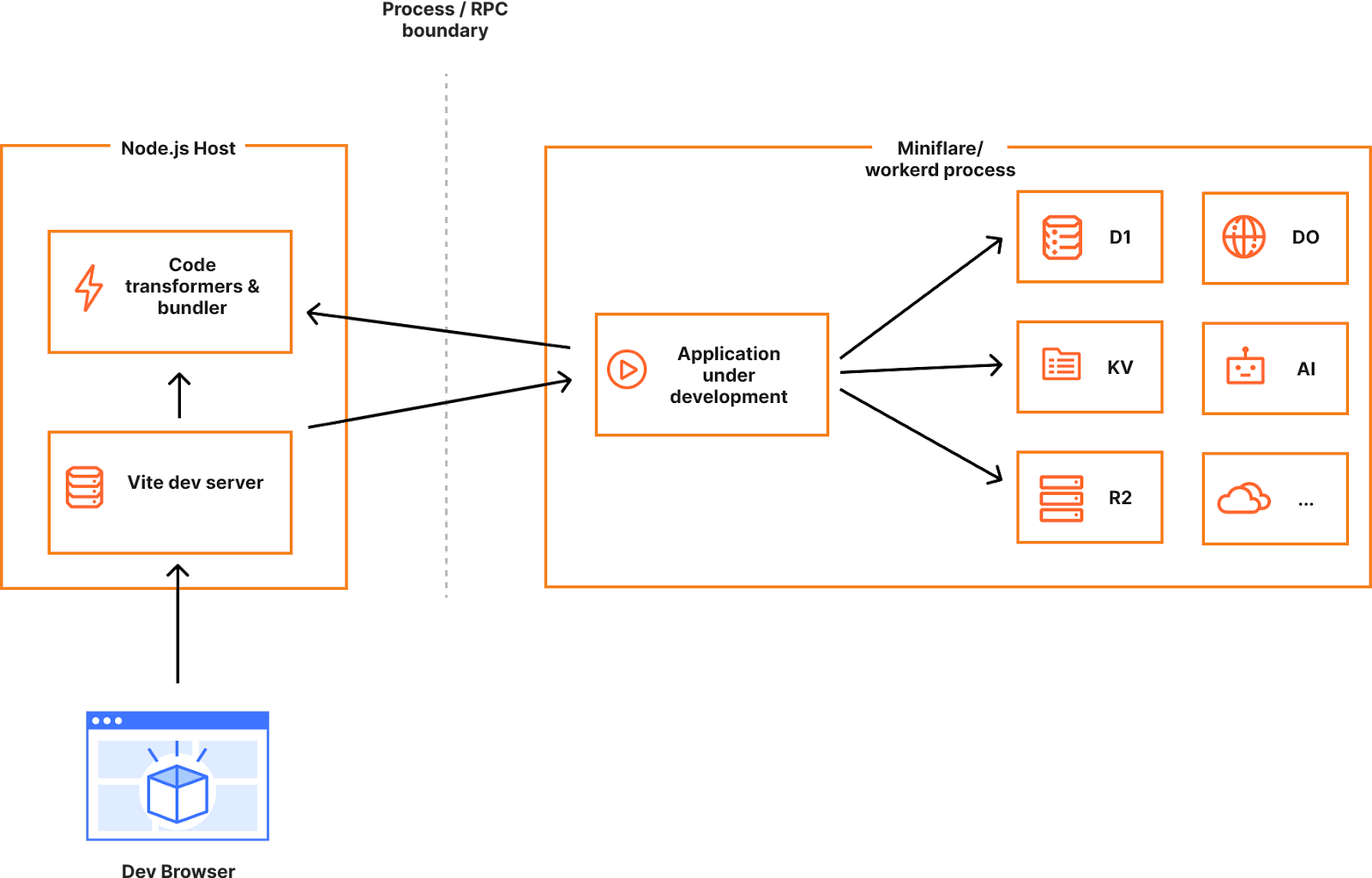
Vite 6 with a Cloudflare Worker environment

Here you can see how it all fits together. The user views a page in the browser (1), which triggers a request to the Vite Dev Server (2). Vite processes the request, resolving, loading, and transforming source files into modules that are added to the client and Worker environments. The client modules are downloaded to the browser to be run as client-side JavaScript, and the Worker modules are sent to the Cloudflare Workers runtime to handle server-side requests. The request is handled by the Worker (3 and 4) and the Vite Dev Server returns the response to the browser (5), which displays the result to the user (6).

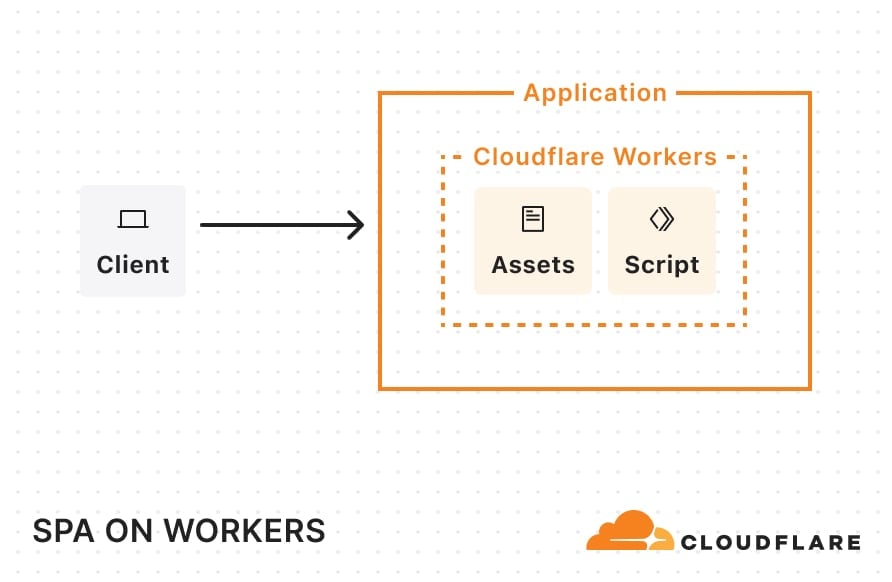
Single-page applications

Vite has become the go-to choice for developing single-page applications (SPAs), whether your preferred frontend framework is React, Vue, Svelte, or one of many others.

Create a new app

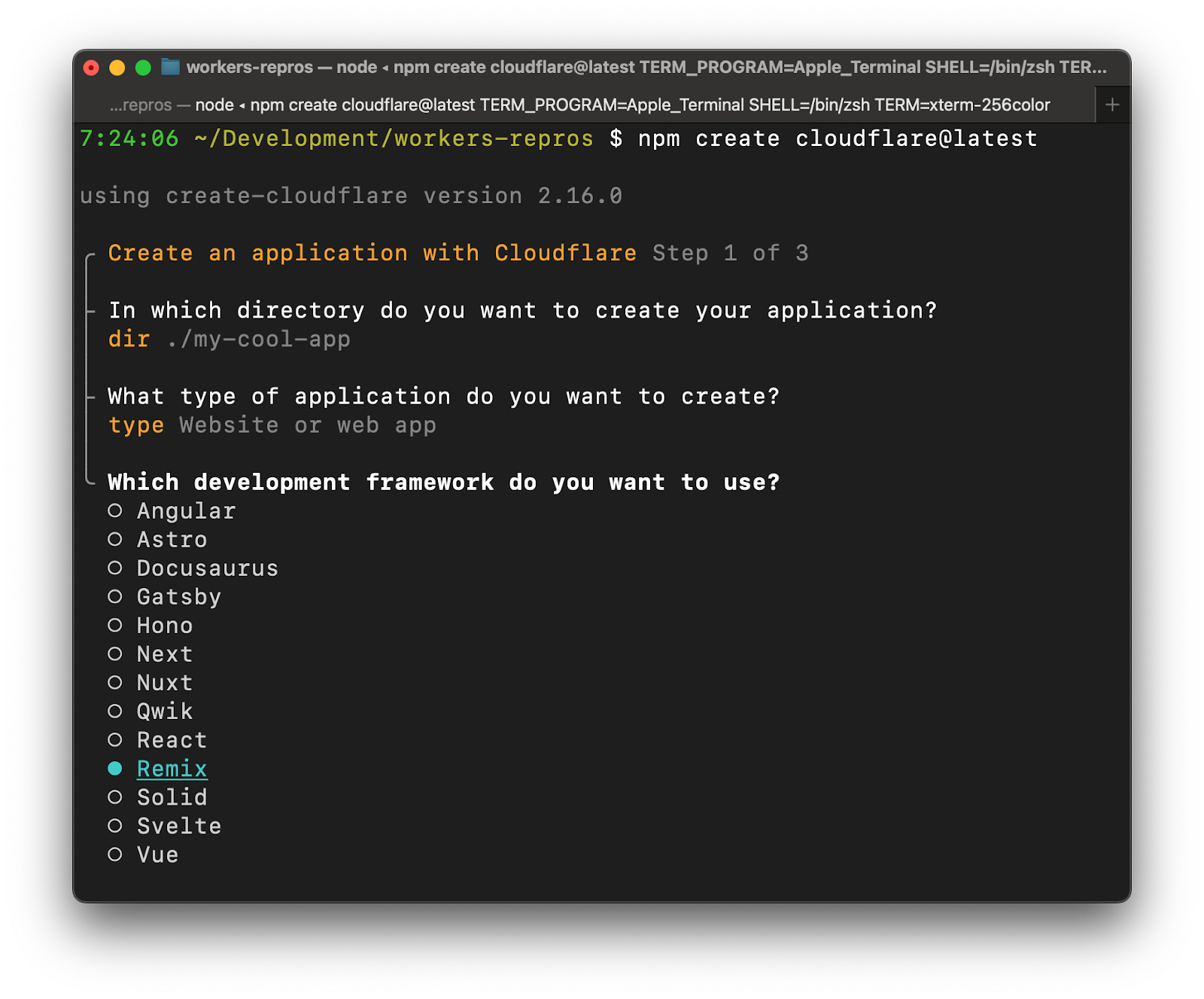
Let’s try out the new Cloudflare Vite plugin by creating a new React SPA using the create-cloudflare CLI.

npm create cloudflare@latest my-react-app -- --framework=react --platform=workers

This command runs create-vite and then makes the necessary changes to incorporate the Cloudflare Vite plugin.

Using the button below, you can also create a React SPA project on Cloudflare Workers, connected to a git repository of your choice, configured with Cloudflare Workers Builds to automatically deploy, and set up to use the new Vite plugin for local development.

Update an existing app

If you would instead like to update an existing Vite SPA project in the same way, you can follow these two steps:

Add the @cloudflare/vite-plugin dependency to the list of plugins:

import { defineConfig } from "vite";
import react from "@vitejs/plugin-react";
import { cloudflare } from "@cloudflare/vite-plugin";

// https://vite.dev/config/
export default defineConfig({
  plugins: [react(), cloudflare()],
});

Add a wrangler.jsonc configuration file alongside your Vite config:

{
  "$schema": "node_modules/wrangler/config-schema.json",
  "name": "my-react-app",
  "compatibility_date": "2025-04-01",
  "assets": {
    "not_found_handling": "single-page-application",
  },
}

For a purely front-end application, the Cloudflare plugin integrates the Vite dev server with Workers Assets to ensure that settings such as html_handling and not_found_handling behave the same way as they do in production. This is just the beginning, however. The real magic happens when you add a Worker backend that is seamlessly integrated into your development and deployment workflow.

Develop the app

To see this in action, start the Vite development server, which will run your Worker in the Cloudflare Workers runtime:

npm run dev

In your browser, click the first displayed button a few times to increment the counter. This is a classic SPA running JavaScript in your browser. Next, click the second button to fetch the response from the API. Notice that it displays Name from API is: Cloudflare. This is making an API request to a Cloudflare Worker running inside Vite.

Have a look at api/index.ts. This file contains a Worker that is invoked for any request not matching a static asset. It returns a JSON response if the pathname starts with /api/.

Edit api/index.ts by changing the name it returns to ’Cloudflare Workers’ and save your changes. If you click the second button in the browser again, it will now display the new name while preserving the previously set counter value. Vite tracked your changes and updated the Worker environment without affecting the client environment. With Vite and the Cloudflare plugin, you can iterate on the client and server parts of your app together, without losing UI state between edits.

The Cloudflare Vite integration doesn’t end with the dev server. vite build outputs the client and server parts of your application with a single command. vite preview allows you to preview your build output in the Workers runtime prior to deployment. Finally, wrangler deploy recognises that you have generated a Vite build and deploys your application directly without any additional bundling.

React Router v7

While Vite began its life primarily as a build tool for single-page applications, it has since become the foundation for the current generation of full-stack frameworks. Astro, Qwik, React Router, SvelteKit and others have all adopted Vite, drawing on its development server, build pipeline, and phenomenal developer experience. In addition to working with the Vite team on the Environment API, we have also partnered closely with the Remix team on their adoption of Vite Environments. Today, we are announcing first-class support for React Router v7 (the successor to Remix) in the Cloudflare Vite plugin.

You can use the create-cloudflare CLI to create a new React Router application configured with the Cloudflare Vite plugin.

npm create cloudflare@latest my-react-router-app -- --framework=react-router

Run npm run dev to start the dev server. You can also try building (npm run build), previewing (npm run preview), and deploying (npm run deploy) your application.

Have a look at the code below, taken from workers/app.ts. This is the file referenced in the main field in wrangler.jsonc:

const requestHandler = createRequestHandler(
  () => import("virtual:react-router/server-build"),
  import.meta.env.MODE
);

export default {
  async fetch(request, env, ctx) {
    return requestHandler(request, {
      cloudflare: { env, ctx },
    });
  },
} satisfies ExportedHandler<CloudflareEnvironment>;

This single file defines your Worker at both dev and build time and puts you in full control. No more build-time adapters! Notice how the env and ctx are passed down directly in the request handler. These are then accessible in your loaders and actions, which are running inside the Workers runtime along with the rest of your server code. You can add other exports to this file to suit your needs and then reference them in your Worker config. Want to add a Durable Object or a Workflow? Go for it!

This will be the first in a series of full-stack frameworks to be supported and we look forward to continuing discussion and collaboration with a range of teams over the coming months. If you are a framework contributor looking to improve integration with Cloudflare and/or the Vite Environment API, then please feel free to explore the code and reach out on GitHub or Discord.

Workers

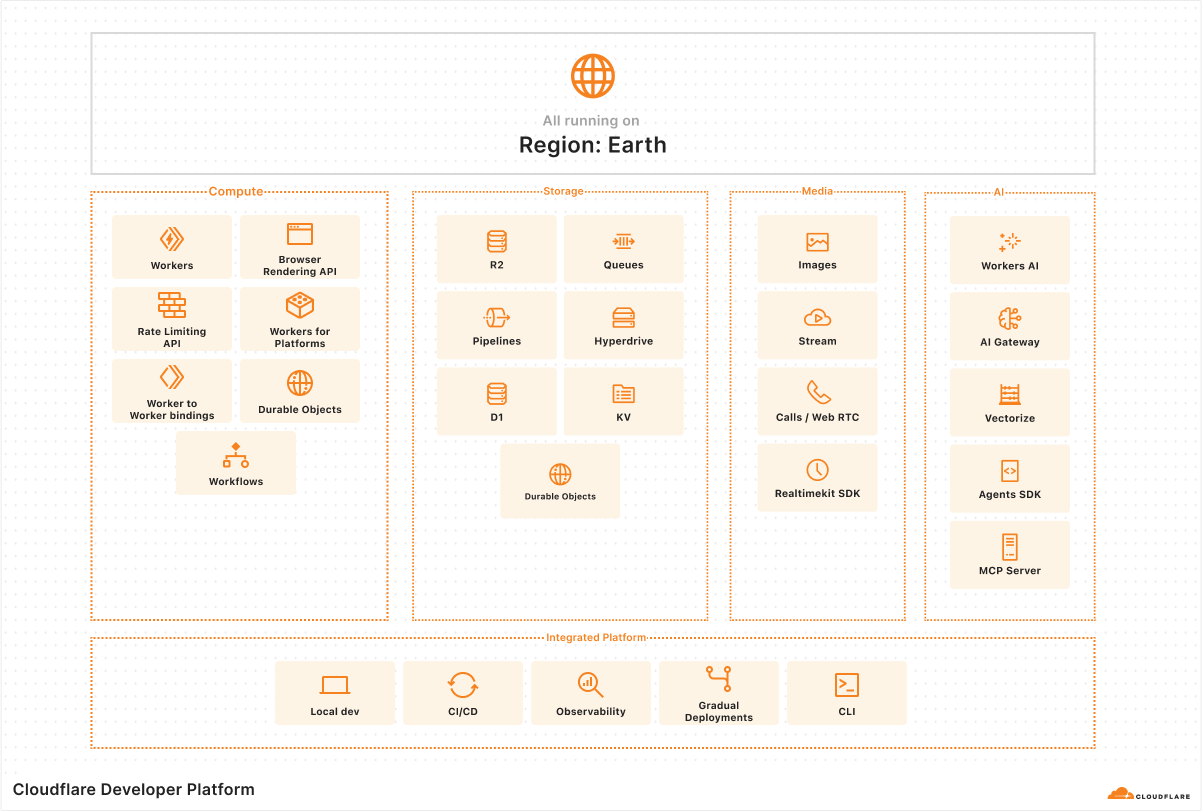
While this post has focused thus far on using Vite to build web applications, the Cloudflare plugin enables you to use Vite to build anything you can build with Workers. The full Cloudflare Developer Platform is supported, including KV, D1, Service Bindings, RPC, Durable Objects, Workflows, Workers AI, etc. In fact, in most cases, taking an existing Worker and developing it with Vite is as simple as following these two steps:

Install the dependencies:

npm install –save-dev vite @cloudflare/vite-plugin

And add a Vite config:

// vite.config.ts

import { defineConfig } from "vite";
import { cloudflare } from "@cloudflare/vite-plugin";

export default defineConfig({
  plugins: [cloudflare()],
});

That’s it! By default, the plugin will look for a wrangler.json, wrangler.jsonc, or wrangler.toml config file in the root of your Vite project. By using Vite, you can draw on its rich ecosystem of plugins and integrations and easily customize your build output.

Wrapping up

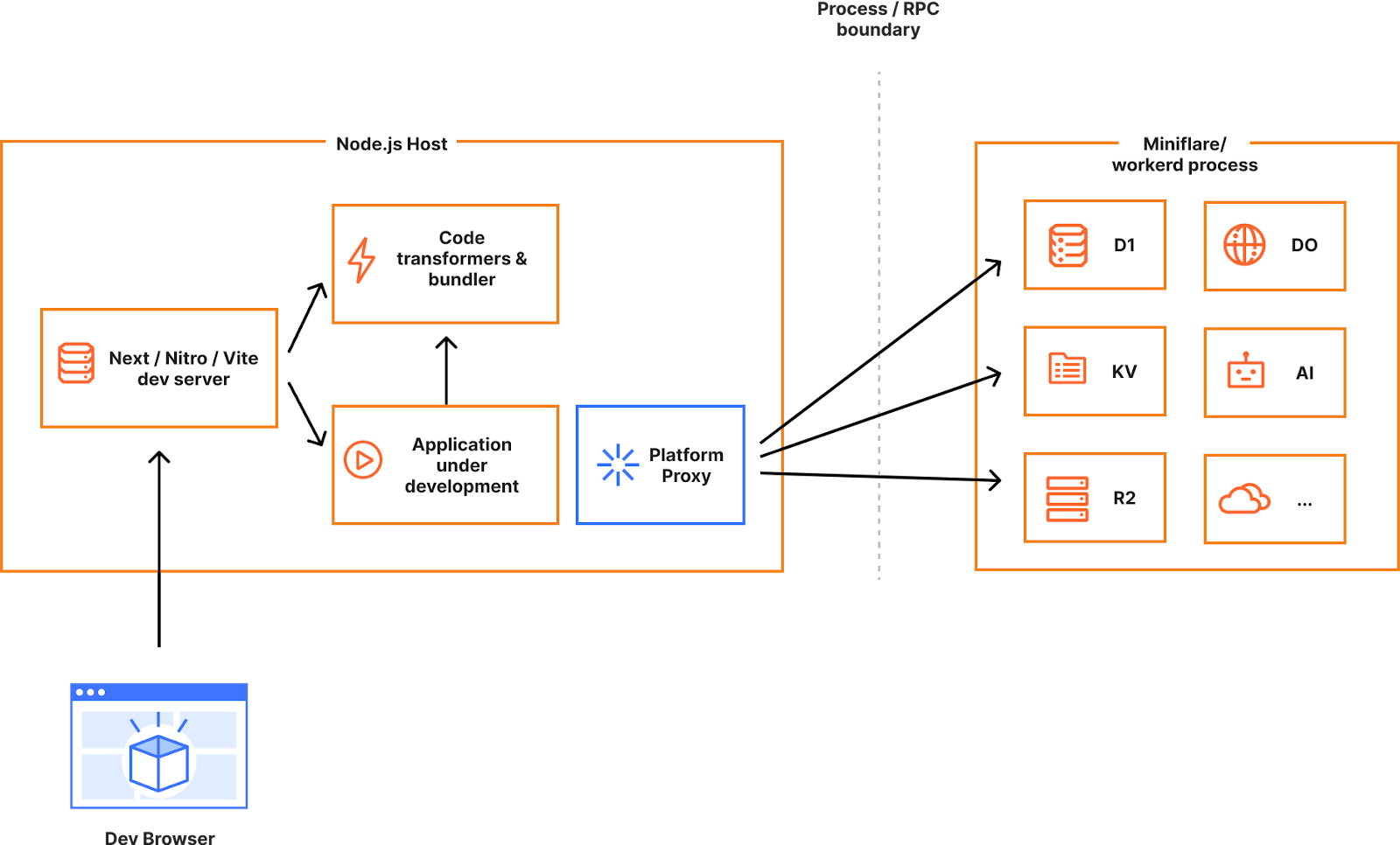
In 2024, we announced getPlatformProxy() as a way to access Cloudflare bindings from development servers running in Node. At the end of that post, we imagined a future where it would instead be possible to develop directly in the Workers runtime. This would eliminate the many subtle ways that development and production behavior could differ. Today, that future is a reality, and we can’t wait for you to try it out!

Start a new project with our React Router, React, or Vue templates using the create-cloudflare CLI, use the “Deploy to Cloudflare” button below, or try adding @cloudflare/vite-plugin to your existing Vite applications. We’re excited to see what you build!

Read more in our Cloudflare Vite Plugin documentation.

Build global MySQL apps using Cloudflare Workers and Hyperdrive

Post Syndicated from Thomas Gauvin original https://blog.cloudflare.com/building-global-mysql-apps-with-cloudflare-workers-and-hyperdrive/

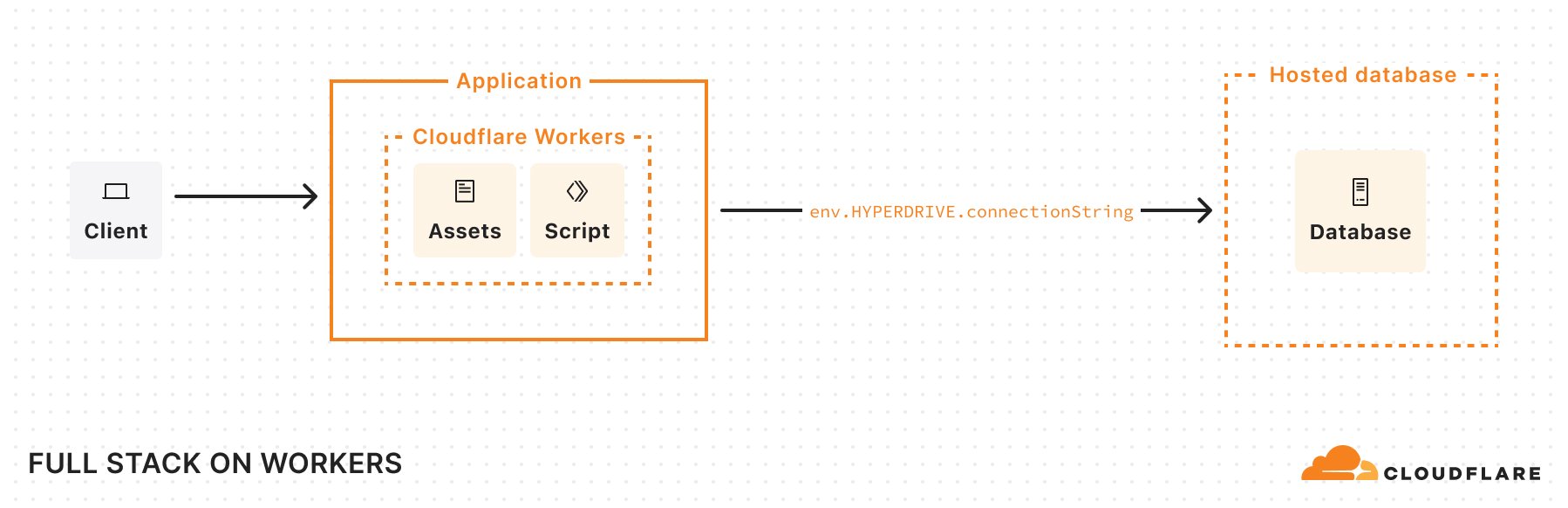
Today, we’re announcing support for MySQL in Cloudflare Workers and Hyperdrive. You can now build applications on Workers that connect to your MySQL databases directly, no matter where they’re hosted, with native MySQL drivers, and with optimal performance. 

Connecting to MySQL databases from Workers has been an area we’ve been focusing on for quite some time. We want you to build your apps on Workers with your existing data, even if that data exists in a SQL database in us-east-1. But connecting to traditional SQL databases from Workers has been challenging: it requires making stateful connections to regional databases with drivers that haven’t been designed for the Workers runtime

After multiple attempts at solving this problem for Postgres, Hyperdrive emerged as our solution that provides the best of both worlds: it supports existing database drivers and libraries while also providing best-in-class performance. And it’s such a critical part of connecting to databases from Workers that we’re making it free (check out the Hyperdrive free tier announcement).

With new Node.js compatibility improvements and Hyperdrive support for the MySQL wire protocol, we’re happy to say MySQL support for Cloudflare Workers has been achieved. If you want to jump into the code and have a MySQL database on hand, this “Deploy to Cloudflare” button will get you setup with a deployed project and will create a repository so you can dig into the code. 

Read on to learn more about how we got MySQL to work on Workers, and why Hyperdrive is critical to making connectivity to MySQL databases fast.

Getting MySQL to work on Workers

Until recently, connecting to MySQL databases from Workers was not straightforward. While it’s been possible to make TCP connections from Workers for some time, MySQL drivers had many dependencies on Node.js that weren’t available on the Workers runtime, and that prevented their use.

This led to workarounds being developed. PlanetScale provided a serverless driver for JavaScript, which communicates with PlanetScale servers using HTTP instead of TCP to relay database messages. In a separate effort, a fork of the mysql package was created to polyfill the missing Node.js dependencies and modify the mysql package to work on Workers. 

These solutions weren’t perfect. They required using new libraries that either did not provide the level of support expected for production applications, or provided solutions that were limited to certain MySQL hosting providers. They also did not integrate with existing codebases and tooling that depended on the popular MySQL drivers (mysql and mysql2). In our effort to enable all JavaScript developers to build on Workers, we knew that we had to support these drivers.


Package downloads from npm for mysql and mysql2

Improving our Node.js compatibility story was critical to get these MySQL drivers working on our platform. We first identified net and stream as APIs that were needed by both drivers. This, complemented by Workers’ nodejs_compat to resolve unused Node.js dependencies with unenv, enabled the mysql package to work on Workers:

import { createConnection } from 'mysql';

export default {
 async fetch(request, env, ctx): Promise<Response> {
    const result = await new Promise<any>((resolve) => {

       const connection = createConnection({
         host: env.DB_HOST,
         user: env.DB_USER,
         password: env.DB_PASSWORD,
         database: env.DB_NAME,
	  port: env.DB_PORT
       });

       connection.connect((error: { message : string }) => {
          if(error) {
            throw new Error(error.message);
          }
          
          connection.query("SHOW tables;", [], (error, rows, fields) => {
          connection.end();
         
          resolve({ fields, rows });
        });
       });

      });

     return new Response(JSON.stringify(result), {
       headers: {
         'Content-Type': 'application/json',
       },
     });
 },
} satisfies ExportedHandler<Env>;

Further work was required to get mysql2 working: dependencies on Node.js timers and the JavaScript eval API remained. While we were able to land support for timers in the Workers runtime, eval was not an API that we could securely enable in the Workers runtime at this time. 

mysql2 uses eval to optimize the parsing of MySQL results containing large rows with more than 100 columns (see benchmarks). This blocked the driver from working on Workers, since the Workers runtime does not support this module. Luckily, prior effort existed to get mysql2 working on Workers using static parsers for handling text and binary MySQL data types without using eval(), which provides similar performance for a majority of scenarios. 

In mysql2 version 3.13.0, a new option to disable the use of eval() was released to make it possible to use the driver in Cloudflare Workers:

import { createConnection  } from 'mysql2/promise';

export default {
 async fetch(request, env, ctx): Promise<Response> {
    const connection = await createConnection({
     host: env.DB_HOST,
     user: env.DB_USER,
     password: env.DB_PASSWORD,
     database: env.DB_NAME,
     port: env.DB_PORT

     // The following line is needed for mysql2 to work on Workers (as explained above)
     // mysql2 uses eval() to optimize result parsing for rows with > 100 columns
     // eval() is not available in Workers due to runtime limitations
     // Configure mysql2 to use static parsing with disableEval
     disableEval: true
   });

   const [results, fields] = await connection.query(
     'SHOW tables;'
   );

   return new Response(JSON.stringify({ results, fields }), {
     headers: {
       'Content-Type': 'application/json',
       'Access-Control-Allow-Origin': '*',
     },
   });
 },
} satisfies ExportedHandler<Env>;

So, with these efforts, it is now possible to connect to MySQL from Workers. But, getting the MySQL drivers working on Workers was only half of the battle. To make MySQL on Workers performant for production uses, we needed to make it possible to connect to MySQL databases with Hyperdrive.

Supporting MySQL in Hyperdrive

If you’re a MySQL developer, Hyperdrive may be new to you. Hyperdrive solves a core problem: connecting from Workers to regional SQL databases is slow. Database drivers require many roundtrips to establish a connection to a database. Without the ability to reuse these connections between Worker invocations, a lot of unnecessary latency is added to your application. 

Hyperdrive solves this problem by pooling connections to your database globally and eliminating unnecessary roundtrips for connection setup. As a plus, Hyperdrive also provides integrated caching to offload popular queries from your database. We wrote an entire deep dive on how Hyperdrive does this, which you should definitely check out


Getting Hyperdrive to support MySQL was critical for us to be able to say “Connect from Workers to MySQL databases”. That’s easier said than done. To support a new database type, Hyperdrive needs to be able to parse the wire protocol of the database in question, in this case, the MySQL protocol. Once this is accomplished, Hyperdrive can extract queries from protocol messages, cache results across Cloudflare locations, relay messages to a datacenter close to your database, and pool connections reliably close to your origin database. 

Adapting Hyperdrive to parse a new language, MySQL protocol, is a challenge in its own right. But it also presented some notable differences with Postgres. While the intricacies are beyond the scope of this post, the differences in MySQL’s authentication plugins across providers and how MySQL’s connection handshake uses capability flags required some adaptation of Hyperdrive. In the end, we leveraged the experience we gained in building Hyperdrive for Postgres to iterate on our support for MySQL. And we’re happy to announce MySQL support is available for Hyperdrive, with all of the performance improvements we’ve made to Hyperdrive available from the get-go!

Now, you can create new Hyperdrive configurations for MySQL databases hosted anywhere (we’ve tested MySQL and MariaDB databases from AWS (including AWS Aurora), GCP, Azure, PlanetScale, and self-hosted databases). You can create Hyperdrive configurations for your MySQL databases from the dashboard or the Wrangler CLI:

wrangler hyperdrive create mysql-hyperdrive 
--connection-string="mysql://user:[email protected]:3306/defaultdb"

In your Wrangler configuration file, you’ll need to set your Hyperdrive binding to the ID of the newly created Hyperdrive configuration as well as set Node.js compatibility flags:

{
 "$schema": "node_modules/wrangler/config-schema.json",
 "name": "workers-mysql-template",
 "main": "src/index.ts",
 "compatibility_date": "2025-03-10",
 "observability": {
   "enabled": true
 },
 "compatibility_flags": [
   "nodejs_compat"
 ],
 "hyperdrive": [
   {
     "binding": "HYPERDRIVE",
     "id": "<HYPERDRIVE_CONFIG_ID>"
   }
 ]
}

From your Cloudflare Worker, the Hyperdrive binding provides you with custom connection credentials that connect to your Hyperdrive configuration. From there onward, all of your queries and database messages will be routed to your origin database by Hyperdrive, leveraging Cloudflare’s network to speed up routing.

import { createConnection  } from 'mysql2/promise';

export interface Env {
 HYPERDRIVE: Hyperdrive;
}

export default {
 async fetch(request, env, ctx): Promise<Response> {
  
   // Hyperdrive provides new connection credentials to use with your existing drivers
   const connection = await createConnection({
     host: env.HYPERDRIVE.host,
     user: env.HYPERDRIVE.user,
     password: env.HYPERDRIVE.password,
     database: env.HYPERDRIVE.database,
     port: env.HYPERDRIVE.port,

     // Configure mysql2 to use static parsing (as explained above in Part 1)
     disableEval: true 
   });

   const [results, fields] = await connection.query(
     'SHOW tables;'
   );

   return new Response(JSON.stringify({ results, fields }), {
     headers: {
       'Content-Type': 'application/json',
       'Access-Control-Allow-Origin': '*',
     },
   });
 },
} satisfies ExportedHandler<Env>;

As you can see from this code snippet, you only need to swap the credentials in your JavaScript code for those provided by Hyperdrive to migrate your existing code to Workers. No need to change the ORMs or drivers you’re using! 

Get started building with MySQL and Hyperdrive

MySQL support for Workers and Hyperdrive has been long overdue and we’re excited to see what you build. We published a template for you to get started building your MySQL applications on Workers with Hyperdrive:

As for what’s next, we’re going to continue iterating on our support for MySQL during the beta to support more of the MySQL protocol and MySQL-compatible databases. We’re also going to continue to expand the feature set of Hyperdrive to make it more flexible for your full-stack workloads and more performant for building full-stack global apps on Workers.

Finally, whether you’re using MySQL, PostgreSQL, or any of the other compatible databases, we think you should be using Hyperdrive to get the best performance. And because we want to enable you to build on Workers regardless of your preferred database, we’re making Hyperdrive available to the Workers free plan. 

We want to hear your feedback on MySQL, Hyperdrive, and building global applications with Workers. Join the #hyperdrive channel in our Developer Discord to ask questions, share what you’re building, and talk to our Product & Engineering teams directly.

Thank you to Weslley Araújo, Andrey Sidorov, Shi Yuhang, Zhiyuan Liang, Nora Söderlund and other open-source contributors who helped push this initiative forward.
Skip the setup: deploy a Workers application in seconds

Post Syndicated from Nevi Shah original https://blog.cloudflare.com/deploy-workers-applications-in-seconds/

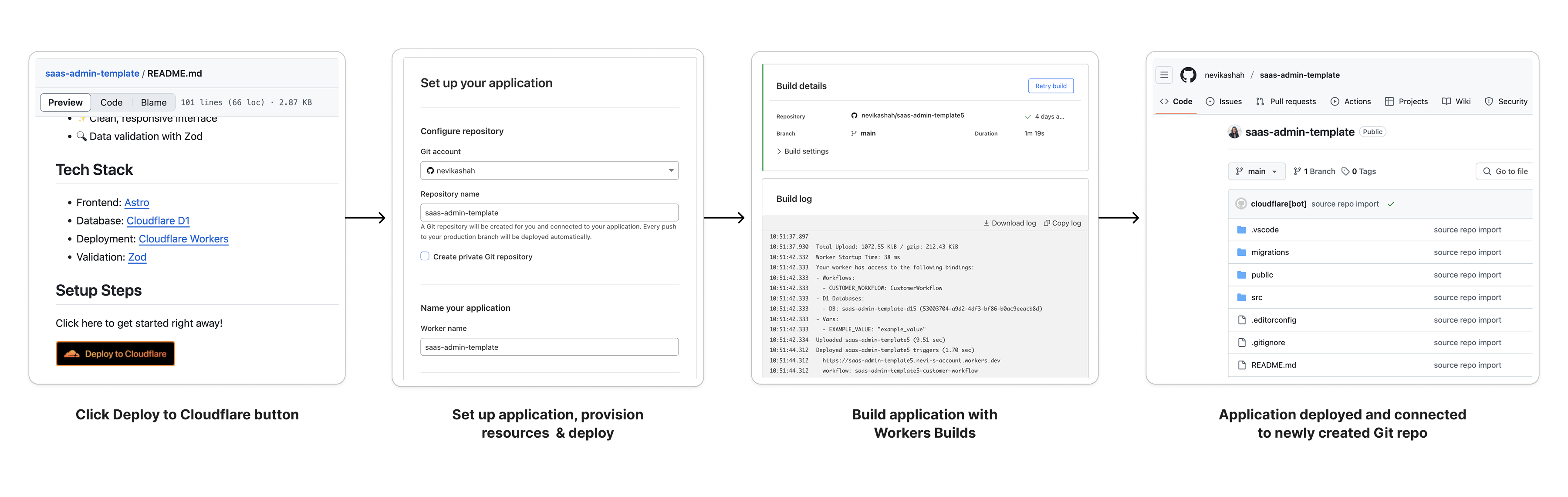
You can now add a Deploy to Cloudflare button to the README of your Git repository containing a Workers application — making it simple for other developers to quickly set up and deploy your project! 

The Deploy to Cloudflare button: 

  1. Creates a new Git repository on your GitHub/ GitLab account: Cloudflare will automatically clone and create a new repository on your account, so you can continue developing. 

  2. Automatically provisions resources the app needs: If your repository requires Cloudflare primitives like a Workers KV namespace, a D1 database, or an R2 bucket, Cloudflare will automatically provision them on your account and bind them to your Worker upon deployment. 

  3. Configures Workers Builds (CI/CD): Every new push to your production branch on your newly created repository will automatically build and deploy courtesy of Workers Builds

  4. Adds preview URLs to each pull request: If you’d like to test your changes before deploying, you can push changes to a non-production branch and preview URLs will be generated and posted back to GitHub as a comment.   


There is nothing more frustrating than struggling to kick the tires on a new project because you don’t know where to start. Over the past couple of months, we’ve launched some improvements to getting started on Workers, including a gallery of Git-connected templates that help you kickstart your development journey. 

But we think there’s another part of the story. Everyday, we see new Workers applications being built and open-sourced by developers in the community, ranging from starter projects to mission critical applications. These projects are designed to be shared, deployed, customized, and contributed to. But first and foremost, they must be simple to deploy.

Ditch the setup instructions

If you’ve open-sourced a new Workers application before, you may have listed in your README the following in order to get others going with your repository:

  1. “Clone this repo” 

  2. “Install these packages”

  3. “Install Wrangler” 

  4. “Create this database”

  5. “Paste the database ID back into your config file” 

  6. “Run this command to deploy” 

  7. “Push to a new Git repo” 

  8. “Set up CI” 

And the list goes on the more complicated your application gets, deterring other developers and making your project feel intimidating to deploy. Now, your project can be up and running in one shot — which means more traction, more feedback, and more contributions.

Self-hosting made easy 

We’re not just talking about building and sharing small starter apps but also complex pieces of software. If you’ve ever self-hosted your own instance of an application on a traditional cloud provider before, you’re likely familiar with the pain of tedious setup, operational overhead, or hidden costs of your infrastructure. 

Self-hosting with traditional cloud provider

Self-hosting with Cloudflare 

Setup a VPC

Install tools and dependencies  

Set up and provision storage 

Manually configure CI/CD pipeline to automate deployments 

Scramble to manually secure your environment if a runtime vulnerability is discovered

Configure autoscaling policies and manage idle servers

✅Serverless

✅Highly-available global network

✅Automatic provisioning of datastores like D1 databases and R2 buckets

✅Built-in CI/CD workflow configured out of the box

✅Automatic runtime updates to keep your environment secure

✅Scale automatically and only pay for what you use.

By making your open-source repository accessible with a Deploy to Cloudflare button, you can allow other developers to deploy their own instance of your app without requiring deep infrastructure expertise. 

From starter projects to full-stack applications

We’re inviting all Workers developers looking to open-source their project to add Deploy to Cloudflare buttons to their projects and help others get up and running faster. We’ve already started working with open-source app developers! Here are a few great examples to explore: 

Test and explore your APIs with Fiberplane 

Fiberplane helps developers build, test and explore Hono APIs and AI Agents in an embeddable playground. This Developer Week, Fiberplane released a set of sample Worker applications built on the ‘HONC‘ stack — Hono, Drizzle ORM, D1 Database, and Cloudflare Workers — that you can use as the foundation for your own projects. With an easy one-click Deploy to Cloudflare, each application comes preconfigured with the open source Fiberplane API Playground, making it easy to generate OpenAPI docs, test your handlers, and explore your API, all within one embedded interface.

Deploy your first remote MCP server 

You can now build and deploy remote Model Context Protocol (MCP) servers on Cloudflare Workers! MCP servers provide a standardized way for AI agents to interact with services directly, enabling them to complete actions on users’ behalf. Cloudflare’s remote MCP server implementation supports authentication, allowing users to login to their service from the agent to give it scoped permissions. This gives users the ability to interact with services without navigating dashboards or learning APIs — they simply tell their AI agent what they want to accomplish.

Start building your first agent 

AI agents are intelligent systems capable of autonomously executing tasks by making real-time decisions about which tools to use and how to structure their workflows. Unlike traditional automation (which follows rigid, predefined steps), agents dynamically adapt their strategies based on context and evolving inputs. This template serves as a starting point for building AI-driven chat agents on Cloudflare’s Agent platform. Powered by Cloudflare’s Agents SDK, it provides a solid foundation for creating interactive AI chat experiences with a modern UI and tool integrations capabilities.

Try it now

You can start using Deploy to Cloudflare buttons today!

Add a Deploy to Cloudflare button to your README

Be sure to make your Git repository public and add the following snippet including your Git repository URL.

[![Deploy to Cloudflare](https://deploy.workers.cloudflare.com/button)](https://deploy.workers.cloudflare.com/?url=<YOUR_GIT_REPO_URL>)

When another developer clicks your Deploy to Cloudflare button, Cloudflare will parse the Wrangler configuration file, provision any resources detected, and create a new repo on their account that’s updated with information about newly created resources. For example:

{
  "compatibility_date": "2024-04-03",

  "d1_databases": [
    {
      "binding": "MY_D1_DATABASE",

	//will be updated with newly created database ID
      "database_id": "1234567890abcdef1234567890abcdef"
    }
  ]
}

Check out our documentation for more information on how to set up a deploy button for your application and best practices to ensure a successful deployment for other developers. 

Start building 

For new Cloudflare developers, keep an eye out for “Deploy to Cloudflare” buttons across the web, or simply paste the URL of any public GitHub or GitLab repository containing a Workers application into the Cloudflare dashboard to get started.


During Developer Week, tune in to our blog as we unveil new features and announcements — many including Deploy to Cloudflare buttons — so you can jump right in and start building!

Introducing AutoRAG: fully managed Retrieval-Augmented Generation on Cloudflare

Post Syndicated from Anni Wang original https://blog.cloudflare.com/introducing-autorag-on-cloudflare/

Today we’re excited to announce AutoRAG in open beta, a fully managed Retrieval-Augmented Generation (RAG) pipeline powered by Cloudflare, designed to simplify how developers integrate context-aware AI into their applications. RAG is a method that improves the accuracy of AI responses by retrieving information from your own data, and providing it to the large language model (LLM) to generate more grounded responses.

Building a RAG pipeline is a patchwork of moving parts. You have to stitch together multiple tools and services — your data storage, a vector database, an embedding model, LLMs, and custom indexing, retrieval, and generation logic — all just to get started. Maintaining it is even harder. As your data changes, you have to manually reindex and regenerate embeddings to keep the system relevant and performant. What should be a simple “ask a question, get a smart answer” experience becomes a brittle pipeline of glue code, fragile integrations, and constant upkeep.

AutoRAG removes that complexity. With just a few clicks, it delivers a fully-managed RAG pipeline end-to-end: from ingesting your data and automatically chunking and embedding it, to storing vectors in Cloudflare’s Vectorize database, performing semantic retrieval, and generating high-quality responses using Workers AI. AutoRAG continuously monitors your data sources and indexes in the background so your AI stays fresh without manual effort. It abstracts away the mess, letting you focus on building smarter, faster applications on Cloudflare’s developer platform. Get started today in the Cloudflare Dashboard!

Why use RAG in the first place?

LLMs like Llama 3.3 from Meta are powerful, but they only know what they’ve been trained on. They often struggle to produce accurate answers when asked about new, proprietary, or domain-specific information. System prompts providing relevant information can help, but they bloat input size and are limited by context windows. Fine-tuning a model is expensive and requires ongoing retraining to keep up to date.

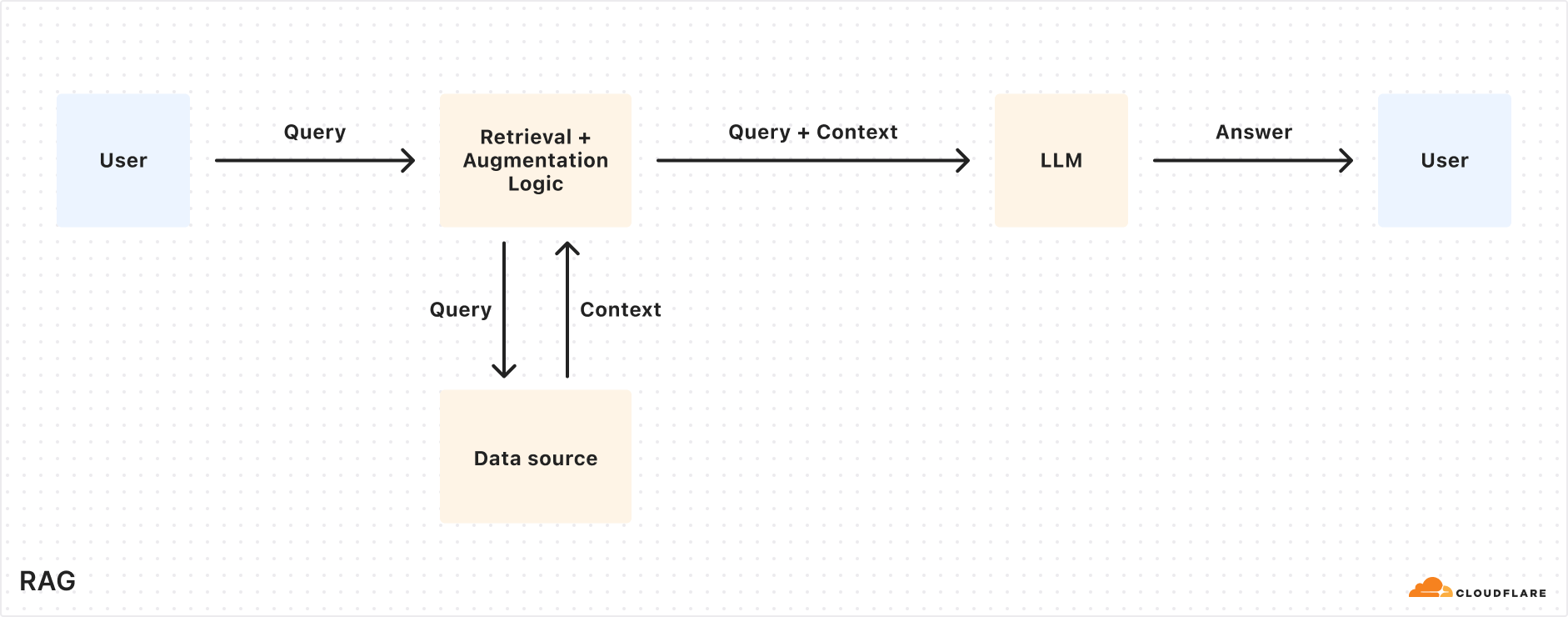
RAG solves this by retrieving relevant information from your data source at query time, combining it with the user’s input query, and feeding both into the LLM to generate responses grounded with your data. This makes RAG a great fit for AI-driven support bots, internal knowledge assistants, semantic search across documentation, and other use cases where the source of truth is always evolving.


What’s under the hood of AutoRAG?

AutoRAG sets up a RAG pipeline for you, using the building blocks of Cloudflare’s developer platform. Instead of you having to write code to create a RAG system using Workers AI, Vectorize, and AI Gateway, you just create an AutoRAG instance and point it at a data source, like an R2 storage bucket.

Behind the scenes, AutoRAG is powered by two processes: indexing and querying.

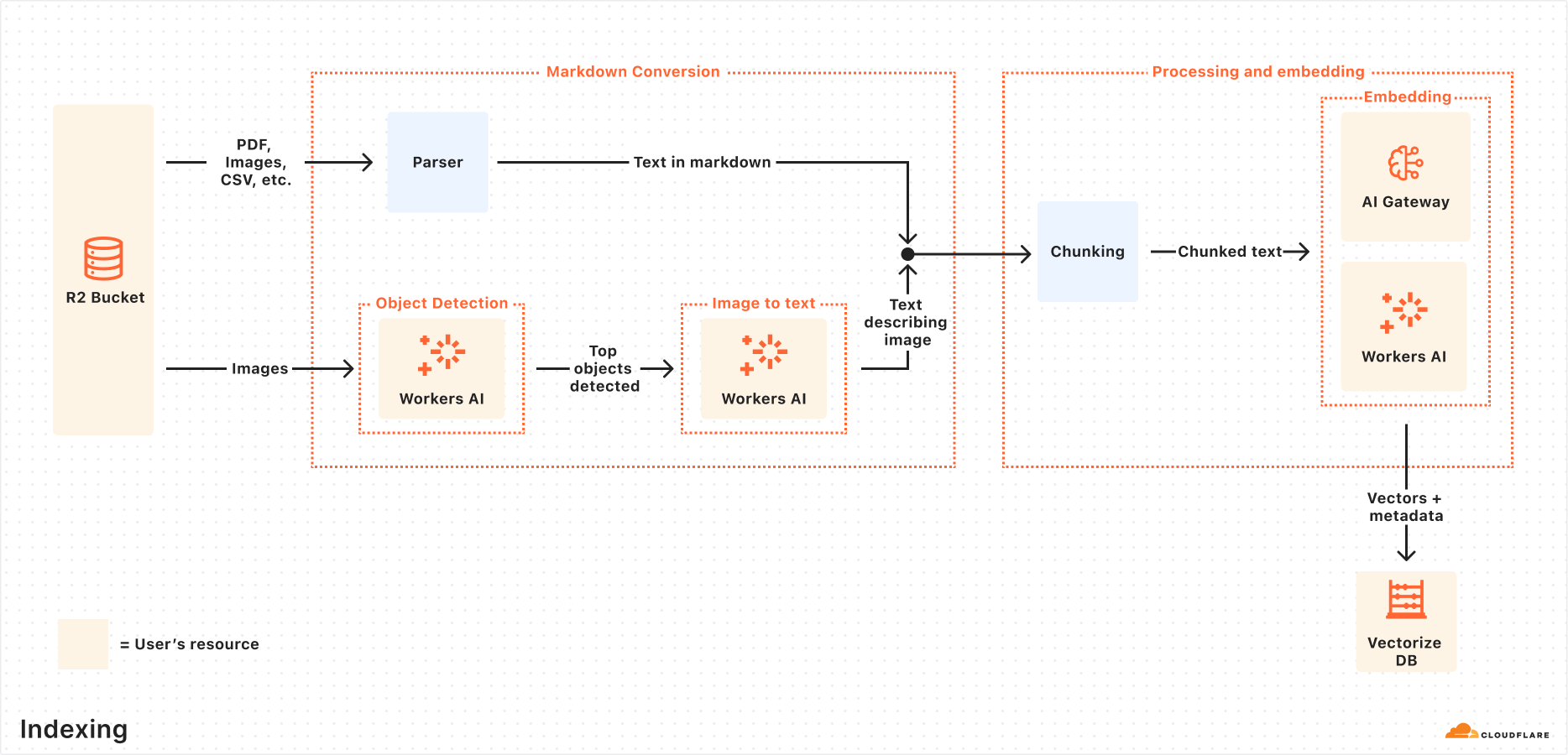
  • Indexing is an asynchronous process that runs in the background. It kicks off as soon as you create an AutoRAG, and automatically continues in cycles — reprocessing new or updated files after each previous job completes. During indexing, your content is transformed into vectors optimized for semantic search.

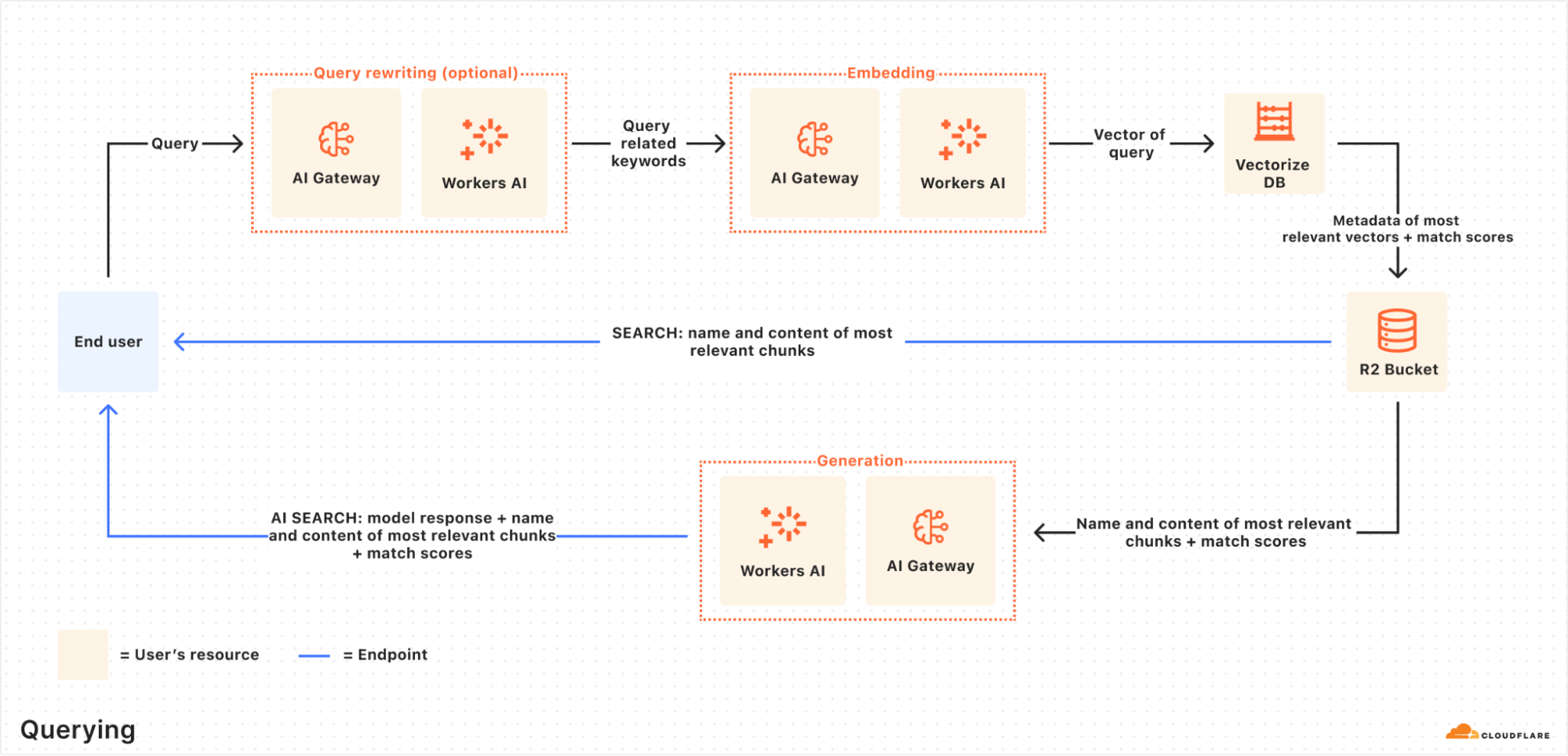
  • Querying is a synchronous process triggered when a user sends a search request. AutoRAG takes the query, retrieves the most relevant content from your vector database, and uses it to generate a context-aware response using an LLM.

Let’s take a closer look at how they work.

Indexing process

When you connect a data source, AutoRAG automatically ingests, transforms, and stores it as vectors, optimizing it for semantic search when querying:

  1. File ingestion from data source: AutoRAG reads directly from your data source. Today, it supports integration with Cloudflare R2, where you can store documents like PDFs, images, text, HTML, CSV, and more for processing.
    Check out the RAG to riches in 5 minutes tutorial below to learn how you can use Browser Rendering to parse webpages to use within your AutoRAG.

  2. Markdown conversion: AutoRAG uses Workers AI’s Markdown Conversion to convert all files into structured Markdown. This ensures consistency across diverse file types. For images, Workers AI is used to perform object detection followed by vision-to-language transformation to convert images into Markdown text.

  3. Chunking: The extracted text is chunked into smaller pieces to improve retrieval granularity.

  4. Embedding: Each chunk is embedded using Workers AI’s embedding model to transform the content into vectors.

  5. Vector storage: The resulting vectors, along with metadata like source location and file name, are stored in a Cloudflare’s Vectorize database created on your account.


Querying process

When an end user makes a request, AutoRAG orchestrates the following:

  1. Receive query from AutoRAG API: The query workflow begins when you send a request to either the AutoRAG’s AI Search or Search endpoint.

  2. Query rewriting (optional): AutoRAG provides the option to rewrite the input query using one of Workers AI’s LLMs to improve retrieval quality by transforming the original query into a more effective search query.

  3. Embedding the query: The rewritten (or original) query is transformed into a vector via the same embedding model used to embed your data so that it can be compared against your vectorized data to find the most relevant matches.

  4. Vector search in Vectorize: The query vector is searched against stored vectors in the associated Vectorize database for your AutoRAG.

  5. Metadata + content retrieval: Vectorize returns the most relevant chunks and their metadata. And the original content is retrieved from the R2 bucket. These are passed to a text-generation model.

  6. Response generation: A text-generation model from Workers AI is used to generate a response using the retrieved content and the original user’s query.

The end result is an AI-powered answer grounded in your private data — accurate, and up to date.


RAG to riches in under 5 minutes

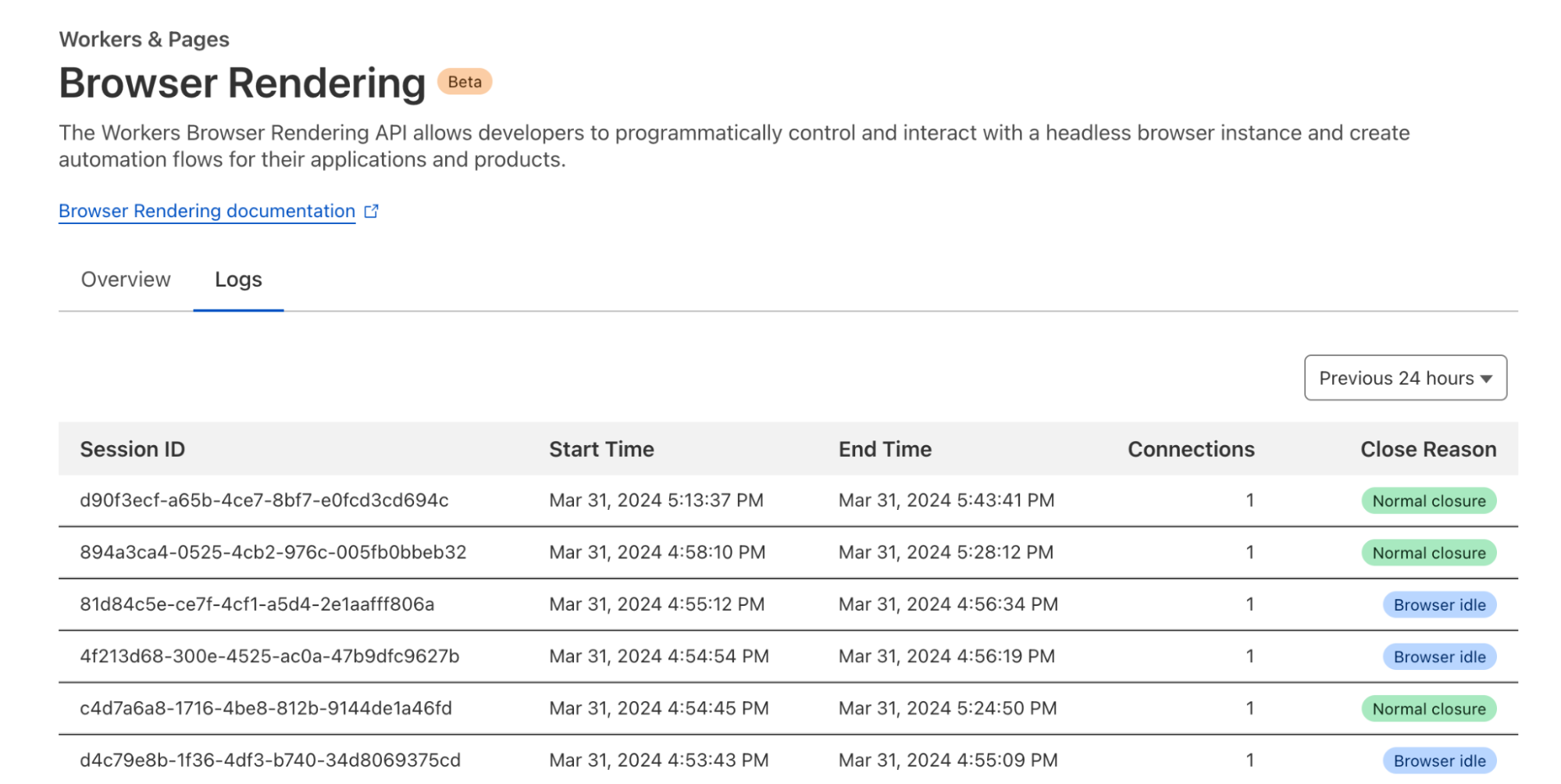
Most of the time, getting started with AutoRAG is as simple as pointing it to an existing R2 bucket — just drop in your content, and you’re ready to go. But what if your content isn’t already in a bucket? What if it’s still on a webpage or needs to first be rendered dynamically by a frontend UI? You’re in luck, because with the Browser Rendering API, you can crawl your own websites to gather information that powers your RAG. The Browser Rendering REST API is now generally available, offering endpoints for common browser actions including extracting HTML content, capturing screenshots, and generating PDFs. Additionally, a crawl endpoint is coming soon, making it even easier to ingest websites.

In this walkthrough, we’ll show you how to take your website and feed it into AutoRAG for Q&A. We’ll use a Cloudflare Worker to render web pages in a headless browser, upload the content to R2, and hook that into AutoRAG for semantic search and generation.

Step 1. Create a Worker to fetch webpages and upload into R2

We’ll create a Cloudflare Worker that uses Puppeteer to visit your URL, render it, and store the full HTML in your R2 bucket. If you already have an R2 bucket with content you’d like to build a RAG for then you can skip this step.

  1. Create a new Worker project named browser-r2-worker by running:

npm create cloudflare@latest -- browser-r2-worker

For setup, select the following options:

  • What would you like to start with? Choose Hello World Starter.

  • Which template would you like to use? Choose Worker only.

  • Which language do you want to use? Choose TypeScript.

2. Install @cloudflare/puppeteer, which allows you to control the Browser Rendering instance:

npm i @cloudflare/puppeteer

3. Create a new R2 bucket named html-bucket by running: 

npx wrangler r2 bucket create html-bucket

4. Add the following configurations to your Wrangler configuration file, so your Worker can use browser rendering and your new R2 bucket:

{
	"compatibility_flags": ["nodejs_compat"],
	"browser": {
		"binding": "MY_BROWSER"
	},
	"r2_buckets": [
		{
			"binding": "HTML_BUCKET",
			"bucket_name": "html-bucket",
		}
	],
}

5. Replace the contents of src/index.ts with the following skeleton script:

import puppeteer from "@cloudflare/puppeteer";

// Define our environment bindings
interface Env {
	MY_BROWSER: any;
	HTML_BUCKET: R2Bucket;
}

// Define request body structure
interface RequestBody {
	url: string;
}

export default {
	async fetch(request: Request, env: Env): Promise<Response> {
		// Only accept POST requests
		if (request.method !== 'POST') {
return new Response('Please send a POST request with a target URL', { status: 405 });
		}

		// Get URL from request body
		const body = await request.json() as RequestBody;
		// Note: Only use this parser for websites you own
		const targetUrl = new URL(body.url); 

		// Launch browser and create new page
		const browser = await puppeteer.launch(env.MY_BROWSER);
		const page = await browser.newPage();

		// Navigate to the page and fetch its html
		await page.goto(targetUrl.href);
		const htmlPage = await page.content();

		// Create filename and store in R2
		const key = targetUrl.hostname + '_' + Date.now() + '.html';
		await env.HTML_BUCKET.put(key, htmlPage);

		// Close browser
		await browser.close();

		// Return success response
		return new Response(JSON.stringify({
			success: true,
			message: 'Page rendered and stored successfully',
			key: key
		}), {
			headers: { 'Content-Type': 'application/json' }
		});
	}
} satisfies ExportedHandler<Env>;

6. Once the code is ready, you can deploy it to your Cloudflare account by running:

npx wrangler deploy

7. To test your Worker, you can use the following cURL request to fetch the HTML file of a page. In this example we are fetching this blog page to upload into the html-bucket bucket:

curl -X POST https://browser-r2-worker.<YOUR_SUBDOMAIN>.workers.dev \
-H "Content-Type: application/json" \
-d '{"url": "https://blog.cloudflare.com/introducing-autorag-on-cloudflare"}'

Step 2. Create your AutoRAG and monitor the indexing

Now that you have created your R2 bucket and filled it with your content that you’d like to query from, you are ready to create an AutoRAG instance:

  1. In your Cloudflare dashboard, navigate to AI > AutoRAG

  2. Select Create AutoRAG and complete the setup process:

    1. Select the R2 bucket which contains your knowledge base, in this case, select the html-bucket.

    2. Select an embedding model used to convert your data to vector representation. It is recommended to use the Default.

    3. Select an LLM to use to generate your responses. It is recommended to use the Default.

    4. Select or create an AI Gateway to monitor and control your model usage.

    5. Name your AutoRAG as my-rag.

    6. Select or create a Service API token to grant AutoRAG access to create and access resources in your account.

  3. Select Create to spin up your AutoRAG.

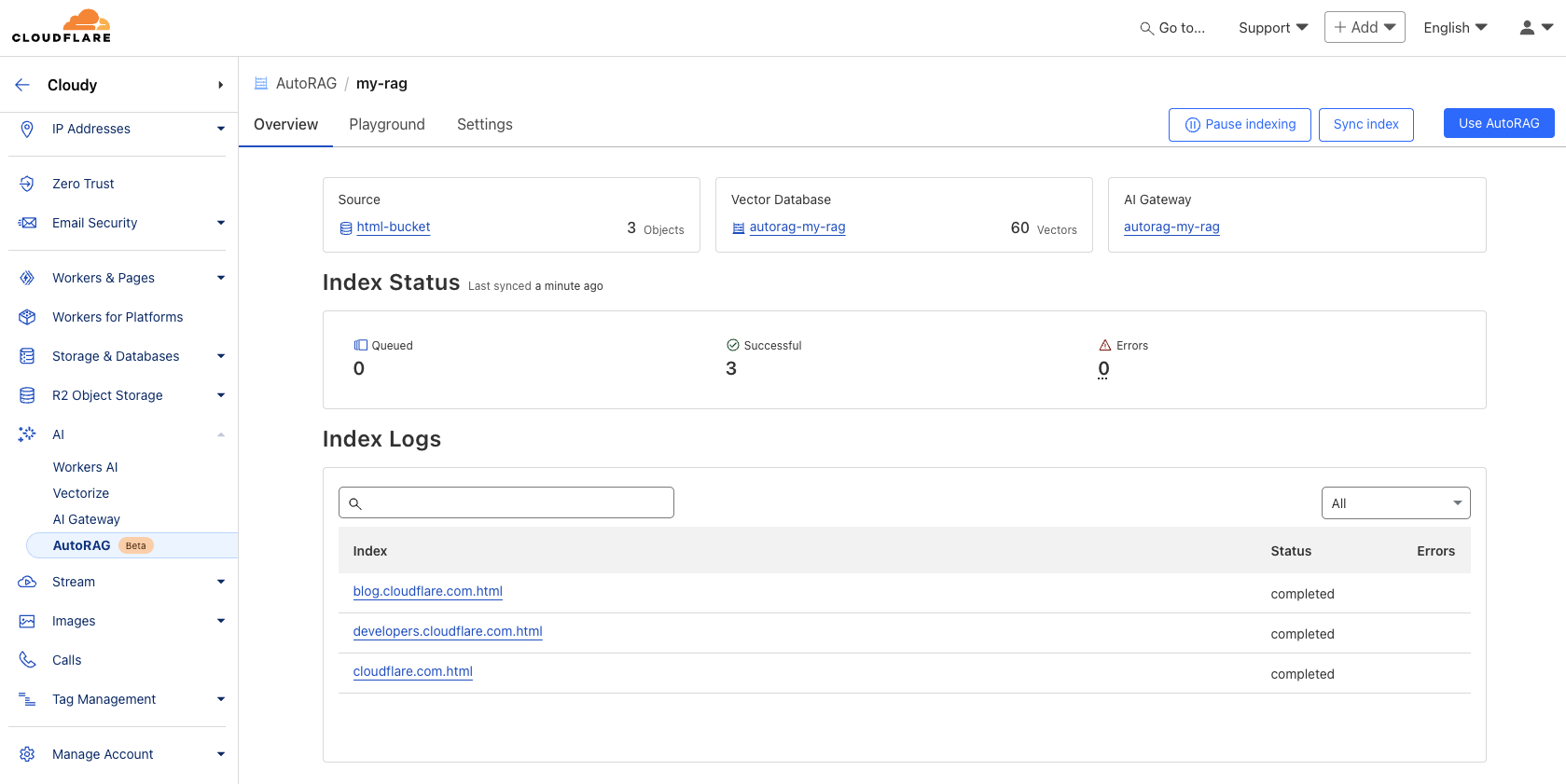
Once you’ve created your AutoRAG, it will automatically create a Vectorize database in your account and begin indexing the data. You can view the progress of your indexing job in the Overview page of your AutoRAG. The indexing time may vary depending on the number and type of files you have in your data source.


Step 3. Test and add to your application

Once AutoRAG finishes indexing your content, you’re ready to start asking it questions. You can open up your AutoRAG instance, navigate to the Playground tab, and ask a question based on your uploaded content, like “What is AutoRAG?”.

Once you’re happy with the results in the Playground, you can integrate AutoRAG directly into the application that you are building. If you are using a Worker to build your application, then you can use the AI binding to directly call your AutoRAG: 

{
  "ai": {
    "binding": "AI"
  }
}

Then, query your AutoRAG instance from your Worker code by calling the aiSearch() method. Alternatively you can use the Search() method to get a list of retrieved results without an AI generated response.

const answer = await env.AI.autorag('my-rag').aiSearch({
   query: 'What is AutoRAG?'
});

For more information on how to add AutoRAG into your application, go to your AutoRAG then navigate to Use AutoRAG for more instructions.

Start building today

During the open beta, AutoRAG is free to enable. Compute operations for indexing, retrieval and augmentation incur no additional cost during this phase.

AutoRAG is built entirely on top of Cloudflare’s Developer Platform, using the same tools you’d reach for if you were building a RAG pipeline yourself. When you create an AutoRAG instance, it provisions and runs on top of Cloudflare services within your own account, giving you full visibility into performance, cost, and behavior with fewer black boxes.

These services include:

  • R2: stores your source data.

  • Vectorize: stores vector embeddings and powers semantic retrieval.

  • Workers AI: converts images to markdown, generates embeddings, rewrites queries, and generates responses.

  • AI Gateway: tracks and controls your model’s usage.

To help manage resources during the beta, each account is limited to 10 AutoRAG instances, with up to 100,000 files per AutoRAG

What’s on the roadmap?

We’re just getting started with AutoRAG and we have more planned throughout 2025 to make it more powerful and flexible. Here are a few things we’re actively working on:

  • More data source integrations: We’re expanding beyond R2, with support for new input types like direct website URL parsing (powered by browser rendering) and structured data sources like Cloudflare D1.

  • Smarter, higher-quality responses: We’re exploring built-in reranking, recursive chunking, and other processing techniques to improve the quality and relevance of generated answers.

These features will roll out incrementally, and we’d love your feedback as we shape what’s next. AutoRAG is built to evolve with your use cases so stay tuned.

Try it out today!

Get started with AutoRAG today by visiting the Cloudflare Dashboard, navigate to AI > AutoRAG, and select Create AutoRAG. Whether you’re building an AI-powered search experience, an internal knowledge assistant, or just experimenting with LLMs, AutoRAG gives you a fast and flexible way to get started with RAG on Cloudflare’s global network. For more details, refer to the Developer Docs. Also, try out the Browser Rendering API that is now generally available for your browser action needs.

We’re excited to see what you build and we’re here to help. Have questions or feedback? Join the conversation on the Cloudflare Developers Discord.

Cloudflare Workflows is now GA: production-ready durable execution

Post Syndicated from Sid Chatterjee original https://blog.cloudflare.com/workflows-ga-production-ready-durable-execution/

Betas are useful for feedback and iteration, but at the end of the day, not everyone is willing to be a guinea pig or can tolerate the occasional sharp edge that comes along with beta software. Sometimes you need that big, shiny “Generally Available” label (or blog post), and now it’s Workflows’ turn.

Workflows, our serverless durable execution engine that allows you to build long-running, multi-step applications (some call them “step functions”) on Workers, is now GA.

In short, that means it’s production ready —  but it also doesn’t mean Workflows is going to ossify. We’re continuing to scale Workflows (including more concurrent instances), bring new capabilities (like the new waitForEvent API), and make it easier to build AI agents with our Agents SDK and Workflows.

If you prefer code to prose, you can quickly install the Workflows starter project and start exploring the code and the API with a single command:

npm create cloudflare@latest workflows-starter -- 
--template="cloudflare/workflows-starter"

How does Workflows work? What can I build with it? How do I think about building AI agents with Workflows and the Agents SDK? Well, read on.

Building with Workflows

Workflows is a durable execution engine built on Cloudflare Workers that allows you to build resilient, multi-step applications.

At its core, Workflows implements a step-based architecture where each step in your application is independently retriable, with state automatically persisted between steps. This means that even if a step fails due to a transient error or network issue, Workflows can retry just that step without needing to restart your entire application from the beginning.

When you define a Workflow, you break your application into logical steps.

  • Each step can either execute code (step.do), put your Workflow to sleep (step.sleep or step.sleepUntil), or wait on an event (step.waitForEvent).

  • As your Workflow executes, it automatically persists the state returned from each step, ensuring that your application can continue exactly where it left off, even after failures or hibernation periods. 

  • This durable execution model is particularly powerful for applications that coordinate between multiple systems, process data in sequence, or need to handle long-running tasks that might span minutes, hours, or even days.

Workflows are particularly useful at handling complex business processes that traditional stateless functions struggle with.

For example, an e-commerce order processing workflow might check inventory, charge a payment method, send an email confirmation, and update a database — all as separate steps. If the payment processing step fails due to a temporary outage, Workflows will automatically retry just that step when the payment service is available again, without duplicating the inventory check or restarting the entire process. 

You can see how this works below: each call to a service can be modelled as a step, independently retried, and if needed, recovered from that step onwards:

import { WorkflowEntrypoint, WorkflowStep, WorkflowEvent } from 'cloudflare:workers';

// The params we expect when triggering this Workflow
type OrderParams = {
	orderId: string;
	customerId: string;
	items: Array<{ productId: string; quantity: number }>;
	paymentMethod: {
		type: string;
		id: string;
	};
};

// Our Workflow definition
export class OrderProcessingWorkflow extends WorkflowEntrypoint<Env, OrderParams> {
	async run(event: WorkflowEvent<OrderParams>, step: WorkflowStep) {
		// Step 1: Check inventory
		const inventoryResult = await step.do('check-inventory', async () => {
			console.log(`Checking inventory for order ${event.payload.orderId}`);

			// Mock: In a real workflow, you'd query your inventory system
			const inventoryCheck = await this.env.INVENTORY_SERVICE.checkAvailability(event.payload.items);

			// Return inventory status as state for the next step
			return {
				inStock: true,
				reservationId: 'inv-123456',
				itemsChecked: event.payload.items.length,
			};
		});

		// Exit workflow if items aren't in stock
		if (!inventoryResult.inStock) {
			return { status: 'failed', reason: 'out-of-stock' };
		}

		// Step 2: Process payment
		// Configure specific retry logic for payment processing
		const paymentResult = await step.do(
			'process-payment',
			{
				retries: {
					limit: 3,
					delay: '30 seconds',
					backoff: 'exponential',
				},
				timeout: '2 minutes',
			},
			async () => {
				console.log(`Processing payment for order ${event.payload.orderId}`);

				// Mock: In a real workflow, you'd call your payment processor
				const paymentResponse = await this.env.PAYMENT_SERVICE.processPayment({
					customerId: event.payload.customerId,
					orderId: event.payload.orderId,
					amount: calculateTotal(event.payload.items),
					paymentMethodId: event.payload.paymentMethod.id,
				});

				// If payment failed, throw an error that will trigger retry logic
				if (paymentResponse.status !== 'success') {
					throw new Error(`Payment failed: ${paymentResponse.message}`);
				}

				// Return payment info as state for the next step
				return {
					transactionId: 'txn-789012',
					amount: 129.99,
					timestamp: new Date().toISOString(),
				};
			},
		);

		// Step 3: Send email confirmation
		await step.do('send-confirmation-email', async () => {
			console.log(`Sending confirmation email for order ${event.payload.orderId}`);
			console.log(`Including payment confirmation ${paymentResult.transactionId}`);
			return await this.env.EMAIL_SERVICE.sendOrderConfirmation({ ... })
		});

		// Step 4: Update database
		const dbResult = await step.do('update-database', async () => {
			console.log(`Updating database for order ${event.payload.orderId}`);
			await this.updateOrderStatus(...)

			return { dbUpdated: true };
		});

		// Return final workflow state
		return {
			orderId: event.payload.orderId,
			processedAt: new Date().toISOString(),
		};
	}
}

This combination of durability, automatic retries, and state persistence makes Workflows ideal for building reliable distributed applications that can handle real-world failures gracefully.

Human-in-the-loop

Workflows are just code, and that makes them extremely powerful: you can define steps dynamically and on-the-fly, conditionally branch, and make API calls to any system you need. But sometimes you also need a Workflow to wait for something to happen in the real world.

For example:

  • Approval from a human to progress.

  • An incoming webhook, like from a Stripe payment or a GitHub event.

  • A state change, such as a file upload to R2 that triggers an Event Notification, and then pushes a reference to the file to the Workflow, so it can process the file (or run it through an AI model).

The new waitForEvent API in Workflows allows you to do just that: 

let event = await step.waitForEvent<IncomingStripeWebhook>("receive invoice paid webhook from Stripe", { type: "stripe-webhook", timeout: "1 hour" }) 

You can then send an event to a specific instance from any external service that can make a HTTP request:

curl -d '{"transaction":"complete","id":"1234-6789"}' \
  -H "Authorization: Bearer ${CF_TOKEN}" \
\ "https://api.cloudflare.com/client/v4/accounts/{account_id}/workflows/{workflow_name}/instances/{instance_id}/events/{event_type}"

… or via the Workers API within a Worker itself:

interface Env {
  MY_WORKFLOW: Workflow;
}

interface Payload {
  transaction: string;
  id: string;
}

export default {
  async fetch(req: Request, env: Env) {
    const instanceId = new URL(req.url).searchParams.get("instanceId")
    const webhookPayload = await req.json<Payload>()

    let instance = await env.MY_WORKFLOW.get(instanceId);
    // Send our event, with `type` matching the event type defined in
    // our step.waitForEvent call
    await instance.sendEvent({type: "stripe-webhook", payload: webhookPayload})
    
    return Response.json({
      status: await instance.status(),
    });
  },
};

You can even wait for multiple events, using the type parameter, and/or race multiple events using Promise.race to continue on depending on which event was received first:

export class MyWorkflow extends WorkflowEntrypoint<Env, Params> {
	async run(event: WorkflowEvent<Params>, step: WorkflowStep) {
		let state = await step.do("get some data", () => { /* step call here /* })
		// Race the events, resolving the Promise based on which event
// we receive first
		let value = Promise.race([
step.waitForEvent("payment success", { type: "payment-success-webhook", timeout: "4 hours" ),
step.waitForEvent("payment failure", { type: "payment-failure-webhook", timeout: "4 hours" ),
])
// Continue on based on the value and event received
	}
}

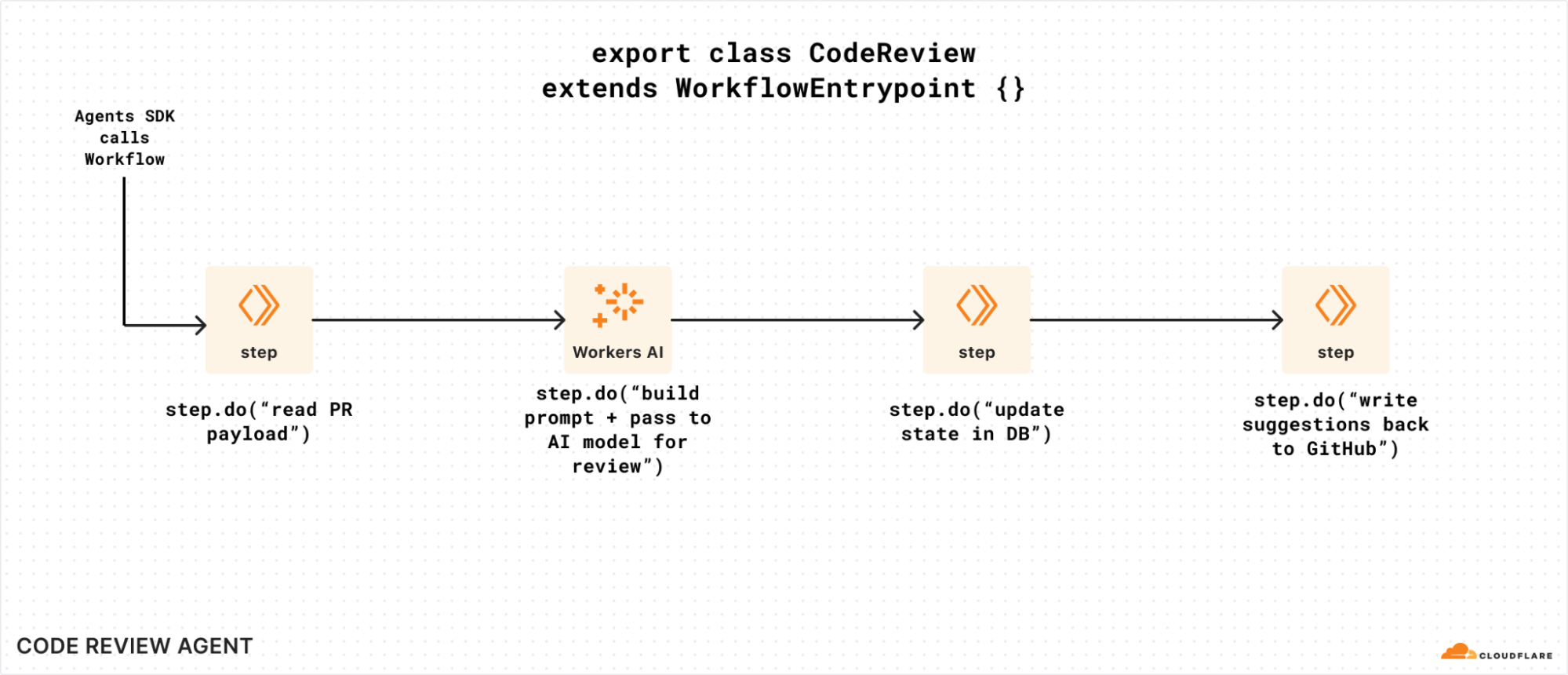
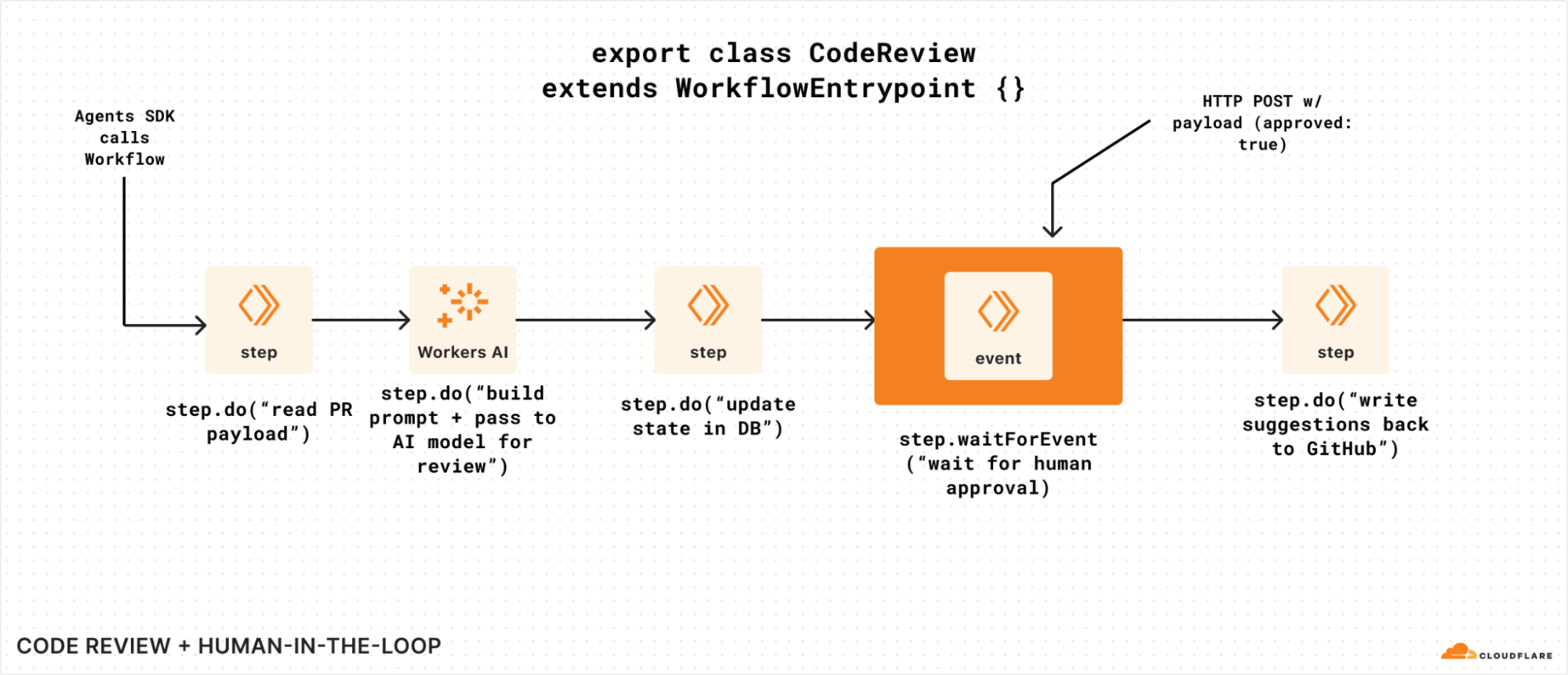
To visualize waitForEvent in a bit more detail, let’s assume we have a Workflow that is triggered by a code review agent that watches a GitHub repository.

Without the ability to wait on events, our Workflow can’t easily get human approval to write suggestions back (or even submit a PR of its own). It could potentially poll for some state that was updated, but that means we have to call step.sleep for arbitrary periods of time, poll a storage service for an updated value, and repeat if it’s not there. That’s a lot of code and room for error:


Without waitForEvent, it’s harder to send data to a Workflow instance that’s running

If we modified that same example to incorporate the new waitForEvent API, we could use it to wait for human approval before making a mutating change: 


Adding waitForEvent to our code review Workflow, so it can seek explicit approval.

You could even imagine an AI agent itself sending and/or acting on behalf of a human here: waitForEvent simply exposes a way for a Workflow to retrieve and pause on something in the world to change before it continues (or not).

Critically, you can call waitForEvent just like any other step in Workflows: you can call it conditionally, and/or multiple times, and/or in a loop. Workflows are just Workers: you have the full power of a programming language and are not restricted by a domain specific language (DSL) or config language.

Pricing

Good news: we haven’t changed much since our original beta announcement! We’re adding storage pricing for state stored by your Workflows, and retaining our CPU-based and request (invocation) based pricing as follows:

Unit

Workers Free

Workers Paid

CPU time (ms)

10 ms per Workflow

30 million CPU milliseconds included per month

+$0.02 per additional million CPU milliseconds

Requests

100,000 Workflow invocations per day (shared with Workers)

10 million included per month

+$0.30 per additional million

Storage (GB)

1 GB

1 GB included per month
+ $0.20/ GB-month

Because the storage pricing is new, we will not actively bill for storage until September 15, 2025. We will notify users above the included 1 GB limit ahead of charging for storage, and by default, Workflows will expire stored state after three (3) days (Free plan) or thirty (30) days (Paid plan).

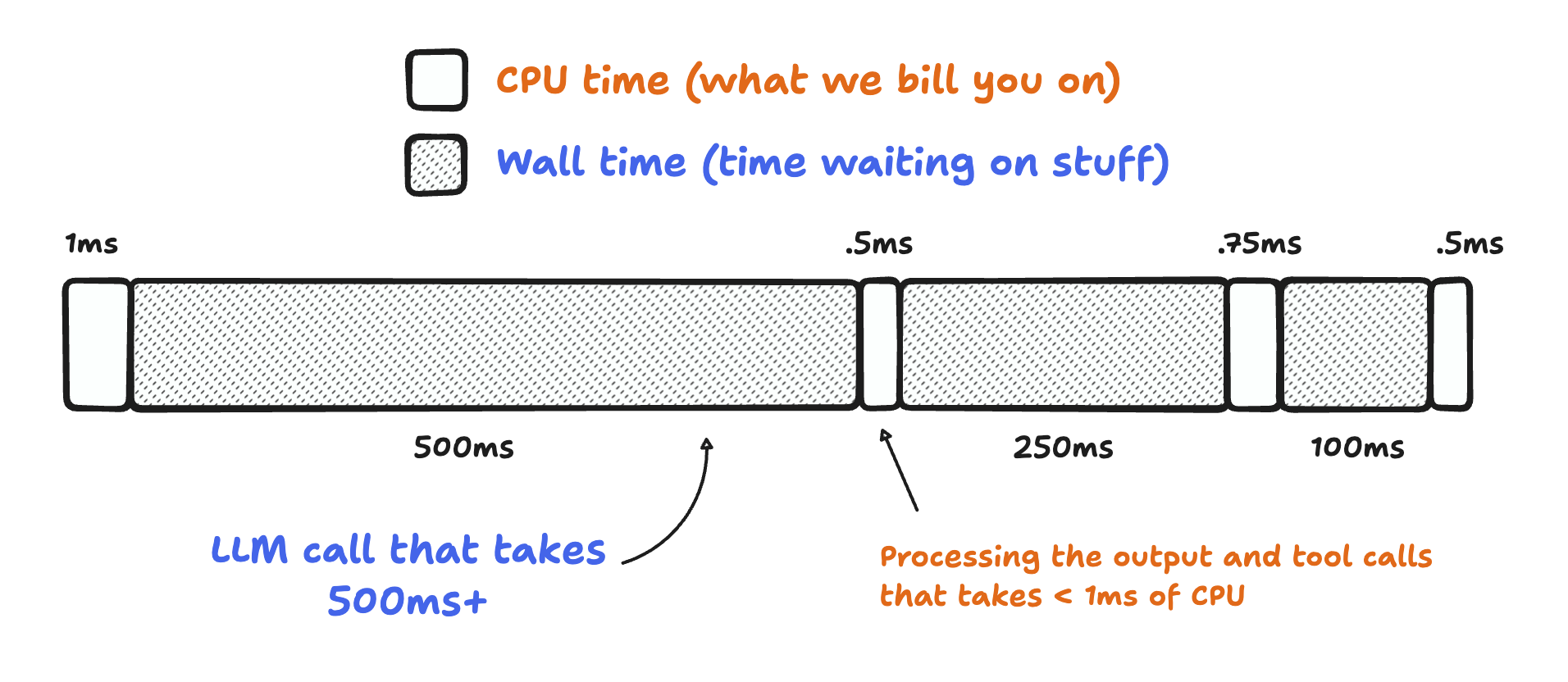
If you’re wondering what “CPU time” is here: it’s the time your Workflow is actively consuming compute resources. It doesn’t include time spent waiting on API calls, reasoning LLMs, or other I/O (like writing to a database). That might seem like a small thing, but in practice, it adds up: most applications have single digit milliseconds of CPU time, and multiple seconds of wall time: an API or two taking 100 – 250 ms to respond adds up!


Bill for CPU, not for time spent when a Workflow is idle or waiting.

Workflow engines, especially, tend to spend a lot of time waiting: reading data from object storage (like Cloudflare R2), calling third-party APIs or LLMs like o3-mini or Claude 3.7, even querying databases like D1, Postgres, or MySQL. With Workflows, just like Workers: you don’t pay for time your application is just waiting.

Start building

So you’ve got a good handle on Workflows, how it works, and want to get building. What next?

  1. Visit the Workflows documentation to learn how it works, understand the Workflows API, and best practices

  2. Review the code in the starter project

  3. And lastly, deploy the starter to your own Cloudflare account with a few clicks:

Cloudflare acquires Outerbase to expand database and agent developer experience capabilities

Post Syndicated from Brandon Strittmatter original https://blog.cloudflare.com/cloudflare-acquires-outerbase-database-dx/

I’m thrilled to share that Cloudflare has acquired Outerbase. This is such an amazing opportunity for us, and I want to explain how we got here, what we’ve built so far, and why we are so excited about becoming part of the Cloudflare team.

Databases are key to building almost any production application: you need to persist state for your users (or agents), be able to query it from a number of different clients, and you want it to be fast. But databases aren’t always easy to use: designing a good schema, writing performant queries, creating indexes, and optimizing your access patterns tends to require a lot of experience. Add that to exposing your data through easy-to-grok APIs that make the ‘right’ way to do things obvious, a great developer experience (from dashboard to CLI), and well… there’s a lot of work involved.

The Outerbase team is already getting to work on some big changes to how databases (and your data) are viewed, edited, and visualized from within Workers, and we’re excited to give you a few sneak peeks into what we’ll be landing as we get to work.

Database DX

When we first started Outerbase, we saw how complicated databases could be. Even experienced developers struggled with writing queries, indexing data, and locking down their data. Meanwhile, non-developers often felt locked out and that they couldn’t access the data they needed. We believed there had to be a better way. From day one, our goal was to make data accessible to everyone, no matter their skill level. While it started out by simply building a better database interface, it quickly evolved into something much more special.

Outerbase became a platform that helps you manage data in a way that feels natural. You can browse tables, edit rows, and run queries without having to deal with memorizing SQL structure. Even if you do know SQL, you can use Outerbase to dive in deeper and share your knowledge with your team. We also added visualization features so entire teams, both technical and not, could see what’s happening with their data at a glance. Then, with the growth of AI, we realized we could use it to handle many of the more complicated tasks.

One of our more exciting offerings is Starbase, a SQLite-compatible database built on top of Cloudflare’s Durable Objects. Our goal was never to simply wrap a legacy system in a shiny interface; we wanted to make it so easy to get started from day one with nothing, and Cloudflare’s Durable Objects gave us a way to easily manage and spin up databases for anyone who needed one. On top of them, we provided automatic REST APIs, row-level security, WebSocket support for streaming queries, and much more.

1 + 1 = 3

Our collaboration with Cloudflare first started last year, when we introduced a way for developers to import and manage their D1 databases inside Outerbase. We were impressed with how powerful Cloudflare’s tools are for deploying and scaling applications. As we worked together, we quickly saw how well our missions aligned. Cloudflare was building the infrastructure we wished we’d had when we first started, and we were building the data experience that many Cloudflare developers were asking for. This eventually led to the seemingly obvious decision of Outerbase joining Cloudflare — it just made so much sense.

Going forward, we’ll integrate Outerbase’s core features into Cloudflare’s platform. If you’re a developer using D1 or Durable Objects, you’ll start seeing features from Outerbase show up in the Cloudflare dashboard. Expect to see our data explorer for browsing and editing tables, new REST APIs, query editor with type-ahead functionality, real-time data capture, and more of the other tooling we’ve been refining over the last couple of years show up inside the Cloudflare dashboard.

As part of this transition, the hosted Outerbase cloud will shut down on October 15, 2025, which is about six months from now. We know some of you rely on Outerbase as it stands today, so we’re leaving the open-source repositories as they are.

You will still be able to self-host Outerbase if you prefer, and we’ll provide guidance on how to do that within your own Cloudflare account. Our main goal will be to ensure that the best parts of Outerbase become part of the Cloudflare developer experience, so you no longer have to make a choice (it’ll be obvious!).

Sneak peek

We’ve already done a lot of thinking about how we’re going to bring the best parts of Outerbase into D1, Durable Objects, Workflows, and Agents, and we’re going to a share a little about what will be landing over the course of Q2 2025 as the Outerbase team gets to work.

Specifically, we’ll be heads-down focusing on:

  • Adapting the powerful table viewer and query runner experiences to D1 and Durable Objects (amongst many other things!)

  • Making it easier to get started with Durable Objects: improving the experience in Wrangler (our CLI tooling), the Cloudflare dashboard, and how you plug into them from your client applications

  • Improvements to how you visualize the state of a Workflow and the (thousands to millions!) of Workflow instances you might have at any point in time

  • Pre- and post-query hooks for D1 that allow you to automatically register handlers that can act on your data

  • Bringing the Starbase API to D1, expanding D1’s existing REST API, and adding WebSockets support — making it easier to use D1, even for applications hosted outside of Workers.

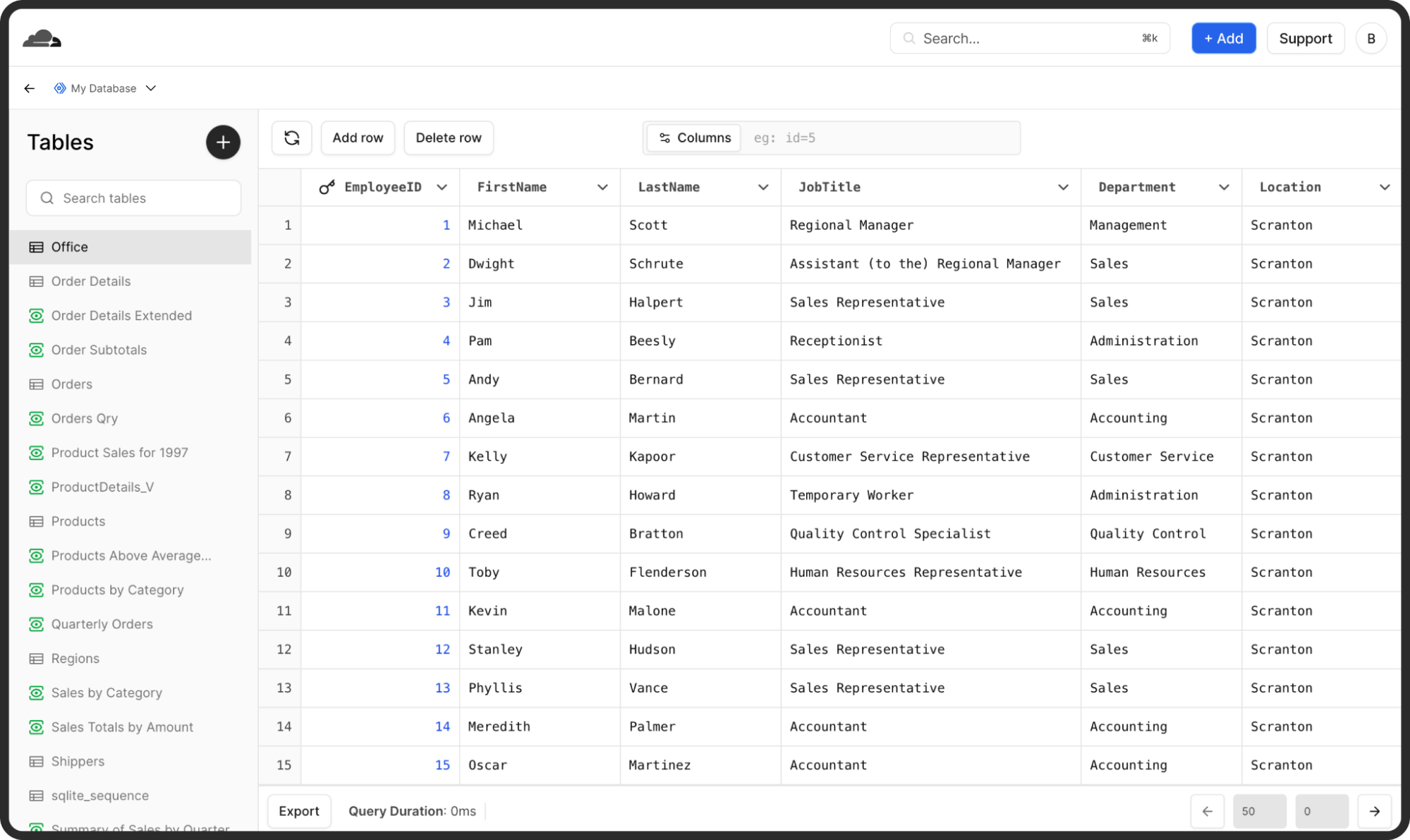
We have already started laying the groundwork for these changes. In the coming weeks, we’ll release a unified data explorer for D1 and Durable Objects that borrows heavily from the Outerbase interface you know. 


Bringing Outerbase’s Data Explorer into the Cloudflare Dashboard

We’ll also tie some of Starbase’s features directly into Cloudflare’s platform, so you can tap into its unique offerings like pre- and post-query hooks or row-level security right from your existing D1 databases and Durable Objects:

const beforeQuery = ({ sql, params }) => {
    // Prevent unauthorized queries
    if (!isAllowedQuery(sql)) throw new Error('Query not allowed');
};

const afterQuery = ({ sql, result }) => {
    // Basic PII masking example
    for (const row of result) {
        if ('email' in row) row.email = '[redacted]';
    }
};

// Execute the query with pre- and post- query hooks
const { results } = await env.DB.prepare("SELECT * FROM users;", beforeQuery, afterQuery);

Define hooks on your D1 queries that can be re-used, shared and automatically executed before or after your queries run.

This should give you more clarity and control over your data, as well as new ways to secure and optimize it.


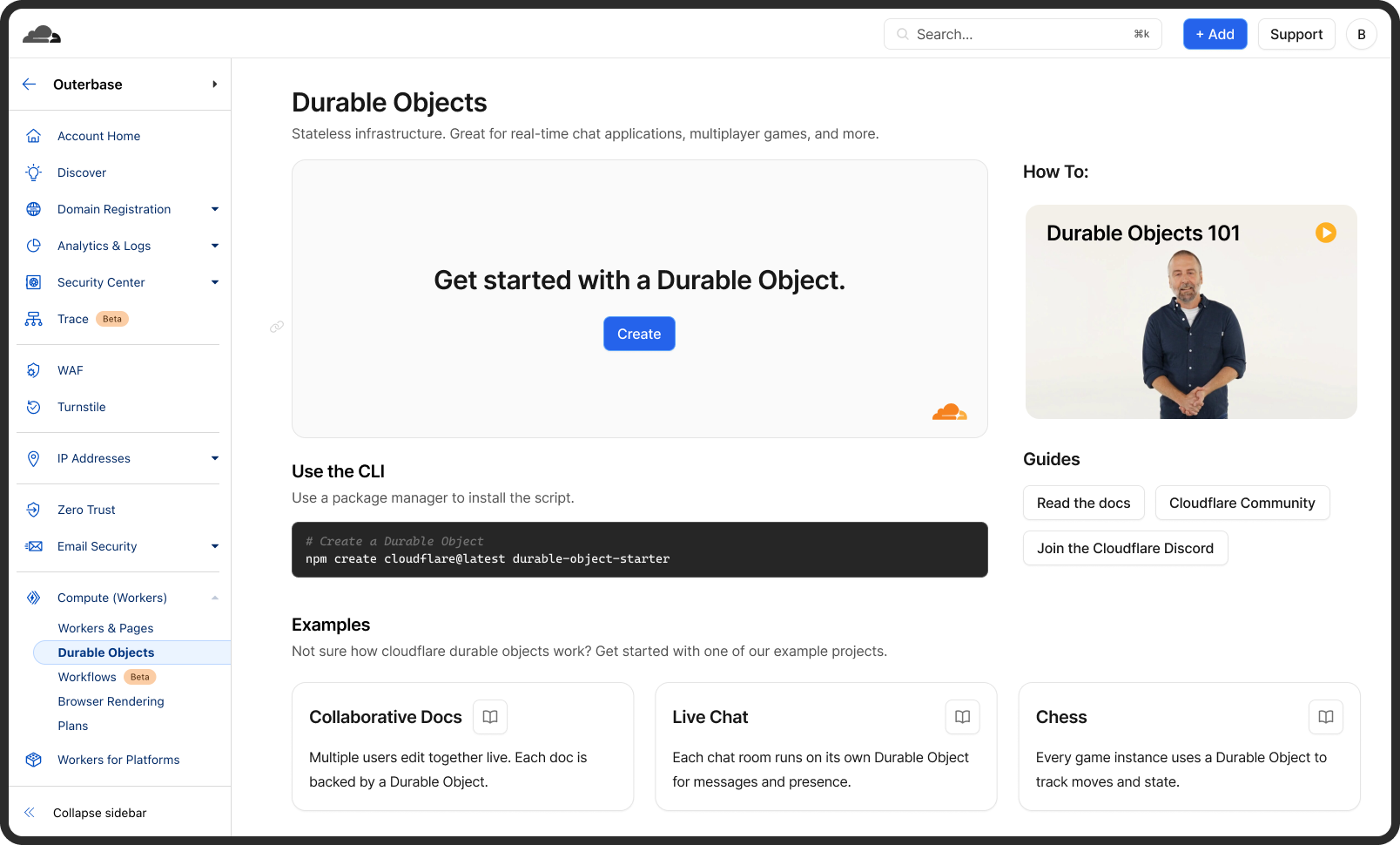
Rethinking the Durable Objects getting started experience

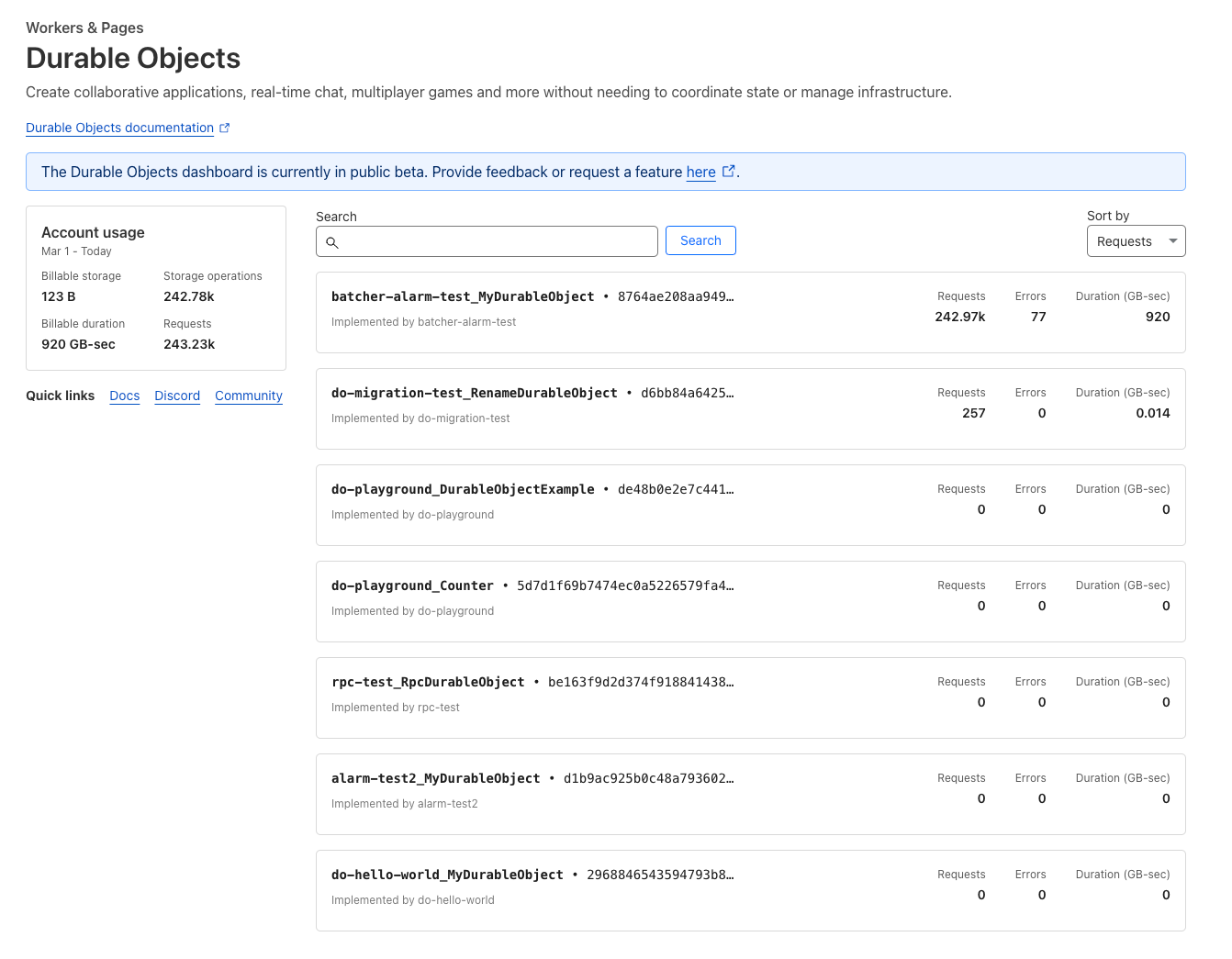
We have even begun optimizing the Cloudflare dashboard experience around Durable Objects and D1 to improve the empty state, provide more Getting Started resources, and overall, make managing and tracking your database resources even easier.

For those of you who’ve supported us, given us feedback, and stuck with us as we grew: thank you. You have helped shape Outerbase into what it is today. This acquisition means we can pour even more resources and attention into building the data experience we’ve always wanted to deliver. Our hope is that, by working as part of Cloudflare, we can help reach even more developers by building intuitive experiences, accelerating the speed of innovation, and creating tools that naturally fit into your workflows.

This is a big step for Outerbase, and we couldn’t be more excited. Thank you for being part of our journey so far. We can’t wait to show you what we’ve got in store as we continue to make data more accessible, intuitive, and powerful — together with Cloudflare.

What’s next?

We’re planning to get to work on some of the big changes to how you interact with your data on Cloudflare, starting with D1 and Durable Objects.

We’ll also be ensuring we bring a great developer experience to the broader database & storage platform on Cloudflare, including how you access data in Workers KV, R2, Workflows and even your AI Agents (just to name a few).

To keep up, follow the new Cloudflare Changelog and join our Developer Discord to chat with the team and see early previews before they land.

Piecing together the Agent puzzle: MCP, authentication & authorization, and Durable Objects free tier

Post Syndicated from Rita Kozlov original https://blog.cloudflare.com/building-ai-agents-with-mcp-authn-authz-and-durable-objects/

It’s not a secret that at Cloudflare we are bullish on the future of agents. We’re excited about a future where AI can not only co-pilot alongside us, but where we can actually start to delegate entire tasks to AI. 

While it hasn’t been too long since we first announced our Agents SDK to make it easier for developers to build agents, building towards an agentic future requires continuous delivery towards this goal. Today, we’re making several announcements to help accelerate agentic development, including:

  • New Agents SDK capabilities: Build remote MCP clients, with transport and authentication built-in, to allow AI agents to connect to external services. 

  • BYO Auth provider for MCP: Integrations with Stytch, Auth0, and WorkOS to add authentication and authorization to your remote MCP server. 

  • Hibernation for McpAgent: Automatically sleep stateful, remote MCP servers when inactive and wake them when needed. This allows you to maintain connections for long-running sessions while ensuring you’re not paying for idle time. 

  • Durable Objects free tier: We view Durable Objects as a key component for building agents, and if you’re using our Agents SDK, you need access to it. Until today, Durable Objects was only accessible as part of our paid plans, and today we’re excited to include it in our free tier.

  • Workflows GA: Enables you to ship production-ready, long-running, multi-step actions in agents.

  • AutoRAG: Helps you integrate context-aware AI into your applications, in just a few clicks

  • agents.cloudflare.com: our new landing page for all things agents.

New MCP capabilities in Agents SDK

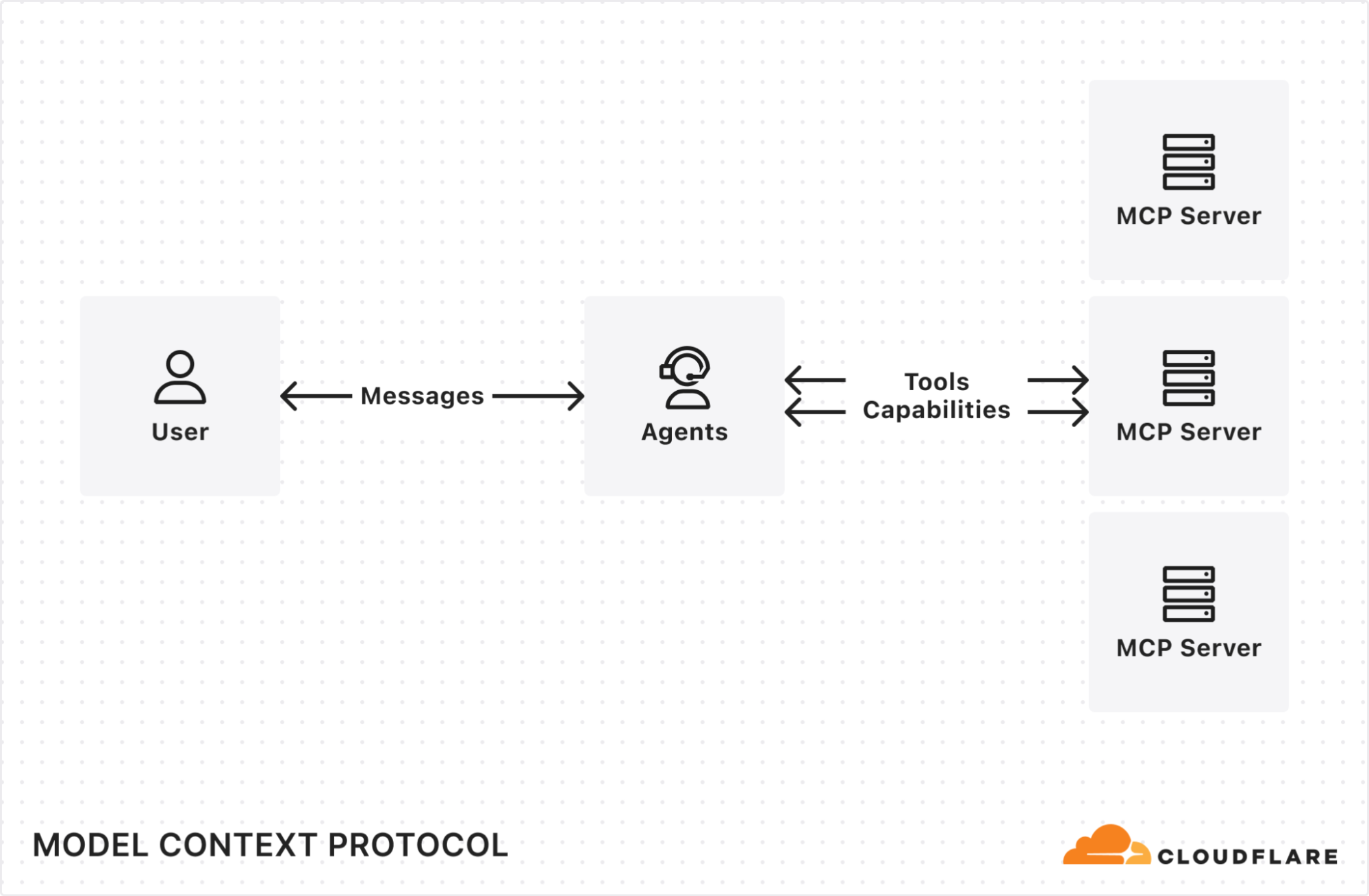
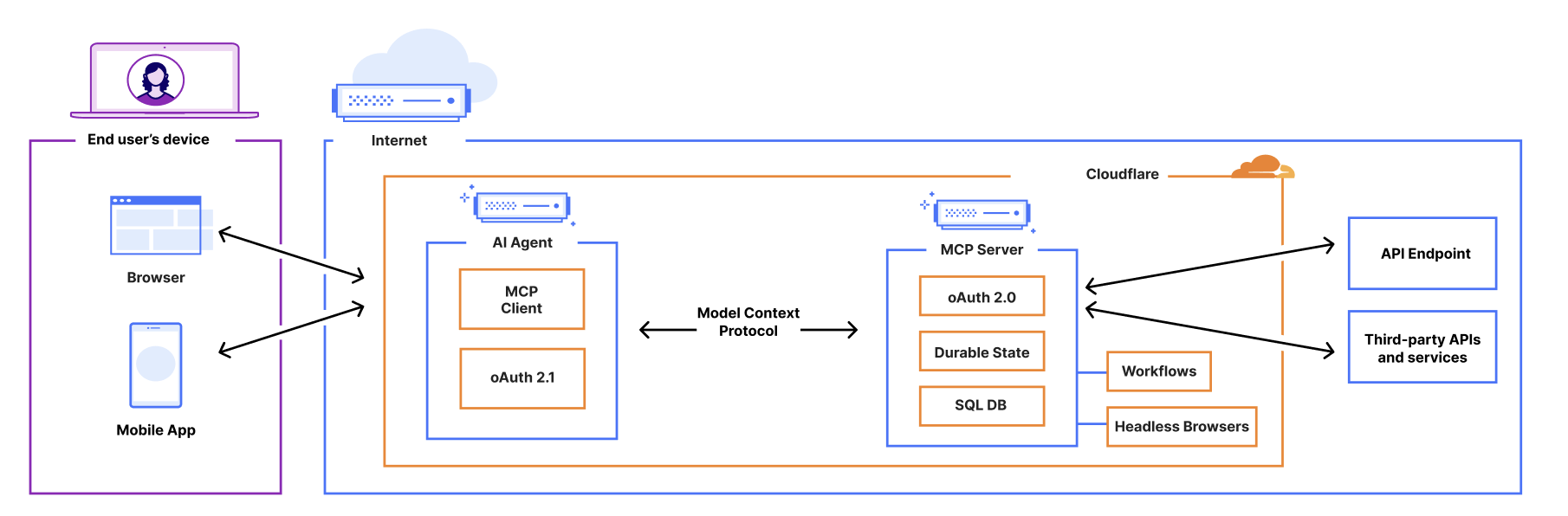
AI agents can now connect to and interact with external services through MCP (Model Context Protocol). We’ve updated the Agents SDK to allow you to build a remote MCP client into your AI agent, with all the components — authentication flows, tool discovery, and connection management — built-in for you.

This allows you to build agents that can:

  1. Prompt the end user to grant access to a 3rd party service (MCP server).

  2. Use tools from these external services, acting on behalf of the end user.

  3. Call MCP servers from Workflows, scheduled tasks, or any part of your agent.

  4. Connect to multiple MCP servers and automatically discover new tools or capabilities presented by the 3rd party service.


MCP (Model Context Protocol) — first introduced by Anthropic — is quickly becoming the standard way for AI agents to interact with external services, with providers like OpenAI, Cursor, and Copilot adopting the protocol.

We recently announced support for building remote MCP servers on Cloudflare, and added an McpAgent class to our Agents SDK that automatically handles the remote aspects of MCP: transport and authentication/authorization. Now, we’re excited to extend the same capabilities to agents acting as MCP clients.


Want to see it in action? Use the button below to deploy a fully remote MCP client that can be used to connect to remote MCP servers.

AI Agents can now act as remote MCP clients, with transport and auth included

AI agents need to connect to external services to access tools, data, and capabilities beyond their built-in knowledge. That means AI agents need to be able to act as remote MCP clients, so they can connect to remote MCP servers that are hosting these tools and capabilities. 

We’ve added a new class, MCPClientManager, into the Agents SDK to give you all the tooling you need to allow your AI agent to make calls to external services via MCP. The MCPClientManager class automatically handles: 

  • Transport: Connect to remote MCP servers over SSE and HTTP, with support for Streamable HTTP coming soon. 

  • Connection management: The client tracks the state of all connections and automatically reconnects if a connection is lost.

  • Capability discovery: Automatically discovers all capabilities, tools, resources, and prompts presented by the MCP server.

  • Real-time updates: When a server’s tools, resources, or prompts change, the client automatically receives notifications and updates its internal state.

  • Namespacing: When connecting to multiple MCP servers, all tools and resources are automatically namespaced to avoid conflicts.

Granting agents access to tools with built-in auth check for MCP Clients

We’ve integrated the complete OAuth authentication flow directly into the Agents SDK, so your AI agents can securely connect and authenticate to any remote MCP server without you having to build authentication flow from scratch.

This allows you to give users a secure way to log in and explicitly grant access to allow the agent to act on their behalf by automatically: 

  • Supporting the OAuth 2.1 protocol.

  • Redirecting users to the service’s login page.

  • Generating the code challenge and exchanging an authorization code for an access token.

  • Using the access token to make authenticated requests to the MCP server.

Here is an example of an agent that can securely connect to MCP servers by initializing the client manager, adding the server, and handling the authentication callbacks:

async onStart(): Promise<void> {
  // initialize MCPClientManager which manages multiple MCP clients with optional auth
  this.mcp = new MCPClientManager("my-agent", "1.0.0", {
    baseCallbackUri: `${serverHost}/agents/${agentNamespace}/${this.name}/callback`,
    storage: this.ctx.storage,
  });
}

async addMcpServer(url: string): Promise<string> {
  // Add one MCP client to our MCPClientManager
  const { id, authUrl } = await this.mcp.connect(url);
  // Return authUrl to redirect the user to if the user is unauthorized
  return authUrl
}

async onRequest(req: Request): Promise<void> {
  // handle the auth callback after being finishing the MCP server auth flow
  if (this.mcp.isCallbackRequest(req)) {
    await this.mcp.handleCallbackRequest(req);
    return new Response("Authorized")
  }
  
  // ...
}

Connecting to multiple MCP servers and discovering what capabilities they offer

You can use the Agents SDK to connect an MCP client to multiple MCP servers simultaneously. This is particularly useful when you want your agent to access and interact with tools and resources served by different service providers. 

The MCPClientManager class maintains connections to multiple MCP servers through the mcpConnections object, a dictionary that maps unique server names to their respective MCPClientConnection instances. 

When you register a new server connection using connect(), the manager: 

  1. Creates a new connection instance with server-specific authentication.

  2. Initializes the connections and registers for server capability notifications.

async onStart(): Promise<void> {
  // Connect to an image generation MCP server
  await this.mcp.connect("https://image-gen.example.com/mcp/sse");
  
  // Connect to a code analysis MCP server
  await this.mcp.connect("https://code-analysis.example.org/sse");
  
  // Now we can access tools with proper namespacing
  const allTools = this.mcp.listTools();
  console.log(`Total tools available: ${allTools.length}`);
}

Each connection manages its own authentication context, allowing one AI agent to authenticate to multiple servers simultaneously. In addition, MCPClientManager automatically handles namespacing to prevent collisions between tools with identical names from different servers. 

For example, if both an “Image MCP Server” and “Code MCP Server” have a tool named “analyze”, they will both be independently callable without any naming conflicts.

Use Stytch, Auth0, and WorkOS to bring authentication & authorization to your MCP server 

With MCP, users will have a new way of interacting with your application, no longer relying on the dashboard or API as the entrypoint. Instead, the service will now be accessed by AI agents that are acting on a user’s behalf. To ensure users and agents can connect to your service securely, you’ll need to extend your existing authentication and authorization system to support these agentic interactions, implementing login flows, permissions scopes, consent forms, and access enforcement for your MCP server. 

We’re adding integrations with Stytch, Auth0, and WorkOS to make it easier for anyone building an MCP server to configure authentication & authorization for their MCP server. 

You can leverage our MCP server integration with Stytch, Auth0, and WorkOS to: 

  • Allow users to authenticate to your MCP server through email, social logins, SSO (single sign-on), and MFA (multi-factor authentication).

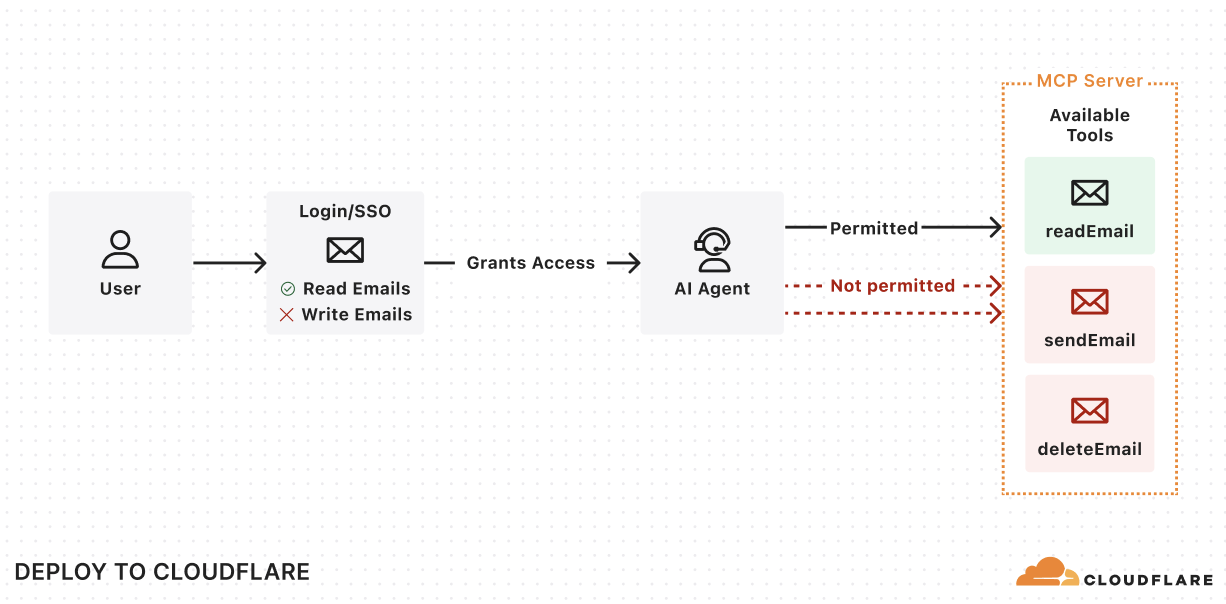
  • Define scopes and permissions that directly map to your MCP tools.

  • Present users with a consent page corresponding with the requested permissions.

Enforce the permissions so that agents can only invoke permitted tools. 


Get started with the examples below by using the “Deploy to Cloudflare” button to deploy the demo MCP servers in your Cloudflare account. These demos include pre-configured authentication endpoints, consent flows, and permission models that you can tailor to fit your needs. Once you deploy the demo MCP servers, you can use the Workers AI playground, a browser-based remote MCP client, to test out the end-to-end user flow. 

Stytch

Get started with a remote MCP server that uses Stytch to allow users to sign in with email, Google login or enterprise SSO and authorize their AI agent to view and manage their company’s OKRs on their behalf. Stytch will handle restricting the scopes granted to the AI agent based on the user’s role and permissions within their organization. When authorizing the MCP Client, each user will see a consent page that outlines the permissions that the agent is requesting that they are able to grant based on their role.

For more consumer use cases, deploy a remote MCP server for a To Do app that uses Stytch for authentication and MCP client authorization. Users can sign in with email and immediately access the To Do lists associated with their account, and grant access to any AI assistant to help them manage their tasks.

Regardless of use case, Stytch allows you to easily turn your application into an OAuth 2.0 identity provider and make your remote MCP server into a Relying Party so that it can easily inherit identity and permissions from your app. To learn more about how Stytch is enabling secure authentication to remote MCP servers, read their blog post.

“One of the challenges of realizing the promise of AI agents is enabling those agents to securely and reliably access data from other platforms. Stytch Connected Apps is purpose-built for these agentic use cases, making it simple to turn your app into an OAuth 2.0 identity provider to enable secure access to remote MCP servers. By combining Cloudflare Workers with Stytch Connected Apps, we’re removing the barriers for developers, enabling them to rapidly transition from AI proofs-of-concept to secure, deployed implementations.” — Julianna Lamb, Co-Founder & CTO, Stytch.

Auth0

Get started with a remote MCP server that uses Auth0 to authenticate users through email, social logins, or enterprise SSO to interact with their todos and personal data through AI agents. The MCP server securely connects to API endpoints on behalf of users, showing exactly which resources the agent will be able to access once it gets consent from the user. In this implementation, access tokens are automatically refreshed during long running interactions.

To set it up, first deploy the protected API endpoint:

Then, deploy the MCP server that handles authentication through Auth0 and securely connects AI agents to your API endpoint. 

“Cloudflare continues to empower developers building AI products with tools like AI Gateway, Vectorize, and Workers AI. The recent addition of Remote MCP servers further demonstrates that Cloudflare Workers and Durable Objects are a leading platform for deploying serverless AI. We’re very proud that Auth0 can help solve the authentication and authorization needs for these cutting-edge workloads.” — Sandrino Di Mattia, Auth0 Sr. Director, Product Architecture.

WorkOS

Get started with a remote MCP server that uses WorkOS’s AuthKit to authenticate users and manage the permissions granted to AI agents. In this example, the MCP server dynamically exposes tools based on the user’s role and access rights. All authenticated users get access to the add tool, but only users who have been assigned the image_generation permission in WorkOS can grant the AI agent access to the image generation tool. This showcases how MCP servers can conditionally expose capabilities to AI agents based on the authenticated user’s role and permission.

“MCP is becoming the standard for AI agent integration, but authentication and authorization are still major gaps for enterprise adoption. WorkOS Connect enables any application to become an OAuth 2.0 authorization server, allowing agents and MCP clients to securely obtain tokens for fine-grained permission authorization and resource access. With Cloudflare Workers, developers can rapidly deploy remote MCP servers with built-in OAuth and enterprise-grade access control. Together, WorkOS and Cloudflare make it easy to ship secure, enterprise-ready agent infrastructure.” — Michael Grinich, CEO of WorkOS.

Hibernate-able WebSockets: put AI agents to sleep when they’re not in use

Starting today, a new improvement is landing in the McpAgent class: support for the WebSockets Hibernation API that allows your MCP server to go to sleep when it’s not receiving requests and instantly wake up when it’s needed. That means that you now only pay for compute when your agent is actually working.

We recently introduced the McpAgent class, which allows developers to build remote MCP servers on Cloudflare by using Durable Objects to maintain stateful connections for every client session. We decided to build McpAgent to be stateful from the start, allowing developers to build servers that can remember context, user preferences, and conversation history. But maintaining client connections means that the session can remain active for a long time, even when it’s not being used. 

MCP Agents are hibernate-able by default

You don’t need to change your code to take advantage of hibernation. With our latest SDK update, all McpAgent instances automatically include hibernation support, allowing your stateful MCP servers to sleep during inactive periods and wake up with their state preserved when needed. 

How it works

When a request comes in on the Server-Sent Events endpoint, /sse, the Worker initializes a WebSocket connection to the appropriate Durable Object for the session and returns an SSE stream back to the client. All responses flow over this stream.

The implementation leverages the WebSocket Hibernation API within Durable Objects. When periods of inactivity occur, the Durable Object can be evicted from memory while keeping the WebSocket connection open. If the WebSocket later receives a message, the runtime recreates the Durable Object and delivers the message to the appropriate handler.

Durable Objects on free tier

To help you build AI agents on Cloudflare, we’re making Durable Objects available on the free tier, so you can start with zero commitment. With Agents SDK, your AI agents deploy to Cloudflare running on Durable Objects.

Durable Objects offer compute alongside durable storage, that when combined with Workers, unlock stateful, serverless applications. Each Durable Object is a stateful coordinator for handling client real-time interactions, making requests to external services like LLMs, and creating agentic “memory” through state persistence in zero-latency SQLite storage — all tasks required in an AI agent. Durable Objects scale out to millions of agents effortlessly, with each agent created near the user interacting with their agent for fast performance, all managed by Cloudflare. 

Zero-latency SQLite storage in Durable Objects was introduced in public beta September 2024 for Birthday Week. Since then, we’ve focused on missing features and robustness compared to pre-existing key-value storage in Durable Objects. We are excited to make SQLite storage generally available, with a 10 GB SQLite database per Durable Object, and recommend SQLite storage for all new Durable Object classes. Durable Objects free tier can only access SQLite storage.

Cloudflare’s free tier allows you to build real-world applications. On the free plan, every Worker request can call a Durable Object. For usage-based pricing, Durable Objects incur compute and storage usage with the following free tier limits.


Workers Free

Workers Paid

Compute: Requests

100,000 / day

1 million / month included

+ $0.15 / million

Compute: Duration

13,000 GB-s / day

400,000 GB-s / month  included 

+ $12.50 / million GB-s

Storage: Rows read

5 million / day

25 billion / month included

+ $0.001 / million 

Storage: Rows written

100,000 / day

50 million / month included

+ $1.00 / million

Storage: SQL stored data

5 GB (total)

5 GB-month included

+ $0.20 / GB-month

Find us at agents.cloudflare.com

We realize this is a lot of information to take in, but don’t worry. Whether you’re new to agents as a whole, or looking to learn more about how Cloudflare can help you build agents, today we launched a new site to help get you started — agents.cloudflare.com

Let us know what you build!

Welcome to Developer Week 2025

Post Syndicated from Rita Kozlov original https://blog.cloudflare.com/welcome-to-developer-week-2025/

We’re kicking off Cloudflare’s 2025 Developer Week — our innovation week dedicated to announcements for developers.

It’s an exciting time to be a developer. In fact, as a developer, the past two years might have felt a bit like every week is Developer Week. Starting with the release of ChatGPT, it has felt like each day has brought a new, disruptive announcement, whether it’s new models, hardware, agents, or other tools. From late 2024 and in just the first few months of 2025, we’ve seen the DeepSeek model challenge assumptions about what it takes to train a new state-of-the-art model, MCP introduce a new standard for how LLMs interface with the world, and OpenAI’s o4 model Ghiblify the world.

And while it’s exciting to witness a technological revolution unfold in front of your eyes, it’s even more exciting to partake in it. 

A new era of innovation

One of the marvels of the recent AI revolution is the extent to which the cost of experimentation has gone down. Ideas that would have taken whole weekends, weeks, or months to build can now be turned into working code in a day. You can vibe-code your way through things you might have never even tried before, or the parts of application that just don’t excite you. Whether you’ve spent your career working on frontend, backend, mobile, distributed systems or databases — with AI, you can truly be a full-stack engineer.

AI making it faster to ship more code and expanding the audience of who can write code (anyone!) — in the next 5 years we believe more code will be written than has been in the history of software.

However, for all these seedlings of opportunity to flourish, a platform needs to exist to make it just as easy to deploy and scale the code as it was to write it.

As Andrej Karpathy said in his recent post, on building a web application: “It’s not even code, it’s… configurations, plumbing, orchestration, workflows, best practices.”


The platform for the AI era

That’s Cloudflare’s vision for developers — to provide a comprehensive platform that just works. From experiment, to MVP, to scaling to millions of users.

We started on that vision almost 8 years ago now, with the launch of Cloudflare Workers, and kept chipping away at adding more and more primitives to allow developers to deploy their full-stack in one place.

Today, Cloudflare’s platform offers many of the building blocks you need: from compute, to storage, databases, and AI. With the tools you need to build along every step of the way: from local development to gradually rolling out to production, CI/CD, and observability.


And, everything you build is deployed to Region: Earth, which means you never have to think about servers, scaling, or infrastructure. This is especially important today — when the industry is moving at an unprecedented pace, the opportunity cost of slowing down is the difference between success and failure. 

Developer Week 2025

We’re incredibly proud of what we’ve built over the past 8 years, yet our work is nowhere near done. As our co-founder Michelle likes to say, we’re just getting started.

And this Developer Week we’re excited to take another step forward towards our mission. So what can you expect this Developer Week?

We’ll be releasing more tools and products to continue to ensure you have everything you need when building an application, whether it’s a web app, an agent, an MCP server, or anything else you dream up.

As I previously mentioned, though, primitives are just part of the equation. Building a developer platform also means investing in the developer experience. Many of you have been building on our platform for some time, and it’s an honor we don’t take lightly. We’re constantly listening to your feedback and improving the platform based on it. So this week, some of the announcements will be a direct reflection of that. 

See you around!

One of the best, most rewarding parts of getting to work on this platform over the past 8 years has been seeing all that developers built on it. We want to hear your thoughts, feedback and what you’re building, and hope you share it with us whether on X, Discord, or in person at one of our meetups in San Francisco, Austin, and London this week.


Meta’s Llama 4 is now available on Workers AI

Post Syndicated from Michelle Chen original https://blog.cloudflare.com/meta-llama-4-is-now-available-on-workers-ai/

As one of Meta’s launch partners, we are excited to make Meta’s latest and most powerful model, Llama 4, available on the Cloudflare Workers AI platform starting today. Check out the Workers AI Developer Docs to begin using Llama 4 now.

What’s new in Llama 4?

Llama 4 is an industry-leading release that pushes forward the frontiers of open-source generative Artificial Intelligence (AI) models. Llama 4 relies on a novel design that combines a Mixture of Experts architecture with an early-fusion backbone that allows it to be natively multimodal.

The Llama 4 “herd” is made up of two models: Llama 4 Scout (109B total parameters, 17B active parameters) with 16 experts, and Llama 4 Maverick (400B total parameters, 17B active parameters) with 128 experts. The Llama Scout model is available on Workers AI today.

Llama 4 Scout has a context window of up to 10 million (10,000,000) tokens, which makes it one of the first open-source models to support a window of that size. A larger context window makes it possible to hold longer conversations, deliver more personalized responses, and support better Retrieval Augmented Generation (RAG). For example, users can take advantage of that increase to summarize multiple documents or reason over large codebases. At launch, Workers AI is supporting a context window of 131,000 tokens to start and we’ll be working to increase this in the future.

Llama 4 does not compromise parameter depth for speed. Despite having 109 billion total parameters, the Mixture of Experts (MoE) architecture can intelligently use only a fraction of those parameters during active inference. This delivers a faster response that is made smarter by the 109B parameter size.

What is a Mixture of Experts model?

A Mixture of Experts (MoE) model is a type of Sparse Transformer model that is composed of individual specialized neural networks called “experts”. MoE models also have a “router” component that manages input tokens and which experts they get sent to. These specialized experts work together to provide deeper results and faster inference times, increasing both model quality and performance.


For an illustrative example, let’s say there’s an expert that’s really good at generating code while another expert is really good at creative writing. When a request comes in to write a Fibonacci algorithm in Haskell, the router sends the input tokens to the coding expert. This means that the remaining experts might remain unactivated, so the model only needs to use the smaller, specialized neural network to solve the problem.

In the case of Llama 4 Scout, this means the model is only using one expert (17B parameters) instead of the full 109B total parameters of the model. In reality, the model probably needs to use multiple experts to handle a request, but the point still stands: an MoE model architecture is incredibly efficient for the breadth of problems it can handle and the speed at which it can handle it.

MoE also makes it more efficient to train models. We recommend reading Meta’s blog post on how they trained the Llama 4 models. While more efficient to train, hosting an MoE model for inference can sometimes be more challenging. You need to load the full model weights (over 200 GB) into GPU memory. Supporting a larger context window also requires keeping more memory available in a Key Value cache.

Thankfully, Workers AI solves this by offering Llama 4 Scout as a serverless model, meaning that you don’t have to worry about things like infrastructure, hardware, memory, etc. — we do all of that for you, so you are only one API request away from interacting with Llama 4. 

What is early-fusion?

One challenge in building AI-powered applications is the need to grab multiple different models, like a Large Language Model (LLM) and a visual model, to deliver a complete experience for the user. Llama 4 solves that problem by being natively multimodal, meaning the model can understand both text and images.

You might recall that Llama 3.2 11b was also a vision model, but Llama 3.2 actually used separate parameters for vision and text. This means that when you sent an image request to the model, it only used the vision parameters to understand the image.

With Llama 4, all the parameters natively understand both text and images. This allowed Meta to train the model parameters with large amounts of unlabeled text, image, and video data together. For the user, this means that you don’t have to chain together multiple models like a vision model and an LLM for a multimodal experience — you can do it all with Llama 4.

Try it out now!

We are excited to partner with Meta as a launch partner to make it effortless for developers to use Llama 4 in Cloudflare Workers AI. The release brings an efficient, multimodal, highly-capable and open-source model to anyone who wants to build AI-powered applications.

Cloudflare’s Developer Platform makes it possible to build complete applications that run alongside our Llama 4 inference. You can rely on our compute, storage, and agent layer running seamlessly with the inference from models like Llama 4. To learn more, head over to our developer docs model page for more information on using Llama 4 on Workers AI, including pricing, additional terms, and acceptable use policies.

Want to try it out without an account? Visit our AI playground or get started with building your AI experiences with Llama 4 and Workers AI.

Developer Week 2024 wrap-up

Post Syndicated from Phillip Jones original https://blog.cloudflare.com/developer-week-2024-wrap-up


Developer Week 2024 has officially come to a close. Each day last week, we shipped new products and functionality geared towards giving developers the components they need to build full-stack applications on Cloudflare.

Even though Developer Week is now over, we are continuing to innovate with the over two million developers who build on our platform. Building a platform is only as exciting as seeing what developers build on it. Before we dive into a recap of the announcements, to send off the week, we wanted to share how a couple of companies are using Cloudflare to power their applications:

We have been using Workers for image delivery using R2 and have been able to maintain stable operations for a year after implementation. The speed of deployment and the flexibility of detailed configurations have greatly reduced the time and effort required for traditional server management. In particular, we have seen a noticeable cost savings and are deeply appreciative of the support we have received from Cloudflare Workers.
FAN Communications

Milkshake helps creators, influencers, and business owners create engaging web pages directly from their phone, to simply and creatively promote their projects and passions. Cloudflare has helped us migrate data quickly and affordably with R2. We use Workers as a routing layer between our users’ websites and their images and assets, and to build a personalized analytics offering affordably. Cloudflare’s innovations have consistently allowed us to run infrastructure at a fraction of the cost of other developer platforms and we have been eagerly awaiting updates to D1 and Queues to sustainably scale Milkshake as the product continues to grow.
Milkshake

In case you missed anything, here’s a quick recap of the announcements and in-depth technical explorations that went out last week:

Summary of announcements

Monday

Announcement Summary
Making state easy with D1 GA, Hyperdrive, Queues and Workers Analytics Engine updates A core part of any full-stack application is storing and persisting data! We kicked off the week with announcements that help developers build stateful applications on top of Cloudflare, including making D1, Cloudflare’s SQL database and Hyperdrive, our database accelerating service, generally available.
Building D1: a Global Database D1, Cloudflare’s SQL database, is now generally available. With new support for 10GB databases, data export, and enhanced query debugging, we empower developers to build production-ready applications with D1 to meet all their relational SQL needs. To support Workers in global applications, we’re sharing a sneak peek of our design and API for D1 global read replication to demonstrate how developers scale their workloads with D1.
Why Workers environment variables contain live objects Bindings don’t just reduce boilerplate. They are a core design feature of the Workers platform which simultaneously improve developer experience and application security in several ways. Usually these two goals are in opposition to each other, but bindings elegantly solve for both at the same time.

Tuesday

Announcement Summary
Leveling up Workers AI: General Availability and more new capabilities We made a series of AI-related announcements, including Workers AI, Cloudflare’s inference platform becoming GA, support for fine-tuned models with LoRAs, one-click deploys from HuggingFace, Python support for Cloudflare Workers, and more.
Running fine-tuned models on Workers AI with LoRAs Workers AI now supports fine-tuned models using LoRAs. But what is a LoRA and how does it work? In this post, we dive into fine-tuning, LoRAs and even some math to share the details of how it all works under the hood.
Bringing Python to Workers using Pyodide and WebAssembly We introduced Python support for Cloudflare Workers, now in open beta. We’ve revamped our systems to support Python, from the Workers runtime itself to the way Workers are deployed to Cloudflare’s network. Learn about a Python Worker’s lifecycle, Pyodide, dynamic linking, and memory snapshots in this post.

Wednesday

Announcement Summary
R2 adds event notifications, support for migrations from Google Cloud Storage, and an infrequent access storage tier We announced three new features for Cloudflare R2: event notifications, support for migrations from Google Cloud Storage, and an infrequent access storage tier.
Data Anywhere with Pipelines, Event Notifications, and Workflows We’re making it easier to build scalable, reliable, data-driven applications on top of our global network, and so we announced a new Event Notifications framework; our take on durable execution, Workflows; and an upcoming streaming ingestion service, Pipelines.
Improving Cloudflare Workers and D1 developer experience with Prisma ORM Together, Cloudflare and Prisma make it easier than ever to deploy globally available apps with a focus on developer experience. To further that goal, Prisma ORM now natively supports Cloudflare Workers and D1 in Preview. With version 5.12.0 of Prisma ORM you can now interact with your data stored in D1 from your Cloudflare Workers with the convenience of the Prisma Client API. Learn more and try it out now.
How Picsart leverages Cloudflare’s Developer Platform to build globally performant services Picsart, one of the world’s largest digital creation platforms, encountered performance challenges in catering to its global audience. Adopting Cloudflare’s global-by-default Developer Platform emerged as the optimal solution, empowering Picsart to enhance performance and scalability substantially.

Thursday

Announcement Summary
Announcing Pages support for monorepos, wrangler.toml, database integrations and more! We launched four improvements to Pages that bring functionality previously restricted to Workers, with the goal of unifying the development experience between the two. Support for monorepos, wrangler.toml, new additions to Next.js support and database integrations!
New tools for production safety — Gradual Deployments, Stack Traces, Rate Limiting, and API SDKs Production readiness isn’t just about scale and reliability of the services you build with. We announced five updates that put more power in your hands – Gradual Deployments, Source mapped stack traces in Tail Workers, a new Rate Limiting API, brand-new API SDKs, and updates to Durable Objects – each built with mission-critical production services in mind.
What’s new with Cloudflare Media: updates for Calls, Stream, and Images With Cloudflare Calls in open beta, you can build real-time, serverless video and audio applications. Cloudflare Stream lets your viewers instantly clip from ongoing streams. Finally, Cloudflare Images now supports automatic face cropping and has an upload widget that lets you easily integrate into your application.
Cloudflare Calls: millions of cascading trees all the way down Cloudflare Calls is a serverless SFU and TURN service running at Cloudflare’s edge. It’s now in open beta and costs $0.05/ real-time GB. It’s 100% anycast WebRTC.

Friday

Announcement Summary
Browser Rendering API GA, rolling out Cloudflare Snippets, SWR, and bringing Workers for Platforms to all users Browser Rendering API is now available to all paid Workers customers with improved session management.
Cloudflare acquires Baselime to expand serverless application observability capabilities We announced that Cloudflare has acquired Baselime, a serverless observability company.
Cloudflare acquires PartyKit to allow developers to build real-time multi-user applications We announced that PartyKit, a trailblazer in enabling developers to craft ambitious real-time, collaborative, multiplayer applications, is now a part of Cloudflare. This acquisition marks a significant milestone in our journey to redefine the boundaries of serverless computing, making it more dynamic, interactive, and, importantly, stateful.
Blazing fast development with full-stack frameworks and Cloudflare Full-stack web development with Cloudflare is now faster and easier! You can now use your framework’s development server while accessing D1 databases, R2 object stores, AI models, and more. Iterate locally in milliseconds to build sophisticated web apps that run on Cloudflare. Let’s dev together!
We’ve added JavaScript-native RPC to Cloudflare Workers Cloudflare Workers now features a built-in RPC (Remote Procedure Call) system for use in Worker-to-Worker and Worker-to-Durable Object communication, with absolutely minimal boilerplate. We’ve designed an RPC system so expressive that calling a remote service can feel like using a library.
Community Update: empowering startups building on Cloudflare and creating an inclusive community We closed out Developer Week by sharing updates on our Workers Launchpad program, our latest Developer Challenge, and the work we’re doing to ensure our community spaces – like our Discord and Community forums – are safe and inclusive for all developers.

Continue the conversation

Thank you for being a part of Developer Week! Want to continue the conversation and share what you’re building? Join us on Discord. To get started building on Workers, check out our developer documentation.

Cloudflare acquires Baselime to expand serverless application observability capabilities

Post Syndicated from Boris Tane original https://blog.cloudflare.com/cloudflare-acquires-baselime-expands-observability-capabilities


Today, we’re thrilled to announce that Cloudflare has acquired Baselime.

The cloud is changing. Just a few years ago, serverless functions were revolutionary. Today, entire applications are built on serverless architectures, from compute to databases, storage, queues, etc. — with Cloudflare leading the way in making it easier than ever for developers to build, without having to think about their architecture. And while the adoption of serverless has made it simple for developers to run fast, it has also made one of the most difficult problems in software even harder: how the heck do you unravel the behavior of distributed systems?

When I started Baselime 2 years ago, our goal was simple: enable every developer to build, ship, and learn from their serverless applications such that they can resolve issues before they become problems.

Since then, we built an observability platform that enables developers to understand the behaviour of their cloud applications. It’s designed for high cardinality and dimensionality data, from logs to distributed tracing with OpenTelemetry. With this data, we automatically surface insights from your applications, and enable you to quickly detect, troubleshoot, and resolve issues in production.

In parallel, Cloudflare has been busy the past few years building the next frontier of cloud computing: the connectivity cloud. The team is building primitives that enable developers to build applications with a completely new set of paradigms, from Workers to D1, R2, Queues, KV, Durable Objects, AI, and all the other services available on the Cloudflare Developers Platform.

This synergy makes Cloudflare the perfect home for Baselime. Our core mission has always been to simplify and innovate around observability for the future of the cloud, and Cloudflare’s ecosystem offers the ideal ground to further this cause. With Cloudflare, we’re positioned to deeply integrate into a platform that tens of thousands of developers trust and use daily, enabling them to quickly build, ship, and troubleshoot applications. We believe that every Worker, Queue, KV, Durable Object, AI call, etc. should have built-in observability by default.

That’s why we’re incredibly excited about the potential of what we can build together and the impact it will have on developers around the world.

To give you a preview into what’s ahead, I wanted to dive deeper into the 3 core concepts we followed while building Baselime.

High Cardinality and Dimensionality

Cardinality and dimensionality are best described using examples. Imagine you’re playing a board game with a deck of cards. High cardinality is like playing a game where every card is a unique character, making it hard to remember or match them. And high dimensionality is like each card has tons of details like strength, speed, magic, aura, etc., making the game’s strategy complex because there’s so much to consider.

This also applies to the data your application emits. For example, when you log an HTTP request that makes database calls.

  • High cardinality means that your logs can have a unique userId or requestId (which can take millions of distinct values). Those are high cardinality fields.
  • High dimensionality means that your logs can have thousands of possible fields. You can record each HTTP header of your request and the details of each database call. Any log can be a key-value object with thousands of individual keys.

The ability to query on high cardinality and dimensionality fields is key to modern observability. You can surface all errors or requests for a specific user, compute the duration of each of those requests, and group by location. You can answer all of those questions with a single tool.

OpenTelemetry

OpenTelemetry provides a common set of tools, APIs, SDKs, and standards for instrumenting applications. It is a game-changer for debugging and understanding cloud applications. You get to see the big picture: how fast your HTTP APIs are, which routes are experiencing the most errors, or which database queries are slowest. You can also get into the details by following the path of a single request or user across your entire application.

Baselime is OpenTelemetry native, and it is built from the ground up to leverage OpenTelemetry data. To support this, we built a set of OpenTelemetry SDKs compatible with several serverless runtimes.

Cloudflare is building the cloud of tomorrow and has developed workerd, a modern JavaScript runtime for Workers. With Cloudflare, we are considering embedding OpenTelemetry directly in the Workers’ runtime. That’s one more reason we’re excited to grow further at Cloudflare, enabling more developers to understand their applications, even in the most unconventional scenarios.

Developer Experience

Observability without action is just storage. I have seen too many developers pay for tools to store logs and metrics they never use, and the key reason is how opaque these tools are.

The crux of the issue in modern observability isn’t the technology itself, but rather the developer experience. Many tools are complex, with a significant learning curve. This friction reduces the speed at which developers can identify and resolve issues, ultimately affecting the reliability of their applications. Improving developer experience is key to unlocking the full potential of observability.

We built Baselime to be an exploratory solution that surfaces insights to you rather than requiring you to dig for them. For example, we notify you in real time when errors are discovered in your application, based on your logs and traces. You can quickly search through all of your data with full-text search, or using our powerful query engine, which makes it easy to correlate logs and traces for increased visibility, or ask our AI debugging assistant for insights on the issue you’re investigating.

It is always possible to go from one insight to another, asking questions about the state of your app iteratively until you get to the root cause of the issue you are troubleshooting.

Cloudflare has always prioritised the developer experience of its developer platform, especially with Wrangler, and we are convinced it’s the right place to solve the developer experience problem of observability.

What’s next?

Over the next few months, we’ll work to bring the core of Baselime into the Cloudflare ecosystem, starting with OpenTelemetry, real-time error tracking, and all the developer experience capabilities that make a great observability solution. We will keep building and improving observability for applications deployed outside Cloudflare because we understand that observability should work across providers.

But we don’t want to stop there. We want to push the boundaries of what modern observability looks like. For instance, directly connecting to your codebase and correlating insights from your logs and traces to functions and classes in your codebase. We also want to enable more AI capabilities beyond our debugging assistant. We want to deeply integrate with your repositories such that you can go from an error in your logs and traces to a Pull Request in your codebase within minutes.

We also want to enable everyone building on top of Large Language Models to do all your LLM observability directly within Cloudflare, such that you can optimise your prompts, improve latencies and reduce error rates directly within your cloud provider. These are just a handful of capabilities we can now build with the support of the Cloudflare platform.

Thanks

We are incredibly thankful to our community for its continued support, from day 0 to today. With your continuous feedback, you’ve helped us build something we’re incredibly proud of.

To all the developers currently using Baselime, you’ll be able to keep using the product and will receive ongoing support. Also, we are now making all the paid Baselime features completely free.

Baselime products remain available to sign up for while we work on integrating with the Cloudflare platform. We anticipate sunsetting the Baselime products towards the end of 2024 when you will be able to observe all of your applications within the Cloudflare dashboard. If you’re interested in staying up-to-date on our work with Cloudflare, we will release a signup link in the coming weeks!

We are looking forward to continuing to innovate with you.

Cloudflare acquires PartyKit to allow developers to build real-time multi-user applications

Post Syndicated from Sunil Pai original https://blog.cloudflare.com/cloudflare-acquires-partykit


We’re thrilled to announce that PartyKit, an open source platform for deploying real-time, collaborative, multiplayer applications, is now a part of Cloudflare. This acquisition marks a significant milestone in our journey to redefine the boundaries of serverless computing, making it more dynamic, interactive, and, importantly, stateful.

Defining the future of serverless compute around state

Building real-time applications on the web have always been difficult. Not only is it a distributed systems problem, but you need to provision and manage infrastructure, databases, and other services to maintain state across multiple clients. This complexity has traditionally been a barrier to entry for many developers, especially those who are just starting out.

We announced Durable Objects in 2020 as a way of building synchronized real time experiences for the web. Unlike regular serverless functions that are ephemeral and stateless, Durable Objects are stateful, allowing developers to build applications that maintain state across requests. They also act as an ideal synchronization point for building real-time applications that need to maintain state across multiple clients. Combined with WebSockets, Durable Objects can be used to build a wide range of applications, from multiplayer games to collaborative drawing tools.

In 2022, PartyKit began as a project to further explore the capabilities of Durable Objects and make them more accessible to developers by exposing them through familiar components. In seconds, you could create a project that configured behavior for these objects, and deploy it to Cloudflare. By integrating with popular libraries such as Yjs (the gold standard in collaborative editing) and React, PartyKit made it possible for developers to build a wide range of use cases, from multiplayer games to collaborative drawing tools, into their applications.

Building experiences with real-time components was previously only accessible to multi-billion dollar companies, but new computing primitives like Durable Objects on the edge make this accessible to regular developers and teams. With PartyKit now under our roof, we’re doubling down on our commitment to this future — a future where serverless is stateful.

We’re excited to give you a preview into our shared vision for applications, and the use cases we’re excited to simplify together.

Making state for serverless easy

Unlike conventional approaches that rely on external databases to maintain state, thereby complicating scalability and increasing costs, PartyKit leverages Cloudflare’s Durable Objects to offer a seamless model where stateful serverless functions can operate as if they were running on a single machine, maintaining state across requests. This innovation not only simplifies development but also opens up a broader range of use cases, including real-time computing, collaborative editing, and multiplayer gaming, by allowing thousands of these “machines” to be spun up globally, each maintaining its own state. PartyKit aims to be a complement to traditional serverless computing, providing a more intuitive and efficient method for developing applications that require stateful behavior, thereby marking the “next evolution” of serverless computing.

Simplifying WebSockets for Real-Time Interaction

WebSockets have revolutionized how we think about bidirectional communication on the web. Yet, the challenge has always been about scaling these interactions to millions without a hitch. Cloudflare Workers step in as the hero, providing a serverless framework that makes real-time applications like chat services, multiplayer games, and collaborative tools not just possible but scalable and efficient.

Powering Games and Multiplayer Applications Without Limits

Imagine building multiplayer platforms where the game never lags, the collaboration is seamless, and video conferences are crystal clear. Cloudflare’s Durable Objects morph the stateless serverless landscape into a realm where persistent connections thrive. PartyKit’s integration into this ecosystem means developers now have a powerhouse toolkit to bring ambitious multiplayer visions to life, without the traditional overheads.

This is especially critical in gaming — there are few areas where low-latency and real-time interaction matter more. Every millisecond, every lag, every delay defines the entire experience. With PartyKit’s capabilities integrated into Cloudflare, developers will be able to leverage our combined technologies to create gaming experiences that are not just about playing but living the game, thanks to scalable, immersive, and interactive platforms.

The toolkit for building Local-First applications

The Internet is great, and increasingly always available, but there are still a few situations where we are forced to disconnect — whether on a plane, a train, or a beach.

The premise of local-first applications is that work doesn’t stop when the Internet does. Wherever you left off in your doc, you can keep working on it, assuming the state will be restored when you come back online. By storing data on the client and syncing when back online, these applications offer resilience and responsiveness that’s unmatched. Cloudflare’s vision, enhanced by PartyKit’s technology, aims to make local-first not just an option but the standard for application development.

What’s next for PartyKit users?

Users can expect their existing projects to continue working as expected. We will be adding more features to the platform, including the ability to create and use PartyKit projects inside existing Workers and Pages projects. There will be no extra charges to use PartyKit for commercial purposes, other than the standard usage charges for Cloudflare Workers and other services. Further, we’re going to expand the roadmap to begin working on integrations with popular frameworks and libraries, such as React, Vue, and Angular. We’re deeply committed to executing on the PartyKit vision and roadmap, and we’re excited to see what you build with it.

The Beginning of a New Chapter

The acquisition of PartyKit by Cloudflare isn’t just a milestone for our two teams; it’s a leap forward for developers everywhere. Together, we’re not just building tools; we’re crafting the foundation for the next generation of Internet applications. The future of serverless is stateful, and with PartyKit’s expertise now part of our arsenal, we’re more ready than ever to make that future a reality.

Welcome to the Cloudflare team, PartyKit. Look forward to building something remarkable together.

Blazing fast development with full-stack frameworks and Cloudflare

Post Syndicated from Igor Minar original https://blog.cloudflare.com/blazing-fast-development-with-full-stack-frameworks-and-cloudflare


Hello web developers! Last year we released a slew of improvements that made deploying web applications on Cloudflare much easier, and in response we’ve seen a large growth of Astro, Next.js, Nuxt, Qwik, Remix, SolidStart, SvelteKit, and other web apps hosted on Cloudflare. Today we are announcing major improvements to our integration with these web frameworks that makes it easier to develop sophisticated applications that use our D1 SQL database, R2 object store, AI models, and other powerful features of Cloudflare’s developer platform.

In the past, if you wanted to develop a web framework-powered application with D1 and run it locally, you’d have to build a production build of your application, and then run it locally using `wrangler pages dev`. While this worked, each of your code iterations would take seconds, or tens of seconds for big applications. Iterating using production builds is simply too slow, pulls you out of the flow, and doesn’t allow you to take advantage of all the DX optimizations that framework authors have put a lot of hard work into. This is changing today!

Our goal is to integrate with web frameworks in the most natural way possible, without developers having to learn and adopt significant workflow changes or custom APIs when deploying their app to Cloudflare. Whether you are a Next.js developer, a Nuxt developer, or prefer another framework, you can now keep on using the blazing fast local development workflow familiar to you, and ship your application on Cloudflare.

All full-stack web frameworks come with a local development server (dev server) that is custom tailored to the framework and often provides an excellent development experience, with only one exception — they don’t natively support some important features of Cloudflare’s development platform, especially our storage solutions.

So up until recently, you had to make a tough choice. You could use the framework-specific dev server to develop your application, but forgo access to many of Cloudflare’s features. Alternatively, you could take full advantage of Cloudflare’s platform including various resources like D1 or R2, but you would have to give up using the framework specific developer tooling. In that case, your iteration cycle would slow down, and it would take seconds rather than milliseconds for you to see results of your code changes in the browser. But not anymore! Let’s take a look.

Let’s build an application

Let’s create a new application using C3 — our create-cloudflare CLI. We could use any npm client of our choice (pnpm anyone?!?), but to keep things simple in this post, we’ll stick with the default npm client. To get started, just run:

$ npm create cloudflare@latest

Provide a name for your app, or stick with the randomly generated one. Then select the “Website or web app” category, and pick a full-stack framework of your choice. We support many: Astro, Next.js, Nuxt, Qwik, Remix, SolidStart, and SvelteKit.

Since C3 delegates the application scaffolding to the latest version of the framework-specific CLI, you will scaffold the application exactly as the framework authors intended without missing out on any of the framework features or options. C3 then adds to your application everything necessary for integrating and deploying to Cloudflare so that you don’t have to configure it yourself.

With our application scaffolded, let’s get it to display a list of products stored in a database with just a few steps. First, we add the configuration for our database to our wrangler.toml config file:

[[d1_databases]]
binding = "DB"
database_name = "blog-products-db"
database_id = "XXXXXXXXXXXXXXXX"

Yes, that’s right! You can now configure your bound resources via the wrangler.toml file, even for full-stack apps deployed to Pages. We’ll share much more about configuration enhancements to Pages in a dedicated announcement.

Now let’s create a simple schema.sql file representing our database schema:

CREATE TABLE products(product_id INTEGER PRIMARY KEY, name TEXT, price INTEGER);
INSERT INTO products (product_id, name, price) VALUES (1, 'Apple', 250), (2, 'Banana', 100), (3, 'Cherry', 375);

And initialize our database:

$ npx wrangler d1 execute blog-products-db --local --file schema.sql

Notice that we used the –local flag of wrangler d1 execute to apply the changes to our local D1 database. This is the database that our dev server will connect to.

Next, if you use TypeScript, let TypeScript know about your database by running:

$ npm run build-cf-types

This command is preconfigured for all full-stack applications created via C3 and executes wrangler types to update the interface of Cloudflare’s environment containing all configured bindings.

We can now start the dev server provided by your framework via a handy shortcut:

$ npm run dev

This shortcut will start your framework’s dev server, whether it’s powered by next dev, nitro, or vite.

Now to access our database and list the products, we can now use a framework specific approach. For example, in a Next.js application that uses the App router, we could update app/api/hello/route.ts with the following:

const db = getRequestContext().env.DB;
 const productsResults = await db.prepare('SELECT * FROM products').all();
 return Response.json(productsResults.results);

Or in a Nuxt application, we can create a server/api/hello.ts file and populate it with:

export default defineEventHandler(async ({ context }) => {
   const db = context.cloudflare.env.DB;
   const productsResults = await db.prepare('SELECT * FROM products').all();
   return productsResults.results;
 });

Assuming that the framework dev server is running on port 3000, you can test the new API route in either framework by navigating to http://localhost:3000/api/hello. For simplicity, we picked API routes in these examples, but the same applies to any UI-generating routes as well.

Each web framework has its own way to define routes and pass contextual information about the request throughout the application, so how you access your databases, object stores, and other resources will depend on your framework. You can read our updated full-stack framework guides to learn more:

Now that you know how to access Cloudflare’s resources in the framework of your choice, everything else you know about your framework remains the same. You can now develop your application locally, using the development server optimized for your framework, which often includes support for hot module replacement (HMR), custom dev tools, enhanced debugging support and more, all while still benefiting from Cloudflare-specific APIs and features. Win-win!

What has actually changed to enable these development workflows?

To decrease the development latency and preserve the custom framework-specific experiences, we needed to enable web frameworks and their dev servers to integrate with wrangler and miniflare in a seamless, almost invisible way.

Miniflare is a key component in this puzzle. It is our local simulator for Cloudflare-specific resources, which is powered by workerd, our JavaScript (JS) runtime. By relying on workerd, we ensure that Cloudflare’s JavaScript APIs run locally in a way that faithfully simulates our production environment. The trouble is that framework dev servers already rely on Node.js to run the application, so bringing another JS runtime into the mix breaks many assumptions in how these dev servers have been architected.

Our team however came up with an interesting approach to bridging the gap between these two JS runtimes. We call it the getPlatformProxy() API, which is now part of wrangler and is super-powered by miniflare’s magic proxy. This API exposes a JS proxy object that behaves just like the usual Workers env object containing all bound resources. The proxy object enables code from Node.js to transparently invoke JavaScript code running in workerd, as well access Cloudflare-specific runtime APIs.

With this bridge between the Node.js and workerd runtimes, your application can now access Cloudflare simulators for D1, R2, KV and other storage solutions directly while running in a dev server powered by Node.js. Or you could even write an Node.js script to do the same:

 import {getPlatformProxy} from 'wrangler';


 const {env} = getPlatformProxy();
 console.dir(env);
 const db = env.DB;


 // Now let’s execute a DB query that runs in a local D1 db
 // powered by miniflare/workerd and access the result from Node.js
 const productsResults = await db.prepare('SELECT * FROM products').all();
 console.log(productsResults.results);

With the getPlatformProxy() API available, the remaining work was all about updating all framework adapters, plugins, and in some cases frameworks themselves to make use of this API. We are grateful for the support we received from framework teams on this journey, especially Alex from Astro, pi0 from Nuxt, Pedro from Remix, Ryan from Solid, Ben and Rich from Svelte, and our collaborator on the next-on-pages project, James Anderson.

Future improvements to development workflows with Vite

While the getPlatformProxy() API is a good solution for many scenarios, we can do better. If we could run the entire application in our JS runtime rather than Node.js, we could even more faithfully simulate the production environment and reduce developer friction and production surprises.

In the ideal world, we’d like you to develop against the same runtime that you deploy to in production, and this can only be achieved by integrating workerd directly into the dev servers of all frameworks, which is not a small feat considering the number of frameworks out there and the differences between them.

We however got a bit lucky. As we kicked off this effort, we quickly realized that Vite, a popular dev server used by many full-stack frameworks, was gaining increasingly greater adoption. In fact, Remix switched over to Vite just recently and confirmed the popularity of Vite as the common foundation for web development today.

If Vite had first-class support for running a full-stack application in an alternative JavaScript runtime, we could enable anyone using Vite to develop their applications locally with complete access to the Cloudflare developer platform. No more framework specific custom integrations and workarounds — all the features of a full-stack framework, Vite, and Cloudflare accessible to all developers.

Sounds too good to be true? Maybe. We are very stoked to be working with the Vite team on the Vite environments proposal, which could enable just that. This proposal is still evolving, so stay tuned for updates.

What will you build today?

We aim to make Cloudflare the best development platform for web developers. Making it quick and easy to develop your application with frameworks and tools you are already familiar with is a big part of our story. Start your journey with us by running a single command:

$ npm create cloudflare@latest

We’ve added JavaScript-native RPC to Cloudflare Workers

Post Syndicated from Kenton Varda original https://blog.cloudflare.com/javascript-native-rpc


Cloudflare Workers now features a built-in RPC (Remote Procedure Call) system enabling seamless Worker-to-Worker and Worker-to-Durable Object communication, with almost no boilerplate. You just define a class:

export class MyService extends WorkerEntrypoint {
  sum(a, b) {
    return a + b;
  }
}

And then you call it:

let three = await env.MY_SERVICE.sum(1, 2);

No schemas. No routers. Just define methods of a class. Then call them. That’s it.

But that’s not it

This isn’t just any old RPC. We’ve designed an RPC system so expressive that calling a remote service can feel like using a library – without any need to actually import a library! This is important not just for ease of use, but also security: fewer dependencies means fewer critical security updates and less exposure to supply-chain attacks.

To this end, here are some of the features of Workers RPC:

  • For starters, you can pass Structured Clonable types as the params or return value of an RPC. (That means that, unlike JSON, Dates just work, and you can even have cycles.)
  • You can additionally pass functions in the params or return value of other functions. When the other side calls the function you passed to it, they make a new RPC back to you.
  • Similarly, you can pass objects with methods. Method calls become further RPCs.
  • RPC to another Worker (over a Service Binding) usually does not even cross a network. In fact, the other Worker usually runs in the very same thread as the caller, reducing latency to zero. Performance-wise, it’s almost as fast as an actual function call.
  • When RPC does cross a network (e.g. to a Durable Object), you can invoke a method and then speculatively invoke further methods on the result in a single network round trip.
  • You can send a byte stream over RPC, and the system will automatically stream the bytes with proper flow control.
  • All of this is secure, based on the object-capability model.
  • The protocol and implementation are fully open source as part of workerd.

Workers RPC is a JavaScript-native RPC system. Under the hood, it is built on Cap’n Proto. However, unlike Cap’n Proto, Workers RPC does not require you to write a schema. (Of course, you can use TypeScript if you like, and we provide tools to help with this.)

In general, Workers RPC is designed to “just work” using idiomatic JavaScript code, so you shouldn’t have to spend too much time looking at docs. We’ll give you an overview in this blog post. But if you want to understand the full feature set, check out the documentation.

Why RPC? (And what is RPC anyway?)

Remote Procedure Calls (RPC) are a way of expressing communications between two programs over a network. Without RPC, you might communicate using a protocol like HTTP. With HTTP, though, you must format and parse your communications as an HTTP request and response, perhaps designed in REST style. RPC systems try to make communications look like a regular function call instead, as if you were calling a library rather than a remote service. The RPC system provides a “stub” object on the client side which stands in for the real server-side object. When a method is called on the stub, the RPC system figures out how to serialize and transmit the parameters to the server, invoke the method on the server, and then transmit the return value back.

The merits of RPC have been subject to a great deal of debate. RPC is often accused of committing many of the fallacies of distributed computing.

But this reputation is outdated. When RPC was first invented some 40 years ago, async programming barely existed. We did not have Promises, much less async and await. Early RPC was synchronous: calls would block the calling thread waiting for a reply. At best, latency made the program slow. At worst, network failures would hang or crash the program. No wonder it was deemed “broken”.

Things are different today. We have Promise and async and await, and we can throw exceptions on network failures. We even understand how RPCs can be pipelined so that a chain of calls takes only one network round trip. Many large distributed systems you likely use every day are built on RPC. It works.

The fact is, RPC fits the programming model we’re used to. Every programmer is trained to think in terms of APIs composed of function calls, not in terms of byte stream protocols nor even REST. Using RPC frees you from the need to constantly translate between mental models, allowing you to move faster.

Example: Authentication Service

Here’s a common scenario: You have one Worker that implements an application, and another Worker that is responsible for authenticating user credentials. The app Worker needs to call the auth Worker on each request to check the user’s cookie.

This example uses a Service Binding, which is a way of configuring one Worker with a private channel to talk to another, without going through a public URL. Here, we have an application Worker that has been configured with a service binding to the Auth worker.

Before RPC, all communications between Workers needed to use HTTP. So, you might write code like this:

// OLD STYLE: HTTP-based service bindings.
export default {
  async fetch(req, env, ctx) {
    // Call the auth service to authenticate the user's cookie.
    // We send it an HTTP request using a service binding.

    // Construct a JSON request to the auth service.
    let authRequest = {
      cookie: req.headers.get("Cookie")
    };

    // Send it to env.AUTH_SERVICE, which is our service binding
    // to the auth worker.
    let resp = await env.AUTH_SERVICE.fetch(
        "https://auth/check-cookie", {
      method: "POST",
      headers: {
        "Content-Type": "application/json; charset=utf-8",
      },
      body: JSON.stringify(authRequest)
    });

    if (!resp.ok) {
      return new Response("Internal Server Error", {status: 500});
    }

    // Parse the JSON result.
    let authResult = await resp.json();

    // Use the result.
    if (!authResult.authorized) {
      return new Response("Not authorized", {status: 403});
    }
    let username = authResult.username;

    return new Response(`Hello, ${username}!`);
  }
}

Meanwhile, your auth server might look like:

// OLD STYLE: HTTP-based auth server.
export default {
  async fetch(req, env, ctx) {
    // Parse URL to decide what endpoint is being called.
    let url = new URL(req.url);
    if (url.pathname == "/check-cookie") {
      // Parse the request.
      let authRequest = await req.json();

      // Look up cookie in Workers KV.
      let cookieInfo = await env.COOKIE_MAP.get(
          hash(authRequest.cookie), "json");

      // Construct the response.
      let result;
      if (cookieInfo) {
        result = {
          authorized: true,
          username: cookieInfo.username
        };
      } else {
        result = { authorized: false };
      }

      return Response.json(result);
    } else {
      return new Response("Not found", {status: 404});
    }
  }
}

This code has a lot of boilerplate involved in setting up an HTTP request to the auth service. With RPC, we can instead express this as a function call:

// NEW STYLE: RPC-based service bindings
export default {
  async fetch(req, env, ctx) {
    // Call the auth service to authenticate the user's cookie.
    // We invoke it using a service binding.
    let authResult = await env.AUTH_SERVICE.checkCookie(
        req.headers.get("Cookie"));

    // Use the result.
    if (!authResult.authorized) {
      return new Response("Not authorized", {status: 403});
    }
    let username = authResult.username;

    return new Response(`Hello, ${username}!`);
  }
}

And the server side becomes:

// NEW STYLE: RPC-based auth server.
import { WorkerEntrypoint } from "cloudflare:workers";

export class AuthService extends WorkerEntrypoint {
  async checkCookie(cookie) {
    // Look up cookie in Workers KV.
    let cookieInfo = await this.env.COOKIE_MAP.get(
        hash(cookie), "json");

    // Return result.
    if (cookieInfo) {
      return {
        authorized: true,
        username: cookieInfo.username
      };
    } else {
      return { authorized: false };
    }
  }
}

This is a pretty nice simplification… but we can do much more!

Let’s get fancy! Or should I say… classy?

Let’s say we want our auth service to do a little more. Instead of just checking cookies, it provides a whole API around user accounts. In particular, it should let you:

  • Get or update the user’s profile info.
  • Send the user an email notification.
  • Append to the user’s activity log.

But, these operations should only be allowed after presenting the user’s credentials.

Here’s what the server might look like:

import { WorkerEntrypoint, RpcTarget } from "cloudflare:workers";

// `User` is an RPC interface to perform operations on a particular
// user. This class is NOT exported as an entrypoint; it must be
// received as the result of the checkCookie() RPC.
class User extends RpcTarget {
  constructor(uid, env) {
    super();

    // Note: Instance members like these are NOT exposed over RPC.
    // Only class (prototype) methods and properties are exposed.
    this.uid = uid;
    this.env = env;
  }

  // Get/set user profile, backed by Worker KV.
  async getProfile() {
    return await this.env.PROFILES.get(this.uid, "json");
  }
  async setProfile(profile) {
    await this.env.PROFILES.put(this.uid, JSON.stringify(profile));
  }

  // Send the user a notification email.
  async sendNotification(message) {
    let addr = await this.env.EMAILS.get(this.uid);
    await this.env.EMAIL_SERVICE.send(addr, message);
  }

  // Append to the user's activity log.
  async logActivity(description) {
    // (Please excuse this somewhat problematic implementation,
    // this is just a dumb example.)
    let timestamp = new Date().toISOString();
    await this.env.ACTIVITY.put(
        `${this.uid}/${timestamp}`, description);
  }
}

// Now we define the entrypoint service, which can be used to
// get User instances -- but only by presenting the cookie.
export class AuthService extends WorkerEntrypoint {
  async checkCookie(cookie) {
    // Look up cookie in Workers KV.
    let cookieInfo = await this.env.COOKIE_MAP.get(
        hash(cookie), "json");

    if (cookieInfo) {
      return {
        authorized: true,
        user: new User(cookieInfo.uid, this.env),
      };
    } else {
      return { authorized: false };
    }
  }
}

Now we can write a Worker that uses this API while displaying a web page:

export default {
  async fetch(req, env, ctx) {
    // `using` is a new JavaScript feature. Check out the
    // docs for more on this:
    // https://developers.cloudflare.com/workers/runtime-apis/rpc/lifecycle/
    using authResult = await env.AUTH_SERVICE.checkCookie(
        req.headers.get("Cookie"));
    if (!authResult.authorized) {
      return new Response("Not authorized", {status: 403});
    }

    let user = authResult.user;
    let profile = await user.getProfile();

    await user.logActivity("You visited the site!");
    await user.sendNotification(
        `Thanks for visiting, ${profile.name}!`);

    return new Response(`Hello, ${profile.name}!`);
  }
}

Finally, this worker needs to be configured with a service binding pointing at the AuthService class. Its wrangler.toml may look like:

name = "app-worker"
main = "./src/app.js"

# Declare a service binding to the auth service.
[[services]]
binding = "AUTH_SERVICE"    # name of the binding in `env`
service = "auth-service"    # name of the worker in the dashboard
entrypoint = "AuthService"  # name of the exported RPC class

Wait, how?

What exactly happened here? The Server created an instance of the class User and returned it to the client. It has methods that the client can then just call? Are we somehow transferring code over the wire?

No, absolutely not! All code runs strictly in the isolate where it was originally loaded. What actually happens is, when the return value is passed over RPC, all class instances are replaced with RPC stubs. The stub, when called, makes a new RPC back to the server, where it calls the method on the original User object that was created there:

But then you might ask: how does the RPC stub know what methods are available? Is a list of methods passed over the wire?

In fact, no. The RPC stub is a special object called a “Proxy“. It implements a “wildcard method”, that is, it appears to have an infinite number of methods of every possible name. When you try to call a method, the name you called is sent to the server. If the original object has no such method, an exception is thrown.

Did you spot the security?

In the above example, we see that RPC is easy to use. We made an object! We called it! It all just felt natural, like calling a local API! Hooray!

But there’s another extremely important property that the AuthService API has which you may have missed: As designed, you cannot perform any operation on a user without first checking the cookie. This is true despite the fact that the individual method calls do not require sending the cookie again, and the User object itself doesn’t store the cookie.

The trick is, the initial checkCookie() RPC is what returns a User object in the first place. The AuthService API does not provide any other way to obtain a User instance. The RPC client cannot create a User object out of thin air, and cannot call methods of an object without first explicitly receiving a reference to it.

This is called capability-based security: we say that the User reference received by the client is a “capability”, because receiving it grants the client the ability to perform operations on the user. The getProfile() method grants this capability only when the client has presented the correct cookie.

Capability-based security is often like this: security can be woven naturally into your APIs, rather than feel like an additional concern bolted on top.

More security: Named entrypoints

Another subtle but important detail to call out: in the above example, the auth service’s RPC API is exported as a named class:

export class AuthService extends WorkerEntrypoint {

And in our wrangler.toml for the calling worker, we had to specify an “entrypoint”, matching the class name:

entrypoint = "AuthService"  # name of the exported RPC class

In the past, service bindings would bind to the “default” entrypoint, declared with export default {. But, the default entrypoint is also typically exposed to the Internet, e.g. automatically mapped to a hostname under workers.dev (unless you explicitly turn that off). It can be tricky to safely assume that requests arriving at this entrypoint are in any way trusted.

With named entrypoints, this all changes. A named entrypoint is only accessible to Workers which have explicitly declared a binding to it. By default, only Workers on your own account can declare such bindings. Moreover, the binding must be declared at deploy time; a Worker cannot create new service bindings at runtime.

Thus, you can trust that requests arriving at a named entrypoint can only have come from Workers on your account and for which you explicitly created a service binding. In the future, we plan to extend this pattern further with the ability to lock down entrypoints, audit which Workers have bindings to them, tell the callee information about who is calling at runtime, and so on. With these tools, there is no need to write code in your app itself to authenticate access to internal APIs; the system does it for you.

What about type safety?

Workers RPC works in an entirely dynamically-typed way, just as JavaScript itself does. But just as you can apply TypeScript on top of JavaScript in general, you can apply it to Workers RPC.

The @cloudflare/workers-types package defines the type Service<MyEntrypointType>, which describes the type of a service binding. MyEntrypointType is the type of your server-side interface. Service<MyEntrypointType> applies all the necessary transformations to turn this into a client-side type, such as converting all methods to async, replacing functions and RpcTargets with (properly-typed) stubs, and so on.

It is up to you to share the definition of MyEntrypointType between your server app and its clients. You might do this by defining the interface in a separate shared TypeScript file, or by extracting a .d.ts type declaration file from your server code using tsc --declaration.

With that done, you can apply types to your client:

import { WorkerEntrypoint } from "cloudflare:workers";

// The interface that your server-side entrypoint implements.
// (This would probably be imported from a .d.ts file generated
// from your server code.)
declare class MyEntrypointType extends WorkerEntrypoint {
  sum(a: number, b: number): number;
}

// Define an interface Env specifying the bindings your client-side
// worker expects.
interface Env {
  MY_SERVICE: Service<MyEntrypointType>;
}

// Define the client worker's fetch handler with typed Env.
export default <ExportedHandler<Env>> {
  async fetch(req, env, ctx) {
    // Now env.MY_SERVICE is properly typed!
    const result = await env.MY_SERVICE.sum(1, 2);
    return new Response(result.toString());
  }
}

RPC to Durable Objects

Durable Objects allow you to create a “named” worker instance somewhere on the network that multiple other workers can then talk to, in order to coordinate between them. Each Durable Object also has its own private on-disk storage where it can store state long-term.

Previously, communications with a Durable Object had to take the form of HTTP requests and responses. With RPC, you can now just declare methods on your Durable Object class, and call them on the stub. One catch: to opt into RPC, you must declare your Durable Object class with extends DurableObject, like so:

import { DurableObject } from "cloudflare:workers";

export class Counter extends DurableObject {
  async increment() {
    // Increment our stored value and return it.
    let value = await this.ctx.storage.get("value");
    value = (value || 0) + 1;
    this.ctx.storage.put("value", value);
    return value;
  }
}

Now we can call it like:

let stub = env.COUNTER_NAMEPSACE.get(id);
let value = await stub.increment();

TypeScript is supported here too, by defining your binding with type DurableObjectNamespace<ServerType>:

interface Env {
  COUNTER_NAMESPACE: DurableObjectNamespace<Counter>;
}

Eliding awaits with speculative calls

When talking to a Durable Object, the object may be somewhere else in the world from the caller. RPCs must cross the network. This takes time: despite our best efforts, we still haven’t figured out how to make information travel faster than the speed of light.

When you have a complex RPC interface where one call returns an object on which you wish to make further method calls, it’s easy to end up with slow code that makes too many round trips over the network.

// Makes three round trips.
let foo = await stub.foo();
let baz = await foo.bar.baz();
let corge = await baz.qux[3].corge();

Workers RPC features a way to avoid this: If you know that a call will return a value containing a stub, and all you want to do with it is invoke a method on that stub, you can skip awaiting it:

// Same thing, only one round trip.
let foo = stub.foo();
let baz = foo.bar.baz();
let corge = await baz.qux[3].corge();

Whoa! How does this work?

RPC methods do not return normal promises. Instead, they return special RPC promises. These objects are “custom thenables“, which means you can use them in all the ways you’d use a regular Promise, like awaiting it or calling .then() on it.

But an RPC promise is more than just a thenable. It is also a proxy. Like an RPC stub, it has a wildcard property. You can use this to express speculative RPC calls on the eventual result, before it has actually resolved. These speculative calls will be sent to the server immediately, so that they can begin executing as soon as the first RPC has finished there, before the result has actually made its way back over the network to the client.

This feature is also known as “Promise Pipelining”. Although it isn’t explicitly a security feature, it is commonly provided by object-capability RPC systems like Cap’n Proto.

The future: Custom Bindings Marketplace?

For now, Service Bindings and Durable Objects only allow communication between Workers running on the same account. So, RPC can only be used to talk between your own Workers.

But we’d like to take it further.

We have previously explained why Workers environments contain live objects, also known as “bindings”. But today, only Cloudflare can add new binding types to the Workers platform – like Queues, KV, or D1. But what if anyone could invent their own binding type, and give it to other people?

Previously, we thought this would require creating a way to automatically load client libraries into the calling Workers. That seemed scary: it meant using someone’s binding would require trusting their code to run inside your isolate. With RPC, there’s no such trust. The binding only sees exactly what you explicitly pass to it. It cannot compromise the rest of your Worker.

Could Workers RPC provide the basis for a “bindings marketplace”, where people can offer rich JavaScript APIs to each other in an easy and secure way? We’re excited to explore and find out.

Try it now

Workers RPC is available today for all Workers users. To get started, check out the docs.

Browser Rendering API GA, rolling out Cloudflare Snippets, SWR, and bringing Workers for Platforms to all users

Post Syndicated from Tanushree Sharma original https://blog.cloudflare.com/browser-rendering-api-ga-rolling-out-cloudflare-snippets-swr-and-bringing-workers-for-platforms-to-our-paygo-plans


Browser Rendering API is now available to all paid Workers customers with improved session management

In May 2023, we announced the open beta program for the Browser Rendering API. Browser Rendering allows developers to programmatically control and interact with a headless browser instance and create automation flows for their applications and products.

At the same time, we launched a version of the Puppeteer library that works with Browser Rendering. With that, developers can use a familiar API on top of Cloudflare Workers to create all sorts of workflows, such as taking screenshots of pages or automatic software testing.

Today, we take Browser Rendering one step further, taking it out of beta and making it available to all paid Workers’ plans. Furthermore, we are enhancing our API and introducing a new feature that we’ve been discussing for a long time in the open beta community: session management.

Session Management

Session management allows developers to reuse previously opened browsers across Worker’s scripts. Reusing browser sessions has the advantage that you don’t need to instantiate a new browser for every request and every task, drastically increasing performance and lowering costs.

Before, to keep a browser instance alive and reuse it, you’d have to implement complex code using Durable Objects. Now, we’ve simplified that for you by keeping your browsers running in the background and extending the Puppeteer API with new session management methods that give you access to all of your running sessions, activity history, and active limits.

Here’s how you can list your active sessions:

const sessions = await puppeteer.sessions(env.RENDERING);
console.log(sessions);
[
   {
      "connectionId": "2a2246fa-e234-4dc1-8433-87e6cee80145",
      "connectionStartTime": 1711621704607,
      "sessionId": "478f4d7d-e943-40f6-a414-837d3736a1dc",
      "startTime": 1711621703708
   },
   {
      "sessionId": "565e05fb-4d2a-402b-869b-5b65b1381db7",
      "startTime": 1711621703808
   }
]

We have added a Worker script example on how to use session management to the Developer Documentation.

Analytics and logs

Observability is an essential part of any Cloudflare product. You can find detailed analytics and logs of your Browser Rendering usage in the dashboard under your account’s Worker & Pages section.

Browser Rendering is now available to all customers with a paid Workers plan. Each account is limited to running two new browsers per minute and two concurrent browsers at no cost during this period. Check our developers page to get started.

We are rolling out access to Cloudflare Snippets

Powerful, programmable, and free of charge, Snippets are the best way to perform complex HTTP request and response modifications on Cloudflare. What was once too advanced to achieve using Rules products is now possible with Snippets. Since the initial announcement during Developer Week 2022, the promise of extending out-of-the-box Rules functionality by writing simple JavaScript code is keeping the Cloudflare community excited.

During the first 3 months of 2024 alone, the amount of traffic going through Snippets increased over 7x, from an average of 2,200 requests per second in early January to more than 17,000 in March.

However, instead of opening the floodgates and letting millions of Cloudflare users in to test (and potentially break) Snippets in the most unexpected ways, we are going to pace ourselves and opt for a phased rollout, much like the newly released Gradual Rollouts for Workers.

In the next few weeks, 5% of Cloudflare users will start seeing “Snippets” under the Rules tab of the zone-level menu in their dashboard. If you happen to be part of the first 5%, snip into action and try out how fast and powerful Snippets are even for advanced use cases like dynamically changing the date in headers or A / B testing leveraging the `math.random` function. Whatever you use Snippets for, just keep one thing in mind: this is still an alpha, so please do not use Snippets for production traffic just yet.

Until then, keep your eyes out for the new Snippets tab in the Cloudflare dashboard and learn more how powerful and flexible Snippets are at the developer documentation in the meantime.

Coming soon: asynchronous revalidation with stale-while-revalidate

One of the features most requested by our customers is the asynchronous revalidation with stale-while-revalidate (SWR) cache directive, and we will be bringing this to you in the second half of 2024.  This functionality will be available by design as part of our new CDN architecture that is being built using Rust with performance and memory safety at top of mind.

Currently, when a client requests a resource, such as a web page or an image, Cloudflare checks to see if the asset is in cache and provides a cached copy if available. If the file is not in the cache or has expired and become stale, Cloudflare connects to the origin server to check for a fresh version of the file and forwards this fresh version to the end user. This wait time adds latency to these requests and impacts performance.

Stale-while-revalidate is a cache directive that allows the expired or stale version of the asset to be served to the end user while simultaneously allowing Cloudflare to check the origin to see if there’s a fresher version of the resource available. If an updated version exists, the origin forwards it to Cloudflare, updating the cache in the process. This mechanism allows the client to receive a response quickly from the cache while ensuring that it always has access to the most up-to-date content. Stale-while-revalidate strikes a balance between serving content efficiently and ensuring its freshness, resulting in improved performance and a smoother user experience.

Customers who want to be part of our beta testers and “cache” in on the fun can register here, and we will let you know when the feature is ready for testing!

Coming on April 16, 2024: Workers for Platforms for our pay-as-you-go plan

Today, we’re excited to share that on April 16th, Workers for Platforms will be available to all developers through our new $25 pay-as-you-go plan!

Workers for Platforms is changing the way we build software – it gives you the ability to embed personalization and customization directly into your product. With Workers for Platforms, you can deploy custom code on behalf of your users or let your users directly deploy their own code to your platform, without you or your users having to manage any infrastructure. You can use Workers for Platforms with all the exciting announcements that have come out this Developer Week – it supports all the bindings that come with Workers (including Workers AI, D1 and Durable Objects) as well as Python Workers.  

Here’s what some of our customers – ranging from enterprises to startups – are building on Workers for Platforms:

  • Shopify Oxygen is a hosting platform for their Remix-based eCommerce framework Hydrogen, and it’s built on Workers for Platforms! The Hydrogen/Oxygen combination gives Shopify merchants control over their buyer experience without the restrictions of generic storefront templates.
  • Grafbase is a data platform for developers to create a serverless GraphQL API that unifies data sources across a business under one endpoint. They use Workers for Platforms to give their developers the control and flexibility to deploy their own code written in JavaScript/TypeScript or WASM.
  • Triplit is an open-source database that syncs data between server and browser in real-time. It allows users to build low latency, real-time applications with features like relational querying, schema management and server-side storage built in. Their query and sync engine is built on top of Durable Objects, and they’re using Workers for Platforms to allow their customers to package custom Javascript alongside their Triplit DB instance.

Tools for observability and platform level controls

Workers for Platforms doesn’t just allow you to deploy Workers to your platform – we also know how important it is to have observability and control over your users’ Workers. We have a few solutions that help with this:

  • Custom Limits: Set CPU time or subrequest caps on your users’ Workers. Can be used to set limits in order to control your costs on Cloudflare and/or shape your own pricing and packaging model. For example, if you run a freemium model on your platform, you can lower the CPU time limit for customers on your free tier.
  • Tail Workers: Tail Worker events contain metadata about the Worker, console.log() messages, and capture any unhandled exceptions. They can be used to provide your developers with live logging in order to monitor for errors and troubleshoot in real time.
  • Outbound Workers: Get visibility into all outgoing requests from your users’ Workers. Outbound Workers sit between user Workers and the fetch() requests they make, so you get full visibility over the request before it’s sent out to the Internet.

Pricing

We wanted to make sure that Workers for Platforms was affordable for hobbyists, solo developers, and indie developers. Workers for Platforms is part of a new $25 pay-as-you-go plan, and it includes the following:

Included Amounts
Requests 20 million requests/month
+$0.30 per additional million
CPU time 60 million CPU milliseconds/month
+$0.02 per additional million CPU milliseconds
Scripts 1000 scripts
+0.02 per additional script/month

Workers for Platforms will be available to purchase on April 16, 2024!

The Workers for Platforms will be available to purchase under the Workers for Platforms tab on the Cloudflare Dashboard on April 16, 2024.

In the meantime, to learn more about Workers for Platforms, check out our starter project and developer documentation.

Community Update: empowering startups building on Cloudflare and creating an inclusive community

Post Syndicated from Ricky Robinett original https://blog.cloudflare.com/2024-community-update


With millions of developers around the world building on Cloudflare, we are constantly inspired by what you all are building with us. Every Developer Week, we’re excited to get your hands on new products and features that can help you be more productive, and creative, with what you’re building. But we know our job doesn’t end when we put new products and features in your hands during Developer Week. We also need to cultivate welcoming community spaces where you can come get help, share what you’re building, and meet other developers building with Cloudflare.

We’re excited to close out Developer Week by sharing updates on our Workers Launchpad program, our latest Developer Challenge, and the work we’re doing to ensure our community spaces – like our Discord and Community forums – are safe and inclusive for all developers.

Helping startups go further with Workers Launchpad

In late 2022, we initiated the $2 billion Workers Launchpad Funding Program aimed at aiding the more than one million developers who use Cloudflare’s Developer Platform. This initiative particularly benefits startups that are investing in building on Cloudflare to propel their business growth.

The Workers Launchpad Program offers a variety of resources to help builders scale faster and reach more customers. The program includes, but is not limited to:

  • Fostering a community of like-minded founders
  • Facilitating introductions to the Launchpad’s VC partner network of 40+ leading investors
  • Company-building support and mentorship through virtual Founders Bootcamp sessions
  • Organizing technical office hours with our engineers
  • Access to preview upcoming Cloudflare products and Product Managers
  • Culminating in a Demo Day, for participants to share their stories globally with investors and prospective customers.

So far, 50 amazing startups from 13 countries have successfully graduated from the Workers Launchpad program. We finished up Cohort #1 in March 2023, and Cohort #2 wrapped up August 2023.

Meet Cohort #3 of the Workers Launchpad!

Since the end of Cohort #2, we have received hundreds of new applications from startups across the globe. Startup applicants showcased incredible tools and software across a variety of industries, including AI, SaaS, Supply Chain, Media, Gaming, Hospitality, and Developer Productivity. While we were encouraged by this wave of applicants’ ability to build amazing technology, there were a few that stood out that are leveraging Cloudflare’s Developer Suite to scale their business.

With that being said, we would like to introduce you to the 29 startups that have been chosen to participate in Cohort #3 of Workers Launchpad:

Below, you will find a brief summary of what problems these startups are looking to solve:

Autoblocks AI Evaluation & testing platform to improve AI product quality.
BEAM (By Mass Luminosity) A next-gen live streaming platform that elevates creator-viewer interactions to the next level.
BentoML Run any AI model in your cloud.
bohr.io An easy and fast development platform.
Cloneable Provides low/no-code tools to build and deploy applications to any device, instantly.
CleverEV Manage EV charging infrastructure and experience for clients.
Dulia Managed edge powered serverless AI platform.
Erxes Open-source experience operating system empowering businesses.
Exporio AI-first A/B testing and personalization platform.
Helicone GenAI observability platform built for developers.
Houdini An end-to-end solution for building and deploying GraphQL applications.
Intelligage Humanize your AI for customers.
Langbase Ship hyper-personalized AI apps in seconds — any LLM, any data, any developer.
Milkshake Create websites via mobile within minutes.
Nadrama Kubernetes PaaS in your cloud account, in minutes.
NuxtHub (by NuxtLabs) Build full-stack applications on Cloudflare with zero configuration.
Panaptico High performance networking fabrics for specialized workloads.
Playroom Platform for game developers to build multiplayer games in minutes.
Puzzle Labs P2P, prompt-first knowledge base for teams to collaborate with AI.
Resilis Intelligent edge caching for REST APIs.
Scrappi A better way to collect, create and collaborate.
Starlight Labs AI native game studio.
T4 Stack Ship feature parity on universal apps.
TextCortex AI AI copilot platform to leverage the power of easy customization and integration.
Toothless Build GenAI-powered workflow automation and internal tools in minutes.
Unfetch Generate and run scripts with AI to complete tasks within seconds.
Unkey Redefines API management for developers. Add authentication, analytics, and rate-limiting to your APIs in minutes.
Unnug Transformative cloud compiler with an emphasis on user on-premises, cloud, and edge resources.
Wope AI-powered marketing agent that leverages Gen AI to optimize businesses’ online presence and drive more traffic.

The Cloudflare team is looking forward to working with Cohort #3 participants and sharing what they are building on Cloudflare. To follow along with Cohort #3 of Workers Launchpad, follow @CloudflareDev and join our Developer Discord server.

Are you a startup and interested in joining Cohort #4? Apply here!

AI developer challenge

Now that Workers AI is GA, we’re excited to see what our community can build.  We’ve teamed up with our friends at DEV who will be running an AI Developer challenge, which officially launched on Wednesday, April 3, and runs until Sunday, April 14, 2024, when submissions close.

For this challenge, you will build a Workers AI application that makes use of AI task types from Cloudflare’s growing catalog of Open Models. Apps will be evaluated on innovation, creativity, and demonstration of underlying technology with prizes awarded by DEV for the best overall app, as well as projects leveraging multiple models and tasks. For more information and details on how to participate, including DEV’s rules and requirements, head over to the official challenge page.

Creating an inclusive community

Our community has been growing really fast over the past year, so fast that it’s becoming more difficult to welcome each new member that joins our Discord server every day, and Developer Week has always been one of the main drivers of this growth.

When you come into the Cloudflare developer community, it’s important to us that you’re entering a space that is safe and welcoming. Even though we already have rules for the server and community forums, we needed guidelines for our community programs, so that’s why we’ve created a new Code of Conduct that promotes inclusivity, respect, and will help us create a better community for everyone.

Do you want to be part of this and help us create a more inclusive and helpful community? Then please share your feedback and tell us what you would like to see improved in our community and our Discord server in this thread.

New tools for production safety — Gradual deployments, Source maps, Rate Limiting, and new SDKs

Post Syndicated from Tanushree Sharma original https://blog.cloudflare.com/workers-production-safety


2024’s Developer Week is all about production readiness. On Monday. April 1, we announced that D1, Queues, Hyperdrive, and Workers Analytics Engine are ready for production scale and generally available. On Tuesday, April 2, we announced the same about our inference platform, Workers AI. And we’re not nearly done yet.

However, production readiness isn’t just about the scale and reliability of the services you build with. You also need tools to make changes safely and reliably. You depend not just on what Cloudflare provides, but on being able to precisely control and tailor how Cloudflare behaves to the needs of your application.

Today we are announcing five updates that put more power in your hands – Gradual Deployments, source mapped stack traces in Tail Workers, a new Rate Limiting API, brand-new API SDKs, and updates to Durable Objects – each built with mission-critical production services in mind. We build our own products using Workers, including Access, R2, KV, Waiting Room, Vectorize, Queues, Stream, and more. We rely on each of these new features ourselves to ensure that we are production ready – and now we’re excited to bring them to everyone.

Gradually deploy changes to Workers and Durable Objects

Deploying a Worker is nearly instantaneous – a few seconds and your change is live everywhere.

When you reach production scale, each change you make carries greater risk, both in terms of volume and expectations. You need to meet your 99.99% availability SLA, or have an ambitious P90 latency SLO. A bad deployment that’s live for 100% of traffic for 45 seconds could mean millions of failed requests. A subtle code change could cause a thundering herd of retries to an overwhelmed backend, if rolled out all at once. These are the kinds of risks we consider and mitigate ourselves for our own services built on Workers.

The way to mitigate these risks is to deploy changes gradually – commonly called rolling deployments:

  1. The current version of your application runs in production.
  2. You deploy the new version of your application to production, but only route a small percentage of traffic to this new version, and wait for it to “soak” in production, monitoring for regressions and bugs. If something bad happens, you’ve caught it early at a small percentage (e.g. 1%) of traffic and can revert quickly.
  3. You gradually increment the percentage of traffic until the new version receives 100%, at which point it is fully rolled out.

Today we’re opening up a first-class way to deploy code changes gradually to Workers and Durable Objects via the Cloudflare API, the Wrangler CLI, or the Workers dashboard. Gradual Deployments is entering open beta – you can use Gradual Deployments with any Cloudflare account that is on the Workers Free plan, and very soon you’ll be able to start using Gradual Deployments with Cloudflare accounts on the Workers Paid and Enterprise plans. You’ll see a banner on the Workers dashboard once your account has access.

When you have two versions of your Worker or Durable Object running concurrently in production, you almost certainly want to be able to filter your metrics, exceptions, and logs by version. This can help you spot production issues early, when the new version is only rolled out to a small percentage of traffic, or compare performance metrics when splitting traffic 50/50. We’ve also added observability at a version level across our platform:

  • You can filter analytics in the Workers dashboard and via the GraphQL Analytics API by version.
  • Workers Trace Events and Tail Worker events include the version ID of your Worker, along with optional version message and version tag fields.
  • When using wrangler tail to view live logs, you can view logs for a specific version.
  • You can access version ID, message, and tag from within your Worker’s code, by configuring the Version Metadata binding.

You may also want to make sure that each client or user only sees a consistent version of your Worker. We’ve added Version Affinity so that requests associated with a particular identifier (such as user, session, or any unique ID) are always handled by a consistent version of your Worker. Session Affinity, when used with Ruleset Engine, gives you full control over both the mechanism and identifier used to ensure “stickiness”.

Gradual Deployments is entering open beta. As we move towards GA, we’re working to support:

  • Version Overrides. Invoke a specific version of your Worker in order to test before it serves any production traffic. This will allow you to create Blue-Green Deployments.
  • Cloudflare Pages. Let the CI/CD system in Pages automatically progress the deployments on your behalf.
  • Automatic rollbacks. Roll back deployments automatically when the error rate spikes for a new version of your Worker.

We’re looking forward to hearing your feedback! Let us know what you think through this feedback form or reach out in our Developer Discord in the #workers-gradual-deployments-beta channel.

Source mapped stack traces in Tail Workers

Production readiness means tracking errors and exceptions, and trying to drive them down to zero. When an error occurs, the first thing you typically want to look at is the error’s stack trace – the specific functions that were called, in what order, from which line and file, and with what arguments.

Most JavaScript code – not just on Workers, but across platforms – is first bundled, often transpiled, and then minified before being deployed to production. This is done behind the scenes to create smaller bundles to optimize performance and convert from Typescript to JavaScript if needed.

If you’ve ever seen an exception return a stack trace like: /src/index.js:1:342,it means the error occurred on the 342nd character of your function’s minified code. This is clearly not very helpful for debugging.

Source maps solve this – they map compiled and minified code back to the original code that you wrote. Source maps are combined with the stack trace returned by the JavaScript runtime in order to present you with a human-readable stack trace. For example, the following stack trace shows that the Worker received an unexpected null value on line 30 of the down.ts file. This is a useful starting point for debugging, and you can move down the stack trace to understand the functions that were called that were set that resulted in the null value.

Unexpected input value: null
  at parseBytes (src/down.ts:30:8)
  at down_default (src/down.ts:10:19)
  at Object.fetch (src/index.ts:11:12)

Here’s how it works:

  1. When you set upload_source_maps = true in your wrangler.toml, Wrangler will automatically generate and upload any source map files when you run wrangler deploy or wrangler versions upload.
  2. When your Worker throws an uncaught exception, we fetch the source map and use it to map the stack trace of the exception back to lines of your Worker’s original source code.
  3. You can then view this deobfuscated stack trace in real-time logs or in Tail Workers.

Starting today, in open beta, you can upload source maps to Cloudflare when you deploy your Worker – get started by reading the docs. And starting on April 15th , the Workers runtime will start using source maps to deobfuscate stack traces. We’ll post a notification in the Cloudflare dashboard and post on our Cloudflare Developers X account when source mapped stack traces are available.

New Rate Limiting API in Workers

An API is only production ready if it has a sensible rate limit. And as you grow, so does the complexity and diversity of limits that you need to enforce in order to balance the needs of specific customers, protect the health of your service, or enforce and adjust limits in specific scenarios. Cloudflare’s own API has this challenge – each of our dozens of products, each with many API endpoints, may need to enforce different rate limits.

You’ve been able to configure Rate Limiting rules on Cloudflare since 2017. But until today, the only way to control this was in the Cloudflare dashboard or via the Cloudflare API. It hasn’t been possible to define behavior at runtime, or write code in a Worker that interacts directly with rate limits – you could only control whether a request is rate limited or not before it hits your Worker.

Today we’re introducing a new API, in open beta, that gives you direct access to rate limits from your Worker. It’s lightning fast, backed by memcached, and dead simple to add to your Worker. For example, the following configuration defines a rate limit of 100 requests within a 60-second period:

[[unsafe.bindings]]
name = "RATE_LIMITER"
type = "ratelimit"
namespace_id = "1001" # An identifier unique to your Cloudflare account

# Limit: the number of tokens allowed within a given period, in a single Cloudflare location
# Period: the duration of the period, in seconds. Must be either 60 or 10
simple = { limit = 100, period = 60 } 

Then, in your Worker, you can call the limit method on the RATE_LIMITER binding, providing a key of your choosing. Given the configuration above, this code will return a HTTP 429 response status code once more than 100 requests to a specific path are made within a 60-second period:

export default {
  async fetch(request, env) {
    const { pathname } = new URL(request.url)

    const { success } = await env.RATE_LIMITER.limit({ key: pathname })
    if (!success) {
      return new Response(`429 Failure – rate limit exceeded for ${pathname}`, { status: 429 })
    }

    return new Response(`Success!`)
  }
}

Now that Workers can connect directly to a data store like memcached, what else could we provide? Counters? Locks? An in-memory cache? Rate limiting is the first of many primitives that we’re exploring providing in Workers that address questions we’ve gotten for years about where a temporary shared state that spans many Worker isolates should live. If you rely on putting state in the global scope of your Worker today, we’re working on better primitives that are purpose-built for specific use cases.

The Rate Limiting API in Workers is in open beta, and you can get started by reading the docs.

New auto-generated SDKs for Cloudflare’s API

Production readiness means going from making changes by clicking buttons in a dashboard to making changes programmatically, using an infrastructure-as-code approach like Terraform or Pulumi, or by making API requests directly, either on your own or via an SDK.

The Cloudflare API is massive, and constantly adding new capabilities – on average we update our API schemas between 20 and 30 times per day. But to date, our API SDKs have been built and maintained manually, so we had a burning need to automate this.

We’ve done that, and today we’re announcing new client SDKs for the Cloudflare API in three languages – Typescript, Python and Go – with more languages on the way.

Each SDK is generated automatically using Stainless API, based on the OpenAPI schemas that define the structure and capabilities of each of our API endpoints. This means that when we add any new functionality to the Cloudflare API, across any Cloudflare product, these API SDKs are automatically regenerated, and new versions are published, ensuring that they are correct and up-to-date.

You can install the SDKs by running one of the following commands:

// Typescript
npm install cloudflare

// Python
pip install --pre cloudflare

// Go
go get -u github.com/cloudflare/cloudflare-go/v2

If you use Terraform or Pulumi, under the hood, Cloudflare’s Terraform Provider currently uses the existing, non-automated Go SDK. When you run terraform apply, the Cloudflare Terraform Provider determines which API requests to make in what order, and executes these using the Go SDK.

The new, auto-generated Go SDK clears a path towards more comprehensive Terraform support for all Cloudflare products, providing a base set of tools that can be relied upon to be both correct and up-to-date with the latest API changes. We’re building towards a future where any time a product team at Cloudflare builds a new feature that is exposed via the Cloudflare API, it is automatically supported by the SDKs. Expect more updates on this throughout 2024.

Durable Object namespace analytics and WebSocket Hibernation GA

Many of our own products, including Waiting Room, R2, and Queues, as well as platforms like PartyKit, are built using Durable Objects. Deployed globally, including newly added support for Oceania, you can think of Durable Objects like singleton Workers that can provide a single point of coordination and persist state. They’re perfect for applications that need real-time user coordination, like interactive chat or collaborative editing. Take Atlassian’s word for it:

One of our new capabilities is Confluence whiteboards, which provides a freeform way to capture unstructured work like brainstorming and early planning before teams document it more formally. The team considered many options for real-time collaboration and ultimately decided to use Cloudflare’s Durable Objects. Durable Objects have proven to be a fantastic fit for this problem space, with a unique combination of functionalities that has allowed us to greatly simplify our infrastructure and easily scale to a large number of users. – Atlassian

We haven’t previously exposed associated analytical trends in the dashboard, making it hard to understand the usage patterns and error rates within a Durable Objects namespace unless you used the GraphQL Analytics API directly. The Durable Objects dashboard has now been revamped, letting you drill down into metrics, and go as deep as you need.

From day one, Durable Objects have supported WebSockets, allowing many clients to directly connect to a Durable Object to send and receive messages.

However, sometimes client applications open a WebSocket connection and then eventually stop doing…anything. Think about that tab you’ve had sitting open in your browser for the last 5 hours, but haven’t touched. If it uses WebSockets to send and receive messages, it effectively has a long-lived TCP connection that isn’t being used for anything. If this connection is to a Durable Object, the Durable Object must stay running, waiting for something to happen, consuming memory, and costing you money.

We first introduced WebSocket Hibernation to solve this problem, and today we’re announcing that this feature is out of beta and is Generally Available. With WebSocket Hibernation, you set an automatic response to be used while hibernating and serialize state such that it survives hibernation. This gives Cloudflare the inputs we need in order to maintain open WebSocket connections from clients while “hibernating” the Durable Object such that it is not actively running, and you are not billed for idle time. The result is that your state is always available in-memory when you actually need it, but isn’t unnecessarily kept around when it’s not. As long as your Durable Object is hibernating, even if there are active clients still connected over a WebSocket, you won’t be billed for duration.

In addition, we’ve heard developer feedback on the costs of incoming WebSocket messages to Durable Objects, which favor smaller, more frequent messages for real-time communication. Starting today incoming WebSocket messages will be billed at the equivalent of 1/20th of a request (as opposed to 1 message being the equivalent of 1 request as it has been up until now). Following a pricing example:

WebSocket Connection Requests Incoming WebSocket Messages Billed Requests Request Billing
Before 10K 432M 432,010,000 $64.65
After 10K 432M 21,610,000 $3.09

Production ready, without production complexity

Becoming production ready on the last generation of cloud platforms meant slowing down how fast you shipped. It meant stitching together many disconnected tools or standing up whole teams to work on internal platforms. You had to retrofit your own productivity layers onto platforms that put up roadblocks.

The Cloudflare Developer Platform is grown up and production ready, and committed to being an integrated platform where products intuitively work together and where there aren’t 10 ways to do the same thing, with no need for a compatibility matrix to help understand what works together. Each of these updates shows this in action, integrating new functionality across products and parts of Cloudflare’s platform.

To that end, we want to hear from you about not only what you want to see next, but where you think we could be even simpler, or where you think our products could work better together. Tell us where you think we could do more – the Cloudflare Developers Discord is always open.

What’s new with Cloudflare Media: updates for Calls, Stream, and Images

Post Syndicated from Deanna Lam original https://blog.cloudflare.com/whats-next-for-cloudflare-media


Our customers use Cloudflare Calls, Stream, and Images to build live, interactive, and real-time experiences for their users. We want to reduce friction by making it easier to get data into our products. This also means providing transparent pricing, so customers can be confident that costs make economic sense for their business, especially as they scale.

Today, we’re introducing four new improvements to help you build media applications with Cloudflare:

  • Cloudflare Calls is in open beta with transparent pricing
  • Cloudflare Stream has a Live Clipping API to let your viewers instantly clip from ongoing streams
  • Cloudflare Images has a pre-built upload widget that you can embed in your application to accept uploads from your users
  • Cloudflare Images lets you crop and resize images of people at scale with automatic face cropping

Build real-time video and audio applications with Cloudflare Calls

Cloudflare Calls is now in open beta, and you can activate it from your dashboard. Your usage will be free until May 15, 2024. Starting May 15, 2024, customers with a Calls subscription will receive the first terabyte each month for free, with any usage beyond that charged at $0.05 per real-time gigabyte. Additionally, there are no charges for inbound traffic to Cloudflare.

To get started, read the developer documentation for Cloudflare Calls.

Live Instant Clipping: create clips from live streams and recordings

Live broadcasts often include short bursts of highly engaging content within a longer stream. Creators and viewers alike enjoy being able to make a “clip” of these moments to share across multiple channels. Being able to generate that clip rapidly enables our customers to offer instant replays, showcase key pieces of recordings, and build audiences on social media in real-time.

Today, Cloudflare Stream is launching Live Instant Clipping in open beta for all customers. With the new Live Clipping API, you can let your viewers instantly clip and share moments from an ongoing stream – without re-encoding the video.

When planning this feature, we considered a typical user flow for generating clips from live events. Consider users watching a stream of a video game: something wild happens and users want to save and share a clip of it to social media. What will they do?

First, they’ll need to be able to review the preceding few minutes of the broadcast, so they know what to clip. Next, they need to select a start time and clip duration or end time, possibly as a visualization on a timeline or by scrubbing the video player. Finally, the clip must be available quickly in a way that can be replayed or shared across multiple platforms, even after the original broadcast has ended.

That ideal user flow implies some heavy lifting in the background. We now offer a manifest to preview recent live content in a rolling window, and we provide the timing information in that response to determine the start and end times of the requested clip relative to the whole broadcast. Finally, on request, we will generate on-the-fly that clip as a standalone video file for easy sharing as well as an HLS manifest for embedding into players.

Live Instant Clipping is available in beta to all customers starting today! Live clips are free to make; they do not count toward storage quotas, and playback is billed just like minutes of video delivered. To get started, check out the Live Clipping API in developer documentation.

Integrate Cloudflare Images into your application with only a few lines of code

Building applications with user-uploaded images is even easier with the upload widget, a pre-built, interactive UI that lets users upload images directly into your Cloudflare Images account.

Many developers use Cloudflare Images as an end-to-end image management solution to support applications that center around user-generated content, from AI photo editors to social media platforms. Our APIs connect the frontend experience – where users upload their images – to the storage, optimization, and delivery operations in the backend.

But building an application can take time. Our team saw a huge opportunity to take away as much extra work as possible, and we wanted to provide off-the-shelf integration to speed up the development process.

With the upload widget, you can seamlessly integrate Cloudflare Images into your application within minutes. The widget can be integrated in two ways: by embedding a script into a static HTML page or by installing a package that works with your favorite framework. We provide a ready-made Worker template that you can deploy directly to your account to connect your frontend application with Cloudflare Images and authorize users to upload through the widget.

To try out the upload widget, sign up for our closed beta.

Optimize images of people with automatic face cropping for Cloudflare Images

Cloudflare Images lets you dynamically manipulate images in different aspect ratios and dimensions for various use cases. With face cropping for Cloudflare Images, you can now crop and resize images of people’s faces at scale. For example, if you’re building a social media application, you can apply automatic face cropping to generate profile picture thumbnails from user-uploaded images.

Our existing gravity parameter uses saliency detection to set the focal point of an image based on the most visually interesting pixels, which determines how the image will be cropped. We expanded this feature by using a machine learning model called RetinaFace, which classifies images that have human faces. We’re also introducing a new zoom parameter that you can combine with face cropping to specify how closely an image should be cropped toward the face.

To apply face cropping to your image optimization, sign up for our closed beta.

Photo by Eye for Ebony on Unsplash
https://example.com/cdn-cgi/image/fit=crop,width=500,height=500,gravity=face,zoom=0.6/https://example.com/images/picture.jpg

Meet the Media team over Discord

As we’re working to build the next set of media tools, we’d love to hear what you’re building for your users. Come say hi to us on Discord. You can also learn more by visiting our developer documentation for Calls, Stream, and Images.

Announcing Pages support for monorepos, wrangler.toml, database integrations and more!

Post Syndicated from Nevi Shah original https://blog.cloudflare.com/pages-workers-integrations-monorepos-nextjs-wrangler


Pages launched in 2021 with the goal of empowering developers to go seamlessly from idea to production. With built-in CI/CD, Preview Deployments, integration with GitHub and GitLab, and support for all the most popular JavaScript frameworks, Pages lets you build and deploy both static and full-stack apps globally to our network in seconds.

Pages has superpowers like these that Workers does not have, and vice versa. Today you have to choose upfront whether to build a Worker or a Pages project, even though the two products largely overlap. That’s why during 2023’s Developer Week, we started bringing both products together to give developers the benefit of the best of both worlds. And it’s why we announced that like Workers, Pages projects can now directly access bindings to Cloudflare services — using workerd under-the-hood — even when using the local development server provided by a full-stack framework like Astro, Next.js, Nuxt, Qwik, Remix, SolidStart, or SvelteKit. Today, we’re thrilled to be launching some new improvements to Pages that bring functionality previously restricted to Workers. Welcome to the stage: monorepos, wrangler.toml, new additions to Next.js support, and database integrations!

Pages now supports monorepos

Many development teams use monorepos – repositories that contain multiple apps, with each residing in its own subdirectory. This approach is extremely helpful when these apps share code.

Previously, the Pages CI/CD set-up limited users to one repo per project. To use a monorepo with Pages, you had to directly upload it on your own, using the Wrangler CLI. If you did this, you couldn’t use Pages’ integration with GitHub or Gitlab, or have Pages CI/CD handle builds and deployments. With Pages support for monorepos, development teams can trigger builds to their various projects with each push.

Manage builds and move fast
You can now include and exclude specific paths to watch for in each of your projects to avoid unnecessary builds from commits to your repo.

Let’s say a monorepo contains 4 subdirectories – a marketing app, an ecommerce app, a design library, and a package. The marketing app depends on the design library, while the ecommerce app depends on the design library and the package.

Updates to the design library should rebuild and redeploy both applications, but an update to the marketing app shouldn’t rebuild and deploy the ecommerce app. However, by default, any push you make to my-monorepo triggers a build for both projects regardless of which apps were changed. Using the include/exclude build controls, you can specify paths to build and ignore for your project to help you track dependencies and build more efficiently.

Bring your own tools
Already using tools like Turborepo, NX, and Lerna? No problem! You can also bring your favorite monorepo management tooling to Pages to help manage your dependencies quickly and efficiently.

Whatever your tooling and however you’re set up, check out our documentation to get started with your monorepo right out of the box.

Configure Pages projects with wrangler.toml

Today, we’re excited to announce that you can now configure Pages projects using wrangler.toml — the same configuration file format that is already used for configuring Workers.

Previously, Pages projects had to be configured exclusively in the dashboard. This forced you to context switch from your development environment any time you made a configuration change, like adding an environment variable or binding. It also separated configuration from code, making it harder to know things like what bindings are being used in your project. If you were developing as a team, all the users on your team had to have access to your account to make changes – even if they had access to make changes to the source code via your repo.

With wrangler.toml, you can:

  • Store your configuration file in source control. Keep your configuration in your repo alongside the rest of your code.
  • Edit your configuration via your code editor. Remove the need to switch back and forth between interfaces.
  • Write configuration that is shared across environments. Define bindings and environment variables for local, preview, and production in one file.
  • Ensure better access control. By using a configuration file in your repo, you can control who has access to make changes without giving access to your Cloudflare dashboard.

Migrate existing projects
If you have an existing Pages project, we’ve added a new Wrangler CLI command that downloads your existing configuration and provides you with a valid wrangler.toml file.

$ npx wrangler@latest pages download config <PROJECT_NAME>

Run this command, add the wrangler.toml file that it generates to your project’s root directory, and then when you deploy, your project will be configured based on this configuration file.

If you are already using wrangler.toml to define your local development configuration, you can continue doing so. By default, your existing wrangler.toml file will continue to only apply to local development. When you run `wrangler pages deploy`, Wrangler will show you the additional fields that you must add in order for your configuration to apply to production and preview environments. Add these fields to your wrangler.toml, and then when you deploy your changes, the configuration you’ve defined in wrangler.toml will be used by your Pages project.

Refer to the documentation for more information on exactly what’s supported and how to leverage wrangler.toml in your development workflows.

Integrate Pages projects with your favorite database

You can already connect to D1, Cloudflare’s serverless SQL database, directly from Pages projects. And you can connect directly to your existing PostgreSQL database using Hyperdrive. Today, we’re making it even easier for you to connect 3rd party databases to Pages with just a couple of clicks. Pages now integrates directly with Neon, PlanetScale, Supabase, Turso, Upstash, and Xata!

Simply navigate to your Pages project’s settings, select your database provider, and we’ll add environment variables with credentials needed to connect as well a secret with the API key from the provider for you automatically.

Not ready to ship to production yet? You can deploy your changes to Pages’ preview environment alongside your staging database and test your deployment with its unique preview URL.

What’s coming up for integrations?
We’re just getting started with database integrations, with many more providers to come. In the future, we’re also looking to expand our integrations platform to include seamless set up when building other components of your app – think authentication and observability!

Want to bring your favorite tools to Cloudflare but don’t see the integration option? Want to build out your own integration?

Not only are we looking for user input on new integrations to add, but we’re also opening up the integrations platform to builders who want to submit their own products! We’ll be releasing step-by-step documentation and tooling to easily build and publish your own integration. If you’re interested in submitting your own integration, please fill out our integration intake form and we’ll be in touch!

Improved Next.js Support for Pages

With 30 minor and patch releases since the 1.0 launch of next-on-pages during Dev Week 2023, our Next.js integration has been continuously maturing and keeping up with the evolution of Next.js. In addition to performance improvements, and compatibility and bug fixes, we released three significant improvements.

First, the ESLint plugin eslint-plugin-next-on-pages is a great way to catch and fix compatibility issues as you are writing your code before you build and deploy applications. The plugin contains several rules for the most common coding mistakes we see developers make, with more being added as we identify problematic scenarios.

Another noteworthy change is the addition of getRequestContext() APIs, which provides you with access to Cloudflare-specific resources and metadata about the request currently being processed by your application, allowing for example you to take client’s location or browser preferences into account when generating a response.

Last but not least, as we just shared in a dedicated post, we have completely overhauled the local development workflow for Next.js as well as other full-stack frameworks. Thanks to the new setupDevPlatform() API, you can now use the default development server `next dev`, with support for instant edit & refresh experience, while also using D1, R2, KV and other resources provided by the Cloudflare development platform. Want to take it for a quick spin? Use C3 to scaffold a new Next.js application with just one command.

To learn more about our Next.js integration, check out our Next.js framework guide.

What’s next for the convergence of Workers and Pages?

While today’s launch represents just a few of the many upcoming additions to converge Pages and Workers, we also wanted to share a few milestones that are on the horizon, planned later in 2024

Pages features coming soon to Workers

  • Workers CI/CD. Later this year, we plan to bring the CI/CD system from Cloudflare Pages to Cloudflare Workers. Connect your repositories to Cloudflare and trigger builds for your Workers with every commit.
  • Serve static assets from Workers. You will be able to deploy and serve static assets as part of Workers – just like you can with Pages today – and build Workers using full-stack frameworks! This will also extend to Workers for Platforms, allowing you to build platforms that let your customers deploy complete, full-stack applications that serve both dynamic and static assets.
  • Workers preview URLs. Preview versions of your Workers with every change and share a unique URL with your team for testing.

Workers features coming soon to Pages

  • Add Tail Workers to Pages projects. Get observability into your Pages Functions by capturing console.log() messages, unhandled exceptions, and request metadata, and then forward the information to external destinations.
  • Workers Trace Events Logpush. Push your Pages Functions logs to supported destinations like R2, Datadog, or any HTTP destination for long term storage, auditing, and compliance.
  • Gradual Deployments. Gradually deploy new versions of your Pages Function to reduce risk when making changes to critical applications.

You might also notice that the Pages and Workers interfaces in the Cloudflare Dash will begin to look more similar through the rest of this year. These changes aren’t just superficial, or us porting over functionality from one product to another. Under-the-hood, we are unifying the way that Workers and Pages projects are composed and then deployed to our network, ensuring that as we add new products and features, they can work with both Pages and Workers on day one.

In the meantime, bring your monorepo, a wrangler.toml, and your favorite databases to Pages and let’s rock! Be sure to show off what you’ve built in the Cloudflare Developer Discord or by giving us a shout at @CloudflareDev.

Cloudflare Calls: millions of cascading trees all the way down

Post Syndicated from Renan Dincer original https://blog.cloudflare.com/cloudflare-calls-anycast-webrtc


Following its initial announcement in September 2022, Cloudflare Calls is now in open beta and available in your Cloudflare Dashboard. Cloudflare Calls lets developers build real-time audio/video apps using WebRTC, and it abstracts away the complexity by turning the Cloudflare network into a singular SFU. In this post, we dig into how we make this possible.

WebRTC growing pains

WebRTC is the only way to send UDP traffic out of a web browser – everything else uses TCP.

As a developer, you need a UDP-based transport layer for applications demanding low latency and real-time feedback, such as audio/video conferencing and interactive gaming. This is because unlike WebSocket and other TCP-based solutions, UDP is not subject to head-of-line blocking, a frequent topic on the Cloudflare Blog.

When building a new video conferencing app, you typically start with a peer-to-peer web application using WebRTC, where clients exchange data directly. This approach is efficient for small-scale demos, but scalability issues arise as the number of participants increases. This is because the amount of data each client must transmit grows substantially, following an almost exponential increase relative to the number of participants, as each client needs to send data to n-1 other clients.

Selective Forwarding Units (SFUs) play pivotal roles in scaling WebRTC applications. An SFU functions by receiving multiple media or data flows from participants and deciding which streams should be forwarded to other participants, thus acting as a media stream routing hub. This mechanism significantly reduces bandwidth requirements and improves scalability by managing stream distribution based on network conditions and participant needs. Even though it hasn’t always been this way from when video calling on computers first became popular, SFUs are often found in the cloud, rather than home computers of clients, because of superior connectivity offered in a data center.

A modern audio/video application thus quickly becomes complicated with the addition of this server side element. Since all clients connect to this central SFU server, there are numerous things to consider when you’re architecting and scaling a real-time application:

  • How close is the SFU server location(s) to the end user clients, how is a client assigned to a server?
  • Where is the SFU hosted, and if it’s hosted in the cloud, what are the egress costs from VMs?
  • How many participants can fit in a “room”? Are all participants sending and receiving data? With cameras on? Audio only?
  • Some SFUs require the use of custom SDKs. Which platforms do these run on and are they compatible with the application you’re trying to build?
  • Monitoring/reliability/other issues that come with running infrastructure

Some of these concerns, and the complexity of WebRTC infrastructure in general, has made the community look in different directions. However, it is clear that in 2024, WebRTC is alive and well with plenty of new and old uses. AI startups build characters that converse in real time, cars leverage WebRTC to stream live footage of their cameras to smartphones, and video conferencing tools are going strong.

WebRTC has been interesting to us for a while. Cloudflare Stream implemented WHIP and WHEP WebRTC video streaming protocols in 2022, which remain the lowest latency way to broadcast video. OBS Studio implemented WHIP broadcasting support as have a variety of software and hardware vendors alongside Cloudflare. In late 2022, we launched Cloudflare Calls in closed beta. When we blogged about it back then, we were very impressed with how WebRTC fared, and spoke to many customers about their pain points as well as creative ideas the existing browser APIs can foster. We also saw other WebRTC-based apps like Clubhouse rise in popularity and Twitter Spaces play a role in popular culture. Today, we see real-time applications of a different sort. Many AI projects have impressive demos with voice/video interactions. All of these apps are built with the same WebRTC APIs and system architectures.

We are confident that Cloudflare Calls is a new kind of WebRTC infrastructure you should try. When we set out to build Cloudflare Calls, we had a few ideas that we weren’t sure would work, but were worth trying:

  • Build every WebRTC component on Anycast with a single IP address for DTLS, ICE, STUN, SRTP, SCTP, etc.
  • Don’t force an SDK – WebRTC APIs by themselves are enough, and allow for the most novel uses to shine, because best developers always find ways to hit the limits of SDKs.
  • Deploy in all 310+ cities Cloudflare operates in – use every Cloudflare server, not just a subset
  • Exchange offer and answer over HTTP between Cloudflare and the WebRTC client. This way there is only a single PeerConnection to manage.

Now we know this is all possible, because we made it happen, and we think it’s the best experience a developer can get with pure WebRTC.

Is Cloudflare Calls a real SFU?

Cloudflare is in the business of having computers in numerous places. Historically, our core competency was operating a caching HTTP reverse proxy, and we are very good at this. With Cloudflare Calls, we asked ourselves “how can we build a large distributed system that brings together our global network to form one giant stateful system that feels like a single machine?”

When using Calls, every PeerConnection automatically connects to the closest Cloudflare data center instead of a single server. Rather than connecting every client that needs to communicate with each other to a single server, anycast spreads out connections as much as possible to minimize last mile latency sourced from your ISP between your client and Cloudflare.

It’s good to minimize last mile latency because after the data enters Cloudflare’s control, the underlying media can be managed carefully and routed through the Cloudflare backbone. This is crucial for WebRTC applications where millisecond delays can significantly impact user experience. To give you a sense about latency between Cloudflare’s data centers and end-users, about 95% of the Internet connected population is within 50ms of a Cloudflare data center. As I write this, I am about 20ms away, but in the past, I have been lucky enough to be connected to a **great** home Wi-Fi network less than 1ms away in Manhattan. “But you are just one user!” you might be thinking, so here is a chart from Cloudflare Radar showing recent global latency measurements:

This setup allows more opportunities for packets lost to be replied with retransmissions closer to users, more opportunities for bandwidth adjustments.

Eliminating SFU region selection

A traditional challenge in WebRTC infrastructure involves the manual selection of Selective Forwarding Units (SFUs) based on geographic location to minimize latency. Some systems solve this problem by selecting a location for the SFU after the first user joins the “room”. This makes routing inefficient when the rest of the participants in the conversation are clustered elsewhere. The anycast architecture of Calls eliminates this issue. When a client initiates a connection, BGP dynamically determines the closest data center. Each selected server only becomes responsible for the PeerConnection of the clients closest to it.

One might see this is actually a simpler way of managing servers, as there is no need to maintain a layer of WebRTC load balancing for traffic or CPU capacity between servers. However, anycast has its own challenges, and we couldn’t take a laissez-faire approach.

Steps to establishing a PeerConnection

One of the challenging parts in assigning a server to a client PeerConnection is supporting dual stack networking for backwards compatibility with clients that only support the old version of the Internet Protocol, IPv4.

Cloudflare Calls uses a single IP address per protocol, and our L4 load balancer directs packets to a single server per client by using the 4-tuple {client IP, client port, destination IP, destination port} hashing. This means that every ICE connectivity check packet arrives at different servers: one for IPv4 and one for IPv6.

ICE is not the only protocol used for WebRTC; there is also STUN and TURN for connectivity establishment. Actual media bits are encrypted using DTLS, which carries most of the data during a session.

DTLS packets don’t have any identifiers in them that would indicate they belong to a specific connection (unlike QUIC’s connection ID field), so every server should be able to handle DTLS packets and get the necessary certificates to be able to decrypt them for processing. DTLS encryption is negotiated at the SDP layer using the HTTPS API.

The HTTPS API for Calls also lands on a different server than DTLS and ICE connectivity checks. Since DTLS packets need information from the SDP exchanged using the HTTPS API, and ICE connectivity checks depend on the HTTPS API for userFragment and password fields in the connectivity check packets, it would be very useful for all of these to be available in one server. Yet in our setup, they’re not.

Fippo and Gustavo of WebRTCHacks complained (gracefully noted) about slow replies to ICE connectivity checks in their great article as they were digging into our WHIP implementation right around our announcement in 2022:

Looking at the Wireshark dumps we see a surprisingly large amount of time pass between the first STUN request and the first STUN response – it was 1.8 seconds in the screenshot below.

In other tests, it was shorter, but still 600ms long.

After that, the DTLS packets do not get an immediate response, requiring multiple attempts. This ultimately leads to a call setup time of almost three seconds – way above the global average of 800ms Fippo has measured previously (for the complete handshake, 200ms for the DTLS handshake). For Cloudflare with their extensive network, we expected this to be way below that average.

Gustavo and Fippo observed our solution to this problem of different parts of the WebRTC negotiation landing on different servers. Since Cloudflare Calls unbundles the WebRTC protocol to make the entire network act like a single computer, at this critical moment, we need to form consensus across the network. We form consensus by configuring every server to handle any incoming PeerConnection just in time. When a packet arrives, if the server doesn’t know about it, it quickly learns about the negotiated parameters from another server, such as the ufrag and the DTLS fingerprint from the SDP, and responds with the appropriate response.

Getting faster

Even though we’ve sped up the process of forming consensus across the Cloudflare network, any delays incurred can still have weird side effects. For example, up until a few months ago, delays of a few hundred milliseconds caused slow connections in Chrome.

A connectivity check packet delayed by a few hundred milliseconds signals to Chrome that this is a high latency network, even though every other STUN message after that was replied to in less than 5-10ms. Chrome thus delays sending a USE-CANDIDATE attribute in the responses for a few seconds, degrading the user experience.

Fortunately, Chrome also sends DTLS ClientHello before USE-CANDIDATE (behavior we’ve seen only on Chrome), so to help speed up Chrome, Calls uses DTLS packets in place of STUN packets with USE-CANDIDATE attributes.

After solving this issue with Chrome, PeerConnections globally now take about 100-250ms to get connected. This includes all consensus management, STUN packets, and a complete DTLS handshake.

Sessions and Tracks are the building blocks of Cloudflare’s SFU, not rooms

Once a PeerConnection is established to Cloudflare, we call this a Session. Many media Tracks or DataChannels can be published using a single Session, which returns a unique ID for each. These then can be subscribed to over any other PeerConnection anywhere around the world using the unique ID. The tracks can be published or subscribed anytime during the lifecycle of the PeerConnection.

In the background, Cloudflare takes care of scaling through a fan-out architecture with cascading trees that are unique per track. This structure works by creating a hierarchy of nodes where the root node distributes the stream to intermediate nodes, which then fan out to end-users. This significantly reduces the bandwidth required at the source and ensures scalability by distributing the load across the network. This simple but powerful architecture allows developers to build anything from 1:1 video calls to large 1:many or many:many broadcasting scenarios with Calls.

There is no “room” concept in Cloudflare Calls. Each client can add as many tracks into a PeerConnection as they’d like. The limit is the bandwidth available between Cloudflare and the client, which is practically limited by the client side every time. The signaling or the concept of a “room” is left to the application developer, who can choose to pull as many tracks as they’d like from the tracks they have pushed elsewhere into a PeerConnection. This allows developers to move participants into breakout rooms and then back into a plenary room, and then 1:1 rooms while keeping the same PeerConnection and MediaTracks active.

Cloudflare offers an unopinionated approach to bandwidth management, allowing for greater control in customizing logic to suit your business needs. There is no active bandwidth management or restriction on the number of tracks. The WebRTC Stats API provides a standardized way to access data on packet loss and possible congestion, enabling you to incorporate client-side logic based on this information. For instance, if poor Wi-Fi connectivity leads to degraded service, your front-end could inform the user through a notice and automatically reduce the number of video tracks for that client.

“NACK shield” at the edge

The Internet can’t guarantee timely and orderly delivery of packets, leading to the necessity of retransmission mechanisms, particularly in protocols like TCP. This ensures data eventually reaches its destination, despite possible delays. Real-time systems, however, need special consideration of these delays. A packet that is delayed past its deadline for rendering on the screen is worthless, but a packet that is lost can be recovered if it can be retransmitted within a very short period of time, on the order of milliseconds. This is where NACKs come to play.

A WebRTC client receiving data constantly checks for packet loss. When one or more packets don’t arrive at the expected time or a sequence number discontinuity is seen on the receiving buffer, a special NACK packet is sent back to the source in order to ask for a packet retransmission.

In a peer-to-peer topology, if it receives a NACK packet, the source of the data has to retransmit packets for every participant. When an SFU is used, the SFU could send NACKs back to source, or keep a complex buffer for each client to handle retransmissions.

This gets more complicated with Cloudflare Calls, since both the publisher and the subscriber connect to Cloudflare, likely to different servers and also probably in different locations. In addition, there is a possibility of other Cloudflare data centers in the middle, either through Argo, or just as part of scaling to many subscribers on the same track.

It is common for SFUs to backpropagate NACK packets back to the source, losing valuable time to recover packets. Calls goes beyond this and can handle NACK packets in the location closest to the user, which decreases overall latency. The latency advantage gives more chance for the packet to be recovered compared to a centralized SFU or no NACK handling at all.

Since there is possibly a number of Cloudflare data centers between clients, packet loss within the Cloudflare network is also possible. We handle this by generating NACK packets in the network. With each hop that is taken with the packets, the receiving end can generate NACK packets. These packets are then recovered or backpropagated to the publisher to be recovered.

Cloudflare Calls does TURN over Anycast too

Separately from the SFU, Calls also offers a TURN service. TURN relays act as relay points for traffic between WebRTC clients like the browser and SFUs, particularly in scenarios where direct communication is obstructed by NATs or firewalls. TURN maintains an allocation of public IP addresses and ports for each session, ensuring connectivity even in restrictive network environments.

Cloudflare Calls’ TURN service supports a few ports to help with misbehaving middleboxes and firewalls:

  • TURN-over-UDP over port 3748 (standard), and also port 53
  • TURN-over-TCP over ports 3748 and 80
  • TURN-over-TLS over ports 5349 and 443

TURN works the same way as Calls, available over anycast and always connecting to the closest datacenter.

Pricing and how to get started

Cloudflare Calls is now in open beta and available in your Cloudflare Dashboard. Depending on your use case, you can set up an SFU application and/or a TURN service with only a few clicks.

To kick off its open beta phase, Calls is available at no cost for a limited time. Starting May 15, 2024, customers will receive the first terabyte each month for free, with any usage beyond that charged at $0.05 per real-time gigabyte. Beta customers will be provided at least 30 days to upgrade from the free beta to a paid subscription. Additionally, there are no charges for in-bound traffic to Cloudflare. For volume pricing, talk to your account manager.

Cloudflare Calls is ideal if you are building new WebRTC apps. If you have existing SFUs or TURN infrastructure, you may still consider using Calls alongside your existing infrastructure. Building a bridge to Calls from other places is not difficult as Cloudflare Calls supports standard WebRTC APIs and acts like just another WebRTC peer.

We understand that getting started with a new platform is difficult, so we’re also open sourcing our internal video conferencing app, Orange Meets. Orange Meets supports small and large conference calls by maintaining room state in Workers Durable Objects. It has screen sharing, client-side noise-canceling, and background blur. It is written with TypeScript and React and is available on GitHub.

We’re hiring

We think the current state of Cloudflare Calls enables many use cases. Calls already supports publishing and subscribing to media tracks and DataChannels. Soon, it will support features like simulcasting.

But we’re just scratching the surface and there is so much more to build on top of this foundation.

If you are passionate about WebRTC (and other real-time protocols!!), the Media Platform team building the Calls product at Cloudflare is hiring and would love to talk to you.