Tag Archives: Kiro

Five ways to use Kiro and Amazon Q to strengthen your security posture

Post Syndicated from Roger Nem original https://aws.amazon.com/blogs/security/five-ways-to-use-kiro-and-amazon-q-to-strengthen-your-security-posture/

A Monday morning security alert flags unauthorized access attempts, security group misconfigurations, and AWS Identity and Access Management (IAM) policy violations. Your team needs answers fast.

Security teams are using Kiro and Amazon Q Developer to handle repetitive tasks—scanning resources, drafting policies, and researching Common Vulnerabilities and Exposures (CVEs)—so engineers can focus on risk decisions and complex scenarios that require human judgment, resulting in faster threat response and more consistent security coverage.

This post shows you five ways to use Kiro and Amazon Q Developer to strengthen your AWS security posture based on the AWS Well-Architected Framework Security Pillar. Each technique builds on a common foundation described after the tool overview below.

About these tools

Amazon Web Services (AWS) gives customers choices when it comes to AI-assisted development and security automation. Whether you prefer Kiro’s agentic integrated development environment (IDE) experience or the deep integration of Amazon Q Developer into your existing AWS environment, both tools can help you implement the security practices described in this post. The right choice depends on your team’s workflow, and in many cases both tools are complementary and can be used together.

Kiro is an AI-powered, agentic, IDE designed by AWS for specification-driven development, combining natural language prompting with structured, intentional coding to generate, test, and deploy applications.

Amazon Q Developer is the generative AI assistant integrated into AWS development and cloud environments, designed to answer questions, generate code, troubleshoot issues, and automate operational tasks across AWS services.

For setup instructions and to learn more, see the Kiro documentation and Amazon Q Developer documentation.

1. Embed security best practices with persistent context

Providing AI assistants with the right context helps them produce more consistent and relevant results. Each of the five techniques in this post becomes significantly more powerful when your AI assistant already understands your organization’s security standards. Setting up persistent context first means every subsequent interaction builds on that foundation, and the results you get from triage, remediation, reviews, and policy development will better reflect your specific environment rather than generic best practices.

Without persistent context, you need to repeat the same security requirements in every prompt such as "enable encryption, use least privilege IAM settings, and enable logging," which leads to inconsistent results and missed controls. Amazon Q Developer IDE Plugin rules and Kiro steering files (CLI and IDE) solve exactly this problem: you can use them to codify your organization’s security standards so AI automatically builds secure infrastructure consistently, without requiring you to repeat requirements in every prompt. Both tools support this capability independently, so you can configure whichever fits your workflow, or use both together for coverage across your full development environment. The following steps show you how to get started with each.

For Amazon Q Developer:

  1. Create directory: .amazonq/rules/ in your project root.
  2. Create file: .amazonq/rules/security-standards.md.
  3. Paste your organization’s security standards in natural language (see “Example security standards context file” below).

For Kiro (steering files):

In Kiro, persistent context documents are called steering files. They give the agent ongoing awareness of your architecture decisions, coding standards, and security requirements across every interaction and every session.

  1. Create file: security-standards.md in your project root.
  2. Reference it in prompts: Using security-standards.md as context, create....

Pro tip: You can use Kiro itself to help you create steering files. Describe your security requirements in natural language and ask Kiro to generate a structured steering file for your review before saving and activating it. This means your AI assistant can help you build the very context it will later use, making the setup process faster and more thorough.

Example security standards context file:

# AWS Security Standards

## Identity and Access Management
- All IAM roles must use least privilege principles
- Require MFA for console access
- Enable IAM Access Analyzer for all accounts
- Rotate access keys every 90 days
- Use IAM roles for EC2 instances, never embed access keys

## Data Protection
- Enable encryption at rest for all storage services (S3, EBS, RDS)
- Use AWS KMS customer-managed keys for sensitive data
- Enable encryption in transit with TLS 1.2 minimum
- Implement S3 bucket policies denying unencrypted uploads
- Enable versioning and MFA delete for critical S3 buckets

## Infrastructure Protection
- Security groups must follow least privilege (no 0.0.0.0/0 on sensitive ports)
- Deploy resources in private subnets when possible
- Enable VPC Flow Logs for network monitoring
- Use AWS WAF for public-facing applications
- Implement Network ACLs as additional defense layer

## Detective Controls
- Enable CloudTrail in all regions with log file validation
- Configure CloudWatch alarms for security events
- Enable GuardDuty for threat detection
- Set up AWS Config rules for compliance monitoring
- Implement centralized logging with retention policies

## Incident Response
- Create SNS topics for security alerts
- Configure automated responses with AWS Lambda
- Maintain runbooks for common security incidents
- Enable AWS Systems Manager for secure instance access
- Implement automated backup and recovery procedure

What this unlocks:

Without persistent context, a prompt like Create a Lambda function to process customer data could produce a basic function with no encryption, logging, or IAM configuration. AI output is non-deterministic, meaning that without guidance it might or might not include those controls. Steering files and rules documents minimize those variables by providing stronger guidance as part of every prompt and inference input.

With your security standards embedded as in the example above, however, the same prompt generates a function with KMS-encrypted environment variables, a CloudWatch log group with 90-day retention, least-privilege IAM, VPC placement in private subnets, a dead-letter queue, and AWS X-Ray tracing—all automatically.

Where it works:

This persistent context approach applies across both tools and all infrastructure generation workflows:

  • Amazon Q Developer IDE Plugin: Rules in .amazonq/rules/ apply automatically to every code generation and review interaction.
  • Kiro: Steering files provide the agent with continuous architectural and security awareness across sessions and projects.

The shift-left impact:

This approach isn’t a replacement for your existing continuous integration and delivery (CI/CD) security automation. It’s a powerful complement to it, and that distinction matters. By embedding security standards directly into the development workflow, you shift security validation further left than pipeline checks can reach. Developers across your organization, not just security specialists, can generate infrastructure that meets your security standards from the first line of code. This scales security expertise into non-security roles, empowers development teams to self-serve on compliance requirements, and reduces the volume of findings that ever reach your automated pipeline checks.

The result is security functioning as an enabler of faster development rather than a gate that slows it down, and security engineers spending their time on policy design and complex risk decisions rather than remediating avoidable misconfigurations.

Measurable impact:

Track these metrics to quantify the value of persistent context:

  • Security findings during code review: Establish a 30–60 day baseline before enabling context files, then compare
  • Time from development to deployment: Track average cycle time before and after
  • Remediation cost: Research consistently shows defects fixed in development cost significantly less than those fixed in production. Track your own ratio for 60 days
  • Standards consistency: Audit a random sample of infrastructure pull requests for compliance with your top 10 policies

Implementation recommendation: Start by codifying your top 10 most frequently violated security policies as context. Measure the reduction in these specific findings over 30–60 days to quantify the impact on your team.

2. Accelerate security finding triage and investigation

AWS Security Hub consolidates findings from services such as Amazon GuardDuty, AWS Config, Amazon Inspector, and third-party security tools into a single dashboard, providing centralized security finding visibility and built-in triage capabilities across your AWS environment. AWS Security Hub Extended will bring even more capabilities into this mix, giving customers expanded control and additional opportunities to leverage the AI-assisted workflows described in this post at greater scale and with deeper integration across your security toolchain.

Kiro can complement Security Hub by helping you correlate findings across accounts, understand CVE context, and develop remediation approaches, including:

  • Query findings using natural language across multiple AWS accounts and AWS Regions
  • Understand specific CVEs and their potential impact on your infrastructure
  • Generate investigation queries for AWS CloudTrail and Amazon Virtual Private Cloud (Amazon VPC) Flow Logs
  • Correlate security events across different time periods and services
  • Access the latest AWS security documentation and best practices

How it works – Model Context Protocols:

To enable these capabilities, Kiro uses Model Context Protocols (MCPs)—a standardized way for AI assistants to securely connect with external tools, services, and data sources, enabling them to take actions, retrieve real-time information, and interact with APIs beyond their built-in capabilities.

Open source MCP servers for AWS are a suite of specialized MCP servers that enable Kiro to interact with AWS security services, providing real-time visibility into your security posture. To get started, configure security-focused MCP servers in your Kiro settings file (as shown in the following example). For full instructions on configuring MCP servers in Kiro, see the Kiro MCP documentation.

Note on authentication: Before querying Security Hub, verify you have configured valid AWS credentials for the target account. Set the AWS_PROFILE value to a named profile in your ~/.aws/credentials file that has the appropriate permissions, or configure credentials using the AWS Command Line Interface (AWS CLI) (aws configure). Without valid credentials for the target account, Kiro will not be able to retrieve findings.

{
    "mcpServers": {
        "awslabs.aws-api-mcp-server": {
            "command": "uvx",
            "args": ["awslabs.aws-api-mcp-server@latest"],
            "env": {
                "FASTMCP_LOG_LEVEL": "ERROR",
                "AWS_PROFILE": "<PROFILE>",
                "AWS_REGION": "us-east-1"
            },
            "timeout": 120000,
            "disabled": false
        },
        "awslabs.cloudtrail-mcp-server": {
            "command": "uvx",
            "args": ["awslabs.cloudtrail-mcp-server@latest"],
            "env": {
                "FASTMCP_LOG_LEVEL": "ERROR",
                "AWS_PROFILE": "<PROFILE>"
            },
            "disabled": false
        },
        "awslabs.iam-mcp-server": {
            "command": "uvx",
            "args": ["awslabs.iam-mcp-server@latest"],
            "env": {
                "FASTMCP_LOG_LEVEL": "ERROR",
                "AWS_PROFILE": "<PROFILE>"
            },
            "disabled": false
        }
    }
}

Configure the following security-focused MCP servers to get started:

  • AWS API MCP Server: Interact with Security Hub, GuardDuty, IAM Access Analyzer, and AWS Config through AWS CLI commands
  • CloudTrail MCP Server: Audit trail analysis and compliance monitoring
  • AWS IAM MCP Server: Manage IAM users, roles, policies, and permissions
  • AWS Knowledge MCP Server: Access up-to-date AWS security documentation and best practices

For a full list of available MCP servers, see the awslabs/mcp GitHub repository.

Example: querying Security Hub with Kiro:

  1. Open your terminal or Kiro IDE.
  2. Enter the following command:
"Show me all critical security findings from Security Hub in my production account ID <ACCOUNT ID>"

Example output:

> Found 4 critical security findings in account 123456789012:

## Configuration Issues (2)

1. SSM.7 - SSM documents block public sharing disabled
- Status: FAILED (since July 17, 2025)
- Impact: Systems Manager documents can be publicly shared
- Remediation: Enable block public sharing setting for SSM documents
- [Documentation](https://docs.aws.amazon.com/console/securityhub/SSM.7/remediation)

2. Config.1 - AWS Config not properly configured
- Status: FAILED (since March 4, 2025)
- Issue: Config isn't recording required IAM resource types (User, Role, Group, Policy)
- Standards affected: CIS, NIST 800-53, PCI DSS, AWS Foundational Security
- Remediation: Enable recording for IAM resources in AWS Config
- [Documentation](https://docs.aws.amazon.com/console/securityhub/Config.1/remediation)

## Vulnerabilities (2)

3. CVE-2020-36242 in Lambda function: MyLambdaOne
- Package: cryptography version 3.2.1
- CVSS Score: 9.1 (Critical)
- Issue: Integer/buffer overflow in Fernet encryption class
- Fix: Upgrade to cryptography 3.3.2
- Function: SPC-1233HH5R-MyLambdaOne-lUh3ESH0MdXF

4. CVE-2020-36242 in Lambda function: AutoUpdateMyLambdaOne
- Package: cryptography version 3.2.1
- CVSS Score: 9.1 (Critical)
- Same vulnerability as above
- Function: SPC-1233HH5R-AutoUpdateMyLambdaOne-d9HIBfxThbFW

Real-world impact:
Security finding triage that previously required navigating multiple consoles, correlating logs manually, and researching CVE databases can be accelerated significantly. Teams that have integrated AI-assisted triage into their Security Hub workflows report reducing mean time to triage for critical findings from hours to minutes, enabling faster containment and more consistent coverage across accounts.

3. Accelerate remediation of security findings in your infrastructure as code

AI assistants can scan your infrastructure code and flag security issues with specific fix recommendations. However, implementing these changes requires careful review, testing, and validation before any changes reach production.

Important: AI-generated remediation suggestions must be reviewed by a qualified security engineer before implementation. Automated application of AI-generated changes without human validation can introduce unintended misconfigurations or service disruptions. Treat AI output as a starting point, not a finished product.

The workflow:
You can execute this workflow in either Kiro or Amazon Q Developer, depending on which tool fits your existing development environment:

  1. Ask Kiro or Amazon Q Developer to scan your infrastructure files and identify security gaps.
  2. Review AI-generated remediation suggestions with your security team.
  3. Test changes in non-production environments.
  4. Validate using AWS security services such as IAM Access Analyzer, AWS Config, and Security Hub.
  5. Deploy to production with monitoring and rollback procedures in place.

Example prompt:

"Scan my infrastructure at /path/to/templates, identify all S3 buckets without encryption, enable AES-256 encryption, add bucket policies to deny unencrypted uploads, and provide the deployment command"

What happens:

The AI assistant analyzes your infrastructure files, whether written in AWS CloudFormation, Terraform , or AWS Cloud Development Kit (AWS CDK), and identifies resources that violate security best practices. It then implements controls such as encryption at rest using AWS Key Management Service (AWS KMS) or Amazon Simple Storage Service (Amazon S3)-managed keys, adds bucket policies enforcing encryption in transit, configures public access blocks, and generates the exact deployment command with a change preview so you can review what will be modified before anything is applied.

Based on the example security standards context file above, the following controls would be applied across all generated infrastructure: encryption at rest and in transit, least-privilege IAM policies, security group optimizations, VPC configurations, logging enablement, and backup and recovery settings.

Validation required:
AI-generated configurations deserve the same thoughtful review as other infrastructure code. Even a policy that looks correct on the surface might need tuning to match your organization’s least-privilege standards, or encryption settings might need adjusting to satisfy specific compliance requirements. Running those changes through a non-production environment and having a human confirm the results before anything reaches production are part of good infrastructure practices, whether the code was written by a person or generated by AI.

Real-world impact:

Identifying non-compliant resources across multiple accounts manually can take many hours and generating remediation templates for each resource can add significant time. Security teams that have adopted AI-assisted infrastructure scanning report spending less time on manual identification and template generation, and with AI assistance the same identification and drafting work can be completed in much less time. Customers report that a full remediation cycle that previously occupied their team for the better part of a day can be completed in under an hour when AI handles the scanning and template generation. It is worth noting that manual remediation time grows considerably at scale, as remediating dozens of non-compliant resources is not a linear exercise. Validation time in non-production environments remains essential regardless of how the remediation was generated, and should always be factored into your planning.

4. Perform in-depth security reviews

Amazon Q Developer and Kiro can analyze your infrastructure code and identify potential security issues across multiple categories aligned with the AWS Well-Architected Framework Security Pillar.

Using Amazon Q Developer:

  1. Open your infrastructure file in your IDE.
  2. Select the code you want to review.
  3. Open the context menu and choose Send to Amazon Q, then choose Optimize.
  4. Select Focus on security best practices.

Using Kiro:

  1. Open your infrastructure file in Kiro.
  2. Enter a natural language prompt such as: Perform a comprehensive security review of this CloudFormation template and identify all deviations from our standards.
  3. Kiro will automatically apply your steering files as additional context when generating its response.
  4. Review the findings and iterate with follow-up prompts.

Security categories evaluated: For the complete, up-to-date list of security categories and controls, see the AWS Well-Architected Framework Security Pillar documentation. Current categories include but are not limited to:

  • Identity and access management: Overly permissive IAM policies, missing multi-factor authentication (MFA) requirements, unused credentials and access keys, cross-account access risks
  • Detective controls: CloudTrail logging configuration, Amazon CloudWatch alarm coverage, GuardDuty enablement status, and AWS Config rule implementation
  • Infrastructure protection: Security group misconfigurations, public subnet exposure, missing AWS WAF rules, unencrypted network traffic
  • Data protection: Storage encryption status, KMS key rotation policies, backup configurations, S3 bucket access controls
  • Incident response: Amazon Simple Notification Service (Amazon SNS) alerting setup, log retention policies, automated response mechanisms

Example output:

Security Recommendations:
- Enable S3 bucket encryption with KMS: Critical
- Implement least privilege IAM policies: High
- Enable GuardDuty threat detection: High
- Configure VPC Flow Logs: Medium
- Add WAF rules for API Gateway: Medium
- Enable CloudTrail in all regions: Critical
- Implement automated backup policies: High

Total security improvements: 23 findings across 5 Well-Architected pillars

Keeping your configuration files current:

A security architect review remains valuable for keeping your steering files and rules documents complete and current. The goal is an AI assistant that already understands your environment, not one that needs correcting after every interaction. Treat your configuration files as living documents and update them when your security standards evolve, when new services are adopted, or when post-incident reviews reveal gaps. As this post notes, project rules reduce architectural drift and help maintain consistency as AI agents operate more autonomously.

Real-world impact:

Security reviews that previously required a security engineer to manually inspect infrastructure templates line by line can be completed in significantly less time with AI assistance. Teams using AI-assisted security reviews as a pre-commit gate—before code reaches CI/CD pipeline checks—report catching a meaningful portion of security findings earlier in the development cycle where they are faster and less costly to address. Integrating this review step into pull request workflows means security validation happens continuously rather than only at deployment gates.

5. Assist with service control policy development

You can use AWS Organizations Service Control Policies (SCPs) to apply preventive controls consistently across every account in your organization, enforcing security baselines without relying on individual account administrators. Kiro can generate initial SCP drafts from natural language security requirements, speeding up the drafting and iteration process considerably. Because SCPs are preventive controls that can’t be bypassed by administrators, misconfigurations can cause organization-wide service disruptions, making expert validation and staged testing essential before any SCP reaches production.

Step 1: Generate an SCP draft:

Describe your security requirements in natural language:

"Create an SCP with these security controls:
- Deny creation of S3 buckets without encryption
- Require MFA for IAM user console access
- Prevent public RDS snapshots
- Deny security group rules allowing 0.0.0.0/0 on sensitive ports
- Enforce encryption for all EBS volumes
- Require VPC Flow Logs on all VPCs
- Deny IAM policy creation without approval tags
- Restrict resource creation to approved regions only"

Kiro generates a complete SCP policy JSON with proper deny statements, condition keys for MFA and encryption enforcement, resource-level restrictions, and regional compliance requirements.

Step 2: Validate and lint the SCP:

Use Kiro or Amazon Q Developer to assist with policy linting and initial testing as a first layer of validation. IAM Policy Autopilot, available as a Kiro Power with one-click installation directly from the Kiro IDE, can analyze your application’s usage and generate necessary permissions based on the SDK calls it discovers. IAM Policy Autopilot also integrates as an MCP server with Kiro, Amazon Q Developer, and other MCP-compatible coding assistants, making it a natural part of your existing workflow rather than a separate tool.

"Review this SCP JSON for syntax errors, overly broad deny statements, and missing condition keys. Flag any statements that could unintentionally block legitimate operations."

The IAM Policy Simulator then adds another layer of validation on top of the AI-assisted linting, so you can test policy behavior, verify condition keys are correctly applied, and confirm that no legitimate operations are unintentionally blocked. IAM Policy Autopilot complements existing IAM tools such as IAM Access Analyzer by providing functional policies as a starting point, which you can then validate using IAM Access Analyzer policy validation or refine over time with unused access analysis. Together, these tools form a layered validation approach where each one strengthens the output of the previous step.

Step 3: Test in a sandbox environment:

Create a test organizational unit (OU) with non-production accounts and apply the SCP to the test OU. Attempt operations that should be blocked and confirm that no legitimate operations are unintentionally blocked. Use Kiro to pre-validate your infrastructure code against the proposed SCP before sandbox testing:

"Analyze my current infrastructure against this proposed SCP and identify resources that would be non-compliant"

This scan covers your infrastructure code files. For live account scanning across your organization, use the following AWS services:

  • AWS Config with the Config Aggregator and Conformance Packs for continuous compliance monitoring across your organization.
  • IAM Access Analyzer for automated reasoning-based analysis of external access, internal access, and unused permissions.
  • Account Assessment for AWS Organizations for bulk scanning of identity-based, resource-based, and service control policies across all accounts.
  • Security Hub for centralized aggregation of compliance findings and security scores across your entire organization.

Step 4: Security architect review:

Engage your security architects to identify potential risks and verify the policy aligns with your security framework. Check for conflicts with existing SCPs by reviewing all SCPs attached to parent OUs and the root in the AWS Organizations console. Use the IAM Policy Simulator to test interactions between policies and verify that emergency access procedures ( SEC03-BP03 Establish emergency access process – Security Pillar and SEC10-BP05 Pre-provision access – Security Pillar) remain functional before any production rollout.

Step 5: Staged rollout:

Deploy to development accounts first and monitor for policy violations and operational issues. Gradually expand to additional environments and maintain documented rollback procedures throughout the process.

Important: It’s strongly recommended not to deploy AI-generated SCPs directly to production without thorough expert review and staged testing. A misconfigured SCP can cause organization-wide service disruptions affecting every account in your organization.

Real-world impact:

SCP drafting that previously required security architects to write and iterate on complex JSON policy documents manually, often spanning multiple review cycles over several days, can be condensed when AI handles the initial drafting and linting. Your architects can then focus their time on policy design, edge case analysis, and organizational impact assessment rather than JSON syntax and structure.

Responsible implementation framework

Adopting AI-assisted security workflows is most effective when introduced gradually, with clear validation gates at each stage. The following two-phase approach gives your team time to build confidence, measure results, and establish the internal practices needed before expanding to production environments.

  • Phase 1: Development and testing (weeks 1–4): Start by testing AI-generated security controls in isolated development accounts. Validate functionality, identify edge cases, and deploy to a dedicated testing environment with thorough security validation. Use IAM Access Analyzer, AWS Config, and Security Hub to verify that generated controls behave as expected. This phase is also the right time to build internal expertise across both your security team and your development teams, so that knowledge of what works and what requires human review is shared broadly from the start.
  • Phase 2: Staging and production (week 5 and later): Apply the validated controls to a staging environment that mirrors production. Conduct penetration testing where appropriate and validate that monitoring and alerting function correctly before expanding further. Gradually roll out to production accounts with continuous monitoring in place. Maintain rollback procedures throughout and establish feedback loops so that lessons learned in production flow back into your steering files, rules documents, and validation processes over time.

Key takeaways

What distinguishes the approach in this post from general guidance on AI coding assistants is the specificity of the security integration. There’s no shortage of content about how AI assistants accelerate development. What this post focuses on is how to configure both Kiro and Amazon Q Developer to perform security-specific tasks: triaging findings from Security Hub, remediating infrastructure code vulnerabilities against your organization’s defined standards, conducting Well-Architected security reviews, drafting and validating SCPs, and generating secure-by-default infrastructure through persistent context that reflects your environment rather than generic defaults.

Kiro is an agentic IDE that helps you go from prototype to production with spec-driven development, and its steering files give the agent persistent awareness of your security standards across every session. Amazon Q Developer complements this by providing deep integration into your existing AWS environment and IDE workflows. Together, these tools extend your security team’s reach into every stage of the development lifecycle, scale security expertise into development teams, and reduce the gap between when vulnerabilities are introduced and when they are caught. As the AWS Well-Architected Framework Security Pillar establishes, embedding security early and consistently across the development process is foundational to a strong security posture.

These five techniques aren’t about replacing your security controls. They’re about making security a natural part of how your teams build on AWS, regardless of whether they’re security specialists or application developers. In addition to the five techniques covered in this post, the following AWS capabilities complement this approach and are worth exploring for a more complete picture:

  • Amazon Inspector is a vulnerability management service that continually scans AWS workloads for software vulnerabilities, code vulnerabilities, and unintended network exposure. It automatically discovers and scans Amazon EC2 instances, container images in Amazon ECR, AWS Lambda functions, and first-party code repositories. Amazon Inspector integrates directly into CI/CD pipelines through plugins for Jenkins, TeamCity, GitHub Actions, and Amazon CodeCatalyst, which teams can use to catch vulnerabilities before deployment. Its code security capabilities include Static Application Security Testing (SAST), Software Composition Analysis (SCA), and infrastructure as code (IaC) scanning, with native integration to GitHub and GitLab. All findings are surfaced directly in Security Hub for centralized visibility and response across your organization.
  • Amazon Q Developer security scanning provides real-time security issue detection in the IDE, including SAST scanning for security vulnerabilities, secrets detection, IaC security evaluation, and software composition analysis for third-party dependencies. These capabilities are available across JetBrains, Visual Studio Code, and Visual Studio.
  • Kiro Powers are curated and pre-packaged MCP servers, steering files, and hooks validated by Kiro partners to accelerate specialized development and deployment use cases. Security-relevant Kiro Powers include the IAM Policy Autopilot Kiro Power for baseline IAM policy generation and the real-time coding security validation MCP server pattern for Kiro.
  • AWS Security Agent is a frontier AI agent that proactively secures your applications throughout the development lifecycle. Security teams define organizational security requirements once in the AWS Security Agent console, such as approved encryption libraries, authentication frameworks, and logging standards, and AWS Security Agent then automatically validates these requirements throughout development by evaluating architectural documents and code against your defined standards. It provides three core capabilities: design security review for architecture documents, code security review that automatically analyzes pull requests against your defined standards across connected repositories, and on-demand penetration testing that discovers, validates, and reports vulnerabilities through sophisticated multi-step attack scenarios customized for each application. When vulnerabilities are found, AWS Security Agent creates pull requests with ready-to-implement fixes directly in your code repository. Customers report that AWS Security Agent compresses penetration testing timelines from weeks to hours, transforming penetration testing from a periodic bottleneck into an on-demand capability that reduces risk exposure and scales security reviews to match development velocity.
  • AWS Security Hub automated response and remediation provides pre-built playbooks for common findings using AWS Systems Manager Automation, enabling your team to act on findings faster and more consistently.

Getting started

If you’re new to AI-assisted security workflows, the following week-by-week approach gives your team a practical path forward without overextending before the foundation is in place.

  • Weeks 1 and 2: Set up your persistent context files with your top 10 security policies as described in the foundational setup section above. Configure MCP servers in Kiro for Security Hub and CloudTrail access and verify that credentials are correctly configured for your target accounts.
  • Weeks 3 and 4: Run your first AI-assisted security review on a non-production infrastructure template. Compare the findings against your last manual review to establish a baseline for measuring impact over time.
  • Weeks 5 and 6: pilot AI-assisted SCP drafting for one new preventive control. Run the full validation workflow including AI-assisted linting, IAM Policy Autopilot, and the IAM Policy Simulator before any production application.
  • From that point forward: Measure the metrics outlined in the foundational setup section, update your steering files and rules documents as your standards evolve, and share findings across your security team, development teams, and platform engineering teams. The knowledge of what works and what requires human judgment is valuable to everyone who touches infrastructure in your organization.

Conclusion

Kiro and Amazon Q Developer give security teams practical tools to accelerate threat response and maintain consistent security coverage by handling the tasks that consume the most time with the least strategic value: scanning for known misconfigurations, drafting policy JSON, researching CVEs, and generating secure infrastructure. These AI assistants are most effective when paired with security engineers, as they accelerate assessments and code generation while human review, policy design, and risk judgment remain essential throughout.

By implementing the five techniques outlined in this post, starting with embedding security best practices through persistent context and then applying that foundation to Security Hub finding triage, infrastructure code remediation, in-depth Well-Architected security reviews, and SCP development, your team can strengthen your AWS security posture while maintaining the standards your organization requires.

AWS services such as Security Hub, IAM Access Analyzer, AWS Config, and CloudTrail provide the foundation for these AI-assisted workflows, enabling centralized visibility and automated validation of security controls across your environment. Emergency access procedures should be established and validated before deploying any preventive controls such as SCPs, following the break-glass guidance in the AWS Well-Architected Security Pillar and the AWS Prescriptive Guidance for break-glass access.

Start small with non-production environments, establish clear validation processes, measure results, and gradually expand your use of AI assistants as your team builds expertise and confidence. The result is faster threat response, more consistent security coverage, and security engineers focused on complex decisions rather than repetitive tasks.

Additional resources

If you have feedback about this post, submit comments in the Comments section below


Roger Nem

Roger Nem

Roger is an Enterprise Technical Account Manager (TAM) supporting Healthcare & Life Science customers at Amazon Web Services (AWS). As a Security Technical Field community specialist, he helps enterprise customers design secure cloud architectures aligned with industry best practices. Beyond his professional pursuits, Roger finds joy in quality time with family and friends, nurturing his passion for music, and exploring new destinations through travel.

Serverless ICYMI Q1 2026

Post Syndicated from Julian Wood original https://aws.amazon.com/blogs/compute/serverless-icymi-q1-2026/

Stay current with the latest serverless innovations that can improve your applications. In this 32nd quarterly recap, discover the most impactful AWS serverless launches, features, and resources from Q1 2026 that you might have missed.

In case you missed our last ICYMI, check out what happened in Q4 2025.

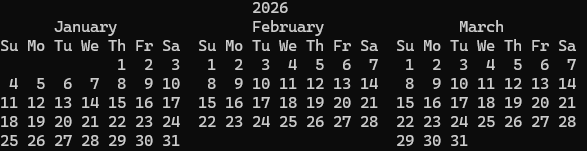
2026 Q1 calendar

2026 Q1 calendar

Serverless with Mama J


Serverless with Mama J

If you really want to know whether you understand something, try explaining it to your mom!

That’s exactly what Eric Johnson did. His mom, everyone calls her Mama J, wanted to know what serverless actually means and why it matters. So he walked her through it: what servers do, why they’re a headache to manage, and how AWS Lambda lets you skip all that by running code only when it’s needed, scaling automatically, and charging you nothing when nobody’s using it.

Watch the video on the AWS Developers YouTube channel.

Build serverless apps faster with AI

AWS is providing a growing set of AI-powered tools to bring serverless expertise directly into your coding assistants. From Model Context Protocol (MCP) servers and Anthropic Claude plugins to Kiro Powers. These tools provide contextual guidance for architecture decisions, implementation patterns, and deployment automation across the full serverless development lifecycle.

For more information on the tools available, see the resources page.

Serverless Patterns Collection

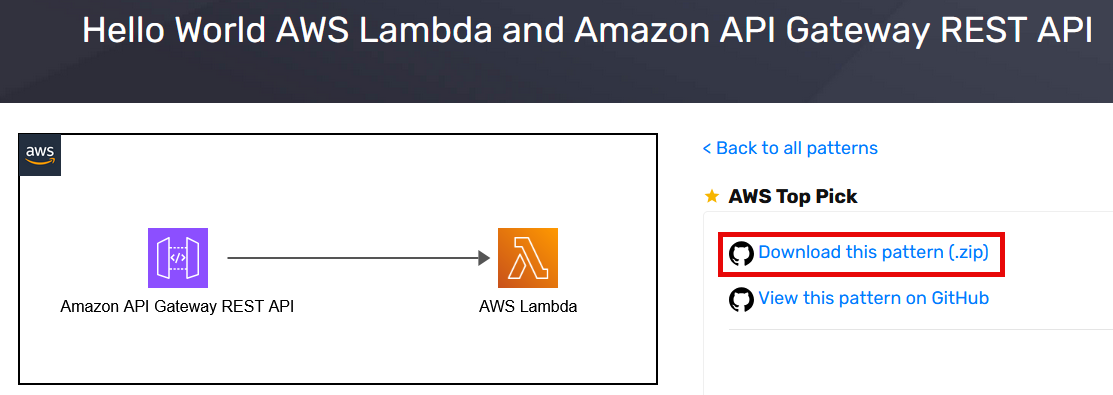
The open source Serverless Patterns Collection on Serverless Land now provides a direct link to download pattern .zip files. You can also clone the whole repo and explore more patterns.

Serverless Patterns .zip download

Serverless Patterns .zip download

AWS Lambda

Build fault-tolerant, long-running applications using familiar programming patterns using AWS Lambda durable functions. You can use Lambda durable functions to write multi-step workflows in your preferred programming language, using built-in methods that automatically handle progress checkpointing and error recovery. This can improve your architecture so that you can focus on your business logic and optimize costs by charging only for active compute time.

You can build durable functions in Python and TypeScript and there is a durable execution SDK for Java in preview with the code available on GitHub.

Eric Johnson has a new video deep dive showing how to upload videos and scan them with AI. Learn how to coordinate multiple AWS services like Amazon Rekognition and Amazon Transcribe, implement human-in-the-loop approval workflows, and crate a live dashboard for real-time updates.

To find out how durable functions work, see the blog post which also provides testing and best practices guidance. You can also watch the re:Invent Breakout Session video: Deep Dive on AWS Lambda durable functions (CNS380)

Lambda now supports the .NET 10 runtime, including support for file-based apps. Developers can take advantage of the latest .NET 10 performance improvements, new language features, and improved startup times for Lambda functions.

You can now see Availability Zone (AZ) metadata in function execution environments. This allows you to determine the AZ ID (e.g., use1-az1) of the AZ your function is running in. This helps build functions that can make AZ-aware routing decisions, such as preferring same-AZ endpoints for downstream services to reduce cross-AZ latency. Operators can also implement AZ-aware resilience patterns like AZ-specific fault injection testing.

Payload size increase

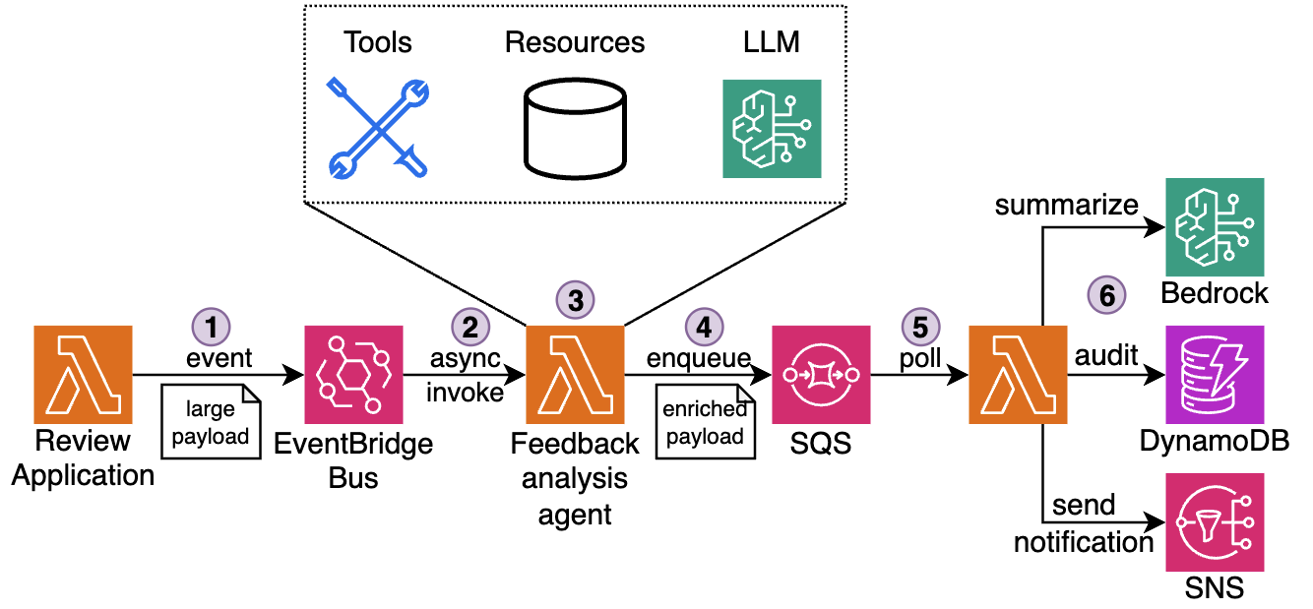
AWS has increased the maximum payload size from 256 KB to 1 MB for a number of services such as asynchronous Lambda invocations, Amazon SQS, and Amazon EventBridge. This gives you more room to build and maintain context-rich event-driven systems and reduce the need for complex workarounds such as data chunking or external large object storage.

This blog post explores a real-world example using rich event context in agentic event-driven architectures

Payload size increase workflow

Payload size increase workflow

Amazon Bedrock

Amazon Bedrock expanded its model availability with a new set of fully managed open-weight models spanning frontier reasoning and agentic coding. Other model releases include Anthropic Claude Opus 4.6 and Claude Sonnet 4.6, and NVIDIA Nemotron 3 Super. You can invoke them through the unified Amazon Bedrock API without managing any underlying infrastructure, making it straightforward to experiment and swap models as your workload evolves.

Amazon Bedrock AgentCore is the infrastructure layer for securely deploying and operating AI agents. It works with popular open source frameworks, including Strands Agents, LangGraph and CrewAI, giving you the flexibility to build with your preferred tools without vendor lock-in.

AgentCore Gateway now includes semantic tool search, so you can discover the right tool for a task using natural language queries instead of manually browsing a catalogue. It also adds custom KMS encryption, debugging messages, and resource tagging to give you stronger governance over tool integrations.

Policy in Bedrock AgentCore allows you to define precise boundaries on agent actions and run continuous quality monitoring. This helps you maintain predictable, auditable agent behavior in production without embedding guardrail logic inside each individual agent.

AgentCore Runtime now supports stateful MCP server features, allowing agents to maintain session context across tool calls for richer, more coherent multi-step interactions.

Strands Agents

Strands Agents SDK

Strands Agents SDK

Strands Agents is an open source SDK for building and running AI agents in just a few lines of code, working with models available in Amazon Bedrock. Strands Labs is a new dedicated GitHub organization for experimental agent projects, including robotics and code agents. This gives you early access to cutting-edge agentic techniques before they reach production frameworks. See the introduction blog post for more information.

AWS Step Functions

AWS Step Functions introduces an enhanced TestState API that enables API-based testing for validating workflows before deployment. The new API supports testing individual states in isolation or complete workflows end-to-end, making it easier to verify state machine logic without incurring runtime costs.

By integrating TestState API testing into CI/CD pipelines, you can validate workflow logic before deployment, reducing the risk of production issues. Find complete code examples and testing framework in the GitHub repository.

Amazon EventBridge

Amazon EventBridge Scheduler now provides resource count metrics to help you monitor quota usage. These new metrics make it easier to track the number of schedules and schedule groups in your account and proactively manage service quotas.

Amazon DynamoDB

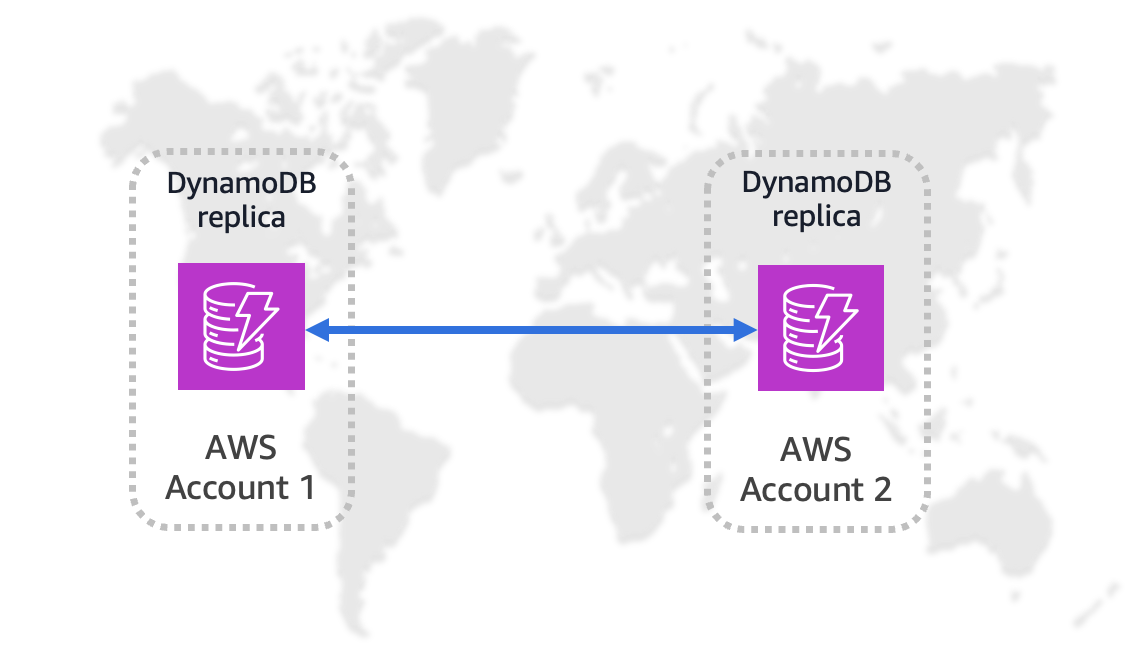
You can replicate Amazon DynamoDB table data across multiple AWS accounts and Regions. This enhances resiliency through account-level isolation, supports tailored security and data-perimeter controls. You can align workloads by business unit or environment and simplify governance requirements.

Amazon DynamoDB global replication

Amazon DynamoDB global replication

Amazon ECS

Amazon ECS Managed Instances can now integrate with Amazon EC2 Capacity Reservations. This allows you to make sure there is capacity availability for your container workloads while benefiting from the management automation of ECS Managed Instances.

ECS also now supports Network Load Balancer (NLB) for linear and canary deployment strategies. This helps you perform gradual traffic shifting using NLBs, providing more flexibility in deployment pipelines for latency-sensitive applications.

Serverless blog posts

January

February

March

Serverless Office Hours

Join our livestream every Tuesday at 11 AM PT for live discussions, Q&A sessions, and deep dives into serverless technologies. Watch episodes on-demand at serverlessland.com/office-hours.

January

February

March

Still looking for more?

The Serverless landing page has overall information about building serverless applications. The Lambda resources page contains case studies, webinars, whitepapers, customer stories, reference architectures, and even more Getting Started tutorials.

You can also follow the Developer Advocacy team to see the latest news, follow conversations, and interact with the team.

And finally, visit Serverless Land  for your serverless needs.

Introducing Amazon MSK Express Broker power for Kiro

Post Syndicated from Stephan Schiller original https://aws.amazon.com/blogs/big-data/introducing-amazon-msk-express-broker-power-for-kiro/

Developers working with Amazon Managed Streaming for Apache Kafka (Amazon MSK) regularly need to make decisions that require deep operational context—choosing the right instance type, diagnosing consumer lag, or planning for a traffic spike. Answering these questions means piecing together documentation, metrics, and operational know-how.

What if your IDE could guide you through that workflow with built-in domain expertise and tooling? Kiro is an AI-powered agentic IDE that lets you describe what you need in natural language. Whether it’s infrastructure configuration or operational troubleshooting, Kiro guides you through the solution.

In this post, we’ll show you how to use Kiro powers, a new capability that equips Kiro with contextual knowledge and tooling. You can simplify your MSK cluster management, from initial setup to diagnosing common issues, all through natural language conversations.

Challenges operating your MSK Express broker cluster

Amazon MSK Express Brokers are a fully managed offering where AWS handles much of the underlying infrastructure. However, platform teams still need to correctly size clusters based on throughput requirements. They also need to understand the right Amazon CloudWatch metrics during performance issues and investigate when CPU usage or replication lag is higher than expected. MSK best practices documentation spans multiple AWS guides. This makes it time-consuming to find relevant information during production incidents. New team members face a learning curve with MSK operations and can repeat common sizing and configuration mistakes.

Although Express Brokers simplify infrastructure management, you still face operational challenges that require deep Kafka expertise across three areas:

  • Cluster creation and sizing: You must still select the right instance type, configure networking, and choose authentication methods. These decisions impact cost and performance from day one.
  • Observability and troubleshooting: Effective operations require correlating broker, partition, and client metrics. Troubleshooting lag or replication issues still requires a solid understanding of Express Brokers’ architecture.
  • Capacity management: You must monitor CPU usage, understand per-broker throughput limits, and scale before hitting throttling thresholds.

These challenges mean that setting up an MSK cluster, analyzing slow-running clients, or investigating high-CPU load requires pulling together documentation, configuration details, CLI tooling, and operational know-how, which is often spread across multiple sources. Kiro powers address these challenges by bringing best practices, guided workflows, and tooling directly into your IDE, reducing the expertise barrier and the time spent context-switching between documentation, consoles, and the CLI.

Kiro powers

Kiro powers is a feature that combines best practices, specialized context, and tool integrations into a single capability. You can install powers with one click in the Kiro IDE or add them from a public GitHub URL. Each Power combines the following components:

  • Model Context Protocol (MCP) servers give your Kiro agent direct access to your infrastructure. The AWS MSK MCP server, for example, exposes tools to create clusters, monitor health, and optimize configurations.
  • Steering files provide persistent knowledge and workflow guides that Kiro loads based on the user’s task, such as monitoring best practices or troubleshooting workflows.
  • Optional hooks run automated actions when IDE events occur, such as validating configurations before deployment.

The key advantage of Kiro powers is that they load context dynamically based on the user’s task. Instead of configuring every MCP server upfront and re-providing context in each conversation, powers activate the right tools and knowledge on demand. This keeps your agent’s context focused and relevant. In the next section, we look at how these components work together specifically for MSK Express Broker operations.

The MSK Express broker power

The MSK Express broker power packages the AWS MSK MCP server with targeted streaming operations guidance, giving your Kiro agent expertise for MSK Express Broker operations and cluster management. You can use it to build Kafka-based streaming applications through Kiro while maintaining Express broker best practices throughout the development lifecycle.

For cluster operations, you can create Express broker clusters, monitor health metrics, and manage configurations through natural language. You can retrieve cluster metadata, check broker endpoints, and verify replication status. The Power also supports operational monitoring. You can track CPU utilization, throughput limits, partition distribution, and AWS Identity and Access Management (IAM) connection metrics.

To see how this works in practice, here’s what happens when you interact with the Power: When you ask Kiro to create an MSK cluster, the Power recommends appropriate instance sizes based on your throughput requirements. When you’re troubleshooting, it knows to check LeaderCount before diving into network metrics. When you’re troubleshooting authentication failures, it recommends client settings like reconnect.backoff.ms and group.instance.id to resolve connection churn and rebalancing issues against Express broker limits. Use cases include:

  • Cluster sizing and creation: Describe your throughput requirements (for example, “50 MBps ingress with 3x fan-out”) and the Power calculates the right instance type and broker count, then walks through cluster creation.
  • Proactive health monitoring: Ask Kiro to review your cluster. It checks CPU against the 60% threshold, compares throughput to instance limits, and flags partition imbalances and throughput bottlenecks before they become incidents.
  • Incident troubleshooting: Consumer lag spiking? The Power checks the relevant metrics, identifies the root cause (like skewed partition leadership), and guides you through resolution.
  • Capacity planning: Preparing for a traffic spike? The Power analyzes current utilization against instance limits and recommends whether to scale up or add brokers.

The MSK Express broker power brings together documentation, metrics, and operational context so your Kiro agent can correlate findings and help identify root causes specific to your infrastructure.

Getting started with the MSK Express broker power

Starting with Kiro powers takes only a few clicks in the Kiro IDE. You can install from the built-in marketplace or import from a public GitHub URL. Kiro packages all components and makes them available to the Kiro agent.

To set up the MSK Express broker power, follow these steps:

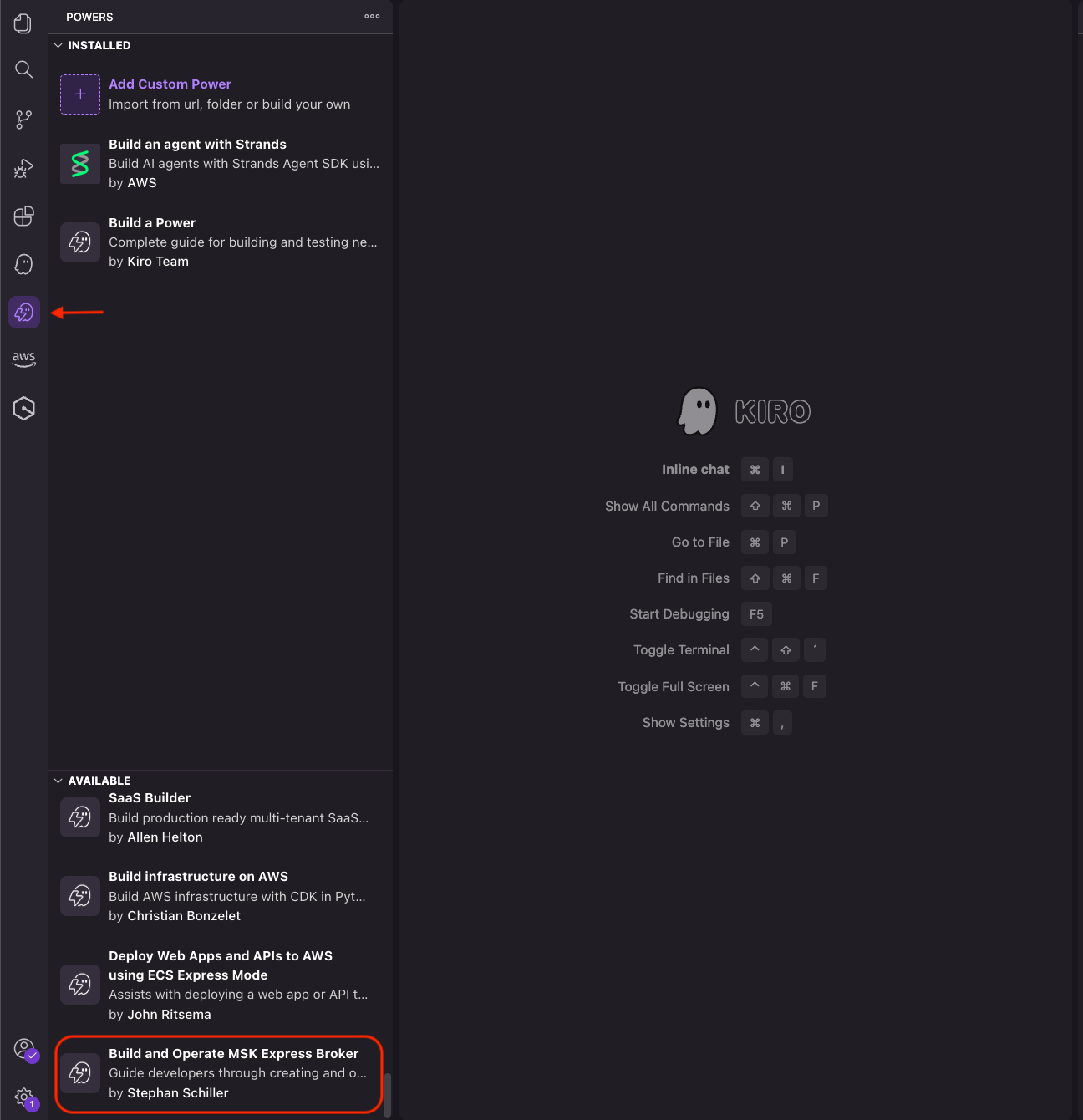
  1. Choose the Powers icon in the Kiro sidebar
  2. In the AVAILABLE panel, scroll down to Build and Operate MSK Express Broker
  3. Choose Install
  4. The power now appears in the INSTALLED panel.

Screenshot of Kiro IDE Powers panel showing installed and available extensions including the MSK Express Broker power.

You can also visit the Kiro powers marketplace to explore other powers.

Conclusion

The MSK Express broker power streamlines Kafka operations by combining Model Context Protocol (MCP) servers with operational guidance. With natural language interactions, you can create clusters, monitor health, optimize configurations, and troubleshoot issues without reviewing extensive documentation.

Install the MSK Express broker power in your Kiro IDE and learn more about Kiro and available Kiro powers.


About the authors

Stephan Schiller

Stephan is a Solutions Architect at AWS, where he has worked since 2023. He brings deep experience from technical roles across multiple hyperscalers and specializes in data analytics and agentic AI systems. He designs and operates scalable data platforms and builds agentic workloads for enterprise environments—helping organizations move from prototypes to production-ready AI systems that are reliable, secure, and deeply integrated with enterprise data landscapes.

Architecting for agentic AI development on AWS

Post Syndicated from Alan Oberto Jimenez original https://aws.amazon.com/blogs/architecture/architecting-for-agentic-ai-development-on-aws/

If you’re architecting cloud systems for AI development on AWS, you’ve likely discovered that traditional architectures create friction for AI agents. Many cloud teams are experimenting with AI coding assistants but quickly discover a gap between what these tools promise and what their architectures allow. When an AI agent generates code, it often takes minutes—or hours—before you can validate whether that change actually works. Slow deployment cycles, tightly coupled services, and opaque code bases turn every iteration into a high-friction exercise. As a result, AI agents struggle to operate autonomously, and developers are forced back into manual validation loops.

This article is written for cloud architects who want to remove that friction. It focuses on agentic development, a model where an AI agent does more than suggest snippets—it writes, tests, deploys, and refines code through rapid feedback cycles. To make that possible, both your system architecture and your code base architecture must be designed to support fast validation, safe iteration, and clear intent.

In this post, we demonstrate how to architect AWS systems that enable AI agents to iterate rapidly through design patterns for both system architecture and code base structure. We first examine the architectural problems that limit agentic development today. We then walk through system architecture patterns that support rapid experimentation, followed by codebase patterns that help AI agents understand, modify, and validate your applications with confidence.

Why traditional architectures hinder agentic AI

Most cloud architectures were designed for human-driven development. They assume long-lived environments, manual testing, and infrequent deployments. In an agentic workflow, those assumptions break down.

AI agents must validate changes continuously. When every test requires provisioning cloud resources, waiting for pipelines, or debugging deployment-only failures, feedback loops become too slow. Tight coupling between business logic and cloud services further complicates local testing, while inconsistent project structures make it difficult for an agent to understand where changes belong.

Without architectural support, agentic AI produces more risk than value. The solution is not better prompts, it’s an architecture that treats fast feedback and clear boundaries as first-class concerns. This architectural friction isn’t only inconvenient, it fundamentally limits AI agent effectiveness. Here’s how to redesign your architecture to help unlock the potential of agentic AI.

System architecture for fast agentic feedback loops

Agentic development depends on feedback speed. The faster an agent can observe the impact of a change, the more effectively it can refine its output. System architecture plays a decisive role here.

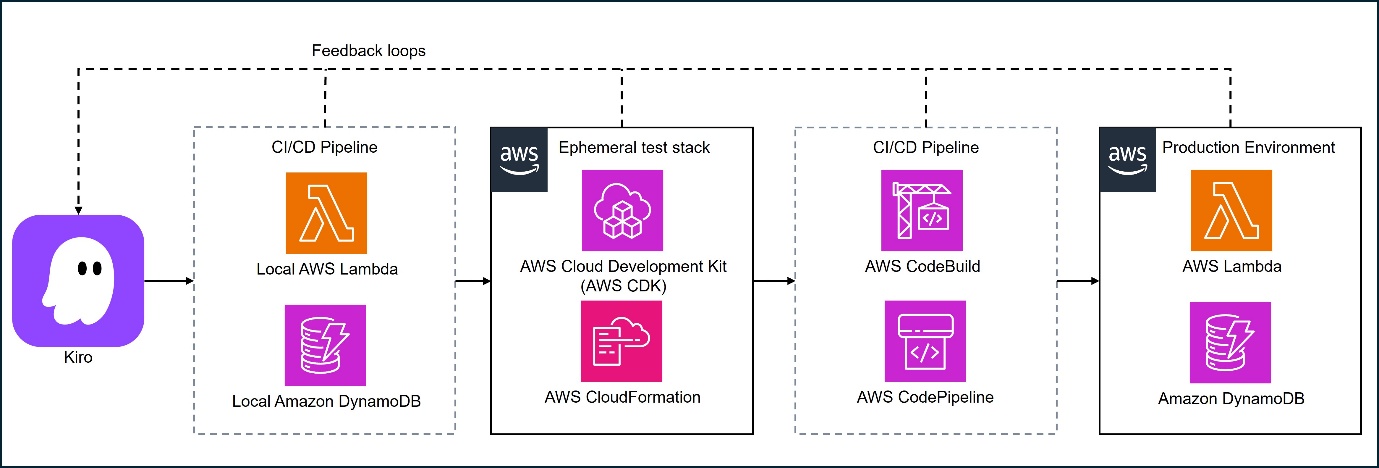
This diagram illustrates a comprehensive continuous integration and continuous deployment (CI/CD) pipeline architecture using AWS services, featuring feedback loops that connect development, testing, and production environments.

Figure 1: High-level architecture enabling agentic development: local test loops, ephemeral test stack, and continuous integration and continuous delivery (CI/CD) pipeline triggered by AI

Local emulation as the default feedback path

Whenever possible, your architecture should allow AI agents to test changes locally before touching cloud resources. AWS provides several tools that make this practical.

For example, serverless applications built with AWS Lambda and Amazon API Gateway can be emulated locally using the AWS Serverless Application Model (AWS SAM). With the sam local start-api command, an AI agent can invoke Lambda functions through a locally emulated API Gateway, observe responses immediately, and iterate in seconds rather than minutes.

Containers offer similar benefits for services that run on Amazon Elastic Container Service (Amazon ECS) or AWS Fargate. By building and running the same container images locally, an agent can validate application behavior before deploying to the cloud. For data persistence, Amazon DynamoDB Local allows the agent to test create, read, update, and delete (CRUD) operations against a local database that mirrors the DynamoDB API.

Note: Local emulation reduces iteration time, allowing AI-generated code to be validated in seconds and potentially reducing the cost and risk of experimentation.

Offline development for data and analytics workloads

Many workloads fit neatly into request-response testing, but data processing pipelines often involve large datasets and distributed execution. Even here, agentic workflows benefit from local feedback.

AWS Glue provides Docker images that allow AWS Glue jobs to run locally with the AWS Glue ETL libraries. An AI agent can validate transformations against sample datasets, inspect intermediate results, and only move to the cloud for scale testing. The same pattern applies to other data and machine learning (ML) workloads: isolate logic, test locally with reduced data, and promote validated code to managed services later.

Note: Offline development shortens feedback loops for data workloads and reduces unnecessary cloud runs during early iteration.

Hybrid testing with lightweight cloud resources

Some AWS services cannot be fully emulated locally. In these cases, the goal is not to avoid the cloud, but to keep cloud feedback lightweight.

For event-driven systems using Amazon Simple Notification Service (Amazon SNS) or Amazon Simple Queue Service (Amazon SQS), you can define minimal development stacks using infrastructure as code (IaC) tools such as AWS CloudFormation or the AWS Cloud Development Kit (AWS CDK). An AI agent can deploy small, isolated resources, invoke them through the AWS SDK, and validate behavior without provisioning full environments.

This hybrid approach treats the cloud as another test dependency—used sparingly and predictably.

Note: Hybrid testing confirms real service behavior early while keeping cloud usage focused and controlled.

Preview environments and contract-first design

Fast feedback does not stop at local testing. End-to-end validation still matters, especially when multiple services interact.

Preview environments are short-lived stacks deployed on demand for validation. Defined through IaC, they allow an AI agent to deploy a complete application, run smoke tests, and tear everything down when finished. When combined with contract-first design—where APIs are defined upfront using OpenAPI specifications—agents can validate integrations even before all services are implemented.

Note: Preview environments can reduce integration risk and allow AI-generated changes to be validated safely before reaching production.

Code base architecture for AI-friendly development

System architecture accelerates feedback, but code base architecture determines whether an AI agent can make sense of what it is changing.

Domain-driven structure with explicit boundaries

We recommend agentic development when your repository reflects clear architectural intent. A domain-driven structure inspired by Domain-Driven Design (DDD) separates core business logic from application orchestration and infrastructure concerns.

In practice, this often means organizing code into predictable layers such as /domain, /application, and /infrastructure. The domain layer contains business rules with no Amazon dependencies. Infrastructure code handles integrations with services such as Amazon DynamoDB or Amazon SNS. This separation allows AI agents to modify business logic and validate it locally without touching cloud-specific code.

Patterns like hexagonal architecture reinforce this separation by treating external systems as adapters rather than dependencies.

Note: Clear boundaries can reduce unintended side effects and make AI-generated changes more straightforward to reason about and test.

Encoding architectural intent with project rules

Even well-structured repositories benefit from explicit guidance. Kiro supports steering files—Markdown files stored under .kiro/steering/—that describe architectural constraints and coding conventions.

For example, a rule might state that database access must go through repository classes in the infrastructure layer. The agent consults these rules automatically, reducing the need to restate constraints in every prompt and helping to keep generated code aligned with your architecture.

Note: Project rules reduce architectural drift and help maintain consistency as AI agents operate more autonomously.

Tests as executable specifications

In agentic workflows, tests do more than catch regressions, they define acceptable behavior. A layered testing strategy works particularly well:

  • Unit tests validate domain logic in isolation and run quickly, making them ideal for frequent AI-driven iterations.
  • Contract tests verify that services honor agreed interfaces, catching breaking changes early.
  • Smoke tests run against deployed environments to surface configuration or permission issues that only appear at runtime, such as missing AWS Identity and Access Management (IAM) permissions.

Well-written tests also act as documentation. When a test fails, the agent can infer what behavior is expected and refine its changes accordingly.

Note: Tests provide fast, objective validation of AI-generated code and reduce the risk of subtle integration failures.

Monorepos and machine-readable documentation

AI agents work more effectively when they have broad context. A monorepo allows the agent to navigate across services, understand shared patterns, and evaluate the impact of changes system-wide. Within that repository, concise and structured documentation is essential. Files such as AGENT.md can explain architectural principles and constraints, while RUNBOOK.md and CONTRIBUTING.md describe operational and development workflows. Machine-readable formats, such as YAML or configuration files, are more straightforward for agents to interpret than lengthy prose.

Kiro can use foundational steering documents—summaries of structure, technology, and product guidelines—to help the agent maintain situational awareness as the project evolves.

Note: Shared context improves the quality of AI-generated changes and reduces the need for manual correction.

Integrating agents safely into delivery pipelines

As AI agents become more capable, governance remains essential. Continuous integration and continuous deliver (CI/CD) pipelines should include guardrails such as required test execution, automated reviews, and branch protections. Over time, as confidence grows, you can expand the agent’s autonomy while keeping humans in the loop for high-impact decisions. This balance allows AI to accelerate routine work without increasing operational risk.

Conclusion

Agentic AI development does not succeed by accident. It requires architectures that prioritize fast feedback, clear boundaries, and explicit intent. Combining local emulation, lightweight cloud testing, and preview environments with domain-driven structure, layered testing, and machine-readable documentation creates an environment where AI agents can operate effectively and safely. Tools like Kiro help bridge the gap between human design decisions and autonomous AI execution. When architecture aligns with agentic workflows, AI agents become true force multipliers, handling iterative development at speed while your team focuses on higher-level design and innovation.

To learn more about how AWS can help your organization implement agentic solutions, visit AWS Agentic AI.


About the authors

AWS Weekly Roundup: NVIDIA Nemotron 3 Super on Amazon Bedrock, Nova Forge SDK, Amazon Corretto 26, and more (March 23, 2026)

Post Syndicated from Daniel Abib original https://aws.amazon.com/blogs/aws/aws-weekly-roundup-nvidia-nemotron-3-super-on-amazon-bedrock-nova-forge-sdk-amazon-corretto-26-and-more-march-23-2026/

Hello! I’m Daniel Abib, and this is my first AWS Weekly Roundup. I’m a Senior Specialist Solutions Architect at AWS, focused on the generative AI and Amazon Bedrock. With over 28 years of experience in solution architecture, software development, and cloud architecture, I help Startups & Enterprises harness the power of generative AI with Amazon Bedrock. I’ve been at AWS for more than six and a half years, working closely with customers across Latin America, and I’m also passionate about Serverless technologies.

Outside of work and endurance sports, I’m a dedicated father to Cecília (7) and Rafael (4), who keep me busier—and happier— than any distributed system ever could. I’m based in São Paulo, you can find me on LinkedIn and X (@DCABib), where I share insights about generative AI, Amazon Bedrock, AWS serverless services, and the occasional Ironman throwback.

Now, let’s get into this week’s AWS news…

Last week’s launches
Here are some launches and updates from this past week that caught my attention:

  • Amazon Redshift increases performance for new queries in dashboards and ETL workloads by up to 7x — Amazon Redshift now delivers up to 7x faster performance for new queries in dashboards and ETL workloads. Queries you run for the first time — without cached results — now execute significantly faster, reducing wait times for interactive dashboards and accelerating your ETL pipelines. This is particularly impactful for workloads with high query variability where cache hits are less frequent.
  • NVIDIA Nemotron 3 Super now available on Amazon Bedrock — NVIDIA Nemotron 3 Super is now available in Amazon Bedrock, expanding the lineup of foundation models you can access through the unified Bedrock API. Nemotron 3 Super is a high-performance language model optimized for tasks such as text generation, complex reasoning, summarization, and code generation. You can now invoke Nemotron 3 Super alongside other foundation models in your existing Bedrock workflows, without managing any infrastructure.
  • Introducing Nova Forge SDK, a seamless way to customize Nova models for enterprise AI — Nova Forge SDK provides a streamlined way to fine-tune and customize Amazon Nova models for enterprise use cases. You can adapt Nova models to your domain-specific data and deploy them directly within Amazon Bedrock, reducing the complexity of building tailored AI solutions. The SDK handles the heavy lifting of model customization, letting you focus on your business logic rather than the underlying infrastructure.
  • Amazon Corretto 26 is now generally available — Amazon Corretto 26, the latest long-term support (LTS) release of the no-cost, production-ready distribution of OpenJDK, is now generally available. Corretto 26 includes the latest Java language features, performance improvements, and security patches, all backed by long-term support from AWS. You can use it across development and production environments on Amazon Linux, Windows, macOS, and Docker images.
  • AWS Lambda now supports Availability Zone metadata — AWS Lambda now provides Availability Zone metadata for your function invocations. You can now identify which Availability Zone your Lambda function is running in, enabling better observability, more informed architectural decisions, and simplified troubleshooting for latency-sensitive and multi-AZ workloads. This is particularly useful when correlating Lambda execution with other AZ-aware services in your architecture.
  • Amazon CloudWatch Logs now supports log ingestion using HTTP-based protocol — Amazon CloudWatch Logs now supports ingesting logs using an HTTP-based protocol, making it simpler to send logs from applications and services that use standard HTTP endpoints. You can now route logs to CloudWatch Logs without requiring custom agents or additional SDK integrations, lowering the barrier to centralized log management across your workloads.
  • Amazon EKS announces 99.99% Service Level Agreement and new 8XL scaling tier for Provisioned Control Plane clusters — Amazon EKS now offers a 99.99% Service Level Agreement (SLA) for clusters running on Provisioned Control Plane, up from the 99.95% SLA offered on standard control plane. EKS is also introducing the 8XL scaling tier, the largest available Provisioned Control Plane tier, which doubles the Kubernetes API server request processing capacity of the next lower 4XL tier — ideal for large-scale workloads like AI/ML training, high-performance computing (HPC), and large-scale data processing.

Other AWS news
Here are some additional posts and resources that you might find interesting:

  • Kiro for students — Kiro is now available for students, giving the next generation of builders access to AI-powered development tools at no cost. As Swami Sivasubramanian shared on LinkedIn, “Students are the future decision-makers shaping technology” — and Kiro gives them hands-on experience building with AI from day one. If you’re a student or know someone who is, this is a great opportunity to start building with AI-assisted development.
  • Strands Steering Hooks achieved 100% agent accuracy — The Strands Agents team published results showing that Steering Hooks can achieve 100% agent accuracy, outperforming both prompt engineering and rigid workflow approaches for controlling agent behavior. As Swami highlighted on LinkedIn, building reliable AI agents often means rethinking how we guide model behavior — and Steering Hooks offer a compelling new path to agent reliability.
  • Introducing Badges on AWS Builder Center — AWS Builder Center now features badges that recognize your contributions and achievements within the builder community. You can earn badges by sharing solutions, participating in challenges, and engaging with fellow builders. It’s a great way to showcase your expertise and track your growth.
  • Keep Building Together: The Power of Community — A thoughtful read on the power of community-driven learning and collaboration in the AWS ecosystem. Whether you’re just getting started with AWS or you’ve been building for years, the builder community is a place to connect, share knowledge, and grow together. I highly recommend checking it out.

Upcoming AWS events
Check your calendar and sign up for upcoming AWS events:

  • AWS Summits — Join AWS Summits in 2026, free in-person events where you can explore emerging cloud and AI technologies, learn best practices, and network with industry peers and experts. Upcoming Summits include Paris (April 1), London (April 22), Bengaluru (April 23–24), Singapore (May 6), Tel Aviv (May 6), and Stockholm (May 7).
  • AWS Community Days — Community-led conferences where content is planned, sourced, and delivered by community leaders, featuring technical discussions, workshops, and hands-on labs. Upcoming events include San Francisco (April 10) and Romania (April 23–24).
  • AWSome Women Summit LATAM — Taking place on March 28 in Mexico City, this event celebrates and empowers women in cloud technology across Latin America. A fantastic initiative for the LATAM tech community.

Join the AWS Builder Center to connect with builders, share solutions, and access content that supports your development. Browse the AWS Events and Webinars for upcoming AWS-led in-person and virtual events and developer-focused events.

That’s all for this week. Check back next Monday for another Weekly Roundup!

This post is part of our Weekly Roundup series. Check back each week for a quick roundup of interesting news and announcements from AWS!

AWS Weekly Roundup: Kiro CLI latest features, AWS European Sovereign Cloud, EC2 X8i instances, and more (January 19, 2026)

Post Syndicated from Veliswa Boya original https://aws.amazon.com/blogs/aws/aws-weekly-roundup-kiro-cli-latest-features-aws-european-sovereign-cloud-ec2-x8i-instances-and-more-january-19-2026/

At the end of 2025 I was happy to take a long break to enjoy the incredible summers that the southern hemisphere provides. I’m back and writing my first post in 2026 which also happens to be my last post for the AWS News Blog (more on this later).

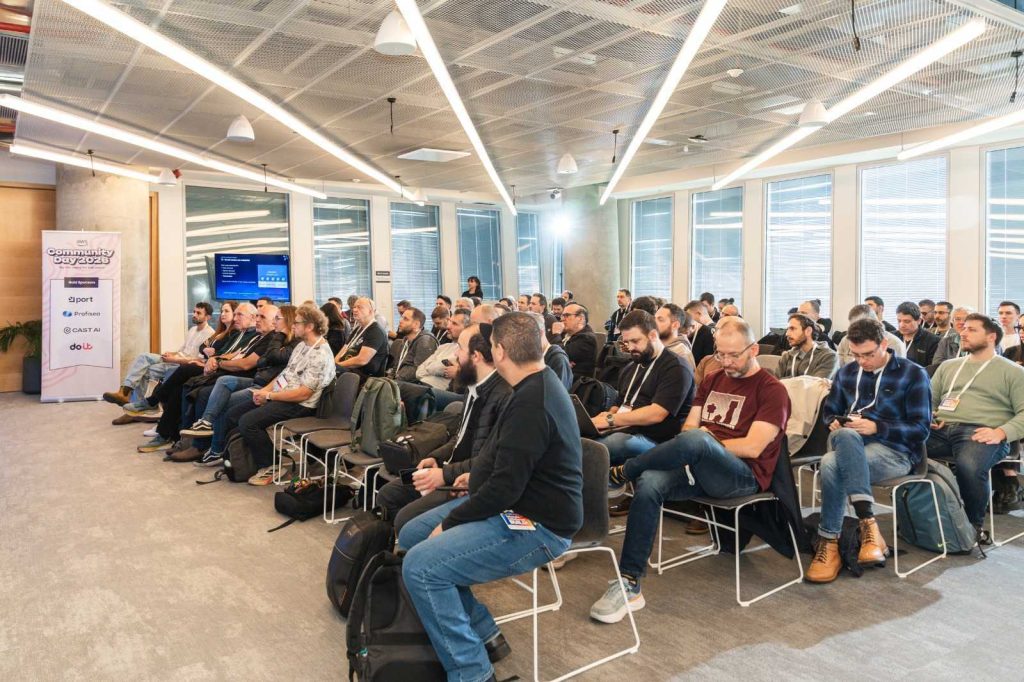
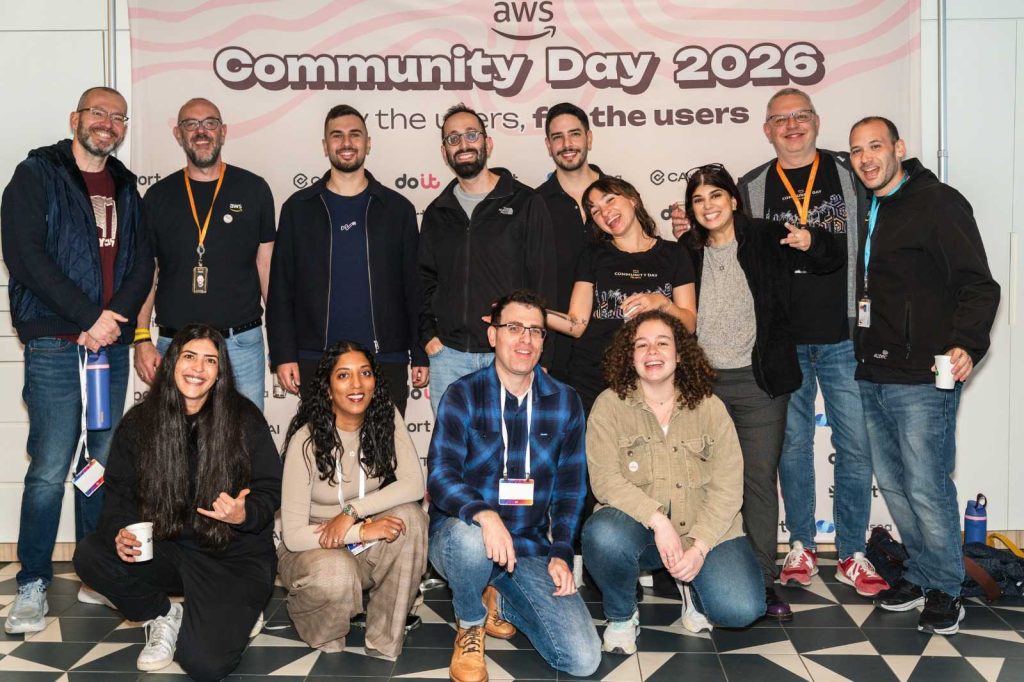
The AWS community is starting the year strong with various AWS re:invent re:Caps being hosted around the globe, with some communities already hosting their AWS Community Day events, the AWS Community Day Tel Aviv 2026 was hosted last week.

Last week’s launches
Here are last week’s launches that caught my attention:

  • Kiro CLI latest features – Kiro CLI now has granular controls for web fetch URLs, keyboard shortcuts for your custom agents, enhanced diff views, and much more. With these enhancements, you can now use allowlists or blocklists to restrict which URLs the agent can access, ensure a frictionless experience when working with multiple specialized agents in a single session, to name a few.
  • AWS European Sovereign Cloud – Following an announcement in 2023 of plans to build a new, independent cloud infrastructure, last week we announced the general availability of the AWS European Sovereign Cloud to all customers. The cloud is ready to meet the most stringent sovereignty requirements of European customers with a comprehensive set of AWS services.
  • Amazon EC2 X8i instancesPreviously launched in preview at AWS re:Invent 2025, last week we announced the general availability of new memory-optimized Amazon Elastic Compute Cloud (Amazon EC2) X8i instances. These instances are powered by custom Intel Xeon 6 processors with a sustained all-core turbo frequency of 3.9 GHz, available only on AWS. These SAP certified instances deliver the highest performance and fastest memory bandwidth among comparable Intel processors in the cloud.

Additional updates
These projects, blog posts, and news articles also caught my attention:

  • 5 core features in Amazon Quick Suite – AWS VP Agentic AI Swami Sivasubramanian talks about how he uses Amazon Quick Suite for just about everything. In October 2025 we announced Amazon Quick Suite, a new agentic teammate that quickly answers your questions at work and turns insights into actions for you. Amazon Quick Suite has become one of my favorite productivity tools, helping me with my research on various topics in addition to providing me with multiple perspectives on a topic.
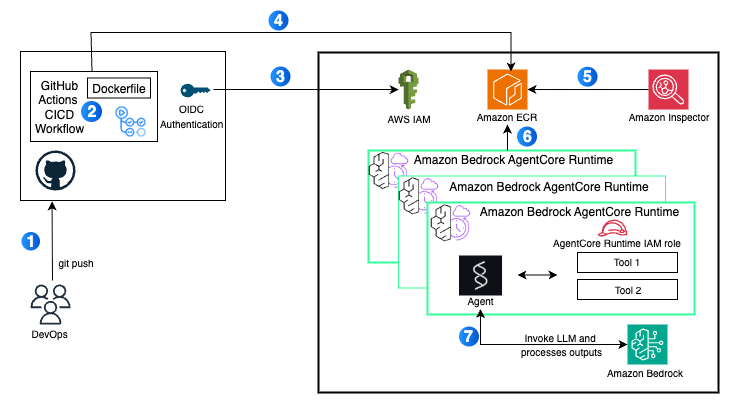
  • Deploy AI agents on Amazon Bedrock AgentCore using GitHub Actions – Last year we announced Amazon Bedrock AgentCore, a flexible service that helps you seamlessly create and manage AI agents across different frameworks and models, whether hosted on Amazon Bedrock or other environments. Learn how to use a GitHub Actions workflow to automate the deployment of AI agents on AgentCore Runtime. This approach delivers a scalable solution with enterprise-level security controls, providing complete continuous integration and delivery (CI/CD) automation.

Upcoming AWS events
Join us January 28 or 29 (depending on your time zone) for Best of AWS re:Invent, a free virtual event where we bring you the most impactful announcements and top sessions from AWS re:Invent. Jeff Barr, AWS VP and Chief Evangelist, will share his highlights during the opening session.

There is still time until January 21 to compete for $250,000 in prizes and AWS credits in the Global 10,000 AIdeas Competition (yes, the second letter is an I as in Idea, not an L as in like). No code required yet: simply submit your idea, and if you’re selected as a semifinalist, you’ll build your app using Kiro within AWS Free Tier limits. Beyond the cash prizes and potential featured placement at AWS re:Invent 2026, you’ll gain hands-on experience with next-generation AI tools and connect with innovators globally.

Earlier this month, the 2026 application for the Community Builders program launched. The application is open until January 21st, midnight PST so here’s your last chance to ensure that you don’t miss out.

If you’re interested in these opportunities, join the AWS Builder Center to learn with builders in the AWS community.

With that, I close one of my most meaningful chapters here at AWS. It’s been an absolute pleasure to write for you and I thank you for taking the time to read the work that my team and I pour our absolute hearts into. I’ve grown from the close collaborations with the launch teams and the feedback from all of you. The Sub-Sahara Africa (SSA) community has grown significantly, and I want to dedicate more time focused on this community, I’m still at AWS and I look forward to meeting at an event near you!

Check back next Monday for another Weekly Roundup!

Veliswa Boya

Simplified management of Amazon MSK with natural language using Kiro CLI and Amazon MSK MCP Server

Post Syndicated from Kalyan Janaki original https://aws.amazon.com/blogs/big-data/simplified-management-of-amazon-msk-with-natural-language-using-kiro-cli-and-amazon-msk-mcp-server/

Managing and scaling data streams efficiently is a cornerstone of success for many organizations. Apache Kafka is a leading platform for real-time data streaming, offering unmatched scalability and reliability. However, setting up and scaling Kafka clusters can be challenging, requiring significant time, expertise, and resources. Amazon Managed Streaming for Apache Kafka (MSK) helps you build and run production applications on Apache Kafka without needing Kafka infrastructure management expertise or having to deal with the complex overhead associated with setting up and running Apache Kafka on your own.

Amazon MSK Provisioned supports both Standard brokers and Express brokers. Express brokers are designed for higher throughput, faster scalability, and lower operational overhead, while Standard brokers offer more granular control and configuration flexibility. While Amazon MSK significantly reduces cluster management overhead, teams still perform routine tasks such as topic management, partition management, and implementing specific configurations to meet their business requirements.

To further simplify these day-to-day operations, you can use Kiro Command Line Interface (CLI) along with the MSK Model Context Protocol (MCP) server for a more intuitive approach to cluster management. These tools enable teams to perform administrative tasks and operational activities using natural language commands. Whether you’re managing topics, monitoring cluster health, or implementing specific configurations, the ability to use plain English commands makes these tasks more accessible to both experienced administrators and developers new to Kafka.

In this post, we demonstrate how Kiro CLI and the MSK MCP server can streamline your Kafka management. Through practical examples and demonstrations, we show you how to use these tools to perform common administrative tasks efficiently while maintaining robust security and reliability.

Understanding the Model Context Protocol advantage

The MCP is an emerging open standard that defines how artificial intelligence (AI) agents can securely access and interact with external tools, data sources, and services. Rather than requiring developers learn intricate API syntax across multiple services, MCP enables AI assistants to understand your environment contextually and provide intelligent guidance. A Kiro CLI agent is an AI-powered assistant in the command-line interface that understands your code and environment to execute tasks, generate code, and automate workflows through natural language interactions. Together, Kiro CLI and the Model Context Protocol (MCP) enable teams to manage their MSK clusters using natural language, making cluster administration more intuitive and accessible.

The Amazon MSK MCP Server provides essential cluster administration capabilities including describing clusters, updating configurations, and monitoring broker health status. By combining these capabilities with Kiro CLI’s ability to interact with native Kafka command-line tools, teams gain comprehensive visibility into their Apache Kafka environment. Through this unified approach, users can manage both control plane operations via the MCP server and data plane operations, like topic management, through Kiro CLI’s interface with Kafka tools. This integration enables teams to monitor, manage, and optimize their clusters through conversational interactions while maintaining enterprise-grade security through AWS Identity and Access Management (IAM) and fine-grained access controls.

Prerequisites

For this walkthrough, you should have the following prerequisites:

Configure Kiro CLI with Amazon MSK MCP server

Installation and configuration
The following section covers the steps required to install and configure Amazon MSK MCP server.

Install required dependencies
Complete the following steps to install required dependencies:

  1. Install the uv package manager if you haven’t already:
# macOS/Linux
curl -LsSf  | sh

# Windows
powershell -c "irm  | iex“
Install Python 3.10 or newer:
uv python install 3.10

Configure the MCP server
Complete the following instructions to set up Kiro CLI on your host machine and access the Amazon MSK MCP server. Configure the Amazon MSK MCP server in your Kiro CLI configuration. Edit the MCP configuration file at ~/.aws/.kiro/mcp.json:

MacOS Installation

For MacOS, the mcp.json file should be as follows:

"awslabs.aws-msk-mcp-server": {
"command": "uvx",
"args": [
"awslabs.aws-msk-mcp-server@latest",
"—allow-writes“
],
"env": {
"FASTMCP_LOG_LEVEL": "ERROR"
},
"disabled": false,
"autoApprove": []
}

Windows Installation
For Windows users, the MCP server configuration format is slightly different:

{
"mcpServers": {
"awslabs.aws-msk-mcp-server": {
"disabled": false,
"timeout": 60,
"type": "stdio",
"command": "uv",
"args": [
"tool",
"run",
"—from",
"awslabs.aws-msk-mcp-server@latest",
"awslabs.aws-msk-mcp-server.exe"
],
"env": {
"FASTMCP_LOG_LEVEL": "ERROR",
"AWS_PROFILE": "your-aws-profile",
"AWS_REGION": "us-east-1"
}
}
}
}

For further details on installation, refer to the Installation section in the Amazon MSK MCP server README.md.

  1. Start Kiro CLI to verify the MCP server is properly configured using the following command: kiro-cli
  2. Once logged into Kiro CLI, type the following command to check all the MSK mcp server tools are available as shown in the following screenshot: /tools

Installing and configuring Kafka CLI

To perform data plane operations on your Amazon MSK cluster, you need the Kafka command-line tools configured correctly. In the following video demonstration, we show how developers and administrators can use Kiro CLI to streamline the installation and configuration of Kafka command-line tools, enabling seamless interaction with their MSK cluster through natural language commands.

Evaluate cluster best practices

Maintaining a healthy and efficient Apache Kafka cluster requires adherence to established best practices, from proper replication factors to optimal resource utilization. Amazon MSK implements many of these best practices by default, but ongoing monitoring and adjustment are essential for production workloads. In the following demonstration, we show how Kiro CLI can help you evaluate your cluster’s configuration against recommended best practices, identify potential issues, and receive actionable recommendations for optimization. Watch the following demo video as we use natural language queries to assess MSK clusters against AWS recommended best practices and identify topics with replication factors not configured according to best practices and fix them.

Responding to health notifications: Optimizing topic configurations for high availability

Amazon MSK’s health notifications serve as crucial alerts to maintain optimal cluster performance and reliability. For customers using MSK Provisioned with Standard brokers, they may receive notifications about critical configuration parameters such as MinISR and replication factor settings that could impact application resilience. In this section, we demonstrate how Kiro CLI can help you quickly respond to a health notification regarding MinISR (Minimum In-Sync Replicas) and replication factor configurations. Watch as we use natural language commands to identify topics with suboptimal settings, understand their current configurations, and implement the recommended changes to confirm high availability during infrastructure maintenance or recovery events. This real-world scenario showcases how Kiro CLI simplifies the process of maintaining robust Kafka operations while following AWS best practices.

Managing cluster-level configurations: Streamlining parameter updates with natural language

Apache Kafka clusters often require configuration adjustments to meet specific security requirements and use cases. While Amazon MSK provides default configurations, there are situations when you need to customize security parameters like allow.everyone.if.no.acl.found to implement proper access controls and strengthen your cluster’s security posture. In this demonstration, we show how Kiro CLI with MSK MCP server simplifies the process of updating cluster-level configurations.

Instead of opening multiple CLI commands or console screens, you see how natural language instructions can be used to understand current security settings, evaluate the impact of changes, and implement configuration updates seamlessly across your MSK cluster. By setting allow.everyone.if.no.acl.found to false, we confirm that explicit ACL permissions are required for all operations, enhancing the security of your Kafka deployment.

Conclusion

In this post, we demonstrated how Kiro CLI and MSK MCP server make Apache Kafka cluster management more accessible through natural language commands. By transforming complex Kafka operations into simple conversational interactions, these tools enable both experienced administrators and newcomers to efficiently manage their MSK clusters. From routine tasks to addressing configuration challenges, this approach reduces operational complexity and allows teams to focus more on developing innovative streaming applications.


About the authors

Kalyan Janaki is Senior Big Data & Analytics Specialist with Amazon Web Services. He helps customers architect and build highly scalable, performant, and secure cloud-based solutions on AWS.


Aarjvi Desai is a Technical Account Manager at Amazon Web Services, based in San Francisco Bay Area, where she helps customers solve cloud challenges and build scalable, reliable solutions. Her areas of focus include cloud technologies, architecture best practices, and operational excellence.

Sandhya Khanderia is Sr. Technical Account Manager and Data analytics specialist. She works with AWS customers and provides ongoing support and technical guidance to help plan and build solutions using best practices and proactively keep customers’ AWS environments operationally healthy.

Ankit Mishra is a Senior Solutions Architect at Amazon Web Services, where he supports healthcare and life sciences customers around the globe. He is passionate about helping organizations design and build secure, scalable, reliable, and cost-effective cloud solutions. Outside of work, Ankit enjoysspending quality time with his young daughters. Feel free to connect with him on LinkedIn.
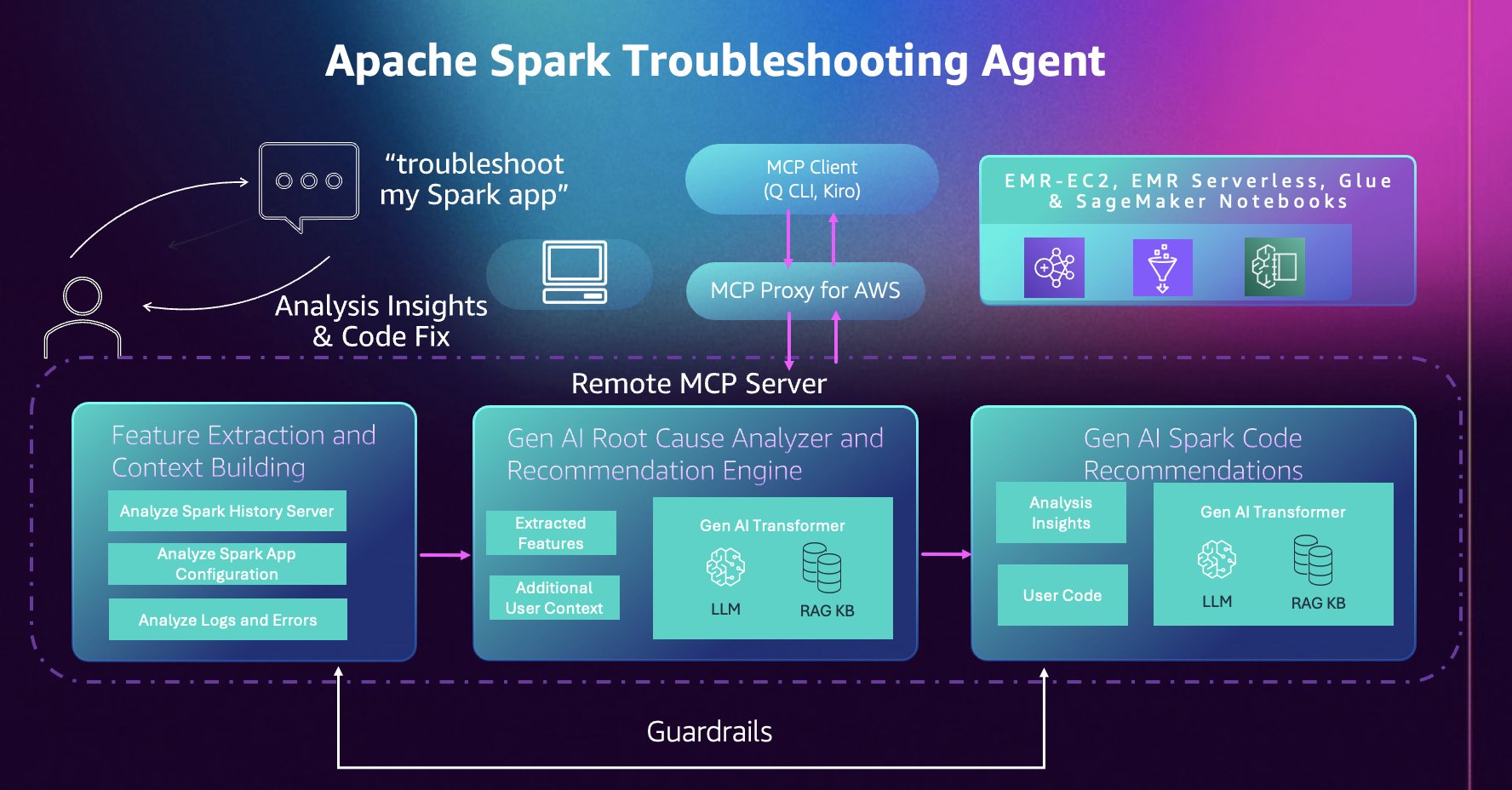
Introducing the Apache Spark troubleshooting agent for Amazon EMR and AWS Glue

Post Syndicated from Jake Zych original https://aws.amazon.com/blogs/big-data/introducing-the-apache-spark-troubleshooting-agent-for-amazon-emr-and-aws-glue/

The newly launched Apache Spark troubleshooting agent can eliminate hours of manual investigation for data engineers and scientists working with Amazon EMR or AWS Glue. Instead of navigating multiple consoles, sifting through extensive log files, and manually analyzing performance metrics, you can now diagnose Spark failures using simple natural language prompts. The agent automatically analyzes your workloads and delivers actionable recommendations. transforming a time-consuming troubleshooting process into a streamlined, efficient experience.

In this post, we show you how the Apache Spark troubleshooting agent helps analyze Apache Spark issues by providing detailed root causes and actionable recommendations. You’ll learn how to streamline your troubleshooting workflow by integrating this agent with your existing monitoring solutions across Amazon EMR and AWS Glue.

Apache Spark powers critical ETL pipelines, real-time analytics, and machine learning workloads across thousands of organizations. However, building and maintaining Spark applications remains an iterative process where developers spend significant time troubleshooting. Spark application developers encounter operational challenges due to a few different reasons:

  • Complex connectivity and configuration options to a variety of resources with Spark – Although this makes Spark a popular data processing platform, it often makes it challenging to find the root cause of inefficiencies or failures when Spark configurations aren’t optimally or correctly configured.
  • Spark’s in-memory processing model and distributed partitioning of datasets across its workers – Although good for parallelism, this often makes it difficult for users to identify inefficiencies. This results in slow application execution or root cause of failures caused by resource exhaustion issues such as out of memory and disk exceptions.
  • Lazy evaluation of Spark transformations – Although lazy evaluation optimizes performance, it makes it challenging to accurately and quickly identify the application code and logic that caused the failure from the distributed logs and metrics emitted from different executors.

Apache Spark troubleshooting agent architecture

This section describes the components of the troubleshooting agent and how they connect to your development environment. The troubleshooting agent provides a single conversational entry point for your Spark applications across Amazon EMR, AWS Glue, and Amazon SageMaker Notebooks. Instead of navigating different consoles, APIs, and log locations for each service, you interact with one Model Context Protocol (MCP) server through natural language using any MCP-compatible AI assistant of your choice, including custom agents you develop using frameworks such as Strands Agents.

Operating as a fully managed cloud-hosted MCP server, the agent removes the need to maintain local servers while keeping your data and code isolated and secure in a single-tenant system design. Operations are read-only and backed by AWS Identity and Access Management (IAM) permissions; the agent only has access to resources and actions your IAM role grants. Additionally, tool calls are automatically logged to AWS CloudTrail, providing complete auditability and compliance visibility. This combination of managed infrastructure, granular IAM controls, and CloudTrail integration confirms your Spark diagnostic workflows remain secure, compliant, and fully auditable.

The agent builds on years of AWS expertise running millions of Spark applications at scale. It automatically analyzes Spark History Server data, distributed executor logs, configuration patterns, and error stack traces and extracts relevant features and signals to surface insights that would otherwise require manual correlation across multiple data sources and deep understanding of Spark and service internals.

Getting started 

Complete the following steps to get started with the Apache Spark troubleshooting agent.

Prerequisites

Verify you meet or have completed the following prerequisites.

System requirements:

  • Python 3.10 or higher
  • Install the uv package manager. For instructions, see installing uv.
  • AWS Command Line Interface (AWS CLI) (version 2.30.0 or later) installed and configured with appropriate credentials.

IAM permissions: Your AWS IAM profile needs permissions to invoke the MCP server and access your Spark workload resources. The AWS CloudFormation template in the setup documentation creates an IAM role with the required permissions. You can also manually add the required IAM permissions.

Set up using AWS CloudFormation

First, deploy the AWS CloudFormation template provided in the setup documentation. This template automatically creates the IAM roles with the permissions required to invoke the MCP server.

  1. Deploy the template within the same AWS Region you run your workloads in. For this post, we’ll use us-east-1.
  2. From the AWS CloudFormation Outputs tab, copy and execute the environment variable command:
    export SMUS_MCP_REGION=us-east-1 && export IAM_ROLE=arn:aws:iam::111122223333:role/spark-troubleshooting-role-xxxxxx

  3. Configure your AWS CLI profile:
    aws configure set profile.smus-mcp-profile.role_arn ${IAM_ROLE}
    aws configure set profile.smus-mcp-profile.source_profile default
    aws configure set profile.smus-mcp-profile.region ${SMUS_MCP_REGION}

Set up using Kiro CLI

You can use Kiro CLI to interact with the Apache Spark troubleshooting agent directly from your terminal.

Installation and configuration:

  1. Install Kiro CLI.
  2. Add both MCP servers, using the environment variables from the previous Set up using AWS CloudFormation section:
    # Add Spark Troubleshooting MCP Server
    kiro-cli-chat mcp add \
        --name "sagemaker-unified-studio-mcp-troubleshooting" \
        --command "uvx" \
        --args "[\"mcp-proxy-for-aws@latest\",\"https://sagemaker-unified-studio-mcp.${SMUS_MCP_REGION}.api.aws/spark-troubleshooting/mcp\", \"--service\", \"sagemaker-unified-studio-mcp\", \"--profile\", \"smus-mcp-profile\", \"--region\", \"${SMUS_MCP_REGION}\", \"--read-timeout\", \"180\"]" \
        --timeout 180000 \
        --scope global
    # Add Spark Code Recommendation MCP Server
    kiro-cli-chat mcp add \
        --name "sagemaker-unified-studio-mcp-code-rec" \
        --command "uvx" \
        --args "[\"mcp-proxy-for-aws@latest\",\"https://sagemaker-unified-studio-mcp.${SMUS_MCP_REGION}.api.aws/spark-code-recommendation/mcp\", \"--service\", \"sagemaker-unified-studio-mcp\", \"--profile\", \"smus-mcp-profile\", \"--region\", \"${SMUS_MCP_REGION}\", \"--read-timeout\", \"180\"]" \
        --timeout 180000 \
        --scope global

  3. Verify your setup by running the /tools command in Kiro CLI to see the available Apache Spark troubleshooting tools.

Set up using Kiro IDE

Kiro IDE provides a visual development environment with integrated AI assistance for interacting with the Apache Spark troubleshooting agent.

Installation and configuration:

  1. Install Kiro IDE.
  2. MCP configuration is shared across Kiro CLI and Kiro IDE. Open the command palette using Ctrl + Shift + P (Windows / Linux) or Cmd + Shift + P (macOS) and Search for Kiro: Open MCP Config
  3. Verify the contents of your mcp.json match the Set up using Kiro CLI section.

Using the troubleshooting agent

Next, we provide 3 reference architectures for solutions to use the troubleshooting agent in your existing workflows with ease. We also provide the reference code and AWS CloudFormation templates for these architectures in the Amazon EMR Utilities GitHub repository.

Solution 1 – Conversational troubleshooting: Troubleshooting failed Apache Spark applications with Kiro CLI

When Spark applications fail across your data platform, your debugging approach would typically involve navigating different consoles for Amazon EMR, Amazon EC2, Amazon EMR Serverless, and AWS Glue, manually reviewing Spark History Server logs, checking error stack traces, analyzing resource usage patterns, then correlating this information to find the root cause and fix. The Apache Spark troubleshooting agent automates this entire workflow through natural language, providing a unified troubleshooting experience across the three platforms. Simply describe your failed applications, for example:

# Amazon EMR-EC2
Debug my failing Amazon EMR-EC2 step. Cluster id: 'j-xxxxx' Step id: 's-xxxxx'
# Amazon EMR Serverless
Troubleshoot my Amazon EMR Serverless job. Application id: 'xxxxx' Job run id: 'xxxxx'
# AWS Glue
Analyze my failed AWS Glue job. Job name: 'my-etl-job' Job run id: 'jr_xxxxx'

The agent automatically extracts Spark event logs and metrics, analyzes the error patterns, and provides a clear root cause explanation along with recommendations, all through the same conversational interface. The following video demonstrates the complete troubleshooting workflow across Amazon EMR-EC2, Amazon EMR Serverless, and AWS Glue using Kiro CLI:

Solution 2 – Agent-driven notifications: Integrate the Apache Spark troubleshooting agent into a monitoring workflow 

In addition to troubleshooting from the command line, the troubleshooting agent can plug into your monitoring infrastructure to provide improved failure notifications.

Production data pipelines require immediate visibility when failures occur. Traditional monitoring systems can alert you when a Spark job fails, but diagnosing the root cause still requires manual investigation and an analysis of what went wrong before remediation can begin.

With the Apache Spark troubleshooting agent, you can integrate it into your existing monitoring workflows to receive root causes and recommendations as soon as you receive a failure notification. Here, we demonstrate two integration patterns that result in automatic root cause analysis within your existing workflows.

Apache Airflow Integration

This first integration pattern uses Apache Airflow callbacks to automatically trigger troubleshooting when Spark job operators fail.

When any Amazon EMR, Amazon EC2, Amazon EMR Serverless, or AWS Glue job operator fails in an Apache Airflow DAG,

  1. A callback invokes the Spark troubleshooting agent within a separate DAG.
  2. The Spark troubleshooting agent analyzes the issue, establishes the root cause, and identifies code fix recommendations.
  3. The Spark troubleshooting agent sends a comprehensive diagnostic report to a configured Slack channel.

The solution is available in the Amazon EMR Utilities GitHub repository (documentation) for immediate integration into your existing Apache Airflow deployments with a 1-line change to your Airflow DAGs. The following video demonstrates this integration:

Amazon EventBridge integration

For event-driven architectures, this second pattern uses Amazon EventBridge to automatically invoke the troubleshooting agent when Spark jobs fail across your AWS environment.

This integration uses an AWS Lambda function that interacts with the Apache Spark troubleshooting agent through the Strands MCP Client.

When Amazon EventBridge detects failures from Amazon EMR-EC2 steps, Amazon EMR Serverless job runs, or AWS Glue job runs, it triggers the AWS Lambda function which:

  1. Uses the Apache Spark troubleshooting agent to analyze the failure
  2. Identifies the root cause and generates code fix recommendations
  3. Constructs a comprehensive analysis summary
  4. Sends the summary to Amazon SNS
  5. Delivers the analysis to your configured destinations (email, Slack, or other SNS subscribers)

This serverless approach provides centralized failure analysis across all your Spark platforms without requiring changes to individual pipelines. The following video demonstrates this integration:

A reference implementation of this solution is available in the Amazon EMR Utilities GitHub repository (documentation).

Solution 3 – Intelligent Dashboards: Use the Apache Spark troubleshooting agent with Kiro IDE to visualize account level application failures: what failed, why failed and how to fix

Understanding the health of your Spark workloads across multiple platforms requires consolidating data from Amazon EMR (both EC2 and Serverless) and AWS Glue. Teams typically build custom monitoring solutions by writing scripts to query multiple APIs, aggregate metrics, and generate reports which can be time consuming and require active maintenance.

With Kiro IDE and the Apache Spark troubleshooting agent, you can build comprehensive monitoring dashboards conversationally. Instead of writing custom code to aggregate workload metrics, you can describe what you want to track, and the agent generates a complete dashboard showing overall performance metrics, error category distributions for failures, success rates across platforms, and critical failures requiring immediate attention. Unlike traditional dashboards that only show traditional KPIs and metrics on what application failed, this dashboard uses the Spark troubleshooting agent to provide insights to users on why the applications failed, and how they can be fixed. The following video demonstrates building a multi-platform monitoring dashboard using Kiro IDE:

The prompt used within the demo:

Build comprehensive monitoring dashboard for all of my Amazon EMR-EC2 steps, Amazon EMR Serverless jobs, and AWS Glue jobs for the last 30 days. Region: us-east-2. 
Execution Plan:
1. List all of my Spark applications across these services from the last 30 days. You can store any intermediate results in files in this folder as .json, but VALIDATE outputs before moving onto the next step. It's imperative to check the results before considering this done. You can write python script helpers to achieve this. Handle throttling and other exceptions gracefully. Make sure you cover all platforms: Amazon EMR-EC2, Amazon EMR Serverless, and AWS Glue.
2. Use the spark-troubleshooting-mcp to gather failure insights for each of my applications. Save this as .json as well. 
3. Then, use this information to help build the dashboard as HTML. Name the file dashboard.html.
Dashboard Requirements:
- Information from all of my Amazon EMR-EC2, Amazon EMR Serverless, and AWS Glue applications should be present
- overall success rates across platforms
- error category distributions for failures as a pie chart
- failures from last 30 days requiring attention with root causes and recommendations. Include error category and show the root causes and recommendations as they are returned by the spark-troubleshooting-mcp
- configuration comparisons per each platform. Configuration includes versions, worker types / DPUs, etc.

Clean up

To avoid incurring future AWS charges, delete the resources you created during this walkthrough:

  • Delete the AWS CloudFormation stack.
  • If you created an Amazon EventBridge rule for integration, delete those resources.

Conclusion

In this post, we demonstrated how the Apache Spark troubleshooting agent transforms hours of manual investigation into natural language conversations, significantly reducing troubleshooting time from hours to minutes and making Spark expertise accessible to all. By integrating natural language diagnostics into your existing development tools—whether Kiro CLI, Kiro IDE, or other MCP-compatible AI assistants—your teams can focus on building innovative applications instead of debugging failures.


Special thanks

A special thanks to everyone who contributed from engineering and science to the launch of the Spark troubleshooting agent and the remote MCP service: Tony Rusignuolo, Anshi Shrivastava, Martin Ma, Hirva Patel, Pranjal Srivastava, Weijing Cai, Rupak Ravi, Bo Li, Vaibhav Naik, XiaoRun Yu, Tina Shao, Pramod Chunduri, Ray Liu, Yueying Cui, Savio Dsouza, Kinshuk Pahare, Tim Kraska, Santosh Chandrachood, Paul Meighan and Rick Sears.

A special thanks to all of our partners who contributed to the launch of the Spark troubleshooting agent and the remote MCP service: Karthik Prabhakar, Suthan Phillips, Basheer Sheriff, Kamen Sharlandjiev, Archana Inapudi, Vara Bonthu, McCall Peltier, Lydia Kautsky, Larry Weber, Jason Berkovitz, Jordan Vaughn, Amar Wakharkar, Subramanya Vajiraya, Boyko Radulov and Ishan Gaur.

About the authors

Jake Zych

Jake is a Software Development Engineer at AWS Analytics. He has a deep interest in distributed systems and generative AI. In his spare time, Jake likes to create video content and play board games.

Maheedhar Reddy Chappidi

Maheedhar is a Senior Software Development Engineer at AWS Analytics. He is passionate about building fault-tolerant, reliable distributed systems at scale and generative AI applications for Data Integration. Outside of work, Maheedhar enjoys listening to podcasts and playing with his two-year-old child.

Vishal Kajjam

Vishal is a Senior Software Development Engineer at AWS Analytics. He is passionate about distributed computing and using ML/AI for designing and building end-to-end solutions to address customers’ data integration needs. In his spare time, he enjoys spending time with family and friends.

Arunav Gupta

Arunav is a Software Development Engineer at AWS Analytics. He is passionate about generative AI and orchestration and their uses in improving developer quality-of-life. In his free time, Arunav enjoys competing in a karting league and exploring new coffee shops in New York.

Wei Tang

Wei is a Software Development Engineer at AWS Analytics. She is strong developer with deep interests in solving recurring customer problems with distributed systems and AI/ML.

Andrew Kim

Andrew is a Software Development Engineer at AWS Analytics, with a deep passion for distributed systems architecture and AI-driven solutions, specializing in intelligent data integration workflows and cutting-edge feature development on Apache Spark. Andrew focuses on re-inventing and simplifying solutions to complex technical problems, and he enjoys creating web apps and producing music in his free time.

Jeremy Samuel

Jeremy is a Software Development Engineer at AWS Analytics. He has a strong interest in creating distributed systems and generative AI. In his spare time, he enjoys playing video games and listening to music.

Kartik Panjabi

Kartik is a Software Development Manager at AWS Analytics. His team builds generative AI features for the Data Integration and distributed system for data integration.

Shubham Mehta

Shubham is a Senior Product Manager at AWS Analytics. He leads generative AI feature development across services such as AWS Glue, Amazon EMR, and Amazon MWAA, using AI/ML to simplify and enhance the experience of data practitioners building data applications on AWS.

Vidyashankar Sivakumar

Vidyashankar is an applied scientist in the Data Processing and Experiences organization, where he works on DevOps agents that simplify and optimize the customer journey for AWS Big Data processing services such as Amazon EMR and AWS Glue. Outside of work, Vidyashankar enjoys listening to podcasts on current affairs, AI/ML, and AIOps, as well as following cricket.

Muhammad Ali Gulzar

Muhammad is an Amazon Scholar in the Data Processing Agents Science team, and an assistant professor in the Computer Science Department at Virginia Tech. Gulzar’s research interests lie at the intersection of software engineering and big data systems.

Mukul Prasad

Mukul is a Senior Applied Science Manager in the Data Processing and Experiences organization. He leads the Data Processing Agents Science team developing DevOps agents to simplify and optimize the customer journey in using AWS Big Data processing services including Amazon EMR, AWS Glue, and Amazon SageMaker Unified Studio. Outside of work, Mukul enjoys food, travel, photography, and Cricket.

Mohit Saxena

Mohit is a Senior Software Development Manager at AWS Analytics. He leads development of distributed systems with AI/ML-driven capabilities and Agents to simplify and optimize the experience of data practitioners that build big data applications with Apache Spark, Amazon S3 and data lakes/warehouses on the cloud.

Introducing Apache Spark upgrade agent for Amazon EMR

Post Syndicated from Keerthi Chadalavada original https://aws.amazon.com/blogs/big-data/introducing-apache-spark-upgrade-agent-for-amazon-emr/

For organizations running Apache Spark workloads, version upgrades have long represented a significant operational challenge. What should be a routine maintenance task often evolves into an engineering project spanning several months, consuming valuable resources that could drive innovation instead of managing technical debt. Engineering teams must often manually analyze API deprecation, resolve behavioral changes in the engine, address shifting dependency requirements, and re-validate both functionality and data quality, all while keeping production workloads running smoothly. This complexity delays access to performance improvements, new features, and critical security updates.

At re:Invent 2025, we announced the AI-powered upgrade agent for Apache Spark on Amazon EMR. Working directly within your IDE, this agent handles the heavy lifting of version upgrades that involves analyzing code, applying fixes, and validating results, while you maintain control over every change. What once took months can now be completed in hours.

In this post, you’ll learn how to:

  • Assess your existing Amazon EMR Spark applications
  • Use the Spark upgrade agent directly from the Kiro IDE
  • Upgrade a sample e-commerce order analytics Spark application project (build configs, source code, tests, data quality validation)
  • Review code changes and then roll them out through your CI/CD pipeline

Spark upgrade agent architecture

The Apache Spark upgrade agent for Amazon EMR is a conversational AI capability designed to accelerate Spark version upgrades for EMR applications. Through an MCP-compatible client, such as the Amazon Q Developer CLI, the Kiro IDE, or any custom agent built with frameworks like Strands, you can interact with a Model Context Protocol (MCP) server using natural language.


Figure 1: A diagram of the Apache Spark upgrade agent workflow.

Operating as a fully managed, cloud-hosted MCP server, the agent removes the need to maintain any local infrastructure. All tool calls and AWS resource interactions are governed by your AWS Identity and Access Management (IAM) permissions, ensuring the agent operates only within the access you authorize. Your application code remains on your machine, and only the minimal information required to diagnose and fix upgrade issues is transmitted. Every tool invocation is recorded in AWS CloudTrail, providing full auditability throughout the process.

Built on years of experience helping EMR customers upgrade their Spark applications, the upgrade agent automates the end-to-end modernization workflow, reducing manual effort and eliminating much of the trial-and-error typically involved in major version upgrades. The agent guides you through six phases:

  1. Planning: The agent analyzes your project structure, identifies compatibility issues, and generates a detailed upgrade plan. You review and customize this plan before execution begins.
  2. Environment setup: The agent configures build tools, updates language versions, and manages dependencies. For Python projects, it creates virtual environments with correct package versions.
  3. Code transformation: The agent updates build files, replaces deprecated APIs, fixes type incompatibilities, and modernizes code patterns. Changes are explained and shown before being applied.
  4. Local validation: The agent compiles your project and runs your test suite. When tests fail, it analyzes errors, applies fixes, and retries. This continues until all tests pass.
  5. EMR validation: The agent packages your application, deploys it to EMR, monitors execution, and analyzes logs. Runtime issues are fixed iteratively.
  6. Data quality checks: The agent can run your application on both source and target Spark versions, compare outputs, and report differences in schemas, values, or statistics.

Throughout the process, the agent explains its reasoning and collaborates with you on decisions.

Getting started

(Optional) Assessing your accounts for EMR Spark Upgrades

Before beginning a Spark upgrade, it’s helpful to understand the current state of your environment. Many customers run Spark applications across multiple Amazon EMR clusters and versions, making it challenging to know which workloads should be prioritized for modernization. If you have already identified the Spark applications that you would like to upgrade or already have a dashboard, you can skip this assessment step and move to the next section to get started with the Spark upgrade agent.

Building an Assessment Dashboard

To simplify this discovery process, we provide a lightweight Python-based assessment tool that scans your EMR environment and generates an interactive dashboard summarizing your Spark application footprint. The tool reviews EMR steps, extracts application metadata, and computes EMR lifecycle timelines to help you to:

  • Understand your Spark applications and their executions distribution over different EMR versions.
  • Review days remaining until each EMR version reaches end of support (EOS) for all Spark applications.
  • Evaluate what applications should be prioritized to migrate to newer EMR version.

Key insights from the assessment


Figure 2: A graph of EMR versions per application.

This dashboard shows how many Spark applications are running on legacy EMR versions, helping you identify which workloads to migrate first.


Figure 3: a graph of application use and current versions.

This dashboard identifies your most frequently used applications and their current EMR versions. Applications marked in red indicate high-impact workloads that should be prioritized for migration.


Figure 4: a utilization and EMR version graph.

This dashboard highlights high-usage applications running on older EMR versions. Larger bubbles represent more frequently used applications, and the Y-axis shows the EMR version. Together, these dimensions make it easy to spot which applications should be prioritized for upgrade.


Figure 5: a graph highlighting applications nearing End of Support.

The dashboard identifies applications approaching EMR End of Support, helping you prioritize migrations before updates and technical support are discontinued. For more information about support timelines, see Amazon EMR standard support.

Once you have identified the applications that need to be upgraded, you can use any IDE such as VS Code, Kiro IDE, or any other environment that supports installing an MCP server to begin the upgrade.

Getting started with Spark upgrade agent using Kiro IDE

Prerequisites

System requirements

IAM permissions

Your AWS IAM profile must include permissions to invoke the MCP server and access your Spark workload resources. The CloudFormation template provided in the setup documentation creates an IAM role with these permissions, along with supporting resources such as the Amazon S3 staging bucket where the upgrade artifacts will be uploaded. You can also customize the template to control which resources are created or skip resources you prefer to manage manually.

  1. Deploy the template within the same region you run your workloads in.
  2. Open the CloudFormation Outputs tab and copy the 1-line instruction ExportCommand, then execute it in your local environment.
    export SMUS_MCP_REGION=<your mcp server launch region> && export IAM_ROLE=arn:aws:iam::111122223333:role/spark-upgrade-role-xxxxxx && export STAGING_BUCKET_PATH=<your staging bucket path>

  3. Configure your AWS CLI profile:
    aws configure set profile.smus-mcp-profile.role_arn ${IAM_ROLE}
    aws configure set profile.smus-mcp-profile.source_profile default
    aws configure set profile.smus-mcp-profile.region ${SMUS_MCP_REGION}

Set up Kiro IDE and connect to the Spark upgrade agent

Kiro IDE provides a visual development environment with integrated AI assistance for interacting with the Apache Spark upgrade agent.

Installation and configuration:

  1. Install Kiro IDE
  2. Open the command palette using Ctrl + Shift + P (Linux) or Cmd + Shift + P (macOS) and Search for Kiro: Open MCP Config

    Figure 6: the Kiro command palette.
  3. Add the Spark upgrade agent configuration
    "mcpServers": {
        "upgrade-server": {
          "command": "uvx",
          "args": [
            "mcp-proxy-for-aws@latest",
            "https://sagemaker-unified-studio-mcp.${SMUS_MCP_REGION}.api.aws/spark-upgrade/mcp",
            "--service",
            "sagemaker-unified-studio-mcp",
            "--profile",
            "smus-mcp-profile",
            "--region",
            "${SMUS_MCP_REGION}",
            "--read-timeout",
            "180"
          ],
          "timeout": 180000
        }
      }
    }

  4. Once saved, the Kiro sidebar displays a successful connection to the upgrade server.

    Figure 7: Kiro IDE displaying a successful connection to the MCP server.

Upgrading a sample Spark application using Kiro IDE

To demonstrate upgrading from EMR 6.1.0 (Spark 3.0.0) to EMR 7.11.0 (Spark 3.5.6), we have prepared a sample e-commerce order processing application. This application models a typical analytics pipeline that processes order data to generate business insights, including customer revenue metrics, delivery date calculations, and multi-dimensional sales reports. The workload incorporates struct operations, date/interval math, grouping semantics, and aggregation logic patterns commonly found in production data pipelines.

Download the sample project

Clone the sample project from the Amazon EMR utilities GitHub repository:

git clone https://github.com/aws-samples/aws-emr-utilities.git
cd aws-emr-utilities/applications/spark-upgrade-assistant/demo-spark-application

Open the project in Kiro IDE

Launch Kiro IDE and open the demo-spark-application folder. Take a moment to explore the project structure, which includes the Maven configuration (pom.xml), the main Scala application, unit tests, and sample data.

Starting an upgrade

Once you have the project loaded in the Kiro IDE, select the Chat tab on the right-hand side of the IDE and type the following prompt to start the upgrade of the sample revenue analytics application:

Help me upgrade my application  from Spark 3.0 to Spark 3.5 
Use EMR-EC2 cluster j-9XXXXXXXXXX  with Spark 3.5 for validation. 
Store updated artifacts at s3://<path to upload upgrade artifacts>
Enable data quality checks.

Note: Replace j-XXXXXXXXXXXXX with your EMR cluster ID and <path to upload upgrade artifacts> with your S3 bucket name.

How the upgrade agent works

Step 1: Analyze and plan

After you submit the prompt, the agent analyzes your project structure, build system, and dependencies to create an upgrade plan. You can review the proposed plan and suggest modifications before proceeding.


Figure 8: the proposed upgrade plan from the agent, ready for review.

Step 2: Upgrade dependencies

The agent will analyze all project dependencies and makes the necessary changes to upgrade the versions for compatibility with the target Spark version. It then compiles the project, builds the application, and runs tests to verify everything works correctly with the target Spark version.


Figure 9: Kiro IDE upgrading dependency versions.

Step 3: Code transformation

Alongside dependency updates, the agent identifies and fixes code changes in source and test files arising from deprecated APIs, modified dependencies, or backward incompatible behavior. The agent validates these modifications through unit, integration, and remote validation on Amazon EMR on Amazon EC2 or EMR Serverless depending on your deployment mode, iterating until successful execution.

Figure 10: the upgrade agent iterating through change testing.
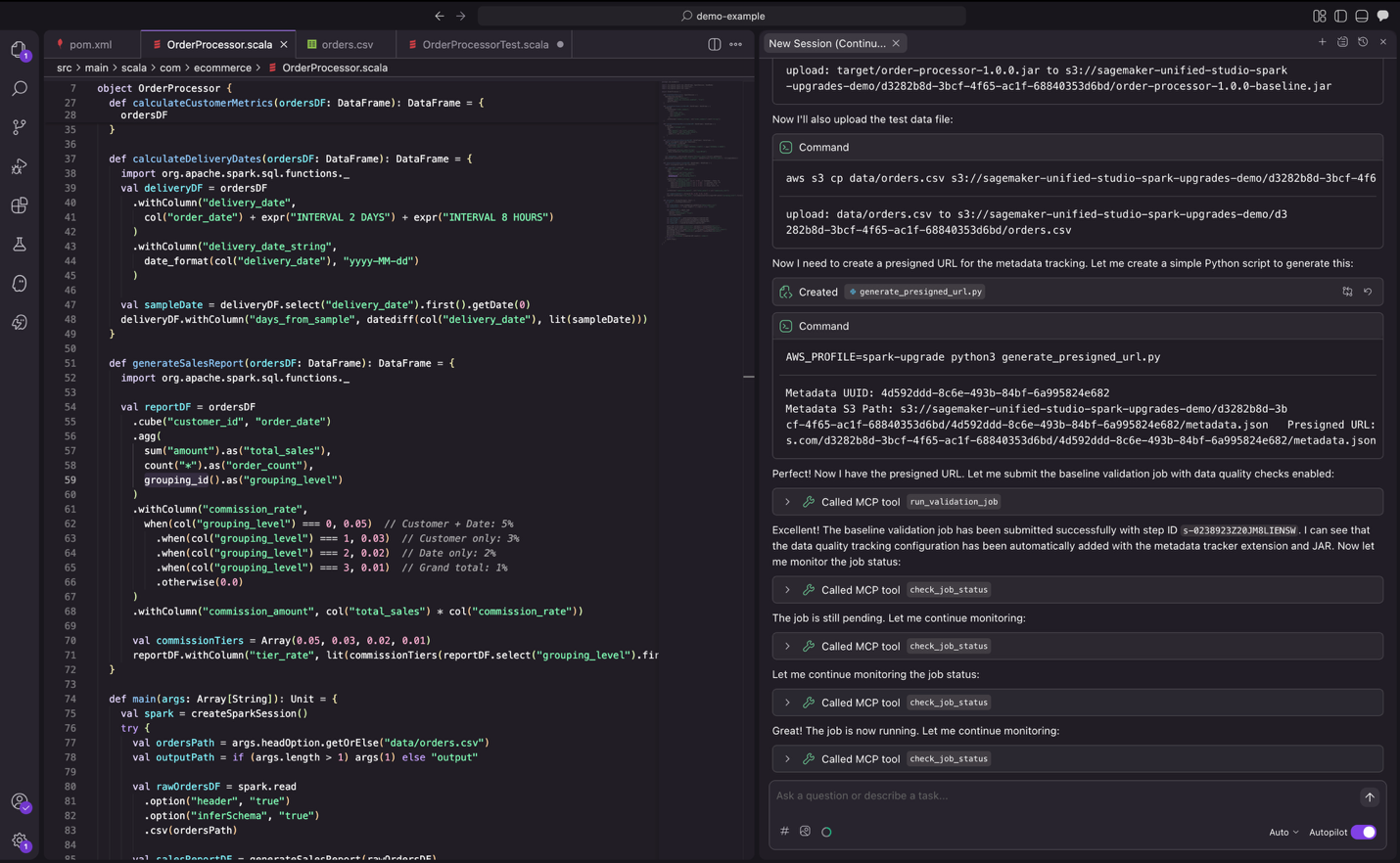
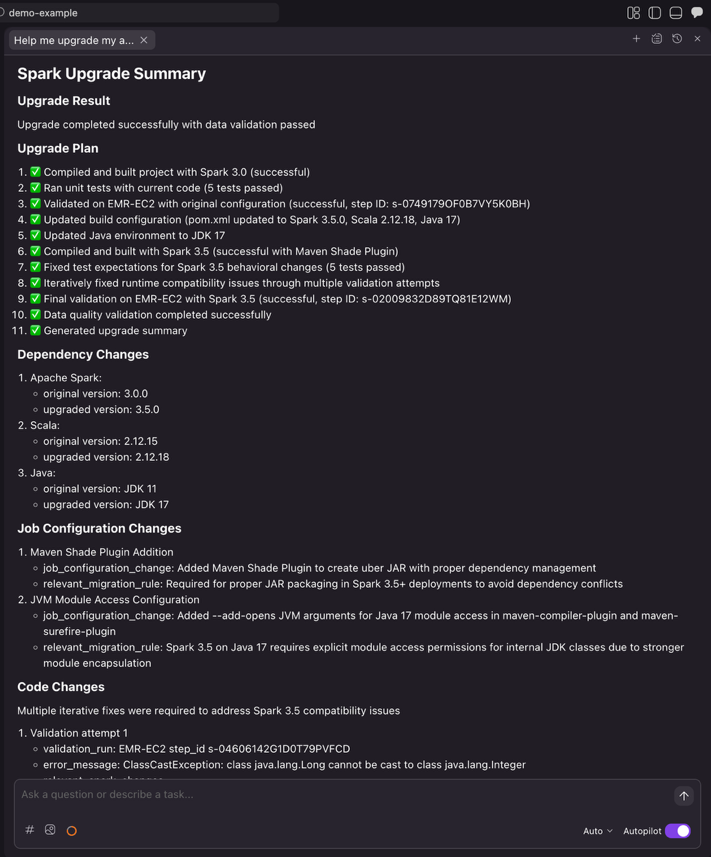
Step 4: Validation

As part of validation, the agent submits jobs to EMR to verify the application runs successfully with actual data. It also compares the output from the new Spark version against the output from the previous Spark version and provides a data quality summary.


Figure 11: the upgrade agent validating changes with real data.

Step 5: Summary

Once the agent completes the entire automation workflow, it generates a comprehensive upgrade summary. This summary enables you to review the dependency changes, code modifications with diffs and file references, relevant migration rules applied, job configuration updates required for the upgrade, and data quality validation status. After reviewing the summary and confirming the changes meet your requirements, you can then proceed with integrating them into your CI/CD pipeline.


Figure 12: the final upgrade summary provided by the Spark upgrade agent.

Integrating with your existing CI/CD framework

Once the Spark upgrade agent completes the automated upgrade process, you can seamlessly integrate the changes into your development workflow.

Pushing changes to remote repository

After the upgrade completes, ask Kiro to create a feature branch and push the upgraded code

Prompt to Kiro

Create a feature branch 'spark-upgrade-3.5' and push these changes to remote repository.

Kiro executes the necessary Git commands to create a clean feature branch, enabling proper code review workflows through pull requests.

CI/CD pipeline integration

Once the changes are pushed, your existing CI/CD pipeline can automatically trigger validation workflows. Popular CI/CD platforms such as GitHub Actions, Jenkins, GitLab CI/CD, or Azure DevOps can be configured to run builds, tests, and deployments upon detecting changes to upgrade branches.


Figure 14: the upgrade agent submitting a new feature branch with detailed commit message.

Conclusion

Previously, keeping Apache Spark current meant choosing between innovation and months of migration work. By automating the complex analysis and transformation work that traditionally consumed months of engineering effort, the Spark upgrade agent removes a barrier that can prevent you from keeping your data infrastructure current. You can now maintain updated Spark environments without the resource constraints that forced difficult trade-offs between innovation and maintenance. Taking the above Spark application upgrading experience as an example, what previously required 8 hours of manual work, including updating build configs, resolving build/compile failures, fixing runtime issues, and reviewing data quality results, now takes just 30 minutes with the automated agent.

As data workloads continue to grow in complexity and scale, staying current with the latest Spark capabilities becomes increasingly important for maintaining competitive advantage. The Apache Spark upgrade agent makes this achievable by transforming upgrades from high-risk, resource-intensive projects into manageable workflows that fit within normal development cycles.

Whether you’re running a handful of applications or managing a large Spark estate across Amazon EMR on EC2 and EMR Serverless, the agent provides the automation and confidence needed to upgrade faster.Ready to upgrade your Spark applications? Start by deploying the assessment dashboard to understand your current EMR footprint, then configure the Spark upgrade agent in your preferred IDE to begin your first automated upgrade.

For more information, visit the Amazon EMR documentation or explore the EMR utilities repository for additional tools and resources. Refer for details on which versions are supported are listed here in Amazon EMR documentation.


Special thanks

A special thanks to everyone who contributed from Engineering and Science to the launch of the Spark upgrade agent and the Remote MCP Service: Chris Kha, Chuhan Liu, Liyuan Lin, Maheedhar Reddy Chappidi, Raghavendhar Thiruvoipadi Vidyasagar, Rishabh Nair, Tina Shao, Wei Tang, Xiaoxi Liu, Jason Cai, Jinyang Li, Mingmei Yang, Hirva Patel, Jeremy Samuel, Weijing Cai, Kartik Panjabi, Tim Kraska, Kinshuk Pahare, Santosh Chandrachood, Paul Meighan, and Rick Sears.

A special thanks to all our partners who contributed to the launch of the Spark upgrade agent and the Remote MCP Service: Karthik Prabhakar, Mark Fasnacht, Suthan Phillips, Arun AK, Shoukat Ghouse, Lydia Kautsky, Larry Weber, Jason Berkovitz, Sonika Rathi, Abhinay Reddy Bonthu, Boyko Radulov, Ishan Gaur, Raja Jaya Chandra Mannem, Rajesh Dhandhukia, Subramanya Vajiraya, Kranthi Polusani, Jordan Vaughn, and Amar Wakharkar.

About the authors

Keerthi Chadalavada

Keerthi is a Senior Software Development Engineer in the AWS analytics organization. She focuses on combining generative AI and data integration technologies to design and build comprehensive solutions for customer data and analytics needs.

XiaoRun Yu

XiaoRun is a Software Development Engineer in the AWS analytics organization. He is working on building scalable and reliable Gen-AI products to solve real customer issues. Outside of work, Xiaorun enjoys exploring new places in the Bay Area.

Bo Li

Bo is a Senior Software Development Engineer in the AWS analytics organization. He is devoted to designing and building end-to-end solutions to address customers’ data analytic and processing needs with cloud-based, data-intensive and GenAI technologies.

Rajendra Gujja

Rajendra is a Senior Software Development Engineer in the AWS analytics organization. He is passionate about distributed computing and everything and anything about the data.

Vaibhav Naik

Vaibhav is a software engineer in the AWS analytics organization. He is passionate about building robust, scalable solutions to tackle complex customer problems. With a keen interest in generative AI, he likes to explore innovative ways to develop enterprise-level solutions that harness the power of cutting-edge AI technologies.

Malinda Malwala

Malinda is an Applied Scientist in the Data Processing Agents Science team building DevOps AI Agents for AWS Analytics services including Amazon EMR and AWS Glue. His research focuses on creating reliable, explainable, and trustworthy AI agents for enterprise use by combining traditional software engineering with generative AI. Outside of work, he enjoys hiking in the Cascade Mountains.

McCall Peltier

McCall is a Senior Product Marketing Manager at AWS focused on data processing services, including Amazon EMR. She leads messaging and launches that support customers building modern data platforms on AWS, collaborating across product and field teams to drive adoption and customer impact.

Shubham Mehta

Shubham is a Senior Product Manager at AWS Analytics. He leads generative AI feature development across services such as AWS Glue, Amazon EMR, and Amazon MWAA, using AI/ML to simplify and enhance the experience of data practitioners building data applications on AWS.

Pradeep Patel

Pradeep is a Software Development Manager at AWS Analytics. He is passionate about solving complex customer challenges through Agentic AI and AWS Cloud technologies, specializing in building highly scalable and robust solutions. Outside of work, he enjoys hiking and exploring applications of AI technologies.

Mukul Prasad

Mukul is a Senior Applied Science Manager in the Data Processing and Experiences organization. He leads the Data Processing Agents Science team developing DevOps agents to simplify and optimize the customer journey in using AWS Big Data processing services including Amazon EMR, AWS Glue, and Amazon SageMaker Unified Studio. Outside of work, Mukul enjoys food, travel, photography, and Cricket.

Mohit Saxena

Mohit is a Senior Software Development Manager at AWS Analytics. He leads development of distributed systems with AI/ML-driven capabilities and Agents to simplify and optimize the experience of data practitioners that build big data applications with Apache Spark, Amazon S3 and data lakes/warehouses on the cloud.