Providing Security Updates to Automobile Software

Post Syndicated from Bruce Schneier original https://www.schneier.com/blog/archives/2024/07/providing-security-updates-to-automobile-software.html

Auto manufacturers are just starting to realize the problems of supporting the software in older models:

Today’s phones are able to receive updates six to eight years after their purchase date. Samsung and Google provide Android OS updates and security updates for seven years. Apple halts servicing products seven years after they stop selling them.

That might not cut it in the auto world, where the average age of cars on US roads is only going up. A recent report found that cars and trucks just reached a new record average age of 12.6 years, up two months from 2023. That means the car software hitting the road today needs to work­—and maybe even improve—­beyond 2036. The average length of smartphone ownership is just 2.8 years.

I wrote about this in 2018, in Click Here to Kill Everything, talking about patching as a security mechanism:

This won’t work with more durable goods. We might buy a new DVR every 5 or 10 years, and a refrigerator every 25 years. We drive a car we buy today for a decade, sell it to someone else who drives it for another decade, and that person sells it to someone who ships it to a Third World country, where it’s resold yet again and driven for yet another decade or two. Go try to boot up a 1978 Commodore PET computer, or try to run that year’s VisiCalc, and see what happens; we simply don’t know how to maintain 40-year-old [consumer] software.

Consider a car company. It might sell a dozen different types of cars with a dozen different software builds each year. Even assuming that the software gets updated only every two years and the company supports the cars for only two decades, the company needs to maintain the capability to update 20 to 30 different software versions. (For a company like Bosch that supplies automotive parts for many different manufacturers, the number would be more like 200.) The expense and warehouse size for the test vehicles and associated equipment would be enormous. Alternatively, imagine if car companies announced that they would no longer support vehicles older than five, or ten, years. There would be serious environmental consequences.

We really don’t have a good solution here. Agile updates is how we maintain security in a world where new vulnerabilities arise all the time, and we don’t have the economic incentive to secure things properly from the start.

Камала Харис и трошенето на бариери

Post Syndicated from Светла Енчева original https://www.toest.bg/kamala-harris-i-trosheneto-na-barieri/

Камала Харис и трошенето на бариери

След оттеглянето на Джо Байдън от президентската надпревара в САЩ кандидатурата на Камала Харис изглежда най-вероятната му алтернатива. От една страна, като вицепрезидентка на Байдън се очаква тя да продължи водената от него политика без значителни промени. От друга страна, Харис внася нова енергия в кампанията. И има потенциала да привлече представители на групи, които не се чувстват представени от Байдън или на които той просто не е интересен.

Камала Харис и интерсекционалността

Въпреки че политически и ценностно Доналд Тръмп и Джо Байдън са различни вселени, в някои отношения те много си приличат. И двамата спадат към най-привилегированата група в обществото – богатите бели мъже. И двамата са на около 80-годишна възраст. И двамата са (както показва анализът на Йоанна Елми) представители на поколение, в което доминират бели мъже като тях. И което упорито отказва „да пусне кокала“ и да предаде щафетата на по-младите и по-разнообразните.

Камала Харис не само е с повече от 20 години по-млада от Байдън, ами е и жена, и то цветнокожа. Носителка е на още няколко характеристики, които я превръщат в подходяща илюстрация за едно феминистко понятие – интерсекционалност. Това означава съчетаването у една личност на различни идентичности, някои от които могат да бъдат дискриминационни признаци. У Камала Харис те са поне четири. Освен че е цветнокожа и жена, тя произхожда от семейство на имигранти. На всичко отгоре няма свои (биологични) деца. Преди 235 години бездетността не е била проблем за първия президент на САЩ Джордж Вашингтон, но… той е мъж.

Въпреки че родителите на Харис са били университетски преподаватели и това ѝ е дало добри биографични шансове – можела е да завърши право в университет, – те могат да бъдат определени като добри основно в сравнение с възможностите на други цветнокожи жени с имигрантски произход. Но са несравнимо по-ниски от тези, с които са разполагали бели мъже като Тръмп и Байдън. Още повече че Камала Харис е отгледана от майка си, след като родителите ѝ са се развели, когато е била на седем години, а университетът, в който е учила, е за чернокожи.

Интерсекционалността има и културни измерения. Когато през 2005-та 51-годишната тогава Ангела Меркел става първата жена, заела канцлерския пост в Германия, тя също няма деца. Макар да е от Християндемократическата партия (консервативна по европейските стандарти), липсата на деца не се оказва фатална за съпартийците ѝ, които я издигат на този пост. Нито за германците, които ѝ се доверяват да остане начело на страната им 16 години и я наричат – къде добродушно, къде иронично – Mutti (Мама).

Макар близо 20 години по-късно Демократическата партия в САЩ да е узряла за идеята да лансира за кандидат-президент жена, която не е раждала, за много американци (особено – републиканци) този факт от биографията ѝ е скандален. През 2021 г. Джей Ди Ванс, днешният кандидат за вицепрезидент на Тръмп, казва по адрес на Харис, че Щатите се управляват от „бездетни жени с котки“ и че тя няма „пряк принос“ за бъдещето на страната.

Автентично представителство

Когато Байдън защитава репродуктивните права и критикува расовата дискриминация, той си остава бял мъж. Камала Харис обаче може да говори по тези теми от първо лице и затова е автентична представителка както на цветнокожите американци, така и на жените, които отстояват правото сами да решават какво да правят с тялото си. Байдън трудно може да говори от името на по-младите поколения. 22 години по-младата от него Харис наближава 60-те, но е в активна работоспособна възраст и е част от различно поколение.

Според проучване на YouGov по поръчка на CBS, проведено дни преди официалното оттегляне на Байдън, Харис се представя с три процентни пункта по-добре от настоящия президент сред чернокожите гласоподаватели, с един пункт по-добре сред жените и с два пункта по-добре сред гласоподавателите под 45-годишна възраст. И това – без кампания за увеличаване на популярността ѝ.

Харис представлява и семействата, които по един или друг начин не отговарят на представата за „традиционно семейство“ – мъж и жена, сключили брак, и техните биологични деца. Семействата на ЛГБТИ+ хора са само малка част от непасващите на стереотипа. Към 2022 г. близо 40% от бебетата в САЩ са родени от жени, които не са сключили брак. Горе-долу такъв е и делът на браковете, които завършват с развод.

Затова не са изключение т.нар. пачуърк семейства – настоящи и бивши съпрузи и партньори по разнообразни начини си поделят отговорността за отглеждането на децата. Така представата за родителството престава да се свежда до биологичното възпроизводство. Иронично, и семейството на Доналд Тръмп, който има пет деца от трите си съпруги, си е пачуърк отвсякъде, но той е кандидатът на партията, защитаваща „традиционното семейство“.

Камала Харис няма предишен брак, но съпругът ѝ Дъглас Емхоф има. Той и бившата му съпруга Кърстин Емхоф си поделят грижите за децата, а тя и Харис са в много добри отношения. Кърстин Емхоф дори неотдавна излезе в защита на Харис по повод обвинението на Джей Ди Ванс, че няма деца.

„В продължение на повече от десет години, откакто Коул и Ела бяха тийнейджъри, Камала е съвместен родител с Дъг и мен“, казва за Харис тя. И допълва: „Тя е любяща, грижовна, пламенно закриляща и винаги присъстваща. Обичам нашето смесено семейство и съм благодарна, че тя е част от него.“ В защитата се включва и дъщерята Ела Емхоф: „Как може някой да е „бездетен“, ако има сладки дечица като Коул и мен? […] Обичам и тримата си родители.“

Появиха се и мемета като например ретроизображение на жена с котка с послание: „Долу лапите от котето ми“ (на английски pussy е разговорно название за вулва), подписано от „Бездетни жени с котки за Харис 2024“).

Камала Харис и трошенето на бариери

Като стана дума за Дъглас Емхоф, Камала Харис е автентична и в поне още едно отношение. Нейната популярност се дължи на собствената ѝ кариера, а не на факта, че е жена на мъжа си (по-скоро той е известен с това, че ѝ е съпруг). Без да игнорираме безспорните качества и постижения на Хилъри Клинтън и Мишел Обама, същото не може да се каже за тях. След брака си с Емхоф Харис запазва фамилията си – през 2014 г. името ѝ отдавна си тежи на мястото.

Злите езици говорят, че Харис дължи кариерата си на връзката, която е имала между 1994 и 1995 г. с тогавашния кмет на Сан Франциско Уили Браун. Тази теза обаче е израз на сексисткия стереотип, че една жена не може да постигне нищо без силен мъж зад гърба си. Кметският пост е върхът в кариерата на Браун, а Харис става главен прокурор на щата Калифорния, след това и втората чернокожа сенаторка и първата от южноазиатски произход в историята на САЩ. После се издига до първата жена вицепрезидент в страната.

Възможности за разширяване на подкрепата

До момента Камала Харис не е предложена официално за кандидат-президент на демократите, но вече има податки, че тя може да получи подкрепа и от представители на групи, от които не е част и до които Байдън по-трудно би могъл да намери път.

Такава група е поколението Z – част от неговите представители наесен за първи път ще гласуват за президент. Днешните американски младежи нямат спомени от времето, когато Харис е била главен прокурор на Калифорния, поради което немалко критични към властта млади хора, особено цветнокожи, са я възприемали като „лошото ченге“.

Британската поп изпълнителка Charlie XCX, публикува в социалната мрежа X лаконичен пост: „Kamala IS brat.“ Значението на думата brat в сленга на поколението Z може условно да се преведе като „трепач“.

Закачката е със заглавието на едноименния ѝ албум, който дава началото на движението brat summer, мотивиращо хората да се осмеляват да поемат рискове и да не се страхуват от неудобствата по пътя. Скоро след това официалният профил на кампанията на Харис в X се сдоби с „корица“ в зеления цвят от обложката на албума на Charlie XCX.

Друга група са „суифтитата“ – феновете на американската певица Тейлър Суифт, която има сериозно влияние – не само попкултурно, а и политическо. Тя се застъпва за правата на ЛГБТИ+ хората и е против ограничаването на правото на аборт, а преди президентските избори през 2020 г. агитира за Байдън и Харис. Вече има неформално движение „Суифтита за Харис“, чиито членове призовават идола си да се застъпи за кандидатурата на вицепрезидентката.

По-голямата част от ЛГБТИ+ хората гласува за демократите. По обясними причини – демократите им дават достъп до равни права, републиканците правят всичко по силите си да им ги отнемат. Според проучване от март т.г. близо 70% от ЛГБТИ+ хората предпочитат Байдън пред Тръмп. Камала Харис вече демонстрира, че оценява значимостта на ЛГБТИ+ общността, появявайки се на техен терен. Тя участва в популярно куиър шоу, в което призова да се гласува.

Харис има по-сериозни шансове да привлече по-умерените от защитниците на Палестина, отколкото имаше Байдън, който стои твърдо на страната на Израел. Тя вече направи ключово изказване в тази посока. От една страна, осъди терористичния акт на „Хамас“ и подчерта значението на евреите за САЩ и правото на Израел да се защити. Харис каза, че е споделила с израелския премиер Нетаняху „сериозното си притеснение от мащаба на човешкото страдание в Газа, включително и смъртта на твърде много цивилни“. Харис споменава и „потресаващата хуманитарна ситуация там“, като дава примери – глад, мъртви деца, хора, „понякога разселвани за втори, трети и четвърти път“.

В изказването си Камала Харис постепенно втвърдява тона: „Това трябва да спре.“ Тя заявява, че не може да се мълчи пред лицето на тази трагедия, и отново слага на масата предложението на Байдън за решение на кризата, което остана висящо. То включва спиране на огъня и две фази, като втората представлява пълно изтегляне на израелските сили от Газа и освобождаване на заложниците. В заключение Харис подчертава, че вижда и чува призоваващите за спиране на огъня.

Между възможното и действителното – мечтите

Разбира се, нищо не гарантира, че възможностите, с които Камала Харис разполага, ще се реализират в пълнота. Още по-малко, че ако бъде номинирана от демократите (което се очертава най-вероятният вариант), ще е способна да победи Тръмп. Сериозната ѝ кампания тепърва предстои. А като вицепрезидент тя носи и негативите от управлението на Байдън, както ѝ разочарованието на много американци от живота им, за чието влошено качество те винят именно това управление.

За разлика от Байдън обаче, който беше в най-добрия случай приемлива и компромисна фигура (докато престана да бъде и такава), личността на Камала Харис може да вдъхновява. Макар и не толкова, колкото бившият президент Барак Обама, за масовия възторг около когото дори се изобрети нова дума, която влезе в речниците – обамамания.

Перспективата цветнокожа жена без деца да стане президент на САЩ връща към живот идеята за онази либерална Америка, в която всеки трябва да има право да се бори за мечтата си. Независимо от пол, цвят на кожата или друг признак. Особено във време, в което се отнемат някои от основните постижения на феминизма, като например правото на аборт, и се създават различни препятствия пред ЛГБТИ+ хората. А ксенофобският и расисткият език изглеждат все по-легитимно.

Тази либерална мечта е антиподът на мечтата за една консервативна Америка, в която най-голямо значение има съхраняването на доминиращото мнозинство. А без жива мечта демократите трудно ще надвият тръмпизма. При цялата си проблематичност Доналд Тръмп е харизматичен. Той може да увлича и вдъхновява онази част от американското (че и европейското) население, която се припознава в посланията му.

„Трошенето на бариери не означава, че тръгваш от едната страна на бариерата и се оказваш от другата – казва в Харис в телевизионно интервю. – То включва и самото трошене. А когато трошиш неща, се порязваш. Може и да кървиш. Но си струва всеки път. Всеки път.“

Камала Харис и трошенето на бариери

Може би сте виждали този колаж. На горната снимка е Роза Паркс, която през 1955 г. дръзва да седне на място за бели в автобуса и да не се съобрази с нареждането на шофьора да отиде на местата за чернокожи. Долу вляво е 6-годишната Руби Бриджес, която през 1960 г. става първото афроамериканско дете, което тръгва на училище за бели. И накрая е Камала Харис, която крачи, а сянката ѝ е силуетът на малката Руби. Ако Харис победи в президентската надпревара, ще е успяла да строши бариерата на най-високия стъклен таван в САЩ – и за жените, и за цветнокожите.

VMware ESXi CVE-2024-37085 Targeted in Ransomware Campaigns

Post Syndicated from Rapid7 original https://blog.rapid7.com/2024/07/30/vmware-esxi-cve-2024-37085-targeted-in-ransomware-campaigns/

VMware ESXi CVE-2024-37085 Targeted in Ransomware Campaigns

On Monday, July 29, Microsoft published an extensive threat intelligence blog on observed exploitation of CVE-2024-37085, an Active Directory integration authentication bypass vulnerability affecting Broadcom VMware ESXi hypervisors. The vulnerability, according to Redmond, was identified in zero-day attacks and has evidently been used by at least half a dozen ransomware operations to obtain full administrative permissions on domain-joined ESXi hypervisors (which, in turn, enables attackers to encrypt downstream file systems). CVE-2024-37085 was one of multiple issues fixed in a June 25 advisory from Broadcom; it appears to have been exploited as a zero-day vulnerability.

Per Broadcom’s advisory, successful exploitation of CVE-2024-37085 allows attackers “with sufficient Active Directory (AD) permissions to gain full access to an ESXi host that was previously configured to use AD for user management by re-creating the configured AD group (‘ESXi Admins’ by default) after it was deleted from Active Directory.”

Notably, Broadcom’s advisory differs from Microsoft’s description, which says: “VMware ESXi hypervisors joined to an Active Directory domain consider any member of a domain group named "ESX Admins" to have full administrative access by default. This group is not a built-in group in Active Directory and does not exist by default. ESXi hypervisors do not validate that such a group exists when the server is joined to a domain and still treats any members of a group with this name with full administrative access, even if the group did not originally exist.”

Also of note: While the VMware advisory indicates ESXi Admins is the default AD group, the Microsoft observations quoted in this blog all indicate use of ESX Admins rather than ESXi Admins.

ESXi hypervisors have been a popular target for ransomware groups in years past. Notably, since ESXi should not be internet-exposed, we would not expect CVE-2024-37085 to be an initial access vector — adversaries will typically need to have already obtained a foothold in target environments to be able to exploit the vulnerability to escalate privileges.

Exploitation

Microsoft researchers discovered CVE-2024-37085 after it was used as a post-compromise attack technique used by a number of ransomware operators, including Storm-0506, Storm-1175, Octo Tempest, and Manatee Tempest. The attacks Microsoft observed included use of the following commands, which first create a group named “ESX Admins” in the domain and then adds a user to that group:

net group “ESX Admins” /domain /add
net group “ESX Admins” username /domain /add

Microsoft identified three methods for exploiting CVE-2024-37085, including the in-the-wild technique described above:

  • Adding the “ESX Admins” group to the domain and adding a user to it (observed in the wild): If the “ESX Admins” group doesn’t exist, any domain user with the ability to create a group can escalate privileges to full administrative access to domain-joined ESXi hypervisors by creating such a group, and then adding themselves, or other users in their control, to the group.
  • Renaming any group in the domain to “ESX Admins” and adding a user to the group or using an existing group member: This requires an attacker to have access to a user that has the capability to rename arbitrary groups (i.e., by renaming one of them “ESX Admins”). The threat actor can then add a user, or leverage a user that already exists in the group, to escalate privileges to full administrative access.
  • ESXi hypervisor privileges refresh: Even if the network administrator assigns any other group in the domain to be the management group for the ESXi hypervisor, the full administrative privileges to members of the “ESX Admins” group are not immediately removed and threat actors still could abuse it.

Mitigation guidance

The following products and versions are vulnerable to CVE-2024-37085:

The Broadcom advisory on CVE-2024-37085 links to a workaround that modifies several advanced ESXi settings to be more secure; the workaround page notes that for all versions of ESXi (prior to ESXi 8.0 U3), “several ESXi advanced settings have default values that are not secure by default. The AD group "ESX Admins" is automatically given the VIM Admin role when an ESXi host is joined to an Active Directory domain.”

Broadcom VMware ESXi and Cloud Foundation customers should update to a supported fixed version as soon as possible. Administrators who are unable to update should implement workaround recommendations in the interim. ESXi servers should never be exposed to the public internet. Microsoft has additional recommendations on mitigating risk of exploitation in their blog.

Rapid7 customers

InsightVM and Nexpose customers who use ESXi hypervisors within their environments can assess their exposure to CVE-2024-37085 for the 8.x version stream with a vulnerability check available since June 2024. Support for scanning 7.0 is expected to be available in the July 30 content release.

InsightIDR and Managed Detection and Response customers have existing detection coverage through Rapid7’s expansive library of detection rules. Rapid7 recommends installing the Insight Agent on all applicable hosts to ensure visibility into suspicious processes and proper detection coverage. Below is a non-exhaustive list of detections that are deployed and will alert on behavior related to this vulnerability:

  • Attacker Technique – Creation of "ESX Admins" Domain Group using Net.exe

AWS and Multicloud: Existing capabilities & continued enhancements

Post Syndicated from Jeff Barr original https://aws.amazon.com/blogs/aws/aws-and-multicloud-existing-capabilities-continued-enhancements/

When I speak to large-scale AWS customers about their challenges and concerns, the conversation often turns to the topic of multicloud. Whether by intent or by accident, these customers sometimes choose to make use of services from more than one cloud provider, sometimes in conjunction with applications or services that are still hosted on-premises. In some cases they made early, bottom-up choices at the team and division level, choosing cloud offerings from multiple vendors in the absence of a top-down mandate. In others, they acquired or merged with another organization and discovered a similar multi-vendor situation.

Regardless of the path, these customers tell me that they want to simplify and centralize their oversight and management of this diverse portfolio of cloud and on-premises resources. It is sometimes the case that the “multi” situation is time-bound, with a plan in place to ultimately consolidate operations in one place. It is also sometimes the case that the customer plans to retain their diverse portfolio.

AWS and multicloud
Our goal with AWS is to make you successful no matter what architectural choices you have made. In this post I want to outline our approach, share some capabilities that our customers have been using over the years, and provide you with an update on some of the more recent service announcements and content that we have created to give you guidance that will help you to succeed.

Our approach is to extend existing AWS operational and management capabilities to work in multicloud and hybrid environments. Because we extend existing capabilities, your investment in training, development, scripting, and runbooks is preserved, and actually becomes even more worthwhile since it applies to your other (non-AWS) resources. For example, you can use the same service (AWS Systems Manager) to patch and update Amazon Elastic Compute Cloud (Amazon EC2) instances, servers running on-premises, and servers provided by other cloud providers. Similarly, you can use Amazon CloudWatch to monitor applications, compute resources, and other cloud resources in all of those environments. These are two examples of how we are putting our approach into practice for you.

The AWS Solutions for Hybrid and Multicloud page contains additional examples of our extension-based approach to adding new capabilities, along some success stories from customers who have put the capabilities to use including Phillips 66 and Deutsche Börse.

Whether you choose to operate entirely on AWS or in multicloud and hybrid environments, one of the primary reasons to adopt AWS is the broad choice of services we offer, enabling you to innovate, build, deploy, and monitor your workloads. Just as we recently launched free data transfer out to the internet (DTO) when you want to move outside of AWS, we are committed to helping you be successful regardless of your approach.

Now that I have explained our approach and highlighted some of the principal multicloud service offerings, let’s take a look at a few of the newest multicloud and hybrid capabilities.

Multicloud launches
Since the beginning of 2023 we have launched eighteen new multicloud capabilities to existing AWS services, including 15 for data & analytics, 1 for security, and 2 for identity. Many of these launches add to the existing multicloud capabilities of the respective services:

AWS DataSync – This service transfers data between storage services. In addition to existing support for Google Cloud Storage, Azure Files, and Azure Blob Storage, we added support for five additional cloud service providers and storage services including Oracle Cloud Storage and DigitalOcean Spaces (full list). To learn more about this service, read What is AWS DataSync. To get started, I create a source location:

AWS Glue – This data integration service helps you to discover, prepare, and integrate all of your data at any scale. You can use it to connect to more than 80 different data sources, including cloud databases and analytics services. In October 2023, we introduced additional new connectors that allow you to move data bidirectionally between Amazon Simple Storage Service (Amazon S3), and either Azure Blob Storage or Azure Data Lake Storage (full list). We also launched six database connectors for AWS Glue for Apache Spark, including Teradata, SAP HANA, Azure SQL, Azure Cosmos DB, Vertica, and MongoDB (full list). To learn more about AWS Glue, read What is AWS Glue. I create a visual job flow to get started:

Amazon Athena – This serverless analytics service lets you use interactive SQL queries to analyze petabyte-scale data where it lives (more than 25 external data sources, including other cloud data stores), without copying or transforming it. Last year we added a new data source connector that allows you to query data in Google Cloud Storage. To learn more about Amazon Athena, read What is Amazon Athena.

Amazon AppFlow – You can take advantage of data and analytics in Google BigQuery using a connector available in Amazon AppFlow. To get started with Amazon AppFlow I create a flow and configure a data source:

Amazon Security Lake – This service helps you to achieve a more complete, organization-wide view of your security posture. It centralizes security data from your AWS environments, SaaS providers, on-premises environments, and cloud sources (Azure and GCP) into a purpose-built data lake. It became generally available last year, and now supports collection and analysis of security data from sources that support the Open Cybersecurity Schema Framework (OCSF) standard—more than 80 sources (full list).

AWS Secrets Manager – This service centrally manages secrets such as database credentials and API keys. Secrets are securely encrypted and can be centrally audited, with support for replication to support disaster recovery and multi-region applications. Last year we announced that you can Use AWS Secrets Manager to store and manage secrets in on-premises or multicloud workloads. To learn more, read What is AWS Secrets Manager.

AWS Identity and Access Management (IAM) – AWS IAM Identity Center now supports automated user provisioning from Google Workspace. The integration helps administrators simplify AWS access management across multiple accounts while maintaining familiar Google Workspace experiences for end users as they sign in.

Amazon CloudWatch – This service lets you query, visualize, and alarm on metrics of all sorts: application, AWS, on-premises, and multicloud. At re:Invent 2023 we added even more support for consolidation of hybrid, multicloud, and on-premises metrics. This new feature allows you to select and configure connectors that pull data from Amazon Managed Service for Prometheus, generic Prometheus, Amazon OpenSearch Service, Amazon RDS for MySQL, Amazon RDS for PostgreSQL, CSV files stored in Amazon Simple Storage Service (Amazon S3), and Microsoft Azure Monitor.

Multicloud content and guidance
Now that you know about some of our latest multicloud launches, let’s take a look at some of the blog posts and other content that my colleagues have created.

First, some blog posts:

Next, some of the most popular multicloud videos from AWS re:Invent 2023:

And finally, be sure to bookmark the AWS Solutions for Hybrid and Multicloud page.

We’re here to help
If you are running in a multicloud environment and are ready to simplify and centralize, be sure to reach out to your AWS Account Manager (AM) or Technical Account Manager (TAM). Both will be happy to help!

Jeff;

Secure communications for elections and political campaigns with AWS Wickr

Post Syndicated from Anne Grahn original https://aws.amazon.com/blogs/messaging-and-targeting/secure-communications-for-elections-and-political-campaigns-with-aws-wickr/

Access to security tools and resources that protect information, identities, applications, and devices is essential to the election process. Political parties are looking to strengthen their security strategies; however, campaign and election budgets typically leave little to spend on products and services.

To support the need for election campaign cybersecurity, Amazon Web Services (AWS) collaborates with Defending Digital Campaigns (DDC) to make more than 20 cybersecurity-related AWS services—including AWS Wickr—available at little to no cost to national party committees and federal candidate committees for US elections that are eligible in accordance with DDC and Federal Election Commission (FEC) criteria. This facilitates a wide range of security capabilities.

“Having a platform for secure and private communications is a core cybersecurity recommendation for every campaign. Wickr fills that need, and we greatly appreciate their partnership.” – Michael Kaiserpresident and CEO of DDC.

This post highlights how AWS Wickr is helping campaign and election teams protect sensitive communications.

What is Wickr?

Wickr is a security-first messaging and collaboration service with features designed to help you keep internal and external communications secure, private, and compliant. Wickr protects one-to-one and group messaging, voice and video calling, file sharing, screen sharing, and location sharing with end-to-end encryption, and provides administrative controls and data retention capabilities.

With Wickr, every message, call, and file is encrypted with unique keys on the sending device (your smartphone, for example), and remains secure in transit. Unauthorized parties cannot access communication content, because they don’t have the keys required to decrypt the data.

You can create Wickr rooms to allow team members to collaborate safely. Burn-on-read (BOR) and expiration timers can be set for each room or message. This allows you to automatically delete a message once it has been read by its recipients or destroy sent messages and files after a set amount of time (anywhere from 1 minute to 365 days). Federation and guest access features allow users to communicate securely with external stakeholders.

Wickr networks can be created through the AWS Management Console, and workflows can be automated with Wickr bots.

Campaign benefits

Campaign communications can be especially vulnerable to interception and theft. Political organizations on both sides of the aisle are looking for ways to securely send and receive sensitive information and files—and an increasing number of them are turning to Wickr.

The Democratic Senatorial Campaign Committee (DSCC), for example, previously relied on email as its primary internal and external communication channel. While best practices and cybersecurity education were prioritized, streamlining communications had become difficult, with email threads lasting well beyond their useful lifespan. Making matters worse, in sensitive situations, staff members lacked a reliable way to collaborate securely on ideas and courses of action.

The committee quickly deployed Wickr to its entire staff—and to consultants working on critical initiatives both internally and with candidates—across desktop and mobile devices to ensure that communications could only be accessed by intended recipients.

The security and administrative controls Wickr provides helped protect messages, calls, and files from threats and allowed the use of group emails that discuss sensitive and strategic information to be eliminated. Staff increased efficiency by creating Wickr rooms for rapid-response teams so that consultants, in collaboration with the organization’s staff, could plan and execute campaign responses without the risk of those communications being exposed to unauthorized parties. They also gained the ability to remotely wipe communications from lost or stolen devices.

“Wickr allows our Senate campaigns to conduct private and encrypted communications, which is critical to them increasing their security posture.” – Ryan Borkenhagen, director of information security and technology for the Democratic Senatorial Campaign Committee (DSCC)

In addition to political organizations, public sector customers such as the U.S. Army Telemedicine & Advanced Technology Research Center (TATRC) and Air Force Special Operations Command (AFSOC), nonprofit organizations such as Operation Recovery, and a variety of private-sector customers use Wickr for secure communication use cases.

Wickr is Federal Risk and Authorization Management Program (FedRAMP) authorized at the Moderate impact level in the AWS US East (N. Virginia) Region, and FedRamp High authorized in the AWS GovCloud (US-West) Region. Wickr is also authorized for Department of Defense Cloud Computing Security Requirements Guide Impact Level 4 and 5 (DoD CC SRG IL4 and IL5) in the AWS GovCloud (US-West) Region, and meets compliance programs and standards such as Health Insurance Portability and Accountability Act (HIPAA) eligibility, International Organization for Standardization (ISO) 27001, and System and Organization Controls (SOC) 1,2, and 3.

Get started

If your campaign or committee is interested in using AWS services such as Wickr, click here to enroll in AWS security services for federal political campaigns. To learn more about how AWS can support election campaign cybersecurity, visit the AWS Public Sector Blog. For more information about Wickr, visit Amazon.com or email [email protected].

About the authors

Randy Brumfield
Randy is a Principle Business Development lead for AWS Wickr and has been the Wickr organization since 2017. Randy works closely with the Public Sector community including DoD, fed-Civ and Mission Partners. Prior to joining AWS, Randy spent close to two and a half decades in Silicon Valley across several start-ups, networking companies, and system integrators in various corporate development, product management, and operations roles. Randy currently resides in San Jose, California.
Anne Grahn
Anne is a Senior Worldwide Security GTM Specialist at AWS, based in Chicago. She has 14 years of experience in the security industry, and focuses on effectively communicating cybersecurity risk. She maintains a Certified Information Systems Security Professional (CISSP) certification.


AWS revalidates its AAA Pinakes rating for Spanish financial entities

Post Syndicated from Daniel Fuertes original https://aws.amazon.com/blogs/security/aws-revalidates-its-aaa-pinakes-rating-for-spanish-financial-entities/

Amazon Web Services (AWS) is pleased to announce that we have revalidated our AAA rating for the Pinakes qualification system. The scope of this requalification covers 171 services in 31 global AWS Regions.

Pinakes is a security rating framework developed by the Spanish banking association Centro de Cooperación Interbancaria (CCI) to facilitate the management and monitoring of the security posture of service providers that work with Spanish financial entities.

Pinakes assesses the cybersecurity proficiency of service providers through 1,315 requirements distributed across four categories (confidentiality, integrity, availability of information, and general) and 14 domains:

  • Information security management program
  • Facilities security
  • Third-party management
  • Normative compliance
  • Network controls
  • Access controls
  • Incident management
  • Encryption
  • Secure development
  • Monitoring
  • Malware protection
  • Resilience
  • Systems operation
  • Staff safety

Each requirement is associated to a rating level (A+, A, B, C, D), ranging from the highest A+ (the provider has implemented the most diligent measures and controls for cybersecurity management) to the lowest D (minimum security requirements are met).

The qualification process involves an independent third-party auditor verifying the implementation status for each section.

AWS has renewed its A ratings for confidentiality, integrity, and availability, culminating in an overall security rating of AAA. This recognition highlights AWS solid cybersecurity controls and commitment to safeguarding the interests of our Spanish financial customers.

The full control matrix will be published on AWS Artifact upon request. Pinakes participants who are AWS customers can contact their AWS account manager to request access to the matrix.

As always, we value your feedback and questions. Reach out to the AWS Compliance team through the Contact Us page. To learn more about our other compliance and security programs, see AWS Compliance Programs.

 
If you have feedback about this post, please submit them in the Comments section below.

Daniel Fuertes

Daniel Fuertes
Daniel is a Security Audit Program Manager at AWS, based in Madrid, Spain. Daniel leads multiple security audits, attestations, and certification programs in Spain and other EMEA countries. Daniel has ten years of experience in security assurance and compliance, including previous experience as an auditor for the PCI DSS security framework. He holds the CISSP, PCIP, and ISO 27001 Lead Auditor certifications.

Java 21 Virtual Threads – Dude, Where’s My Lock?

Post Syndicated from Netflix Technology Blog original https://netflixtechblog.com/java-21-virtual-threads-dude-wheres-my-lock-3052540e231d

Getting real with virtual threads

By Vadim Filanovsky, Mike Huang, Danny Thomas and Martin Chalupa

Intro

Netflix has an extensive history of using Java as our primary programming language across our vast fleet of microservices. As we pick up newer versions of Java, our JVM Ecosystem team seeks out new language features that can improve the ergonomics and performance of our systems. In a recent article, we detailed how our workloads benefited from switching to generational ZGC as our default garbage collector when we migrated to Java 21. Virtual threads is another feature we are excited to adopt as part of this migration.

For those new to virtual threads, they are described as “lightweight threads that dramatically reduce the effort of writing, maintaining, and observing high-throughput concurrent applications.” Their power comes from their ability to be suspended and resumed automatically via continuations when blocking operations occur, thus freeing the underlying operating system threads to be reused for other operations. Leveraging virtual threads can unlock higher performance when utilized in the appropriate context.

In this article we discuss one of the peculiar cases that we encountered along our path to deploying virtual threads on Java 21.

The problem

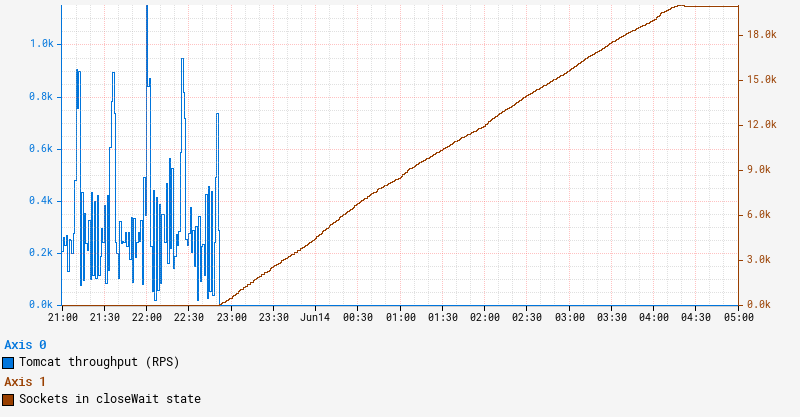
Netflix engineers raised several independent reports of intermittent timeouts and hung instances to the Performance Engineering and JVM Ecosystem teams. Upon closer examination, we noticed a set of common traits and symptoms. In all cases, the apps affected ran on Java 21 with SpringBoot 3 and embedded Tomcat serving traffic on REST endpoints. The instances that experienced the issue simply stopped serving traffic even though the JVM on those instances remained up and running. One clear symptom characterizing the onset of this issue is a persistent increase in the number of sockets in closeWait state as illustrated by the graph below:

Collected diagnostics

Sockets remaining in closeWait state indicate that the remote peer closed the socket, but it was never closed on the local instance, presumably because the application failed to do so. This can often indicate that the application is hanging in an abnormal state, in which case application thread dumps may reveal additional insight.

In order to troubleshoot this issue, we first leveraged our alerts system to catch an instance in this state. Since we periodically collect and persist thread dumps for all JVM workloads, we can often retroactively piece together the behavior by examining these thread dumps from an instance. However, we were surprised to find that all our thread dumps show a perfectly idle JVM with no clear activity. Reviewing recent changes revealed that these impacted services enabled virtual threads, and we knew that virtual thread call stacks do not show up in jstack-generated thread dumps. To obtain a more complete thread dump containing the state of the virtual threads, we used the “jcmd Thread.dump_to_file” command instead. As a last-ditch effort to introspect the state of JVM, we also collected a heap dump from the instance.

Analysis

Thread dumps revealed thousands of “blank” virtual threads:

#119821 "" virtual

#119820 "" virtual

#119823 "" virtual

#120847 "" virtual

#119822 "" virtual
...

These are the VTs (virtual threads) for which a thread object is created, but has not started running, and as such, has no stack trace. In fact, there were approximately the same number of blank VTs as the number of sockets in closeWait state. To make sense of what we were seeing, we need to first understand how VTs operate.

A virtual thread is not mapped 1:1 to a dedicated OS-level thread. Rather, we can think of it as a task that is scheduled to a fork-join thread pool. When a virtual thread enters a blocking call, like waiting for a Future, it relinquishes the OS thread it occupies and simply remains in memory until it is ready to resume. In the meantime, the OS thread can be reassigned to execute other VTs in the same fork-join pool. This allows us to multiplex a lot of VTs to just a handful of underlying OS threads. In JVM terminology, the underlying OS thread is referred to as the “carrier thread” to which a virtual thread can be “mounted” while it executes and “unmounted” while it waits. A great in-depth description of virtual thread is available in JEP 444.

In our environment, we utilize a blocking model for Tomcat, which in effect holds a worker thread for the lifespan of a request. By enabling virtual threads, Tomcat switches to virtual execution. Each incoming request creates a new virtual thread that is simply scheduled as a task on a Virtual Thread Executor. We can see Tomcat creates a VirtualThreadExecutor here.

Tying this information back to our problem, the symptoms correspond to a state when Tomcat keeps creating a new web worker VT for each incoming request, but there are no available OS threads to mount them onto.

Why is Tomcat stuck?

What happened to our OS threads and what are they busy with? As described here, a VT will be pinned to the underlying OS thread if it performs a blocking operation while inside a synchronized block or method. This is exactly what is happening here. Here is a relevant snippet from a thread dump obtained from the stuck instance:

#119515 "" virtual
java.base/jdk.internal.misc.Unsafe.park(Native Method)
java.base/java.lang.VirtualThread.parkOnCarrierThread(VirtualThread.java:661)
java.base/java.lang.VirtualThread.park(VirtualThread.java:593)
java.base/java.lang.System$2.parkVirtualThread(System.java:2643)
java.base/jdk.internal.misc.VirtualThreads.park(VirtualThreads.java:54)
java.base/java.util.concurrent.locks.LockSupport.park(LockSupport.java:219)
java.base/java.util.concurrent.locks.AbstractQueuedSynchronizer.acquire(AbstractQueuedSynchronizer.java:754)
java.base/java.util.concurrent.locks.AbstractQueuedSynchronizer.acquire(AbstractQueuedSynchronizer.java:990)
java.base/java.util.concurrent.locks.ReentrantLock$Sync.lock(ReentrantLock.java:153)
java.base/java.util.concurrent.locks.ReentrantLock.lock(ReentrantLock.java:322)
zipkin2.reporter.internal.CountBoundedQueue.offer(CountBoundedQueue.java:54)
zipkin2.reporter.internal.AsyncReporter$BoundedAsyncReporter.report(AsyncReporter.java:230)
zipkin2.reporter.brave.AsyncZipkinSpanHandler.end(AsyncZipkinSpanHandler.java:214)
brave.internal.handler.NoopAwareSpanHandler$CompositeSpanHandler.end(NoopAwareSpanHandler.java:98)
brave.internal.handler.NoopAwareSpanHandler.end(NoopAwareSpanHandler.java:48)
brave.internal.recorder.PendingSpans.finish(PendingSpans.java:116)
brave.RealSpan.finish(RealSpan.java:134)
brave.RealSpan.finish(RealSpan.java:129)
io.micrometer.tracing.brave.bridge.BraveSpan.end(BraveSpan.java:117)
io.micrometer.tracing.annotation.AbstractMethodInvocationProcessor.after(AbstractMethodInvocationProcessor.java:67)
io.micrometer.tracing.annotation.ImperativeMethodInvocationProcessor.proceedUnderSynchronousSpan(ImperativeMethodInvocationProcessor.java:98)
io.micrometer.tracing.annotation.ImperativeMethodInvocationProcessor.process(ImperativeMethodInvocationProcessor.java:73)
io.micrometer.tracing.annotation.SpanAspect.newSpanMethod(SpanAspect.java:59)
java.base/jdk.internal.reflect.DirectMethodHandleAccessor.invoke(DirectMethodHandleAccessor.java:103)
java.base/java.lang.reflect.Method.invoke(Method.java:580)
org.springframework.aop.aspectj.AbstractAspectJAdvice.invokeAdviceMethodWithGivenArgs(AbstractAspectJAdvice.java:637)
...

In this stack trace, we enter the synchronization in brave.RealSpan.finish(RealSpan.java:134). This virtual thread is effectively pinned — it is mounted to an actual OS thread even while it waits to acquire a reentrant lock. There are 3 VTs in this exact state and another VT identified as “<redacted> @DefaultExecutor – 46542” that also follows the same code path. These 4 virtual threads are pinned while waiting to acquire a lock. Because the app is deployed on an instance with 4 vCPUs, the fork-join pool that underpins VT execution also contains 4 OS threads. Now that we have exhausted all of them, no other virtual thread can make any progress. This explains why Tomcat stopped processing the requests and why the number of sockets in closeWait state keeps climbing. Indeed, Tomcat accepts a connection on a socket, creates a request along with a virtual thread, and passes this request/thread to the executor for processing. However, the newly created VT cannot be scheduled because all of the OS threads in the fork-join pool are pinned and never released. So these newly created VTs are stuck in the queue, while still holding the socket.

Who has the lock?

Now that we know VTs are waiting to acquire a lock, the next question is: Who holds the lock? Answering this question is key to understanding what triggered this condition in the first place. Usually a thread dump indicates who holds the lock with either “- locked <0x…> (at …)” or “Locked ownable synchronizers,” but neither of these show up in our thread dumps. As a matter of fact, no locking/parking/waiting information is included in the jcmd-generated thread dumps. This is a limitation in Java 21 and will be addressed in the future releases. Carefully combing through the thread dump reveals that there are a total of 6 threads contending for the same ReentrantLock and associated Condition. Four of these six threads are detailed in the previous section. Here is another thread:

#119516 "" virtual
java.base/java.lang.VirtualThread.park(VirtualThread.java:582)
java.base/java.lang.System$2.parkVirtualThread(System.java:2643)
java.base/jdk.internal.misc.VirtualThreads.park(VirtualThreads.java:54)
java.base/java.util.concurrent.locks.LockSupport.park(LockSupport.java:219)
java.base/java.util.concurrent.locks.AbstractQueuedSynchronizer.acquire(AbstractQueuedSynchronizer.java:754)
java.base/java.util.concurrent.locks.AbstractQueuedSynchronizer.acquire(AbstractQueuedSynchronizer.java:990)
java.base/java.util.concurrent.locks.ReentrantLock$Sync.lock(ReentrantLock.java:153)
java.base/java.util.concurrent.locks.ReentrantLock.lock(ReentrantLock.java:322)
zipkin2.reporter.internal.CountBoundedQueue.offer(CountBoundedQueue.java:54)
zipkin2.reporter.internal.AsyncReporter$BoundedAsyncReporter.report(AsyncReporter.java:230)
zipkin2.reporter.brave.AsyncZipkinSpanHandler.end(AsyncZipkinSpanHandler.java:214)
brave.internal.handler.NoopAwareSpanHandler$CompositeSpanHandler.end(NoopAwareSpanHandler.java:98)
brave.internal.handler.NoopAwareSpanHandler.end(NoopAwareSpanHandler.java:48)
brave.internal.recorder.PendingSpans.finish(PendingSpans.java:116)
brave.RealScopedSpan.finish(RealScopedSpan.java:64)
...

Note that while this thread seemingly goes through the same code path for finishing a span, it does not go through a synchronized block. Finally here is the 6th thread:

#107 "AsyncReporter <redacted>"
java.base/jdk.internal.misc.Unsafe.park(Native Method)
java.base/java.util.concurrent.locks.LockSupport.park(LockSupport.java:221)
java.base/java.util.concurrent.locks.AbstractQueuedSynchronizer.acquire(AbstractQueuedSynchronizer.java:754)
java.base/java.util.concurrent.locks.AbstractQueuedSynchronizer$ConditionObject.awaitNanos(AbstractQueuedSynchronizer.java:1761)
zipkin2.reporter.internal.CountBoundedQueue.drainTo(CountBoundedQueue.java:81)
zipkin2.reporter.internal.AsyncReporter$BoundedAsyncReporter.flush(AsyncReporter.java:241)
zipkin2.reporter.internal.AsyncReporter$Flusher.run(AsyncReporter.java:352)
java.base/java.lang.Thread.run(Thread.java:1583)

This is actually a normal platform thread, not a virtual thread. Paying particular attention to the line numbers in this stack trace, it is peculiar that the thread seems to be blocked within the internal acquire() method after completing the wait. In other words, this calling thread owned the lock upon entering awaitNanos(). We know the lock was explicitly acquired here. However, by the time the wait completed, it could not reacquire the lock. Summarizing our thread dump analysis:

There are 5 virtual threads and 1 regular thread waiting for the lock. Out of those 5 VTs, 4 of them are pinned to the OS threads in the fork-join pool. There’s still no information on who owns the lock. As there’s nothing more we can glean from the thread dump, our next logical step is to peek into the heap dump and introspect the state of the lock.

Inspecting the lock

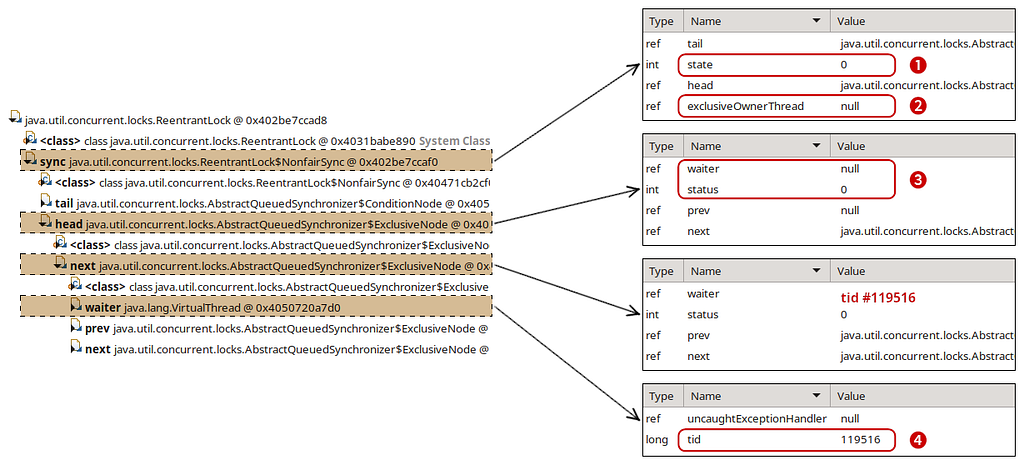
Finding the lock in the heap dump was relatively straightforward. Using the excellent Eclipse MAT tool, we examined the objects on the stack of the AsyncReporter non-virtual thread to identify the lock object. Reasoning about the current state of the lock was perhaps the trickiest part of our investigation. Most of the relevant code can be found in the AbstractQueuedSynchronizer.java. While we don’t claim to fully understand the inner workings of it, we reverse-engineered enough of it to match against what we see in the heap dump. This diagram illustrates our findings:

First off, the exclusiveOwnerThread field is null (2), signifying that no one owns the lock. We have an “empty” ExclusiveNode (3) at the head of the list (waiter is null and status is cleared) followed by another ExclusiveNode with waiter pointing to one of the virtual threads contending for the lock — #119516 (4). The only place we found that clears the exclusiveOwnerThread field is within the ReentrantLock.Sync.tryRelease() method (source link). There we also set state = 0 matching the state that we see in the heap dump (1).

With this in mind, we traced the code path to release() the lock. After successfully calling tryRelease(), the lock-holding thread attempts to signal the next waiter in the list. At this point, the lock-holding thread is still at the head of the list, even though ownership of the lock is effectively released. The next node in the list points to the thread that is about to acquire the lock.

To understand how this signaling works, let’s look at the lock acquire path in the AbstractQueuedSynchronizer.acquire() method. Grossly oversimplifying, it’s an infinite loop, where threads attempt to acquire the lock and then park if the attempt was unsuccessful:

while(true) {
if (tryAcquire()) {
return; // lock acquired
}
park();
}

When the lock-holding thread releases the lock and signals to unpark the next waiter thread, the unparked thread iterates through this loop again, giving it another opportunity to acquire the lock. Indeed, our thread dump indicates that all of our waiter threads are parked on line 754. Once unparked, the thread that managed to acquire the lock should end up in this code block, effectively resetting the head of the list and clearing the reference to the waiter.

To restate this more concisely, the lock-owning thread is referenced by the head node of the list. Releasing the lock notifies the next node in the list while acquiring the lock resets the head of the list to the current node. This means that what we see in the heap dump reflects the state when one thread has already released the lock but the next thread has yet to acquire it. It’s a weird in-between state that should be transient, but our JVM is stuck here. We know thread #119516 was notified and is about to acquire the lock because of the ExclusiveNode state we identified at the head of the list. However, thread dumps show that thread #119516 continues to wait, just like other threads contending for the same lock. How can we reconcile what we see between the thread and heap dumps?

The lock with no place to run

Knowing that thread #119516 was actually notified, we went back to the thread dump to re-examine the state of the threads. Recall that we have 6 total threads waiting for the lock with 4 of the virtual threads each pinned to an OS thread. These 4 will not yield their OS thread until they acquire the lock and proceed out of the synchronized block. #107 “AsyncReporter <redacted>” is a regular platform thread, so nothing should prevent it from proceeding if it acquires the lock. This leaves us with the last thread: #119516. It is a VT, but it is not pinned to an OS thread. Even if it’s notified to be unparked, it cannot proceed because there are no more OS threads left in the fork-join pool to schedule it onto. That’s exactly what happens here — although #119516 is signaled to unpark itself, it cannot leave the parked state because the fork-join pool is occupied by the 4 other VTs waiting to acquire the same lock. None of those pinned VTs can proceed until they acquire the lock. It’s a variation of the classic deadlock problem, but instead of 2 locks we have one lock and a semaphore with 4 permits as represented by the fork-join pool.

Now that we know exactly what happened, it was easy to come up with a reproducible test case.

Conclusion

Virtual threads are expected to improve performance by reducing overhead related to thread creation and context switching. Despite some sharp edges as of Java 21, virtual threads largely deliver on their promise. In our quest for more performant Java applications, we see further virtual thread adoption as a key towards unlocking that goal. We look forward to Java 23 and beyond, which brings a wealth of upgrades and hopefully addresses the integration between virtual threads and locking primitives.

This exploration highlights just one type of issue that performance engineers solve at Netflix. We hope this glimpse into our problem-solving approach proves valuable to others in their future investigations.


Java 21 Virtual Threads – Dude, Where’s My Lock? was originally published in Netflix TechBlog on Medium, where people are continuing the conversation by highlighting and responding to this story.

AWS Weekly Roundup: Llama 3.1, Mistral Large 2, AWS Step Functions, AWS Certifications update, and more (July 29, 2024)

Post Syndicated from Antje Barth original https://aws.amazon.com/blogs/aws/aws-weekly-roundup-llama-3-1-mistral-large-2-aws-step-functions-aws-certifications-update-and-more-july-29-2024/

I’m always amazed by the talent and passion of our Amazon Web Services (AWS) community members, especially in their efforts to increase diversity, equity, and inclusion in the tech community.

Last week, I had the honor of speaking at the AWS User Group Women Bay Area meetup, led by Natalie. This group is dedicated to empowering and connecting women, providing a supportive environment to explore cloud computing. In Latin America, we recently had the privilege of supporting 12 women-led AWS User Groups from 10 countries in organizing two regional AWSome Women Community Summits, reaching over 800 women builders. There’s still more work to be done, but initiatives like these highlight the power of community in fostering an inclusive and diverse tech environment.

Women-Led AWS Community Events

Now, let’s turn our attention to other exciting news in the AWS universe from last week.

Last week’s launches
Here are some launches that got my attention:

Meta Llama 3.1 models – The Llama 3.1 models are Meta’s most advanced and capable models to date. The Llama 3.1 models are a collection of 8B, 70B, and 405B parameter size models that demonstrate state-of-the-art performance on a wide range of industry benchmarks and offer new capabilities for your generative artificial intelligence (generative AI) applications. Llama 3.1 models are now available in Amazon Bedrock (see Announcing Llama 3.1 405B, 70B, and 8B models from Meta in Amazon Bedrock) and Amazon SageMaker JumpStart (see Llama 3.1 models are now available in Amazon SageMaker JumpStart).

My colleagues Tiffany and Mike explored Llama 3.1 in last week’s episode of the weekly Build On Generative AI live stream. You can watch the full episode here!

BuildOn Generative AI Llama 3.1 launch

Mistral Large 2 model – Mistral Large 2 is the newest version of Mistral Large, and according to Mistral AI, it offers significant improvements across multilingual capabilities, math, reasoning, coding, and much more. Mistral AI’s Mistral Large 2 foundation model (FM) is now available in Amazon Bedrock. See Mistral Large 2 is now available in Amazon Bedrock for all the details. You can find code examples in the Mistral-on-AWS repo and the Amazon Bedrock User Guide.

Faster auto scaling for generative AI models – This new capability in Amazon SageMaker inference can help you reduce the time it takes for your generative AI models to scale automatically. You can now use sub-minute metrics and significantly reduce overall scaling latency for generative AI models. With this enhancement, you can improve the responsiveness of your generative AI applications as demand fluctuates. For more details, check out Amazon SageMaker inference launches faster auto scaling for generative AI models.

AWS Step Functions now supports customer managed keys – AWS Step Functions now supports the use of customer managed keys with AWS Key Management Service (AWS KMS) to encrypt Step Functions state machine and activity resources. This new capability lets you encrypt your workflow definitions and execution data using your own encryption keys. Visit the AWS Step Functions documentation and the AWS KMS documentation to learn more.

For a full list of AWS announcements, be sure to keep an eye on the What’s New at AWS page.

Other AWS news
Here are some additional news items and posts that you might find interesting:

AWS Certification: Addition of new exam question types – If you are planning to take the AWS Certified AI Practitioner or AWS Certified Machine Learning Engineer – Associate exam anytime soon, check out AWS Certification: Addition of new exam question types. These exams will be the first to include three new question types: ordering, matching, and case study. The post shares insights about the new question types and offers information to help you prepare.

New ordering question type in AWS Certifications

Amazon’s exabyte-scale migration from Apache Spark to Ray on Amazon EC2 – The Business Data Technologies (BDT) team at Amazon Retail has just flipped the switch to start quietly moving management of some of their largest production business intelligence (BI) datasets from Apache Spark over to Ray to help reduce both data processing time and cost. They’ve also contributed a critical component of their work (The Flash Compactor) back to Ray’s open source DeltaCAT project. Find the full story at Amazon’s Exabyte-Scale Migration from Apache Spark to Ray on Amazon EC2.

Running compaction jobs with Ray on Amazon EC2

From community.aws
Here are my top three personal favorites posts from community.aws:

Upcoming AWS events
Check your calendars and sign up for these AWS events:

AWS SummitsAWS Summits – The 2024 AWS Summit season is almost wrapping up! Join free online and in-person events that bring the cloud computing community together to connect, collaborate, and learn about AWS. Register in your nearest city: Mexico City (August 7), São Paulo (August 15), and Jakarta (September 5).

AWS Community DaysAWS Community Days – Join community-led conferences that feature technical discussions, workshops, and hands-on labs led by expert AWS users and industry leaders from around the world: New Zealand (August 15), Colombia (August 24), New York (August 28), Belfast (September 6), and Bay Area (September 13).

You can browse all upcoming in-person and virtual events.

That’s all for this week. Check back next Monday for another Weekly Roundup!

— Antje

This post is part of our Weekly Roundup series. Check back each week for a quick roundup of interesting news and announcements from AWS!

Get started with the new Amazon DataZone enhancements for Amazon Redshift

Post Syndicated from Carmen Manzulli original https://aws.amazon.com/blogs/big-data/get-started-with-the-new-amazon-datazone-enhancements-for-amazon-redshift/

In today’s data-driven landscape, organizations are seeking ways to streamline their data management processes and unlock the full potential of their data assets, while controlling access and enforcing governance. That’s why we introduced Amazon DataZone.

Amazon DataZone is a powerful data management service that empowers data engineers, data scientists, product managers, analysts, and business users to seamlessly catalog, discover, analyze, and govern data across organizational boundaries, AWS accounts, data lakes, and data warehouses.

On March 21, 2024, Amazon DataZone introduced several exciting enhancements to its Amazon Redshift integration that simplify the process of publishing and subscribing to data warehouse assets like tables and views, while enabling Amazon Redshift customers to take advantage of the data management and governance capabilities or Amazon DataZone.

These updates empower the experience for both data users and administrators.

Data producers and consumers can now quickly create data warehouse environments using preconfigured credentials and connection parameters provided by their Amazon DataZone administrators.

Additionally, these enhancements grant administrators greater control over who can access and use the resources within their AWS accounts and Redshift clusters, and for what purpose.

As an administrator, you can now create parameter sets on top of DefaultDataWarehouseBlueprint by providing parameters such as cluster, database, and an AWS secret. You can use these parameter sets to create environment profiles and authorize Amazon DataZone projects to use these environment profiles for creating environments.

In turn, data producers and data consumers can now select an environment profile to create environments without having to provide the parameters themselves, saving time and reducing the risk of issues.

In this post, we explain how you can use these enhancements to the Amazon Redshift integration to publish your Redshift tables to the Amazon DataZone data catalog, and enable users across the organization to discover and access them in a self-service fashion. We present a sample end-to-end customer workflow that covers the core functionalities of Amazon DataZone, and include a step-by-step guide of how you can implement this workflow.

The same workflow is available as video demonstration on the Amazon DataZone official YouTube channel.

Solution overview

To get started with the new Amazon Redshift integration enhancements, consider the following scenario:

  • A sales team acts as the data producer, owning and publishing product sales data (a single table in a Redshift cluster called catalog_sales)
  • A marketing team acts as the data consumer, needing access to the sales data in order to analyze it and build product adoption campaigns

At a high level, the steps we walk you through in the following sections include tasks for the Amazon DataZone administrator, Sales team, and Marketing team.

Prerequisites

For the workflow described in this post, we assume a single AWS account, a single AWS Region, and a single AWS Identity and Access Management (IAM) user, who will act as Amazon DataZone administrator, Sales team (producer), and Marketing team (consumer).

To follow along, you need an AWS account. If you don’t have an account, you can create one.

In addition, you must have the following resources configured in your account:

  • An Amazon DataZone domain with admin, sales, and marketing projects
  • A Redshift namespace and workgroup

If you don’t have these resources already configured, you can create them by deploying an AWS CloudFormation stack:

  1. Choose Launch Stack to deploy the provided CloudFormation template.
  2. For AdminUserPassword, enter a password, and take note of this password to use in later steps.
  3. Leave the remaining settings as default.
  4. Select I acknowledge that AWS CloudFormation might create IAM resources, then choose Submit.
  5. When the stack deployment is complete, on the Amazon DataZone console, choose View domains in the navigation pane to see the new created Amazon DataZone domain.
  6. On the Amazon Redshift Serverless console, in the navigation pane, choose Workgroup configuration and see the new created resource.

You should be logged in using the same role that you used to deploy the CloudFormation stack and verify that you’re in the same Region.

As a final prerequisite, you need to create a catalog_sales table in the default Redshift database (dev).

  1. On the Amazon Redshift Serverless console, selected your workgroup and choose Query data to open the Amazon Redshift query editor.
  2. In the query editor, choose your workgroup and select Database user name and password as the type of connection, then provide your admin database user name and password.
  3. Use the following query to create the catalog_sales table, which the Sales team will publish in the workflow:
    CREATE TABLE catalog_sales AS 
    SELECT 146776932 AS order_number, 23 AS quantity, 23.4 AS wholesale_cost, 45.0 as list_price, 43.0 as sales_price, 2.0 as discount, 12 as ship_mode_sk,13 as warehouse_sk, 23 as item_sk, 34 as catalog_page_sk, 232 as ship_customer_sk, 4556 as bill_customer_sk
    UNION ALL SELECT 46776931, 24, 24.4, 46, 44, 1, 14, 15, 24, 35, 222, 4551
    UNION ALL SELECT 46777394, 42, 43.4, 60, 50, 10, 30, 20, 27, 43, 241, 4565
    UNION ALL SELECT 46777831, 33, 40.4, 51, 46, 15, 16, 26, 33, 40, 234, 4563
    UNION ALL SELECT 46779160, 29, 26.4, 50, 61, 8, 31, 15, 36, 40, 242, 4562
    UNION ALL SELECT 46778595, 43, 28.4, 49, 47, 7, 28, 22, 27, 43, 224, 4555
    UNION ALL SELECT 46779482, 34, 33.4, 64, 44, 10, 17, 27, 43, 52, 222, 4556
    UNION ALL SELECT 46779650, 39, 37.4, 51, 62, 13, 31, 25, 31, 52, 224, 4551
    UNION ALL SELECT 46780524, 33, 40.4, 60, 53, 18, 32, 31, 31, 39, 232, 4563
    UNION ALL SELECT 46780634, 39, 35.4, 46, 44, 16, 33, 19, 31, 52, 242, 4557
    UNION ALL SELECT 46781887, 24, 30.4, 54, 62, 13, 18, 29, 24, 52, 223, 4561

Now you’re ready to get started with the new Amazon Redshift integration enhancements.

Amazon DataZone administrator tasks

As the Amazon DataZone administrator, you perform the following tasks:

  1. Configure the DefaultDataWarehouseBlueprint.
    • Authorize the Amazon DataZone admin project to use the blueprint to create environment profiles.
    • Create a parameter set on top of DefaultDataWarehouseBlueprint by providing parameters such as cluster, database, and AWS secret.
  2. Set up environment profiles for the Sales and Marketing teams.

Configure the DefaultDataWarehouseBlueprint

Amazon DataZone blueprints define what AWS tools and services are provisioned to be used within an Amazon DataZone environment. Enabling the data warehouse blueprint will allow data consumers and data producers to use Amazon Redshift and the Query Editor for data sharing, accessing, and consuming.

  1. On the Amazon DataZone console, choose View domains in the navigation pane.
  2. Choose your Amazon DataZone domain.
  3. Choose Default Data Warehouse.

If you used the CloudFormation template, the blueprint is already enabled.

Part of the new Amazon Redshift experience involves the Managing projects and Parameter sets tabs. The Managing projects tab lists the projects that are allowed to create environment profiles using the data warehouse blueprint. By default, this is set to all projects. For our purpose, let’s grant only the admin project.

  1. On the Managing projects tab, choose Edit.

  1. Select Restrict to only managing projects and choose the AdminPRJ project.
  2. Choose Save changes.

With this enhancement, the administrator can control which projects can use default blueprints in their account to create environment profile

The Parameter sets tab lists parameters that you can create on top of DefaultDataWarehouseBlueprint by providing parameters such as Redshift cluster or Redshift Serverless workgroup name, database name, and the credentials that allow Amazon DataZone to connect to your cluster or workgroup. You can also create AWS secrets on the Amazon DataZone console. Before these enhancements, AWS secrets had to be managed separately using AWS Secrets Manager, making sure to include the proper tags (key-value) for Amazon Redshift Serverless.

For our scenario, we need to create a parameter set to connect a Redshift Serverless workgroup containing sales data.

  1. On the Parameter sets tab, choose Create parameter set.
  2. Enter a name and optional description for the parameter set.
  3. Choose the Region containing the resource you want to connect to (for example, our workgroup is in us-east-1).
  4. In the Environment parameters section, select Amazon Redshift Serverless.

If you already have an AWS secret with credentials to your Redshift Serverless workgroup, you can provide the existing AWS secret ARN. In this case, the secret must be tagged with the following (key-value): AmazonDataZoneDomain: <Amazon DataZone domain ID>.

  1. Because we don’t have an existing AWS secret, we create a new one by choosing Create new AWS Secret.
  2. In the pop-up, enter a secret name and your Amazon Redshift credentials, then choose Create new AWS Secret.

Amazon DataZone creates a new secret using Secrets Manager and makes sure the secret is tagged with the domain in which you’re creating the parameter set.

  1. Enter the Redshift Serverless workgroup name and database name to complete the parameters list. If you used the provided CloudFormation template, use sales-workgroup for the workgroup name and dev for the database name.
  2. Choose Create parameter set.

You can see the parameter set created for your Redshift environment and the blueprint enabled with a single managing project configured.


Set up environment profiles for the Sales and Marketing teams

Environment profiles are predefined templates that encapsulate technical details required to create an environment, such as the AWS account, Region, and resources and tools to be added to projects. The next Amazon DataZone administrator task consists of setting up environment profiles, based on the default enabled blueprint, for the Sales and Marketing teams.

This task will be performed from the admin project in the Amazon DataZone data portal, so let’s follow the data portal URL and start creating an environment profile for the Sales team to publish their data.

  1. On the details page of your Amazon DataZone domain, in the Summary section, choose the link for your data portal URL.

When you open the data portal for the first time, you’re prompted to create a project. If you used the provided CloudFormation template, the projects are already created.

  1. Choose the AdminPRJ project.
  2. On the Environments page, choose Create environment profile.
  3. Enter a name (for example, SalesEnvProfile) and optional description (for example, Sales DWH Environment Profile) for the new environment profile.
  4. For Owner, choose AdminPRJ.
  5. For Blueprint, select the DefaultDataWarehouse blueprint (you’ll only see blueprints where the admin project is listed as a managing project).
  6. Choose the current enabled account and the parameter set you previously created.

Then you will see each pre-compiled value for Redshift Serverless. Under Authorized projects, you can pick the authorized projects allowed to use this environment profile to create an environment. By default, this is set to All projects.

  1. Select Authorized projects only.
  2. Choose Add projects and choose the SalesPRJ project.
  3. Configure the publishing permissions for this environment profile. Because the Sales team is our data producer, we select Publish from any schema.
  4. Choose Create environment profile.

Next, you create a second environment profile for the Marketing team to consume data. To do this, you repeat similar steps made for the Sales team.

  1. Choose the AdminPRJ project.
  2. On the Environments page, choose Create environment profile.
  3. Enter a name (for example, MarketingEnvProfile) and optional description (for example, Marketing DWH Environment Profile).
  4. For Owner, choose AdminPRJ.
  5. For Blueprint, select the DefaultDataWarehouse blueprint.
  6. Select the parameter set you created earlier.
  7. This time, keep All projects as the default (alternatively, you could select Authorized projects only and add MarketingPRJ).
  8. Configure the publishing permissions for this environment profile. Because the Marketing team is our data consumer, we select Don’t allow publishing.
  9. Choose Create environment profile.

With these two environment profiles in place, the Sales and Marketing teams can start working on their projects on their own to create their proper environments (resources and tools) with fewer configurations and less risk to incur errors, and publish and consume data securely and efficiently within these environments.

To recap, the new enhancements offer the following features:

  • When creating an environment profile, you can choose to provide your own Amazon Redshift parameters or use one of the parameter sets from the blueprint configuration. If you choose to use the parameter set created in the blueprint configuration, the AWS secret only requires the AmazonDataZoneDomain tag (the AmazonDataZoneProject tag is only required if you choose to provide your own parameter sets in the environment profile).
  • In the environment profile, you can specify a list of authorized projects, so that only authorized projects can use this environment profile to create data warehouse environments.
  • You can also specify what data authorized projects are allowed to be published. You can choose one of the following options: Publish from any schema, Publish from the default environment schema, and Don’t allow publishing.

These enhancements grant administrators more control over Amazon DataZone resources and projects and facilitate the common activities of all roles involved.

Sales team tasks

As a data producer, the Sales team performs the following tasks:

  1. Create a sales environment.
  2. Create a data source.
  3. Publish sales data to the Amazon DataZone data catalog.

Create a sales environment

Now that you have an environment profile, you need to create an environment in order to work with data and analytics tools in this project.

  1. Choose the SalesPRJ project.
  2. On the Environments page, choose Create environment.
  3. Enter a name (for example, SalesDwhEnv) and optional description (for example, Environment DWH for Sales) for the new environment.
  4. For Environment profile, choose SalesEnvProfile.

Data producers can now select an environment profile to create environments, without the need to provide their own Amazon Redshift parameters. The AWS secret, Region, workgroup, and database are ported over to the environment from the environment profile, streamlining and simplifying the experience for Amazon DataZone users.

  1. Review your data warehouse parameters to confirm everything is correct.
  2. Choose Create environment.

The environment will be automatically provisioned by Amazon DataZone with the preconfigured credentials and connection parameters, allowing the Sales team to publish Amazon Redshift tables seamlessly.

Create a data source

Now, let’s create a new data source for our sales data.

  1. Choose the SalesPRJ project.
  2. On the Data page, choose Create data source.
  3. Enter a name (for example, SalesDataSource) and optional description.
  4. For Data source type, select Amazon Redshift.
  5. For Environment¸ choose SalesDevEnv.
  6. For Redshift credentials, you can use the same credentials you provided during environment creation, because you’re still using the same Redshift Serverless workgroup.
  7. Under Data Selection, enter the schema name where your data is located (for example, public) and then specify a table selection criterion (for example, *).

Here, the * indicates that this data source will bring into Amazon DataZone all the technical metadata from the database tables of your schema (in this case, a single table called catalog_sales).

  1. Choose Next.

On the next page, automated metadata generation is enabled. This means that Amazon DataZone will automatically generate the business names of the table and columns for that asset. 

  1. Leave the settings as default and choose Next.
  2. For Run preference, select when to run the data source. Amazon DataZone can automatically publish these assets to the data catalog, but let’s select Run on demand so we can curate the metadata before publishing.
  3. Choose Next.
  4. Review all settings and choose Create data source.
  5. After the data source has been created, you can manually pull technical metadata from the Redshift Serverless workgroup by choosing Run.

When the data source has finished running, you can see the catalog_sales asset correctly added to the inventory.

Publish sales data to the Amazon DataZone data catalog

Open the catalog_sales asset to see details of the new asset (business metadata, technical metadata, and so on).

In a real-world scenario, this pre-publishing phase is when you can enrich the asset providing more business context and information, such as a readme, glossaries, or metadata forms. For example, you can start accepting some metadata automatically generated recommendations and rename the asset or its columns in order to make them more readable, descriptive, and easy to search and understand from a business user.

For this post, simply choose Publish asset to complete the Sales team tasks.

Marketing team tasks

Let’s switch to the Marketing team and subscribe to the catalog_sales asset published by the Sales team. As a consumer team, the Marketing team will complete the following tasks:

  1. Create a marketing environment.
  2. Discover and subscribe to sales data.
  3. Query the data in Amazon Redshift.

Create a marketing environment

To subscribe and access Amazon DataZone assets, the Marketing team needs to create an environment.

  1. Choose the MarketingPRJ project.
  2. On the Environments page, choose Create environment.
  3. Enter a name (for example, MarketingDwhEnv) and optional description (for example, Environment DWH for Marketing).
  4. For Environment profile, choose MarketingEnvProfile.

As with data producers, data consumers can also benefit from a pre-configured profile (created and managed by the administrator) in order to speed up the environment creation process, avoiding mistakes and reducing risks of errors.

  1. Review your data warehouse parameters to confirm everything is correct.
  2. Choose Create environment.

Discover and subscribe to sales data

Now that we have a consumer environment, let’s search the catalog_sales table in the Amazon DataZone data catalog.

  1. Enter sales in the search bar.
  2. Choose the catalog_sales table.
  3. Choose Subscribe.
  4. In the pop-up window, choose your marketing consumer project, provide a reason for the subscription request, and choose Subscribe.

When you get a subscription request as a data producer, Amazon DataZone will notify you through a task in the sales producer project. Because you’re acting as both subscriber and publisher here, you will see a notification.

  1. Choose the notification, which will open the subscription request.

You can see details including which project has requested access, who is the requestor, and why access is needed.

  1. To approve, enter a message for approval and choose Approve.

Now that subscription has been approved, let’s go back to the MarketingPRJ. On the Subscribed data page, catalog_sales is listed as an approved asset, but access hasn’t been granted yet. If we choose the asset, you can see that Amazon DataZone is working on the backend to automatically grant the access. When it’s complete, you’ll see the subscription as granted and the message “Asset added to 1 environment.”

Query data in Amazon Redshift

Now that the marketing project has access to the sales data, we can use the Amazon Redshift Query Editor V2 to analyze the sales data.

  1. Under MarketingPRJ, go to the Environments page and select the marketing environment.
  2. Under the analytics tools, choose Query data with Amazon Redshift, which redirects you to the query editor within the environment of the project.
  3. To connect to Amazon Redshift, choose your workgroup and select Federated user as the connection type.

When you’re connected, you will see the catalog_sales table under the public schema.

  1. To make sure that you have access to this table, run the following query:
SELECT * FROM catalog_sales LIMIT 10

As a consumer, you’re now able to explore data and create reports, or you can aggregate data and create new assets to publish in Amazon DataZone, becoming a producer of a new data product to share with other users and departments.

Clean up

To clean up your resources, complete the following steps:

  1. On the Amazon DataZone console, delete the projects used in this post. This will delete most project-related objects like data assets and environments.
  2. Clean up all Amazon Redshift resources (workgroup and namespace) to avoid incurring additional charges.

Conclusion

In this post, we demonstrated how you can get started with the new Amazon Redshift integration in Amazon DataZone. We showed how to streamline the experience for data producers and consumers and how to grant administrators control over data resources.

Embrace these enhancements and unlock the full potential of Amazon DataZone and Amazon Redshift for your data management needs.

Resources

For more information, refer to the following resources:


About the author

Carmen is a Solutions Architect at AWS, based in Milan (Italy). She is a Data Lover that enjoys helping companies in the adoption of Cloud technologies, especially with Data Analytics and Data Governance. Outside of work, she is a creative people who loves being in contact with nature and sometimes practicing adrenaline activities.


Monitoring Apache Iceberg metadata layer using AWS Lambda, AWS Glue, and AWS CloudWatch

Post Syndicated from Michael Greenshtein original https://aws.amazon.com/blogs/big-data/monitoring-apache-iceberg-metadata-layer-using-aws-lambda-aws-glue-and-aws-cloudwatch/

In the era of big data, data lakes have emerged as a cornerstone for storing vast amounts of raw data in its native format. They support structured, semi-structured, and unstructured data, offering a flexible and scalable environment for data ingestion from multiple sources. Data lakes provide a unified repository for organizations to store and use large volumes of data. This enables more informed decision-making and innovative insights through various analytics and machine learning applications.

Despite their advantages, traditional data lake architectures often grapple with challenges such as understanding deviations from the most optimal state of the table over time, identifying issues in data pipelines, and monitoring a large number of tables. As data volumes grow, the complexity of maintaining operational excellence also increases. Monitoring and tracking issues in the data management lifecycle are essential for achieving operational excellence in data lakes.

This is where Apache Iceberg comes into play, offering a new approach to data lake management. Apache Iceberg is an open table format designed specifically to improve the performance, reliability, and scalability of data lakes. It addresses many of the shortcomings of traditional data lakes by providing features such as ACID transactions, schema evolution, row-level updates and deletes, and time travel.

In this blog post, we’ll discuss how the metadata layer of Apache Iceberg can be used to make data lakes more efficient. You will learn about an open-source solution that can collect important metrics from the Iceberg metadata layer. Based on collected metrics, we will provide recommendations on how to improve the efficiency of Iceberg tables. Additionally, you will learn how to use Amazon CloudWatch anomaly detection feature to detect ingestion issues.

Deep dive into Iceberg’s Metadata layer

Before diving into a solution, let’s understand how the Apache Iceberg metadata layer works. The Iceberg metadata layer provides an open specification instructing integrated big data engines such as Spark or Trino how to run read and write operations and how to resolve concurrency issues. It’s crucial for maintaining inter-operability between different engines. It stores detailed information about tables such as schema, partitioning, and file organization in versioned JSON and Avro files. This ensures that each change is tracked and reversible, enhancing data governance and auditability.

Apache Iceberg metadata layer architecture diagram

History and versioning: Iceberg’s versioning feature captures every change in table metadata as immutable snapshots, facilitating data integrity, historical views, and rollbacks.

File organization and snapshot management: Metadata closely manages data files, detailing file paths, formats, and partitions, supporting multiple file formats like Parquet, Avro, and ORC. This organization helps with efficient data retrieval through predicate pushdown, minimizing unnecessary data scans. Snapshot management allows concurrent data operations without interference, maintaining data consistency across transactions.

In addition to its core metadata management capabilities, Apache Iceberg also provides specialized metadata tables—snapshots, files, and partitions—that provide deeper insights and control over data management processes. These tables are dynamically generated and provide a live view of the metadata for query purposes, facilitating advanced data operations:

  • Snapshots table: This table lists all snapshots of a table, including snapshot IDs, timestamps, and operation types. It enables users to track changes over time and manage version history effectively.
  • Files table: The files table provides detailed information on each file in the table, including file paths, sizes, and partition values. It is essential for optimizing read and write performance.
  • Partitions table: This table shows how data is partitioned across different files and provides statistics for each partition, which is crucial for understanding and optimizing data distribution.

Metadata tables enhance Iceberg’s functionality by making metadata queries straightforward and efficient. Using these tables, data teams can gain precise control over data snapshots, file management, and partition strategies, further improving data system reliability and performance.

Before you get started

The next section describes a packaged open source solution using Apache Iceberg’s metadata layer and AWS services to enhance monitoring across your Iceberg tables.

Before we deep dive into the suggested solution, let’s mention Iceberg MetricsReporter, which is a native way to emit metrics for Apache Iceberg. It supports two types of reports: one for commits and one for scans. The default output is log based. It produces log files as a result of commit or scan operations. To submit metrics to CloudWatch or any other monitoring tool, users need to create and configure a custom MetricsReporter implementation. MetricsReporter is supported in Apache Iceberg v1.1.0 and later versions, and customers who want to use it must enable it through Spark configuration on their existing pipelines.

The following is deployed independently and doesn’t require any configuration changes to existing data pipelines. It can immediately start monitoring all the tables within the AWS account and AWS Region where it’s deployed. This solution introduces an additional latency of metrics arrival between 20 and 80 seconds compared to MetricsReporter but offers seamless integration without the need for custom configurations or changes to current workflows.

Solution overview

This solution is specifically designed for customers who run Apache Iceberg on Amazon Simple Storage Service (Amazon S3) and use AWS Glue as their data catalog.

Solution architecture diagram

Key features

This solution uses an AWS Lambda deployment package to collect metrics from Apache Iceberg tables. The metrics are then submitted to CloudWatch where you can create metrics visualizations to help recognize trends and anomalies over time.

The solution is designed to be lightweight, focusing on collecting metrics directly from the Iceberg metadata layer without scanning the actual data layer. This approach significantly reduces the compute capacity required, making it efficient and cost-effective. Key features of the solution include:

  • Time-series metrics collection: The solution monitors Iceberg tables continuously to identify trends and detect anomalies in data ingestion rates, partition skewness, and more.
  • Event-driven architecture: The solution uses Amazon EventBridge to launch a Lambda function when the state of an AWS Glue Data Catalog table changes. This ensures real-time metrics collection every time a transaction is committed to an Iceberg table.
  • Efficient data retrieval: Incorporates minimal compute resources by utilizing AWS Glue interactive sessions and the pyiceberg library to directly access Iceberg metadata tables such as snapshots, partitions, and files.

Metrics tracked

As of the blog release date, the solution collects over 25 metrics. These metrics are categorized into several groups:

  • Snapshot metrics: Include total and changes in data files, delete files, records added or removed, and size changes.
  • Partition and file metrics: Aggregated and per-partition metrics like average, maximum, minimum record counts and file sizes, which help in understanding data distribution and help optimizing storage.

To see the complete list of metrics, go to the GitHub repository.

Visualizing data with CloudWatch dashboards

The solution also provides a sample CloudWatch dashboard to visualize the collected metrics. Metrics visualization is important for real-time monitoring and detecting operational issues. The provided helper script simplifies the set up and deployment of the dashboard.

Amazon CloudWatch dashboard

You can go to the GitHub repository to learn more about how to deploy the solution in your AWS account.

What are the vital metrics for Apache Iceberg tables?

This section discusses specific metrics from Iceberg’s metadata and explains why they’re important for monitoring data quality and system performance. The metrics are broken down into three parts: insight, challenge, and action. This provides a clear path for practical application. In this section, we provide only a subset of the available metrics that the solution can collect, for a complete list, see the solution Github page.

1. snapshot.added_data_files, snapshot.added_records

  • Metric insight: The number of data files and number of records added to the table during the last transaction. The ingestion rate measures the speed at which new data is added to the data lake. This metric helps identify bottlenecks or inefficiencies in data pipelines, guiding capacity planning and scalability decisions.
  • Challenge: A sudden drop in the ingestion rate can indicate failures in data ingestion pipelines, source system outages, configuration errors or traffic spikes.
  • Action: Teams need to establish real-time monitoring and alert systems to detect drops in ingestion rates promptly, allowing quick investigations and resolutions.

2. files.avg_record_count, files.avg_file_size

  • Metric insight: These metrics provide insights into the distribution and storage efficiency of the table. Small file sizes might suggest excessive fragmentation.
  • Challenge: Excessively small file sizes can indicate inefficient data storage leading to increased read operations and higher I/O costs.
  • Action: Implementing regular data compaction processes helps consolidate small files, optimizing storage and enhancing content delivery speeds as demonstrated by a streaming service. Data Catalog offers automatic compaction of Apache Iceberg tables. To learn more about compacting Apache Iceberg tables, see Enable compaction in Working with tables on the AWS Glue console.

3. partitions.skew_record_count, partitions.skew_file_count

  • Metric insight: The metrics indicate the asymmetry of the data distribution across the available table partitions. A skewness value of zero, or very close to zero, suggests that the data is balanced. Positive or negative skewness values might indicate a problem.
  • Challenge: Imbalances in data distribution across partitions can lead to inefficiencies and slow query responses.
  • Action: Regularly analyze data distribution metrics to adjust partitioning configuration. Apache Iceberg allows you to transform partitions dynamically, which enables optimization of table partitioning as query patterns or data volumes change, without impacting your existing data.

4. snapshot.deleted_records, snapshot.total_delete_files, snapshot.added_position_deletes

  • Metric insight: Deletion metrics in Apache Iceberg provide important information on the volume and nature of data deletions within a table. These metrics help track how often data is removed or updated, which is essential for managing data lifecycle and compliance with data retention policies.
  • Challenge: High values in these metrics can indicate excessive deletions or updates, which might lead to fragmentation and decreased query performance.
  • Action: To address these challenges, run compaction periodically to ensure deleted rows do not persist in new files. Regularly review and adjust data retention policies and consider expiring old snapshots to keep only necessary amount of data files. You can run compaction operation on specific partitions using Amazon Athena Optimize

Effective monitoring is essential for making informed decisions about necessary maintenance actions for Apache Iceberg tables. Determining the right timing for these actions is crucial. Implementing timely preventative maintenance ensures high operational efficiency of the data lake and helps to address potential issues before they become significant problems.

Using Amazon CloudWatch for anomaly detection and alerts

This section assumes that you have completed the solution setup and collected operational metrics from your Apache Iceberg tables into Amazon CloudWatch.

Now you can start setting up some alerts and detect anomalies.

We guide you on setting up the anomaly detection and configuring alerts in CloudWatch to monitor the snapshot.added_records metric, which indicates the ingestion rate of data written into an Apache Iceberg table.

Set up anomaly detection

CloudWatch anomaly detection applies machine learning algorithms to continuously analyze system metrics, determine normal baselines, and identify items that are outside of the established patterns. Here is how you configure it:

Amazon CloudWatch anomaly detection screenshot

  1. Select Metrics: In the AWS Management Console for Cloudwatch, go to the Metrics  tab and search for and select snapshot.added_records.
  2. Create anomaly detection models: Choose the Graphed metrics tab and click the Pulse icon to enable anomaly detection.
  3. Set Sensitivity: The second parameter of the ANOMALY_DETECTION_BAND (m1, 5) is to adjust the sensitivity of the anomaly detection. The goal is to balance detecting real issues and reducing false positives.

Configure alerts

After the anomaly detection model is set up, set up an alert to notify operations teams about potential issues:

  1. Create alarm: Choose the bell icon under Actions on the same Graphed metrics tab.
  2. Alarm settings: Set the alarm to notify the operations team when the snapshot.added_records metric is outside the anomaly detection band for two consecutive periods. This helps reduce the risk of false alerts.
  3. Alarm actions: Configure CloudWatch to send an alarm email to the operations team. In addition to sending emails, CloudWatch alarm actions can automatically launch remediation processes, such as scaling operations or initiating data compaction.

Best practices

  • Regularly review and adjust models: As data patterns evolve, periodically review and adjust anomaly detection models and alarm settings to remain effective.
  • Comprehensive coverage: Ensure that all critical aspects of the data pipeline are monitored, not just a few metrics.
  • Documentation and communication: Maintain clear documentation of what each metric and alarm represent and ensure that your operations team understands the monitoring set up and response procedures. Set up the alerting mechanisms to send notifications through appropriate channels such as email, corporate messenger, or telephone to ensure your operations team stays informed and can quickly address the issues.
  • Create playbooks and automate remediation tasks: Establish detailed playbooks that describe step-by-step responses for common scenarios identified by alerts. Additionally, automate remediation tasks where possible to speed up response times and reduce the manual burden on teams. This ensures consistent and effective responses to all incidents.

CloudWatch anomaly detection and alerting features help organizations proactively manage their data lakes. This ensures data integrity, reduces downtime, and maintains high data quality. As a result, it enhances operational efficiency and supports robust data governance.

Conclusion

In this blog post, we explored Apache Iceberg’s transformative impact on data lake management. Apache Iceberg addresses the challenges of big data with features like ACID transactions, schema evolution, and snapshot isolation, enhancing data reliability, query performance, and scalability.

We delved into Iceberg’s metadata layer and related metadata tables such as snapshots, files, and partitions that allow easy access to crucial information about the current state of the table. These metadata tables facilitate the extraction of performance-related data, enabling teams to monitor and optimize the data lake’s efficiency.

Finally, we showed you a practical solution for monitoring Apache Iceberg tables using Lambda, AWS Glue, and CloudWatch. This solution uses Iceberg’s metadata layer and CloudWatch monitoring capabilities to provide a proactive operational framework. This framework detects trends and anomalies, ensuring robust data lake management.


About the Author

AvatarMichael Greenshtein is a Senior Analytics Specialist at Amazon Web Services. He is an experienced data professional with over 8 years in cloud computing and data management. Michael is passionate about open-source technology and Apache Iceberg.

Strengthening data security in AWS Step Functions with a customer-managed AWS KMS key

Post Syndicated from Chris Munns original https://aws.amazon.com/blogs/compute/strengthening-data-security-in-aws-step-functions-with-a-customer-managed-aws-kms-key/

This post is written by Dhiraj Mahapatro, AWS Principal Specialist SA, Serverless.

AWS Step Functions provides enhanced security with a customer-managed AWS KMS key. This allows organizations to maintain complete control over the encryption keys used to protect their data in Step Functions, ensuring that only allowed principals (IAM role, user, or a group) have access to the sensitive information that is processed in a state machine. This post explores the details of this feature and the new console experience of executing Step Functions workflows when a customer-managed KMS key is used.

Step Functions is a serverless orchestration service that enables you to coordinate multiple AWS services, microservices, and third-party integrations into business-critical applications. Step Functions is widely used for orchestrating complex workflows, such as loan processing, fraud detection, risk management, and compliance processes. By breaking down these processes into a series of steps, Step Functions provides a clear overview and control of the entire workflow. This ensures that it executes each stage correctly and in the right order. One of the critical aspects of using Step Functions in regulated industries is the importance of security and data protection. Step Functions manages sensitive customer data, including PII and financial records, and require protection against unauthorized access and data breaches. Enabling a customer-managed KMS key further strengthens the data security in a state machine.

Using customer-managed AWS KMS keys

With this launch, Step Functions enable encryption of the state machine definition and execution details, including event history using customer-managed symmetric KMS keys. As part of this feature, you also have the option to encrypt Step Functions activities using customer-managed key.

This post uses a sample application to show the implementation details of this new feature. See user guide for a detailed explanation of this feature.

The sample application shows a basic stock trading example where the state machine buys or sells a stock if the price of the stock is above or below 50 and finally saves the transaction.

Example workflow

Example workflow

The Step Functions Cloudformation resource of the state machine has a new property EncryptionConfiguration as shown in the following:

StockTradingStateMachine:
  Type: AWS::StepFunctions::StateMachine
  Properties:
    StateMachineName: !FindInMap ['StateMachine', 'Name', 'Value']
    RoleArn: !GetAtt StockTradingStateMachineExecutionRole.Arn
    EncryptionConfiguration:
      KmsKeyId: !Ref StocksKmsKey
      KmsDataKeyReusePeriodSeconds: 100
      Type: CUSTOMER_MANAGED_KMS_KEY
    Definition: . . .

Within EncryptionConfiguration, you specify the KmsKeyId and the Type. This sample application uses a CUSTOMER_MANAGED_KMS_KEY key type. The Type is a required field and it will be AWS_OWNED_KEY if it is not a customer managed key. The state machine also allows to specify the KmsDataKeyReusePeriodSeconds property to a value between 60 and 900 seconds (default: 300), which signifies the maximum duration for which the state machine reuses the data keys. When the period expires, Step Functions will call GenerateDataKey API on AWS KMS. Therefore, besides kms:Decrypt, Step Functions needs access to kms:GenerateDataKey action.

The sample application also creates a customer-managed KMS key with a condition to force the stock trading state machine to only use the key.

Security controls

Within an AWS Organization setup, the best practices guidance is to have a dedicated security organizational unit responsible for managing and enforcing security standards, including ownership of KMS keys. The security account provides cross-account access for the key usage. You grant admin access only to the root of the security account, while external or member accounts can access it for various purposes like decryption, encryption, description, and data key generation. This can be done through an IAM Role, User, or Group in the member account. The standard approach for cross-account access involves combining KMS key policies in the security account and IAM policies to the identity that gives permission for the service in the member account.

Cross account access

Cross account access

For Step Functions, you can go a step further to restrict access to the caller’s role in the member account and provide a condition. The condition forces Step Functions service to only use the key. For example, with a security account (id: 1111111111) and a member account (id: 1234567890), the KMS key policy can use a kms:ViaService condition to restrict access to Step Functions state machines present in us-east-1 region only:

{
  "Sid": "Allow access to member account via Step Functions service",
  "Effect": "Allow",
  "Principal": {
    "AWS": "arn:aws:iam::1234567890:role/MemberAccountRole"
  },
  "Action": ["kms:Decrypt", "kms:GenerateDataKey"],
  "Resource": "*",
  "Condition": {
    "StringEquals": {
      "kms:ViaService": "states.us-east-1.amazonaws.com"
    }
  }
}

Constantly updating the key policy for every new Step Functions workflow in member accounts is cumbersome. Therefore, a combination of KMS key policy and IAM roles grants fine-grained and least-privilege access to key actions. For organizations that do not have a security account or security organizational unit, the member account owns the KMS key, as shown below. The key policy must be more restrictive to the Step Functions execution role and the Step Functions ARN that will use the key.

Member account ownership

Member account ownership

For example, a member account with an account id 1234567890 sets the Step Functions execution role sfn-execution-role as the Principal and restricts the key usage to a specific Step Functions ARN in the same account by using kms:EncryptionContext:aws:states:stateMachineArn condition as shown in the following:

{
  "Effect": "Allow",
  "Principal": {
    "AWS": "arn:aws:iam::1234567890:role/sfn-execution-role"
  },
  "Action": ["kms:Decrypt", "kms:GenerateDataKey"],
  "Resource": "*",
  "Condition": {
    "StringEquals": {
      "kms:EncryptionContext:aws:states:stateMachineArn": 
      "arn:aws:states:us-east-1:1234567890:stateMachine:MyStateMachine"
    }
  }
}

Testing

To setup the application in your AWS account, you need the following tools:

Clone the git repository. To build and deploy your application for the first time, run the following in your shell from the repository home directory:

sam build && sam deploy –guided

You can find the State Machine’s ARN in the output values displayed after deployment.

Once deployed, run the application using the AWS CLI. Run the following command after replacing the state machine ARN from the output of the deployment and the region where you have the state machine:

aws stepfunctions start-execution \
  --state-machine-arn <state-machine-arn> \
  --region <region>

You get a successful response in the CLI. You can also see a corresponding execution listed in the AWS Console as RUNNING:

Running workflow

Running workflow

However, opening the execution details will show an “Access Denied” error as expected:

Access denied error

Access denied error

You get the same error while visualizing the Step Functions definition or editing the state machine. The sample application restricts the decryption by the KMS key to only the Step Functions workflow’s execution role. Therefore, any other entity cannot decrypt the state machine’s workflow execution details and the state machine’s definition. This secures the exposure of information, including the payload passed to Step Functions or the payload passed in between state transitions to external entities. This new feature will securely allow personally identifiable information (PII), credit card information (PCI), and other similar sensitive information in Step Functions. Existing sensitive workloads are now unlocked for Step Functions, therefore easing, making them AWS cloud native.

You can integrate Amazon CloudWatch Logs with Step Functions for logging and monitoring capabilities. To send logs, you must provide access for log delivery to decrypt your logs. In your State Machine customer-managed key policy, you must grant kms:decrypt permission to the principal delivery.logs.amazonaws.com. Logging a workflow will not work without above grant. You encrypted data is sent to CloudWatch logs with the same or different customer managed KMS key. See CloudWatch logs documentation to learn how to set permissions on the KMS key for your log group.

Cleanup

To delete the sample application, use the latest version of the AWS SAM CLI and run:

sam delete

Conclusion

Customer-managed AWS KMS keys in Step Functions allows for access control sensitive data. KMS key policy and IAM identity policies determine who decrypts and access various aspects of the state machine, including the definition, execution details, and input/output payload transitions for each task. This is an essential feature for highly regulated industries like financial services. Apply these security guardrails using customer-managed AWS KMS keys at the organizational unit, business unit, or at the individual account level.

The sample application shows a way of using the customer managed KMS key in Step Functions resource in CloudFormation. The user guide provides additional details. Support for this feature is available in AWS CDK now while Terraform support will fast follow. Dive deeper into additional details from the Step Functions user guide.

For more serverless learning resources, visit Serverless Land.

Accelerate incident response with Amazon Security Lake – Part 2

Post Syndicated from Frank Phillis original https://aws.amazon.com/blogs/security/accelerate-incident-response-with-amazon-security-lake-part-2/

This blog post is the second of a two-part series where we show you how to respond to a specific incident by using Amazon Security Lake as the primary data source to accelerate incident response workflow. The workflow is described in the Unintended Data Access in Amazon S3 incident response playbook, published in the AWS incident response playbooks repository.

The first post in this series outlined prerequisite information and provided steps for setting up Security Lake. The post also highlighted how Security Lake can add value to your incident response capabilities and how that aligns with the National Institute of Standards and Technology (NIST) SP 800-61 Computer Security Incident Handling Guide. We demonstrated how you can set up Security Lake and related services in alignment with the AWS Security Reference Architecture (AWS SRA).

The following diagram shows the service architecture that we configured in the previous post. The highlighted services (Amazon Macie, Amazon GuardDuty, AWS CloudTrail, AWS Security Hub, Amazon Security Lake, Amazon Athena, and AWS Organizations) are relevant to the example referenced in this post, which focuses upon the phases of incident response outlined in NIST SP 800-61.

Figure 1: Example architecture configured in the previous blog post

Figure 1: Example architecture configured in the previous blog post

The first phase of the NIST SP 800-61 framework is preparation, which was covered in part 1 of this two-part blog series. The following sections cover phase 2 (detection and analysis) and phase 3 (containment, eradication, and recovery) of the NIST framework, and demonstrate how Security Lake accelerates your incident response workflow by providing a central datastore of security logs and findings in a standardized format.

Consider a scenario where your security team has received an Amazon GuardDuty alert through Amazon EventBridge for anomalous user behavior. As a result, the team becomes aware of potential unintended data access. GuardDuty noted unusual IAM user activity for the AWS Identity and Access Management (IAM) user Service_Backup and generated a finding. The security team had set up a rule in EventBridge that sends an alert email notifying them of GuardDuty findings relating to IAM user activity. At this point, the security team is unsure if any malicious activity has occurred, however, the username is not familiar. The security team should investigate further to determine whether the finding is a false positive by querying data in Security Lake. In line with the NIST incident response framework, the team moves to phase 2 of this investigation.

Phase 2: Acquire, preserve, and document evidence

The security team wants to investigate which API calls the unfamiliar user has been making. First, the team checks AWS CloudTrail management activity for the user, and they can do that by using Security Lake. They want a list of that user’s activity, which will help them in several ways:

  1. Give them a list of API calls that warrant further investigation (especially Create*)
  2. Give an indication whether the activity is unusual or not (in the context of “typical” user activity within the account, team, user group, or individual user)
  3. Give an indication of when potentially malicious activity might have started (user history)

The team can use Amazon Athena to query CloudTrail management events that were captured by Security Lake. In some cases, compromised user accounts might have existed for a long time previously as legitimate users and made tens of thousands of API calls. In such a case, how would a security team identify the calls that might need further investigation? A quick way to get a summary list of API calls the user has made would be to run a query like the following:

SELECT DISTINCT api.operation FROM amazon_security_lake_table_us_west_2_cloud_trail_mgmt_2_0
WHERE lower(actor.user.name) = 'service_backup'

From the results, the team can determine information and queries of interest to focus on for further investigation. To begin with, the security team uses the preceding query to enumerate the number and type of API calls made by the user, as shown in Figure 2.

Figure 2: Example API call summary made by an IAM user

Figure 2: Example API call summary made by an IAM user

The initial query results in Figure 2 show API calls that could indicate privilege elevation (creating users, attaching user policies, and similar calls are a good indicator). There are other API calls that indicate that additional resources may have been created, such as Amazon Simple Storage Service (Amazon S3) buckets and Amazon Elastic Compute Cloud (Amazon EC2) instances.

Note that in this early phase, the team didn’t time-bound the query. However, if there is a high degree of confidence that the team can focus on a specific time or date range, the query can be further modified. How would the team decide on a time period to focus on? When the team received the alert email from EventBridge, that email included information about the GuardDuty finding, including the time it was observed. The team can use that time as an anchor to search around.

The team now wants to look at the user’s activity in a bit more detail. To do that, they can use a query that returns more detail for each of the API calls the user has made:

SELECT time_dt AS "Time Date", metadata.product.name AS "Log Source", cloud.region, actor.user.type, actor.user.name, actor.user.account.uid AS "User AWS Acc ID", api.operation AS "API Operation", status AS "API Response", api.service.name AS "Service", api.request.data AS "Request Data"
FROM amazon_security_lake_table_us_west_2_cloud_trail_mgmt_2_0
WHERE lower(actor.user.name) = 'service_backup';
Figure 3: Example CloudTrail activity for an IAM user

Figure 3: Example CloudTrail activity for an IAM user

Figure 3 shows the result of the example query. The team observes that the user created an S3 bucket and performed other management plane actions, including creating IAM users and attaching the administrator access policy to a newly created user. Attempts were made to create other resources such as Amazon EC2 instances, but these were not successful. So the team needs to do further investigation on the newly created IAM users and S3 buckets, but they don’t need to take further action on EC2 instances, at least for this user.

The team starts to focus on investigating the IAM permissions of the Service_Backup user because some resources created by this user could lead to privilege elevation (for example: CreateUser >> AttachPolicy >> CreateAccessKey). The team verifies that the policy attached to that new user was AdminAccess. The activities of this newly created user should be investigated. Now, with a broad idea of that user’s activity and the time the activity occurred, the security team wants to focus on IAM activity, so that they can understand what resources have been created. Those resources will likely also need to be investigated.

The team can use the following query to find more detail about the resources that the user has created, modified, or deleted. In this case, the user has also created additional IAM users and roles. The team uses timestamps to limit query results to a specific time range during which they believe the suspicious activity occurred, and can also focus on IAM activity specifically.

SELECT time_dt AS "Time", cloud.region AS "Region", actor.session.issuer AS "Role Issuer", actor.user.name AS "User Name", api.operation AS "API Call", json_extract(api.request.data, '$.userName') AS "Target Principal", json_extract(api.request.data, '$.policyArn') AS "Target Policy", json_extract(api.request.data, '$.roleName') AS "Target Role", actor.user.uid AS "User ID", user.name AS "Target Principal", status AS "Response Status", accountid AS "AWS Account"
FROM amazon_security_lake_table_us_west_2_cloud_trail_mgmt_2_0
WHERE (lower(api.operation) LIKE 'create%' OR lower(api.operation) LIKE 'attach%' OR lower(api.operation) LIKE 'delete%')
AND lower(api.service.name) = 'iam.amazonaws.com'
AND lower(actor.user.name) = 'service_backup'
AND time_dt BETWEEN TIMESTAMP '2024-03-01 00:00:00.000' AND TIMESTAMP  '2024-05-31 23:59:00.000';
Figure 4: CloudTrail IAM activity for a specific user with additional resource detail

Figure 4: CloudTrail IAM activity for a specific user with additional resource detail

This additional detail helps the security team focus on the resources created by the Service_Backup user. These will need to be investigated further and most likely quarantined. If further analysis is required, resources can be disabled, or (in some instances) copied over to a forensic account to conduct the analysis.

Having identified newly created IAM resources that require further investigation, the team now continues by focusing on the resources created in S3. Has the Service_Backup user put objects into that bucket? Have they interacted with objects in any other buckets? To do that, the team queries the S3 data events by using Athena, as follows:

SELECT time_dt AS "Time Date", cloud.region AS "Region", actor.user.type, actor.user.name AS "User Name", api.operation AS "API Call", status AS "Status", api.request.data AS "Request Data", accountid AS "AWS Account ID"
FROM amazon_security_lake_table_us_west_2_s3_data_2_0
WHERE lower(actor.user.name) = 'service_backup';

The security team discovers that the Service_Backup user created an S3 bucket named breach.notify and uploaded a file named data-locked-xxx.txt in the bucket (the bucket name is also returned in the query results shown in Figure 3). Additionally, they see GetObject API calls for potentially sensitive data, followed by DeleteObject API calls for the same data and additional potentially sensitive data files. These are a group of CSV files, for example cc-data-2.csv, as shown in Figure 5.

Figure 5: Example Amazon S3 API activity for an IAM user

Figure 5: Example Amazon S3 API activity for an IAM user

Now the security team has two important goals:

  1. Protect and recover their data and resources
  2. Make sure that any applications that are reliant on those resources or data are available and serving customers

The security team knows that their S3 buckets do contain sensitive data, and they need a quick way to understand which files may be of value to a threat actor. Because the security team was able to quickly investigate their S3 data logs and determine that files have indeed been downloaded and deleted, they already have actionable information. To enrich that with additional context, the team needs a way to verify whether the file contains sensitive data. Amazon Macie can be configured to detect sensitive data in S3 buckets and natively integrate with Security Hub. The team had already configured Macie to scan their buckets and provide alerts if potentially sensitive data is discovered. The team can continue to use Athena to query Security Hub data stored in Security Lake, to see if the Macie results could be related to those files or buckets. The team looks for such findings that were generated around the time that the breach.notify S3 bucket was created, with the unusually named object uploaded, through the following Athena query:

SELECT time_dt AS "Date/Time", metadata.product.name AS "Log Source", cloud.account.uid AS "AWS Account ID", cloud.region AS "AWS Region", resources[1].type AS "Resource Type", resources[1].uid AS "Bucket ARN", resources[2].type AS "Resource Type 2", resources[2].uid AS "Object Name", finding_info.desc AS "Finding summary" FROM amazon_security_lake_table_us_west_2_sh_findings_2_0
WHERE cloud.account.uid = '<YOUR_AWS_ACCOUNT_ID>'
AND lower(metadata.product.name) = 'macie'
AND time_dt BETWEEN TIMESTAMP '2024-03-10 00:00:00.000' AND TIMESTAMP  '2024-03-14 23:59:00.000';
Figure 6: Example Amazon Macie finding summary for data in S3 buckets

Figure 6: Example Amazon Macie finding summary for data in S3 buckets

As Figure 6 shows, the team used the preceding query to pull just the information they needed to help them understand whether there is likely sensitive information in the bucket, which files contain that information, and what kind of information it is. From these results, it appears that the files listed do contain sensitive information, which appears to be credit card related data.

It’s time to stop and briefly review what the team now knows, and what still needs to be done. The team established that the Service_Backup user created additional IAM users and assigned wide-ranging permissions to those users. They also found that the Service_Backup user downloaded what appears to be confidential data, and then deleted those files from the customer’s buckets. Meanwhile, the Service_Backup user created a new S3 bucket and stored ransom files in it. In addition to this, that user also created IAM roles and attempted to create EC2 instances. In our example scenario, the first part of the investigation is complete.

There are a few things to note about what the team has done so far with Security Lake. First, because they’ve set up Security Lake across their entire organization, the team can query results from accounts in their organization, for various types of resources. That in itself saves a significant amount of time during the investigative process. Additionally, the team has seamlessly queried different sets of data to get an outcome—so far they have queried CloudTrail management events, S3 data events, and Macie findings through Security Hub—with the preceding queries done through Security Lake, directly from the Athena console, with no account or role switching, and no tool switching.

Next, we’ll move on to the containment step.

Phase 3: Containment, eradication, and recovery

Having gathered sufficient evidence in the previous phases to act, it’s now time for the team to contain this incident and focus on the AWS API by using either the AWS Management Console, the AWS CLI, or other tools. For the purposes of this blog post, we’ll use the CLI tools.

The team needs to perform several actions to contain the incident. They want to reduce the risk of further data exposure and the creation, modification, or deletion of resources in these AWS accounts. First, they will disable the Service_Backup user’s access and subsequently investigate and assess whether to disable the access of the IAM principal which created that user. Additionally, because Service_Backup created other IAM users, those users must also be investigated using the same process outlined earlier.

Next, the security team needs to determine whether or how they can restore the sensitive data that has been deleted from the bucket. If the bucket has versioning enabled, the act of deleting the object will result in the next most recent version becoming the current version. Alternatively, if they are using AWS Backup to protect their Amazon S3 data, they will be able to restore the most recently backed-up version. It’s worth noting that there could be other ways to restore that data—for example, the organization might have configured cross-Region replication for S3 buckets or other methods to protect their data.

After completing the steps to help prevent further access of the impacted IAM users, and restoring relevant data in impacted S3 buckets, the team now turns their attention to the additional resources created by the now-disabled user. Because these resources include IAM resources, the team needs a list of what has been created and deleted. They could see that information from earlier queries, but now decide to focus just on IAM resources by using the following example query;

SELECT time_dt AS "Time", cloud.region AS "Region", actor.session.issuer AS "Role Issuer", actor.user.name AS "User Name", api.operation AS "API Call", json_extract(api.request.data, '$.userName') AS "Target Principal", json_extract(api.request.data, '$.policyArn') AS "Target Policy", json_extract(api.request.data, '$.roleName') AS "Target Role", actor.user.uid AS "User ID", user.name AS "Target Principal", status AS "Response Status", accountid AS "AWS Account"
FROM amazon_security_lake_table_us_west_2_cloud_trail_mgmt_2_0
WHERE (lower(api.operation) LIKE 'create%' OR lower(api.operation) LIKE 'attach%' OR lower(api.operation) LIKE 'delete%')
AND lower(api.service.name) = 'iam.amazonaws.com'
AND time_dt BETWEEN TIMESTAMP '2024-03-01 00:00:00.000' AND TIMESTAMP  '2024-05-31 23:59:00.000';

This query returns a concise and informative list of activities for several users. There is a separate column for the role name or the user ID, corresponding to IAM roles and users, respectively, as shown in Figure 7.

Figure 7: IAM mutating API activity

Figure 7: IAM mutating API activity

The team uses the AWS CLI to revoke IAM role session credentials, to verify and, if necessary, to modify the role’s trust policy. They also capture an image of the EC2 instance for forensic analysis and terminate the instance. They will copy the data they want to save from the questionable S3 buckets and then delete the buckets, or at least remove the bucket policy.

After completing these tasks, the security team now confirms with the application owners that application recovery is complete or ongoing. They will subsequently review the event and undertake phase 4 of the NIST framework (post-incident activity) to find the root cause, look for opportunities for improvement, and work on remediating any configuration or design flaws that led to the initial breach.

Conclusion

This is the second post in a two-part series about accelerating security incident response with Security Lake. We used anomalous IAM user activity as an incident example to show how you can use Security Lake as a central repository for your security logs and findings, to accelerate the incident response process.

With Security Lake, your security team is empowered to use analytics tools like Amazon Athena to run queries against a central point of security logs and findings from various security data sources, including management logs and S3 data logs from AWS CloudTrail, Amazon Macie findings, Amazon GuardDuty findings, and more.

 
If you have feedback about this post, submit comments in the Comments section below. If you have questions about this post, contact AWS Support.

Frank Phillis

Frank Phillis
Frank is a Senior Solutions Architect (Security) at AWS. He enables customers to get their security architecture right. Frank specializes in cryptography, identity, and incident response. He’s the creator of the popular AWS Incident Response playbooks and regularly speaks at security events. When not thinking about tech, Frank can be found with his family, riding bikes, or making music.
You can follow Frank on LinkedIn.

Jerry Chen

Jerry Chen
Jerry is a Senior Cloud Optimization Success Solutions Architect at AWS. He focuses on cloud security and operational architecture design for AWS customers and partners.
You can follow Jerry on LinkedIn.

How GitHub supports neurodiverse employees (and how your company can, too)

Post Syndicated from Lou Nelson original https://github.blog/engineering/engineering-principles/how-github-supports-neurodiverse-employees-and-how-your-company-can-too/


In today’s global workplace, supporting employees by appreciating and understanding their background and lived experience is crucial for the success of any organization. This includes employees who are neurodivergent. Neurodivergence refers to natural variations in human brains and cognition. The term encompasses conditions such as autism, ADHD, dyslexia, mental illness, and other neurological differences.

Neurodivergent employees don’t just enrich the workplace, they’re good for business. According to Deloitte, teams with neurodivergent people can be up to 30 percent more productive than others. Neurodivergent folks excel in pattern recognition and the type of outside-the-box thinking highly sought after in the software industry.

In this blog post, we’ll take a look at five ways GitHub fosters and supports neurodiverse employees via Neurocats, a GitHub Community of Belonging (CoB), and how you can do the same at your organization.

Let’s go!

Two octocats (a cross between an octopus and a cat) attached at the head. One is the standard black GitHub mascot, the other is blue with lighter blue spots. They are smiling.

Forktocat: An Octocat image that represents the fork function in Git, which we’ve adopted in Neurocats to represent the different ways our brains work.

1. Establish supportive communities

As an initial step, establish private, supportive communities where neurodivergent employees can connect, share their experiences, and find support. GitHub’s Neurocats community allows members to privately discuss their neurodivergence, offer advice to each other, and build a sense of belonging, all in a safe place where members can freely express themselves without fear.

Neurocats started as a private Slack channel under a different name years before it formally transitioned into a CoB. Originally called #neuroconverse, it gave the neurodivergent community at GitHub a space to chat. In the summer of 2021, a collection of passionate members started discussions with GitHub’s Diversity Inclusion and Belonging team about becoming a formal CoB. In October 2021, they formed as an official group at GitHub, and after some discussion, became the Neurocats. The community now consists of hundreds of members from across the company and continues to grow.

Setting up spaces for neurodivergent individuals to express themselves and meet other like-minded friends and allies not only improves their overall work life balance, it also accelerates the creation of new innovative ideas that could be the next big thing in your organization’s portfolio.

“As a neurodivergent people manager with dyslexia and dysgraphia, I am thrilled to be part of the Neurocats CoB, a community that embraces and normalizes our uniqueness,” says Tina Barfield, senior manager at GitHub. “By doing so, we can help drive environments where everyone’s strengths are celebrated, leading to greater innovation, creativity, and inclusivity.” (Please note, all employee names and stories have been shared with permission.)

2. Foster a sense of belonging

Giving employees the time and space to discuss their neurodivergence enables them to strongly relate to each other, lift each other up, and make personal discoveries that will help them navigate life both at work and at home.

“I didn’t know what being neurodivergent was before Neurocats,” says Lou Nelson, support engineer III who works on GitHub Premium Support. “I thought I was a weird kid with an ADHD diagnosis. Neurocats has become the lynchpin for my career. I have made valuable connections and have a deeper insight into myself than I could have ever done alone. As a member, I find it incumbent to share this experience with others so that they also don’t have to feel alone.”

When neurodivergent employees feel comfortable enough to share their stories more broadly, other employees will be drawn to those communities to either personally relate or learn and empathize about subjects they may not have previously considered.

“As a people manager with ADHD, I’m accustomed to being the ‘neurodiversity pioneer’ when meeting new teams or direct reports, setting an example by speaking openly about my gifts and challenges,” says Julie Kang, staff manager of software engineering at GitHub. “When I joined GitHub, and especially when I became a Neurocat, I was pleasantly surprised to find a culture that was knowledgeable, accepting, and celebratory of neurodiversity at a level I haven’t seen before in my career.”

3. Provide flexibility and accommodations

Neurodivergent employees can often benefit from flexible working arrangements. This could include flexible hours, remote work options, noise-canceling headphones, or customized workspaces to reduce sensory overload.

Asking for accommodations can be hard. Identify the process your organization or company uses to assess workplace accommodations. Encourage employees to utilize that process to obtain a workplace accommodation.

“One of the biggest things for me has been seeing how many other folks went through a lot of their life being told that they just needed to apply themselves, pay attention, work harder, etc. only to repeatedly fail out of college, get fired from jobs, and generally struggle to ‘human’ correctly,” says Caite Palmer, manual review analyst of security operations at GitHub. “These folks are now through all departments and levels at this large, successful company getting to do great work in a place where flexibility, asking a million questions, and problem solving are generally considered tremendous assets and encouraged.”.

4. Encourage open dialogue

Promote a culture of openness where employees feel comfortable discussing their needs and challenges. Consider holding regular meetings and forums to discuss topics related to neurodiversity, mental health, and well-being. With the Neurocats group, we hold monthly meetings to discuss various topics, which are important to our members. One member of the Neurocats leadership team describes their experience:

“We have a voice, which we use to highlight issues our members face day to day,” says Owen Niblock, senior software engineer at GitHub who works on accessibility. “We also hold monthly meetings to discuss topics from ADHD and autism to anxiety, mental health issues, and more. Over the years, we’ve had some success and find we are able to lobby for changes at a company level, leading to real tangible change that benefits the whole of GitHub.”

Enabling open dialogue means providing avenues for these discussions to happen. But going one step further and encouraging open dialogue requires more effort.

5. Celebrate neurodiversity

Acknowledge and celebrate the unique contributions of neurodiverse employees. Recognize their achievements, provide opportunities for career advancement, and ensure they have a voice in the organization. Celebrating Disability Pride Month and other related events can help raise awareness and appreciation within the company.

“Neurocats was the first time I found people like me not only represented at work, but celebrated and successful,” Palmer says. “Sharing the rough days, the burnout, the overwhelm and frustration, but also the wins of finally getting appropriate support, being seen as creative instead of weird, and getting to learn about all the different ways brains can function.”

Celebrations should come not just from the community but also from leadership and the People Team. Sharing posts about the company’s mental health benefits during Mental Health Month (in May) or sharing information about the community during meetings or training can all help to celebrate your diverse workforce.

By implementing these strategies, you can create an inclusive environment where neurodivergent employees feel valued, supported, and empowered to contribute their best work.

“Neurocats provided an environment that made me feel safe and confident in an astonishingly short amount of time, allowing me to bring my A game, leverage my strengths, and make a positive impact much sooner than usual,” says Julie Kang, staff manager of software engineering at GitHub. “The support and understanding here have been truly transformative for my professional growth, and I feel equipped to pay this forward to my peers and reports.”

Interested in learning more about GitHub’s approach to accessibility? Visit accessibility.github.com.

The post How GitHub supports neurodiverse employees (and how your company can, too) appeared first on The GitHub Blog.

Key Takeaways From The Take Command Summit: Building Resilient Cyber Defenses Through AI

Post Syndicated from Emma Burdett original https://blog.rapid7.com/2024/07/29/key-takeaways-from-the-take-command-summit-building-resilient-cyber-defenses-through-ai/

Key Takeaways From The Take Command Summit: Building Resilient Cyber Defenses Through AI

One of the most talked-about sessions at the Take Command 2024 Cybersecurity Virtual Summit,”Control the Chaos: Building Resilient Cyber Defenses Through AI,” featured experts from AWS and Rapid7 exploring how artificial intelligence is transforming cybersecurity and sharing practical guidance on leveraging AI to enhance cyber defenses.

Here are the key takeaways:

  1. AI Enhances Alert Triage and Contextual Information: Laura Ellis, Vice President of Data Engineering at Rapid7, highlighted the power of AI in managing the overwhelming volume of alerts. “Using AI to help with alert triage… finding that signal, boosting the signal, reducing the noise, and being that assistant to work through that high volume of alerts.” AI can also provide additional context to security teams, helping them make more informed decisions quickly.
  2. The Role of AI in Reducing Manual Tasks: Generative AI can significantly reduce the manual workload on security analysts. Laura said, “we can leverage AI to generate that first report draft for them,” allowing analysts to focus on more critical tasks. This efficiency is crucial in a field where time and precision are paramount.
  3. Collaboration and Governance in AI Integration: Stephen Warwick from AWS emphasized the importance of cross-industry collaboration and robust governance in AI deployment. “AWS collaborates directly with Nvidia… to ensure secure communication between devices and apply responsible AI policies across the board.” This collaboration is vital for developing secure AI solutions that meet industry standards and regulatory requirements.

Our post summit survey revealed that 37% of respondents see the largest potential for Generative AI in detecting advanced threats faster and with more precision. This highlights AI’s role in automating manual tasks and reducing the workload on cybersecurity teams, leading to quicker threat identification and response.

AI offers significant promise in enhancing cyber defenses by improving alert triage, reducing manual tasks, and ensuring robust governance through collaboration. If you’re interested in learning more about how AI can transform your cybersecurity strategy, click through to watch the full session.