Post Syndicated from original https://lwn.net/Articles/904271/
Security updates have been issued by Debian (gnutls28 and unzip), Fedora (dovecot and net-snmp), Red Hat (kernel-rt and vim), and Ubuntu (gst-plugins-good1.0).
Post Syndicated from original https://lwn.net/Articles/904271/
Security updates have been issued by Debian (gnutls28 and unzip), Fedora (dovecot and net-snmp), Red Hat (kernel-rt and vim), and Ubuntu (gst-plugins-good1.0).
Post Syndicated from Mia Malden original https://blog.cloudflare.com/introducing-new-cloudflare-for-saas-documentation/


As a SaaS provider, you’re juggling many challenges while building your application, whether it’s custom domain support, protection from attacks, or maintaining an origin server. In 2021, we were proud to announce Cloudflare for SaaS for Everyone, which allows anyone to use Cloudflare to cover those challenges, so they can focus on other aspects of their business. This product has a variety of potential implementations; now, we are excited to announce a new section in our Developer Docs specifically devoted to Cloudflare for SaaS documentation to allow you take full advantage of its product suite.
You may remember, from our October 2021 blog post, all the ways that Cloudflare provides solutions for SaaS providers:
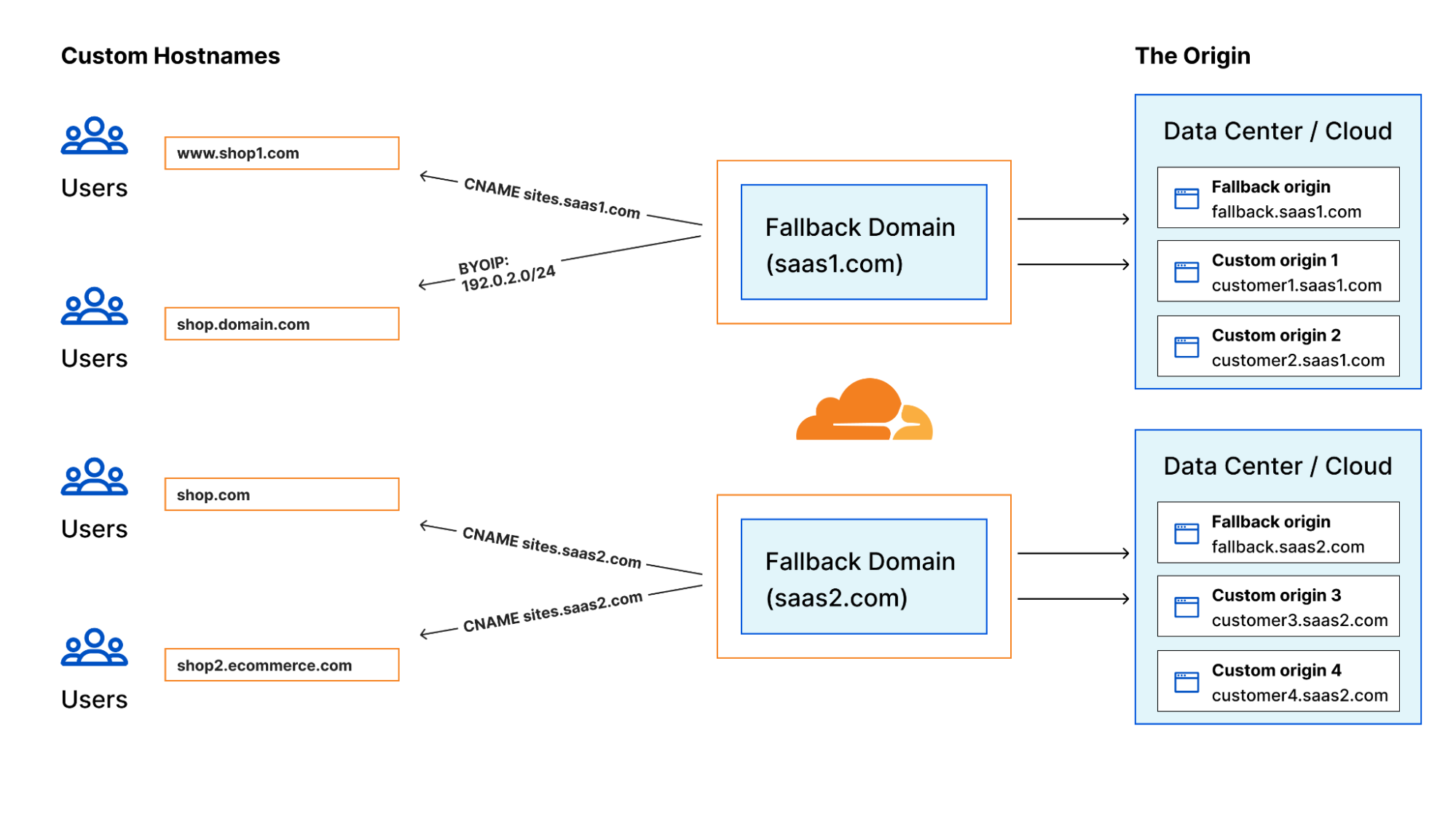
However, we received feedback from customers indicating confusion around actually using the capabilities of Cloudflare for SaaS because there are so many features! With the existing documentation, it wasn’t 100% clear how to enhance security and performance, or how to support custom domains. Now, we want to show customers how to use Cloudflare for SaaS to its full potential by including more product integrations in the docs, as opposed to only focusing on the SSL/TLS piece.
Cloudflare for SaaS can be overwhelming with so many possible add-ons and configurations. That’s why the new docs are organized into six main categories, housing a number of new, detailed guides (for example, WAF for SaaS and Regional Services for SaaS):
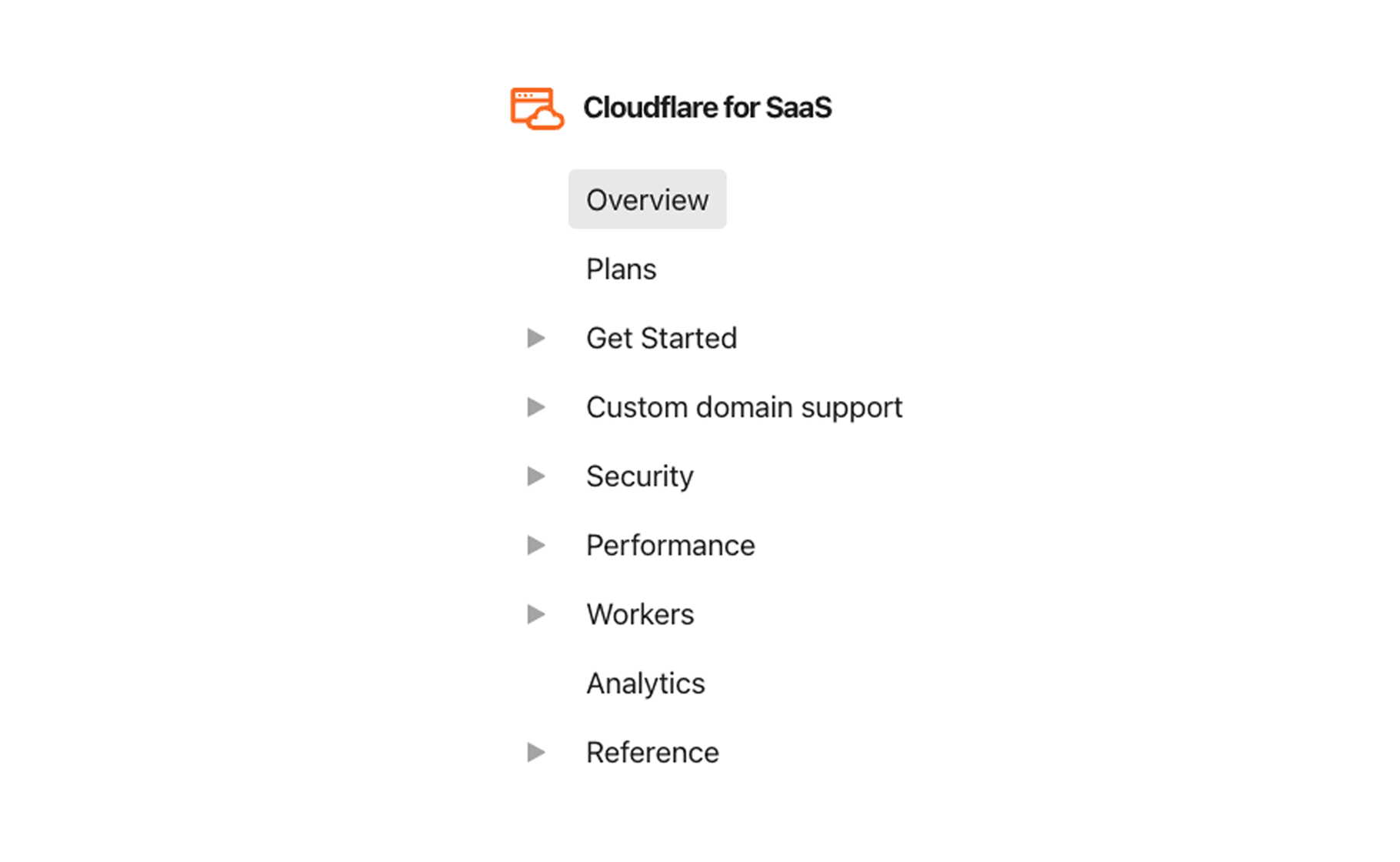
Once you get your SaaS application up and running with the Get Started page, you can find which configurations are best suited to your needs based on your priorities as a provider. Even if you aren’t sure what your goals are, this setup outlines the possibilities much more clearly through a number of new documents and product guides such as:
Instead of pondering over vague subsection titles, you can peruse with purpose in mind. The advantages and possibilities of Cloudflare for SaaS are highlighted instead of hidden.
This setup facilitates configurations much more easily to meet your goals as a SaaS provider.
For example, consider performance. Previously, there was no documentation surrounding reduced latency for SaaS providers. Now, the Performance section explains the automatic benefits to your performance by onboarding with Cloudflare for SaaS. Additionally, it offers three options of how to reduce latency even further through brand-new docs:
Similarly, the new organization offers WAF for SaaS as a previously hidden security solution, extending providers the ability to enable automatic protection from vulnerabilities and the flexibility to create custom rules. This is conveniently accompanied by a step-by-step tutorial using Cloudflare Managed Rulesets.
While this transition represents an improvement in the Cloudflare for SaaS docs, we’re going to expand its accessibility even more. Some tutorials, such as our Managed Ruleset Tutorial, are already live within the tile. However, more step-by-step guides for Cloudflare for SaaS products and add-ons will further enable our customers to take full advantage of the available product suite. In particular, keep an eye out for expanding documentation around using Workers for Platforms.
Visit the new Cloudflare for SaaS tile to see the updates. If you are a SaaS provider interested in extending Cloudflare benefits to your customers through Cloudflare for SaaS, visit our Cloudflare for SaaS overview and our Plans page.
Post Syndicated from Aniket Jiddigoudar original https://aws.amazon.com/blogs/big-data/introducing-aws-glue-flex-jobs-cost-savings-on-etl-workloads/
AWS Glue is a serverless data integration service that makes it simple to discover, prepare, and combine data for analytics, machine learning (ML), and application development. You can use AWS Glue to create, run, and monitor data integration and ETL (extract, transform, and load) pipelines and catalog your assets across multiple data stores. Typically, these data integration jobs can have varying degrees of priority and time sensitivity. For example, non-urgent workloads such as pre-production, testing, and one-time data loads often don’t require fast job startup times or consistent runtimes via dedicated resources.
Today, we are pleased to announce the general availability of a new AWS Glue job run class called Flex. Flex allows you to optimize your costs on your non-urgent or non-time sensitive data integration workloads such as pre-production jobs, testing, and one-time data loads. With Flex, AWS Glue jobs run on spare compute capacity instead of dedicated hardware. The start and runtimes of jobs using Flex can vary because spare compute resources aren’t readily available and can be reclaimed during the run of a job
Regardless of the run option used, AWS Glue jobs have the same capabilities, including access to custom connectors, visual authoring interface, job scheduling, and Glue Auto Scaling. With the Flex execution option, customers can optimize the costs of their data integration workloads by configuring the execution option based on the workloads’ requirements, using standard execution option for time-sensitive workloads, and Flex for non-urgent workloads. The Flex execution class is available for AWS Glue 3.0 Spark jobs.
The Flex execution class is available for AWS Glue 3.0 Spark jobs.
In this post, we provide more details about AWS Glue Flex jobs and how to enable Flex capacity.
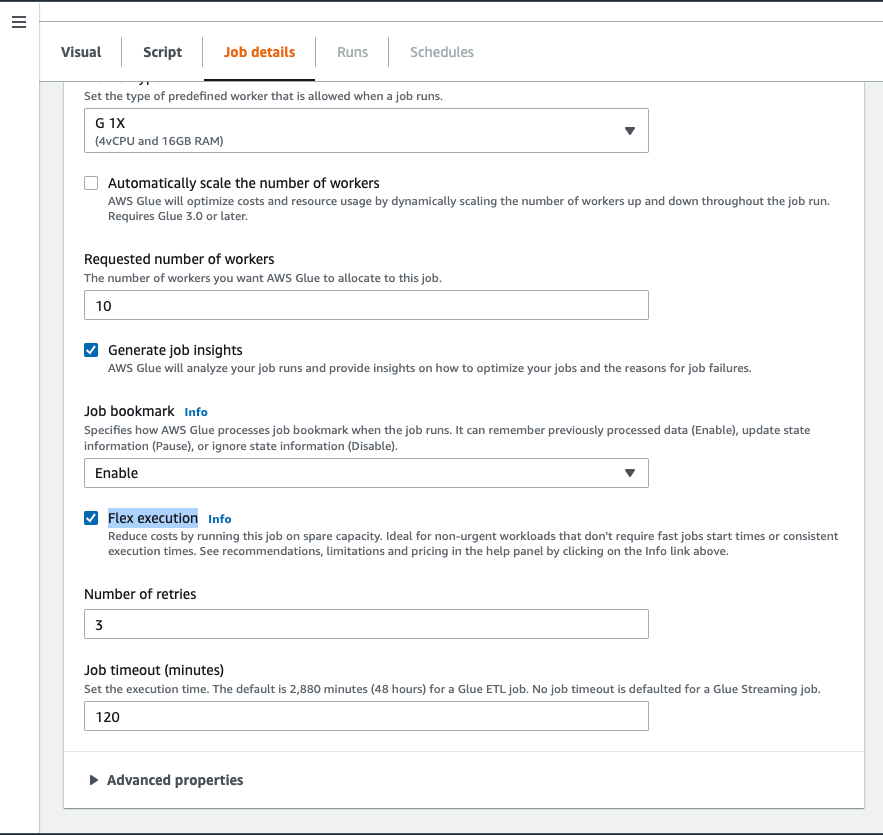
The AWS Glue jobs API now supports an additional parameter called execution-class, which lets you choose STANDARD or FLEX when running the job. To use Flex, you simply set the parameter to FLEX.
To enable Flex via the AWS Glue Studio console, complete the following steps:
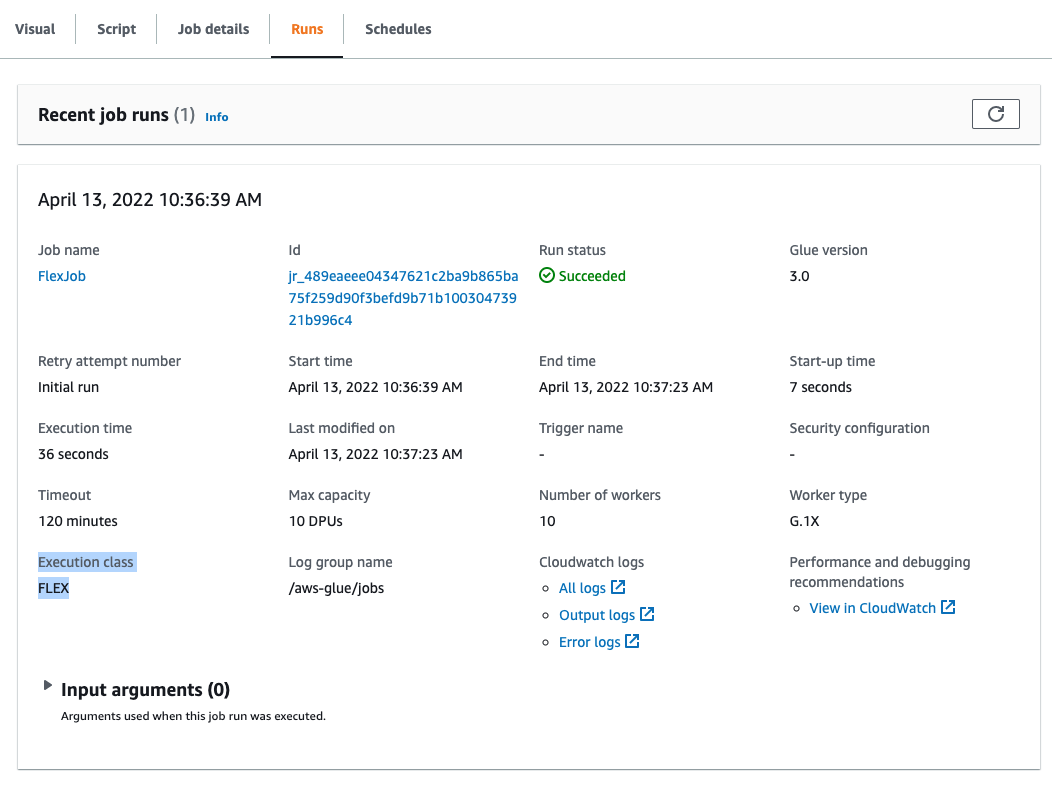
On the Runs tab, you should be able to see FLEX listed under Execution class.
You can also enable Flex via the AWS Command Line Interface (AWS CLI).
You can set the --execution-class setting in the start-job-run API, which lets you run a particular AWS Glue job’s run with Flex capacity:
You can also set the --execution-class during the create-job API. This sets the default run class of all the runs of this job to FLEX:
The following are additional details about the relevant parameters:
The Flex execution class is ideal for reducing the costs of time-insensitive workloads. For example:
In comparison, the standard execution class is ideal for time-sensitive workloads that require fast job startup and dedicated resources. In addition, jobs that have downstream dependencies are better served by the standard execution class.
When a start-job-run API call is issued, with the execution-class set to FLEX, AWS Glue will begin to request compute resources. If no resources are available immediately upon issuing the API call, the job will move into a WAITING state. No billing occurs at this point.
As soon as the job is able to acquire compute resources, the job moves to a RUNNING state. At this point, even if all the computes requested aren’t available, the job begins running on whatever hardware is present. As more Flex capacity becomes available, AWS Glue adds it to the job, up to a maximum value specified by Number of workers.
At this point, billing begins. You’re charged only for the compute resources that are running at any given time, and only for the duration that they ran for.
While the job is running, if Flex capacity is reclaimed, AWS Glue continues running the job on the existing compute resources while it tries to meet the shortfall by requesting more resources. If capacity is reclaimed, billing for that capacity is halted as well. Billing for new capacity will start when it is provisioned again. If the job completes successfully, the job’s state moves to SUCCEEDED. If the job fails due to various user or system errors, the job’s state transitions to FAILED. If the job is unable to complete before the time specified by the --timeout parameter, whether due to a lack of compute capacity or due to issues with the AWS Glue job script, the job goes into a TIMEOUT state.
Flexible job runs rely on the availability of non-dedicated compute capacity in AWS, which in turn depends on several factors, such as the Region and Availability Zone, time of day, day of the week, and the number of DPUs required by a job.
A parameter of particular importance for Flex Jobs is the --timeout value. It’s possible for Flex jobs to take longer to run than standard jobs, especially if capacity is reclaimed while the job is running. As a result, selecting the right timeout value that’s appropriate for your workload is critical. Choose a timeout value such that the total cost of the Flex job run doesn’t exceed a standard job run. If the value is set too high, the job can wait for too long, trying to acquire capacity that isn’t available. If the value is set too low, the job times out, even if capacity is available and the job execution is proceeding correctly.
Flex jobs are billed per worker at the Flex DPU-hour rates. This means that you’re billed only for the capacity that actually ran during the execution of the job, for the duration that it ran.
For example, if you ran an AWS Glue Flex job for 10 workers, and AWS Glue was only able to acquire 5 workers, you’re only billed for five workers, and only for the duration that those workers ran. If, during the job run, two out of those five workers are reclaimed, then billing for those two workers is stopped, while billing for the remaining three workers continues. If provisioning for the two reclaimed workers is successful during the job run, billing for those two will start again.
For more information on Flex pricing, refer to AWS Glue pricing.
This post discusses the new AWS Glue Flex job execution class, which allows you to optimize costs for non-time-sensitive ETL workloads and test environments.
You can start using Flex capacity for your existing and new workloads today. However, note that the Flex class is not supported for Python Shell jobs, AWS Glue streaming jobs, or AWS Glue ML jobs.
For more information on AWS Glue Flex jobs, refer to their latest documentation.
Special thanks to everyone who contributed to the launch: Parag Shah, Sampath Shreekantha, Yinzhi Xi and Jessica Cheng,
 Aniket Jiddigoudar is a Big Data Architect on the AWS Glue team.
 Vaibhav Porwal is a Senior Software Development Engineer on the AWS Glue team.
 Sriram Ramarathnam is a Software Development Manager on the AWS Glue team.
Post Syndicated from The Atlantic original https://www.youtube.com/watch?v=-DgnA154fjc
Post Syndicated from Steve Roberts original https://aws.amazon.com/blogs/aws/aws-week-in-review-august-8-2022/
As an ex-.NET developer, and now Developer Advocate for .NET at AWS, I’m excited to bring you this week’s Week in Review post, for reasons that will quickly become apparent! There are several updates, customer stories, and events I want to bring to your attention, so let’s dive straight in!
Last Week’s launches
.NET developers, here are two new updates to be aware of—and be sure to check out the events section below for another big announcement:
Tiered pricing for AWS Lambda will interest customers running large workloads on Lambda. The tiers, based on compute duration (measured in GB-seconds), help you save on monthly costs—automatically. Find out more about the new tiers, and see some worked examples showing just how they can help reduce costs, in this AWS Compute Blog post by Heeki Park, a Principal Solutions Architect for Serverless.
Amazon Relational Database Service (RDS) released updates for several popular database engines:
require_secure_transport parameter (disabled by default) via the Amazon RDS Management console, the AWS Command Line Interface (AWS CLI), AWS Tools for PowerShell, or using the API. When you enable this parameter, clients will only be able to connect if an encrypted connection can be established.Amazon Elastic Compute Cloud (Amazon EC2) expanded availability of the latest generation storage-optimized Is4gen and Im4gn instances to the Asia Pacific (Sydney), Canada (Central), Europe (Frankfurt), and Europe (London) Regions. Built on the AWS Nitro System and powered by AWS Graviton2 processors, these instance types feature up to 30 TB of storage using the new custom-designed AWS Nitro System SSDs. They’re ideal for maximizing the storage performance of I/O intensive workloads that continuously read and write from the SSDs in a sustained manner, for example SQL/NoSQL databases, search engines, distributed file systems, and data analytics.
Lastly, there’s a new URL from AWS Support API to use when you need to access the AWS Support Center console. I recommend bookmarking the new URL, https://support.console.aws.amazon.com/, which the team built using the latest architectural standards for high availability and Region redundancy to ensure you’re always able to contact AWS Support via the console.
For a full list of AWS announcements, be sure to keep an eye on the What’s New at AWS page.
Other AWS News
Here’s some other news items and customer stories that you may find interesting:
AWS Open Source News and Updates – Catch up on all the latest open-source projects, tools, and demos from the AWS community in installment #123 of the weekly open source newsletter.
In one recent AWS on Air livestream segment from AWS re:MARS, discussing the increasing scale of machine learning (ML) models, our guests mentioned billion-parameter ML models which quite intrigued me. As an ex-developer, my mental model of parameters is a handful of values, if that, supplied to methods or functions—not billions. Of course, I’ve since learned they’re not the same thing! As I continue my own ML learning journey I was particularly interested in reading this Amazon Science blog on 20B-parameter Alexa Teacher Models (AlexaTM). These large-scale multilingual language models can learn new concepts and transfer knowledge from one language or task to another with minimal human input, given only a few examples of a task in a new language.
When developing games intended to run fully in the cloud, what benefits might there be in going fully cloud-native and moving the entire process into the cloud? Find out in this customer story from Return Entertainment, who did just that to build a cloud-native gaming infrastructure in a few months, reducing time and cost with AWS services.
Upcoming events
Check your calendar and sign up for these online and in-person AWS events:
AWS Storage Day: On August 10, tune into this virtual event on twitch.tv/aws, 9:00 AM–4.30 PM PT, where we’ll be diving into building data resiliency into your organization, and how to put data to work to gain insights and realize its potential, while also optimizing your storage costs. Register for the event here.
 AWS Global Summits: These free events bring the cloud computing community together to connect, collaborate, and learn about AWS. Registration is open for the following AWS Summits in August:
AWS .NET Enterprise Developer Days 2022 – North America: Registration for this free, 2-day, in-person event and follow-up 2-day virtual event opened this past week. The in-person event runs September 7–8, at the Palmer Events Center in Austin, Texas. The virtual event runs September 13–14. AWS .NET Enterprise Developer Days (.NET EDD) runs as a mini-conference within the DeveloperWeek Cloud conference (also in-person and virtual). Anyone registering for .NET EDD is eligible for a free pass to DeveloperWeek Cloud, and vice versa! I’m super excited to be helping organize this third .NET event from AWS, our first that has an in-person version. If you’re a .NET developer working with AWS, I encourage you to check it out!
That’s all for this week. Be sure to check back next Monday for another Week in Review roundup!
— Steve
This post is part of our Week in Review series. Check back each week for a quick roundup of interesting news and announcements from AWS!
Post Syndicated from James Beswick original https://aws.amazon.com/blogs/compute/estimating-cost-for-amazon-sqs-message-processing-using-aws-lambda/
This post was written by Sabha Parameswaran, Senior Solutions Architect.
AWS Lambda enables fully managed asynchronous messaging processing through integration with Amazon SQS. This blog post helps estimate the cost and performance benefits when using Lambda to handle millions of messages per day by using a simulated setup.
Lambda supports asynchronous handling of messages using SQS integration as an event source and can scale for handling millions of messages per day. Customers often ask about the cost of implementing a Lambda-based messaging solution.
There are multiple variables like Lambda function runtime, individual message size, batch size for consuming from SQS, processing latency per message (depending on the backend services invoked), and function memory size settings. These can determine the overall performance and associated cost of a Lambda-based messaging solution.
This post provides cost estimation using these variables, along with guidance around optimization. The estimates focus on consuming from standard queues and not FIFO queues.
The Lambda event source mapping supports integration for SQS. Lambda users specify the SQS queue to consume messages. Lambda internally polls the queue and invokes the function synchronously with an event containing the queue messages.
The configuration controls in Lambda for consuming messages from an SQS queue are:
Lambda sends as many records in a single batch as allowed by the batch size, as long as it’s earlier than the batch window value, and smaller than the maximum payload size of 6 MB. Having large batch sizes means that a single Lambda invocation can handle more messages rather than multiple Lambda invocations to handle smaller batches (which translates to setting higher concurrency limits).
The cost and time to process might vary based on the actual number of messages in the batch. A larger batch size can imply longer processing but requires lower concurrency (number of concurrent Lambda invocations).
Lambda function costs are calculated based on memory used and time spent (in GB-second) in execution of a function. Aside from the event source configuration, there are several other Lambda function configurations that impact cost and performance:
The higher the concurrency, the more workloads it can process in a shorter time, allowing better performance, but this does not change the overall cost. Concurrency is not equivalent to TPS: it is more of a scaling factor in overall TPS. For example, a workload comprised of a set of messages takes 20 seconds to complete. 100 workloads would mean 2000 seconds to complete. With a concurrency of 10, it takes 200 seconds. With a concurrency of 100, the time drops to 20 seconds as each of the 100 workloads are handled concurrently. But each function essentially runs for the same duration and memory, regardless of concurrency. So the cost remains the same, as it is measured in GB-hours (memory multiplied by time). But the performance view differs. So, the cost estimations do not consider the concurrency settings of Lambda functions as the workloads have to be processed either sequential or concurrently.
The cost estimation tool presented helps users estimate monthly Lambda function costs for processing SQS standard queue messages based on the following assumptions:
| Batch size | Memory |
| 1–100 | 256 MB |
| 100–600 | 384 MB |
| 600–1100 | 512 MB |
| 1100–1600 | 640 MB |
Lambda uses SQS APIs internally to poll and dequeue the messages. The costs for the polling and dequeue operations using SQS APIs are not included as part of the estimations. The internal SQS dequeue portion is outside the control of the Lambda developer and the cost estimates only cover the message processing using Lambda. Also, the tool does not consider any reprocessing or duplicate processing of messages due to exceptions or errors that can vary the cost.
The estimator tool is a Python-based command line program that takes in an input properties file that specifies the various input parameters to come up with Lambda function cost versus performance estimations for various batch sizes, messages per day, etc. The tool does take into account the eligible monthly free tier for Lambda function executions.
Pre-requisites: Running the tool requires Python 3.9 and installation of Plotly package (5.7.+) or creating and using Docker images.
To run the tool:
git clone https://github.com/aws-samples/aws-lambda-sqs-cost-estimatorcd aws-lambda-sqs-cost-estimator/code
pip3 install -r requirements.txtpython3 LambdaPlotly.pyThis shows the cost estimates on a local browser instance. Running the code as a Docker image is also supported. Refer to the GitHub repo for additional instructions.
git clone https://github.com/aws-samples/aws-lambda-sqs-cost-estimator
cd aws-lambda-sqs-cost-estimator/code
docker build -t lambda-dash .docker run -it -v `pwd`:/app -p 8080:8080 lambda-dashThere are various input parameters for the cost estimations specified inside the input.prop file. Tune the input parameters as needed:
| Parameter | Description | Sample value (units not included) |
| base_lambda_memory_mb | Baseline memory for the Lambda function (in MB) | 128 |
| warm_latency_ms | Invocation time for Lambda handler method (going with warm start) irrespective of batch size in the incoming event payload in ms | 20 |
| process_per_message_ms | Time to process a single message (linearly scales with number of messages per batch in event payload) in ms | 10 |
| max_batch_size | Maximum batch size per event payload processed by a single Lambda instance | 1000 (max is 10000) |
| batch_memory_overhead_mb | Additional memory for processing increments in batch size (in MB) | 128 |
| batch_increment | Increments of batch size for increased memory | 300 |
The following is sample input.prop file content:
The tool generates a page with plot graphs and tables with 3 sections:
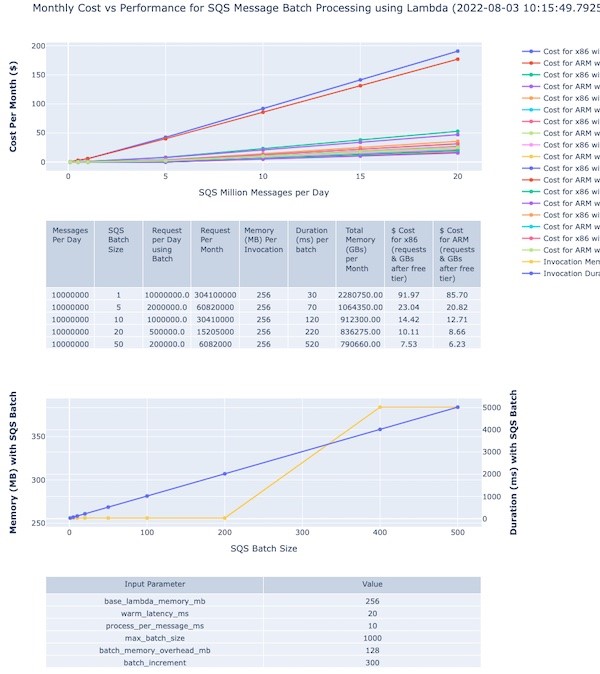
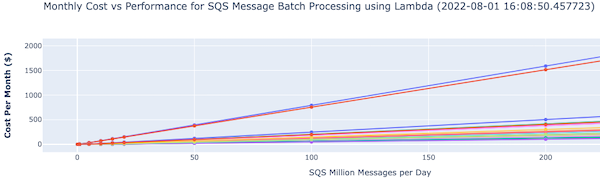
There is an accompanying interactive legend showing cost and batch size. The top section shows a graph of cost versus message volumes versus batch size:
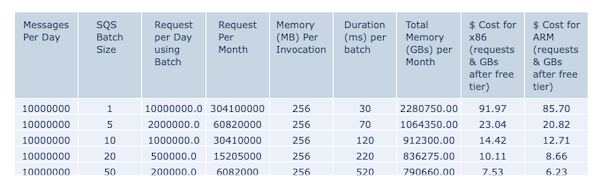
The second section shows the actual cost variation for different batch sizes for 10 million messages:
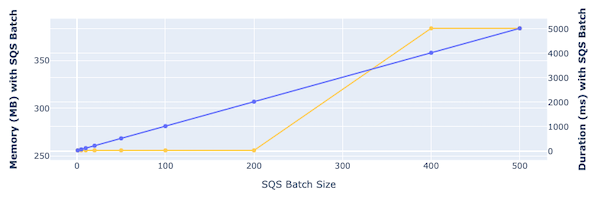
The third section shows the memory and time required to process with different batch sizes:
The various control input parameters used for graph generation are shown at the bottom of the page.
Double-clicking on a specific batch size or line on the right-hand legend displays that specific plot with its pricing details.

You can modify the input parameters with different settings for memory, batch sizes, memory for increased batches and rerun the program to create different cost estimations. You can also export the generated graphs as PNG image files for reference.
You can use Lambda functions to handle fully managed asynchronous processing of SQS messages. Estimating the cost and optimal setup depends on leveraging the various configurations of SQS and Lambda functions. The cost estimator tool presented in this blog should help you understand these configurations and their impact on the overall cost and performance of the Lambda function-based messaging solutions.
For more serverless learning resources, visit Serverless Land.
Post Syndicated from Faye Crompton original https://aws.amazon.com/blogs/big-data/forwood-safety-uses-amazon-quicksight-q-to-extend-life-saving-safety-analytics-to-larger-audiences/
This is a guest post by Faye Crompton from Forwood Safety. Forwood provides fatality prevention solutions to organizations across the globe.
At Forwood Safety, we have a laser focus on saving lives. Our solutions, which provide full content and proven methodology via verification tools and analytical capabilities, have one purpose: eliminating fatalities in the workplace. We recently realized an ambition to provide interactive, dynamic data visualization tools that enable our end users to access safety data in the field, regardless of their experience with analytics and data reporting.
In this post, I’ll talk about how Amazon QuickSight Q solved these challenges by giving users fast data insights through natural language querying capabilities.
Forwood’s Critical Risk Management (CRM) solution provides organizations with globally benchmarked and comprehensive critical control checklists and verification controls that are proven to prevent fatalities in the workplace. CRM protects frontline workers from serious harm by helping change the culture of risk management for companies. In addition, our Forwood Analytical Self-Service Tool (FAST) enables our customers to use self-service reporting to get updated dashboards that display key safety and fatality prevention metrics.
For several years, we used AWS QuickSight to provide data visualization for our CRM and FAST reporting products, with great success. Most of our technology stack was already based on AWS, so we knew QuickSight would be easy to integrate. QuickSight is agnostic in terms of data sources and types, and it’s a very flexible tool. It’s also an open data technology, so it can accept most of the data sources that we throw at it. Most importantly, it ties in seamlessly with our own architecture and data pipelines in a way that our previous BI tools couldn’t. After we implemented QuickSight, we started using it to power both CRM and FAST, visualizing risk data and serving it back to our customers.
Furthering our focus on innovation and usability; we identified a common challenge that we believed QuickSight could solve through our FAST application on behalf of our clients — we needed to make risk data more accessible for those of our clients who aren’t data analysts. We recognize that not everyone is an analyst. We also have mining industry customers who are not frequently accessing our applications via desktop. For example, mining site Supervisors and Operators working deep underground typically have access only via their mobile devices. For these users, it’s easier for them to ask the questions relevant to their specific use cases as needed at point of use, rather than filter and search through a dashboard to find the answers ahead of time.
QuickSight Q was the perfect solution to this challenge. QuickSight Q is a feature within QuickSight that uses machine learning to understand questions and how they relate to business data. The feature provides data insights and visualizations within seconds. With this capability, users can simply type in questions in natural language to access data insights about risk and compliance. Mining site workers, for example, can ask if the site is safe or if the right verification processes are in place. Health and safety teams and mining site supervisors can ask questions such as “Which sites should I verify today?” or “Which risk will be highest next week?” and receive a chart with the relevant data.
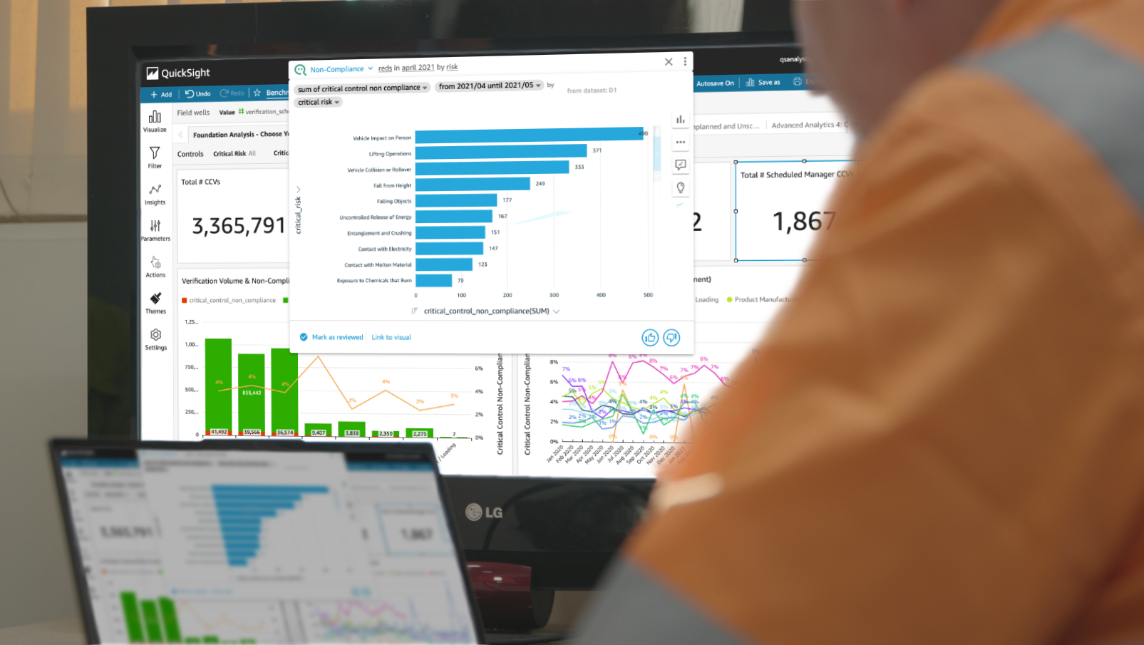
QuickSight Q gives our on-site customers near-real-time risk and compliance data from their mobile devices in a way they couldn’t before. With QuickSight Q, we can give our FAST users the opportunity to quickly visualize any fatality risks at their sites based on updated fatality prevention data. All users, not just analysts, can identify worksites that have a higher fatality risk because the data can show trends in non-compliance with safety standards. Our clients no longer have to look in a dashboard for the answers to their questions; those looking at a dashboard can go beyond the dashboard and ask deeper questions.
QuickSight Q solved one of our main BI challenges: how to make risk data more accessible to more people without extensive user training and technical understanding. Soon, we hope to use QuickSight Q as part of a multidimensional predictive dataset using deep learning models to deliver even more insights to our customers.
We look forward to extending our use of QuickSight. When we first started using it, it was strictly for analytics on our existing data. More recently, we started using API deployments for QuickSight. We have many different clients, and we use the API feature to maintain master versions of all 30+ standard reports, and then deploy those dashboards to as many clients as we need to via code. Previously, we saw QuickSight as a function of our analytics products; now we see it as a powerful and flexible toolkit of analytics features that our developers can build with.
Additionally, we look forward to relying on QuickSight Q to bring life-saving safety analytics to more people. QuickSight Q bridges the gap between the data a company has and the decisions that company needs to make, and that’s very powerful for our clients. Forwood Safety is driven to eradicate workplace fatalities, and by getting data to more people and making it easy to access, we can make our solutions more effective, saving more lives.
 Faye Crompton is Head of Analytics, Safety Applications and Computer Vision at Forwood Safety. She leads work on analytics and safety products that reduce fatality risk in mining and other high-risk industries.
Post Syndicated from Rapid7 original https://blog.rapid7.com/2022/08/08/how-one-engineer-upskilled-into-a-salesforce-engineering-role-at-rapid7/

At Rapid7, we believe the growth and development of our people enables us to better serve customers who depend on us. When our Engineering team was searching for candidates to help with our Salesforce ecosystem, John Millar demonstrated many of our core values – most importantly, the appetite to learn and grow his career as part of our commitment to “Never Done.” Through his own grit and determination – and support from his team – he transitioned into a new role and acquired a new set of skills along the way.
Here’s a closer look at that journey, told in John’s own words.
Coming up on nearly two years at Rapid7, I am over the moon with what I have achieved personally and professionally. Before joining the company, I was a Q developer working with KDB+ systems. Now, I am an Engineer working in our Salesforce ecosystem in Belfast.
Getting up to speed with our Salesforce system, becoming a valuable member of our development team, and helping to knock out some big projects in that time period have made me incredibly proud of how my career has grown in under two years. I have also become the team’s SME for an integrated software tool that is connected with Salesforce and have completed my first Salesforce certification, with more planned before the end of the year. These certifications are funded by Rapid7 as part of their core value of “Never Done.”
Creating a new direction for my career and having the opportunity to grow has certainly paid off, but it didn’t happen overnight.
Rewinding back to 2020 – I had been working for over two years as part of a periodic low-frequency development team for a Tier 1 bank. We were responsible for the maintenance and development of the low frequency components of the plant. This role revolved around a holistic time series database system built on kdb+ (q language), containing a wide range of data covering both periodic and aperiodic frequencies and all asset classes.
I felt like I wanted a new challenge and was interested in moving back into a role based around an object oriented language, similar to what I had been working with throughout University. I had heard of and researched Rapid7, so when they contacted me and outlined their goals, objectives, and culture along with the specific role I would be applying for, I knew it was for me and wanted to make that jump.
One of the core values of Rapid7 is “Never Done,” which encourages employees to constantly learn and improve their knowledge stack. I believe this was pivotal in my upskilling process, as the support needed was very accessible.
Rapid7 was invested in my growth from the moment I joined. As a candidate, I didn’t fit 100% of the requirements at the time. I understood the fundamentals and met the core criteria, but I didn’t have a ton of experience in Java and had no experience with Salesforce. Rapid7 recognized my potential and was invested in helping me grow my skills and become a great Salesforce developer for the team.
When upskilling to Salesforce, the main area I used was Trailheads, a free program provided by Salesforce. These exercises and learning modules are very detailed, interesting, and interactive. They really help with absorbing and understanding the information in conjunction with actively completing tasks in parallel. Additionally, I was supported and mentored by colleagues from Rapid7, who were equally invested in my growth. Whether it was through formal 1:1s or just making themselves available for advice and questions, I felt supported throughout the process.
Making the transition was not easy, and it took a lot of time and effort. I had to be self-motivated and determined to get up to speed with the Salesforce CRM and Salesforce Apex. Having completed this transition journey into Salesforce, it is all the more satisfying when completing and planning work, knowing that it has paid dividends in terms of my career growth.
Our team is making an impact by enabling the Salesforce ecosystem to operate more efficiently. We do this by analyzing and debugging issues, identifying opportunities, and improving our integration capabilities. This means the Rapid7 team is better positioned to support and protect our customers against outside threats to their business, as well as protect the personal information and data of their customers.
I have great confidence and pride in the work that I complete and feel I play a vital role in our team. I would highly recommend anyone thinking of making that jump to something new, to go for it. I know I haven’t looked back.
Additional reading:
Post Syndicated from Sheila Busser original https://aws.amazon.com/blogs/compute/how-to-prepare-your-application-to-scale-reliably-with-amazon-ec2/
This blog post is written by, Gabriele Postorino, Senior Technical Account Manager, and Giorgio Bonfiglio, Principal Technical Account Manager
In this post, we’ll discuss how you can prepare for planned and unplanned scaling events with
Most of the challenges related to horizontal scaling can be mitigated by optimizing the architectural implementation and applying improvements in operational processes.
In the following sections, we’ll explore this in depth. Recommendations can be applied partially or fully – they come with different complexities, and each one will help you reduce the risk of facing insufficient capacity errors or scaling delays, as well as deliver enhancements in areas such as fault tolerance, elasticity, and cost optimization.
Instance capacity can be regarded as being divided into “pools” defined by AZ (such as us-east-1a), instance type (for example m5.xlarge), and tenancy. Combining the following two guidelines will widen the capacity pools available to scale out your fleets of instances. This will help you reduce costs, transparently recover from failures, and increase your application scalability.
Whether you’re migrating a new workload to the cloud, or tuning an existing workload, you’ll likely evaluate which compute configuration options are available and determine the right configuration for your application.
If your workload is already running on EC2 instances, you might already be aware of the instance type that it runs best on. Let’s say that your application is RAM intensive, and you found that r6i.4xlarge instances are best suited for it.
However, relying on a single instance type might result in artificially limiting your ability to scale compute resources for your workload when needed. It’s always a good idea to explore how your workload behaves when running on other instance types: you might find that your application can serve double the number of requests served by one r6i.4xlarge instance when using one r6i.8xlarge instance or four r6i.2xlarge instances.
Furthermore, there’s no reason to limit your options to a single instance family, generation, or processor type. For example, m6a.8xlarge instances offer the same amount of RAM of r6i.4xlarge and might be used to run your application if needed.
Amazon EC2 Auto Scaling helps you make sure that you have the right number of EC2 instances available to handle the load for your application.
Auto Scaling groups can be configured to respond to scaling events by selecting the type of instance to launch among a list of instance types. You can statically populate the list in advance, as in the following screenshot,

or dynamically define it by a set of instance attributes as shown in the subsequent screenshot:

For example, by setting the requirements to a minimum of 8 vCPUs, 64GiB of Memory, and a RAM/CPU ratio of 8 (just like r6i.2xlarge instances), up to 73 instance types can be included in the list of suitable instances. They will be selected for launch starting from the lowest priced instance types. If the request can’t be fulfilled in full by the lowest priced instance type, then additional instances will be launched from the second lowest instance type pool, and so on.
Each AWS Region consists of multiple, isolated Availability Zones (AZ), interconnected with high-bandwidth, low-latency networking. Spreading a workload across AZs is a well-established resiliency best practice. It will make sure that your end users aren’t impacted in the case of a single AZ, data center, or rack failures, as each AZ has its own distinct instance capacity pools that you can leverage to scale your application fleets.
EC2 Auto Scaling can manage the optimal distribution of EC2 instances in a group across all AZs in a Region automatically, as well as deal with temporary failures transparently. To do so, it must be configured to use at least one subnet in each AZ. Then, it will attempt to distribute instances evenly across AZs and automatically cycle through AZs in case of temporary launch failures.

The way that your workload is operated also impacts your ability to scale it when needed. Failure management and appropriate scaling techniques will help you maximize the availability of your environment.
On-Demand capacity isn’t guaranteed to always be available. There might be short windows of time when AWS doesn’t have enough available On-Demand capacity to fulfill your specific request: as the availability of On-Demand capacity changes frequently, it’s important that your launch processes implement retry mechanisms.
Retries and fallbacks are managed automatically by EC2 Auto Scaling. But if you have a custom workflow to launch instances, it should be able to work with server error codes, in particular InsufficientInstanceCapacity or InternalError, by retrying the launch request. For a complete list of error codes for the EC2 API, please refer to our documentation.
Another option provided by EC2 is represented by EC2 Fleets. EC2 Fleet is a feature that helps to implement instance flexibility best practices. Instead of calling RunInstances with one instance type and retrying, EC2 Fleet in Instant mode considers all provided instance types, using a list of instances or Attribute Based Instance selection, and provisions capacity from the pools configured by the EC2 Fleet call where capacity was available.
Launching EC2 instances as soon as you have an initial indication of increased load, in smaller batches and over a longer time span, helps increase your application performance and reliability while reducing costs and minimizing disruptions.
 In the graph above, two different scaling techniques are depicted. Scaling approach #1 adds a large number of instances less frequently, while approach #2 launches a smaller batch of instances more frequently. Adopting the first approach risks your application not being able to sustain the increase in load in a timely manner. This will potentially cause an impact on end users and leave the operations team with little time to resolve.
On-Demand Instances are best suited for applications with irregular, uninterruptible workloads. Interruptible workloads can avail of Spot Instances that pick from spare EC2 capacity. They cost less than On-Demand Instances but can be interrupted with a two-minute warning.
If your workload has a stable baseline utilization that hardly changes over time, then you can reserve capacity for your baseline usage of EC2 instances using open On-Demand Capacity Reservations and cover them with Savings Plans to get discounted rates with a one-year or three-year commitment, with the latter offering the bigger discounts.
Open On-Demand Capacity Reservations and Savings Plans aren’t tightly related to the EC2 instances that they cover at a certain point in time. Rather they shift to other usage, matching all of the parameters of the respective On-Demand Capacity Reservation or Savings Plan (e.g., Instance Type, Operating System, AZ, tenancy) in your account or across accounts for which you have sharing enabled. This lets you be dynamic even with your stable baseline. For example, during a rolling update or a blue/green deployment, On-Demand Capacity Reservations and Savings Plans will automatically cover any instances that match the respective criteria.
There are times when you can’t apply all of the recommended mitigating actions in anticipation of a planned event. In those cases, you might want to use On-Demand Capacity Reservation Fleets to reserve capacity in advance for additional peace of mind. Capacity reservation fleets let you define capacity requests across multiple instance types, up to a target capacity that you specify. They can be created and managed using the AWS Command Line Interface (AWS CLI) and the AWS APIs.
Key concepts of Capacity Reservation Fleets are the total target capacity and the instance type weight. The instance type weight expresses the number of capacity units that each instance of a specific instance type counts toward the total target capacity.
Let’s say your workload is memory-bound, you expect to need 1,6TiB of RAM, and you want to use r6i instances. You can create a Capacity Reservation Fleet for r6i instances defining weights for each instance type in the family based on the relative amount of memory that they have in an instance type specification json file.
instanceTypeSpecification.json:
[
    {
        "InstanceType": "r6i.2xlarge",
        "InstancePlatform":"Linux/UNIX",
        "Weight": 1,
        "AvailabilityZone":"eu-west-1a",
        "EbsOptimized": true,
        "Priority" : 3
    },
    {
        "InstanceType": "r6i.4xlarge",
        "InstancePlatform":"Linux/UNIX",
        "Weight": 2,
        "AvailabilityZone":"eu-west-1a",
        "EbsOptimized": true,
        "Priority" : 2
    },
    {
        "InstanceType": "r6i.8xlarge",
        "InstancePlatform":"Linux/UNIX",
        "Weight": 4,
        "AvailabilityZone":"eu-west-1a",
        "EbsOptimized": true,
        "Priority" : 1
    }
]
Then, you want to use this specification to create a Capacity Reservation Fleet that takes care of the underlying Capacity Reservations needed to fulfill your request:
$ aws ec2 create-capacity-reservation-fleet \
--total-target-capacity 25 \
--allocation-strategy prioritized \
--instance-match-criteria open \
--tenancy default \
--end-date 2022-05-31T00:00:00.000Z \
--instance-type-specifications file://instanceTypeSpecification.json
In this example, I set the target capacity to 25, which is the number of r6i.2xlarge needed to get 1,6TiB of total memory across the fleet. As you might have noticed, Capacity Reservation Fleets can be created with an end date. They will automatically cancel themselves and the Capacity Reservations that they created when the end date is reached, so that you don’t need to.
Last but not least, our teams can offer the AWS Infrastructure Event Management (IEM) program. Part of select AWS Support offerings, the IEM program has been designed to help you with planning and executing events that impact your infrastructure on AWS. By requesting an IEM engagement, you will be supported by AWS experts during all of the phases of your event. Starting from your business outcomes and success criteria, we’ll assess your infrastructure readiness for the event, evaluate risks, and recommend specific actions to mitigate them. The AWS experts will focus on your application architecture as a whole and dive deep into each of its components with your respective teams. They might also engage with other AWS teams to notify them of the upcoming event, and get specific prescriptive guidance when needed. During the event, AWS experts will have the context needed to help you resolve any issue that might arise as quickly as possible. The program is included in the Enterprise and Enterprise On-Ramp Support plans and is available to Business Support customers for an additional fee.
Whether you’re planning for a big future event, or you want to make sure that your application can withstand unexpected increases in traffic, it’s important that you consider what we discussed in this article:
For further study, we recommend the Well-Architected Framework Reliability and Operational Excellence pillars as starting points. Moreover, if you have an event coming up, talk to your Technical Account Manager, your Account Team, or contact us to find out how we can help!
Post Syndicated from original https://backblaze.com/blog/the-3-2-1-backup-strategy/
A lot has changed since the 3-2-1 backup rule was first introduced in the late aughts. At the time, the iPad was just a glimmer in Apple’s eye. Facebook had a quaint 500 million users. Taylor Swift had only released two albums. Blockbuster Video still existed, and Netflix shipped DVDs to your door.
Unlike most things in technology, the rule has held up over the years. It’s still the de facto standard for keeping your data safe. But some of the particular best practices have evolved as data storage has changed. Today, I’ll explain the 3-2-1 rule, what’s changed, and how you can easily achieve a 3-2-1 backup to keep your data safe and protected.
The 3-2-1 backup rule is a simple, effective strategy for keeping your data safe. It advises that you keep three copies of your data on two different media with one copy off-site. Let’s break that down:
If you want to protect your personal information, photos, work files, or other important data, the 3-2-1 backup strategy is the way to go. It helps you avoid having a single point of failure that’s vulnerable to human error, hard drive crashes, theft, natural disasters, or ransomware.
Let’s say you took a picture of your social security card for your tax accountant years ago—that file is called “socialsecurity.jpg” and it lives on your computer at home. That’s the first “copy” of your data.
You also have an external hard drive at home, used to back up your go-to Mac or gaming PC. That external hard drive will back up socialsecurity.jpg as part of its backup process. That’s a second copy on a different device or medium.
In addition to that external hard drive, you also have an online backup solution (we recommend Backblaze; go figure!). The online backup continuously scans your computer and uploads your data to the cloud (which, in layman’s terms, is an off-site data center). Socialsecurity.jpg is included in this upload, becoming the third copy of your data.
Oh! And, your paper social security card is hopefully stored in a fire-proof safe (not your wallet) as a bonus.
When the 3-2-1 rule was first introduced, there were a lot more types of media to choose from when storing your data—the humble floppy disk, CDs, Blu-ray discs, USB sticks, external hard disk drives (HDD), solid state drives (SSD), network attached storage (NAS), tape libraries, etc. Some of those have fallen out of favor (CDs and DVDs, I’m looking at you).



Some types of media are not practical or affordable for a typical home computer user looking to back up their data (tape libraries, for example). Some of the technologies were prohibitively expensive back then, but are much more affordable now (SSDs). And one big one wasn’t mainstream yet: The Cloud (you might have heard it referred to as “other people’s computers”). So, what does this mean for the 3-2-1 backup strategy? Do you still need to keep your data on two different media?
The short answer is: yes, but no. Today, you don’t need to keep your data on two different types of media, but you do need to keep your data on two different devices.
The long answer is a bit more complicated. There are a couple reasons folks recommended keeping your data on two different types of media in the first place. One, it protects you from one of those forms of media becoming obsolete in the face of new storage technology (still looking at you, CDs) and your data becoming unreadable. And two, it’s wise to keep your backup copy on a separate device so that a hardware failure doesn’t take out both local copies. For example, if your computer all of the sudden doesn’t want to hold a charge, you can still recover data from your hard drive.
While obsolescence is always a concern, the advent of cloud storage for backups all but eliminates it. The cloud service provider is responsible for maintaining the physical storage devices and keeping your data accessible at all times. So, if you use a cloud backup service, you only need to worry about keeping your data on two devices, not two separate kinds of media. What does that look like?
If you back up your home computer to an external hard drive and back both of those devices up to the cloud using something like Backblaze Computer Backup, congratulations: You have achieved a 3-2-1 backup.
If you aren’t backing up at all, achieving a 3-2-1 backup strategy is still the best thing you can do to protect your data. But, the 3-2-1 rule is becoming more of a starting point rather than the finish line in today’s world.
The rise in ransomware attacks calls for strengthening the basic principles of the 3-2-1 strategy—redundancy, geographic distance, and access—with added protections. Cybercrimes targeting networked machines and capturing all data, including backups, is a growing problem.
New versions of the tried-and-true backup strategy have emerged, such as the 3-2-1-1-0 or 4-3-2 backups. Sounds like overkill? It isn’t. The good news is that companies like Backblaze exist to make at least the off-site component less stressful—we do the work and keep up with security best practices for you.
Whether you are interested in backing up a Mac or a PC, an on-site backup is a simple way to access your data quickly should anything happen to your computer. If your laptop or desktop’s hard drive crashes, and you have an up-to-date external hard drive available, you can quickly get most of your data back or use the external drive on another computer while yours gets fixed or replaced. If you remember to keep that external hard drive fairly up to date, the exposure for data loss is negligible, as you might only lose the uncopied files on your laptop. Most external hard drives even come with software to ensure they’re readily updated.
Having an on-site backup is a great start, but having an off-site backup is a key component in having a complete backup strategy, including cloud storage. The newer backup strategies build on the cloud’s strengths:
There is no such thing as a perfect backup system, but the 3-2-1 approach is a great start for most people and businesses. Even the United States government recommends this approach. In a 2012 paper for the United States Computer Emergency Readiness Team (US-CERT), Carnegie Mellon recommended the 3-2-1 method in their publication: Data Backup Options.
The 3-2-1 plan is great for getting your files backed up. If you view the strategy like an insurance policy, you want one that provides the coverage needed should the unthinkable happen. Service also matters; having a local, off-site, and offline backup gives you more options for backup recovery.
While Backblaze can’t help with power outages, computer encryption, or anti-theft technologies (though we can locate a computer), we can help make backing up your files a no-brainer. And (at least to our most recent survey) with only 11% of respondents who own a computer backing up daily, folks need the help!
Getting started with Computer Backup for your personal or business computers helps take care of that crucial “1” in your complete 3-2-1 backup strategy. And, with our included one year Version History feature (or Forever Version History if you want to upgrade), you have additional layers of protection should anything happen to your physical devices.
The post The 3-2-1 Backup Strategy appeared first on Backblaze Blog | Cloud Storage & Cloud Backup
Post Syndicated from original https://lwn.net/Articles/903855/
The addition of the ublk driver during the 6.0 merge window would have been
easy to miss; it was buried deeply within an io_uring pull request and is
entirely devoid of any sort of documentation that might indicate why it
merits a closer look. Ublk is intended to facilitate the implementation of
high-performance block drivers in user space; to that end, it uses io_uring
for its communication with the kernel. This driver is considered
experimental for now; if it is successful, it might just be a harbinger of
more significant changes to come to the kernel in the future.
Post Syndicated from Mrudhula Balasubramanyan original https://aws.amazon.com/blogs/architecture/coordinating-large-messages-across-accounts-and-regions-with-amazon-sns-and-sqs/
Many organizations have applications distributed across various business units. Teams in these business units may develop their applications independent of each other to serve their individual business needs. Applications can reside in a single Amazon Web Services (AWS) account or be distributed across multiple accounts. Applications may be deployed to a single AWS Region or span multiple Regions.
Irrespective of how the applications are owned and operated, these applications need to communicate with each other. Within an organization, applications tend to be part of a larger system, therefore, communication and coordination among these individual applications is critical to overall operation.
There are a number of ways to enable coordination among component applications. It can be done either synchronously or asynchronously:
Event-driven architectures use a publisher-subscriber model, in which events are emitted by the publisher and consumed by one or more subscribers.
A key consideration when implementing an event-driven architecture is the size of the messages or events that are exchanged. How can you implement an event-driven architecture for large messages, beyond the default maximum of the services? How can you architect messaging and automation of applications across AWS accounts and Regions?
This blog presents architectures for enhancing event-driven models to exchange large messages. These architectures depict how to coordinate applications across AWS accounts and Regions.
A challenge with application coordination is exchanging large messages. For the purposes of this post, a large message is defined as an event payload between 256 KB and 2 GB. This stems from the fact that Amazon Simple Notification Service (Amazon SNS) and Amazon Simple Queue Service (Amazon SQS) currently have a maximum event payload size of 256 KB. To exchange messages larger than 256 KB, an intermediate data store must be used.
To exchange messages across AWS accounts and Regions, set up the publisher access policy to allow subscriber applications in other accounts and Regions. In the case of large messages, also set up a central data repository and provide access to subscribers.
Figure 1 depicts a basic schematic of applications distributed across accounts communicating asynchronously as part of a larger enterprise application.

Figure 1. Asynchronous communication across applications
The overview covers two scenarios:
Figure 2 represents an event-driven architecture, in which applications are distributed across AWS Accounts A, B, and C. The applications are all deployed to the same AWS Region, us-east-1. A single Region simplifies the architecture, so you can focus on application coordination across AWS accounts.

Figure 2. Application coordination across accounts and single AWS Region
The application in Account A (Application A) is implemented as an AWS Lambda function. This application communicates with the applications in Accounts B and C. The application in Account B is launched with AWS Step Functions (Application B), and the application in Account C runs on Amazon Elastic Container Service (Application C).
In this scenario, Applications B and C need information from upstream Application A. Application A publishes this information as an event, and Applications B and C subscribe to an SNS topic to receive the events. However, since they are in other accounts, you must define an access policy to control who can access the SNS topic. You can use sample Amazon SNS access policies to craft your own.
If the event payload is in the 256 KB to 2 GB range, you can use Amazon Simple Storage Service (Amazon S3) as the intermediate data store for your payload. Application A uses the Amazon SNS Extended Client Library for Java to upload the payload to an S3 bucket and publish a message to an SNS topic, with a reference to the stored S3 object. The message containing the metadata must be within the SNS maximum message limit of 256 KB. Amazon EventBridge is used for routing events and handling authentication.
The subscriber Applications B and C need to de-reference and retrieve the payloads from Amazon S3. The SQS queue in Account B and Lambda function in Account C subscribe to the SNS topic in Account A. In Account B, a Lambda function is used to poll the SQS queue and read the message with the metadata. The Lambda function uses the Amazon SQS Extended Client Library for Java to retrieve the S3 object referenced in the message.
The Lambda function in Account C uses the Payload Offloading Java Common Library for AWS to get the referenced S3 object.
Once the S3 object is retrieved, the Lambda functions in Accounts B and C process the data and pass on the information to downstream applications.
This architecture uses Amazon SQS and Lambda as subscribers because they provide libraries that support offloading large payloads to Amazon S3. However, you can use any Java-enabled endpoint, such as an HTTPS endpoint that uses Payload Offloading Java Common Library for AWS to de-reference the message content.
Sometimes applications are spread across AWS Regions, leading to increased latency in coordination. For existing applications, it could take substantive effort to consolidate to a single Region. Hence, asynchronous coordination would be a good fit for this scenario. Figure 3 expands on the architecture presented earlier to include multiple AWS Regions.

Figure 3. Application coordination across accounts and multiple AWS Regions
The Lambda function in Account C is in the same Region as the upstream application in Account A, but the Lambda function in Account B is in a different Region. These functions must retrieve the payload from the S3 bucket in Account A.
To provide access, configure the AWS Lambda execution role with the appropriate permissions. Make sure that the S3 bucket policy allows access to the Lambda functions from Accounts B and C.
For variable message sizes, you can specify if payloads are always stored in Amazon S3 regardless of their size, which can help simplify the design.
If the application that publishes/subscribes large messages is implemented using the AWS Java SDK, it must be Java 8 or higher. Service-specific client libraries are also available in Python, C#, and Node.js.
An Amazon S3 Multi-Region Access Point can be an alternative to a centralized bucket for the payloads. It has not been explored in this post due to the asynchronous nature of cross-region replication.
In general, retrieval of data across Regions is slower than in the same Region. For faster retrieval, workloads should be run in the same AWS Region.
This post demonstrates how to use event-driven architectures for coordinating applications that need to exchange large messages across AWS accounts and Regions. The messaging and automation are enabled by the Payload Offloading Java Common Library for AWS and use Amazon S3 as the intermediate data store. These components can simplify the solution implementation and improve scalability, fault-tolerance, and performance of your applications.
Ready to get started? Explore SQS Large Message Handling.
Post Syndicated from original https://lwn.net/Articles/904191/
Security updates have been issued by Debian (chromium, libtirpc, and xorg-server), Fedora (giflib, mingw-giflib, and teeworlds), Mageia (chromium-browser-stable, kernel, kernel-linus, mingw-giflib, osmo, python-m2crypto, and sqlite3), Oracle (httpd, php, vim, virt:ol and virt-devel:ol, and xorg-x11-server), SUSE (caddy, crash, dpkg, fwupd, python-M2Crypto, and trivy), and Ubuntu (gdk-pixbuf, libjpeg-turbo, and phpliteadmin).
Post Syndicated from Matt Granger original https://www.youtube.com/watch?v=ATjnUmcGXq0
Post Syndicated from Ryan Blanchard original https://blog.rapid7.com/2022/08/08/no-damsels-in-distress-how-media-and-entertainment-companies-can-secure-data-and-content/

Streaming is king in the media and entertainment industry. According to the Motion Picture Association’s Theatrical and Home Entertainment Market Environment Report, the global number of streaming subscribers grew to 1.3 billion in 2021. Consumer demand for immediate digital delivery is skyrocketing. Producing high-quality content at scale is a challenge media companies must step up to on a daily basis. One thing is for sure: Meeting these expectations would be unmanageable left to human hands alone.
Fortunately, cloud adoption has enabled entertainment companies to meet mounting customer and business needs more efficiently. With the high-speed workflow and delivery processes that the cloud enables, distributing direct-to-consumer is now the industry standard.
As media and entertainment companies grow their cloud footprints, they’re also opening themselves up to vulnerabilities threat actors can exploit — and the potential consequences can be financially devastating.
In 2021, a Twitch data breach showed the impact cyberattacks can have on intellectual property at media and entertainment companies. Attackers stole 128 gigabytes of data from the popular streaming site and posted the collection on 4chan. The released torrent file contained:
Ouch. In mere moments, the attackers stole a ton of sensitive IP and a key security strategy. How did attackers manage this? By exploiting a single misconfigured server.
Before you think, “Well, that couldn’t happen to us,” consider that cloud misconfigurations are the most common source of data breaches.
Yet, media and entertainment businesses can’t afford to slow down their adoption and usage of public cloud infrastructure if they hope to remain relevant. Consumers demand timely content, whether it’s the latest midnight album drop from Taylor Swift or breaking news on the war in Ukraine.
Media and entertainment organizations must mature their cloud security postures alongside their content delivery and production processes to maintain momentum while protecting their most valuable resources: intellectual property, content, and customer data.
We’ve outlined three key cloud security strategies media and entertainment companies can follow to secure their data in the cloud.
You can’t protect what you can’t see. There are myriad production, technical, and creative teams working on a host of projects at a media and entertainment company – and they all interact with cloud and container environments throughout their workflow. This opens the door for potential misconfigurations (and then breaches) if these environments aren’t carefully tracked, secured, or even known about.
Here are some key considerations to make:
Most enterprises lack visibility into all the cloud and container environments their teams use throughout each step of their digital supply chain. Implementing a system to continuously monitor all cloud and container services gives you better insight into associated risks. Putting these processes into place will enable you to tightly monitor – and therefore protect – your growing cloud footprint.
How to get started: Improve visibility by introducing a plan for cloud workload protection.
Cloud, container, and other infrastructure misconfigurations are a major area of concern for most security teams. More than 30% of the data breaches studied in our 2022 Cloud Misconfigurations Report were caused by relaxed security settings and misconfigurations in the cloud. These misconfigurations are alarmingly common across industries and can cause critical exposures, as evidenced in the following example:
In 2021, a server misconfiguration on Sky.com (a UK-based media company) revealed access credentials to a production-level database and IP addresses to development endpoints. This meant that anyone with those released credentials or addresses could easily access a mountain of proprietary data from the Comcast subsidiary.
One way to avoid these types of breaches is to prevent misconfigurations in your Infrastructure as Code (IaC) templates. Scanning IaC templates, such as Terraform, reduces the likelihood of cloud misconfigurations by ensuring that any templates that are built and deployed are already vetted against the same security and compliance checks as your production cloud infrastructure and services.
By leveraging IaC scanning that provides fast, context-rich results to resource owners, media and entertainment organizations can build a stronger security foundation while reducing friction across DevOps and security teams and cutting down on the number of 11th-hour fixes. Solving problems in the CI/CD pipeline improves efficiency by correcting issues once rather than fixing them over and over again at runtime.
How to get started: Learn about the first step of shifting left with Infrastructure as Code in the CI/CD pipeline.
As the saying goes, a chain is only as strong as its weakest link. Cloud security practices won’t be as effective or efficient if an organization’s workforce doesn’t understand and value secure processes. A culture of collaboration between DevOps and security is a good start, but the entire organization must understand and uphold security best practices.
Fostering a culture that prioritizes the protection of digital content empowers all parts of (and people in) your supply chain to work with secure practices front-of-mind.
What’s the tell-tale sign that you’ve created a culture of security? When all employees, no matter their department or role, see it as simply another part of their job. This is obviously not to say that you need to turn all employees, or even developers, into security experts, but they should understand how security influences their role and the negative consequences to the business if security recommendations are avoided or ignored.
How to get started: Share this curated set of resources on cloud security for media and entertainment companies with your team.
Media and entertainment companies can’t afford to slow down if they hope to meet consumer demands. They can’t afford to neglect security, either, if they want to maintain consumer trust.
Remember, the ultimate offense is a strong defense. Building security into your cloud infrastructure processes from the beginning dramatically decreases the odds that an attacker will find a chink in your armor. Moreover, identifying and remediating security issues sooner plays a critical role in protecting consumer data and your intellectual property and other media investments.
Want to learn more about how media and entertainment companies can strengthen their cloud security postures?
Read our eBook: Protecting IP and Consumer Data in the Streaming Age: A Guide to Cloud Security for Digital Media & Entertainment.
Additional reading:
Post Syndicated from The History Guy: History Deserves to Be Remembered original https://www.youtube.com/watch?v=nyHYSUGAvTM
Post Syndicated from Николай Марченко original https://bivol.bg/%D0%B1%D0%BB%D0%B8%D0%B7%D0%BA%D0%B8-%D0%B8-%D0%BF%D1%80%D0%B8%D1%8F%D1%82%D0%B5%D0%BB%D0%B8-%D0%B8%D0%B7%D0%BF%D1%80%D0%B0%D1%82%D0%B8%D1%85%D0%B0-%D1%81%D1%82%D0%BE%D1%8F%D0%BD-%D0%BD%D0%B8%D0%BA.html

Стотици близки, приятели и колеги се сбогуваха с журналиста и писател Стоян Николов – Торлака (1979 – 2022), който беше и дългогодишен колумнист на Сайта за разследваща журналистика „Биволъ“. Опелото…
Post Syndicated from Schneier.com Webmaster original https://www.schneier.com/blog/archives/2022/08/nists-post-quantum-cryptography-standards.html
Quantum computing is a completely new paradigm for computers. A quantum computer uses quantum properties such as superposition, which allows a qubit (a quantum bit) to be neither 0 nor 1, but something much more complicated. In theory, such a computer can solve problems too complex for conventional computers.
Current quantum computers are still toy prototypes, and the engineering advances required to build a functionally useful quantum computer are somewhere between a few years away and impossible. Even so, we already know that that such a computer could potentially factor large numbers and compute discrete logs, and break the RSA and Diffie-Hellman public-key algorithms in all of the useful key sizes.
Cryptographers hate being rushed into things, which is why NIST began a competition to create a post-quantum cryptographic standard in 2016. The idea is to standardize on both a public-key encryption and digital signature algorithm that is resistant to quantum computing, well before anyone builds a useful quantum computer.
NIST is an old hand at this competitive process, having previously done this with symmetric algorithms (AES in 2001) and hash functions (SHA-3 in 2015). I participated in both of those competitions, and have likened them to demolition derbies. The idea is that participants put their algorithms into the ring, and then we all spend a few years beating on each other’s submissions. Then, with input from the cryptographic community, NIST crowns a winner. It’s a good process, mostly because NIST is both trusted and trustworthy.
In 2017, NIST received eighty-two post-quantum algorithm submissions from all over the world. Sixty-nine were considered complete enough to be Round 1 candidates. Twenty-six advanced to Round 2 in 2019, and seven (plus another eight alternates) were announced as Round 3 finalists in 2020. NIST was poised to make final algorithm selections in 2022, with a plan to have a draft standard available for public comment in 2023.
Cryptanalysis over the competition was brutal. Twenty-five of the Round 1 algorithms were attacked badly enough to remove them from the competition. Another eight were similarly attacked in Round 2. But here’s the real surprise: there were newly published cryptanalysis results against at least four of the Round 3 finalists just months ago—moments before NIST was to make its final decision.
One of the most popular algorithms, Rainbow, was found to be completely broken. Not that it could theoretically be broken with a quantum computer, but that it can be broken today—with an off-the-shelf laptop in just over two days. Three other finalists, Kyber, Saber, and Dilithium, were weakened with new techniques that will probably work against some of the other algorithms as well. (Fun fact: Those three algorithms were broken by the Center of Encryption and Information Security, part of the Israeli Defense Force. This represents the first time a national intelligence organization has published a cryptanalysis result in the open literature. And they had a lot of trouble publishing, as the authors wanted to remain anonymous.)
That was a close call, but it demonstrated that the process is working properly. Remember, this is a demolition derby. The goal is to surface these cryptanalytic results before standardization, which is exactly what happened. At this writing, NIST has chosen a single algorithm for general encryption and three digital-signature algorithms. It has not chosen a public-key encryption algorithm, and there are still four finalists. Check NIST’s webpage on the project for the latest information.
Ian Cassels, British mathematician and World War II cryptanalyst, once said that “cryptography is a mixture of mathematics and muddle, and without the muddle the mathematics can be used against you.” This mixture is particularly difficult to achieve with public-key algorithms, which rely on the mathematics for their security in a way that symmetric algorithms do not. We got lucky with RSA and related algorithms: their mathematics hinge on the problem of factoring, which turned out to be robustly difficult. Post-quantum algorithms rely on other mathematical disciplines and problems—code-based cryptography, hash-based cryptography, lattice-based cryptography, multivariate cryptography, and so on—whose mathematics are both more complicated and less well-understood. We’re seeing these breaks because those core mathematical problems aren’t nearly as well-studied as factoring is.
The moral is the need for cryptographic agility. It’s not enough to implement a single standard; it’s vital that our systems be able to easily swap in new algorithms when required. We’ve learned the hard way how algorithms can get so entrenched in systems that it can take many years to update them: in the transition from DES to AES, and the transition from MD4 and MD5 to SHA, SHA-1, and then SHA-3.
We need to do better. In the coming years we’ll be facing a double uncertainty. The first is quantum computing. When and if quantum computing becomes a practical reality, we will learn a lot about its strengths and limitations. It took a couple of decades to fully understand von Neumann computer architecture; expect the same learning curve with quantum computing. Our current understanding of quantum computing architecture will change, and that could easily result in new cryptanalytic techniques.
The second uncertainly is in the algorithms themselves. As the new cryptanalytic results demonstrate, we’re still learning a lot about how to turn hard mathematical problems into public-key cryptosystems. We have too much math and an inability to add more muddle, and that results in algorithms that are vulnerable to advances in mathematics. More cryptanalytic results are coming, and more algorithms are going to be broken.
We can’t stop the development of quantum computing. Maybe the engineering challenges will turn out to be impossible, but it’s not the way to bet. In the face of all that uncertainty, agility is the only way to maintain security.
This essay originally appeared in IEEE Security & Privacy.
EDITED TO ADD: One of the four public-key encryption algorithms selected for further research, SIKE, was just broken.
Post Syndicated from LastWeekTonight original https://www.youtube.com/watch?v=pQcFCFZIuZI
Post Syndicated from original https://xkcd.com/2656/