Introducing AWS CloudFormation Hooks invoked via AWS Cloud Control API (CCAPI)

Post Syndicated from Kevin DeJong original https://aws.amazon.com/blogs/devops/introducing-aws-cloudformation-hooks-invoked-via-aws-cloud-control-api-ccapi/

Today we are announcing the integration of AWS CloudFormation Hooks with AWS Cloud Control API (CCAPI). This integration enables the use of hooks to validate the configuration of resources being provisioned through CCAPI. In this blog post, we will explore the integration between CloudFormation Hooks and CCAPI by configuring an existing hook to work with CCAPI and then test that hook using the AWS CLI and Terraform.

Understanding CloudFormation Hooks

CloudFormation Hooks integrate seamlessly with your CloudFormation and CCAPI requests to perform validation of your resource configuration during resource create and update operations. You can create hooks using AWS Lambda, AWS CloudFormation Guard rules, or using code and the CloudFormation Command Line Interface (CFN-CLI). A hook can be triggered on change sets, entire stack templates, or by each resource and it will return back any discovered misconfiguration information. Hooks can be configured to warn or fail on the operation allowing you to prevent any misconfigured resources from being deployed in your account. Some key benefits of using CloudFormation Hooks with CCAPI include:

  • Enforcing security best practices
  • Applying organizational policies to resource deployments
  • Optimizing resource configurations for cost and performance
  • Standardize validation across different infrastructure as code solutions like CloudFormation, Terraform (Terraform AWS Cloud Control Provider), and Pulumi (AWS Cloud Control)

Prerequisites

For this post we are going to use the new AWS CloudFormation Guard (Guard) hook AWS::Hooks::GuardHook. Guard is an open-source policy-as-code tool that allows you to validate your infrastructure configurations against company policy guidelines. It provides a domain-specific language (DSL) for writing rules to check both required and prohibited resource configurations. The new AWS::Hooks::GuardHook allows you to use the Guard DSL inside of a hook so you can easily implement your organizations guidelines. The result is you can use the same Guard rules in our local development environment, continuous integration and continuous deployment pipelines, and at deployment time (using hooks). To learn more about AWS::Hooks::GuardHook you can look at the blog.

This is what the configuration of the current Guard hook looks like.

{
    "CloudFormationConfiguration": {
        "HookConfiguration": {
            "HookInvocationStatus": "ENABLED",
            "FailureMode": "FAIL",
            "TargetOperations": [
                "RESOURCE"
            ],
            "TargetFilters": {
                "Actions": [
                    "CREATE",
                    "UPDATE"
                ]
            },
            "Properties": {
                "ruleLocation": {
                    "uri": "s3://<my-guard-hook-config-bucket>/s3-guard.zip"
                },
                "logBucket": "<my-guard-hook-logging-bucket>",
            }
        }
    }
}

This hook has been configured to log the Guard validation report to an Amazon Simple Storage Service (S3) bucket. Additionally, this hook is configured to use a rule from the AWS CloudFormation Guard registry. This rule will validate that an S3 bucket is using versioning. This hook is configured with an alias named My::Hooks::Guard.

Here is the rule for reference. This rule will validate that the property VersioningConfiguration is provided and that its value is Enabled.


let s3_buckets_versioning_enabled = Resources.*[ Type == 'AWS::S3::Bucket' ]
rule S3_BUCKET_VERSIONING_ENABLED when %s3_buckets_versioning_enabled !empty {
  %s3_buckets_versioning_enabled.Properties.VersioningConfiguration exists
  %s3_buckets_versioning_enabled.Properties.VersioningConfiguration.Status == 'Enabled'
  <<
    Guard Rule Set: ABS-CCIGv2-Standard
    Controls: section4b-design-and-secure-the-cloud-14-standard-workloads,section4b-design-and-secure-the-cloud-15-standard-workloads    
    Violation: S3 Bucket Versioning must be enabled.
    Fix: Set the S3 Bucket property VersioningConfiguration.Status to 'Enabled' .
  >>
}

Configuring the hook to work with CCAPI

This announcement adds a new hook target that can easily be configured on your existing or new hooks. To configure the hook to work with CCAPI you will edit the configuration to include a new TargetOperations value of CLOUD_CONTROL. This hook is only enabled to execute on CREATE and UPDATE operations. Additionally HookInvocationStatus is ENABLED which will execute the hook and FailureMode will tell the hook to FAIL the operation if the resource is not compliant.

{
    "CloudFormationConfiguration": {
        "HookConfiguration": {
            "HookInvocationStatus": "ENABLED",
            "FailureMode": "FAIL",
            "TargetOperations": [
                "RESOURCE",
                "CLOUD_CONTROL"
            ],
            "TargetFilters": {
                "Actions": [
                    "CREATE",
                    "UPDATE"
                ]
            },
            "Properties": {
                "ruleLocation": {
                    "uri": "s3://<my-guard-hook-confg-bocket>/s3-guard.zip"
                },
                "logBucket": "<my-guard-hook-logging-bocket>",
            }
        }
    }
}

By using TargetOperations of ["RESOURCE", "CLOUD_CONTROL"] the Guard rules will work the same across CloudFormation resource operations and CCAPI operations.

Testing the hook using AWS CLI

Test your hook using the AWS CLI which allows us to create, update, delete, and list resources.

  1. Start by creating a S3 bucket using CCAPI. In this example you are providing no properties for creating the S3 bucket. Run the command aws cloudcontrol create-resource --type-name AWS::S3::Bucket --desired-state {}
    Response:

    {
        "ProgressEvent": {
            "TypeName": "AWS::S3::Bucket",
            "RequestToken": "2c7b6f5e-4083-4ef8-9a23-5c81472540b1",
            "Operation": "CREATE",
            "OperationStatus": "IN_PROGRESS",
            "EventTime": "2024-11-05T09:41:38.072000-08:00"
        }
    }

  2. Get the request status by using the RequestToken from the response above. Run the command aws cloudcontrol get-resource-request-status --request-token 2c7b6f5e-4083-4ef8-9a23-5c81472540b1
    Response:

    {
        "ProgressEvent": {
            "TypeName": "AWS::S3::Bucket",
            "RequestToken": "2c7b6f5e-4083-4ef8-9a23-5c81472540b1",
            "HooksRequestToken": "4a193a00-4c76-41fe-87b8-75b838f00bbe",
            "Operation": "CREATE",
            "OperationStatus": "FAILED",
            "EventTime": "2024-11-05T09:41:40.785000-08:00",
            "StatusMessage": "Request [4a193a00-4c76-41fe-87b8-75b838f00bbe] failed \ndue to the following failed invocations: [My::Hooks::Guard]"
        },
        "HooksProgressEvent": [
            {
                "HookTypeName": "My::Hooks::Guard",
                "HookTypeVersionId": "00000006",
                "HookTypeArn": "arn:aws:cloudformation:eu-central-1:123456789012:type/hook/My-Hooks-Guard/00000001/aws-hooks/AWS-Hooks-GuardHook/00000001.00000005",
                "InvocationPoint": "PRE_PROVISION",
                "HookStatus": "HOOK_COMPLETE_FAILED",
                "HookEventTime": "2024-11-05T09:41:38.978000-08:00",
                "HookStatusMessage": "Template failed validation, the following rule(s) failed: S3_BUCKET_VERSIONING_ENABLED. Full output was written to s3://<my-guard-hook-logging-bocket>/cfn-guard-validate-report/AWS--S3--Bucket-4a193a00-4c76-41fe-87b8-75b838f00bbe-RESOURCE-AWS--S3--Bucket-CREATE-PRE_PROVISION/1730828427591.json",
                "FailureMode": "FAIL"
            }
        ]
    }

    In the response you will see all hooks that were executed and their response in relation to the request. This response shows that the hook My::Hooks::Guard failed because of the rule S3_BUCKET_VERSIONING_ENABLED . You are also provided a s3 location for where the full Guard output is stored.

  3. You can get the Guard results file by using the following command. Replace <path-from-previous-output> with the path provided in the previous output. Run the command aws s3 cp s3://<path-from-previous-output> -

    Response:

    [
        {
            "name": "STDIN",
            "metadata": {},
            "status": "FAIL",
            "not_compliant": [
                {
                    "Rule": {
                        "name": "S3_BUCKET_VERSIONING_ENABLED",
                        "metadata": {},
                        "messages": {
                            "custom_message": null,
                            "error_message": null
                        },
                        "checks": [
                            {
    ...

    We truncated the output as it can be very verbose.

Testing the hook using Terraform

The Terraform AWS Cloud Control Provider allows you to manage AWS resources using CCAPI and Terraform. By leveraging this provider you get the benefit of using hooks to validate the configuration of Terraform provisioned resources.

  1. Create a new Terraform configuration file named main.tf with the following content:
    terraform {
        required_providers {
            awscc = {
                source  = "hashicorp/awscc"
                version = "~> 1.20"
            }
        }
    }
    
    resource "awscc_s3_bucket" "example" {}

  2. Run the following commands to initialize Terraform and create an execution plan. Run the command terraform init followed by terraform plan.
  3. Apply the configuration by running. Run the command terraform apply

    Response:

    ...
    awscc_s3_bucket.example: Creating...
    ╷
    │ Error: AWS SDK Go Service Operation Incomplete
    │ 
    │   with awscc_s3_bucket.example,
    │   on main.tf line 14, in resource "awscc_s3_bucket" "example":
    │   14: resource "awscc_s3_bucket" "example" {
    │ 
    │ Waiting for Cloud Control API service CreateResource operation completion returned: waiter state transitioned to FAILED. StatusMessage: Request [d417b05b-9eff-46ef-b164-08c76aec1801] failed 
    │ due to the following failed invocations: [My::Hooks::Guard]. ErrorCode: 
    ╵

    In this response you can see that the hook My::Hooks::Guard failed and the request token is d417b05b-9eff-46ef-b164-08c76aec1801

  4. You can get details on the hook invocation by running the command aws cloudformation list-hook-results --hook-target TargetType=CLOUD_CONTROL,TargetId=d417b05b-9eff-46ef-b164-08c76aec1801Response:
    {
        "TargetType": "CLOUD_CONTROL",
        "TargetId": "d417b05b-9eff-46ef-b164-08c76aec1801",
        "HookResults": [
            {
                "InvocationPoint": "PRE_PROVISION",
                "FailureMode": "FAIL",
                "TypeName": "My::Hooks::Guard",
                "TypeVersionId": "00000006",
                "Status": "HOOK_COMPLETE_FAILED",
                "HookStatusReason": "Template failed validation, the following rule(s) failed: S3_BUCKET_VERSIONING_ENABLED. Full output was written to s3://my-company-guard-hooks-eu-central-1/cfn-guard-validate-report/AWS--S3--Bucket-d417b05b-9eff-46ef-b164-08c76aec1801-RESOURCE-AWS--S3--Bucket-CREATE-PRE_PROVISION/1730829108790.json"
            }
        ]
    }

    As with the AWS CLI you now know what rule failed and additional you have the S3 bucket location for the Guard log file.

  5. You can get the Guard results file by running the command aws s3 cp s3://<path-from-previous-output> -. Replace <path-from-previous-output> with the path provided in the previous output.Response:
    [
        {
            "name": "STDIN",
            "metadata": {},
            "status": "FAIL",
            "not_compliant": [
                {
                    "Rule": {
                        "name": "S3_BUCKET_VERSIONING_ENABLED",
                        "metadata": {},
                        "messages": {
                            "custom_message": null,
                            "error_message": null
                        },
                        "checks": [
                            {
    ...

    We truncated the output as it can be very verbose.

  6. Let’s correct our S3 bucket configuration in main.tf
    terraform {
        required_providers {
            awscc = {
                source  = "hashicorp/awscc"
                version = "~> 1.20"
            }
        }
    }
    
    resource "awscc_s3_bucket" "example" {
        versioning_configuration = {
            status = "Enabled"
        }
    }

  7. Try the deployment again by running terraform applyResponse:
    ...
    awscc_s3_bucket.example: Creating...
    awscc_s3_bucket.example: Still creating... [10s elapsed]
    awscc_s3_bucket.example: Creation complete after 20s [id=rjuzykvh6oum2jeuq42xsxets-evilftb6rutb]
    Apply complete! Resources: 1 added, 0 changed, 0 destroyed.

    Conclusion

    CloudFormation Hooks provide a powerful way to enforce best practices and compliance for your AWS resources. By leveraging CloudFormation Hooks and the Cloud Control API you can create consistent validation of your resources before deployment across many of your infrastructure as code solutions.

    Kevin DeJong

    Kevin DeJong is a Developer Advocate – Infrastructure as Code at AWS. He is creator and maintainer of cfn-lint. Kevin has been working with the CloudFormation service for over 6+ years.

A Bag of RATs: VenomRAT vs. AsyncRAT

Post Syndicated from Anna Širokova original https://blog.rapid7.com/2024/11/21/a-bag-of-rats-venomrat-vs-asyncrat/

Introduction

A Bag of RATs: VenomRAT vs. AsyncRAT

Remote access tools (RATs) have long been a favorite tool for cyber attackers, since they enable remote control over compromised systems and facilitate data theft, espionage, and continuous monitoring of victims. Among the well-known RATs are VenomRAT and AsyncRAT. These are open-source RATs and have been making headlines for their frequent use by different threat actors, including Blind Eagle/APT-C-36, Coral Rider, NullBulge, and OPERA1ER. Both RATs have their roots in QuasarRAT, another open-source project, which explains their similarities. However, as both have evolved over time, they have diverged in terms of functionalities and behavior, which affects how attackers use them and how they are detected.

Interestingly, as these RATs evolved, some security vendors have started to blur the line between them, often grouping detections under a single label, such as AsyncRAT or AsyncRAT/VenomRAT. This indicates how closely related the two are, but also suggests that their similarities may cause challenges for detection systems. We took a closer look at recent samples of each RAT to examine how they differ, if at all.

This comparison explores the core technical differences between VenomRAT and AsyncRAT by analyzing their architecture, capabilities, and tactics.

Here’s a comparison table between VenomRAT and AsyncRAT based on the findings

Capability VenomRAT AsyncRAT
AMSI Bypass ✔ Patches AmsiScanBuffer in amsi.dll (In-memory patching) T1562.001 ✘ Not implemented
ETW Bypass ✔ Patches EtwEventWrite in ntdll.dll (In-memory patching) T1562.006 ✘ Not implemented
Keylogging ✔ Advanced keylogger with filtering and process tracking T1056.001 ✔ Basic keylogger with clipboard logging T1056.001
Anti-analysis Techniques ✔ Uses WMI for OS detection, VM check T1497.001 ✔ VM, sandbox, and debugger detection T1497
Hardware Interaction ✔ Collects CPU, RAM, GPU, and software data using WMI T1082 ✔ Collects system data via Win32_ComputerSystem T1082
Process discovery ✔ This the capability to obtain a listing of running processes T1057 ✘ Not implemented
Anti-process Monitoring ✔ Terminates system monitoring and security processes T1562.009 ✘ Not implemented
Webcam Access ✔ Camera detection and access T1125 ✘ Not implemented
Dynamic API Resolution ✔ DInvokeCore class for dynamic API resolution T1027.007 ✘ Not implemented
Encrypts the configuration ✔ 16-byte salt ("VenomRATByVenom") T1027.013 ✔ 32-byte binary salt T1027.013
Error Handling ✔ Silent failures with basic try-catch ✔ Sends detailed error reports to C2 T1071

Technical analysis

In this technical analysis, we compare two specific RAT samples:

  • VenomRAT: 1574d418de3976fc9a2ba0be7bf734b919927d49bd5e74b57553dfc6eee67371AsyncRAT: caf9e2eac1bac6c5e09376c0f01fed66eea96acc000e564c907e8a1fbd594426

Both AsyncRAT and VenomRAT are open-source remote access tools developed in C# and built on the .NET Framework (v4.0.30319). A preliminary analysis based on CAPA results revealed several shared characteristics between the two. For example, both RATs use standard libraries like System.IO, System.Security.Cryptography, and System.Net for file handling, encryption, and networking. They also have common cryptographic components such as HMACSHA256, AES, and SHA256Managed, indicating similar encryption routines. Indeed, upon closer code examination, we found that their encryption classes were identical, with only one minor difference: AsyncRAT uses a 32-byte binary salt, while VenomRAT uses a 16-byte salt derived from the string “VenomRATByVenom.” Additionally, both RATs share similarities in configuration handling, mutex creation, and parts of their anti-analysis class.

However, the CAPA analysis also highlighted distinct differences between the two. Certain features present in one RAT were notably absent in the other. To verify, we manually reviewed code in both samples and described the differences below.

Keylogging and System Hooking

In the samples we analyzed the keylogger was present only in VenomRAT. However, the open-source version of AsyncRAT has a keylogger plugin. We therefore decided to investigate whether the VenomRAT keylogger implementation is the same as AsyncRAT’s implementation. Our findings suggest that the keylogging functionality is different. We summarized a comparative analysis of their keylogging implementations in the table below. Additionally, the VenomRAT keylogger configuration file DataLogs.conf and log files are saved in the user’s %AppData%\MyData folder.

Feature VenomRAT AsyncRAT
Low-level keyboard hook (WH_KEYBOARD_LL) ✔ ✔
Keystroke Processing ✔ ✔
Window/Process Tracking Tracks both process and window title Tracks window title only
Clipboard Logging ✘ ✔
Log Transmission Periodic log sending to C2 Continuous log sending to C2
Filtering Mechanism ✔ ✘
Error Handling Silent failures with basic try-catch Sends detailed error reports to C2
Additional Features Focused on keystrokes Handles both keystrokes and clipboard
Thread Management ✘ ✔

Anti-Analysis

Both AsyncRAT and Venom RAT have similar implementations of the anti-analysis classes. However, we can see notable differences. AsyncRAT focuses on a broad spectrum of detection techniques, including:

  • Virtual Machine Detection: It checks for known system manufacturer names such as VMware,VirtualBox, or Hyper-V.
  • Sandbox Detection: It looks for sandbox-related DLLs, such as SbieDll.dll from Sandboxie.
  • Debugger Detection: AsyncRAT uses CheckRemoteDebuggerPresent to detect if it’s being monitored by a debugger.
  • Disk Size Check: It avoids execution on machines with less than 60GB disk size.

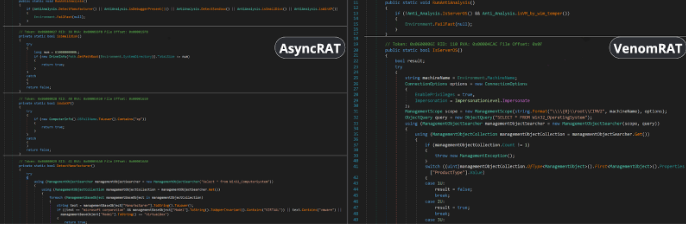
On the other hand, VenomRAT uses a more targeted approach. The virtual machine detection method in VenomRAT relies on querying system memory through WMI (Windows Management Instrumentation) to query system memory via Win32_CacheMemory. The method relies on counting cache memory entries, and if the number is less than 2 cache memories, it assumes the system is a virtual machine (VM). However, modern VMs are more sophisticated, and simply relying on counting cache memories may not be effective.

The other difference is, instead of targeting debuggers or sandboxes, VenomRAT attempts to avoid running on server operating systems by querying the Win32_OperatingSystem WMI class and checking the ProductType, which differentiates between desktop and server environments. We summarized class differences in the table below.

Feature AsyncRAT AntiAnalysis Class Venom RAT Anti_Analysis Class
VM Detection ✔ ✔
Sandbox Detection ✔ ✘
Debugger Detection ✔ ✘
Operating System Detection ✔ ✔
Process Discovery ✘ ✔

A Bag of RATs: VenomRAT vs. AsyncRAT
Figure 1: Side by side comparison of Anti-Analysis class of AsycRAT(let) and VenomRAT(right)

Hardware Interaction

VenomRAT has hardware interaction capabilities, allowing it to gather detailed system information through WMI queries with ManagementObjectSearcher objects. These features are encapsulated in the CGRInfo class, which enables the collection of CPU, RAM, GPU, and software data:

  • GetCPUName(): Retrieves the CPU name and the number of cores
  • GetRAM(): Fetches the total installed physical memory (RAM)
  • GetGPU(): Obtains the GPU name and driver version
  • GetInstalledApplications(): Scans the Windows Registry to compile a list of installed applications
  • GetUserProcessList(): Collects information on all running processes with visible windows

The collected data is sent back to the command-and-control (C2) server. This class is absent in both the version of AsyncRAT we analyzed and the open-source version.

DcRAT joined the party with AntiProcess and Camera classes

VenomRAT includes two notable classes absent in AsyncRAT: the AntiProcess and Camera classes.

The AntiProcess class is an anti-monitoring and anti-detection component of VenomRAT. Malware uses the Windows API function CreateToolhelp32Snapshot to get a snapshot of all running processes and search for specific processes. We categorized the processes the malware is looking for below.

System Monitoring Tools that can prevent users from identifying or stopping VenomRAT.

  • Taskmgr.exe
  • ProcessHacker.exe
  • procexp.exe

Security & Antivirus Processes: Terminating them reduces the risk of VenomRAT being detected or removed by security software.

  • MSASCui.exe
  • MsMpEng.exe
  • MpUXSrv.exe
  • MpCmdRun.exe
  • NisSrv.exe

System Configuration Utilities: By targeting these, VenomRAT prevents users from adjusting security settings, inspecting registry changes, or manually removing the malware.

  • ConfigSecurityPolicy.exe
  • MSConfig.exe
  • Regedit.exe
  • UserAccountControlSettings.exe
  • Taskkill.exe

If a matching process is found, it terminates it by its process ID (PID).

The Camera class is designed to detect webcams on a Windows system by querying the available system devices using COM interfaces. It retrieves a list of devices by category, specifically looking for video input devices. The class uses the ICreateDevEnum and IPropertyBag interfaces to enumerate and extract the device names.

However, both these classes, although absent in AasyncRAT, are not exclusive to VenomRAT only. Apparently they are exact copycats of yet another open-source RAT, DcRAT.

AMSI and ETW Bypass

This class was found only in the VenomRAT sample and is designed to bypass key Windows security mechanisms through in-memory patching. It specifically disables two critical Windows security features: AMSI (Antimalware Scan Interface) and ETW (Event Tracing for Windows), which are often used by antivirus software and monitoring tools to detect malware.

Key Functions:

  • AMSI Bypass: The class patches the AmsiScanBuffer function within amsi.dll to prevent AMSI from scanning for malicious content.
  • ETW Bypass: The class patches the EtwEventWrite function in ntdll.dll, which stops ETW from logging events related to the malware’s activity.

The patching process is performed in-memory. The class dynamically checks the system’s architecture (32-bit or 64-bit) and loads the appropriate DLLs (amsi.dll and ntdll.dll) to apply the patches based on the platform. The techniques used by VenomRAT closely mirror those found in the SharpSploit project, an open-source tool often used by penetration testers and red teams to test and bypass security features in a controlled environment. SharpSploit contains classes for bypassing both AMSI and ETW using similar in-memory patching methods, which likely served as inspiration for VenomRAT’s implementation.

This security bypass functionality makes VenomRAT more capable of evading modern security defenses.

Dynamic API resolution

VenomRAT has yet another class which is absent in AsyncRAT. The DInvokeCore class is implemented to dynamically resolve and call Windows API functions at runtime; this method bypasses traditional static imports, making it harder for antivirus and endpoint detection and response (EDR) systems to detect malicious activity.

Instead of statically importing Windows APIs, the class resolves function addresses at runtime (e.g., from ntdll.dll or kernel32.dll) using methods like GetLibraryAddress and GetExportAddress. This approach makes it difficult for static analysis tools to flag malicious behavior.

It uses the NtProtectVirtualMemory method to alter memory protection settings, allowing execution of code in memory regions that are normally non-executable—an effective method for in-memory execution of malicious payloads.

Implementation of DInvokeCore closely mirrors the open-source SharpSploit Generic class from the D/Invoke project by TheWover. The DInvokeCore class from VenomRAT appears to be a simplified version, which lacks some features but has core techniques for dynamic API invocation.

Conclusion

Our analysis was sparked by detection vendors grouping VenomRAT and AsyncRAT under the same label, blurring the lines between the two. While they indeed belong to the QuasarRAT family, they are still different RATs.

AsyncRAT appears to closely match the latest open-source release (v0.5.8). However, the VenomRAT seems to have evolved and added other capabilities, although a lot of them seem to be a copy-paste from another open-source RAT (DcRAT) and the SharpSploit project. Despite this, VenomRAT presents more advanced evasion techniques, making it a more sophisticated threat.

Therefore, it’s important for security vendors to treat them as distinct threats, recognizing that VenomRAT brings more advanced evasion capabilities, even if much of it isn’t truly unique. To help to resolve this confusion, we are sharing an updated VenomRAT YARA rule with the community, helping improve detection and response efforts.

Rapid7 customers

InsightIDR and Managed Detection and Response (MDR) customers have existing detection coverage through Rapid7’s expansive library of detection rules. Rapid7 recommends installing the Insight Agent on all applicable hosts to ensure visibility into suspicious processes and proper detection coverage. The following rule will alert on a wide range of malicious hashes tied to behavior in this blog:  Suspicious Process – Malicious Hash On Asset

YARA rule

The VenomRAT YARA rule can be found on the Rapid7 Labs GitHub here.

Run high-availability long-running clusters with Amazon EMR instance fleets

Post Syndicated from Garima Arora original https://aws.amazon.com/blogs/big-data/run-high-availability-long-running-clusters-with-amazon-emr-instance-fleets/

AWS now supports high availability Amazon EMR on EC2 clusters with instance fleet configuration. With high availability instance fleet clusters, you now get the enhanced resiliency and fault tolerance of high availability architecture, along with the improved flexibility and intelligence in Amazon Elastic Compute Cloud (Amazon EC2) instance selection of instance fleets. Amazon EMR is a cloud big data platform for petabyte-scale data processing, interactive analysis, streaming, and machine learning (ML) using open source frameworks such as Apache Spark, Presto and Trino, and Apache Flink. Customers love the scalability and flexibility that Amazon EMR on EC2 offers. However, like most distributed systems running mission-critical workloads, high availability is a core requirement, especially for those with long-running workloads.

In this post, we demonstrate how to launch a high availability instance fleet cluster using the newly redesigned Amazon EMR console, as well as using an AWS CloudFormation template. We also go over the basic concepts of Hadoop high availability, EMR instance fleets, the benefits and trade-offs of high availability, and best practices for running resilient EMR clusters.

High availability in Hadoop

High availability (HA) provides continuous uptime and fault tolerance for a Hadoop cluster. The core components of Hadoop, like Hadoop Distributed File System (HDFS) NameNode and YARN ResourceManager, are single points of failure in clusters with a single primary node. In the event that any of them crash, the entire cluster goes down. High Availability removes this single point of failure by introducing redundant standby nodes that can quickly take over if the primary node fails.

In a high availability EMR cluster, one node serves as the active NameNode that handles client operations, and others act as standby NameNodes. The standby NameNodes constantly synchronize their state with the active one, enabling seamless failover to maintain service availability. To learn more, see Supported applications in an Amazon EMR Cluster with multiple primary nodes.

Key instance fleet differentiations

Amazon EMR recommends using the instance fleet configuration option for provisioning EC2 instances in EMR clusters because it offers a flexible and robust approach to cluster provisioning. Some key advantages include:

  • Flexible instance provisioning – Instance fleets provide a powerful and simple way to specify up to five EC2 instance types on the Amazon EMR console, or up to 30 when using the AWS Command Line Interface (AWS CLI) or API with an allocation strategy. This enhanced diversity helps optimize for cost and performance while increasing the likelihood of fulfilling capacity requirements.
  • Target capacity management – You can specify target capacities for On-Demand and Spot Instances for each fleet. Amazon EMR automatically manages the mix of instances to meet these targets, reducing operational overhead.
  • Improved availability – By spanning multiple instance types and purchasing options such as On-Demand and Spot, instance fleets are more resilient to capacity fluctuations in specific EC2 instance pools.
  • Enhanced Spot Instance handling – Instance fleets offer superior management of Spot Instances, including the ability to set timeouts and specify actions if Spot capacity can’t be provisioned.
  • Reliable cluster launches – You can configure your instance fleet to select multiple subnets for different Availability Zones, allowing Amazon EMR to find the best combination of instances and purchasing options across these zones to launch your cluster in. Amazon EMR will identify the best Availability Zone based on your configuration and available EC2 capacity and launch the cluster.

Prerequisites

Before you launch the high availability EMR instance fleet clusters, make sure you have the following:

  • Latest Amazon EMR release – We recommend that you use the latest Amazon EMR release to benefit from the highest level of resiliency and stability for your high availability clusters. High availability for instance fleets is supported with Amazon EMR releases 5.36.1, 6.8.1, 6.9.1, 6.10.1, 6.11.1, 6.12.0, and later.
  • Supported applications – High availability for instance fleets is supported for applications such as Apache Spark, Presto, Trino, and Apache Flink. Refer to Supported applications in an Amazon EMR Cluster with multiple primary nodes for the complete list of supported applications and their failover processes.

Launch a high availability instance fleet cluster using the Amazon EMR console

Complete the following steps on the Amazon EMR console to configure and launch a high availability EMR cluster with instance fleets:

  1. On the Amazon EMR console, create a new cluster.
  2. For Name, enter a name.
  3. For Amazon EMR release, choose the Amazon EMR release that supports high availability clusters with instance fleets. The setting will default to the latest available Amazon EMR release.

CreateHACluster-EMRRelease

  1. Under Cluster configuration, choose the desired instance types for the primary fleet. (You can select up to five when using the Amazon EMR console.)
  2. Select Use high availability to launch the cluster with three primary nodes.

CreateHACluster

  1. Choose the instance types and target On-Demand and Spot size for the core and task fleet according to your requirements.

InstanceFleet-CreateFleets

  1. Under Allocation strategy, select Apply allocation strategy.
    1. 1 We recommend that you select Price-capacity optimized for your allocation strategy for your cluster for faster cluster provisioning, more accurate Spot Instance allocation, and fewer Spot Instance interruptions.
  2. Under Networking, you can choose multiple subnets for different Availability Zones. This allows Amazon EMR to look across those subnets and launch the cluster in an Availability Zone that best suits your instance and purchasing option requirements.

allocationStrategy

  1. Review your cluster configuration and choose Create cluster.

Amazon EMR will launch your cluster in a few minutes. You can view the cluster details on the Amazon EMR console.
ClusterDetailPage

Launch a high availability cluster with AWS CloudFormation

To launch a high availability cluster using AWS CloudFormation, complete the following steps:

  1. Create a CloudFormation template with EMR resource type AWS::EMR::Cluster and JobFlowInstancesConfig property types MasterInstanceFleet, CoreInstanceFleet and (optional) TaskInstanceFleets. To launch a high availability cluster, configure TargetOnDemandCapacity=3, TargetSpotCapacity=0 for the primary instance fleet and weightedCapacity=1 for each instance type configured for the fleet. See the following code:
{
  "AWSTemplateFormatVersion": "2010-09-09",
  "Resources": {
    "cluster": {
      "Type": "AWS::EMR::Cluster",
      "Properties": {
        "Instances": {
          "Ec2SubnetIds": [
            "subnet-003c889b8379f42d1",
            "subnet-0382aadd4de4f5da9",
            "subnet-078fbbb77c92ab099"
          ],
          "MasterInstanceFleet": {
            "Name": "HAPrimaryFleet",
            "TargetOnDemandCapacity": 3,
            "TargetSpotCapacity": 0,
            "InstanceTypeConfigs": [
              {
                "InstanceType": "m5.xlarge",
                "WeightedCapacity": 1
              },
              {
                "InstanceType": "m5.2xlarge",
                "WeightedCapacity": 1
              },
              {
                "InstanceType": "m5.4xlarge",
                "WeightedCapacity": 1
              }
            ]
          },
          "CoreInstanceFleet": {
            "Name": "cfnCore",
            "InstanceTypeConfigs": [
              {
                "InstanceType": "m5.xlarge",
                "WeightedCapacity": 1
              },
              {
                "InstanceType": "m5.2xlarge",
                "WeightedCapacity": 2
              },
              {
                "InstanceType": "m5.4xlarge",
                "WeightedCapacity": 4
              }
            ],
            "LaunchSpecifications": {
              "SpotSpecification": {
                "TimeoutAction": "SWITCH_TO_ON_DEMAND",
                "TimeoutDurationMinutes": 20,
                "AllocationStrategy": "PRICE_CAPACITY_OPTIMIZED"
              }
            },
            "TargetOnDemandCapacity": "4",
            "TargetSpotCapacity": 0
          },
          "TaskInstanceFleets": [
            {
              "Name": "cfnTask",
              "InstanceTypeConfigs": [
                {
                  "InstanceType": "m5.xlarge",
                  "WeightedCapacity": 1
                },
                {
                  "InstanceType": "m5.2xlarge",
                  "WeightedCapacity": 2
                },
                {
                  "InstanceType": "m5.4xlarge",
                  "WeightedCapacity": 4
                }
              ],
              "LaunchSpecifications": {
                "SpotSpecification": {
                  "TimeoutAction": "SWITCH_TO_ON_DEMAND",
                  "TimeoutDurationMinutes": 20,
                  "AllocationStrategy": "PRICE_CAPACITY_OPTIMIZED"
                }
              },
              "TargetOnDemandCapacity": "0",
              "TargetSpotCapacity": 4
            }
          ]
        },
        "Name": "TestHACluster",
        "ServiceRole": "EMR_DefaultRole",
        "JobFlowRole": "EMR_EC2_DefaultRole",
        "ReleaseLabel": "emr-6.15.0",
        "PlacementGroupConfigs": [
          {
            "InstanceRole": "MASTER",
            "PlacementStrategy": "SPREAD"
          }
        ]
      }
    }
  }
}

Make sure to use an Amazon EMR release that supports high availability clusters with instance fleets.

  1. Create a CloudFormation stack with the preceding template:
aws cloudformation create-stack --stack-name HAInstanceFleetCluster --template-body file://cfn-template.json --region us-east-1
  1. Retrieve the cluster ID from the list-clusters response to use in the following steps. You can further filter this list based on filters like cluster status, creation date, and time.
aws emr list-clusters --query "Clusters[?Name=='<YourClusterName>']"
  1. Run the following describe-cluster command:
aws emr describe-cluster --cluster-id j-XXXXXXXXXXX --region us-east-1

If the high availability cluster was launched successfully, the describe-cluster response will return the state of the primary fleet as RUNNING and provisionedOnDemandCapacity as 3. By this point, all three primary nodes have been started successfully.

DescribeClusterResponse

Primary node failover with High Availability clusters

To fetch information on all EC2 instances for an instance fleet, use the list-instances command:

aws emr list-instances --cluster-id j-XXXXXXXXXXX --instance-fleet-type MASTER --region us-east-1

For high availability clusters, it will return three instances in RUNNING state for the primary fleet and other attributes like public and private DNS names.

PrimaryInstance-DescribeCluster

The following screenshot shows the instance fleet status on the Amazon EMR console.

Instancefleet status

Let’s examine two cases for primary node failover.

Case 1: One of the three primary instances is accidentally stopped

When an EC2 instance is accidentally stopped by a user, Amazon EMR detects this and performs a failover for the stopped primary node. Amazon EMR also attempts to launch a new primary node with the same private IP and DNS name to recover back the quorum. During this failover, the cluster remains fully operational, providing true resiliency to single primary node failures.

The following screenshots illustrate the instance fleet details.

InstanceFleetDetail-PrimaryInstanceTerminated

instanceFleerRecovery

This automatic recovery for primary nodes is also reflected in the MultiMasterInstanceGroupNodesRunning or MultiMasterInstanceGroupNodesRunningPercentage Amazon CloudWatch metric emitted by Amazon EMR for your cluster. The following screenshot shows an example of these metrics.

CloudwatchMetrics

Case 2: One of the three primary instances becomes unhealthy

If Amazon EMR continuously receives failures when trying to connect to a primary instance, it is deemed as unhealthy and Amazon EMR will attempt to replace it. Similar to case 1, Amazon EMR will perform a failover for the stopped primary node and also attempt to launch a new primary node with the same private IP and DNS name to recover the quorum.

UnhealthyPrimaryInstance
PrimaryInstanceFailover-2

If you list the instances for the primary fleet, the response will include information for the EC2 instance that was stopped by the user and the new primary instance that replaced it with the same private IP and DNS name.
DescribeClusterResponse-instanceFailover

The following screenshot shows an example of the CloudWatch metrics.

An instance can have connection failures for multiple reasons, including but not limited to disk space unavailable on the instance, critical cluster daemons like instance controller shut down with errors, high CPU utilization, and more. Amazon EMR is continuously improving its health monitoring criteria to better identify unhealthy nodes on an EMR cluster.

Considerations and best practices

The following are some of the key considerations and best practices for using EMR instance fleets to launch a high availability cluster with multiple primary nodes:

  • Use the latest EMR release – With the latest EMR releases, you get the highest level of resiliency and stability for your high availability EMR clusters with multiple primary nodes.
  • Configure subnets for high availability – Amazon EMR can’t replace a failed primary node if the subnet is oversubscribed (there aren’t any available private IP addresses in the subnet). This results in a cluster failure as soon as the second primary node fails. Limited availability of IP addresses in a subnet can also result in cluster launch or scaling failures. To avoid such scenarios, we recommend that you dedicate an entire subnet to an EMR cluster.
  • Configure core nodes for enhanced data availability – To minimize the risk of local HDFS data loss on your production clusters, we recommend that you set the dfs.replication parameter to 3 and launch at least four core nodes. Setting dfs.replication to 1 on clusters with fewer than four core nodes can lead to data loss if a single core node goes down. For clusters with three or fewer core nodes, set dfs.replication parameter to at least 2 to achieve sufficient HDFS data replication. For more information, see HDFS configuration.
  • Use an allocation strategy – We recommend enabling an allocation strategy option for your instance fleet cluster to provide faster cluster provisioning, more accurate Spot Instance allocation, and fewer Spot Instance interruptions.
  • Set alarms for monitoring primary nodes – You should monitor the health and status of primary nodes of your long-running clusters to maintain smooth operations. Configure alarms using CloudWatch metrics such as MultiMasterInstanceGroupNodesRunning, MultiMasterInstanceGroupNodesRunningPercentage, or MultiMasterInstanceGroupNodesRequested.
  • Integrate with EC2 placement groups – You can also choose to protect primary instances against hardware failures by using a placement group strategy for your primary fleet. This will spread the three primary instances across separate underlying hardware to avoid loss of multiple primary nodes at the same time in the event of a hardware failure. See Amazon EMR integration with EC2 placement groups for more details.

When setting up a high availability instance fleet cluster with Amazon EMR on EC2, it’s important to understand that all EMR nodes, including the three primary nodes, are launched within a single Availability Zone. Although this configuration maintains high availability within that Availability Zone, it also means that the entire cluster can’t tolerate an Availability Zone outage. To mitigate the risk of cluster failures due to Spot Instance reclamation, Amazon EMR launches the primary nodes using On-Demand instances, providing an additional layer of reliability for these critical components of the cluster.

Conclusion

This post demonstrated how you can use high availability with EMR on EC2 instance fleets to enhance the resiliency and reliability of your big data workloads. By using instance fleets with multiple primary nodes, EMR clusters can withstand failures and maintain uninterrupted operations, while providing enhanced instance diversity and better Spot capacity management within a single Availability Zone. You can quickly set up these high availability clusters using the Amazon EMR console or AWS CloudFormation, and monitor their health using CloudWatch metrics.

To learn more about the supported applications and their failover process, see Supported applications in an Amazon EMR Cluster with multiple primary nodes. To get started with this feature and launch a high availability EMR on EC2 cluster, refer to Plan and configure primary nodes.


About the Authors

Garima Arora is a Software Development Engineer for Amazon EMR at Amazon Web Services. She specializes in capacity optimization and helps build services that allow customers to run big data applications and petabyte-scale data analytics faster. When not hard at work, she enjoys reading fiction novels and watching anime.

Ravi Kumar is a Senior Product Manager Technical-ES (PMT) at Amazon Web Services, specialized in building exabyte-scale data infrastructure and analytics platforms. With a passion for building innovative tools, he helps customers unlock valuable insights from their structured and unstructured data. Ravi’s expertise lies in creating robust data foundations using open-source technologies and advanced cloud computing, that powers advanced artificial intelligence and machine learning use cases. A recognized thought leader in the field, he advances the data and AI ecosystem through pioneering solutions and collaborative industry initiatives. As a strong advocate for customer-centric solutions, Ravi constantly seeks ways to simplify complex data challenges and enhance user experiences. Outside of work, Ravi is an avid technology enthusiast who enjoys exploring emerging trends in data science, cloud computing, and machine learning.

Tarun Chanana is a Software Development Manager for Amazon EMR at Amazon Web Services.

[$] The beginning of the 6.13 merge window

Post Syndicated from corbet original https://lwn.net/Articles/998623/

As of this writing, just over 1,800 non-merge changesets have been pulled
into the mainline kernel for the 6.13 release. That number may seem small,
given that a typical merge window brings in at least 12,000 commits, but
the early pulls this time around have focused on significant core changes,
and there are quite a few of them. The time has come to summarize the
changes pulled so far, including lazy preemption, multi-grained timestamps,
new extended-attribute system calls, and more.

Announcing a visual update to the AWS Management Console (preview)

Post Syndicated from Prasad Rao original https://aws.amazon.com/blogs/aws/announcing-a-visual-update-to-the-aws-management-console-preview/

Today, we are announcing a visual update to the AWS Management Console in preview. We are rolling out this update by using the latest version of Cloudscape, the Amazon Web Services (AWS) design system used to build intuitive, inclusive, and meaningful AWS experiences at scale.

In this post, I describe how the visual update makes it easier for you to scan content, focus on the key information, and find what you are looking for more effectively while preserving the familiar and consistent experience of the AWS Management Console.

AWS Management console home page - previous

AWS Management console home page - Visual Update

Improved readability
A revised typography scale and improved treatment of headings result in a stronger visual hierarchy, which helps you to better locate and understand your data. A refined use of color and weight across text elements help you differentiate key pieces of information faster. For example, you’ll see that labels in form fields are now more prominent, which eases scanning. The same applies to keys in key-value pairs and sections across components, such as service navigation, expandable elements, and tabs.

Cloudfront distribution console screenshot - Previous vs Visual Update

We improved the color palette, made it more vibrant, and simplified the color treatment of interactive elements. For example, secondary buttons, links, tokens, and interactive states for numerous interface elements are now blue, making it easier for you to interact with the content on the screen and contributing to improving task efficiency.

Screenshot showing improved color - Previous vs Visual Update

Improved focus in light and dark mode
Reduced visual complexity supports user focus. We replaced drop shadows with a new thinner stroke on main content wrappers, such as cards, panels, and containers, and unified the use of border styles across components. This reduces visual noise and optimizes the space inside the layout. Shadows are now reserved to add emphasis on specific interactive and transient elements, which helps simplify visual depth and improves the overall content hierarchy.

Screenshot showing improved focus - Previous vs Visual Update

We also released updates to dark mode to address the need for clearer differentiation between elements on the page. These changes include an update to the color ramp and improved contrast between interactive states across components.

Screenshot comparing dark mode of AWS Management Console home page - Previous vs Visual Update

Modernized interface
We modernized the interface while retaining familiarity to continue to offer predictable and recognizable experiences across AWS. The user experience is now easier on the eyes, thanks to the use of rounder shapes, brighter colors, and improved layout treatment. These updates create a smoother, more natural appearance, making the interface more visually pleasing.

To deliver a more delightful experience and support visual storytelling, we also introduced a whole new family of illustrations and motion while still offering the highest accessibility standards.

Example of an illustration introduced

Improved information density
We optimized information density by reducing unused space, leading to more content visible on the screen. Related data is now displayed closer together, reinforcing visual grouping. Space within content wrappers such as cards and containers has been minimized, so you can consume more information at once. The new layout is centered and wider, optimizing the experience to serve larger screen sizes than before. The visual update makes it easier to consume information, which creates a better and friendlier experience within the AWS Management Console.

Showing Improved information density on AWS Lambda Create Function Screen - Previous vs Visual Update

Showing Improved information density in tabular format - Previous vs Visual Update

Additionally, we introduced Toolbar, a new way to navigate and access contextual tools and features. This helps you perform your tasks while maximizing the amount of content available on screen.

Screenshot of toolbar introduced

Improved consistency
The interface is now more distinctive and consistent. Refreshed colors, iconography, and shapes help deliver a more dynamic and expressive experience while reinforcing a unified and cohesive journey across all AWS experiences.

Available now
You can start experiencing the visual update now in selected consoles across all AWS Regions by visiting the AWS Management Console. We’ll be extending the update across all services. Thanks to the new visual treatment, you can now benefit from an experience that’s more readable and intuitive and that contributes to improved overall task efficiency.

Secret Service Tracking People’s Locations without Warrant

Post Syndicated from Bruce Schneier original https://www.schneier.com/blog/archives/2024/11/secret-service-tracking-peoples-locations-without-warrant.html

This feels important:

The Secret Service has used a technology called Locate X which uses location data harvested from ordinary apps installed on phones. Because users agreed to an opaque terms of service page, the Secret Service believes it doesn’t need a warrant.

Има нещо гнило в (името на) пуйката

Post Syndicated from original https://www.toest.bg/ima-neshto-gnilo-v-imeto-na-puykata/

Има нещо гнило в (името на) пуйката

След президентските избори в САЩ близо половината американски граждани вероятно се чувстват всякак, но не и благодарни. И все пак това едва ли ще спре огромното мнозинство американци – без значение дали са гласували за Камала Харис, или за Доналд Тръмп – и тази година, както всяка, в четвъртия четвъртък на месец ноември да се съберат със своите семейства, близки, а често и с не толкова близки безпризорни чужденци, за да празнуват.

Точно като такъв безпризорен чужденец през осемте години, които прекарах в Щатите, съм присъствала поне на два пъти по толкова събирания по случай Деня на благодарността. За обкръжаващите ме американци, за които може да се каже всичко, но не и че са негостоприемни, беше немислимо да ме оставят сама на този така важен за тях, макар и незначещ нищо за мен празник. Ето защо аз ежегодно бях канена да присъствам на по две, нерядко на три, а понякога дори и на четири събирания за Деня на благодарността.

При първоначалната ми среща с американската Thanksgiving трапеза няколко месеца след пристигането ми в Америка в края на 90-те се почувствах, както вероятно са се чувствали пилигримите от Плимутската колония през 1621 г., споделяйки празника на реколтата с местното население от индианското племе Уампаноаг. Именно това събитие се смята за първообраза на Деня на благодарността. С други думи,

празничното меню ми се стори изключително екзотично.

Макар че повечето наименования на ястията ми бяха познати поне на теория, много от тях виждах на живо за пръв път, а начинът на приготвяне и комбинирането им надхвърляше и най-развинтеното кулинарно въображение: сос от боровинки и сос „грейви“; печени сладки картофи, покрити с пухкави бонбони маршмелоу; картофено пюре, но приготвено от небелени картофи; плънка от хляб с гъби, печени кестени, бекон и сушени сливи, която се сервира отделно; тиквен пай, пай от пекан или някаква умопомрачаваща комбинация от двете за десерт. Почетното място в центъра на трапезата, разбира се, неизменно беше заето от огромна печена пуйка.

Още тогава, макар и зашеметена от екзотичните гозби и безмерните количества погълната храна¹, усетих, че има нещо гнило – само че не в Дания, а в Турция, или по-точно във факта, че английското название на пуйката по някаква причина е идентично с името на държавата, с която България има граница на югоизток².

Едва сега се заемам да проуча тази мистерия по-внимателно. Оказва се, че макар и летенето изобщо да не ѝ се удава, тази едра, странно изглеждаща птица през изминалите няколко столетия е обиколила цялото земно кълбо – както буквално, така и чрез названията си на различни езици. Проследяването на тези наименования чудесно илюстрира сложните, често водещи до обърквания и недоразумения процеси на глобализация, и то векове преди самият термин да съществува.

Преди да се озове на американската трапеза за Деня на благодарността и да получи англоезичното си наименование, пуйката прекосява Атлантическия океан не веднъж, а цели два пъти, като междувременно се разпространява из цяла Европа, участва в пиеса на Шекспир, минава през Азия, среща се със свои африкански роднини и стига чак до Индия.

Прародителите на пуйката от американската трапеза първоначално се опитомяват и отглеждат от ацтеките, които я наричат huehxolotl, или „голямо чудовище”, на езика науатъл³.

Европейците в лицето на Кортес и неговите конкистадори за пръв път се срещат с въпросното чудовище през 1519 г., а впоследствие вождът на ацтеките Монтесума им подарява 1500 броя от птиците, които те отнасят в Европа. Но испанците тогава объркват пуйката с вид по-скромно украсен паун, като това се отразява и в наименованието pavo – от pavo real ‘паун’) – което те ѝ дават и под което е известна в Испания и досега.

Още през XV век обаче, тоест преди испанците да срещнат чудатата птица в Америка, английски търговци внасят в Европа друг вид птица, известна на български като „токачка“. Тя наподобява пуйката и принадлежи към същия разред (Кокошоподобни, или Galliformes) като нея, но всъщност произлиза от западния бряг на Африка. Тъй като търговията на много стоки през този период минава през Османската империя, въпросната птица (подобно на много други продукти, обозначени като „турски“, без значение какъв е реалният им произход) става известна на английски като turkey-cock.

Ето как в първите стотина години след пристигането на американската пуйка в Европа тя често била бъркана с африканската птица, а понятието turkey-cock се използвало без особена претенция за прецизност и за двете⁴.

През 1620 г. понятието turkey-cock прекосява Атлантическия океан в обратната посока заедно с английските пилигрими на кораба „Мейфлауър“,

които също толкова непридирчиво започват да го прилагат към всякакви едри птици, включително и към северноамериканските наследници на ацтекските пуйки. По този начин, макар да се смята, че пуйката всъщност не е присъствала на първото празнуване на Деня на благодарността през 1621 г., наименованието, впоследствие скъсено до turkey, се установява в Америка⁵.

Жертва на безразборната употреба става и иначе придирчивият Шекспир, който в пиесата си „Хенри V“ от 1599 г. подигравателно представя (в превод на Валери Петров) „оня подъл, низък, долен, въшлив самохвалко и нахалник Пистол“ с думите: Why, here he comes, swelling like a turkey-cock. (Или, отново в същия превод: „Ха, ето го, иде, наперен като пуяк!“). Но определението всъщност се оказва анахронично, тъй като действието в пиесата се развива непосредствено преди и след Битката при Аженкур, състояла се през 1415 г., когато европейците само са могли да мечтаят за Новия свят и неговите пуйки.

Самият Нов свят, както знаем, е резултат от колосално объркване, първоначално географско, а впоследствие и етимологично, вследствие на което в края на XV век карибските острови стават известни като Западни Индии, а коренното население на Америка – като „индианци“. Това объркване вероятно води и до свързаните с Индия наименования на пуйката на няколко езика. Освен в турския, на който англоезичната turkey се нарича hindi, те включват и френски (dinde, от poule d’Inde, или „пиле от Индия“), руски („индейка“ или „индюшка“), полски (indyk), даже и баски (indioilar arrunt), каталански (gall dindi), грузински (ინდაური/indauri) и иврит (הוֹדוּ/hodu).

Към тези имена можем да добавим и наименованията, заети от съвсем реално съществуващо място в самата Индия, а именно град Каликут, където експедицията на португалския мореплавател Вашку да Гама акостира през 1498 г. Точно Каликут служи като основа за наименованията на пуйката на няколко езика, например скандинавските (kalkon на шведски, kalkun на норвежки и датски), откъдето навлиза и във финския (kalkkuna), а също така и на литовски (kalakutas) и нидерландски (kalkoen), откъдето се озовава в африкаанс и даже в синхалски (කළුකුමා/kaḷukumā), макар че би се очаквало неговите ползватели, бидейки жители на близкия до Индия остров Шри Ланка, да са по-добре ориентирани относно индийската фауна.

Тези наименования също се дължат на объркването на пуйката с токачката, която португалските търговци активно внасят в Индия през целия XVI век, преди значително по-впечатляващата ѝ американска роднина тържествено да пристигне на Индийския субконтинент в началото на XVII век.

Когато през 1612 г. американската пуйка се появява заедно с други екзотични животни в двора на моголския император Джахангир в Агра, тя предизвиква истинска сензация. Джахангир е толкова впечатлен от странната птица, че поръчва на придворния художник Устад Мансур да я нарисува, „така че изумлението, което произтича от научаването за [нея], да се увеличи“ още повече. Рисунката, която днес се намира в колекцията на музея „Виктория и Алберт“ в Лондон, представя пуйката като някакво вълшебно създание от приказките и наистина предизвиква изумление.

Името, което пуйката впоследствие получава на хинди – पेरू /piroo, отвежда до място от другата страна на Земята, което е толкова далече от Индия, че на практика би могло да е приказно. На фона на сериозните обърквания на континенти и посоки обаче това наименование – взето назаем от португалската дума peru, появила се в резултат от схващането, че пуйката пристига в Португалия от Перу – се оказва най-близко до истината.

Ако говорим за фактологична точност, българският език поне на пръв поглед, изглежда, се представя доста добре. Етимологичният речник на БАН цитира предполагаемо родство на думата „пуйка“ с „птица“, сочейки съответствия с няколко различни езика, но също така „допуска и ономатопеичен произход“6.

И тъкмо да взема да си помисля, че като по чудо не сме попаднали в капана с обърканите наименования, откривам, че и българският не е застрахован срещу чужди влияния. С други думи, и ние, ако не сме дали, то поне сме взели нещо от света, било то и фактологично неточно. А именно диалектната дума за пуйка „мисирка“ (която през 2020 г. Бойко Борисов направи вайръл, използвайки я като определение на журналисти) всъщност произлиза от арабското наименование на Египет – مِصْر/miṣr, откъдето в миналото (погрешно) се е смятало, че птицата е дошла.

На основата на всички тези разкрития вече ми става трудно да мисля за пуйката като за ястиe, което е типично за Деня на благодарността, или в преносния смисъл на думатa – като синоним на глуповато перчене. Вместо това вече започвам да възприемам птицата като символ на завидна космополитност, както и като особено забавна илюстрация на непредвидимите последствия от човешкия порив да опитоми далечното и непознатото, давайки му отново далечно, макар и по-познато, а често и съвсем грешно име.

1 Един от изразите, които научих покрай празнуването на Деня на благодарността, е food coma, или „хранителна кома“, а сега разбирам, че медицинският термин за това състояние звучи много по-застрашително от обикновена сънливост след хранене – „постпрандиална сомнолентност“.

2 Всъщност пуйката споделя името си с Турция до 2022 г., когато държавата официално сменя изписването на англоезичното си наименование от Turkey на Türkiye – турското име на Турция. Като инициатор на промяната Ердоган твърди, че новото изписване най-добре изразява културата, цивилизацията и ценностите на турския народ, но според някои промяната на практика цели да сложи край на обидните асоциации с пуйката.

3 В Хондурас, Мексико и Ел Салвадор, както и в някои от южните американски щати, пуйката и досега е известна като guajolote – испанизираното наименование на думата от езика науатъл.

4 Езиковите недоразумения се простират и до таксономичното наименование на пуйката, което Карл Линей ѝ дава през 1758 г. Meleagris gallopavo произлиза от старогръцката дума μελεαγρίς (meleagrís, ‘токачка’) и латинската gallus (‘пиле’) + pāvō (‘паун’).

5 Днес менюто за Деня на благодарността чувствително се различава от храната, която според историческите източници е присъствала на първото празненство през 1621 г. Тогава на трапезата е имало еленско месо, разнообразни диви птици, няколко вида риба и местен сорт царевица, известен като „флинт“.

6 За съвременните наименования на пуйката на немски и италиански също може да се каже, че са „фактологично правилни“: немската дума Truthahn е комбинация от trut (смятана за имитация на звука, с която пуйката вика малките си) и Hahn (‘петел’), докато италианската tacchino е формирана чрез добавяне на умалителната наставка -ino към ономатопеичния корен. По-старите наименования и на тези езици обаче са следвали моделите, споменати по-горе в текста: на немски пуйката се е наричала Calecutischerhahn, а на италиански тя е била известна като gallo d’India.

В рубриката „От дума на дума“ Екатерина Петрова търси актуални, интересни или новопоявили се думи от нашето ежедневие и проследява често изненадващия им произход, развитието на значенията им във времето и взаимовръзките им с близки и далечни езици.

На север: Снежни лета в една исландска хижа (първа част)

Post Syndicated from Светла Стоянова original https://www.toest.bg/na-sever-snezhni-leta-v-edna-islandska-hizha-purva-chast/

На север: Снежни лета в една исландска хижа (първа част)

Ето че плаването на север ни отвежда и до Исландия. Тя е все по-приканваща и загадъчна, но същевременно и все по-посещавана и разгадавана. С население от едва 395 000 души (2024 г.) и поток от туристи от над 2 млн. годишно, Исландия е своеобразен феномен. За територия, малко по-малка от тази на България, разнообразието от природни забележителности е впечатляващо. Този остров по средата на Северния Атлантически океан е създаден от хиляди вулканични изригвания между постоянно раздалечаващите се Евразийска и Северноамериканска тектонска плоча, така че

страната практически се уголемява с по 2 см годишно.

През последните години Исландия попада в новините у нас заради зачестилите вулканични изригвания. Но този остров не е само бълбукаща или изстинала лава, а много повече. В това се уверих през няколкото години, в които живях там, като учих, работих, къмпингувах и правих разнообразни преходи с близките ми хора. Тук ще ви разкажа за едно особено място далеч в исландските планини, което беше мой дом в продължение на две снежни лета. Но най-напред нека си го представим…

Живея и работя в зелена хижа с червен покрив, построена насред блещукаща лава отпреди няколко хилядолетия. Земята тук е съчетание от ситен пясък и едри парчета лъскаво черно стъкло – вълшебния многоъгълен обсидиан. Хижата се намира в средата на огромна калдера с диаметър около 12 км – преди милиони години на това място е имало планина, която след освобождаването на магмата изпод основите ѝ постепенно се вдлъбва в котловина.

Близо до хижата бушуват горещи извори, които я затоплят чрез специална система. Водата от чешмата се носи от ручей топящ се сняг, който препуска по многоцветните камъни. Потокът се слива със себеподобните си в пълноводна река, която все по-стремително си проправя път сред тесни отвесни каньони и вае страните им, докато не се разлее нашироко по заоблените скали в равнината.

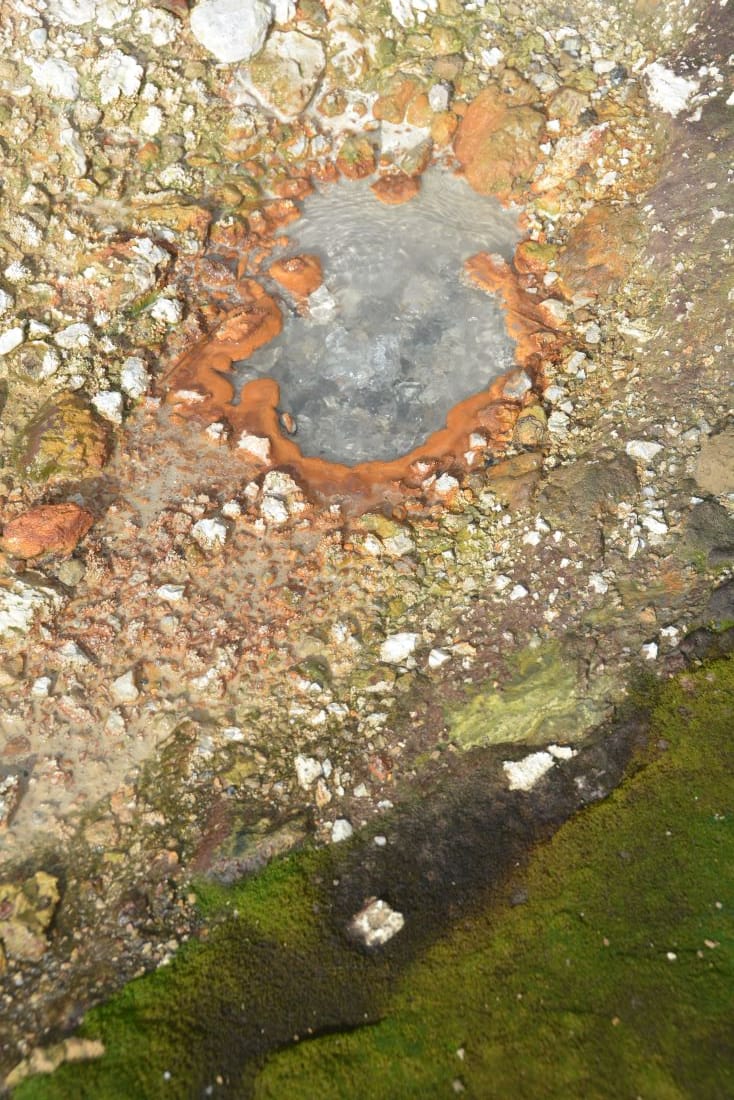
В далечината се белеят няколко ледници столетници, отразяват слънчевите лъчи и ослепително искрят. От краищата им зеят ледени пещери и приканват в тъмните си коридори, проблясващи загадъчно от пукнатините. Ледът на входовете обаче непрестанно се топи и капе заплашително. В следващия миг се срутва на огромни късове и се предава пред горещите извори наблизо. Нажежена в земните недра, водата извира и клокочи в яркочервено и сивкавосиньо, оцветява в контрастни багри заобикалящите я камъни и чертае абстрактни окръжности. Земята кипи от живот, изпуска топлина, диша и издиша, докато водата и вятърът дълбаят формите ѝ с нестихваща сила.

Водопади се спускат шумно един подир друг, смесват ледените и жарките извори и вият меандри измежду оранжевите скали. Стръмни чукари се издигат в причудливи форми и отдалеч напомнят същества, застинали във времето. Яркозелени мъхове омекотяват като възглавнички нащърбения релеф на лавата, разстилат се навред и уютно приканват за почивка. Тук-там сред вулканичната пустиня зеленеят оскъдни поляни, на които си почиват овце. Необезпокоявани, те опоскват малкото жълти цветя наоколо, докато черно-бели снежни овесарки любопитстват, чуруликат и отлитат.

Такъв спектакъл представяше природата, но често гъстата мъгла спускаше завесите и скриваше всичко от погледите ни. Подобно време е типично за исландските планински земи (исл. Hálendið, англ. Highlands): ненаселени и труднопроходими райони във вътрешната част на острова, с достъп чрез неравни планински пътища, отворени само през лятото. Населените райони на страната са основно по крайбрежието, защото океанът поддържа сравнително устойчива температура през годината. Затова и големите градове, като столицата Рейкявик и Акурейри, са разположени до морския бряг.

Всичко останало отвъд заселената част са яркозелени планини без гори, безкрайни черни пустини без камили и пълноводни ледникови реки без мостове. Неведнъж

тези почти извънземни места са използвани от НАСА за трениране на космонавти за стъпването на Луната през 60-те години, а само преди няколко години беше изпробван и прототип на марсоход за бъдещи мисии на Марс.

Именно там устояват на времето няколко скромни хижи на Исландския туристически съюз, достъпни само от юни до септември. В една от тях работих заедно с приятеля ми в продължение на два сезона. Нашата хижа е част от най-популярния няколкодневен планински преход в Исландия – Лойгавегюр (исл. Laugavegur – словосъчетание от laug ‘горещ извор’ и vegur ‘път’, или в превод „Пътят на горещите извори“).

Подобно на преходите Ел Камино де Сантяго в Испания или Ком – Емине у нас, се върви от хижа на хижа или се нощува в палатка на определените за целта места. Преходът от местността Ландманалойгар до Тоурсмьорк е 55 км, но може да бъде удължен с още 25 км, преминаващи между ледниците Мирдалсьокутъл и Ейяфятлайокутъл¹ до популярния водопад Скоугафос. Макар да не впечатлява с надморската си височина (400–1100 м), теренът се води планински. В по-голямата си част земната маса се състои от различни видове вулканични скали – риолит, обсидиан, базалт и др. Растителността е оскъдна, срещат се предимно мъхове, но и някои видове ниски растения.

Единствените диви животни са арктическите лисици, с черна козина през лятото и бяла през зимата, както и няколко вида птици, като снежните овесарки, тундровите яребици и гарваните. Други животни, на които човек може да попадне в изобилие, са овцете – те принадлежат на местните фермери, които лете ги пускат да пасат на воля по дивите места, докато не ги приберат отново наесен. Тази практика е типична за исландците, но и за други северни народи, като фарьорците, където по-големи хищници на практика няма.

Околността е природен парк, наречен „Фятлабак“ (исл. Fjallabak, в превод „Зад гърба на планините“) – геотермално активен, богат на горещи извори и често разтърсван от безобидни земетресения. Едно нещо обаче няма – дървета – и така гледката се простира на десетки километри във всички посоки. Освен това през юни и юли дните са дълги и нощем не се стъмва напълно, тъй като Исландия е досами Полярния кръг. Същинските бели нощи, когато слънцето не се скрива зад хоризонта, започват от 66-тия паралел нататък. Нощите са бели не само заради светлината навън.

Макар да е краят на юни, вали сняг на парцали хоризонтално – типично за Исландия. Едрите снежинки се наслояват по прозореца, докато не затулят изцяло „зрелището“ към пристигащите в хижата. Малкото звънче на вратата зазвънява и туристите влизат грохнали и с жвакащи обувки. Въздъхват, съвземат се от топлината и изстискват подгизналите си ръкавици. Били планирали да палаткуват тази вечер, но на бърза ръка решават да платят четворната цена за място в хижата. Приемам ги и си мисля как предния ден семейство с деца на по 4 и 6 години спаха на палатка в снега и бяха дори въодушевени от това приключение. Същевременно обаче си спомням ясно как при първото ми идване тук преди няколко години и аз бях една от тях – брулена от вятъра, капнала от газенето в кишата, мокра до кости и в отчаяна нужда да се приютя някъде на сухо и топло.

Когато предприехме прехода Лойгавегюр през 2020 г., имаше метри сняг. В продължение на шест дни вървяхме по няколко часа и преминавахме от един пейзаж в друг, като от картичка. Бяхме избрали да палаткуваме, така че на гръб носехме раници с всичко нужно: палатка, постелки, спални чували за ниски температури, тенджерка, котлон и газова бутилка, суха храна и сухи дрехи. Това беше първият ми преход, през който пренасях къщичката си на гръб. От ден на ден срещите с всеки хижар ни вълнуваха все повече. Да посрещаш и изпращаш туристите и да оставаш в онези прекрасни места изглеждаше като мечта. И ето че няколко години по-късно тя се сбъдна.


 (Следва продължение.)

1 Ейяфятлайокутъл е име на ледник в Южна Исландия, но и на вулкана под него, който изригна през 2010 г. и предизвика отмяната на хиляди полети в Европа.

Introducing Amazon CloudFront VPC origins: Enhanced security and streamlined operations for your applications

Post Syndicated from Matheus Guimaraes original https://aws.amazon.com/blogs/aws/introducing-amazon-cloudfront-vpc-origins-enhanced-security-and-streamlined-operations-for-your-applications/

I’m happy to introduce the release of Amazon CloudFront Virtual Private Cloud (VPC) origins, a new feature that enables content delivery from applications hosted in private subnets within their Amazon Virtual Private Cloud (Amazon VPC). This makes it easy to secure web applications, allowing you to focus on growing your businesses while improving security and maintaining high-performance and global scalability with CloudFront.

Customers serving content from Amazon Simple Storage Solution (Amazon S3), AWS Elemental Services and AWS Lambda Function URLs can use Origin Access Control as a managed solution to secure their origins, and make CloudFront the single front-door to your application. However, this was more difficult to achieve for applications that are hosted on Amazon Elastic Compute Cloud (Amazon EC2) or using load balancers, because you had to create your own solution to achieve the same result. You would have to use a combination of methods such as using access control lists (ACLs), managing firewall rules, or using logic such as header validation and a few other techniques to ensure that the endpoint remained exclusive to CloudFront.

CloudFront VPC origins removes the need for this kind of undifferentiated work by offering a managed solution that can be used to point CloudFront distributions directly to Application Load Balancers (ALBs), Network Load Balancers (NLBs), or EC2 instances inside your private subnets. This ensures that CloudFront becomes the sole ingress point for those resources with minimum configuration effort, providing you with improved performance and a cost-saving opportunity because it also eliminates the need for public IP addresses.

Configuring a CloudFront VPC origin
CloudFront VPC origins is available at no additional cost, making it an accessible option for all AWS customers. It can be integrated with new or existing CloudFront distributions using the Amazon CloudFront console or the AWS Command Line Interface (AWS CLI).

Imagine that you have an application hosted privately on an AWS Fargate for Amazon ECS fronted through an ALB. Let’s create a CloudFront distribution that uses the ALB directly inside the private subnet.

Start by navigating to the CloudFront console and select the new menu option: VPC origins.

vpc origins page

Creating a new VPC origin is straightforward. You only need to select from a few options. In the Origin ARN, you can search for available resources that are hosted in private subnets or enter it directly. You select the resources that you want, choose a friendly name for your VPC origin alongside some security options, and then confirm. Please note that, at launch, the VPC origin resource must be in the same AWS Account as the CloudFront distribution, although support for resources across all accounts is coming soon.

creating a vpc origin

After the creation process is complete, your VPC origin will be deployed and ready to go! You can check its status on the VPC origins page.

With this, we have created a CloudFront distribution that serves content directly from a resource hosted on a private subnet in a few clicks! After your VPC origin is created, you can navigate to your Distribution window, and add the VPC origin to your Distribution by either selecting the ARN from the dropdown or copy-pasting the ARN manually.

Remember, though, that it’s important to still continue to layer your application’s security by using services such as AWS Web Application Firewall (WAF) to protect from web exploits, or AWS Shield for managed DDos protection, and other services to achieve a full-spectrum protection.

Conclusion
CloudFront VPC Origins offers a new way for organizations to deliver secure, high-performance applications by enabling CloudFront distributions to serve content directly from resources hosted within private subnets. This reduces the complexity and cost of maintaining public-facing origins while ensuring that your application remains secure.

To learn more, see the getting started guide.

Matheus Guimaraes | @codingmatheus

Amazon CloudFront now accepts your applications’ gRPC calls

Post Syndicated from Sébastien Stormacq original https://aws.amazon.com/blogs/aws/amazon-cloudfront-now-accepts-your-applications-grpc-calls/

Starting today, you can deploy Amazon CloudFront, our global content delivery network (CDN), in front of your gRPC API endpoints.

gRPC is a modern, efficient, and language-agnostic framework for building APIs. It uses Protocol Buffers (protobuf) as its interface definition language (IDL), which enable you to define services and message types in a platform-independent manner. With gRPC, communication between services is achieved through lightweight and high-performance remote procedure calls (RPCs) over HTTP/2. This promotes efficient and low-latency communication across services, making it ideal for microservices architectures.

gRPC offers features such as bidirectional streaming, flow control, and automatic code generation for a variety of programming languages. It’s well-suited for scenarios in which you require high performance, efficient communication, and real-time data streaming. If your application needs to handle a large amount of data or requires low-latency communication between client and server, gRPC can be a good choice. However, gRPC might be more challenging to learn compared to REST. For example, gRPC relies on the protobuf serialization format, which requires developers to define their data structures and service methods in .proto files.

I see two benefits of deploying CloudFront in front of your gRPC API endpoints.

First, it allows the reduction of latency between the client application and your API implementation. CloudFront offers a global network of over 600+ edge locations with intelligent routing to the closest edge. Edge locations provide TLS termination and optional caching for your static content. CloudFront transfers client application requests to your gRPC origin through the fully managed, low-latency, and high-bandwidth private AWS network.

Secondly, your applications benefit from additional security services deployed on edge locations, such as traffic encryption, the validation of the HTTP headers through AWS Web Application Firewall, and AWS Shield Standard protection against distributed denial of service (DDoS) attacks.

Let’s see it in action
To start this demo, I use the gRPC route-guide demo from the official gRPC code repository. I deploy this example application in a container for ease of deployment (but any other deployment option is supported too).

I use this Dockerfile

FROM python:3.7
RUN pip install protobuf grpcio
COPY ./grpc/examples/python/route_guide .
CMD python route_guide_server.py
EXPOSE 50051

I also use the AWS Copilot command line to deploy my container on Amazon Elastic Container Service (Amazon ECS). The Copilot command prompts me to collect the information it requires to build and deploy the container. Then, it creates the ECS cluster, the ECS service, and the ECS task automatically. It also creates a TLS certificate and the load balancer for me. I test the client application by modifying line 122 to use the DNS name of the load balancer listener endpoint. I also change the client application code to use grpc.secure_channel instead of grpc.insecure_channel because the load balancer provides the application with an HTTPS endpoint.

gRPC client application demo - source code with ALB

When I’m confident my API is correctly deployed and working, I proceed and configure CloudFront.

First, in the CloudFront section of the AWS Management Console, I select Create distribution.

Under Origin, I enter my gRPC endpoint DNS name as Origin domain. I enable HTTPS only as Protocol and leave the HTTPS port as is (443). Then I choose a Name for the distribution.

CloudFront - Add origin and name

Under Viewer, I select HTTPS only as Viewer protocol policy. Then, I select GET, HEAD, OPTIONS, PUT, POST, PATCH, DELETE as Allowed HTTP methods. I select Enable for Allow gRPC requests over HTTP/2.

CloudFront - Viewer Policy

Under Cache key and origin requests, I select AllViewer as Origin request policy.

The default cache policy is CacheOptimized, but gRPC isn’t cacheable API traffic. Therefore, I select CachingDisabled as Cache policy.

CloudFront - Cache policy

AWS WAF helps protect you against common web exploits and bots that can affect availability, compromise security, or consume excessive resources. For gRPC traffic, AWS WAF can inspect the HTTP headers of the request and enforce access control. It doesn’t inspect the request body in protobuf format.

For this demo, I choose to not use AWS WAF. Under Web Application Firewall (WAF), I select Do not enable security protections.

CloudFront - Security

I also keep all the other options with their default value. HTTP/2 support is selected by default. Do not disable it because it is required for gRPC.

Finally, I select Create distribution.

CloudFront - Create distribution

There is only one switch to enable gRPC on top of the usual setup. When turned on, with HTTP/2 and HTTP POST enabled, CloudFront detects gRPC client traffic and forwards it to your gRPC origin.

After a few minutes, the distribution is ready. I copy and paste the endpoint URL of the CloudFront distribution, and I change the client-side app to make it point to CloudFront instead of the previously created load balancer.

gRPC client application demo - source code

I test the application again, and it works.

gRPC client application demo - execution

Pricing and Availability
gRPC origins are available on all the more than 600 CloudFront edge locations at no additional cost. The usual requests and data transfer fees apply.

Go and point your CloudFront origin to a gRPC endpoint today.

— seb

The collective thoughts of the interwebz