Tag Archives: Security, Identity & Compliance

Customers can now request the AWS CyberGRX report for their third-party supplier due diligence

Post Syndicated from Niyaz Noor original https://aws.amazon.com/blogs/security/customers-can-now-request-the-aws-cybergrx-report-for-their-third-party-supplier-due-diligence/

CyberGRX

Gaining and maintaining customer trust is an ongoing commitment at Amazon Web Services (AWS). We are continuously expanding our compliance programs to provide customers with more tools and resources to be able to perform effective due diligence on AWS. We are excited to announce the availability of the AWS CyberGRX report for our customers.

With the increase in adoption of cloud platforms and services across multiple sectors and industries, AWS has become one of the most critical components of customers’ third-party ecosystems. Regulated customers, such as those in the financial services sector, are held to higher standards by their regulators and auditors when it comes to exercising effective due diligence on their third parties. Customers are using third-party cyber risk management (TPCRM) platforms such as CyberGRX to better manage risks from their evolving third-party ecosystems and drive operational efficiencies. To help customers in such efforts, AWS has completed CyberGRX assessment of its security posture. The assessment is performed annually and is validated by independent CyberGRX partners.

CyberGRX assessment applies a dynamic approach to third-party risk assessment, which is updated in line with changes in risk level of cloud service providers, or as AWS updates its security posture and controls. This approach eliminates outdated static spreadsheets for third-party risk assessments, in which the risk matrices are not updated in near real time. CyberGRX assessment provides advanced capabilities by integrating AWS responses with analytics, threat intelligence, and sophisticated risk models to provide an in-depth view of the AWS security posture. In addition, AWS customers can use CyberGRX’s Framework Mapper feature to map AWS assessment controls and responses to well-known industry standards and frameworks (such as NIST 800-53, NIST Cybersecurity Framework (CSF), ISO 27001, PCI DSS, HIPAA) which can significantly reduce customers’ third-party supplier due-diligence burden.

The AWS CyberGRX report is available to all customers free of cost. Customers can request access to the report by completing an access request form, available on the AWS CyberGRX page.

As always, we value your feedback and questions. Reach out to the AWS Compliance team through the Contact Us page, or if you have feedback about this post, submit comments in the Comments section below. To learn more about our other compliance and security programs, see AWS Compliance Programs.

If you have feedback about this post, submit comments in the Comments section below. If you have questions about this post, contact AWS Support.

Want more AWS Security news? Follow us on Twitter.

Author

Niyaz Noor

Niyaz is the Security Audit Program Manager at AWS. Niyaz leads multiple security certification programs across Europe and other regions. During his professional career, he has helped multiple cloud service providers in obtaining global and regional security certification. He is passionate about delivering programs that build customers’ trust and provide them assurance on cloud security.

Naranjan Goklani

Naranjan Goklani

Naranjan is a Security Audit Manager at AWS, based in Toronto. He leads audits, attestations, certifications, and assessments across North America and Europe. Naranjan has previously worked in risk management, security assurance, and technology audits for the past 12 years.

SOC reports now available in Spanish

Post Syndicated from Rodrigo Fiuza original https://aws.amazon.com/blogs/security/soc-reports-now-available-in-spanish/

At Amazon Web Services (AWS), we continue to listen to our customers, regulators, and stakeholders to understand their needs regarding audit, assurance, certification, and attestation programs. We are pleased to announce that Fall 2021 AWS SOC 1, SOC 2 and SOC 3 reports are now available in Spanish. These translated reports will help drive greater engagement and alignment with customer and regulatory requirements across Latin America and Spain.

The English language version of the reports should be taken into account regarding the independent opinion issued by the auditors and control test results. They will be a complement to the Spanish version.

Translated SOC Reports in Spanish are available through AWS Artifact. Translated SOC reports in Spanish will be published twice a year in alignment with the Fall and Spring reporting cycles.

We value your feedback and questions—feel free to reach out to our team or give feedback about this post through the Contact Us page.

If you have feedback about this post, submit comments in the Comments section below.

Want more AWS Security news? Follow us on Twitter.


Los informes SOC ahora están disponibles en español

Seguimos escuchando a nuestros clientes, reguladores y partes interesadas para comprender sus necesidades en relación con los programas de auditoría, garantía, certificación y atestación en Amazon Web Services (AWS). Nos complace anunciar que los informes SOC 1, SOC 2 y SOC 3 de AWS de otoño de 2021 ya están disponibles en español. Estos informes traducidos ayudarán a impulsar un mayor compromiso y alineación con los requisitos regulatorios y de los clientes en las regiones de América Latina y España.

La versión en inglés de los informes debe tenerse en cuenta en relación con la opinión independiente emitida por los auditores y los resultados de las pruebas de control, como complemento de las versiones en español.

Los informes SOC traducidos en español están disponibles en AWS Artifact. Los informes SOC traducidos en español se publicarán dos veces al año según los ciclos de informes de otoño y primavera.

Valoramos sus comentarios y preguntas; no dude en ponerse en contacto con nuestro equipo o enviarnos sus comentarios sobre esta publicación a través de nuestra página Contáctenos.

Si tienes comentarios sobre esta publicación, envíalos en la sección Comentarios a continuación.

¿Desea obtener más noticias sobre seguridad de AWS? Síguenos en Twitter.
 

Rodrigo Fiuza

Rodrigo Fiuza

Rodrigo is a Security Audit Manager at AWS, based in São Paulo. He leads audits, attestations, certifications, and assessments across Latin America, Caribbean and Europe. Rodrigo has previously worked in risk management, security assurance, and technology audits for the past 12 years.

Author

Nimesh Ravasa

Nimesh is a Compliance Program Manager at Amazon Web Services. He leads multiple security and privacy initiatives within AWS. Nimesh has 14 years of experience in information security and holds CISSP, CISA, PMP, CSX, AWS Solution Architect – Associate, and AWS Security Specialty certifications.

Emma Zhang

Emma Zhang

Emma is a Compliance Program Manager at Amazon Web Services. She leads multiple process improvement projects across multiple compliance programs within AWS. Emma has 8 years of experience in risk management, IT risk assurance, and technology risk advisory.

Streamlining evidence collection with AWS Audit Manager

Post Syndicated from Nicholas Parks original https://aws.amazon.com/blogs/security/streamlining-evidence-collection-with-aws-audit-manager/

In this post, we will show you how to deploy a solution into your Amazon Web Services (AWS) account that enables you to simply attach manual evidence to controls using AWS Audit Manager. Making evidence-collection as seamless as possible minimizes audit fatigue and helps you maintain a strong compliance posture.

As an AWS customer, you can use APIs to deliver high quality software at a rapid pace. If you have compliance-focused teams that rely on manual, ticket-based processes, you might find it difficult to document audit changes as those changes increase in velocity and volume.

As your organization works to meet audit and regulatory obligations, you can save time by incorporating audit compliance processes into a DevOps model. You can use modern services like Audit Manager to make this easier. Audit Manager automates evidence collection and generates reports, which helps reduce manual auditing efforts and enables you to scale your cloud auditing capabilities along with your business.

AWS Audit Manager uses services such as AWS Security Hub, AWS Config, and AWS CloudTrail to automatically collect and organize evidence, such as resource configuration snapshots, user activity, and compliance check results. However, for controls represented in your software or processes without an AWS service-specific metric to gather, you need to manually create and provide documentation as evidence to demonstrate that you have established organizational processes to maintain compliance. The solution in this blog post streamlines these types of activities.

Solution architecture

This solution creates an HTTPS API endpoint, which allows integration with other software development lifecycle (SDLC) solutions, IT service management (ITSM) products, and clinical trial management systems (CTMS) solutions that capture trial process change amendment documentation (in the case of pharmaceutical companies who use AWS to build robust pharmacovigilance solutions). The endpoint can also be a backend microservice to an application that allows contract research organizations (CRO) investigators to add their compliance supporting documentation.

In this solution’s current form, you can submit an evidence file payload along with the assessment and control details to the API and this solution will tie all the information together for the audit report. This post and solution is directed towards engineering teams who are looking for a way to accelerate evidence collection. To maximize the effectiveness of this solution, your engineering team will also need to collaborate with cross-functional groups, such as audit and business stakeholders, to design a process and service that constructs and sends the message(s) to the API and to scale out usage across the organization.

To download the code for this solution, and the configuration that enables you to set up auto-ingestion of manual evidence, see the aws-audit-manager-manual-evidence-automation GitHub repository.

Architecture overview

In this solution, you use AWS Serverless Application Model (AWS SAM) templates to build the solution and deploy to your AWS account. See Figure 1 for an illustration of the high-level architecture.

Figure 1. The architecture of the AWS Audit Manager automation solution

Figure 1. The architecture of the AWS Audit Manager automation solution

The SAM template creates resources that support the following workflow:

  1. A client can call an Amazon API Gateway endpoint by sending a payload that includes assessment details and the evidence payload.
  2. An AWS Lambda function implements the API to handle the request.
  3. The Lambda function uploads the evidence to an Amazon Simple Storage Service (Amazon S3) bucket (3a) and uses AWS Key Management Service (AWS KMS) to encrypt the data (3b).
  4. The Lambda function also initializes the AWS Step Functions workflow.
  5. Within the Step Functions workflow, a Standard Workflow calls two Lambda functions. The first looks for a matching control within an assessment, and the second updates the control within the assessment with the evidence.
  6. When the Step Functions workflow concludes, it sends a notification for success or failure to subscribers of an Amazon Simple Notification Service (Amazon SNS) topic.

Deploy the solution

The project available in the aws-audit-manager-manual-evidence-automation GitHub repository contains source code and supporting files for a serverless application you can deploy with the AWS SAM command line interface (CLI). It includes the following files and folders:

src Code for the application’s Lambda implementation of the Step Functions workflow.
It also includes a Step Functions definition file.
template.yml A template that defines the application’s AWS resources.

Resources for this project are defined in the template.yml file. You can update the template to add AWS resources through the same deployment process that updates your application code.

Prerequisites

This solution assumes the following:

  1. AWS Audit Manager is enabled.
  2. You have already created an assessment in AWS Audit Manager.
  3. You have the necessary tools to use the AWS SAM CLI (see details in the table that follows).

For more information about setting up Audit Manager and selecting a framework, see Getting started with Audit Manager in the blog post AWS Audit Manager Simplifies Audit Preparation.

The AWS SAM CLI is an extension of the AWS CLI that adds functionality for building and testing Lambda applications. The AWS SAM CLI uses Docker to run your functions in an Amazon Linux environment that matches Lambda. It can also emulate your application’s build environment and API.

To use the AWS SAM CLI, you need the following tools:

AWS SAM CLI Install the AWS SAM CLI
Node.js Install Node.js 14, including the npm package management tool
Docker Install Docker community edition

To deploy the solution

  1. Open your terminal and use the following command to create a folder to clone the project into, then navigate to that folder. Be sure to replace <FolderName> with your own value.

    mkdir Desktop/<FolderName> && cd $_

  2. Clone the project into the folder you just created by using the following command.

    git clone https://github.com/aws-samples/aws-audit-manager-manual-evidence-automation.git

  3. Navigate into the newly created project folder by using the following command.

    cd aws-audit-manager-manual-evidence-automation

  4. In the AWS SAM shell, use the following command to build the source of your application.

    sam build

  5. In the AWS SAM shell, use the following command to package and deploy your application to AWS. Be sure to replace <DOC-EXAMPLE-BUCKET> with your own unique S3 bucket name.

    sam deploy –guided –parameter-overrides paramBucketName=<DOC-EXAMPLE-BUCKET>

  6. When prompted, enter the AWS Region where AWS Audit Manager was configured. For the rest of the prompts, leave the default values.
  7. To activate the IAM authentication feature for API gateway, override the default value by using the following command.

    paramUseIAMwithGateway=AWS_IAM

To test the deployed solution

After you deploy the solution, run an invocation like the one below for an assessment (using curl). Be sure to replace <YOURAPIENDPOINT> and <AWS REGION> with your own values.

curl –location –request POST
‘https://<YOURAPIENDPOINT>.execute-api.<AWS REGION>.amazonaws.com/Prod’ \
–header ‘x-api-key: ‘ \
–form ‘payload=@”<PATH TO FILE>”‘ \
–form ‘AssessmentName=”GxP21cfr11″‘ \
–form ‘ControlSetName=”General requirements”‘ \
–form ‘ControlIdName=”11.100(a)”‘

Check to see that your file is correctly attached to the control for your assessment.

Form-data interface parameters

The API implements a form-data interface that expects four parameters:

  1. AssessmentName: The name for the assessment in Audit Manager. In this example, the AssessmentName is GxP21cfr11.
  2. ControlSetName: The display name for a control set within an assessment. In this example, the ControlSetName is General requirements.
  3. ControlIdName: this is a particular control within a control set. In this example, the ControlIdName is 11.100(a).
  4. Payload: this is the file representing evidence to be uploaded.

As a refresher of Audit Manager concepts, evidence is collected for a particular control. Controls are grouped into control sets. Control sets can be grouped into a particular framework. The assessment is considered an implementation, or an instance, of the framework. For more information, see AWS Audit Manager concepts and terminology.

To clean up the deployed solution

To clean up the solution, use the following commands to delete the AWS CloudFormation stack and your S3 bucket. Be sure to replace <YourStackId> and <DOC-EXAMPLE-BUCKET> with your own values.

aws cloudformation delete-stack –stack-name <YourStackId>
aws s3 rb s3://<DOC-EXAMPLE-BUCKET> –force

Conclusion

This solution provides a way to allow for better coordination between your software delivery organization and compliance professionals. This allows your organization to continuously deliver new updates without overwhelming your security professionals with manual audit review tasks.

Next steps

There are various ways to extend this solution.

  1. Update the API Lambda implementation to be a webhook for your favorite software development lifecycle (SDLC) or IT service management (ITSM) solution.
  2. Modify the steps within the Step Functions state machine to more closely match your unique compliance processes.
  3. Use AWS CodePipeline to start Step Functions state machines natively, or integrate a variation of this solution with any continuous compliance workflow that you have.

Learn more AWS Audit Manager, DevOps, and AWS for Health and start building!

 
If you have feedback about this post, submit comments in the Comments section below. If you have questions about this post, contact AWS Support.

Want more AWS Security news? Follow us on Twitter.

Nicholas Parks

Nicholas Parks

Nicholas has been using AWS since 2010 across various enterprise verticals including healthcare, life sciences, financial, retail, and telecommunications. Nicholas focuses on modernizations in pursuit of new revenue as well as application migrations. He specializes in Lean, DevOps cultural change, and Continuous Delivery.

Brian Tang

Brian Tang

Brian Tang is an AWS Solutions Architect based out of Boston, MA. He has 10 years of experience helping enterprise customers across a wide range of industries complete digital transformations by migrating business-critical workloads to the cloud. His core interests include DevOps and serverless-based solutions. Outside of work, he loves rock climbing and playing guitar.

New – Additional Checksum Algorithms for Amazon S3

Post Syndicated from Jeff Barr original https://aws.amazon.com/blogs/aws/new-additional-checksum-algorithms-for-amazon-s3/

Amazon Simple Storage Service (Amazon S3) is designed to provide 99.999999999% (11 9s) of durability for your objects and for the metadata associated with your objects. You can rest assured that S3 stores exactly what you PUT, and returns exactly what is stored when you GET. In order to make sure that the object is transmitted back-and-forth properly, S3 uses checksums, basically a kind of digital fingerprint.

S3’s PutObject function already allows you to pass the MD5 checksum of the object, and only accepts the operation if the value that you supply matches the one computed by S3. While this allows S3 to detect data transmission errors, it does mean that you need to compute the checksum before you call PutObject or after you call GetObject. Further, computing checksums for large (multi-GB or even multi-TB) objects can be computationally intensive, and can lead to bottlenecks. In fact, some large S3 users have built special-purpose EC2 fleets solely to compute and validate checksums.

New Checksum Support
Today I am happy to tell you about S3’s new support for four checksum algorithms. It is now very easy for you to calculate and store checksums for data stored in Amazon S3 and to use the checksums to check the integrity of your upload and download requests. You can use this new feature to implement the digital preservation best practices and controls that are specific to your industry. In particular, you can specify the use of any one of four widely used checksum algorithms (SHA-1, SHA-256, CRC-32, and CRC-32C) when you upload each of your objects to S3.

Here are the principal aspects of this new feature:

Object Upload – The newest versions of the AWS SDKs compute the specified checksum as part of the upload, and include it in an HTTP trailer at the conclusion of the upload. You also have the option to supply a precomputed checksum. Either way, S3 will verify the checksum and accept the operation if the value in the request matches the one computed by S3. In combination with the use of HTTP trailers, this feature can greatly accelerate client-side integrity checking.

Multipart Object Upload – The AWS SDKs now take advantage of client-side parallelism and compute checksums for each part of a multipart upload. The checksums for all of the parts are themselves checksummed and this checksum-of-checksums is transmitted to S3 when the upload is finalized.

Checksum Storage & Persistence – The verified checksum, along with the specified algorithm, are stored as part of the object’s metadata. If Server-Side Encryption with KMS Keys is requested for the object, then the checksum is stored in encrypted form. The algorithm and the checksum stick to the object throughout its lifetime, even if it changes storage classes or is superseded by a newer version. They are also transferred as part of S3 Replication.

Checksum Retrieval – The new GetObjectAttributes function returns the checksum for the object and (if applicable) for each part.

Checksums in Action
You can access this feature from the AWS Command Line Interface (CLI), AWS SDKs, or the S3 Console. In the console, I enable the Additional Checksums option when I prepare to upload an object:

Then I choose a Checksum function:

If I have already computed the checksum I can enter it, otherwise the console will compute it.

After the upload is complete I can view the object’s properties to see the checksum:

The checksum function for each object is also listed in the S3 Inventory Report.

From my own code, the SDK can compute the checksum for me:

with open(file_path, 'rb') as file:
    r = s3.put_object(
        Bucket=bucket,
        Key=key,
        Body=file,
        ChecksumAlgorithm='sha1'
    )

Or I can compute the checksum myself and pass it to put_object:

with open(file_path, 'rb') as file:
    r = s3.put_object(
        Bucket=bucket,
        Key=key,
        Body=file,
        ChecksumSHA1='fUM9R+mPkIokxBJK7zU5QfeAHSy='
    )

When I retrieve the object, I specify checksum mode to indicate that I want the returned object validated:

r = s3.get_object(Bucket=bucket, Key=key, ChecksumMode='ENABLED')

The actual validation happens when I read the object from r['Body'], and an exception will be raised if there’s a mismatch.

Watch the Demo
Here’s a demo (first shown at re:Invent 2021) of this new feature in action:

Available Now
The four additional checksums are now available in all commercial AWS Regions and you can start using them today at no extra charge.

— Jeff;

Let’s Architect! Architecting for Security

Post Syndicated from Luca Mezzalira original https://aws.amazon.com/blogs/architecture/lets-architect-architecting-for-security/

At AWS, security is “job zero” for every employee—it’s even more important than any number one priority. In this Let’s Architect! post, we’ve collected security content to help you protect data, manage access, protect networks and applications, detect and monitor threats, and ensure privacy and compliance.

Managing temporary elevated access to your AWS environment

One challenge many organizations face is maintaining a solid security governance across AWS accounts.

This Security Blog post provides a practical approach to temporarily elevate access for specific users. For example, imagine a developer wants to access a resource in the production environment. With elevated access, you won’t have to provide them an account that has access to the production environment. You would just elevate their access for a short period of time. The following diagram shows the few steps needed to temporarily elevate access to a user.

This diagram shows the few steps needed to temporarily elevate access to a user

This diagram shows the few steps needed for to temporarily elevate access to a user

Security should start left: The problem with shift left

You already know security is job zero at AWS. But it’s not just a technology challenge. The gaps between security, operations, and development cycles are widening. To close these gaps, teams must have real-time visibility and control over their tools, processes, and practices to prevent security breaches.

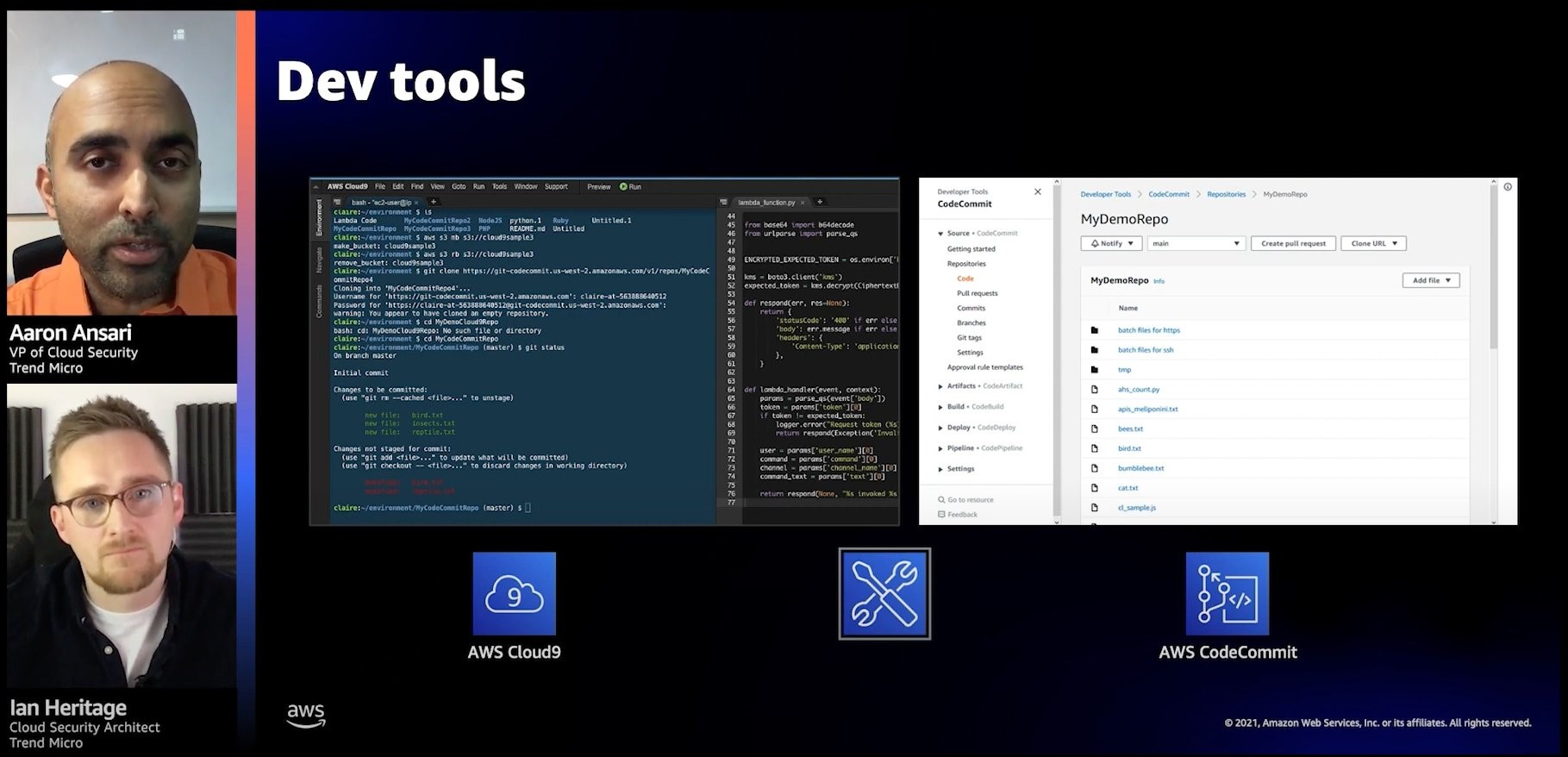
This re:Invent session shows how establishing relationships, empathy, and understanding between development and operations teams early in the development process helps you maintain the visibility and control you need to keep your applications secure.

Screenshot from re:Invent session

Empowering developers means shifting security left and presenting security issues as early as possible in your process

AWS Security Reference Architecture: Visualize your security

Securing a workload in the cloud can be tough; almost every workload is unique and has different requirements. This re:Invent video shows you how AWS can simplify the security of your workloads, no matter their complexity.

You’ll learn how various services work together and how you can deploy them to meet your security needs. You’ll also see how the AWS Security Reference Architecture can automate common security tasks and expand your security practices for the future. The following diagram shows how AWS Security Reference Architecture provides guidelines for securing your workloads in multiple AWS Regions and accounts.

The AWS Security Reference Architecture provides guidelines for securing your workloads in multiple AWS Regions and accounts

The AWS Security Reference Architecture provides guidelines for securing your workloads in multiple AWS Regions and accounts

Network security for serverless workloads

Serverless technologies can improve your security posture. You can build layers of control and security with AWS managed and abstracted services, meaning that you don’t have to do as much security work and can focus on building your system.

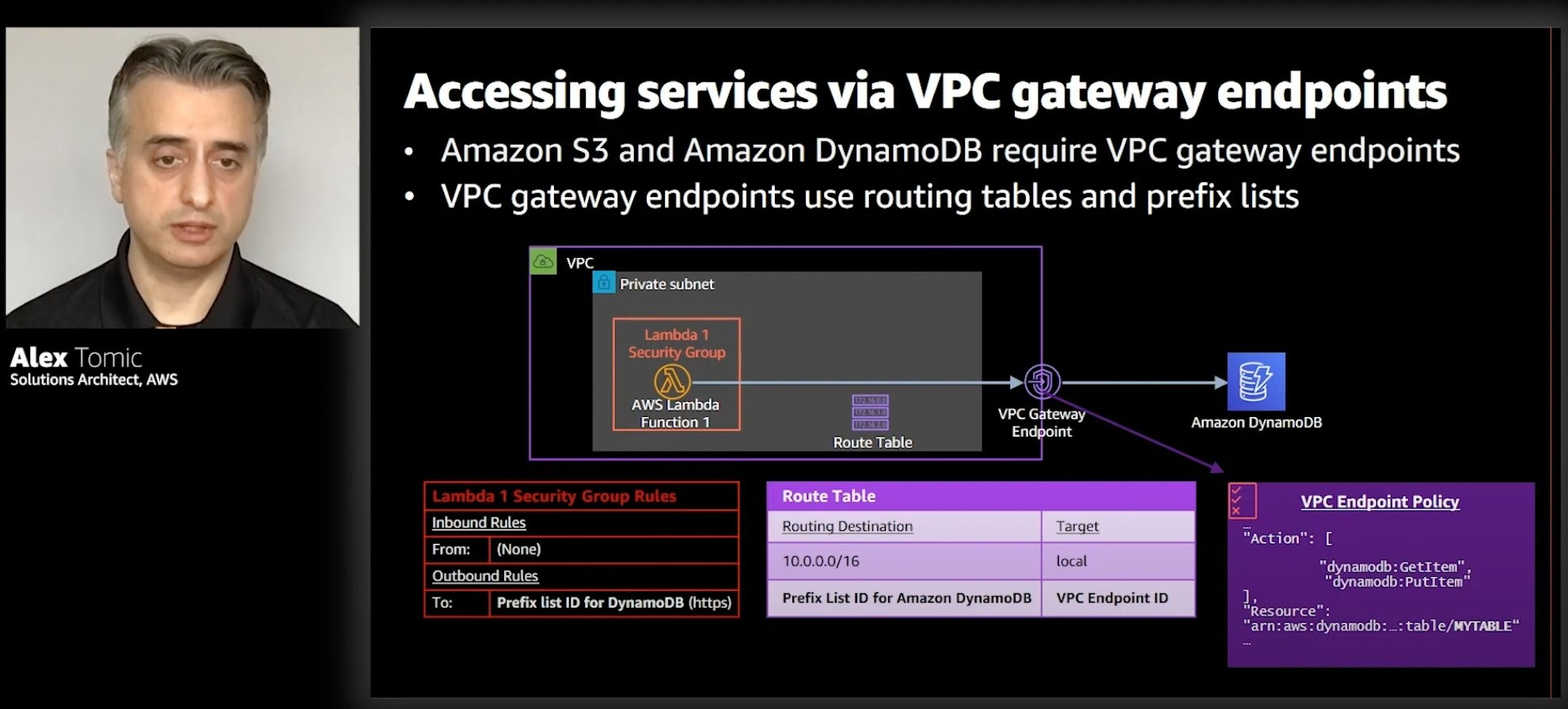
This video from re:Invent provides serverless strategies to consider to gain greater control of networking security. You will learn patterns to implement security at the edge, as well as options for controlling an AWS Lambda function’s network traffic. These strategies are designed to securely access resources (for example, databases) placed in a virtual private cloud (VPC), as well as resources outside of a VPC. The following screenshot shows how
Lambda functions can run in a VPC and connect to services like Amazon DynamoDB using VPC gateway endpoints.

Lambda functions can run in a VPC and connect to services like Amazon DynamoDB using VPC gateway endpoints

Lambda functions can run in a VPC and connect to services like Amazon DynamoDB using VPC gateway endpoints

See you next time!

Thanks for reading! If you’re looking for more ways to architect your workload for security, check out Best Practices for Security, Identity, & Compliance in the AWS Architecture Center.

See you in a couple of weeks when we discuss the best tools offered by AWS for software architects!

Other posts in this series

What is cryptographic computing? A conversation with two AWS experts

Post Syndicated from Supriya Anand original https://aws.amazon.com/blogs/security/a-conversation-about-cryptographic-computing-at-aws/

Joan Feigenbaum
Joan Feigenbaum
Amazon Scholar, AWS Cryptography
Bill Horne
Bill Horne
Principal Product Manager, AWS Cryptography

AWS Cryptography tools and services use a wide range of encryption and storage technologies that can help customers protect their data both at rest and in transit. In some instances, customers also require protection of their data even while it is in use. To address these needs, Amazon Web Services (AWS) is developing new techniques for cryptographic computing, a set of technologies that allow computations to be performed on encrypted data, so that sensitive data is never exposed. This foundation is used to help protect the privacy and intellectual property of data owners, data users, and other parties involved in machine learning activities.

We recently spoke to Bill Horne, Principal Product Manager in AWS Cryptography, and Joan Feigenbaum, Amazon Scholar in AWS Cryptography, about their experiences with cryptographic computing, why it’s such an important topic, and how AWS is addressing it.

Tell me about yourselves: what made you decide to work in cryptographic computing? And, why did you come to AWS to do cryptographic computing?

Joan: I’m a computer science professor at Yale and an Amazon Scholar. I started graduate school at Stanford in Computer Science in the fall of 1981. Before that, I was an undergraduate math major at Harvard. Almost from the beginning, I have been interested in what has now come to be called cryptographic computing. During the fall of 1982, Andrew Yao, who was my PhD advisor, published a paper entitled “Protocols for Secure Computation,” which introduced the millionaire’s problem: Two millionaires want to run a protocol at the end of which they will know which one of them has more millions, but not know exactly how many millions the other one has. If you dig deeper, you’ll find a few antecedents, but that’s the paper that’s usually credited with launching the field of cryptographic computing. Over the course of my 40 years as a computer scientist, I’ve worked in many different areas of computer science research, but I’ve always come back to cryptographic computing, because it’s absolutely fascinating and has many practical applications.

Bill: I originally got my PhD in Machine Learning in 1993, but I switched over to security in the late 1990s. I’ve spent most of my career in industrial research laboratories, where I was always interested in how to bring technology out of the lab and get it into real products. There’s a lot of interest from customers right now around cryptographic computing, and so I think that we’re at a really interesting point in time, where this could take off in the next few years. Being a part of something like this is really exciting.

What exactly is cryptographic computing?

Bill: Cryptographic computing is not a single thing. Rather, it is a methodology for protecting data in use—a set of techniques for doing computation over sensitive data without revealing that data to other parties. For example, if you are a financial services company, you might want to work with other financial services companies to develop machine learning models for credit card fraud detection. You might need to use sensitive data about your customers as training data for your models, but you don’t want to share your customer data in plaintext form with the other companies, and vice versa. Cryptographic computing gives organizations a way to train models collaboratively without exposing plaintext data about their customers to each other, or even to an intermediate third party such as a cloud provider like AWS.

Why is it challenging to protect data in use? How does cryptographic computing help with this challenge?

Bill: Protecting data-at-rest and data-in-transit using cryptography is very well understood.

Protecting data-in-use is a little trickier. When we say we are protecting data-in-use, we mean protecting it while we are doing computation on it. One way to do that is with other types of security mechanisms besides encryption. Specifically, we can use isolation and access control mechanisms to tightly control who or what can gain access to those computations. The level of control can vary greatly from standard virtual machine isolation, all the way down to isolated, hardened, and constrained enclaves backed by a combination of software and specialized hardware. The data is decrypted and processed within the enclave, and is inaccessible to any external code and processes. AWS offers Nitro Enclaves, which is a very tightly controlled environment that uses this kind of approach.

Cryptographic computing offers a completely different approach to protecting data-in-use. Instead of using isolation and access control, data is always cryptographically protected, and the processing happens directly on the protected data. The hardware doing the computation doesn’t even have access to the cryptographic keys used to encrypt the data, so it is computationally intractable for that hardware, any software running on that hardware, or any person who has access to that hardware to learn anything about your data. In fact, you arguably don’t even need isolation and access control if you are using cryptographic computing, since nothing can be learned by viewing the computation.

What are some cryptographic computing techniques and how do they work?

Bill: Two applicable fundamental cryptographic computing techniques are homomorphic encryption and secure multi-party computation. Homomorphic encryption allows for computation on encrypted data. Basically, the idea is that there are special cryptosystems that support basic mathematical operations like addition and multiplication which work on encrypted data. From those simple operations, you can form complex circuits to implement any function you want.

Secure multi-party computation is a very different paradigm. In secure multi-party computation, you have two or more parties who want to jointly compute some function, but they don’t want to reveal their data to each other. An example might be that you have a list of customers and I have a list of customers, and we want to find out what customers we have in common without revealing anything else about our data to each other, in order to protect customer privacy. That’s a special kind of multi-party computation called private set intersection (PSI).

Joan: To add some detail to what Bill said, homomorphic encryption was heavily influenced by a 2009 breakthrough by Craig Gentry, who is now a Research Fellow at the Algorand Foundation. If a customer has dataset X, needs f(X), and is willing to reveal X to the server, he uploads X and has the cloud service compute Y= f(X) and return Y. If he wants (or is required by law or policy) to hide X from the cloud provider, he homomorphically encrypts X on the client side to get X’, uploads it, receives an encrypted result Y’, and homomorphically decrypts Y’ (again on the client side) to get Y. The confidential data, the result, and the cryptographic keys all remain on the client side.

In secure multi-party computation, there are n ≥ 2 parties that have datasets X1, X2, …, Xn, and they wish to compute Y=f(X1, X2, …, Xn). No party wants to reveal to the others anything about his own data that isn’t implied by the result Y. They execute an n-party protocol in which they exchange messages and perform local computations; at the end, all parties know the result, but none has obtained additional information about the others’ inputs or the intermediate results of the (often multi-round) distributed computation. Multi-party computation might use encryption, but often it uses other data-hiding techniques such as secret sharing.

Cryptographic computing seems to be appearing in the popular technical press a lot right now and AWS is leading work in this area. Why is this a hot topic right now?

Joan: There’s strong motivation to deploy this stuff now, because cloud computing has become a big part of our tech economy and a big part of our information infrastructure. Parties that might have previously managed compute environments on-premises where data privacy is easier to reason about are now choosing third-party cloud providers to provide this compute environment. Data privacy is harder to reason about in the cloud, so they’re looking for techniques where they don’t have to completely rely on their cloud provider for data privacy. There’s a tremendous amount of confidential data—in health care, medical research, finance, government, education, and so on—data which organizations want to use in the cloud to take advantage of state-of-the-art computational techniques that are hard to implement in-house. That’s exactly what cryptographic computing is intended for: using data without revealing it.

Bill: Data privacy has become one the most important issues in security. There is clearly a lot of regulatory pressure right now to protect the privacy of individuals. But progressive companies are actually trying to go above and beyond what they are legally required to do. Cryptographic computing offers customers a compelling set of new tools for being able to protect data throughout its lifecycle without exposing it to unauthorized parties.

Also, there’s a lot of hype right now about homomorphic encryption that’s driving a lot of interest in the popular tech press. But I don’t think people fully understand its power, applicability, or limitations. We’re starting to see homomorphic encryption being used in practice for some small-scale applications, but we are just at the beginning of what homomorphic encryption can offer. AWS is actively exploring ideas and finding new opportunities to solve customer problems with this technology.

Can you talk about the research that’s been done at AWS in cryptographic computing?

Joan: We researched and published on a novel use of homomorphic encryption applied to a popular machine learning algorithm called XGBoost. You have an XGBoost model that has been trained in the standard way, and a large set of users that want to query that model. We developed PPXGBoost inference (where the “PP” stands for privacy preserving). Each user stores a personalized, encrypted version of the model on a remote server, and then submits encrypted queries to that server. The user receives encrypted inferences, which are decrypted and stored on a personal device. For example, imagine a healthcare application, where over time the device uses these inferences to build up a health profile that is stored locally. Note that the user never reveals any personal health data to the server, because the submitted queries are all encrypted.

There’s another application our colleague Eric Crockett, Sr. Applied Scientist, published a paper about. It deals with a standard machine-learning technique called logistic regression. Crockett developed HELR, an application that trains logistic-regression models on homomorphically encrypted data.

Both papers are available on the AWS Cryptographic Computing webpage. The HELR code and PPXGBoost code are available there as well. You can download that code, experiment with it, and use it in your applications.

What are you working on right now that you’re excited about?

Bill: We’ve been talking with a lot of internal and external customers about their data protection problems, and have identified a number of areas where cryptographic computing offers solutions. We see a lot of interest in collaborative data analysis using secure multi-party computation. Customers want to jointly compute all sorts of functions and perform analytics without revealing their data to each other. We see interest in everything from simple comparisons of data sets through jointly training machine learning models.

Joan: To add to what Bill said: We’re exploring two use cases in which cryptographic computing (in particular, secure multi-party computation and homomorphic encryption) can be applied to help solve customers’ security and privacy challenges at scale. The first use case is privacy-preserving federated learning, and the second is private set intersection (PSI).

Federated learning makes it possible to take advantage of machine learning while minimizing the need to collect user data. Imagine you have a server and a large set of clients. The server has constructed a model and pushed it out to the clients for use on local devices; one typical use case is voice recognition. As clients use the model, they make personalized updates that improve it. Some of the local improvements made locally in my environment could also be relevant in millions of other users’ environments. The server gathers up all these local improvements and aggregates them into one improvement to the global model; then the next time it pushes out a new model to existing and new clients, it has an improved model to push out. To accomplish privacy-preserving federated learning, one uses cryptographic computing techniques to ensure that individual users’ local improvements are never revealed to the server or to other users in the process of computing a global improvement.

Using PSI, two or more AWS customers who have related datasets can compute the intersection of their datasets—that is, the data elements that they all have in common—while hiding crucial information about the data elements that are not common to all of them. PSI is a key enabler in several business use cases that we have heard about from customers, including data enrichment, advertising, and healthcare.

This post is meant to introduce some of the cryptographic computing and novel use cases AWS is exploring. If you are serious about exploring this approach, we encourage you to reach out to us and discuss what problems you are trying to solve and whether cryptographic computing can help you. Learn more and get in touch with us at our Cryptographic Computing webpage or send us an email at [email protected]

Want more AWS Security news? Follow us on Twitter.

Author

Supriya Anand

Supriya is a Senior Digital Strategist at AWS, focused on marketing, encryption, and emerging areas of cybersecurity. She has worked to drive large scale marketing and content initiatives forward in a variety of regulated industries. She is passionate about helping customers learn best practices to secure their AWS cloud environment so they can innovate faster on behalf of their business.

Author

Maddie Bacon

Maddie (she/her) is a technical writer for AWS Security with a passion for creating meaningful content. She previously worked as a security reporter and editor at TechTarget and has a BA in Mathematics. In her spare time, she enjoys reading, traveling, and all things Harry Potter.

AWS achieves FedRAMP P-ATO for 15 services in the AWS US East/West and AWS GovCloud (US) Regions

Post Syndicated from Alexis Robinson original https://aws.amazon.com/blogs/security/aws-achieves-fedramp-p-ato-for-15-services-in-the-aws-us-east-west-and-aws-govcloud-us-regions/

AWS is pleased to announce that 15 additional AWS services have achieved Provisional Authority to Operate (P-ATO) from the Federal Risk and Authorization Management Program (FedRAMP) Joint Authorization Board (JAB).

AWS is continually expanding the scope of our compliance programs to help customers use authorized services for sensitive and regulated workloads. AWS now offers 111 AWS services authorized in the AWS US East/West Regions under FedRAMP Moderate Authorization, and 91 services authorized in the AWS GovCloud (US) Regions under FedRAMP High Authorization.

Figure 1. Newly authorized services list

Figure 1. Newly authorized services list

Descriptions of AWS Services now in FedRAMP P-ATO

These additional AWS services now provide the following capabilities for the U.S. federal government and customers with regulated workloads:

  • Amazon Detective simplifies analyzing, investigating, and quickly identifying the root cause of potential security issues or suspicious activities. Amazon Detective automatically collects log data from your AWS resources, and uses machine learning, statistical analysis, and graph theory to build a linked set of data enabling you to easily conduct faster and more efficient security investigations.
  • Amazon FSx for Lustre provides fully managed shared storage with the scalability and performance of the popular Lustre file system.
  • Amazon FSx for Windows File Server provides fully managed shared storage built on Windows Server, and delivers a wide range of data access, data management, and administrative capabilities.
  • Amazon Kendra is an intelligent search service powered by machine learning (ML).
  • Amazon Keyspaces (for Apache Cassandra) is a scalable, highly available, and managed Apache Cassandra-compatible database service.
  • Amazon Lex is an AWS service for building conversational interfaces into applications using voice and text.
  • Amazon Macie is a fully managed data security and data privacy service that uses machine learning and pattern matching to discover and protect your sensitive data in AWS.
  • Amazon MQ is a managed message broker service for Apache ActiveMQ and RabbitMQ that simplifies setting up and operating message brokers on AWS.
  • AWS CloudHSM is a cloud-based hardware security module (HSM) that lets you generate and use your own encryption keys on the AWS Cloud.
  • AWS Cloud Map is a cloud resource discovery service. With Cloud Map, you can define custom names for your application resources, and CloudMap maintains the updated location of these dynamically changing resources.
  • AWS Glue DataBrew is a new visual data preparation tool that lets data analysts and data scientists quickly clean and normalize data to prepare it for analytics and machine learning.
  • AWS Outposts (hardware excluded) is a fully managed service that extends AWS infrastructure, services, APIs, and tools to customer premises. By providing local access to AWS managed infrastructure, AWS Outposts enables you to build and run applications on premises using the same programming interfaces used in AWS Regions, while using local compute and storage resources for lower latency and local data processing needs.
  • AWS Resource Groups grants you the ability to organize your AWS resources, managing and automating tasks for large numbers of resources at the same time.
  • AWS Snowmobile is an Exabyte-scale data transfer service used to move extremely large amounts of data to AWS. You can transfer up to 100PB per Snowmobile, a 45-foot long ruggedized shipping container, pulled by a semi-trailer truck. After an initial assessment, a Snowmobile will be transported to your data center and AWS personnel will configure it so it can be accessed as a network storage target. After you load your data, the Snowmobile is driven back to an AWS regional data center, where AWS imports the data into Amazon Simple Storage Service (Amazon S3).
  • AWS Transfer Family securely scales your recurring business-to-business file transfers to Amazon S3 and Amazon Elastic File System (Amazon EFS) using SFTP, FTPS, and FTP protocols.

The following services are now listed on the FedRAMP Marketplace and the AWS Services in Scope by Compliance Program page.

Service authorizations by Region

Service FedRAMP Moderate in AWS US East/West FedRAMP High in AWS GovCloud (US)
Amazon Detective ✓
Amazon FSx for Lustre ✓ ✓
Amazon FSx for Windows File Server ✓ ✓
Amazon Kendra ✓
Amazon Keyspaces (for Apache Cassandra) ✓
Amazon Lex ✓
Amazon Macie ✓
Amazon MQ ✓
AWS CloudHSM ✓
AWS Cloud Map ✓
AWS Glue DataBrew ✓
AWS Outposts ✓ ✓
AWS Resource Groups ✓
AWS Snowmobile ✓
AWS Transfer Family ✓ ✓

To learn what other public sector customers are doing on AWS, see our Government, Education, and Nonprofits Case Studies and Customer Success Stories. Stay tuned for future updates on our Services in Scope by Compliance Program page. Let us know how this post will help your mission by reaching out to your AWS Account Team. Lastly, if you have feedback about this blog post, let us know in the Comments section.

Want more AWS Security news? Follow us on Twitter.

Author

Alexis Robinson

Alexis is the Head of the U.S. Government Security and Compliance Program for AWS. For over 10 years, she has served federal government clients advising on security best practices and conducting cyber and financial assessments. She currently supports the security of the AWS internal environment including cloud services applicable to AWS East/West and AWS GovCloud (US) Regions.

Fine-tune and optimize AWS WAF Bot Control mitigation capability

Post Syndicated from Dmitriy Novikov original https://aws.amazon.com/blogs/security/fine-tune-and-optimize-aws-waf-bot-control-mitigation-capability/

Introduction

A few years ago at Sydney Summit, I had an excellent question from one of our attendees. She asked me to help her design a cost-effective, reliable, and not overcomplicated solution for protection against simple bots for her web-facing resources on Amazon Web Services (AWS). I remember the occasion because with the release of AWS WAF Bot Control, I can now address the question with an elegant solution. The Bot Control feature now makes this a matter of switching it on to start filtering out common and pervasive bots that generate over 50 percent of the traffic against typical web applications.

Reduce Unwanted Traffic on Your Website with New AWS WAF Bot Control introduced AWS WAF Bot Control and some of its capabilities. That blog post covers everything you need to know about where to start and what elements it uses for configuration and protection. This post unpacks closely-related functionalities, and shares key considerations, best practices, and how to customize for common use cases. Use cases covered include:

  • Limiting the crawling rate of a bot leveraging labels and AWS WAF response headers
  • Enabling Bot Control only for certain parts of your application with scope down statements
  • Prioritizing verified bots or allowing only specific ones using labels
  • Inserting custom headers into requests from certain bots based on their labels

Key elements of AWS WAF Bot Control fine-tuning

Before moving on to precise configuration of the bot mitigation capability, it is important to understand the components that go into the process.

Labels

Although labels aren’t unique to Bot Control, the feature takes advantage of them, and many configurations use labels as the main input. A label is a string value that is applied to a request based on matching a rule statement. One way of thinking about them is as tags that belong to the specific request. The request acquires them after being processed by a rule statement, and can be used as identification of similar requests in all subsequent rules within the same web ACL. Labels enable you to act on a group of requests that meets specific criteria. That’s because the subsequent rules in the same web ACL have access to the generated labels and can match against them.

Labels go beyond just a mechanism for matching a rule. Labels are independent of a rule’s action, as they can be generated for Block, Allow, and Count. That opens up opportunities to filter or construct queries against records in AWS WAF logs based on labels, and so implement sophisticated analytics.

A label is a string made up of a prefix, optional namespace, and a name delimited by a colon. For example: prefix:[namespace:]name. The prefix is automatically added by AWS WAF.

AWS WAF Bot Control includes various labels and namespaces:

  • bot:category: Type of bot. For example, search_engine, content_fetcher
  • bot:name: Name of a specific bot (if available). For example, scrapy, mauibot, crawler4j
  • bot:verified: Verified bots are generally safe for web applications. For example, googlebot and linkedin. Bot Control performs validation to confirm that such bots come from the source that they claim, using the bot confirmation detection logic described later in this section.

    By default, verified bots are not blocked by Bot Control, but you can use a label to block them with a custom rule.

  • signal: attributes of the request indicate a bot activity. For example, non_browser_user_agent, automated_browser

These labels are added through managed bot detection logic, and Bot Control uses them to perform the following:

Known bot categorization: Comparing the request user-agent to known bots to categorize and allow customers to block by category. Bots are categorized by their function, such as scrapers, search engines, social media.

Bot confirmation: Most respectable bots provide a way to validate beyond the user-agent, typically by doing a reverse DNS lookup of the IP address to confirm the validity of domain and host names. These automatic checks will help you to ensure that only legitimate bots are allowed, and provide a signal to flag requests to downstream systems for bot detection.

Header validation: Request headers validation is performed against a series of checks to look for missing headers, malformed headers, or invalid headers.

Browser signature matching: TLS handshake data and request headers can be deconstructed and partially recombined to create a browser signature that identifies browser and OS combinations. This signature can be validated against the user-agent to confirm they match, and checked against lists of known-good browser known-bad browser signatures.

Below are a few examples of labels that Bot Control has. You can obtain the full list by calling the DescribeManagedRuleGroup API.

awswaf:managed:aws:bot-control:bot:category:search_engine
awswaf:managed:aws:bot-control:bot:name:scrapy
awswaf:managed:aws:bot-control:bot:verified
awswaf:managed:aws:bot-control:signal:non_browser_user_agent

Best practice to start with Bot Control

Although Bot Control can be enabled and start protecting your web resources with the default Block action, you can switch all rules in the rule group into a Count action at the beginning. This accomplishes the following:

  • Avoids false positives with requests that might match one of the rules in Bot Control but still be a valid bot for your resource.
  • Allows you to accumulate enough data points in the form of labels and actions on requests with them, if some of the requests matched rules in Bot Control. That enables you to make informed decisions on constructing rules for each desired bot or category and when switching them into a default action is appropriate.

Labels can be looked up in Amazon CloudWatch metrics and AWS WAF logs, and as soon as you have them, you can start planning whether exceptions or any custom rules are needed to cater for a specific scenario. This blog post explores examples of such use cases in the Common use cases sections below.

Additionally, as AWS WAF processes rules in sequential order, you should consider where the Bot Control rule group is located in your web ACL. To filter out requests that you confidently consider unwanted, you can place AWS Managed Rules rule groups—such as the Amazon IP reputation list—before the Bot Control rule group in the evaluation order. This decreases the number of requests processed by Bot Control, and makes it more cost effective. Simultaneously, Bot Control should be early enough in the rules to:

  • Enable label generation for downstream rules. That also provides higher visibility as a side benefit.
  • Decrease false positives by not blocking desired bots before they reach Bot Control.

AWS WAF Bot Control fine-tuning wouldn’t be complete and configurable without a set of recently released features and capabilities of AWS WAF. Let’s unpack them.

How to work with labels in CloudWatch metrics and AWS WAF logs

Generated labels generate CloudWatch metrics and are placed into AWS WAF logs. It enables you to see what bots and categories hit your website, and the labels associated with them that you can use for fine tuning.

CloudWatch metrics are generated with the following dimensions and metrics.

  • Region dimension is available for all Regions except Amazon CloudFront. When web ACL is associated with CloudFront, metrics are in the Northern Virginia Region.
  • WebACL dimension is the name of the WebACL
  • Namespace is the fully qualified namespace, including the prefix
  • LabelValue is the label name
  • Action is the terminating action (for example, Allow, Block, Count)

AWS WAF includes a shortcut to associated CloudWatch metrics at the top of the Overview page, as shown in Figure 1.

Figure 1: Title and description of the chart in AWS WAF with a shortcut to CloudWatch

Figure 1: Title and description of the chart in AWS WAF with a shortcut to CloudWatch

Alternatively, you can find them in the WAFV2 service category of the CloudWatch Metrics section.

CloudWatch displays generated labels and the volume across dates and times, so you can evaluate and make informed decisions to structure the rules or address false positives. Figure 2 illustrates what labels were generated for requests from bots that hit my website. This example configured only a couple of explicit Allow actions, so most of them were blocked. The top section of the figure 2 shows the load from two selected labels.

Figure 2: WAFV2 CloudWatch metrics for generated Label Namespaces

Figure 2: WAFV2 CloudWatch metrics for generated Label Namespaces

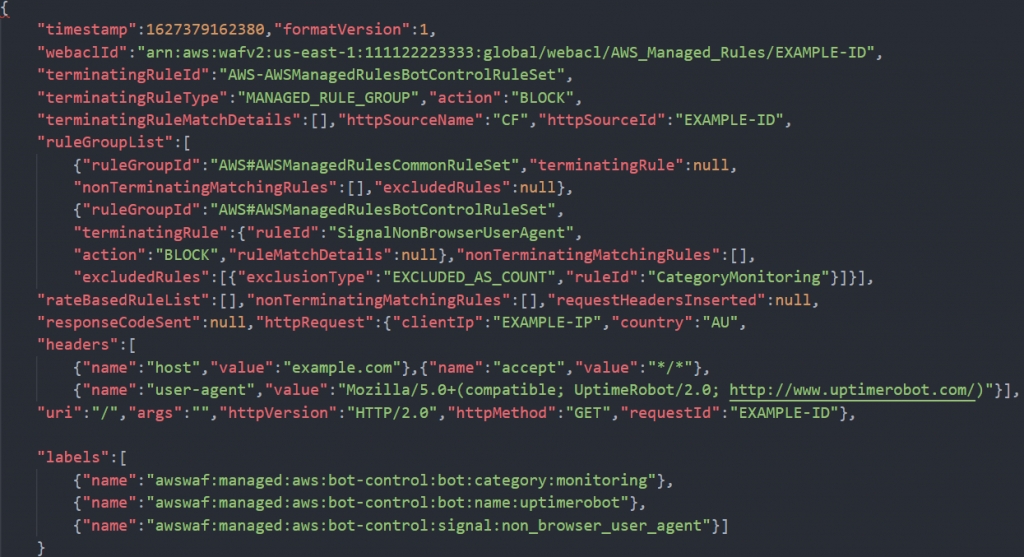
In AWS WAF logs, generated labels are included in an array under the field labels. Figure 3 shows an example request with the labels array at the bottom.

Figure 3: An example of an AWS WAF log record

Figure 3: An example of an AWS WAF log record

This example shows three labels generated for the same request. Uptimerobot follows the monitoring category label, and combining these two labels is useful to provide flexibility for configurations based on them. You can use the whole category, or be laser-focused using the label of the specific bot. You will see how and why that matters later in this blog post. The third label, non_browser_user_agent, is a signal of forwarded requests that have extra headers. For protection from bots in conjunction with labels, you can construct extra scanning in your application for certain requests.

Scope-down statements

Given that Bot Control is a premium feature and is a paid AWS Managed Rules, the ability to keep your costs in control is crucial. The scope-down statement allows you to optimize for cost by filtering out any traffic that doesn’t require inspection by Bot Control.

To address this goal, you can use scope down statements that can be applied to two broad scenarios.

You can exclude certain parts of your resource from scanning by Bot Control. Think of parts of your web site that you don’t mind being accessed by bots, typically that would be static content, such as images and CSS files. Leaving protection on everything else, such as APIs and login pages. You can also exclude IP ranges that can be considered safe from bot management. For example, traffic that’s known to come from your organization or viewers that belong to your partners or customers.

Alternatively, you can look at this from a different angle, and only apply bot management to a small section of your resources. For example, you can use Bot Control to protect a login page, or certain sensitive APIs, leaving everything else outside of your bot management.

With all of these tools in our toolkit let’s put them into perspective and dive deep into use cases and scenarios.

Common use cases for AWS WAF Bot Control fine-tuning

There are several methods for fine tuning Bot Control to better meet your needs. In this section, you’ll see some of the methods you can use.

Limit the crawling rate

In some cases, it is necessary to allow bots access to your websites. A good example is search engine bots, that crawl the web and create an index. If optimization for search engines is important for your business, but you notice excessive load from too many requests hitting your web resource, you might face a dilemma of how to slow crawlers down without unnecessarily blocking them. You can solve this with a combination of Bot Control detection logic and a rate-based rule with a response status code and header to communicate your intention back to crawlers. Most crawlers that are deemed useful have a built-in mechanism to decrease their crawl rate when you detect and respond to increased load.

To customize bot mitigation and set the crawl rate below limits that might negatively affect your web resource

  1. In the AWS WAF console, select Web ACLs from the left menu. Open your web ACL or follow the steps to create a web ACL.
  2. Choose the Rules tab and select Add rules. Select Add managed rule groups and proceed with the following settings:
    1. In the AWS managed rule groups section, select the switch Add to web ACL to enable Bot Control in the web ACL. This also gives you labels that you can use in other rules later in the evaluation process inside the web ACL.
    2. Select Add rules and choose Save
  3. In the same web ACL, select Add rules menu and select Add my own rules and rule groups.
  4. Using the provided Rule builder, configure the following settings:
    1. Enter a preferred name for the rule and select Rate-based rule.
    2. Enter a preferred rate limit for the rule. For example, 500.

      Note: The rate limit is the maximum number of requests allowed from a single IP address in a five-minute period.

    3. Select Only consider requests that match the criteria in a rule statement to enable the scope-down statement to narrow the scope of the requests that the rule evaluates.
    4. Under the Inspect menu, select Has a label to focus only on certain types of bots.
    5. In the Match key field, enter one of the following labels to match based on broad categories, such as verified bots or all bots identified as scraping as illustrated on Figure 4:

      awswaf:managed:aws:bot-control:bot:verified
      awswaf:managed:aws:bot-control:bot:category:scraping_framework

    6. Alternatively, you can narrow down to a specific bot using its label:

      awswaf:managed:aws:bot-control:bot:name:Googlebot

      Figure 4: Label match rule statement in a rule builder with a specific match key

      Figure 4: Label match rule statement in a rule builder with a specific match key

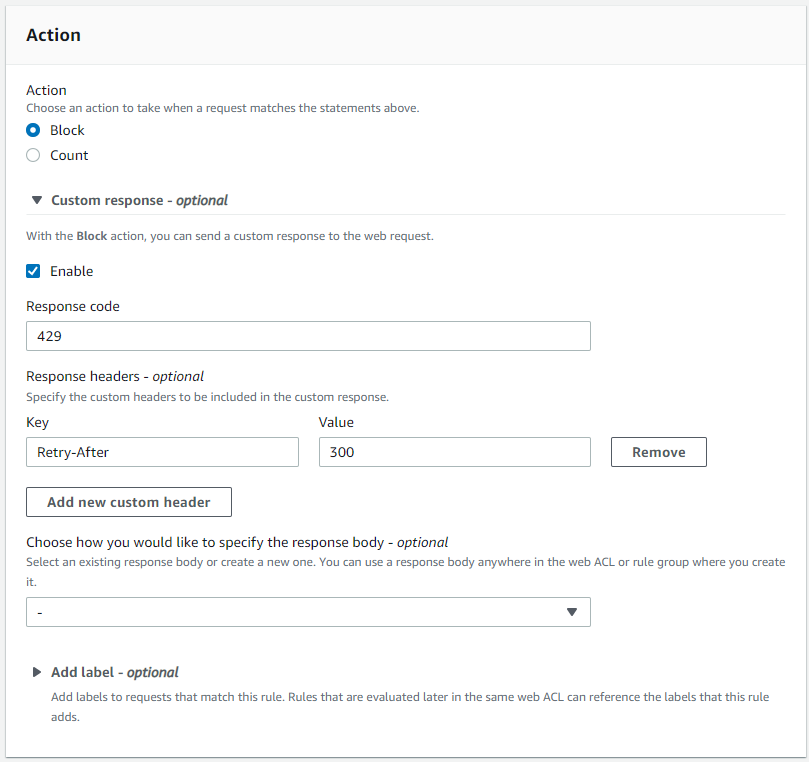
  5. In the Action section, configure the following settings:
    1. Select Custom response to enable it.
    2. Enter 429 as the Response code to indicate and communicate back to the bot that it has sent too many requests in a given amount of time.
    3. Select Add new custom header and enter Retry-After in the Key field and a value in seconds for the Value field. The value indicates how many seconds a bot must wait before making a new request.
  6. Select Add rule.
  7. It’s important to place the rule after the Bot Control rule group inside your web ACL, so that the label is available in this custom rule.
    1. In the Set rule priority section, check that the new rate-based rule is under the existing Bot Control rule set and if not, choose the newly created rule and select Move up or Move down until the rule is located after it.
    2. Select Save.
Figure 5: AWS WAF rule action with a custom response code

Figure 5: AWS WAF rule action with a custom response code

With the preceding configuration, Bot Control sets required labels, which you then use in the scope-down statement in a rate-based rule to not only establish a ceiling of how many requests you will allow from specific bots, but also communicate to bots when their crawling rate is too high. If they don’t respect the response and lower their rate, the rule will temporarily block them, protecting your web resource from being overwhelmed.

Note: If you use a category label, such as scraping_framework, all bots that have that label will be counted by your rate-based rule. To avoid unintentional blocking of bots that use the same label, you can either narrow down to a specific bot with a precise bot:name: label, or select a higher rate limit to allow a greater margin for the aggregate.

Enable Bot Control only for certain parts of your application

As mentioned earlier, excluding parts of your web resource from Bot Control protection is a mechanism to reduce the cost of running the feature by focusing only on a subset of the requests reaching a resource. There are a few common scenarios that take advantage of this approach.

To run Bot Control only on dynamic parts of your traffic

  1. In the AWS WAF console, select Web ACLs from the left menu. Open a web ACL that you have, or follow the steps to create a web ACL.
  2. Choose the Rules tab and select Add rules. Then select Add managed rule groups to proceed with the following settings:
    1. In the AWS managed rule groups section, select Add to web ACL to enable Bot Control in the web ACL.
    2. Select Edit.
  3. Select Scope-down statement – optional and select Enable Scope-down statement.
  4. In If a request, select doesn’t match the statement (NOT).
  5. In the Statement section, configure the following settings:
    1. Choose URI path in the Inspect field.
    2. For the Match type, choose Starts with string.
    3. Depending on the structure of your resource, you can enter a whole URI string—such as images/—in the String to match field. The string will be excluded from Bot Control evaluation.
    Figure 6: A scope-down statement to match based on a string that a URI path starts with

    Figure 6: A scope-down statement to match based on a string that a URI path starts with

  6. Select Save rule.

An alternative to using string matching

As an alternative to a string match type, you can use a regex pattern set. If you don’t have a regex pattern set, create one using the following guide.

Note: This pattern matches most common file extensions associated with static files for typical web resources. You can customize the pattern set if you have different file types.

  1. Follow steps 1-4 of the previous procedure.
  2. In the Statement section, configure the following settings:
    1. Choose URI path in the Inspect field.
    2. For the Match type, choose Matches pattern from regex pattern set and select your created set in the Regex pattern set. as illustrated in Figure 7.
    3. In Regex pattern set, enter the pattern
      (?i)\.(jpe?g|gif|png|svg|ico|css|js|woff2?)$

      Figure 7: A scope-down statement to match based on a regex pattern set as part of a URI path

      Figure 7: A scope-down statement to match based on a regex pattern set as part of a URI path

To run Bot Control only on the most sensitive parts of your application.

Another option is to exclude almost everything, by only enabling the Bot Control on the most sensitive part of your application. For example, a login page.

Note: The actual URI path depends on the structure of your application.

  1. Inside the Scope-down statement, in the If a request menu, select matches the statement.
  2. In the Statement section:
    1. In the Inspect field, select URI path.
    2. For the Match type, select Contains string.
    3. In the String to match field, enter the string you want to match. For example, login as shown in the Figure 8.
  3. Choose Save rule.
    Figure 8: A scope-down statement to match based on a string within a URI path

    Figure 8: A scope-down statement to match based on a string within a URI path

To exclude more than one part of your application from Bot Control.

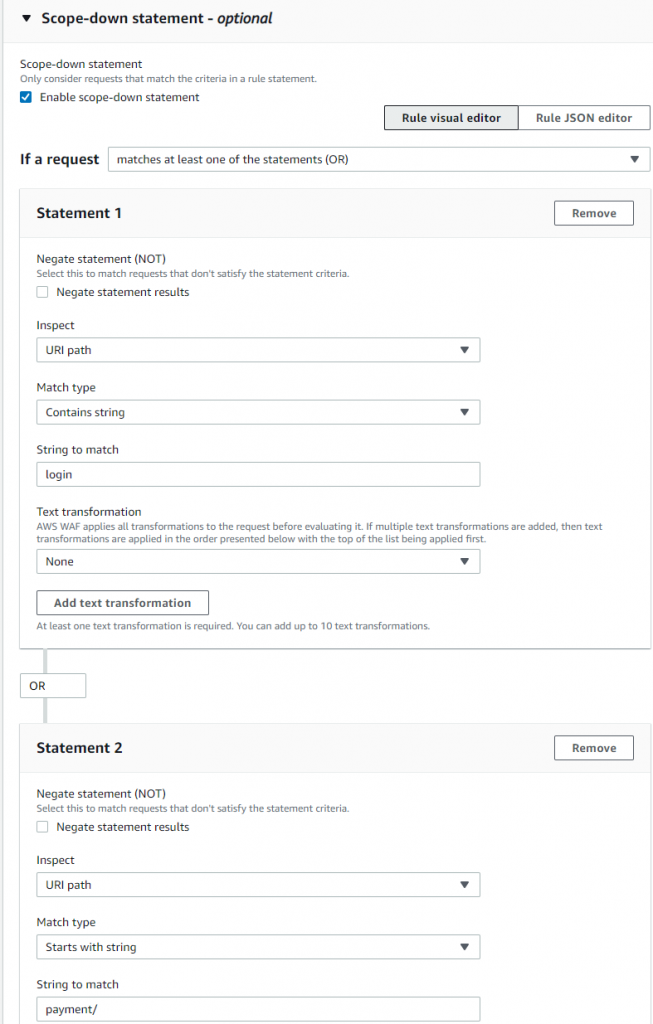
If you have more than one part to exclude, you can use an OR logical statement to list each part in a scope-down statement.

  1. Inside the Scope-down statement, in the If a request menu, select matches at least one of the statements (OR).
  2. In the Statement 1 section, configure the following settings:
    1. Choose URI path in the Inspect field.
    2. For the Match type choose Contains string.
    3. In the String to match field enter a preferred value. For example, login.
  3. In the Statement 2 section, configure the following settings:
    1. Choose URI path in the Inspect field.
    2. For the Match type choose Starts with string.
    3. In the String to match field enter a preferred URI value. For example, payment/.
  4. Select Save rule.

Figure 9 builds on the previous example of an exact string match by adding an OR statement to protect an API named payment.

Figure 9: A scope-down statement with OR logic for more sophisticated matching

Figure 9: A scope-down statement with OR logic for more sophisticated matching

Note: The visual editor on the console supports up to five statements. To add more, edit the JSON representation of the rule on the console or use the APIs.

Prioritize verified bots that you don’t want to block

Since verified bots aren’t blocked by default, in most cases there is no need to apply extra logic to allow them through. However, there are scenarios where other AWS WAF rules might match some aspects of requests from verified bots and block them. That can hurt some metrics for SEO, or prevent links from your website from properly propagating and displaying in social media resources. If this is important for your business, then you might want to ensure you protect verified bots by explicitly allowing them in AWS WAF.

To prioritize the verified bots category

  1. In the AWS WAF menu, select Web ACLs from the left menu. Open a web ACL that you have, or follow the steps to create a web ACL. The next steps assume you already have a Bot Control rule group enabled inside the web ACL.
  2. In the web ACL, select Add rules, and then select Add my own rules and rule groups.
  3. Using the provided Rule builder, configure the following settings:
    1. Enter a name for the rule in the Name field.
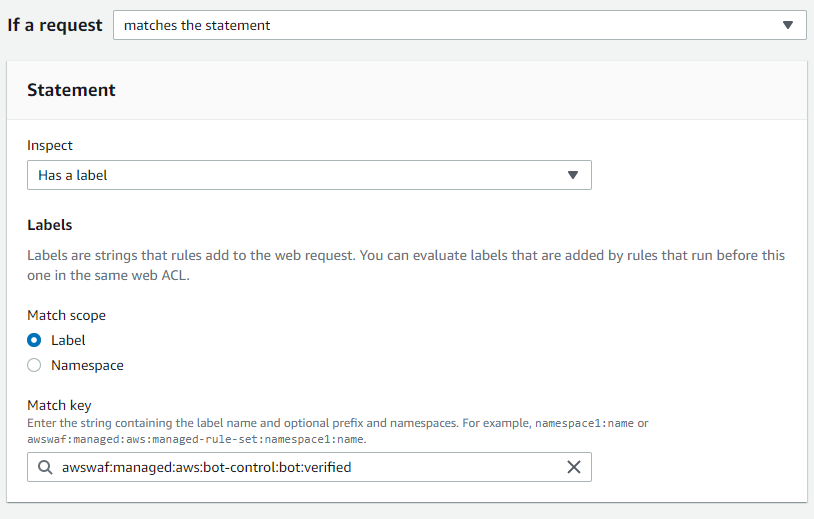
    2. Under the Inspect menu, select Has a label.
    3. In the Match key field, enter the following label to match based on the label that each verified bot has:

      awswaf:managed:aws:bot-control:bot:verified

    4. In the Action section, select Allow to confirm the action on a request match
  4. Select Add rule. It’s important to place the rule after the Bot Control rule group inside your web ACL, so that the bot:verified label is available in this custom rule. To complete this, configure the following steps:
    1. In the Set rule priority section, check that the rule you just created is listed immediately after the existing Bot Control rule set. If it’s not, choose the newly created rule and select Move up or Move down until the rule is located immediately after the existing Bot Control rule set.
    2. Select Save.
Figure 10: Label match rule statement in a Rule builder with a specific match key

Figure 10: Label match rule statement in a Rule builder with a specific match key

Allow a specific bot

Labels also enable you to single out the bot you don’t want to block from the category that is blocked. One of the common examples are third-party bots that perform monitoring of your web resources.

Let’s take a look at a scenario where UptimeRobot is used to allow a specific bot. The bot falls into a category that’s being blocked by default—bot:category:monitoring. You can either exclude the whole category, which can have a wider impact on resource than you want, or allow only UptimeRobot.

To explicitly allow a specific bot

  1. Analyze CloudWatch metrics or AWS WAF logs to find the bot that is being blocked and its associated labels. Unless you want to allow the whole category, the label you would be looking for is bot:name: The example that follows is based on the label awswaf:managed:aws:bot-control:bot:name:uptimerobot.

    From the logs, you can also verify which category the bot belongs to, which is useful for configuring Scope-down statements.

  2. In the AWS WAF console, select Web ACLs from the left menu. Open a web ACL that you have, or follow the steps to create a web ACL. For the next steps, it’s assumed that you already have a Bot Control rule group enabled inside the webACL.
  3. Open the Bot Control rule set in the list inside your web ACL and choose Edit
  4. From the list of Rules find CategoryMonitoring and set to Count. This will prevent the default block action of the category.
  5. Select Scope-down statement – optional and select Scope-down statement. Then configure the following settings:
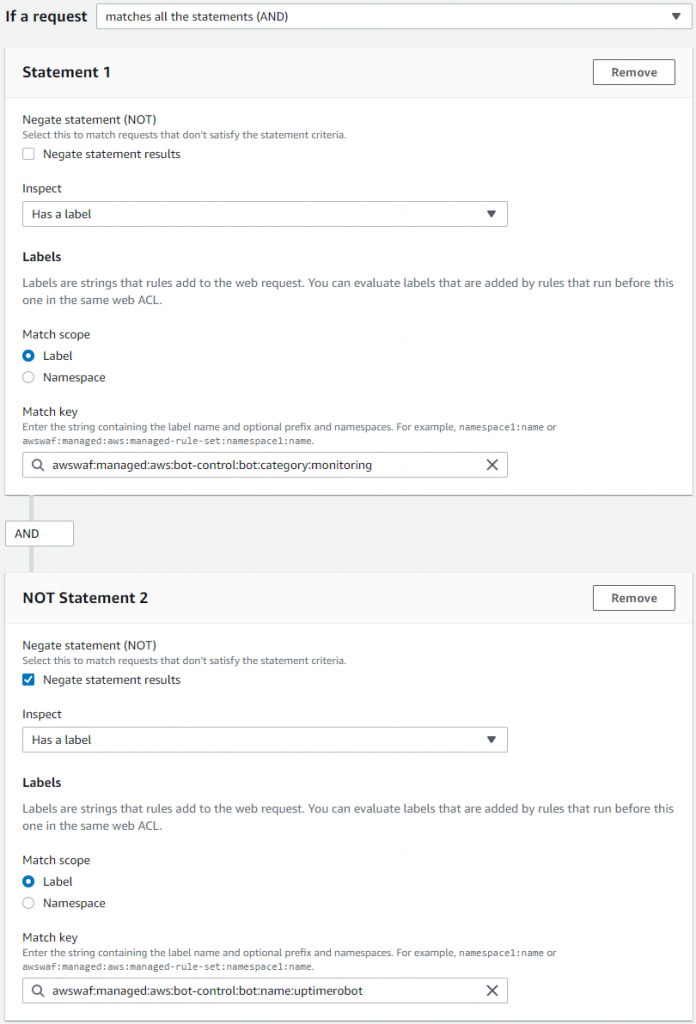
    1. Inside the Scope-down statement, in the If a request menu, choose matches all the statements (AND). This will allow you to construct the complex logic necessary to block the category but allow a specified bot.
    2. In the Statement 1 section under the Inspect menu select Has a label.
    3. In the Match key field, enter the label of the broad category that you set to count in step number 4. In this example, it is monitoring. This configuration will keep other bots from the category blocked:

      awswaf:managed:aws:bot-control:bot:category:monitoring

    4. In the Statement 2 section, select Negate statement results to allow you to exclude a specific bot.
    5. Under the Inspect menu, select Has a label.
    6. In the Match key field, enter the label that will uniquely identify the bot you want to explicitly allow. In this example, it’s uptimerobot with the following label:

      awswaf:managed:aws:bot-control:bot:name:uptimerobot

  6. Choose Save rule.
Figure 11: Label match rule statement with AND logic to single out a specific bot name from a category

Figure 11: Label match rule statement with AND logic to single out a specific bot name from a category

Note: This approach is the best practice for analyzing and, if necessary, addressing false positives situations. You can apply exclusion to any bot, or multiple bots, based on the unique bot:name: label.

Insert custom headers into requests from certain bots

There are situations when you want to further process or analyze certain requests. or implement logic that is provided by systems in the downstream. In such cases, you can use AWS WAF Bot Control to categorize the requests. Applications later in the process can then apply the intended logic on either a broad group of requests, such as all bots within a category, or as narrow as a certain bot.

To insert a custom header

  1. In the AWS WAF console, select Web ACLs from the left menu. Open a web ACL that you have, or follow the steps to create a web ACL. The next steps assume that you already have Bot Control rule group enabled inside the webACL.
  2. Open the Bot Control rule set in the list inside your web ACL and choose Edit.
  3. From the list of Rules set the targeted category to Count.
  4. Choose Save rule.
  5. In the same web ACL, choose the Add rules menu and select Add my own rules and rule groups.
  6. Using the provided Rule builder, configure the following settings:
    1. Enter a name for the rule in the Name field.
    2. Under the Inspect menu, select Has a label.
    3. In the Match key field, enter the label to match either a targeted category or a bot. This example uses the security category label:
      awswaf:managed:aws:bot-control:bot:category:security
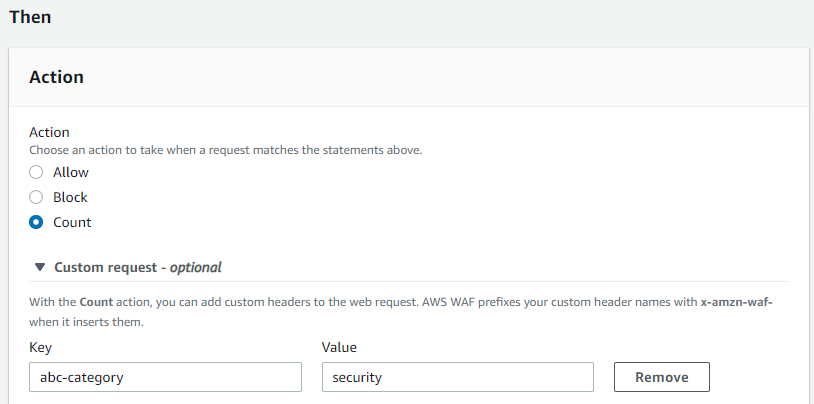
    4. In the Action section, select Count
    5. Open Custom request – optional and select Add new custom header
    6. Enter values in the Key and Value fields that correspond to the inserted custom header key-value pair that you want to use in downstream systems. The example in Figure 12 shows this configuration.
    7. Choose Add rule.

    AWS WAF prefixes your custom header names with x-amzn-waf- when it inserts them, so when you add abc-category, your downstream system sees it as x-amzn-waf-abc-category.

Figure 12: AWS WAF rule action with a custom header inserted by the service

Figure 12: AWS WAF rule action with a custom header inserted by the service

The custom rule located after Bot Control now inserts the header into any request that it labeled as coming from bots within the security category. Then the security appliance that is after AWS WAF acts on the requests based on the header, and processes them accordingly.

This implementation can serve other scenarios. For example, using your custom headers to communicate to your Origin to append headers that will explicitly prevent caching certain content. That makes bots always get it from the Origin. Inserted headers are accessible within AWS Lambda@Edge functions and CloudFront Functions, this opens up advanced processing scenarios.

Conclusion

This post describes the primary building blocks for using Bot Control, and how you can combine and customize them to address different scenarios. It’s not an exhaustive list of the use cases that Bot Control can be fine-tuned for, but hopefully the examples provided here inspire and provide you with ideas for other implementations.

If you already have AWS WAF associated with any of your web-facing resources, you can view current bot traffic estimates for your applications based on a sample of requests currently processed by the service. Visit the AWS WAF console to view the bot overview dashboard. That’s a good starting point to consider implementing learnings from this blog to improve your bot protection.

It is early days for the feature, and it will keep gaining more capabilities, stay tuned!

 
If you have feedback about this blog post, submit comments in the Comments section below. If you have questions about this blog post, start a new thread on AWS WAF re:Post or contact AWS Support.

Want more AWS Security news? Follow us on Twitter.

Dmitriy Novikov

Dmitriy Novikov

In his role as Senior Solutions Architect at Amazon Web Services, Dmitriy supports AWS customers to utilize emerging technologies for business value generation. He’s a technology enthusiast who gets a charge out of finding innovative solutions to complex security challenges. He enjoys sharing his learnings on architecture and best practices in blogs, whitepapers and public speaking events. Outside work, Dmitriy has a passion for reading and triathlon.

Introducing s2n-quic, a new open-source QUIC protocol implementation in Rust

Post Syndicated from Panos Kampanakis original https://aws.amazon.com/blogs/security/introducing-s2n-quic-open-source-protocol-rust/

At Amazon Web Services (AWS), security, high performance, and strong encryption for everyone are top priorities for all our services. With these priorities in mind, less than a year after QUIC ratification in the Internet Engineering Task Force (IETF), we are introducing support for the QUIC protocol which can boost performance for web applications that currently use Transport Layer Security (TLS) over Transmission Control Protocol (TCP). We are pleased to announce the availability of s2n-quic, an open-source Rust implementation of the QUIC protocol added to our set of AWS encryption open-source libraries.

What is QUIC?

QUIC is an encrypted transport protocol designed for performance and is the foundation of HTTP/3. It is specified in a set of IETF standards ratified in May 2021. QUIC protects its UDP datagrams by using encryption and authentication keys established in a TLS 1.3 handshake carried over QUIC transport. It is designed to improve upon TCP by providing improved first-byte latency and handling of multiple streams, and solving issues such as head-of-line blocking, mobility, and data loss detection. This enables web applications to perform faster, especially over poor networks. Other potential uses include latency-sensitive connections and UDP connections currently using DTLS, which now can run faster.

Renaming s2n

AWS has long supported open-source encryption libraries; in 2015 we introduced s2n as a TLS library. The name s2n is short for signal to noise, and is a nod to the almost magical act of encryption—disguising meaningful signals, like your critical data, as seemingly random noise.

Now that AWS introduces our new QUIC open-source library, we are renaming s2n to s2n-tls. s2n-tls is an efficient TLS library built over other crypto libraries like OpenSSL libcrypto or AWS libcrypto (AWS-LC). AWS-LC is a general-purpose cryptographic library maintained by AWS which originated from the Google project BoringSSL. The s2n family of AWS encryption open-source libraries now consists of s2n-tls, s2n-quic, and s2n-bignum. s2n-bignum is a collection of bignum arithmetic routines maintained by AWS designed for crypto applications.

s2n-quic details

Similar to s2n-tls, s2n-quic is designed to be small and fast, with simplicity as a priority. It is written in Rust, so it reaps some of its benefits such as performance, thread and memory-safety. s2n-quic depends either on s2n-tls or rustls for the TLS 1.3 handshake.

The main advantages of s2n-quic are:

  • Simple API. For example, a QUIC echo server-example can be built with just a few API calls.
  • Highly configurable. s2n-quic is configured with code through providers that allow an application to granularly control functionality. You can see an example of the server’s simple config in the QUIC echo server-example.
  • Extensive testing. Fuzzing (libFuzzer, American Fuzzy Fop (AFL), and honggfuzz), corpus replay unit testing of derived corpus files, testing of concrete and symbolic execution engines with bolero, and extensive integration and unit testing are used to validate the correctness of our implementation.
  • Thorough interoperability testing for every code change. There are multiple public QUIC implementations; s2n-quic is continuously tested to interoperate with many of them.
  • Verified correctness, post-quantum hybrid key exchange, and maturity for the TLS handshake when built with s2n-tls.
  • Thorough compliance coverage tracking of normative language in relevant standards.

Some important features in s2n-quic that can improve performance and connection management include CUBIC congestion controller support, packet pacing, Generic Segmentation Offload (GSO) support, Path MTU Discovery, and unique connection identifiers detached from the address.

AWS is continuing to invest in encryption optimization techniques, UDP performance improvement technologies, and formal code verification with the AWS Automated Reasoning Group to further enhance the library.

Like s2n-tls, which has already been introduced in various AWS services, AWS services that need to make use of the benefits of QUIC will begin integrating s2n-quic. QUIC is a standardized protocol which, when introduced in a service like web content delivery, can improve user experience or application performance. AWS still plans to continue support for existing protocols like TLS, so existing applications will remain interoperable. Amazon CloudFront is scheduled to be the first AWS service to integrate s2n-quic with its support for HTTP/3 in 2022.

Conclusion

If you are interested in using or contributing to s2n-quic source code or documentation, they are publicly available under the terms of the Apache Software License 2.0 from our s2n-quic GitHub repository.

If you package or distribute s2n-quic or s2n-tls, or use it as part of a large multi-user service, you may be eligible for pre-notification of security issues. Please contact [email protected].

If you discover a potential security issue in s2n-quic or s2n-tls, we ask that you notify AWS Security by using our vulnerability reporting page.

Stay tuned for more topics on s2n-quic like quantum-resistance, performance analyses, uses, and other technical details.

If you have feedback about this post, submit comments in the Comments section below. If you have questions about this post, contact AWS Support.

Want more AWS Security news? Follow us on Twitter.

Author

Panos Kampanakis

Panos has extensive experience on cybersecurity, applied cryptography, security automation, and vulnerability management. He has trained and presented on various security topics at technical events for numerous years, and also co-authored Cisco Press books, papers, standards, and research publications. He has participated in various security standards bodies to provide common interoperable protocols and languages for security information sharing, cryptography, and PKI. In his current role, Panos works with engineers and industry standards partners to provide cryptographically secure tools, protocols, and standards.

Control access to Amazon Elastic Container Service resources by using ABAC policies

Post Syndicated from Kriti Heda original https://aws.amazon.com/blogs/security/control-access-to-amazon-elastic-container-service-resources-by-using-abac-policies/

As an AWS customer, if you use multiple Amazon Elastic Container Service (Amazon ECS) services/tasks to achieve better isolation, you often have the challenge of how to manage access to these containers. In such cases, using tags can enable you to categorize these services in different ways, such as by owner or environment.

This blog post shows you how tags allow conditional access to Amazon ECS resources. You can use attribute-based access control (ABAC) policies to grant access rights to users through the use of policies that combine attributes together. ABAC can be helpful in rapidly-growing environments, where policy management can become cumbersome. This blog post uses ECS resource tags (owner tag and environment tag) as the attributes that are used to control access in the policies.

Amazon ECS resources have many attributes, such as tags, which can be used to control permissions. You can attach tags to AWS Identity and Access Management (IAM) principals, and create either a single ABAC policy, or a small set of policies for your IAM principals. These ABAC policies can be designed to allow operations when the principal tag (a tag that exists on the user or role making the call) matches the resource tag. They can be used to simplify permission management at scale. A single Amazon ECS policy can enforce permissions across a range of applications, without having to update the policy each time you create new Amazon ECS resources.

This post provides a step-by-step procedure for creating ABAC policies for controlling access to Amazon ECS containers. As the team adds ECS resources to its projects, permissions are automatically applied based on the owner tag and the environment tag. As a result, no policy update is required for each new resource. Using this approach can save time and help improve security, because it relies on granular permissions rules.

Condition key mappings

It’s important to note that each IAM permission in Amazon ECS supports different types of tagging condition keys. The following table maps each condition key to its ECS actions.

Condition key Description ECS actions
aws:RequestTag/${TagKey} Set this tag value to require that a specific tag be used (or not used) when making an API request to create or modify a resource that allows tags. ecs:CreateCluster,
ecs:TagResource,
ecs:CreateCapacityProvider
aws:ResourceTag/${TagKey} Set this tag value to allow or deny user actions on resources with specific tags. ecs:PutAttributes,
ecs:StopTask,
ecs:DeleteCluster,
ecs:DeleteService,
ecs:CreateTaskSet,
ecs:DeleteAttributes,
ecs:DeleteTaskSet,
ecs:DeregisterContainerInstance
aws:RequestTag/${TagKey}
and
aws:ResourceTag/${TagKey}
Supports both RequestTag and ResourceTag ecs:CreateService,
ecs:RunTask,
ecs:StartTask,
ecs:RegisterContainerInstance

For a detailed guide of Amazon ECS actions and the resource types and condition keys they support, see Actions, resources, and condition keys for Amazon Elastic Container Service.

Tutorial overview

The following tutorial gives you a step-by-step process to create and test an Amazon ECS policy that allows IAM roles with principal tags to access resources with matching tags. When a principal makes a request to AWS, their permissions are granted based on whether the principal and resource tags match. This strategy allows individuals to view or edit only the ECS resources required for their jobs.

Scenario

Example Corp. has multiple Amazon ECS containers created for different applications. Each of these containers are created by different owners within the company. The permissions for each of the Amazon ECS resources must be restricted based on the owner of the container, and also based on the environment where the action is performed.

Assume that you’re a lead developer at this company, and you’re an experienced IAM administrator. You’re familiar with creating and managing IAM users, roles, and policies. You want to ensure that the development engineering team members can access only the containers they own. You also need a strategy that will scale as your company grows.

For this scenario, you choose to use AWS resource tags and IAM role principal tags to implement an ABAC strategy for Amazon ECS resources. The condition key mappings table shows which tagging condition keys you can use in a policy for each Amazon ECS action and resources. You can define the tags in the role you created. For this scenario, you define two tags Owner and Environment. These tags restrict permissions in the role based on the tags you defined.

Prerequisites

To perform the steps in this tutorial, you must already have the following:

  • An IAM role or user with sufficient privileges for services like IAM and ECS. Following the security best practices the role should have a minimum set of permissions and grant additional permissions as necessary. You can add the AWS managed policies IAMFullAccess and AmazonECS_FullAccess to create the IAM role to provide permissions for creating IAM and ECS resources.
  • An AWS account that you can sign in to as an IAM role or user.
  • Experience creating and editing IAM users, roles, and policies in the AWS Management Console. For more information, see Tutorial to create IAM resources.

Create an ABAC policy for Amazon ECS resources

After you complete the prerequisites for the tutorial, you will need to define which Amazon ECS privileges and access controls you want in place for the users, and configure the tags needed for creating the ABAC policies. This tutorial focuses on providing step-by-step instructions for creating test users, defining the ABAC policies for the Amazon ECS resources, creating a role, and defining tags for the implementation.

To create the ABAC policy

You create an ABAC policy that defines permissions based on attributes. In AWS, these attributes are called tags.

The sample ABAC policy that follows provides ECS permissions to users when the principal’s tag matches the resource tag.

Sample ABAC policy for ECS resources

The sample ECS ABAC policy that follows allows the user to perform action on the ECS resources, but only when those resources are tagged with the same key-pairs as the principal.

  1. Download the sample ECS policy. This policy allows principals to create, read, edit, and delete resources, but only when those resources are tagged with the same key-value pairs as the principal.
  2. Use the downloaded ECS policy to create the ECS ABAC policy, and name your new policy ECSABAC policy. For more information, see Creating IAM policies.

This sample policy provides permission to each ECS action based on the condition key that action supports. See to the condition key mappings table for a mapping of the ECS actions and the condition key they support.

What does this policy do?

  • The ECSCreateCluster statement allows users to create cluster, create and tag resources. These ECS actions only support the RequestTag condition key. This condition block returns true if every tag passed (tags: owner and environment) in the request is included in the specified list. This is done using the StringEquals condition operator. If an incorrect tag key other than owner or environment tag is passed, or incorrect value for the tags are passed, then the condition returns false. The ECS actions within these statements do not have a specific requirement of a resource type.
  • The ECSDeletion, ECSUpdate, and ECSDescribe statements allow users to update, delete or list/describe ECS resources. The ECS actions under these statements only support the ResourceTag condition key. Statements return true if the specified tag keys are present on the ECS resource and their values match the principal’s tags. These statements return false for mismatched tags (in this policy, the only acceptable tags are owner and environment), or for an incorrect value for the owner and environment tag passed to the ECS resources. They also return false for any ECS action that does not support resource tagging.
  • The ECSCreateService, ECSTaskControl, and ECSRegistration statements contain ECS actions that allow users to create a service, start or run tasks and register container instances in ECS. The ECS actions within these statements support both Request and Resource tag condition keys.

Create IAM roles

Create the following IAM roles and attach the ECSABAC policy you created in the previous procedure. You can create the roles and add tags to them using the AWS console, through the role creation flow, as shown in the following steps.

To create IAM roles

  1. Sign in to the AWS Management Console and navigate to the IAM console.
  2. In the left navigation pane, select Roles, and then select Create Role.
  3. Choose the Another AWS account role type.
  4. For Account ID, enter the AWS account ID mentioned in the prerequisites to which you want to grant access to your resources.
  5. Choose Next: Permissions.
  6. IAM includes a list of the AWS managed and customer managed policies in your account. Select the ECSABAC policy you created previously from the dropdown menu to use for the permissions policy. Alternatively, you can choose Create policy to open a new browser tab and create a new policy, as shown in Figure 1.
    Figure 1. Attach the ECS ABAC policy to the role

    Figure 1. Attach the ECS ABAC policy to the role

  7. Choose Next: Tags.
  8. Add metadata to the role by attaching tags as key-value pairs. Add the following tags to the role: for Key owner, enter Value mock_owner; and for Key environment, enter development, as shown in Figure 2.
    Figure 2. Define the tags in the IAM role

    Figure 2. Define the tags in the IAM role

  9. Choose Next: Review.
  10. For Role name, enter a name for your role. Role names must be unique within your AWS account.
  11. Review the role and then choose Create role.

Test the solution

The following sections present some positive and negative test cases that show how tags can provide fine-grained permission to users through ABAC policies.

Prerequisites for the negative and positive testing

Before you can perform the positive and negative tests, you must first do these steps in the AWS Management Console:

  1. Follow the procedures above for creating IAM role and the ABAC policy.
  2. Switch the role from the role assumed in the prerequisites to the role you created in To create IAM Roles above, following the steps in the documentation Switching to a role.

Perform negative testing

For the negative testing, three test cases are presented here that show how the ABAC policies prevent successful creation of the ECS resources if the owner or environment tags are missing, or if an incorrect tag is used for the creation of the ECS resource.

Negative test case 1: Create cluster without the required tags

In this test case, you check if an ECS cluster is successfully created without any tags. Create an Amazon ECS cluster without any tags (in other words, without adding the owner and environment tag).

To create a cluster without the required tags

  1. Sign in to the AWS Management Console and navigate to the IAM console.
  2. From the navigation bar, select the Region to use.
  3. In the navigation pane, choose Clusters.
  4. On the Clusters page, choose Create Cluster.
  5. For Select cluster compatibility, choose Networking only, then choose Next Step.
  6. On the Configure cluster page, enter a cluster name. For Provisioning Model, choose On-Demand Instance, as shown in Figure 3.
    Figure 3. Create a cluster

    Figure 3. Create a cluster

  7. In the Networking section, configure the VPC for your cluster.
  8. Don’t add any tags in the Tags section, as shown in Figure 4.
    Figure 4. No tags added to the cluster

    Figure 4. No tags added to the cluster

  9. Choose Create.

Expected result of negative test case 1

Because the owner and the environment tags are absent, the ABAC policy prevents the creation of the cluster and throws an error, as shown in Figure 5.

Figure 5. Unsuccessful creation of the ECS cluster due to missing tags

Figure 5. Unsuccessful creation of the ECS cluster due to missing tags

Negative test case 2: Create cluster with a missing tag

In this test case, you check whether an ECS cluster is successfully created missing a single tag. You create a cluster similar to the one created in Negative test case 1. However, in this test case, in the Tags section, you enter only the owner tag. The environment tag is missing, as shown in Figure 6.

To create a cluster with a missing tag

  1. Repeat steps 1-7 from the Negative test case 1 procedure.
  2. In the Tags section, add the owner tag and enter its value as mock_user.
    Figure 6. Create a cluster with the environment tag missing

    Figure 6. Create a cluster with the environment tag missing

Expected result of negative test case 2

The ABAC policy prevents the creation of the cluster, due to the missing environment tag in the cluster. This results in an error, as shown in Figure 7.

Figure 7. Unsuccessful creation of the ECS cluster due to missing tag

Figure 7. Unsuccessful creation of the ECS cluster due to missing tag

Negative test case 3: Create cluster with incorrect tag values

In this test case, you check whether an ECS cluster is successfully created with incorrect tag-value pairs. Create a cluster similar to the one in Negative test case 1. However, in this test case, in the Tags section, enter incorrect values for the owner and the environment tag keys, as shown in Figure 8.

To create a cluster with incorrect tag values

  1. Repeat steps 1-7 from the Negative test case 1 procedure.
  2. In the Tags section, add the owner tag and enter the value as test_user; add the environment tag and enter the value as production.
    Figure 8. Create a cluster with the incorrect values for the tags

    Figure 8. Create a cluster with the incorrect values for the tags

Expected result of negative test case 3

The ABAC policy prevents the creation of the cluster, due to incorrect values for the owner and environment tags in the cluster. This results in an error, as shown in Figure 9.

Figure 9. Unsuccessful creation of the ECS cluster due to incorrect value for the tags

Figure 9. Unsuccessful creation of the ECS cluster due to incorrect value for the tags

Perform positive testing

For the positive testing, two test cases are provided here that show how the ABAC policies allow successful creation of ECS resources, such as ECS clusters and ECS tasks, if the correct tags with correct values are provided as input for the ECS resources.

Positive test case 1: Create cluster with all the correct tag-value pairs

This test case checks whether an ECS cluster is successfully created with the correct tag-value pairs when you create a cluster with both the owner and environment tag that matches the ABAC policy you created earlier.

To create a cluster with all the correct tag-value pairs

  1. Repeat steps 1-7 from the Negative test case 1 procedure.
  2. In the Tags section, add the owner tag and enter the value as mock_user; add the environment tag and enter the value as development, as shown in Figure 10.
    Figure 10. Add correct tags to the cluster

    Figure 10. Add correct tags to the cluster

Expected result of positive test case 1

Because both the owner and the environment tags were input correctly, the ABAC policy allows the successful creation of the cluster without throwing an error, as shown in Figure 11.

Figure 11. Successful creation of the cluster

Figure 11. Successful creation of the cluster

Positive test case 2: Create standalone task with all the correct tag-value pairs

Deploying your application as a standalone task can be ideal in certain situations. For example, suppose you’re developing an application, but you aren’t ready to deploy it with the service scheduler. Maybe your application is a one-time or periodic batch job, and it doesn’t make sense to keep running it, or to restart when it finishes.

For this test case, you run a standalone task with the correct owner and environment tags that match the ABAC policy.

To create a standalone task with all the correct tag-value pairs

  1. To run a standalone task, see Run a standalone task in the Amazon ECS Developer Guide. Figure 12 shows the beginning of the Run Task process.
    Figure 12. Run a standalone task

    Figure 12. Run a standalone task

  2. In the Task tagging configuration section, under Tags, add the owner tag and enter the value as mock_user; add the environment tag and enter the value as development, as shown in Figure 13.
    Figure 13. Creation of the task with the correct tag

    Figure 13. Creation of the task with the correct tag

Expected result of positive test case 2

Because you applied the correct tags in the creation phase, the task is created successfully, as shown in Figure 14.

Figure 14. Successful creation of the task

Figure 14. Successful creation of the task

Cleanup

To avoid incurring future charges, after completing testing, delete any resources you created for this solution that are no longer needed. See the following links for step-by-step instructions for deleting the resources you created in this blog post.

  1. Deregistering an ECS Task Definition
  2. Deleting ECS Clusters
  3. Deleting IAM Policies
  4. Deleting IAM Roles and Instance Profiles

Conclusion

This post demonstrates the basics of how to use ABAC policies to provide fine-grained permissions to users based on attributes such as tags. You learned how to create ABAC policies to restrict permissions to users by associating tags with each ECS resource you create. You can use tags to manage and secure access to ECS resources, including ECS clusters, ECS tasks, ECS task definitions, and ECS services.

For more information about the ECS resources that support tagging, see the Amazon Elastic Container Service Guide.

 
If you have feedback about this blog post, submit comments in the Comments section below. If you have questions about this blog post, start a new thread on AWS Secrets Manager re:Post or contact AWS Support.

Want more AWS Security news? Follow us on Twitter.

hedakrit

Kriti Heda

Kriti is a NJ-based Security Transformation Consultant in the SRC team at AWS. She’s a technology enthusiast who enjoys helping customers find innovative solutions to complex security challenges. She spends her day working to builds and deploy security infrastructure, and automate security operations for the customers. Outside of work, she enjoys adventures, sports, and dancing.

AWS User Guide to Financial Services Regulations and Guidelines in Switzerland and FINMA workbooks publications

Post Syndicated from Margo Cronin original https://aws.amazon.com/blogs/security/aws-user-guide-to-financial-services-regulations-and-guidelines-in-switzerland-and-finma/

AWS is pleased to announce the publication of the AWS User Guide to Financial Services Regulations and Guidelines in Switzerland whitepaper and workbooks.

This guide refers to certain rules applicable to financial institutions in Switzerland, including banks, insurance companies, stock exchanges, securities dealers, portfolio managers, trustees and other financial entities which are overseen (directly or indirectly) by the Swiss Financial Market Supervisory Authority (FINMA).

Amongst other topics, this guide covers requirements created by the following regulations and publications of interest to Swiss financial institutions:

  • Federal Laws – including Article 47 of the Swiss Banking Act (BA). Banks and Savings Banks are overseen by FINMA and governed by the BA (Bundesgesetz über die Banken und Sparkassen, Bankengesetz, BankG). Article 47 BA holds relevance in the context of outsourcing.
  • Response on Cloud Guidelines for Swiss Financial institutions produced by the Swiss Banking Union, Schweizerische Bankiervereinigung SBVg.
  • Controls outlined by FINMA, Switzerland’s independent regulator of financial markets, that may be applicable to Swiss banks and insurers in the context of outsourcing arrangements to the cloud.

In combination with the AWS User Guide to Financial Services Regulations and Guidelines in Switzerland whitepaper, customers can use the detailed AWS FINMA workbooks and ISAE 3000 report available from AWS Artifact.

The five core FINMA circulars are intended to assist Swiss-regulated financial institutions in understanding approaches to due diligence, third-party management, and key technical and organizational controls that should be implemented in cloud outsourcing arrangements, particularly for material workloads. The AWS FINMA workbooks and ISAE 3000 report scope covers, in detail, requirements of the following FINMA circulars:

  • 2018/03 Outsourcing – banks and insurers (04.11.2020)
  • 2008/21 Operational Risks – Banks – Principle 4 Technology Infrastructure (31.10.2019)
  • 2008/21 Operational Risks – Banks – Appendix 3 Handling of electronic Client Identifying Data (31.10.2019)
  • 2013/03 Auditing – Information Technology (04.11.2020)
  • 2008/10 Self-regulation as a minimum standard – Minimum Business Continuity Management (BCM) minimum standards proposed by the Swiss Insurance Association (01.06.2015) and Swiss Bankers Association (29.08.2013)

Customers can use the detailed FINMA workbooks, which include detailed control mappings for each FINMA control, covering both the AWS control activities and the Customer User Entity Controls. Where applicable, under the AWS Shared Responsibility Model, these workbooks provide industry standard practices, incorporating AWS Well-Architected, to assist Swiss customers in their own preparation for FINMA circular alignment.

This whitepaper follows the issuance of the second Swiss Financial Market Supervisory Authority (FINMA) ISAE 3000 Type 2 attestation report. The latest report covers the period from October 1, 2020 to September 30, 2021, with a total of 141 AWS services and 23 global AWS Regions included in the scope. Customers can download the report from AWS Artifact. A full list of certified services and Regions is presented within the published FINMA report.

As always, AWS is committed to bringing new services into the scope of our FINMA program in the future based on customers’ architectural and regulatory needs. Please reach out to your AWS account team if you have any questions or feedback. If you have questions about this post, contact AWS Support.

Want more AWS Security news? Follow us on Twitter.

Author

Margo Cronin

Margo is a Principal Security Specialist at Amazon Web Services based in Zurich, Switzerland. She spends her days working with customers, from startups to the largest of enterprises, helping them build new capabilities and accelerating their cloud journey. She has a strong focus on security, helping customers improve their security, risk, and compliance in the cloud.

Top 2021 AWS Security service launches security professionals should review – Part 1

Post Syndicated from Ryan Holland original https://aws.amazon.com/blogs/security/top-2021-aws-security-service-launches-part-1/

Given the speed of Amazon Web Services (AWS) innovation, it can sometimes be challenging to keep up with AWS Security service and feature launches. To help you stay current, here’s an overview of some of the most important 2021 AWS Security launches that security professionals should be aware of. This is the first of two related posts; Part 2 will highlight some of the important 2021 launches that security professionals should be aware of across all AWS services.

Amazon GuardDuty

In 2021, the threat detection service Amazon GuardDuty expanded the internal AWS security intelligence it consumes to use more of the intel that AWS internal threat detection teams collect, including additional nation-state threat intelligence. Sharing more of the important intel that internal AWS teams collect lets you quickly improve your protection. GuardDuty also launched domain reputation modeling. These machine learning models take all the domain requests from across all of AWS, and feed them into a model that allows AWS to categorize previously unseen domains as highly likely to be malicious or benign based on their behavioral characteristics. In practice, AWS is seeing that these models often deliver high-fidelity threat detections, identifying malicious domains 7–14 days before they are identified and available on commercial threat feeds.

AWS also launched second generation anomaly detection for GuardDuty. Shortly after the original GuardDuty launch in 2017, AWS added additional anomaly detection for user behavior analytics and monitoring for unusual activity of AWS Identity and Access Management (IAM) users. After receiving customer feedback that the original feature was a little too noisy, and that it was difficult to understand why some findings were generated, the GuardDuty analytics team rebuilt this functionality on an entirely new machine learning model, considerably reducing the number of detections and generating a more accurate positive-detection rate. The new model also added additional context that security professionals (such as analysts) can use to understand why the model shows findings as suspicious or unusual.

Since its introduction, GuardDuty has detected when AWS EC2 Role credentials are used to call AWS APIs from IP addresses outside of AWS. Beginning in early 2022, GuardDuty now supports detection when credentials are used from other AWS accounts, inside the AWS network. This is a complex problem for customers to solve on their own, which is why the GuardDuty team added this enhancement. The solution considers that there are legitimate reasons why a source IP address that is communicating with AWS services APIs might be different than the Amazon Elastic Compute Cloud (Amazon EC2) instance IP address, or a NAT gateway associated with the instance’s VPC. The enhancement also considers complex network topologies that route traffic to one or multiple VPCs—for example, AWS Transit Gateway or AWS Direct Connect.

Our customers are increasingly running container workloads in production; helping to raise the security posture of these workloads became an AWS development priority in 2021. GuardDuty for EKS Protection is one recent feature that has resulted from this investment. This new GuardDuty feature monitors Amazon Elastic Kubernetes Service (Amazon EKS) cluster control plane activity by analyzing Kubernetes audit logs. GuardDuty is integrated with Amazon EKS, giving it direct access to the Kubernetes audit logs without requiring you to turn on or store these logs. Once a threat is detected, GuardDuty generates a security finding that includes container details such as pod ID, container image ID, and associated tags. See below for details on how the new Amazon Inspector is also helping to protect containers.

Amazon Inspector

At AWS re:Invent 2021, we launched the new Amazon Inspector, a vulnerability management service that continually scans AWS workloads for software vulnerabilities and unintended network exposure. The original Amazon Inspector was completely re-architected in this release to automate vulnerability management and to deliver near real-time findings to minimize the time needed to discover new vulnerabilities. This new Amazon Inspector has simple one-click enablement and multi-account support using AWS Organizations, similar to our other AWS Security services. This launch also introduces a more accurate vulnerability risk score, called the Inspector score. The Inspector score is a highly contextualized risk score that is generated for each finding by correlating Common Vulnerability and Exposures (CVE) metadata with environmental factors for resources such as network accessibility. This makes it easier for you to identify and prioritize your most critical vulnerabilities for immediate remediation. One of the most important new capabilities is that Amazon Inspector automatically discovers running EC2 instances and container images residing in Amazon Elastic Container Registry (Amazon ECR), at any scale, and immediately starts assessing them for known vulnerabilities. Now you can consolidate your vulnerability management solutions for both Amazon EC2 and Amazon ECR into one fully managed service.

AWS Security Hub

In addition to a significant number of smaller enhancements throughout 2021, in October AWS Security Hub, an AWS cloud security posture management service, addressed a top customer enhancement request by adding support for cross-Region finding aggregation. You can now view all your findings from all accounts and all selected Regions in a single console view, and act on them from an Amazon EventBridge feed in a single account and Region. Looking back at 2021, Security Hub added 72 additional best practice checks, four new AWS service integrations, and 13 new external partner integrations. A few of these integrations are Atlassian Jira Service Management, Forcepoint Cloud Security Gateway (CSG), and Amazon Macie. Security Hub also achieved FedRAMP High authorization to enable security posture management for high-impact workloads.

Amazon Macie

Based on customer feedback, data discovery tool Amazon Macie launched a number of enhancements in 2021. One new feature, which made it easier to manage Amazon Simple Storage Service (Amazon S3) buckets for sensitive data, was criteria-based bucket selection. This Macie feature allows you to define runtime criteria to determine which S3 buckets should be included in a sensitive data-discovery job. When a job runs, Macie identifies the S3 buckets that match your criteria, and automatically adds or removes them from the job’s scope. Before this feature, once a job was configured, it was immutable. Now, for example, you can create a policy where if a bucket becomes public in the future, it’s automatically added to the scan, and similarly, if a bucket is no longer public, it will no longer be included in the daily scan.

Originally Macie included all managed data identifiers available for all scans. However, customers wanted more surgical search criteria. For example, they didn’t want to be informed if there were exposed data types in a particular environment. In September 2021, Macie launched the ability to enable/disable managed data identifiers. This allows you to customize the data types you deem sensitive and would like Macie to alert on, in accordance with your organization’s data governance and privacy needs.

Amazon Detective

Amazon Detective is a service to analyze and visualize security findings and related data to rapidly get to the root cause of potential security issues. In January 2021, Amazon Detective added a convenient, time-saving integration that allows you to start security incident investigation workflows directly from the GuardDuty console. This new hyperlink pivot in the GuardDuty console takes findings directly from the GuardDuty console into the Detective console. Another time-saving capability added was the IP address drill down functionality. This new capability can be useful to security forensic teams performing incident investigations, because it helps quickly determine the communications that took place from an EC2 instance under investigation before, during, and after an event.

In December 2021, Detective added support for AWS Organizations to simplify management for security operations and investigations across all existing and future accounts in an organization. This launch allows new and existing Detective customers to onboard and centrally manage the Detective graph database for up to 1,200 AWS accounts.

AWS Key Management Service

In June 2021, AWS Key Management Service (AWS KMS) introduced multi-Region keys, a capability that lets you replicate keys from one AWS Region into another. With multi-Region keys, you can more easily move encrypted data between Regions without having to decrypt and re-encrypt with different keys for each Region. Multi-Region keys are supported for client-side encryption using direct AWS KMS API calls, or in a simplified manner with the AWS Encryption SDK and Amazon DynamoDB Encryption Client.

AWS Secrets Manager

Last year was a busy year for AWS Secrets Manager, with four feature launches to make it easier to manage secrets at scale, not just for client applications, but also for platforms. In March 2021, Secrets Manager launched multi-Region secrets to automatically replicate secrets for multi-Region workloads. Also in March, Secrets Manager added three new rules to AWS Config, to help administrators verify that secrets in Secrets Manager are configured according to organizational requirements. Then in April 2021, Secrets Manager added a CSI driver plug-in, to make it easy to consume secrets from Amazon EKS by using Kubernetes’s standard Secrets Store interface. In November, Secrets Manager introduced a higher secret limit of 500,000 per account to simplify secrets management for independent software vendors (ISVs) that rely on unique secrets for a large number of end customers. Although launched in January 2022, it’s also worth mentioning Secrets Manager’s release of rotation windows to align automatic rotation of secrets with application maintenance windows.

Amazon CodeGuru and Secrets Manager

In November 2021, AWS announced a new secrets detector feature in Amazon CodeGuru that searches your codebase for hardcoded secrets. Amazon CodeGuru is a developer tool powered by machine learning that provides intelligent recommendations to detect security vulnerabilities, improve code quality, and identify an application’s most expensive lines of code.

This new feature can pinpoint locations in your code with usernames and passwords; database connection strings, tokens, and API keys from AWS; and other service providers. When a secret is found in your code, CodeGuru Reviewer provides an actionable recommendation that links to AWS Secrets Manager, where developers can secure the secret with a point-and-click experience.

Looking ahead for 2022

AWS will continue to deliver experiences in 2022 that meet administrators where they govern, developers where they code, and applications where they run. A lot of customers are moving to container and serverless workloads; you can expect to see more work on this in 2022. You can also expect to see more work around integrations, like CodeGuru Secrets Detector identifying plaintext secrets in code (as noted previously).

To stay up-to-date in the year ahead on the latest product and feature launches and security use cases, be sure to read the Security service launch announcements. Additionally, stay tuned to the AWS Security Blog for Part 2 of this blog series, which will provide an overview of some of the important 2021 launches that security professionals should be aware of across all AWS services.

If you’re looking for more opportunities to learn about AWS security services, check out AWS re:Inforce, the AWS conference focused on cloud security, identity, privacy, and compliance, which will take place June 28-29 in Houston, Texas.

If you have feedback about this post, submit comments in the Comments section below. If you have questions about this post, contact AWS Support.

Want more AWS Security news? Follow us on Twitter.

Author

Ryan Holland

Ryan is a Senior Manager with GuardDuty Security Response. His team is responsible for ensuring GuardDuty provides the best security value to customers, including threat intelligence, behavioral analytics, and finding quality.

Author

Marta Taggart

Marta is a Seattle-native and Senior Product Marketing Manager in AWS Security Product Marketing, where she focuses on data protection services. Outside of work you’ll find her trying to convince Jack, her rescue dog, not to chase squirrels and crows (with limited success).

New for Amazon CodeGuru Reviewer – Detector Library and Security Detectors for Log-Injection Flaws

Post Syndicated from Danilo Poccia original https://aws.amazon.com/blogs/aws/new-for-amazon-codeguru-reviewer-detector-library-and-security-detectors-for-log-injection-flaws/

Amazon CodeGuru Reviewer is a developer tool that detects security vulnerabilities in your code and provides intelligent recommendations to improve code quality. For example, CodeGuru Reviewer introduced Security Detectors for Java and Python code to identify security risks from the top ten Open Web Application Security Project (OWASP) categories and follow security best practices for AWS APIs and common crypto libraries. At re:Invent, CodeGuru Reviewer introduced a secrets detector to identify hardcoded secrets and suggest remediation steps to secure your secrets with AWS Secrets Manager. These capabilities help you find and remediate security issues before you deploy.

Today, I am happy to share two new features of CodeGuru Reviewer:

  • A new Detector Library describes in detail the detectors that CodeGuru Reviewer uses when looking for possible defects and includes code samples for both Java and Python.
  • New security detectors have been introduced for detecting log-injection flaws in Java and Python code, similar to what happened with the recent Apache Log4j vulnerability we described in this blog post.

Let’s see these new features in more detail.

Using the Detector Library
To help you understand more clearly which detectors CodeGuru Reviewer uses to review your code, we are now sharing a Detector Library where you can find detailed information and code samples.

These detectors help you build secure and efficient applications on AWS. In the Detector Library, you can find detailed information about CodeGuru Reviewer’s security and code quality detectors, including descriptions, their severity and potential impact on your application, and additional information that helps you mitigate risks.

Note that each detector looks for a wide range of code defects. We include one noncompliant and compliant code example for each detector. However, CodeGuru uses machine learning and automated reasoning to identify possible issues. For this reason, each detector can find a range of defects in addition to the explicit code example shown on the detector’s description page.

Let’s have a look at a few detectors. One detector is looking for insecure cross-origin resource sharing (CORS) policies that are too permissive and may lead to loading content from untrusted or malicious sources.

Detector Library screenshot.

Another detector checks for improper input validation that can enable attacks and lead to unwanted behavior.

Detector Library screenshot.

Specific detectors help you use the AWS SDK for Java and the AWS SDK for Python (Boto3) in your applications. For example, there are detectors that can detect hardcoded credentials, such as passwords and access keys, or inefficient polling of AWS resources.

New Detectors for Log-Injection Flaws
Following the recent Apache Log4j vulnerability, we introduced in CodeGuru Reviewer new detectors that check if you’re logging anything that is not sanitized and possibly executable. These detectors cover the issue described in CWE-117: Improper Output Neutralization for Logs.

These detectors work with Java and Python code and, for Java, are not limited to the Log4j library. They don’t work by looking at the version of the libraries you use, but check what you are actually logging. In this way, they can protect you if similar bugs happen in the future.

Detector Library screenshot.

Following these detectors, user-provided inputs must be sanitized before they are logged. This avoids having an attacker be able to use this input to break the integrity of your logs, forge log entries, or bypass log monitors.

Availability and Pricing
These new features are available today in all AWS Regions where Amazon CodeGuru is offered. For more information, see the AWS Regional Services List.

The Detector Library is free to browse as part of the documentation. For the new detectors looking for log-injection flaws, standard pricing applies. See the CodeGuru pricing page for more information.

Start using Amazon CodeGuru Reviewer today to improve the security of your code.

— Danilo

How to secure API Gateway HTTP endpoints with JWT authorizer

Post Syndicated from Siva Rajamani original https://aws.amazon.com/blogs/security/how-to-secure-api-gateway-http-endpoints-with-jwt-authorizer/

This blog post demonstrates how you can secure Amazon API Gateway HTTP endpoints with JSON web token (JWT) authorizers. Amazon API Gateway helps developers create, publish, and maintain secure APIs at any scale, helping manage thousands of API calls. There are no minimum fees, and you only pay for the API calls you receive.

Based on customer feedback and lessons learned from building the REST and WebSocket APIs, AWS launched HTTP APIs for Amazon API Gateway, a service built to be fast, low cost, and simple to use. HTTP APIs offer a solution for building APIs, as well as multiple mechanisms for controlling and managing access through AWS Identity and Access Management (IAM) authorizers, AWS Lambda authorizers, and JWT authorizers.

This post includes step-by-step guidance for setting up JWT authorizers using Amazon Cognito as the identity provider, configuring HTTP APIs to use JWT authorizers, and examples to test the entire setup. If you want to protect HTTP APIs using Lambda and IAM authorizers, you can refer to Introducing IAM and Lambda authorizers for Amazon API Gateway HTTP APIs.

Prerequisites

Before you can set up a JWT authorizer using Cognito, you first need to create three Lambda functions. You should create each Lambda function using the following configuration settings, permissions, and code:

  1. The first Lambda function (Pre-tokenAuthLambda) is invoked before the token generation, allowing you to customize the claims in the identity token.
  2. The second Lambda function (LambdaForAdminUser) acts as the HTTP API Gateway integration target for /AdminUser HTTP API resource route.
  3. The third Lambda function (LambdaForRegularUser) acts as the HTTP API Gateway integration target for /RegularUser HTTP API resource route.

IAM policy for Lambda function

You first need to create an IAM role using the following IAM policy for each of the three Lambda functions:

	{
	"Version": "2012-10-17",
	"Statement": [
		{
			"Effect": "Allow",
			"Action": "logs:CreateLogGroup",
			"Resource": "arn:aws:logs:us-east-1:<AWS Account Number>:*"
		},
		{
			"Effect": "Allow",
			"Action": [
				"logs:CreateLogStream",
				"logs:PutLogEvents"
			],
			"Resource": [
				"arn:aws:logs:us-east-1:<AWS Account Number>:log-group:/aws/lambda/<Name of the Lambda functions>:*"
			]
		}
	]
} 

Settings for the required Lambda functions

For the three Lambda functions, use these settings:

Function name Enter an appropriate name for the Lambda function, for example:

  • Pre-tokenAuthLambda for the first Lambda
  • LambdaForAdminUser for the second
  • LambdaForRegularUser for the third
Runtime

Choose Node.js 12.x

Permissions Choose Use an existing role and select the role you created with the IAM policy in the Prerequisites section above.

Pre-tokenAuthLambda code

This first Lambda code, Pre-tokenAuthLambda, converts the authenticated user’s Cognito group details to be returned as the scope claim in the id_token returned by Cognito.

	exports.lambdaHandler = async (event, context) => {
		let newScopes = event.request.groupConfiguration.groupsToOverride.map(item => `${item}-${event.callerContext.clientId}`)
	event.response = {
		"claimsOverrideDetails": {
			"claimsToAddOrOverride": {
				"scope": newScopes.join(" "),
			}
		}
  	};
  	return event
}

LambdaForAdminUser code

This Lambda code, LambdaForAdminUser, acts as the HTTP API Gateway integration target and sends back the response Hello from Admin User when the /AdminUser resource path is invoked in API Gateway.

	exports.handler = async (event) => {

		const response = {
			statusCode: 200,
			body: JSON.stringify('Hello from Admin User'),
		};
		return response;
	};

LambdaForRegularUser code

This Lambda code, LambdaForRegularUser , acts as the HTTP API Gateway integration target and sends back the response Hello from Regular User when the /RegularUser resource path is invoked within API Gateway.

	exports.handler = async (event) => {

		const response = {
			statusCode: 200,
			body: JSON.stringify('Hello from Regular User'),
		};
		return response;
	};

Deploy the solution

To secure the API Gateway resources with JWT authorizer, complete the following steps:

  1. Create an Amazon Cognito User Pool with an app client that acts as the JWT authorizer
  2. Create API Gateway resources and secure them using the JWT authorizer based on the configured Amazon Cognito User Pool and app client settings.

The procedures below will walk you through the step-by-step configuration.

Set up JWT authorizer using Amazon Cognito

The first step to set up the JWT authorizer is to create an Amazon Cognito user pool.

To create an Amazon Cognito user pool

  1. Go to the Amazon Cognito console.
  2. Choose Manage User Pools, then choose Create a user pool.
    Figure 1: Create a user pool

    Figure 1: Create a user pool

  3. Enter a Pool name, then choose Review defaults.
    Figure 2: Review defaults while creating the user pool

    Figure 2: Review defaults while creating the user pool

  4. Choose Add app client.
    Figure 3: Add an app client for the user pool

    Figure 3: Add an app client for the user pool

  5. Enter an app client name. For this example, keep the default options. Choose Create app client to finish.
    Figure 4: Review the app client configuration and create it

    Figure 4: Review the app client configuration and create it

  6. Choose Return to pool details, and then choose Create pool.
    Figure 5: Complete the creation of user pool setup

    Figure 5: Complete the creation of user pool setup

To configure Cognito user pool settings

Now you can configure app client settings:

  1. On the left pane, choose App client settings. In Enabled Identity Providers, select the identity providers you want for the apps you configured in the App Clients tab.
  2. Enter the Callback URLs you want, separated by commas. These URLs apply to all selected identity providers.
  3. Under OAuth 2.0, select the from the following options.
    • For Allowed OAuth Flows, select Authorization code grant.
    • For Allowed OAuth Scopes, select phone, email, openID, and profile.
  4. Choose Save changes.
    Figure 6: Configure app client settings

    Figure 6: Configure app client settings

  5. Now add the domain prefix to use for the sign-in pages hosted by Amazon Cognito. On the left pane, choose Domain name and enter the appropriate domain prefix, then Save changes.
    Figure 7: Choose a domain name prefix for the Amazon Cognito domain

    Figure 7: Choose a domain name prefix for the Amazon Cognito domain

  6. Next, create the pre-token generation trigger. On the left pane, choose Triggers and under Pre Token Generation, select the Pre-tokenAuthLambda Lambda function you created in the Prerequisites procedure above, then choose Save changes.
    Figure 8: Configure Pre Token Generation trigger Lambda for user pool

    Figure 8: Configure Pre Token Generation trigger Lambda for user pool

  7. Finally, create two Cognito groups named admin and regular. Create two Cognito users named adminuser and regularuser. Assign adminuser to both admin and regular group. Assign regularuser to regular group.
    Figure 9: Create groups and users for user pool

    Figure 9: Create groups and users for user pool

Configuring HTTP endpoints with JWT authorizer

The first step to configure HTTP endpoints is to create the API in the API Gateway management console.

To create the API

  1. Go to the API Gateway management console and choose Create API.
    Figure 10: Create an API in API Gateway management console

    Figure 10: Create an API in API Gateway management console

  2. Choose HTTP API and select Build.
    Figure 11: Choose Build option for HTTP API

    Figure 11: Choose Build option for HTTP API

  3. Under Create and configure integrations, enter JWTAuth for the API name and choose Review and Create.
    Figure 12: Create Integrations for HTTP API

    Figure 12: Create Integrations for HTTP API

  4. Once you’ve created the API JWTAuth, choose Routes on the left pane.
    Figure 13: Navigate to Routes tab

    Figure 13: Navigate to Routes tab

  5. Choose Create a route and select GET method. Then, enter /AdminUser for the path.
    Figure 14: Create the first route for HTTP API

    Figure 14: Create the first route for HTTP API

  6. Repeat step 5 and create a second route using the GET method and /RegularUser for the path.
    Figure 15: Create the second route for HTTP API

    Figure 15: Create the second route for HTTP API

To create API integrations

  1. Now that the two routes are created, select Integrations from the left pane.
    Figure 16: Navigate to Integrations tab

    Figure 16: Navigate to Integrations tab

  2. Select GET for the /AdminUser resource path, and choose Create and attach an integration.
    Figure 17: Attach an integration to first route

    Figure 17: Attach an integration to first route

  3. To create an integration, select the following values

    Integration type: Lambda function
    Integration target: LambdaForAdminUser

  4. Choose Create.
    NOTE: LambdaForAdminUser is the Lambda function you previously created as part of the Prerequisites procedure LambdaForAdminUser code.
    Figure 18: Create an integration for first route

    Figure 18: Create an integration for first route

  5. Next, select GET for the /RegularUser resource path and choose Create and attach an integration.
    Figure 19: Attach an integration to second route

    Figure 19: Attach an integration to second route

  6. To create an integration, select the following values

    Integration type: Lambda function
    Integration target: LambdaForRegularUser

  7. Choose Create.
    NOTE: LambdaForRegularUser is the Lambda function you previously created as part of the Prerequisites procedure LambdaForRegularUser code.
    Figure 20: Create an integration for the second route

    Figure 20: Create an integration for the second route

To configure API authorization

  1. Select Authorization from the left pane, select /AdminUser path and choose Create and attach an authorizer.
    Figure 21: Navigate to Authorization left pane option to create an authorizer

    Figure 21: Navigate to Authorization left pane option to create an authorizer

  2. For Authorizer type select JWT and under Authorizer settings enter the following details:

    Name: JWTAuth
    Identity source: $request.header.Authorization
    Issuer URL: https://cognito-idp.us-east1.amazonaws.com/<your_userpool_id>
    Audience: <app_client_id_of_userpool>
  3. Choose Create.
    Figure 22: Create and attach an authorizer to HTTP API first route

    Figure 22: Create and attach an authorizer to HTTP API first route

  4. In the Authorizer for route GET /AdminUser screen, choose Add scope in the Authorization Scope section and enter scope name as admin-<app_client_id> and choose Save.
    Figure 23: Add authorization scopes to first route of HTTP API

    Figure 23: Add authorization scopes to first route of HTTP API

  5. Now select the /RegularUser path and from the dropdown, select the JWTAuth authorizer you created in step 3. Choose Attach authorizer.
    Figure 24: Attach an authorizer to HTTP API second route

    Figure 24: Attach an authorizer to HTTP API second route

  6. Choose Add scope and enter the scope name as regular-<app_client_id> and choose Save.
    Figure 25: Add authorization scopes to second route of HTTP API

    Figure 25: Add authorization scopes to second route of HTTP API

  7. Enter Test as the Name and then choose Create.
    Figure 26: Create a stage for HTTP API

    Figure 26: Create a stage for HTTP API

  8. Under Select a stage, enter Test, and then choose Deploy to stage.
    Figure 27: Deploy HTTP API to stage

    Figure 27: Deploy HTTP API to stage

Test the JWT authorizer

You can use the following examples to test the API authentication. We use Curl in this example, but you can use any HTTP client.

To test the API authentication

  1. Send a GET request to the /RegularUser HTTP API resource without specifying any authorization header.
    curl -s -X GET https://a1b2c3d4e5.execute-api.us-east-1.amazonaws.com/RegularUser

    API Gateway returns a 401 Unauthorized response, as expected.

    {“message”:”Unauthorized”}

  2. The required $request.header.Authorization identity source is not provided, so the JWT authorizer is not called. Supply a valid Authorization header key and value. You authenticate as the regularuser, using the aws cognito-idp initiate-auth AWS CLI command.
    aws cognito-idp initiate-auth --auth-flow USER_PASSWORD_AUTH --client-id <Cognito User Pool App Client ID> --auth-parameters USERNAME=regularuser,PASSWORD=<Password for regularuser>

    CLI Command response:

    
    {
    	"ChallengeParameters": {},
    	"AuthenticationResult": {
    		"AccessToken": "6f5e4d3c2b1a111112222233333xxxxxzz2yy",
    		"ExpiresIn": 3600,
    		"TokenType": "Bearer",
    		"RefreshToken": "xyz123abc456dddccc0000",
    		"IdToken": "aaabbbcccddd1234567890"
    	}
    }

    The command response contains a JWT (IdToken) that contains information about the authenticated user. This information can be used as the Authorization header value.

    curl -H "Authorization: aaabbbcccddd1234567890" -s -X GET https://a1b2c3d4e5.execute-api.us-east-1.amazonaws.com/RegularUser

  3. API Gateway returns the response Hello from Regular User. Now test access for the /AdminUser HTTP API resource with the JWT token for the regularuser.
    curl -H "Authorization: aaabbbcccddd1234567890" -s -X GET "https://a1b2c3d4e5.execute-api.us-east-1.amazonaws.com/AdminUser"

    API Gateway returns a 403 – Forbidden response.
    {“message”:”Forbidden”}
    The JWT token for the regularuser does not have the authorization scope defined for the /AdminUser resource, so API Gateway returns a 403 – Forbidden response.

  4. Next, log in as adminuser and validate that you can successfully access both /RegularUser and /AdminUser resource. You use the cognito-idp initiate-auth AWS CLI command.
  5. aws cognito-idp initiate-auth --auth-flow USER_PASSWORD_AUTH --client-id <Cognito User Pool App Client ID> --auth-parameters USERNAME=adminuser,PASSWORD==<Password for adminuser>

    CLI Command response:

    
    {
    	"ChallengeParameters": {},
    	"AuthenticationResult": {
    		"AccessToken": "a1b2c3d4e5c644444555556666Y2X3Z1111",
    		"ExpiresIn": 3600,
    		"TokenType": "Bearer",
    		"RefreshToken": "xyz654cba321dddccc1111",
    		"IdToken": "a1b2c3d4e5c6aabbbcccddd"
    	}
    }

  6. Using Curl, you can validate that the adminuser JWT token now has access to both the /RegularUser resource and the /AdminUser resource. This is possible when adminuser is part of both Cognito groups, so the JWT token contains both authorization scopes.
    curl -H "Authorization: a1b2c3d4e5c6aabbbcccddd" -s -X GET https://a1b2c3d4e5.execute-api.us-east-1.amazonaws.com/RegularUser

    API Gateway returns the response Hello from Regular User

    curl -H "Authorization: a1b2c3d4e5c6aabbbcccddd" -s -X GET https://a1b2c3d4e5.execute-api.us-east-1.amazonaws.com/AdminUser

    API Gateway returns the following response Hello from Admin User

Conclusion

AWS enabled the ability to manage access to an HTTP API in API Gateway in multiple ways: with Lambda authorizers, IAM roles and policies, and JWT authorizers. This post demonstrated how you can secure API Gateway HTTP API endpoints with JWT authorizers. We configured a JWT authorizer using Amazon Cognito as the identity provider (IdP). You can achieve the same results with any IdP that supports OAuth 2.0 standards. API Gateway validates the JWT that the client submits with API requests. API Gateway allows or denies requests based on token validation along with the scope of the token. You can configure distinct authorizers for each route of an API, or use the same authorizer for multiple routes.

To learn more, we recommend:

If you have feedback about this post, submit comments in the Comments section below. If you have questions about this post, contact AWS Support.

Want more AWS Security news? Follow us on Twitter.

Author

Siva Rajamani

Siva is a Boston-based Enterprise Solutions Architect. He enjoys working closely with customers and supporting their digital transformation and AWS adoption journey. His core areas of focus are Serverless, Application Integration, and Security.

Author

Sudhanshu Malhotra

Sudhanshu is a Boston-based Enterprise Solutions Architect for AWS. He’s a technology enthusiast who enjoys helping customers find innovative solutions to complex business challenges. His core areas of focus are DevOps, Machine Learning, and Security. When he’s not working with customers on their journey to the cloud, he enjoys reading, hiking, and exploring new cuisines.

Author

Rajat Mathur

Rajat is a Sr. Solutions Architect at Amazon Web Services. Rajat is a passionate technologist who enjoys building innovative solutions for AWS customers. His core areas of focus are IoT, Networking and Serverless computing. In his spare time, Rajat enjoys long drives, traveling and spending time with family.

C5 Type 2 attestation report now available with 141 services in scope

Post Syndicated from Mercy Kanengoni original https://aws.amazon.com/blogs/security/c5-type-2-attestation-report-now-available-with-141-services-in-scope/

Amazon Web Services (AWS) is pleased to announce the issuance of the new Cloud Computing Compliance Controls Catalogue (C5) Type 2 attestation report. We added 18 additional services and service features to the scope of the 2021 report.

Germany’s national cybersecurity authority, Bundesamt für Sicherheit in der Informationstechnik (BSI), established C5 to define a reference standard for German cloud security requirements. The C5 Type 2 report covers the time period from October 1, 2020, through September 30, 2021. It was issued by an independent third-party attestation organization, and assesses the design and the operational effectiveness of AWS’s controls against the new version C5:2020’s basic and additional criteria.

Customers in Germany and other European countries can use AWS’s attestation report to confirm that AWS meets the security requirements of the C5:2020 framework, and to review the details of the tested controls. This attestation demonstrates our commitment to meet and exceed the security expectations for cloud service providers set by the BSI.

AWS has added the following 18 services and service features to the new C5 scope:

You can see a current list of the services in scope for C5 on the AWS Services in Scope by Compliance Program page.

AWS strives to continuously bring services into scope of its compliance programs to help you meet your architectural and regulatory needs. Please reach out to your AWS account team if you have questions or feedback about the C5 report.

The C5 report and Continuing Operations Letter is available to AWS customers through AWS Artifact. For more information, see Cloud Computing Compliance Controls Catalogue (C5).

 
If you have feedback about this post, submit comments in the Comments section below. If you have questions about this post, start a new thread on the Security Hub forum. To start your 30-day free trial of Security Hub, visit AWS Security Hub.

Want more AWS Security how-to content, news, and feature announcements? Follow us on Twitter.

Mercy Kanengoni

Mercy Kanengoni

Mercy is a Security Audit Program Manager at AWS based in Manchester, UK. She leads security audits across Europe, and she has previously worked in security assurance and technology risk management.

Author

Karthik Amrutesh

Karthik is a Senior Manager, Security Assurance at AWS based in New York, U.S. His team is responsible for audits, attestations, certifications, and assessments globally. Karthik has previously worked in risk management, security assurance, and technology audits for the past 18 years.

How to build a multi-Region AWS Security Hub analytic pipeline and visualize Security Hub data

Post Syndicated from David Hessler original https://aws.amazon.com/blogs/security/how-to-build-a-multi-region-aws-security-hub-analytic-pipeline/

AWS Security Hub is a service that gives you aggregated visibility into your security and compliance posture across multiple Amazon Web Services (AWS) accounts. By joining Security Hub with Amazon QuickSight—a scalable, serverless, embeddable, machine learning-powered business intelligence (BI) service built for the cloud—your senior leaders and decision-makers can use dashboards to empower data-driven decisions and facilitate a secure configuration of AWS resources

In organizations that operate at cloud scale, being able to summarize and perform trend analysis is key to identifying and remediating problems early, which leads to the overall success of the organization. Additionally, QuickSight dashboards can be embedded in dashboard and reporting platforms that leaders are already familiar with, making the dashboards even more user friendly.

With the solution in this blog post, you can provide leaders with cross-AWS Region views of data to enable decision-makers to assess the health and status of an organizations IT infrastructure at a glance. You also can enrich the dashboard with data sources not available to Security Hub. Finally, this solution allows you the flexibility to have multiple administrator accounts across several AWS organizations and combine them into a single view.

In this blog post, you will learn how to build an analytics pipeline of your Security Hub findings, summarize the data with Amazon Athena, and visualize the data via QuickSight using the following steps:

  • Deploy an AWS Cloud Development Kit (AWS CDK) stack that builds the infrastructure you need to get started.
  • Create an Athena view that summarizes the raw findings.
  • Visualize the summary of findings in QuickSight.
  • Secure QuickSight using best practices.

For a high-level discussion without code examples please see Visualize AWS Security Hub Findings using Analytics and Business Intelligence Tools.

Prerequisites

This blog post assumes that you:

  • Have a basic understanding of how to authenticate and access your AWS account.
  • Are able to run commands via a command line prompt on your local machine.
  • Have a basic understanding of Structured Query Language (SQL).

Solution overview

Figure 1 shows the flow of events and a high-level architecture diagram of the solution.

Figure 1. High level architecture diagram

Figure 1. High level architecture diagram

The steps shown in Figure 1 include:

  • Detect
  • Collect
  • Aggregate
  • Transform
  • Analyze
  • Visualize

Detect

AWS offers a number of tools to help detect security findings continuously. These tools fall into three types:

In this blog, you will use two built-in security standards of Security Hub—CIS AWS Foundations Benchmark controls and AWS Foundational Security Best Practices Standard—and a serverless Prowler scanner that acts as a third-party partner product. In cases where AWS Organizations is used, member accounts send these findings to the member account’s Security Hub

Collect

Within a region, security findings are centralized into a single administrator account using Security Hub.

Aggregate

Using the cross-Region aggregation feature within Security Hub, findings within each administrator account can be aggregated and continuously synchronized across multiple regions.

Ingest

Security Hub not only provides a comprehensive view of security alerts and security posture across your AWS accounts, it also acts as a data sink for your security tools. Any tool that can expose data via AWS Security Finding Format (ASFF) can use the BatchImportFindings API action to push data to Security Hub. For more details, see Using custom product integration to send findings to AWS Security Hub and Available AWS service integrations in the Security Hub User Guide.

Transform

Data coming out of Security Hub is exposed via Amazon EventBridge. Unfortunately, it’s not quite in a form that Athena can consume. EventBridge streams data through Amazon Kinesis Data Firehose directly to Amazon Simple Storage Service (Amazon S3). From Amazon S3, you can create an AWS Lambda function that flattens and fixes some of the column names, such as by removing special characters that Athena cannot recognize. The Lambda function then saves the results back to S3. Finally, an AWS Glue crawler dynamically discovers the schema of the data and creates or updates an Athena table.

Analyze

You will aggregate the raw findings data and create metrics along various grains or pivots by creating a simple yet meaningful Athena view. With Athena, you also can use views to join the data with other data sources, such as your organization’s configuration management database (CMDB) or IT service management (ITSM) system.

Visualize

Using QuickSight, you will register the data sources and build visualizations that can be used to identify areas where security can be improved or reduce risk. This post shares steps detailing how to do this in the Build QuickSight visualizations section below.

Use AWS CDK to deploy the infrastructure

In order to analyze and visualize security related findings, you will need to deploy the infrastructure required to detect, ingest, and transform those findings. You will use an AWS CDK stack to deploy the infrastructure to your account. To begin, review the prerequisites to make sure you have everything you need to deploy the CDK stack. Once the CDK stack is deployed, you can deploy the actual infrastructure. After the infrastructure has been deployed, you will build an Athena view and a QuickSight visualization.

Install the software to deploy the solution

For the solution in this blog post, you must have the following tools installed:

  • The solution in this blog post is written in Python, so you must install Python in addition to CDK. Instructions on how to install Python version 3.X can be found on their downloads page.
  • AWS CDK requires node.js. Directions on how to install node.js can found on the node.js downloads page.
  • This CDK application uses Docker for local bundling. Directions for using Docker can be found at Get Docker.
  • AWS CDK—a software-development framework for defining cloud infrastructure in code and provisioning it through AWS CloudFormation. To install CDK, visit AWS CDK Toolkit page.

To confirm you have the everything you need

  1. Confirm you are running version 1.108.0 or later of CDK.

    $ cdk ‐‐version

  2. Download the code from github by cloning the repository. cd into the clone directory.

    $ git clone [email protected]:aws-samples/aws-security-hub-analytic-pipeline.git

    $ cd aws-security-hub-analytic-pipeline

  3. Manually create a virtualenv.

    $ python3 -m venv .venv

  4. After the initialization process completes and the virtualenv is created, you can use the following step to activate your virtualenv.

    $ source .venv/bin/activate

  5. If you’re using a Windows platform, use the following command to activate virtualenv:

    % .venv/Scripts/activate.bat

  6. Once the virtualenv is activated, you can install the required dependencies.

    $ pip install -r requirements.txt

Use AWS CDK to deploy the infrastructure into your account

The following steps use AWS CDK to deploy the infrastructure. This infrastructure includes the various scanners, Security Hub, EventBridge, and Kinesis Firehose streams. When complete, the raw Security Hub data will already be stored in an S3 bucket.

To deploy the infrastructure using AWS CDK

  1. If you’ve never used AWS CDK in the account you’re using or if you’ve never used CDK in the us-east-1, us-east-2, or us-west-1 Regions, you must bootstrap the regions via the command prompt.

    $ cdk bootstrap

  2. At this point, you can deploy the stack to your default AWS account via the command prompt.

    $ cdk deploy –all

  3. While cdk deploy is running, you will see the output in Figure 2. This is a prompt to ensure you’re aware that you’re making a security-relevant change and creating AWS Identity and Access Management (IAM) roles. Enter y when prompted to continue the deployment process:

    Figure 2. CDK approval prompt to create IAM roles

    Figure 2. CDK approval prompt to create IAM roles

  4. Confirm cdk deploy is finished. When the deployment is finished, you should see three stack ARNs. It will look similar to Figure 3.

    Figure 3. Final output of CDK deploy

    Figure 3. Final output of CDK deploy

As a result of the deployed CDK code, Security Hub and the Prowler scanner will automatically scan your account, process the data, and send it to S3. While it takes less than an hour for some data to be processed and searchable in Athena, we recommend waiting 24 hours before proceeding to the next steps, to ensure enough data is processed to generate useful visualizations. This is because the remaining steps roll-up findings by the hour. Also, it takes several minutes to get initial results from the Security Hub standards and up to an hour to get initial results from Prowler.

Build an Athena view

Now that you’re deployed the infrastructure to detect, ingest, and transform security related findings, it’s time to use an Athena view to accomplish the analyze portion of the solution. The following view aggregates the number of findings for a given day. Athena views can be used to summarize data or enrich it with data from other sources. Use the following steps to build a simple example view. For more information on creating Athena views, see Working with Views.

To build an Athena view

  1. Open the AWS Management Console and ensure that the Region is set to us-east-1 (Northern Virginia).
  2. Navigate to the Athena service. If you’ve never used this service, choose Get Started to navigate to the Query Editor screen. Otherwise, the Query Editor screen is the default view.
  3. If you’re new to Athena, you also need to set up a query result location.
    1. Choose Settings in the top right of the Query Editor screen to open the settings panel.
    2. Choose Select to select a query result location.

      Figure 4. Athena settings

      Figure 4. Athena settings

    3. Locate an S3 bucket in the list that starts with analyticsink-queryresults and choose the right-arrow icon.
    4. Choose Select to select a query results bucket.

      Figure 5. Select S3 location confirmation

      Figure 5. Select S3 location confirmation

  4. Select AwsDataCatalog as the Data source and security_hub_database as the Database. The Query Editor screen should look like Figure 6.

    Figure 6. Empty query editor

    Figure 6. Empty query editor

  5. Copy and paste the following SQL in the query window:

    CREATE OR REPLACE VIEW “security-hub-rolled-up-finding” AS
    SELECT

    “date_format”(“from_iso8601_timestamp”(updatedat), ‘%Y-%m-%d %H:00’) year_month_day
    , region
    , compliance_status
    , workflowstate
    , severity_label
    , COUNT(DISTINCT title) as cnt
    FROM
    security_hub_database.“security-hub-crawled-findings”
    GROUP BY “date_format”(“from_iso8601_timestamp”(updatedat), ‘%Y-%m-%d %H:00’), compliance_status, workflowstate, severity_label, region

  6. Choose the Run query button.

If everything is correct, you should see Query successful in the Results, as shown in Figure 7.

Figure 7. Creating an Athena view

Figure 7. Creating an Athena view

Build QuickSight visualizations

Now that you’ve deployed the infrastructure to detect, ingest, and transform security related findings, and have created an Athena view to analyze those findings, it’s time to use QuickSight to visualize the findings. To use QuickSight, you must first grant QuickSight permissions to access S3 and Athena. Next you create a QuickSight data source. Third, you will create a QuickSight analysis. (Optional) When complete, you can publish the analysis.

You will build a simple visualization that shows counts of findings over time separated by severity, though it’s also possible to use QuickSight to tell rich and compelling visual stories.

In order to use QuickSight, you need to sign up for a QuickSight subscription. Steps to do so can be found in Signing Up for an Amazon QuickSight Subscription.

The first thing you need to do once logged in to QuickSight is create the data source. If this is your first time logging in to the service, you will be greeted with an initial QuickSight page as shown in Figure 8.

Figure 8. Initial QuickSight page

Figure 8. Initial QuickSight page

Grant QuickSight access to S3 and Athena

While creating the Athena data source will enable QuickSight to query data from Athena, you also need to enable QuickSight to read from S3.

To grant QuickSight access to S3 and Athena

  1. Inside QuickSight, select your profile name (upper right). Choose Manage QuickSight, and then choose Security & permissions.
  2. Choose Add or remove.
  3. Ensure the checkbox next to Athena is selected.
  4. Ensure the checkbox next to Amazon S3 is selected.
  5. Choose Details and then choose Select S3 Buckets.
  6. Locate an S3 bucket in the list that starts with analyticsink-bucket and ensure the checkbox is selected.
    Figure 9. Example permissions

    Figure 9. Example permissions

  7. Choose Finish to save changes.

Create a QuickSight dataset

Once you’ve given QuickSight the necessary permissions, you can create a new dataset.

To create a QuickSight dataset

  1. Choose Datasets from the navigation pane at left. Then choose New Dataset.

    Figure 10. Dataset page

    Figure 10. Dataset page

  2. To create a new Athena connection profile, use the following steps:
    1. In the FROM NEW DATA SOURCES section, choose the Athena data source card.
    2. For Data source name, enter a descriptive name. For example: security-hub-rolled-up-finding.
    3. For Athena workgroup choose [ primary ].
    4. Choose Validate connection to test the connection. This also confirms encryption at rest.
    5. Choose Create data source.
  3. On the Choose your table screen, select:
    Catalog: AwsDataCatalog
    Database: security_hub_database
    Table: security-hub-rolled-up-finding
  4. Finally, select the Import to SPICE for quicker analytics option and choose Visualize.

Once you’re finished, the page to create your first analysis will automatically open. Figure 11 shows an example of the page.

Figure 11. Create an analysis page

Figure 11. Create an analysis page

Create a QuickSight analysis

A QuickSight analysis is more than just a visualization—it helps you uncover hidden insights and trends in your data, identify key drivers, and forecast business metrics. You can create rich analytic experiences with QuickSight. For more information, visit Working with Visuals in the QuickSight User Guide.

For simplicity, you’ll build a visualization that summarizes findings categories by severity and aggregated by hour.

To create a QuickSight analysis

  1. Choose Line Chart from the Visual Types.

    Figure 12. Visual types

    Figure 12. Visual types

  2. Select Fields. Figure 13 shows what your field wells should look like at the end of this step.
    1. Locate the year_month_day_hour field in the field list and drag it over to the X axis field well.
    2. Locate the cnt field in the field list and drag it over to the Value field well.
    3. Locate the severity_label field in the field list and drag it over to Color field well.

      Figure 13. Field wells

      Figure 13. Field wells

  3. Add Filters.
    1. Select Filter in the left navigation panel.

      Figure 14. Filters panel

      Figure 14. Filters panel

    2. Choose Create one… and select the compliance_status field.
    3. Expand the filter and clear NOT_AVAILABLE and PASSED (Note: depending on your data, you might not have all of these statuses).
    4. Choose Apply to apply the filter.

      Figure 15. Filtering out findings that are not failing

      Figure 15. Filtering out findings that are not failing

You should now see a visualization that looks like Figure 16, which shows a summary count of events and their severity.

Figure 16. Example visualization (note: this visualization has five days’ worth of data.)

Figure 16. Example visualization (note: this visualization has five days’ worth of data.)

Publish a QuickSight analysis dashboard (optional)

Publishing a dashboard is a great way to share reports with leaders. This two-step process allows you to share visualizations as a dashboard.

To publish a QuickSight analysis

  1. Choose Share on the application bar, then choose Publish dashboard.
  2. Select Publish new dashboard as, and then enter a dashboard name, such as Security Hub Findings by Severity.

You can also embed dashboards into web applications. This requires using the AWS SDK or through the AWS Command Line Interface (AWS CLI). For more information, see Embedding QuickSight Data Dashboards for Everyone.

Encouraged security posture in QuickSight

QuickSight has a number of security features. While the AWS Security section of the QuickSight User Guide goes into detail, here’s a summary of the standards that apply to this specific scenario. For more details see AWS security in Amazon QuickSight within the QuickSight user guide.

Clean up (optional)

When done, you can clean up QuickSight by removing the Athena view and the CDK stack. Follow the detailed steps below to clean up everything.

To clean up QuickSight

  1. Open the console and choose Datasets in the left navigation pane.
  2. Select security-hub-rolled-up-finding then choose Delete dataset.
  3. Confirm dataset deletion by choosing Delete.
  4. Choose Analyses from the left navigation pane.
  5. Choose the menu in the lower right corner of the security-hub-rolled-up-finding card.

    Figure 17. Example analysis card

    Figure 17. Example analysis card

  6. Select Delete and confirm Delete.

To remove the Athena view

  1. Paste the following SQL in the query window:

    DROP VIEW “security-hub-rolled-up-finding”

  2. Choose the Run query button.

To remove the CDK stack

  1. Run the following command in your terminal:

    cdk destroy

    Note: If you experience errors, you might need to reactivate your Python virtual environment by completing steps 3–5 of Use AWS CDK to deploy the infrastructure.

Conclusion

In this blog, you used Security Hub and QuickSight to deploy a scalable analytic pipeline for your security tools. Security Hub allowed you to join and collect security findings from multiple sources. With QuickSight, you summarized data for your senior leaders and decision-makers to give them the right data in real-time.

You ensured that your sensitive data remained protected by explicitly granting QuickSight the ability to read from a specific S3 bucket. By authorizing access only to the data sources needed to visualize your data, you ensure least privilege access. QuickSight supports many other AWS data sources, including Amazon RDS, Amazon Redshift, Lake Formation, and Amazon OpenSearch Service (successor to Amazon Elasticsearch Service). Because the data doesn’t live inside an Amazon Virtual Private Cloud (Amazon VPC), you didn’t need to grant access to any specific VPCs. Limiting access to VPCs is another great way to improve the security of your environment.

 
If you have feedback about this post, submit comments in the Comments section below. If you have questions about this post, start a new thread on the Security Hub forum. To start your 30-day free trial of Security Hub, visit AWS Security Hub.

Want more AWS Security how-to content, news, and feature announcements? Follow us on Twitter.

David Hessler

David Hessler

David is a senior cloud consultant with AWS Professional Services. He has over a decade of technical experience helping customers tackle their most challenging technical problems and providing tailor-made solutions using AWS services. He is passionate about DevOps, security automation, and how the two work together to allow customers to focus on what matters: their mission.

How to configure rotation and rotation windows for secrets stored in AWS Secrets Manager

Post Syndicated from Fatima Ahmed original https://aws.amazon.com/blogs/security/how-to-configure-rotation-windows-for-secrets-stored-in-aws-secrets-manager/

November 21, 2022: We updated this post to reflect the fact that AWS Secrets Manager now supports rotating secrets as often as every four hours.

AWS Secrets Manager helps you manage, retrieve, and rotate database credentials, API keys, and other secrets throughout their lifecycles. You can specify a rotation window for your secrets, allowing you to rotate secrets during non-critical business hours or scheduled maintenance windows for your application. Secrets Manager now supports rotation of secrets as often as every four hours, on a predefined schedule you can configure to conform to your existing maintenance windows. Previously, you could only specify the rotation interval in days. AWS Secrets Manager would then rotate the secret within the last 24 hours of the scheduled rotation interval. You can rotate your secrets using an AWS Lambda rotation function provided by AWS, or create a custom Lambda rotation function.

With this release, you can now use Secrets Manager to automate the rotation of credentials and access tokens that must be refreshed more than once per day. This enables greater flexibility for common developer workflows through a single managed service. Additionally, you can continue to use integrations with AWS Config and AWS CloudTrail to manage and monitor your secret rotation configurations in accordance with your organization’s security and compliance requirements. Support for secrets rotation as often as every four hours is provided at no additional cost.

Why might you want to rotate secrets more than once a day? Rotating secrets more frequently can provide a number of benefits, including: discouraging the use of hard-coded credentials in your applications, reducing the scope of impact of a stolen credential, or helping you meet organizational requirements around secret rotation.

Hard-coding application secrets is not recommended, because it can increase the risk of credentials being written in logs, or accidentally exposed in code repositories. Using short-lived secrets limits your ability to hard-code credentials in your application. Short-lived secrets are rotated on a frequent basis: for example, every four hours – meaning even a hard-coded credential can only be used for a short period of time before it needs to be refreshed. This also means that if a credential is compromised, the impact is much smaller — the secret is only valid for a short period of time before the secret is rotated.

Secrets Manager supports familiar cron and rate expressions to specify rotation frequency and rotation windows. In this blog post, we will demonstrate how you can configure a secret to be rotated every four hours, how to specify a custom rotation window for your secret using a cron expression, and how you can set up a custom rotation window for existing secrets. This post describes the following processes:

  1. Create a new secret and configure it to rotate every four hours using the schedule expression builder
  2. Set up rotation window by directly specifying a cron expression
  3. Enabling a custom rotation window for an existing secret

Use case 1: Create a new secret and configure it to rotate every four hours using the schedule expression builder

Let’s assume that your organization has a requirement to rotate GitHub credentials every four hours. To meet this requirement, we will create a new secret in Secrets Manager to store the GitHub credentials, and use the schedule expression builder to configure rotation of the secret at a four-hour interval.

The schedule expression builder enables you to configure your rotation window to help you meet your organization’s specific requirements, without requiring knowledge of cron expressions. AWS Secrets Manager also supports directly entering a cron expression to configure the rotation window, which we will demonstrate later in this post.

To create a new secret and configure a four-hour secret rotation schedule

  1. Sign in to the AWS Management Console, and navigate to the Secrets Manager service.
  2. Choose Store a new secret.
    Figure 1: Store a secret in AWS Secrets Manager

    Figure 1: Store a secret in AWS Secrets Manager

  3. In the Secret type section, choose Other type of secret.
    Figure 2: Choose a secret type in Secrets Manager

    Figure 2: Choose a secret type in Secrets Manager

  4. In the Key/value pairs section, enter the GitHub credentials that you wish to store.
  5. Select your preferred encryption key to protect the secret, and then choose Next. In this example, we are using an AWS managed key.

    Note: Find more information to help you decide what encryption key is right for you.

  6. Enter a secret name of your choice in the Secret name field. You can optionally provide a Description of the secret, create tags, and add resource permissions to the secret. If desired, you can also replicate the secret to another region to help you meet your organization’s disaster recovery requirements by following the procedure in this blog post.
  7. Choose Next.
    Figure 3:Create a secret to store your Git credentials

    Figure 3:Create a secret to store your Git credentials

  8. Turn on Automatic rotation to enable rotation for the secret.
  9. Under Rotation schedule, choose Schedule expression builder.
    1. For Time unit, choose Hours, then enter a value of 4.
    2. Leave the Window duration field blank as the secret is to be rotated every 4 hours.
    3. For this example, keep the Rotate immediately when the secret is stored check box selected to rotate the secret immediately after creation
      Figure 4: Enable automatic rotation using the schedule expression builder

      Figure 4: Enable automatic rotation using the schedule expression builder

    4. Under Rotation function, choose your Lambda rotation function from the drop down menu.
    5. Choose Next.
    6. On the Secret review page, you are provided with an overview of the secret. Review the secret and scroll down to the Rotation schedule section.
    7. Confirm the Rotation schedule and Next rotation date meet your requirements.
      Figure 5:  Rotation schedule with a summary of the configured custom rotation window

      Figure 5: Rotation schedule with a summary of the configured custom rotation window

    8. Choose Store secret.
    9. To view the Rotation configuration for the secret, select the secret you created.
    10. On the Secrets details page, scroll down to the Rotation configuration section. The Rotation status is Enabled and the Rotation schedule is rate(4 hours). The name of your Lambda function being used for rotation is displayed.
      Figure 6: Rotation configuration of your secret

      Figure 6: Rotation configuration of your secret

You have now successfully stored a secret using the interactive schedule expression builder. This option provides a simple mechanism to configure rotation windows, and does not require expertise with cron expressions.

In the next example, we will be using the schedule expression option to directly enter a cron expression, to achieve a more complex rotation interval.

Use case 2: Set up a custom rotation window using a cron expression

The procedures described in the next two sections of this blog post require that you complete the following prerequisites:

  1. Configure an Amazon Relational Database Service (Amazon RDS) DB instance, including creating a database user.
  2. Sign in to the AWS Management Console using a role that has SecretsManagerReadWrite permission.
  3. Configure the Lambda function to connect with the Amazon RDS database and Secrets Manager by following the procedure in this blog post.

Configuring complicated rotation windows for secrets may be more effective using the schedule expression option, rather than the schedule expression builder. The schedule expression option allows you to directly enter a cron expression using a string of six inputs. Directly entering cron expressions provides more flexibility when defining a rotation schedule that is more complex.

Let’s suppose you have another secret in your organization which does not need to be rotated as frequently as others. Consequently, you’ve been asked to set up rotation for every last Sunday of the quarter and during the off-peak hours of 1:00 AM to 4:00 AM UTC to avoid application downtime. Due to the complex nature of the requirements, you will need to use the schedule expression option to write a cron job to achieve your use case.

Cron expressions consist of the following 6 required fields which are separated by a white space; Minutes, Hours, Day of month, Month, Day of week, and Year. Each required field has the following values using the syntax cron(fields).

Fields Values Wildcards
Minutes Must be 0 None
Hours 0-23 /
Day-of-month 1 – 31 , – * ? / L
Month 1-12 or JAN-DEC , – * /
Day-of-week 1-7 or SUN-SAT , – * ? L #
Year * accepts * only

Table 1: Secrets Manager supported cron expression fields and corresponding values

Wildcard Description
, The , (comma) wildcard includes additional values. In the Month field, JAN,FEB,MAR would include January, February, and March.
– The – (dash) wildcard specifies ranges. In the Day field, 1-15 would include days 1 through 15 of the specified month.
* The * (asterisk) wildcard includes all values in the field. In the Month field, * would include every month.
/ The / (forward slash) wildcard specifies increments In the Month field, you could enter 1/3 to specify every 3rd month, starting from January. So 1/3 specifies the January, April, July, Oct.
? The ? (question mark) wildcard specifies one or another. In the day-of-month field you could enter 7 and then enter ? in the day-of-week field since the 7th of a month could be any day of a given week.
L The L wildcard in the Day-of-month or Day-of-week fields specifies the last day of the month or week. For example, in the week Sun-Sat, you can state 5L to specify the last Thursday in the month.
# The # wildcard in the Day-of-week field specifies a certain instance of the specified day of the week within a month. For example, 3#2 would be the second Tuesday of the month: the 3 refers to Tuesday because it is the third day of each week, and the 2 refers to the second day of that type within the month.

Table 2: Description of supported wilds cards for cron expression

As the use case is to setup a custom rotation window for the last Sunday of the quarter from 1:00 AM to 4:00 AM UTC, you’ll need to carry out the following steps:

To deploy the solution

  1. To store a new secret in Secrets Manager repeat steps 1-6 above.
  2. Once you’re on the Secret Rotation section of the Store a new secret screen, click on Automatic rotation to enable rotation for the secret.
  3. Under Rotation schedule, choose Schedule expression.
  4. In the Schedule expression field box, enter cron(0 1 ? 3/3 1L *).

    Fields Values Explanation
    Minutes 0 The use case does not have a specific minute requirement
    Hours 1 Ensures the rotation window starts from 1am UTC
    Day-of-month ? The use case does not require rotation to occur on a specific date in the month
    Month 3/3 Sets rotation to occur on the last month in a quarter
    Day-of-week 1L Ensures rotation occurs on the last Sunday of the month
    Year * Allows the rotation window pattern to be repeated yearly

    Table 3: Using cron expressions to achieve your rotation requirements

Figure 7: Enable automatic rotation using the schedule expression

Figure 7: Enable automatic rotation using the schedule expression

  1. On the Rotation function section choose your Lambda rotation function from the drop down menu.
  2. Choose Next.
  3. On the Secret review page, review the secret and scroll down to the Rotation schedule section. Confirm the Rotation schedule and Next rotation date meets your requirements.
    Figure 8: Rotation schedule with a summary of your custom rotation window

    Figure 8: Rotation schedule with a summary of your custom rotation window

  4. Choose Store.
  5. To view the Rotation configuration for this secret, select it from the Secrets page.
  6. On the Secrets details page, scroll down to the Rotation configuration section. The Rotation status is Enabled, the Rotation schedule is cron(0 1 ? 3/3 1L *) and the name of your Lambda function being used for your custom rotation is displayed.
    Figure 9: Rotation configuration section with a rotation status of Enabled

    Figure 9: Rotation configuration section with a rotation status of Enabled

Use case 3: Enabling a custom rotation window for an existing secret

If you already use AWS Secrets Manager as a way to store and rotate secrets for your Organization, you might want to take advantage of custom scheduled rotation on existing secrets. For this use case, to meet your business needs the secret must be rotated bi-weekly, every Saturday from 12am to 5am.

To deploy the solution

  1. On the Secrets page of the Secrets Manager console, chose the existing secret you want to configure rotation for.
  2. Scroll down to the Rotation configuration section of the Secret details page, choose Edit rotation.
    Figure 10: Rotation configuration section with a rotation status of Disabled

    Figure 10: Rotation configuration section with a rotation status of Disabled

  3. On the Edit rotation configuration pop-up window, turn on Automatic rotation to enable rotation for the secret.
  4. Under Rotation Schedule choose Schedule expression builder, optionally you can use the Schedule expression to create the custom rotation window.
    1. For the Time Unit choose Weeks, then enter a value of 2.
    2. For the Day of week choose Saturday from the drop-down menu.
    3. In the Start time field type 00. This ensures rotation does not start until 00:00 AM UTC.
    4. In the Window duration field type 5h. This provides Secrets Manager with a 5hr period to rotate the secret.
    5. For this example, keep the check box marked to rotate the secret immediately.
      Figure 11: Edit rotation configuration pop-up window

      Figure 11: Edit rotation configuration pop-up window

    6. Under Rotation function, choose the Lambda function which will be used to rotate the secret.
    7. Choose Save.
    8. On the Secrets details page, scroll down to the Rotation configuration section. The Rotation status is Enabled, the Rotation schedule is cron(0 00 ? * 7#2,7#4 *) and the name of the custom rotation Lambda function is visible.
      Figure 12:Rotation configuration section with a rotation status of Enabled

      Figure 12:Rotation configuration section with a rotation status of Enabled

Summary

Regular rotation of secrets is a Secrets Manager best practice that helps you to meet compliance requirements, for example for PCI DSS, which mandates the rotation of application secrets every 90 days, and to improve your security posture for databases and credentials. The ability to rotate secrets as often as every four hours helps you rotate secrets more frequently, and the rotation window feature helps you adhere to rotation best practices while still having the flexibility to choose a rotation window that suits your organizational needs. This allows you to use AWS Secrets Manager as a centralized location to store, retrieve, and rotate your secrets regardless of their lifespan, providing a uniform approach for secrets management. At the same time, the custom rotation window feature alleviates the need for applications to continuously refresh secret caches and manage retries for secrets that were rotated, as rotation will occur during your specified window when the application usage is low.

In this blog post, we showed you how to create a secret and configure the secret to be rotated every four hours using the schedule expression builder. The use case examples show how each feature can be used to achieve different rotation requirements within an organization, including using the schedule expression builder option to create your cron expression, as well as using the schedule expression feature to help meet more specific rotation requirements.

You can start using this feature through the AWS Secrets Manager console, AWS Command Line Interface (AWS CLI), AWS SDK, or AWS CloudFormation. To learn more about this feature, see the AWS Secrets Manager documentation. If you have feedback about this blog post, submit comments in the Comments section below. If you have questions about this blog post, start a new thread on AWS Secrets Manager re:Post or contact AWS Support.

Want more AWS Security news? Follow us on Twitter.

Faith Isichei

Faith Isichei

Faith is a Premium Support Security Engineer at AWS. She helps provide tailored secure solutions for a broad spectrum of technical issues faced by customers. She is interested in cybersecurity, cryptography, and governance. Outside of work, she enjoys travel, spending time with family, wordsearches, and sudoku.

Zach Miller

Zach Miller

Zach is a Senior Security Specialist Solutions Architect at AWS. His background is in data protection and security architecture, focused on a variety of security domains, including cryptography, secrets management, and data classification. Today, he is focused on helping enterprise AWS customers adopt and operationalize AWS security services to increase security effectiveness and reduce risk.

Fatima Ahmed

Fatima is a Global Security Solutions Architect at AWS. She is passionate about cybersecurity and helping customers build secure solutions in the AWS Cloud. When she is not working, she enjoys time with her cat or solving cryptic puzzles.

Security practices in AWS multi-tenant SaaS environments

Post Syndicated from Keith P original https://aws.amazon.com/blogs/security/security-practices-in-aws-multi-tenant-saas-environments/

Securing software-as-a-service (SaaS) applications is a top priority for all application architects and developers. Doing so in an environment shared by multiple tenants can be even more challenging. Identity frameworks and concepts can take time to understand, and forming tenant isolation in these environments requires deep understanding of different tools and services.

While security is a foundational element of any software application, specific considerations apply to SaaS applications. This post dives into the challenges, opportunities and best practices for securing multi-tenant SaaS environments on Amazon Web Services (AWS).

SaaS application security considerations

Single tenant applications are often deployed for a specific customer, and typically only deal with this single entity. While security is important in these environments, the threat profile does not include potential access by other customers. Multi-tenant SaaS applications have unique security considerations when compared to single tenant applications.

In particular, multi-tenant SaaS applications must pay special attention to identity and tenant isolation. These considerations are in addition to the security measures all applications must take. This blog post reviews concepts related to identity and tenant isolation, and how AWS can help SaaS providers build secure applications.

Identity

SaaS applications are accessed by individual principals (often referred to as users). These principals may be interactive (for example, through a web application) or machine-based (for example, through an API). Each principal is uniquely identified, and is usually associated with information about the principal, including email address, name, role and other metadata.

In addition to the unique identification of each individual principal, a SaaS application has another construct: a tenant. A paper on multi-tenancy defines a tenant as a group of one or more users sharing the same view on an application they use. This view may differ for different tenants. Each individual principal is associated with a tenant, even if it is only a 1:1 mapping. A tenant is uniquely identified, and contains information about the tenant administrator, billing information and other metadata.

When a principal makes a request to a SaaS application, the principal provides their tenant and user identifier along with the request. The SaaS application validates this information and makes an authorization decision. In well-designed SaaS applications, this authorization step should not rely on a centralized authorization service. A centralized authorization service is a single point of failure in an application. If it fails, or is overwhelmed with requests, the application will no longer be able to process requests.

There are two key techniques to providing this type of experience in a SaaS application: using an identity provider (IdP) and representing identity or authorization in a token.

Using an Identity Provider (IdP)

In the past, some web applications often stored user information in a relational database table. When a principal authenticated successfully, the application issued a session ID. For subsequent requests, the principal passed the session ID to the application. The application made authorization decisions based on this session ID. Figure 1 provides an example of how this setup worked.

Figure 1 - An example of legacy application authentication.

Figure 1 – An example of legacy application authentication.

In applications larger than a simple web application, this pattern is suboptimal. Each request usually results in at least one database query or cache look up, creating a bottleneck on the data store holding the user or session information. Further, because of the tight coupling between the application and its user management, federation with external identity providers becomes difficult.

When designing your SaaS application, you should consider the use of an identity provider like Amazon Cognito, Auth0, or Okta. Using an identity provider offloads the heavy lifting required for managing identity by having user authentication, including federation, handled by external identity providers. Figure 2 provides an example of how a SaaS provider can use an identity provider in place of the self-managed solution shown in Figure 1.

Figure 2 – An example of an authentication flow that involves an identity provider.

Figure 2 – An example of an authentication flow that involves an identity provider.

Once a user authenticates with an identity provider, the identity provider issues a standardized token. This token is the same regardless of how a user authenticates, which means your application does not need to build in support for multiple different authentication methods tenants might use.

Identity providers also commonly support federated access. Federated access means that a third party maintains the identities, but the identity provider has a trust relationship with this third party. When a customer tries to log in with an identity managed by the third party, the SaaS application’s identity provider handles the authentication transaction with the third-party identity provider.

This authentication transaction commonly uses a protocol like Security Assertion Markup Language (SAML) 2.0. The SaaS application’s identity provider manages the interaction with the tenant’s identity provider. The SaaS application’s identity provider issues a token in a format understood by the SaaS application. Figure 3 provides an example of how a SaaS application can provide support for federation using an identity provider.

Figure 3 - An example of authentication that involves a tenant-provided identity provider

Figure 3 – An example of authentication that involves a tenant-provided identity provider

For an example, see How to set up Amazon Cognito for federated authentication using Azure AD.

Representing identity with tokens

Identity is usually represented by signed tokens. JSON Web Signatures (JWS), often referred to as JSON Web Tokens (JWT), are signed JSON objects used in web applications to demonstrate that the bearer is authorized to access a particular resource. These JSON objects are signed by the identity provider, and can be validated without querying a centralized database or service.

The token contains several key-value pairs, called claims, which are issued by the identity provider. Besides several claims relating to the issuance and expiration of the token, the token can also contain information about the individual principal and tenant.

Sample access token claims

The example below shows the claims section of a typical access token issued by Amazon Cognito in JWT format.

{
  "sub": "aaaaaaaa-bbbb-cccc-dddd-eeeeeeeeeeee",
  "cognito:groups": [
"TENANT-1"
  ],
  "token_use": "access",
  "auth_time": 1562190524,
  "iss": "https://cognito-idp.us-west-2.amazonaws.com/us-west-2_example",
  "exp": 1562194124,
  "iat": 1562190524,
  "origin_jti": "bbbbbbbbb-cccc-dddd-eeee-aaaaaaaaaaaa",
  "jti": "cccccccc-dddd-eeee-aaaa-bbbbbbbbbbbb",
  "client_id": "12345abcde",

The principal, and the tenant the principal is associated with, are represented in this token by the combination of the user identifier (the sub claim) and the tenant ID in the cognito:groups claim. In this example, the SaaS application represents a tenant by creating a Cognito group per tenant. Other identity providers may allow you to add a custom attribute to a user that is reflected in the access token.

When a SaaS application receives a JWT as part of a request, the application validates the token and unpacks its contents to make authorization decisions. The claims within the token set what is known as the tenant context. Much like the way environment variables can influence a command line application, the tenant context influences how the SaaS application processes the request.

By using a JWT, the SaaS application can process a request without frequent reference to an external identity provider or other centralized service.

Tenant isolation

Tenant isolation is foundational to every SaaS application. Each SaaS application must ensure that one tenant cannot access another tenant’s resources. The SaaS application must create boundaries that adequately isolate one tenant from another.

Determining what constitutes sufficient isolation depends on your domain, deployment model and any applicable compliance frameworks. The techniques for isolating tenants from each other depend on the isolation model and the applications you use. This section provides an overview of tenant isolation strategies.

Your deployment model influences isolation

How an application is deployed influences how tenants are isolated. SaaS applications can use three types of isolation: silo, pool, and bridge.

Silo deployment model

The silo deployment model involves customers deploying one set of infrastructure per tenant. Depending on the application, this may mean a VPC-per-tenant, a set of containers per tenant, or some other resource that is deployed for each tenant. In this model, there is one deployment per tenant, though there may be some shared infrastructure for cross-tenant administration. Figure 4 shows an example of a siloed deployment that uses a VPC-per-tenant model.

Figure 4 - An example of a siloed deployment that provisions a VPC-per-tenant

Figure 4 – An example of a siloed deployment that provisions a VPC-per-tenant

Pool deployment model

The pool deployment model involves a shared set of infrastructure for all tenants. Tenant isolation is implemented logically in the application through application-level constructs. Rather than having separate resources per tenant, isolation enforcement occurs within the application. Figure 5 shows an example of a pooled deployment model that uses serverless technologies.

Figure 5 - An example of a pooled deployment model using serverless technologies

Figure 5 – An example of a pooled deployment model using serverless technologies

In Figure 5, an AWS Lambda function that retrieves an item from an Amazon DynamoDB table shared by all tenants needs temporary credentials issued by the AWS Security Token Service. These credentials only allow the requester to access items in the table that belong to the tenant making the request. A requester gets these credentials by assuming an AWS Identity and Access Management (IAM) role. This allows a SaaS application to share the underlying infrastructure, while still isolating tenants from one another. See Isolation enforcement depends on service below for more details on this pattern.

Bridge deployment model

The bridge model combines elements of both the silo and pool models. Some resources may be separate, others may be shared. For example, suppose your application has a shared application layer and an Amazon Relational Database Service (RDS) instance per tenant. The application layer evaluates each request and connects to the database for the tenant that made the request.

This model is useful in a situation where each tenant may require a certain response time and one set of resources acts as a bottleneck. In the RDS example, the application layer could handle the requests imposed by the tenants, but a single RDS instance could not.

The decision on which isolation model to implement depends on your customer’s requirements, compliance needs or industry needs. You may find that some customers can be deployed onto a pool model, while larger customers may require their own silo deployment.

Your tiering strategy may also influence the type of isolation model you use. For example, a basic tier customer might be deployed onto pooled infrastructure, while an enterprise tier customer is deployed onto siloed infrastructure.

For more information about different tenant isolation models, read the tenant isolation strategies whitepaper.

Isolation enforcement depends on service

Most SaaS applications will need somewhere to store state information. This could be a relational database, a NoSQL database, or some other storage medium which persists state. SaaS applications built on AWS use various mechanisms to enforce tenant isolation when accessing a persistent storage medium.

IAM provides fine grain access controls access for the AWS API. Some services, like Amazon Simple Storage Service (Amazon S3) and DynamoDB, provide the ability to control access to individual objects or items with IAM policies. When possible, your application should use IAM’s built-in functionality to limit access to tenant resources. See Isolating SaaS Tenants with Dynamically Generated IAM Policies for more information about using IAM to implement tenant isolation.

AWS IAM also offers the ability to restrict access to resources based on tags. This is known as attribute-based access control (ABAC). This technique allows you to apply tags to supported resources, and make access control decisions based on which tags are applied. This is a more scalable access control mechanism than role-based access control (RBAC), because you do not need to modify an IAM policy each time a resource is added or removed. See How to implement SaaS tenant isolation with ABAC and AWS IAM for more information about how this can be applied to a SaaS application.

Some relational databases offer features that can enforce tenant isolation. For example, PostgreSQL offers a feature called row level security (RLS). Depending on the context in which the query is sent to the database, only tenant-specific items are returned in the results. See Multi-tenant data isolation with PostgreSQL Row Level Security for more information about row level security in PostgreSQL.

Other persistent storage mediums do not have fine grain permission models. They may, however, offer some kind of state container per tenant. For example, when using MongoDB, each tenant is assigned a MongoDB user and a MongoDB database. The secret associated with the user can be stored in AWS Secrets Manager. When retrieving a tenant’s data, the SaaS application first retrieves the secret, then authenticates with MongoDB. This creates tenant isolation because the associated credentials only have permission to access collections in a tenant-specific database.

Generally, if the persistent storage medium you’re using offers its own permission model that can enforce tenant isolation, you should use it, since this keeps you from having to implement isolation in your application. However, there may be cases where your data store does not offer this level of isolation. In this situation, you would need to write application-level tenant isolation enforcement. Application-level tenant isolation means that the SaaS application, rather than the persistent storage medium, makes sure that one tenant cannot access another tenant’s data.

Conclusion

This post reviews the challenges, opportunities and best practices for the unique security considerations associated with a multi-tenant SaaS application, and describes specific identity considerations, as well as tenant isolation methods.

If you’d like to know more about the topics above, the AWS Well-Architected SaaS Lens Security pillar dives deep on performance management in SaaS environments. It also provides best practices and resources to help you design and improve performance efficiency in your SaaS application.

Get Started with the AWS Well-Architected SaaS Lens

The AWS Well-Architected SaaS Lens focuses on SaaS workloads, and is intended to drive critical thinking for developing and operating SaaS workloads. Each question in the lens has a list of best practices, and each best practice has a list of improvement plans to help guide you in implementing them.

The lens can be applied to existing workloads, or used for new workloads you define in the tool. You can use it to improve the application you’re working on, or to get visibility into multiple workloads used by the department or area you’re working with.

The SaaS Lens is available in all Regions where the AWS Well-Architected Tool is offered, as described in the AWS Regional Services List. There are no costs for using the AWS Well-Architected Tool.

If you’re an AWS customer, find current AWS Partners that can conduct a review by learning about AWS Well-Architected Partners and AWS SaaS Competency Partners.

 
If you have feedback about this post, submit comments in the Comments section below. If you have questions about this post, start a new thread on the Security Hub forum. To start your 30-day free trial of Security Hub, visit AWS Security Hub.

Want more AWS Security how-to content, news, and feature announcements? Follow us on Twitter.
Keith P

Keith is a senior partner solutions architect on the SaaS Factory team.

Andy Powell

Andy is the global lead partner for solutions architecture on the SaaS Factory team.

How to automate AWS account creation with SSO user assignment

Post Syndicated from Rafael Koike original https://aws.amazon.com/blogs/security/how-to-automate-aws-account-creation-with-sso-user-assignment/

Background

AWS Control Tower offers a straightforward way to set up and govern an Amazon Web Services (AWS) multi-account environment, following prescriptive best practices. AWS Control Tower orchestrates the capabilities of several other AWS services, including AWS Organizations, AWS Service Catalog, and AWS Single Sign-On (AWS SSO), to build a landing zone very quickly. AWS SSO is a cloud-based service that simplifies how you manage SSO access to AWS accounts and business applications using Security Assertion Markup Language (SAML) 2.0. You can use AWS Control Tower to create and provision new AWS accounts and use AWS SSO to assign user access to those newly-created accounts.

Some customers need to provision tens, if not hundreds, of new AWS accounts at one time and assign access to many users. If you are using AWS Control Tower, doing this requires that you provision an AWS account in AWS Control Tower, and then assign the user access to the AWS account in AWS SSO before moving to the next AWS account. This process adds complexity and time for administrators who manage the AWS environment while delaying users’ access to their AWS accounts.

In this blog post, we’ll show you how to automate creating multiple AWS accounts in AWS Control Tower, and how to automate assigning user access to the AWS accounts in AWS SSO, with the ability to repeat the process easily for subsequent batches of accounts. This solution simplifies the provisioning and assignment processes, while enabling automation for your AWS environment, and allows your builders to start using and experimenting on AWS more quickly.

Services used

This solution uses the following AWS services:

High level solution overview

Figure 1 shows the architecture and workflow of the batch AWS account creation and SSO assignment processes.

Figure 1: Batch AWS account creation and SSO assignment automation architecture and workflow

Figure 1: Batch AWS account creation and SSO assignment automation architecture and workflow

Before starting

This solution is configured to be deployed in the North Virginia Region (us-east-1). But you can change the CloudFormation template to run in any Region that supports all the services required in the solution.

AWS Control Tower Account Factory can take up to 25 minutes to create and provision a new account. During this time, you will be unable to use AWS Control Tower to perform actions such as creating an organizational unit (OU) or enabling a guardrail on an OU. As a recommendation, running this solution during a time period when you do not anticipate using AWS Control Tower’s features is best practice.

Collect needed information

Note: You must have already configured AWS Control Tower, AWS Organizations, and AWS SSO to use this solution.

Before deploying the solution, you need to first collect some information for AWS CloudFormation.

The required information you’ll need to gather in these steps is:

  • AWS SSO instance ARN
  • AWS SSO Identity Store ID
  • Admin email address
  • Amazon S3 bucket
  • AWS SSO user group ARN

Prerequisite information: AWS SSO instance ARN

From the web console

You can find this information under Settings in the AWS SSO web console as shown in Figure 2.

Figure 2: AWS SSO instance ARN

Figure 2: AWS SSO instance ARN

From the CLI

You can also get this information by running the following CLI command using AWS Command Line Interface (AWS CLI):

aws sso-admin list-instances

The output is similar to the following:

{
    "Instances": [
        {
        "InstanceArn": "arn:aws:sso:::instance/ssoins-abc1234567",
        "IdentityStoreId": "d-123456abcd"
        }
    ]
}

Make a note of the InstanceArn value from the output, as this will be used in the AWS SSO instance ARN.

Prerequisite information: AWS SSO Identity Store ID

This is available from either the web console or the CLI.

From the web console

You can find this information in the same screen as the AWS SSO Instance ARN, as shown in Figure 3.

Figure 3: AWS SSO identity store ID

Figure 3: AWS SSO identity store ID

From the CLI

To find this from the AWS CLI command aws sso-admin list-instances, use the IdentityStoreId from the second key-value pair returned.

Prerequisite information: Admin email address

The admin email address notified when a new AWS account is created.

This email address is used to receive notifications when a new AWS account is created.

Prerequisite information: S3 bucket

The name of the Amazon S3 bucket where the AWS account list CSV files will be uploaded to automate AWS account creation.

This globally unique bucket name will be used to create a new Amazon S3 Bucket, and the automation script will receive events from new objects uploaded to this bucket.

Prerequisite information: AWS SSO user group ARN

Go to AWS SSO > Groups and select the user group whose permission set you would like to assign to the new AWS account. Copy the Group ID from the selected user group. This can be a local AWS SSO user group, or a third-party identity provider-synced user group.

Note: For the AWS SSO user group, there is no AWS CLI equivalent; you need to use the AWS web console to collect this information.

Figure 4: AWS SSO user group ARN

Figure 4: AWS SSO user group ARN

Prerequisite information: AWS SSO permission set

The ARN of the AWS SSO permission set to be assigned to the user group.

From the web console

To view existing permission sets using the AWS SSO web console, go to AWS accounts > Permission sets. From there, you can see a list of permission sets and their respective ARNs.

Figure 5: AWS SSO permission sets list

Figure 5: AWS SSO permission sets list

You can also select the permission set name and from the detailed permission set window, copy the ARN of the chosen permission set. Alternatively, create your own unique permission set to be assigned to the intended user group.

Figure 6: AWS SSO permission set ARN

Figure 6: AWS SSO permission set ARN

From the CLI

To get permission set information from the CLI, run the following AWS CLI command:

aws sso-admin list-permission-sets --instance-arn <SSO Instance ARN>

This command will return an output similar to this:

{
    "PermissionSets": [
    "arn:aws:sso:::permissionSet/ssoins-abc1234567/ps-1234567890abcdef",
    "arn:aws:sso:::permissionSet/ssoins-abc1234567/ps-abcdef1234567890"
    ]
}

If you can’t determine the details for your permission set from the output of the CLI shown above, you can get the details of each permission set by running the following AWS CLI command:

aws sso-admin describe-permission-set --instance-arn <SSO Instance ARN> --permission-set-arn <PermissionSet ARN>

The output will be similar to this:

{
    "PermissionSet": {
    "Name": "AWSPowerUserAccess",
    "PermissionSetArn": "arn:aws:sso:::permissionSet/ssoins-abc1234567/ps-abc123def4567890",
    "Description": "Provides full access to AWS services and resources, but does not allow management of Users and groups",
    "CreatedDate": "2020-08-28T11:20:34.242000-04:00",
    "SessionDuration": "PT1H"
    }
}

The output above lists the name and description of each permission set, which can help you identify which permission set ARN you will use.

Solution initiation

The solution steps are in two parts: the initiation, and the batch account creation and SSO assignment processes.

To initiate the solution

  1. Log in to the management account as the AWS Control Tower administrator, and deploy the provided AWS CloudFormation stack with the required parameters filled out.

    Note: To fill out the required parameters of the solution, refer to steps 1 to 6 of the To launch the AWS CloudFormation stack procedure below.

  2. When the stack is successfully deployed, it performs the following actions to set up the batch process. It creates:
    • The S3 bucket where you will upload the AWS account list CSV file.
    • A DynamoDB table. This table tracks the AWS account creation status.
    • A Lambda function, NewAccountHandler.
    • A Lambda function, CreateManagedAccount. This function is triggered by the entries in the Amazon DynamoDB table and initiates the batch account creation process.
    • An Amazon CloudWatch Events rule to detect the AWS Control Tower CreateManagedAccount lifecycle event.
    • Another Lambda function, CreateAccountAssignment. This function is triggered by AWS Control Tower Lifecycle Events via Amazon CloudWatch Events to assign the AWS SSO Permission Set to the specified User Group and AWS account

To create the AWS Account list CSV file

After you deploy the solution stack, you need to create a CSV file based on this sample.csv and upload it to the Amazon S3 bucket created in this solution. This CSV file will be used to automate the new account creation process.

CSV file format

The CSV file must follow the following format:

AccountName,SSOUserEmail,AccountEmail,SSOUserFirstName,SSOUserLastName,OrgUnit,Status,AccountId,ErrorMsg
Test-account-1,[email protected],[email protected],Fname-1,Lname-1,Test-OU-1,,,
Test-account-2,[email protected],[email protected],Fname-2,Lname-2,Test-OU-2,,,
Test-account-3,[email protected],[email protected],Fname-3,Lname-3,Test-OU-1,,,

Where the first line is the column names, and each subsequent line contains the new AWS accounts that you want to create and automatically assign that SSO user group to the permission set.

CSV fields

AccountName: String between 1 and 50 characters [a-zA-Z0-9_-]
SSOUserEmail: String with more than seven characters and be a valid email address for the primary AWS Administrator of the new AWS account
AccountEmail: String with more than seven characters and be a valid email address not used by other AWS accounts
SSOUserFirstName: String with the first name of the primary AWS Administrator of the new AWS account
SSOUserLastName: String with the last name of the primary AWS Administrator of the new AWS account
OrgUnit: String and must be an existing AWS Organizations OrgUnit
Status: String, for future use
AccountId: String, for future use
ErrorMsg: String, for future use

Figure 7 shows the details that are included in our example for the two new AWS accounts that will be created.

Figure 7: Sample AWS account list CSV

Figure 7: Sample AWS account list CSV

  1. The NewAccountHandler function is triggered from an object upload into the Amazon S3 bucket, validates the input file entries, and uploads the validated input file entries to the Amazon DynamoDB table.
  2. The CreateManagedAccount function queries the DynamoDB table to get the details of the next account to be created. If there is another account to be created, then the batch account creation process moves on to Step 4, otherwise it completes.
  3. The CreateManagedAccount function launches the AWS Control Tower Account Factory product in AWS Service Catalog to create and provision a new account.
  4. After Account Factory has completed the account creation workflow, it generates the CreateManagedAccount lifecycle event, and the event log states if the workflow SUCCEEDED or FAILED.
  5. The CloudWatch Events rule detects the CreateManagedAccount AWS Control Tower Lifecycle Event, and triggers the CreateManagedAccount and CreateAccountAssignment functions, and sends email notification to the administrator via AWS SNS.
  6. The CreateManagedAccount function updates the Amazon DynamoDB table with the results of the AWS account creation workflow. If the account was successfully created, it updates the input file entry in the Amazon DynamoDB table with the account ID; otherwise, it updates the entry in the table with the appropriate failure or error reason.
  7. The CreateAccountAssignment function assigns the AWS SSO Permission Set with the appropriate AWS IAM policies to the User Group specified in the Parameters when launching the AWS CloudFormation stack.
  8. When the Amazon DynamoDB table is updated, the Amazon DynamoDB stream triggers the CreateManagedAccount function for subsequent AWS accounts or when new AWS account list CSV files are updated, then steps 1-9 are repeated.

Upload the CSV file

Once the AWS account list CSV file has been created, upload it into the Amazon S3 bucket created by the stack.

Deploying the solution

To launch the AWS CloudFormation stack

Now that all the requirements and the specifications to run the solution are ready, you can launch the AWS CloudFormation stack:

  1. Open the AWS CloudFormation launch wizard in the console.
  2. In the Create stack page, choose Next.

    Figure 8: Create stack in CloudFormation

    Figure 8: Create stack in CloudFormation

  3. On the Specify stack details page, update the default parameters to use the information you captured in the prerequisites as shown in Figure 9, and choose Next.

    Figure 9: Input parameters into AWS CloudFormation

    Figure 9: Input parameters into AWS CloudFormation

  4. On the Configure stack option page, choose Next.
  5. On the Review page, check the box “I acknowledge that AWS CloudFormation might create IAM resources.” and choose Create Stack.
  6. Once the AWS CloudFormation stack has completed, go to the Amazon S3 web console and select the Amazon S3 bucket that you defined in the AWS CloudFormation stack.
  7. Upload the AWS account list CSV file with the information to create new AWS accounts. See To create the AWS Account list CSV file above for details on creating the CSV file.

Workflow and solution details

When a new file is uploaded to the Amazon S3 bucket, the following actions occur:

  1. When you upload the AWS account list CSV file to the Amazon S3 bucket, the Amazon S3 service triggers an event for newly uploaded objects that invokes the Lambda function NewAccountHandler.
  2. This Lambda function executes the following steps:
    • Checks whether the Lambda function was invoked by an Amazon S3 event, or the CloudFormation CREATE event.
    • If the event is a new object uploaded from Amazon S3, read the object.
    • Validate the content of the CSV file for the required columns and values.
    • If the data has a valid format, insert a new item with the data into the Amazon DynamoDB table, as shown in Figure 10 below.

      Figure 10: DynamoDB table items with AWS accounts details

      Figure 10: DynamoDB table items with AWS accounts details

    • Amazon DynamoDB is configured to initiate the Lambda function CreateManagedAccount when insert, update, or delete items are initiated.
    • The Lambda function CreateManagedAccount checks for update event type. When an item is updated in the table, this item is checked by the Lambda function, and if the AWS account is not created, the Lambda function invokes the AWS Control Tower Account Factory from the AWS Service Catalog to create a new AWS account with the details stored in the Amazon DynamoDB item.
    • AWS Control Tower Account Factory starts the AWS account creation process. When the account creation process completes, the status of Account Factory will show as Available in Provisioned products, as shown in Figure 11.

      Figure 11: AWS Service Catalog provisioned products for AWS account creation

      Figure 11: AWS Service Catalog provisioned products for AWS account creation

    • Based on the Control Tower lifecycle events, the CreateAccountAssignment Lambda function will be invoked when the CreateManagedAccount event is sent to CloudWatch Events. An AWS SNS topic is also triggered to send an email notification to the administrator email address as shown in Figure 12 below.

      Figure 12: AWS email notification when account creation completes

      Figure 12: AWS email notification when account creation completes

    • When invoked, the Lambda function CreateAccountAssignment assigns the AWS SSO user group to the new AWS account with the permission set defined in the AWS CloudFormation stack.

      Figure 13: New AWS account showing user groups with permission sets assigned

      Figure 13: New AWS account showing user groups with permission sets assigned

Figure 13 above shows the new AWS account with the user groups and the assigned permission sets. This completes the automation process. The AWS SSO users that are part of the user group will automatically be allowed to access the new AWS account with the defined permission set.

Handling common sources of error

This solution connects multiple components to facilitate the new AWS account creation and AWS SSO permission set assignment. The correctness of the parameters in the AWS CloudFormation stack is important to make sure that when AWS Control Tower creates a new AWS account, it is accessible.

To verify that this solution works, make sure that the email address is a valid email address, you have access to that email, and it is not being used for any existing AWS account. After a new account is created, it is not possible to change its root account email address, so if you input an invalid or inaccessible email, you will need to create a new AWS account and remove the invalid account.

You can view common errors by going to AWS Service Catalog web console. Under Provisioned products, you can see all of your AWS Control Tower Account Factory-launched AWS accounts.

Figure 14: AWS Service Catalog provisioned product with error

Figure 14: AWS Service Catalog provisioned product with error

Selecting Error under the Status column shows you the source of the error. Figure 15 below is an example of the source of the error:

Figure 15: AWS account creation error explanation

Figure 15: AWS account creation error explanation

Conclusion

In this post, we’ve shown you how to automate batch creation of AWS accounts in AWS Control Tower and batch assignment of user access to AWS accounts in AWS SSO. When the batch AWS accounts creation and AWS SSO user access assignment processes are complete, the administrator will be notified by emails from AWS SNS. We’ve also explained how to handle some common sources of errors and how to avoid them.

As you automate the batch AWS account creation and user access assignment, you can reduce the time you spend on the undifferentiated heavy lifting work, and onboard your users in your organization much more quickly, so they can start using and experimenting on AWS right away.

To learn more about the best practices of setting up an AWS multi-account environment, check out this documentation for more information.

If you have feedback about this post, submit comments in the Comments section below.

Want more AWS Security news? Follow us on Twitter.
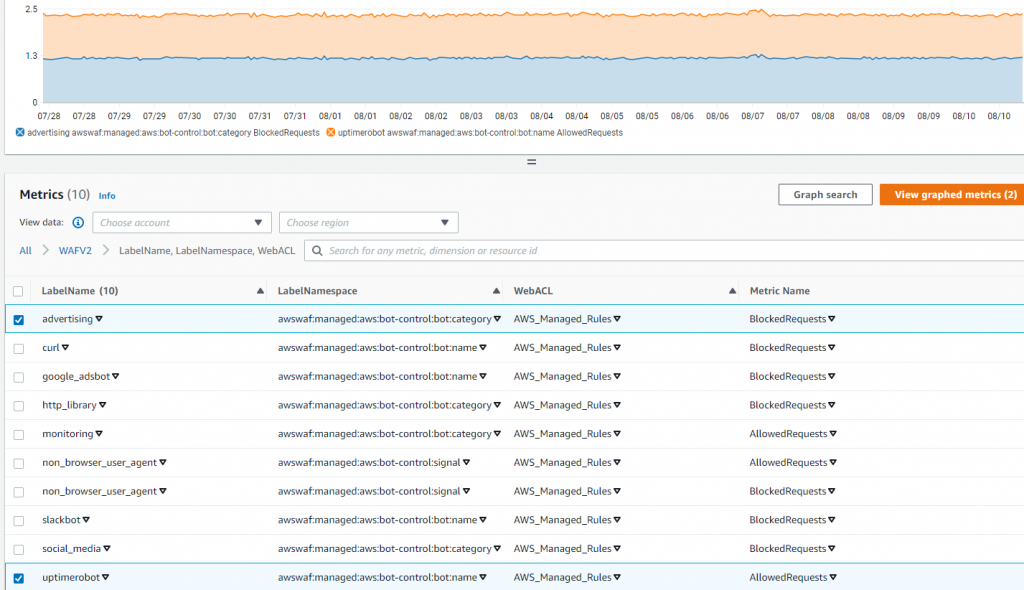
Rafael Koike

Rafael is a Principal Solutions Architect supporting Enterprise customers in SouthEast and part of the Storage TFC. Rafael has a passion to build and his expertise in security, storage, networking and application development have been instrumental to help customers move to the cloud secure and fast. When he is not building he like to do Crossfit and target shooting.

Eugene Toh

Eugene Toh is a Solutions Architect supporting Enterprise customers in the Georgia and Alabama areas. He is passionate in helping customers to transform their businesses and take them to the next level. His area of expertise is in cloud migrations and disaster recovery and he enjoys giving public talks on the latest cloud technologies. Outside of work, he loves trying great food and traveling all over the world.